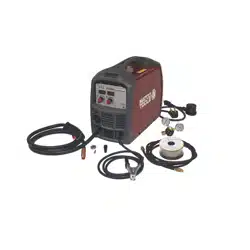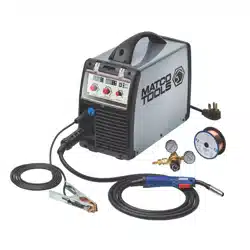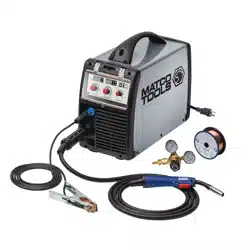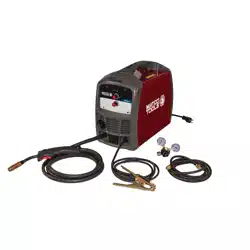
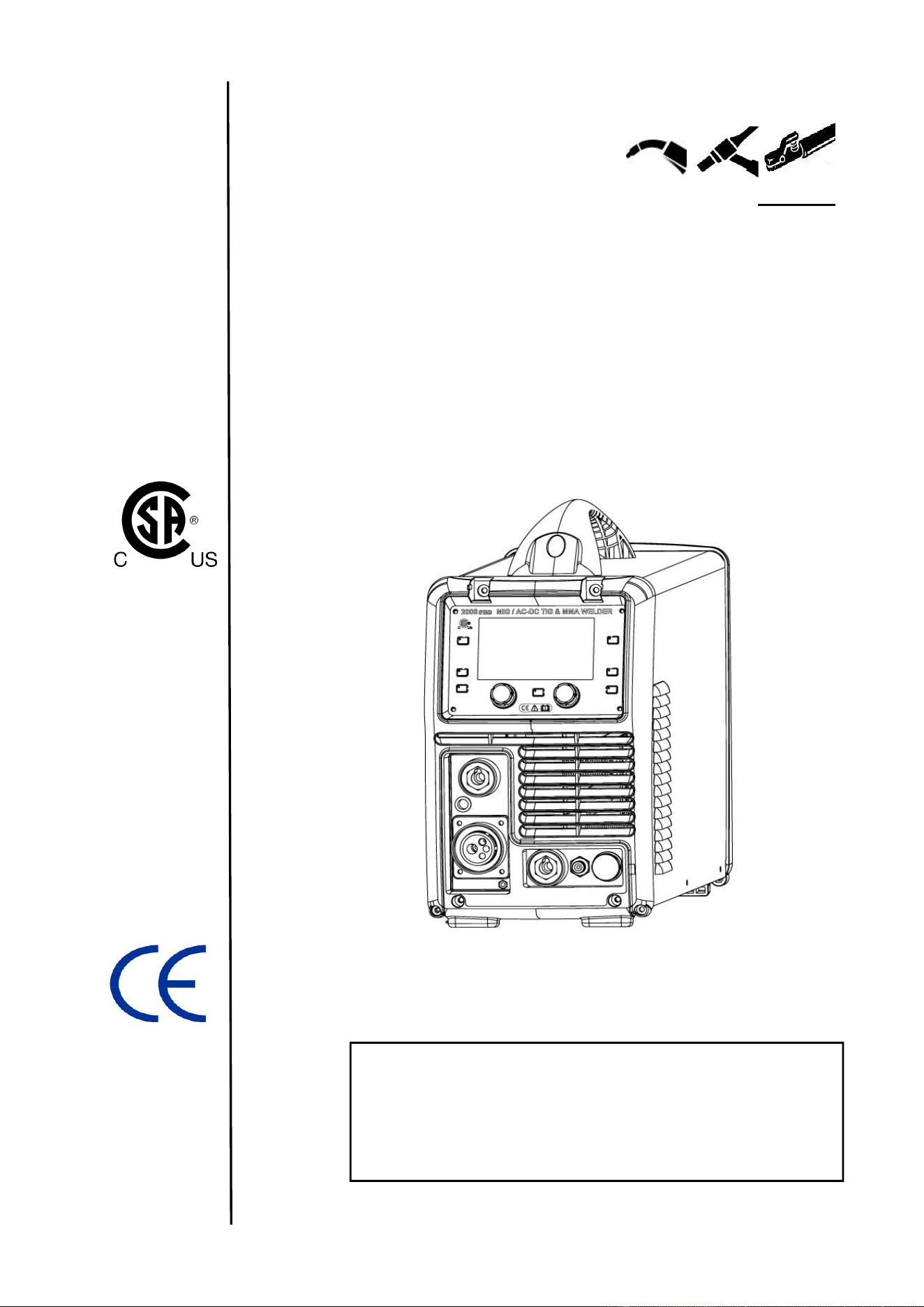
Part # 521.0005
Processes
Synergic MIG (GMAW)
AC / DC TIG (GTAW)
AC / DC STICK (SMAW)
04/2022
OPERATORS’ MANUAL
200S-PRO Synergic MIG
AC / DC TIG & MMA
Inverter Welder
IMPORTANT: Read this Owner’s Manual Completely before attempting to use this
equipment. Save this manual and keep it handy for quick reference. Pay particular
attention to the safety instructions we have provided for your protection. Contact your
distributor if you do not fully understand this manual.

CONTENT
I
CONTENT
§1 Safety ......................................................................................................................... 1
§1.1 Symbols Explanation .................................................................................................... 1
§1.2 Machine Operating Warnings! ...................................................................................... 1
§1.3 EMC device classification ............................................................................................ 7
§1.4 EMC measure ................................................................................................................ 7
§1.5 Warning label ................................................................................................................. 8
§2 Overview .................................................................................................................... 9
§2.1 Features ......................................................................................................................... 9
§2.2 Technical Data ............................................................................................................. 10
§2.3 Brief Introduction ........................................................................................................ 10
§2.4 Duty cycle and over temperature ............................................................................... 11
§2.5 Working Principle ........................................................................................................ 12
§3 Panel Functions & Descriptions ............................................................................ 13
§3.1 Machine Layout Description ....................................................................................... 13
§3.2 Layout of Control Panel .............................................................................................. 14
§3.2.1 Control panel .......................................................................................................................... 14
§3.2.2 MMA AC/DC Display introduction ........................................................................................ 15
§3.2.3 TIG HF / Lift-Arc Display introduction ................................................................................. 16
§3.2.4 MIG Manual Display introduction ......................................................................................... 22
§3.2.5 MIG SYN display introduction .............................................................................................. 24
§3.2.6 JOB display introduction ...................................................................................................... 25
§4 Installation & Operation ......................................................................................... 26
§4.1 Installation & Operation for MMA Electrode Welding ............................................... 26
§4.1.1 Set-Up Installation ................................................................................................................. 26
§4.1.2 Stick (MMA) Electrode Welding ............................................................................................ 27
§4.1.3 Stick (MMA) Welding Fundamentals .................................................................................... 28
§4.2 Installation & Operation for TIG HF/LIFT-ARC ........................................................... 30
§4.2.1 Set-Up for TIG Welding .......................................................................................................... 30
§4.2.2 DC TIG Welding ...................................................................................................................... 32
§4.2.3 TIG Welding Fusion Technique ............................................................................................ 33
§4.2.4 Tungsten Electrodes .............................................................................................................. 35

CONTENT
II
§4.2.5 Tungsten Preparation ............................................................................................................ 37
§4.2.6 TIG Torch Switch Controls .................................................................................................... 40
§4.3 Installation & Operation for MIG Welding .................................................................. 41
§4.3.1 Set up installation for MIG Welding ..................................................................................... 41
§4.3.2 Wire Feed Roller Selection ................................................................................................... 43
§4.3.3 Wire Installation and Set-Up Guide ...................................................................................... 44
§4.3.4 MIG Torch Liner Types and Information .............................................................................. 47
§4.3.5 Torch & Wire Feed Set-Up for Aluminum Wire.................................................................... 49
§4.3.6 MIG Welding ........................................................................................................................... 49
§4.4 Installation & Operation for Spool Gun ..................................................................... 56
§4.4.1 Set up installation for Spool Gun ......................................................................................... 56
§4.4.2 Spool Gun Control ................................................................................................................. 58
§4.5 Welding Parameters .................................................................................................... 59
§4.6 Operation Environment .............................................................................................. 60
§4.7 Operation Notices ....................................................................................................... 60
§5 Diagram for Guns ................................................................................................... 61
§5.1 SL15 MIG Torch ........................................................................................................... 61
§5.2 SL17 TIG Torch ............................................................................................................ 62
§5.3 SG226 Spool Gun ........................................................................................................ 63
§6 Maintenance & Troubleshooting ........................................................................... 64
§6.1 Maintenance ................................................................................................................ 64
§6.2 Welding Trouble Shooting .......................................................................................... 65
§6.2.1 MIG Welding - Trouble Shooting .......................................................................................... 66
§6.2.2 MIG Wire Feed - Trouble Shooting ....................................................................................... 68
§6.2.3 DC TIG Welding - Trouble Shooting ..................................................................................... 69
§6.2.4 MMA Welding - Trouble Shooting ......................................................................................... 71
§6.3 List of Error Codes ...................................................................................................... 73
§6.4 Machine Parts Drawing ............................................................................................... 74
§6.5 Electrical Schematic Drawing .................................................................................... 75
SAFETY
1
§1 Safety
Notice: The instructions are for reference only. The manufacturer
reserves the right to explain the differences between the description
and the product due to product changes and upgrades!
Welding and cutting equipment can be dangerous to both the operator and people in
or near the surrounding working area. If the equipment is not correctly operated.
Equipment must only be used under the strict and comprehensive observance of all
relevant safety regulations. Read and understand this instruction manual carefully before
the installation and operation of this equipment.
§1.1 Symbols Explanation
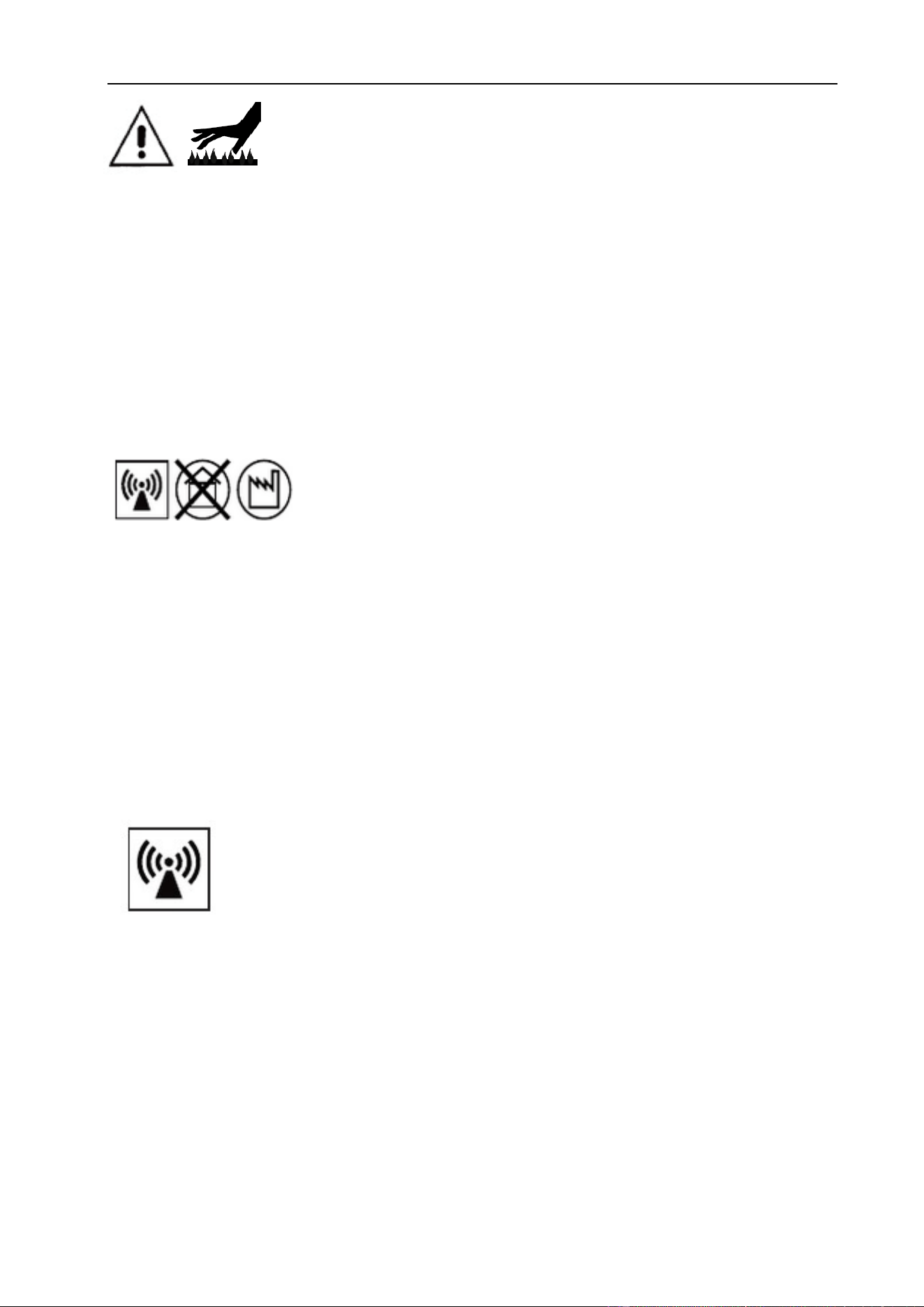
The above symbols mean warning!
Notice! Running parts, poential electric shock or making contact with thermal parts will
cause damage to your body and others. The underline message is as follows:
Welding is quite a safe operation after taking several necessary protection
measures!
§1.2 Machine Operating Warnings!
The following symbols and words explanations are to make all aware of danger to your
body or others, which could happen during the welding operation. While seeing these
symbols, please remind yourself and others to be careful.
Only people who are trained professionally can install, debug, operate, maintain and
repair the welding equipment covered with this Operator’s Manual!
During the welding operation, non-critical persons should not be in attendance.

SAFETY
2
After shutting off the machine power, please maintain and examine the equipment
according to §7 because of the DC voltage existing in the electrolytic capacitors at the
output of the power supply!
ELECTRIC SHOCK CAN KILL
Touching live electrical parts can cause fatal shocks or severe burns. The electrode and
work circuit may be electrically live whenever the output is ON. The input power circuit
and internal machine circuits are also live when power is ON. In MIG welding, the wire,
drive rollers, wire feed housing, and all metal parts touching the welding wire are
electrically live. Incorrectly installed or improperly grounded equipment is dangerous.
Never touch live electrical parts.
Wear dry, hole-free gloves and safety clothing to insulate and protect your body.
Be sure to install the equipment correctly and ground the work or metal to be welded to
a good electrical (earth) ground according to the operation manual.
The electrode and work (or ground) circuits are electrically “hot” when the machine is
ON. Do not touch these “hot” parts with your bare skin or wet clothing. Wear approved
welding gloves at all times as “hot” pieces remain long after welding cycle.
In semiautomatic or automatic wire welding, the electrode, electrode reel, welding
head, nozzle or semiautomatic welding gun are also electrically “hot”.
Insulate yourself from work and ground using dry insulation. Make certain the
insulation is large enough to cover your area of physical contact with work and ground.
Be careful when using the equipment in small places or in wet circumstances.
Always be sure the work cable makes a good electrical connection with the metal being
welded. The connection should be as close as possible to the area being welded.
Maintain the electrode holder, work clamp, welding cable and welding machine in good,
safe operating condition. Replace damaged insulation.
Never dip the electrode in water for cooling.
Never simultaneously touch electrically “hot” parts of electrode holders connected to
two welders because voltage between the two can be the total of the open circuit
voltage of both welders.
SAFETY
3
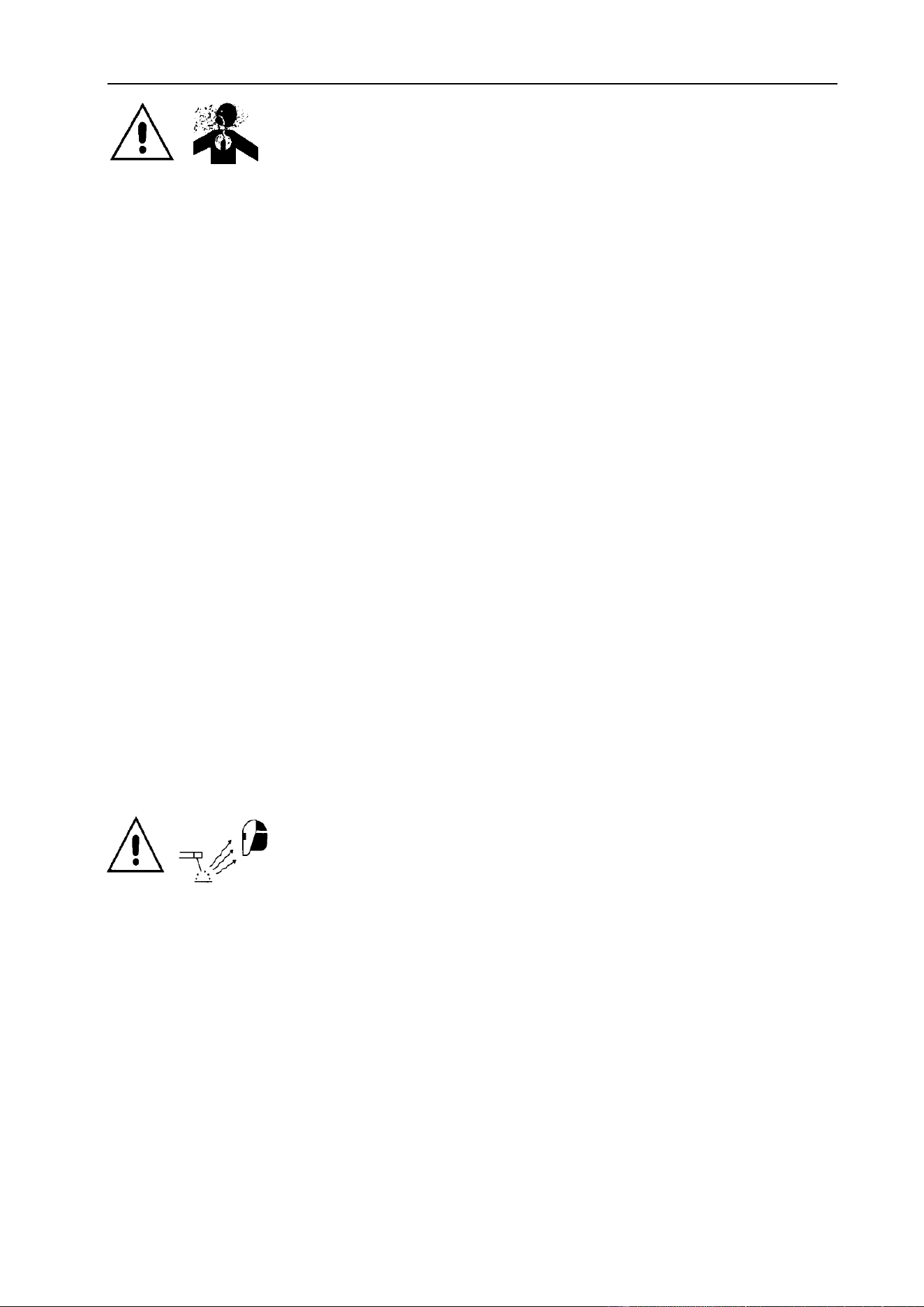
FUMES AND GASES CAN BE DANGEROUS
Smoke and gas generated whilst welding or cutting can be harmful
to people’s health. Welding produces fumes and gases. Breathing these fumes and
gases can be hazardous to your health.
Do not breathe the smoke and gas generated whilst welding or cutting, keep your head
out of the fumes. Use enough ventilation and/or exhaust at the arc to keep fumes and
gases away from the breathing zone. When welding with electrodes which require
special ventilation such as stainless or hard facing or on lead or cadmium plated steel
and other metals or coatings which produce highly toxic fumes, keep exposure as low as
possible and below the Threshold Limit Values (TVL) using local exhaust or mechanical
ventilation. In confined spaces or in some circumstances, outdoors, a respirator may be
required. Additional precautions are also required when welding on galvanized steel.
Do not weld in locations near chlorinated hydrocarbon vapors coming from degreasing,
cleaning or spraying operations. The heat and rays of the arc can react with solvent
vapors to form phosgene, a highly toxic gas, and other irritating products.
Shielded gases used for arc welding can displace air and cause injury or death. Always
maintain adequate ventilation, especially in confined areas, to insure air is safe.
Read and understand the manufacturer’s instructions for this equipment and the
consumables to be used. Follow your employer’s safety practices.
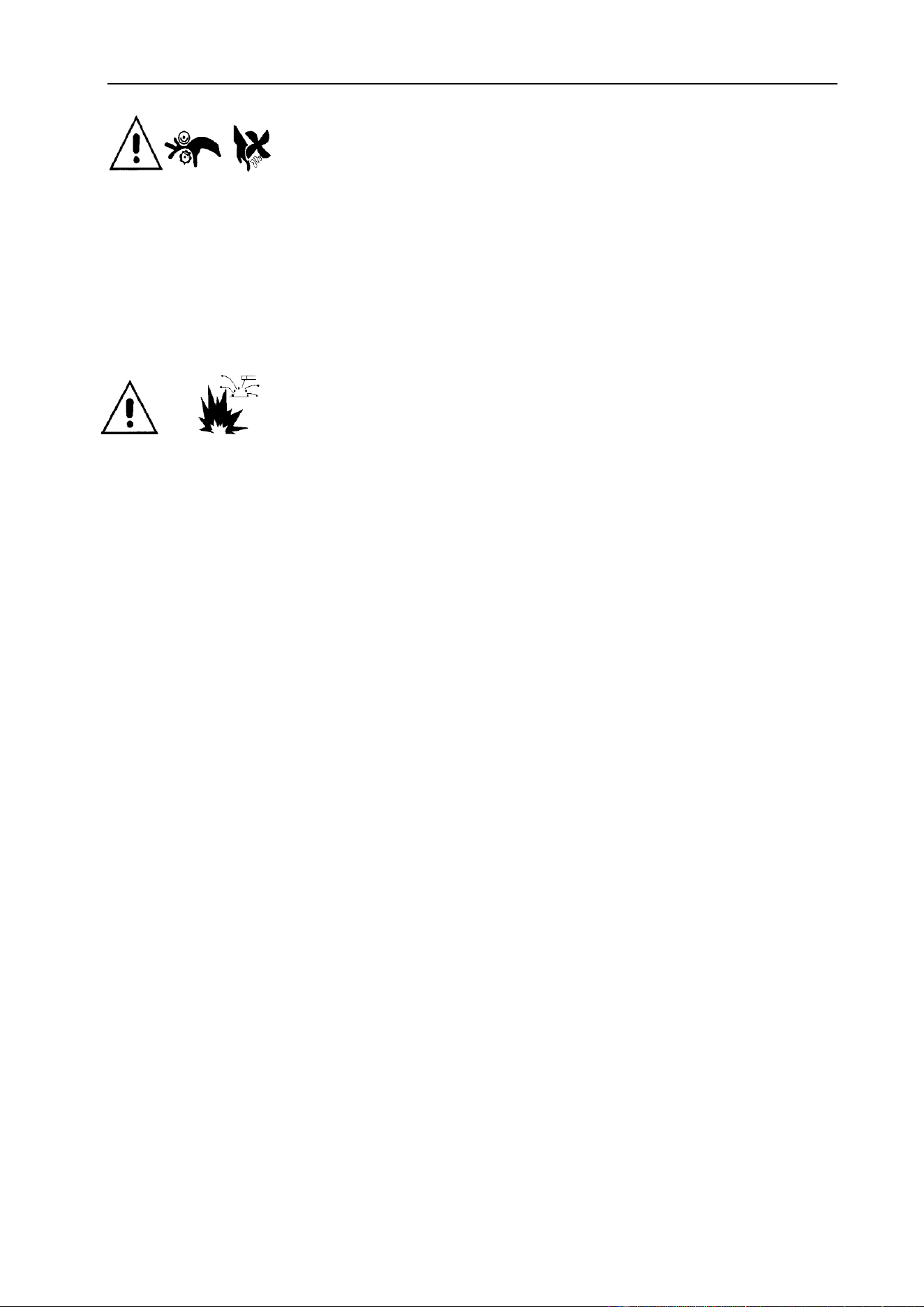
ARC RAYS ARE HARMFUL TO EYES & SKIN
Arc rays from the welding process produce intense visible and invisible ultraviolet and
infrared rays that can burn eyes and skin.
Use a shield with the proper filter and cover plates to protect your eyes from sparks
and the rays of the arc when welding or observing open arc welding.
Use suitable clothing made from durable flame-resistant material to protect your skin
and that of your coworkers from the arc rays.
Protect other nearby personnel with suitable, non-flammable arc screening so as not to
expose them to the arc rays or to hot spatter metal.
SAFETY
4
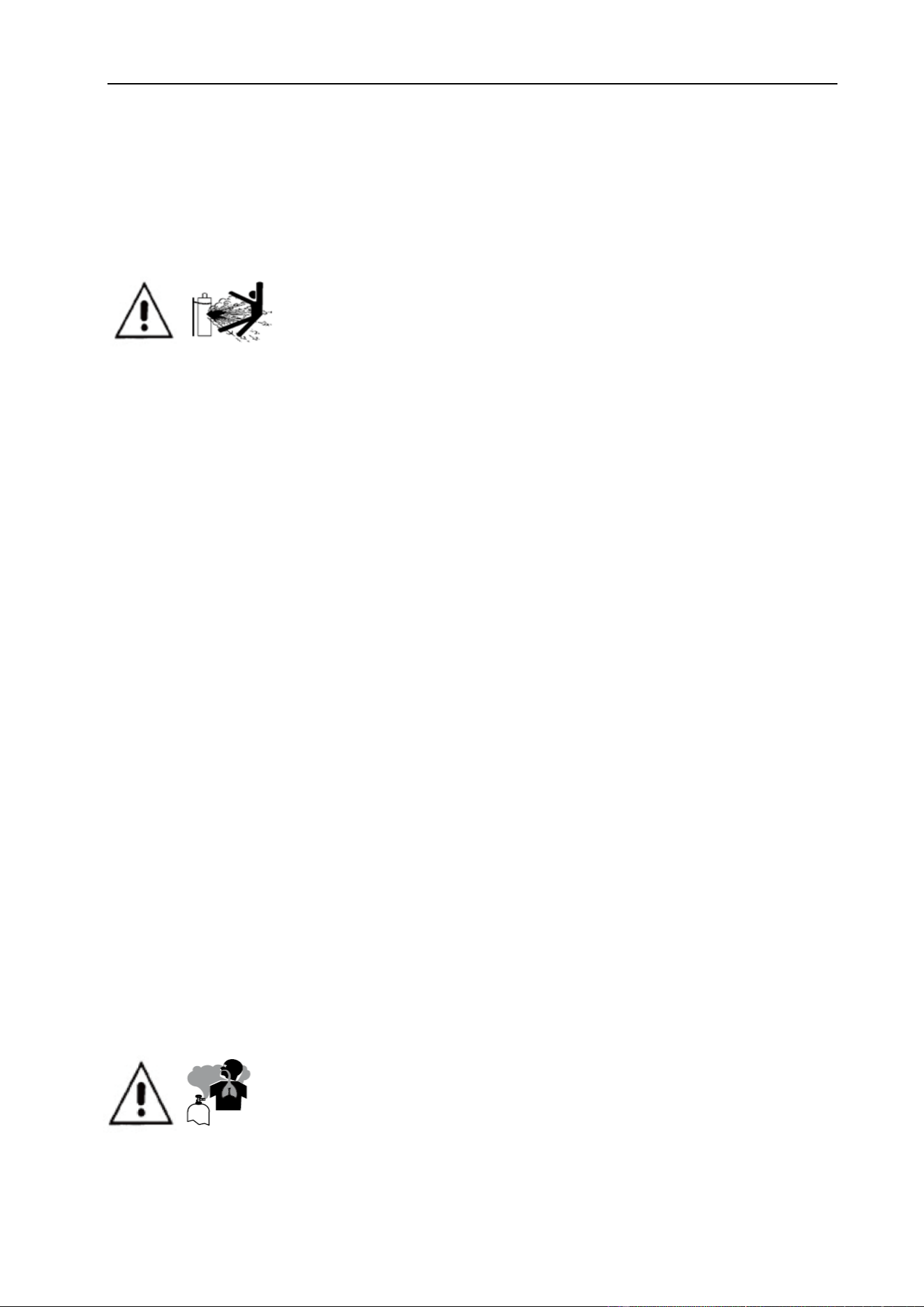
MOVING PARTS REQUIRE SELF-PROTECTION
Keep all equipment safety guards, covers and devices in position and in good repair.
Keep hands, hair, clothing and tools away from drive rolls, cooling fans and all other
moving parts when starting, operating or repairing equipment.
Do not put your hands near the rollers or fan. Do not attempt to change rollers, wire
guides or liners while machine is running.
WELDING SPARKS CAN CAUSE FIRE OR EXPLOSION
Welding on closed containers, such as tanks, drums, or pipes, can cause them to
explode. Flying sparks from the welding arc, hot work piece, and hot equipment can
cause fires and burns. Accidental contact of electrode to metal objects can cause sparks,
explosion, overheating, or fire.
Remove fire hazards material from the welding area. If this is not possible, cover them
to prevent the welding sparks from starting a fire. Remember that welding sparks and hot
materials from welding can easily go through small cracks and openings to adjacent
areas. Avoid welding near hydraulic lines. Have a fire extinguisher readily available.
Where compressed gases are to be used at the job site, special precautions should be
used to prevent hazardous situation.
When not welding, make certain no part of the electrode circuit is touching the work or
ground. Accidental contact can cause overheating and create a fire hazard.
Do not heat, cut or weld tanks, drums or containers until the proper steps have been
taken to insure that such procedures will not cause flammable or toxic vapors from
substances inside. They can cause an explosion even though they have been “cleaned”.
Preheat and vent hollow castings or containers before heating, cutting or welding.
Flammable chemicals or oils may reside in pours and crevices and may explode.
Sparks and spatter are thrown from the welding arc. Wear oil free protective garments.
Wear earplugs when welding out of position or in confined places. Always wear safety
glasses with side shields or welding helmet when in a welding area.
SAFETY
5
Connect the work cable to the work as close to the welding area as practical. Work
cables connected to the building framework or other locations away from the welding
area increase the possibility of the welding current passing through lifting chains, crane
cables or other alternate circuits. This can create fire hazards or overheat lifting chains or
cables until they fail.
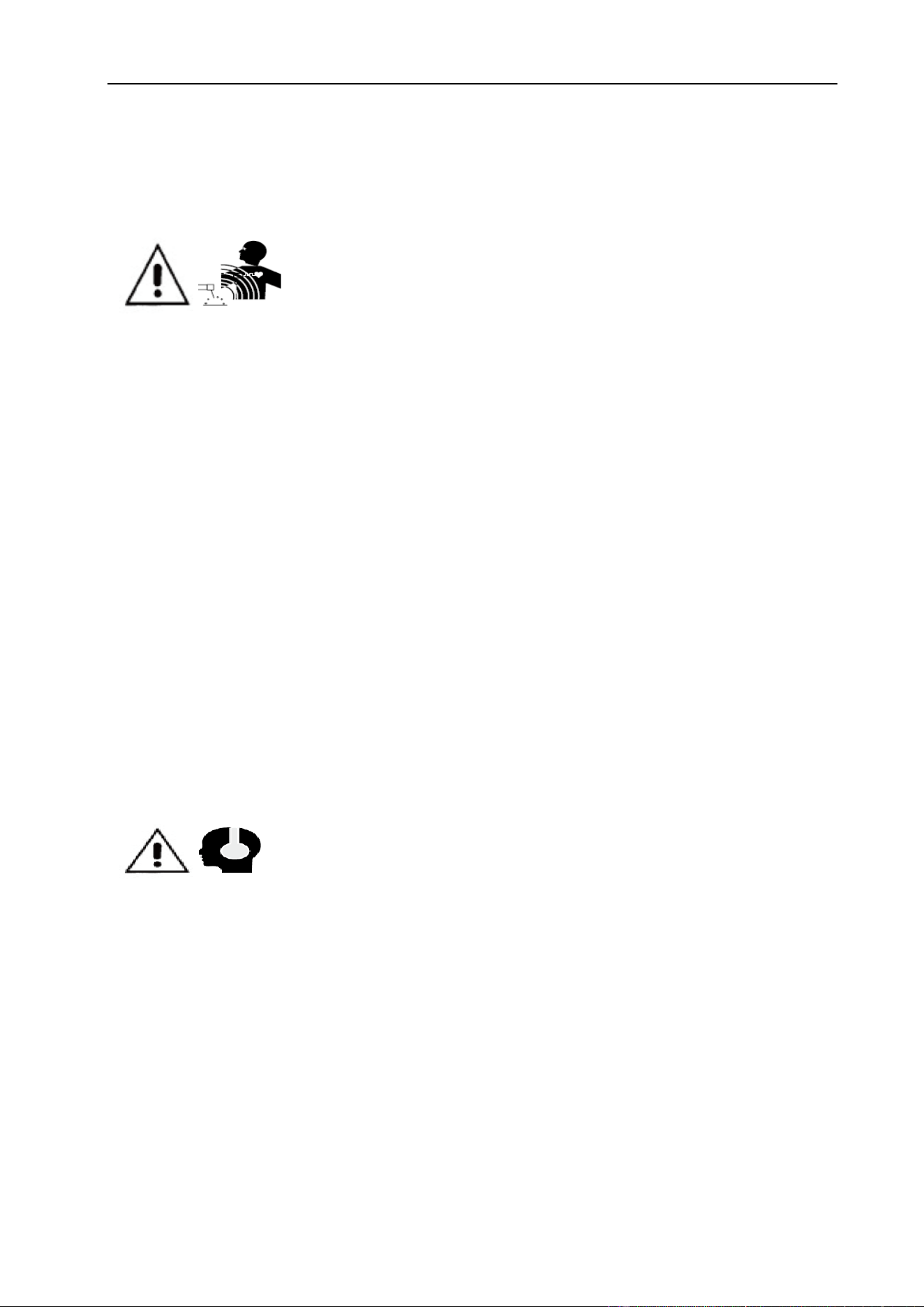
GAS CYLINDER CAN BE DANGEROUS & EXPLODE
Shielding gas cylinders contain gas under high pressure. Because
gas cylinders are normally part of the welding process, be sure to treat them carefully.
CYLINDERS can explode if damaged.
Protect gas cylinders from excessive heat, mechanical shocks, physical damage, slag,
open flames sparks, and arcs.
Never allow the welding electrode or earth clamp to touch the gas cylinder, do not
drape welding cables over the cylinder and never weld on the cylinder.
Open the cylinder valve slowly, turning your face away from the cylinder outlet valve
and gas regulator, as you confirm all connections are secure and there are no leaks.
Use only compressed gas cylinders containing the correct shielding gas for the
process used and properly operating regulators designed for the gas and pressure used.
Hoses & fittings should be designed for welding and maintained in good condition.
Always keep cylinders in an upright position securely chained to an undercarriage or
fixed support to prevent tipping or falling over.
Cylinders should be located:
- Away from areas where they may be struck or subjected to physical damage.
- At a safe distance from arc welding or cutting operations and any spark or flame.
Valve protection caps should always be in place and hand tight except when the
cylinder is in use or connected for use.
GAS BUILD-UP MAY CAUSE SERIOUS INJURY
The build-up of gas can cause a toxic environment, deplete the oxygen content in the
air resulting in death or injury. Many gases use in welding are invisible and odorless.
SAFETY
6
Shut off shielding gas supply when not in use.
Always ventilate confine spaces or use approved air-supplied respirator.
ELECTROMAGNETIC FIELDS MAY BE DANGEROUS
Electric current flowing through any conductor causes localized Electric and Magnetic
Fields (EMF). The discussion on the effect of EMF is ongoing in the entire world. Up to
now, no material evidence shows that EMF may have effects on health. However, the
research on the effect of EMF is still ongoing. Before any conclusion, we should
minimize exposure to EMF as few as possible. In order to minimize EMF, we should use
the following procedures:
Route the electrode and work cables together – Secure them with tape when possible.
All cables should be put away and far from the operator.
Never coil the power cable around your body.
Make sure welding machine and power cable to be far away from the operator as far
as possible according to the actual circumstance.
Connect the work cable to the workpiece as close as possible to the welding area.
The people with heart-pacemaker should be away from the welding area.
NOISE MAY CAUSE HEARING DAMAGE
Noise from some processes or equipment can damage hearing. You must protect your
ears from loud noise to prevent permanent loss of hearing.
To protect your hearing from loud noise, wear protective ear plugs and/or earmuffs.
Protect others in the workplace.
Noise levels should be measured to be sure the decibels (sound) do not exceed safe
levels.
SAFETY
7
HOT PARTS MAY CAUSE BURNS
Items being welded generate and retain heat that can cause severe burns. Do not touch
hot parts with bare hands. Allow a cooling period before working on the welding gun.
Use insulated welding gloves and clothing to handle hot parts and prevent burns.
§1.3 EMC device classification
Radiation Class A Device.
Only can be used in the industrial area
If it is used in other area, it may cause connection and
radiation problems of circuit.
Radiation Class B device.
It can meet the radiation requirements of residential area and industrial area. It also
can be used in residential area which power is supplied by public low voltage circuit.
EMC device can be classified by power nameplate or technical data. Arc welding
machines belong to Class A.
§1.4 EMC measure
In the special situation, the specified area may be affected, the standard
of radiation limit value has been complied with (i.e.: The device, which is
easy effected by electromagnetism, is used at the installation location, or
there is radio or TV near the installation location). In this condition, the operator should
adopt some appropriate measures to remove interference.
According to the domestic and international standards, the ambient devices’
electromagnetism situation and anti-interference ability must be checked:
Safety device
Power line, Signal transmission line and Date transmission line
Date processing equipment and telecommunication equipment

SAFETY
8
Inspection and calibration device
The effective measures avoid the problem of EMC:
a) Power source - Even though the power source connection meet rules, we still need
to take additional measure to remove the electromagnetic interference. (i.e.: Add
power filter.)
b) Power and earth welding cables - Shorten the length of cables and maintain distance
between cables to minimize interference.
c) Work-piece earth connection - When necessary, use appropriate capacitance to
connect the work-piece to ground.
d) Shielding - Mechanically shield the ambient devices or the welding machine.
§1.5 Warning label
This device is manufactured with warning labels. Do not remove, destroy or cover
these labels. These warnings are intended to avoid incorrect device operations that
could result in serious personal injury or property damage.
OVERVIEW
9
§2 Overview
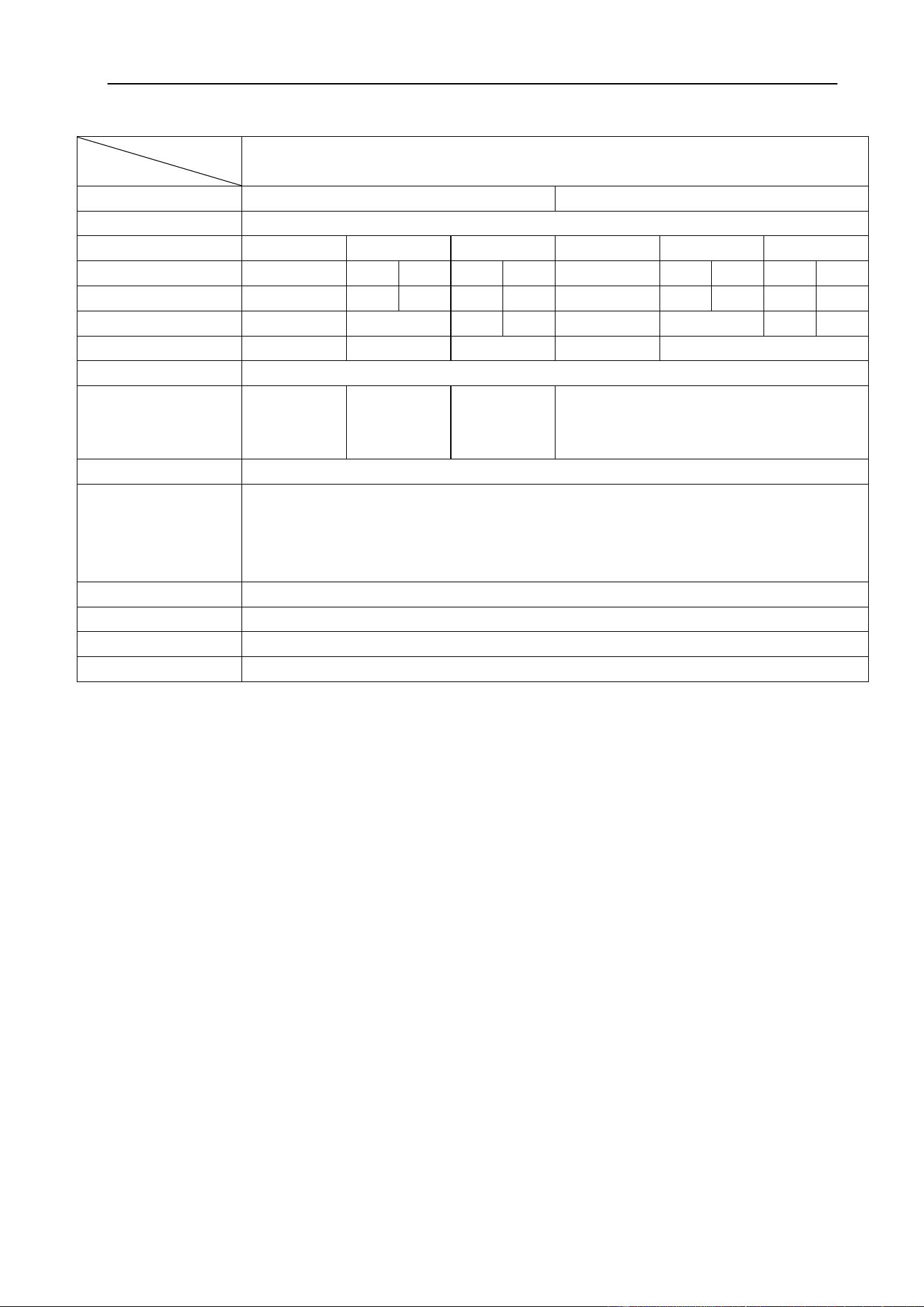
§2.1 Features
⚫ New larger LCD screen for accurate setting & feedback of welding output.
⚫ Full PWM technology and IGBT inverter technology.
⚫ Active PFC technology for increased duty cycle and energy efficiency.
⚫ Multi-voltage input 110–240VAC for maximum flexibility and portability.
⚫ MIG Synergic programs for aluminum, mild steel, stainless steel & silicone bronze.
- 2T / 4T / Spot-weld welding mode
- Full function parameter adjustment
⚫ MMA/Stick electrode function DC & AC
- Hot start (improves electrode starting)
- Adjustable Arc Force
⚫ TIG AC & DC output current
- Lift Arc ignition (prevents tungsten sticking
during arc ignition)
- 2T / 4T Trigger Control
- Adjustable Down slope
- Spot welding mode for TIG HF
⚫ Internal wire feeder, gear driven for up to
200mm Ø spool.
⚫ Euro style MIG torch connection.
⚫ IP21S rating for environmental/safety protection.
⚫ Spool Gun Connection.
OVERVIEW
10
§2.2 Technical Data
Models
Parameters
MULTIMIG 200 PRO
Input Voltage (V)
1-110±10%
1-230±10%
Frequency (HZ)
50/60
MIG
TIG
MMA
MIG
TIG
MMA
/
AC
DC
AC
DC
/
AC
DC
AC
DC
Input Current (A)
37.9
34.8
35.0
37.6
40.3
27.2
21.6
21.8
28.2
31.4
Input Power (KW)
4.2
3.8
4.1
4.4
6.2
5.0
6.5
7.2
Welding Current (A)
30~140
10~160
10~130
30~200
10~200
No-load Voltage (V)
72
Duty cycle (40℃)
30% 140A
60% 100A
100% 80A
30% 160A
60% 115A
100% 90A
25% 130A
60% 85A
100% 65A
30% 200A
60% 145A
100% 110A
Power Factor (%)
0.99
Diameter (mm)
Fe: 0.6/0.8/0.9/1.0
SS: 0.8/1.0
Flux-Cored: 0.6/0.8/0.9/1.0
Al: 1.2
Protection class
IP21S
Circuit breaker
JD03-A1 30A
Dimensions (mm)
590*220*410
Weight (Kg)
20.6
Note: The above parameters are subject to change with future machine improvement!
§2.3 Brief Introduction
The MULTIMIG-PRO series of welding machines are new inverter-based
MIG/TIG/MMA welding machine with synergic MIG programs and AC/DC TIG & MMA
functions. The MULTIMIG-PRO series of welding machines features MIG welding with
traditional manual or full synergic welding programs designed for ease of use on multiple
alloy materials with selected gas mixture. The operator simply selects the material & wire
diameter with corresponding gas type then enters the material thickness and starts
welding. Once this is done the operator can make fine adjustments to the voltage for
even greater control of the weld pool. The TIG high-frequency or lift-arc ignition
capability delivers perfect arc ignition every time and a remarkably smooth stable arc
produces high quality TIG welds. TIG functionality includes AC or DC wave forms, slope
& pre/post gas and, in AC mode offers, pulse, balance control as well as adjustable
OVERVIEW
11
frequency. The stick (MMA) welding capability delivers easy electrode welding in DC or
AC output with high quality results on mild steel, cast iron, stainless and low hydrogen
material. An additional feature is the spool gun ready function that allows the simple
connection of spool gun for the use of thin or softer wires that don’t have the column
strength to feed through MIG torches, such as aluminum and silicone bronze wire.
The MULTIMIG-PRO series of welding machines has built-in automatic protection
functions to protect the machines from over-voltage, over-current (when portable
generator powered) and over-heat. If any one of the above problems happens, the alarm
lamp on the front panel will be lit and output current will be shut off automatically for the
machine to protect itself and prolong the equipment using life.
§2.4 Duty cycle and over temperature
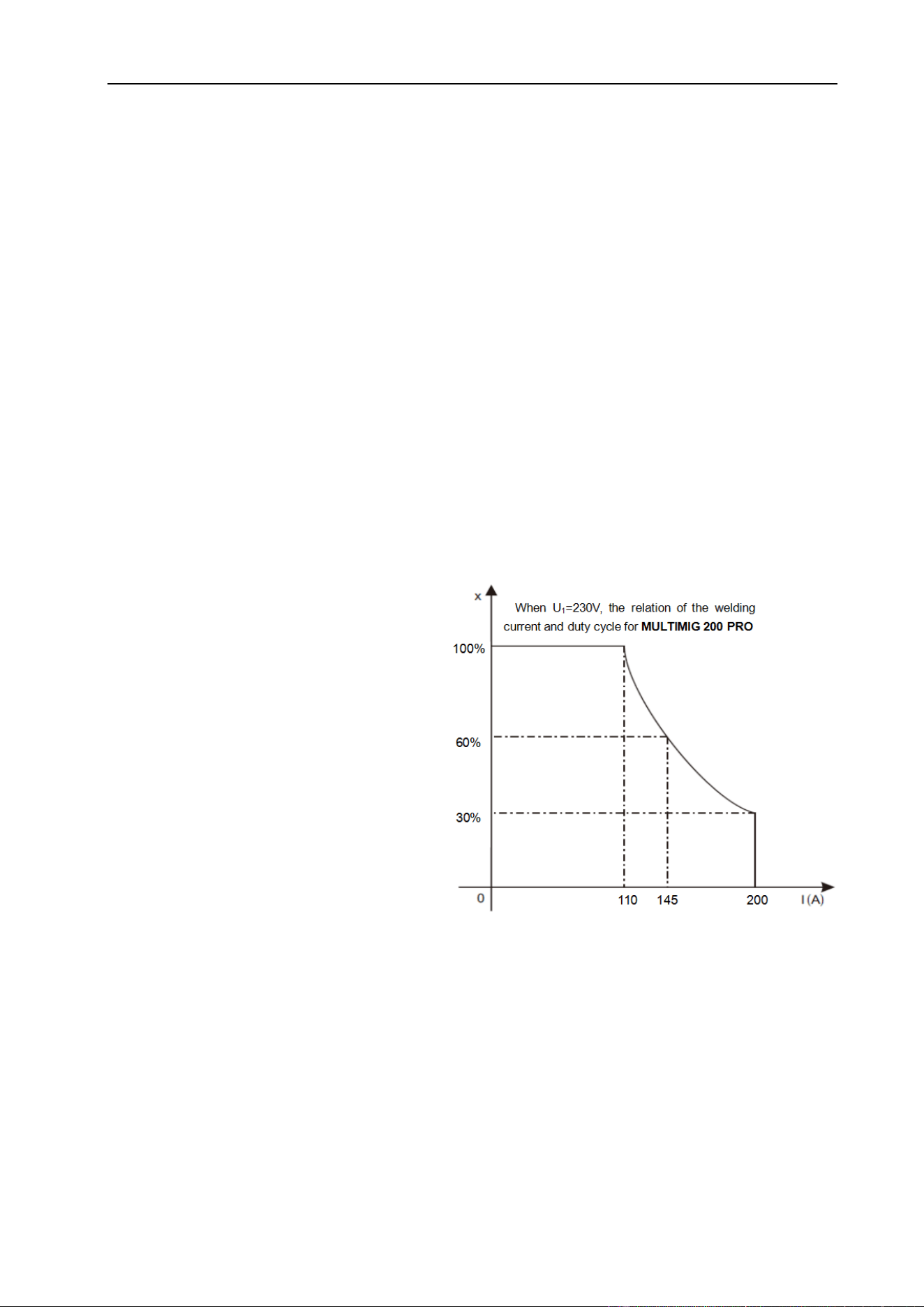
The letter “X” stands for Duty Cycle,
which is defined as the portion of the
time a welding machine can weld
continuously with its rated output
current within a certain time cycle (10
minutes).
The relation between the duty cycle
“X” and the output welding current “I” is
shown as the right figure.
If the welding machine overheats, the IGBT over-heat protection sensing will send a
signal to the welding machine control unit to cut the output welding current OFF and light
the over-heat pilot lamp on the front panel. In that case, the machine should not be
welding for 10~15 minutes to cool down with the fan running. When operating the
machine again, the welding output current or the duty cycle should be reduced.
OVERVIEW
12
§2.5 Working Principle
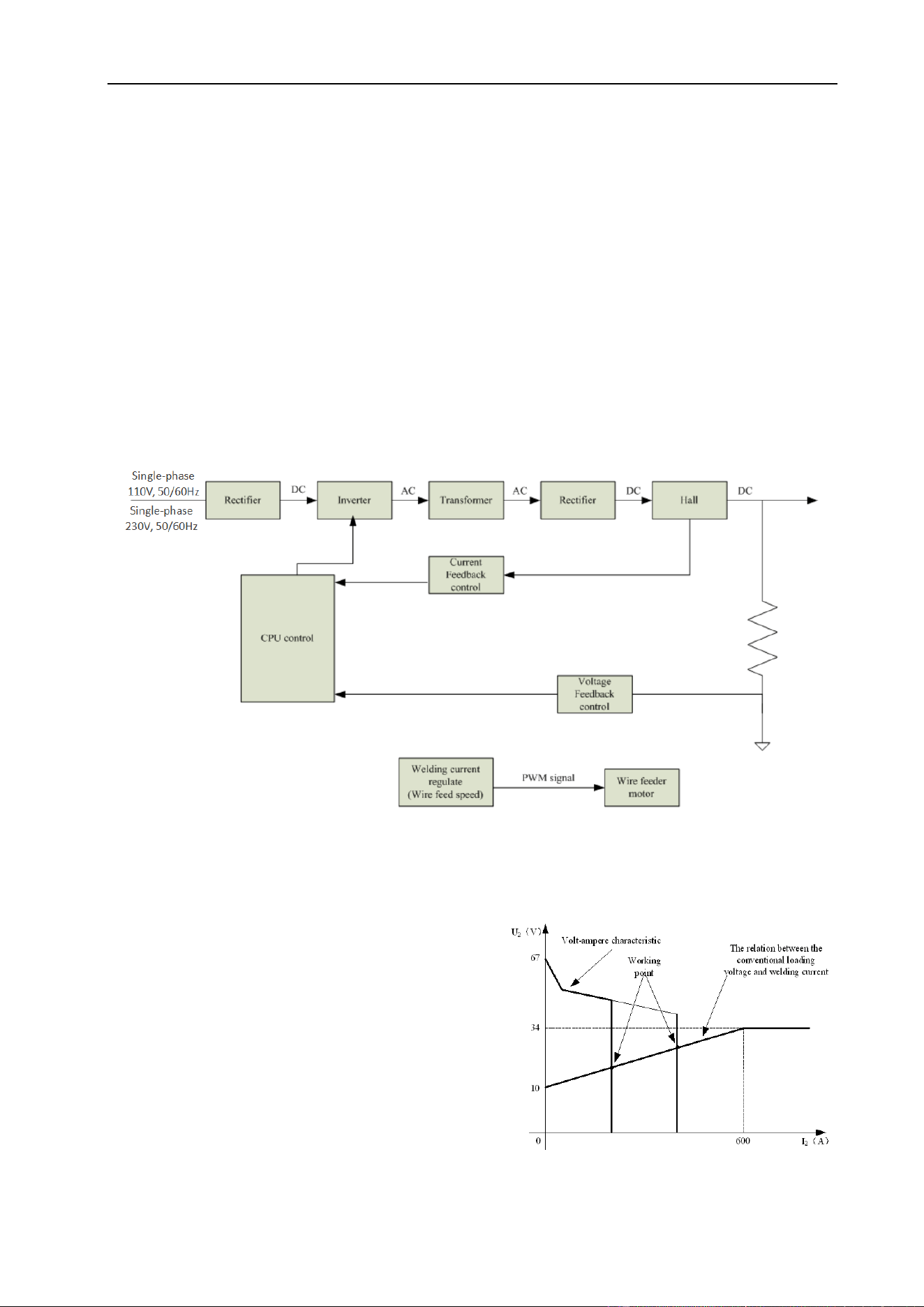
The working principle of MULTIMIG-PRO series welding machine is shown as the
following figure. Single-phase 110V/230V work frequency AC is rectified into DC (530V),
then is converted to medium frequency AC (about 20KHz) by inverter device (IGBT),
after reducing voltage by medium transformer (the main transformer) and rectifying by
medium frequency rectifier (fast recovery diodes) and is outputted by inductance filtering.
The circuit adopts current feedback control technology to insure current output stably
when MMA or TIG. And adopts voltage feedback control technology to insure voltage
output stably when MIG. Meanwhile, the welding current parameter can be adjusted
continuously and infinitely to meet with the requirements of welding craft.
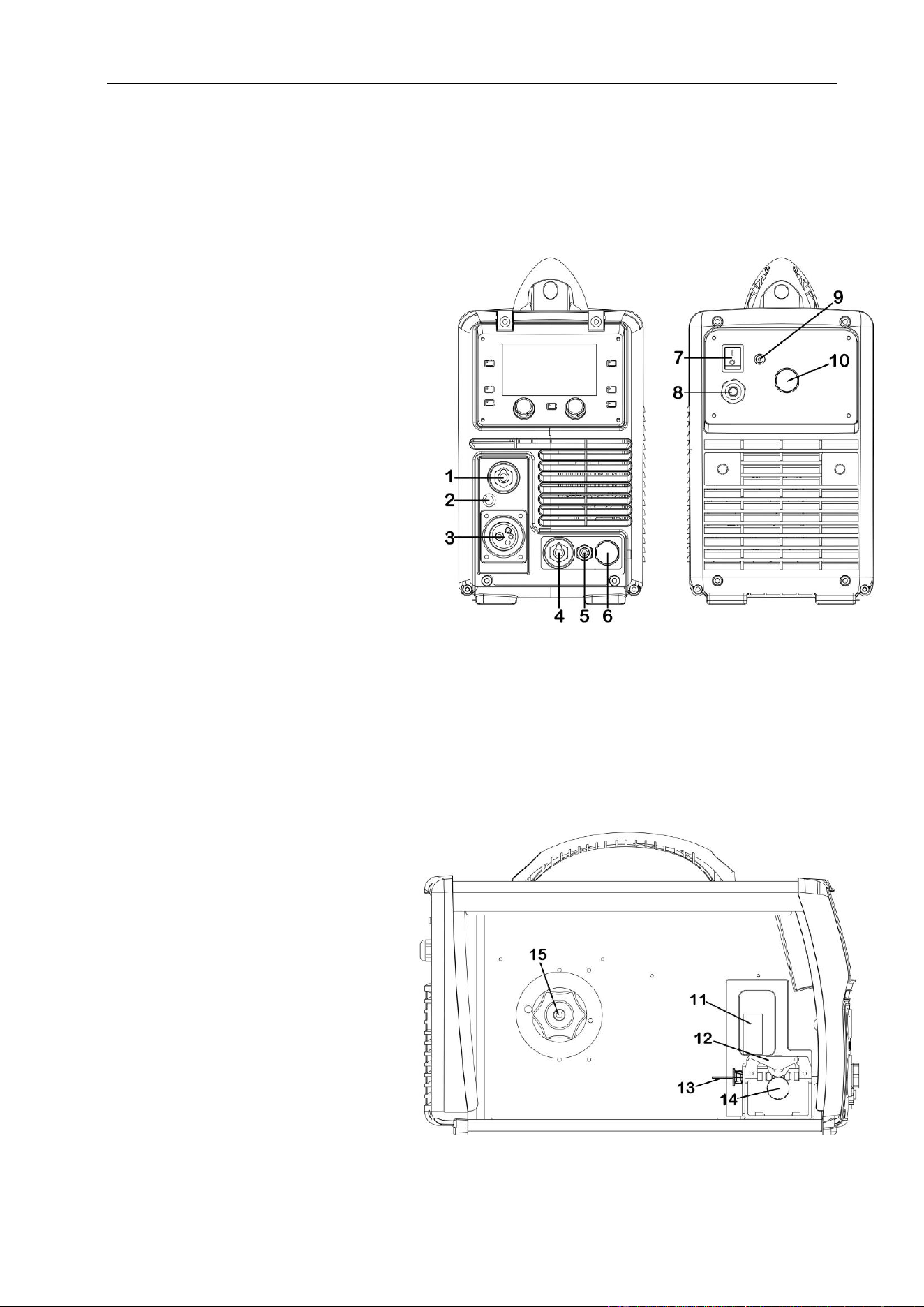
§2.6 Volt-Ampere Characteristic
MULTIMIG-PRO series of welding machines
has an excellent volt-ampere characteristic,
whose graph is shown on right. The relation
between the rated loading voltage U
2
and
welding current I
2
is: U
2
=14+0.05I
2
(V).
PANEL FUNCTIONS & DESCRIPTIONS
13
§3 Panel Functions & Descriptions
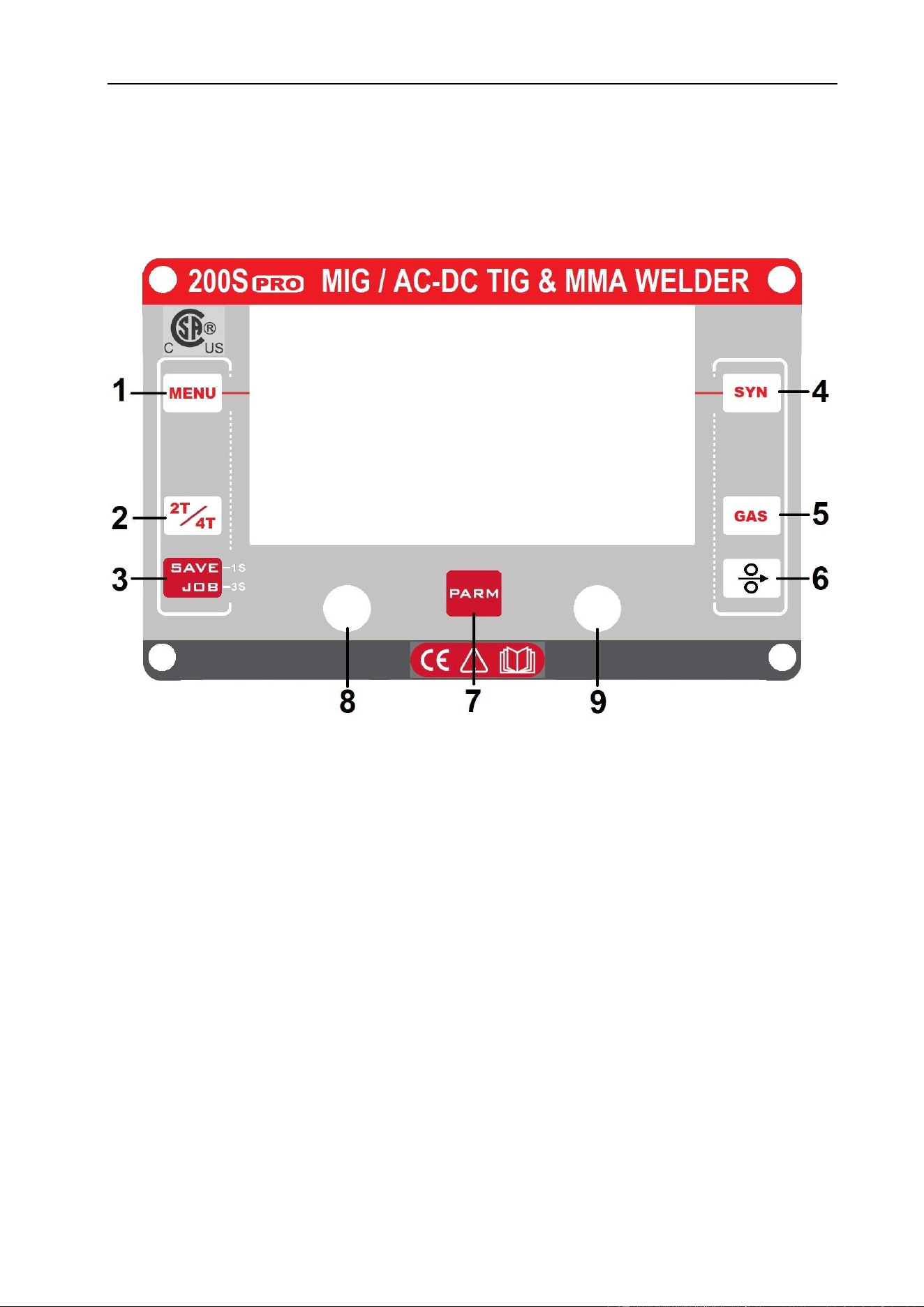
§3.1 Machine Layout Description
Front and rear panel layout of welding machine
1. Positive (+) welding power output
connection socket.
2. Polarity switching cable.
3. MIG torch euro connector.
4. Negative (-) welding power output
connection socket.
5. TIG torch gas connector.
6. 9-pin socket for TIG torch/ foot
pedal control.
7. Power ON/OFF switch.
8. Input power service cord.
9. Gas inlet connector.
10. 9-pin socket for spool gun control.
Wire feed of welding machine
11. Wire feed tension adjustment.
12. Wire feed tension arm.
13. Wire feeder inlet guide.
14. Wire drive roller.
15. Wire spool holder.
PANEL FUNCTIONS & DESCRIPTIONS
14
§3.2 Layout of Control Panel
§3.2.1 Control panel
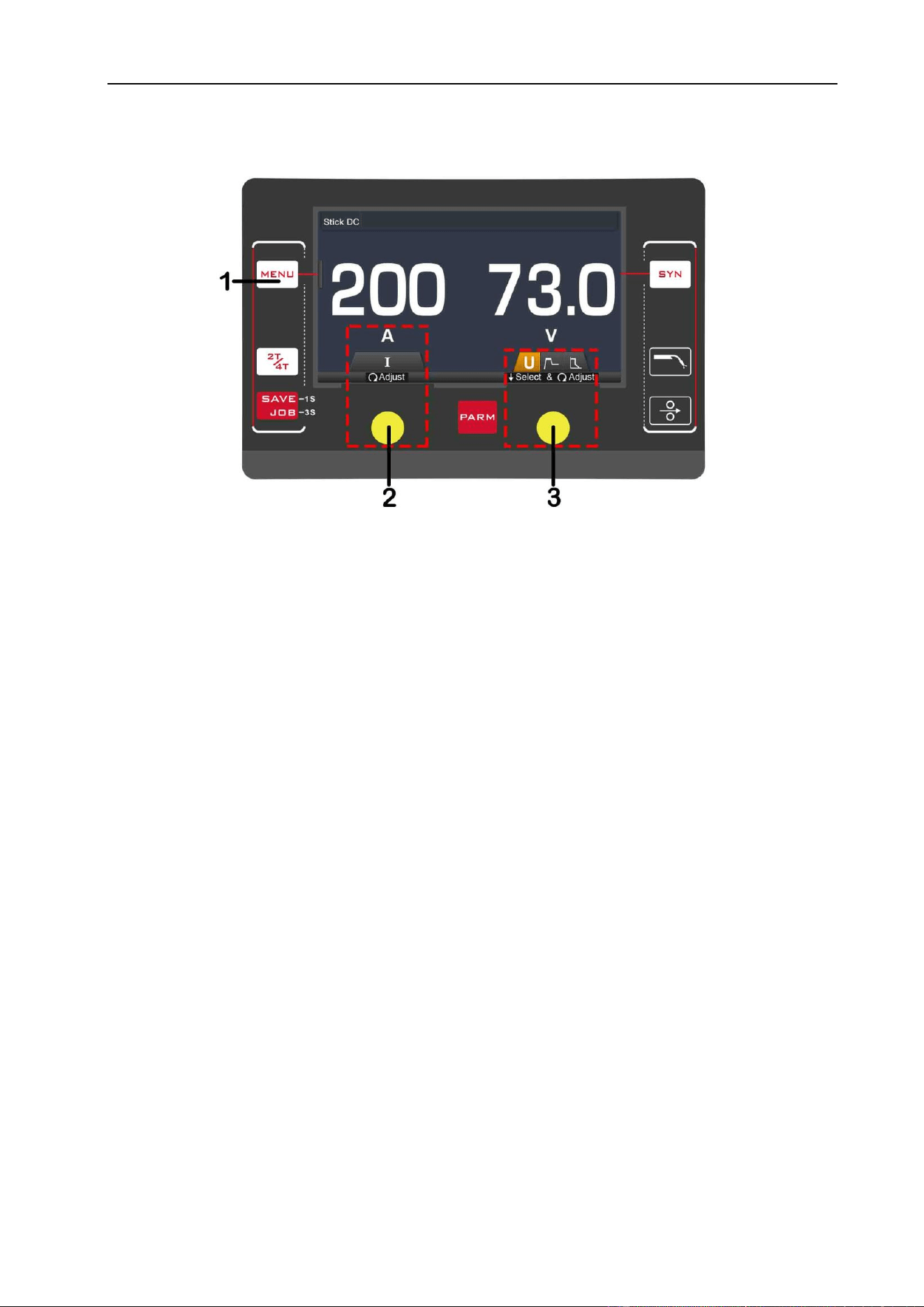
1. MENU Button: Press it to select welding modes: Stick DC, Stick AC, TIG HF, TIG
Lift-arc, MIG Manual or MIG Synergic.
2. 2T / 4T Button: Press it to select 2T (ON/OFF) or 4T (LATCHING) trigger mode.
3. JOB Button: Press it for 3s to open JOB program and press it for 1s to save
parameters into JOB number.
4. SYN Button: Press it to select synergic wire material, wire diameter and type of gas.
5. GAS Button: Press it to purge and confirm flow rate of shield gas through torch.
6. Wire Feed Button: Press to feed wire into torch on install and change consumables.
7. PARA Button: Press it to select parameters or enter the function interface.
8. L Knob: Press it to select parameters and turn it to adjust values, such as welding
current. In function interface, turn it to select parameters.
9. R Knob: Press it to select parameters and turn it to adjust values.
PANEL FUNCTIONS & DESCRIPTIONS
15
§3.2.2 MMA AC/DC Display introduction
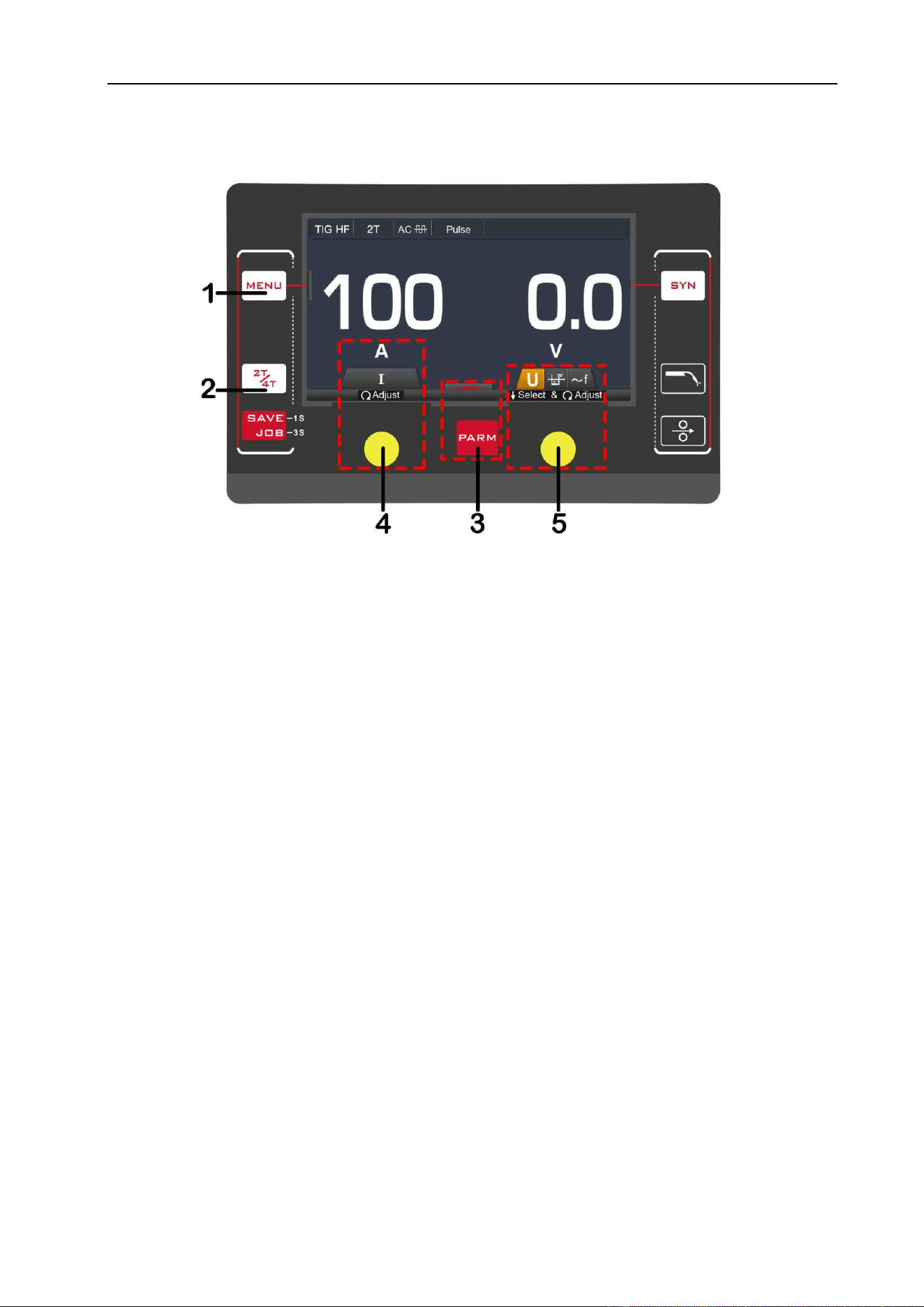
1. MENU Button: Press it to select Stick DC or Stick AC welding mode.
2. L Knob: Turn it to set welding current parameter.
3. R Knob: Press it to select Hot Start or Arc Force and turn to adjust values.
Hot Start
Hot start provides extra power when the weld starts to counteract the high resistance of
the electrode and workpiece as the arc is started. Setting range: 0~10.
Arc Force
An MMA welding power source is designed to produce constant output current. This
means with different types of electrode and arc length; the welding voltage varies to keep
the current constant. This can cause instability in some welding conditions as MMA
welding electrodes will have a minimum voltage they can operate with and still have a
stable arc.
Arc Force control boosts the welding power if its senses the welding voltage is getting
too low. The higher the arc force adjustment, the higher the minimum voltage that the
power source will allow. This effect will also cause the welding current to increase. 0 is
Arc Force off, 10 is maximum Arc Force. This is practically useful for electrode types that
have a higher operating voltage requirement or joint types that require a short arc length
such as out of position welds.
PANEL FUNCTIONS & DESCRIPTIONS
16
§3.2.3 TIG HF / Lift-Arc Display introduction
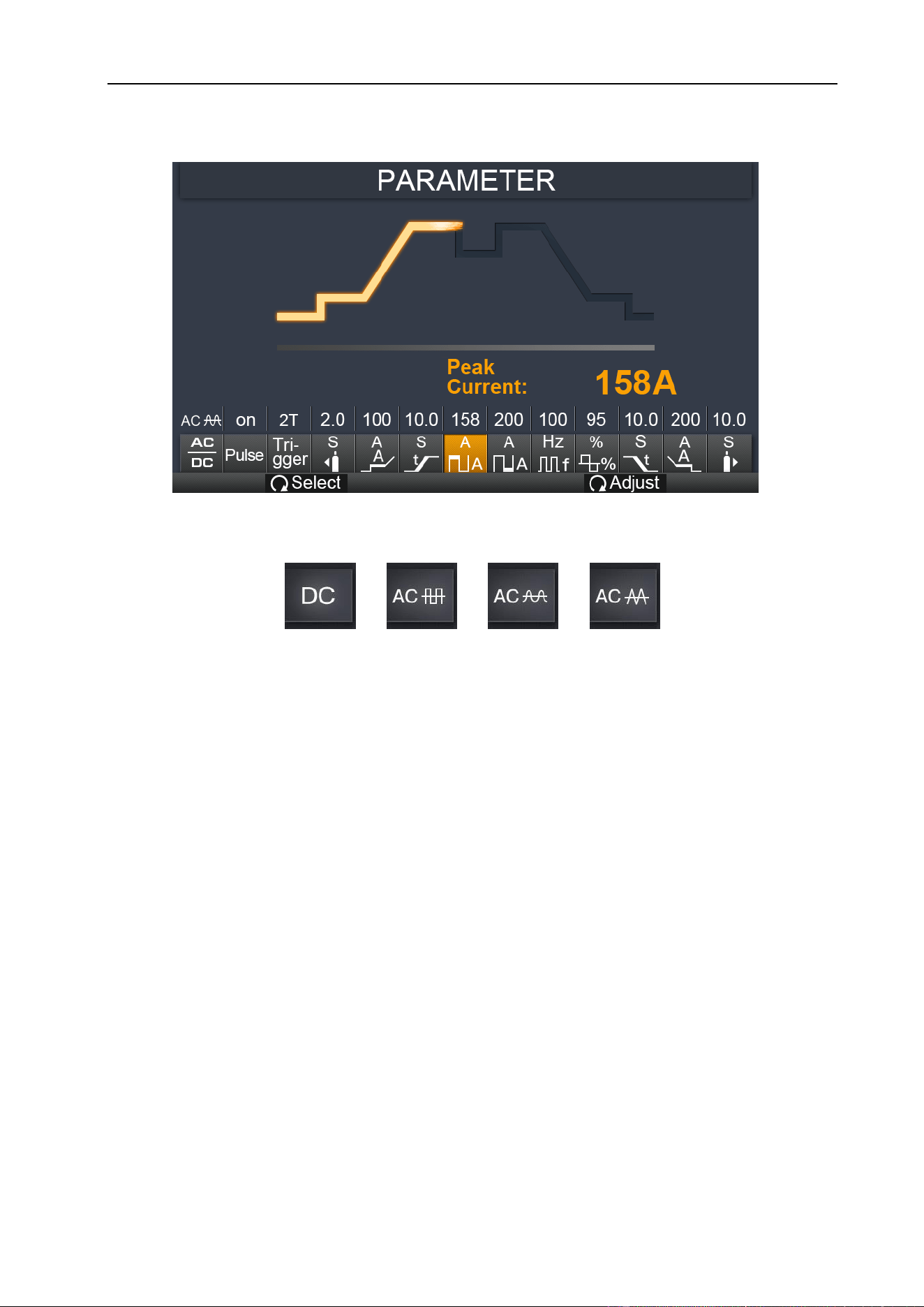
1. MENU Button: Press it to enter TIG HF or TIG Lift welding mode.
2. 2T / 4T Button: Press it to select 2T or 4T trigger mode.
3. PARA Button: Press it to enter the function interface parameter.
4. L Knob: Turn it to adjust welding current. In function interface, turn it to select
parameters, such as slope and post flow time.
5. R Knob: Turn it to select AC Balance (-5~5) or AC Frequency (50~250Hz) and turn it
to adjust values. (Available only in AC mode.) *
*Denotes more detailed explanation of function to follow.
PANEL FUNCTIONS & DESCRIPTIONS
17
Process Set-Up Functional Interface:
1. Output waveform: Press it to select DC output or AC wave output.
2. Pulse mode: ON or OFF.
3. Trigger mode: 2T/ 4T/ Spot weld. (Spot is only available in TIG HF welding mode.) *
4. Pre Flow: 0~2s.
5. Pre Current: 10~200A.
6. Up Slope: 0~10s.
7. Peak Current: 10~200A.
8. Base Current: 10~200A. (Only available in Pulse mode.)
9. Pulse Frequency: 0.5~999Hz. (Only available in Pulse mode.) *
10. Duty Cycle: 5~95%. (Only available in Pulse mode.) *
11. Down Slope: 0~10s.
12. Post Current: 10~200A.
13. Post Flow: 0~10s.
*Denotes more detailed explanation of function to follow.
PANEL FUNCTIONS & DESCRIPTIONS
18
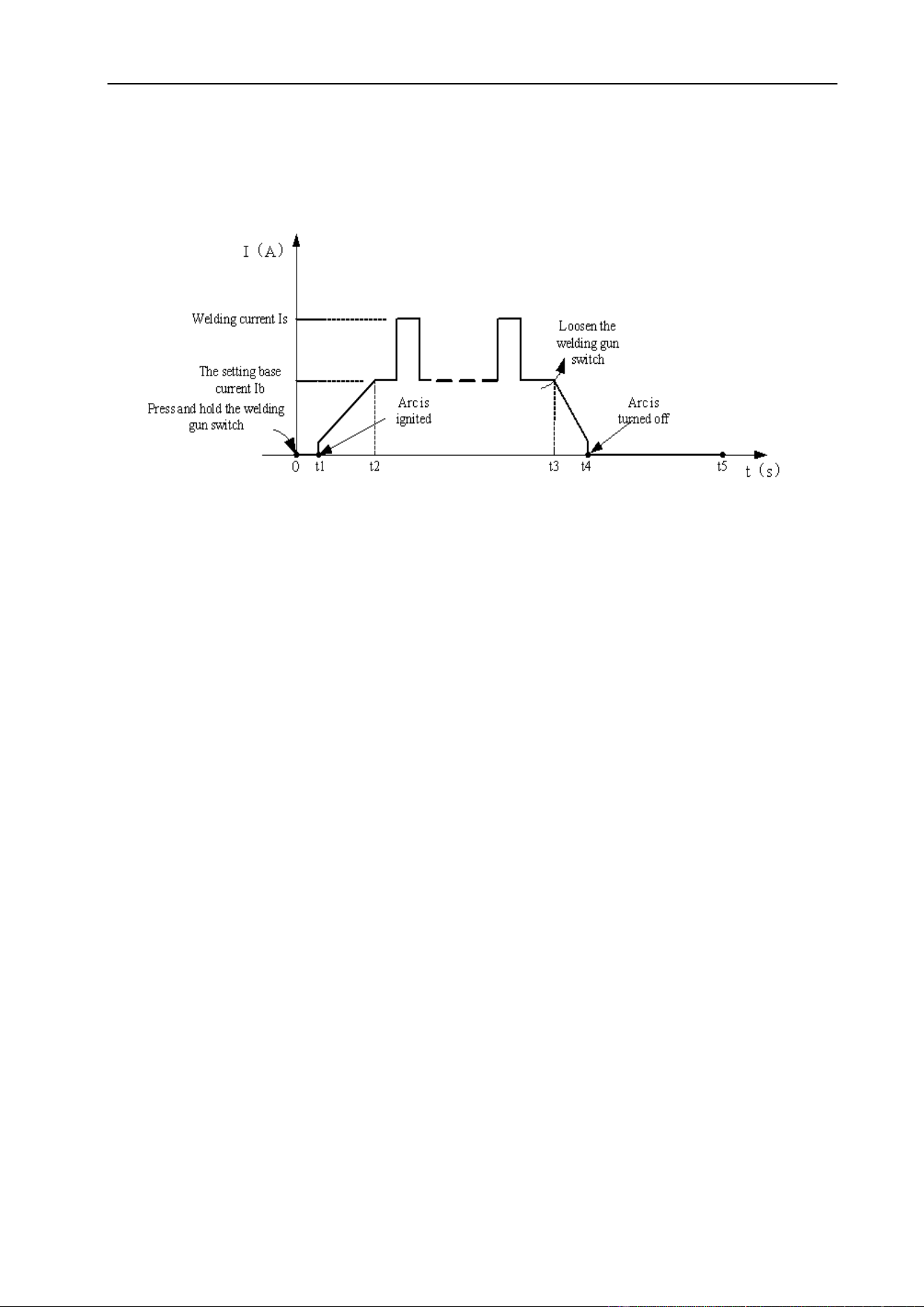
2T Mode (3)
The trigger is pulled and held on to activate the welding circuit, when the trigger is
released, the welding circuit stops.
Introduction:
(1) 0: Press the gun switch and hold it. Electromagnetic gas valve is turned on. The
shielding gas stars to flow.
(2) 0~t1: Pre-gas time (0.1~2.0s)
(3) t1~t2: Arc is ignited and the output current rises to the setting welding current (I
w
or
I
b
) from the min welding current.
(4) t2~t3: During the whole welding process, the gun switch is pressed and held without
releasing.
Note: Select the pulsed output, the base current and welding current will be outputted
alternately; otherwise, output the set value of welding current.
(5) t3: Release the gun switch, the welding current will drop in accordance with the
selected down-slope time.
(6) t3~t4: The current drops to the minimum welding current from the setting current (I
w
or I
b
), and then arc is turned off.
(7) t4~t5: Post-gas time, after the arc is turned off. You can adjust it (0.0~10s) by
turning the knob on the front panel.
(8) t5: Electromagnetic gas valve turned off, the shield gas stops flowing and weld is
finished.
PANEL FUNCTIONS & DESCRIPTIONS
19
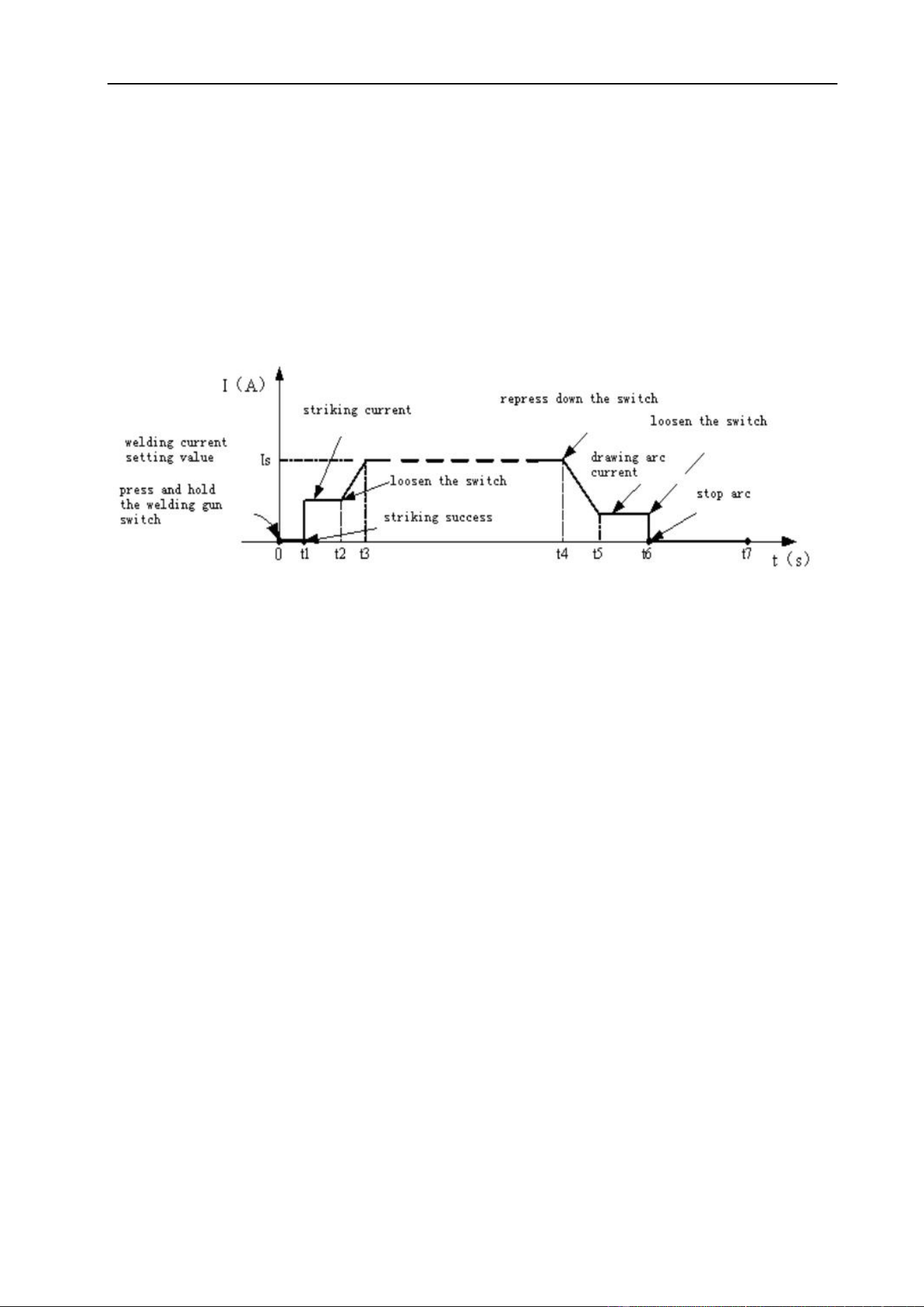
4T Mode (3)
This is known as ’latching’ mode. The trigger is pulled once and released to activate the
welding circuit, pulled and released again to stop the welding circuit. This function is
useful on longer welds as the trigger is not required to be held on continuously.
The start current and crater current can be pre-set. This function can compensate the
possible crater that appears at the beginning and end of the welding. Thus, 4T is suitable
for the welding of medium thickness plates.
Introduction:
(1) 0: Press and hold the gun switch, Electromagnetic gas valve is turned on. The
shielding gas stars to flow.
(2) 0~t1: Pre-gas time (0.1~2.0S) as set by operator.
(3) t1~t2: Arc is ignited at t1 and then output the setting value of start current.
(4) t2: Release trigger switch, the output current slopes up from the start current.
(5) t2~t3: The output current rises to set value (I
w
or I
b
), the upslope can be adjusted.
(6) t3~t4: Welding process. During this period, the trigger is released.
Note: Select the pulsed output, the base current and welding current will be outputted
alternately; otherwise, output the set value of welding current.
(7) t4: Press trigger again, the welding current will drop by the selected down-slope time.
(8) t4~t5: The output current slopes down to the crater current as selected.
(9) t5~t6: The crater current time.
(10) t6: Release trigger to stop arc but keep shield gas flowing (post-gas).
(11) t6~t7: Post-gas time can be set by knob on the front panel (0.0~10S);
(12) t7: Electromagnetic valve is closed and gas stops flowing. Weld is finished.

PANEL FUNCTIONS & DESCRIPTIONS
20
Pulse Frequency (9)
Only available when pulse mode is selected. Set the rate that the welding output
alternates between the peak and base current settings.
Duty Cycle (10)
Only available when pulse mode is selected. Set the time proportion as a percentage
between the peak current and base current when using pulse mode. Neutral setting is
50%, the time-period of the peak current and base current pulse is equal. Higher pulse
duty setting will give greater heat input, while lower pulse duty will have the opposite
effect.
AC Frequency
Only available in AC welding mode. Increasing AC frequency will focus the shape of the
arc, resulting in a tighter, more controlled arc causing increased penetration and less
heated affected area for the same current setting. Slower frequency will result in a wider,
softer arc shape.
AC Balance
Only available in AC welding mode. Adjust the balance as a percentage between the
forward and reverse current cycles when welding in AC output mode. The reverse part of
the AC cycle gives the ‘cleaning’ effect on the weld material, while the forward cycle
melts the weld material. Neutral setting is 0. Increased reverse cycle bias will give
greater cleaning effect, less weld penetration and more heat in the torch tungsten, which
gives the disadvantage of reducing the output current that can be used for a given
tungsten size, to prevent the tungsten overheating. Increased forward cycle bias will give
the opposite effect, less cleaning effect, greater weld penetration and less heat in the
tungsten.
PANEL FUNCTIONS & DESCRIPTIONS
21
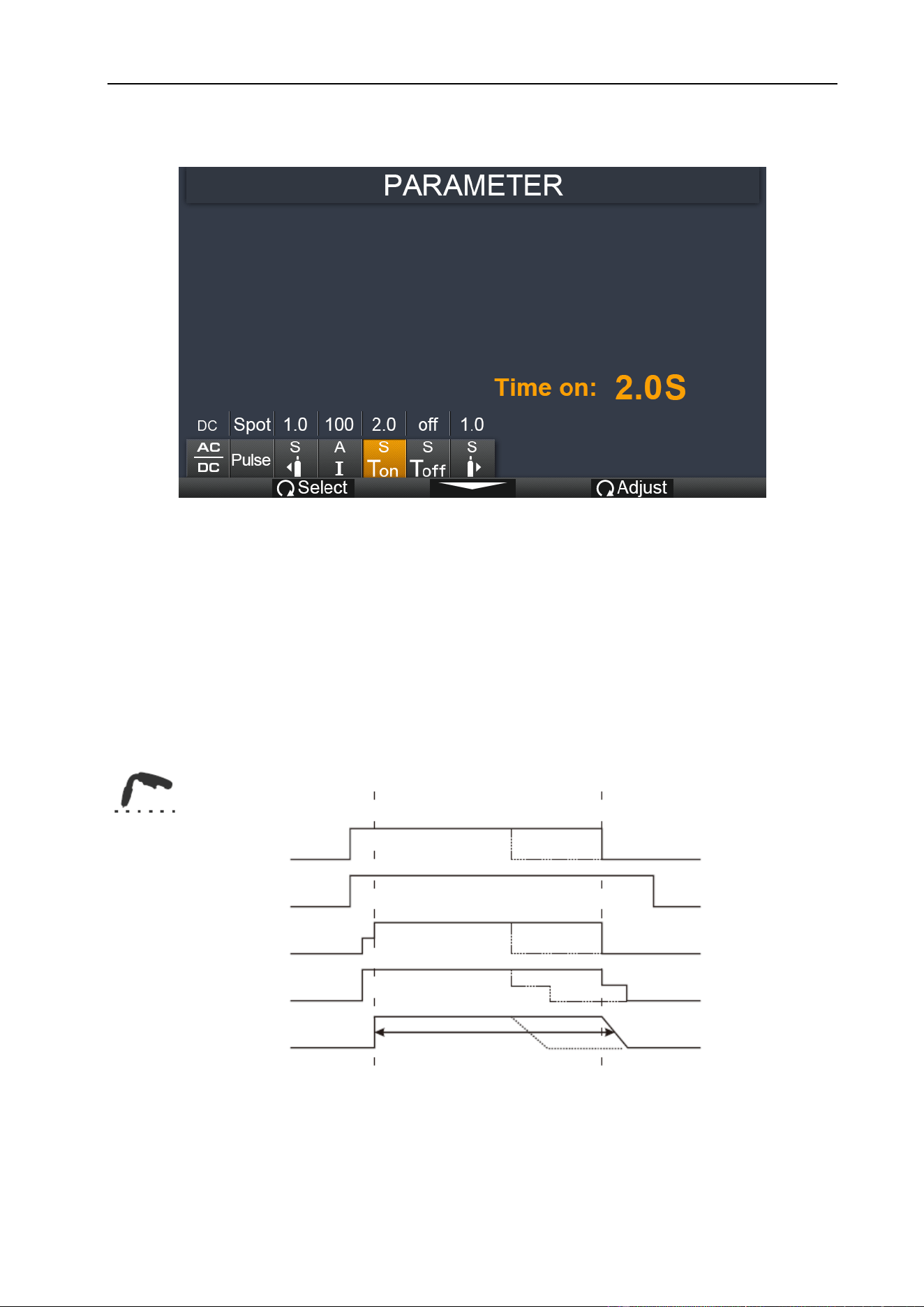
Function Interface for TIG Spot-Weld:
1. Post Flow: 0.1~2s.
2. Welding current: 10~200A.
3. T
on
time: 0.2~1s.
4. T
off
time: 0~10s.
5. Post Flow: 0.1~10s.
Spot Weld trigger mode:
Gun Switch
Gas Supply
Wire Feed
Output Voltage
Output Current
Spot Weld Time
Spot weld
PANEL FUNCTIONS & DESCRIPTIONS
22
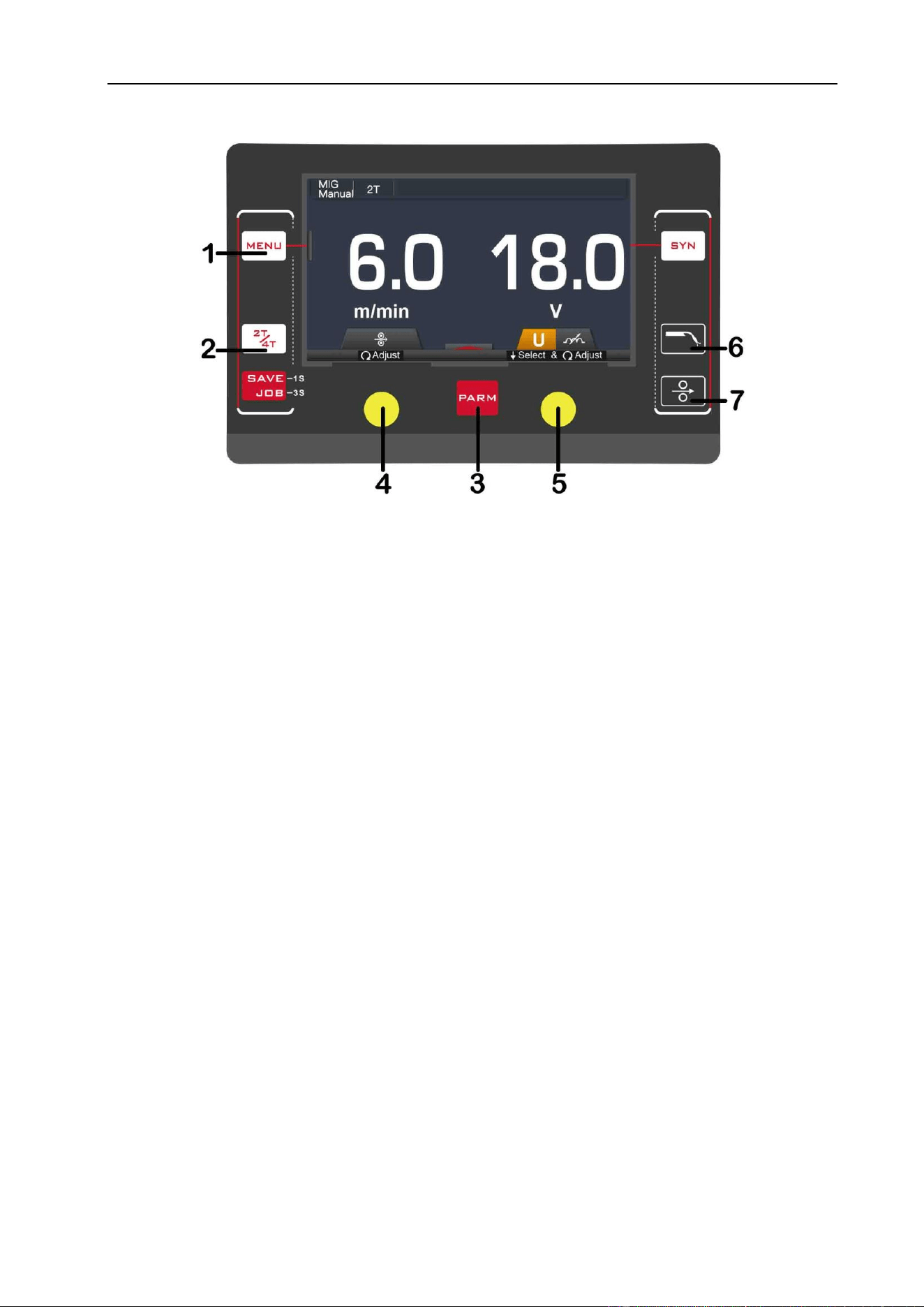
§3.2.4 MIG Manual Display introduction
1. MENU Button: Press it to select MIG Manual welding mode.
2. 2T / 4T Button: Press it to select 2T or 4T trigger mode.
3. PARA Button: Press it to enter the function parameter interface.
4. L Knob: Turn it to adjust wire feeding speed. In function interface, turn it to select
parameters, such as Pre Flow, Post Flow.
5. R Knob: Press it to select welding voltage or inductance. Turn it to adjust value.
6. GAS Button: Press it to purge and confirm shield gas flow.
7. Wire Feed Button: Press it to feed welding wire into torch.
PANEL FUNCTIONS & DESCRIPTIONS
23
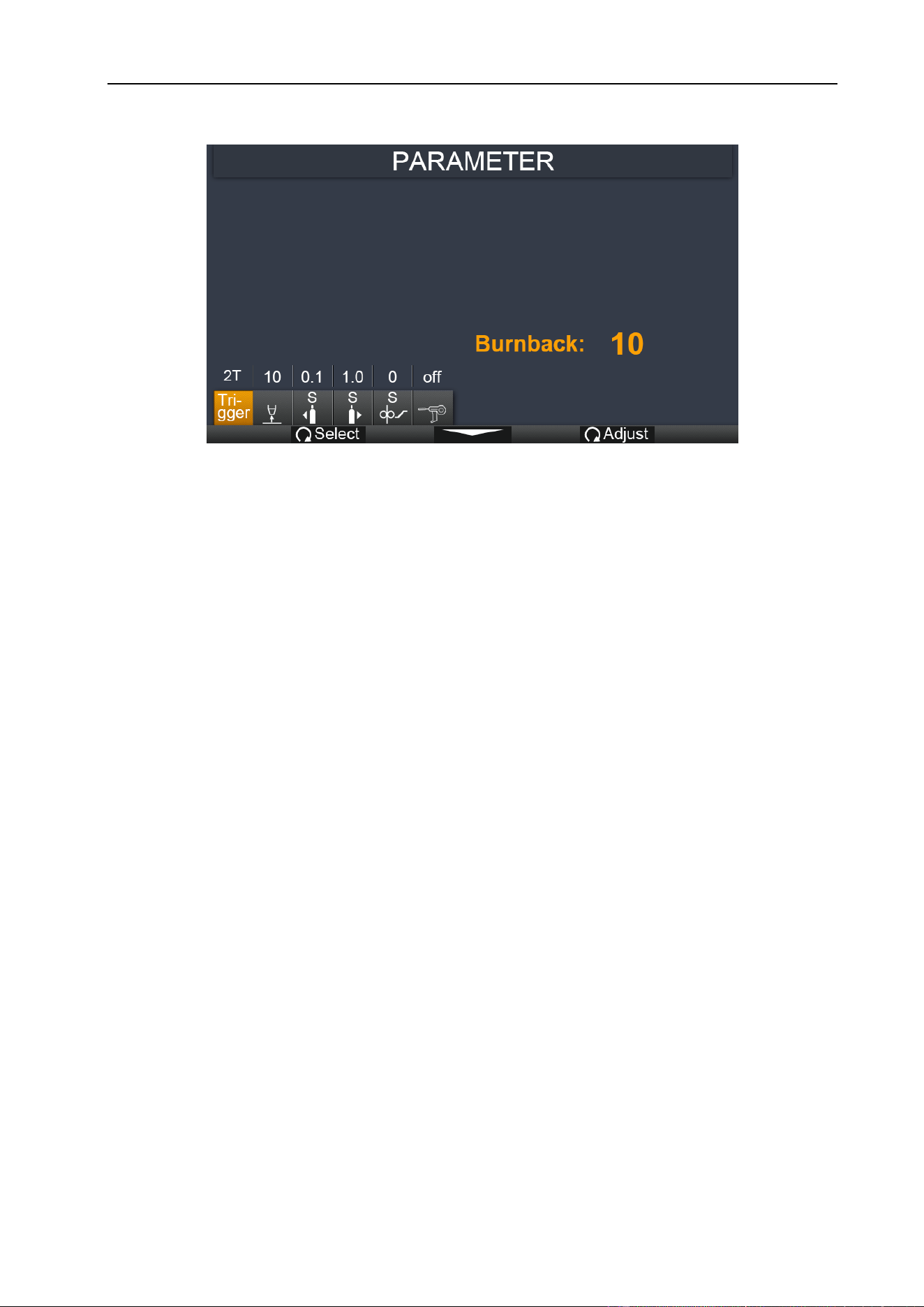
Function interface:
1. Trigger mode: 2T or 4T.
2. Burnback: 0~10.
3. Pre Flow: 0.1~10s.
4. Post Flow: 0.1~10s.
5. Slow Feed: 0~10.
6. Spool Gun: off/ on.
Burnback
Short-circuit between welding wire and molten pool leads to the increase of current,
which leads to the melting speed of welding wire being too fast and the wire feeding
speed cannot keep up which makes the welding wire and workpiece disconnect. This
phenomenon is called “burn back” and can be controlled by maintaining wire feed after
arc stop. Adjustment range: 0-10. Commonly engaged on aluminum or CuSi wires.
Slow Feed (Soft Start)
This function is used to regulate the speed of wire feeding increasing as the weld
puddle develops on arc start. Adjustment range: 0-10s. Commonly engaged on
aluminum or CuSi wires.
PANEL FUNCTIONS & DESCRIPTIONS
24
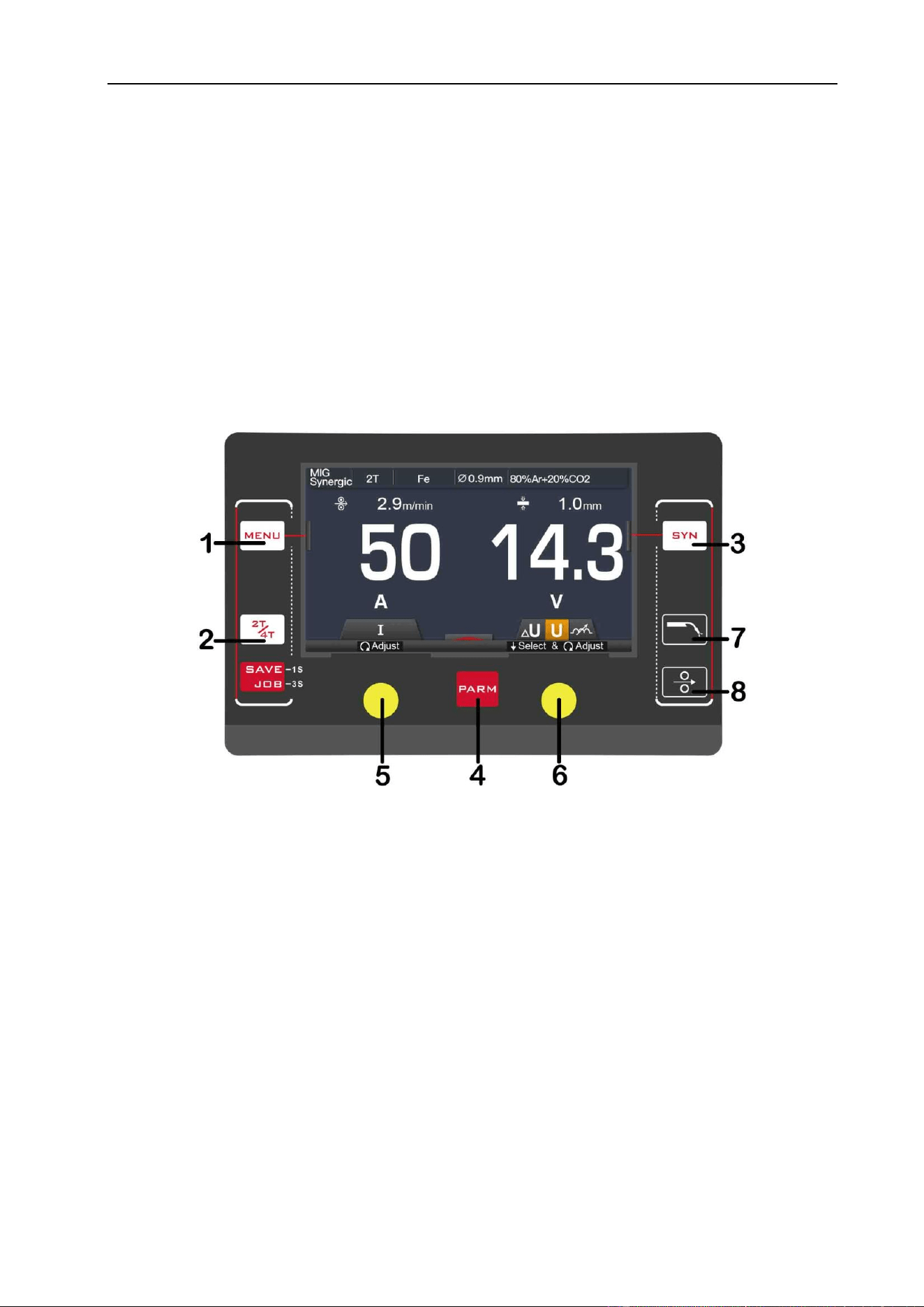
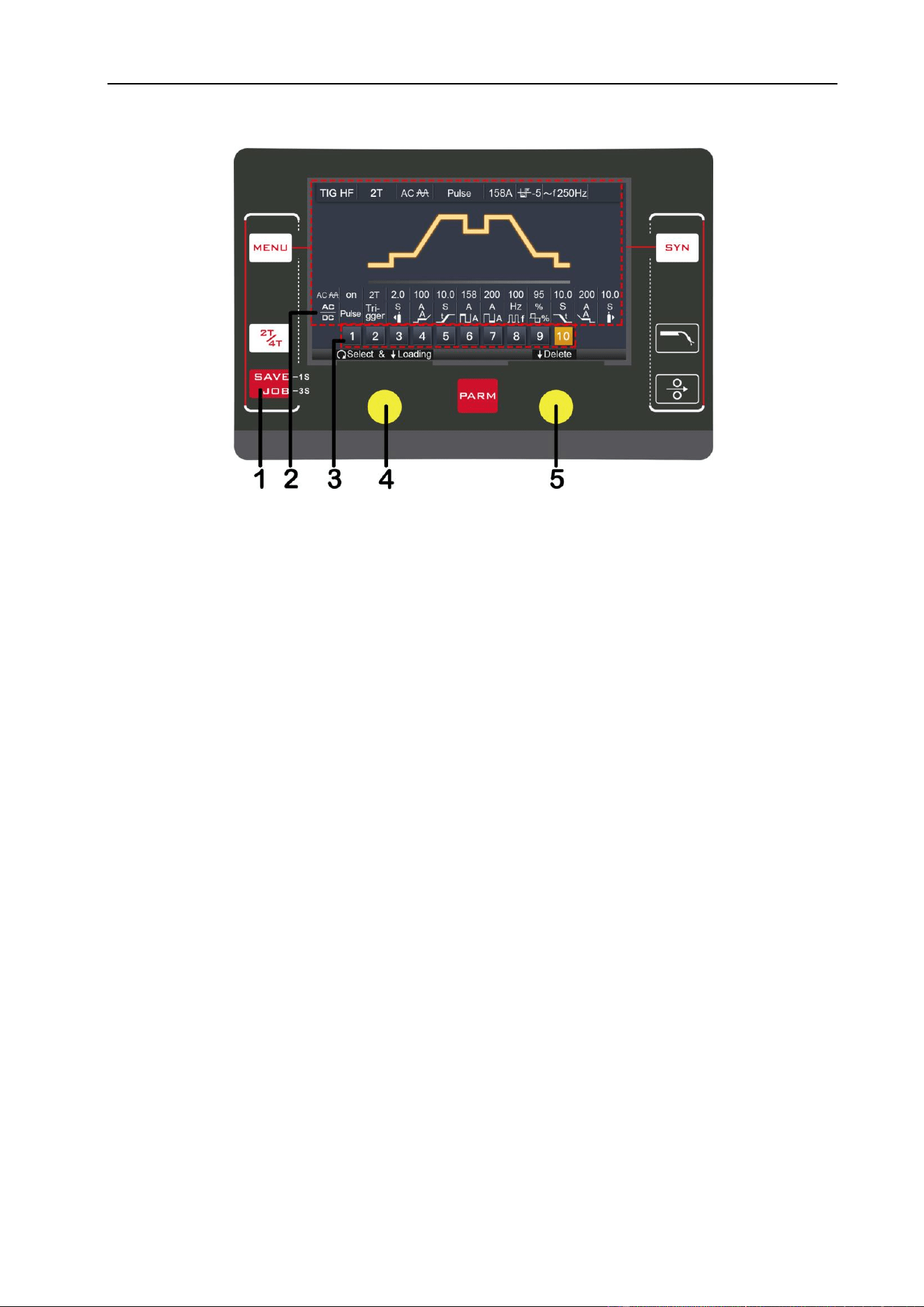
§3.2.5 MIG SYN display introduction
The operator simply selects a program by material & wire type, wire diameter and
shielding gas. Operator set material thickness and the machine calculates the optimal
voltage and wire speed for the welding application. Obviously other variables such as
welding joint type and thickness, air temperature affect the optimal voltage and wire feed
setting, so the program provides a voltage fine tuning function for the synergic program
selected. Once the voltage is adjusted in a synergic program, it will stay fixed at this
variation when the current setting is changed.
1. MENU Button: Press it to select MIG Manual welding mode.
2. 2T / 4T Button: Press it to select 2T or 4T trigger mode.
3. SYN Button: Press it to select program list. Select program using R Knob
4. PARA Button: Press it to enter the function interface parameter.
5. L Knob: Turn it to adjust wire feeding speed. In function interface, rotate it to select
parameters, such as Pre Flow & Post Flow.
6. R Knob: Press it to select welding voltage or inductance. Turn it to adjust value. In
SYN item, turn to select and press to confirm.
8. GAS Button: Press it to purge and confirm shield gas flow.
7. Wire Feed Button: Press it to feed wire into torch.
PANEL FUNCTIONS & DESCRIPTIONS
25
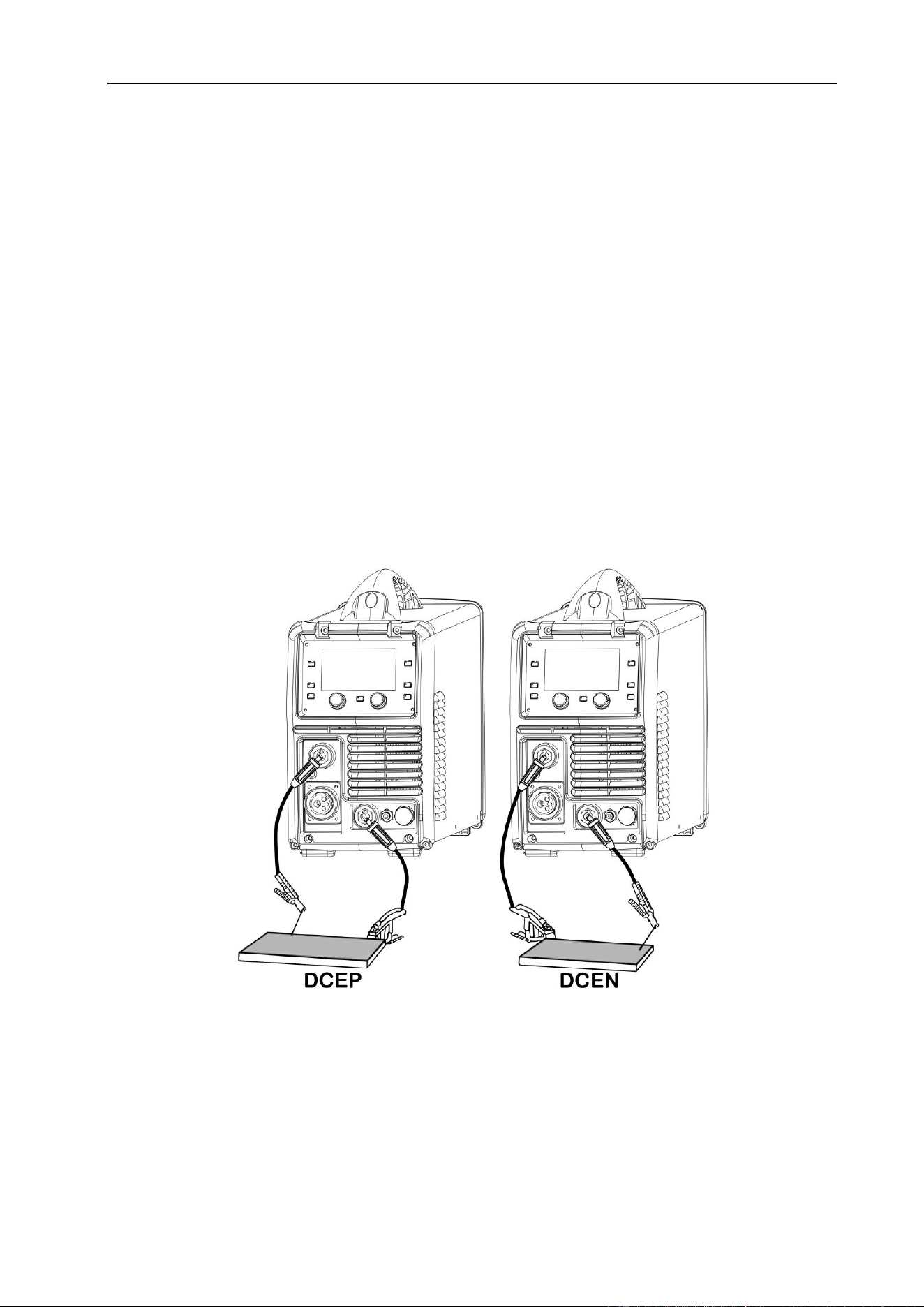
§3.2.6 JOB display introduction
1. JOB Button: Press it for 3s to enter JOB programs and press it for 1s to save
parameters.
2. Parameters Display: Displays the parameters selected by the operator.
3. JOB Number Display: Displays the corresponding JOB number assigned.
4. L Knob: Turn it to turn the page and press it to delete the parameters.
5. R Knob: Turn it to select JOB program number and press it to load the parameters.
INSTALLATION & OPERATION
26
§4 Installation & Operation
§4.1 Installation & Operation for MMA Electrode Welding
§4.1.1 Set-Up Installation
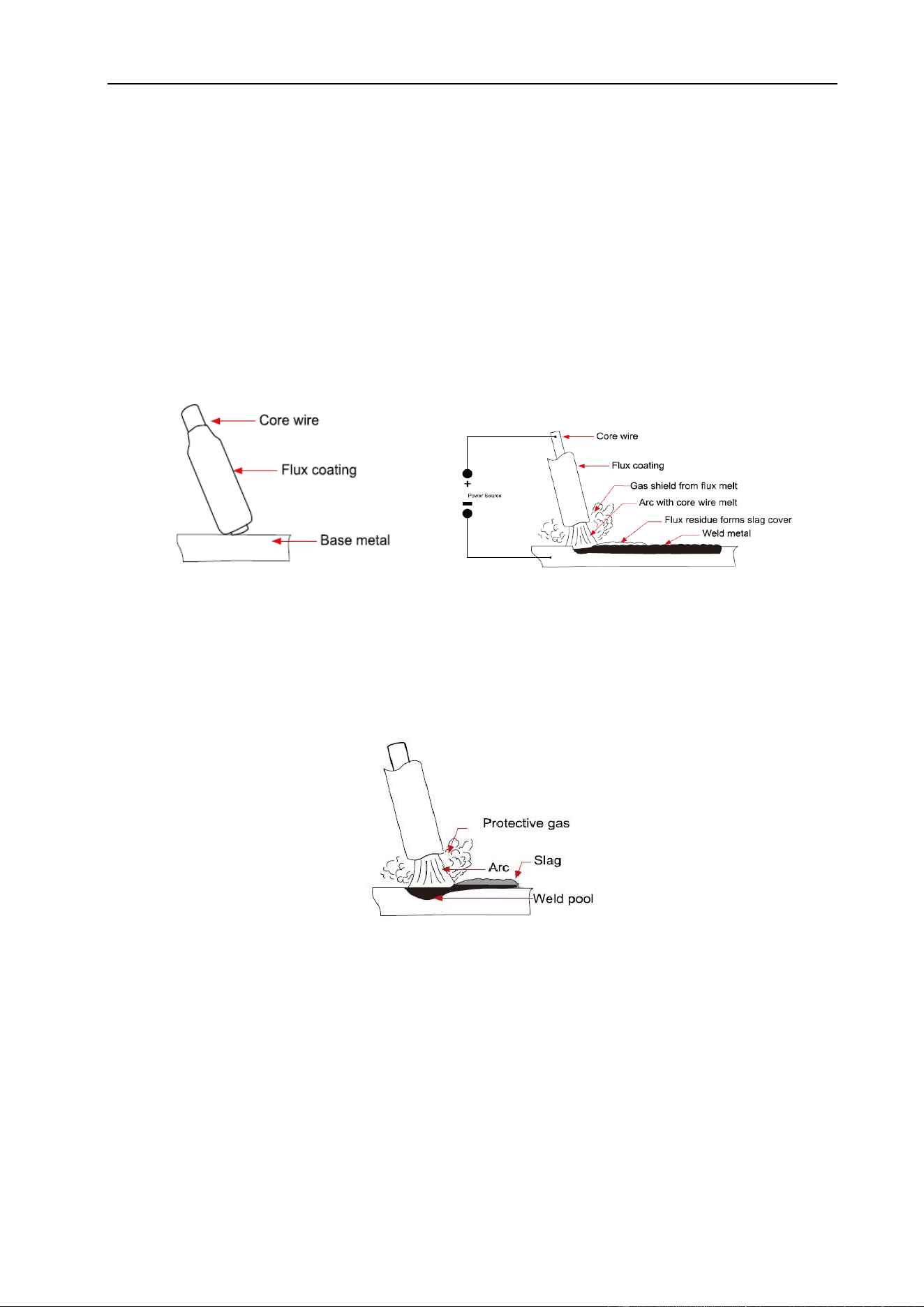
Two sockets are available on this welding machine with Positive (+) or Negative (-)
polarity to connect the electrode holder cable and earth clamp cable. Various electrodes
require different polarity for optimum results and careful attention should be paid to the
polarity, refer to the electrode manufacturer’s information for the correct polarity.
DCEP: Electrode connected to Positive (+) output socket.
DCEN: Electrode connected to Negative (-) output socket.
MMA (DC): Choosing the connection of DCEN or DCEP according to the different
electrodes. Please refer to the electrode manual.
MMA (AC): No requirements for polarity connection.
(1) Turn the power source on and press the welding mode key to MMA welding mode.
(2) Set the welding current relevant to the electrode type and size being used.
(3) Set the Hot Start and Arc Force as required using knobs and buttons.
(4) Place the electrode into the electrode holder and clamp tight.
(5) Strike the electrode against the work piece to create an arc and begin welding.
INSTALLATION & OPERATION
27
§4.1.2 Stick (MMA) Electrode Welding
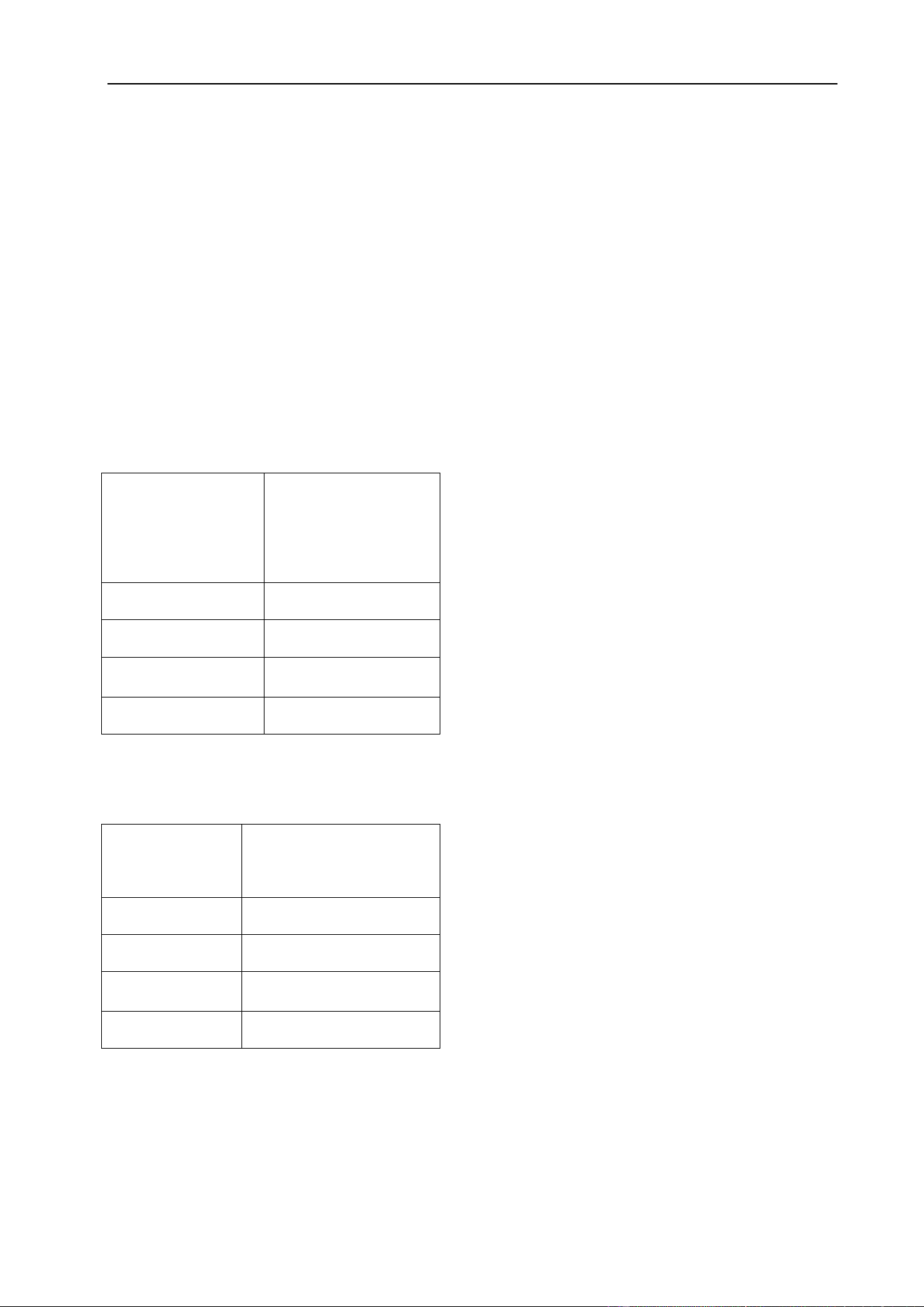
One of the most common types of arc welding is manual metal arc welding (MMA) or
stick welding. An electric current is used to strike an arc between the base material and a
consumable electrode rod or ‘stick’. The electrode rod is made of a material that is
compatible with the base material being welded and is covered with a flux that releases a
gaseous vapor that serve as a shielding gas and providing a layer of slag, both of which
protect the weld area from atmospheric contamination. The residue from the flux that
forms slag covering over the weld metal must be chipped away after welding.
Stick (MMA) Electrode
● The arc is initiated by momentarily touching the electrode to the base metal.
● The melted electrode metal is transferred across the arc and becomes weld metal.
● The deposit is covered and protected by slag from the electrode flux coating.
Flux Properties
● producing a protective gas around the weld area
● providing fluxing elements and deoxidizer
● creating a protective slag coating over the weld
● establishing arc characteristics
● adding alloying elements
INSTALLATION & OPERATION
28
Stick electrodes serve many purposes in addition to filler metal to the molten pool.
These additional functions are provided mainly by the various coverings on the
electrode.
§4.1.3 Stick (MMA) Welding Fundamentals
Electrode Selection
As a general rule, the selection of an electrode is straight forward, in that it is only a
matter of selecting an electrode of similar composition to the parent metal. However, for
some metals there is a choice of several electrodes, each of which has particular
properties to suit specific classes of work.
The size of the electrode generally depends
on the thickness of the section being welded,
and the thicker the section the larger the
electrode required. The maximum size of
electrodes that may be used for various
thicknesses based on a general-purpose type
6013 electrode.
Welding Current (Amperage)
Correct current selection for a particular job
is an important factor in arc welding. With the
current set too low, difficulty is experienced in
striking and maintaining a stable arc. Too high
current is accompanied by overheating of the
electrode resulting undercut and burning
through of the base metal and producing
excessive spatter. Normal current for a particular job may be considered as the
maximum, which can be used without burning through the work, over-heating the
electrode or producing a rough spattered surface.
Average
Thickness of
Material
Max Recommended
Electrode Diameter
1.0~2.0 mm
2.5 mm
2.0~5.0 mm
3.2 mm
5.0~8.0 mm
4.0 mm
>8.0 mm
5.0 mm
Electrode Size
ø mm
Current Range
(Amps)
2.5 mm
60~95
3.2 mm
100~130
4.0 mm
130~165
5.0 mm
165~260

INSTALLATION & OPERATION
29
Arc Length
To strike the arc, the electrode should be gently scraped on the work until the arc is
established. There is a simple rule for the proper arc length; it should be the shortest arc
that gives a good surface to the weld. An arc too long reduces penetration, produces
spatter and gives a rough surface finish to the weld. An excessively short arc will cause
sticking of the electrode and result in poor quality welds. General rule of thumb for down
hand welding is to have an arc length no greater than the diameter of the core wire.
Electrode Angle
The angle that the electrode makes with the work is important to ensure a smooth, even
transfer of metal. When welding in down hand, fillet, horizontal or overhead the angle of
the electrode is generally between 5 and 15 degrees towards the direction of travel.
When vertical up welding, the angle of the electrode should be between 80 and 90
degrees to the work piece.
Travel Speed
The electrode should be moved along in the direction of the joint being welded at a
speed that will give the size of run required. At the same time, the electrode is fed
downwards to keep the correct arc length at all times. Excessive travel speeds lead to
poor fusion, lack of penetration etc, while too slow a rate of travel will frequently lead to
arc instability, slag inclusions and poor mechanical properties.
Material and Joint Preparation
The material to be welded should be clean and free of any moisture, paint, oil, grease,
mill scale, rust or any other material that will hinder the arc and contaminate the weld
material. Joint preparation will depend on the method used include sawing, punching,
shearing, machining, flame cutting and others. In all cases edges should be clean and
free of any contaminates. The type of joint will be determined by the chosen application.
INSTALLATION & OPERATION
30
§4.2 Installation & Operation for TIG HF/LIFT-ARC
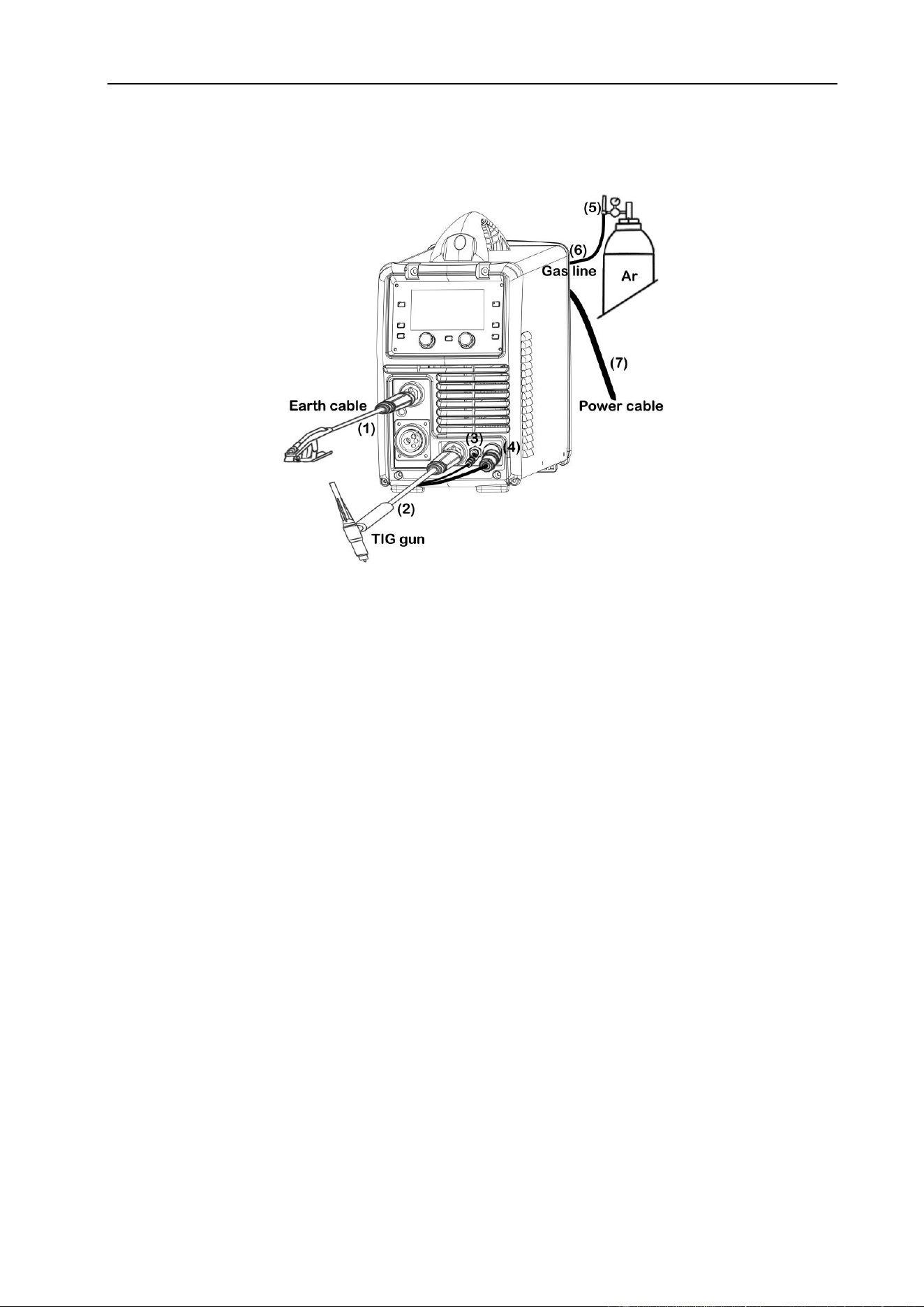
§4.2.1 Set-Up for TIG Welding
(1) Insert the earth cable plug into the positive socket on the front of the machine and
twist to lock in place.
(2) Plug the welding torch into the negative socket on the front panel and twist to lock.
(3) Connect the gas line of TIG torch to outlet gas connector on the front of the machine.
(4) Connect TIG trigger 9-pin remote plug from torch to remote socket on the front panel.
Insert completely and lock.
Or connect Foot Pedal 9-pin remote plug to remote socket on the front panel. Insert
completely and lock ring.
(5) Connect the gas regulator to the gas cylinder and the gas line to the gas regulator.
(6) Connect the gas line to the machine inlet gas connector located on the rear panel.
(7) Connect the power cable of welding machine to the electrical outlet.
(8) Carefully open the valve of the gas cylinder, set the required gas flow rate.
(9) Select TIG function on the front panel.
(10) Set torch operation for 2T, 4T or Spot trigger mode.
(11) Select welding current as required. The selected welding current will show on
display. Set down slope time as required. The down slope time will show on the
digital display.
INSTALLATION & OPERATION
31
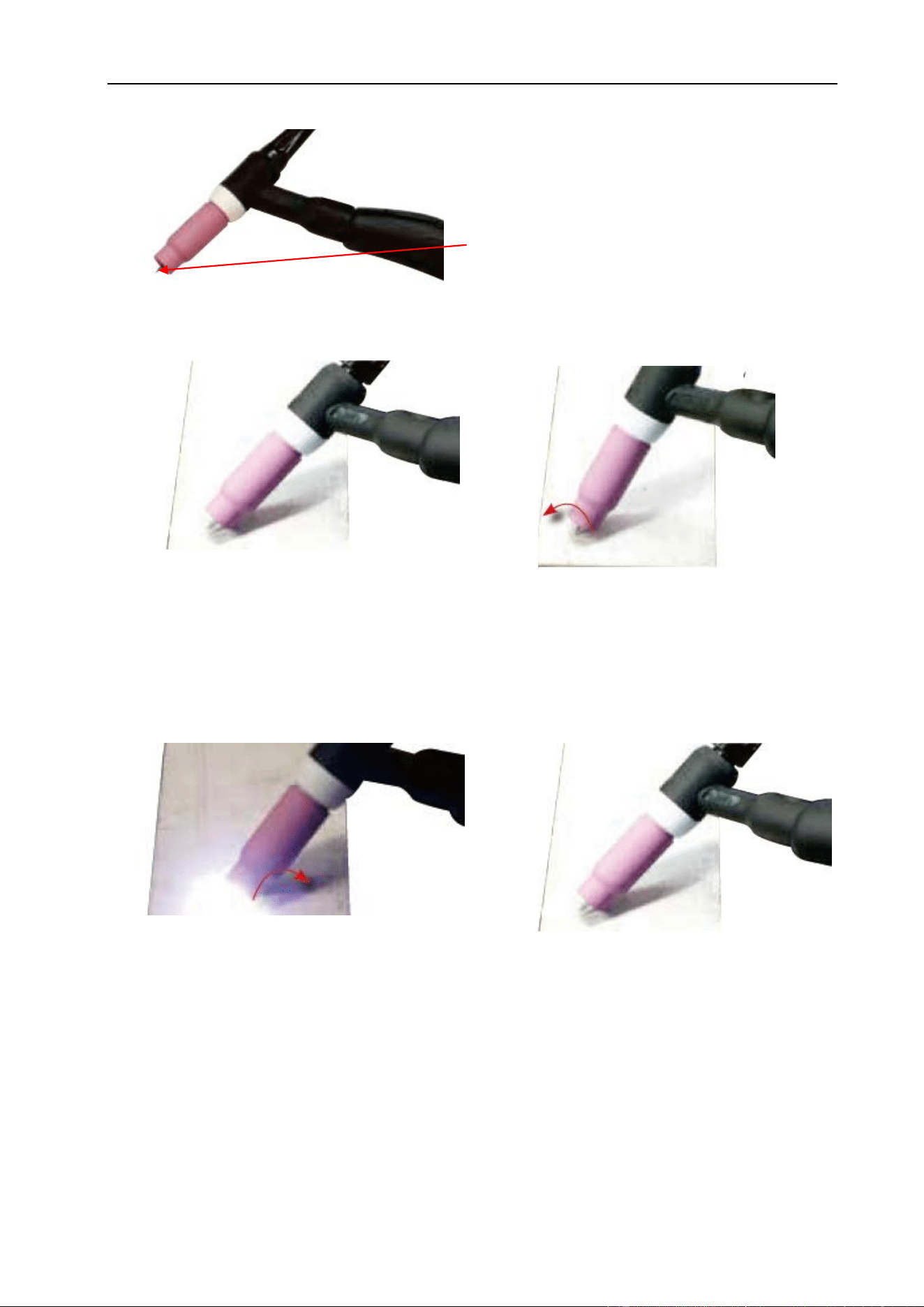
IMPORTANT! – It is recommended that you check for gas leaks prior to operation and
that the operator close the cylinder valve when the machine is not in use.
(12) Assemble front end parts of the TIG
torch, fitting a sharpened tungsten suitable
for the material to be welded.
(14) With a small movement rotate the gas
cup forward so that the tungsten electrode
touches the work piece.
(13) Lay the outside edge of the cup on
work piece with the tungsten Electrode
1~2mm from the work piece. Press and
hold the trigger button on TIG torch to
start the gas flow.
(16) Release the trigger to stop the welding.
(15) Now rotate the Gas Cup in the reverse
direction to lift the Tungsten electrode from
the work piece to create the arc.
INSTALLATION & OPERATION
32
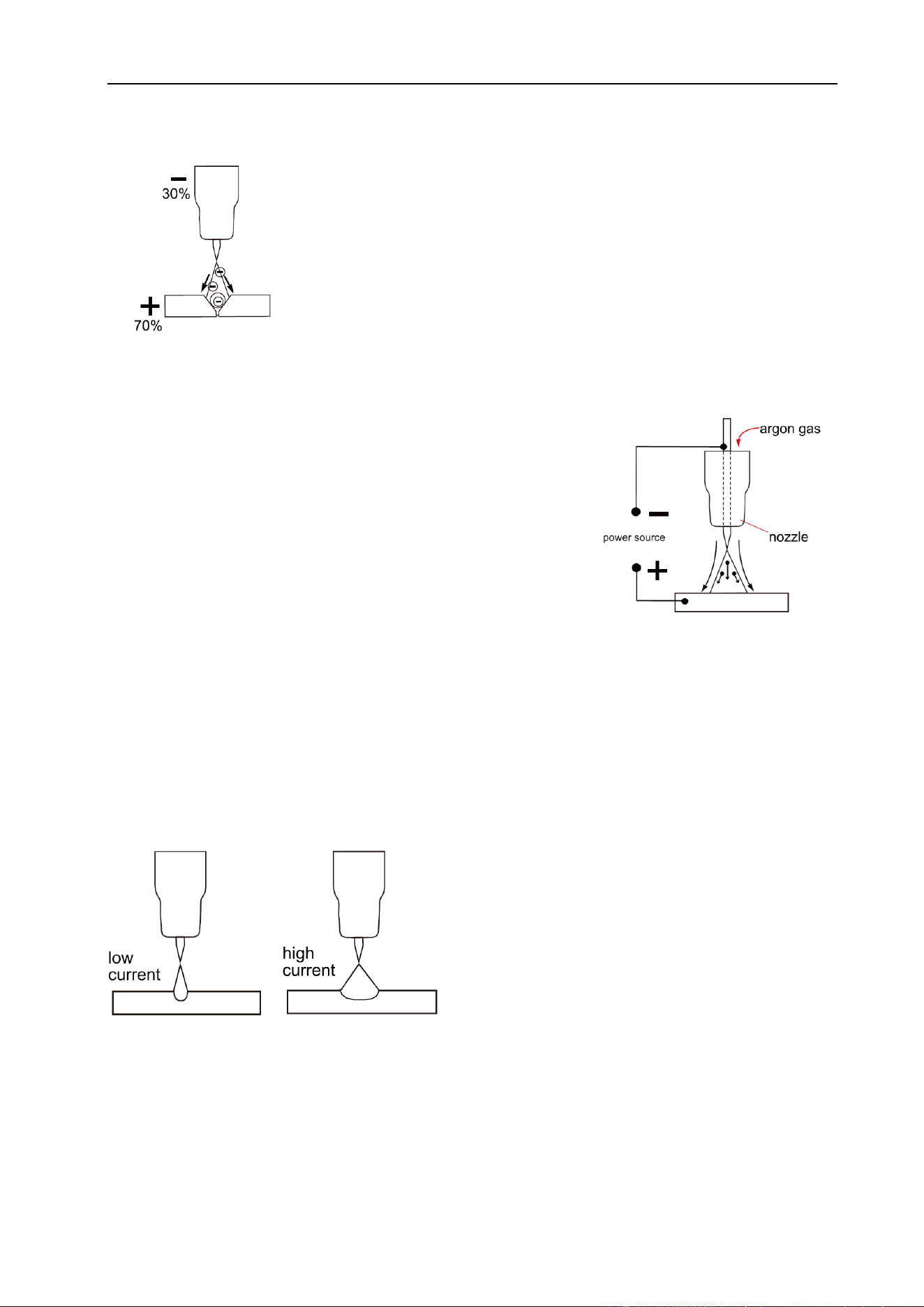
§4.2.2 DC TIG Welding
The DC power source uses what is known as DC (direct
current) in which the main electrical component, known as
electrons, flow in only one direction from the negative terminal (-)
to the positive terminal (+). In the DC electrical circuit there is an
electrical principle at work which provides that, in a DC circuit,
70% of the energy (heat) is always on the positive side. This is
important because it determines what terminal to connect the TIG torch.
DC TIG welding is a process in which an arc is struck
between a tungsten electrode and the metal workpiece.
The weld area is shielded by an inert gas flow to prevent
contamination of the tungsten, molten pool and weld area.
When the TIG arc is struck the inert gas is ionized and
superheated changing its’ molecular structure which
converts it into a plasma stream. This plasma stream that
flows between the tungsten and the work piece is the TIG arc and can be as hot as
19,000°C. It is a very pure and concentrated arc which provides the controlled melting of
most metals into a weld pool. TIG welding offers the user the greatest amount of
flexibility to weld the widest range of materials, thickness and profiles. DC TIG welding is
also the cleanest weld with no sparks or spatter.
The intensity of the arc is proportional to the
current that flows from the tungsten. The
welder regulates the welding current to adjust
the power of the arc. Typically thin material
requires a less powerful arc with less heat to
melt the material so less current (amps) is
required, thicker material requires a more powerful arc with more heat so more current
(amps) are necessary to melt the material.
INSTALLATION & OPERATION
33
LIFT ARC IGNITION for TIG Welding
Lift Arc is a form of arc ignition where the machine has voltage on the electrode to only
a few volts, with a current limit of one or two amps (well below the limit that causes metal
to transfer and contamination of the weld or electrode). When the machine detects that
the tungsten has left the surface and a spark is present, it immediately (within
microseconds) increases power, converting the spark to a full arc. It is a simple, safe
lower cost alternative arc ignition process to HF (high frequency) and a superior arc start
process to scratch start.
§4.2.3 TIG Welding Fusion Technique
Manual TIG welding is often considered the most difficult of all
the welding processes. Because the welder must maintain a
short arc length, great care and skill are required to prevent
contact between the electrode and the workpiece. Similar to
Oxygen/Acetylene torch welding, TIG welding normally requires
two hands and in most instances requires the welder to
manually feed a filler wire into the weld pool with one hand while manipulating the
welding torch in the other. However, some welds combining thin materials can be
accomplished without filler metal like edge, corner, and butt joints. This is known as
Fusion welding where the edges of the metal pieces are melted together using only the
heat and arc force.
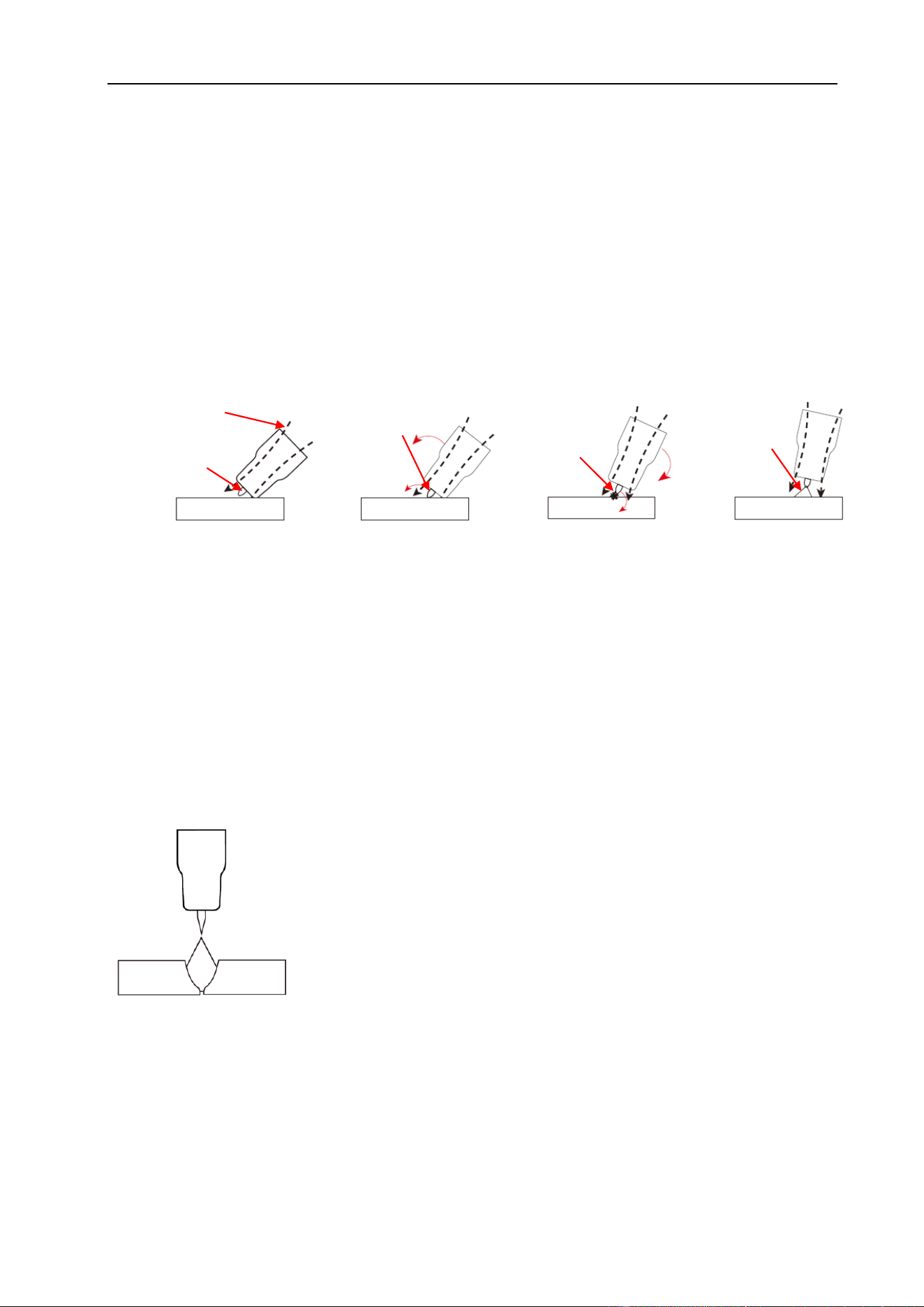
gas flow
tungsten off
the work
tungsten touches
the work
arc ignition
established
TIG arc
Lay the nozzle on the
job without the tungsten
touching the work.
Rock the torch sideways
so that the tungsten
touches the work & hold
momentarily.
Rock the torch back in
the opposite direction,
the arc will ignite as
the tungsten lifts off.
Lift the torch to
maintain the arc.
INSTALLATION & OPERATION
34
TIG Welding with Filler Wire Technique
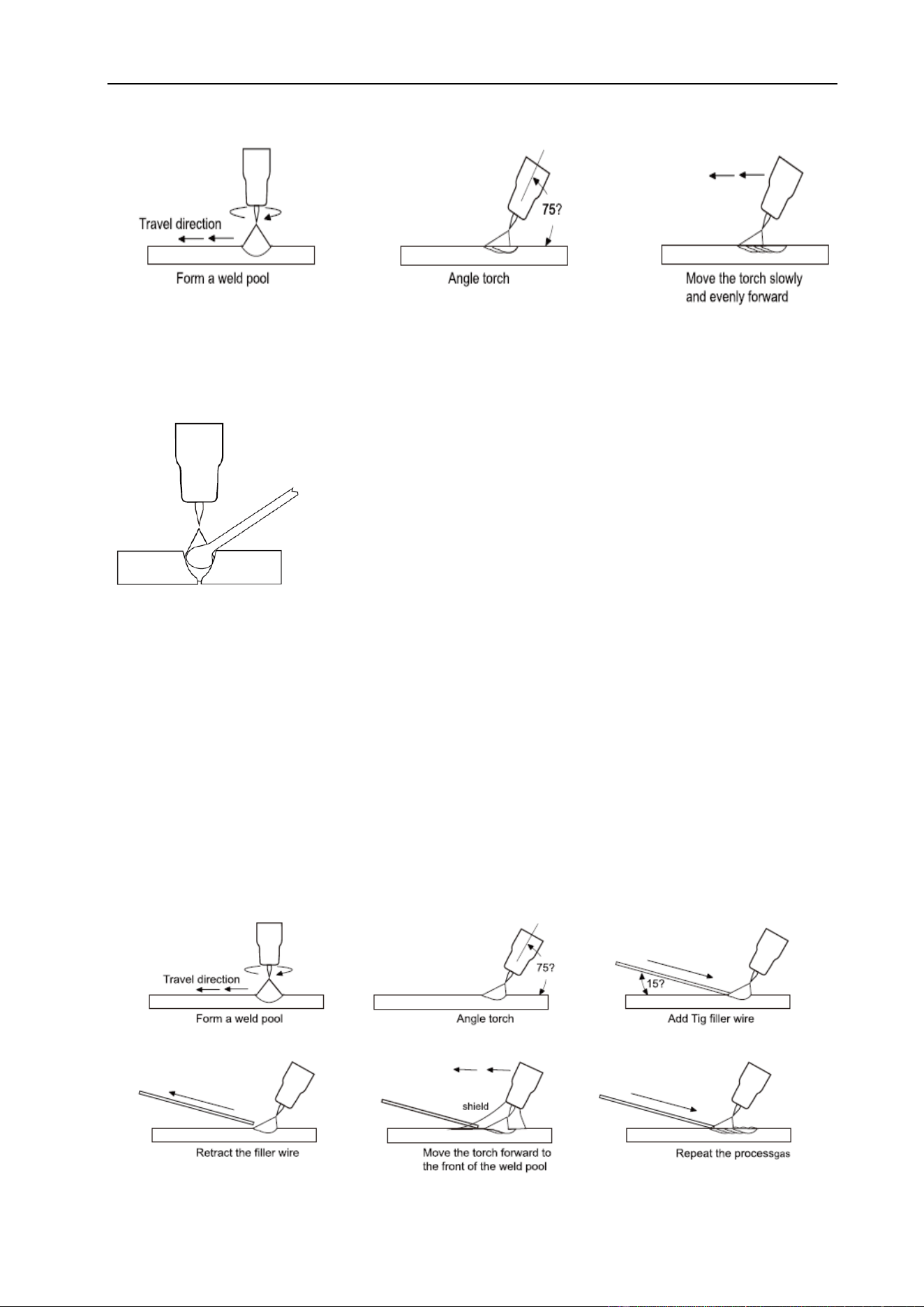
It is necessary in many situations with TIG welding to add a
filler wire into the weld pool to build up weld reinforcement and
create a strong weld. Once the arc is started the torch
tungsten is held in place until a weld pool is created, a circular
movement of the tungsten will assist is creating a weld pool of
the desired size. Once the weld pool is established tilt the
torch at about a 75° angle and move smoothly and evenly along the joint. The filler metal
is introduced to the leading edge of the weld pool. The filler wire is usually held at about
a 15° angle and fed into the leading edge of the molten pool, the arc will melt the filler
wire into the weld pool as the torch is moved forward. A “dabbing” technique can be used
to control the amount of filler wire added. The wire is fed into the molten pool and
retracted in a repeating sequence as the torch is moved slowly and evenly forward. It is
important during the welding to keep the molten end of the filler wire inside the gas shield
as this protects the end of the wire from being oxidized and contaminating the weld pool.

INSTALLATION & OPERATION
35
§4.2.4 Tungsten Electrodes
Tungsten is a rare metallic element used for manufacturing TIG welding electrodes.
The TIG process relies on tungsten’s hardness and high-temperature resistance to carry
the welding current to the arc. Tungsten has the highest melting point of any metal, 3,410
degrees Celsius. Tungsten electrodes are a consumable and come in a variety of sizes,
they are made from pure tungsten or an alloy of tungsten and other rare earth elements.
Choosing the correct tungsten depends on the material being welded, amps required
and whether you are using AC or DC welding current. Tungsten electrodes are
color-coded at the end for easy identification.
Thoriated (RED)
Thoriated tungsten electrodes (AWS classification EWTh-2) contain a minimum of
97.30 percent tungsten and 1.70 to 2.20 percent thorium and are called 2% thoriated.
They are the most commonly used DC electrodes today and are preferred for their
longevity and ease of use. Thorium however is a low-level radioactive hazard and many
users have switched to other alternatives. Regarding the radioactivity, thorium is an
alpha emitter but when it is enclosed in a tungsten matrix the risks are negligible.
Thoriated tungsten should not get in contact with open cuts or wounds. The more
significant danger to welder can occur when thorium oxide gets into the lungs. This can
happen from the exposure to vapors during welding or from ingestion of material/dust in
the grinding of the tungsten. Follow the manufacturer’s warnings, instructions, and the
Material Safety Data Sheet (MSDS).
Pure (Green)
Pure tungsten electrodes (AWS classification EWP/WP) contain a minimum of 99.5%
percent tungsten. Pure Tungsten Electrodes provide conductivity similar to zirconiated
electrodes. Pure Tungsten Electrodes work well on AC constant current power sources,
such as transformer, for aluminum and magnesium alloys in low to medium temperature
applications. They can be used DC electrode negative with a pointed end, or balled for
use with AC power sources, they tend to split at higher amperages and should be used
for non-critical welds only.

INSTALLATION & OPERATION
36
Ceriated (Grey)
Ceriated tungsten electrodes (AWS classification EWCe-2) contain a minimum of 97.30
percent tungsten and 1.80 to 2.20 percent cerium and are referred to as 2% ceriated.
Ceriated tungsten performs best in DC welding at low current settings. They have
excellent arc starts at low amperages and become popular in such applications as orbital
tube welding, thin sheet metal work. They are best used to weld carbon steel, stainless
steel, nickel alloys, and titanium, and in some cases it can replace 2% Thoriated
electrodes. Ceriated tungsten is best suited for lower amperages it should last longer
than Thoriated tungsten higher amperage applications are best left to Thoriated or
Lanthanated tungsten.
Lanthanated (Gold)
Lanthanated tungsten electrodes (AWS classification EWLa-1.5) contain a minimum of
97.80 percent tungsten and 1.30 percent to 1.70 percent lanthanum and are known as
1.5% lanthanated. These electrodes have excellent arc starting, a low burn off rate, good
arc stability, and excellent re-ignition characteristics. Lanthanated tungsten also share
the conductivity characteristics of 2% Thoriated tungsten. Lanthanated tungsten
electrodes are ideal if you want to optimize your welding capabilities. They work well on
AC or DC electrode negative with a pointed end, or they can be balled for use with AC
sine wave power sources. Lanthanated tungsten maintains a sharpened point well,
which is an advantage for welding steel and stainless steel on DC or AC from square
wave power sources.
Zirconiated (White)
Zirconiated tungsten electrodes (AWS classification EWZr-1) contain a minimum of
99.10 percent tungsten and 0.15 to 0.40 percent zirconium oxide. Most commonly used
for AC welding, Zirconiated tungsten produces a very stable arc and is resistant to
tungsten spitting. It is ideal for AC welding because it retains a balled tip and has a high
resistance to contamination. Its current-carrying capacity is equal to or greater than that
of thoriated tungsten. Zirconiated tungsten is not recommended for DC welding.
INSTALLATION & OPERATION
37
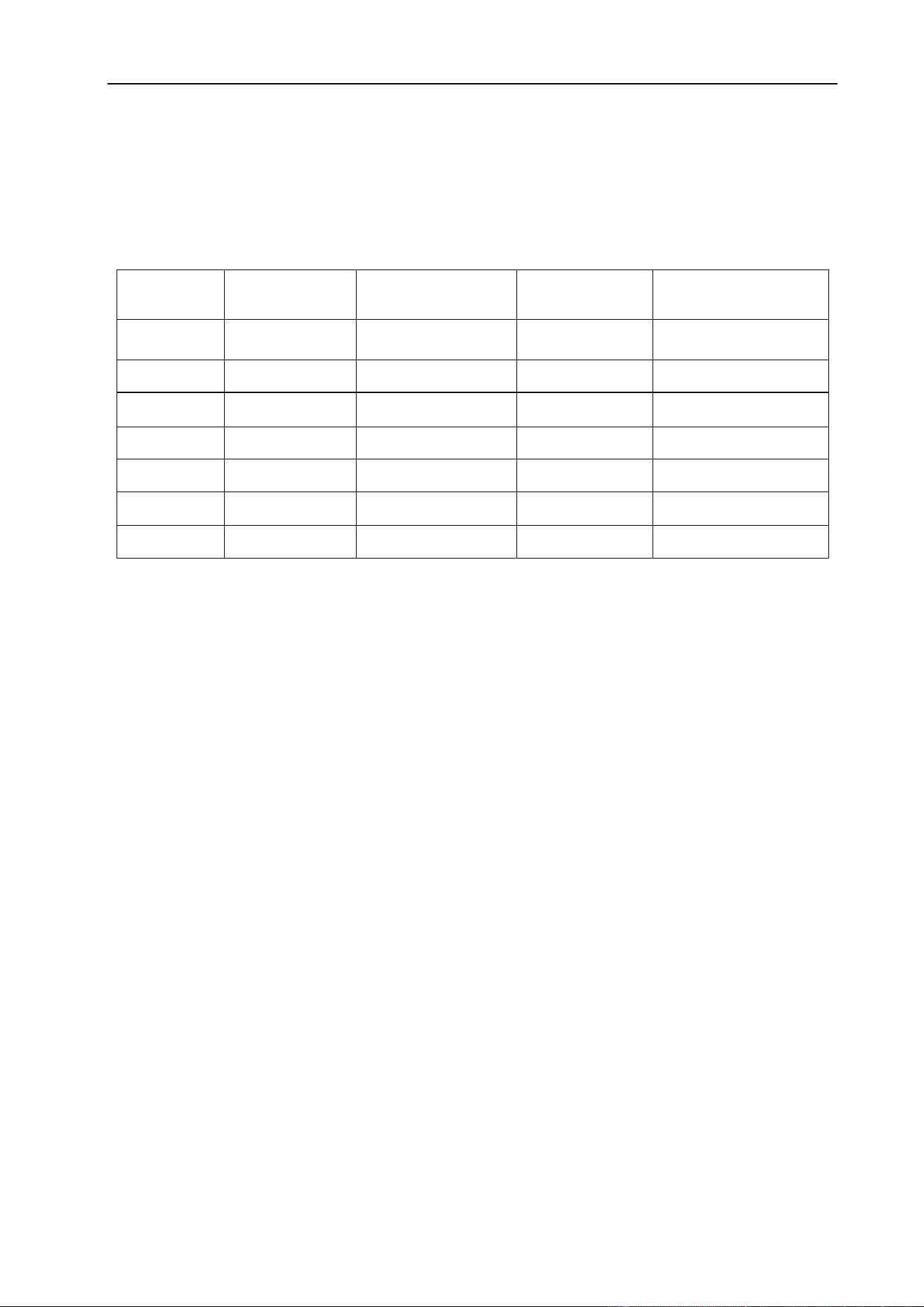
Tungsten Electrodes Rating for Welding Currents
Tungsten
Diameter
mm
DC Current Amps
Torch Negative
2% Thoriated
AC Current Amps
Un-Balanced Wave
0.8% Zirconiated
AC Current Amps
Balanced Wave
0.8% Zirconiated
1.0mm
15~80
15~80
20~60
1.6mm
70~150
70~150
60~120
2.4mm
150~250
140~235
100~180
3.2mm
250~400
225~325
160~250
4.0mm
400~500
300~400
200~320
§4.2.5 Tungsten Preparation
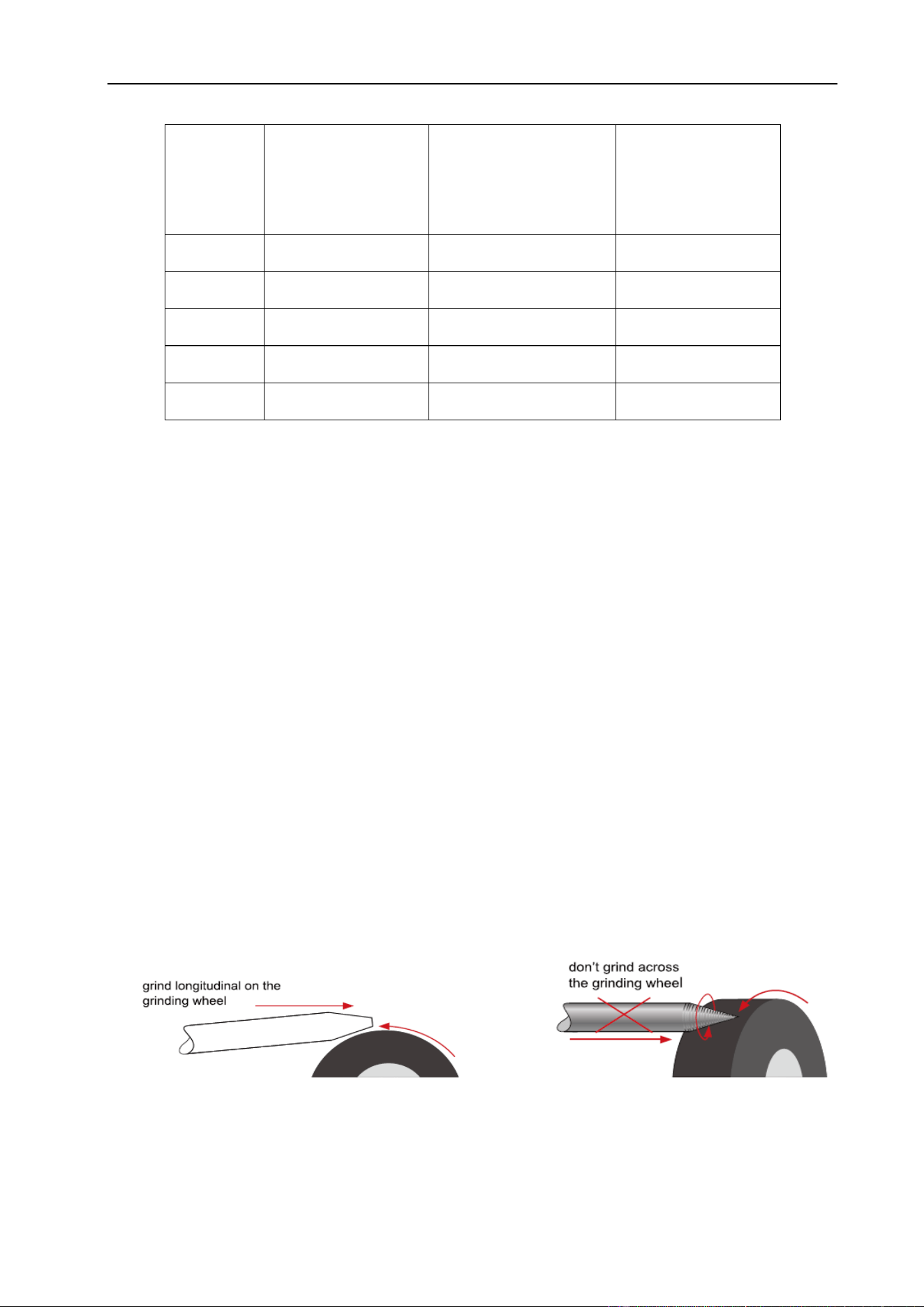
Always use DIAMOND wheels when grinding and cutting. While tungsten is a very hard
material, the surface of a diamond wheel is harder, and this makes for smooth grinding.
Grinding without diamond wheels, such as Aluminum oxide wheels, can lead to jagged
edges, imperfections, or poor surface finishes not visible to the eye that will contribute to
weld inconsistency and weld defects.
Always ensure to grind the tungsten in a longitudinal direction on the grinding wheel.
Tungsten electrodes are manufactured with the molecular structure of the grain running
lengthwise and thus grinding crosswise is “grinding against the grain”. If electrodes are
ground crosswise, the electrons have to jump across the grinding marks and the arc can
start before the tip and wander. Grinding longitudinally with the grain, the electrons flow
steadily and easily to the end of the tungsten tip. The arc starts straight and remains
narrow, concentrated and stable.
INSTALLATION & OPERATION
38
Electrode Shape & Angle
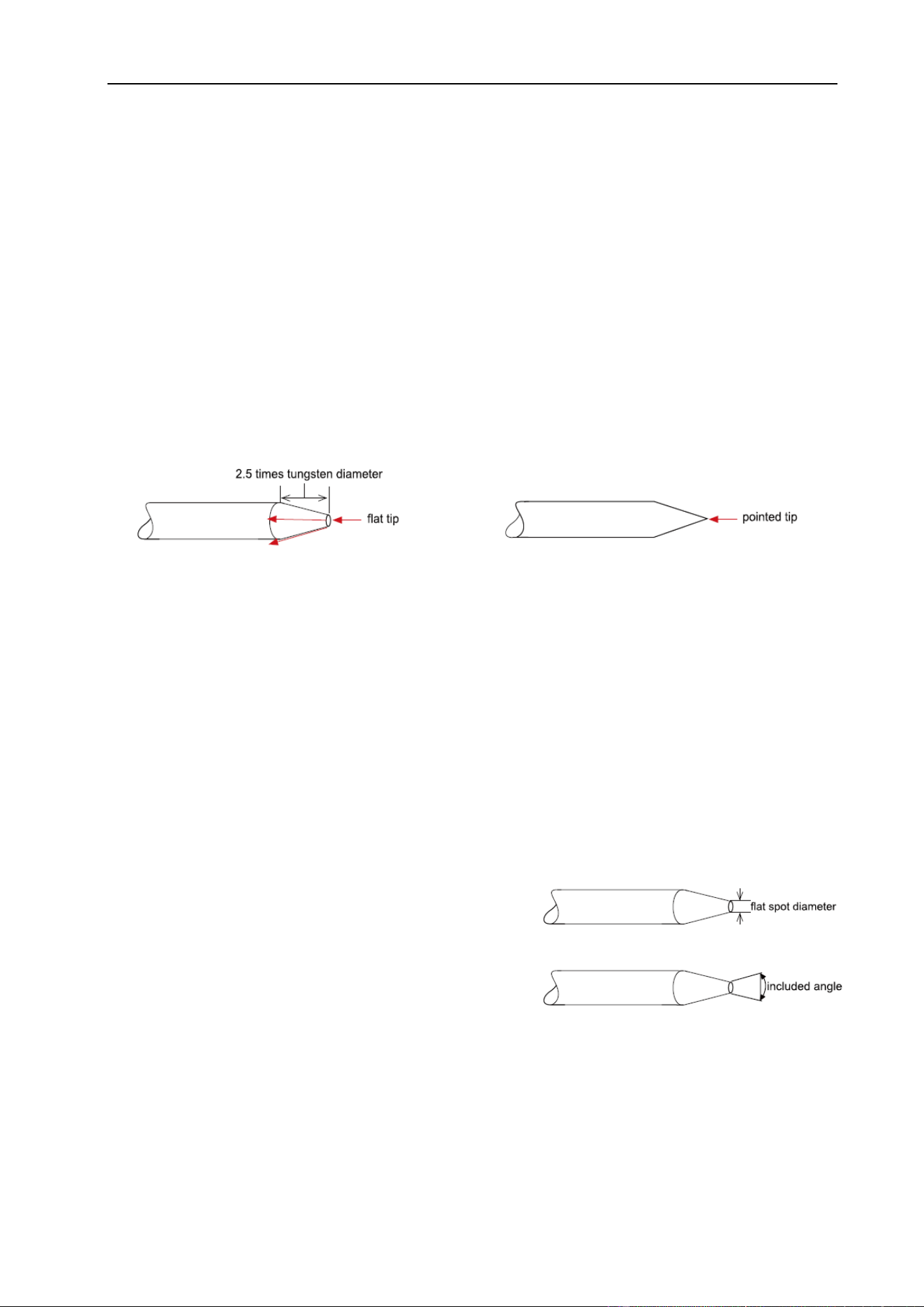
The shape of the tungsten electrode tip is an important process variable in precision arc
welding. A good selection of tip/flat size will balance the need for several advantages.
The bigger the flat, the more likely arc wander will occur and the more difficult it will be to
arc start. However, increasing the flat to the maximum level that still allows arc start and
eliminates arc wonder will improve the weld penetration and increase the electrode life.
The included angle determines weld bead shape and size. Generally, as the included
angle increases, penetration increases and bead width decreases.
Some welders still grind electrodes to a sharp point, which makes arc starting easier.
However, they risk decreased welding performance from melting at the tip.
Electrode Included Angle/Taper - DC Welding
Tungsten electrodes for DC welding should be ground longitudinally and concentrically
with diamond wheels to a specific included angle in conjunction with the tip/flat
preparation. Different angles produce different arc shapes and offer different weld
penetration capabilities.
Blunter electrodes with larger included angle provide:
⚫ Last Longer
⚫ Have better weld penetration
⚫ Have a narrower arc shape
⚫ Can handle more amperage without
eroding.
INSTALLATION & OPERATION
39
Sharper electrodes with smaller included angle provide:
⚫ Offer less arc weld
⚫ Have a wider arc
⚫ Have a more consistent arc
Tungsten
Diameter
Diameter at
the Tip - mm
Constant Included
Angle - Degrees
Current Range
Amps
Current Range
Pulsed Amps
1.0mm
.250
20
5~30
5~60
1.6mm
.500
25
8~50
5~100
1.6mm
.800
30
10~70
10~140
2.4mm
.800
35
12~90
12~180
2.4mm
1.100
45
15~150
15~250
3.2mm
1.100
60
20~200
20~300
3.2mm
1.500
90
25~250
25~350
INSTALLATION & OPERATION
40
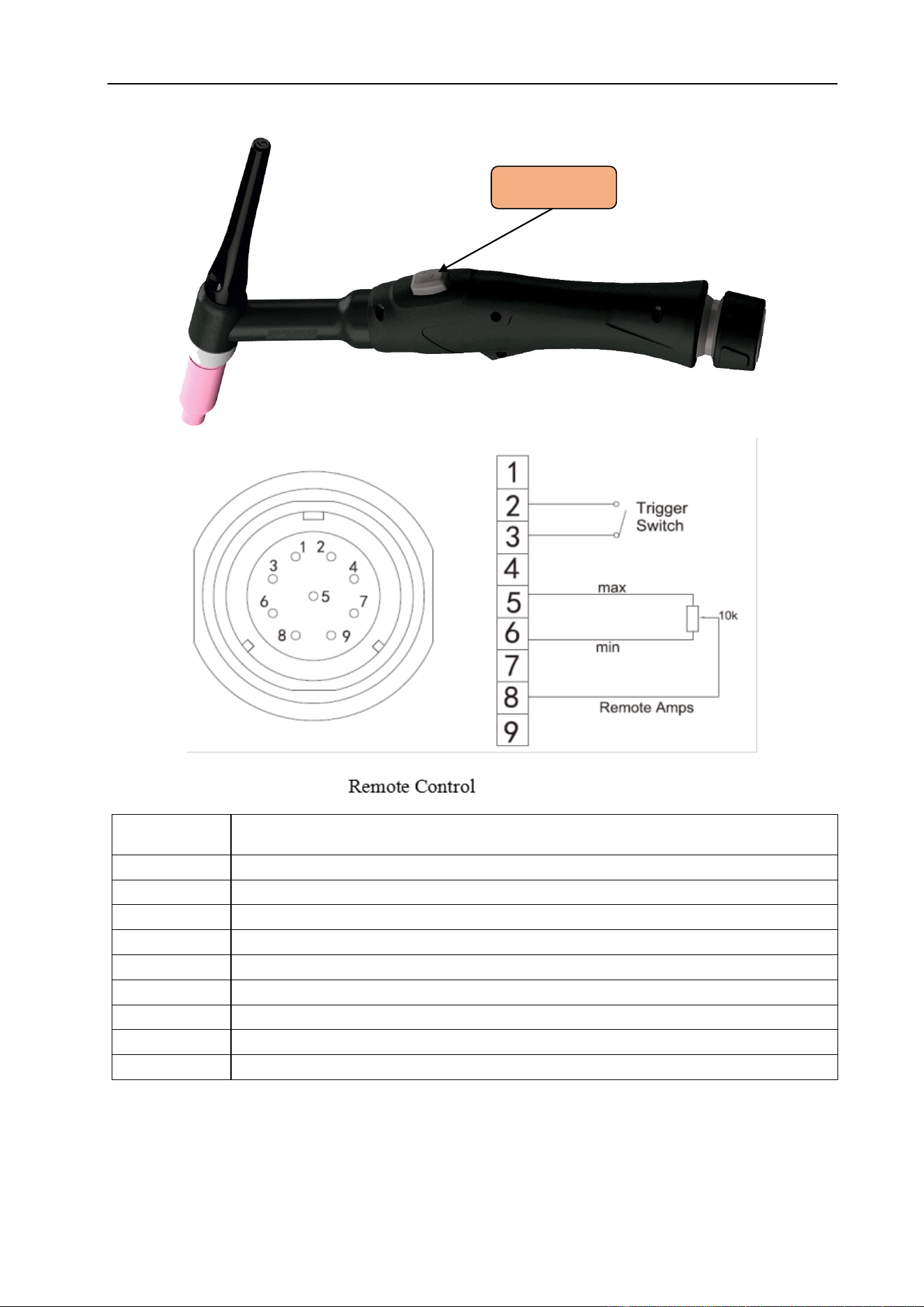
§4.2.6 TIG Torch Switch Controls
Socket Pin
Function
1
Not connected
2
Trigger Switch Input
3
Trigger Switch Input
4
Not connected
5
10k ohm (maximum) connection to 10k ohm remote control potentiometer
6
Zero ohm (minimum) connection to 10k ohm remote control potentiometer
7
Not connected
8
Wiper arm connection to 10k ohm remote control potentiometer
9
Not connected
Gun Switch
INSTALLATION & OPERATION
41
§4.3 Installation & Operation for MIG Welding
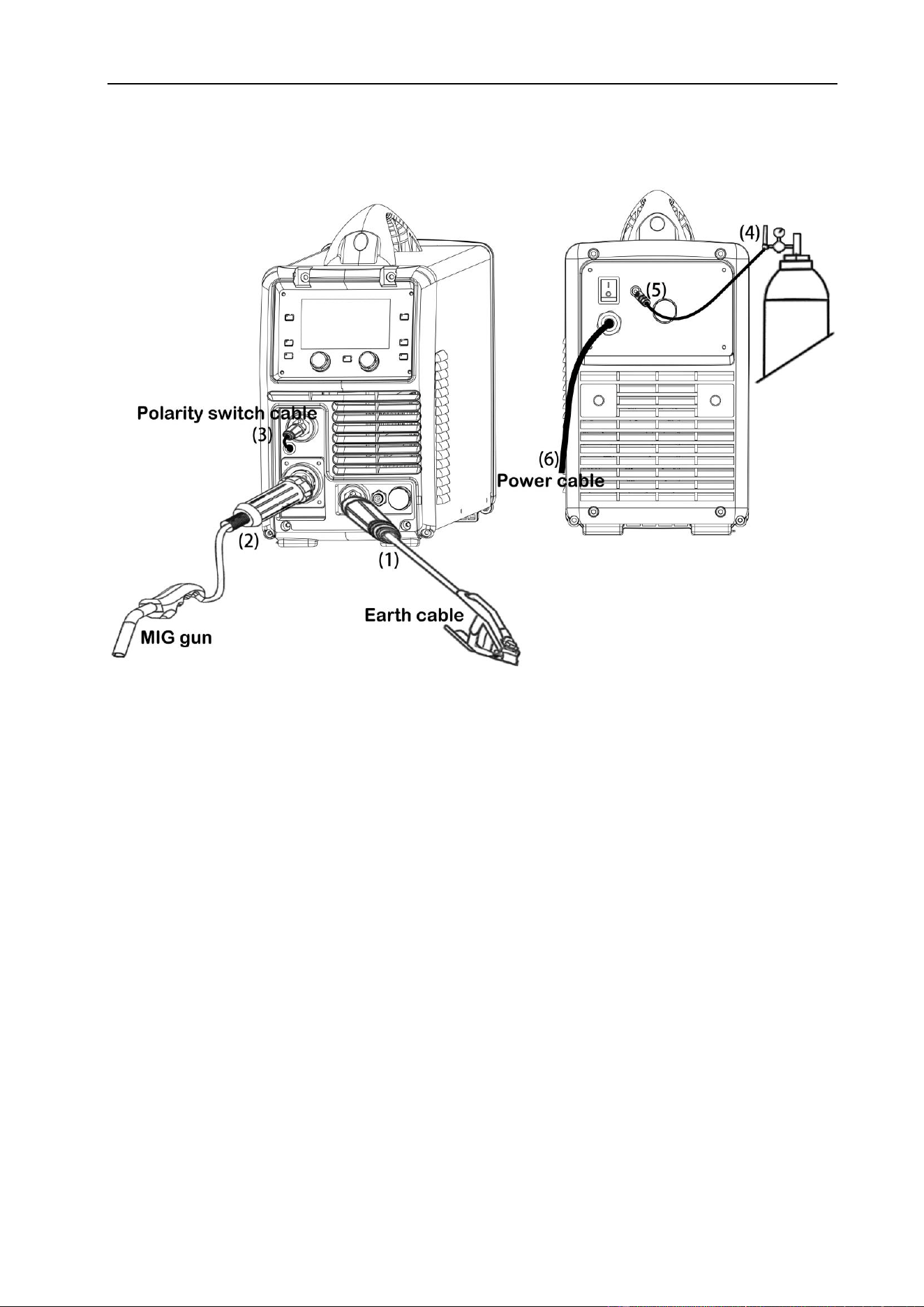
§4.3.1 Set up installation for MIG Welding
(1) Insert the earth cable plug into the Negative (-) socket and twist to tighten.
(2) Plug the MIG welding gun into MIG torch euro-connector on the front panel and
tighten locking nut securely.
(3) Insert the polarity switching cable plug into the positive socket on the front of the
machine and tighten it.
(4) Connect the gas regulator to the gas cylinder and connect the gas line to the
regulator.
(5) Connect the gas line to gas connector on the rear panel.
(6) Connect the power cord of welding machine with the outlet on electrical box.
INSTALLATION & OPERATION
42
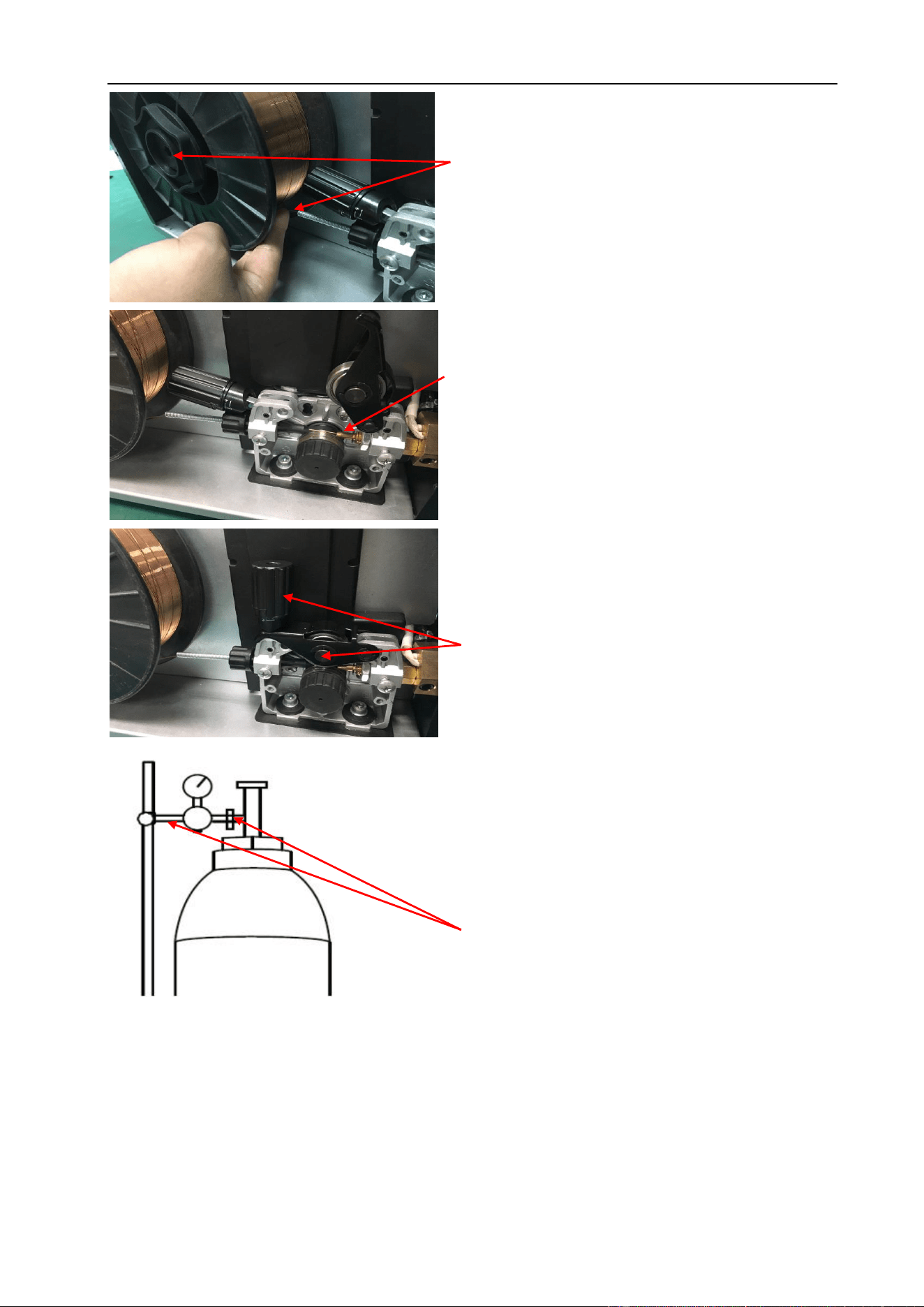
(11) Remove the gas nozzle and contact tip from the torch neck.
(12) Press and hold the manual wire button to feed the wire through to the torch neck,
release the manual wire button when the wire exits the torch neck.
(13) Fit the correct sized contact tip and feed the wire through it, screw the contact tip
into the tip holder of the torch neck and nip it up tightly.
(8) Feed wire over drive roller into outlet guide wire
tube, push wire through approximately 150mm.
(7) Place wire onto spool holder - (spool retaining
nut is left hand thread) Feed wire through the inlet
guide tube on to the drive roller.
(9) Close down the top roller bracket and clip the
pressure arm into place with a medium amount of
pressure applied.
(10) Carefully open the valve of the gas cylinder,
set the required gas flow rate.

INSTALLATION & OPERATION
43
(14) Fit the gas nozzle to the torch head.
(15) Carefully open the gas cylinder valve, set the required gas flow rate on the regulator.
(16) Select the desired MIG function, Select program number to suit the wire diameter
and gas type being used as shown on the display.
(17) Select torch switch mode: 2T/ 4T/ Spot weld.
(18) Set the required welding parameters to suit the material thickness being welded.
§4.3.2 Wire Feed Roller Selection
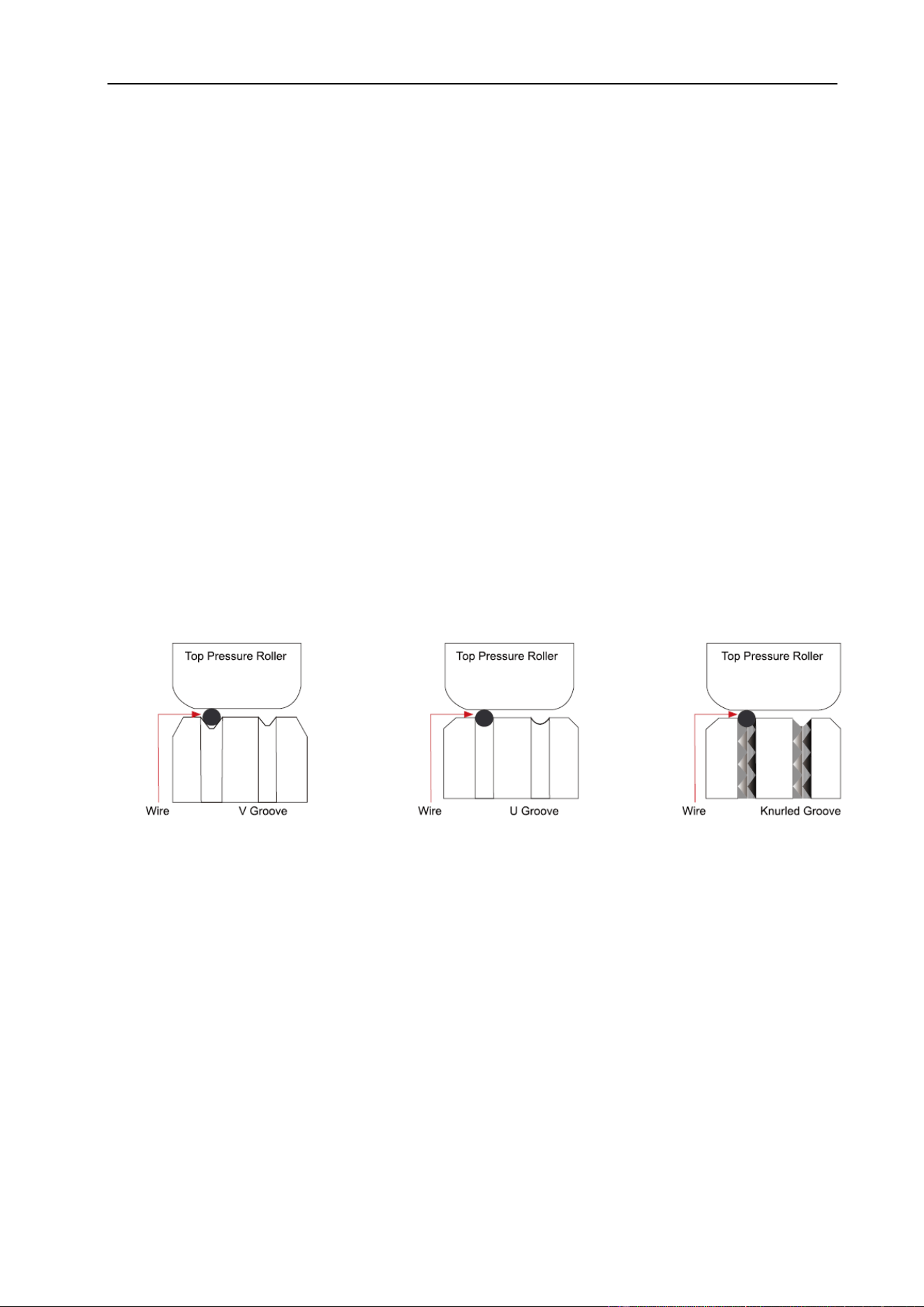
The importance of smooth consistent wire feeding during MIG welding cannot be
emphasized enough. Simply put the smoother the wire feed then the better the weld.
Feed rollers or drive rollers are used to feed the wire mechanically through the length of
the welding gun cable. Feed rollers are designed to be used for certain types of welding
wire and they have different types of grooves machined in them to accommodate the
different types of wire. The wire is held in the groove by the top roller of the wire drive unit
and is referred to as the pressure roller, pressure is applied by a tension arm that can be
adjusted to increase or decrease the pressure as required. The type of wire will
determine how much pressure can be applied and what type of drive roller is best suited
to obtain optimum wire feed.
Solid Hard Wire - like Steel, Stainless Steel requires a drive roller with a “V” shape
groove for optimum grip and drive capability. Solid wires can have more tension applied
to the wire from the top pressure roller that holds the wire in the groove and the “V”
shape groove is more suited for this. Solid wires are more forgiving to feed due to their
higher cross-sectional column strength, they are stiffer and don’t deflect so easily.
Soft Wire – Such as aluminum, require a “U” shape groove. Aluminum wire has a lot
less column strength, can bend easily and is therefore more difficult to feed. Soft wires
can easily buckle at the wire feeder where the wire is fed into inlet guide tube of the torch.
The U-shaped roller offers more surface area grip and traction to help feed the softer
wire. Softer wires also require less tension from the top pressure roller to avoid
INSTALLATION & OPERATION
44
deforming the shape of the wire, too much tension will push the wire out of shape and
cause it to catch in the contact tip.
Flux Core/ Gasless Wire - These wires are made up of a thin metal sheath that has flux
and metal compounds layered onto the surface and then rolled into a cylinder to form the
finished wire. The wire cannot take too much pressure from the top roller as it can be
crushed and deformed if too much pressure is applied. A knurled-V drive roller has been
developed and it has small serrations in the groove, the serrations grip the wire and
assist to drive it without too much pressure from the top roller. The down side to the
knurled wire feed roller on flux cored wire is it will slowly over time bit by bit eat away at
the surface of the welding wire, and these small pieces will eventually go down into the
liner. This will cause clogging in the liner and added friction that will lead to welding wire
feed problems. A U groove wire can also be used for flux core wire without the wire
particles coming off the wire surface. However, it is considered that the knurled roller will
give a more positive feed of flux core wire without any deformation of the wire shape.
§4.3.3 Wire Installation and Set-Up Guide
The importance of smooth consistent wire feeding during MIG welding cannot be
emphasized enough. The correct installation of the wire spool and the wire into the wire
feed unit is critical to achieving an even and consistent wire feed. A high percentage of
faults with MIG welders emanate from poor set up of the wire into the wire feeder. The
guide below will assist in the correct setup of your wire feeder.
INSTALLATION & OPERATION
45
(4) Snip the wire carefully, be sure to hold
the wire to prevent the spool uncoiling.
Carefully feed the wire into the inlet guide
tube of the wire feed unit.
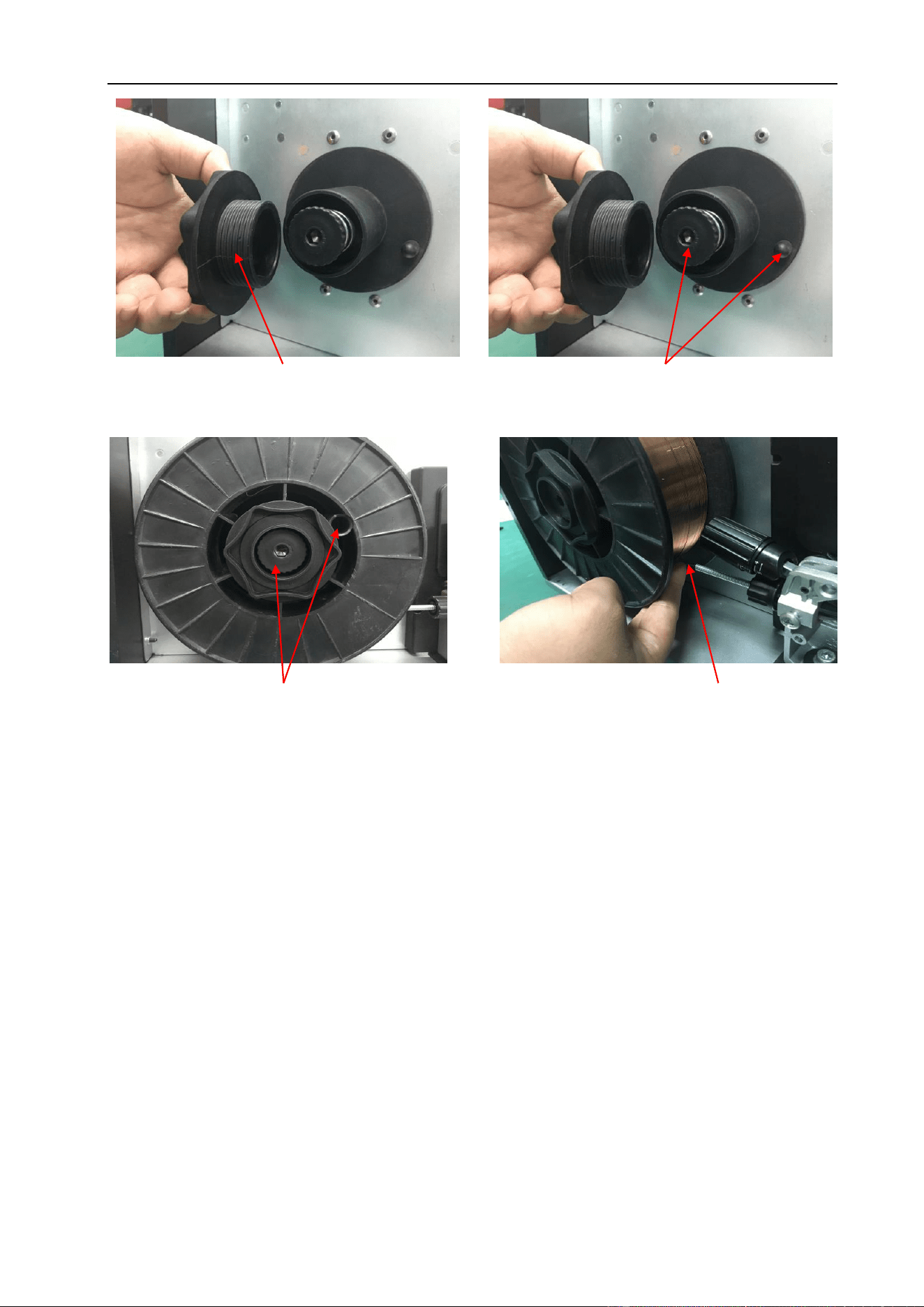
(3) Fit the wire spool onto the spool holder
fitting the locating pin into the location hole
on the spool. Replace the spool retaining
nut tightly.
(1) Remove the spool retaining nut.
(2) Note the tension spring adjuster
and spool locating pin.
INSTALLATION & OPERATION
46
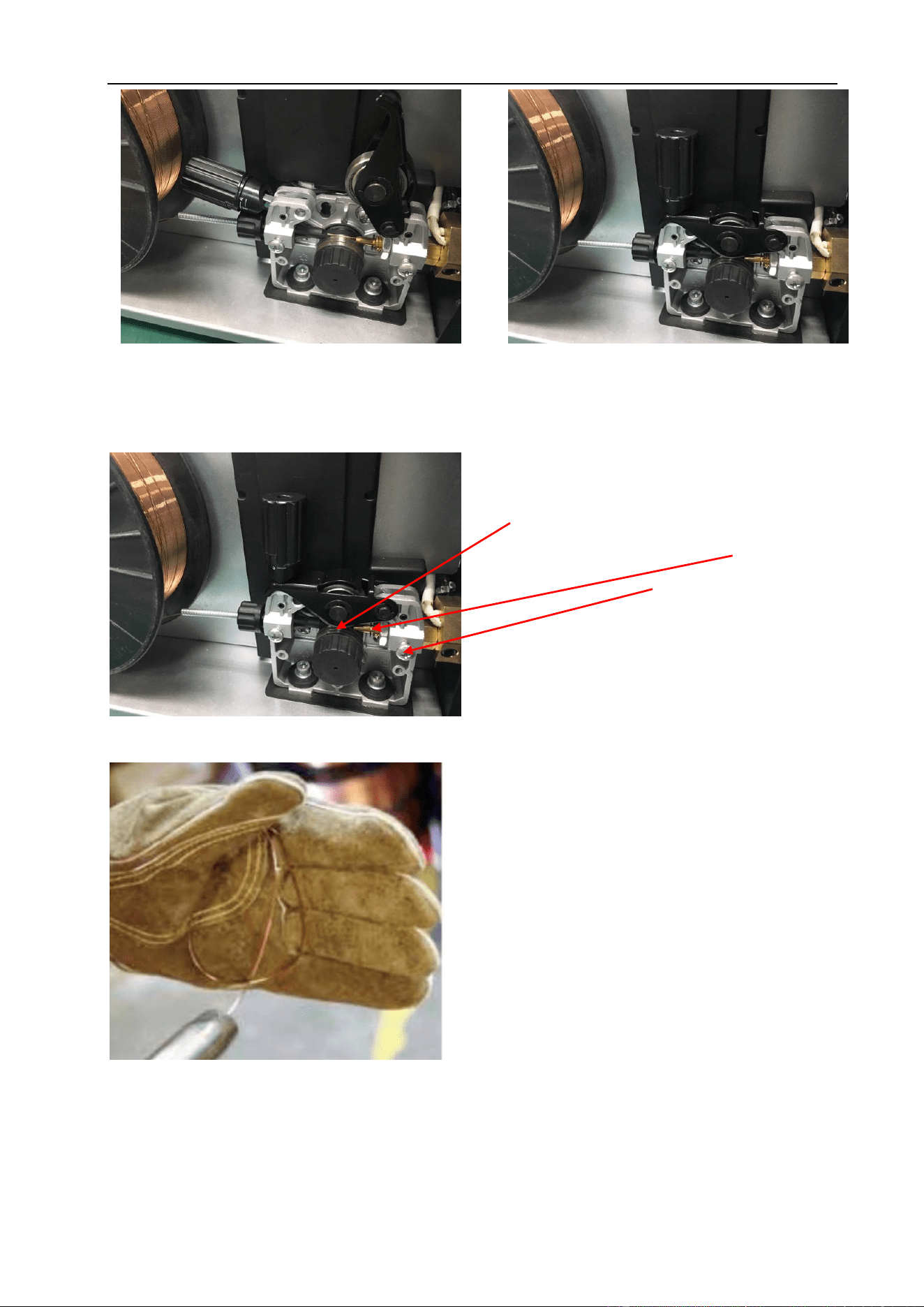
(5) Feed the wire through the drive roller
and into the outlet guide tube of the wire
feeder.
(6) Lock down the top pressure roller and
apply a medium amount of pressure using
the tension adjustment knob.
(8) A simple check for the correct drive tension is
to bend the end of the wire over hold it about
100mm from your hand and let it run into your
hand, it should coil round in your hand without
stopping and slipping at the drive rollers,
increase the tension if it slips.
(7) Check that the wire passes through the
center of the outlet guide tube without touching
the sides. Loosen the locking screw and then
loosen the outlet guide tube retaining nut too
make adjustment if required. Carefully retighten
the locking nut and screw to hold the new
position.
INSTALLATION & OPERATION
47
§4.3.4 MIG Torch Liner Types and Information
MIG Torch Liners
The liner is both one of the simplest and most important components of a MIG gun. Its
sole purpose is to guide the welding wire from the wire feeder, through the gun cable and
up to the contact tip.
Steel Liners
Most MIG gun liners are made from coiled steel wire also known as piano wire, which
provides the liner with good rigidity and flexibility and allows it to guide the welding wire
smoothly through the welding cable as it bends and flex during operational use. Steel
liners are primarily used for feeding of solid steel wire, other wires such as Aluminum,
Silicon Bronze, Etc. will perform better using a Teflon or Polyamide line. The internal
diameter of the liner is important and relative to the wire diameter being used. The
correct inside diameter and will assist in smooth feeding and prevention of the wire
kinking and bird-nesting at the drive rollers. Also bending the cable too tightly during
welding increases the friction between the liner and the welding wire making it more
difficult to push the wire through the liner resulting in poor wire feeding, premature liner
wear and bird-nesting. Dust, grime and metal particles can accumulate inside the liner
over time and cause friction and blockages, it is recommended to periodically blow out
the liner with compressed air. Small diameter welding wires, 0.6mm through 1.0mm have
relatively low columnar strength, and if matched with an oversized liner, can cause the
wire to wander or drift within the liner. This in turn leads to poor wire feeding and
premature liner failure due to excessive wear. By contrast, larger diameter welding wires,
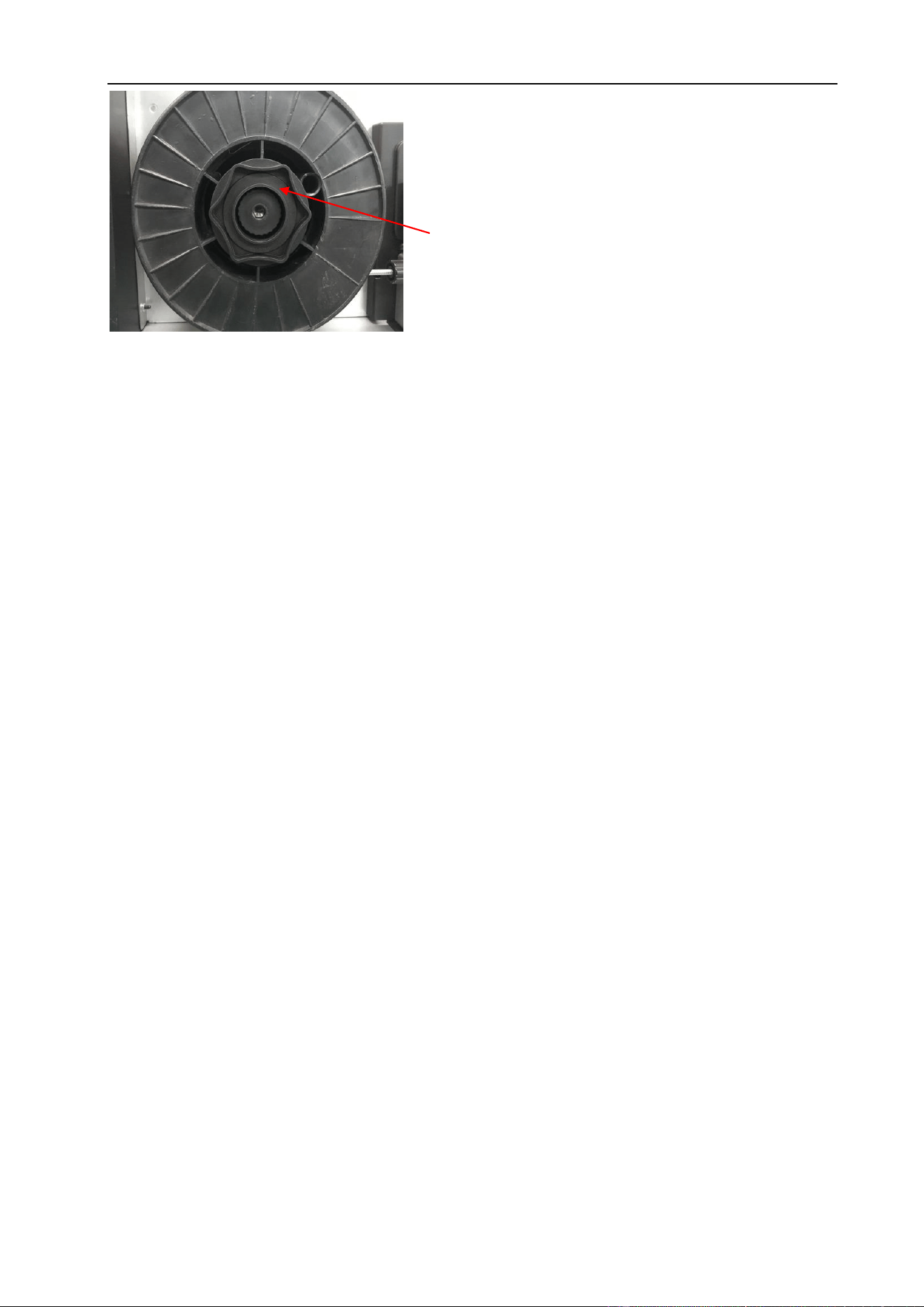
(9) The weight and speed of the wire spool turning
creates an inertia that can cause the spool to run
on and the wire loop over the side of the spool and
tangle. If this happens increase the pressure on
the tension spring inside the spool holder
assembly using the tension adjustment screw.

INSTALLATION & OPERATION
48
1.2mm through 2.4mm have much higher columnar strength but it is important to make
sure the liner has enough internal diameter clearance. Most manufacturers will produce
liners sized to match wire diameters and length of welding torch cable and most are color
coded to suit.
Teflon and Polyamide (PA) Liners
Teflon liners are well suited for feeding soft wires with poor column strength like
aluminum wires. The interiors of these liners are smooth and provide stable feeding,
especially on small diameter welding wire Teflon can be good for higher heat
applications that utilize water-cooled torches and brass neck liners. Teflon has good
abrasion resistance characteristics and can be used with a variety of wire types such as
silicon bronze, stainless steel as well as aluminum. A note of caution to carefully inspect
the end of the welding wire prior to feeding it down the liner. Sharp edges and burrs can
score the inside of the liner and lead to blockages and accelerated wear. Polyamide
Liners (PA) are made of carbon infused nylon and are ideal for softer aluminum, copper
alloy welding wires and push pull torch applications. These liners are generally fitted with
a floating collet to allow the liner to be inserted all the way to the feed rollers.
Copper - Brass Neck Liners
For high heat applications fitting brass or copper wound jumper or neck liner on the end
of the liner at the neck end will increase the working temperature of the liner as well as
Steel Liners
Blue - 0.6mm~0.8mm
Red - 0.9mm~1.2mm
Yellow - 1.6mm
Green - 2.0mm~2.4mm
Teflon Liners
PA Liner
Blue - 0.6mm~0.8mm
Red - 0.9mm~1.2mm
Yellow - 1.6mm
Black - 1.0mm~1.6mm

INSTALLATION & OPERATION
49
improve the electrical conductivity of the welding power transfer to the wire. It is
recommended for all Aluminum and Silicone Bronze welding applications.
§4.3.5 Torch & Wire Feed Set-Up for Aluminum Wire
The same method is used for Teflon and/or Polyamide Liners (PA).
§4.3.6 MIG Welding
Definition of MIG Welding
MIG (metal inert gas) welding also known as GMAW (gas metal arc welding) or MAG
(metal active gas welding), is a semi-automatic or automatic arc welding process in
which a continuous and consumable wire electrode and a shielding gas are fed through
a welding gun. A constant voltage, direct current power source is most commonly used
with MIG welding. There are four primary methods of metal transfer in MIG welding,
called short circuit (also known as dip transfer) globular transfer, spray transfer and
pulsed-spray, each of which has distinct properties and corresponding advantages and
limitations.
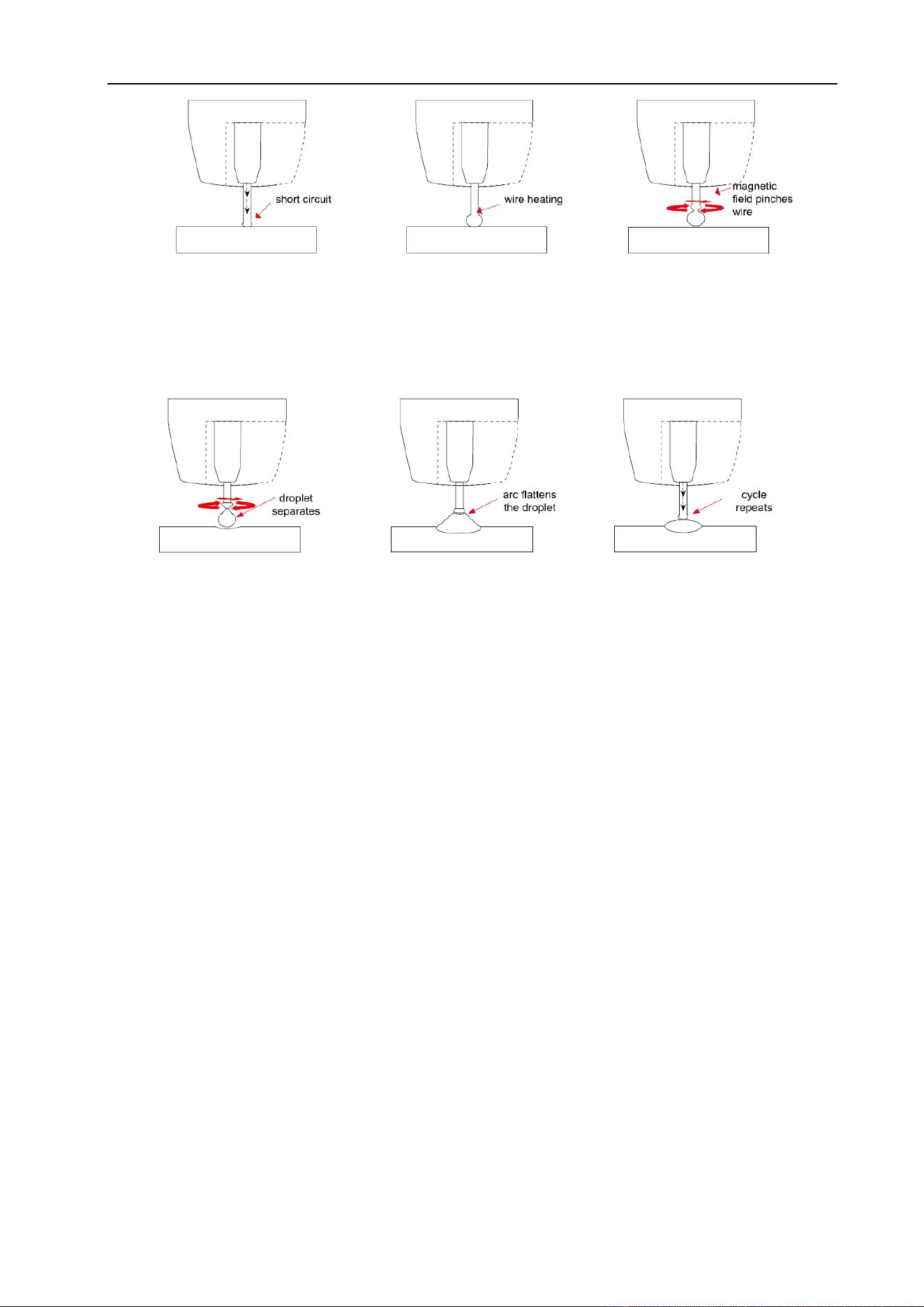
Short Circuit Transfer - Short circuit transfer is the most common used method
whereby the wire electrode is fed continuously down the welding torch through to and
exiting the contact tip. The wire touches the work piece and causes a short circuit the
wire heats up and begins to form a molten bead, the bead separates from the end of the
wire and forms a droplet that is transferred into the weld pool. This process is repeated
about 100 times per second, making the arc appear constant to the human eye.
Copper Neck Liner
INSTALLATION & OPERATION
50
Basic MIG Welding
Good weld quality and weld profile depends on gun angle, direction of travel, electrode
extension (stick out), travel speed, thickness of base metal, wire feed speed and arc
voltage. To follow are some basic guides to assist with your setup.
Gun Position - Travel Direction, Work Angle: Gun position or technique usually refers
to how the wire is directed at the base metal, the angle and travel direction chosen.
Travel speed and work angle will determine the characteristic of the weld bead profile.
Push Technique - The wire is located at the leading edge of the weld pool and pushed
towards the un-melted work surface. This technique offers a better view of the weld joint
and direction of the wire into the weld joint. Push technique directs the heat away from
the weld puddle allowing faster travel speeds providing a flatter weld profile with light
penetration - useful for welding thin materials. The welds are wider and flatter allowing
for minimal clean-up and grinding time.
The pinch causes the forming
droplet to separate and falls
towards the now creating weld
pool.
An arc is created at the
separation of the droplet and
the heat and force of the arc
flattens-out the droplet into the
weld pool.
The wire feed speed
overcomes the heat of the
arc and the wire again
approaches the work to short
circuit and repeat the cycle.
The wire touches the work
creating a short circuit.
Because there is no space
between the wire and the
base metal there is no arc.
The wire cannot support
all the current flow so
resistance builds up and
the wire begins to melt.
The current flow creates
a magnetic field that
begins to pinch the
melting wire forming it
into droplet.
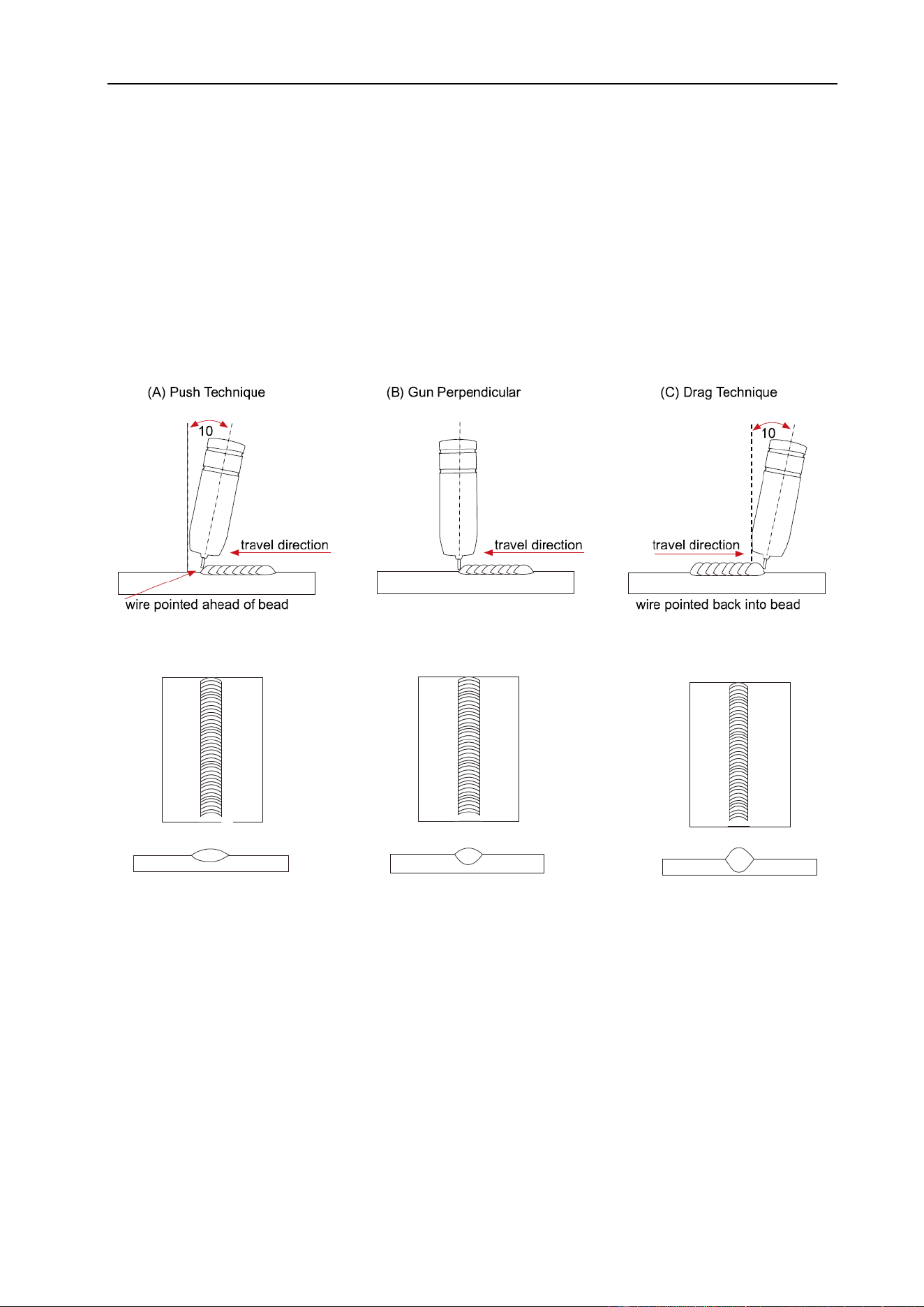
INSTALLATION & OPERATION
51
Perpendicular Technique - The wire is fed directly into the weld, this technique is used
primarly for automated situations or when conditions make it necessary. The weld profile
is generally taller and a deeper penetration is achieved.
Drag Technique - The gun and wire are dragged away from the weld bead. The arc and
heat is concentrated on the weld pool, the base metal receives more heat, deeper
melting, more penetration and the weld profile is higher with more build up.
Travel Angle - Travel angle is the right to left angle relative to the direction of welding. A
travel angle of 5°~15° is ideal and produces a good level of control over the weld pool. A
travel angle greater than 20° will give an unstable arc condition with poor weld metal
transfer, less penetration, high levels of spatter, poor gas shield and poor quality finished
weld.
Flat even weld profile
light penetration
Narrower weld profile
even penetration
Narrow higher weld profile
more penetration
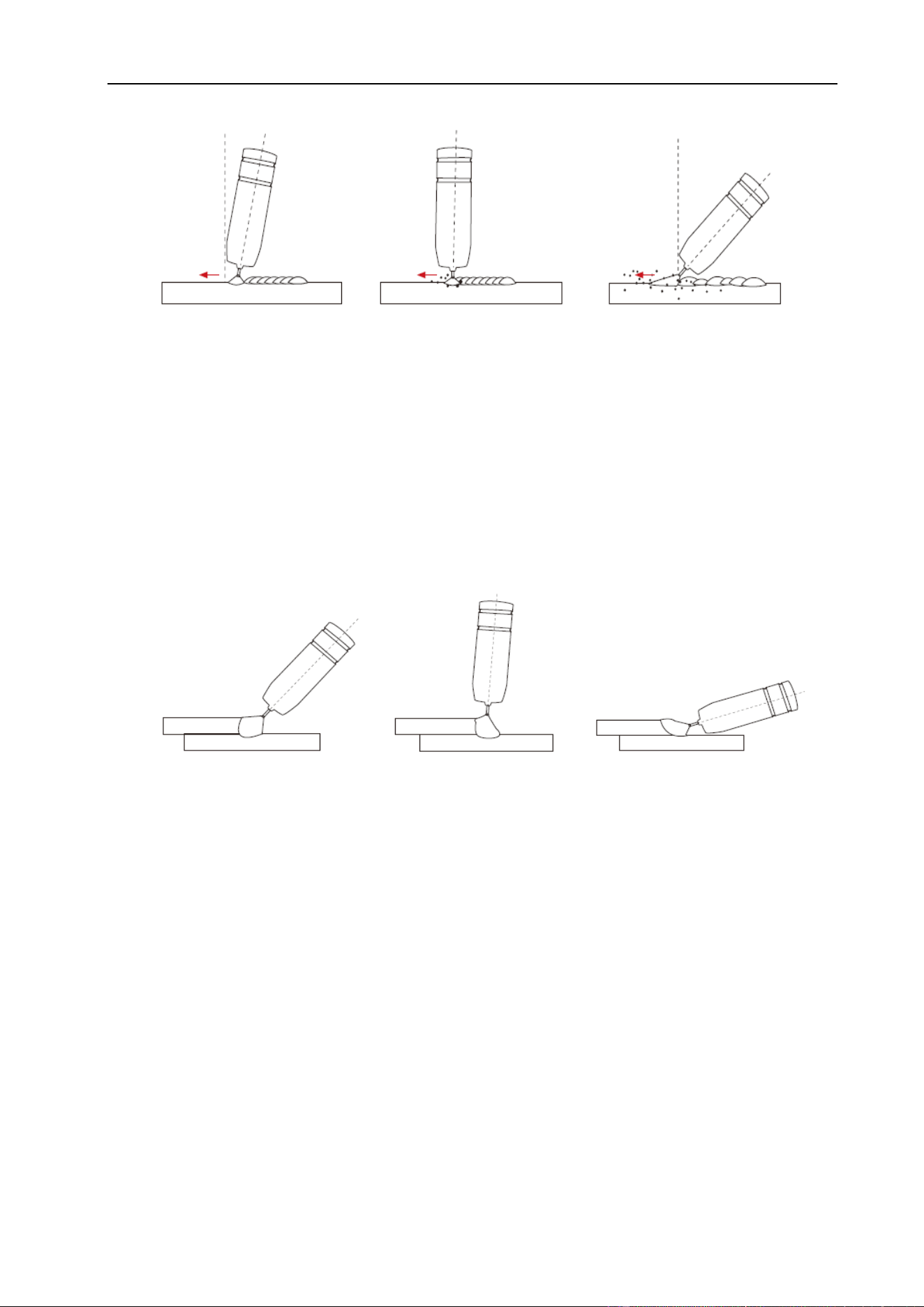
INSTALLATION & OPERATION
52
Angle to Work - The work angle is the forward back angle of the gun relative to the work
piece. The correct work angle provides good bead shape, prevents undercut, uneven
penetration, poor gas shield and poor quality finished weld.
Stick Out- Stick out is the length of the un-melted wire protruding from the end of the
contact tip. A constant even stick out of 5~10mm will produce a stable arc, and an even
current flow providing good penetration and even fusion. Too short stick out will cause an
unstable weld pool, produce spatter and over heat the contact tip. Too long stick out will
cause an unstable arc, lack of penetration, lack of fusion and increase spatter.
Good level of control over
the weld pool, even flat
weld.
Less control over the
weld pool equals more
spatter.
Poor control, unstable arc,
less penetration, lots of
spatter.
Correct angle
Too much angle
Not enough angle
Angle 5°~15°
Not enough angle
Angle more than 20°
Good level of control over
the weld pool, even flat
weld.
Less control over the weld
pool more spatter.
Poor control, unstable arc,
less penetration, lots of
spatter.
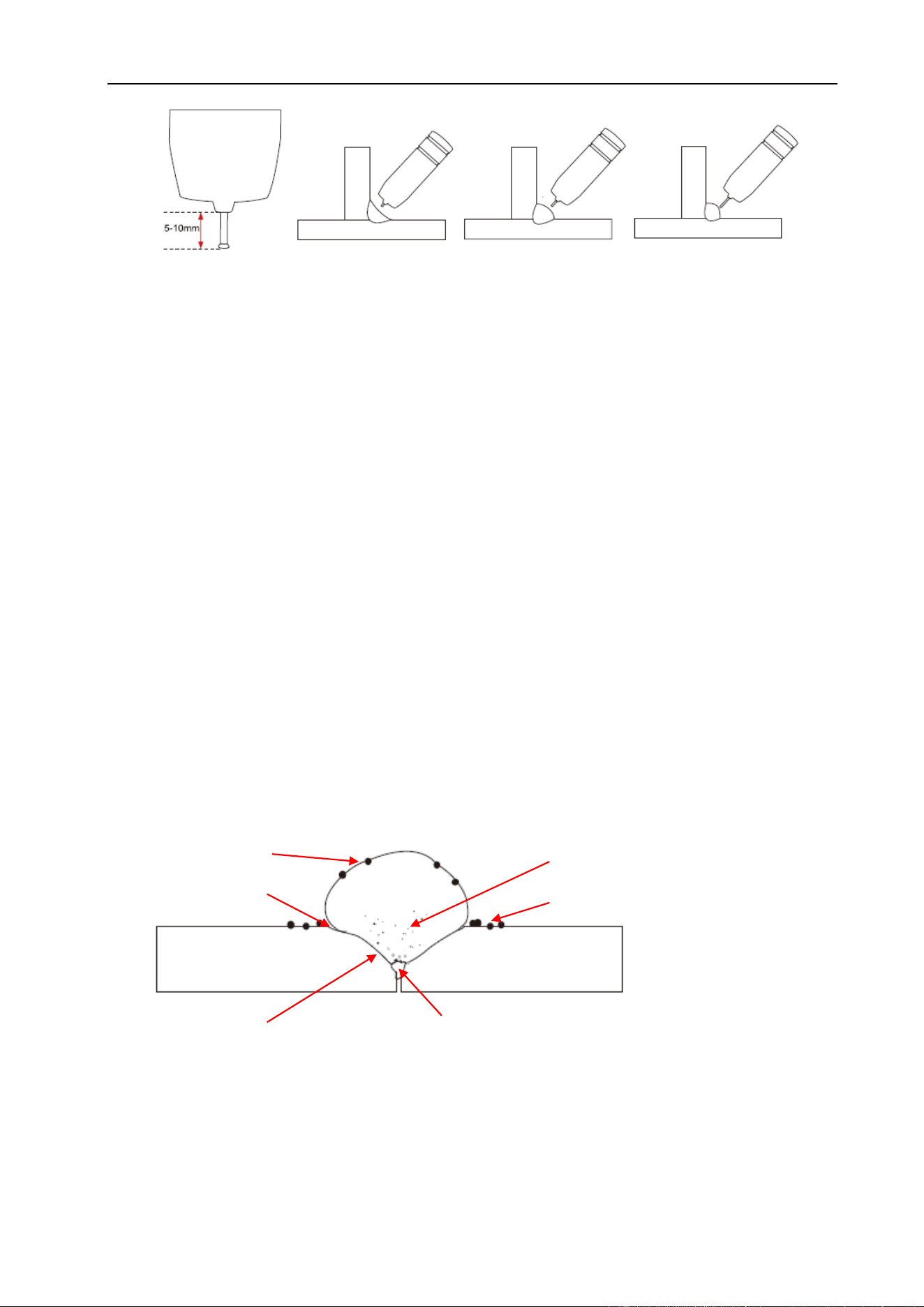
INSTALLATION & OPERATION
53
Travel Speed - Travel speed is the rate that the gun is moved along the weld joint and is
usually measured in inches per minute (IPM). Travel speeds can vary depending on
conditions and the welder’s skill and is limited to the welder’s ability to control the weld
pool. Push technique allows faster travel speeds than drag technique. Gas flow must
also correspond with the travel speed, increasing with faster travel speed and
decreasing with slower speed. Travel speed needs to match the amperage and will
decrease as the material thickness and amperage increase.
Too Fast Travel Speed - A too fast travel speed produces too little heat per mm of travel
resulting in less penetration and reduced weld fusion, the weld bead solidifies very
quickly trapping gases inside the weld metal causing porosity. Undercutting of the base
metal can also occur and an unfilled groove in the base metal is created when the travel .
Too Slow Travel Speed - A too slow travel speed produces a large weld with lack of
penetration and fusion. The energy from the arc dwells on top of the weld pool rather
than penetrating the base metal. This produces a wider weld bead with more deposited
weld metal per mm than is required resulting in a weld deposit of poor quality.
Too Fast Travel Speed
high narrow bead
undercut
lack of fusion
lack of joint penetration
spatter
porosity
Even arc, good
penetration even
fusion, good finish.
Unstable arc, spatter,
over heat contact tip.
Unstable arc, spatter,
poor penetration and
fusion.
Normal stick out
Too short
Too long
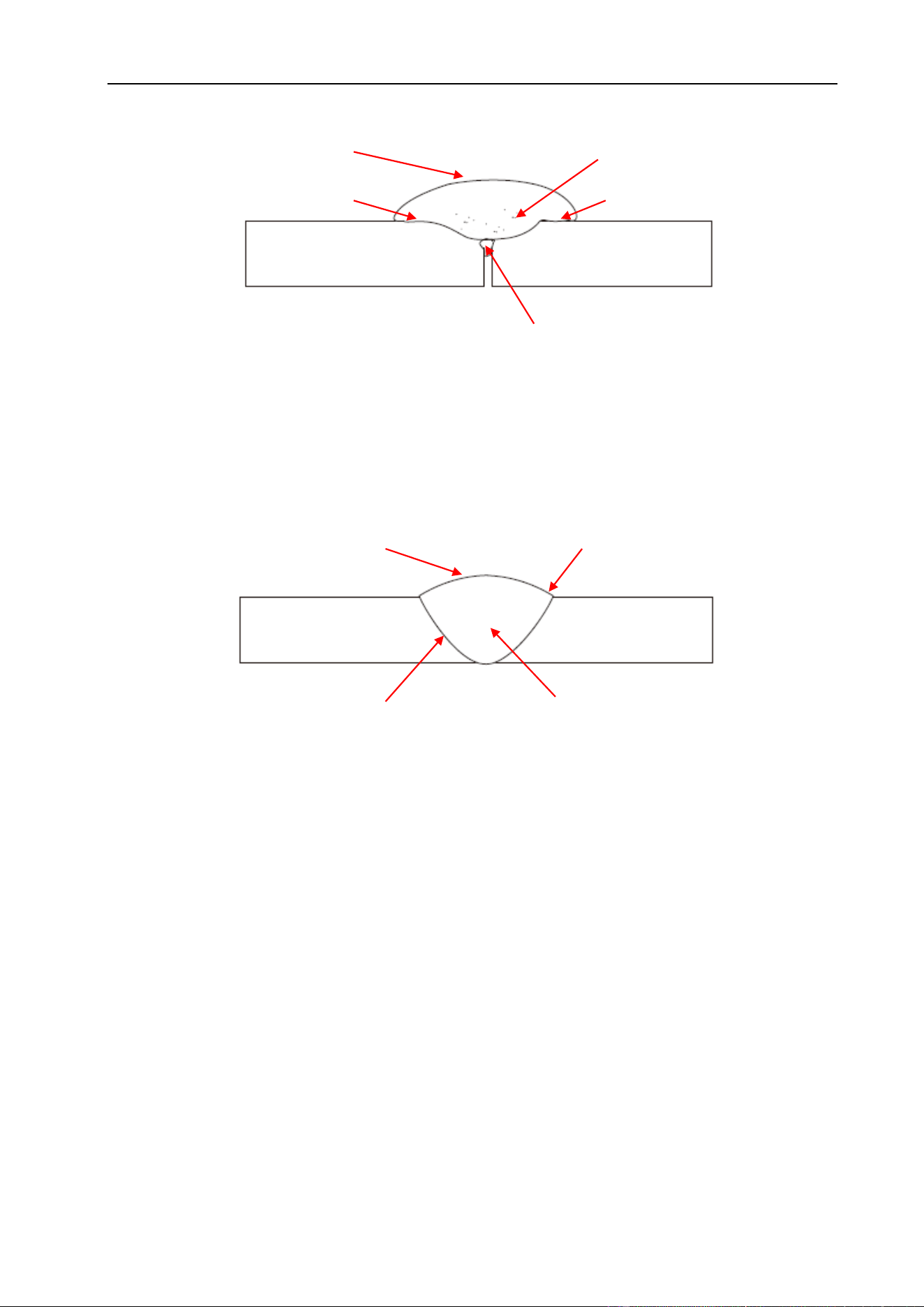
INSTALLATION & OPERATION
54
Correct Travel Speed - The correct travel speed keeps the arc at the leading edge of
the weld pool allowing the base metal to melt sufficiently to create good penetration,
fusion and wetting out of the weld pool producing a weld deposit of good quality.
Gas selection - The purpose of the gas in the MIG process is to protect / shield the wire,
the arc and the molten weld metal from the atmosphere. Most metals when heated to a
molten state will react with the air in the atmosphere, without the protection of the
shielding gas the weld produced would contain defects like porosity, lack of fusion and
slag inclusions.
The correct gas flow is also very important in protecting the welding zone from the
atmosphere.
Use the correct shielding gas. CO2 is good for steel and offers good penetration, the
weld profile is narrower and slightly more raised than the weld profile obtained from
Argon/CO2 mixed gas. Argon CO2 (Argon 80% & CO2 20%) mix gas offers better weld
ability for thin metals and has a wider range of setting tolerance on the machine.
Correct Travel Speed
even shaped bead
good side wall fusion
good toe fusion
good penetration
Too Slow Travel Speed
large wide bead
lack of fusion
porosity
cold lap
lack of joint penetration
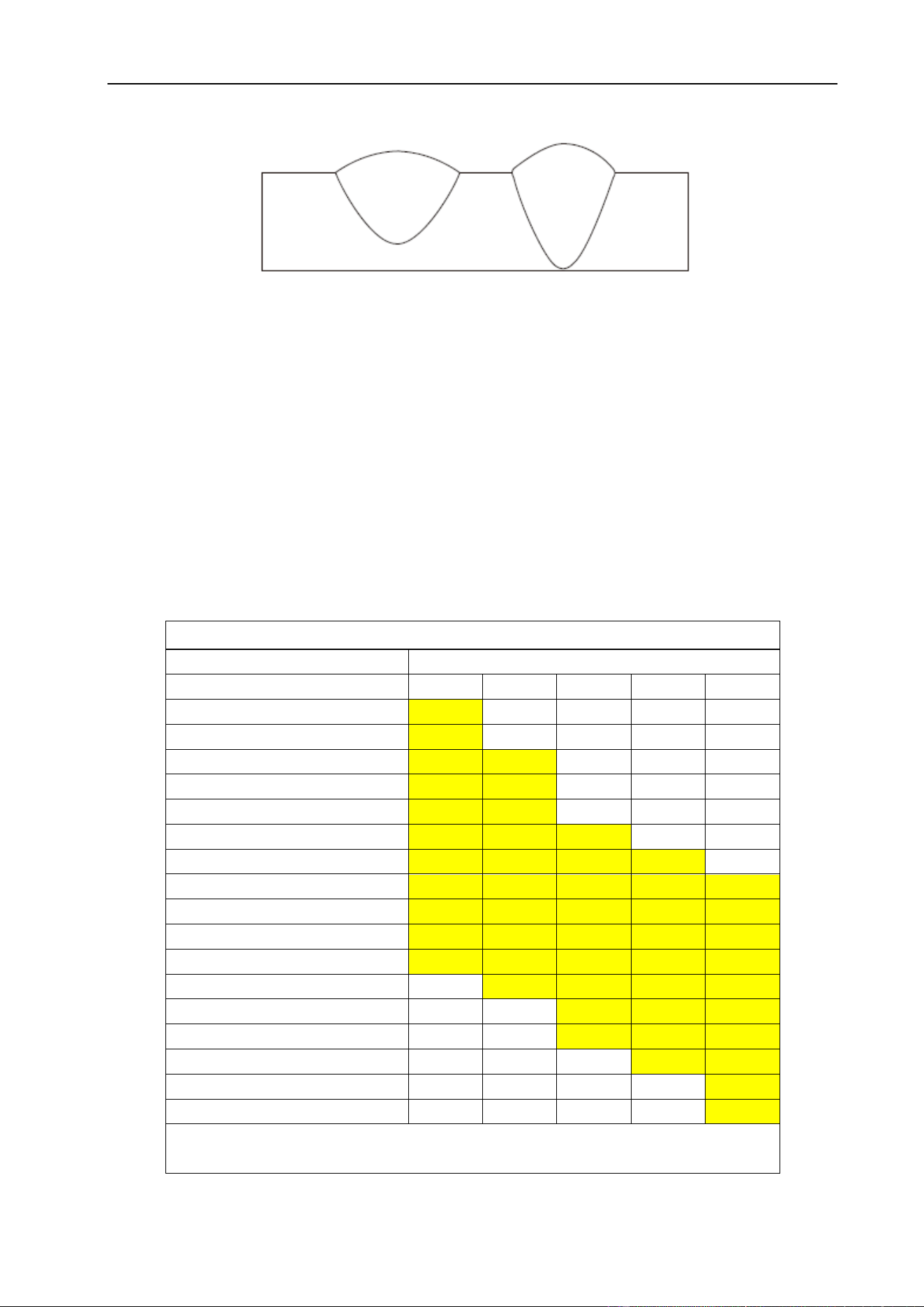
INSTALLATION & OPERATION
55
Argon gas at 100% mixture is good for aluminum and silicone bronze applications. It
offers good penetration and weld control. CO2 is not recommended for these metal
alloys.
Wire types and sizes - Use the correct wire type for the base metal being welded. Use
stainless steel wire for stainless steel, aluminum for aluminum and steel wires for steel.
Use a smaller diameter wire for thin base metals. For thicker materials use a larger wire
diameter and larger machine, check the recommended welding capability of your
machine. As a guide refer to the “Welding Wire Thickness Chart” below.
WELDING WIRE DIAMETER CHART
MATERIALTHICKNESS
RECOMMENDED WIRE DIAMETERS
0.8
0.9
1.0
1.2
1.6
0.8mm
0.9mm
1.0mm
1.2mm
1.6mm
2.0mm
2.5mm
3.0mm
4.0mm
5.0mm
6.0mm
8.0mm
10mm
14mm
18mm
22mm
For material thickness of 5.0mm and greater, multi-pass runs or a beveled joint
design may be required depending on the amperage capability of your machine.
Argon/CO2 CO2
Penetration Pattern for Steel
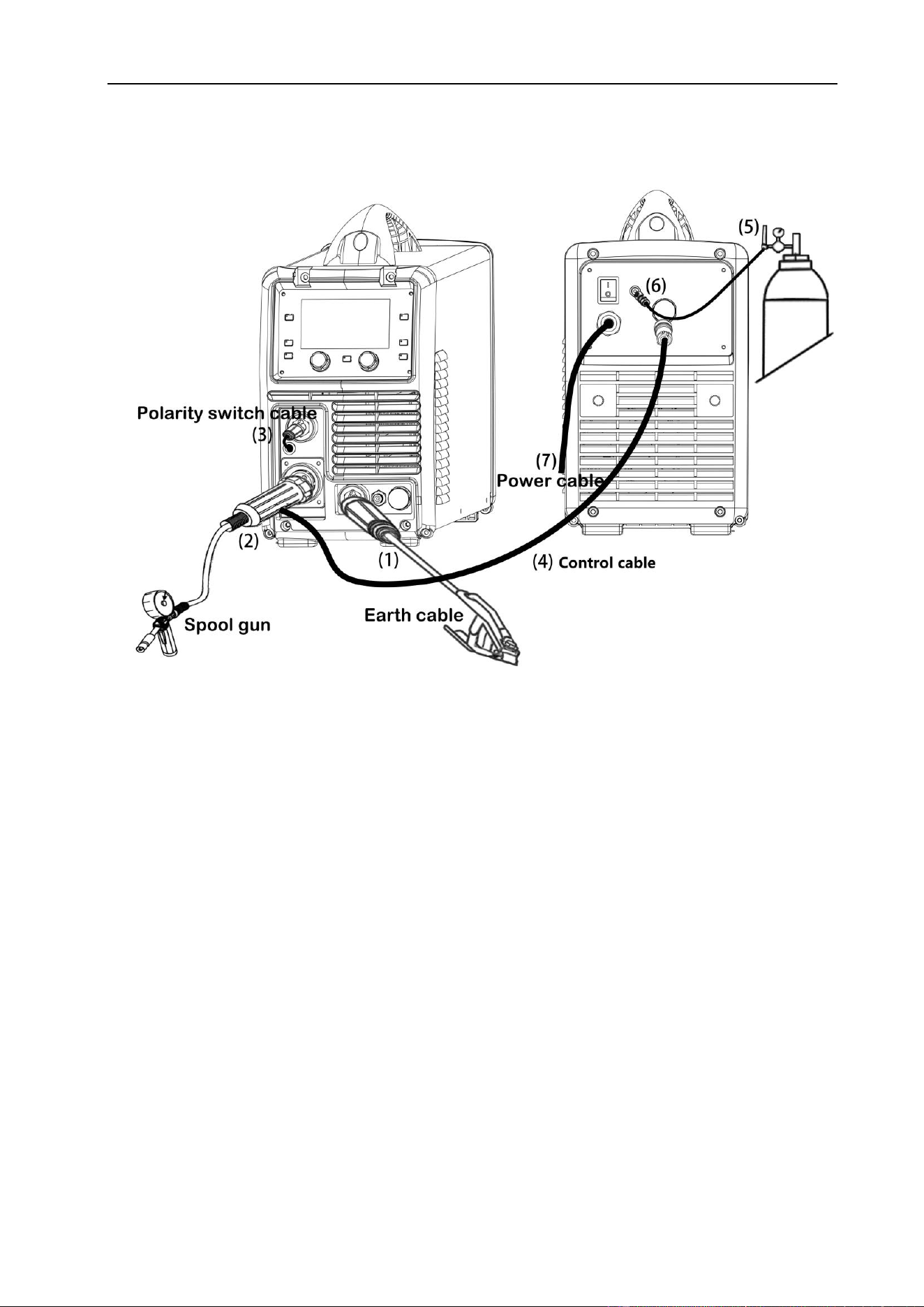
INSTALLATION & OPERATION
56
§4.4 Installation & Operation for Spool Gun
§4.4.1 Set up installation for Spool Gun
(1) Insert the earth cable plug into the negative (-) socket on the front of the machine and
twist to tighten.
(2) Plug the Spool Gun into the euro-connect socket on the front panel and tighten.
IMPORTANT: When connecting the torch be sure to tighten the adaptor nut
completely tight. A loose connection can result in arcing between the gun and
the machine connector and that causes serious damage to both the torch and
machine connections.
(3) Insert the polarity switching cable plug into the positive socket on front of machine.
(4) Connect the Spool Gun control cable to 9-pin receptacle on the rear of the machine
(5) Connect the gas regulator to the gas cylinder and the gas line to the regulator.
(6) Connect the gas line to gas connector on the rear panel.
(7) Connect the power cord of welding machine with the outlet on electrical box.
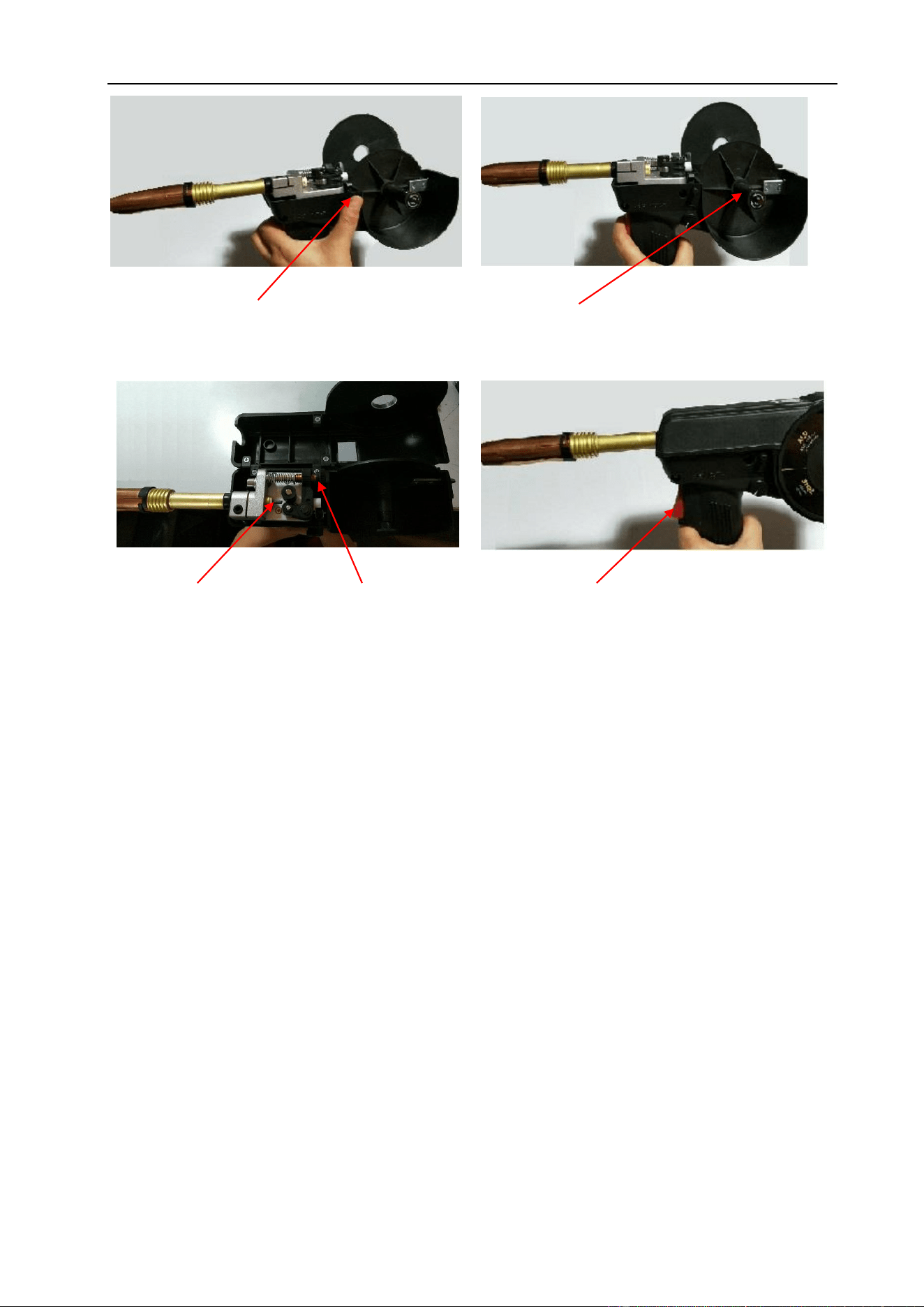
INSTALLATION & OPERATION
57
(12) Carefully open the gas cylinder valve and set the required gas flow rate.
(13) Set welding parameters using the knobs as shown on digital displays.
(10) Feed the wire through the drive
rolls and into the inlet guide tube.
Tighten the wire tension swing arm.
(11) Pull the trigger to drive the wire down
the neck until it exits the contact tip.
(8) Remove the spool cover by pressing
button and lifting off the cover.
(9) Place a spool of wire inside the
spool holder on post.
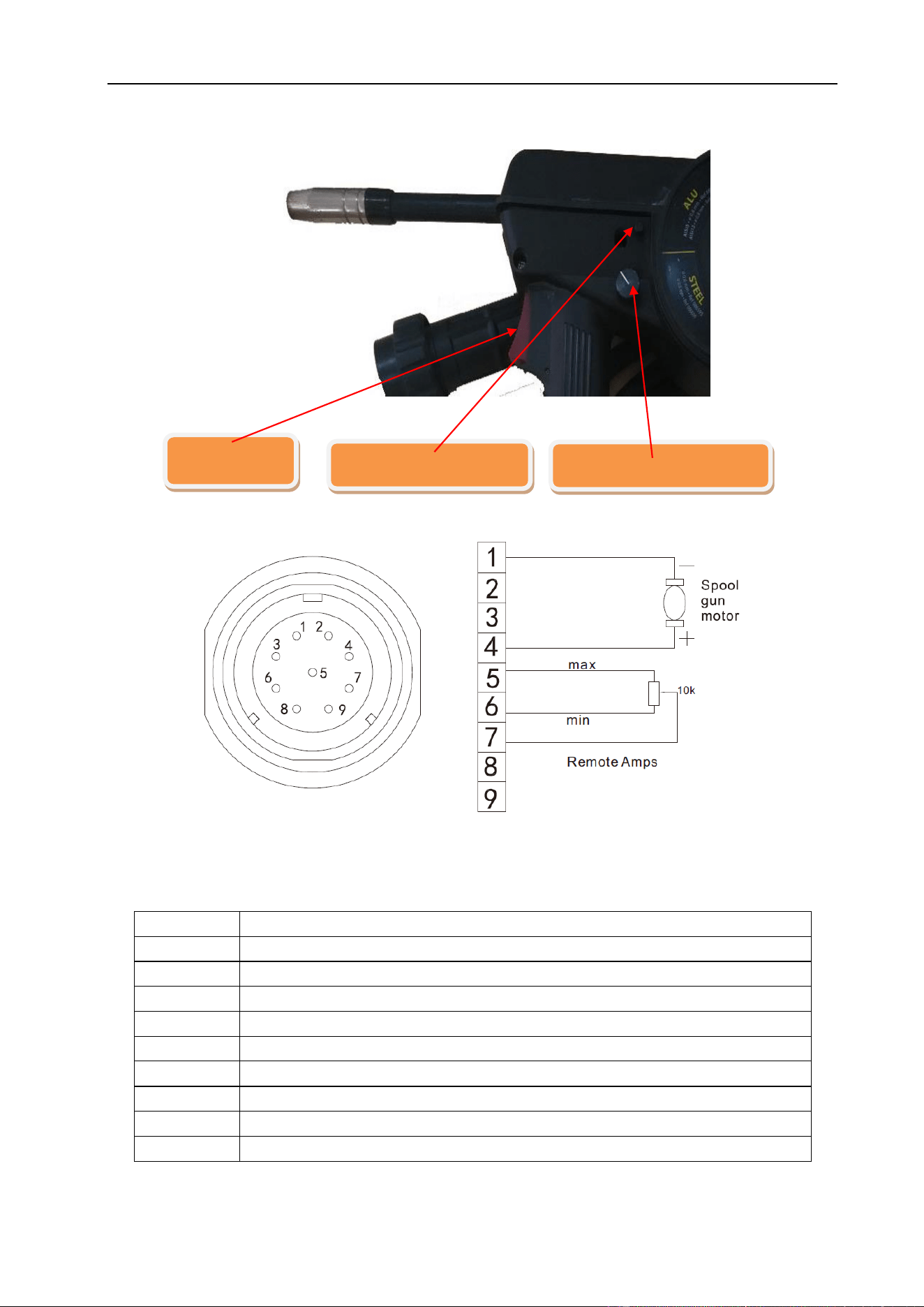
INSTALLATION & OPERATION
58
§4.4.2 Spool Gun Control
Socket Pin
Function
1
Spool gun motor
2
Not connected
3
Not connected
4
Spool gun motor
5
10k ohm (maximum) connection to 10k ohm remote control potentiometer.
6
Zero ohm (minimum) connection to 10k ohm remote control potentiometer.
7
Wiper arm connection to 10k ohm remote control potentiometer.
8
Not connected
9
Not connected
Remote Control Socket
Gun switch
Spool cover switch
Adjust current button
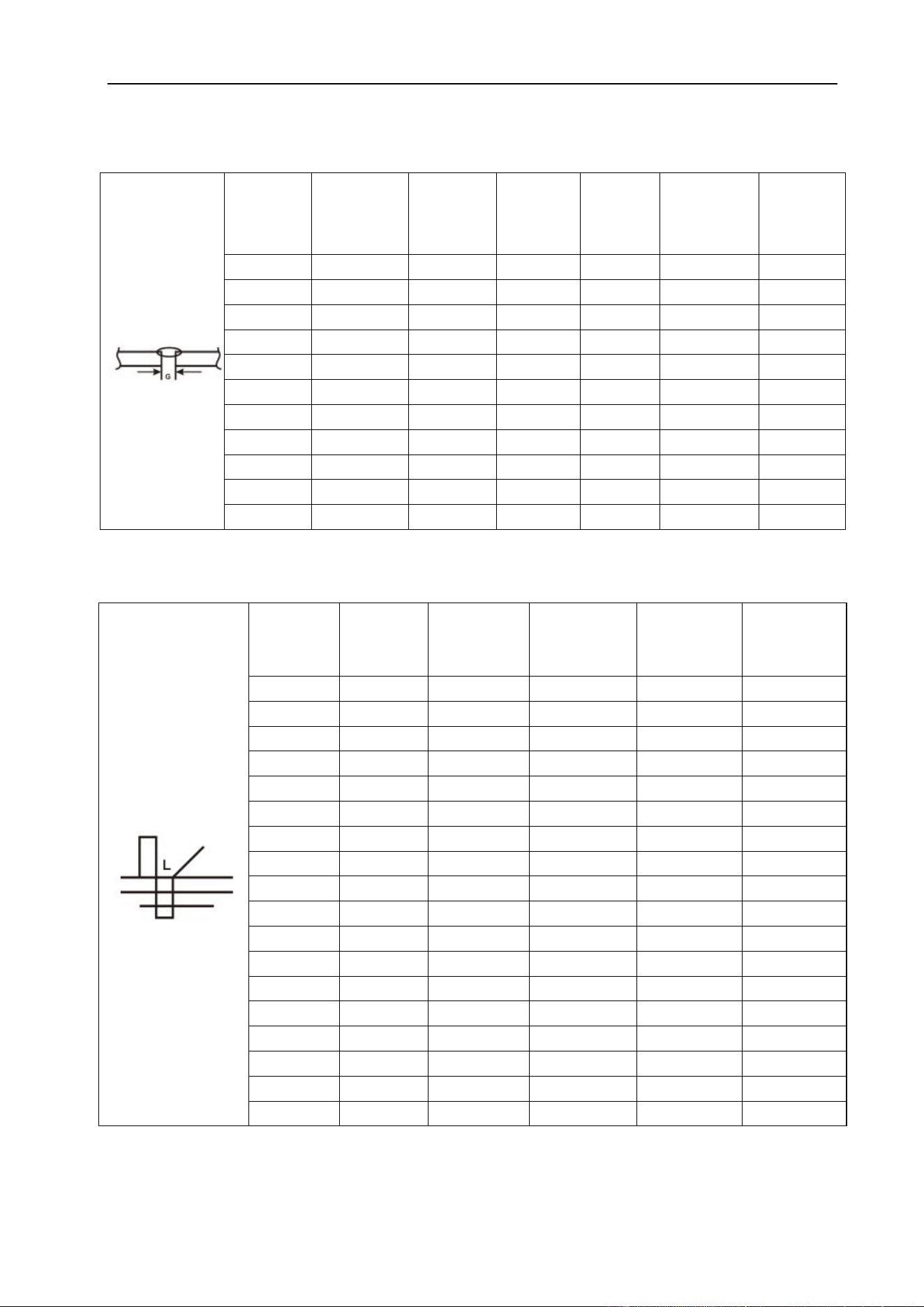
INSTALLATION & OPERATION
59
§4.5 Welding Parameters
Process reference for CO2 butt welding of low carbon steel solid welding wire
Butt~joint
Material
thickness
(MM)
Root gap
G (MM)
Wire
diameter
(MM)
Welding
current
(A)
Welding
voltage
(V)
Welding
speed
(CM/MIN)
Gas-flow
rate
(L/MIN)
0.8
0
0.8
60~70
16~16.5
50~60
10
1.0
0
0.8
75~85
17~17.5
50~60
10~15
1.2
0
0.8
80~90
17~18
50~60
10~15
2.0
0~0.5
1.0/1.2
110~120
19~19.5
45~50
10~15
3.2
0~1.5
1.2
130~150
20~23
30~40
10~20
4.5
0~1.5
1.2
150~180
21~23
30~35
10~20
6
0
1.2
270~300
27~30
60~70
10~20
6
1.2~1.5
1.2
230~260
24~26
40~50
15~20
8
0~1.2
1.2
300~350
30~35
30~40
15~20
8
0~0.8
1.6
380~420
37~38
40~50
15~20
12
0~1.2
1.6
420~480
38~41
50~60
15~20
Process reference for CO2 corner welding of low carbon steel solid welding wire
Corner joint
Material
thickness
(MM)
Wire
diameter
(MM)
Welding
current
(A)
Welding
voltage
(V)
Welding
speed
(CM/MIN)
Gas-flow
rate
(L/MIN)
1.0
0.8
70~80
17~18
50~60
10~15
1.2
1.0
85~90
18~19
50~60
10~15
1.6
1.0/1.2
100~110
18~19.5
50~60
10~15
1.6
1.2
120~130
19~20
40~50
10~20
2.0
1.0/1.2
115~125
19.5~20
50~60
10~15
3.2
1.0/1.2
150~170
21~22
45~50
15~20
3.2
1.2
200~250
24~26
45~60
10~20
4.5
1.0/1.2
180~200
23~24
40~45
15~20
4.5
1.2
200~250
24~26
40~50
15~20
6
1.2
220~250
25~27
35~45
15~20
6
1.2
270~300
28~31
60~70
15~20
8
1.2
270~300
28~31
60~70
15~20
8
1.2
260~300
26~32
25~35
15~20
8
1.6
300~330
25~26
30~35
15~20
12
1.2
260~300
26~32
25~35
15~20
12
1.6
300~330
25~26
30~35
15~20
16
1.6
340~350
27~28
35~40
15~20
19
1.6
360~370
27~28
30~35
15~20

INSTALLATION & OPERATION
60
§4.6 Operation Environment
▲ Height above sea level ≤1000 M.
▲ Operation temperature range: 14~104°F (-10 ~ +40°C).
▲ Air relative humidity is below 90%.
▲ Preferable site the machine some angles above the floor level does not exceed 15°.
▲ Protect the machine against high moisture, water and against direct sunshine.
▲ Take care that there is sufficient ventilation during welding. There must be at least
1-1/2” (38cm) free distance between the machine and wall.
§4.7 Operation Notices
▲ Read Section §1 carefully before starting to use this equipment.
▲ Ensure that the input is 110V/230V AC, single-phase: 50/60Hz.
▲ Before operation, clear the working area. Do not watch the arc in unprotected eyes.
▲ Ensure good ventilation of the machine to improve duty cycle and life.
▲ Turn off power supply when the operation finished for energy consumption efficiency.
▲ When power switch shuts off protectively because of failure. Don’t restart it until
problem has been resolved. Otherwise, permanent damage could occur.
▲ In case of problems, contact your local dealer.
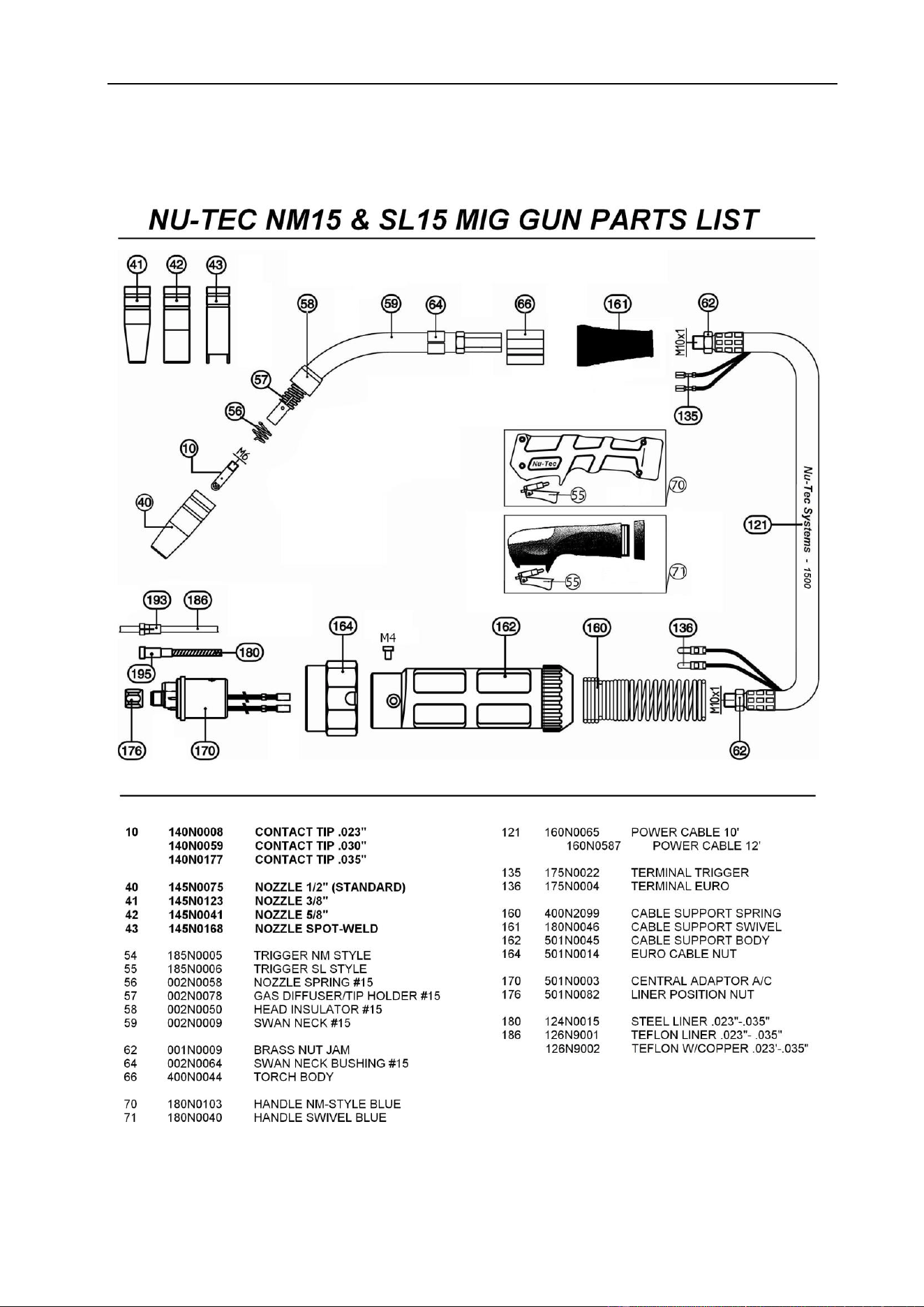
DIAGRAM FOR GUNS
61
§5 Diagram for Guns
§5.1 SL15 MIG Torch
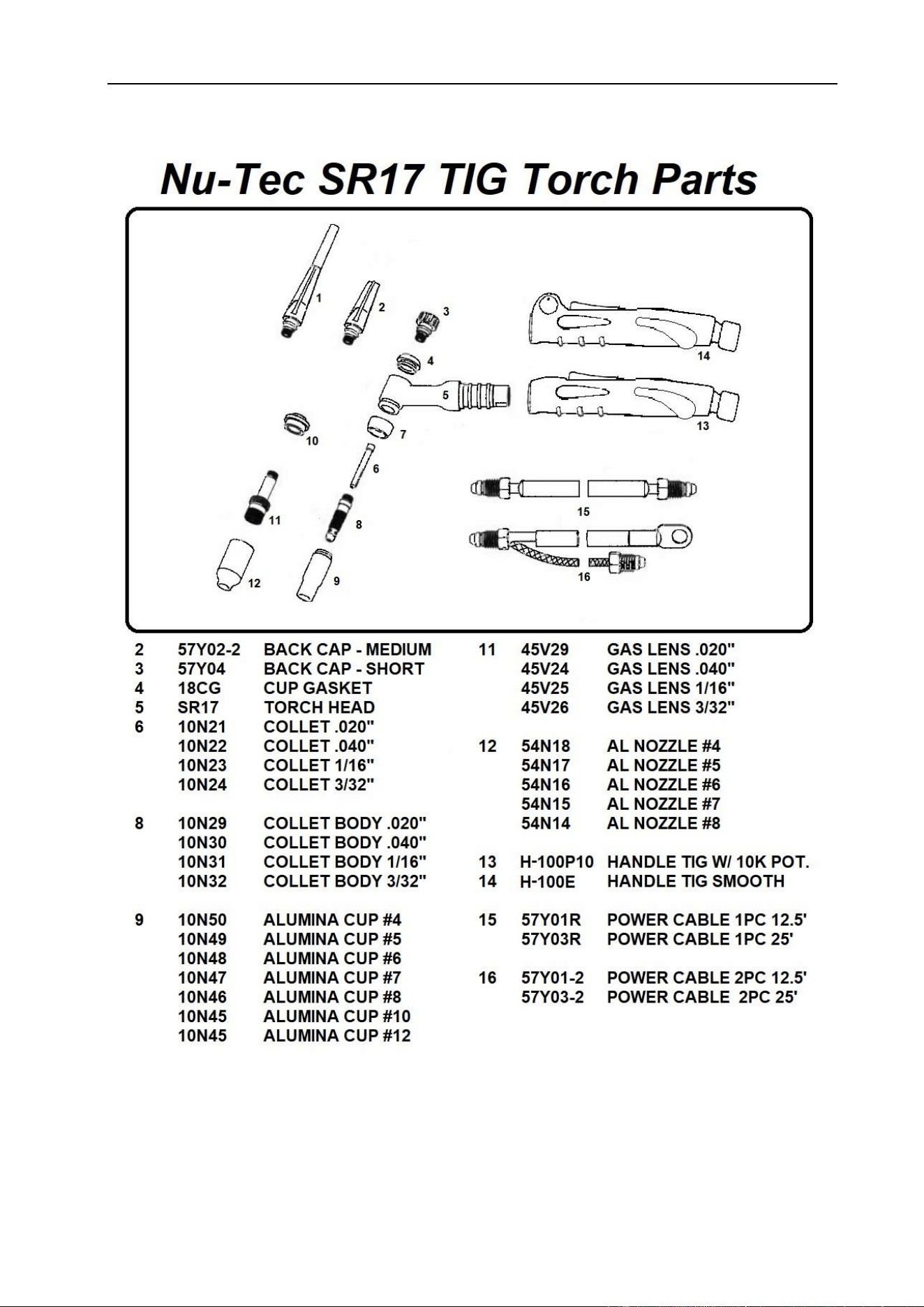
DIAGRAM FOR GUNS
62
§5.2 SL17 TIG Torch
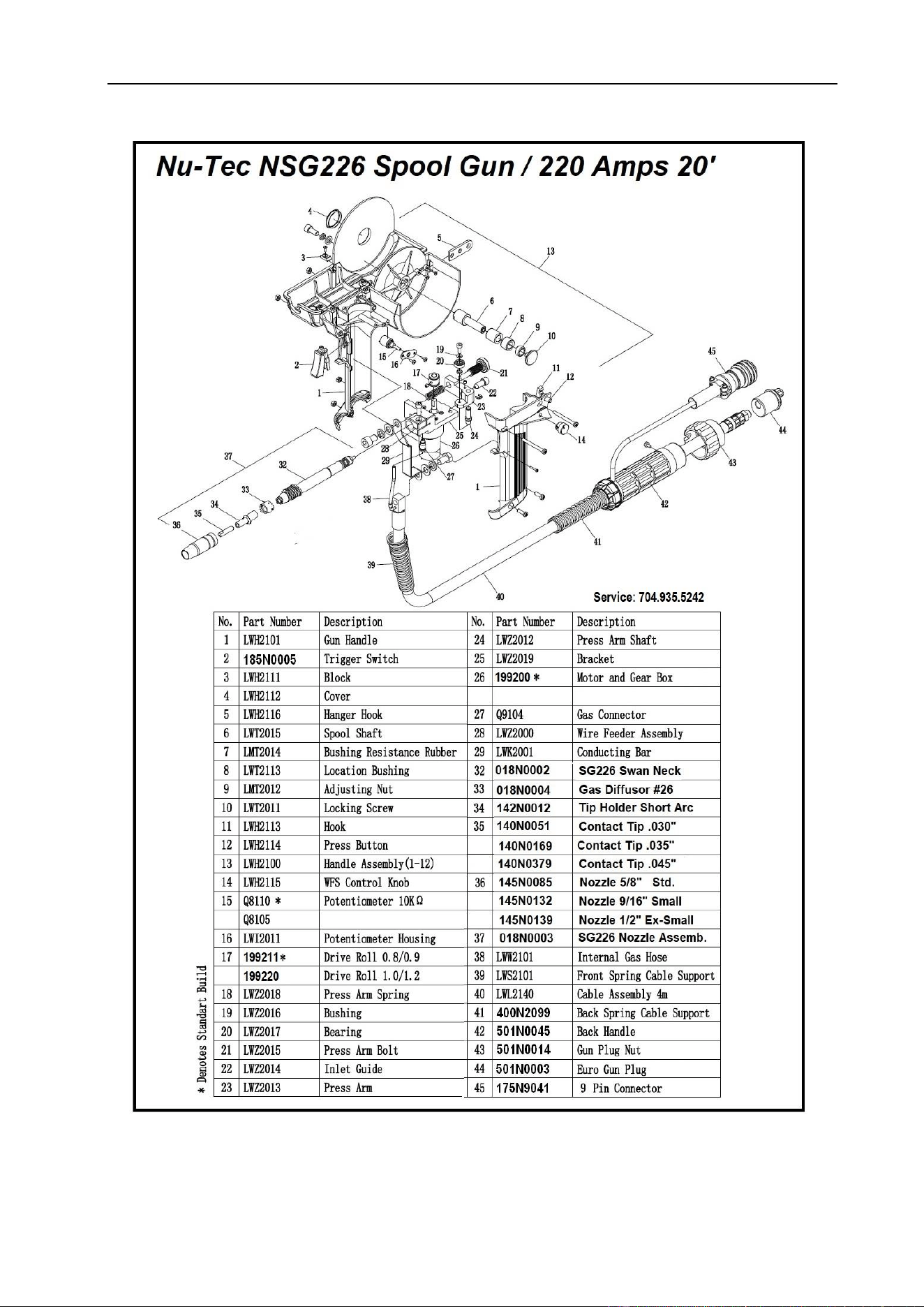
DIAGRAM FOR GUNS
63
§5.3 SG226 Spool Gun

MAINTENANCE & TROUBLESHOOTING
64
§6 Maintenance & Troubleshooting
§6.1 Maintenance
The operator must understand the maintenance procedure of inverter welding machine
and carry out simple examinations, cleanings and inspections. Do your best to protect
the machine from contamination environment and leaving unit ON when not in use to
lengthen service life of inverter arc welding machine. Inverter machines have transistors
that are cooled by aluminum heat sinks. When the power supply is ON, the cooling fan
brings dirt & dust into the machine covering the heat sinks and reducing cooling capacity
over time.
● Warning: For safety while maintaining the machine, please shut off the main
input power and wait for 5 minutes, until capacitors voltage drops to >36 volts!
Date
Maintenance items
Daily
examination
Observe that the knobs and switches in the front and at the back of arc welding
machine are flexible and put correctly in place. If any knob has not been put
correctly in place, please correct. If you can't correct or fix the knob, please replace
immediately.
If any switch is not flexible or it can't be put correctly in place, please replace
immediately! Please get in touch with maintenance service department if there are
no accessories.
After turn-on power, watch/listen if the arc-welding machine has shaking, whistle
calling or peculiar smell. If there is one of the above problems, find out the reason
and clear it. If you can't find out the reason, please contact your local service repair
station or distributor/Agent.
Observe that the display value of LED is intact. If the display number is not intact,
please replace the damaged LED. If it still doesn’t work, please maintain or replace
the display PCB.
Observe that the min./max.Values on LED agree with the set value. If there is any
difference and it has affected the normal welding results, please adjust it.
Check whether the fan is damaged and whether it is normal to rotate or control. If
the fan is damaged, please change immediately. If the fan does not rotate but it
starts when blades are rotated in direction of fan, the start capacity should be
replaced.
Observe whether the fast connector is loose or overheated. If the arc-welding
machine has the above problems, it should be fastened or changed.
Observe whether the current output cable is damaged. If it is damaged, it should be
insulated or changed.
Monthly
examination
Using the dry compressed air to clear the inside of arc welding machine.
Especially for clearing up the dusts on aluminium heat-sinks, inductors, IGBT
modules, fast recover diodes, PCB’s, etc.
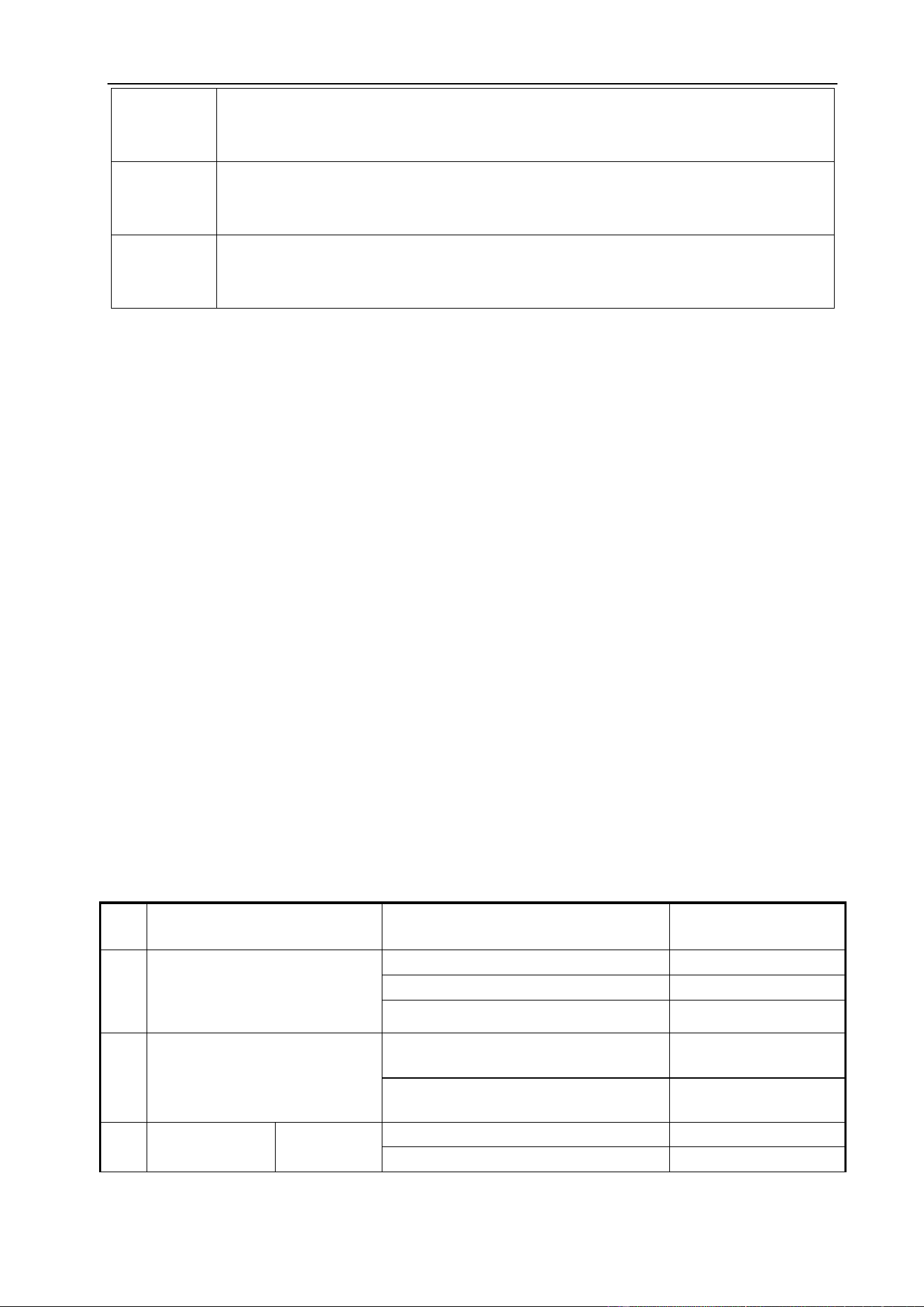
MAINTENANCE & TROUBLESHOOTING
65
Check the screws and bolts in the machine. If any are loose, please tighten.
Check all torches, earth clamp and hose connections to insure they are securely in
place. Loose connections can cause major failures.
Quarter-
yearly
examination
Check whether the actual current accords with the displaying value. If they did not
accord, they should be regulated. The actual welding current value can be
measured by and adjusted by plier-type ampere meter.
Yearly
examination
Measure the insulating impedance among the main circuit, PCB and case, if it
below 1MΩ, insulation is thought to be damaged and needs to be changed to
strengthen insulation.
§6.2 Welding Trouble Shooting
⚫ Before the welding machines are dispatched from the factory, they have
already been tested and calibrated accurately. Do not change settings on the
equipment!
⚫ Maintenance course must be operated carefully. If any wire becomes flexible or is
misplaced, it maybe potential danger to user!
⚫ Only professional maintenance staff that is authorized by manufacturer should
service the machine!
⚫ Be sure to shut off the Main Input Power before doing any repair work on the
welding machine and wait 5 minutes for capacitor voltage to decrease!
⚫ If there is any problem and there is no authorized professional maintenance personal
on site, please contact local agent or the distributor!
If there are some simple troubles with the welding machine, you can consult the
following Chart:
NO.
Troubles
Reasons
Solution
1
Turn ON power but the power
light is not illuminated.
Switch damaged.
Change it.
Fuse damaged.
Change it.
Power cord damaged.
Change it.
2
After welding machine is
over-heat, the fan doesn’t
work.
Fan damaged.
Change it.
The cable is loose.
Screw the cable tight.
3
Press the gun
switch, no
No output
gas when
No gas in the gas cylinder.
Change it.
Gas hose leaks gas.
Change it.
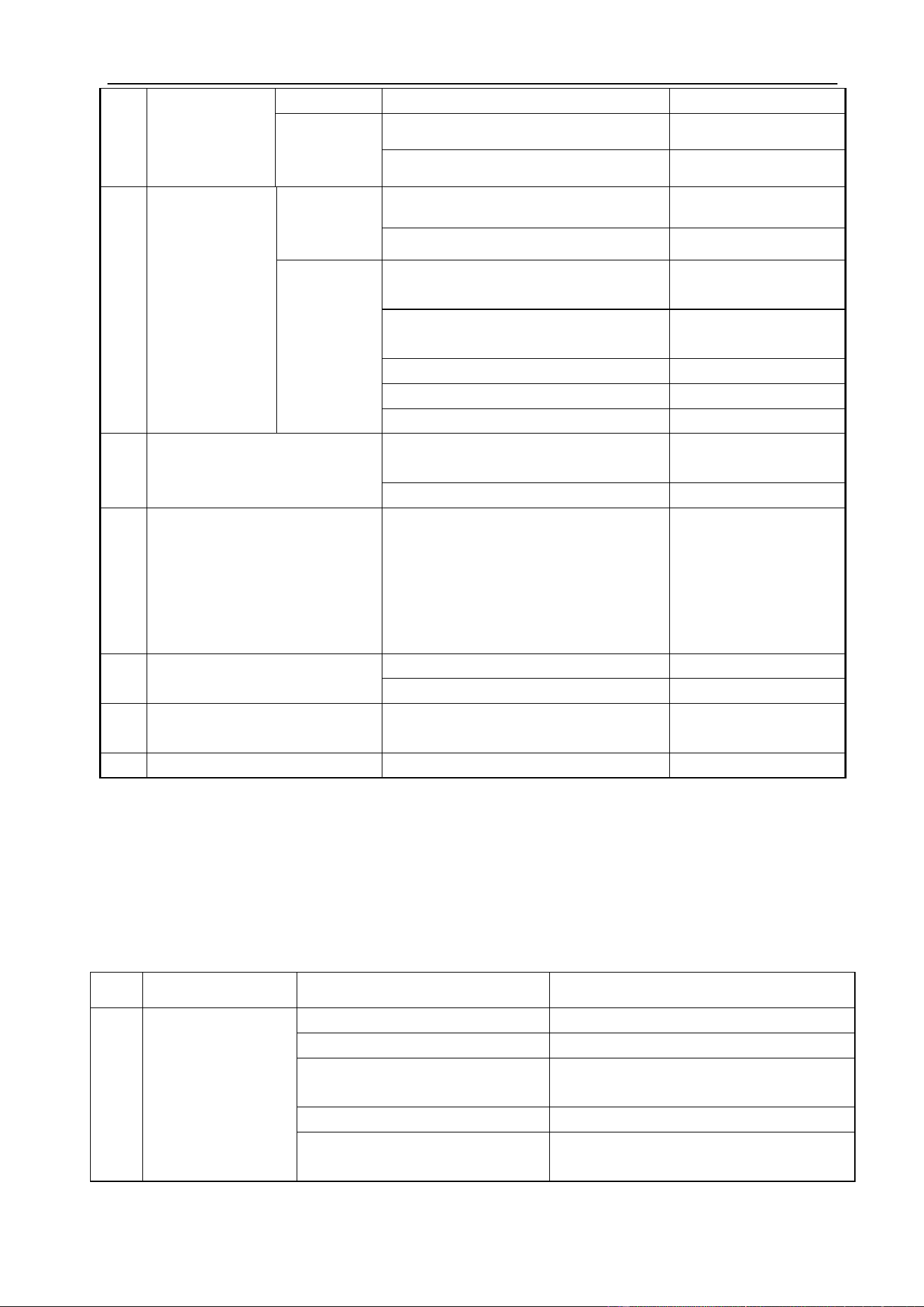
MAINTENANCE & TROUBLESHOOTING
66
§6.2.1 MIG Welding - Trouble Shooting
The following chart addresses some of the common problems of MIG welding. In all
cases of equipment malfunction, the manufacturer’s recommendations should be strictly
adhered to and followed.
NO.
Trouble
Possible Reason
Suggested Remedy
1
Excessive
Spatter.
Wire feed speed set too high.
Select lower wire feed speed.
Voltage too high.
Select a lower voltage setting.
Wrong polarity set.
select the correct polarity for the wire
being used - see machine setup guide.
Stick out too long.
Bring the torch closer to the work.
Contaminated base metal.
Remove materials like paint, grease, oil,
and dirt, including mill scale from base
output shielded
gas.
test gas.
Electromagnetic valve damaged.
Change it.
Output gas
when test
gas.
Control switch damaged.
Repair the switch.
Control circuit damaged.
Check the PCB.
4
Wire-feeder
doesn’t work.
Wire reel
doesn’t
work.
Motor damaged.
Check and change it.
Control circuit damaged.
Check the PCB.
Wire reel
works.
The idler roll is loose or weld wire
skids.
Adjust tension
screws.
The drive roll doesn’t fit with the
diameter of weld wire.
Change the roll.
Wire reel damaged.
Change it.
Wire feed pipe is jammed.
Repair or change it.
Tip is jammed because of splash.
Repair or change it.
5
No striking arc and no output
voltage.
Output cable is connected incorrectly
or loosen.
Screw it down or
change it.
Control circuit damaged.
Check the circuit.
6
Welding stops, and alarm light
is on.
Machine has self-protection.
Check over-voltage,
over-current,
over-temperature,
lower-voltage and
over-temperature,
and solve it.
7
Welding current is run away
and can be not controlled.
The potentiometer damaged.
Check or change it.
The control circuit damaged.
Check the circuit.
8
The crater current can be not
adjusted.
The PCB damaged.
Check it.
9
No post-gas.
The PCB damaged.
Check it.
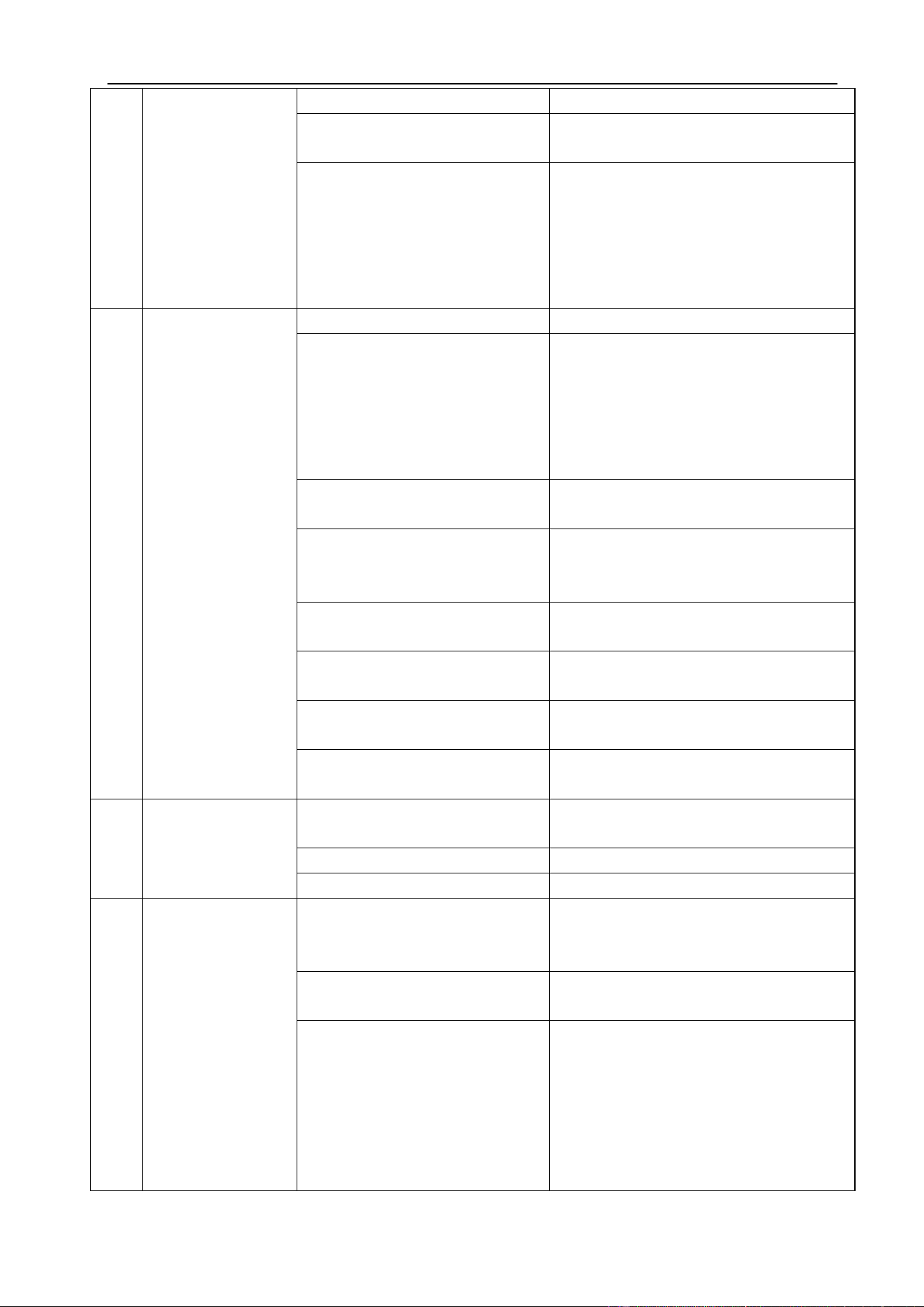
MAINTENANCE & TROUBLESHOOTING
67
metal.
Contaminated MIG wire.
Use clean, dry, rust free wire. Do not
lubricate the wire with oil, grease etc.
Inadequate gas flow or too much
gas flow.
Check the gas is connected, check
hoses, gas valve and torch are not
restricted. Set gas flow between 20~40
CFH (6~12 l/min) flow rate. Check
hoses and fittings for leaks. Protect the
welding zone from wind and drafts.
2
Porosity - small
cavities or holes
resulting from
gas pockets in
weld metal.
Wrong gas.
Check that the correct gas is being used
Inadequate gas flow or too much
gas flow.
Check the gas is connected, check
hoses, gas valve and torch are not
restricted. Set gas flow between 20~40
CFh (6~12 l/min) flow rate. Check hoses
and fittings for leaks. Protect the
welding zone from wind and drafts.
Moisture on the base metal.
Remove all moisture from base metal
before welding.
Contaminated base metal.
Remove materials like paint, grease, oil,
and dirt, including mill scale from base
metal.
Contaminated MIG wire.
Use clean, dry, rust free wire. Do not
lubricate the wire.
Gas nozzle clogged with spatter,
worn or out of shape.
Clean or replace the gas nozzle.
Missing or damaged gas
diffuser.
Replace the gas diffuser.
MIG torch euro connect O-ring
missing or damaged.
Check and replace the O-ring.
3
Wire stubbing
during welding.
Holding the torch too far away.
Bring the torch closer to the work and
maintain stick out of 5~10mm.
Welding voltage set too low.
Increase the voltage.
Wire Speed set too high.
Decrease the wire feed speed.
4
Lack of Fusion −
failure of weld
metal to fuse
completely.
Contaminated base metal.
Remove materials like paint, grease, oil,
and dirt, including mill scale from base
metal.
Not enough heat input.
Select a higher voltage range and/or
adjust the wire speed to suit.
Improper welding technique.
Keep the arc at the leading edge of the
weld pool.
Gun angle to work should be between 5
& 15°. Direct the arc at the weld joint.
Adjust work angle or widen groove to
access bottom during welding.
Momentarily hold arc on side walls if
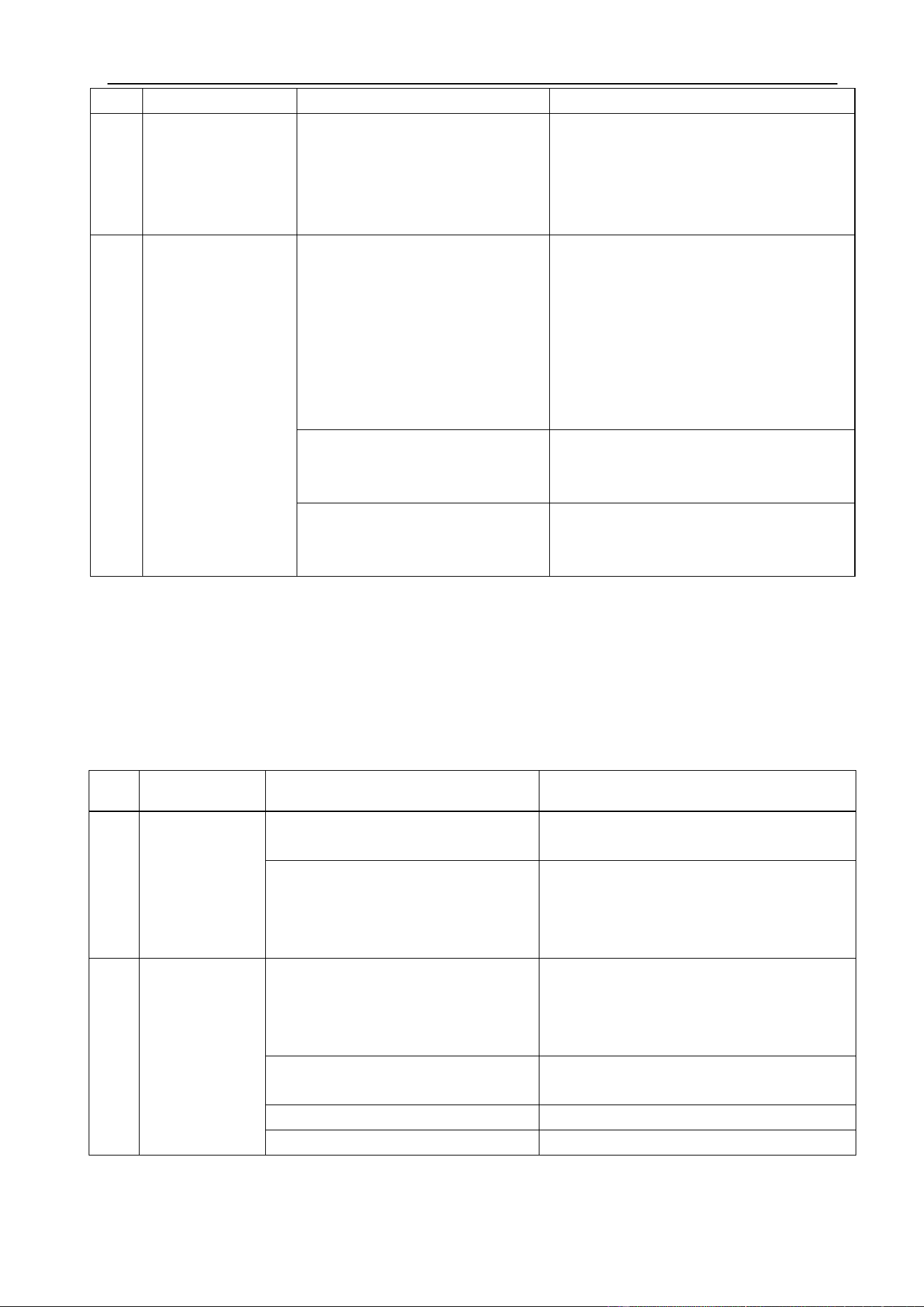
MAINTENANCE & TROUBLESHOOTING
68
using weaving technique.
5
Excessive
Penetration −
weld metal
melting through
base metal.
Too much heat.
Select a lower voltage range and /or
adjust the wire speed to suit Increase
travel speed.
6
Lack of
Penetration −
shallow fusion
between weld
metal and base
metal.
Poor in incorrect joint
preparation.
Material too thick. Joint preparation and
design needs to allow access to bottom
of groove while maintaining proper
welding wire extension and arc
characteristics. Keep the arc at the
leading edge of the weld pool and
maintain the gun angle at 5 & 15°
keeping the stick out between 5~10mm.
Not enough heat input.
Select a higher voltage range and/or
adjust the wire speed to suit reduce
travel speed.
Contaminated base metal.
Remove materials like paint, grease, oil,
and dirt, including mill scale from base
metal.
§6.2.2 MIG Wire Feed - Trouble Shooting
The following chart addresses some of the common WIRE FEED problems during MIG
welding. In all cases of equipment malfunction, the manufacturer’s recommendations
should be strictly adhered to and followed.
NO.
Trouble
Possible Reason
Suggested Remedy
1
No wire feed.
Wrong mode selected.
Check that the TIG/MMA/MIG selector
switch set to MIG position.
Wrong torch selector switch.
Check that the Wire Feeder/ Spool Gun
selector switch is set to Wire Feeder
position for MIG welding and Spool Gun
when using the Spool gun.
2
Inconsistent/
interrupted
wire feed.
Adjusting wrong dial.
Be sure to adjust the wire feed and
voltage dials for MIG welding. The
amperage dial is for MMA and TIG
welding mode.
Wrong polarity selected.
Select the correct polarity for the wire
being used. (see machine setup guide)
Incorrect wire speed setting.
Adjust the wire feed speed.
Voltage setting incorrect.
Adjust the voltage setting.
MAINTENANCE & TROUBLESHOOTING
69
MIG torch lead too long.
Small diameter wires and soft wires like
aluminum don’t feed well through long
torch leads - replace the torch with a
lesser length torch.
MIG torch lead kinked or too sharp
angle being held.
Remove the kink, reduce the angle or
bend.
Contact tip worn, wrong size, wrong
type.
Replace the tip with correct size and type.
Liner worn or clogged (the most
common causes of bad feeding).
Try to clear the liner by blowing out with
compressed air as a temporary cure, it is
recommended to replace the liner.
Wrong size liner.
Install the correct size liner.
Blocked or worn inlet guide tube.
Clear or replace the inlet guide tube.
Wire misaligned in drive roller
groove.
Locate the wire into the groove of the
drive roller.
Incorrect drive roller size.
Fit the correct size drive roller; 0.8mm
wire requires 0.8mm roller.
Wrong type of drive roller selected.
Fit the correct type roller (e.g. knurled
rollers needed for flux cored wires.
Worn drive rollers.
Replace the drive rollers.
Drive roller pressure too high.
Can flatten the wire electrode causing it to
lodge in the contact tip - reduce the drive
roller pressure.
Too much tension on wire spool
hub.
Reduce the spool hub brake tension.
Wire crossed over on the spool or
tangled.
Remove the spool untangle the wire or
replace the wire.
Contaminated MIG wire.
Use clean, dry, rust free wire. Do not
lubricate the wire.
§6.2.3 DC TIG Welding - Trouble Shooting
The following chart addresses some of the common problems of DC TIG welding. In all
cases of equipment malfunction, the manufacturer’s recommendations should be strictly
adhered to and followed.
NO.
Trouble
Possible Reason
Suggested Remedy
1
Tungsten burning
away quickly.
Incorrect Gas or No Gas.
Use pure Argon. Check cylinder has
gas, connected, turned on and torch
valve is open.
Inadequate gas flow.
Check the gas is connected, check
hoses, gas valve and torch are not
restricted.
MAINTENANCE & TROUBLESHOOTING
70
Back cap not fitted correctly.
Make sure the torch back cap is fitted
so that the O-ring is inside the torch
body.
Torch connected to DC+.
Connect the torch to the DC- output
terminal.
Incorrect tungsten being used.
Check and change the tungsten type if
necessary.
Tungsten being oxidized after
weld is finished.
Keep shielding gas flowing 10~15
seconds after arc stoppage. 1 second
for each 10amps of welding current.
2
Contaminated
tungsten.
Touching tungsten into the
weld pool.
Keep tungsten from contacting weld
puddle. Raise the torch so that the
tungsten is off the work piece 2~5mm.
Touching the filler wire to the
tungsten.
Keep the filler wire from touching the
tungsten during welding, feed the filler
wire into the leading edge of the weld
pool in front of the tungsten.
3
Porosity - poor weld
appearance and
color.
Wrong gas/ poor gas flow/gas
leak.
Gas is connected, valve ON, check
hoses, gas valve and torch are not
restricted. Set the gas flow between
20~40 CFH (6~12 l/min). Check hoses
and fittings for leaks.
Contaminated base metal.
Remove moisture and materials like
paint, grease, oil, and dirt from base
metal.
Contaminated filler wire.
Remove all grease, oil, or moisture
from filler metal.
Incorrect filler wire.
Check the filler wire and change if
necessary.
4
Yellowish residue/
smoke on the
alumina nozzle &
discolored
tungsten.
Incorrect Gas.
Use pure Argon gas.
Inadequate gas flow.
Set the gas flow between 20~40 CFH
(10~20 l/min) flow rate.
Alumina gas nozzle too small.
Increase the size of the alumina gas
nozzle.
5
Unstable Arc during
DC welding.
Torch connected to DC+.
Connect the torch to the DC- output
terminal.
Contaminated base metal.
Remove materials like paint, grease,
oil, and dirt, including mill scale from
base metal.
Tungsten is contaminated.
Remove 10mm of contaminated
tungsten and re grind the tungsten.
Arc length too long.
Lower torch so that the tungsten is off
of the work piece 2~5mm.
6
Arc wanders during
DC welding.
Poor gas flow.
Check and set the gas flow between
20~40 CFH flow rate.
MAINTENANCE & TROUBLESHOOTING
71
Incorrect arc length.
Lower torch so that the tungsten is off
the work piece 2~5mm.
Tungsten incorrect or in poor
condition.
Check that correct type of tungsten is
being used. Remove 10mm from the
weld end of the tungsten and re
sharpen rod.
Poorly prepared tungsten.
Grind marks should run lengthwise
with tungsten, not circular. Use proper
grinding method and wheel.
Contaminated base metal or
filler wire.
Remove contaminating materials like
paint, grease, oil, and dirt, including
mill scale from base metal. Remove all
grease and oil from filler metal.
7
Arc difficult to start
or will not start DC
welding.
Incorrect machine set up.
Check machine set up is correct.
No gas, incorrect gas flow.
Check the gas is connected and
cylinder valve open, check hoses, gas
valve and torch are not restricted. Set
the gas flow between 20~40 CFH flow
rate.
Incorrect tungsten size or type.
Check and change the size and or the
tungsten if required.
Loose connection.
Check all connectors and tighten.
Earth clamp not connected to
work.
Connect the earth clamp directly to the
work piece wherever possible.
§6.2.4 MMA Welding - Trouble Shooting
The following chart addresses some of the common problems of MMA welding. In all
cases of equipment malfunction, the manufacturer’s recommendations should be strictly
adhered to and followed.
NO.
Trouble
Possible Reason
Suggested Remedy
1
No arc.
Incomplete welding circuit.
Check earth lead is connected. Check
all cable connections.
Wrong mode selected.
Check the MMA selector switch is
selected.
No power supply.
Check that the machine is switched
ON and has a power.
2
Porosity − small
cavities or holes
resulting from gas
pockets in weld
metal.
Arc length too long.
Shorten the arc length.
Work piece dirty, contaminated
or moisture.
Remove moisture and materials like
paint, grease, oil, and dirt, including
mill scale from metal.
Damp electrodes.
Use only dry electrodes.
MAINTENANCE & TROUBLESHOOTING
72
3
Excessive Spatter.
Amperage too high.
Decrease the amperage or choose a
larger electrode.
Arc length too long.
Shorten the arc length.
4
Weld sits on top,
lack of fusion.
Insufficient heat input.
Increase the amperage or choose a
larger electrode.
Work piece dirty, contaminated
or moisture.
Remove moisture and materials like
paint, grease, oil, and dirt, including
mill scale from metal.
Poor welding technique.
Use the correct welding technique or
seek assistance for correct technique.
5
Lack of penetration.
Insufficient heat input.
Increase the amperage or choose a
larger electrode.
Poor welding technique.
Use the correct welding technique or
seek assistance for the correct
technique.
Poor joint preparation.
Check the joint design and fit up,
make sure the material is not too thick
for wire size.
6
Excessive
penetration - burn
through.
Excessive heat input.
Reduce the amperage or use a
smaller electrode.
Incorrect travel speed.
Try increasing the weld travel speed.
7
Uneven weld
appearance.
Unsteady hand, wavering
hand.
Use two hands where possible to
steady up, practice your technique.
8
Distortion −
movement of base
metal during
welding.
Excessive heat input.
Reduce the amperage or use a
smaller electrode.
Poor welding technique.
Use the correct welding technique or
seek assistance for correct technique.
Poor joint preparation and or
joint design.
Check the joint design and fit up,
make sure the material is not too thick.
Seek assistance for the correct joint
design and fit up.
9
Electrode welds
with different or
unusual arc
characteristic.
Incorrect polarity.
Change the polarity, check the
electrode manufacturer for correct
polarity.
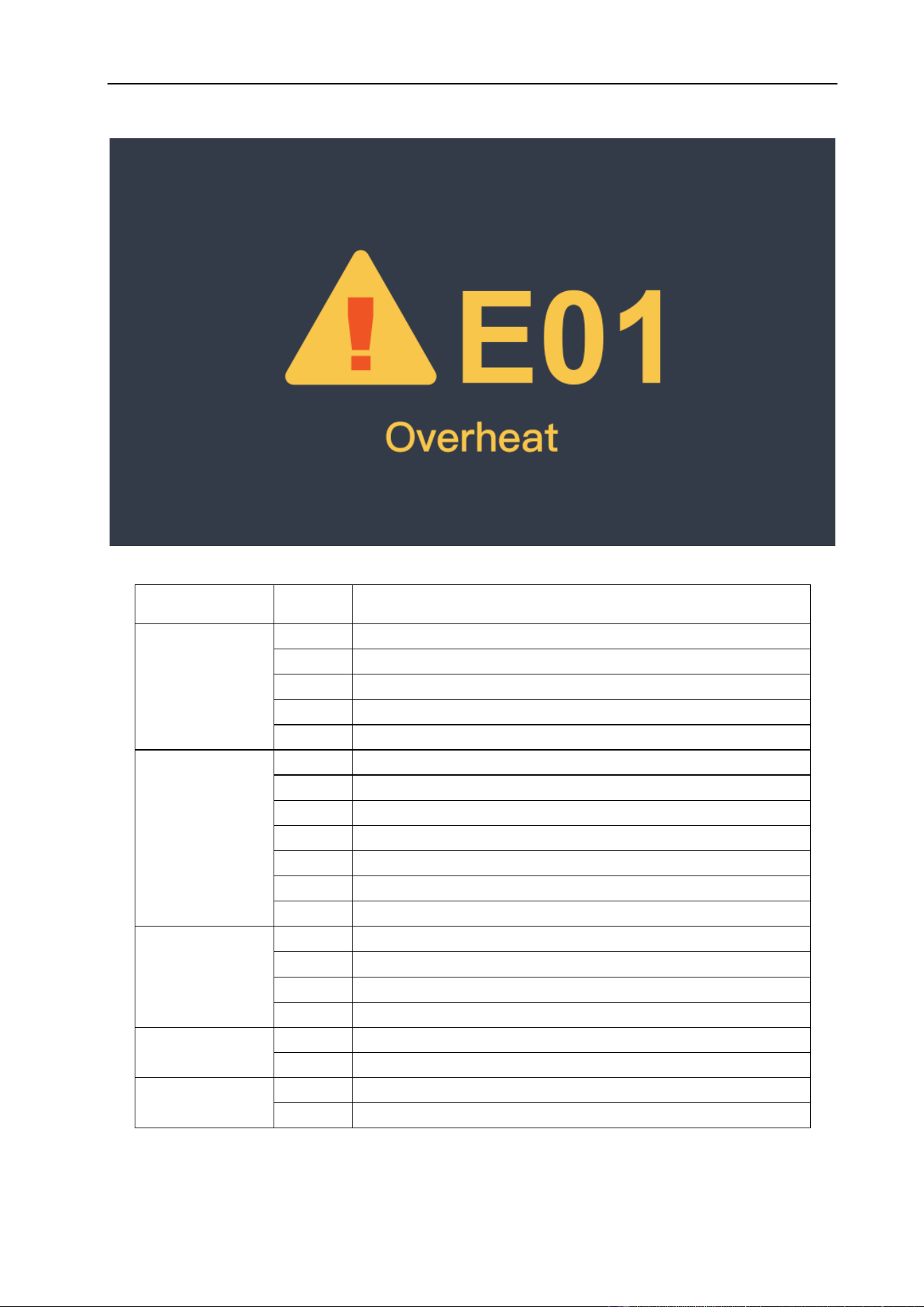
MAINTENANCE & TROUBLESHOOTING
73
§6.3 List of Error Codes
Error Type
Code
Description
Thermal relay
E01
Over-heating (1st thermal relay)
E02
Over-heating (2nd thermal relay)
E03
Over-heating (3rd thermal relay)
E04
Over-heating (4th thermal relay)
E09
Over-heating (Program default)
Welding
machine
E10
Phase loss
E11
N/A
E12
No gas
E13
Under voltage
E14
Over voltage
E15
Over current
E16
Wire feeder over load
Switch
E20
Button fault on operating panel when switch on the machine
E21
Other faults on operating panel when switch on the machine
E22
Torch fault when switch on the machine
E23
Torch fault during normal working process
Accessory
E30
Cutting torch disconnection
E31
N/A
Communication
E40
Connection problem between wire feeder and power source
E41
Communication error
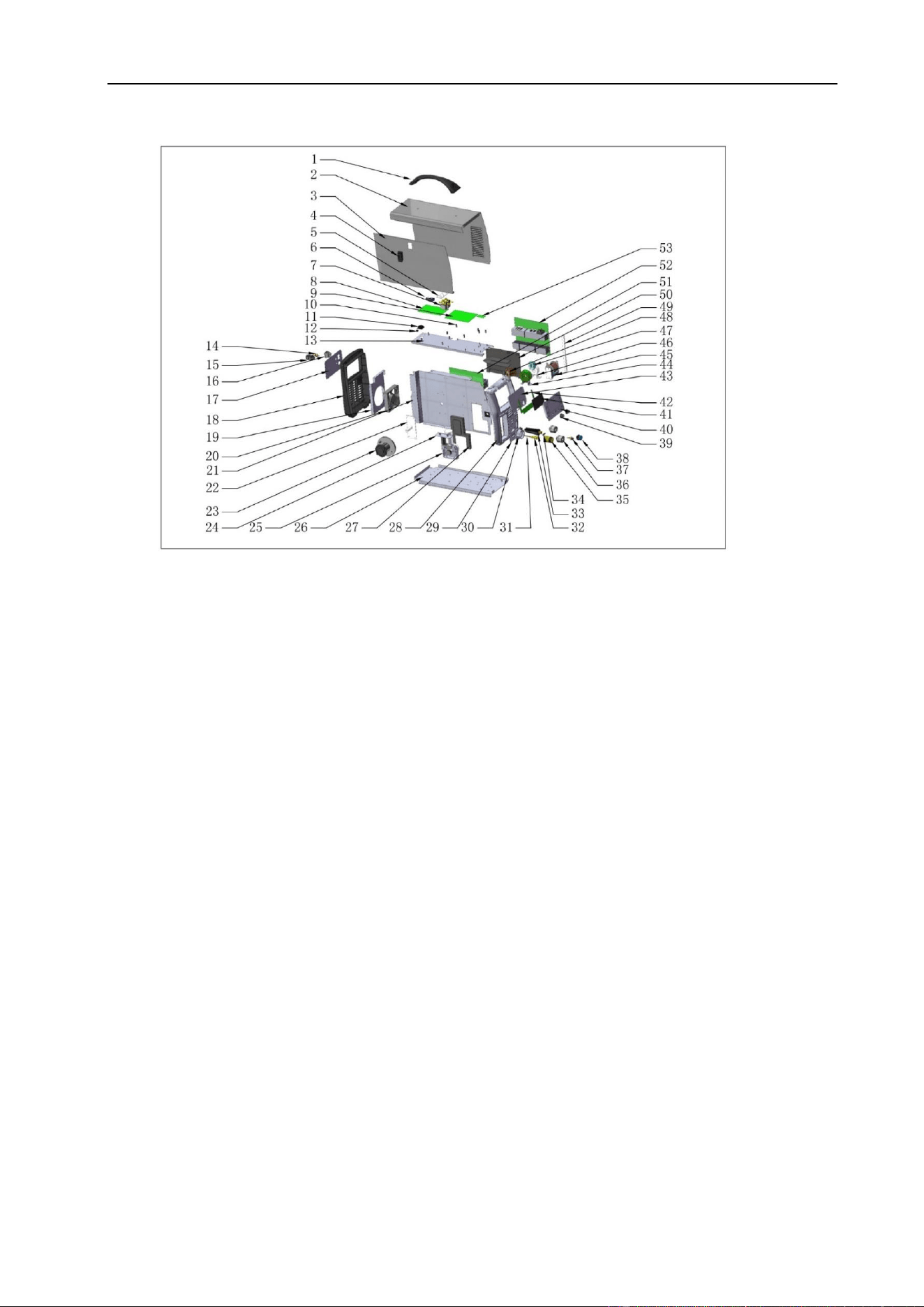
MAINTENANCE & TROUBLESHOOTING
74
§6.4 Machine Parts Drawing
# PART NO. DESCRIPTION # PART NO. DESCRIPTION
1 520.3010 HANDLE - MACHINE 28 521.0321 FRAME - FRONT 200-P
2 521.0360 CABINET - COVER 200-P 29 521.0322 COVER PLATE - ADAPTOR 200-P
3 521.0361 CABINET - DOOR 200-P 30 521.2543 EURO SOCKET FLANGE
4 538.0017 LATCH WIRE FEED DOOR 31 520.3021 WIRE GUIDE
5 521.0362 CABINET - HINGE MOUNT 32 520.3022 EURO SOCKET MOUNT TUBE
6 707.0152 GAS HOSE FITTING "T" 33 511N0015 DINSE PLUG 3550
7 521.2523 GAS SOLENOID VALVE (2) 34 293N0009 HOSE NIPPLE
8 521.0310 PCB POWER BOARD 200-P 35 520.3023 CENTRAL ADAPTOR
9 521.0311 PCB CONTROL BOARD 200-P 36 511N0016 DINSE SOCKET 3550
10 000N0016 HEX NUT STANDOFF 37 521.2526 GAS FITTING 5/8-18
11 707.0162 INSULATOR BUMPER 38 521.0011 SOCKET 9-PIN CONTROL
12 175.9053 CABLE GROMMET 39 520.3027 KNOB - FRONT PANEL
13 521.0363 CABINET - PCB MOUNT 40 521.0314 FRONT PANEL CLEAR COVER
14 521.2526 GAS FITTING 5/8-18 41 521.0312 LCD DISPLAY 200-P
15 707.0175 CORD STRAIN RELIEF 42 521.0313 PCB FRONT PANEL 200-P
16 530.0020 SWITCH - POWER 43 521.0315 FRONT PANEL BACK COVER
17 521.0319 COVER PLATE - REAR 200-P 44 521.0323 INDUCTANCE COIL
18 521.0320 FRAME REAR 200-P 45 521.0324 TRANSFORMER 200-P
19 521.2525 FAN MOUNT PLATE 200-P 46 521.0325 INDUCTANCE COIL
20 521.2524 FAN COOLING 47 521.0326 HALL CURRENT SENSOR
21 521.0364 CABINET - CENTER 200-P 48 521.0327 PFC INDUCTANCE
22 521.2540 SPOOL HOLDER MOUNT PLATE 49 521.0366 CABINET - PCB MOUNT
23 521.2513 SPOOL HOLDER 50 521.0367 COOLING CHANNEL COVER
24 520.3018 WIRE FEED INSULATOR 51 521.0316 PCB AC/DC INVERTER MUR
25 520.3019 WIRE FEED DRIVE 52 521.0317 PCB AC/DC INVERTER PRIMARY
26 521.0365 CABINET - BASE PLATE 53 521.0318 PCB RF CONTROL
27 521.3020
COVER PLATE- WIRE FEED DRIVE
54 520.0009 GAS HOSE 5/8-18
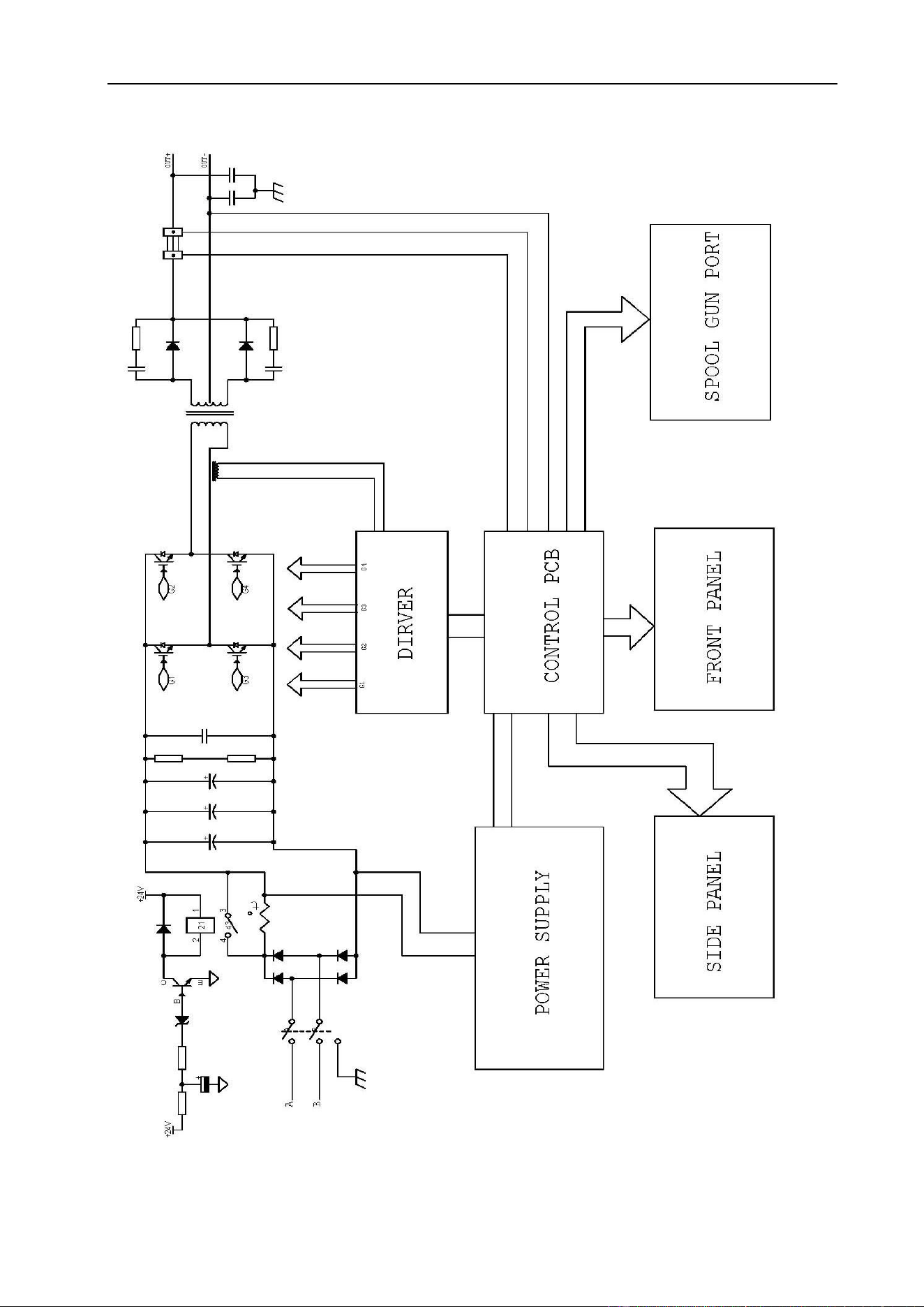
MAINTENANCE & TROUBLESHOOTING
75
§6.5 Electrical Schematic Drawing