18115445-12
MPM175 DV I
OWNER’S MANUAL
11/2018
WARNING:
Read carefully and understand all ASSEMBLY AND OPERATION
INSTRUCTIONS before operating. Failure to follow the safety rules and other
basic safety precautions may result in serious personal injury.

Page of 26
18115445-12
2
MATCO TOOLS
EFFECTIVE APRIL 1, 2015
LIMITED WARRANTY
This warranty applies to the original purchaser and is subject to the terms and conditions listed below. This Limited Warranty is for
new equipment sold after the above date, providing coverage for defects in material and workmanship at the time it is shipped from
the factory.
Limited to the warranty periods below, MATCO TOOLS will repair or replace the item under warranty that fails due to defects in
material and workmanship. MATCO TOOLS must be notified within 30 days of the failure, so as to provide instructions on how to
proceed with the repair of your welder and warranty claim processing. Warranty period begins at the time the welder is purchased
from an Authorized MATCO TOOLS distributor. Keep your receipt as proof of purchase.
Warranty Periods
Limited Warranty is divided into these categories. No Warranty, 1 year, 2 year and 3 year.
No Warranty
Normal wear items, MIG gun parts (contact tips, nozzle, contact tip adapter, MIG gun liner), drive roll, electrode holder, ground
clamps, and plasma torch parts (nozzle, electrode, diffuser, cover) are considered consumable items and are not covered under
warranty.
1 Year Accessories Warranty
Parts and Labor on MIG gun parts (except those listed under normal wear items), cables, regulator, and plasma torch (except those
listed under normal wear items) are covered for 1 year. Any shipping related to warranty repair is the responsibility of the customer.
2 Year Welder Warranty
The 2 year warranty covers Parts and Labor on items such as: transformer, reactor, rectifier, solenoid valve, PC board, switches,
controls, gas valve, drive motor, drive system other than drive roll and any other component that requires the removal of the sheet
metal to access. Any shipping related to warranty repair is the responsibility of the customer.
Voiding Warranty
Warranty does not apply to: shipping damage, misuse and abuse of the unit and alteration of the unit in any way.
Warranty Claim
This is a Parts and Labor warranty. Contact the MATCO TOOLS distributor you purchased the unit from. Retain your receipt in
the case a warranty claim is needed. No warranty will be provided without the original receipt from an authorized MATCO TOOLS
distributor. To make a warranty claim, contact your MATCO TOOLS distributor. That MATCO TOOLS distributor will contact the
customer service department for warranty instructions.

Page of 26
18115445-12
3
GENERAL SAFETY RULES
WARNING: Read and understand all instructions. Failure to follow all instructions listed
below may result in serious injury or death.
CAUTION: Do not allow persons to operate or assemble this unit until they have read
this manual and have developed a thorough understanding of how this unit works.
WARNING: The warnings, cautions, and instructions discussed in this instruction
manual cannot cover all possible conditions or situations that could occur. It must be
understood by the operator that common sense and caution are factors which cannot be built into
this product, but must be supplied by the operator.
SAVE THESE INSTRUCTIONS
IMPORTANT SAFETY CONSIDERATIONS
1.1 Your Welding Environment
-Keep the environment you will be welding in free from flammable materials.
-Always keep a fire extinguisher accessible to your welding environment.
-Always have a qualified person install and operate this equipment.
-Make sure the area is clean, dry and ventilated. Do not operate the welder in humid, wet or poorly
ventilated areas.
-Always have your welder maintained by a qualified technician in accordance with local, state and
national codes.
-Always be aware of your work environment. Be sure to keep other people, especially children, away
from you while welding.
-Keep harmful arc rays shielded from the view of others.
-Mount the welder on a secure bench or cart that will keep the welder secure and prevent it from
tipping over or falling.
1.2 Your Welder’s Condition
-Check ground cable, power cord and welding cable to be sure the insulation is not damaged. Always
replace or repair damaged components before using the welder.
-Check all components to ensure they are clean and in good operating condition before use.
1.3 Use of Your Welder
Do not operate the welder if the output cable, electrode, torch, wire or wire feed system is wet. Do not
immerse them in water. These components and the welder must be completely dry before attempting
to use them.
-Follow the instructions in this manual.
-Keep welder in the off position when not in use.
Page of 26
18115445-12
4
-Connect ground lead as close to the area being welded as possible to ensure a good ground.
-Do not allow any body part to come in contact with the welding wire if you are in contact with the
material being welded, ground or electrode from another welder.
-Do not weld if you are in an awkward position. Always have a secure stance while welding to
prevent accidents. Wear a safety harness if working above ground.
-Do not drape cables over or around your body.
-Wear a full coverage helmet with appropriate shade (see ANSI Z87.1 safety standard) and safety
glasses while welding.
-Wear proper gloves and protective clothing to prevent your skin from being exposed to hot metals,
UV and IR rays.
-Do not overuse or overheat your welder. Allow proper cooling time between duty cycles.
-Keep hands and fingers away from moving parts and stay away from the drive rolls.
-Do not point MIG gun at any body part of yourself or anyone else.
-Always use this welder in the rated duty cycle to prevent excessive heat and failure.
1.4 Specific Areas of Danger, Caution or Warning
Electrical Shock
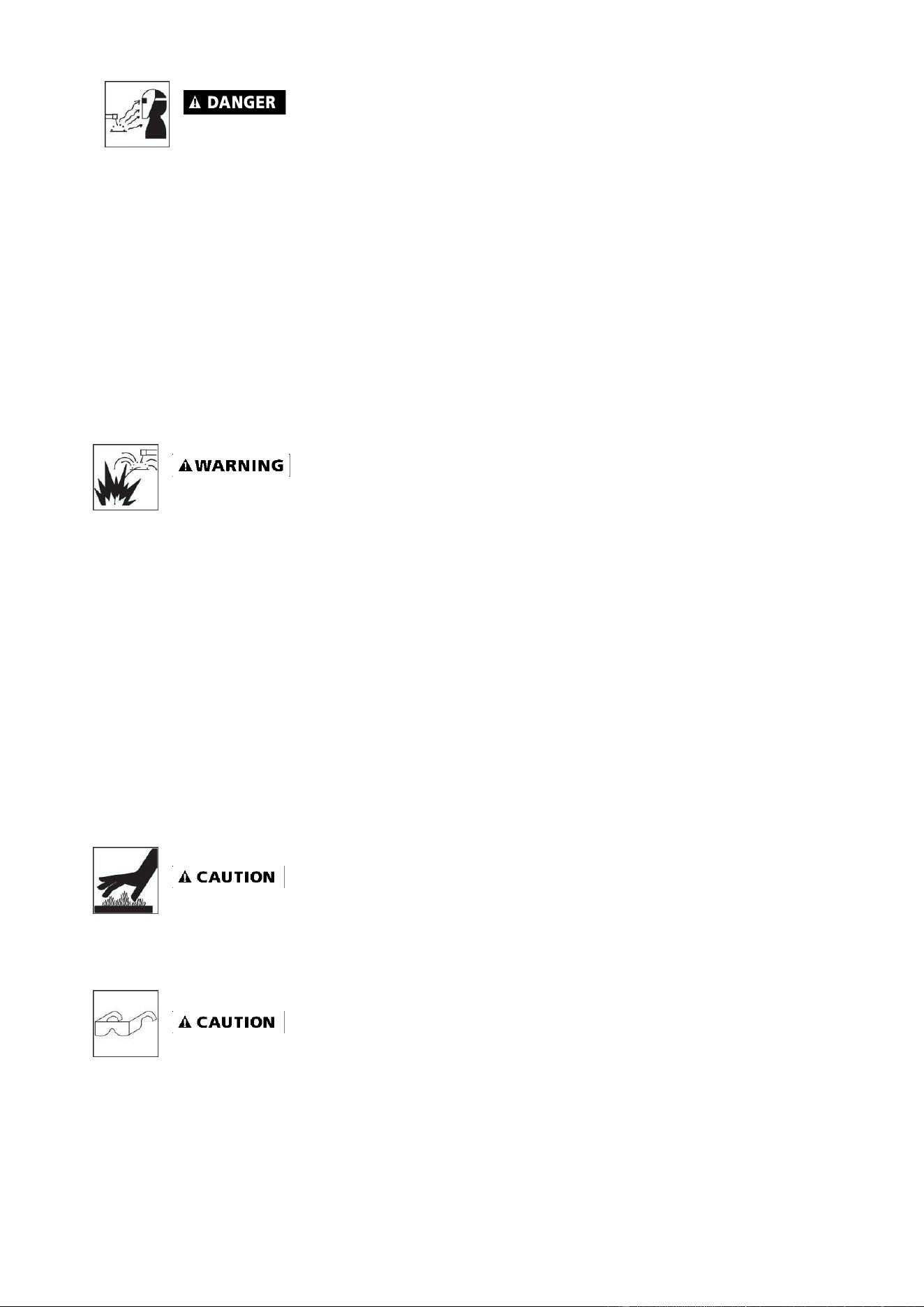
Electric arc welders can produce a shock that can cause injury or death. Touching
electrically live parts can cause fatal shocks and severe burns. While welding, all metal
components connected to the wire are electrically live. Poor ground connections are a hazard, so
secure the ground lead before welding.
-Wear dry protective apparel: coat, shirt, gloves and insulated footwear.
-Insulate yourself from the work piece. Avoid contacting the work piece or ground.
- Do not attempt to repair or maintain the welder while the power is on.
-Inspect all cables and cords for any exposed wire and replace immediately if found.
-Use only recommended replacement cables and cords.
-Always attach ground clamp to the work piece or work table as close to the weld area as possible.
-Do not touch the welding wire and the ground or grounded work piece at the same time.
-Do not use a welder to thaw frozen pipes.
Fumes and Gases
-Fumes emitted from the welding process displace clean air and can result in injury or
death.
-Do not breathe in fumes emitted by the welding process. Make sure your breathing air is clean and
safe.
-Work only in a well-ventilated area or use a ventilation device to remove welding fumes from the
environment where you will be working.
-Do not weld on coated materials (galvanized, cadmium plated or containing zinc, mercury or
barium). They will emit harmful fumes that are dangerous to breathe. If necessary, use a
ventilator/respirator with air supply or remove the coating from the material in the weld area.
-The fumes emitted from some metals when heated are extremely toxic. Refer to the material safety
data sheet for the manufacturer’s instructions.
-Do not weld near materials that will emit toxic fumes when heated. Vapors from cleaners, sprays
and degreasers can be highly toxic when heated.
Page of 26
18115445-12
5
UV and IR Arc Rays
The welding arc produces ultraviolet (UV) and infrared (IR) rays that can cause injury to
your eyes and skin. Do not look at the welding arc without proper eye protection.
-Always use a helmet that covers your full face from the neck to top of head and to the back of each
ear.
-Use a lens that meets ANSI standards and safety glasses. For welders under 160 amps output, use
a shade 10 lens; for above 160 amps, use a shade 12. Refer to the ANSI standard Z87.1 for more
information.
-Cover all bare skin areas exposed to the arc with protective clothing and shoes. Flame-retardant
cloth or leather shirts, coats, pants or coveralls are available for protection.
-Use screens or other barriers to protect other people from the arc rays emitted from your welding.
-Warn people in your welding area when you are going to strike an arc so they can
protect themselves.
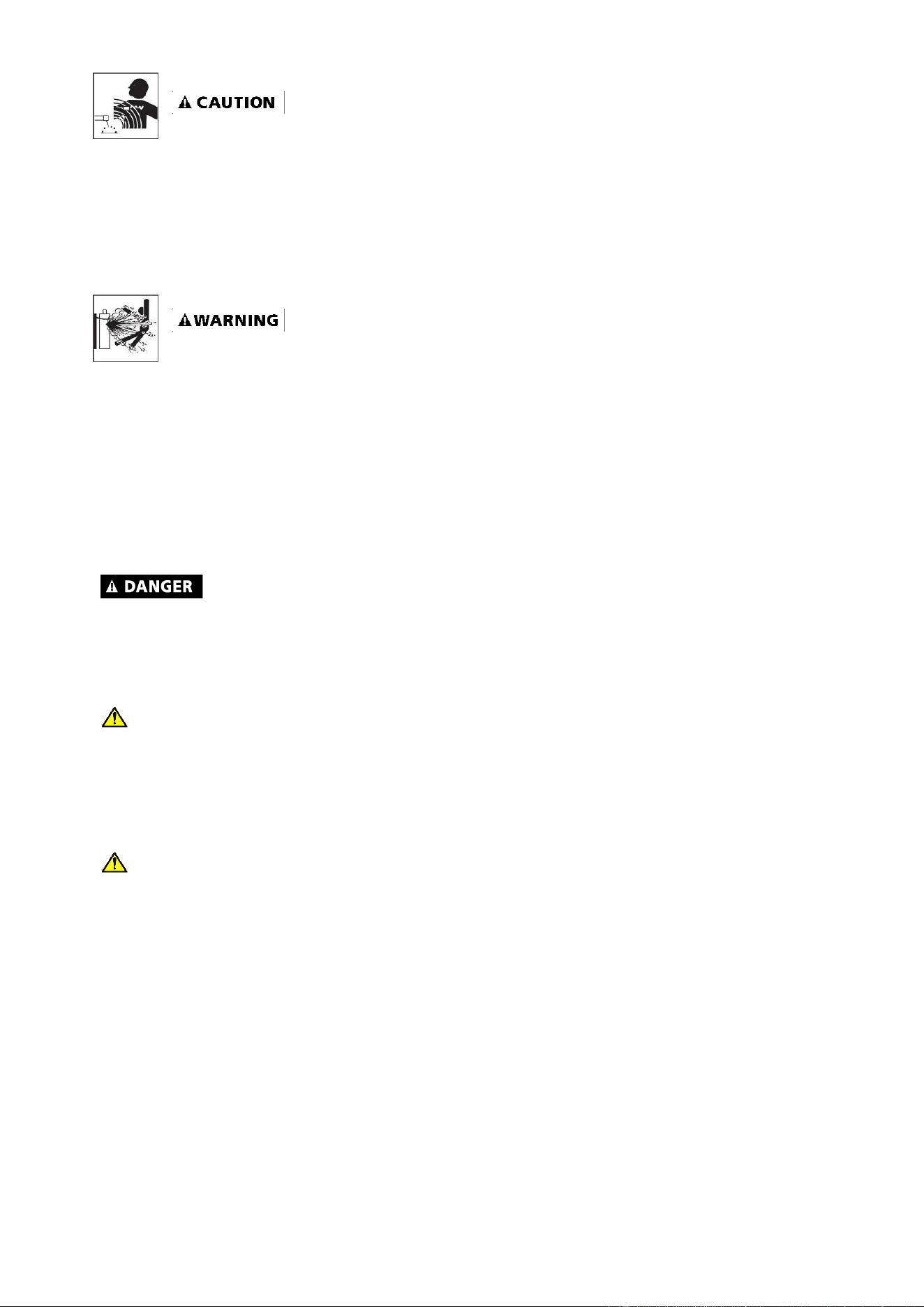
Fire Hazards
Do not weld on containers or pipes that contain or have had flammable, gaseous or liquid
combustibles in them. Welding creates sparks and heat that can ignite flammable and
explosive materials.
-Do not operate an electric arc welder in areas where flammable or explosive materials are present.
-Remove all flammable materials within 35 feet of the welding arc. If removal is not possible, tightly
cover them with fireproof covers.
-Take precautions to ensure that flying sparks do not cause fires or explosions in hidden areas,
cracks or areas you cannot see.
-Keep a fire extinguisher close in the case of fire.
-Wear garments that are oil-free with no pockets or cuffs that will collect sparks.
-Do not have on your person any items that are combustible, such as lighters or matches.
-Keep work lead connected as close to the weld area as possible to prevent any unknown,
unintended paths of electrical current from causing electrical shock and fire hazards.
-To prevent any unintended arcs, cut wire back to stick out ¼" after welding.
Hot Materials
Welded materials are hot and can cause severe burns if handled improperly.
-Do not touch welded materials with bare hands.
-Do not touch MIG gun nozzle after welding until it has had time to cool down.
Sparks/Flying Debris
Welding creates hot sparks that can cause injury. Chipping slag off welds creates flying
debris.
-Wear protective apparel at all times: ANSI-approved safety glasses or shield, welder’s hat and ear
plugs to keep sparks out of ears and hair.
Page of 26
18115445-12
6
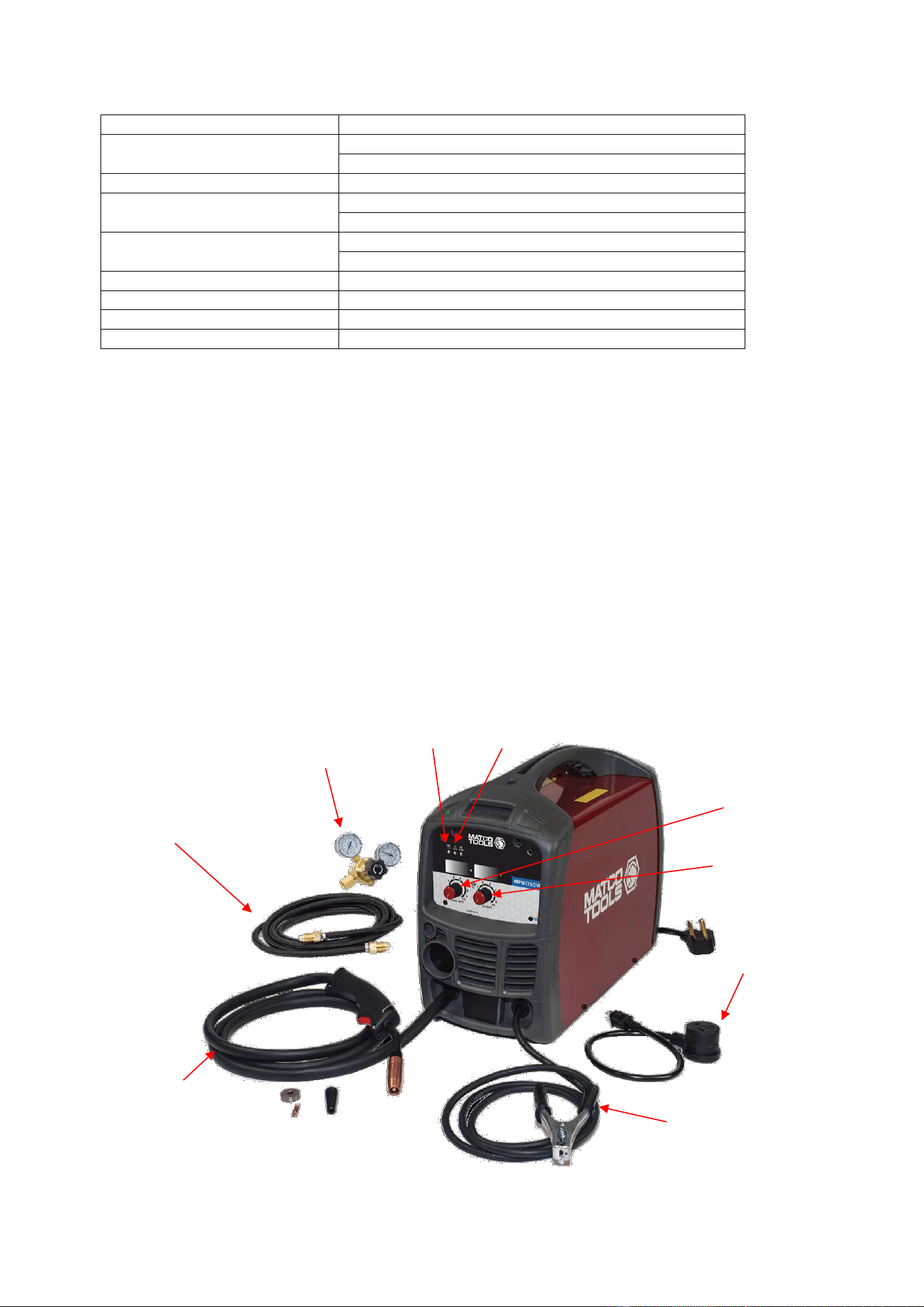
Electromagnetic Field
-Electromagnetic fields can interfere with various electrical and electronic devices such as
pacemakers.
-Consult your doctor before using any electric arc welder or cutting device.
-Keep people with pacemakers away from your welding area when welding.
-Do not wrap cable around your body while welding.
-Wrap MIG gun and ground cable together whenever possible.
-Keep MIG gun and ground cables on the same side of your body.
Shielding Gas Cylinders Can Explode
High pressure cylinders can explode if damaged, so treat them carefully.
-Never expose cylinders to high heat, sparks, open flames, mechanical shocks or arcs.
-Do not touch cylinder with MIG gun.
-Do not weld on the cylinder.
-Always secure cylinder upright to a cart or stationary object.
-Keep cylinders away from welding or electrical circuits.
-Use the proper regulators, gas hose and fittings for the specific application.
-Do not look into the valve when opening it.
-Use protective cylinder cap whenever possible.
1.5 Proper Care, Maintenance and Repair
-Always have power disconnected when working on internal components.
- Do not touch or handle PC board without being properly grounded with a wrist strap. Put PC board
in static proof bag to move or ship.
-Do not put hands or fingers near moving parts such as drive rolls or fan.
WARNING
Breathing welding fumes exposes you to chemicals, including chromium (hexavalent
compounds), known to the State of California to cause cancer and birth defects or other
reproductive harm. *Always weld in a well-ventilated area.* If in an enclosed area, vent the
exhaust to the outside. For more information go to www.P65warings.ca.gov
WARNING
This product can expose you to chemicals including Lead, which is known to the State of
California to cause cancer and birth defects or other reproductive harm. For more information
go to www.P65warings.ca.gov
USE AND CARE
Do not modify this unit in any way. Unauthorized modification may impair the function and/or
safety and could affect the life of the equipment. There are specific applications for which this
unit was designed.
Always check for damaged or worn out parts before using this unit. Broken parts will affect
the operation. Replace or repair damaged or worn parts immediately.
Store idle. When this unit is not in use, store it in a secure place out of the reach of children.
Inspect it for good working condition prior to storage and before re-use.
Page of 26
18115445-12
7
TECHNICAL SPECIFICATIONS
Item
Description
Power Supply
120V, 20A, 60 HZ, Single Phase
230V, 28A, 60 HZ, Single Phase
No-Load Voltage
54 Volts DC
Output Range
30 - 90 Amp DC With 120V Input Power
30 - 160 Amp DC With 230V Input Power
Duty Cycle
40% @ 90A With 120V Input Power
20% @ 160A With 230V Input Power
Suggested MIG Wire
Steel, Stainless Steel, Aluminum
Wire Diameter
.023, .030,.035
Dimensions
22-1/2" x 11-3/4" x 14.1/2"
Weight
26-1/2 lbs.
DESCRIPTION
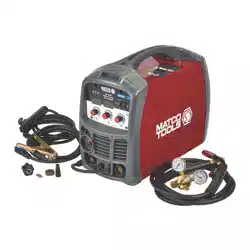
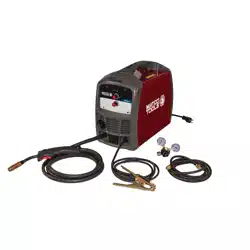
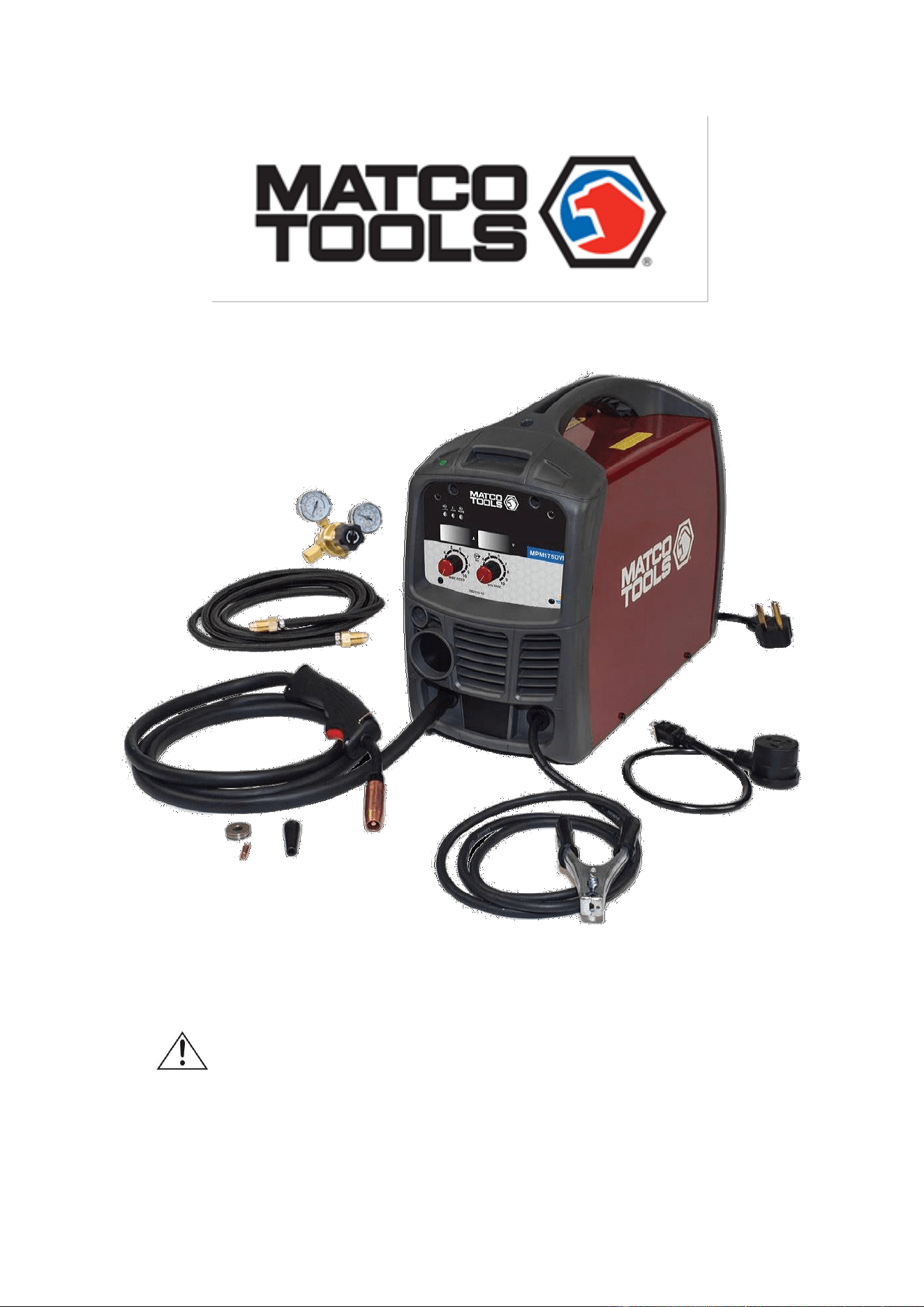
The Matco Tools MPM175DVI is a Dual Voltage, portable DC wire feed welder capable of welding
with solid wire (with shielding gas) or flux core wire. This unit is capable of welding 5/16” steel in a
single pass when operating on 230V power. Use the included 120V adapter cord to run this unit off
120V AC power with a single pass capacity of 3/16”. It uses leading edge Inverter Technology to
provide high quality welds that are crisp, clean, and consistent with plenty of power and will impress
the most experienced of welders. It features infinite wire feed speed control and voltage control,
giving you total control to tune in the arc you want. The MPM175DVI also features a cooling fan and
thermal overload protection to help protect your investment. The Inverter Technology is evident from
the moment you take this unit out of the box. One of the many advantages of inverter technology is
creating more welding power from a smaller transformer. A smaller transformer means lower overall
weight. The MPM175DVI is ideal for use when welding materials from 24 gauge to 5/16” and is ideal
for the home hobbyist, auto repair, farm and ranch and light industrial applications.
Welding
Voltage Control
Ground Cable
And Clamp
Torch
Power
Indicator
Wire Feed
Speed Control
Protection
Indicator
Inert Gas
Hose
Inert Gas
Regulator
120V Adapter
Cord

Page of 26
18115445-12
8
POWER INDICATOR LIGHT
In the “OFF” position no power is being supplied to the torch. In the “ON” position power is supplied to
the main transformer and control circuit.
PROTECTION INDICATOR LIGHT
If the duty cycle of the welder is exceeded, the internal temperature will exceed safe temperatures and the
machine will shut down. The thermal overload light will come on indicating this. Leave the unit on and
allow 15 minutes for cool down before the light will go off and the temperature to fall into an allowable
operating range.
WIRE FEED SPEED CONTROL
Adjustment of the wire feed speed. Refer to the "set up" chart inside the wire feed compartment for initial
adjustment settings.
WELDING VOLTAGE CONTROL
The voltage control is on the front panel of machine. Refer to the “set up” chart inside the wire feed
compartment for initial adjustment settings.
GROUND CABLE AND CLAMP
The ground cable and clamp are attached to the work piece to complete the circuit allowing the flow of
current needed to weld.
MIG TORCH
The welding wire is driven through the welding cable and torch to the work piece. It is attached to the drive
system. The trigger activates the drive motor.
INERT GAS REGULATOR AND HOSE
The Inert Gas Regulator installs on the shielding gas cylinder for MIG welding with solid wires. The
regulator controls the compressed gas and allows you to adjust the flow rate of the gas. The gas hose
connects to the regulator/flow gauge and delivers the shielding gas from the shielding gas bottle to the
welder.
FLUX CORE NOZZLE AND CONTACT TIPS
The flux core nozzle is used during flux core welding. It protects the contact tip adapter from spatter and
debris during the flux core welding process. The extra contact tips are **Tweco® 11-30 style tips used
when using .030 welding wire.
POWER CORD AND PLUG
Plug this unit into a 230V, 50 amp circuit breaker power supply when operating on 230V. If running on
120V power using the supplied 120V power cord adapter, plug this unit into a 120V, 20 amp circuit
breaker power supply.
**Tweco is a registered trademark of Victor Technologies International, Inc.
INSTALLATION
Electrical Shock
High voltage danger from power source! Consult a qualified electrician for proper
installation of receptacle. This welder must be grounded while in use to protect the
operator from electrical shock.

Page of 26
18115445-12
9
Do not remove grounding prong or alter the plug in any way. Use only the supplied
adapter between the plasma cutter's power cord and the power source receptacle. Make
sure the POWER switch is OFF when connecting your welder’s power cord directly to a
properly grounded 230 VAC, 60 HZ, Single Phase, 50 Amp input power supply. Or, when
using the supplied 120V adapter, connect the 120V Adapter to a properly grounded 120V,
20 Amp input power supply.
1. POWER REQUIREMENT 230V - AC single phase 230V (200-240V) 50/60 HZ
fused with a 50 amp time delayed fuse or circuit breaker is required. DO NOT OPERATE
THIS UNIT if the ACTUAL power source voltage is less than 215 volts AC or greater than
240 volts AC.
2. POWER REQUIREMENT 120V - AC single phase 120V (110-130V) 50/60 HZ
fused with a 20 amp time delayed fuse or circuit breaker is required. DO NOT OPERATE
THIS UNIT if the ACTUAL power source voltage is less than 110 volts AC or greater than
130 volts AC.
a. When connecting this unit to 120V power, connect the 120V adapter cord to
the power cord pigtail that is attached to the machine.
3. EXTENSION CORD - We do not recommend an extension cord because of the voltage drop
they produce. This drop in voltage can affect the performance of the welder. If you need to
use an extension cord, we recommend you check with a qualified electrician and your local
electrical codes for your specific area. Do not use an extension cord over 25 ft. in length.
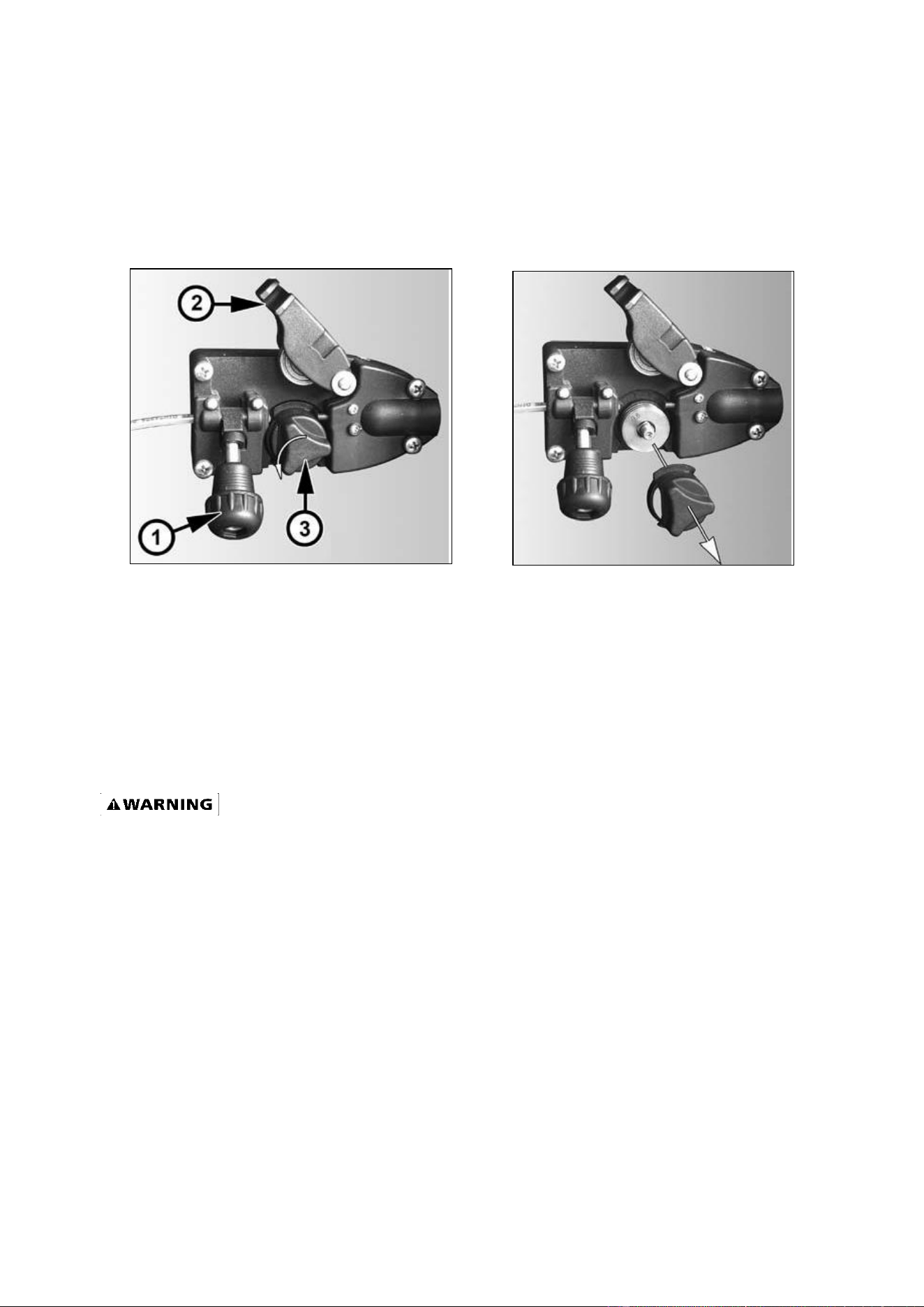
4. INSTALL THE WIRE ROLLER - The wire roller has been factory installed. However, check to
make certain the correct wire groove is in place to accommodate the size of wire you are
using. Open the wire feed compartment. Adjust the drive roller according to the following
steps, see following picture about the wire feeder structure:
a. Open the door to the welder drive compartment
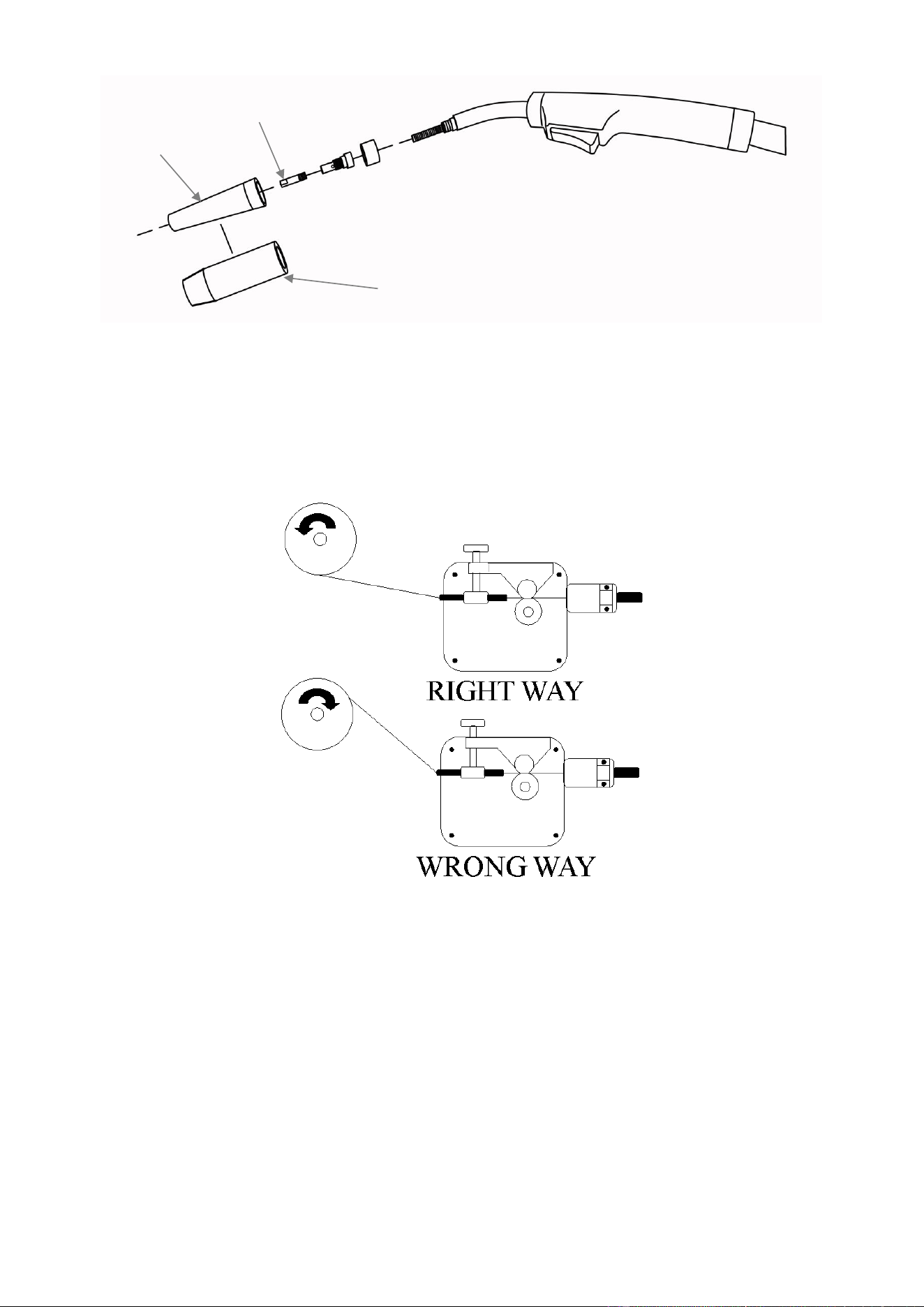
b. Remove the drive tension by loosening the drive tension adjusting knob (1) and lifting
the Drive Tension Adjustor away from the Drive Tension Arm (2). Lift the Drive
Tension Arm away from the Drive Roller (3).
c. If there is wire already installed in the welder, roll it back onto the wire spool by
hand-turning the spool clockwise. Be careful not to allow all the wire to come out of
the rear end of the inlet guide tube without holding onto it or the wire spool will
unspool itself. Put the end of the wire into the hole on the outside edge of the wire
spool and bend it over to hold the wire in place. Remove the spool of wire from the
drive compartment of the welder.
d. Rotate the Drive Roller Cap (3) counterclockwise and remove it from the Drive Roller.
e. Pull the Drive Roller off of the Drive Roller shaft.
f. Based on the wire diameter select the correct groove. When installing the drive roller,
the number stamped on the drive roller for the wire size you are using should be
facing you. Push the Drive Roller onto the Drive Roller Shaft.
Page of 26
18115445-12
10
g. Reinstall the Drive Roller Cap and lock in place by turning it clockwise.
h. Close the door to the welder drive compartment.
5. INSTALL THE WIRE
a. Select welding wire - We recommend the usage of .030 Wire on this unit.
However, .023 - .035 wire may be used. Both four-inch and eight-inch wire spools
can be used on this welder.
NOTE:
- Metal thinner than 24 gauge cannot be welded with this machine. Attempting to do so will cause
burn through in the metal you are intending to weld.
- Do not use rusty wire. Remove any wire that is rusty. If the whole spool is rusty, discard it and use
another roll.
6. Installing the wire
Electrical Shock
Electric shock can kill! Always turn the POWER switch OFF and unplug the power cord
from the AC power source before installing wire.
NOTE:
- Before installing, make sure that you have removed any old wire from the torch assembly. This will
help to prevent the possibility of the wire jamming inside the gun liner.
- Be very careful when removing the welding nozzle. The contact tip on this welder is live whenever
the torch trigger is pulled. Make certain POWER is turned OFF.
a. Remove the nozzle and contact tip from the end of the torch assembly.
Page of 26
18115445-12
11
b. Make sure the proper groove on the drive roller is in place for the wire installed. If not,
change the drive roller as described in Section 4 above.
c. Remove the packaging from the spool of wire and then identify the leading end of the
wire secured on the edge of the spool. DO NOT UNHOOK IT AT THIS TIME.
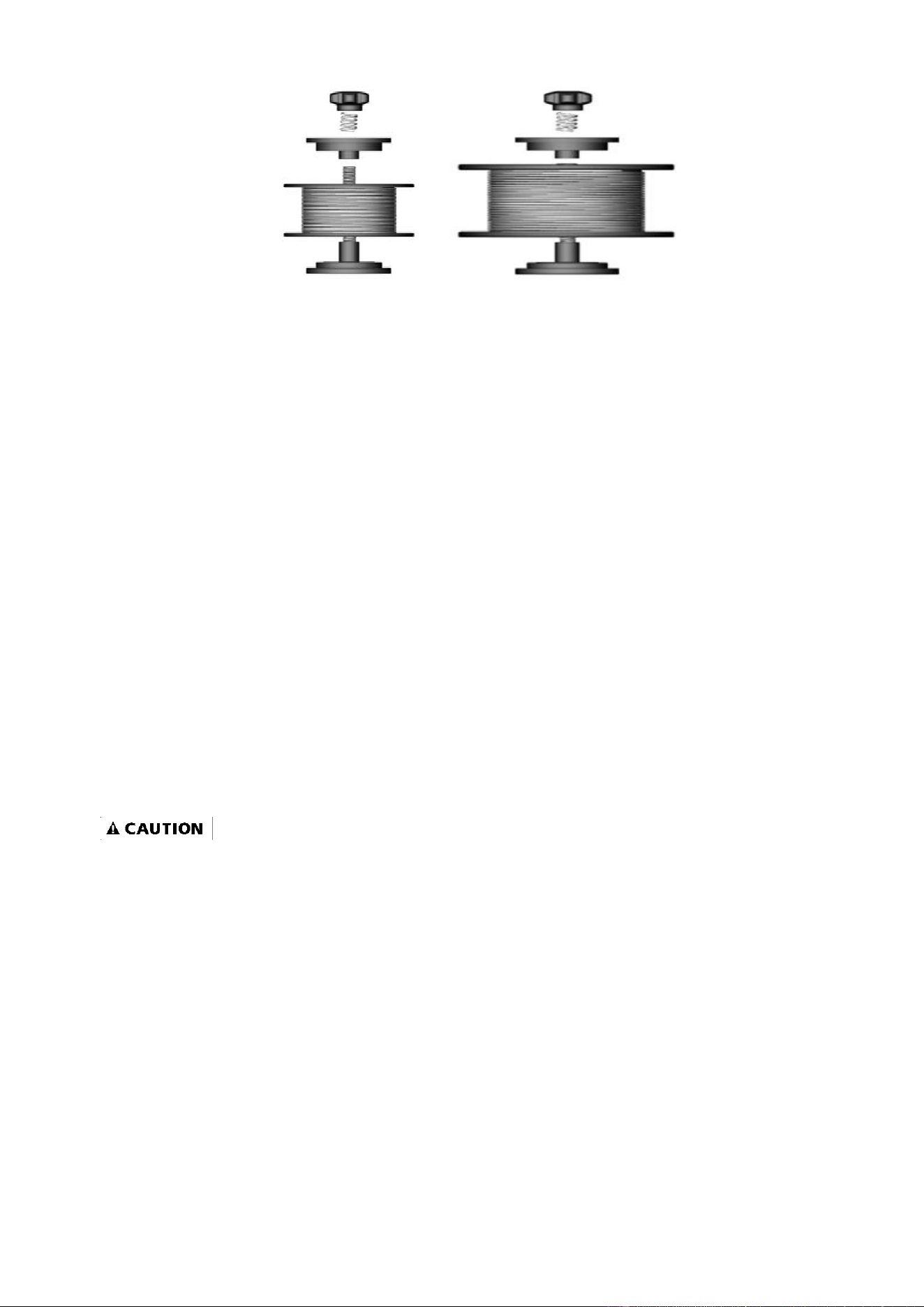
d. Place the spool on the spool hub so the wire will pull off the bottom of the spool. The
welding wire should always come off the bottom of the spool into the drive
mechanism. See following figure.
e. The welder can use either 4 inch or 8 inch spools. See the following figure for
additional reference. The wing nut controls the tension on the spool.
MIG
Nozzle
Flux Core
Nozzle
Contact
Tip
Page of 26
18115445-12
12
f. Setting the wire spool tension. a) Turn the spool of wire with one hand. b) Increase
the spool tension by tightening (turn clockwise) the wing nut while turning the spool.
Turn the spool while tightening the wing nut until the spool slows down and you feel a
slight drag. Stop tightening the wing nut; you may need to repeat these steps until
proper spool tension is achieved.
NOTE:
- If TOO MUCH tension is applied to the wire spool, the wire will slip on the drive roller or will not be
able to feed at all. If TOO LITTLE tension is applied, the spool of wire will want to unspool itself when
the trigger is released. Readjust the spool tension using the wing nut as necessary to correct for
either problem.
g. With the welder disconnected from the power source, remove the leading end of the
wire from the spool. Hold on to it securely, so as not to allow unspooling or tangling
of the wire as it will result in tangled wire and feeding problems.
h. Cut off any bent portion of the wire using a wire cutter.
i. Loosen the tension adjusting knob holding the drive tension arm in place and lift the
tension arm up off the drive roller.
j. Insert the wire into the inlet guide tube; feed it across the drive roller and into the
torch assembly about six inches.
-Make certain that the welding wire is actually going into the torch liner. If not, the wire will jam up in
the mechanism.
k. Line the wire up with the correct groove in the drive roller. Place the drive tension arm
back above the drive roller.
l. Place the drive tension adjustment arm back in place.
m. Tighten (turn clockwise) the drive tension adjusting knob until the tension roller is
applying enough force on the wire to prevent it from slipping in the drive rollers. DO
NOT OVER TIGHTEN.
n. NOW YOU CAN LET GO OF THE WIRE.
o. Plug in the welder power cord and turn the welder ON. Set the Voltage switch to the
voltage setting recommended for the gauge metal that is to be welded. Refer to the
set-up chart on the back side of the drive compartment door.
8 Inch
4 Inch

Page of 26
18115445-12
13
-The welding wire is electrically hot when the power is on and the torch trigger is activated.
p. Set the WIRE SPEED control to the middle of the wire speed range.
q. Straighten the MIG torch cable and pull the trigger in the gun handle to feed the wire
through the torch assembly. When at least one inch of the wire sticks out past the end
of the torch, release the trigger.
r. Turn the Power Switch to the OFF position.
s. Select a contact tip stamped with the same diameter as the wire being used.
NOTE:
- Due to inherent variances in flux cored welding wire, it may be necessary to use a contact tip one
size larger when welding with flux core wire if wire jams occur.
t. Slide the contact tip over the wire (protruding from the end of the torch). Thread the
contact tip into the end of the torch and hand-tighten securely.
u. Install the nozzle on the torch assembly.
v. Cut off excess wire that extends past the end of the nozzle more than 1/4 inch.
w. Turn the welder ON.
7. SETTING THE DRIVE ROLL TENSION
Arc flash can injure eyes! To reduce the risk of arc flash, make certain that the wire
coming out of the end of the torch does not come in contact with the work piece, ground
clamp, or any grounded material during the drive tension setting process or arcing will
occur.
a. Press the trigger on the torch.
b. Turn the drive tension adjustment knob clockwise until the wire seems to feed
smoothly without slipping.
8. GAS INSTALLATION
Shielding gas cylinders and high pressure cylinders can explode if damaged, so treat them
carefully.
Never expose cylinders to high heat, sparks, open flames, mechanical shocks or arcs.
Do not weld on the cylinder.
Always secure cylinder upright to a cart or stationary object.
Keep cylinders away from welding or electrical circuits.
Use the proper regulators, gas hose and fittings for the specific application.
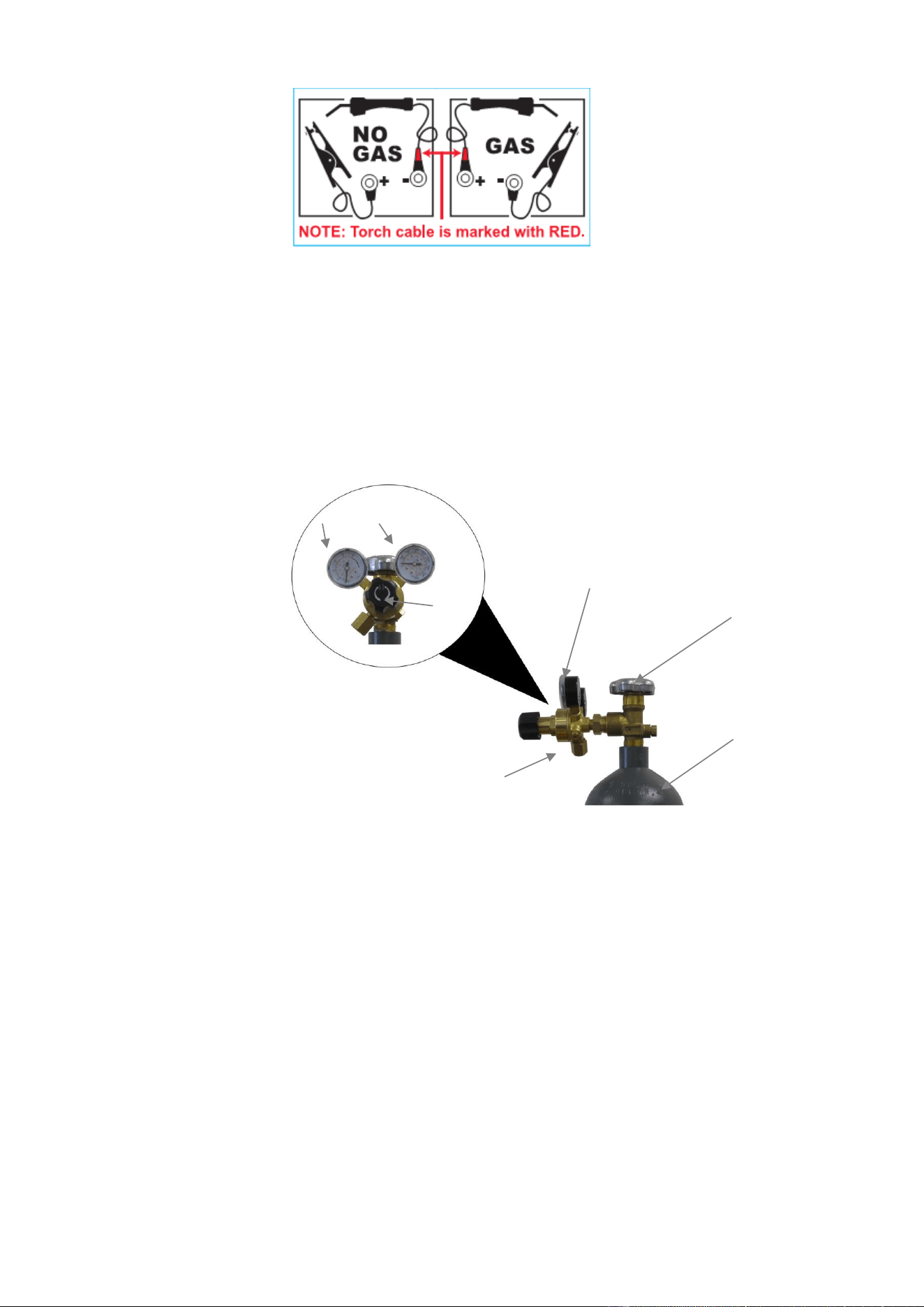
a. Polarity Changing - When MIG wire is used, shielding gas is required and the polarity
on this unit needs to be electrode positive.
b. Electrode Positive for MIG Welding - The Weld Power Cable should be connected to
the positive (+) weld output connection on the front of the machine. The ground cable
would then be connected to the negative (-) weld output connection.
c. Electrode Negative for Flux Core Welding - The Weld Power Cable should be
connected to the negative (-) weld output connection on the front of the machine. The
ground cable would then be connected to the positive (+) weld output connection.
Refer to the polarity setting label inside the wire compartment.
Page of 26
18115445-12
14
d. Connect one end of the gas hose to the gas hose connection on the back of the
welder.
e. Connect the other end of the gas hose to the gas hose connection on the supplied
regulator/flow gauge.
f. Before installing the regulator, it is good practice to make certain no debris is in the
gas bottle connection. Rotate the bottle so the gas connection is not pointing toward
you or any other person. Turn the valve on the gas bottle clockwise and quickly close.
This quick thrust of gas will clear any debris in the connection. Connect the regulator
to the gas bottle connection. Use a wrench to snug up the connection.
(1) Gas Bottle Valve
(2) Gas Flow Gauge (Set at 20 CFH)
(3) Gas Pressure Gauge
(4) Regulator
(5) Gas Flow Adjuster
(6) Gas Hose Connection
(7) Gas Cylinder
g. Open the Gas Bottle Valve on the cylinder of gas.
h. Turn the Gas Flow Adjuster on the regulator so that the gas flow rate is set at
approximately 20 CFH. Make certain you are reading the correct scale on the gauge.
NOTE: Slowly open the cylinder valve by turning it counterclockwise until the cylinder pressure
gauge registers on the first gauge of the regulator. Turn the adjustment knob clockwise (right) slowly
to increase gas flow to 20 CFH. To reduce the gas flow, turn the adjustment counterclockwise (left).
The gas valve is located on the back panel of the welder and activated by the trigger. Gas flow
1
7
4
3
2
6
5

Page of 26
18115445-12
15
should be heard when the trigger is activated. No gas flow will result in a harsh arc with excessive
spatter, a smooth weld bead will be difficult to obtain. Avoid unnecessary gas loss by closing the tank
valve when finished welding.
6.7 Gas selection
Different materials require different shielding gas when MIG welding, refer to the set up chart inside
the wire feed compartment.
Mild steel: Use 75% Argon and 25% CO2 for reduced spatter and reduced penetration for thinner
materials. Do NOT USE Argon gas concentrations higher than 75% on steel. The result will be
extremely poor penetration, porosity, and brittleness of weld.
Mild Steel: Use CO2 for deeper penetration but increased spatter. (A CO2 regulator adapter will be
needed)
Stainless steel: Use a mixed gas consisting of Helium, Argon and CO2.
Aluminum or bronze: Use 100% Argon.

Page of 26
18115445-12
16
MIG OPERATION
High voltage danger from power source! Consult a qualified electrician for proper
installation of receptacle. This welder must be grounded while in use to protect the
operator from electrical shock.
Do not remove grounding prong or alter the plug in any way. Use only the supplied
adapter between the plasma cutter's power cord and the power source receptacle. Make
sure the POWER switch is OFF when connecting your welder’s power cord directly to a
properly grounded 230 VAC, 60 HZ, Single Phase, 50 Amp input power supply. Or, when
using the supplied 120V adapter, connect the 120V Adapter to a properly grounded 120V,
20 Amp input power supply.
1. POWER SWITCH
The power switch supplies electrical current to the welder. Whenever the power switch is in the ON
position, the welding circuit is activated. ALWAYS turn the power switch to the OFF position and
unplug the welder before performing any maintenance.
2. VOLTAGE SELECTOR
The voltage selector controls the welding voltage/heat. This unit has a voltage control that is infinitely
adjustable within its range. Refer to the label inside the welder side door for recommended voltage
selector settings for your welding job.
3. WIRE SPEED CONTROL
The wire speed control adjusts the speed at which the wire is fed out of the welding torch. The wire
speed needs to be closely matched (tuned-in) to the rate at which it is being melted off. Some things
that affect wire speed selection are the type and diameter of the wire being used, the heat setting
selected, and the welding position being used. Refer to the label inside the welder side door for
recommended wire speed settings for your welding job.
NOTE: The wire will feed faster without an arc. When an arc is being drawn, the wire speed will slow
down.
4. HOLDING THE TORCH
The best way to hold the welding torch is the way it feels most comfortable to you. While practicing
with your new welder, experiment by holding the torch in different positions until you find the one that
seems to work best for you.
5. POSITION OF THE TORCH TO THE WORK PIECE
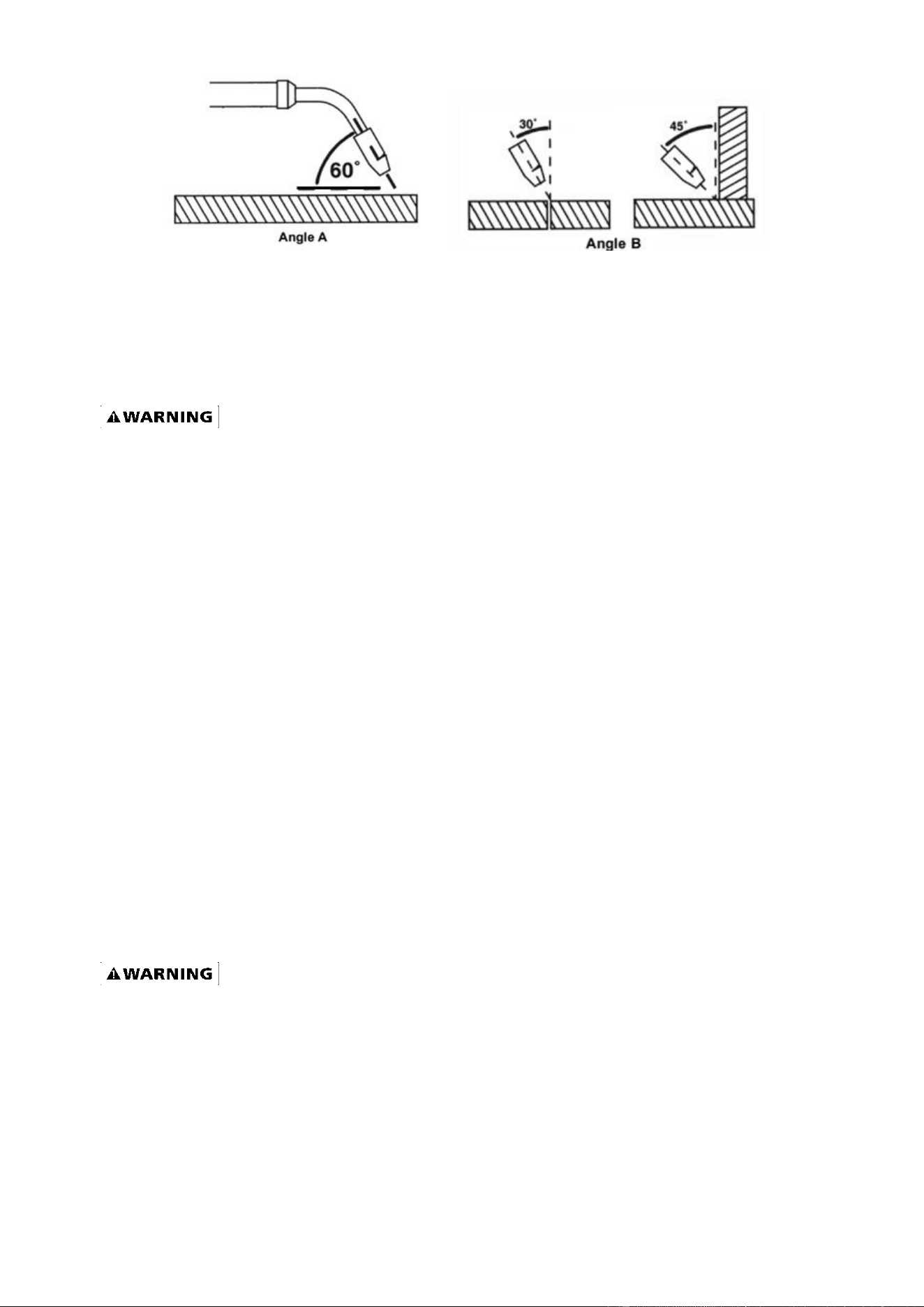
There are two angles of the torch nozzle in relation to the work piece that must be considered when
welding.
5.1. Angle can vary, but in most cases the optimum angle will be 60 degrees, the point at which the
torch angle is parallel to the work piece. If angle A is increased, penetration will increase. If angle A is
decreased, penetration will decrease also.
5.2. Angle B can be varied for two reasons: to improve the availability to see the arc in relation to the
weld puddle and to direct the force of the arc.
Page of 26
18115445-12
17
6. DISTANCE FROM THE WORK PIECE - If the nozzle is held off the work piece, the distance
between the nozzle and the work piece should be kept constant and should not exceed 1/4 inch or
the arc may begin sputtering, signaling a loss in welding performance.
7. TUNING IN THE WIRE SPEED - This is one of the most important parts of wire welder operation
and must be done before starting each welding job or whenever the voltage setting or wire diameter
is changed.
EXPOSURE TO A WELDING ARC IS EXTREMELY HARMFUL TO THE EYES AND SKIN!
Prolonged exposure to the welding arc can cause blindness and burns. Never strike an arc or
begin welding until you are adequately protected. Wear flame-proof welding gloves, a heavy
long sleeved shirt, trousers without cuffs, high topped shoes, and an ANSI approved welding
helmet.
7.1 Connect the Ground Clamp to a scrap piece of the same type of material which you will be
welding. It should be equal to or greater than the thickness of the actual work piece, and free of oil,
paint, rust, etc.
7.2 Select a heat setting.
7.3 Hold the torch in one hand. Hold the wire just off the work piece. (See HOLDING THE TORCH
section if you are uncertain of the angle at which you will be welding.)
7.4 Set the wire feed speed based on the thickness of material and the set-up chart on the back side
of the wire feeder door.
7.5 Lower your welding helmet. Pull the trigger on the torch and let the wire feed into the work piece
to start an arc. Then begin to drag the torch toward you.
7.6 LISTEN! If the arc is sputtering, increase the wire speed slightly and try again. Continue
increasing the wire speed adjustment until you achieve a smooth buzzing sound. If the wire seems to
"pound" into the work piece, decrease wire speed slightly and try again. Use the wire speed control
to slightly increase or decrease the heat and penetration for a given voltage setting by increasing or
decreasing the wire speed slightly. Repeat this tune-in procedure if you select a new voltage setting,
a different wire diameter, or a different roll of wire.
8. WELDING TECHNIQUES
EXPOSURE TO A WELDING ARC IS EXTREMELY HARMFUL TO THE EYES AND SKIN!
Prolonged exposure to the welding arc can cause blindness and burns. Never strike an arc or
begin welding until you are adequately protected. Wear flame-proof welding gloves, a heavy
long sleeved shirt, trousers without cuffs, high topped shoes, and an ANSI approved welding
helmet.
Page of 26
18115445-12
18
ELECTRIC SHOCK CAN CAUSE INJURY OR DEATH! To prevent ELECTRIC SHOCK, do not
perform any welding while standing, kneeling, or lying directly on the grounded workpiece.
8.1 Moving the torch
Torch travel refers to the movement of the torch along the weld joint and is broken into two elements:
Direction and Speed. A solid weld bead requires that the welding torch be moved steadily and at the
right speed along the weld joint. Moving the torch too fast, too slow, or erratically will prevent proper
fusion or create a lumpy, uneven bead.
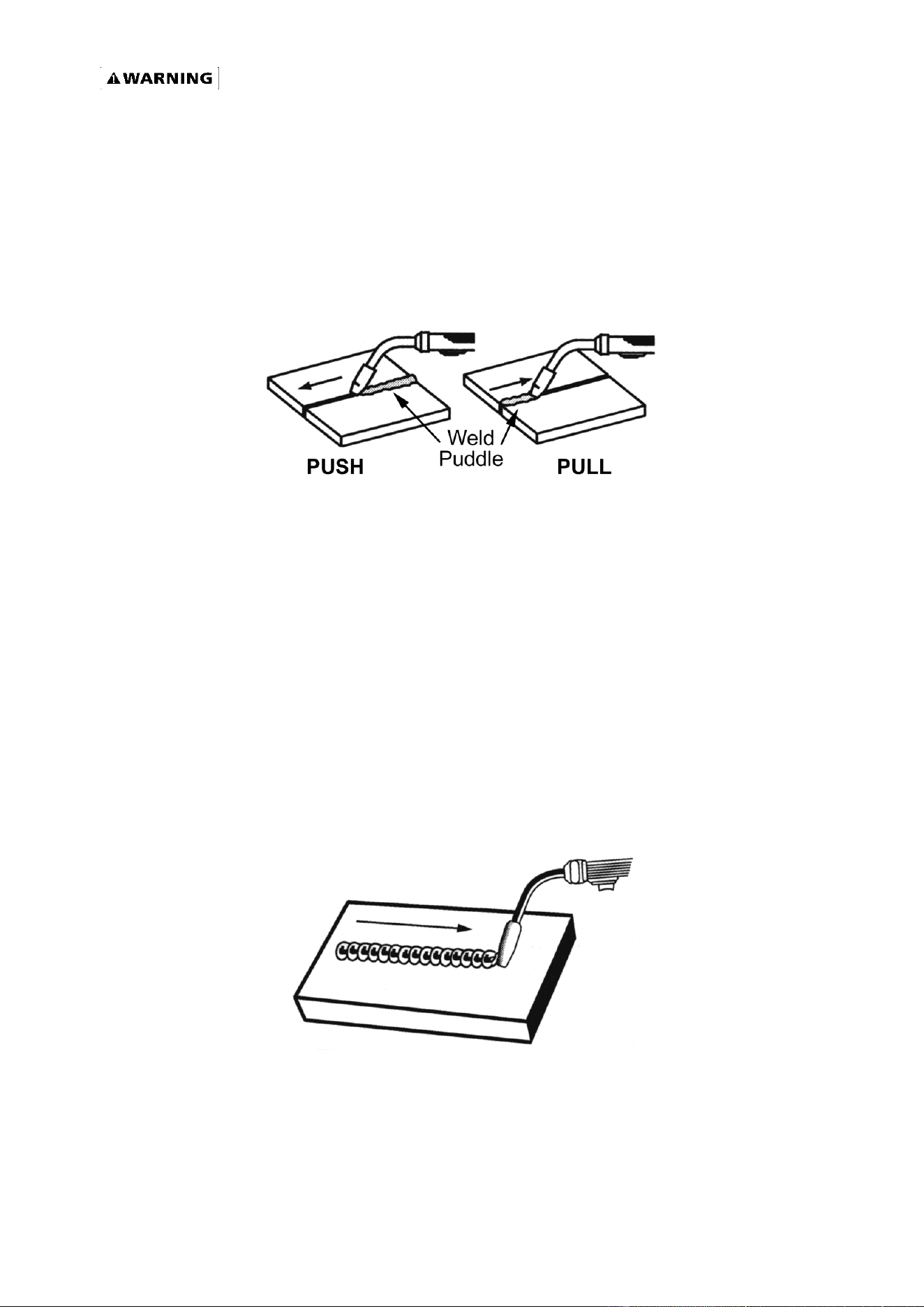
Travel direction is the direction the torch is moved along the weld joint in relation to the weld puddle.
The torch is either PUSHED into the weld puddle or PULLED away from the weld puddle.
For most welding jobs you will pull the torch along the weld joint to take advantage of the greater
weld puddle visibility.
Travel speed is the rate at which the torch is being pushed or pulled along the weld joint. For a fixed
heat setting, the faster the travel speed, the lower the penetration and the lower and narrower the
finished weld bead, likewise, the slower the travel speed, the deeper the penetration and the higher
and wider the finished weld bead. As a good rule of thumb, the thickness of a cross-section of the
weld bead should be approximately the same thickness as the thinnest material you are
welding.
8.2 Types of welding beads
As you become more familiar with your new welder and better at laying some simple weld beads, you
can begin to try some different weld bead types.
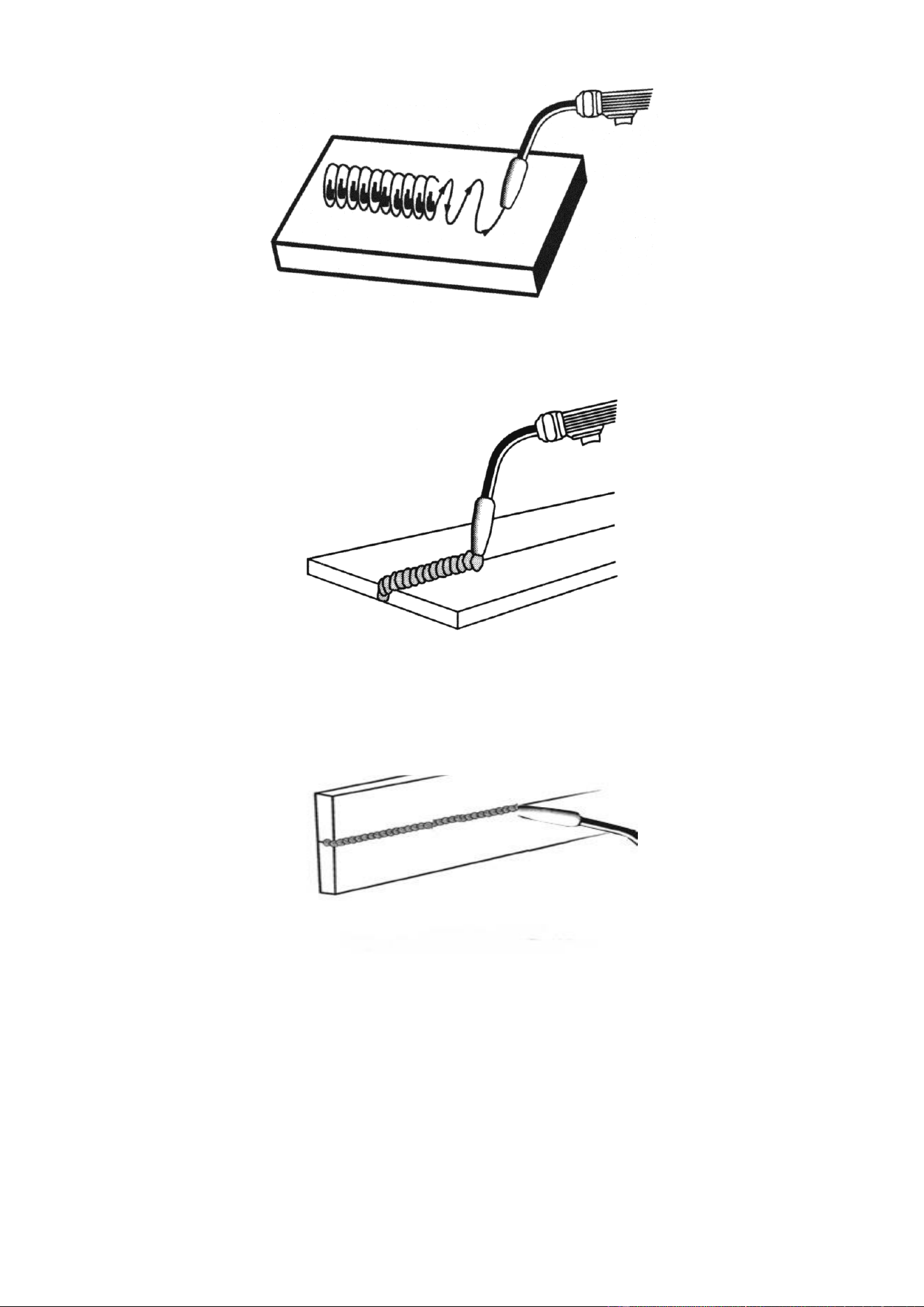
The STRINGER BEAD is formed by traveling with the torch in a straight line while keeping the wire
and nozzle centered over the weld joint. See following figure.
The WEAVE BEAD used when you want to deposit metal over a wider space than would be possible
with a stringer bead. It is made by weaving from side to side while moving with the torch. It is best to
hesitate momentarily at each side before weaving back the other way.
Page of 26
18115445-12
19
8.3 Welding position
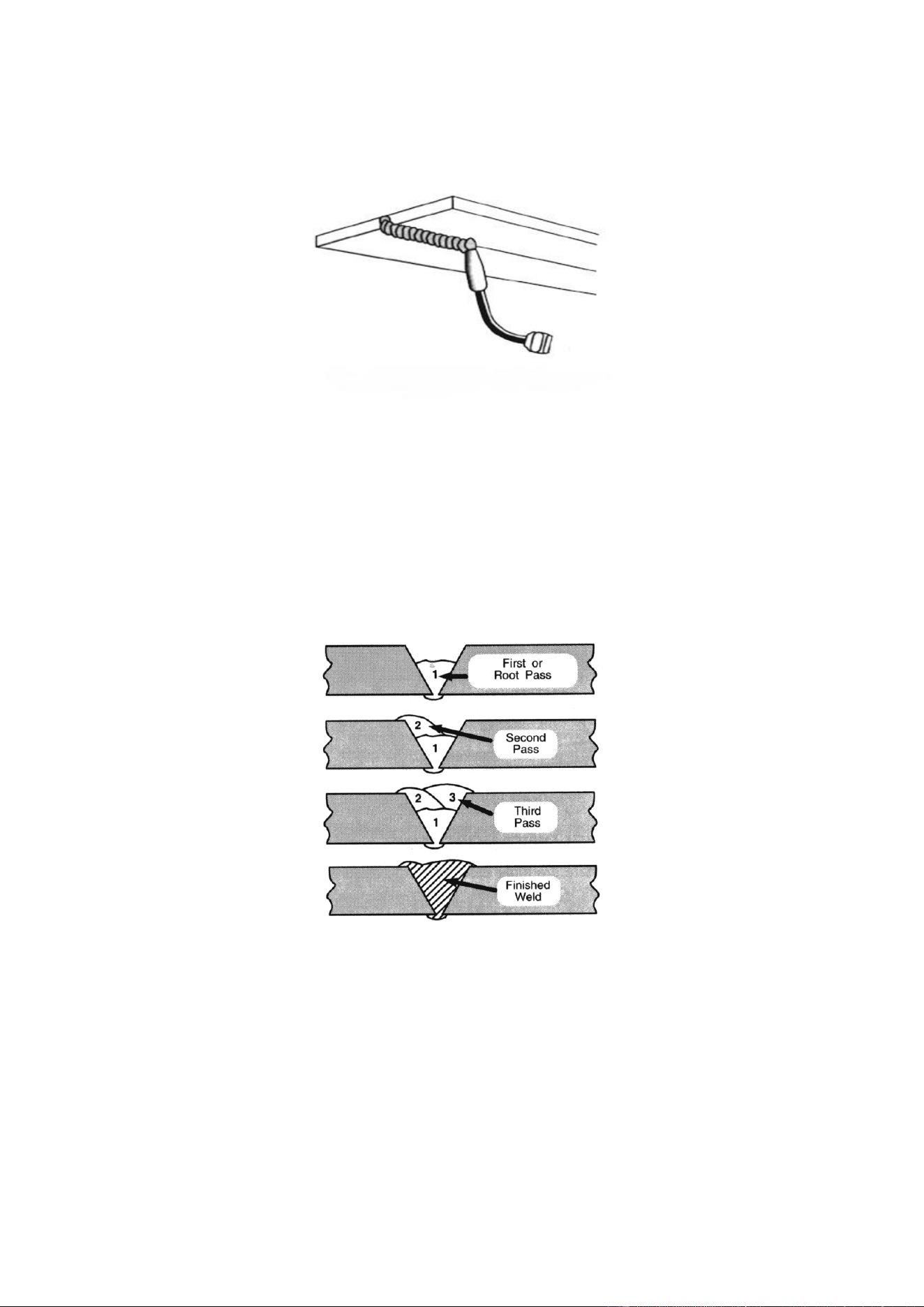
FLAT POSITION is easiest of the welding positions and is most commonly used. It is best if you can
weld in the flat position if at all possible as good results are easier to achieve.
HORIZONTAL POSITION is performed very similarly to the flat weld except that angle B (see
HOLDING THE TORCH) is such that the wire, directed more toward the metal above the weld joint is
to help prevent the weld puddle from running downward while still allowing slow enough travel speed.
A good starting point for angle B is about 30 degrees DOWN from being perpendicular to the work
piece.
VERTICAL POSITION it is easier for many people to pull the torch from top to bottom. It can be
difficult to prevent the puddle from running downward. Pushing the torch from bottom to top may
provide better puddle control and allow slower rates of travel speed to achieve deeper penetration.
When vertical welding, angle B (see HOLDING THE TORCH) is usually always kept at zero, but
angle A will generally range from 45 to 60 degrees to provide better puddle control.
Page of 26
18115445-12
20
OVERHEAD POSITION is the most difficult welding position. Angle A (see HOLDING THE TORCH)
should be maintained at 60 degrees. Maintaining this angle will reduce the chances of molten metal
falling into the nozzle. Angle B should be held at zero degrees so that the wire is aiming directly into
the weld joint. If you experience excessive dripping of the weld puddle, select a lower heat setting.
Also, the weave bead tends to work better than the stringer.
8.4 Multiple pass welding
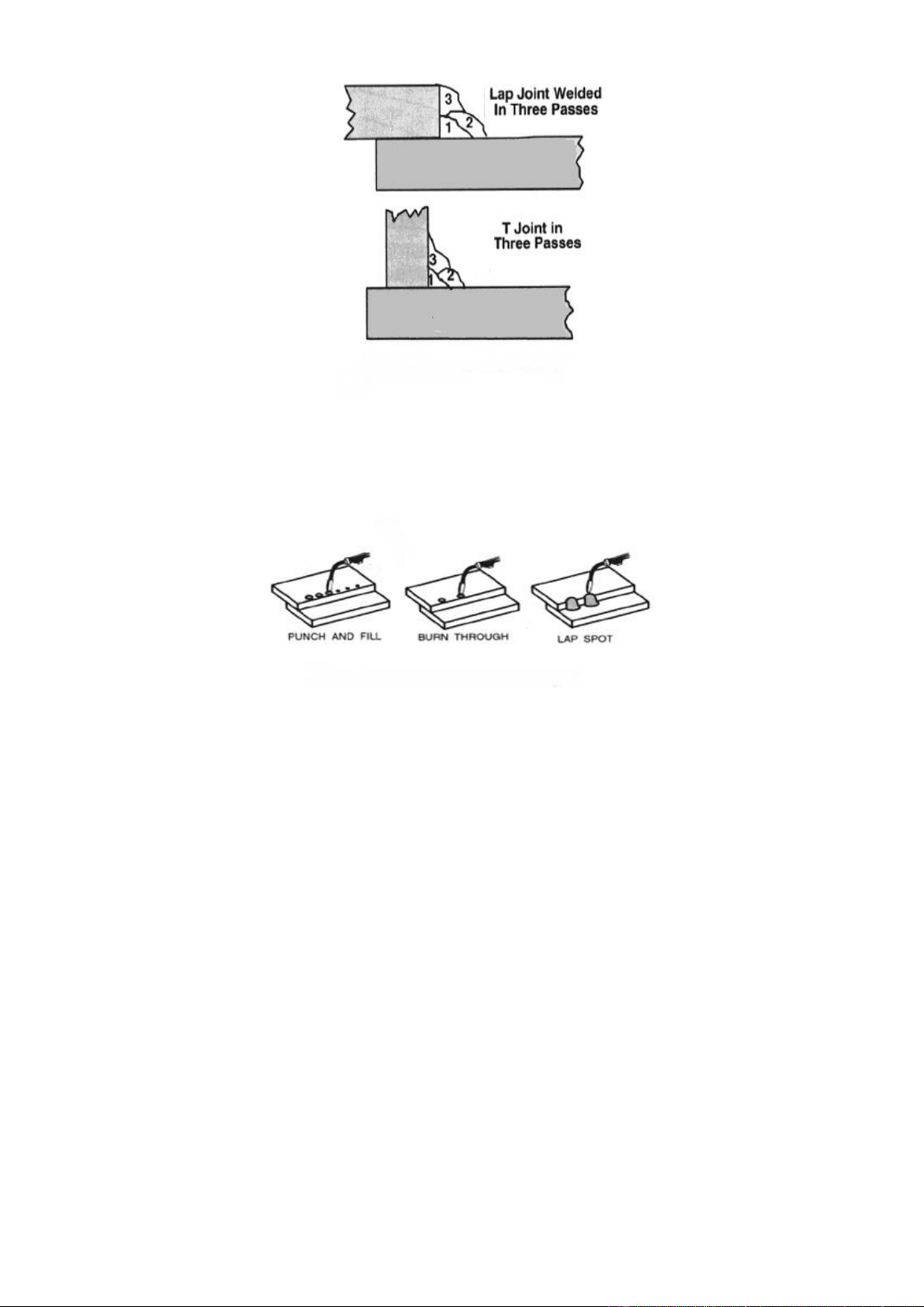
Butt Weld Joints: When butt welding thicker materials; you will need to prepare the edges of the
material to be joined by grinding a bevel on the edge of one or both pieces of the metal being joined.
When this is done, a “V” is created between the two pieces of metal that will have to be welded
closed. In most cases, more than one pass or bead will need to be laid into the joint to close
the “V.”
Laying more than one bead into the same weld joint is known as a multiple-pass weld.
The illustrations in following figure show the sequence for laying multiple pass beads into a single “V”
butt joint.
NOTE:
WHEN USING SELF-SHIELDING FLUX-CORE WIRE it is very important to thoroughly chip and
brush the slag off each completed weld bead before making another pass or the next pass will be of
poor quality.
Fillet Weld Joints. Most fillet weld joints, on metals of moderate to heavy thickness, will require
multiple pass welds to produce a strong joint. The following figure will show the sequence of laying
multiple pass beads into a T fillet joint and a lap fillet joint.
Page of 26
18115445-12
21
8.5 Spot welding
There are three methods of spot welding: Burn-Through, Punch and Fill, and Lap. Each has
advantages and disadvantages depending on the specific application as well as personal
preference.
1. The BURN-THROUGH METHOD welds two overlapped pieces of metal together by burning
through the top piece and into the bottom piece. With the burn-through method, larger wire diameters
tend to work better than smaller diameters. Wire diameters that tend to work best, with the
burn-through method are 0.035 inch self-shielding flux-core wire. Do not use 0.030 inch
self-shielding flux core wires when using the burn-through method unless the metal is VERY thin or
excessive filler metal build-up and minimal penetration is acceptable. Always select the HIGH heat
setting with the burn-through method and tune in the wire speed prior to making a spot weld.
2. The PUNCH AND FILL METHOD produces a weld with the most finished appearance of the three
spot weld methods. In this method, a hole is punched or drilled into the top piece of metal and the arc
is directed through the hole to penetrate into the bottom piece. The puddle is allowed to fill up the
hole leaving a spot weld that is smooth and flush with the surface of the top piece. Select the wire
diameter, heat setting, and tune in the wire speed as if you were welding the same thickness material
with a continuous bead.
3. The LAP SPOT METHOD directs the welding arc to penetrate the bottom and top pieces, at the
same time, right along each side of the lap joint seam. Select the wire diameter, heat setting, and
tune in the wire speed as if you were welding the same thickness material with a continuous bead.
Page of 26
18115445-12
22
8.6 SPOT WELDING INSTRUCTIONS
1. Select the wire diameter and heat setting recommended above for the method of spot welding you
intend to use.
2. Tune in the wire speed as if you were going to make a continuous weld.
3. Hold the nozzle piece completely perpendicular to and about 1/4 inch off the work piece.
4. Pull the trigger on the torch and release it when it appears that the desired penetration has been
achieved.
5. Make practice spot welds on scrap metal, varying the length of time you hold the trigger, until a
desired spot weld is made.
6. Make spot welds on the actual work piece at desired locations.
MAINTENANCE
• Maintain your welder. It is recommended that the general condition of any welder be examined
before it is used. Keep your welder in good repair by adopting a program of conscientious repair
and maintenance. Have necessary repairs made by qualified service personnel.
• Periodically clean dust, dirt, grease, etc. from your welder.
• Every six months, or as necessary, remove the cover panel from the welder and air-blow any
dust and dirt that may have accumulated inside the welder.
• Replace power cord, ground cable, ground clamp, or electrode assembly when damaged or
worn.
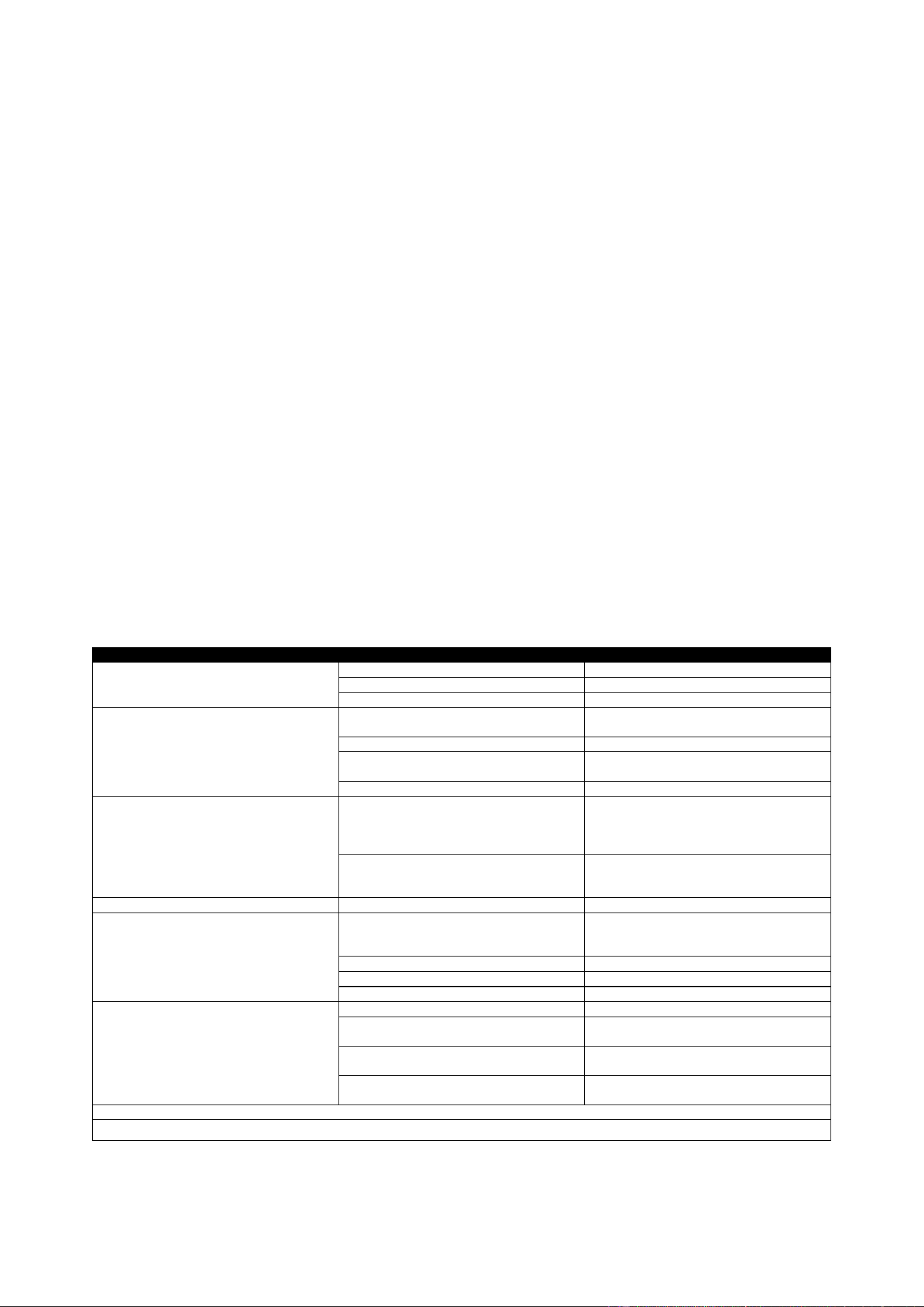
TROUBLESHOOTING
SYMPTOM
POSSIBLE CAUSE
CORRECTIVE ACTION
Unit does not power up
Unit is not plugged in
Plug in unit
Input power circuit breaker not on
Reset input power circuit breaker
The Main Power Switch Is Not Working
Replace Main Power Switch
Wire Drive Motor does not turn
Loose or bad fuse
Locate the Fuse Holder inside the wire
compartment. Tighten fuse or replace.
Wire Feed Speed Control at zero
Increase Wire Feed Speed Control
Trigger is not mashed
Wire will feed only when trigger is
mashed
Wire Drive Motor Is damaged
Replace Wire Drive Motor
Overload Indicator is on
Input Voltage is too high or too low
Meter Input Power Voltage. This unit must
be used with input voltage that ranges
from 220V-240V AC (105V-132V when
operating using the 120V adapter cord).
Welder is overheated
Leave the power on. Allow the fan to cool
the welder until the overload indicator
light is off.
Wire Feeds Inconsistently
Torch Liner is plugged
Clear or replace torch liner
Wire Diameter may vary on spool of wire
causing the wire to catch in the contact
tip.
Increase the contact tip one size.
Too Much or Too Little Wire Tension
See Installing The Wire Section
Too Much or Too Little Drive Roll Tension
See Setting Drive Roll Tension Section
Drive Roll is Worn
Replace Drive Roll
Can Not Create An Arc
Work Piece is Painted Or Rusty
Remove All Paint And Rust
Ground Clamp Is Connected Where
There Is Paint Or Rust
Remove All Paint And Rust So Ground
Clamp Is Connected To Bare Metal
Ground Clamp Is Not Electrically
Connected To The Work Piece
Make Certain The Ground Clamp Is
Connected To The Work Piece
Trigger Is Not Pressed
This Unit Is Not Electrically Hot Until You
Press The Torch Trigger
For Assistance, call 855-920-2399
Page of 26
18115445-12
23
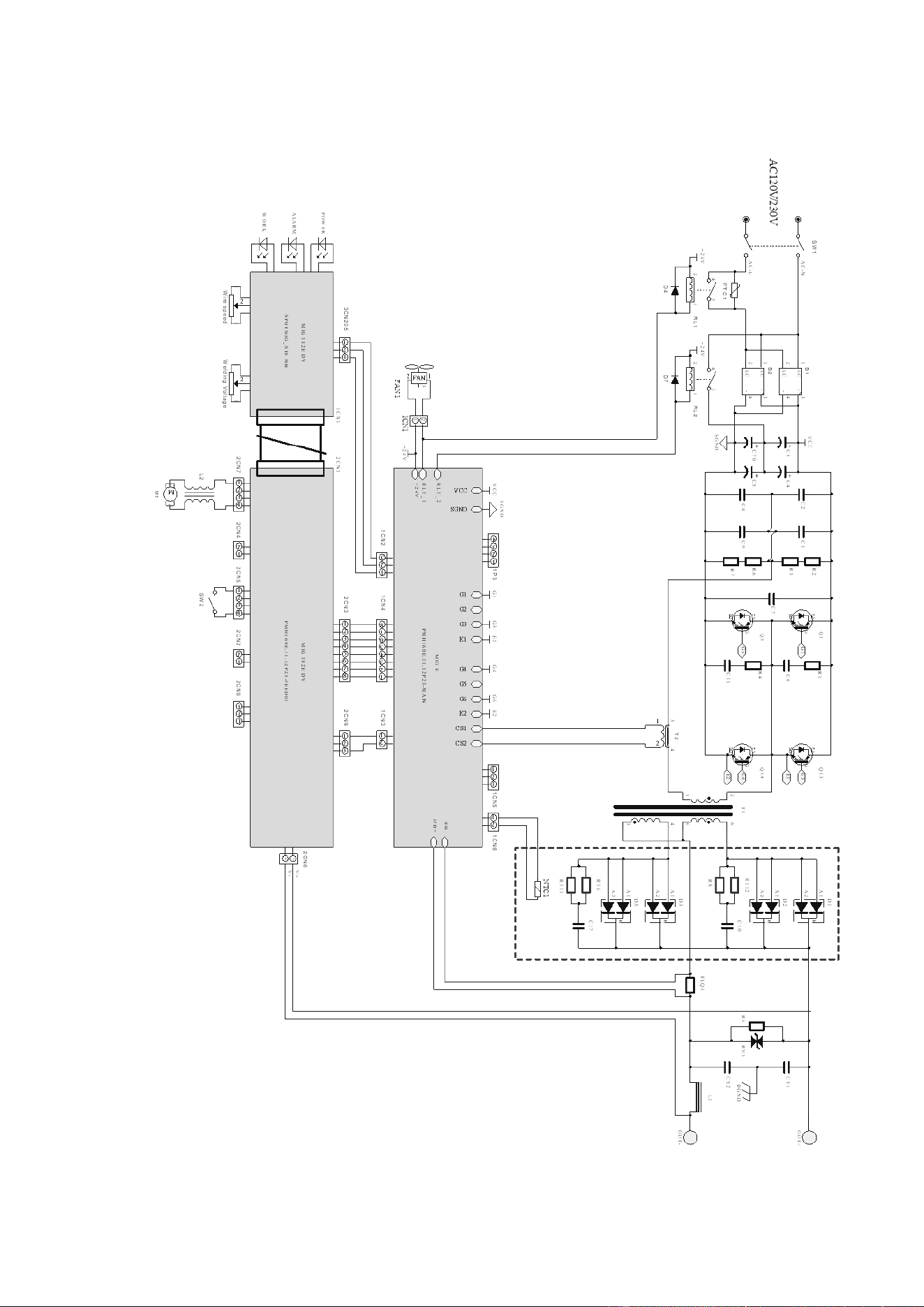
MAIN CIRCUIT CHART
Page of 26
18115445-12
24
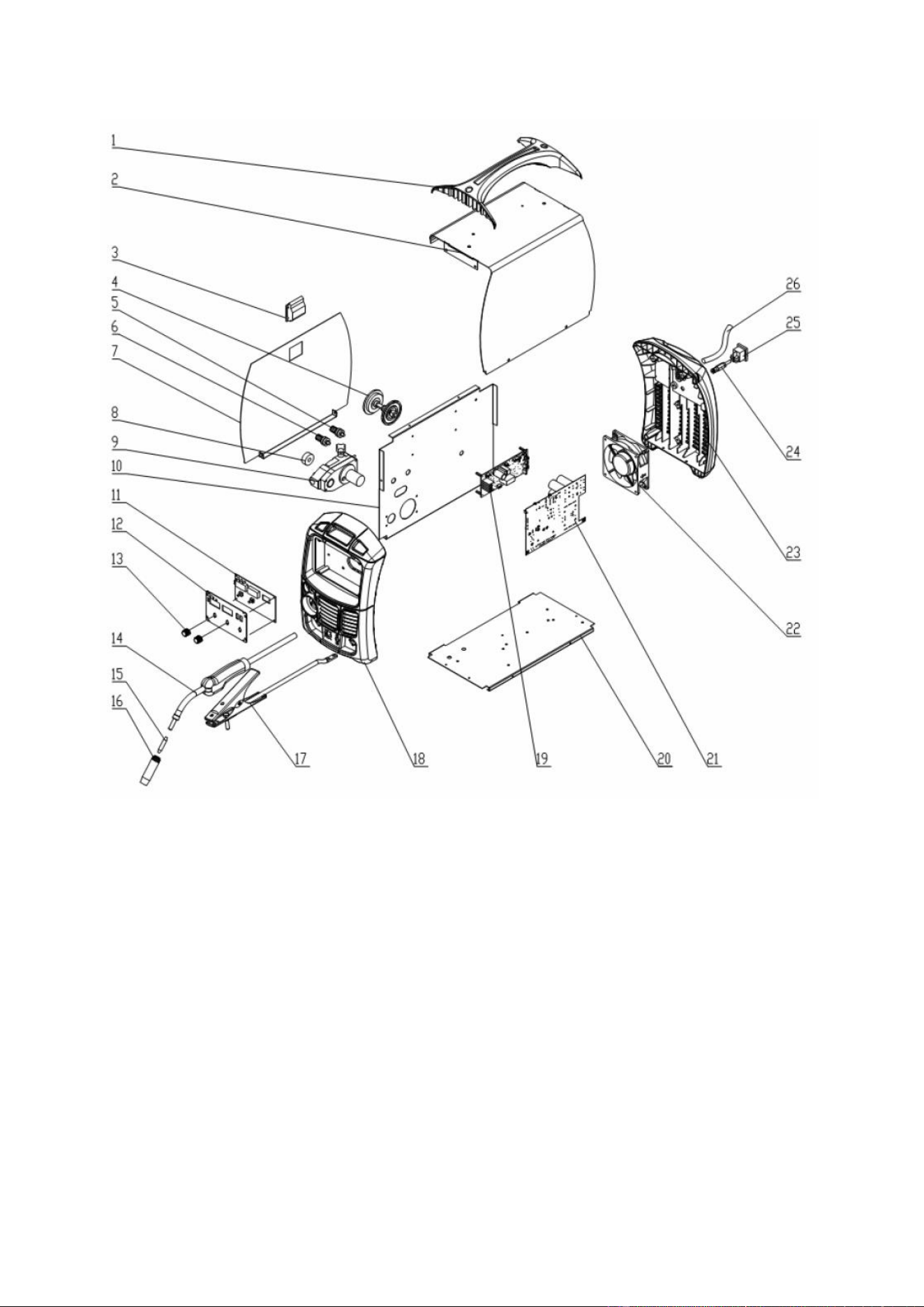
SPARE PARTS LIST
Page of 26
18115445-12
25
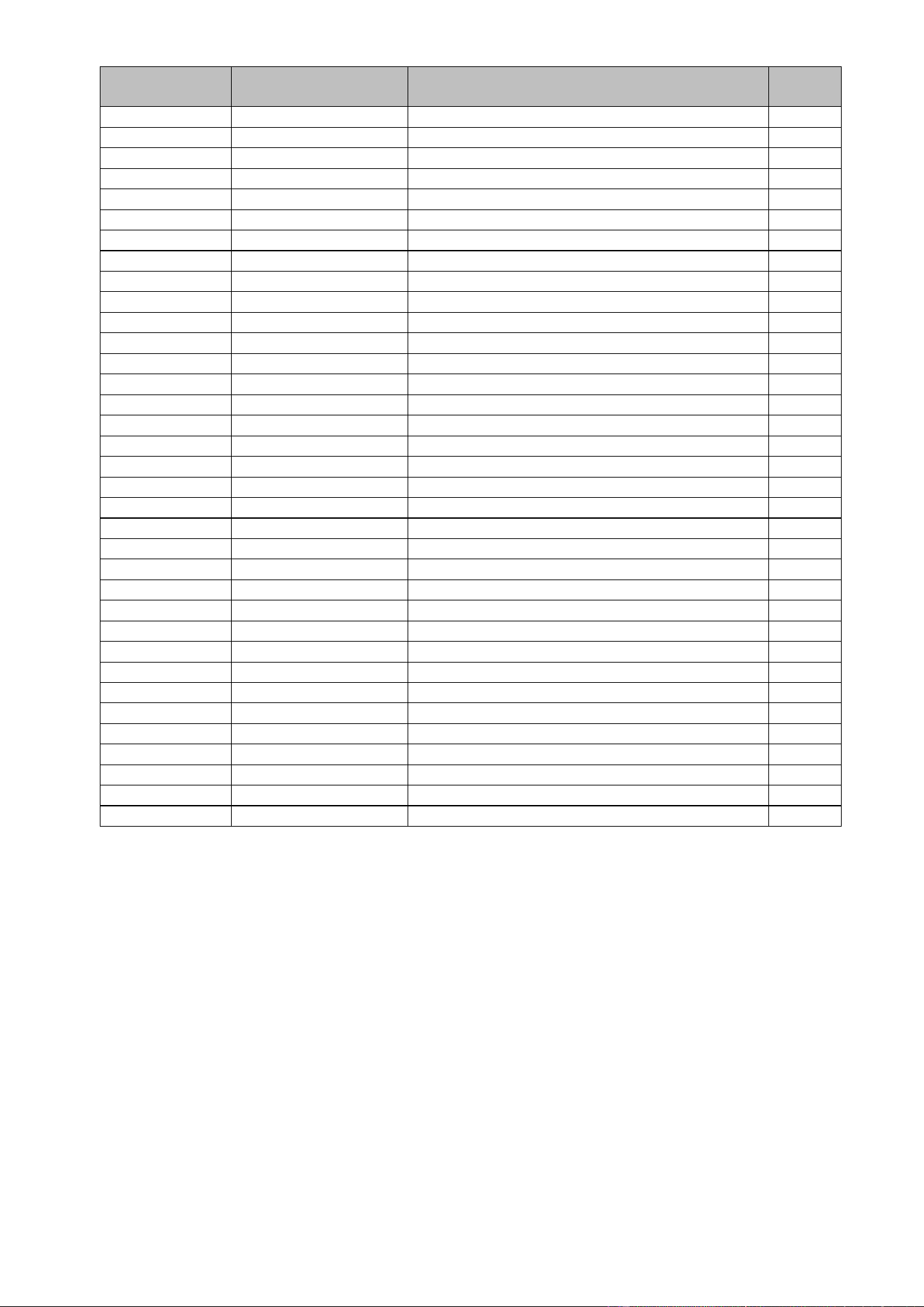
REFERENCE
PART NUMBER
DESCRIPTION
QTY
1
105200255
HANDLE
1
2
165200026
ENCLOSURE
1
165200028
MATCO WELDER HELP LABEL
1
105200041
WARNING LABEL MIG
1
3
105200080
DOOR LATCH
1
4
105200009
WIRE SPOOL HOLDER
1
5
105200242
WELD OUTPUT CONNECTOR - POSITIVE
1
6
105200241
WELD OUTPUT CONNECTOR - NEGATIVE
1
7
165200027
DOOR
1
165200033
WELD SET-UP CHART MPM175DVI
1
8
105200002
DRIVE ROLLER
1
9
105200198
WIRE DRIVE ASSEMBLY
1
10
105200263
CENTER PANEL
1
11
105800042
FRONT PANEL PC BOARD
1
12
105200066
FRONT PANEL SUPPORT
1
165200034
FRONT NAMEPLATE MPM175DVI
1
13
105200188
POTENTIOMETER KNOB
2
14
105200434
MIG TORCH
1
15
105200043
CONTACT TIP 11-30
1
16
105200062
MIG NOZZLE
1
105200034
FLUX CORE NOZZLE
1
105200043
MIG CONTACT TIP ADAPTER
1
17
105200199
GROUND CABLE AND CLAMP
1
105200042
GROUND CLAMP ONLY
1
18
105500253
FRONT PLASTIC BEZEL
1
19
105200436
CONTROL PC BOARD
1
20
105200054
BOTTOM
1
21
105200438
MAIN PC BOARD
1
22
105200439
FAN
1
23
105200260
BACK PLASTIC BEZEL
1
24
105200266
GAS CONNECTOR
1
25
105200046
POWER SWITCH
1
26
105200442
INPUT POWER CORD
1
105200212
120V POWER CORD ADAPTER
1
165200035
OPERATOR'S MANUAL MPM175DVI
1
For replacement parts or technical questions, call 855-920-2399.

Page of 26
18115445-12
26
Distributed by
Matco Tool
4403 Allen Road
Stow OH 44224
ww w.m a t c o too l s . c o m
Made in China to Matco specifications