/
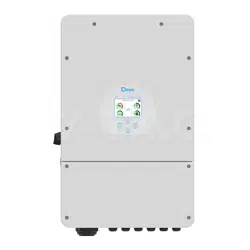
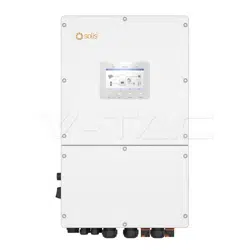
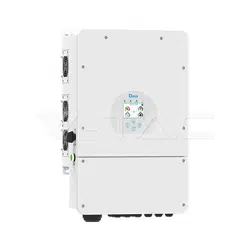
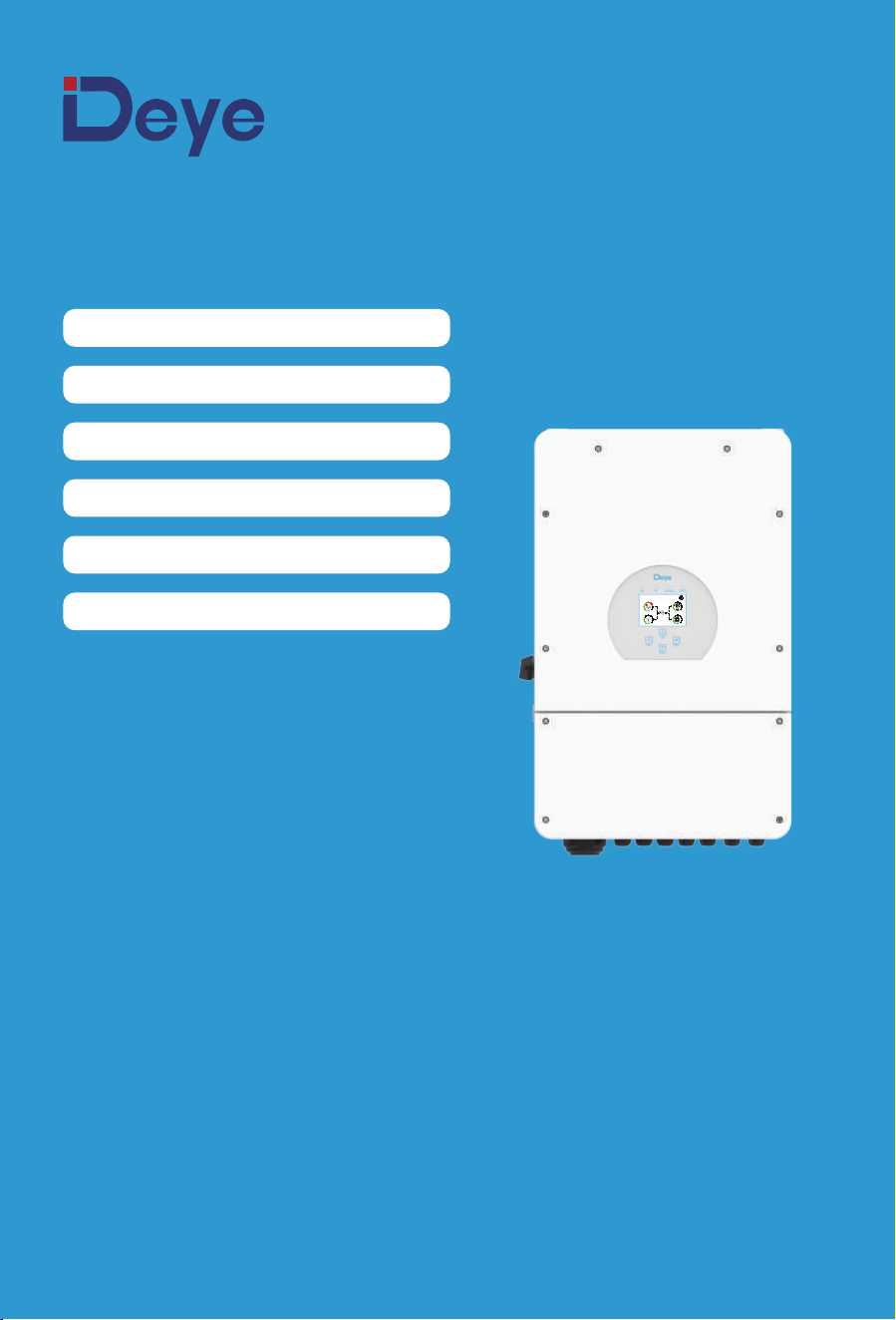
SUN-5K-SG02LP1-EU-AM2
SUN-6K-SG02LP1-EU-AM2
SUN-7.6K-SG02LP1-EU-AM2
SUN-8K-SG02LP1-EU-AM2
SUN-10K-SG02LP1-EU-AM3
SUN-12K-SG02LP1-EU-AM3
Hybrid Inverter
User Manual
25%
05/28/2019 15:34:40
8.30
KW
-2.00
KW
-3.00
KW
3.00
KW
0 12
0 8
0 8
0 8
ON

Contents
……………………………………………………………………
…………………………………
………………………………………………
………………………………………………………………
6. Mode
7. Fault information and processing
8. Limitation of Liability
9. Datasheet
40-42
42-45
45
46-47
……………………………………………………………
10. Appendix I 48-50
……………………………………………………………
11. Appendix II 51
……………………………………
12. EU Declaration of Conformity 51-52
1. Safety Introductions
…………………………………………………
01-02
2. Product instructions
2.1 Product Overview
…………………………………………………
2.2 Product Size
02-05
2.3 Product Features
2.4 Basic System Architecture
……………………………………………………………
4. OPERATION
4.1 Power ON/OFF
4.2 Operation and Display Panel
27
5.6 Battery Setup Menu
5.7 System Work Mode Setup Menu
5.8 Grid Setup Menu
5.9 Generator Port Use Setup Menu
5.10 Advanced Function Setup Menu
5.11 Device Info Setup Menu
……………………………………………………
5. LCD Display Icons
5.1 Main Screen
5.2 Solar Power Curve
28-40
5.4 System Setup Menu
5.5 Basic Setup Menu
5.3 Curve Page-Solar & Load & Grid
……………………………………………………………
3. Installation
3.1 Parts list
3.3 Mounting instructions
3.4 Battery connection
3.6 PV Connection
3.5 Grid connection and backup load connection
06-26
3.7 CT Connection
3.7.1 Meter Connection
3.8 Earth Connection(mandatory)
3.9 WIFI Connection
3.10 Wiring System for Inverter
3.12 Single phase parallel connection diagram
3.13 Three phase Parallel Inverter
3.11
Typical application diagram of diesel generator
3.2 Product handling requirements
- 01 -
1. Safety Introduc�ons
About This Manual
The manual mainly describes the product informa�on, guidelines for installa�on, opera�on and
maintenance. The manual cannot include complete informa�on about the photovoltaic (PV)
system.
How to Use This Manual
Read the manual and other related documents before performing any opera�on on the inverter.
Documents must be stored carefully and be available at all �mes.
Contents may be periodically updated or revised due to product development. The informa�on
in this manual is subject to change without no�ce. The latest manual can be acquired via
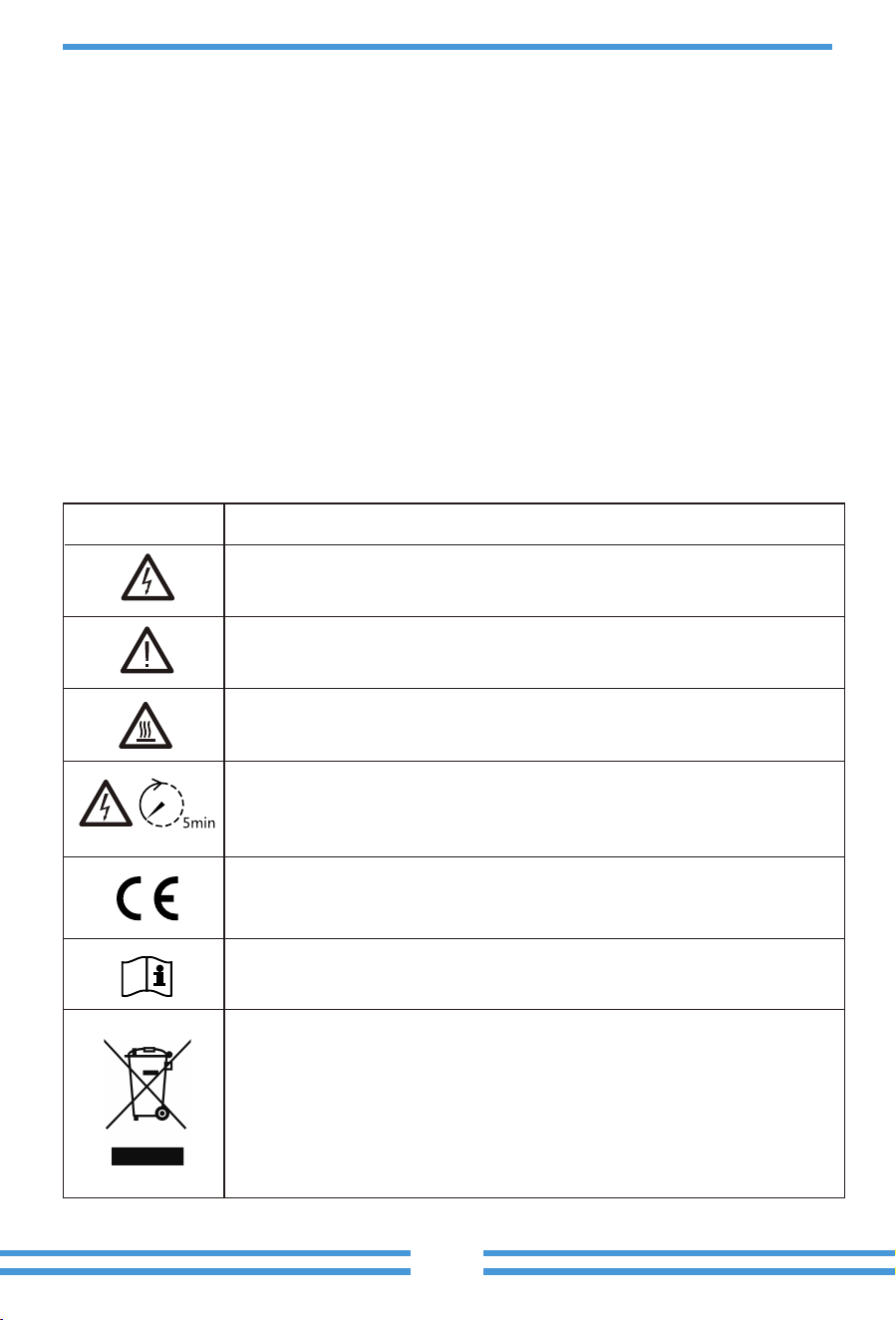
Labels descrip�on
Label
Description
Please read the instructions carefully before use.
CE mark of conformity
Symbol for the marking of electrical and electronics devices according to
Directive ����/��/EC. Indicates that the device, accessories and the
packaging must not be disposed as unsorted municipal waste and must be
collected separately at the end of the usage. Please follow Local Ordinances
or Regulations for disposal or contact an authorized representative of the
manufacturer for information concerning the decommissioning of
equipment.
Caution, risk of electric shock symbol indicates important safety
instructions, which if not correctly followed, could result in electric shock.
The DC input terminals of the inverter must not be grounded.
Surface high temperature, Please do not touch the inverter case.
The AC and DC circuits must be disconnected separately, and the
maintenance personnel must wait for � minutes before they are
completely powered off before they can start working.

2. Product Introduc�ons
This is a mul�func�onal inverter, combining func�ons of inverter, solar charger and ba�ery
charger to offer uninterrup�ble power support with portable size. Its comprehensive LCD display
offers user configurable and easy accessible bu�on opera�on such as ba�ery charging, AC/solar
charging, and acceptable input voltage based on different applica�ons.
- 02 -
· This chapter contains important safety and opera�ng instruc�ons. Read and keep this manual
for future reference.
· Before using the inverter, please read the instruc�ons and warning signs of the ba�ery and
corresponding sec�ons in the instruc�on manual.
· Do not disassemble the inverter. If you need maintenance or repair, take it to a professional
service center.
· Improper reassembly may result in electric shock or fire.
· To reduce risk of electric shock, disconnect all wires before a�emp�ng any maintenance or
cleaning. Turning off the unit will not reduce this risk.
· Cau�on: Only qualified personnel can install this device with ba�ery.
· Never charge a frozen ba�ery.
· For op�mum opera�on of this inverter, please follow required specifica�on to select appropriate
cable size. It is very important to correctly operate this inverter.
· Be very cau�ous when working with metal tools on or around ba�eries. Dropping a tool may
cause a spark or short circuit in ba�eries or other electrical parts, even cause an explosion.
· Please strictly follow installa�on procedure when you want to disconnect AC or DC terminals.
Please refer to "Installa�on" sec�on of this manual for the details.
· Grounding instruc�ons - this inverter should be connected to a permanent grounded wiring
system. Be sure to comply with local requirements and regula�on to install this inverter.
· Never cause AC output and DC input short circuited. Do not connect to the mains when DC
input short circuits.
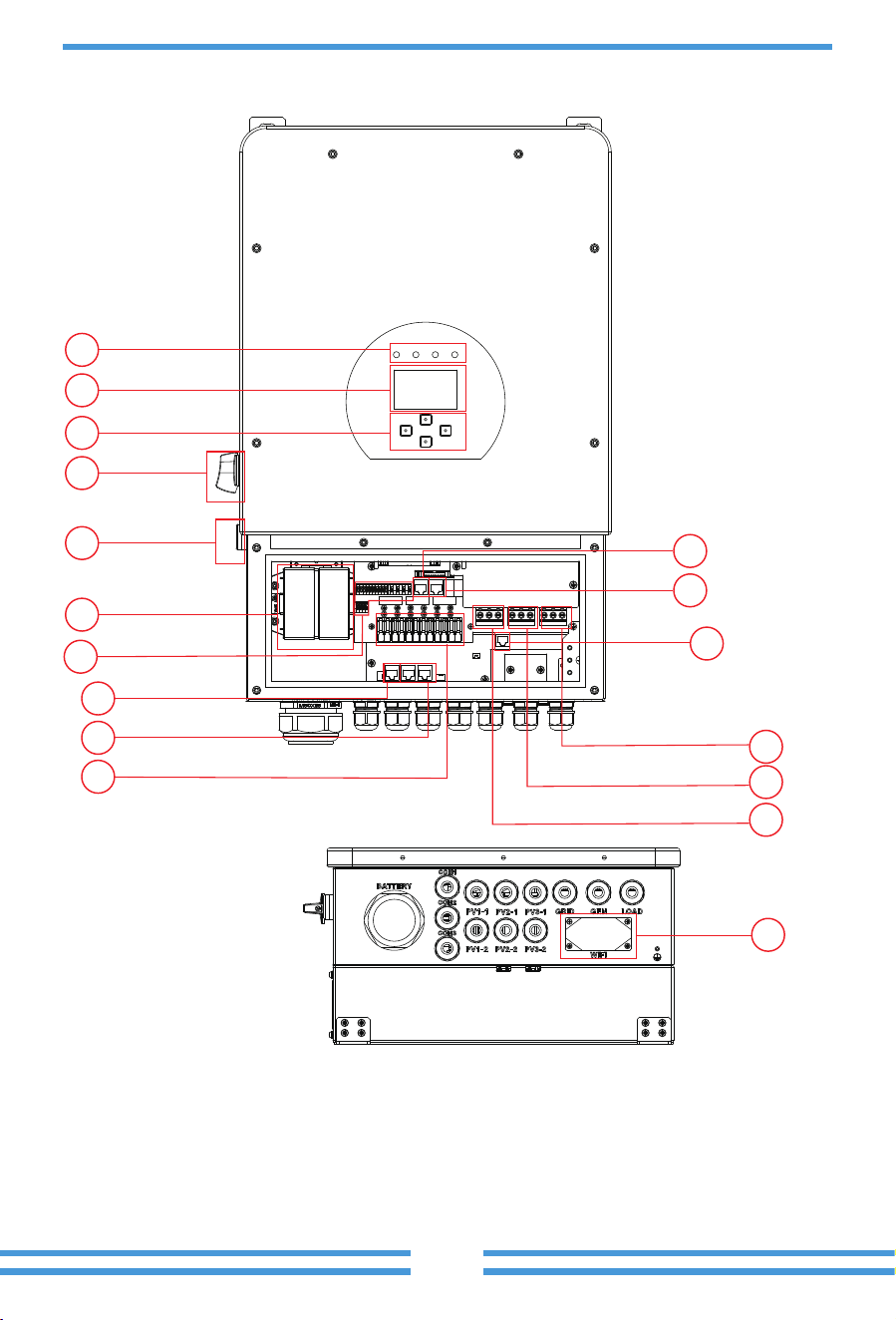
2.1 Product Overview
- 03 -
1: Inverter Indicators
2: LCD display
3: Func�on Bu�ons
4: DC Switch
5: Power on/off bu�on
6: BMS port
8: DRMs Port
7: RS485 Port
9: Ba�ery input connectors
10: Func�on Port
11: Meter port
12: Parallel port
13: PV input
14: Grid
15: Generator input
16: Load
17: WiFi Interface
17
8
6
1
2
3
4
5
9
7
11
12
13
16
15
14
10
- 04 -
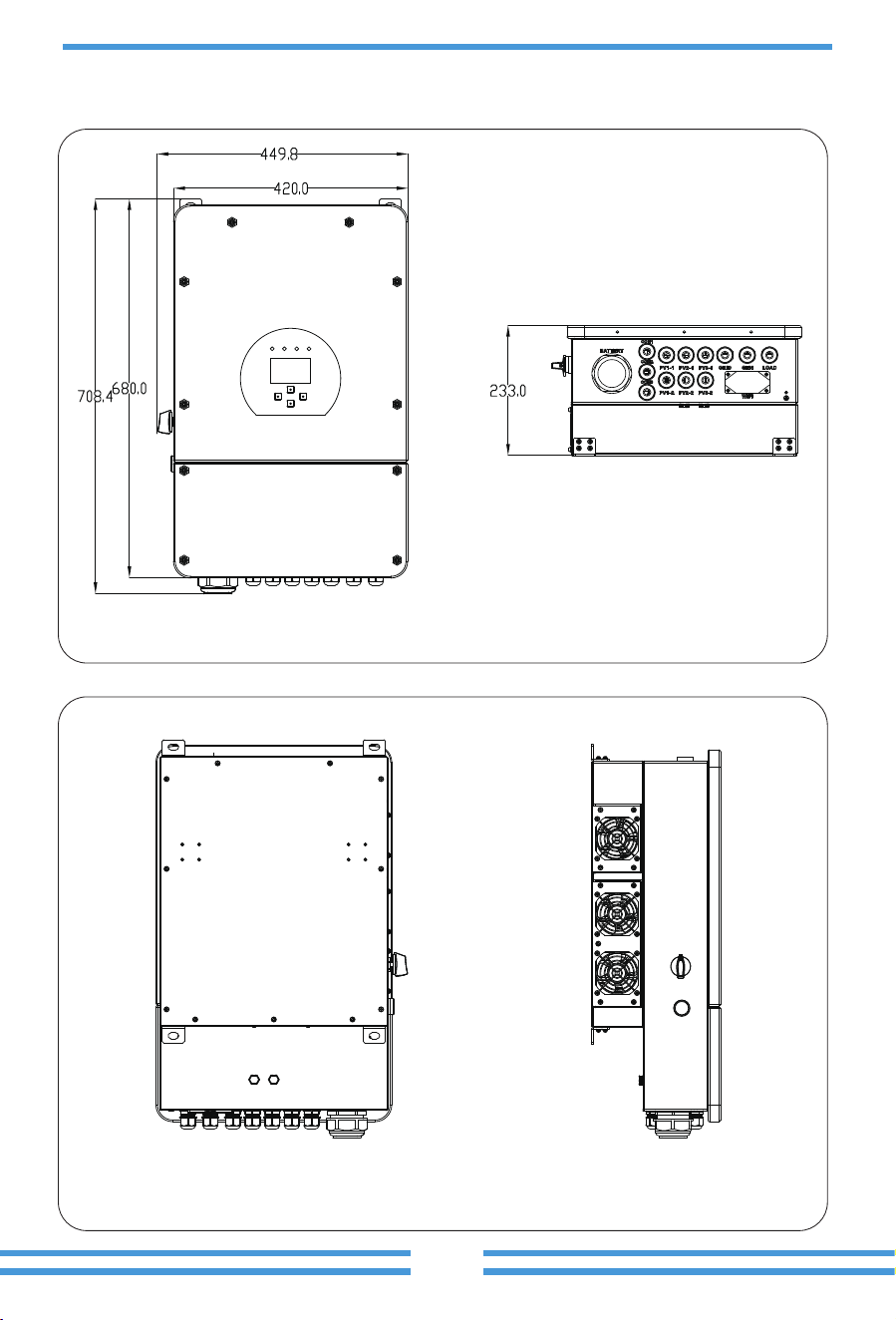
2.2 Product Size
Inverter Size
- 05 -
2.3 Product Features
- Self-consump�on and feed-in to the grid.
- Auto restart while AC is recovering.
- Programmable supply priority for ba�ery or grid.
- Programmable mul�ple opera�on modes: On grid, off grid and UPS.
- Configurable ba�ery charging current/voltage based on applica�ons by LCD se�ng.
- Configurable AC/Solar/Generator Charger priority by LCD se�ng.
- Compa�ble with mains voltage or generator power.
- Overload/over temperature/short circuit protec�on.
- Smart ba�ery charger design for op�mized ba�ery performance
- With limit func�on, prevent excess power overflow to the grid.
- Suppor�ng WIFI monitoring and build-in 2 strings of MPP trackers
- Smart se�able three stages MPPT charging for op�mized ba�ery performance.
- Time of use func�on.
- Smart Load Func�on.
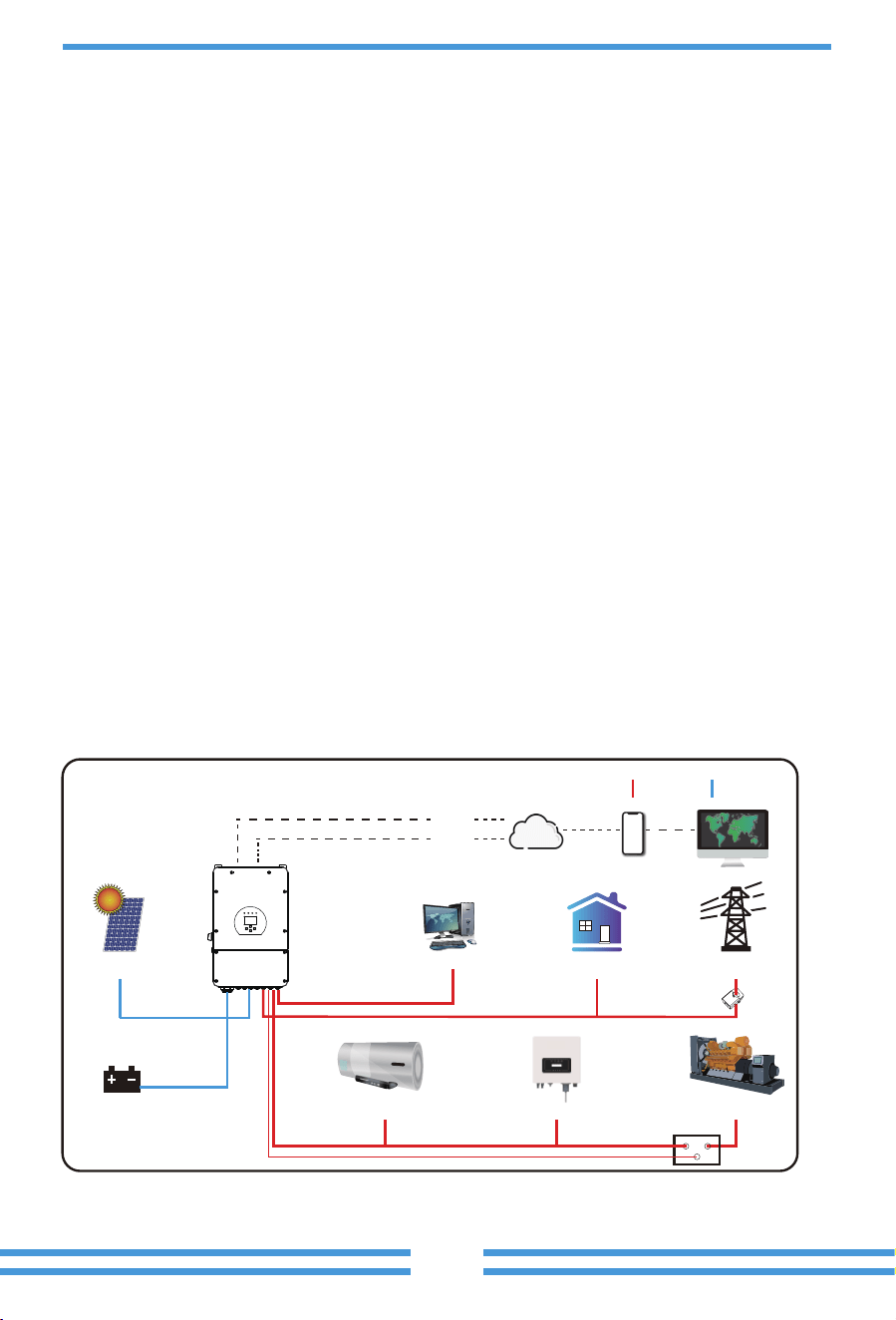
2.4 Basic System Architecture
The following illustra�on shows basic applica�on of this inverter.
It also includes following devices to have a Complete running system.
- Generator or U�lity
- PV modules
Consult with your system integrator for other possible system architectures depending on your
requirements.
This inverter can power all kinds of appliances in home or office environment, including motor
type appliances such as refrigerator and air condi�oner.
GridBackup Load
WiFI
GPRS
phoneCloud services
On-Grid Home Load
Generator
ATS
Grid-connected InverterSmart Load
Battery
Solar
CT
AC cable DC cable
Datalogger (op�onal) x1
Magne�c ring for BMS
communica�on cable x1
- 06 -
3. Installa�on
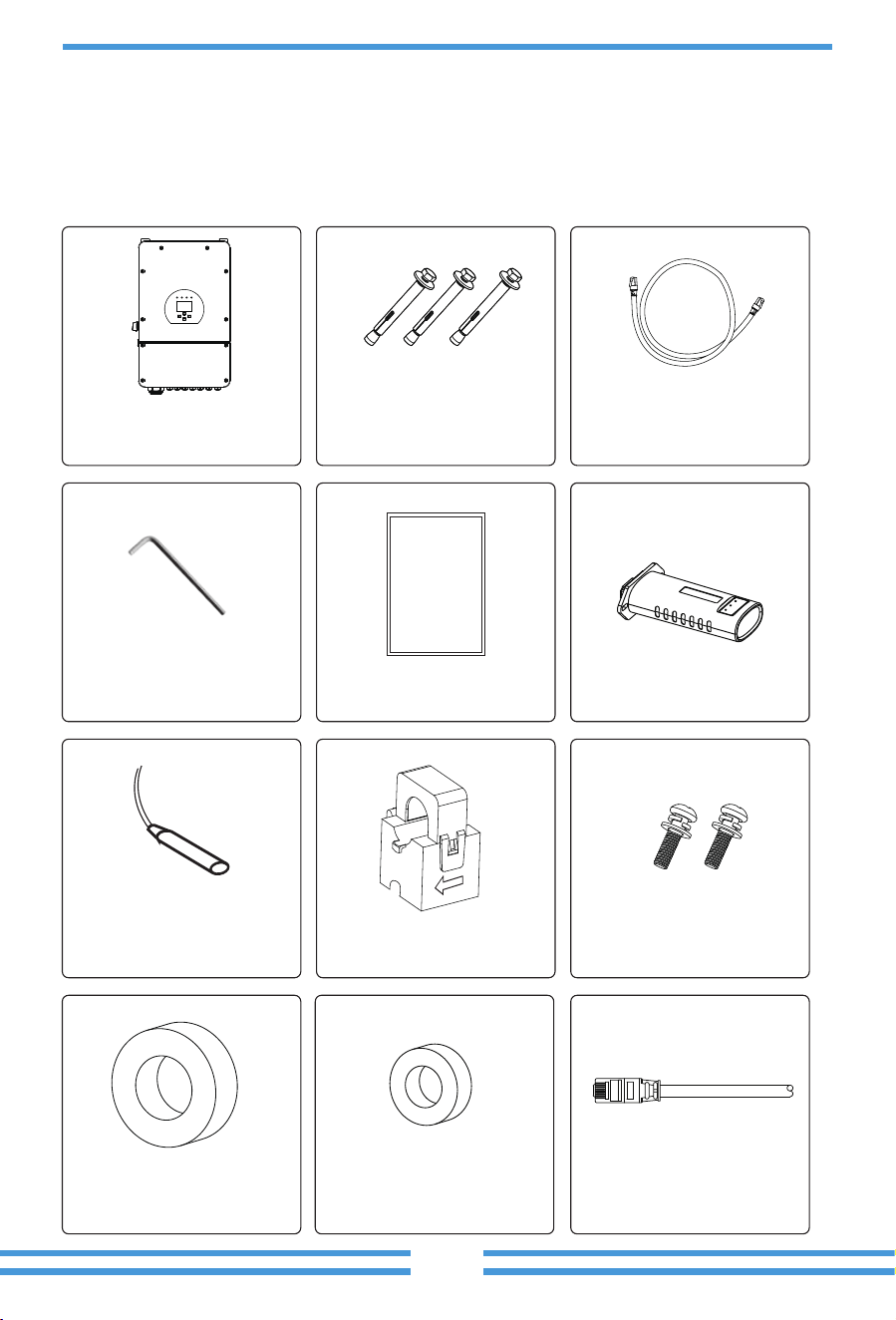
3.1 Parts List
Check the equipment before installa�on. Please make sure nothing is damaged in the package.
You should have received the items in the following package:
L-type Hexagon wrench
x1
User
manual
User manual x1
Stainless steel moun�ng
screws M4*12
x2
Sensor Clamp
x1
Ba�ery temperature sensor
x1
Parallel communica�on
cable x1
Stainless steel an�-collision
bolt M8×80
x4
Hybrid inverter
x1
Magne�c ring for ba�ery
x 1
DRM connector x1
- 07 -
3.3 Moun�ng instruc�ons
Installa�on Precau�on
This Hybrid inverter is designed for outdoor use(IP65), Please make sure the installa�on site
meets below condi�ons:
· Not in direct sunlight
· Not in areas where highly flammable materials are stored.
· Not in poten�al explosive areas.
· Not in the cool air directly.
· Not near the television Antenna or antenna cable.
· Not higher than al�tude of about 2000 meters above sea level.
· Not in environment of precipita�on or humidity(>95%)
3.2 Product handling requirements
CAUTION:
Improper handling may cause personal injury!
• Arrange an appropriate number of personnel to carry the inverter according to
its weight, and installa�on personnel should wear protec�ve equipment such
as an�-impact shoes and gloves.
• Placing the inverter directly on a hard ground may cause damage to its metal
enclosure. Protec�ve materials such as sponge pad or foam cushion should be
placed underneath the inverter.
• Move the inverter by one or two people or by using a proper transport tool.
• Move the inverter by holding the handles on it. Do not move the inverter by
holding the terminals.
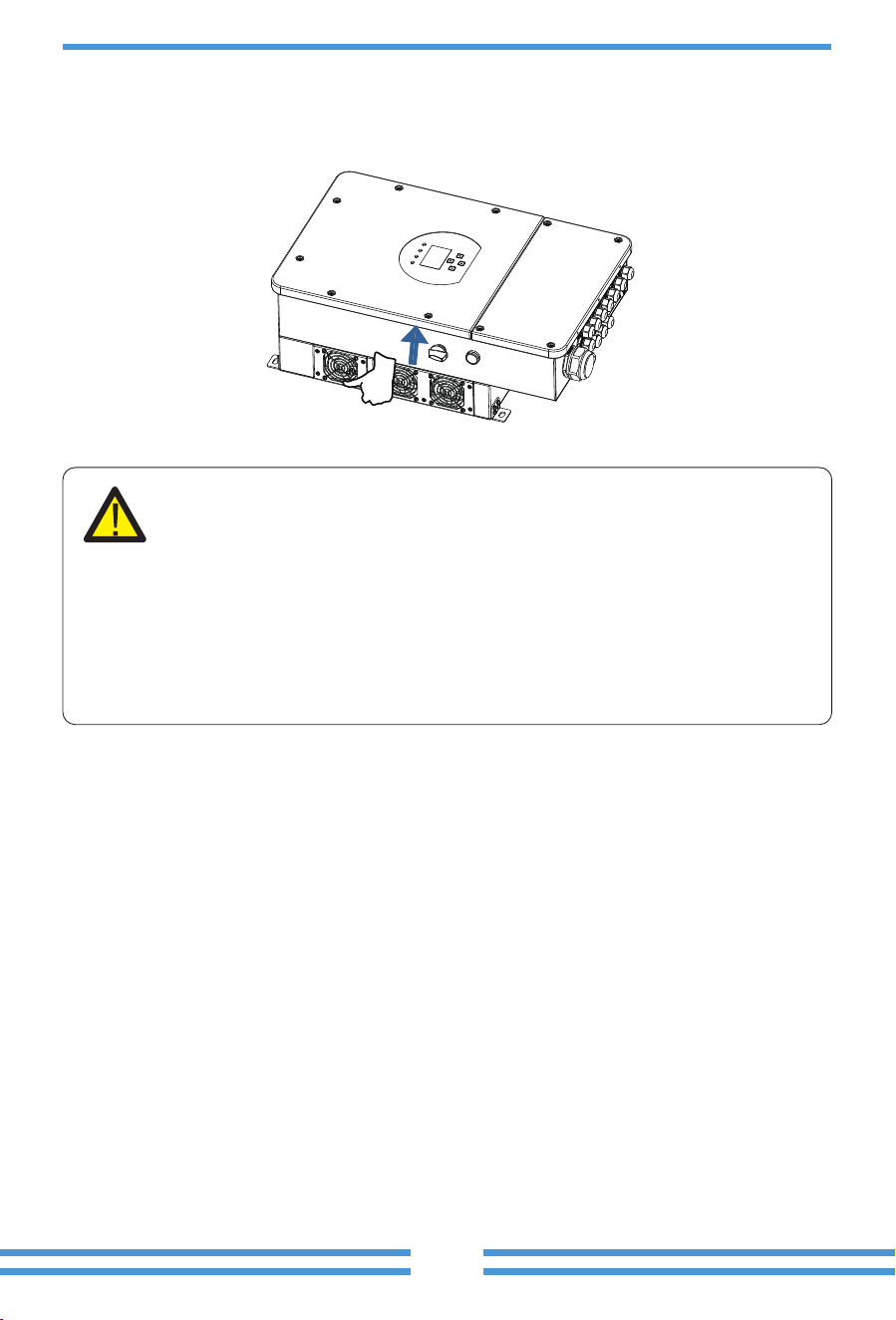
Li� the inverter out of the packing box and transport it to designated installa�on loca�on.
transport
- 08 -
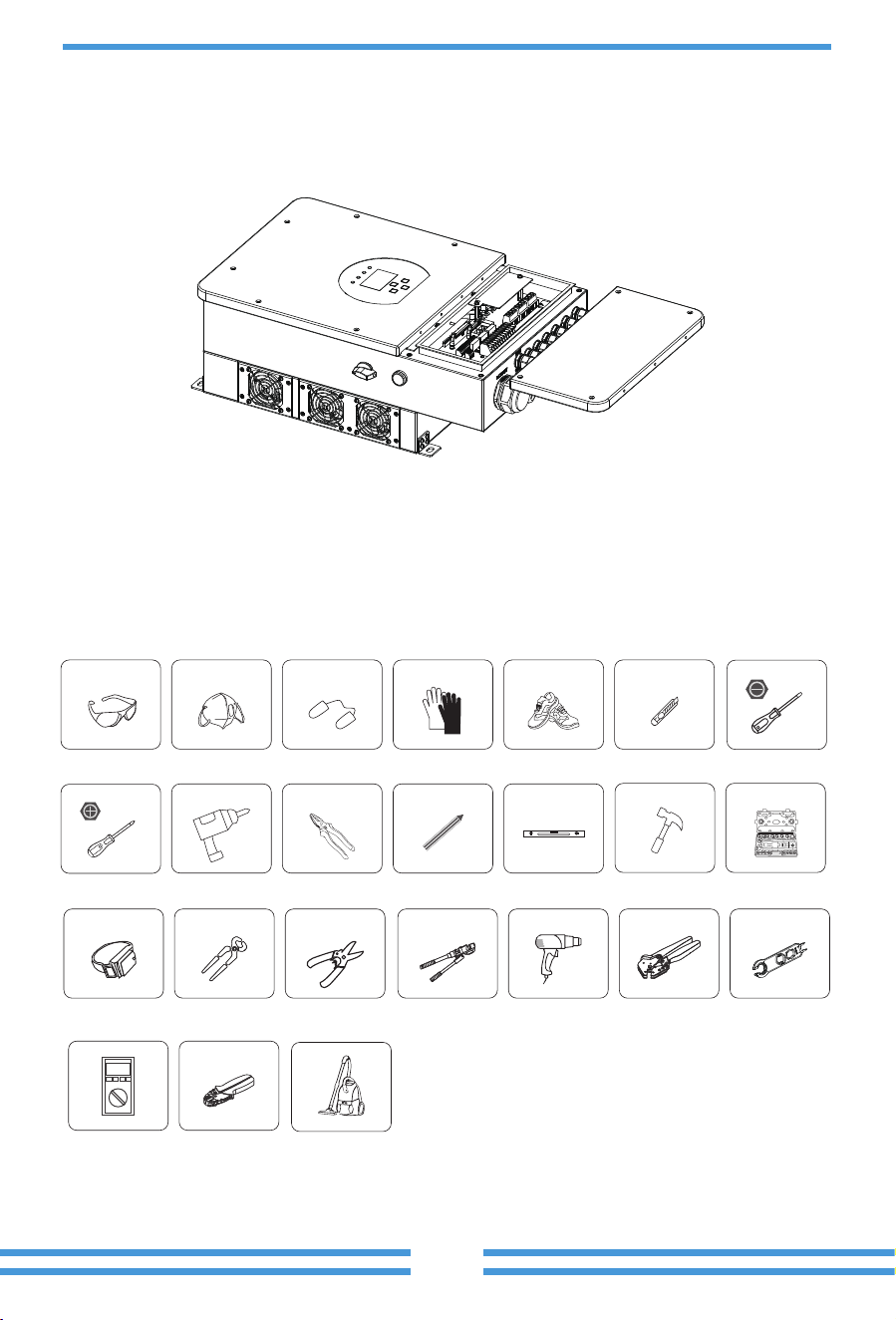
Please AVOID direct sunlight, rain exposure, snow laying up during installa�on and
opera�on. Before connec�ng all wires, please take off the metal cover by removing
screws as shown below:
Installa�ons Tools
Installa�on tools can refer to the following recommended ones. Also, use other auxiliary tools
on site.
Protective goggles EarplugsAnti-dust mask Work gloves Utlity Knife Slotted screwdriver
Cross screwdriver
Work shoes
Percussion drill
Anti-static wrist strap
Wire cutter
Wire stripper
Hydraulic pliers
Heat gun
Crimping tool�-�mm²
Solar connector
wrench
Pliers
Marker
Level
Rubber hammer socket wrenches set
Multimeter ≥���� Vdc
RJ�� crimping plier
Cleaner
- 09 -
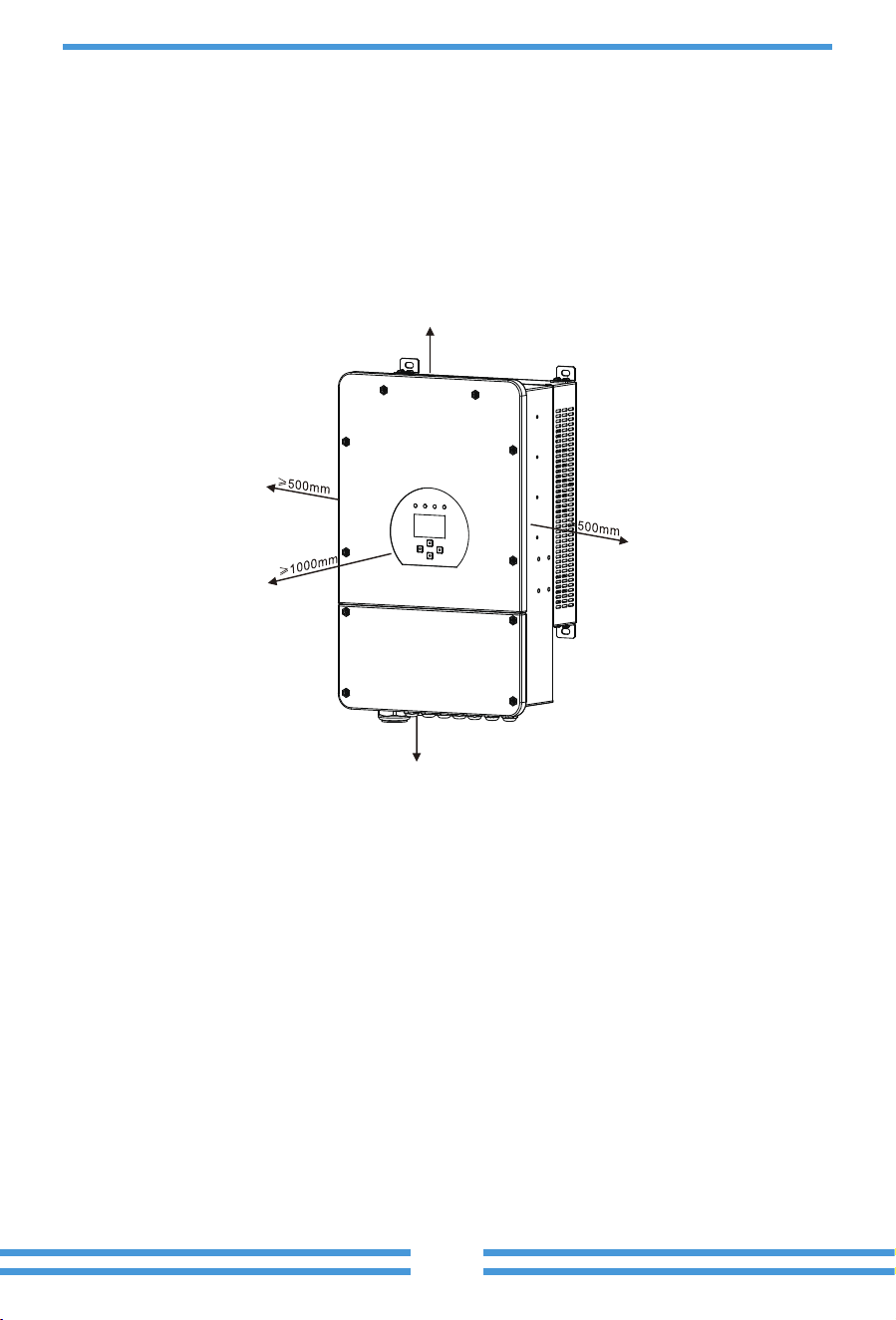
For proper air circula�on to dissipate heat, allow a clearance of approx. 50cm to the side and
approx. 50cm above and below the unit. And 100cm to the front.
Moun�ng the inverter
Remember that this inverter is heavy! Please be careful when li�ing out from the package.
Choose the recommend drill head(as shown in below pic) to drill 4 holes on the wall,
82-90mm deep.
1. Use a proper hammer to fit the expansion bolt into the holes.
2. Carry the inverter and holding it, make sure the hanger aim at the expansion bolt,fix the
inverter on the wall.
3. Fasten the screw head of the expansion bolt to finish the moun�ng.
≥500mm
≥500mm
Considering the following points before selec�ng where to install:
· Please select a ver�cal wall with load-bearing capacity for installa�on, suitable for installa�on
on concrete or other non-flammable surfaces,installa�on is shown below.
· Install this inverter at eye level in order to allow the LCD display to be read at all �mes.
· The ambient temperature is recommeded to be between -40~60℃ to ensure op�mal opera�on.
· Be sure to keep other objects and surfaces as shown in the diagram to guarantee sufficient
heat dissipa�on and have enough space for removing wires.
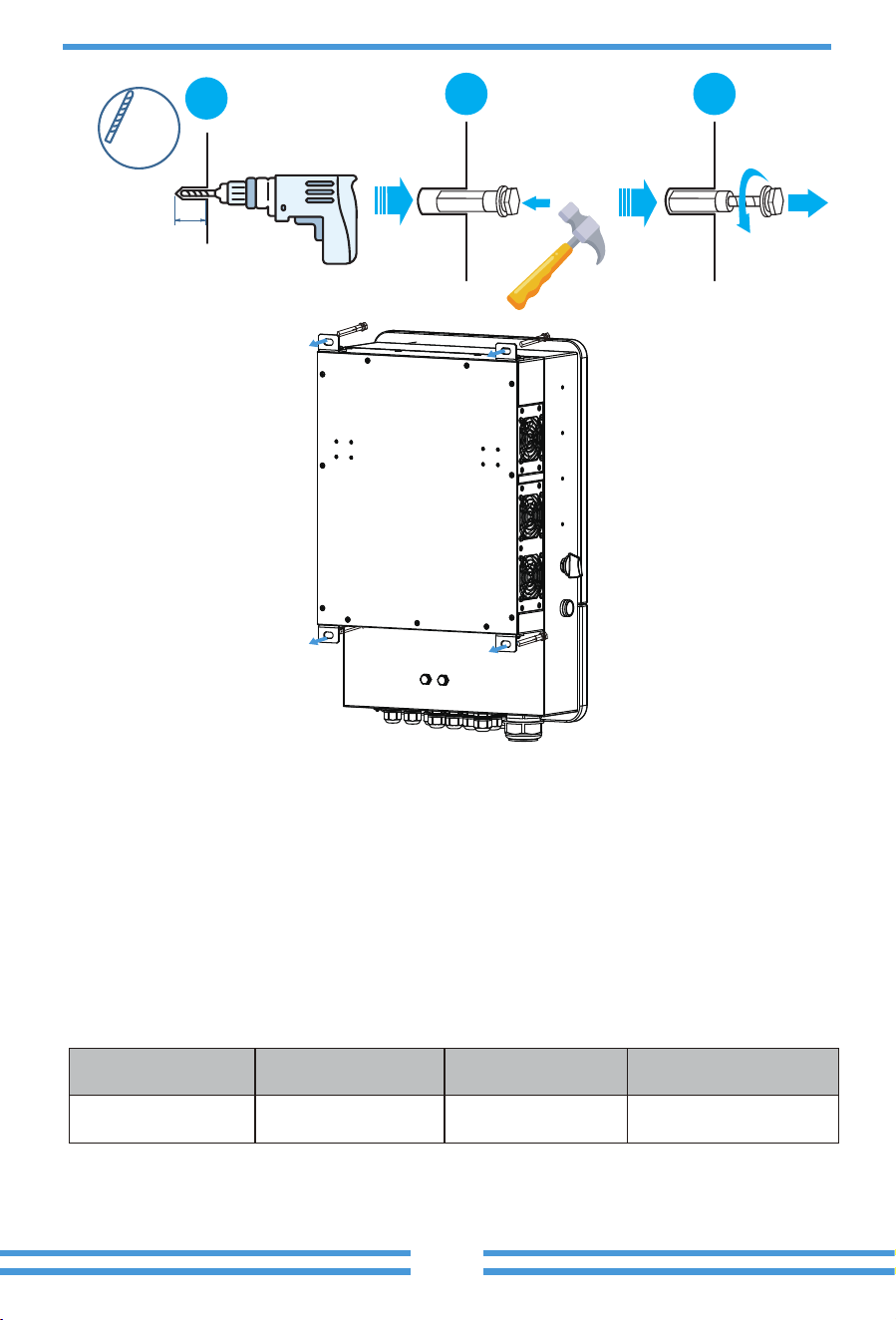
12 mm
82~90mm
[(3.23 in.)to(3.54 in.)]
( 0.47 in.)
1
2 3
- 10 -
3.4 Ba�ery connec�on
For safe opera�on and compliance, a separate DC over-current protector or disconnect device is
required between the ba�ery and the inverter. In some applica�ons, switching devices may not
be required but over-current protectors are s�ll required. Refer to the typical amperage in the
table below for the required fuse or circuit breaker size.
Chart 3-2 Cable size
Model
5/6/7.6/8/10/12kW
Wire Size
1AWG
Cable(mm )
2
35
Torque value(max)
24.5Nm
- 11 -
For 5/6/7.6/8/10/12kW model,
ba�ery connector screw size: M10
Please follow below steps to implement ba�ery connec�on:
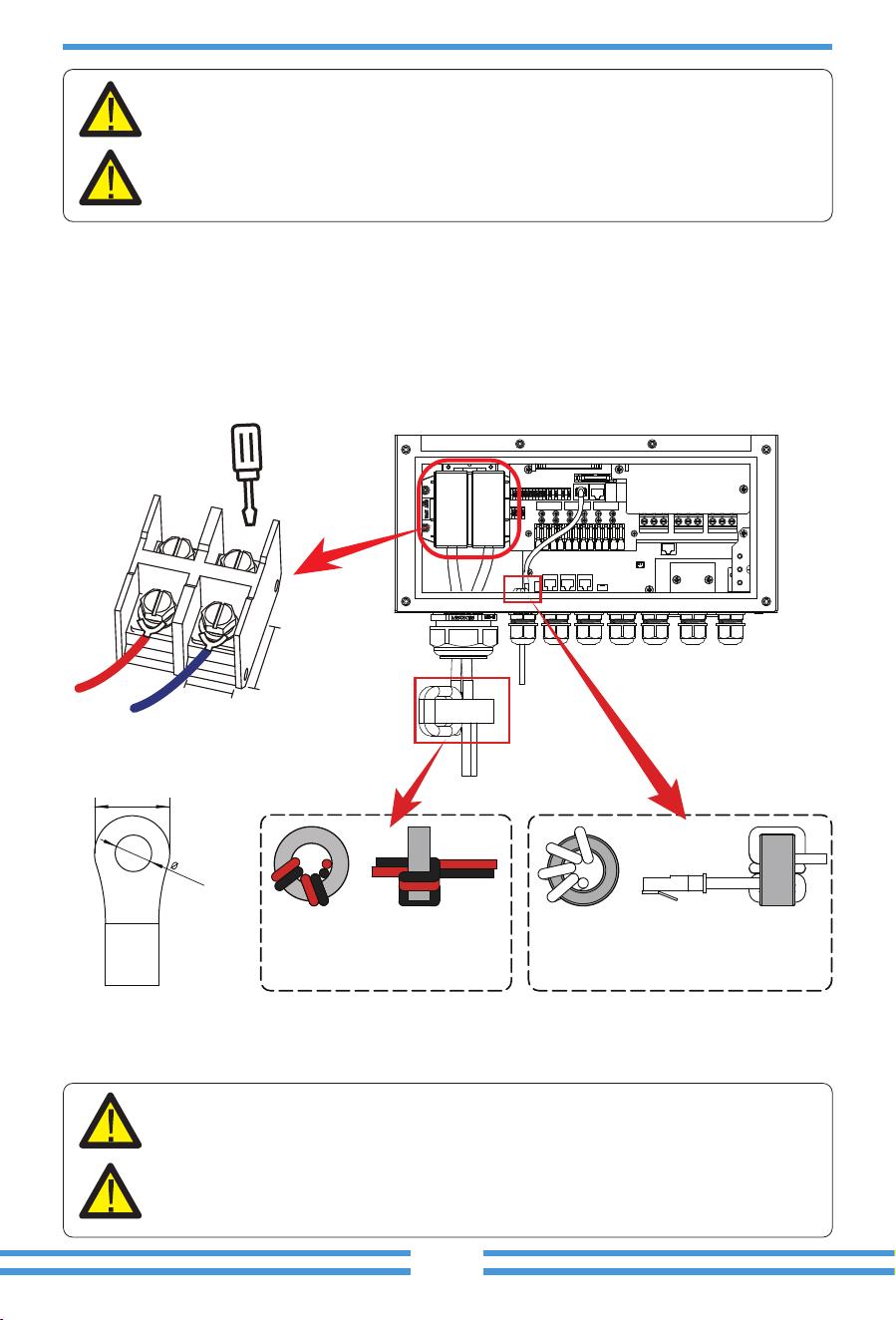
1. Please choose a suitable ba�ery cable with correct connector which can well fit into the
ba�ery terminals.
2. Use a suitable screwdriver to unscrew the bolts and fit the ba�ery
connectors in, then fasten the bolt by the screwdriver, make sure the bolts are �ghtened
with torque of 24.5 N.M in clockwise direc�on
3. Make sure polarity at both the ba�ery and inverter is correctly connected.
Connec�ng the ba�ery with a suitable cable is important for safe and efficient
opera�on of the system. To reduce the risk of injury, refer to Chart 3-2 for
recommended cables.
All wiring must be performed by a professional person.
4. In case of children touch or insects go into the inverter, Please make sure the inverter
connector is fasten to waterproof posi�on by twist it clockwise.
Before making the final DC connec�on or closing DC breaker/disconnect, be sure
posi�ve(+) must be connect to posi�ve(+) and nega�ve(-) must be connected to
nega�ve(-). Reverse polarity connec�on on ba�ery will damage the inverter.
Installa�on must be performed with care.
22mm
10.5mm
DC Ba�ery Input
30mm
30mm
Pass the ba�ery power cable
through the magne�c ring and
wrap it around the magne�c
ring two �mes.
Pass the BMS communica�on cable
through the magne�c ring and wrap
it around the magne�c ring four �mes.
B B + -
- 12 -
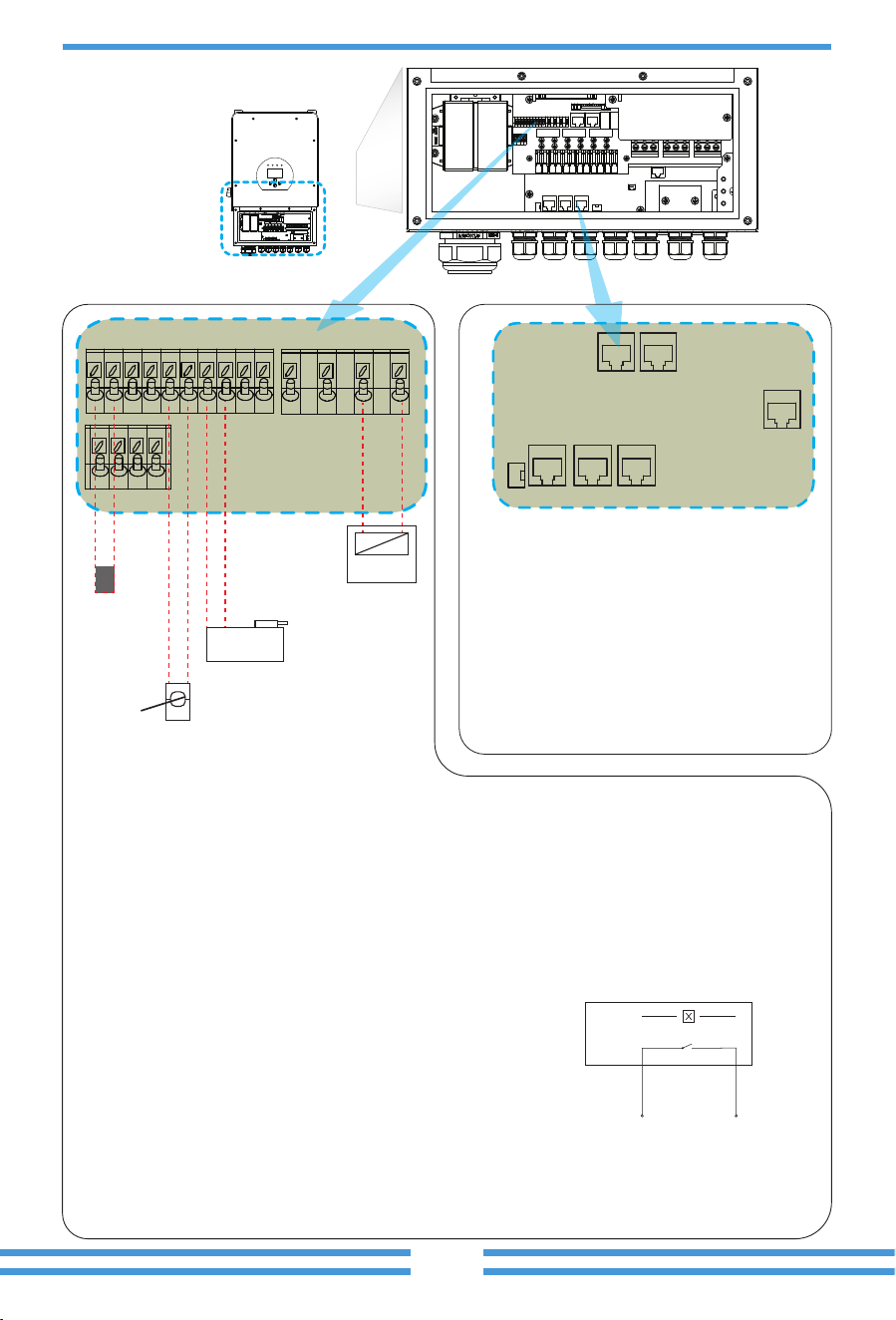
3.4.1 Func�on port defini�on
Inverter
Meter Parallel_A Parallel_B
RS 485BMS
DRMs
GS (diesel generator startup signal)
relay
coil
open
contact
G S
BMS: For ba�ery communica�on.
RS485: For RS485 communica�on.
Meter: For energy meter communica�on.
Parallel A: Parallel communica�on port 1
(CAN interface).
Parallel B: Parallel communica�on port 2
(CAN interface).
DRMs: It is used to accept the external input
signal(Digital input).
DIP switch: For turning ON/OFF the 5V DC
output of pin 3 of the meter port.
TEMP (1,2): ba�ery temperature sensor for
lead acid ba�ery.
CT-L1 (3,4): current transformer (CT1) for “zero export to CT”mode clamps on L1 when in split
phase system.
CT-L2 (5,6): current transformer (CT2) clamps on L2 when in split phase system or clamps on
the only live line when in single phase system for “zero export to CT”mode.
Note: For - EU model, 1pcs CT is needed only, and the secondary side of the CT should be
connected to 5&6 port (CT-L2).
G-start (7,8): dry contact signal for startup the diesel generator.
When the "GEN signal" is ac�ve, the open contact (GS) will switch on (no voltage output).
G-valve (9,10): reserved.
RSD (11+,12-): When ba�ery is connected and the
inverter is in "ON" status, it will provide 12Vdc.
ATS_240V: If the condi�ons are met, it will output 230Vac.
RSD_Short Signal/RSD_Voltage Signal(B,B/+,-): when
the terminal “B” & “B” is short-circuited with addi�onal
wire connec�on, or there’s 12Vdc input at the terminal
“+ & - “, then the 12Vdc of RSD+ & RSD- will disappear
immediately, and the inverter will shutdown immediately.
Batt Temp
Sensor
1 2 3 4 5 6 7 8 9 10
CT -L2
Gen start-up
N/O Relay
Neutral
Earth
Bond
240V Coil
11+ 12- ATS_240V
DIP
switch
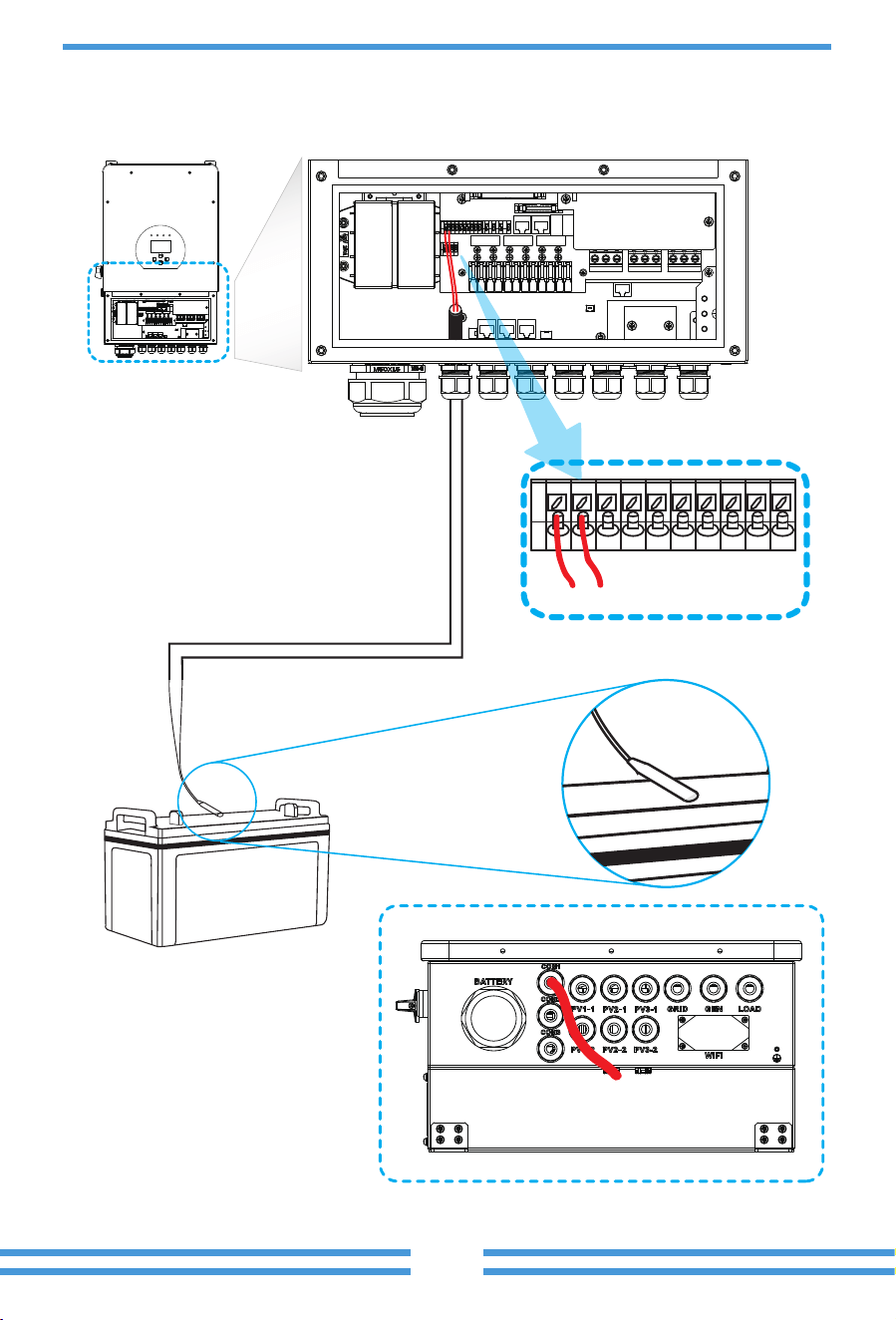
3.4.2 Temperature sensor connec�on for lead-acid ba�ery
1 2
Temp. sensor
- 13 -
- 14 -
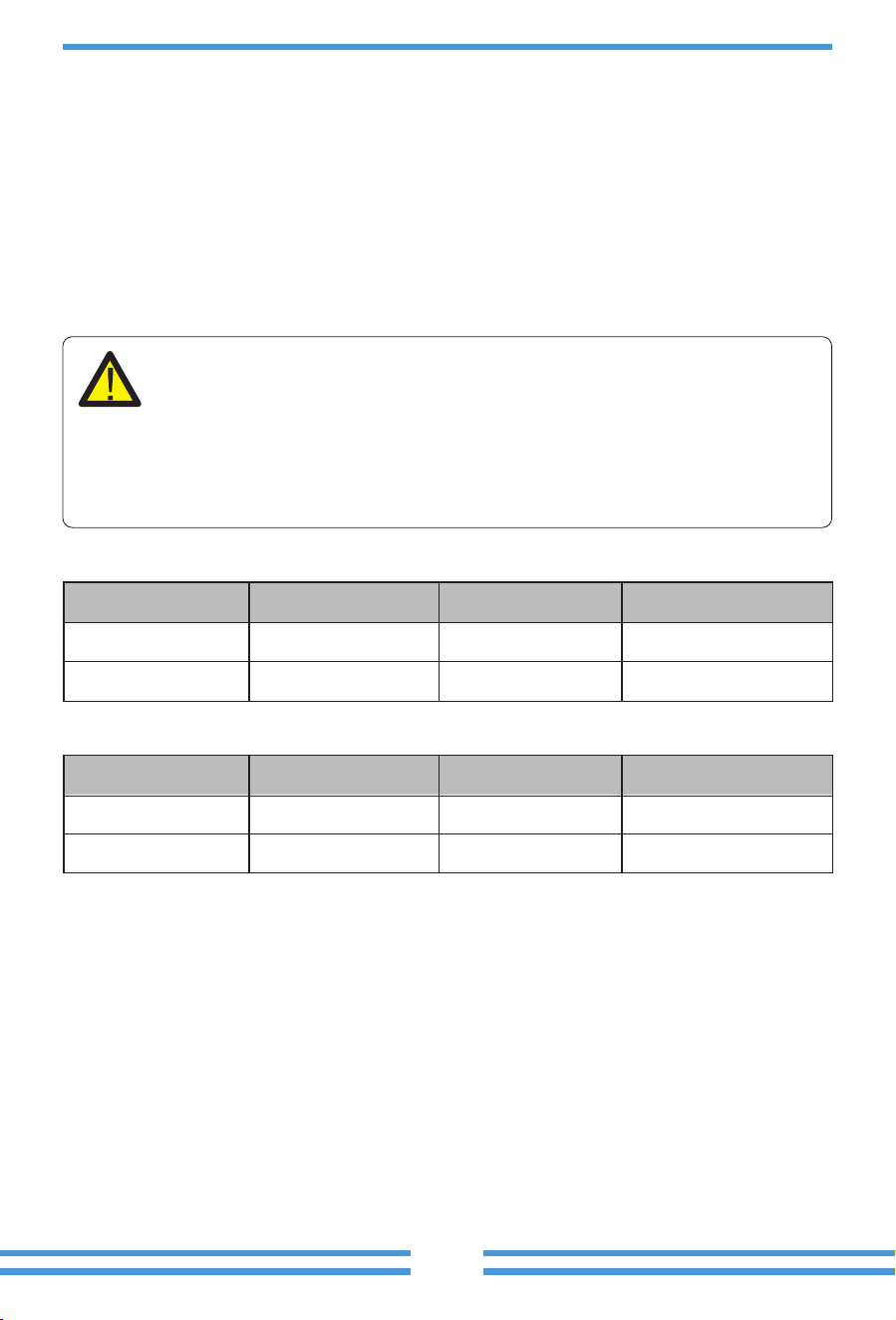
3.5 Grid connec�on and backup load connec�on
Please follow below steps to implement AC input/output connec�on:
Chart 3-3 Recommended Size for AC wires
· Before connec�ng to the grid, a separate AC breaker must be installed between the inverter
and the grid, and also between the backup load and the inverter.This will ensure the inverter
can be securely disconnected during maintenance and fully protected from over current. For
the 5/6/7.6/8/10/12kW model, the recommended AC breaker for backup load 5/6kW is 40A,
7.6/8kW is 63A, 10/12kW is 100A. For the 5/6/7.6/8/10/12kW model, the recommended AC
breaker for grid 5/6KW is 40A, 7.6/8KW is 63A, 10/12kW is 100A.
· There are three terminal blocks with "Grid" "Load"and "GEN" markings. Please do not misconnect
input and output connectors.
Model
5/6kW
Wire Size
8AWG
Cable(mm )
2
6.0
Torque value(max)
1.2Nm
7.6/8/10/12kW 6AWG 10 1.2Nm
Model
5/6kW
Wire Size
8AWG
Cable(mm )
2
6.0
Torque value(max)
1.2Nm
7.6/8/10/12kW 6AWG 10 1.2Nm
1. Before making Grid, load and Gen port connec�on, be sure to turn off AC breaker or
disconnector first.
2. Remove insula�on sleeve 10mm length, unscrew the bolts, insert the wires according to
polari�es indicated on the terminal block and �ghten the terminal screws. Make sure the
connec�on is complete.
Grid connec�on and backup load connec�on (Copper wires) (bypass)
Grid connec�on and backup load connec�on (Copper wires)
All wiring must be performed by a qualified personnel.It is very important for
system safety and efficient opera�on to use appropriate cable for AC input
connec�on. To reduce risk of injury, please use the proper recommended cable
as below.
Note:
In final installa�on,breaker cer�fied according to IEC 60947-1 and IEC 60947-2
shall be installed with the equipment.
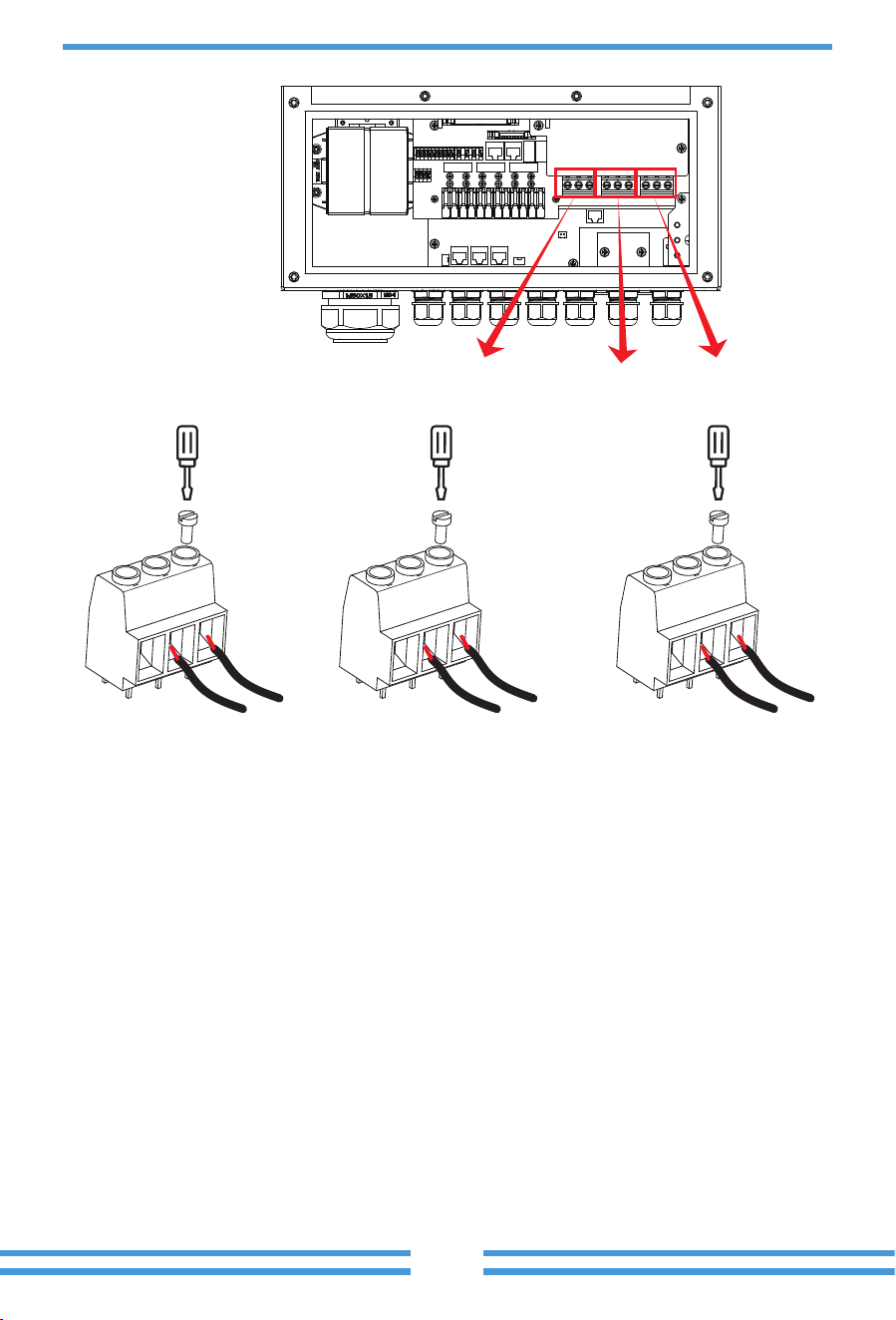
GRID
LOAD
GEN PORT
- 15 -
GRID
N
L
N
L
N
L
LOADGEN PORT
- 16 -
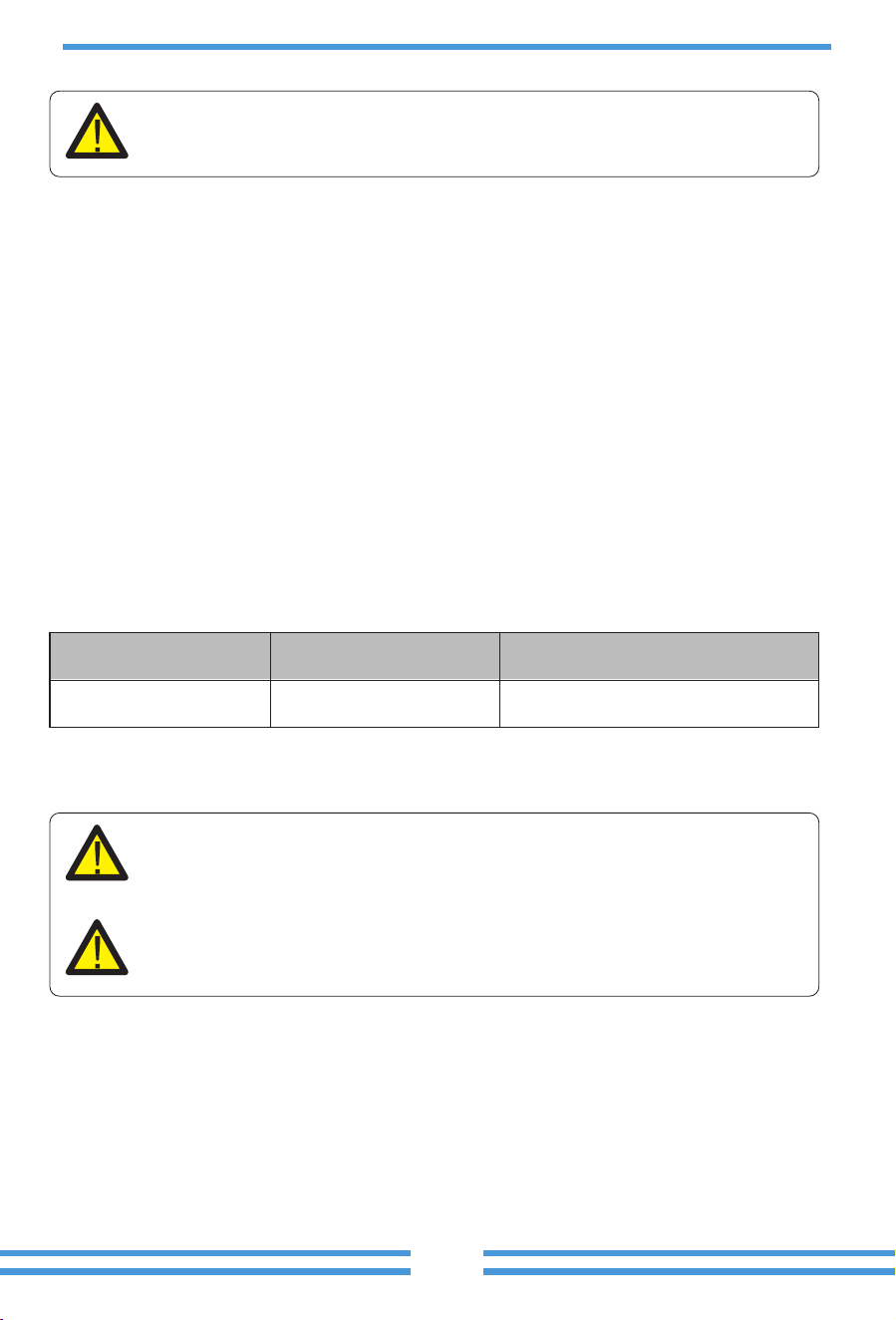
3.6 PV Connec�on
3. Then, insert AC output wires according to polari�es indicated on the terminal block and �ghten
terminal. Be sure to connect corresponding N wires and PE wires to related terminals as well.
4. Make sure the wires are securely connected.
5. Appliances such as air condi�oner are required at least 2-3 minutes to restart because it is
required to have enough �me to balance refrigerant gas inside of circuit. If a power shortage
occurs and recovers in short �me, it will cause damage to your connected appliances. To
prevent this kind of damage, please check manufacturer of air condi�oner if it is equipped with
�me-delay func�on before installa�on. Otherwise, this inverter will trigger overload fault and
cut off output to protect your appliance but some�mes it s�ll causes internal damage to the air
condi�oner
Before connec�ng to PV modules, please install a separately DC circuit breaker between
inverter and PV modules. It is very important for system safety and efficient opera�on to
use appropriate cable for PV module connec�on. To reduce risk of injury, please use the
proper recommended cable size as below.
Chart 3-4 Cable size
Be sure that AC power source is disconnected before a�emp�ng to wire it to the
unit.
To avoid any malfunc�on, do not connect any PV modules with possible current
leakage to the inverter. When using PV modules, please ensure the PV+ & PV- of
solar panel is not connected to the system ground bar.
It is requested to use PV junc�on box with surge protec�on. Otherwise, it will
cause damage on inverter when lightning occurs on PV modules.
Model
5/6/7.6/8/10/12kW
Wire Size
12AWG
Cable(mm )
2
2.5
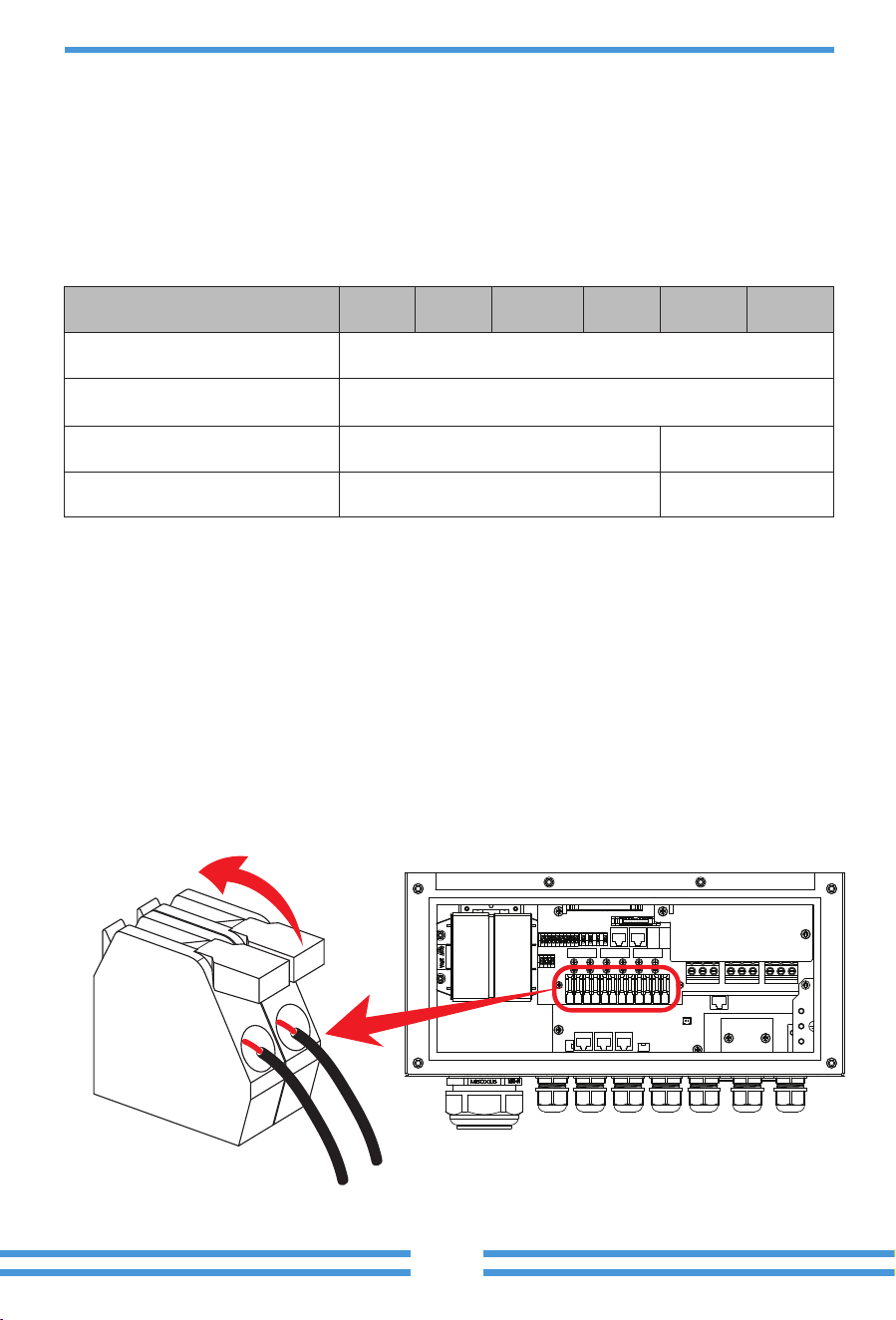
PV Input Voltage
Inverter Model 5kW 6kW 7.6kW 8kW 10kW 12kW
370V (125V-500V)
150V-425VPV Array MPPT Voltage Range
No. of MPP Trackers
No. of Strings per MPP Tracker
32
2+2+22+2
- 17 -
3.6.1 PV Module Selec�on:
3.6.2 PV Module Wire Connec�on:
When selec�ng proper PV modules, please be sure to consider below parameters:
1) Open circuit Voltage (Voc) of PV modules not exceeds max. PV array open circuit voltage of
inverter.
2) Open circuit Voltage (Voc) of PV modules should be higher than min. start voltage.
3) The PV modules used to connected to this inverter shall be Class A ra�ng cer�fied according
to lEC 61730.
Please follow below steps to implement PV module connec�on:
1. Remove insula�on sleeve 10 mm for posi�ve and nega�ve conductors.
2. Suggest to put bootlace ferrules on the end of posi�ve and nega�ve wires with a proper
crimping tool.
3. Check correct polarity of wire connec�on from PV modules and PV input connectors. Then,
connect posi�ve pole (+) of connec�on wire to posi�ve pole (+) of PV input connector. Connect
nega�ve pole (-) of connec�on wire to nega�ve pole(-)of PV input connector. Close the switch
and make sure the wires are �ghtly fixed.
Chart 3-5
- 18 -
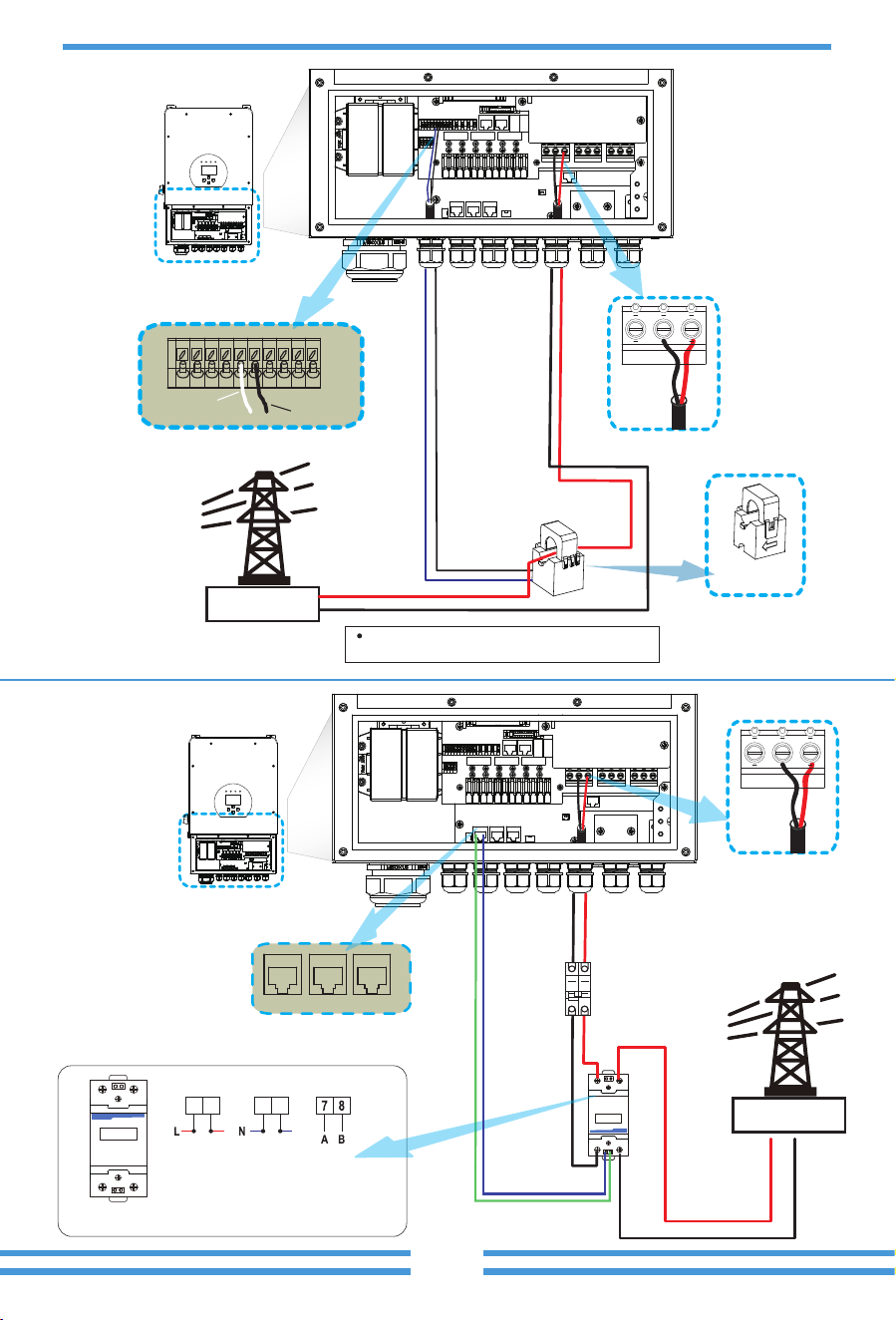
3.7 CT Connec�on
The primary side of the CT
needs to be clamped on the
Grid live line.
3.7.1 Meter Connec�on
If the data read by the CT is wrong, you can try to point
the direction of the CT to the grid.
Inverter
N L
White wire
5 6
Black wire
Grid
L
N
CT
5
6
CT
Arrow pointing
to
inverter
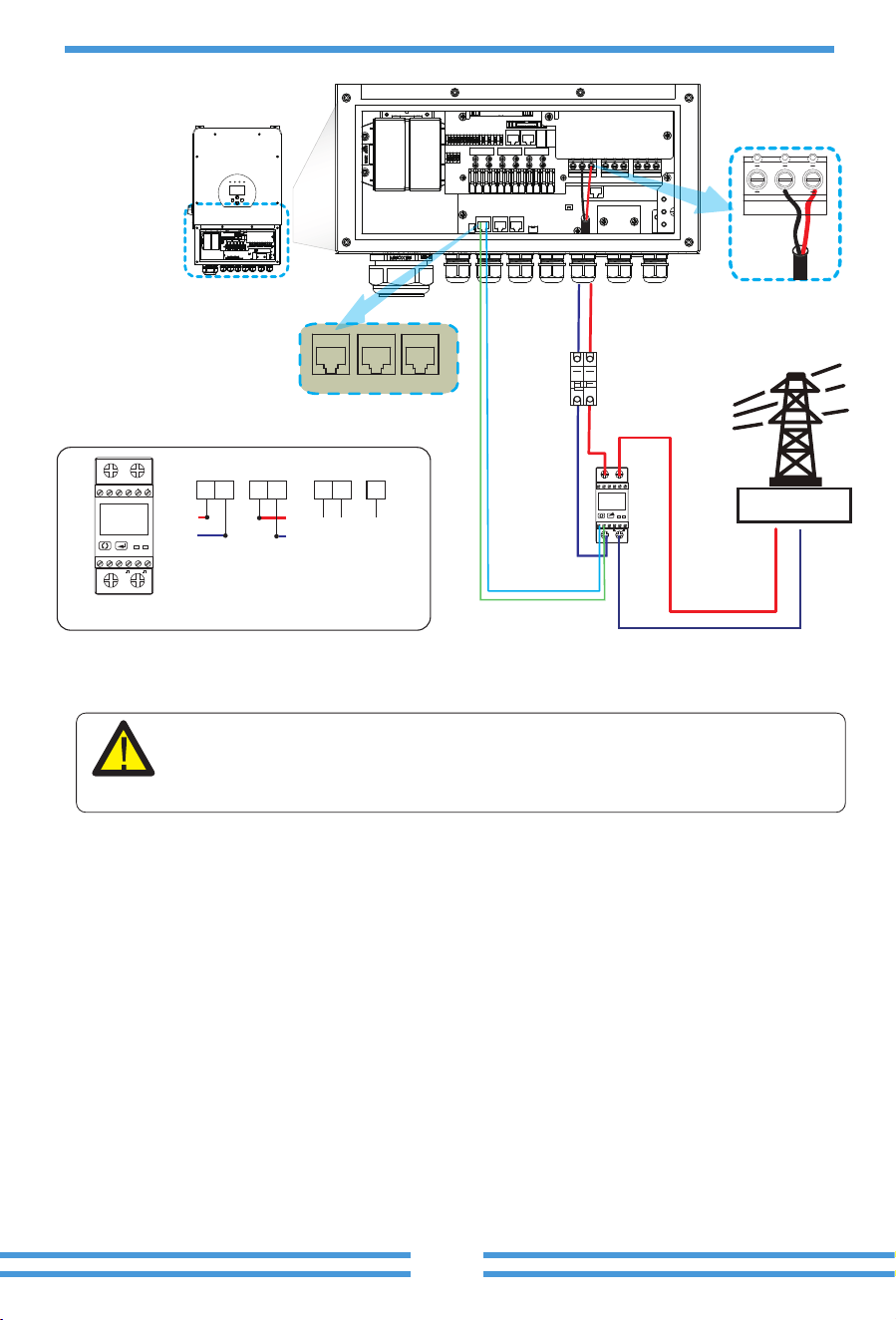
DDSU666 DIN-RAIL METER
230V 5(60) A 800imp/kWh
2
56
1
4
7
8
3
Inverter
N L
Grid
AC
Breaker
System connec�on diagram for the CHNT meter
21 43
CHNT DDSU666
DDSU666 DIN-RAIL METER
230V 5(60) A 800imp/kWh
2
5 6
1
4
7 8
3
Output
RS 485
Grid input
CHINT meter
L
N
RS485B
RS485A
Meter Parallel_A Parallel_B
- 19 -
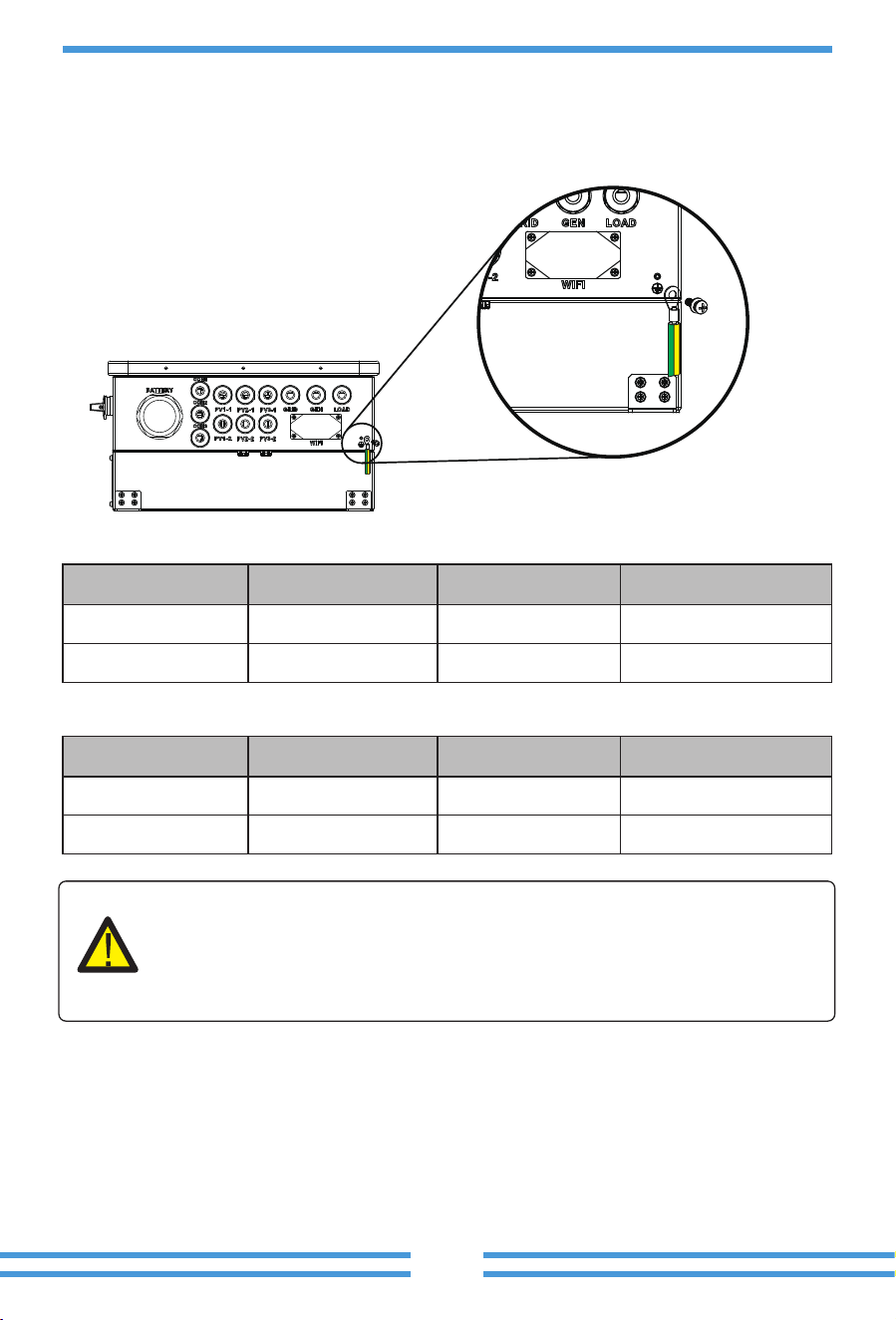
1
230V/2T
5 6 7 8 9 10
2
3
A B
4
GND
1+COM 2+
Inverter
Grid
AC
Breaker
L
N
System connec�on diagram for
the Eastron meter
Output
RS 485 GND
Input
Pic 7.1 EASTRON meter
EASTRON SDM230
1
230V/2T
5 6 7 8 9 10
2
3
A B
4
GND
1+COM 2+
5
3
6
7
GNDA B
L
N
L
N
1
2 4
RS485B
RS485A
N L
Note:
When the inverter is in the off-grid state, the N line needs to be connected to the
earth.
Meter Parallel_A Parallel_B
- 20 -
3.9 WIFI Connec�on
For the configura�on of Wi-Fi Plug, please refer to illustra�ons of the Wi-Fi Plug. The Wi-Fi Plug
is not a standard configura�on, it's op�onal.
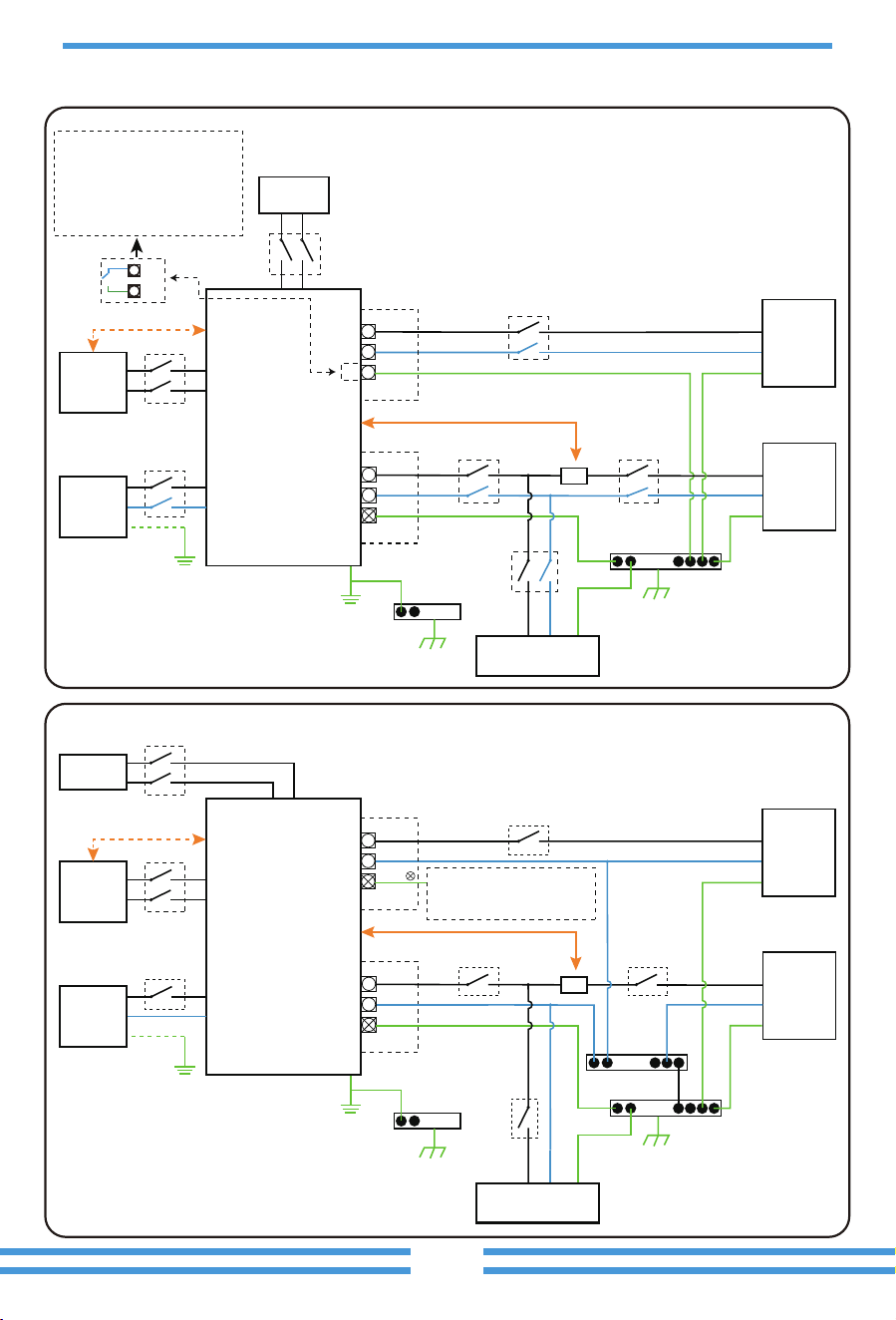
3.8 Earth Connec�on(mandatory)
Ground cable shall be connected to ground plate on grid side, this prevents electric shock if the
original protec�ve conductor fails.
Model
5/6kW
Wire Size
8AWG
Cable(mm )
2
6.0
Torque value(max)
1.2Nm
7.6/8/10/12kW 6AWG 10 1.2Nm
Model
5/6kW
Wire Size
8AWG
Cable(mm )
2
6.0
Torque value(max)
1.2Nm
7.6/8/10/12kW 6AWG 10 1.2Nm
Earth connec�on (Copper wires) (bypass)
Earth connec�on (Copper wires)
Warning:
Inverter has built-in leakage current detec�on circuit, The type A RCD can be
connected to the inverter for protec�on according to the local laws and regula�ons.
If an external leakage current protec�on device is connected, its opera�ng current
must be equal to 300 mA or higher, otherwise inverter may not work properly.
- 21 -
3.10 Wiring System for Inverter
E-BAR
E-BAR
AC Breaker
AC Breaker AC Breaker
Load
L L
N
PE
N
PE
Battery
Diesel
generator
Diesel
generator
BMS
Load
L N PE
Grid
L L
N
PE
N
PE
Grid
CT
CT
Home Loads
Hybrid Inverter
AC Breaker
DC Breaker
E-BAR
E-BAR
N-BAR
AC Breaker
AC Breaker AC Breaker
Load
L L
N
PE
or
N
PE
Battery
PV
BMS
Load
L N PE
Grid
L L
N
PE
N
PE
Grid
CT
CT
Home Loads
Hybrid Inverter
AC Breaker
DC Breaker
DC Breaker
Do not connect this terminal
when the neutral wire and PE
wire are connected together.
E-N
Link
This diagram is an example for applica�on that Neutral connects together with
PE in distribu�on box.
Such as: Australia, New Zealand, etc. (Please follow local wiring regula�ons!)
This diagram is an example for grid systems without special requirements on
electrical wiring connec�on.
Note: The back-up PE line and earthing bar must be grounded properly and
effec�vely.
Otherwise the back-up func�on may be abnormal when the grid fails.
N
PE
When the inverter is working in
backup mode, neutral and PE on
the backup side are connected
via the internal relay. Also, this
internal relay will be open when
the inverter is working in grid
�ed mode.
PV
DC Breaker
L wireCAN N wire PE wire
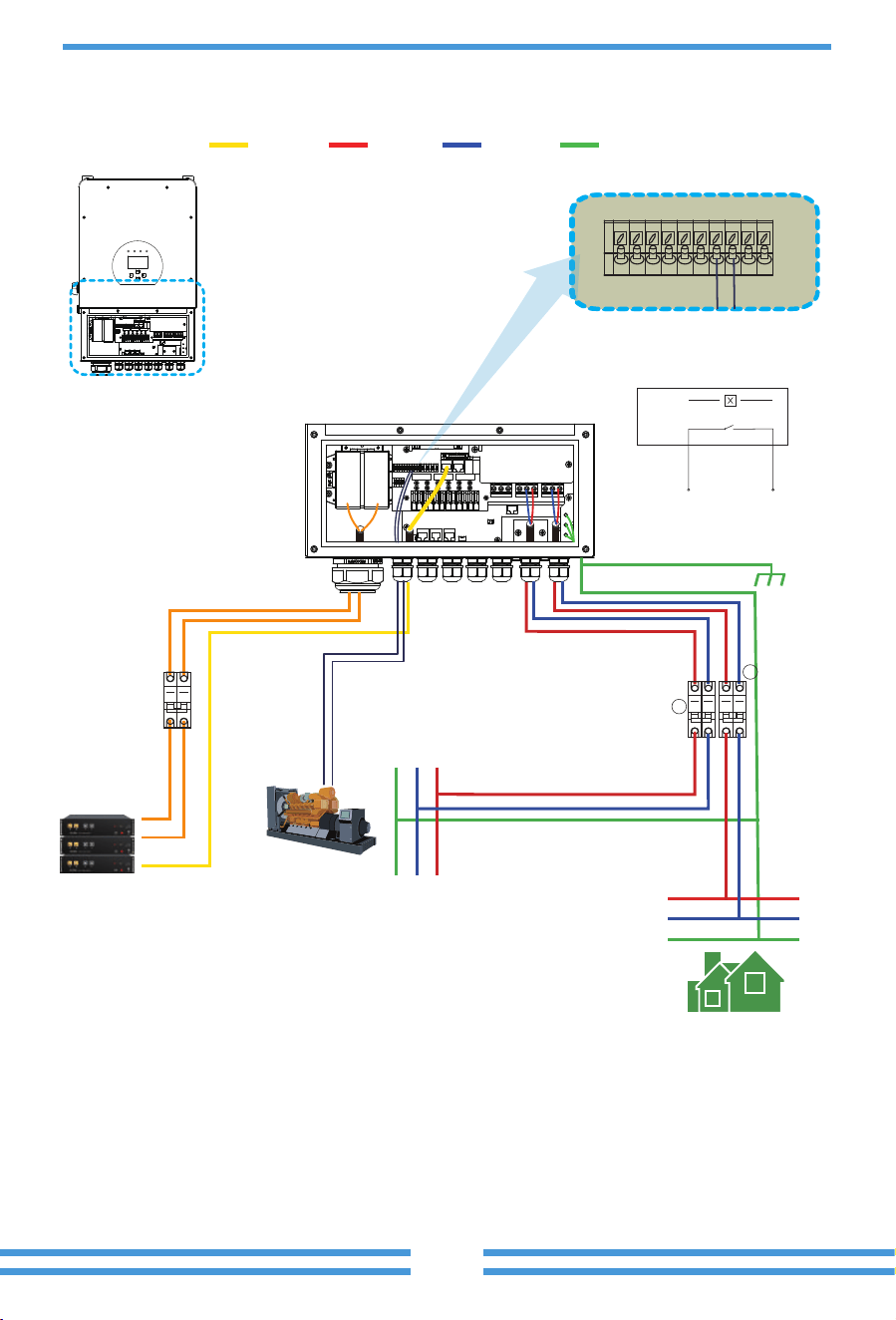
3.11 Typical applica�on diagram of diesel generator
- 22 -
Inverter
Battery pack
① DC
Breaker
Backup Load
L
N
PE
LNPE
Ground
Generator
2
3
7 8
Inverter
G-start (7,8): dry contact signal for startup
the diesel generator.
GS (diesel generator startup signal)
relay
coil
open
contact
G S
Remotely control signal line
① DC Breaker for battery
SUN-5K-SG-EU: 150A DC breaker
SUN-6K-SG-EU: 200A DC breaker
SUN-7.6K-SG-EU: 200A DC breaker
SUN-8K-SG-EU: 250A DC breaker
SUN-10K-SG-EU: 300A DC breaker
SUN-12K-SG-EU: 300A DC breaker
② AC Breaker for gen port
SUN-5K-SG-EU: 40A AC breaker
SUN-6K-SG-EU: 40A AC breaker
SUN-7.6K-SG-EU: 63A AC breaker
SUN-8K-SG-EU: 63A AC breaker
SUN-10K-SG-EU: 100A AC breaker
SUN-12K-SG-EU: 100A AC breaker
③ AC Breaker for backup load port
SUN-5K-SG-EU: 40A AC breaker
SUN-6K-SG-EU: 40A AC breaker
SUN-7.6K-SG-EU: 63A AC breaker
SUN-8K-SG-EU: 63A AC breaker
SUN-10K-SG-EU: 100A AC breaker
SUN-12K-SG-EU: 100A AC breaker
- 23 -
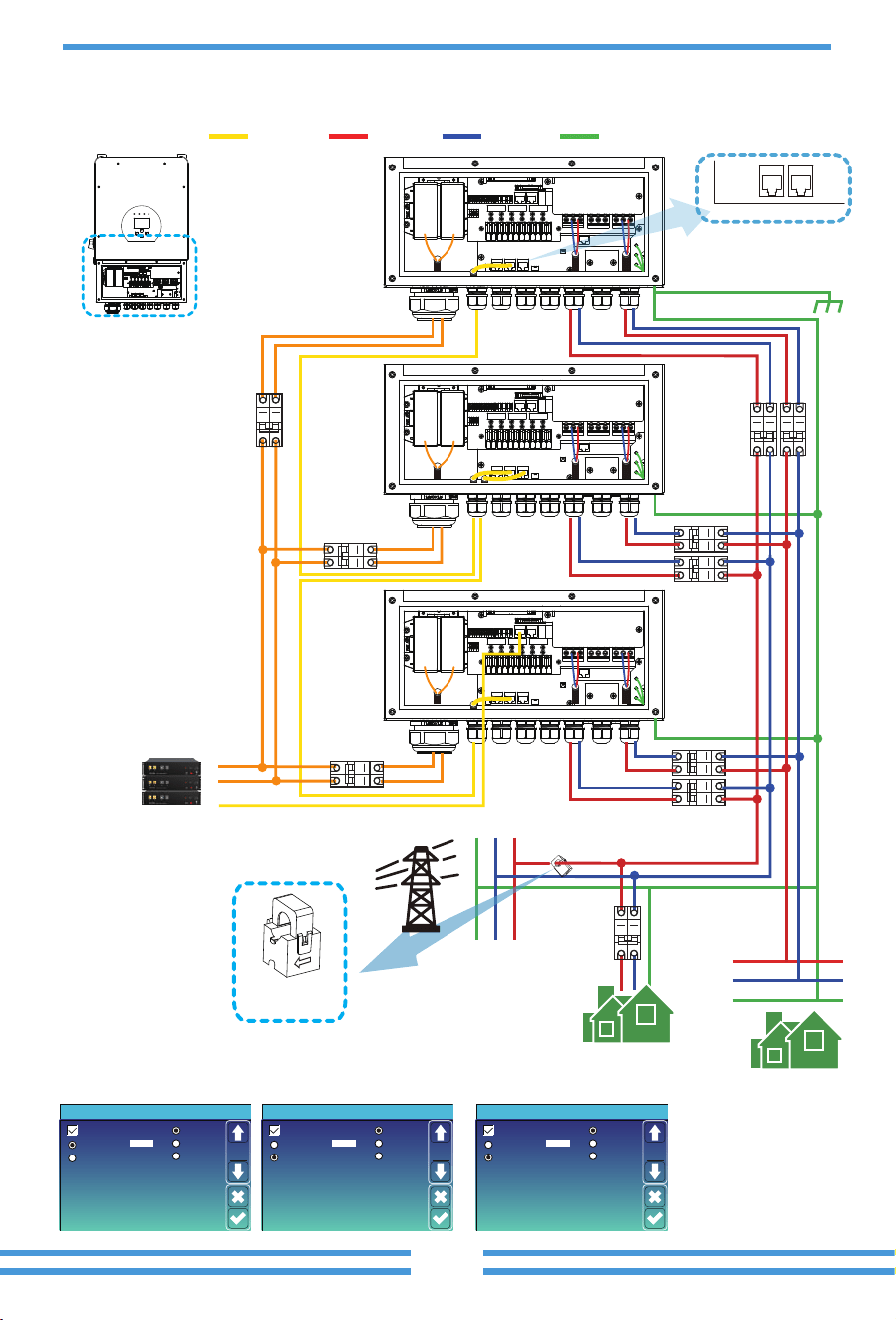
3.12 Single phase parallel connec�on diagram
Parallel
Master
Slave
Modbus SN
01
A Phase
B Phase
C Phase
Advanced Function
Paral.
Set3
Parallel
Master
Slave
Modbus SN
02
A Phase
B Phase
C Phase
Advanced Function
Paral.
Set3
Parallel
Master
Slave
Modbus SN
03
A Phase
B Phase
C Phase
Advanced Function
Paral.
Set3
Master inverter Slave Inverter Slave Inverter
Parallel A Parallel B
Inverter
No.3
(slave)
Inverter
No.2
(slave)
Inverter
No.1
(master)
Battery pack
① DC
Breaker
② DC
Breaker
③ DC
Breaker
Grid
Backup Load
L
N
PE
LNPE
Ground
Home Load
④
⑥
⑨
⑩
⑦
⑤
⑧
CT
Arrow pointing
to
inverter
The primary side of the CT
needs to be clamped on the
Grid live line.
Inverter
①②③ DC Breaker for battery
SUN-5K-SG-EU: 150A DC breaker
SUN-6K-SG-EU: 200A DC breaker
SUN-7.6K-SG-EU: 200A DC breaker
SUN-8K-SG-EU: 250A DC breaker
SUN-10K-SG-EU: 300A DC breaker
SUN-12K-SG-EU: 300A DC breaker
⑤⑦⑨ AC Breaker for grid port
SUN-5K-SG-EU: 40A AC breaker
SUN-6K-SG-EU: 40A AC breaker
SUN-7.6K-SG-EU: 63A AC breaker
SUN-8K-SG-EU: 63A AC breaker
SUN-10K-SG-EU: 100A AC breaker
SUN-12K-SG-EU: 100A AC breaker
④⑥⑧ AC Breaker for backup load port
SUN-5K-SG-EU: 40A AC breaker
SUN-6K-SG-EU: 40A AC breaker
SUN-7.6K-SG-EU: 63A AC breaker
SUN-8K-SG-EU: 63A AC breaker
SUN-10K-SG-EU: 100A AC breaker
SUN-12K-SG-EU: 100A AC breaker
⑩ AC Breaker
Depends on Home Load
L wireCAN N wire PE wire
Note: For the parallel system, please choose the "Zero export to CT " mode.
- 24 -
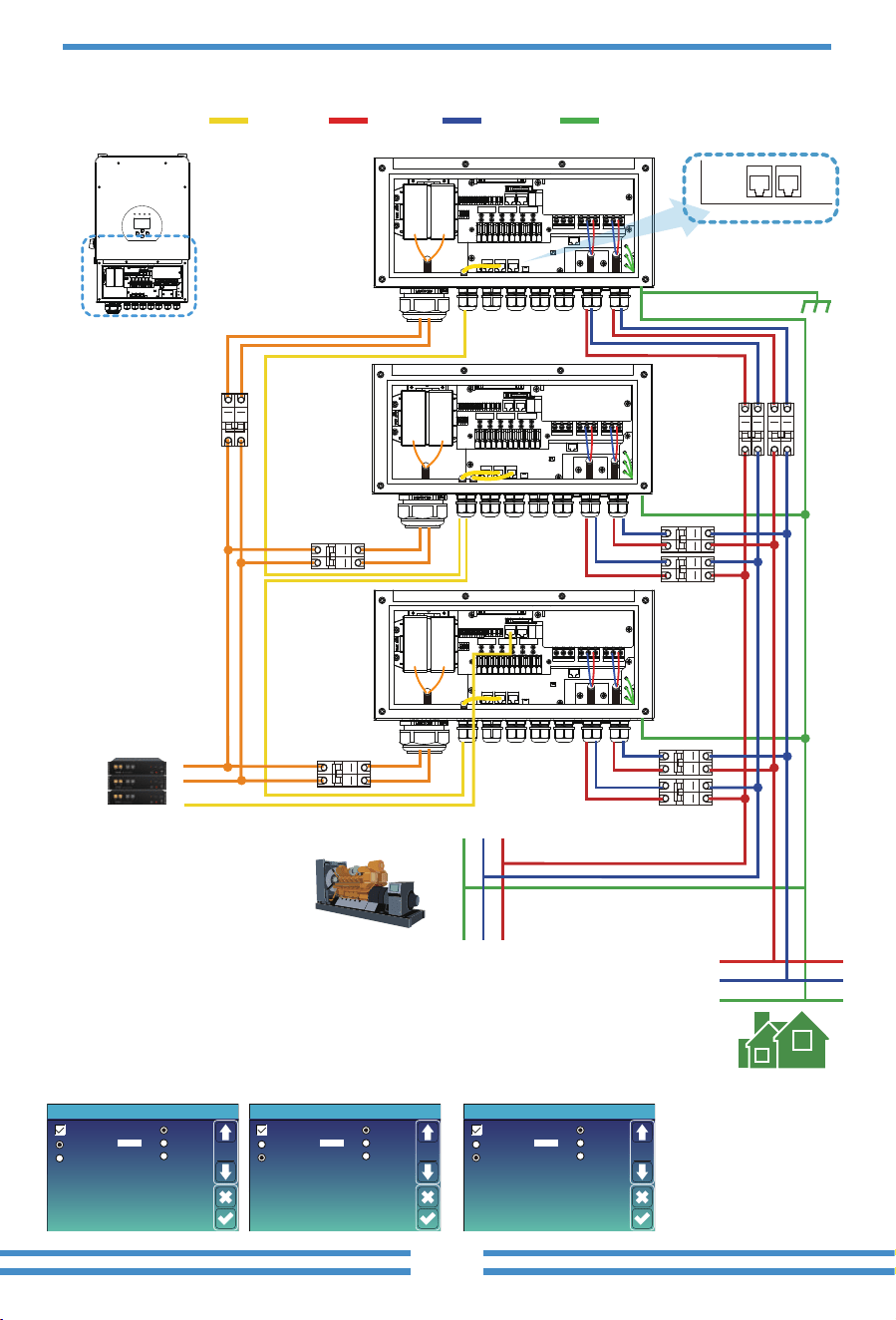
L wireCAN N wire PE wire
Parallel
Master
Slave
Modbus SN
01
A Phase
B Phase
C Phase
Advanced Function
Paral.
Set3
Parallel
Master
Slave
Modbus SN
02
A Phase
B Phase
C Phase
Advanced Function
Paral.
Set3
Parallel
Master
Slave
Modbus SN
03
A Phase
B Phase
C Phase
Advanced Function
Paral.
Set3
Master inverter Slave Inverter Slave Inverter
Parallel A Parallel B
Inverter
No.3
(slave)
Inverter
No.2
(slave)
Inverter
No.1
(master)
Battery pack
① DC
Breaker
② DC
Breaker
③ DC
Breaker
Backup Load
L
N
PE
LNPE
Ground
④
⑥
⑨
⑦
⑤
⑧
Inverter
Generator
①②③ DC Breaker for battery
SUN-5K-SG-EU: 150A DC breaker
SUN-6K-SG-EU: 200A DC breaker
SUN-7.6K-SG-EU: 200A DC breaker
SUN-8K-SG-EU: 250A DC breaker
SUN-10K-SG-EU: 300A DC breaker
SUN-12K-SG-EU: 300A DC breaker
⑤⑦⑨ AC Breaker for gen port
SUN-5K-SG-EU: 40A AC breaker
SUN-6K-SG-EU: 40A AC breaker
SUN-7.6K-SG-EU: 63A AC breaker
SUN-8K-SG-EU: 63A AC breaker
SUN-10K-SG-EU: 100A AC breaker
SUN-12K-SG-EU: 100A AC breaker
④⑥⑧ AC Breaker for backup load port
SUN-5K-SG-EU: 40A AC breaker
SUN-6K-SG-EU: 40A AC breaker
SUN-7.6K-SG-EU: 63A AC breaker
SUN-8K-SG-EU: 63A AC breaker
SUN-10K-SG-EU: 100A AC breaker
SUN-12K-SG-EU: 100A AC breaker
- 25 -
L wireCAN N wire PE wire
Battery pack
Grid
L1
L2
L3
N
PE
A Phase Inverter No.1(master)
B Phase Inverter No.2(master) C Phase Inverter No.3(master)
L3
L2
L1
N
PE
Parallel A Parallel B
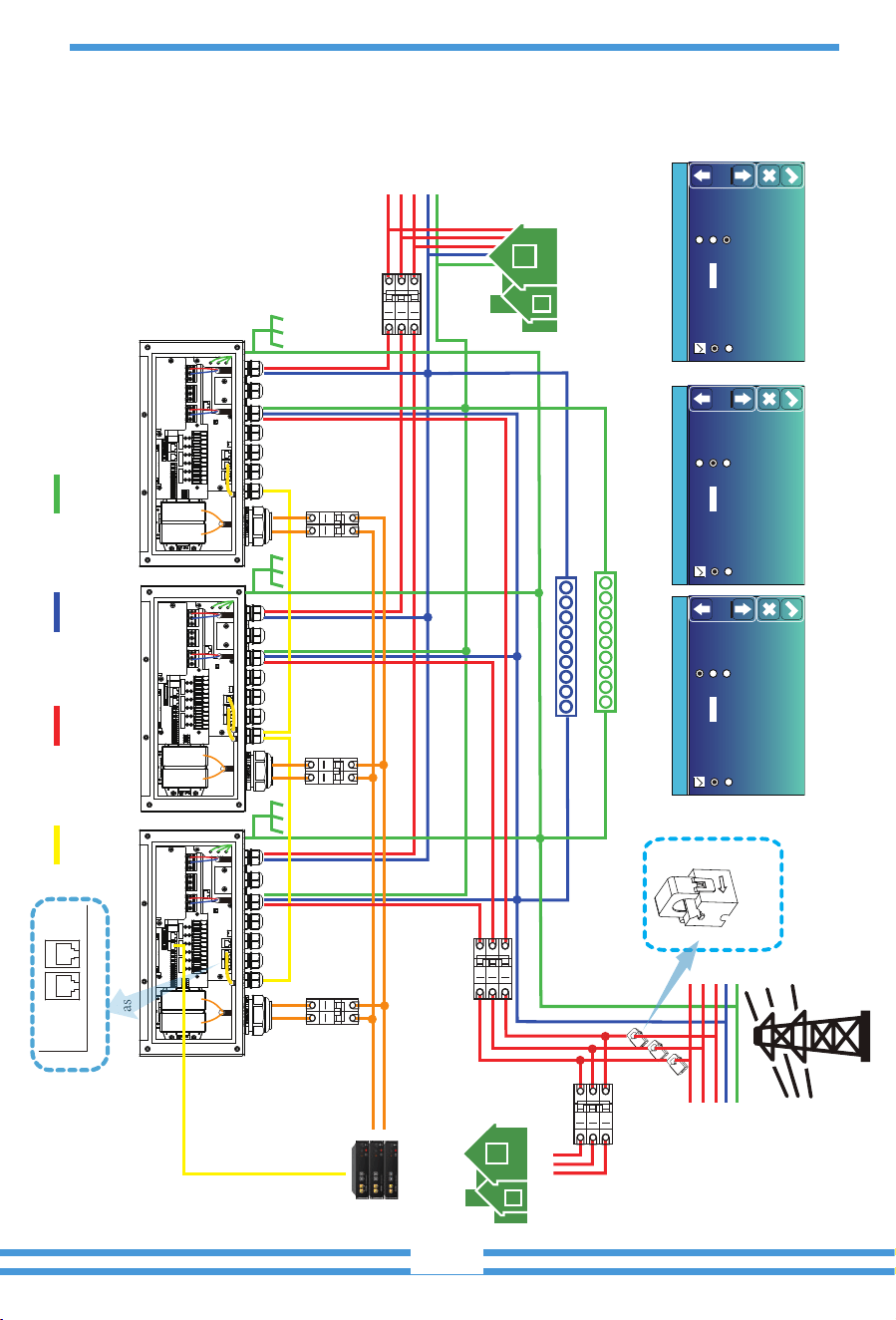
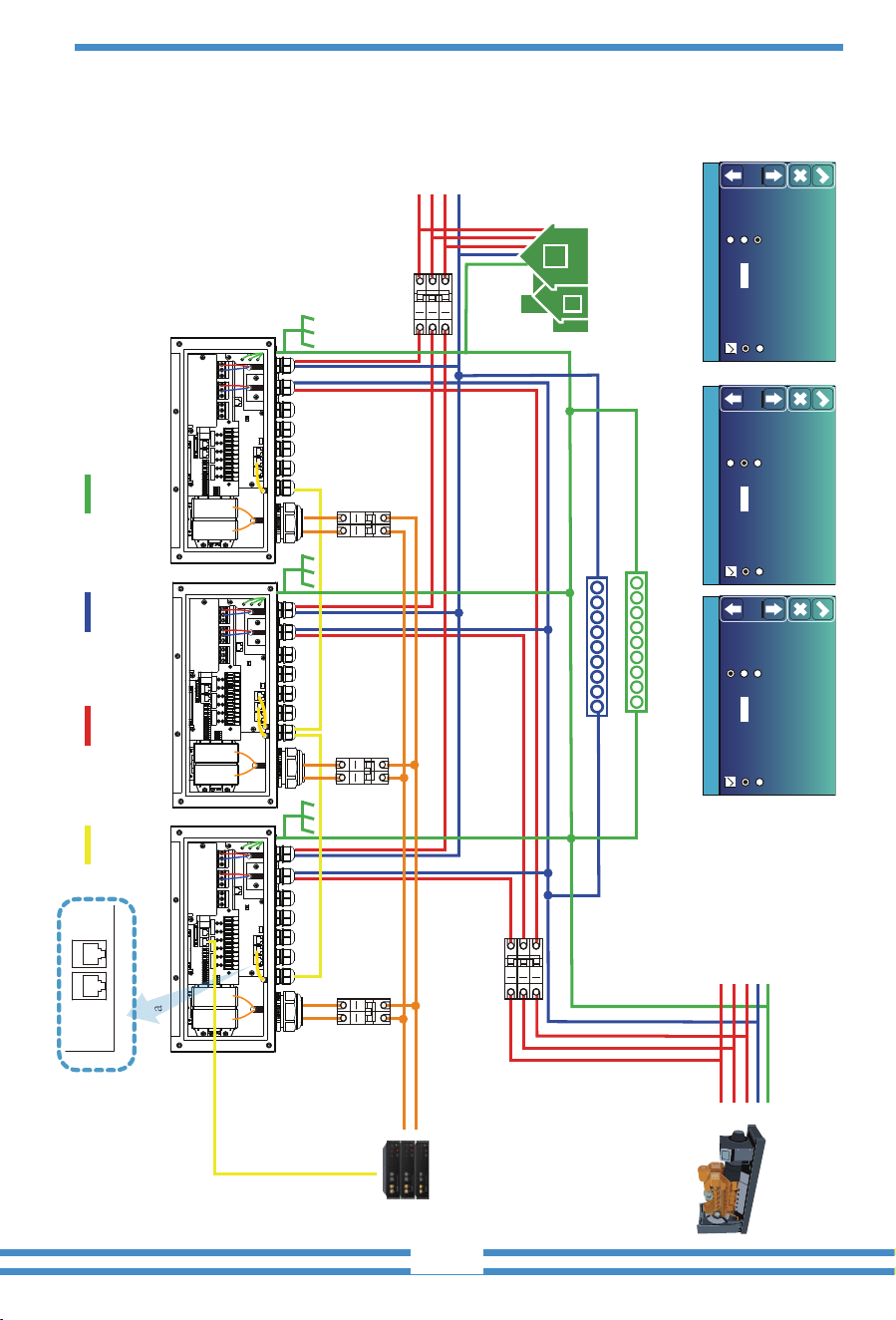
3.13 Three phase Parallel Inverter
Parallel
Master
Slave
Modbus SN
01
A Phase
B Phase
C Phase
Advanced Function
Paral.
Set3
Parallel
Master
Slave
Modbus SN
02
A Phase
B Phase
C Phase
Advanced Function
Paral.
Set3
Parallel
Master
Slave
Modbus SN
03
A Phase
B Phase
C Phase
Advanced Function
Paral.
Set3
A Phase Master inverter B Phase Master inverter C Phase Master inverter
CAN/RS 485
Backup Load
E-BAR
N-BAR
Home load
CT
CT3
CT2
CT1
Arrow pointing
to
inverter
⑥ AC Breaker
⑤ AC Breaker
④ AC Breaker
① DC
Breaker
② DC
Breaker
③ DC
Breaker
Ground
①②③ DC Breaker for battery
SUN-5K-SG-EU: 150A DC breaker
SUN-6K-SG-EU: 200A DC breaker
SUN-7.6K-SG-EU: 200A DC breaker
SUN-8K-SG-EU: 250A DC breaker
SUN-10K-SG-EU: 300A DC breaker
SUN-12K-SG-EU: 300A DC breaker
⑤ AC Breaker for grid port
SUN-5K-SG-EU: 40A AC breaker
SUN-6K-SG-EU: 40A AC breaker
SUN-7.6K-SG-EU: 63A AC breaker
SUN-8K-SG-EU: 63A AC breaker
SUN-10K-SG-EU: 100A AC breaker
SUN-12K-SG-EU: 100A AC breaker
④ AC Breaker for backup load port
SUN-5K-SG-EU: 40A AC breaker
SUN-6K-SG-EU: 40A AC breaker
SUN-7.6K-SG-EU: 63A AC breaker
SUN-8K-SG-EU: 63A AC breaker
SUN-10K-SG-EU: 100A AC breaker
SUN-12K-SG-EU: 100A AC breaker
⑥ AC Breaker
Depends on Home Load
Note: For the parallel system, please choose the "Zero export to CT " mode.
- 26 -
L wireCAN N wire PE wire
Battery pack
L1
L2
L3
N
PE
A Phase Inverter No.1(master)
B Phase Inverter No.2(master) C Phase Inverter No.3(master)
L3
L2
L1
N
PE
Parallel A Parallel B
Parallel
Master
Slave
Modbus SN
01
A Phase
B Phase
C Phase
Advanced Function
Paral.
Set3
Parallel
Master
Slave
Modbus SN
02
A Phase
B Phase
C Phase
Advanced Function
Paral.
Set3
Parallel
Master
Slave
Modbus SN
03
A Phase
B Phase
C Phase
Advanced Function
Paral.
Set3
A Phase Master inverter B Phase Master inverter C Phase Master inverter
CAN/RS 485
Backup Load
E-BAR
N-BAR
⑤ AC Breaker
④ AC Breaker
① DC
Breaker
② DC
Breaker
③ DC
Breaker
Ground
Generator
①②③ DC Breaker for battery
SUN-5K-SG-EU: 150A DC breaker
SUN-6K-SG-EU: 200A DC breaker
SUN-7.6K-SG-EU: 200A DC breaker
SUN-8K-SG-EU: 250A DC breaker
SUN-10K-SG-EU: 300A DC breaker
SUN-12K-SG-EU: 300A DC breaker
⑤ AC Breaker for gen port
SUN-5K-SG-EU: 40A AC breaker
SUN-6K-SG-EU: 40A AC breaker
SUN-7.6K-SG-EU: 63A AC breaker
SUN-8K-SG-EU: 63A AC breaker
SUN-10K-SG-EU: 100A AC breaker
SUN-12K-SG-EU: 100A AC breaker
④ AC Breaker for backup load port
SUN-5K-SG-EU: 40A AC breaker
SUN-6K-SG-EU: 40A AC breaker
SUN-7.6K-SG-EU: 63A AC breaker
SUN-8K-SG-EU: 63A AC breaker
SUN-10K-SG-EU: 100A AC breaker
SUN-12K-SG-EU: 100A AC breaker
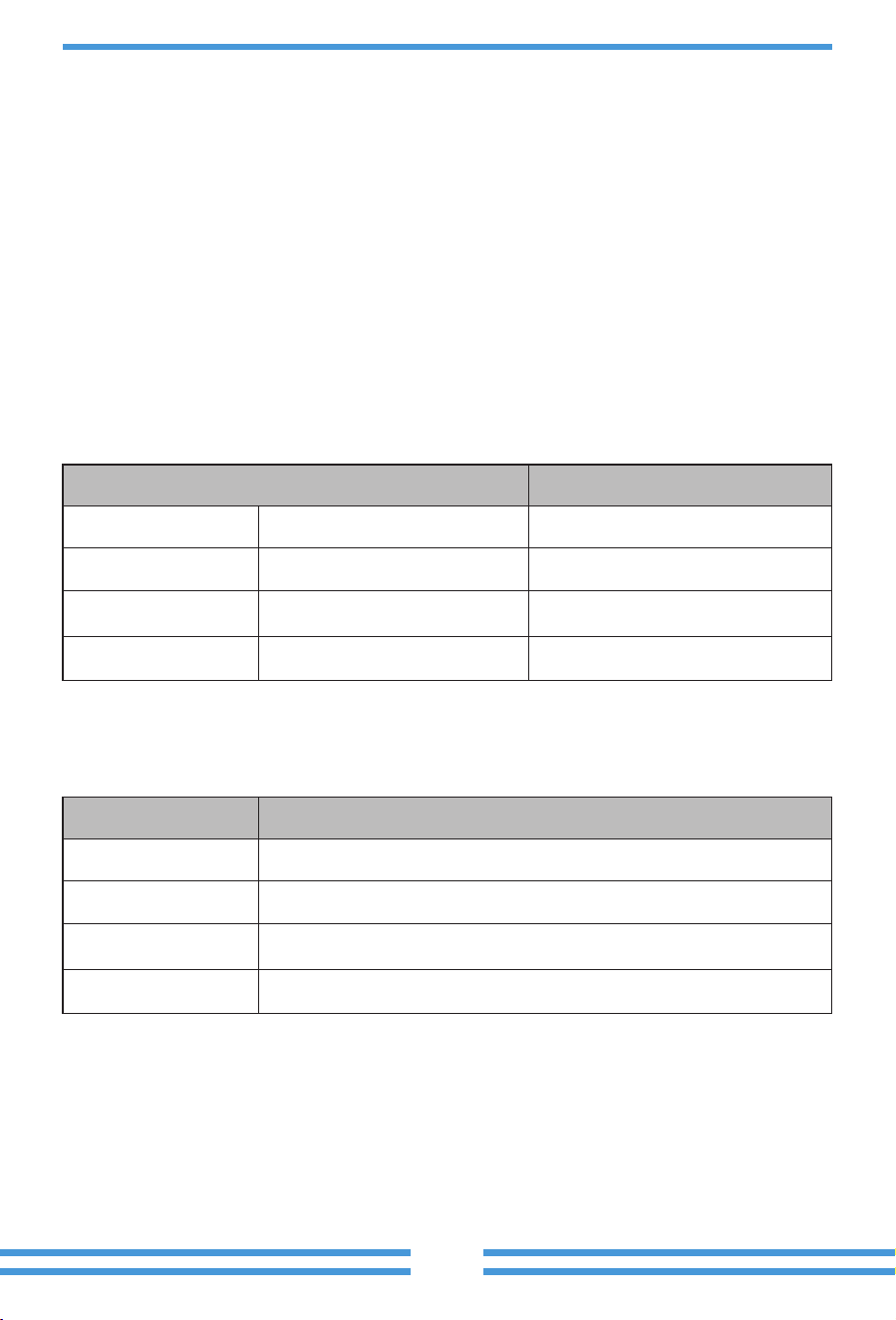
- 27 -
4. OPERATION
4.1 Power ON/OFF
Once the unit has been properly installed and the ba�eries are connected well, simply press
On/Off bu�on(located on the le� side of the case) to turn on the unit. When system without
ba�ery connected, but connect with either PV or grid, and ON/OFF bu�on is switched off, LCD
will s�ll light up(Display will show OFF), In this condi�on, when switch on ON/OFF bu�on and
select NO ba�ery,system can s�ll working.
4.2 Opera�on and Display Panel
The opera�on and display panel, shown in below chart, is on the front panel of the inverter.
It includes four indicators, four func�on keys and a LCD display, indica�ng the opera�ng status
and input/output power informa�on.
Chart 4-1 LED indicators
LED Indicator
DC
AC
Normal
Alarm
Green led solid light
Green led solid light
Green led solid light
Red led solid light
PV Connec�on normal
Grid Connec�on normal
Inverter opera�ng normal
Malfunc�on or warning
Messages
Chart 4-2 Func�on Bu�ons
Funcon Key
Esc
Up
Down
Enter
Descripon
To exit se�ng mode
To go to previous selec�on
To go to next selec�on
To confirm the selec�on
5.1 Main Screen
5. LCD Display Icons
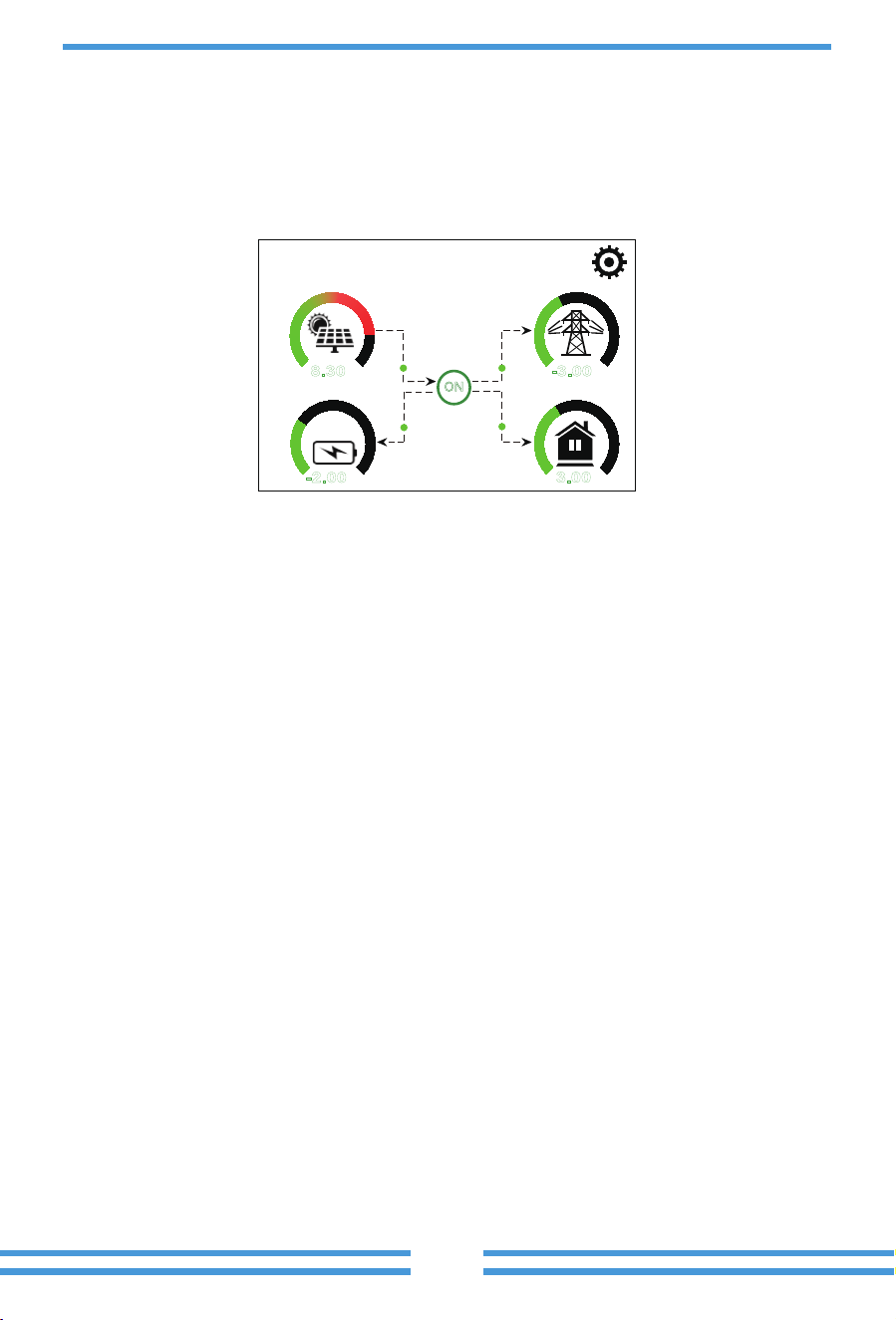
The LCD is touchscreen, below screen shows the overall informa�on of the inverter.
1.The icon in the center of the home screen indicates that the system is Normal opera�on. If it
turns into "comm./F01~F64" , it means the inverter has communica�on errors or other errors,
the error message will display under this icon(F01-F64 errors, detail error info can be viewed in
the System Alarms menu).
2.At the top of the screen is the �me.
3.System Setup Icon, Press this set bu�on,you can enter into the system setup screen which
including Basic Setup, Ba�ery Setup, Grid Setup, System Work Mode, Generator port use,
Advanced func�on and Li-Ba� info.
4.The main screen showing the info including Solar, Grid, Load and Ba�ery. Its also displaying the
energy flow direc�on by arrow. When the power is approximate to high level, the color on the
panels will changing from green to red so system info showing vividly on the main screen.
· PV power and Load power always keep posi�ve.
· Grid power nega�ve means sell to grid, posi�ve means get from grid.
· Ba�ery power nega�ve means charge, posi�ve means discharge.
25%
05/28/2019 15:34:40
8.30
KW
-2.00
KW
-3.00
KW
3.00
KW
0 12
0 8
0 8
0 8
ON
- 28 -
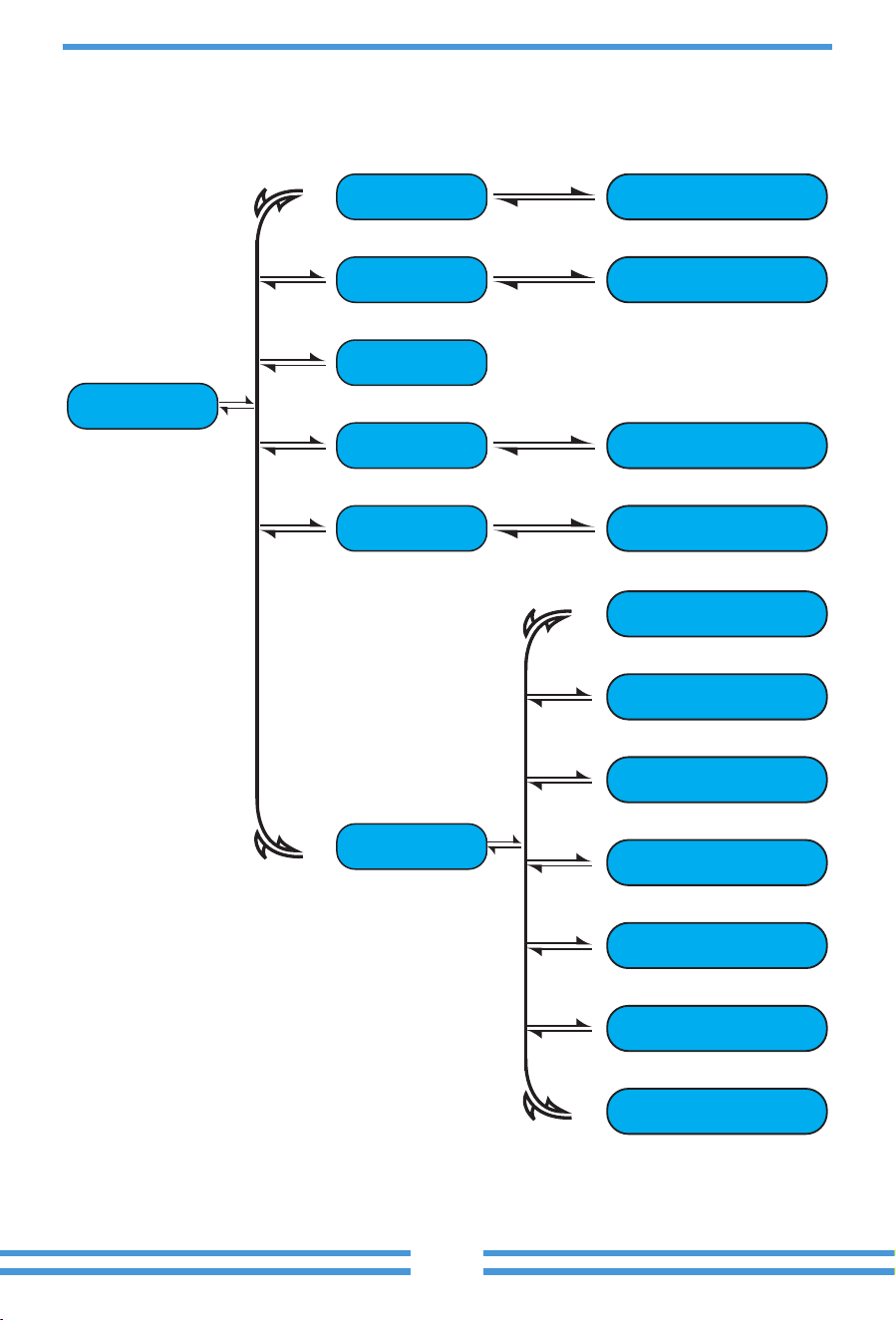
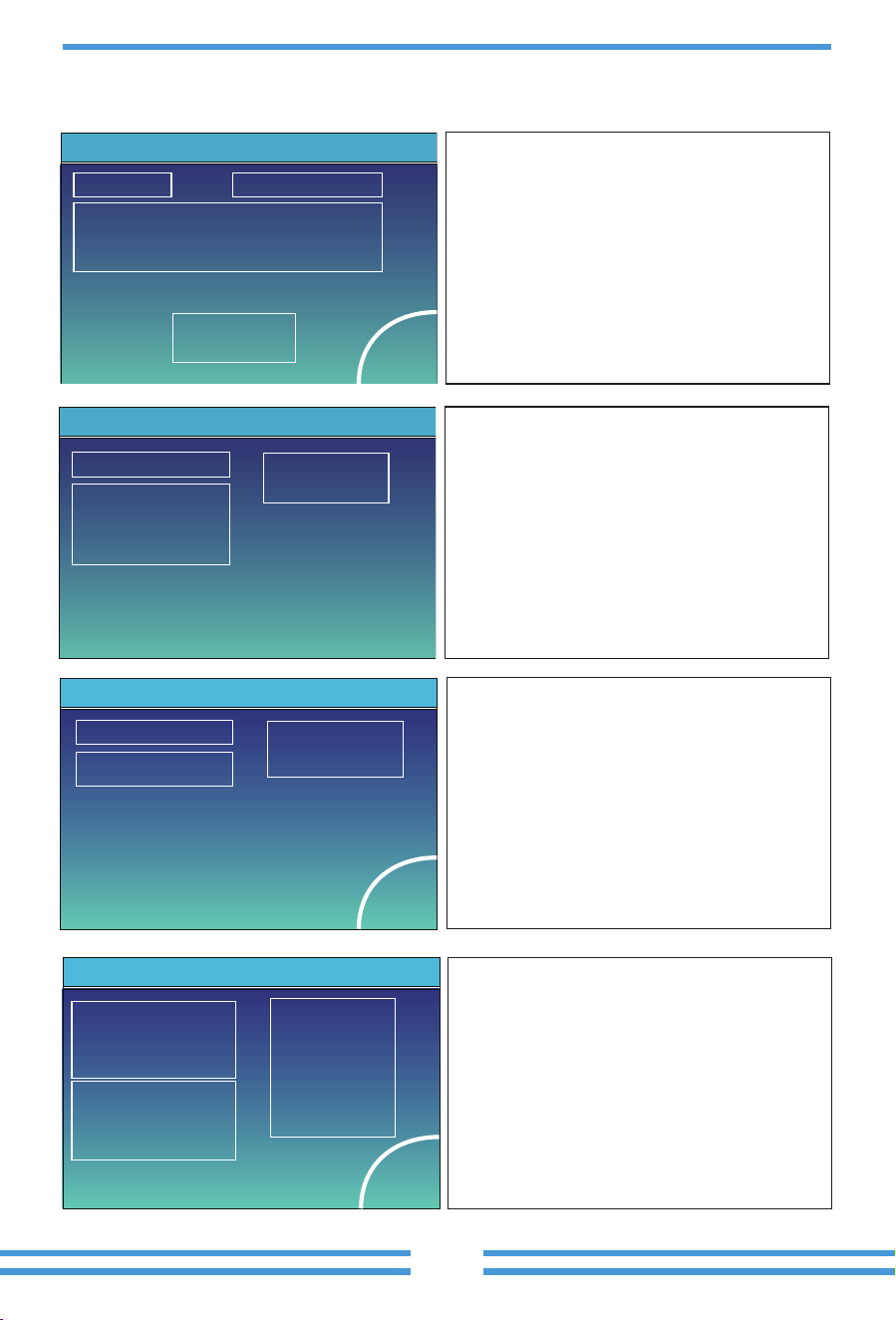
5.1.1 LCD opera�on flow chart
Main Screen
Solar Page Solar Graph
Grid Graph
BMS Page
Load Graph
Battery Setting
System Work Mode
Grid Setting
Gen Port Use
Basic Setting
Advanced Function
Device info
Grid Page
Inverter Page
Battery Page
Load Page
System Setup
- 29 -
- 30 -
Power: 0W
Stand-by
0.0Hz
Energy
CT1: 0W
L1: 0V L2: 0V
BUY
Today=0.0KWH
Total =8.60 KWH
Today=2.2KWH
Total =11.60 KWH
SELL
LD1: 0W
CT2: 0W
LD2: 0W
Grid
①
②
5.2 Solar Power Curve
③
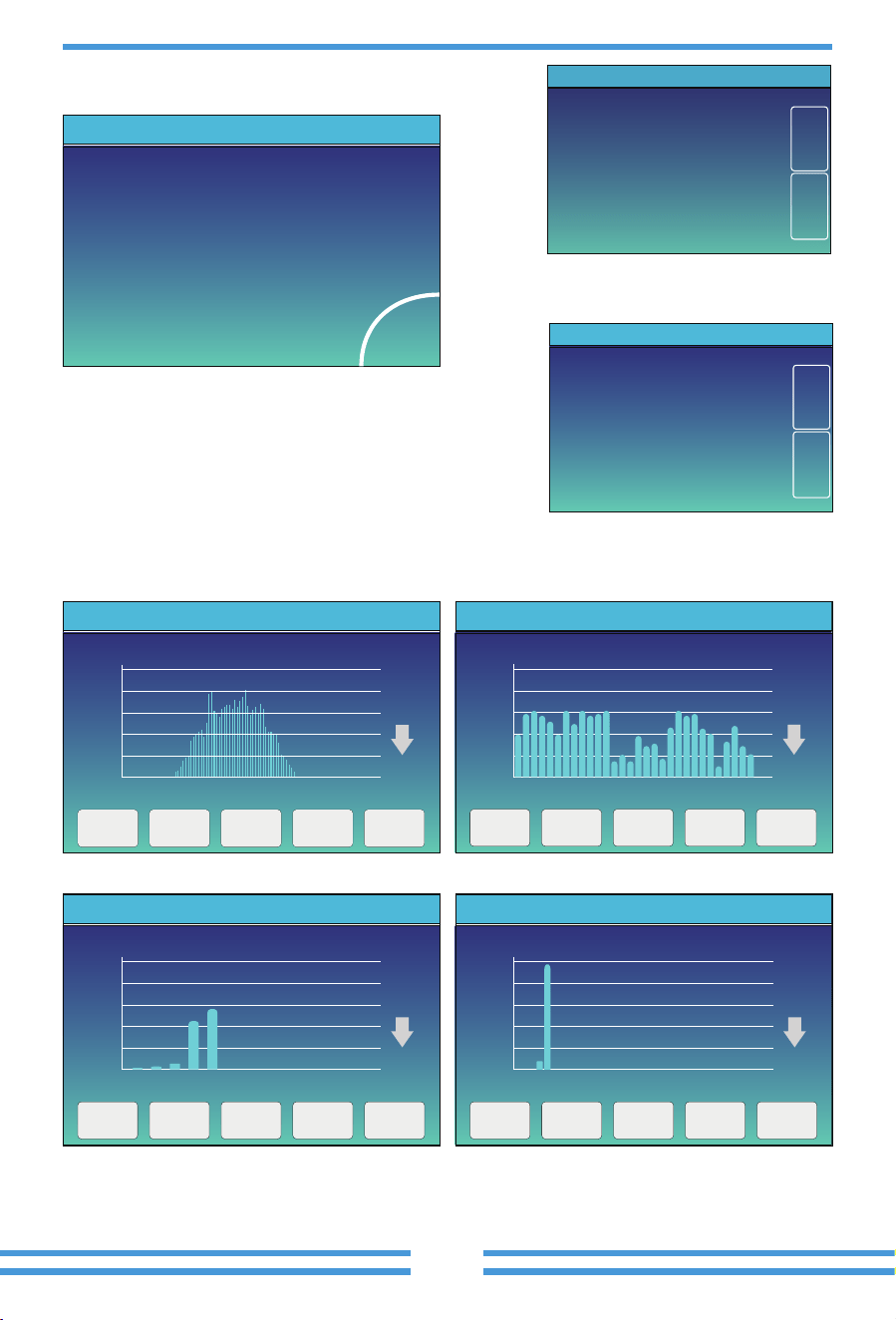
This is Grid detail page.
Press the “Energy “ bu�on will enter into the power
curve page.
①
②
③
Status, Power, Frequency.
CT1&CT2: External Current Sensor Power
BUY: Energy from Grid to Inverter,
L1&L2: Voltage for each Phase
LD1&LD2: Internal Current Sensor Power.
SELL: Energy from Inverter to Grid.
Power: 2923W Grid Tie Power: 2923W
Energy
Today=0.3 KWH
Total =3.90 KWH
PV1-V: 0V
PV1-I: 0A
P1: 0W
PV2-V: 0V
PV2-I: 0.1A
P2: 0W
PV3-V: 0V
PV3-I: 0.0A
P3: 0W
Solar
This is Solar Panel detail page.
Press the “Energy “bu�on will enter into the power
curve page.
③
④
①
②
③
④
Solar Panel Genera�on.
Grid Tie Power: when there’s a string inverter
AC couple at the grid or load side of hybrid inverter
and there’s a meter installed for the string inverter,
then the hybrid inverter LCD will show the string
inverter output power on its PV icon. Please make
sure the meter can communicate with the hybrid
inverter successfully.
Voltage, Current, Power for each MPPT.
Solar Panel energy for Day and Total.
① ②
Power: 0W Today=0.0 KWH
Total =0.40 KWHL: 0V
Load
Energy
①
②
③
Power: 44W DC-T:52.6C
AC-T:41.0C
L1: 240V
0.0Hz
l1:0.6A
Inverter
③①
②
This is Inverter detail page.
①
②
③
Inverter Genera�on.
0.0Hz: frequency a�er DC/AC.
Voltage, Current, Power for each Phase.
*DC-T: mean DC-DC temperature,
*Note: this part info is not avaiable for some
LCD FW.
AC-T: mean Heat-sink temperature.
This is Load detail page.
When you check “Selling First” or “Zero export to
Load” on system work mode page, the informa�on
on this page is about backup load which connect on
Load port of hybrid inverter.
When you check “Zero export to CT”on system work
mode page, the informa�on on this page is including
backup load and home load.
Press the “Energy “ bu�on will enter into the power
curve page.
①
②
③
Load Power.
Voltage, Power for each Phase.
Load consump�on for Day and Total.
Mean Voltage:50.34V Charging Voltage :53.2V
Total Current:55.00A Discharging Voltage :47.0V
Mean Temp :23.5C Charging current :50A
Total SOC :38% Discharging current :25A
Sum
Data
Details
Data
Dump Energy:57Ah
Request Force Charge
Li-BMS
Request Force Charge: It indicates the
BMS requests hybrid inverter to charge
the ba�ery ac�vely.
- 31 -
Stand-by
SOC: 36%
U:50.50V
I:-58.02A
Power: -2930W
Temp:30.0C
Batt
Li-BMS
Volt
1
2
3
50.38V 19.70A 30.6C 52.0% 26.0Ah 0.0V 0.0A 0|0|0
50.33V 19.10A 31.0C 51.0% 25.5Ah 53.2V 25.0A 0|0|0
50.30V 16.90A 30.2C 12.0% 6.0Ah 53.2V 25.0A 0|0|0
4
5
0.00V 0.00A 0.0C 0.0% 0.0Ah 0.0V 0.0A 0|0|0
0.00V 0.00A 0.0C 0.0% 0.0Ah 0.0V 0.0A 0|0|0
0.00V 0.00A 0.0C 0.0% 0.0Ah 0.0V 0.0A 0|0|0
0.00V 0.00A 0.0C 0.0% 0.0Ah 0.0V 0.0A 0|0|0
0.00V 0.00A 0.0C 0.0% 0.0Ah 0.0V 0.0A 0|0|0
0.00V 0.00A 0.0C 0.0% 0.0Ah 0.0V 0.0A 0|0|0
0.00V 0.00A 0.0C 0.0% 0.0Ah 0.0V 0.0A 0|0|0
0.00V 0.00A 0.0C 0.0% 0.0Ah 0.0V 0.0A 0|0|0
0.00V 0.00A 0.0C 0.0% 0.0Ah 0.0V 0.0A 0|0|0
0.00V 0.00A 0.0C 0.0% 0.0Ah 0.0V 0.0A 0|0|0
0.00V 0.00A 0.0C 0.0% 0.0Ah 0.0V 0.0A 0|0|0
0.00V 0.00A 0.0C 0.0% 0.0Ah 0.0V 0.0A 0|0|0
6
7
8
9
10
11
12
13
14
15
Curr
Volt Curr
Temp SOC Energy
Charge
Fault
Sum
Data
Details
Data
Li-BMS
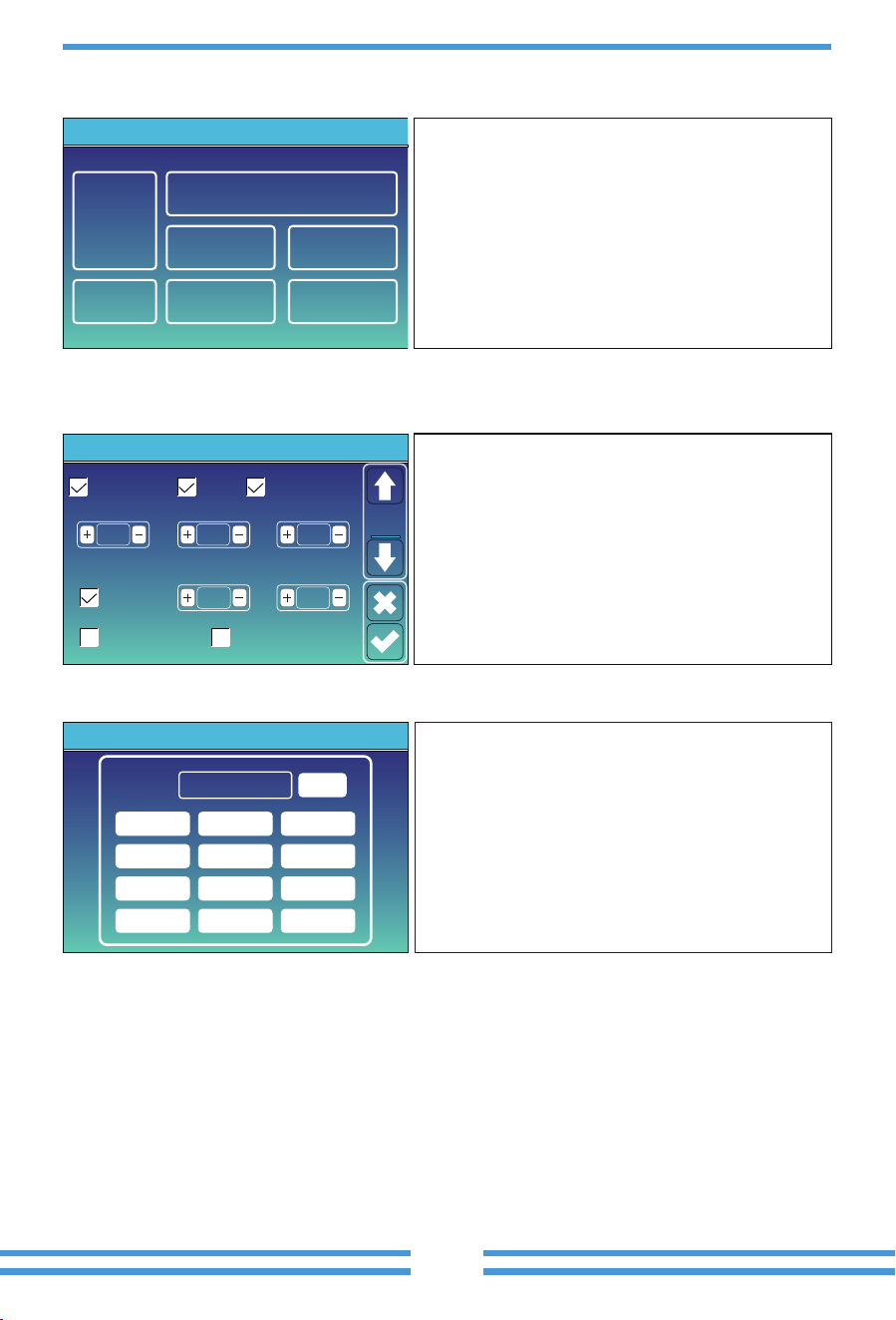
Solar power curve for daily, monthly, yearly and total can be roughly checked on the LCD, for more
accuracy power genera�on, pls check on the monitoring system. Click the up and down arrow to
check power curve of different period.
2019-5-28
20%
1 3 5 7 9 11 13 15 17 19 21 23
40%
60%
80%
100%
3000W
Solar Power Production:Day
5-2019
400
0
05 10 15 20 25 30
800
1200
1600
2000
2000Wh
System Solar Power:Month
CANCEL Day Month Year Total
2019
40
1 2 3 4 5 6 7 8 9 10 11 12
80
120
160
200
KWh
System Solar Power:Year
CANCEL Day Month Year Total
TOTAL
400
0
20 20 20 20 20 20 20 20 20 20 20 20 20 20 20 20 20
16 18 20 22 24 26 28 30 32 34 36 38 40 42 44 46 48
800
1200
1600
2000
2000KWh
CANCEL Day Month Year Total
System Grid Power:Total
5.3 Curve Page-Solar & Load & Grid
This is Ba�ery detail page.
if you use Lithium Ba�ery, you can enter BMS page.
CANCEL Day Month Year Total
- 32 -
5.4 System Setup Menu
5.5 Basic Setup Menu
System Work Mode
Battery
Setting
Grid Setting
Gen Port
Use
Basic
Setting
System Setup
Device Info.
Advanced
Function
Basic
Set
Time Syncs Beep Auto Dim
24-Hour
Basic Setting
Year Month Day
Hour Minute
Lock out all changesFactory Reset
2019 03
09 15
17
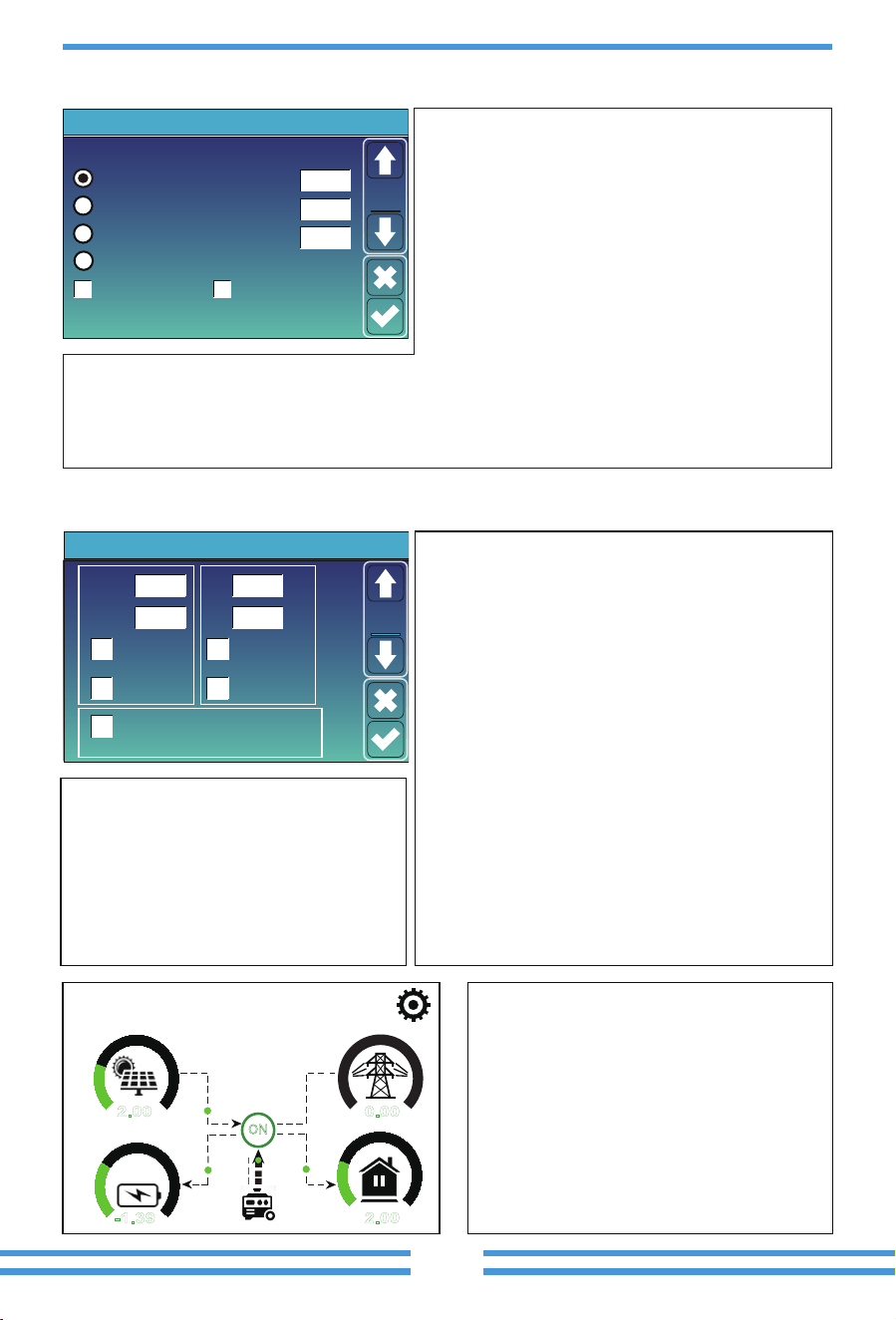
Factory Reset: Reset all parameters of the inverter.
Lock out all changes: Enable this menu for se�ng
parameters that require locking and cannot be set up.
Before performing a successful factory reset and locking
the systems, to keep all changes you need to type in a
password to enable the se�ng.
The password for factory se�ngs is 9999 and for lock
out is 7777.
This is System Setup page.
PassWord
DELX--X--X--X
1 2 3
4 5 6
7 8 9
CANCEL 0 OK
Factory Reset Password: 9999
Lock out all changes Password: 7777
System selfchek: A�er �cking this item,
it needs input the password.
The default password is 1234
- 33 -
5.6 Ba�ery Setup Menu
07/08/2021 11:11:10 Thu
76%
2.00
KW
-1.39
KW
0.00
KW
KW
0 7
0 5
0 5
0 5
ON
Signal
on
2.00
This page tells the PV and diesel generator
power the load and ba�ery.
Batt Mode
Lithium
Use Batt V
Battery Setting
Activate Battery Disable Float Charge
Max A Charge
Batt Capacity
Max A Discharge 40A
40A
400Ah
Batt
Mode
Use Batt %
No Batt
Ba�ery capacity: it tells Deye hybrid inverter to know
your ba�ery bank size.
Use Ba� V: Use Ba�ery Voltage for all the se�ngs (V).
Use Ba� %: Use Ba�ery SOC for all the se�ngs (%).
Max. A charge/discharge: Max ba�ery charge/discharge
current(0-90A for 3.6kW model, 0-120A for 5kW model,
0-135A for 6kW model, 0-190A for 7.6/8kW model,
0-220A for 10kW model, 0-250A for 12kW model).
For AGM and Flooded, we recommend Ah ba�ery
size x 20%= Charge/Discharge amps.
. For Lithium, we recommend Ah ba�ery size x 50% =
Charge/Discharge amps.
. For Gel, follow manufacturer' s instruc�ons.
No Ba�: �ck this item if no ba�ery is connected to the
system.
Ac�ve ba�ery: This feature will help recover a ba�ery that is over discharged by slowly charging from
the solar array or grid.
Disable Float Charge: For the lithium ba�ery with BMS communica�on, the inverter will keep the
charging voltage at the current voltage when the BMS charging current requested is 0. It is used to help
prevent ba�ery from being overcharged.
Grid ChargeGen Charge
Grid SignalGen Signal
Gen Force
Battery Setting
Start
A
30% 30%
40A
40A
Batt
Set2
①
②
③
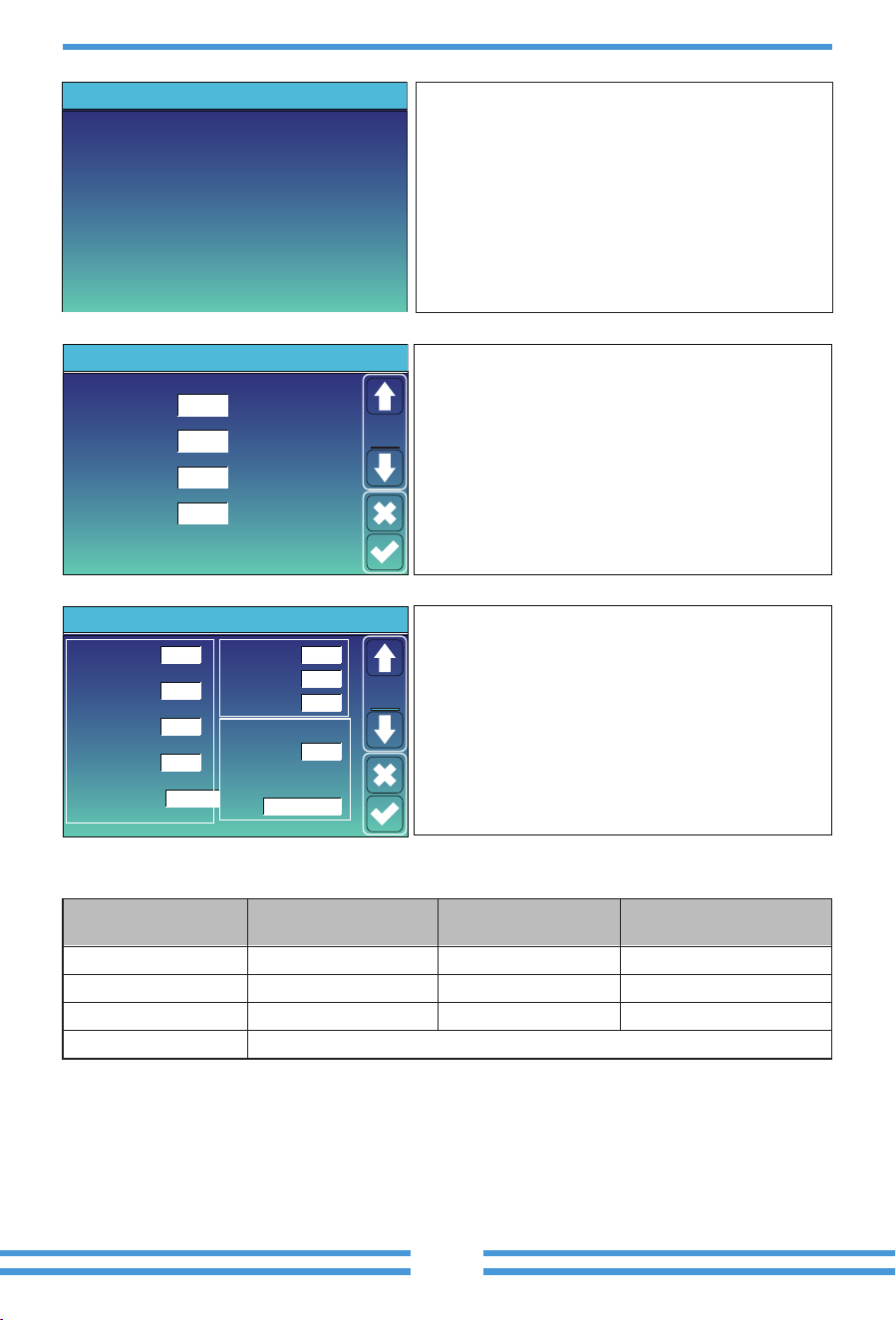
This is Ba�ery Setup page.
Start =30%: Percent S.O.C at 30% system will AutoStart a
connected generator to charge the ba�ery bank.
A = 40A: Charge rate of 40A from the a�ached
generator in Amps.
Gen Charge: uses the gen input of the system to charge
ba�ery bank from an a�ached generator.
Gen Signal: Normally open relay that closes when the
Gen Start signal state is ac�ve.
Gen Force: When the generator is connected, it is forced
to start the generator without mee�ng other condi�ons.
①③
Start =30%: No use,Just for customiza�on.
A = 40A: It indicates the Current that the
Grid charges the Ba�ery.
Grid Charge: It indicates that the grid charges
the ba�ery.
Grid Signal: Disable.
This is Grid Charge, you need select. ②
- 34 -
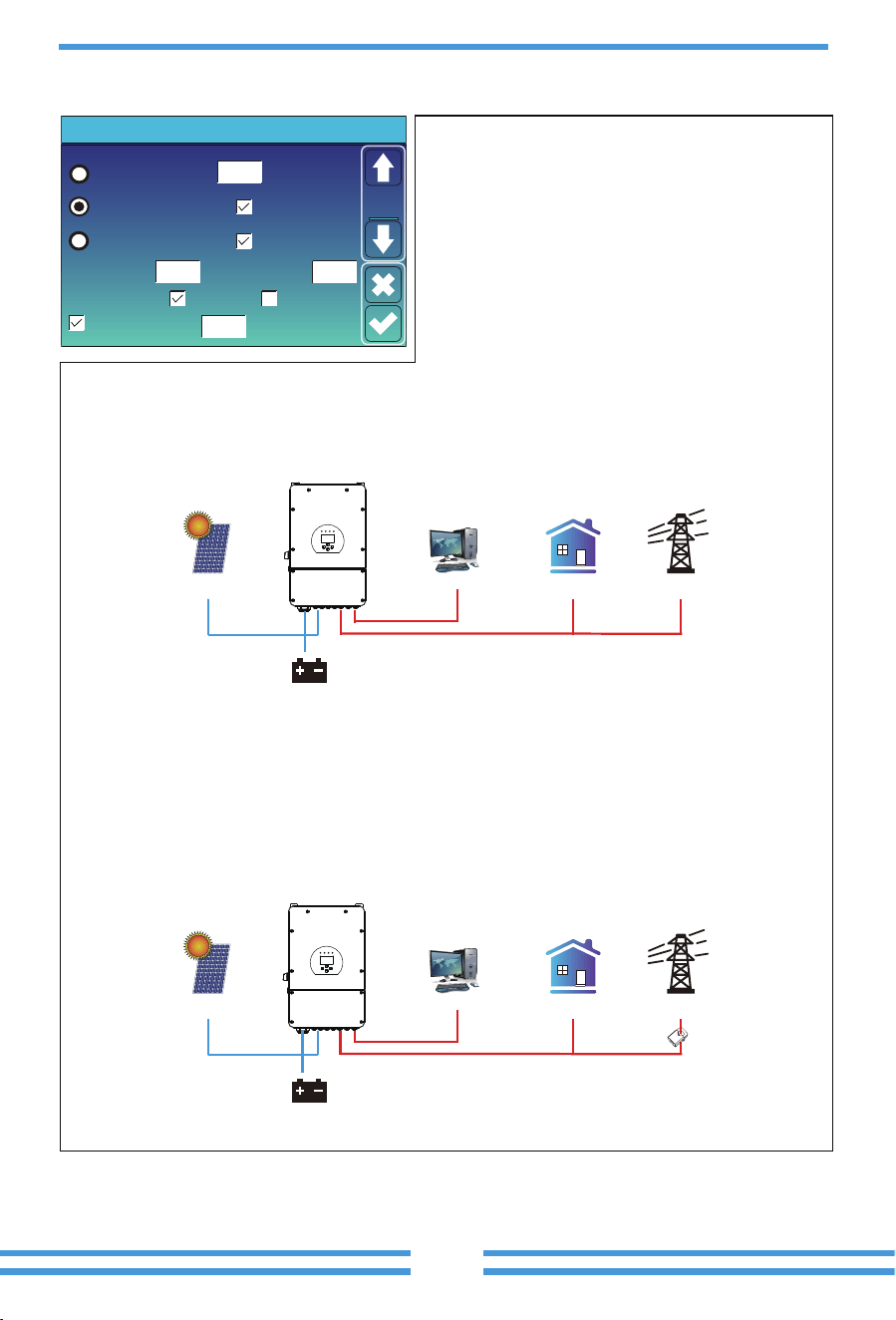
There are 3 stages of charging the Ba�ery .
①
②
This is for professional installers, you can keep it
if you do not know.
Shutdown 20%: The inverter will shutdown if the SOC
below this value.
Low Ba� 35%: The inverter will alarm if the SOC
below this value.
Restart 50%: Ba�ery SOC at 50% AC output will resume.
③
Float V 53.6V 20%
35%
50%
-5
Absorption V
57.6V
Equalization V
57.6V
Equalization Days
Shutdown
Low Batt
Restart
TEMPCO(mV/C/Cell)
Batt Resistance
30 days
Equalization Hours
3.0 hours
25mOhms
Battery Setting
Set3
Batt
①
②
③
Recommended ba�ery se�ngs
Baery Type
AGM (or PCC)
Absorpon Stage
14.2V (57.6V) 13.4V (53.6V)
Float Stage
Equalizaon Voltage
(every 30 days 3hr )
14.2V (57.6V)
Gel 14.1V (56.4V) 13.5V (54.0V)
Wet 14.7V (59.0V) 13.7V (55.0V) 14.7V (59.0V)
Lithium Follow its BMS voltage parameters
Lithium Mode
Shutdown
Low Batt
Restart
40%
20%
10%
00
Battery Setting
Set3
Batt
Lithium Mode: This is BMS protocol.Please reference
the document(Approved Ba�ery).
Shutdown 10%: It indicates the inverter will shutdown
if the SOC below this value.
Low Ba� 20%: It indicates the inverter will alarm if the
SOC below this value.
Restart 40%: Ba�ery voltage at 40% AC output will
resume.
This page tells generator output voltage, frequency,
power. And, how much energy is used from generator.
Power: 1392W
L1: 228V
Freq:50.0Hz
Today=0.0 KWH
Total =2.20 KWH
Generator
- 35-
5.7 System Work Mode Setup Menu
Zero Export To Load
Max Solar Power
Zero Export To CT
Max Sell Power
Energy pattern
BattFirst LoadFirst
System Work Mode
Solar Sell
Solar Sell
8000
8000
Power
8000
Zero-export Power
20
Selling First
Work
Mode1
Grid Peak Shaving
Work Mode
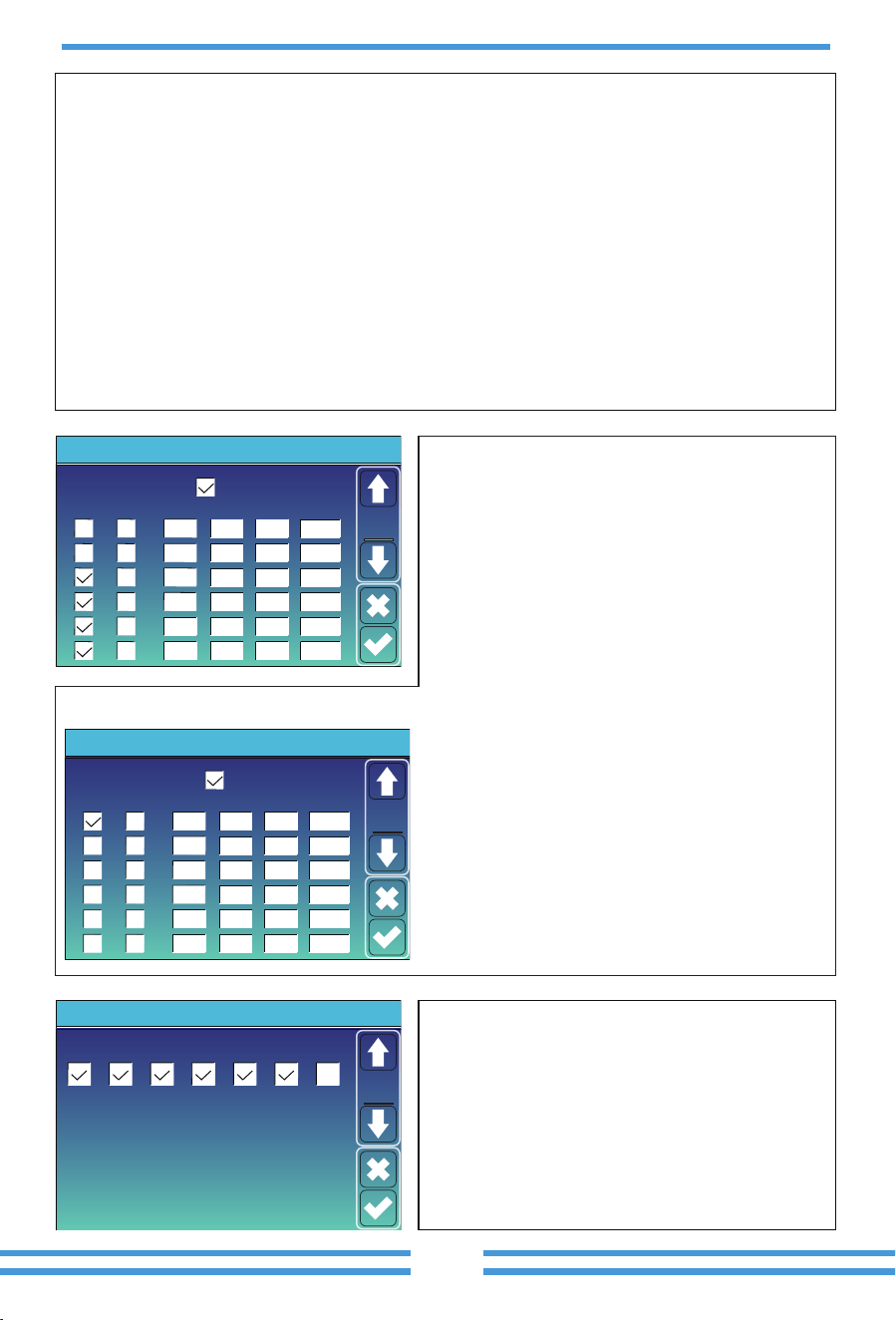
Selling First: This Mode allows hybrid inverter to sell
back any excess power produced by the solar panels to
the grid. If �me of use is ac�ve, the ba�ery energy also
can be sold into grid.
The PV energy will be used to power the load and charge
the ba�ery and then excess energy will flow to grid.
Power source priority for the load is as follows:
1. Solar Panels.
2. Grid.
3. Ba�eries (un�l programable % discharge is reached).
Zero Export To Load: Hybrid inverter will only provide power to the backup load connected. The hybrid
inverter will neither provide power to the home load nor sell power to grid. The built-in CT will detect
power flowing back to the grid and will reduce the power of the inverter only to supply the local load and
charge the ba�ery.
Zero Export To CT: Hybrid inverter will not only provide power to the backup load connected but also give
power to the home load connected. If PV power and ba�ery power is insufficient, it will take grid energy
as supplement. The hybrid inverter will not sell power to grid. In this mode, a CT is needed. The installa�on
method of the CT please refer to chapter 3.6 CT Connec�on. The external CT will detect power flowing back
to the grid and will reduce the power of the inverter only to supply the local load, charge ba�ery and home
load.
GridBackup Load On-Grid Home Load
Battery
Solar
CT
GridBackup Load On-Grid Home Load
Battery
Solar
- 36 -
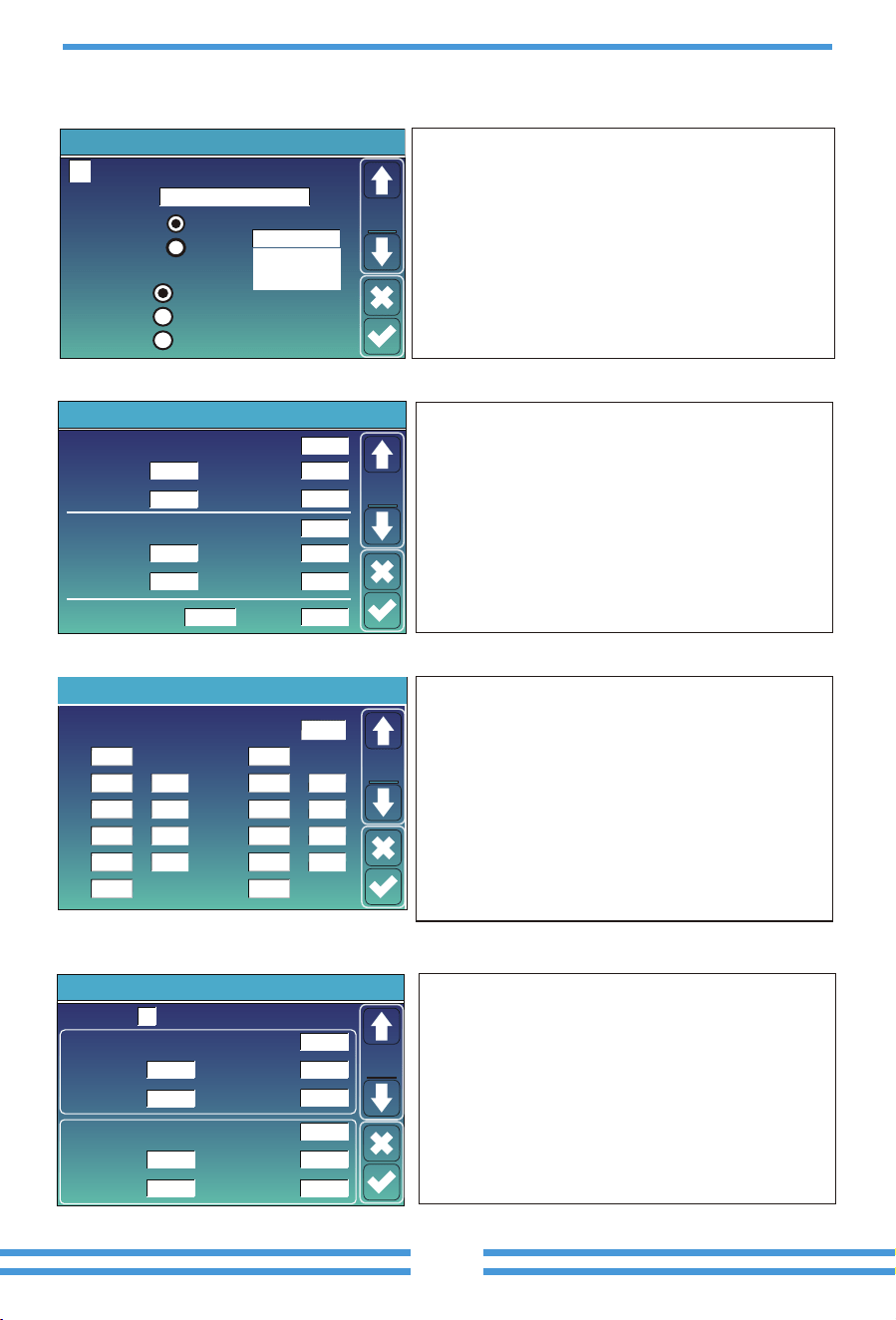
Time of use: it is used to program when to use grid or
generator to charge the ba�ery, and when to discharge
the ba�ery to power the load. Only �ck "Time Of Use"
then the follow items (Grid, charge, �me, power etc.)
will take effect.
Note: when in selling first mode and click �me of use,
the ba�ery power can be sold into grid.
Grid charge: u�lize grid to charge the ba�ery in a �me
period.
Gen charge:
u�lize diesel generator to charge the ba�ery
in a �me period.
Time: real �me, range of 01:00-24:00.
Power: Max. discharge power of ba�ery allowed.
Ba�(V or SOC %): ba�ery SOC % or voltage at when the
ac�on is to happen.
Time Of Use
Time
System Work Mode
Batt
Grid
Charge
Gen
01:00
05:00
09:00
13:00
17:00
21:00
5:00
9:00
13:00
17:00
21:00
01:00
Power
5000
5000
5000
5000
5000
5000
49.0V
50.2V
50.9V
51.4V
47.1V
49.0V
Work
Mode2
During 01:00-05:00, when ba�ery SOC is lower than 80%, it will
use grid to charge the ba�ery un�l ba�ery SOC reaches 80%.
During 05:00-08:00 and 08:00-10:00, when ba�ery SOC is higher
than 40%, hybrid inverter will discharge the ba�ery un�l the SOC
reaches 40%.
During 10:00-15:00, when ba�ery SOC is higher than 80%, hybrid
inverter will discharge the ba�ery un�l the SOC reaches 80%.
During 15:00-18:00, when ba�ery SOC is higher than 40%, hybrid
inverter will discharge the ba�ery un�l the SOC reaches 40%.
During 18:00-01:00, when ba�ery SOC is higher than 35%, hybrid
inverter will discharge the ba�ery un�l the SOC reaches 35%.
Time Of Use
Time
System Work Mode
Batt
Grid
Charge
Gen
01:00
05:00
08:00
10:00
15:00
18:00
5:00
8:00
10:00
15:00
18:00
01:00
Power
5000
5000
5000
5000
5000
5000
80%
40%
40%
80%
40%
35%
Work
Mode2
For example:
Solar Sell:
“Solar sell” is for Zero export to load or Zero export to CT: when this item is ac�ve, the surplus
energy can be sold back to grid. When it is ac�ve, PV Power source priority usage is as follows: load
consump�on and charge ba�ery and feed into grid.
Max. sell power:
Allowed the maximum output power to flow to grid.
Zero-export Power:
for zero-export mode, it tells the grid output power. Recommend to set it as 20-100W
to ensure the hybrid inverter won' t feed power to grid.
Energy Pa�ern:
PV Power source priority.
Ba� First:
PV power is firstly used to charge the ba�ery and then used to power the load. If PV power is
insufficient, grid will make supplement for ba�ery and load simultaneously.
Load First:
PV power is firstly used to power the load and then used to charge the ba�ery. If PV power is
insufficient, grid will make supplement for ba�ery and load simultaneously.
Max Solar Power:
allowed the maximum DC input power.
Grid Peak-shaving:
when it is ac�ve, grid output power will be limited within the set value. If the load
power exceeds the allowed value, it will take PV energy and ba�ery as supplement. If s�ll can’t meet the
load requirement, grid power will increase to meet the load needs.
Mon
System Work Mode
Tue Wed Thu Fri Sat Sun
Work
Mode4
It allows users to choose which day to execute the
se�ng of “Time of Use”.
For example, the inverter will execute the �me of use
page on Mon/Tue/Wed/Thu/Fri/Sat only.
- 37 -
5.8 Grid Setup Menu
FW: this series inverter is able to adjust inverter output
power according to grid frequency.
Droop f: percentage of nominal power per Hz
For example, “Start freq f>50.2Hz, Stop freq f<50.2,
Droop f=40%PE/Hz” when the grid frequency reaches
50.2Hz, the inverter will decrease its ac�ve power at
Droop f of 40%. And then when grid system frequency
is less than 50.2Hz, the inverter will stop decreasing
output power.
For the detailed setup values, please follow the local
grid code.
Grid Setting/F(W)
F(W)
Start freq f
Over frequency
50.20Hz
Start delay f
0.00s
Stop freq f 50.20Hz
Droop f
40
%PE/Hz
Stop delay f
0.00s
Start freq f
Under frequency
49.80Hz
Start delay f
Stop freq f 49.80Hz
Droop f 40%PE/Hz
Stop delay f
0.00s
0.00s
Grid
Set4
Reconnection Time PF
60s
Grid Setting/Connect
Low frequency
Normal connect
48.00Hz
Low voltage
185.0V
High frequency 51.50Hz
Normal Ramp rate 60s
Reconnect Ramp rate 60s
High voltage
265.0V
Low frequency
Reconnect after trip
Low voltage
High frequency
51.30Hz
High voltage
263.0V
48.20Hz
187.0V
Grid
Set2
Normal connect: The allowed grid voltage/frequency
range when the inverter first �me connect to the grid.
Normal Ramp rate: It is the startup power ramp.
Reconnect a�er trip: The allowed grid voltage
/frequency range for the inverter connects the grid
a�er the inverter trip from the grid.
Reconnect Ramp rate:It is the reconnec�on power ramp.
Reconnec�on �me: The wai�ng �me period for the
inverter connects the grid again.
PF: Power factor which is used to adjust inverter
reac�ve power.
Over voltage U>(10 min. running mean)
Grid Setting/IP Protection
260.0V
Set3
Grid
--
HV1
265.0V
0.10s
--
HV2
265.0V
0.10s
HV3
--
LV1
185.0V
0.10s
--
LV2
185.0V
0.10s
185.0V
LV3
--
HF1
51.50Hz
0.10s
--
HF2
0.10s
HF3
--
LF1
48.00Hz
0.10s
--
LF2
0.10s
LF3
①
②
① ②
0.10s—Trip �me.
LV1: Level 1 undervoltage protec�on point;
LV2: Level 2 undervoltage protec�on point;
LV3: Level 3 undervoltage protec�on point.
HV1: Level 1 overvoltage protec�on point;
HV2: Level 2 overvoltage protec�on point;
HV3: Level 3 overvoltage protec�on point.
HF1: Level 1 over frequency protec�on point;
HF2: Level 2 over frequency protec�on point;
HF3: Level 3 over frequency protec�on point.
LF1: Level 1 under frequency protec�on point;
LF2: Level 2 under frequency protec�on point;
LF3: Level 3 under frequency protec�on point.
265.0V
51.50Hz
51.50Hz
48.00Hz
48.00Hz
1.000
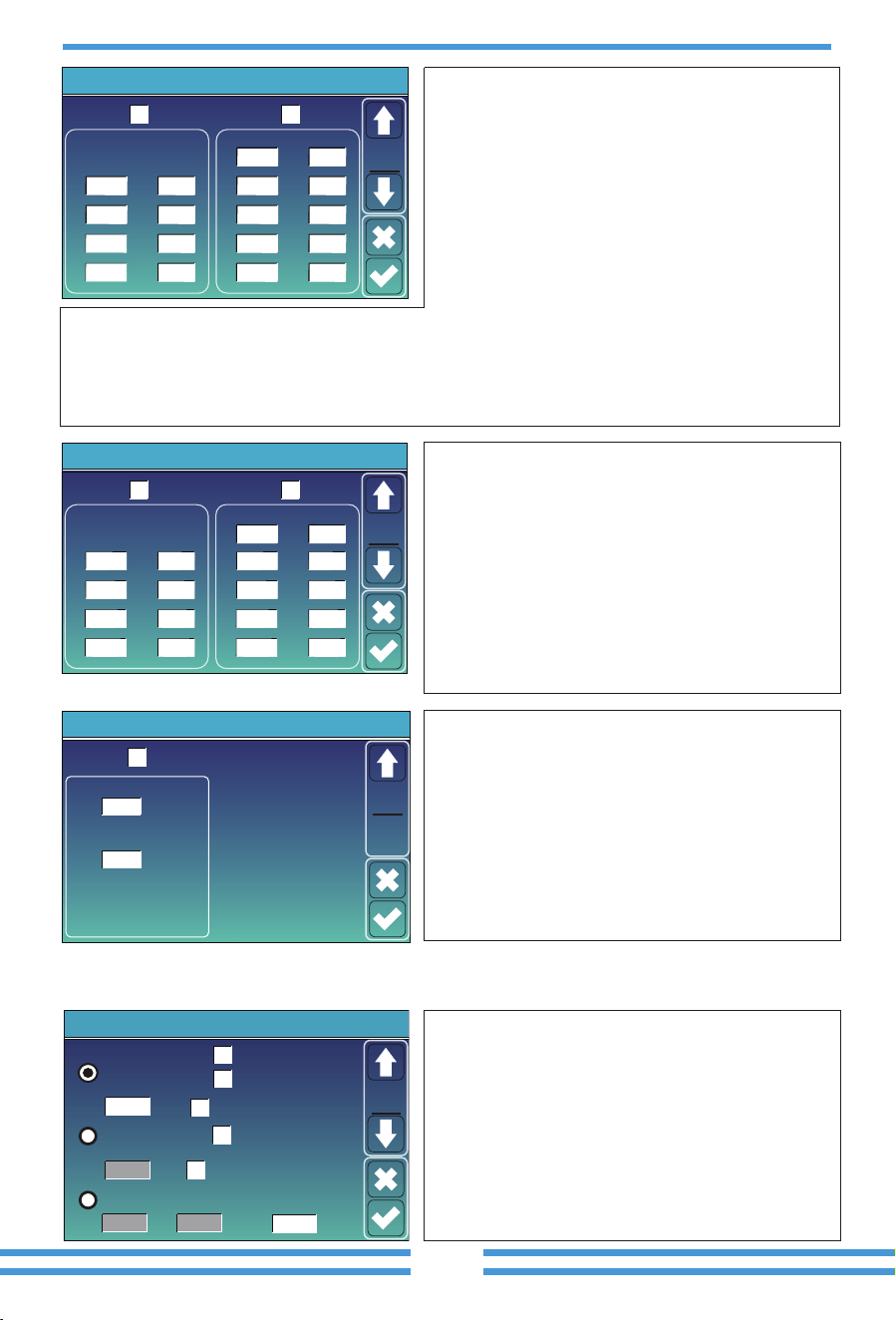
Grid Mode: General Standard、UL1741 & IEEE1547、
CPUC RULE21、SRD-UL-1741、CEI 0-21、EN50549_CZ、
Australia_A、Australia_B、Australia_C、NewZealand、
VDE4105、OVE_Direc�ve_R25、EN50549_CZ_PPDS_L16A、
NRS097、G98/G99、G98/G99_NI、ESB Networks(Ireland).
Please follow the local grid code and then choose the
corresponding grid standard.
0/16
Grid Setting
Grid Mode
Grid
Set1
Grid Frequency
50HZ
60HZ
General Standard
INV Output Voltage
220V
240V
230V
200V
Grid Type
120/240V Split Phase
120/208V 3 Phase
Single Phase
Unlock Grid Setting
Unlock Grid Se�ng: before changing the grid parameters,
please enable this with password of 7777. Then it is
allowed to change the grid parameters.
- 38 -
Grid Setting/V(W) V(Q)
V(W) V(Q)
V1
109.0%
P2
V2
110.0%
P3
P4
V3
111.0%
V4
111.0%
P1
100%
20%
20%
20%
Lock-in/Pn Lock-out/Pn
V1
90.0%
Q2
V2
95.7%
Q3
Q4
V3
104.3%
V4
112.2%
Q1
44%
0%
0%
-60%
Grid
Set5
V(W): It is used to adjust the inverter ac�ve power
according to the set grid voltage.
V(Q): It is used to adjust the inverter reac�ve power
according to the set grid voltage.
This func�on is used to adjust inverter output power
(ac�ve power and reac�ve power) when grid voltage
changes.
For example: V2=110%, P2=20%. When the grid voltage reaches the 110% �mes of rated grid voltage,
inverter output power will reduce its ac�ve output power to 20% rated power.
For example: V1=90%, Q1=44%. When the grid voltage reaches the 90% �mes of rated grid voltage,
inverter output power will output 44% reac�ve output power.
For the detailed setup values, please follow the local grid code.
Grid Setting/P(Q) P(F)
P(Q) P(PF)
P1
0%
Q2
P2
0%
Q3
Q4
P3
0%
P4
0%
Q1
0%
0%
0%
0%
P1
0%
PF2P2
0%
PF3
PF4
P3
0%
P4
0%
PF1
-2.400
0.000
0.000
6.000
Grid
Set6
P(Q): It is used to adjust the inverter reac�ve power
according to the set ac�ve power.
P(PF): It is used to adjust the inverter PF according
to the set ac�ve power.
For the detailed setup values, please follow the local
grid code.
Lock-in/Pn Lock-out/Pn
Grid Setting/LVRT
L/HVR
HV1
115%
LV1
50%
Grid
Set7
Reserved: This func�on is reserved.It is not
recommended.
5%
20%
50%
50%
Lock-in/Pn 5%: When the inverter ac�ve power is less
than 5% rated power, the VQ mode will not take effect.
Lock-out/Pn 20%: If the inverter ac�ve power is
increasing from 5% to 20% rated power, the VQ mode
will take effect again.
Lock-in/Pn 50%: When the inverter output ac�ve power
is less then 50% rated power, it won't enter the P(PF)
mode.
Lock-out/Pn 50%: When the inverter output ac�ve
power is higher then 50% rated power, it will enter the
P(PF) mode.
Note : only when the grid voltage is equal to or higher
than 1.05�mes of rated grid voltage, then the P(PF)
mode will take effect.
5.9 Generator Port Use Setup Menu
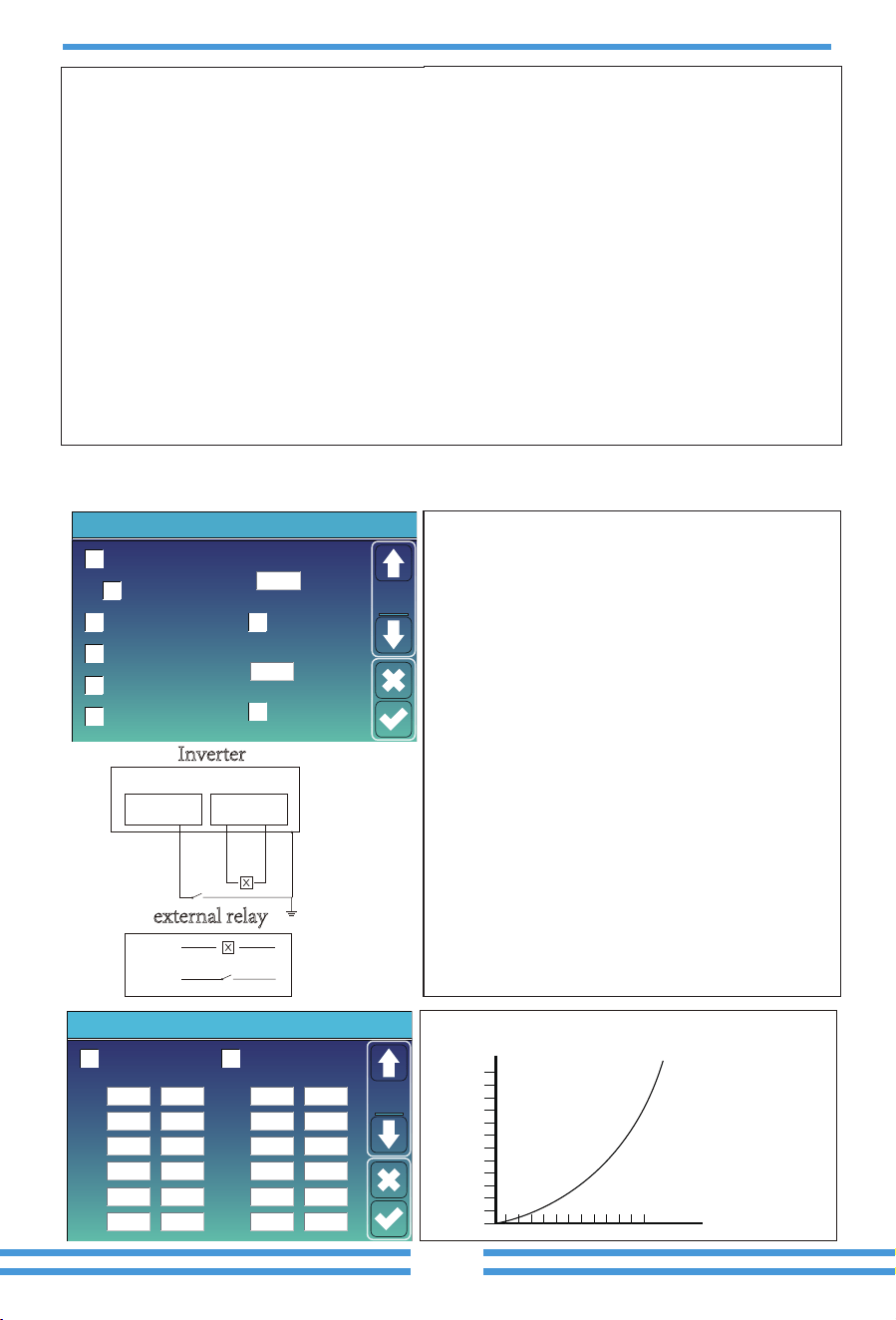
Generator input rated power: allowed Max. power from diesel
generator.
GEN connect to grid input: connect the diesel generator to the
grid input port.
Smart Load Output: This mode u�lizes the Gen input connec�on
as an output which only receives power when the ba�ery SOC
and PV power is above a user programmable threshold.
e.g. Power=500W, ON: 100%, OFF=95%: When the PV power
exceeds 500W, and ba�ery bank SOC reaches 100%, Smart Load
Port will switch on automa�cally and power the load connected.
When the ba�ery bank SOC < 95% or PV power < 500w, the
Smart Load Port will switch off automa�cally.
Set1
Mode
OFFON
Generator Input
SmartLoad Output
Micro Inv Input
On Grid always on
off grid immediately off
GEN PORT USE
52.00Hz
100%
95%
Power
Rated Power
AC Couple Fre High
500W
8000W
PORT
Set1
GEN connect to Grid input
AC couple on grid side
AC couple on load side
- 39 -
Smart Load OFF Ba�
• Ba�ery SOC at which the Smart load will switch off.
Smart Load ON Ba�
• Ba�ery SOC at which the Smart load will switch on. Also, the PV input power should exceed the se�ng value (Power)
simultaneously and then the Smart load will switch on.
On Grid always on: When click "on Grid always on" the smart load will switch on when the grid is present.
off grid immediately off: the smart load will stop working immediately when the grid is disconnected if this item is ac�ve.
Micro Inv Input: To use the Generator input port as a micro-inverter on grid inverter input (AC coupled), this feature will
also work with "Grid-Tied" inverters.
*Micro Inv Input OFF: when the ba�ery SOC exceeds se�ng value, Microinveter or grid-�ed inverter will shut down.
*Micro Inv Input ON: when the ba�ery SOC is lower than se�ng value, Microinveter or grid-�ed inverter will start to work.
AC Couple Fre High: If choosing“Micro Inv input”, as the ba�ery SOC reaches gradually se�ng value (OFF), During the
process, the microinverter output power will decrease linear. When the ba�ery SOC equals to the se�ng value (OFF),
the system frequency will become the se�ng value (AC couple Fre high) and the Microinverter will stop working.
Stop expor�ng power produced by the microinverter to the grid.
*Note
: Micro Inv Input OFF and On is valid for some certain FW version only.
*AC couple on load side
: connec�ng the output of on-grid inverter at the load port of the hybrid inverter. In this
situa�on, the hybrid inverter will not able to show the load power correctly.
*AC couple on grid side
: this func�on is reserved.
*Note
: Some firmware versions don’t have this func�on.
This is for Wind Turbine
16.5
0
310
I/A
U/V
DC 1 for WindTurbine
V1
V2
V3
V4
V5
V6
V7
V8
V9
V10
V11
V12
90V
110V
130V
150V
170V
190V
0.0A
1.5A
3.0A
4.5A
6.0A
7.5A
210V
230V
250V
270V
290V
310V
9.0A
10.5A
12.0A
13.5A
15.0A
16.5A
DC 2 for WindTurbine
Advanced Function
Wind
Set2
5.10 Advanced Func�on Setup Menu
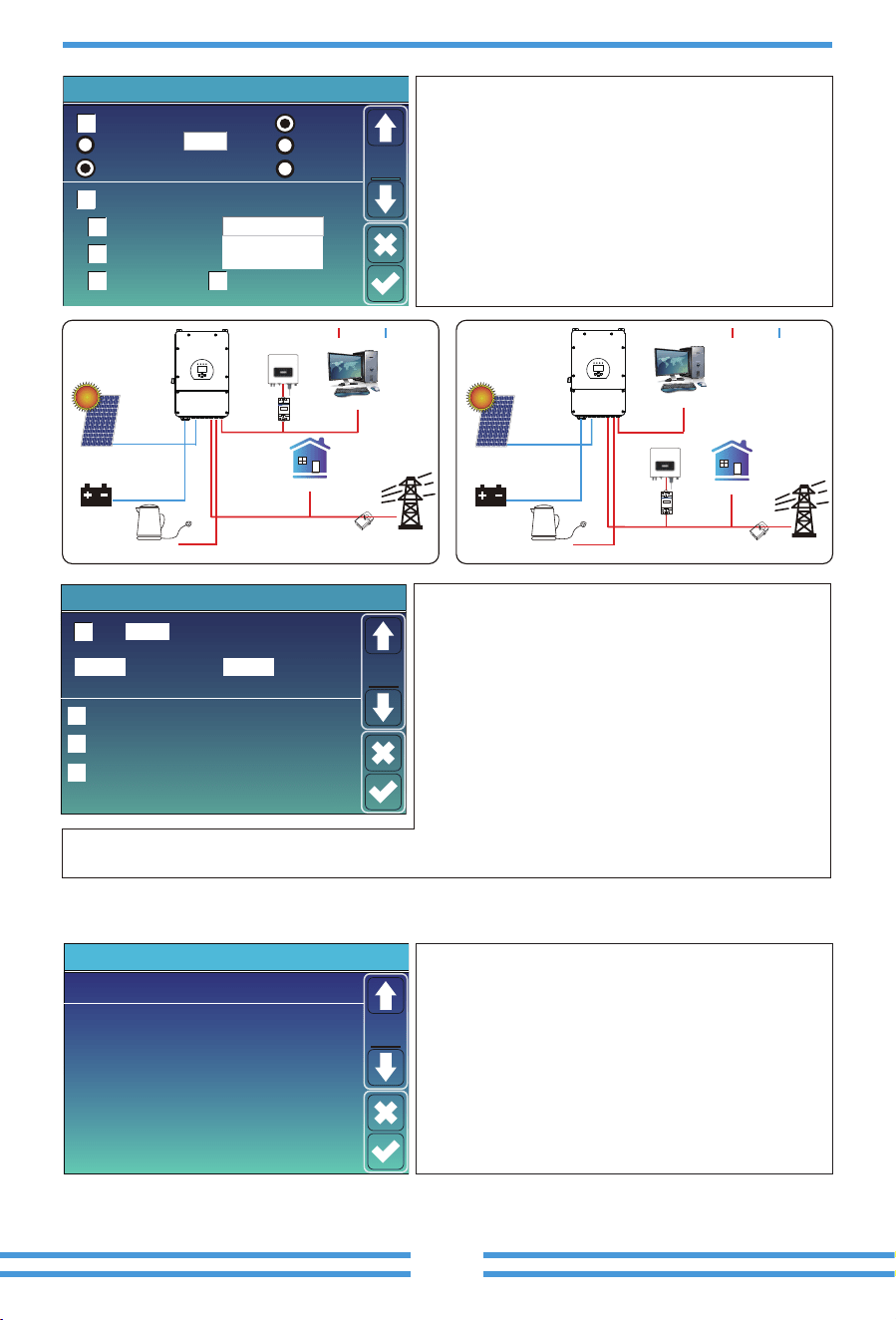
Solar Arc Fault ON(Op�onal):
This feature is op�onal. A�er
enabling this func�on, the inverter will detect whether there is
a arcing fault on the PV side. If arcing occurs, the inverter will
report a fault and stop outpu�ng power.
Clear Arc_Fault(Op�onal):
A�er the arc fault on the PV side is
eliminated, enabling this func�on can eliminate the arc fault
alarm of the inverter and restore normal opera�on of the inverter.
System selfcheck:
Disable. this is only for factory.
Gen Peak-shaving:
Enable When the power of the generator
exceeds the rated value of it, the inverter will provide the
redundant part to ensure that the generator will not overload.
DRM:
For AS4777 standard
Backup Delay:
When the grid cuts off, the inverter will give
output power a�er the se�ng �me.
For example, backup delay: 3ms. the inverter will give output
power a�er 3ms when the grid cuts off.
Note: for some old FW version, the func�on is not available.
BMS_Err_Stop:
When it is ac�ve, if the ba�ery BMS failed to
communicate with inverter, the inverter will stop working and
report fault.
Signal ISLAND MODE:
when "signal island mode" is checked
and the inverter connects the grid, the ATS port voltage will be
0. When "signal island mode" is checked and the inverter
disconnected from the grid, the ATS port voltage will output
230Vac voltage. With this feature and outside NO type relay,
it can realize N and PE disconnec�on or bond.
More details, please refer to le� side picture.
coil
external relay
open
contact
L N ATS
load port
Inverter
shell
Ground cable
230V
Solar Arc Fault ON(Optional)
Clear Arc_Fault(Optional)
System selfcheck
BMS_Err_Stop
0ms
2000:1
Backup Delay
Advanced Function
Func
Set1
DRM
Gen peak-shaving
CEI 0-21 Report
CT Ratio
Signal ISLAND MODE
- 40 -
6. Mode
5.11 Device Info Setup Menu
HMI: LCD version
Volt
1
2
3
50.38V 19.70A 30.6C 52.0% 26.0Ah 0.0V 0.0A 0|0|0
50.33V 19.10A 31.0C 51.0% 25.5Ah 53.2V 25.0A 0|0|0
50.30V 16.90A 30.2C 12.0% 6.0Ah 53.2V 25.0A 0|0|0
4
5
0.00V 0.00A 0.0C 0.0% 0.0Ah 0.0V 0.0A 0|0|0
0.00V 0.00A 0.0C 0.0% 0.0Ah 0.0V 0.0A 0|0|0
0.00V 0.00A 0.0C 0.0% 0.0Ah 0.0V 0.0A 0|0|0
0.00V 0.00A 0.0C 0.0% 0.0Ah 0.0V 0.0A 0|0|0
0.00V 0.00A 0.0C 0.0% 0.0Ah 0.0V 0.0A 0|0|0
0.00V 0.00A 0.0C 0.0% 0.0Ah 0.0V 0.0A 0|0|0
0.00V 0.00A 0.0C 0.0% 0.0Ah 0.0V 0.0A 0|0|0
0.00V 0.00A 0.0C 0.0% 0.0Ah 0.0V 0.0A 0|0|0
0.00V 0.00A 0.0C 0.0% 0.0Ah 0.0V 0.0A 0|0|0
0.00V 0.00A 0.0C 0.0% 0.0Ah 0.0V 0.0A 0|0|0
0.00V 0.00A 0.0C 0.0% 0.0Ah 0.0V 0.0A 0|0|0
0.00V 0.00A 0.0C 0.0% 0.0Ah 0.0V 0.0A 0|0|0
6
7
8
9
10
11
12
13
14
15
Curr
Volt Curr
Temp SOC Energy
Charge
Fault
Sum
Data
Details
Data
Li-BMS
Volt
1
2
3
50.38V 19.70A 30.6C 52.0% 26.0Ah 0.0V 0.0A 0|0|0
50.33V 19.10A 31.0C 51.0% 25.5Ah 53.2V 25.0A 0|0|0
50.30V 16.90A 30.2C 12.0% 6.0Ah 53.2V 25.0A 0|0|0
4
5
0.00V 0.00A 0.0C 0.0% 0.0Ah 0.0V 0.0A 0|0|0
0.00V 0.00A 0.0C 0.0% 0.0Ah 0.0V 0.0A 0|0|0
0.00V 0.00A 0.0C 0.0% 0.0Ah 0.0V 0.0A 0|0|0
0.00V 0.00A 0.0C 0.0% 0.0Ah 0.0V 0.0A 0|0|0
0.00V 0.00A 0.0C 0.0% 0.0Ah 0.0V 0.0A 0|0|0
0.00V 0.00A 0.0C 0.0% 0.0Ah 0.0V 0.0A 0|0|0
0.00V 0.00A 0.0C 0.0% 0.0Ah 0.0V 0.0A 0|0|0
0.00V 0.00A 0.0C 0.0% 0.0Ah 0.0V 0.0A 0|0|0
0.00V 0.00A 0.0C 0.0% 0.0Ah 0.0V 0.0A 0|0|0
0.00V 0.00A 0.0C 0.0% 0.0Ah 0.0V 0.0A 0|0|0
0.00V 0.00A 0.0C 0.0% 0.0Ah 0.0V 0.0A 0|0|0
0.00V 0.00A 0.0C 0.0% 0.0Ah 0.0V 0.0A 0|0|0
6
7
8
9
10
11
12
13
14
15
Curr
Volt Curr
Temp SOC Energy
Charge
Fault
Sum
Data
Details
Data
Li-BMSDevice Info.
Inverter ID: 1601012001 Flash
MAIN:Ver 0-5213-0717
HMI: Ver0302
Alarms Code
F64 Heatsink_HighTemp_Fault
F64 Heatsink_HighTemp_Fault
F64 Heatsink_HighTemp_Fault
2019-03-11 15:56
2019-03-08 10:46
2019-03-08 10:45
Occurred
Device
Info
MAIN: Control board FW version
This page show Inverter ID, Inverter version and alarm
codes.
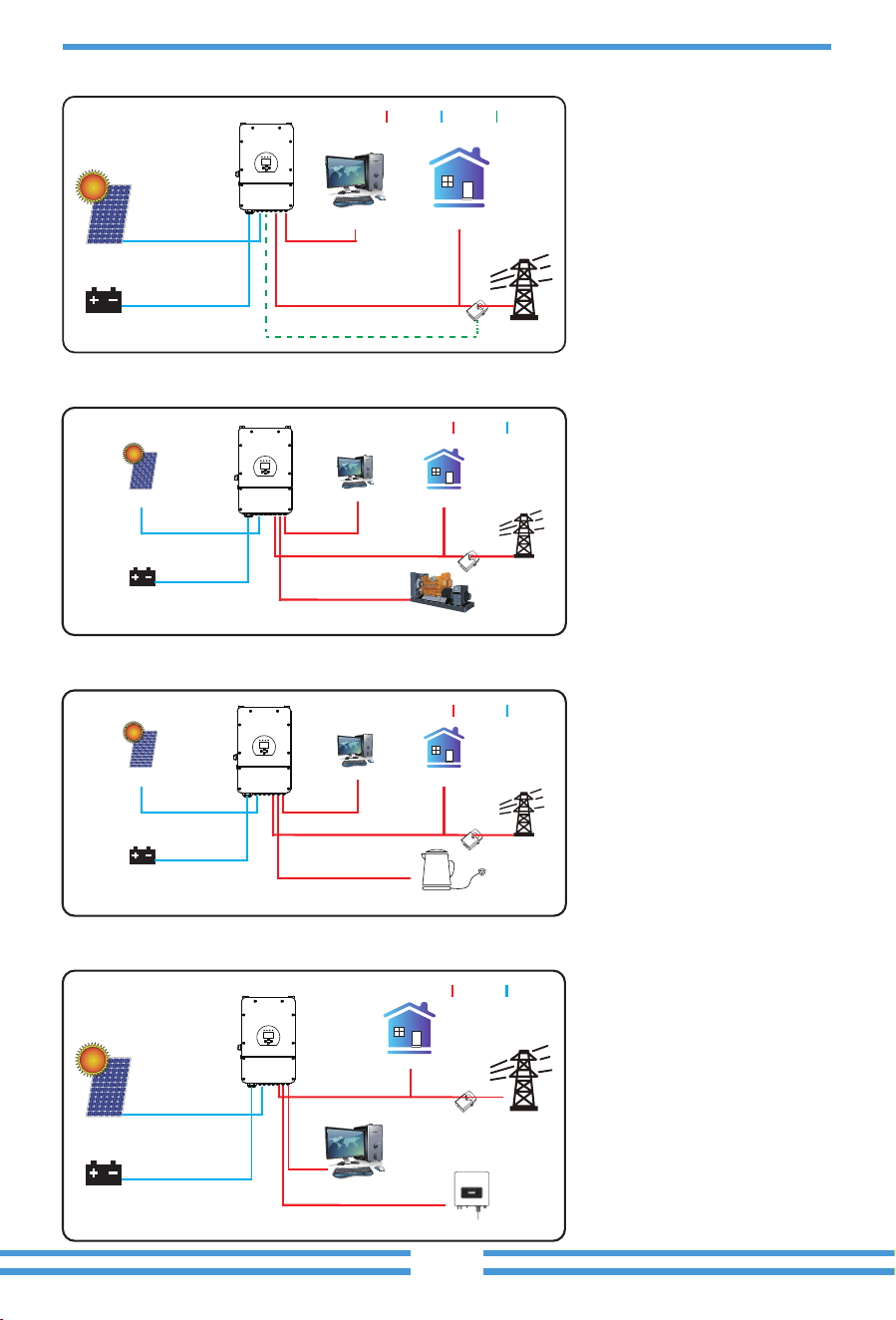
Ex_Meter For CT:
when in Three phase system with CHNT
Three phase energy meter (DTSU666), click corresponding
phase where hybrid inverter is connected. e.g. when the
hybrid inverter output connects to A phase, please click A
Phase.
Meter Select: select the corresponding meter type
according to the meter installed in the system.
Grid Side INV Meter2:
when there’s a string inverter AC
couple at the grid or load side of hybrid inverter and
there’s a meter installed for the string inverter, then the
hybrid inverter LCD will show the string inverter output
power on its PV icon. Please make sure the meter can
communicate with the hybrid inverter successfully.
Parallel
Master
Slave
Ex_Meter For CT Meter Select
C Phase Grid Side INV Meter2
00
CHNT-3P
Modbus SN
Advanced Function
Paral.
Set3
A Phase 0/4
B Phase
B Phase
A Phase
C Phase
CHNT-1P
Eastron-3P
Eastron-1P
On-Load+AC couple
CT
Battery
Solar
Grid
Grid
Backup Load
On-Grid Home Load
Smart Load
On-Grid+AC couple
AC cable DC cableAC cable DC cable
CT
Battery
Solar
Backup Load
On-Grid Home Load
Smart Load
On-Grid Inverter
Meter
DDSU666 DIN-RAIL METER
230V 5(60) A 800imp/kWh
2
5 6
1
4
78
3
On-Grid Inverter
Meter
DDSU666 DIN-RAIL METER
230V 5(60) A 800imp/kWh
2
5 6
1
4
78
3
ATS:
It is related with ATS port voltage. it is be�er in
"uncheck" posi�on.
Export power limter:
It is used to setup the allowed the
maximum output power to flow to grid.
Import power limiter:
when it is ac�ve, the grid output
power will be limited. its priority is lower then "grid peak
shaving" if the "grid peak shaving" is selected.
Low Noise Mode: In this mode, inverter will work in
“low noise mode”.
Low Power Mode<Low Ba�: if selected and when ba�ery
SOC is less then
"
Low Bat
"
value, the self-consump�on power
of inverter will be from grid and ba�ery simultaneously. If
unselected, the self-consump�on power of inverter will be
mainly from grid.
ATS
Export power limiter
ON
8820W
Import power limiter
8320W
Advanced Function
Func
Set4
Low Power Mode<Low Batt
MPPT Multi-Point Scanning
MPPT Mul�-Point Scanning: it will check whether the I/V of PV is working on its Max. power point. If not,
then it will adjust I/V to the Max. power point.
Low Noise Mode
- 41 -
Grid
Backup Load On-Grid Home Load
Battery
Solar
CT
AC cable DC cable
Generator
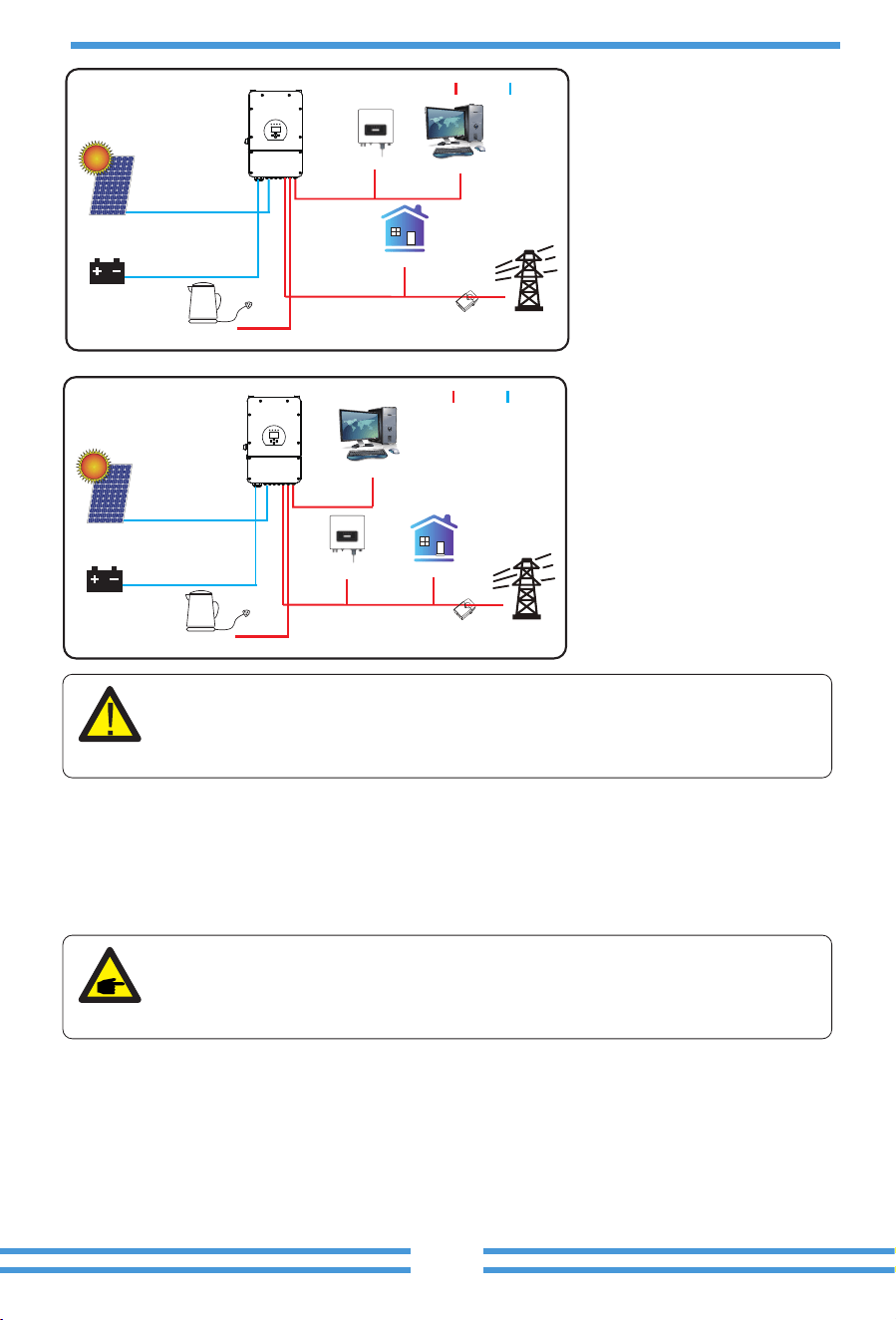
Mode II: With Generator
Grid
Backup Load
On-Grid Home Load
Battery
Solar
CT
AC cable DC cable
Smart Load
Mode III: With Smart-Load
Mode I:Basic
Grid
Backup Load On-Grid Home Load
CT
Battery
Solar
AC cable DC cable
COM cable
On-Gen+AC couple
AC cable DC cable
CT
Battery
Solar
Grid
Backup Load
On-Grid Home Load
On-Grid Inverter
Mode IV: AC Couple
- 42 -
7. Fault informa�on and processing
The energy storage inverter is designed according to the grid-connected opera�on standard
and meets the safety requirements and electromagne�c compa�bility requirements. Before
leaving the factory, the inverter undergoes several rigorous tests to ensure that the inverter
can operate reliably.
1. Inverter serial number;
2. Distributor or service center of the inverter ;
3. On-grid power genera�on date;
4. The problem descrip�on (including the fault code and indicator status displayed on the LCD)
is as detailed as possible.
5. Your contact informa�on.In order to give you a clearer understanding of the inverter's fault
informa�on, we will list all possible fault codes and their descrip�ons when the inverter is not
working properly.
The 1st priority power of the system is always the PV power, then 2nd and
3rd priority power will be the ba�ery bank or grid according to the se�ngs.
The last power backup will be the Generator if it is available.
If any of the fault messages listed in Table 7-1 appear on your inverter and the
fault has not been removed a�er restar�ng, please contact your local dealer or
service center. You need to have the following informa�on ready.
On-Load+AC couple
AC cable DC cable
CT
Battery
Solar
Grid
Backup Load
On-Grid Home Load
On-Grid Inverter
Smart Load
On-Grid+AC couple
AC cable DC cable
CT
Battery
Solar
Grid
Backup Load
On-Grid Home Load
On-Grid Inverter
Smart Load
- 43 -
Error code Descripon Soluons
F13 Working mode change
F18
AC over current fault
of hardware
F20
DC over current fault of
the hardware
F23
F22
AC leakage current is
transient over current
Tz_EmergStop_Fault
F24
DC insulation impedance
failure
F26
The DC busbar is
unbalanced
F29 Parallel CANBus fault
1. When the grid type and frequency changed it will report F13;
2. When the battery mode was changed to “No battery” mode,
it will report F13;
3. For some old FW version, it will report F13 when the system
work mode changed;
4, Generally, it will disappear automatically when shows F13;
5. If still same, and turn off the DC switch and AC switch and
wait for one minute and then turn on the DC/AC switch;
6. Seek help from us, if can not go back to normal state.
F08 GFDI _Relay_Failure
1. When inverter is in Split phase(120/240Vac) or three-phase
system (120/208Vac) system, the backup load port N line
needs to connect ground;
2. If the fault still exists, please contact us for help.
AC side over current fault
1. Please check whether the backup load power and common
load power are within the range;
2. Restart and check whether it is in normal;
3. Seek help from us, if can not go back to normal state.
DC side over current fault
1. Check PV module connect and battery connect;
2. When in the off-grid mode, the inverter startup with big power
load, it may report F20. Please reduce the load power connected;
3. Turn off the DC switch and AC switch and then wait one
minute,then turn on the DC/AC switch again;
4. Seek help from us, if can not go back to normal state.
Leakage current fault
1. Check PV side cable ground connection.
2. Restart the system 2~3 times.
3. If the fault still exists, please contact us for help.
Please contact your installer for help.
PV isolation resistance is too low
1. Check the connection of PV panels and inverter is firmly and
correctly;
2. Check whether the PE cable of inverter is connected to ground;
3. Seek help from us, if can not go back to normal state.
1. Please wait for a while and check whether it is normal;
2. When the hybrid in split phase mode, and the load of L1 and
load of L2 is big different, it will report the F26.
3. Restart the system 2~3 times.
4. Seek help from us, if can not go back to normal state.
1. When in parallel mode, check the parallel communication cable
connection and hybrid inverter communication address setting;
2. During the parallel system startup period, inverters will report F29.
when all inverters are in ON status, it will disappear automatically;
3. If the fault still exists, please contact us for help.
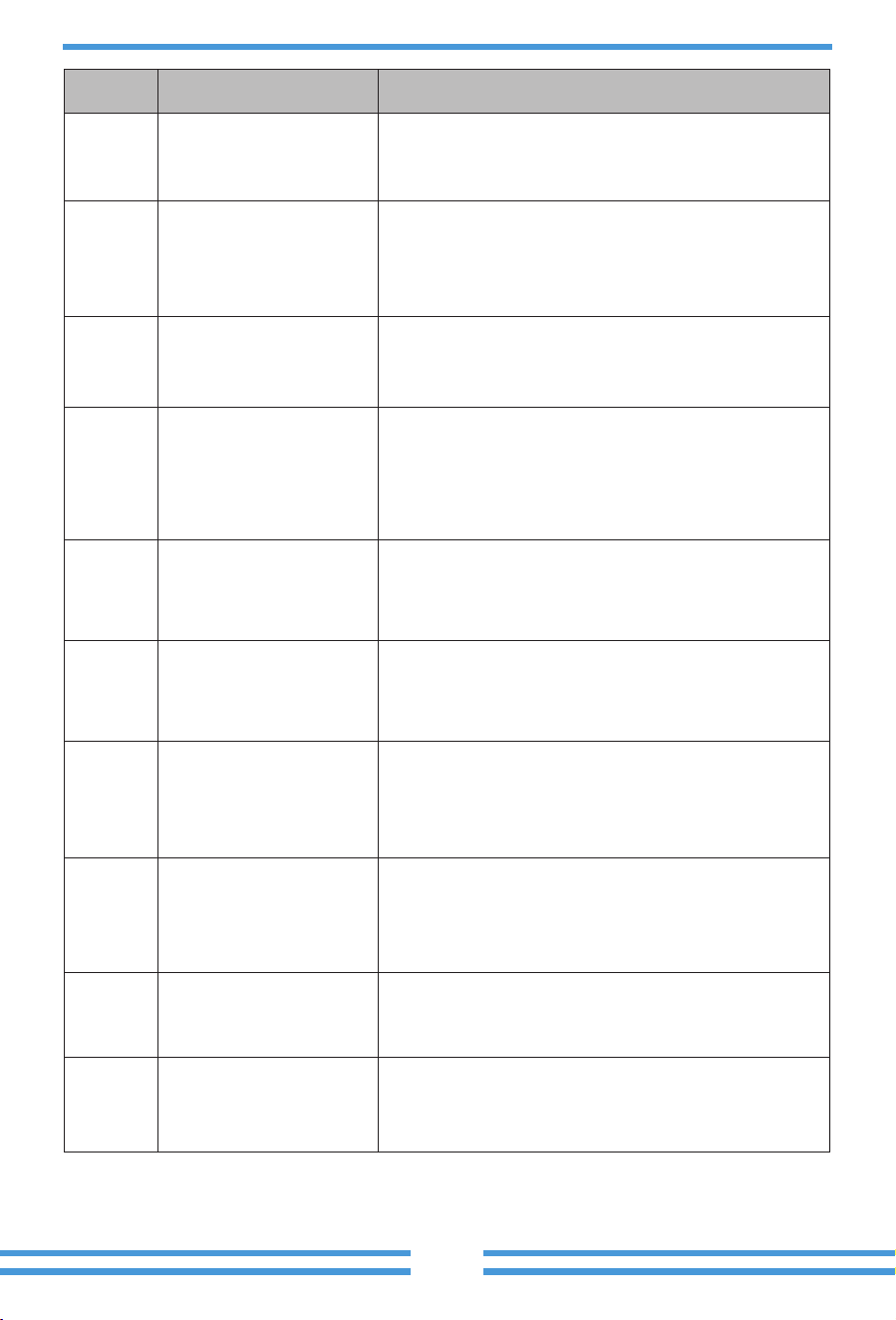
- 44 -
Error code Descripon Soluons
F35 No AC grid
No Utility
1. Please confirm grid is lost or not;
2. Check the grid connection is good or not;
3. Check the switch between inverter and grid is on or not;
4. Seek help from us, if can not go back to normal state.
F41 Parallel system stop
1. Check the hybrid inverter working status. If there's 1 pcs
hybrid inverter is in OFF status, the other hybrid inverters
may report F41 fault in parallel system.
2. If the fault still exists, please contact us for help.
F42 AC line low voltage
F47 AC over frequency
Grid voltage fault
1. Check the AC voltage is in the range of standard voltage in
specification;
2. Check whether grid AC cables are firmly and correctly
connected;
3. Seek help from us, if can not go back to normal state.
Grid frequency out of range
1. Check the frequency is in the range of specification or not;
2. Check whether AC cables are firmly and correctly connected;
3. Seek help from us, if can not go back to normal state.
F48 AC lower frequency
Grid frequency out of range
1. Check the frequency is in the range of specification or not;
2. Check whether AC cables are firmly and correctly connected;
3. Seek help from us, if can not go back to normal state.
F56
DC busbar voltage is
too low
Battery voltage low
1. Check whether battery voltage is too low;
2. If the battery voltage is too low, using PV or grid to charge the
battery;
3. Seek help from us, if can not go back to normal state.
F58 BMS communication fault
1. it tells the communication between hybrid inverter and battery
BMS disconnected when"BMS_Err-Stop" is active;
2. if don’t want to see this happen, you can disable
"BMS_Err-Stop" item on the LCD;
3. If the fault still exists, please contact us for help.
F63 ARC fault
F64
Heat sink high temperature
failure
1. ARC fault detection is only for US market;
2. Check PV module cable connection and clear the fault;
3. Seek help from us, if can not go back to normal state.
Heat sink temperature is too high
1. Check whether the work environment temperature is too high;
2. Turn off the inverter for 10mins and restart;
3. Seek help from us, if can not go back to normal state.
F34 AC Overcurrent fault
1. Check the backup load connected, make sure it is in allowed
power range;
2. If the fault still exists, please contact us for help.
Chart 7-1 Fault informa�on

- 45 -
8.Limita�on of Liability
In addi�on to the product warranty described above, the state and local laws and regula�ons
provide financial compensa�on for the product's power connec�on (including viola�on of implied
terms and warran�es). The company hereby declares that the terms and condi�ons of the
product and the policy cannot and can only legally exclude all liability within a limited scope.
Under the guidance of our company, customers return our products so that our company can
provide service of maintenance or replacement of products of the same value. Customers need to
pay the necessary freight and other related costs. Any replacement or repair of the product will
cover the remaining warranty period of the product. If any part of the product or product is
replaced by the company itself during the warranty period, all rights and interests of the
replacement product or component belong to the company.
Factory warranty does not include damage due to the following reasons:
· Damage during transporta�on of equipment;
· Damage caused by incorrect installa�on or commissioning;
· Damage caused by failure to comply with opera�on instruc�ons, installa�on instruc�ons or
maintenance instruc�ons;
· Damage caused by a�empts to modify, alter or repair products;
· Damage caused by incorrect use or opera�on;
· Damage caused by insufficient ven�la�on of equipment;
· Damage caused by failure to comply with applicable safety standards or regula�ons;
· Damage caused by natural disasters or force majeure (e.g. floods, lightning, overvoltage, storms,
fires, etc.)
In addi�on, normal wear or any other failure will not affect the basic opera�on of the product.
Any external scratches, stains or natural mechanical wear does not represent a defect in the
product.
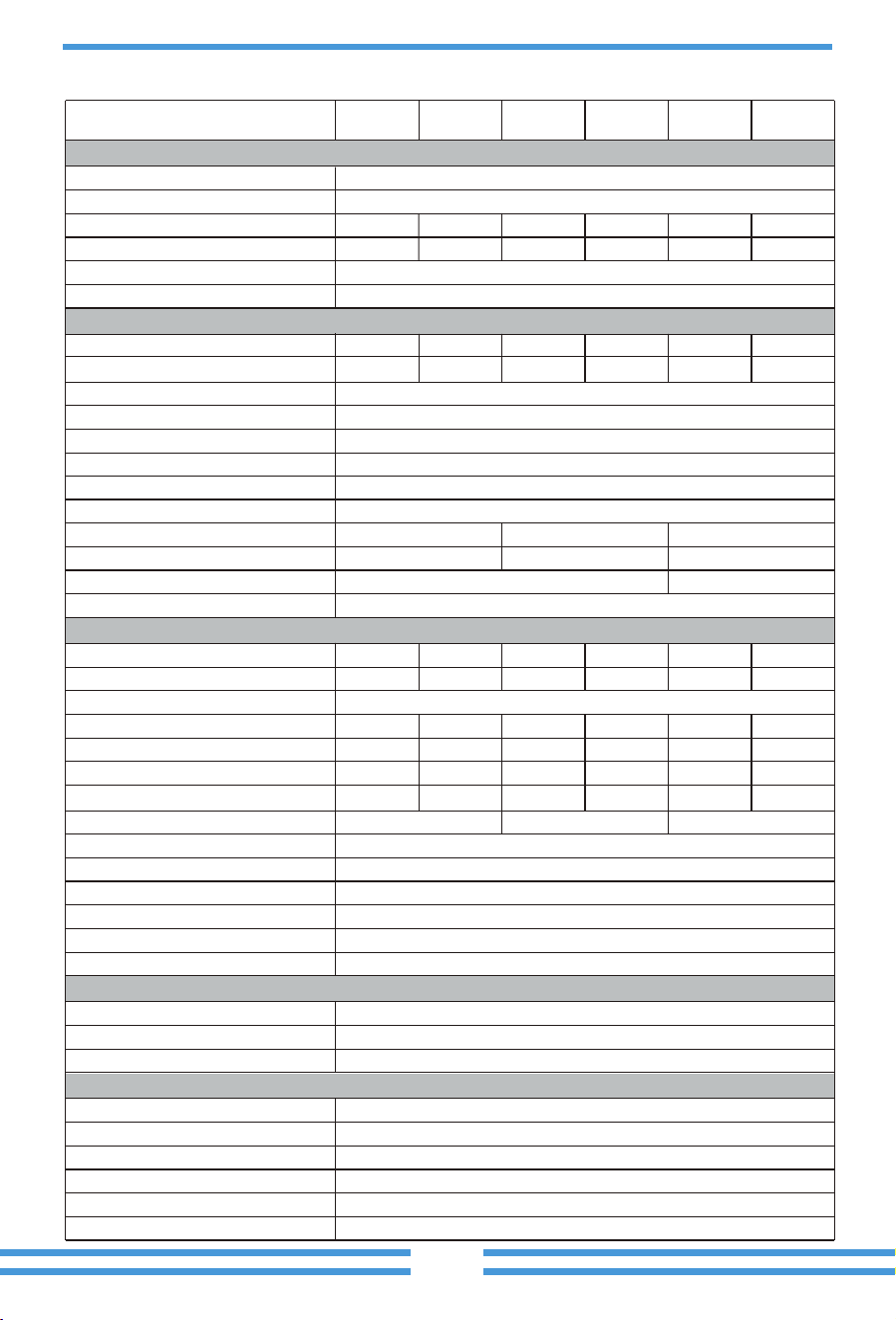
- 46 -
9. Datasheet
44+44
2/2+2
26+26
44+44
20+20 26+26+26
120 135 190 190 220 250
8000 9600 12160 12800 16000 19200
120 135 190 190 220 250
44+44+44
25/24 30/28.7 38/36.4 40/38.3 50/47.9 60/57.4
22.8/21.8 27.3/26.1 34.6/33.1 36.4/34.8 45.5/43.5 54.6/52.2
3/2+2+2
5000 6000 7600 8000 10000 12000
5500 6600 8360 8800 11000 13200
Lead-acid or Lithium-ion
40-60
1
Self-adap�on to BMS
500
125
150-425
200-425
370
220V/230V 0.85Un-1.1Un
2 �mes of rated power, 10s
35 40 50 50 60 60
0
L+N+PE
50Hz/45Hz-55Hz 60Hz/55Hz-65Hz
0.8 leading-0.8 lagging
<3% (of nominal power)
97.60%
96.50%
>99%
Yes
Yes
Yes
Yes
Yes
Yes
<0.5%In
Model
Baery Input Data
Charging Strategy for Li-Ion Ba�ery
Ba�ery Type
Ba�ery Voltage Range(V)
Max. Charging Current(A)
Max. Discharging Current(A)
Number of Ba�ery Input
PV String Input Data
Max. PV Input Power(W)
Max. PV Input Voltage(V)
Start-up Voltage(V)
MPPT Voltage Range(V)
Full Load MPPT Voltage Range(V)
Max. Opera�ng PV Input Current(A)
No. of MPP Trackers/No. of Strings MPP Tracker
10000 12000 15200 16000 20000 24000Max. PV access power(W)
50 60 76 10080 120Max. Output Fault Current(A)
125-500PV Input Voltage Range(V)
Rated PV Input Voltage(V)
77 180145
Max. Output Overcurrent Protec�on(A)
Max. AC Input/Output Apparent Power(VA)
Peak Power (off-grid)
(W)
Max. AC Input/Output Current(A)
Max. Con�nuous AC Passthrough (grid to load)(A)
Rated Input/Output Voltage/Range(V)
Rated AC Input/Output Current(A)
Max. Inverter Backfeed Current to The Array
AC Input/Output Data
Rated AC Input/Output Ac�ve Power(W)
Grid Connec�on Form
Power Factor Adjustment Range
Rated Input/Output Grid Frequency/Range
Total Current Harmonic Distor�on THDi
Efficiency
Max. Efficiency
Euro Efficiency
MPPT Efficiency
Equipment Protecon
AC Output Overvoltage Protec�on
AC Output Short Circuit Protec�on
AC Output Overcurrent Protec�on
DC Polarity Reverse Connec�on Protec�on
Thermal Protec�on
DC Terminal Insula�on Impedance Monitoring
DC Injec�on Current
Max. Input Short-Circuit Current(A)
SUN-5K-
SG02LP1-EU-
AM2
SUN-6K-
SG02LP1-EU-
AM2
SUN-7.6K-
SG02LP1-EU-
AM2
SUN-8K-
SG02LP1-EU-
AM2
SUN-10K-
SG02LP1-EU-
AM3
SUN-12K-
SG02LP1-EU-
AM3
- 47 -
IEC 61727, IEC 62116, CEI 0-21, EN 50549, NRS 097, RD 140,
UNE 217002, OVE-Richtlinie R25, G99, G98, VDE-AR-N 4105
IEC/EN 61000-6-1/2/3/4, IEC/EN 62109-1, IEC/EN 62109-2
Surge Protec�on Level
Monitor Mode
Power Network Monitoring
Island Protec�on Monitoring
Earth Fault Detec�on
DC Input Switch
Overvoltage Load Drop Protec�on
Residual Current (RCD) Detec�on
General Data
Grid Regula�on
Safety EMC/Standard
Interface
Opera�ng Temperature Range
Permissible Ambient Humidity
Permissible Al�tude
Weight(kg)
Cabinet size(W*H*D) [mm]
Warranty
Noise
Ingress Protec�on(IP) Ra�ng
Inverter Topology
Over Voltage Category
Type of Cooling
5 Years/10 Years
the Warranty Period Depends the Final Installa�on Site of Inverter,
More Info Please Refer to Warranty Policy
TYPE II(DC), TYPE II(AC)
GPRS/WIFI/Bluetooth/4G/LAN(op�onal)
Communica�on Interface RS232, RS485, CAN
Display LCD+LED
Yes
Yes
DC Component Monitoring
Ground Fault Current Monitoring
Yes
Yes
Yes
Yes
Yes
Yes
-40 to +60℃, >45℃ Dera�ng
2000m
0-100%
Intelligent Air Cooling
35.6
420W×670H×233D (Excluding connectors and brackets)
<45 dB
IP 65
Non-Isolated
OVC II(DC), OVC III(AC)
Arc fault circuit interrupter (AFCI) Op�onal
- 48 -
Defini�on of RJ45 Port Pin for BMS
10. Appendix I
1
No.
485_B
BMS Pin
2 485_A
3 GND_485
CAN-H
CAN-L
4
5
6 GND_485
7 485_A
8 485_B
BMS Port
12345678
87654321
Defini�on of RJ45 Port Pin for RS485
1
No.
sunspe-485_B
RS485 Pin
2 sunspe-485_A
3 --
--
--
4
5
6 --
7 sunspe-485_A
8 sunspe-485_B
RS485 Port
12345678
87654321
- 49 -
DRM1/5
NetJ4_7
DRM2/6
DRM3/7
D-GND
DRM4/8
REF-GEN/0
NetJ4_7
1
No. DRMs Pin
2
3
4
5
6
7
8
DRMs Port
12345678
87654321
1
No.
METERB
Meter Pin
2 METERA
3 5V
METERB
METERA
4
5
6 GND
7 METERA
8 METERB
This port is used to connect the energy meter.
Note: some hardware versions hybrid inverter don't support conenc�ng the energy meter
Meter Port
12345678
87654321
- 50 -
RS232
USB
DB9 (RS232)
12345
6789
This model of inverter has two types of logger interfaces, DB9 and USB. Please refer to the
actual inverter received for the actual interface type.
1
No.
D-GND
RS232
2
3
4
5
6
TX
7
12Vdc
8
RX
9
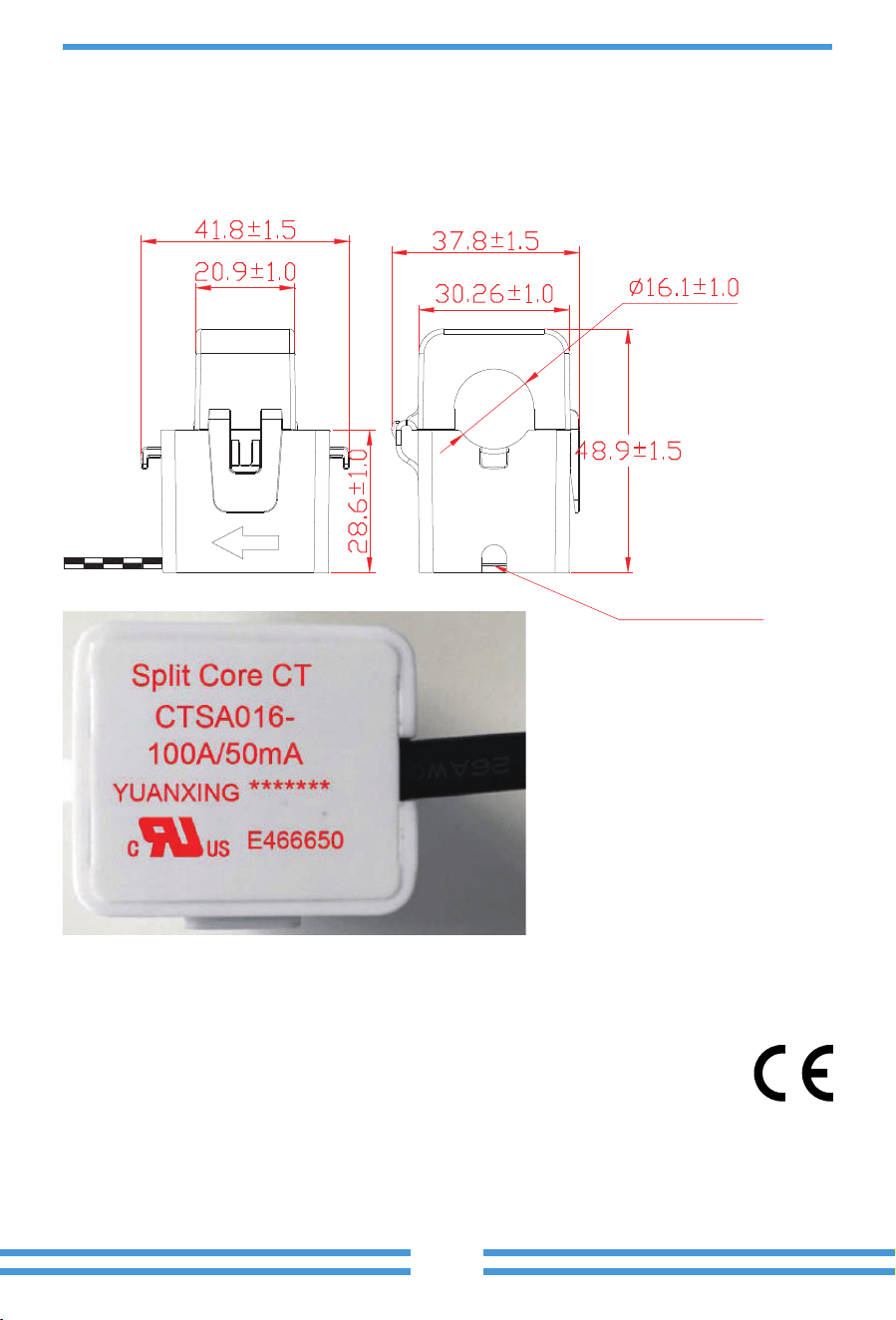
1. Split Core Current Transformer (CT) dimension: (mm)
2. Secondary output cable length is 4m.
11. Appendix II
Lead Outside
- 51 -
12. EU Declara�on of Conformity
within the scope of the EU directives
· Electromagnetic compatibility ����/��/EU (EMC)
· Low Voltage Directive ����/��/EU (LVD)
· Restriction of the use of certain hazardous substances ����/��/EU (RoHS)
NINGBO DEYE INVERTER TECHNOLOGY CO., LTD. confirms herewith that the products
described in this document are in compliance with the fundamental requirements and other
relevant provisions of the above mentioned directives. The entire EU Declaration of Conformity
and certificate can be found at https://www.deyeinverter.com/download/#hybrid-inverter-�.
- 52 -
2025-03-26
231011004
www.deyeinverter.com
EU DoC
– v1
Ningbo Deye Inverter Technology Co., Ltd.
No. 26 South YongJiang Road, Daqi, Bei lun, NingBo, China
EU Declarati on of Conformity
Product:Hybrid Inverter
Models: SUN-5K-SG02LP1-EU-AM2;SUN-6K-SG02LP1-EU-AM2;SUN-7.6K-SG02LP1-EU-AM2;
SUN-8K-SG02LP1-EU-AM2;SUN-10K-SG02LP1-EU-AM3;SUN-12K-SG02LP1-EU-AM3;
Name and address of the manufacturer: Ningbo Deye Inverter Tec hnology Co ., Ltd.
No. 26 South YongJiang Roa d, Daqi, Beilun, NingBo, China
This declaration of conformity is issued under the sole responsibility of the manufacturer. Also this product
is under manufacturer’s warranty.
This declaration of conformity is not valid any longer: if the product is modified, supplemented o r changed in
any other way, as well as in c ase the product is used or installed improperly.
The object of the declaration described above is in conformity with the relevant Union harmonization legislation:
The Low Voltage Directive (LVD) 2014/35/EU;the Electromagnetic Compatibility (EMC) Directive 2014/30/EU;the
restriction of the us
e of certain hazardous substances ( Ro HS) Directive 2011/65/EU.
References to the relevant harmonized standards used or references to the other technical specifications in
relation to which conformity is declared:
LVD:
EN 62109-1:2010
🔴
EN 62109-2:2011
🔴
EMC:
EN IEC 61000-6-1:2019
🔴
EN IEC 61000-6-2:2019
🔴
EN IEC 61000-6-3:2021
🔴
EN IEC 61000-6-4:2019
🔴
EN IEC 61000-3-2:2019+A1:2021
🔴
EN 61000-3-3:2013/A2:2021/AC:2022-01
🔴
EN IEC 61000-3-11:2019
🔴
EN 61000-3-12:2011
🔴
EN 55011:2016/A2:2021
🔴
Nom et Titre / Name and Title:
Au nom de / On behalf of:
Date / Date (yyyy-mm-dd):
A / Place:
Bard Dai
Senior Standard and Certification Engineer
Ningbo Deye Inverter Technology Co., Ltd.
2023-10-11
Ningbo, China

Add.: No.26 South YongJiang Road, Daqi, Beilun, NingBo, China.
Fax.: +86 (0) 574 8622 8852
Tel.: +86 (0) 574 8622 8957
E-mail: [email protected]
Web.: www.deyeinverter.com