- 2 -
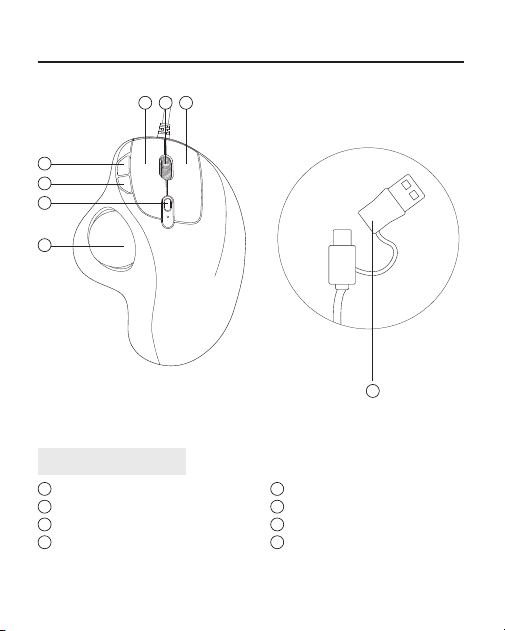
1
2
3
4
6 7
8
5
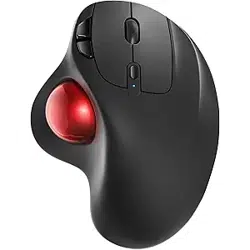
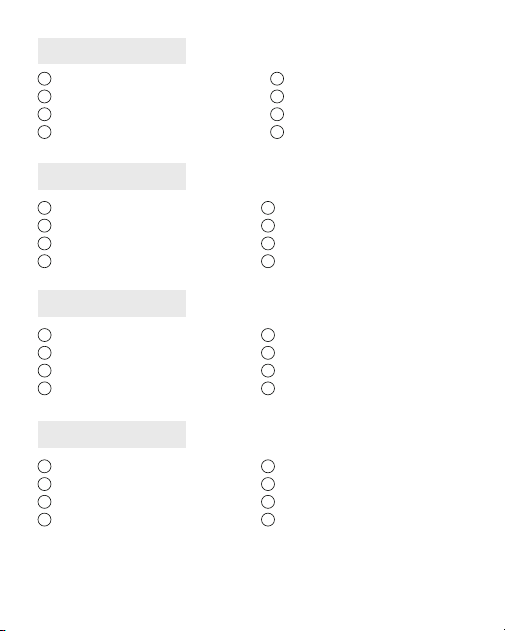
Product Components
1
Trackball
2
DPI Switch Key
3
Move Backward Key
4
Move Forward Key
5
Scroll Wheel
6
Left Key
7
Right Key
8
2-in-1 Interface (Type A / Type C)
US/UK/CA
- 3 -- 3 -
DE
FR
IT
ES
1
Trackball
2
DPI Switch -Schlüssel
3
Bewegen Sie den Rückwärtsschlüssel
4
Key vorwärts bewegen
5
Scrollrad
6
Linksschlüssel
7
Richtiger Schlüssel
8
2-in-1-Schnittstelle (Typ A / Typ C)
1
Trackball
2
Clé Switch DPI
3
Déplacez la touche arrière
4
Faire avancer la clé
5
Souvaindedélement
6
Clé gauche
7
Clé de droite
8
Interface 2-en-1 (Type A / Type C)
1
Trackball
2
Chiave Switch DPI
3
Spostare la chiave all'indietro
4
Sposta in avanti il tasto
5
Scorri
6
Tasto sinistro
7
Tasto destro
8
Interfaccia 2 in 1 (tipo A / Tipo C)
1
Trackball
2
Clave DPI Switch
3
Mueva la tecla hacia atrás
4
Mover hacia adelante
5
Rollodedesplazamiento
6
Clave izquierda
7
Clave correcta
8
Interfaz 2-en-1 (tipo A / Tipo C)
- 4 -- 4 -
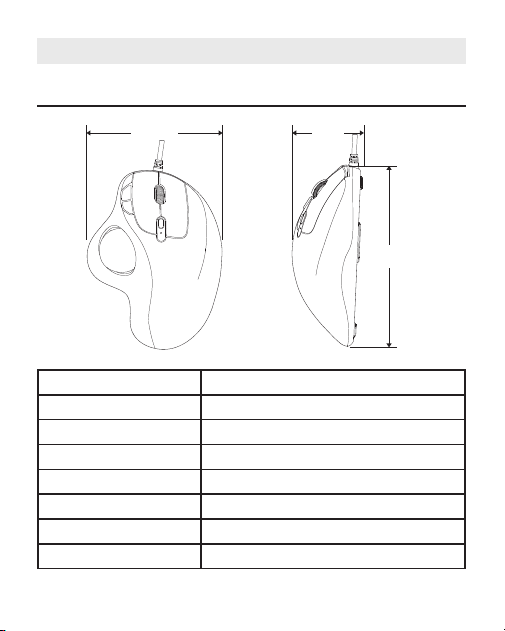
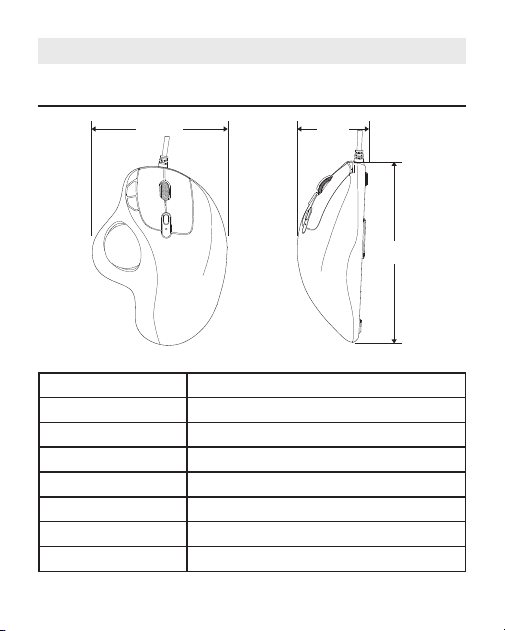
Specications
US/UK/CA
103mm
50mm
136mm
Model M509
Size 136×103×50mm
Weight 128g
Material ABS
Interface Wired with 2-in-1 interface (Type A / Type C)
Cable Length 1.8m
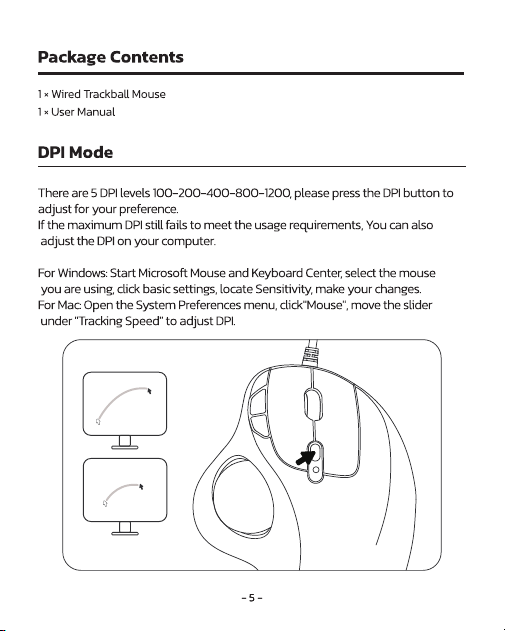
DPI 100-200-400 (Default) -800-1200
Tracking Speed 30 in/sec

- 6 -- 6 -
Important Safety Instructions
PleaseNote:Long-termrepetitiveuseofanykeyboardandmousecould
causeinjurytouser.Werecommenduserstoavoidexcessiveuseofthisorany
keyboardandmouse.
Avoid dropping.
Donotdisassemble.
Donotexposetoliquids.
Thisproductissuitableformoderateclimatesonly.
Themaximumambienttemperatureduringuseofthisproductmustnot
exceed40degree.
Openamesources,suchascandles,mustnotbeplacedonthisproduct.
Only use a dry cloth or brush to clean this product.
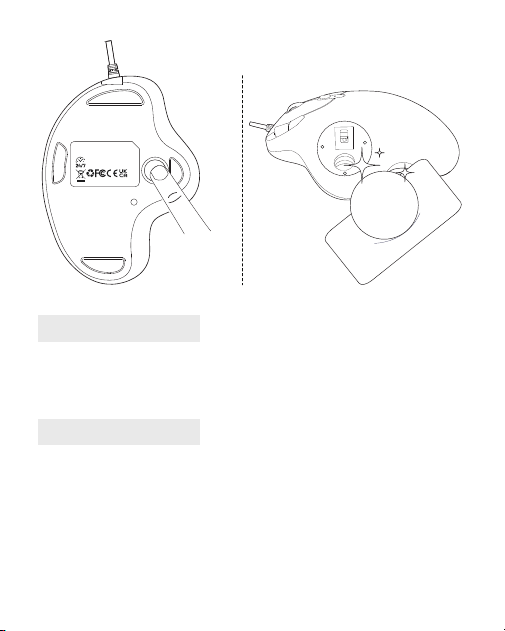
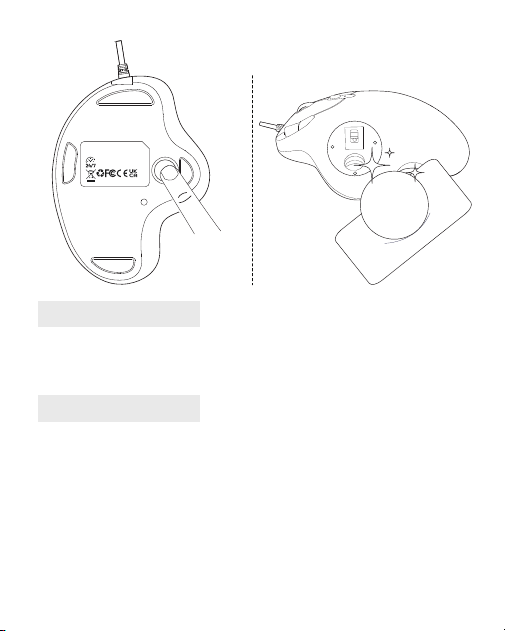
FAQ1
How to Clean Your Trackball Mouse?
Ifyourtrackballmousecursorisstickingorjumpingaroundonyourscreen,
orit'sjustnotmovingsmoothly,youcancleanitforbetterperformance.
(1)Pushthetrackballfromthebottomofthemouse.
(2)Useahumidclothtocleanthetrackball,thesurfaceoftheinnertrackball
housing and the sensor. Then use a cotton swab to clean the dust on three
white rollers.
Note:
Don'tcleanthemouseandtrackballwithalcoholorwetwipescontaining
alcohol.
Whenyoucleanneartheopticalsensor,pleasewipeitcarefullytoavoid
damagingit.
- 7 -
FAQ2
FAQ3
How to Reprogram Mouse Buttons?
(1)Allkeysarenotprogrammable.
(2)Forward/BackwardbuttonsarenotcompatiblewithMACOS.
NULEA WIRED
TRACKBALL MOUSE
Model Name: M509 S/N:D0901
Visit www.nul ea.com for our 24/7
live chat or send an email to
support@nul ea.com for support.
MADE IN CHINA
The pointer moves slowly when moving the trackball.
ItisnecessarytocheckwhethertheDPIbuttonispressedbymistake(DPI
adjustment).IfthemaximumDPIstillfailstomeettheusagerequirements,
checkwhetherthecomputercursorspeedisadjustedtoolow(Computer-
Settings- Mouse Settings- Cursor Speed)
.
If you still have any questions or problems to be solved, please do not
hesitate to contact us: [email protected]
- 8 -
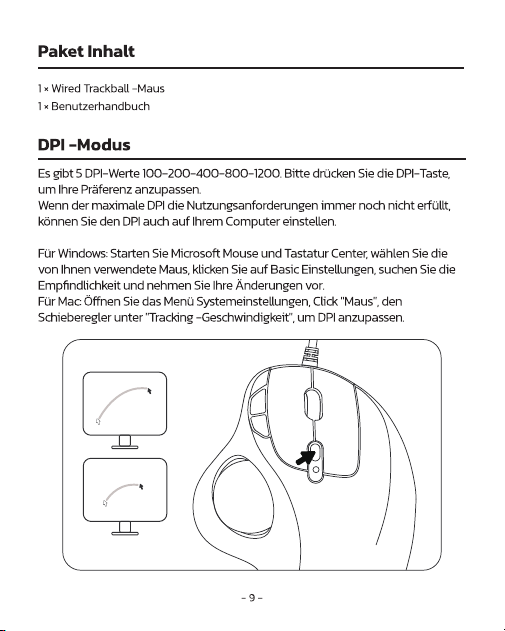
Spezikation
DE
Modell M509
Größe 136×103×50mm
Gewicht 128g
Material ABS
Schnittstelle Verdrahtetmit2-in-1-Schnittstelle(TypA/TypC)
Kabellänge 1.8m
DPI 100-200-400 (Standard) -800-1200
Tracking -Geschwindigkeit 30 Zoll/Sekunden
103mm
50mm
136mm

- 10 -
Wichtige Sicherheitsanweisungen
Bitte beachten Sie: Die wiederholte Verwendung von Tastatur und Maus ber
einenlangerenZeitraumkannzuVerletzungendesBenutzersfuhren.Wir
empfehlenBenutzern,eineubermaBigeVerwendungdieseroderanderer
TastaturenundMusezuvermeiden.
VermeidenSiedasFallenlassen.
Nicht zerlegen.
Setzen Sie sich keinen Flüssigkeiten aus.
DiesesProduktistnurfürgemäßigtesKlimageeignet.
DiemaximaleUmgebungstemperaturwährendderVerwendungdiesesProdukts
darf 40 Grad nicht uberschreiten.
OffeneFlammenquellenwieKerzendürfennichtaufdiesesProduktgestellt
werden.
VerwendenSiezumReinigendiesesProduktsnureintrockenesTuchodereine
Bürste.
FAQ1
Wie reinige ich deine Trackball -Maus?
WennIhrTrackball-Maus-CursoraufIhremBildschirmklebtoder
herumspringtoderessicheinfachnichtreibungslosbewegt,könnenSieihn
für eine bessere Leistung reinigen.
(1)DrückenSiedenTrackballvomBodenderMaus.
(2)VerwendenSieeinfeuchtesTuch,umdenTrackball,dieOberächedes
inneren Trackball -Gehäuses und den Sensor zu reinigen. Verwenden Sie
danneinenBaumwollabstrich,umdenStaubaufdreiweißenRollenzu
reinigen.
Notiz:
ReinigenSiedieMausunddenTrackballnichtmitAlkoholodernassen
Tüchern,dieAlkoholenthalten.
WennSieinderNähedesoptischenSensorsreinigen,wischenSieihnbitte
sorgfältigab,umeszuvermeiden,ihnzubeschädigen.
- 11 -
FAQ2
Wie programmiere ich Maustasten neu?
(1)AlleSchlüsselsindnichtprogrammierbar.
(2)Vorwärts-/RückwärtsschaltächensindnichtmitMacOSkompatibel.
FAQ3
Der Zeiger bewegt sich langsam, wenn sie den Trackball bewegt.
Esistnotwendigzuprüfen,obdieDPI-Tasteversehentlichgedrücktwird(DPI
-Einstellung).WenndermaximaleDPIdieNutzungsanforderungenimmernoch
nichterfüllt,prüfenSie,obdieGeschwindigkeitdesComputersCursorzuniedrig
eingestelltist(Computer-Einstellungen-Cursorgeschwindigkeit).
Wenn Sie noch Fragen oder Probleme gelöst werden müssen, tun Sie dies
bitte nicht Zögern Sie, uns zu kontaktieren: [email protected]
NULEA WIRED
TRACKBALL MOUSE
Model Name: M509 S/N:D0901
Visit www.nul ea.com for our 24/7
live chat or send an email to
support@nul ea.com for support.
MADE IN CHINA
- 12 -
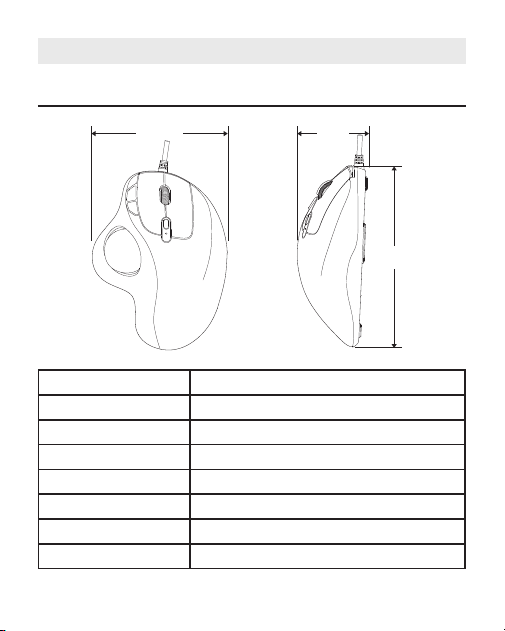
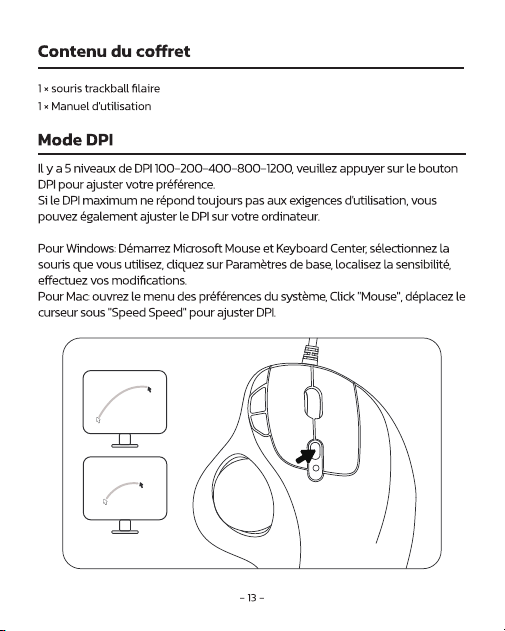
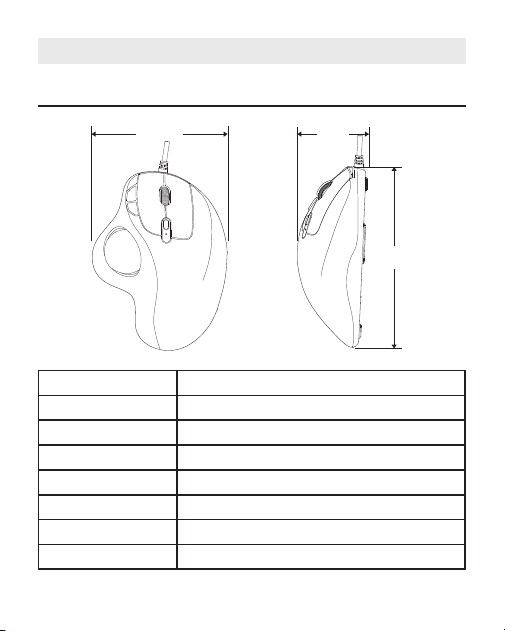
Spécication
FR
Modèle M509
Taille 136×103×50mm
Poids 128g
Matériel Abs
Interface câblé avec interface 2 en 1 (Type A / Type C)
Longueur du câble 1.8m
DPI 100-200-400 (par défaut) -800-1200
Vitesse de suivi 30 pouces / sec
103mm
50mm
136mm

- 14 -
Consignes de sècuritè lmportantes
Veuilleznoter:l'utilisationrèpètitiveálongtermedenimportequelclavieret
souris
peutcauserdesblessuresál'utilisateur.Nousrecommandonsauxutilisateurs
d'èviteruneutilisationexcessivedececlavieroudetoutautreclavieretsouris.
Evitezdelaissertomber.
Ne pas dèmonter.
Nepasexposerauxliquides.
Ceproduitconvientuniquementauxclimatsmodèrès.
Latempèratureambiantemaximalelorsdel‘utilisationdeceproduitnedoitpas
dèpasser 40 degrès.
Lessourcesdefammesnues,tellesquelesbougies,nedoiventpastreplacèes
sur ce produit.
Utilisezuniquementunchiffonsecouunebrossepournettoyerceproduit.
FAQ1
Comment nettoyer votre souris trackball?
Sivotrecurseurdesouristrackballcolleousautesurvotreécran,ousi
ellenebougepasendouceur,vouspouvezlenettoyerpourdemeilleures
performances.
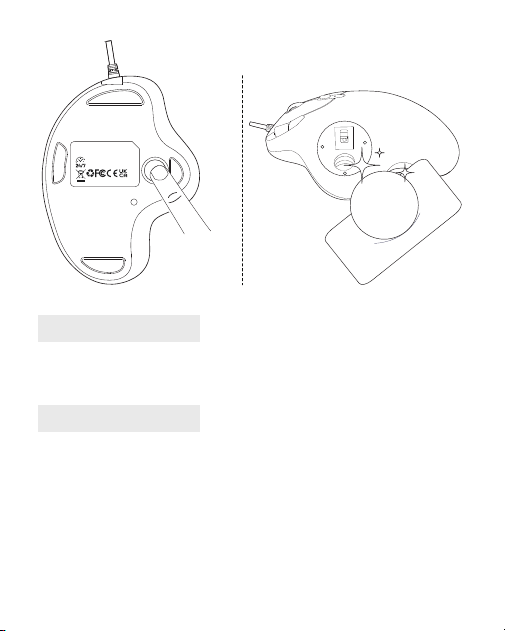
(1) Poussez le trackball du bas de la souris.
(2)Utilisezuntissuhumidepournettoyerletrackball,lasurfaceduboîtierde
trackballintérieuretlecapteur.Ensuite,utilisezuncoton-tigepournettoyer
lapoussièresurtroisrouleauxblancs.
Note:
Ne nettoyez pas la souris et le trackball avec de l'alcool ou des lingettes
humidescontenantdel'alcool.
Lorsquevousnettoyezprèsducapteuroptique,veuillezl'essuyer
soigneusementpouréviterdel'endommager.
- 15 -
FAQ2
Comment reprogrammer les boutons de la souris?
(1)Touteslesclésnesontpasprogrammables.
(2)Lesboutonsavant/arrièrenesontpascompatiblesavecMacOS.
FAQ3
Le pointeur se déplace lentement lors du déplacement du trackball.
IlestnécessairedevériersileboutonDPIestenfoncéparerreur(ajustement
DPI).SileDPImaximumnerépondtoujourspasauxexigencesd'utilisation,
vériezsilavitesseducurseurdel'ordinateurestajustéetropbas(ordinateur-
Paramètres-Paramètresdelasouris-vitesseducurseur).
Si vous avez encore des questions ou des problèmes à résoudre,
veuillez ne pas Hésiter à nous contacter: [email protected]
NULEA WIRED
TRACKBALL MOUSE
Model Name: M509 S/N:D0901
Visit www.nul ea.com for our 24/7
live chat or send an email to
support@nul ea.com for support.
MADE IN CHINA
- 16 -
Specica
IT
Modello M509
Dimensione 136×103×50mm
Peso 128g
Materiale ABS
Interfaccia cablata con interfaccia 2 in 1 (Tipo A / Tipo C)
Lunghezza del cavo 1.8m
DPI 100-200-400(impostazionepredenita)-800-1200
Velocitàditracciamento 30 in/sec
103mm
50mm
136mm

- 18 -
Importantilstruzioni di Sicurezza
Nota:lusoripetitivoalungoterminediqualsiasitastieraemousepotrebbe
causarelesioniallutente.Consigliamoagliutentidievitareunusoeccessivodi
questaodialtretastiereemouse.
Evita di cadere.
Nonsmontare.
Non esporre a liquidi.
Questoprodottoadattosoloperclimimoderati.
Latemperaturaambientemassimadurante[usodiquestoprodottonondeve
superare i 40 gradi.
Fontidifammelibere,comecandele,nondevonoessereposizionatesuquesto
prodotto.
Utilizzare solo un panno asciutto o una spazzola per pulire questo prodotto.
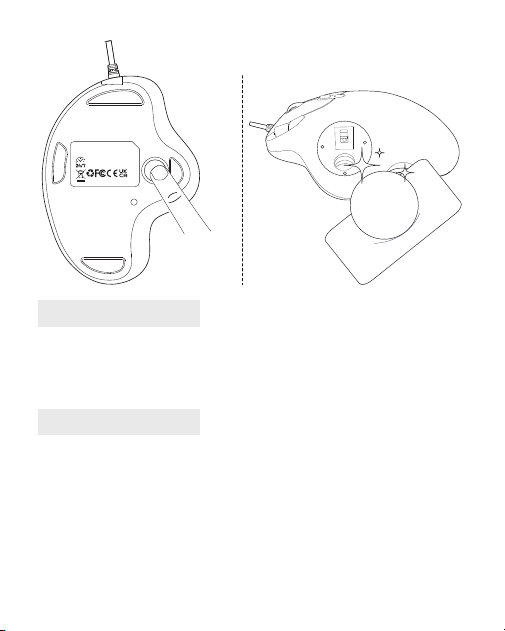
FAQ1
Come pulire il mouse del trackball?
Seilcursoredelmousetrackballsiattaccaosaltasulloschermoononsi
muovesenzaintoppi,puoipulirloperprestazionimigliori.
(1)Spingerelatrackballdalfondodelmouse.
(2)Usaunpannoumidoperpulirelatrackball,lasuperciedell'alloggiamento
interno della trackball e il sensore. Quindi usa un batuffolo di cotone per
pulire la polvere su tre rulli bianchi.
Nota:
Non pulire il topo e la trackball con alcol o salviette bagnate contenenti
alcol.
Quandosipuliscevicinoalsensoreottico,tiperfavore,pulirlocon
attenzione per evitare di danneggiarlo.
- 19 -
NULEA WIRED
TRACKBALL MOUSE
Model Name: M509 S/N:D0901
Visit www.nul ea.com for our 24/7
live chat or send an email to
support@nul ea.com for support.
MADE IN CHINA
FAQ2
Come riprogrammare i pulsanti del mouse?
(1)Tuttelechiavinonsonoprogrammabili.
(2)Ipulsantiinavanti/indietrononsonocompatibiliconMacOS.
FAQ3
Il puntatore si muove lentamente quando si muove la trackball.
ÈnecessariovericareseilpulsanteDPIèpremutopererrore(regolazioneDPI).
SeilDPImassimononriesceancoraasoddisfareirequisitidiutilizzo,vericare
selavelocitàdelcursoredelcomputerèregolatatroppobassa(computer-
Impostazioni-Velocitàdelcursoredelmouse).
Se hai ancora domande o problemi da risolvere, per favore no
Esitato a contattarci: [email protected]
- 20 -
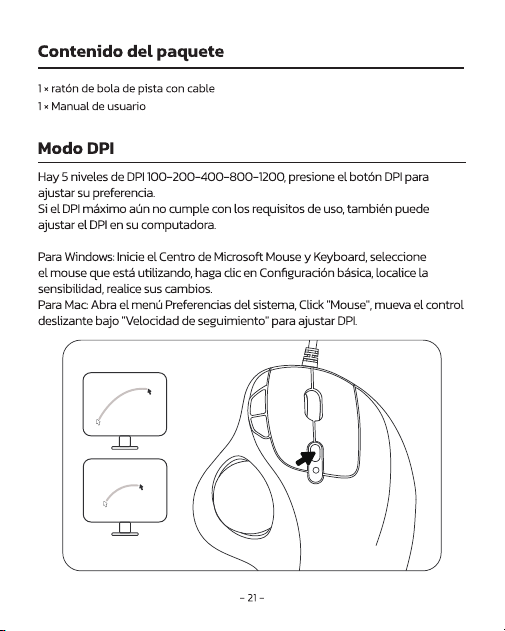
Especicación
ES
Modelo M509
Tamaño 136×103×50mm
Peso 128g
Material ABS
Interfaz Wired con interfaz 2-en-1 (Tipo A / Tipo C)
Longitud del cable 1.8m
DPI 100-200-400(predeterminado)-800-1200
Velocidaddeseguimiento 30 in/seg
103mm
50mm
136mm

- 22 -
Instrucciones de Seguridad importantes
Tenga en cuenta: El uso repetitivo a largo plazo de cualquier teclado y
mousepodriacausarlesionesalusuario.Recomendamosalosusuariosque
evitenelusoexcesivodeesteuotrostecladosyratones.
Evite las caidas.
Nolodesarme.
Noloexpongaalfquidos.
Esteproductoesadecuadosoloparaclimasmoderados.
Latemperaturaambientemaximaduranteelusodeesteproductonodebe
excederlos40grados.
Nosedebencolocarsobreesteproductofuentesdellamasabiertas,comovelas.
UtiliceUnicamenteunpanosecoouncepilloparalimpiaresteproducto.
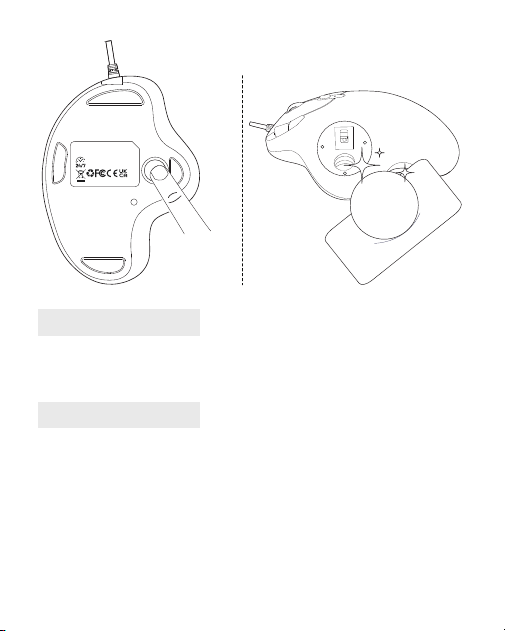
FAQ1
¿Cómo limpiar el mouse de su bola de seguimiento?
Sisucursordemousedetrackballseadhiereosaltaensupantalla,osi
simplementenosemuevesinproblemas,puedelimpiarloparaunmejor
rendimiento.
(1)Empujelaboladepistadesdelaparteinferiordelmouse.
(2)Useunpañohúmedoparalimpiarlaboladeseguimiento,lasuperficie
de la carcasa interna de la bola de pista y el sensor. Luego use un hisopo de
algodónparalimpiarelpolvoentresrodillosblancos.
Nota:
Nolimpieelmouseylaboladepistaconalcoholotoallitashúmedasque
contienen alcohol.
Cuandolimpiecercadelsensoróptico,límpielocuidadosamentepara
evitardañarlo.
- 23 -
FAQ2
¿Cómo reprogramar los botones del mouse?
(1)Todaslasclavesnosonprogramables.
(2)Losbotoneshaciaadelante/haciaatrásnosoncompatiblesconMacOS.
FAQ3
El puntero se mueve lentamente cuando mueve la bola de seguimiento.
EsnecesariovericarsielbotónDPIsepresionaporerror(ajusteDPI).SielDPI
máximoaúnnocumpleconlosrequisitosdeuso,veriquesilavelocidaddel
cursordelacomputadoraseajustademasiado(computadora-Conguración-
Conguracióndelmouse-Velocidaddelcursor).
Si aún tiene alguna pregunta o problema para resolver, no
Dude en contactarnos: [email protected]
NULEA WIRED
TRACKBALL MOUSE
Model Name: M509 S/N:D0901
Visit www.nul ea.com for our 24/7
live chat or send an email to
support@nul ea.com for support.
MADE IN CHINA
- 24 -
Anychangesormodicationsnotexpresslyapprovedbythepartyresponsiblefor
compliancecouldvoidtheuser'sauthoritytooperatetheequipment.
Thisdevicecomplieswithpart15oftheFCCRules.Operationissubjecttothe
followingtwoconditions:(1)thisdevicemaynotcauseharmfulinterference,and(2)
thisdevicemustacceptanyinterferencereceived,includinginterferencethatmay
cause undesired operation.
Note:
ThisequipmenthasbeentestedandfoundtocomplywiththelimitsforaClassB
digitaldevice,pursuanttopart15oftheFCCRules.Theselimitsaredesignedtoprovide
reasonableprotectionagainstharmfulinterferenceinaresidentialinstallation.This
equipmentgeneratesusesandcanradiateradiofrequencyenergyandifnotinstalled
andusedinaccordancewiththeinstructions,maycauseharmfulinterferencetoradio
communications.However,thereisnoguaranteethatinterferencewillnotoccurin
aparticularinstallation.Ifthisequipmentdoescauseharmfulinterferencetoradio
ortelevisionreception,whichcanbedeterminedbyturningtheequipmentoffand
on,theuserisencouragedtotrytocorrecttheinterferencebyoneormoreofthe
followingmeasures:
—Reorient or relocate the receiving antenna.
—Increasetheseparationbetweentheequipmentandreceiver.
—Connecttheequipmentintoanoutletonacircuitdifferentfromthattowhichthe
receiver is connected.
—Consultthedealeroranexperiencedradio/TVtechnicianforhelp.
(WasteElectrical&ElectronicEquipment)
Thismarkingshownontheproductoritsliterature,indicatethatitshouldnotbe
disposed with other household wastes at the end of its working life.
Topreventpossibleharmtotheenvironmentorhumanhealthfromuncontrolledwaste
disposal,pleaseseparatethisfromothertypesofwastesandrecycleitresponsiblyto
promotethesustainablereuseofmaterialresources.Householdusershouldcontact
eithertheretailerwheretheypurchasedthisproductortheirlocalgovernmentofce,for
detailsofwhereandhowtheycantakethisitemforenvironmentallysaferecycling.
FCC Statement
Correct Disposal of This Product

- 25 -
Businessusersshouldcontacttheirsupplierandcheckthetermsandconditionsofthe
purchasecontact.Thisproductshouldnotbemixedwithothercommercialwastesfordisposal.
- 26 -
MADEINCHINA
WORK WITH YOUR FAVORITE
Visit www.nulea.com for our 24/7
live chat or send an email to
[email protected] for support.
24
7
EC REP
CET Product Service Ltd.
Beacon House Stokenchurch Business Park,
Ibstone Rd, Stokenchurch
High Wycombe HP14 3FE UK
Email: info.cetservice@gmail.com
Phone: +44 741 932 5266
UK REP
Manufacturer: Dongguan Togran Electronics Technology Co.,Ltd.
Address: 262 Shijie Rd., 3rd Industrial Area, Juzhou, Shijie Town,
Dongguan City, Guangdong, China 523290