- 1 -
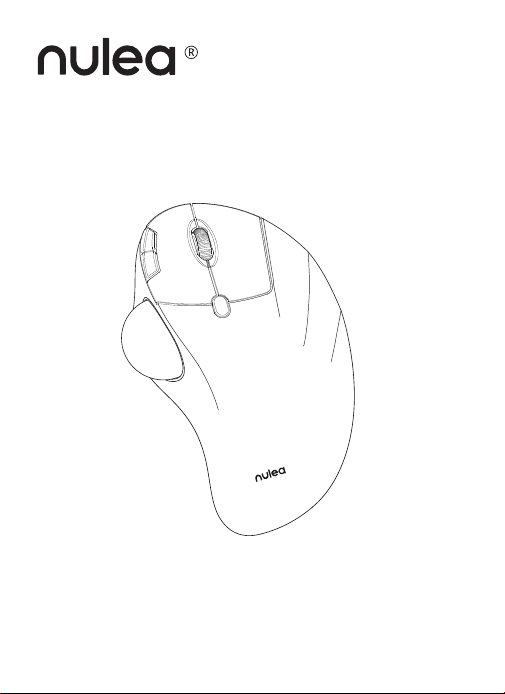
M507B
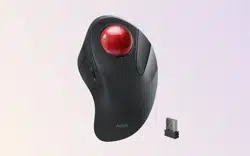
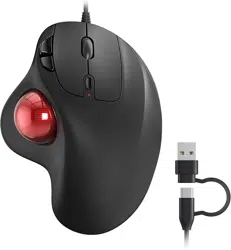
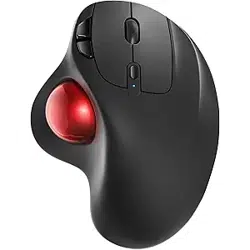
Wireless Trackball Mouse
User Manual
For more detailed technical support, please contact:
www.nulea.com
- 2 -
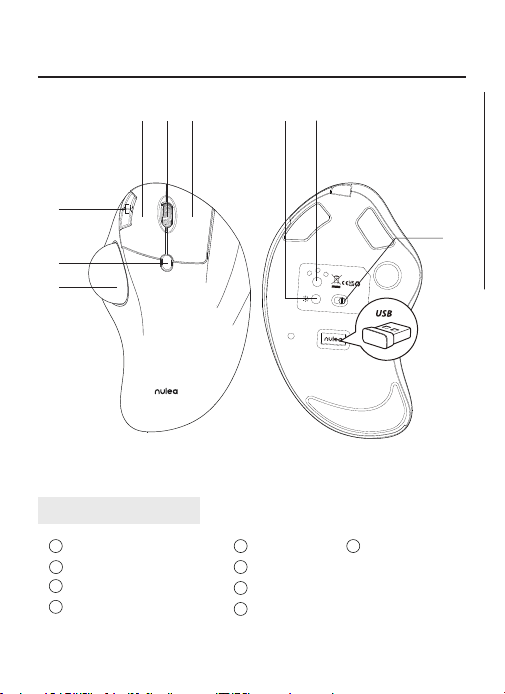
Removable Ball
DPI Switch Key
Back/Forward Button
Mode Switch
1
2
3
4
5
6
7
8
9
Scroll Wheel
Left Key
Right Key
ON/OFF
Light Switch
UK/US/CA
Product Function
④
②
⑧
③
⑤⑥ ⑦
USB
BT2
BT1
ON
OFF
MODE
Model Name: M507
S/N:B1201
support@nulea.com
FCC ID : 2A59F-M501
MADE IN CHINA
①
⑨
- 3 -
Abnehmbare Kugel
DPI-Umschalttaste
Zurück/Vorwärts-Taste
Modus-Schalter
1
2
3
4
Produkt Funktion
5
6
7
8
Scrollrad
Linke Taste
Rechte Taste
ON/OFF
9
9
9
9
Licht-Schalter
Interrupteur de
lumière
Interruttore luce
Interruptor de luz
DE
Fonction du produit
Boule amovible
Touche DPI Switch
Bouton Back/Forward
Commutateur de mode
1
2
3
4 8
5
6
7
Molette de délement
Touche gauche
Touche droite
ON/OFF
FR
Funzione del prodotto
Palla rimovibile
Tasto DPI
Tasto avanti/indietro
Interruttore di modalità
1
2
3
4 8
5
6
7
Rotella di scorrimento
Tasto sinistro
Tasto destro
ON/OFF
IT
Función del producto
Bola extraíble
Tecla DPI Switch
Botón de avance/retroceso
Interruptor de modo
1
2
3
4
8
5
6
7
Rueda de desplazamiento
Tecla izquierda
Tecla derecha
ON/OFF
ES
- 4 -
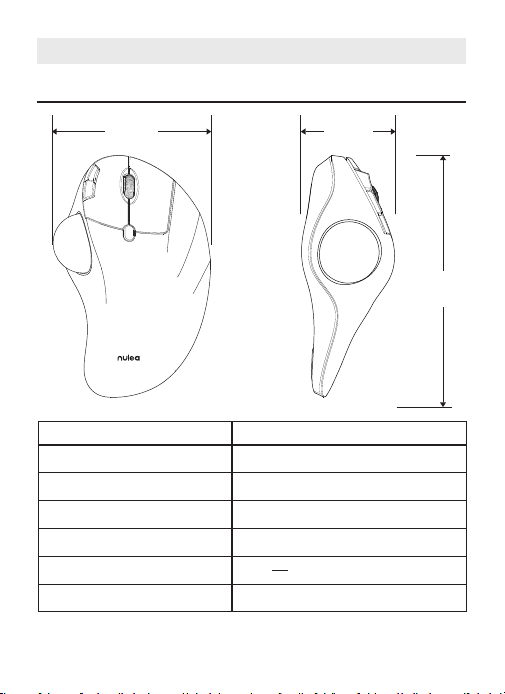
US/UK/CA
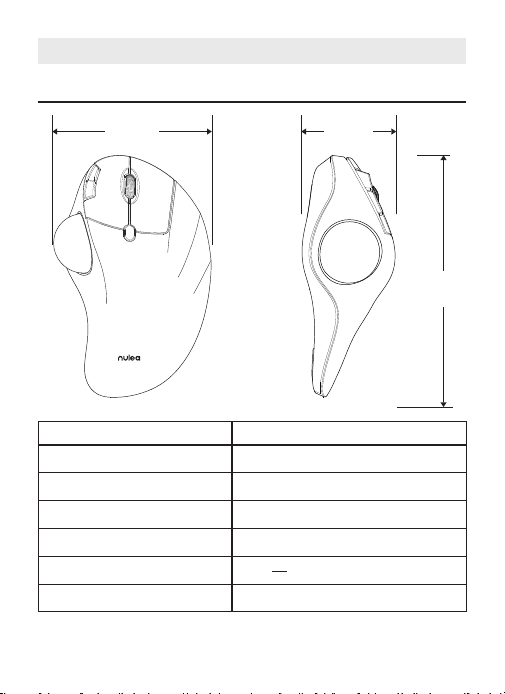
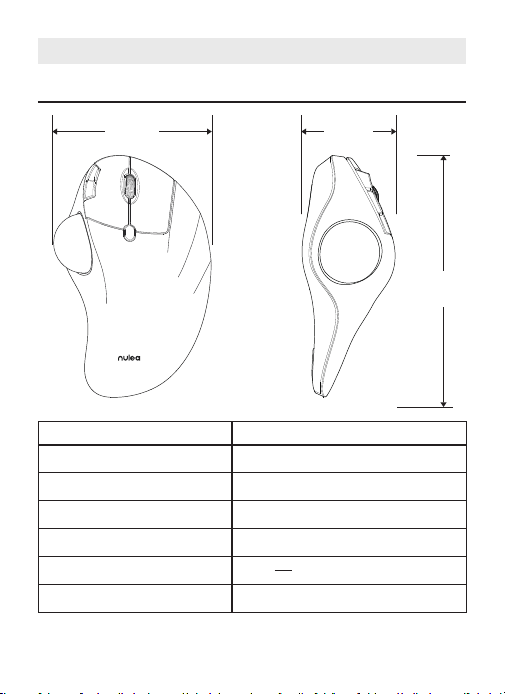
Basic Parameters
4.1in 2. 2in
6.5
in
Interface
DPI
Size
Weight
Transmission distance
Power Rating
Report Rate
2.4G/Bluetooth
200 - 400(Default) - 800 - 1200 -1600
4.1 × 6.5 × 2.2in
177.6g
10m
DC 5V---0.3A
250HZ (2.4G) / 115HZ (Bluetooth)
- 5 -
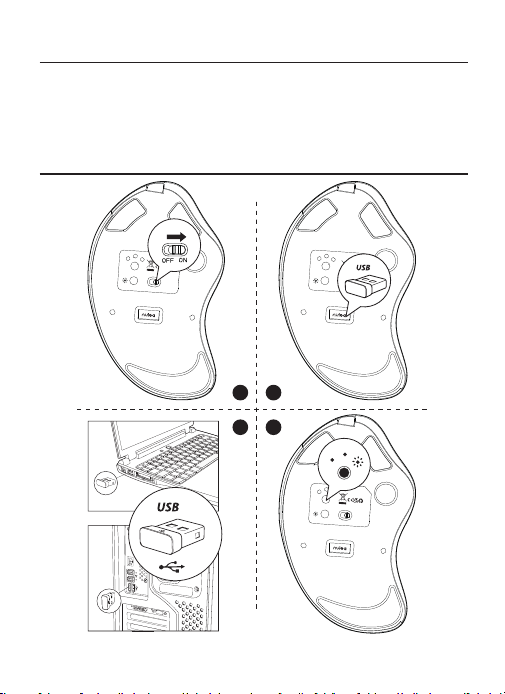
Package Content
1 × Wireless Trackball Mouse
1 × USB-C Cable
1 × User Manual
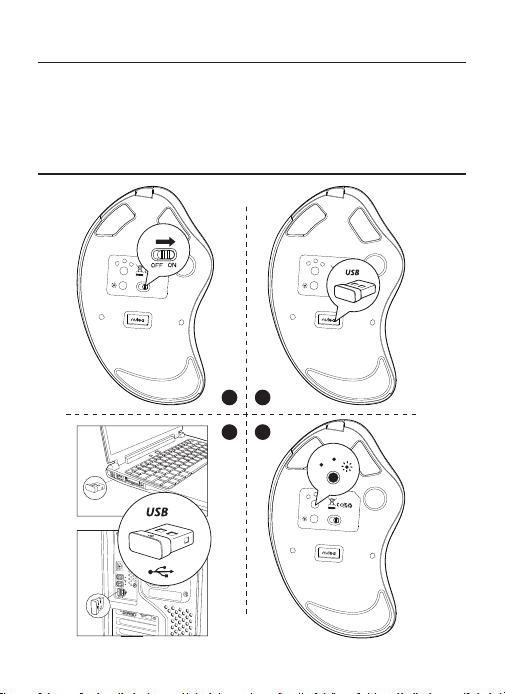
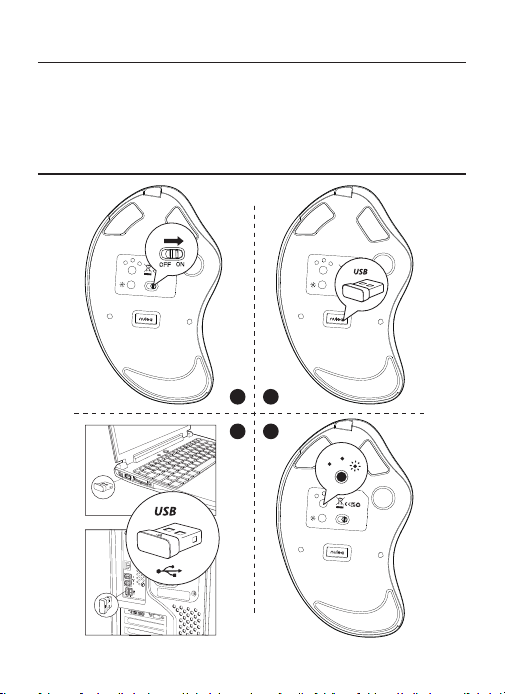
2.4G Connection
Model Name: M507
S/N:B1201
support@nulea.com
FCC ID : 2A59F-M501
MADE IN CHINA
USB
BT2
BT1
OFF
ON
MODE
USB
BT2
BT1
ON
OFF
MODE
USB
BT2
BT1
support@nulea.com
ON
OFF
Model Name: M507
S/N:B1201
MADE IN CHINA
MODE
USB
BT2
BT1
Model Name: M507
S/N:B1201
support@nulea.com
FCC ID : 2A59F-M501
MADE IN CHINA
1
3
2
4
- 7 -
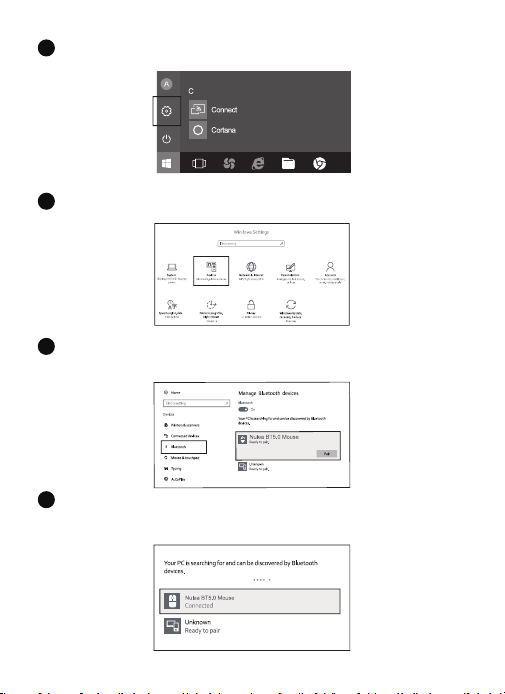
Click the "Bluetooth devices" button on the computer.
4
Click the "Add or remove Bluetooth devices" button.
5
Search the Bluetooth "Nulea BT5.0 Mouse /Nulea BT3.0 Mouse", and click
the pairing button.
6
If the pairing is successful, the LED lights up for 5 seconds and then goes
out.
7
- 8 -
Mac OS System
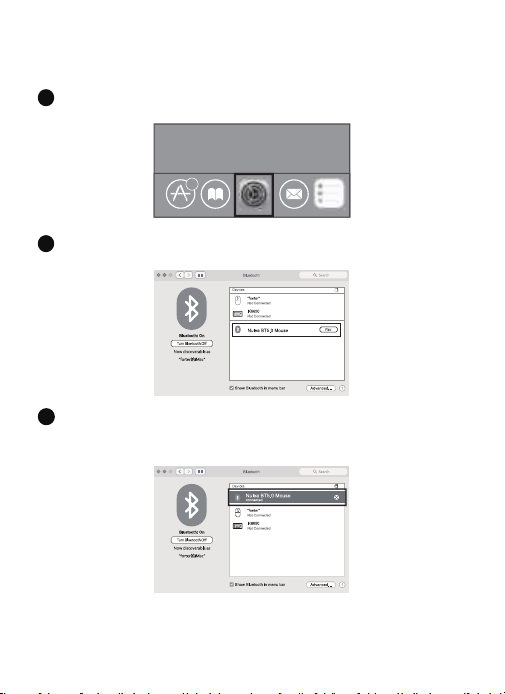
Please operate the Bluetooth installation steps(1~3) before pairing.
6
Click the “System Preferences” button on the Mac.
1
Click the Bluetooth button on the system preference folder.
2
Search the Bluetooth "Nulea BT5.0 Mouse /Nulea BT3.0 Mouse", and click the
pairing button. If installed completely, the mouse could be used normally.
3
- 9 -
Mode Switch
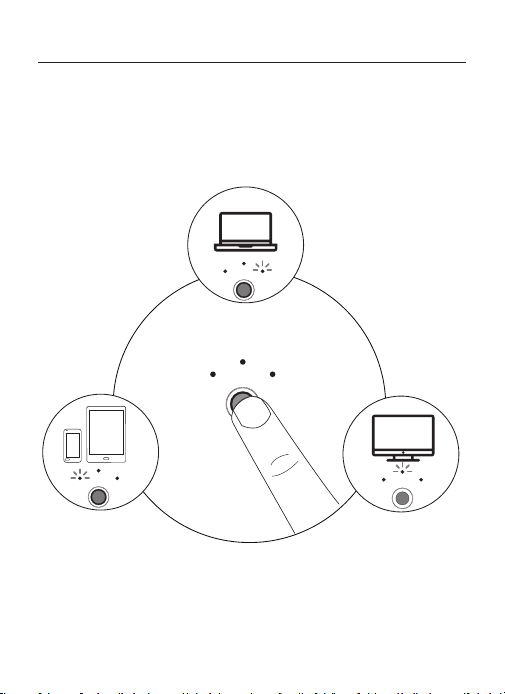
When 2.4G and Bluetooth are successfully matched to the device respectively,
you can use the switch button at the bottom of the mouse to switch to the
corresponding device.
2.4G Mode LED on
Bluetooth 1 Mode LED on Bluetooth 2 Mode LED on
USB
BT2
BT1
BT2
BT1
USB
BT2
BT1
USB
BT2
BT1
MODE
USB
- 10 -
Charging
1. Low battery indicator glows blue, in order not to affect the experience and
function of the mouse, please charge in time.
2. The charging indicator will glow red while the mouse is charging. The
indicator light turns green when fully charged.
3. The voltage is below 3.3V, and the low-voltage indicator ashes 10 times at
a rate of 1 time per second.
Model Name: M507
S/N:B1201
support@nulea.com
FCC ID : 2A59F-M501
MADE IN CHINA
USB
BT2
BT1
ON OFF
MODE
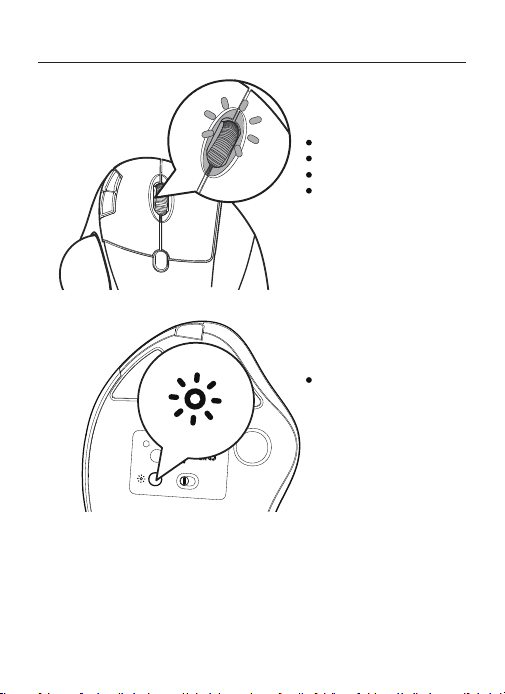
Light Indication
DPI Switching: blue light
Charging: red light
Fully Charged: green light
Low Battery: blue light
Press the button to switch
the light mode
- 11 -
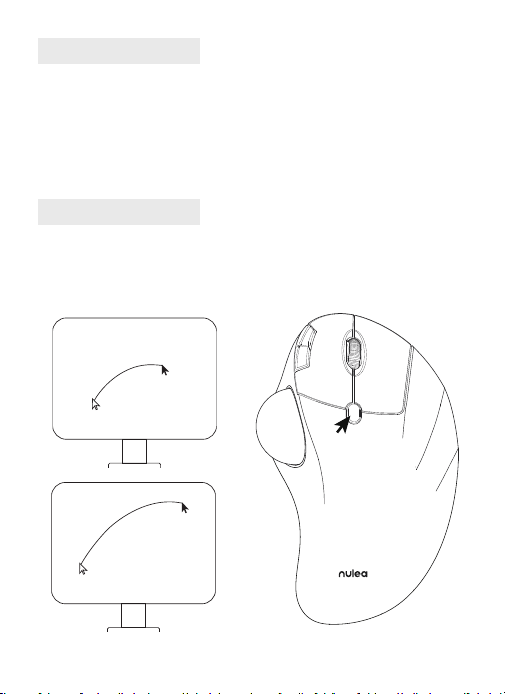
DPI Mode
Press the DPI key, and the blue light ashes once/twice/three times/four times
/ve times, corresponding to DPI 200-400-800-1200-1600.
Sleep Mode
1. To save power, the mouse will enter sleep mode after 30 minutes of
inactivity, press any key to exit sleep mode.
2. When the mouse is normally connected to the receiver, the light will be off
when the mouse isnot in use for 30 seconds, and the light will wake up when
the mouse is awakened.
Light Mode
Press the light button to switch in turn: ow-breathing-solid light on-wave-
light off.
FAQ1
What can you do when the trackball and cursor cannot work well?
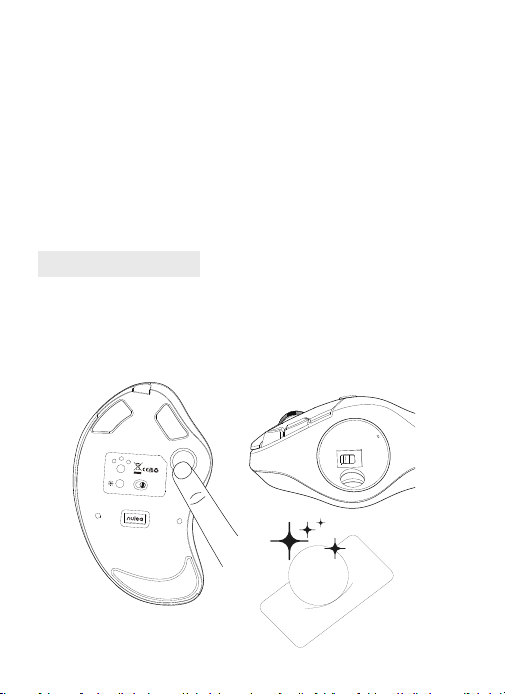
Push the trackball from the bottom of the mouse. Use a dry cloth to clean the
trackball regularly for better performance.
USB
BT2
BT1
ON
OFF
MODE
Model Name: M507
S/N:B1201
support@nulea.com
FCC ID : 2A59F-M501
MADE IN CHINA
Take out the trackball Clean the trackball & sensor
- 12 -
FAQ2
Note the mouse charging problem.
1
.
Please use our included charging cable to charge the mouse.
2. Do not use a fast charger to charge the mouse. Using a high-power adapter
to charge the mouse may burn out the mouse's chip. (Directly use the computer
USB port or a 5V charger to charge the mouse).
3. For your best experience, please fully charge the mouse before your rst use.
FAQ3
Why is the cursor too sensitive to control?
There are 5 DPI levels: 200-400(Default)-800-1200-1600. Press the DPI button
to adjust for your preference.

- 13 -
FAQ4
Don't get used to using trackball mouse.
The trackball mouse helps relieve wrist discomfort when working. The special
operation of the mouse may make you feel uncomfortable at rst. Once you get
command of using it, you will get its benets and fall in love with it.
FAQ5
How to reprogram mouse buttons?
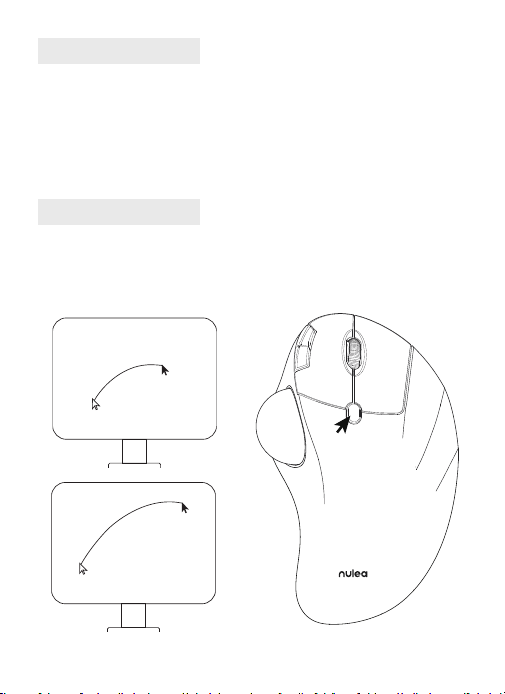
1. All keys are not programmable.
2. Forward/Backward buttons are not compatible with MAC OS.
- 14 -
DE
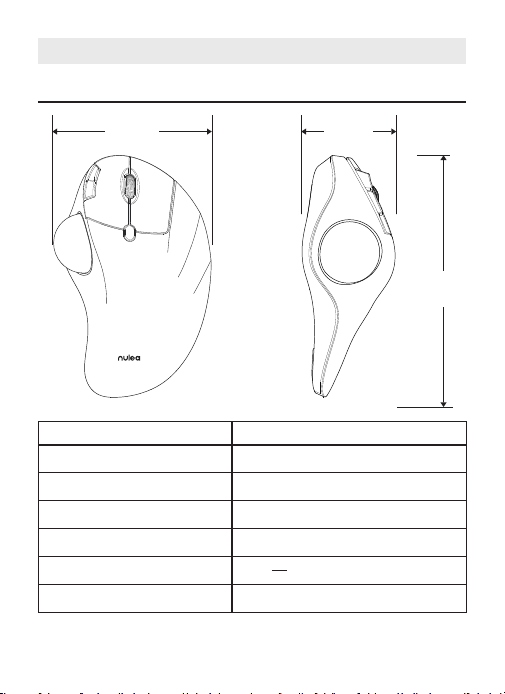
Grundlegende Parameter
4.1in 2. 2in
6.5
in
Schnittstelle
DPI
Größe
Gewicht
Übertragungsentfernung
Nennleistung
Bericht Rate
2.4G/Bluetooth
200 - 400(Standard) - 800 - 1200 -1600
4.1 × 6.5 × 2.2in
177.6g
10m
DC 5V---0.3A
250HZ (2.4G) / 115HZ (Bluetooth)
- 15 -
Paket Inhalt
1 × Kabellose Trackball-Maus
1 × USB-C Kabel
1 × Benutzerhandbuch
2.4G Verbindung
Model Name: M507
S/N:B1201
support@nulea.com
FCC ID : 2A59F-M501
MADE IN CHINA
USB
BT2
BT1
OFF
ON
MODE
USB
BT2
BT1
ON
OFF
MODE
USB
BT2
BT1
support@nulea.com
ON
OFF
Model Name: M507
S/N:B1201
MADE IN CHINA
MODE
USB
BT2
BT1
Model Name: M507
S/N:B1201
support@nulea.com
FCC ID : 2A59F-M501
MADE IN CHINA
1
3
2
4
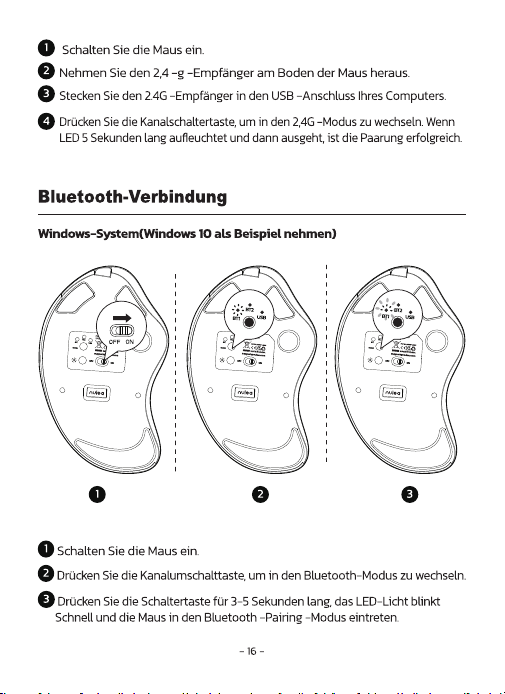
- 17 -
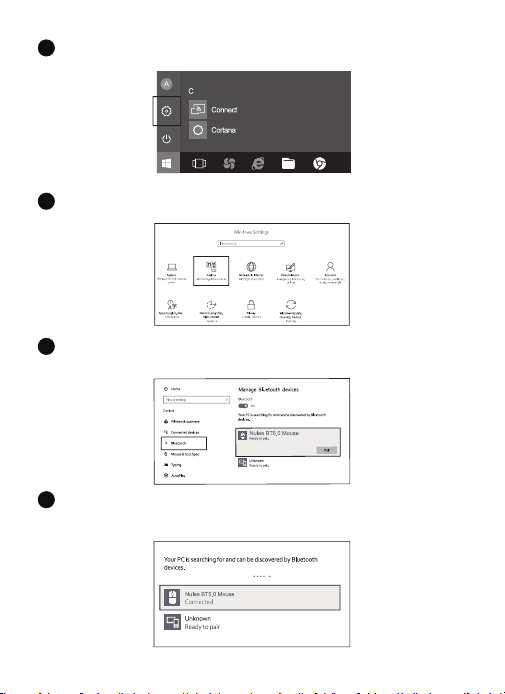
Klicken Sie auf die Schaltäche "Bluetooth-Geräte" auf dem Computer.
4
Klicken Sie auf die Schaltäche "Bluetooth -Geräte hinzufügen oder entfernen".
5
Suchen Sie die Bluetooth "Nulea BT5.0 Mouse /Nulea BT3.0 Mouse" und
klicken Sie auf die Pairing -Taste.
6
Wenn die Paarung erfolgreich ist, leuchtet die LED 5 Sekunden lang auf
und geht dann aus.
7
- 18 -
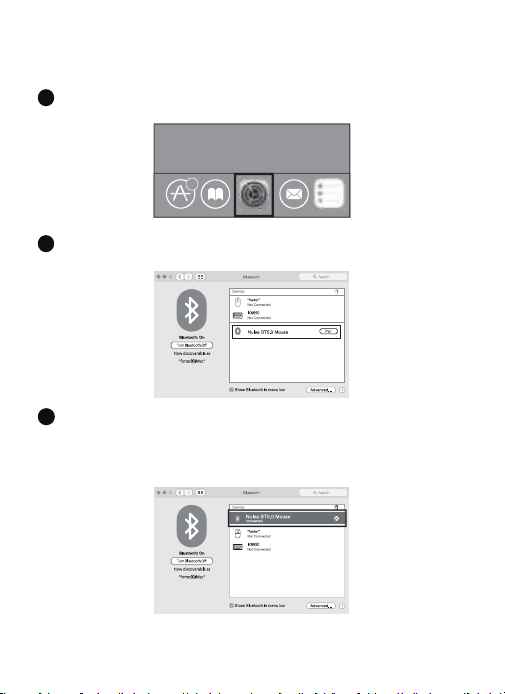
Mac OS-System
Bitte betreiben Sie die Bluetooth -Installationsschritte (1 ~ 3) vor dem Paarung.
6
Klicken Sie auf dem Mac auf die Schaltäche „Systemeinstellungen“.
1
Klicken Sie auf die Bluetooth -Taste im Systempräferenzordner.
2
3
Suchen Sie die Bluetooth "Nulea BT5.0 Mouse /Nulea BT3.0 Mouse" und klicken
Sie auf die Pairing -Taste. Wenn sie vollständig installiert ist, kann die Maus normal
verwendet werden.
- 19 -
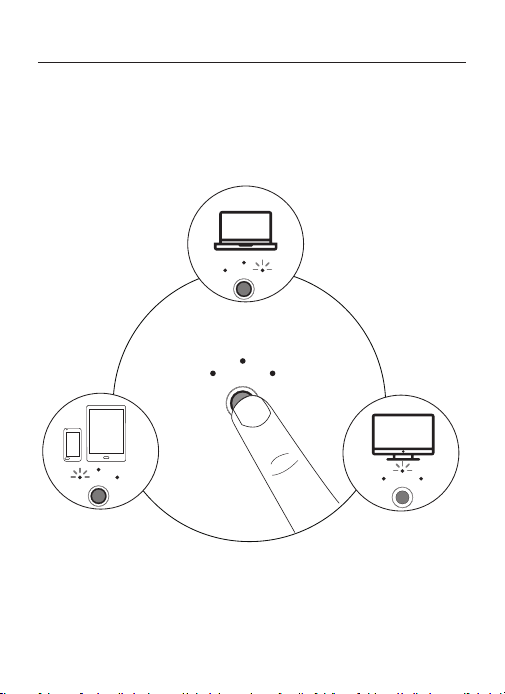
Modus-Schalter
Wenn 2.4G und Bluetooth erfolgreich mit dem Gerät übereinstimmen, können Sie
die Schalttaste am unteren Rand der Maus verwenden, um zum entsprechenden
Gerät zu wechseln.
2.4G Mode LED on
Bluetooth 1 Mode LED on Bluetooth 2 Mode LED on
USB
BT2
BT1
BT2
BT1
USB
BT2
BT1
USB
BT2
BT1
MODE
USB
- 20 -
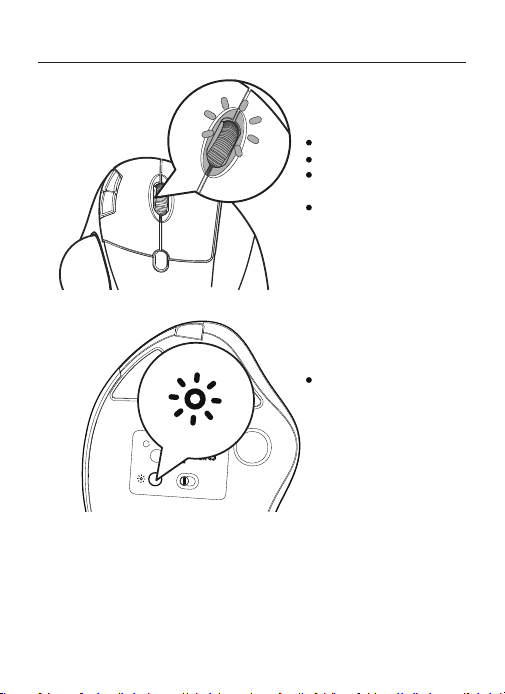
Ladung
1. Niedrige Batterieanzeige leuchtet blau, um die Erfahrung nicht zu
beeinussen und
Funktion der Maus, bitte rechtzeitig auaden.
2. Der Ladeindikator leuchtet rot, während die Maus aufgeladen wird. Das
Indikatorlicht wird bei voll aufgeladenen Grün grün.
Model Name: M507
S/N:B1201
support@nulea.com
FCC ID : 2A59F-M501
MADE IN CHINA
USB
BT2
BT1
ON OFF
MODE
Licht-Anzeige
DPI-Umschaltung: blaues Licht
Auaden: rotes Licht
Vollständig aufgeladen: grünes
Licht
Niedriger Batteriestand: blaues
Licht
Drücken Sie die Taste, um den
Lichtmodus zu wechselne
- 21 -
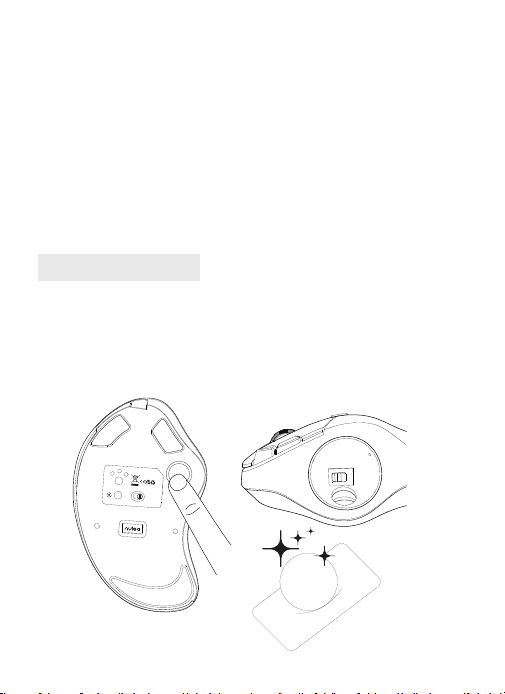
FAQ1
Was können Sie tun, wenn der Trackball und der Cursor nicht gut
funktionieren können?
Drücken Sie den Trackball vom Boden der Maus. Verwenden Sie ein trockenes
Tuch, um den Trackball regelmäßig für eine bessere Leistung zu reinigen.
USB
BT2
BT1
ON
OFF
MODE
Model Name: M507
S/N:B1201
support@nulea.com
FCC ID : 2A59F-M501
MADE IN CHINA
DPI-Modus
Drücken Sie die DPI-Taste, und das blaue Licht blinkt einmal/zweimal/drei
mal/vier mal/fünf mal, entsprechend DPI 200-400-800-1200-1600.
Schlafmodus
1. Um Strom zu sparen, tritt die Maus nach 30 Minuten in den Schlafmodus ein
Inaktivität, drücken Sie eine beliebige Taste, um den Schlafmodus zu verlassen.
2. Wenn die Maus normal an den Empfänger angeschlossen ist, wird das
Licht ausgeschaltet, wenn die Maus 30 Sekunden lang nicht benutzt
wird, und das Licht wird aktiviert, wenn die Maus aufgeweckt wird.
Lichtmodus
Drücken Sie die Lichtknopf, um sich nacheinander zu wechseln: Strömung-
Atmung-Festkörper Licht ein-Welle-Licht aus.
Nehmen Sie den Trackball
heraus
Reinigen Sie den Trackball & Sensor
- 22 -
FAQ2
Beachten Sie das Problem der Maus -Ladung.
1. Bitte verwenden Sie unser mitgeliefertes Ladekabel, um die Maus aufzuladen.
2. Verwenden Sie kein schnelles Ladegerät, um die Maus aufzuladen. Die
Verwendung eines Hochleistungsadapters zum Laden der Maus kann den Chip
der Maus ausbrennen. (Verwenden Sie direkt den USB -Anschluss oder ein 5 -V
-Ladegerät, um die Maus aufzuladen).
3. Für Ihre beste Erfahrung berechnen Sie die Maus vor Ihrer ersten Verwendung
vollständig.use.
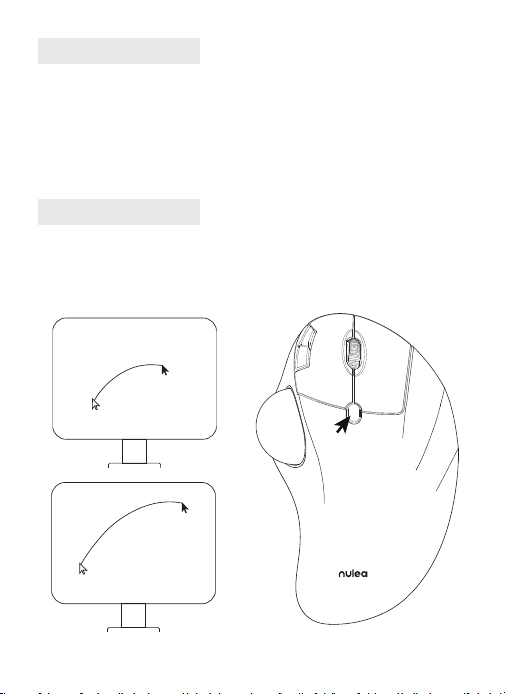
FAQ3
Warum ist der Cursor zu empndlich gegenüber der Kontrolle?
Es gibt 5 DPI-Werte: 200-400 (Standard) -800-1200-1600. Drücken Sie die DPI
-Taste, um Ihre Präferenz anzupassen.

- 23 -
FAQ4
Gewöhnen Sie sich nicht an die Verwendung von Trackball -Maus.
Die Trackball -Maus lindert das Handgelenksbeschwerden bei der Arbeit. Der
besondere Betrieb der Maus kann sich zunächst unwohl fühlen. Sobald Sie den
Befehl über die Verwendung erhalten haben, erhalten Sie seine Vorteile und
verlieben sich in sie.
FAQ5
Wie programmiere ich Maustasten neu?
1. Alle Schlüssel sind nicht programmierbar.
2. Vorwärts-/Rückwärtsschaltächen sind nicht mit Mac OS kompatibel.
- 24 -
FR
Paramètres de base
4.1in 2. 2in
6.5
in
Interface
DPI
Taille
Poids
Distance de transmission
Puissance nominale
Taux de rapport
2.4G/Bluetooth
200 - 400(Défaut) - 800 - 1200 -1600
4.1 × 6.5 × 2.2in
177.6g
10m
DC 5V---0.3A
250HZ (2.4G) / 115HZ (Bluetooth)
- 25 -
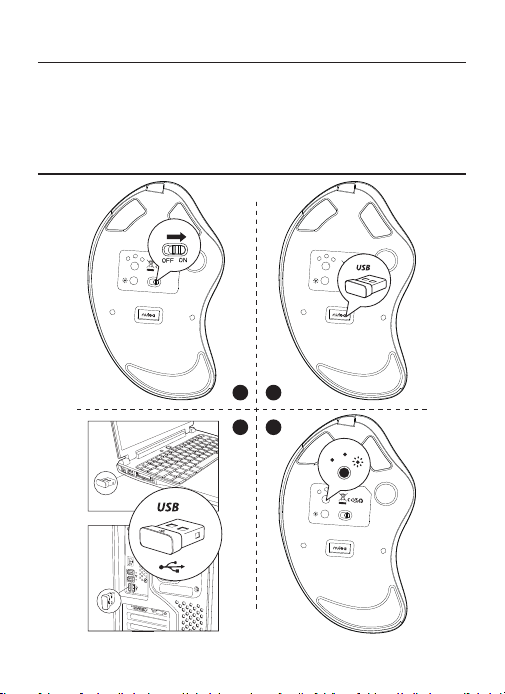
Contenu du paquet
1 × Souris sans l à boule de commande
1 × Câble USB-C
1 × Manuel de l'utilisateur
Connexion 2.4G
Model Name: M507
S/N:B1201
support@nulea.com
FCC ID : 2A59F-M501
MADE IN CHINA
USB
BT2
BT1
OFF
ON
MODE
USB
BT2
BT1
ON
OFF
MODE
USB
BT2
BT1
support@nulea.com
ON
OFF
Model Name: M507
S/N:B1201
MADE IN CHINA
MODE
USB
BT2
BT1
Model Name: M507
S/N:B1201
support@nulea.com
FCC ID : 2A59F-M501
MADE IN CHINA
1
3
2
4
- 27 -
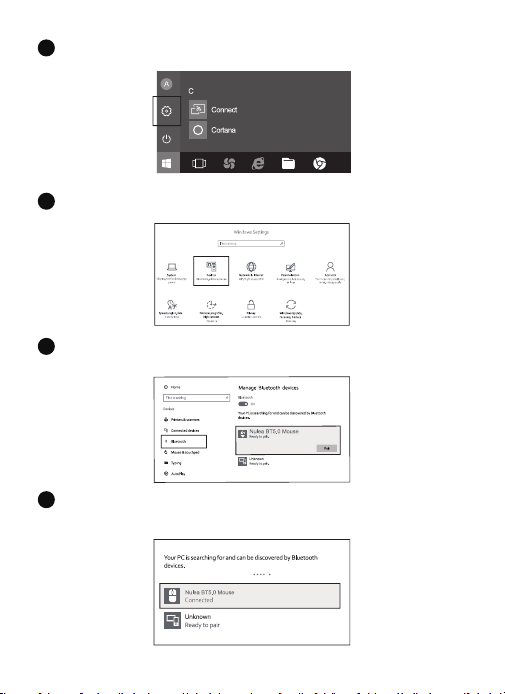
Cliquez sur le bouton "Bluetooth Devices" sur l'ordinateur.
4
Cliquez sur le bouton "Ajouter ou supprimer les périphériques Bluetooth".
5
Recherchez la souris Bluetooth "Nulea BT5.0 Mouse /Nulea BT3.0 Mouse" et
cliquez sur le bouton d'appariement..
6
Si l'appariement est réussi, la LED s'allume pendant 5 secondes et va ensuite
dehors.
7
- 28 -
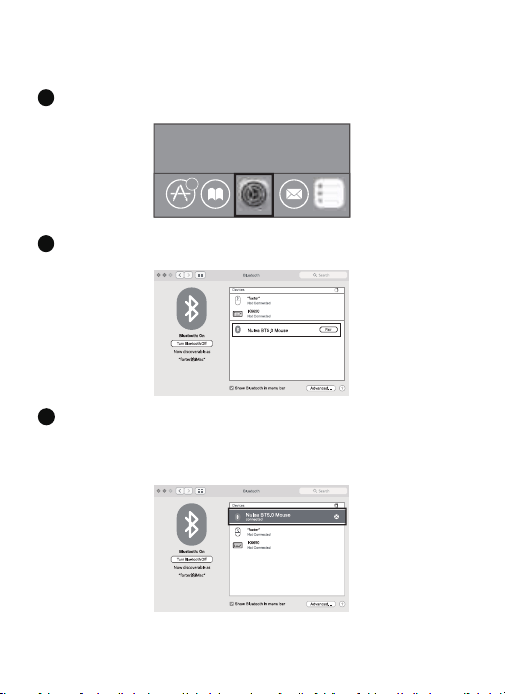
Système Mac OS
Veuillez utiliser les étapes d'installation Bluetooth (1 ~ 3) avant le couple.
6
Cliquez sur le bouton «Préférences système» sur le Mac.
1
Cliquez sur le bouton Bluetooth dans le dossier des préférences système.
2
3
Recherchez la souris Bluetooth"Nulea BT5.0 Mouse /Nulea BT3.0 Mouse"et cliquez
sur le Bouton d'appariement. S'il est complètement installé, la souris pourrait être
utilisée normalement..
- 29 -
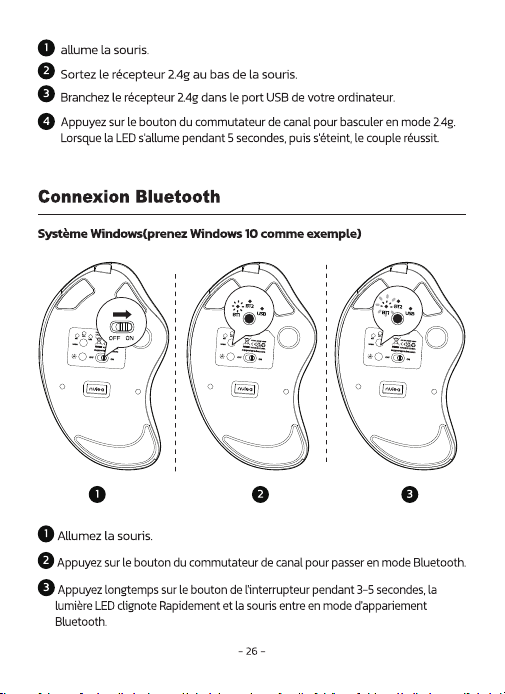
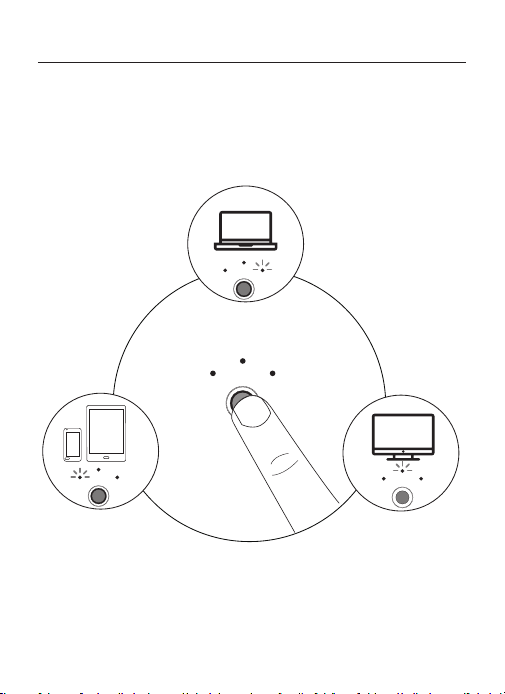
Changement de mode
Lorsque 2.4G et Bluetooth sont respectivement adaptés à l'appareil, vous pouvez
utiliser le bouton de commutateur en bas de la souris pour passer à l'appareil
correspondant.
2.4G Mode LED on
Bluetooth 1 Mode LED on Bluetooth 2 Mode LED on
USB
BT2
BT1
BT2
BT1
USB
BT2
BT1
USB
BT2
BT1
MODE
USB
- 30 -
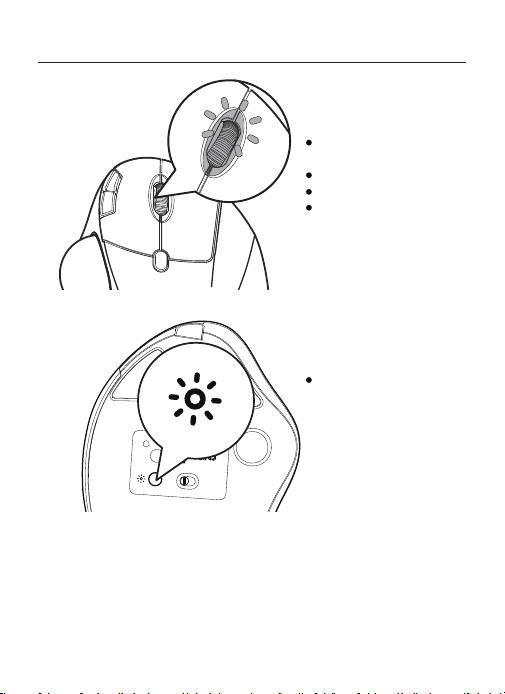
Mise en charge
1. L'indicateur de batterie faible brille en bleu, an de ne pas affecter l'expérience et
Fonction de la souris, veuillez facturer à temps.
2. L'indicateur de charge brillera en rouge pendant la charge de la souris. La
La lumière indicatrice devient verte lorsqu'elle est complètement chargée.
3.
La tension est inférieure à 3,3 V et le voyant de basse tension clignote 10
fois à raison d'une fois par seconde.
Model Name: M507
S/N:B1201
support@nulea.com
FCC ID : 2A59F-M501
MADE IN CHINA
USB
BT2
BT1
ON OFF
MODE
Indication lumineuse
Commutation DPI : lumière
bleue
Chargement : lumière rouge
Pleine charge : voyant vert
Batterie faible : lumière bleue
Appuyez sur le bouton pour
changer le mode d'éclairage
- 31 -
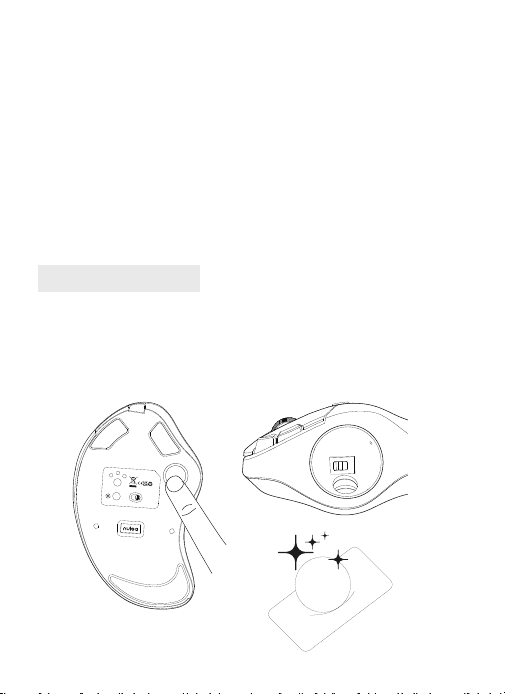
FAQ1
Que pouvez-vous faire lorsque le trackball et le curseur ne peuvent pas bien
fonctionner?
Poussez le trackball du bas de la souris. Utilisez un chiffon sec pour
nettoyer régulièrement le trackball pour de meilleures performances.
USB
BT2
BT1
ON
OFF
MODE
Model Name: M507
S/N:B1201
support@nulea.com
FCC ID : 2A59F-M501
MADE IN CHINA
Mode DPI
Appuyez sur la touche DPI, et le voyant bleu clignote une fois/deux fois/trois
fois/quatre fois/cinq fois, correspondant au DPI 200-400-800-1200-1600.
Mode veille
1. Pour économiser de l'énergie, la souris entrera en mode de sommeil après 30
minutes de Inactivité, appuyez sur n'importe quelle touche pour quitter le mode de
sommeil.
2. Lorsque la souris est normalement connectée au récepteur, la lumière s'éteint
lorsque la souris n'est pas utilisée pendant 30 secondes, et la lumière se réveille
lorsque la souris est réveillée.
Mode léger
Appuyez sur le bouton LIGHT pour passer à son tour: flux-respiration-solide
lumière allumée-onde-lumière éteinte.
Sortez le trackball Nettoyez le trackball et le capteur
- 32 -
FAQ2
Notez le problème de charge de la souris.
1. Veuillez utiliser notre câble de charge inclus pour charger la souris.
2. N'utilisez pas de chargeur rapide pour charger la souris. L'utilisation d'un
adaptateur haute puissance pour charger la souris peut brûler la puce de la
souris. (Utilisez directement le port USB de l'ordinateur ou un chargeur 5V pour
charger la souris).
3. Pour votre meilleure expérience, veuillez facturer complètement la souris
avant votre première utilisation.
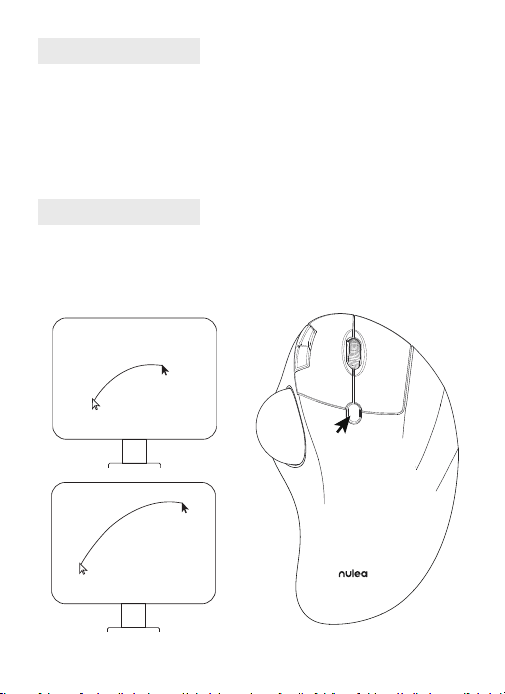
FAQ3
Pourquoi le curseur est-il trop sensible pour contrôler?
Il y a 5 niveaux de DPI: 200-400 (par défaut) -800-1200-1600. Appuyez sur le
bouton DPI pour ajuster votre préférence.

- 33 -
FAQ4
Ne vous habituez pas à utiliser la souris trackball.
La souris trackball aide à soulager l'inconfort du poignet lors du travail. Le
fonctionnement spécial de la souris peut vous mettre mal à l'aise au début. Une
fois que vous aurez commandé de l'utiliser, vous obtiendrez ses avantages et
vous en tomberons amoureux.
FAQ5
Come riprogrammare i pulsanti del mouse?
1. Tutte le chiavi non sono programmabili.
2. I pulsanti in avanti/indietro non sono compatibili con Mac OS.
- 34 -
IT
Parametri di base
4.1in 2. 2in
6.5
in
Interfaccia
DPI
Dimensioni
Peso
Distanza di trasmissione
Potenza nominale
Rapporto Tasso
2.4G/Bluetooth
200 - 400(Predenito) - 800 - 1200 -1600
4.1 × 6.5 × 2.2in
177.6g
10m
DC 5V---0.3A
250HZ (2.4G) / 115HZ (Bluetooth)
- 35 -
Contenuto della confezione
1 × Mouse Trackball senza li
1 × Cavo USB-C
1 × Manuale dell'utente
Connessione 2.4G
Model Name: M507
S/N:B1201
support@nulea.com
FCC ID : 2A59F-M501
MADE IN CHINA
USB
BT2
BT1
OFF
ON
MODE
USB
BT2
BT1
ON
OFF
MODE
USB
BT2
BT1
support@nulea.com
ON
OFF
Model Name: M507
S/N:B1201
MADE IN CHINA
MODE
USB
BT2
BT1
Model Name: M507
S/N:B1201
support@nulea.com
FCC ID : 2A59F-M501
MADE IN CHINA
1
3
2
4
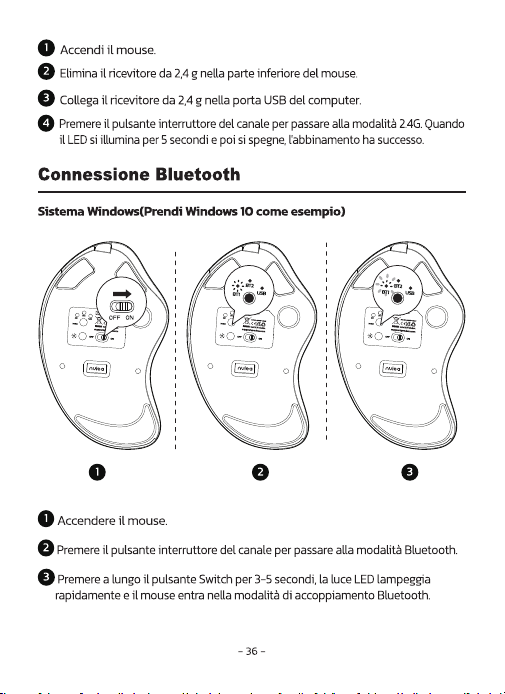
- 37 -
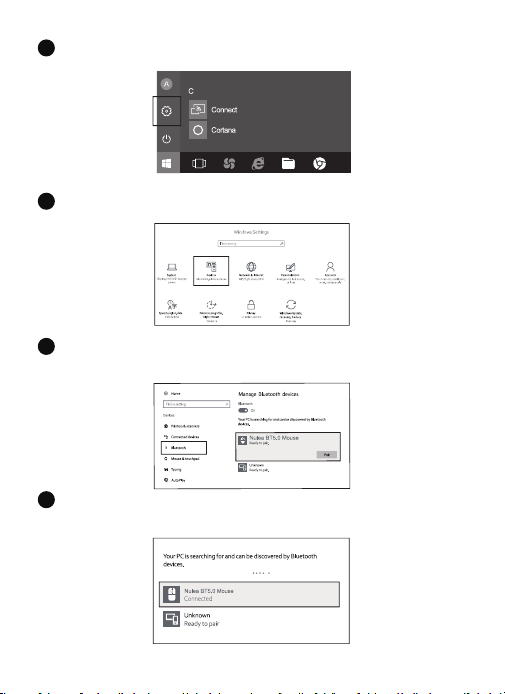
Fare clic sul pulsante "Bluetooth Devices" sul computer.
4
Fare clic sul pulsante "Aggiungi o rimuovi i dispositivi Bluetooth".
5
Cerca il mouse Bluetooth "Nulea BT5.0 Mouse /Nulea BT3.0 Mouse"e fai clic su
il pulsante di abbinamento.
6
Se l'abbinamento ha successo, il LED si illumina per 5 secondi e poi va
fuori.
7
- 38 -
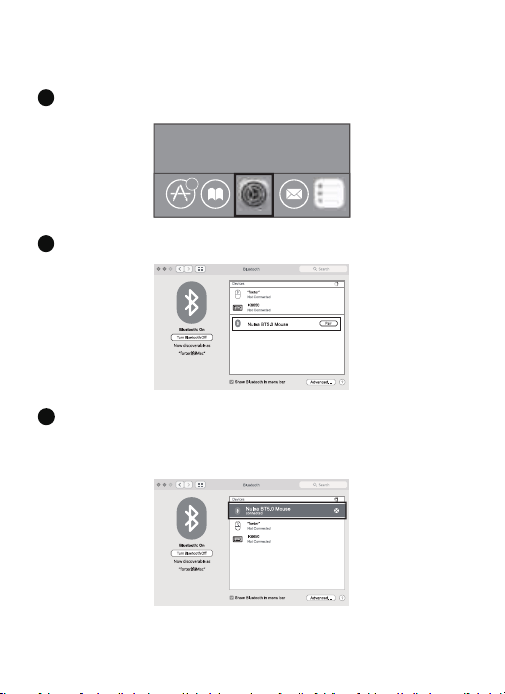
Sistema Mac OS
Si prega di utilizzare i passaggi di installazione Bluetooth (1 ~ 3) prima dell'abbinamento.
6
Fare clic sul pulsante "Preferenze di sistema" sul Mac.
1
Fare clic sul pulsante Bluetooth sulla cartella Preferenza di sistema.
2
Cerca il mouse Bluetooth "Nulea BT5.0 Mouse /Nulea BT3.0 Mouse" e fai clic sul
Pulsante di abbinamento. Se installato completamente, il mouse potrebbe essere
utilizzato normalmente.
3
- 39 -
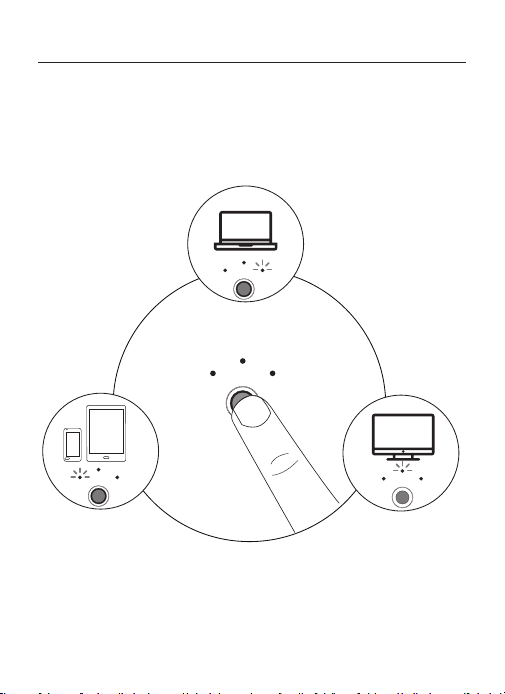
Interruttore di modalità
Quando 2.4G e Bluetooth vengono abbinati correttamente al dispositivo
rispettivamente, è possibile utilizzare il pulsante Switch nella parte inferiore del
mouse per passare al dispositivo corrispondente.
2.4G Mode LED on
Bluetooth 1 Mode LED on Bluetooth 2 Mode LED on
USB
BT2
BT1
BT2
BT1
USB
BT2
BT1
USB
BT2
BT1
MODE
USB
- 40 -
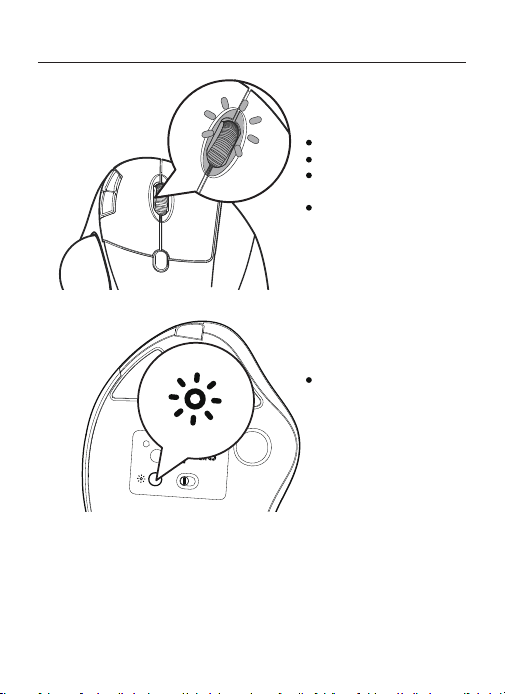
Carica
1
.
L'indicatore a bassa batteria brilla blu, per non influire sull'esperienza e
funzione del mouse, si prega di caricare in tempo.
2
.
L'indicatore di ricarica brillerà in rosso mentre il mouse è in carica. Il
La luce dell'indicatore diventa verde quando è completamente carica.
Model Name: M507
S/N:B1201
support@nulea.com
FCC ID : 2A59F-M501
MADE IN CHINA
USB
BT2
BT1
ON OFF
MODE
Indicazione luminosa
Commutazione DPI: luce blu
Carica: luce rossa
Completamente carica: luce
verde
Batteria scarica: luce blu
Premere il pulsante per
cambiare la modalità di
illuminazione
- 41 -
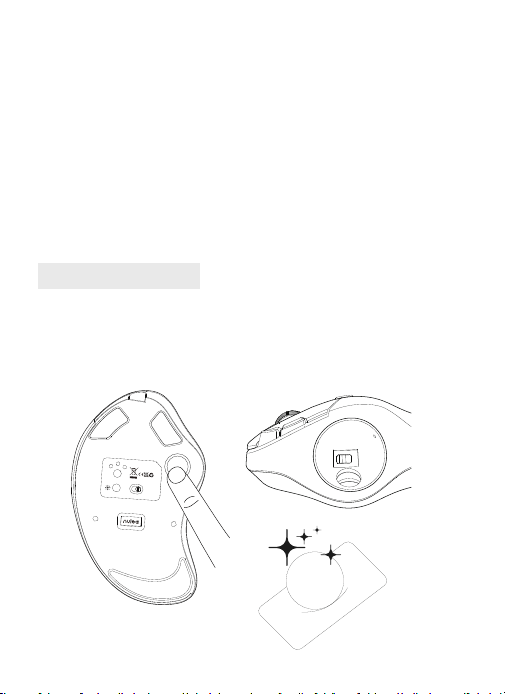
FAQ1
Cosa puoi fare quando il trackball e il cursore non possono funzionare bene?
Spingi la trackball dal fondo del mouse. Usa un panno asciutto per pulire
regolarmente la trackball per prestazioni migliori.
USB
BT2
BT1
ON
OFF
MODE
Model Name: M507
S/N:B1201
support@nulea.com
FCC ID : 2A59F-M501
MADE IN CHINA
Modalità DPI
Premere il tasto DPI e la luce blu lampeggia una volta/due volte/tre volte/
quattro volte/cinque volte, corrispondenti a DPI 200-400-800-1200-1600.
Modalità luce
1. Per salvare l'alimentazione, il mouse entrerà in modalità sospensione dopo 30
minuti di Inattività, premere qualsiasi tasto per uscire dalla modalità di sospensione.
2. Quando il mouse è normalmente collegato al ricevitore, la luce si spegne quando
il mouse non viene utilizzato per 30 secondi e si risveglia quando il mouse viene
risvegliato.
Modalità Sleep
Premere il pulsante Luce per accendere a turno: flusso-respirazione-solido luce
accesa-onda-luce spenta.
Elimina la trackball Pulisci il trackball e il sensore
- 42 -
FAQ2
Nota il problema di ricarica del mouse.
1. Utilizzare il nostro cavo di ricarica incluso per caricare il mouse.
2. Non utilizzare un caricabatterie veloce per caricare il mouse. L'uso di un
adattatore ad alta potenza per caricare il mouse può bruciare il chip del mouse.
(Utilizzare direttamente la porta USB del computer o un caricabatterie da 5 V per
caricare il mouse).
3. Per la tua migliore esperienza, si prega di caricare completamente il mouse
prima del primo utilizzo.
FAQ3
Perché il cursore è troppo sensibile per il controllo?
Esistono 5 livelli DPI: 200-400 (impostazione predefinita) -800-1200-1600.
Premere il pulsante DPI per regolare le tue preferenze.

- 43 -
FAQ4
Non abituarti a usare il mouse trackball.
Il mouse trackball aiuta ad alleviare il disagio del polso quando si lavora.
L'operazione speciale del mouse potrebbe farti sentire a disagio all'inizio. Una
volta che avrai il comando di usarlo, ne otterrai i suoi beneci e ne innamori.
FAQ5
Come riprogrammare i pulsanti del mouse?
1. Tutte le chiavi non sono programmabili.
2. I pulsanti in avanti/indietro non sono compatibili con Mac OS.
- 44 -
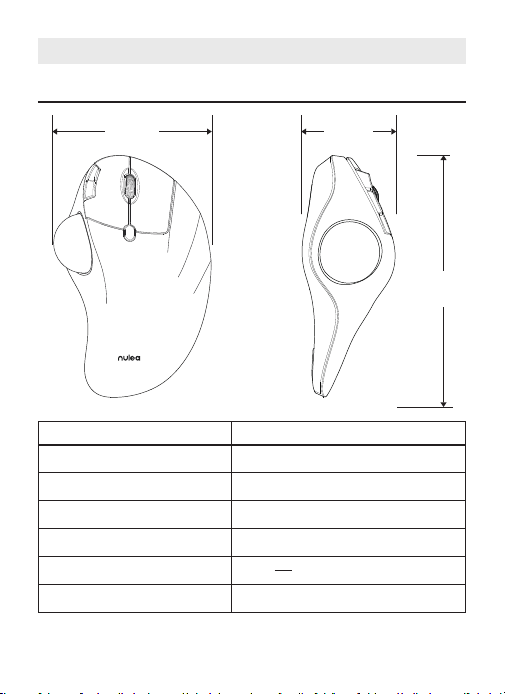
ES
Parámetros básicos
4.1in 2. 2in
6.5
in
Interfaz
DPI
Tamaño
Peso
Distancia de transmisión
Potencia nominal
Tasa de informe
2.4G/Bluetooth
200 - 400(Por defecto) - 800 - 1200 -1600
4.1 × 6.5 × 2.2in
177.6g
10m
DC 5V---0.3A
250HZ (2.4G) / 115HZ (Bluetooth)
- 45 -
Contenu du paquet
1 × Ratón inalámbrico con bola de seguimiento
1 × Cable USB-C
1 × Manual de usuario
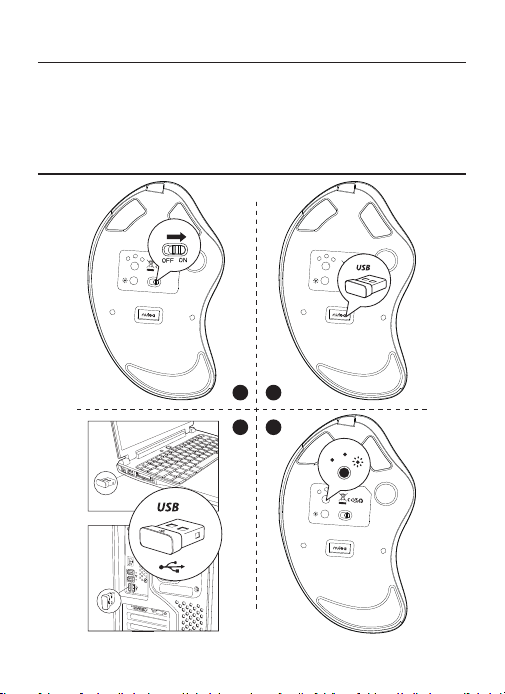
Conexión 2.4G
Model Name: M507
S/N:B1201
support@nulea.com
FCC ID : 2A59F-M501
MADE IN CHINA
USB
BT2
BT1
OFF
ON
MODE
USB
BT2
BT1
ON
OFF
MODE
USB
BT2
BT1
support@nulea.com
ON
OFF
Model Name: M507
S/N:B1201
MADE IN CHINA
MODE
USB
BT2
BT1
Model Name: M507
S/N:B1201
support@nulea.com
FCC ID : 2A59F-M501
MADE IN CHINA
1
3
2
4
- 47 -
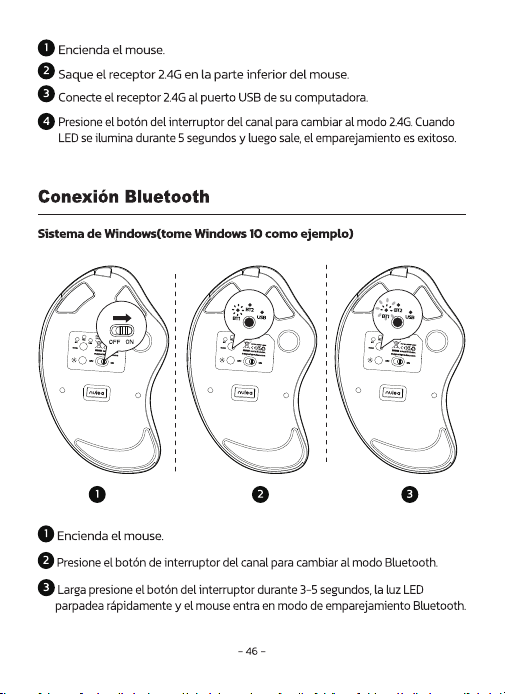
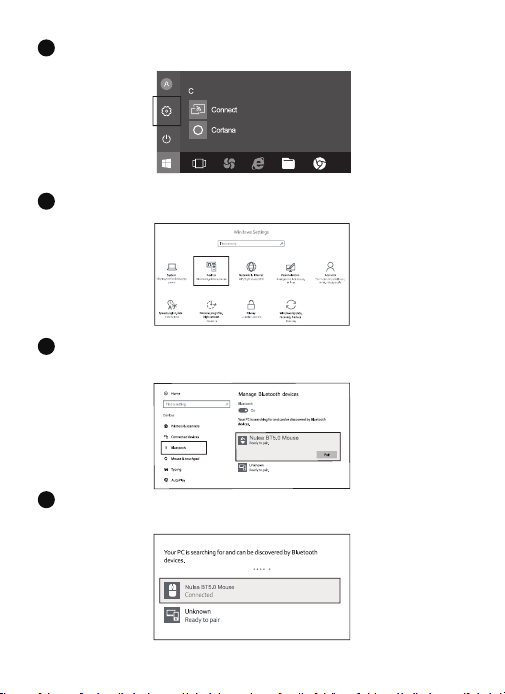
Haga clic en el botón "Dispositivos Bluetooth" en la computadora.
4
Haga clic en el botón "Agregar o eliminar dispositivos Bluetooth".
5
Busque el Bluetooth "Nulea BT5.0 Mouse /Nulea BT3.0 Mouse" y haga clic
el botón de emparejamiento.
6
Si el emparejamiento es exitoso, el LED se ilumina durante 5 segundos y luego
se va afuera.
7
- 48 -
3
Sistema Mac OS
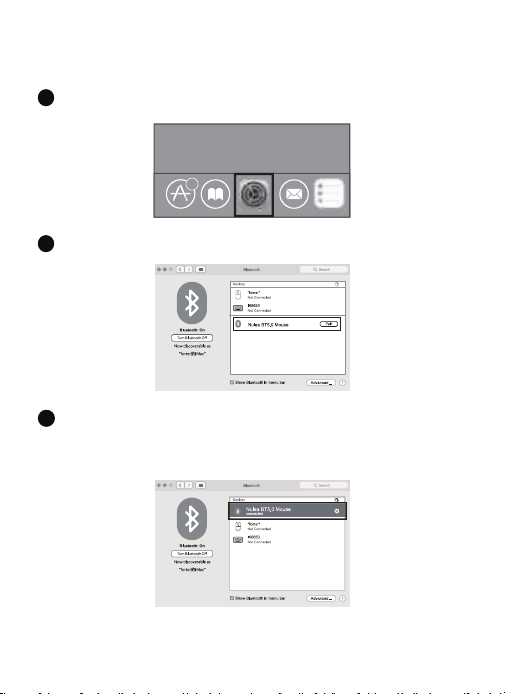
Opere los pasos de instalación de Bluetooth (1 ~ 3) antes de emparejarse.
6
Haga clic en el botón "Preferencias del sistema" en la Mac.
1
Haga clic en el botón Bluetooth en la carpeta de preferencias del sistema.
2
Busque en el ratón Bluetooth
"Nulea BT5.0 Mouse /Nulea BT3.0 Mouse"
y haga
clic en el Botón de emparejamiento. Si se instala por completo, el mouse podría
usarse normalmente.
- 49 -
Cambio de modo
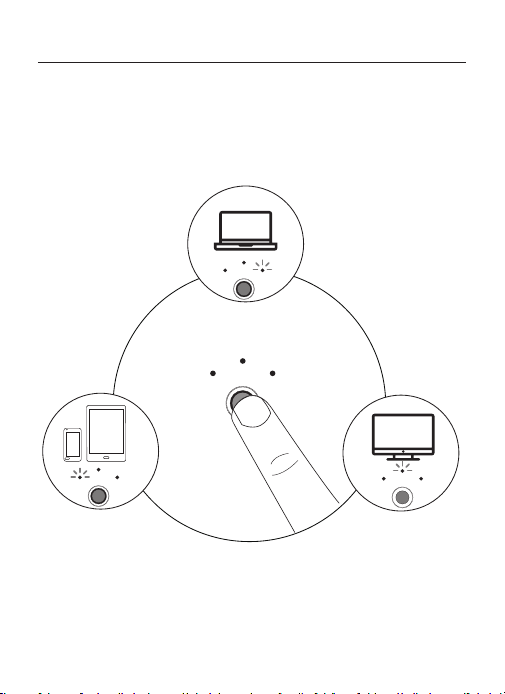
Cuando 2.4G y Bluetooth coinciden correctamente con el dispositivo,
respectivamente, puede usar el botón de interruptor en la parte inferior del
mouse para cambiar al dispositivo correspondiente.
2.4G Mode LED on
Bluetooth 1 Mode LED on Bluetooth 2 Mode LED on
USB
BT2
BT1
BT2
BT1
USB
BT2
BT1
USB
BT2
BT1
MODE
USB
- 50 -
Carga
1. El indicador de batería bajo brilla azul, para no afectar la experiencia y
función del mouse, por favor, por favor, cargue a tiempo.
2. El indicador de carga brillará rojo mientras el mouse está cargando. los
La luz indicadora se vuelve verde cuando está completamente cargada.
3.La tensione è inferiore a 3,3 V e l'indicatore di bassa tensione lampeggia 10
volte alla frequenza di 1 volta al secondo.
Model Name: M507
S/N:B1201
support@nulea.com
FCC ID : 2A59F-M501
MADE IN CHINA
USB
BT2
BT1
ON OFF
MODE
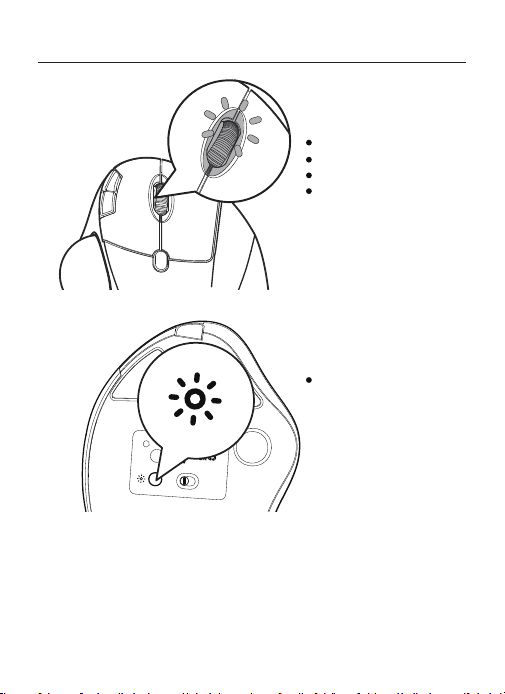
Indicación luminosa
Cambio de DPI: luz azul
Carga: luz roja
Carga completa: luz verde
Batería baja: luz azul
Pulse el botón para cambiar
el modo de iluminación
- 51 -
FAQ1
¿Qué puedes hacer cuando la bola de seguimiento y el cursor no pueden
funcionar bien?
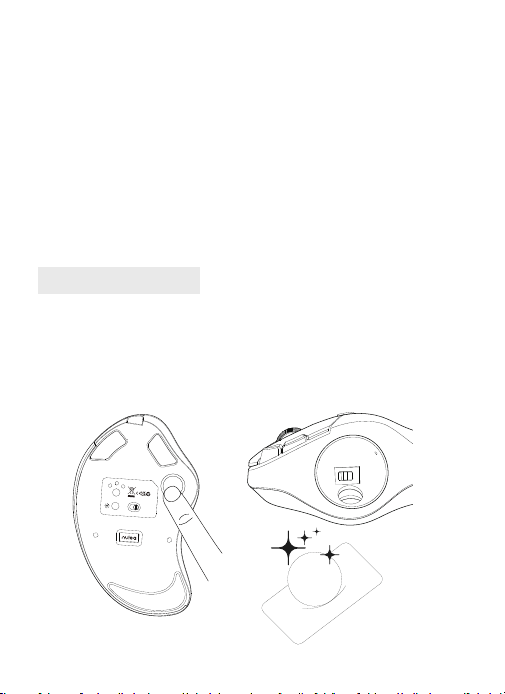
Empuje la bola de pista desde la parte inferior del mouse. Use un paño seco para
limpiar la bola de pista regularmente para un mejor rendimiento.
USB
BT2
BT1
ON
OFF
MODE
Model Name: M507
S/N:B1201
support@nulea.com
FCC ID : 2A59F-M501
MADE IN CHINA
Modalità DPI
Premere il tasto DPI e la luce blu lampeggia una volta/due volte/tre volte/
quattro volte/cinque volte, corrispondenti a DPI 200-400-800-1200-1600.
Modo de luz
1. Para guardar la energía, el mouse entrará en modo de suspensión después
de 30 minutos de Inactividad, presione cualquier tecla para salir del modo de
suspensión.
2. Cuando el ratón está normalmente conectado al receptor, la luz se apagará
cuando el ratón no esté en uso durante 30 segundos , y la luz se despertará
cuando el ratón se despierte.
Modo de sueño
Presione el botón de luz para cambiar a su vez: flujo-respiración-sólido luz
encendida-onda-luz apagada.
Saca la bola de seguimiento Limpiar el trackball y el sensor
- 52 -
FAQ2
Tenga en cuenta el problema de carga del mouse.
1. Utilice nuestro cable de carga incluido para cargar el mouse.
2. No use un cargador rápido para cargar el mouse. El uso de un adaptador
de alta potencia para cargar el mouse puede quemar el chip del mouse. (Use
directamente el puerto USB de la computadora o un cargador de 5V para cargar
el mouse).
3. Para su mejor experiencia, cargue completamente el mouse antes de su primer
uso.
FAQ3
¿Por qué el cursor es demasiado sensible al control?
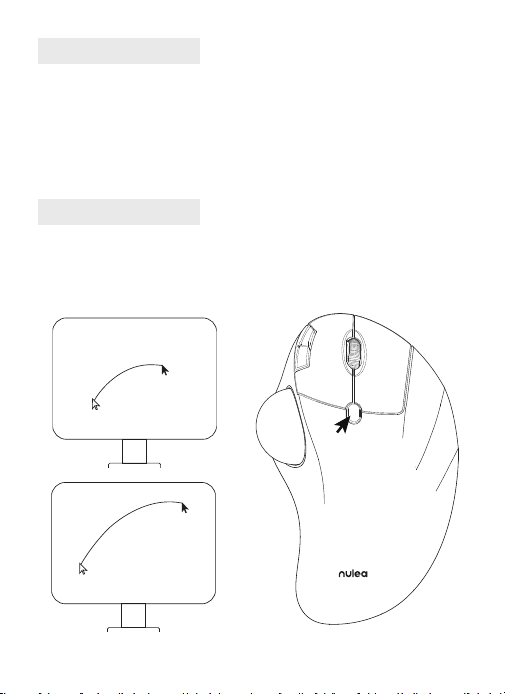
Hay 5 niveles de DPI: 200-400 (predeterminado) -800-1200-1600. Presione el
botón DPI para ajustar su preferencia.

- 53 -
FAQ4
No te acostumbres a usar Trackball Mouse.
El ratón Trackball ayuda a aliviar la incomodidad de la muñeca cuando se
trabaja. La operación especial del mouse puede hacerte sentir incómodo al
principio. Una vez que obtenga el mandato de usarlo, obtendrá sus benecios y
se enamorará de él.
FAQ5
¿Cómo reprogramar los botones del mouse?
1. Todas las claves no son programables.
2. Los botones hacia adelante/hacia atrás no son compatibles con Mac OS.
- 54 -
FCC Statement
Correct Disposal of This Product
Any Changes or modications not expressly approved by the party responsible for
compliance could void the user's authority to operate the equipment.
This device complies with part 15 of the FCC Rules. Operation is subject to the following
two conditions:
(1) This device may not cause harmful interference, and (2) this device must accept any
interference received, including interference that may cause undesired operation.
FCC Radiation Exposure Statement
This equipment complies with FCC radiation exposure limits set forth for an uncontrolled
environment. This equipment should be installed and operated with minimum distance
20cm between the radiator& your body.
The Bluetooth word mark and logos are registered trademarks owned by the Bluetooth
SIG, Inc. and any use of such marks by Nulaxy is under license. Other trademarks and
trade names are those of their respective owners.
(Waste Electrical & Electronic Equipment)
This marking shown on the product or its literature, indicate that it should not be
disposed with other household wastes at the end of its working life.
To prevent possible harm to the environment or human health from uncontrolled waste
disposal, please separate this from other types of wastes and recycle it responsibly to
promote the sustainable reuse of material resources. Household user should contact
either the retailer where they purchased this product or their local government ofce, for
details of where and how they can take this item for environmentally safe recycling.
Business users should contact their supplier and check the terms and conditions of the
purchase contact. This product should not be mixed with other commercial wastes for disposal.
- 55 -
WORK WITH YOUR FAVORITE
Visit www.nulea.com for our 24/7
live chat or send an email to
[email protected] for support.
24
7
EC REP
CET Product Service Ltd.
Beacon House Stokenchurch Business Park,
Ibstone Rd, Stokenchurch
High Wycombe HP14 3FE UK
Email: info.cetservice@gmail.com
Phone: +44 741 932 5266
UK REP