Model:SL6 1
Robot Vacuum Cleaner

Safety Warnings
Introduction
Installation and APP Connection
Use Instructions
Maintenance
Malfunctions and Troubleshooting
DE
FR
IT
ES
01
03
07
14
17
21
23
45
67
89
........................................................................................................................................................
..................................................................................................................................................................
....................................................................................................................
................................................................................................................................. ........................
Function Module 15
.............................................................................................................................. ........................
................................................................................................................................................................
................................................................................................................
.....................................................................................................................................................................................
.....................................................................................................................................................................................
.....................................................................................................................................................................................
.....................................................................................................................................................................................
Table of Contents

Do not use the bumper as the handle.
Safety Warnings
•
•
•
•
•
•
•
•
•
•
•
•
•
•
•
•
•
•
•
Application Restrictions
This machine is used for indoor cleaning only. Do not use the machine outdoors (such as open balcony), on non-floors (such as sofa) or in
commercial or industrial places.
Do not use the machine in the place of cliff without protective rails (such as duplex floors, open balcony, furniture top).
Do not use the machine in the place more than 40°C or less than 0°C or on the ground with any liquids and viscous substances.
Please hang up the wires on the ground indoors before use, to avoid the wires being entangled during cleaning.
Please remove the fragile items and debris (such as vases, plastic bags, etc.) on the ground to avoid valuables being damaged due to obstacles
or minor collisions.
Those with physical, mental or perceptual impairments, including children, are prohibited to use or operate the machine.
This machine should not be used as a toy by the children. Please keep children and pets away when the machine is working.
Place the cleaning brush beyond the reach of the children.
Do not place any objects (including children or pets) on the stationary or moving machine.
Do not keep any parts of human body or pets such as hair and finger close to the suction port during the cleaning.
Do not use the machine to clean the burning objects (such as unquenched cigarette butts)
Do not use the machine to clean the plush carpet (some dark carpets may not be cleaned properly)
Do not use the machine to clean the hard or sharp objects (such as decoration wastes, glass, iron nails, etc.)
Please cut off the power before cleaning or maintaining the machine or the charging base.
Do not wipe any parts of the machine with a damp cloth or any liquid.
Please strictly abide by the operation instructions. Any losses or injuries caused by improper operation shall be borne by the user.
Do not activate the mop function on carpets or on top of furniture.
Please remove the water tank during charging.
01

Safety Warnings
•
•
•
•
•
•
•
•
Battery and Charging
Do not use the battery, charging base or charger produced by any third parties.
Do not disassemble, repair or modify the battery or charging base without authorization.
Do not keep the charging base close to heat sources (such as radiator).
Do not wipe or clean the spring contacts of the charging base with a damp cloth or wet hands.
Do not discard the used battery arbitrarily. The used battery should be handed over to professional recycling agency for proper disposal.
Do not use the machine if the power cord is broken or wrecked, please buy new power cord through official channels.
Please power off the machine during transportation. It’s recommended to transport the machine with original package.
If the machine will not be used for a long time, please power it off after being fully charged, then store in a cool and dry place. Charge the
battery at least every three months to avoid the battery failure due to excessive discharging.
02
Introduction
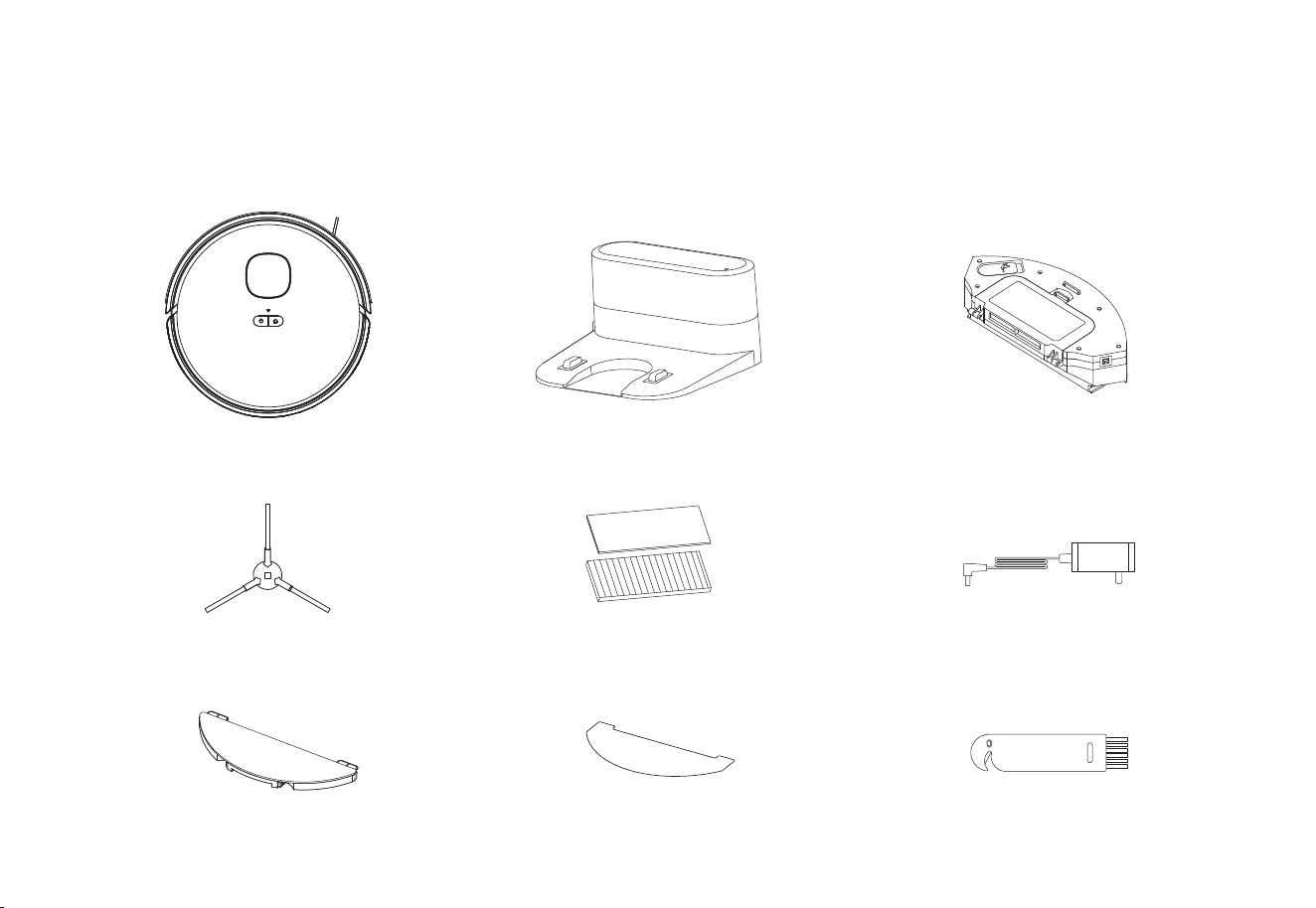
Packing List
Machine Charging Base 2-in-1 Dustbin & Water Tank
Side Brush
Mop Holder
HEPA Filter + Filter Sponge
Mop
Adapter
Cleaning Brush
03
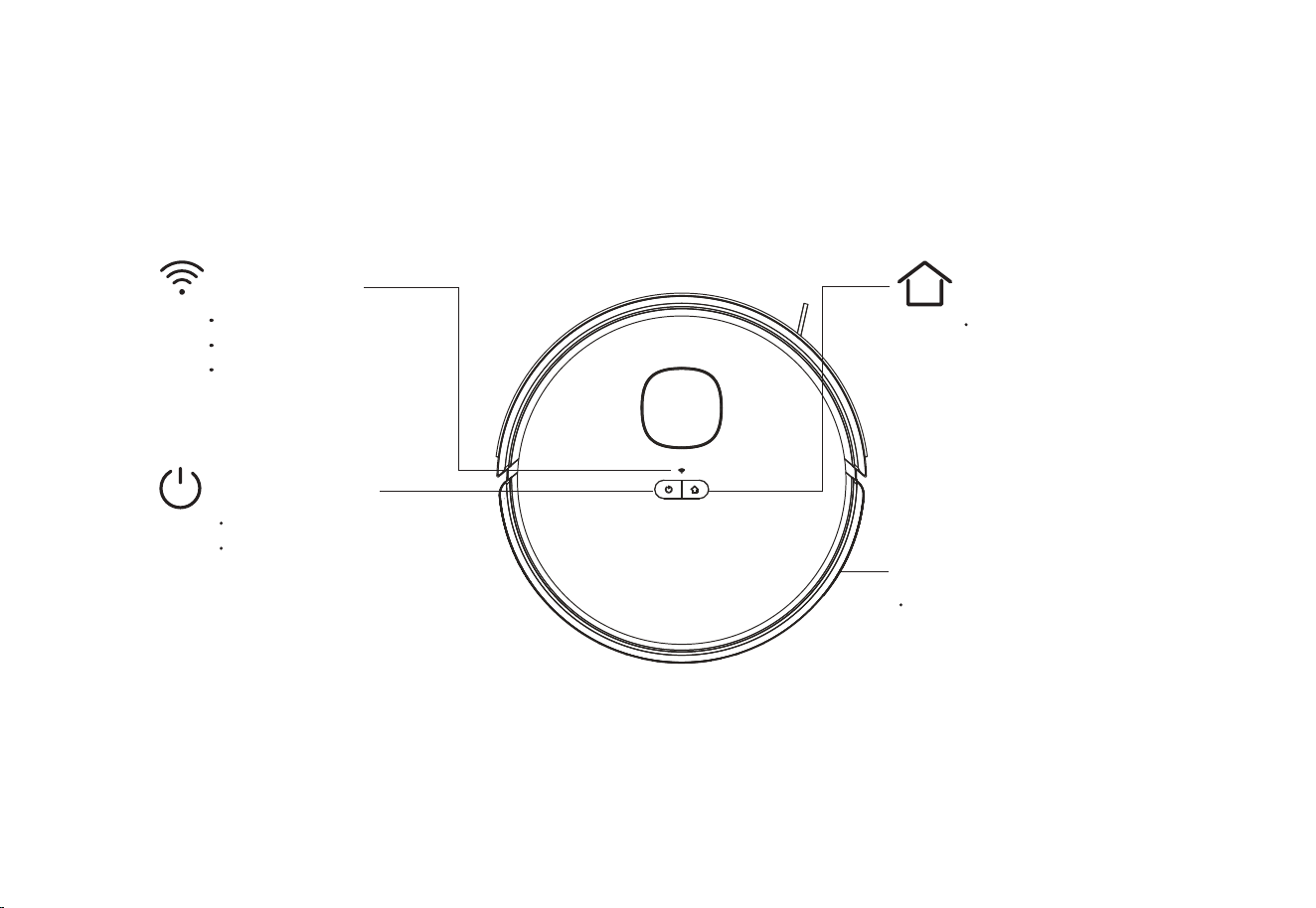
Recharge
Short Press to Recharge
WIFI Indicator
Light OFF: Offline
Light Flash: Connecting
Light ON: Online
Power/Clean/Pause
Short press to start Clean/Pause
Press and hold for 3 seconds to
Power ON/OFF
System Reset
Insert a pin to trigger the switch,
the machine will shut off to reset
the system.
Machine
Introduction
04
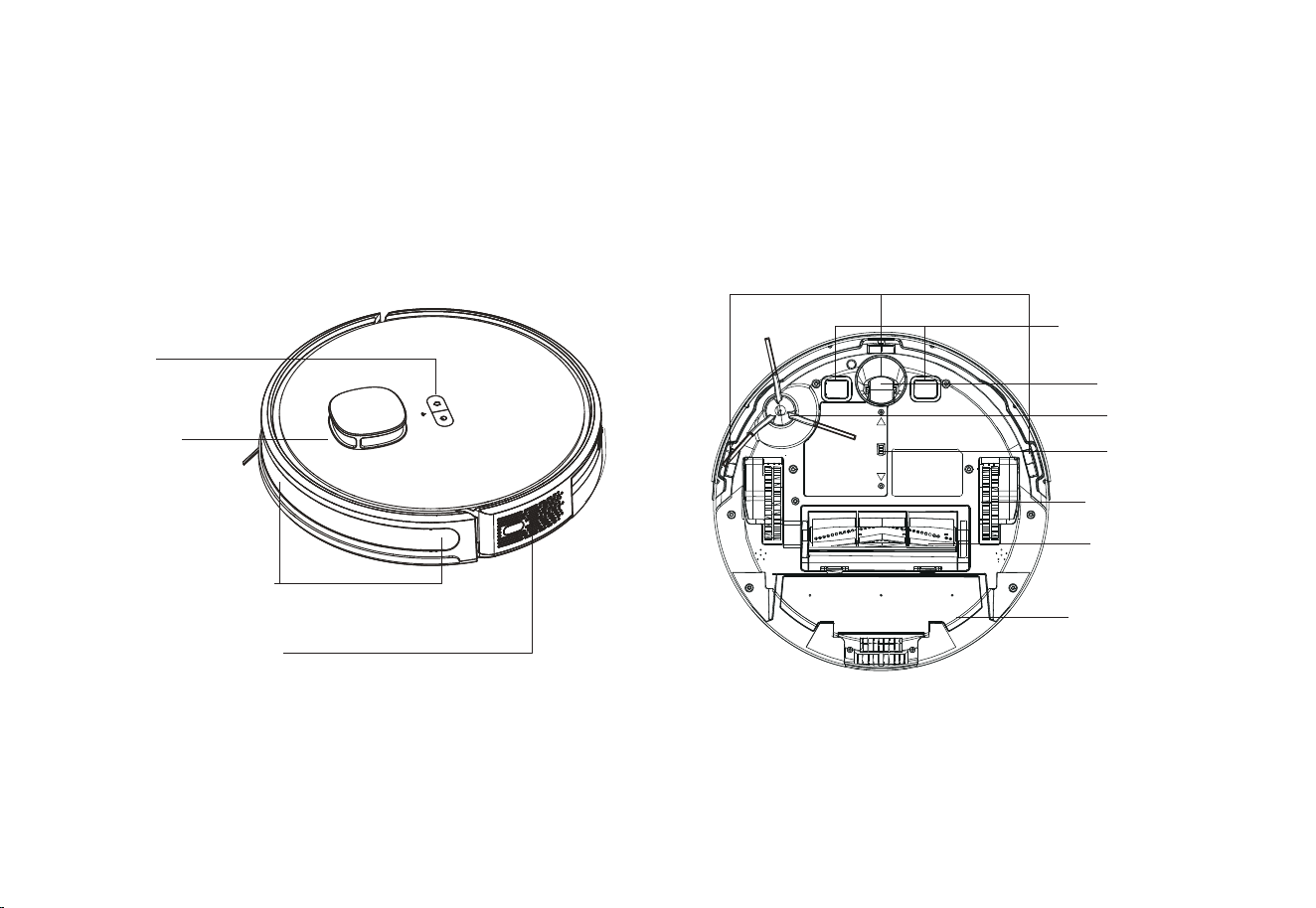
Sensor and Structure
Charging Contacts
Omni Wheel
Side Brush
Battery Lid
Driving Wheel
Rolling Brush
Edge Sensor
Laser radar
Button
2-in-1 Dustbin &
Water Tank
Infrared receiving sensor
Introduction
Infrared Bumper Sensor
05
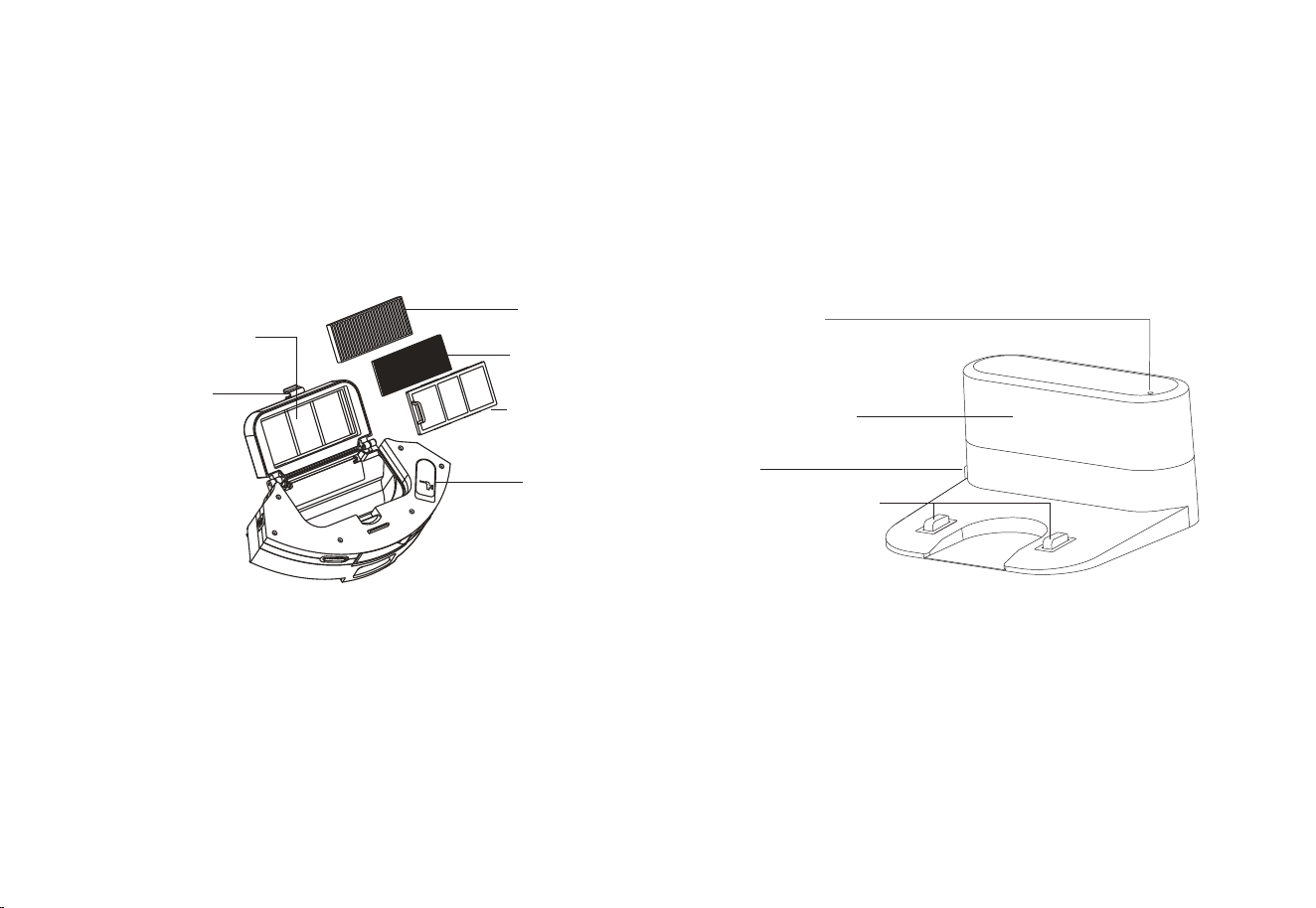
2-in-1 Dustbin & Water Tank Charging Base
Power Indicator
Charging contact poles
Signal Transmission
DC IN
Introduction
Primary filter
Tank Cover
Filter Sponge
High-efficiency filter cover
Dustbin Button
HEPA Filter
06
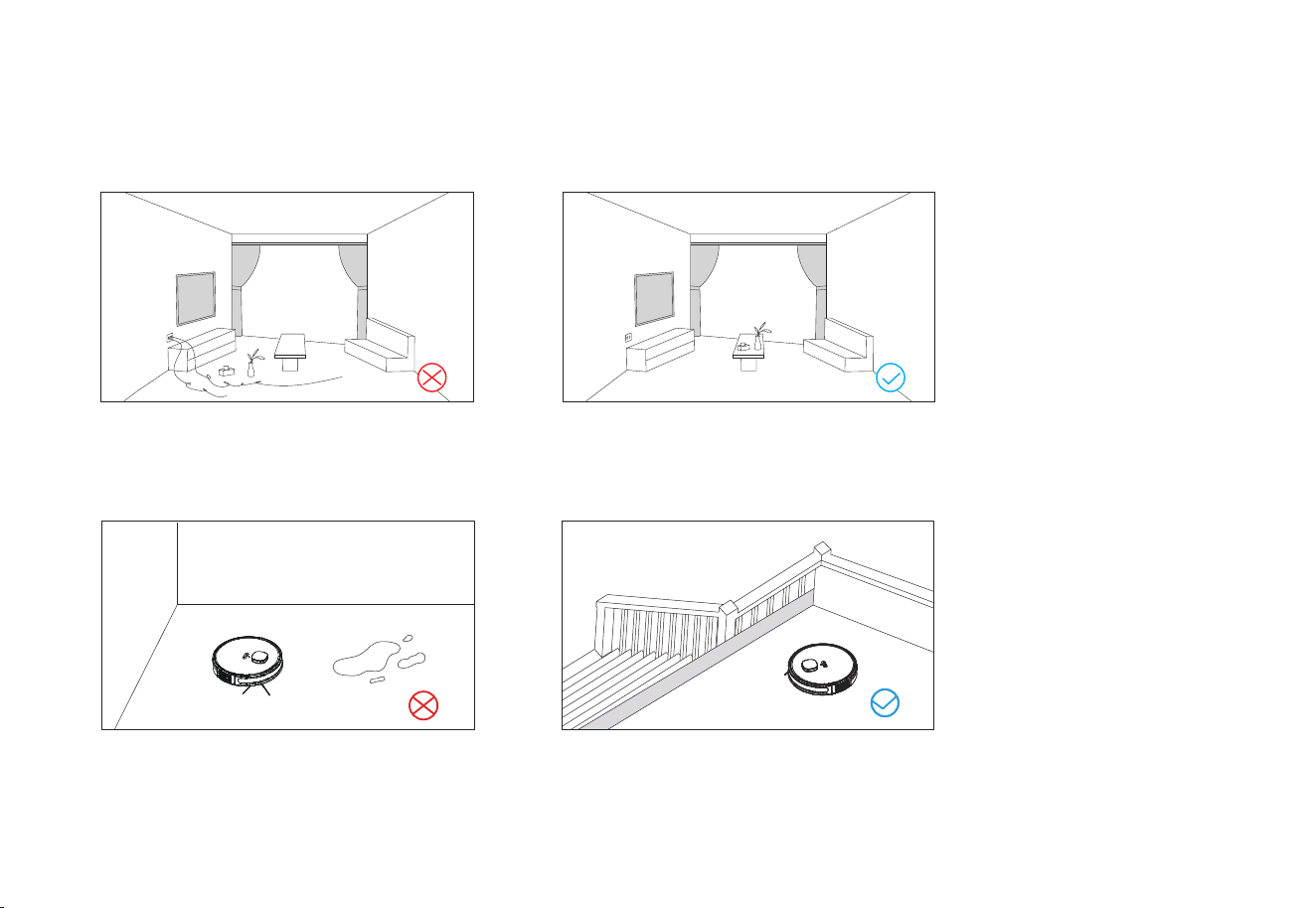
Notices
Installation and APP Connection
Please sort out the wires, debris and fragile,
unstable, valuable and potentially dangerous
Do not use the robot to clean liquid.
When used in a suspended circumstance, it shall be
protected by rails to avoid accidental falling or
pushing other articles from falling; otherwise,
personal or property damage may be caused.
objects on the ground before starting the device.
Avoid personal injury or property damage caused
by entanglement, jamming, dragging, or bumping
of equipment.
07
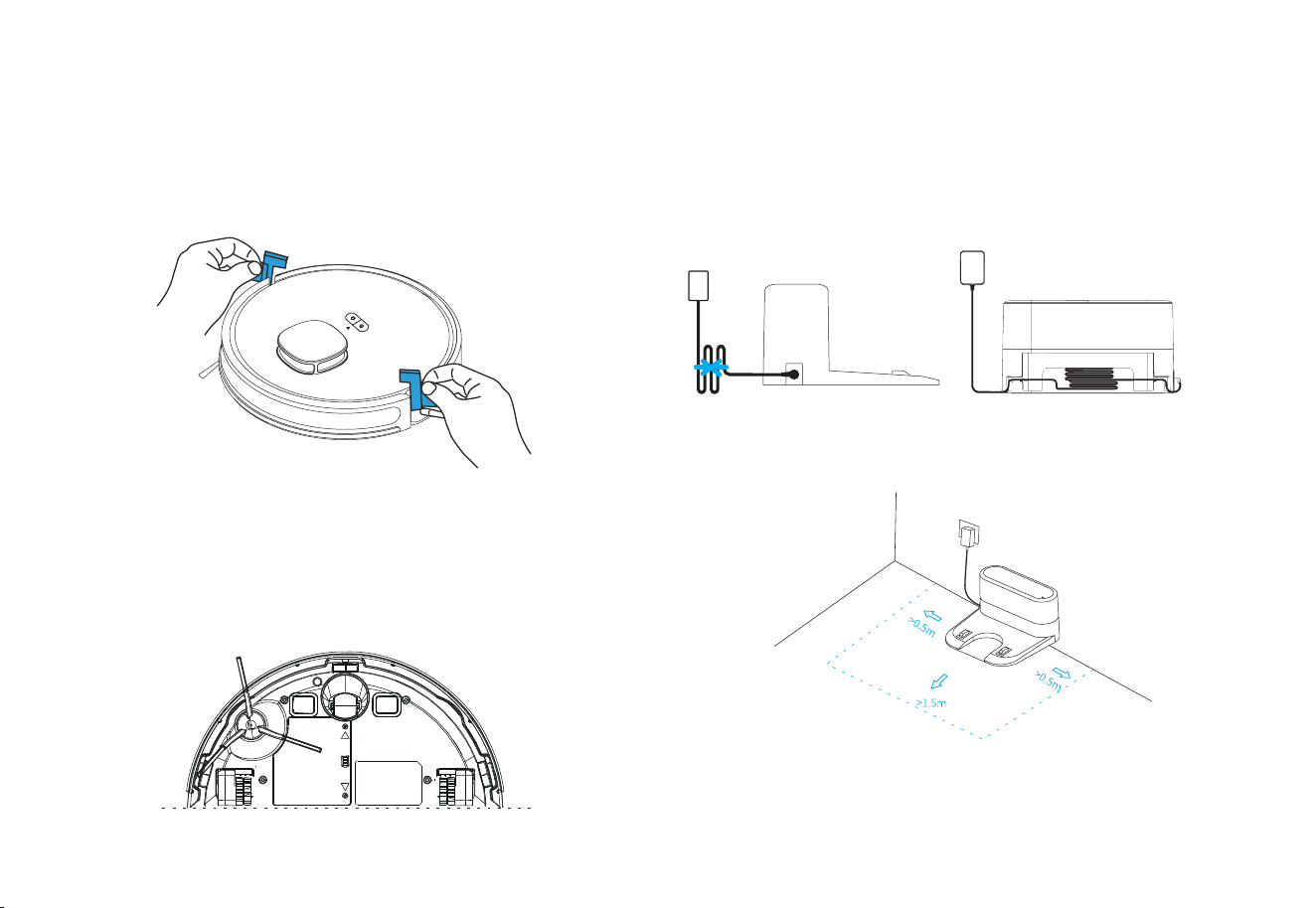
1. Please place the charging base on a flat place against the wall.
2. Reserve a space of more than 0.5m on both sides and more than 1.5m in the front.
3. When the charging base is powered on, the charging indicator will be illuminated.
Notes:
3. Connect the adapter to the charging base and arrange the
power cable properly.
4. Place the charging base in proper position and power on for
charging.
1. Remove the protective strips.
2. Install the side brushes.
Align the side brushes with the corresponding holes
press the side brushes until you hear a click, indicate
successful assembly.
Installation and APP Connection
08
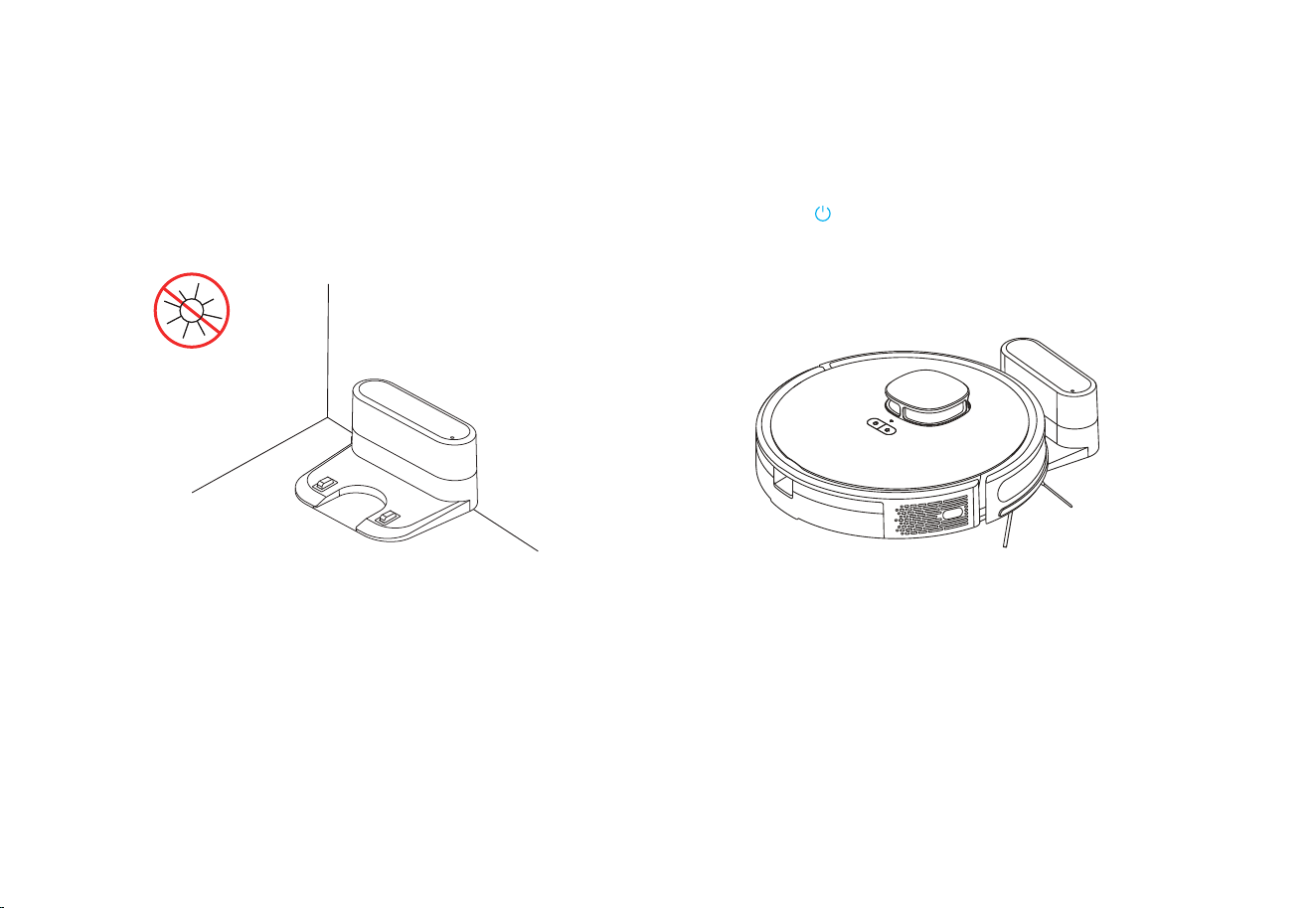
5. Do not move the charging base arbitrarily and keep it asway
from direct sunlight
Installation and APP Connection
6. Power-On and Charging
Note:
If the battery is too low to start the machine, please place the machine to the
charging base and it will automatically power on.
Press and hold to power on. When the indicator is illuminated,
place the machine to the base for charging. The voice prompt of
"Start Charging" indicates successful charging.
09
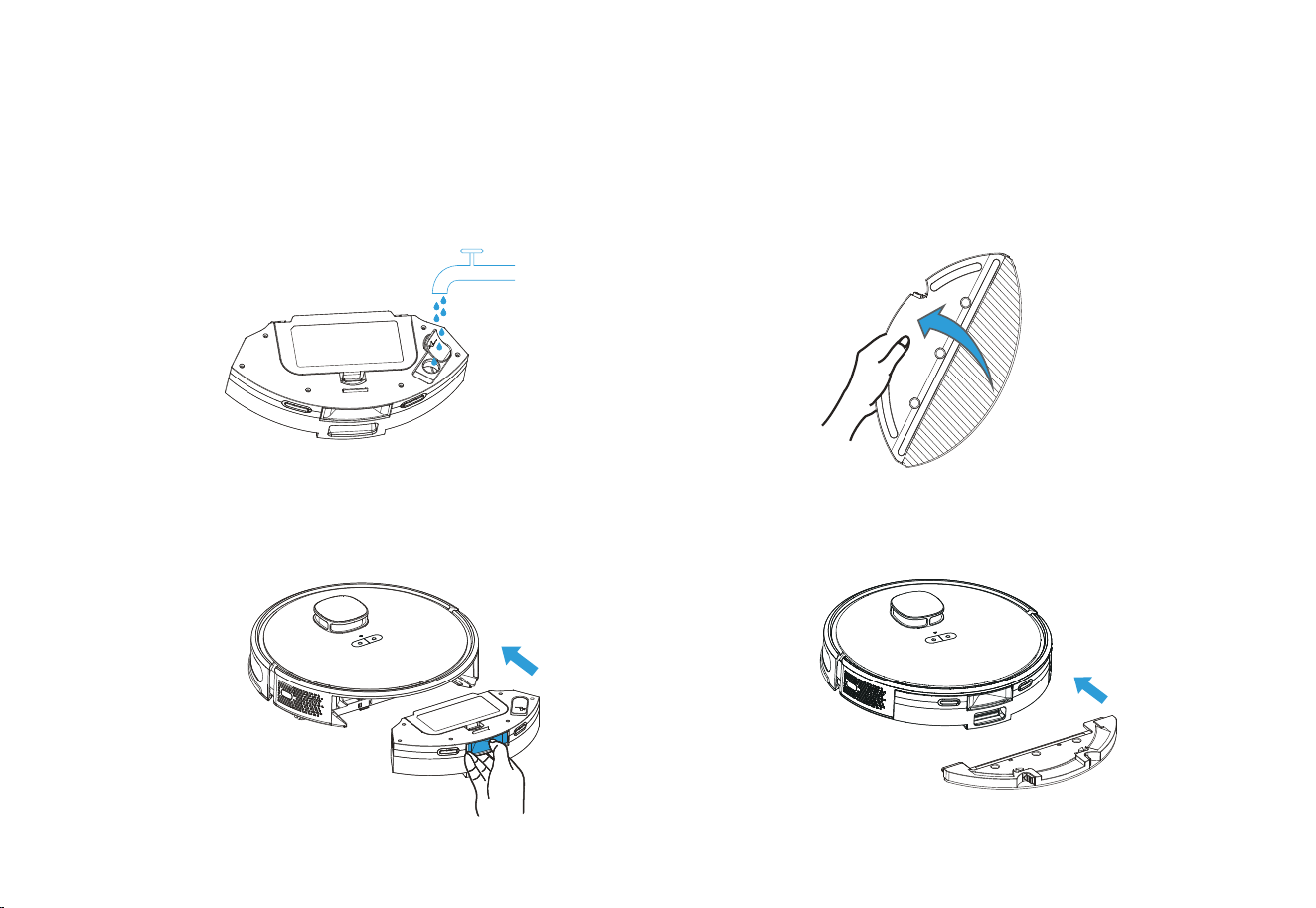
1. Add water into water tank: Open the tank cover, add an
appropriate amount of water and then screw it tight. Do
not add any cleaning agent.
Install Mopping Module
2. Install the 2-in-1 dustbin & water tank into the machine.
Installation and APP Connection
3. Install the mop to the holder.
4. Install the holder to the bottom of 2-in-1 dustbin & water
tank.
*Do not use the mopping function on the carpet, otherwise the carpet will get
wet. Set Restricted Zone / Selected Zone to clean to avoid the carpet area.
10
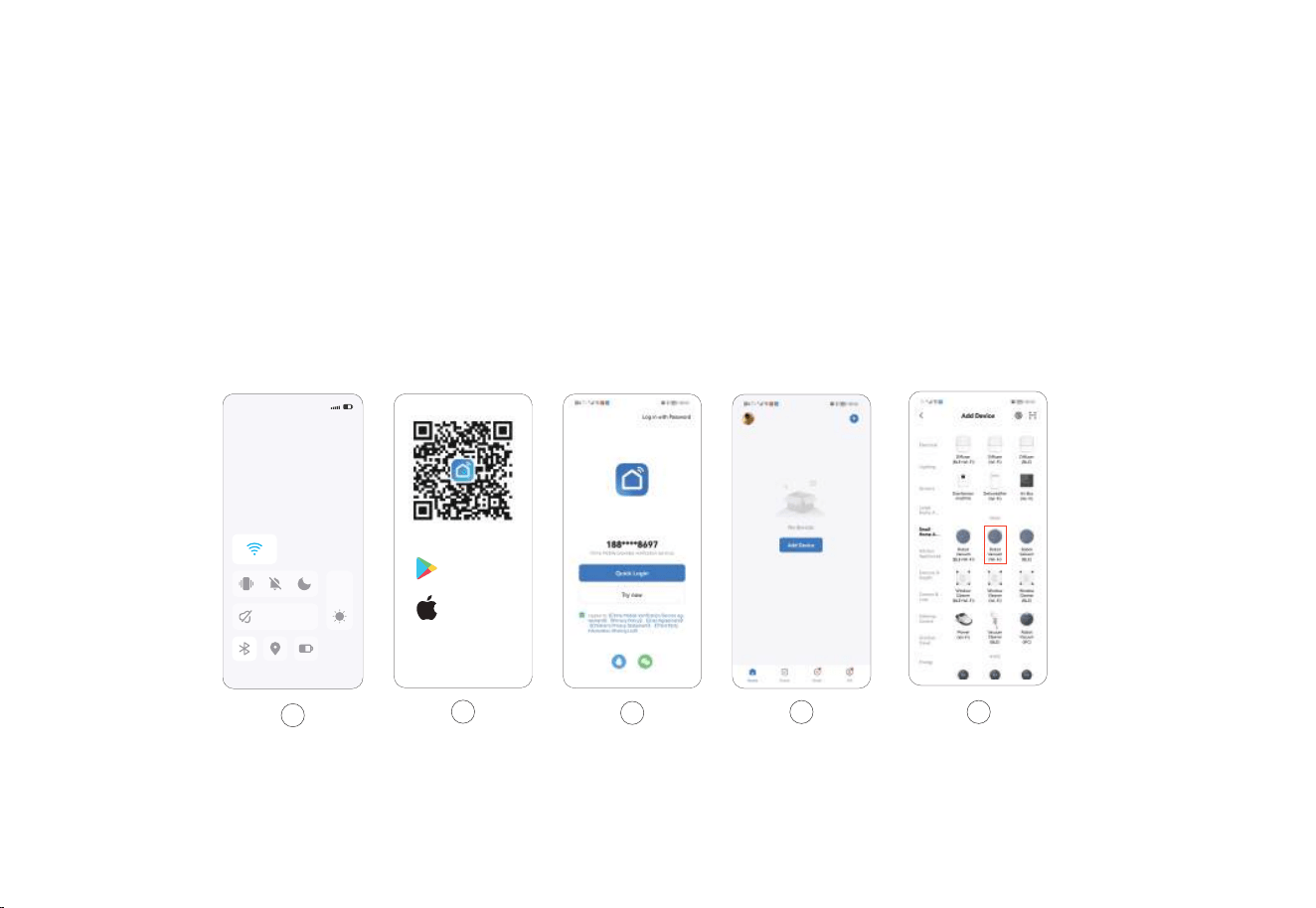
Installation and APP Connection
5.Choose “Small Home Appliances – Robot Vacuum (Wi-Fi”)
1.Activate the WiFi in phone to connect to 2.4GHZ network.
2.Download App: Search “Smart Life” in Appstore or scan
the QR code.
3.Registration: Open the APP and complete the registration.
4.Log in the APP and click "Add Device"/+ Button
11
A
18:30
1
Google Play
App Store
2
3
4 5
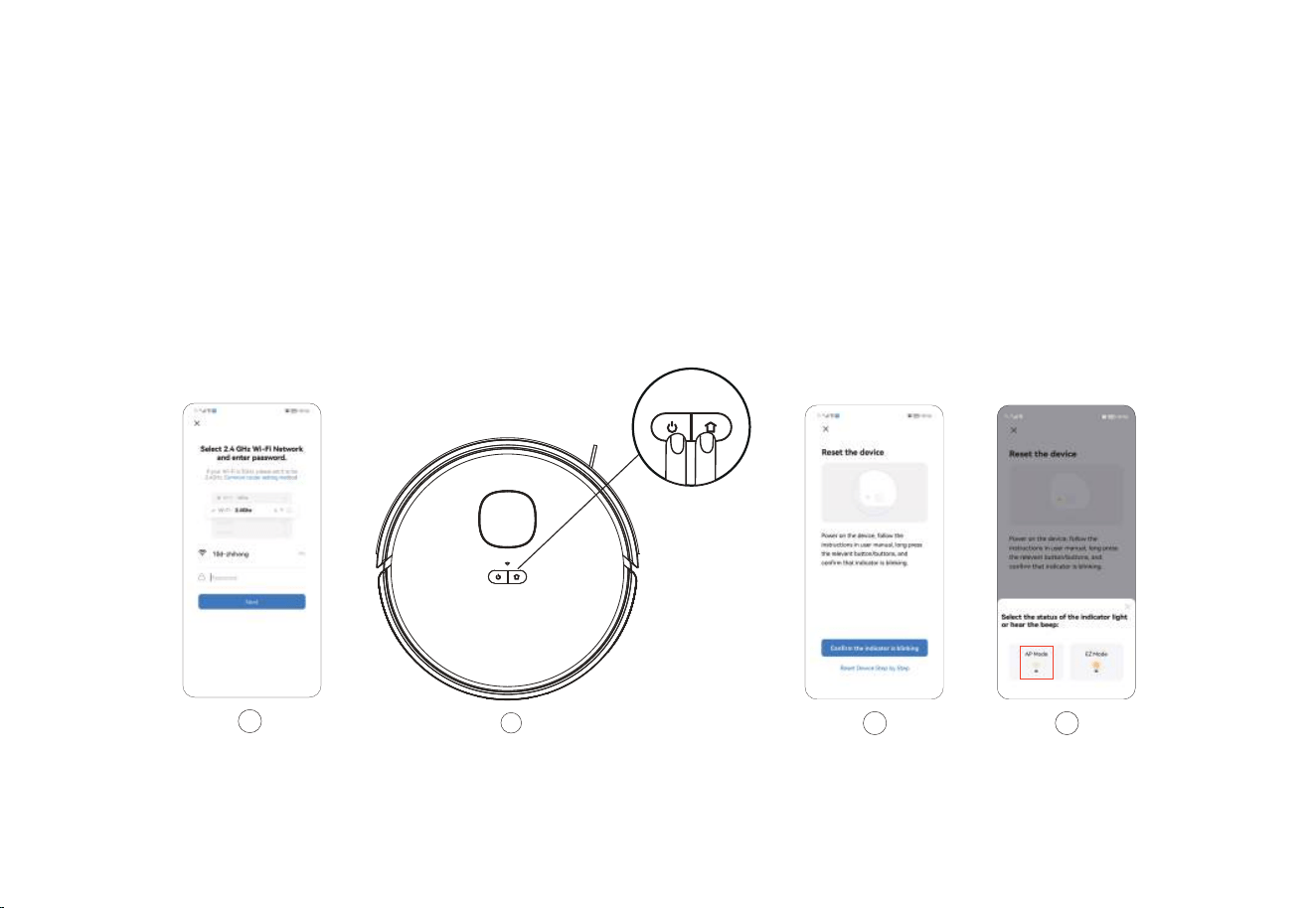
6.Enter the password and click “Next”.
6
Installation and APP Connection
7.Press both “Power + Charge" buttons for 3 seconds and the light
starts to flash, which means the machine starts network distribution.
8.Click “Confirm the Indicator is Blinking” button.
9.Select the AP mode.
12
7
8 9
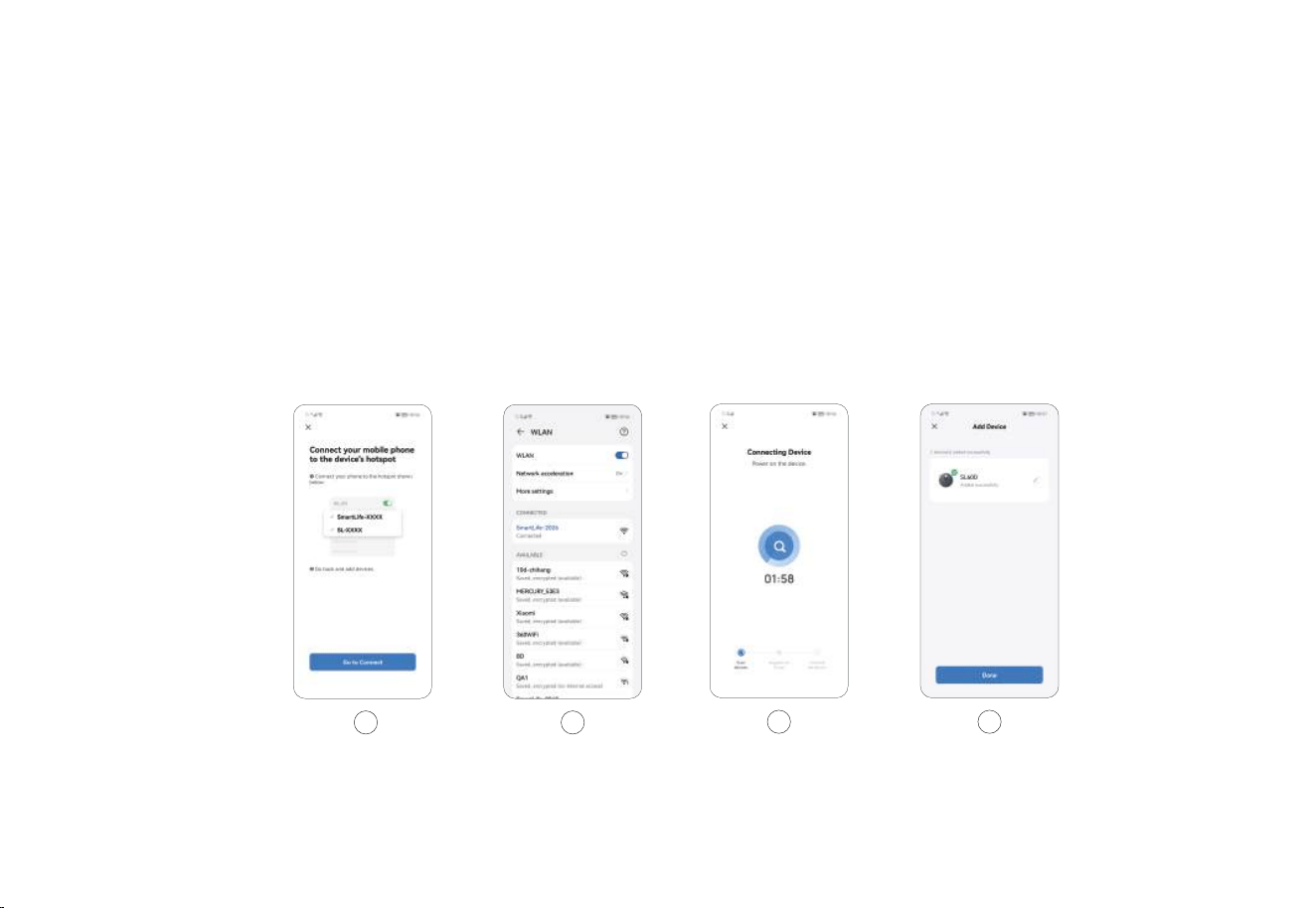
Installation and APP Connection
12.Wait for the connection.
13.Click “Done” to log in APP.
13
12
10.Click “Next”.
11.Then select SMATR LIFE XXX and return.
10 11
13

Use Instructions
14
Power ON/OFF
Clean/Pause
Notes:
Charging
Press and hold for 3 seconds till the indicator is illuminated,
which means the machine has been powered on. Press and hold
for 3 seconds in standby mode, the indicator is OFF, which
means the machine has been powered off. Note: The machine
cannot be powered off during the charging.
After the machine is powered on, short press or use the remote
control or APP to start cleaning.
Auto Mode: The machine will automatically return to the charging
base for charging after cleaning.
Manual Mode: In the PAUSE state, short press to start the
recharging or use the remote control or APP to start the recharging.
Do not clean the liquid.
The machine cannot start cleaning if the battery is lower than 15%, please charge
the machine first.
If the battery is lower than 15% during the cleaning, the machine will automatically
return to the base for charging.
Please clear up the wires on the ground (including the power cord of charging base)
before cleaning to avoid power failure or property damages due to cable
entanglement during cleaning.
Note: If the machine cannot find the charging base, it will automatically return to
the starting position, please place the machine back to the charging base manually.
•
•
•
•
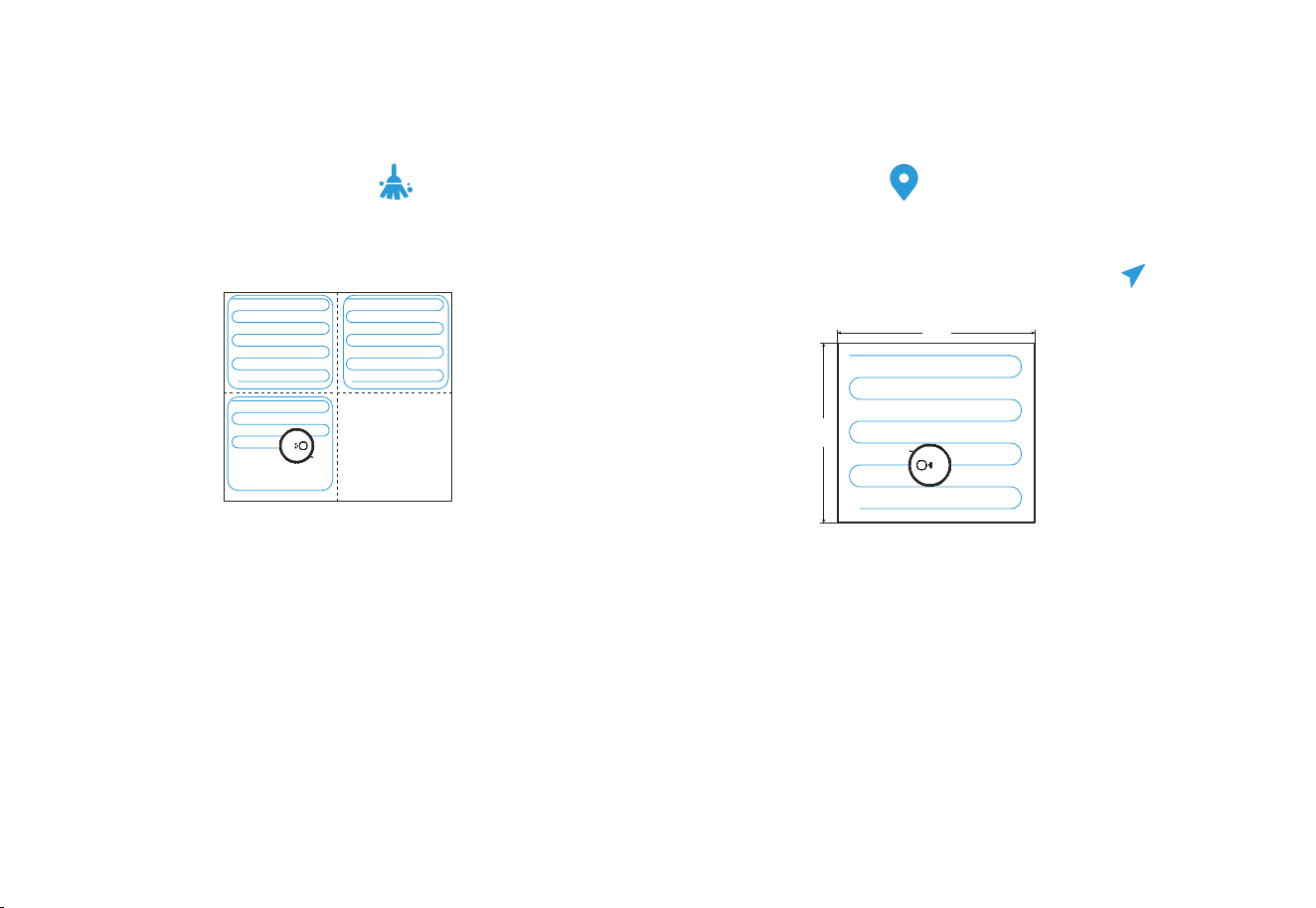
1.Before the first use, Robot Vacuum will scan the domestic
environment first and generate a map with smart area divisions.
2.Based on the existing area divisions, Robot Vacuum will clean
along the edges to form a closed area first and fill in the area in
a Z-shaped manner, then clean the remaining areas one after one.
2.Select a point to be cleaned on the map, then click "Go
Here" to start the clean.
3.Robot Vacuum will move to the designated location and clean
an area of 1.6m×1.6m square with itself as the center twice,
then return the charging base for recharging.
3.After cleaning, Robot Vacuum will return to the base for
recharging.
Note:
To generate the map better, it’s recommended to start from the charging base
before the first use.
When the machine is working, do not move it arbitrarily, otherwise it may
start repositioning; if the repositioning fails, the machine will abandon the
previous task and may not return for recharging.
Function Module
15
Cleaned area Cleaned area
Area to be cleaned
Area being cleaned
Smart Clean (Default)
1.Select " Press to run” in the APP.
Targeted Clean
•
•
Note:The map needs to be generated in the APP before use
1.6 m
1.6 m
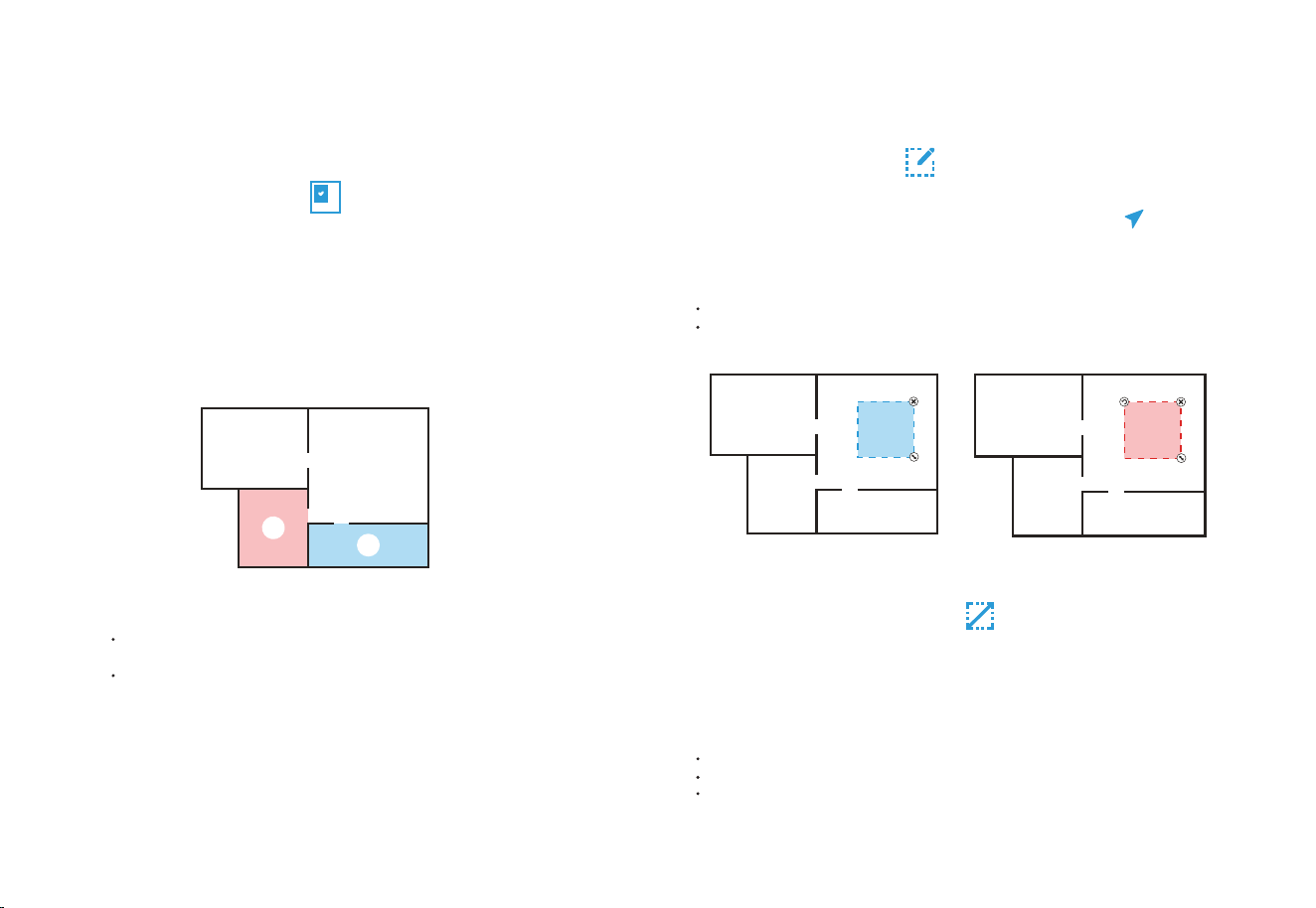
16
Function Module
1.Select the cleaning function for the selected area in the APP.
2.Select the area to be cleaned on the map and click "Select Room"
3.Robot Vacuum will clean the designated area.
Note:
Please clear the obstacles around the designated area to ensure the machine can
access.
The map needs to be generated in the APP before use.
Designated Clean
Select “Area Sweep” in the APP and click "+ cleaning area" in the
right. Select an area to be cleaned on the map and click "Go Here”
Robot Vacuum will start the clean within the customized area.
Customized Clean
Select “Fordiden Edit” in the APP and set the restricted area on the
map (+, Mop & sweep or + Mop forbid area), then save the settings
and the machine will not access to the set area for cleaning.
Restricted Area Setting
1
2
Note:
Please clear the obstacles around the designated area to ensure the machine can access.
The map needs to be generated in the APP before use.
Customized Clean Restricted Area Setting
Note:
The map needs to be generated in the APP before use.
The selected restricted area should not be too close to the charging base.
When Robot Vacuum is moved or the domestic environment has significantly
changed, the map may become invalid and the restricted area may get lost
Maintenance
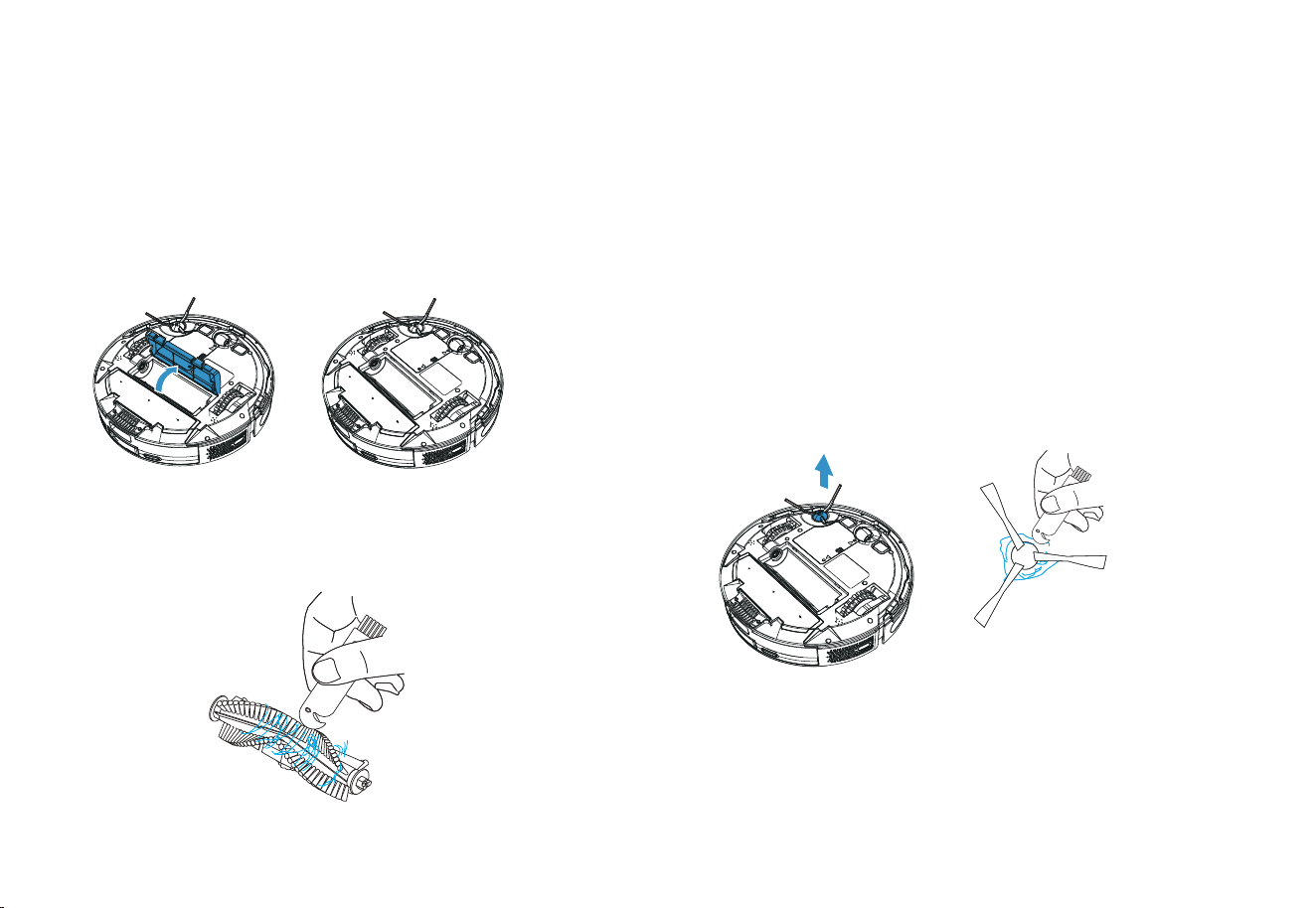
Side brush
(to be cleaned every week)
It’s recommended to clean the rolling brush every 1~2 weeks.
1. Turn the machine over and press the buckle to remove the brush lid.
2. Remove the rolling brush.
1. Turn the machine over and pull out the side brush vertically.
2. Remove the entangled hairs and dirt, then reinstall the side brush.
3. Press the left brush (L) and the right brush (R) into the correspond-
ing holes to complete the brush installation.
Note: It is recommended to replace the side brush every 3~6 months (especially
when the side brush is seriously deformed) for the sake of satisfactory cleaning
effect.
3. Clean the main brush and rolling brush with the tool provided and
remove the entangled debris on the rolling brush.
17
Maintenance
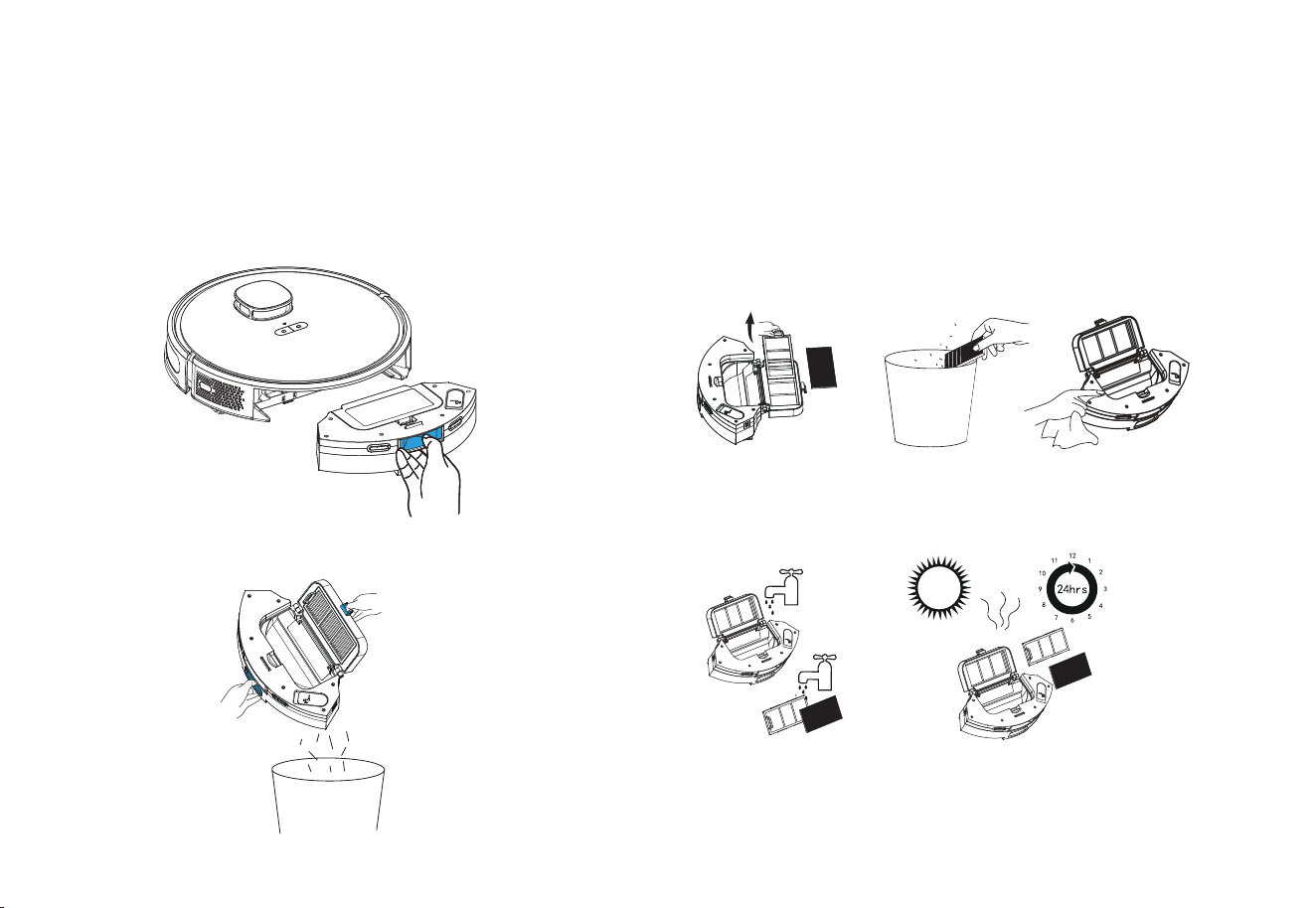
(to be cleaned every 2~3 days)
1. Press and hold the button to pull out the dustbin.
2. Press and hold the dustbin lock to open and dump the dirt inside.
Dustbin and Filter
(to be cleaned every week)
1. Clean the filter: Remove the filter sponge and HEPA filter. Gently
tap the HEPA filter to remove the dust.
2. Clean the dustbin: Open the dustbin and clean with a brush or rag.
3. If the dustbin is too dirty, it can be washed with water. Please use
only after being thoroughly dried.
Notes:
1. Please do not add detergent when washing the dustbin with water; make it
thoroughly dry after wash.
2. It is recommended to replace the HEPA filter every 3~6 months
Clean the dustbin
18
Maintenance
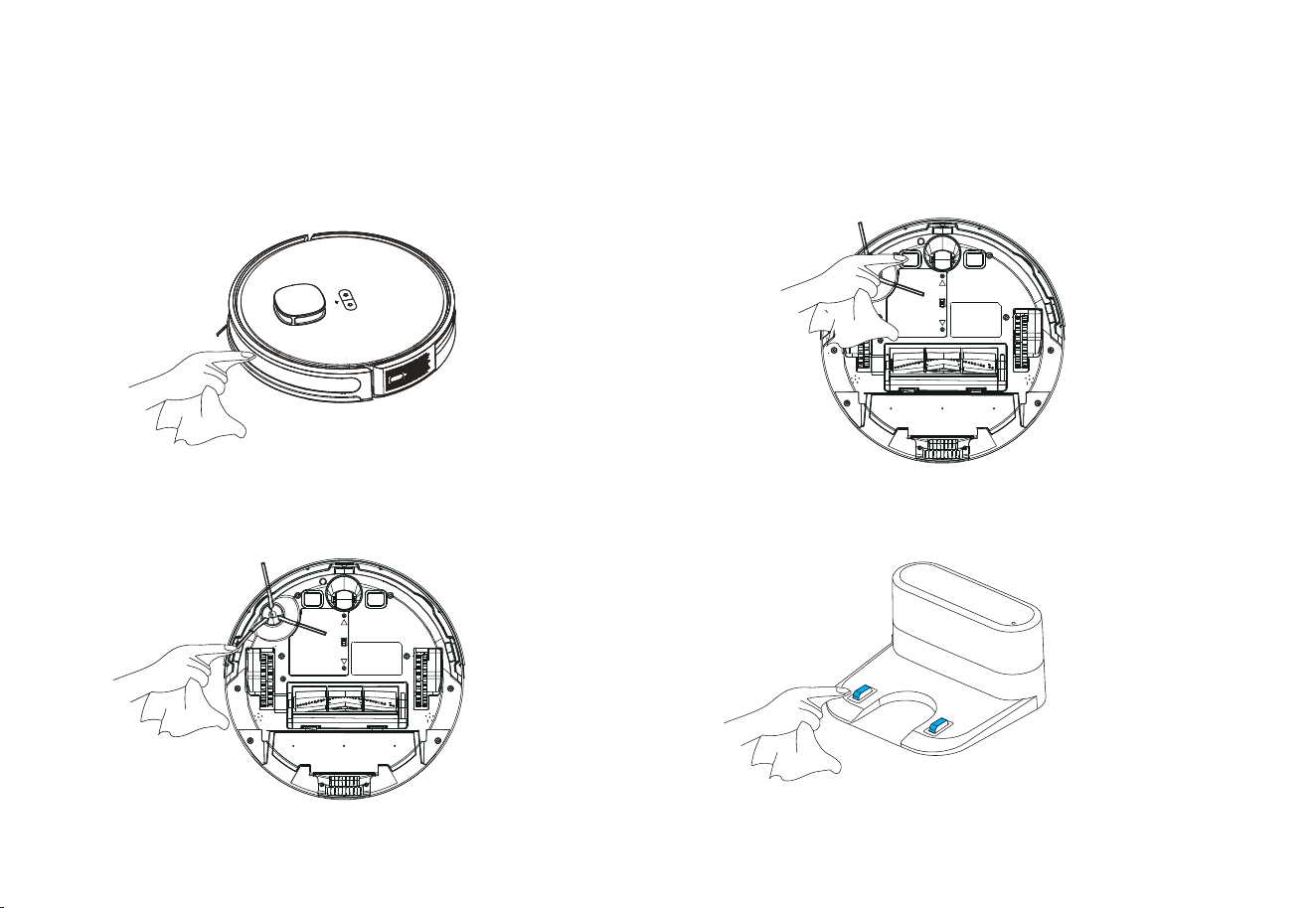
(to be cleaned every month)
Clean the infrared bumper sensor
(to be cleaned every month)
Clean the charging contacts
(to be cleaned every month)
Clean the edge sensor
19
Maintenance
Battery
Firmware Upgrading
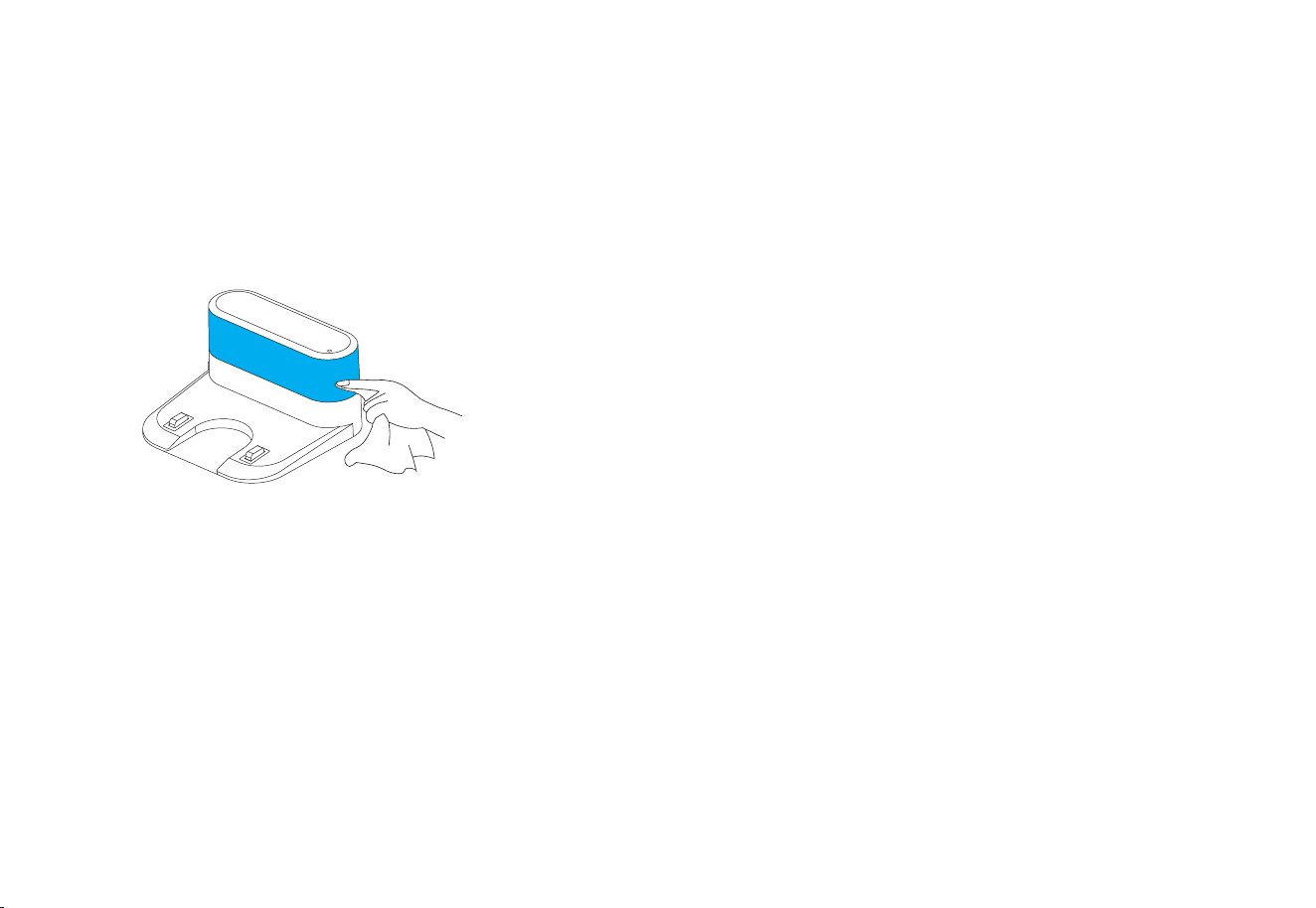
(to be cleaned every month)
Clean the signal transmitting area
The machine is equipped with high-performance rechargeable
lithium-ion battery. For the sake of battery performance, please keep
the machine fully charged in daily maintenance.
If the machine will not be used for a long time, please power it off
before storage and charge the battery at least every three months to
avoid battery failure.
The firmware can be upgraded through the APP when new firmware is
detected. Please follow the instructions to complete the upgrading. More
than half battery may be needed for the upgrading, it’s recommended to
complete the firmware upgrading on the charging base.
•
•
20
Malfunctions and Troubleshooting
Descriptions
Machine cannot be switched on
Machine cannot be switched on.
Machine cannot return to charging
base.
Abnoral behaviors
Strange noises when cleaning.
Machine cannot be charged.
Reduced cleaning ability or ashes
out of the machine
Failed WIFI connection
Appointment cleaning cannot be
activated.
• The battery is low, please place the machine to the spring contact of the charging base and the machine
will automatically power on.
• Ambient temperature is less than 0 °C or more than 40 °C, please use the machine in the 0℃~ 40℃
environment.
• Please remove the machine and confirm whether the indicator of the charging base is illuminated,
whether the charging base and the adapter have been plugged into the socket.
• Poor contact, please clean the spring contacts of the charging base and the machine, or move the edge
brushes aside.
• The machine is too far away from the charging base, please place the machine near and try again.
• Many obstacles on the way back to the charging base.
The main brush, side brush or wheel may be entangled with foreign objects, please clean up after
power off.
• The dustbin is full, please clean the dustbin.
• The filter has been blocked, please clean or replace the filter.
• The rolling brush is entangled with foreign objects, please clean up the rolling brush.
• The ground is too dirty, please increase the suction force.
• WIFI signal is weak, please confirm the machine is covered by strong WIFI signal.
• Wrong WIFI connection, please reset WIFI, download the latest phone client and try again.
• Wrong password.
• This machine only supports 2.4G WIFI band.
The battery is low, the appointment cleaning cannot be activated unless the remaining battery is higher
than 15%.
Please power off and restart the machine.
21
Malfunctions and Troubleshooting
*The robot vacuum contains five languages
English (default), German, French, Italian, Spanish, according to your own needs, choose the language for voice broadcast through the APP "SMART LIFE". "Setting"- "Voice and volume"
Voice Prompt
Solutions
Insert dustbin
Put the machine flat on the ground before
starting
Front bumper is stuck
Battery is low, going to recharge
Put the vacuum on the floor before starting
The vacuum is stuck
Wheels are stuck
Main brush is stuck
Side brush is stuck
The voice prompt will be heard when the dustbin is removed. Please insert the dustbin.
Please pick up the machine; if the machine is not fully contact the ground, please move the
machine to a flat place and start again.
The machine is tilted, please move the machine to a flat place and start again
The edge or bumper sensor is stuck, please gently push the bumper to eliminate any
possible blockages.
Please move the machine to an open place and start it again.
Place the machine on the charging base for charging.
The main wheel is stuck or entangled, please check the main wheel and remove the foreign
objects.
The side brush is entangled or stuck, please check the side brush and remove the foreign
objects.
The rolling brush is entangled or stuck, please check the rolling brush and remove the
foreign objects.
22