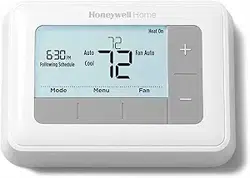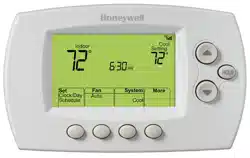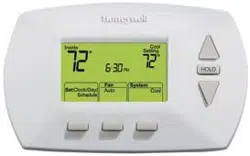
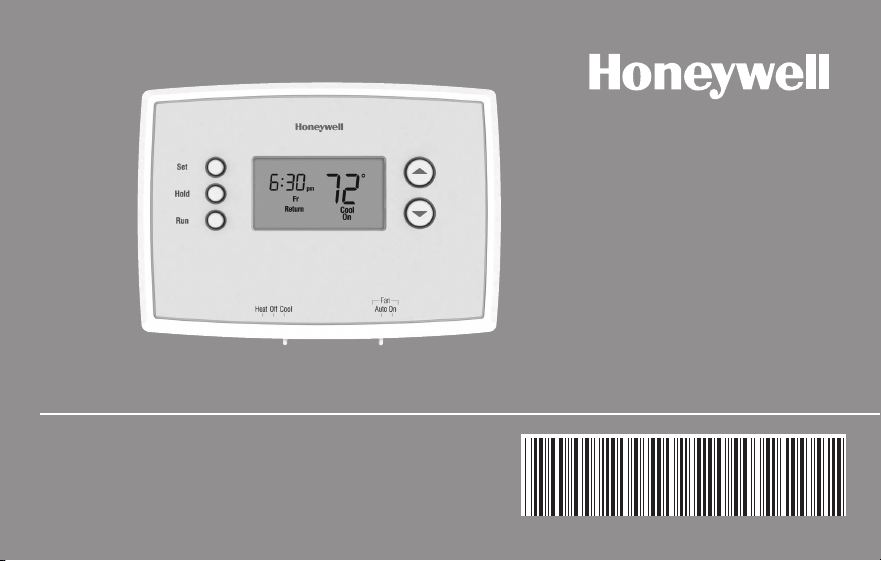
Operating
Manual
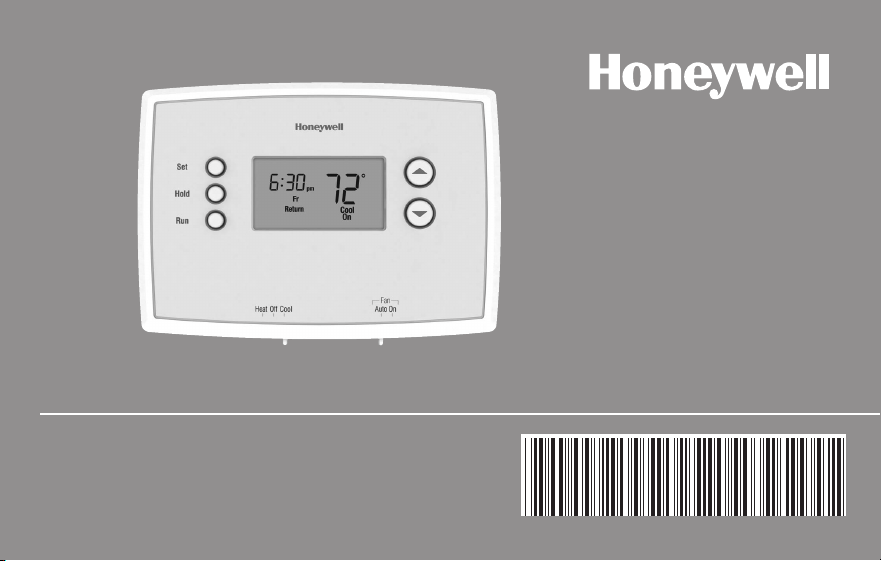
RTH2300/RTH221 Series
Programmable Thermostat
69-2727ES-01
Read and save these instructions.
Need Help?
For assistance with this product please visit http://yourhome.honeywell.com
or call Honeywell Customer Care toll-free at 1-800-468-1502
® U.S. Registered Trademark. Patents pending.
Copyright © 2012 Honeywell International Inc. All rights reserved.
This manual covers the following models:
RTH2300
RTH221
CAUTION: EQUIPMENT DAMAGE HAZARD.
To prevent possible compressor damage, do not operate cooling system when outdoor
temperature is below 50°F (10°C).
RTH2300/RTH221
1 69-2727ES—01
About your new thermostat
Thermostat features .................................... 2
Thermostat is preset, ready to go ............... 3
Quick reference to controls ......................... 4
Quick reference to display ........................... 5
Programming & Operation
Set time and day ......................................... 6
Select system setting .................................. 7
Select fan setting ........................................8
Using program schedules .....................9–10
Adjust program schedule (RTH2300) .......11
Adjust program schedule (RTH221) .........12
Program schedule overrides ...............13–14
Compressor protection .............................. 15
Change Filter (RTH2300) ..........................16
Appendices
Battery replacement .................................. 17
Customer assistance ................................ 18
In case of difficulty .............................. 19–20
Limited warranty ........................................21
This thermostat is ready to go!
Your new thermostat is pre-programmed
and ready to go.
See page 10 to check settings.
Table of contents

Operating Manual
69-2727ES—01 2
About your new thermostat
Your new Honeywell thermostat has been designed to give you many years of reliable
service and easy-to-use, push-button climate control.
Features
• BacklitdisplayonRTH2300
• Displaysambient(measured)temperatureatalltimes
• One-touchaccesstosetpointtemperature
• Presetprogramsettings
• Temporaryandpermanentoverrideofschedule
• Built-incompressorprotection
RTH2300/RTH221
3 69-2727ES—01
This thermostat is ready to go!
Your new thermostat is pre-programmed and ready to go. All you have to do is set the
time and day. Then check the settings below and change if needed:
1. Set time and day (required for proper operation) .............................. See page 6
2. Select system setting: Preset to Off ....................................To change, see page 7
3. Select fan setting: Preset to Auto .......................................To change, see page 8
4. Program schedules: Preset to energy-saving levels
while you’re at work or asleep........................................To change, see pages 9-12
ONE-TOUCH TEMP CONTROL: You can override the program schedule at any time, and
manually adjust the temperature (see pages 13-14).
Operating Manual
69-2727ES—01 4
M33612
Heat Off Cool Auto On
Fan
Heat Off Cool
Auto On
Fan
Set
Hold
Run
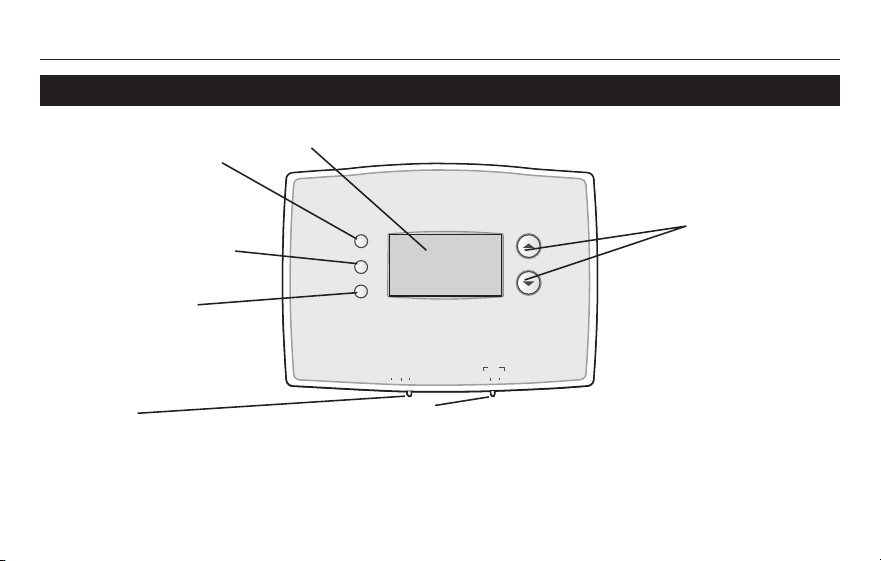
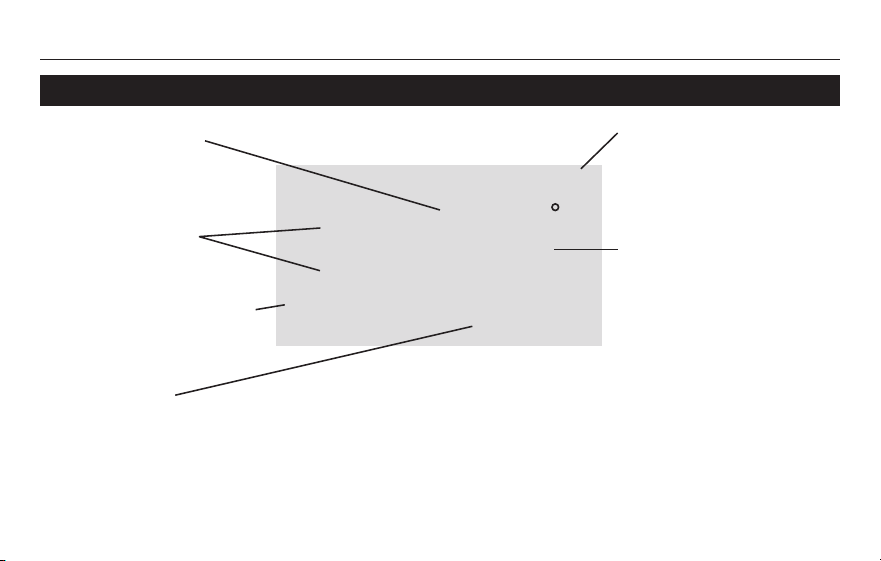
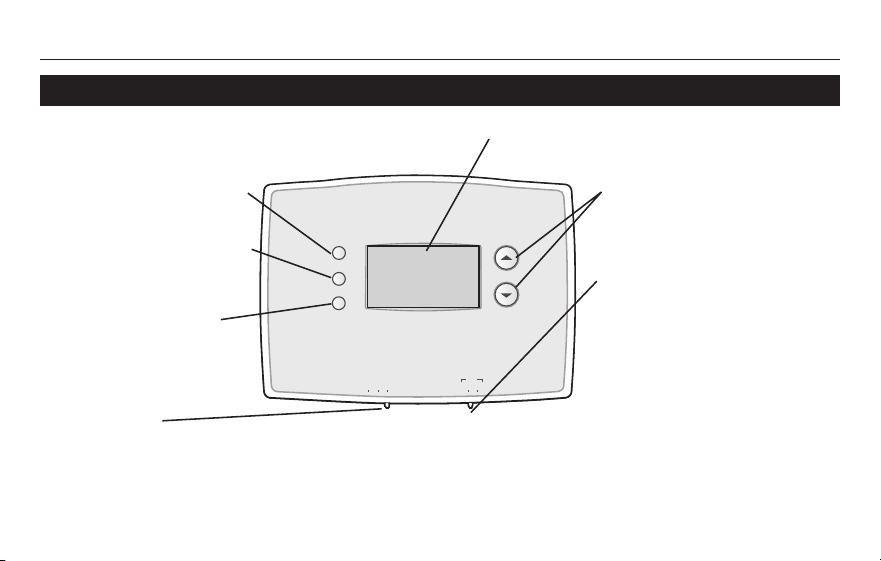
Quick reference to controls
Temperature
adjustment (see
page 13-14)
Screen Lit for 12 seconds when you press any button.
Fan Switch (see page 8)
On: Fan runs continuously.
Auto: Fan runs only when heating or cooling system
is on.
Set: Press to set time/
day/schedule.
Hold: Press to override
programmed tempera-
ture control.
Run: Press to resume
program schedule.
System switch (see page 7)
• Heat: Heating system control.
• Off: All systems off.
• Cool: Cooling system control.
RTH2300/RTH221
5 69-2727ES—01
M32701
We
Lo
Batt
Wake
Set
am
Heat
75
On
6
:
30
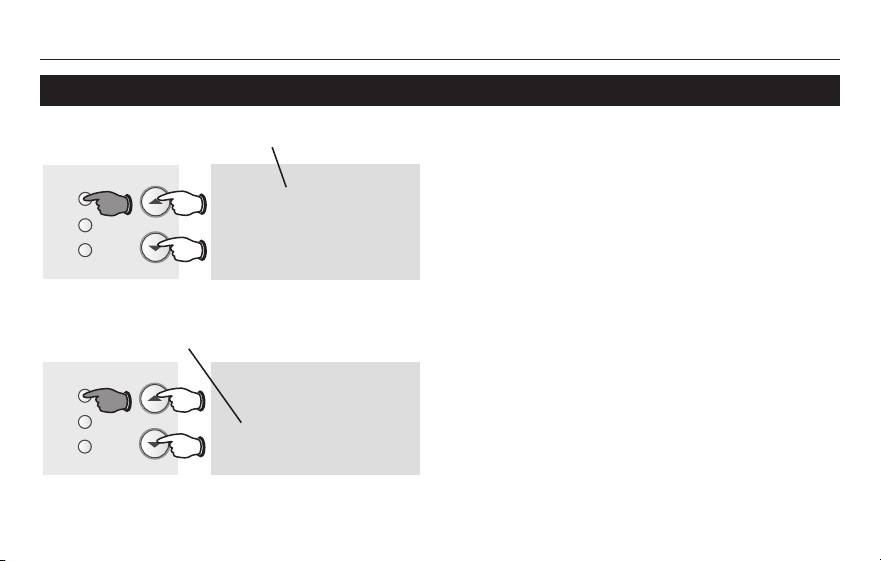
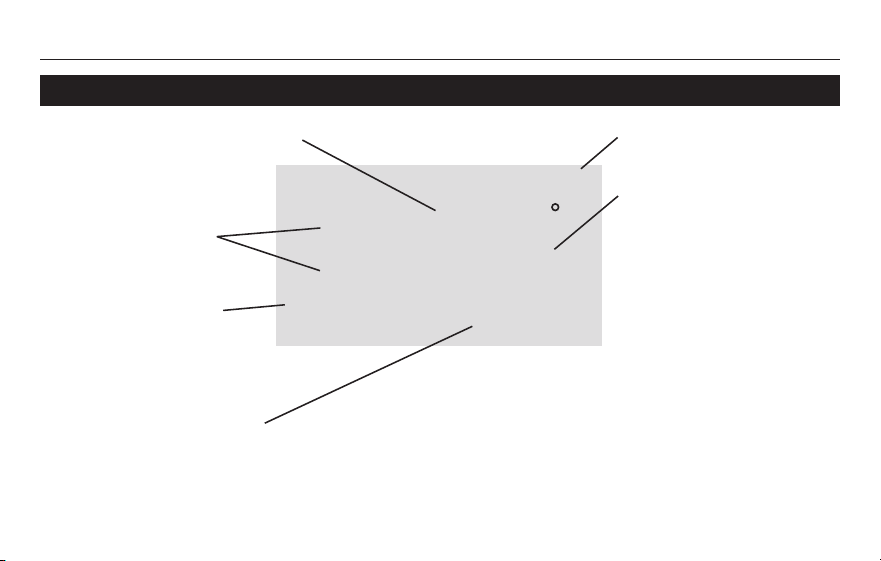
Quick reference to display screen
Low battery warning
(see page 16)
Setpoint indicator
Appears when the
setpoint temperature
is displayed.
Temperature
The ambient (measured)
temperature is normally
displayed. To view the
setpoint temperature,
presstheUporDown
button once. The setpoint
temperature will appear for
five seconds.
System status
Cool on: Cooling system is on.
Heat on: Heating system is on.
WhenCoolOnisflashing,compressorprotectionisengaged(seepage15).
Current day/time
(see page 6)
Current program period
Wake/Leave/Return/Sleep
(see pages 9-10)
Operating Manual
69-2727ES—01 6
Set
Hold
Run
Set Time
am
6
:
30
M33787
Set Day
We
Set
Hold
Run
M33788
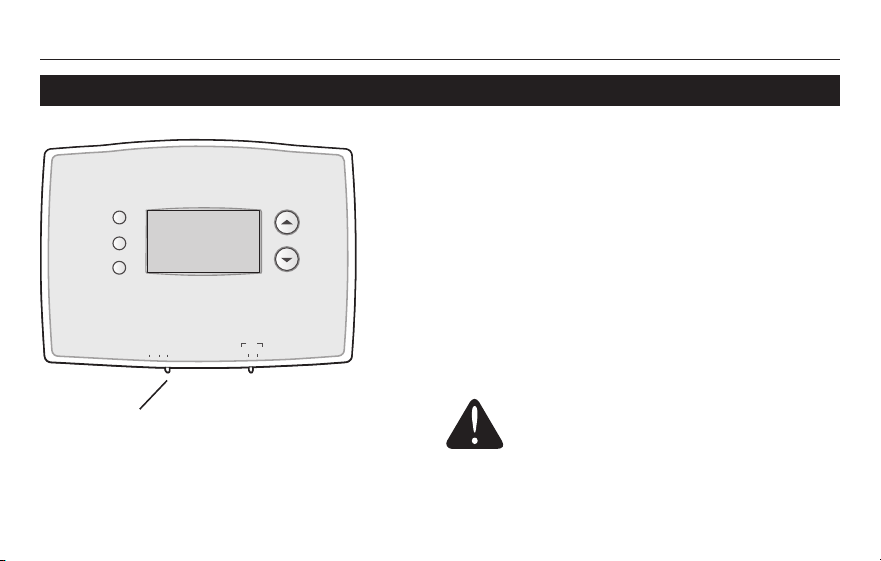
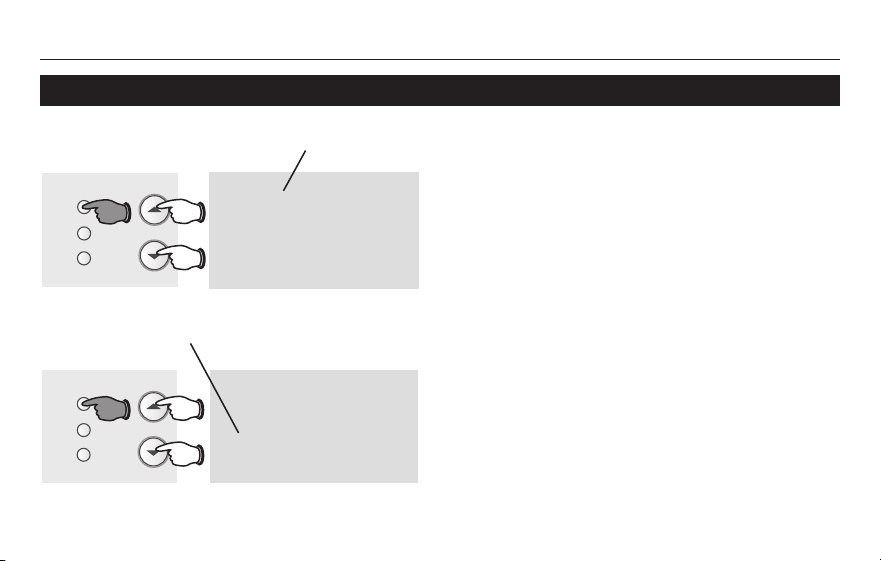
Set the time and day
1. Press the SET button, then press s or t
to set the clock time.
2. Press the SET button, then press s or t
to select the day of the week.
3. Press RUN to save & exit.
Note: If the clock flashes, the thermostat will follow
your settings for the Monday “Wake” time period
until you reset the time and day.
Press SET, then adjust time.
Press SET, then select current day.
RTH2300/RTH221
7 69-2727ES—01
M33612
Heat Off Cool Auto On
Fan
Heat Off Cool
Auto On
Fan
Set
Hold
Run
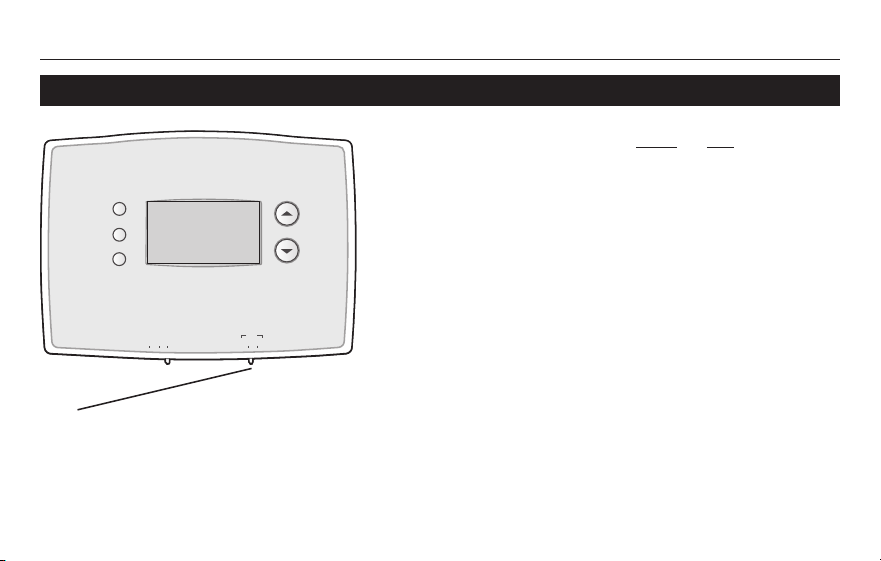
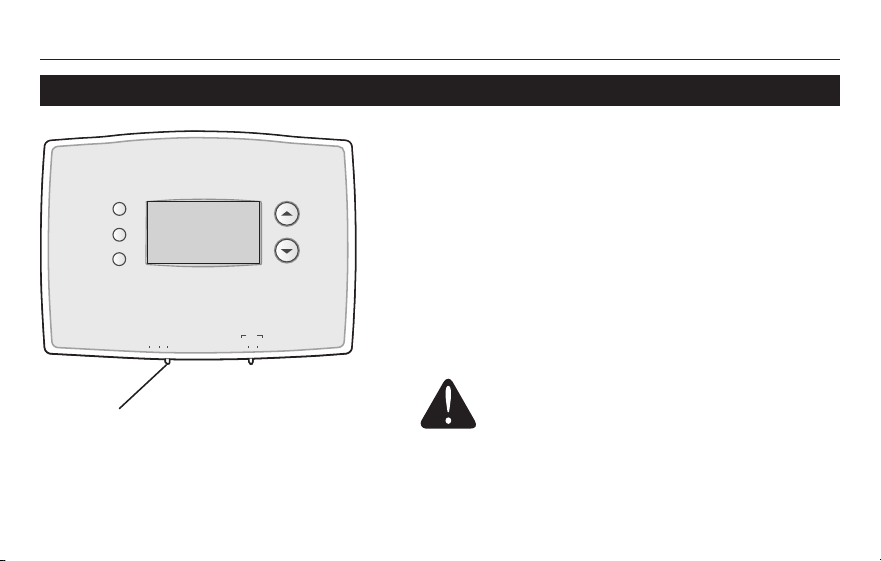
Select the system setting
The SYSTEM switch can be set to control
your heating or cooling system, depending
on the season.
• Cool: Cooling system control.
• Off: All systems are off.
• Heat: Heating system control.
Set SYSTEM switch to control the
heating or cooling system.
CAUTION: EQUIPMENT DAMAGE
HAZARD. To prevent possible
compressor damage, do not operate
cooling system when outdoor
temperature is below 50°F (10°C).
Operating Manual
69-2727ES—01 8
Select the fan setting
Set the FAN switch to Auto or On.
In “Auto” mode (the most commonly used
setting), the fan runs only when the heating
or cooling system is on.
Ifsetto“On,”thefanrunscontinuously.
Set FAN switch to choose whether the fan
runs continuously or only as needed.
M33612
Heat Off Cool Auto On
Fan
Heat Off Cool
Auto On
Fan
Set
Hold
Run
RTH2300/RTH221
9 69-2727ES—01
Save money by setting program schedules
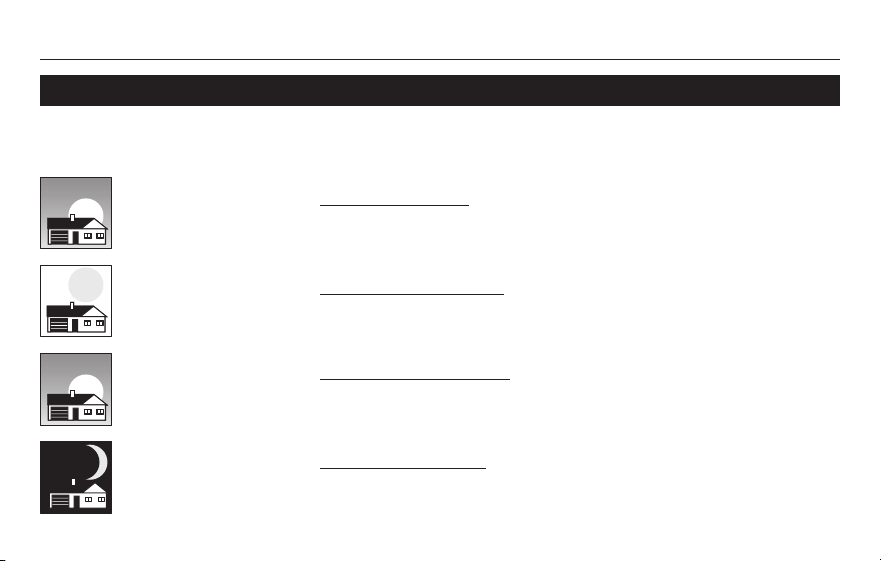
It’s easy to program your system for maximum energy savings. You can program four time
periods each day, with different settings for weekdays and weekends.
Set to the time you awaken and the temperature you want
during the morning, until you leave for the day.
Set to the time you leave home and the temperature you
want while you are away (usually an energy-saving level).
Set to the time you return home and the temperature you
want during the evening, until bedtime.
Set to the time you go to bed and the temperature you want
overnight (usually an energy-saving level).
WAKE
6:00 am
70
°
LEAVE
8:00 am
62
°
RETURN
6:00 pm
70
°
SLEEP
10:00 pm
62
°
Operating Manual
69-2727ES—01 10
About your new thermostatEnergy saving settings for maximum cost savings
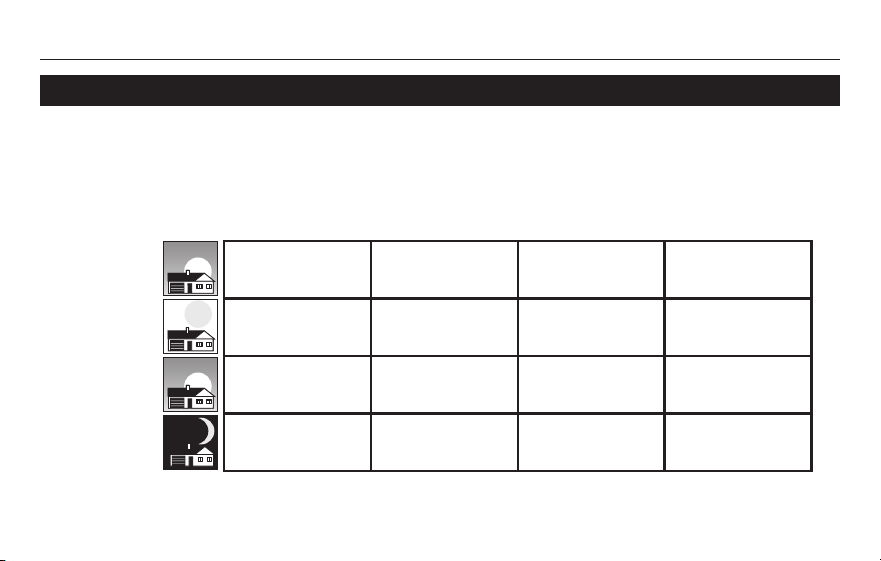
This thermostat is pre-set to use energy saving program settings. We recommend these
settings, since they can reduce your heating/cooling expenses by as much as 33%. (See
next page to adjust times and temperatures of each time period.)
Wake
(6:00 am)
Leave
(8:00 am)
Return
(6:00 pm)
Sleep
(10:00 pm)
Cool (Mon-Fri)Heat (Mon-Fri) Heat (Sat-Sun) Cool (Sat-Sun)
70
°
78
°
70
°
78
°
62
°
85
°
62
°
85
°
70
°
78
°
70
°
78
°
62
°
82
°
62
°
82
°
RTH2300/RTH221
11 69-2727ES—01
To adjust program schedules (RTH2300)
Set
Hold
Run
M33794
Mo Tu We Th Fr
Wake
Set Schedule
Set
am
75
6
:
30
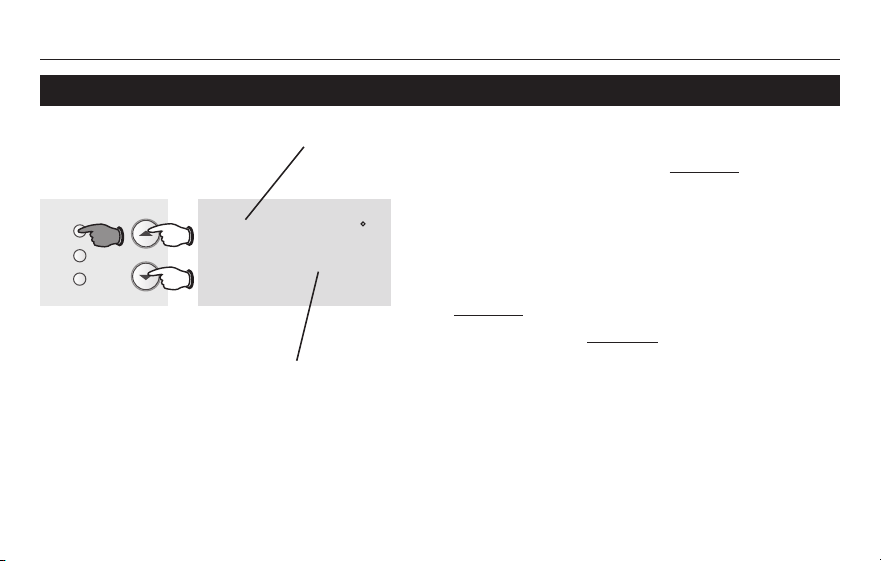
1. Press SET until Set Schedule is displayed.
2. Press s or t to set your weekday Wake time
(Mo-Fr), then press SET.
3. Press s or t to set the temperature for this
time period, then press SET.
4. Set time and temperature for the next time
period (Leave). Repeat steps 2 and 3 for each
weekday time period.
5. Press SET to set weekend time periods (Sa &
Su), then press RUN to save & exit.
Note: Make sure the thermostat is set to the system
you want to program (Heat or Cool).
Press SET 3 times, then adjust time.
Press SET, then set desired temperature.
Operating Manual
69-2727ES—01 12
Set
Hold
Run
M33795
Mo Tu We Th Fr Sa Su
Wake
Set Schedule
Set
am
75
6
:
30
To adjust program schedules (RTH221)
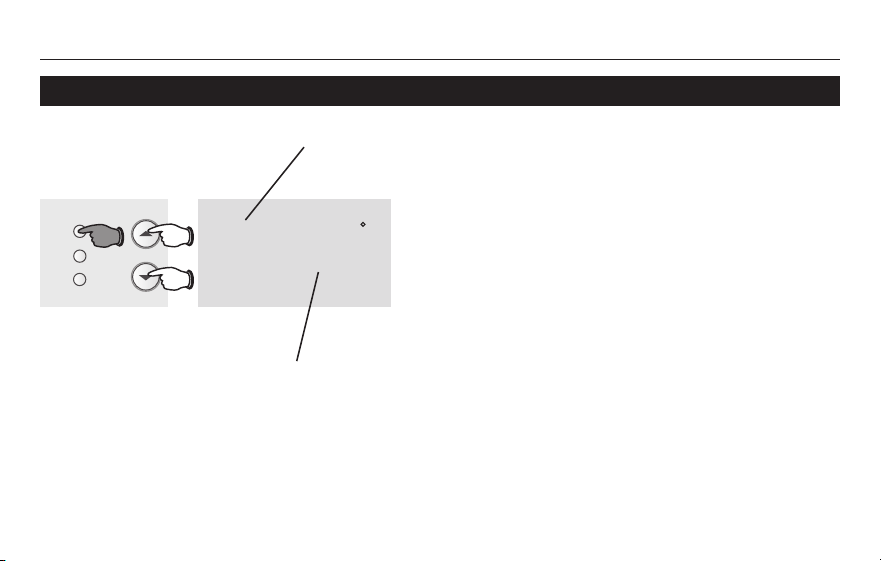
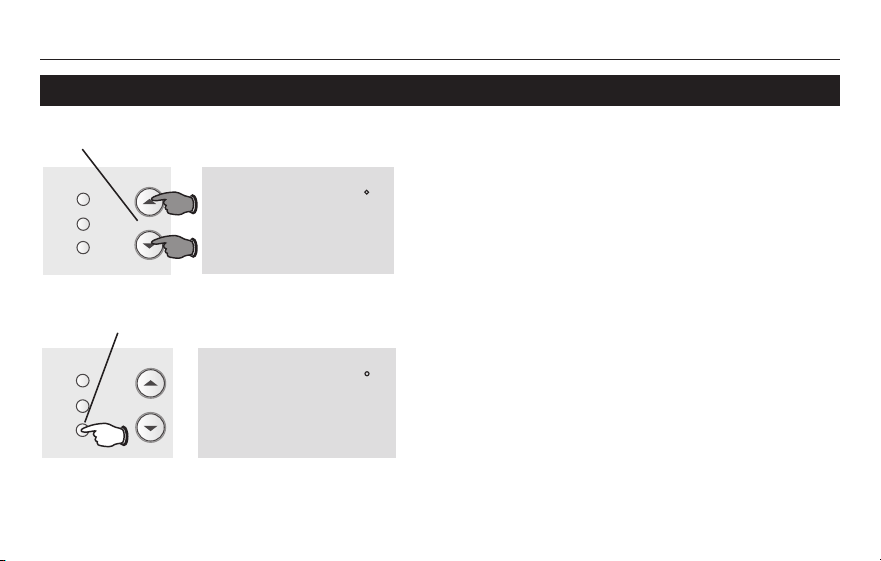
1. Press SET until Set Schedule is displayed.
2. Press s or t to set your Wake time (Mo-Su),
then press SET.
3. Press s or t to set the temperature for this
time period, then press SET.
4. Set time and temperature for the next time
period (Leave). Repeat steps 2 and 3 for each
time period.
5. Press RUN to save & exit.
Note: Make sure the thermostat is set to the system
you want to program (Heat or Cool).
Press SET 3 times, then adjust time.
Press SET, then set desired temperature.
RTH2300/RTH221
13 69-2727ES—01
About your new thermostat
Set
Hold
Run
M33796
Temporary
Set
am
70
6
:
30
Set
am
75
6
:
30
M33797
Set
Hold
Run
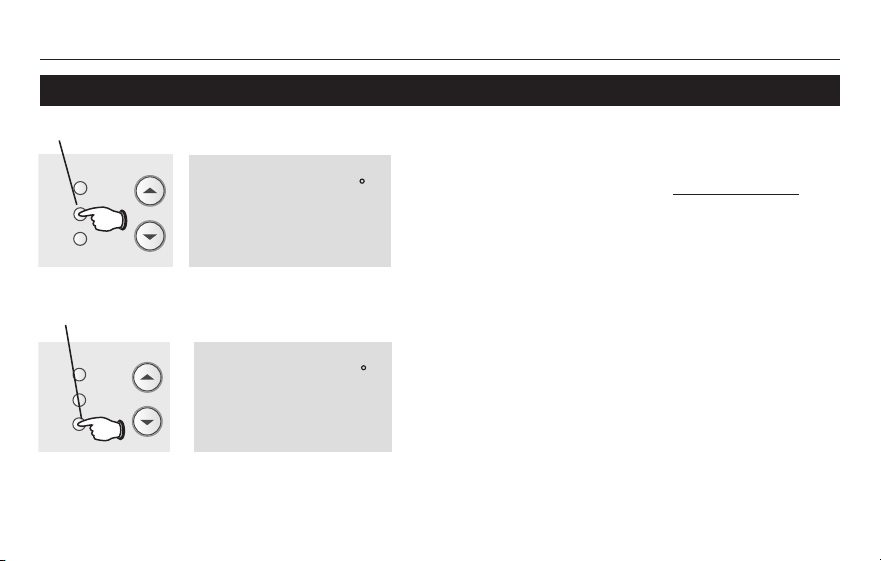
Program schedule override (temporary)
Press s or t to immediately adjust the
temperature. This will temporarily override
the temperature setting for the current time
period.
“Temporary” will appear on the display.
The new temperature will be maintained
only until the next programmed time period
begins (see page 9).
To cancel the temporary setting at any time,
press RUN.
Press to temporarily adjust temperature.
Press to cancel temporary setting and
resume program schedule.
Note: Make sure the thermostat is set to the
system you want to control (heat or cool).
Operating Manual
69-2727ES—01 14
About your new thermostat
Hold
Set
am
70
6
:
30
M33798
Set
Hold
Run
Set
am
75
6
:
30
M33797
Set
Hold
Run
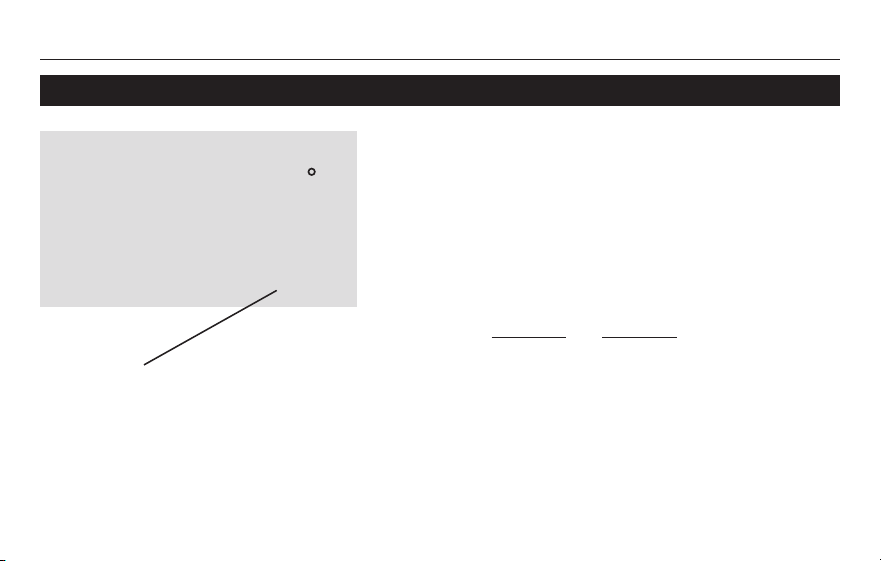
Program schedule override (permanent)
Note: Make sure the thermostat is set to the system
you want to control (heat or cool).
Press to permanently adjust temperature.
Press HOLD to permanently adjust
the temperature. This will override the
temperature settings for all time periods.
The “Hold” feature turns off the program
schedule and allows you to adjust the
thermostat manually, as needed.
Whatever temperature you set will be
maintained 24 hours a day, until you
manually change it, or press RUN to cancel
“Hold” and resume the program schedule.
Press to cancel “Hold” setting and resume
program schedule.
RTH2300/RTH221
15 69-2727ES—01
About your new thermostatBuilt-in compressor protection
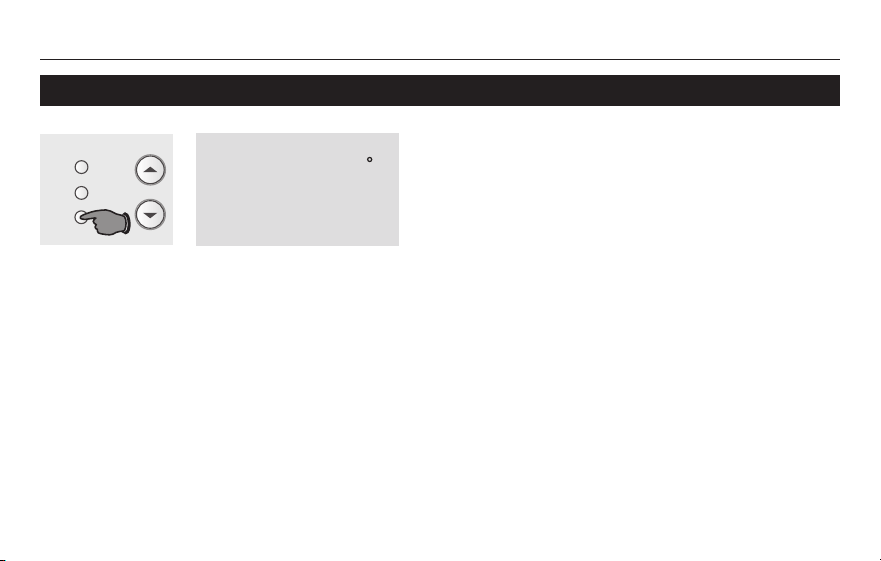
This feature helps prevent damage to the com-
pressor in your air conditioning or heat pump
system.
Damagecanoccurifthecompressorisrestarted
too soon after shutdown. This feature forces the
compressor to wait 5 minutes before restarting.
Duringthewaittime,thedisplaywillflashthe
message CoolOn (or HeatOn if you have
a heat pump). When the safe wait time has
elapsed, the message stops flashing and the
compressor turns on.
Message flashes until safe restart
time has elapsed.
We
Wake
am
Cool
75
On
6
:
30
M32711
Operating Manual
69-2727ES—01 16
Change filter (RTH2300 only)
If the filter reminder is turned on during
installation, the words Change Filter will flash
on the screen when the filter needs to be
replaced.
After you replace the air filter, press and hold
the RUN button for 3 seconds to reset the alert.
Set
am
75
6
:
30
M33632
Set
Hold
Run
Change Filter – Press & Hold Run to Reset
RTH2300/RTH221
17 69-2727ES—01
Battery replacement
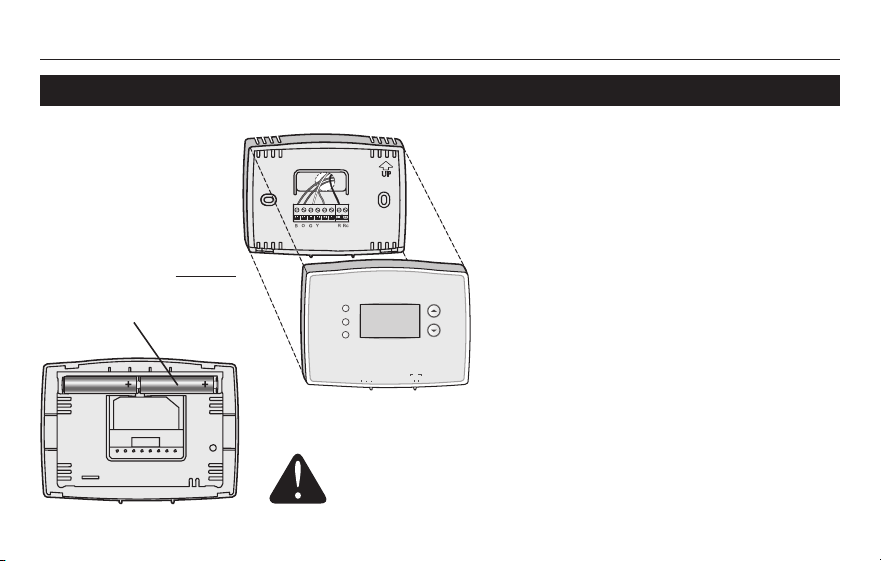
Install two fresh AAA batteries when
Lo Batt flashes on the screen. Lo Batt
appears for 60 days before the batter-
ies are depleted.
Replace batteries once a year, or when
you will be away for more than a month.
Most settings are stored in non-volatile
(permanent)memory.Onlytheclock
and the day must be set after you
replace the batteries.
Pull at bottom to
remove thermostat
from wallplate.
Turn thermostat over,
insert fresh AAA alkaline
batteries, then reinstall
thermostat.
SettheSystemswitchtoOffbeforeremovingthe
batteries.Otherwise,theheating/coolingsystemcould
remain activated even when batteries are removed.
RTHXXXX
M32707
W/
Aux
Not
Used
Heat Off Cool Auto On
Fan
M33784
Heat Off Cool Auto On
Fan
Heat Off Cool
Auto On
Fan
Set
Hold
Run
Operating Manual
69-2727ES—01 18
RTHXXXX
M32707
W/
Aux
Not
Used
Heat Off Cool Auto On
Fan
M33784
Heat Off Cool Auto On
Fan
Heat Off Cool
Auto On
Fan
Set
Hold
Run
Customer assistance
For assistance with this product, please visit
http://yourhome.honeywell.com.
OrcallHoneywellCustomerCaretoll-free
at 1-800-468-1502.
To save time, please note your model num-
ber and date code before calling.
Accessories
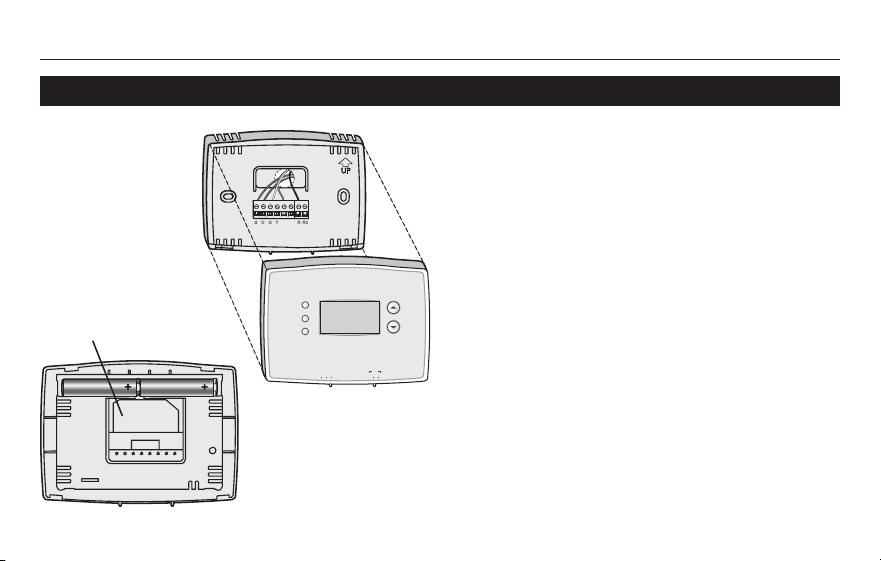
Turn thermostat over to
find model number and
date code.
Pull at bottom to
remove thermostat
from wallplate.
RTH2300/RTH221
19 69-2727ES—01
If you have difficulty with your thermostat, please try the following suggestions.
Most problems can be corrected quickly and easily.
Display is blank • Makesurefurnacedoorisclosedsecurely.
• MakesurefreshAAAalkalinebatteriesarecorrectlyinstalled(seepage
16).
Heating or cooling
system does not
respond
• SetsystemswitchtoHeat (see page 7). Make sure the temperature is
set higher than the Inside temperature.
• SetsystemswitchtoCool (see page 7). Make sure the temperature is
set lower than the Inside temperature.
• Wait5minutesforthesystemtorespond.
In case of difficulty
Operating Manual
69-2727ES—01 20
Temperature
settings do not
change
Make sure heating and cooling temperatures are set to acceptable ranges:
• Heat:40°to90°F(4.5°to32°C).
• Cool:50°to99°F(10°to37°C).
“Cool On” or
“Heat On” is
flashing
• Compressor protection feature is engaged. Wait 5 minutes for the system to
restart safely, without damage to the compressor (see page 15).
“Heat On” is not
displayed
• Set the System switch to Heat, and set the temperature level above the
current room temperature (see page 7).
“Cool On” is not
displayed
• Set the System switch to Cool, and set the temperature level below the
current room temperature (see page 7).
In case of difficulty

RTH2300/RTH221
21 69-2727ES—01
About your new thermostat1-year limited warranty
Honeywell warrants this product, excluding battery, to be free from defects in the workmanship or materials, under normal use and
service, for a period of one (1) year from the date of purchase by the consumer. If at any time during the warranty period the product is
determined to be defective or malfunctions, Honeywell shall repair or replace it (at Honeywell’s option).
If the product is defective,
(i) return it, with a bill of sale or other dated proof of purchase, to the place from which you purchased it; or
(ii) call Honeywell Customer Care at 1-800-468-1502. Customer Care will make the determination whether the product should be
returnedtothefollowingaddress:HoneywellReturnGoods,Dock4MN10-3860,1885DouglasDr.N.,GoldenValley,MN55422,or
whether a replacement product can be sent to you.
This warranty does not cover removal or reinstallation costs. This warranty shall not apply if it is shown by Honeywell that the defect or
malfunction was caused by damage which occurred while the product was in the possession of a consumer.
Honeywell’ssoleresponsibilityshallbetorepairorreplacetheproductwithinthetermsstatedabove.HONEYWELLSHALLNOT
BELIABLEFORANYLOSSORDAMAGEOFANYKIND,INCLUDINGANYINCIDENTALORCONSEQUENTIALDAMAGES
RESULTING,DIRECTLYORINDIRECTLY,FROMANYBREACHOFANYWARRANTY,EXPRESSORIMPLIED,ORANYOTHER
FAILUREOFTHISPRODUCT.Somestatesdonotallowtheexclusionorlimitationofincidentalorconsequentialdamages,sothis
limitation may not apply to you.
THISWARRANTYISTHEONLYEXPRESSWARRANTYHONEYWELLMAKESONTHISPRODUCT.THEDURATIONOFANY
IMPLIEDWARRANTIES,INCLUDINGTHEWARRANTIESOFMERCHANTABILITYANDFITNESSFORAPARTICULARPURPOSE,
ISHEREBYLIMITEDTOTHEONE-YEARDURATIONOFTHISWARRANTY.
Some states do not allow limitations on how long an implied warranty lasts, so the above limitation may not apply to you. This warranty
gives you specific legal rights, and you may have other rights which vary from state to state.
Ifyouhaveanyquestionsconcerningthiswarranty,pleasewriteHoneywellCustomerRelations,1985DouglasDr,GoldenValley,MN
55422orcall1-800-468-1502.InCanada,writeRetailProductsON15-02H,HoneywellLimited/HoneywellLimitée,35DynamicDrive,
Toronto,OntarioM1V4Z9.

Automation and Control Solutions
Honeywell International Inc.
1985DouglasDriveNorth
GoldenValley,MN55422
http://yourhome.honeywell.com
® U.S. Registered Trademark
© 2012 Honeywell International Inc.
69-2727ES—01M.S.05-12
Printed in U.S.A.
69-2727ES-01
RTH2300/RTH221 Series
Termostato programable
Manual de
funcionamiento
Lea y guarde estas instrucciones.
®MarcaregistradadelosEE.UU.Patentesentrámite.
© 2012, Honeywell International Inc. Todos los derechos reservados.
Este manual incluye el siguientes modelos:
RTH2300
RTH221
¿Necesita asistencia?
Para obtener asistencia relacionada con este producto, visite
http://yourhome.honeywell.com o comuníquese con el número gratuito del
servicio de atención al cliente de Honeywell, llamando 1-800-468-1502
PRECAUCIÓN: PELIGRO DE DAÑO EN EL EQUIPO.
Para evitar posibles daños en el compresor, no haga que el termostato funcione cuando la
temperatura exterior sea inferior a 50 ºF (10 ºC).
RTH2300/RTH221
1 69-2727ES—01
Acerca de su nuevo termostatoÍndice
Acerca de su nuevo termostato
Características del termostato. ................... 2
Eltermostatoestápreconfigurado
y listo para funcionar ...................................3
Rápidareferenciadeloscontroles ............. 4
Rápidareferenciadelapantalla ................. 5
Programación y funcionamiento
Configuración de la hora y el día ................ 6
Seleccione la configuración del sistema .........7
Seleccione la configuración del ventilador ...... 8
Utilización de los
cronogramas del programa ................... 9–10
Ajuste el cronograma del programa
(RTH2300) ................................................11
Ajuste el cronograma del programa
(RTH221) ..................................................12
Programación de la anulación
del cronograma ...................................13–14
Protección del compresor ......................... 15
Cambio del filtro (RTH2300) .....................16
Apéndices
Reemplazo de la batería ........................... 17
Asistencia al cliente .................................. 18
Encasodeinconvenientes ................. 19–20
Garantía limitada .......................................21
¡Este termostato está listo para
funcionar!
Sunuevotermostatoestápreprogramadoy
listo para funcionar.
Vealapágina10 para revisar las
configuraciones.

69-2727ES—01 2
Acerca de su nuevo termostato
Manual de funcionamiento
Su nuevo termostato ha sido diseñado para brindarle muchos años de funcionamiento con-
fiableyparabrindarleuncontrolclimáticofácildeusaryconsóloapretarunbotón.
Características
• PantallailuminadaconluzdefondoenRTH2300.
• Indicalatemperaturaambiente(medida)entodomomento.
• Unsólobotónpermiteverlatemperaturadelpuntodeajuste.
• Configuracionesdelprogramapredeterminadas
• Cancelacióntemporalypermanentedelhorario.
• Proteccióndelcompresorincorporada.
RTH2300/RTH221
3 69-2727ES—01
¡Este termostato está listo para funcionar!
Sunuevotermostatoestápreprogramadoylistoparafuncionar.Todoloquetienequehaceres
configurareldíaylahora.Luego,reviselasconfiguracionesdeabajoycámbielassiesnecesario:
1. Configure la hora y el día (necesario para
un mejor funcionamiento) ............................................................................. Vea la página 6
2. Seleccione la configuración del sistema:
Predetermine la función “Off” .....................................................Para cambiar, vea la página 7
3. Seleccione la configuración del ventilador:
Predetermine la función “Auto” ...................................................Para cambiar, vea la página 8
4. Cronogramas del programa:
Predetermine los niveles de ahorro de energía
paracuandoestéeneltrabajoodurmiendo .................Para cambiar, vea las páginas 9 a 12
CONTROL DE TEMPERATURA AL TACTO:Ustedpodráanularlaconfiguración
del cronograma en cualquier momento y ajustar manualmente la temperatura
(vealaspáginas13y14).
69-2727ES—01 4
Acerca de su nuevo termostato
Manual de funcionamiento
Ajuste de la temperatura
(vealaspáginas13a14)
Interruptor “Fan”
(ventilador) vealapágina8.
“On” (encendido):El
ventilador funciona sin
interrupción.
“Auto” (automático):El
ventilador funciona solamente
cuando la calefacción o el
sistemaderefrigeraciónestán
encendidos.
“Set” (configuración):
Presione este botón para
configurar la hora, el día o
el cronograma.
“Hold” (suspender):
Presiónelo para anular el
control de temperatura
programada.
“Run” (restablecer):
Presione para volver al
cronograma del programa.
Rápida referencia de los controles
M33612
Heat Off Cool Auto On
Fan
Heat Off Cool
Auto On
Fan
Set
Hold
Run
Pantalla Se ilumina durante 12 segundos
cuando se presiona cualquier botón.
Interruptor “System” (del sistema)vealapágina7.
• “Heat” (calor): Controla el sistema de calefacción.
• “Off” (apagado): Apaga todos los sistemas.
• “Cool” (frío): Controla el sistema de refrigeración.
RTH2300/RTH221
5 69-2727ES—01
Acerca de su nuevo termostato
Aviso de batería baja
(vealapágina16)
Estado del sistema
“Cool on” (frío encendido): Elsistemaderefrigeraciónestáencendido.
“Heat on” (calor encendido): Elsistemadecalefacciónestáencendido.
CuandoCoolOnparpadean,laproteccióndelcompresorestáactivada(verlapágina15).
Hora y día actuales
(vealapágina6)
Período de la
programación actual
Wake/Leave/Return/Sleep
(horas en que se despierta,
se va de su casa, regresa y se
duerme[vealaspáginas9a10])
Rápida referencia de la pantalla
M32701
We
Lo
Batt
Wake
Set
am
Heat
75
On
6
:
30
Indicador de punto de ajuste
Aparece cuando se visualiza
el punto de ajuste de
la temperatura.
Temperatura
Indica normalmente la
temperatura ambiente
(medida). Para ver la
temperatura del punto de
ajuste, presione el botón
Arriba o Abajo una vez. La
temperatura del punto de
ajuste.aparecerádurante5
segundos
69-2727ES—01 6
Acerca de su nuevo termostato
Manual de funcionamiento
1. Presione el botón “SET”, luego presione
s o t para configurar la hora del
reloj.
2. Presione el botón “SET”, luego presione
s o t para seleccionar el día de la
semana.
3. Presione “RUN” para guardar y salir.
Nota:Sielrelojdestella,eltermostatoseguirá
sus configuraciones para el período “Wake”
(despertar) del lunes hasta que vuelva a
configurar la hora y el día.
Presione “SET”, luego ajuste la hora.
Presione “SET” y luego seleccione el día actual.
Configuración de la hora y el día
Set
Hold
Run
Set Time
am
6
:
30
M33787
Set Day
We
Set
Hold
Run
M33788
RTH2300/RTH221
7 69-2727ES—01
Acerca de su nuevo termostato
M33612
Heat Off Cool Auto On
Fan
Heat Off Cool
Auto On
Fan
Set
Hold
Run
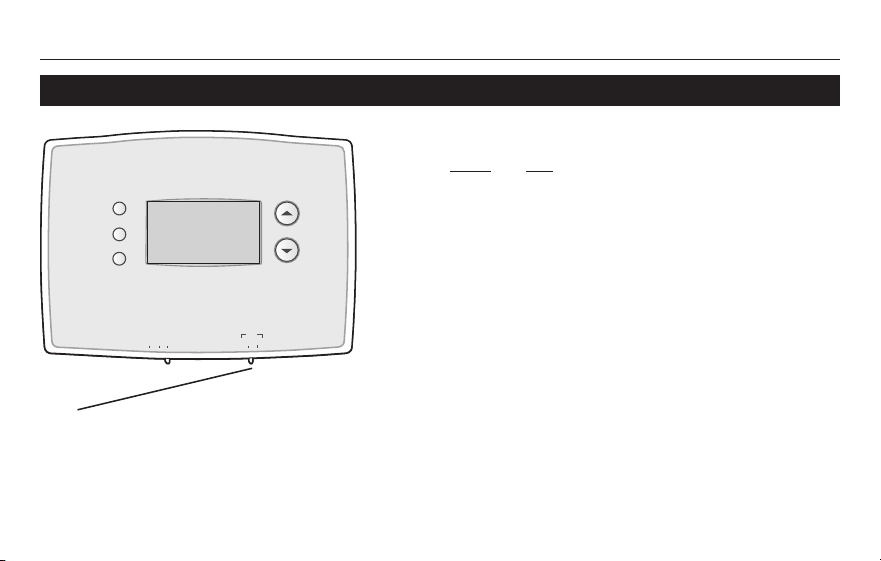
Elinterruptor“SYSTEM” puede configurarse
para controlar su sistema de calefacción o
refrigeración, según la temporada.
• “Cool” (frío): Controla el sistema de
refrigeración.
• “Off” (apagado): Apaga todos los sistemas.
• “Heat” (calor): Controla el sistema de
calefacción.
Mueva el interruptor “SYSTEM” para
controlar los sistemas de calefacción y
refrigeración.
PRECAUCIÓN: PELIGRO DE DAÑO
EN EL EQUIPO. Para evitar posibles
daños en el compresor, no haga que
el termostato funcione cuando la
temperatura exterior sea inferior a 50
ºF (10 ºC).
Seleccione la configuración del sistema
69-2727ES—01 8
Acerca de su nuevo termostato
Manual de funcionamiento
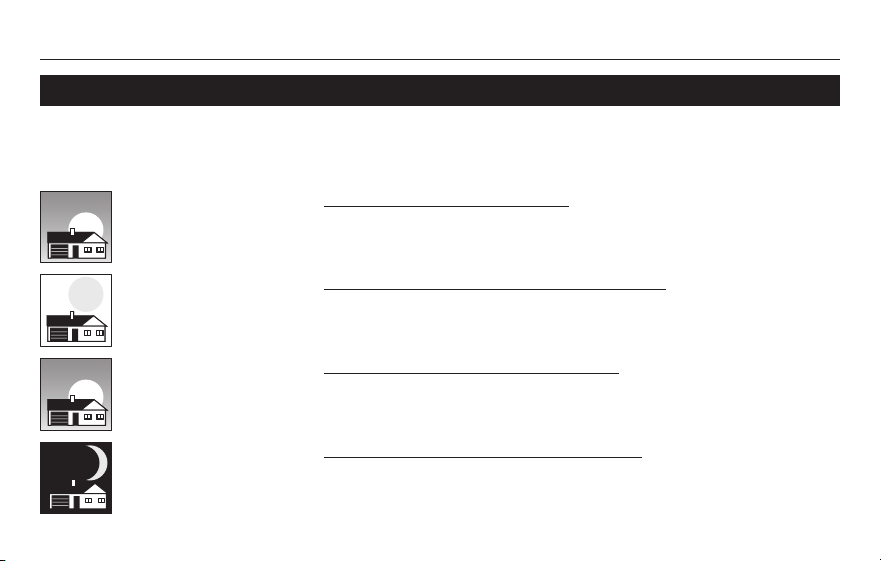
Mueva el interruptor “FAN” hasta la posición
“Auto” u “On”.
Enelmodo“Auto”,laconfiguraciónusada
comúnmente, el ventilador funciona sola-
mente cuando la calefacción o el sistema
derefrigeraciónestánencendidos.
Sisefijaen“On”,elventiladorfuncionasin
interrupción.
Configure el botón “FAN” para seleccionar
sielventiladorfuncionarásininterrupcióno
solamente cuando sea necesario.
Seleccione la configuración del ventilador
M33612
Heat Off Cool Auto On
Fan
Heat Off Cool
Auto On
Fan
Set
Hold
Run
RTH2300/RTH221
9 69-2727ES—01
Acerca de su nuevo termostato
“WAKE”
6:00 a. m.
70
°F
“LEAVE”
8:00 a. m.
62
°F
“RETURN”
6:00 p. m.
70
°F
“SLEEP”
10:00 p. m.
62
°F
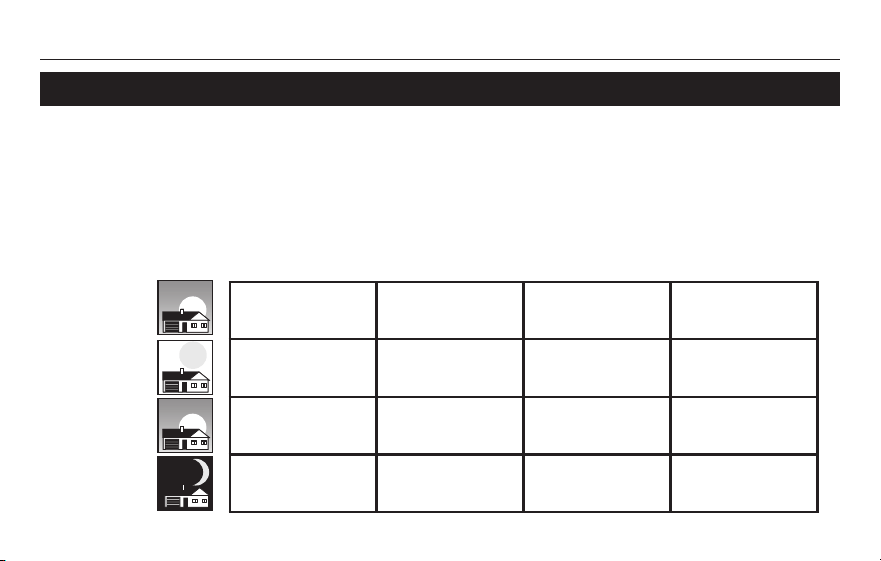
Esfácilprogramarsusistemaquepermiteunahorromáximodeenergía.Ustedpuedepro-
gramar cuatro períodos por día, con diferentes configuraciones para los días de semana y los
fines de semana.
Programe la hora en que se despierta y la temperatura que
quiere durante la mañana, hasta que usted se va de su casa.
Programe la hora en que usted se va de su casa y la temperatura
quequieremientrasnoestéensucasa(porlogeneral,unnivelde
ahorro de energía).
Programe la hora en que regresa a su casa y la temperatura que
quiere durante la tarde hasta que se va a dormir.
Programe la hora en que usted se va a dormir y la temperatura que
quiere durante toda la noche (por lo general, un nivel de ahorro de
energía).
Ahorre dinero configurando los cronogramas del programa
69-2727ES—01 10
Acerca de su nuevo termostato
Manual de funcionamiento
“Wake”
(6:00 a. m.)
“Leave”
(8:00 a. m.)
“Return”
(6:00 p. m.)
“Sleep”
(10:00 p. m.)
70
°
78
°
70
°
78
°
62
°
85
°
62
°
85
°
70
°
78
°
70
°
78
°
62
°
82
°
62
°
82
°
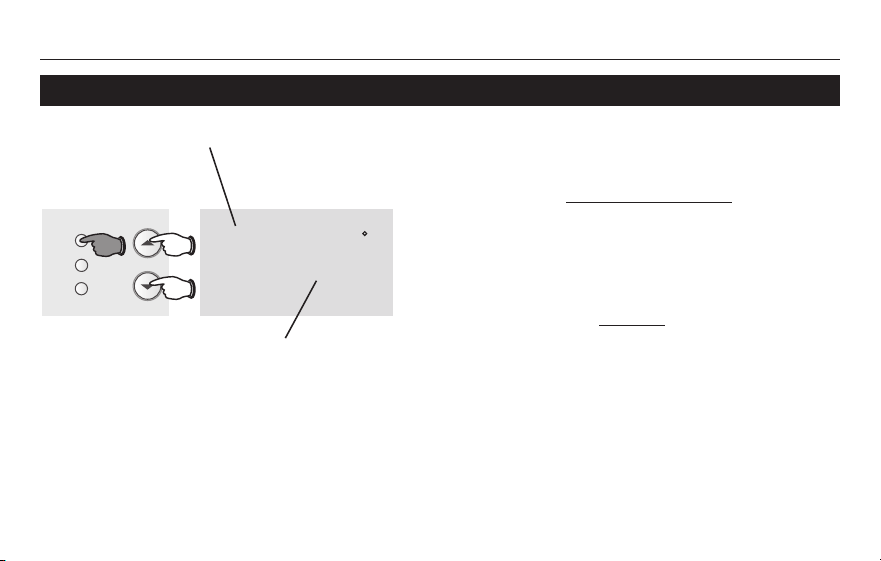
Estetermostatovienepredeterminadoconconfiguracionesparaunprogramadeahorro
de energía.Recomendamos estas configuraciones debido a que reducen los gastos de
calefacciónyrefrigeraciónhastaenun33%.(Vealasiguientepáginaparaajustarlas
horas y las temperaturas de cada período).
“Cool”
(de lunes a viernes)
“Heat”
(de lunes a viernes)
“Heat”
(sábadoydomingo)
“Cool”
(sábadoydomingo)
Configuraciones de ahorro de energía para máximo ahorro de costos
RTH2300/RTH221
11 69-2727ES—01
Acerca de su nuevo termostatoPara ajustar los cronogramas del programa (RTH2300)
Set
Hold
Run
M33794
Mo Tu We Th Fr
Wake
Set Schedule
Set
am
75
6
:
30
Presione “SET” 3 veces y luego ajuste la hora.
Presione “SET” y luego establezca la
temperatura deseada.
1. Presione SET (configurar) hasta que Set Schedule
(configurar el cronograma) se muestre en la pantalla.
2. Presione s o t para configurar la hora para
despertarse para el día que se muestra y luego
presione SET.
3. Presione s o t para configurar la temperatura para
este período y luego presione SET.
4. Configure la hora y la temperatura para el próximo
período (Leave). Repita los pasos 2 y 3 para el
período de tiempo de cada día.
5. Presione RUN para guardar y salir.
Nota:Asegúresedequeeltermostatoestéconfigurado
con el sistema que quiere programar (Heat o Cool).
69-2727ES—01 12
Manual de funcionamiento
Set
Hold
Run
M33795
Mo Tu We Th Fr Sa Su
Wake
Set Schedule
Set
am
75
6
:
30
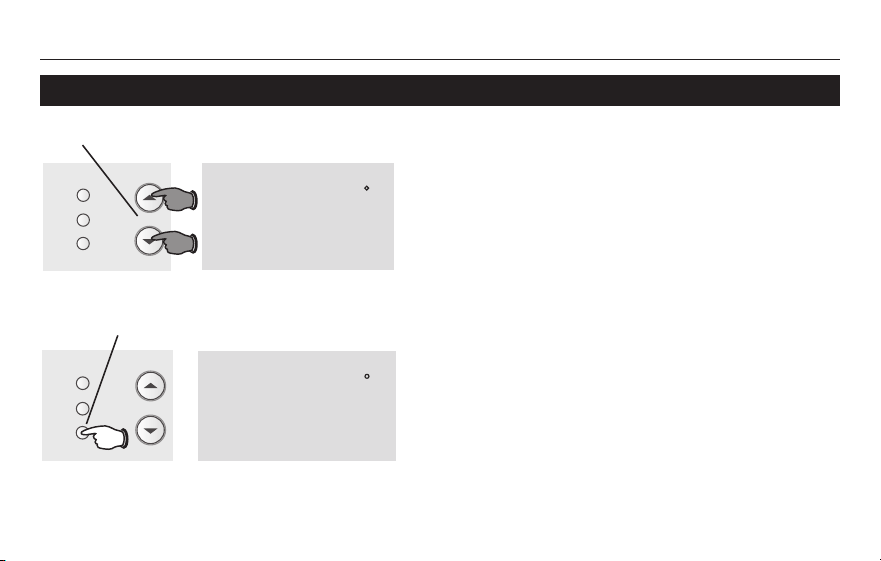
Presione “SET” 3 veces y luego ajuste la hora.
Presione “SET” y luego establezca la
temperatura deseada.
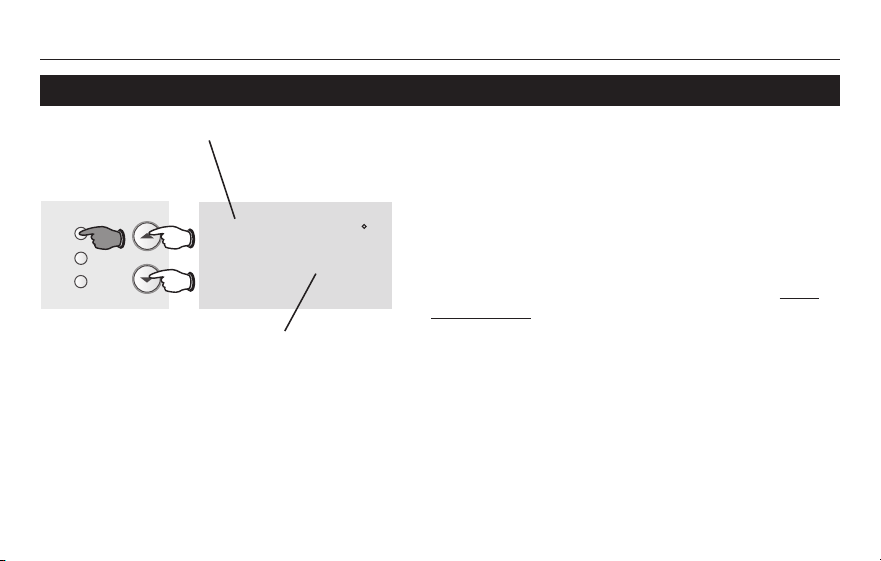
1. Presione SET (configurar) hasta que Set Schedule
(configurar el cronograma) se muestre en la pantalla.
2. Presione s o t para configurar la hora en que
sedespiertade(Mo-Su[lunesaviernes]),yluego
presione SET.
3. Presione s o t para configurar la temperatura para
este período y luego presione SET.
4. Configure la hora y la temperatura para el próximo
período(Leave[salir]).Repitalospasos2y3para
cada período.
5. Presione RUN para guardar y salir.
Nota:Asegúresedequeeltermostatoestéconfigurado
con el sistema que quiere programar (Heat o Cool).
Para ajustar los cronogramas del programa (RTH221)
RTH2300/RTH221
13 69-2727ES—01
Acerca de su nuevo termostato
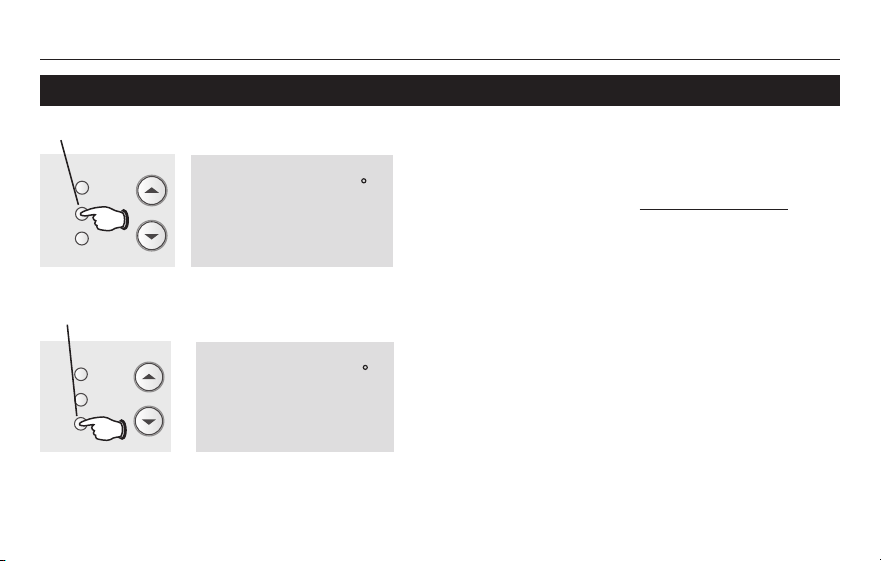
Presione s o t para ajustar
inmediatamentelatemperatura.Esto
anularátemporalmentelaconfiguración
de la temperatura para el período actual.
La palabra “Temporary” (temporalmente)
apareceráenlapantalla.
Lanuevatemperaturasemantendrá
solamente hasta que comience el próximo
períodoprogramado(vealapágina9).
Para cancelar la configuración en
cualquier momento, presione “RUN”.
Presione para anular la configuración temporal y
volver al cronograma del programa.
Nota:Asegúresedequeeltermostatoestéconfigurado
con el sistema que usted quiere controlar (calor o frío).
Presione para ajustar temporalmente la temperatura.
Programación de la anulación del cronograma (temporal)
Set
Hold
Run
M33796
Temporary
Set
am
70
6
:
30
Set
am
75
6
:
30
M33797
Set
Hold
Run
69-2727ES—01 14
Acerca de su nuevo termostato
Manual de funcionamiento
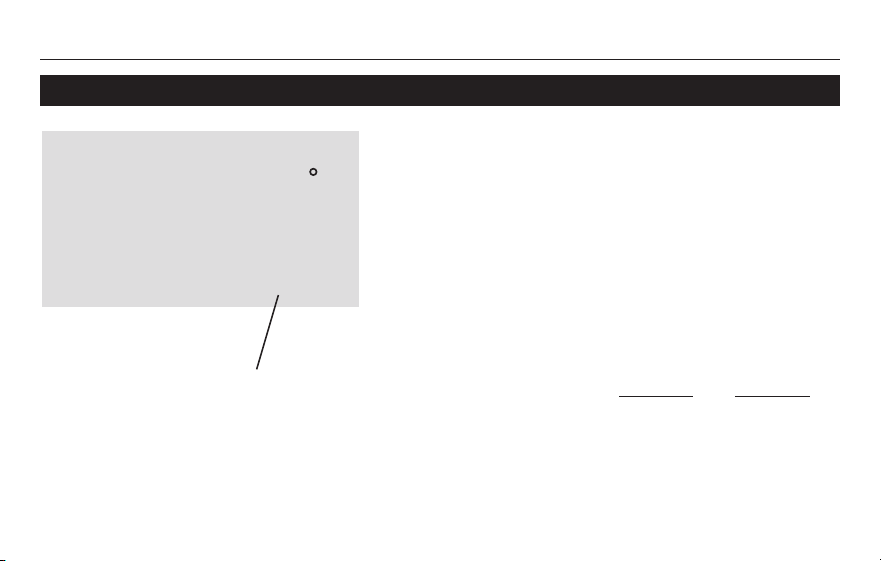
Nota:Asegúresedequeeltermostatoestéconfiguradocon
el sistema que usted quiere controlar (calor o frío).
Presione para ajustar permanentemente la temperatura.
Presione “HOLD” para ajustar
permanentemente la temperatura.
Estoanularálasconfiguracionesdela
temperatura para todos los períodos.
La función “Hold” apaga el cronograma
del programa y le permite ajustar el
termostato manualmente, según sea
necesario.
Cualquiera que sea la temperatura que
configure,éstasemantendrálas24horas
del día, hasta que la cambie manualmente
o presione “RUN” para anular “Hold” y
retomar el cronograma.
Presione para anular la configuración “Hold” y
volver al cronograma del programa.
Programación de la anulación del cronograma (permanente)
Hold
Set
am
70
6
:
30
M33798
Set
Hold
Run
Set
am
75
6
:
30
M33797
Set
Hold
Run
RTH2300/RTH221
15 69-2727ES—01
Acerca de su nuevo termostato
We
Wake
am
Cool
75
On
6
:
30
M32711
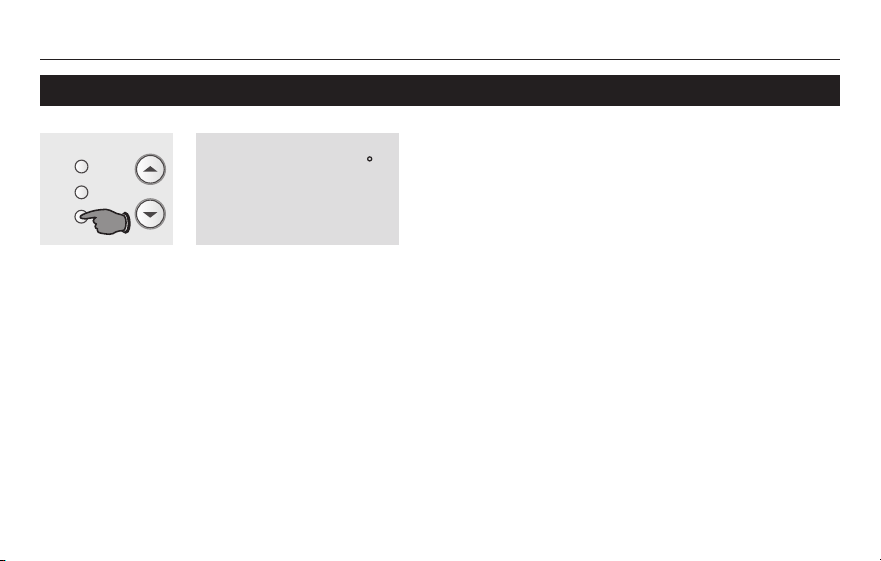
Estafunciónayudaaprevenireldañodel
compresor en su acondicionador de aire o en
su sistema de bomba de calor.
Elcompresorpuededañarsesisevuelve
ainiciarinmediatamentedespuésdeser
apagado.Estacaracterísticahacequeelcom-
presor demore unos minutos antes de volver
a iniciarse.
Duranteeltiempodeespera,lapantalla
mostraráelmensaje“CoolOn” (o “HeatOn”
si tiene una bomba de calor). Cuando haya
transcurrido el tiempo de espera de seguri-
dad,elmensajedejarádetitilaryseencend-
eráelcompresor.
Elmensajetitilahastaquehaya
transcurrido el tiempo de reinicio de
seguridad.
Protección del compresor incorporada
69-2727ES—01 16
Manual de funcionamiento
Cambio del filtro (RTH2300 solamente)
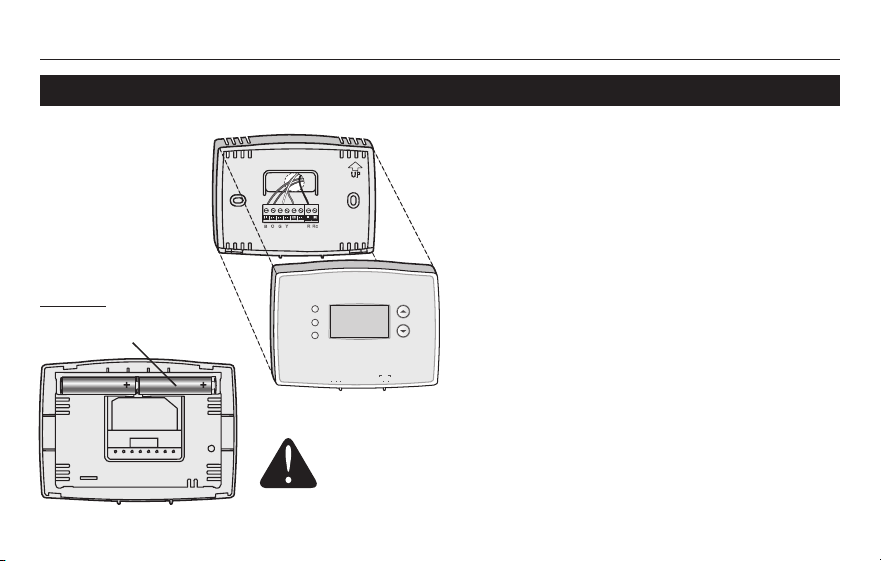
Si el recordatorio de cambio del filtro se activa
durante la instalación, las palabras Change
Filter(cambieelfiltro)destellaránenla
pantalla cuando deba cambiar el filtro.
Despuésdequereemplaceelfiltrodeaire,
presione y sostenga presionado el botón RUN
(ejecutar) durante 3 segundos para reiniciar la
alerta.
Set
am
75
6
:
30
M33632
Set
Hold
Run
Change Filter – Press & Hold Run to Reset
RTH2300/RTH221
17 69-2727ES—01
Acerca de su nuevo termostato
RTHXXXX
M32707
W/
Aux
Not
Used
Heat Off Cool Auto On
Fan
M33784
Heat Off Cool Auto On
Fan
Heat Off Cool
Auto On
Fan
Set
Hold
Run
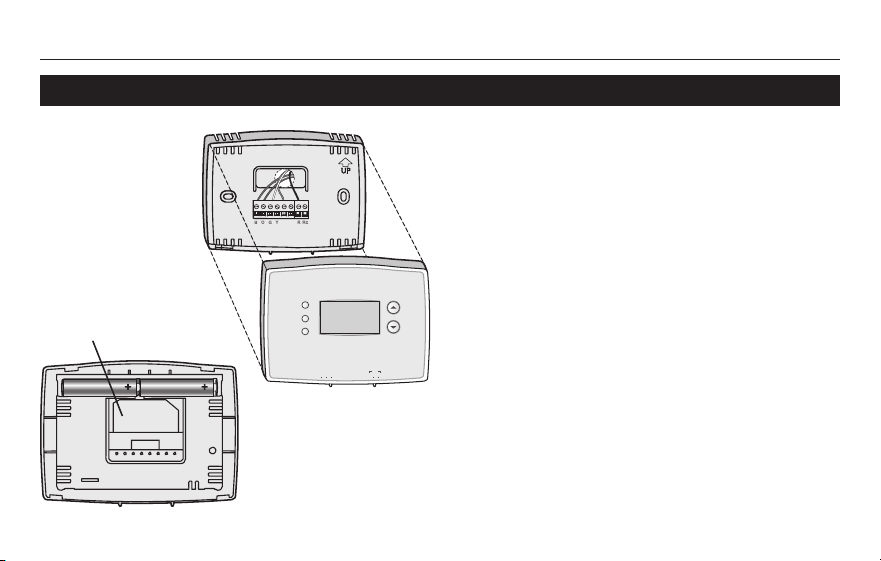
Hale de la parte
inferior para quitar
el termostato de la
placa para pared.
Gire el termostato e
inserte baterías AAA
alcalinas nuevas; luego,
vuelva a instalar el
termostato.
Reemplazo de la batería
Instale dos pilas AAA nuevas cuando Lo
Battparpadeeenlapantalla.Elicono
aparecerá60díasantesdequelaspilas
esténcompletamentedescargadas.
Reemplace las pilas una vez por año o
luegodeunaausenciademásdeunmes.
La mayor parte de los datos de la
configuraciónestánalmacenadosenla
memorianovolátil(permanente).
Sólo el reloj y la fecha deben ajustarse
despuésdelreemplazodelaspilas.
PongaelconmutadordelsistemaenOFFantesderetirarlas
pilas.Delocontrario,elsistemadecalefacción/enfriamiento
puede permanecer activado aun cuando se hayan sacado las
baterías.
69-2727ES—01 18
Acerca de su nuevo termostato
Manual de funcionamiento
Para obtener asistencia relacionada con este
producto, visite
http://yourhome.honeywell.com.
Ocomuníqueseconelnúmerogratuitodel
servicio de atención al cliente, llamando al
1-800-468-1502.
Para ahorrar tiempo, anote el número de
modelo y el código de fecha antes de llamar.
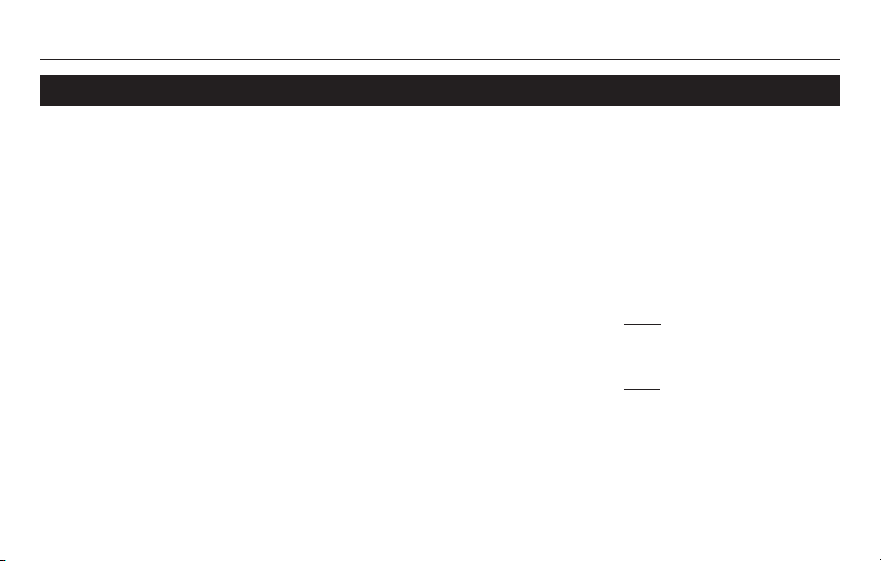
Gire el termostato
para ver el número
de modelo y el
código de fecha.
Hale de la parte
inferior para quitar
el termostato
de la placa para
pared.
Asistencia al cliente
RTHXXXX
M32707
W/
Aux
Not
Used
Heat Off Cool Auto On
Fan
M33784
Heat Off Cool Auto On
Fan
Heat Off Cool
Auto On
Fan
Set
Hold
Run
RTH2300/RTH221
19 69-2727ES—01
Acerca de su nuevo termostato
Si tiene dificultades con el termostato, intente seguir las sugerencias que se indican a
continuación.Lamayoríadelosproblemaspuedencorregirserápidayfácilmente.
La pantalla está
vacía
• Asegúresedequelapuertadelsistemadecalefacciónestébien
cerrada.
• AsegúresedequelasbateríasAAAalcalinasesténinstaladas
correctamente(vealapágina16).
El sistema de
calefacción o
refrigeración no
responde
• Muevaelinterruptor“System”hastalaposición“Heat”(vealapágina
7).Asegúresedequelatemperaturaseamásaltaquelatemperatura
interna.
• Muevaelinterruptor“System”hastalaposición“Cool”(vealapágina
7).Asegúresedequelatemperaturaseamásbajaquelatemperatura
interna.
• Espere5minutosparaquerespondaelsistema.
En caso de inconvenientes
69-2727ES—01 20
Acerca de su nuevo termostato
Manual de funcionamiento
En caso de inconvenientes
Las con-
figuraciones de
la temperatura no
cambian
Asegúresedequelastemperaturasdecaloryfríoesténconfiguradasenrangos
aceptables:
• “Heat”:De40°Fa90°F(de4,5°Ca32°C).
• “Cool”:De50°Fa99°F(de10°Ca37°C).
El mensaje
“Cool On” o “Heat
On” titila
• Lafuncióndelaproteccióndelcompresorestáfuncionando.Espere5
minutos para que el sistema se vuelva a iniciar de forma segura, sin dañar el
compresor(vealapágina15).
“Heat On” no
aparece en la
pantalla
• Mueva el interruptor “System” hasta la posición “Heat” y configure el nivel de
temperatura por encimadelatemperaturaambienteactual(vealapágina7).
“Cool On” no
aparece en la
pantalla
• Mueva el interruptor “System” hasta la posición “Cool” y configure el nivel de
temperatura por debajodelatemperaturaambienteactual(vealapágina7).

RTH2300/RTH221
21 69-2727ES—01
Acerca de su nuevo termostato
Honeywellgarantizaesteproducto,aexcepcióndelabatería,poreltérminodeun(1)añocontracualquierdefectodefabricacióno
de los materiales, a partir de la fecha de compra por parte del consumidor. Si en cualquier momento durante el período de garantía se
verificaqueelproductotieneundefectooquefuncionamal,Honeywelllorepararáoreemplazará(aeleccióndeHoneywell).
Si el producto tiene defectos,
(i)devuélvalo,conlafacturadeventauotrapruebadecomprafechada,allugardondelocompró;o
(ii)comuníqueseconelCentrodeatenciónalclientedeHoneywellal1-800-468-1502.Atenciónalclientedecidirásisedebedevolver
elproductoalasiguientedirección:DevolucióndemercaderíasdeHoneywell,Dock4MN10-3860,1885DouglasDr.N.,Golden
Valley,MN55422,osiselepuedeenviarunproductoenreemplazo.
Estagarantíanocubreloscostosdeextracciónoreinstalación.EstagarantíanoseaplicarásiHoneywelldemuestraqueeldefectoo
mal funcionamiento estaba causado por daños ocurridos mientras el producto estaba en posesión de un consumidor.
LaúnicaresponsabilidaddeHoneywellserárepararoreemplazarelproductodentrodelosplazosestablecidosanteriormente.
HONEYWELLNORESPONDERAPORLAPÉRDIDAODAÑODENINGUNTIPO,INCLUIDOELDAÑOINCIDENTALOINDIRECTO
DERIVADO,DIRECTAOINDIRECTAMENTE,DELINCUMPLIMIENTODELASGARANTIAS,EXPRESASOIMPLICITAS,ODE
OTRASFALLASDEESTEPRODUCTO.Algunosestadosnopermitenlaexclusiónolimitacióndeldañoincidentaloindirecto,
entonces, esta limitación puede no resultar aplicable a su caso.
LAPRESENTEGARANTIAESLAUNICAGARANTIAEXPRESAQUEHONEYWELLPROPORCIONARESPECTODEESTE
PRODUCTO.LADURACIÓNDELASGARANTÍASIMPLÍCITAS,INCLUÍDASLASGARANTÍASDECOMERCIABILIDADYAPTITUD
PARAUNOBJETIVOPARTICULAR,ESTÁLIMITADAALADURACIÓNDEUNAÑODELAPRESENTEGARANTÍA.
Algunos estados no permiten las limitaciones sobre la duración del período de una garantía implícita, entonces la limitación anterior
puedenoresultaraplicableasucaso.Estagarantíalebrindaderechoslegalesespecíficos,yustedpodrátenerotrosderechosque
varían según el estado.
Sitienepreguntassobrelapresentegarantía,sírvaseescribiraHoneywellCustomerRelations,1985DouglasDr,GoldenValley,
MN55422ollamaral1-800-468-1502.EnCanadá,escribaaRetailProductsON15-02H,HoneywellLimited/HoneywellLimitée,35
DynamicDrive,Toronto,OntarioM1V4Z9.
Garantía limitada de 1 año

®MarcaRegistradaenlosEE.UU.
© 2012 Honeywell International Inc.
69-2727ES—01M.S.05-12
ImpresoenEE.UU.
Automatización y control desenlace
Honeywell International Inc.
1985DouglasDriveNorth
GoldenValley,MN55422
http://yourhome.honeywell.com