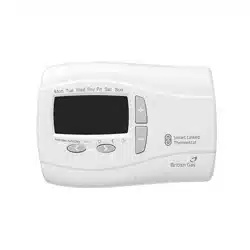
Programmable Room
Thermostat Wireless
Model: RF720BG, 22561BG
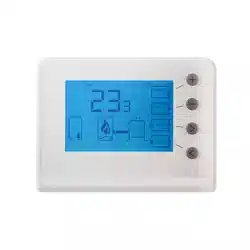
The Smart Linked Thermostat is a programmable thermostat
7 Day product. Full 7-day functionality allows you to set a
different program for every day of the week. Each program type
allows you to set 6 time and temperature events.
Clock Setting
Your Smart Linked Thermostat is fitted with a real-time clock,
which is pre-set at the factory. You will not have to alter the time
settings.
A special feature of this real-time clock is to automatically update
th
e time during the summer/winter time change removing the
need to manually alter the clock.
General Operation
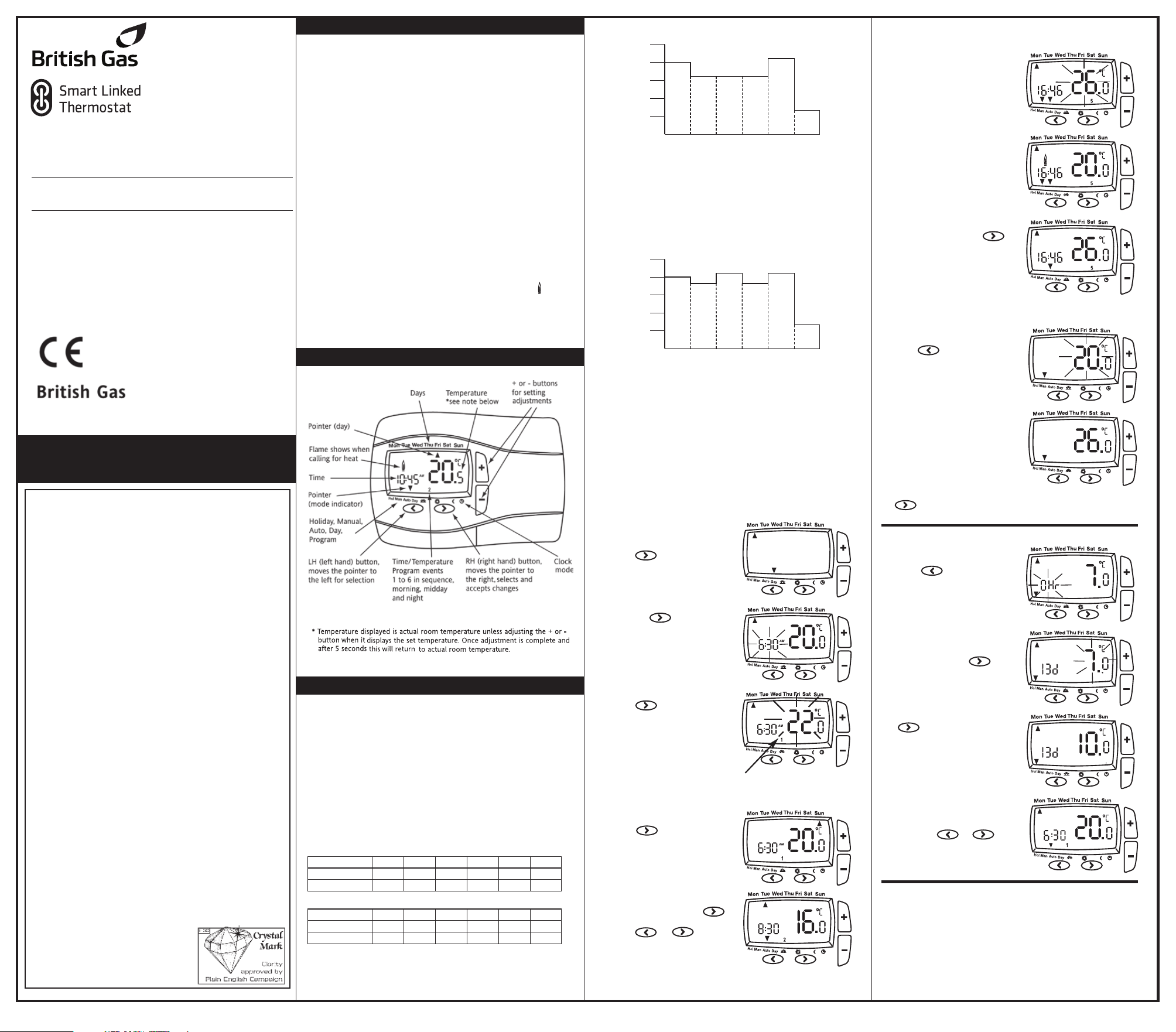
With the unit in Auto mode (the small arrow to bottom of screen
will point to Auto) the temperature can be changed for a short
time by using the + or - buttons. Changing the temperature in
this way will keep the Smart Linked Thermostat set to your new
temperature until the next pre-programmed event (at which time
it will revert to programmed temperature). The temperature
you
are setting will flash on the screen. Once temperature is set, the
unit will revert to showing the current temperature. The
indicator will show on the screen if the heating is turned on.
User Instructions
The Smart Linked Thermostat is a programmable thermostat 7
Day product. Full 7-day functionality allows you to set a different
program for every day of the week. Each program type allows you
to set 6 time and temperature events.
Pre-set Program
Your Digistat comes with the following default settings
pre-programmed for your convenience:
Basic Settings
Your Smart Linked Thermostat
Controls and Display Layout
What is a programmable room thermostat?
...an explanation for householders
A programmable room thermostat is both a programmer and a room
thermostat. A programmer allows you to set ‘On’ and ‘Off’ time
periods to suit your own lifestyle. A room thermostat works by sensing
the air temperature, switching on the heating when the air
temperature falls below the thermostat setting, and switching it off
once this set temperature has been reached.
So, a programmable room thermos
tat lets you choose what times you
want the heating to be on, and what temperature it should reach
while it is on. It will allow you to select different temperatures in your
home at different times of the day (and days of the week) to meet
your particular needs.
Turning a programmable room thermostat to a higher setting will not
make the room heat up any faster. How quickly the room heats up
depends on the design of the heating system, for example, the size of
boiler and radiators.
Nei
ther does the setting affect how quickly the room cools down.
Turning a programmable room thermostat to a lower setting will result
in the room being controlled at a lower temperature, and saves energy.
The way to set and use your programmable room thermostat is to
find the lowest temperature settings that you are comfortable with at
the different times you have chosen, and then leave it alone to do its
job. The best way to do this is to set low temperatures first, say 18
o
C,
and then turn them up by one degree each day until you are
comfortable with the temperatures. You won’t have to adjust the
thermostat further. Any adjustments above these settings will waste
energy and cost you more money.
If your heating system is a boiler with radiators, there will usually be only
one programmable room thermostat to control the whole house. But you
can have different temperatures in individual rooms by installing
thermostatic radiator valves (TRVs) on individu
al radiators. If you don’t
have TRVs, you should choose a temperature that is reasonable for the
whole house. If you do have TRVs, you can choose a slightly higher
setting to make sure that even the coldest room is comfortable, then
prevent any overheating in other rooms by adjusting the TRVs.
The time on the programmer must be correct. Some types have to be
adjusted in spring and autumn at the changes between Greenwich
Mean Time and British Summer Time.
You may be able to temporar
ily adjust the heating programme, for
example, ‘Override’, ‘Advance’ or ‘Boost’. These are explained in the
manufacturer’s instructions.
Programmable room thermostats need
a free flow of air to sense the temperature,
so they must not be covered by curtains
or blocked by furniture. Nearby electric
fires, televisions, wall or table lamps
may prevent the thermostat from
working properly.
Event 1 2 3 4 5 6
Time 6:30 8:30 12:00 14:00 16:30 22:30
Temperature 20.0 16.0 16.0 16.0 21.0 7.0
Event 1 2 3 4 5 6
Time 7:00 9:00 12:00 14:00 16:00 23:00
Temperature 20.0 18.0 21.0 18.0 21.0 7.0
1 2 3 4 5 6
25ºC
20ºC
15ºC
10ºC
5ºC
06:30 08:30 12:00 14:00 16:30 22:30
Time Period Monday-Friday
Room Temp
1 2 3 4 5 6
25ºC
20ºC
15ºC
10ºC
5ºC
07:00 09:00 12:00 14:00 16:00 23:00
Time Period Saturday-Sunday
Room Temp
Pre-set Program 1 (9 til 5)
Monday-Friday
Saturday-Sunday
Weekday
Weekend
As you can see, at 06:30 , the heating will come on to raise the
temperature to 20ºC. At 08:30, the temperature set point is dropped
from 20ºC down to16ºC, it stays at 16ºC throughout the day, until
16:30 when the temperature increases to 21ºC. The temperature
then drops down to a night-setback temperature of 7ºC until 06:30
when the cycle repeats for the next day. (Monday to Friday) or
changes to weekend setting see below.
As you can see, at 07:00, the heating will come on to raise t
he
temperature to 20ºC. At 09:00, the temperature set point is
dropped from 20ºC down to18ºC, it stays at 18ºC until 12:00 when
the heating comes on to raise the temperature to 21ºC. The
temperature stays at 21ºC until 14:00 when it drops down to 18ºC.
At 16:30 the heating comes on to raise the temperature to 21ºC
where it stays until 23:00 when the temperature then drops down
to a night-setback temperature of 7ºC until 07:00 when the cycle
repeats for the next day. (Saturday and Su
nday) or changes to
weekday settings see above.
(* small 1 in lower half of screen
shows which time period is being set
e.g. 1=1st period, 2 = 2nd period etc)
3. Once time has been set,
press and use the
+ or - buttons to adjust
required temperature.
Repeat the above steps
2-3 until the 6 periods
have been set for Monday
To adjust the times and temperatures for 7-Day
operation:
1. With the product operating
as normal in the Auto mode
press once. The
display is flashing and shows.
2. Press the once, the
display will be as shown. The
time will be flashing, use the
+ or - buttons to adjust the
1st time as required.
Congratulations!
The unit is now set correctly to follow your required timings.
4. Once Monday has been set,
press once.
Repeat steps 2-3 until all
7 days of the week have
been set.
5. Once the final temperature
has been set press the
to confirm settings. To exit
press or until
you return to auto mode with
the bottom arrow pointing
at Auto.
To change temperature for a short period (Override):
1. Press + or - buttons to
adjust set temperature. Set
temperature shown flashing
2. After 5 seconds will start
controlling at selected set
point but displays actual room
temperature. 2 chrevons
indicates override mode.
3. To exit override press
once or wait until next change
in the pre-set program.
06490168001 IssC
To set a constant room temperature (Manual mode):
1. Press once, the display
shows temperature flashing
(example
20
0
C)
2. Press + or - buttons to
adjust the temperature as
required. The temperature
will stop flashing after 5
seconds and start controlling
at this temperature
3. To exit manual mode press
once, to return to auto.
To set holiday mode:
1. Press twice, the display
shows time flashing.
Time periods between 1 to
23(Hr)hours and 1 to
199(d)days can be set.
2. Press + or - buttons to
adjust the count down time
as required. Press once,
the display will show
temperature flashing
To switch OFF the thermostat:
Press the + and – simultaneously for 5 seconds until the OFF is
displayed.
The thermostat and heating system will now be OFF unless the
temperature in the controlled space falls below 7°C, the f
rost
protection set point. Please note this does not affect the
operation of the domestic hot water where provided.
To switch ON the thermostat press the + and - simultaneously for 5
seconds until the OFF disappears.
3. Press + or - buttons to
adjust temperature and press
to start holiday count
down time. Alternatively after
10 seconds the temperature
will stop flashing and holiday
count down time will start.
Display shows count down
time and ambient room
temperature.
4. To exit the holiday mode
press the or
once, to return to auto.
www.britishgas.co.uk
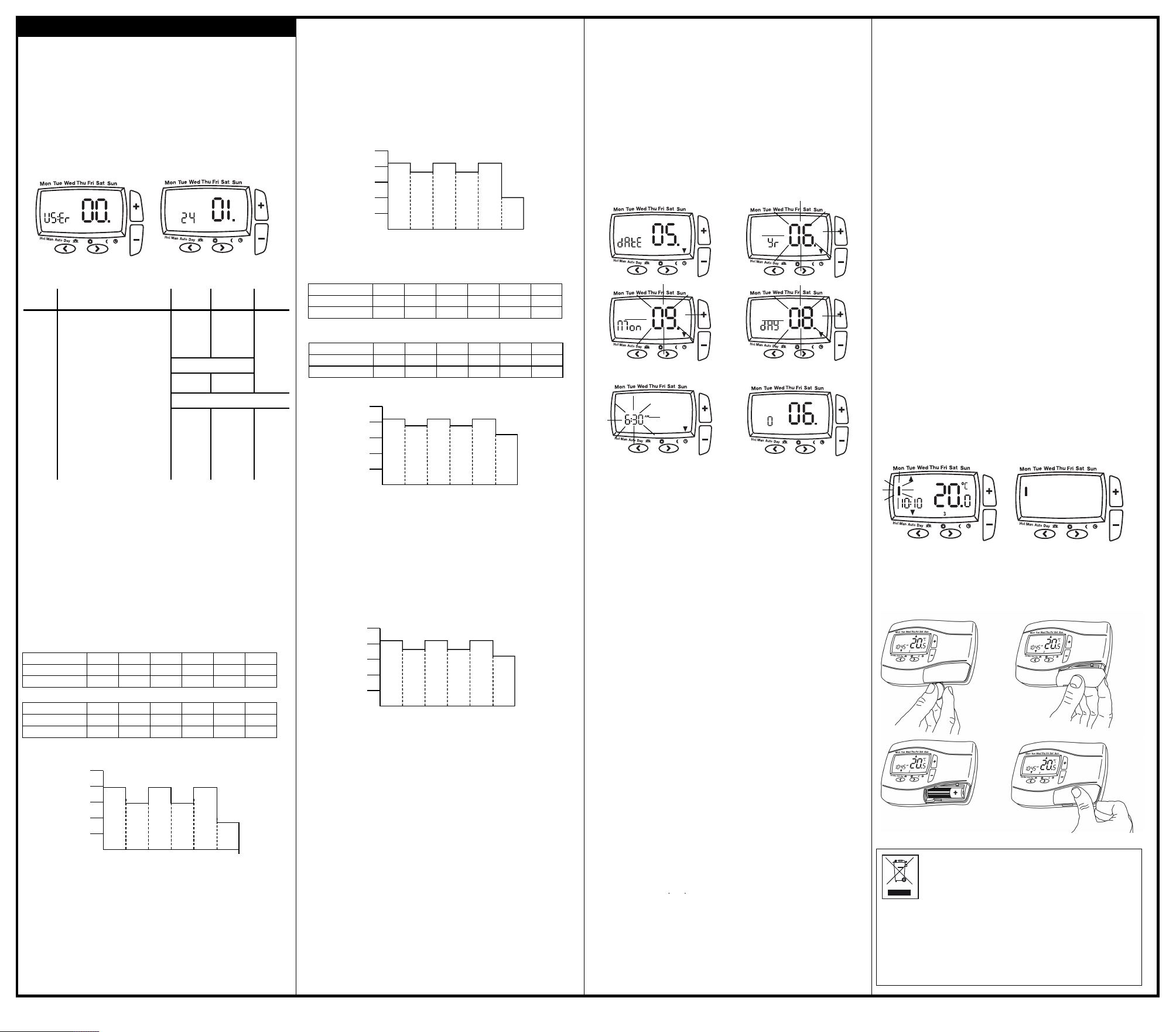
I
f you wish to change any User Options (shown in table 1) they can
be accessed from Auto or Man by pressing < and > simultaneously
f
or 3 seconds. Once you have accessed the User Options Menu (Fig
4
) press > to scroll through selectable options. The settings for
each option can be changed by pressing + or - as required. Press >
t
o accept the change and move to the next option. To exit press <
a
nd > simultaeously for 3 seconds. Alternatively, not pressing any
buttons for 2 mins will cause the Digistat to return to Auto. (Fig 5)
shows option 01 24 (24 hour clock).
O
nly selected options that have been accepted by pressing > will
b
e changed.
Weekdays
As you can see, at 06:30, the heating will come on to raise the
temperature to 21°C.
At 08:30, the temperature set point is dropped to 16°C, it stays at
16°C until 12:00 when the heating comes on to raise the
temperature to 21°C. The temperature stays at 21°C until 14:00
when it drops to 16°C. At 16:30 the heating comes on to raise the
temperature to 21°C where it stays until 22:30 when the
temperature drops down to a setback temperature of 10°C until
06:30 when the cycle repeats the next day.
Weekends
A
s you can see, at 7:00, the heating will come on to raise the
t
emperature to 21°C.
At 9:00, the temperature set point is dropped to 18°C, it stays
a
t 18°C until12:00 when the heating comes on to raise the
t
emperature to 21°C. The temperature stays at 21°C until 14:00
when it drops down to 18°C. At 16:30 the heating comes on to
raise the temperature to 21°C where it stays until 23:00 when
t
he temperature drops down to a setback temperature of 10°C
u
ntil 07:00 when the cycle repeats the next day.
Weekends
As you can see, at 7:00, the heating will come on to raise the
temperature to 21°C.
At 9:00, the temperature set point is dropped to 18°C, it stays
at 18°C until12:00 when the heating comes on to raise the
temperature to 21°C. The temperature stays at 21°C until 14:00
when it drops down to 18°C. At 16:30 the heating comes on to
raise the temperature to 21°C where it stays until 23:00 when
the temperature drops down to a setback temperature of 16°C
until 07:00 when the cycle repeats the next day.
User Options
User
options What is it Min Max Default
0
1 Change 12h or 24h clock 12 24 24
0
2 Change to another
pre-set programme 131
03 Change the number of
programme events per day 2 or 6 4
04 Switch on/off automatic
summer/winter time change
O
n Off On
05 Adjust date and time Factory Set
06 Change temperature offset
0
C -5.0
0
C +5.0
0
C0
0
7 Restore pre-set programme On Off Off
0
8 Access protection lock On Off Off
0
9 Create Radio Link Automatically Off On Off
10 Create Radio Link manually 0 4094 actual
11 Relay On/Off (in the receiver) Off On Off
(Table 1)
(Option 01)
How to change from 24hr to 12hr clock.
Enter user options, select option 01 and use + and – keys to select
desired option, 12 = 12hr and 24 = 24hr. Press > to accept change.
(Option 02)
How to change to another predefined program 1, 2 or 3.
Enter user options, select option 02 and use + and – keys to
select desired program 1, 2 or 3. 1 = program 1, 2 = program 2
and 3 = program 3. Press > to accept desired change.
Preset programs 2 and 3 are shown below:
(Option 03)
How to change the number of program events per day.
Enter user options, select option 03 and use + and – keys to
select desired option. 2 = 2 time / temp events per day, 4 = 4
time / temp events per day and 6 = 6 time / temp events per
day. Press > to accept desired change.
(Option 04)
How to switch on/off the automatic summer / winter time
change.
Twice a year the actual time is automatically changed to keep it
in line with the summer / winter time change. Default setting is
On. If you wish to disable / enable this feature enter user
options, select option 04 and press – or + key to display Off or
On as desired. Press > to accept desired change.
(Fig 11)
Event 123456
Time 6:30 8:30 12:00 14:00 16:30 22:30
Temperature 21.0 16.0 21.0 16.0 21.0 10.0
Event 123456
Time 7:00 9:00 12:00 14:00 16:30 23:00
Temperature 21.0 18.0 21.0 18.0 21.0 10.0
123456
25ºC
20ºC
15ºC
10ºC
5ºC
06:30 08:30 12:00 14:00 16:30 22:30
Time Period Monday-Friday
Room Temp
123456
25ºC
20ºC
15ºC
10ºC
5ºC
07:00 09:00 12:00 14:00 16:30 23:00
Time Period Saturday-Sunday
Room Temp
Pre-set Program 2 (Home for lunch)
Monday-Friday
Saturday-Sunday
Weekday
Weekend
D
ate and time setting.
Digistat comes with a pre-set clock, which also automatically
a
djusts for summer/winter time changes. It is activated
a
utomatically on 1st installation. There should be no need to
change these settings, however, should you wish to, it can be
done in Option 05.
(Option 05)
How to adjust date and time.
Enter user options, select option 05 (fig 6), press+ key
To change the year press > once (fig 7)
To change the month press > again (fig 8)
To change the day press > again (fig 9)
To change the time press > again (fig 10)
Once you have selected your required display, to adjust press +
or - and > to accept change.
To select option 06 press > until option 06 display is shown (fig 11)
E
vent 123456
T
ime 6:00 8:30 12:00 14:00 17:30 22:30
T
emperature 21.0 19.0 21.0 19.0 21.0 16.0
E
vent 123456
T
ime 7:00 9:00 12:00 14:00 16:30 23:00
Temperature 21.0 18.0 21.0 18.0 21.0 16.0
123456
25ºC
20ºC
1
5ºC
1
0ºC
5ºC
06:00 08:30 12:00 14:00 17:30 22:30
T
ime Period Monday-Friday
Room Temp
123456
25ºC
20ºC
15ºC
10ºC
5ºC
07:00
09:00
12:00 14:00 16:30 23:00
Time Period Saturday-Sunday
Room Temp
Pre-set Program 3 (Home Worker)
M
onday-Friday
S
aturday-Sunday
Weekday
Weekend
Weekdays
As you can see, at 06:00, the heating will come on to raise the
temperature to 21°C.
At 08:30, the temperature set point is dropped to 19°C, it stays at
19°C until 12:00 when the heating comes on to raise the
temperature to 21°C. The temperature stays at 21°C until 14:00
when it drops to 19°C. At 17:30 the heating comes on to raise the
temperature to 21°C where it stays until 22:30 when the
temperature drops down to a setback temperature of 16°C until
06:00 when the cycle repeats the next day.
(Fig 10)
(Fig 9)
(Fig 8)
(Fig 7)
(Fig 6)
(Fig 4) (Fig 5)
(
Option 10)
E
stablish radio link address manually
C
hoose a unique number as address that is not repeated
t
hroughout the whole building. Make a note of this number
1. Activate "learning mode” on the receiver (see receiver
i
nstructions).
2. Activate "learning mode” on this transmitter as follows:
A
ctivate USER-SETTINGS, and then:
a
) press button > until option 10 is displayed.
b) press button + xxxx = actual address will be displayed
p
ress button + / – to change digit of address (max address = 4094)
press button > for the next digits; on last digit
p
ress button > the address is blinking, ON is visible; Learn-Mode
is now active
W
hen the connection has been created successfully, the indicator
l
amp on the receiver extinguishes ( after ~1 minutes)
c) press button > on the transmitter to terminate Learn Mode
p
ress buttons < and > simultaneously in order to activate AUTO
(Option 06)
How to change temperature offset.
The temperature displayed on the thermostat may not match that
of other temperature measuring devices in the controlled space,
because of its location. The displayed temperature may be offset to
bring it in line with other devices. To adjust the temperature, enter
the user options, select option 06. The temperature may be offset
by +/- 5 degrees by pressing the + and – keys. Press > to accept the
desired change.
(Option 07)
How to restore the built in time temperature programs.
Enter user options, select option 07 and use + and – keys to select
desired option. Off = current programs retained. On = restore
factory program settings. Press > to select the desired change. The
option 07 display automatically reverts back to off. Please note
enabling this function will lose any user changes to the preset
programs.
(Option 08)
How to lock the key pad - Access Protection Lock.
The access protection lock allows you to lock the Digistat so that it
cannot have any adjustments.
The default is OFF mode allowing you to adjust the Digistat.
To Lock the Digistat settings enter the User Options Menu Option
08 and select On and press > to accept.
Once the User Options Menu is exited all buttons will be locked.
To switch off the Protection Lock enter the User Menu and change
to OFF. Press > to accept.
Once the User Menu is exited all buttons will be free to adjust.
(Option 09)
Establish radio link address automaticaly
With this option, a radio link between transmitter and receiver can
be created
1. Activate "learning mode” on the receiver (see receiver
instructions).
2. Activate "learning mode” on this transmitter as follows:
Activate USER-SETTINGS, and then:
a) press button > until option 9 is displayed.
b) press button + will be displayed
press button > is blinking, ON is visible; Learn-Mode is now
active.
When the connection has been created successfully, the indicator
lamp on the receiver extinguishes (after ~1 minutes)
c) press button > on the transmitter to terminate Learn Mode
press buttons < and > simultaneously for 3 seconds in order to
activate AUTO
Note: Activating learning mode will create a new address, all
receivers linked to this transmitter need to be re-learnt. The
transmitter exits the learning mode after 10 minutes.
(Option 11)
M
anually switching ON/OFF the receiver
This function can be used to make some voltage measuring on
r
eceiver. The output
remains active for 10 minutes.
To access this function, the USER-SETTINGS need to be activated
t
hen:
Press button > Until option 11 is displayed
P
ress button + Receiver channel will switch ON
Press button – Receiver channel will switch OFF
T
his function will be terminated after 10 minutes after last key press.
How to replace the batteries see fig 3.
Remove the battery cover using a coin. Replace the spent
batteries with 2 x 1.5V IEC LR6 (AA) Alkaline batteries ensuring
correct orientation. Replace the battery cover pressing fully home.
(Fig 1) (Fig 2)
How do I know when to change the batteries.
W
hen the batteries start to run low a battery icon will flash in the
d
isplay, to indicate “low battery” during this time the Digistat will
function normally (see fig 1).
P
lease replace batteries with 2 x 1.5V IEC LR6 (AA) Alkaline batteries.
W
hen the battery icon alone is shown in the display, the batteries
a
re completely exhausted and the Digistat will cease to function
(see fig 2). Re-activate by replacing the batteries.
(Fig 3)
Battery Handling
Batteries, rechargeable or not, should not to be
disposed of into ordinary household waste. Instead,
they must be recycled properly to protect the
environment and cut down the waste of precious
resources.
Your local waste management authority can supply
details concerning the proper disposal of batteries.
In compliance with the EU Directive 2006/66/EC, the button cell
battery located on the printed circuit board inside this product,
can be removed at the end of the product life, by professional
personnel only.
LErn w
LErn i
h b
21-12-11 AMEND 06490168001 IssA:06490051001 PT PLUS.qxp 3/1/12 09:37 Page 2