Operating instructions
Washer-dryer
To avoid the risk of accidents or damage to the machine, it is essential
to read these instructions before it is installed and used for the first
time.
en-GB M.-Nr. 11 975 851

Contents
2
Caring for the environment......................................................................................... 6
Warning and Safety instructions .............................................................................. 7
Operating the washer-dryer ....................................................................................... 14
Control panel...................................................................................................................
14
Touch display and sensor controls...............................................................................
14
Main menu ......................................................................................................................
15
Examples of how to operate the appliance ................................................................
16
Applications.....................................................................................................................
17
Before using for the first time..................................................................................... 18
Miele@home ..................................................................................................................
19
1. Setting the display language.....................................................................................
20
2. Setting up Miele@home...........................................................................................
20
3. Setting the clock format............................................................................................
21
4. Removing the transit bars ........................................................................................
21
5. Setting up TwinDos ...................................................................................................
22
6. Starting the calibration programme ........................................................................
25
Environmentally friendly washing and drying ......................................................... 26
WASHING ...................................................................................................................... 27
1. Prepare the laundry ....................................................................................................
27
General tips ............................................................................................................... 27
2. Select a programme ..................................................................................................
28
3. Selecting programme settings.................................................................................
29
4. Loading the washer-dryer.........................................................................................
31
5. Add detergent.............................................................................................................
32
6.Starting the programme............................................................................................
37
7. End of the programme/unloading laundry ..............................................................
38
Spin speeds.....................................................................................................................
38
Programme chart............................................................................................................
40
Programme sequence....................................................................................................
45
Extras................................................................................................................................
48
Detergent.........................................................................................................................
50
Water softeners ........................................................................................................ 50
Fabric conditioners, liquid starch, starch .............................................................. 50
DRYING........................................................................................................................... 54
1. Prepare the laundry ....................................................................................................
54
2. Select a programme ..................................................................................................
55
3. Selecting programme settings.................................................................................
56
4. Loading the washer-dryer.........................................................................................
57
5.Starting the programme............................................................................................
57
6. End of the programme/unloading laundry..............................................................
58

Contents
3
Programme chart............................................................................................................
59
Timed drying.............................................................................................................. 63
Thermospin .....................................................................................................................
64
Extras................................................................................................................................
64
WASHING AND DRYING ........................................................................................... 65
1. Prepare the laundry ....................................................................................................
65
2. Selecting a programme.............................................................................................
65
3. Load the drum ............................................................................................................
65
4. Selecting programme settings.................................................................................
66
5. Adding detergent........................................................................................................
66
6. Starting/ending the programme..............................................................................
66
After each washing or drying programme................................................................ 67
Changing the programme sequence ........................................................................ 68
Changing a programme (safety lock)...........................................................................
68
Cancelling a programme................................................................................................
68
Interrupting a programme .............................................................................................
68
Favourite programmes................................................................................................. 69
Creating favourites.........................................................................................................
69
Washing/drying assistant ........................................................................................... 70
Timer/SmartStart.......................................................................................................... 71
Replacing the TwinDos cartridge .............................................................................. 73
Cleaning and care ......................................................................................................... 74
Starting maintenance programmes .............................................................................
74
Clean "TwinDos" ...................................................................................................... 74
Clean machine........................................................................................................... 75
Rinse out fluff ............................................................................................................ 75
Cleaning the casing and control panel ........................................................................
76
Cleaning the detergent dispenser drawer ..................................................................
76
Cleaning the water intake filter.....................................................................................
78
Problem solving guide.................................................................................................. 79
A programme does not start.........................................................................................
79
Fault message after a programme has been interrupted..........................................
80
Fault message at the end of a programme .................................................................
81
Problems with TwinDos ................................................................................................
83
Problems with TwinDos ................................................................................................
84
General problems with the washer-dryer...................................................................
85
An unsatisfactory wash result ......................................................................................
88
Unsatisfactory drying results........................................................................................
89
The door will not open ...................................................................................................
90

Contents
4
Opening the door in the event of a blocked drain outlet and/or power cut...........
91
Service............................................................................................................................. 93
Contact in the event of a fault......................................................................................
93
Warranty ..........................................................................................................................
93
Optional accessories .....................................................................................................
93
EPREL database .............................................................................................................
93
Installation...................................................................................................................... 94
Front view........................................................................................................................
94
Rear view .........................................................................................................................
95
Installation surface.........................................................................................................
96
Carrying the washer-dryer to its installation site.......................................................
96
Removing the transit bars.............................................................................................
96
Refitting the transit bars................................................................................................
98
Installing under a worktop.............................................................................................
98
Aligning the washer-dryer .............................................................................................
99
The water protection system .......................................................................................
100
Water intake....................................................................................................................
100
Water drainage................................................................................................................
102
Electrical connection ....................................................................................................
103
Garment care label symbols....................................................................................... 104
Technical data................................................................................................................ 105
EU Conformity declaration............................................................................................
106
UK Conformity declaration ...........................................................................................
106
Consumption data ........................................................................................................ 107
Settings ........................................................................................................................... 108
Controls / Display .......................................................................................................
109
Language ................................................................................................................ 109
Code ........................................................................................................................... 109
Memory...................................................................................................................... 109
Clock display ............................................................................................................. 109
Volume ....................................................................................................................... 109
Display brightness .................................................................................................... 109
Temperature unit....................................................................................................... 110

Contents
5
Programme sequence....................................................................................................
110
TwinDos ..................................................................................................................... 110
Soiling......................................................................................................................... 110
Water plus level......................................................................................................... 110
Maximum rinse level ................................................................................................ 110
Soak duration ............................................................................................................ 110
Longer Pre-wash Cottons........................................................................................ 111
Gentle action............................................................................................................. 111
Comp laundry protection......................................................................................... 111
Drying levels .............................................................................................................. 111
Extended cool down................................................................................................. 112
Network ...........................................................................................................................
112
Miele@home............................................................................................................. 112
Remote control ......................................................................................................... 113
SmartGrid .................................................................................................................. 113
Remote Update......................................................................................................... 113
Appliance parameters....................................................................................................
114
Copyrights and licences for operator and control software ............................... 114
Copyrights and licences for the communication module ................................... 115
Installation requirements ..............................................................................................
115
Low water pressure .................................................................................................. 115
Suds cooling .............................................................................................................. 115
Temperature reduction............................................................................................. 115
Detergents and care products ................................................................................... 116
Detergent.........................................................................................................................
116
Specialist detergents .............................................................................................
117
Fabric care ...............................................................................................................
118
Additives ..................................................................................................................
118
Machine care ..................................................................................................................
118
Caring for the environment
6
Disposing of the packaging ma-
terial
The packaging material is used for hand-
ling and protects the appliance from
transport damage. The packaging ma-
terial used is selected from materials
which are environmentally friendly for
disposal and can generally be recycled.
Recycling the packaging material re-
duces the use of raw materials. Use ma-
terial-specific collection points for valu-
able materials and take advantage of re-
turn options. Your Miele dealer will take
the packaging material away.
Disposing of your old appliance
Electrical and electronic appliances con-
tain many valuable materials. They also
contain certain materials, compounds
and components which were essential
for their correct functioning and safety.
These could be hazardous to human
health and to the environment if dis-
posed of with household waste or if
handled incorrectly. Please do not,
therefore, dispose of your old appliance
with household waste.
Instead, please make use of officially
designated collection and disposal
points to dispose of and recycle elec-
trical and electronic appliances in your
local community, with your dealer or
with Miele, free of charge. By law, you
are solely responsible for deleting any
personal data from the old appliance
prior to disposal. You are legally obliged
to remove any old batteries which are
not securely enclosed by the appliance
and to remove any lamps without des-
troying them, where this is possible.
These must be taken to a suitable col-
lection point where they can be handed
in free of charge. Please ensure that
your old appliance poses no risk to chil-
dren while being stored for disposal.

Warning and Safety instructions
7
It is essential to read these instructions.
This washer-dryer complies with all current local and national
safety requirements. However, inappropriate use can lead to per-
sonal injury and damage to property.
Read the operating instructions carefully before using the washer-
dryer. They contain important information on safety, installation,
use and maintenance. This prevents both personal injury and dam-
age to the washer-dryer.
In accordance with standard IEC60335-1, Miele expressly and
strongly advises that you read and follow the instructions in the
chapter on installing the washer-dryer as well as the safety instruc-
tions and warnings.
Miele cannot be held liable for damage caused by non-compliance
with these instructions.
Keep these operating instructions in a safe place and pass them on
to any future owner.
Correct application
This washer-dryer is intended for use in domestic households and
similar working and residential environments.
This washer-dryer is intended for use in domestic households for
the following applications only:
- washing textiles which have a care label stating that they are
washable.
- drying textiles which have been washed in water and have a care
label stating that they are suitable for tumble drying.
Any other usage is not permitted. Miele cannot be held liable for
damage resulting from improper use or incorrect operation of the ma-
chine.
This washer-dryer is not intended for outdoor use.

Warning and Safety instructions
8
This washer-dryer can only be used by people with reduced phys-
ical, sensory or mental capabilities, or lack of experience or know-
ledge, if they are supervised whilst using it or have been shown how
to use it in a safe way and understand and recognise the con-
sequences of incorrect operation.
Safety with children
Children under eight years of age must be kept away from the
washer-dryer unless they are constantly supervised.
Children eight years and older may only use the washer-dryer un-
supervised if they have been shown how to use it safely and recog-
nise and understand the consequences of incorrect operation.
Children must not be allowed to clean or maintain the washer-
dryer unsupervised.
Please supervise children in the vicinity of the washer-dryer and do
not let them play with it.
Technical safety
Before setting up the washing-dryer, check it for any externally vis-
ible damage.
Do not install or use a damaged washer-dryer.
Before connecting the washer-dryer, ensure that the connection
data on the data plate (fuse rating, voltage and frequency) match the
mains electricity supply. If in any doubt, consult a qualified electri-
cian.
The electrical safety of this washer-dryer can only be guaranteed
when correctly earthed.
It is essential that this standard safety requirement is met. If in any
doubt, please have the household wiring system tested by a qualified
electrician.
Miele cannot be held liable for the consequences of an inadequate
earthing system (e.g. electric shock).
Do not connect the machine to the mains electricity supply by an
extension lead, multi-socket adapter or similar. These can overheat
and are a fire hazard.

Warning and Safety instructions
9
Unauthorised repairs could result in unforeseen dangers for the
user, for which the manufacturer cannot accept liability. Repairs
should only be undertaken by a Miele authorised service technician,
otherwise any subsequent damage will not be covered by the guaran-
tee.
Please observe the instructions in “Installation” and the “Technical
data”.
This washer-dryer is supplied with a special lamp to cope with par-
ticular conditions (e.g. temperature, moisture, chemical resistance,
abrasion resistance and vibration). This lamp must only be used for
the purpose for which it is intended. The lamp is not suitable for room
lighting. Replacement lamps may only be fitted by a Miele authorised
technician or by the Miele Customer Service Department.
The washer-dryer contains 1 light source corresponding to energy ef-
ficiency class G.
The electrical socket must be easily accessible after installation so
that the washer-dryer can be disconnected from the electricity sup-
ply if necessary.
The washer-dryer must be isolated from the electricity supply
when cleaning and maintaining the machine and in the event of a
fault.
The Miele “Water protection system” protects from water damage
provided the following conditions are met:
- The machine is correctly plumbed in and connected to the electri-
city supply.
- If a fault or damage has been identified, the washer-dryer must be
examined by a competent person before further use, and repaired
if necessary.
The water inlet pressure must be at least 100kPa and must not
exceed 1000kPa.
Faulty components must only be replaced by genuine Miele ori-
ginal spare parts. Only when these parts are fitted can Miele guaran-
tee the safety standards of the machine.
If the electrical connection cable is faulty it must only be replaced
by a Miele authorised service technician to protect the user from
danger.
This washer-dryer must not be used in a non-stationary location
(e.g. on a ship).

Warning and Safety instructions
10
Do not make any alterations to the washer-dryer, unless author-
ised to do so by Miele.
Temporary or permanent operation on an autonomous power sup-
ply system or a power supply system that is not synchronised with
the mains power supply (e.g. island networks, back-up systems) is
possible. A prerequisite for operation is that the power supply system
complies with the specifications of EN50160 or an equivalent stand-
ard.
The function and operation of the protective measures provided in
the domestic electrical installation and in this Miele product must
also be maintained in isolated operation or in operation that is not
synchronised with the mains power supply, or these measures must
be replaced by equivalent measures in the installation. As described,
for example, in the current version of BS OHSAS 18001–2 ISO
45001.
The manufacturer’s warranty will be invalidated if the washer-dryer
is not repaired by a service technician authorised by Miele.
Correct use
Do not install the washer-dryer in a room where there is a risk of
frost. Frozen hoses may burst or split. The reliability of the electronic
control unit may be impaired at temperatures below freezing point.
Before using the machine for the first time, check that the transit
bars at the rear of the washer-dryer have been removed (see “Install-
ation - Removing the transit bars”). During spinning, a transit bar
which is still in place may result in damage to both the washer-dryer
and adjacent furniture or appliances.
Turn off the stopcock if the washer-dryer is to be left for any length
of time (e.g. holiday), especially if there is no floor drain (gully) in the
immediate vicinity.
Flooding danger. If hooking the drain hose into a wash basin, check
that the water can drain off quickly enough to prevent the sink from
overflowing. Make sure the drain hose is secure, so that the force of
the water flowing out of the hose does not dislodge it.
Take care to ensure that foreign objects (e.g. nails, pins, coins, pa-
per clips) do not find their way into the machine with the laundry.
These may damage components of the machine (e.g. suds container,
drum), which in turn can result in damage to the laundry.

Warning and Safety instructions
11
Do not leave any detergent dispensing aids, e.g. plastic dispenser
balls, in the laundry when tumble drying. These dispensers can melt
during the drying programme and cause damage to the washer-dryer
and the laundry.
Risk of burning or scalding due to hot temperatures. The metal cap
located on the inside of the door glass will be hot after drying. Open
the door wide after drying. Do not touch the metal cap.
If the correct amount of detergent is dispensed, the washer-dryer
should not need to be descaled. If, however, there is large build-up of
limescale and you need to descale it, you must use a special non-cor-
rosive descaling agent. A suitable descaling agent is available to order
from Miele (see “Optional accessories”). Instructions on the pack-
aging must be strictly observed.
Take care when opening the drum door after using the steam func-
tion. Danger of burning due to escaping steam and the high temper-
ature of the surface of the drum as well as the porthole glass. Stand
back away from the machine and wait until the steam has dissipated.
Only use dyes specified by the manufacturer as being suitable for
use in a domestic washing machine. These must only be used in do-
mestic quantities. Always observe the manufacturer's instructions
carefully.
Colour run and dye removers contain sulphur compounds which
can cause corrosion. Do not use these products in this washer-dryer.
In many programmes, the heating phase is followed by a cooling
down phase to ensure that the items are not too hot to handle when
you remove them (this also avoids the danger of the laundry self-ig-
niting). The programme is not finished until the cooling down phase
has been completed. As soon as the programme has finished, re-
move all laundry from the drum.
To prevent the risk of fire, the following textiles must not be dried:
- Items which have not been washed.
- Items, such as workwear, which have not been thoroughly washed
and which are still soiled with grease, oil or other deposits (such as
cooking oil, cosmetics, lotions etc). If items have not been thor-

Warning and Safety instructions
12
oughly washed there is a danger that these might ignite when
heated, even after they have been removed from the washer-dryer
at the end of the programme.
- Items (e.g. mops and floor cloths) which have been treated with
inflammable cleaning agents or which contain residues of acetone,
alcohol, benzene, petrol, stain remover, turpentine, wax and wax
remover or other chemicals.
- Items which have been splashed with hair lacquer, hair spray, nail
varnish remover or similar substances.
When washing heavily soiled items ensure that you use sufficient
detergent and select a high temperature. If in doubt, wash the
items several times.
To prevent the risk of fire, the following textiles must not be tumble
dried:
- Items which have been cleaned using chemicals (e.g. professional
dry-cleaning agents).
- Items which contain a large proportion of rubber, foam rubber or
rubber-like materials. For example, products made from latex foam
rubber, shower caps, waterproof textiles, rubberised articles and
items of clothing and pillows with foam rubber filling.
- Damaged items which contain padding or fillings (e.g. pillows,
jackets). When damaged, the filling can get out with the risk of it
igniting.
Fabric conditioner and similar products must be used according to
the instructions on the manufacturer's packaging.
Warning: do not switch the washer-dryer off before the drying pro-
gramme has finished. If this is done, the laundry must be removed
immediately and hung up or spread out to cool it down.
This washer-dryer must not be connected to a controllable socket,
e.g. a timer or electrical device with peak-load negotiation. There is a
risk of the laundry igniting itself if a drying programme is cancelled
before the cooling phase has finished.
Textiles which have been pre-treated in solvent based cleaning
agents must be thoroughly rinsed in clean water before being washed
in the machine.

Warning and Safety instructions
13
Do not use solvent based cleaning agents, e.g. those containing
benzine, in this washer-dryer, as this may result in damage to com-
ponent parts and create toxic fumes. Such agents also pose a fire and
explosion hazard.
If detergent comes into contact with the eyes, rinse them thor-
oughly with lukewarm water immediately. If swallowed, seek medical
assistance immediately and retain the packaging or label for refer-
ence. Those with skin problems or sensitive skin should avoid their
skin coming into contact with detergent.
The maximum load for this washer-dryer is 8.0 kg (dry weight) for
washing and 5.0 kg (dry weight) for tumble drying. See the “Pro-
gramme chart” for the maximum recommended loads for individual
programmes.
Accessories
Only use original Miele accessories. If other parts are used, war-
ranty, performance and product liability claims will be invalidated.
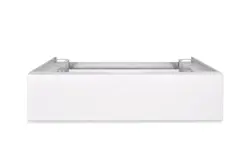
If you order a plinth for this washer-dryer (available from Miele as
an optional accessory), make sure it is the correct one.
Miele will guarantee to supply functional spare parts for a min-
imum of 10years and up to 15years following the discontinuation of
your washer-dryer.
Miele cannot be held liable for damage caused by non-compliance
with these Warning and Safety instructions.
Operating the washer-dryer
14
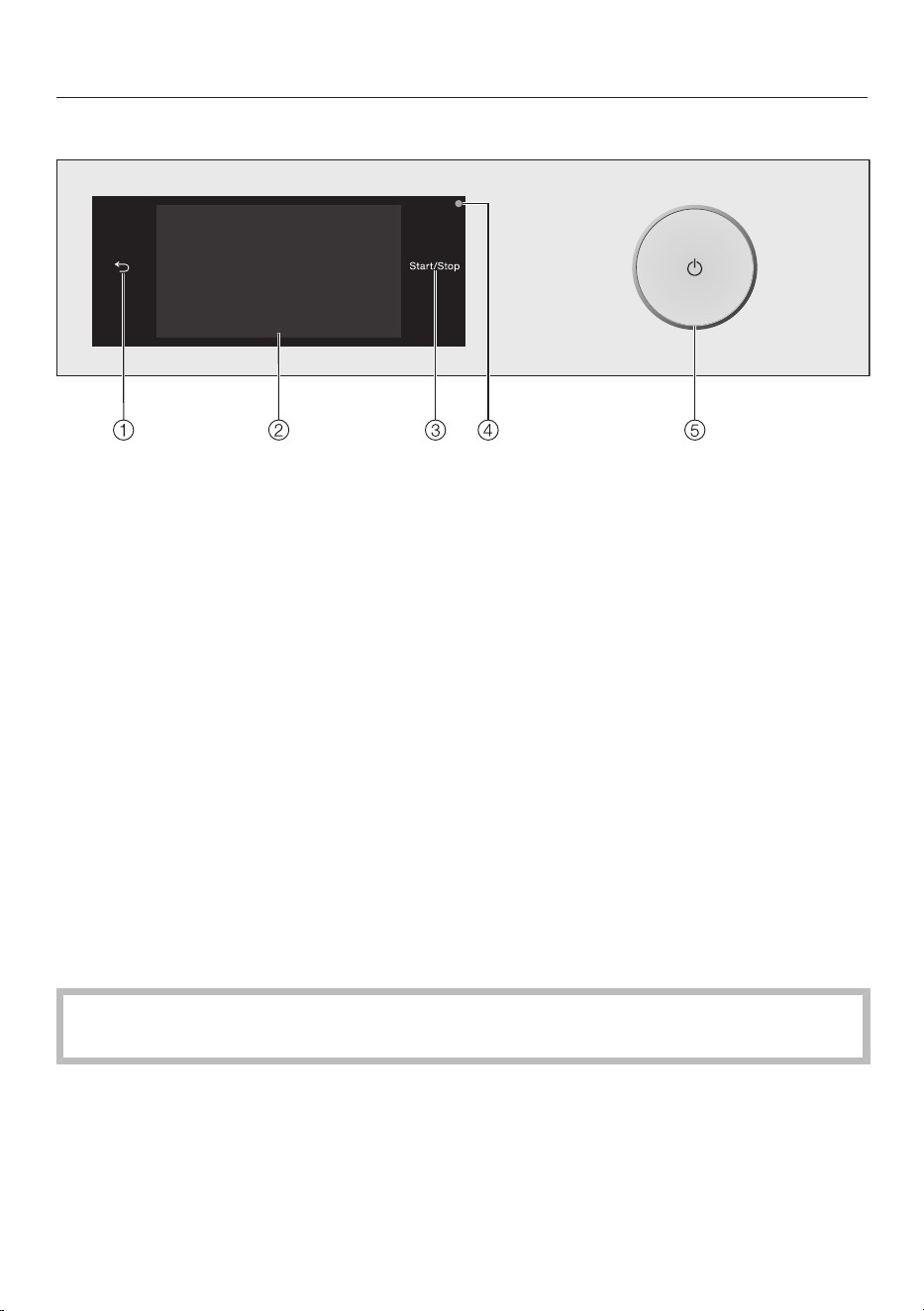
Control panel
a
Sensor control
Takes you back one level in the menu.
b
Touch display
c
Start/Stopsensor control
Touching the Start/Stopsensor control starts the selected programme or can-
cels a programme that has already been started. The programme can be started
as soon as the sensor control is flashing on and off. The sensor control lights up
constantly once the programme has started.
d
Optical interface
This is used by the Customer Service Department as a transmission point.
e
Button
For switching the washer-dryer on and off. The washer-dryer switches off auto-
matically to save energy. It is switched off 15minutes after the end of the pro-
gramme/Anti-crease phase, or after being switched on if no further selection is
made.
Touch display and sensor controls
The and Start/Stopsensors and the sensors in the display react to finger tip
contact.
The touch display can be scratched by pointed or sharp objects, e.g. pens.
Only touch the display with your fingers.

Operating the washer-dryer
15
Main menu
After switching on the washer-dryer, the
main menu will appear in the display.
You can access all the important sub-
menus from the main menu.
Touch the sensor control at any time
to return to the main menu. Values set
previously are not saved.
11:02
Washing Drying Washing +
Drying
Help
You can scroll to the next page of the
main menu by swiping your finger
across the display.
11:02
Favourites MobileStart
Help
Wash/Drying
assistant
or
11:02
Maintenance Settings
Help
Washing
You can select the various wash pro-
grammes.
Drying
You can select the various drying pro-
grammes.
Washing + Drying
You can select programmes which in-
clude thorough washing and drying.
Favourites
You can save up to 12 of your own cus-
tomised wash programmes (see “Fa-
vourites”).
MobileStart
You can operate your washer-dryer re-
motely with MobileStart using the Miele
app.
The Remote controlsetting must be
switched on.
Touch the MobileStartsensor control and
follow the instructions in the display.
Wash/Drying assistant
The washing and drying assistant
guides you step by step so that you can
select the optimum wash programme
and drying programme for your laundry
(see “Washing and Drying assistant”).

Operating the washer-dryer
16
Maintenance
Maintenance options for the TwinDos
system and the Rinse out fluff and Clean
machineprogrammes are located in the
Maintenancemenu (see “Cleaning and
care”).
Settings
You can alter the washer-dryer’s elec-
tronics to suit different requirements in
the Settings menu (see “Settings”).
Examples of how to operate the
appliance
Selection lists
Washing menu (single selection)
11:02
2:09
2:29
1:39
0:49h
h h
h
Cottons
ECO 40-60
QuickPower
Minimum iron
Washing
Help
You can scroll right or left by swiping
your finger across the screen. Place your
finger on the touch display and swipe it
in the direction you want.
The orange scroll bar under the pictures
shows that there are further options to
choose from.
To select a wash programme, touch a
programme name.
The display will change to the standard
menu for that programme.
Extras menu (multiple selection)
11:02
Quick
Soak
Water plus
Extra rinse
Extras
OK
You can scroll right or left by swiping
your finger across the screen. Place your
finger on the touch display and swipe it
in the direction you want.
The orange scroll bar under the pictures
shows that there are further options to
choose from.
To select Extras, touch one or more
sensor controls with Extras.
Currently selected Extras are marked or-
ange.
To deselect an Extra, simply touch the
Extrasensor control again.
Use the OKsensor control to activate all
selected Extras.
Setting numerical values
You can set numerical values in some
menus.
12 00
11 59
10 58
13 01
14 02
Time
OK
Enter the numbers by swiping up or
down. Place your finger on the number
that you want to change and move your

Operating the washer-dryer
17
finger in the direction you want. Use the
OKsensor control to accept the set nu-
merical value.
Tip: Briefly touching the numbers will
bring up the numerical keypad. Once a
valid number has been entered, the
OKsensor control will be highlighted
green.
Pull-down menu
The pull-down menu can be used to dis-
play information, e.g. about a wash pro-
gramme.
11:02
40 °C 1600
1:57
Cottons
h
Washing
Temperature Spin speed
TwinDos Extras
not selectednot selected
Timer Save
rpm
Touch the top edge of the screen in the
middle and drag down with your finger.
Help display
Help appears along the bottom line of
the display in the main menu and the
programme selection menus.
Touch the Helpsensor control to dis-
play the text.
Touch the Closesensor control to re-
turn to the previous screen.
Exiting a menu level
Touch the sensor control to return
to the previous screen.
Entries made before this which have not
been confirmed withOK will not be
saved.
Applications
You can use this washer-dryer to:
- Wash separately
Maximum load (depending on pro-
gramme) 8.0kg
- Dry separately
Maximum load (depending on pro-
gramme) 5.0kg
or
- Wash and dry in a continuous se-
quence
Maximum load (depending on pro-
gramme) 5.0kg
Before using for the first time
18
Damage resulting from incorrect
installation and connection.
Installing and connecting the washer-
dryer incorrectly will cause serious
property damage.
Please observe the instructions in
“Installation”.
This washer-dryer has undergone a
complete functional test at the factory
and there will be some residual water
in the drum from this process.
Removing the protective foil
and stickers
Remove:
- Any protective film from the door
- Any stickers from the front and the lid
Please do not remove any labels (e.g.
the data plate) which are visible
when you open the door.
Remove the detergent cart-
ridges and the drain hose elbow
from the drum
Two detergent cartridges for automatic
detergent dispensing and an elbow
piece for the drain hose are stored in the
drum.
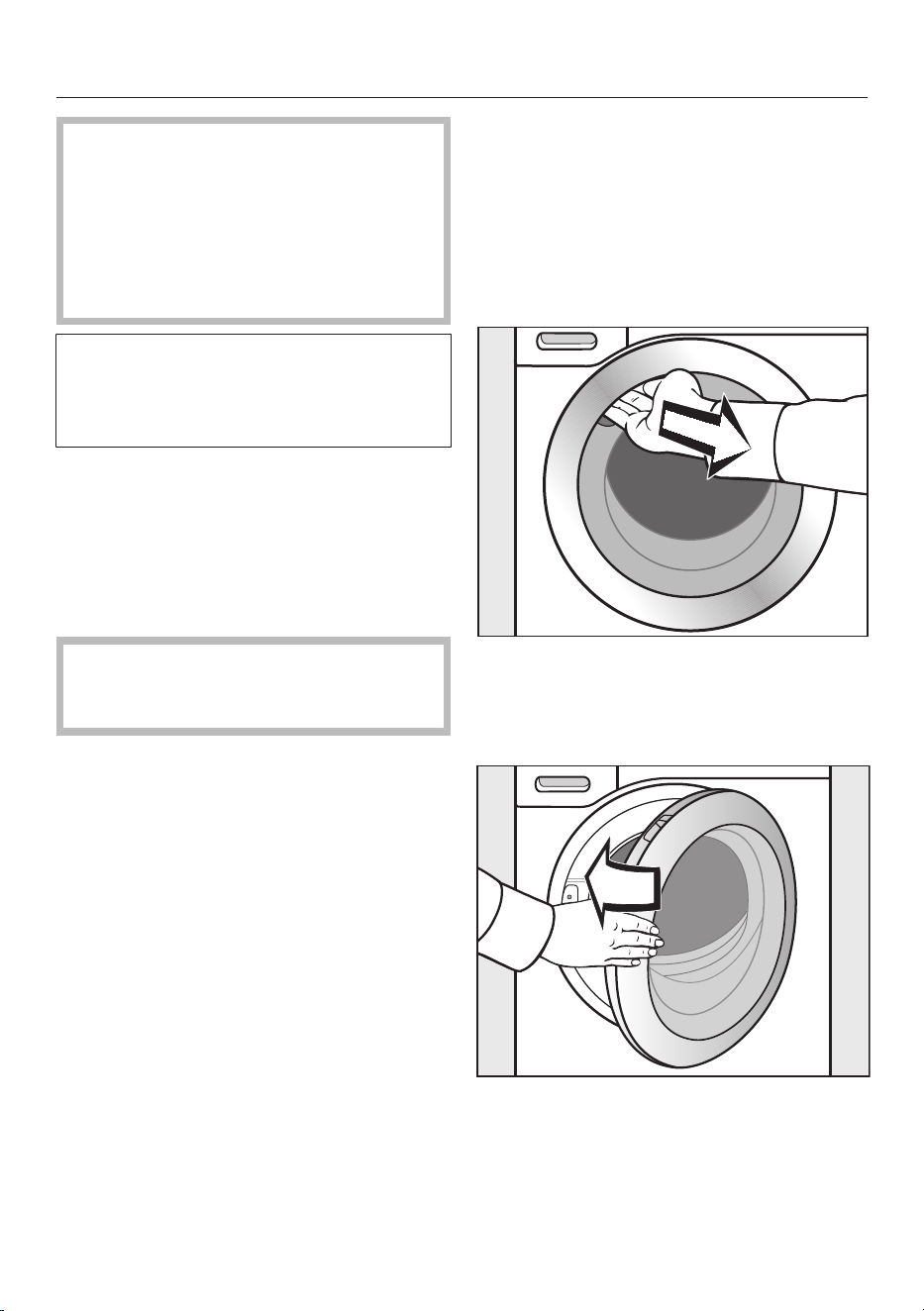
Reach under the door grip and pull
the door open.
Take the two cartridges and the elbow
piece out of the drum.
Shut the door with a gentle swing.
Before using for the first time
19
Miele@home
Your washer-dryer is equipped with an
integrated WiFi module.
To use this feature, you will need:
- A WiFi network
- The Miele app
- A Miele user account. The user ac-
count can be created via the Miele
app
The Miele app will guide you as you
connect your washer-dryer to your
home WiFi network.
Once your washer-dryer is connected to
your WiFi network, you can use the app
to carry out the following activities, for
example:
- Controlling your washer-dryer re-
motely
- Calling up information on the operat-
ing status of your washer-dryer
- Calling up information on the pro-
gramme sequence of your washer-
dryer
Connecting your washer-dryer to your
WiFi network will increase energy con-
sumption, even when the washer-dryer
is switched off.
Make sure there is sufficient signal
strength for your WiFi network at the
washer-dryer installation site.
Availability of the WiFi connection
The WiFi connection shares a frequency
range with other appliances (including
microwave ovens and remote control
toys). This can give rise to sporadic or
even complete connection failures.
Therefore, the availability of featured
functions cannot be guaranteed.
Miele@home availability
The ability to use the Miele app de-
pends on the availability of the
Miele@home service in your country.
The Miele@home service is not avail-
able in every country.
For information about availability, please
visit www.miele.com.
Miele App
The Miele App is available to download
free of charge from the Apple App
Store
®
or from the Google Play Store™.

Before using for the first time
20
Switching the washer-dryer on
Press the button.
The welcome screen will light up.
The display will guide you through the
6steps of the initial commissioning
process.
1. Setting the display language
You will be asked to select the display
language. It is possible to change the
language at any time via the Settings
menu.
Language
OK
dansk
deutsch
english (AU)
english (CA)
english (GB)
english (US)
Scroll to the left or the right until the
language you want appears.
Touch the sensor control for the lan-
guage you want.
The selected language will be high-
lighted in orange and the display will
change to the next setting.
2. Setting up Miele@home
Skip
Continue
Set up "Miele@home"?
To set up Miele@home now: touch
the Continuesensor control.
Tip: To postpone setup until later: touch
the Skipsensor control. The following
message will then appear in the display:
It is possible to set up later in "Settings" /
"Miele@home"..
Confirm with the OKsensor control.
Selecting a connection method
Via WPS
Via App
Which connection method do you
want to use?
Select the connection method you
wish to use.
You will then be guided by the display
and the Miele app.

Before using for the first time
21
3. Setting the clock format
The time of day can be displayed in 12-
hour or 24-hour clock format.
Select the clock format you want and
confirm this with the OKsensor con-
trol.
The display will then bring up the screen
for setting the time of day.
Setting the time of day
This message only appears if the
washer-dryer has not yet been con-
nected to a WiFi network. The time of
day is set automatically when a con-
nection is established with a WiFi net-
work.
12 00
11 59
10 58
13 01
14 02
Time
OK
Place your finger on the number that
you want to change and move your
finger in the direction you want.
Confirm with the OKsensor control.
4. Removing the transit bars
Damage resulting from failure to
remove the transit bars.
Failure to remove the transit bars can
result in damage to the washer-dryer
and to adjacent cabinetry or appli-
ances.
Remove the transit bars as described
in “Installation”.
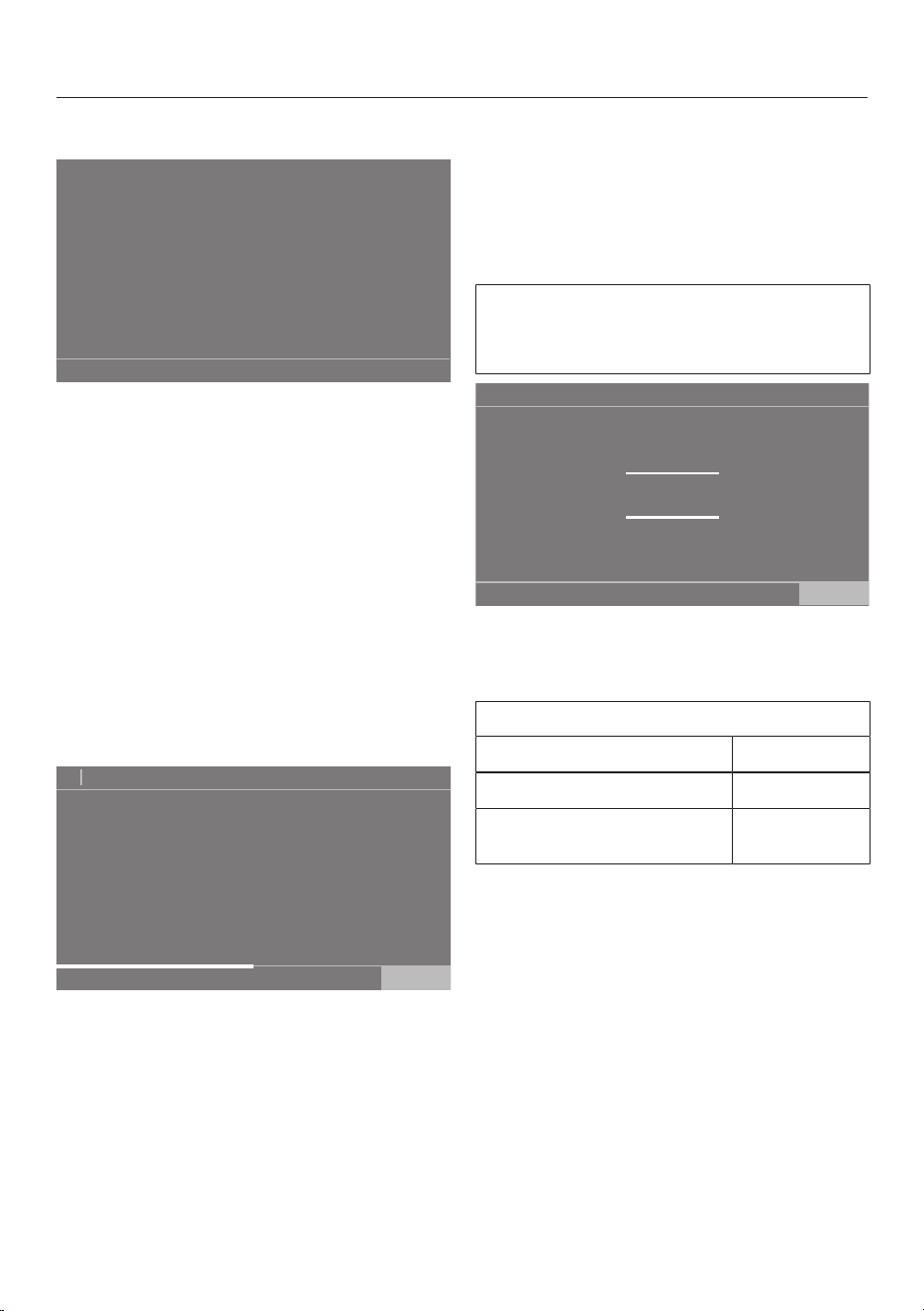
The following message will then appear
in the display:
Remove transit bars and observe "Warn-
ing and Safety instructions" and "Before us-
ing for the first time" in the operating instruc-
tions
Confirm that the transit bars have
been removed with the OKsensor
control.
The display will change to the next set-
ting.
Before using for the first time
22
5. Setting up TwinDos
Skip
Continue
Set up "TwinDos"?
Touch the Continuesensor control to
set TwinDos up straight away.
Tip: To postpone setup until later: touch
the Skipsensor control. The following
message will then appear in the display:
It is possible to set up later in "Settings" /
"TwinDos".
Confirm with the OK sensor control.
Setting up compartment
The procedure for Miele UltraPhase1
and Miele UltraPhase2 is described be-
low. The procedure for other detergents
is similar.
No agent
Agent for comp.
Miele
UltraPhase 1
Universal
detergent
Colour
detergent
Delicates
detergent
Delicates/
Woollens
OK
11:02
Touch the Miele UltraPhase 1sensor
control.
The following message will then appear
in the display:
Please enter the dosing recommendation
of your detergent for a wash with normal
soiling. Take note of your water hardness
level.
The dispensing quantity for
UltraPhase1 is preset for (water
hardness levelII).
58
57
56
59
60
Dosage for comp.
ml
OK
11:02
Confirm the preset value with the
OKsensor control, or change the
value.
UltraPhase1
Water hardness levelI 46ml
Water hardness levelII 58ml
Water hardness
levelIII
70ml
The following appears in the display:
Insert container
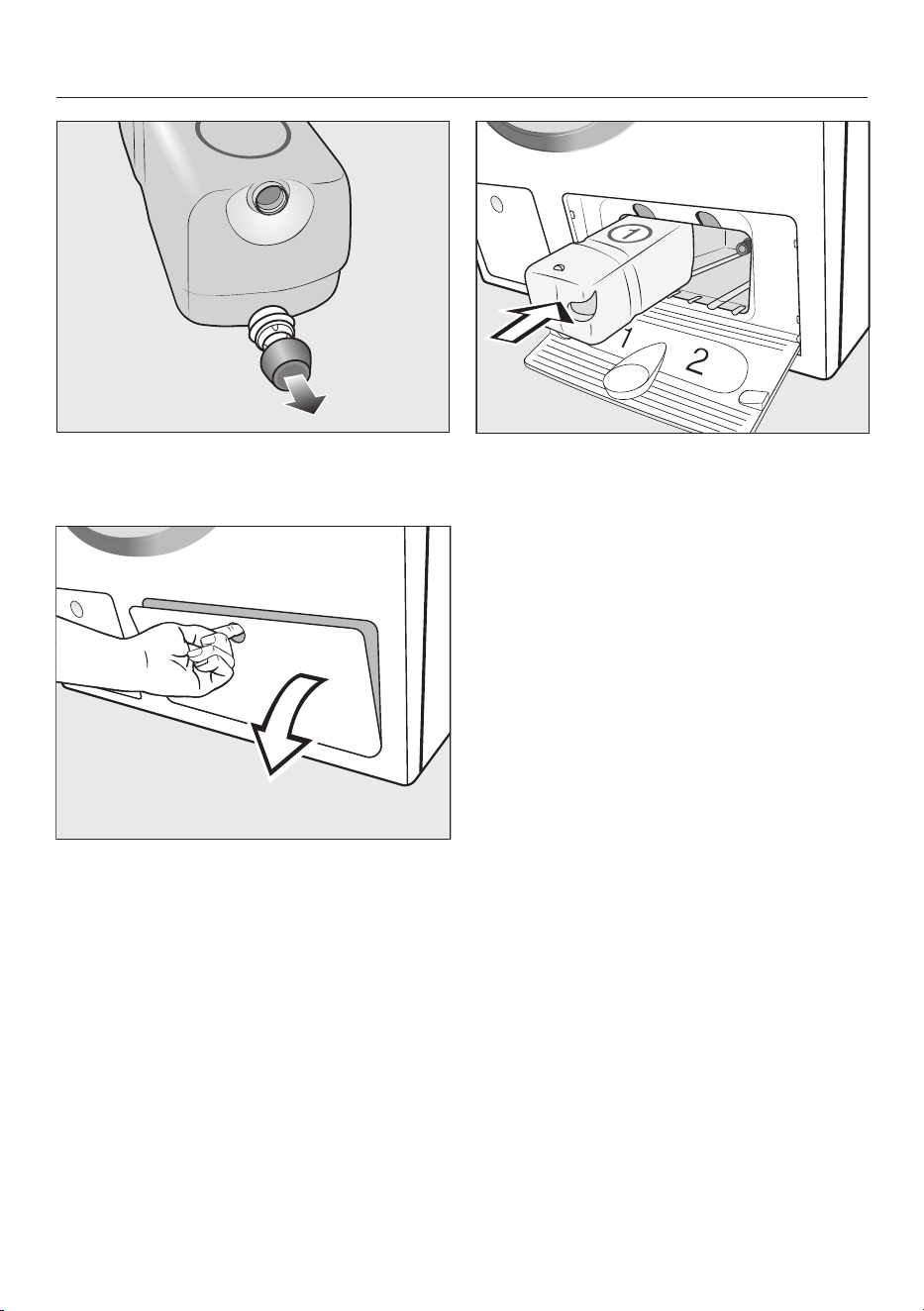
Before using for the first time
23
Remove the cover cap from the
UltraPhase1 detergent cartridge in-
cluded with the delivery.
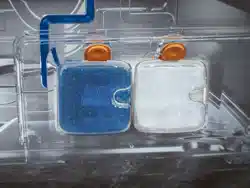
Open the access panel for TwinDos.
Push the UltraPhase1 detergent cart-
ridge into compartment1 until it locks
into position.
The following message will then appear
in the display:
Now enter the settings for UltraPhase 2
Before using for the first time
24
Setting up compartment
The dispensing quantity for
UltraPhase2 is preset for (water
hardness levelII).
45
44
43
46
47
Dosage for comp.
ml
OK
11:02
Confirm the preset value with the
OKsensor control, or change the
value.
UltraPhase2
Water hardness levelI 36ml
Water hardness levelII 45ml
Water hardness
levelIII
54ml
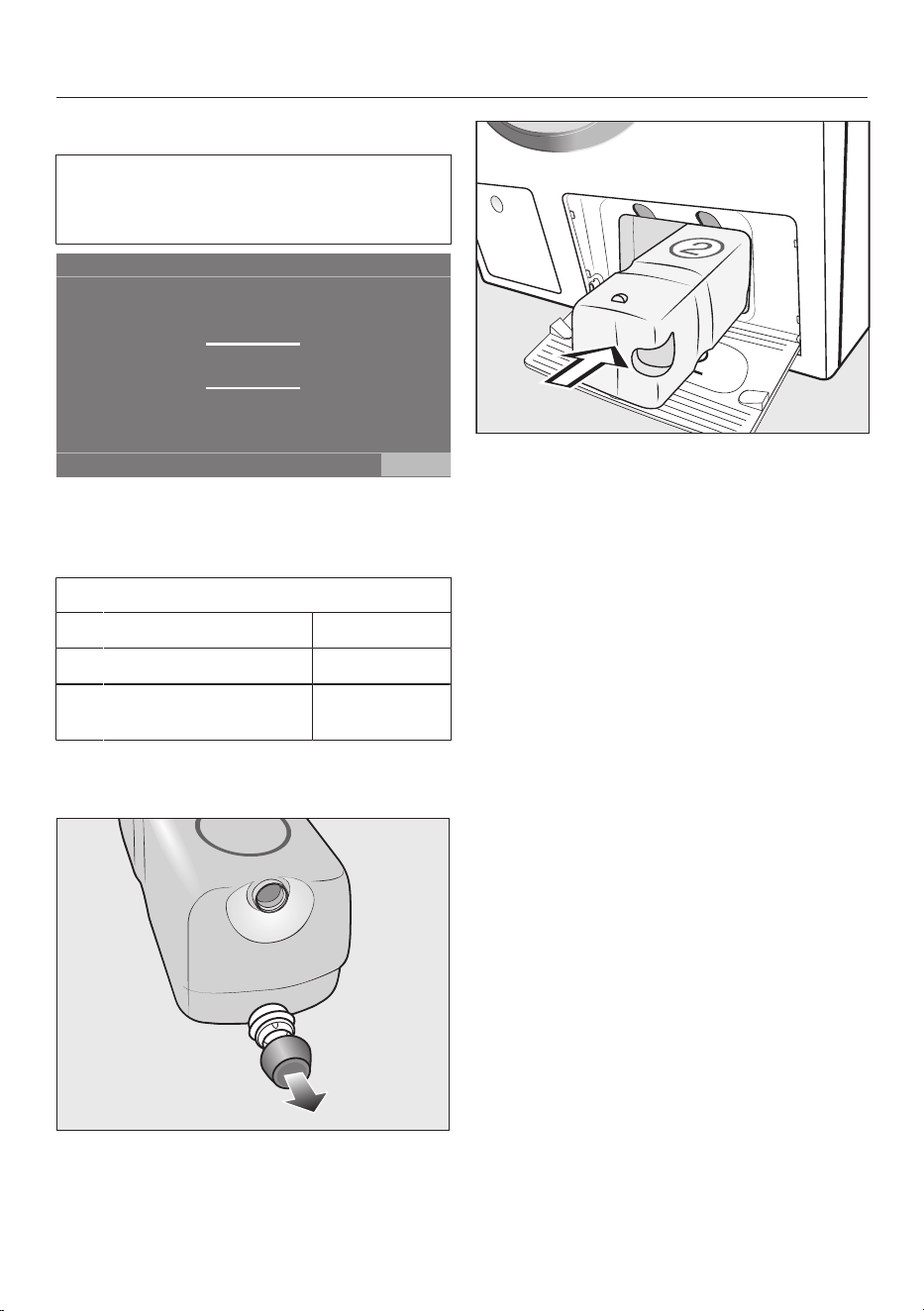
The following appears in the display:
Insert container
Remove the cover cap from the
UltraPhase2 detergent cartridge in-
cluded with the delivery.
Push the UltraPhase2 detergent cart-
ridge into compartment2 until it locks
into position.
The following message will then appear
in the display:
"TwinDos" is set up. Changes can be
made in "Settings" / "TwinDos".
Confirm with the OKsensor control.
Close the TwinDos access panel.
The display will then change to the cal-
ibration programme.
Before using for the first time
25
6. Starting the calibration pro-
gramme
It is important to calibrate the washer-
dryer to ensure optimum water and
energy usage, as well as optimum
washing and drying results.
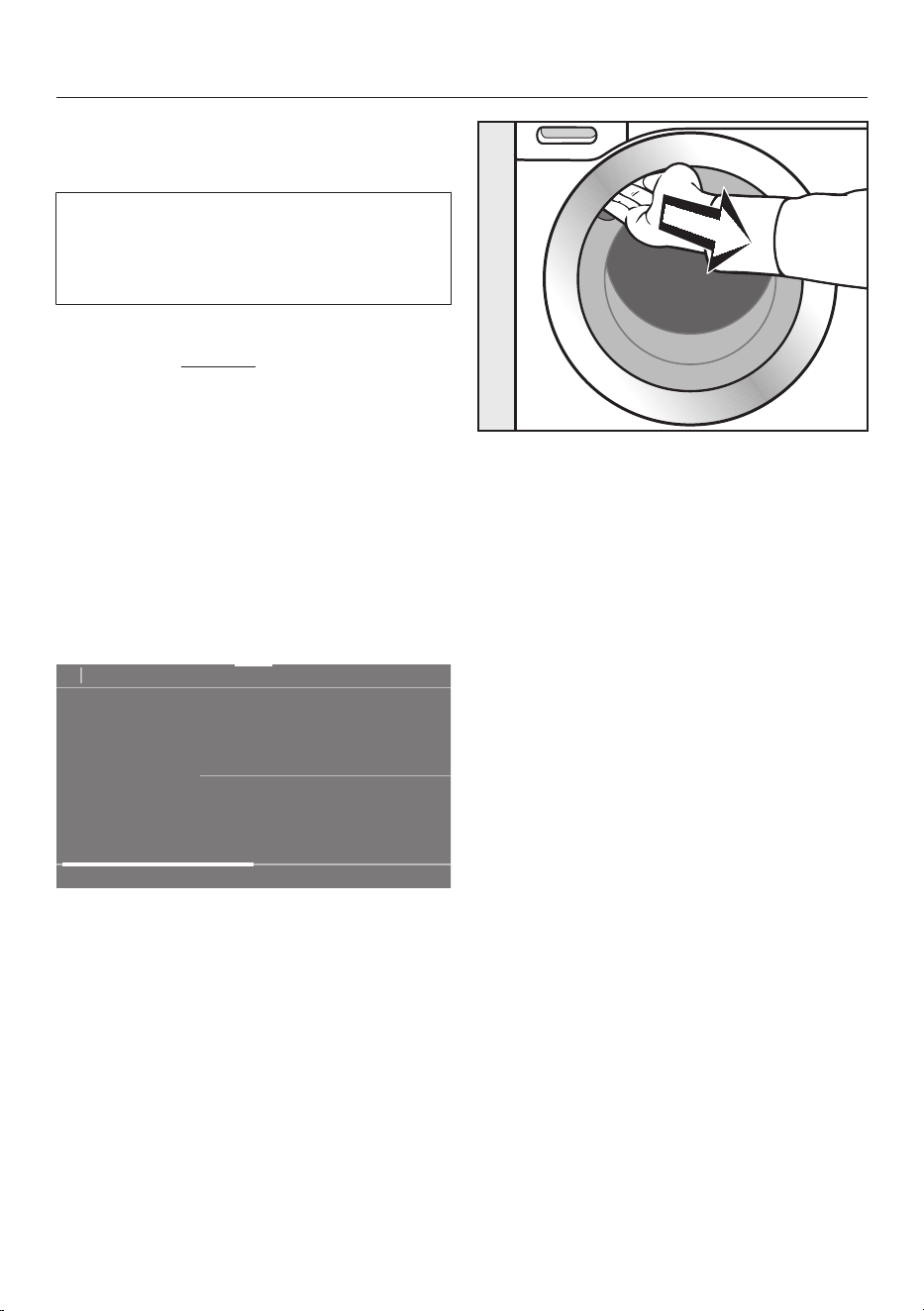
To do this, the Cottons programme
must be run without laundry.
No other programmes can be started
until calibration has been carried out.
The following message will then appear
in the display:
Open the stopcock and start the Cottons
90°C programme with an empty drum
Confirm with the OKsensor control.
The display will then change to the
standard menu for the Cottons pro-
gramme.
11:02
90 °C 1600
1:57
Cottons
h
Washing
Temperature Spin speed
TwinDos Extras
not selectedWhites
Timer Save
rpm
Open the stopcock.
Touch the Start/Stopsensor control.
The washer-dryer calibration pro-
gramme will start. The duration will be
approximately 2hours.
At the end of the programme, the fol-
lowing message will appear in the dis-
play:
Set up complete
Reach under the recessed grip and
pull the door open.
Tip: Leave the door slightly open to al-
low the drum to dry.
Switch the washer-dryer off with the
button.

Environmentally friendly washing and drying
26
Energy and water consumption
- Use the maximum load size for the
current programme. The energy and
water consumption will then be the
lowest in relation to the size of the
load.
- Programmes that are more efficient
with regard to energy and water con-
sumption generally have a longer pro-
gramme running time. By extending
the programme running time, the
wash temperature that is actually
reached can be reduced while still
providing the same wash results.
For example, the
ECO 40-60programme has a longer
running time than the Cottons40°C or
60°C programme. The ECO 40-60
programme is more efficient in terms
of energy and water consumption.
- Use the Express 20programme for
small, lightly soiled loads.
- Modern detergents make it possible
to wash at lower temperatures (e.g.
20°C). Using lower temperature set-
tings will save energy.
- To maintain the hygiene of the
washer-dryer, carry out a hot wash
(above 60°C) at regular intervals. The
message Hygiene info: Select "Mainten-
ance" and run the "Clean machine" pro-
gramme. will appear in the display of
the washer-dryer to remind you to
carry out a hot wash.
Detergent
- For precise dispensing use automatic
detergent dispensing.
- Adjust the dosage to the degree of
soiling of the laundry.
- Do not exceed the amounts of deter-
gent recommended by the manufac-
turer on the packaging.
When drying with a tumble
dryer
To save energy when tumble drying, se-
lect the highest possible spin speed for
the wash programme and for the
thermo-spin.
WASHING
27
1. Prepare the laundry
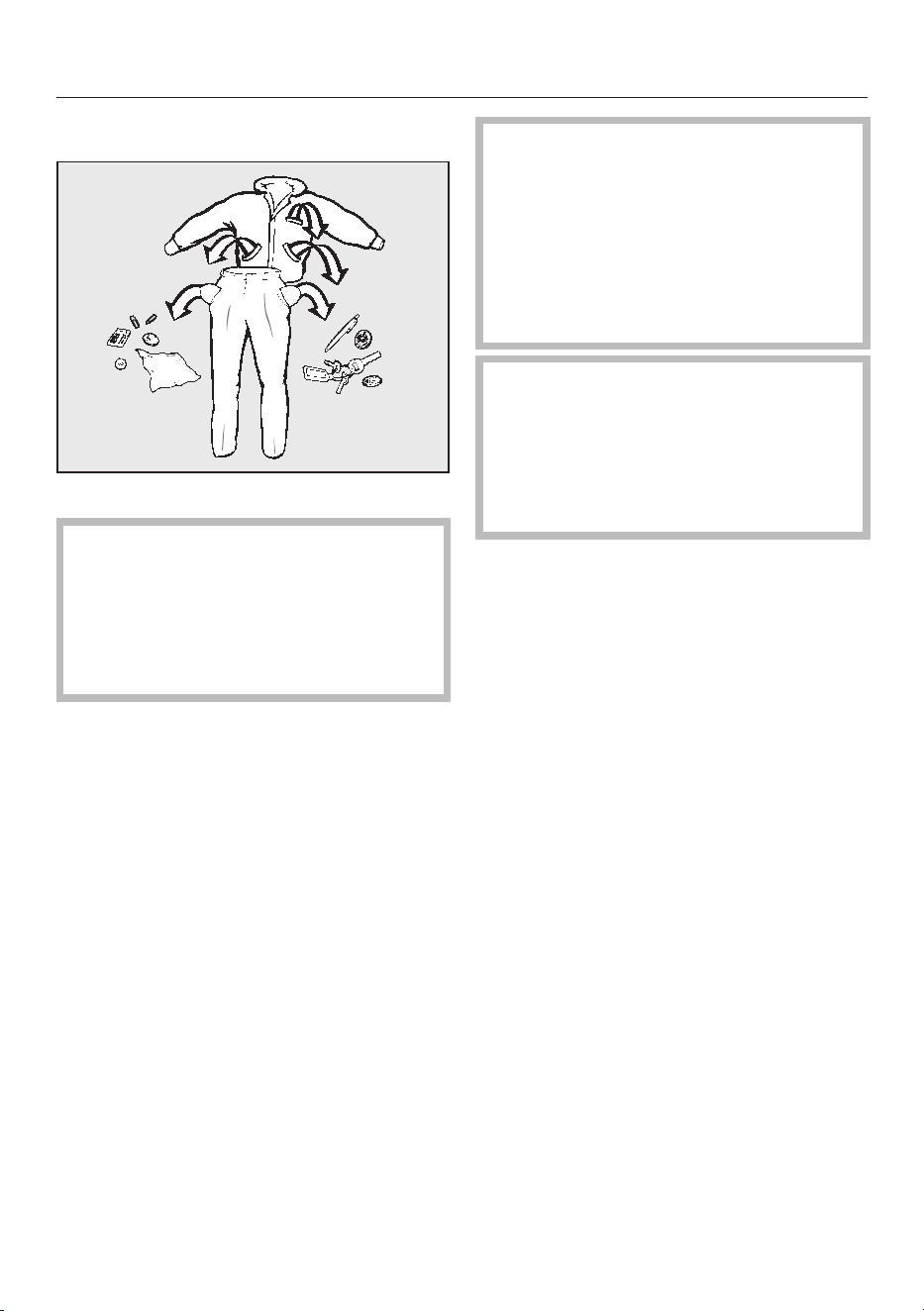
Empty all pockets.
Damage due to foreign objects.
Nails, coins, paper clips, etc. can
cause damage to garments and com-
ponents inside the machine.
Check laundry before washing and
remove any foreign objects.
Sort the laundry
Sort the laundry by colour and by care
label. Most garments have a textile
care label in the collar or side seam.
Tip: Dark textiles often contain excess
dye and should be washed separately
several times before being included in a
mixed load. Always wash whites and
colours separately.
Pre-treating stains
Badly soiled areas and stains should
be cleaned as soon as possible,
preferably whilst still fresh. Stains
should be carefully dabbed off using a
soft, colourfast cloth. Do not rub.
Damage due to solvent-based
cleaning agents.
Cleaning agents containing benzine,
stain remover, etc. can damage
plastic parts.
When pre-treating textiles, make sure
that plastic parts do not come into
contact with the cleaning agent.
Risk of explosion due to solvent-
based cleaning agents.
If solvent-based cleaning agents are
used, an explosive mixture can form.
Never use solvent-based cleaning
agents in the washer-dryer.
General tips
- Curtains: remove rollers and lead
weights or place in a laundry bag.
- Sew in or remove any loose underwir-
ing in bras.
- Close any zips, attach velcro fasten-
ers, fasten hooks and eyes, etc. be-
fore washing.
- Fasten duvet covers and pillow cases
to prevent small items from becoming
rolled up inside them.
Do not wash items which are specified
by the manufacturer as not washable
according to the symbol on the care la-
bel (symbol).

WASHING
28
2. Select a programme
Switching the washer-dryer on
Press the button.
The drum lighting will come on.
The drum lighting will go out automat-
ically after a few minutes.
Tip: To switch the lighting on again,
open the pull-down menu from the
overview menu and then touch the
sensor control.
The main menu will then appear in the
display.
Selecting a programme
Touch the Washingsensor control.
11:02
2:09
2:29
1:39
0:49h
h h
h
Cottons
ECO 40-60
QuickPower
Minimum iron
Washing
Help
Scroll to the right in the display until
the programme you want appears.
Touch the sensor control for that pro-
gramme.
The display will then change to the
standard menu for the programme.
11:02
40 °C 1600
2:29
Cottons
h
Washing
Temperature Spin speed
TwinDos Extras
not selectedColours
Timer Save
rpm
There are 3 other ways to select a pro-
gramme:
- Saved favourite programmes
- The washing/drying assistant
- Miele MobileStart

WASHING
29
3. Selecting programme set-
tings
Selecting a temperature
You can alter the preset temperature of
a wash programme.
The temperatures reached inside the
washer-dryer might not be the same as
the temperatures selected. Perfect
wash results are achieved through a
combination of energy use and wash
duration.
Touch the Temperaturesensor control.
Select the desired temperature.
The display will change to the standard
menu for that wash programme.
Selecting a spin speed
You can alter the preset spin speed of
a wash programme.
Touch the Spin speedsensor control.
Select the spin speed you want.
The display will change to the standard
menu for that wash programme.
Activating TwinDos
TwinDos dispensing is automatically ac-
tivated for all programmes in which dis-
pensing is possible.
1. Switch TwinDos on or off
Touch the TwinDossensor control and
select Off or On.
2. Select the detergent
When using Miele’s 2-phase system
you must set the colour of the laundry.
Select Whites for loads of white items,
or Colors for loads containing coloured
items.
If using a different type of detergent,
this must be selected.
Select compartment or .
Tip: Only those detergents that can be
used with the programme are displayed.
3. Select the degree of soiling
The display will ask you to enter the de-
gree of soiling of the laundry.
Select Light, Normal or Heavy.
Confirm your choice with the
OKsensor control.
TwinDos is switched on.
The display will change to the standard
menu for that wash programme.
See “Washing” – “5. Add detergent” –
“TwinDos” for more information.

WASHING
30
Selecting Extras
You can supplement the wash pro-
grammes with Extras.
Touch the Extrassensor control.
Select one or more Extras.
Not all Extras can be combined. Extras
that cannot be combined are greyed
out and cannot be selected.
Confirm with the OKsensor control.
The display will change to the standard
menu for that wash programme.
See “Washing” – “Extras” for more in-
formation.
Activating CapDosing
You can use CapDosing with this wash
programme.
Touch the CapDosingsensor control.
The types of capsules which can be
used with the programme will appear in
the display.
Select the type of capsule you want.
CapDosing is now active.
The display will then change to the
standard menu.
See “Washing” – “5. Add detergent” –
“CapDosing” for more information.
Selecting stains
In order to clean stained laundry more
effectively, you can choose from a list
of various types of stains. The wash
programme will then adapt to the type
of stain selected.
Touch the Stainssensor control.
Select the types of stains in your load
from the list.
Confirm your choice with the
OKsensor control.
With some stains, helpful information
will also appear in the display when they
are selected.
Confirm the information with the
OKsensor control.
The display will then change to the
standard menu.
Timer
You can use the Timer to set the finish
time or the start time for a programme.
See “Timer/SmartStart” for further in-
formation.
WASHING
31
4. Loading the washer-dryer
Opening the door
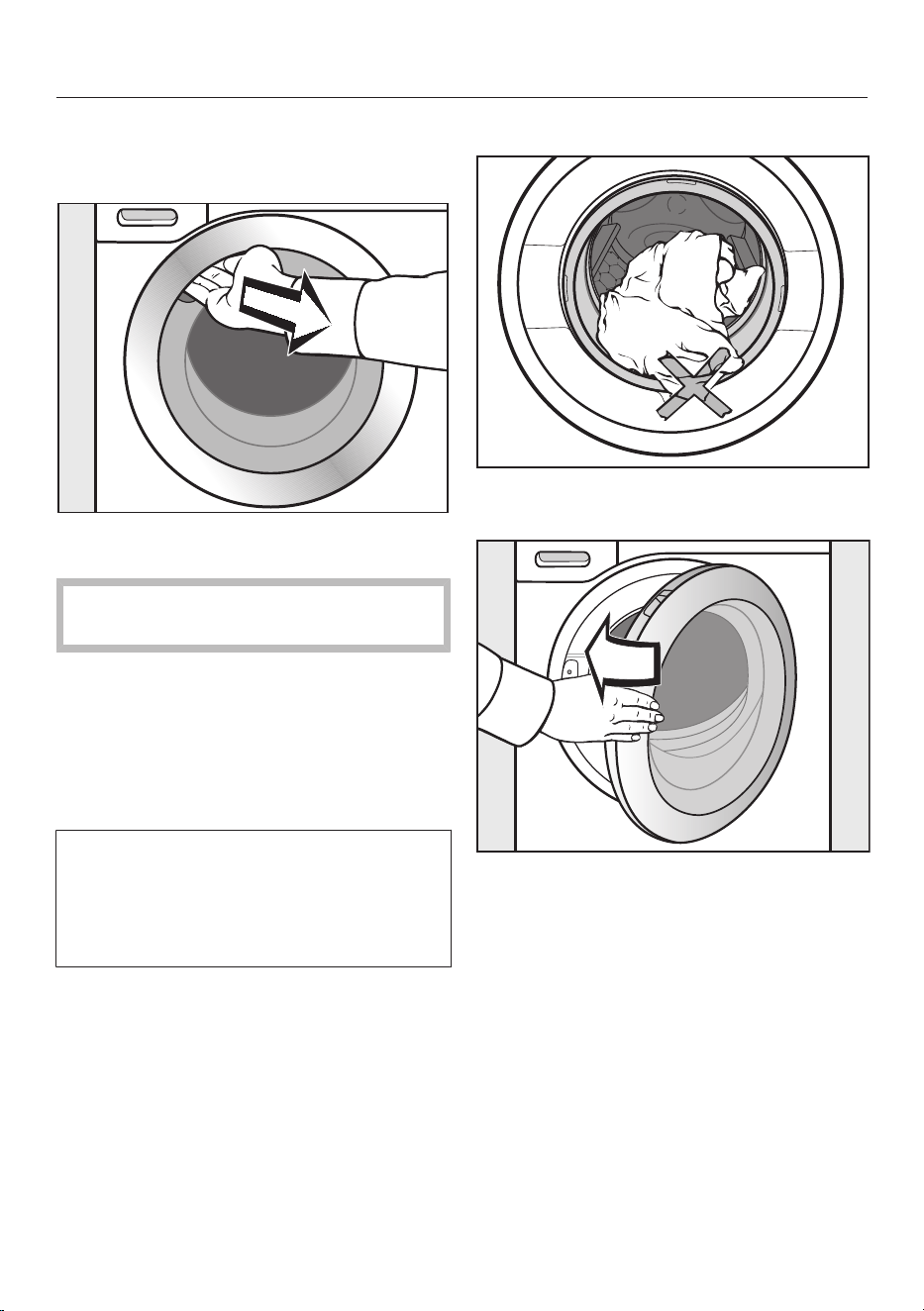
Reach under the recessed grip and
pull the door open.
Check the drum for pets or foreign
objects before loading it with laundry.
Unfold the laundry and load loosely
into the drum.
Mixing both large and small items gives
better wash results and also helps to
distribute the load evenly during spin-
ning.
The most efficient use of energy and
water consumption is achieved when a
full load is washed. However, do not
overload as this reduces cleaning effi-
ciency and causes creasing.
Tip: The maximum load size for the pro-
gramme selected will appear in the pull-
down menu.
Closing the door
Make sure that no items are caught
between the door and the seal.
Shut the door with a gentle swing.

WASHING
32
5. Add detergent
Detergent can be dispensed via
TwinDos, via the detergent dispenser
drawer or with Caps.
TwinDos
The washer-dryer has the TwinDos sys-
tem.
TwinDos must be activated; see “Be-
fore using for the first time”.
How UltraPhase1 and UltraPhase2
work
UltraPhase1 is a liquid detergent which
dissolves dirt and removes the most
common stains. UltraPhase2 is a
bleaching agent and removes stubborn
stains. For the best wash results, these
two agents are dispensed at separate
times during the washing process.
UltraPhase1 and UltraPhase2 clean
white and coloured fabrics thoroughly.
UltraPhase1 and UltraPhase2 single-
use cartridges are available from www
shop.miele.com or a Miele dealer.
Activating TwinDos dispensing
TwinDos dispensing is automatically ac-
tivated for all programmes in which dis-
pensing is possible.
Tip: The detergent dispensing quantities
are preset. If too much foam builds up,
the dispensing quantity can be reduced
via the Settings menu, Programme
sequence, TwinDos.
Changing TwinDos dispensing
You can change the suggested colour
composition of the laundry.
Touch the TwinDos sensor control and
select the colour composition of your
laundry.
Deactivating TwinDos dispensing
Touch the TwinDossensor control.
Touch the Offsensor control.
Selecting the degree of soiling
The degree of soiling in laundry is di-
vided into 3settings:
- Light
No visible soiling or stains
- Normal
Visibly soiled and/or just a few slight
stains
- Heavy
Heavily soiled and/or stains clearly
visible
The dispensing amount for TwinDos and
the amount of water required for rinsing
is preset for the Normal degree of
soiling.
Touch the TwinDos sensor control to
select a different level of soiling.
The amount of detergent and water will
be adjusted to suit the selected degree
of soiling.
Some programmes will not let you set
the degree of soiling. These pro-
grammes are designed for lightly soiled
laundry only.
Using other methods to remove stains
If you wish to use additional methods of
stain removal, you have the following
options:
WASHING
33
- Using the Booster capsule and activ-
ating CapDosing
- Adding stain remover to the com-
partment in the detergent drawer
Detergent drawer
Any detergent suitable for domestic
washing machines can be used. Please
observe the instructions for use and
dosage on the detergent packaging.
Ensure that TwinDos dispensing is
deactivated.
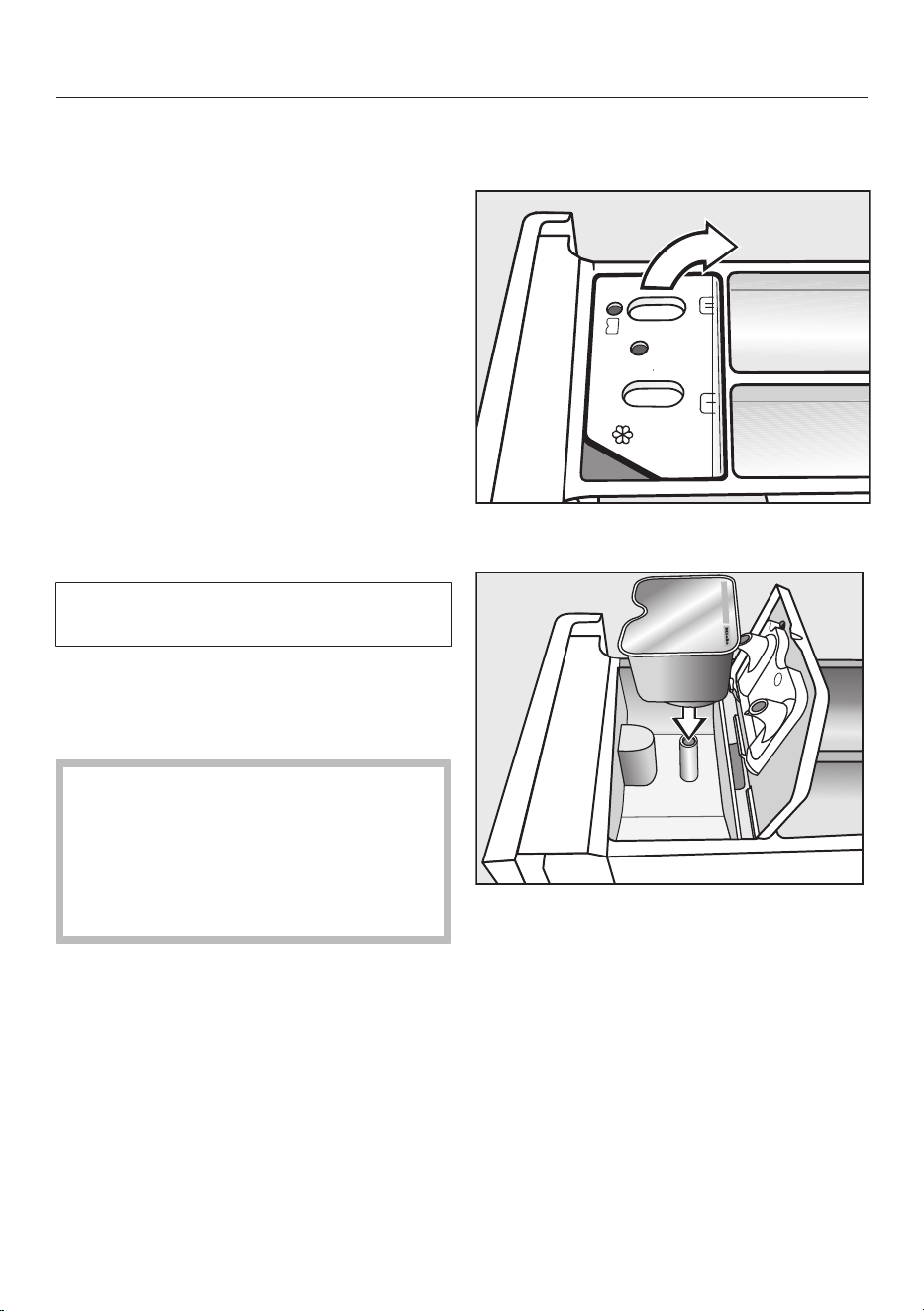
Adding detergent
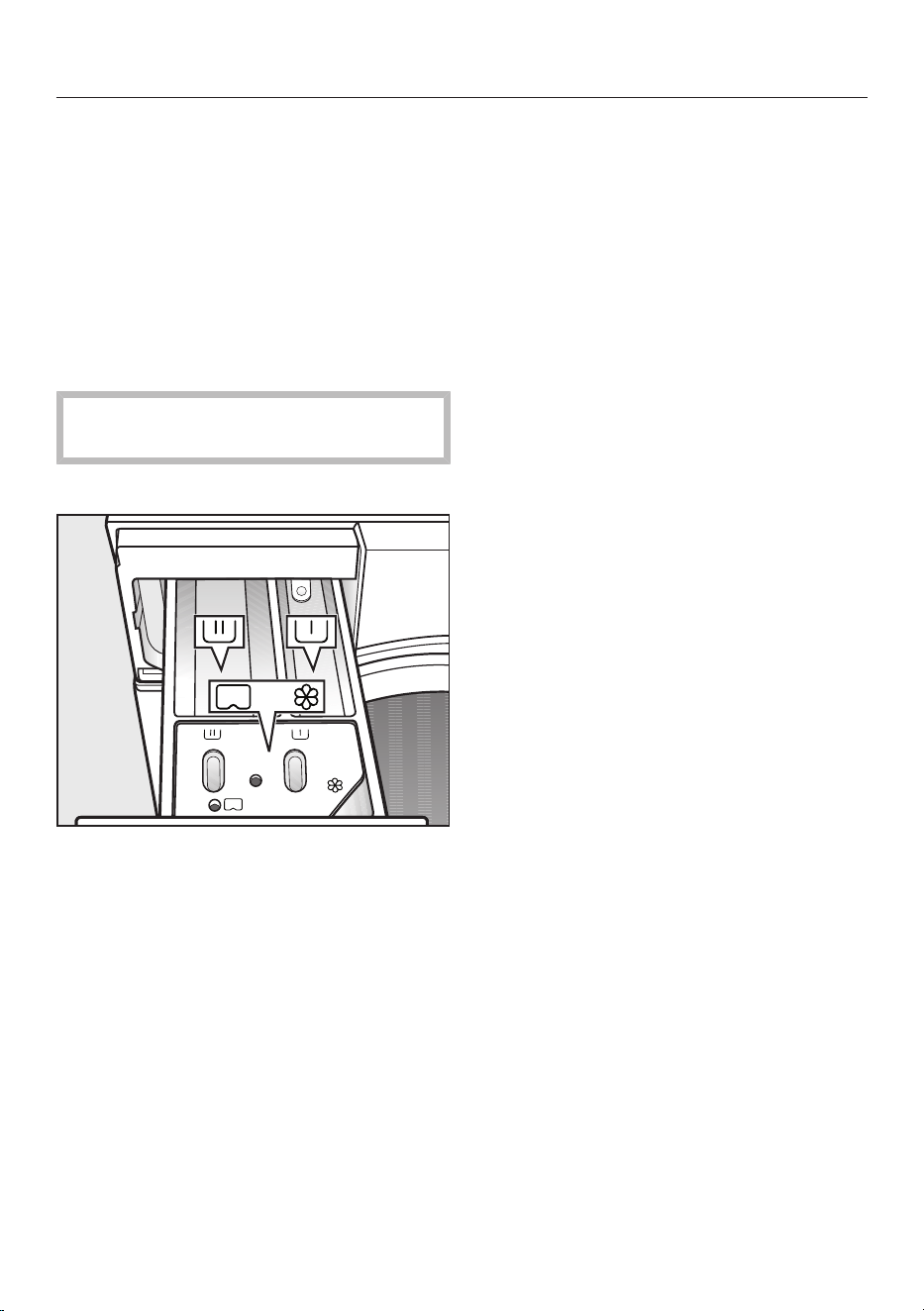
Pull out the detergent drawer and add
detergents to the compartments.
Detergent for the pre-wash
Detergent for the main wash and
soaking
Fabric conditioner, liquid starch or
capsules
Using liquid detergents with a pre-
wash
Liquid detergent cannot be used for the
main wash if the pre-wash has been se-
lected.
Use powder detergent for the main
wash.
Using detergent tablets or pods
Always put detergent tablets or pods
directly in the drum with the laundry.
They cannot be added via the detergent
drawer.
WASHING
34
Adding fabric conditioner
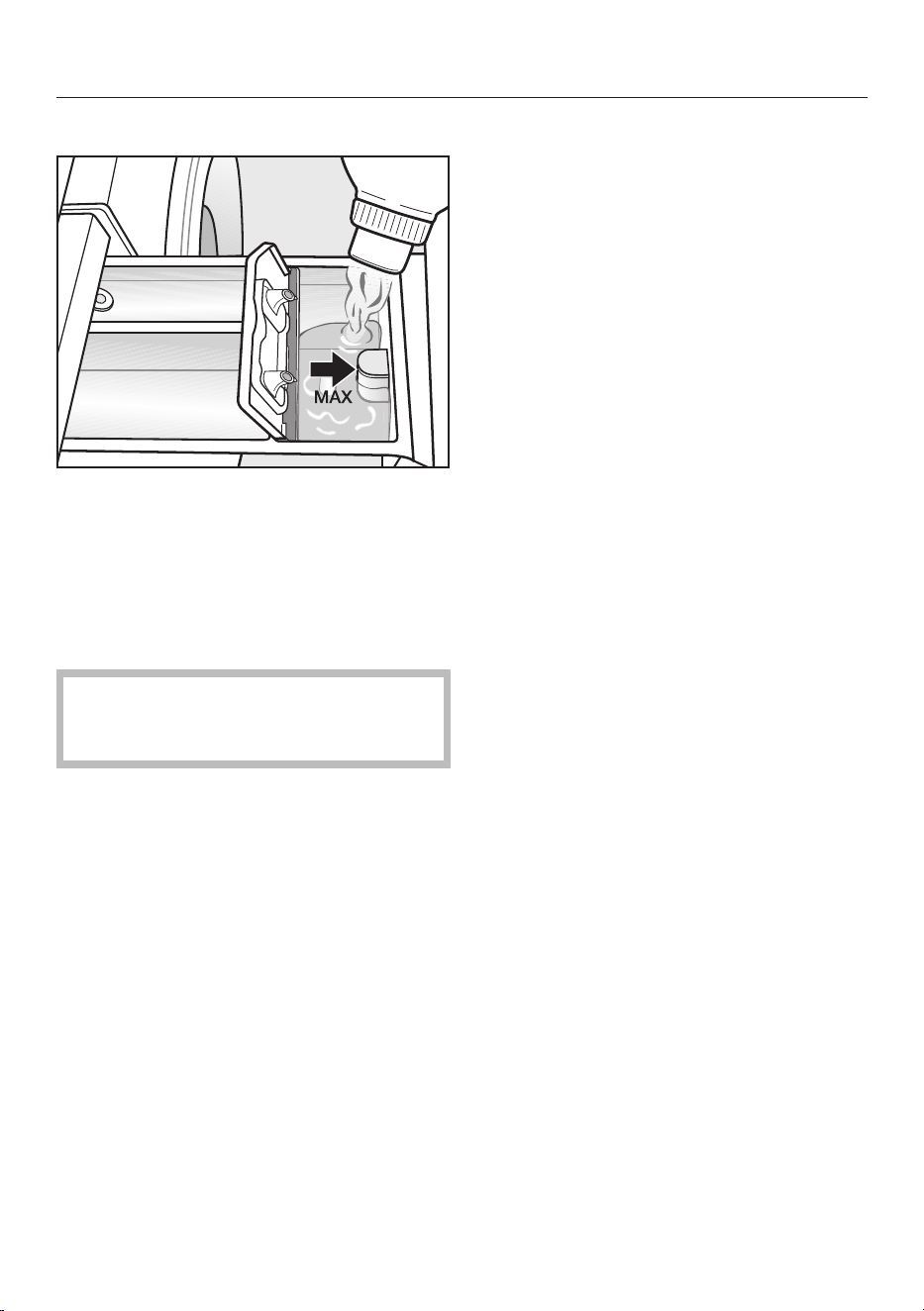
Add fabric conditioner or liquid starch
to the compartment. Do not ex-
ceed the maximum level mark.
This will be automatically dispensed in
the final rinse cycle. At the end of the
wash programme a small amount of wa-
ter remains in the compartment.
If starching frequently, thoroughly
clean the detergent drawer, espe-
cially the siphon, regularly.
Tips on dispensing
Adjust the detergent dosage to the de-
gree of soiling of the laundry and the
load size. Reduce the amount of deter-
gent with smaller load sizes (e.g. reduce
the amount of detergent by ¹⁄₃ when
washing a half load).
Too little detergent:
- Results in laundry not being cleaned
properly and may cause it to become
grey and hard to the touch over time
- Can lead to a build-up of mould in the
washer-dryer
- Results in grease not being com-
pletely removed from the laundry
- Can lead to limescale deposits on the
heater elements
Too much detergent:
- Causes poor wash, rinse and spin res-
ults
- Causes higher water consumption as
an extra rinse cycle is automatically
activated
- Is a greater burden on the environ-
ment
See “Washing” – “Detergent” for fur-
ther information about detergents and
how much to dispense.
WASHING
35
CapDosing
If you selected CapDosing when setting
the programme, detergent will be dis-
pensed via the capsule for this wash
programme.
Only one capsule can be selected per
wash programme.
3 different types of capsule are avail-
able:
= Fabric care (e.g. fabric condi-
tioner, proofing agent)
= Additives (e.g. detergent en-
hancer)
= Detergent (for the main wash
only)
Each capsule contains the correct
amount for one wash cycle.
Caps are available from
www.shop.miele.com, the Miele Cus-
tomer Service Department or your
Miele dealer.
Capsules pose a health risk.
The ingredients of capsules can be
hazardous to health if they are swal-
lowed or come into contact with skin.
Keep capsules out of the reach of
children.
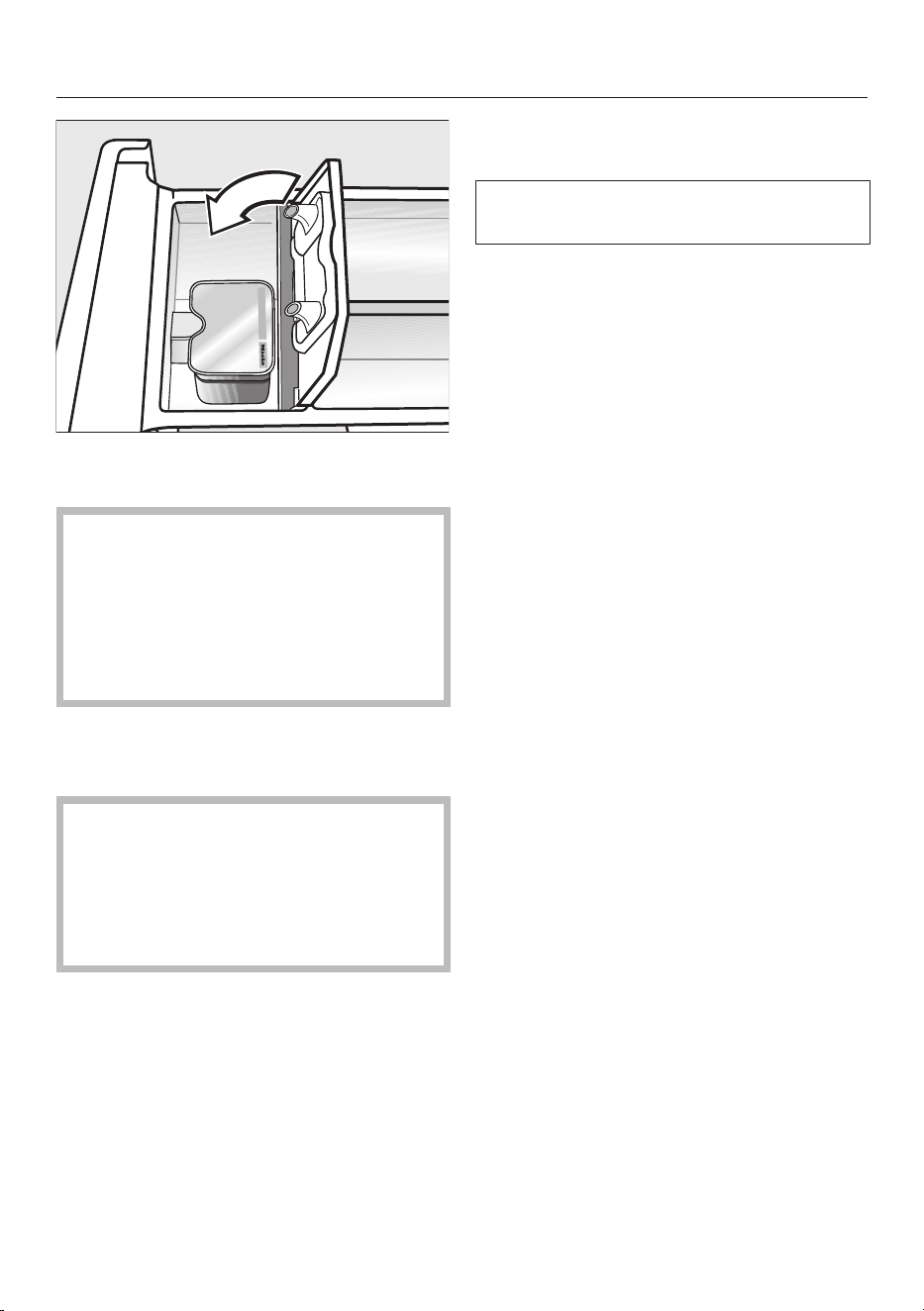
Inserting a capsule
Open the detergent drawer.
Open the lid of the /compart-
ment.
Press the capsule in firmly.
WASHING
36
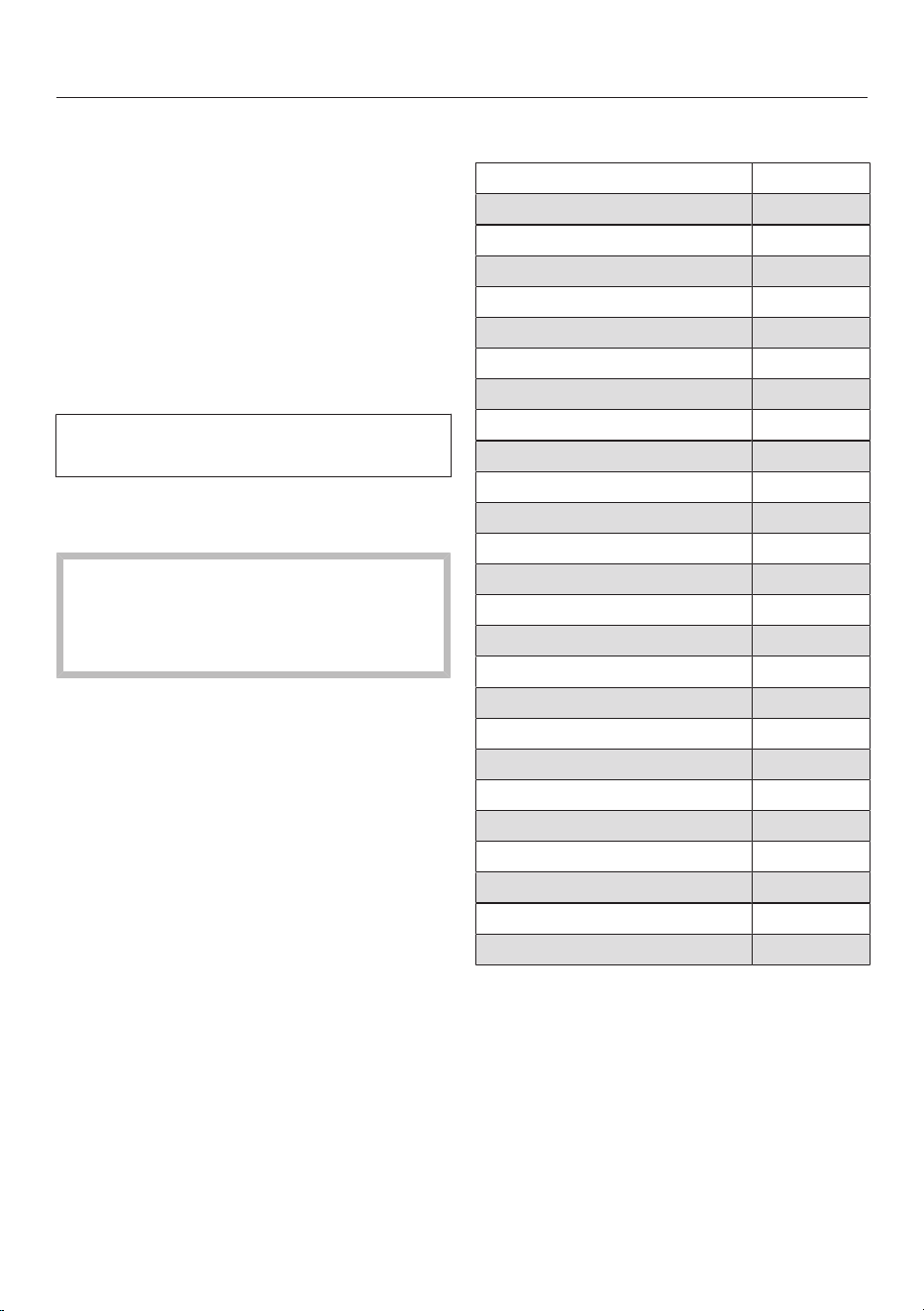
Close the lid and press it firmly shut.
Close the detergent drawer.
The capsule is opened by the act of
inserting it into the detergent drawer.
The contents can run out of the cap-
sule if you then remove it from the
detergent drawer before it is used.
Dispose of the capsule and do not re-
use it.
The wash programme will dispense the
contents of the capsule at the correct
time.
When using CapDosing, water intake
to the compartment takes place
solely via the capsule.
When using capsules, do not add
fabric conditioner to the compart-
ment.
Remove the empty capsule at the end
of the programme.
For technical reasons, a small amount
of water will remain in the capsule.

WASHING
37
6.Starting the programme
The programme can be started when
the Start/Stopsensor control is flashing
on and off.
Touch the Start/Stopsensor control.
The door will lock and the wash pro-
gramme will start.
The programme status will appear in the
display.
11:02
2:25
Cottons
h
Washing
Washing
Time left
Add laundry
The washer-dryer will keep you updated
on the programme stage and the dura-
tion remaining for the programme to
run.
If a delay start period has been selec-
ted, this will appear in the display.
Saving energy
After 10minutes, the indicators dim.
The Start/Stopsensor control flashes
slowly.
To reactivate the indicators:
Touch the Start/Stopsensor control
(this does not have any effect on a
programme that is running).
Adding laundry - AddLoad
Laundry can be added or removed if
Add laundry is illuminated in the display.
Touch the Add laundrysensor control.
The following will appear in the display:
Please wait
The programme will stop and the door
will unlock.
Open the door.
Add or remove laundry.
Close the door.
Touch the Start/Stopsensor control.
The programme continues.
Please note:
Once a programme has started, the
washer-dryer cannot recognise any ad-
justment to the load.
For this reason, if laundry is added or
removed after the start of a pro-
gramme, the machine will always com-
plete the programme cycle assuming a
full load.
WASHING
38
7. End of the programme/un-
loading laundry
In the anti-crease phase, the drum con-
tinues to turn for up to 30min after the
end of the programme. The door will
lock and the following will appear in the
display: Finish/Anti-crease and Unlock with
"Start/Stop".
Press the Start/Stopbutton.
The door will unlock.
The door unlocks automatically at the
end of the anti-crease phase.
Pull open the door.
Remove the laundry.
Items left in the drum could discolour
other items in the next wash or be-
come discoloured themselves.
Remove all items from the drum.
If applicable, remove the used cap-
sule from the detergent drawer.
Switch the washer-dryer off with the
button.
Tip: See “After each washing or drying
programme”.
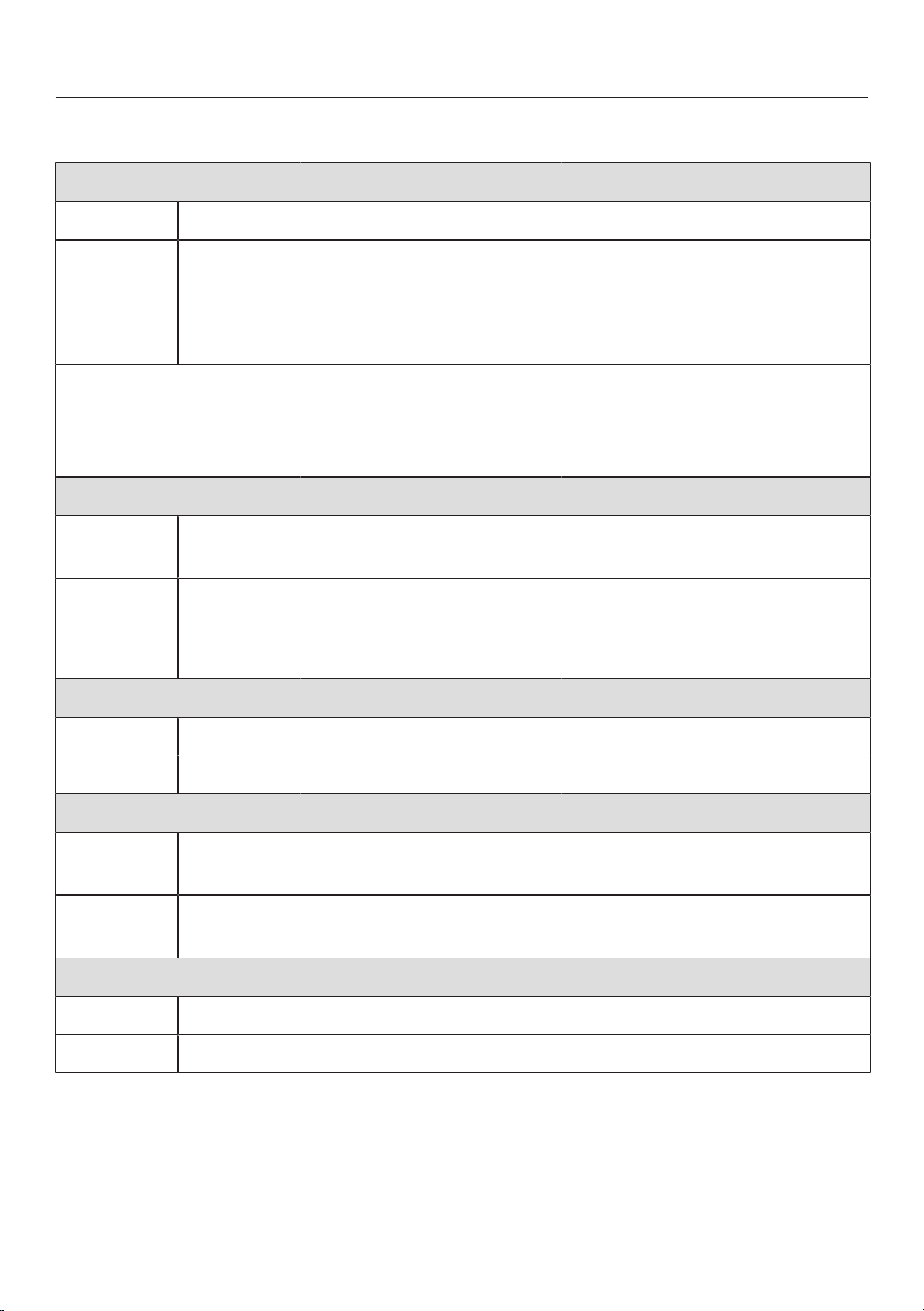
Spin speeds
Programme rpm
ECO40–60 1600
Cottons 1600
Minimum iron 1200
QuickPower 1600
Delicates 900
Shirts 900
Woollens 1200
Denim 900
Outerwear 800
Proofing 1000
Curtains 600
Express 20 1200
Sportswear 1200
Dark garments 1200
Trainers 600
Silks 600
Down filled items 1200
Pillows 1200
Cottons hygiene 1600
Automatic plus 1400
First wash 1200
Drain/Spin 1600
Separaterinse 1600
Starch 1600
Cottons 1600

WASHING
39
Final spin speed in wash programme
When a programme is selected, the op-
timum spin speed for this wash pro-
gramme is shown in the display.
A faster spin speed can be selected for
certain wash programmes.
The highest selectable spin speed is in-
dicated in the table.
Omitting the final spin (Rinse hold)
Select the Rinse hold Extra.
The laundry is not spun after the final
rinse cycle and remains in the rinse wa-
ter. This helps prevent creasing if the
laundry is not going to be removed from
the drum immediately after the end of
the programme.
To start the final spin:
The wash programme is set to the op-
timum spin speed. You can change the
spin speed.
Touch the Change spin speedsensor
control.
Select the desired spin speed.
Start the final spin with the Start/
Stop control.
Ending the programme:
Touch the Change spin speedsensor
control.
Select the spin speed 0 rpm (no
spin).
Touch the Start/Stopsensor control.
The water will be pumped away.
Rinse-spin
There is a spin cycle after the main wash
and between the rinse cycles. A reduc-
tion in the final spin speed will also re-
duce the rinse-spin speed as appropri-
ate.
Omitting the rinse-spin and the final
spin
Touch the Spin speedsensor control.
Select the spin speed 0 rpm (no
spin).
After the last rinse, the water will be
pumped away and the anti-crease
phase will switch on.
In some programmes an extra rinse is
introduced with this setting.
WASHING
40
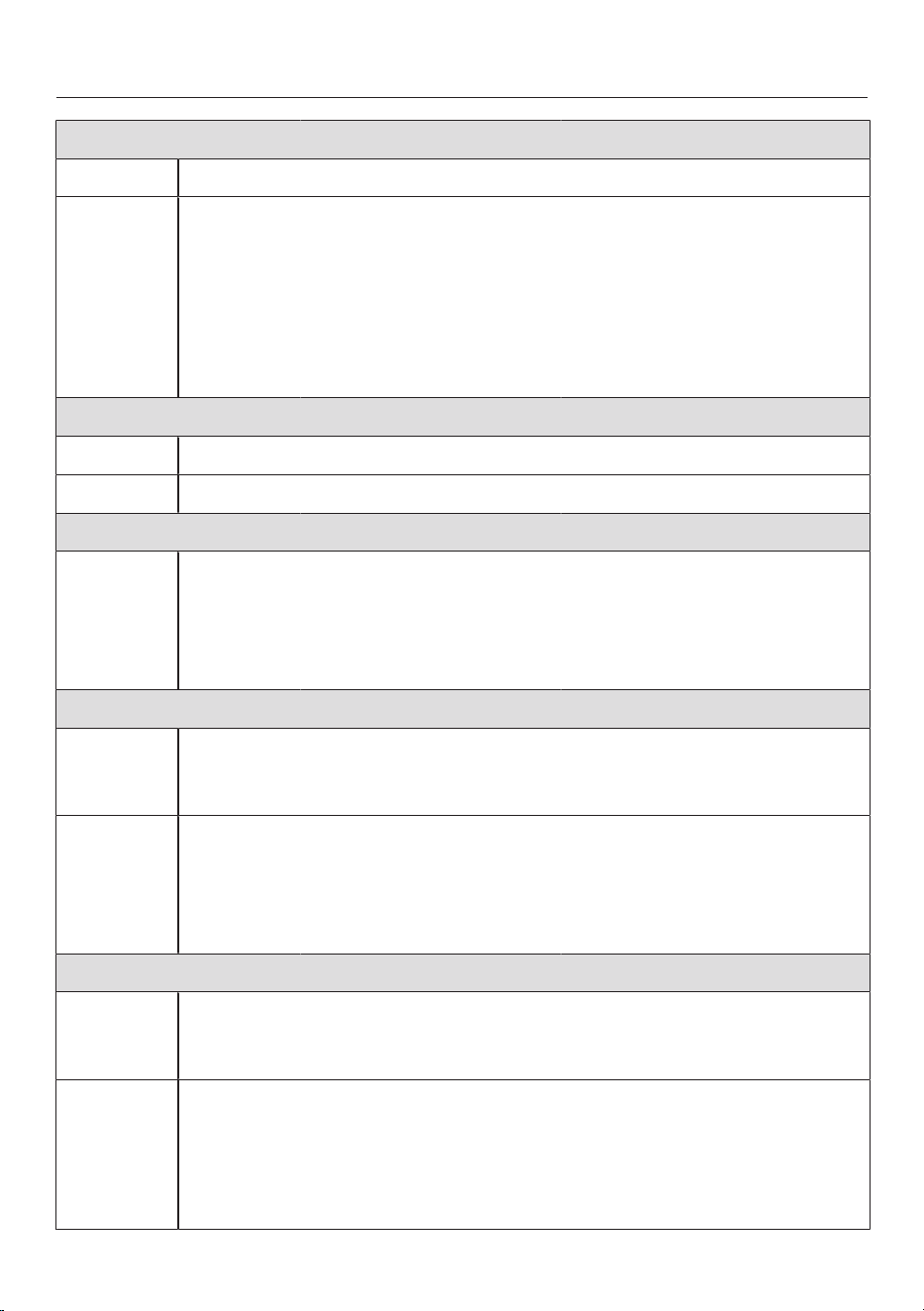
Programme chart
ECO40–60 Max. load 8.0kg
Items Normally soiled cotton garments
Tip - A laundry load consisting of mixed cottons that are intended for
washing at 40°C or 60°C can be washed in the same wash cycle.
- This programme is the most efficient in terms of energy and water
consumption for washing cottons.
Note for test institutes: test programme for compliance with EU legislation re-
garding ecodesign No. 2019/2023 and energy labelling in accordance with Regu-
lation No. 2019/2014.
TwinDos dispensing must be deactivated when carrying out comparison tests.
Cottons 90°C to cold Max. load 8.0kg
Items Cotton, linen or mixed fibre fabric, e.g. table linen, underwear, T-
shirts, etc.
Tip - Where particularly high levels of hygiene are required, please select
a temperature of 60°C or higher.
- 20 °C programme for lightly soiled cotton garments.
Minimum iron 60°C to cold Max. load 3.5kg
Items Synthetic and mixed fibre fabric and easy care cotton
Tip Reduce the spin speed for items which crease easily.
QuickPower 60°C to 40°C Max. load 4.0kg
Items Moderately soiled garments which are also suitable for washing in
the Cottons programme
Tip A special wetting process and wash rhythm ensure that the laundry
is cleaned particularly quickly and thoroughly.
Delicates 60°C to cold Max. load 2.0kg
Items Delicate garments made from synthetic fibre, mixed fibre and viscose
Tip Deselect the spin speed for items which crease easily.
WASHING
41
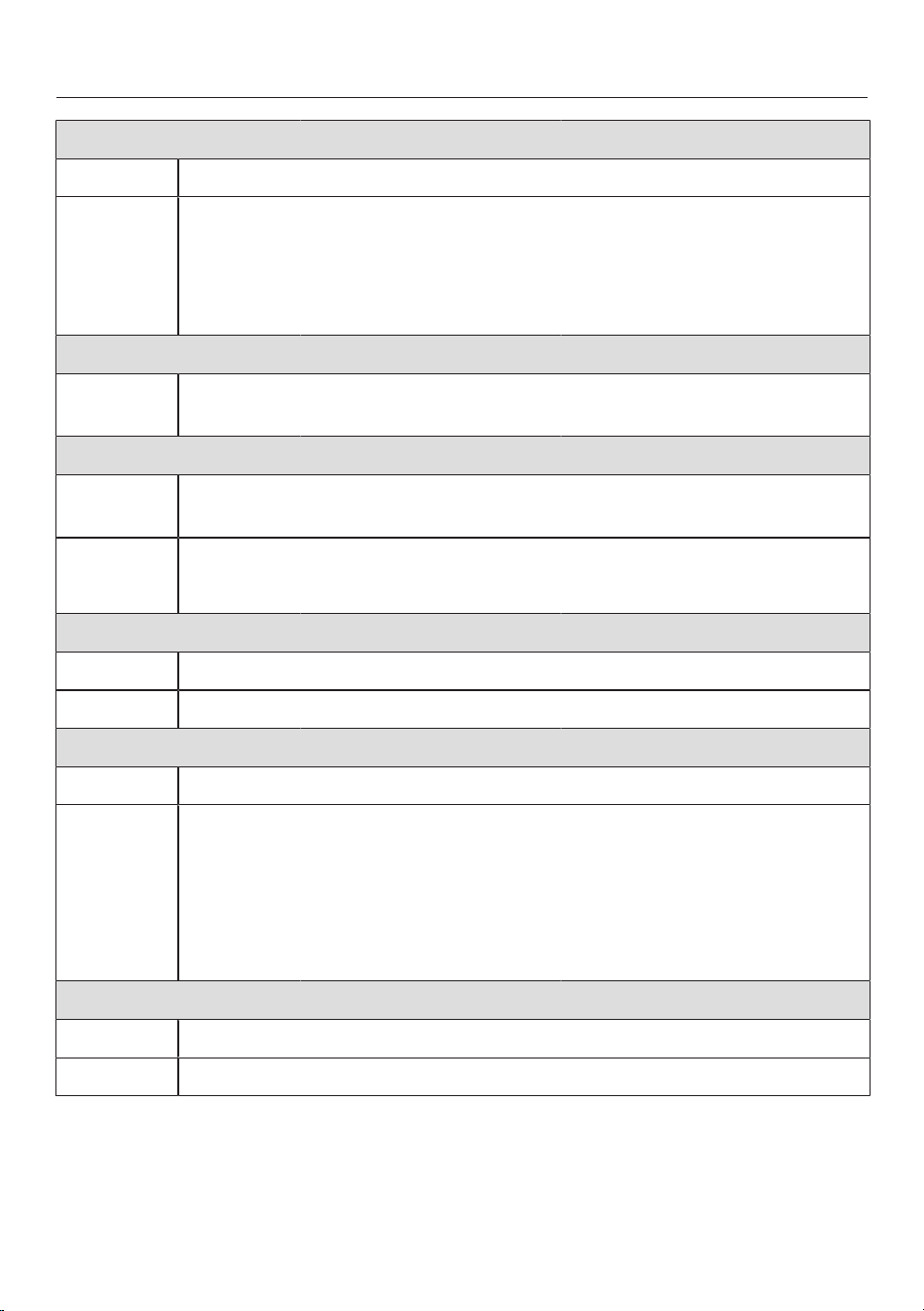
Shirts 60°C to cold Max. load 1.0kg/2.0kg
Items Shirts and blouses made of cotton and mixed fibre
Tip - Pre-treat collars and cuffs depending on the level of soiling.
- Turn shirts and blouses inside out, do up buttons and turn collars
and cuffs inwards.
- Wash silk shirts and blouses in the Silks programme.
- If the Pre-ironingExtra is switched on, the maximum load capacity
is decreased to 1.0kg.
Woollens 40°C to cold Max. load 2.0kg
Items Wool or wool blend fabric
Tip Reduce the final spin speed for fabric that creases easily.
Denim 60°C to cold Max. load 3.0kg
Tip - Wash denim inside out.
- Denim often contains excess dye and may run during the first few
washes. Therefore, wash light and coloured items separately.
- Close any zips, do up buttons, etc. before washing.
Outerwear 40°C to cold Max. load 2.5kg
Items Functional textiles such as outdoor jackets and trousers made from
membrane fabrics such as Gore-Tex
®
, SYMPATEX
®
, WINDSTOP-
PER
®
, etc.
Tip - Zip up or close any jackets with velcro fasteners before washing.
- Do not use fabric conditioner.
- If required, outdoor clothing can be re-proofed in the Proofing pro-
gramme. Proofing after each wash cycle is not recommended.
Proofing 40°C Max. load 2.5kg
Items For treating microfibre fabric, ski wear or table linen made from
mainly synthetic fibres to provide a finish which is resistant to water
and dirt
Tip - The items should be freshly laundered and spun or dried before
proofing.
- For best results, the items should be heat-treated afterwards. This
can be achieved by drying them in the washer-dryer or ironing
them.
WASHING
42
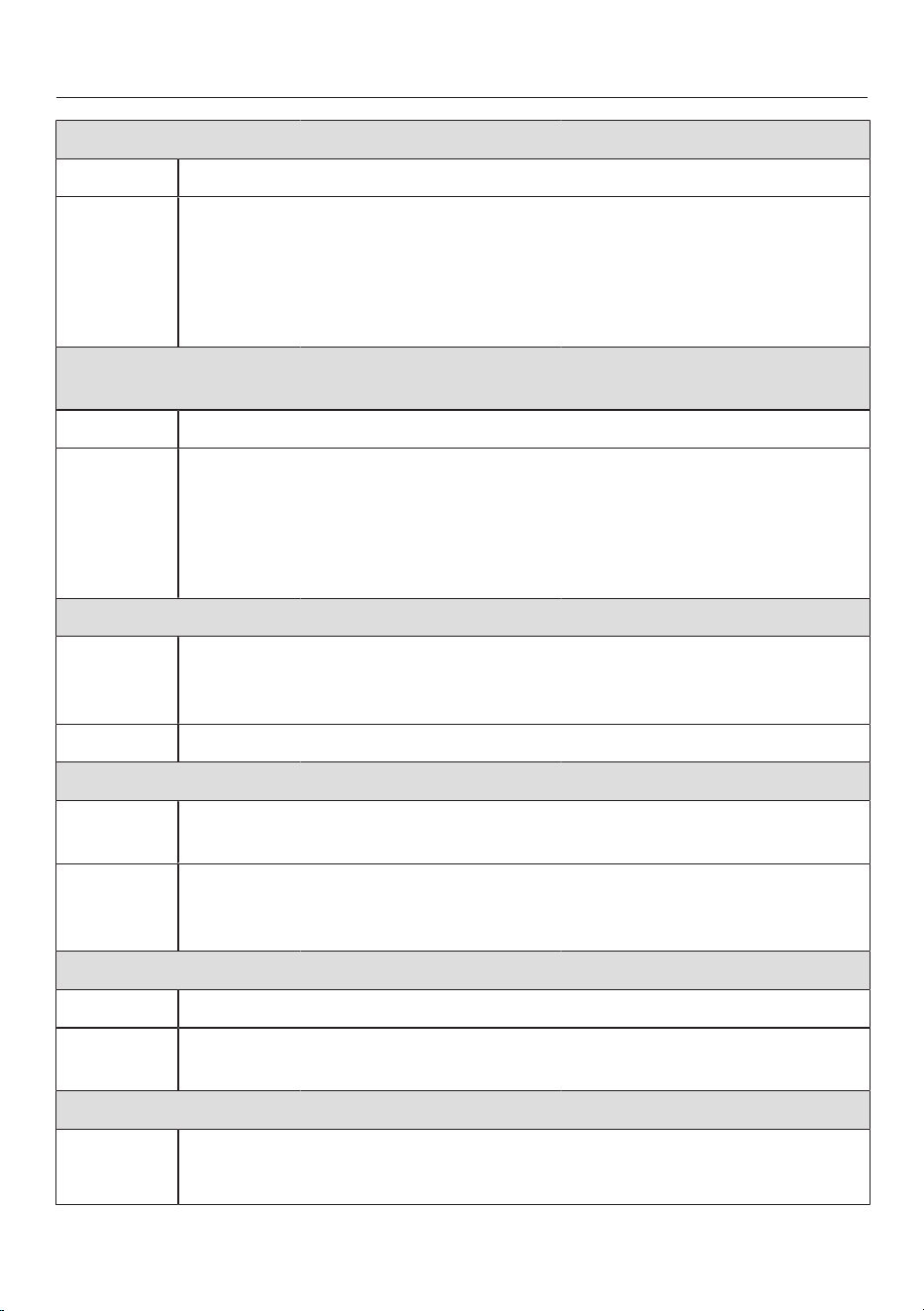
Curtains 40°C to cold Max. load 2.0kg
Items Curtains specified as machine-washable by the manufacturer
Tip - Select the Pre-wash option to remove dust.
- For curtains which crease easily, reduce the spin speed or deselect
the spin.
- Remove weights from curtains.
Express 40°C to cold Max. load 3.5kg
Items Cotton garments that have hardly been worn or are only very lightly
soiled
Sportswear 60°C to cold Max. load 2.5kg
Items Sportswear such as singlets and leggings as well as microfibre and
fleece garments
Tip - Do not use fabric conditioner.
- Follow the instructions on the care label.
Dark garments 60°C to cold Max. load 3.0kg
Items Black and dark items made of cotton or mixed fibres
Tip Wash inside out.
Trainers 40°C to cold Max. 2 pairs
Items Sports shoes only (not leather shoes)
Tip - The manufacturer’s care label must be observed.
- Do not use fabric conditioner.
- Coarse soiling should be brushed off first.
- A pre-rinse without detergent is carried out automatically to re-
move dust.
Silks 30°C to cold Max. load 1.0kg
Items Silks and other handwashable fabrics with no wool content
Tip Place tights, bras, etc. in a laundry bag.
WASHING
43
Down filled items 60°C to cold Max. load 2.0kg
Items Jackets, sleeping bags, pillows and other items with down filling
Tip - Remove air from the laundry before washing to prevent an excess-
ive build-up of foam. To do this either push the laundry items into a
narrow laundry bag to compress them or tie them together with a
washable strap.
- Follow the instructions on the care label.
Pillows 60°C to cold 2pillows (40x80cm) or
1pillow (80x80cm)
Items Synthetic filled washable pillows
Tip - Remove air from the laundry before washing to prevent an excess-
ive build-up of foam. To do this either push the laundry items into a
narrow laundry bag to compress them or tie them together with a
washable strap.
- Follow the instructions on the care label.
Cottons hygiene 90°C to 60°C Max. load 8.0kg
Items Cotton or linen with direct skin contact or for items which have spe-
cial hygiene requirements, e.g. underwear, bed linen, encasing
products
Tip Observe the instructions on the care label.
Automatic plus 40°C to cold Max. load 5.0kg
Items Mixed loads of garments suitable for the Cottons and Minimum iron
programmes
Tip The wash parameters (e.g. water level, wash rhythm and spin speed)
are adjusted automatically in this programme to ensure the best pos-
sible care and cleaning efficiency for each item.
First wash 40°C to cold Max. load 2.0kg
Items New items made of cotton, synthetic fibres and towelling
Tip Use this programme to wash any manufacturing residues out of new
items.
Drain/Spin Max. load 8.0kg
Tip - Drain only: select 0 rpm for the spin speed.
- Make sure you select the appropriate spin speed.
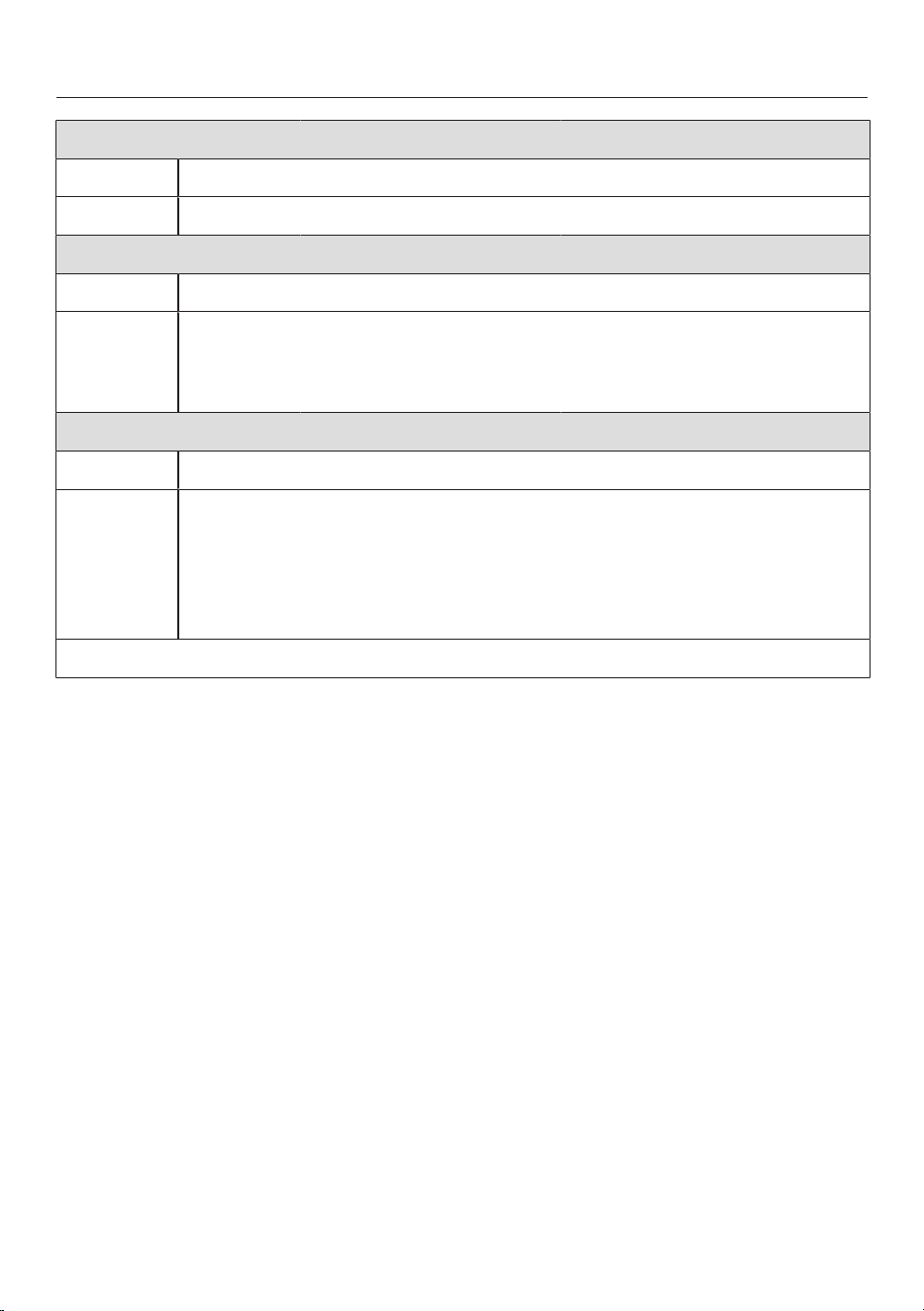
WASHING
44
Separaterinse Max. load 8.0kg
Items Rinsing hand-washed items
Tip Reduce the final spin speed for items which crease easily.
Starch Max. load 8.0kg
Items Table cloths, serviettes and workwear requiring starching
Tip - Reduce the final spin speed for items which crease easily.
- Laundry that is to be starched should be washed, but not treated
with fabric conditioner.
Cottons / Max. load 8.0kg
Items Normally soiled cotton garments
Tip - These settings are the most efficient in terms of energy and water
consumption for washing cottons.
- With, the wash temperature reached is below 60°C. The
wash performance is the same as with the Cottons60°C pro-
gramme.
Note for test institutes: test programmes in accordance with EN 60456.
WASHING
45
Programme sequence
Main wash Rinsing Spin
Water level Wash
rhythm
Water level Rinse cycles
ECO40–60
2–3
2
Cottons
2–5
1,2,3
Minimum iron
2–4
2,3
QuickPower
2
Delicates
2–4
2,3
Shirts
3–4
3
Woollens
2
Denim
2–4
2,3
Outerwear
3–4
3
Proofing –
1
Curtains
3–4
3
Express20
1
Sportswear
2–3
3
Dark garments
3–5
2,3
Trainers
4
2
Silks
2
Down-filled items
5
3–4
3
Pillows
5
3–4
3
Cottons hygiene
3–5
2,3
Automatic plus
2–4
2,3
First wash
2–3
3
Separaterinse – –
2
Starch
– –
Please see the next page for a description of the symbols.

WASHING
46
= low water level
= medium water level
= high water level
= intensive rhythm
= normal rhythm
= sensitive rhythm
= ultra sensitive rhythm
= handwash rhythm
= carried out
– = not carried out
This washer-dryer has fully electronic
controls with automatic load control. It
takes in the right amount of water re-
quired for the programme depending on
the amount of laundry and its ab-
sorbency rate.
The programme sequences outlined are
based on the standard programme with
a full load.
The washer-dryer’s display continually
shows which programme stage has
been reached.
Special features in the programme se-
quence
Anti-crease:
At the end of the programme, the drum
continues to turn for up to 30minutes
to help prevent creasing.
Exception: there is no anti-crease phase
in the Woollens and Silks programmes.
The washer-dryer can be opened at any
time.
1
If a temperature of 60°C or higher is
selected, 2 rinses are carried out. If a
temperature of less than 60°C is se-
lected, 3 rinses are carried out.
2
An extra rinse is carried out if:
- There is too much foam in the drum
- The final spin speed is less than
700rpm
3
An extra rinse is carried out if:
- The Extra rinseExtra has been selec-
ted.
4
Pre-wash:
- A pre-wash is carried out automatic-
ally to remove dust.
5
Spin speed increase:
- A spin speed increase is carried out
before the wash process begins to de-
flate the filling.

WASHING
47
PowerWash
PowerWash is a washing technique de-
veloped by Miele which is activated in
the following wash programmes:
- ECO 40–60 (with small and medium
load sizes)
- Cottons (with small and medium load
sizes)
- QuickPower
- Minimum iron
- Shirts
- Automatic plus
- Delicates
How it works
Conventional washing techniques wash
with more water than the laundry can
absorb. This total volume of water
needs to be heated.
The PowerWash washing technique
only uses slightly more water than the
laundry can absorb. The water which
has not been absorbed by the laundry
heats up the drum and the laundry and
is sprayed into the laundry over and over
again. This reduces energy consump-
tion.
Activation
PowerWash is activated automatically
in the programmes listed above.
PowerWash is deactivated if:
- The selected final spin speed is less
than 600rpm
- CapDosing has been selected for the
main wash (, )
- The wash temperature is higher than
60°C
- Extras such as Pre-wash or Water
plus have been selected
- A large load size is being washed in
the Cottons programme
Special features
- Drenching phase
The washer-dryer will spin a few
times at the beginning of the wash
programme. During the spin cycle,
the water discharged is sprayed back
into the laundry in order to achieve
optimum wetting.
The optimum water level is set at the
end of the drenching phase. If neces-
sary, the machine will pump water
away and take in a little more fresh
water.
- Noises during the heating phase
Unusual bubbling noises can occur
while the laundry and the drum are
being heated.

WASHING
48
Extras
You can supplement the wash pro-
grammes with Extras.
Not all Extras can be selected with
every wash programme.
Selecting Extras
Touch the Extrassensor control.
Select one or more Extras.
Not all Extras can be combined. Extras
that cannot be combined are greyed
out and cannot be selected.
Confirm with the OKsensor control.
The display will change to the standard
menu for that wash programme.
SingleWash
For efficiently washing a very small load
size (<1kg) in a normal wash pro-
gramme. The wash duration is reduced.
Please note the following advice:
- Use liquid detergent.
- Reduce the dosage to a maximum of
50% of the amount quoted for a
½load.
Extra gentle
Drum rotation and wash duration are re-
duced. Lightly soiled fabrics are washed
more gently.
Pre-ironing
In order to reduce creasing, the laundry
undergoes a smoothing process at the
end of the programme. Reducing the
maximum load size by 50% will
achieve a better result. Small load sizes
achieve a better result.
The garments must be suitable for dry-
ing in a tumble dryer and suitable
for ironing .
The spin speed is reduced for some pro-
grammes.
Quick
For textiles with light soiling with no vis-
ible stains.
The duration of the main wash is re-
duced.
Water plus
The water level in the main wash and
the rinses will be increased. A second
rinse cycle is carried out in the Separate
rinseprogramme.
You can select other functions for the
Water plusExtra. These are described in
“Settings”.
Pre-wash
For laundry with large amounts of dirt,
e.g. dust and sand.

WASHING
49
Soak
For heavily soiled and stained items
with protein stains.
A soak duration of between 30minutes
and 5hours in 30-minute increments
can be selected. See “Settings” for
more information.
The factory default setting is
30minutes.
Intensive
For hard-wearing laundry that is very
heavily soiled. Cleaning efficiency is in-
creased through more intense mechan-
ical action and the application of more
heat energy.
AllergoWash
This option should be used where espe-
cially high standards of hygiene are re-
quired. More energy is used to lengthen
the temperature holding times and more
water is used to increase rinsing effi-
ciency. The items must be suitable for
drying in a tumble dryer and suit-
able for ironing.
Extra quiet
This option reduces noise levels during
the wash programme. Use this if you
want to wash during quiet periods (for
instance when children are sleeping).
The machine will activate the Rinse hold
option and not spin. The programme
running time is longer.
Rinse hold
The laundry is not spun after the final
rinse cycle and remains in the rinse wa-
ter. This helps prevent creasing if the
laundry is not going to be removed from
the drum immediately after the end of
the programme.
Extra rinse
An extra rinse can be activated to
achieve a better wash result.
WASHING
50
Detergent
All detergents produced for automatic
washing machines are suitable. Follow
the manufacturer's instructions and
dosage recommendations on the pack-
aging.
The dispensing quantity will depend
on:
- The degree of soiling of the laundry
- The amount of laundry
- The water hardness
Check with your local water supplier
if you do not know the water hard-
ness level in your area.
Water softeners
A water softener can be used to cut
down on the use of detergents in areas
with water hardness levels II and III.
Dispense according to the amount spe-
cified on the packaging. First add deter-
gent and then the water softener.
You can then use the recommended
amount of detergent for water hardness
level I.
Water hardness levels
Hardness
scale
Hardness level
in mmol/l
German scale
°d
I (soft) 0 – 1.5 0 – 8.4
II (medium) 1.5 – 2.5 8.4 – 14
III (hard) above 2.5 above 14
Dispensing aids
Use dispensing aids, (e.g. balls) if these
are supplied with the detergent, particu-
larly when using liquid detergent.
Refill packs of detergent
When purchasing detergent buy refill
packs wherever possible. This helps re-
duce the amount of waste packaging.
Fabric conditioners, liquid starch,
starch
Fabric conditioners make garments soft
to handle and help prevent static cling
when tumble drying.
Liquid starch is synthetic and provides
good stiffness to fabric.
Starch stiffens and gives body to fabric.

WASHING
51
Using fabric conditioner, liquid starch
or starch separately
Prepare the starch in accordance with
the manufacturer’s instructions on the
packaging.
Tip: When adding fabric conditioner, ac-
tivate the Water plus Extra.
Add fabric conditioner to the com-
partment or insert the appropriate
capsule.
Add liquid starch to the compart-
ment and powder or viscous starch to
the compartment.
Select the Separate rinse programme.
Change the spin speed if necessary.
If using a capsule, touch the CapDos-
ingsensor control and activate the
Cap.
Touch the Start/Stopsensor control.
Colour run and dye removers/dyes
Damage due to colour run/dye
removers.
Colour run and dye removers can
cause corrosion in the washer-dryer.
Do not use colour run or dye re-
movers in this washer-dryer.
Dyes suitable for use in domestic wash-
ing machines can be used. However,
please note that the salt used in the
dyeing process can cause corrosion to
stainless steel components in the ma-
chine if you use dye frequently. Always
follow the dye manufacturer’s instruc-
tions carefully.
When using the machine to dye fab-
ric it is essential to select the Water
plus Extra.
WASHING
52
Recommended Miele detergents
Miele detergents have been specially designed for day-to-day use in Miele washing
machines. See “Detergents and care products” for more information about these
detergents.
Miele UltraPhase 1
and 2
Miele capsules
ECO40–60 –
Cottons –
Minimum iron –
QuickPower – – –
Delicates –
Shirts –
Woollens – – –
Denim – –
Outerwear – – –
Proofing – – –
Curtains – –
Express 20 – –
Sportswear – – –
Dark garments – –
Trainers – –
Silks – – –
Down filled items – – –
Pillows – – –
Cottons hygiene –
Automatic plus –
First wash – –
Separaterinse – – –
Recommended Special-purpose detergents (e.g. Wool-
Care)
– Not recommended Fabric care (e.g. fabric conditioner)
Additive (e.g. booster)
WASHING
53
Recommended detergents in accordance with Directive (EU) No. 1015/2010
The recommendations apply to the temperature ranges given in the section “Wash-
ing” in the Programme chart.
Universal Colour Delicates and
woollens
Special
detergents
ECO40–60 – –
Cottons – –
Minimum iron – – –
QuickPower – –
Delicates – – –
Shirts – –
Woollens – –
Denim –
1
–
Outerwear – –
Proofing – – –
Curtains
2
– –
Express 20 –
1
– –
Sportswear – –
Dark garments –
1
–
Trainers –
1
– –
Silks – –
Down filled items – –
1
Pillows – –
1
Cottons hygiene – –
Automatic plus – – –
First wash – – –
Recommended
1
Liquid detergent
– Not recommended
2
Powder detergent

DRYING
54
Separate drying
The separate drying programme
should be run if the load in the wash
programme is greater than the max-
imum load permitted for drying, or if
you only want to dry part of the load
that was washed.
1. Prepare the laundry
Sort the laundry
Sort the laundry according to type of
fibre/weave and the residual moisture
content.
This will help you achieve an even drying
result.
Before drying, check the drying sym-
bol on the care label.
If there is no care label, the article
should only be tumble dried in a pro-
gramme specially designed for it.
Tips on drying
- Do not load the drum with items that
are still soaking wet. Spin the laundry
for at least 30seconds after washing.
- Woollens and wool blends are sus-
ceptible to becoming matted or
shrinking. Only use the Woollens pro-
gramme for these textiles.
- Pure linen should only be tumble
dried if it is specified as suitable on
the care label. The surface of the fab-
ric may otherwise become rough.
- Jersey fabrics (e.g. T-shirts, under-
wear) tend to shrink when they are
washed for the first time. Therefore,
do not overdry the fabrics to prevent
them from shrinking further. Buy jer-
sey garments that are one or two
sizes bigger.
- Starched laundry can be tumble dried.
To achieve the usual finish, double the
amount of starch should be used.
- New dark coloured garments should
be washed and dried separately from
light coloured garments. The colour of
dark garments can run or fluff from
garments of other colours may settle
on them.
- Observe the maximum loads given for
the drying programmes in the Pro-
gramme chart.
The drying result and amount of
creasing depend on the size of the
load. The smaller the load in the dryer,
the better the result. Therefore, if you
reduce the load, you will achieve a
more even drying result with less
creasing.

DRYING
55
2. Select a programme
Switching the washer-dryer on
Press the button.
The drum lighting will come on.
The drum lighting will go out automat-
ically after a few minutes.
Tip: To switch the lighting on again,
open the pull-down menu from the
overview menu and then touch the
sensor control.
The main menu will then appear in the
display.
Selecting a programme
Touch the Dryingsensor control.
11:02
1:30
1:29
0:39
1:20h
h h
h
Cottons
ECO 40-60
QuickPower
Minimum iron
Drying
Help
Scroll to the right in the display until
the programme you want appears.
Touch the sensor control for that pro-
gramme.
The display will then change to the
standard menu for the programme.
11:02
1600
1:29
Cottons
h
Drying
Drying level
Extras
not selected
Timer Save
rpm
Spin speed
Normal
There are 3 other ways to select a pro-
gramme:
- Saved favourite programmes
- The washing/drying assistant
- Miele MobileStart

DRYING
56
3. Selecting programme set-
tings
Selecting a thermospin spin speed
The preset thermospin spin speed for
a drying programme can be changed if
required.
Touch the Spin speedsensor control.
Select the spin speed you want.
The display will change to the standard
menu for that drying programme.
Selecting the drying level
You can alter the preset drying level for
a wash programme.
Touch the Drying levelsensor control.
Select the desired drying level.
The display will change to the standard
menu for that wash programme.
Selecting Extras
You can supplement the wash pro-
grammes with Extras.
Touch the Extrassensor control.
Select one or more Extras.
Not all Extras can be combined. Extras
that cannot be combined are greyed
out and cannot be selected.
Confirm with the OKsensor control.
The display will change to the standard
menu for that wash programme.
See “Drying” – “Extras” for more in-
formation.
Timer
You can use the Timer to set the finish
time or the start time for a programme.
See “Timer/SmartStart” for further in-
formation.
DRYING
57
4. Loading the washer-dryer
Open the door
Reach under the door grip and pull
the door open.
Check the drum for pets or foreign
objects before loading it with laundry.
Load the laundry loosely in the drum.
Overloading places a strain on the
textiles and affects drying results.
Observe the maximum loads given in
the “Programme chart”.
Close the door
Make sure that no items are caught
between the door and the seal.
Shut the door with a gentle swing.
Detergent dispensing aids, e.g.
plastic dispenser balls, can melt dur-
ing the drying programme and cause
damage to the machine and the laun-
dry.
These dispensing aids must be re-
moved from laundry before drying.
The water supply stopcock must be
kept open for drying.
Tip: The maximum load size for the pro-
gramme selected will appear in the pull-
down menu.
5.Starting the programme
The programme can be started when
the Start/Stopsensor control is flashing
on and off.
Touch the Start/Stopsensor control.
The door will lock and the wash pro-
gramme will start.
The programme status will appear in the
display.
11:02
1:39
Cottons
h
Drying
Drying
Time left
Add laundry
The washer-dryer will keep you updated
on the programme stage and the re-
maining programme running time.
If a delay start period has been selec-
ted, this will appear in the display.
Saving energy
After 10minutes, the indicators dim.
The Start/Stopsensor control flashes
slowly.
To reactivate the indicators:
Touch the Start/Stopsensor control
(this does not have any effect on a
programme that is running).
DRYING
58
Adding laundry - AddLoad
Laundry can be added or removed if
Add laundry is illuminated in the display.
Touch the Add laundrysensor control.
The following will appear in the display:
Please wait
The programme will stop and the door
will unlock.
Open the door.
Add or remove laundry.
Close the door.
Touch the Start/Stopsensor control.
The programme continues.
Please note:
Once a programme has started, the
washer-dryer cannot recognise any ad-
justment to the load.
For this reason, if laundry is added or
removed after the start of a pro-
gramme, the machine will always com-
plete the programme cycle assuming a
full load.
6. End of the programme/un-
loading laundry
In the anti-crease phase, the drum con-
tinues to turn for up to 150min after the
end of the programme. The door will
lock and the following will appear in the
display: Finish/Anti-crease and Unlock with
"Start/Stop".
Touch the Start/Stopsensor.
The door will unlock.
If you unload the laundry during the
anti-crease phase, heat can build up.
Spread the laundry out to cool it
down.
The door unlocks automatically at the
end of the anti-crease phase.
Pull open the door.
Remove the laundry.
Items left in the dryer could be dam-
aged by overdrying when the dryer is
used the next time.
Remove all items from the drum.
Tip: See “After each washing or drying
programme”.
DRYING
59
Programme chart
* Weights are based on the weight of dry laundry.
1
For further information on Timed drying, see the end of the Programme chart.
ECO40-60 Max. load 5.0kg*
Normal
Cotton textiles: T-shirts, underwear, baby clothes, workwear, jackets,
covers, aprons, overalls, hand towels, bath towels, bathrobes and
flannelette/bed linen
Cottons Max. load 5.0kg*
Normal plus, Normal
Use for Single and multi-layered cotton textiles: T-shirts, underwear, baby
clothes, workwear, jackets, covers, aprons, overalls, hand towels,
bath towels, bathrobes and flannelette/bed linen
Hand iron, Machine iron, Timed drying
1
Use for Cotton or linen fabric requiring further processing, e.g. table linen,
bed linen, starched laundry
Tip To prevent laundry from drying out, it should be rolled up until you are
ready for ironing.
Minimum iron Max. load 3.5kg*
Normalplus, Normal, Hand iron, Timed drying
1
Items Minimum iron items made of cotton, synthetic or mixed fibre, e.g.
workwear, overalls, jumpers, dresses, trousers, table linen, tights
QuickPower Max. load 4.0kg*
Normalplus, Normal, Handiron, Timed drying
1
Use for Items suitable for the Cottons programme
Note The programme running time for this programme is particularly short
when washing and drying normally soiled laundry in a continuous se-
quence.
Delicates Max. load 1.0kg*
Normalplus, Normal, Hand iron, Timed drying
1
Items Delicate items with the symbol on the care label made of synthetic
fibres, artificial silk, easy care cotton or mixed fibres, e.g. shirts,
blouses, lingerie and evening wear with sequins and beading.
Tip Reducing the load will reduce creasing.
DRYING
60
Shirts Max. load 1.0kg*
Normalplus, Normal, Hand iron, Timed drying
1
Items Shirts and blouses
Tip - Turn shirts and blouses inside out, do up buttons and turn collars
and cuffs inwards.
- The laundry is dampened before the programme starts to help re-
duce creasing.
Woollens Max. load 2.0kg*
3minutes
Items Woollen garments and fabric containing wool blends, e.g. pullovers,
cardigans, tights
Tip - Wool and wool blend items are only fluffed up; they are not dried
completely.
- Remove the garments immediately after the end of the programme.
Denim Max. load 3.0kg*
Normalplus, Normal, Handiron, Timed drying
1
Items All denim garments, e.g. jeans, jackets, skirts, shirts
Freshen up Max. load 1.0kg*
Normal, Hand iron, Timed drying
1
Items Clean dry garments and garments that have been worn briefly and
are not soiled
Tip The laundry is dampened before the programme starts to help reduce
creasing.
- Normal: for garments that are required immediately.
- Hand iron: for garments that are to be ironed or hung out to dry
completely on a coat hanger.
Note Creasing increases the larger the load and the longer the drying time.
DRYING
61
Steam care Max. load 2.0kg*
Hand iron
Items Reduces the amount of creasing in damp, freshly washed and spun
cotton or linen garments
The garments must be suitable for drying in a tumble dryer and
suitable for ironing .
Tip Remove garments immediately after the end of the programme and
hang them up on a coat hanger.
Note Not suitable for garments made of wool or wool blend fabric.
Outerwear Max. load 2.5kg*
Normalplus, Normal, Handiron, Timed drying
1
Items Outdoor clothing which is suitable for tumble drying
Proofing Max. load 2.5kg*
Normal
Items For thermally fixing textiles which are suitable for tumble drying and
have been treated with a proofing agent
Express 20 Max. load 3.5kg*
Normalplus, Normal, Handiron, Timed drying
1
Items Items suitable for the Cottons programme
Note The programme running time for this programme is particularly short
when washing and drying lightly soiled laundry in a continuous se-
quence.
Sportswear Max. load 2.5kg*
Normalplus, Normal, Handiron, Timed drying
1
Items Sportswear which is suitable for drying in a tumble dryer
Dark garments Max. load 3.0kg*
Normalplus, Normal, Handiron, Timed drying
1
Items Black and dark items made from cotton or mixed fibres
Trainers Max. 2 pairs
Timed drying
1
Items Trainers that are specified as suitable for tumble drying by their man-
ufacturer
Tip Insoles should be removed and placed in the drum with the shoes.
Note The drum does not rotate.
DRYING
62
Silks Max. load 1.0kg*
8minutes
Items Silk garments which are suitable for drying in the tumble dryer, e.g.
blouses and shirts
Tip - For reduced creasing.
- Items are not dried completely.
- Remove the garments immediately after the end of the programme.
Down filled items Max. load 2.0kg*
Timed drying
1
Items Jackets, sleeping bags and other down-filled items that are suitable
for tumble drying
Tip Check the items as you are drying them to find the optimum time.
Pillows 2pillows (40x80cm) or 1pillow (80x80cm)
Timed drying
1
Items Pillows with synthetic filling that are suitable for tumble drying
Tip Pillows can still feel damp after being dried. You can use this pro-
gramme several times until the pillow feels dry.
Cottons hygiene Max. load 5.0kg*
Normal
Items Cottons and linen fabrics, which are in direct contact with the skin,
e.g. underwear, nappies, bed linen
Note The laundry will feel drier because of the longer temperature holding
time.
Automaticplus Max. load 3.0kg*
Normalplus, Normal, Handiron, Timed drying
1
Items Mixed loads of garments suitable for the Cottons and Minimum iron
programmes
First wash Max. load 2.0kg*
Normalplus, Normal, Handiron, Timed drying
1
Textiles New cotton, towelling or polyester textiles
DRYING
63
Warm air Max. load 4.0kg*
Timed drying
1
Items - Additional drying for multi-layered items whose layers have differ-
ent drying characteristics, e.g. jackets, pillows, sleeping bags
- For drying and airing individual items
Tip Do not select the longest drying time to start with. Check the items
as you are drying them to find the optimum time.
Cool air Max. load 4.0kg*
Timed drying
1
Items Any items which only need airing
Cottons Max. load 5.0kg*
Normal
Items Cotton items such as those described under Cottons Normal with
normal residual moisture
Tip - The Cottons programme is the most energy-efficient for dry-
ing cotton items with normal residual moisture levels.
Note for test institutes: the Cottons programme is the test programme in
accordance with Regulation 392/2012/EU for energy labelling, measured in ac-
cordance with EN61121.
1
Timed drying
Timed drying is particularly suitable for small loads or when you want to dry indi-
vidual items. The items are dried with warm air (a drying time between 20minutes
and 2hours can be selected). The drying temperature is adjusted to match the pro-
gramme selected. Do not select the longest drying time to start with. Check the
items as you are drying them to find the optimum time.

DRYING
64
Thermospin
A thermospin is carried out in some dry-
ing programmes to reduce energy con-
sumption.
Thermospin is not carried out if timed
drying is selected.
The maximum spin speed for the ther-
mospin is the maximum permitted spin
speed for the appropriate wash pro-
gramme.
The thermospin spin speed can be re-
duced to 800rpm.
Extras
You can select extra options to augment
drying programmes.
Pre-ironing
In order to reduce creasing, the laundry
undergoes a smoothing process at the
end of the programme. The spin speed
for the thermospin is reduced. Reducing
the maximum load size by 50% will
achieve a better result.
The garments must be suitable for dry-
ing in a tumble dryer and suitable
for ironing .
SingleDry
For efficiently drying a very small load
size (<1kg) in a normal drying pro-
gramme.
A drying time is preset. You can change
the drying time.
Some items may still be damp after dry-
ing, depending on the type of laundry.
Select a longer duration next time.
Gentle tumble
Delicate textiles such as acrylics are
dried gently (care label symbol).
In some programmes the programme
running time will increase when Gentle
tumble is selected because of the lower
temperature.
Extra quiet
If you want to dry clothes in quiet peri-
ods, the noise level of the washer-dryer
can be reduced.
- The buzzer is deactivated.
- Thermospin is limited to a maximum
of 800rpm.

WASHING AND DRYING
65
Washing and drying in one con-
tinuous sequence
It is advisable to wash and dry in a
continuous sequence when the
amount of laundry to be washed does
not exceed the amount to be dried and
the amount to be dried does not ex-
ceed the permitted dry weight for the
programme.
It is very important to read the sec-
tions “Separate washing” and “Sep-
arate drying” before proceeding.
1. Prepare the laundry
Empty all pockets.
Sort the laundry according to colour
and type of fibre/weave.
Check the symbols on the care labels.
2. Selecting a programme
Touch the Washing + Dryingsensor
control.
Scroll to the right in the display until
the programme you want appears.
Touch the sensor control for that pro-
gramme.
The display will then change to the
standard menu for the programme.
There are 3 other ways to select a pro-
gramme:
- Saved favourite programmes
- The washing/drying assistant
- Miele MobileStart
3. Load the drum
Open the door.
Check the drum for pets or foreign
objects before loading it with laundry.
Unfold the laundry and load loosely
into the drum.
Detergent dispensing aids, e.g.
plastic dispenser balls, can melt dur-
ing the drying programme and cause
damage to the machine and the laun-
dry.
These dispensing aids must be re-
moved from laundry before drying.
Close the door.
WASHING AND DRYING
66
4. Selecting programme set-
tings
Select the desired temperature, spin
speed and drying level and confirm
each withOK.
The minimum spin speed cannot be
lower than 800rpm.
For some programmes the spin speed
cannot be changed.
Select TwinDos or CapDosing if de-
sired.
Select further options or stains as re-
quired.
With the thermospin, the spin speed
displayed for the wash cycle is used.
If Extra quiet is selected the maximum
spin speed used is 900rpm.
Thermospin is not carried out if timed
drying is selected.
Select a delay start time if required.
5. Adding detergent
Dispense detergent with TwinDos,
CapDosing or via the detergent drawer.
6. Starting/ending the pro-
gramme
Touch the flashing Start/Stop sensor
control.
The door is locked.
The programme will start.
The anti-crease phase will start at the
end of the programme.
The door remains locked during the
anti-crease phase.
Press the Start/Stopbutton.
The door will unlock.
If you unload the laundry during the
anti-crease phase, heat can build up.
Spread the laundry out to cool it
down.
The door unlocks automatically at the
end of the anti-crease phase.
Pull the door open and unload the
laundry.
See “After each washing or drying pro-
gramme”.
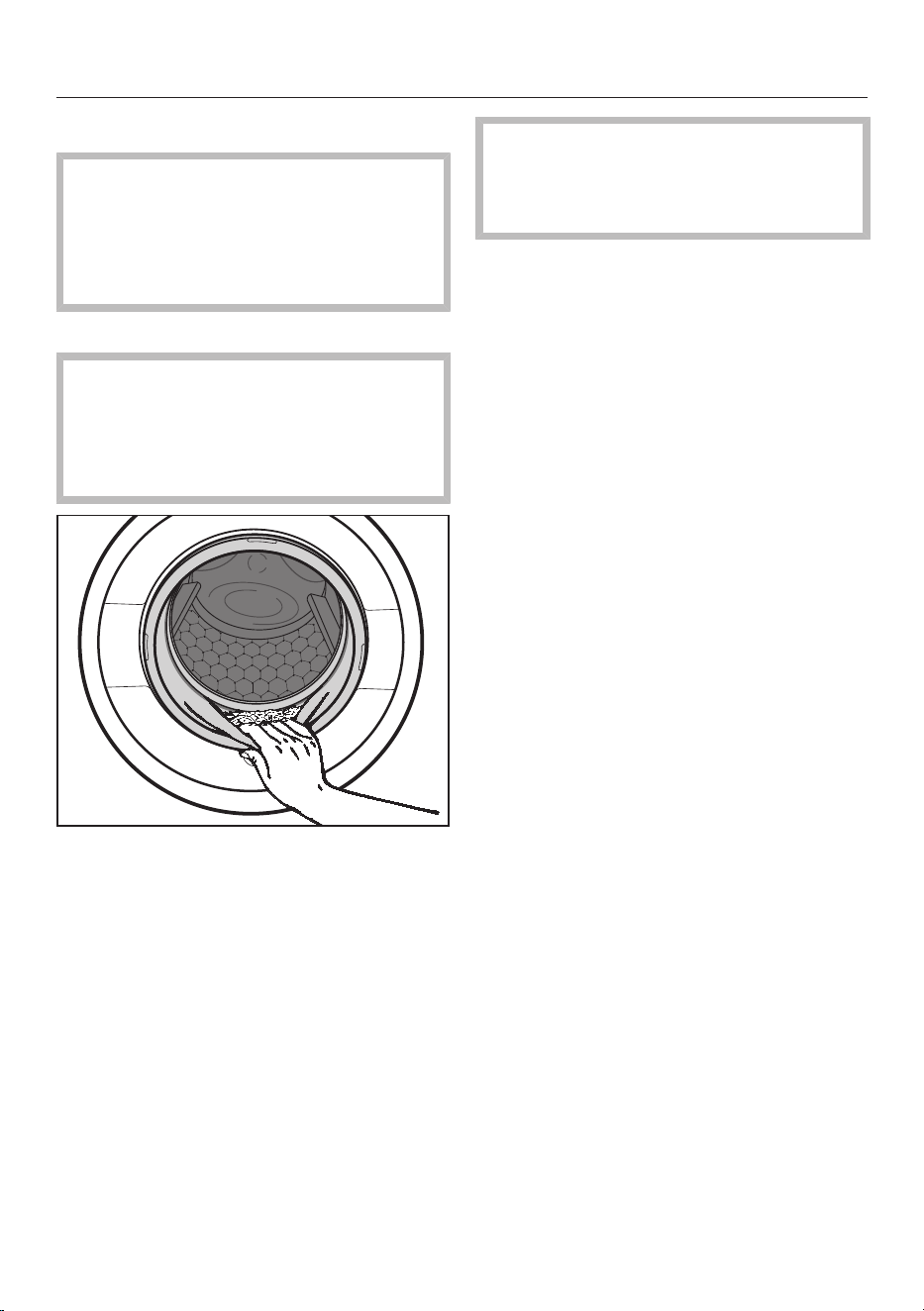
After each washing or drying programme
67
Open the door fully.
Risk of burning due to hot metal.
The metal cap located on the inside
of the door glass will be hot after dry-
ing.
Do not touch the metal cap.
Remove the laundry.
Laundry left in the drum could shrink,
discolour or be damaged in the next
washing or drying programme.
Check that all items have been re-
moved from the drum.
Check the door sealing ring for any
foreign objects.
After drying, remove any fluff from
around the door sealing ring and the
porthole glass.
Tip: Leave the door slightly open to al-
low the drum to dry.
Switch the washer-dryer off with the
button.
Tip: Leave the detergent drawer slightly
open to allow it to dry.
Use the Rinse out fluff programme to
prevent fluff from collecting in the
drum and suds container, particularly
after drying.

Changing the programme sequence
68
Changing a programme (safety
lock)
A programme, temperature, spin speed
or selected options cannot be changed
once the machine has been successfully
started. This prevents the machine be-
ing operated unintentionally, e.g. by chil-
dren.
If the washer-dryer is switched off dur-
ing active programme operation, the
standby function does not switch the
washer-dryer off completely after
15minutes. Safety functions continue
to be active because there may still be
water inside the drum.
Cancelling a programme
You can cancel a programme at any time
after it has started.
Touch the Start/Stopsensor control.
The following will appear in the display:
Cancel the programme?
Select Yes.
- During washing:
The washer-dryer pumps the suds away
and the programme is cancelled.
- During drying:
The washer-dryer cools the laundry
down before the door can be opened.
Removing the laundry
Wait until the symbol in the display
goes out and the door is unlocked.
Pull the door open and unload the
laundry.
Selecting another programme
Close the door.
Select the programme you want to
use.
Add detergent to the detergent
drawer, if necessary.
Press the Start/Stopbutton.
The programme will start.
Interrupting a programme
Switch the washer-dryer off with the
button.
To continue the programme, switch
the washer-dryer back on with the
button.
Danger of overheating due to hot
laundry
Hot laundry can ignite.
Never switch the washer-dryer off
during a drying programme.
If you absolutely must interrupt the
programme, remove all items imme-
diately and spread them out to cool
down.

Favourite programmes
69
Creating favourites
You can save your own customised
wash programmes under names of your
choice.
Option 1
Scroll through the main menu until Fa-
vourites appears.
Touch the Favouritessensor control.
The display will change to the Favour-
itesmenu.
Touch the Createsensor control.
The display will change to the Create Fa-
vouritesmenu.
Select Washing, Drying or Washing +
Drying.
Select the programme you want to
use.
Select all the programme settings you
want.
Then select Save.
Enter a name.
Option 2
You can save a programme which has
been selected as a Favourite pro-
gramme before you start it.
Before the programme starts, touch
the Savesensor control.
Enter a name.
If 12 Favourites have already been
saved, the Create or Savesensor con-
trol will not be visible. Delete an exist-
ing Favourite if you wish to create a
new one.
Entering a name
It is best to select short, memorable
names.
Touch the desired letters or charac-
ters.
Confirm with the Savesensor control.
The wash programme will then be saved
to the Favourites programme list.
To change a Favourite pro-
gramme
You can rename, delete or move a Fa-
vourite programme.
Select the Favourites sensor control
from the main menu.
Touch the Favourite programme that
you wish to change until the context
menu opens.
Select Rename, Delete or Move.

Washing/drying assistant
70
The assistant helps you with washing
and drying loads consisting of items
with different care labels. The washing
machine will use the list of items to put
together a suitable programme.
Scroll through the main menu until
Wash/Drying assistant appears.
Touch the Wash/Drying assistantsensor
control.
The display will change to the Pur-
posemenu.
Select a goal, e.g. Washing or Washing
+ Drying.
A list of items will appear.
11:02
Textiles
Shirts
T-shirts
Denim
Blouses
OK
Touch the appropriate sensor control
for your item of laundry.
The item selected will be highlighted or-
ange.
You can select several items. Articles
that cannot be combined are not avail-
able for selection.
Confirm with the OKsensor control.
Follow the instructions in the display.
A summary of the selected parameters
will then appear in the display.
Confirm with the OKsensor control or
select Change if you would like to
make any changes.
The programme which has been tailored
to your laundry is ready to start.
Helpful tips are sometimes displayed
before the start of the programme.
Tip: You can add individual programme
settings, e.g. Extras, before you start the
programme.

Timer/SmartStart
71
Setting the timer
Touch the Timersensor control.
Select the Finish at or Start at option.
Set the hours and the minutes and
confirm with the OKsensor control.
Changing the delay start time
The selected timer can be changed be-
fore the programme starts.
Touch the or sensor control.
If required, change the specified time
and confirm with the OKsensor con-
trol.
Deleting the timer
The selected timer can be deleted be-
fore the programme starts.
Touch the or sensor control.
The selected time for the timer appears
in the display.
Touch the Deletesensor control.
Confirm with the OKsensor control.
The selected time for the timer is now
deleted.
Starting the timer
Touch the Start/Stopsensor control.
The door will lock and the time until the
programme starts will appear in the dis-
play.
After the programme has started, the
selected time for the timer can only be
changed or cancelled by interrupting
the programme.
The programme can be started immedi-
ately at any time.
Touch the Start immediatelysensor
control.

Timer/SmartStart
72
SmartStart
The SmartStart function lets you
define a time period during which your
washer-dryer will start automatically.
The appliance will start on receipt of a
signal, e.g. from your energy supplier,
that indicates that the electricity tariff
is particularly economical.
This function is active when the
SmartGrid setting is switched on.
The timeframe can be defined between
1minute and 24hours. During this
period, the washer-dryer waits for the
signal from the energy supplier. If no
signal is sent during the defined period,
the washer-dryer starts the programme.
Setting the time period
If you have activated SmartGrid in the
settings, SmartStart by and SmartFinish
by will appear in the display instead of
Start at and Finish at when you touch
the Timersensor control. See “Set-
tings” – “SmartGrid” for more informa-
tion.
The procedure for setting this is the
same as for setting the time for the
timer.
Set the time you want and confirm
with the OKsensor control.
Touch the Start/Stopsensor control
to start the wash programme with
SmartStart.
The selected programme will start auto-
matically, as soon as the energy supplier
has sent the signal, or the latest calcu-
lated start time has been reached.
The procedure for changing or deleting
the SmartStart function is the same as
described in “Changing the timer” and
“Deleting the timer”.
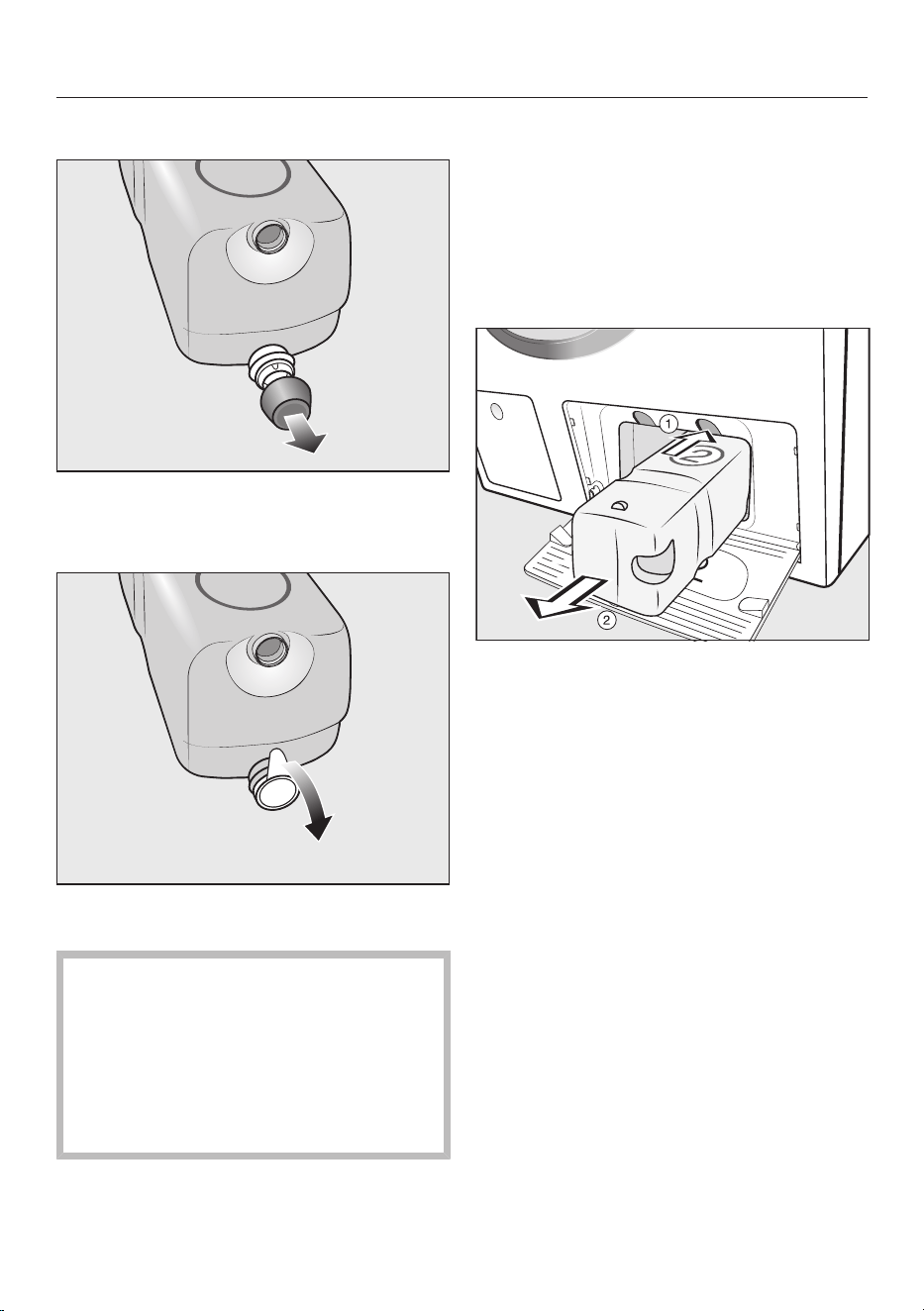
Replacing the TwinDos cartridge
73
Preparing the cartridge
Remove the cover cap from the cart-
ridge.
or
Remove the film seal from the cart-
ridge completely.
Risk of damage from film seal
If the film seal is not removed com-
pletely, leaks can occur in the
TwinDos system.
Remove the film seal from the suc-
tion port on the cartridge completely
before inserting the new cartridge.
Replacing the cartridge
Make sure the washer-dryer is switched
on before replacing the detergent cart-
ridge. This will ensure that the counter is
set to 0 and the fill level indicator is cor-
rect.
Switch on the washer-dryer.
To release the lock, press the yellow
button above the cartridge.
Pull out the cartridge.
Insert a new cartridge.
Confirm the messages in the display.
The counter is set to 0.

Cleaning and care
74
Starting maintenance pro-
grammes
The washer-dryer has 3 maintenance
programmes.
Scroll through the main menu until
Maintenance appears.
Touch the Maintenancesensor control.
11:02
Clean
"TwinDos"
Maintenance
Rinse out fluff
Clean
machine
Clean "TwinDos"
Clean "TwinDos" is a programme for
cleaning the TwinDos system. The pro-
gramme cleans the hoses inside the
washer-dryer.
Damage resulting from dried
laundry detergent.
If the system has not been used for a
long time (more than 2months), de-
tergent in the hoses can become vis-
cous or dry out. The hoses can be-
come blocked and would then need
to be cleaned by the Customer Ser-
vice Department.
Clean the TwinDos system.
To clean the system, you need either a
“TwinDosCare” cleaning cartridge or a
TwinDos refill container, available from
www.shop.miele.com.
Starting the programme
Select Clean "TwinDos".
Touch the sensor control for the con-
tainer you want to clean.
Confirm Start Maintenance programme?
with the Yessensor control.
Follow the instructions in the display.
This cleans the hoses. The TwinDos sys-
tem can then be used again at any time.
Cleaning the compartment
Detergent residue can cause clogging.
Use a damp cloth to clean the com-
partment interior when you change
the cartridge or container.

Cleaning and care
75
Clean machine
With frequent washing at low temperat-
ures there is a danger of a build-up of
bacteria in the washer-dryer.
Cleaning the washer-dryer will signific-
antly reduce bacteria, mould and biofilm
and prevent the build-up of unpleasant
odours.
Start the Clean machine programme at
the latest when the Hygiene info mes-
sage appears in the display.
Tip: Optimum results can be achieved
by using Miele machine cleaner. Altern-
atively, a multi-purpose detergent can
be used.
Starting the programme
Select Clean machine.
Dispense the washing machine
cleaner or multi-purpose detergent
directly in the drum.
Do not load any laundry. The drum
must be empty for the cleaning pro-
cess.
Touch the Start/Stopsensor control.
The programme will start.
Rinse out fluff
During drying, fluff develops and can
collect in the drum and suds container.
You can rinse out fluff before the ma-
chine is used again so that this fluff (e.g.
from dark coloured textiles) cannot be
deposited on other items (e.g. light col-
oured textiles) in the next load or cause
a blockage in the washer-dryer.
The Rinse out fluff programme must
not be used for rinsing laundry. En-
sure there are no items of laundry in
the drum before starting the pro-
gramme.
Starting the programme
Select Rinse out fluff.
Do not use detergent.
Touch the Start/Stopsensor.
Any fluff will be rinsed away within a few
minutes.
If necessary wipe any remaining fluff
off the door sealing ring and door
glass.
Switch the washer-dryer off.
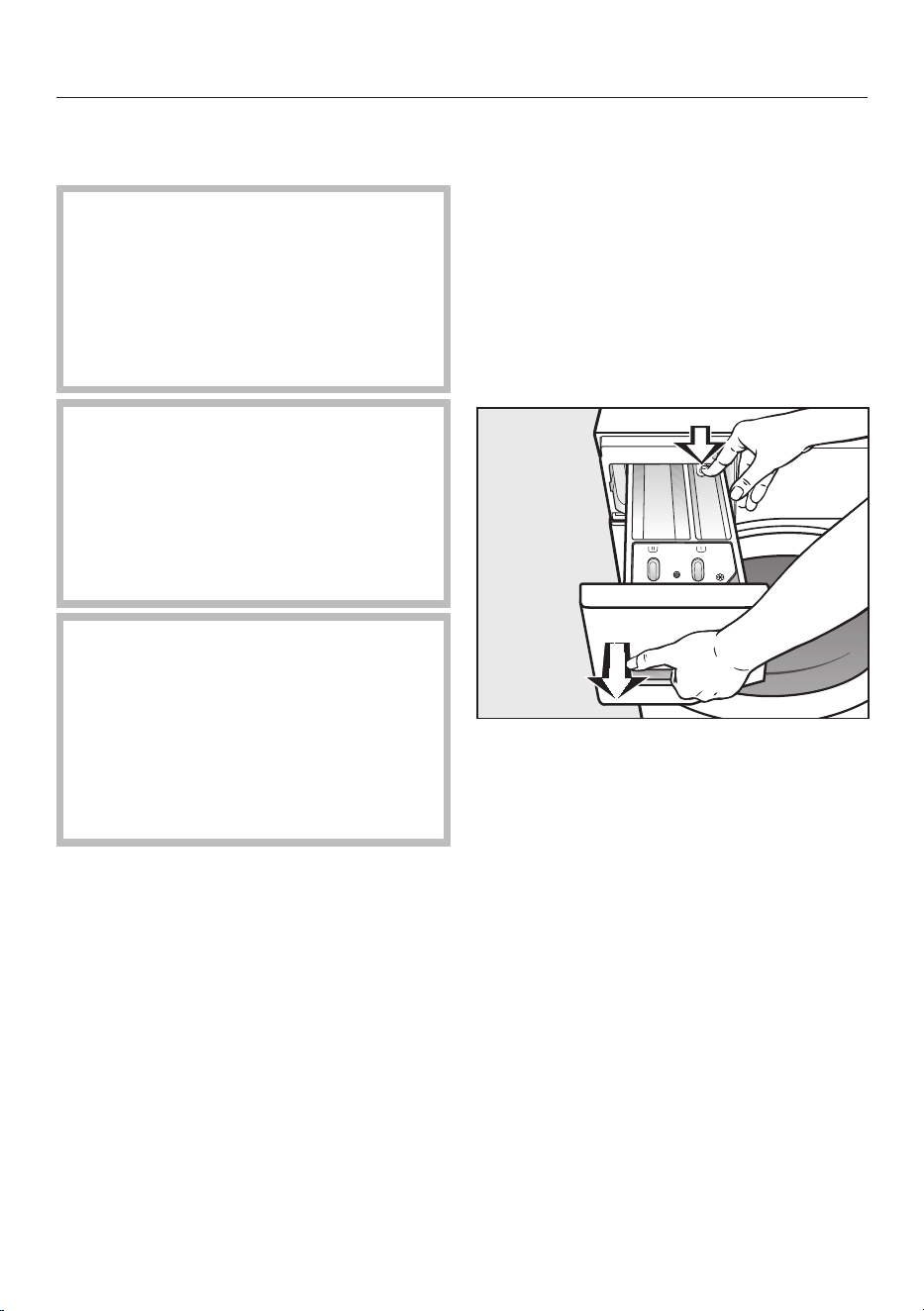
Cleaning and care
76
Cleaning the casing and control
panel
Risk of electric shock from mains
voltage.
The mains voltage is applied to the
washer-dryer even if it is switched
off.
Disconnect the power plug before
cleaning or maintenance.
Risk of damage due to ingress of
water.
The pressure of a water jet can cause
water to get into the washer-dryer,
resulting in damage to components.
Do not spray the washer-dryer with a
water jet.
Damage caused by cleaning
agents.
Solvent-based cleaning agents, ab-
rasive cleaners, glass cleaners or
multi-purpose cleaning agents can
cause damage to plastic surfaces and
other parts.
Do not use these cleaning agents.
Clean the casing and control panel
with a mild cleaning agent or soap
and water and dry both with a soft
cloth.
The drum can be cleaned using a suit-
able stainless steel cleaning agent.
Cleaning the detergent dis-
penser drawer
Washing at low temperatures and the
use of liquid detergent can lead to a
build-up of mould and bacteria in the
detergent dispenser drawer.
Clean the entire drawer at regular in-
tervals for hygiene reasons, even if
you are using the TwinDos system ex-
clusively.
Pull out the detergent dispenser
drawer until a resistance is felt. Press
down the release button and at the
same time pull the drawer right out of
the machine.
Clean the drawer with hot water.
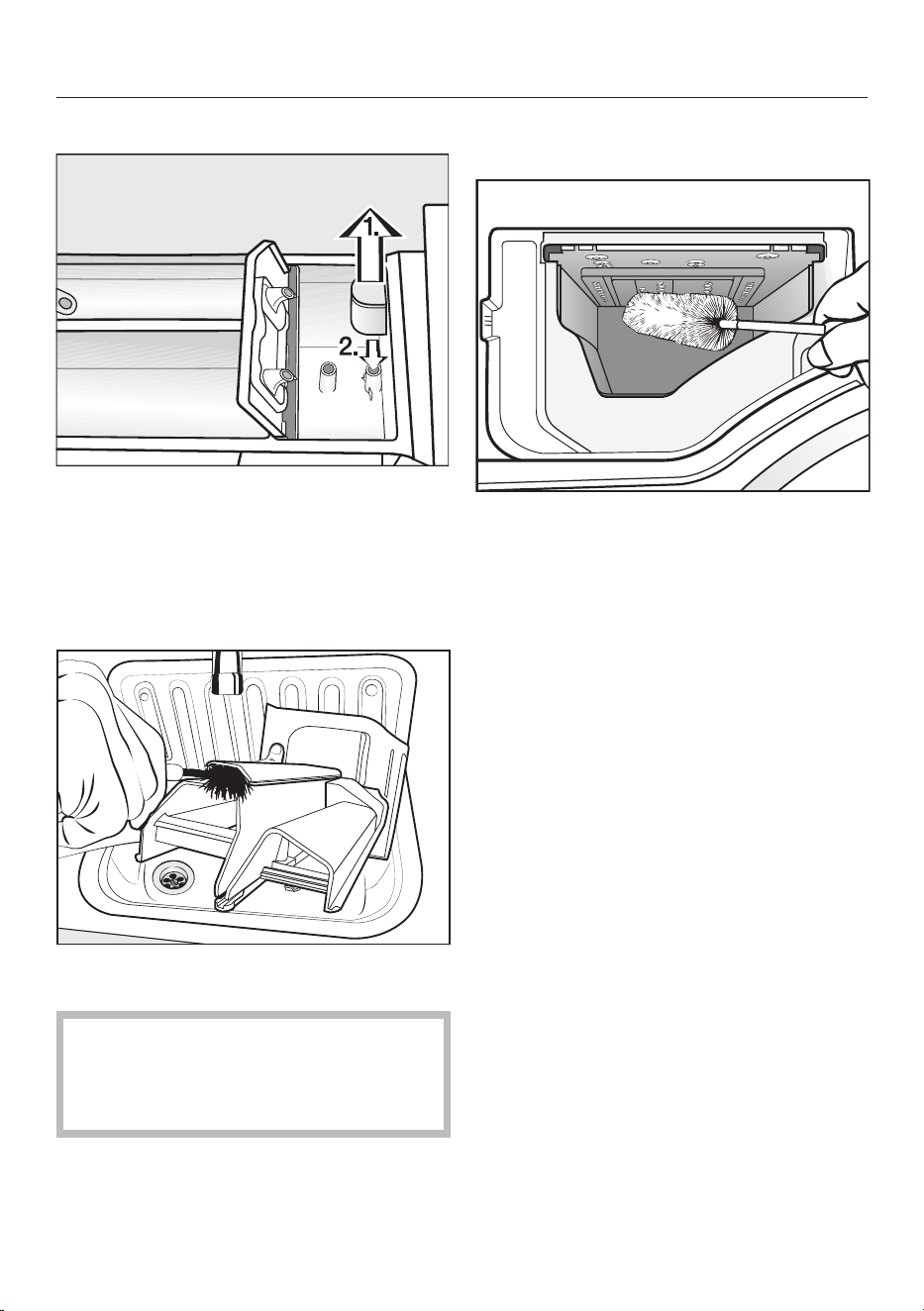
Cleaning and care
77
Cleaning the siphon and the channel
Pull the siphon out of the compart-
ment and clean it under warm running
water.
Clean the siphon tube in the same
way.
Refit the siphon.
Clean the fabric conditioner channel
using a brush and warm water.
Liquid starch results in clogging.
Clean the siphon particularly thor-
oughly after using liquid starch a few
times.
Cleaning the detergent dispenser
drawer housing
Use a bottle brush to remove deter-
gent residues and limescale from the
jets inside the detergent dispenser
drawer housing.
Replace the detergent dispenser
drawer.
Tip: Leave the detergent dispenser
drawer slightly open to allow it to dry.
Cleaning the porthole glass
Clean the inside of the porthole glass
from time to time and the metal cap
inside the porthole glass with a suit-
able mild cleaning agent or with soapy
water.
Dry both with a soft cloth.
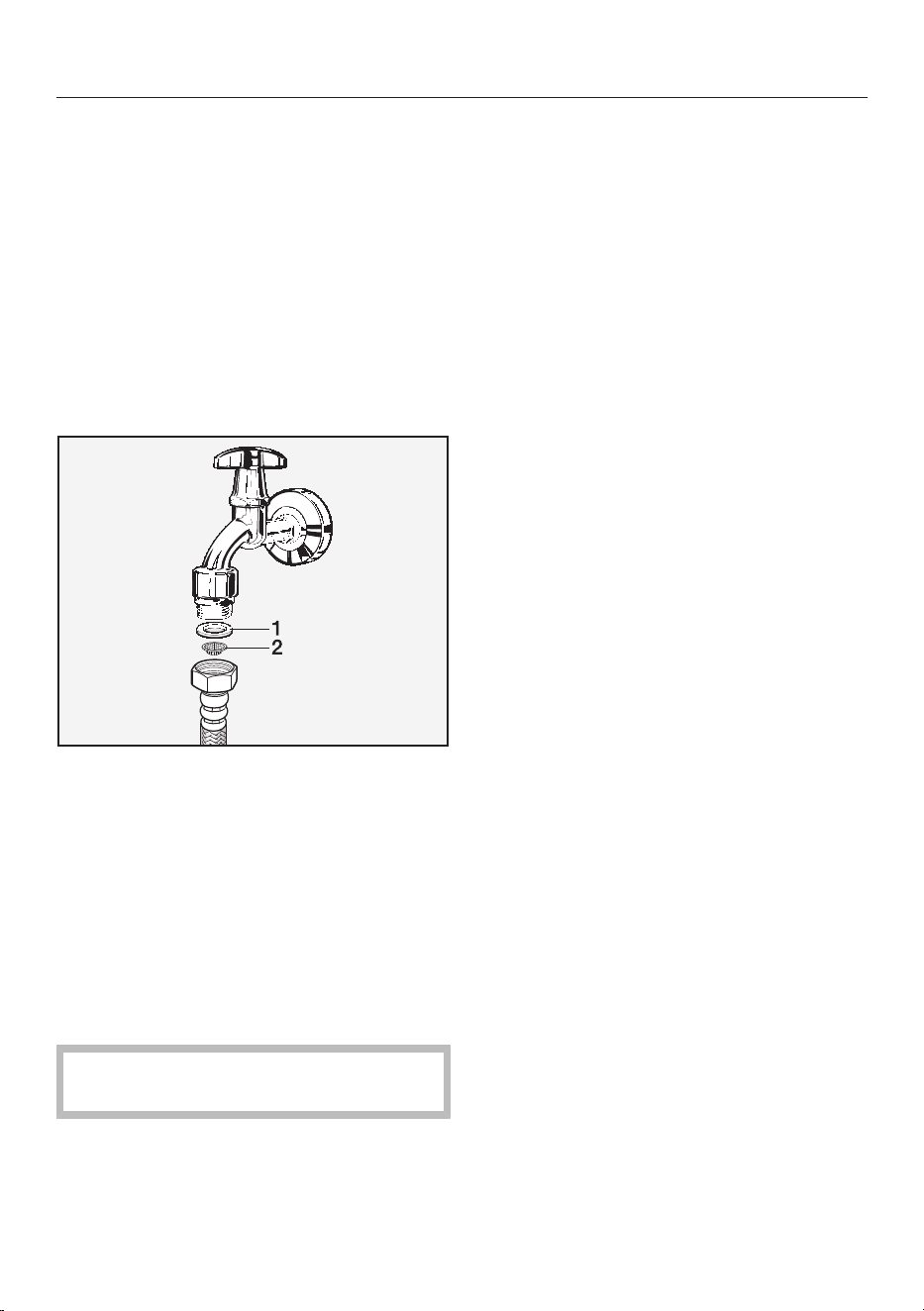
Cleaning and care
78
Cleaning the water intake filter
The washer-dryer has a filter to protect
the water intake valve. The filter at the
open end of the water inlet hose should
be checked approximately every
6months. Perform this check more of-
ten if there are frequent interruptions to
the external water supply.
First turn off the stopcock.
Unscrew the water inlet hose from
the stopcock.
Remove the rubber seal 1 from the re-
cess.
Hold the free end of the water inlet
hose upside down. The plastic filter 2
will fall out.
Clean the plastic filter.
Reassemble in reverse order.
Turn on the stopcock and check that
the connection is watertight. If water
drips out, tighten the connection.
Never forget to put the filter back in
place after cleaning.
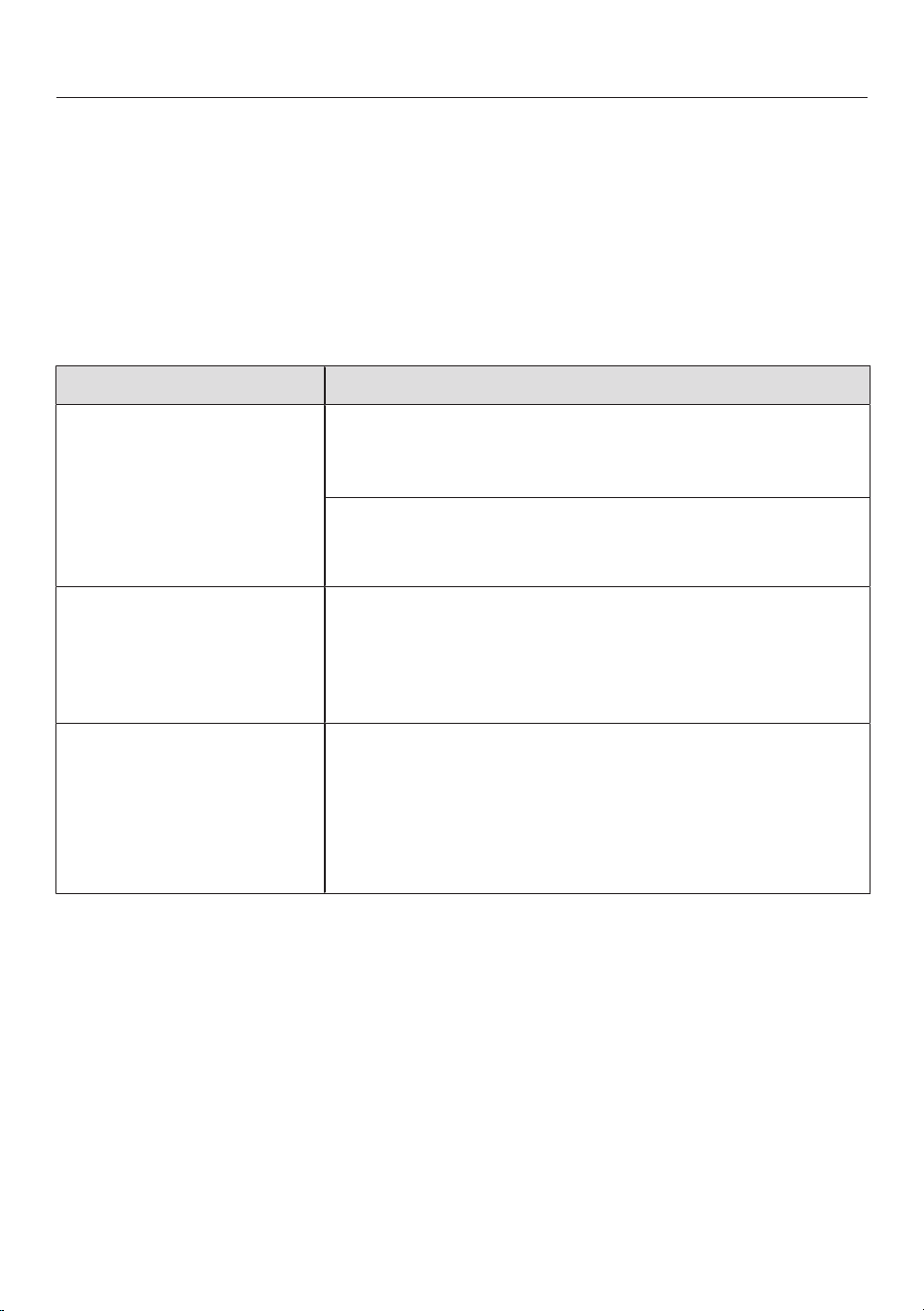
Problem solving guide
79
Many malfunctions and faults that can occur in daily operation can be easily
remedied. You can save time and money in many cases, as you do not need to call
the Miele Customer Service Department.
Information to help you rectify faults yourself can be found at www.miele.com/ser-
vice.
The following tables are designed to help you to find the cause of a malfunction or a
fault and to resolve it.
A programme does not start
Problem Cause and remedy
The display remains dark
and the button indic-
ator light does not come
on.
There is no power to the washer-dryer.
Check whether the power plug is plugged in.
Check whether the fuse has tripped.
The washer-dryer has switched off automatically to
save energy.
Switch the washer-dryer on with the button.
The display prompts you
to enter a code.
Access via a code has been activated.
Enter the code and confirm the entry. Deactivate the
code if you do not wish this message to appear in
the display the next time the machine is switched
on.
The following appears in
the display:
The door will not lock.
Call Service.
The door is not closed properly. The door lock could
not engage.
Close the door again.
Start the programme again.
If the fault message appears again, contact the
Miele Customer Service Department.

Problem solving guide
80
Fault message after a programme has been interrupted.
Problem Cause and remedy
Water intake fault.
Open the stopcock.
The water inlet is blocked or restricted.
Check whether the stopcock has been properly
opened.
Check whether the water inlet hose is kinked.
Check whether there is sufficient water pressure.
The filter in the water inlet is blocked.
Clean the filter.
Drainage fault. Clean
drain filter and pump.
Check the drain
hose.
The drain is blocked or restricted.
The drain hose has been fixed too high.
Clean the drain filter and the drain pump.
Check whether the maximum delivery head of 1m
has been exceeded.
Waterproof system
activated. Close
stopcock and call
Service
The water protection system has reacted.
Close the stopcock.
Call the Miele Customer Service Department.
Fault F. If restart
fails, call Service.
There is a fault.
Disconnect the washer-dryer from the electricity
supply. Switch off at the wall and withdraw the plug
from the socket, or disconnect the fuse.
Wait at least 2minutes before reconnecting the
washer-dryer to the electricity supply.
Switch the washer-dryer back on.
Restart the programme.
If the fault message appears again, contact the
Miele Customer Service Department.
To switch off the fault message, switch the washer-dryer off with the button.

Problem solving guide
81
Fault message at the end of a programme
Message Cause and remedy
Intensive flow: Clean
the filter and jet or
remove foreign ob-
jects from the pump
housing.
The pumps are soiled.
Clean the pumps as described in the “Problem solv-
ing guide” – “Opening the door in the event of a
blocked drain outlet and/or power cut”.
Start a wash programme again after cleaning.
The nozzle in the top of the door sealing ring is
blocked with fluff.
Remove the fluff with your finger. Do not use any
sharp or pointed tools to do this.
Start a wash programme again after cleaning.
If the fault message appears again, contact the Miele
Customer Service Department. The washer-dryer can
still be used but with reduced functionality.
Check load
There is no laundry in the drum.
The load is too small. The laundry is still damp be-
cause the residual moisture content in the laundry
cannot be measured.
In the future use a Timed drying programme for
small amounts of laundry.
The amount of laundry exceeded the maximum load
for the selected programme.
Observe the maximum load sizes given in the Pro-
gramme chart.
Start "Rinse out fluff"
programme in the
"Maintenance"
menu
TheRinse out fluff programme has not been used for a
long time.
Start the Rinse out fluff programme as described in
“Cleaning and care” – “Starting maintenance pro-
grammes”.
To switch off the fault message, switch the washer-dryer off with the button.

Problem solving guide
82
Fault message at the end of a programme
Message Cause and remedy
Align the machine.
Laundry not properly
spun
The smoothing process which the laundry undergoes
at the end of the programme could not be carried out
properly.
Check whether the washer-dryer is aligned correctly
as described in “Installation” – “Levelling the ma-
chine”.
Check whether the maximum delivery head of 1.0m
has been exceeded.
If the fault message appears again, contact the Miele
Customer Service Department. The washer-dryer can
still be used but with reduced functionality.
Hygiene info: select
"Maintenance" and
run the "Clean ma-
chine" programme.
No drying or wash programme using a temperature
above 60°C has been run for a long time.
In order to prevent bacteria and unpleasant odours
building up in the machine, run the Clean machine
programme using the Miele dishwasher and wash-
ing machine cleaner or powder detergent.
To switch off the fault message, switch the washer-dryer off with the button.

Problem solving guide
83
Problems with TwinDos
Problem Cause and remedy
Fit a new cartridge or
fill container
The cartridge is empty.
Replace the cartridge.
Check whether the laundry is clean. There may not
have been enough detergent.
Wash the laundry again if necessary.
Only a few more
washes are possible
before a new cart-
ridge is needed for
compartment .
The detergent in the cartridge is running low. There is
sufficient left for approx. 4to 8wash programmes.
Order a new cartridge.
Use "TwinDos" or
carry out "TwinDos"
Maintenance in the
"Maintenance"
menu. See the oper-
ating instruction
manual for more in-
formation.
TwinDos has not been used for a long time.
Use TwinDos for one of your next loads.
Carry out the TwinDos maintenance programme as
described in “Cleaning and care” – “Starting main-
tenance programmes”.
"TwinDos" Mainten-
ance for compart-
ment must be
started in the "Main-
tenance" menu. See
the operating in-
struction manual for
more information.
TwinDos has not been used for too long a time. The
detergent in the hoses may dry up.
Carry out the TwinDos maintenance programme im-
mediately as described in “Cleaning and care” –
“Starting maintenance programmes”.
The messages shown on this page are examples. They may differ depending on
whether they refer to compartment or .
The messages will appear at the end of the programme and when the washer-dryer
is switched on and need to be confirmed with the OK sensor.

Problem solving guide
84
Problems with TwinDos
Problem Cause and remedy
There are dark specks in
the liquid detergent.
Mould has developed in the detergent.
Pour the liquid detergent out of the container and
then clean the container thoroughly.
No detergent and/or fab-
ric conditioner was dis-
pensed.
Automatic dispensing has not been activated.
Touch the TwinDos sensor before running the next
programme.
Automatic dispensing will be activated.
No detergent/fabric conditioner was dispensed even
though automatic dispensing was activated.
Try again.
If detergent is still not dispensed, call the Service
Department.
A new detergent cart-
ridge has been inserted,
but the cartridge is iden-
tified as empty when the
machine is switched on.
The washer-dryer was switched off when the deter-
gent cartridge was replaced.
Switch the washer-dryer on.
Remove the detergent cartridge and then reinsert it
into the compartment.
The counter is set to 0.
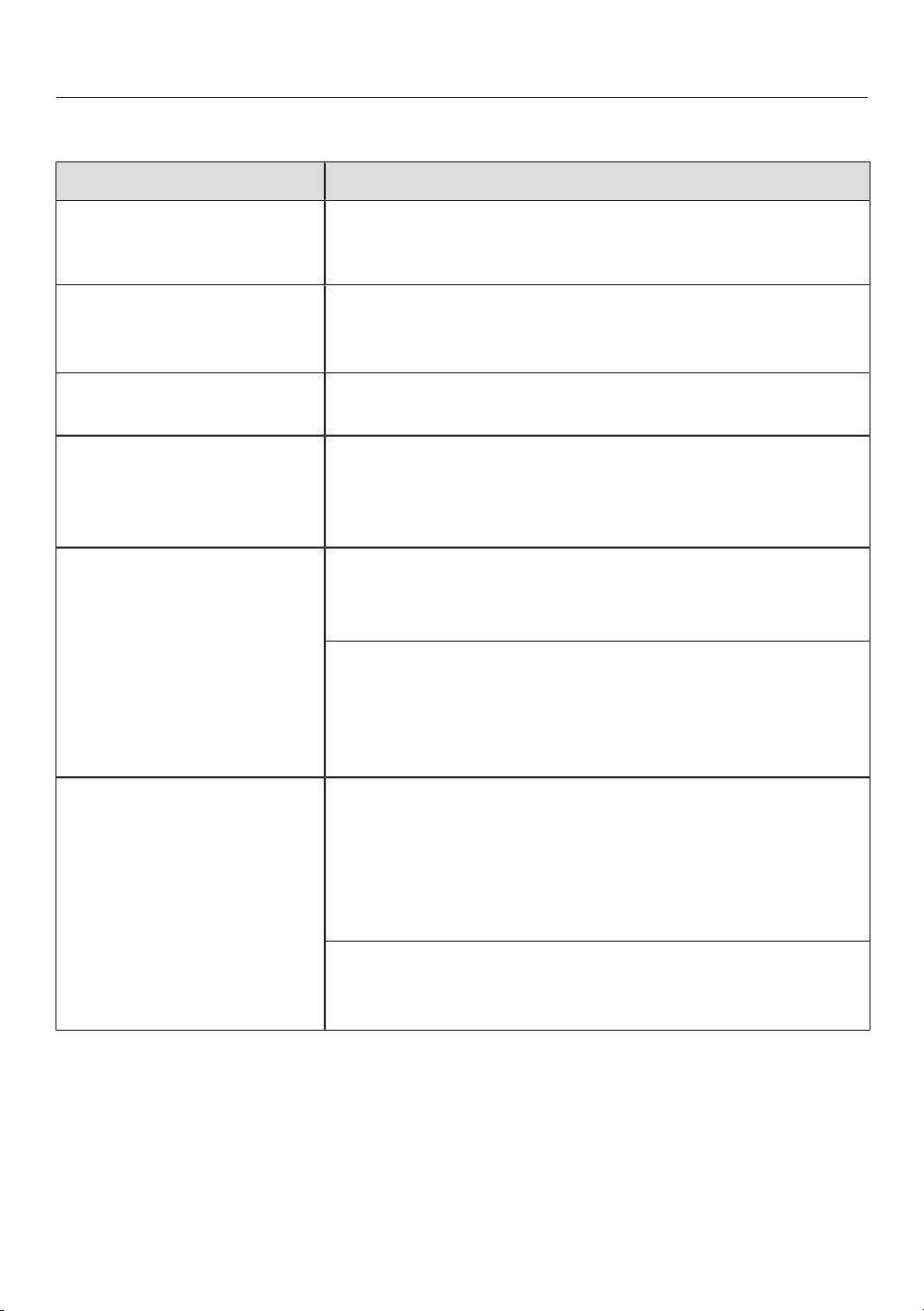
Problem solving guide
85
General problems with the washer-dryer
Problem Cause and remedy
The washer-dryer is not
steady during a spin
cycle.
The machine feet are not level.
Level the washer-dryer and secure the feet.
Unusual pumping
noises.
This is not a fault. These slurping noises occur at the
end of the pump sequence as a normal part of opera-
tion.
Spinning sounds during
the drying process.
This is not a fault. The machine will spin, even during a
drying programme (thermospin).
The laundry has not
been spun properly and
the laundry is still wet.
The machine detected an imbalance during the final
spin cycle and reduced the spin speed automatically.
Include both large and small items in the load as this
will give better distribution during spinning.
Large amounts of deter-
gent residue remain in
the detergent drawer.
The water flow pressure is too low.
Clean the filters in the water inlet.
Select Water plus.
Powder detergent used in conjunction with water
softeners tends to become sticky.
Clean the detergent drawer and, in the future, add
washing powder in the compartment first, and then
add the water softener.
There is water in the fab-
ric conditioner compart-
ment next to the cap-
sule.
CapDosing was not activated or an empty capsule was
not removed at the end of the last wash programme.
Make sure that you remember to activate CapDosing
the next time you insert a capsule.
Remove and dispose of the empty capsule at the
end of each programme.
There is a blockage in the small pipe in the detergent
drawer onto which the capsule is placed.
Clean the small pipe.
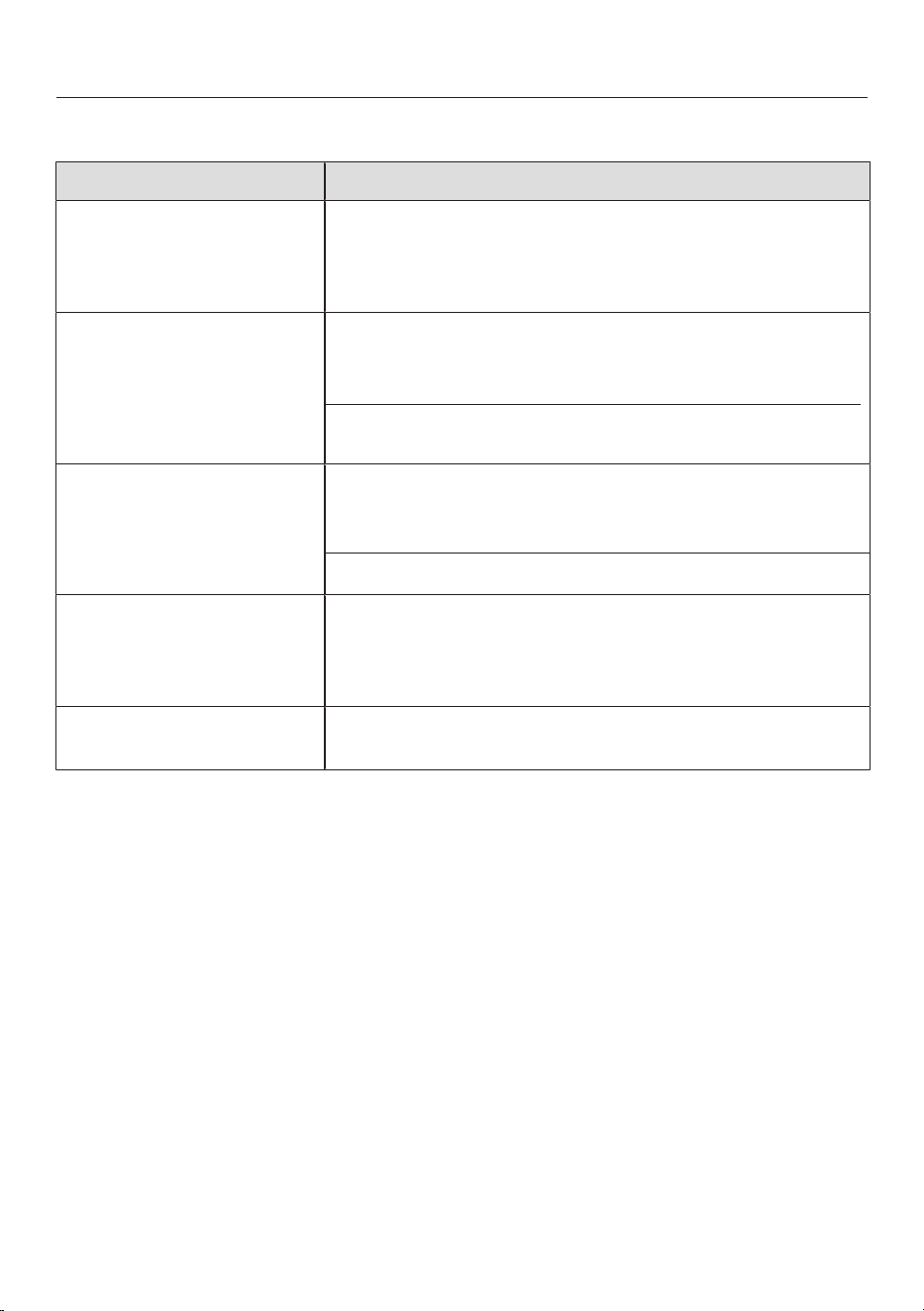
Problem solving guide
86
General problems with the washer-dryer
Problem Cause and remedy
Fabric conditioner is not
completely dispensed or
too much water remains
in the compartment.
The siphon tube is not correctly positioned or is
clogged.
Clean the siphon, see “Cleaning and care - Cleaning
the detergent dispenser drawer”.
At the end of the pro-
gramme there is still li-
quid in the capsule.
The small pipe in the detergent dispenser drawer
onto which the capsule is placed is blocked.
Clean the small pipe.
This is not a fault. For technical reasons a small
amount of water will remain in the capsule.
The display is in a differ-
ent language.
A different language has been selected in “Settings”
“Language ”.
Set the language you want.
The flag symbol serves as a guide.
The display is dark. The display has switched off automatically to save en-
ergy (Standby mode).
Touch the Start/Stopsensor control. This switches
Standby off.
The time left duration in
the display fluctuates.
The countdown time adapts constantly to the current
washing and drying process.

Problem solving guide
87
General problems with the washer-dryer
Problem Cause and remedy
Foam comes out of the
detergent dispenser
drawer while the Rinse
out fluff programme is
running.
Residual detergent from the last programme is still
present in the suds container.
Always dispense the correct amount of detergent.
Where possible select automatic dispensing.
There is foam in the
drum at the end of the
Rinse out fluff pro-
gramme.
The Rinse out fluff programme also rinses out residual
detergent from the suds container. This can lead to
the formation of foam.
Run the Rinse out fluff programme regularly to pre-
vent detergent residues from accumulating in the
suds container.
There is still fluff in the
drum after the end of the
Rinse out fluff pro-
gramme.
You have not run the Rinse out fluff programme for a
long time.
Remove the fluff from the drum.
Run the Rinse out fluff programme on a regular
basis.
The washer-dryer
smells.
Hygiene info was ignored. A wash programme using a
temperature above 60°C has not been run for a long
time.
In order to prevent bacteria and unpleasant odours
building up in the machine, run the Clean machine
programme using the Miele dishwasher and wash-
ing machine cleaner or powder detergent.
The door and the detergent dispenser drawer were left
open after washing.
Leave the door and the detergent dispenser drawer
slightly open to allow them to dry.

Problem solving guide
88
An unsatisfactory wash result
Problem Cause and remedy
White residues which
look like powder deter-
gent are seen on dark
textiles after washing.
The detergent contained compounds (zeolites) to aid
water softening which are not soluble in water. These
have ended up on the laundry.
Try and brush off the residues with a soft brush once
the laundry is dry.
Wash dark textiles using a detergent which contains
no zeolites. Liquid detergents usually contain no
zeolites.
Use the Dark garments programme.
Liquid detergent does
not give the required
result.
Liquid detergents usually contain no bleaching agents.
They do not remove fruit, coffee and tea stains.
Use the Miele 2 Phase System. The targeted addi-
tion of UltraPhase 2 during the wash process re-
moves stains effectively.
Use a general purpose powder detergent containing
a bleaching agent.
Grey, greasy particles
cling to washed laundry.
Insufficient amounts of detergent were used to break
down the particles of grease in heavily soiled laundry.
Use more detergent.
Before washing the next load, run the Maintenance
wash using Miele machine cleaner or a powder de-
tergent.

Problem solving guide
89
Unsatisfactory drying results
Problem Cause and remedy
The laundry is too damp
after drying and
Check load appears in the
display.
The load is too small. The electronics could not assess
the residual moisture correctly.
Start the programme again and instead of a drying
level select a Timed drying programme.
In the future use a Timed drying programme for
small amounts of laundry.
During the spin cycle, the laundry formed a ring in the
drum because the laundry was distributed unevenly.
The laundry formed a ring during the thermospin be-
cause it was too damp or because the spin speed was
set too high.
Open the door and loosen the laundry.
Start the drying programme again with a lower spin
speed, or select Timed drying instead of a drying
level.
The laundry feels damp
after drying.
The Pre-ironing Extra was selected.
Unload the laundry and place it on hangers to finish
drying.
Warm laundry can feel damp.
Spread the laundry out to cool it down.
The laundry is too damp
or too dry after a drying
cycle.
The desired residual moisture level is between two
drying stages.
Change the level of drying as described in “Set-
tings”, “Drying levels”.
There is still water in the
drum after drying.
There is a blockage in the water outlet.
Clean the drain filters and the drain pumps as de-
scribed in “Opening the door in the event of a
blocked drain outlet and/or power failure” and check
the height of the drainage point.

Problem solving guide
90
The door will not open
Problem Cause and remedy
The door cannot be
opened during a pro-
gramme sequence.
The door is locked during a programme sequence.
Follow the instructions in “Washing” – “6. Starting
the programme”.
There is still water in the drum and the washer-dryer is
unable to drain.
Clean the drain filters and the drain pump as de-
scribed in “Opening the door in the event of a
blocked drain outlet and/or power failure”.
The water level in the drum is too high.
Cancel the programme. The washer-dryer will pump
the water away.
At the end of the pro-
gramme or after a pro-
gramme cancellation:
Comfort cooling appears in
the display.
For safety reasons the door cannot be opened if the
temperature in the drum exceeds 55°C during wash-
ing or 70°C during drying.
Wait until the temperature in the drum has de-
creased and the message has gone out in the dis-
play.
The following appears in
the display:
The door lock is jammed.
Call Service.
The door lock has jammed.
Call the Miele Customer Service Department.
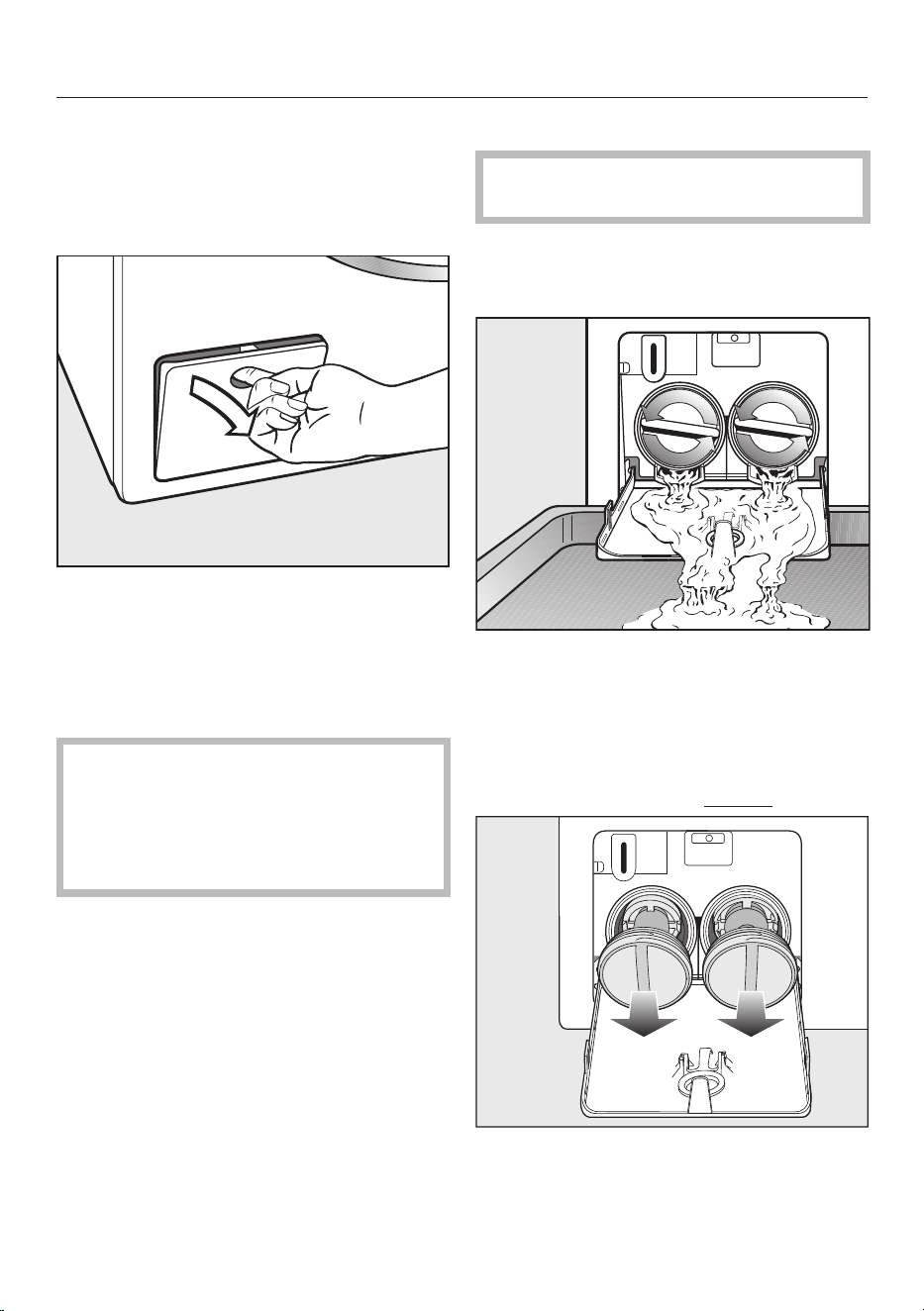
Problem solving guide
91
Opening the door in the event
of a blocked drain outlet and/or
power cut
Switch the washer-dryer off.
Open the drain pump access panel.
Blocked drain outlet
If the drain outlet is blocked, a large
quantity of water can remain in the
washer-dryer.
Risk of scalding due to hot suds.
Escaping suds will be hot if laundry
has been washed at high temperat-
ures.
Carefully allow all suds to drain off.
Draining the washing machine
Remove the drain filter, though not
completely.
Place a suitable container under the
access panel, e.g. a universal oven
tray.
Slowly unscrew the drain filters to let
the water out.
Tighten the drain filters back up again
if you need to interrupt the flow of
water.
Once the flow of water ceases:
Remove the drain filters completely.
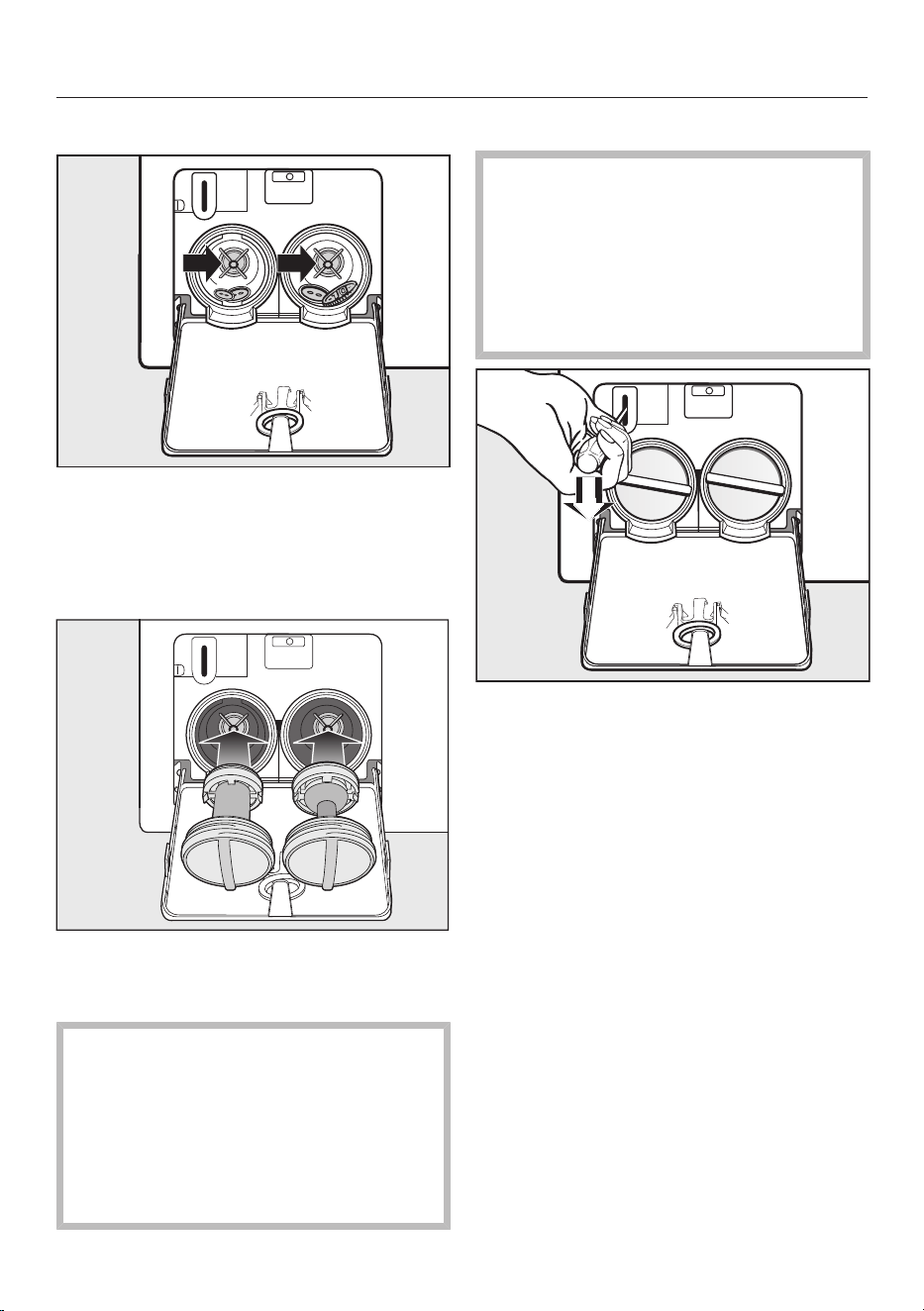
Problem solving guide
92
Cleaning the drain filters
Clean the drain filters thoroughly.
Remove any foreign objects (e.g. but-
tons, coins) and clean the interior.
Turn the impellers by hand to check
that they rotate freely.
Replace the drain filters correctly (on
the right and left) and tighten them
securely.
Risk of damage from leaking wa-
ter.
Water will escape from the washer-
dryer if you forget to replace the drain
filters.
Replace the drain filters correctly and
tighten them securely.
Opening the door
Danger of injury due to rotating
drum.
Reaching into a moving drum is ex-
tremely dangerous.
Always make sure that the drum is
stationary before reaching in to re-
move laundry.
Use a screwdriver to unlock the door.
Pull open the door.
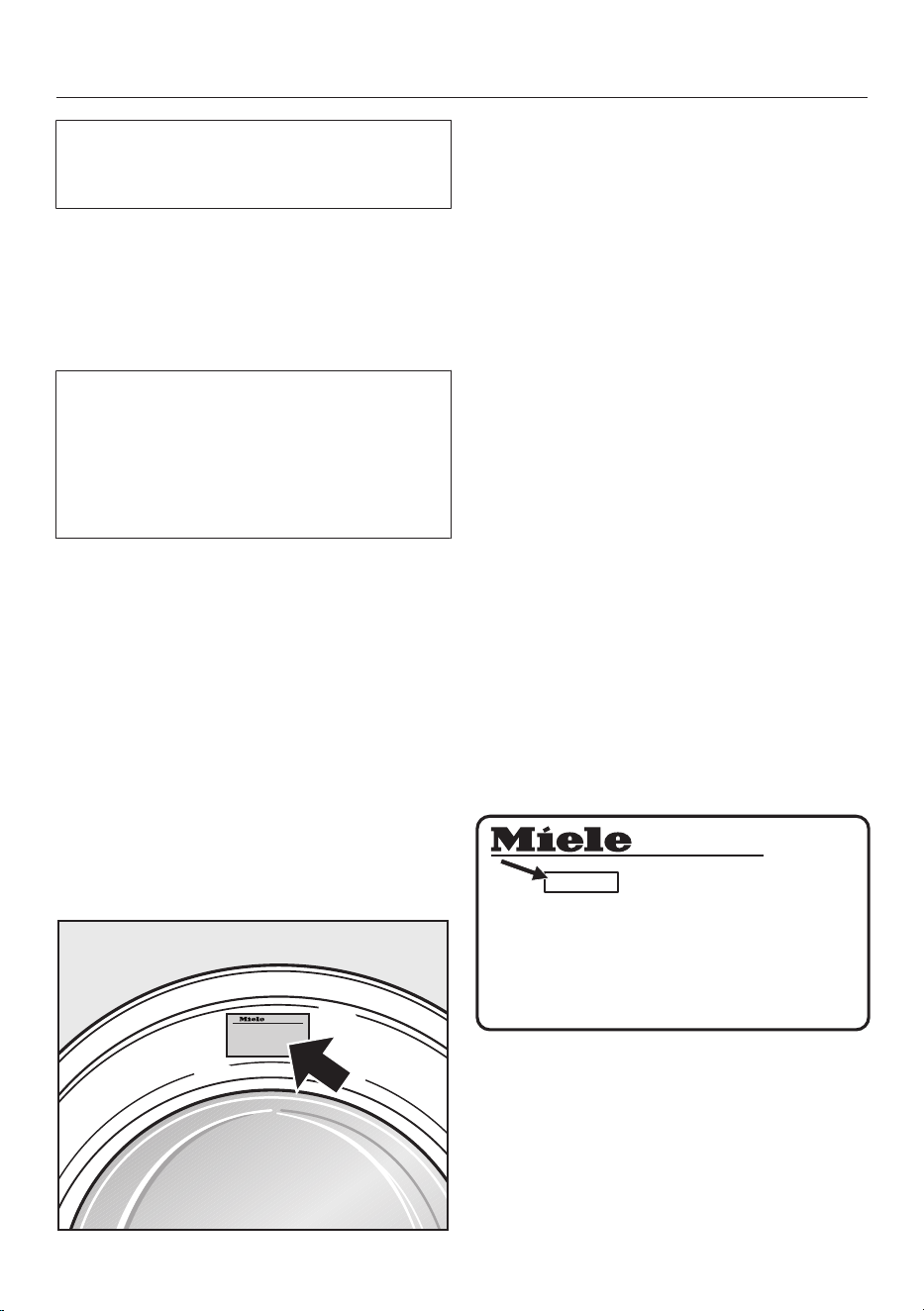
Service
93
Information to help you rectify faults
yourself and about Miele spare parts can
be found at www.miele.com/service.
Contact in the event of a fault
In the event of any faults which you can-
not remedy yourself, please contact
your Miele dealer or the Miele Cus-
tomer Service Department.
You can book a Miele Customer Ser-
vice Department call-out online at
www.miele.com/service.
Contact information for the Miele Cus-
tomer Service Department can be
found at the end of this document.
Please quote the model identifier and
serial number of your appliance (Fabr./
SN/Nr.) when contacting the Miele
Customer Service Department. This in-
formation can be found on the data
plate.
Please note that telephone calls may be
monitored and recorded for training pur-
poses and that a call-out charge will be
applied to service visits where the prob-
lem could have been resolved as de-
scribed in this booklet.
The data plate is found above the
porthole glass when the door is opened.
Warranty
For information on the appliance war-
ranty specific to your country please
contact Miele. See back cover for ad-
dress.
In the UK, your appliance warranty is
valid for 2 years from the date of pur-
chase. However, you must activate your
cover by calling 0330 160 6640 or re-
gistering online at www.miele.co.uk.
Optional accessories
Optional accessories for this washer-
dryer are available from Miele or your
Miele dealer.
EPREL database
From 1 March 2021, information on en-
ergy labelling and ecodesign require-
ments will be available in the European
Product Database (EPREL). You can find
the product database at the following
link https://eprel.ec.europa.eu/. You will
be asked to enter the model identifier.
The model identifier can be found on the
data plate.
Made in xxx
Mod.: XXXxxx
Miele Service
www.miele.com/service
M-Nr.: xxxxxxxx
Type: XXxx-X
Nr.:/ xxxxxxxxx
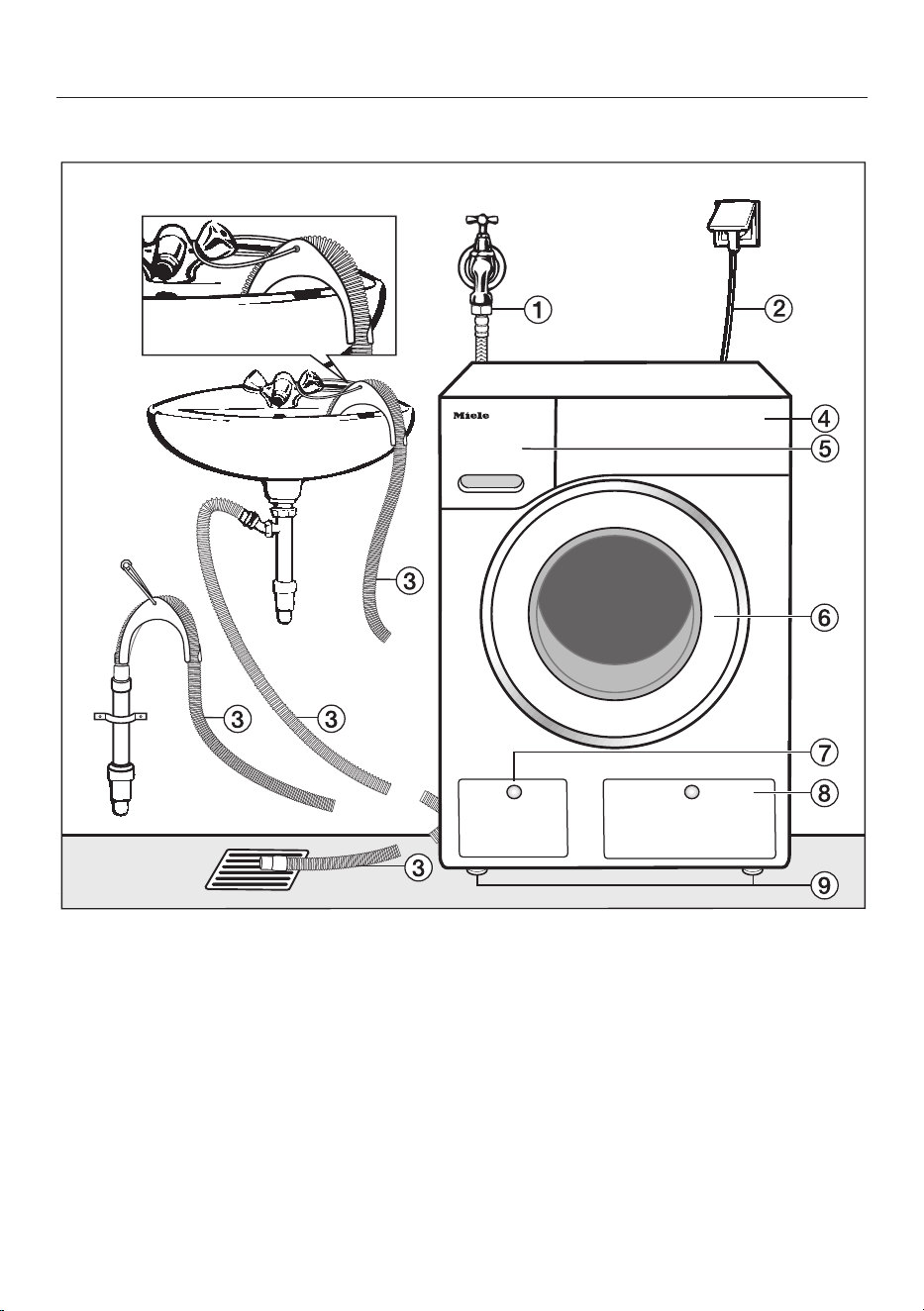
Installation
*INSTALLATION*
94
Front view
a
Water inlet hose (waterproof metal,
braided)
b
Electrical connection
c
Flexible drain hose (with detachable
elbow)
d
Control panel
e
Detergent drawer
f
Door
g
Access to drain filters, drain pump
and emergency release
h
Access panel for TwinDos containers
i
4height-adjustable feet
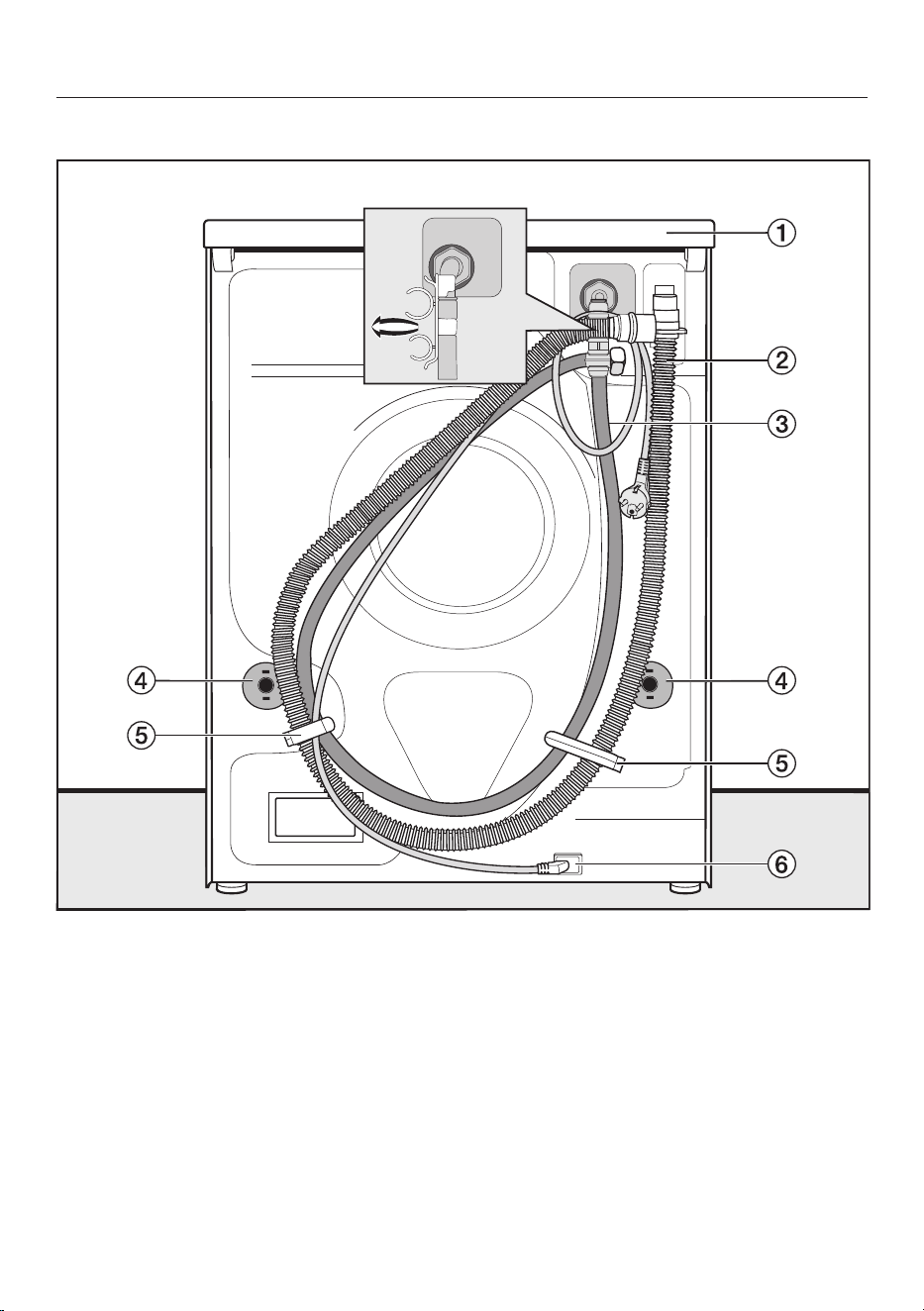
Installation
*INSTALLATION*
95
Rear view
a
Protruding lid for holding when mov-
ing the appliance
b
Drain hose
c
Water inlet hose
d
Safety caps for transit bars
e
Transport clips for water inlet hoses
and drain hoses
f
Electrical connection
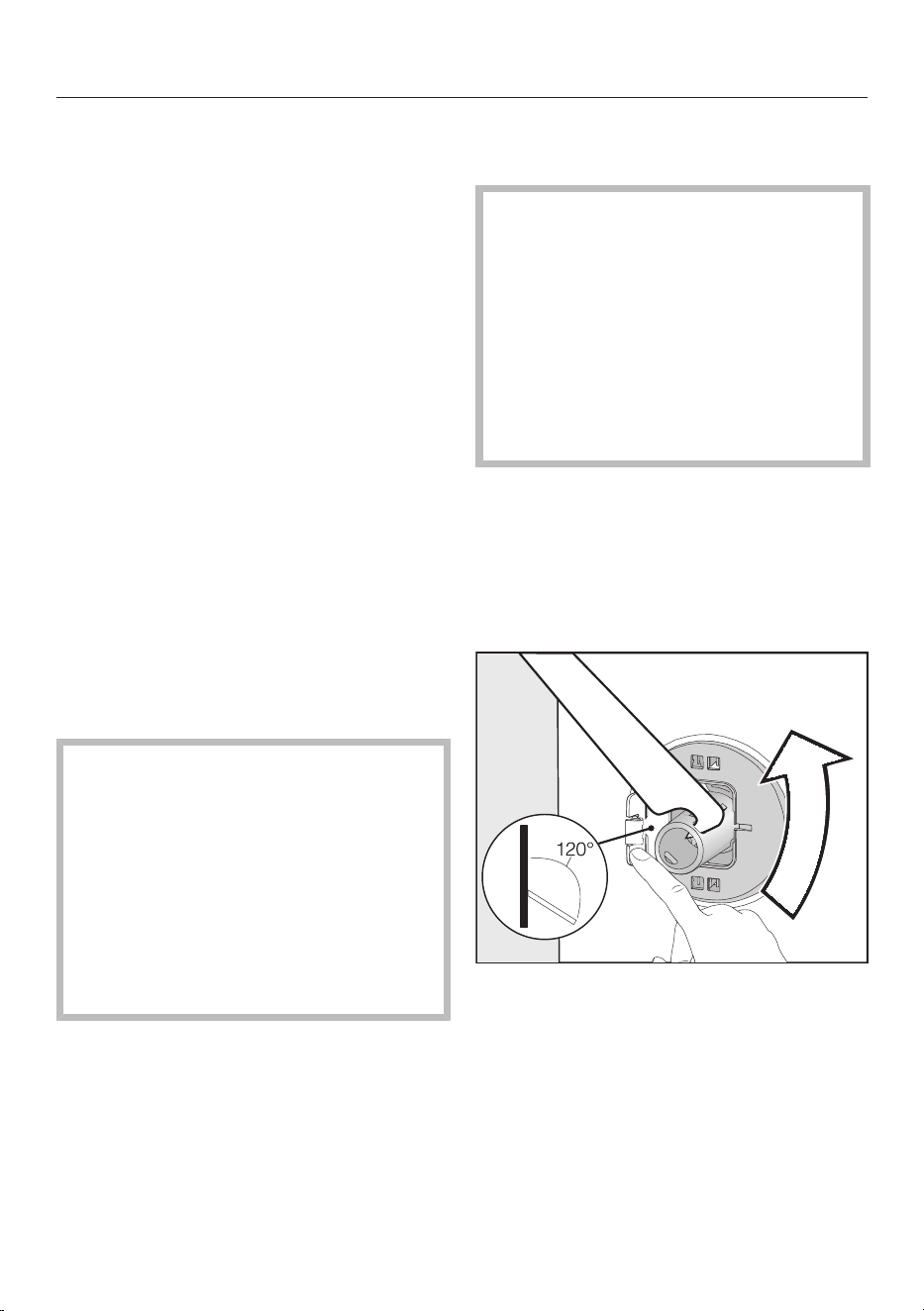
Installation
*INSTALLATION*
96
Installation surface
A concrete floor is the most suitable in-
stallation surface. It is far less prone to
vibration during the spin cycle than
wooden floorboards or a carpeted sur-
face.
Please note:
The washer-dryer must be level and
securely positioned.
To avoid vibrations during spinning,
the washer-dryer must not be in-
stalled on soft floor coverings.
If installing on a wooden joist floor,
please note:
Use a plywood base underneath the
washer-dryer (at least
59x52x3cm). The base must span
several joists and be bolted to the
joists and not only to the floorboards.
Tip: If possible, install the washer-dryer
in a corner of the room, as this is usually
the most stable part of the floor.
Danger of injury due to unse-
cured washer-dryer.
If the washer-dryer is installed on an
existing on-site plinth (concrete or
brick), there is a danger of the ma-
chine falling off the plinth during the
spin cycle.
Secure the washer-dryer with a
fastening bracket (optional access-
ory).
Carrying the washer-dryer to its
installation site
Danger of injury due to unse-
cured lid.
The fixings at the back of the lid
could break as a result of external
forces. There is a danger of the lid be-
ing pulled off when carrying the ma-
chine.
Before carrying the machine, check
that the lid is secure where it pro-
trudes at the back of the machine.
Carry the washer-dryer by the front
feet and by the lid where it protrudes
at the back of the machine.
Removing the transit bars
Removing the left-hand transit bar
Push the cover out and turn the left-
hand transit bar 90° using the open
spanner supplied.
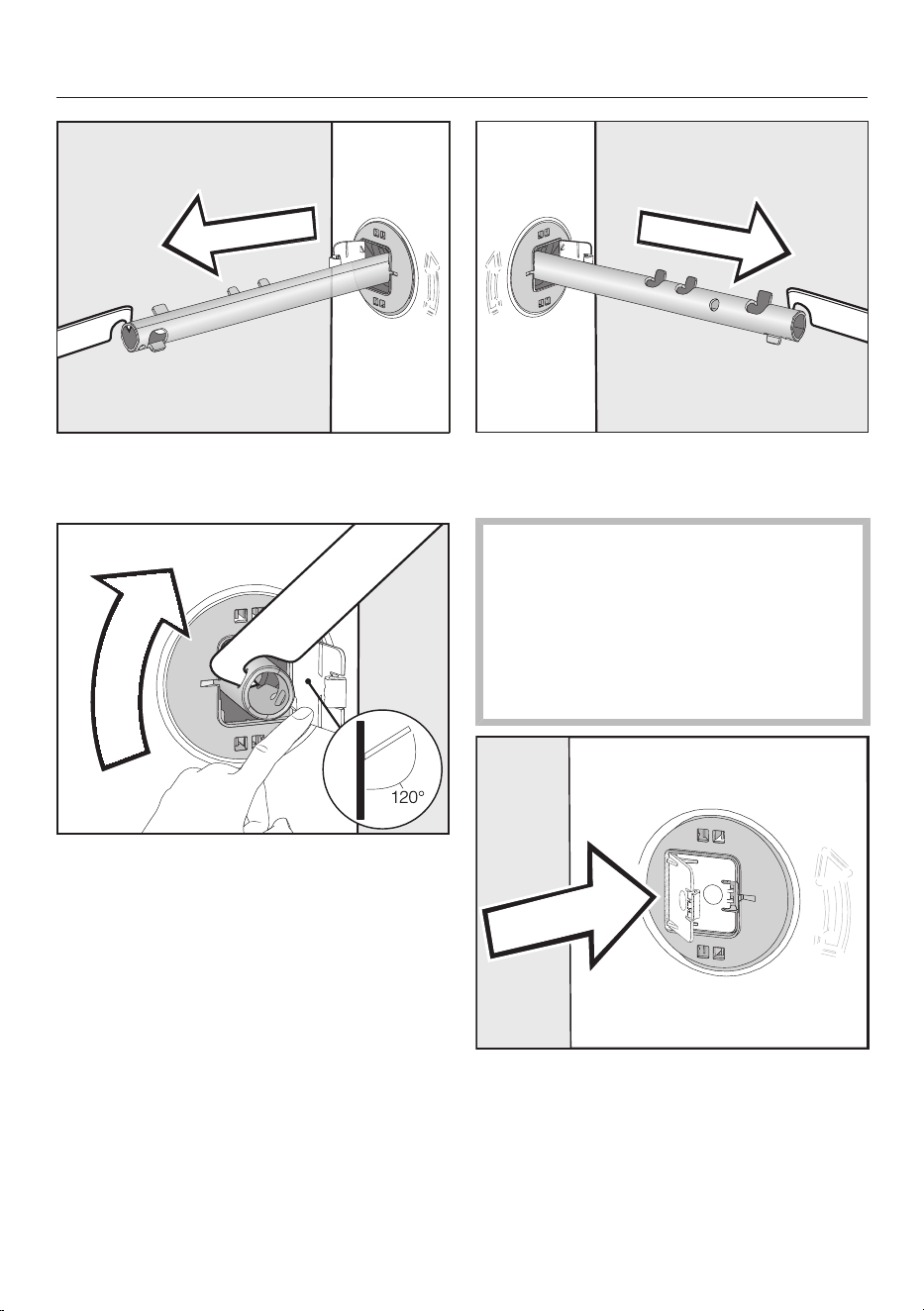
Installation
*INSTALLATION*
97
Pull out the transit bar.
Removing the right-hand transit bar
Push the cover out and turn the left-
hand transit bar 90° using the open
spanner supplied.
Pull out the transit bar.
Covering holes
Danger of injury from sharp
edges.
There is a danger of injury from
reaching into holes that are not
covered.
Cover the holes for the transit bars
after they have been removed.
Push the covers in firmly until they
engage in position.
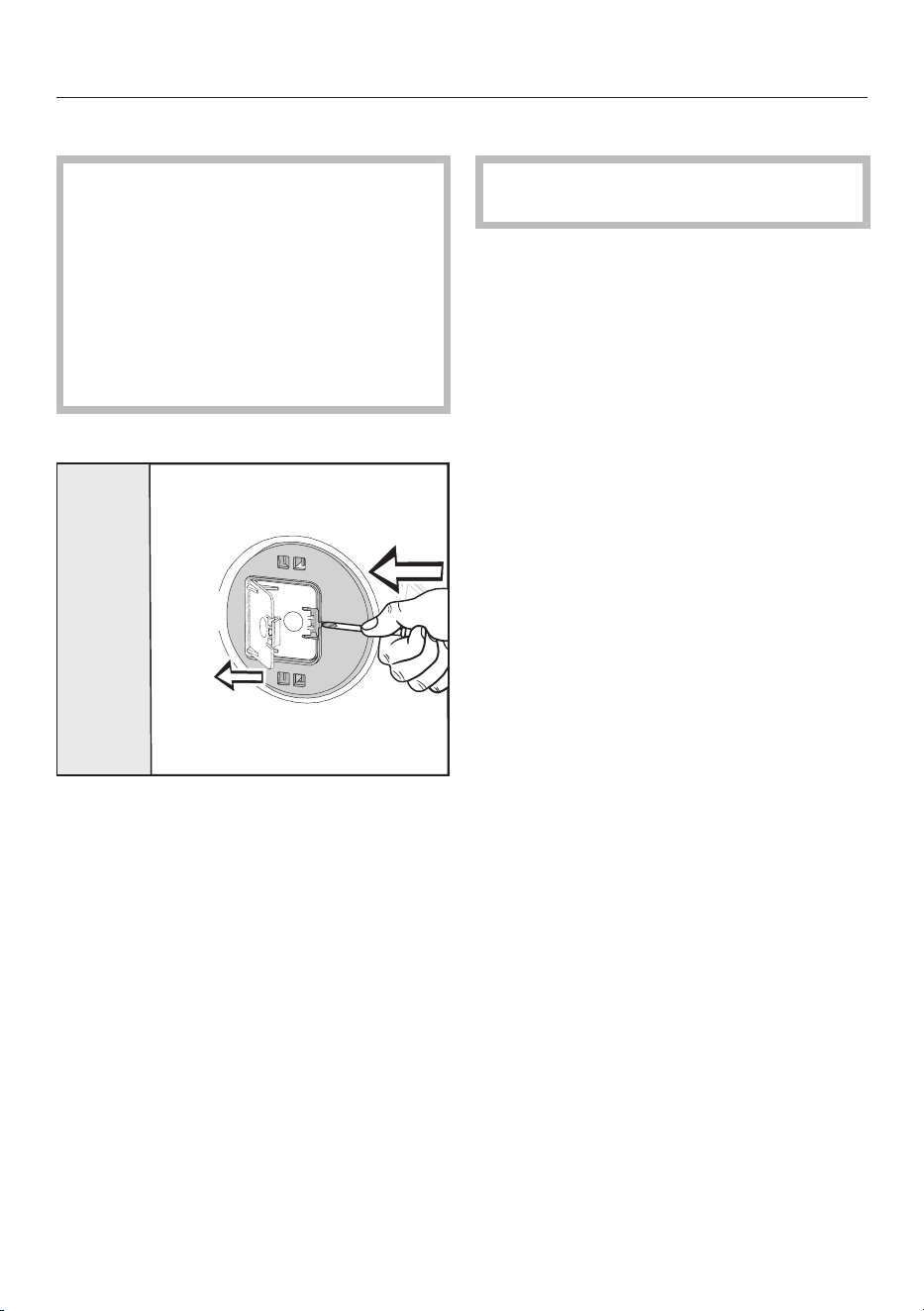
Installation
*INSTALLATION*
98
Refitting the transit bars
Risk of damage from incorrect
transport.
The washer-dryer may become dam-
aged if moved without the transit
bars in place.
Keep the transit bars in a safe place.
Fit them again if the washer-dryer is
to be moved (e.g. when moving
house).
Opening the covers
Press against the retainer with a
sharp object (a narrow screwdriver,
for example).
The cover will open.
Fitting the transit bars
To fit the bars, follow the instructions
for removing them in reverse order.
Tip: The bars will slide in more easily if
you lift the drum slightly.
Installing under a worktop
Building under kits* must only be in-
stalled/dismantled by a specialist.
- A special building under kit* is re-
quired. The cover plate included in the
building under kit* replaces the lid of
the washer-dryer. It is necessary to fit
the cover plate for electrical safety
reasons.
- Connections for electricity, water and
drainage should be installed in such a
way that they remain accessible when
the washer-dryer is in its final posi-
tion.
The building under kit includes installa-
tion instructions.
* Optional accessories
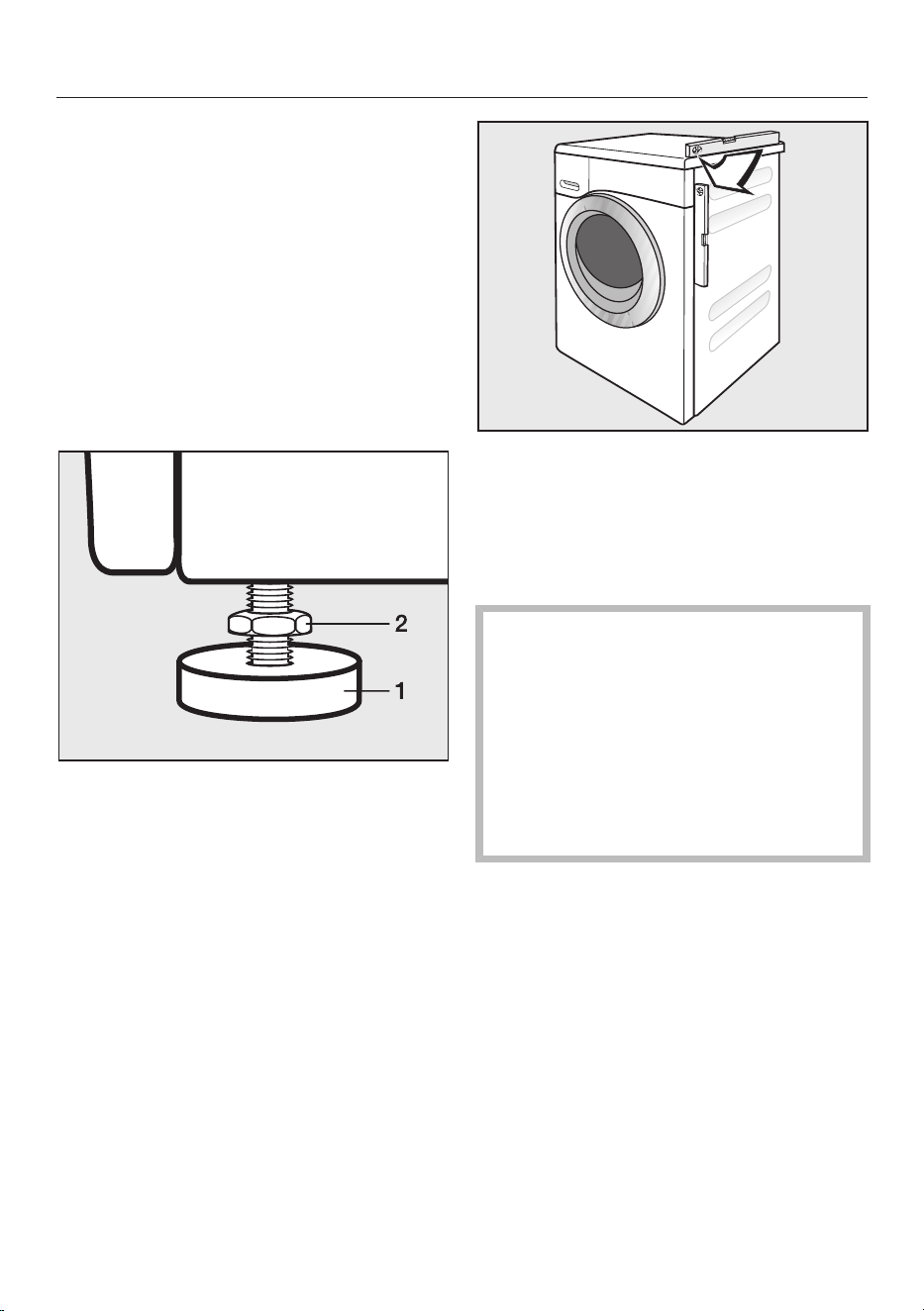
Installation
*INSTALLATION*
99
Aligning the washer-dryer
The washer-dryer must stand perfectly
level on all four feet to ensure safe and
proper operation.
Incorrect installation may increase elec-
tricity and water consumption and may
cause the washer-dryer to move about.
Screwing out and adjusting the feet
The 4 adjustable feet are used to level
the washer-dryer. The appliance is sup-
plied with all feet screwed in.
Using the open spanner supplied, turn
counter nut 2 in a clockwise direction.
Then turn counter nut 2 together with
foot 1 to unscrew.
Use a spirit level to check the washer-
dryer is standing level.
Hold foot 1 securely with a pipe
wrench. Turn counter nut 2 again us-
ing the open spanner supplied until it
sits firmly up against the casing.
Risk of damage from incorrectly
aligned washer-dryer.
There is a danger of the washer-dryer
moving about if the feet are not se-
cured.
Turn all 4 counter nuts for the feet
until they sit firmly up against the
casing. Please also check this for the
feet which did not need adjustment.

Installation
*INSTALLATION*
100
The water protection system
The Miele water protection system pro-
tects all parts of the washer-dryer from
water damage.
The system mainly consists of the fol-
lowing components:
- the inlet hose
- the electronic unit and drainage and
overflow protection
- the drain hose
Inlet hose
- Protects the safety valve from burst-
ing
The inlet hose can withstand pres-
sure greater than 14,000kPa.
- The inlet hose has a protective sleeve.
The inlet hose has metal braiding as a
“second skin” to protect against dam-
age.
Electronic unit and casing
- The floor tray
Any leaking water is collected in a
floor tray in the base of the washer-
dryer. A float switches off the water
inlet valves. Further water intake is
blocked. The water inside the suds
container is pumped down.
- Overflow protection
This prevents the washer-dryer from
taking in too much water and over-
flowing. If the water level exceeds a
certain level, the drain pump
switches on and pumps the excess
water away.
Drain hose
The drain hose is protected by a ventila-
tion system which prevents the washer-
dryer from being emptied completely.
Water intake
Health risk and risk of damage
due to contaminated incoming water.
The quality of the incoming water
must correspond to the drinking wa-
ter specification of the country in
which the machine is being operated.
Always connect the washing machine
to the mains water supply.
The washer-dryer is not required to have
a non-return valve connected to the
mains water supply as the washing ma-
chine has been designed to comply with
DIN regulations in Germany.
The water inlet pressure must be at
least 100kPa and must not exceed an
overpressure of 1000kPa. If the pres-
sure exceeds 1000kPa, a pressure re-
ducing valve must be installed.
Connection to the mains water supply
should incorporate a stopcock with a
¾" screw thread. If no stopcock is
available, only a qualified installer may
connect the washer-dryer to the mains
water supply.
The connection point is subject to
mains water pressure.
You should open the stopcock slowly
and check for leaks. Correct the posi-
tion of the seal and screw thread if
water escapes.
The washer-dryer is not suitable for
connection to a hot water supply.

Installation
*INSTALLATION*
101
Maintenance
Only use a genuine Miele hose that has
been pressure tested to withstand at
least 14,000kPa should you ever need
a replacement.
The dirt filter in the union nut at the
open end of the water protects the
water intake valve.
This filter must not be removed.
Hose extension
A 1.5metre long metal extension hose is
available from Miele as an optional ac-
cessory.
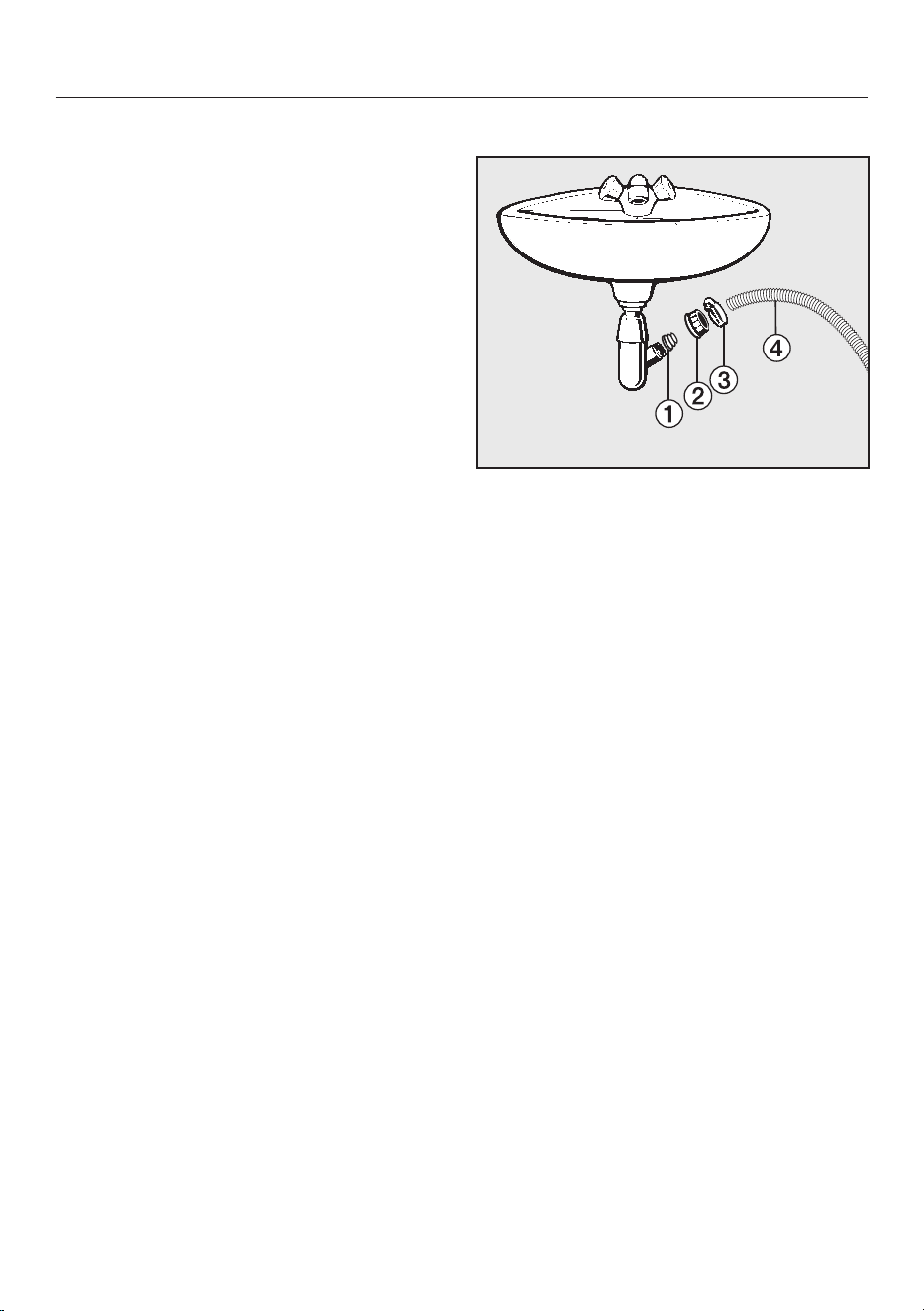
Installation
*INSTALLATION*
102
Water drainage
The suds are drained through a drain
pump with a 1m delivery head. For the
water to drain freely, the hose must be
free of kinks. The elbow piece supplied
hooks onto the end of the hose. If re-
quired, the hose can be extended to a
length of up to 5m. Accessories are
available from Miele or from your Miele
dealer.
For a delivery head of more than 1m (up
to a max. of 1.8m) a replacement drain
pump will need to be fitted. Please con-
tact Miele for advice. With a delivery
head in excess of 1m the hose can be
extended to a maximum of 2.5m. Ac-
cessories are available from Miele or
from your Miele dealer.
Drainage options:
1. Directed into a sink or basin:
Please note:
– Hook the hose over the edge and
secure it.
– If the water is pumped into a
washbasin, make sure that it can
drain away freely. Otherwise there
is a risk of water overflowing or of
some of the drained water being
sucked back into the machine.
2. Connected securely to a plastic drain
pipe with a rubber nipple (there is no
need to use a siphon).
3. Connected securely to a floor drain
(gully).
4. Connected securely to a washbasin
with a plastic nipple.
Connected securely to a washbasin
a
Adapter
b
Spigot nut
c
Hose clip
d
End of the hose
Fit adapter to the sink drain outlet
using nut .
Attach the end of hose to adapter
.
Use a screwdriver to tighten hose clip
up close to the nut.

Installation
*INSTALLATION*
103
Electrical connection
The washer-dryer is supplied with a
mains cable with moulded plug ready
for connection to a suitable earthed
socket.
The socket must be easily accessible
after the washer-dryer has been in-
stalled. If that is not possible, ensure
that a suitable means of disconnection
is provided on the installation side for
each pole.
Risk of fire from overheating.
Connecting the washer-dryer to a
multi-socket adapter or to an exten-
sion lead can overload the cable.
For safety reasons, do not use an ex-
tension lead or multi-socket adapter.
The electrical system must comply with
local and national safety regulations
(BS7671 in the UK). We recommend
the use of a suitable RCD.
If the mains connection cable is dam-
aged, it must only be replaced with a
specific mains connection cable of the
same type (available from the Miele
Customer Service Department). For
safety reasons, such replacement may
only be carried out by a qualified techni-
cian or the Miele Customer Service De-
partment.
These operating instructions and the
data plate indicate the nominal power
consumption and the appropriate fuse
rating. Compare this information with
the data of the on-site electrical con-
nection.
If in any doubt, consult a qualified elec-
trician.
Temporary or permanent operation on
an autonomous power supply system or
a power supply system that is not syn-
chronised with the mains power supply
(e.g. island networks, back-up systems)
is possible. A prerequisite for operation
is that the power supply system com-
plies with the specifications of
EN50160 or an equivalent standard.
The function and operation of the pro-
tective measures provided in the do-
mestic electrical installation and in this
Miele product must also be maintained
in isolated operation or in operation that
is not synchronised with the mains
power supply, or these measures must
be replaced by equivalent measures in
the installation. As described, for ex-
ample, in the current version of BS OH-
SAS 18001–2 ISO 45001.
Garment care label symbols
104
Washing
The figure quoted in the bucket is the
maximum temperature at which the
garment can be washed.
Normal agitation
Reduced agitation
Much reduced agitation
Hand wash
Do not wash
Programme selection examples
Programme Care symbols
ECO40–60
Cottons
Minimum iron
Delicates
Woollens
Drying
Normal temperature
Low temperature
Do not tumble dry
Ironing
Approx. 200°C
Approx. 150°C
Approx. 110°C
Ironing with steam can cause ir-
reversible damage.
Ironing/rotary ironing prohibited
Professional cleaning
Dry clean only. The letters indic-
ate the type of cleaning agent
required.
Wet cleaning
Dry cleaning prohibited
Bleaching
Any oxidation bleach can be
used
Use oxygen bleach only
Do not bleach

Technical data
105
Height 850mm
Width 596mm
Depth 637mm
Depth with door open 1055mm
Height for building under 820(+8/-2)mm
Width for building under 600mm
Weight Approx. 98kg
Capacity, washing
Capacity, drying
8.0kg dry laundry
5.0kg dry laundry
Supply voltage See data plate
Rated load See data plate
Fuse rating See data plate
Consumption data See “Consumption data”
Minimum water flow pressure 100kPa (1bar)
Maximum water flow pressure 1000kPa (10bar)
Water inlet hose length 1.55m
Drain hose length 1.50m
Connection cable length 2.00m
Maximum delivery head 1.00m
Maximum drainage length 5.00m
LEDs Class 1
Test certifications awarded See data plate
Power rating in off mode 0.10
Networked standby 0.50
Frequency band of the WiFi module 2.4000GHz – 2.4835GHz
Maximum transmitting power of the
WiFi module
<100mW

Technical data
106
EU Conformity declaration
Miele hereby declares that this washing machine complies with Directive 2014/53/
EU.
The complete text of the EU declaration of conformity is available from one of the
following internet addresses:
- Products, Download from www.miele.ie
- For service, information, operating instructions etc: go to https://miele.co.uk/
manuals and enter the name of the product or the serial number
UK Conformity declaration
Miele hereby declares that this washing machine complies with UK Radio Equip-
ment Regulations 2017, as amended.
The complete text of the UK declaration of conformity is available from one of the
following internet addresses:
- Products, Download from www.miele.co.uk
- For service, information, operating instructions etc: go to https://miele.co.uk/
manuals and enter the name of the product or the serial number
ThisStatement of Compliance confirms this Miele product fully complies with the
Product Security and Telecommunications Infrastructure (Security Requirements
for Relevant Connectable Products) Regulations 2023.
1) Household Appliance –
2)
Manufactured by: Miele & Cie KG,
Carl Miele Street 29, 33332 Gutersloh Germany
Imported by and contact point: Miele Company Ltd, Fairacres, Marcham Road,
Abingdon, Oxon, OX14 ITW Great Britain
The defined support period at the time of first supply is 10 years
3)
To report vulnerabilities and cybersecurity issues please contact: [email protected]4)
5) Signature
Name: Paul Wright
Company Position: Head of Technical Management
Date of signature: 19th March 2024
Place of signature:
Abingdon, Oxfordshire
Washer-Dryer HWT04-W
Consumption data
107
Programmes Load Energy Water
Programme
running time Temperature
1
Residual mois-
ture Spin speed
kg kWh litres h:min °C % rpm
Main wash
ECO 40–60* 8.0 0.80 60 3:39 35 44 1600
4.0 0.30 52 2:39 28 43 1600
2.0 0.20 28 2:29 25 46 1600
Cottons 60 8.0 1.35 57 2:29 54 50 1600
20
2
8.0 0.35 72 2:39 20 50 1600
Minimum iron 30 3.5 0.32 47 1:59 30 30 1200
Express
3
40 3.5 0.33 30 0:20 27 60 1200
Woollens 30 2.0 0.23 35 0:39 – – 1200
QuickPower 40 4.0 0.58 40 0:49 – – 1600
Washing and drying
ECO 40–60*
Normal
5.0 3.30 85 6:29 30 0 1600
2.5 1.60 43 3:59 24 0 1600
*Test programme for compliance with EU legislation regarding ecodesign 2019/2023 and energy labelling in accordance with Regulation No.
2019/2014
1
Maximum laundry temperature reached in main wash.
2
20 °C programme for lightly soiled cotton garments.
3
Quick Extra activated
TwinDos dispensing must be deactivated when carrying out comparison tests.
Information for customers
Consumption data can vary from the nominal values given depending on water pressure, water hardness, water inlet temperature, room tem-
perature, type and volume of load, fluctuations in the mains voltage and any extra options selected.

Settings
108
The settings are used to alter the
washer-dryer's electronics to suit dif-
ferent requirements. Settings can be
altered at any time.
Accessing the Settings menu
Switch the washer-dryer on.
Scroll through the main menu until
Settings appears.
Touch the Settingssensor control.
The display will change to show the Set-
tings menu.
Selecting settings
The settings are grouped into different
areas.
11:02
Controls /
Display
Settings
Network
Programme
sequence
Appliance
parameters
Installation
requirements
Select the required area.
Scroll through the list until the setting
you want appears.
Touch the sensor to select the setting
you require.
Changing a setting
Change the value displayed and con-
firm with OK...
...or touch an option to select it.
An option which is selected will be high-
lighted orange.
The option is saved. The display will
then switch to the Settings menu, or go
back to the previous menu level.
Closing the Settings menu
Touch the sensor control.
The display will then go back to the pre-
vious menu level.
Touch the sensor control.
The display will change to the main
menu.
Settings
109
Controls / Display
Language
The display can be set to appear in one
of several different languages.
The flag after the word Language
(Sprache in German) acts as a guide in
case a language which is not under-
stood has been set.
The language selected is saved.
Code
The PIN code prevents the washer-
dryer being used without your know-
ledge.
Options
- Activate
The code is 125 and can be activated.
When the PIN code has been activ-
ated, you have to enter the code after
switching the washer-dryer on. Oth-
erwise the washer-dryer cannot be
operated.
- Deactivate
For using the washer-dryer without
entering the code. This only appears
if the PIN code had been activated
previously.
- Change
You can enter any code.
If you forget the PIN code, the
washer-dryer will have to be un-
locked by the Miele Customer Ser-
vice Department.
Make a note of your new PIN code.
Memory
The washer-dryer will save the last
settings selected for a programme
(temperature, spin speed and some of
the Extras) after the programme has
started.
The next time that programme is used
the washer-dryer will show those set-
tings in the display.
Factory default setting: Memory is
switched off.
Clock display
If the clock format has been set, the
time of day can be set.
Clock format
- 24h clock (factory default)
- 12h clock
Set
- The time can be set.
Volume
The volume for various sounds can be
changed.
- Finish tone
- Keypad tone
- Welcome tone
It can be set to one of 7 different levels
or switched off altogether.
Display brightness
The brightness of the display can be
altered.
They can be set to one of 7 different
levels.
Settings
110
Temperature unit
The temperature can be displayed as
degrees °C/Celsius or °F/Fahrenheit.
Factory default setting: °C/Celsius.
Programme sequence
TwinDos
You can set and check the type of de-
tergent and dispensing quantities.
Select detergent
If you wish to use your own detergent
with the TwinDos function instead of
UltraPhase1 and 2, you will need
TwinDos refill containers separately (op-
tional accessories).
UltraPhase1 and 2 can only be dis-
pensed as a package. If a different agent
is selected, the setting for the other
compartment is automatically deleted.
The following agents can be used:
- Miele UltraPhase 1
- Miele UltraPhase 2
- Universal detergent
- Colour detergent
- Delicates detergent
- Delicates/Woollens
- Fabric conditioner
Follow the manufacturer’s instruc-
tions on dosage given on the pack-
aging.
The dosage amount required for the
agent being used must be set. Follow
the instructions in the display on how to
do so.
Tip: If you select No agent the respective
TwinDos compartment will be deactiv-
ated.
Change dosage
The values set for dispensing deter-
gent from compartments and
can be checked and corrected.
Soiling
You can specify the default setting for
the degree of soiling.
- Light
- Normal (factory default)
- Heavy
Water plus level
There are 4 different water levels
which can be selected by activating
the Water plus Extra.
Options
- Normal(factory default)
- Plus
- Plus
- Plus
Maximum rinse level
The water level in the rinses can be
permanently set to the highest value.
This function is important for allergy suf-
ferers as it achieves excellent rinse res-
ults. The water consumption will be in-
creased.
The function is switched off in the fact-
ory default setting.
Soak duration
You can set a soak duration of
between 30minutes and 6hours.
Settings
111
The duration can be selected in
30minute increments. When the Soak
Extra is selected, the laundry will be
soaked for the duration selected.
A duration of 0:30h is set as standard.
Longer Pre-wash Cottons
If you require a longer pre-wash, you
can extend the standard pre-wash
time of 25minutes.
Options
- Normal(factory default)
25minute pre-wash.
- + 6 min
31minute pre-wash.
- + 9 min
34minute pre-wash.
- + 12 min
37minute pre-wash.
Gentle action
With gentle action activated, drum
agitation is reduced. In this way, lightly
soiled items can be washed more
gently.
Gentle action can be activated for the
Cottons and the Minimum iron pro-
grammes.
If gentle action is activated, each wash
phase in the programme selected will
be run with the gentle action wash
rhythm.
Factory default setting: gentle action is
switched off.
Comp laundry protection
The maximum final spin speed can be
limited to prevent laundry forming a
ring around the drum.
The Comp laundry protectionsetting is
only effective with continuous washing
and drying.
Options
- Off(factory default)
- 900
- 1000
- 1100
- 1200
Drying levels
You can adjust the drying levels in the
Cottons, Minimum iron and Automatic
plus programmes if needed.
They can be set to one of 7 different
levels.

Settings
112
Extended cool down
The cooling down phase which takes
place before the end of a programme
can be extended if required. This cools
the garments down even more. The
cooling down phase can only be exten-
ded if a drying level has been selected.
Extended cool down is not active for
timed drying.
The extended cool down time can be
set between 0min (factory default) and
18min.
Network
Miele@home
Control the networking of your
washer-dryer with your home WiFi
network.
Options
- Set up
This message only appears if the
washer-dryer has not yet been con-
nected to a WiFi network.
Please refer to “Before using for the
first time” for instructions on how to
set up the connection.
- Deactivate
The setting is only visible if
Miele@home is activated.
Miele@home remains set up, the
WiFi function is switched off.
- Activate
The setting is only visible if
Miele@home is deactivated.
The WiFi function is reactivated.
- Connection status
The setting is only visible if
Miele@home is activated.
The WiFi reception quality, network
name and IP address are displayed.
- Set up again
The setting is only visible if
Miele@home is set up.
Resets the WiFi login (network) to
immediately re-establish a new con-
nection.
- Reset
The setting is only visible if
Miele@home is set up.
The WiFi function is deactivated and
the WiFi connection will be reset to
the factory default.
The network configuration should be re-
set whenever a washer-dryer is being
disposed of or sold, or if a used washer-
dryer is being put into operation. This is
the only way to ensure that all personal
data has been removed and the previ-
ous owner will no longer be able to ac-
cess the washer-dryer.
A new connection setup has to be car-
ried out in order to use Miele@home
again.

Settings
113
Remote control
The Remote control setting is only vis-
ible if the Miele@home setting is set up
and activated.
If the Miele App has been installed on
your mobile device, you can check the
status of your washer-dryer from any-
where and start it remotely.
You can also operate your washer-
dryer remotely with the MobileStart
programme.
You can switch off the Remote control
setting if you do not want to operate the
washer-dryer with your mobile device.
If Remote control is not switched on, the
app can still be used to cancel the pro-
gramme.
Use the “Delay start”sensor to set a
time by which you want to start the
washer-dryer and start the delay start
(see “Delay start/SmartStart”).
The washer-dryer will then start within
the specified timeframe when it re-
ceives your signal.
If it has not received a start signal by the
latest start time set, the washer-dryer
will start automatically.
Remote control is switched off in the
factory default setting.
SmartGrid
The SmartGrid setting is only visible if
the Miele@home setting is set up and
activated.
This function can be used for starting
your washer-dryer automatically at a
time when the energy tariff of your en-
ergy supplier is more economical.
Activating SmartGrid gives the Delay
start button a new function.
Set the SmartStart by using the “Delay
start”sensor (see “Delay start/
SmartStart”).
The washer-dryer will then start within
the timeframe specified when it re-
ceives a signal from the energy supplier.
If a signal has not been received from
the energy supplier by the latest start
time set, the washer-dryer will start
automatically.
The SmartGridfunction is switched off in
the factory default setting.
Remote Update
The Remote Updatemenu option is only
displayed and can only be selected if
the requirements for using
Miele@home have been met (see
“Before using for the first time” –
“Miele@home”).
The RemoteUpdate function is used for
updating the software in your washer-
dryer. If an update is available for your
washer-dryer, it will automatically
download it. Updates will not be in-
stalled automatically. They must be initi-
ated manually.
If you do not install an update, you can
continue to use your washer-dryer in the
usual way. However, Miele recommends
installing updates.

Settings
114
Activating/deactivating
The RemoteUpdate function is activated
as standard. Available updates will be
downloaded automatically but will only
be installed if you initiate installation
manually.
Deactivate RemoteUpdate if you do not
want any updates to be downloaded
automatically.
Running a RemoteUpdate
Information about the content and
scope of an update will be provided in
the Miele app.
A message will appear in your washer-
dryer display if a software update is
available.
You can install the update immediately
or postpone this until later. When the
washer-dryer is switched on again, you
will be reminded about the update.
Deactivate RemoteUpdate if you do not
want to install the update.
The update may take several minutes.
Please note:
- You will only receive a message when
an update is available.
- Once an update has been installed, it
cannot be undone.
- Do not switch off the washer-dryer
during an update. Otherwise, the up-
date will be aborted and will not be in-
stalled.
- Some software updates can only be
carried out by the Miele Customer
Service Department.
Appliance parameters
Copyrights and licences for operator
and control software
Miele uses their own and third party
software which is not subject to any so-
called Open Source Licence for the op-
eration and control of the appliance.
This software/these software compon-
ents are protected by copyright. The
copyright powers of Miele and third
parties have to be respected.
Furthermore, this appliance contains
software components which are distrib-
uted under Open Source licence condi-
tions. Please refer to the menu item Set-
tings| Appliance parameters| Legal inform-
ation| Open source licences in the appli-
ance for the Open Source components
contained therein, together with the
corresponding copyright notices, copies
of the licencing conditions valid at the
time, and any further information. The li-
ability and warranty provisions of the
Open Source licence terms and condi-
tions as stated therein apply only in rela-
tion to the respective rights holders.

Settings
115
Copyrights and licences for the com-
munication module
For the purpose of operating and con-
trolling the communication module,
Miele uses proprietary or third-party
software that is not covered by open
source licensing terms. These items of
software/software components are pro-
tected by copyright. The copyrights held
by Miele and third parties must be re-
spected.
Furthermore, this communication mod-
ule contains software components
which are distributed under open source
licence conditions. The open source
components contained in the appliance
along with the corresponding copyright
notices, copies of the licensing terms
valid at the time, and any further inform-
ation can be accessed locally via IP us-
ing a web browser (http://<IP address>/
Licenses). The liability and warranty ar-
rangements for the open source li-
cences displayed in this location only
apply in relation to the respective rights
holders.
Installation requirements
Low water pressure
If the water pressure is too low, the
washer-dryer will stop the programme
and a water inlet fault message will ap-
pear.
This setting can be activated to ensure
problem-free water intake where the
water pressure is constantly low.
Factory default setting: Low water pres-
sure is switched on.
Suds cooling
Additional water flows into the drum at
the end of the main wash to cool the
suds down.
Suds cooling takes place when a Cot-
tons programme with a temperature of
70°C or higher is selected.
Activate suds cooling:
- To prevent the danger of scalding if
the drain hose is hooked over the
edge of a sink or slops basin
- In buildings where the drainage pipes
do not comply with DIN1986
Factory default setting: suds cooling is
switched off.
Temperature reduction
At high altitudes, water has a lower
boiling point. Miele recommends ac-
tivating the reduced temperature set-
ting at altitudes of 2000m or above to
prevent water from boiling. The max-
imum temperature is reduced to 80°C
even if a higher temperature is selec-
ted.
Factory default setting: the reduce tem-
perature setting is switched off.

Detergents and care products
116
Detergent, fabric care products, addit-
ives and machine care products are
available for this washing machine. All
products have been designed for Miele
washing machines.
These and many other products can be
ordered from www.shop.miele.com, the
Miele Customer Service Department or
your Miele dealer.
Detergent
Miele UltraPhase1 and 2
- 2-component detergent for whites
and colours
- For brilliant colours and spotlessly
white laundry
- Excellent stain removal even at low
temperatures
UltraWhite (powder detergent)
- Best results at 20/30/40/60/95°C
- Radiant white laundry thanks to
powerful formula with active oxygen
- Excellent stain removal even at low
temperatures
UltraColor (liquid detergent)
- Best wash results at 20/30/40/60°C
- With colour-protection formula for
brilliant colours
- Excellent stain removal even at low
temperatures
WoolCare delicates detergent (liquid
detergent)
- For wool, silks and delicates
- Special care complex based on wheat
protein and with colour-protection for-
mula
- Best wash results at 20/30/40/60°C

Detergents and care products
117
Specialist detergents
These specialist detergents are available
as convenient single-use capsules.
Caps Sport
- For synthetic fabrics
- Neutralises odours thanks to built-in
odour absorber
- Prevents static charge in clothes
- Retains the shape and breathability of
synthetic fabrics
Caps DownCare
- For down-filled items
- Retains the elasticity and breathability
of down
- Lanolin for effective cleaning and
gentle care
- Down does not stick together and re-
tains its loft
Caps WoolCare
- Woollens and delicates detergent
- Special wheat-protein-based agents
- Fibre-protection technology to help
prevent items shrinking and felting
- Colour-protection formula for gentle
cleaning
Caps UltraDark
- Special-purpose detergent for dark
and black laundry
- Colour-protection formula for gentle
cleaning
- Anti-pilling effect protects your gar-
ments from discolouration
- Retains colour intensity and bright-
ness
Caps CottonRepair
- Special-purpose detergent for cotton
fabrics
- Visibly renews fabric with just one
wash
- Special Miele formula with No-
vozymes technology
- Removes pilling and renews colour in-
tensity and brightness
- Depending on fabric do not use more
than 1–2 times per year
Caps SilkCare
- Silks and delicates detergent
- Special care product made with silk
protein
- Preserves the smooth surface of silk
textiles
- Gentle cleaning to protect silk fibres

Detergents and care products
118
Fabric care
These fabric care products are available
as convenient single-use capsules.
Fabric conditioner cap
- Fabric conditioner for freshly scented
laundry
- Pure and thorough cleanliness with a
fresh scent
- For soft, bouncy laundry
- Prevents static charge in clothes
Cap ImpraProtect
- Proofing agent for sportswear and wa-
terproof clothing
- Effective proofing to protect against
water and wind, and to give a dirt-re-
pellent finish
- Retains the breathability of fabrics
Additives
Additives are available as convenient
single-use capsules.
Cap Booster
- Highly effective stain remover
- Enzyme technology to help remove
stubborn stains
- Suitable for whites and colours
- For best wash results even at low
temperatures
Machine care
TwinDosCare
- Cleaning agent for the TwinDos dis-
pensing system
- Use before a prolonged downtime (at
least 2months)
- Use before changing to a different
product
Descaling agent
- Removes heavy limescale deposits
- Mild and gentle with natural citric acid
- Gentle on heater elements, drum and
other components
IntenseClean
- For hygienic cleanliness in washing
machines
- Removes grease, bacteria and associ-
ated unpleasant odours
- Effective thorough cleaning
Water softener tablets
- Reduces the amount of detergent
needed for hard water
- Less detergent residue in fabrics
- Less chemicals in waste water due to
reduced amount of detergent

United Kingdom
Miele Co. Ltd., Fairacres, Marcham Road, Abingdon, Oxon, OX14 1TW
Tel: 0330 160 6600, Internet: www.miele.co.uk, E-mail: [email protected]
Australia
Miele Australia Pty. Ltd.
ACN 005 635 398
ABN 96 005 635 398
Level 4, 141 Camberwell Road
Hawthorn East, VIC 3123
Tel: 1300 464 353
E-mail: [email protected]
Internet: www.miele.com.au
Miele Electrical Appliances Co., Ltd.
1-3 Floor, No. 82 Shi Men Yi Road
Jing' an District
200040 Shanghai, PRC
Tel: +86 21 6157 3500
Fax: +86 21 6157 3511
E-mail: [email protected]
Internet: www.miele.cn
China Mainland
Miele (Hong Kong) Ltd.
41/F - 4101, Manhattan Place
23 Wang Tai Road
Kowloon Bay, Hong Kong
Tel: (852) 2610 1025
Fax: (852) 3579 1404
E-mail:
Website: www.miele.hk
Hong Kong, China
Miele India Pvt. Ltd.
1st Floor, Copia Corporate Suites,
Commercial Plot 9, Mathura Road,
Jasola, New Delhi - 110025
E-mail: customercare@miele.in
Website: www.miele.in
India
Miele Ireland Ltd.
2024 Bianconi Avenue
Citywest Business Campus
Dublin 24
Tel: (01) 461 07 10
Fax: (01) 461 07 97
E-mail: [email protected]
Internet: www.miele.ie
Ireland
Malaysia
Miele Sdn Bhd
Suite 12-2, Level 12
Menara Sapura Kencana
Petroleum
Solaris Dutamas No. 1
Jalan Dutamas 1
50480 Kuala Lumpur, Malaysia
Phone: +603-6209-0288
Fax: +603-6205-3768
Miele New Zealand Limited
IRD 98 463 631
8 College Hill
Freemans Bay, Auckland 1011
Tel: 0800 464 353
Internet: www.miele.co.nz
New Zealand
Miele Pte. Ltd.
29 Media Circle
#11-04 ALICE@Mediapolis
Singapore 138565
Tel: +65 6735 1191
Fax: +65 6735 1161
E-mail: [email protected]
Internet: www.miele.sg
Singapore
Miele (Pty) Ltd.
63 Peter Place, Bryanston 2194
Tel: (011) 875 9000
Fax: (011) 875 9035
E-mail: [email protected]
Internet: www.miele.co.za
South Africa
Miele Appliances Ltd.
Showroom 1, Eiffel 1 Building
P.O. Box 114782 - Dubai
Tel. +971 4 3044 999
Fax. +971 4 3418 852
800-MIELE (64353)
E-mail: [email protected]
Website: www.miele.ae
United Arab Emirates
Manufacturer: Miele & Cie. KG, Carl-Miele-Straße 29, 33332 Gütersloh, Germany
Thailand
Miele Appliances Ltd.
BHIRAJ TOWER at EmQuartier
43rd Floor Unit 4301-4303
689 Sukhumvit Road
North Klongton Sub-District
Vadhana District
Bangkok 10110, Thailand
Sheikh Zayed Road, Umm Al Sheif
E-mail: customercare@miele.co.nz
P.O. Box 69434, Bryanston 2021

M.-Nr. 11 975 851 / 02en-GB
WTR 860 WPM