A5P | 01
2500875
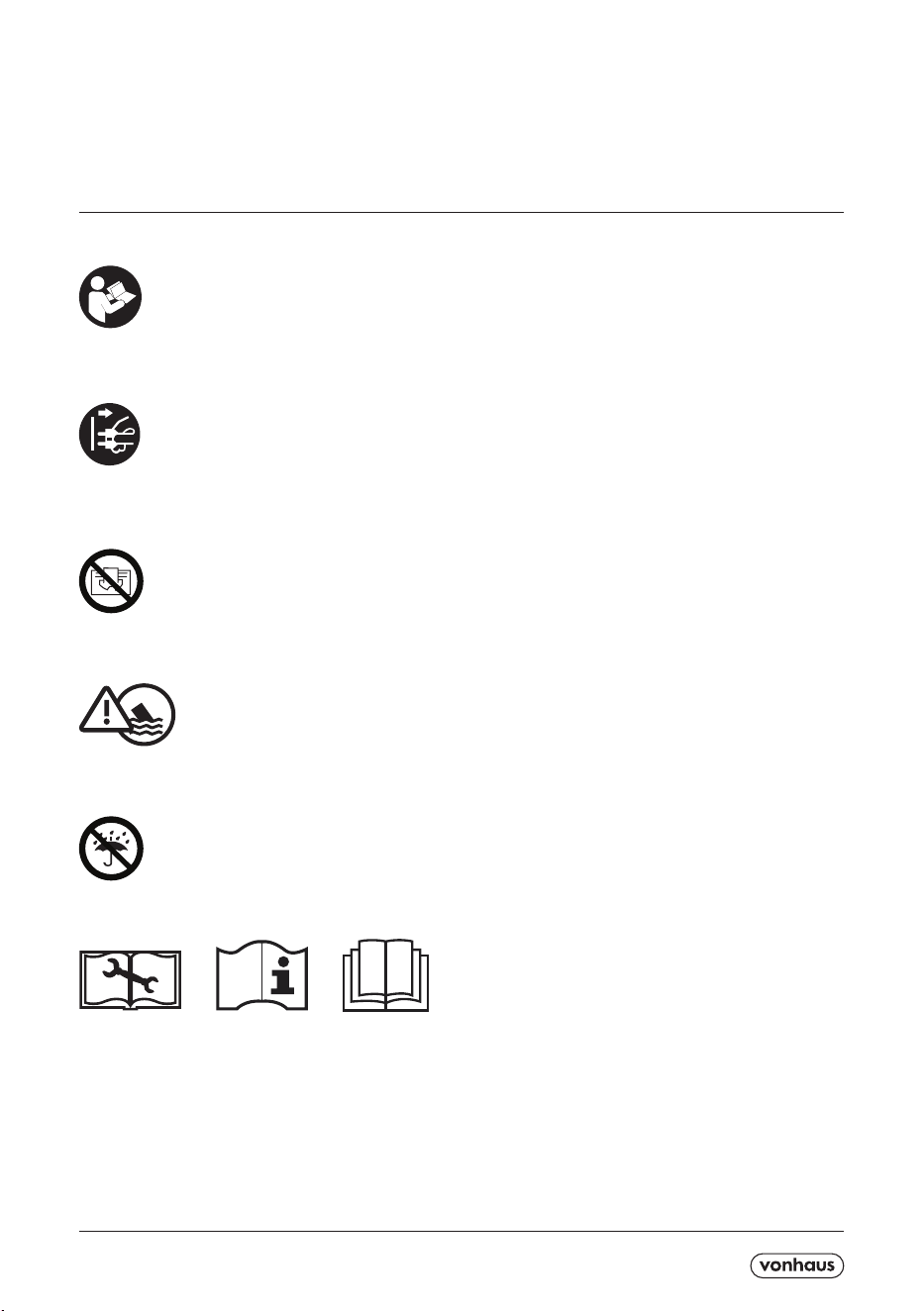
Please read all instructions carefully before use and
retain for future reference.
CAUTION Do not immerse in water.
Do not cover.
Do not use outdoors.
Disconnect appliance from mains before cleaning,
maintenance or after a thermal cut out event.
INTENDED USE.
This Dehumidier is for indoor domestic use only. Do not
use outdoors or on wet surfaces.
This appliance is not intended for use by persons
(including children) with reduced physical, sensory
or mental capabilities, or lack of experience and
knowledge, unless they have been given supervision or
instruction concerning use of the appliance by a person
responsible for their safety.
GENERAL PRECAUTIONS.
When using an electrical appliance, basic precautions
should always be followed, including the following:
Do not allow to be used as a toy. Close attention is
necessary when used near children. Children should
be supervised to ensure that they do not play with the
appliance.
If the appliance is not functioning properly, has been
dropped, damaged, left outdoors, or immersed in liquid,
do not use, contact DOMU Brands Customer Services.
Do not use the appliance if any parts appear to be faulty,
missing or damaged.
Ensure all parts are securely attached before using the
appliance.
CABLES AND PLUGS.
Check to ensure your electricity supply matches that
shown on the rating plate. The appliance must only be
used as rated.
Ensure the unit is disconnected from the main outlet
before cleaning.
The use of an extension cable is not recommended.
Do not let cord hang over the edge of the table or
counter-top where it could be pulled on inadvertently
by children or pets, or touch hot surfaces which could
damage the cord.
Do not pull the cable around sharp edges or corners.
Keep the cord away from heated surfaces.
Turn o all controls before unplugging.
Do not unplug by pulling on cable. To unplug, grasp the
adaptor, not the cable.
Ensure the cable is stored safely to prevent hazards.
The appliance shall be installed in accordance with
local/national wire regulations.
If the supply cable is damaged, it must be replaced by a
qualied engineer in order to avoid a hazard.

A5P | 01
RISK OF PERSONAL INJURY.
Always locate your appliance away from the edge of
any worktop, on a rm, at, heat-resistant surface with
sucient space around all sides.
Ensure that the appliance is at room temperature before
operating.
The appliance is not intended to be operated by means
of an external timer or separate remote-control system.
When using for the rst time, your appliance may give
o a ‘new’ smell and/or smoke. This will dissipate after
a few uses.
Keep hair, loose clothing, ngers, and all parts of body
away from openings and moving parts.
Do not insert any object into openings or cover the
appliance.
Do not obstruct the air inlets/outlets of the appliance.
Do not use in the following locations:-
- Next to a source of re
- An area where oil is likely to splash
- An area exposed to direct sunlight
- An area where water is likely to splash
- Laundry or wet rooms where the humidity is higher
than 85% RH.
- Near a bath, shower or a swimming pool
- In a greenhouse
- An area where ammable gases or liquids are present
Do not dry laundry above the unit to prevent water
entering the Dehumidier.
Do not use in laundry rooms.
Position the unit so the plug is easily accessible.
Do not lift or move the appliance whilst in use.
Do not sit or stand on the unit.
Do not leave the appliance unattended when
plugged in. Unplug from outlet when not in use, and
before performing user maintenance, connecting or
disconnecting attachments or changing accessories.
Do not use means to accelerate the defrosting process.
Do not operate continuously for periods longer than
those marked on the product or indicated in the
instructions.
Do not lubricate any parts, or carry out any maintenance
or repair work other than that shown in this manual, or
as advised by the DOMU Brands Customer Services.
Use only as described in this manual and do not exceed
maximum capacity (1000ml).
The appliance shall be stored in a room without
continuously operating ignition sources (for example,
open ames, gas appliances and electric heaters).
Store so as to prevent mechanical damage from
occurring.
Do not pierce or burn.
Be aware that refrigerants may not contain an odour.
The appliance should be installed, operated and stored
in a room with a oor area lager than 4m
2.
The appliance shall be compliant with the national gas
regulations.
Servicing shall be performed only as recommended by
the manufacturer.
Any person who is involved with working on or breaking
into a refrigerant circuit should hold a current, valid
certicate from an industry-accredited assessment
authority which authorises their competence to handle
refrigerants safely in a accordance with an industry
recognised assessment specication.
Servicing shall only be performed as recommended by
the equipment manufacturer. Maintenance and repair
requiring the assistance of other skilled personnel,
shall be carried out under the supervision of the person
competent in the use of ammable refrigerants.
Use only DOMU Brands recommended attachments.
The appliance is lled with ammable gas R290.
Any repairs that are needed, please contact the
nearest authorized service centre and strictly follow
manufacturer’s instructions only.
Failure to follow these instructions will invalidate any
warranty.
Energy/Safety protection
Do not cover or restrict the air ow of the inlet/outlet
grills.
For maximum performance ensure the minimum
distance from walls or objects is be 20cm to
ensure air circulation.
Keep lters and grills clean.
When in use do not open windows or doors.
Place the unit of a hard/at
WARNING FOR DISPOSAL:
It is prohibited to dispose of this appliance in
domestic household waste. For disposal there
are several possibilities
Do not dispose this product as unsorted
municipal waste. Collection of such waste
separately for special treatment is necessary.
The municipality has established collection
systems,where electronic waste can be
disposed of at least free of charge to the user.
The manufacturer will take back the old
appliance for disposal at least free of charge to
the user.
As old products contain valuable resources.
They can be sold to scrap metal dealers..
Wild disposal of waste in forests and
landscapes end angers your health when
hazardous substances leak into the ground-
water and nd their way into the food chain.
Meaning of crossed out wheeled dustbin.
Do not dispose of electrical appliances as
unsorted municipal waste,use separate
collection facilities contact you local
government for information regarding the
collection systems available If electrical
appliances are disposed of in landlls of
dumps. Hazardous substances can leak into
the groundwater and get into the food-
chain,damaging your health and well-being.
The dehumidication capacity is rated at a
room temperature of 30℃ with a MAX relative
humidity of 80%.
If specications are improved after this pointing,
the product nameplate will reect the new
specications.
The operational temperature is in the range of
15℃ to 50℃.
If the room temperature is outside of this range,
the unit will not operate normally.
TECHNICAL SPECIFICATION
Input: 220-240V 50/60Hz
Rated Power: 650W
Working Capacity: 7L/D (30ºC,RH80%)
A5P | 01
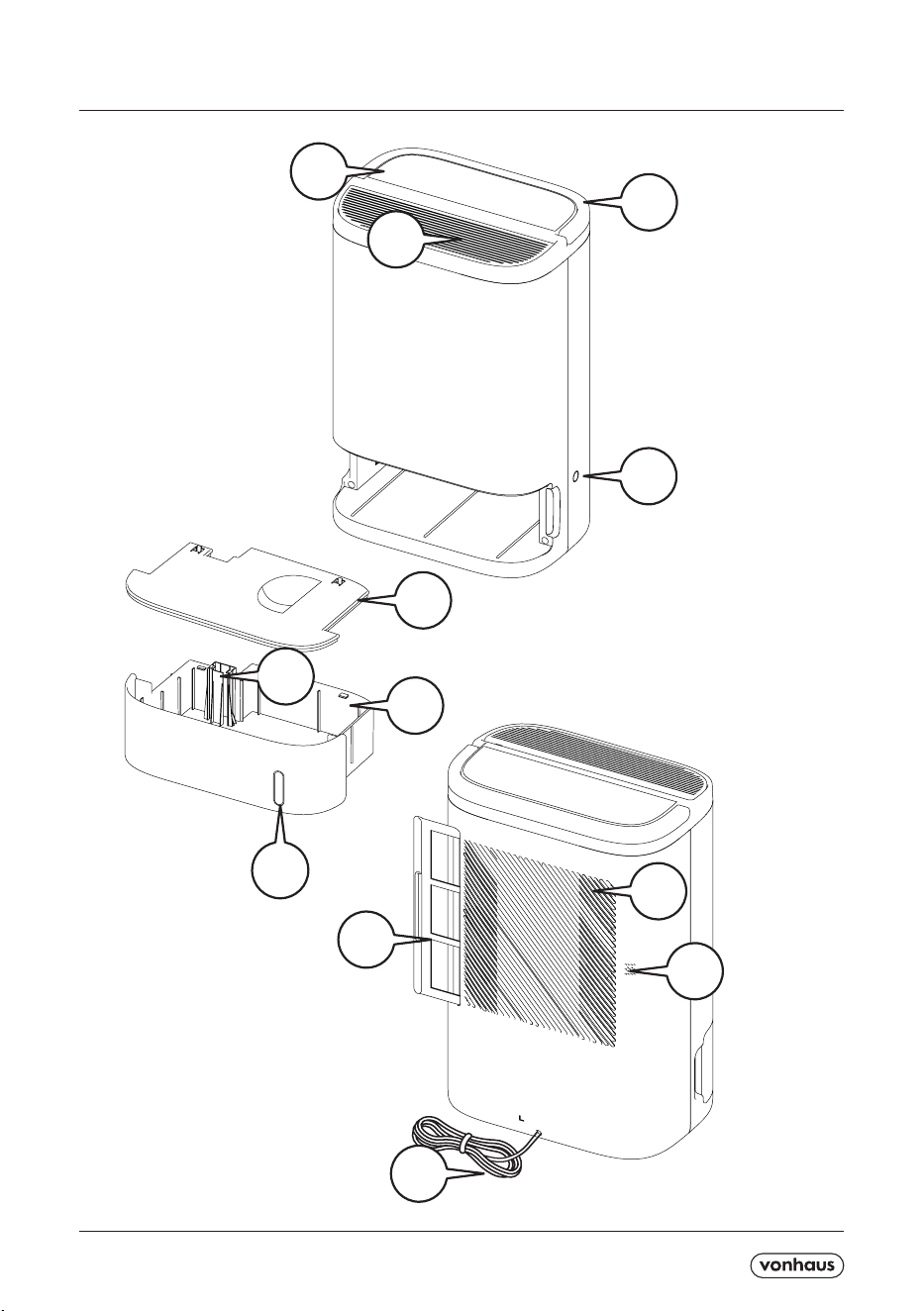
COMPONENTS / COMPOSANTS / KOMPONENTEN / COMPONENTES / COMPONENTI /COMPONENTE
1. Handle
2. Control Panel
3. Air Outlet.
4. Continuous Drainage Hole.
5. Water Tank Cover.
6. Float.
7. Water Tank.
8. Water Level Window.
9. Air Inlet.
10. Filter.
11. Humidity Sensor.
12. Power Cord
10
3
9
1
2
4
5
7
8
6
11
12
A5P | 01
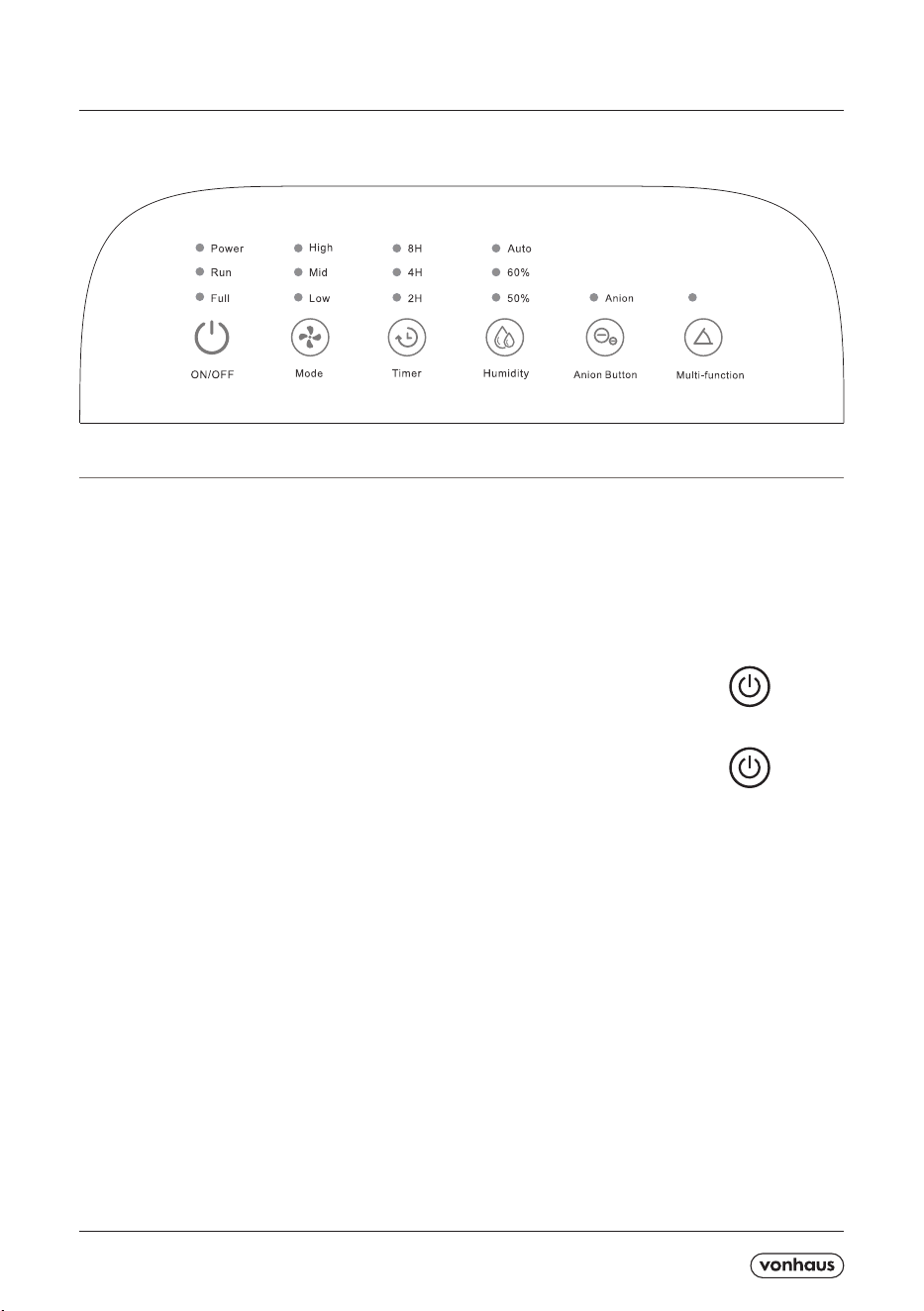
CONTROL PANEL
Connect the Power Cord to a suitable mains outlet.
All of the LED indicators will illuminate before extinguishing.
At the same time, a buzzer sound will be heard.
The Power Indicator will remain illuminated red.
POWER ON :
Press the button to switch the Unit on. The Unit will start dehumidifying and the
wind deectors will move up.
POWER OFF :
Press the Power Button again to switch the Unit o. The Power Indicator light will
illuminate red and all other indicator lights will extinguish. The Unit will remain in
operation for 4 minutes before powering down.
BASIC OPERATION
Auto
A5P | 01
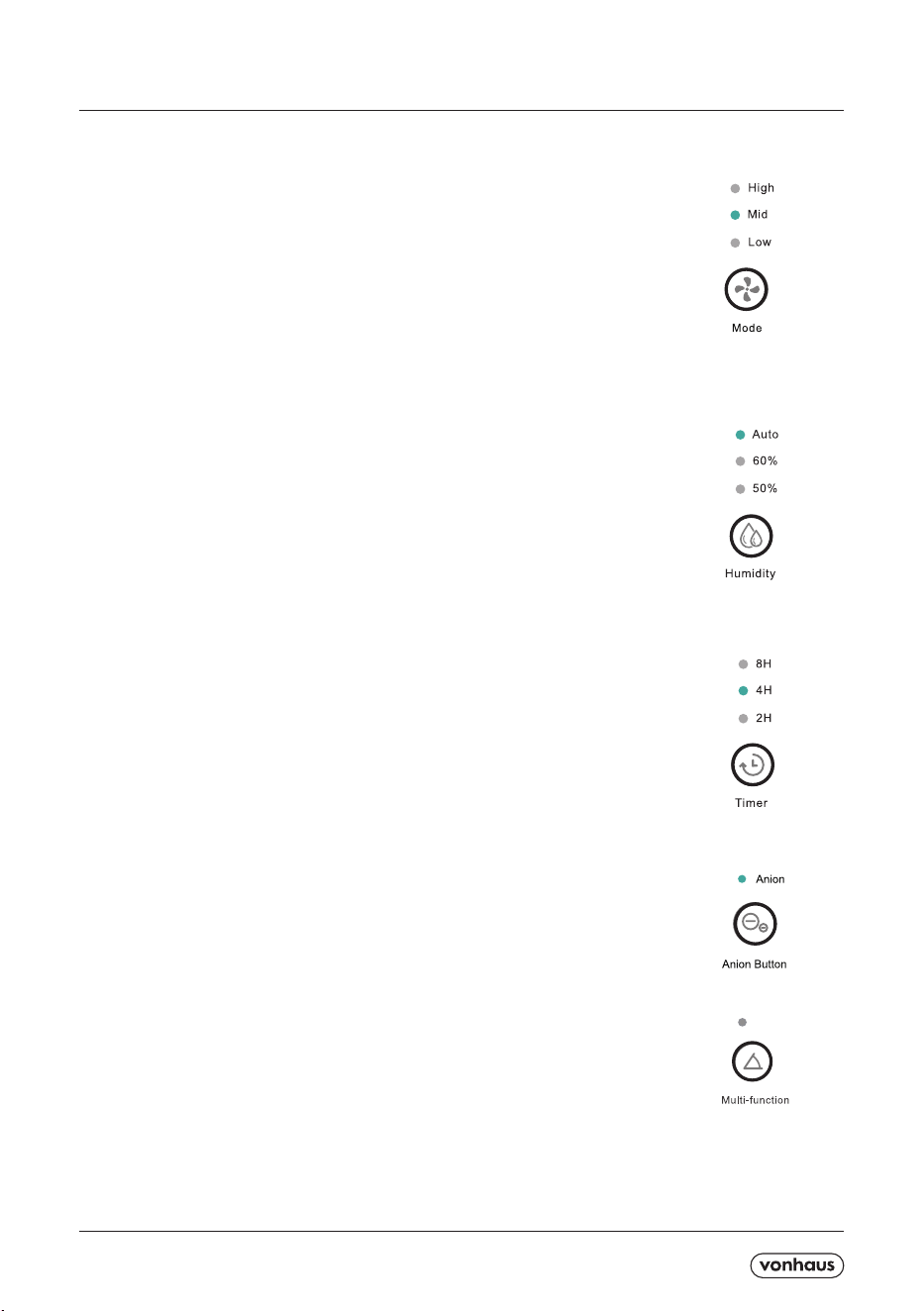
1 - MODE SETTING :
Press the Mode Button to adjust the wind speed among Low, Mid and High mode.
The corresponding indicator illuminates.
Press the button again to start from the beginning.
Note - When the Unit dehumidies in any humidity mode, the user can set the wind
speed and time at will.
2 - HUMIDITY SETTING :
(1) Press the Humidity Button to dehumidify the condition of RH50%, RH60% or
Auto. The corresponding indicator will illuminate.
Press the button again to start from the beginning.
(2) When the environmental humidity is lower than the setting humidity, the Unit will
stop dehumidifying.
When the environmental humidity is higher than the setting humidity, the Unit will
start dehumidifying again.
Note - When the Unit is in the status of automatic dehumidication, its operation
wouldn’t be eected by the change of environmental humidity.
3 - TIMING SHUTDOWN :
In the condition of working, press the Timer Button to set 2h, 4h and 8h timer or to
cancel.
Press again to start from the beginning.
(1) The Unit will auto-o when the Water Tank is full even if the Unit is timing and
the remaining time will still be recorded. After emptying the Water Tank, the Unit will
keep working in remaining hours.
(2) When the Water Tank is NOT full, the function of timing could be set in any timer.
If the Unit stops working or cuts o, it will need to be reset.
4 - ANION BUTTON :
Press the Button to switch on Anion mode.
(Removes dust and smells by creating a static charge around the airborne
contaminants that are oating around your room)
Press again to switch it o.
5 - AUTO SETTING :
During operation, the position of the wind deector can be adjusted using the
Swing Button (fan setting).
Press the Button to set the Unit swing or stop at any angle within 70 degrees.
6 - ANTI-DUMP PROTECTION :
The Unit is equipped with an anti-tip switch which automatically switches the Unit
o if it is tilted or tipped.
BUTTON OPERATION
Auto
A5P | 01
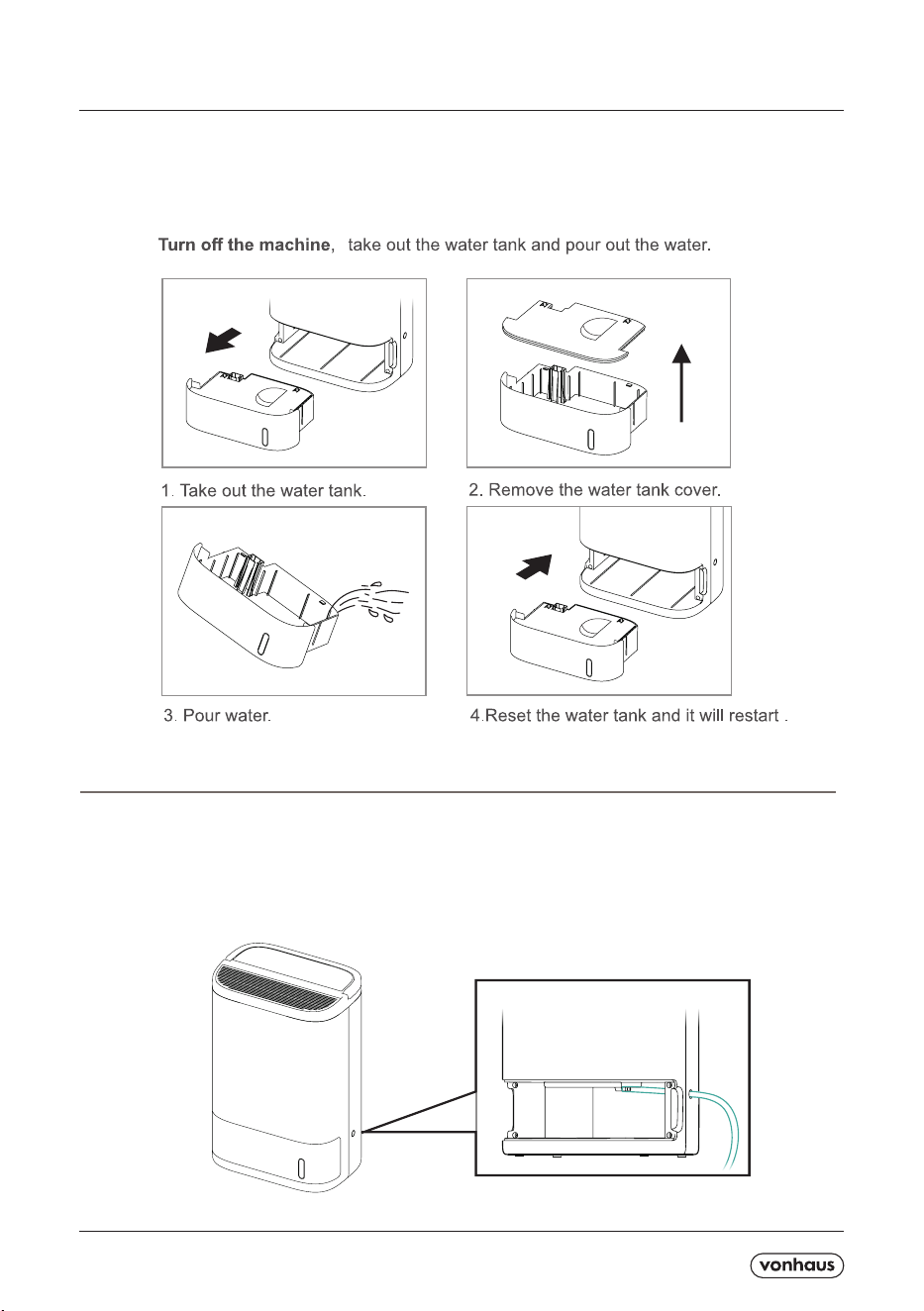
WATER TANK & WATER DISPOSAL
CONTINUOUS DRAINAGE
The Water Tank has a maximum capacity of 2.5L, with 7L working capacity. When
the Tank is full, the Unit will stop dehumidifying immediately. The ‘FULL’ indicator will
ash to indicate the Water Tank needs to be emptied.
1- Turn of the Unit and remove the Water Tank.
2- Cut o the plastic block that is plugging the Drainage Hole.
3 - Extend the drain pipe from inside the Unit, through the new Drainage Hole and into the Water Tank.
4 - After resetting the Water Tank, it will restart to dehumidify.
If you turn the Unit back on without resetting the Water Tank, the Unit will remain in a protective status
(water full indicator will continue to ash)
A5P | 01
CLEANING AND MAINTENANCE
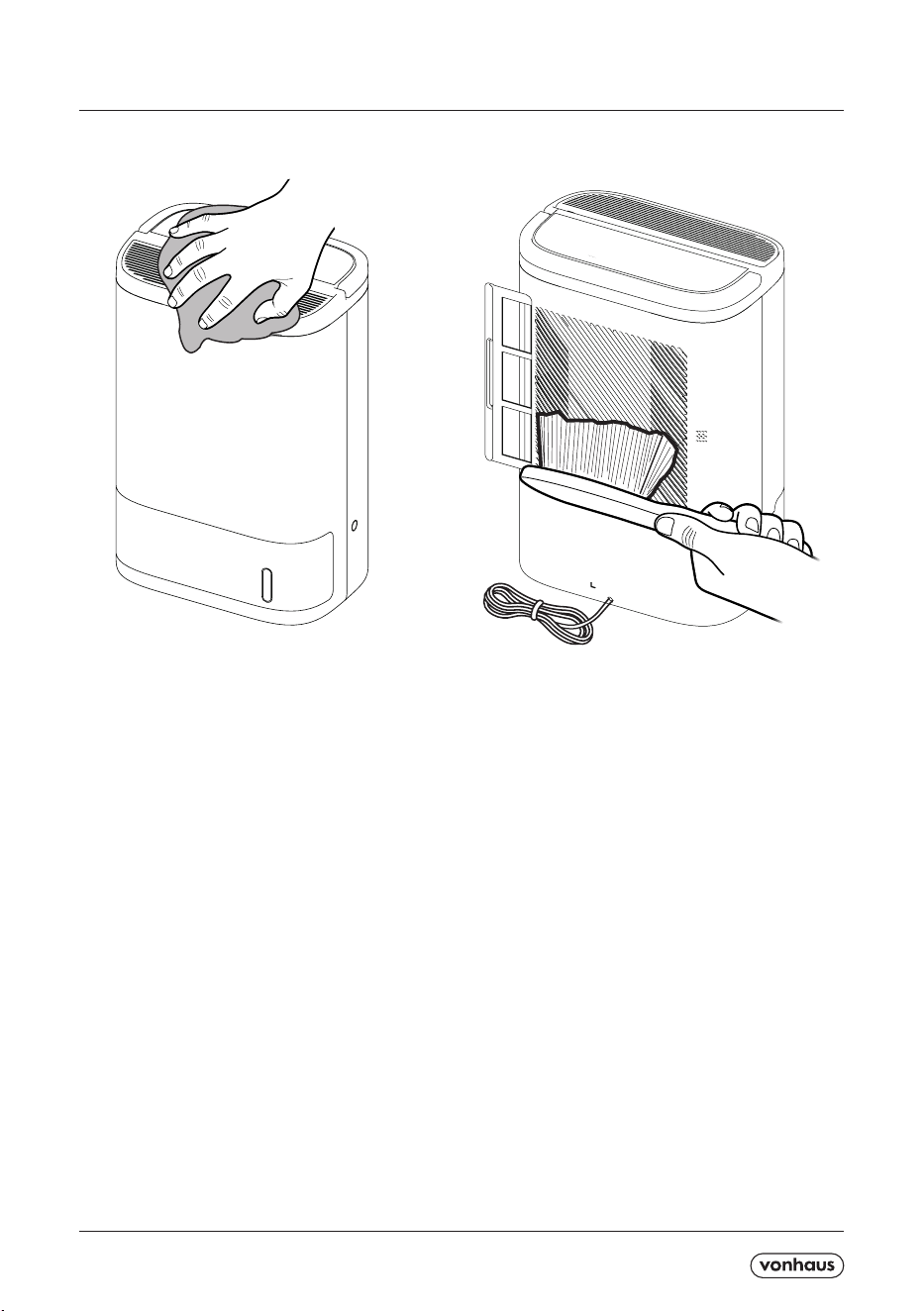
1- Turn o the Unit and disconnect from the mains outlet.
2- Discard of any collected water in the Water Tank.
3- Wipe down the outer surfaces with a soft damp cloth to remove any dust.
4 - Brush or vacuum the Inlet/outlet vents if they are clogged with any dirt or dust.
5- Remove the lter and remove any dust with a brush or vacuum.
The lter can be washed in warm, soapy water and left to air dry.
IMPORTANT! Ensure the lter is completely dry before reinserting into the Unit.
A5P | 01
TROUBLESHOOTING
No power to the unit
Power Cord may be damaged. Contact Customer services.
Ensure Water Tank is not full before use.
Only small amounts of water being
collected
Doors and windows may be open. Seal the room from external areas.
Water Tank has not been fully inserted.
Inlet blocked. Disconnect from mains outlet and remove blockage/ clean
lter.
The unit leaks
Water Tank is full, empty tank and re-attach.
The Unit is positioned on an uneven surface. Reposition to a suitable area.
Display is illuminated but unit does not
operate.
The chosen RH level is higher than the RH level of the room. Reduce the
setting.
Air Flow is weak.
Filter may be blocked. Use a vacuum to clear away any collected dust.
Unit is noisy
The Unit is positioned on an uneven surface. Reposition to a suitable area.
Inner fan may be damaged. Contact Customer Service for assistance.
No water is being collected
The Unit is set to a lower level than the humidity in the room.
Temperature too low for water extraction. Increase the temperature of the
room.
Check the Unit for blockages. Ensure the Unit is not too close to walls or
furniture.
A5P | 01
DISPOSAL INFORMATION Please recycle where
facilities exist. Check with your local authority for
recycling advice.
WARRANTY To register your product and nd out if you
qualify for a free extended warranty please go to
www.vonhaus.com/warranty.
Please retain a proof of purchase receipt or statement
as proof of the purchase date. The warranty only applies
if the product is used solely in the manner indicated
in the warnings page of this manual, and all other
instructions have been followed accurately. Any abuse
of the product or the manner in which it is used will
invalidate the warranty. Returned goods will not be ac-
cepted unless re-packaged in its original packaging and
accompanied by a relevant and completed returns form.
This does not aect your statutory rights. No rights
are given under this warranty to a person acquiring the
appliance second-hand or for commercial or communal
use.
COPYRIGHT All material in this instruction manual are
copyrighted by DOMU Brands. Any unauthorised use
may violate worldwide copyright, trademark, and other
laws.
C
THANK YOU
Thank you for purchasing your product/appliance.
Should you require further assistance with your
purchase, you can contact us at
VonHaus is a registered trademark of DOMU Brands Ltd.
Made in China for DOMU Brands. M24 2RW.