Wireless Remote Switch H1 User Manual
Product Overview
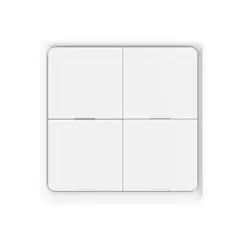
The Aqara Wireless Remote Switch H1 (Double Rocker) is a new
wireless remote switch. It supports single press in the high-speed
click mode, and 7 functions in the multi-function mode including
single press le button, single press right button, double press
le button, double press right button, long press le button and
long press right button. It is able to be placed or attached
anywhere indoors. It also works with the Aqara hub and other
Aqara smart devices to implement a variety of smart scenes.
* An Aqarahub is required. Some functions require specific models of the Aqara
hub. Please visit www.aqara.com/support for more details.
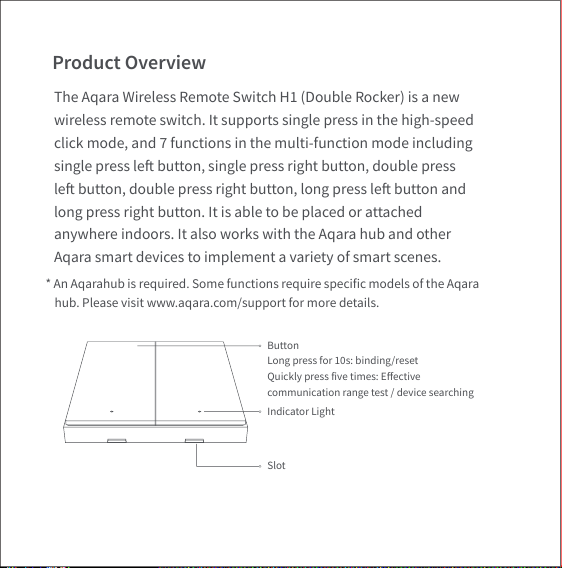
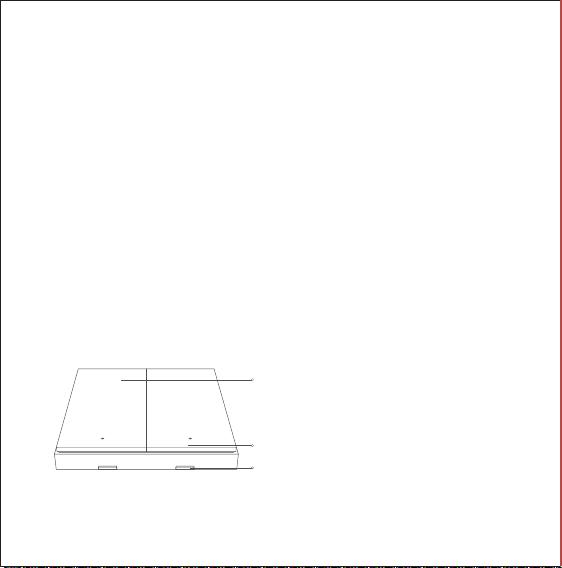
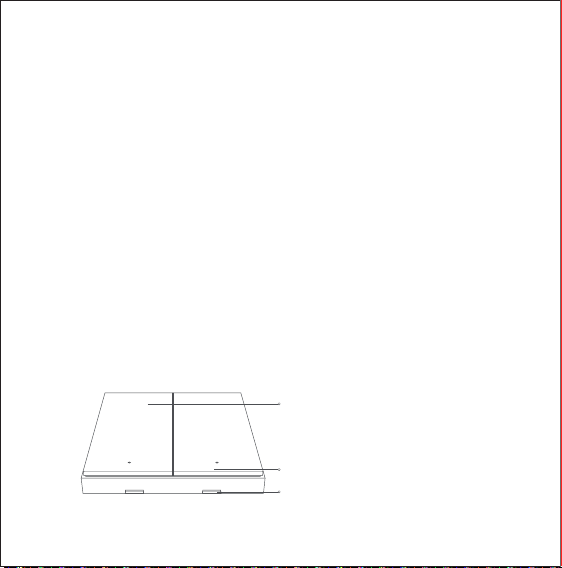
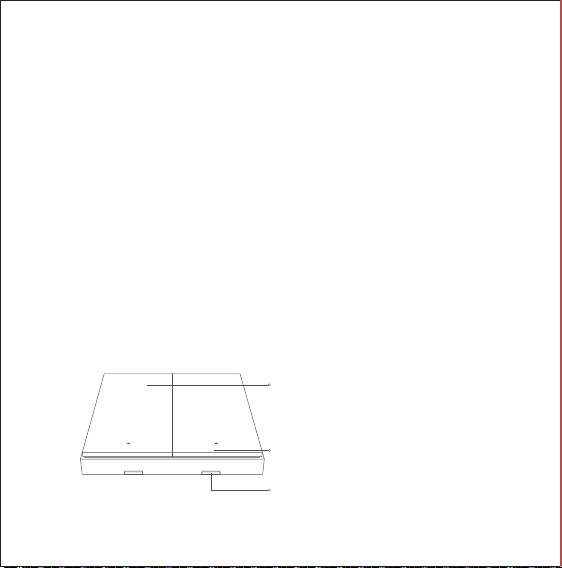
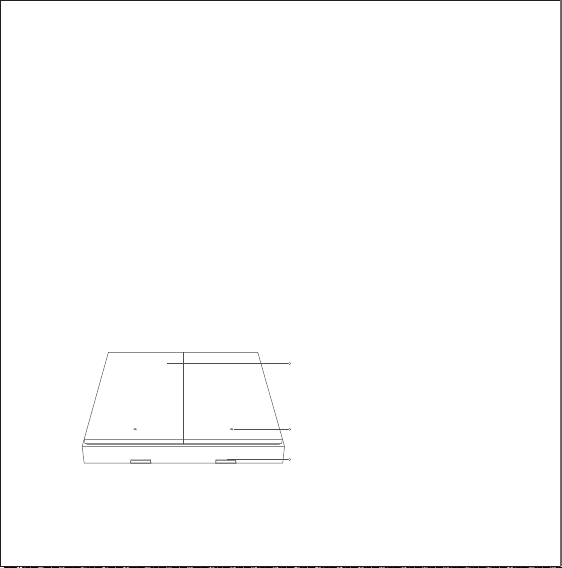
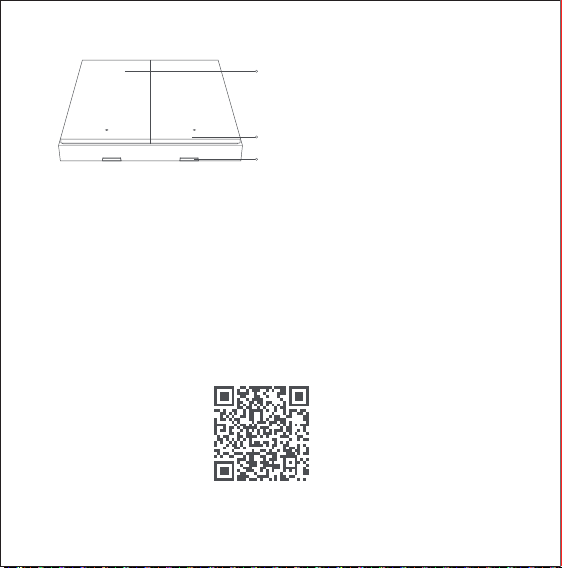
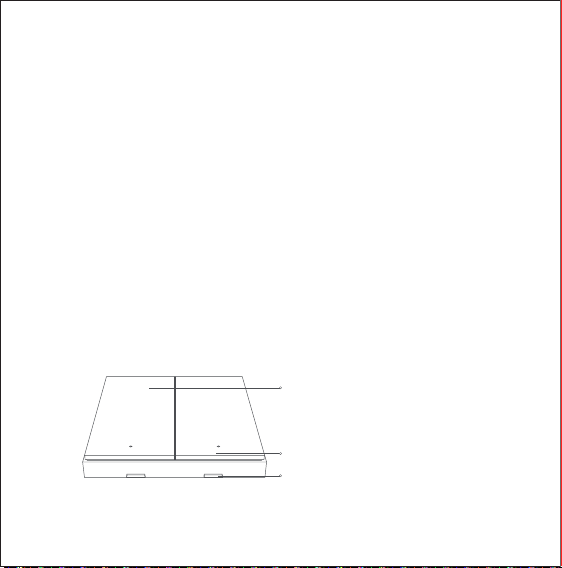
Slot
Indicator Light
Button
Long press for 10s: binding/reset
Quickly press five times: Effective
communication range test / device searching
Quick Setup
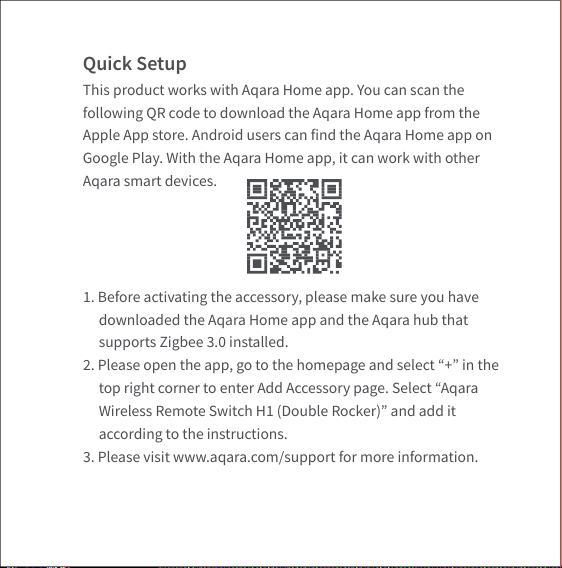
This product works with Aqara Home app. You can scan the
following QR code to download the Aqara Home app from the
Apple App store. Android users can find the Aqara Home app on
Google Play. With the Aqara Home app, it can work with other
Aqara smart devices.
1. Before activating the accessory, please make sure you have
downloaded the Aqara Home app and the Aqara hub that
supports Zigbee 3.0 installed.
2. Please open the app, go to the homepage and select “+” in the
top right corner to enter Add Accessory page. Select “Aqara
Wireless Remote Switch H1 (Double Rocker)” and add it
according to the instructions.
3. Please visit www.aqara.com/support for more information.
Installation Methods
* To ensure stable connections, please avoid setting up the device on metallic
surfaces.
* If adding fails, please move the hub closer to the product and try again.
* Press the switch quickly for 5 times, if the hub makes voice prompts, it
indicates that the accessory can communicate effectively with the hub.
* Different hubs have different ways to indicate the effective connection.
Please refer to the instructions of your model of the Aqara hub.
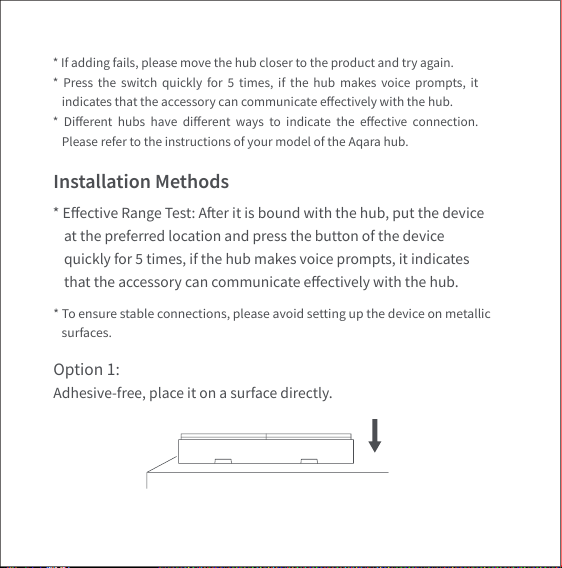
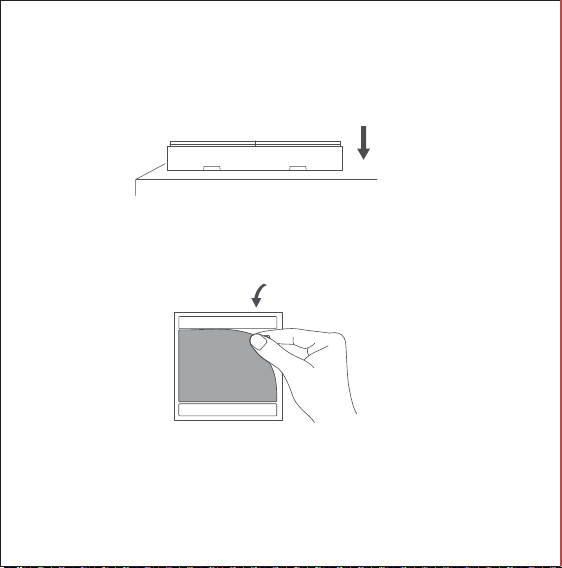
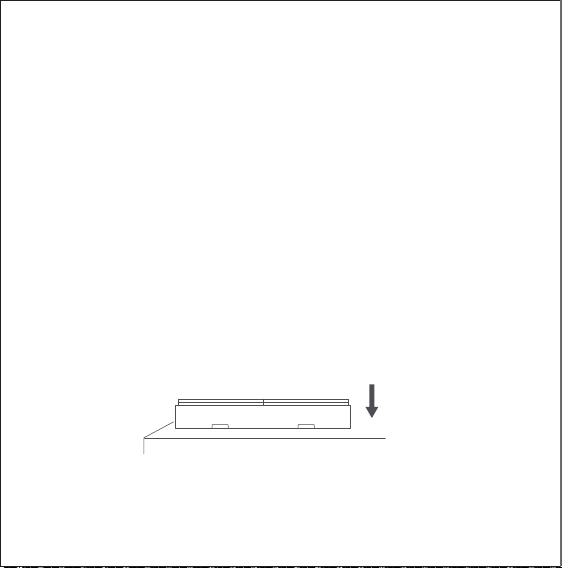
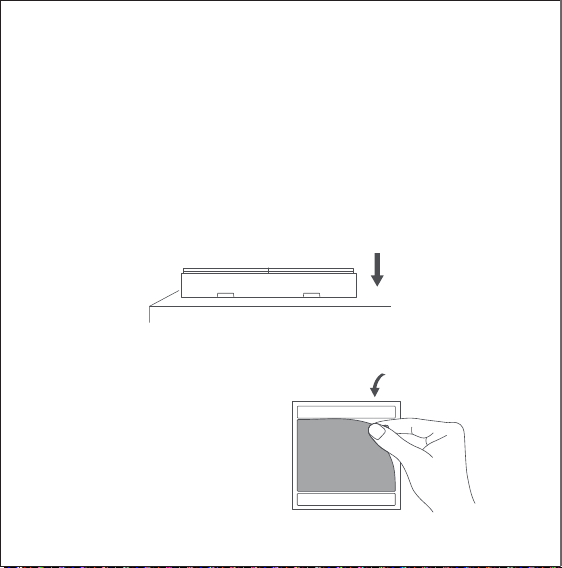
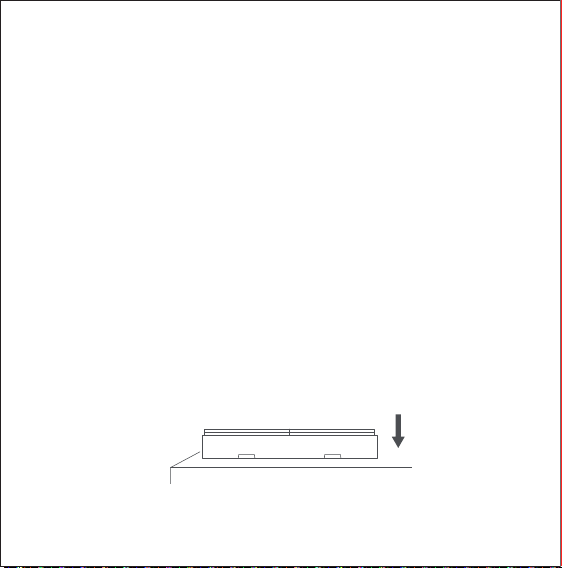
Option 1:
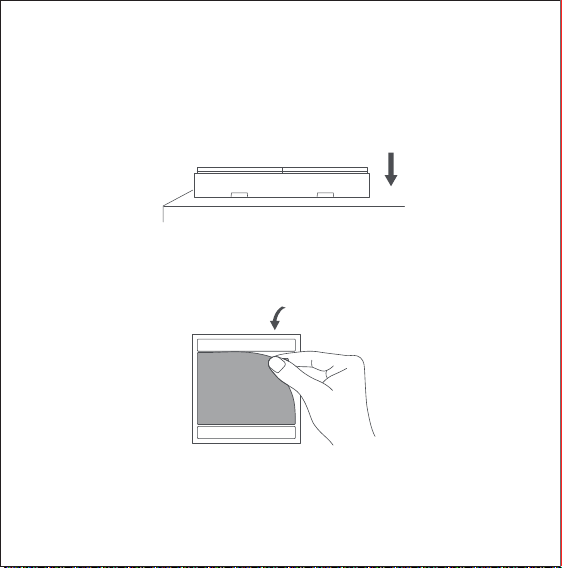
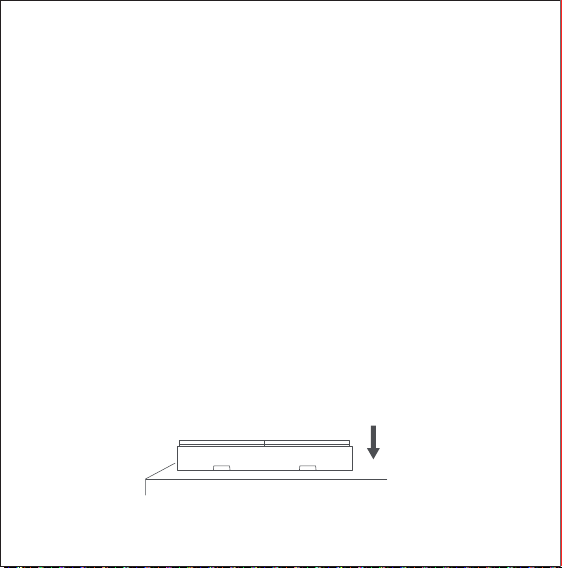
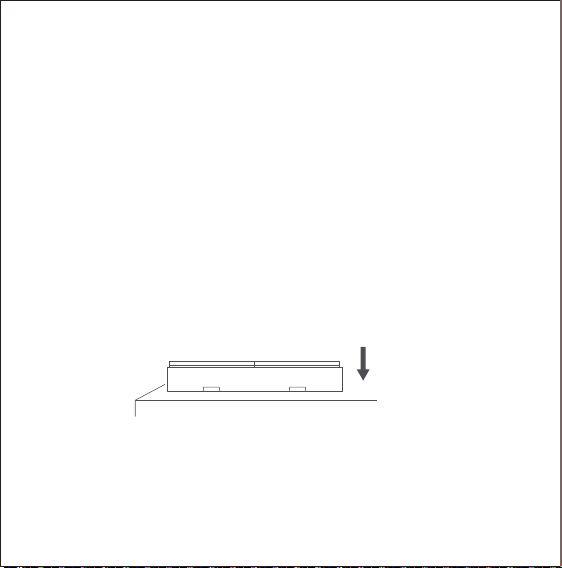
Adhesive-free, place it on a surface directly.
* Effective Range Test: Aer it is bound with the hub, put the device
at the preferred location and press the button of the device
quickly for 5 times, if the hub makes voice prompts, it indicates
that the accessory can communicate effectively with the hub.
*Please keep the surface clean and dry.
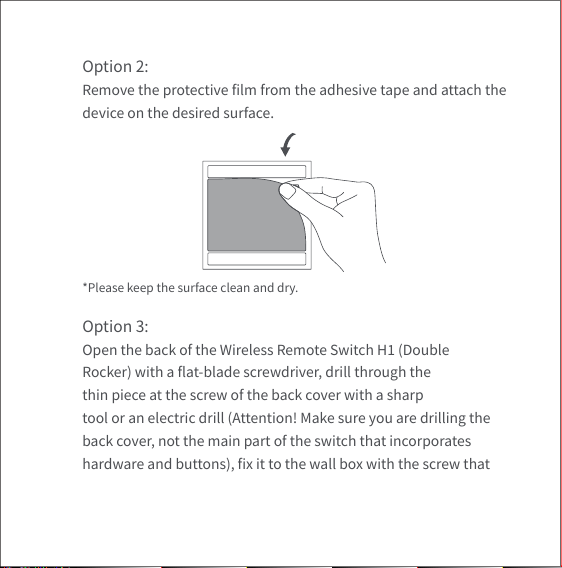
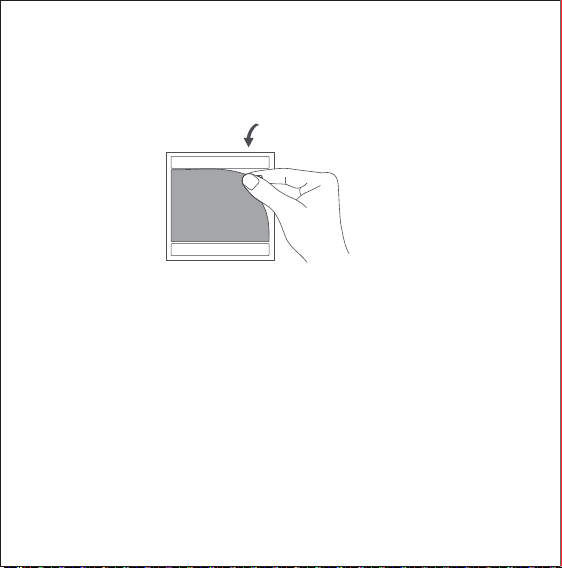
Option 2:
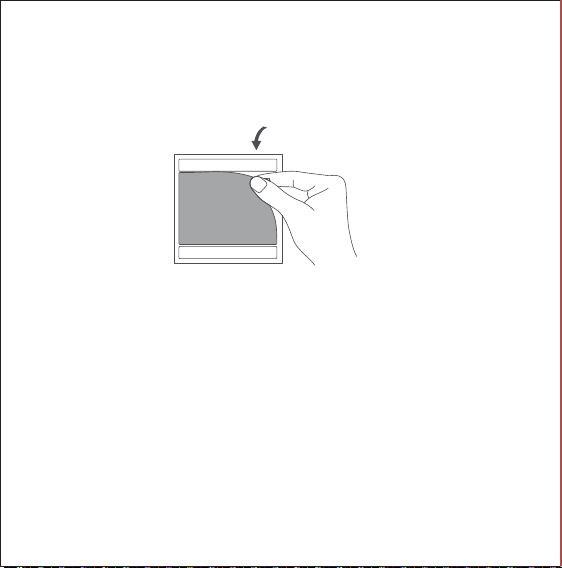
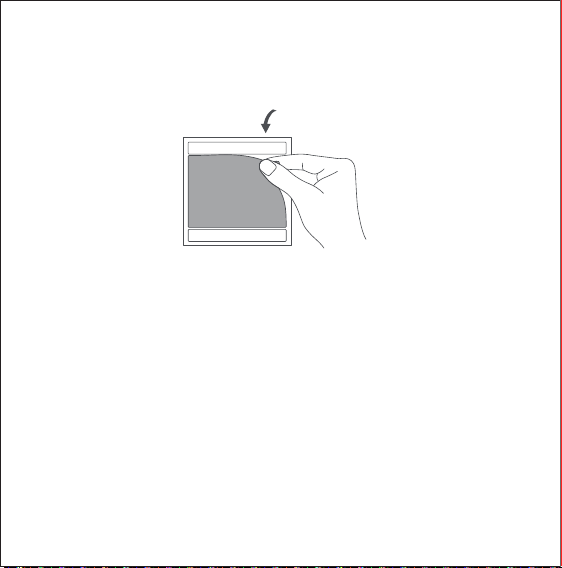
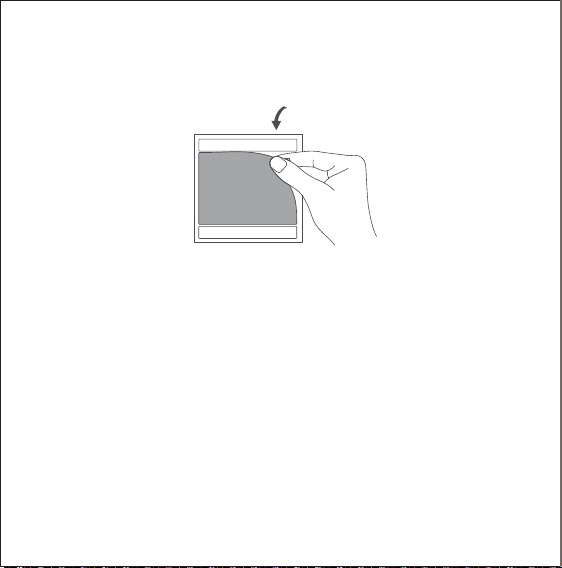
Remove the protective film from the adhesive tape and attach the
device on the desired surface.
Option 3:
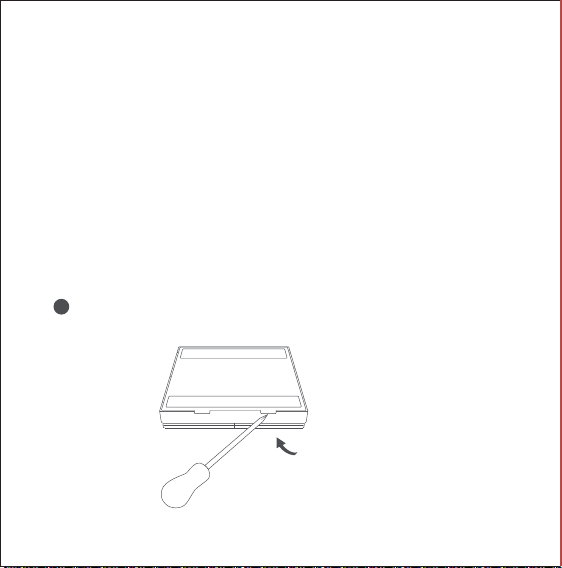
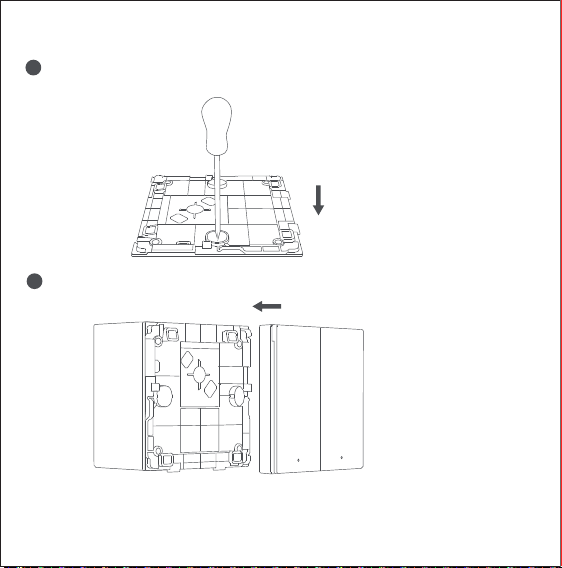
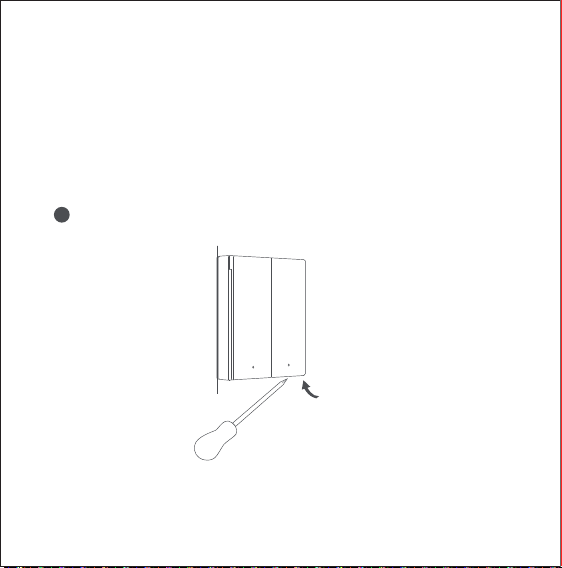
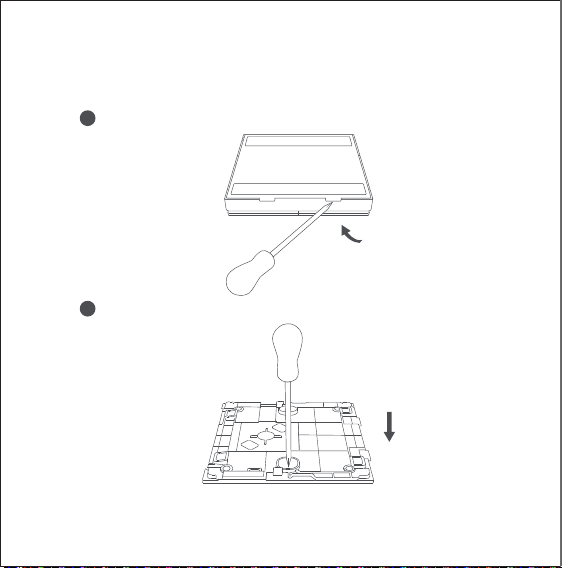
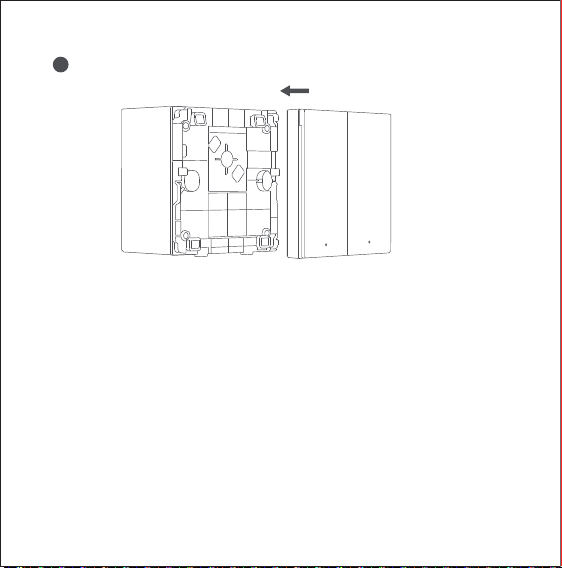
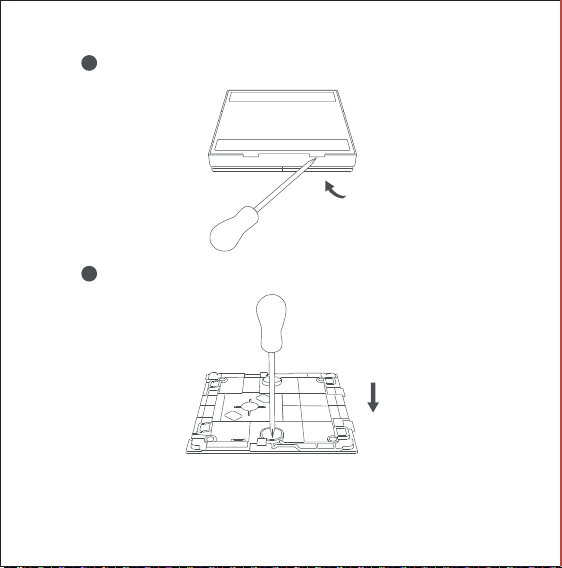
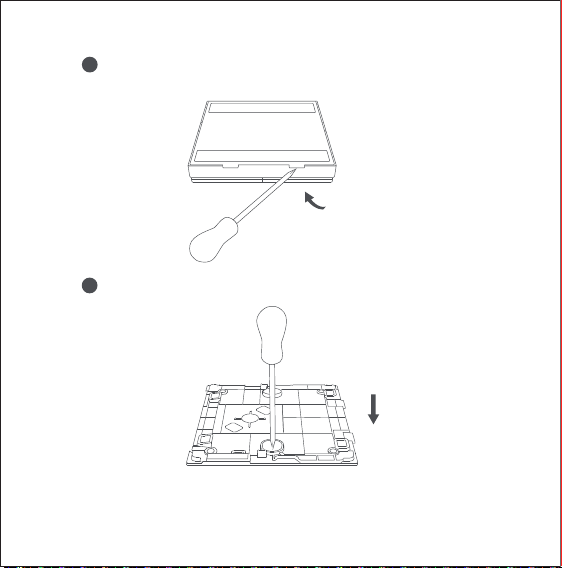
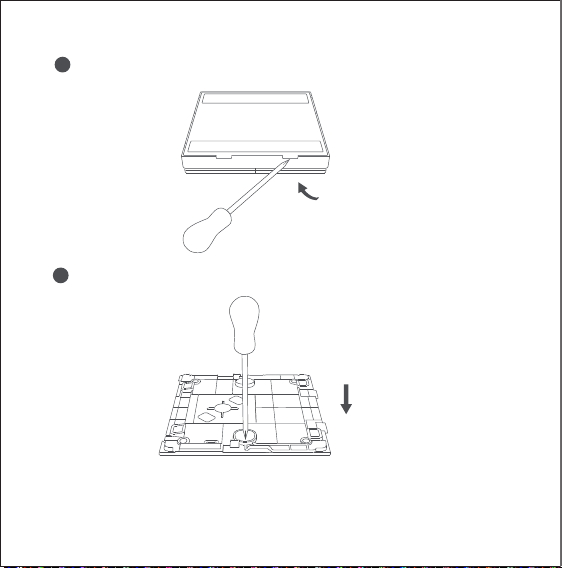
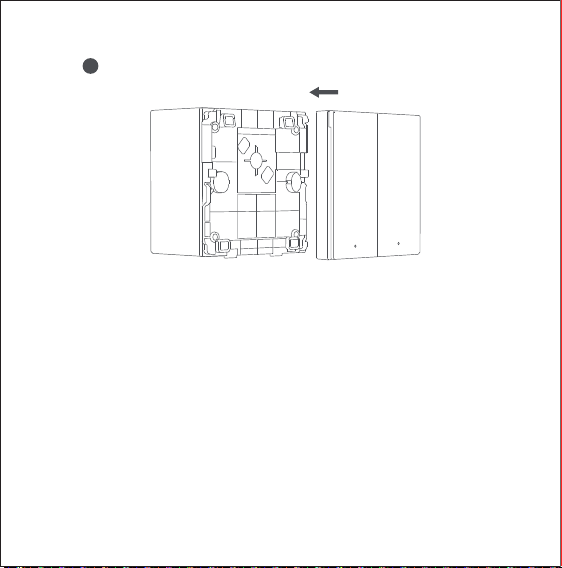
Open the back of the Wireless Remote Switch H1 (Double
Rocker) with a flat-blade screwdriver, drill through the
thin piece at the screw of the back cover with a sharp
tool or an electric drill (Attention! Make sure you are drilling the
back cover, not the main part of the switch that incorporates
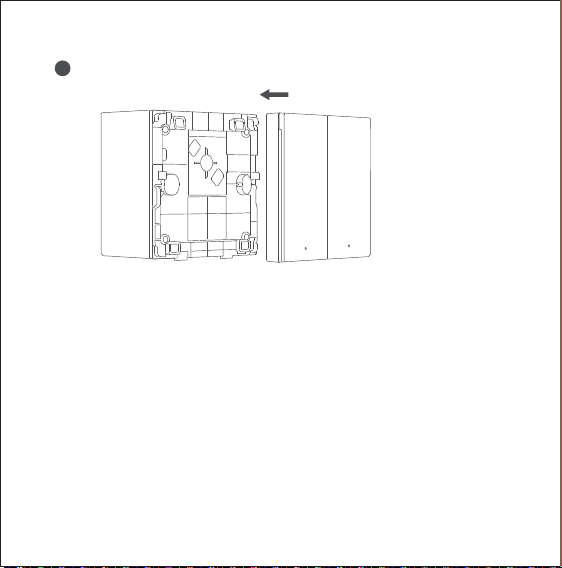
hardware and buttons), fix it to the wall box with the screw that
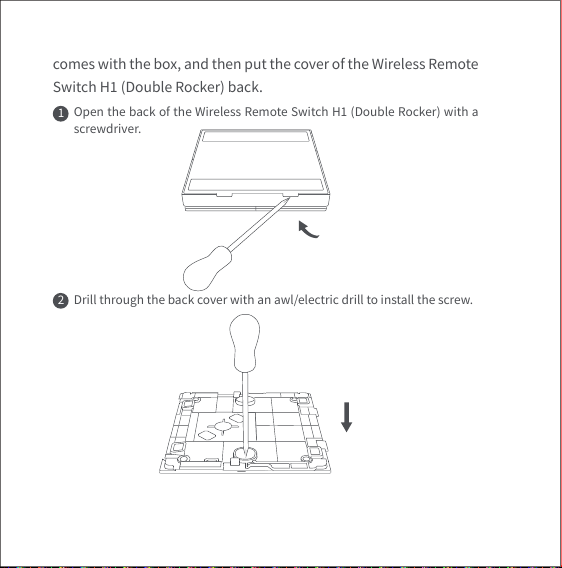
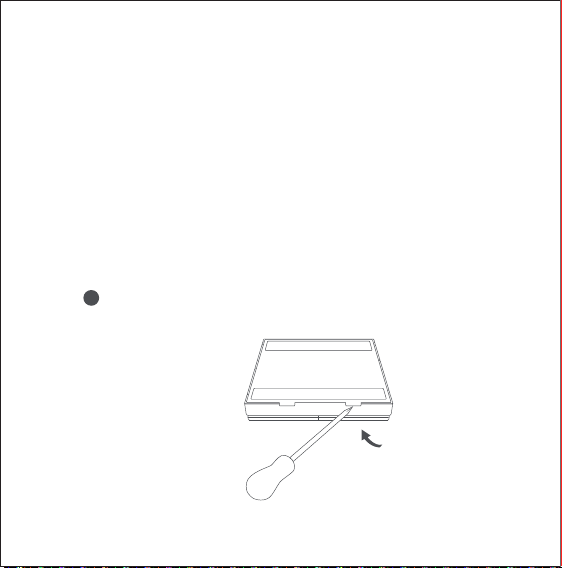
Open the back of the Wireless Remote Switch H1 (Double Rocker) with a
screwdriver.
1
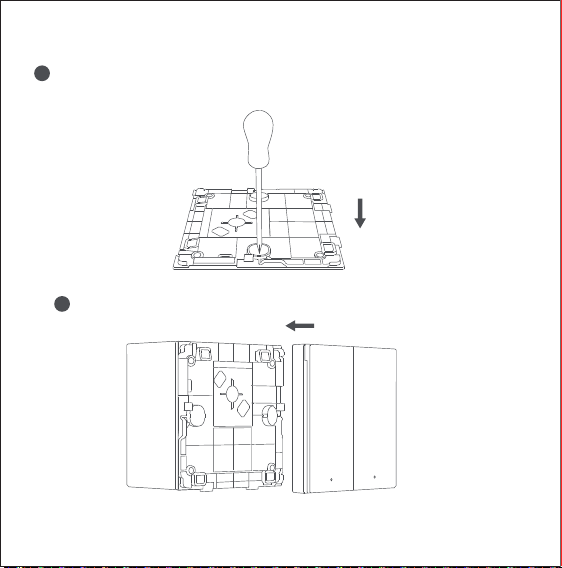
Drill through the back cover with an awl/electric drill to install the screw.
2
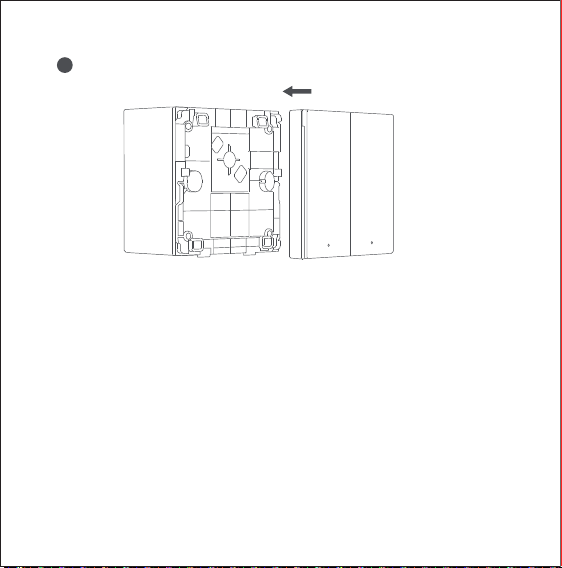
comes with the box, and then put the cover of the Wireless Remote
Switch H1 (Double Rocker) back.
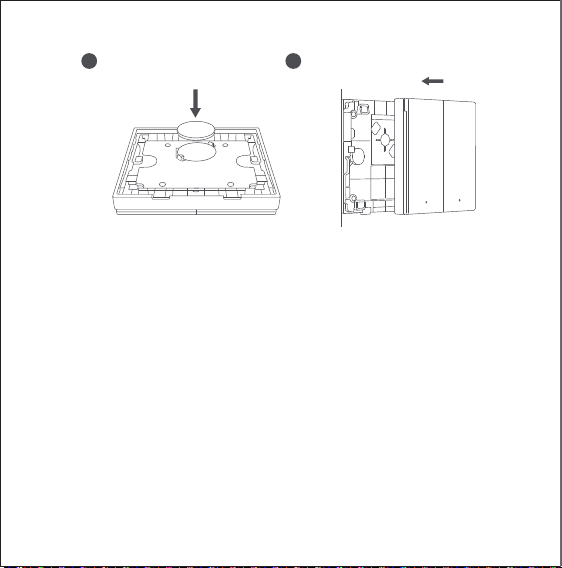
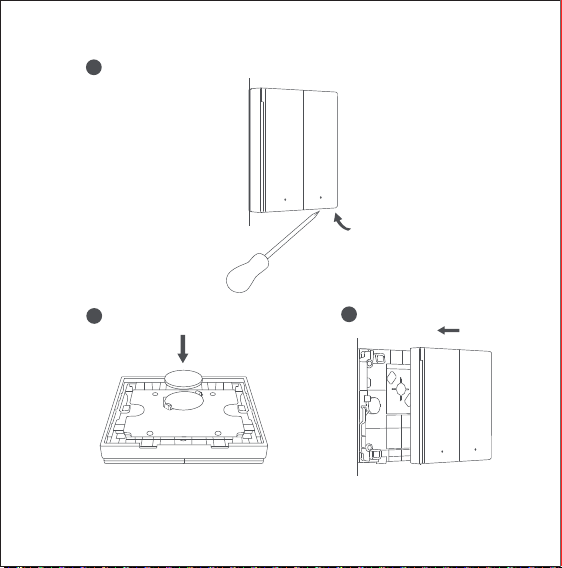
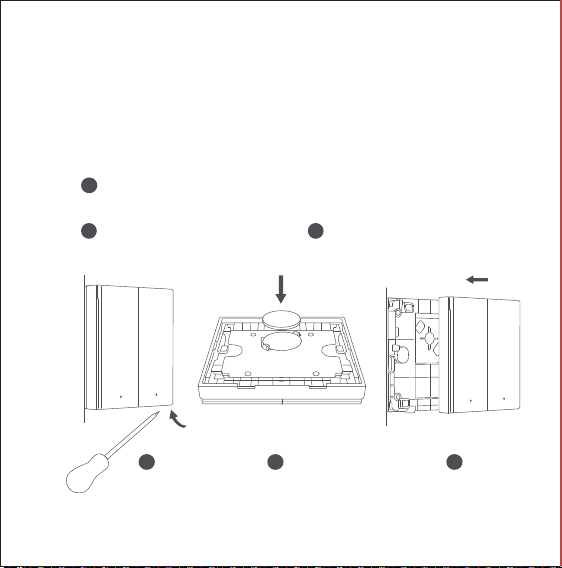
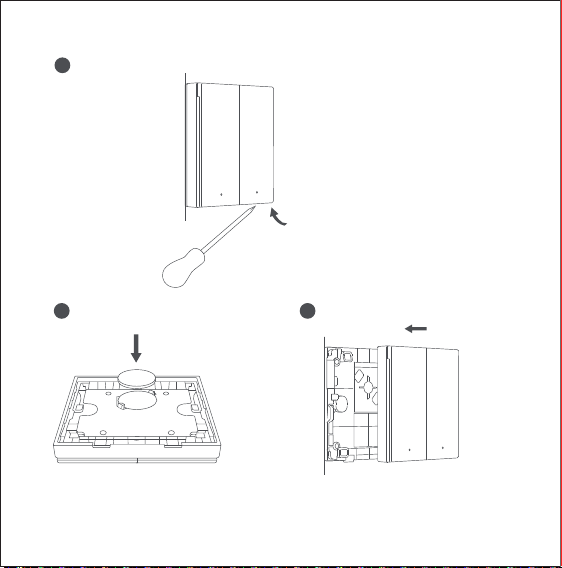
Battery Replacement
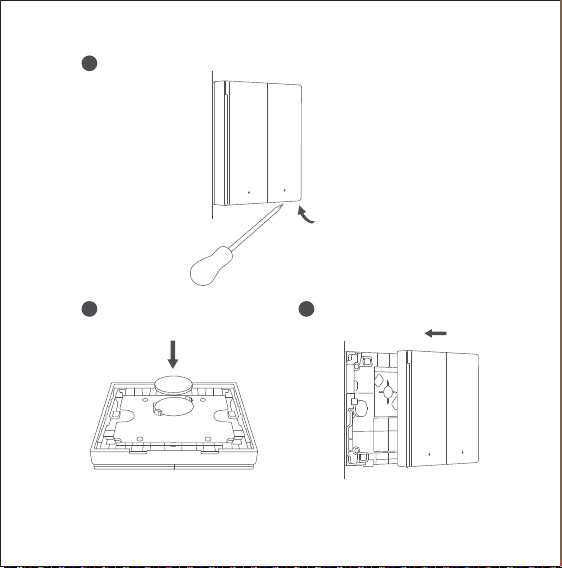
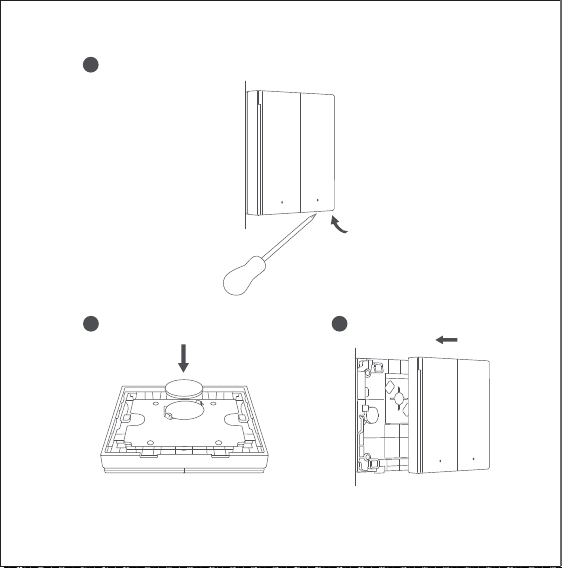
Open the back of the Wireless Remote Switch H1 (Double Rocker)
with a flat-blade screwdriver, remove the old battery and replace
it with a new battery (battery model: CR2450), and then put the
cover back.
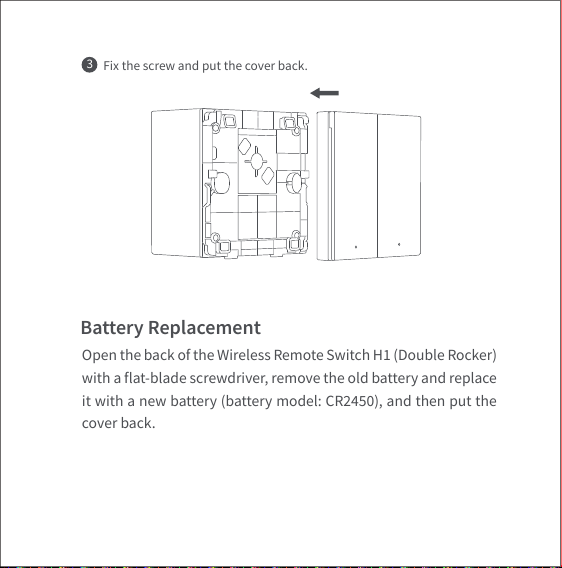
Fix the screw and put the cover back.
3
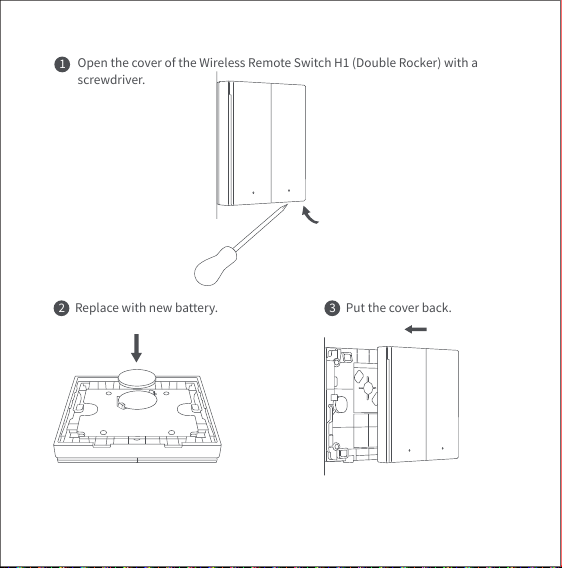
Open the cover of the Wireless Remote Switch H1 (Double Rocker) with a
screwdriver.
1
Replace with new battery.
2 Put the cover back.3
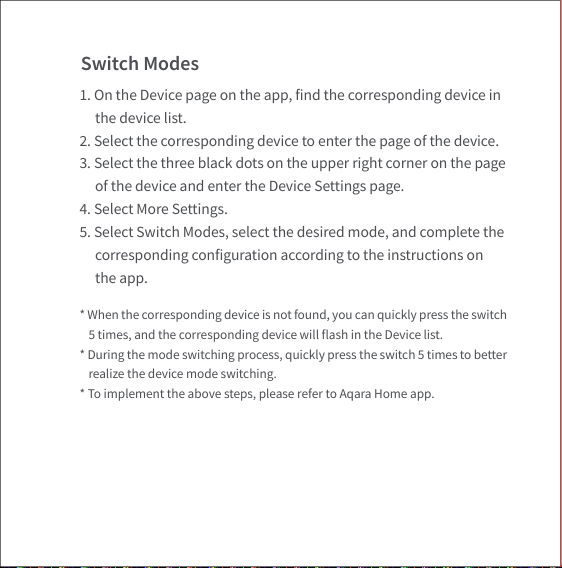
Switch Modes
1. On the Device page on the app, find the corresponding device in
the device list.
2. Select the corresponding device to enter the page of the device.
3. Select the three black dots on the upper right corner on the page
of the device and enter the Device Settings page.
4. Select More Settings.
5. Select Switch Modes, select the desired mode, and complete the
corresponding configuration according to the instructions on
the app.
* When the corresponding device is not found, you can quickly press the switch
5 times, and the corresponding device will flash in the Device list.
* During the mode switching process, quickly press the switch 5 times to better
realize the device mode switching.
* To implement the above steps, please refer to Aqara Home app.
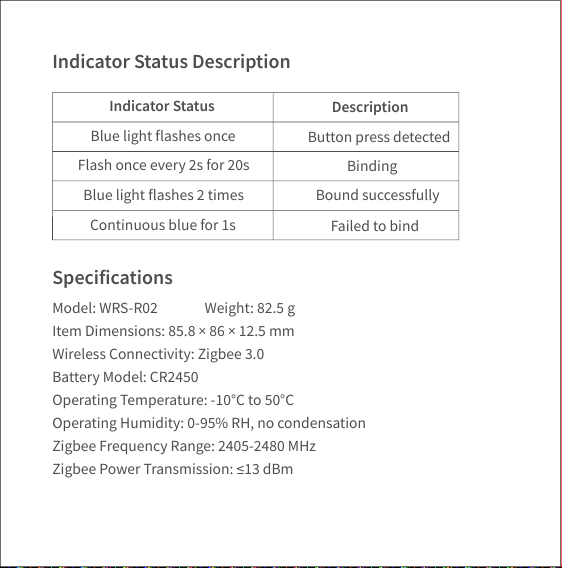
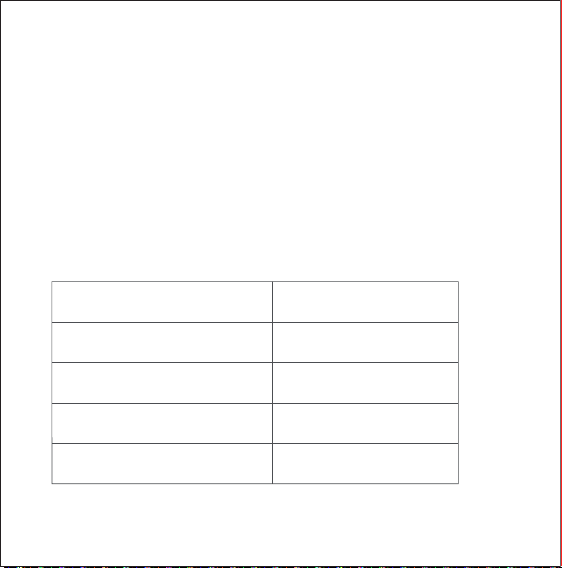
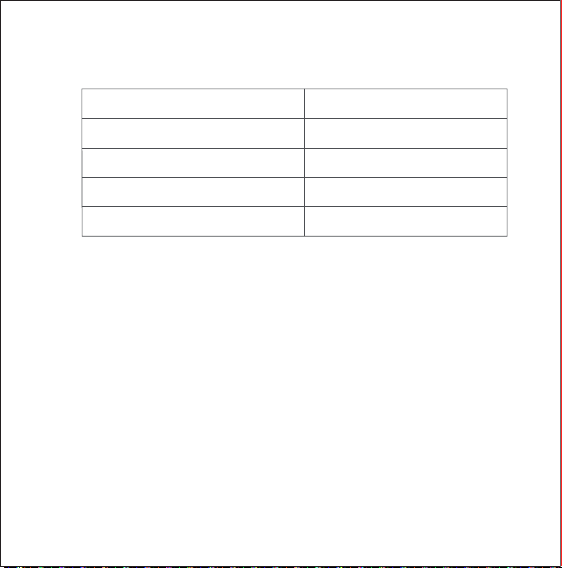
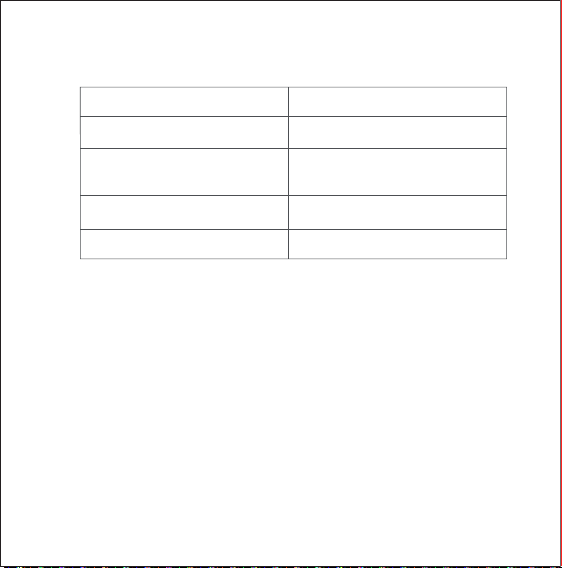
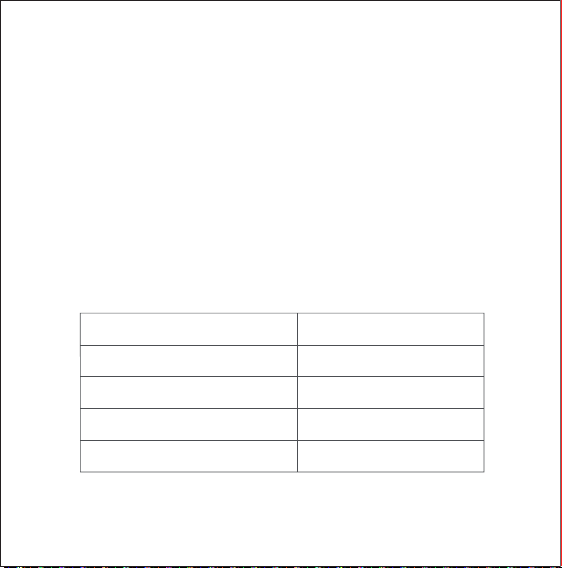
Indicator Status Description
Specifications
Indicator Status
Blue light flashes once
Button press detected
Binding
Bound successfully
Failed to bind
Flash once every 2s for 20s
Blue light flashes 2 times
Continuous blue for 1s
Description
Model: WRS-R02 Weight: 82.5 g
Item Dimensions: 85.8 × 86 × 12.5 mm
Wireless Connectivity: Zigbee 3.0
Battery Model: CR2450
Operating Temperature: -10°C to 50°C
Operating Humidity: 0-95% RH, no condensation
Zigbee Frequency Range: 2405-2480 MHz
Zigbee Power Transmission: ≤13 dBm
Warnings
1. This product is not a toy, please keep children away from this
product.
2. This product is designed for indoor use only. Do not use it in
humid environment or outdoors.
3. Do not spill water or other liquids on this product.
4. Do not place this product near a heat source. Place the switch in
a well ventilated area.
5. Do not attempt to repair the product by yourself. All repairs
should be performed by authorized personnel.
6. This product is designed only for improving the convenience of
household life. If the user violates the product instructions and
this warning, the manufacturer is not responsible for any risks
and property losses caused thereby.
Online Customer Service: www.aqara.com/support
Email: support@aqara.com
Manufacturer: Lumi United Technology Co., Ltd.
Address: 8th Floor, JinQi Wisdom Valley, No.1 Tangling Road,
Liuxian Ave, Taoyuan Residential District, Nanshan District,
Shenzhen, China
EU Declaration of Conformity
Hereby, [Lumi United Technology Co., Ltd.] declares that the radio
equipment type [Wireless Remote Switch H1(Double Rocker), WRS-R02] is in
compliance with Directive 2014/53/EU. The full text of the EU declaration of
conformity is available at the following internet address:
http://www.aqara.com/DoC/
CAUTION
Risk of explosion if the battery is replaced by an incorrect type.
Under normal use of condition, this equipment should be kept a separation
distance of at least 20cm between the antenna and the body of the user.
Dispose of used batteries according to the instructions.
Do not ingest battery, Chemical Burn Hazard.
This product contains a coin / button cell battery. If the coin / button cell
battery is swallowed, it can cause severe internal burns in just 2 hours and can
lead to death.
Keep new and used batteries away from children.
If the battery compartment does not close securely, stop using the product
and keep it away from children.
If you think batteries might have been swallowed or placed inside any part of
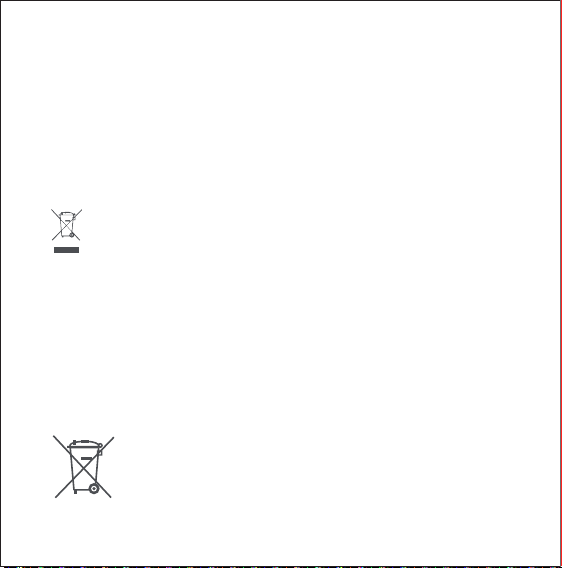
WEEE Disposal and Recycling Information
All products bearing this symbol are waste electrical and electronic
equipment (WEEE as in directive 2012/19/EU) which should not be mixed with
unsorted household waste. Instead, you should protect human health and the
environment by handing over your waste equipment to a designated
collection point for the recycling of waste electrical and electronic equipment,
appointed by the government or local authorities. Correct disposal and
recycling will help prevent potential negative consequences to the
environment and human health. Please contact the installer or local
authorities for more information about the location as well as terms and
conditions of such collection points.
the body, seek immediate medical attention.
Disposal of a battery into fire or a hot oven, or mechanically crushing or
cutting of a battery, that can result in an explosion
Leaving a battery in an extremely high temperature surrounding environment
that can result in an explosion or the leakage of flammable liquid or gas
A battery subjected to extremely low air pressure that may result in an
explosion or the leakage of flammable liquid or gas
Symbol on the product or on its packaging indicates that this
product may not be treated as household waste. Instead it shall
be handed over to the applicable collection point for the
recycling of electrical and electronic equipment.
UK Declaration of Conformity
Hereby, [Lumi United Technology Co., Ltd] declares that the radio
equipment type [Wireless Remote Switch H1(Double Rocker), WRS-R02] is in
compliance with Directive 2017 (SI 2017 No. 1206, as amended by SI 2019 No.
696). The full text of the UK
declaration of conformity is available at the following internet address:
http://www.aqara.com/DoC/.
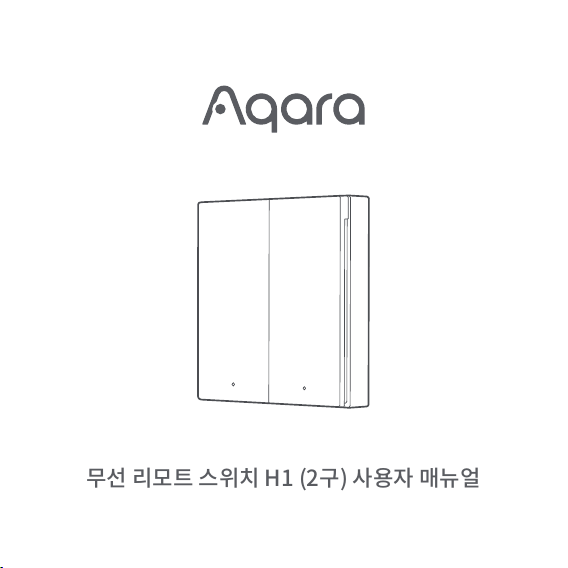
무선 리모트 스위치 H1 (2구) 사용자 매뉴얼
제품 소개
빠른 설정
무선 리모트 스위치 H1 (2구)는 새로운 무선 리모트 스위치입니다. 단일 버튼만을 인식하여
빠르게 동작하는 하이스피드 클릭 모드와 7가지 동작(왼쪽 버튼 한번 누름, 오른쪽 버튼 한번
누름, 왼쪽 버튼 두번 누름, 오른쪽 버튼 두번 누름, 왼쪽 버튼 길게 누름, 오른쪽 버튼 길게 누름,
양쪽 버튼 동시에 한번 누름)을 인식하는 멀티 모드를 선택할 수 있습니다. 스위치는 실내
어디에나 배치하거나 부착할 수 있으며 Aqara 허브 및 다른 Aqara 스마트 장치와 함께
작동하여 다양한 스마트 시나리오를 구현할 수 있습니다.
이 제품은 Aqara Home 앱을 통해 동작합니다. 아래 QR 코드를
스캔하여 Apple App Store에서 Aqara Home 앱을 다운로드할 수
있습니다. Android 사용자의 경우 Google Play에서 Aqara Home
앱을 검색하여 다운로드 할 수 있습니다.
* 본 제품을 사용하기 위해서는 아카라 허브 또는 이를 지원하는 기타 허브가 필요합니다.
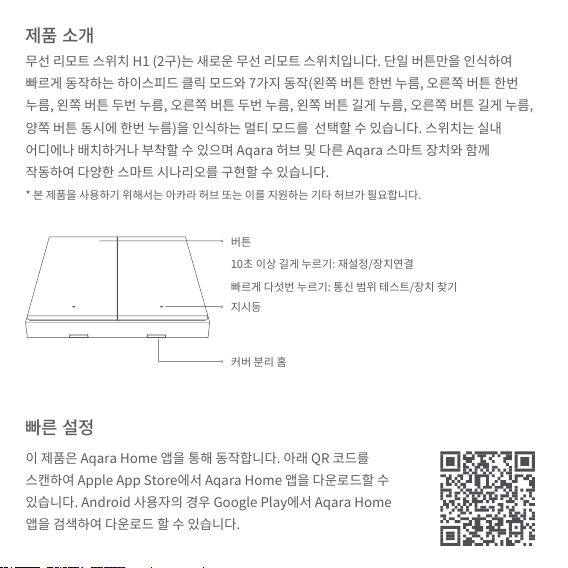
버튼
10초 이상 길게 누르기: 재설정/장치연결
빠르게 다섯번 누르기: 통신 범위 테스트/장치 찾기
지시등
커버 분리 홈
설치 방법
*장치 추가에 실패했다면, 허브에 가까이 두고 다시 시도해 주세요.
*버튼을 빠르게 5번 눌러보세요. 허브에서 음성 안내가 나오면 장치가 정상적으로 통신하고
있는 상태입니다.
*허브 별로 정상 연결을 나타내는 방식이 상이합니다. 사용 중인 허브의 매뉴얼을 참조하세요.
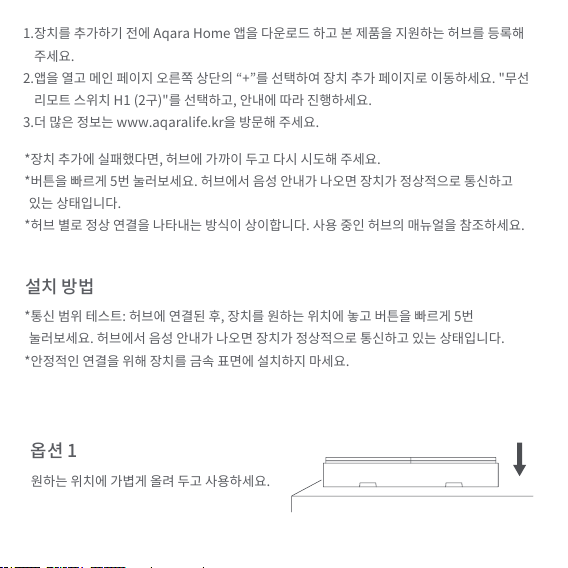
*통신 범위 테스트: 허브에 연결된 후, 장치를 원하는 위치에 놓고 버튼을 빠르게 5번
눌러보세요. 허브에서 음성 안내가 나오면 장치가 정상적으로 통신하고 있는 상태입니다.
*안정적인 연결을 위해 장치를 금속 표면에 설치하지 마세요.
1.장치를 추가하기 전에 Aqara Home 앱을 다운로드 하고 본 제품을 지원하는 허브를 등록해
주세요.
2.앱을 열고 메인 페이지 오른쪽 상단의 “+”를 선택하여 장치 추가 페이지로 이동하세요. "무선
리모트 스위치 H1 (2구)"를 선택하고, 안내에 따라 진행하세요.
3.더 많은 정보는 www.aqaralife.kr을 방문해 주세요.
원하는 위치에 가볍게 올려 두고 사용하세요.
옵션 1
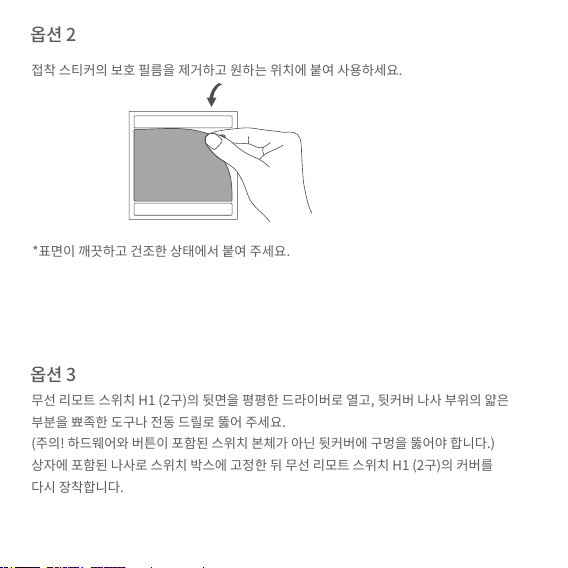
*표면이 깨끗하고 건조한 상태에서 붙여 주세요.
접착 스티커의 보호 필름을 제거하고 원하는 위치에 붙여 사용하세요.
무선 리모트 스위치 H1 (2구)의 뒷면을 평평한 드라이버로 열고, 뒷커버 나사 부위의 얇은
부분을 뾰족한 도구나 전동 드릴로 뚫어 주세요.
(주의! 하드웨어와 버튼이 포함된 스위치 본체가 아닌 뒷커버에 구멍을 뚫어야 합니다.)
상자에 포함된 나사로 스위치 박스에 고정한 뒤 무선 리모트 스위치 H1 (2구)의 커버를
다시 장착합니다.
옵션 2
옵션 3
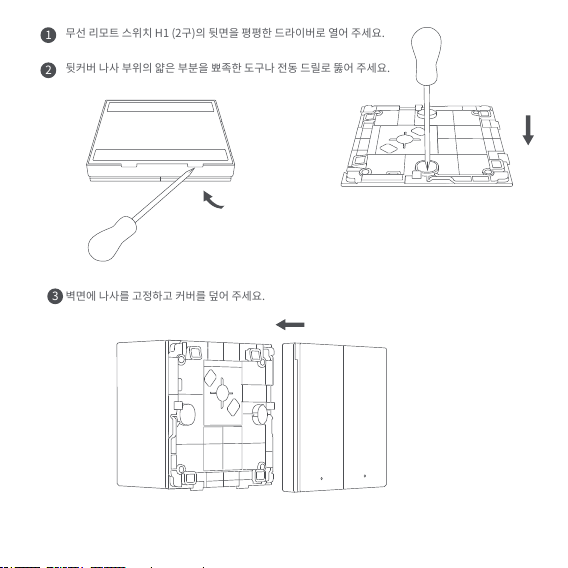
무선 리모트 스위치 H1 (2구)의 뒷면을 평평한 드라이버로 열어 주세요.
뒷커버 나사 부위의 얇은 부분을 뾰족한 도구나 전동 드릴로 뚫어 주세요.
벽면에 나사를 고정하고 커버를 덮어 주세요.
1
2
3
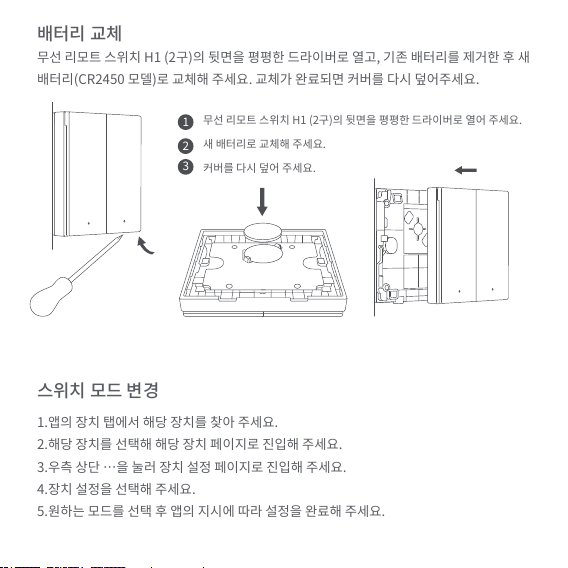
배터리 교체
무선 리모트 스위치 H1 (2구)의 뒷면을 평평한 드라이버로 열고, 기존 배터리를 제거한 후 새
배터리(CR2450 모델)로 교체해 주세요. 교체가 완료되면 커버를 다시 덮어주세요.
스위치 모드 변경
1.앱의 장치 탭에서 해당 장치를 찾아 주세요.
2.해당 장치를 선택해 해당 장치 페이지로 진입해 주세요.
3.우측 상단 …을 눌러 장치 설정 페이지로 진입해 주세요.
4.장치 설정을 선택해 주세요.
5.원하는 모드를 선택 후 앱의 지시에 따라 설정을 완료해 주세요.
무선 리모트 스위치 H1 (2구)의 뒷면을 평평한 드라이버로 열어 주세요.
새 배터리로 교체해 주세요.
커버를 다시 덮어 주세요.
1
2
3
*해당 장치를
*모드 변경 과정 중 버튼을 빠르게 5회 누르면 더 빠르고 정확하게 변경 사항이 적용됩니다.
*위 사항들은 Aqara Home 앱을 기준으로 작성되었습니다.
지시등 설명
제품 사양
지시등 상태
한 번 깜빡임
버튼 누름 감지
네트워크 연결 중
네트워크 연결 성공
장치 연결 실패
2초마다 한번씩 깜빡임
두번 깜빡임
1초간 점등
장치 상태
모델명: WRS-R02
무게: 82.5 g
제품 사이즈: 85.8 × 86 × 12.5 mm
무선 프로토콜: Zigbee 3.0
배터리: CR2450
작동 온도: -10°C to 50°C
작동 습도: 0-95% RH, no condensation
지그비 주파수 대역: 2405-2480 MHz
지그비 출력: ≤13 dBm
1.본 제품은 장난감이 아닙니다. 어린이 손이 닿지 않는 곳에서 사용해 주세요.
2.본 제품은 실내용으로 고안되었습니다. 고온다습하거나 실외에서 사용하지 마세요.
3.제품에 물 또는 기타 액체가 튀지 않도록 주의하세요.
4.본 제품을 열원 근처에서 사용하지 마세요.
5.본 제품을 임의로 수리 시도하지 마세요. 모든 수리는 전문가에 의해 진행되어야 합니다.
6.이 제품은 가정 생활의 편의를 높이기 위해 설계되었습니다. 이외 용도로 사용하거나
매뉴얼의 경고를 위반할 경우, 이에 따라 발생하는 위험 및 재산 손실에 대해서는 어떠한
책임도 지지 않습니다.
정상적인 사용 조건에서 본 제품의 안테나와 사용자의 사이에 최소 20cm의 거리를 유지해야
합니다.
온라인 고객 서비스: www.aqaralife.kr
이메일: [email protected]
제조사:Lumi United Technology Co., Ltd.
Address: 8th Floor, JinQi Wisdom Valley, No.1 Tangling Road, Liuxian Ave,
Taoyuan Residential District, Nanshan District, Shenzhen, China
주의 사항
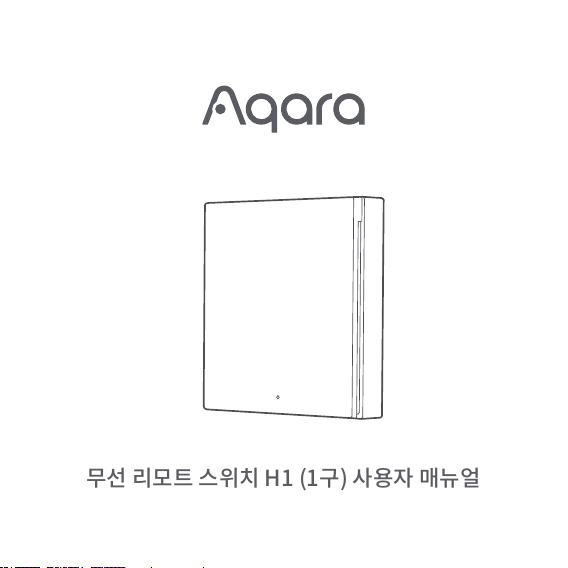
무선 리모트 스위치 H1 (1구) 사용자 매뉴얼
제품 소개
빠른 설정
무선 리모트 스위치 H1(1구)는 최신 무선 리모트 스위치입니다. 단일 버튼 작동을 인식하며,
고속 클릭 모드를 지원하여 빠른 반응이 가능합니다. 또한, 다기능 모드를 제공하여 다양한
동작 방식(단일 클릭, 더블 클릭, 길게 누름)을 인식할 수 있습니다. 이 스위치는 실내 어디에나
배치하거나 부착할 수 있으며, Aqara 허브 및 기타 Aqara 스마트 장치와 연동하여 다양한
스마트 시나리오를 구현할 수 있습니다.
이 제품은 Aqara Home 앱을 통해 동작합니다. 아래 QR 코드를
스캔하여 Apple App Store에서 Aqara Home 앱을 다운로드할 수
있습니다. Android 사용자의 경우 Google Play에서 Aqara Home
앱을 검색하여 다운로드 할 수 있습니다.
* 본 제품을 사용하기 위해서는 아카라 허브 또는 이를 지원하는 기타 허브가 필요합니다.
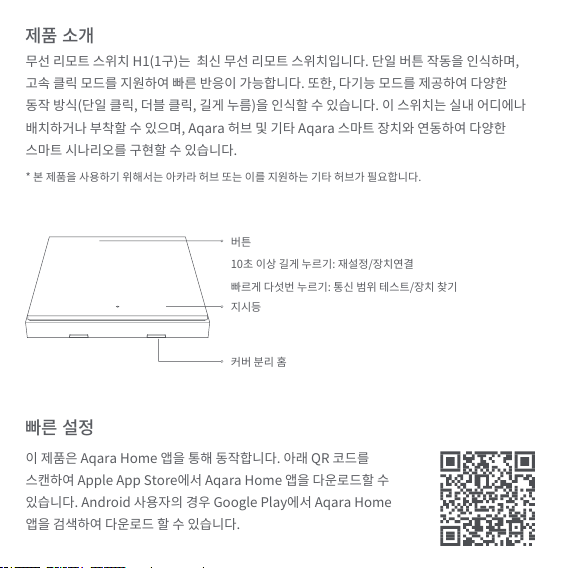
버튼
10초 이상 길게 누르기: 재설정/장치연결
빠르게 다섯번 누르기: 통신 범위 테스트/장치 찾기
지시등
커버 분리 홈
설치 방법
*장치 추가에 실패했다면, 허브에 가까이 두고 다시 시도해 주세요.
*버튼을 빠르게 5번 눌러보세요. 허브에서 음성 안내가 나오면 장치가 정상적으로 통신하고
있는 상태입니다.
*허브 별로 정상 연결을 나타내는 방식이 상이합니다. 사용 중인 허브의 매뉴얼을 참조하세요.
*통신 범위 테스트: 허브에 연결된 후, 장치를 원하는 위치에 놓고 버튼을 빠르게 5번
눌러보세요. 허브에서 음성 안내가 나오면 장치가 정상적으로 통신하고 있는 상태입니다.
*안정적인 연결을 위해 장치를 금속 표면에 설치하지 마세요.
1.장치를 추가하기 전에 Aqara Home 앱을 다운로드 하고 본 제품을 지원하는 허브를 등록해
주세요.
2.앱을 열고 메인 페이지 오른쪽 상단의 “+”를 선택하여 장치 추가 페이지로 이동하세요. "무선
리모트 스위치 H1 (1구)"를 선택하고, 안내에 따라 진행하세요.
3.더 많은 정보는 www.aqaralife.kr을 방문해 주세요.
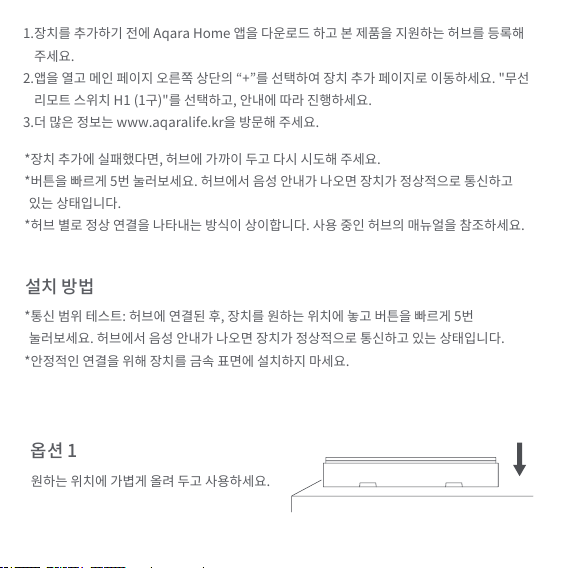
원하는 위치에 가볍게 올려 두고 사용하세요.
옵션 1
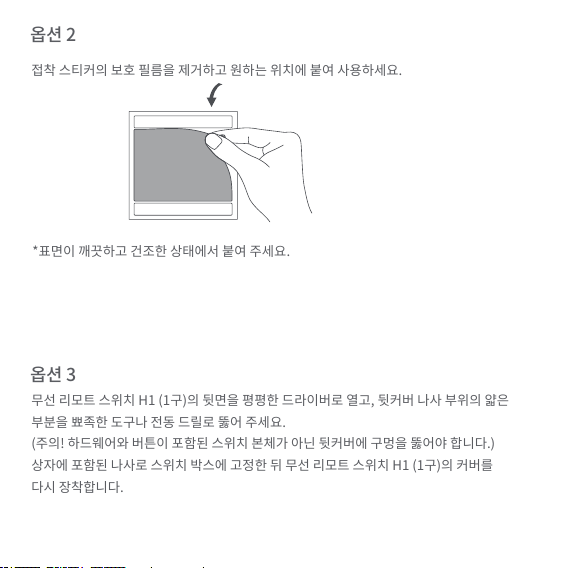
*표면이 깨끗하고 건조한 상태에서 붙여 주세요.
접착 스티커의 보호 필름을 제거하고 원하는 위치에 붙여 사용하세요.
무선 리모트 스위치 H1 (1구)의 뒷면을 평평한 드라이버로 열고, 뒷커버 나사 부위의 얇은
부분을 뾰족한 도구나 전동 드릴로 뚫어 주세요.
(주의! 하드웨어와 버튼이 포함된 스위치 본체가 아닌 뒷커버에 구멍을 뚫어야 합니다.)
상자에 포함된 나사로 스위치 박스에 고정한 뒤 무선 리모트 스위치 H1 (1구)의 커버를
다시 장착합니다.
옵션 2
옵션 3
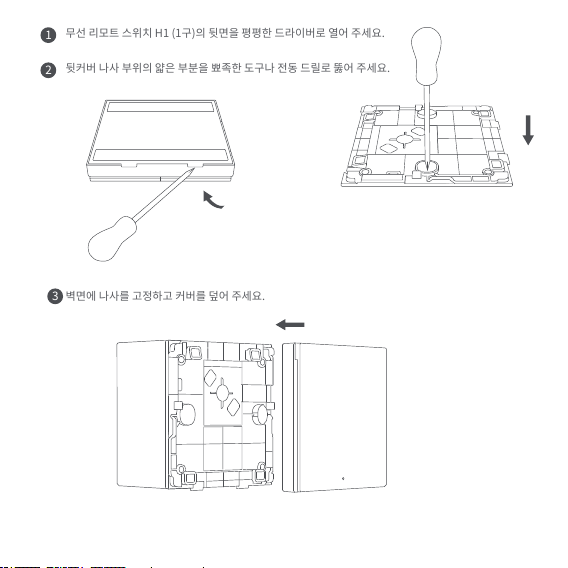
무선 리모트 스위치 H1 (1구)의 뒷면을 평평한 드라이버로 열어 주세요.
뒷커버 나사 부위의 얇은 부분을 뾰족한 도구나 전동 드릴로 뚫어 주세요.
벽면에 나사를 고정하고 커버를 덮어 주세요.
1
2
3
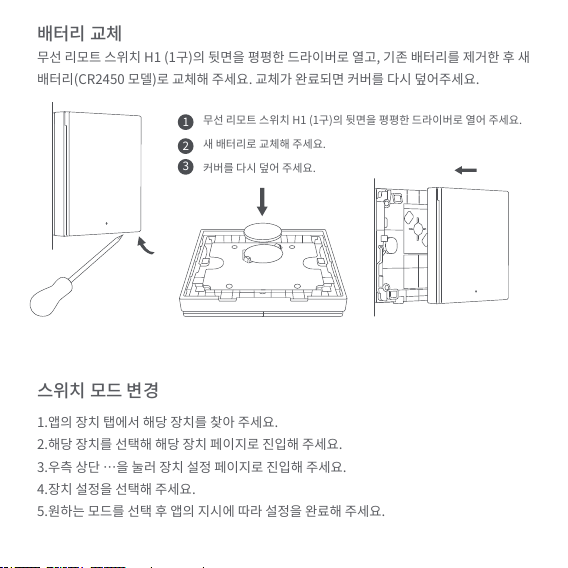
배터리 교체
무선 리모트 스위치 H1 (1구)의 뒷면을 평평한 드라이버로 열고, 기존 배터리를 제거한 후 새
배터리(CR2450 모델)로 교체해 주세요. 교체가 완료되면 커버를 다시 덮어주세요.
스위치 모드 변경
1.앱의 장치 탭에서 해당 장치를 찾아 주세요.
2.해당 장치를 선택해 해당 장치 페이지로 진입해 주세요.
3.우측 상단 …을 눌러 장치 설정 페이지로 진입해 주세요.
4.장치 설정을 선택해 주세요.
5.원하는 모드를 선택 후 앱의 지시에 따라 설정을 완료해 주세요.
무선 리모트 스위치 H1 (1구)의 뒷면을 평평한 드라이버로 열어 주세요.
새 배터리로 교체해 주세요.
커버를 다시 덮어 주세요.
1
2
3
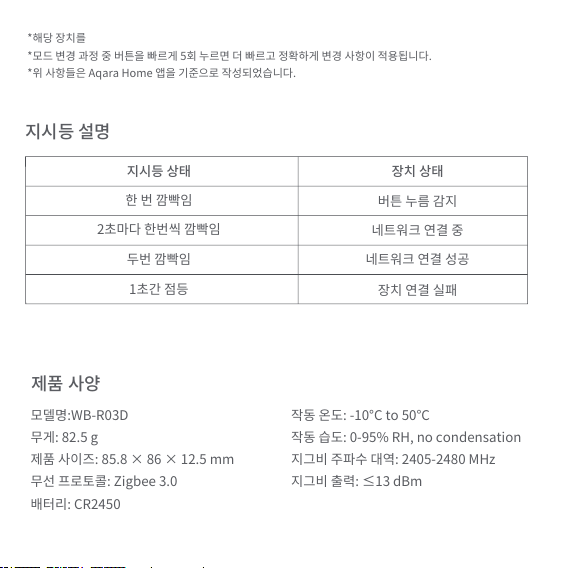
*해당 장치를
*모드 변경 과정 중 버튼을 빠르게 5회 누르면 더 빠르고 정확하게 변경 사항이 적용됩니다.
*위 사항들은 Aqara Home 앱을 기준으로 작성되었습니다.
지시등 설명
제품 사양
지시등 상태
한 번 깜빡임
버튼 누름 감지
네트워크 연결 중
네트워크 연결 성공
장치 연결 실패
2초마다 한번씩 깜빡임
두번 깜빡임
1초간 점등
장치 상태
모델명:WB-R03D
무게: 82.5 g
제품 사이즈: 85.8 × 86 × 12.5 mm
무선 프로토콜: Zigbee 3.0
배터리: CR2450
작동 온도: -10°C to 50°C
작동 습도: 0-95% RH, no condensation
지그비 주파수 대역: 2405-2480 MHz
지그비 출력: ≤13 dBm
1.본 제품은 장난감이 아닙니다. 어린이 손이 닿지 않는 곳에서 사용해 주세요.
2.본 제품은 실내용으로 고안되었습니다. 고온다습하거나 실외에서 사용하지 마세요.
3.제품에 물 또는 기타 액체가 튀지 않도록 주의하세요.
4.본 제품을 열원 근처에서 사용하지 마세요.
5.본 제품을 임의로 수리 시도하지 마세요. 모든 수리는 전문가에 의해 진행되어야 합니다.
6.이 제품은 가정 생활의 편의를 높이기 위해 설계되었습니다. 이외 용도로 사용하거나
매뉴얼의 경고를 위반할 경우, 이에 따라 발생하는 위험 및 재산 손실에 대해서는 어떠한
책임도 지지 않습니다.
정상적인 사용 조건에서 본 제품의 안테나와 사용자의 사이에 최소 20cm의 거리를 유지해야
합니다.
온라인 고객 서비스: www.aqaralife.kr
이메일: [email protected]
제조사:Lumi United Technology Co., Ltd.
Address: 8th Floor, JinQi Wisdom Valley, No.1 Tangling Road, Liuxian Ave,
Taoyuan Residential District, Nanshan District, Shenzhen, China
주의 사항
Betriebsanleitung für das Wireless Remote Switch H1
Produktübersicht
Das Aqara Wireless Remote Switch H1 (Double Rocker) ist ein
neues Wireless-Remote-Switch. Es unterstützt die Einzelbetätigung
im Hochgeschwindigkeitsmodus, und 7 Funktionen im
Multifunktionsmodus, einschließlich die Einzelbetätigung der
linken Taste, Zweifachbetätigung der rechten Taste, lange
Betätigung der linken Taste und lange Betätigung der rechten
Taste, Es kann überall in den Innenräumen untergebracht werden.
Es arbeitet mit dem Aqara Hub und anderen Smarten Geräten von
Aqara zusammen, um eine Vielzahl smarter Anwendungen zu
ermöglichen.
* Ein Aqara Hub ist erforderlich. Einige Funktionen erfordern spezifische
Modelle des Aqara Hubs. Besuchen Sie www.aqara.com/support um mehr
Details zu erfahren.
Steckplatz
Anzeigeleuchte
Taste
10 Sekunden lang gedrückt halten:
Binden/Zurücksetzen
Schnelles Drücken fünf Mal: Test der
effektiven Reichweite / Suche nach dem Gerät
Schnelleinrichtung
Dieses Produkt arbeitet mit der Aqara Home App zusammen. Sie
können den folgenden QR Code scannen, um die Aqara Home
App im Apple App Store herunterzuladen. Die Anwender von
Android können die Aqara Home App im Google Play finden. Mit
der Aqara Home App kann es mit anderen smarten Geräten von
Aqara zusammenarbeiten.
1. Vor dem Aktivieren des Zuberhörs stellen Sie bite sicher, dass Sie
die Aqara Home App heruntergeladen haben und dass der Aqara
Hub Zigbee 3.0 unterstützt und installiert wurde.
2. Öffnen Sie die App und gehen Sie zur Hauptseite, wählen Sie dort
“+” im oberen rechten Bildschirmrand aus, um zur Seite
“Hinzufügen von Zubehör” zu wechseln (Add Accessory). Wählen
Sie dort „Aqara Wireless Remote Switch H1 (Double Rocker) aus
und fügen Sie es im Einklang mit den Anweisungen hinzu.

* Wenn das Hinzufügen scheitert, bringen Sie den Hub etwas näher zum Gerät
und versuchen Sie es erneut.
* Drücken Sie die Taste schnell 5 Mal nacheinander, wenn der Hub eine
Spracheingabe verlangt, dann bedeutet es, dass die Verbindung erfolgreich
aufgebaut wurde.
* Verschiedene Hubs haben verschiedene Optionen, um eine erfolgreiche
Verbindung anzuzeigen. Schlagen Sie bitte in der Anleitung zu Ihrem Modell
des Aqara Hubs nach.
Installationsmethoden
Test der effektiven Reichweite: Nachdem das Gerät mit dem Hub
verbunden ist, bringen Sie das Gerät an den bevorzugten Ort und
drücken Sie schnell 5 Mal die Taste am Gerät nacheinander, wenn
der Hub daraufhin eine Spracheingabe verlangt, dann bedeutet
das, dass die Verbindung zwischen dem Gerät und dem Hub
erfolgreich aufgebaut ist.
3. Besuchen Sie bitte www.aqara.com/support, um mehr Details
zu erfahren.
* Um eine stabile Verbindung zu gewährleisten, vermeiden Sie bitte das
Aufstellen des Geräts auf Metalloberflächen.
* Stellen Sie bitte sicher, dass die Oberfläche sauber und trocken ist.
Option 1:
Ohne Klebstoffe, direktes Aufstellen an einer Oberfläche
Option 2:
Entfernen Sie die Schutzfolie von der Klebeplatte und bringen
Sie das Gerät an die gewünschte Oberfläche an.
Option 3:
Nehmen Sie die Rückwand des Wireless Remote Switch H1
(Double Rocker) mit einem flachen Schraubenzieher, machen Sie
eine Bohrung in der Rückwand mit einer Bohrmaschine oder
einem scharfen Werkzeug (Achtung! Stellen Sie sicher, dass Sie
die Rückwand bohren, nicht die eigentlichen Bestandteile des
Switches, die Hardware und Tasten beherbergen), befestigen Sie
die Hinterwand an der Wand Ihres Raums mit der mitgelieferten
Schraube, und bringen Sie danach die Hinterwand an das
Wireless Remote Switch H1 (Doube Rocker) wieder an.
Nehmen Sie die Hinterwand des Wireless Remote Switch H1 (Double
Rocker) mit einem Schraubenzieher ab.
1
Machen Sie eine Bohrung in der Hinterwand mit einem scharfen Werkzeug/einer
Bohrmaschine, um eine Schraube einlegen zu können.
2
Befestigen Sie die Schraube und bringen Sie die Hinterwand wieder an das Gerät
an.
3
Austausch von Batterien
Entfernen Sie die Hinterwand des Wireless Remote Switch H1
(Double Rocker) mit einem Schraubenzieher, entfernen Sie die
alte Batterie und ersetzen Sie sie mit einer neuen Batterie (Modell
der Batterie CR2450), danach bringen Sie die Hinterwand wieder
an das Gerät an.
Entfernen Sie die Hinterwand des Wireless Remote Switch H1
(Double Rocker) mit einem Schraubenzieher.
1
Modelle der Switches
1. Auf der Geräteseite der App können Sie das entsprechende Gerät
in der Geräteliste finden.
2. Wählen Sie das entsprechende Gerät aus, um zur Geräteseite zu
wechseln.
3. Wählen Sie die drei schwarzen Punkte in der oberen rechten
Bildschirmecke auf der Geräteseite aus und wechseln Sie zur
Seite Geräteeinstellungen (Device Settings).
4. Wählen Sie „Erweiterte Einstellungen“ aus (More Settings)
5. Wählen Sie die Switch Modes aus, wählen Sie den gewünschten
Modus aus und stellen Sie die dazugehörigen Einstellungen im
Einklang mit den Anweisungen der App fertig.
Tauschen Sie die Altbatterie
gegen die neue Batterie aus.
2 Bringen Sie die Hinterwand wieder an.3
* Wenn ein entsprechendes Gerät nicht gefunden werden kann, können Sie
die Taste am Switch 5 Mal nacheinander schnell drücken, und das entsprech
ende Gerät wird in der Geräteliste erscheinen.
* Während des Vorgangs der Modusumschaltung drücken Sie die Taste am
Switch 5 Mal schnell nacheinander, um die Umschaltung des Modus des
Geräts besser umzusetzen.
* Um die oben genannten Schritte umzusetzen, schlagen Sie bitte in der Aqara
Home App nach.
Beschreibung des Status der Anzeigeleuchte
Status der Anzeigeleuchte
Die Leuchte leuchtet
einmal blau auf
Ein Tastendruck wurde erkannt
Das Binden
Das Binden war erfolgreich
Das Binden ist fehlgeschlagen
Im Laufe von 2 Sekunden alle
2 Sekunden einmal blinken
Das blaue Licht leuchtet 2 Mal auf
Ununterbrochenes blaues
Leuchten 1 Sekunde lang
Beschreibung

Warnhinweise
1. Bei diesem Produkt handelt es sich um kein Spielzeug, halten Sie
bitte Kinder fern von diesem Produkt.
2. Dieses Produkt kann nur in den Innenräumen verwendet werden.
Bitte nutzen Sie es nicht in feuchten Umgebungen oder im
Außenbereich.
3. Bitte kein Wasser oder andere Flüssigkeiten an dieses Produkt
spritzen lassen.
Gerätedaten
Modell: WRS-R02
Abmessungen des Geräts: 85,8 X 86 X 12,5 mm
Gewicht: 82,5 g
Protokoll der Drahtlosverbindung: Zigbee 3.0
Batteriemodell: CR2450
Betriebstemperaturbereich: -10°C to 50°C
Zulässige Raumfeuchtigkeit: 0-95% RH, keine Kondensatbildung
Frequenzbereich des Zigbee-Protokolls: 2405-2480 MHz
Strahlungsleistung des Zigbee-Protokolls: ≤13 dBm

Online-Kundensienst: www.aqara.com/support
E-Mail: [email protected]om
Hersteller: Lumi United Technology Co., Ltd.
Adresse: 8th Floor, JinQi Wisdom Valley, No.1 Tangling Road,
Liuxian Ave, Taoyuan Residential District, Nanshan District,
Shenzhen, China
4. Bringen Sie dieses Produkt bitte nicht in die Nähe von
Hitzequel
len. Platzieren Sie den Switch an einem gut belüeten Ort.
5. Versuchen Sie es bitte nicht, das Gerät selbstständig zu
reparieren. Sämtliche Reparaturarbeiten müssen von
autorisierten Fachkräen durchgeführt werden.
6. Dieses Produkt ist nur dazu vorgesehen, Ihr alltägliches Leben
komfortabler zu machen. Wenn der Benutzer gegen die
Produktanleitung und diese Warnhinweise verstößt, kann der
Hersteller nicht für sämtliche Risiken und Vermögensverluste
habar gemacht werden, die dadurch verursacht werden.
EU-Konformitätserklärung
Hiermit bestätigt [Lumi United Technology Co., Ltd.], dass das
Funkgerät des Typs [Wireless Remote Switch H1(Double Rocker),
WRS-R02] mit der Verordnung 2014/53/EU in Einklang steht. Der vollständige
Wortlaut der EU-Konformitätserklärung ist unter der folgenden
Internetadresse abrufbar: http://www.lumiunited.com/DoC/
ACHTUNG
Bei Verwendung des falschen Batterietyps besteht Explosionsgefahr.
Unter normalen Einsatzbedingungen muss dieses Gerät einen Abstand von
mindestens 20cm zwischen der Antenne und dem Körper des Benutzers
einhalten.
Entsorgen Sie Leere Akkus Gemäß den Anweisungen.
Nehmen Sie die Batterie nicht ein, Verätzungs- gefahr.
Dieses Produkt enthält eine Münz- /Knopfzellenbatterie. Sollte die Münz-
/Knopfzellenbatterie verschluckt werden, kann sie ernsthae innere
Verbrennungen verursachen und innerhalb von zwei Stunden zum Tod führen.
Bewahren Sie neue und benutzte Batterien fern von Kindern auf.
Sollte das Batteriefach nicht sicher schließen, nutzen Sie das Produkt nicht
weiterhin und halten Sie es fern von Kindern.
Falls Sie den Verdacht haben, dass die Batterie verschluckt oder in andere
Körperöffnungen gelangt sein könnte, suchen Sie unmittelbar medizinische
Hilfe auf.
WEEE-Informationen zur Entsorgung und zum Recycling
Alle mit diesem Symbol gekennzeichneten Produkte sind Elektroschrott
und Elektrogeräte (WEEE entsprechend EU-Richtlinie 2012/19/EU) und
dürfen nicht mit unsortiertem Haushaltsmüll vermischt werden. Schützen Sie
stattdessen Ihre Mitmenschen und die Umwelt, indem Sie Ihre zu entsorgenden
Geräte an eine dafür vorgesehene, von der Regierung oder einer lokalen
Behörde eingerichtete Sammelstelle zum Recycling von Elektroschrott und
Elektrogeräten bringen. Eine ordnungsgemäße Entsorgung und Recycling
helfen, negative Auswirkungen auf die Gesundheit von Umwelt und Menschen
zu vermeiden. Wenden Sie sich bitte an den Installateur oder lokale Behörden,
um Informationen zum Standort und den allgemeinen Geschäsbedingungen
solcher Sammelstellen zu erhalten.
Ein Symbol auf dem Produkt oder seiner Verpackung weist darauf
hin, dass dieses Produkt nicht mit dem Hausmüll entsorgt werden
darf. Stattdessen muss es bei der entsprechenden Recyclingstelle
für elektrische und elektronische Geräte abgegeben werden.
Entsorgung einer Batterie in ein Feuer oder einen heißen Ofen oder mechanisches
Quetschen oder Schneiden einer Batterie, was zu einer Explosion führen kann.
Lassen Sie eine Batterie in einer Umgebung mit extrem hohen Temperaturen, die
zu einer Explosion oder zum Austreten brennbarer Flüssigkeiten oder Gase führen
kann.
Eine Batterie, die einem extrem niedrigen Ludruck ausgesetzt ist, der zu einer
Explosion oder zum Austreten brennbarer Flüssigkeiten oder Gase führen kann
Wireless Remote Switch H1 Manual de Usuario
Resumen del Producto
El Aqara Wireless Remote Switch H1 (Double Rocker) es un nuevo
interruptor remoto inalámbrico. Soporta pulsación simple en el
modo de clic de alta velocidad, y 7 funciones en el modo
multifunción incluyendo pulsación simple del botón izquierdo,
pulsación simple del botón derecho, pulsación doble del botón
izquierdo, pulsación doble del botón derecho, pulsación larga del
botón izquierdo y pulsación larga del botón derecho. Puede
colocarse o fijarse en cualquier lugar interior, o instalarse en
marcos de interruptores. También funciona con Aqara Hub y otros
dispositivos inteligentes de Aqara para implementar una gran
variedad de escenas inteligentes.
* Se requiere un Aqara Hub. Algunas funciones requieren modelos específicos
del Aqara Hub. Ver www.aqara.com/support para más detalles.
Ranura
Luz indicadora
Botón
Pulsación larga durante 10 segundos:
unir/restablecer
Cinco pulsaciones rápidas: Prueba de rango de
comunicación efectiva / búsqueda de dispositivos
Configuración Rápida
Este producto funciona con la aplicación Aqara Home. Puede
escanear el siguiente código QR para descargar la aplicación Aqara
Home desde la Apple App Store. Los usuarios de Android pueden
encontrar la aplicación Aqara Home en Google Play. Con la
aplicación Aqara Home, puede funcionar con otros dispositivos
inteligentes de Aqara.
1. Antes de activar el accesorio, por favor asegúrese de que ha
descargado la aplicación Aqara Home y el Aqara Hub que soporta
Zigbee 3.0 está instalado.
2. Por favor, abra la aplicación, vaya a la pantalla principal y
seleccione "+" en la esquina superior derecha para entrar en la
página de Añadir Accesorio. Seleccione "Aqara Wireless Remote
Switch H1 (Double Rocker)" y añádalo según las instrucciones.
3. Por favor, consulte www.aqara.com/support para obtener más
información.
* Si la adición falla, por favor acerque el hub al producto e inténtelo de nuevo.
* Presione el interruptor rápidamente 5 veces, si el hub hace indicaciones de
voz, indica que el accesorio puede comunicarse adecuadamente con el hub.
* Los diferentes hubs tienen diferentes maneras de indicar la conexión
efectiva. Por favor, consulte las instrucciones de su modelo Aqara Hub.
* Para asegurar conexiones estables, por favor, evite colocar el dispositivo
sobre superficies metálicas.
Métodos de Instalación
Prueba de Rango Efectivo: Después de que se haya unido al hub,
coloque el dispositivo en el lugar deseado y presione el botón del
dispositivo rápidamente durante 5 veces, si el hub realiza
indicaciones de voz, indica que el accesorio puede comunicarse
de manera adecuada con el hub.
Opción 1:
Sin adhesivo, colóquelo directamente sobre una superficie.
*Por favor, asegúrese de que la superficie esté limpia y seca.
Opción 2:
Retire la película protectora de la cinta adhesiva y coloque el
dispositivo en la superficie deseada.
Opción 3:
Abra la parte trasera del Wireless Remote Switch H1 (Double
Rocker) con un destornillador de punta plana, taladre a través de
la pieza delgada en el tornillo de la cubierta trasera con una
herramienta afilada o un taladro eléctrico (¡Atención! Asegúrese
de que está taladrando la tapa trasera, no la parte principal del
interruptor que incorpora el hardware y los botones), fíjela a la
Abra la parte trasera del Wireless Remote Switch H1 (Double Rocker)
con un destornillador.
1
Perfore la tapa trasera con un punzón/taladro eléctrico para instalar el
tornillo.
2
caja de la pared con el tornillo que viene con la caja, y luego vuelva
a poner la tapa del Wireless Remote Switch H1 (Double Rocker).
Fije el tornillo y vuelva a colocar la cubierta.
3
Reemplazo de las Pilas
Abra la parte posterior del Wireless Remote Switch H1 (Double
Rocker) con un destornillador de punta plana, retire la pila vieja y
reemplácela por una nueva (modelo de pila: CR2450), y luego
vuelva a colocar la tapa.
Reemplácela por una pila nueva.
2
Vuelva a colocar la tapa.
3
Abra la tapa del Wireless Remote Switch H1 (Double Rocker) con un
destornillador.
1

Modos de Interruptor
1. En la pantalla de dispositivos de la aplicación, busque el
dispositivo correspondiente en la lista de dispositivos.
2. Seleccione el dispositivo correspondiente para entrar en la
página del dispositivo.
3. Seleccione los tres puntos negros en la esquina superior derecha
de la página del dispositivo y entre en la página Configuración
del Dispositivo.
4. Seleccione Más Ajustes.
5. Seleccione Modos de Interruptor, seleccione el modo deseado y
realice la configuración correspondiente de acuerdo con las
instrucciones de la aplicación.
* Cuando no se encuentre el dispositivo correspondiente, puede pulsar
rápidamente el interruptor 5 veces, y el dispositivo correspondiente
parpadeará en la lista de dispositivos.
* Durante el proceso de cambio de modo del interruptor, presione
rápidamente el interruptor 5 veces para realizar mejor el cambio de modo
del dispositivo.
* Para implementar los pasos anteriores, por favor consulte la aplicación
Aqara Home.
Especificaciones
Modelo: WRS-R02
Dimensiones del Artículo: 85.8 X 86 X 12.5 mm
Peso: 82.5 g
Conectividad Inalámbrica: Zigbee 3.0
Modelo de Pila: CR2450
Temperatura de Funcionamiento: -10°C a 50°C
Humedad de Funcionamiento: 0-95% RH, sin condensación
Rango de Frecuencia Zigbee: 2405-2480 MHz
Transmisión de Potencia Zigbee: ≤13 dBm
Estado del Indicador
Luz azul parpadea una vez
Pulsación del botón detectada
Unión
Unión exitosa
Fallo al unir
Parpadea cada 2 s durante 20 s
Luz azul parpadea dos veces
Azul continuo durante 1 s
Descripción
Descripción del Estado del Indicador

Advertencias
1. Este producto no es un juguete, por favor mantenga a los niños
alejados de este producto.
2. Este producto está diseñado sólo para uso en interiores. No lo
utilice en ambientes húmedos o al aire libre.
3. No derrame agua u otros líquidos sobre este producto.
4. No coloque este producto cerca de una fuente de calor. Coloque
el interruptor en un área bien ventilada.
5. No intente reparar el producto usted mismo. Todas las
reparaciones deben ser realizadas por personal autorizado.
6. Este producto está diseñado sólo para mejorar la comodidad de
la vida doméstica. Si el usuario infringe las instrucciones del
producto y esta advertencia, el fabricante no se hace
responsable de los riesgos y las pérdidas de propiedad
causadas por ello.
Servicio de Atención al Cliente Online: www.aqara.com/support
Correo Electrónico: [email protected]om
Fabricante: Lumi United Technology Co., Ltd.
Dirección: 8th Floor, JinQi Wisdom Valley, No.1 Tangling Road,
Liuxian Ave, Taoyuan Residential District, Nanshan District,
Shenzhen, China
Declaración de conformidad de la UE
Por la presente, [Lumi United Technology Co., Ltd.] declara que el
PRECAUCIÓN
Existe riesgo de explosión si la batería se reemplaza por un tipo
incorrecto.
Deseche las baterías usadas de acuerdo con las instrucciones.
No ingiera la batería, Peligro de Quemaduras Químicas.
Este producto contiene una batería de botón. Si la batería de botón es ingerida,
puede causar quemaduras internas severas en solo 2 horas y puede llevar a la
muerte.
Guarde las baterías nuevas y usadas lejos del alcance de los niños.
Si el compartimiento para la batería no cierra de manera segura, deje de usar
el producto y manténgalo lejos de los niños.
Si cree que las baterías podrían haber sido ingeridas o colocadas dentro de
cualquier parte del cuerpo, busque atención médica de inmediato.
En condiciones normales de uso, este equipo debe mantenerse a una
distancia de, al menos, 20 cm entre la antena y el cuerpo del usuario.
tipo de equipo radioeléctrico [Wireless Remote Switch H1(Double Rocker),
WRS-R02] cumple con la Directiva 2014/53/UE. Encontrará el texto completo
de la declaración de conformidad de la UE en esta dirección de Internet:
http://www.lumiunited.com/DoC/
Directiva RAEE de información de eliminación y reciclaje
Todo s los pr od uc tos q ue lle va n este s ím bolo s on r es id uo s de apa ratos
eléctricos y electrónicos (RAEE según la directiva 2012/19/UE) que no
deben mezclarse con residuos domésticos sin clasificar. En su lugar, debe
proteger la salud humana y el medio ambiente entregando sus equipos de
desecho a un punto de recogida para el reciclaje de residuos de equipos
eléctricos y electrónicos, designado por el gobierno o las autoridades locales.
La eliminación y el reciclado correctos ayudarán a evitar posibles
consecuencias negativas para el medio ambiente y la salud humana. Póngase
en contacto con el instalador o con las autoridades locales para obtener más
información sobre la ubicación y las condiciones de dichos puntos de recogida.
El símbolo en el producto o en su embalaje indica que no puede
ser tratado como basura doméstica. En su lugar, se depositará en
el punto de recogida correspondiente para el reciclado de
aparatos eléctricos y electrónicos.
Desechar una batería en el fuego o en un horno caliente, o aplastar o cortar
mecánicamente una batería, lo que puede provocar una explosión.
Dejar una batería en un entorno circundante de temperatura extremada-
mente alta que puede provocar una explosión o la fuga de líquidos o gases
inflamables.
Una batería sometida a una presión de aire extremadamente baja que puede
provocar una explosión o la fuga de líquidos o gases inflamables.
Manuel d’utilisation du Wireless Remote Switch H1
Apercu general du produit
Le Aqara Wireless Remote Switch H1 (Double Rocker) est un
nouveau commutateur à distance sans fil. Il ne nécessite qu’un
seul appui dans le mode clic haute vitesse, et 7 fonctions dans le
mode multifonction, y compris appui simple sur le bouton
gauche, appui simple sur le bouton droit, double appui sur le
bouton gauche, double appui sur le bouton droit, appui long sur
le bouton gauche et appui long sur le bouton droit. Il peut être
placé ou attaché n’importe où à l’intérieur. Il travaille également
avec le Aqara Hub et d’autres appareils intelligents Aqara pour
implémenter une variété de scènes intelligentes.
* Un Aqara Hub est nécessaire. Certaines fonctions nécessitent des modèles
spécifiques du Aqara Hub. Voir www.aqara.com/support plus de détails.
Fente
Voyant
Bouton
Appui long pendant 10 s : liaison / réinitialisation
Appui rapide cinq fois : test de portée de
communication efficace / recherche de
périphérique
Installation rapide
Ce produit fonctionne avec l’application Aqara Home. Vous
pouvez scanner le code QR suivant pour télécharger l’application
Aqara Home depuis l’App Store d’Apple. Les utilisateurs Android
peuvent trouver l’application Aqara Home sur Google Play. Avec
l’application Aqara Home, il peut fonctionner avec d’autres
appareils intelligents Aqara.
1. Avant d’activer l’accessoire, assurez-vous d’avoir téléchargé
l’application Aqara Home et le Hub Aqara qui supporte Zigbee 3.0
installé.
2. Veuillez bien vouloir ouvrir l'application, ensuite rendez vous sur
la page d'accueil et sélectionnez « + » dans le coin supérieur droit
pour accéder à la page Ajouter un accessoire. Sélectionnez «
Aqara Wireless Remote Switch H1 (Double Rocker) » et ajoutez-le
en suivant les instructions.

Méthodes d'installation
Test de portée efficace : Après avoir été lié au hub, placez l'appareil
à l'emplacement désiré et appuyez rapidement sur le bouton de
l'appareil 5 fois, si le hub émet des signaux sonores, cela indique
que l'accessoire peut communiquer efficacement avec le hub.
* En cas d’échec de l’ajout, veuillez rapprocher le hub du produit et réessayez.
* Appuyez rapidement sur le commutateur 5 fois, si le hub émet des signaux
sonores, cela signifie que l'accessoire peut communiquer efficacement avec
le hub.
* Différents hubs ont différentes manières d'indiquer la connexion effective.
Veuillez donc vous référer aux instructions de votre modèle d'Aqara Hub.
*Pour vous assurer de bénéficier de connexions stables, veuillez éviter de
disposer l’appareil sur des surfaces métalliques.
3. Veuillez consulter www.aqara.com/support pour plus d'informa
tions.
Option 1 :
Sans adhésif, disposez-le directement sur une surface.
Option 2 :
Retirez le film protecteur du ruban adhésif et fixez l’appareil sur la
surface désirée.
* Veuillez bien vouloir vous assurer que la surface est propre et sèche.
Option 3 :
Veuillez ouvrir l'arrière du Wireless Remote Switch H1 (Double
Rocker) avec un tournevis à lame plate. Percez ensuite la pièce
mince au niveau de la vis du couvercle arrière avec un outil pointu
ou une perceuse électrique (Attention ! Veuillez vous assurer que
c’est bien le couvercle arrière que vous percez, et non la partie
principale du commutateur qui incorpore le matériel et les
boutons), fixez-le à la boîte murale avec la vis jointe à la boîte,
puis remettez le couvercle du Wireless Remote Switch H1 (Double
Rocker) à sa place.
Veuillez ouvrir l’arrière de commutateur à distance sans fil H1
(Double Culbuteurs) à l’aide un tournevis.
1
2
Veuillez percer le couvercle arrière avec un poinçon / perceuse
électrique pour installer la vis.
3
Veuillez fixer la vis et remettez le couvercle à sa place.
Remplacement de la pile
Veuillez ouvrir l’arrière du Wireless Remote Switch H1 (Double
Rocker) à l’aide un tournevis à lame plate, retirez ensuite
l'ancienne pile et remplacez-la avec une nouvelle pile (modèle de
pile : CR2450), puis remettez le couvercle à sa place.
Veuillez ouvrir le couvercle du Wireless Remote
Switch H1 (Double Rocker) à l’aide un tournevis
1
Remplacez avec une nouvelle pile
2
Remettez le couvercle à sa place.
3
1 2 3

Changer de modes
1. Sur la page Périphérique de l’application, trouvez l’appareil
correspondant dans la liste des périphériques.
2. Sélectionnez l’appareil correspondant pour accéder à la page de
l’appareil.
3. Sélectionnez les trois points noirs dans le coin supérieur droit de
la page de l’appareil et accéder à la page Paramètres de l’appareil.
4. Sélectionnez plus de paramètres.
5. Sélectionnez Changer de modes, sélectionnez le mode souhaité
et complétez la configuration correspondante suivant les
instructions de l'application.
* Au cas où vous ne trouvez pas le périphérique correspondant, vous pouvez
appuyer rapidement 5 fois sur le commutateur et le périphérique correspon
dant clignotera dans la liste des périphériques.
* Pendant le processus de changement de mode, appuyez rapidement sur le
commutateur 5 fois pour mieux effectuer le changement de mode de
l'appareil.
* Pour implémenter les étapes ci-dessus, veuillez-vous référer à l’application
Aqara Home.
Caractéristiques
Description de l'état du voyant
Etat du voyant
Bleu clignotant une fois
Appui de bouton détecté
Liaison
Liaison réussie
Échec de liaison
Clignote une fois toutes les 2s
pendant 20s
Bleu clignotant deux fois
Bleu continu pendant 1s
Description
Modèle : WRS-R02
Dimensions de l’article : 85.8 × 86 × 12.5 mm
Poids: 82.5 g
Connectivité sans fil : Zigbee 3.0
Modèle de batterie : CR2450
Température de fonctionnement : -10°C à 50°C
Humidité de fonctionnement : 0-95% RH, pas de condensation
Gamme de fréquences en zigbee: 2405-2480 MHz
Transmission d’énergie Zigbee: ≤13 dBm

Avertissement
1. Ce produit n'est pas un jouet, veuillez le tenir hors de la portée
des enfants.
2. Ce produit est destiné à un usage interne uniquement. Veuillez
ne pas l’utiliser pas dans un environnement humide ou à
l’extérieur.
3. Ne renversez pas d’eau ou d’autres liquides sur ce produit.
4. Ne placez pas ce produit près d’une source de chaleur. Veuillez
placer l’interrupteur dans une zone bien ventilée.
5. N’essayez pas de réparer le produit par vous-même. Toutes les
réparations doivent être effectuées par du personnel autorisé.
6. Ce produit est conçu uniquement pour améliorer la commodité
de la vie domestique. Si l’utilisateur enfreint les instructions du
produit et cet avertissement, le fabricant n’est pas responsable
des risques et des pertes matérielles qui en découleraient.
Déclaration de conformité pour l’Union européenne
Par la présente, [Lumi United Technology Co., Ltd.] déclare que
PRÉCAUTION
Risque d’exposition si la batterie est remplacée par un type
incorrect.
Jetez les batteries usées selon les instructions du fabricant.
N'avalez pas la batterie car vous courez un risque de brûlure chimique. Ce
Service client en ligne : www.aqara.com/support
E-mail: [email protected]om
Fabricant: Lumi United Technology Co., Ltd.
Adresse: 8th Floor, JinQi Wisdom Valley, No.1 Tangling Road,
Liuxian Ave, Taoyuan Residential District, Nanshan District,
Shenzhen, China
Dans des conditions normales d’utilisation, cet équipement doit être maintenu
à une distance d’au moins 20cm entre l’antenne et le corps de l’utilisateur.
cet équipement radio de type [Wireless Remote Switch H1(Double Rocker),
WRS-R02] est conforme à la Directive européenne2014/53/UE. L’intégralité
de la déclaration de conformité pour l’UE est disponible à l’adresse
suivante: http://www.lumiunited.com/DoC/
Informations sur la réglementation DEEE sur la mise au
rebut et le recyclage
Tous les produits portant ce symbole deviennent des déchets
d’équipements électriques et électroniques (DEEE dans la Directive
européenne2012/19/UE) qui ne doivent pas être mélangés aux déchets
ménagers non triés. Vous devez contribuer à la protection de
l’environnement et de la santé humaine en apportant l’équipement usagé à
produit contient une pile bouton.
L'ingestion de la pile bouton peut provoquer de graves brûlures internes en
seulement 2 heures et entraîner la mort.
Conservez les piles neuves et usées hors de la portée des enfants.
Si le compartiment de la pile ne se ferme pas correctement, arrêtez d’utiliser le
produit et mettez hors de la portée des enfants.
Si vous pensez que la pile a peut-être été avalée ou qu'elle peut avoir pénétré
une partie du corps, consultez immédiatement un médecin.
Élimination d'une batterie dans le feu ou dans un four chaud, ou écrasement
ou coupure mécanique d'une batterie, qui peut entraîner une explosion.
Laisser une batterie dans un environnement environnant à température
extrêmement élevée qui peut entraîner une explosion ou une fuite de liquide
ou de gaz inflammable.
Une batterie soumise à une pression d'air extrêmement basse pouvant
entraîner une explosion ou une fuite de liquide ou de gaz inflammable
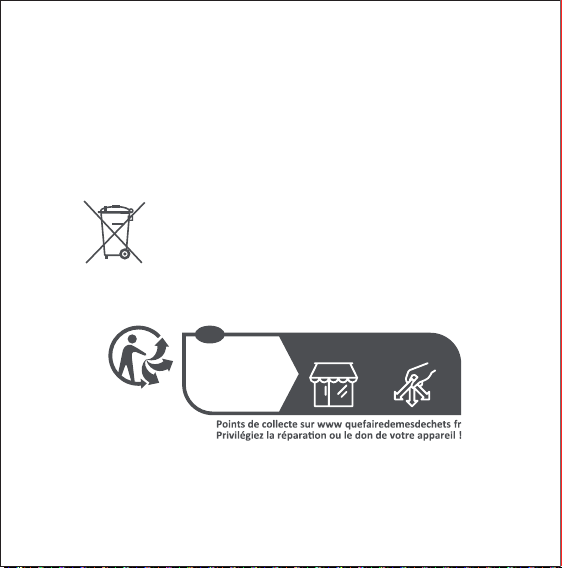
Le symbole sur le produit ou son emballage indique que le
présent produit ne peut pas être considéré comme un déchet
ménager. Il doit être remis à un point de collecte approprié pour
le recyclage des équipements électriques et électroniques.
Cet appareil,
ses accessoires
et piles se
recyclent
À DÉPOSER
EN MAGASIN
À DÉPOSER
EN DÉCHÈTERIE
OU
FR
un point de collecte dédié au recyclage des équipements électriques et
électroniques, agréé par le gouvernement ou les autorités locales. Le
recyclage et la destruction appropriés permettront d’éviter tout impact
potentiellement négatif sur l’environnement et la santé humaine. Contactez
l’installateur ou les autorités locales pour obtenir plus d’informations
concernant l’emplacement ainsi que les conditions d’utilisation de ce type de
point de collecte.
ワイヤレススイッチH� 使用説明書
オープンスロット
指示ランプ
ボタン
長押し10s:ネット接続/リセット
快速5回押し:有効通信距離の検証/デ
バイス検索機能
製品概要
AqaraワイヤレススイッチH�(壁掛け式ダブルロッカー)は、高速シングルク
リックモードと多機能モードをサポートし、新型のワイヤレスリモートスイッ
チです。高速シングルクリックモードでは、左ボタンまたは右ボタンのシング
ルクリック制御をサポートします。多機能モードでは、左ボタンのシングルク
リック、左ボタンのダブルクリック、左ボタンの長押し、右ボタンのシングルク
リック、右ボタンのダブルクリック、右ボタンの長押し、左ボタン・右ボタンの
同時シングルクリックなど7つの機能をサポートします。各場所に置かれ、取
り付けられるこの設備が、ゲートウェイ及びその他のスマートデバイスと連
動して、いろんなスマートシチュエーションで活躍できます。
* 本製品は、ゲートウェイ機能デバイスと組み合わせて利用することが必要でおり、一部
の機能について、特定のゲートウェイデバイスを必要とします。詳細いついては、次のア
ドレスをご参照ください:www.aqara.com/support
クイック設定
本製品はAqara Homeスマートプラットフォームに依存しており、次のQRコー
ドをスキャンして「Aqara Home」APPをダウンロードすることができます。
「Aqara Home」アプリを通じて、他のAqaraスマート製品と接続できます。
1. 本製品はZigbee �.�機能をサポートするゲートウェイと組み合わせて使
用しなけれ ばならない、ゲートウェイデバイスの説 明書に従ってゲート
ウェイ をA P P に追 加してくだ さ い 。
�. APPを起動させ、トップページの右上の「+」をクリックして、「デバイス追
加」ページに入り、ワイヤレススイッチH �(壁掛け式ダブルロッカー)を選
択し、続いて接 続するゲートウェイを選 択し、ゲートウェイが接 続に成功す
るまで、APPのヒントに従って操作を進めてください。
3. ヘルプが必要な場合、次のアドレスをご参照ください:
wwww.aqara.com/support
取り付け方法
通信距離を検証:予選の取り付け位置で、ボタンを快速5回押して、ゲート
ウェイ か ら 提 示 音 が 出 った ら 、デ バイス と ゲ ート ウェイ の 間 で 通 信で きる こ
とを示します。
方法1:
必要な位置に直接置きます。
*追加に失敗した場合、デバイスをゲートウェイに近づけて再試行してください。
*ボタンを快速5回押して、ゲートウェイから提示音が出ったら、デバイスとゲートウェイの
間で通信できることを示します。
*ゲートウェイが接続成功のヒントを出す方式が異なっており、実際にはゲートウェイの
機能紹介に準じてください。
*安定した無線通信を確保するに、金属の表面に取り付けないでください。
方法2:
保護フィルムを剥がし、必要な位置に貼り付けます。
* 請確保粘貼表面乾淨、乾燥。
方法3:
ワイヤレススイッチH �(壁 掛け 式ダブルロッカー)のリアカバ ーを1 字型 の
ドラ イバ ー で開 け、鋭 い ツー ル また は ドリルで リアカバ ー の 8 6 型 カセ ット ネ
ジ位置の薄いゴム部を打ち抜き、カセット付属品のネジで86型カセットに
固定した後、ワイヤレススイッチH�(壁掛け式ダブルロッカー)のカバーを
かぶせ直します。
ワイヤレススイッチH �(壁 掛け 式ダブルロッカー)のリアカバ ーをドラ
イバ ーで 開 け ます
1
キリ/ドリルでリアカバーのネジ位置を打ち抜きます
2
ネジで固定した後、カバーをかぶせ直します3
バッテリー 交 換
リア カ バ ー を 1字 型 のドラ イバ ー で 開け 、古 い バッテ リー を 取 り 外 し、新 しい
バッテリー(バッテリー規格:CR����)に換えて、カバーをかぶせ直します。
ワイヤレススイッチH �(壁 掛け 式ダブルロッカー)のリアカバ ーをドラ
イバ ーで 開 け ます
1
新しいバッテリーに換えます
2
カバーをかぶせ直します3

モード切替
�.APP「デバイス」ページで、デバイスリストから該当するデバイスを見つけ
ます。
2. 該当するデバイスをクリックして、デバイスのメインページに入ります。
3. デバイスのメインページの右上にある三つの黒ポイントのマークをク
リックして、デバイスの設定ページに入ります。
4.「詳細設定」を選択します。
5.「モード切替」をクリックし、該当モードを選択し、APPページの指示に
従って設定を完成させます。
*該当デバイスが見つからない場合は、素早く5回スイッチを押してください。「デバイス」
ページのリストに、該当するデバイスがシンチレーションして提示します。
*モード切替の中では、ボタンを快速5回押して、デバイスモードの切り替えをより良くす
ること がで きます。
*以上の手順はAqara Home APPを参照して行います。
基本パラメータ
製品型番:WRS-R��
製品サイズ:85.8X��X��.� mm
製品の正味重量:82.5 g
ワイヤレス接続:Zigbee �.�
バッテリー規格:CR����
作業温度:-10℃~50℃
作業湿度:≤95%RH、凝結なし
Zigbee周波数範囲:2405-2480
MHz
Zigbee送信電力:≤13 dBm
提示ランプの状態説明
提示ランプの状態
青ランプが1回フラッシュ ボタン押し動作を検出
ネットワーク接続中
ネットワーク接続成功
ネットワーク接続失敗
�s毎に1回フラッシュ、20s持続
青ランプが2 回フラッシュ
青ランプが1s点灯
状態説明

サービスURL:www.aqara.com/support
サービスメールボックス: [email protected]
メーカー:深圳緑米聯創科技有限公司
住所:深セン市南山区桃源街道留仙大道塘嶺路1号金騏智谷ビル8階
安全面のご注意事項
1.本製品はおもちゃではなく、お子様を本製品から離れるようにしてください。
2.本製品は室内のみ使用し、湿度の高い環境や屋外で使用しないでください。
3.防湿に注意し、水または他の液体を本製品にかけないようにしてください。
4.本製品をヒーターの近くに置かないでください。また、正常な換気がない限り、
密閉された位置に置いてはいけません。
5.本製品を自分で修理しないでください。授権された専門スタッフがこの作業を
行うことです。
6.本製品は、家庭生活の娯楽性、利便性を向上させ、設備状態の注意喚起にも
適用されておりますが、ユーザが製品の使用説明書及び本注意事項に違反し
た場合、生じたいかなるリスク及び財産損失に対してもメーカー側が責任を
負いません。
Беспроводной выключатель H1 руководство
пользователя

Обзор продукта
Беспроводной дистанционный выключатель H1 Aqara (2
клавиши) - это новый беспроводной дистанционный
выключатель. Он поддерживает функцию упрощённого
высокоскоростного нажатия, а также 7 функций в
многофункциональном режиме, в том числе однократное
нажатие левой кнопки, однократное нажатие правой кнопки,
двойное нажатие левой кнопки, двойное нажатие правой
кнопки, длительное нажатие левой кнопки и длительное
нажатие правой кнопки. Его можно разместить или
прикрепить в любом месте. Он также работает со шлюзом
Aqara и другими умными устройствами Aqara посредством
автоматизаций и сценариев умного дома.
* Требуется шлюз Aqara. Для поддержки некоторых функций требуются
определенные модели шлюза Aqara. См. www.aqara.com/support для
получения более подробной информации.
Быстрая установка
Этот продукт работает с приложением Aqara Home. Вы
можете отсканировать следующий QR-код для загрузки
приложения Aqara Home в Apple App Store. Пользователи
Android могут найти приложение Aqara Home в Google Play,
App Gallery и др. В приложении Aqara Home продукт может
работать с другими умными устройствами Aqara.
Защёлка
Индикатор
Кнопка
Длительное нажатие 10 сек: привязка /
сброс Быстрое нажатие пять раз: проверка
эффективного диапазона связи / поиск
устройства

Способы установки
1. Перед активацией аксессуара убедитесь, что Вы загрузили
приложение Aqara Home и инициализировали шлюз Aqara,
поддерживающий Zigbee 3.0.
2. Откройте приложение, перейдите на домашнюю страницу
и выберите «+» в правом верхнем углу для перехода на
страницу добавления аксессуаро. Выберите Беспроводной
выключатель H1 (2 клавиши) и добавьте его в соответствии
с инструкциями.
3. Для дополнительной информации посетите сайт
www.aqara.com/support
* Если добавление не удалось, переместите шлюз ближе к устройству и
повторите попытку.
* Быстро нажмите выключатель 5 раз, если шлюз издает голосовые
подсказки, это означает, что аксессуар может эффективно
взаимодействовать со шлюзом.
* Разные шлюзы имеют различные способы указания эффективного
соединения. Пожалуйста, обратитесь к инструкциям по Вашей модели
шлюза Aqara.
Вариант 1:
без использования клея, поместите устройство непосредственно
на поверхность.
* Убедитесь, что поверхность
чистая и сухая.
Вариант 2:
снимите защитную пленку с липкой ленты и прикрепите
устройство к нужной поверхности.
* Тестирование эффективного диапазона: после того, как устройство
привязано к шлюзу, поместите устройство в нужное место и быстро
нажмите кнопку устройства 5 раз. Если воспроизводит
соответствующие голосовые подсказки, это означает, что устройство
может эффективно взаимодействовать со шлюзом.
* Для обеспечения стабильного соединения избегайте установки
устройства на металлические поверхности.
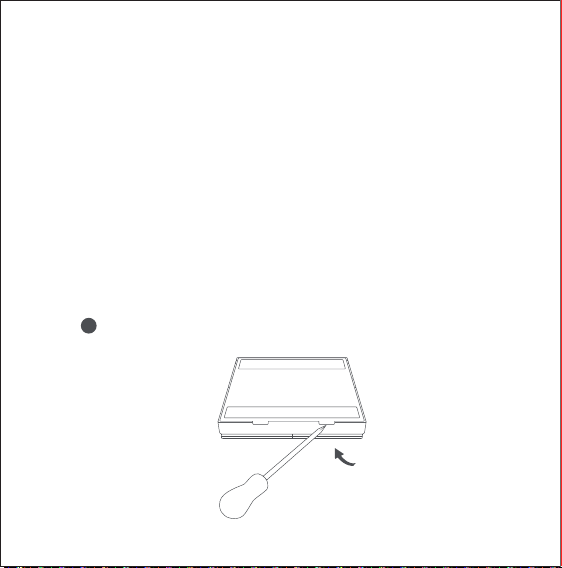
Откройте заднюю панель устройства с помощью отвертки.
1
Вариант 3:
откройте заднюю панель Беспроводного выключателя H1 (2
клавиши) с помощью шлицевой отвертки, просверлите
тонкую деталь у винта задней крышки с помощью острого
инструмента или электродрели (Внимание! Убедитесь, что Вы
просверливаете заднюю крышку, а не основную часть
выключателя, которая включает аппаратное обеспечение и
кнопки), прикрепите его к настенной коробке с помощью
винтов, которые поставляются с устройством, а затем
установите обратно крышку Беспроводного выключателя H1 (2
клавиши)
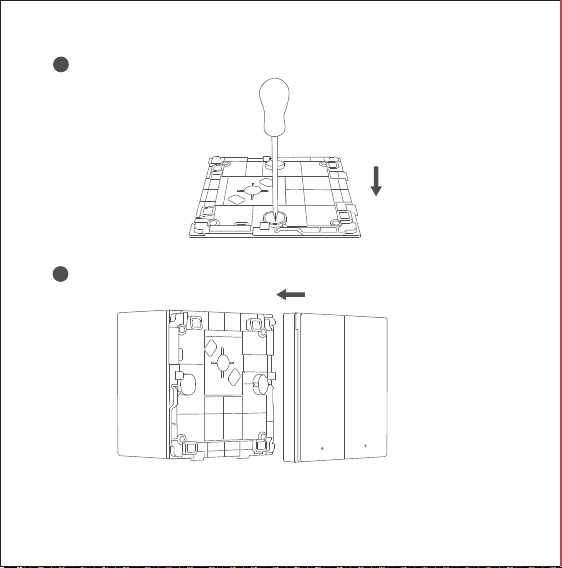
Просверлите заднюю крышку с помощью шила/электрической дрели
для установки винтов.
2
Закрутите винты и поставьте крышку на место.3
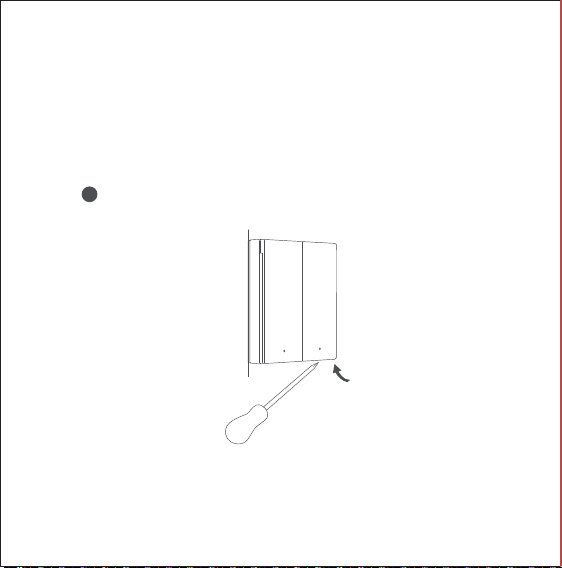
Замена батареи
Откройте заднюю панель Беспроводного выключателя
H1 (2 клавиши) с помощью шлицевой отвертки. Извлеките
старую батарею и замените ее на новую (модель батареи:
CR2450), затем установите крышку на место.
Откройте крышку Беспроводного выключателя H1 (2 клавиши) с
помощью отвертки.
1
1. На странице Устройств в приложении найдите
соответствующее устройство в списке устройств.
2. Выберите соответствующее устройство, чтобы перейти на
страницу устройства.
3. Выберите три черные точки в правом верхнем углу
страницы устройства и войдите на страницу Настроек
устройства.
4. Выберите Дополнительные настройки.
5. Выберите Режимы выключателя, выберите нужный режим и
Режимы выключателя
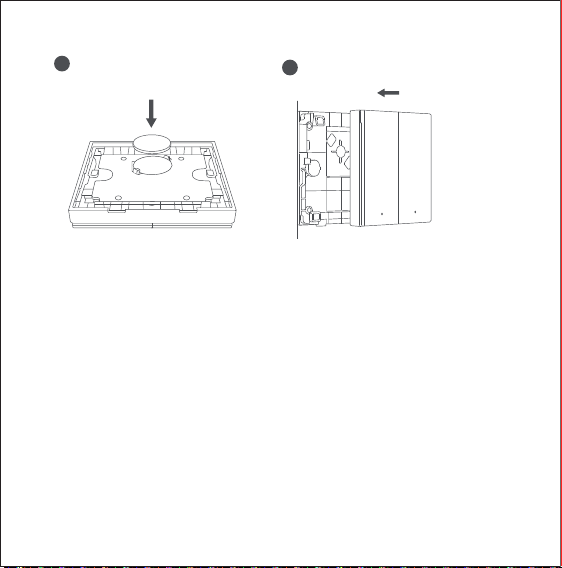
Замените батарею на новую.
2
Установите крышку на место.
3
Статус индикатора
Однократное мигание синим
Обнаружено нажатие кнопки
Привязка
Успешная привязка
Не удалось привязать
В течение 20 с мигает
однократно каждые 2 с
Мигает синим 2 раза
Непрерывно горит синим 1 с
Описание
Описание статуса индикатора
* Если соответствующее устройство не найдено, Вы можете быстро
нажать выключатель 5 раз, и соответствующее устройство загорится в
Списке устройств.
* При переключении режимов быстро нажмите выключатель 5 раз,
чтобы лучше ознакомиться с переключением режимов устройства.
* Чтобы выполнить вышеуказанные шаги, обратитесь к приложению
Aqara Home.
выполните соответствующую настройку в соответствии с
инструкциями в приложении.
Спецификации
Модель: WRS-R02
Размеры изделия: 85,8 х 86 х 12,5 мм
Вес: 82,5 г
Беспроводное подключение: Zigbee 3.0
Модель батареи: CR2450
Рабочая температура: от -10℃ до 50℃
Влажность при эксплуатации: 0-95% относительной
влажности, без конденсации
Диапазон частот Zigbee: 2405-2480 МГц
Передача мощности Zigbee: ≤13 дБ
1. Это устройство содержит батарею таблеточного типа. При
проглатывании батареи таблеточного типа, она может вызвать серьезные
внутренние ожоги, которые могут привести к смерти в течение 2 часов.
2. При замене этой батареи на батарею неправильного типа, существует
опасность возгорания или взрыва.
Внимание: Не глотайте батарею во избежание
химических ожогов.

Онлайн-служба поддержки клиентов: www.aqara.com/support
Эл. почта: support@aqara.com
Производитель: Lumi United Technology Co., Ltd.
Адрес: 8th Floor, JinQi Wisdom Valley, No.1 Tangling Road, Liuxian
Ave, Taoyuan Residential District, Nanshan District, Shenzhen,
China
3. Храните старые и новые батареи в недоступном для детей месте.
4. Если крышка батарейного отсека устройства не может быть надежно
закрыта, пожалуйста, прекратите использование устройства и поместите
его в недоступное для детей место.
5. Если Вы считаете, что батарея могла быть проглочена или попала в
какую-либо часть Вашего тела, немедленно обратитесь за медицинской
помощью.
6. Бросание батареи в огонь или горячую духовку, разрезание и
механическое разрушение батареи может привести к взрыву.
7. Размещение батареи в среде с очень высокой температурой
может
вызвать взрыв или утечку воспламеняющейся жидкости и газа.
8. Размещение батареи под очень низким давлением может
вызвать взрыв или утечку воспламеняющейся жидкости или
газа.

Сделано в Китае
1. Этот прибор - НЕ игрушка. Пожалуйста, не допускайте к нему детей.
2. Данный прибор предназначен только дляиспользования внутри
помещений. Не используйте его во влажных средах или на открытом
воздухе.
3. Оберегайте прибор от воздействия влаги, не допускайте попадания
воды или других жидкостей на устройство.
4. Не размещайте прибор вблизи источников тепла.
5. Не помещайте прибор в закрытый корпус, если там нет нормальной
вентиляции.
6. Не пытайтесь отремонтировать прибор самостоятельно. Все ремонтные
работы должны выполняться авторизованным специалистом.
Этот прибор предназначен только для повышения удобства, качества
домашних развлечений и напоминания о статусе устройства. Он не
предназначен для использования в качестве охранного оборудования
для дома, офиса, склада или любых других мест. Если пользователь
нарушает инструкции по использованию прибора, производитель не
несет никакой ответственности за риски и повреждения имущества.
Правила и условия хранения и транспортировки Оборудование должно
Температура эксплуатации: -10° – +50°C(14° – 122°F )
Рабочая влажность: 0 – 95% RH, без конденсации
1. Извлеките элемент питания;
2. Обратитесь в сервисный центр для получения консультации или
ремонта оборудования
* Оборудование не нуждается в периодическом обслуживании в течение
срока службы
быть защищено от внешних воздействий. Допустимая температура
окружающего воздуха: -20° – +60°C (-4° – 140°F)
Информация о мерах при неисправности оборудования
Manuale utente Interruttore Remoto Wireless H1
Panoramica del prodotto
L'interruttore remoto wireless Aqara H1 (Rocker doppio) è un
nuovo interruttore remoto wireless. Supporta la pressione singola
nella modalità di clic ad alta velocità e 7 funzioni nella modalità
multifunzione tra cui pressione singola del pulsante sinistro,
singola pressione del pulsante destro, doppia pressione del
pulsante sinistro, doppia pressione del pulsante destro, pressione
prolungata del pulsante sinistro e pressione lunga del pulsante
destro. Può essere posizionato o fissato ovunque all'interno o
installato su telai di interruttori. Funziona anche con l'hub Aqara
e altri dispositivi intelligenti Aqara per implementare una varietà
di scene intelligenti.
* È richiesto un hub Aqara. Alcune funzioni richiedono modelli specifici
dell'Aqara Hub. Vedere www.aqara.com/support per maggiori dettagli.
Slot
Indicatore luminoso
Pulsante
Premere a lungo per 10 secondi: associare/reset
Premere rapidamente cinque volte: test del
raggio di comunicazione efficace / ricerca del
dispositivo
1. Prima di attivare l'accessorio, assicurati di aver scaricato l'app
Aqara Home e l'Aqara Hub che supporta Zigbee 3.0 installato.
2. Aprire l'app, andare nella home page e selezionare "+"
nell'angolo in alto a destra per accedere alla pagina Aggiungi
accessorio. Selezionare "Aqara Wireless Remote Switch H1
(Double Rocker)" e aggiungerlo secondo le istruzioni.
3. Per ulteriori informazioni, vedere www.aqara.com/support.
Configurazione rapida
Questo prodotto funziona con l'app Aqara Home. Puoi
scansionare il seguente codice QR per scaricare l'app Aqara Home
dall'App Store di Apple. Gli utenti Android possono trovare l'app
Aqara Home su Google Play. Con l'app Aqara Home, può
funzionare con altri dispositivi intelligenti Aqara.
Opzione 1:
senza adesivo, posizionalo direttamente su una superficie.
Metodi di installazione
Test della portata effettiva: dopo che è stato associato all'hub,
posizionare il dispositivo nella posizione preferita e premere il
pulsante del dispositivo rapidamente per 5 volte, se l'hub
emette messaggi vocali, indica che l'accessorio può comunicare
efficacemente con l'hub.
* Se l'aggiunta non riesce, avvicinare l'hub al prodotto e riprovare.
* Premere rapidamente l'interruttore per 5 volte, se l'hub emette istruzioni
vocali, indica che l'accessorio può comunicare efficacemente con l'hub.
* Hub diversi hanno modi diversi per indicare la connessione effettiva. Fare
riferimento alle istruzioni del proprio modello di Aqara Hub.
* Per garantire connessioni stabili, evitare di installare il dispositivo su
superfici metalliche.
* Assicurati che la superficie sia pulita e asciutta.
Opzione 2:
rimuovere la pellicola protettiva dal nastro adesivo e fissare il
dispositivo sulla superficie desiderata.
Opzione 3:
aprire il retro dell'interruttore remoto wireless H1 (Rocker
doppio) con un cacciavite a lama piatta, forare il pezzo sottile alla
vite del coperchio posteriore con uno strumento affilato o un
trapano elettrico (Attenzione! Assicurarsi di forare il coperchio
posteriore, non la parte principale dell'interruttore che incorpora
hardware e pulsanti), fissarlo alla scatola a muro con la vite
fornita con la scatola, quindi rimontare il coperchio dell'interrut-
tore remoto wireless H1 (Rocker doppio).
Aprire il retro dell'interruttore remoto wireless H1 (Rocker doppio) con
un cacciavite.
1
Forare attraverso il coperchio posteriore con un punteruolo / trapano
elettrico per installare la vite.
2
Fissare la vite e rimettere il coperchio.
3
Sostituzione della batteria
Aprire il retro dell'interruttore remoto wireless H1 (Rocker
doppio) con un cacciavite a lama piatta, rimuovere la vecchia
batteria e sostituirla con una nuova (modello batteria: CR2450),
quindi rimettere il coperchio.
Sostituire con una nuova batteria.
2
Riposizionare il coperchio.
3
Aprire il coperchio dell'interruttore remoto wireless H1 (Rocker
doppio) con un cacciavite.
1

1. Nella pagina Dispositivo dell'app, trova il dispositivo corrispon-
dente nell'elenco dei dispositivi.
2. Selezionare il dispositivo corrispondente per accedere alla pagina
del dispositivo.
3. Selezionare i tre punti neri nell'angolo in alto a destra nella pagina
del dispositivo e accedere alla pagina Impostazioni dispositivo.
4. Selezionare Altre impostazioni.
5. Selezionare Cambia modalità, selezionare la modalità desiderata
e completare la configurazione corrispondente in base alle
istruzioni sull'app.
Cambia modalità
* Quando il dispositivo corrispondente non viene trovato, è possibile premere
rapidamente l'interruttore 5 volte e il dispositivo corrispondente lampeggerà
nell'elenco dei dispositivi.
* Durante il processo di commutazione della modalità, premere rapidamente
l'interruttore 5 volte per realizzare meglio la commutazione della modalità del
dispositivo.
* Per implementare i passaggi precedenti, fare riferimento all'app Aqara Home.
Descrizione stato indicatore
Specifiche
Modello: WRS-R02
Dimensioni prodotto: 85,8 X 86 X 12,5 mm
Peso: 82,5 g
Connettività Wireless: Zigbee 3.0
Modello batteria: CR2450
Temperatura di operazione: -10°C to 50°C
Umidità di operazione: 0-95% RH, senza condensa
Campo di frequenza Zigbee: 2405-2480 MHz
Trasmissione di Potenza Zigbee: ≤13 dBm
Stato indicatore
La luce blu lampeggia una volta
Rilevata la pressione del pulsante
Associazione
Associazione riuscita
Associazione fallita
Lampeggia una volta ogni
2 secondi per 20 secondi
La luce blu lampeggia 2 volte
Blu fisso per 1 sec.
Descrizione

1. Questo prodotto non è un giocattolo, tenere fuori dalla portata
dei bambini.
2. Questo prodotto è progettato solo per uso interno. Non
utilizzarlo in ambienti umidi o all'aperto.
3. Non versare acqua o altri liquidi su questo prodotto.
4. Non posizionare questo prodotto vicino a una fonte di calore.
Posizionare l'interruttore in un'area ben ventilata.
5. Non tentare di riparare il prodotto da soli. Tutte le riparazioni
devono essere eseguite da personale autorizzato.
6. Questo prodotto è progettato solo per migliorare la comodità
della vita domestica. Se l'utente viola le istruzioni del prodotto
e questa avvertenza, il produttore non è responsabile per
eventuali rischi e danni alla proprietà causati da ciò.
Avvertenze
Servizio clienti online: www.aqara.com/support
E-mail: [email protected]om
Produttore: Lumi United Technology Co., Ltd.
Indirizzo: 8th Floor, JinQi Wisdom Valley, No.1 Tangling Road,
Liuxian Ave, Taoyuan Residential District, Nanshan District,
Shenzhen, China
Dichiarazione di conformità europea
Con la presente, [Lumi United Technology Co., Ltd.] dichiara che
l'apparecchiatura radio di tipo [Wireless Remote Switch H1(Double Rocker),
WRS-R02] è conforme alla Direttiva 2014/53/UE. Il testo completo della
dichiarazione di conformità UE è disponibile al seguente indirizzo Internet:
https://www.aqara.com/DoC/
ATTENZIONE
Se la batteria viene sostituita con una di tipo sbagliato, potrebbe
sussistere rischio di esplosione.
Smaltire le batterie esaurite come indicato nelle istruzioni.
Non ingerire niente dalla batteria, Pericolo Ustioni Chimiche.
Questo prodotto contiene una batteria a bottone. Se la qualcosa della
batteria a bottone venisse inghiottito, potrebbe causare gravi ustioni interne
in sole 2 ore con rischi letali.
Mantenere le batterie nuove e quelle esaurite lontano dalla portata dei
bambini.
Se il vano della batteria non si chiude saldamente, smettere di usare il
prodotto e tenerlo lontano dalla portata dei bambini.
Se ritenete che qualcosa dalle batterie sia stato ingoiato od inserito in
qualsiasi parte del corpo, cercate immediatamente un medico.
In condizioni d'uso normali, questa apparecchiatura deve essere tenuta a
una distanza minima di 20 cm tra l’antenna e il corpo dell’utente.
Informazioni sullo smaltimento e sul riciclaggio dei RAEE
Tutti i prodotti contrassegnati da questo simbolo sono rifiuti di
apparecchiature elettriche ed elettroniche (RAEE in base alla direttiva
2012/19/UE) che non devono essere smaltiti assieme a rifiuti domestici non
differenziati. Al contrario, è necessario proteggere l’ambiente e la salute
umana consegnando i rifiuti a un punto di raccolta autorizzato al riciclaggio di
rifiuti di apparecchiature elettriche ed elettroniche, predisposto dalla
pubblica amministrazione o dalle autorità locali. Lo smaltimento e il
riciclaggio corretti aiutano a prevenire conseguenze potenzialmente negative
all’ambiente e alla salute umana. Contattare l’installatore o le autorità locali
per ulteriori informazioni sulla sede e per i termini e le condizioni di tali punti
di raccolta.
Il simbolo sul prodotto o sulla sua confezione indica che il
prodotto non può essere trattato come rifiuto domestico. Al
contrario, deve essere consegnato a un punto di raccolta
autorizzato al riciclaggio di rifiuti di apparecchiature elettriche ed
elettroniche.
Smaltimento di una batteria nel fuoco o in un forno caldo, o schiacciamento
meccanico o taglio di una batteria, che può provocare un'esplosione.
Lasciare una batteria in un ambiente circostante a temperatura estremamente
elevata che può provocare un'esplosione o la perdita di liquidi o gas
infiammabili.
Una batteria soggetta a una pressione dell'aria estremamente bassa che può
provocare un'esplosione o la perdita di liquidi o gas infiammabili.
無線遙控開關H1 用戶手冊
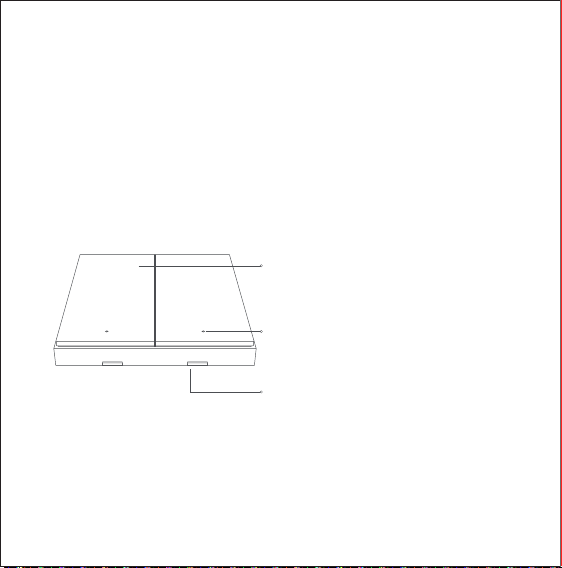
插槽
指示燈
按鈕
長按10秒鐘:綁定/重置
快速點按五次:有效通信距離測試/設備
搜索
產品概述
Aqara無線遙控開關H1(雙鍵)是一種新型的無線遙控開關。在高速點擊模
式下支持單按,在多功能模式下支持單按左鍵、單按右鍵、雙按左鍵、雙按右
鍵、長按左鍵、長按右鍵等7種功能。可以放置或連接在室內任何地方。還可
與Aqara網關和其他Aqara智能設備配合使用,實現各種智能場景。
* Aqara網關是必需的。有些功能需要特定型號的Aqara網關才能實現。您可訪問
www.aqara.com/support,獲取更多細節。
快速設定
該產品可與Aqara Home應用配合使用。您可以掃描以下二維碼,從蘋果
應用商店下載Aqara Home應用程序。如果是安卓用戶,可以打開Google
Play獲取Aqara Home應用程序。使用Aqara Home應用程序,產品可以配
合其他Aqara智能設備工作。
1. 在激活之前,請確保您已下載了支持Zigbee 3.0的Aqara Home應用程序
和Aqara網關。
2. 請打開應用程序,進入首頁,在右上角選擇“+”進入添加配件頁面。選擇”
Aqara無線遙控開關H1(雙鍵)“,根據說明步驟完成添加。
3. 請參閱www.aqara.com/support了解更多信息。
安裝方法
有效距離測試:與網關綁定後,將設備放置在合適位置,然後快速點按設備
按鈕5次,如果網關發出語音提示,則表明該配件可以與網關進行有效通
信。
* 如果添加失敗,請將網關移動到距離產品更近的位置,再試一次。
* 快速點按開關5次,如果網關發出語音提示,則表明配件可以與網關進行有效通信。
* 不同的網關指示連接有效的方式不同。請參閱您所使用的Aqara網關型號說明。
*為確保連接穩定,請不要將設備安裝在金屬表面上。
選項1:
不使用粘合劑,直接放在檯面上。
* 請確保粘貼表面乾淨、乾燥。
選項2:
撕下膠帶保護膜,然後將設備貼到您認為合適的位置。
選項3:
用一字螺絲刀打開無線遙控開關H1(雙鍵)的背面,用鋒利的工具或電鑽在
後蓋螺絲處鑽孔(注意!請確認鑽孔的位置是後蓋,不是包含硬件和按鈕的
開關主體部分),用包裝盒隨附的螺釘將其固定在牆上開關盒上,然後將無
線遠程開關H1(雙鍵)蓋放回原處。
用螺絲刀打開無線遙控開關H1(雙鍵)的後蓋。
1
使用錐子/電鑽在後蓋處鑽孔,以安裝螺絲。
2
擰緊螺絲,然後將蓋放回原處。
3
更換電池
用一字螺絲刀打開無線遙控開關H1(雙鍵)的後蓋,取出舊電池,更換為新
電池(電池型號:CR2450),然後將後蓋裝好。
用螺絲刀打開無線遙控開關H1(雙鍵)的後蓋。
1
更換新電池。
2
將後蓋裝好。3
切換模式
指示燈狀態說明
1. 點開應用程序的“設備”頁面,在設備列表中找到對應的設備。
2. 選擇相應的設備,進入設備頁面。
3. 選擇設備頁面右上角的三個黑點,進入“設備設置”頁面。
4. 選擇“更多設置”。
5. 選擇“切換模式”,選擇所需的模式,然後根據應用程序上的說明完成相
應的配置。
* 如果找不到相應的設備,您可以快速點按開關5次,相應的設備將在設備列表中閃爍。
* 在模式切換過程中,快速點按開關5次,可以更好地實現設備模式切換。
* 要執行上述步驟,請參考Aqara Home應用程序。
指示燈狀態
藍燈閃爍一次 檢測到點按按鈕
綁定
綁定成功
綁定失敗
每2秒閃爍一次,持續20秒
藍燈閃爍兩次
藍燈長亮1秒
描述

規格
警告
型號: WRS-R02
產品尺寸:85.8 X 86 X 12.5 mm
重量: 82.5 g
無線連接:Zigbee 3.0
電池型號:CR2450
工作溫度:-10℃ 至 50℃
工作濕度:相對濕度0-95%,無凝結
Zigbee 頻率範圍: 2405-2480 MHz
Zigbee 電力傳輸: ≤13 dBm
1. 本產品不是玩具,請讓兒童遠離本產品。
2. 本產品針對室內使用環境設計。請勿在潮濕環境或戶外使用。
3. 請勿將水或其他液體濺到本產品上。
4. 請勿將本產品靠近熱源。請將產品放置在通風良好的地方。
5. 請勿自行嘗試修理產品。產品維修需要由專業人員進行。
6. 本產品僅用於提高家居生活便利性。如果用戶違反產品說明和警
告,製造商對由此引起的任何風險和財產損失概不負責。
在線客戶服務:www.aqara.com/support
電子郵箱:support@aqara.com
製造商:綠米聯創科技有限公司
地址:中國深圳市南山區桃源街道留仙大道塘嶺路1號金騏智谷大廈8樓