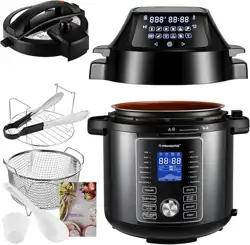
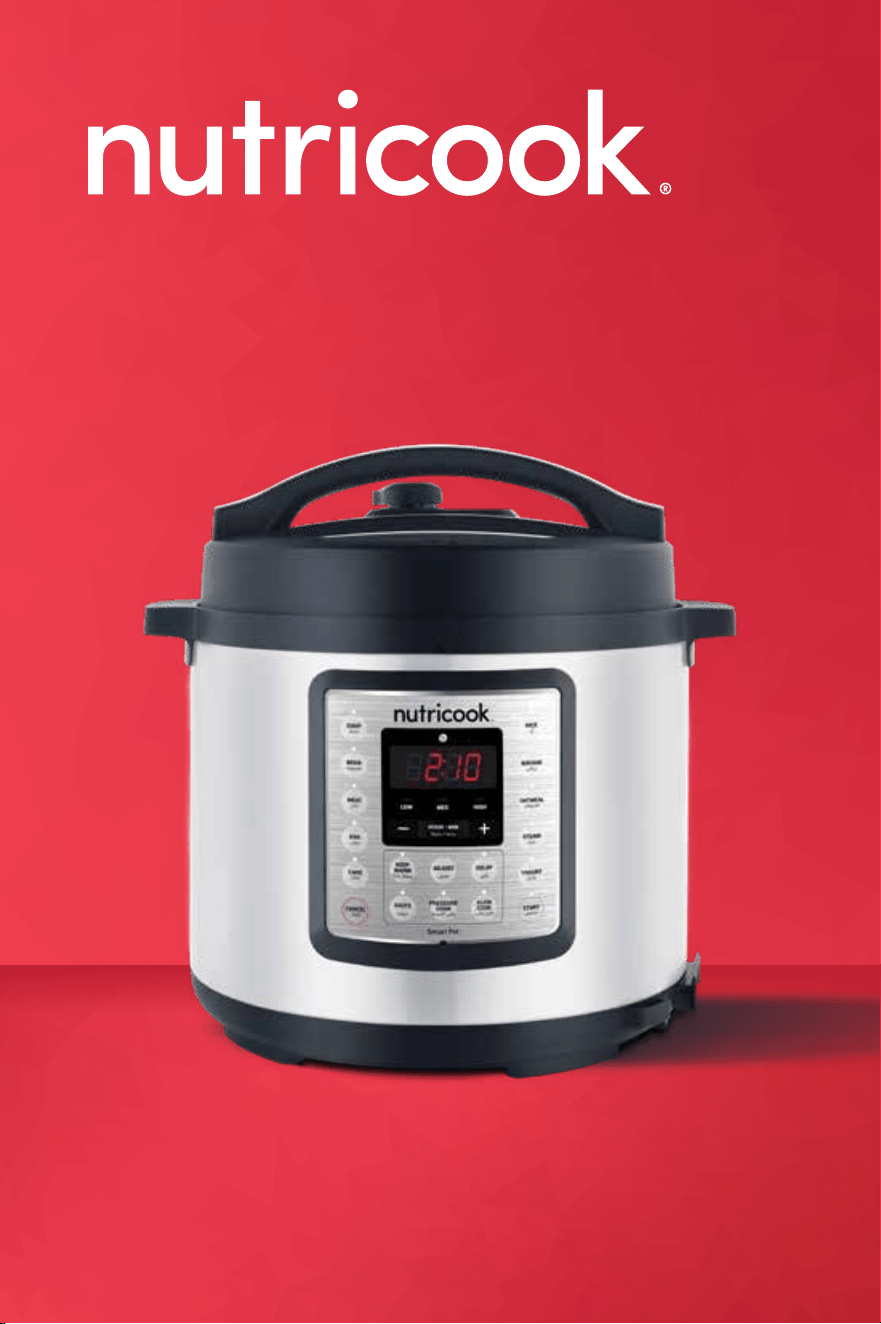
SMART POT EKO
User guide.
Please make sure to read this User Guide prior to using your unit.
Contents.
05 Welcome.
07 Before you begin.
09 Important safeguards & cautionary information.
15 What's included.
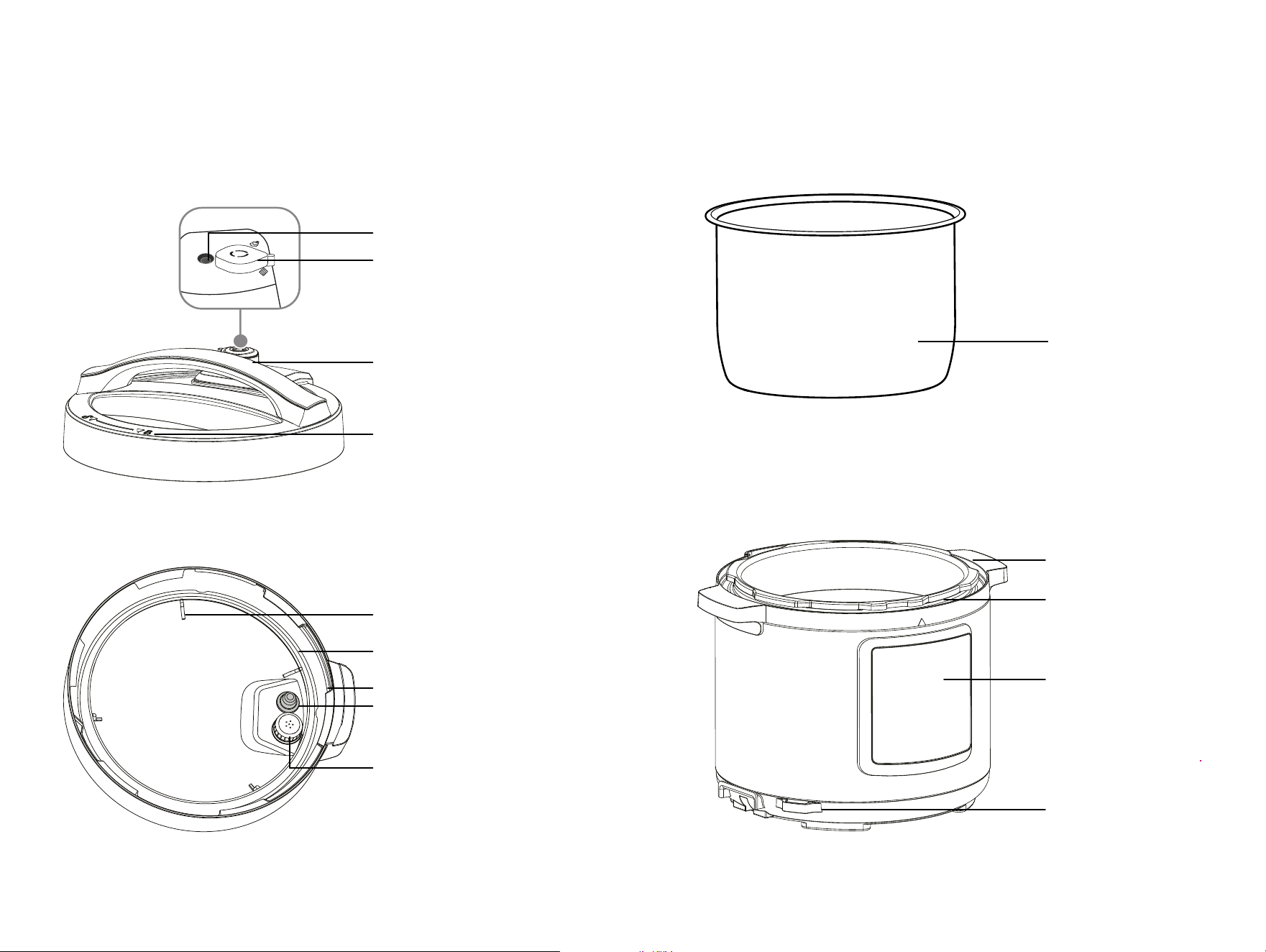
16 Cooker parts overview.
19 Getting started.
20 Open and close lid.
21 Install and remove sealing ring.
22 Install and remove pressure release valve.
23 Install and remove float valve.
24 Install and remove anti-block shield.
25 Install condensation collector.
26 Remove and clean inner pot.
27 Venting methods.
29 Control panel details.
31 Smart features.
34 LED screen display messages.
36 Smart cooking programs table.
37 Initial test run.
39 Sauté.
41 Pressure cooking programs.
45 Slow Cook.
47 Yogurt.
49 Care & maintenance.
51 Troubleshooting.
53 Warranty.
Find delicious recipes online at:
nutricookworld.com nutricookworld
32
Welcome to team
nutricook
®
Life is complicated. Eating
healthy doesn’t have to be.
There’s really no easier way to
streamline your healthy lifestyle
than with this mighty appliance.
We are constantly working to
create recipes that are
EASY. DELICIOUS. NUTRITIOUS.
You can find these recipes online at
nutricookworld.com
We can’t wait to see how you make
nutricook
®
part of your everyday.
Get social with us.
nutricookworld
Find delicious recipes online at:
nutricookworld.com nutricookworld
54
Before you begin.
• Remove all packaging materials from in
and around the cooker and verify that all
parts are accounted for.
• Place the cooker on a stable, level surface,
away from external heat sources.
• Read all Important safeguards and
cautionary information in this User guide.
Failure to do so may result in property
damage and/or personal injury.
• Follow Care & maintenance instructions in
this User guide to clean the cooker before
cooking.
• Do not remove safety warning stickers or
rating label.
*CAUTION: NEVER use the cooker on a stovetop. Do not place
appliance on or in close proximity to a hot gas or electric burner, or a
heated oven; heat from an external source will damage appliance.
Find delicious recipes online at:
nutricookworld.com nutricookworld
76
Building a smoothie.
Important safeguards &
cautionary information.
Warning! This appliance cooks with pressure. To avoid the risk of serious injury,
carefully read all instructions before operating this appliance.
When using any electrical appliance, basic safety precautions should always be
observed, including the following critical information.
GENERAL SAFETY
• DO NOT touch hot surfaces of pressure cooker. Use side handles
only.
• Caution: To protect against electrical shock, DO NOT immerse
cord, plugs, or the unit in water or other liquid.
• Close supervision is necessary when any appliances are used by
or near children.
• This appliance is not intended for use by persons (including
children) with reduced physical, sensory or mental capabilities,
or lack of experience and knowledge, unless they have
been given supervision or instruction concerning use of the
appliance by a person responsible for their safety.
• Children should be supervised to ensure that they do not play
with the appliance. Always keep the appliance and cord away
from children.
• Always disconnect the appliance from the power supply if it
is not in use and before cleaning. Allow the unit to cool before
putting on or taking o parts, and before cleaning and storing. To
disconnect, press Cancel button, then remove plug from the wall
outlet.
• DO NOT leave appliance unattended while in use.
Find delicious recipes online at:
nutricookworld.com
nutricookworld
*WARNING: Read this User guide carefully and completely, and retain for future
reference. Failure to adhere to safety instructions may result in serious injury.
8 9

• DO NOT use pressure cooker for other than intended use. For
Household Use Only. DO NOT use outdoors.
• This appliance cooks under pressure. Always ensure there is a
minimum of 1 measuring cup of liquid for the cooker to pressurize.
Improper use may result in scalding injuries. Make certain the
unit is properly closed before operating.
• For all pressure cooking programs, do not fill the unit over MAX
line. When cooking foods that expand during cooking such as rice
and dried vegetables, do not fill the unit over 1/2 full. Overfilling
may cause a risk of clogging the pressure release hole and
developing excess pressure.
• WARNING: Spilled food can cause serious burns. Keep
appliance and cord away from children.
• Caution: DO NOT place the pressure cooker on or in close
proximity to a hot gas or electric burner, or heated oven; heat
from an external source will damage the appliance.
• Caution: DO NOT use appliance near water or flame.
• Caution: Extreme caution must be used when inner pot
contains hot food or hot liquids. DO NOT move the cooker while in
use or when it is under pressure.
• Always check the pressure release hole, pressure release valve
and float valve for clogging before use.
• Make sure the pressure release valve is in the Sealing position for
all pressure cooking programs.
• CAUTION: DO NOT open the pressure cooker until all internal
pressure has been released. If the lid is dicult to open, this
indicates that the cooker is still pressurized – DO NOT force it
open. Any pressure in the cooker can be hazardous.
• CAUTION: Be careful of hot steam when opening the
appliance. NEVER place hands and face over the appliance as
soon as the lid is removed to avoid serious injury.
• WARNING: Never deep fry or pressure fry in the unit with oil.
• CAUTION: The inner pot can be heavy when filled with food.
Extreme caution must be observed when taking out the inner pot
from the cooker base to avoid spillage and burn injury.
• Always place the inner pot on a stable and heat-resistant surface
after removing from the cooker base.
• DO NOT operate the cooker without the inner pot inserted into
the cooker base.
• NEVER pour food or liquid into the cooker base. Always cook with
the inner pot provided.
• DO NOT lean over or place hands or face over the pressure
release valve or float valve when the appliance is in operation or
has residual pressure. Do not touch the metal portion of the lid
when the appliance is in operation as this could result in serious
injury and burns.
• DO NOT cover or obstruct the pressure release valve and float
valve with cloth or any other objects as this can cause safety issue
and injury.
• Turn the appliance o if steam escapes from the pressure release
valve or float valve steadily for longer than 3 minutes. There
may be residual pressure in the appliance. Allow the appliance
to depressurize naturally or release all excess pressure before
opening.
• Turn the appliance o if steam escapes from the sides of the lid
and ensure sealing ring is properly installed. See Troubleshooting
section of this User guide.
• Always use the unit on a clean, stable, level and dry surface.
Ensure that the unit is positioned in a stable situation with the
handles positioned to avoid spillage of hot liquids. Keep the
appliance on stable heat-resistant platform.
• DO NOT place your cooker on anything that may block the vents
on the bottom of the appliance.
• CAUTION: Before inserting the inner pot into the appliance,
wipe the outer surface of the inner pot and heating element to
ensure they are dry and free of food debris. Refer to Care and
maintenance instructions.
• WARNING: NEVER put metal utensils and oversized foods into
the inner pot as they may cause personal injury and risk of fire.
• Only use accessories like pressure cooking lid, sealing rings and
inner pots authorized by nutricook
®
to reduce the risk of any
damage and injury.
• Do not tamper with any of the safety mechanisms of this
appliance as doing so may void the warranty.
• This appliance is not intended to be operated by means of an
external timer or separate remote-control system.
1110

ELECTRICAL SAFETY
CAUTION: To avoid risk of electric shock, never immerse the cord,
plug, or cooker base in water or other liquids.
• DO NOT use this product in locations with dierent electrical
specifications or plug types. Do not operate with any type of
plug adapter or voltage converter device, as these may cause
electrical shorting, fire, electric shock, personal injury or product
damage.
• DO NOT modify the plug in any way, as doing so may cause
electrical shorting, fire, electric shock, personal injury and will
void the warranty.
• DO NOT pull, twist or mistreat the power cord.
• The use of attachments or parts not recommended and sold by
the manufacturer may cause fire, electric shock, personal injury,
or product damage and will void the warranty.
• If the supply cord is damaged, it must be replaced by its service
agent or similarly qualified persons in order to avoid a hazard.
• Always POWER OFF and UNPLUG the appliance when it is not in
use or BEFORE cleaning.
• DO NOT allow the cord to hang over the edge of the table or
counter. Do not pull, twist, or damage the power cord. Do not
allow cord to touch hot surfaces, including the stove.
• DO NOT let cord hang over edge of table or counter, or touch
hot surfaces. The cord can get tangled or cause the appliance to
fall. Bring it to a qualified technician for examination, repair or
electrical and mechanical adjustment.
• DO NOT operate this appliance with a damaged cord or plug or
if the appliance malfunctions, or is dropped or damaged in any
manner including any damage to the inner pot’s rim or bottom
part.
• Use of adapters and converters is considered an unauthorized
modification of the product and as such voids the warranty. Use
of this product in locations with dierent electrical specifications
may result in damage to the product.
• If the power supply cord is damaged, it must be replaced by the
manufacturer, its service agent or similarly qualified persons in
order to avoid a hazrd.
ELECTRICAL INFORMATION:
For safety reasons, the cord length of this appliance was selected to
reduce Safety Hazards that may occur with a long cord. Extension
cords are available and may be used if care is exercised in their use.
If an extension cord is used: (1) the marked electrical rating of the
extension cord should be at least as great as the electrical rating of
the appliance, and (2) the longer cord should be arranged so that
it does not drape over the counter or table top where it could be
accidentally pulled o the counter or table or tripped over.
Save these instructions!
FOR HOUSEHOLD USE ONLY
1312
MODEL CAPACITY POWER VOLTAGE WEIGHT DIMENSION
SMART POT
EKO
SP104
6 L 1000 W
220-240 V
50/60 Hz
5.4 kg 32.5x32.3x37.36 cm
Product Specification:
1514
What's included.
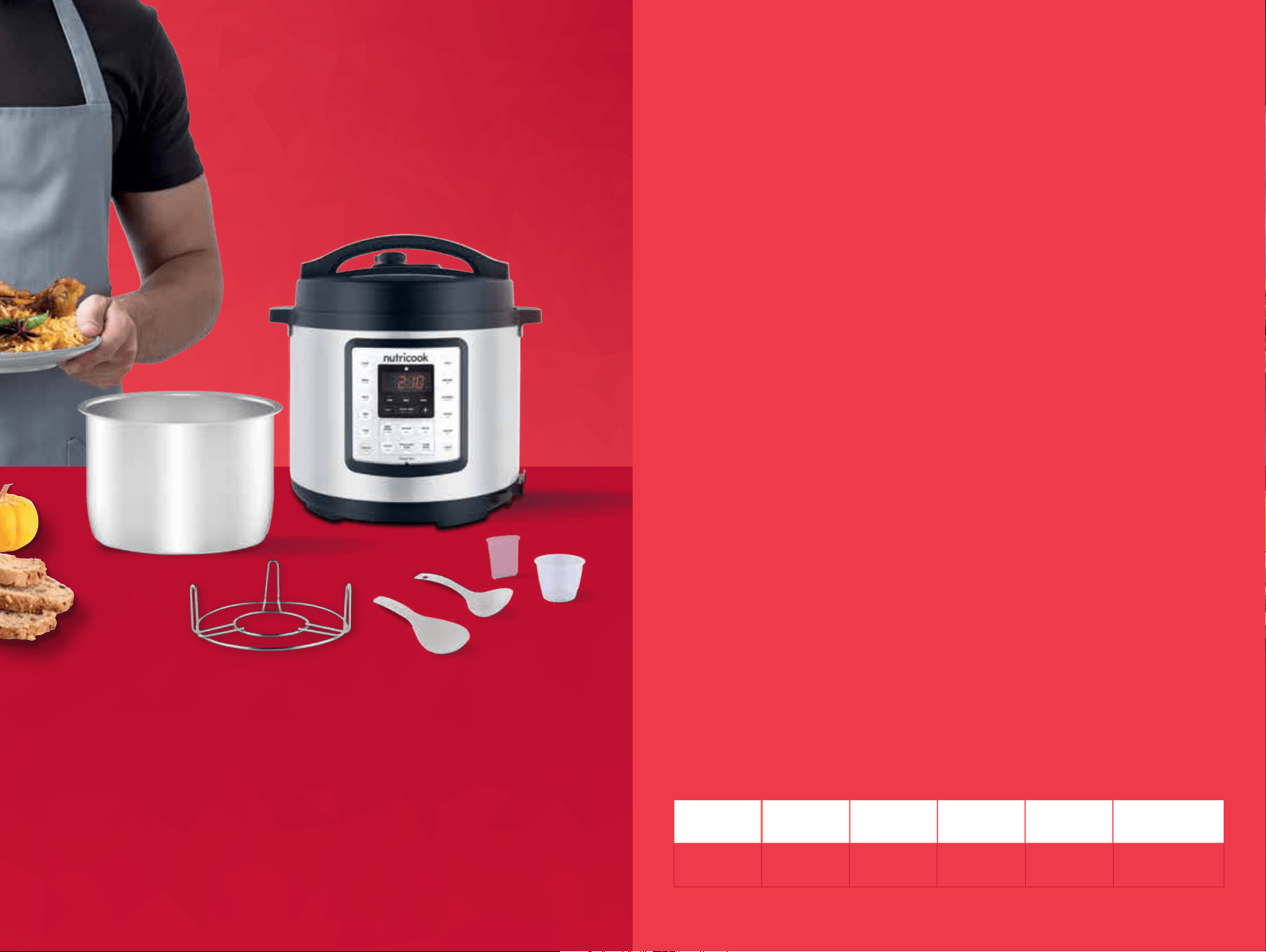
• 1000 WATT COOKER BASE
• STAINLESS STEEL COOKING POT
• STEAM RACK
• SOUP SPOON
• RICE PADDLE
• MEASURING CUP
• USER GUIDE
*NOTE: Images are for visual representations only. Always refer to actual product. *NOTE: Images are for visual representations only. Always refer to actual product.
Sealing
Venting
Cooker parts overview.
top of lid
bottom of lid
float valve
lid handle
lid marker
sealing ring rack
sealing ring
float valve
silicone cap
anti-block shield
locking pin
pressure
release valve
inner pot
cooker base
handle
control panel
cooker base rim
rice spoon
holder
stainless steel
inner pot
1716
Find delicious recipes online at:
nutricookworld.com nutricookworld
Getting
started.
1918
*CAUTION:
Inspect the lid to make sure that it is free from any damage
prior to using your pressure cooker.
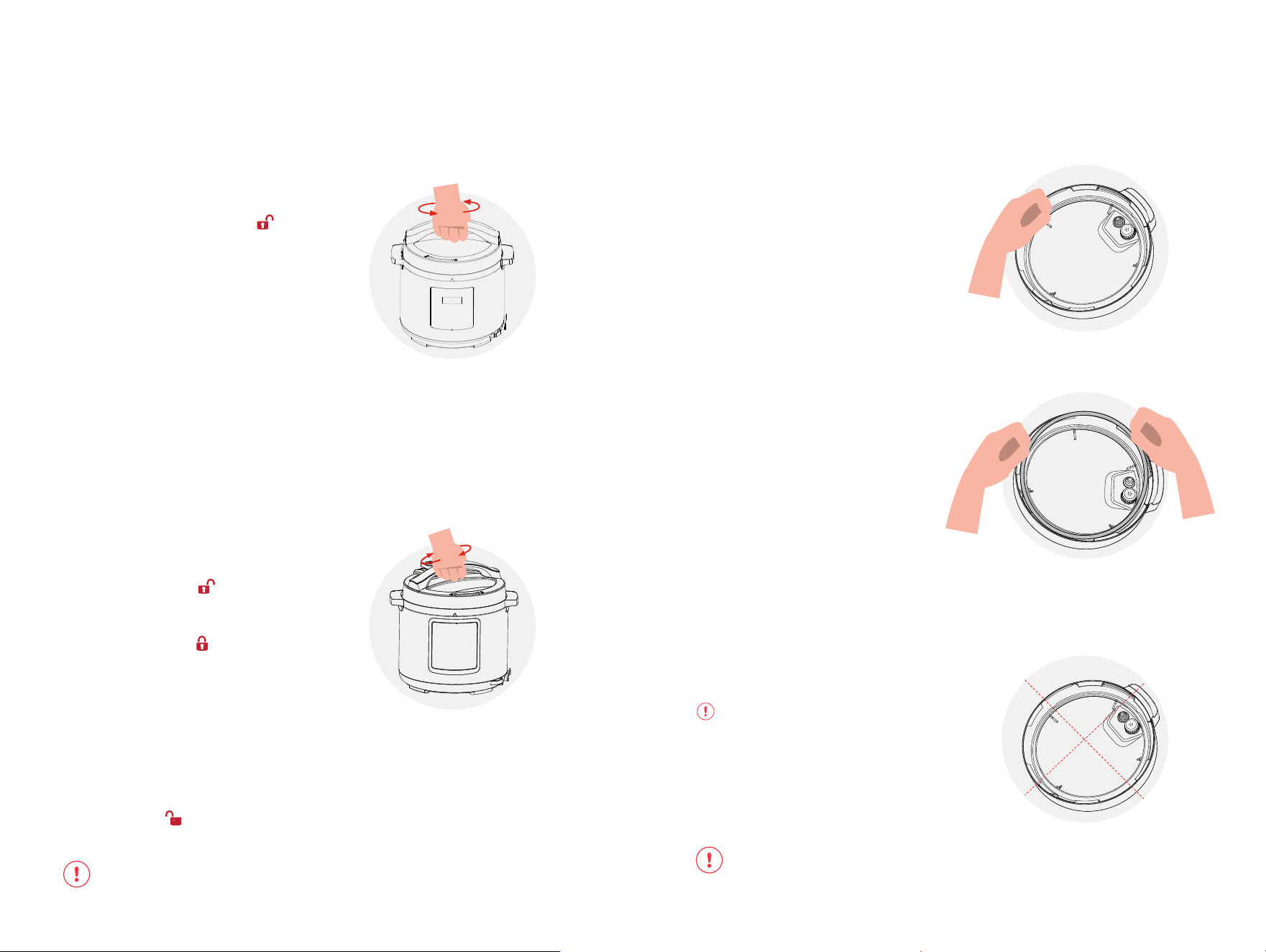
Open and close lid.
open
Open: Grip handle and turn lid
in counter-clockwise until ( ▼)
symbol on lid is aligned with
(▲) symbol on cooker base rim.
Lift the lid vertically from the
cooker base.
close
Close: Grip handle and lower
down the lid to cooker base
rim. Ensure that ( ▼) symbol
on lid aligns with (▲) symbol
on cooker base rim and rotate
clockwise until (▼ ) symbol on
lid is aligned with (▲) symbol on
cooker base rim.
*
NOTE: If you encounter any diculty
in opening and closing the lid, refer
to the Troubleshooting section of the
User Guide. Always check the cooker
base rim and remove any food debris/
residue to ensure lid will lock properly.
*NOTE: Make sure that locking
pin located at the back of lid is fully
retracted into the lid. This indicates that
lid is closed correctly.
The unlock icon (
) on top of the LED Screen is always illuminated when the lid is
not properly locked.
Install and remove
sealing ring.
Install: Place the sealing ring
inside the sealing ring rack and
press into place. Ensure entire
sealing is snug behind sealing
ring rack. Sealing ring must be
installed before use.
After closing lid, the sealing ring
creates an airtight seal between
lid and cooker base.
Remove: Gently pull sealing
ring out from sealing ring rack
and clean after every use.
*NOTE: It is recommended to have
more than one sealing ring. The sealing
ring is an integral part of product safety.
Only use authorized nutricook
®
sealing
ring or Replace your sealing ring every
12-18 months or when deformation or
damage is noticed.
CAUTION: Always check for cuts or deformations in sealing ring prior to cooking.
Failure to follow these instructions may cause food to discharge, which may lead
to personal injury or property damage.
install
remove
*CAUTION: Regularly inspect your
sealing ring for any damage as this will
aect the product safety. Sealing ring
may stretch over time. Do not use a
stretched or damaged sealing ring. If
puckering occurs, replace sealing ring.
2120
Install and remove
float valve.
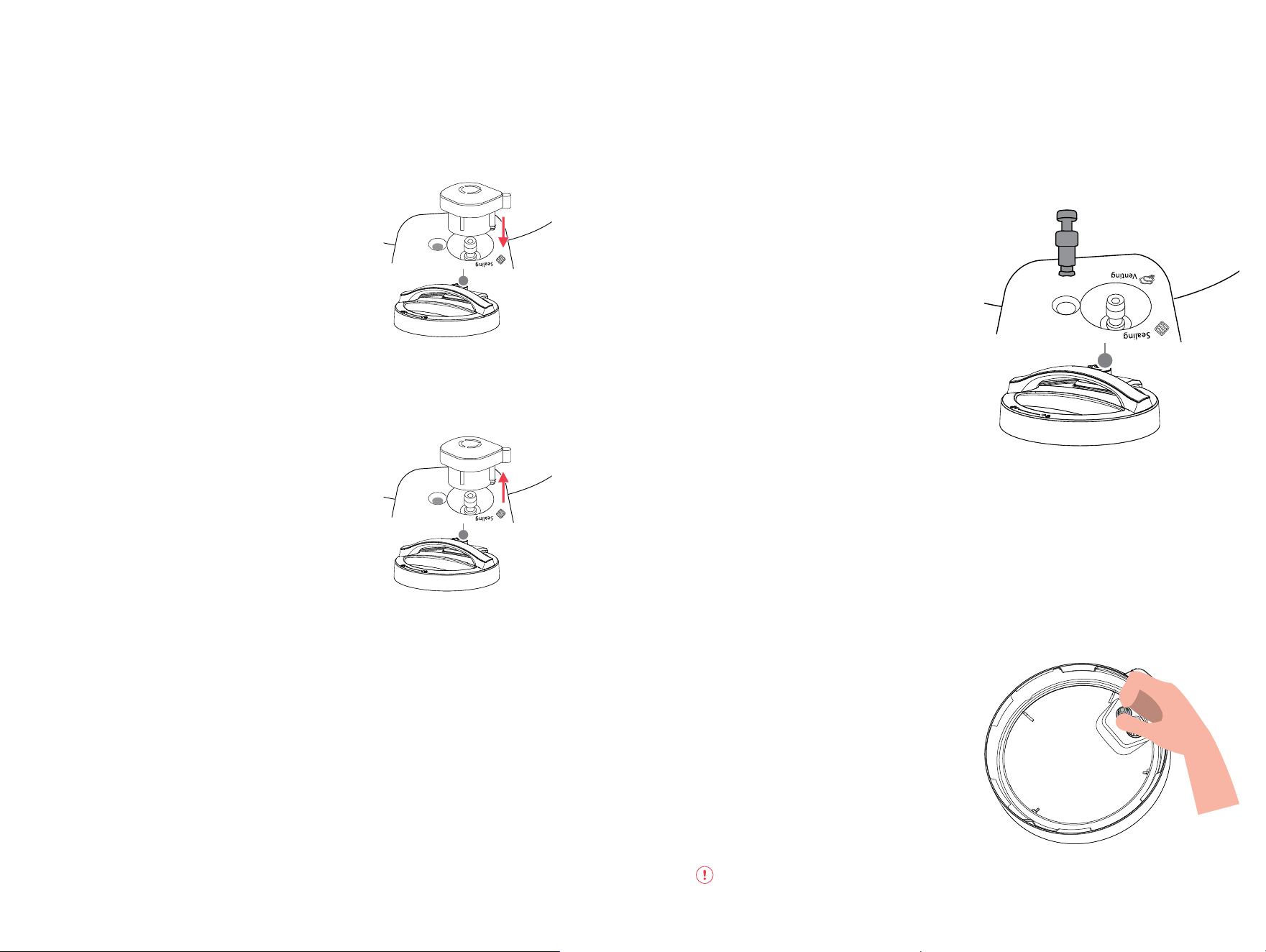
When pressure builds up inside your
cooker, the float valve pops up. This
indicates the cooker is pressurized
and prevents you from opening the
lid. When the cooker is depressurized,
the float valve drops down.
Note: Refer to Venting methods section of
this user guide to safely release pressure.
Remove: Place one finger on top of
the float valve (located in the upper
part of the lid) and turn lid over.
Detach the silicone cap from the float
valve and remove float valve from
top of lid.
Note: Always keep the float valve and
silicone cap in a secure place after
removing from the lid.
Clean float valve
to remove dried food debris after every
use to avoid clogging. The float valve and
silicone cap must be installed in the lid
before operating your cooker.
Install: Insert float valve on the hole
located on top of the lid. Place one
finger on the float valve and turn lid
over. On the bottom of lid, attach the
silicone cap to the float valve.
Note: The float valve and silicone cap must
be installed in the lid before operating your
cooker.
Warning: Never touch the float valve
while the cooker is pressurized to avoid burns.
NOTE: Always ensure that pressure release valve is in Sealing position for all pressure
cooking programs - Soup, Bean, Meat, Egg, Cake, Rice, Biryani, Oatmeal, Steam, and
Pressure Cook.
When using Slow Cook, Yogurt and Keep Warm functions, pressure release valve must
be in Venting position.
Install and remove
pressure release valve.
Install: Position pressure
release valve on pressure
release hole and press down.
*NOTE: The pressure release valve
automatically releases pressure if
excessive pressure builds up inside your
cooker.
Remove: Pull pressure release
valve up from pressure release
hole.
Pressure release valve must be
installed before use and cleaned
frequently.
*NOTE: Be aware that pressure
release valve fits loosely when properly
installed. It will safely remain in place
even if lid is flipped over.
remove
(pull vertically)
install
2322
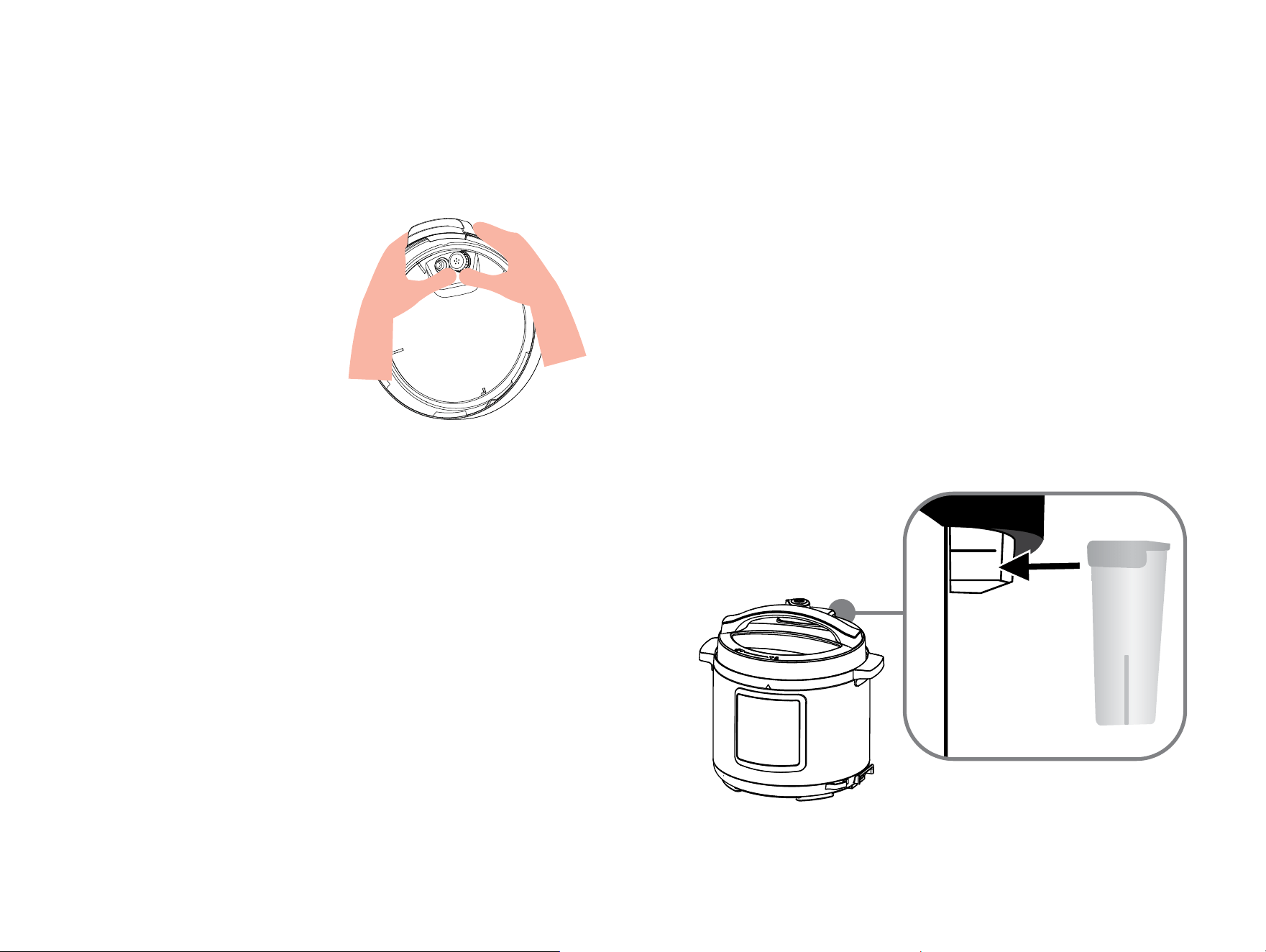
Install condensation
collector.
Install: On back of cooker base , align grooves of the condensation
collector over tabs and push condensation collector until it locks into
place.
The condensation collector collects excess water in the cooker rim
produced during the cooking process to prevent from interfering with
other protection features. It must be installed before cooking and
cleaned after every use.
Remove: Pull condensation collector away from cooker base.
Do not pull down to avoid any damage.
Install and remove
anti-block shield
The anti-block shield safely prevents
food from entering the pressure
release hole to avoid blockage and
assist in proper pressure regulation.
Remove: Grip lid and firmly press
against side of anti-block shield,
pressing towards side of lid and up
direction until it pops o.
Note: The anti-block shield must be
cleaned frequently to remove dried food
debris.
Install: Place anti-block shield over
prongs and press down until it snaps
into position.
Note: Always make sure the anti-
blockshield is assembled in the lid before
using your cooker.
2524
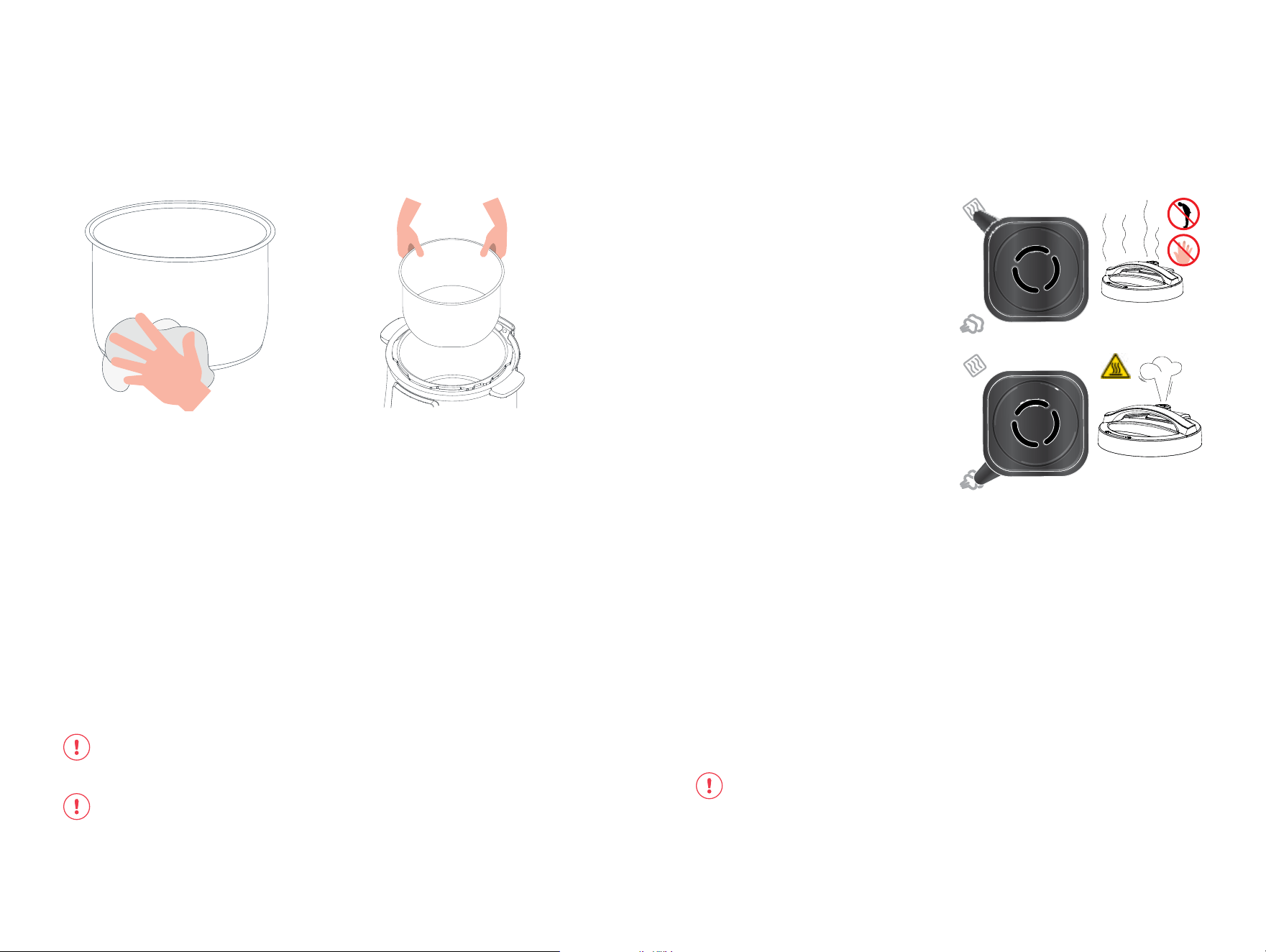
Venting methods.
Once cooking completes,
there are 2 methods to release
pressure:
Quick Release (QR):
Turn pressure release valve from
Sealing to Venting position, after
cooking program is completed
or stopped by using mitt/long
utensil to let out pressure/steam
until the float valve drops into
the lid.
If the food contents inside
spatters during this process,
turn the pressure release valve
back to Sealing position using
mitt/long utensil, and try again
after a few minutes. If spatter
still occurs, use Natural Release
method to let out remaining
pressure.
NOTE: The Quick Release method is
recommended for steamed vegetables
and seafood to avoid overcooking.
Be aware that the Quick Release
is not suitable for food with large
liquid volume or high starch content
(e.g. porridge, stews, sticky liquids,
soup, etc.). Food content may spatter
out from the pressure release valve.
Use Natural Release instead.
WARNING:
• Always keep hands and face away from the opening on the top of the
pressure release valve when using Quick Release. The escaping steam is
hot and can cause scalds, burns and serious injury.
• Do not lean over or touch the pressure release valve to avoid injury.
• Never pull out the pressure release valve when it is letting out steam.
• Do not cover the pressure release valve with a rag or cloth while steam is
being released.
Venting
Sealing
Venting
Sealing
hot surface
sealing
venting
Remove & clean
inner pot.
Remove inner pot from cooker base and wash with hot water and dish
soap before first use.
Wipe outer surfaces of inner pot and heating element to ensure they
are dry and free of food debris. Failure to do so may damage the
cooker.
Place inner pot into cooker base before cooking. Food must be placed
only in the inner pot, not cooker base.
The inner pot is an integral part of product safety. Always use an
authorized nutricook
®
inner pot made for this model when cooking.
Failure to do so may cause personal injury or property damage.
WARNING: Do not fill the inner pot higher than the MAX LINE (Pressure Cooking
Maximum), as indicated on the inner pot. Exercise extreme caution when cooking
and venting food such as applesauce, cranberries, pearl barley, oatmeal, split
peas, noodles, etc., as these foods may foam, froth, or spatter, and may clog
the pressure release hole and/or pressure release valve. Do not fill the inner pot
higher than the — 1/2 line when cooking these foods.
CAUTION: To avoid risk of personal injury and/or property damage, do not
pour food or liquid into cooker base.
*Note: Always check inner pot for dents or deformations prior to cooking.
2726
ءﺎﺴﺣ
SOUP
ﺎﻴﻟﻮﺻﺎﻓ
BEAN
ﻢﺤﻟ
MEAT
ﻚﻌﻛ
CAKE
SLOW
COOK
ﺾﻴﺑ
EGG
ءﺎﻐﻟإ
CANCEL
ﺮﺨﺒﻣ
STEAM
يدﺎﺑز
YOGURT
زرأ
RICE
BIRYANI
ﻲﻧﺎﻳﺮﺑ
نﺎﻓﻮﺸﻟا
OATMEAL
ﻞﻴﻐﺸﺗ
START
PRESSURE
COOK
SAUTE
ﻪﻴﺗﻮﺳ ﻂﻐﻀﻟا ﻲﻬﻃ ءﻲﻄﺑ ﺦﺒﻃ
Smart Pot
MED HIGHLOW
HOUR | MIN
ﺔﻘﻴﻗد | ﺔﻋﺎﺳ
6
4
9
10
11
7 8
1
3
5
5
5
2
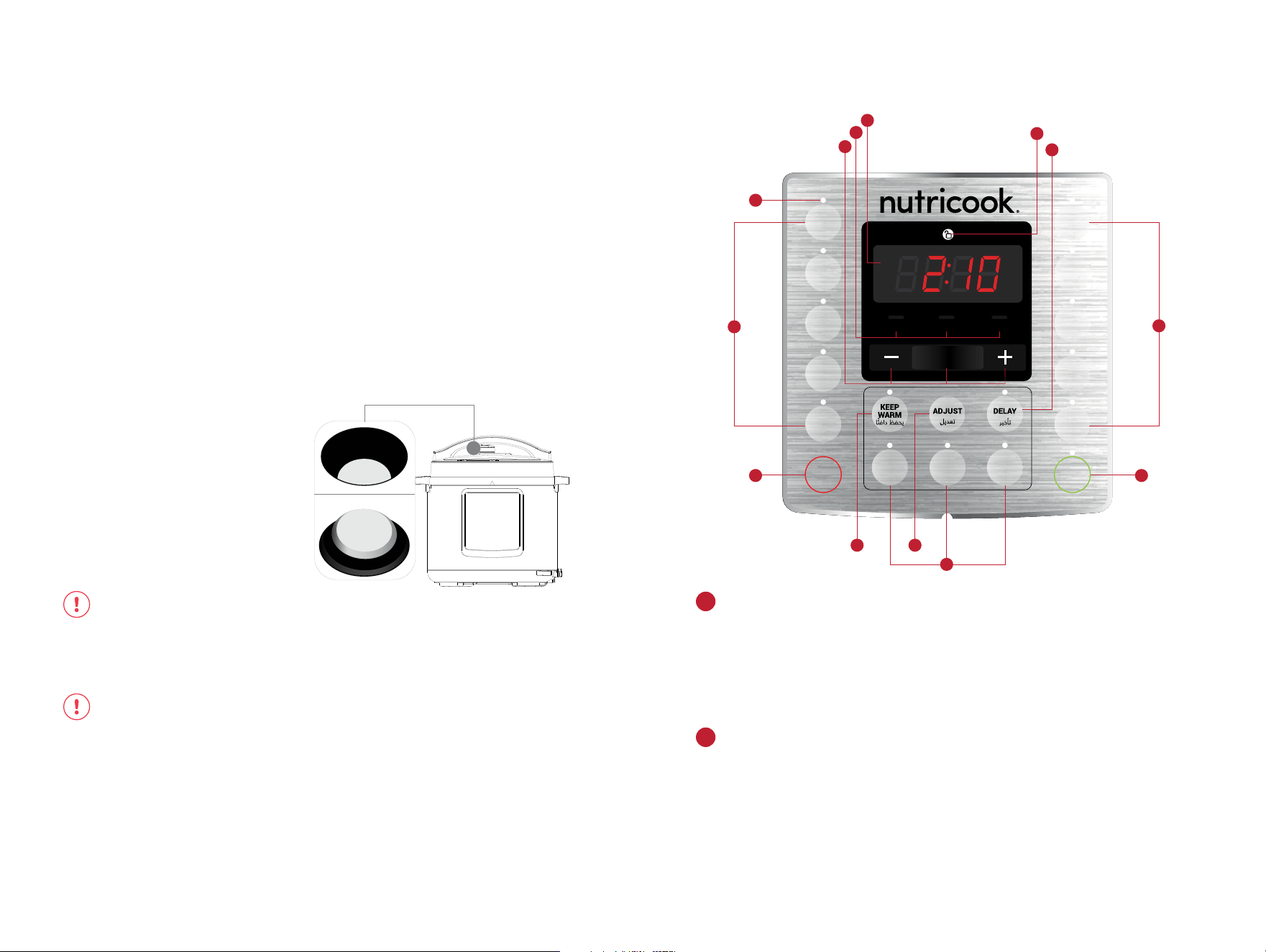
Control panel details.
LED time and status display.
Cooking mode indicators.
Displays cooking, delay and keep warm times in HH:MM format. The first
two digits refers to the Hour field while the last two digits refers to the
Minute field.
Displays status messages of the cooker. See Display Messages section of
this User Guide for additional details.
When running any of the Preset Pressure Cooking Programs except
Pressure Cook - Low, Med, High refer to the preset time options. When
cooking using Pressure Cook option, cooking mode will always be High
signifying food will be cooked in High Pressure.
For Non-pressure Cooking Programs which include Sauté, Slow Cook and
Yogurt – Low, Med, High refer to temperature levels.
For Keep Warm program – Low, Med, High refer to temperature levels.
1
2
Natural Release (NR):
1. Leave the pressure release valve in the Sealing position.
2. The cooker dissipates heat so pressure releases naturally
overtime.
3. Allow cooker to cool down naturally until the float valve drops
down.
This may take 10 to 15 minutes or even longer, depending on the
amount of food inside your cooker. After cooking is finished, cooker
will be in Auto Keep Warm mode. (if Auto Keep Warm function is on)
Safe Lid Opening
Open the lid: To avoid vacuum suction on the lid, turn the pressure
release valve to Venting position to let in air when lifting the lid. Hold
the lid handle, turn the lid counter-clockwise to the open position, and
lift the lid up to open.
WARNING:
• DO NOT lean over or touch the pressure release valve.
• DO NOT force open the lid.
• DO NOT place unprotected skin over pressure release valve.
• DO NOT cover pressure release valve.
CAUTION:
Do not open the lid until pressure inside the pot is completely released. As a
safety feature, the lid is locked and won’t open until the float valve drops down.
If the float valve is stuck due to food debris or sticky liquid, you can push it down
with a long utensil after you are certain that the pressure has been released
completely by moving the pressure release valve to the Venting position.
To avoid personal injuries, never attempt to force down the float valve to open
the lid. DO NOT open the lid until after the pressure is completely released
naturally or manually.
float valve popped-out
indicates the cooker is still pressurized
float valve dropped-down
indicates the cooker is depressurized
2928

Auto-Save Cooking Mode and Time.
For Pressure Cooking Programs:
Select any of the Pressure Cooking Programs.
Once a pressure cooking program is selected, press the button
repeatedly (or alternatively use Adjust button) to cycle through Low,
Med, High modes for the desired preset cooking time. Optionally,
use - or + and Hour/Min buttons to manually adjust cooking time
regardless of the cooking mode selected.
Once cooking begins, the adjusted time will be automatically saved
to the selected cooking program and cooking mode and overrides
the factory default settings. The next time you select the same cooking
program, it will default to the previously used settings (both mode and
time).
Note: For Pressure Cook, only the cooking time is saved.
Any adjustments made on the cooking time after the cooking has
begun (during cooking cycle) will not be saved.
For Non-pressure Cooking Programs:
Select any of the Non-pressure Cooking Programs.
Once a non-pressure cooking program is selected, press the button
repeatedly (or alternatively use Adjust button) to cycle through Low,
Med, High modes for the desired temperature level. Optionally,
use - or + and Hour/Min buttons to manually adjust cooking time
regardless of the cooking mode selected.
Note:
Hour/Min is not applicable for Sauté as the maximum time for each
cooking cycle is only 30 minutes.
If Yogurt is set to High mode, screen displays boil and no time
adjustments can be made.
Smart features.
Time Controls.
Indicator light.
Adjust button.
Start button.
Delay button.
Unlock icon.
Use + to increase cooking time
Use – to decrease cooking time
Use Hour/Min to select between Hour and Minute field depending on the
time that needs to be adjusted. The selected field blinks.
Note: Hour/Min is not applicable for Sauté.
Lights up when the program is selected to indicate that it is active.
Use as an alternative to cycle through Low, Med, High during Program
Selection.
Use to Start cooking cycle.
Use to set Delay time before cooking cycle starts.
Illuminates along with the flashing Lid display on the screen to indicate
that locking lid mechanism detects the lid is placed but not properly
locked/closed.
3
4
8
9
10
11
Smart Cooking Programs.
Cancel Button.
Keep Warm Button.
Pressure Cooking Programs
Soup Rice
Bean Biryani
Meat Oatmeal
Egg Steam
Cake Pressure Cook
Non-pressure Cooking Programs
Sauté
Slow Cook
Yogurt
Use to CANCEL any operation during program selection or during the
cooking cycle. Pressing this button will return the cooker to the standby
mode.
If the cooker is on standby mode, press and hold this button for 3 seconds
to restore factory default settings for all functions at once until cooker
beeps.
Use to turn On/O Auto Keep Warm feature for all cooking programs that
is activated immediately after the cooking time has completed. This button
is not applicable for Sauté and Yogurt.
Use to turn on Keep Warm program when the cooker is on standby mode.
See Keep Warm Section of this User Guide for additional details.
5
6
7
3130

During program selection except for Sauté and Yogurt, the Keep
Warm indicator light automatically illuminates. This indicates that the
cooking program will go to Auto Keep Warm mode immediately after
the cooking time is completed.
If you do not wish to activate the Auto Keep Warm feature after the
cooking cycle, press Keep Warm button to turn it o, anytime during
program selection or during cooking process. The indicator light goes
o to indicate that it is inactive.
Note:
• If Auto Keep Warm is active after the cooking cycle, screen
displays the Keep Warm time counting up from 00:00. Press
CANCEL any time to stop the Auto Keep Warm mode.
Auto Keep Warm Time Range: 0 minute to 10 hours.
The Keep Warm function can be used to reheat foods under Low,
Med, High temperature levels. To activate, press Keep Warm button
when the cooker is on standby mode. Press repeatedly (or use Adjust
button) to cycle through Low, Med, High and adjust the time using - or
+, and Hour/Min buttons, as desired.
Press START to begin Keep Warm time. Display shows the time
counting up from 00:00 until the time set. After Keep Warm time is
completed, screen displays End.
Keep Warm Time Adjustments: 10 minutes to 99 hours and 50
minutes.
Hour: Adjustable by 1 hour
Minute: Adjustable by 10 minutes
Auto keep warm.
Adjustable keep warm function.
Use Delay button to set delay time before the cooking cycle begins.
Note: The Delay function is not applicable for Sauté and Yogurt
programs.
1. Select any of the Pressure Cooking Programs or Slow Cook.
2. Adjust the settings of the selected cooking program, as desired.
3. Press Delay. Once it is selected, the indicator light illuminates.
Screen displays 06:00 as the default Delay time.
Note: After pressing Delay, you cannot go back to adjust the
settings of the selected cooking program. To make adjustments on
the cooking program, press CANCEL and enter the new settings.
4. By default, the Hour field on the screen flashes when Delay is
pressed.
• To adjust Delay time in hours, use either – or + button.
• To make adjustment on the Minute field, press Delay again
then use either – or + button. Minute field flashes when it is
selected.
Delay Time Range: 10 minutes – 24 hours
Hour: Adjustable by 1 hour
Minute: Adjustable by 10 minutes
Note: Press Delay button repeatedly to switch between Hour and
Minute field on the screen.
5. Once Delay time is set, press START or wait for 10 seconds for the
cooker to automatically start.
6. The Delay time will countdown until 00:00 then the selected
cooking program starts.
Note: When the selected cooking program starts, display shows
On (for all Pressure Cooking Programs except Rice) and Auto
(for Rice program). For Slow Cook, the cooking time immediately
counts down.
Delay timer.
Once cooking begins, the adjusted time will be automatically saved
to the selected cooking program and cooking mode and overrides
the factory default settings. The next time you select the same cooking
program, it will default to the previously used settings (both mode and
time).
Any adjustments made on the cooking time after the cooking has
begun (during cooking cycle) will not be saved.
The cooker has a built-in safety feature that prevents all functions
from activating if the Lid is not properly locked/secured into place.
The display will show Lid and continuously beeps until the lid is
properly closed. No program selection can be made. This is to prevent
the cooking without the lid properly secured. The Sauté program must
be used without the lid.
Lid safety lock system.
3332
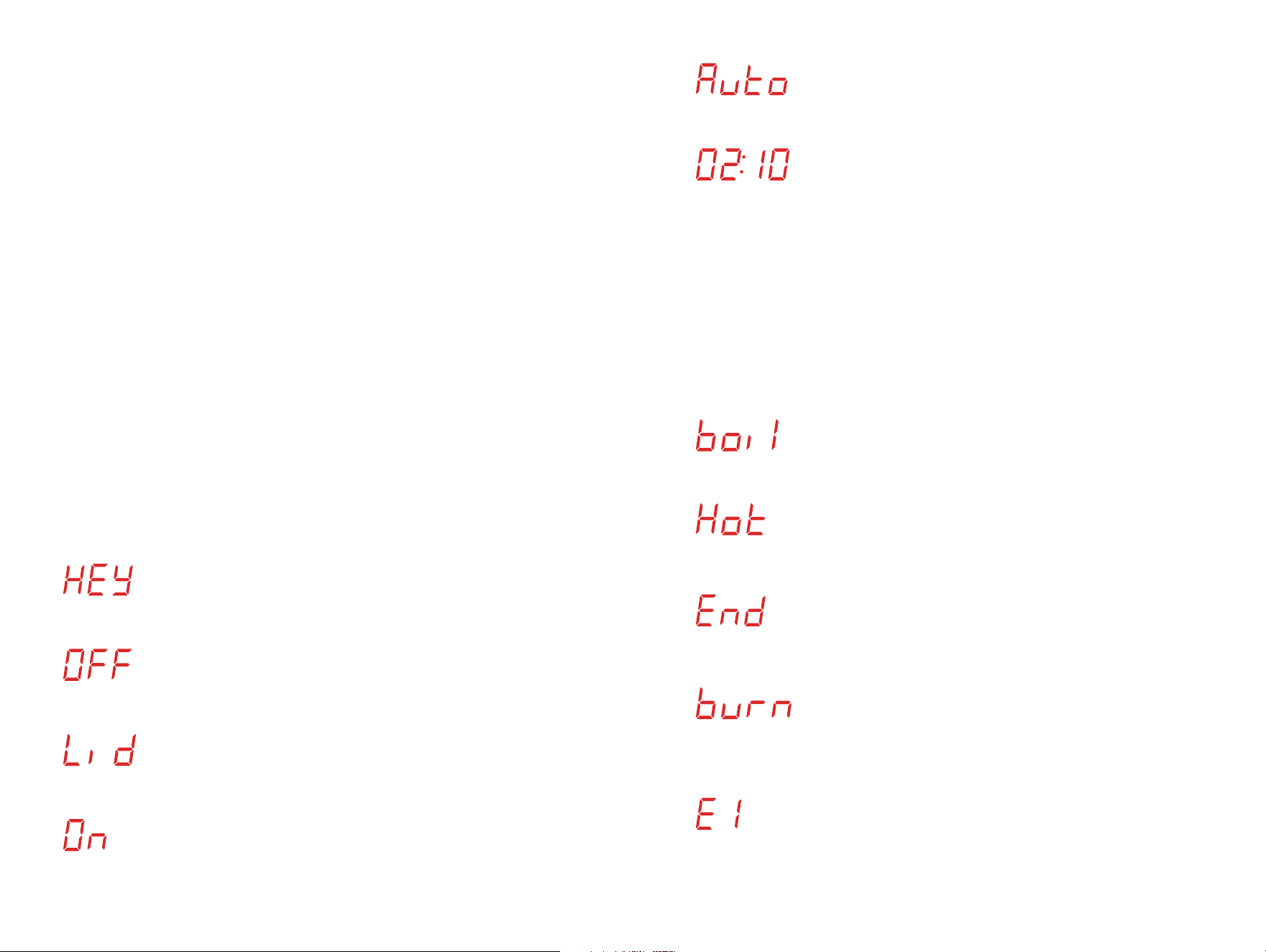
LED screen display
messages.
Display message when the cooker is plugged in.
Display message when cooker is on standby mode.
Display message when pressure cooking lid is placed
on the cooker rim but not properly placed or locked.
Display message when Smart Cooking Program is
running and under Preheating cycle (except for Rice,
Slow Cook and Yogurt).
Display message when Rice program is running and
under Preheating cycle.
Hour and Minute indicator (First two digits refer to
hours while the last two digits refer to minutes).
• When any of the Smart Cooking Program is
running, hour and minute counts down.
• When a Delay timer is set to a Smart Cooking
Program, hour and minute counts down.
• When Yogurt is set to Low/Medium, hour and
minute counts up.
• When Keep Warm is running, hour and minute
counts up.
To restore the original settings of the Smart Cooking Programs
individually, press and hold the button of the Smart Cooking Program
you wish to restore when the cooker is on standby mode until cooker
beeps. The default settings of the cooking program will go back to the
original.
*Please refer to the Smart Cooking Programs Table for the original default settings.
To restore the original settings of the Smart Cooking Programs at
once, press and hold CANCEL button when the cooker is on standby
mode until cooker beeps.
*Please refer to the Smart Cooking Programs Table for the original default settings.
Restore smart cooking programs original settings.
Display message when Yogurt function is set to High
mode.
Display message when cooker has reached maximum
temperature for Sauté.
Display message when the Smart Cooking Program
or Keep Warm time is completed.
Display message when the cooker detects overheating
on the cooking chamber. Note: Press CANCEL and
allow the cooker to cool down.
Display message when an error is detected. See
Troubleshooting section of this User Guide for all error
codes, their definitions and how to deal with them.
3534
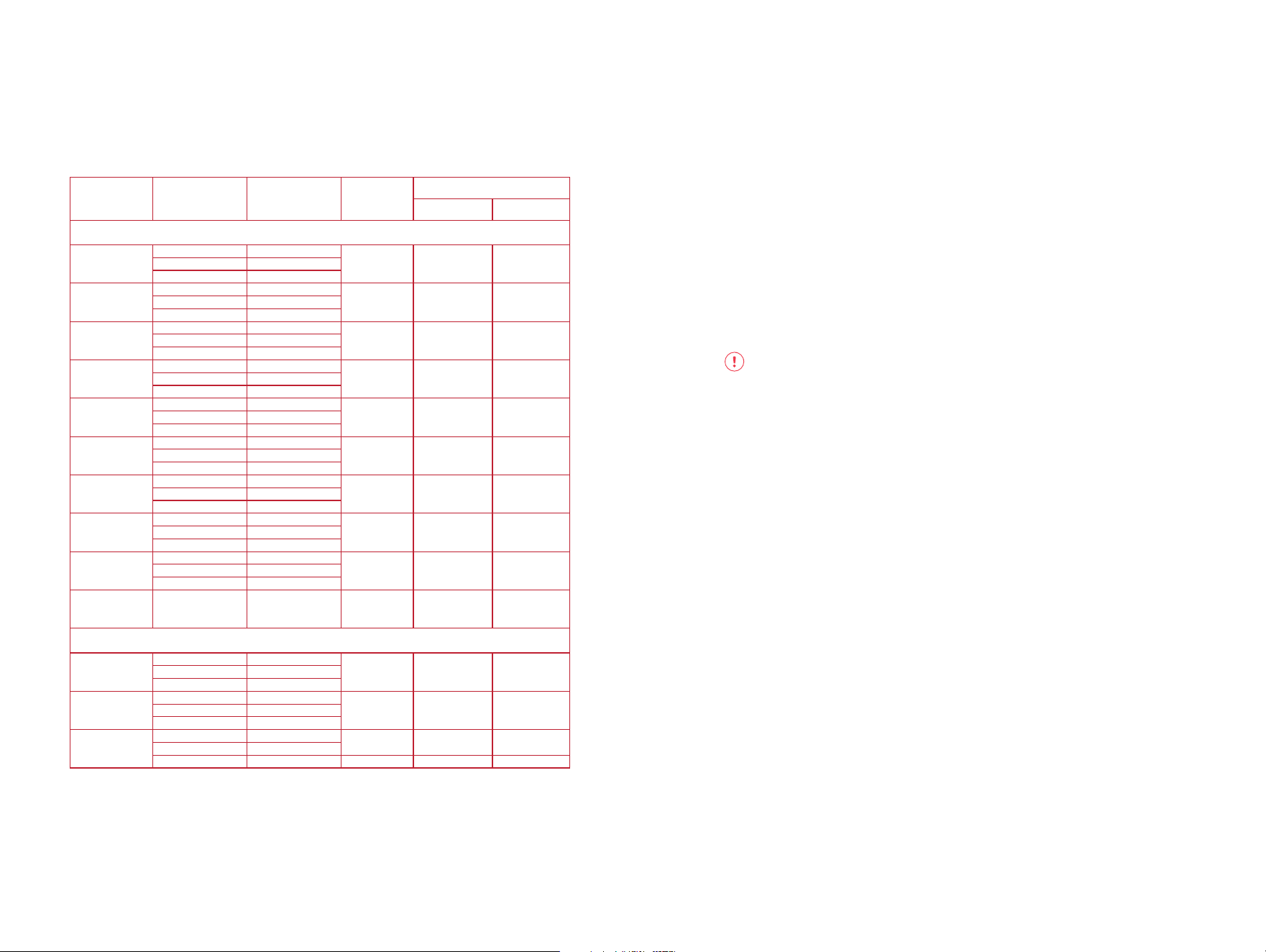
Smart Cooking Programs
Table.
Cooking
Programs
Cooking Mode
Default Cooking
Time
Adjustable
Time Range
Time Adjustment
Hour (+/-) Minute (+/-)
Pressure Cooking Programs
Soup
Low 0:20
00:00 - 04:00 1 hour 1 minuteMed 0:30
High 4:00
Meat
Low 0:20
00:00 - 04:00 1 hour 1 minuteMed 0:35
High 0:45
Bean
Low 0:25
00:00 - 04:00 1 hour 1 minuteMed 0:30
High 0:40
Egg
Low 0:03
00:00 - 04:00 1 hour 1 minuteMed 0:05
High 0:08
Cake
Low 0:25
00:00 - 04:00 1 hour 1 minuteMed 0:40
High 0:50
Rice
Low 0:09
Not adjustable - -Med 0:12
High 0:15
Biryani
Low 0:05
00:00 - 04:00 1 hour 1 minuteMed 0:10
High 0:20
Oatmeal
Low 0:03
00:00 - 04:00 1 hour 1 minuteMed 0:04
High 0:07
Steam
Low 0:03
00:00 - 04:00 1 hour 1 minuteMed 0:10
High 0:15
Pressure Cook
High 0:10 00:00 - 04:00 1 hour 1 minute
Non-Pressure Cooking Programs
Slow Cook
Low 4:00
00:10 - 20:00 1 hour 10 minutesMed 4:00
High 4:00
Sauté
Low 0:10
00:01 - 00:30 - 1 minuteMed 0:10
High 0:10
Yogur t
Low 24:00
00:10 - 99:30 1 hour 10 minutes
Med 08:00
High boil Not adjustable - -
Initial test run.
In order to familiarize yourself with the Smart Pot and start cooking
with your favourite recipe, it is highly recommended for first time users
to do a test run. This optional but recommended test run will complete
in about 15 minutes.
1. Open and remove lid.
2. Remove the inner pot from the cooker base.
3. Add 3 cups (750 ml) water to the inner pot.
4. Place the inner pot into the cooker base.
WARNING: Ensure that the outside surface especially the
bottom part of the inner pot is completely dry before placing in
the cooker base.
5. Place the pressure cooking lid in the cooker base rim and lock in
properly.
6. Turn the pressure release valve to Sealing position.
7. Plug in cooker to a power outlet.
8. Select Pressure Cook.
9. Adjust the time to 00:05 minutes using the - button. Optionally,
press Keep Warm to turn off Auto Keep Warm function.
10. Press START to begin initial test run.
Note:
• If START is not pressed after program settings, the cooker
automatically starts after 10 seconds.
• Once cooker starts, time adjustments made will be
automatically saved to the Pressure Cook program.
11. Once cooker starts, the screen displays On.
12. When maximum pressure level is reached, float valve pops out
and screen displays the countdown time.
Note:
• For Pressure Cooking Programs, Low, Med, High refer to preset time.
• For Non-pressure Cooking Programs, Low, Med, High refer to temperature.
• For Pressure Cook, High refers to high pressure.
3736

13. When the time has been completed and Keep Warm function is
turned off, screen displays End and beeps 5 times.
Note:
• If Auto Keep Warm is activated, the cooker goes to Keep
Warm mode immediately after the cycle and counts up from
00:00.
*See Auto Keep Warm section of this User Guide for more details.
14. Use Quick Release Venting method to depressurize the pressure
cooker.
CAUTION: Always follow safety measures while venting
pressure to avoid serious physical injury and property damage.
15. Once all pressure from the inner pot has been completely
released, open lid.
16. Discard water and dry inner pot.
You’re all set. Start cooking!
Sauté is a non-pressure cooking program which can be used in
place of pots and pans for simmering, browning and searing.
Sauté.
Note: The cooking modes - Low, Med, High refer to dierent temperatures.
Follow the below steps for safe use.
1. Open and remove lid.
CAUTION: Do not use pressure cooking lid when using Sauté.
2. Ensure the inner pot is placed in the cooker base.
3. Plug in cooker to a power outlet.
4. Press Sauté button.
5. Press Sauté button repeatedly to cycle through Low, Med, High
modes for temperature options. Alternatively, use Adjust button
to cycle through the cooking modes.
6. Adjust the cooking time using – or + button. For safety purposes,
the maximum adjustable time range of Sauté is 30 minutes.
7. Press START to begin cooking.
Note:
• If START is not pressed after program settings, the cooker
automatically begins cooking after 10 seconds.
• Once cooking begins, time adjustments made will be
automatically saved to the Sauté program and selected
mode.
8. Once cooking begins, the screen displays On to indicate that it is
Preheating.
Cooking
Program
Cooking
Modes
Suggested Use Notes
Sauté
Low
Simmering, thickening
and reducing liquids.
For safety reasons, the maximum operation time
of one Sauté cycle is 30 minutes (if you need
more time, select Sauté key again).
Do not use the lid on Sauté. Partially closing the
lid during sautéing could cause pressure to build
up in the cooker which can be hazardous.
Do not leave your cooker unattended when using
the Sauté function.
Med
Pan searing or
sautéing.
High
Stir-frying or browning
meat.
3938

Deglaze Inner Pot
After sautéing meat and other highly carbohydrate-rich foods like
vegetables, browned food residues can stick on the inner pot due to
caramelization. Before pressure cooking, these residues need to be
dissolved using thin liquid like water, vegetable stock or broth to make
sure that food won’t stick on the bottom of the inner pot and can also
boost flavour of your food.
To deglaze:
Ensure Sauté program is completed and no cooking program is
running. Pour a small amount of liquid in the inner pot and scrape the
browned food residues using wooden or silicone spatula.
WARNING: Be careful when deglazing the inner pot as liquid can
splash and may cause burns/scalding injuries especially when hot.
Always use protective mitts while holding the inner pot.
9. When maximum temperature is reached, screen displays Hot for
10 seconds followed by the countdown time.
Note:
• Ensure you add your ingredients on the inner pot immediately
once Hot is displayed to avoid overheating.
10. When cooking time has been completed, screen displays End
and beeps 5 times.
• WARNING: Never leave the cooker unattended when using
Sauté as this program reaches high temperature which can
burn the food in the pot.
Pressure cooking
programs.
Cooking
Programs
Cooking
Modes
Suggested
Use
Venting
Method
Notes
Soup
Low
Soup without
meat
Quick
release
Natural
release - If
high starch
content.
Liquid remains clear due to lack of
boiling motion.
If you need the food content to be fully
broken down, stir and mix the soup
before serving.
Always use Natural Release method to
release pressure when cooking soup
with a high starch content.
Med Soup with meat
High Rich bone broth
Bean
Low Firmer texture
Natural
release
Choose setting based on bean/lentil
texture desired, or adjust cook time
manually.
When cooking beans/lentils or
legumes, always use Natural Release
method to release pressure.
Ensure dry beans/lentils are
completely submerged in water.
Med Soft texture
High Very soft texture
Meat
Low Soft texture
Natural
release
Choose setting based on meat texture
desired, or adjust cook time manually.
Allow meat to rest for 5-30 minutes,
depending on size. It will retain
cooking juices for tender, succulent
meat.
When cooking meat or stew, always
use Natural Release method to release
pressure. Do not use Quick Release
as food contents may spatter from
the pressure release valve which can
cause serious injury.
Med Very soft texture
High
Fall-of-the-bone
texture
Egg
Low Soft boiled egg
Quick
release
- Soft/
Medium
boiled.
Natural
release -
Hard boiled.
For soft/medium boiled eggs, we
recommend using the Quick Release
method for venting to retain the
texture.
Cooking time may vary depending on
the size of the eggs. Soak the eggs in
ice water or run them under cold water
immediately after removing them
from the inner pot to stop the cooking
process, and to make peeling easier.
Med
Medium boiled
egg
High Hard boiled egg
These cooking programs use pressure for a time-efficient and
energy-saving method of cooking EASY. DELICIOUS. NUTRITIUOS
meals. They are designed with pre-programmed time to take the
guess work out of cooking.
Includes: Soup, Bean, Meat, Egg, Cake, Rice, Biryani, Oatmeal,
Steam and Pressure Cook.
4140

Cooking
Programs
Cooking
Modes
Suggested
Use
Venting
Method
Notes
Cake
Low Moist cake
Quick
release
Press Cake/Adjust button repeatedly
to set the cooking mode. Adjust time
using - or + and Hour/Min keys for
desired result according to your
recipe.
Med
Denser moist
cake
High
New York style
cheesecake
Rice
Low
Tender but firm
to bite
Natural
release
When using the Rice program, you
cannot manually adjust the time
settings.
Use Natural Release method to vent
out pressure after cooking cycle is
completed so that the rice will not stick
on the bottom of the inner pot.
It is not recommended to leave cooked
rice in Keep Warm state for too long as
it may aect the texture.
Med
Normal texture
white rice
High
Softer texture
white rice
Biryani
Low
Rice with
vegetables
Quick
release -
Vegetable
Biryani
Natural
release -
Biryani with
Meat
Use Quick Release method for
Vegetable Biryani and Natural Release
method for Biryani with meat.
Med
Rice with chicken,
lamb and any
other meat
High
Brown rice with
meat
Oatmeal
Low
Oatmeal - rolled
or quick cooking
Natural
release
Adjust time as directed in recipe.
Always use Natural Release method to
release pressure when cooking foods
that expand.
Med
Oatmeal - steel
cut
High
Oatmeal - large
batch cooking
Steam
Low Vegetables
Quick
release
Use steam rack provided to elevate
food above the cooking liquid.
Use Quick Release method to release
pressure to prevent food from
overcooking.
Med
Fish and
Seafoods
High Meat
Pressure cook High
Manual
programming
Natural
or Quick
release -
Depends on
the recipe
Manually set the time according to
recipe for desired results.
Note: The cooking modes - Low, Med, High refer to preset time.
Follow the below steps for safe use.
1. Open and remove lid.
2. Remove the inner pot from the cooker base.
3. Add food including the liquid ingredients in the inner pot.
Note:
• For pressure cooking programs, do not fill the inner pot
higher than the MAX line.
• When cooking food that expand such as rice, beans and
pasta, DO NOT fill the inner pot higher than the ½ line.
• For certain recipes, use the provided steam rack to elevate
food and avoid direct contact with liquids. This will also
prevent the food from being stuck on the bottom of the inner
pot.
4. Place the inner pot into the cooker base.
WARNING: Ensure that the outside surface especially the bottom
part of the inner pot is completely dry before placing in the
cooker base.
5. Place the pressure cooking lid in the cooker base rim and lock in
properly.
6. Turn the pressure release valve to Sealing position.
Note:
• For all pressure cooking programs, the pressure release valve
must be in Sealing position.
7. Plug in cooker to a power outlet.
8. Select a Pressure Cooking Program based on your recipe.
9. Press the selected Pressure Cooking Program repeatedly
to cycle through Low, Med, High modes for time options.
Alternatively, use Adjust button to cycle through the cooking
modes.
Note:
• When using Pressure Cook, the cooking mode selection is
not applicable. Once it is selected, it will only default to High
signifying food will be cooked in High pressure.
10. Optionally, adjust the cooking time using – or + button. Use Hour/
Min button to toggle between hour and minute fields on the
screen depending on the time that needs to be adjusted.
Note:
• Refer to the Smart Cooking Programs Table for the default
time for each cooking mode including the adjustable time
range.
• The Rice program is fully automatic. The time cannot be
manually adjusted.
11. For every pressure cooking program selection, the Auto Keep
Warm function is automatically turned on which will be activated
4342

after the pressure cooking time has been completed. If you wish
to turn off the Auto Keep Warm function, press the Keep Warm
button. The indicator light goes off.
Note:
• You can deactivate the Auto Keep Warm function during
pressure cooking program selection or during the cooking
cycle.
• The Auto Keep Warm is not recommended for Rice and other
foods that may become overcooked when left in Keep Warm
mode for too long.
12. Press START to begin cooking.
Note:
• If START is not pressed after program settings, the cooker
automatically begins cooking after 10 seconds.
• Once cooking begins, time adjustments made will be
automatically saved to the selected pressure cooking
program and mode.
13. Once cooking begins, the screen displays On (except for Rice
program) to indicate that it is Preheating.
Note:
• Preheating time (pressure building time) depends on the
volume of food placed in the inner pot.
• Pressure cooking cold or frozen foods will take longer time to
build pressure.
• When using the Rice program, screen displays Auto instead
of On when Preheating.
14. When maximum pressure level is reached, float valve pops out
and screen displays the countdown time.
15. When cooking time has been completed and Keep Warm
function is turned off, screen displays End and beeps 5 times.
Note:
• If Auto Keep Warm is activated, the cooker goes to Keep
Warm mode immediately after the cooking cycle and counts
up from 00:00.
*See Auto Keep Warm section of this User Guide for more details.
16. Use the proper Venting method applicable to your recipe to
depressurize the pressure cooker.
CAUTION: Always follow safety measures while venting
pressure to avoid serious physical injury and property damage.
The Slow Cook program does not use pressure during the cooking
process. This program cooks similar to common slow cookers using
lower temperatures.
Note: The cooking modes - Low, Med, High refer to dierent temperatures.
Follow the below steps for safe use.
1. Open and remove lid.
2. Remove the inner pot from the cooker base.
3. Add food including the liquid ingredients in the inner pot.
4. Place the inner pot into the cooker base.
WARNING: Ensure that the outside surface especially the bottom
part of the inner pot is completely dry before placing in the
cooker base.
5. Place the pressure cooking lid in the cooker base rim and lock in
properly.
6. Turn the pressure release valve to Venting position.
Note:
• When using Slow Cook program, the pressure release valve
must always be in Venting position and ensure that float
valve does not pop up during the cooking cycle.
7. Plug in cooker to a power outlet.
8. Press Slow Cook button.
9. Press Slow Cook button repeatedly to cycle through Low, Med,
High modes for temperature options. Alternatively, use Adjust
button to cycle through the cooking modes.
10. Adjust the cooking time using – or + button. Use Hour/Min
button to toggle between hour and minute fields on the screen
depending on the time that needs to be adjusted.
Slow cook.
Cooking
Program
Cooking
Modes
Suggested Use Notes
Slow Cook
Low
Corresponds to Low on
common slow cookers.
The Slow Cook function can operate with the lid
either open or close.
When the lid is closed while initiating the Slow
Cook program, the pressure release valve must
be in the Venting position. Optionally, use a glass
lid for slow cooking.
Med
Corresponds to
Medium on common
slow cookers.
High
Corresponds to High
on common slow
cookers.
4544

Note:
• Refer to the Smart Cooking Programs Table for the default
time for each cooking mode including the adjustable time
range.
11. When Slow Cook is selected, the Auto Keep Warm function is
automatically turned on which will be activated after the cooking
time has been completed. If you wish to turn off the Auto Keep
Warm function, press the Keep Warm button. The indicator light
goes off.
Note:
• You can deactivate the auto Keep Warm function during
cooking program selection or during the cooking cycle.
12. Press START to begin cooking.
Note:
• If START is not pressed after program settings, the cooker
automatically begins cooking after 10 seconds.
• Once cooking begins, time adjustments made will be
automatically saved to the Slow Cook program and selected
mode.
13. Once cooking begins, the screen displays the countdown time.
14. When cooking time has been completed and Keep Warm
function is turned off, screen displays End and beeps 5 times.
Note:
• If Auto Keep Warm is activated, the cooker goes to Keep
Warm mode immediately after the cooking cycle and counts
up from 00:00.
*See Auto Keep Warm section of this User Guide for more details.
This is a non-pressure cooking program which is used for making
Yogurt. It involves two steps – Pasteurizing Milk and Culturing Yogurt.
Yogurt.
Cooking
Program
Cooking
Modes
Suggested Use Notes
Yogurt
Low
Lower temperature
fermentation.
Milk must reach a minimum of 72°C for
pasteurization to occur.
Allow pasteurized milk to cool to below 43°C.
8 hours is standard for fermentation, but a longer
period will result in tangier yogurt.
Press Yogurt button repeatedly or use Adjust
button to cycle through Low, Med, High modes.
Med
Fermeting milk after
culture has been
added.
High Pasteurizing milk.
Note: The cooking modes - Low, Med, High refer to dierent temperatures.
Follow the below steps for safe use.
Note:
Minimum Milk Volume: 1000 mL (32 oz)
Maximum Milk Volume: 4500 mL (128 oz)
Pasteurizing Milk
1. Open and remove lid.
2. Remove the inner pot from the cooker base.
3. Add unpasteurized milk in the inner pot.
4. Place the inner pot into the cooker base.
WARNING: Ensure that the outside surface especially the bottom
part of the inner pot is completely dry before placing in the
cooker base.
5. Place the pressure cooking lid in the cooker base rim and lock in
properly.
6. Turn the pressure release valve to Venting position.
Note:
• When using Yogurt program, the pressure release valve must
be in Venting position.
7. Plug in cooker to a power outlet.
8. Press Yogurt button. Press again to select High. Alternatively, use
Adjust button to select High mode. The screen displays boil.
4746
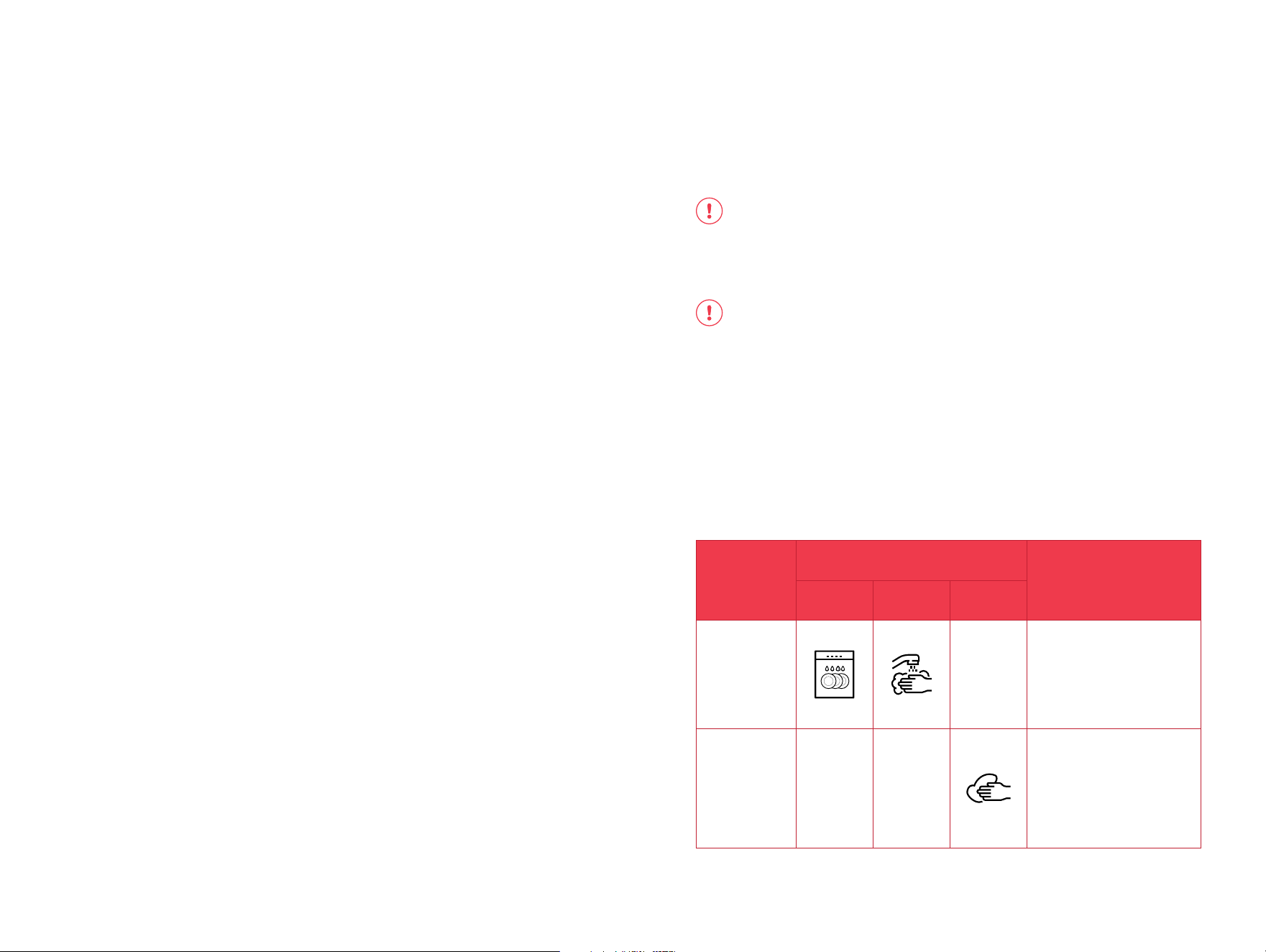
Adding Culture and Fermenting Yogurt
1. Allow pasteurized milk to cool down below 43°C (110°F) and stir
active culture.
2. Place the pressure cooking lid in the cooker base rim and lock in
properly.
3. Turn the pressure release valve to Venting position.
Note:
• When using Yogurt program, the pressure release valve must
be in Venting position.
4. Press Yogurt button and set to Med mode. The screen displays
08:00.
5. Optionally, adjust the fermentation time using – or + and Hour/
Min button, according to your recipe.
6. Press START button to begin cooking.
Note:
• If START button is not pressed after program settings, the
cooker automatically begins cooking after 10 seconds.
7. Once cooking begins, the screen displays time counting up from
00:00 until the time set.
8. Once fermentation is completed, cooker beeps and displays End.
Care & maintenance.
WARNING: To avoid electric shock or damage to your cooker, always press the
Cancel button and unplug the power cord from the power supply outlet before
cleaning. Make sure that all parts of your cooker have cooled down completely
CAUTION: Do not immerse the power cord or your cooker in water or any
other liquids.
• Do not use abrasive cleaners, steel wool, or scouring pads.
• Dry all parts thoroughly after cleaning, before using, or before storing your
cooker.
• Make sure that no water enters your cooker’s housing or the control panel.
• Make sure that all parts and surfaces are completely dry before connecting
your cooker to a power outlet. Wet parts can cause electric shock.
Part
Cleaning Methods
Cleaning Tip
Dishwasher
Safe
Hand Wash
(submerged)
Wipe Clean
(damp cloth)
Stainless
steel
inner pot.
• Wash the inner pot with hot soapy
water. For tough and burned
food residue, soak the inner pot
in hot water for a few hours for
easy cleaning.
• Rinse and dry completely. Ensure
that the exterior surface of the
pot is dry before placing in the
cooker base.
Cooker base
& power
cord.
• Wipe the inner and outer
surfaces, control panel and
condensation rim with a soft,
barely damp cloth.
• Take extra care when cleaning
near the heating element and
control panel. Water can damage
them.
• Wipe the power cord with dry
cloth.
Note:
• When Yogurt function is set to High mode, no time
adjustments can be made.
9. Press START button to begin cooking.
Note:
• If START button is not pressed after program settings, the
cooker automatically begins cooking after 10 seconds.
10. Once milk pasteurization is complete, cooker beeps and displays
End.
11. Open the lid and check the temperature using a thermometer.
Note:
• In order for pasteurization to occur, milk needs to reach
temperature not lower than 72°C (161°F).
4948
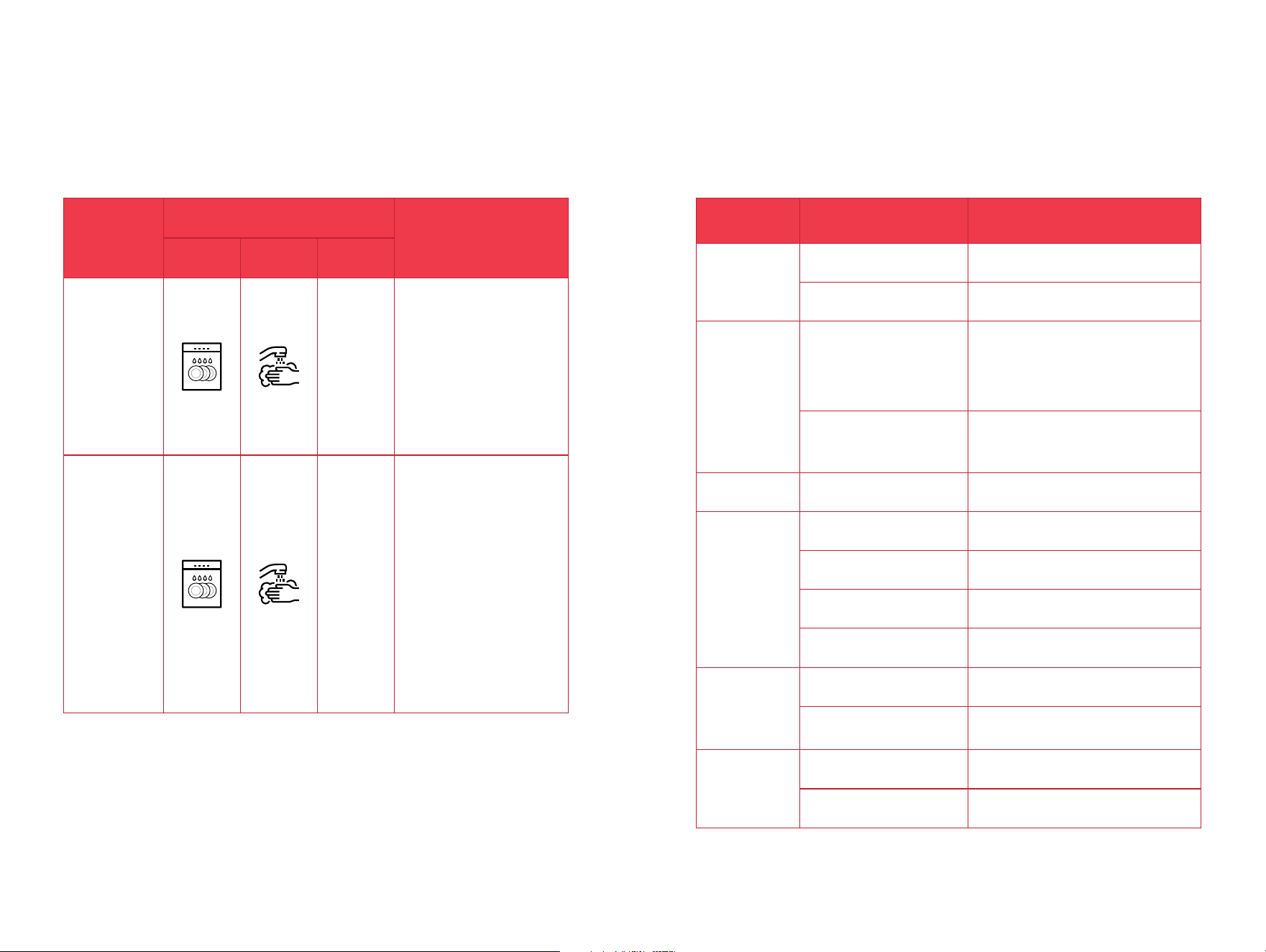
Part
Cleaning Methods
Cleaning Tip
Dishwasher
Safe
Hand Wash
(submerged)
Wipe Clean
(damp cloth)
Accessories.
• Soup Spoon.
• Rice Paddle.
• Steam Rack.
• Measuring Cup.
• Condensation
Collector.
• These items are all top rack
dishwasher safe. We recommend
rinsing them and giving them a
quick brush using a dish brush
to remove any dried food debris
before washing them in the
dishwasher.
• Do not use harsh chemical
detergents, powders or scouring
pads to clean these accessories.
• Ensure to empty any water from
the condensation collector before
cleaning.
• Ensure these accessories are dry
before storing them.
Lid & parts.
• Sealing Ring.
• Pressure Release
Valve.
• Float Valve.
• Float valve
silicone cap.
• Anti-block shield.
• Turn the lid upside down and
put it on a clean, flat, and stable
surface.
• Remove the sealing ring and
pressure release valve, float
valve, float valve silicone cap
and anti-block shield by carefully
pulling it away from the lid.
• Wash the sealing ring and
pressure release valve, float
valve, float valve silicone cap and
anti-block shield with hot soapy
water or place on the top rack
of dishwasher. Store sealing ring
in a properly ventilated area to
decrease residual odors of food.
• IMPORTANT TIP: To eliminate
odors, soak the sealing ring in
vinegar for 10-20 minutes and
wash thoroughly after soaking.
• After cleaning, store the lid
upside down on the cooker base.
Troubleshooting.
Issue Possible Cause Solution
Diculty closing lid.
The sealing ring is not properly
installed
Check the position of the sealing ring and ensure
it is properly installed in the sealing ring rack.
The float valve is in the popped-up
position.
Gently press the float valve downward using a
long utensil.
Diculty opening
lid.
There is still pressure inside the
cooker.
Release pressure by turning the pressure release
valve in Venting position. Ensure that the float
valve dropped down before opening the lid.
WARNING: Contents inside the pot under pressure
can cause scalding injury, do not attempt to force
lid open. Always follow the Safe Lid Opening
instructions in this user guide.
The float valve is stuck in the
popped-up position due to food
debris or residue.
Ensure steam is completely released by quick
releasing pressure, then press float valve gently
using a long utensil. Open lid cautiously and
thoroughly clean float valve, surrounding area,
and lid before next use.
Inner pot sticks
with the lid when
opening.
The inner pot may create suction
while cooling, causing it to stick
to the lid.
Turn pressure release valve to Venting position to
completely release pressure.
Steam leaks from
side of lid.
There is no sealing ring in lid. Install sealing ring properly.
The sealing ring is damaged or not
properly installed.
Replace sealing ring. Contact Customer Service
to replace damaged sealing ring.
Food debris attached to sealing
ring.
Remove sealing ring and clean thoroughly.
The lid is not properly closed. Reposition lid and lock properly.
The float valve does
not rise.
There is food debris on float valve. Clean float valve thoroughly.
Too little liquid in the inner pot.
Add thin, water-based liquid to inner pot based
on size:
6L - 350 ml
Minor steam is
leaking from the
pressure release
valve.
The pressure release valve is
not properly pointed to Sealing
position.
Make sure pressure release valve is properly in
Sealing position.
The cooker is regulating excess
pressure.
This is completely normal. No action required.
5150

LIMITED WARRANTY FOR NUTRICOOK
Nutricook’s limited warranty obligations are confined to the terms set
forth below:
Nutricook warrants this product against defects in materials and
workmanship for a period of two years from the date of original
retail purchase. This limited warranty is valid only in the country in
which the product is purchased and comes with the product at no
extra charge, however shipping and processing fees will be incurred
for returns, replacements and or refunds.
OBTAINING WARRANTY SERVICE
For limited warranty service, simply visit www.nutricookworld.com
for Customer Service details of your respective territory or contact
our customer service department at info@nutricookworld.com
and we will be glad to help you. When you contact our customer
service department you will be asked for your name, address,
telephone number and to provide proof of the original purchase
(receipt) containing a description of the product(s), purchase date,
and the appropriate Nutricook bar code(s). Before you send your
product for limited warranty service please make sure to keep a
copy of all relevant documents for your files (receipt, etc.). It is always
recommended to purchase product insurance and tracking services
when sending your product for service. Remember, shipping and
processing fees will be incurred and are not covered by the two-year
limited warranty.
EXCLUSIONS AND LIMITATIONS
This Nutricook Two-Year Limited Warranty applies only to Nutricook
products distributed by or for Nutricook that can be identified by the
“Nutricook” trademark, trade name, logo and bar code. Nutricook’s
Two-Year Limited Warranty does not apply to any other products
that may appear to be authentic, but were not distributed/sold by
Nutricook.
Issue Possible Cause Solution
Steam escapes from
the pressure release
valve while it is in
Sealing position.
The pressure release valve is not
properly seated.
Turn the pressure release valve properly to
Sealing position.
Pressure sensor control is not
working.
Contact Customer Service.
Clicking or light
cracking sounds is
produced.
The power switching and
expanding pressure while
changing temperature can
produce this sound.
This is completely normal. No action required.
Exterior bottom of the inner pot
is wet.
Ensure to wipe the exterior surface of the inner
pot before inserting to the heating element.
LED display
flashes error
codes and
cooker beeps
continuously.
E1 - Temperature sensor
open circuit
WARNING:
Stop working after these errors appear.
Disconnect from power supply.
Contact customer service.
E2 - Temperature sensor
short circuit
E8 - Pressure switch failure
burn - Overheat warming
(over 140)
It will stop heating and rework when the
temperature reaches to the normal t level.
Lid - The lid is not closed
properly
Reposition the lid and ensure it is properly locked
for all pressure cooking programs.
NOTE: Do not lock the lid when using the SAUTÉ
function.
Warranty.
5352

Normal wear and tear is not covered by this limited warranty.
This limited warranty applies to consumer use only, and is void when
the product is used in a commercial or institutional setting.
This limited warranty extends only to the original consumer purchaser
and is not transferable. In addition, proof of purchase must be
demonstrated.
Repair or replacement of the product (or, if repair or replacement is
not feasible, a refund of the purchase price) is the exclusive remedy
of the consumer under this limited warranty. Nutricook shall not be
liable for any incidental or consequential damages for breach of this
limited warranty or any implied warranty on this product.
This limited warranty does not apply: (a) to damage caused by
accident, abuse, misuse, or misapplication; (b) to damage caused
by improper maintenance (including unauthorized parts service); (c)
to a product or a part that has been modified in any way; (d) if any
Nutricook bar code or trademark has been removed or defaced; and
or (e) if the product has been used with an adapter/converter.
THIS LIMITED WARRANTY AND THE REMEDIES SET FORTH ABOVE
ARE EXCLUSIVE AND IN LIEU OF ALL OTHER WARRANTIES, REMEDIES
AND CONDITIONS, WHETHER ORAL OR WRITTEN, EXPRESS OR
IMPLIED. NUTRICOOK SPECIFICALLY DISCLAIMS ANY
AND ALL IMPLIED WARRANTIES, INCLUDING, WITHOUT
LIMITATION, WARRANTIES OF MERCHANTABILITY AND FITNESS
FOR A PARTICULAR PURPOSE. IF NUTRICOOK CANNOT
LAWFULLY DISCLAIM IMPLIED WARRANTIES UNDER THIS LIMITED
WARRANTY, ALL SUCH WARRANTIES, INCLUDING WARRANTIES OF
MERCHANTABILITY AND FITNESS FOR A PARTICULAR PURPOSE
ARE LIMITED IN DURATION TO THE DURATION OF THIS LIMITED
WARRANTY. No Nutricook reseller, agent, or employee is authorized to
make any modification to this warranty.
NUTRICOOK IS NOT RESPONSIBLE FOR DIRECT, SPECIAL, INCIDENTAL
OR CONSEQUENTIAL DAMAGES RESULTING FROM ANY BREACH OF
WARRANTY OR CONDITION, OR UNDER ANY OTHER LEGAL THEORY,
INCLUDING BUT NOT LIMITED TO LOST PROFITS, DOWNTIME,
GOODWILL, DAMAGE TO OR REPLACEMENT OF EQUIPMENT AND
PROPERTY. NUTRICOOK SPECIFICALLY DOES NOT REPRESENT THAT
IT WILL BE ABLE TO REPAIR ANY PRODUCT UNDER THIS LIMITED
WARRANTY.
5554
nutricook
®
| www.nutricookworld.com | All rights reserved.
Illustrations may dier from the actual product. We are constantly
striving to improve our products, therefore the specifications
contained herein are subject to change without notice.
SMART POT EKO
NC-SP104-IM