https://kodakpixpro.com/
az425/user-manual/
Americas
http://www.kodakpixpro.com/
Europe/support/multi-lang-
downloads.php
Europe
1
2
1
2
3
5
6
4
Date & Time
: . .
10 10 00 00
Back
H-M
2022
Español
English
Français
Português
Italiano
Deutsch
Svenska
Language
3
6 7
4
5
The detailed Camera User Manual is available online at the website below:
Le Manuel d'utilisation de l'Appareil Photo est disponible dans le site
internet suivant:
El manual de usuario de la cámara se encuentra disponible en el siguiente
sitio web:
O Manual do usuário da Câmera estão disponíveis no site Web abaixo:
Das Benutzerhandbuch der Kamera ist auf der folgenden Website
verfügbar:
Руководство пользователя камеры размещены на веб-сайте:
A kamera Felhasználói kézikönyv az alábbi webhelyen található:
Il manuale dell'utente della fotocamera è disponibili al sito web riportato
sotto:
і
нструкц
ії
до камери користувача доступний на веб-сайт
і
нижче:
CR494080399-0
Printed in Myanmar (Burma)
The Kodak trademark, logo and trade dress are used under license
from Eastman Kodak Company.
La marque de commerce Kodak, logo et son apparence sont utilisées
sous licence Eastman Kodak Company.
La marca, el logotipo y la imagen comercial Kodak son usadas bajo
licencia de Eastman Kodak Company.
A marca, logotipo e a imagem comercial Kodak são usadas sob licença
da Eastman Kodak Company.
Die Kodak, das Logo und die Kodak-Markenausstattung werden unter
Lizenz von Eastman Kodak Company genutzt.
Товарный знак Kodak, логотип и товарная упаковка используются
по лицензии компании Eastman Kodak Company.
A Kodak márkajelzés, embléma és kereskedelmi jelzés használata a
Eastman Kodak Company engedélyével történik.
Il marchio Kodak, logo ed il trade dress Kodak sono usati sotto licenza
di Eastman Kodak Company.
Торгова марка Kodak, логотип та ф
і
рмовий стиль використовуються
за л
і
ценз
іє
ю Eastman Kodak Company.
© 2022 JK Imaging Ltd. All Rights Reserved.
JK Imaging Ltd., 17239 So. Main Street, Gardena, CA 90248 USA
JK Imaging Europe, 71 Clarendon Road, Watford, WD17 1DS, UK
kodakpixpro.com
Quick Start Guide
Guide de démarrage rapide
Guía de inicio rápido
Guia de Inicialização rápida
Schnellstartanleitung
Краткое руководство
Üzembe helyezési útmutató
Guida avvio veloce
Коротка інструкція
KODAK
DIGITAL CAMERA
Quick Start Guide
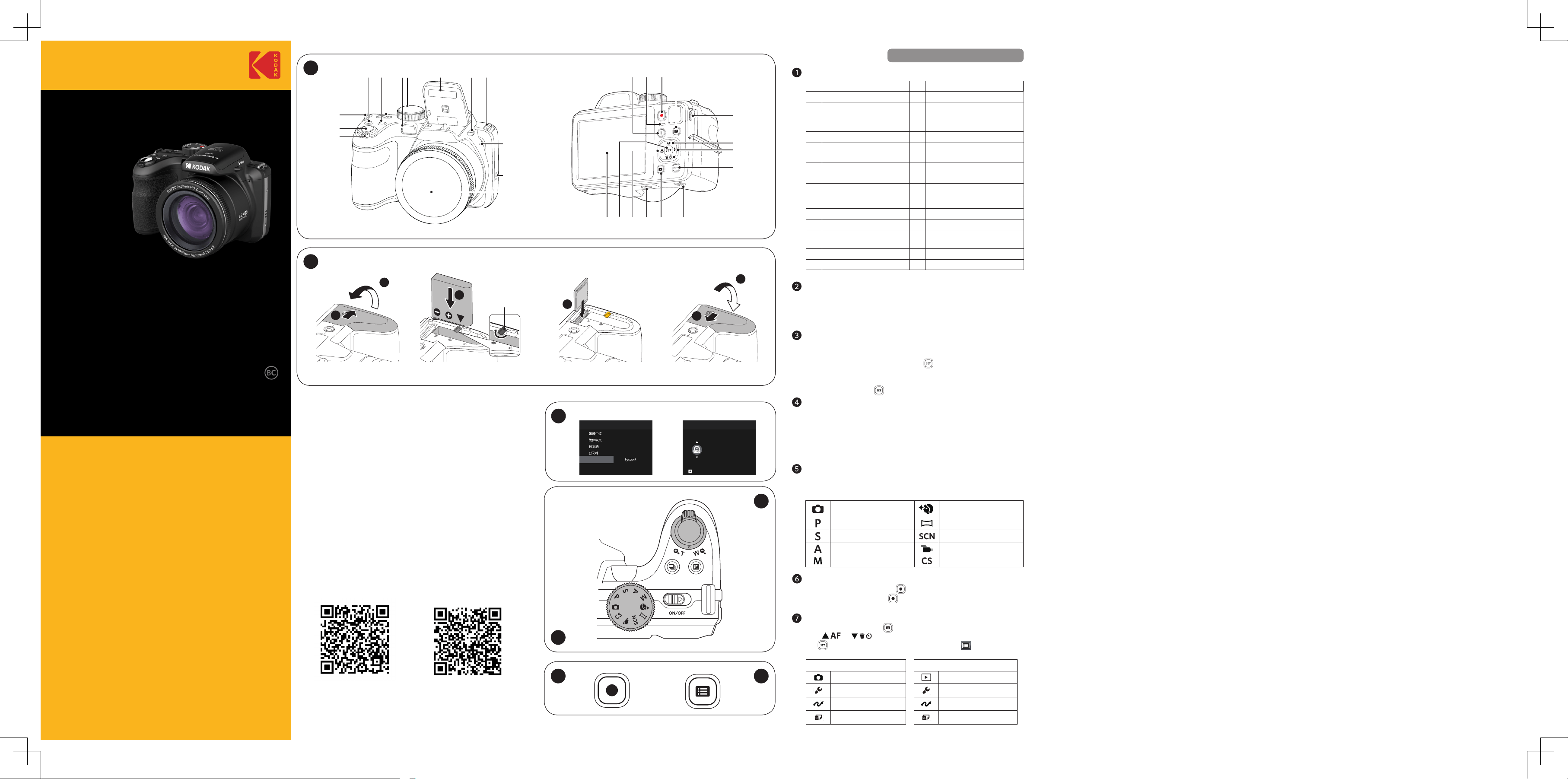
Insert the Battery and the Memory Card
1. Open the Battery Cover Door as show in step
①
and
②
.
2. Insert the Battery into the battery compartment.
3. Insert the Memory Card into the slot.
4. Close the Battery Cover Door as shown in step
⑤
and
⑥
.
1. Push the Power Switch to turn the camera on and the language
menu will appear. Use the Up / Down / Left / Right buttons
to select a language and press the
button to confirm the
language.
2. Use the Up / Down / Left / Right buttons again to set the date and
time and press the button to confirm.
Setting the Language / Date / Time
Taking a Picture
1. Hold the camera securely.
2. Use the Zoom Lever to select Tele or Wide positions to zoom in or
out on your subject.
3. Press the Shutter Button half way down to focus on the subject.
When the focus frame turns green, press the Shutter Button
completely down to take your photo.
Using the Fast Video Recording Button
In Shooting Mode, press the button to begin recording a video.
After recording, press the button again to stop recording. The
camera will store the video and return to the shooting screen.
Camera Views
1 Zoom Lever 15 Indicator Lamp
2 Shutter Button 16 Fast Video Recording Button
3 Strap Eyelet 17 Menu Button
4
Exposure Compensation
Button
18 Micro USB Port
5 Continuous Shot Button 19 AF Button / Arrow Button (Up)
6 Power Switch 20
Flash Button / Arrow Button
(Right)
7
AF Assist Beam / Self-
Timer Lamp
21
Delete Button / Self-Timer
Button / Arrow Button (Down)
8 Mode Dial 22 Display Button
9 Flash Lamp 23 Battery Door Cover
10 Flash Button 24 Playback Button
11 Microphone 25 Tripod Socket
12 Speaker 26
Macro Button / Arrow Button
(Left)
13 Lens 27 SET Button
14 “I” Button 28 LCD
Using the Mode Dial
This camera provides a convenient Mode Dial that allows you to
manually switch among dierent camera settings with ease. Available
modes are listed below:
Auto Mode Face Beautifier
Program AE Panorama Mode
Shutter Priority Scene Mode
Aperture Priority Movie Mode
Manual Mode Custom Settings
Using the Menu Button
In each mode, press the button to access the "Easy Menu". Press
the [ ]/[ ] buttons to move among options, then press
the
button to make a selection. Choosing the within this list
will provide access to the "Full Menu":
Shooting Mode Playback Mode
Shoot Settings Playback Settings
General Settings General Settings
Connection Settings Connection Settings
File Settings File Settings
IMPORTANT MEMORY CARD INFORMATION
A memory card (SD / SDHC / SDXC) is necessary to store photos
and videos and is not included in all camera packaging. It needs to
be purchased separately. Please use a memory card which is Class
10 or higher and has a capacity of 4GB to 512GB. The camera is not
compatible with Micro SD, Ultra, Ultra Plus, Extreme, XC, or adapters
for any of these other memory cards.
Battery Lock
Knob
PIXPRO AZ425
U.DIS.0075.0622.en.01
