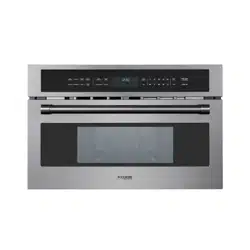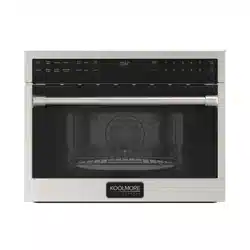
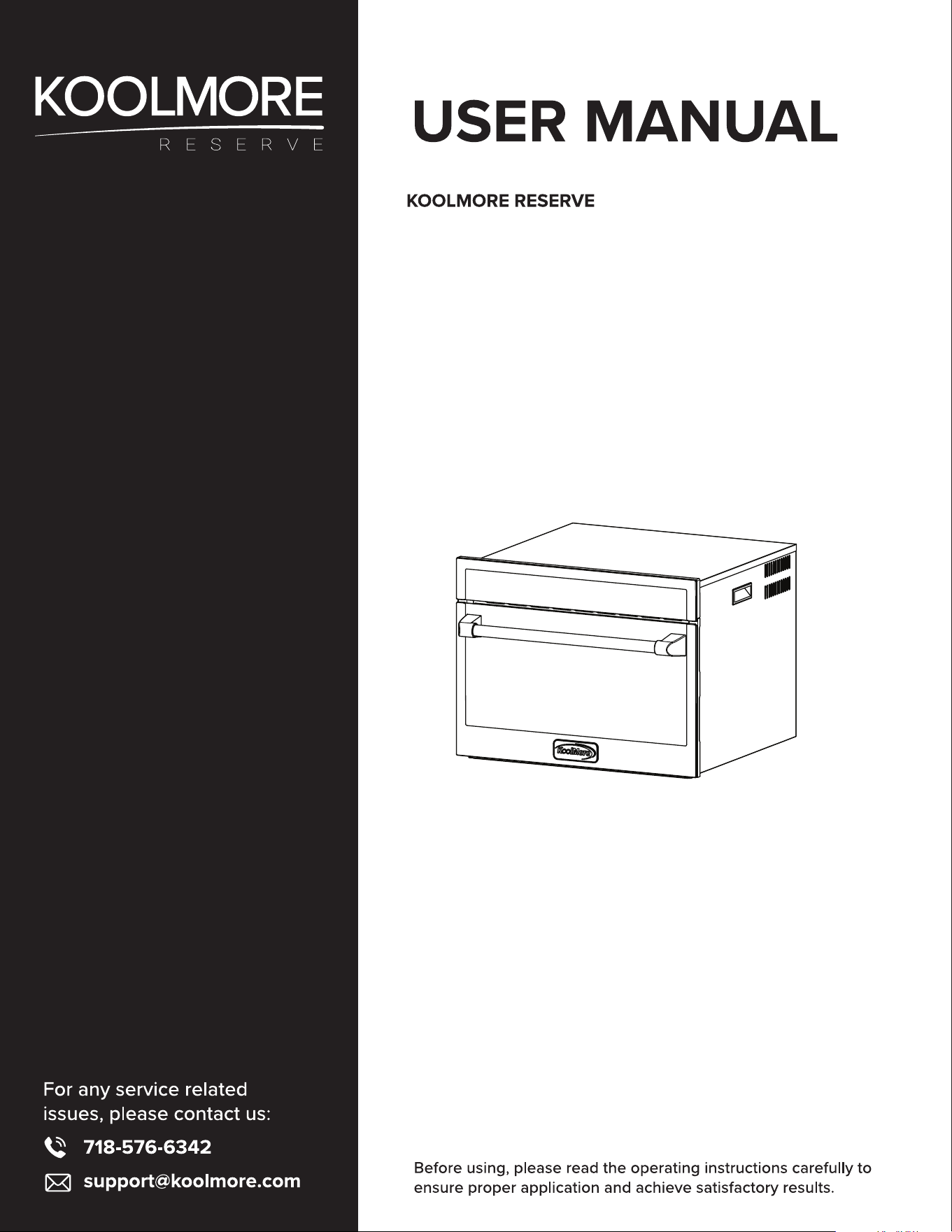
24 in. 1.6 Cu. Ft. Speed Oven
Microwave, Convection, Sensor Cook,
Airfry,
Models: KM-CWO24-AFSS

Contents
Safety .................................................................................. 4
Materials You Can & Cant Use In Microwave Oven ..................... 11
Installation ............................................................................. 12
Product Overview ............................................................. 17
Operation .............................................................................. 20
Maintenance ....................................................................... 32
Troubleshooting ................................................................... 35
Warranty ................................................................................ 37

4
WARNING
!
SAVE THESE INSTRUCTIONS
PRECAUTIONS TO AVOID POSSIBLE EXPOSURE TO EXCESSIVE MICROWAVE ENERGY
• Do not attempt to operate this oven with the door open since open door operation can result
inharmful exposure to microwave energy. It is important not to defeat or tamper with the safety
interlocks.
• Do not place any object between the oven front face and the door or allows soil or cleaner residue
to accumulate on sealing surfaces.
• Do not operate the oven if it is damaged. It is particularly important that the oven door close prop-
erly and that there is no damage to the door (bent) hinges and latches (broken or loosened or door
seals and sealing surfaces
• The oven should not be adjusted or repaired by anyone except properly qualied service personnel.
IMPORTANT SAFETY INSTRUCTIONS
When using electrical appliances, basic precautions should be followed, including the following:
To reduce the risk of burns, electric shock, re, injury to persons or exposure to excessive microwave
energy:
Read all instructions before using the appliance.
• Read and follow the specic “PRECAUTIONS TO AVOID POSSIBLE EXPOSURE TO EXCESSIVE MI-
CROWAVE ENERGY” found above.
• This appliance must be grounded. Connect only to properly grounded outlet. See “GROUNDING
INSTRUCTIONS” found on (Page 6).
Install or locate this appliance only in accordance with the provided installation instructions.
Some products such as whole eggs and sealed containers - for example, closed glass jars - are able
to explode and should not be heated in this oven.
Use this appliance only for its intended use as described in the manual. Do not use corrosive chemi-
cals or vapors in this appliance. It is not designed for industrial or laboratory use.
As with any appliance, close supervision is necessary when used by children.
Do not operate this appliance if it has a damaged cord or plug, if it is not working properly, or if it has
been damaged or dropped.
This appliance should be serviced only by qualied service personnel. Contact nearest authorized
service facility for examination, repair, or adjustment.
Do not cover or block any openings on the appliance.
Do not store this appliance outdoors. Do not use this product near water - for example, near a kitchen
sink, in a wet basement, near a swimming pool, or similar locations.
Safety

5
Do not immerse cord or plug in water.
Keep cord away from heated surfaces.
Do not let cord hang over edge of table or counter.
To reduce the risk of re in the oven cavity:
• Do not overcook food. Carefully attend appliance when paper, plastic, or other combustible materi-
als are placed inside the oven to facilitate cooking.
• Remove wire twist-ties from paper or plastic bags before placing them in the oven.
• If materials inside the oven ignite, keep oven door closed, turn oven off, and disconnect the power
cord, or shut off power at the fuse or circuit breaker panel.
• Do not use the cavity for storage purposes. Do not leave paper products, cooking utensils, or food
in the cavity when not in use.
• Liquids, such as water, coffee, or tea are able to be overheated beyond the boiling point without
appearing to be boiling. Visible bubbling or boiling when the container is removed from the micro-
wave oven is not always present. THIS COULD RESULT IN VERY HOT LIQUIDS SUDDENLY BOILING
OVER WHEN THE CONTAINER IS DISTURBED OR A UTENSIL IS INSERTED INTO THE LIQUID.
• To reduce the risk of injury to persons:
• Do not overheat the liquid.
• Stir the liquid both before and halfway through heating it.
• Do not use straight-sided containers with narrow necks.
After heating, allow the container to stand in the microwave oven for a short time before removing the
container to avoid the risk of burns. Use extreme care when inserting a spoon or other utensil into the
container.
• Do not operate any heating or cooking appliance beneath the appliance.
• Do not mount unit over or near any portion of a heating or cooking appliance. (Exception: A mi-
crowave oven unit of not more than 3 cu. ft. capacity, mounted above and/or alongside another
microwave oven.)
• Do not mount over a sink.
• Do not store anything directly on top of the appliance surface when the appliance is in operation.
• Oversized foods or oversized metal utensils should not be inserted in the microwave oven as they
may create a re or risk of electric shock.
• Do not clean with metal scouring pads. Pieces can burn off the pad and touch electrical parts
involving a risk of electric shock.
• Do not use paper products when appliance is operated in the toaster mode.
• Do not store any materials, other than manufacturer’s recommended accessories, in this oven
when not in use.
• Do not cover racks or any other part of the oven with metal foil. This will cause overheating of the
oven.
• This appliance has a non-stick surface. To avoid damage to the non-stick surface, use wooden or
plastic utensils. Do not use metal utensils.
To reduce the risk of injury to persons:
a) Use this appliance only for its intended use as described in the manual. Do not use corrosive chem-
icals or vapors in this appliance.
b) Be careful not to pinch or crush the cord in the door or drawer.
c) This appliance is not intended for use by persons (including children) with reduced physical, senso-
ry or mental capabilities, or lack of experience and knowledge, unless they have been given supervi-
sion or instruction concerning use of the appliance by a person responsible for their safety.

6
d) Children should be supervised to ensure that they do not play with the appliance.
e) The appliance has a polarized plug (one blade is wider than the other). To reduce the risk of elec-
tric shock, this plug is intended to t into a polarized outlet only one way. If the plug does not t fully
into the outlet, reverse the plug. If it still does not t, contact a qualied electrician. Do not attempt to
defeat this safety feature.
f) If the power cord is damaged, it must be replaced by the manufacturer, its service agent or similarly
qualied persons in order to avoid a hazard.
g) The extension cord must be a grounding-type 3-wire cord.
h) The longer cord should be arranged so that it will not drape over the countertop or tabletop where it
can be pulled on by children or tripped over unintentionally.
• Do not use the microwave oven for storage. Do not leave paper products, cooking utensils, or food
in the oven when not in use.
• Remove all materials from the oven before operating the microwave oven.
• If materials inside the oven ignite, keep oven door closed, turn oven off, and disconnect the power
cord, or shut off power at the fuse or circuit breaker panel.
COMBINATION MICROWAVE OVENS
• Oversized foods or oversized metal utensils should not be inserted in a microwave oven as they
may create a re or risk of electric shock.
• Do not clean with metal scouring pads. Pieces can burn off the pad and touch electrical parts
involving a risk of electric shock.
• Do not use paper products when appliance is operated in the toaster mode.
• Do not store any materials, other than manufacturer’s recommended accessories, in this oven
when not in use.
• Do not cover racks or any other part of the oven with metal foil. This will cause overheating of the
oven.
GROUNDING INSTRUCTIONS
This appliance must be grounded. In the event of an electrical short circuit, grounding reduces the risk
of electric shock by providing an escape wire for the electric current. This appliance is equipped with
a cord having a grounding wire with a grounding plug. The plug must be plugged into an outlet that is
properly installed and grounded.
Improper use of the grounding plug can result in a risk of electric shock. Consult a qualied electri-
cian or service man if the grounding instructions are not completely understood, or if doubt exists as
to whether the appliance is properly grounded. If it is necessary to use an extension cord, use only a
3-wire extension cord that has a 3-prong grounding plug, and a 3-slot receptacle that will accept the
plug on the appliance. The marked rating of the extension cord should be equal to or greater than the
electrical rating of the appliance.
DANGER - ELECTRIC SHOCK HAZARD
Touching some of the internal components can cause serious personal injury or death. Do not disas-
semble this appliance.
WARNING
!
WARNING
!

7
ELECTRIC SHOCK HAZARD
Improper use of the grounding plug can result in electrical shock. Do not plug into an outlet until the
appliance is properly installed and grounded.
a) This appliance should be serviced only by qualied service personnel. Contact nearest authorized
service facility for examination, repair, or adjustment.
b) Do not cover or block any openings on this appliance.
c) Do not store this appliance outdoors. Do not use this product near water - for example, near a kitch-
en sink, in a wet basement, near a swimming pool, or similar locations.
d) Do not immerse cord or plug in water.
e) Keep cord away from heated surfaces.
f) Do not let cord hang over edge of table or counter.
To reduce the risk of re or electric shock:
a) Do not operate any heating or cooking appliance beneath this appliance.
b) Do not mount unit over or near any portion of a heating or cooking appliance. (Exception: A micro-
wave oven unit of not more than 3 cu. ft. capacity, mounted above and/or alongside another micro-
wave oven.)
c) Do not mount over a sink.
d) Do not store anything directly on top of the appliance surface when the appliance is in operation.
If a long or extension cord is used:
a) The marked electrical rating of the cord set or extension cord should be at least as great as the
electrical rating of the appliance.
b) The extension cord must be a grounding-type 3-wire cord.
c) The longer cord should be arranged so that it will not drape over the countertop or tabletop where it
can be pulled on by children or tripped over unintentionally.
RADIO INTERFERENCE
Operation of the microwave oven may cause interference to your radio, TV, or similar equipment.
When there is interference, it may be reduced or eliminated by taking the following measures:
• Clean door and sealing surface of the oven.
• Reorient the antenna of radio or television.
• Relocate the microwave oven with respect to the receiver.
• Plug the microwave oven into a different outlet so that microwave oven and receiver are on differ-
ent branch circuits.
• This equipment complies with FCC radiation exposure limits set forth for an uncontrolled environ-
ment. This equipment should be installed and operated with minimum distance 20cm between the
radiator & your body.
• This device complies with CAN ICES-001 (B) / NMB-001 (B) & CAN ICES-003 (B) / NMB-003 (B).
• Operation is subject to the following two conditions: (1) This device may not cause interference,
and (2) This device must accept any interference, including interference that may cause undesired
WARNING
!

8
operation of the device.
This device complies with part 18 of the FCC Rules.
This device complies with part 15 of the FCC Rules. Operation is subject to the following two condi-
tions: (1) this device may not cause harmful interference, and (2) this device must accept any interfer-
ence received, including interference that may cause undesired operation of the device.
NOTE: This equipment has been tested and found to comply with the limits for a Class B digital de-
vice, pursuant to part 15 of the FCC Rules. These limits are designed to provide reasonable protection
against harmful interference in a residential installation. This equipment generates, uses, and can radi-
ate radio frequency energy and, if not installed and used in accordance with the instructions, may cause
harmful interference to radio communications. However, there is no guarantee that interference will not
occur in a particular installation. If this equipment does cause harmful interference to radio or television
reception, which can be determined by turning the equipment off and on, the user is encouraged to try
to correct the interference by one or more of the following measures:
• Reorient or relocate the receiving antenna.
• Increase the separation between the equipment and receiver.
• Connect the equipment into an outlet on a circuit different from that to which the receiver is con-
nected.
• Consult the dealer or an experienced radio/TV technician for help.
• Changes or modications not expressly approved by the party responsible for compliance could
void the user’s authority to operate the equipment.
UTENSILS
- Personal Injury Hazard
Tightly-closed utensils could explode. Closed containers should be opened and plastic pouches
should be pierced before cooking.
See the instructions on “Materials you can use in microwave oven or to be avoided in microwave
oven.”
There may be certain non-metallic utensils that are not safe to use for microwaving. If in doubt, you
can test the utensil in question following the procedure below.
Utensil Test:
Fill a microwave-safe container with 1 cup of cold water (250ml) along with the utensil in question.
Cook on maximum power for 1 minute.
Carefully feel the utensil. If the empty utensil is warm, do not use it for microwave cooking.
Do not exceed 1 minute cooking time.
CAUSES OF DAMAGE
CAUTION:
CAUTION:
9
• Creation of sparks: Metal, e.g., a spoon in a glass, must be kept at least 2 cm from the oven walls
and the inside of the door. Sparks could irreparably damage the glass on the inside of the door.
• Water in the hot cooking compartment: Never pour water into the hot cooking compartment. This
will cause steam. The temperature change can cause damage.
• Moist food: Do not store moist food in the closed cooking compartment for long periods.
• Cooling with the appliance door open: This can lead to corrosion.
• Do not use the appliance to store objects: Only leave the cooking compartment to cool with the
door closed. Do not trap anything in the appliance door. Even if the door is only slightly ajar, the
fronts of adjacent units may be damaged over time.
• Heavily soiled: If the seal is very dirty, the appliance door will no longer close properly during oper-
ation. The fronts of adjacent units could be damaged. Always keep the seal clean.
• Operating the microwave without food: Operating the appliance without food in the cooking com-
partment can lead to overheating. The food must be placed in the cooking compartment before
switching on the microwave. (An exception to this rule is a short crockery test.) (see the section
“Microwave, suitable crockery”).
• Using the appliance door for standing on or placing objects on: Do not stand or place anything on
the open appliance door. Do not place ovenware or accessories on the appliance door.
• Transporting the appliance: Do not carry or hold the appliance by the door handle. The door handle
cannot support the weight of the appliance and could break.
• Microwave popcorn: Never set the microwave power too high. Use a power setting no higher than
600 watts. Always place the popcorn bag on a ceramic plate. The disc may jump if overloaded.
• Liquid that has boiled over must not be allowed to run through the turntable drive into the interior
of the appliance. Monitor the cooking process. Choose a shorter cooking time initially, and in-
crease the cooking time as required.
• The oven should be cleaned regularly and any food deposits removed since they may explode.
• Failure to maintain the oven in a clean condition could lead to deterioration of the surface that
could adversely affect the life of the appliance and possibly result in a hazardous situation.
For the Serviceman to be Serviced Only by Properly Qualied Service Personnel
This device is to be serviced Only by Properly Qualied and Competent Personnel. Consult the Ser-
vice Manual before servicing. When servicing the appliance, check the door seal and door seal area
to ensure that they are not damaged, and that the appliance door closes properly and that there is no
leakage of microwave energy, and correct any faults before the appliance is released for use.
For continued protection against excessive radiation emission, replace only with the same type:
Primary Switch: TYPE KWA-102
Secondary Switch: TYPE KWA-103
Monitor Switch: TYPE KWA-101
Fuses: UL listed 20A for use in the appliance.
PRECAUTIONS TO BE OBSERVED BEFORE AND DURING SERVICING TO AVOID POSSIBLE EXPOSURE
TO EXCESSIVE MICROWAVE ENERGY:
a. Do not operate or allow the oven to be operated with the door open.
b. Make the following safety checks on all ovens to be serviced before activating the magnetron or
CAUTION:
WARNING
!

10
other microwave energy generating device:
(1) Operate the oven with the door open and check that the microwave energy does not exceed 5mW/
cm² at any point 5cm or more from the external surface of the oven.
(2) Check for proper operation of interlock systems that are incorporated within the door that prevent
microwave emission should the door be opened.
(3) Check for proper operation of oven door, including proper closing, sealing, and operation of safety
interlocks.
(4) Check for physical integrity of the gasket on the microwave oven door, and that the gasket has not
become worn or damaged.
(5) Check for proper grounding of the oven.
(6) Check for any evidence of arcing or corona discharge within the oven cavity.
(7) Check for any evidence of overheating or thermal damage to the oven or any of its components.
Before turning on the microwave power for any service test or inspection within the microwave gen-
erating compartments, check the magnetron, wave guide or transmission line, and cavity for proper
alignment, integrity, and connections.
Any defective or misaligned components in the interlock, monitor, door seal, and the oven door should
be corrected before the oven is released to the owner.
A microwave leakage check to verify compliance with the Federal Performance Standard should be
performed on each oven prior to release to the owner.
11
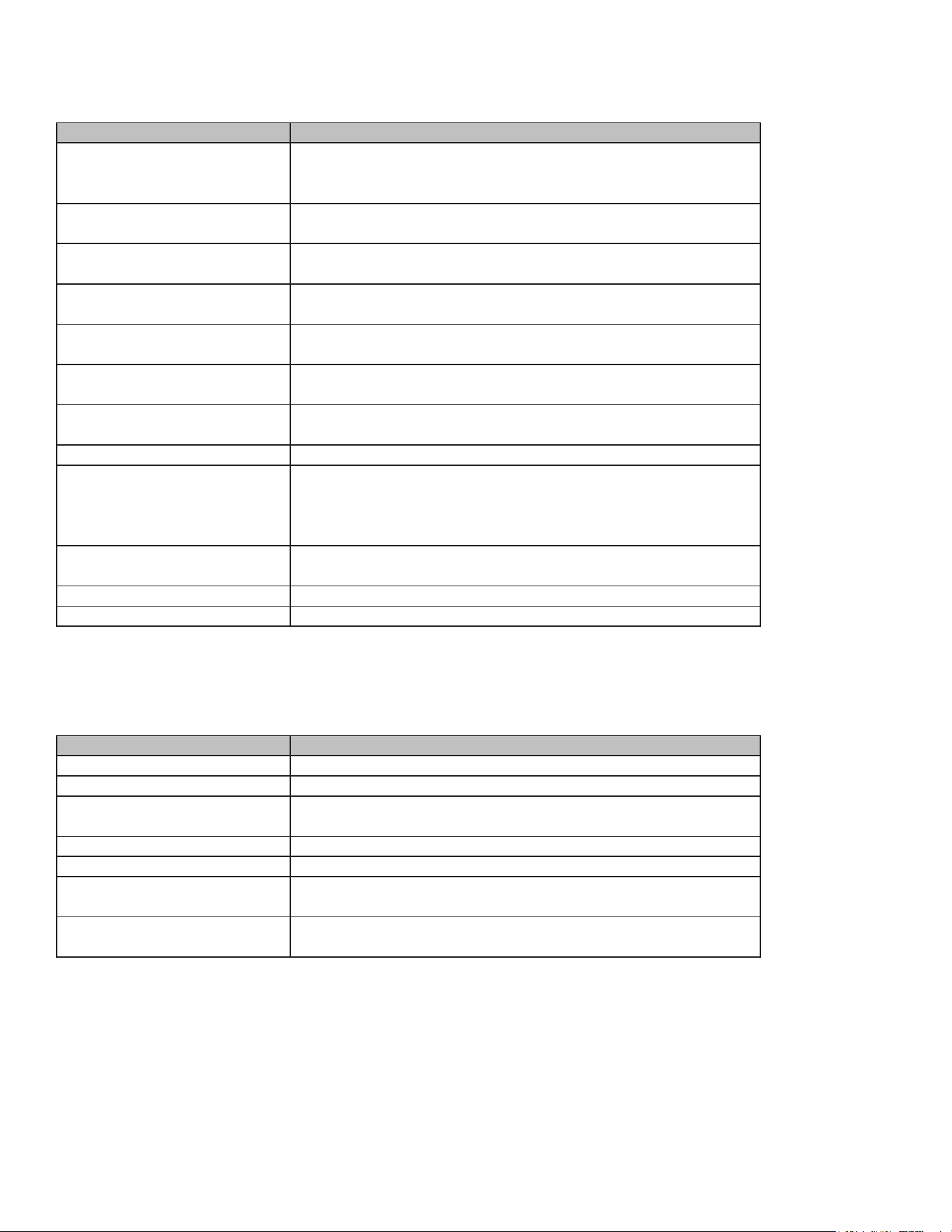
Utensils Remarks
Browning dish Follow manufacturer's instructions. The bottom of the browning dish
must be at least 3/16 inch (5mm) above the turntable. Incorrect
usage may cause the turntable to break.
Dinnerware Microwave-safe only. Follow manufacturer's instructions. Do not use
cracked or chipped dishes.
Glass jars Heat-resistant oven glassware only. Make sure there are no metallic
trims. Do not use cracked or chipped glassware.
Glassware Microwave-safe only. Follow manufacturer's instructions. Do not use
cracked or chipped dishes.
Oven cooking bags Follow manufacturer's instructions. Do not close with metal tie.
Make slits to allow steam to escape.
Paper plates and cups Use for short-term cooking/warming only. Do not leave oven
unattended while cooking.
Paper towels Use to cover food for reheating and absorbing fat. Use with
supervision for short-term cooking only.
Parchment paper Use as a cover to prevent splattering and to wrap for steaming.
Plastic Microwave-safe only. Follow manufacturer's instructions. Should be
labeled "microwave safe." Some plastic containers soften as the
food inside reaches boiling temperatures. These containers should
be used for reheating and not for cooking.
Plastic wrap Microwave-safe only. Use to cover food during cooking to retain
moisture. Do not allow plastic wrap to touch food.
Thermometers Microwave-safe only (meat and candy thermometers).
Wax paper Use as a cover to prevent splattering and retain moisture.
MATERIALS YOU CAN USE IN MICROWAVE OVEN
MATERIALS TO BE AVOIDED IN MICROWAVE OVEN
Utensils Remarks
Aluminum tray May cause arcing. Transfer food into microwave-safe dish.
Food carton with metal handle May cause arcing. Transfer food into microwave-safe dish.
Metal or metal-trimmed utensils Metal shields the food from microwave energy. Metal trim may
cause arcing.
Metal twist ties May cause arcing and could cause a re in the oven.
Paper bags May cause a re in the oven.
Plastic foam Plastic foam may melt or contaminate the liquid inside when
exposed to high temperature.
Wood Wood will dry out when used in the microwave oven and may split
or crack.

12
IMPORTANT INFORMATION
Electrical connection with plug (not for some models, subject to our products)
The appliance may be tted with a plug, and may only be connected to a properly installed, earthed
socket.
Only a qualied electrician who takes the relevant regulations into account may install the socket or
replace the connecting cable.
If the appliance is to be replaced, follow the installation instructions. An all-pole isolating switch must
be present on the installation side with a contact gap of at least 3 mm. Contact protection must be
ensured by the installation.
Electrical connection without plug (not for some models, subject to our products)
The appliance may be tted with a plug, and may only be connected to a properly installed, earthed
socket.
Only a qualied electrician who takes the relevant regulations into account may install the socket or
replace the connecting cable.
If the appliance is to be replaced, follow the installation instructions. An all-pole isolating switch must
be present on the installation side with a contact gap of at least 3 mm. Contact protection must be
ensured by the installation.
Connect the appliance,
The appliance must be connected in accordance with the installation instructions.
Connect the earth wire
The appliance must be earthed.
Important:
Do not connect the appliance to the power supply using an extension cord.
The appliance must not be operated with an external timer or remote control system.
Green and yellow wire (Earth) Earth (E)
Brown wire (Live) (L)
Blue wire (Neutral) (N)
Great Britain and Australia:
Do not connect the appliance to the power supply using an extension cord.
Installation

13
The appliance must not be operated with an external timer or remote control system.
Power supply specications:
AC 220-240 V, 50 Hz or 110-127 V, 60 Hz
If the appliance is to be installed in accordance with the installation instructions, it must be connected
by an authorized electrician.
When the appliance is installed, protection must be provided against accidental contact in the future.
BEFORE YOU BEGIN
Tools and parts needed:
• Phillips head screwdriver
• Flat-head bit
• Electric drill and drill bit
• Scissors or utility knife
• Tape measure
Parts included:
• Microwave oven
• Phillips head screws
Power Requirements:
• The outlet must be properly grounded in accordance with all applicable codes.
Note: If the power supply cord is damaged, it must be replaced by the manufacturer, its service agent,
or similarly qualied persons in order to avoid a hazard.
CHECKLIST FOR INSTALLATION
Use this checklist to verify that you have completed each step of the installation process. This can
help you avoid mistakes.
Refer to detailed instructions for each step in the sections following this checklist.
1. Before installing the appliance, be sure to verify the cabinet dimensions are correct for your ap-
pliance and that the required electrical connections are present. Make sure the electrical conduit
provided on the appliance is able to reach to the point of connection.
2. Remove all packaging material and bottom packaging. Remove any foam or cardboard from in-
side the appliance to ensure proper operation.
3. Move the appliance into place. Carefully move the appliance into the space provided, ensuring it
ts properly without excessive force.
4. Level the appliance. Use the leveling legs, if provided, to ensure the appliance is stable and level.
5. Connect the appliance to the power supply. Follow the electrical connection instructions carefully.
Ensure the appliance is properly grounded.
14
6. Secure the appliance to the cabinet. Use the provided screws or brackets to secure the appliance
in place to prevent movement.
7. Test the appliance. After installation, perform a test run to ensure the appliance is functioning cor-
rectly and there are no leaks or issues.
Always read and follow the complete installation instructions contained in this manual.
INSTALLATION INSTRUCTIONS
GENERAL CABINET REQUIREMENTS
• Minimum clearance required between the side of the appliance and an adjacent wall or cabinet
door when installed at the end of a cabinet run: A minimum of 14 inches is required.
• Toe kick height: A minimum of 3 inches is required for proper ventilation.
• Cabinet opening dimensions: The cabinet opening must be large enough to accommodate the
appliance, including space for ventilation.
• Depth of cabinet: The depth of the cabinet must be deep enough to accommodate the appliance.
• Width of cabinet: The width of the cabinet must be wide enough to accommodate the appliance.
Installation Instructions:
• Prepare the cabinet: Ensure the cabinet is clean, dry, and free of any debris. Check that the cabinet
dimensions match the appliance requirements.
• Remove packaging: Remove all internal packaging materials from the appliance.
• Place the appliance: Carefully slide the appliance into the prepared cabinet space. Ensure it is level
and properly aligned.
• Secure the appliance: Use the provided screws or brackets to secure the appliance to the cabinet.
Ensure it is rmly in place.
• Connect to power: Follow the electrical connection instructions. Ensure the appliance is properly
grounded and connected to the correct voltage.
• Test the appliance: After installation, test the appliance to ensure it is working correctly. Check for
any unusual noises or signs of malfunction.
Notes:
Always ensure there is adequate ventilation. Do not block air vents.
Keep the appliance clean, especially the interior, to prevent odors and maintain efciency.
Refer to the user manual for specic operating instructions and safety guidelines.
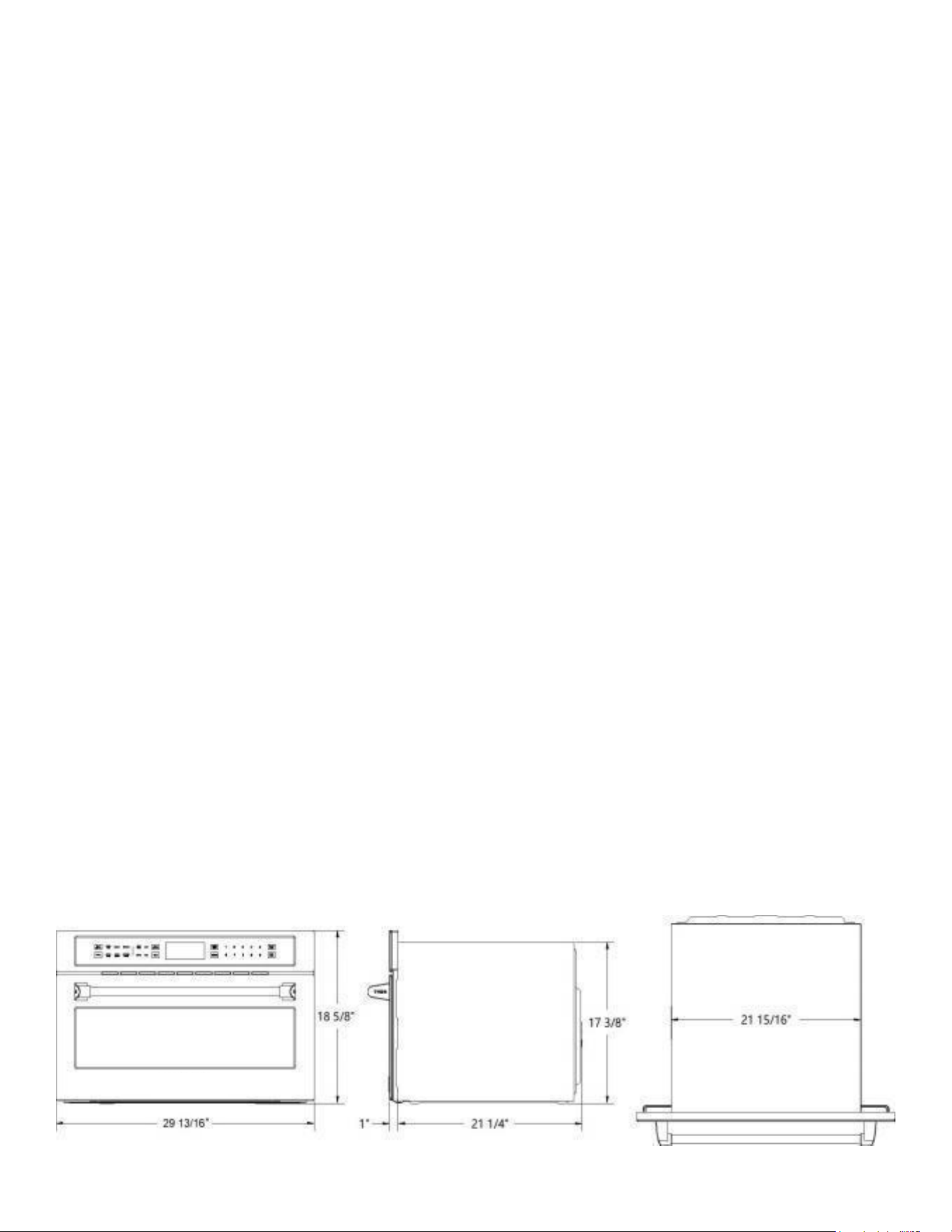
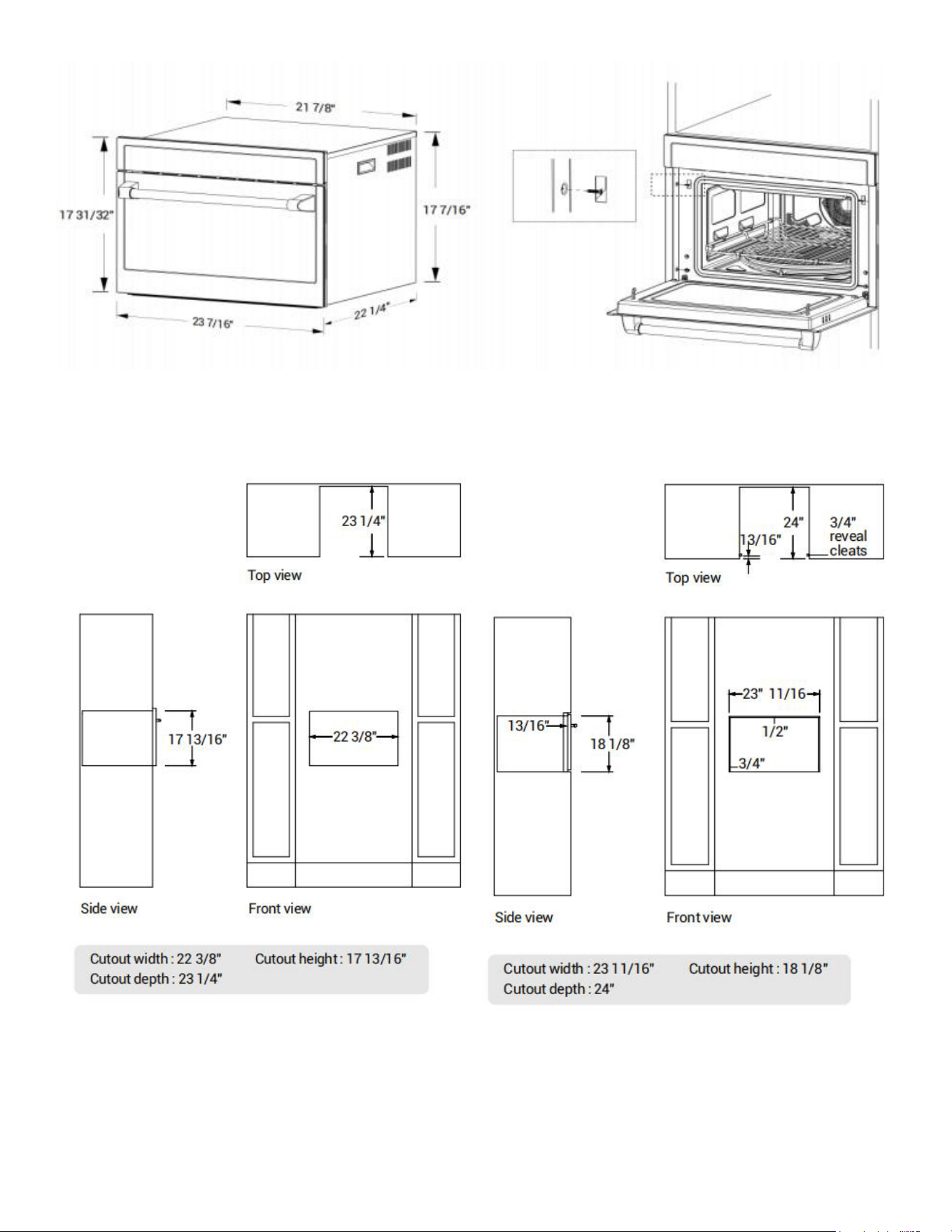
DIMENSIONS
15
BUILT-IN
STANDARD INSTALLATION FLUSH INSTALLATION
16
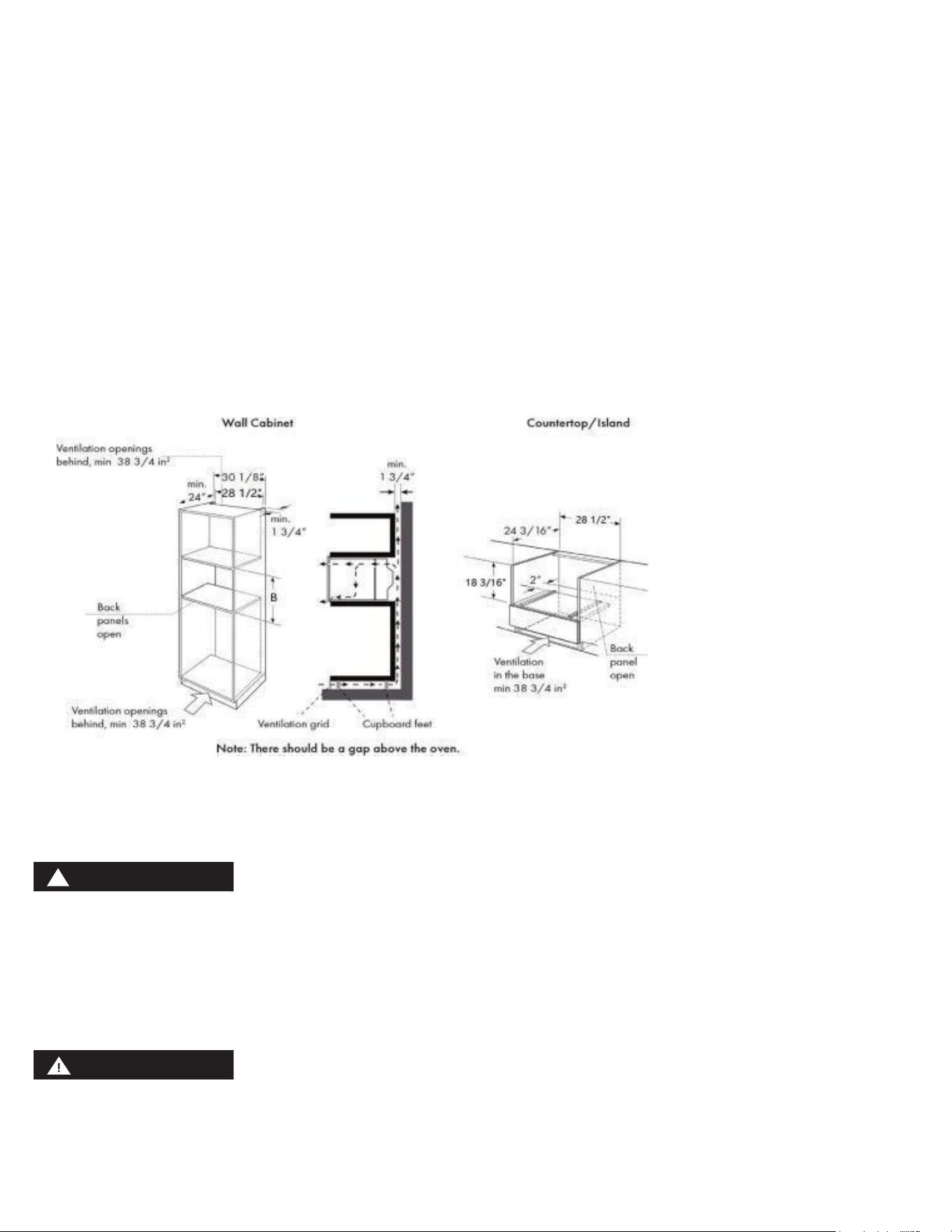
VENTILATED CABINET
• This appliance is only intended to be fully tted in a kitchen. This appliance is not designed to be
used as a tabletop appliance or inside a cupboard.
• The tted cabinet must not have a back wall behind the appliance.
• A gap of at least 1 3/4" (44.5 mm) must be maintained between the wall and the base or back
panel of the unit above.
• The tted cabinet must have a ventilation opening of 38 3/4 in² in the base. To achieve this, cut
back the base panel or t a ventilation grill.
• Ventilation slots and intakes must not be covered.
• The safe operation of this appliance can only be guaranteed if it has been installed in accordance
with these installation instructions.
• The units into which the appliance is tted must be heat-resistant up to 194°F.
• Note: There should be a minimum 1/16" gap above the oven.
• Note: The vent should not be directly against the enclosed space, such as ceiling mezzanine, sound
insulation wall mezzanine.
• Carefully push the microwave into the cabinetry, making sure that it is in the center.
• Do not kink the electrical cable.
• Open the door and fasten the microwave with the screws that were supplied.
The gap between the worktop and the appliance must not be closed by additional battens.
MOUNT TO CABINET
NOTE: The appliance is heavy. It is advisable to install it with a second person.
Before installing the appliance, be sure to verify the cabinet dimensions and electrical connections.
Fully insert the appliance and center it. Do not kink the electrical cable.
Screw the appliance into pre-drilled holes in the cabinetry.
NOTICE:
WARNING
!
17
YOUR NEW APPLIANCE
Use this section to familiarise yourself with your new appliance. The control panel and the individual
operating controls are explained. You will nd information on the cooking compartment and the
accessories.
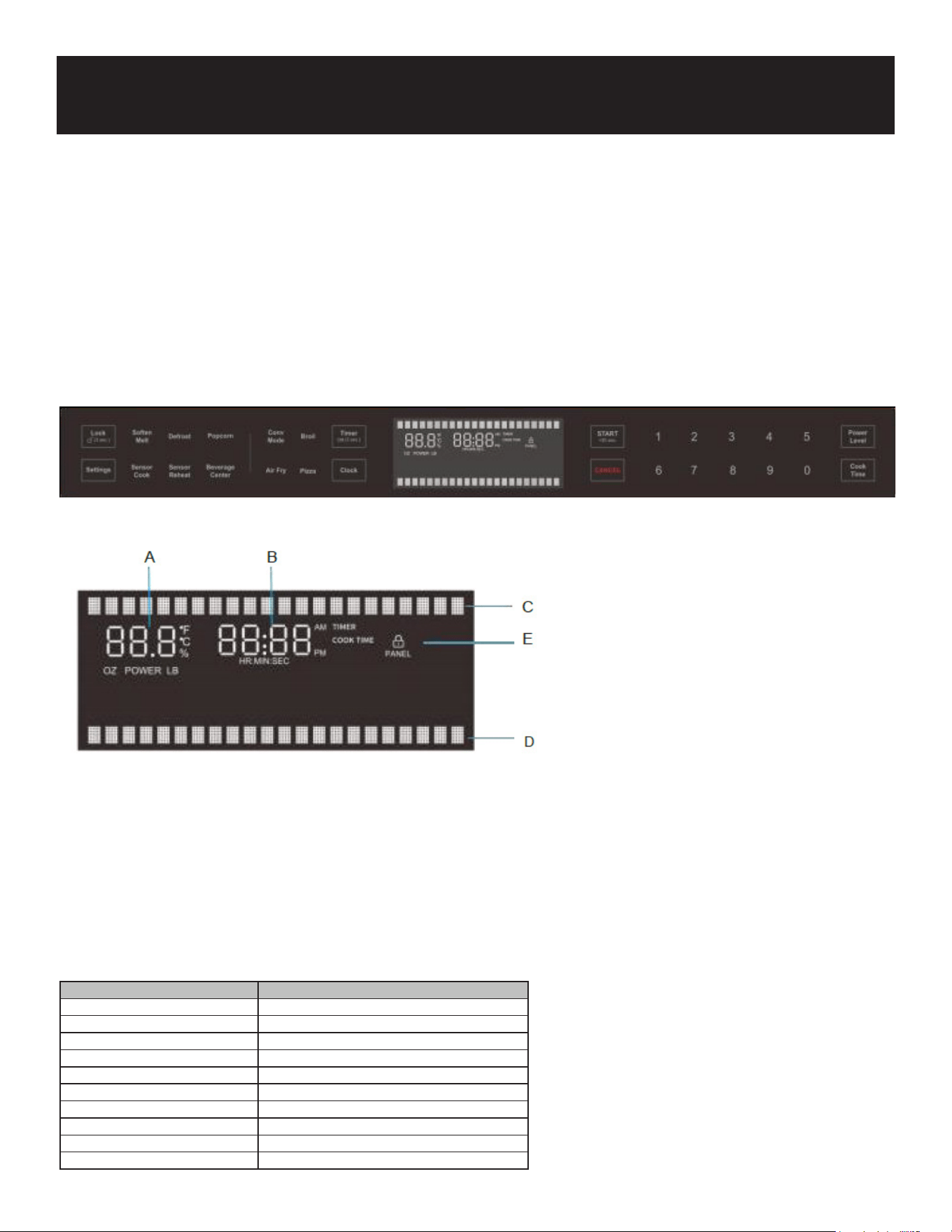
CONTROL PANEL
DISPLAY SCREEN
A: Microwave cavity display B: Time of cooking / timer / clock display C: Function prompt area
D: Parameter setting prompt area E: Control lock display
TOUCH KEYS AND DISPLAY
The touch keys are used to set the various additional functions. On the display, you can read the val-
ues that you have set.
Product Overview
Symbol Function
Lock (3 sec.) Activate/deactivate child lock
Settings System settings
Soften/Melt Select Soften/Melt programs
Sensor Cook Select Sensor Cook programs
Defrost Select Auto Defrost programs
Sensor Reheat Select Sensor Reheat programs
Popcorn Cook popcorn
Beverage Center Heat beverages
Conv Mode Select Convection modes
Air Fry Select AirFry cook programs
18
Symbol Function
Broil Set Broil mode
Pizza Select pizza programs
Timer/O (3 sec.) Set the time of timer
Clock Set time of day
START (30 sec.) Conrm entered values/Start cooking mode/
Add 30 seconds
CANCEL Cancel the programs/turn the appliance o
0-9 Use the number keys to enter customized
values
Power Level Set power level for microwave operation
Cook Time Set cooking time
Parameter Function
Power Level Set the microwave power level.
Cook Time Set the time of cooking.
PARAMETER ADJUSTMENT
Use the adjusting keys to set the parameters
COOLING FAN
Your appliance has a cooling fan. The cooling fan switches on during operation. The hot air escapes
above the door. The cooling fan continues to run for a certain time after operation.
Caution!
Do not cover the ventilation slots. Otherwise, the appliance will overheat.
Notes
• The appliance remains cool during microwave operation. The cooling fan will still switch on. The
fan may run on even when microwave operation has ended.
• Condensation may appear on the door window, interior walls and oor. This is normal and does
not adversely affect microwave operation. Wipe away the condensation after cooking.
ACCESSORIES
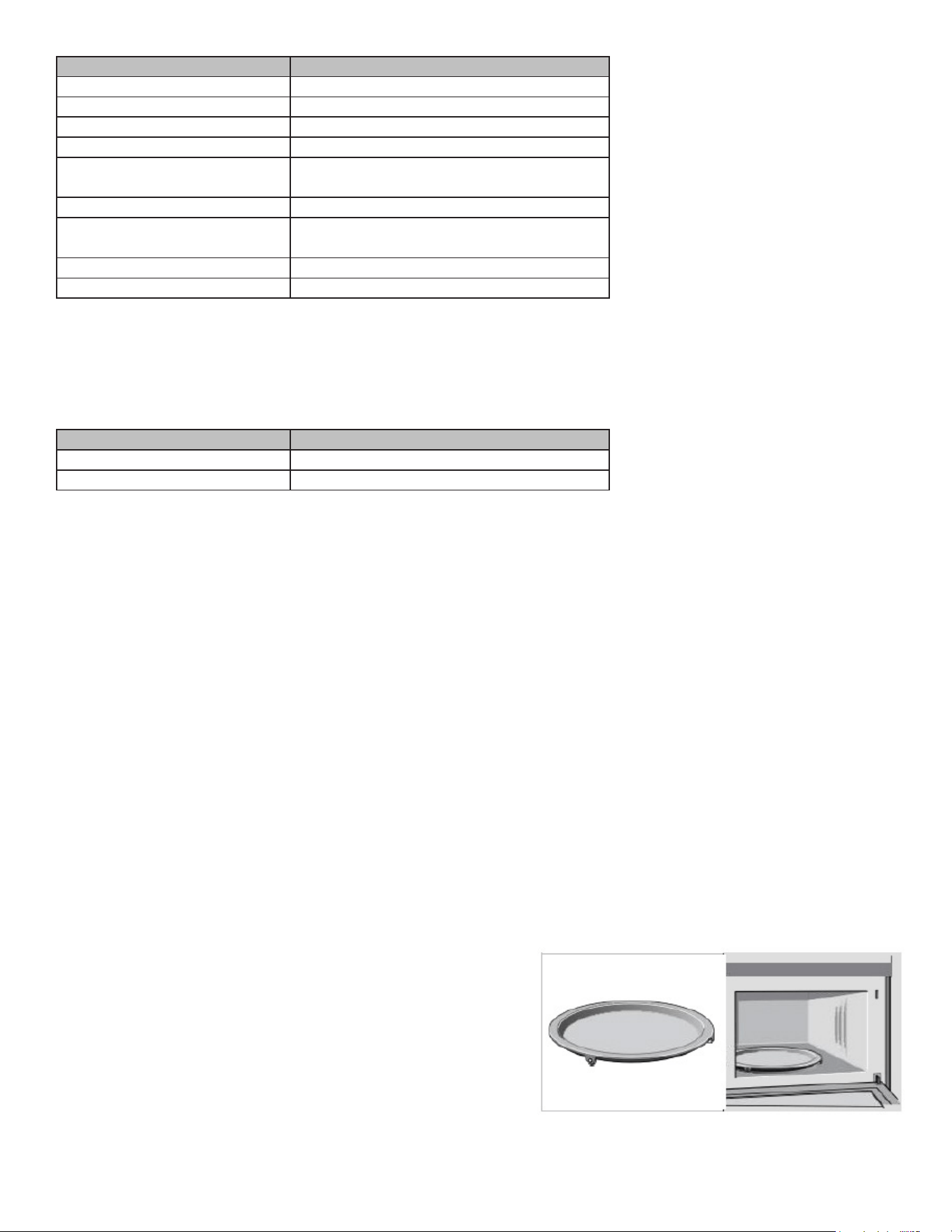
Turntable
As a surface for the wire rack.
Food which particularly requires a lot of heat from underneath can be prepared directly on
the turntable. The turntable can turn clockwise or anti-clockwise.
Place the turntable on the drive in the centre of the cooking compartment. Ensure that it is properly
tted.
• Never use the microwave without the turntable.
• The turntable can withstand max. 11 LBS.
• The turntable must turn when using all types of heating.
19
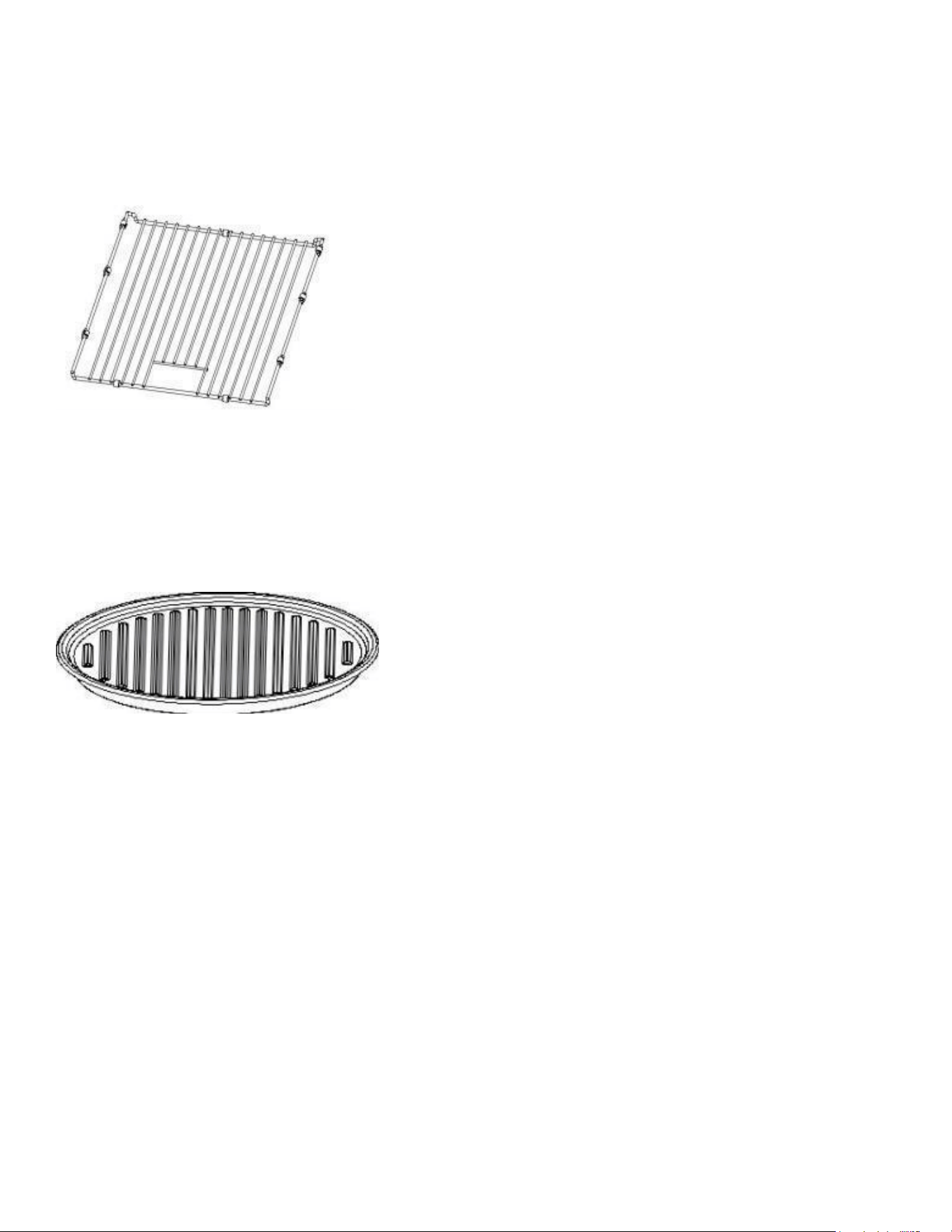
Baking rack
For grilling, e.g. steaks, sausages and for toasting bread.
We recommend using the rack together with the baking tray when cooking items on the rack which
might drip.
Ceramic Tray
For microwave cooking and convectional cooking.You can place food,like a popcorn
bag,potatoes,microwave pizza or defrost,directly on the ceramic tray.
The ceramic tray will get hot during the convection cooking.Place the ceramic tray on the top of the
metal tray turntable.The ceramic tray can remain in the oven for all cooking modes,unless ”Bake on
Metal Tray ” is required.
Note:
Type and quantity of accessories is subject to actual demand.

20
Operation
BEFORE USING THE APPLIANCE FOR THE FIRST TIME
Here you will nd everything you need to do before using your oven to prepare food for the rst time.
First read the section on .IMPORTANT SAFETY INSTRUCTIONS.
Setting the clock
When power is rst supplied to the oven, the timer display will ash "12:00" and "Clock setting” will
appear on the display . Enter the time by touching the number keypads. Then touch START to allow
operation.proceed as follow:
1. Touch START to set clock or touch Clock,
2. Choose 12 or 24 hours system according to the prompts,
3. Enter the correct time using the number keys. Example: To set the clock to 12:30 type in 1 2 3 0,
4. Touch START to conrm is complete setting.
Note
When power is rst supplied to the oven, you can directly press any key to enter the settings without
setting the clock.
Heating up the oven
To remove the new oven smell, heat up the appliance when it is empty and closed. One hour with
Convection at 350F is ideal. Ensure that no packaging remnants have been left in the oven cavity.
1. Touch Conv Mode and then enter the numbers to select Baked goods ,according to the prompts,
2. Enter the numbers 3 5 0 with the number keys,and then press START to conrm temperature is
complete setting,
3. Enter the cooking time numbers 6 0 with the number keys,
4. Touch SATART to start cooking.
The oven light turns on and the appliance starts heating.
Cleaning the accessories
Before you use the accessories for the rst time, clean them thoroughly with hot soapy water and a
soft dish cloth.
SETTING THE OVEN
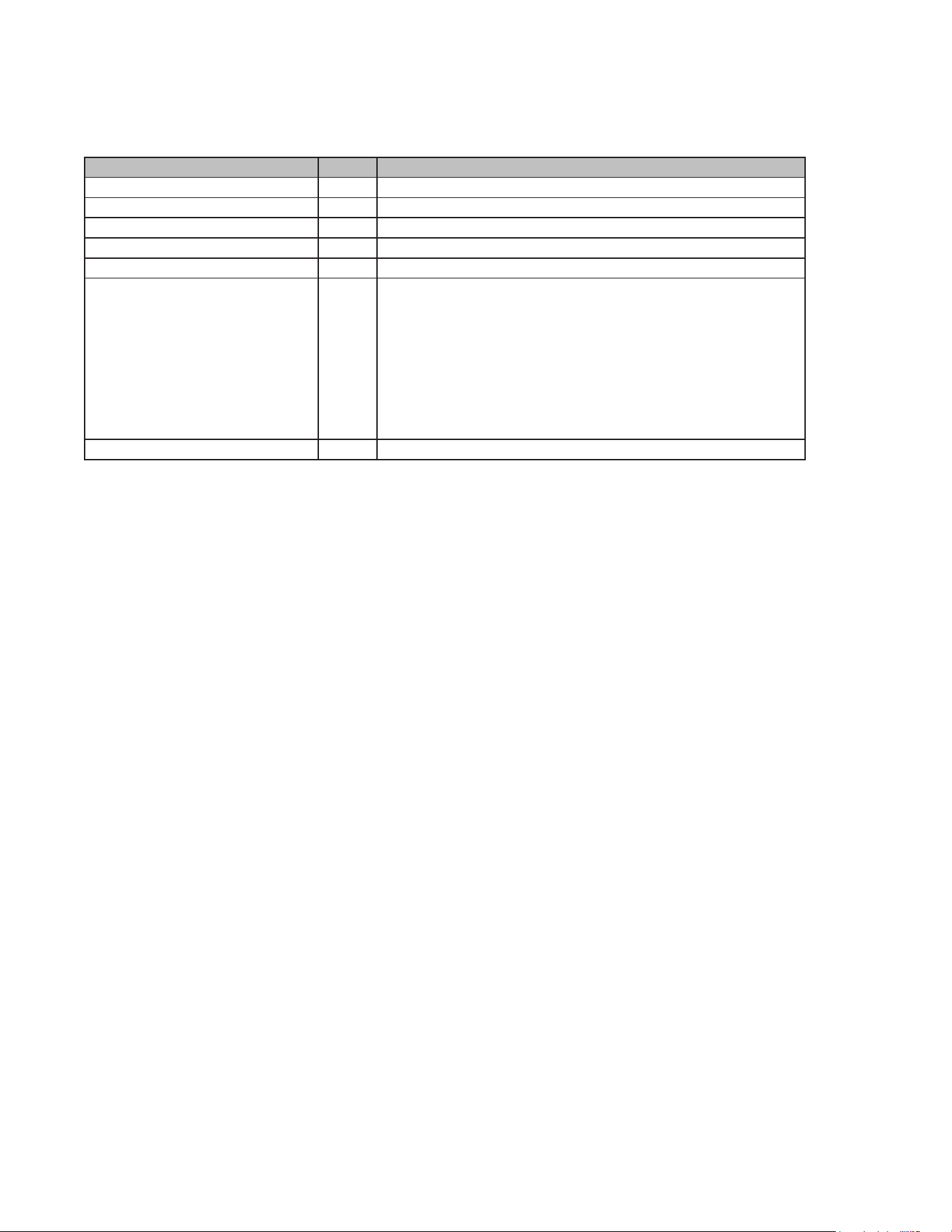
Settings
The oven has additional settings which can be accessed and adjusted using the settings button. They
remain in the control's memory until changed.
21
How to use:
1. Touch Settings. The oven display will scroll through the various options.
2. Touch the number keypad for the specic option to toggle the function setup. Use a following chart
as a guide.
Timer/Off(3 sec.)
The Timer can be set in minutes and seconds or hours and minutes and counts down the set time.
How to set timer:
1. Touch Timer/Off(3 sec.).The oven display will scroll through the various options.
2. Touch number keypad “1” to select HR:MIN or “2” to select MIN:SEC.
3. Touch number keypads to set a length of the timer.
4. Touch START.
The oven display will count down the timer. If both cooking time and timer are set, only display the
time of the cooking. If enabled, end-of-cycle tones will sound, It ends automatically in one minute,
or hold Timer/Off(3sec.) for 3 seconds to clear the display and stop the reminder tones.
NOTE: The Timer does not start or stop the oven.
Lock Control:
To Lock Control:
Touch Lock (3 sec.). The oven control is locked when a lock icon appears in the display.
To Unlock Control:
Hold Lock for 3 seconds. 3-2-1 appears in the display, and then the oven is unlocked, and the lock
icon is removed.
NOTE: The Control Lock shuts down the control panel keypads to avoid unintended use of the oven.
The Control Lock will remain set after a power failure, if set before the power failure occurs. When the
control is locked, only the CANCEL, Lock keypads will function.
COOKING MODE
There are various ways in which you can set your oven. Here we will explain how you can select the
Option Code Function Description
Temp Units 1 Set temperature unit
Sound 2 Key sound switch
Error Code Query 3 Query for error codes that have occurred
Version 4 Version information query
Display Mode 5 Set oven demo mode
Shabbat 6 Set Shabbat mode. (The cooking time can be set within 74
hours) Sabbath mode disables the oven lights (the oven light
will not turn on when the door is opened), all sounds (the
control will not beep when the screen is pressed), Convection
modes, Broil modes, Warm, Proof, and all time functions.
Shabbat mode can only be used with traditional Bake. This
feature conforms to Jewish Shabbat requirements.
Factory Reset 7 Restore factory setting
22
desired type of heating and temperature or grill setting. You can also select the oven cooking time for
each dish. Please refer to the section on Setting the time-setting options.
Soften/Melt:
Soften and Melt functions may be used to soften or melt your food. Times and cooking powers have
been preset for a number of food types.
How to use Soften and Melt:
1. Touch Soften/Melt. The oven display will scroll through the various options.
2. Touch number keypad “1” to select soften function or “2” to select melt function.
3. Touch number keypad to select food type from the Soften Chart or Melt Chart.
4. Touch number keypads to enter quantity (weight or sticks).
5. Touch START to start cooking.
The oven display will count down the soften or melt time. When the stop time is reached, the oven will
shut off automatically, and “Soften complete” or “Melt complete” will appear in the display. If enabled,
end-of-cycle tones will sound, it ends automatically in one minute, or touch CANCEL or open the door
to clear the display and stop the reminder tones.
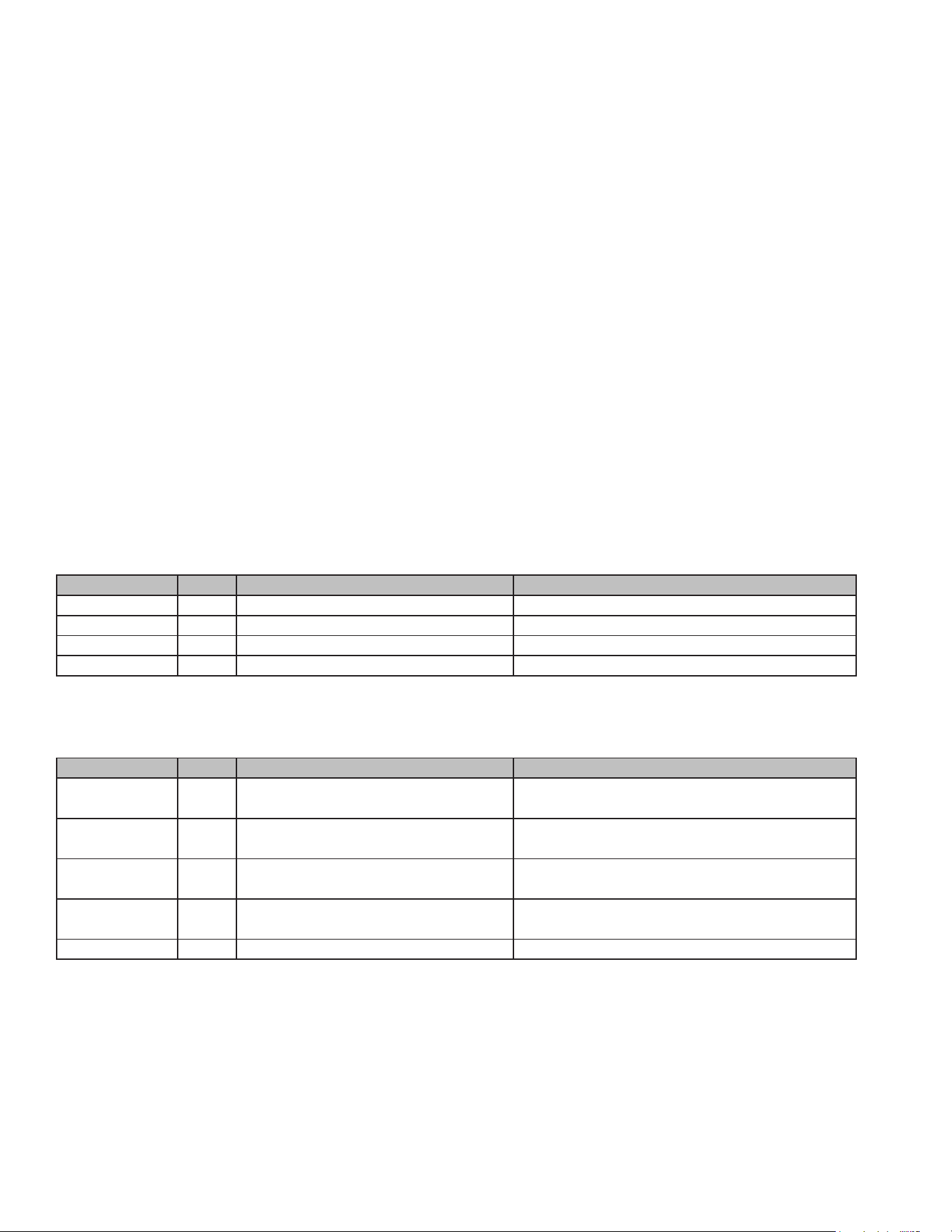
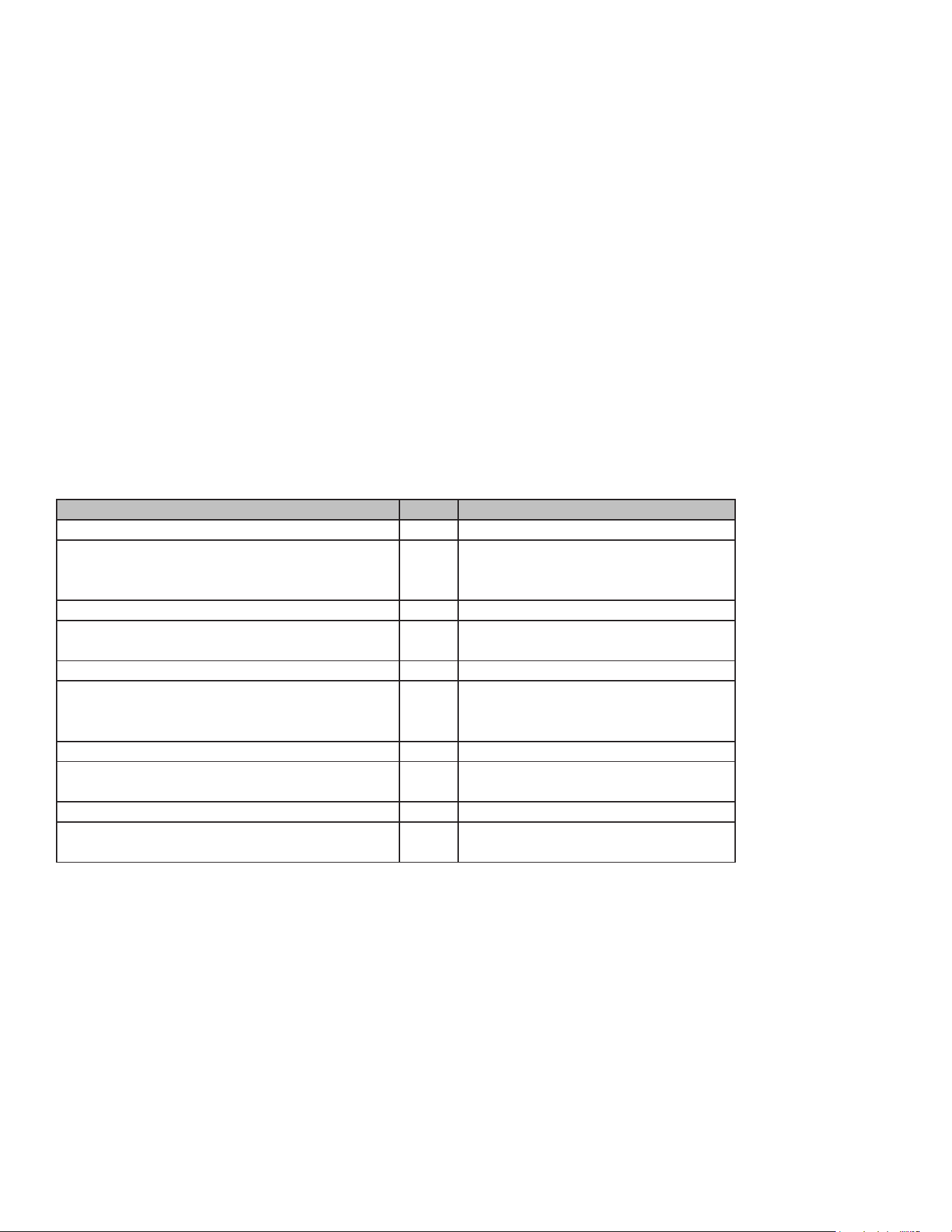
Soften Chart
Melt Chart
Sensor Cook
You can select two sensor cooking modes. Sensor cooking allows you to cook many of your favorite
foods without selecting cooking times and power levels. The microwave oven automatically deter-
mines the required cooking time for each food item.
Using the Sensor Cook function, a sensor automatically adjusts for the cook time and power level.
The microwave oven display will show the “Maximum Time Remaining” prompt and the time count-
Food Code Quantity Preparation
Butter 10.5-2 Sticks Unwrap and place in microwave-safe container.
Margarine 20.5-2 Sticks Unwrap and place in microwave-safe container.
Ice Cream 316, 32, 64 oz (454, 907 g, or 1.8 kg)
Cream Cheese 43 or 8 oz (85 g or 227 g) Unwrap and place in microwave-safe container.
Food Code Quantity Preparation
Butter 1 0.5-2 Sticks Unwrap and place in microwave-safe container.
Margarine 2 0.5-2 Sticks Unwrap and place in microwave-safe container.
Chocolate 3 2, 4, 6, 8 oz (57, 113, 170, 227 g) Cut squares into small pieces or use chips. Place
in microwave-safe container.
Cheese 4 8 or 16 oz (227 or 454 g) Cut into small pieces and place in microwave-safe
container.
Marshmallows 5 5 or 10 oz (142 or 283 g) Place in microwave-safe container.
23
down once the sensor identies the cooking duration.
If the microwave oven door is opened during a sensor function, the microwave oven will turn off, and
any additional operations will be canceled.
How to use Sensor Cook:
Touch Sensor Cook. The oven display will scroll through the various options.
Touch number keypad to select food type from the Sensor Cook Chart.
Touch number keypads to enter quantity (weight or cups).
Touch START to start cooking.
The oven display will count down the Sensor Cook time. When the stop time is reached, the oven will
shut off automatically, and “Sensor cooking complete” will appear in the display.
If enabled, end-of-cycle tones will sound, it ends automatically in one minute, or touch CANCEL or
open the door to clear the display and stop the reminder tones.
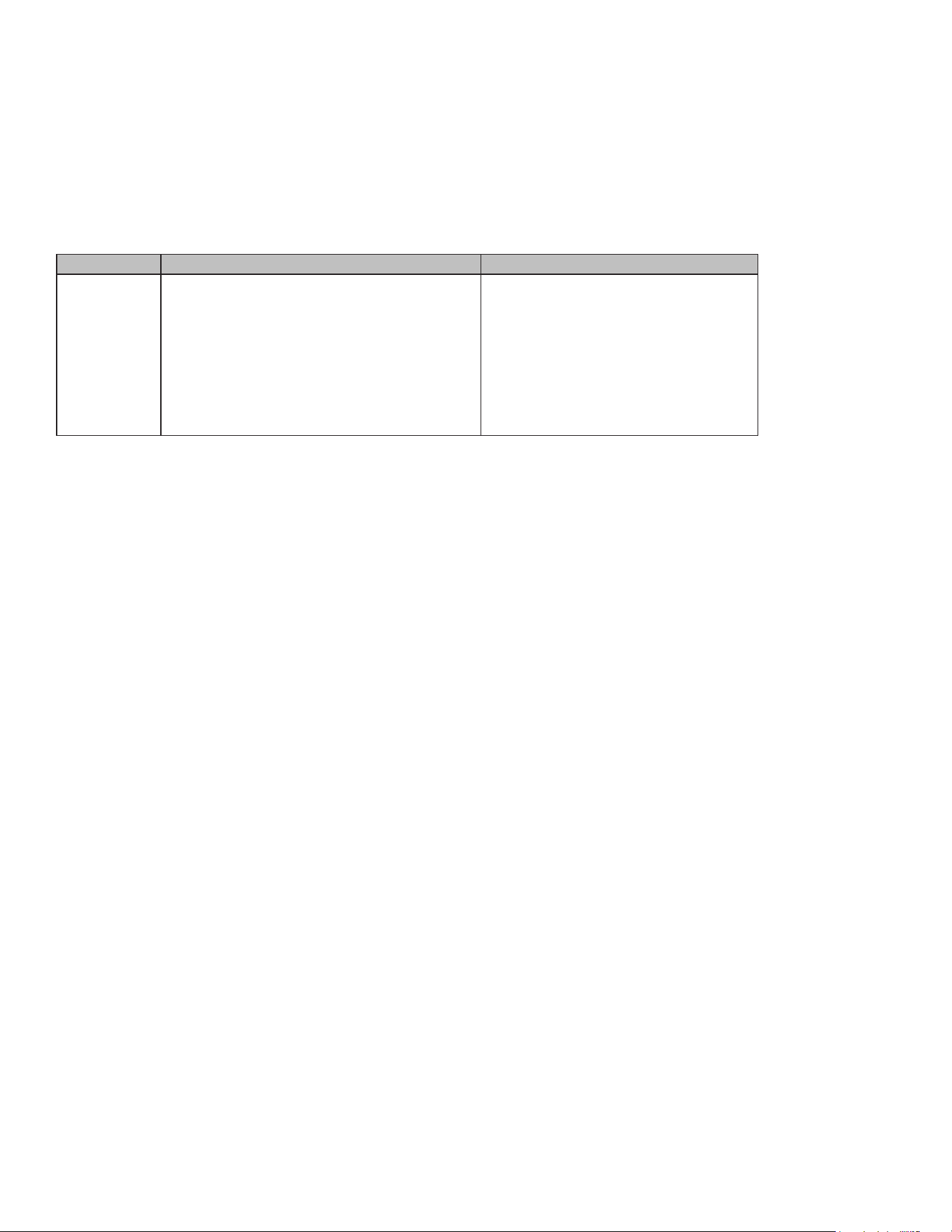
Sensor Cook Chart
Sensor Reheat
The sensor reheat feature lets you reheat dinner plates or casseroles(8-16 oz) for your cooking
convenience.
How to use Sensor Reheat:
1. Touch Sensor Reheat .
2. Touch START to start cooking.
The oven display will count down the Reheat time.
When the stop time is reached, the oven will shut off automatically and “Reheat complete” will
appear in the display.
If enable, end-of-cycle tones will sound, It ends automatically in one minute, or touch CANCEL or
Food Code Quantity
Baked Potato 1 1-4 potatoes (8-32 oz)
Pierce skin with a fork. Do not cover. After
cooking, allow to stand wrapped in foil for 5
minutes.
Ground Meat 2 8-24 oz (0.5-1.5 lbs)
After cooking, allow to stand, covered, for 3-4
minutes.
Vegetable 3 4-16 oz (0.25-1 lbs)
No water is needed if vegetables have just been
washed. Add 2 tablespoons water per 8 ounces
of fresh vegetables.
Fish/Seafood 4 8-20 oz (0.5-1.25 lbs)
Roll thin edges underneath. Arrange in a ring
around microwavable dish.
Frozen Entree 5 10-20 oz
Follow package instructions for venting, cutting
plastic lm, etc.
24
open the door to clear the display and stop the reminder tones.
Notes
• Cover with vented plastic wrap or wax paper.
• Reheat food on a microwaveable dinner plate.
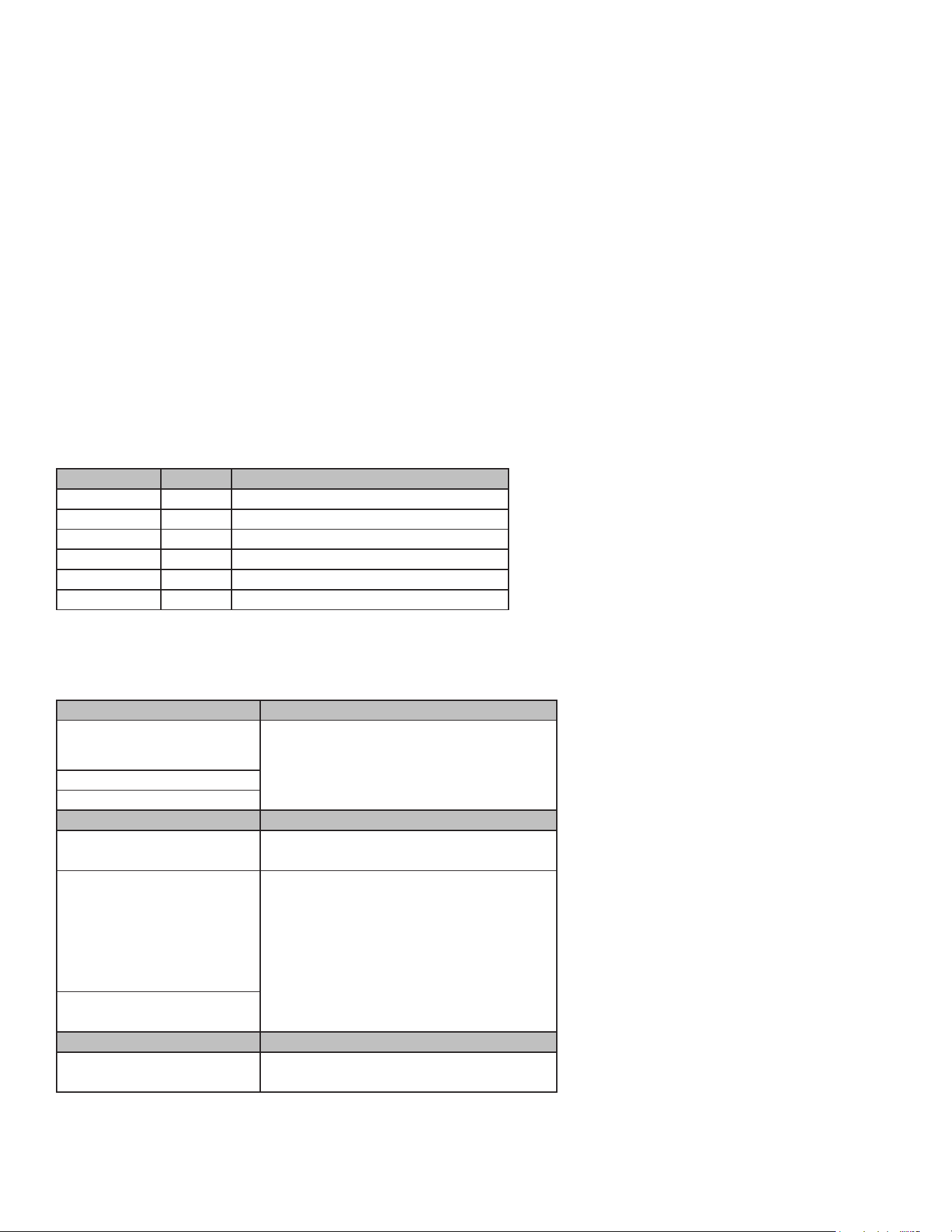
Sensor Reheat Cooking Suggestions
Defrost
The Defrost feature can be used, or the microwave oven can be manually set to defrost by using 30%
cook power.
For optimal results, food should be 0°F (-18°C) or colder when defrosting.
For optimal results, food should be 0°F (-18°C) or colder when defrosting.
Shallow packages will defrost more quickly than deep blocks.
Separate food pieces as soon as possible during or at the end of the cycle for more even defrosting.
Foods left outside the freezer for more than 20 minutes or frozen ready-made food should not be
defrosted using the Defrost feature, but should be defrosted manually.
Use small pieces of aluminum foil to shield parts of food such as chicken wings, leg tips, and sh
tails.
Times and cooking powers have been preset for defrosting a number of food types.
Manual Defrost requires that a cook time and power level be entered if using other than 30% cook
power.
How to use Defrost:
Touch Defrost. The oven display will scroll through the various options.
Touch number keypad to select food type from the Defrost Chart (Except Manual Defrost).
Touch number keypads to enter weight.
Touch START to start cooking.
The oven display will count down the Defrost time. For better results, a preset standing time is includ-
ed in the defrosting time. This may make the defrosting time seem longer than expected. When the
stop time is reached, the oven will shut off automatically and “Defrost complete” will appear in the
display.
If enabled, end-of-cycle tones will sound, it ends automatically in one minute, or touch CANCEL or
open the door to clear the display and stop the reminder tones.
Food Directions Quantity
Pasta Cover plate with lid or vented plastic wrap.
If food is not hot enough after heating with
the Reheat feature, continue heating using
manual time and power level setting.
1-4 servings
Stir foods once before serving.
Contents:
- Pasta: Canned spaghetti and ravioli,
refrigerated foods
25
How to use Manual Defrost:
1. Touch Defrost .The oven display will scroll through the various options
2. Touch number keypad “6” to select Manual Defrost.
3. Touch number keypads to set a length of time to defrost. Time can be set up to 99 minutes and 99
seconds.
4. The default power level is 30%. To change power level, touch Power Level and then enter the de-
sired power level. See the Power Level Chart.
5. Touch START to start cooking.
The oven display will count down the Defrost time. For better results, a preset standing time is
included in the defrosting time.
When the stop time is reached, the oven will shut off automatically and “Defrost complete” will
appear in the display.
If enable, end-of-cycle tones will sound, It ends automatically in one minute, or touch CANCEL or
open the door to clear the display and stop the reminder tones.
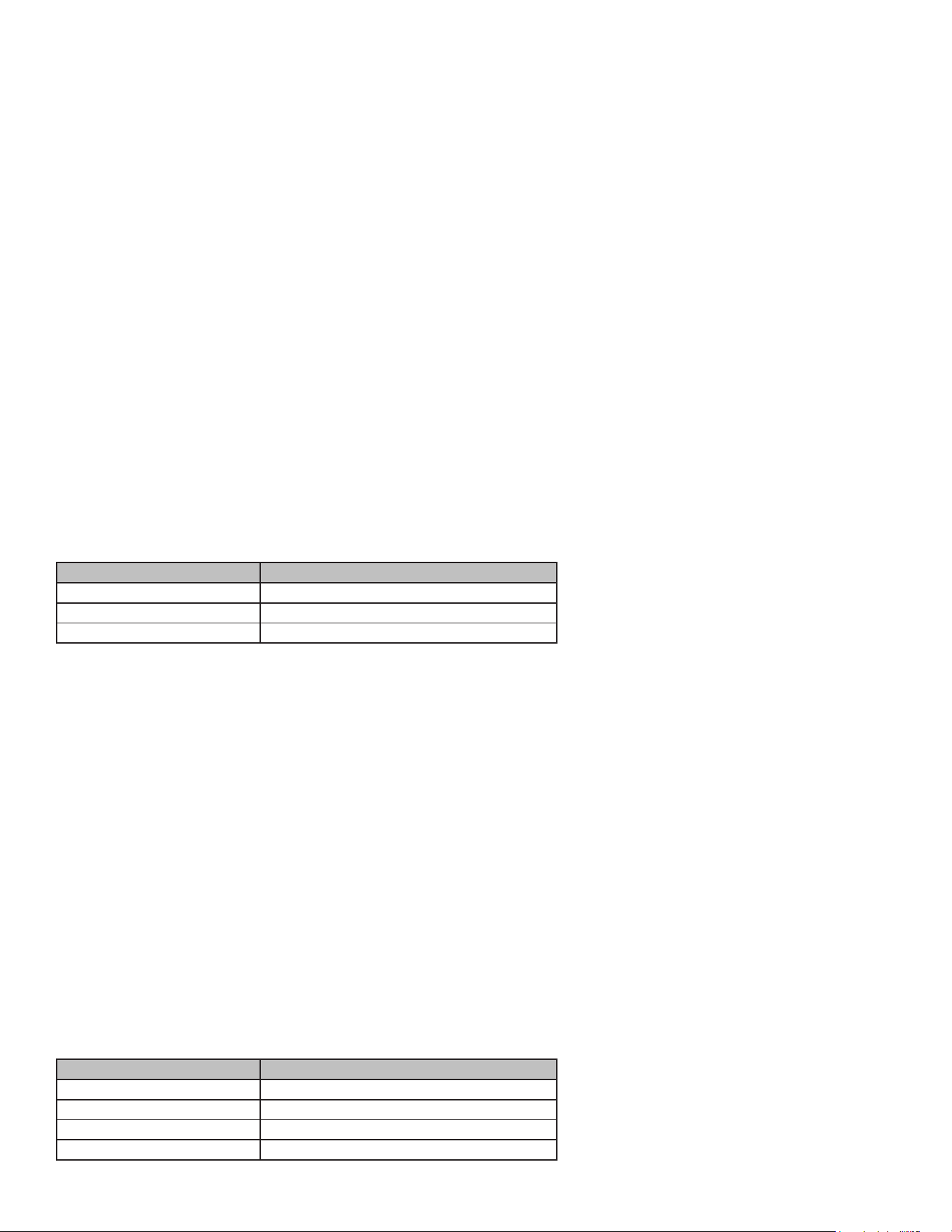
Defrost Chart
Defrost Preparation Chart
Food Code Weight
Poultry 1 0.1 - 6.6 lbs
Meats 2 0.1 - 6.6 lbs
Fish 3 0.1 - 6.6 lbs
Bread 4 0.1 - 2.0 lbs
Juice 5 6, 12, or 16 oz
Manual 6 Default power level 30%
Poultry
Chicken: whole and cut up Place in microwave-safe baking dish,
chicken breast side up. Remove giblets
from whole chicken.
Cornish hens
Turkey: breast
Meats
Beef: ground, steaks, roast,
stew
Lamb: stew and chops The narrow or fatty areas of irregular
shaped cuts should be shielded with foil
before defrosting. Do not defrost less than
1/4 lb (113 g) or two 4 oz (113 g) patties.
Place all meats in microwave-safe baking
dish.
Pork: chops, ribs, roasts,
sausage patties
Fish
Fillets, Steaks, Whole,
Shellsh
Place in microwave-safe baking dish.
26
Popcorn
Do not leave oven unattended while popping corn. Popcorn may ignite and cause re.
How to use popcorn mode:
The appliance must be turned off.
Touch Popcorn. The oven display will scroll through the various options.
Touch number keypads to select the weight code from popcorn chart.
Touch START to start cooking.
The oven display will count down the popcorn time.
When the stop time is reached, the oven will shut off automatically and "Popcorn complete" will ap-
pear in the display.
If enabled, end-of-cycle tones will sound. It ends automatically in one minute, or touch CANCEL or
open the door to clear the display and stop the reminder tones.
NOTE: Follow the instructions provided by the microwave popcorn manufacturer.
Popcorn Chart
Beverage Center
The beverage feature heats 0.5 to 2 cups of a beverage.
How to use Beverage Center:
1. Touch Beverage Center. The oven display will scroll through the various options.
2. Touch number keypads to select the weight code from beverage center chart.
3. Touch START to start cooking.
The oven display will count down the Beverage Center time.
When the stop time is reached, the oven will shut off automatically and “Cooking complete” will ap-
pear in the display.
If enabled, end-of-cycle tones will sound. It ends automatically in one minute, or touch CANCEL or
open the door to clear the display and stop the reminder tones.
Beverage Center Chart
Code Weight
1 1.5 oz
2 2.5 oz
3 3.5 oz
Code Weight
1 0.5 Cups
2 1.0 Cups
3 1.5 Cups
4 2.0 Cups

27
Conv Mode
Convection cooking uses the convection element, the broil element and the fan. Hot air is circulated
throughout the oven cavity by the fan. The constantly moving air surrounds the food to heat the outer
portion quickly.
The convection function may be used to cook small amounts of food on a single rack.
Always use the convection grid placed on turntable or baking tray.
Do not cover turntable or convection grid or baking tray with aluminum foil.
Do not use light plastic containers, plastic wrap, or paper products. All heatproof cookware or metal
utensils can be used in convection cooking. Round pizza pans are excellent for convection cooking.
Use convection cooking for items such as soues, breads, cookies, angel food cakes, pizza, and
most meats and sh.
All Convection Mode functions require preheating before use. Place food in microwave oven after
preheating is complete.
How to use Conv Mode:
Touch Conv Mode. The oven display will scroll through the various options.
Touch number keypad to select food type from the Conv Mode Chart.
Convection Mode Instructions
1. Touch number keypads to enter temperature.
2. Touch number keypads to set a length of time for Convection cooking.
3. Touch START to start cooking.
The oven will start to preheat until preheat is complete. A beep will sound, and the oven display will
count down the Convection Mode time.
When the stop time is reached, the oven will shut off automatically, and “Cooking complete” will ap-
pear in the display.
If enabled, end-of-cycle tones will sound. It ends automatically in one minute, or touch CANCEL or
open the door to clear the display and stop the reminder tones.
Tips: You can touch START directly without entering the time of cooking, after setting the cooking
temperature.
The oven will work for the maximum safe time, at which time the cooking time will not be displayed.
Convection Mode Chart
Option Code Food Cook Time Oven Temp
Baked goods 1 Biscuits, Breads: quick and yeast, Cakes and Cookies,
Casseroles: including frozen entrees and soués, Fish,
Baked potatoes
0:01-1:00 hr 175-450 °F
Meats 2 Chicken: whole and pieces, Meat loaf, Roasts: pork,
beef, and ham
0:01-1:00 hr 175-450 °F
(Turkey and large poultry are not included because
their cook times vary.)
Other foods 3 Convenience foods: french fries, nuggets, sh sticks,
pizza, Pies: fruit and custard
0:01-1:00 hr 175-450 °F

28
Air Fry
Air Fry is a special, no-preheat, cooking mode that is designed to produce foods with a crispier exteri-
or than traditional oven cooking.
• Only use broil-safe cookware when using Air Fry mode.
• A dark sheet pan is recommended. A dark pan promotes better browning and crisping.
• Oven baking baskets and baking grids can also be used. A sheet pan should be placed on the rack
below the foods to catch any drippings when using a baking basket.
How to use Air Fry:
1. Touch Air Fry.
2. Touch number keypads to enter temperature. The temperature can be set between 175 °F and 450
°F.
3. Touch number keypads to set a length of time to Air Fry. Time can be set up to 1 minute and 10
hours.
4. Touch START to start cooking.
The oven display will count down the Air Fry time.
When the stop time is reached, the oven will shut off automatically and “Cooking complete” will ap-
pear in the display.
If enabled, end-of-cycle tones will sound. It ends automatically in one minute, or touch CANCEL or
open the door to clear the display and stop the reminder tones.
Tips: You can touch START directly without entering the time of cooking, after setting the cooking
temperature. The oven will work for the maximum safe time, at which time the cooking time will not
be displayed.
• For cooking fresh or homemade foods, spread the oil over a larger area more evenly, crisping up
the food more effectively.
Broil
When the crisper pan is used with microwaves, it is like a frying pan or griddle, ideal for French toast,
burgers, eggs, stir-frying, and sautéing. The default temperature is 400 °F; the default cooking time is
3 hours. The oven temperature and cook time can not be set.
How to use Broil:
1. Touch Broil.
2. Touch START to start cooking.
The oven display will count down the Broil time, but not display.
When the stop time is reached, the oven will shut off automatically and “Cooking complete” will ap-
pear in the display.

29
If enabled, end-of-cycle tones will sound. It ends automatically in one minute, or touch CANCEL or
open the door to clear the display and stop the reminder tones.
Pizza
• Check pizza before minimum time; pizza may cook faster compared to a traditional oven.
• For fresh pizza, use a pizza paddle for sliding the pizza on and from the metal turntable.
• If using a pizza paddle, sprinkle the paddle liberally with cornmeal for ease in transferring the
dough to the metal turntable.
• Maximum size is 12 inches for fresh and frozen pizzas.
• Avoid using a pizza stone as it can damage the oven.
• The metal turntable can be used for cutting pizza into slices. Remove the turntable from the oven
after the pizza is baked.
How to use Pizza:
1. Touch Pizza.
2. Touch number keypads to enter temperature. The temperature can be set between 175 °F and 450
°F.
3. Touch number keypads to set a length of time for cooking. Time can be set up to 1 minute and 10
hours.
4. Touch START to start cooking.
The oven will start to preheat until preheat is complete. A beep will sound, and the oven display will
count down the Pizza time if you set it.
When the stop time is reached, the oven will shut off automatically and “Cooking complete” will ap-
pear in the display. If enabled, end-of-cycle tones will sound. It ends automatically in one minute, or
touch CANCEL or open the door to clear the display and stop the reminder tones.
Tips: You can touch START directly without entering the time of cooking, after setting the cooking
temperature. The oven will work for the maximum safe time, at which time the cooking time will not
be displayed.
OTHER SETTINGS
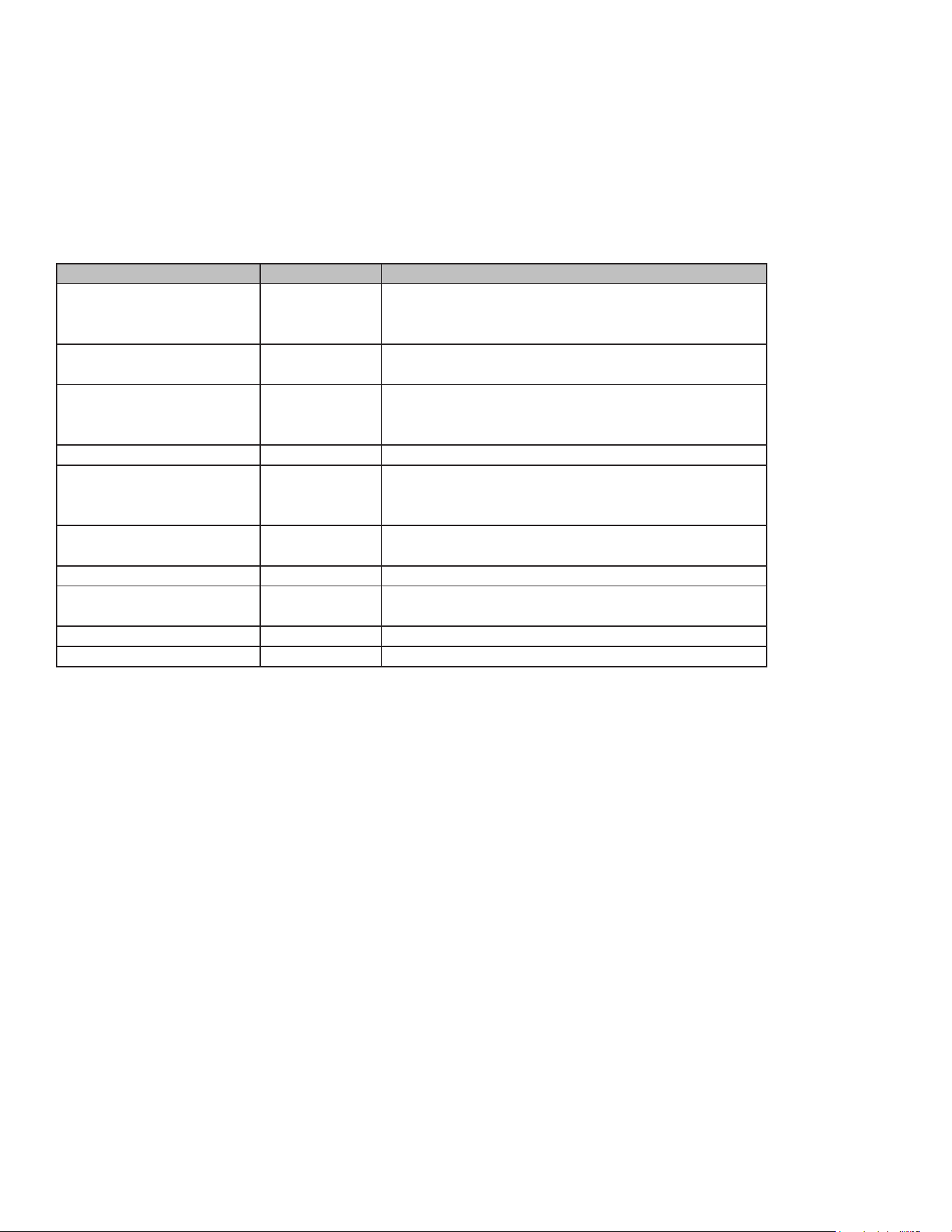
Power Level
Many recipes for microwave cooking specify which cooking power to use by percent, name, or num-
ber. For example, 70% = 7 = Medium-High.
Use the following chart as a general guide for the suggested cooking power of specic foods.
How to use Power Level:
1. Touch Power Level.
2. Touch number keypads to enter power level from microwave cooking power chart.
3. Touch number keypads to set a length of time to microwave cooking. Time can be set up to 1 sec-
ond and 99 minutes.
4. Touch START to start cooking.
30
The oven display will count down the Microwave cooking time.
When the stop time is reached, the oven will shut off automatically and “Cooking complete” will ap-
pear in the display. If enabled, end-of-cycle tones will sound. It ends automatically in one minute, or
touch CANCEL or open the door to clear the display and stop the reminder tones.
Microwave Cooking Power Chart
Cook Time
How to use Cook Time:
1. Touch Cook Time. The default power level is 100%. If you need other power levels, you can touch
Power Level to set.
2. Touch number keypads to set a length of time to microwave cooking. Time can be set up to 1 sec-
ond and 99 minutes.
3. Touch START to start cooking.
The oven display will count down the Microwave cooking time.
When the stop time is reached, the oven will shut off automatically and “Cooking complete” will ap-
pear in the display. If enabled, end-of-cycle tones will sound. It ends automatically in one minute, or
touch CANCEL or open the door to clear the display and stop the reminder tones.
START/+30 sec.
The START/+30 sec. keypad controls 2 separate functions for the built-in microwave: Start and Add
30 seconds.
Percent Number Use
100%, High 10 Quick heating convenience foods and foods with high
water content, such as soups, beverages, and most
vegetables.
90% 9 Cooking small, tender pieces of meat, ground meat,
poultry pieces, and sh llets. Heating cream soups.
80% 8 Heating rice, pasta, or casseroles. Cooking and heating
foods that need a cook power lower than high. For
example, whole sh and meat loaf.
70%, Medium-High 7 Reheating a single serving of food.
60% 6 Cooking sensitive foods such as cheese and egg
dishes, pudding, and custards. Cooking non-stirrable
casseroles, such as lasagna.
50%, Medium 5 Cooking ham, whole poultry, and pot roasts. Simmering
stews.
40% 4 Melting chocolate. Heating bread, rolls, and pastries.
30%, Medium-Low, Defrost 3 Defrosting bread, sh, meats, poultry, and precooked
foods.
20% 2 Softening butter, cheese, and ice cream.
10%, Low 1 Taking chill out of fruit.
31
START
The START/+30 sec. keypad begins any upper or single oven cooking function once enough data has
been entered and the door is closed.
After enough data has been entered and the door is closed, “Press START to conrm” will appear on
the oven display as a reminder. If the Start keypad is not touched within 30 seconds after touching
another keypad, the oven display will return to the inactive mode and the programmed function will be
canceled.
If cooking is interrupted by opening the door, touching START/+30 sec. after the door is closed again
will resume the preset cycle.
+30 sec.
Touching START/+30 sec. when the microwave oven is off will start 30 seconds of cook time at 100%
power. Touching START/+30 sec. while the microwave oven is operating will add cook time to the
current cycle by 30 seconds. Multiple seconds can be added by repeatedly touching START/+30 sec.
(manually enter cooking time modes only).
Update Temperature
1. Touch number keypad to update temperature.
2. Touch START to start cooking with the new settings.
Update Cooking Time
1. Touch Cook Time.
2. Touch number keypad to update the time of cooking.
3. Touch START to start cooking with the new settings.
Update Power Level
1. Touch Power Level.
2. Touch number keypad to update the power level of
cooking.
3. Touch START to start cooking with the new settings.
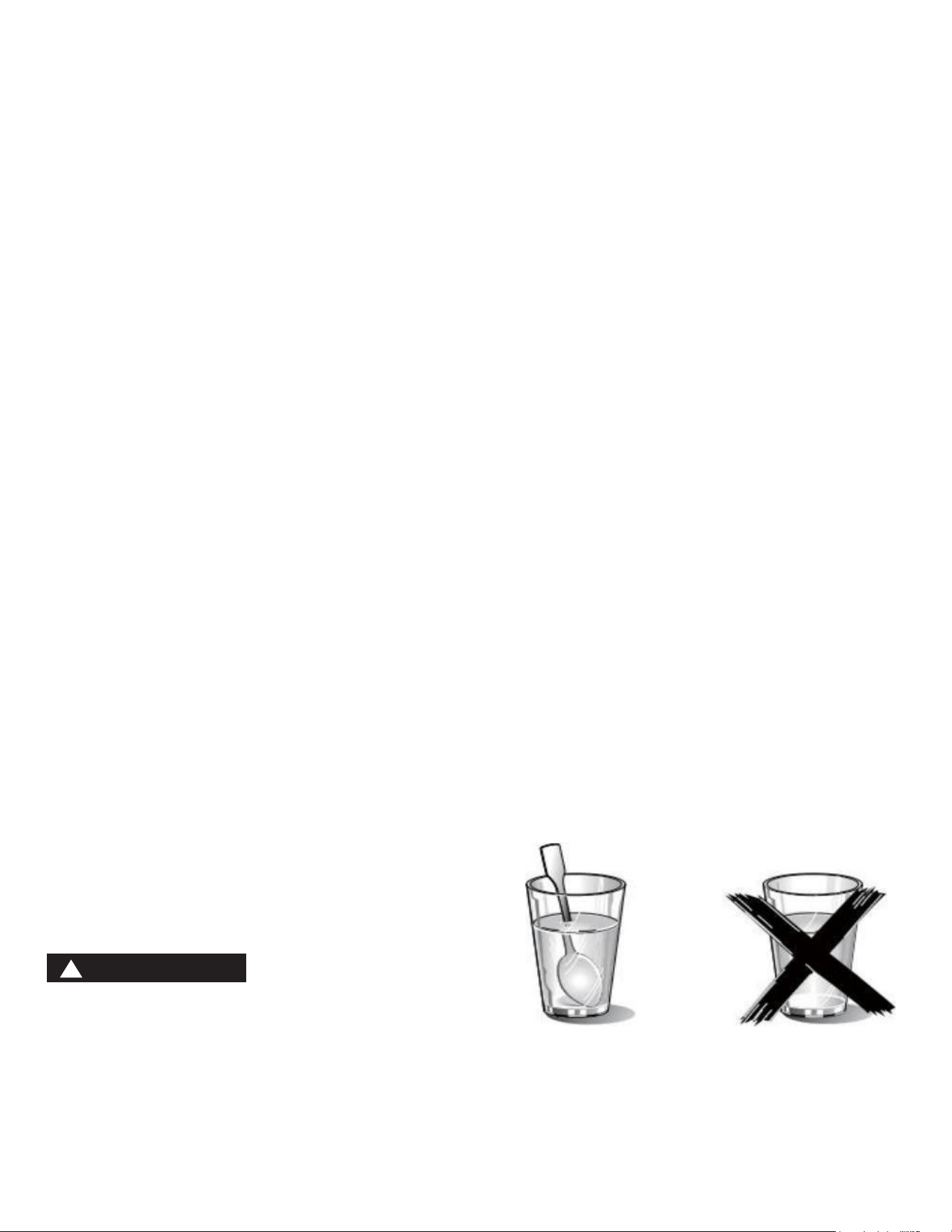
Heating Food
Risk of scalding!
There is a possibility of delayed boiling when a liquid is heated. This means that the liquid reaches
boiling temperature without the usual steam bubbles rising to the surface. Even if the container only
moves a little, the hot liquid can suddenly boil over and spatter. When heating liquids, always place a
spoon in the container. This will prevent delayed boiling.
WARNING
!

32
CARE AND CLEANING
With careful care and cleaning, your microwave oven will retain its looks and remain in good order. We
will explain here how you should care for and clean your appliance correctly.
WARNING: Risk of electric shock!
Penetrating moisture may cause electric shock. Do not use any high-pressure cleaners or steam
cleaners.
WARNING: Risk of burns!
Never clean the appliance immediately after switching off. Let the appliance cool down.
WARNING: Risk of serious damage to health!
Microwave energy may escape if the cooking compartment door or the door seal is damaged. Never
use the appliance if the cooking compartment door or the door seal is damaged. Contact the af-
ter-sales service.
NOTE:
• Slight differences in color on the front of the appliance are caused by the use of different materi-
als, such as glass, plastic, and metal.
• Shadows on the door panel which look like streaks are caused by reections made by the oven
light.
• Unpleasant odors, e.g., after sh has been prepared, can be removed very easily. Add a few drops
of lemon juice to a cup of water. Place a spoon into the container as well, to prevent delayed boil-
ing. Heat the water for 1 to 2 minutes at maximum microwave power.
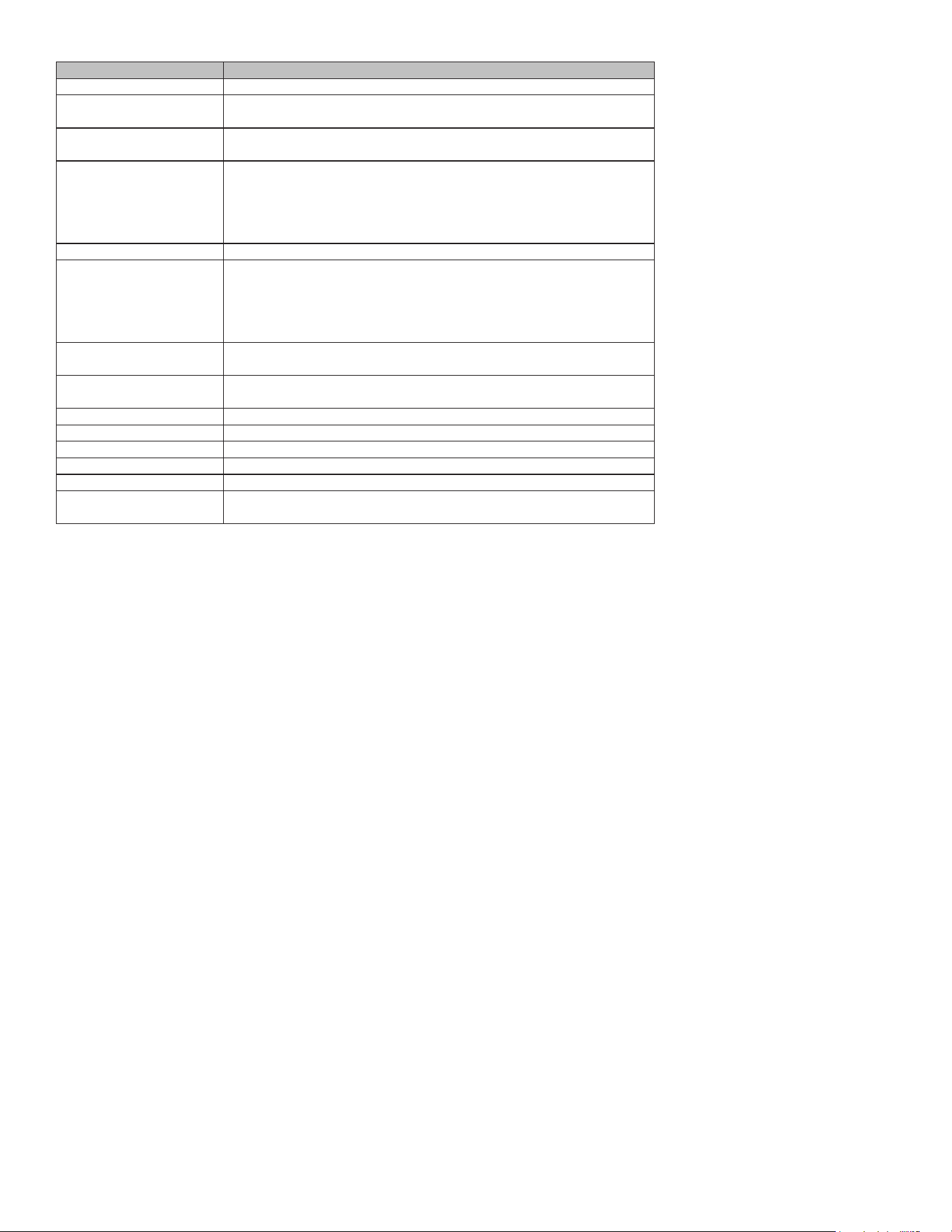
Cleaning agents
To ensure that the different surfaces are not damaged by using the wrong cleaning agent, observe the
information in the table. Do not use:
• Sharp or abrasive cleaning agents,
• Metal or glass scrapers to clean the glass in the appliance door,
• Metal or glass scrapers to clean the door seal,
• Hard scouring pads and sponges,
• Cleaning agents with high concentrations of alcohol.
Wash new sponge cloths thoroughly before use.
Allow all surfaces to dry thoroughly before using the appliance again.
Maintenance
33
Area Cleaning agents
Appliance front Hot soapy water:
Clean with a dish cloth and dry with a soft cloth. Do not use glass cleaners
or metal or glass scrapers for cleaning.
Appliance front with stainless
steel
Hot soapy water:
Clean with a dish cloth and dry with a soft cloth. Remove ecks of limescale,
grease, starch and albumin (e.g., egg white) immediately. Corrosion can
form under such residues. Special stainless steel cleaning agents can be
obtained from the after-sales service or from specialist shops. Do not use
glass cleaners or metal or glass scrapers for cleaning.
Cooking compartment Hot soapy water or a vinegar solution:
Clean with a dish cloth and dry with a soft cloth. If the oven is very dirty:
Do not use oven spray or other aggressive oven cleaners or abrasive
materials. Scouring pads, rough sponges and pan cleaners are also
unsuitable. These items scratch the surface. Allow the interior surfaces to
dry thoroughly.
Recess in cooking
compartment
Damp cloth:
Ensure that no water seeps through the turntable drive into the appliance
interior.
Wire racks Hot soapy water:
Clean using stainless steel cleaning agent or in the dishwasher.
Door panels Glass cleaner:
Clean with a dish cloth. Do not use a glass scraper.
Seal Hot soapy water:
Clean with a dish cloth, do not scour. Do not use a metal or glass scraper
for cleaning.
CLEANING AND MAINTENANCE
WARNING
Be sure the entire appliance has cooled and grease has solidied before attempting to clean any part
of the appliance.
Cleaning Guide
For best performance and for safety reasons, keep the oven clean inside and outside. Take special
care to keep the inner door panel and oven front frame free of food and grease build-up.
Never use abrasive scouring powder or pads on the microwave. Wipe the microwave oven inside and
out with a soft cloth and warm (not hot) mild detergent solution. Then rinse and wipe completely dry.
Wipe splatters immediately with a wet paper towel, especially after cooking greasy foods like chicken
or bacon.
Clean your microwave oven weekly or more often, if needed.
CLEANING AND CARE
Never operate the microwave oven without food in the oven cavity, unless pre-heating with Convec-
tion, Pizza, Frozen Foods and Keep Warm mode; this can damage the magnetron tube or ceramic tray.
You may wish to leave a cup of water standing inside the oven when it is not in use to prevent damage
if the oven is accidentally turned on.
34
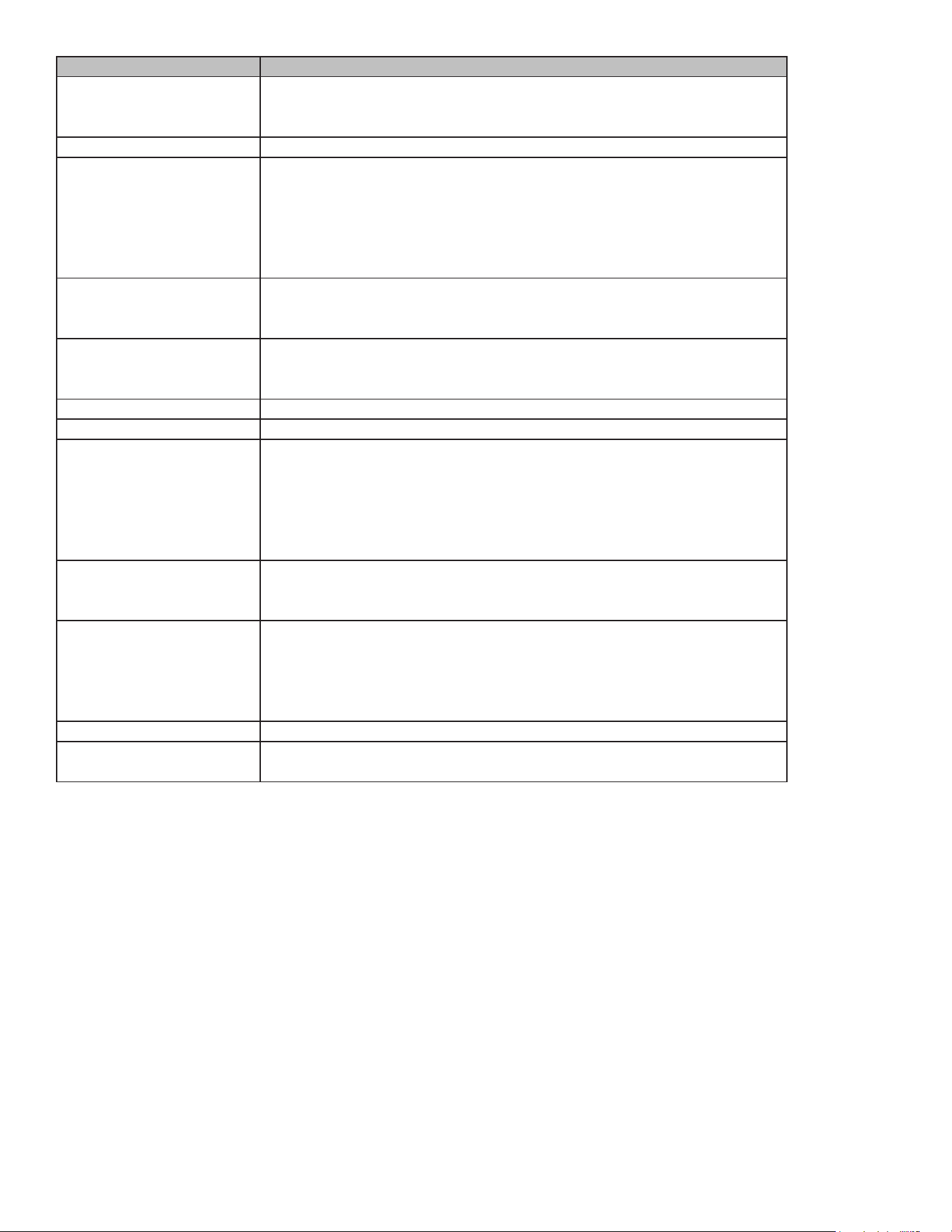
Part Recommendations
Oven cavity Keep inside (cavity) of the oven clean. Food particles and spilled liquids can
stick to the oven walls, causing the oven to work less eciently. Wipe up
spills immediately. Use a damp, clean cloth and mild soap.
DO NOT
use harsh detergents or abrasive cleaners. To help loosen baked-on food
particles or liquids, heat 2 cups of water (add the juice of 1 lemon if you
desire to keep the oven fresh smelling) in a 4 cup measuring glass at High
power for 5 minutes or until boiling. Let stand in oven cavity for 1 or 2
minutes. For baked-on grease spatters, wash with hot, soapy water, rinse
and dry.
Wire rack Wash with soapy water. Rinse thoroughly and dry, or gently rub with
cleansing powder or soap-lled pads as directed. The wire rack can also be
washed in the dishwasher.
Metal turntable tray Remove metal turntable tray from the oven when cleaning the oven cavity
and tray. Wash the metal turntable tray in warm sudsy water or in the
dishwasher.
Ceramic tray Clean with warm, soapy water or in the dishwasher.
Door seal Wipe with damp cloth.
Door glass Wash with soap and water or glass cleaner. Apply Fantastik® or Formula
409® to a clean sponge or paper towel and wipe clean. Avoid using powder
cleaning agents, steel wool pads and oven cleaners. If steam accumulates
inside or outside the oven door, wipe with a soft cloth. Steam can
accumulate when operating the oven in high humidity and can in no way
indicates microwave leakage.
Painted surfaces Clean with hot soapy water or apply Fantastik® or Formula 409® to a clean
sponge or paper towel and wipe clean. Avoid using powder cleaning agents,
steel wool pads and oven cleaners.
Stainless steel surfaces/
exterior surfaces
Always wipe or rub in the direction of the grain. Clean with a soapy sponge,
then rinse and dry, or wipe with Fantastik® or Formula 409® spray on a
paper towel. Protect and polish with stainless steel or glass cleaner. Avoid
using powder cleaning agents, steel wool pads and oven cleaners. Remove
water spots with a cloth dampened with white vinegar.
Plastic & Controls When cool, clean with soapy water, rinse and dry.
Printed areas (words &
numbers)
Do not use abrasive cleaners or petroleum-based solvents.
35
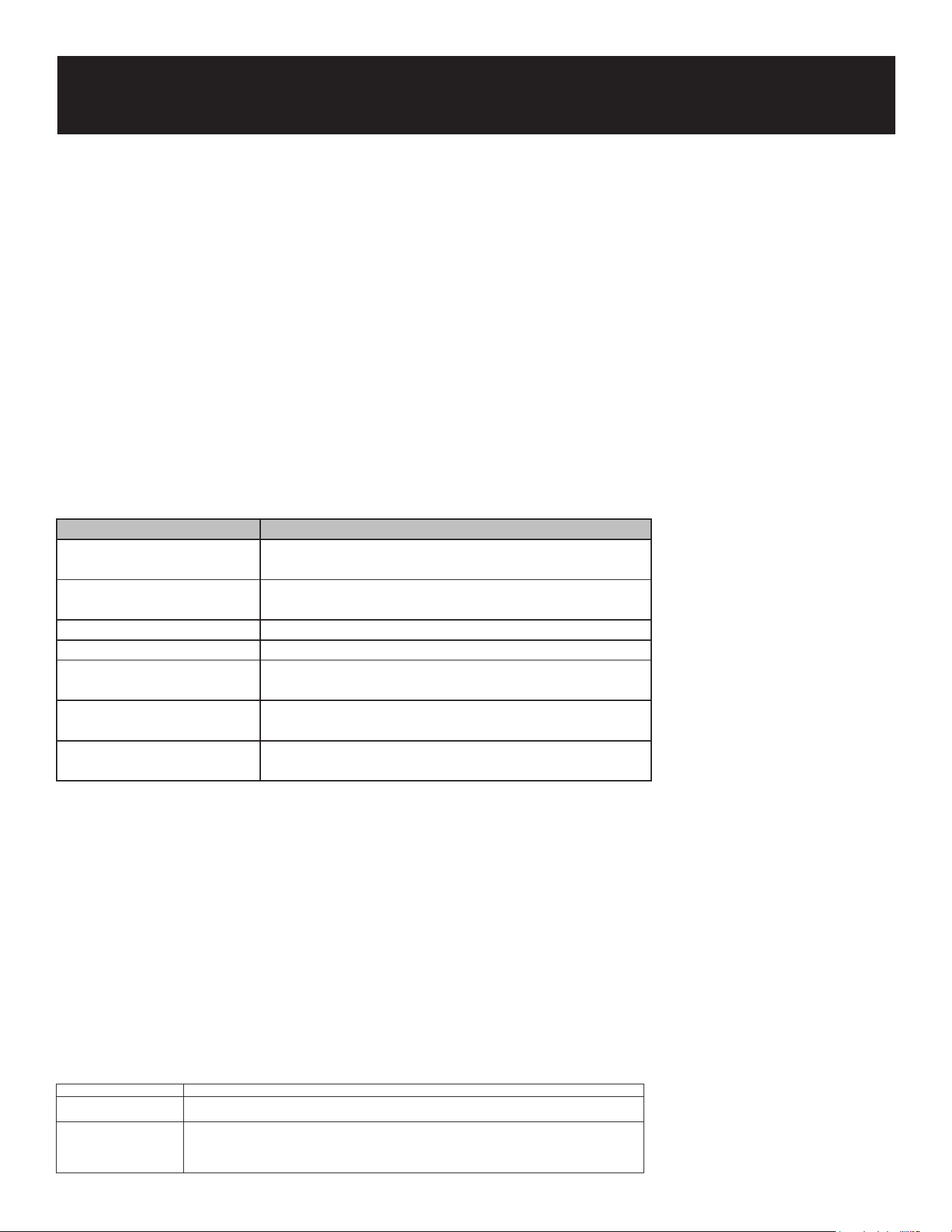
MALFUNCTION TABLE
Malfunctions often have simple explanations. Please refer to the malfunction table before calling the
after-sales service.
If a meal does not turn out exactly as you wanted, refer to the Expert Cooking Guide section, where
you will nd plenty of cooking tips and tricks.
WARNING: Risk of electric shock!
Incorrect repairs are dangerous. Repairs may only be carried out by one of our trained after-sales
engineers.
Error Code
NOTE:
Press “CANCEL”, then restart the oven. If the problem persists, disconnect all power to your range for
at least 30 seconds, then reconnect the power. If this does not solve the problem, call for service.
ACRYLAMIDE IN FOODSTUFFS
Which foods are affected?
Acrylamide is mainly produced in grain and potato products that are heated to high temperatures,
such as potato crisps, chips, toast, bread rolls, bread, ne baked goods (biscuits, gingerbread, cook-
ies).
Troubleshooting
Error Code Error Description
F3E1 The temperature sensor in the oven has an open or
short circuit fault.
F3E8 The communication of the oven humidity sensor is
faulty.
F3E9 The oven humidity sensor module is faulty.
F6E5 The safety protector is disconnected.
F1E1 The communication between the display board and the
power supply board is faulty.
F1E4 The communication between the display board and the
left touch pad is faulty.
F1E5 The communication between the display board and the
right touch pad is faulty.
Tips for keeping acrylamide to a minimum when preparing food
General Keep cooking times to a minimum. Cook meals until they are golden brown, but not too dark. Large, thick
pieces of food contain less acrylamide.
Baking biscuits Oven chips Max. 200°C in Top/bottom heating or max. 180°C in 3D hot air or Hot air gentle. Max. 190°C in Top/
bottom heating. Max. 170°C in 3D hot air mode. E.g., chips, oven chips, and croquettes. Distribute evenly
over the baking tray. Cook at least 400 g at once on a baking tray so that the chips do not dry out.

36
ENERGY AND ENVIRONMENT TIPS
Here you can nd tips on how to save energy when baking and roasting and how to dispose ofyour
appliance properly.
Saving energy
• Only preheat the oven if this is specied in the recipe or in the operating instruction tables.
• Use dark, black lacquered or enamelled baking tins. They absorb the heat particularly well.
• Open the oven door as infrequently as possible while you are cooking, baking or roasting.
• It is best to bake several cakes one after the other. The oven is still warm. This reduces the
baking time for the second cake. You can also place two loaf tins next to each other.
• For longer cooking times, you can switch the oven off
10 minutes before the end of the cooking time and use the residual heat to nish cooking.
Environmentally-friendly disposal
Dispose of packaging in an environmentally-friendly manner.
37