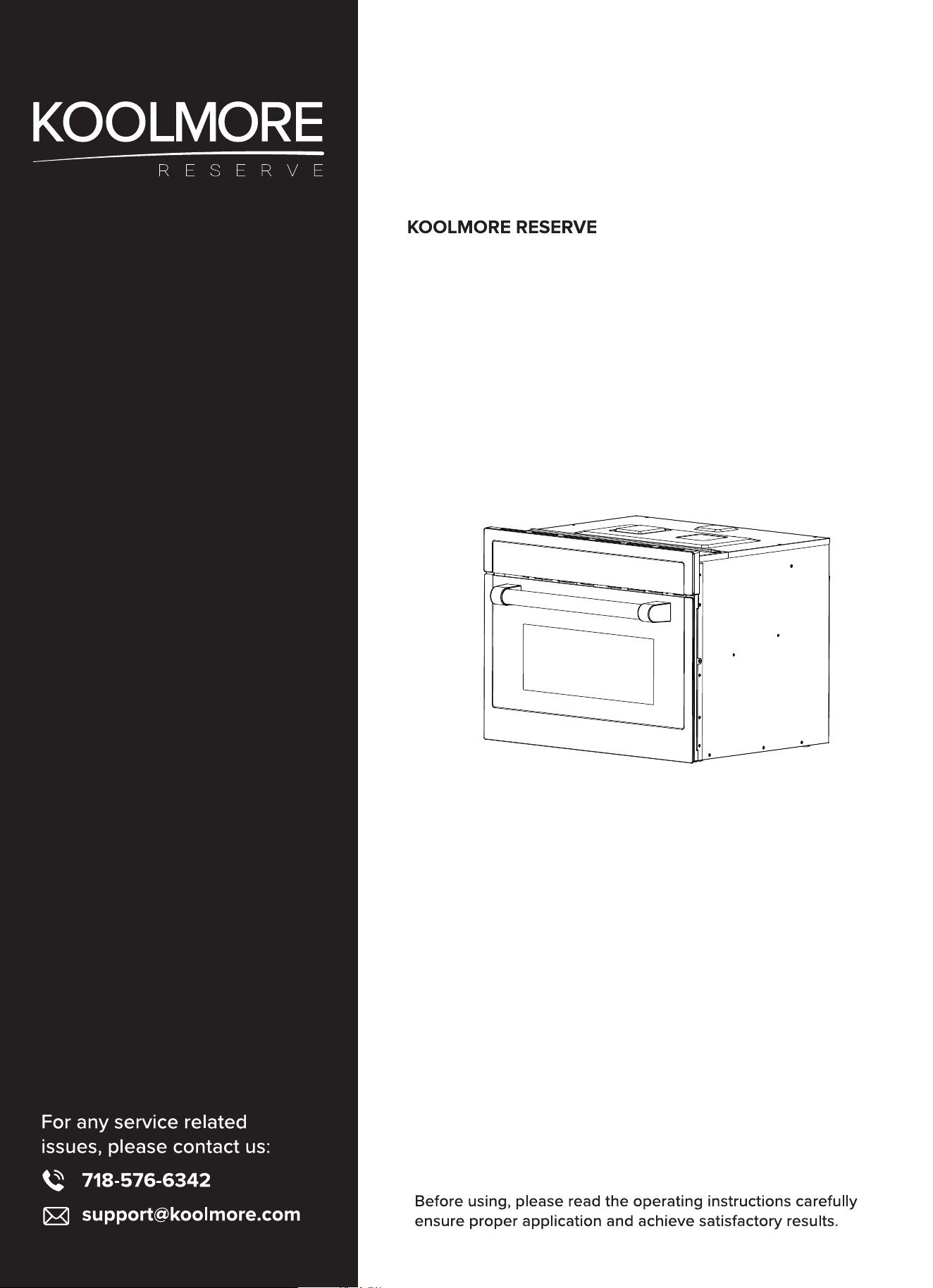
24 in. Black Stainless Steel
Convection Oven with Microwave
With Speed and Sensor Cooking
Models: KM-CWO24-BSS
USER MANUAL
Stay informed with the latest information for your
KoolMore Reserve Appliance.
Scan the QR code above to access the most recent user manual
on our website, which is constantly being updated and improved.
If you need any assistance or have questions, our customer support
team is here to help.
P- 718-576-6342 E- Suppor[email protected]
Please write down the model number and serial number below for future reference. Both numbers are located on the
rating label on the back of your unit or inside of the unit and are needed to obtain warranty service. You may also want to
staple your receipt to this manual as it is the proof of your purchase and may also be needed for service under warranty.
Model Number: ______________________________________
Serial Number: _______________________________________
Date of Purchase: ____________________________________
To better serve you, please do the following before contacting customer service:
If you received a damaged product, immediately contact the retailer or dealer that sold you the product.
Read and follow this instruction manual carefully to help you install, use, and maintain your unit.
Refer to the Troubleshooting section of this manual as it will help you diagnose and solve many common issues.

Contents
Safety ................................................................................ 4
Installation ....................................................................... 7
Operation ....................................................................... 9
Maintanence ...................................................................... 25
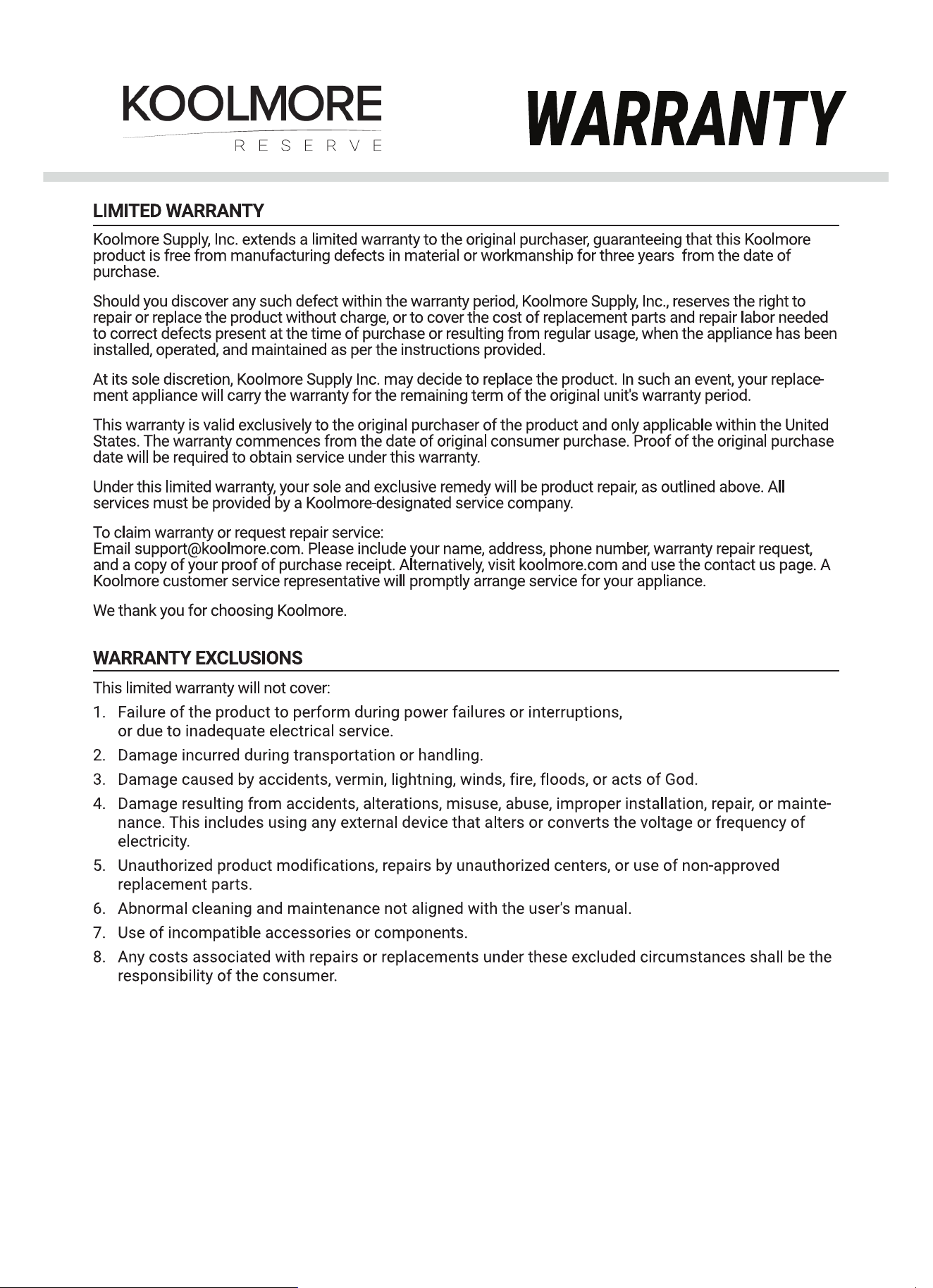
Warranty ......................................................................... 32
3

PRECAUTIONS TO AVOID POSSIBLE EXPOSURE TO EXCESSIVE MICROWAVE ENERGY
A. Do not attempt to operate this oven with the door open since this can result in harmful expo-
sure to microwave energy. It is important not to break or tamper with the safety interlocks.
B. Do not place any object between the oven front face and the door or allow soil or cleaner
residue to accumulate on sealing surfaces.
C. WARNING: If the door or door seals are damaged, the oven must not be operated until it has
been repaired by a competent person.
If the apparatus is not maintained in a good state of cleanliness, its surface could be degraded
and affect the lifespan of the apparatus and lead to a dangerous situation.
IMPORTANT SAFETY INSTRUCTIONS
READ CAREFULLY AND KEEP FOR FUTURE REFERENCE
WARNING: To reduce the risk of re, electric shock, injury to persons or exposure to excessive micro-
wave energy when using your appliance, follow basic precautions, including the following:
1. This appliance can be used by children aged from 8 years and above and persons with reduced
physical, sensory or mental capabilities or lack of experience and knowledge if they have been
given supervision or instruction concerning use of the appliance in a safe way and understand the
hazards involved. Children shall not play with the appliance. Cleaning and user maintenance shall
not be made by children without supervision.
2. Read and follow the specic: PRECAUTIONS TO AVOID POSSIBLE EXPOSURE TO EXCESSIVE MI-
CROWAVE ENERGY.
3. Keep the appliance and its cord out of reach of children less than 8 years.
4. If the supply cord is damaged, it must be replaced by the manufacturer, its service agent or simi-
larly qualied persons in order to avoid a hazard. (For appliances with type Y attachment)
5. WARNING: It is hazardous for anyone other than a competent person to carry out any service or
repair operation that involves the removal of a cover which gives protection against exposure to
microwave energy.
6. WARNING: Liquids and other foods must not be heated in sealed containers since they are liable
to explode.
7. This appliance can be used by children aged from 8 years and above and persons with reduced
physical, sensory or mental capabilities or lack of experience and knowledge if they have been
given supervision or instruction concerning use of the appliance in a safe way and understand the
hazards involved. Children shall not play with the appliance. Cleaning and user maintenance shall
not be made by children without supervision.
8. When heating food in plastic or paper containers, keep an eye on the oven due to the possibility of
ignition.
9. Only use utensils that are suitable for use in microwave ovens.
Safety
4

10. If smoke is emitted, switch off or unplug the appliance and keep the door closed in order to stie
any ames.
11. Microwave heating of beverages can result in delayed eruptive boiling, therefore care must be tak-
en when handling the container.
12. The contents of feeding bottles and baby food jars shall be stirred or shaken and the temperature
checked before consumption, in order to avoid burns.
13. Eggs in their shell and whole hard-boiled eggs should not be heated in microwave ovens since
they may explode, even after microwave heating has ended.
14. The oven should be cleaned regularly and any food deposits removed.
15. Failure to maintain the oven in a clean condition could lead to deterioration of the surface that
could adversely affect the life of the appliance and possibly result in a hazardous situation.
16. Only use temperature probe recommended for this oven (or ovens provided with a facility to use a
temperature-sensing probe).
17. The microwave oven must be operated with the decorative door open. (For ovens with a decora-
tive door.)
18. This appliance is intended to be used in household and similar applications such as:
19.staff kitchen areas in shops, oces and other working environments;
20. by clients in hotels, motels and other residential type environments;
21. bed and breakfast type environments.
22. Care should be taken not to displace the turntable when removing containers from the appliance.
(For xed appliances and built-in appliances being used equal or higher than 900mm above the
oor and having detachable turntables. But this is not applicable for appliances with horizontal
bottom hinged door.)
23. The appliance shall not be cleaned with a steam cleaner.
24. WARNING: Ensure that the appliance is switched off before replacing the lamp to avoid the possi-
bility of electric shock.
25. WARNING: Accessible parts may become hot during use. Young children should be kept away.
26. Steam cleaner is not to be used.
27. The microwave oven is intended for heating food and beverages. Drying of food or clothing and
heating of warming pads, slippers, sponges, damp cloth and similar may lead to risk of injury, igni-
tion or re.
28.Surface of a storage drawer can get hot.
29.WARNING: The appliance and its accessible parts become hot during use. Care should be taken
to avoid touching heating elements. Children less than 8 years of age shall be kept away unless
continuously supervised.
30.During use the appliance becomes hot. Care should be taken to avoid touching heating elements
inside the oven.
31. Metallic containers for food and beverages are not allowed during microwave cooking.
32. Do not use harsh abrasive cleaners or sharp metal scrapers to clean the oven door glass since
they can scratch the surface, which may result in shattering of the glass.
33. The appliance is intended to be used built-in.
34. The appliance must not be installed behind a decorative door in order to avoid overheating. (This
is not applicable for appliances with decorative door.)
35. WARNING: When the appliance is operated in the combination mode, children should only use the
oven under adult supervision due to the temperatures generated.
36. HOT CONTENTS CAN CAUSE SEVERE BURNS.DO NOT ALLOW CHILDREN TO USE THE MICROWAVE.
use caution when removing hot items.
This device complies with part 18 of the FCC Rules.
5

CAUSES OF DAMAGE
Caution!
• Creation of sparks: Metal – e.g. a spoon in a glass – must be kept at least 2 cm from the oven
walls and the inside of the door. Sparks could irreparably damage the glass on the inside of the
door.
• Water in the hot cooking compartment: Never pour water into the hot cooking compartment. This
will cause steam. The temperature change can cause damage.
• Moist food: Do not store moist food in the closed cooking compartment for long periods. Do not
use the appliance to store food. This can lead to corrosion.
• Cooling with the appliance door open: Only leave the cooking compartment to cool with the door
closed. Do not trap anything in the appliance door. Even if the door is only slightly ajar, the fronts
of adjacent units may be damaged over time.
• Heavily soiled seal: If the seal is very dirty, the appliance door will no longer close properly during
operation. The fronts of adjacent units could be damaged. Always keep the seal clean.
• Operating the microwave without food: Operating the appliance without food in the cooking com-
partment may lead to overloading. Never switch on the appliance unless there is food inside.
• In the cooking compartment: An exception to this rule is a short crockery test (see the section
"Microwave, suitable crockery").
• Using the appliance door for standing on or placing objects on: Do not stand or place anything on
the open appliance door. Do not place ovenware or accessories on the appliance door.
• Transporting the appliance: Do not carry or hold the appliance by the door handle. The door cannot
support the weight of the appliance and could break.
• Microwave popcorn: Never set the microwave power too high. Use a power setting no higher than
600 watts. Always place the popcorn bag on a glass plate. The disc may jump if overloaded.
• Liquid that has boiled over must not be allowed to run through the turntable drive into the interior
of the appliance. Monitor the cooking process. Choose a shorter cooking time initially, and in-
crease the cooking time as required.
• Eggs: The oven should be cleaned regularly and any food deposits removed since they may ex-
plode, even after microwave heating has ended.
• Failure to maintain the oven in a clean condition could lead to deterioration of the surface that
could adversely affect the life of the appliance and possibly result in a hazardous situation.
6
Installation
98.4 in
216.5 in
236.2 in
220.4 in
15.7 in
181.1 in
19.6 in
98.4 in
220.4 in
216.5 in
177 in
98.4 in
Fitted units
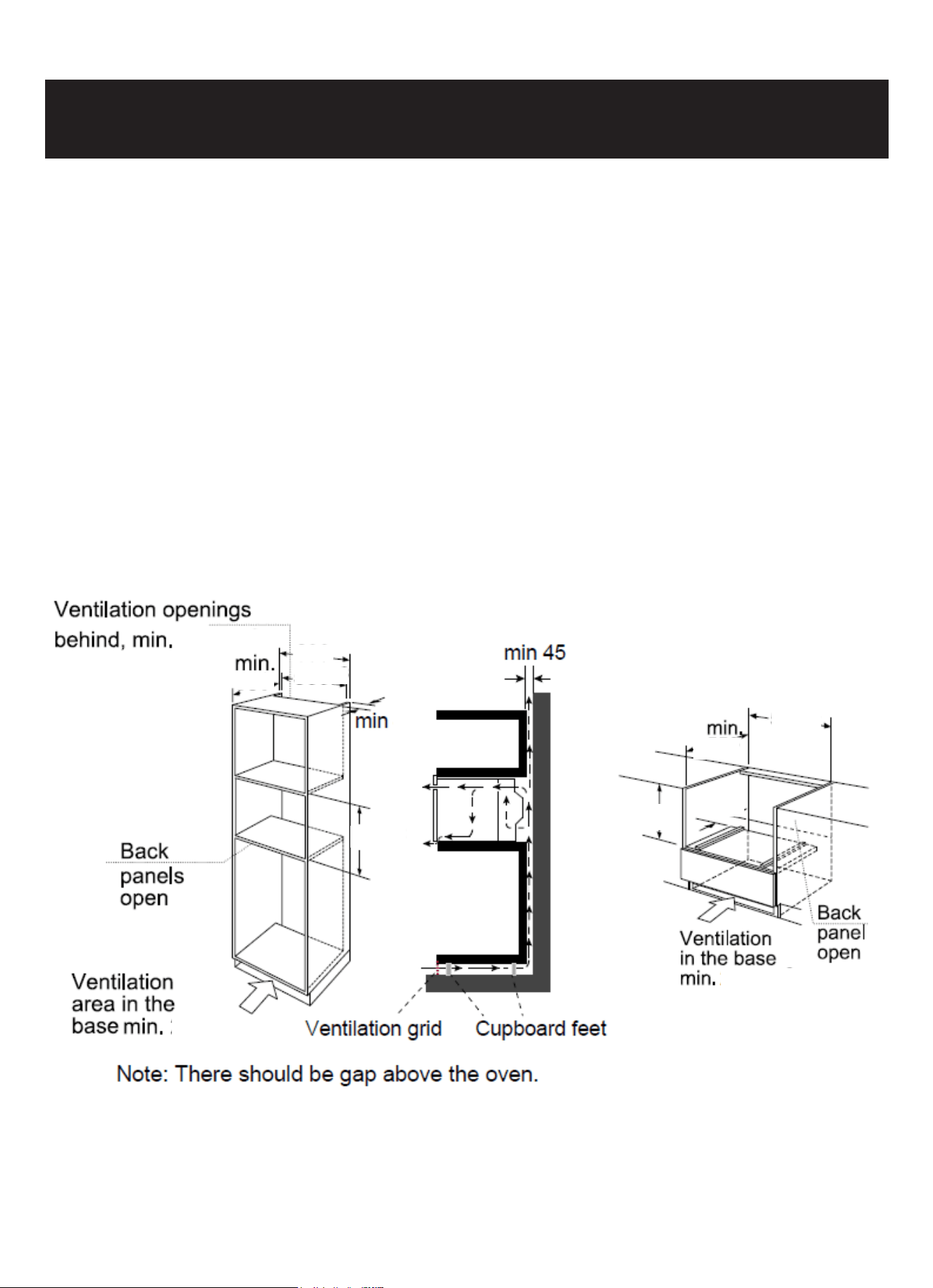
• This appliance is only intended to be fully tted in a kitchen.
• This appliance is not designed to be used as a tabletop appliance or inside a cupboard.
• The tted cabinet must not have a back wall behind the appliance.
• A gap of at least 1.7 inch must be maintained between the wall and the base or back panel of the
unit above.
• The tted cabinet must have a ventilation opening of 98.4 on the front. To achieve this, cut back
the base panel or t a ventilation grille.
• Ventilation slots and intakes must not be covered.
• The safe operation of this appliance can only be guaranteed if it has been installed in accordance
with these installation instructions.
• The tter is liable for any damage resulting from incorrect installation.
• The units into which the appliance is tted must be heat-resistant up to 90°C.
Installation dimensions
7
Building in
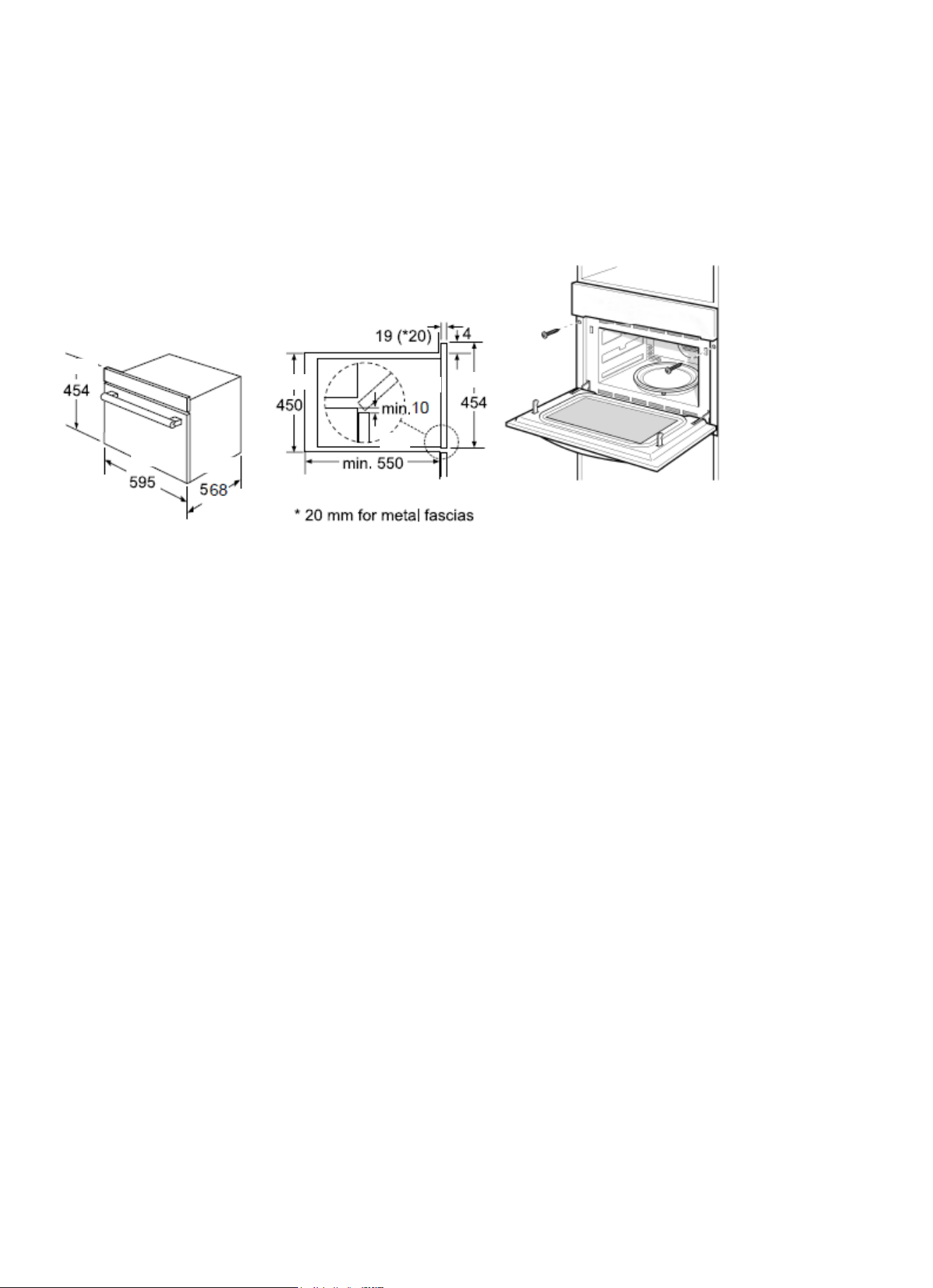
Do not hold or carry the appliance by the door handle. The door handle cannot hold the weight of the
appliance and may break off.
1. Carefully push the microwave into the box, making sure that it is in the centre.
2. Open the door and fasten the microwave with the screws that were supplied.
• Fully insert the appliance and center it.
• Do not kink the connecting cable.
• Screw the appliance into place.
• The gap between the worktop and the appliance must not be closed by additional battens.
Important information
Electrical connection
The appliance is tted with a plug and must only be connected to a properly installed earthed socket.
Only a qualied electrician who takes the appropriate regulations into account may install the socket
or replace the connecting cable. If the plug is no longer accessible following installation, an all-pole
isolating switch must be present on the installation side with a contact gap of at least 3 mm. Contact
protection must be ensured by the installation.
Fuse protection: see instructions for use-technical data.
17.8
23.4
22.3
17.7
.7
17.8
.7
.39
.15
8
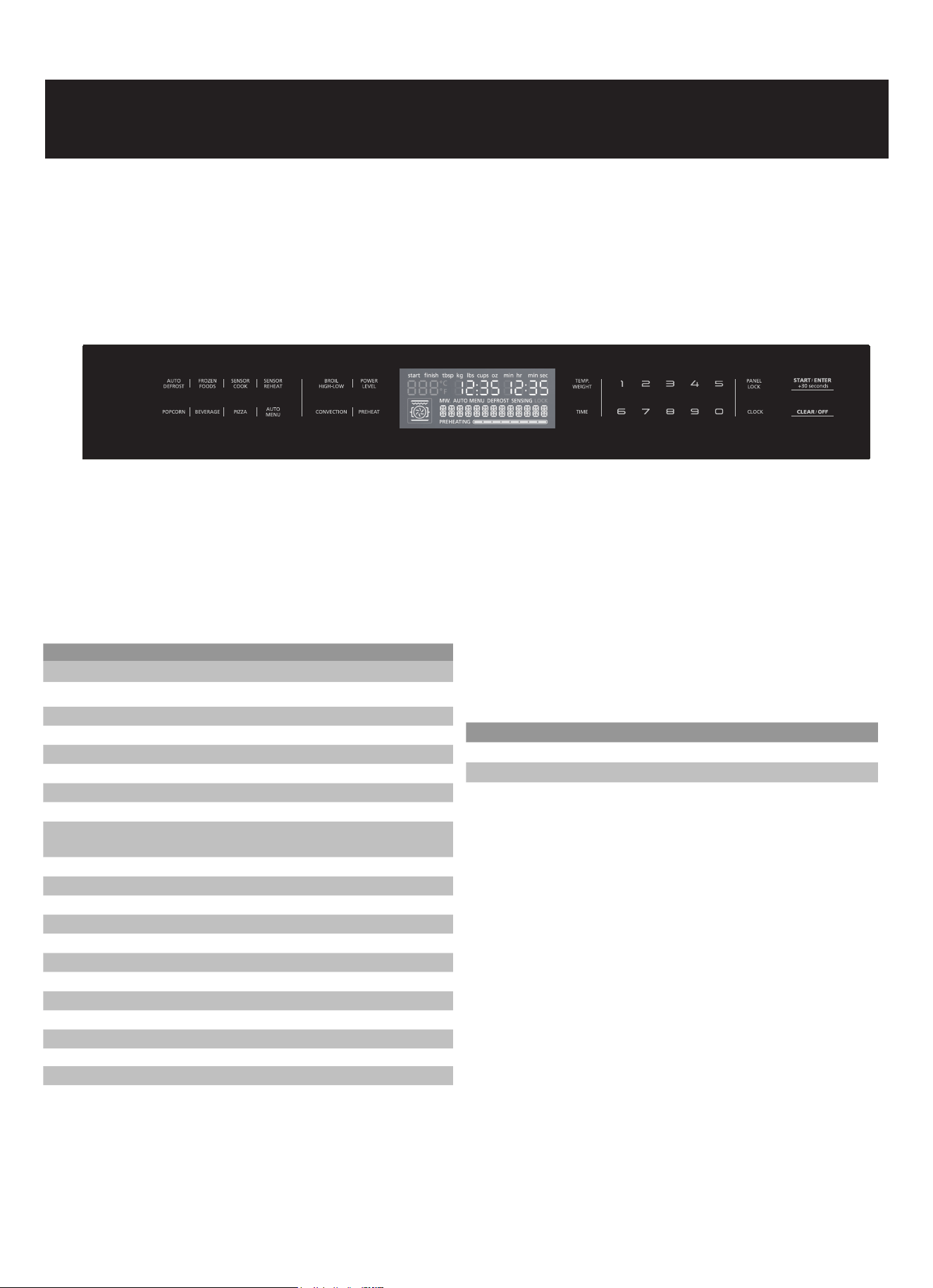
Operation
Use this section to familiarise yourself with your new appliance.
The control panel and the individual operating controls are explained. You will nd information on the
cooking compartment and the accessories.
Symbol Function
AUTO DEFROST Select Auto Defrost programs
FROZEN FOODS Start cooking programs for frozen convenience
foods
SENSOR COOK Select Sensor Cook programs
SENSOR REHEAT Select Sensor Reheat programs
POPCORN Cook popcorn
BEVERAGE Heat beverages
PIZZA Select pizza programs
AUTO MENU Select auto menu programs
BROIL Set Broil modes (Hi/LO)
(HIGH/LOW)
POWER LEVEL Set power level for microwave operation
CONVECTION Select Bake Cook programs
Select Roast Cook programs
PREHEAT Select preheat programs
TEMP./WEIGHT Set Temp. or weight of cooking
TIME Set cooking time
PANEL LOCK Activate/deactivate child lock
CLOCK Set time of day
0-9 Use the number keys to enter customized values
START/ENTER Conrm entered values/Start cooking mode
+30 SECONDS Add 30 seconds
CLEAR/OFF Clear entered value/turn appliance off
Touch keys and display
The touch keys are used to set the various additional functions. On the display, you can read the val-
ues that you have set.
Parameter Function
Auto menu Select 8 automatic programmes.
Weight Set the weight of cooking.
Time Set the time of cooking.
Parameter adjustment
Use the adjusting keys to set the parameters.
9

Cooling fan
Your appliance has a cooling fan. The cooling fan switches on during operation. The hot air escapes
above the door. The cooling fan continues to run for a certain time after operation.
Caution!
Do not cover the ventilation slots. Otherwise, the appliance will overheat.
Notes:
• The appliance remains cool during microwave operation. The cooling fan will still switch on. The fan
may run on even when microwave operation has ended.
• Condensation may appear on the door window, interior walls and oor. This is normal and does not
adversely affect microwave operation. Wipe away the condensation after cooking.
10
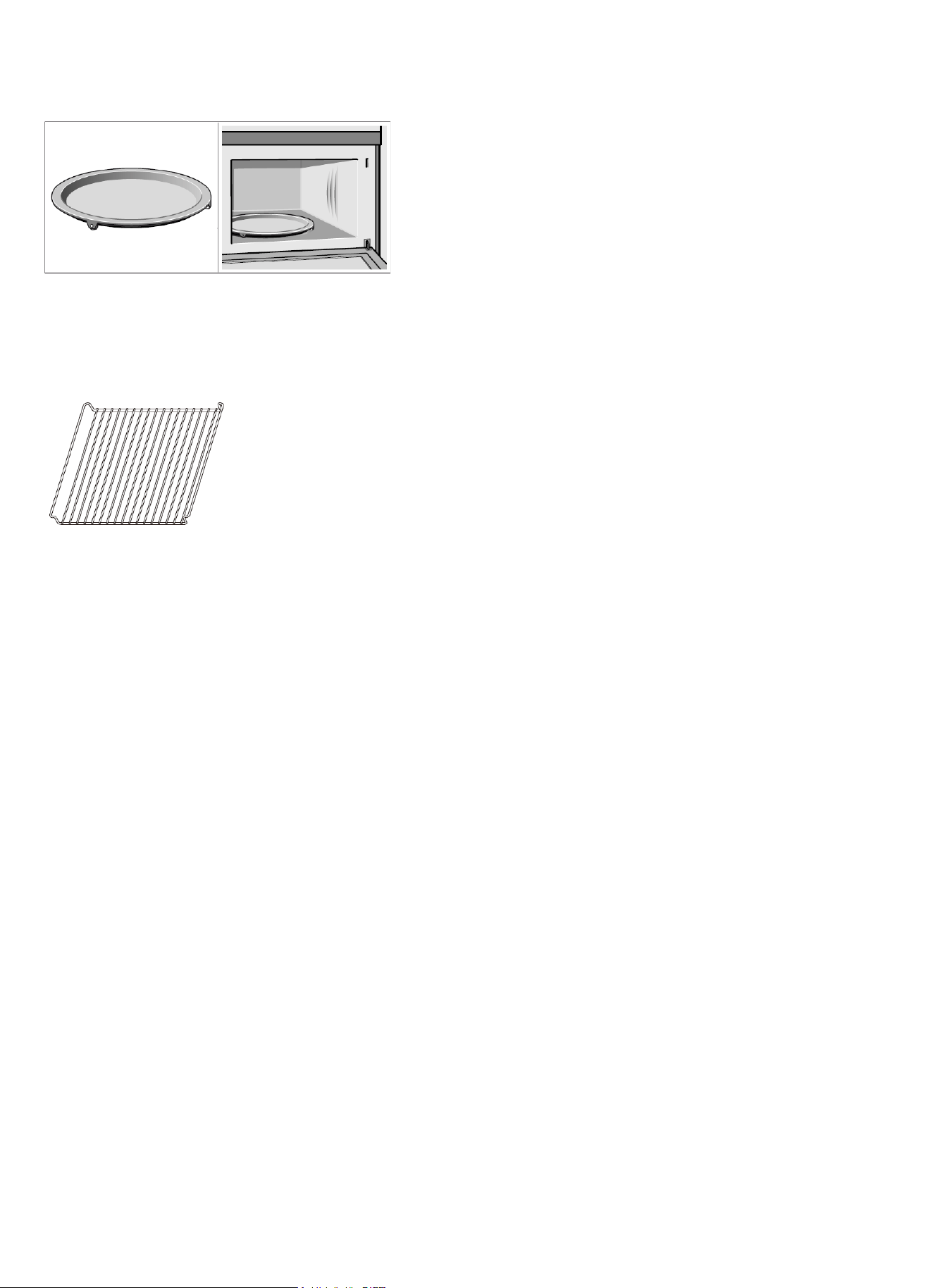
Accessories
Turntable
As a surface for the wire rack.
Food which particularly requires a lot of heat from under-
neath can be prepared directly on the turntable.
The turntable can turn clockwise or anti-clockwise.
Place the turntable on the drive in the centre of the cooking
compartment. Ensure that it is properly tted.
• Never use the microwave without the turntable.
• The turntable can withstand max. 8 kg.
• The turntable must turn when using all types of heating.
Grill rack
Note: Type and quantity of accessories is subject to actual demand.
Before using the appliance for the rst time
Here you will nd everything you need to do before using your oven to prepare food for the rst time.
First read the section on Safety information.
Setting the clock
Once the appliance is connected, “12:00” will be displayed as the time of day. To set the correct time,
proceed as follows:
1. Touch Clock.
2. Enter the correct time using the number keys. Example: To set the clock to 12:41, type in 1 2 4 1.
3. Touch Start/Enter to conrm.
+30 seconds
Heating up the oven
To remove the new oven smell, heat up the appliance when it is empty and closed. One hour with Con-
vection at 350°F (180°C) is ideal. Ensure that no packaging remnants have been left in the oven cavity.
1. Touch Convection once to enter bake mode.
2. Enter numbers 3 5 0 with the number keys.
3. Touch TEMP./WEIGHT to adjust cooking time.
4. Enter the numbers 6 0 with the number keys.
5. Touch Start/Enter to start cooking.
+30 seconds
The oven light turns on and the appliance starts heating.
11

Cleaning the accessories
Before you use the accessories for the rst time, clean them thoroughly with hot soapy water and a
soft dish cloth.
Setting the oven
There are various ways in which you can set your oven. Here we will explain the basic methods for the
different types of heating and temperature or grill setting. You can also select the oven cooking time
for your dish. Please refer to the section on Setting the time-setting options.
Setting Convection mode
Example: roast 350°F for 20 minutes
1. Touch Convection twice to enter roast mode.
2. Enter the numbers 3 5 0 with the number keys.
3. Touch TEMP./WEIGHT to adjust cooking time.
4. Enter the numbers 2 0 with the number keys.
5. Touch Start/Enter to start cooking.
+30 seconds
Opening the oven door during operation
Operation is suspended. After closing the door, touch the Start/Enter key. Operation continues.
+30 seconds
Cancelling operation
Touch Clear/Off to cancel the active oven mode. The appliance turns off and the clock is displayed.
The cooling fan may continue to run for awhile and then switch off automatically.
Rapid Preheating
With rapid preheating, your oven reaches the set temperature particularly quickly.
To ensure an oven cooking result, only put your food in the cooking compartment when the preheat-
ing phase is complete.
1. Touch the PREHEAT key.
2. Enter the temperature setting with the number keys. The input temperature should be within 100
to 450°F.
3. Touch the Start/Enter key.
+30 seconds
The oven begins to heat up.
The preheating process is complete
Two signal sounds. Put your dish in the oven. Set the cooking mode you need.
Cancelling rapid preheating
During setting the rapid preheating function, touch the Clear/Off key to cancel the function. During
rapid preheating, touch Clear/Off to cancel the function. You can also open the door to cancel the
function.
Note: Only when you can hear alarm and preheating icon is blinking you can open the door and put
12

food inside.
The microwave
Microwaves are converted to heat in foodstuffs. The microwave can be used solo, on its own, or in
combination with a different type of heating. You will nd information about ovenware and how to set
the microwave in the “Using the microwave” section.
Note: In the Expert Cooking Guide, you will nd examples for defrosting, heating, and cooking with the
microwave oven.
Notes regarding ovenware
Suitable ovenware
Suitable ovenware is heat-resistant ovenware made of glass, glass ceramic, porcelain, ceramic or
heat-resistant plastic. These materials allow microwaves to pass through.
You can also use serving dishes. This saves you having to transfer food from one dish to another. You
should only use ovenware with decorative gold or silver trim if the manufacturer guarantees that they
are suitable for use in microwaves.
Unsuitable ovenware
Metal ovenware is unsuitable. Metal does not allow microwaves to pass through. Food in covered
metal containers will remain cold.
Caution!
Creation of sparks: metal – e.g. a spoon in a glass – must be kept at least 2 cm from the oven walls
and the inside of the door. Sparks could destroy the glass on the inside of the door.
Ovenware test
Do not switch on the microwave unless there is food inside. The following ovenware test is the only
exception to this rule.
Perform the following test if you are unsure whether your ovenware is suitable for use in the micro-
wave:
Fill a suitable ovenware with approx. 1/2 cup (100-200 ml) of water.
Put the empty ovenware in the microwave and set it to maximum power for 1 to 1 minute.
Check the temperature occasionally during that time.
The ovenware should still be cold or warm to the touch. The ovenware is unsuitable if it becomes hot
or sparks are generated.
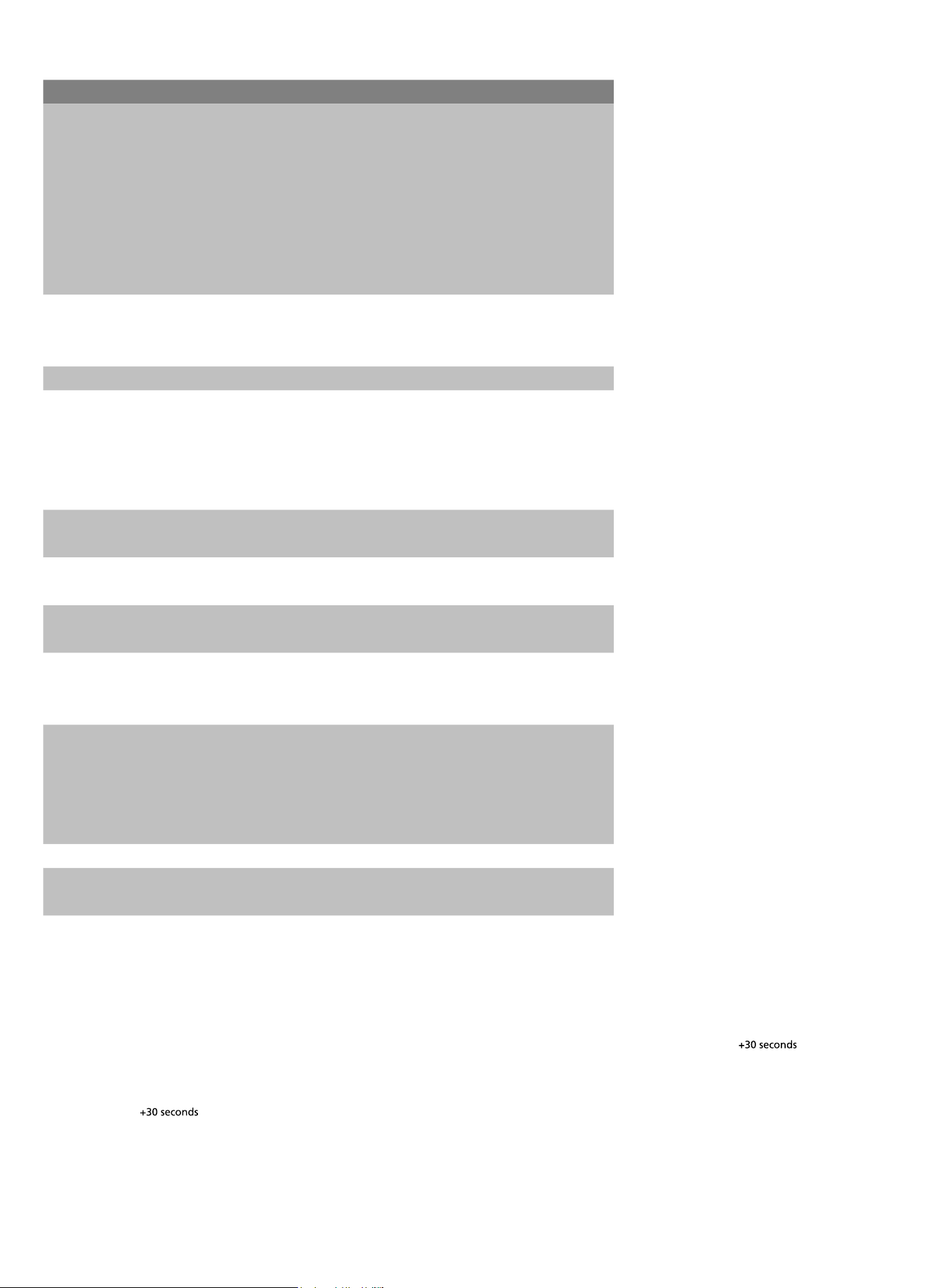
Microwave power settings
You can select from 10 different microwave power levels. If you do not set a power level, the micro-
wave will automatically operate at the highest power level, 10.
The table below provides suggested power levels for various types of food that can be prepared in the
microwave.
13
Power level Microwave output Use for
10 / High 100% Boiling water
Cooking ground meat
Making candy
Cooking fresh fruit & vegetables
Cooking sh & poultry
Preheating browning dish
Reheating beverages
Cooking bacon slices
9 90% Reheating meat slices quickly
Sauté onions,
celery & green peppers
8 80% All reheating
7 70% Cooking scrambled eggs
Cooking breads & cereal products
Cooking cheese dishes
Cooking muns,
brownies & cupcakes
6 60% Cooking whole poultry
Cooking pasta
5 50% Cooking meat
Cooking custard
4 40% Cooking spare ribs,
rib roast & sirloin roast
4 40% Cooking
less tender cuts of meat
Reheating frozen packaged foods
3 30% Thawing meat, poultry & seafood
Cooking small quantities of food
Finish cooking casseroles, stew &
some sauces
Melting chocolate
2 20% Softening butter & cream cheese
1 10% Softening ice cream
Raise yeast dough
Setting the microwave
1. Enter the desired cook time with the number keys. The timer display will ll in from right to left.
Example: To set a microwave time of 20 minutes and 30 seconds, enter the numbers 2 0 3 0.
2. You can start microwave operation with the default power level 10 by touching , or you
can set a different power level. Touch .
3. Enter the desired power level using the number keys.
4. Touch to start microwave operation. The microwave timer will start to count down.
Express cooking
In waiting state, touch number keys 1 to 9 to start 100% microwave cooking in 1 to 9 minutes.
Start/Enter
Start/Enter
Power Level
14

If the door is closed, the oven will start to cook automatically after 2 seconds.
Change power level
You can change the power level at any time during microwave operation.
1. Touch Power Level.
2. Enter the desired power level with the number keys.
3. Touch Start/Enter.
+30 seconds
Microwave operation continues with the new power level.
Opening the oven door during operation
Operation is suspended. After closing the door, touch the Start/Enter key. Operation continues.
+30 seconds
Cancelling operation
Touch Clear/Off to cancel the active oven mode. The appliance turns off and the clock is displayed.
The cooling fan may continue to run for awhile and then switch off automatically.
Speedy microwave cooking
• Use the Start/Enter key to quick-start your microwave at 100% of the highest power level. You can
+30 seconds
• touch the key repeatedly to increase the microwave time in increments of 30 seconds.
• Touching this key during microwave operation will add 30 seconds to the remaining microwave
time.
• The cooking time has elapsed when 5 signal sounds. Microwave operation has nished.
Multi-stage cooking
1. Enter the desired cook time with the number keys. The timer display will ll in from right to left.
2. Touch Power Level.
3. Enter the desired power level using the number keys.
4. Touch Power Level.
5. Enter the desired power level using the number keys.
6. Touch Start/Enter.
+30 seconds
7. Enter the desired cook time with the number keys.
8. Touch Start/Enter to start microwave operation.
+30 seconds
The buzzer will sound 3 times when the rst stage cooking is nished and will go on to the second
stage.
Automatic programs
The automatic programs enable you to prepare food very easily. You select the program and enter
15
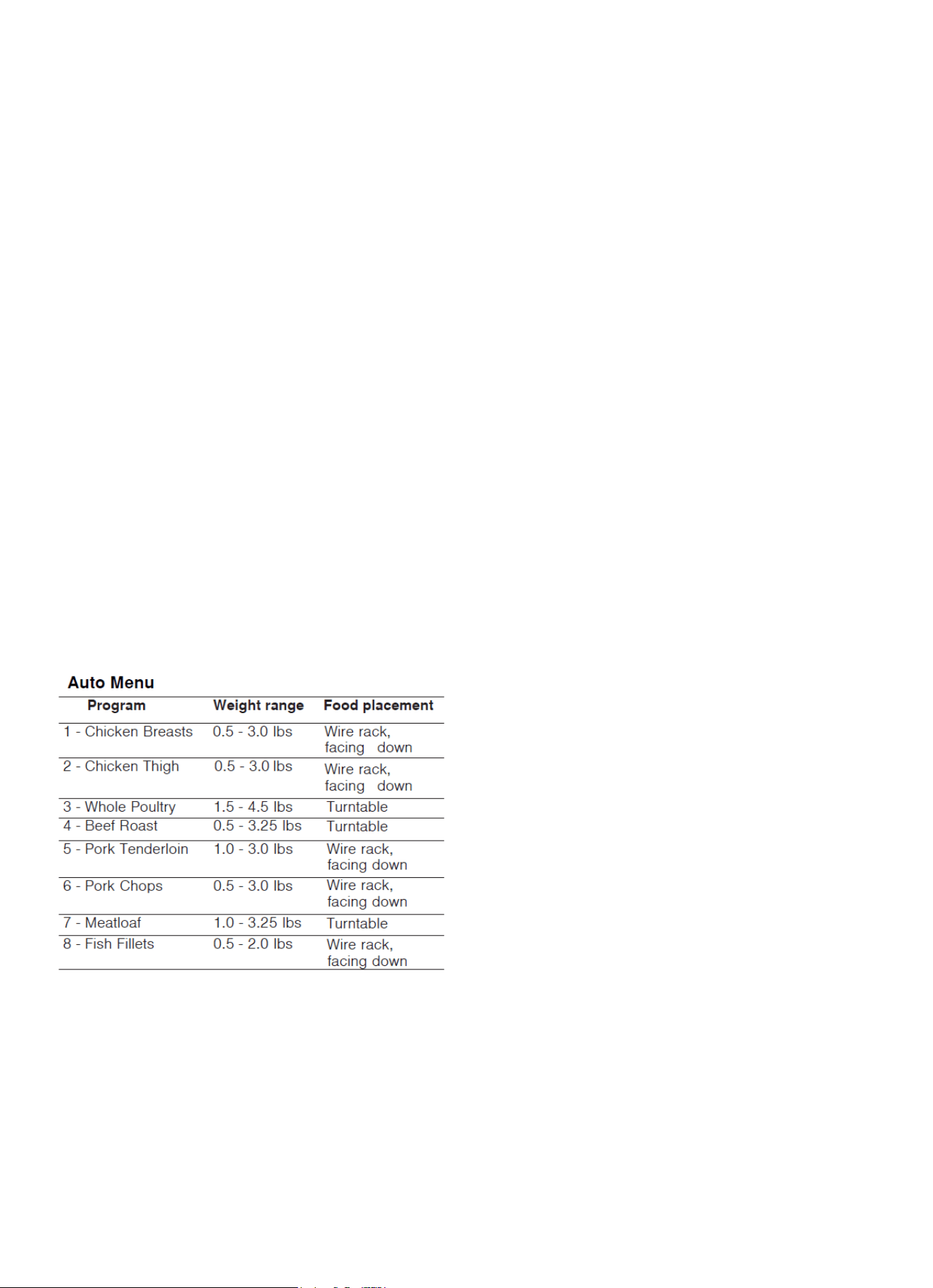
the weight of your food. The automatic program makes the optimum setting. You can choose from 9
programs.
Always place the food in the cold cooking compartment.
Setting a program
When you have selected a program, set the oven. The temperature selector must be in the off posi-
tion.
1. Touch Auto menu.
2. Touch Auto menu repeatedly to scroll through all Auto menu.
3. Touch TEMP./WEIGHT to adjust weight of food.
4. Touch Start/Enter to start cooking.
+30 seconds
Opening appliance door during operation
Opening the appliance door during operation will interrupt the current mode. Close the appliance door
and touch Start/Enter to resume operation.
+30 seconds
Cancel operation
Touch to cancel the active oven mode. The appliance turns off and the clock is displayed.
The cooling fan may continue to run for awhile and then switch off automatically.
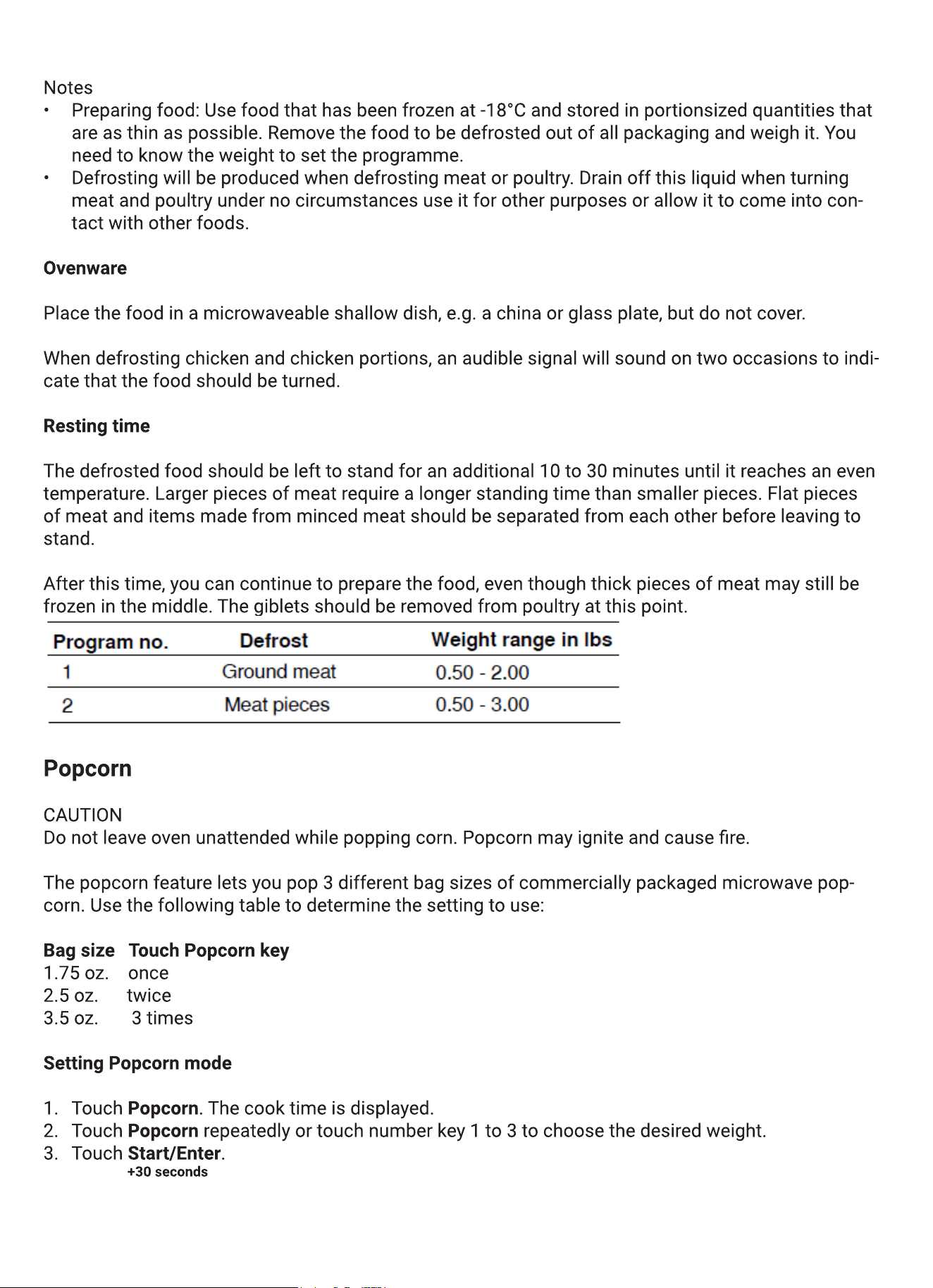
Defrosting programs
You can use the 2 defrosting programs to defrost ground meat and meat pieces.
1. Touch Auto Defrost once or twice to choose “GROUND MEAT” or “MEAT PIECES”.
2. Enter the weight of the food you want to defrost using the number keys.
3. Touch Start/Enter to start defrosting.
+30 seconds
Clear/Off
16
17

The microwave timer starts counting down. When the microwave time has elapsed, 5 beeps will
sound. The appliance turns off and the clock is displayed.
Beverage
The beverage feature heats 0.5 to 2 cups of a beverage. Use the table below to determine the setting
to use.
Amount Touch Beverage key
0.5 cups (about 4 oz.) once
1 cup (about 8 oz.) twice
1.5 cups (about 12 oz.) 3 times
2 cups (about 16 oz.) 4 times
Setting Beverage mode
1. Touch Beverage. The cook time is displayed.
2. Touch Beverage repeatedly or touch number key 1 to 4 to choose the desired amount.
3. Touch Start/Enter.
+30 seconds
The microwave timer starts counting down. When the microwave time has elapsed, 5 beeps will
sound. The appliance turns off and the clock is displayed.
Frozen Foods
The Frozen Foods feature is designed to prepare frozen convenience foods like chicken nuggets,
french fries, sh sticks, using bottom heat and Convection. Place the food you want to cook directly
on the metal tray turntable.
You can set a temperature range from 200 to 450°F (100 to 230°C).
Setting Frozen Foods
The appliance must be turned off.
1. Touch Frozen Foods.
2. You can alter the temperature by using the number keys. You can enter a temperature between
200 and 450°F (100 to 230°C).
3. Touch TEMP./WEIGHT to adjust cooking time.
4. Touch Start/Enter to start cooking.
+30 seconds
Opening appliance door during operation
Opening the appliance door during operation will interrupt the current mode. When you close the ap-
pliance door, then touch Start/Enter to resume operation.
+30 seconds
Cancel operation
18

Touch to cancel the active oven mode. The appliance turns off and the clock is displayed.
The cooling fan may continue to run for awhile and then switch off automatically.
Pizza
You can use the Pizza mode to bake three different types of pizza:
Mode no. Pizza type Bake on
1 Frozen pizza Metal tray
2 Fresh pizza Metal tray
3 Microwave pizza Ceramic tray
Pizza tips
• Check pizza before minimum time, pizza may cook faster compared to a traditional oven.
• For fresh pizza use a pizza paddle for sliding the pizza on and from the metal turntable.
• If using a pizza paddle, sprinkle the paddle liberally with cornmeal for ease in transferring the
dough to the metal turntable.
• Maximum size is 12 inches for fresh and frozen pizzas.
• Avoid using a pizza stone as it can damage the oven.
• The metal turntable can be used for cutting pizza into slices. Remove the turntable from the oven
after the pizza is baked.
Setting Pizza mode for fresh or frozen pizza
The appliance must be turned off. You can set a temperature range from 375 to 450°F (190 to 230°C)
for fresh and frozen pizza modes.
1. Touch Pizza.
2. Touch Pizza repeatedly to scroll through all pizza modes.
3. Touch Start/Enter.
+30 seconds
4. You can change the temperature by using the number keys. Touch Start/Enter to conrm.
+30 seconds
The appliance starts preheating.
The set temperature is reached once the preheat bar has lled up completely and 2 beeps sound.
Opening appliance door during operation
Opening the appliance door during operation will interrupt the current mode. When you close the ap-
pliance door, operation will be resumed.
Setting Pizza mode for microwave pizza
Place the microwave pizza on the ceramic tray and put it in the oven following package directions.
1. Touch Pizza.
2. Touch the number key 3 or touch repeatedly until MICROWAVE PIZZA is displayed.
Clear/Off
Pizza
19

3. Touch Start/Enter.
+30 seconds
4. The appliance starts sensing.
When sensing is complete, 3 beeps will sound and the calculated cook time will start to count down.
After the cook time has run out, 5 beeps will sound. The appliance turns off and the clock is dis-
played.
Note: Do not open the door during the sensing process or the program will be cancelled.
Once the calculated cook time is displayed, you can open the door to stir, turn or rearrange the food.
Touch Start/Enter to resume operation.
+30 seconds
Opening appliance door during operation
Opening the appliance door during operation will interrupt the current mode. Close the appliance door
and then touch Start/Enter to resume operation.
+30 seconds
Sensor cooking
You can select two sensor cooking modes. Sensor cooking allows you to cook many of your favorite
foods without selecting cooking times and power levels. The microwave oven automatically deter-
mines the required cooking time for each food item.
For best results for cooking by sensor, follow these recommendations:
• Food cooked with the sensor system should start from normal storage temperature.
• Food should be on the turntable tray, ceramic tray, and outside of container should be dry.
• Foods should always be covered loosely with microwaveable plastic wrap, wax paper or lid.
• Do not open the door or touch key during sensing time. When sensing time is over, the
oven beeps three times and the remaining cooking time will appear in the display. At this time you
can open the door to stir, turn or rearrange the food.
Sensor Reheat
The Sensor Reheat feature lets you reheat dinner plates or casseroles (8-16 oz.) for your cooking
convenience.
Setting Sensor Reheat
1. Touch .
2. Touch Start/Enter.
+30 seconds
3. Sensing is displayed. The microwave operates during sensing.
When sensing is complete, 3 beeps will sound and the calculated cook time will start to count down.
Note: Do not open the door during the sensing process or the program will be cancelled.
Clear/Off
Sensor Reheat
20
Once the calculated cook time is displayed, you can open the door to stir, turn or rearrange the food.
Touch to resume operation.
When the sensor reheats nished, 5 beeps will sound and the appliance turns off.
Note:
Cover with vented plastic wrap or wax paper.
Reheat food on a microwaveable dinner plate.
Sensor Cook
Sensor Cook allows you to cook many of your favorite foods without selecting cooking times and
power levels. The microwave oven automatically determines the required cooking time for each food
item.
Setting Sensor Cook
The appliance must be turned off.
Example: Set Sensor Cook for Ground Meat.
1. Touch .
2. Select the desired program from the label at the oven cavity. For
Ground Meat, touch the number key 2 or:
3. Touch repeatedly to scroll through all Sensor Cook
modes.
4. Touch Start/Enter.
+30 seconds
The program will start sensing with the microwave operating.
Start/Enter
Reheat cooking suggestions
Food Directions Quantity
Dinner plate Use only pre-cooked, refrigerated foods. Cover plate with vented
plastic wrap or waxed paper, tucked under plate. If food is not hot
enough after heating with the Reheat feature, continue heating using
manual time and power level setting.
Contents:
▯ 3-4 oz. meat, poultry or fish (up to 6 oz. with bone)
▯ 1/2 cup starch (potatoes, pasta, rice, etc.)
▯ 1/2 cup of vegetables (about 3-4 oz.)
1 serving (1 plate)
Casserole, Pasta Cover plate with lid or vented plastic wrap. If food is not hot enough
after heating with the Reheat feature, continue heating using manual
time and power level setting.
Stir foods once before serving.
Contents:
▯ Casserole: refrigerated foods (such as beef stew or lasagna)
▯ Pasta: Canned spaghetti and ravioli, refrigerated foods
1 to 4 servings
Sensor Cook
Sensor Cook
Sensor Cook programs
Sensor Cook
Program
Cooking tips
1 - Baked
Potato
Pierce skin with a fork.
Do not cover.
After cooking, allow to
stand wrapped in foil
for 5 minutes.
3 - Fresh
Vegetables
No water is needed if
vegetables have just
been washed. Add
2 tablespoons water
per 8 ounces of fresh
vegetables.
Meat
After cooking, allow to
stand, covered,
for 3 - 4 minutes.
Seafood
Roll thin edges
underneath. Arrange in
a ring around micro-
waveable dish.
Entrees
Follow pa ckage
instructions for venting,
cutting plastic film, etc.
2 - Ground
4 - Fish/
5 - Frozen
21

When sensing is complete, 3 beeps will sound and the calculated cook time will start to count down.
Note: Do not open the door during the sensing process, or the program will be cancelled.
Once the calculated cook time is displayed, you can open the door to stir, turn or rearrange the food.
Touch Start/Enter to resume operation.
+30 seconds
When sensor cook is nished, 5 beeps will sound and the appliance turns off.
Opening appliance door during operation
Opening the appliance door during operation will interrupt the current mode. Close the appliance door
and then touch Start/Enter to resume operation.
+30 seconds
Cancel operation
Touch to cancel the active oven mode. The appliance turns off and the clock is displayed.
The cooling fan may continue to run for awhile and then switch off automatically.
Broil
The Broil feature uses intense heat radiated from the upper element.
You can set two intensity levels:
Broil high
Broil low
Setting Broil mode
The appliance must be turned off.
1. Touch Broil HIGH-LOW.
2. Touch Broil HIGH-LOW again, to change to Broil low mode.
3. Enter the desired cooking time with the number keys.
4. Touch Start/Enter to start operation.
+30 seconds
Note: Always use a broil pan when cooking in Broil mode (see optional accessories).
Opening appliance door during operation
Opening the appliance door during operation will interrupt the broil mode. When you close the appli-
ance door, then touch Start/Enter to resume operation.
+30 seconds
Cancel operation
Touch to cancel the active oven mode. The appliance turns off and the clock is displayed.
The cooling fan may continue to run for awhile and then switch off automatically.
Clear/Off
Clear/Off
22

Setting the time-setting options
Your oven has various time-setting options. You can use the Clock key to call up the menu and switch
between the individual functions.
Setting the cooking time
The cooking time for your meal can be set on the oven. When the cooking time has elapsed, the oven
switches itself off automatically. This means that you do not have to interrupt other work to switch off
the oven. The cooking time cannot be accidentally exceeded.
The oven starts. The cooking time counts down in the display.
When the cooking time has elapsed, 3 beeps will sound. The oven stops heating.
Setting the clock
1. Touch Clock.
2. Enter the correct time using the number keys. Example: To set the clock to 12:41, type in 1 2 4 1.
3. Touch Start/Enter to conrm.
+30 seconds
Changing the clock
1. Touch in waiting state.
The actual time display will disappear and then the time will blink in the display.
2. Enter the correct time using the number keys.
3. Touch Start/Enter to conrm.
+30 seconds
Childproof lock
The oven has a childproof lock to prevent children switching it on accidentally.
The oven will not react to any settings. The timer and clock can also be set when the childproof lock
has been switched on.
Switching on the childproof lock
Requirement: No cooking time should be set.
Touch and hold the Panel lock key for approx. 3 seconds. The lock symbol appears in the display. The
childproof lock is activated.
Switching off the childproof lock
Touch and hold the Panel lock key for approx. 3 seconds. The lock symbol on the display goes out.
The childproof lock is deactivated.
Clock
23

Childproof lock with other cooking operations
When other cooking programs have been set, the childproof lock is not operational.
24
Care and cleaning
With careful care and cleaning your microwave oven will retain its looks and remain good order. We
will explain here how you should care for and clean your appliance correctly.
WARNING: Risk of electric shock!
Penetrating moisture may cause an electric shock. Do not use any high-pressure cleaners or steam
cleaners.
WARNING: Risk of burns!
Never clean the appliance immediately after switching off. Let the appliance cool down.
WARNING: Risk of serious damage to health!
Microwave energy may escape if the cooking compart-
ment door or the door seal is damaged. Never use the ap-
pliance if the cooking compartment door or the door seal
is damaged. Contact the after-sales service.
Notes
Slight differences in colour on the front of the appliance
are caused by the use of different materials, such as glass,
plastic and metal.
Shadows on the door panel which look like streaks, are
caused by reections made by the oven light.
Unpleasant odours, e.g. after sh has been prepared, can
be removed very easily. Add a few drops of lemon juice
to a cup of water. Place the container in the oven and set
the maximum power for 1 to 2 minutes. Wipe out the oven
with a soft cloth afterward.
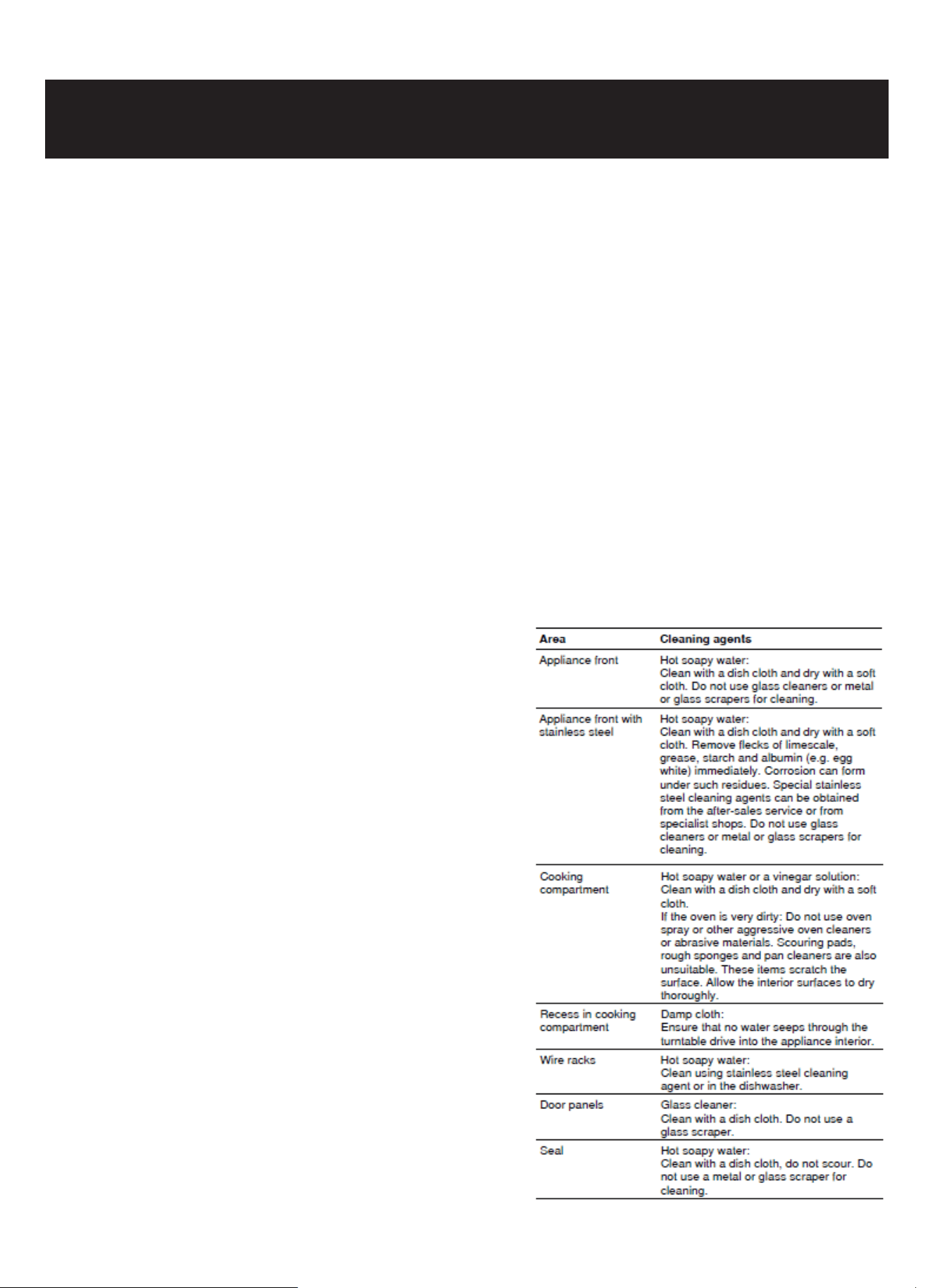
Cleaning agents
To ensure that the different surfaces are not damaged by
using the wrong cleaning agent, observe the information in
the table. Do not use:
sharp or abrasive cleaning agents,
metal or glass scrapers to clean the glass in the appliance
Maintanence
25

door,
metal or glass scrapers to clean the door seal,
hard scouring pads and sponges,
cleaning agents with high concentrations of alcohol.
Wash new sponge cloths thoroughly before use. Allow all surfaces to dry thoroughly before using the
appliance again.
Specication Value
Rated Voltage 120 VAC, 60 Hz
Maximum Power 1750W
Rated Output Power (Microwave) 1000W
Oven Capacity 1.55 cu ft (44L)
Turntable Diameter 1 inches4.3
External Dimensions (Without handle) 23.43(W) x 22.36(D) x 17.87(H) inches
Net Weight Approx. lbs81.8
26
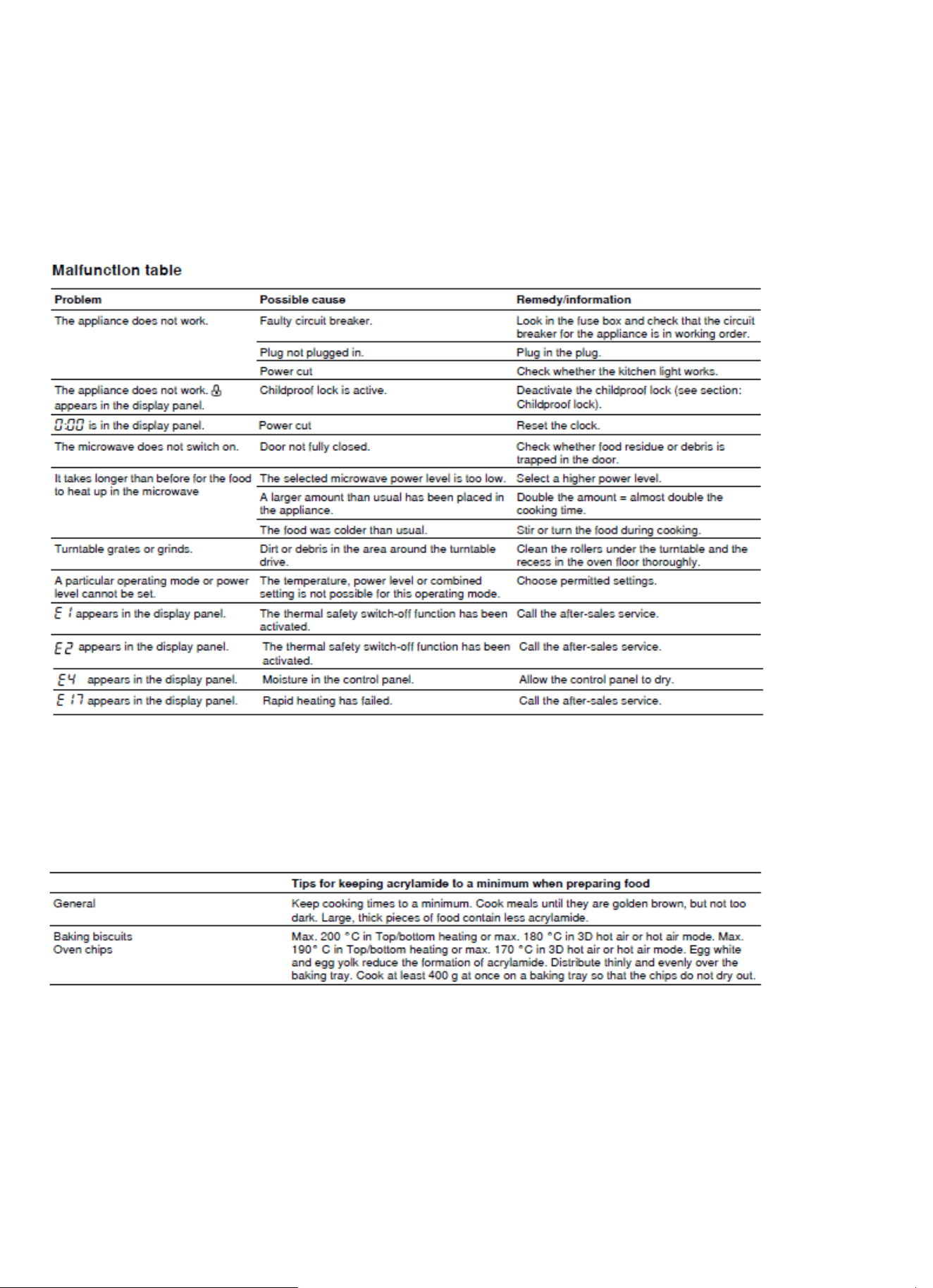
Malfunction table
Malfunctions often have simple explanations. Please refer to the malfunction table before calling the
customer service.
If a meal does not turn out exactly as you wanted, refer to the plenty of cooking tips and tricks.
Risk of electric shock!
Incorrect repairs are dangerous. Repairs may only be carried out by a traind professional
Acrylamide in foodstuffs
Which foods are affected?
Acrylamide is mainly produced in grain and potato products that are heated to high temperatures,
such as potato crisps, chips, toast, bread rolls, bread, ne baked goods (biscuits, gingerbread,
cookies).
Energy and environment tips
Here you can nd tips on how to save energy when baking and roasting and how to dispose of your
appliance properly.
Saving energy
Only preheat the oven if this is specied in the recipe or in the operating instruction tables.
27
Use dark, black lacquered or enamelled baking tins. They absorb the heat particularly well.
Open the oven door as infrequently as possible while you are cooking, baking or roasting.
It is best to bake several cakes one after the other. The oven is still warm. This reduces the baking
time for the second cake. You can also place two loaf tins next to each other.
For longer cooking times, you can switch the oven off 10 minutes before the end of the cooking time
and use the residual heat to nish cooking.
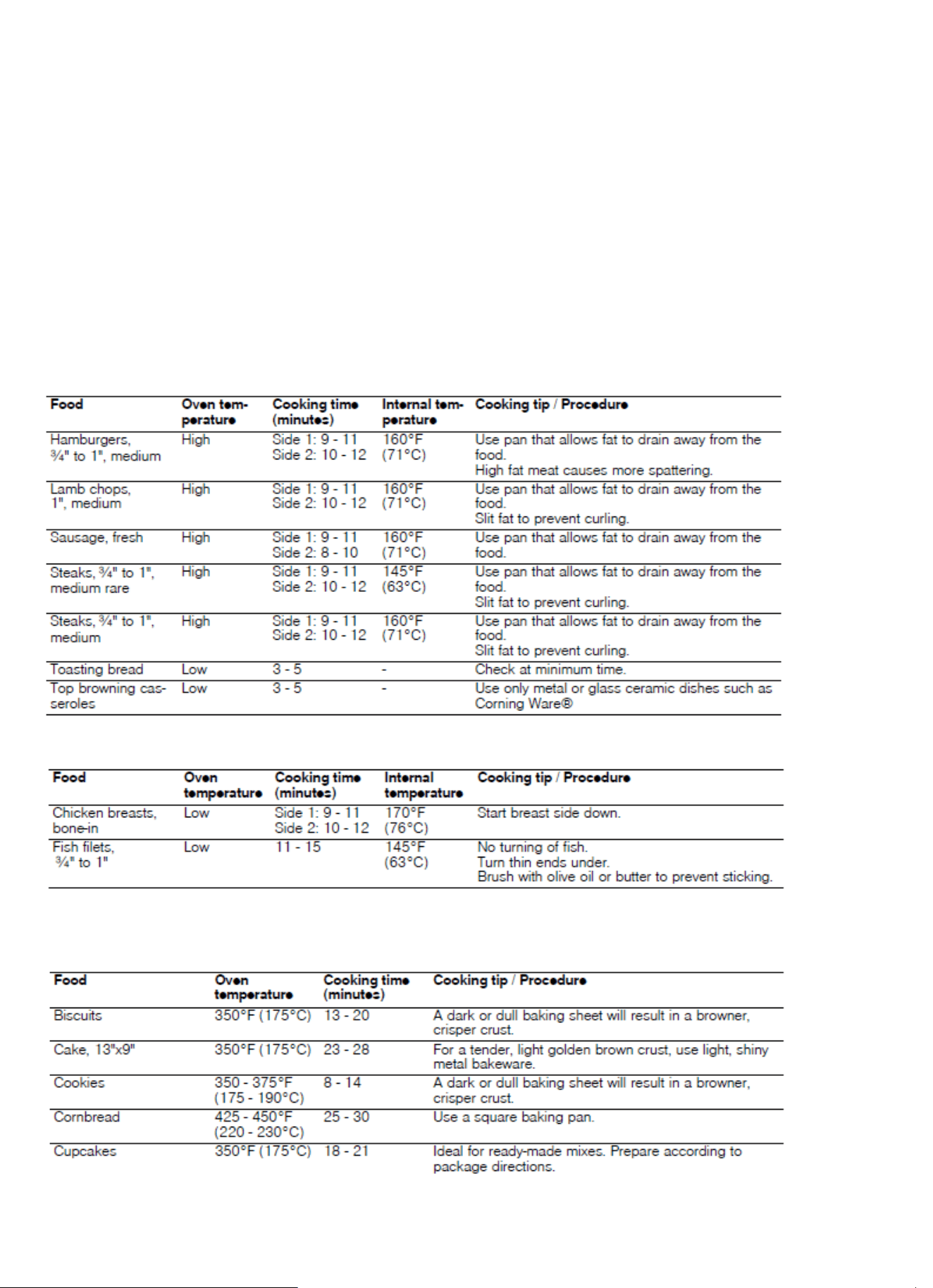
Expert Cooking Guide
The charts can be used as a guide. Follow package or recipe directions.
Broil
Place pan of food on the wire rack with the recess facing up.
Convection Broil
Place pans of food on the wire rack with the recess facing up.
Convection
Preheat the oven before adding foods. Once the oven is preheated, place the food in the oven quickly
to minimize loss of heat. Place pans of food on the wire rack with the recess facing down.
28
Cooking eggs in your microwave
• Never cook eggs in the shell and never warm hard-boiled eggs in the shell; they can explode.
• Always pierce yolk on whole eggs to keep them from bursting.
• Cook eggs just until set; they will become tough if overcooked.
• Cooking scrambled eggs is safe.
Cooking vegetables in your microwave
• Vegetables should be washed just before cooking. Rarely is extra water needed. If dense vegeta-
bles such as potatoes or carrots are being cooked, add about ¼ cup of water.
• Small vegetables (sliced carrots, peas, lima beans, etc.) will cook faster than larger vegetables.
• Whole vegetables, such as potatoes, acorn squash or corn on the cob, should be arranged in a
circle on the turntable before cooking. They will cook more evenly if turned over halfway through
cooking.
• Always place vegetables like asparagus and broccoli with the stem end pointing towards the edge
of the dish and the tips toward the center.
• When cooking cut up vegetables, always cover the dish with a lid or vented microwaveable plastic
wrap.
• Whole, unpeeled vegetables such as potatoes, sweet potatoes, squash, eggplant, etc., should have
their skins pricked in several places before cooking to prevent them from bursting.
• For more even cooking, stir or rearrange whole vegetables halfway through the cook time.
• Most of the time, the denser the food, the longer the cooking time. For example, a baked potato
should stand for 5 minutes before serving, while a dish of peas may be served immediately.
Heating food
WARNING: Risk of scalding!
There is a possibility of delayed boiling when a liquid is heated. This can happen with all liquids,
even with water or milk, when only a little liquid is inside the boiling temperature within the contain-
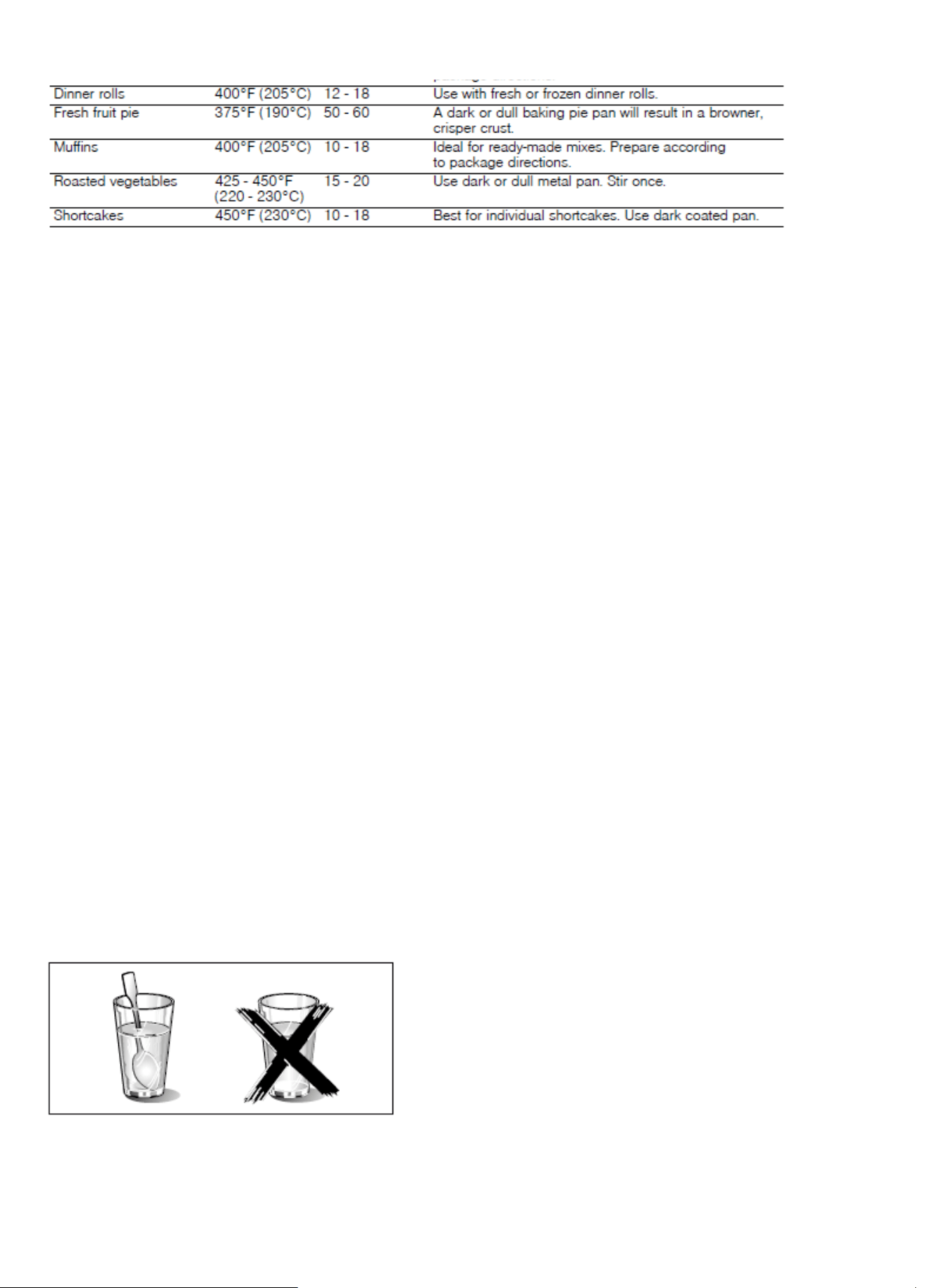
er. When heating liquids, always place a spoon in the container. This will prevent delayed boiling.
29
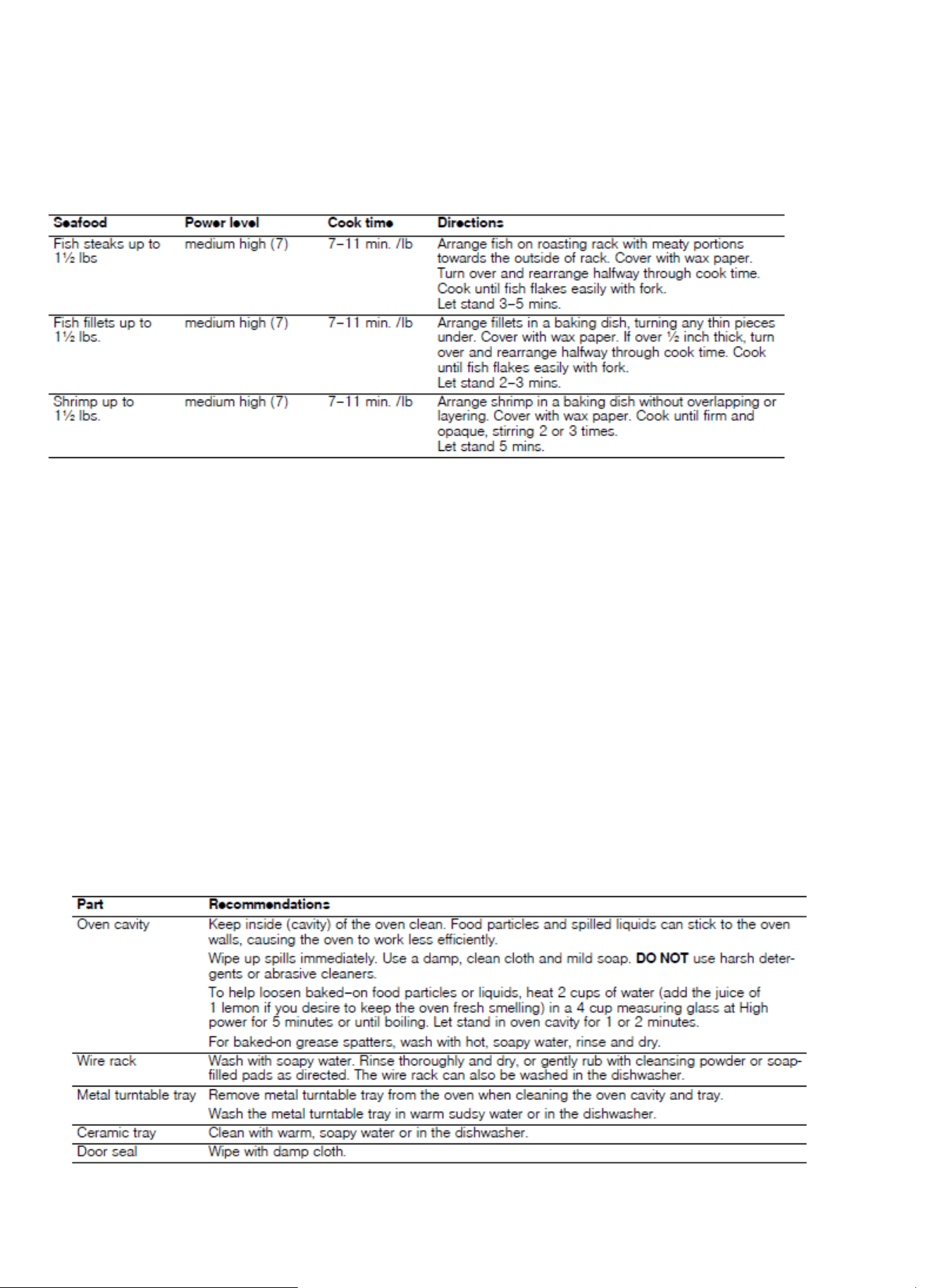
Cooking seafood in your microwave
Be sure to place sh on a microwave-safe roasting rack in a microwave-safe dish. Be sure to always
cook sh
until it akes easily with a fork. Use a tight cover to steam sh; a lighter cover of wax paper or paper
towel provides less steaming. And be sure not to overcook sh; check it for doneness at a minimum
cooking time before cooking longer.
Cleaning and Maintenance
WARNING: Be sure the entire appliance has cooled and grease has solidied before attempting to clean
any part of the appliance.
Cleaning Guide
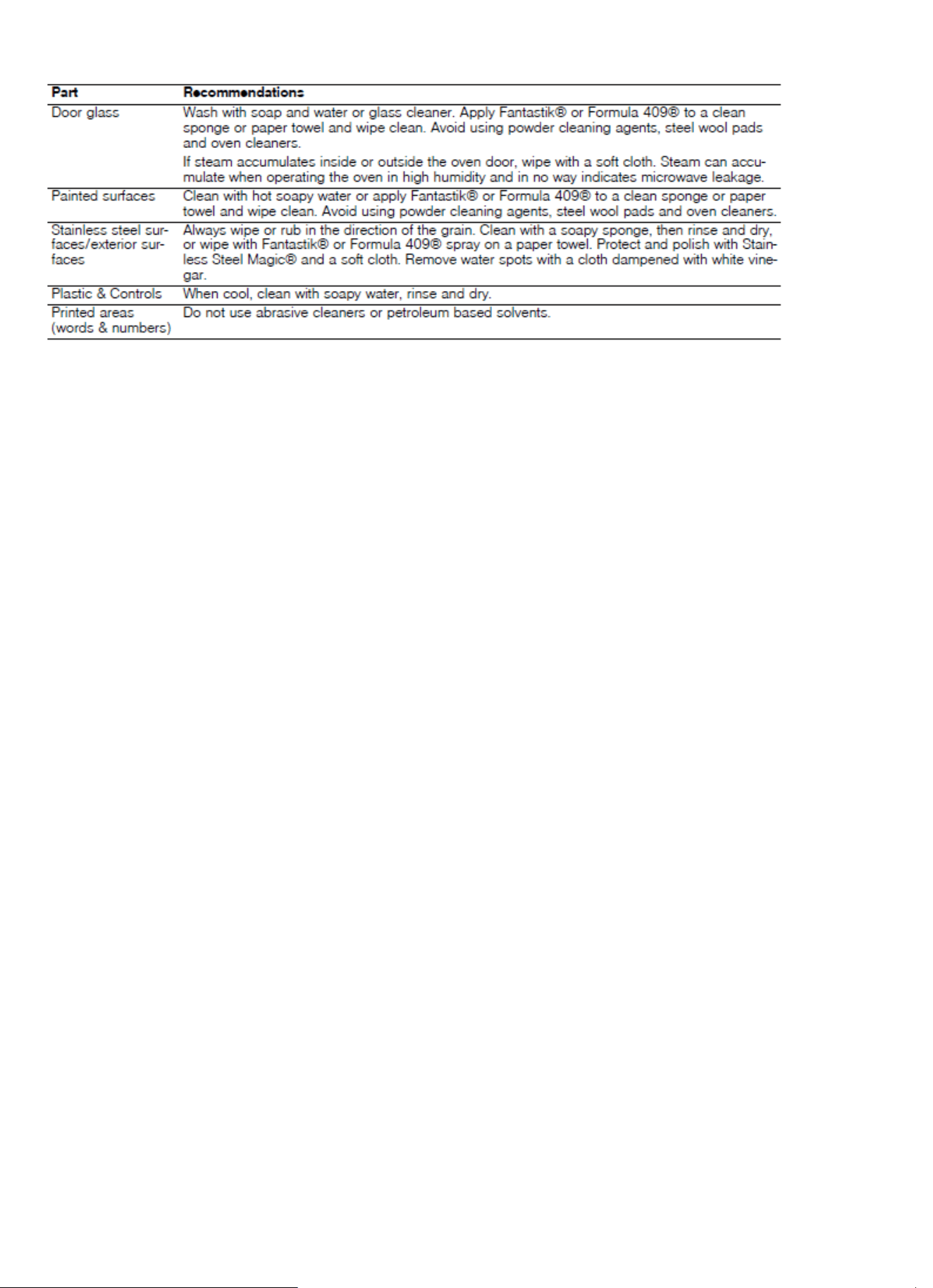
• For best performance and for safety reasons, keep the oven clean inside and outside. Take special
care to keep the inner door panel and oven front frame free of food and grease build-up.
• Never use abrasive scouring powder or pads on the microwave. Wipe the microwave oven inside
and out with a soft cloth and warm (not hot) mild detergent solution. Then rinse and wipe com-
pletely dry.
• Wipe spatters immediately with a wet paper towel, especially after cooking greasy foods like
chicken or bacon.
• Clean your microwave oven weekly or more often, if needed.
• Never operate the microwave oven without food in the oven cavity, unless pre-heating with Con-
vection, Pizza, Frozen Foods, and Keep Warm mode; this can damage the magnetron tube or
ceramic tray. You may wish to leave a cup of water standing inside the oven when it is not in use
to prevent damage if the oven is accidentally turned on.
•
30
31
32