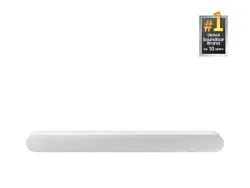
Simple User Guide
HW-S60D / HW-S61D
You can access the User guide on Samsung’s on-line customer support center by scanning the QR code on
the left. To see the manual on your PC or mobile device, download the manual in document format from
Samsung’s website. (http://www.samsung.com/support)
SAFETY INFORMATION
SAFETY WARNINGS
TO REDUCE THE RISK OF ELECTRIC SHOCK, DO NOT
REMOVE THE COVER (OR BACK).
NO USER-SERVICEABLE PARTS ARE INSIDE. REFER
SERVICING TO QUALIFIED SERVICE PERSONNEL.
Refer to the table below for an explanation of symbols
which may be on your Samsung product.
CAUTION
RISK OF ELECTRIC
SHOCK.
DO NOT OPEN.
This symbol indicates that high voltage is
present inside. It is dangerous to make any
kind of contact with any internal part of
this product.
This symbol indicates that this product has
included important literature concerning
operation and maintenance.
Class II product : This symbol indicates
that a safety connection to electrical earth
(ground) is not required.
If this symbol is not present on a product
with a power cord, the product MUST have
a reliable connection to protective earth
(ground).
AC voltage : Rated voltage marked with
this symbol is AC voltage.
DC voltage : Rated voltage marked with
this symbol is DC voltage.
Caution. Consult Instructions for use : This
symbol instructs the user to consult the
user manual for further safety related
information.
WARNING
• To reduce the risk of re or electric shock, do not expose
this appliance to rain or moisture.
• To prevent injury, this apparatus must be securely set on
a solid surface or attached to a wall in accordance with
the installation instructions.
• This product contains chemicals known to the State of
California to cause cancer and birth defects or other
reproductive harm.
CAUTION
• Do not expose this apparatus to dripping or splashing.
Do not put objects lled with liquids, such as vases, on
the apparatus.
• To turn this apparatus off completely, you must pull the
power plug out of the wall socket. Consequently, the
power plug must be easily and readily accessible at all
times.
FCC Caution :
• Any changes or modications not expressly approved
by the party responsible for compliance could void the
user’s authority to operate this equipment.
• This product satises FCC regulations when shielded
cables and connectors are used to connect the unit to
other equipment.
To prevent electromagnetic interference with electric
appliances, such as radios and televisions, use shielded
cables and connectors for connections.
Class B FCC Statement
This equipment has been tested and found to comply with
the limits for a Class B digital device, pursuant to Part
15 of the FCC Rules. These limits are designed to provide
reasonable protection against harmful interference in a
residential installation. This equipment generates, uses
and can radiate radio frequency energy and, if not installed
and used in accordance with the instructions, may cause
harmful interference to radio communications. However,
there is no guarantee that interference will not occur in
a particular installation. If this equipment does cause
harmful interference to radio or television reception, which
can be determined by turning the equipment off and on, the
user is encouraged to try to correct the interference by one
of the following measures:
• Reorienting or relocating the receiving antenna.
• Increasing the separation between the equipment and
receiver.
• Connecting the equipment to an outlet that is on a
different circuit than the radio or TV.
• Consulting the dealer or an experienced radio/TV
technician for help.
FCC Radiation Exposure Statement :
This equipment complies with FCC radiation exposure limits
set forth for an uncontrolled environment. This equipment
should be installed and operated so there is at least 8 inches
(20 cm) between the radiator and your body. This device
and its antenna(s) must not be co-located or operated in
conjunction with any other antenna or transmitter.
CALIFORNIA USA ONLY (Applicable for networking
models only.)
This Perchlorate warning applies only to primary
CR(Manganese Dioxide) Lithium coin cells in the product
sold or distributed ONLY in California USA “Perchlorate
Material - special handling may apply, See www.dtsc.
ca.gov/hazardouswaste/perchlorate.”
WARNING: Cancer and Reproductive Harm -
www.P65Warnings.ca.gov.
Samsung products and recycling
– Dispose unwanted electronics through an approved
recycler. To nd the nearest recycling location, go to
our website: www.samsung.com/recycling Or call,
1‐800‐SAMSUNG
– WARNING! Never dispose of batteries in a re because
they may explode. Do not dissemble, crush, puncture,
heat, burn or reuse batteries.
For more information, visit call2recycle.org or call
1-800-822-8837. Alternatively, visit: www.samsung.
com/recycling or call 1-800-SAMSUNG.
01 CHECKING THE
COMPONENTS
• Soundbar Main Unit
• Soundbar Remote
Control
• Batteries
• Power Cord
• AC/DC Adapter
• HDMI Cable
• Wall Mount Guide
• Holder-Screw X 2
• Bracket-Wall Mount X 2
• Screw (M4 x L10) X 2
NOTES
• For more information about the power supply and power
consumption, refer to the label attached to the product.
(Label: Bottom of the Soundbar Main Unit)
• To purchase additional components or optional cables,
contact a Samsung Service Center or Samsung Customer
Care.
• Design, specications, and App screen are subject to
change without prior notice.
02 PRODUCT OVERVIEW
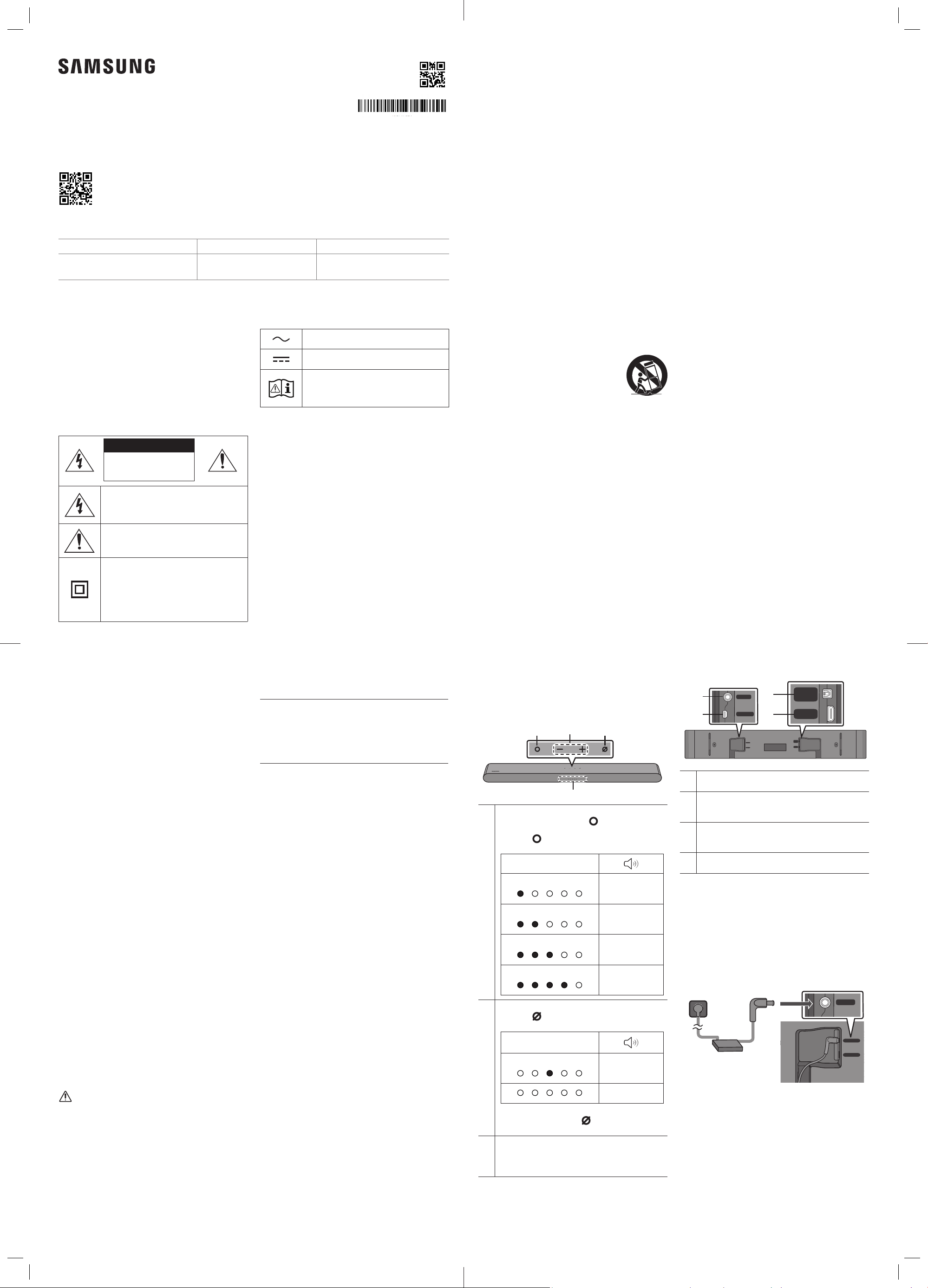
Front Panel / Top Panel of the
Soundbar
Volume
Multi Function Button
In standby mode, press the (Multi Function)
button to turn on the Soundbar.
Press the (Multi Function) button to change
the mode.
LED Indicator
White On -> Off
“TV ARC” or
“eARC”
White On -> Off
“Wi-Fi”
White On -> Off
“Bluetooth”
White On -> Off
“Digital Audio In”
Mic On/Off Button
Press the (Mic On/Off) button to turn on or off
the microphone.
LED Indicator
Red On
“Mic Off”
“Mic On”
To switch to Bluetooth Pairing state in “Bluetooth”
mode, press and hold the (Mic On/Off) button
on the top of the Soundbar for more than 5 seconds.
LED indicator
The LED Indicator ashes, glows, or changes color
depending on the Soundbar's current mode or
status.
Bottom Panel of the Soundbar
SERVICE
DC 19V
DIGITAL
AUDIO IN
(OPTICAL)
HDMI
(eARC)
SERVICE
DC 19V
DIGITAL
AUDIO IN
(OPTICAL)
HDMI
(eARC)
SERVICE
DC 19V
DIGITAL
AUDIO IN
(OPTICAL)
HDMI
(eARC)
DC 19V (Power Supply In)
Connect the AC/DC power adapter.
SERVICE
Connect a USB storage device to upgrade the
product's software.
DIGITAL AUDIO IN (OPTICAL)
Connect to the digital (optical) output of an
external device.
HDMI (eARC)
Connect to the HDMI (eARC) port on a TV.
03 CONNECTING THE
SOUNDBAR
Connecting Electrical Power
• For more information about the required electrical
power and power consumption, refer to the label
attached to the product. (Label: Bottom of the Soundbar
Main Unit)
SERVICE
DC 19V
Bottom of the Soundbar
Main Unit
SERVICE
DC 19V
DIGITAL
AUDIO IN
(OPTICAL)
HDMI
(eARC)
AH81-17430A-00
QUESTIONS OR COMMENTS?
Samsung Service Center
Web Site
Address
1-800-SAMSUNG (726-7864)
www.samsung.com/us/support
Samsung Electronics America, Inc.
85 Challenger Road
Ridgefi eld Park, NJ 07660
© 2024 Samsung Electronics Co., Ltd. All rights reserved.
Important Safety Instructions
Read these operating instructions carefully before using
the unit. Follow all the safety instructions listed below.
Keep these operating instructions handy for future
reference.
1. Read these instructions.
2. Keep these Instructions.
3. Heed all warnings.
4. Follow all instructions.
5. Do not use this apparatus near water.
6. Clean only with dry cloth.
7. Do not block any ventilation openings.
Install in accordance with the manufacturer’s
instructions.
8. Do not install near any heat sources such as radiators,
heat registers, stoves, or other apparatus (including
ampliers) that produce heat.
9. Do not hinder in any way the safety purpose of the
polarized or grounding-type plug. A polarized plug has
two blades with one wider than the other. A grounding
type plug has two blades and a third grounding prong.
The wide blade or the third prong are provided for
your safety. If the provided plug does not t into your
outlet, consult an electrician for replacement of the
obsolete outlet.
10. Protect the power cord from being walked on or
pinched particularly at plugs, convenience receptacles,
and the point where they exit from the apparatus.
11. Only use attachments/accessories specied by the
manufacturer.
12. Use only with the cart, stand,
tripod, bracket, or table specied
by the manufacturer, or sold with
the apparatus. When a cart is used,
use caution when moving the cart/
apparatus combination to avoid injury
from tip-over.
13. Unplug this apparatus during lightning storms or when
unused for long periods of time.
14. Refer all servicing to qualied service personnel.
Servicing is required when the apparatus has been
damaged in any way, such as power-supply cord or
plug is damaged, liquid has been spilled or objects
have fallen into the apparatus, the apparatus has
been exposed to rain or moisture, does not operate
normally, or has been dropped.
PRECAUTIONS
1. Make sure to rest the AC/DC Adapter at on a table or
the oor. If you place the AC/DC Adapter so that it is
hanging with the AC cord input facing upwards, water
or other foreign substances could enter the Adapter
and cause the Adapter to malfunction.
2. Ensure that the AC power supply in your house
complies with the power requirements listed on
the identication sticker located on the bottom
of your product. Install your product horizontally,
on a suitable base (furniture), with enough space
around it for ventilation (3~4 inches). Make sure the
ventilation slots are not covered. Do not place the unit
on ampliers or other equipment which may become
hot. This unit is designed for continuous use. To fully
turn off the unit, disconnect the AC plug from the wall
outlet. Unplug the unit if you intend to leave it unused
for a long period of time.
3. During thunderstorms, disconnect the AC plug from
the wall outlet. Voltage peaks due to lightning could
damage the unit.
4. Do not expose the unit to direct sunlight or other heat
sources. This could lead to overheating and cause the
unit to malfunction.
5. Protect the product from moisture (i.e. vases), and
excess heat (e.g. a replace) or equipment creating
strong magnetic or electric elds. Unplug the power
cable from the AC wall socket if the unit malfunctions.
Your product is not intended for industrial use. It
is for personal use only. Condensation may occur if
your product has been stored in cold temperatures.
If transporting the unit during the winter, wait
approximately 2 hours or until the unit has reached
room temperature before using.
6. The battery used with this product contains chemicals
that are harmful to the environment. Do not dispose
of the battery in the general household trash. Do not
expose the battery to excess heat, direct sunlight, or
re. Do not short circuit, disassemble, or overheat the
battery. CAUTION : Danger of explosion if the battery
is replaced incorrectly. Replace only with the same or
equivalent type.
FCC NOTE (for U.S.A):
FCC Supplier’s Declaration of Conformity
Responsible Party - U.S. Contact Information:
Samsung Electronics America, Inc.
85 Challenger Road.
Ridgeeld Park, NJ 07660
Phone: 1-800-SAMSUNG (726-7864)
FCC Compliance Statement :
This device complies with Part 15 of the FCC Rules.
Operation is subject to the following two conditions:
(1) This device may not cause harmful interference, and
(2) this device must accept any interference received,
including interference that may cause undesired
operation.
04 CONNECTING WITH A
CABLE
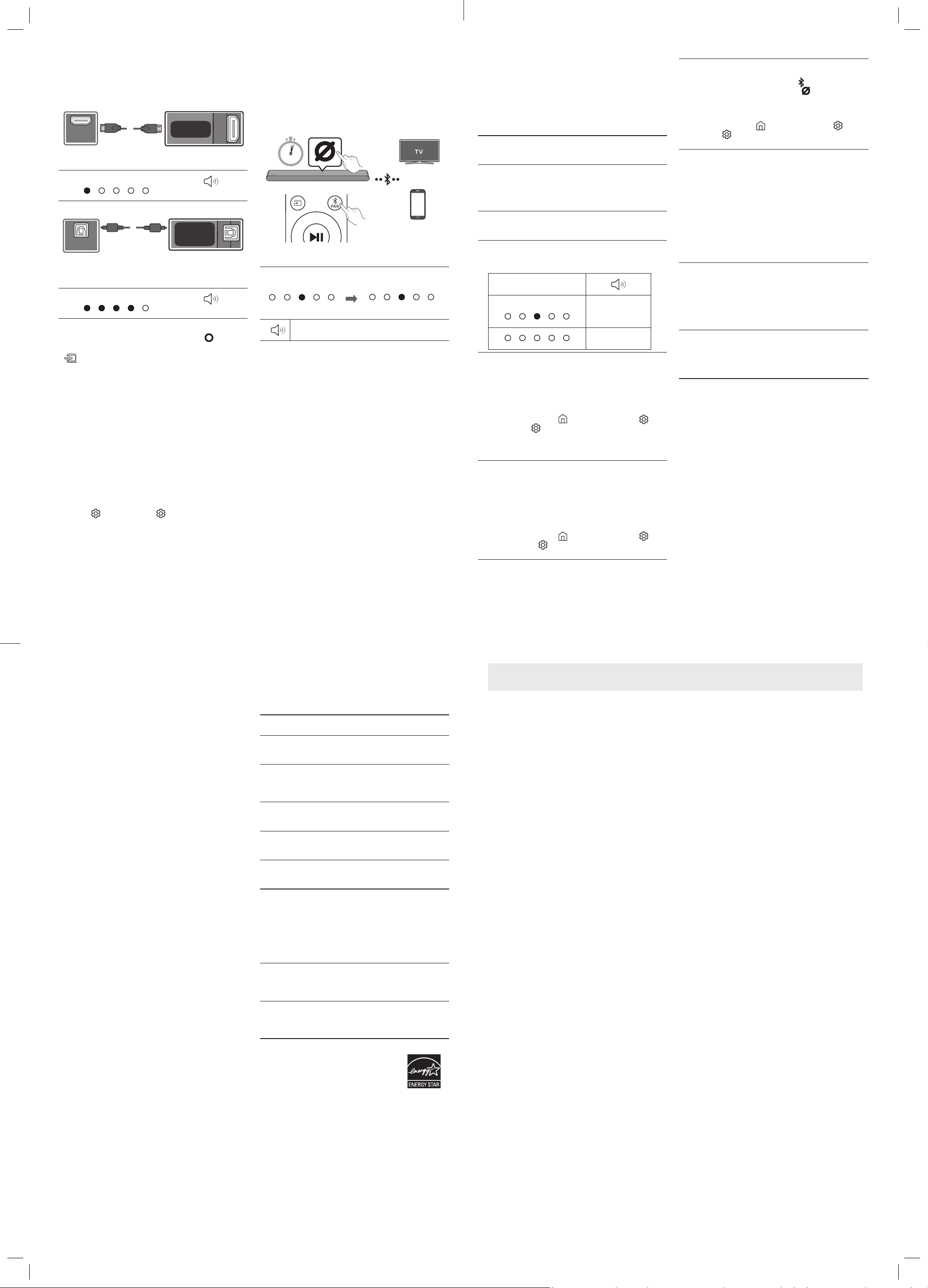
Connecting using an HDMI Cable
Bottom of the
Soundbar
HDMI Cable
TV
HDMI IN
(eARC)
HDMI OUT
OPTICAL OUT
HDMI 입력
(eARC)
HDMI 출력
OPTICAL 출력
SERVICE
DC 19V
DIGITAL
AUDIO IN
(OPTICAL)
HDMI
(eARC)
White On -> Off
“TV ARC” or “eARC”
Connecting using an Optical Cable (D.IN)
SERVICE
DC 19V
DIGITAL
AUDIO IN
(OPTICAL)
HDMI
(eARC)
TV / BD / DVD player
/ Set-top box / Game
console
Bottom of the
Soundbar
Optical Cable
(not supplied)
HDMI IN
(eARC)
HDMI OUT
OPTICAL OUT
HDMI 입력
(eARC)
HDMI 출력
OPTICAL 출력
White On -> Off
“Digital Audio In”
NOTES
• When the TV sound is not output, press the (Multi
Function) button at the top of the Soundbar or the
(Source) button on the remote control to select the
“TV ARC” or “eARC” mode.
• The recommended cable is an HDMI cable certied by
HDMI.org.
• When you use an optical cable and the terminals have
covers, be sure to remove the covers.
Using the Q-Symphony Function
When the Soundbar connects to a Samsung TV that
supports the Q-Symphony function, you can play the
sound simultaneously through the Soundbar and the TV.
If you use the Q-Symphony function, the surround sound
played on the TV allows you to enjoy a richer, more three-
dimensional surround sound effect.
When the Soundbar is connected, “Q-symphony” menu
appears on the TV. (The message displayed may differ
with the TV model.)
Settings ( ) → All Settings ( )→ Sound → Sound
Output
05 USING A WIRELESS
CONNECTION
Connecting via Bluetooth
OR
OR
When in “Bluetooth” mode
5 Sec
SOUND
MODE
WOOFER
TONE
CONTROL
CH LEVEL
• Search for the Bluetooth device on your TV or mobile
device.
Red → Green →
Blue Blinks
Cyan Blinks X3
Pairing
Connection is complete
“Ready to connect via Bluetooth.”
NOTE
• If asked for a PIN code when connecting a Bluetooth
device, enter <0000>.
Connecting via Wi-Fi (Wireless
Network)
To connect a Soundbar to a mobile device via a wireless
network (Wi-Fi), the SmartThings app is required.
1. Connect your mobile device (smartphone, tablet, etc.)
to the Wi-Fi network the TV is connected to.
2. Install and launch the SmartThings app on your mobile
device (smartphone, tablet, etc.).
3. Follow the instructions in the app screen on the mobile
device to connect the Soundbar to your Wi-Fi network.
06 TROUBLESHOOTING
Refer to the instructions below if this product does not
function properly. If the problem you are experiencing is
not listed below or if the instructions below do not help,
turn off the product, disconnect the power cord, and
contact Samsung Electronics at 1-800-SAMSUNG (1-800-
726-7864).
Soundbar does not turn on.
• Check whether the power cord of the Soundbar is
correctly inserted into the outlet.
Soundbar works erratically.
• After removing the power cord, insert it again.
• Power cycle the external device and try again.
• If there is no signal, the Soundbar automatically turns
off after a certain period of time. Turn on the power.
Remote control does not work.
• Point the remote directly at the Soundbar.
• Replace the batteries with new ones.
The red LED indicator light on the soundbar stays on.
• The microphone is turned off. Turn on the
microphone.
LED Indicator
Red On
“Mic Off”
“Mic On”
The Soundbar does not output any sound.
• The volume of the Soundbar is too low or muted.
Adjust the volume.
• When any external device (STB, Bluetooth device,
mobile device, etc.) is connected, adjust the volume of
the external device.
• For sound output of the TV, select Soundbar.
(Samsung TV: Home ( ) → Menu → Settings ( ) →
All Settings ( )→ Sound → Sound Output → Select
Soundbar)
• Remove the cable from the Soundbar and then
reconnect it.
If the TV is not connected via HDMI (eARC).
• Check whether the HDMI cable is correctly connected
to the eARC terminal.
• Connection may not be possible due to the connected
external device (set-top box, game console, etc.).
Directly connect the Soundbar.
• HDMI-CEC may not be activated on the TV. Turn on
the CEC on the TV menu.
(Samsung TV: Home ( ) → Menu → Settings ( )
→ All Settings ( ) → Connection → External Device
Manager → Anynet+ (HDMI-CEC) ON)
The Soundbar will not connect via Bluetooth.
• When connecting a new device, switch to Bluetooth
Pairing for connection. (Press the PAIR button
on the remote control or press the (Mic On/Off)
button on the body for at least 5 seconds.)
• Reconnect it after removing the Bluetooth speaker
list on the device to connect.
(Samsung TV: Home ( ) → Menu → Settings ( )
→ All
Settings ( ) → Sound → Sound Output → Bluetooth
Speaker List)
The sound drops out when connected via Bluetooth.
• Some devices can cause radio interference if they are
located too close to the Soundbar. e. g. microwaves,
wireless routers, etc.
• If your device that is connected via Bluetooth moves
too far away from the Soundbar, it may cause the
sound to drop out. Move the device closer to the
Soundbar.
• If a part of your body is in contact with the Bluetooth
transceiver or the product is installed on metal
furniture, the sound may drop out. Check the
installation environment and conditions for use.
Unable to connect to Wi-Fi.
• Make sure the wireless router is turned on and then
reconnect the wireless router after rebooting.
• The Soundbar will not connect if the wireless signal
is too weak. Try moving the router closer to the
Soundbar, or eliminating any obstacles that are
between the Soundbar and the router, if possible.
The Soundbar does not turn on automatically with the
TV.
• When you turn off the Soundbar while watching TV,
power synchronization with the TV is disabled. First
turn off the TV.
LIMITED WARRANTY TO ORIGINAL CONSUMER PURCHASER
WITH PROOF OF PURCHASE AND/OR PROOF OF DELIVERY
This SAMSUNG brand product, as supplied and distributed by SAMSUNG and delivered new, in the original carton to the original
consumer purchaser, is warranted by SAMSUNG against manufacturing defects in materials and workmanship for a limited
warranty period of:
One (1) Year Parts and Labor*
(*90 Days Parts and Labor for Commercial Use)
This limited warranty begins on the date of delivery to the original consumer purchaser, and is valid only on products
purchased and used in the United States. To receive warranty service, the purchaser must contact SAMSUNG for
problem determination and service procedures. Warranty service can only be performed by a SAMSUNG authorized
service center. The original dated bill of sale and/or proof of delivery must be presented upon request to SAMSUNG or
SAMSUNG’S authorized service center. Transportation of the product to and from the service center is the responsibility
of the purchaser.
SAMSUNG will repair or replace this product, at our option and at no charge as stipulated herein, with new or
reconditioned parts or products if found to be defective during the limited warranty period speci ed above.
All replaced parts and products become the property of SAMSUNG and must be returned to SAMSUNG.
Replacement parts and products assume the remaining original warranty, or ninety (90) days, whichever is longer.
SAMSUNG’s obligations with respect to software products distributed by SAMSUNG under the SAMSUNG brand
name are set forth in the applicable end user license agreement. Non-SAMSUNG hardware and software products,
if provided, are on an “AS IS” basis.
Non-SAMSUNG manufacturers, suppliers, publishers, and service providers may provide their own warranties.
This limited warranty covers manufacturing defects in materials and workmanship encountered in normal, and
except to the extent otherwise expressly provided for in this statement, noncommercial use of this product, and
shall not apply to the following, including, but not limited to: damage which occurs in shipment; delivery and
installation; applications and uses for which this product was not intended; altered product or serial numbers;
cosmetic damage or exterior nish; accidents, abuse, neglect, re, water, lightning or other acts of nature; use of
products, equipment, systems, utilities, services, parts, supplies, accessories, applications, installations, repairs,
external wiring or connectors not supplied and authorized by SAMSUNG, or which damage this product or result in
service problems; incorrect electrical line voltage, uctuations and surges; customer adjustments and failure to
follow operating instructions, cleaning, maintenance and environmental instructions that are covered and
prescribed in the instruction book; product removal or reinstallation; reception problems and distortion related to
noise, echo, interference or other signal transmission and delivery problems. SAMSUNG does not warrant
uninterrupted or error-free operation of the product.
THERE ARE NO EXPRESS WARRANTIES OTHER THAN THOSE LISTED AND DESCRIBED ABOVE, AND NO
WARRANTIES WHETHER EXPRESS OR IMPLIED, INCLUDING, BUT NOT LIMITED TO, ANY IMPLIED WARRANTIES OF
MERCHANTABILITY OR FITNESS FOR A PARTICULAR PURPOSE, SHALL APPLY AFTER THE EXPRESS WARRANTY
PERIODS STATED ABOVE, AND NO OTHER EXPRESS WARRANTY OR GUARANTY GIVEN BY ANY PERSON, FIRM OR
CORPORATION WITH RESPECT TO THIS PRODUCT SHALL BE BINDING ON SAMSUNG. SAMSUNG SHALL NOT BE
LIABLE FOR LOSS OF REVENUE OR PROFITS, FAILURE TO REALIZE SAVINGS OR OTHER BENEFITS, OR ANY OTHER
SPECIAL, INCIDENTAL OR CONSEQUENTIAL DAMAGES CAUSED BY THE USE, MISUSE OR INABILITY TO USE THIS
PRODUCT, REGARDLESS OF THE LEGAL THEORY ON WHICH THE CLAIM IS BASED, AND EVEN IF SAMSUNG HAS
BEEN ADVISED OF THE POSSIBILITY OF SUCH DAMAGES. NOR SHALL RECOVERY OF ANY KIND AGAINST
SAMSUNG BE GREATER IN AMOUNT THAN THE PURCHASE PRICE OF THE PRODUCT SOLD BY SAMSUNG AND
CAUSING THE ALLEGED DAMAGE. WITHOUT LIMITING THE FOREGOING, PURCHASER ASSUMES ALL RISK AND
LIABILITY FOR LOSS, DAMAGE OR INJURY TO PURCHASER AND PURCHASER’S PROPERTY AND TO OTHERS AND
THEIR PROPERTY ARISING OUT OF THE USE, MISUSE OR INABILITY TO USE THIS PRODUCT SOLD BY SAMSUNG
NOT CAUSED DIRECTLY BY THE NEGLIGENCE OF SAMSUNG. THIS LIMITED WARRANTY SHALL NOT EXTEND TO
ANYONE OTHER THAN THE ORIGINAL PURCHASER OF THIS PRODUCT, IS NONTRANSFERABLE AND STATES YOUR
EXCLUSIVE REMEDY.
Some states do not allow limitations on how long an implied warranty lasts, or the exclusion or limitation of incidental or
consequential damages, so the above limitations or exclusions may not apply to you. This warranty gives you speci c legal rights, and
you may also have other rights which vary from state to state.
To obtain warranty service, please contact SAMSUNG customer care center.
The bene ts of this Limited Warranty extend only to the original purchaser of Samsung products from an authorized
Samsung reseller. THIS LIMITED WARRANTY SHALL NOT APPLY TO ANY SAMSUNG PRODUCTS PURCHASED
FROM UNAUTHORIZED RESELLERS OR RETAILERS, EXCEPT IN STATES WHERE SUCH RESTRICTION MAY BE
PROHIBITED. For a list of Samsung authorized retailers, please go to:
http://www.samsung.com/us/peaceofmind/authorized_resellers.html.
07 IMPORTANT NOTES
ABOUT SERVICE
• Figures and illustrations in this User Manual are
provided for reference only and may differ from actual
product appearance.
• An administration fee may be charged if either:
a. An engineer is called out to your home at your request
and there is no defect in the product.
b. You bring the unit to a repair center and there is no
defect in the product.
• You will be advised of the amount of the administration
fee before any work is done or a home visit is made.
• If you have a problem with this product, we strongly
recommend you read the appropriate section of this
manual, visit the Support page for your product at www.
samsung.com, or call Samsung Product Support (1-800-
726-7864) to nd an answer before you contact a service
center for a repair.
08 SPECIFICATIONS AND
GUIDE
Specications
Model Name
HW-S60D / HW-S61D
Weight
6.0 lbs (2.7 kg)
Dimensions (W x H x D)
26.4 x 2.4 x 4.1 inches
(670.0 x 62.0 x 105.0 mm)
Operating Temperature
Range
+ 50 °F to +104 °F
(+10 °C to +40 °C)
Operating Humidity
Range
10 % to 80 %,
non-condensing
Storage Temperature Range
-4 °F to +113 °F
(-20 °C to +45 °C)
Storage Humidity Range
5 % to 95 %,
non-condensing
AMPLIFIER
Rated Output power
200W
Supported play formats
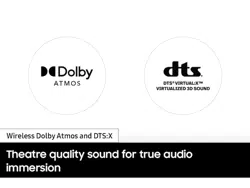
Dolby 5.1ch / Dolby Digital Plus / Dolby TRUE HD /
Dolby ATMOS / DTS 5.1ch / LPCM 8ch
NOTES
• Samsung Electronics Co., Ltd reserves the right to
change the specications without notice.
• Weight and dimensions are approximate.
Precaution : The Soundbar will restart automatically
if you turn on/turn off Wi-Fi or Bluetooth.
Wi-Fi
Port deactivation method
Press the CH LEVEL button on the remote control of the
Soundbar for 30 seconds to turn Wi-Fi On / Off.
Bluetooth
Port deactivation method
Press the TONE CONTROL button on the remote control of
the Soundbar for 30 seconds to turn Bluetooth On / Off.
[ENERGY STAR]
ENERGY STAR qualied model only
– Your Samsung product is ENERGY STAR
qualied in its factory default setting.
Change to certain features, settings
and functionality in this product can
change the power consumption, possibly beyond the
limits required for ENERGY STAR qualication.
– Environmental Protection Agency and Department
of Energy. ENERGY STAR is a joint program of the
Government agencies, designed to promote energy
efcient products and practices.
Refer to www.energystar.gov for more information of the
ENERGY STAR Program.
ENERGY STAR qualied model only (The other models)
– As an ENERGY STAR Partner, Samsung has determined
that this product or product models meets the ENERGY
STAR guideline for energy efciency.