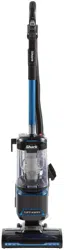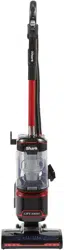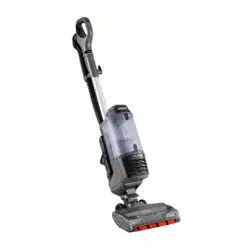
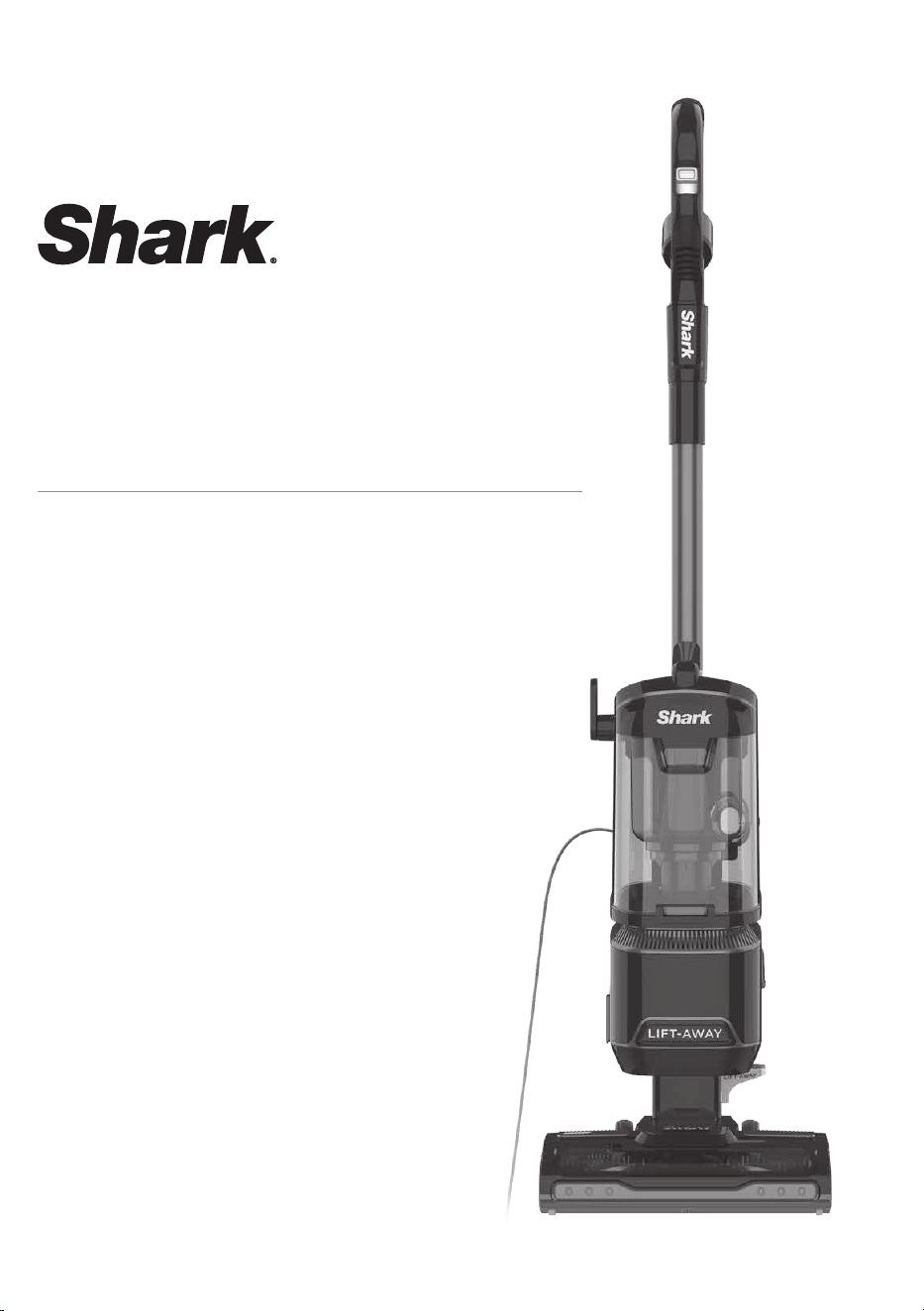
Corded Upright Vacuum
with Lift-Away® Technology
NV602ANZ Series
INSTRUCTIONS
AU 02 8801 7666 NZ 0800 112 660
AU sharkclean.com.au NZ sharkclean.co.nz
WARNING
To reduce the risk of fire, electric shock, injury, or property damage:
IMPORTANT SAFETY INSTRUCTIONS
FOR HOUSEHOLD USE ONLY • PLEASE READ CAREFULLY BEFORE USE
If the plug does not fit fully into the outlet, reverse the plug. If it still does not fit,
contact a qualified electrician. DO NOT force into outlet or try to modify to fit.
SAVE THESE INSTRUCTIONS
GENERAL WARNINGS
When using an electrical appliance,
basic precautions should always be
followed, including the following:
1 Use only identical replacement parts.
2 Carefully observe and follow the
instructions provided below to
avoid improper use of the appliance.
DO NOT use the vacuum for any
purpose other than those described
in this manual.
3 Before use, carefully inspect all parts
for any damage. DO NOT use if any
parts are damaged.
4 The use of an extension cord is NOT
recommended.
5 CAUTION: This vacuum cleaner
handle contains electrical
connections. This vacuum contains
no serviceable parts.
USE WARNINGS
6 This appliance can be used by
persons with reduced physical,
sensory or mental capabilities or
lack of experience and knowledge
if they have been given supervision
or instruction concerning use of
the appliance in a safe way and
understand the hazards involved.
7 DO NOT allow the appliance to
be used by children. Keep the
appliance and its cord out of reach
of children. Do not allow to be
used as a toy. Close supervision is
necessary when used near children.
Cleaning and user maintenance shall
not be done by children.
8 Always turn o the vacuum cleaner
before connecting or disconnecting
any motorised nozzles or other
accessories.
9 DO NOT handle plug or vacuum
cleaner with wet hands.
10 DO NOT use without filters in place.
11 If you have delicate or wool
carpets, particularly loop pile,
turn the spinning brushroll o by
selecting the Hard Floor setting
when cleaning these surfaces as
the bristles have the potential to
damage or unpick carpet fibres.
12 DO NOT damage the power cord:
a) DO NOT pull or carry vacuum
cleaner by the cord or use the cord
as a handle.
b) DO NOT unplug by pulling on
cord. Grasp the plug, not the cord.
c) DO NOT run the vacuum cleaner
over the power cord, close a door
on the cord, pull the cord around
sharp corners, or leave the cord
near
heated surfaces.
13 Only use Shark branded filters and
accessories. Use of non-Shark parts
may invalidate your guarantee.
14 DO NOT put any objects into nozzle
or accessory openings. DO NOT use
with any opening blocked; keep free
of dust, lint, hair, and anything that
may reduce airflow.
15 DO NOT use if nozzle or accessory
airflow is restricted. If the air paths
or the motorised floor nozzle
become blocked, turn the vacuum
cleaner o
and unplug from electrical outlet.
Remove all obstructions before you
plug in and turn on the unit again.
16 Keep nozzle and all vacuum
openings away from hair, face,
fingers, uncovered feet, or loose
clothing.
17 DO NOT use if vacuum cleaner
is not working as it should, or
has been dropped, damaged, left
outdoors, or dropped into water.
18 If the supply cord is damaged, it
must be replaced by the
manufacturer,
its service agent or similar qualified
persons in order to avoid a hazard.
19 Use extra care when cleaning
on stairs.
20 DO NOT leave the vacuum cleaner
unattended while plugged in.
21 When powered on, keep the
vacuum cleaner moving over the
carpet surface at all times to avoid
damaging the
carpet fibres.
22 DO NOT place vacuum cleaner
on unstable surfaces such as chairs
or tables.
23 Your Shark
®
vacuum may not be
designed to stand up on its own.
When taking a break from cleaning,
you may need to lean it against
furniture or a wall, or lay it flat on
the floor. Using the vacuum for an
application where
the unit lacks stability may result in
personal injury.
24 DO NOT use to pick up:
a) Liquids
b) Large objects
c) Hard or sharp objects
(glass, nails, screws, or coins)
d) Large quantities of dust (drywall
dust, fireplace ash, or embers).
DO NOT use as an attachment to
power tools for dust collection.
e) Smoking or burning objects (hot
coals, cigarette butts, or matches)
f) Flammable or combustible
materials (lighter fluid, gasoline, or
kerosene)
g) Toxic materials (chlorine bleach,
ammonia, or drain cleaner)
25 DO NOT use in the following areas:
a) Poorly lit areas
b) Wet or damp surfaces
c) Outdoor areas
d) Spaces that are enclosed and may
contain explosive or toxic fumes
or vapors (lighter fluid, gasoline,
kerosene, paint, paint thinners,
mothproofing substances, or
flammable dust)
26 Turn o all controls before plugging
in or unplugging the vacuum.
27 Unplug from electrical outlet when
not in use and before any
maintenance
or cleaning.
28 Hand wash with water only. Washing
with cleaning chemicals could
damage the unit.
29 During cleaning or routine
maintenance, DO NOT cut anything
other than
hair, fibres, or string wrapped around
the brushroll.
30 Allow all filters to air-dry completely
before replacing in the vacuum to
prevent liquid from being drawn into
electric parts.
31 Make sure the dust cup and all filters
are in place after routine
maintenance.
32 Secure the power cord around the
two cord hooks during storage.
AU 02 8801 7666 NZ 0800 112 660
AU sharkclean.com.au NZ sharkclean.co.nz
WELCOME!
Congratulations
on your purchase.
Use this instruction
manual to learn about
your new vacuum’s
great features. From
assembly to use to
maintenance, you will
find it all in here.
M
N
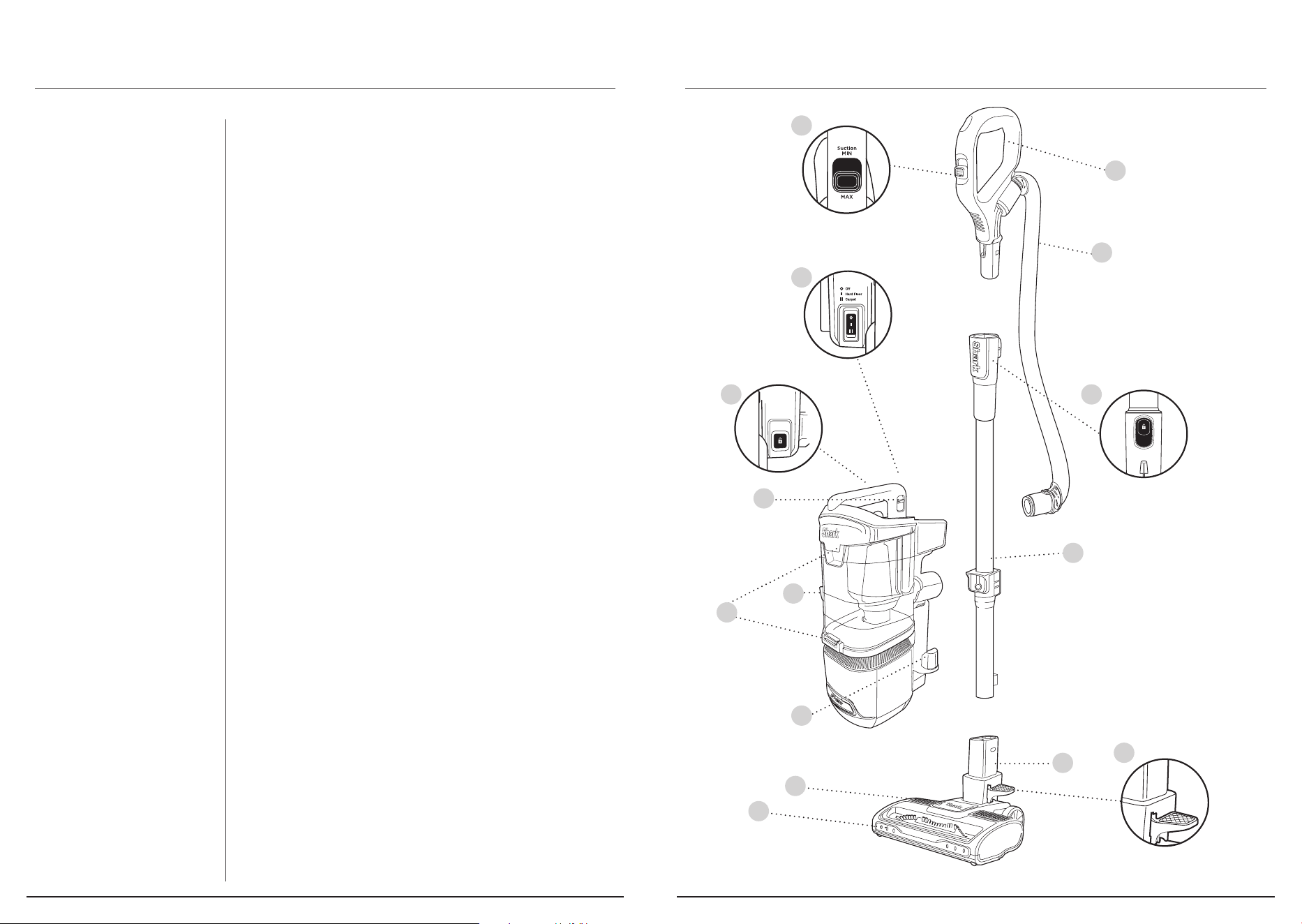
MAIN UNIT
A Suction Control Slider
B Handle
C Hose
D Handle Release Button
E Power Switch
F Wand Release Button
G Wand
H Dust-Cup Release Latch
I Lift-Away™ Pod
J Dust-Cup Empty Buttons
K Lower Cord Hook
L Lift-Away™ Food Pedal
M Motorised Floor Nozzle
N Headlights
O Brushroll indicator light
GETTING TO KNOW YOUR SHARK® CORDED UPRIGHT
VACUUM WITH LIFT-AWAY™ TECHNOLOGY.
Wand
Release
A
B
L
E
F
I
C
D
G
H
J
K
O
AU 02 8801 7666 NZ 0800 112 660
AU sharkclean.com.au NZ sharkclean.co.nz
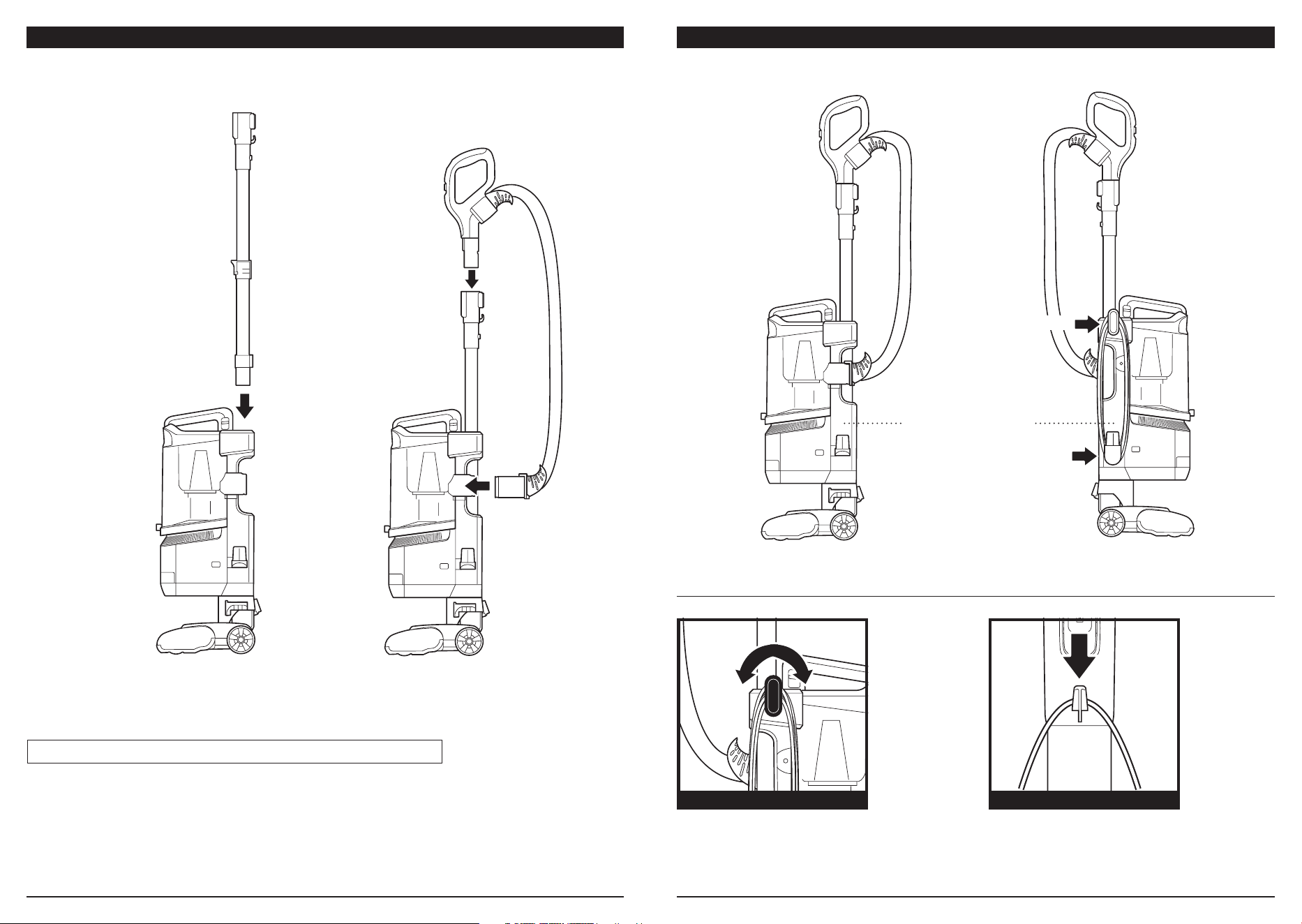
ASSEMBLY ASSEMBLY
Tool Storage Posts
Upper Cord Hook
Lower Cord Hook
POWER CORD
For cord access, rotate upper hook down
and remove cord.
Use cord holder on the side of wand to hold
cord in place while vacuuming.
UPPER CORD HOOK CORD HOLDER
1. Insert Wand into pod
2. Insert Handle into wand.
3. Attach Hose to back of vacuum pod.
(Click)
1
(Click)
2
(Click)
3
NOTE: Ensure all parts firmly CLICK into place before operating.
AU 02 8801 7666 NZ 0800 112 660
AU sharkclean.com.au NZ sharkclean.co.nz
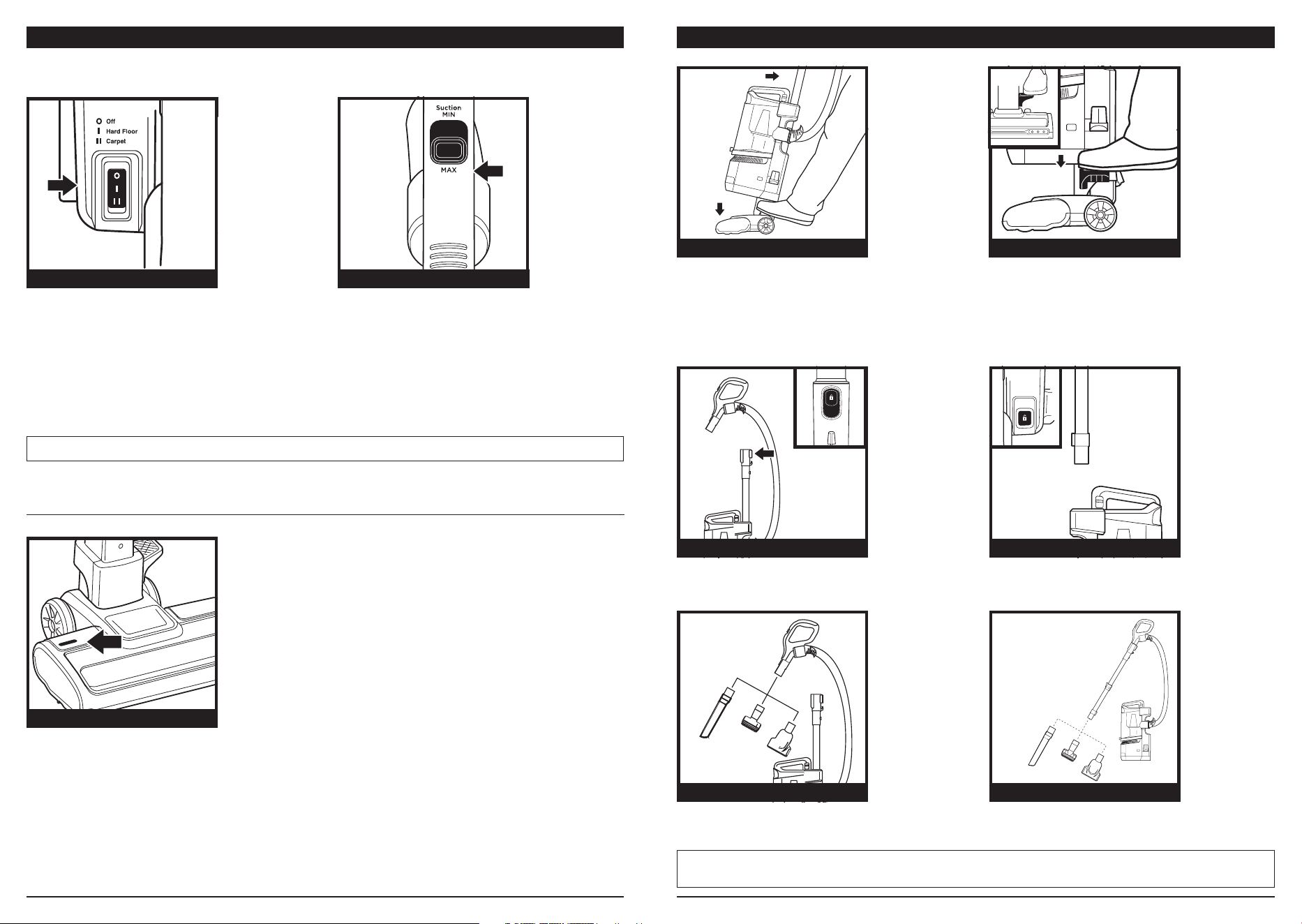
Select surface setting:
O Power O
I Hard Floor
For hard floors, small area rugs or
delicate carpets. The brushroll will spin at
a slower speed.
II Carpet
The brushroll will spin faster for cleaning
carpets.
NOTE: All accessories are compatible with both the wand and the handle. Included accessories
will vary by model.
NOTE: Brushroll will continue to spin in all modes.
CLEANING MODES
To engage brushroll, step on floor nozzle and
tilt handle back firmly.
Step on the pedal on the floor nozzle to lift
o the pod.
When finished cleaning in Lift-Away mode,
reattach the pod by sliding it onto the floor
nozzle post until it clicks into place.
WHAT DOES THE BRUSHROLL INDICATOR LIGHT MEAN?
Solid Green: The brushroll is spinning and working as intended.
Solid Red: There is a jam in the brushroll area. Turn o and unplug the vacuum and remove any
blockages in the nozzle.
Flashing Red: The motorised floor nozzle is overheating. Turn the vacuum o and wait a
minimum of 60 minutes for the unit to cool down.
Press the Wand Release button and pull up on
the wand to detach it from the pod.
Press the Handle Release button and pull up on
the handle to detach it from the wand.
Attach an optional cleaning accessory to
handle or wand.
UPRIGHT MODE LIFT AWAY MODE
POWER/SURFACE SWITCH
INDICATOR LIGHT
ACCESSORIES—WANDACCESSORIES—HANDLE
SETTINGS
BRUSHROLL INDICATOR LIGHT
ABOVE-FLOOR—WANDABOVE-FLOOR—HANDLE
Wand
Release
The Suction Control Slider located on the
handle allows you to adjust the suction
depending on the floor type.
MIN: to reduce suction and increase
maneuverability on carpets.
MAX: to increase suction on hard floors.
SUCTION CONTROL
AU 02 8801 7666 NZ 0800 112 660
AU sharkclean.com.au NZ sharkclean.co.nz
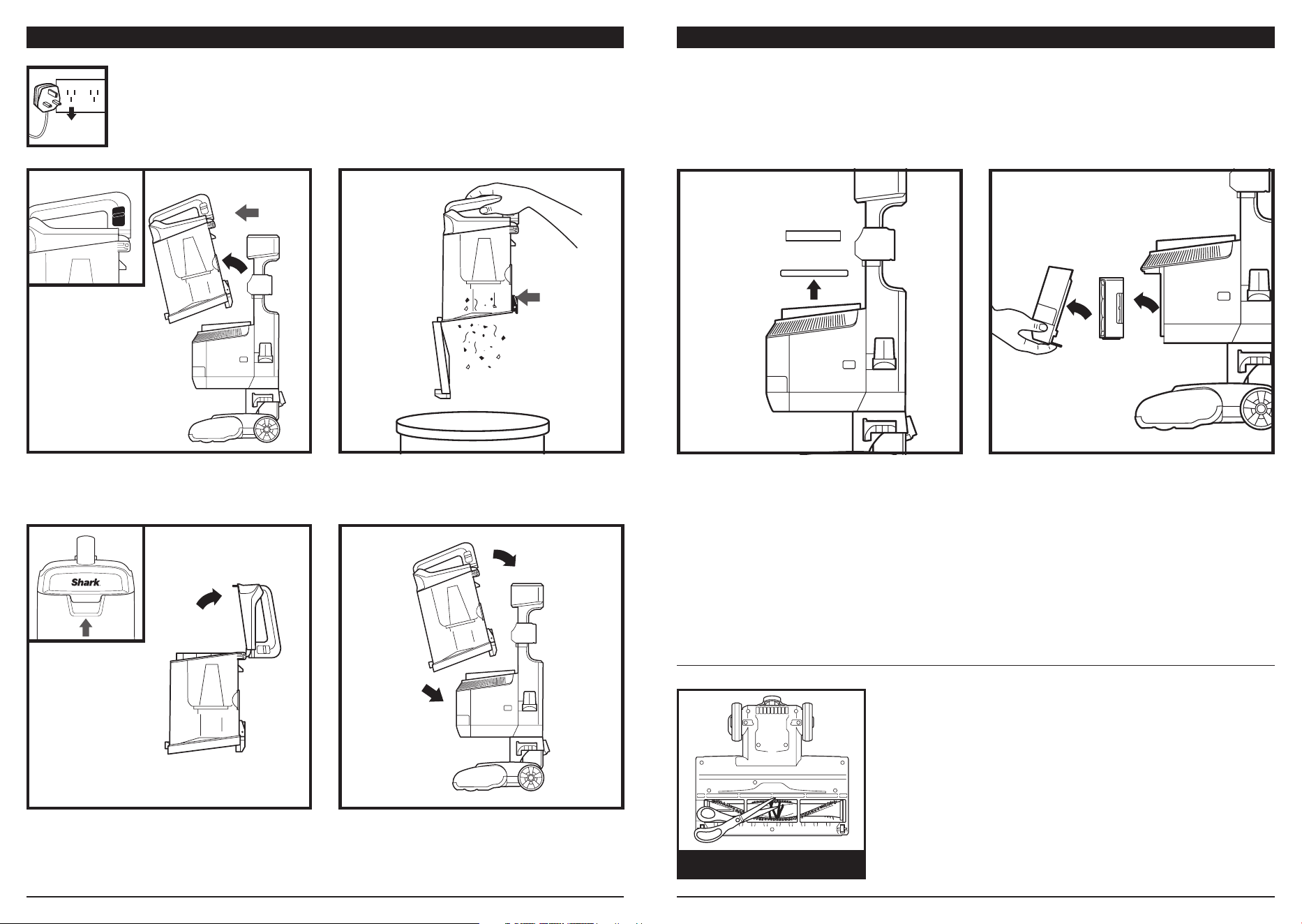
EMPTYING THE DUST CUP
To remove Dust Cup, pull up on the release
button located on the side of dust cup handle.
Tilt dust cup forward, then lift to remove.
To reattach, place the bottom of dust cup
onto the pod and then tilt until it clicks
into place.
Hold the dust cup over the bin and press the
release button to open bottom of dust cup.
To remove collected debris from Lint Screen,
lift the tab at the top of the dust cup to
open the lid. Remove debris from lint screen
toclean.
Regularly rinse the filters to maintain your vacuum's suction power.
Rinse filters with cold water only. Allow all filters to air-dry for at least 24 hours before
reinstalling them to prevent liquid from being drawn into electronic parts.
CLEANING THE FILTERS
IMPORTANT: DO NOT use soap when cleaning the filters.
IMPORTANT: Unplug the power cord before performing any maintenance.
Post-Motor
Filter
Foam
Felt
Filter
Door
RINSE PRE-MOTOR FILTERS
EVERY MONTH
1 Pre-Motor (foam and felt):
With the dust cup removed, take out the
foam and felt filters, and rinse with water. Tap
loose dirt o filters between washes
as needed.
RINSE POST MOTOR FILTER EVERY YEAR
To remove the Post motor Filter, first pull the
tab on the bottom of the filter door, then lift
o the door. Press the tab on the side of the
Post motor filter.
To reattach the door, align the top first, then
press in the bottom until it clicks into place.
Clean o any debris on the bristles. Carefully
use scissors within the brushroll groove to cut
away any hair or debris wrapped around the
brushroll.
CLEANING THE BRUSHROLL
DEBRIS WRAPPED
AROUND BRUSHROLL
AU 02 8801 7666 NZ 0800 112 660
AU sharkclean.com.au NZ sharkclean.co.nz
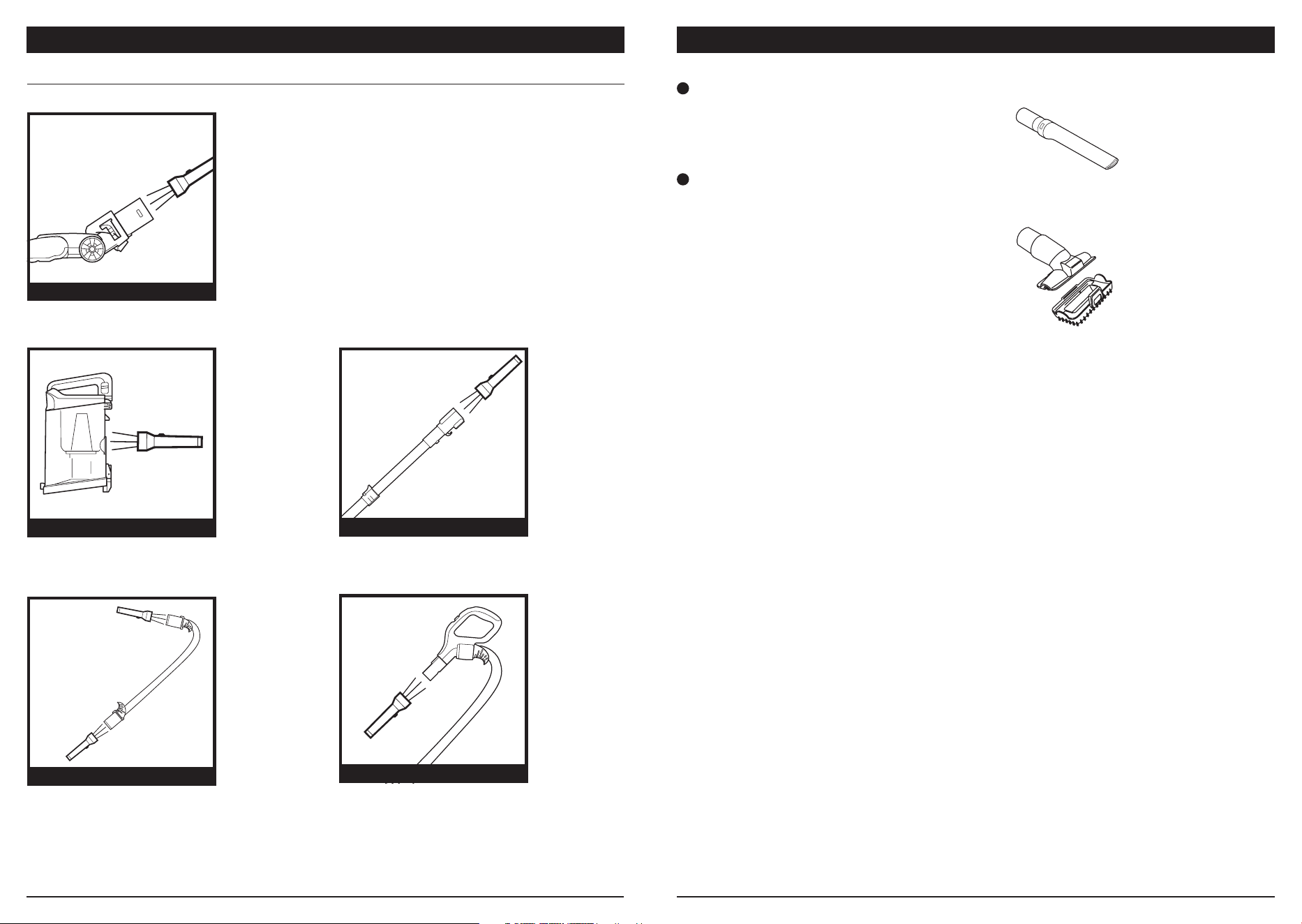
CHECKING FOR BLOCKAGES
MAINTENANCE
Check the opening at the top of the nozzle
for any blockages.
Detach wand from pod and handle, and
check both ends for blockages.
Detach dust cup from vacuum pod. Empty
dust cup, remove debris from lint screen, and
check for blockages.
DUST CUP BLOCKAGES
WAND BLOCKAGES
Detach handle from wand and check
openings for blockages.
Detach hose from handle by pressing on the
release button at the top of the hose. Detach
the hose from the pod, and check openings
for blockages.
HANDLE BLOCKAGES
HOSE BLOCKAGES
NOZZLE BLOCKAGES
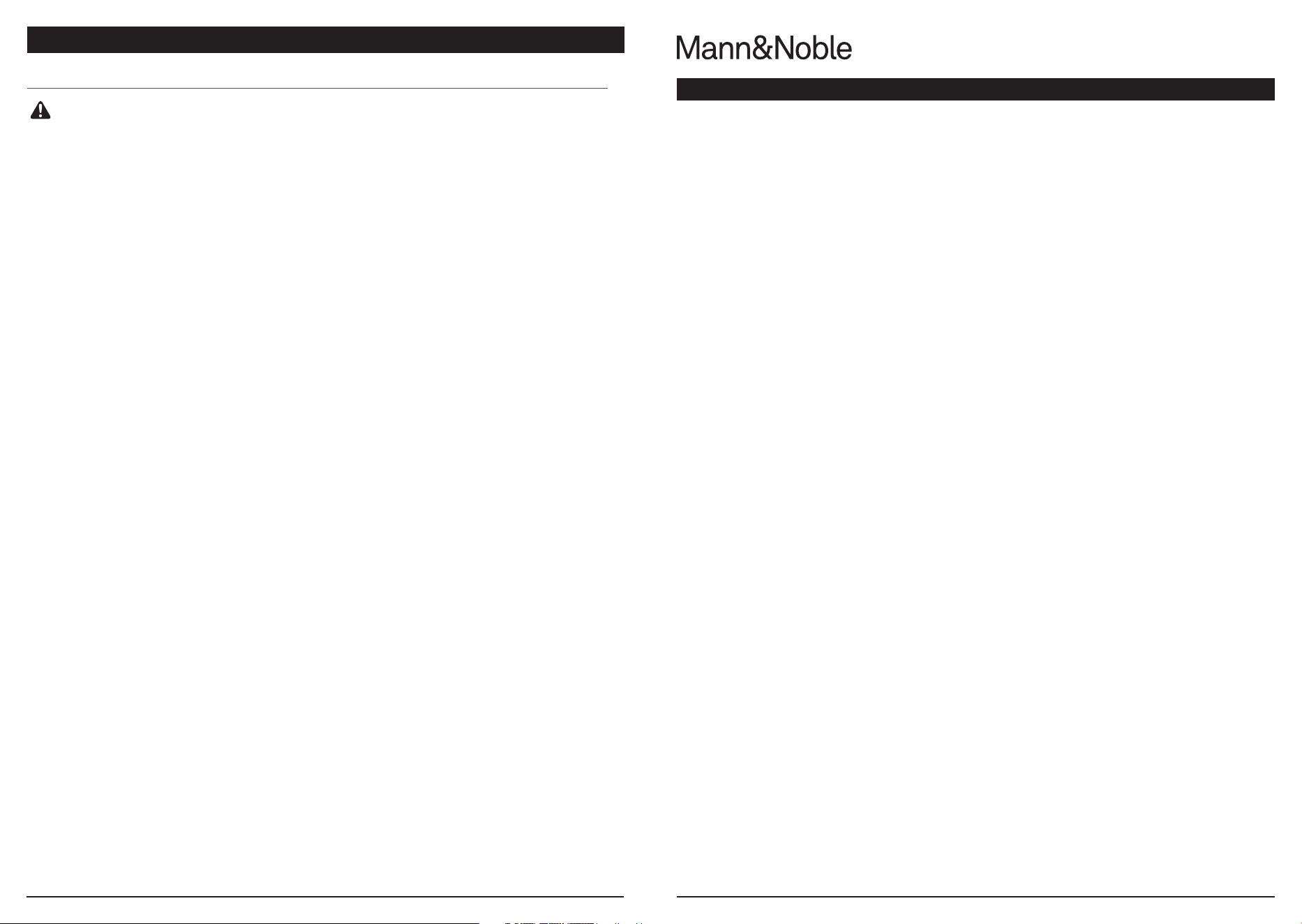
INCLUDED ACCESSORIES
A
A
Crevice Tool
This slim crevice tool is great for cleaning
tight spaces, between couch cushions, and
in hard-to-reach areas.
B
Multi-Surface Tool
A single convertible tool for cleaning tough
pet messes two ways: use the sti bristle
brush to clean stuck-on debris, or take o
the bristles to reveal an upholstery tool
perfect for removing stubborn pet hair and
large piles of debris.
NOTE: Not all accessories come with all units. Please refer to the packaging panels for your unit's configuration.
To order additional accessories, visit sharkclean.com.au or sharkclean.co.nz.
NOTE: Torch not included.
B
AU 02 8801 7666 NZ 0800 112 660
AU sharkclean.com.au NZ sharkclean.co.nz
TROUBLESHOOTING GUIDE
Vacuum is not picking up debris. No suction or light suction.
(Refer to Maintenance section for more information.)
• Check filters to see if they need cleaning. Follow instructions for rinsing and drying the
filters before re-inserting back into the vacuum.
• Dust cup may be full; empty dust cup.
• Check hose, hose connections, nozzles, and accessories for blockages; clear blockages
if required.
• Remove any string, carpet fibres or hair that may be wrapped around the brushroll.
Vacuum lifts area rugs.
• Turn o the unit to disengage the brushroll and restart with the POWER button
for suction only cleaning.
• Suction is powerful. Take care when vacuuming area rugs or rugs with delicately
sewn edges.
• Turn o the unit and disengage the area rug from the brushroll and restart the unit.
Brushroll does not spin.
• If brushroll indicator light on the floor nozzle turns red, the brushroll has stopped
spinning. Immediately turn o and unplug vacuum, disconnect the nozzle and remove
blockage before reconnecting and turning vacuum back on.
• Pull the handle toward you and release the floor nozzle to disengage the
auto-o feature.
• Make sure that the carpet height selector is not on the HARD FLOOR setting.
• Immediately turn o and unplug vacuum, disconnect the nozzle and remove blockage
before reconnecting and turning vacuum back on.
Vacuum turns o on its own or Brushroll Indicator Light flashes red.
This vacuum cleaner is equipped with a motor protective thermostat. If for some reason
your vacuum overheats, the thermostat will automatically turn the suction motor o.
Should this occur, perform the following steps to restart the thermostat:
1. Turn the unit o.
2. Unplug the vacuum.
3. Empty the dust cup and clean filters (see page previous page)
4. Check for blockages in hose, accessories, and inlet openings.
5. Allow the unit to cool for a minimum of 45 minutes.
6. Plug in the vacuum.
7. Restart the unit by turning the power on.
Note: If vacuum still does not start, contact Customer Service at AUST: 02 8801 7666 or
NZ: 0800 112 660.
WARNING: To reduce the risk of shock and unintended operation, turn
power o and unplug unit before servicing.
If your vacuum becomes defective due to faulty material or workmanship within a period of 2 years from the date
of purchase, we warrant to do the following:
For New Zealand Consumers: We will replace the product with a new product, free of charge, or repair the product
at our cost, at our discretion.
For Australian Consumers: Our goods come with guarantees that cannot be excluded under the Australian
Consumer Law. You are entitled to a replacement or refund for a major failure and for compensation for any other
reasonably foreseeable loss or damage. You are also entitled to have the goods repaired or replaced if the goods fail
to be of acceptable quality and the failure does not amount to a major failure.
Your warranty is subject to the following conditions:
DO NOT operate the appliance with a damaged plug or cord, or if the unit or battery has been dropped, damaged
or dropped in water. To avoid the risk of electric shock, do not disassemble or attempt to repair the appliance on
your own. If the charger cord is damaged, it must be replaced by a qualified electrician in order to avoid a hazard.
Incorrect re-assembly or repair can cause a risk of electric shock or injury to persons when the appliance is used.
• The item has not been misused, abused, neglected, altered, modified or repaired by anyone.
• The item has been subjected to fair wear and tear.
• The item has not been used for trade, professional or hire purposes.
• The item has not sustained damage through foreign objects, substances or accident.
Your warranty does not cover:
• Components that are subject to natural wear and tear caused by normal use in accordance with operating
instructions.
• Unauthorised/improper maintenance/handling or overload is excluded from this warranty.
• Any additional property that may be damaged due to a fault or misuse of the product and/or component.
For guarantee claims, you will need to submit a proof of purchase in the form of a valid receipt that displays date
and place of purchase.
This warranty does not replace but is in addition to your statutory rights.
This warranty does not apply to accessories supplied with the item.
This warranty applies only to the original purchaser and may not be transferred.
Replacement items will be covered by the limited warranty for the balance of the warranty period from the date of
the original purchase.
Please note:
Only the defective product or parts returned to place of purchase will be replaced under this warranty.
LIMITED WARRANTY • TWO (2)YEARS

AU 02 8801 7666 NZ 0800 112 660
AU sharkclean.com.au NZ sharkclean.co.nz
TECHNICAL SPECIFICATIONS
Voltage: 220-240V~, 50-60Hz
Watts: 750W
Power Nozzle: 80W
Benefits of registering your product and
creating an account:
• Get easier, faster product support and
access to warranty information
• Access troubleshooting and product care
instructions
• Be among the first to know about
exclusive product promotions
RECORD THIS INFORMATION
Model Number:
����������������������������������������������������������������������������������������������������
Serial Number:
������������������������������������������������������������������������������������������������������
Date of Purchase:
��������������������������������������������������������������������������������������������
(Keep receipt)
Store of Purchase:
������������������������������������������������������������������������������������������
REGISTER YOUR PURCHASE
sharkclean.com.au
sharkclean.co.nz
NOTES
AU 02 8801 7666 NZ 0800 112 660
AU sharkclean.com.au NZ sharkclean.co.nz
NOTESNOTES

PLEASE READ CAREFULLY AND KEEP FOR FUTURE REFERENCE.
This Owner’s Guide is designed to help you get a complete understanding of your new
Shark® vacuum.
Illustrations may dier from actual product. We are constantly striving to improve our products;
therefore the specifications contained herein are subject to change without notice.
For SharkNinja U.S. Patent information, visit sharkninja.com/patents
© 2022 SharkNinja Operating LLC. LIFT-AWAY and SHARK are registered
trademarks of SharkNinja Operating LLC.
NV602ANZSeries�IB�REV�Mv7
Proudly distributed by
Mann&Noble Pty Ltd
Building D, 33 Quarry Road
Erskine Park NSW 2759
Australia
AUS 02 8801 7666
NZ 0800 112 660
Visit us at:
sharkclean.com.au
sharkclean.co.nz