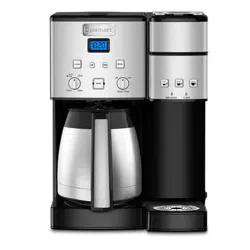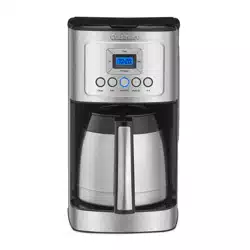
For your safety and continued enjoyment of this product, always read the instruction book carefully before using.
INSTRUCTION
BOOKLET
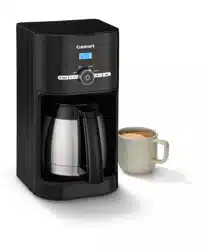
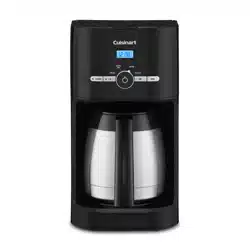
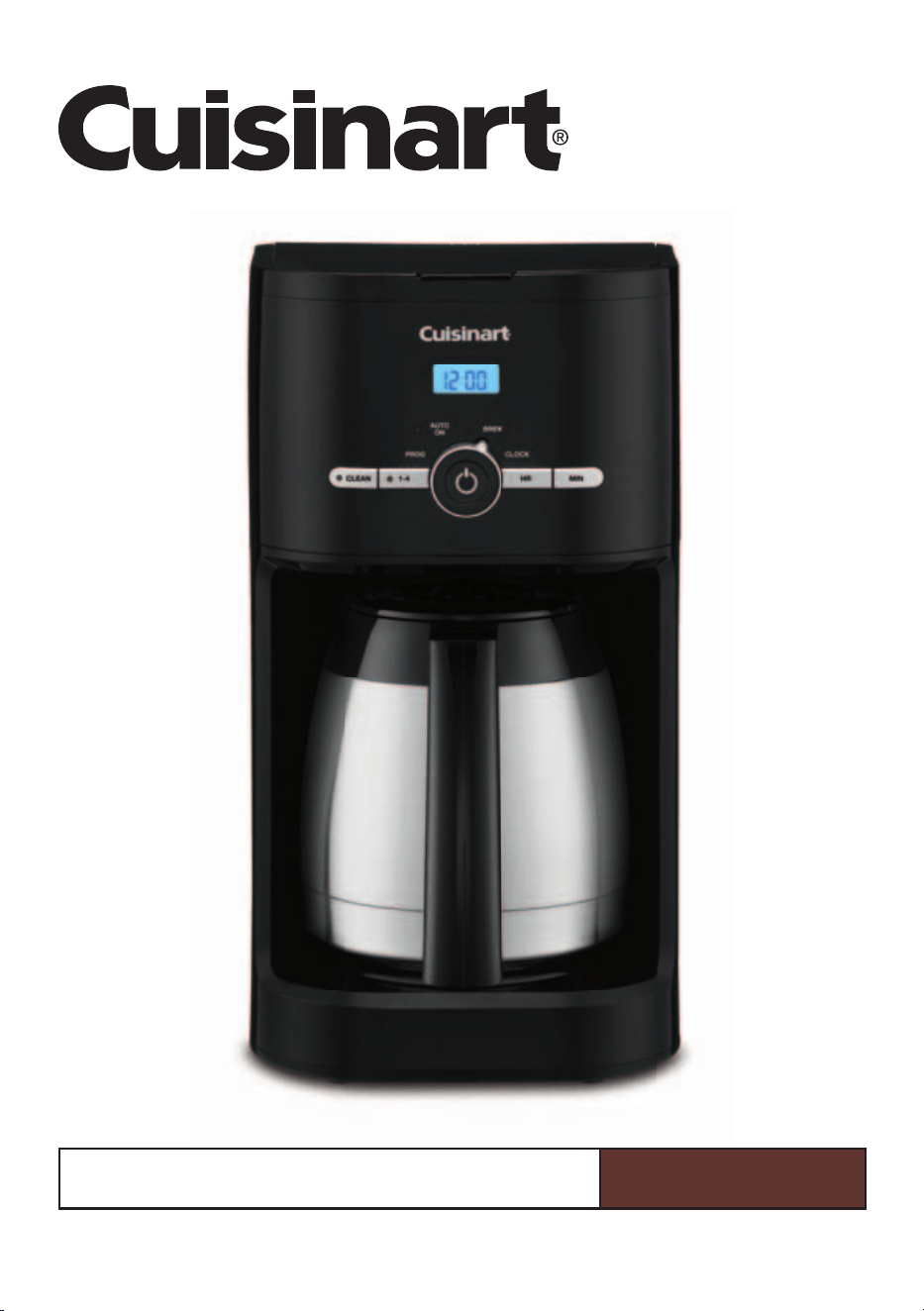
10-Cup Thermal Classic Coffeemaker
DCC-1170 Series
2
IMPORTANT
SAFEGUARDS
When using electrical appliances, basic safety
precautions should always be taken to reduce
the risk of fire, electric shock and/or injury to
persons, including the following:
1. READ ALL INSTRUCTIONS.
2. Do not touch hot surfaces. Use handles
and knobs.
3. To protect against electric shock, do not
place cord, plug, or base in water or other
liquids.
4. Close supervision is necessary when any
appliance is used by or near children.
5. Unplug from outlet when either the
appliance or display clock is not in use,
and before cleaning. Allow to cool before
putting on or taking off parts, and before
cleaning the appliance.
6. Do not operate any appliance with
a damaged cord or plug or after the
appliance malfunctions or has been
dropped or damaged in any manner.
Return appliance to the nearest Cuisinart
Repair Center for examination, repair,
or electrical or mechanical adjustment.
7. The use of accessory attachments not
recommended by Cuisinart may cause
injuries.
8. Do not use outdoors.
9. Do not let cord hang over edge of table
or counter, or touch any hot surface.
10. Do not place on or near a hot gas
or electric burner, or in a heated oven.
11. Always fill water reservoir first, then plug
cord into the wall outlet. To disconnect,
turn controls to OFF, then remove plug
from wall outlet. To unplug, grasp the plug
and pull from the outlet. Never pull from
the power cord.
12. Do not use appliance for anything other
than its intended use.
13. Snap lid securely onto carafe before
serving any beverages.
14. Scalding may occur if the lid is removed
during the brewing cycle.
15. The thermal carafe is designed for use
with appliance base only. It must never
be used on the range top.
16. Do not set a hot carafe on a wet or cold
surface.
17. Do not use a cracked carafe or a carafe
having a loose or weakened handle.
18. Do not clean carafe or warming plate
with cleansers, steel wool pads, or other
abrasive materials.
19. WARNING: TO REDUCE THE RISK
OF FIRE OR ELECTRIC SHOCK,
DO NOT REMOVE BASE COVER.
NO USER-SERVICEABLE PARTS ARE
INSIDE. REPAIR SHOULD BE DONE
ONLY BY AUTHORIZED PERSONNEL.
20. Avoid contact with moving parts.
21. Do not operate your appliance in an
appliance garage or under a wall cabinet.
When storing in an appliance garage,
always unplug the unit from the
electrical outlet. Not doing so could
create a risk of fire, especially if the
appliance touches the walls of the garage
or the door touches the unit as it closes.
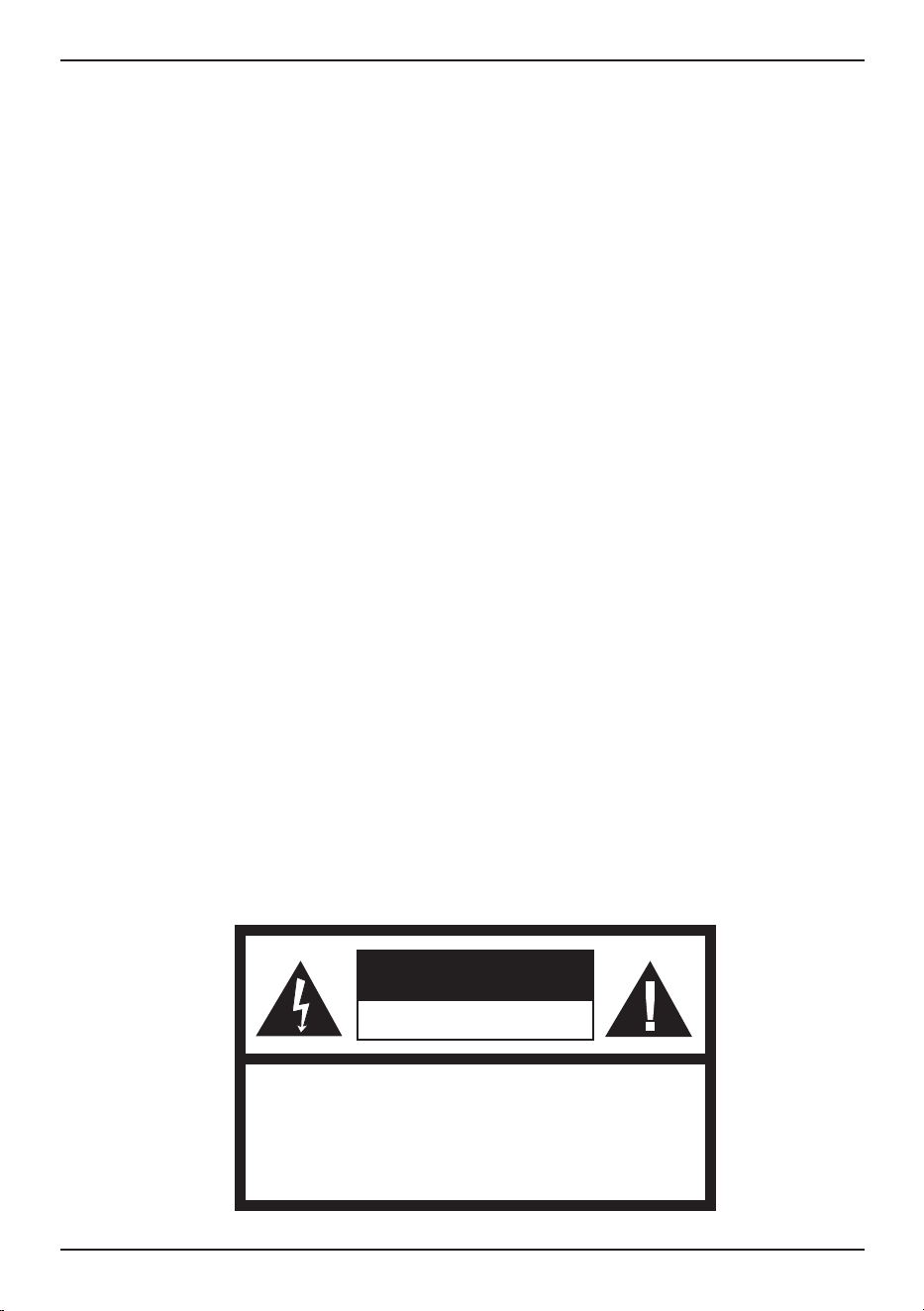
WARNING: RISK OF FIRE OR ELECTRIC SHOCK
The lightning flash with arrowhead symbol within an equilateral triangle is intended
to alert the user to the presence of uninsulated dangerous voltage within the
product’s enclosure that may be of sufficient magnitude to constitute a risk of fire
or electric shock to persons.
The exclamation point within an equilateral triangle is intended to alert the user
to the presence of important operating and maintenance (servicing) instructions
in the literature accompanying the appliance.
3
SAVE THESE
INSTRUCTIONS
FOR
HOUSEHOLD
USE ONLY
SPECIAL CORD SET
INSTRUCTIONS
A short power-supply cord is provided
to reduce the risks resulting from becoming
entangled in or tripping over a longer cord.
Extension cords may be used if care
is exercised in their use.
If an extension cord is used, the marked
electrical rating of the extension cord must be
at least as great as the electrical rating of the
appliance, and the longer cord should be
arranged so that it will not drape over the
countertop or tabletop where it can be pulled
on by children or tripped over.
NOTICE
This appliance has a polarized plug (one blade
is wider than the other). To reduce the risk of
electric shock, this plug will fit in a polarized
outlet only one way. If the plug does not fit fully
in the outlet, reverse the plug. If it still does not
fit, contact a qualified electrician. Do not modify
the plug in any way.
OPERATING NOTICE
Clogging and backing up of water and/or
coffee in the filter basket can occur under
any or a combination of any of the following
conditions: The use of too finely ground coffee,
using two or more paper filters, using the gold-
tone filter in conjunction with a paper filter,
not properly cleaning coffee grounds from
the gold-tone filter, or allowing coffee grounds
to spill over the filter.
Caution: Never open the reservoir cover during
the brewing cycle, even if no water is draining
from the filter basket, since extremely hot water/
coffee can spill out from the basket and cause
injury. If water/coffee is not draining from the
filter basket during the brewing cycle, unplug
the unit and wait 10 minutes before opening
the reservoir cover and checking the basket.
WARNING: TO REDUCE THE RISK OF FIRE OR ELECTRIC SHOCK,
DO NOT REMOVE COVER (OR BACK)
NO USER-SERVICEABLE PARTS INSIDE
REPAIR SHOULD BE DONE BY AUTHORIZED SERVICE PERSONNEL ONLY
WARNING
RISK OF FIRE OR ELECTRIC SHOCK
DO NOT OPEN

4
CONTENTS
Important Safeguards . . . . . . . . . . . . . . . . . 2–3
Important Unpacking Instructions . . . . . . . . . 4
The Quest for the
Perfect Cup of Coffee . . . . . . . . . . . . . . . . . . . 4
Features and Benefits . . . . . . . . . . . . . . . . . . . 5
Control Panel . . . . . . . . . . . . . . . . . . . . . . . . . . 6
Programming Your Coffeemaker . . . . . . . . . . 7
Charcoal Water Filter. . . . . . . . . . . . . . . . . . . . 7
Making Coffee . . . . . . . . . . . . . . . . . . . . . . . . . 8
Cleaning and Maintenance . . . . . . . . . . . . . 8–9
Warranty. . . . . . . . . . . . . . . . . . . . . . . . . . . . . 10
IMPORTANT UNPACKING
INSTRUCTIONS
1. Place the box on a large, sturdy, flat
surface.
2. Remove the instruction book and any other
literature.
3. Turn the box so that the back side of the
coffeemaker is down and slide the
coffeemaker from the box.
4. After the coffeemaker has been removed,
place the box out of the way and remove
the top and bottom two polyfoam inserts.
5. Grasp the carafe by its handle, remove it
from the resting plate and remove the
polybag.
6. Remove the polybag covering from
the coffeemaker and lift the coffeemaker
off the remaining two inserts.
We suggest you save all packing materials in
the event that future shipping of the machine
is needed. Keep all plastic bags away from
children.
THE QUEST
FOR THE PERFECT
CUP OF COFFEE
ELEMENT 1: WATER
Coffee is 98% water. The quality of that
water is as important as the quality of your
coffee. If water doesn’t taste good from
the tap, it won’t taste good in your coffee.
Cuisinart includes a charcoal water filter
to remove chlorine, bad tastes and odors,
for the purest coffee flavor, every time
you brew.
ELEMENT 2: COFFEE
While coffee is 98% water, all of the flavor
comes from the beans. To achieve the same
great taste you enjoy at a coffee bar, you
need to use the same quality of coffee.
If you choose to grind your own beans,
buy them fresh and whole. Buy only about
a two-week supply at a time, because once
the bean is broken, its flavor degrades
quickly.
ELEMENT 3: GRIND
The grind is critical for proper flavor
extraction. If the grind is too fine, over-
extraction and bitterness will result. Too fine
a grind may also clog the filter. If grind is too
coarse, the water will pass through too
quickly and the maximum flavor will not be
extracted. When grinding your own beans,
we recommend a medium-fine grind.
ELEMENT 4: PROPORTION
Coffee that is too strong or too weak
is always a disappointment. Follow the
recommended portions of ground coffee
in the instructions under Making Coffee,
and later adjust the amount to suit
your taste.
5
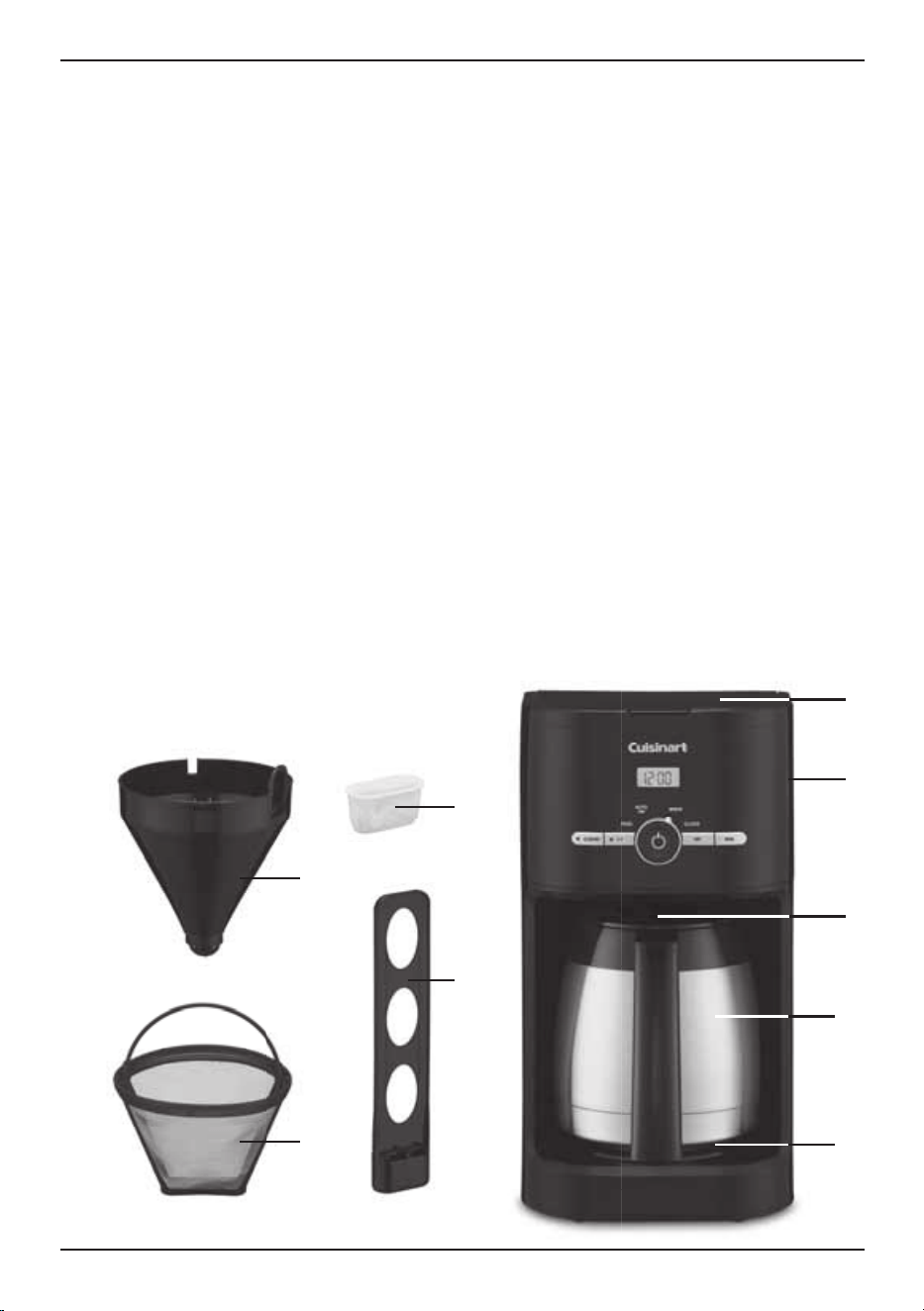
FEATURES AND
BENEFITS
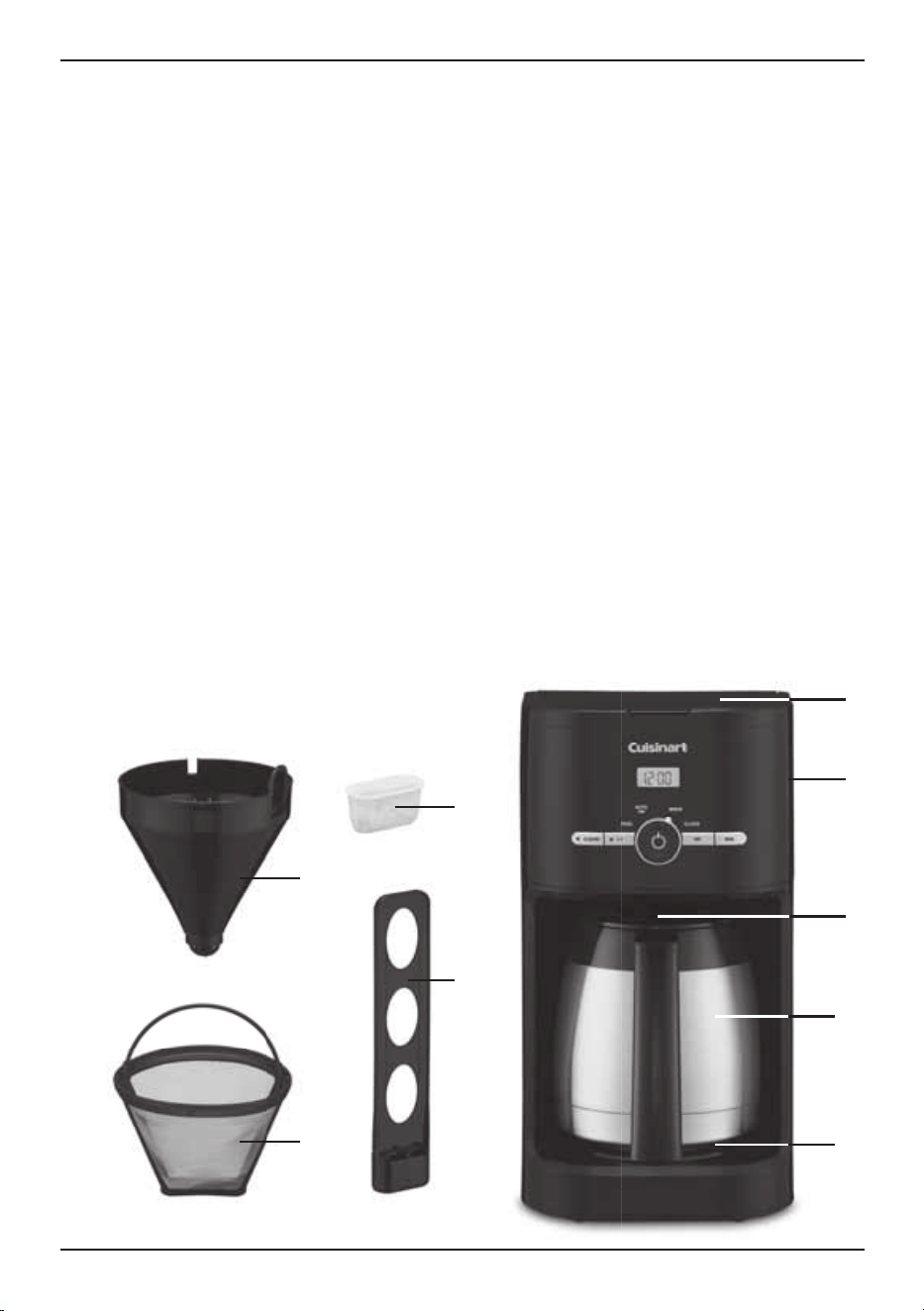
1. Reservoir Cover
Flips back for easy filling.
2. Water Reservoir
With water level indicator window.
3. Showerhead (not shown)
Distributes water evenly over coffee,
reducing temperature loss as water
passes through grounds.
4. Filter Basket
Holds a #4 paper filter OR a permanent
filter.
5. Permanent Gold-Tone
Commercial-Style Filter
Eliminates the need for paper filters.
NOTE: Some fine grounds may flow
through the filter and appear as sediment
in the carafe.
6. Charcoal Water Filter Holder
Holds filter firmly in place.
7. Charcoal Water Filter
Charcoal water filter eliminates chlorine,
bad tastes and odors from tap water.
8. Control Panel
See detailed illustration, page 6.
9. Brew Pause
™
Stops flow of coffee from basket (for 20
seconds max) when carafe is removed
from resting plate, so a cup can be poured
in mid-brew.
10. 10-Cup Thermal Carafe
The easy-pour, no-drip, 10-cup
thermal carafe has an ergonomic
handle and brewed coffee markings
for 2 to 10 cups.
11. Resting Plate
Scratch resistant with black,
nonstick coating.
12. Measuring Scoop (not shown)
13. Ready Tone (not shown)
Signals the end of the brew cycle
with 5 beeps.
14. Power Loss Backup System (not shown)
One-minute protection if a breaker trips,
unit is unplugged, or power fails. Holds all
programmed information, including time
of day and auto-on time.
2
1
9
10
11
7
4
6
5
a.
b. c.
d.
2. 3.
4. 5.
6.
6
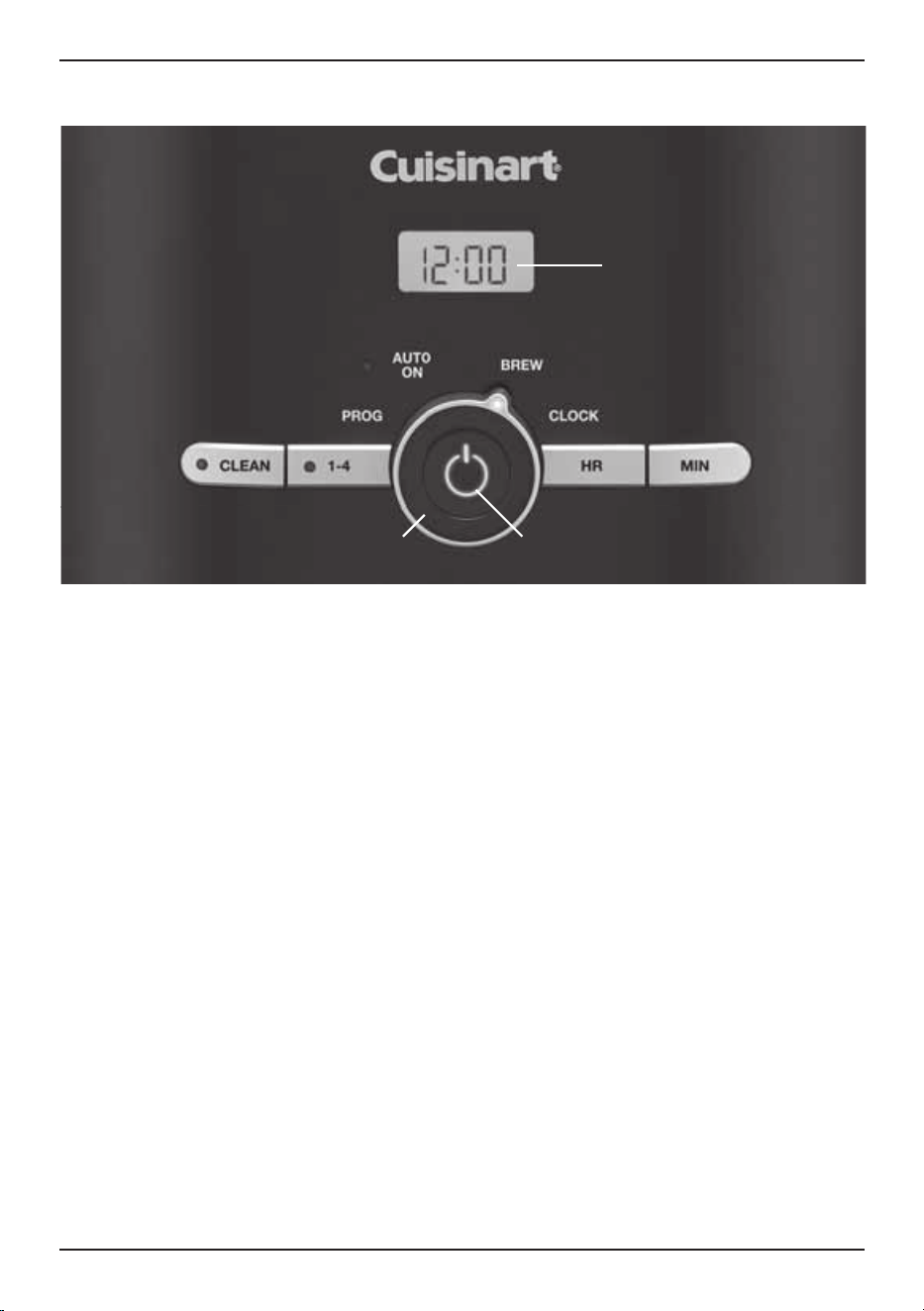
CONTROL PANEL
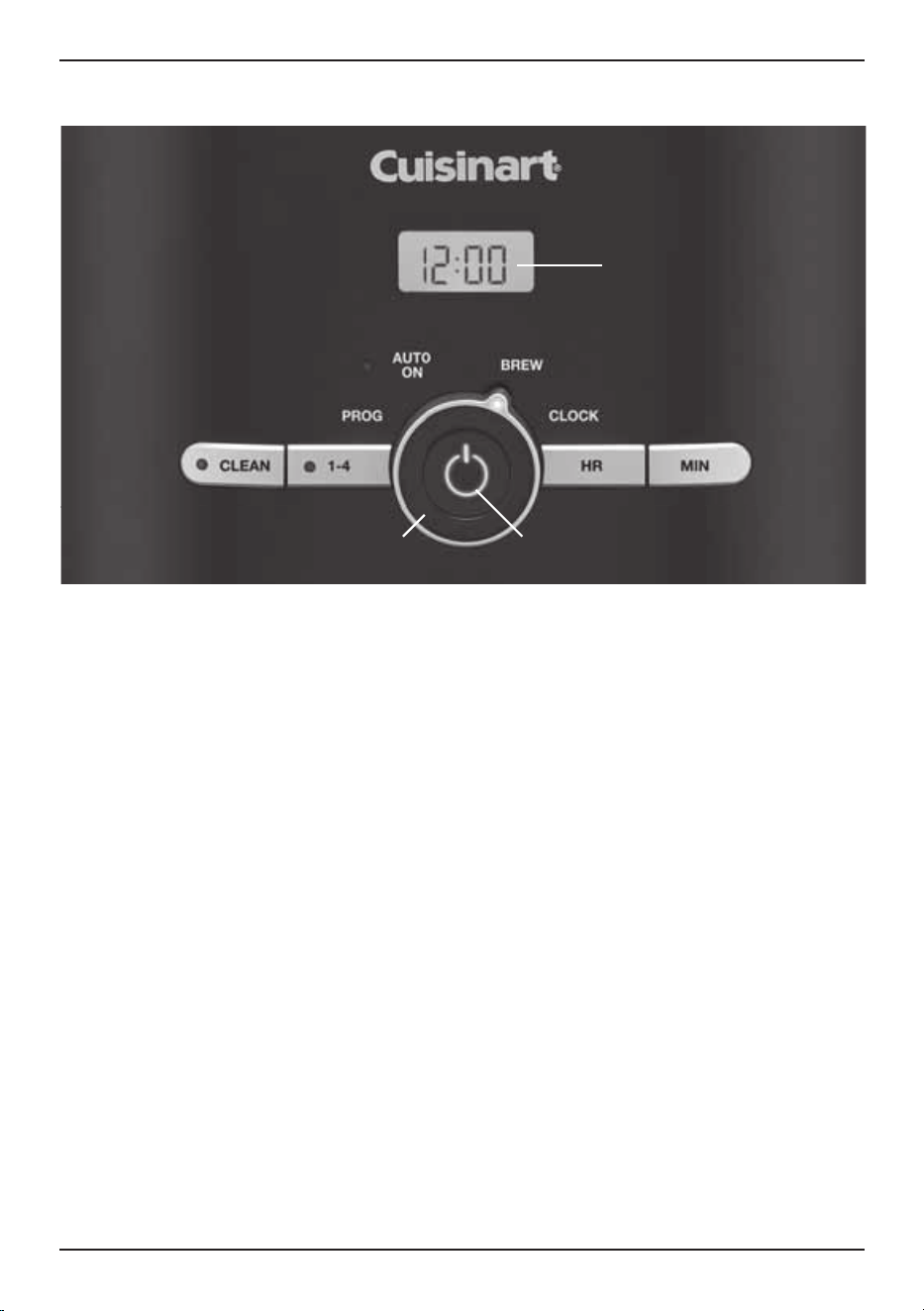
1. Clock Display
Displays time of day and Auto On.
2. Clean Button
Red indicator appears when it is time
to decalcify your coffeemaker.
3. 1–4 Cup Button
Adjusts brew process to maximize coffee
flavor when brewing fewer than 5 cups.
White indicator appears when function
is selected.
4. Function Knob
a. Program Set (Prog)
Select brew start time with hour and
minute buttons – LCD displays PM for
afternoon and nighttime brew starts.
Holds selected time until you change it.
b. Auto On
The Auto On setting programs
the coffeemaker to turn on at the time
selected, up to 24 hours in advance.
See PROGRAMMING YOUR
COFFEEMAKER (page 7) for
instructions on setting time.
c. Brew
The Brew feature is used to start
the brew cycle directly.
d. Clock Set
Used to program the time of day.
5. Power Button
Used to turn your coffeemaker on and off;
also works in tandem with the Function
knob.
6. Hour and Minute Buttons
For use in setting hour and minute for time
of day and auto-on time.
7. Audible Tone (not shown)
The Cuisinart
®
10-Cup Thermal Classic
Coffeemaker is equipped with an
audible tone that will sound 5 times
when the coffee has completed brewing
(coffee will continue to stream from the
filter for a few seconds after tone).
1.
7
PROGRAMMING YOUR
COFFEEMAKER
SETTING THE CLOCK
When the coffeemaker is plugged in,
12:00 will flash.
TURN THE FUNCTION KNOB TO CLOCK
Press Hour and Minute buttons to select
the desired time. Hold buttons down to scroll
through the digits, or press and release to
advance one digit at a time. When scrolling,
the numbers will advance slowly and then
speed up. When the number displayed
approaches the desired time, press and release
to advance one digit at a time. Be sure the PM
indicator is on if a PM time is desired. To finish
setting the clock, turn the Function knob to any
other setting or simply wait until the numbers
stop blinking.
SETTING THE AUTO-ON TIME
When you turn the Function knob to Prog, the
previously selected Auto On time, or the default
time (12:00) will flash.
1. Turn the Function knob to Prog. Follow
directions under SETTING THE CLOCK,
(above) to program your start-brew time.
2. Turn the Function knob to Auto On.
The LCD will display the current time.
3. Press and release On/Off button to activate.
The white Auto On light will illuminate,
indicating that the coffeemaker is in Auto On
mode. The On/Off white indicator light will
illuminate when the brew cycle begins at the
time you have selected. Both lights will go off
when Keep Warm cycle ends.
NOTE: To start brew time at the same time
the next day, simply make sure the Function
knob is on Auto On and press and release
On/Off button once more. The white Auto On
light will go on..
CHARCOAL WATER FILTER
Your coffeemaker comes with a charcoal water
filter that eliminates chlorine, bad tastes and
odors from tap water.
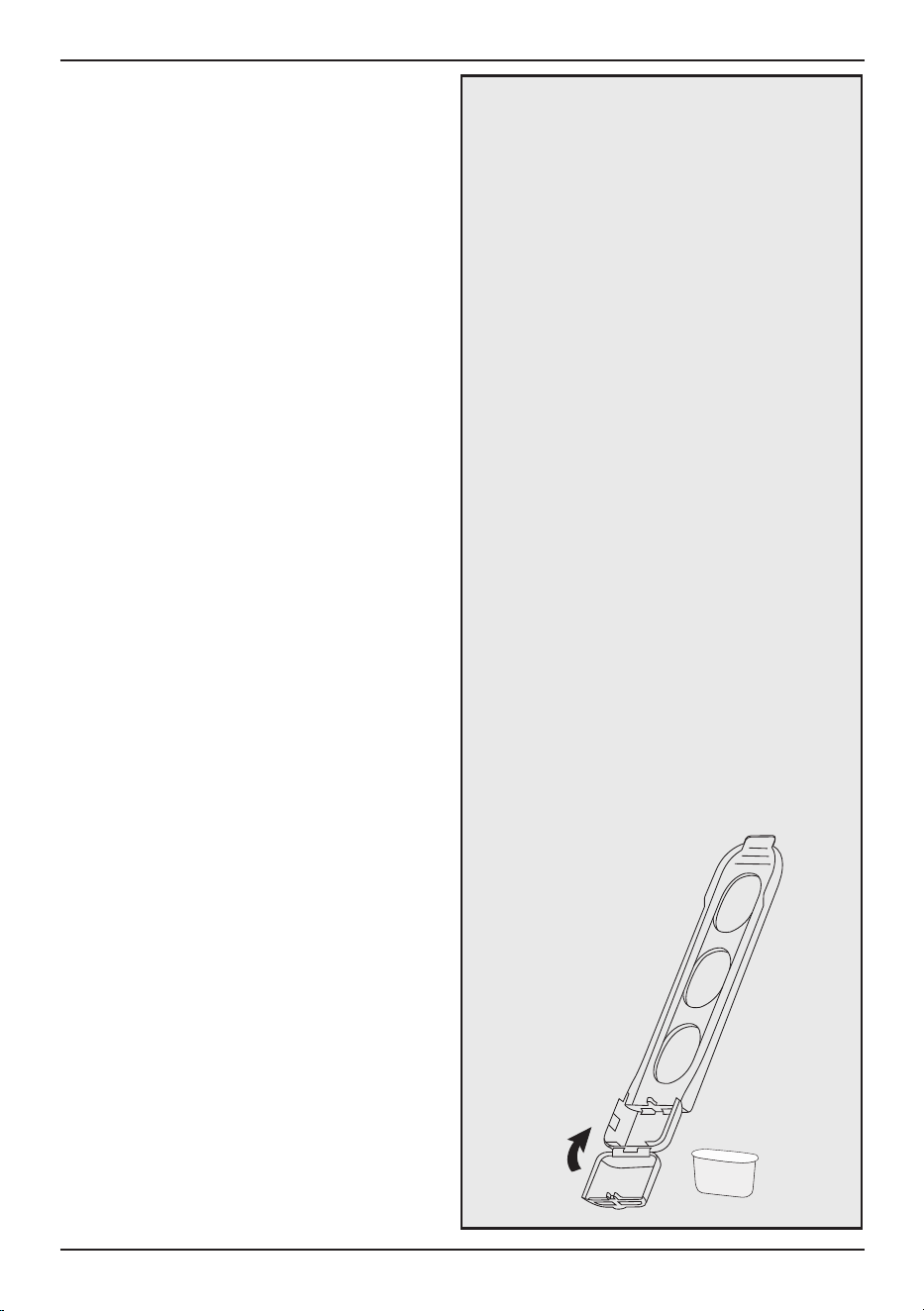
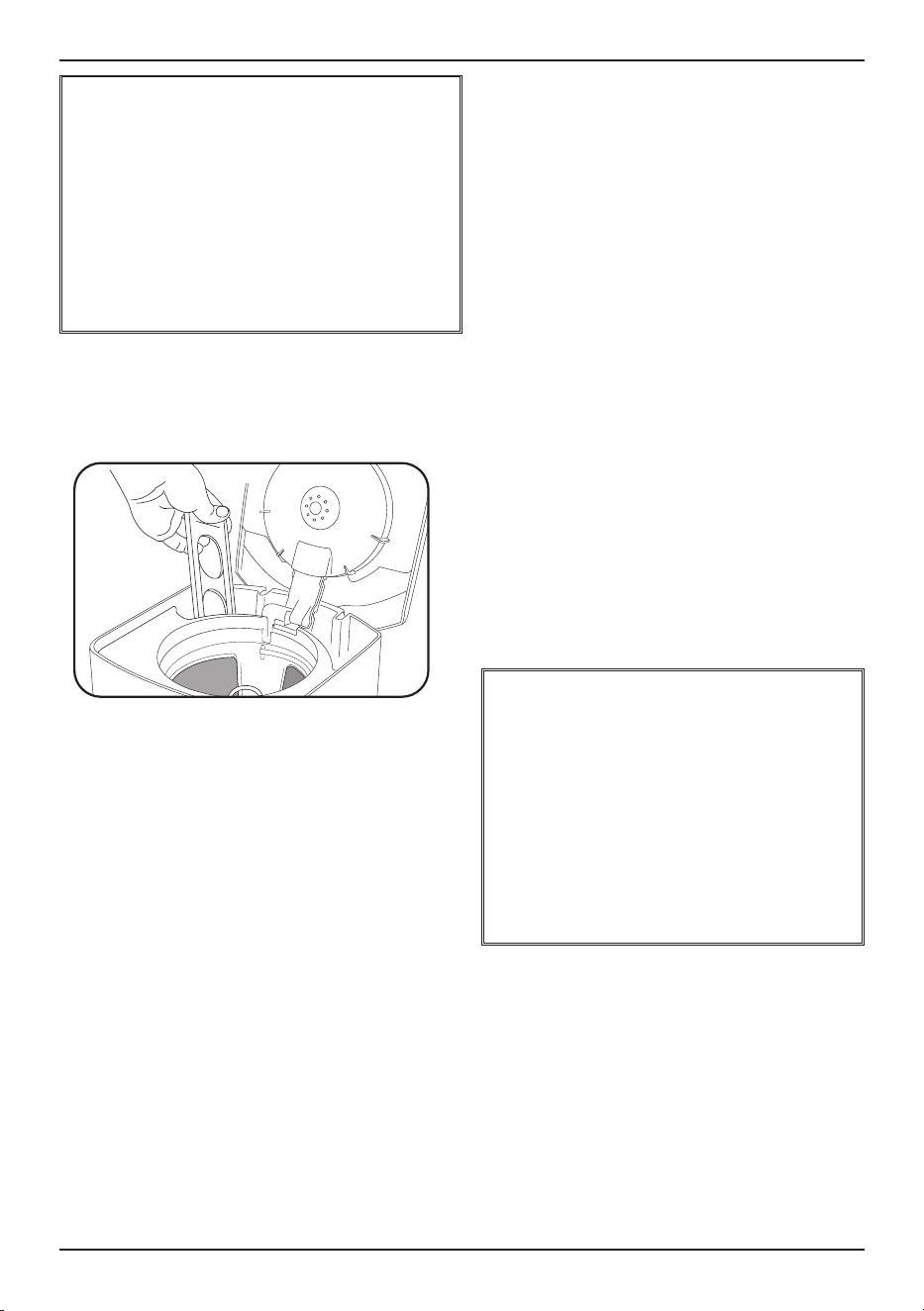
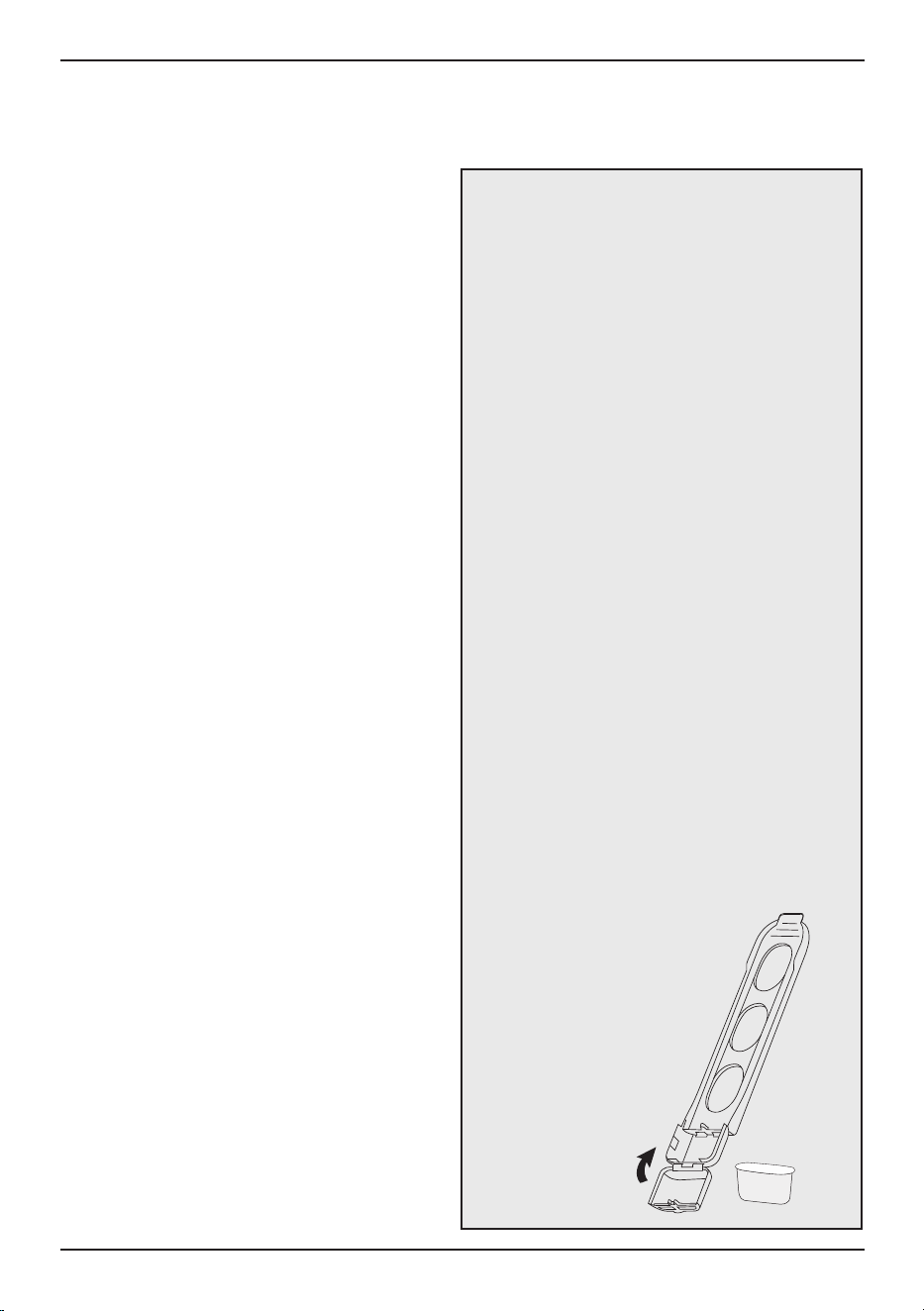
Inserting the Water Filter
• Remove the filter from the polybag and soak
it, fully immersed, in cold tap water for
15 minutes.
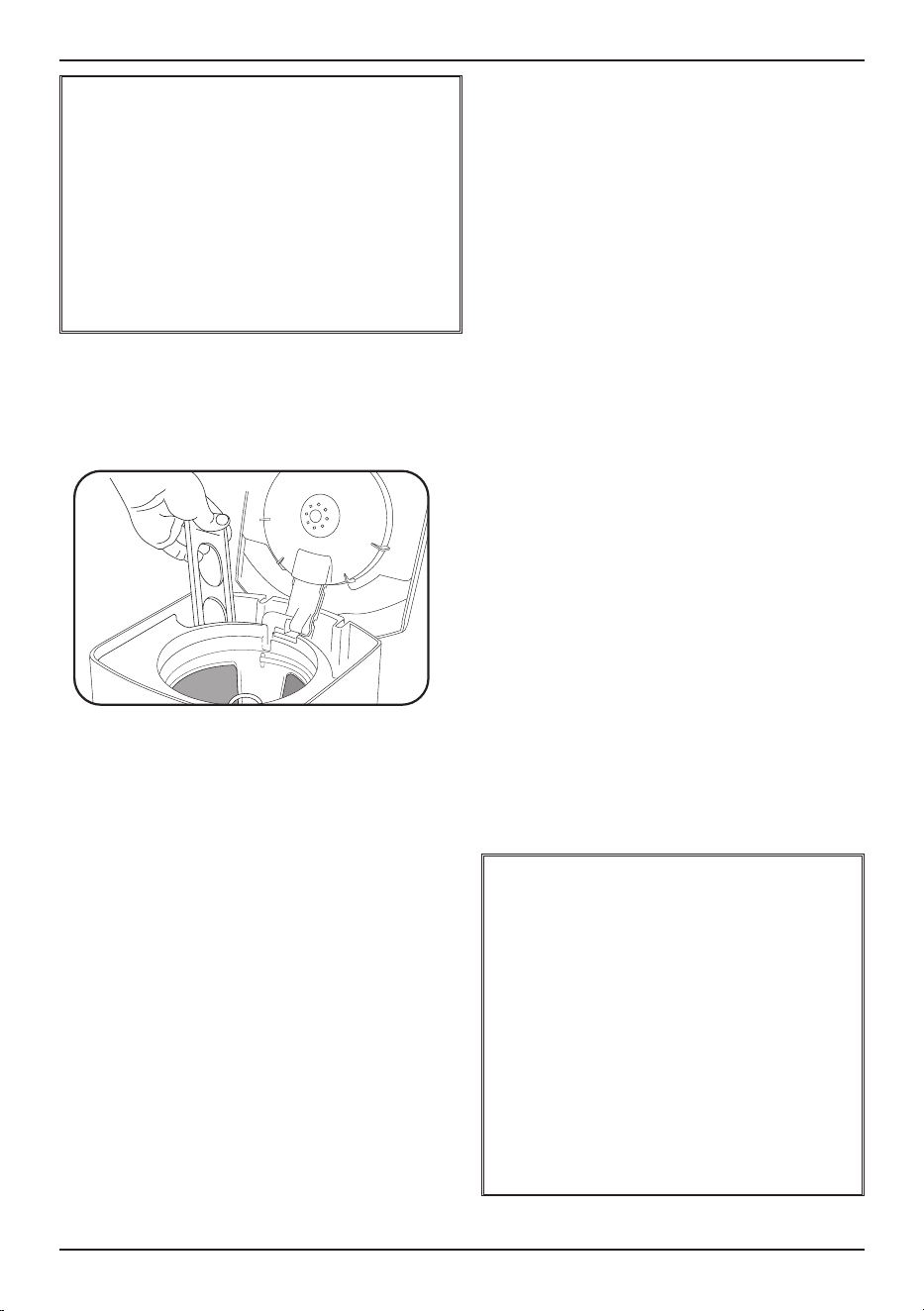
• Lift the water filter holder out of the water
reservoir (see diagram, page 5).
• Press down on the filter compartment and
pull toward you to open.
• Place filter into the holder and snap it closed.
Be careful – improper placement can tear the
filter skin.
• Flush filter by running cold tap water through
holes in bottom of compartment for 10
seconds.
• Allow the filter to drain completely.
• Slide the water filter holder back into the
channel in the water reservoir, pushing it
down to the base of the unit.
NOTE: We recommend changing the water
filter every 60 days or after 60 uses, and
more often if you have hard water.
Replacement filters can be purchased
in stores, by calling Cuisinart
Consumer Service
(1-800-726-0190) or
at www.cuisinart.com.
8
MAKING COFFEE
Follow the instructions for BEFORE
BREWING YOUR FIRST POT OF COFFEE
above.
1. Insert charcoal water filter
Follow directions for the preparation
and insertion of the filter on page 7.
2. Fill the water reservoir
Open the coffeemaker reservoir cover by
lifting it up. Pour in the desired amount of
water, using the water level indicator located
at the side of the coffeemaker.
Helpful Hint: Using cold water in the carafe
can affect brewed coffee temperature.
“Preheat” your carafe by rinsing it out with
hot water before brewing.
3. Add the ground coffee
Insert a #4 paper filter OR the gold-tone filter.
Be sure that the paper filter is completely
open and fully inserted in the basket. It may
help to fold and flatten the seams of a paper
filter beforehand. Add 1 level scoop of
ground coffee per cup. Adjust the amount
according to taste.
NOTE: The maximum capacity for
ground coffee is 15 tablespoons for this
coffeemaker. Exceeding this amount may
cause overflow if the coffee is too finely
ground.
4. Position carafe and plug in unit
Place carafe on resting plate and be sure
coffeemaker lid is closed. Plug coffeemaker
into an electrical outlet.
5. Cup preference
Push the 1–4 cup button if you are brewing
fewer than 5 cups.
6. Start brewing
Turn the function knob to Brew, press the
On/Off button, and the white indicator light
will turn on.
7. After brewing
Press power button to turn off. When the
brewing cycle has been completed, 5 beeps
will sound. Coffee will continue to stream
from the filter for several seconds.
Bottom of thermal carafe is hot to touch
for several seconds after brewing.
Use caution.
NOTE: Reservoir cover may be hot during
and directly after brewing. Wait at least
10 minutes before opening.
CLEANING AND
MAINTENANCE
Always turn coffeemaker off and remove the
plug from the electrical outlet before cleaning.
Lift up the reservoir cover. Remove and discard
the paper filter and ground coffee. Or if using
a gold-tone filter, remove and discard coffee.
The filter basket can be washed in warm, soapy
water and rinsed thoroughly, or cleaned in the
upper rack of the dishwasher. Dry all parts
after use.
BREW PAUSE
™
FEATURE
This feature interrupts the flow of coffee
from the basket to let you pour that first
cup mid-brew. Because the flavor profile
of coffee brewed at the start of a cycle
differs from that brewed toward the end,
be aware that using this feature will
weaken the flavor strength of the finished
pot.
NOTE: Removing carafe for more than 20
seconds may cause filter basket to
overflow.
BEFORE BREWING YOUR
FIRST POT OF COFFEE
Rinsing your coffeemaker: During the
manufacturing process, dust can get trapped
in the unit. We recommend flushing out the
system before brewing your first pot of coffee.
Simply fill the reservoir and power on the unit
(see steps 2, 4, 6 and 7 in MAKING COFFEE
instructions, below). DO NOT ADD COFFEE!

9
Do not put any water in the unit once the
filter basket has been removed. Wipe the
area under the filter basket with a damp
cloth.
Remove the carafe from the RESTING plate.
Discard any remaining coffee. The carafe and
lid can be washed in warm, soapy water and
rinsed thoroughly, or placed in a dishwasher.
The carafe and carafe lid should be placed
on the upper rack only.
Helpful Hint: Coffee contains oils that can
build up on your carafe. For best performance,
wash carafe and wipe pour spout clean after
each use.
Do not use any scouring agents or harsh
cleansers on any part of the coffeemaker.
Never immerse base unit in water or other
liquids. To clean base, simply wipe with a clean,
damp cloth and dry before storing. Fingerprints
and other blemishes on the housing can be
washed off with soap and water or a
nonabrasive cleaning solution. Wipe resting
plate with a clean, damp cloth. Never use
rough, abrasive materials or cleansers to clean
the resting plate. Do not dry the inside of the
water reservoir with a cloth, as lint may remain.
DECALCIFICATION
Decalcification refers to the removal of calcium
deposits that form over time on the metal parts
of your coffeemaker. The mineral content of the
tap water in your area and the frequency of use
affects the rate of the calcium buildup, which
can affect the functioning of your coffeemaker
and the flavor of your coffee.
For best performance from your coffeemaker,
we recommend cleaning it whenever the Clean
LED indicator lights up.
NOTE: Before decalcifying your unit, remove
the charcoal water filter from the water
reservoir.
To clean:
1. Fill the water reservoir to capacity with a
mixture of
1
⁄
3
white vinegar and
2
⁄
3
water.
2. Press and hold the Clean button. When the
Clean LED indicator flashes, the coffeemaker
is in Clean mode. Release the button.
3. When the cycle is completed, 5 beeps will
sound and the coffeemaker will shut off.
4. If the Clean indicator illuminates once more,
repeat the cleaning procedure with a fresh
solution of vinegar and water.
NOTE: One cleaning cycle is usually
sufficient.
5. When the Clean indicator remains off, run
one cycle with a full reservoir of fresh, cold
water to rinse the unit.
6. Return the charcoal water filter to the holder
inside the water reservoir, and your
coffeemaker is ready to brew!
MAINTENANCE
Any other servicing should be performed by an
authorized service representative.

10
WARRANTY
Limited Three-Year Warranty
This warranty is available to U.S. consumers
only. You are a consumer if you own a
Cuisinart
®
10-Cup Thermal Classic
Coffeemaker that was purchased at retail for
personal, family or household use. Except as
otherwise required under applicable law, this
warranty is not available to retailers or other
commercial purchasers or owners. We warrant
that your Cuisinart
®
10-Cup Thermal Classic
Coffeemaker will be free of defects in materials
and workmanship under normal home use for
3 years from the date of original purchase.
We recommend that you visit our website,
www.cuisinart.com, for a fast, efficient way to
complete your product registration. However,
product registration does not eliminate the need
for the consumer to maintain the original proof
of purchase in order to obtain the warranty
benefits. In the event that you do not have proof
of purchase date, the purchase date for
purposes of this warranty will be the date of
manufacture.
CALIFORNIA RESIDENTS ONLY
California law provides that for In-Warranty
Service, California residents have the option of
returning a nonconforming product (A) to the
store where it was purchased or (B) to another
retail store that sells Cuisinart products of the
same type. The retail store shall then, according
to its preference, either repair the product, refer
the consumer to an independent repair facility,
replace the product, or refund the purchase
price less the amount directly attributable to the
consumer’s prior usage of the product. If
neither of the above two options results in the
appropriate relief to the consumer, the
consumer may then take the product to an
independent repair facility, if service or repair
can be economically accomplished. Cuisinart
and not the consumer will be responsible for
the reasonable cost of such service, repair,
replacement, or refund for nonconforming
products under warranty. California residents
may also, according to their preference, return
nonconforming products directly to Cuisinart for
repair or, if necessary, replacement by calling
our Consumer Service Center toll-free at 1-800-
726-0190. Cuisinart will be responsible for the
cost of the repair, replacement, and shipping
and handling for such nonconforming products
under warranty.
HASSLE-FREE REPLACEMENT WARRANTY
Your ultimate satisfaction in Cuisinart products
is our goal, so if your Cuisinart
®
10-Cup
Thermal Classic Coffeemaker should fail within
the generous warranty period, we will repair it
or, if necessary, replace it at no cost to you.
To obtain a return shipping label, email us
at www.cuisinart.com/customer-care/product-
assistance/product-inquiry. Or call our toll-free
customer service department at 1-800-726-
0190 to speak with a representative.
Your Cuisinart
®
10-Cup Thermal Classic
Coffeemaker has been manufactured to the
strictest specifications and has been designed
for use only in 120-volt outlets and only with
authorized accessories and replacement parts.
This warranty expressly excludes any defects or
damages caused by attempted use of this unit
with a converter, as well as use with
accessories, replacement parts or repair
service other than those authorized by
Cuisinart. This warranty does not cover any
damage caused by accident, misuse, shipment
or other than ordinary household use. This
warranty excludes all incidental or
consequential damages. Some states do not
allow the exclusion or limitation of these
damages, so these exclusions may not apply to
you. You may also have other rights, which vary
from state to state.
Important: If the nonconforming product is to
be serviced by someone other than Cuisinart’s
Authorized Service Center, please remind the
servicer to call our Consumer Service Center at
1-800-726-0190 to ensure that the problem is
properly diagnosed, the product is serviced
with the correct parts, and to ensure that the
product is still under warranty.

11
NOTES:

F IB-17127-ESP
©2021 Cuisinart
East Windsor, NJ 08520
Printed in China
21CE076902
Para su seguridad y para disfrutar plenamente de este producto, siempre lea cuidadosamente
las instrucciones antes del uso.
MANUAL DE
INSTRUCCIONES
Cafetera térmica clásica de 10 tazas (1.45 L)
Serie DCC-1170

2
MEDIDAS DE
SEGURIDAD
IMPORTANTES
Al usar aparatos eléctricos, siempre debe tomar
precauciones básicas de seguridad para reducir
el riesgo de incendio, descarga eléctrica o
heridas, entre ellas las siguientes:
1. LEA TODAS LAS INSTRUCCIONES.
2. No toque las superficies calientes; use los
mangos/asas o los botones/perillas.
3. Para reducir el riesgo de descarga eléctrica,
no sumerja el cable, el enchufe ni la base
del aparato en agua ni en ningún otro
líquido.
4. Supervise el uso de este aparato
cuidadosamente cuando sea usado por o
cerca de niños.
5. Desenchufe el aparato cuando este o el
reloj no estén en uso y antes de la limpieza.
Permita que se enfríe antes de instalar/
sacar piezas, y antes de limpiarlo.
6. No use este aparato si el cable o el enchufe
están dañados, después de un mal
funcionamiento, después de que se haya
caído, o si está dañado; devuélvalo a un
centro de servicio autorizado para su
revisión, reparación o ajuste.
7. El uso de accesorios no recomendados por
Cuisinart para uso con este modelo puede
causar heridas.
8. No lo use en exteriores.
9. No permita que el cable cuelgue del borde
de la encimera o de la mesa, ni que tenga
contacto con superficies calientes.
10. No coloque el aparato sobre o cerca de un
quemador a gas o de un hornillo eléctrico
caliente, ni en un horno caliente.
11. Siempre llene el depósito de agua antes de
enchufar el aparato en la toma de corriente.
Para desconectar, ponga todos los
controles en “OFF”, y luego desenchufe el
aparato. Para desenchufar, agarre el
enchufe y jálelo de la toma de corriente.
Nunca jale el cable.
12. No use el aparato para ningún fin que no
sea el indicado.
13. Compruebe que la tapa de la jarra está bien
cerrada antes de servir café.
14. Para evitar las quemaduras, no retire la
tapa durante el funcionamiento.
15. La jarra provista con esta cafetera ha
sido diseñada para ser usada con esta
únicamente. no la ponga en una hornilla
caliente.
16. No coloque la jarra caliente en una
superficie húmeda o fría.
17. No use la jarra si está rajada o si el asa está
floja o dañada.
18. No limpie la jarra ni la placa calentadora
con limpiadores abrasivos, lana de acero
u otros materiales abrasivos.
19. ADVERTENCIA: PARA REDUCIR EL
RIESGO DE INCENDIO O DESCARGA
ELÉCTRICA, NO RETIRE LA TAPA
INFERIOR. ESTE APARATO NO
CONTIENE NINGUNA PIEZA QUE PUEDA
SER REPARADA/CAMBIADA POR EL
USUARIO. LAS REPARACIONES DEBEN
SER REALIZADAS POR UN TÉCNICO
AUTORIZADO.
20. Evite el contacto con las piezas móviles.
21. No haga funcionar el aparato debajo o
dentro de un armario/gabinete. Siempre
desenchufe el aparato antes de
guardarlo en un armario/gabinete. Dejar
el aparato enchufado representa un riesgo
de incendio, especialmente si este toca las
paredes o la puerta del armario/gabinete
cuando se cierra.
3
GUARDE ESTAS
INSTRUCCIONES
PARA USO
DOMÉSTICO
SOLAMENTE
USO DE ALARGADORES
El cable provisto con este aparato es corto, para
reducir el riesgo de que alguien se enganche o
tropiece con un cable más largo.
Puede usarse un cable alargador/de extensión,
pero con cuidado.
La clasificación nominal del cable alargador/de
extensión debe ser por lo menos igual a la del
aparato. El cable más largo debe ser
acomodado de tal manera que no cuelgue de la
encimera/mesa, donde puede ser jalado por
niños o causar tropiezos.
AVISO:
El cable de este aparato cuenta con un enchufe
polarizado (una pata es más ancha que la otra).
Como medida de seguridad, aquel enchufe se
podrá enchufar de una sola manera en las tomas
de corriente polarizadas. Si no entra en la toma
de corriente, inviértalo. Si aun así no entra
completamente, comuníquese con un
electricista. No intente modificarlo.
IMPORTANTE
Algunas condiciones pueden producir un
atascamiento del agua o del café en el
portafiltros y provocar un derrame. Para evitar
que esto ocurra, no muela el café demasiado
fino, no use más de un filtro de papel a la vez (o
un filtro permanente al mismo tiempo que un
filtro de papel), limpie cuidadosamente el filtro
dorado, y no sobrellene el filtro.
Precaución: Nunca abra la tapa del depósito de
agua durante la preparación, aunque líquido no
esté bajando. Agua o café muy caliente podrían
rebosar del portafiltros y causar quemaduras. Si
el café no se escurre debidamente durante la
preparación, desenchufe el aparato y espere 10
minutos antes de abrir la tapa y examinar el
portafiltros.
ADVERTENCIA: RIESGO DE INCENDIO O DESCARGA ELÉCTRICA
El símbolo de relámpago con punta de flecha dentro de un triángulo equilátero tiene
como fin alertar al usuario de la presencia de voltajes peligrosos no aislados en el
interior del aparato, los cuales pueden ser de suficiente magnitud para constituir un
riesgo de incendio o descarga eléctrica.
El signo de exclamación dentro de un triángulo equilátero tiene como fin alertar al
usuario de la presencia de instrucciones importantes de operación y mantenimiento
(servicio) en la documentación que acompaña al equipo.
ADVERTENCIA: PARA REDUCIR EL RIESGO DE DESCARGA ELÉCTRICA,
NO DESARME LA CARCASA DEL APARATO. ESTE APARATO NO CONTIENE
NINGUNA PIEZA QUE PUEDA SER REPARADA/CAMBIADA POR EL USUARIO.
LAS REPARACIONES DEBEN SER EFECTUADAS POR TÉCNICOS
AUTORIZADOS SOLAMENTE.
ADVERTENCIA
RIESGO DE INCENDIO O DESCARGA
ELÉCTRICA–NO LO ABRA

4
ÍNDICE
Medidas de seguridad importantes . . . . . . . 2–3
Instrucciones de desembalaje . . . . . . . . . . . . 4
Sugerencias para la preparación
de un buen café . . . . . . . . . . . . . . . . . . . . . . . . 4
Piezas y características . . . . . . . . . . . . . . . . . 5
Panel de control . . . . . . . . . . . . . . . . . . . . . . . . 6
Programación. . . . . . . . . . . . . . . . . . . . . . . . . . 7
Filtro de agua de carbón . . . . . . . . . . . . . . . . . 7
Operación. . . . . . . . . . . . . . . . . . . . . . . . . . . . . 8
Limpieza y mantenimiento . . . . . . . . . . . . . . . . 9
Garantía . . . . . . . . . . . . . . . . . . . . . . . . . . . . . 10
IMPORTANTES
INSTRUCCIONES
DE DESEMBALAJE
1. Ponga la caja sobre una superficie
espaciosa, plana y segura.
2. Retire el manual de instrucciones y otros
folletos de la caja.
3. Voltee la caja para que repose en su lado y
retire la cafetera.
4. Aleje la caja y retire el material de embalaje.
5. Agarre la jarra por el asa, y retírela de
la placa y de la bolsa protectora.
6. Quite la bolsa protectora que envuelve la
cafetera
y retire la cafetera del material de
embalaje restante.
Le sugerimos que conserve la caja y el material
de embalaje en caso de que sea necesario
enviar el aparato en el futuro. Mantenga las
bolsas de plástico fuera del alcance de los
niños.
SUGERENCIAS
PARA LA
PREPARACIÓN
DE UN BUEN CAFÉ
ELEMENTO 1: EL AGUA
El café está constituido por un 98% de
agua. Por lo tanto, la calidad del agua es tan
importante como la del café. Si el agua tiene
mal sabor, el café tendrá mal sabor. Por eso
Cuisinart equipó su cafetera con un filtro de
agua de carbón que elimina el cloro y el mal
sabor y olor, para preparar café puro, taza
tras taza.
ELEMENTO 2: EL CAFÉ
Aunque la mayor parte del brebaje es agua,
el sabor proviene del café. Para preparar un
brebaje de calidad, debe usar ingredientes
de calidad. Elija café fresco, en granos
enteros. Compre un suministro de aprox.
dos semanas a la vez, no más, porque
una vez molidos los granos, su sabor se
deteriora rápidamente.
ELEMENTO 3: EL GRADO DE
MOLIENDA
La molienda es primordial para preservar
el sabor del café. Café molido demasiado
fino producirá un café amargo. También
puede atascar el filtro. Café molido muy
grueso dejará pasar el agua demasiado
rápidamente, lo que producirá un café
aguado. Le aconsejamos que use un grado
de molienda medio-fino.
ELEMENTO 4: LAS
PROPORCIONES
Para que el café sea perfecto, ni muy débil
ni muy fuerte, se debe usar la proporción
adecuada de café y agua. Siga las pautas
en la sección “OPERACIÓN” y ajuste las
proporciones al gusto.
5
PIEZAS Y
CARACTERÍSTICAS
1. Tapa del depósito de agua
Articulada, para facilitar el llenado.
2. Depósito de agua
Con indicador de nivel de agua.
3. Rociador de agua (no ilustrado)
Distribuye el agua uniformemente sobre el
café, reduciendo la pérdida de temperatura
durante la infusión.
4. Portafiltros
Para filtro de papel n.° 4 O filtro
permanente.
5. Filtro dorado permanente de estilo
comercial
Elimina la necesidad de usar filtros de
papel.
NOTA: El filtro permanente puede dejar
pasar posos finos de café.
6. Soporte del filtro de agua de carbón
Sujeta firmemente el filtro.
7. Filtro de agua de carbón
Elimina el cloro, el mal olor y sabor del
agua corriente.
8. Panel de control
Detalles en la página 6.
9. Función de pausa al servir Brew Pause
™
Detiene el flujo de café (por hasta 20
segundos) al retirar la jarra de la placa, lo
que permite servir una taza de café antes
del final de la preparación.
10. Jarra térmica de 10 tazas (1.45L)
Jarra térmica de fácil vertido de 10 tazas
(1.45L) con cómoda asa ergonómica, pico
antigoteo y marcas que indican la cantidad
de tazas, desde 2 hasta 10.
11. Placa
Revestimiento antiadherente a prueba
de rayas.
12. Cuchara medidora (no ilustrada)
13. Señal de listo (no ilustrada)
Indica el final de la preparación con
5 pitidos.
14. Sistema de protección contra falla
eléctrica (no ilustrado)
Provee una protección de un minuto
en caso de interrupción del suministro
eléctrico, guardando la información
programada, incluso la hora del día
y la hora de encendido automático.
2
1
9
10
11
7
4
6
5
a.
b.
c.
d.
2. 3.
4. 5.
6.
6
PANEL DE CONTROL
1. Pantalla
Indica la hora y la hora de encendido
automático.
2. Botón CLEAN (descalcificación)
El indicador luminoso rojo se enciende
cuando es necesario descalcificar la
unidad.
3. Botón 1–4 (función 1–4 tazas)
Optimiza el sabor y la temperatura del café
cuando se prepara menos de 5 tazas. El
indicador luminoso blanco se ilumina
cuando la opción ha sido seleccionada.
4. Selector de función
a. “PROG” (programación)
Permite fijar la hora de encendido
automático usando los botones de horas y
minutos. “PM” aparecerá en la pantalla
digital para las horas de tarde y noche.
Guarda la hora programada en la memoria
hasta que usted la cambie.
b. “AUTO ON” (encendido automático)
Permite programar el encendido
automático, con hasta 24 horas de
antelación. Véase la sección
“PROGRAMACIÓN” en la página 7 para
más información sobre cómo programar la
hora de encendido automático.
c. “BREW” (preparación)
Inicia el ciclo de preparación
directamente.
e. “CLOCK” (reloj)
Permite fijar la hora del día.
5. Botón de encendido/apagado
Permite encender/apagar la cafetera;
funciona junto con el selector de función.
6. Botones HR (horas) y MIN (minutos)
Permiten fijar la hora y la hora de
encendido automático.
7. Señal sonora (no ilustrada)
La cafetera térmica clásica de 10 tazas
(1.45 L) Cuisinart
®
cuenta con una señal
sonora que emite 5 pitidos al final de la
preparación (el café seguirá bajando del
filtro por varios segundos).
1.
7
PROGRAMACIÓN
CÓMO FIJAR LA HORA
Al conectar el cable a la toma de corriente,
“12:00” aparecerá en la pantalla, parpadeando.
PONGA EL SELECTOR DE FUNCIÓN EN
“CLOCK”.
Presione el botón HR para fijar la hora y el botón
MIN para fijar los minutos. Mantenga presionado
el botón para desplazarse por las horas o los
minutos más rápidamente, o presione el botón
repetidamente para avanzar en incrementos de
una hora o de un minuto a la vez. Al mantener el
botón presionado, la hora avanzará muy
rápidamente. Cuando llegue cerca del número
deseado, suelte el botón y avance un número a
la vez. Cerciórese de que el indicador “PM”
aparece en la pantalla si desea fijar una hora de
tarde/noche. Para confirmar la hora programada,
ponga el selector de función en otra posición, o
simplemente espere hasta que la hora deje de
parpadear.
CÓMO FIJAR LA HORA DE
ENCENDIDO AUTOMÁTICO
Cuando ponga el selector de función en la
posición “PROG”, “12:00” (la hora de encendido
automático por defecto) o la hora de encendido
automático previamente fijada aparecerán en la
pantalla.
1. Ponga el selector de función en “PROG”. Use
los botones HR y MIN para programar la hora
de encendido automático.
2. Ponga el selector de función en “AUTO ON”;
la pantalla LCD mostrará la hora actual.
3. Presione el botón de encendido/apagado para
poner el aparato bajo tensión;
el indicador luminoso blanco de la función
“AUTO ON” se encenderá para indicar que el
encendido automático está activado. A la hora
programada, el indicador luminoso blanco del
botón de encendido/apagado se encenderá para
indicar que la preparación está empezando.
Ambas luces se apagarán al final del ciclo
“mantener caliente”.
NOTA: Si desea que la cafetera se ponga en
marcha automáticamente a la misma hora al día
siguiente, deje el selector de función en “AUTO
ON” y presione el botón de encendido/apagado;
el indicador luminoso blanco “AUTO ON” se
encenderá.
FILTRO DE AGUA DE CARBÓN
Su cafetera cuenta con un filtro de agua de
carbón que elimina el cloro y el mal olor/sabor
del agua corriente.
Instalación del filtro de agua
• Retire el filtro de la bolsa de plástico y
remójelo en agua fría por 15 minutos.
• Levante el soporte del filtro que se encuentra
en el depósito de agua de la cafetera (véase
el diagrama en la página 5).
• Abra el soporte.
• Instale el filtro en el soporte y ciérrelo.
Haga esto con mucho con cuidado; si no
instala el filtro de manera correcta, la
membrana del filtro puede romperse.
• Enjuague el filtro en agua fría por 10
segundos para limpiarlo, con las aberturas
directamente bajo el flujo de agua.
• Permita que el filtro se seque por completo.
• Vuelva a colocar el soporte del filtro en el
depósito, empujándolo hasta el fondo.
NOTA: Le aconsejamos que cambie el filtro
de agua cada 60 días o 60 usos, o más
frecuentemente si el agua es dura.
Filtros de repuesto están disponibles en las
tiendas, en www.cuisinart.com,
o llamando a nuestro servicio
de atención al cliente al
1-800-726-0190.
8
OPERACIÓN
Antes del primer uso, limpie la cafetera
según se indicó en la sección “ANTES DEL
PRIMER USO”.
1. Instale el filtro de agua de carbón
Siga las instrucciones de preparación e
instalación del filtro en la página 7.
2. Llene el depósito de agua
Abra la tapa del depósito. Agregue agua hasta
el nivel deseado, fijándose en las marcas en el
costado de la unidad.
Consejo útil: Una jarra fría puede afectar la
temperatura del café. Le aconsejamos que
“precaliente” la jarra antes del uso,
enjuagándola con agua caliente.
3. Agregue café molido
Instale un filtro de papel n.° 4 O el filtro
dorado en el portafiltros. Compruebe que el
filtro de papel está completamente abierto y
correctamente instalado. Puede resultar útil
doblar y aplanar las costuras del filtro de
papel de antemano. Agregue 1 cucharada
llena de café molido por taza (145 ml) de café.
Ajuste la cantidad de café molido a gusto.
NOTA: Esta cafetera tiene una capacidad
máxima de 15 cucharadas de café molido.
No exceda esta cantidad; esto puede
provocar un derrame, especialmente si el
café ha sido molido muy fino.
4. Coloque la jarra en la placa
Coloque la jarra en la placa, cerciorándose de
que la tapa está cerrada. Enchufe el cable en
una toma de corriente.
5. Fije sus preferencias
Si desea preparar menos de 5 tazas de café,
presione el botón 1–4.
6. Encienda la unidad
Ponga el selector de función en “BREW”,
y luego presione el botón de encendido/
apagado; el indicador luminoso blanco
se encenderá.
7. Después de la preparación
Presione el botón de encendido/apagado
para apagar la unidad. Al final de la
preparación, el aparato emitirá cinco pitidos.
El café seguirá bajando por varios segundos.
Nota: La parte de abajo de la jarra térmica
se pone y permanece caliente por varios
minutos después del final del ciclo de
preparación; tenga cuidado.
NOTA: Puede que la tapa del depósito
de agua esté caliente durante e
inmediatamente después de la
preparación; permita que se enfríe por
un mínimo de 10 minutos antes de abrir
el depósito.
FUNCIÓN DE PAUSA AL
SERVIR BREW PAUSE
™
La función Brew Pause
™
(pausa al servir)
permite sacar la jarra de la placa para
servirse una taza de café antes del final
del ciclo de preparación. Nota: Tenga
presente que hacer esto cambiará el sabor
y la intensidad final del café, ya que el
sabor y la intensidad cambian durante el
ciclo de preparación.
NOTA: La función Brew Pause
™
detiene el
flujo durante solamente 20 segundos; no
deje la jarra fuera de la placa por más
tiempo o esto puede causar un derrame.
ANTES DEL PRIMER USO
Limpieza inicial del sistema interno: Puede
acumularse polvo en el aparato durante el
proceso de fabricación. Le recomendamos que
limpie el sistema interno de la cafetera antes
del primer uso. Simplemente llene el depósito
con agua y encienda la unidad, siguiendo los
pasos 2, 4, 6 y 7 de la sección “OPERACIÓN”
a continuación, ¡PERO SIN USAR CAFÉ!

9
LIMPIEZA Y
MANTENIMIENTO
Siempre apague y desenchufe el aparato antes
de limpiarlo.
Abra la tapa del depósito de agua. Saque y tire
el filtro de papel. O, si ha usado el filtro dorado,
retírelo y tire los posos de café. El portafiltros
puede lavarse a mano, con detergente y agua
tibia, o en la bandeja superior del lavavajillas.
Permita que todas las piezas se sequen.
No vierta agua en la unidad después de haber
retirado el portafiltros. Limpie el área bajo el
portafiltros con un paño húmedo.
Retire la jarra de la placa. Tire o refrigere el café
restante. Lave la jarra y la tapa de la jarra a
mano, con agua tibia y detergente, o en la
bandeja superior del lavavajillas.
Consejo útil: El café contiene aceites que
pueden dejar residuos sobre la jarra. Para un
mejor rendimiento, lave la jarra y limpie el pico
después de cada uso.
No use productos o materiales abrasivos para
limpiar el aparato.
No sumerja la base en agua ni en ningún otro
líquido. Limpie la base con un paño húmedo
y séquela antes de guardar el aparato.
Las huellas dactilares y otras manchas pueden
quitarse con agua y detergente, o con una
solución limpiadora no abrasiva. Limpie la placa
con un paño húmedo. Nunca use materiales
ásperos o limpiadores abrasivos para limpiar
la placa. No seque el interior del depósito de
agua con un paño ya que esto puede dejar
pelusas en el mismo.
DESCALCIFICACIÓN
Con el tiempo, depósitos de calcio/sarro se
acumulan en las partes metálicas de la cafetera,
lo que puede afectar el rendimiento de la
cafetera y el sabor del café. Nota: El nivel de
acumulación depende del contenido de mineral
del agua del grifo y de la frecuencia de uso de
la cafetera.
Para un rendimiento óptimo, le aconsejamos
que descalcifique la unidad cada vez que el
indicador luminoso del botón CLEAN se
enciende.
NOTA: Retire el filtro de agua de carbón antes
de descalcificar la unidad.
Para descalcificar:
1. Llene el depósito de agua hasta la
capacidad máxima con
1
⁄
3
de vinagre blanco
y
2
⁄
3
de agua.
2. Mantenga presionado el botón CLEAN.
Cuando el indicador luminoso del botón
CLEAN empiece a parpadear, la cafetera
está en el modo de descalcificación.
Suelte el botón.
3. Al final del ciclo de descalcificación (indicado
por 5 pitidos), la cafetera se apagará.
4. Si el indicador luminoso del botón CLEAN
sigue encendido, haga un segundo ciclo de
descalcificación, usando una nueva solución
de agua con vinagre.
NOTA: Por lo general,
un ciclo es suficiente
para descalcificar la unidad.
5. Cuando el indicador luminoso del botón
CLEAN se apague, repita estos pasos con un
depósito de agua fresca para eliminar el olor
a vinagre.
6. Vuelva a instalar el filtro de agua de carbón.
¡Su cafetera está lista!
MANTENIMIENTO
Cualquier otro servicio debe ser realizado por un
técnico autorizado.

10
GARANTÍA
Garantía limitada de tres años
Esta garantía es para los consumidores que
residen en los EE.UU. solamente. Usted es un
consumidor si posee una cafetera térmica
clásica de 10 tazas (1.45L) Cuisinart
®
que fue
comprada en una tienda para uso personal,
familiar o casero. A menos que la ley aplicable
exija lo contrario, esta garantía no es para los
minoristas u otros consumidores/compradores
comerciales. Cuisinart garantiza este producto
contra todo defecto de materiales o fabricación
durante 3 años después de la fecha de compra
original, siempre que el aparato haya sido usado
para uso doméstico y según las instrucciones.
Le aconsejamos que llene el formulario de
registro disponible en
www.cuisinart.com a fin
de facilitar la verificación de la fecha de compra
original de este producto. Sin embargo, no es
necesario registrar el producto para recibir
servicio bajo esta garantía. En ausencia de
prueba de la fecha de compra, el período de
garantía será calculado a partir de la fecha de
fabricación del producto.
RESIDENTES DE CALIFORNIA
La ley del estado de California ofrece dos
opciones bajo el período de garantía. Los
residentes del estado de California pueden
regresar el producto defectuoso (A) a la tienda
donde lo compraron o (B) a otra tienda que
venda productos Cuisinart
®
de este tipo. La
tienda podrá, a su elección, reparar el producto,
referir el consumidor a un centro de servicio
independiente, sustituir el producto, o
reembolsar al consumidor el precio de compra
menos la cantidad directamente atribuible al uso
anterior del producto por el consumidor. Si estas
dos opciones no satisfacen al consumidor,
podrá llevar el aparato a un centro de servicio
independiente, siempre que se pueda arreglar o
reparar el aparato de manera económica.
Cuisinart (no el consumidor) será responsable
por los gastos de servicio, reparación,
sustitución o reembolso de los productos
defectuosos bajo garantía. Los residentes de
California también pueden, si lo desean, mandar
el producto defectuoso directamente a Cuisinart
para que lo reparen o lo cambien. Para esto, se
debe llamar a nuestro servicio posventa al
1-800-726-0190. Cuisinart será responsable por
los gastos de reparación, reemplazo, manejo y
envío de los productos defectuosos durante el
período de garantía.
GARANTÍA DE REEMPLAZO SIN
DIFICULTADES
Su máxima satisfacción es nuestra prioridad, así
que si este producto Cuisinart
®
falla dentro del
generoso período de garantía, lo repararemos o,
de ser necesario, lo reemplazaremos, sin costo
alguno para usted. Para obtener una etiqueta
de envío de devolución, contáctenos visitando
www.cuisinart.com/customer-care/product-
assistance/product-inquiry. O llame sin cargo
a nuestro servicio de atención al cliente, al
1-800-726-0190, para hablar con un
representante.
Este producto satisface las más altas exigencias
de fabricación y ha sido diseñado para funcionar
con 120 V, usando accesorios y repuestos
autorizados solamente. Esta garantía excluye
expresamente los defectos o daños causados
por accesorios, piezas o reparaciones no
autorizados por Cuisinart, así como los defectos
o daños causados por el uso de un convertidor
de voltaje. Esta garantía no cubre el uso
comercial o industrial del producto, y no es
válida en caso de daños causados por mal uso,
negligencia o accidente. Esta garantía excluye
todos los daños incidentales o consecuentes.
Algunos Estados no permiten la exclusión o
limitación de daños incidentales o consecuentes,
de modo que las limitaciones mencionadas
pueden no regir para usted. Usted puede tener
otros derechos que varían de un Estado a otro.
Importante: Si debe llevar el producto
defectuoso a un centro de servicio no
autorizado, por favor informe al personal
del centro de servicio que deben llamar al
Centro de Servicio al Cliente de Cuisinart,
al 1-800-726-0190, a fin de diagnosticar el
problema correctamente, usar las piezas
correctas para repararlo y comprobar que
el producto aún está bajo garantía.

11
NOTAS:

F IB-17127-ESP
©2021 Cuisinart
East Windsor, NJ 08520
Impreso en China
21CE076902