User Guide
27
21
20
4
7
• Important Safeguards
• What’s in the Box
• Touchscreen & Functions
• Setting Up Your Ariawave
• Using Your Aria Oven
• Suggested Cook Times &
Temps
• Dehydration
• Replacing Oven Light
• Cleaning, Care & Storage
• Troubleshooting
• Warranty/Support Info
Table of Contents

healthy
starts
here
ARIAAIRFRYERSARIAAIRFRYERS
For video tutorials, recipes, and more!
Follow us on Socials
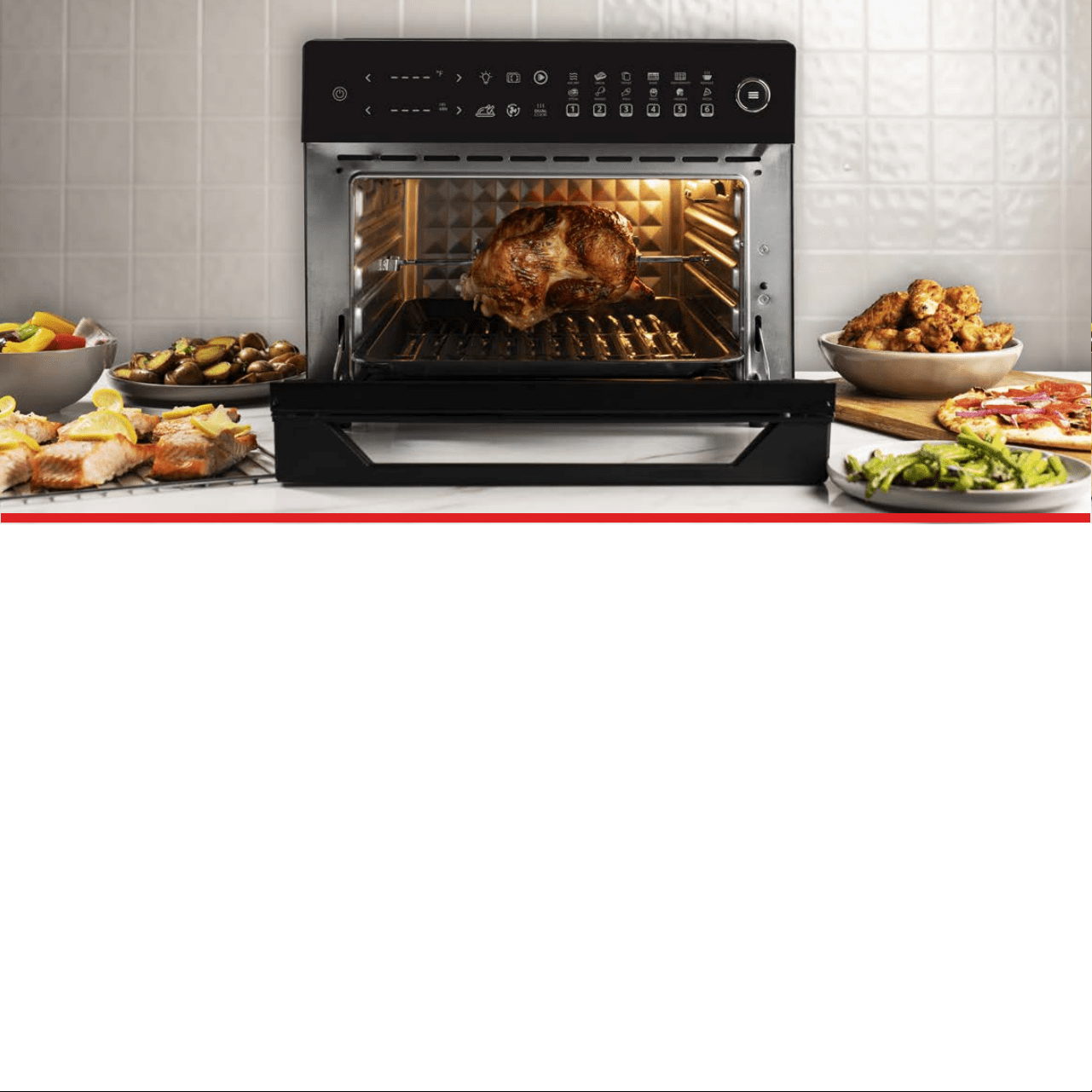
Your Ariawave Air Fryer Oven is a practical, multi-function appliance that uses
incredibly hot air and rapid air circulation to evenly cook your food from
all angles, without using extra oil or grease. This leads to deliciously crispy
food in a snap with less fat, calories, grease, and harmful chemicals. Almost
any food that can be prepared in a conventional, microwave, or convection
oven can be fried, baked, roasted, or grilled in your new Air Fryer Oven.
We worked hard to create our helpful recipe book and dishwasher-safe
accessories with a Lifetime Warranty, which lets you spend more time on
the things that matter most - like enjoying delicious food, spending time
with loved ones, and taking care of yourself. Enjoy your new Ariawave Air
Fryer Oven and the freedom it allows to create healthier lifestyles for yourself
and those around you.
Congratulations on your new 1.2cu.ft. Ariawave Digital Air Fryer
Oven and thanks for choosing Aria.

4
• WARNING! Always follow the Safety Instructions below before, during,
and after using your Aria Oven. As your Air Fryer is a powerful electrical
appliance with heating elements and fans, be sure to follow all safety pre-
cautions and read all instructions fully and carefully before using. Failure
to do so could result in serious electrical shock, burns from heat, other
injury, or physical damage.
Read All Instructions Before Use And Save
•
Some parts of the Air Fryer are extremely hot during and after operation
such as the exterior, interior, trays, and all accessories. Do not touch hot
surfaces, parts, accessories, interior or exterior while cooking or before
it’s cooled down. Use a heat-resistant oven glove instead of touching the
Air Fryer or its accessories directly to avoid bodily injury.
• The Air Fryer contains both electronic and heating elements. To avoid
electrical shock, do not immerse the power cord, plug, or housing in water
or put them under the tap during cleaning.
• Make sure that your outlet’s voltage corresponds to the voltage stated on
the label of the appliance, and only use with a properly grounded outlet.
• Unplug from outlet when not in use and before cleaning. Allow to cool
before cleaning, handling, or moving accessories.
• This appliance Should not be used by or near children.
• As the plug is polarized (one prong is larger than the other), be sure to in-
sert into a polarized outlet the correct way. If the plug does not t, reverse
the plug and try again, or contact a certied electrician.
• Use the Cord Wrap on the Back of the Oven and Do Not let the cord hang
Important Safeguards

5
over the edge of the table or countertop, where it could be pulled on by
children or pets, or touch hot surfaces, which could damage the cord.
• Do not place on or near a hot gas or electric burner.
• Do not use this appliance for other than intended or modify in any way.
• Extreme caution should be exercised when using containers constructed
of materials other than metal or glass in the Air Fryer Toaster Oven.
• Do not cover Crumb Tray or any part of the Oven with metal foil. This will
cause overheating of the Air Fryer Toaster Oven.
• Oversized foods, metal foil packages, or utensils must not be inserted in
the Aria Oven as they may involve a risk of re or electric shock.
• A re may occur if the appliance is covered or touching ammable mate-
rials such as curtains, draperies or walls. Do not store any items on top of
the appliance when in operation. Do not operate under wall cabinets.
• Do not clean with metal scouring pads. Pieces can break o the pad and
touch electrical parts, involving a risk of electric shock.
• Warning: To avoid possibility of re, Never leave the appliance unattend-
ed during use.
• Do not rest cooking utensils or baking dishes on glass door.
• Do not operate your appliance in an appliance garage or under a wall
cabinet. When storing in an appliance garage, always unplug the unit from
the electrical outlet. Not doing so could create a risk of re.
• Prevent any water or other liquids from entering the Air Fryer.
• Before using, check the power cord of appliance and the accessories. Do

6
not use if any part shows any damage. Contact Customer Care if this is
the case for warranty assistance.
• Before each use, ensure the heating element on top of the Air Fryer and
the fan are both clean and clear from any ingredients or food from the
previous cooking cycle.
• Never use the Oven without the Drip Tray in place to protect excess
grease that may fall onto the heating coils.
• Immediately unplug the Air Fryer if you see dark smoke coming out of it.
Wait for the smoke to stop being released before pulling out the Racks,
Trays, or other accessories.
• Children over 10 years, anyone with a physical or mental disability, and
anyone with a lack of experience and knowledge on how to use the Air
Fryer should read the User Guide completely and be guided by someone
who has prior experience with using the appliance.
• As the Air Fryer gets extremely hot during use, prevent re hazards and
Do not put plastic protective lm, or non-oven-safe dishes, bowls, or tools
into the Oven.
• Do not place paper, cardboard, or any similar materials into the Oven. If
using parchment or baking paper, place your food securely on top of the
paper before putting it in the Oven. The extremely light paper could be
lifted by the fan and touch the heating elements, causing a re hazard.
• In the case of a re, never attempt to extinguish the ames with
water. Immediately unplug the Oven. If safe, close the lid and smother
ames with a damp cloth.
7
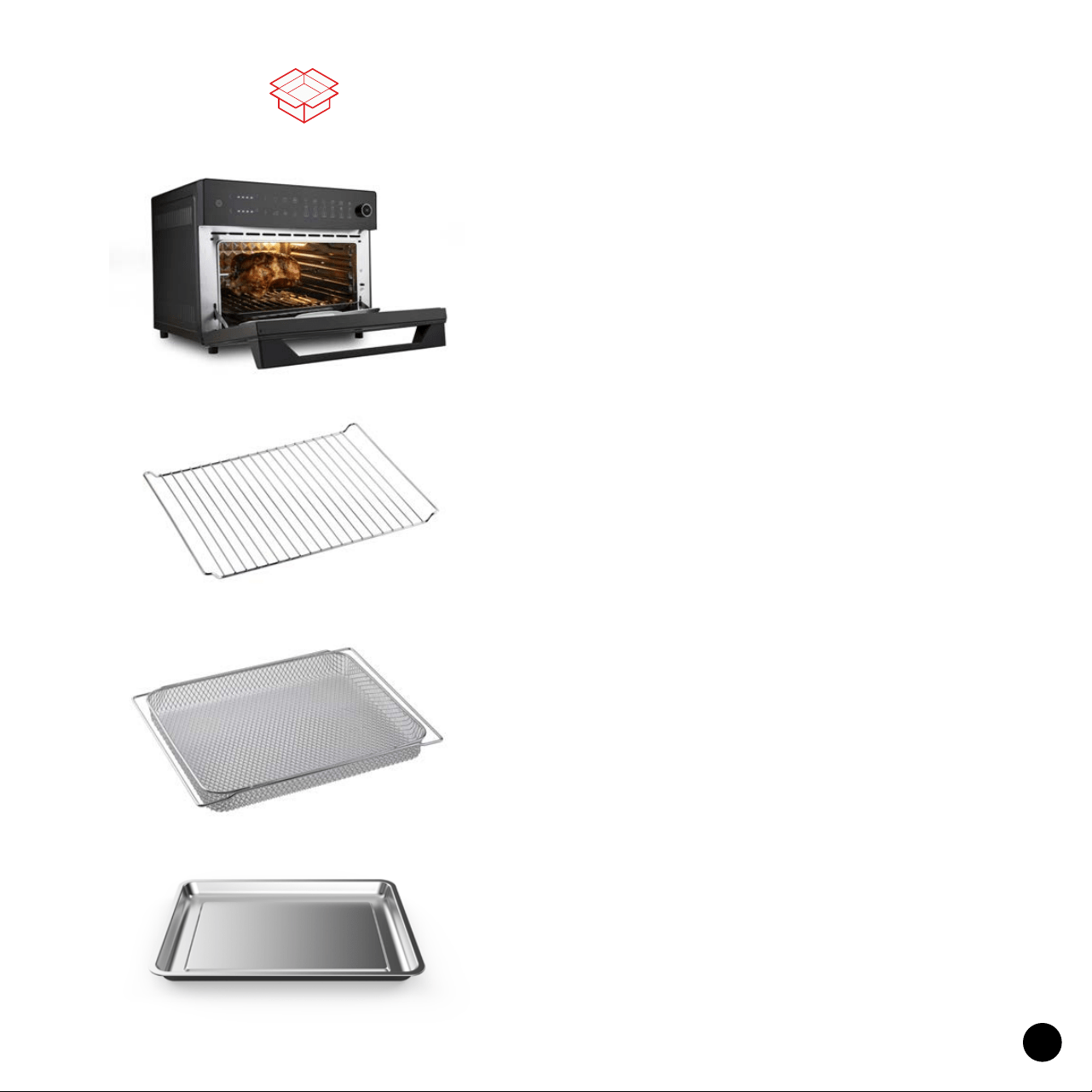
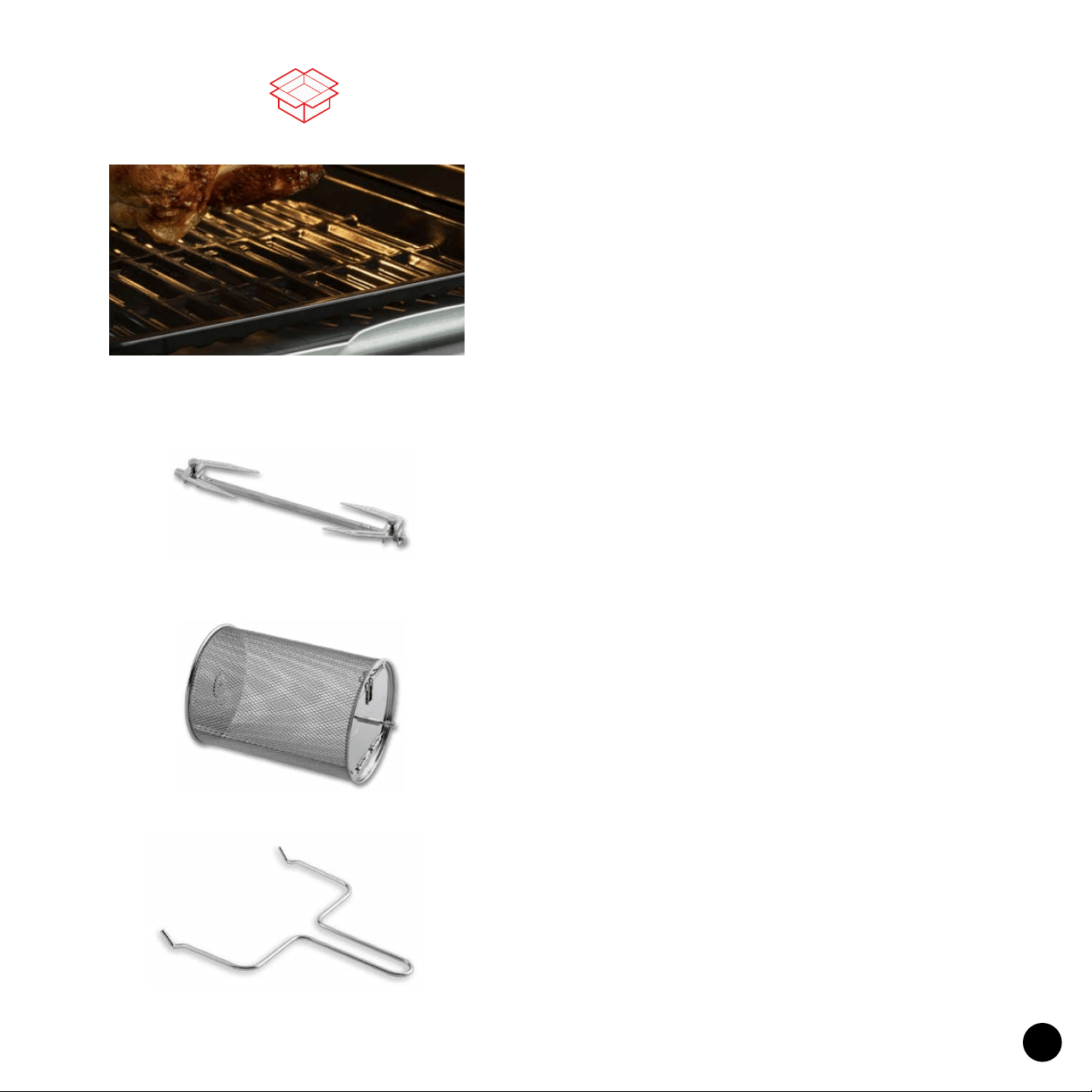
Drip Tray
Mostly used as a Drip Tray to protect the
lower heating coils and catch excess oil and
grease for easy cleanup.
What’s In The Box
2x Oven Rack
Ideal for toasting, grilling meats & vegetables,
pizzas, snacks, and more.
Air Fryer Basket
Ideal for smaller foods like fries, wings,
other vegetables, snacks, and dehydrating
fruits, meats, and herbs.
1.2cu.ft. Ariawave Oven
Tap the “Light” button to turn the Light on
or o. To save energy, the Light will turn
o automatically after 5 minutes.
Tip: Tap the “Light” button again to turn the
light back on.
8
Handle
The included Handle helps with retrieving
the rotating attachments with ease.
What’s In The Box
Rotisserie Fork
Gently spin your food 360° while cooking. Sa-
vor tender chicken dinners, pork-roasts, trail
mix, and more faster than ever!
Rolling Cage
Gently spin your food 360° perfectly
seasoned French Fries, vegetables,
and more!
2x Ceramic Trays
Universal Ceramic Trays are FDA-Approved,
free of Teon, PTFE, PFOA, BPA and Lead.
They’re also dishwasher-safe & non-stick to
make clean up a breeze.
9
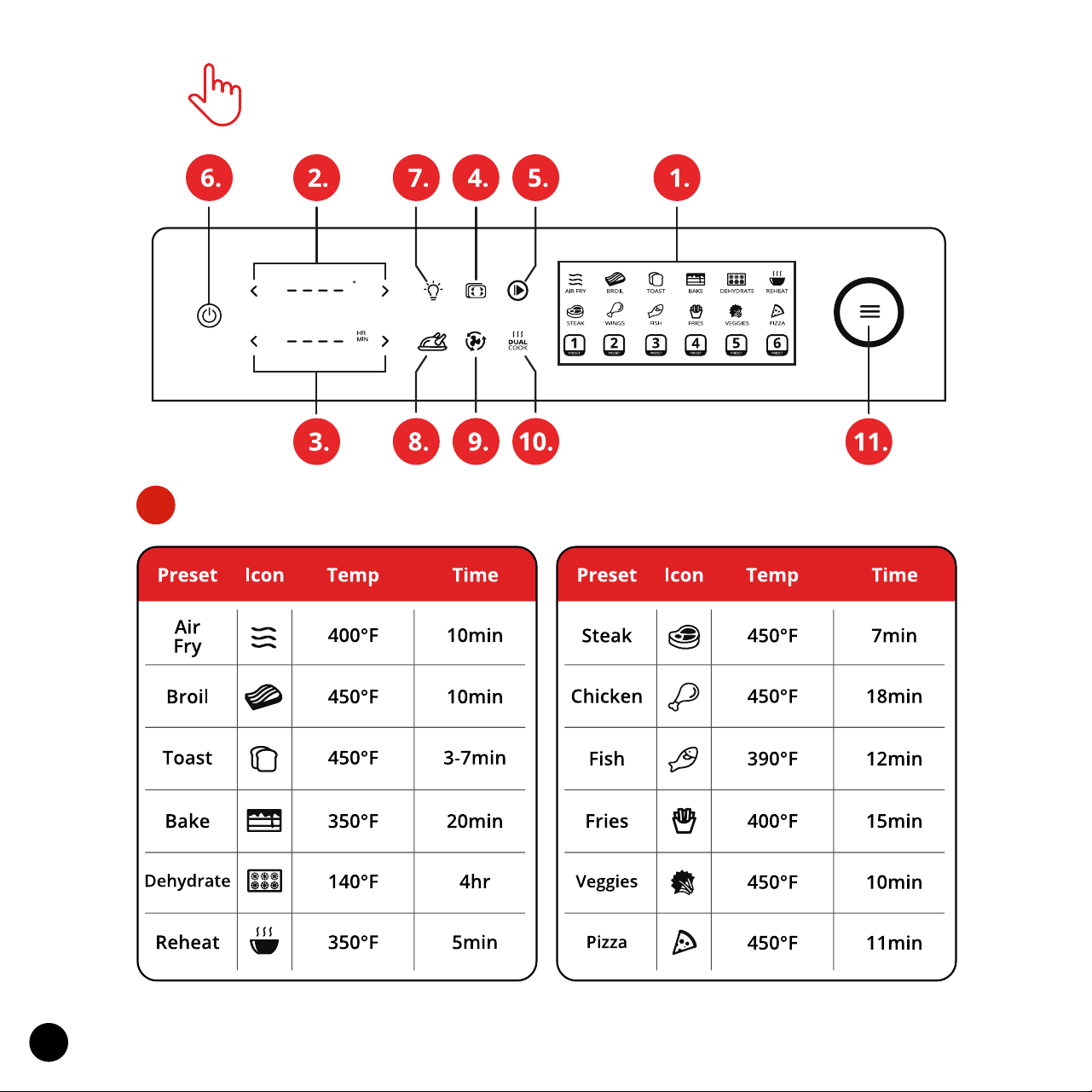
Touchscreen Control Panel
Presets Overview
1.
10
Note: The times and temperatures are suggestions - they may vary on the amount
of your food, the source, thawness, and other factors. You can also ne-tune time and
temperature after selecting Preset. Always keep an eye on your food as it cooks so it
turns out exactly how you prefer.
Touchscreen Control Panel
Customizable Presets 1-6
All customizable presets are set to default 5 minutes and 200°F.
Once this default is adjusted to your liking, that specic preset will now save
the last setting you used on that given customizable preset (1-6) until it is
changed or reset.
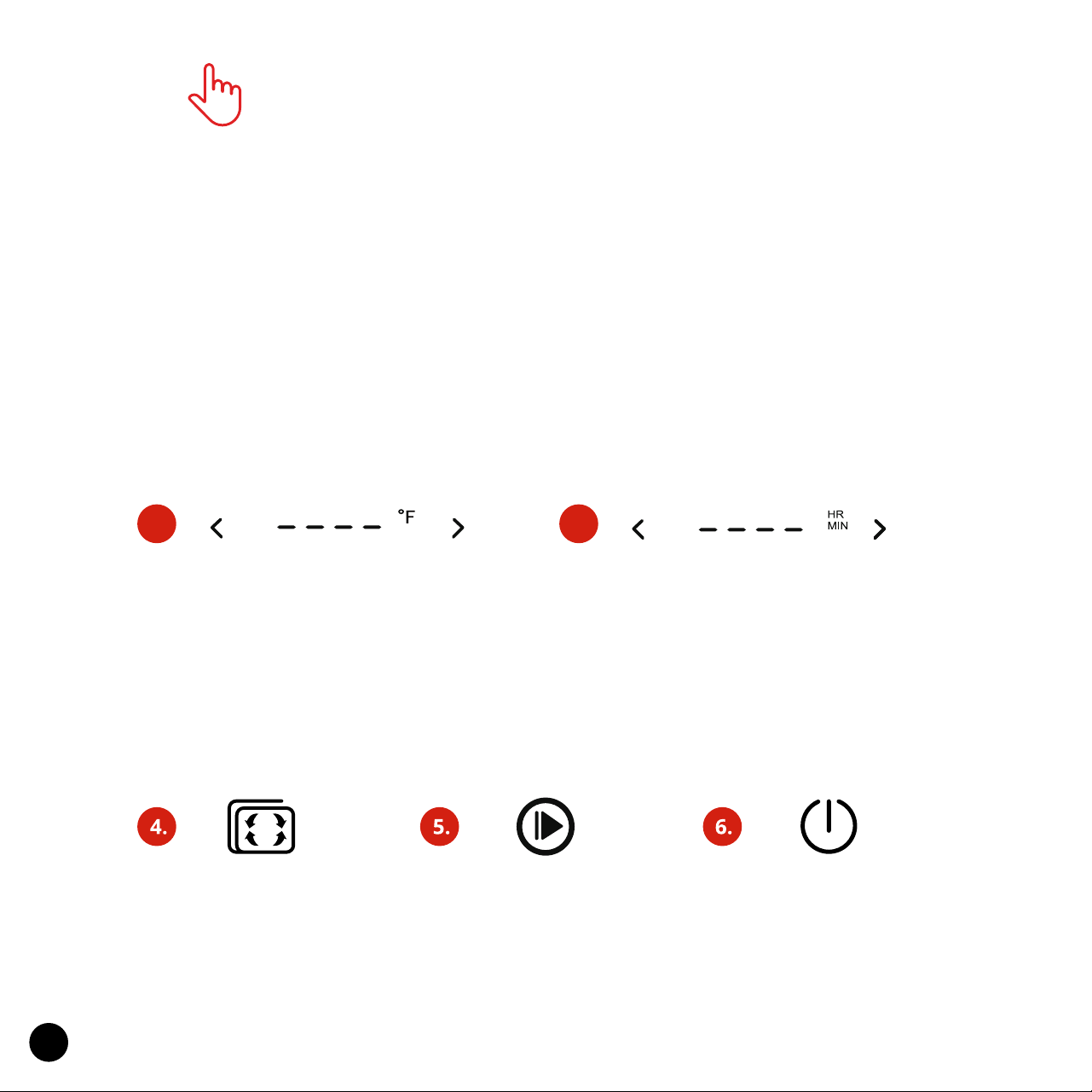
3.2.
Temp Increase & Decrease
Tap the Temperature Decrease < or
the Temperature Increase > icon to
adjust to your desired temperature
Note: Hold your nger on the icon
for a faster cycling.
Time Increase & Decrease
Tap the Time Decrease < or the
Time Increase > icon to adjust
to your desired time. Note: Hold
your nger on the icon for a faster
cycling.
Preheat
Tap the Preheat icon
to preheat the oven.
Note: Optional.
Start/Stop
Tap the Start/Stop
icon to start or stop the
cooking process.
Power On/O
Tap the Power icon to
turn the Oven On/O.
11
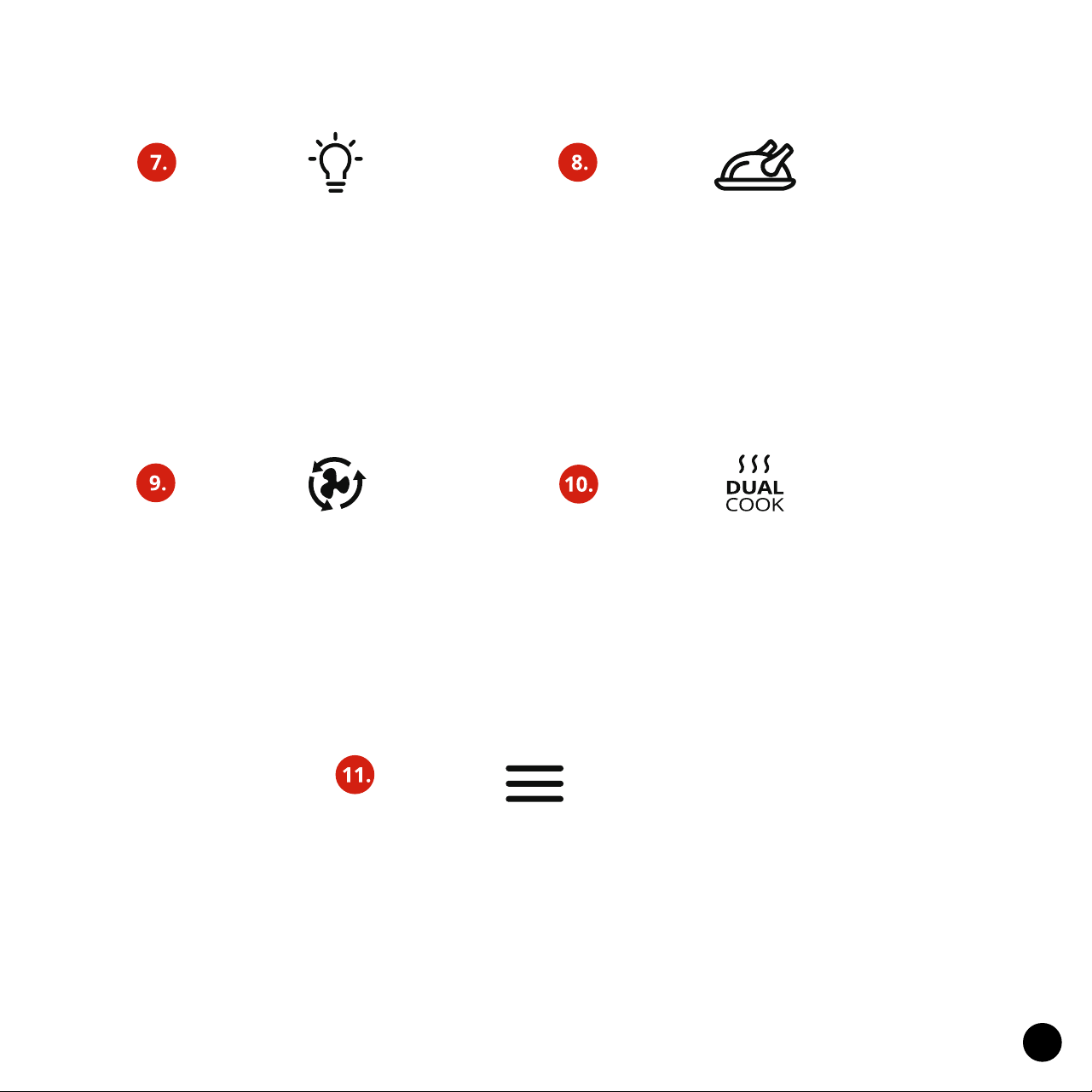
Oven Light
Tap the Light icon to turn the Oven
Light On/O. Note: To conserve
energy it will turn o after 5min
Simply tap icon again to turn
the light back on.
Air Fry
The AirFry icon indicates when the Air
Fryer is actively cooking. The icon will
ash while cooking and stop ashing
when the door is opened or cooking
is complete.
Menu
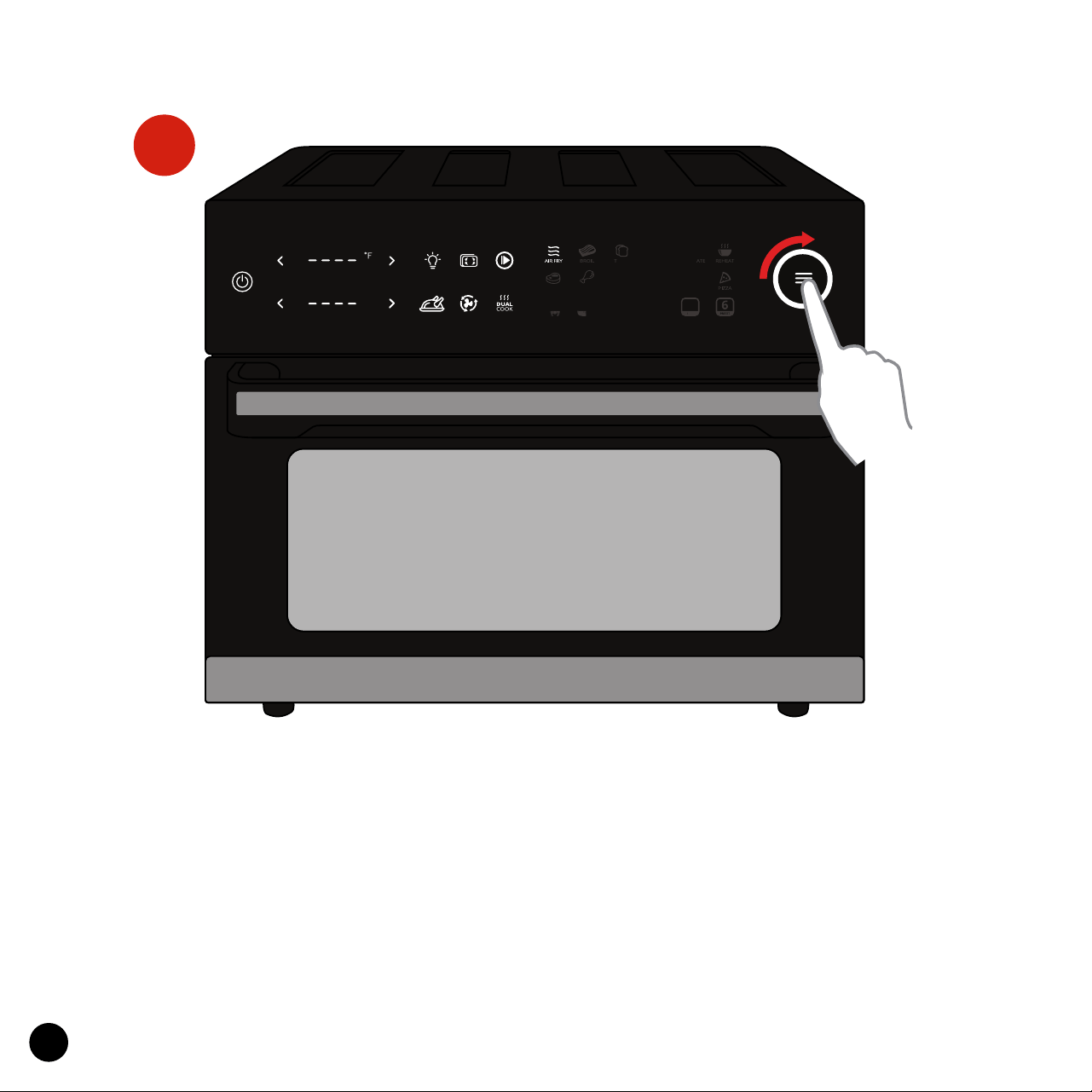
You can select the menu by rotating
the menu knob. After highlighting
the desired cook mode press the
menu button to begin cooking.
Rotating Function
Tap the rotating function to begin
gently rotating either the rotisserie
fork or rolling cage accessory 360°
for perfectly cooked meals.
Dual Cook Function
Dual cooking allows you to program
the Ariawave to start cooking with
one preset then automatically
transition to a second preset of your
choosing for a perfect cook.
12
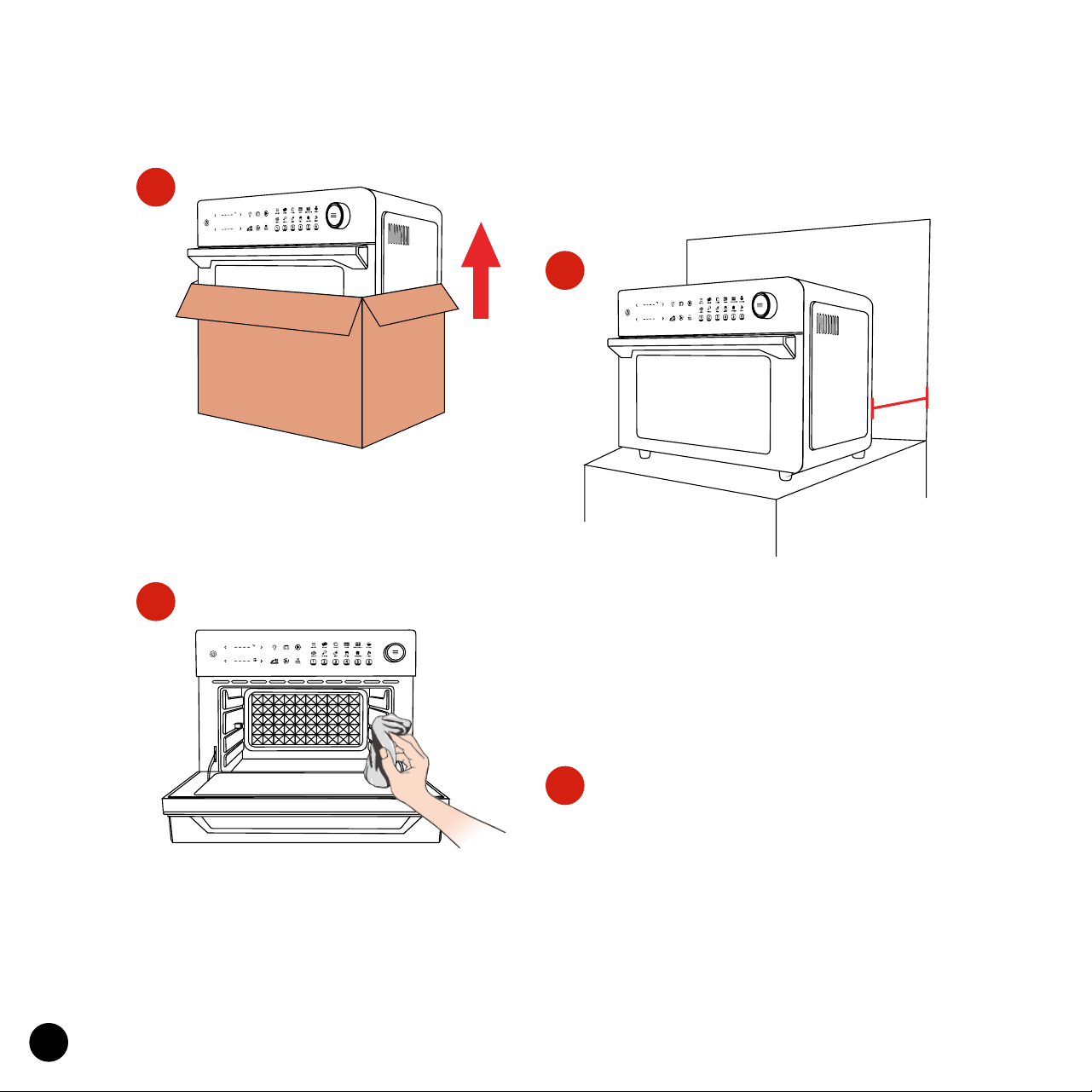
Remove and discard all packaging
around and inside the oven. Be sure
to peel o all protective lms.
Setting Up Your Ariawave
1.
Wash all accessories and wipe clean
the interior of the Oven. Dry and
place accessories back in oven.
During rst use, the Oven may
emit odor or smoke, which is
caused by the protective lm.
This is normal. Simply run the
Oven empty for 15 minutes
at the highest temperature to
sterilize and remove odor.
Place on a stable, level, heat-resistant
surface, away from anything that can
be damaged by heat. Keep at least 6in
distance between the Oven and
walls, furniture, etc.
2.
3.
4.
B
R
O
IL
S
T
E
A
K
R
O
A
S
T
C
H
IC
K
E
N
D
E
H
Y
D
R
AT
E
B
A
K
E
S
T
AR
T
/
STOP
LIG
H
T
PO
WER
O
N
/O
F
F
HR
MIN
P
IZ
Z
A
A
IR
FR
Y
W
IN
G
S
VEGETABLES
PREH
E
A
T
6 in
6 in
HR
MIN
H
R
M
I
N
13
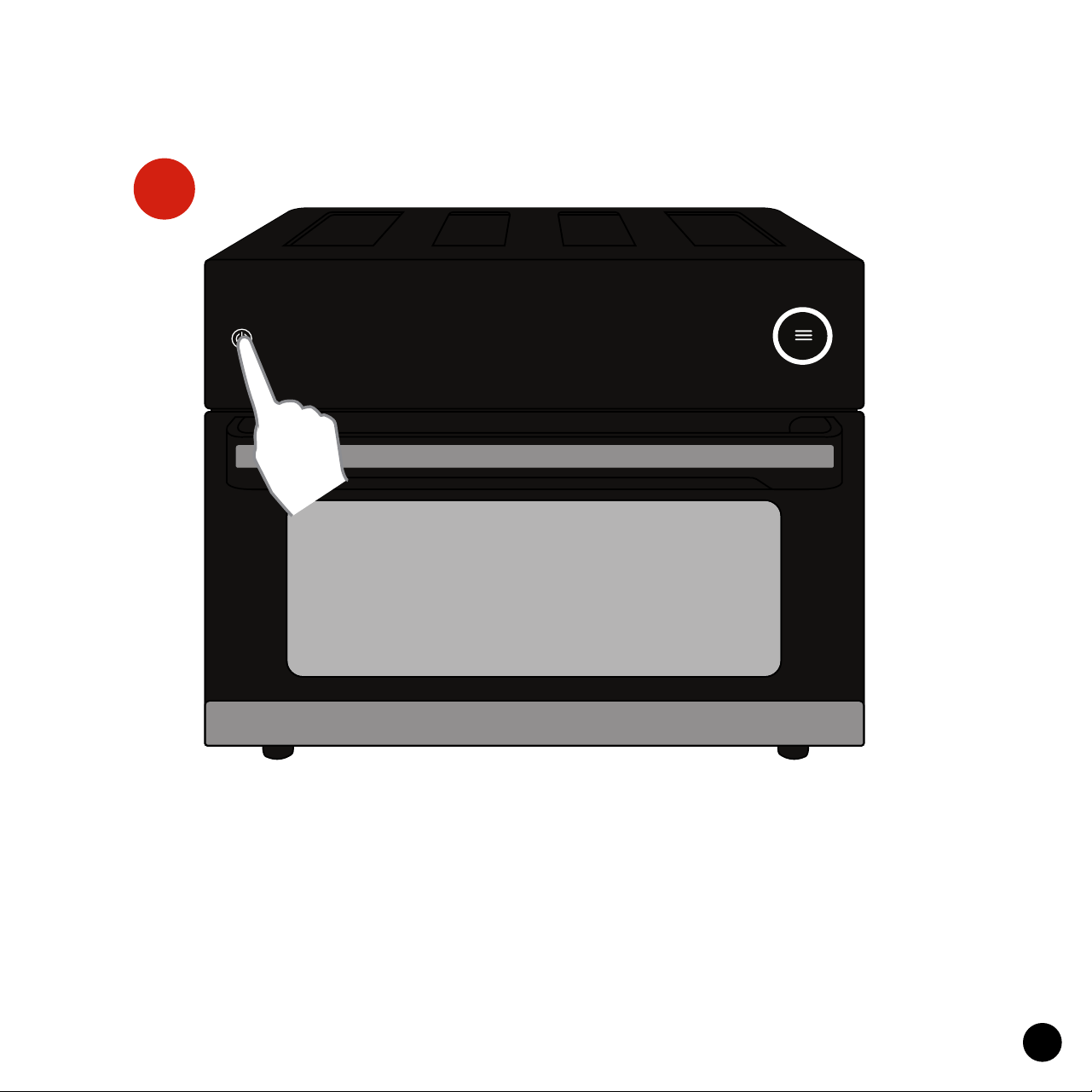
Power On/O
Plug in and tap the Power On/O icon to turn the Oven on.
The screen will illuminate.
1.
Using Your Ariawave
HR
MIN
14
2.
Preset Functions
Tap the desired Preset icon and the screen will display the default tempera-
ture and time. You can always manually adjust the desired temperature and
time afterwards to ne-tune for your preference.
Note: The Toast Preset’s doneness can be adjusted to Light (1), Medium (2),
and Dark (3) by tapping the Temp Increase or Temp Decrease icons.
HR
MIN
15
3.
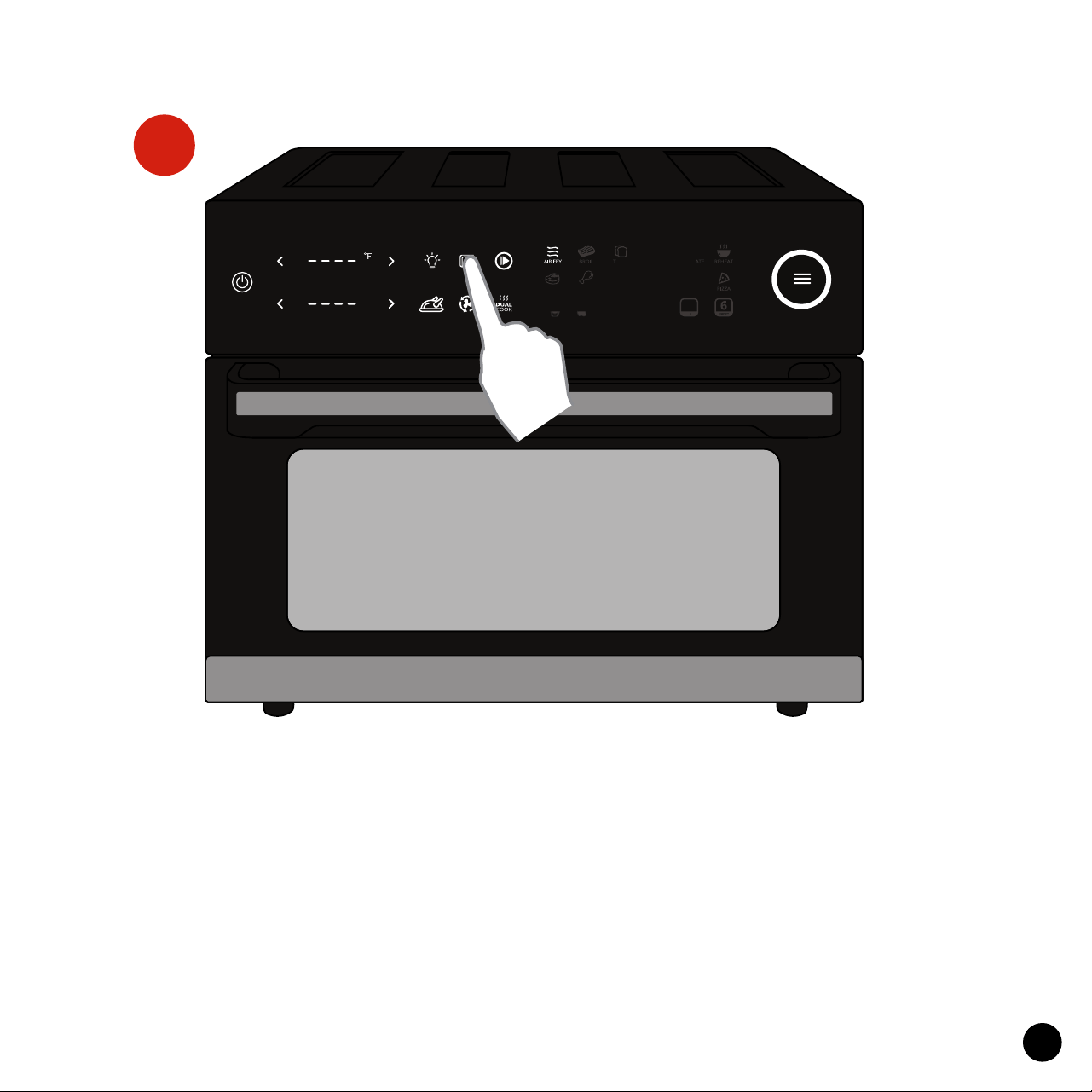
Preheat Function
Tap the Preheat icon to preheat the Oven to a warm temperature. This is
useful when the Oven was stored in a cold place, or if you’d like extra crispy
results. Note: No need to tap the “Start/Stop icon to begin preheating. When
the desired temperature is reached it will beep and the words “Add Food”
will appear, which signals you can add your ingredients. Now you can
manually set your cooking Time and Temp and tap Start/Stop to begin, or
tap the Start/Stop icon, Select a Preset, and tap the Start/Stop again. Note:
There’s no need to preheat when using the Toast and Dehydrate modes.
HR
MIN
16
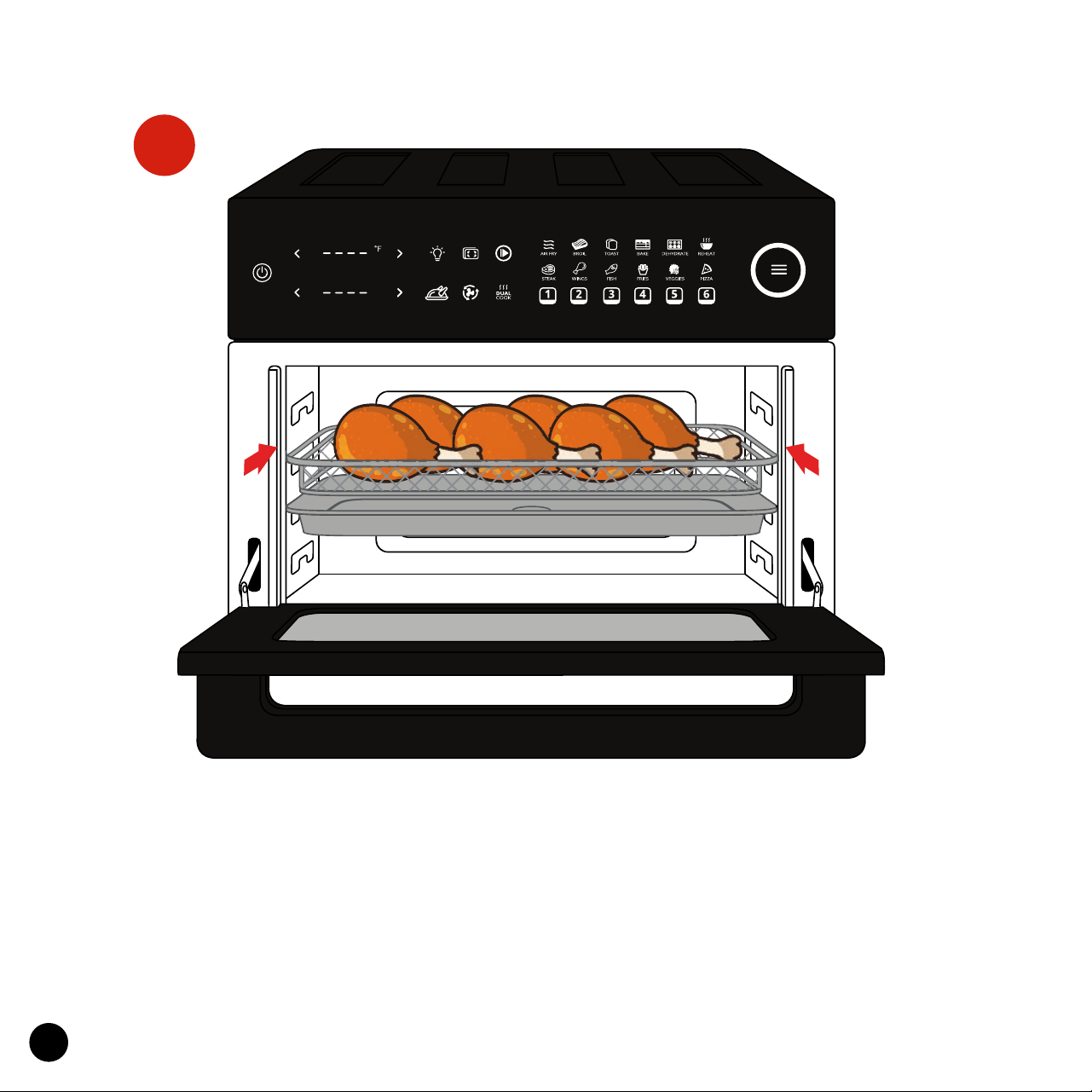
Accessories
Slide the accessories with food into the desired position then close the door.
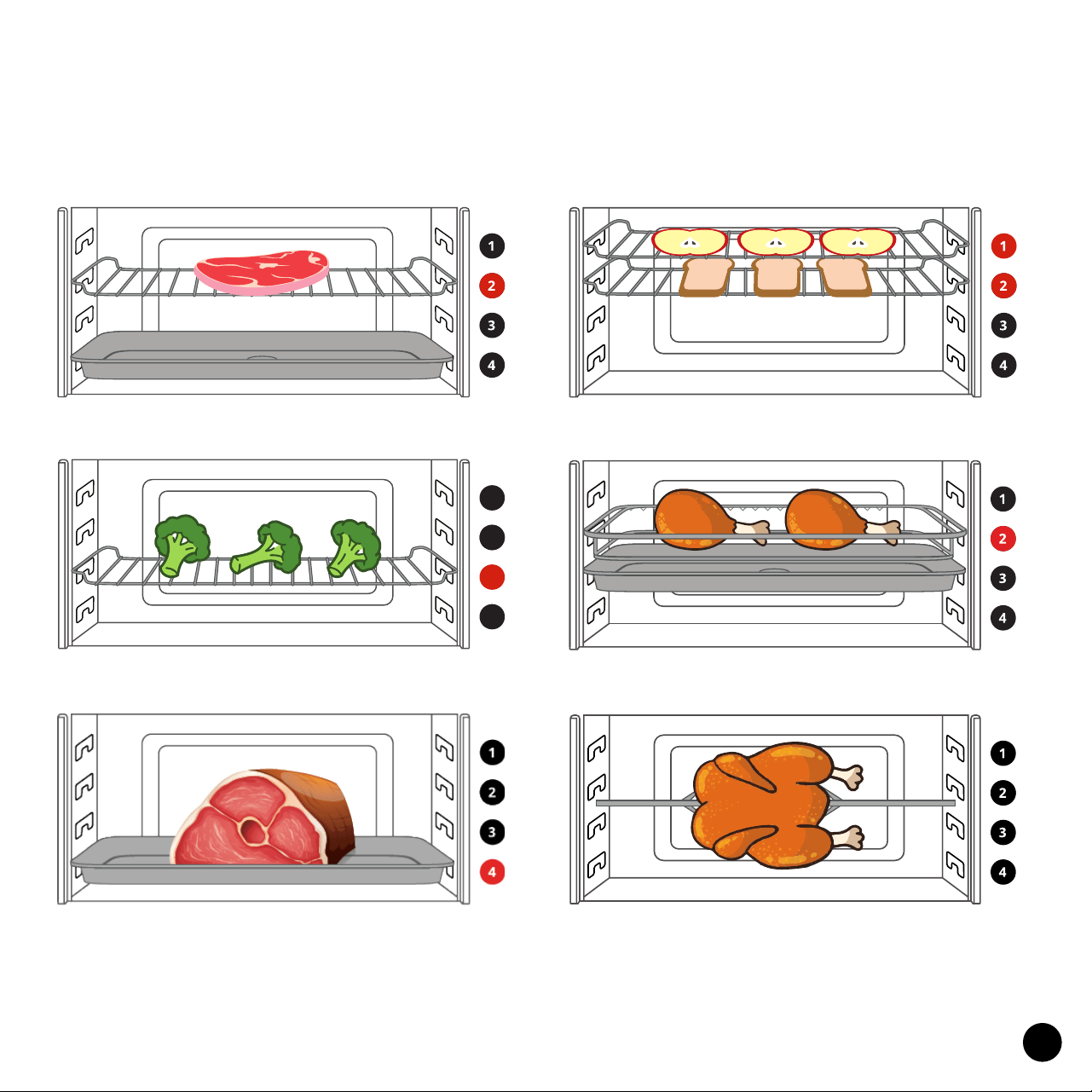
Refer to the rack position diagram on the next page for guidance.
Note: When cooking foods with oil, juice, or grease, it’s necessary to put the
Drip Tray/Baking Pan underneath to protect the heating coils at the bottom
of the oven from damage and dripping liquids.
4.
HR
MIN
17
Grilling & Broiling - Position 2
Bake, Veggies & Pizza - Position 3
Roast - Position 4
Toast/Dehydrate - Position 1 or 2
Chicken Wings & Fries - Position 2
Rotisserie/Cage - Designated Holes
Suggested Rack Positions
1
12
3
4
18
Start/Stop
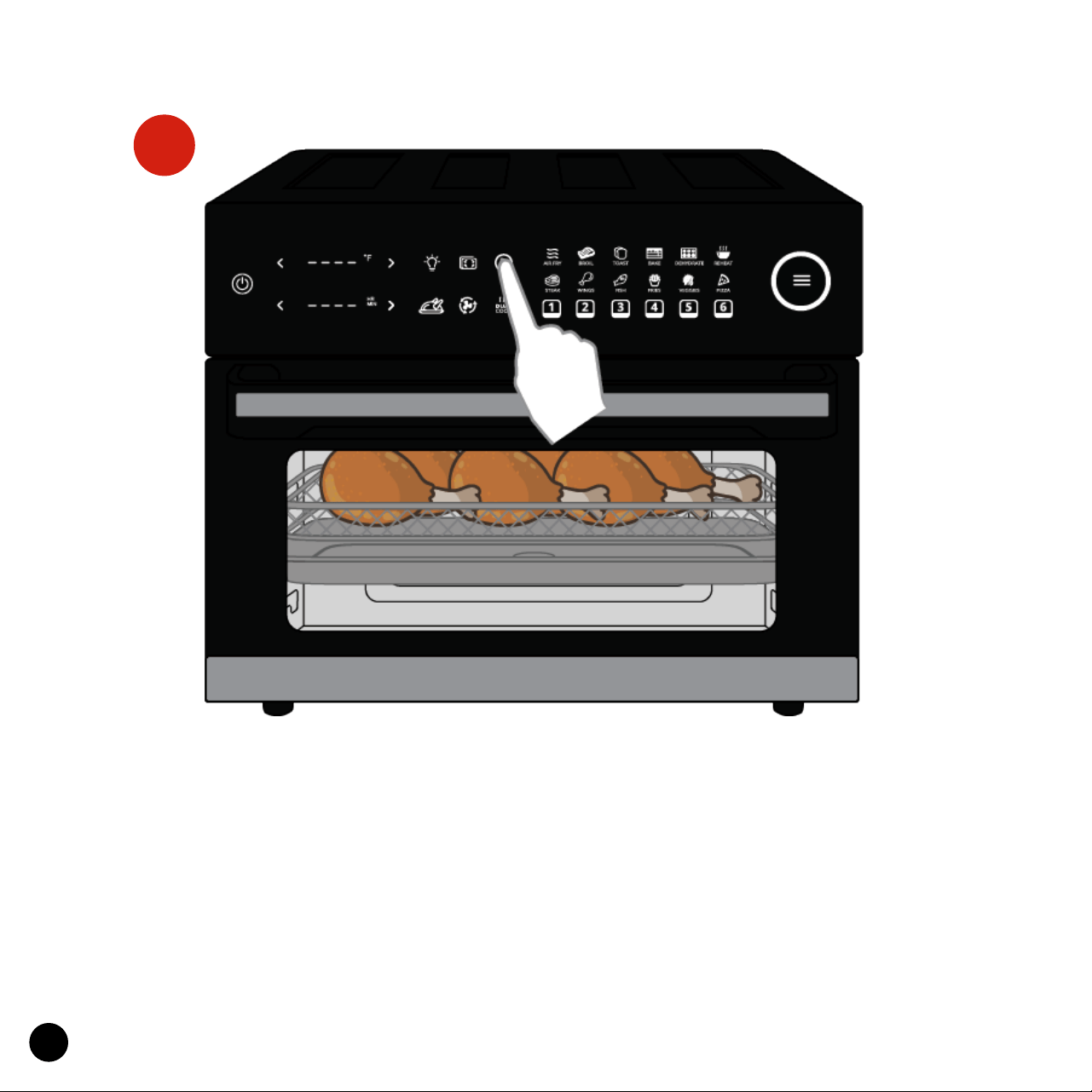
Once your desired Cooking Time and Temperature are on the display, tap
the Start/Stop icon to begin cooking. The timer will count down and the
AirFry icon will ash, indicating the Oven is actively cooking. When cooking is
complete, the Oven will beep 5 times and the display will show “END” with all
icons lit.
Note: If you wish to Pause cooking, simply tap the icon once. You’ll notice all
the menu icons will light up, timer will pause, and AirFry icon will stop ash-
ing. Tap again to resume cooking.
5.

19
WARNING! When the AirFry icon is ashing and the Oven is cooking, the
inside and outside of the Oven will get extremely hot and steam may be
released from the air vent openings. Be sure to keep your hands, face, and all
other body parts away to avoid injury. Also be careful of hot steam and air as
you open the Door, adjust food, and move any accessories. Use heat-resis-
tant oven gloves while handling parts and tongs to ip food when applicable.
Note: When cooking is complete, the AirFry icon will stop ashing however
you will hear the fan run for about 2 more minutes to cool down properly. As
the Oven is still extremely hot, be very cautious and do not open the Door at
this time.
Note: The display will continue to show ”END” unless you tap the menu icon
to start a new new cooking cycle or turn the Oven O.
Note: After the cooking is complete, the fan will continue to run for about 2
minutes so Oven can cool down properly. Do not open the Door during this
time.
Tip: When cooking using 2 trays, you may use a heat-resistant oven glove to
switch the position of the trays midway through cooking for more even re-
sults. We do not recommend cooking with more than two trays at once.
Tip: When cooking using 2 slots, the higher rack will cook more quickly than
the lower tray. Keep this in mind while cooking and also be sure not to over-
crowd the higher rack, as this will block some air ow.
20
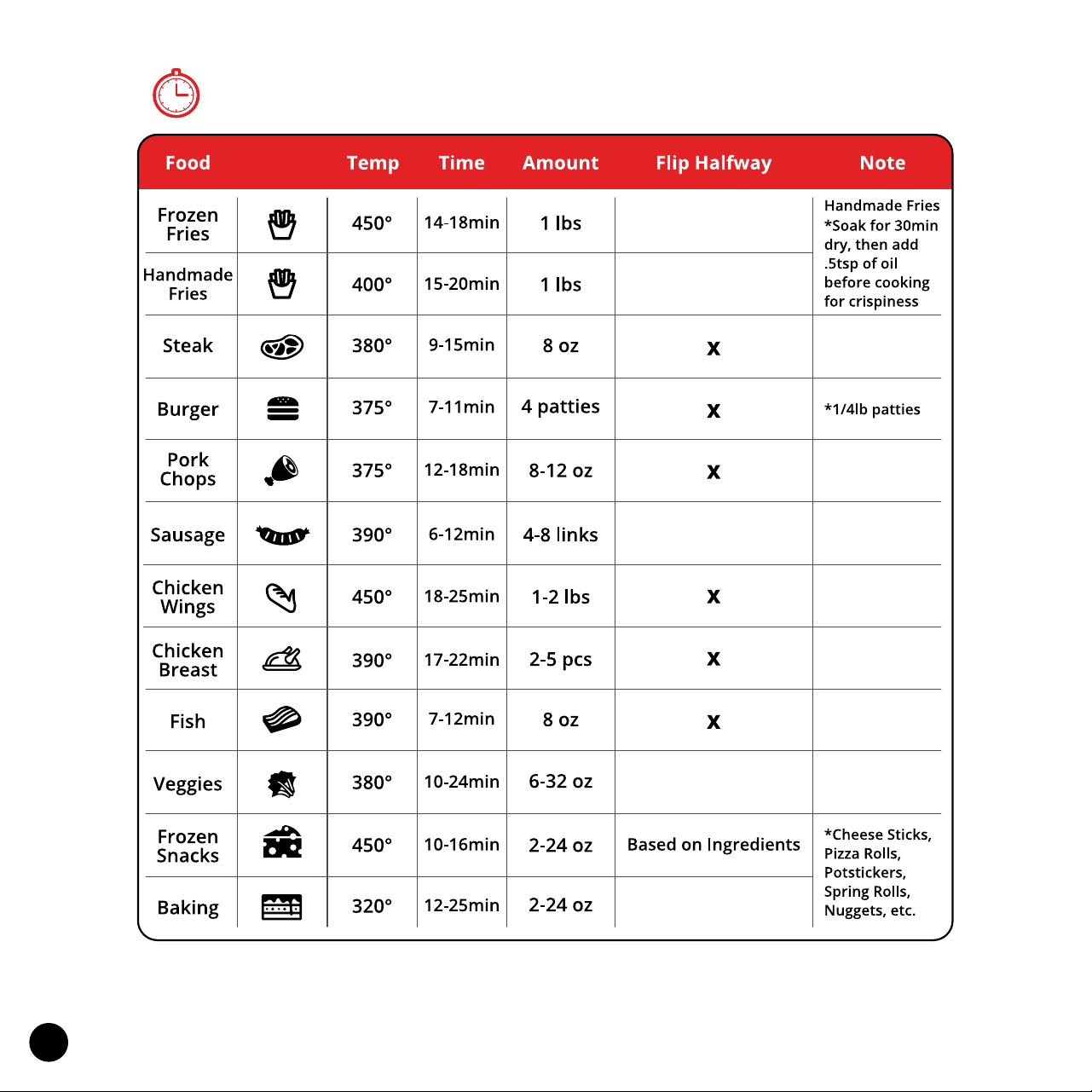
Suggested Cooking Times & Temp
Note: Please keep in mind that these are general guidelines. Your ingredients my dier in
size or thickness so we can’t guarantee the best settings for your specic ingredients.
Please keep an eye on your food while cooking to ensure the best results for you.
21
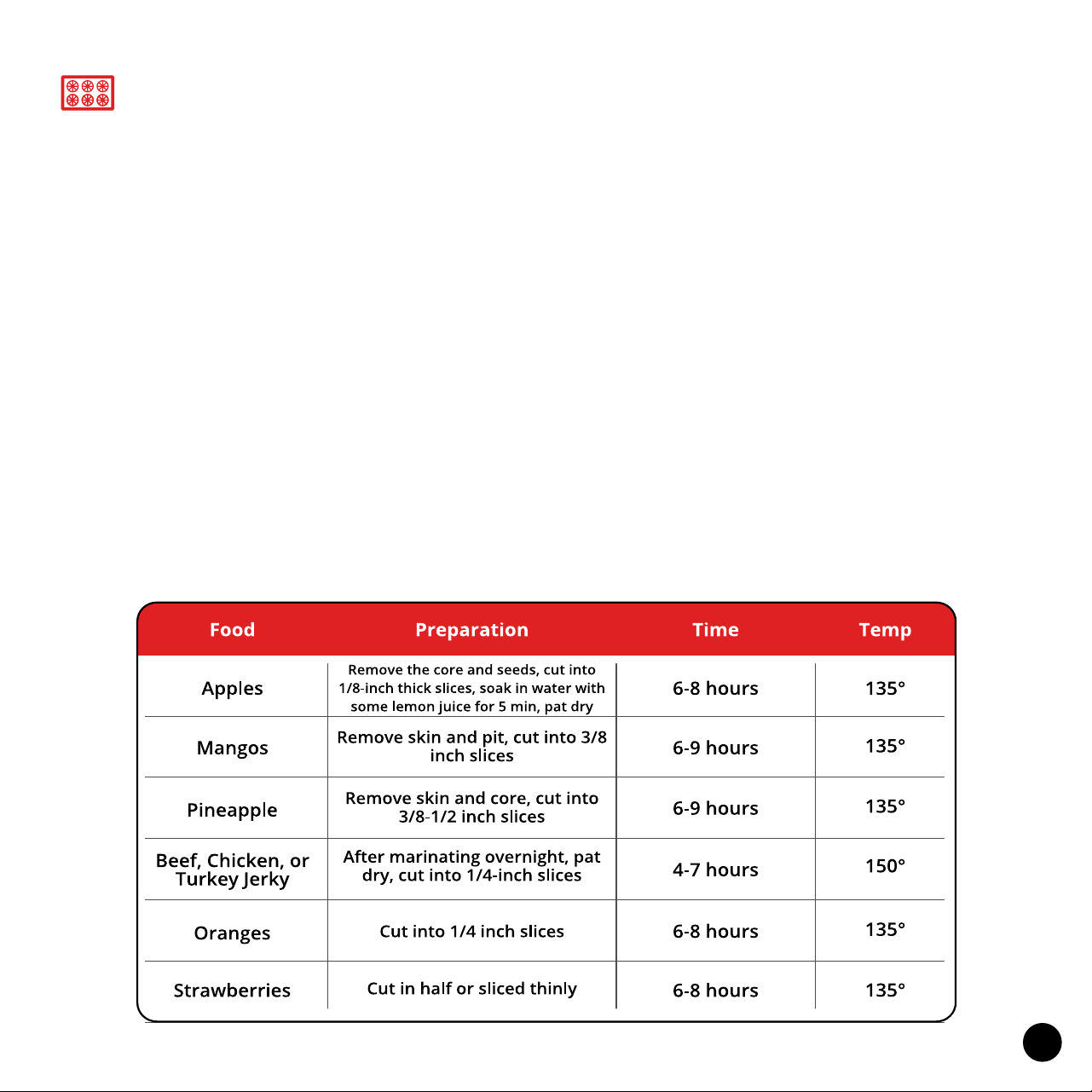
You can use your Ariawave Air Fryer to dehydrate and preserve your favorite
fruits, vegetables, and meats conveniently at home, Make delicious snacks,
create meat jerky, dry herbs, and more that you can store for later!
Tips for Best Results
• Be sure to consistently cut the fruits and vegetables as thin as possible, pat
dry fruits and vegetables before dehydration.
• Prevent fruits like apples from browing by rst soaking in water with a splash
of lemon for 5 mins.
• Always trim the fat o all meats rst as it will not dry properly.
• To ensure maximum air ow, Do Not overlap any pieces.
• Please be cautious that setting the time or temp too high (use guidelines
below) may lead to your ingredients not dehydrating properly, and moisture
may be sealed inside your food.
Dehydration
22
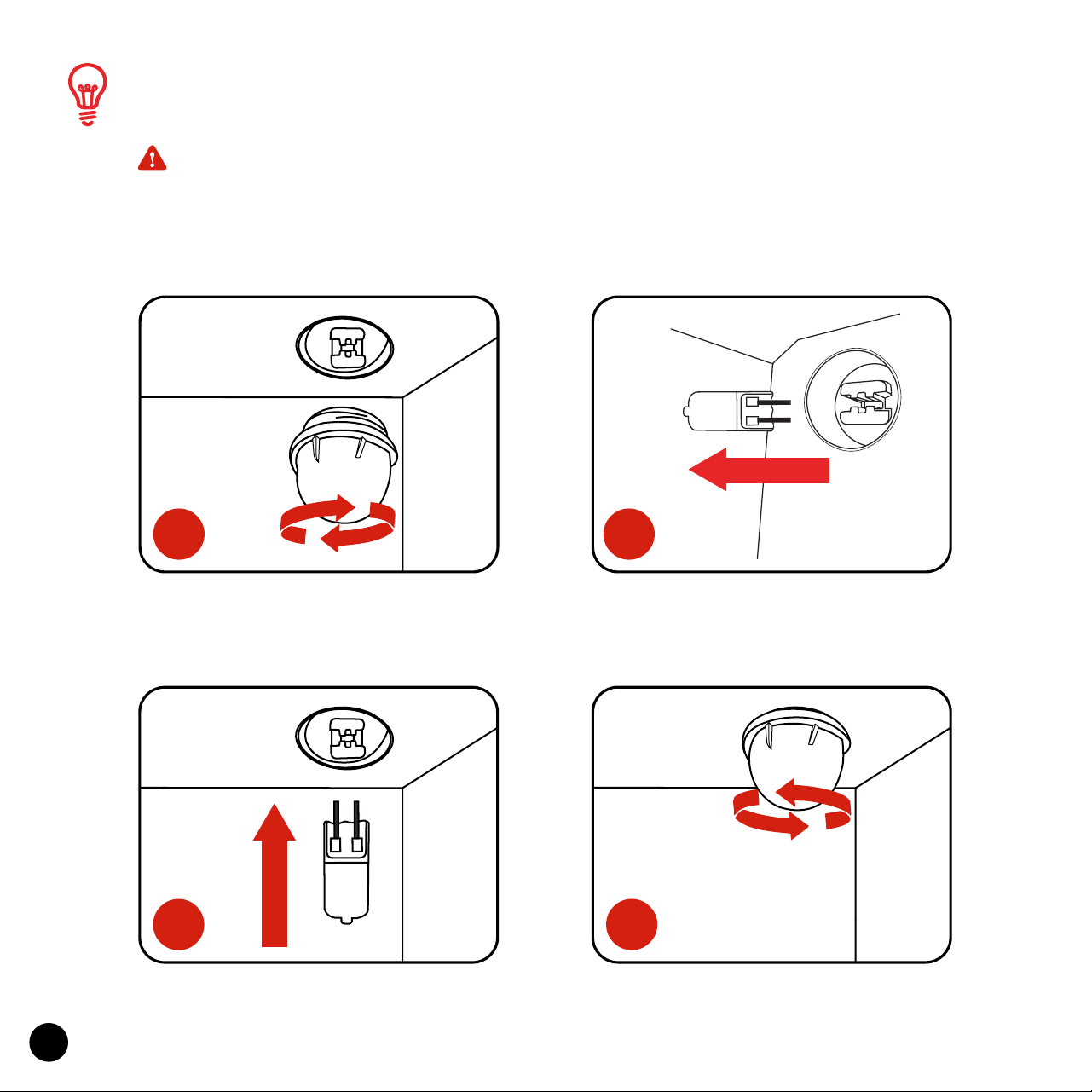
• ATTENTION: Be sure to unplug the Aria Oven and allow it to cool
completely before replacing the oven light.
Note: Use only 25W Halogen Bulbs
Replacing The Oven Light
Rotate the light cover counter-
clockwise to remove it.
Insert the new bulb
Remove the used bulb by pulling
out directly.
Rotate the light cover clockwise to
tighten it.
4.
3.
1.
2.

23
Before cleaning, unplug the Ariawave from the power outlet. Allow
the oven and all accessories to cool completely before disassembling
and cleaning.
Cleaning the Outer Oven and Door
•
Wipe the outer body with a soft, damp sponge. A non-abrasive liquid
cleanser or mild spray solution may be used to avoid build-up of stains.
Apply the cleanser to the sponge, not the oven surface, before wiping.
• To clean the glass door, use a glass cleaner or mild detergent and a soft,
damp sponge or soft plastic scouring pad. Do not use an abrasive cleans-
er or metal scouring pad as these can scratch the glass surface.
• Wipe the LED screen with a soft damp cloth. Apply cleanser to the cloth
not the LED surface. Cleaning with dry cloth or abrasive cleaners may
scratch the touchscreen.
• Let all surfaces dry thoroughly prior to inserting the power plug into a
power outlet and turning the oven on.
• WARNING: Do not immerse the Oven, power cord or power plug in water
or any other liquid as this may cause electrocution.
Cleaning the Interior
•
Wipe the walls with a soft, damp sponge. A non-abrasive liquid cleanser
or mild spray solution may be used to avoid build-up of stains. Apply the
cleanser to the sponge, not the oven surface, before cleaning.
• Let all surfaces dry thoroughly prior to inserting the power plug into a
power outlet and turning the Oven on.
Care, Cleaning, & Storage
24
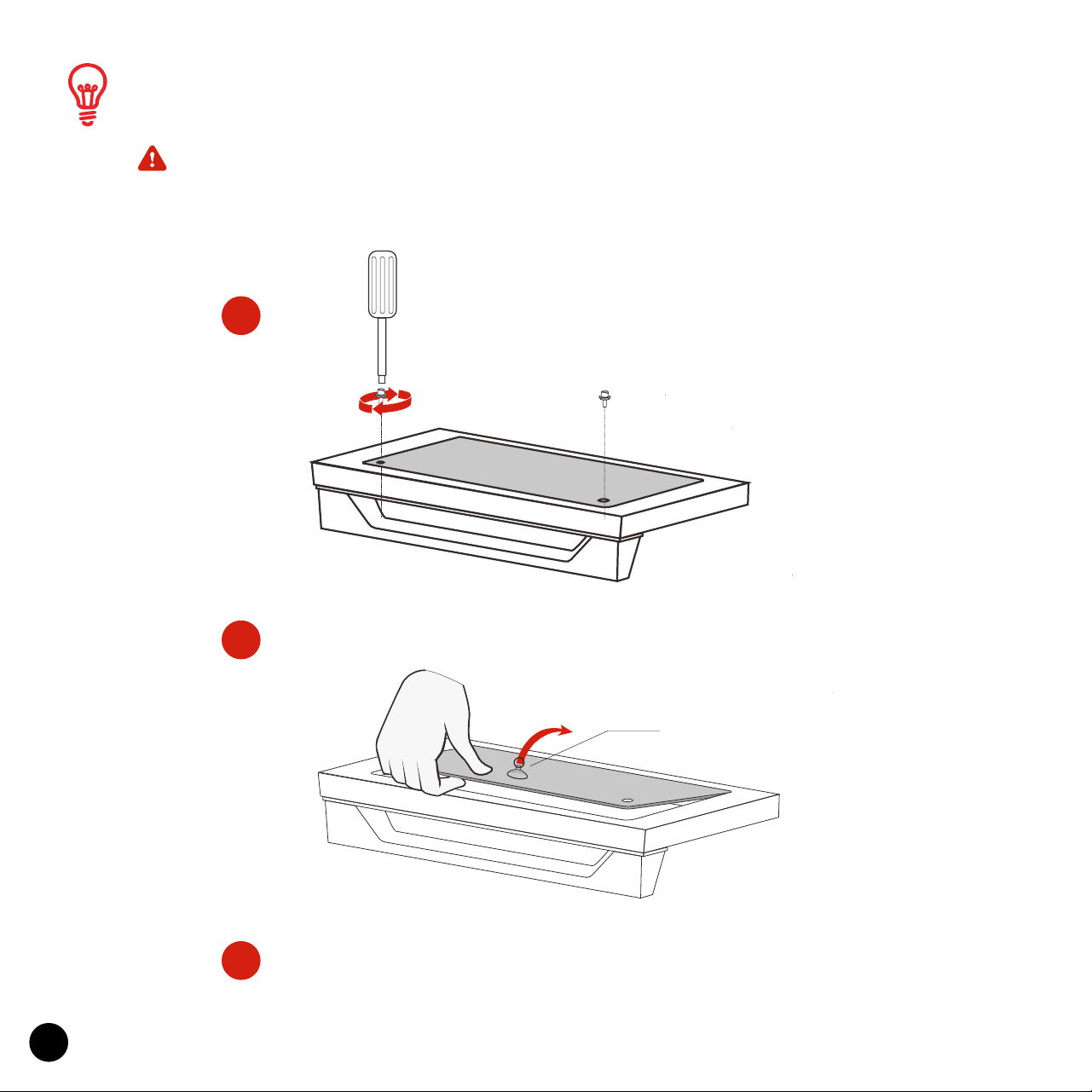
• ATTENTION: Be sure to cool down the glass door completely before
disassembling. Note: You’ll need a screwdriver and silicone suction cup
(not included).
Disassemble Glass Door for Cleaning
Once the glass is clean you can place it back
where it belongs and tighten the screws.
Use Screwdriver to take the two
screws out of the back of the
glass door.
Use silicone suction cup to pull
glass out of the housing.
1.
2.
3.
silicone suction cup

25
• WARNING: Use EXTREME caution when cleaning the heating elements as
they can get very hot and are fragile. Allow the oven to cool completely,
and then gently wipe a soft, damp sponge or cloth along the length of the
heating element. Do not use any type of cleanser or cleaning agent. Let
all surfaces dry thoroughly prior to inserting the power plug into a power
outlet and turning the oven on.
Cleaning the Crumb Tray
•
After each use, slide out the Crumb Tray and discard crumbs. Wipe the
tray with a soft, damp sponge. A non-abrasive liquid cleanser or mild
spray solution may be used to avoid build-up of stains. Apply the cleanser
to the sponge, not the tray, before cleaning. Dry thoroughly.
• To remove any baked-on grease, soak the tray in hot soapy water then-
wash with a soft sponge or soft plastic scouring pad. Rinse and dry thor-
oughly.
• Always re-insert the crumb tray into the Oven after cleaning and prior to
turning the Oven on.
Cleaning the Accessories
•
Wash all accessories in warm soapy water with a soft sponge or soft plas-
tic scouring pad. Rinse and dry thoroughly. Do not use abrasive cleansers,
metal scouring pads or metal utensils to clean any of the accessories as
they may damage the surfaces.

26
Storage
•
Always allow Oven and all accessories to cool completely before disas-
sembling and cleaning.
• Ensure the oven and all accessories are clean and dry and door is closed.
• Use the Cord Storage on the back of the Oven to neatly wrap your cord.
• Store the appliance in an upright position standing level on its support
legs. Do not store in a wet or hot condition.
Extension Cord
•
A short power-supply cord (or detachable power-supply cord) is provided
to reducerisks resulting from becoming entangled in or tripping over a
longer cord.
• Longer detachable power-supply cords or extension cords are available
and may be used if care is exercised in their use.
• If a long detachable power-supply cord or extension cord is used:
1. The marked electrical rating of the detachable power-supply cord or
extension cord should be at least as great as the electrical rating of the
appliance;
• 2. The longer cord should be arranged so that it will not drape over the
counter top or table top where it can be pulled on by children or trippe.
• This appliance has a polarized plug (one blade is wider than the other). To
reduce the risk of electric shock, this plug will t in a polarized outlet only
one way. If the plug does not t fully in the outlet, reverse the plug. If it
still does not t, contact a qualied electrician. Do not modify the plug in
any way.
27
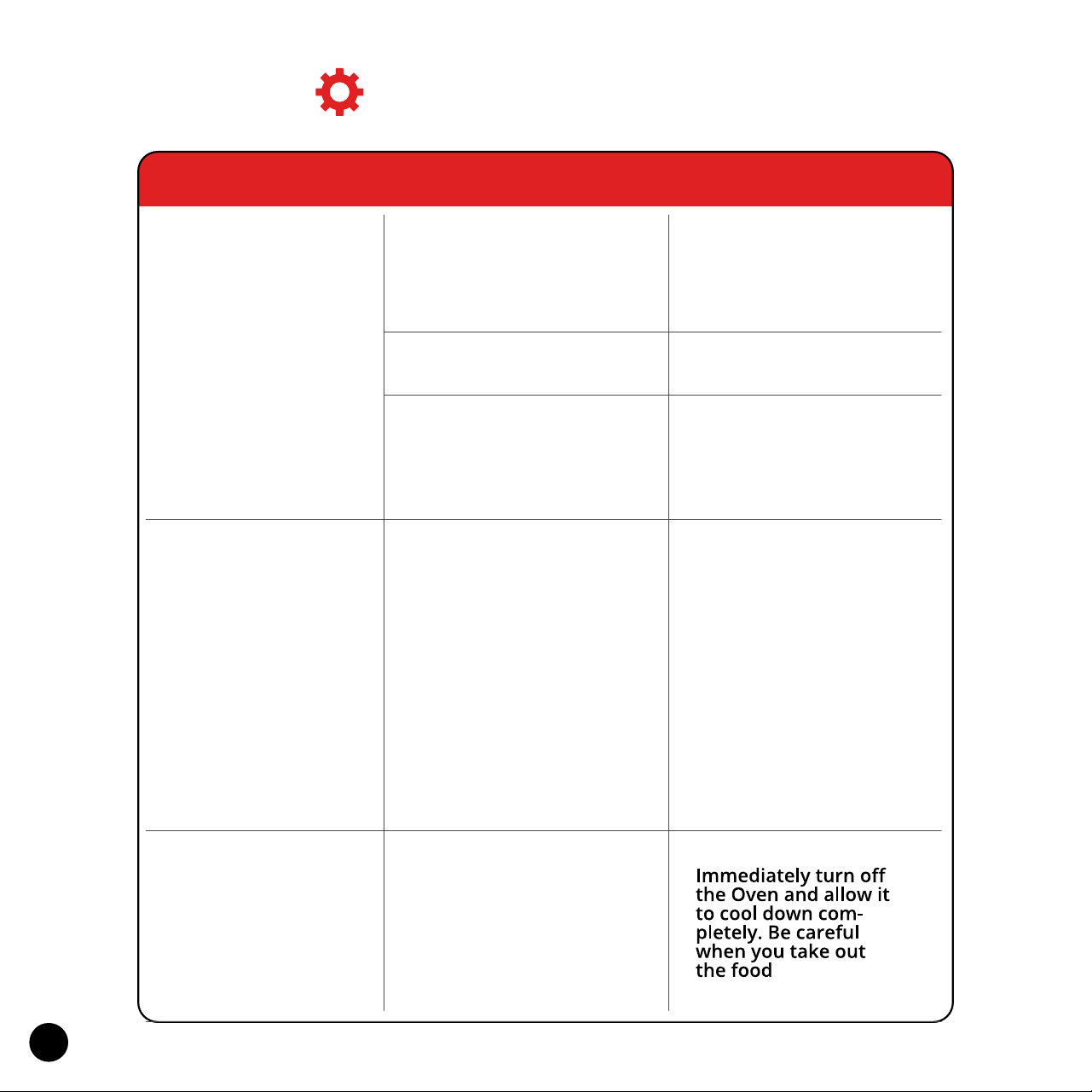
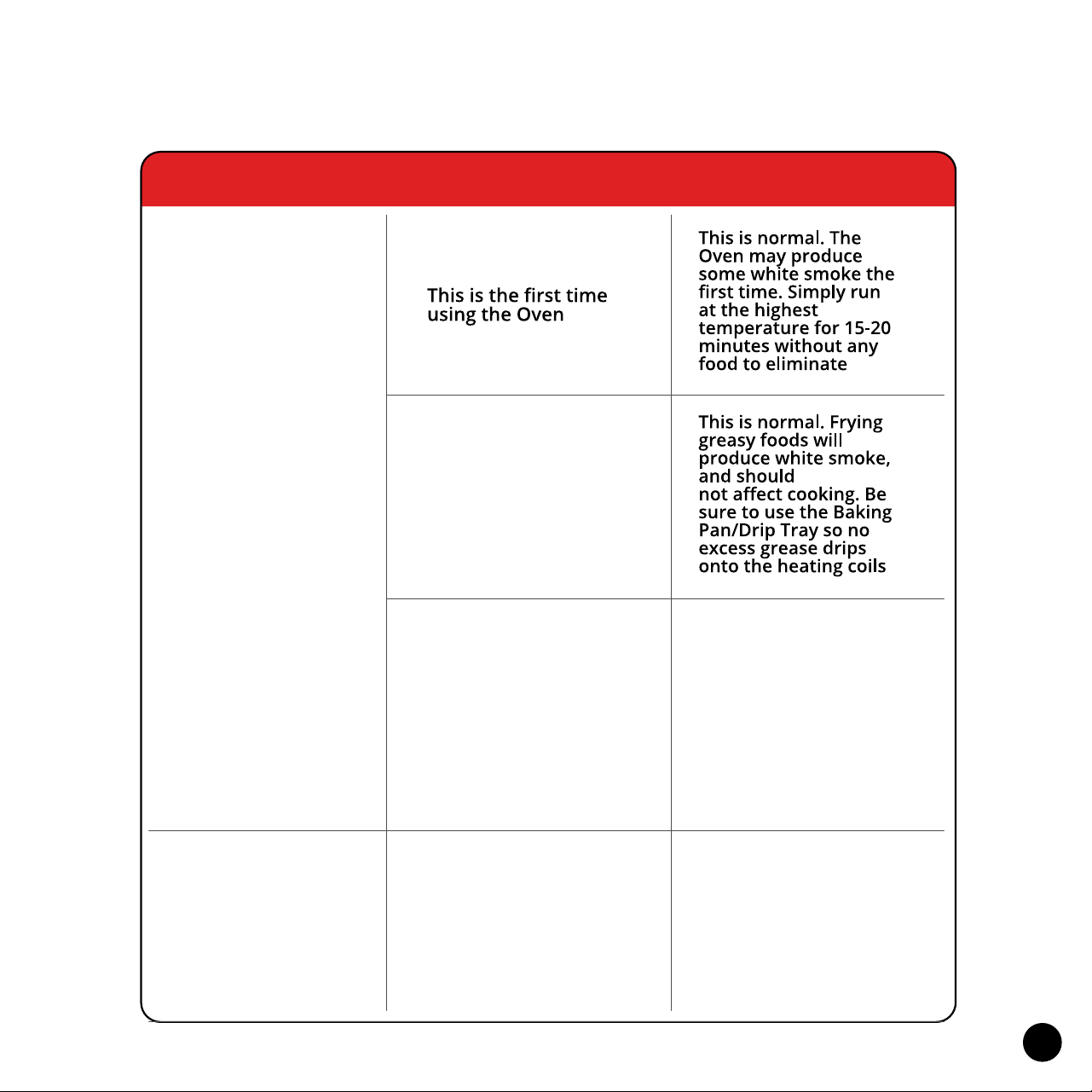
Troubleshooting
The Oven
Doesn't Turn On
Dark Smoke Is
Coming Out Of
The Oven
Steam Is Coming
Out From The
Top Of The Oven
Door
Issue
Cause Solution
Oven is not on
The Door is not closed
properly
You are cooking high
moisture content
foods
Reinsert the power
plug and make sure
the oven is plugged in
This is normal. The
Door is vented to
release steam created
from high-moisture
content foods such as
frozen breads. Cool
surfaces like the Door
may gather this steam
Make sure the Door is
completely closed
Food is burning
The Oven is not
plugged in properly
Tap “ON/OFF" icon to
power on
28
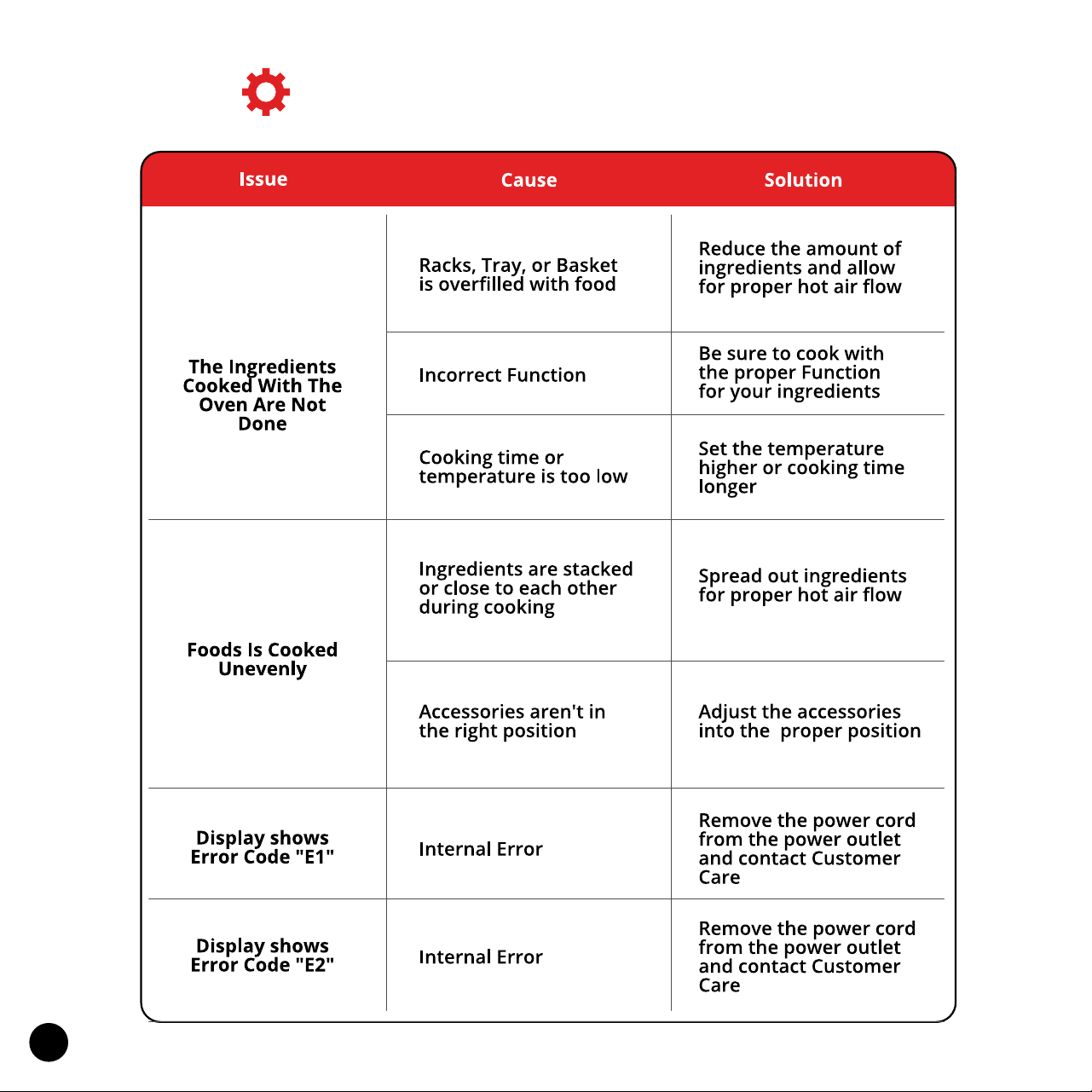
White Smoke Is
Coming Out Of
The Oven
Foods Are Not
Crispy After Air
Frying
Issue
Cause Solution
Cooking food with
high oil, fat, or grease
Baking Pan/Drip Tray,
Crumb Tray, or
heating coils still
contain grease
residues or oil from
previous use
Always clean all
accessories and parts
between cooking
cycles to not burn old
grease or oil
Ingredients have high
moisture
Use oven snacks or
brush a thin layer of
oil on the surface of
the ingredients
before cooking for
crispier results
29
Troubleshooting (continued)

To make a warranty claim, do not return this
appliance to the store.
Please call 1.312.498.9334
Between 10:00am - 5:00pm (CST) Monday through Friday
or email help@ariaairfryer.com

Lifetime Warranty Terms & Conditions
•
First 60 days after purchase date: If any problems, we’ll replace your
unit at no cost but you’ll be responsible to pay shipping both ways to get
your product back to us and for us to send you a new one.
• After 60 days of purchase date: If any problems, we’ll repair it or replace
unit at no cost to you if we determine that the product is not damaged
due to improper use and is a problem due to manufacturing deciencies.
You’ll be responsible to pay for the shipping cost both ways, to and from
our location.
• Accessory Replacements: We’ll ship you a free replacement, you’ll cover
the shipping cost.