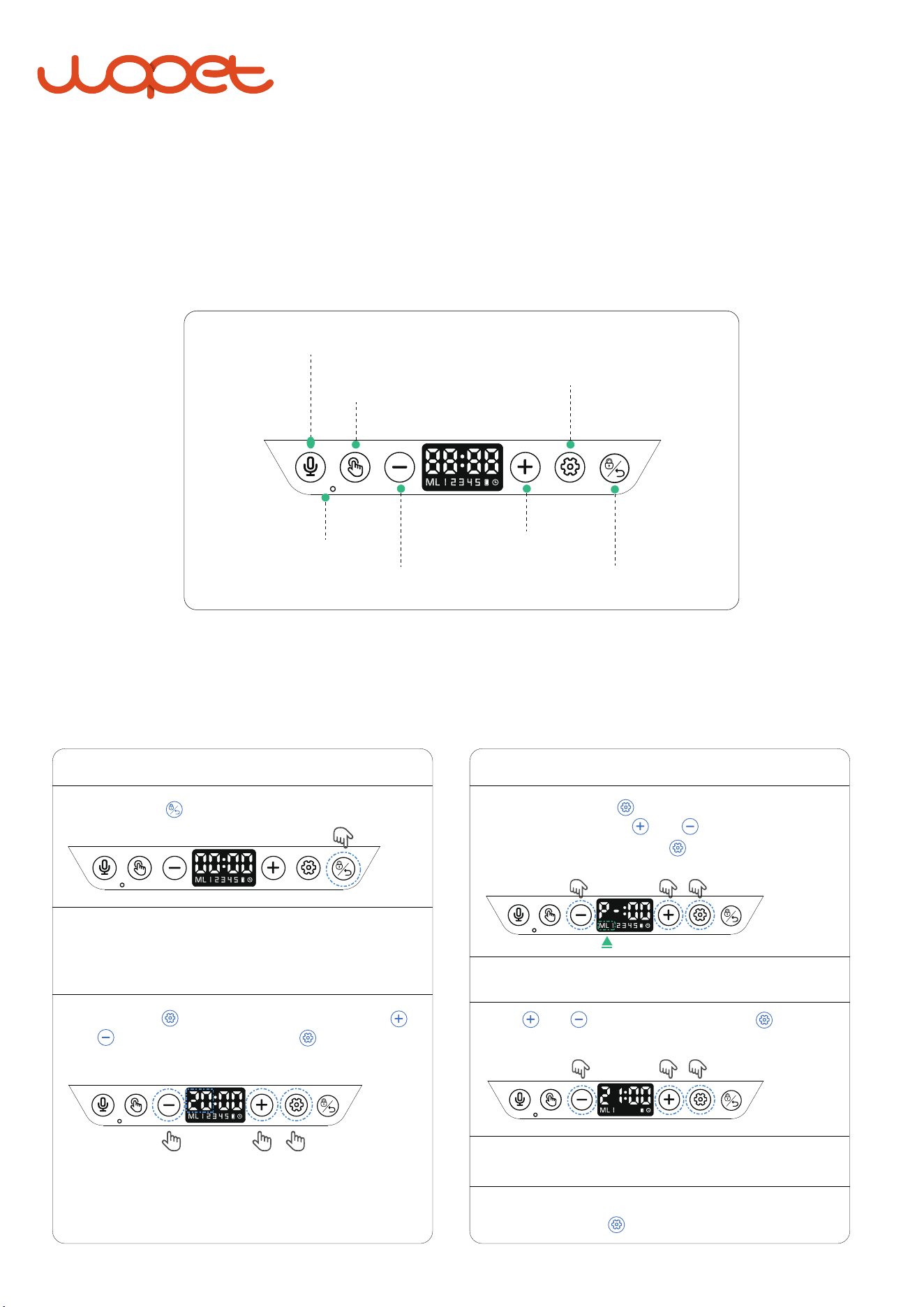
"ML 1" flashes. Press to confirm the meal and continue
to set portion size.Press and to adjust the portions.
When the portion is set, press to save and set the
feeding time.
F01 PLUS Quick Start Guide
Our device uses a 24- hour clock system, for example, 16:00 is equivalent to 4:00 PM
Panel Introduction
Program Setting
MIC
Back(lock)
Recording
Setting
Microphone
Number Increase
Manual Feeding
Number Decrease
Press and Hold for 2s to unlock the screen.
STEP 1— Unlock Screen
STEP 2— Set the Current Time
MIC
Press and hold for 2s to enter setting mode.Press
and to set the current time. Press again to save
and continue to meal settings.
Note: The feeder can work well only when the time of the
feeder is consistent with the current time.
MIC
STEP 3.1— Set Feeding Portion
STEP 3.2— Set Feeding Time
STEP 3.3— Set Other Meals
Press and to set the hour, then press to save to
entering the minute setting.
Repeat the steps for 2-5 meal, when finished the all
meals setting, press to save.
MIC
MIC

FAQs
After powering on, Press and hold the lock button for 3 seconds to unlock the screen, and then
click the setting button to enter the setting mode.
1. Why is there no response to pressing any button?
1) Ensure the food size is less than 12mm, only suitable for dry food.
2) Check whether the food bowl is full of food, whether there is food residue at the food outlet,
if so, please clean up in time.
2.Why wasn't the food distributed at the set time?
One portion is about 10g.
3.What is the amount of 1 portion?
Please set the feeding portion to 0
3) If the spotlights detect food residue at the food outlet, the food behind will not be distributed.
4) Check if the turntable is jammed, if so please clean it first.
5) If it is battery-powered, please ensure there's sufficient battery power.
4. How do I cancel the third feeding schedule?
Thank you for choosing Olelica pet feeder.
Please read the quick guide before using,
if you have any problems when using our product, kindly send email with
order number to our mailbox:
for help,we'll response within 24 hours.