We want you to love your purchase, but if you are not completely satisfied, please contact our Customer Service
team with any questions you may have.
slot port
cutting button
power button
USB interface
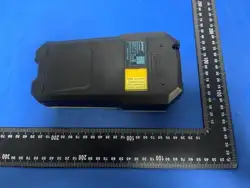
Product Overview
Customer Service Contact Information
Label Maker Status Status Action
Lights up in green Normal Standby Mode
Lights up in blue Bluetooth connected Printing in progress
Charge the machineFlashes slowly in red Low battery
Frequently Asked Questions
Quick Start Guide
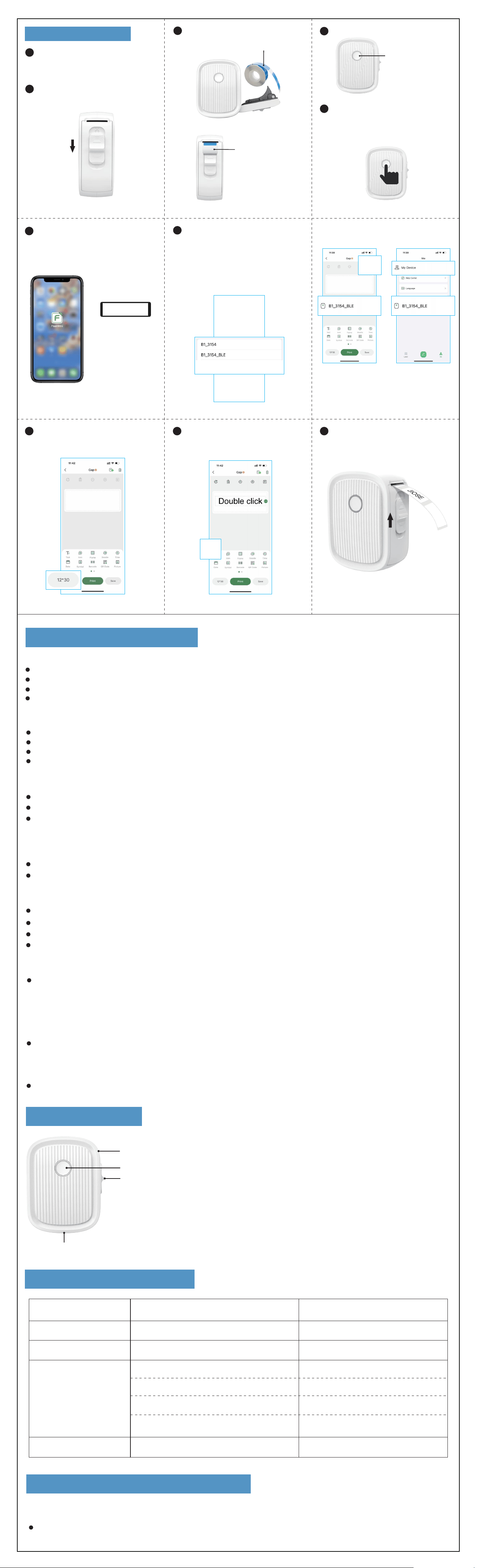
Charge the device
Please charge the device before turning on it.
Open the lid
Slide down
Label loading
Make the label face up
Turn on
Long press the button
Extend a bit beyond
the opening
Set a calibration mode
Don't miss this step!!!
One-click the button, it will slowly analyses
the label, or it align the label incorrectly.
APP download
Search FlashMini in Google Play or APP
Store.
Bluetooth connection
Open FlashMini APP to turn
on the Bluetooth, NOT in
system settings.
in "FlashMini" APP
in "setting"
Don't click here!!!
● Click “ ” or “My Device” to search the
device.
Select label paper
Edit
Click on【Text】,【Double click】pops up,
then edit labels in the entry bar.
Cut paper
Press the button up
What's the specifications of label tape compatible with B1 label maker?
Label tape diameter: 1.6 inch (both continuous and non continuous)
The gap between the label tape: 0.3 inch (non continuous)
Make sure the diameter of the label tape is less than 1.6 inches, or it can't fit inside the B1 label maker.
And check if the gap between the label tape is between 0.24-0.3 inch, or it can't align the labels to print correctly.
Why cannot the label maker be fully charged when being plugged into the laptop, causing auto-
matic shutdown after unplugging?
The output voltage of the laptop USB interface is insufficient and unstable, which is unable to provide a stable
charging environment. Please use a wall socket for charging.
Why cannot the machine be searched by the APP?
Please Connect B1 label maker in "Flash Mini"App, NOT in system settings, or the app won't work.
The machine is charging, please unplug it and try to search it again.
Bluetooth responds slowly. Please re-open the APP and reboot the machine to connect it again.
Please update the APP to re-install it.
Why it can't print any of the colored labels or cute characters, just the words or icons?
All the label makers on the market apply thermal printing technology and uses chemically-treated paper that
darkens when heated by a thermal print head. Thus, it ONLY SUPPORTS BLACK PRINTING. Color options
are the labels themselves. The colored labels are just for reference only.
What’s the PIN code for Bluetooth connection?
PIN code is 0000.
Indicator Light Instructions
Email:
Improperly load paper
Close the cover
Refill label tape
Make the label face up and leave1-3mm
of label outside the slot port
Charging
Cover is open
Out of paper
Why does the machine work normally but keep printing blank paper?
It may be because the label paper is laid reversely, please make the label sticker face up.
Improperly load the paper without leaving 1-3mm outside the slot port.
Residues is sticking on the cutter or feed slot and the label paper fails to be detected. Please clean the dust or
residues with an alcohol cotton pad.
Why does the APP get frozen?
This always happens when you use it for the first time.
Please long-press the button to shut down the machine and reactivate it. It will get normal after restarting.
Why the label maker doesn’t print at all or only print half the word?
Using the WRONG LABEL TYPE will cause unsatisfied printing results, please check your label type.
Improperly load the paper without leaving 1-3mm outside the slot port.
Please check if the label exceeds label width range. Off Brand label paper will not work.
Font size exceeds perimeters range. Please configure whatever you want within the label template perimeters.
Lights up in red