Powernail
®
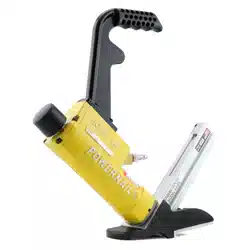
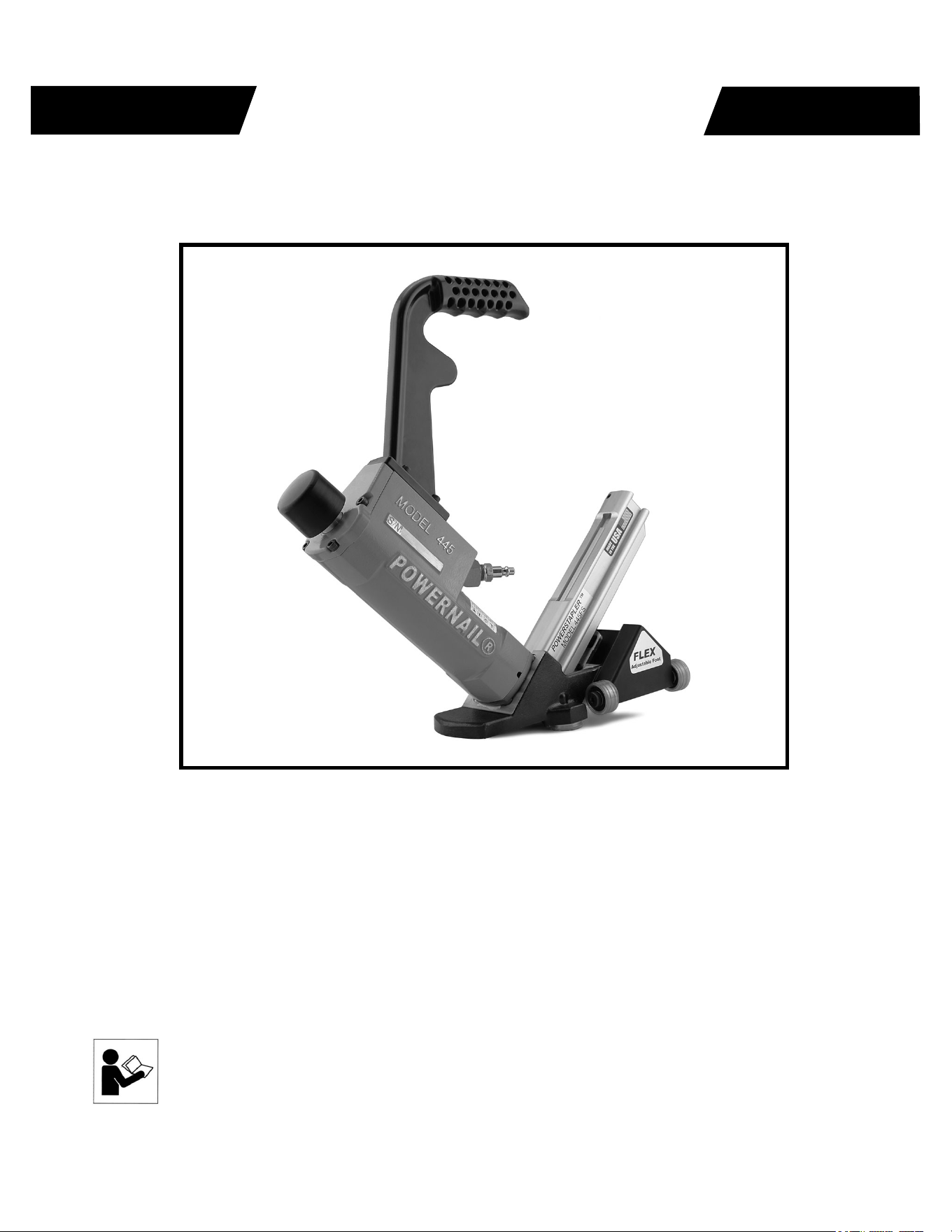
Model 445FS STAPLER with Power Roller
POWERNAIL
®
CO.
OPERATION AND MAINTENANCE MANUAL
MANUAL DE OPERACION Y DE MANTENIMIENTO
MANUEL D’INSTRUCTIONS ET D’ENTRETIEN
Read this manual before you use this PowerStapler®. Follow all safety warnings and
instructions. If you are uncertain about the operation of the stapler, call us directly
at 1-800-323-1653 for assistance or contact the closest Powernail Dealer for help.
Please retain this information for future reference.
WARNING
REV 2024.04.25

2
The Model 445FS Stapler with Power Roller is a state-of-the-art pneumatic Powerstapler®
designed to bring fl exibility and speed to tongue & groove fl ooring installation.
The Model 445FS Power Roller is designed for use with 2", 1-3/4" and 1-1/2" (15.5 gauge)
Powerstaples® nails and can nail down from 3/4" to 5/8" tongue and groove hardwood fl ooring.
For superior pneumatic fl ooring tools, look to the company that has been the industry’s leader in
quality—POWERNAIL® COMPANY, INC.
INTRODUCTION
INDEX
LIMITED WARRANTY
POWERNAIL® Company, Inc. warrants to its customer, and to the fi rst end-use purchaser of
POWERNAIL fl ooring nailers purchased from an authorized POWERNAIL distributor, that
each serialized manufactured nailer by POWERNAIL®, for a period of 12 months from the date
of purchase, and with respect to the nailer/stapler body (specifi cally Models 200, 445, and 50P),
for a period of 10 years from date of purchase, (“warranty period”); shall be free of defects in
materials and workmanship and will meet POWERNAIL’s specifi cations in eff ect at the time of
Product shipment. POWERNAIL will repair or replace, at its option, any Powernailer® that does
not conform to this warranty. Claims must be made no later than fi fteen (15) days after the end
of the warranty period. POWERNAIL will perform all repair or replacements itself or through
its authorized contractors. POWERNAIL is not responsible for shipping, labor or other direct or
indirect costs. Damage caused by abuse, misuse, unusual or excessive wear is excluded. Repair
or modifi cation of the Products by unauthorized parties will void this warranty. The customer
is responsible for returning Products to POWERNAIL for verifi cation of nonconformance.
Warranties for Products not manufactured by POWERNAIL are limited to warranties provided
to POWERNAIL by the manufacturer of such product that are assignable to customer.
THESE WARRANTIES AND REMEDIES ARE EXCLUSIVE OF ALL OTHERS, EXPRESS
OR IMPLIED. THE WARRANTIES OF MERCHANTABILITY AND FITNESS FOR
PURPOSE ARE EXPRESSLY EXCLUDED. IN NO EVENT SHALL POWERNAIL’S
LIABILITY FOR A WARRANTY CLAIM EXCEED THE PRICE PAID TO POWERNAIL
FOR THE NONCONFORMING PRODUCT, REGARDLESS OF THE FORM OR BASIS OF
THE CLAIM OR CAUSE OF ACTION.
Index..................................... 2
Warranty............................... 2 &16
Safety Instructions................ 3
Operating Instructions.......... 4
Parts & Service.................... 5-7
Drive Blade Change.............. 6
Seal Replacement................. 6-7
Parts List.............................. 8-9
Seal Locations Diagram....... 10
Schematic ........................... 11
Safety Labels........................ 12
Troubleshooting Chart......... 13
Depth Chart.......................... 14
Accessory Products.............. 15
3
SAFETY INSTRUCTIONS
Always use approved SAFETY GLASSES and EAR PROTECTION when operating this stapler. The
operator and others in the work area should always wear approved FRONT and SIDE eye protection
when operating this stapler. Eye protection will help guard against fl ying staples and debris, which could
cause severe eye injury.
EYE AND EAR PROTECTION should be used to prevent hearing damage when there are high noise
levels in the work area.
ALWAYS use ear plugs with a noise reduction rated at 29 db or highter at a construction site.
Stapler noise ratings are at LPA-1sd=90.6,
LWA-1sd=99.3 and LPA-1s,1m=86.3.
Stapler vibration rating: m/s2=3.05.
Always DISCONNECT THE AIR SUPPLY before making any adjustments, repairing, clearing jams or when the
stapler is not in use. Do not use on scaff olding or ladders and disconnect stapler from air supply when transporting
between installation areas.
Never attach the female end of a quick disconnect to the stapler. This will trap air inside the Stapler and permit it to
be discharged. Only the unrestricted male connection should be attached to the Stapler.
Stapler requires an air source that can continuously deliver 80 to 110 psi at 3-1/2 cubic feet of air per minute for
operation.
Normal air pressure should not exceed 120 psi or damage to the Stapler and seals may occur. Excess air
pressure can cause the Stapler to explode.
To prevent fi re or explosion, use only regulated compressed air—do not use bottled gases of any kind (no oxygen
or combustible gasses) to power this Stapler.
Stapler is intended for use installing wood fl ooring and is not to be used for purposes not specifi ed in the
operations manual.
Do not use any staples other than Powernail Powerstaples Staples which are specifi cally designed for use in
any Powerstapler. Powerstaples Staples are available in various lengths. Contact your Powernail Dealer for
Powerstaples Staples.
Use only Powernail replacement parts in the repair or maintenance of this stapler. Parts or repair services are
available from the manufacturer or from agents authorised by the manufacturer. Repairs should be carried out
only by trained service personel in the fi eld of fastener driving tools who will observe proper safety controls while
performing maintenace. Service personel should be qualifi ed to to asses the safe working condition of fastener
driving tools.
Never place any part of the body in the discharge path of the Stapler when air is connected to the Stapler. Always
make sure Stapler is empty of cleats before connecting air hose so as to prevent any accidental discharge from
occurring.
Never leave the Stapler unattended while it is connected to an air supply.
Whenever air is connected to the Stapler, keep body parts away from the nail discharge path.
Disconnect the air line before making adjustments or repairs on the Stapler. Only connect air to an
unloaded Stapler so as to prevent accidental discharge.
POWERNAIL COMPANY, INC.
1020 Williams Road, Genoa City, WI 53128 US
Phone: 1-800-323-1653 OR 262-292-5300
www.powernail.com
4
OPERATING INSTRUCTIONS
Read these instructions carefully before you use the Stapler.
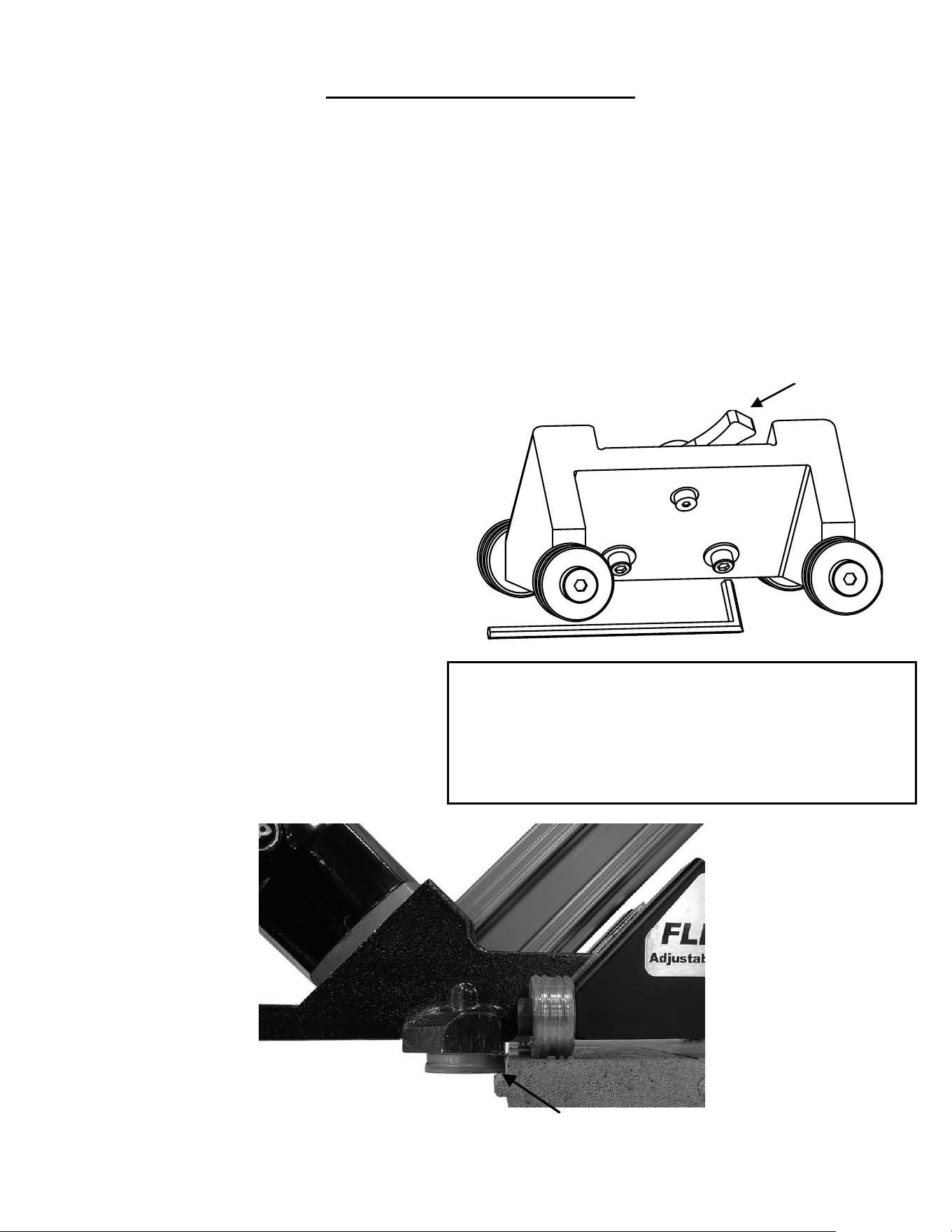
1. Loosen 2 hex screws.
2. Raise or lower the FLEX to your wood sample.
3. Match the
9mm rollers to the staple pocket.
4. Tighten 2 hex screws.
5. Test wood sample with new adjustment.
Hex Allen Wrench
FLEX
Adjustment Lever
Figure 1.
FLEX Power Roller Foot Adjustment:
Wood varies from one manufacturer to the next. The
diff erent wood profi les may be due to height and
length of the fl ooring tongue and whether or not there
is a staple pocket.
To use the Powernail Flex Power Roller, adjust the
stapler FLEX foot to a sample of your fl ooring (Figure 1).
When the stapler foot is adjusted to your fl ooring, simply
place the stapler on the fl oor and pull stapler back so the
9mm rollers catch the edge of the fl oor above the tongue.
Tap the plunger with the rubber-capped mallet-end to
let the stapler drive and set the staple at the correct 45
degree angle.
To Load the 445FS FLEX Power Roller:
Place up to two sticks (90) of Powerstaples® (15.5
gauge) staples, 2" , 1-3/4" , or 1-1/2" long into the
staple channel feed slot. Pull back the spring loaded
staple pusher over the staples until it contacts the last
staple and slowly release the staple pusher.
To Unload
To remove staples from the Staple Channel, pull the two
round knobs on the Staple Pusher together. This will
clear it from the staple path. Then turn the Stapler over
so the staples slide out of the channel.
First, loosen the two hex bolts under the FLEX foot with
the Allen Wrench supplied with the stapler. (Figure. 1.)
Next, set the stapler on a sample of your fl ooring.
Use the adjustment lever at the back of the stapler foot
to raise or lower the stapler to the wood.
Match the Adapter Foot 9mm rollers so that it is pointing
into the 90° angle created
by the tongue and the top of the wood (see Figure 2).
For wood with a staple pocket, line up the 9mm rollers
at the top of the staple pocket.
When the adjustment lever is in the correct position
for your wood sample, tighten the two hex bolts to
lock the FLEX foot into place.
Always check your adjustment with a sample to
ensure the staple is driving into the staple pocket.
Figure 2.
Adjust FLEX lever so the 9mm rollers are above the fl ooring tongue

5
TO LOAD MODEL 445FS:
Place two sticks (90 PowerStaples) into the Staple
Channel feed slot. Pull back the spring loaded Staple
Pusher over the staples until it contacts the last staple
and slowly release the Staple Pusher.
TO UNLOAD MODEL 445FS:
To remove staples from the Staple Channel, pull the two
round knobs on the Staple Pusher together. This will
clear it from the staple path. Then turn the Stapler over
so the staples slide out of the channel.
PARTS & SERVICE:
When ordering parts include the part number, part
description, PowerStapler model and serial number. Be
sure to state the quantity of the part(s) required. Contact
your Powerstaple Dealer for the necessary parts.
WARNING: Never work on the Stapler if the air line is
attached. Always disconnect the air line from the Stapler
fi rst.
Stapler DISASSEMBLY:
TO REPLACE RUBBER BUMPER (#24):
1. Disconnect the air supply
2. Remove the four (4) cap screws holding the Adapter
Foot, Foot and Staple Channel assembly to the main
Body.
3. Pull the Rubber Bumper out of the cylinder bore.
Replace the old Bumper if it shows signs of wear or it is
split.
4. Reverse these steps to reassemble the Stapler. Be
sure to align the Driving Blade with the slot in the Staple
Channel Assembly while you reassemble the Stapler.
NEVER FIRE THE Stapler WITHOUT THE RUBBER
BUMPER INSTALLED, IT WILL SEVERELY DAMAGE
THE STAPLER.
CHANGING A DRIVING BLADE (#15):
1. Disconnect the air supply.
2. Remove the four socket head cap screws(#40)
holding the Adapter Foot(#60), Foot(#30) and Staple
WARNING: It is not necessary to hit the Stapler hard
to activate it. Never hit the Stapler with excessive
force or with the metal end of the mallet, this will
damage the Stapler.
DO NOT USE THE METAL END OF THE MALLET
TO STRIKE THE PLUNGER, use the rubber capped
end only.
Before each use, check all screws to be sure they are
tight. Shock and vibration can loosen screws. Do not
over tighten any screw.
AIR SUPPLY:
The air must be clean and dry. Dirty and/or wet air will
damage the Stapler.
Drywall Dust:
• Using Pneumatic PowerStaplers in drywall dust
conditions will dramatically decrease the life of the
Stapler.
• Drywall dust is abrasive, when cycled through
the Stapler it will cause excessive wear.
The air source must continuously deliver 80 to 110
psi at 3-1/2 cubic feet of air per minute to operate
the Stapler. For operation, connect a 1/4” minimum
internal diameter and clean air hose to the Stapler.
Be sure the air regulator is set at 90 psi. If the staple
is not countersunk below the surface of the wood, turn
up the air pressure, but not over 110 psi.
Check for air supply leaks that waste air and starve
the Stapler of air thereby reducing its performance.
There should be no orifi ce smaller than 1/4” in the air
path between the Regulator and the Stapler.
LUBRICATION:
You must lubricate the Stapler manually. The
frequency of lubrication is dependent upon the duty
cycle of the Stapler. Continuous duty requires more
frequent oiling than intermittent duty.
At least every eight (8) hours place two to four drops
of Air Tool Oil, supplied with your Stapler, into the
disconnected air line male connector attached to the
Stapler.
WARNING: Do not over lubricate the Stapler, excess
oil mist or drops will be vented with spent air when
over lubricated. Excess oil could stain the wood
fl ooring, walls or furnishings. Dry fi re the Stapler,
without staples, to purge excess oil, before you begin
to staple down fl ooring. Before storing the Stapler,
lubricate and cycle the Stapler in insure internal parts
are oil protected from corrosion.
WARNING: Detergent oil is not recommended and
may damage the seals.
OPERATING INSTRUCTIONS, continued

6
Channel Assembly(#27) to the body.
3. Remove the Rubber Bumper(24).
4. Pull the Driving Blade(#15) with pliers until the
Piston(#20) is fully extended outward towards the bottom of
the cylinder.
5. Use a 15/16” box wrench (Part #:
09-445-29768) to
unscrew the Driving Blade Jam Nut(#22) and remove it.
Hold the Piston from turning while unscrewing the Jam Nut
by holding the piston hex with a 1-1/8” box wrench
(Part #:
09-445-29768).
6. Push out the 1/4” diameter blade retaining Dowel
Pin(#14) and remove the broken Driving Blade stub.
7. Install a new Driving Blade in the slot and replace the
Dowel Pin(#14). Screw on the retaining Jam Nut(#22)
using the same tools. If the Jam Nut becomes worn and
loose after frequent removals, it should be replaced.
8. Check the fi t, there should be some sideways movement
between the Driving Blade and the Jam Nut assembly.
This is desirable and helps the blade to align itself with the
mating parts.
9. Reassemble the components. Be sure to align the
Driving Blade with the slot in the Adapter Foot Assembly.
SEAL REPLACEMENT: There are 7 seals that may
require replacement. We recommend that you have your
PowerStaple Dealer replace the Seals.
SEAL KIT: You may choose to buy a Seal Replacement Kit
and replace the seals yourself. It is good practice to replace
all seals at one time regardless if only one seal needs
replacement.
SEAL DESCRIPTION & NUMBER:
1. Rubber Seat (#18)
2. Plunger Seal Set (#10)
3. Piston U-Cup Lip Seal (#21)
4. Return Cylinder U-Cup Lip Seal (#17)
5. Piston Rod U-Cup Lip Seal (#12)
6. Plunger Wiper Seal (#4)
7. Return Cylinder O-Ring Gasket (#11)
To change Seals follow these procedures. Be sure the air
line is disconnected from the Stapler fi rst before making any
repairs. Consult the illustration for the name and location of
the following component parts.
SEAL REPLACEMENT REQUIRES REMOVAL OF THE
DRIVING BLADE ASSEMBLY:
1. Disconnect the air supply.
2. Remove Rubber Plunger Cap (#7).
3. Unscrew & remove Body Cap (#2).
4. Unscrew the three #10-32 cap screws holding the
Plunger (#9) to the Return Cylinder (#16).
5. Pull the Plunger up and out of the Stapler Body (#1)
cavity.
6. Remove the Return Cylinder O-Ring Gasket (#11)
located on the top of the Return Cylinder under the Plunger.
7. Turn the Stapler over and remove the four cap screws
(#3), that fasten the Adapter Foot and Staple Channel
Assembly to the Stapler Body and lift the Assembly off
the Body.
8. Remove the Rubber Bumper (#24).
9. Pull the Driving Blade Assembly out of the Stapler
Body by pulling on the Driving Blade.
10. Hold the Piston Rod (#13) with an 11/16 socket
over its hex end opposite the Piston. Do not use
pliers or a vise anywhere on the metal parts, they
can damage the sealing surfaces.
11. Use box wrenches to remove the 5/8-18 Jam Nut
(#22). Remove the Dowel Pin (#14) and Driving Blade
(#15).
12. Unscrew the Piston from the Piston Rod using box
wrenches and separate the Piston, Piston Rod and
Return Cylinder.
TO REPLACE THE SEALS:
Rubber Seat (#18):
1. Remove the Cylinder Sleeve (#23). The Cylinder
Sleeve should slide out of the Stapler Body when you
pull out the Driving Blade Assembly.
2. Remove the metal Support Ring (#19) and Rubber
Seat from inside the Stapler body. Note that the
chamfer on the inside of the Rubber Seat faces the
BOTTOM of the Stapler, do not reverse the direction of
the chamfer when you replace the Rubber Seat.
3. Replace the Rubber Seat, Support Ring and
Cylinder Sleeve. Be sure to re install the steel Cylinder
Sleeve with the chamfered inside edge facing the
BOTTOM of the Stapler
Plunger Seal Set (#10):
1. Remove the Tefl on
®
Seal and its O-Ring expander
from the groove using a bent paper clip or pick. Be
sure not to scratch the inside walls of the seal groove
with the wire hook.
2. Clean out the seal groove. Place a new O-Ring into
the seal groove by stretching it over the Plunger body.
Make sure the O-Ring is not twisted in the groove.
Place a new Tefl on° Seal Ring into the seal groove
over the O-Ring.
3. Carefully push the Tefl on
®
Seal Ring over the edge
of the Plunger with your thumbs and into the groove.
Do this as quickly as possible to reduce stretching of
the Tefl on
®
Seal Ring. DO NOT OVER STRETCH THE
TEFLON
®
SEAL RING! Be sure the Tefl on
®
Seal
Ring is centered all around the seal groove and not
twisted.
4. Wipe off the Seal surface with a clean rag and
lubricate it generously with Pneumatic Light Air Tool Oil
lubricant.
Piston U-Cup Lip Seal (#21):
1. Remove the old Piston U-Cup Lip Seal from the
Piston using a bent paper clip or pick, being careful
OPERATING INSTRUCTIONS, continued

7
not to scratch the inside walls of the seal groove or the
edge of the Piston with the wire hook.
2. Clean out the seal groove. Place a new U-Cup Lip
Seal into the groove. Make sure the lips is not twisted
in the groove and the lips face the top of the Stapler
See the sketch below.
3. Carefully wipe off the U-Cup Lip Seal surface with a
clean rag and lubricate it generously with Pneumatic
Light Air Tool Oil lubricant.
Return Cylinder U-Cup Lip Seal (#17):
1. Use a bent paper clip or pick to remove the old
U-Cup Lip Seal from the internal seal groove inside
the Return Cylinder. Be careful not to scratch the
inside walls of the seal groove with the wire hook.
2. Clean out the seal groove. Place a new U-Cup Lip
Seal into the groove, be sure it is not twisted in the
groove. Be sure the lips are facing the inside of the
Return Cylinder as shown in the schematic (page 10-
11, 13).
WARNING: The U-Cup Lip Seals (#3) and (#4) look
alike, but they are diff erent, DO NOT mix them up.
3. Carefully wipe off the Lip Seal surface with a clean
rag and lubricate it generously with Pneumatic Light
Air Tool Oil lubricant.
Piston Rod U-Cup Lip Seal (#5):
1. Remove the old U-Cup Lip Seal from the seal
groove with a bent paper clip or pick using care not
to scratch the inside walls of the seal groove with the
wire hook.
2. Clean out the seal groove and install a new U-Cup
Lip Seal. Be sure the Lips are facing the right direction
and are not twisted in the groove. See the sketch
below.
WARNING: The Lip Seals (#3) and (#4) look alike, but
they are diff erent, DO NOT mix them up.
3. Carefully wipe off the seal surface with a clean rag
and lubricate it generously with Pneumatic Light Air
Tool Oil lubricant.
Plunger Wiper Metal Cap O-Ring (#4):
1. Use a bent paper clip to pick out the felt Wiper
Seal out of its groove in the Body Cap (#2).
2. Clean out the groove and insert the new O-Ring
(#6) in to the groove in the metal body cap (#2).
Return Cylinder O-Ring Gasket (#11):
1. Place a new O-Ring Gasket in the groove on top of
the Return Cylinder when you reassemble the Driving
Blade Assembly.
2. Wipe off the O-Ring Gasket seal surface and
lubricate it generously with Pneumatic Light Air Tool
Oil lubricant.
REASSEMBLING THE Stapler:
1. Be sure the Rubber Seat, Support Ring and
Cylinder are installed in the Body and are facing the
correct way.
2. All seal surfaces must be clean and lubricated
generously with Pneumatic Light Air Tool Oil lubricant.
Replace any part that shows signs of wear.
3. Use care when installing the seals into their respective
cavities. Be sure the Seals are contained in their
groove and do not come out as the parts slide together.
Generous cavity lead in chamfers have been provided to
help Seal installation.
4. Carefully insert the Piston Rod into the return Cylinder
and screw the Piston onto the rod. Be sure the Piston is
facing the correct way, ears up, hex down.
5. Assemble the Driving Blade, Dowel Pin and Jam Nut
on to the Piston Rod.
6. Insert the Driving Blade Assembly up into the bottom
of the Stapler Body Cylinder.
7. Be sure there is a new O-Ring Gasket in the top
groove of the Return Cylinder.
8. Insert the Plunger into the top cavity of the Body.
Line up the holes and install the three Plunger retaining
screws. It is important that the three #10-32 screws are
tight or air leakage will occur. Our recommendation is to
use 1-2 drops of blue Loctite® or similar on the 3 screws.
9. Install the Body Cap and Plunger Rubber Cap.
10. Turn the Stapler upside down. Install the Rubber
Bumper, Staple Channel Assembly and Adapter Foot. Be
sure to align up the Driving Blade with the slot in the Foot
before the Stapler is closed up.
11. NEVER FIRE THE Stapler WITHOUT THE RUBBER
BUMPER INSTALLED, IT WILL DAMAGE THE Stapler.
TO CLEAR A Staple JAM:
1. It helps to tap the Driving Blade back to the retracted
position before trying to remove a jammed staple. A
spare Driving Blade works best for this.
2. Try to pull the jammed staple out of the gate with a
pair of long nose pliers. If this does not work remove the
four (4) cap screws holding the Foot, Gate and Staple
Channel Assembly together.
3. Separate the Foot and gate with a screw driver just
enough to clear out the jammed staple.
4. Put thread locking compound on all screws and
reassemble the components.
OPERATING INSTRUCTIONS, continued
For Step-by-Step Videos and Instructions,
Visit our Web Site at: www.Powernail.com
MODELS 445FS POWER ROLLER PARTS LIST
8
ITEM
PART NO. DESCRIPTION QTY REQ TU SEAL AVAIL
1 09-44529320 BODY 1
F
2 09-445293150 CAP (LOW PROFILE) 1
S
3 09-50P3202 1/4-20 X 5/8” S.H.C.S. W/PATCH (CAP) 4
S
4 09-44529729 PLUNGER WIPER METAL CAP O-RING 1
TU SEAL S, A-5, A-25
5
09-44529759 3/8” NPT 45° STREET ELBOW 1
S
6 09-4455418 1/4" AIR FITTING 3/8" NPT 1
S
7 09-44529722 RUBBER CAP 1
TU S, A-25
8 09-44529832 #10-32 X 3/4” S.H.C.S. W/PATCH (PLUNGER) 3
S
9 09-50P3014 PLUNGER (LOW PROFILE) 1
S
10 09-44529725 PLUNGER SEAL SET 1
TU SEAL S, A-5, A-25
11 09-44529731 RETURN CYLINDER O-RING GASKET 1
TU SEAL S, A-5, A-11, A-25
12 09-2003028 PISTON ROD U-CUP SEAL 1
TU SEAL
S, A-5, A-11,
A-25
13 09-44529710 PISTON ROD 1
S, A-11
14 09-44529740 1/4” X 1/2” DOWEL PIN (DRV. BLADE) 1
TU S, A-11, A-25
15 09-44529303 DRIVING BLADE 1
TU S, A-11, A-25
16 09-44529830 RETURN CYLINDER 1
S, A-11
17 09-2003027 RETURN CYLINDER U-CUP SEAL 1
TU SEAL
S, A-5, A-11,
A-25
18 09-44529723 RUBBER SEAT 1
TU SEAL
S, A-5,
A-25
19 09-44529721 SUPPORT RING 1
S
20 09-44529711 PISTON 1
S, A-11
21 09-2003026 PISTON U-CUP SEAL 1
TU SEAL
S, A-5, A-11,
A-25
22 09-44529748 5/8-18 JAM NUT (DRV. BLADE) 1
TU S, A-11, A-25
23 09-44529715 CYLINDER SLEEVE 1
S
24 09-44529724 RUBBER BUMPER 1
TU S, A-25
25XL 09-50P3201 HANDLE, X-LONG 1
S
25L 09-50P3200 HANDLE, LONG 1
S
26 09-50P3202 1/4-20 X 5/8” S.H.C.S. W/PATCH (HANDLE BASE) 4
S
27 09-44529325 TWO PART CHANNEL W/ TWO B.H.C.S 1
S, A-9
28 09-44529330 GATE 1
TU
S, A-9,
A-25
29 09-44529305 GATE PLATE 1
TU
S, A-9,
A-25
30 09-44529706 FOOT 1
S, A-9
31 09-44529331 #10-32 X 1/2” S.H.C.S. (STANDOFF) 1
S, A-9
32 09-44529756 1/4 X 1 STANDOFF SPACER (CHANNEL) 1
S, A-9
33 09-44529327 #8-32 X 5/16 B.H.C.S. (CHANNEL) 1
S, A-9
34 09-44529317 #10-32 X 1” S.H.C.S. W/PATCH (FOOT) 4
S, A-9
35
09-44529836 #10-32 X 3/8” S.H.C.S. (GATE) 2 TU
S, A-9
36 09-44529313 #6-32 X 1/2” F.H.C.S. (GATE) 2
TU
S, A-9,
A-25
37
09-44529326 STAPLE PUSHER SPRING 1
S, A-9
38 09-44529328 #8-32 X 1/4 F.H.C.S. (CHANNEL) 1
S, A-9, A-10
39 09-44529329 STEEL STAPLE PUSHER 1
S, A-9, A-10
40 09-44529747 1/4-20 X 1-1/4” S.H.C.S. (FOOT) 4
S, A-9, A-10
41 09-44529758 1/4” SPLIT RING LOCK WASHER (FOOT) 4
S, A-9, A-10
For this parts list and other Powernailer schematics, please visit the
Powernail Parts Store at http://www.powernail.com
Model 445FS Power Roller Assemblies, Kits and Accessories
MODELS 445FS POWER ROLLER PARTS LIST
ITEM #
PART NO. DESCRIPTION
QTY REQ
A-1
09-50P3104A 9MM BEARINGS W/ MOLDED COVERS (SET OF 2) 1
A-2
09-RB15FSA COMPLETE ROLLER SET (4 LRG ROLLERS + 2 9MM ROLLERS) 1
A-3
06-99607 445 / 445FS POWER ROLLER CONVERSION KIT 1
A-4
09-44529757A 6 OZ. AIR TOOL OIL 1
A-5
09-2003058A SEAL KIT (1 EACH OF ALL SEALS) 1
A-9
09-44529365A STAPLE CHANNEL ASSEMBLY 1
A-10
09-44529366A STAPLE PUSHER ASSEMBLY 1
A-11
09-445FSDBA DRIVE BLADE ASSEMBLY 1
A-15
09-44529768 BOX WRENCH - 2 ENDS: 15/16" & 1-1/8" (2 REQ) 2
A-16
09-4453120A ROLLER ADAPTER FOOT ASSEMBLY 1
A-24
09-AW445 ALLEN WRENCH SET (3/16 FLEX FOOT AND 5/32) 1
A-25
09-445FSTUKIT MODEL 445FS TUNE UP KIT 1
9
KEY: S=Sold Separately, A= Sold as part of assembly, TU=Tune-up Kit, F=Factory replacement only, or Seal Kit.
ITEM #
PART NO. DESCRIPTION QTY REQ TU AVAIL
60
09-4453120 ROLLER ADAPTER FOOT (445FSX) 1 S, A-3,A-16
63 09-50P3077 #10-32 X 1/2" B.H.C.S. 2 S, A-3,A-16
64
09-50P3104 ROLLER BEARING (9MM) W/ MOLDED COVER 2 S, A-1, A-2, A-3,A-16
65 09-50P3103 ROLLER AXLE (FOR ROLLER) 2 S, A-3,A-16
66 09-44529334 FLEX FOOT BRACKET 1 S, A-3
67 09-50P3073 FLEX FOOT CAM PLATE 1 S, A-3,A-16
68 09-50P3072 FLEX FOOT CAM 1 S, A-3
69 09-50P3079 BELLEVILLE DISC SPRING 1 S, A-3
70 09-50P3078 1/4 SH DIA X .50" SH. BOLT (W/PATCH) 1 S, A-3
71 09-44529875 ROLLER FLEX FOOT (445) 1 S, A-3
72 09-50P3076 WASHER .281 IDX.62 ODX.051" T 2 S, A-3
73 09-50P3075 1/4-28 X 1-1/4" S.H.C.S. 2 S, A-3
74 09-50P3097 LARGE ROLLER BEARING WITH MOLDED COVER 4
S, A-2, A-3
75 09-50P3084 ROLLER BOLT (10MM SH DIA X 16MM SH) 4 S, A-3
09-44529801 HEX WRENCH 3/16 (FLEX FOOT) 1
A-3, A-24
09-44529802 HEX WRENCH 5/32 1
A-24
10
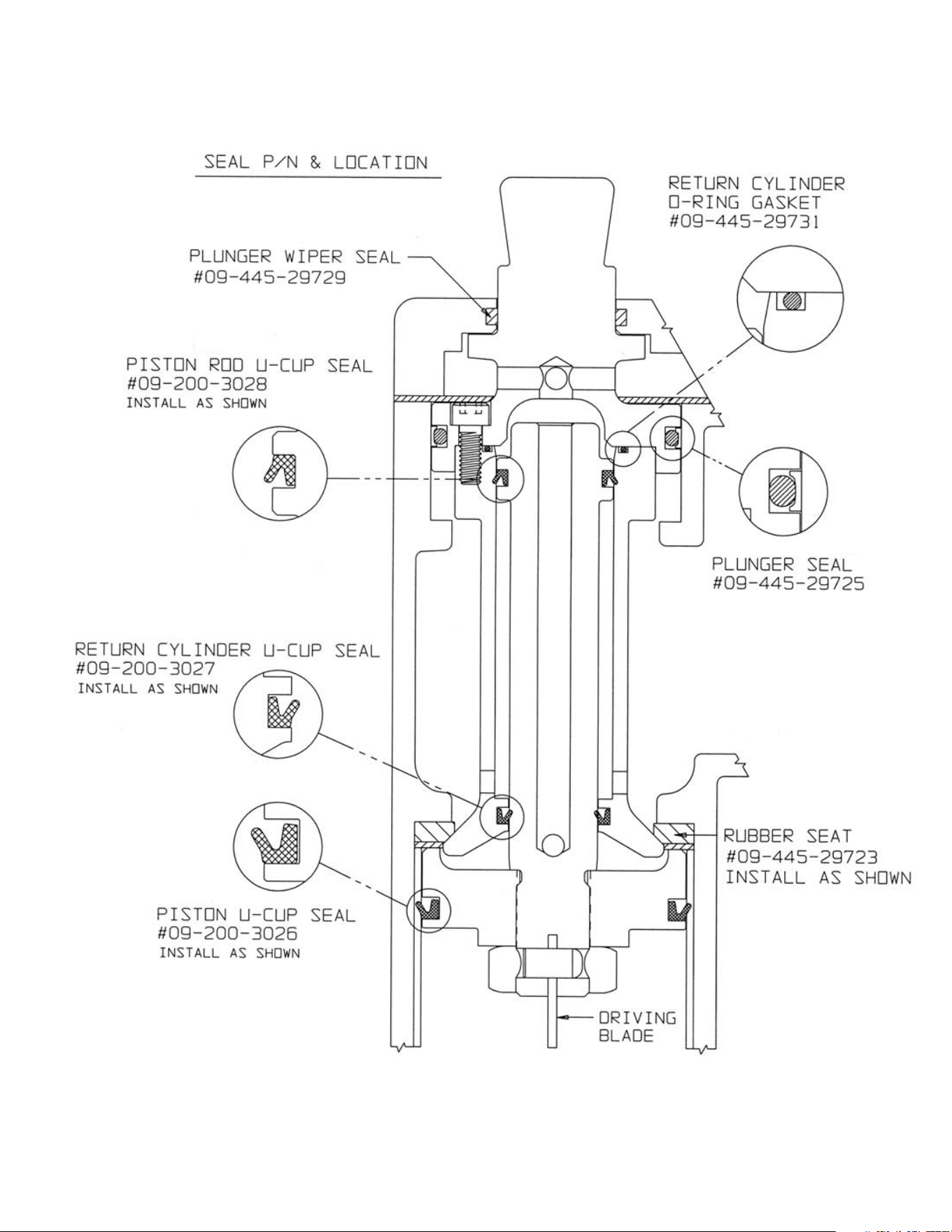
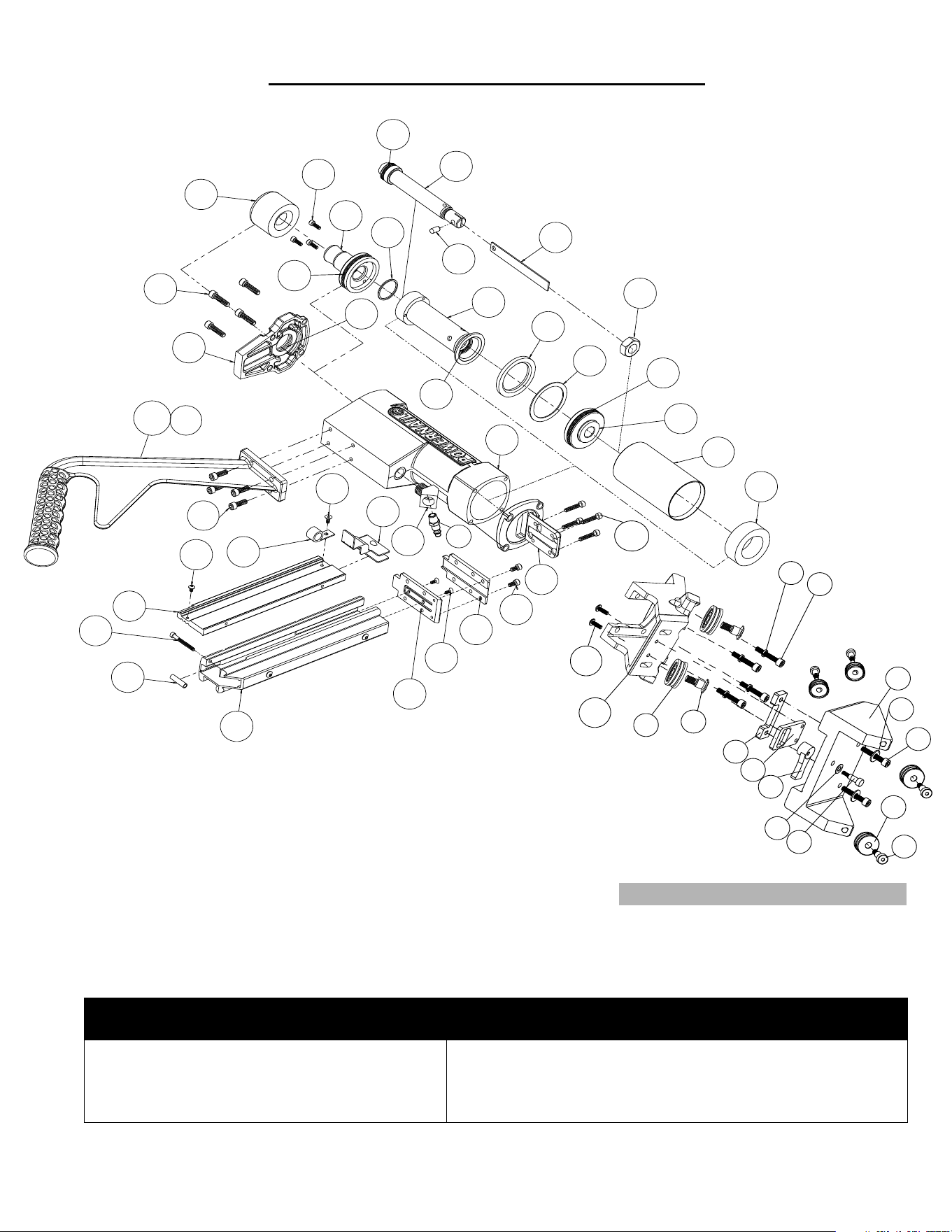
Pneumatic Seal Part Numbers and Locations
#11
#10
#4
#12
#17
#21
#18
12
13
8
15
9
10
11
7
3
2
4
25XL
25L
14
16
17
18
19
20
21
22
23
24
34
26
1
5
6
30
27
28
29
31
32
27
35
36
33
37
38
39
40
41
63
60
64
65
66
67
68
69
70
75
74
73
72
71
11
FLEX Power Roller Conversion Parts.
SCHEMATIC - Model 445FS Power Roller
Kits Available - For use on the Model 445FS Stapler
Seal Kit
(1 Each Of All Seals)
Tune-up Kit
Part #: 09-2003058A
Schematic #'s: 4, 10, 11, 12, 17, 18, 21
Part #: 09-445FSTUKIT
Schematic #'s: 4, 7, 10, 11, 12, 14, 15, 17, 18, 21, 22, 24,
28, 29, 35, 36
For Step-by-Step Videos and Instructions,
Visit our Web Site at: www.Powernail.com
12
CAUTION:
Lubricate
Nailer with
2-4 drops of
Industrial Light
Oil for every
8 hours of use.
↑
R
E
L
O
A
D
Nailer is activated by striking the plunger. Do not work on
scaff olding, ladders, elevated or uneven surfaces where the
nailer could fall and self-activate. Do not leave air attached to
the Nailer when moving from one install location to another.
Refi ll the nail channel with a
clip of Powercleats when empty.
Pull the Nail-Pusher assembly
to the back of the channel when
cleats are reloaded.
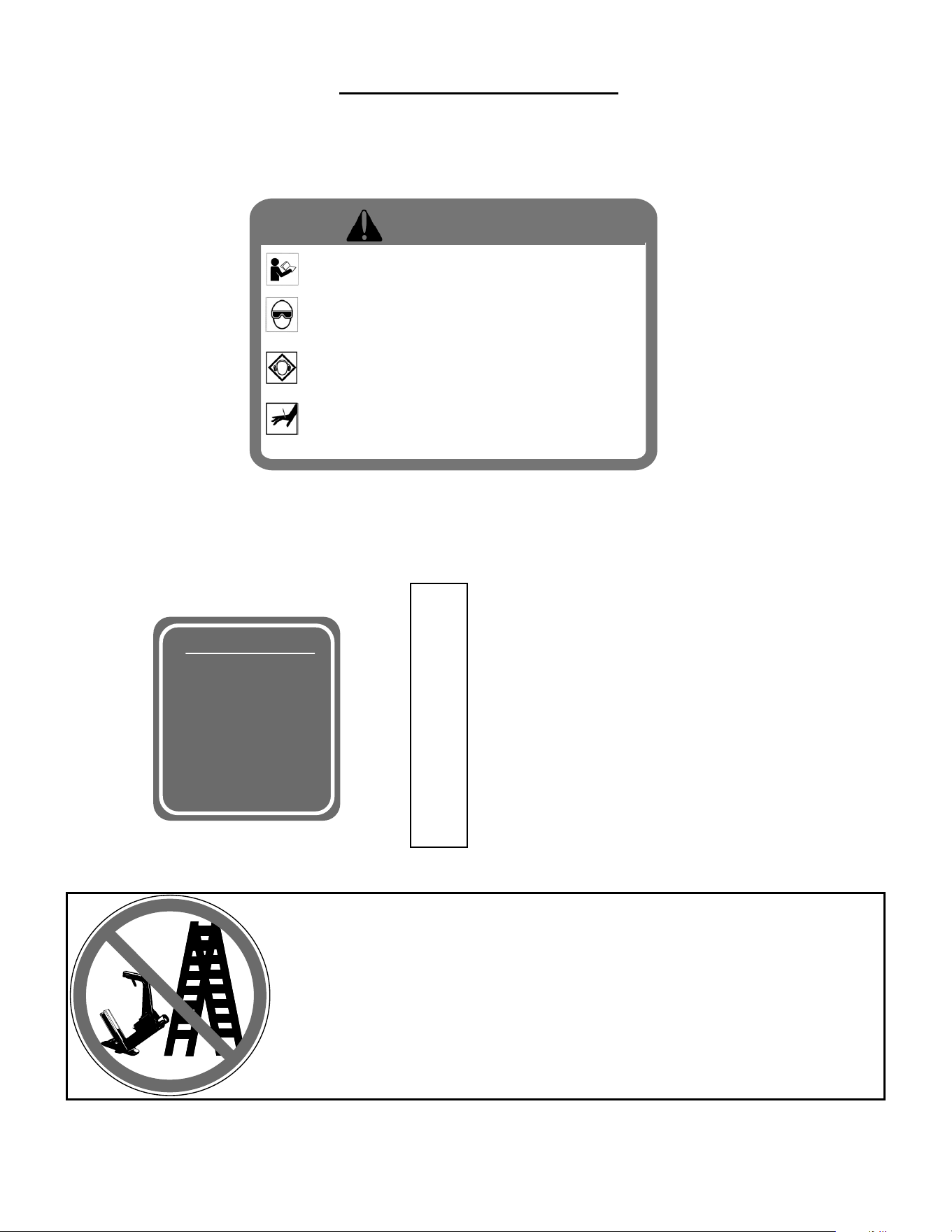
NAILER SAFETY DECALS
• Read and understand the tool labels and
manuals before operating. • Operators and
others in work area MUST wear EYE and EAR
protection. • Use safety glasses with side
shields. • NEVER point tool at yourself or
others in the work area. • Only connect air to
an unloaded tool and always keep tool
pointed in a safe direction. • Disconnect air
when clearing jams, servicing or when tool is
not in use. • Use only clean, dry, regulated air
not exceed 110 psi. • Never use oxygen or
other bottled gasses-explosion may occur.
Warning!
13
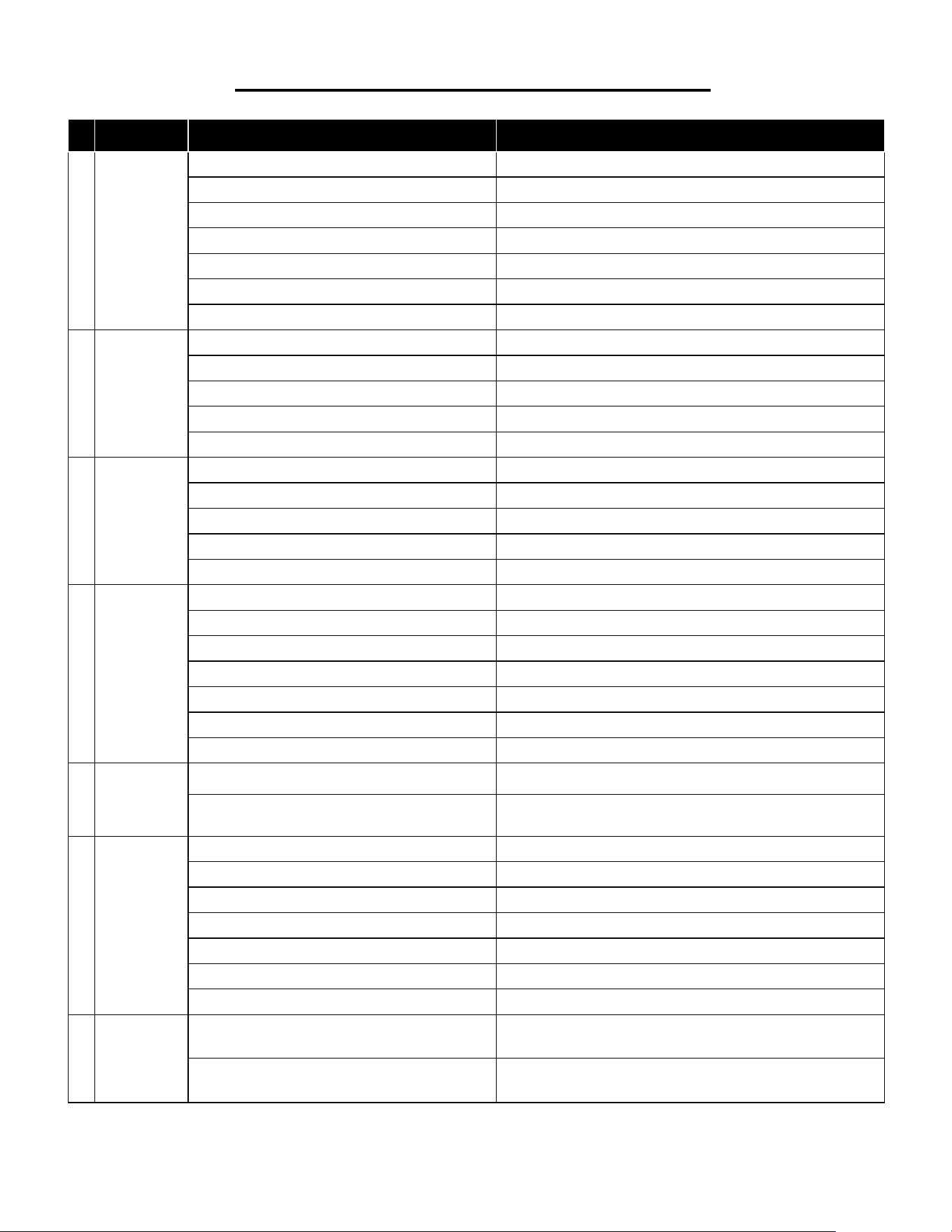
PROBLEM POSSIBLE CAUSE SOLUTION
1
Driving
blade does
not retract
1. Zero of Low air pressure Check air supply for 80 psi minimum to 110 psi maximum
2. Lack of lubrication Manually lubricate through male air inlet fi tting
3. Excessive dirt inside Stapler Disassemble and clean
4. Bent or burred driving blade Replace driving blade (15)
5. Seals worn out Replace all seals (Seal Kit A-5)
6. U-Cup Lip Seals installed upside down Replace all seals (Seal Kit A-5)
7. Seals need to be seated — dry fi re Stapler
2
Driving
blade
retracts
slowly
1. Low air pressure Turn up air pressure to 80-110 psi max
2. Lack of lubrication Manually lubricate through male air inlet fi tting
3. Air supply restricted by small orifi ce Use 1/4" minimum diameter air fi ttings
4. U-Cup Lip Seals installed upside down Replace all seals (Seal Kit A-5)
5. Excessive dirt inside nailer Disassemble, clean and lubricate
3
Staple is not
countersunk
1. Low air pressure Turn up air pressure to 80-110 psi max
2. Broken Driving Blade Replace Driving Blade (15)
3. Stapler hit hard surface Move from obstruction
4. Driving blade jam nut came loose Retighten or replace jam nut (22)
5. Worn out gate Replace gate (28)
4
Stapler
leaks air
1. Air supply fi ttings loose Tighten all air line fi tting connections
2. Dry wall dust in Stapler Rebuild Stapler
3. Excess air pressure blew out seals Check air supply for 110 psi maximum—replace all seals
4. Plunger screws loose Tighten 3 plunger screws (8)
5. Cracked or damaged body Replace body (1)
6. Seals worn out Replace all seals (Seal Kit A-5)
7. Seals need to be seated Dry fi re Stapler
5
Bottom
of stapler
cracked off
1. Operated without rubber bumper installed Replace damaged parts
2. Excessive air pressure used Replace damaged parts
6
Staples jam
in nailer
1. Not using Powerstapler™ Staples Use Powerstapler™ Staples only (2”,1-3/4”,1-1/2” Lengths)
2. Continued use after a short hit Clear staple immediately after short hit
3. Staple pusher damaged or spring broken Replace staple pusher assembly (A-10)
4. Staple channel loose Tighten staple channel retaining screws (34, 41)
5. Bent staple stuck in staple guide Disassemble and clear out bent staple
6. Hit another set staple or hard object Move from obstruction
7. Stapler gate worn out Replace staple gate (28)
7
Plunger
locked
up—won't
move or fi re
1. Lack of lubrication Manually lubricate through male air inlet fi tting
PowerStapler 445FS Trouble Shooting Chart
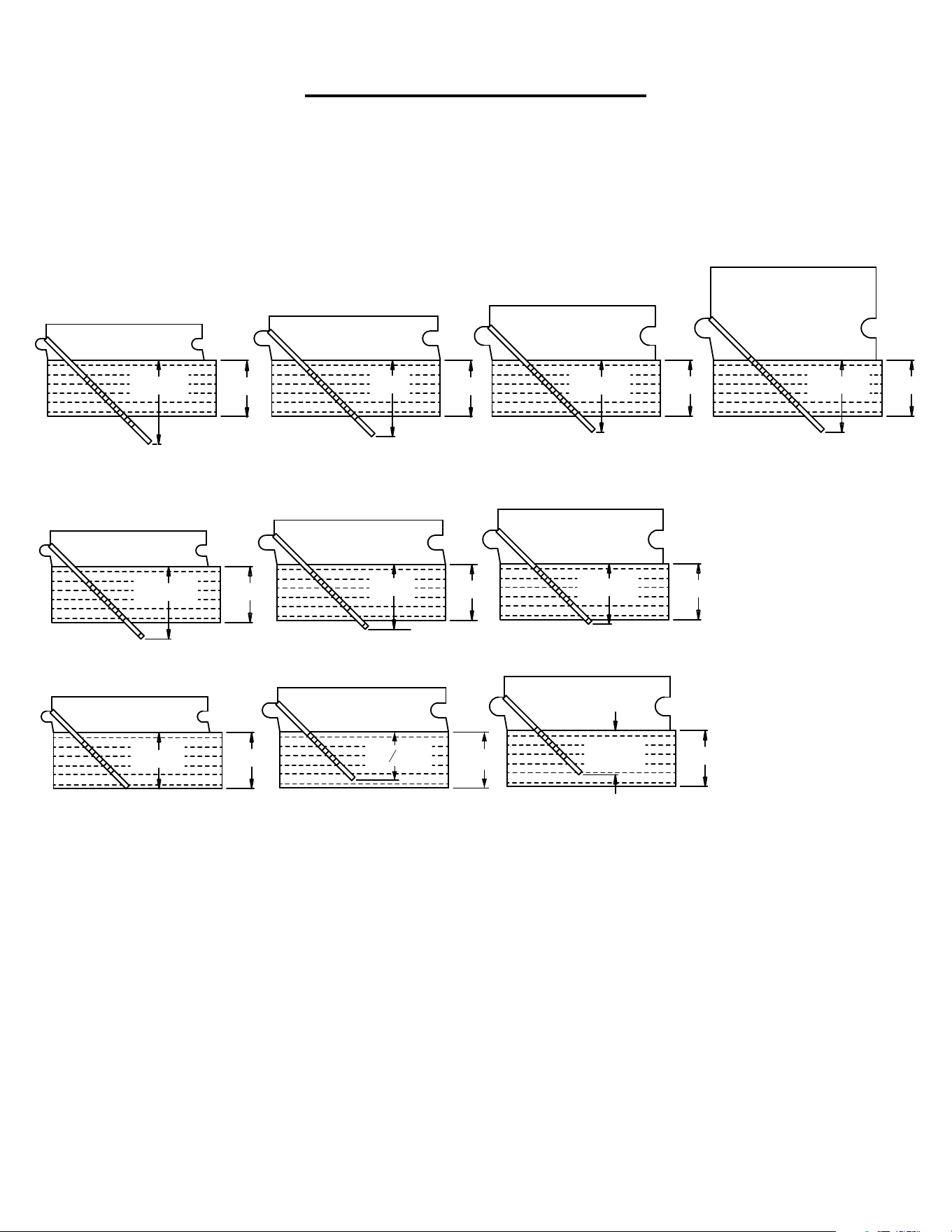
This chart will assist you in determining the proper length
of PowerStaple
®
to use for various thicknesses of fl ooring.
Approximate vertical penetration of the PowerStaple under the
hardwood fl oor is shown for each application. This is only a
guide. Results should be tested in the fi eld before proceeding.
3/4"
3/4"
1/2" FLOORING
UNDERLAYMENT
3/4"
19/32"
3/4" FLOORING
UNDERLAYMENT
3/4"
31/32"
3/4" FLOORING
UNDERLAYMENT
3/4"
31/32"
33/32" FLOORING
UNDERLAYMEN
T
3/4"
1-1/8"
1/2" FLOORING
UNDERLAYMENT
3/4"
1"
UNDERLAYMENT
5/8" FLOORING
3/4"
13/16"
3/4" FLOORING
UNDERLAYMENT
3/4"
31/32"
1/2" FLOORING
UNDERLAYMENT
3/4"
7/8"
UNDERLAYMENT
5/8" FLOORING
2” POWERSTAPLE®
15.5 GAGE
2” POWERSTAPLE®
15.5 GAGE
2” POWERSTAPLE®
15.5 GAGE
2” POWERSTAPLE®
15.5 GAGE
1-3/4” POWERSTAPLE®
15.5 GAGE
1-3/4” POWERSTAPLE®
15.5 GAGE
1-3/4” POWERSTAPLE®
15.5 GAGE
1-1/2” POWERSTAPLE®
15.5 GAGE
1-1/2” POWERSTAPLE®
15.5 GAGE
1-1/2” POWERSTAPLE®
15.5 GAGE
5/8" FLOORING
UNDERLAYMENT
"
21
32
3/4"
POWERSTAPLE DEPTH CHART
14
15
The PowerPalm™
"The PowerPalm is the industries best solution to blind nailing
close to the wall. Saves both, time and money!"
Pressure activated...simply press down, and let the tool do the
work. The Power Palm will allow blind nailing closer to the
wall and reduce the amount of face nailing. "Blind nail, top
nail...tight spots and corners, the PowerPalm gets them all!"
Featuring 360 degree swivel tip for fi tting awkward or tight
spaces. Magnetic cleat holder keeps nail in position. Uses
both 16 gage and 18 gage Powercleats–Use the same fastener
throughout your install! Part number: PALM001
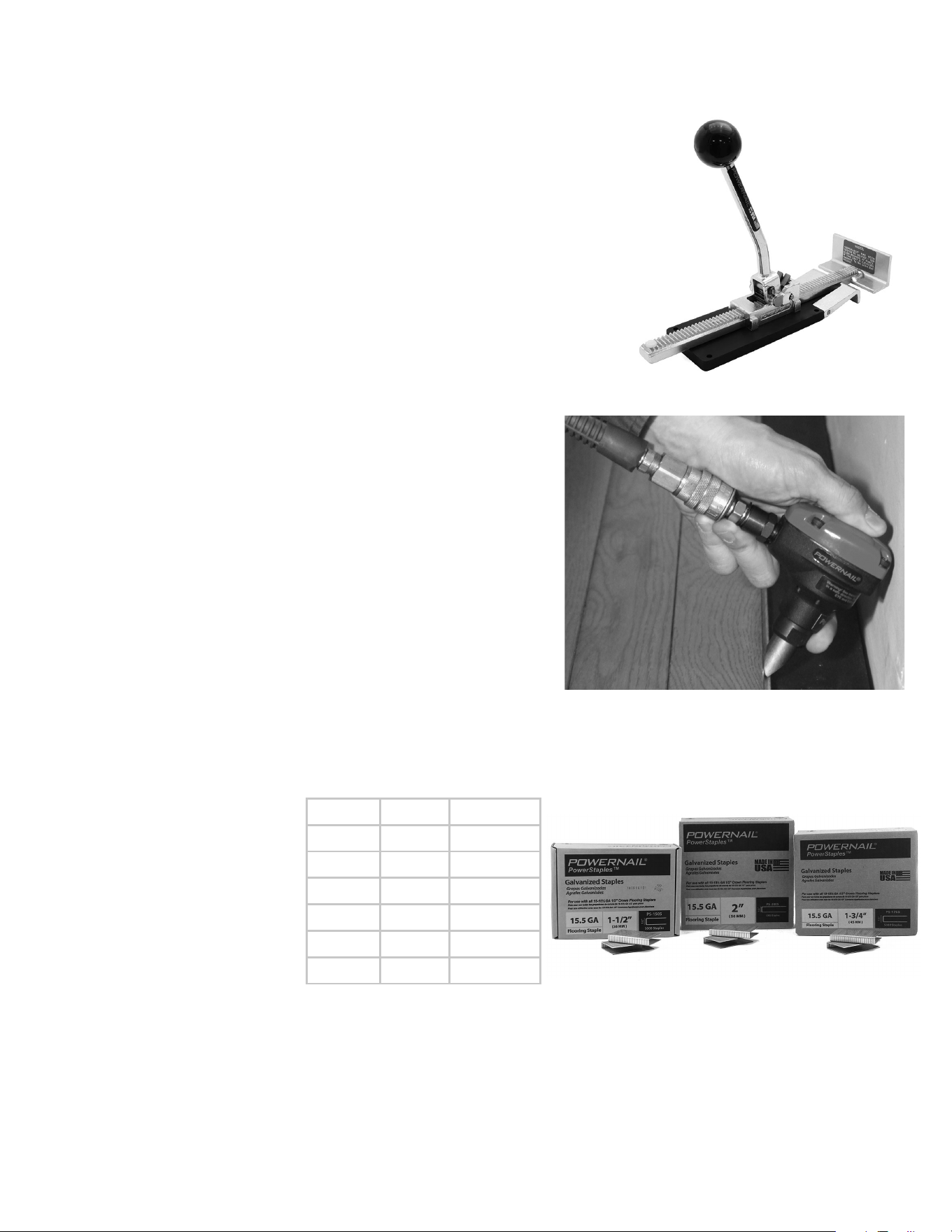
Powerjack® Model 500
Truly a Tinker's TOOL, the POWERJACK Model 500 is
designed to push or pull fl ooring strips into place and hold
them tightly. The PowerJack Model 500 self adjusts from
5/16” to 3/4" thickness fl ooring. It can be used to either push
or pull wood fl ooring strips into place and ratchets tightly
for hands free operation. The base of the PowerJack 500
has mounting holes for mid-fl oor use. Simply screw nail the
PowerJack 500 to your sub fl oor -in front of your fl ooring
strips -and ratchet the fl ooring strips tight. Also great for under
cabinet and kick plate installation.
Part number: PJ500
Powerjack
Model 500
15.5 Gauge PowerStaples™
Now you can get fl ooring
staples with the strength
and holding power you need
to build a fl oor you can
depend on. The Carbon Steel
Powerstaples are designed
for use with the Tongue and
Groove PowerStapler 445FS,
but can be used with all
15-15.5 gauge 1/2″ crown
fl ooring PowerStaplers.
Closest you
can get to
the wall!
Pneumatic PowerPalm™
Featured Accessory Products
Length Qty Part No
2” 7.7M PS-20077
2” 6M PS-2006
2” 5M PS-2005
1-3/4” 5M PS-1755
1-1/2” 6M PS-1506
1-1/2” 5M PS-1505
16
• Dealer Locator
• Rental Locator
• Parts Store
• Product Information
• Repair Tech Videos
• Cool Tools Cleat Calculator
• Cleat Depth Chart
• Training Schools
Visit www.Powernail.com
POWERNAIL® Warranty Registration
Register your warranty on the web and you will automatically be
entered to win a FREE!!! PowerPalm™.
Register at https://www.powernail.com/warranty-registration/
Scan this code with your phone to be
taken to our warranty registration form
POWERNAIL COMPANY, INC.
1020 Williams Road, Genoa City, WI 53128
US Phone: 1-800-323-1653 or 262-292-5300
www.powernail.com