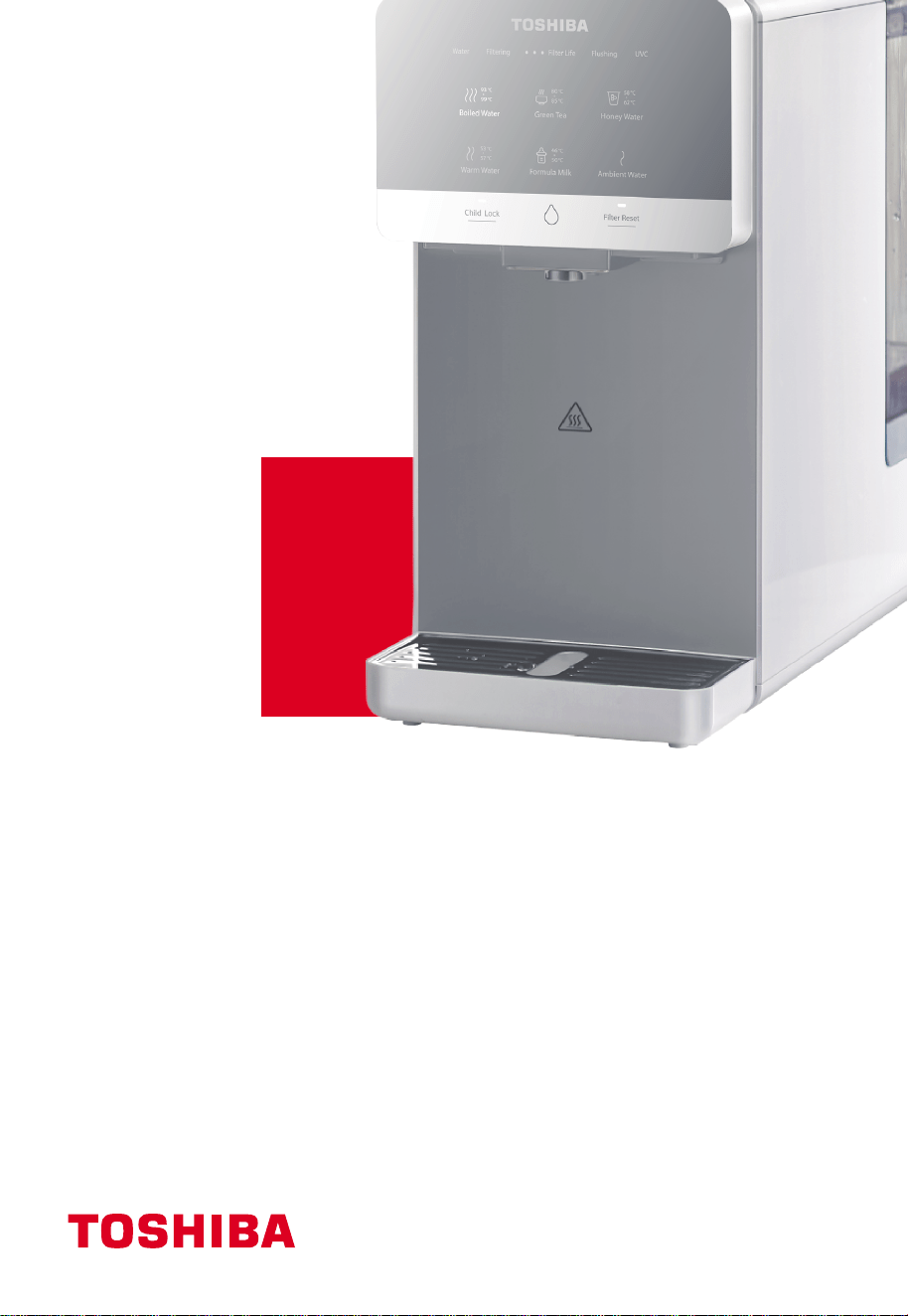
使用說明書
RO座檯式淨飲機
TWP-TSR76THK(W)
TWP-TSR76THK(M)
目錄
1. 安全說明-------------------------------------------------
1-1 安全說明----------------------------------------------
1-2 包裝清單----------------------------------------------
2. 產品介紹-------------------------------------------------
2-1 部件名稱----------------------------------------------
2-2 操作面板----------------------------------------------
2-3 電路原理圖---------------------------------------------
2-4 使用說明----------------------------------------------
2-5 日常保養----------------------------------------------
3. 故障自檢-------------------------------------------------
4. 濾芯介紹-------------------------------------------------
4-1 濾芯簡介----------------------------------------------
4-2 濾芯更換----------------------------------------------
5. 技術參數-------------------------------------------------
5-1 基本參數----------------------------------------------
所使用的是可回收的包裝材料,建議將塑膠、紙和紙板分開,交給回收公司,電器
和電子設備的廢物應分開收集。如果將來需要處理這臺設備,不要把它和
其他家庭垃圾一起扔掉。
1
1
5
5
5
6
7
9
7
9
10
10
10
12
12
1
1. 安全說明
1-1 安全說明
請仔細閱讀並遵循所有說明。
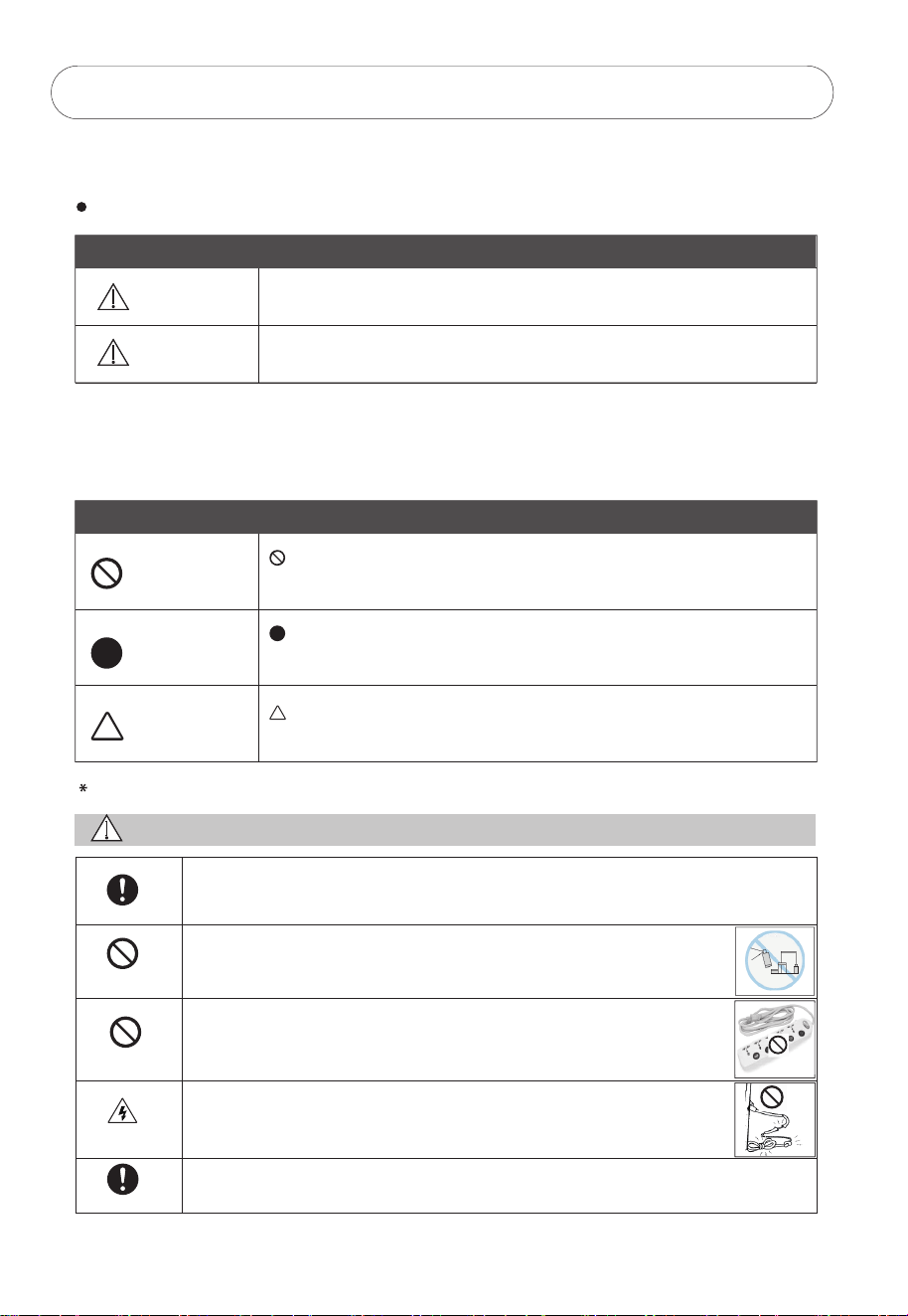
這些說明是預防用戶嚴重受傷或死亡風險以及任何財產損失。
標記
警告
注意
“警告“表示極有可能導致用戶嚴重損傷(*1)或死亡。
“注意”表示極有可能造成傷害(* 2)或財產損失(* 3)。
(* 1)嚴重傷害——需要住院、長時間治療、失明、燙傷和凍傷的皮膚傷害、電擊、骨折或中毒。
(* 2)傷害-不需要住院或長時間治療的傷害、皮膚灼傷或電擊。
(* 3)財產損失-房屋、傢俱、家畜或寵物的延伸損失。
禁止
強制
注意
“禁止”表示禁止的行為。
詳細的說明將用數字或文字標明在圓圈的內部或符號周圍。
“強制”表示強制的行為。
詳細的說明將用數字或文字標明在圓圈的內部或符號周圍。
“注意”建議採取的預防措施。
詳細的說明將用數字或文字寫在三角形的內部或符號周圍。
使用
警告
使用說明
遠離易燃材料
禁止
電擊
使用說明
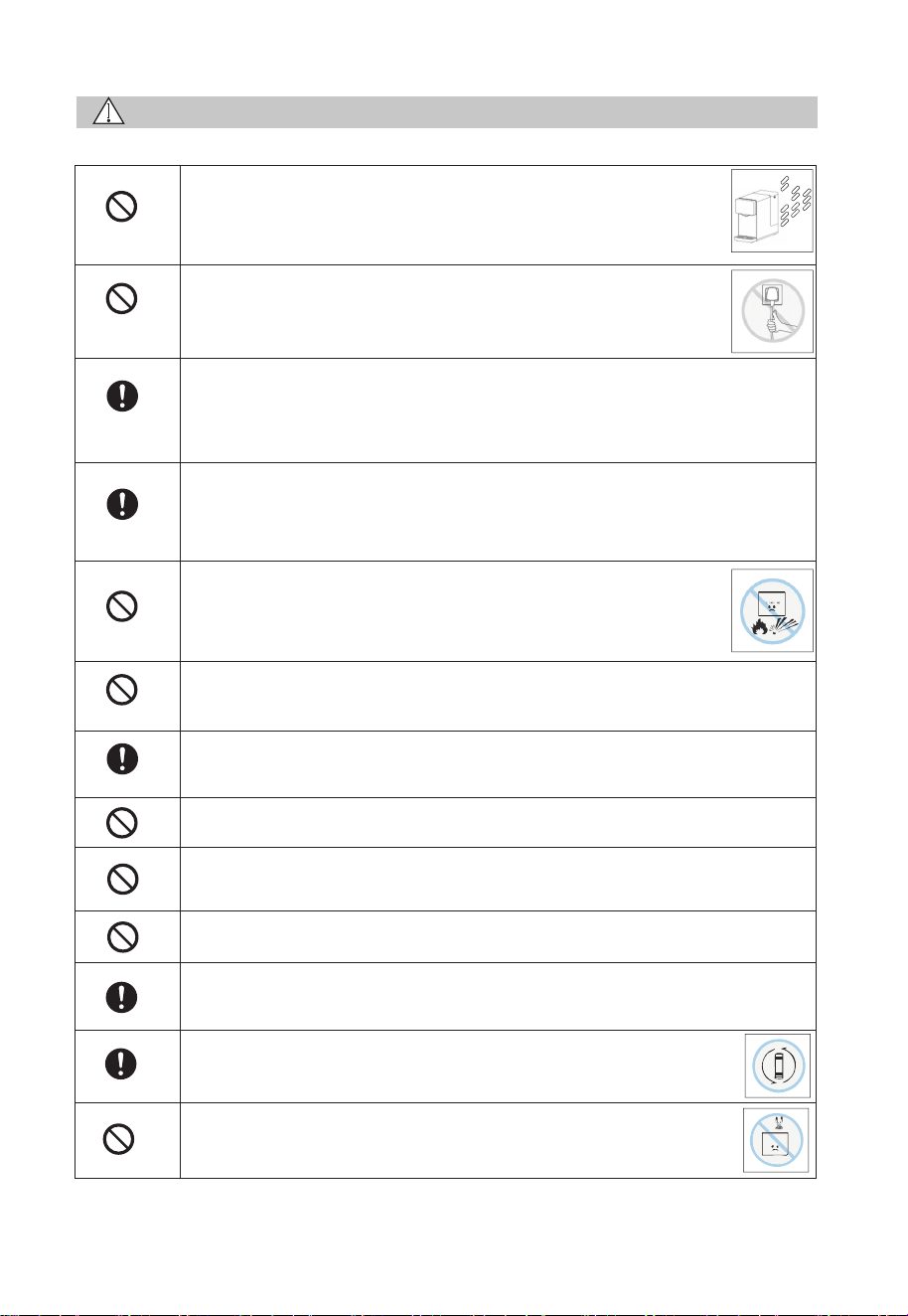
在使用淨飲機前必須按照本手冊正確組裝和安裝,以免損壞淨飲機造成危險。
請勿在淨飲機附近使用易燃物品,可能會引起爆炸或火災。
請勿使用電源延長線,可能引起觸電或火災。
請勿使用損壞的電源線、電源插頭或鬆動的電源插座,可能導致
觸電、故障、火災或人身傷害。
把淨飲機放在穩固的水平面上 , 以免導致其掉落或翻滾。
符號
2
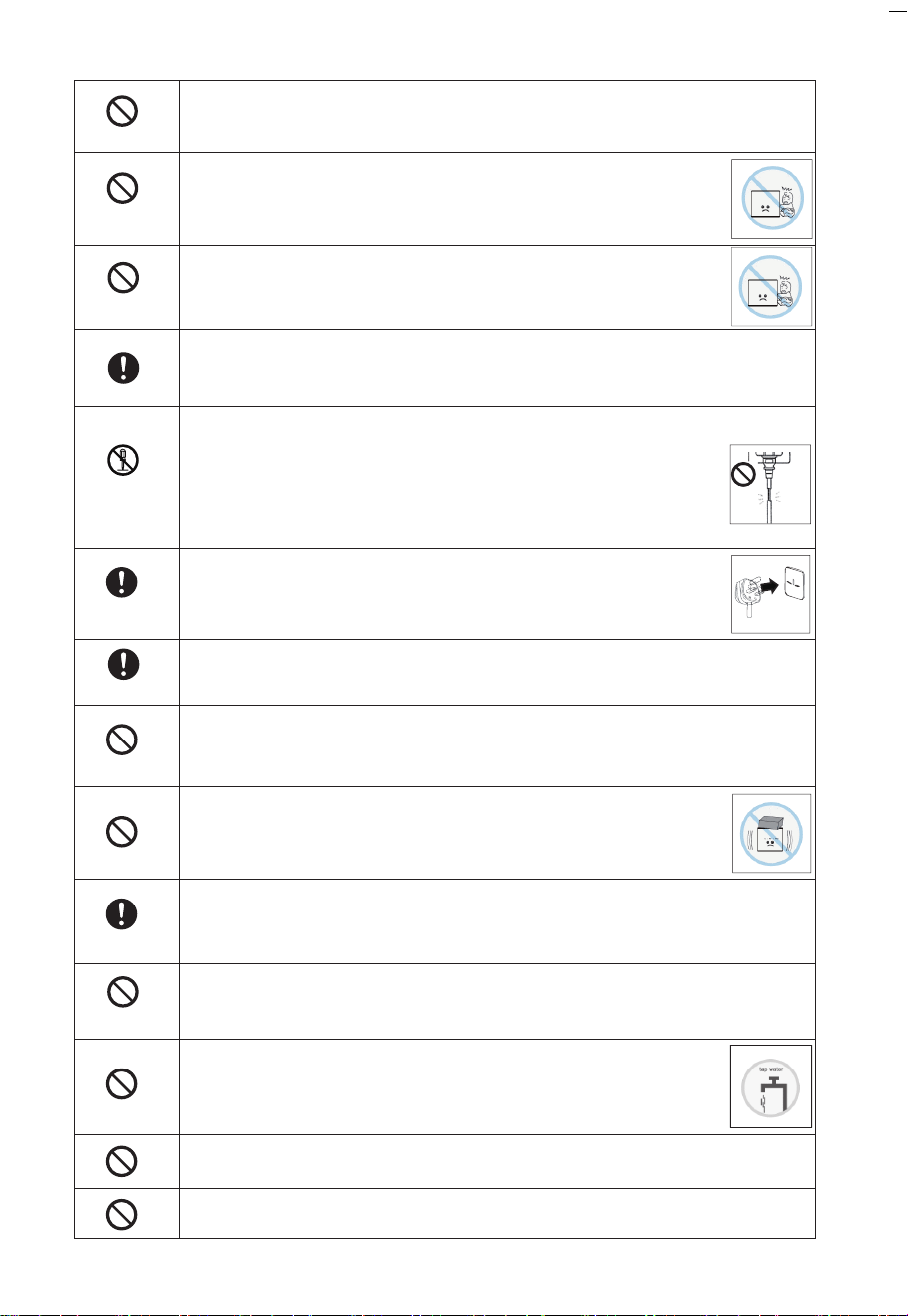
嚴禁將電線、插頭或淨飲機的任何其他部分浸泡在水或其他液體中,以免
引起觸電或火災。
為避免因操作失誤而導致危險 , 不建議兒童及有精神缺陷的人士
使用 , 除非在監護人的監督下正確使用,否則可能引起觸電、損壞
或故障。
禁止
遠離兒童
遠離兒童
為避免導致觸電、損壞或故障,兒童應受到監督,以確保他們不
玩弄淨飲機。
使用額定電壓220-240V的插座 , 嚴禁與其他電器同時使用萬用插座,以免
引起火災或觸電。
未經允許不得
拆卸和修理
插入插頭
擦拭灰塵
禁止修改
清潔保養
防止凍結
請勿損壞電源線。
請勿損壞、切割、加工電源線或彎曲、拉扯、扭曲、捆綁電源線。
此外,不要猛拉電源線、在電源線上放重物或夾緊電源線。
否則可能導致電源線破損 , 發生火災或觸電。如果電源線破損 ,
必須由製造商或其服務代理人或具有類似資質的人員更換。
將電源插頭安全地插入底座,並讓電源線向下擺放。如果電線向上
或插頭未完全插入,可能會因漏電或發熱而引起火災。
擦拭電源線插頭上堆積的灰塵或污垢。
積聚的灰塵可能引起火災、觸電、短路等事故。
為避免導致火災、觸電、故障或人身傷害,不得自行拆卸、改造、改裝、
修理淨飲機。如需維修,請與相應供應商聯繫。
不要在淨飲機上放置任何東西,以免引起火災、電擊或傷害。
用濕軟布加入稀釋的中性洗滌劑清潔淨飲機,請勿使用殺蟲劑、稀釋劑、
汽油、氯氣或酸性洗劑,以免引起裂紋、觸電、火災或產生有害氣體。
防止凍結 , 否則可能導致漏電或故障。當環境溫度低至0℃時 , RO濾芯有
機會會損壞。
為避免損害健康或引起麻煩 , 淨飲機只適用於含有已知成份的自
來水 , 請勿在水箱中加入不適用的水源。
如果淨飲機中的水有可能結冰時,則禁止給淨飲機接通電源。
必須使用有可靠接地的裝置進行電源連接。
3
注意
禁止
不可用力拉
適用場景
應用範圍
遠離明火
禁止
請勿淋水
請勿在戶外使用。
把淨飲機放在乾燥的地方,避免陽光直射以免引起火災或故障。
機身可能會改變顏色、變形、滋生苔蘚和真菌。
為避免造成觸電、故障和人身傷害,在切斷電源時,不要用力拉
扯電源線,用手抓住電源插頭並拔出。
只適用於室內使用。
本設備用於家庭和類似應用,如商店、辦公室和其他工作環境中的員工
廚房區域、農場的房子、客戶在酒店、汽車旅館等住宅類型場景以及提供
住宿和早餐類型的場景。
使用溫度範圍爲4℃~ 38℃ ,請勿在使用溫度範圍外使用淨飲機。
當水溫較低時,水箱制水時間會有所延長。
本產品僅適用於海拔1500米以下地區使用。
請勿將淨飲機靠近火源,以免損壞其而引起火災。
不要在淨飲機上放置任何物品 , 也不要傾斜、搖、推其而造成人身傷害、
漏水、觸電、火災等。
嚴禁用水沖洗機身,以免絕緣材料惡化,引起觸電或火災。
為避免引起火災或機器損壞 , 必須遠離火源30厘米以上。
為避免漏水及細菌粘附,除替換過期的濾芯或長時間停止使用外,不要
重設濾芯。
請勿將熱水器的熱水管連接到進水口 , 濾芯在38℃以上會損壞。
如有漏水,請移開水箱,並儘快拔掉電源線插頭。
漏水可能導致其他損害,請與當地服務中心聯繫。
定期更換濾芯。當需要更換濾芯時,濾芯壽命指示燈會閃爍。請參閱
第10頁的4-2 濾芯更換。
請勿靠近強磁性設備以免引起火災、電路損壞或機器故障。
4
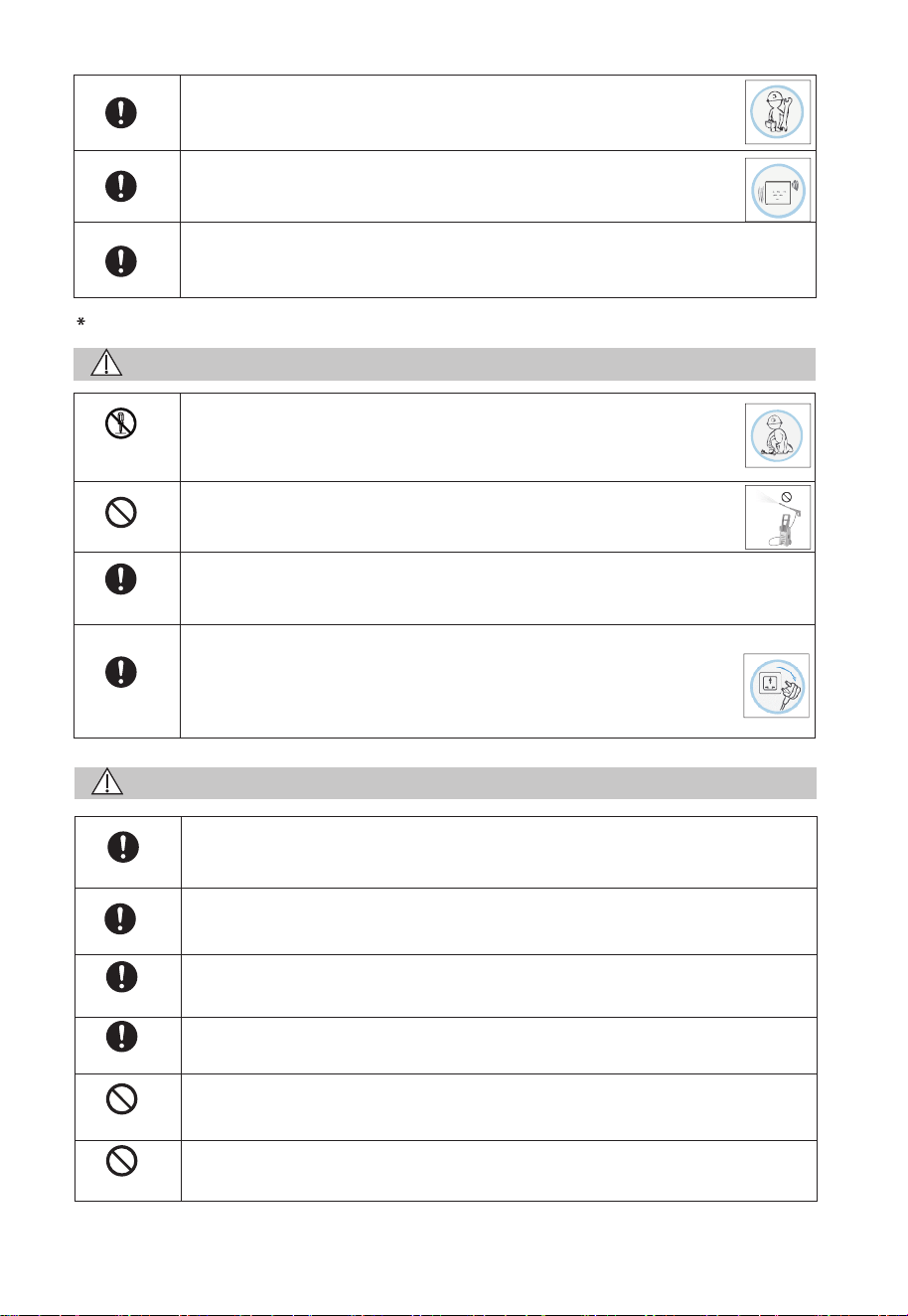
應由專業人員安裝或拆卸淨飲機,以免損壞內部部件或引起觸電。
出水時有輕微的噪音和震動是正常現象。
爲避免由熱斷路器的誤復位產生危險,淨飲機不能通過外部開關裝置
供電,例如定時器或者連接到由通用部件定時進行通、斷的電路。
用於檢查和維修
警告
未經允許不得
拆卸和修理
禁止
斷開電源插頭
使用說明
使用說明
使用說明
認證的技術人員
室內
如果電源線損毀,為避免危險,必須由製造商、其服務機構或具有
類似資歷人士更換,以免引起火災、觸電。
注意
請勿使用高壓設備清洗淨飲機。
絕緣材料惡化,可能引起觸電或火災。
在清理或檢查淨飲機前 , 請確保切斷電源,以免引起觸電。
出現以下情況時,請立即切斷電源並聯繫售後服務:
出現燒焦的味道;
出現異常現象;
以上情況有可能引起短路、火災或觸電。
為免損壞淨飲機 , 服務只能由認證的技術人員進行 , 以免引起觸電。
請勿在室外使用淨飲機,可能引起故障、火災或觸電,也可能造成淨飲機
本體顏色改變、變形、滋生苔蘚或造成污染。
請勿從設備外殼上拆卸UV-C發射器。
設備包含一個UV-C發射器。
不按指示使用機器或損壞外殼可能會有洩漏UV-C輻射的風險。即使是很小
的劑量,也可能對眼睛和皮膚造成傷害。
不得使用有明顯損壞的機器。
禁止
禁止
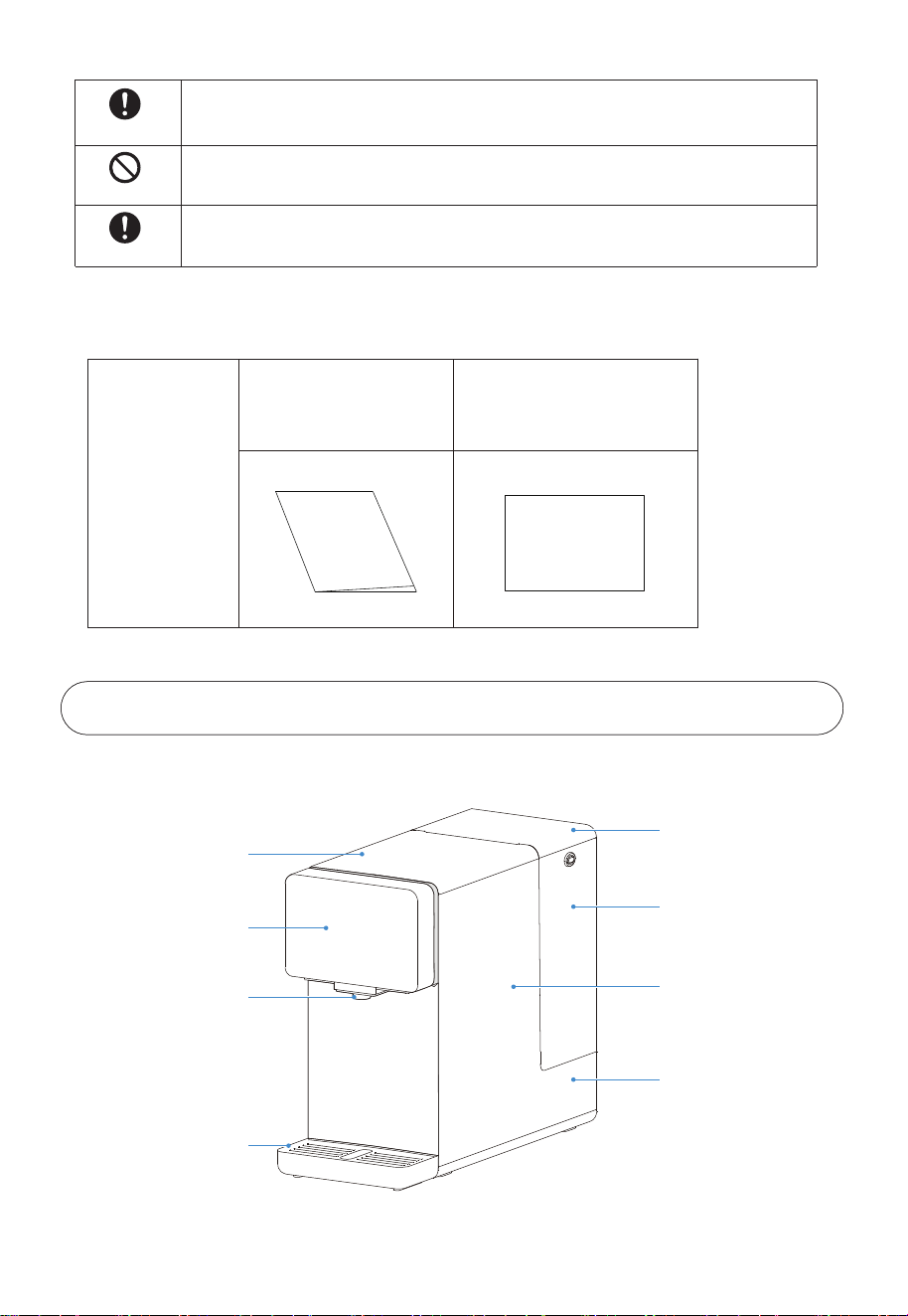
1-2 包裝清單
包裝箱
說明書
說明書
快速指引
快速指引
2. 產品介紹
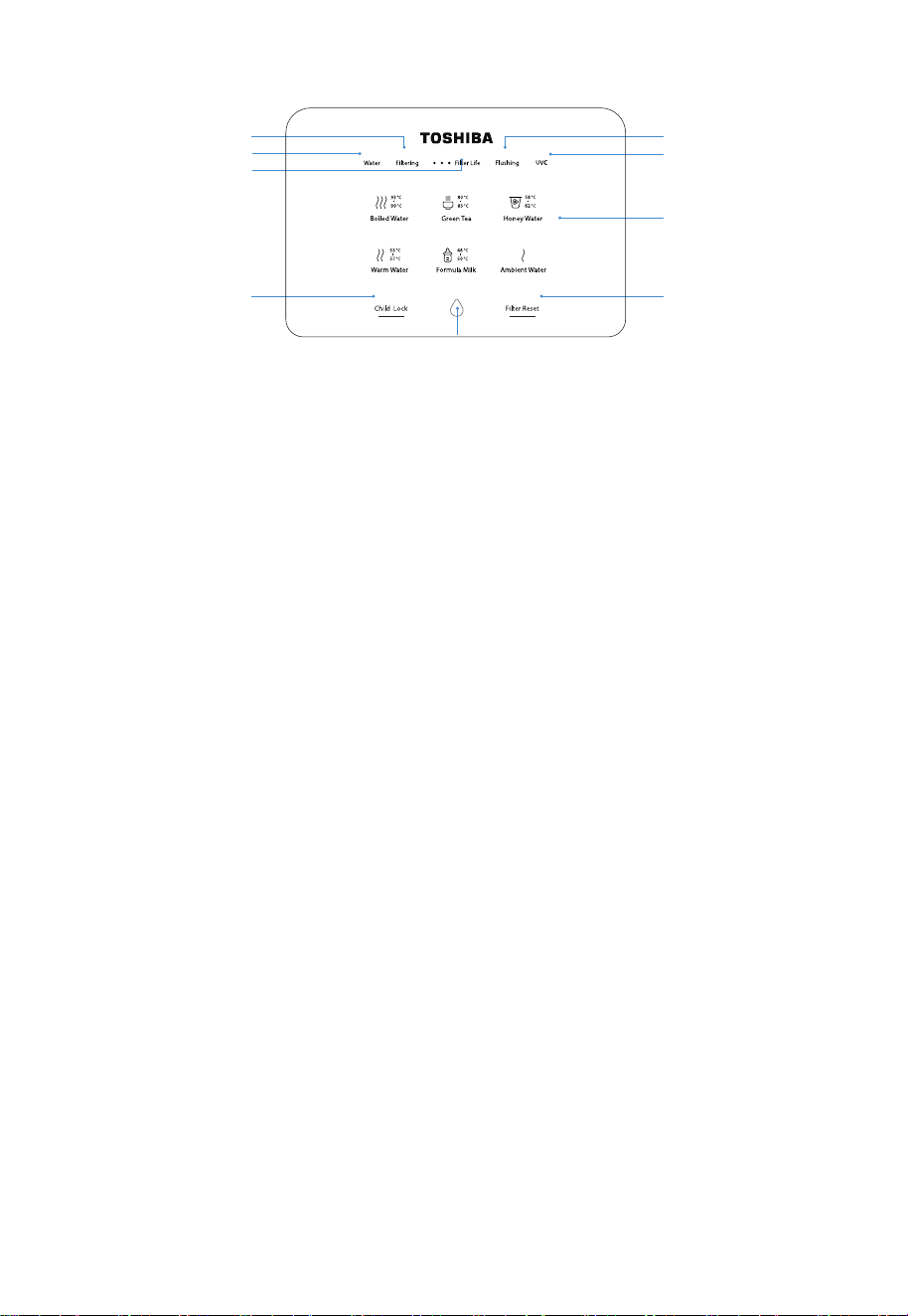
2-1 部件名稱
上蓋
顯示屏
出水嘴
接水盤
水箱蓋
水箱
機身
淨水箱
用戶嚴禁自行更換UV-C發射器。
在進行維護之前,請斷開設備與電源的連接。
機器通過漏電保護器(RCD)提供,其額定剩餘工作電流不超過30毫安。
禁止
使用說明
使用說明
5
6
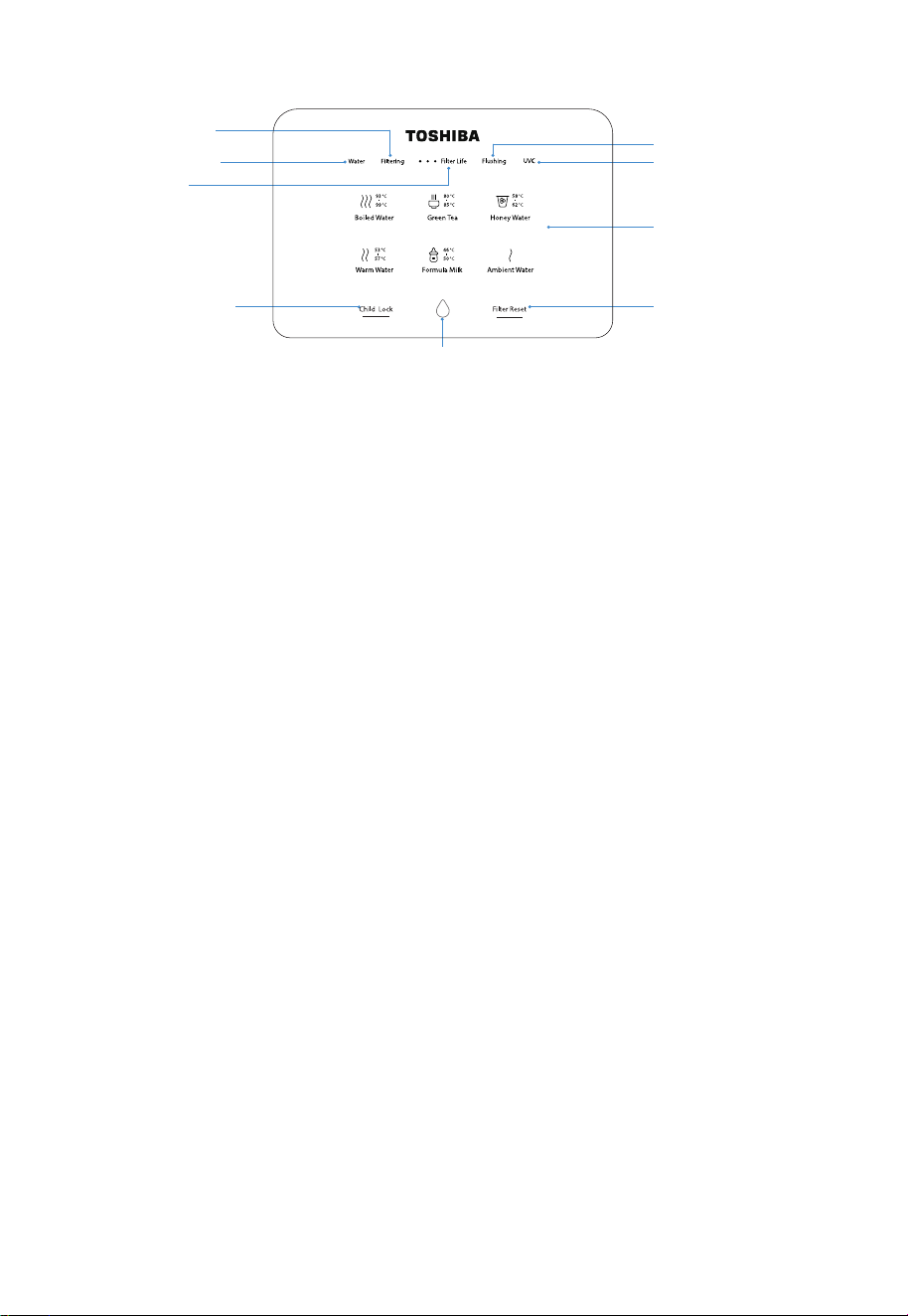
2-2 操作面板
按鍵使用說明
6 種水溫選擇
· 93°C-99°C 沸水
· 80°C-85°C 綠茶
· 58°C-62°C 蜂蜜水
· 53°C-57°C 溫水
· 46°C-50°C 沖奶
· 常溫水
出水鍵
過濾水指示燈
濾芯壽命提示燈
原水箱換水指示燈
童鎖
UVC抑菌指示燈
濾芯沖洗指示燈
溫度選擇區
濾芯重設鍵
原水箱換水:
當取出水箱或水位到達水箱最低水位時,“Water”圖標閃爍顯示。
過濾水:
“Filtering”圖標閃爍, 則代表機器開始制水並持續到濾水完成, 暫無法取水;
當淨水箱處於高水位狀態時, “Filtering”圖標會熄滅。
濾芯沖洗:
首次接上電源或重設濾芯壽命後, 機器將自動進行濾芯沖洗, 此時“Flushing”圖標閃爍;
當濾芯沖洗過程完結, “Flushing”圖標會呈半亮狀態。
待機與喚醒:
機器在10分鐘內沒有操作將自動進入待機狀態, 操作面板上所有提示燈會熄滅;
待機狀態下, 點擊任何鍵均令機器回復工作狀態。
童鎖:
如取常溫以外的其餘溫度的水時, 童鎖鍵會亮起, 需要點擊其進行解鎖, 再按出水鍵;
如取常溫水, 直接按出水鍵便可;
亦可以長按3秒進行開啟或關閉童鎖功能。
濾芯更換:
隨着濾芯的使用,濾芯提示的3個小格子將遂個熄滅, 3個格子同步閃爍代表濾芯壽命到期, 提
示更換濾芯,同步濾芯重設指示燈會亮起; 更換濾芯後 , 長按濾芯重設鍵3秒即可重設濾芯壽命。
存水排出:
當常溫水鍵“ Ambient Water ”圖標閃爍,需排空淨水箱才能正常使用。
以下幾種情況需進行存水排出操作:
(1)首次上電/斷電後重新上電
(2)更換濾芯
(3)超過48小時未使用機器
此時需準備大約1.5L容器置於出水嘴下,短按常溫水鍵“ Ambient Water ”排出存水。
7
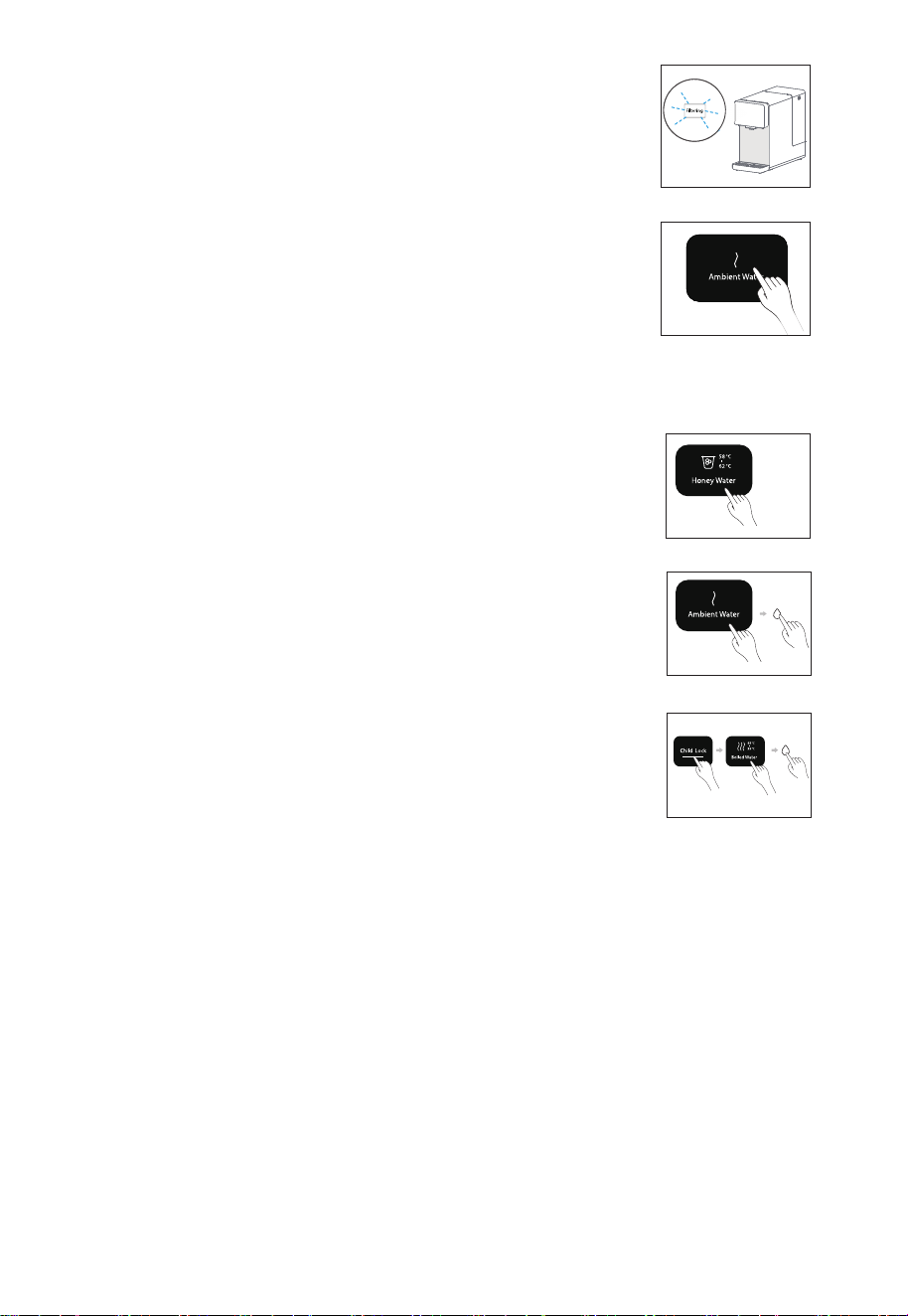
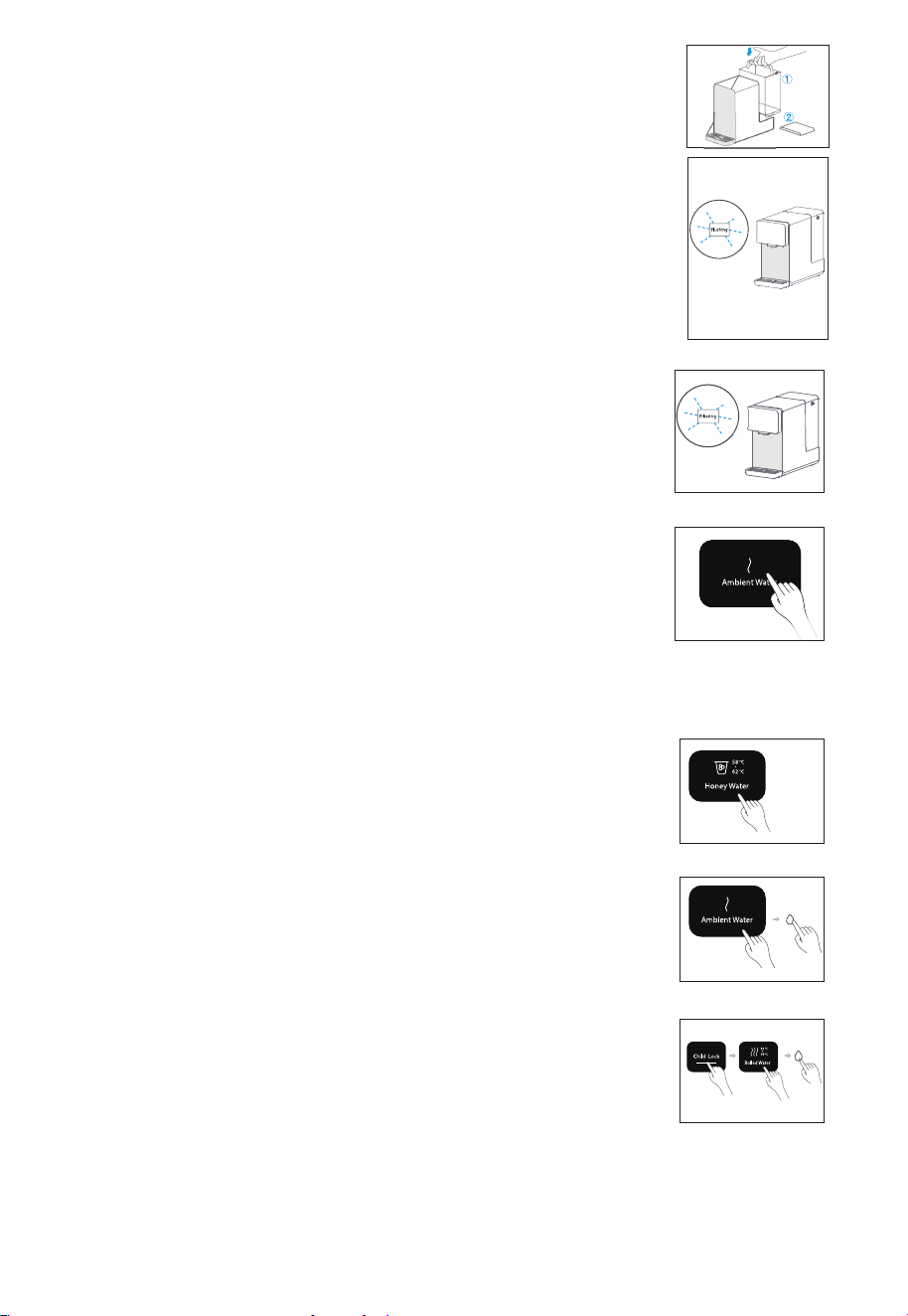
4. 裝上水箱:
4.1 將水箱對準底座插孔往下壓;
4.2 蓋上水箱蓋,此時水箱蓋頂部與機身頂部平齊。
5.沖洗濾芯 :
5.1 把水箱放置回機器, “ Flushing” 燈閃爍, 機器開始進行自動
沖洗濾芯,持續5分鐘。
5.2 濾芯沖洗時間結束, 響起“ 嘀” 三聲, “Flushing” 圖標會呈
半亮狀態, Water” 燈閃爍。此時需要將水箱的水全部倒掉, 並
重新加水至最高水位。
5.3 重複步驟“5.1”和“5.2”,共3遍。
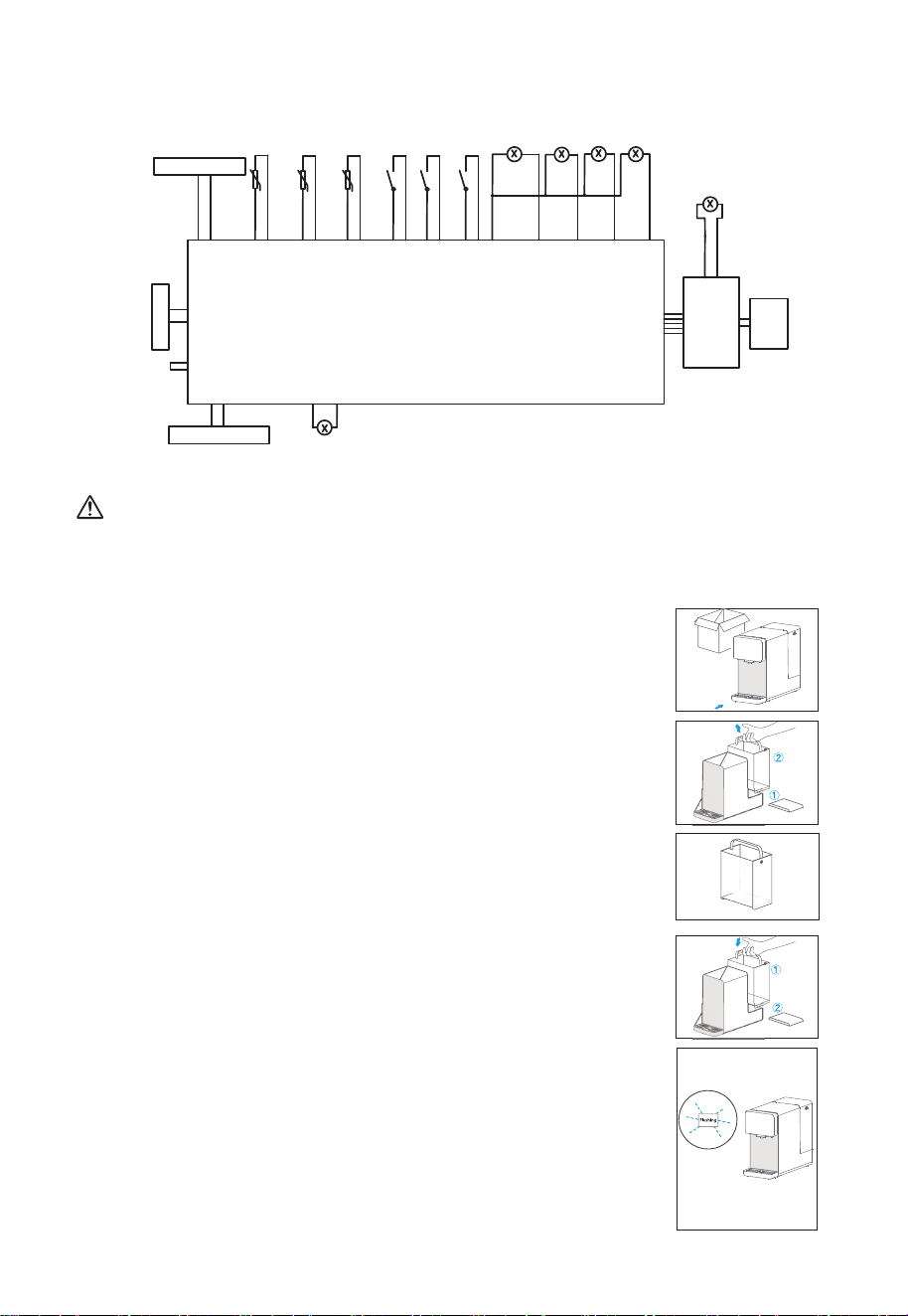
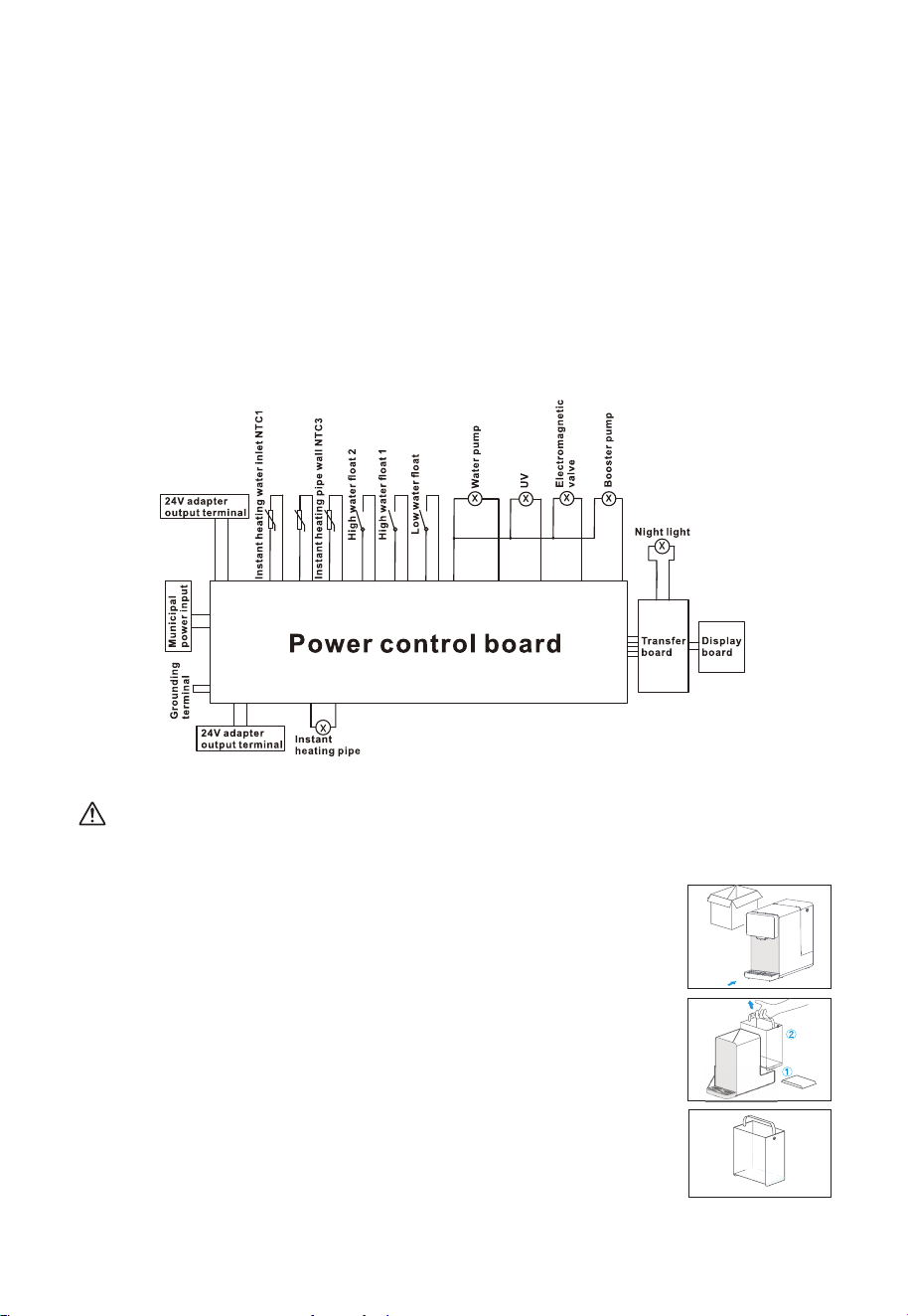
2-3 電路原理圖
2-4 使用說明
注意
切勿自行拆卸機器, 此操作需經當地經銷商服務網點的專業人員進行。
首次使用說明
1. 打開包裝 , 將機器放置在穩固的平面上及擺放接水盤,將出水嘴的
保護套取下。
3. 注水:
往水箱中加自來水至最高水位。
2. 取水箱步驟:
2.1 取下水箱蓋;
2.1 提起水箱把手往外拉動水箱,待與底座鬆動後再往外提起。
即熱出水
NTC2
即熱管壁
NTC3
抽水泵
UV
增壓泵
電磁閥
24V適配器輸出端
即熱進水
NTC1
高水位
浮子2
高水位
浮子1
低水位
浮子
夜燈
顯示板
中轉板
電源控制板
即熱管
24V適配器輸出端
接地端子
市
電
輸
入
8
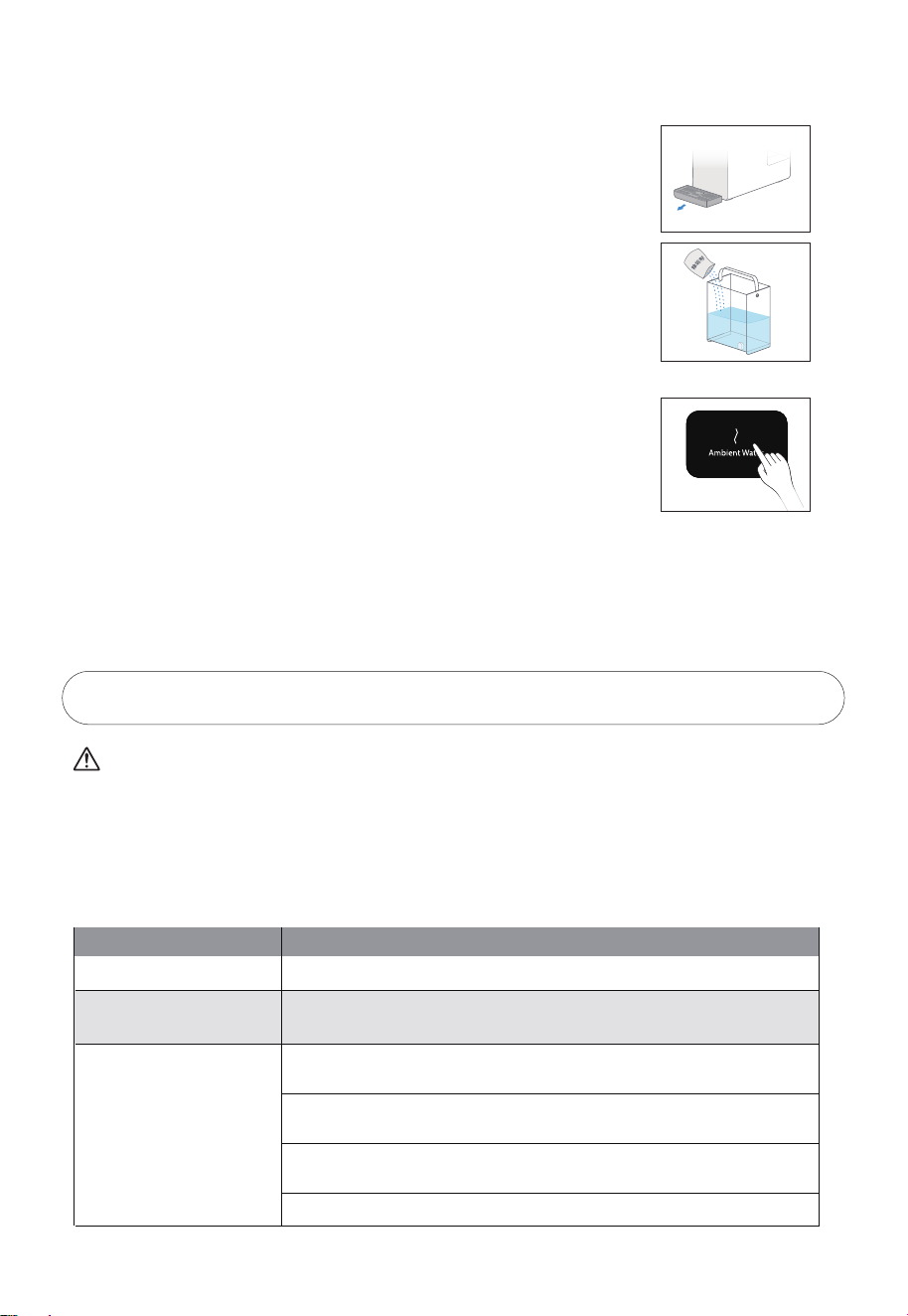
10. 換水提示
當水位達到最低水位線時, 顯示屏的“ Water” 圖標閃爍, 請倒掉水箱餘水,並往水箱中加
入自來水至最高水位,把水箱放置回機器。
6. 開始制水:
水箱接第4箱水,開始制水。新機器制水時間需要約1 0 ~ 1 5 分鐘,
請耐心等候。
8. 當首次啟動機器時,為原水箱注滿水後,機器開始過濾水,直至淨水箱注滿為止,待淨水箱
注滿後,機器會進入待機狀態。
9. 取水
9.1 任意點擊一個圖標, 點亮屏幕, 表示機器進入工作狀態, 屏幕
亮燈時間為10分鐘。
9.2 常溫水
屏幕點亮後,溫度自動選擇為常溫水,點按出水鍵即可取常溫淨水。
9.3 其餘選項
如取常溫水外的其餘溫度的水時, 童鎖鍵會亮起, 需要點擊其進行解鎖
才能取水。
7. 首次制水完成後,準備好大約1.5L的容器,按常溫水鍵“ Ambient
Water ”排出存水。完成後機器才可再次制水並正常使用。
9
3. 故障自檢
注意
以下為常見異常的判斷與檢查,若簡單處理無法排除,請送至維修網點或向撥打客服熱線進行諮詢。
請不要自行拆卸修理,以免發生危險或者對機器造成損害。
在淨化過濾過程中 , 水泵工作時會發出輕微噪音。
使用過程中如有疑難故障,請參照以下方法處理 , 如無法自行解決,請送至維修服務中心檢修。
現象 排除方法
不通電
不能正常加熱
不能正常制水
請檢查是否接通電源
請檢查電源電壓是否滿足220-240V±15%的要求
請檢查水箱是否安裝到位,原水箱內是否有水
請檢查濾芯是否安裝到位,濾芯壓蓋是否處於正確位置
請檢查水箱和連接水箱的進水口是否有異物阻塞
請檢查濾芯壽命是否到期
2-5 日常保養
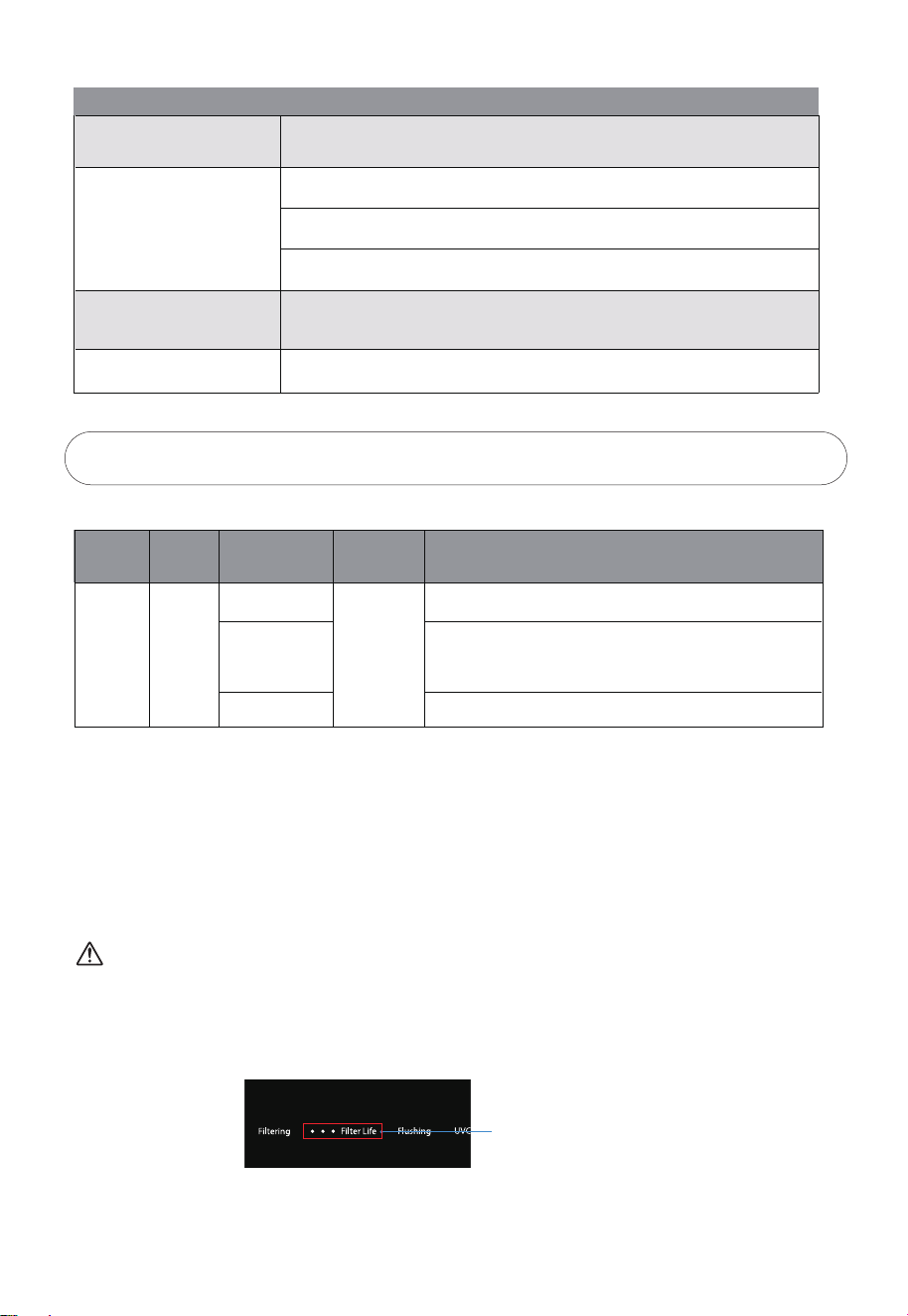
1. 接水盤:取下接水盤, 倒掉盤內殘留水。
2. 水箱:建議每月加入少量除垢劑(如檸檬酸)浸泡水箱3 0 分鐘後進行
清洗,請勿使用汽油等有機溶劑擦拭。
3. 超過48小時未使用機器的情況下,需強制排空淨水箱的水後才能正常
使用。此時常溫水鍵“ Ambient Water ”圖標閃爍,需準備大約1.5L容
器置於出水嘴下,短按“ Ambient Water ”排出存水。
10
現象 排除方法
機器長時間制水工作不停機
漏水
有異味
屏幕沒有反應無法操作
請檢查濾芯壽命是否到期
請檢查水箱是否對準底座插孔
請檢查濾芯是否安裝到位,濾芯壓蓋是否處於正確位置
更換濾芯
為保持清潔狀態,請定期清洗機器,長時間不使用時,請倒掉水箱內的水,
並長按3秒“常溫水”鍵排出淨水箱內的存水。
請拔下電源插頭重新啟動電源
4. 濾芯介紹
4-1 濾芯簡介
特別提示
濾芯使用週期不是質量保證期限,是以原水符合生活飲用水國家標準,以一般家庭正常用水為
基準的理想濾芯使用週期。
濾芯的保養週期會因使用地域、水源、使用量及季節不同而導致實際使用週期有所不同(以當
地經銷服務網點建議為準)。只有適時更換濾芯才能喝上純淨的水。
濾芯名稱 作用濾芯數量 濾芯組成 建議壽命
一體複合
濾芯
FIST(PRO)
1支
PAC層
RO膜層
後置碳棒層
12個月
有效過濾去除水中泥沙、鐵鏽、懸浮物等大顆粒物質
過濾精度0.0001-0.001微米的有害物質,及去除水中的
有機物(三氯甲四氯化碳)、重金屬(砷、鉛、鉻等)
有效過濾去除水中泥沙、鐵鏽、懸浮物、餘氯及異味等
4-2 濾芯更換
注意
濾芯更換可自行完成或由本公司指定工作人員完成。
換芯過程中可能有少量餘水流出,屬於正常現象。
濾芯型號:FIST(PRO)。
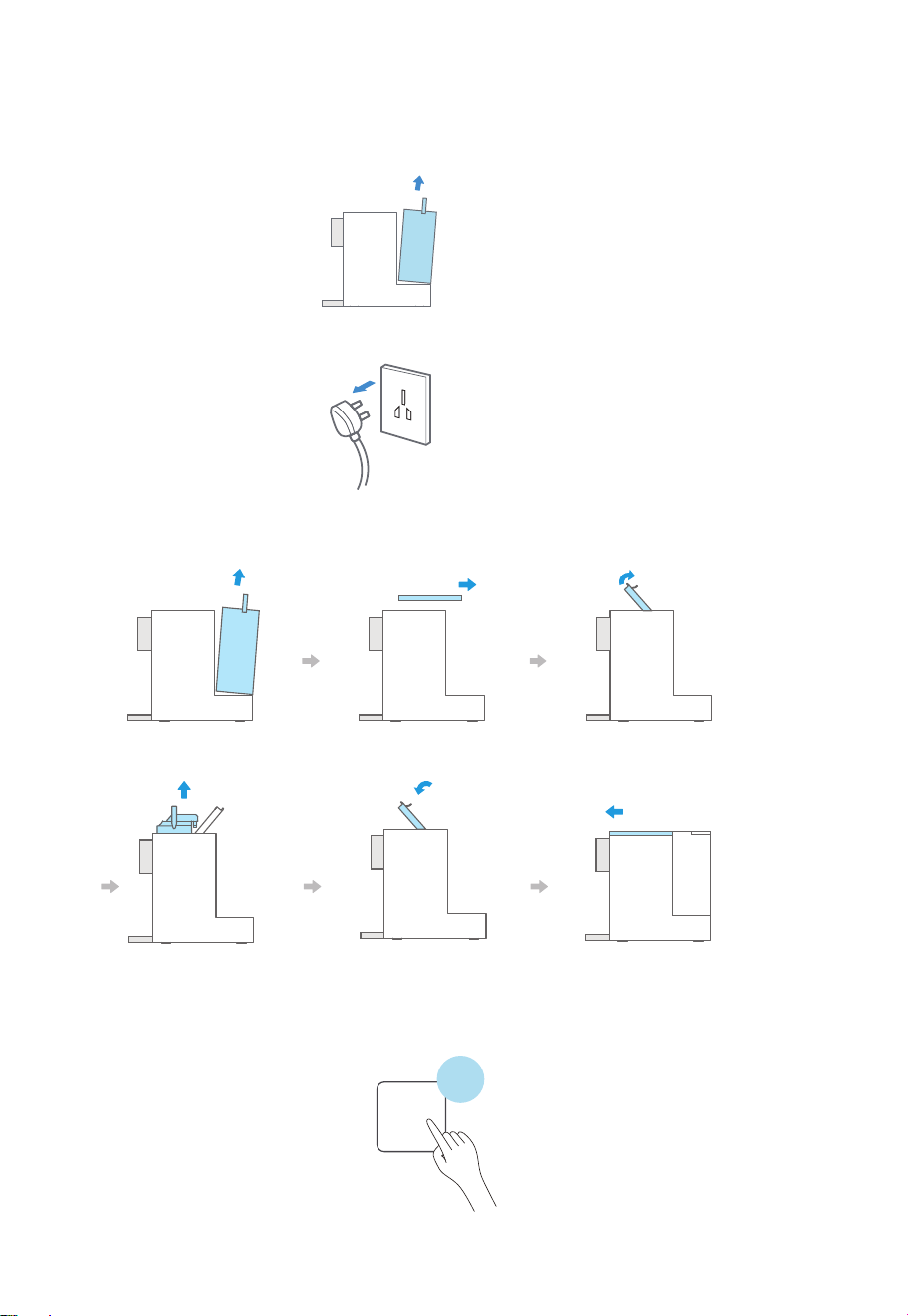
1. 當濾芯壽命三個小格全部閃爍時, 請撥打售後電話購買新濾芯。
濾芯壽命提示燈
11
3. 更換濾芯前必須關閉電源。
4. 按下圖所示:
①按照以下圖示步驟進行濾芯更換。
移開水箱 推開上蓋 打開濾芯把手
向上抽起舊濾芯
換上新濾芯後按下
壓桿至出現”啪”
一聲鎖緊”
蓋上上蓋後放置好水箱
Filter Reset
②濾芯更換完畢後,長按濾芯重設鍵3秒,重新記錄濾芯壽命。
3秒
2. 更換濾芯前, 取出水箱, 用約2L的接水容器放在出水咀下, 長按常溫水鍵3秒進行內部排水。
完成排水後, 把水箱裝回機器。
(如事前沒有進行內部排水, 更換濾芯後則未能進行濾芯沖洗, 濾芯壽命將會受影響)
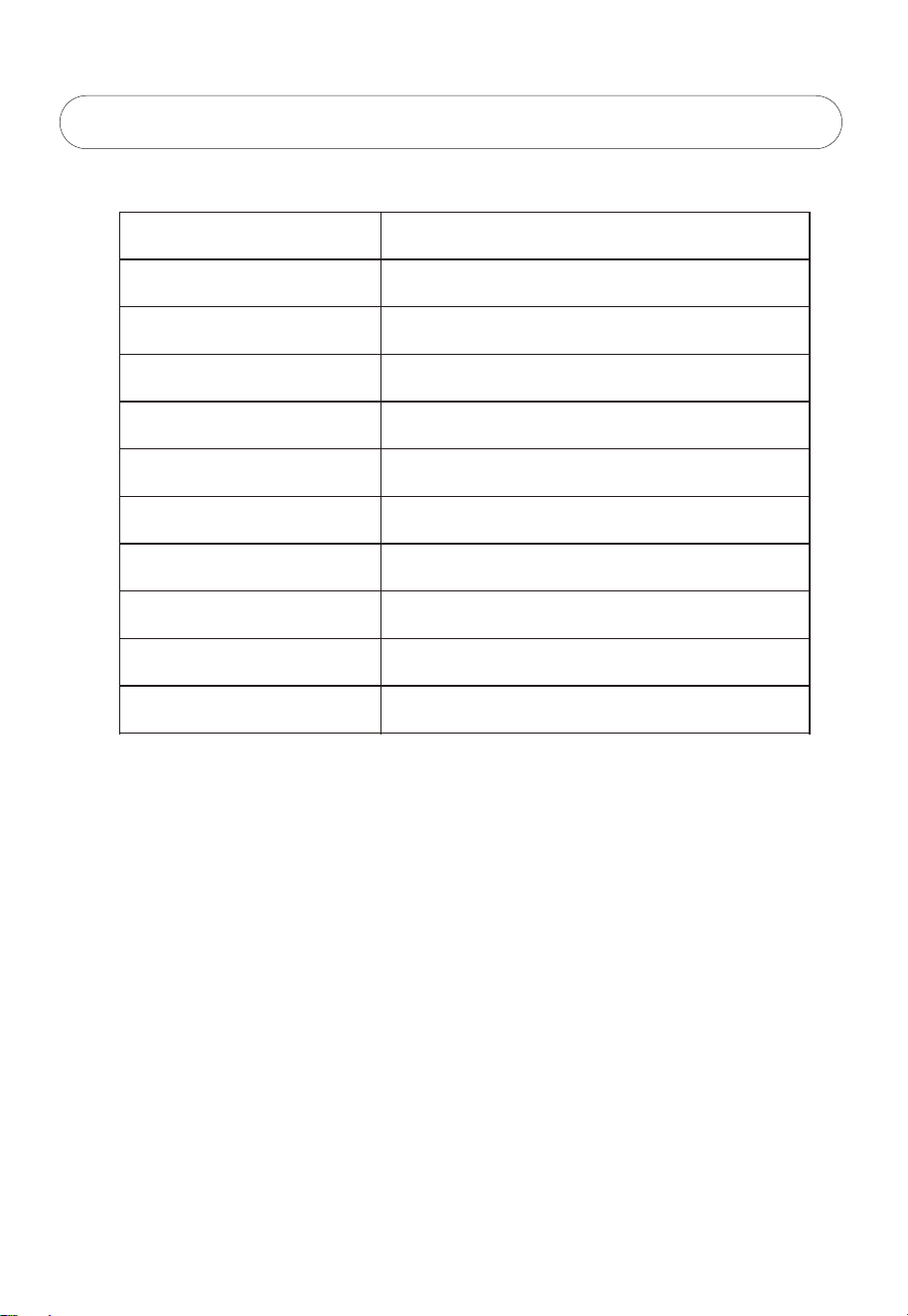
型號
額定電壓/頻率
額定製熱水能力
額定功率
額定總淨水量
淨水流量
進水壓力
RO膜工作壓力
適用水源
適用環境溫度
外觀顏色
220-240V~ / 50Hz
≥90℃, 20L/h
2190W
2500L
0.2L/min
0.05-0.1MPa
0.45-0.8MPa
市政自來水
4-38℃
白色 / 碳灰
5. 技術參數
5-1 基本參數
TWP-TSR76THK(W) / TWP-TSR76THK(M)
12


https://www.toshiba-lifestyle.com/hk
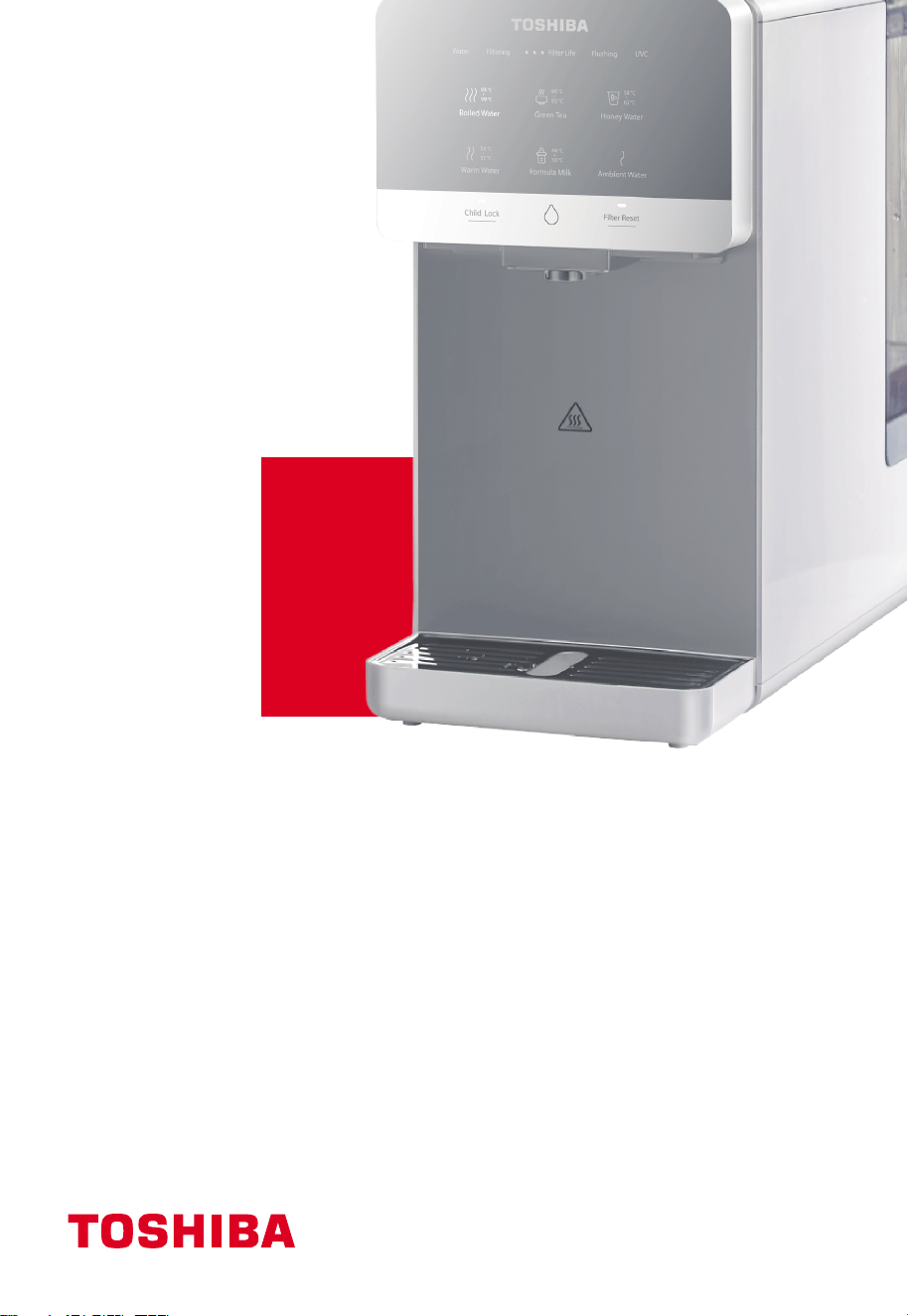
RO Tabletop Water Purifier
TWP-TSR76THK(W)
TWP-TSR76THK(M)
USER MANUAL
1. Safety Instruction----------------------------------------------------------------------------------------------
1-1 Safety instructions----------------------------------------------------------------------------------------
1-2 Packing list--------------------------------------------------------------------------------------------------
2. Product Introduction-----------------------------------------------------------------------------------------
2-1 Name of parts----------------------------------------------------------------------------------------------
2-2 Control panel-----------------------------------------------------------------------------------------------
2-3 Electric schematic diagram-----------------------------------------------------------------------------
2-4 How to use--------------------------------------------------------------------------------------------------
2-5 Daily maintenance----------------------------------------------------------------------------------------
3. Troubleshooting-----------------------------------------------------------------------------------------------
4. Filter Introduction----------------------------------------------------------------------------------------------
4-1 Filter introduction-----------------------------------------------------------------------------------------
4-2 Filter change-----------------------------------------------------------------------------------------------
5. Technical Parameters-----------------------------------------------------------------------------------------
5-1 Basic parameter-------------------------------------------------------------------------------------------
1
1
5
5
5
6
The packaging material used is recyclable; we recommend that you separate plastic,
paper and cardboard and give them to recycling companies. Guidelines, waste from
electrical and electronic devices should be collected separately. If you need
to dispose of this appliance in the future, do NOT throw it away with the rest
of your domestic garbage.
7
9
7
9
10
10
10
12
12
.
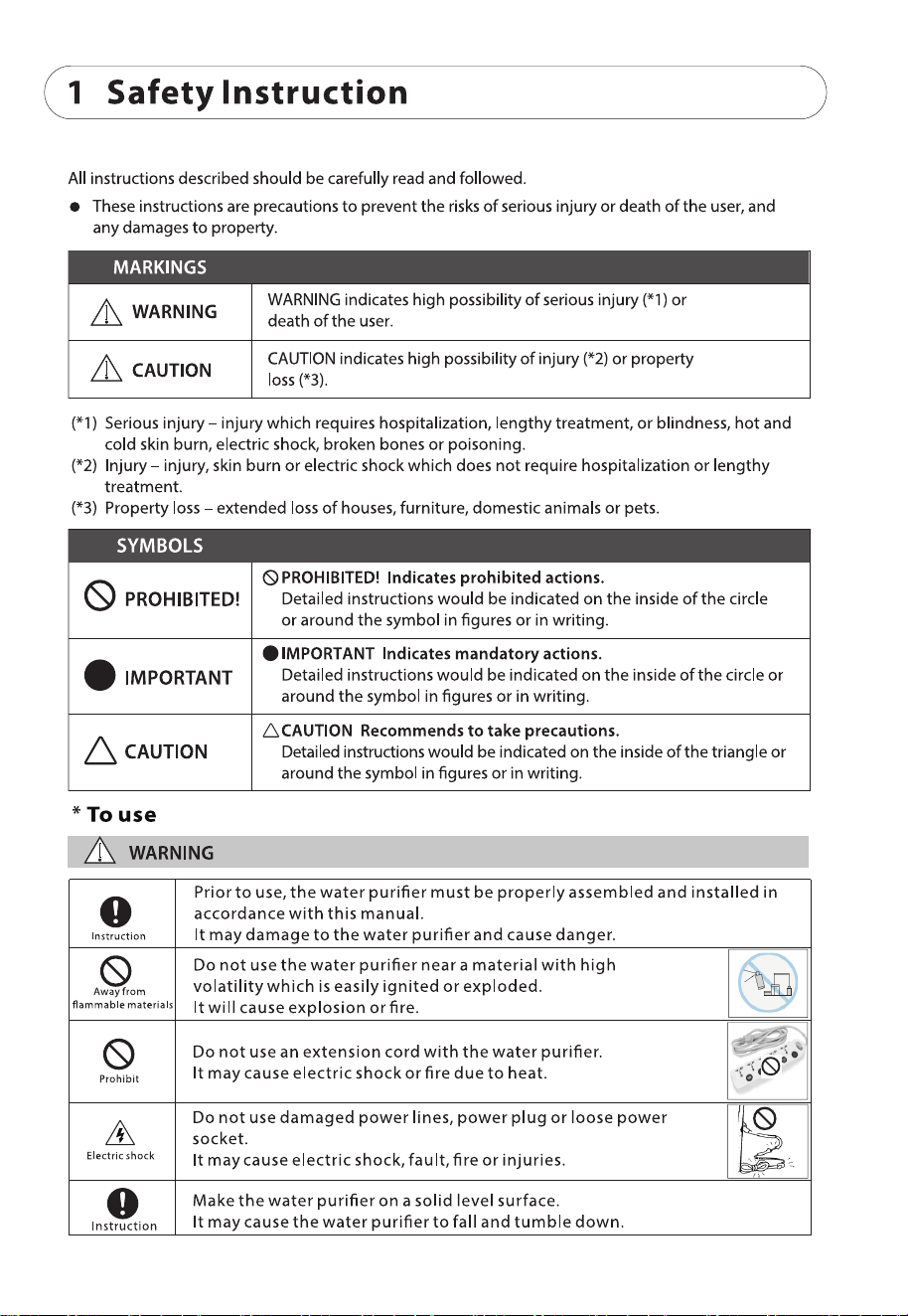
1
1-1 Safety instructions
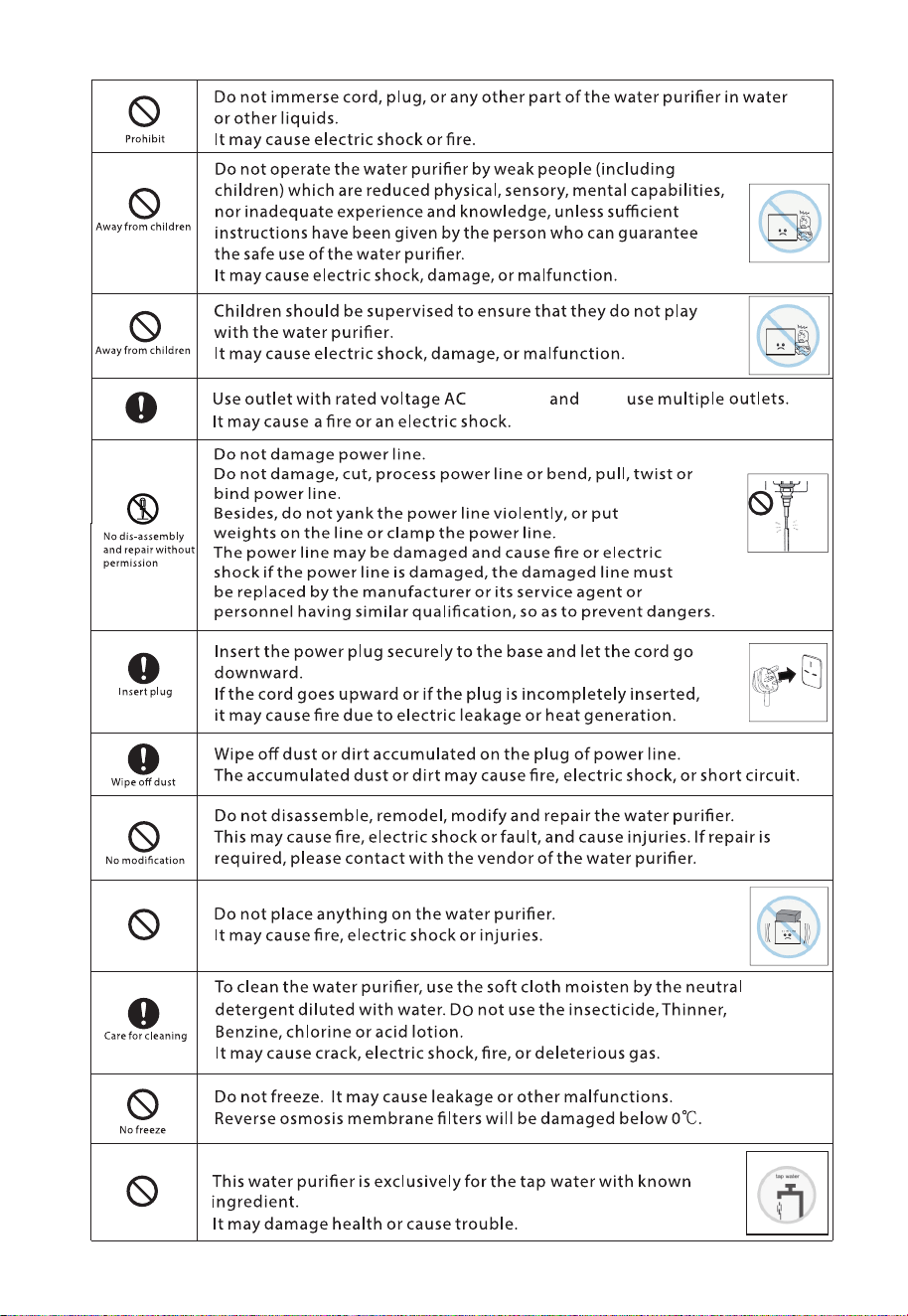
2
don’t
220-240V,
Do not ll undrinkable water to the tank of water purier.
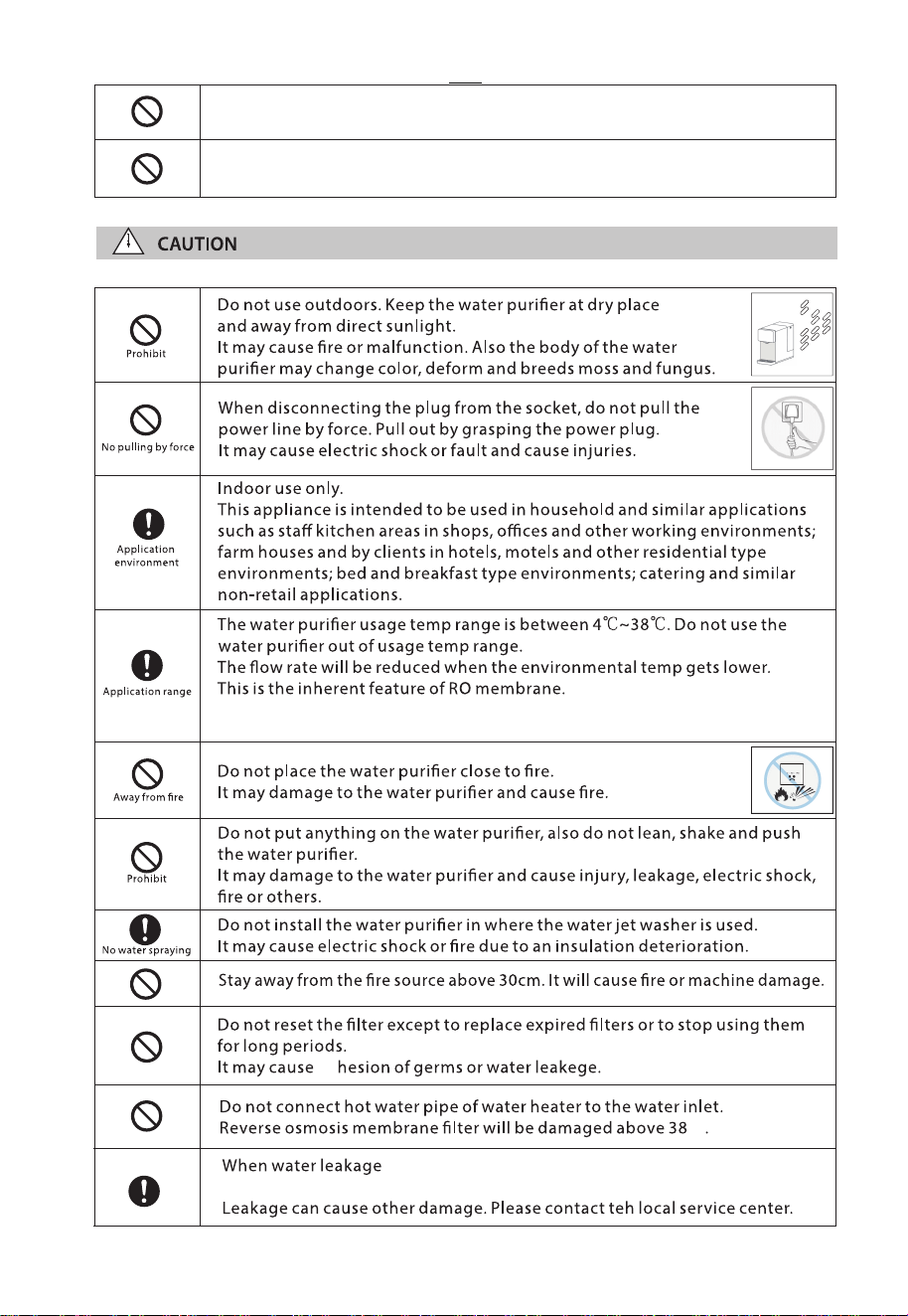
℃
3
This product is only suitable for safe use in the area below 1500 meters above sea
level.
remove the water tank and unplug the power cord as soon
as possible.
ad
Do not switch on if there is a possibility that the water in the heater is frozen.
Power connections must be made with reliably grounded devices.
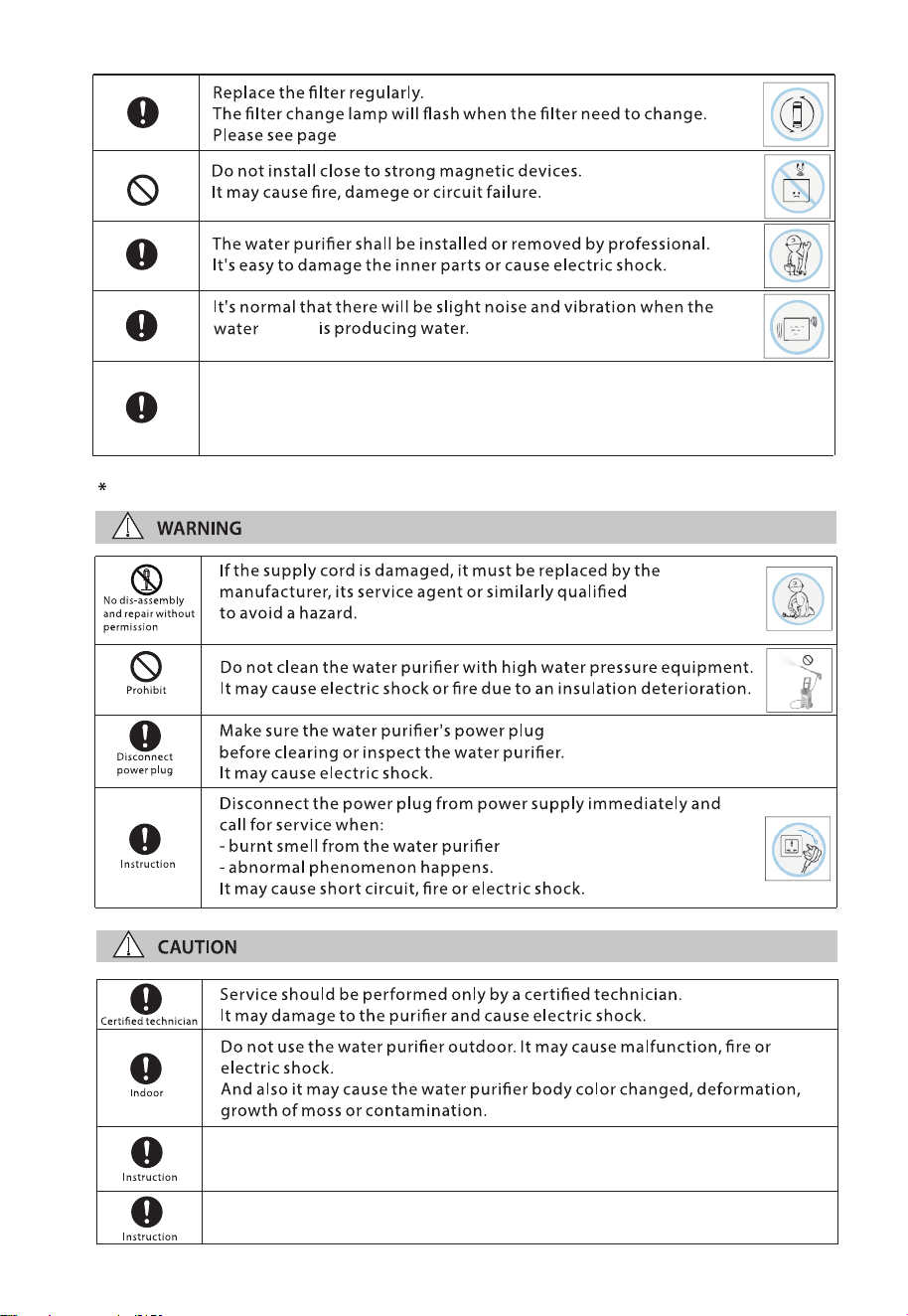
4
10 for 4-2 Filter Change.
purier
To inspect and maintain
person in order
It may cause re, electric shock.
disconnects from the power outlet
Do not operate the UV-C emitter when it is removed from the appliance
enclosure.
This appliance contains a UV-C emitter.
In order to avoid a hazard due to inadvertent resetting of the thermal cut-out,
this appliance must not be supplied through an external switching device, such
as a timer, or connected to a circuit that is regularly switched on and o by the
utility.
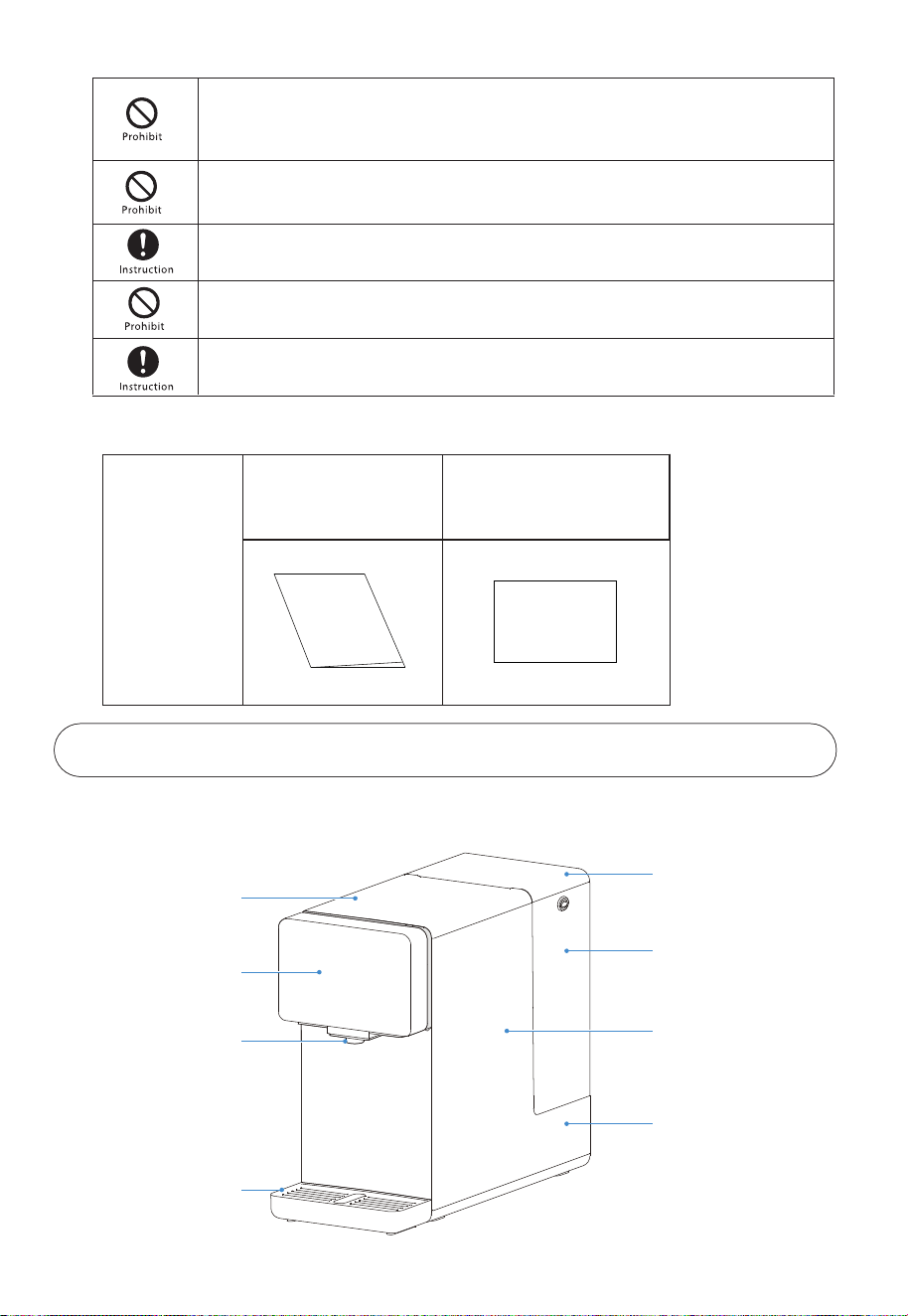
2-1 Name of parts
2. Product Introduction
Water tank cover
Water tank
Machine body
Puried water tank
Upper cover
Display screen
Nozzle
Water tray
1-2 Packing list
Packing box
Quick Start Guide
Instruction Manual
Instruction Manual
Quick Start Guide
Unintended use of the appliance or damage to the housing may result in the
escape of dangerous UV-C radiation. UV-C radiation may, even in little doses,
cause harm to the eyes and skin.
The user is not allowed to replace the UV-C emitter individually.
Disconnect the appliance from the supply before carrying out maintenance.
The appliance is to be supplied through a residual current device (RCD) that
rated residual operating current does not exceed 30 mA.
Appliances that are obviously damaged must not be operated.
5
6
2-2 Control panel
Water ltering indicator
Filter life indicator
Water tank rell indicator
Child lock
UVC antibacterial indicator
Filter ush indicator
Temperature selection area
Filter reset button
Water outlet button
Button instructions
6 water temperature options
• 93°C-99°C Boiling Water
• 80°C-85°C Green Tea
• 58°C-62°C Honey Water
• 53°C-57°C Warm Water
• 46°C-50°C Formula Milk
• Ambient Water
Water tank refill:
When the water tank is taken out or the water level reaches the minimum water level of the water tank,
the "Water" icon will flash.
Water filtering:
When "Filtering" icon flashes, it means that the machine starts to make and filter water into the
purified water tank, and the water cannot be dispensed temporarily;
When the clean water tank is at high water level, the "Filtering" icon will turn off.
Filter flushing:
After connecting to the power supply for the first time or resetting the lifespan of the filter, the
machine will automatically flush the filter and the "Flushing" icon will flash simultaneously;
When the filter flushing process is complete, the “Flushing" icon will be half-lit state.
Standby and activate:
The machine will automatically enter the standby state if there is no operation within 10 minutes, and
all the prompt lights on the operation panel will go out;
In standby mode, press any button will make the machine return to working status.
Child lock:
If you take water at a temperature other than ambient water, the child lock button will light up. You
need to click it to unlock, and then press the Water outlet button;
If you take water at ambient water, just press the water outlet button directly;
You can also press and hold for 3 seconds to turn on or off the child lock function.
Filter replacement:
With the use of the filter, the three small grids for reminding the filter life will turn off one by one.
If all three grids flashes simultaneously, it means that the filter reaches the end of its lifespan and needs
to be replaced. At the same time, the filter reset button will light up;
After replacing the filter, press and hold the Filter reset button for 3 seconds to reset the filter life.
7
2-4 Electric schematic diagram
Instructions for rst use
2-4 Instructions
Notes:
Do not disassemble the machine yourself. This operation should be performed by professional personnel
at authorized service centers or local dealerships.
Instant heating water outlet NTC2
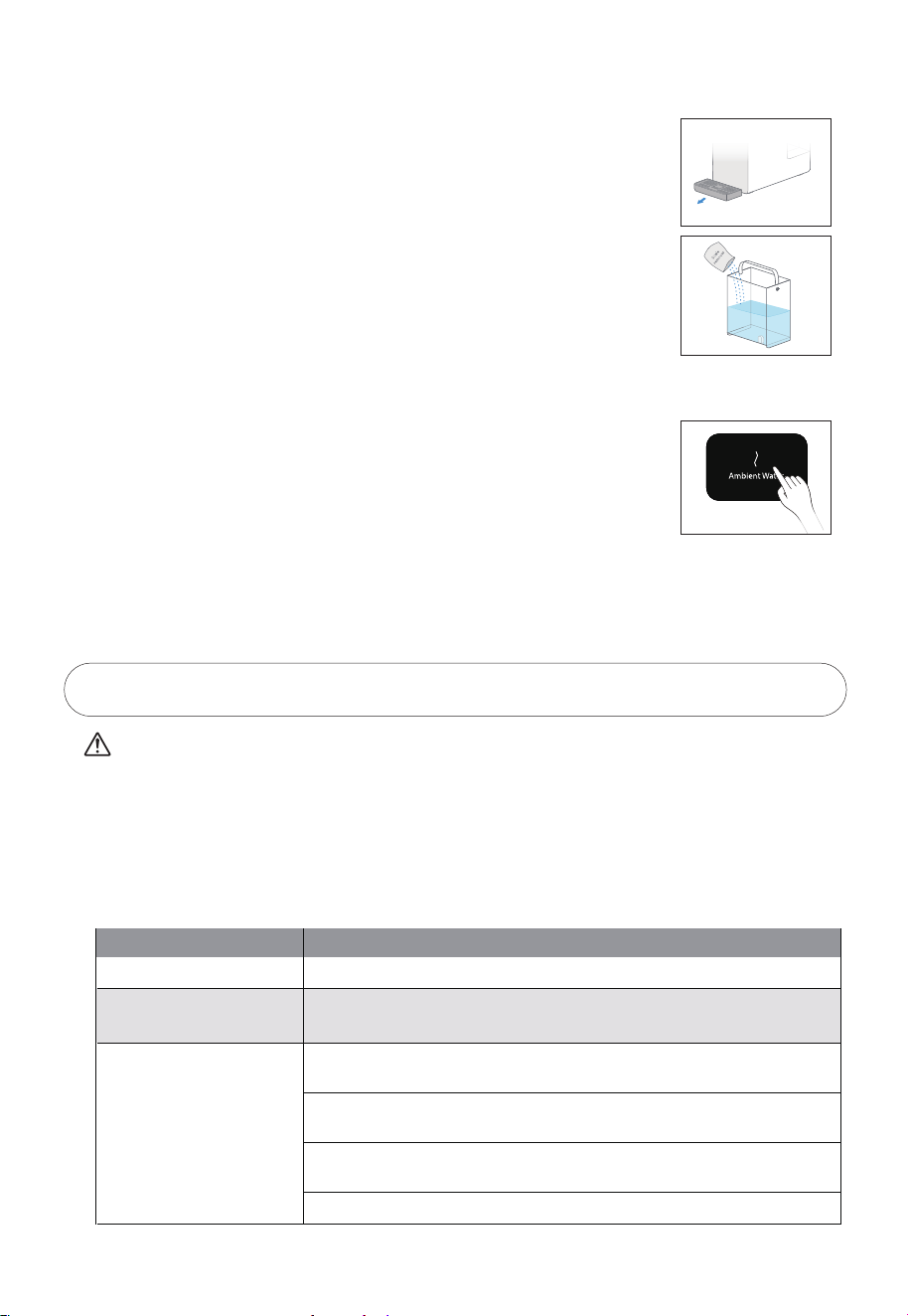
1. Open the package, place the machine on a stable surface and place the
water tray and remove the protective cover of the water nozzle.
3. Water lling:
Fill the water tank with tap water to the maximum level.
2. Steps to remove the water tank:
2.1 Remove the water tank cover;
2.2 Lift the handle of the water tank and pull the water tank outward, and
then lift it out after it disconnect with the base.
Drain stored water:
When the “Ambient Water” icon of the room water button is flashing, The Stored Water in the filter
water tank needs to be emptied before normal use.
Situations Requiring Water Drainage Operations :
(1)Power on first-time power up or power down after power up;
(2)Replace the filter ;
(3)Machine has not been used for over 48 hours;
Prepare a container with a capacity of approximately 1.5L and place it under the water outlet.Then
Press the "Ambient Water" button briefly to drain the stored water.
8
4. Install the water tank:
4.1 Align the water tank with the base socket and press down;
4.2 Cover the water tank with the cover, ensuring that the top of the water
tank cover is aligned with the top of the machine.
5. Rinse filter:
5.1 Put the water tank back into the machine, and the "Flushing" light will
flash. The machine will start to flush the filter automatically for 5 minutes.
5.2 When it finishes filter flushing, it will beep for 3 times. "Flushing" icon will
be half-lit state., and the "Water" icon will flash. At this time, it is necessary
to pour out all the water in the water tank and refill it to the highest water
level.
5.3 Repeat steps "5.1" and "5.2" for a total of 3 times.
8. When the machine is initially powered on, ll the water tank with water. The machine will start
ltering the water until the puried water tank is lled. Once the puried water tank is lled, the
machine will enter standby mode.
9. Take water
9.1 Press any icon to light up the screen, indicating that the machine has
entered the working state. The screen will remain light for 10 minutes.
6. Start water making:
The water tank is connected to the fourth water tank and water making
begins. It takes about 10-15 minutes for the new machine to make water,
please wait patiently.
9.2 Ambient water
After the screen is on the temperature automatically defaults to ambient
water. Simply press the water outlet button to obtain ambient puried
water.
9.3 Other options
When selecting water at temperatures other than ambient water, the
child lock button will light up, indicating that you need to press on it to
unlock and take the water.
10. Water refill reminder
When the water level reaches the minimum water level, the "Water" icon on the display will flash,
please pour out the remaining water from the water tank, and fill the water tank with tap water to
the maximum water level, and install the water tank back into the machine.
7. After the rst-time water production is completed, prepare a container
of approximately 1.5L and press the “Ambient Water” button to drain the
stored water. After this is done, the machine can be used normally to
produce water again.
9
3. Troubleshooting
Notes:
The following is the judgment and inspection of common abnormalities. If simple treatment cannot
be eliminated, please send it to the maintenance oce for consultation. Please do not disassemble
and repair yourself to avoid danger or damage to the water purier.
The pump may make slight noise when it operates in the purifying and ltering of the water
purier. You can use it normally.
If there is any problem in using, please solve as the following methods. For the fault that can
not be solved, please contact the local sell service center.
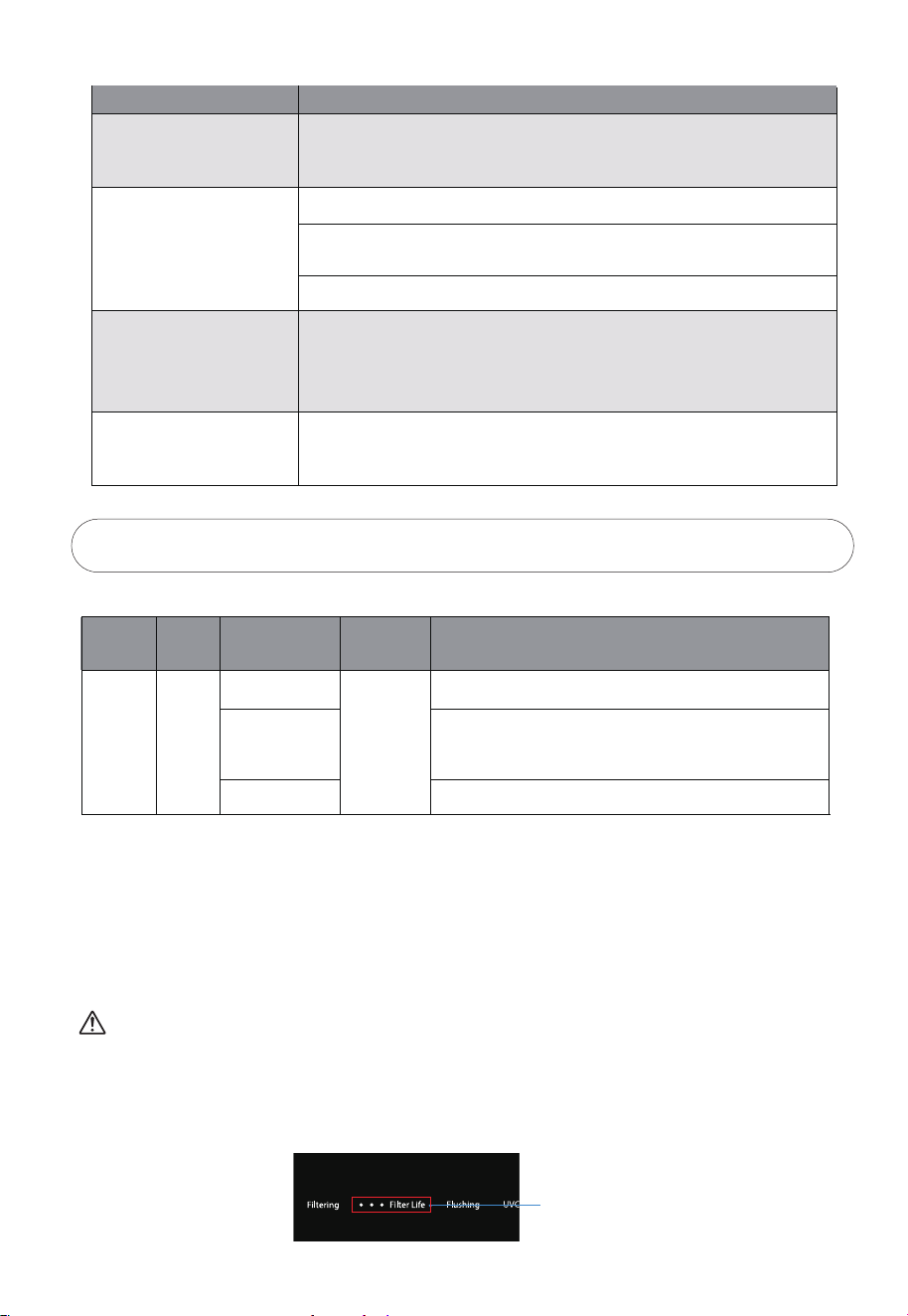
2-5 Daily maintenance
1. Water Tray: Remove the water tray and empty any remaining water in the tray.
2. Water Tank: It is recommended to add a small amount of descaling agent
(such as citric acid) to the water tank once a month. Let it soak for 30 minutes
before cleaning. Please do not use organic solvents like gasoline for wiping.
Issues
Troubleshooting
No power supply
Failure to heat normally
Please check if the power is connected.
Please check whether the supply voltage meets the requirements
of 220-240V±15%.
Failure to heat normally
Please check whether the water tank is installed in place and whether
there is water in the raw water tank.
Please check that the lter is installed in place and the lter cover is in
the correct position.
Please check whether the water tank and the water inlet connected to
the water tank are blocked by foreign objects.
Please check if the lter life is expired.
3. In the case of not using machine for more than 48 hours, it is necessary to
forcibly drain the water tank before normal use. At this time, the room
temperature water button "Ambient Water" will ash. Prepare a container of
approximately 1.5L under the water outlet, and briey press the "Ambient
Water" button to drain the stored water.
4-2 Filter Replacement
10
The lifespan of lter element is not quality guarantee time, but the ideal lifespan of lter with the
raw water in accordance with the national standard of domestic drinking water and based on the
normal water using of a common family.
The maintenance period of lter is expected time, but the real lifespan is depend on area, the
quality of water, the quantity of water using and season(it is subjected to the suggestions of local
sell on commission and service site). Only change lter timely, you can drink pure water.
Filter name
Filter form
Integrated
composite
lter
FIST(PRO)
PAC layer
RO membrane layer
Carbon block layer
Function
Eectively lter mud, sand, rust, suspended solid and other
large-grained substance and organic and residual chlorine.
The theoretical ltering precision of RO membrane lter element is
up to 0.0001-0.001 micron. RO membrane lter intercept organics
(trichloromethane and carbon tetrachloride ), heavy metal (arsenic,
lead and cadmium etc.) in water.
Eectively lter organics (trichloromethane and carbon tetrachloride),
remaining chlorine, odour and peculiar smell etc. in water.
Quantity
1
Suggested
service life
12 months
Special Prompt:
4. Filter Introduction
4-1 Filter introduction
Issues
Troubleshooting
The machine does not
stop water production for
a long time
Please check if the lter life is expired.
Water leakage
Please check whether the water tank is installed in place.
Replace the lter.
Please check that the lter is installed in place and the lter cover is in
the correct position.
The screen does not turn
on and the machine
cannot be operated
Please unplug the power plug and power on again.
Odor
To ensure cleanliness, please clean the machine regularly. When it is
not in use for a long time, please pour out the water in the water tank ,
and hold the "Ambient Water" buttons for 3 seconds to drain all the
water in the puried water tank.
Notes:
The lter can be replaced by yourself or contact with Toshiba service.
Minor water leakage during the lter replacement process is normal.
Filter model: FIST(PRO).
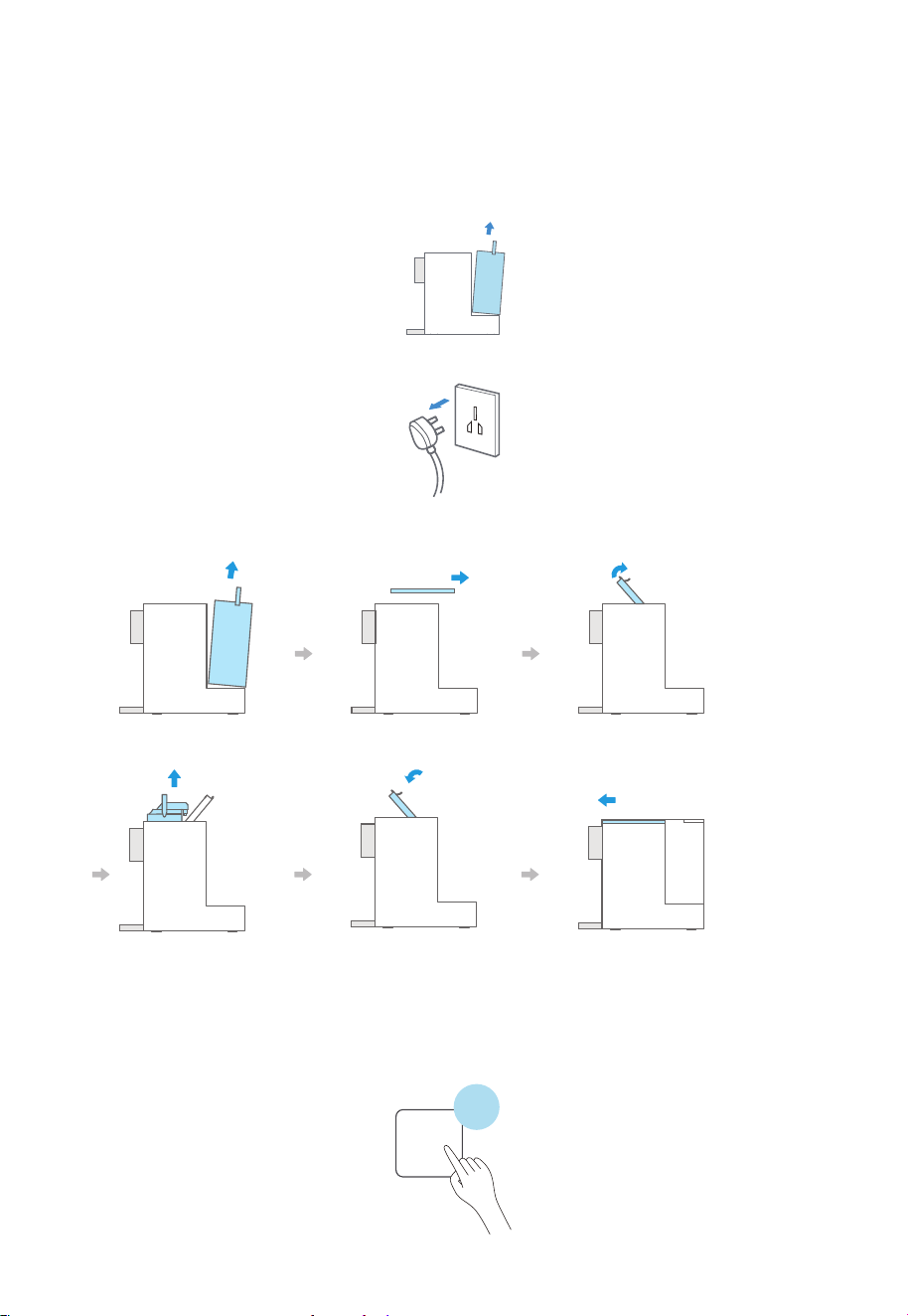
1. When all three small grid of the lter life are ashing, please call the after-sales
phone number to purchase a new lter.
Filter llife indicator
11
2. Before replacing the lter element, remove the water tank and place a 2L water container under water
nozzle. Press and hold the Ambient Water button for 3 seconds to drain the internal water. After
completing the drainage, install the water tank back into the machine.
(If internal drainage is not carried out beforehand and the lter is replaced, the lter ushing cannot be
carried out, and the lter life will be aected)
3. The power must be cut o before replacing the lter.
② After the lter is replaced, press and hold the lter reset button for 3 seconds to re-record the life
of the lter.
Filter Reset
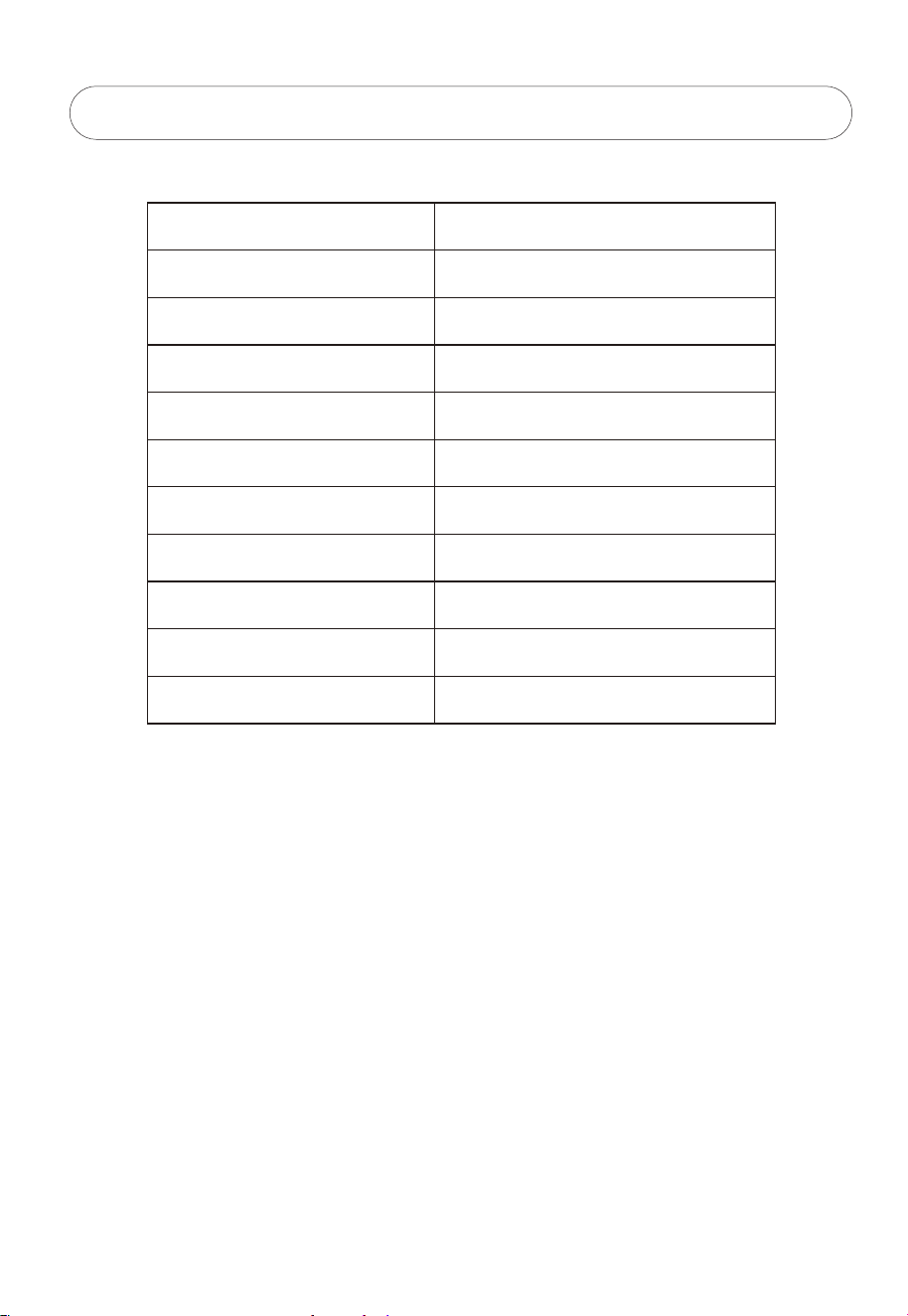
3 seconds
4. As shown below:
①Follow the steps shown below to replace the lter.
Remove the water tank Open the upper cover Open the lter cartridge handle
Pull out the lter After replacing it with the
new lter, press down the
pressure lever until there
is a "snap" and it is locked.
Place the water tank after
closing the upper cover
5. Technical Parameters
5-1 Basic parameter
Model
Rated voltage/ frequency
Rated hot water capacity
Rated power
Rated quantity of pure water
Puried water ow
Inlet water pressure
Work pressure of RO membrane
Suitable water resource for using
Applicable ambient temperature
Exterior colors
TWP-TSR76THK(W) / TWP-TSR76THK(M)
220-240V~ / 50Hz
≥90℃, 20L/h
2190W
2500L
0.2L/min
0.05-0.1MPa
0.45-0.8MPa
Municipal water
4-38℃
White / Dark Grey
12


https://www.toshiba-lifestyle.com/hk

