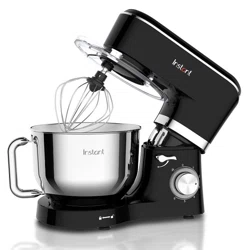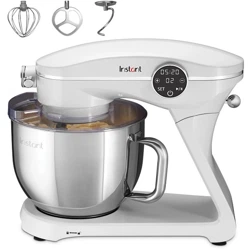

INSTANT
®
7.4 QT
STAND MIXER PRO SERIES
USER MANUAL

to your new Instant
®
Stand Mixer Pro Series!
This Instant Stand Mixer Pro Series makes all your mixing tasks easy,
from breads and batters to egg whites and whipped cream. We hope
you fall in love with Instant mixing and enjoy it in your kitchen for years
to come!
Get started with your new Stand Mixer!
.
Welcome

CONTENTS
Important safeguards 2
What’s in the box 5
Initial setup 6
Using your InStant Stand Mixer Pro Series 7
Mixing tips 14
Learn more 19
Warranty 20

2
User Manual
IMPORTANT
SAFEGUARDS
Failure to follow safety instructions may result in personal injury
and/or property damage and may void your warranty.
READ ALL INSTRUCTIONS
Before using your new appliance, please read all instructions, including
the Safety Information below. Keep this manual for reference.
Placement
• DO always operate the appliance on a stable, non-combustible,
level surface.
• DO NOT place the appliance on or close to a hot gas or electric
burner, or a heated oven.
• DO NOT use the appliance near water or flame.
• DO NOT use outdoors. Keep out of direct sunlight.
General Use
• DO keep hands, hair, clothing away from the mixing attachments
while they are in rotation.
• DO NOT touch any moving parts.
• DO NOT insert anything into the mixing attachments while they
are in rotation.
• DO NOT move the appliance while it is in use.
• DO NOT allow children or persons with reduced physical, sensory
or mental capabilities to operate this appliance. Close supervision
is necessary when any appliance is used by or near children and
persons with reduced physical, sensory or mental capabilities.
Children should not play with this appliance.
• DO NOT use the appliance for anything other than household use.
It is not intended for commercial use.
• DO NOT leave the appliance unattended while in use.
• DO NOT use attachments or accessories not made by Instant Pot
Brands specifically for this appliance.

3
User Manual
• The operation of appliance, intended for use with various
attachments, at speeds exceeding those recommended by the
manufacturer results in a risk of injury to persons, the instruction
manual provided with the appliance shall indicate the recommended
speeds of operation.
• Bowl must be locked properly in place before operating appliance.
Care and Storage
• DO NOT store any materials in the unit when not in use.
• DO NOT place any combustible materials in the unit, such as paper,
cardboard, plastic, Styrofoam or wood.
Power Cord
A short power-supply cord is used to reduce the risk resulting from it
being grabbed by children, becoming entangled in, or tripping over a
longer cord.
WARNING: Keep appliance and cord away from children. Never drape
cord over edge of counter, never use outlet below counter, and never
use with an extension cord.
• DO NOT let the power cord touch hot surfaces or open flame,
including the stovetop.
• DO NOT let cord hang over edge of table or counter.
• DO NOT use with power converters or adapters, timer switches or
separate remote-control systems.
• DO plug this appliance into a polarized outlet one way. This appliance
has a polarized plug, and one blade is wider than the other.
To reduce the risk of electrical shock:
• ONLY plug this appliance into a polarized outlet. If the plug does not
fit fully into the outlet, reverse the plug.
• DO NOT attempt to modify the plug in any way. If it still does not fit,
contact a qualified electrician.

4
User Manual
Electrical Warning
The unit contains electrical components that are an electrical shock
hazard. Failure to follow these instructions may result in electric shock.
To protect against electrical shock:
• To disconnect, turn off the unit, then remove plug from power
source. Always unplug when not in use, as well as before
adding or removing parts or accessories, and before cleaning.
To unplug, grasp the plug and pull from the outlet. Never pull from
the power cord.
• DO regularly inspect the appliance and power cord.
• DO NOT operate the appliance if the power cord or plug is damaged,
or after the appliance malfunctions or is dropped or damaged in
any manner. For assistance, contact Customer Care by email at
support@instantpot.com.
• DO NOT attempt to repair, replace or modify components of the
appliance, as this may cause electric shock, fire, personal injury
and/or property damage, and will void the warranty.
• DO NOT tamper with any of the safety mechanisms, as this may
result in personal injury or property damage.
• DO NOT immerse power cord, plug or the appliance in water or
other liquid.
• Remove beaters from mixer before washing.
• DO NOT use the appliance in electrical systems other than
120 V ~ 60 Hz for North America.
SAVE THESE INSTRUCTIONS
Failure to adhere to safety instructions may result in personal
injury and/or property damage and may void your warranty.
5
User Manual
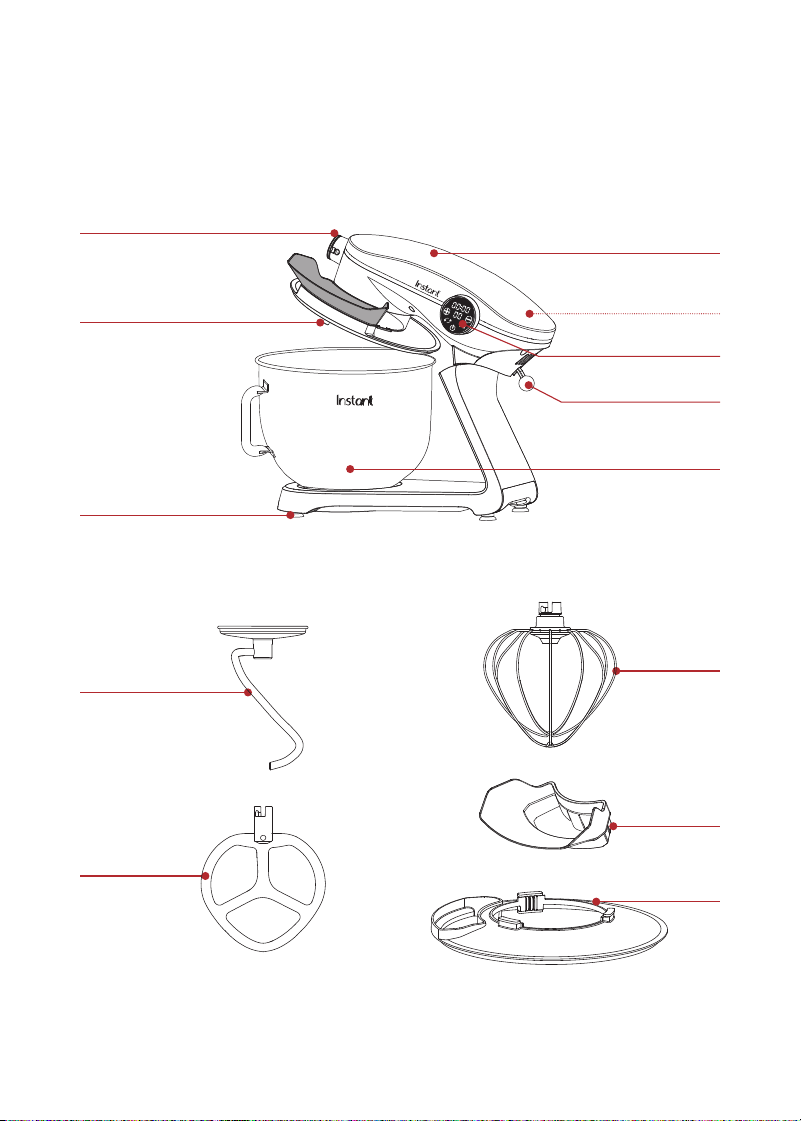
WHAT’S IN THE BOX
Stand Mixer
Mixing Attachments
Illustrations are for reference only and may differ from the actual product.
Dough Hook
Beater
Attachments Shaft
Accessories Power Hub
(accessories sold separately)
Suction Cup Feet
Control Panel
Mixer Head
Release Lever
Mixing Bowl
Whisk
Pouring Shield
Power Cord
(rear)
Detatchable
Pouring Chute

6
User Manual
INITIAL SETUP
Remember to recycle!
We designed this packaging with sustainability in mind. Please recycle
everything that can be recycled where you live. Be sure to keep this
Manual for reference.
Unpack
1. Remove your new mixer from the box.
2. Remove all of the packaging material from in and around the mixer.
3. Remove the Pouring Shield from the paper tray packed around
the mixer.
4. The Dough Hook, Beater, Whisk, and Pouring Chute are packed
inside the mixing bowl. When removing the attachments, place your
hand on top of the mixer head before pressing the release lever to
lift the head. The mixer head tilt mechanism is spring assisted, and
you’ll want to hold it in place while lifting.
5. Don’t remove the safety warning stickers or the rating label from
the mixer.
6. Wash the mixing bowl and attachments before using for the
first time.
Placement
• Place your mixer on a stable, level surface, away from combustible
material and external heat sources. Do not place your mixer on top
of another appliance.
Turn on
• Plug the mixer into an electric outlet. The Power button will flash
and the unit enters Ready mode.
7
User Manual
USING YOUR INSTANT STAND MIXER
PROSERIES
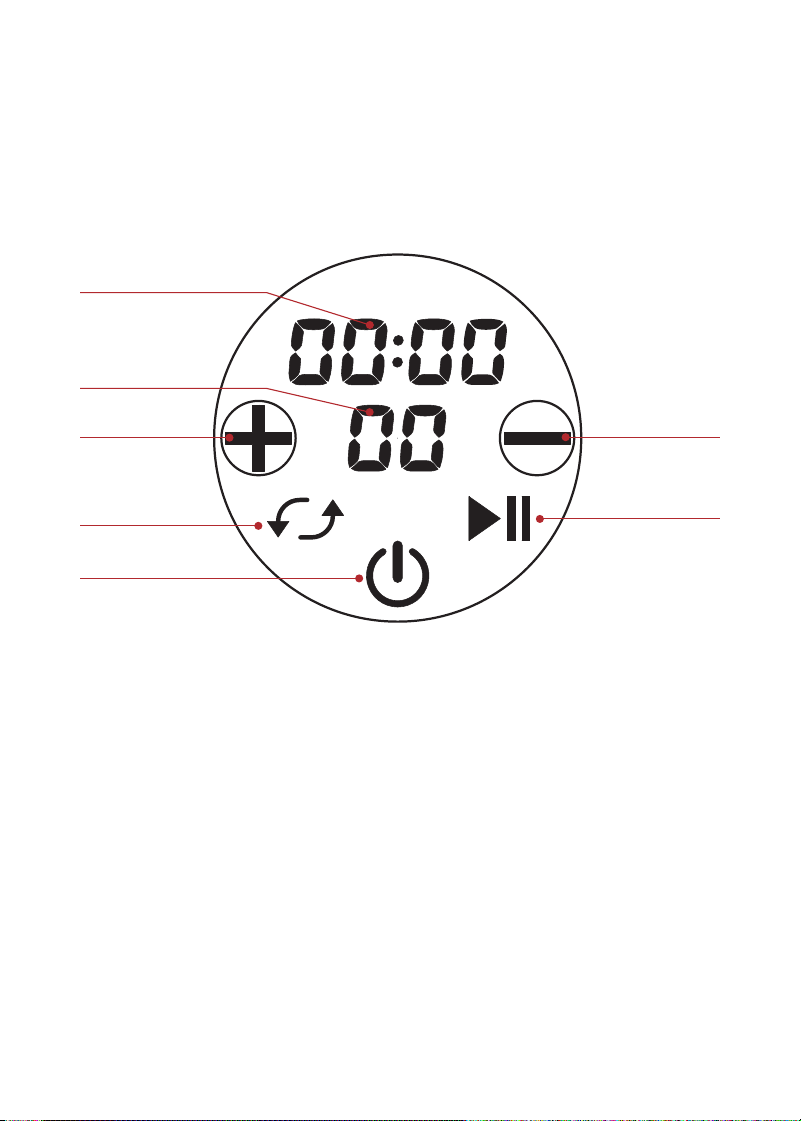
Control panel
We’ve designed the control panel to be simple to use and easy to read.
Decrease button
Start/Pause button
Timer
Speed
level indicator
Increase button
Power button
Set button
(toggles time/speed)
8
User Manual
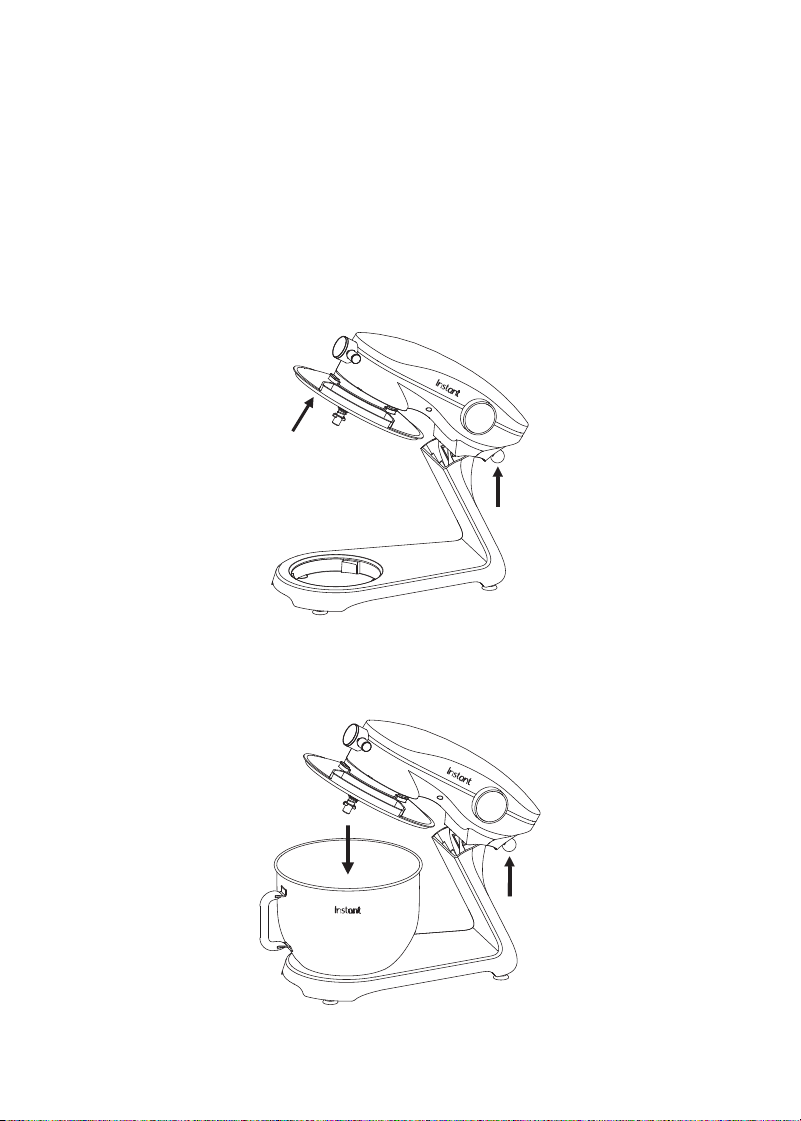
Opening and closing the mixer
The Mixer Head is easy to operate and designed to stay in place
whether open or closed.
To open
1. Place one hand on top of the Mixer Head and use the other hand to
pull down on the Release Lever.
2. The Mixer Head will spring upward; use your hand to keep it from
lifting too quickly. Then make sure it locks into the open position.
To close
1. Pull down on the Release Lever.
2. Push the Mixer Head down until it locks in the closed position.
9
User Manual
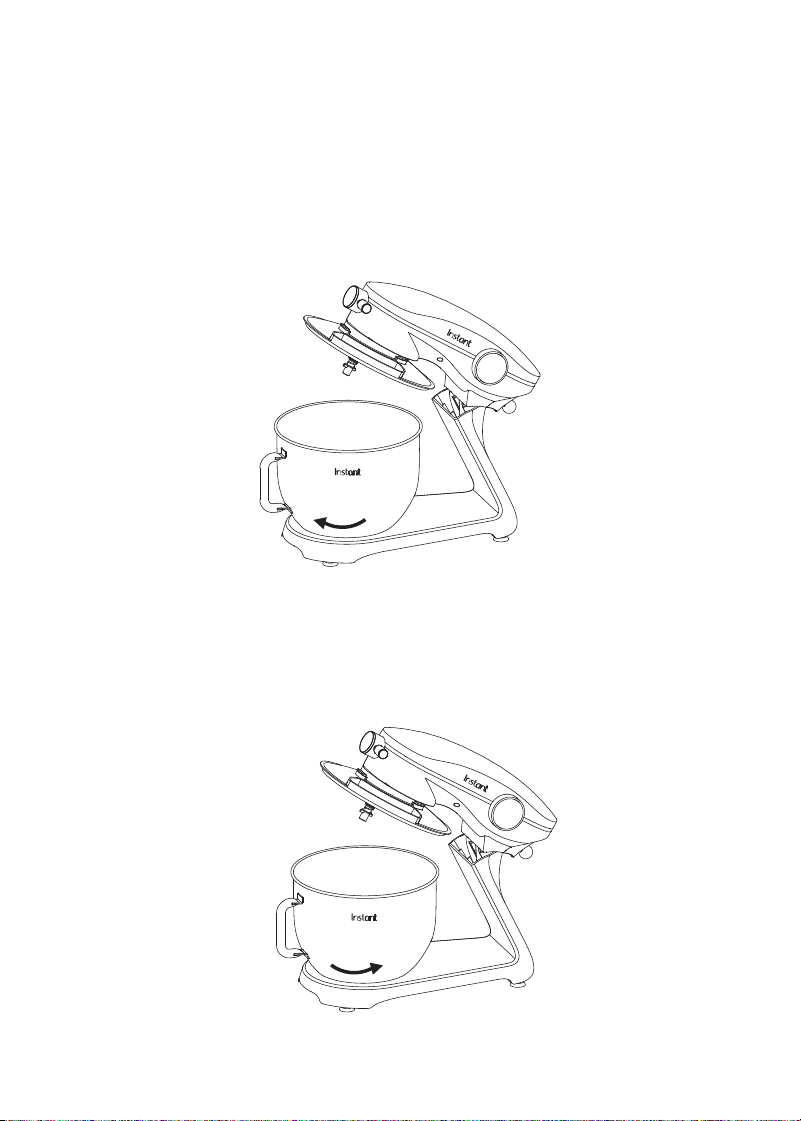
Using the Mixing Bowl
The Mixing Bowl locks into place to hold it securely while you
are mixing.
To place the Mixing Bowl
1. Place the Mixing Bowl onto the Mixer base.
2. Turn the Bowl clockwise until it locks into place.
To remove the Mixing Bowl
1. Turn off and unplug the Mixer.
2. Remove any attachments from the Mixer.
3. Turn the Mixing Bowl counter clockwise until it unlocks.
4. Lift the Bowl off the Mixer.
10
User Manual
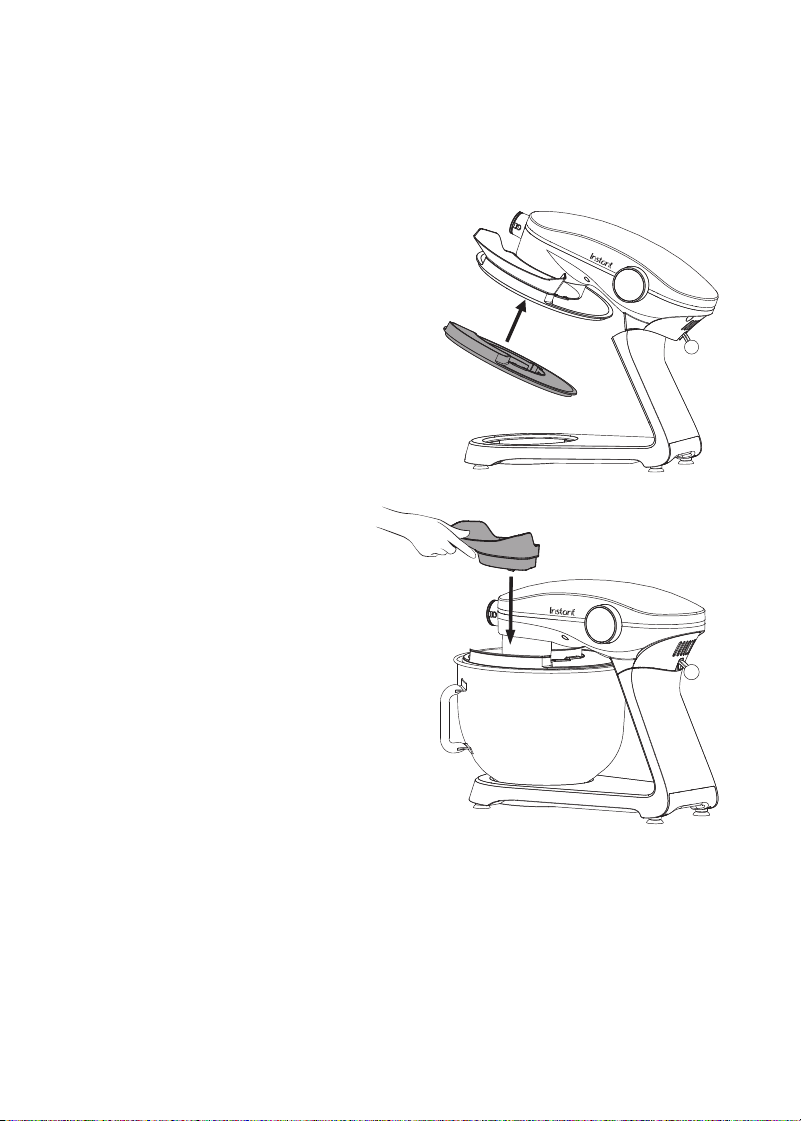
Using the Pouring Shield and Pouring Chute
The Pouring Shield can help keep ingredients in the bowl during mixing.
The Pouring Chute can be helpful for adding ingredients during mixing.
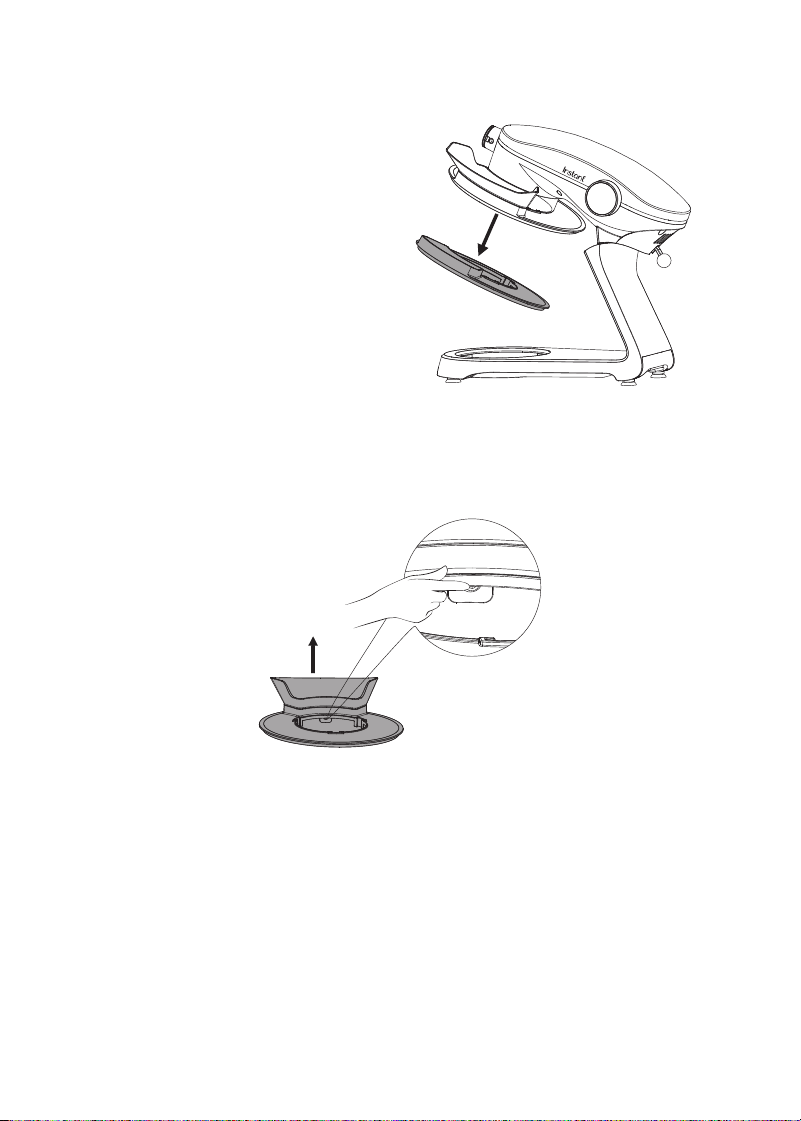
Attaching the Pouring Shield and Chute
1. Make sure the Mixer is turned
off and unplugged.
2. Slide the Pouring Shield onto
the Mixer Head. Ensure that all
4 silicone pads on the Pouring
Shield are fully seated around
the Mixer Head.
3. Add the attachment for your
mixing job (see “How to mix”).
4. Place the mixing bowl
on the mixer base.
5. Align the bottom of the
Pouring Chute with the
opening of the Pouring Shield.
6. Gently slide the Pouring Chute
into place until you hear the
click that indicates the Chute
is correctly assembled.
11
User Manual
To remove the Pouring Shield and Chute
1. Turn off and unplug the Mixer.
2. Remove any attachments from
the Mixer.
3. Turn the Mixing Bowl
counterclockwise to unlock it,
and remove it from the Mixer.
4. Pull the Pouring Shield off the
Mixer Head.
5. With one hand, press the button
on the bottom of the Chute.
6. With the other hand, lift the Chute until
it separates from the Pouring Shield.

12
User Manual
Mixing ingredients
The Instant Stand Mixer can mix ingredients in two ways:
Mixing with a counter: counts up from 0:00 to show how long the
mixer has been operating.
Mixing with a timer: set a time for mixing, and the mixer automatically
stops when complete.
How to mix
Prep
1.
Ensure the mixer is not plugged in.
2.
Push the Release Lever and lift the Mixer Head to the OPEN position.
3.
Select the mixing attachment you want to use and place the opening over
the mixing attachment shaft. Align the cutouts on the attachments with
the pin on the shaft. Push in to compress the spring and rotate clockwise
until the pin is securely seated in the slot of the mixing attachment.
4.
Place your ingredients into the mixing bowl.
5.
Place the mixing bowl in the mixer base and turn the bowl clockwise
to lock in place.
6.
Lift the Release Lever and return the Mixing Head to the CLOSED position.
7.
Plug in mixer into outlet.
Mixing with a counter
1. Press Power to start the mixer.
2. Press + and — buttons to set the speed.
You can adjust the speed at any time by pressing the + and — buttons.
3. Press Start/Pause to start mixing.
The timer will start counting up to show you how long you’ve been mixing.
4. When you are done mixing, press Start/Pause to stop the mixer.
You can restart and stop mixing at any point by pressing the Start/Pause
button or by lifting the head.

13
User Manual
Mixing with a timer
1. Press Power to start the mixer.
2. Press + and — buttons to set the speed.
You can adjust the speed at any time by pressing the + and — buttons.
3. Press the Set button. The time indicators will flash to indicate
that you can now set the mixing time.
Press + and — buttons to set the mixing time.
4. Press Start/Pause to start mixing.
The timer will start counting down to show mixing progress.
5. When the mixing time is done, the mixer will stop.
You can restart and stop mixing at any point by pressing the
Start/Pause
button.

14
User Manual
MIXING TIPS
The Instant Stand Mixer handles just about any type of mixing. Here
are some guidelines for speed and capacity.
Speed guidelines
Speeds shown are general recommendations. Use your own judgement
or the recipe instructions.
Speed Attachment Action
1 Dough Hook Folding in ingredients
Beater Stirring dry ingredients
Whisk Starting whipped
creams and egg whites
2-3 Dough Hook Kneading bread dough
Beater Slowly mix heavy batter
Beater Cutting butter
Beater Shredding boneless/
skinless cooked chicken
4-5 Beater Mashing potatoes
Beater Mixing cookie dough
Whisk Beating eggs
6-7 Beater Creaming butter
Beater Beating frosting
8-9 Beater Finish mashing potatoes
Beater Finishing batter
Whisk Whipping for meringue
10 Whisk Fast whipping small
amounts of egg whites

15
User Manual
Max capacity
Overfilling the mixing bowl will cause problems when mixing. Here are
some sample maximum amounts of ingredients.
Attachment Maximum capacity
Dough hook 1500 g of all-purpose flour
800 g of whole wheat flour
Beater 10 dozen cookies
(about 23 g of dough per cookie or
roughly a rounded tablespoon)
Whisk 24 large egg whites
For large batches or dense ingredients like wheat and rye flour,
do not operate the mixer continuously for over 15 minutes to
prevent overheating.

16
User Manual
CLEANING
Clean your Instant Stand Mixer Pro Series after use. Always unplug the unit
before cleaning. Before use or storing, make sure all surfaces are dry.
DO NOT immerse power cord, plug or the appliance in water or
other liquid, which may result in electric shock.
Part Cleaning instructions
Exterior of unit • Clean with a soft, damp cloth or sponge.
Wipe dry.
Mixing attachments • Dishwasher safe, top rack.
• Or clean with a damp cloth and mild dish soap.
• Allow the mixing attachments to dry completely
before storing.
Mixing attachment shaft • The mixing attachment shaft may produce small
amounts of black residue due to high speed
and friction when the machine is working. After
each use, please clean it thoroughly and keep
the area dry.
• To clean, use a damp cloth to wipe around the
outside of the shaft.
• Use care when cleaning due to the sharp edges.
Mixing Bowl • Dishwasher safe.
• Or clean with a damp cloth and mild dish soap.
• Allow the mixing bowl to dry completely
before storing.
Mixing Bowl
Pouring Shield
Chute
• Clean with damp cloth and mild soap.
Power cord • Use a barely-damp cloth to wipe any particles
off cord.

17
User Manual
TROUBLESHOOTING
If you run into problems operating your Instant Stand Mixer Pro Series,
start here to see if we have a solution. If you can’t resolve the problem
yourself or if you have questions, get in touch with Customer Care and
we’ll be happy to help.
Problem Cause Solution
The mixer suddenly stops
working during use.
The mixer has been
running continuously for
30 minutes or the motor
temperature has gotten
too high.
1. Reset the speed to “0”.
2. Unplug the power.
3. Wait for the mixer
to return to room
temperature (generally
15-30 minutes).
4. Try restarting
the process.
The mixer does not run
when you try to mix.
The electrical cord has
come unplugged from
the socket.
Verify that the power
plug is plugged into
the outlet.
Power is off. Wait for power to return
before operating.
Mixer Head isn’t locked
into place.
Make sure the mixer
head is locked into the
CLOSED position.
The mixer makes
excessive noise
when running.
The mixer is louder at
high speeds than
low speeds.
Choose the right speed
to mix food according to
the recommendations on
page 11 of this manual.
There is too much food
in the bowl and the
mixer is overwhelmed.
Reduce the amount
of food.
The mixer has been
mixing for too long.
Stop the mixer and allow
it to cool down for a
while before using.

18
User Manual
Mixing speed slows
unexpectedly or
is uneven.
The room temperature
is low, causing the
lubricant in the mixer
to harden.
Remove the mixing bowl
and let the mixer idle
for 5 minutes to soften
the lubricant.
The food being mixed is
too hard or overloaded,
and the mixer cannot
keep up.
Reduce the amount of
food in the bowl.
Mixer sways and shakes
when working.
The foot pads on the
base are off.
Replace the foot pads.
The mixer is placed on
an uneven surface.
Ensure the mixer is on a
smooth and flat surface.
The Mixer Head won’t
return to the closed
position after inserting
the mixing bowl with the
pouring shield.
The pouring shield is
blocking the Mixer Head.
Rotate the Mixing Bowl
Pouring Shield on the
mixing bowl and make
sure it is tightly fitted.
Mixing bowl rattles or
gets tossed around
Mixing bowl isn’t locked
into place.
Place the mixing bowl
onto the mixer base and
turn clockwise until it
locks into place.

19
User Manual
LEARN MORE
There’s a whole world of information about your Instant
®
product just
waiting for you. Here are some of the most helpful resources.
Register your product
Instantpot.com/register
Contact Consumer Care
In the Instant Connect
™
App
Instantpot.com/customer-care-center
support@instantpot.com
Download the Instant Connect
™
App
Discover guided cooking and recipes
Available at iOS and Android app stores
Replacement parts and accessories
Instantpot.com
Join the community
Product Specifications
Model Wattage Voltage Volume
SM3700 600 W 120V/60Hz 7.4 Quarts
7.0 Liters

20
User Manual
WARRANTY
One (1) Year Limited Warranty
This One (1) Year Limited Warranty applies to purchases made from authorized retailers
of Instant Pot Brands by the original appliance owner and is not transferable. Proof of
original purchase date and, if requested by Instant Pot Brands, return of your appliance,
is required to obtain service under this Limited Warranty. Provided the appliance was
used in accordance with the use & care instructions, Instant Pot Brands will, in its sole
and exclusive discretion, either: (i) repair defects in materials or workmanship; or (ii)
replace the appliance. In the event that your appliance is replaced, the Limited Warranty
on the replacement appliance will expire twelve (12) months from the date of receipt.
Failure to register your product will not reduce your warranty rights. The liability of
Instant Pot Brands, if any, for any allegedly defective appliance or part will not exceed
the purchase price of a comparable replacement appliance.
What is not covered by this warranty?
• Products purchased, used, or operated outside of the United States and Canada.
• Products that have been modified or attempted to be modified.
• Damage resulting from accident, alteration, misuse, abuse, neglect, unreasonable
use, use contrary to the operating instructions, normal wear and tear, commercial
use, improper assembly, disassembly, failure to provide reasonable and necessary
maintenance, fire, flood, acts of God, or repair by anyone unless directed by an
Instant Pot Brands representative.
• Use of unauthorized parts and accessories.
• Incidental and consequential damages.
• The cost of repair or replacement under these excluded circumstances.
EXCEPT AS EXPRESSLY PROVIDED HEREIN AND TO THE EXTENT PERMITTED BY
APPLICABLE LAW, INSTANT POT BRANDS MAKES NO WARRANTIES, CONDITIONS
OR REPRESENTATIONS, EXPRESS OR IMPLIED, BY STATUTE, USAGE, CUSTOM OF
TRADE OR OTHERWISE WITH RESPECT TO THE APPLIANCES OR PARTS COVERED BY
THIS WARRANTY, INCLUDING BUT NOT LIMITED TO, WARRANTIES, CONDITIONS, OR
REPRESENTATIONS OF WORKMANSHIP, MERCHANTABILITY, MERCHANTABLE QUALITY,
FITNESS FOR A PARTICULAR PURPOSE OR DURABILITY.

21
User Manual
Some states or provinces do not allow for: (1) the exclusion of implied warranties of
merchantability or fitness; (2) limitations on how long an implied warranty lasts; and/or
(3) the exclusion or limitation of incidental or consequential damages; so these
limitations may not apply to you. In these states and provinces, you have only the implied
warranties that are expressly required to be provided in accordance with applicable
law. The limitations of warranties, liability, and remedies apply to the maximum extent
permitted by law. This limited warranty gives you specific legal rights, and you may also
have other rights which vary from state to state or province to province.
Product Registration
Please visit
www.instantpot.com/register to register your new Instant Pot Brands
appliance. Failure to register your product will not diminish your warranty rights. You will
be asked to provide the store name, date of purchase, model number (found on the back
of your appliance) and serial number (found on the bottom of your appliance) along with
your name and email address. The registration will enable us to keep you up to date with
product developments and recipes, and contact you in the unlikely event of a product
safety notification. By registering, you acknowledge that you have read and understand
the instructions for use, and warnings set forth in the accompanying instructions.
Warranty Service
To obtain warranty service, please contact our Consumer Care Department by email
to
support@instantpot.com. You can also create a support ticket online at
www.instantpot.com. If we are unable to resolve the problem, you may be asked to
send your appliance to the Service Department for quality inspection. Instant Pot Brands
is not responsible for shipping costs related to warranty service. When returning your
appliance, please include your name, mailing address, email address, phone number,
and proof of the original purchase date as well as a description of the problem you are
encountering with the appliance.
In Canada, distributed by
Instant Pot Brands
199 Bay Street, Suite 4000
Toronto, ON M5L 1A9 Canada
In U.S., distributed by
Instant Pot Brands
3025 Highland Parkway, Suite 700
Downers Grove, IL 60515 U.S.
instantpot.com
© 2024 Instant Pot Brands
140-1560-01 140-1660-01
Art release date
04/26/2024
INSTANT is a
registered trademark
of Instant Pot Brands
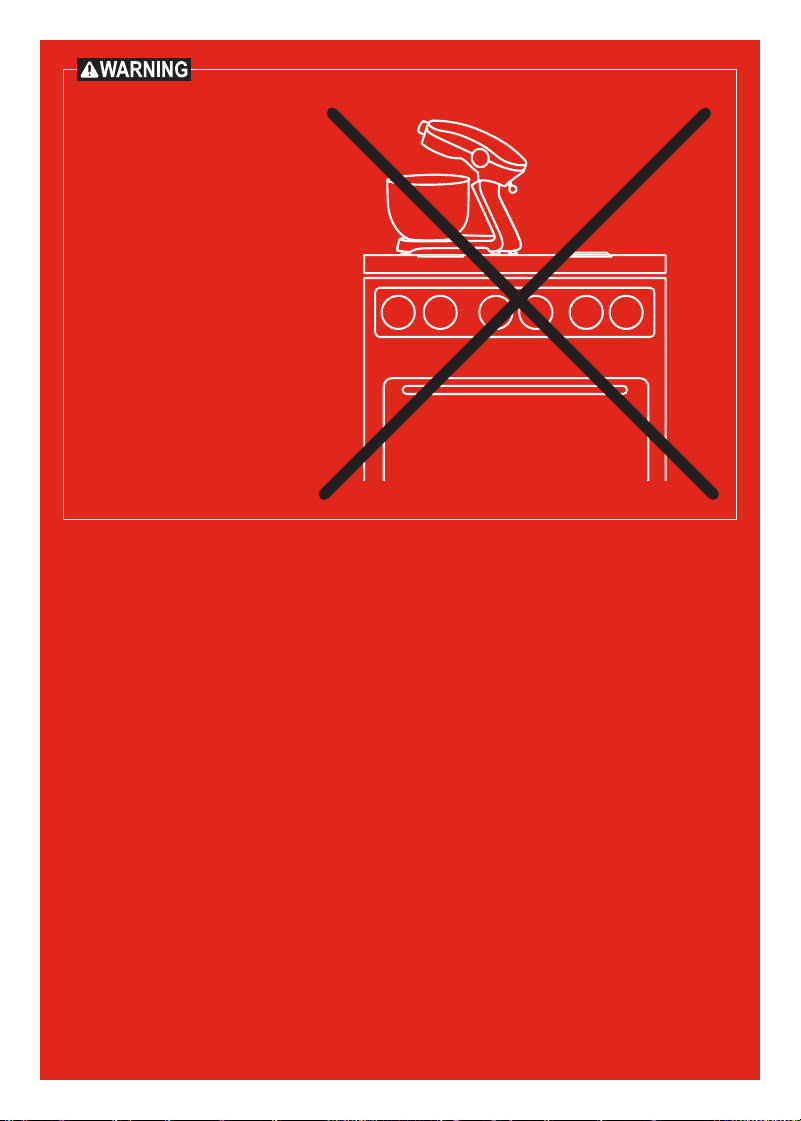
DO NOT place this
appliance on or close to
a gas or electric burner,
or inside an oven. Always
operate this appliance on
a stable, non-combustible,
level surface, such as a
kitchen countertop.