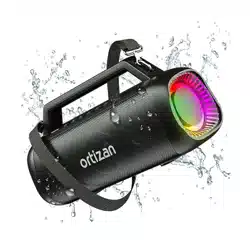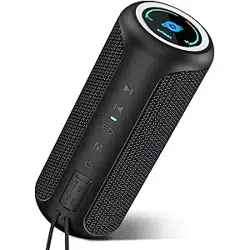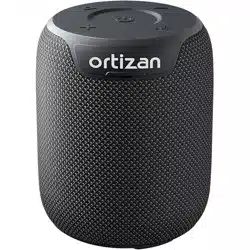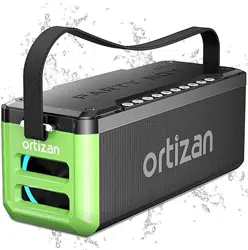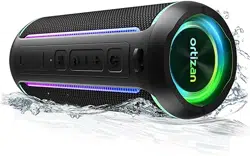
M8 Bluetooth Speaker
User Manual
Safety instructions
Package Included
Please read all instructions before use
1. To avoid disabling the warranty and damaging the product, please do not disassemble the product.
2. The rechargeable battery charging cycles are limited.
3. Battery life and charging cycle owing to the different use and settings.
4. Please do not place the product near the high-temperature heat source.
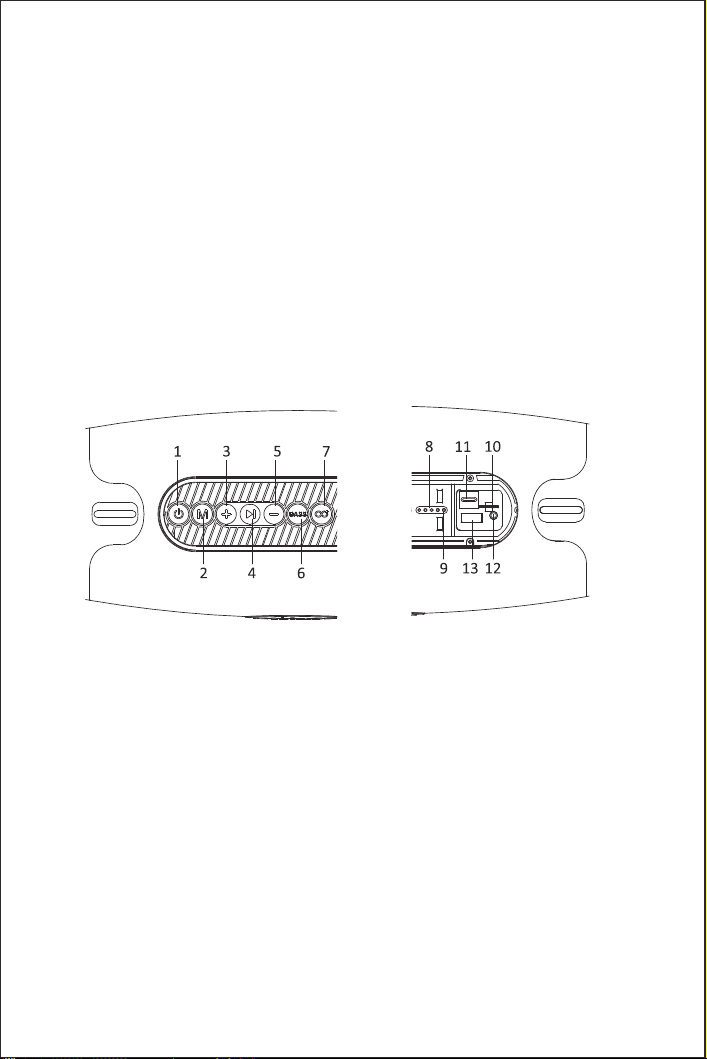
Button And Function
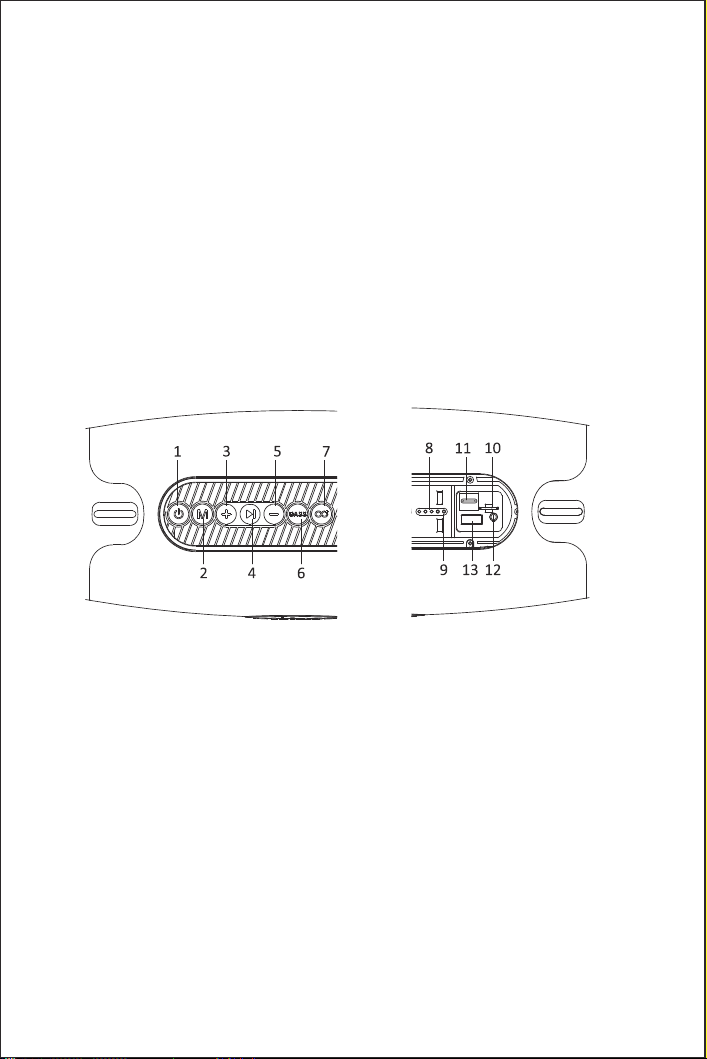
1. Power: Short press to switch light effects. Long press 3s to power on/off
2. Mode: Short press to switch Bluetooth/TF/AUX/USB music play mode. Long press to disconnect Bluetooth
3. +: Short press to volume up.Long press to choose the next track
4. Pause: In music mode short press to pause
5. —:Short press to volume down.Long press to choose the previous track
6. BASS: Short press to Switch sound effects(Normal/Heavy bass). Long press to clear Bluetooth pairing
information
7. ECHO: Long press to turn on/off TWS mode
8. Battery level indicator light
9. Bluetooth indicator light
10. TF card slot
11. T-pyec port
12. AUX port: Reset button build-in AUX port
13. USB port
1*M8 Bluetooth Speaker 1*User Manual 1*T-pyec line
1*Shoulder Strap 1*Audio Cable
1

Battery
Built-in rechargeable lithium battery
Charging
A white LED light will be on when charging. Four white LED lights will be on when fully charged.
If the product has not been used for more than 7 days, it is suggested that charge for 10 minutes before
using the product, then use it after the charge.
Power ON/OFF
Power on: Long press the power button 3s to turn on the speaker, the Bluetooth indicator light will be
on then you can connect the Bluetooth device.
Power off: Long press the power button 3s to turn off the speaker, and the Bluetooth indicator light will
be off.
Connect The Speaker
Turn on the speaker, and it automatic into Bluetooth mode, turn on the Bluetooth device to search the
“M8”, and select the connection, there will have a voice prompt after the connection is successful.
One speaker only supports connecting one Bluetooth device at the same time. If you need to connect
other Bluetooth devices, please disconnect the current Bluetooth device first.
Disconnect The Bluetooth
After the Bluetooth connection, long press the "M" button 3s to disconnect the Bluetooth.
Reconnect The Speaker
After a speaker is paired with a device that automatically connects to Bluetooth, the speaker will
automatically paring after the restart.
If the device without automatically connects to the Bluetooth function, the speaker can not automatic
paring after the restart. When the Bluetooth can not connect, long press the "M" button 3s will
automatically connect the last disconnected Bluetooth devices.
RGB Light
Short press the power button to switch the light effects.
Play Mode
Short press the “M” button to switch Bluetooth/TF/AUX/USB play mode.
Adjust The Volume And Switch Music
Volume up: Short press the “+” button.
Volume down: Short press the “—” button.
Next track: Long press the “+” button.
Previous track: Long press the “—” button.
2

Heavy Bass Mode
The speaker defaults to Normal mode, short press the “BASS” button to switch to Heavy Bass mode.
Long press the “BASS” button to clear Bluetooth pairing information, after a beep sounds the speaker
will restore default settings and auto power off.
SD Card Mode
Turn on the speaker, insert the SD card to play music.
AUX Mode
Turn on the speaker, using a 3.5mm audio cable to connect the speaker to your Bluetooth device, then
the speaker plays music via the audio cable.
Pause Function
Press the “ >I” button to start /pause music.
Reset Function
Using a long fine needle long press the reset button 6s in the AUX port, the speaker will have reset tone
and auto power off.
Auto Power Off
The speaker will auto power off after 20 minutes if it does not pair with any Bluetooth device or does not
play any sound after pairing. When in low battery, the speaker will auto power off as well.
T-W-S Mode
1. Turn on the two speakers (disconnect the speaker from the other Bluetooth device).
2. Short press the "ECHO" button 2s on one of the speakers, and it will have a voice prompt after the
pairing is successful. After the pairing is successful, the blue indicator light will flash on the master
speaker, and the slave speaker's blue indicator will be off.
3. Release the "ECHO" button, T-W-S connection may take a few seconds.
4. Turn on the Bluetooth device, and select the“M8" for Bluetooth pairing(Two speakers display one
Bluetooth name)
3

Disconnect T-W-S
Long press the "ECHO" button 2s on one of the speakers.
Specification
Model: Ortizan M8 Input: 9V2A
Waterproof level: IPX7 Bluetooth: V5.0
Built-in rechargeable battery: 14400 mah Format: MP3, WAV, WMA
Note:
1.Notice: If the battery is scrap, please use the same type of replacement. Otherwise, maybe an explosion.
2.Lithium batteries may not be exposed to places such as flammable or overheating.
Fault and maintenance:
1.Bluetooth connection failure:
Solution:
(1) Please make sure the white LED light is on. If the light is off, please turn on the speaker. If the light is
still off, please recharge the speaker.
(2) If there are a lot of Bluetooth devices around, please turn off the other Bluetooth devices. It is difficult
to search Bluetooth if there are a lot of Bluetooth device.
(3) Restart the speaker to re-search Bluetooth.
2.Music player's voice interrupted
Solution:
(1) Check the distance between the music player and the speaker is not too far.
(2) Ensure that there is no obstacle between the music player and the speaker.
(3) Check whether the music player and the speaker are in a state of low power consumption.
3.Unknown problems.
Solution:
Reset the speaker.
4

Before use
This product design fully pay attention to safety. In order to ensure safe operation, please follow the
following rules:
1. Please keep the product in a safe and stable position to avoid falling, which may cause damage or
personal injury.
2. Please do not drop, disassembly, open, extrusion, bending, piercing, burning the product.
3. Please keep the product away from any heat source.(such as radiators, heating equipment, stoves, or
other heat source)
4. If there have any damage, please contact professional maintenance personnel for repair.
5. Please unplug the power before use dry cloth to wipe the product.
6. For your health ,please adjust the volume to an appropriate level
Warning:
Do not alter or modify the product without permission.
Troubleshooting Guide
Can not power on
Please recharge the speaker.
No Sound
1. Adjust the volume.
2. Please ensure that the Bluetooth device is within Bluetooth transmission range.
3. Please ensure there are no obstacles blocking/interfering with the Bluetooth signal.
4. Please ensure the speaker is connected to the Bluetooth device.
Poor sound quality
Keep the Bluetooth device closer to the speaker, or try to clear obstacles between the Bluetooth device
and the speaker.
Can’t connect to the Bluetooth device
Disconnect the speaker from other Bluetooth devices and re-connect(
Disconnect from the Bluetooth device or long press the “M” button).
In order to avoid damage to the product performance, please charge it at least
once every three months.
5
セ キュリ ティの 説明
Package Included
すべての 説明 を読 む
1.製品を損傷させないために、定格電圧15ボルトの機器を使用して製品を充電してください。
2.保証の失効や製品の破損を防ぐために、製品を分解しないでください。
3.充電可能バッテリの充電サイクルには制限があります。
4.使用と設定が異なるため、バッテリ寿命と充電周期が異なる。 製品を高温熱源の近くに置かないでください。
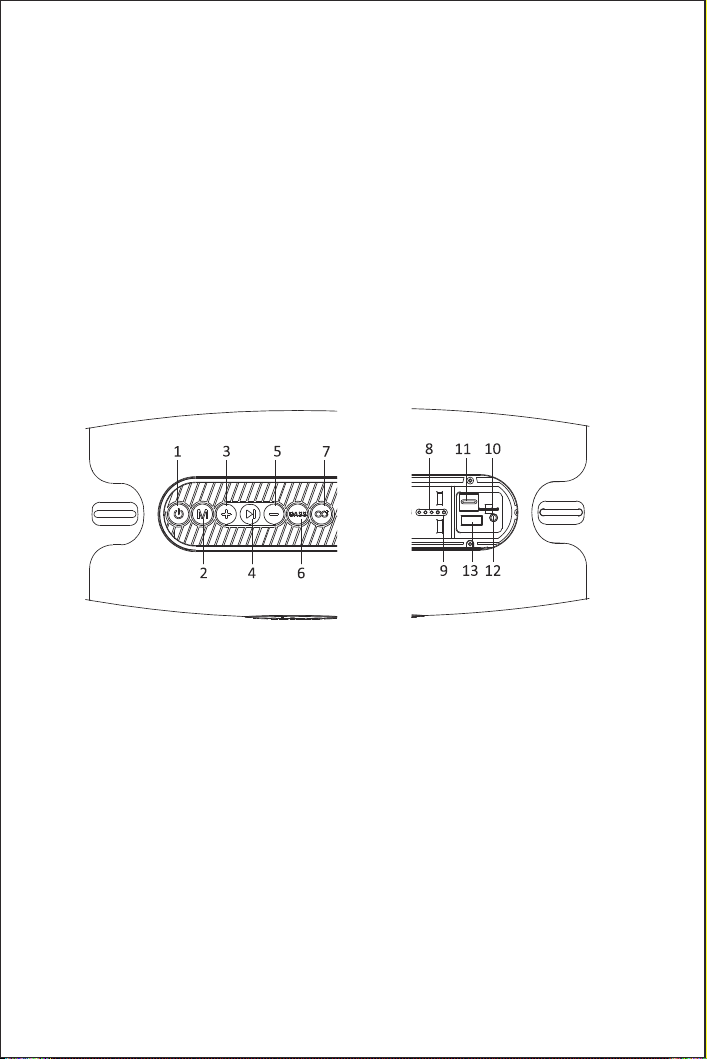
ボタンと機能
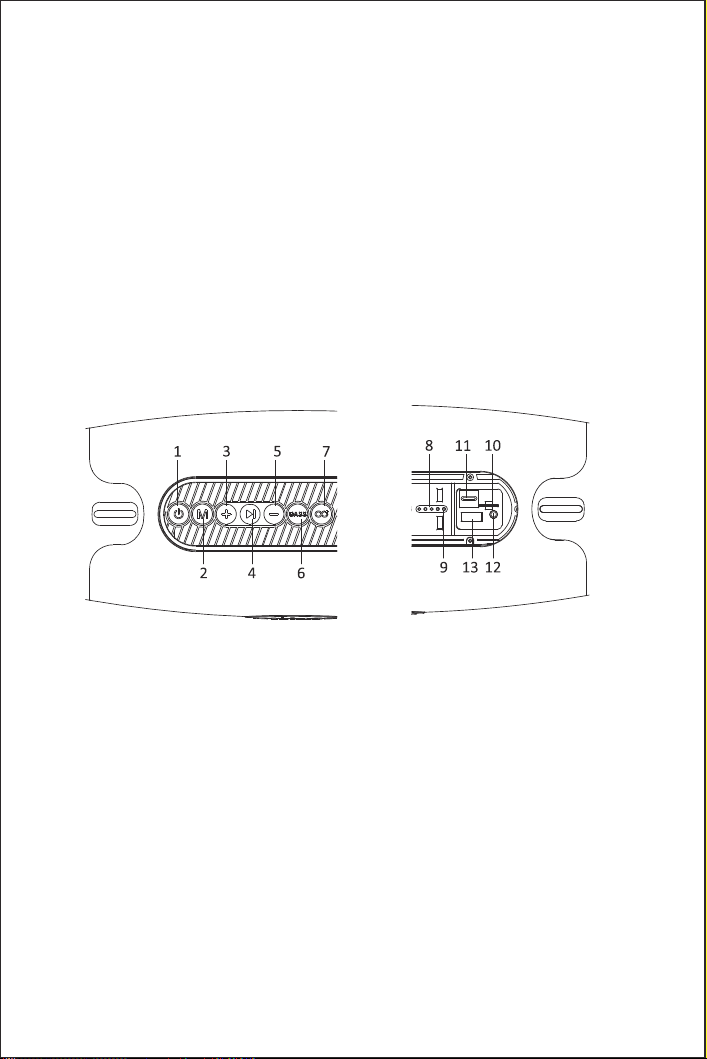
1. 電源:短く押すとライト効果が切り替わります。3秒間長押しで電源オン/オフ
2. モード:短押しでBluetooth/TF/AUX/USB音楽再生モードを切り替えることができます。長押しでBluetooth
接続を切断
3. +:短く押すと音量が上がります。長押しで次の曲を選択できます
4. 一時停止:音楽モードでは、短押しで一時停止可能
5. -:短く押すと音量が下がります。前の曲を選択するには長押し
6. BASS:短押しでサウンド(普通/重低音)を切り替えます。長押しでBluetoothペアリング情報を消去
7. ECHO:長押しオン/オフTWSモード
8. バッテリ電力量インジケータ
9. Bluetooth LED
10. TFカードスロット
11. じゅうでんぐち
12. AUXポート:AUXポートに内蔵されたリセットボタン
13. USBポート
1*M 8 Bluetoothスピーカr 1*ユーザーマニュアル 1*T-ピースライン
1*肩ひも 1*オーディオケーブル
6

バッテリ
充電可能リチウム電池内蔵
じゅうで ん
充電中は、白色LEDライトが点灯します。フル充電すると、4つの白色LEDライトが点灯します。
製品が7日以上使用されていない場合は、使用前に10分間充電してから、充電後に使用することをお勧めします。
電源オン/オフ
電源投入:電源ボタンを3秒間押し続けてスピーカーをオンにすると、Bluetooth LEDが点灯し、Bluetooth
デバイスに接続できます。
電源オフ:電源ボタンを3秒間長く押すとスピーカーがオフになり、Bluetooth LEDが消灯します。
コネ ク ション ス ピ ーカ
スピーカーを開くと、自動的にBluetoothモードに入り、Bluetoothデバイスを開いて「M 8」を検索し、
接続を選択します。接続に成功すると音声メッセージが表示されます。
1つのスピーカーでは、1つのBluetoothデバイスを同時に接続することしかできません。他のBluetoothデバイスに
接続する必要がある場合は、まず現在のBluetoothデバイスを取り外してください。
Bluetooth接続の切断
Bluetooth接続後、「M」ボタンを3秒間押し続けてBluetooth接続を切断します。
スピーカーを再接続する
スピーカーがBluetoothに自動的に接続されたデバイスとペアリングされると、スピーカーは再起動後に自動
的にペア リングされます 。
デバイスがBluetooth機能に自動的に接続されていない場合、スピーカーは再起動後に自動的にペアリングでき
ません。Bluetoothが接続できない場合は、「M」ボタン3 sを長く押すと、接続解除された最後のBluetoothデバイスが
自動的に接続されます。
RGBライト
電源ボタンを短く押すと、ライトの効果が切り替わります。
再生モード
「M」ボタンを短く押すとBluetooth/TF/AUX/USB再生モードが切り替わります。
音量を調整して音楽を切り替える
音量の増加:「+」ボタンを短く押します。
音量低下:「-」ボタンを短く押します。
次の曲:「+」ボタンを長押しします。
前の曲:「-」ボタンを長押しします。
7

重低音モード
スピーカーのデフォルトは通常モードで、BASSボタンを短く押して重低音モードに切り替えます。
Bluetoothペアリング情報をクリアするには、BASSボタンを長押ししてください。ブーブーと音がすると、スピーカ
ーはデフォルト設定に戻り、自動的に電源を切ります。
SDカードモード
スピーカーを開き、SDカードを挿入して音楽を再生します。
AUXモード
スピーカーを開き、3.5 mmオーディオケーブルを使用してBluetoothデバイスにスピーカーを接続し、スピーカ
ーからオーディオケーブルを介して音楽を再生します。
機能の一時停止
「>I」ボタンを押して音楽を開始/一時停止します。
リセ ット機能
長いピンを使用してAUXポートのリセットボタン6 sを長く押すと、スピーカーにリセットトーンがあり、電源が自
動的 にオフ に な ります。
自動電源オフ
スピーカーがBluetoothデバイスとペアリングされていないか、ペアリング後にサウンドが再生されていない場
合は、スピーカーは20分後に自動的にオフになります。バッテリーが不足すると、スピーカーも自動的に電
源 をオフにします。
T-W-Sモード
1. 2つのスピーカーの電源を入れます(スピーカーを他のbluetoothデバイスから外します)。
2. スピーカーのいずれかの「echo」ボタン2を短く押すと、後に音声プロンプトが表示されます
より成功対である。ペアリングが成功すると、青色のインジケータライトがマスターに点滅します
スピーカーとスレーブスピーカーの青いインジケーターが消灯します。
3. 「echo」ボタンを離すと、t-w-sの接続に数秒かかることがあります。
4. bluetoothデバイスの電源を入れ、bluetoothペアリング用の「m8」を選択します
Bluetooth名)
8

T-W-Sの切断
どちらかのスピーカーの「ECHO」ボタンを2秒間長押しします。
仕様
型式:Ortizan M 8 入力:9V2A
防水レベル:IPX 7 Bluetooth:V 5.0
内蔵充電可能電池:14400 mah 形式:MP 3、WAV、WMA
注:
1.注意:電池を廃棄する場合は、同じタイプの電池を使用してください。そうでないと、爆発が起こる可能性があります。
2.リチウム電池は燃えやすい場所や過熱しやすい場所に露出してはならない。
障害 とメ ンテナ ン ス:
1.Bluetooth接続に失敗しました:
ソリューション:
(1)白色LEDライトが点灯していることを確認してください。ライトが消灯している場合は、スピーカーをオンにし
てください。ライトが消灯したままの場合は、スピーカーを充電します。
(2)周囲にBluetoothデバイスが多い場合は、他のBluetoothデバイスをオフにしてください。Bluetooth
デバイスがたくさんあると、Bluetoothを検索するのは難しい。
(3)Bluetoothを再検索するためにスピーカーを再起動します。
2.音楽プレーヤーの音が途切れる
ソリューション:
(1)音楽プレーヤーとスピーカーの間の距離が遠すぎるかどうかをチェックします。
(2)音楽プレーヤーとスピーカーの間に障害物がないことを確認する。
(3)音楽プレーヤーとスピーカーが低消費電力状態にあるかどうかをチェックする。
3.不明な問題。
ソリューション:
スピーカーをリセットします。
9

使用前
本製品の設計は安全性に十分注意している。安全な操作を確実にするには、次の規則に従います。
1.製品を落下しないように安全で安定した位置に保持してください。破損や人身傷害の原因になります。
2.製品を落下、分解、開放、押出、曲げ、突き刺し、燃焼しないでください。
3.熱源から離れてください。(ラジエータ、加熱装置、コンロ、その他の熱源など)
4.損傷がある場合は、専門の修理員に連絡して修理してください。
5.乾いた布で製品を拭く前に、電源を抜いてください。
6.健康のために、音量を適切なレベルに調節してください
警告:
許可なく製品を変更または変更しないでください。
ト ラブルシ ューテ ィングガイ ド
電源を入れられません
スピーカーに充電して ください。
音がしない
1.音量を調整します。
2.BluetoothデバイスがBluetooth伝送範囲内であることを確認してください。
3.障害物遮断/干渉Bluetooth信号がないことを確認してください。
4.スピーカーがBluetoothデバイスに接続されていることを確認してください。
音質が悪い
Bluetoothデバイスをスピーカーに近づけるか、Bluetoothデバイスとスピーカーの間の障害物を取り除こうとします。
Bluetoothデバイスに接続できない
スピーカーと他のBluetoothデバイスの接続を切断し、再接続します(
Bluetoothデバイスとの接続を解除するか、Mボタンを長押しします)。
製品の性能を損なわないように、少なくとも3ヶ月ごとに充電してください。
10
Instrucciones de Seguridad
Envases incluidos
Lea todas las instrucciones antes de usarlos.
1. Para evitar fallos de garantía y daños en el producto, no desmonte el producto.
2. El ciclo de carga de la batería recargable es limitado.
3. Debido a los diferentes usos y ajustes, la vida útil de la batería y el ciclo de carga son diferentes.
4. No coloque el producto cerca de una fuente de calor de alta temperatura.
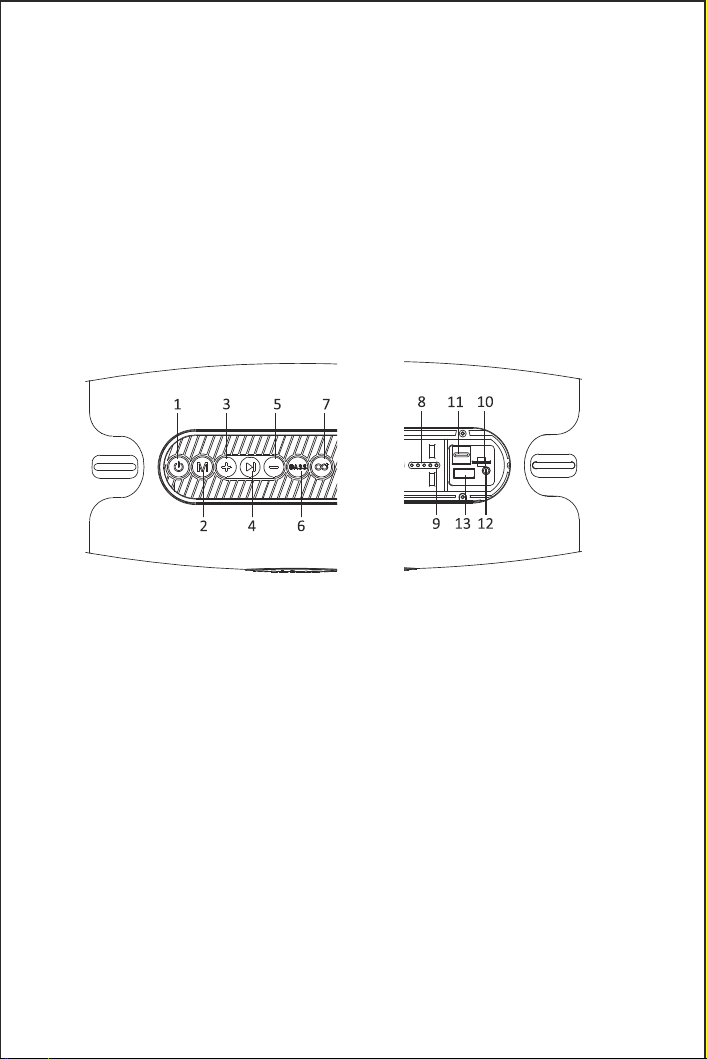
Botones y funciones
1. Fuente de alimentación: Presione brevemente para cambiar el efecto de iluminación. Presione
durante 3 segundos para encender / apagar la energía
2. Modo: Presione brevemente para cambiar el modo de reproducción de música Bluetooth / TF /
aux / usb. Presione largo para desconectar la conexión Bluetooth
3. +: Presione brevemente para aumentar el volumen. Presione largo para elegir la siguiente pista
4. Pausa: en modo musical, se puede suspender con un clic corto
5. -: Presione brevemente para bajar el volumen. Presione largo para seleccionar la pista anterior
6. Bajo: Presione corto para cambiar los efectos de sonido (bajo ordinario / pesado). Presione largo
para eliminar la información de emparejamiento Bluetooth
7. Echo: Presione largo para abrir / cerrar el modo TWS
8. Indicador de batería
9. Indicador Bluetooth
10. Ranuras para tarjetas TF
11. Puerto de carga
12. Puerto aux: Botón de reinicio incorporado al puerto aux
13. Puerto USB
1 * M8 Bluetooth Speaker 1 * User Manual 1 * Ligne T-pyec
1 * Correa de hombro 1 * Cable de audio
11

Batería
Batería de litio recargable incorporada
Carga
Al cargar, se encenderán las luces LED blancas. Cuando esté completamente cargado, se encenderán \
cuatro luces LED blancas.
Si el producto no se utiliza durante más de 7 días, se recomienda cargarlo durante 10 minutos antes de
usarlo y luego usarlo después de cargarlo.
Encendido / apagado de la fuente de alimentación
Encendido: Presione el botón de encendido durante 3 segundos para encender el altavoz, el indicador
Bluetooth se encenderá y luego puede conectarse al dispositivo bluetooth.
Apagado de la fuente de alimentación: Presione el botón de alimentación durante 3 segundos para
apagar el altavoz, y el indicador Bluetooth se apagará.
Conectar altavoces
Encienda el altavoz, entra automáticamente en el modo bluetooth, abre el dispositivo Bluetooth para
buscar "m8" y selecciona la conexión, y habrá un aviso de voz después de que la conexión sea exitosa.
Un altavoz solo admite la conexión simultánea de un dispositivo bluetooth. Si necesita conectarse a
otros dispositivos bluetooth, desconecte primero el dispositivo Bluetooth actual.
Desconectar la conexión Bluetooth
Después de la conexión bluetooth, Presione el botón "m" durante 3 segundos para desconectar la
conexión bluetooth.
Reconectar altavoces
Después de que el altavoz se empareja con el dispositivo conectado automáticamente al bluetooth, el
altavoz se emparejará automáticamente después de reiniciar.
Si el dispositivo no está conectado automáticamente a la función bluetooth, el altavoz no puede
emparejarse automáticamente después de reiniciar. Cuando el Bluetooth no puede conectarse,
Presione el botón "m" 3s durante mucho tiempo para conectarse automáticamente al dispositivo
Bluetooth desconectado anterior.
Luces RGB
Presione el botón de encendido en corto para cambiar el efecto de iluminación.
Modo de reproducción
Presione el botón "m" en corto para cambiar el modo de reproducción Bluetooth / TF / aux / usb.
Ajustar el volumen y cambiar la música
Aumento de volumen: Presione el botón "+" en corto.
Bajar el volumen: Presione el botón "-" en corto.
Siguiente pista: Presione el botón "+" durante mucho tiempo.
Anterior: Presione el botón "-" durante mucho tiempo.
12

Modo bajo pesado
El altavoz está en modo normal por defecto, y presione el botón "bass" en corto para cambiar al
modo de bajo pesado.
Presione el botón "bass" durante mucho tiempo para eliminar la información de emparejamiento
bluetooth. cuando suene el pitido, el altavoz restaurará la configuración predeterminada y apagará
automáticamente la energía.
Modo tarjeta SD
Abra el altavoz e inserte la tarjeta SD para reproducir la música.
Modo aux
Abra el altavoz, conecte el altavoz al dispositivo bluetooth con un cable de audio de 3,5 mm, y luego el
altavoz reproduzca música a través del cable de audio.
Función de pausa
Presione el botón "> i" para comenzar / detener la música.
Restablecer la función
Utilizando una aguja larga y delgada para presionar el botón de reinicio 6s en el puerto aux, el altavoz
tendrá un tono de reinicio y apagará automáticamente la energía.
Apagado automático de la fuente de alimentación
Si el altavoz no se empareja con ningún dispositivo Bluetooth o no emite ningún sonido después de
emparejarse, el altavoz se apagará automáticamente después de 20 minutos. Cuando la batería es
insuficiente, los altavoces también apagan automáticamente la energía.
Modo T-W-S
1. Enciende los dos altavoces (desconecta el altavoz del otro dispositivo Bluetooth).
2. Pulse brevemente el botón "ECHO" 2s en uno de los altavoces, y tendrá un indicador de voz después
del El apareamiento es exitoso. Después de que el emparejamiento es exitoso, la luz azul del indicador
parpadeará en el amo Altavoz, y el indicador azul del altavoz esclavo estará apagado.
3. Suelte el botón "ECHO", la conexión T-W-S puede tardar unos segundos.
4. Encienda el dispositivo Bluetooth, y seleccione el "M8" para emparebluetooth (dos altavoces muestran uno
Nombre Bluetooth)
13

T-W-S de desconexión
Pulse el botón "ECHO" 2s en uno de los altavoces.
Especificación
Modelo: Ortizan M8 Entrada: 9V2A
Nivel resistente al agua: IPX7 Bluetooth: V5.0
Batería recargable incorporada: 14400 mah Formato: MP3, WAV, WMA
Nota:
1. Nota: si la batería es chatarra, por favor use el mismo tipo de reemplazo. De lo contrario, tal vez
una explosión.
2. Las baterías de litio pueden no estar expuestas a lugares tales como inflamables o sobrecalrecalcan.
Avería y mantenimiento:
1. Fallo en la conexión Bluetooth:
Solución :
(1) Por favor asegúrese de que la luz LED blanca está encendida. Si la luz está apag, por favor encienda
el altavoz. Si la luz todavía está apag, por favor recarga el altavoz.
(2) Si hay muchos dispositivos Bluetooth alrededor, por favor apague los otros dispositivos Bluetooth.
Es difícil buscar Bluetooth si hay un montón de dispositivo Bluetooth.
(3) Reinicie el altavoz para buscar en Bluetooth.
2. La voz del reproductor de música se interrumpi.
Solución :
(1) Comprobar que la distancia entre el reproductor de música y el altavoz no está demasiado lejos.
(2) Asegúrese de que no hay ningún obstáculo entre el reproductor de música y el altavoz.
(3) Comprobar si el reproductor de música y el altavoz están en un estado de bajo consumo de energía.
3. Problemas desconocidos.
Solución:
Reiniciar el altavoz.
14

Antes de usar
Este diseño de producto totalmente prestar atención a la seguridad. Para garantizar una operación
segura, siga las siguientes reglas:
1. Por favor, mantenga el producto en una posición segura y estable para evitar caídas, que pueden
causar daños o lesiones personales.
2. Por favor, no deje caer, desmontar, abrir, extru, doblar, perforar, quemar el producto.
3. Por favor mantenga el producto lejos de cualquier fuente de calor. (como radiadores, equipo de
calefacción, estufas u otra fuente de calor)
4. Si hay algún daño, por favor póngase en contacto con el personal de mantenimiento profesional
para la reparación.
5. Por favor desenchufe la alimentación antes de utilizar un paño seco para limpiar el producto.
6. Por su salud, ajuste el volumen a un nivel adecuado
Advertencia:
no alterar o modificar el producto sin permiso.
Guía de solución de problemas
No puede encendido
Por favor, recargue el altavoz.
No hay sonido
1. Ajuste el volumen.
2. Asegúrese de que el dispositivo Bluetooth esté dentro del rango de transmisión Bluetooth.
3. Asegúrese de que no hay obstáculos bloqueando/interfiriendo con la señal Bluetooth.
4. Asegúrese de que el altavoz está conectado al dispositivo Bluetooth.
Mala calidad del sonido
Mantenga el dispositivo Bluetooth cerca del altavoz, o trate de eliminar los obstáculos entre el
dispositivo Bluetooth y el altavoz.
¿No se puede conectar al dispositivo Bluetooth
Desconectar el altavoz de otros dispositivos Bluetooth y volver a conectar (
Desconecte desde el dispositivo Bluetooth o presione el botón "M").
Con el fin de evitar daños al rendimiento del producto, por favor, cargarlo al
menos una vez cada tres meses.
15
Sicherheitshinweise
Paket enthalten
Bitte lesen Sie alle Anweisungen vor der Anwendung
1. . Um zu vermeiden, dass die Garantie deaktiviert und das Produkt beschädigt wird, zerlegen Sie das
Produkt bitte nicht.
2. Die Ladezyklen der wiederaufladbaren Batterie sind begrenzt.
3. Battery Lebensdauer und Ladezyklus aufgrund der unterschiedlichen Verwendung und Einstellungen.
4. Bitte platzieren Sie das Produkt nicht in der Nähe der Hochtemperatur-Wärmequelle.
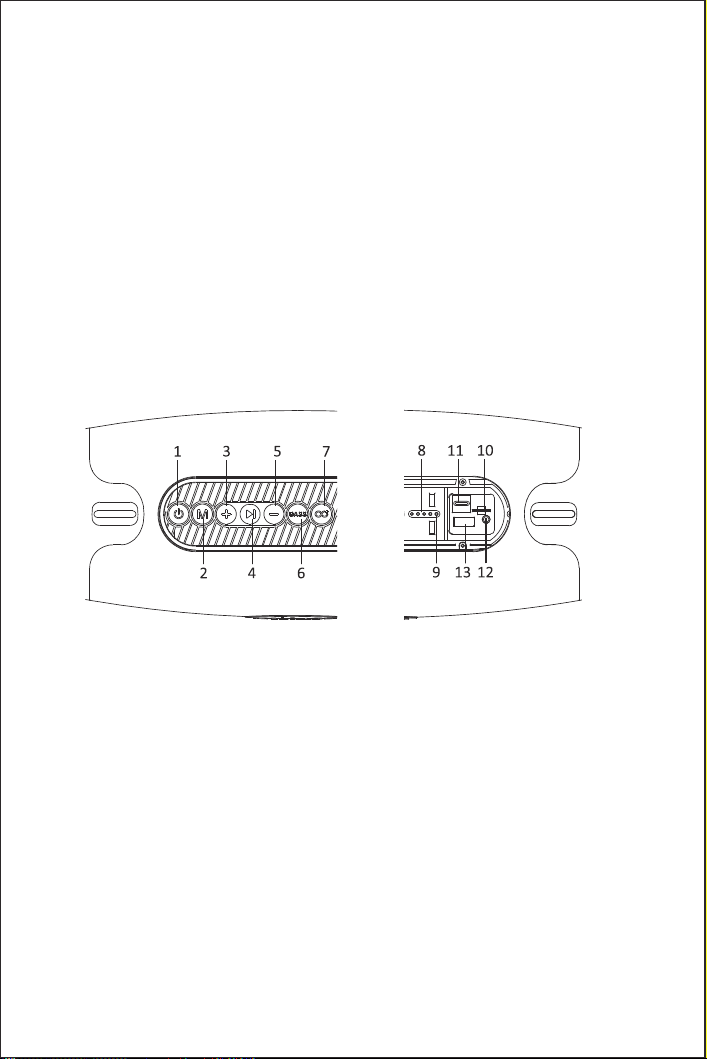
Taste und Funktion
1. Power: Kurzes Drücken, um Lichteffekte zu schalten. Drücken Sie lange 3s zum Ein-/Ausschalten
2. Mode: Drücken Sie kurz, um Bluetooth/TF/AUX/USB Musik Wiedergabemodus zu schalten. Lange
Drücken, um Bluetooth zu trennen
3. +: Drücken Sie kurz, um die Lautstärke zu erhöhen. Drücken Sie lange, um den nächsten Titel zu wählen
4. Pause: Im Musikmodus kurz drücken, um anzuhalten
5. -:Kurz drücken, um die Lautstärke zu verringern. Drücken Sie lange, um die vorherige Spur auszuwählen
6. BASS: Drücken Sie kurz, um Soundeffekte (Normal/Heavy Bass) zu wechseln. Lange Drücken, um
Bluetooth-Pairing-Informationen zu löschen
7. ECHO: Lange Drücken, um den TWS-Modus ein- und auszuschalten
8. Batteriestandsanzeige
9. Bluetooth Kontrollleuchte
10. TF Kartensteckplatz
11. Ladeanschluss
12. AUX Port: Reset Taste eingebauten AUX Port
13. USB Anschluss
1*M8 Bluetooth Speaker 1*Benutzerhandbuch 1*Linea T-pyec
1*Schultergurt 1*Audiokabel
16

Batterie
Integrierte wiederaufladbare Lithium-Batterie
Aufladung
Ein weißes LED-Licht leuchtet beim Laden. Vier weiße LED-Leuchten leuchten, wenn sie vollständig
aufgeladen sind.
Wenn das Produkt länger als sieben Tage nicht verwendet wurde, wird empfohlen, zehn Minuten vor
der Verwendung des Produkts zu laden und es dann nach der Ladung zu verwenden.
Ein-/Ausschalten
Einschalten: Drücken Sie lange die Ein-/Aus-Taste 3s, um den Lautsprecher einzuschalten, die
Bluetooth-Kontrollleuchte leuchtet, dann können Sie das Bluetooth-Gerät anschließen.
Ausschalten: Drücken Sie lange die Ein-/Aus-Taste 3s, um den Lautsprecher auszuschalten, und die B
luetooth-Kontrollleuchte leuchtet aus.
Den Lautsprecher anschließen
Schalten Sie den Lautsprecher ein, und es wird automatisch in den Bluetooth-Modus geschaltet,
schalten Sie das Bluetooth-Gerät ein, um den "M8" zu suchen, und wählen Sie die Verbindung aus.
Nach erfolgreicher Verbindung wird eine Sprachaufforderung angezeigt.
Ein Lautsprecher unterstützt nur den gleichzeitigen Anschluss eines Bluetooth-Geräts. Wenn Sie andere
Bluetooth-Geräte verbinden müssen, trennen Sie bitte zuerst das aktuelle Bluetooth-Gerät.
Bluetooth trennen
Drücken Sie nach der Bluetooth-Verbindung lange die "M"-Taste 3s, um die Bluetooth-Verbindung zu
trennen.
Den Lautsprecher wieder verbinden
Nachdem ein Lautsprecher mit einem Gerät gekoppelt wurde, das sich automatisch mit Bluetooth
verbindet, wird der Lautsprecher nach dem Neustart automatisch pariert.
Wenn sich das Gerät ohne automatisch mit der Bluetooth-Funktion verbindet, kann der Lautsprecher
nach dem Neustart nicht automatisch parieren. Wenn das Bluetooth keine Verbindung herstellen kann,
drücken Sie lange die "M"-Taste 3s wird automatisch die zuletzt getrennten Bluetooth-Geräte verbinden.
RGB-Licht
Drücken Sie kurz die Power-Taste, um die Lichteffekte zu schalten.
Spielmodus
Drücken Sie kurz die "M"-Taste, um den Bluetooth/TF/AUX/USB-Wiedergabemodus zu wechseln.
Passen Sie die Lautstärke an und schalten Sie Musik
Lautstärke erhöhen: Drücken Sie kurz die Taste "+".
Lautstärke leiser: Drücken Sie kurz die Taste "-".
Nächster Track: Drücken Sie lange die Taste "+".
Vorheriger Track: Drücken Sie lange die "-"-Taste.
17

Schwerer Bass-Modus
Der Lautsprecher wechselt standardmäßig in den Normalmodus, drücken Sie kurz die "BASS"-Taste, um
in den Heavy Bass-Modus zu wechseln.
Drücken Sie lange die "BASS"-Taste, um Bluetooth-Pairing-Informationen zu löschen. Nach einem
Piepton stellt der Lautsprecher die Standardeinstellungen wieder her und schaltet sich automatisch aus.
SD-Kartenmodus
Schalten Sie den Lautsprecher ein, legen Sie die SD-Karte ein, um Musik abzuspielen.
AUX-Modus
Schalten Sie den Lautsprecher mithilfe eines 3,5-mm-Audiokabels ein, um den Lautsprecher mit Ihrem
Bluetooth-Gerät zu verbinden. Anschließend spielt der Lautsprecher Musik über das Audiokabel ab.
Funktion pausieren
Drücken Sie die Taste ">I", um Musik zu starten/pausieren.
Funktion zurücksetzen
Drücken Sie mit einer langen feinen Nadel lange die Reset-Taste 6s im AUX-Anschluss, der Lautsprecher
hat Reset-Ton und schaltet sich automatisch aus.
Automatisches Ausschalten
Der Lautsprecher schaltet sich nach 20-Minuten automatisch aus, wenn er nicht mit einem
Bluetooth-Gerät gekoppelt wird oder nach dem Pairing keinen Ton abspielt. Wenn der Akku schwach
ist, schaltet sich der Lautsprecher automatisch aus.
T-W-S
1. Öffnen zwei. (Trennen andere bluetooth).
2. "Echo" knopfdruck 2 s lautsprecher, es konsequenzen ihre
.. . Erfolgreichen, blau aus wird b. macromedia flash
Redner, sklaven Von. Blau ist.
3. Freilassung "echo", T W - S verbunden könnte in sekunden..
4. Bluetooth und wählen "M8" bluetooth. (zwei.
Bluetooth genannt)
18

T-W-S trennen
Drücken Sie lange die Taste 2s auf einem der Lautsprecher.
Spezifikation
Modell: Ortizan M8 Eingang: 9V2A
Wasserdicht Niveau: IPX7 Bluetooth: V5.0
Integrierter Akku: 14400 mah Format: MP3, WAV, WMA
Anmerkung:
1. Notice: Wenn die Batterie Schrott ist, verwenden Sie bitte die gleiche Art von Ersatz. Sonst vielleicht
eine Explosion.
2. Lithium-Batterien dürfen Stellen wie brennbar oder überhitzt nicht ausgesetzt sein.
Fehler und Wartung:
1.Bluetooth Verbindungsfehler:
Lösung:
(1) Stellen Sie sicher, dass die weiße LED leuchtet. Wenn das Licht ausgeschaltet ist, schalten Sie bitte
den Lautsprecher ein. Wenn das Licht immer noch ausgeschaltet ist, laden Sie bitte den
Lautsprecher auf.
(2) Wenn es viele Bluetooth-Geräte gibt, schalten Sie bitte die anderen Bluetooth-Geräte aus. Es ist
schwierig, Bluetooth zu suchen, wenn es viele Bluetooth-Geräte gibt.
(3) Starten Sie den Lautsprecher neu, um Bluetooth erneut zu durchsuchen.
2.Die Stimme des Musikplayers unterbrochen
Lösung:
(1) Überprüfen Sie, ob der Abstand zwischen dem Musikplayer und dem Lautsprecher nicht zu weit ist.
(2) Stellen Sie sicher, dass sich kein Hindernis zwischen dem Musikplayer und dem Lautsprecher befindet.
(3) Überprüfen Sie, ob sich der Musikplayer und der Lautsprecher in einem Zustand des niedrigen
Stromverbrauchs befinden.
3.Unbekannte Probleme.
Lösung:
Setzen Sie den Lautsprecher zurück.
19

Vor der Anwendung
Dieses Produktdesign achtet voll auf Sicherheit. Um einen sicheren Betrieb zu gewährleisten, beachten
Sie bitte die folgenden Regeln:
1. Bitte halten Sie das Produkt in einer sicheren und stabilen Position, um Stürze zu vermeiden, die
Schäden oder Körperverletzungen verursachen können.
2. Please lassen Sie das Produkt nicht fallen, demontieren, öffnen, verdrängen, biegen, durchstechen,
verbrennen.
3. Bitte halten Sie das Produkt von jeder Wärmequelle fern. (wie Heizkörper, Heizgeräte, Öfen oder
andere Wärmequelle)
4. Wenn es irgendwelche Schäden gibt, kontaktieren Sie bitte professionelles Wartungspersonal für
Reparatur.
5. Bitte ziehen Sie den Netzstecker ab, bevor Sie ein trockenes Tuch verwenden, um das Produkt
abzuwischen.
6. Für Ihre Gesundheit stellen Sie bitte die Lautstärke auf ein angemessenes Niveau ein
Warnung:
Ändern oder ändern Sie das Produkt nicht ohne Erlaubnis.
Anleitung zur Fehlerbehebung
Kann nicht eingeschaltet werden
Bitte laden Sie den Lautsprecher auf.
Kein Ton
1.Stellen Sie die Lautstärke ein.
2.Bitte stellen Sie sicher, dass sich das Bluetooth-Gerät in Bluetooth-Übertragungsbereich befindet.
3.Bitte stellen Sie sicher, dass keine Hindernisse das Bluetooth-Signal blockieren/stören.
4.Bitte stellen Sie sicher, dass der Lautsprecher mit dem Bluetooth-Gerät verbunden ist.
Schlechte Klangqualität
Halten Sie das Bluetooth-Gerät näher am Lautsprecher, oder versuchen Sie, Hindernisse zwischen
dem Bluetooth-Gerät und dem Lautsprecher zu beseitigen.
Kann keine Verbindung zum Bluetooth-Gerät herstellen
Trennen Sie den Lautsprecher von anderen Bluetooth-Geräten und verbinden Sie ihn erneut(
Trennen Sie die Verbindung vom Bluetooth-Gerät oder drücken Sie lange die Taste "M").
Um Schäden an der Produktleistung zu vermeiden, laden Sie es bitte mindestens
alle drei Monate auf.
20
Consignes de sécurité
Emballage inclus
Lire toutes les instructions avant utilisation
1. Pour éviter la défaillance de la garantie et les dommages au produit, ne pas démonter le produit.
2. Le cycle de charge de la batterie rechargeable est limité.
3. La durée de vie et le cycle de charge de la batterie varient selon l'utilisation et le réglage.
4. Ne pas placer le produit près d'une source de chaleur à haute température.
Boutons et fonctions
1. Puissance: appuyez brièvement pour changer l'effet de la lumière. Appuyez pendant 3 secondes
pour activer / désactiver l'alimentation
2. Mode: appuyez brièvement pour changer le mode de lecture de la musique Bluetooth / TF /
aux / USB. Appuyez longtemps pour déconnecter Bluetooth
3. +: Appuyez brièvement pour augmenter le volume. Appuyez longtemps pour sélectionner la
piste suivante
4. Pause: En mode musique, appuyez brièvement pour arrêter
5. -: Appuyez brièvement pour réduire le volume. Appuyez longtemps pour sélectionner la
piste précédente
6. Basse: Appuyez brièvement pour changer l'effet sonore (basse normale / basse lourde).
Appuyez longtemps pour effacer les informations d'appariement Bluetooth
7. Echo: Appuyez longtemps pour activer / désactiver le mode TWS
8. Indicateur de batterie
9. Indicateur Bluetooth
10. Fente de carte TF
11. Port de chargement
12. Aux port: Bouton de Réinitialisation intégré au port aux
13.PortUSB
1 * M8 Haut - parleur Bluetooth 1 *Manuel de l'utilisateur 1 *línea T-pyec
1 * Bretelles 1 *Câble audio
21

Batterie
Batterie lithium rechargeable intégrée
Charging
La LED blanche s'allumera pendant le chargement. Quatre LED blanches s'allumeront à pleine charge.
Si le produit n’est pas utilisé depuis plus de 7 jours, il est recommandé de le charger 10 minutes
avant utilisation, puis après charge.
Alimentation en marche / arrêt
Puissance: appuyez sur le bouton d'alimentation pendant 3 secondes pour allumer le Haut - parleur,
l'indicateur Bluetooth s'allumera, puis vous pouvez connecter votre appareil Bluetooth.
Puissance éteinte: appuyez sur le bouton d'alimentation pendant 3 secondes pour éteindre le
Haut - parleur et l'indicateur Bluetooth s'éteindra.
Connexion des Haut - parleurs
Allumez le Haut - parleur, il entre automatiquement en mode Bluetooth, Allumez le périphérique
Bluetooth pour rechercher "M8", et sélectionnez connexion, une fois la connexion réussie, il
y aura une invite vocale.
Un Haut - parleur ne supporte qu'un seul appareil Bluetooth connecté en même temps. Si vous devez
vous connecter à un autre appareil Bluetooth, débranchez d'abord votre appareil Bluetooth actuel.
Déconnecter la connexion Bluetooth
Après la connexion Bluetooth, appuyez sur le bouton "m" pendant 3 secondes pour déconnecter la
connexion Bluetooth.
Reconnecter les Haut - parleurs
Lorsque les Haut - parleurs sont jumelés à un appareil qui se connecte automatiquement à Bluetooth,
les Haut - parleurs sont automatiquement jumelés après un redémarrage.
Si l'appareil n'est pas automatiquement connecté à la fonction Bluetooth, les Haut - parleurs ne
peuvent pas s'apparier automatiquement après le redémarrage. Lorsque Bluetooth ne peut pas se
connecter, appuyez longtemps sur le bouton "m" 3S pour connecter automatiquement le dernier
appareil Bluetooth déconnecté.
Lumière RGB
Appuyez brièvement sur le bouton d'alimentation pour changer l'effet de la lumière.
Mode de lecture
Appuyez brièvement sur le bouton m pour changer le mode de lecture Bluetooth / TF / aux / USB.
Ajuster le volume et changer la musique
Augmentation du volume: appuyez brièvement sur le bouton "+".
Volume réduit: appuyez brièvement sur le bouton "-".
Piste suivante: appuyez longtemps sur le bouton "+".
Piste précédente: appuyez longtemps sur le bouton "-".
22

Mode Bass
Les Haut - parleurs sont en mode normal par défaut, appuyez brièvement sur le bouton bas pour
passer en mode basse.
Appuyez longtemps sur le bouton "bas" pour effacer les informations d'appariement Bluetooth, et
lorsque le bip sonne, le Haut - parleur retourne aux paramètres par défaut et coupe automatiquement
l'alimentation.
Mode carte SD
Allumez les Haut - parleurs et insérez la carte SD pour jouer de la musique.
AUX Mode
Allumez le Haut - parleur, connectez le Haut - parleur à votre appareil Bluetooth en utilisant un câble
audio de 3,5 mm, puis le Haut - parleur joue de la musique à travers le câble audio.
Pause Function
Press the “ >I” button to start /pause music.
Reset Function
Using a long fine needle long press the reset button 6s in the AUX port, the speaker will have reset
tone and auto power off.
Auto Power Off
The speaker will auto power off after 20 minutes if it does not pair with any Bluetooth device or does
not play any sound after pairing. When in low battery, the speaker will auto power off as well.
Mode T-W-S
1. Allumez les deux haut-parleurs (déconnectez l’enceinte de l’autre appareil Bluetooth).
2. Appuyez sur le bouton "ECHO" 2s sur l’un des haut-parleurs, et il aura une invite vocale après le
L’appariement est réussi. Une fois l’appariement réussi, le voyant bleu clignote sur le master
Le haut-parleur, et l’indicateur bleu du haut-parleur esclave sera éteint.
3. Relâchez le bouton "ECHO", la connexion T-W-S peut prendre quelques secondes.
4. Allumez l’appareil Bluetooth, et sélectionnez le «M8» pour l’appariement Bluetooth (deux
haut-parleurs affichent un Nom Bluetooth)
23

Déconnecter T-W-S
Appuyez sur le bouton Echo sur l'un des Haut - parleurs pendant 2 secondes.
Spécifications
Modèle: ortizan M8 Entrée: 9V2A
Niveau d'étanchéité: ipx7 B Luetooth: V5.0
Batterie rechargeable intégrée: 14400Mah Format: MP3, WAV, WMA
Note:
1. Note: si la batterie est mise au rebut, utilisez le même type de batterie. Sinon, il pourrait y avoir une
explosion.
2. Les piles au lithium ne doivent pas être exposées à des endroits inflammables ou surchauffés.
Défauts et entretien:
1. La connexion Bluetooth a échoué:
Solution:
(1) Assurez - vous que la LED blanche est allumée. Si la lumière est éteinte, Allumez le Haut - parleur.
Si la lumière est toujours éteinte, chargez les Haut - parleurs.
(2) S'il y a beaucoup d'appareils Bluetooth autour, Veuillez éteindre les autres appareils Bluetooth. Si vous
avez beaucoup d'appareils Bluetooth, il est difficile de rechercher Bluetooth.
(3) Redémarrez les Haut - parleurs pour rechercher à nouveau Bluetooth.
2. Interruption du son du lecteur de musique
Solution:
(1) Vérifiez la distance entre le lecteur de musique et les Haut - parleurs.
(2) Assurez - vous qu'il n'y a pas d'obstacle entre le lecteur de musique et les Haut - parleurs.
(3) Vérifiez si le lecteur de musique et les Haut - parleurs sont à faible consommationd'énergie.
3.Problème inconnu.
Solution:
Réinitialiser les Haut parleurs.
24

Avant utilisation
La sécurité doit être pleinement prise en compte dans la conception du produit. Pour assurer un f
onctionnement sûr, suivez les règles suivantes:
1. Gardez le produit dans une position sûre et stable afin d'éviter de tomber, ce qui peut causer des
dommages ou des blessures corporelles.
2. Ne pas tomber, démonter, ouvrir, presser, plier, percer et brûler le produit.
3. Éloignez - vous de la source de chaleur. (radiateurs, appareils de chauffage, poêles ou autres sources
de chaleur, par exemple)
4. En cas de dommages, veuillez contacter un réparateur professionnel pour la réparation.
5. Débranchez l'alimentation électrique avant d'utiliser un chiffon sec pour essuyer le produit.
6. Pour votre bien - être, Veuillez ajuster le volume à un niveau approprié
Attention:
Ne modifiez pas ou ne modifiez pas le produit sans autorisation.
Guide de dépannage
Impossible d'allumer l'alimentation électrique
Chargez les Haut - parleurs, s'il vous plaît.
Pas de son
1. Réglez le volume.
2. Assurez - vous que l'appareil Bluetooth est dans la plage de transmission Bluetooth.
3. Assurez - vous qu'aucun obstacle ne bloque / interfère avec le signal Bluetooth.
4. Assurez - vous que les Haut - parleurs sont connectés à votre appareil Bluetooth.
Mauvaise qualité sonore
Gardez votre appareil Bluetooth près des Haut - parleurs ou essayez d'éliminer les obstacles entre votre
appareil Bluetooth et les Haut - parleurs.
Impossible de se connecter au périphérique Bluetooth
Déconnecter les Haut - parleurs des autres appareils Bluetooth et reconnecter
Déconnecter de l'appareil Bluetooth ou appuyer longtemps sur le bouton "m").
Pour éviter d'endommager les performances du produit, rechargez - le au moins
tous les trois mois.
25
Istruzioni di sicurezza
Pacchetto incluso
Leggere tutte le istruzioni prima dell’ uso
1. Per evitare di invalidare la garanzia e danneggiare il prodotto, non smontare il prodotto.
2. I cicli ricaricabili di ricarica della batteria sono limitati.
3. Durata e ciclo di ricarica della batteria a causa dell’uso e delle diverse impostazioni.
4. Non posizionare il prodotto vicino alla fonte di calore ad alta temperatura.
Pulsante e funzione
1. Potenza: Premere corto per commutare gli effetti della luce. Premere 3s lungo per accendere/spegnere
2. Modalità: Premere corto per cambiare la modalità Bluetooth/TF/AUX/USB. Premi molto per
disconnettere Bluetooth
3. +: Premere corto per aumentare il volume. Premi a lungo per scegliere la traccia successiva
4. Pausa: In modalità musica premi corto per pausa
5. -: Pressione breve per ridurre il volume. Premi a lungo per scegliere la traccia precedente
6. Basso: Premere corto per cambiare gli effetti sonori (basso normale/forte). Premi a lungo per pulire
le informazioni di accoppiamento Bluetooth
7. Eco: Premere a lungo per attivare o disattivare la modalità TWS
8. Indicatore di livello della batteria
9. Luce dell’indicatore Bluetooth
10. Slot della carta TF
11. Porto tariffario
12. Porta AUX: Reset button build-in AUX port
13. Porta USB
1* Altoparlante Bluetooth M8 1* Manuale d’uso 1* T-Pyec-Linie
1* Bretella della spalla 1* Cavo Audio
26

Batteria
Batteria al litio ricaricabile incorporata
Tariffazione
Un LED bianco sarà acceso durante la ricarica. Quattro luci bianche a LED saranno accese quando
completamente cariche.
Se il prodotto non è stato utilizzato per più di 7 giorni, si consiglia di applicare la carica per 10 minuti
prima di usare il prodotto, quindi dopo la carica.
Accensione/spegnimento
Acceso: premi a lungo il pulsante 3s per attivare l’ altoparlante, la luce dell’ indicatore Bluetooth
sarà accesa così potrai connettere il dispositivo Bluetooth.
Spegnimento: premere a lungo il pulsante 3s per spegnere l’oratore, e l’indicatore Bluetooth sarà spento.
Connetti l’ oratore
Attiva l’ altoparlante, e automaticamente in modalità Bluetooth, attiva il dispositivo Bluetooth per
cercare l’ "M8", e seleziona la connessione, ci sarà un prompt vocale dopo che la connessione ha successo.
Un altoparlante supporta solo la connessione di un dispositivo Bluetooth allo stesso tempo. Se hai
bisogno di connettere altri dispositivi Bluetooth, disconnetti prima il dispositivo Bluetooth attuale.
Disconnetti il Bluetooth
Dopo la connessione Bluetooth, premere a lungo il pulsante 3s "M" per disconnettere il Bluetooth.
Riconnetti l’ oratore
Dopo che un altoparlante è abbinato a un dispositivo che si connette automaticamente a Bluetooth,
l’oratore parerà automaticamente dopo il riavvio.
Se il dispositivo non si collega automaticamente alla funzione Bluetooth, l’ altoparlante non può
eseguire il paring automatico dopo il riavvio. Quando il Bluetooth non può connettersi, premere a
lungo il pulsante 3s "M" connetterà automaticamente gli ultimi dispositivi Bluetooth disconnessi.
Luce RGB
Premere il pulsante di accensione per spegnere gli effetti della luce.
Modalità riproduzione
Premi il pulsante "M" per cambiare la modalità Bluetooth/TF/AUX/USB.
Regola il Volume e scambia musica
Volume su: premi il pulsante "+".
Volume in basso: premi il pulsante "-".
Traccia successiva: premi il pulsante "+".
Traccia precedente: premi il pulsante "-".
27

Modalità basso pesante
L’ altoparlante predefinito è la modalità normale, premi il pulsante basso per passare alla modalità
basso pesante.
Premi a lungo il pulsante basso per pulire le informazioni di accoppiamento Bluetooth, dopo un
segnale acustico l’ altoparlante ripristinerà le impostazioni predefinite e disattiverà automaticamente.
Modalità scheda SD
Attiva l’ altoparlante, inserisci la scheda SD per riprodurre la musica.
Modalità AUX
Accendi l’ altoparlante, usando un cavo audio da 3,5 mm per connettere l’ altoparlante al tuo
dispositivo Bluetooth, poi l’ altoparlante suona la musica attraverso il cavo audio.
Funzione pausa
Premi il pulsante ">I" per iniziare/mettere in pausa la musica.
Reimposta funzione
Con un ago molto sottile premere il pulsante di reimpostazione 6s nella porta AUX, l’altoparlante
avrà il tono di reimpostazione e la potenza automatica spenta.
Spegnimento automatico
L’ altoparlante si spegnerà automaticamente dopo 20 minuti se non è in coppia con alcun dispositivo
Bluetooth o non emette alcun suono dopo l’ accoppiamento. Quando la batteria è scarica, l’oratore
si spegnerà automaticamente.
Modalità T-W-S
1. Attiva i due altoparlanti (scollega l’ altoparlante dall’ altro dispositivo Bluetooth).
2. Premere brevemente il pulsante "ECHO" 2s su uno degli oratori, e avrà una voce pronta dopo la
L’associazione ha successo. Quando l’accoppiamento ha successo, l’indicatore luminoso blu
lampeggia sul maestro Altoparlante, e l’indicatore blu dell’altoparlante schiavo sarà spento.
3. Rilasciare il pulsante "ECHO", la connessione T-W-S può richiedere alcuni secondi.
4. Attiva il dispositivo Bluetooth e seleziona "M8" per l’accoppiamento Bluetooth (due altoparlanti ne
visualizzano uno Nome Bluetooth)
28

Disconnetti T-W-S
Premere a lungo il pulsante "ECHO" 2s su uno degli oratori.
Disciplinare
Modello: Ortizan M8 Input: 9V2A
Livello impermeabile: IPX7 Bluetooth: V5.0
Batteria ricaricabile incorporata: 14400 mah Formato: MP3, WAV, WMA
Nota:
1. Nota: se la batteria è scarica, usare lo stesso tipo di sostituzione. Altrimenti, forse un’esplosione.
2. Le batterie al litio non possono essere esposte a luoghi quali infiammabilità o surriscaldamento.
Avaria e manutenzione:
1. Errore di connessione Bluetooth:
Soluzione :
(1) Assicurarsi che il LED bianco sia acceso. Se la luce è spenta, accendi l’ oratore. Se la luce è ancora
spenta, per favore ricarica l’oratore.
(2) Se ci sono molti dispositivi Bluetooth in giro, disattiva gli altri dispositivi Bluetooth. È difficile c
ercare Bluetooth se ci sono molti dispositivi Bluetooth.
(3) Riavviare l’oratore per cercare Bluetooth.
2. La voce del musicista interrotta
Soluzione :
(1) Controllare la distanza tra il musicista e l’oratore non è troppo grande.
(2) Assicurarsi che non vi siano ostacoli tra il musicista e l’oratore.
(3) Controllare se il lettore musicale e l’oratore sono in uno stato di basso consumo energetico.
3. Problemi sconosciuti.
Soluzione:
Reimpostare l’oratore.
29

Prima dell’uso
La progettazione del prodotto presta la massima attenzione alla sicurezza. Per garantire un
funzionamento sicuro, seguire le seguenti regole:
1. Mantenere il prodotto in una posizione sicura e stabile per evitare cadute che potrebbero causare
danni o lesioni personali.
2. Non cadere, smontare, aprire, estrarre, piegare, forare, bruciare il prodotto.
3. Tenere il prodotto lontano da qualsiasi fonte di calore. (radiatori, apparecchi di riscaldamento,
stufe o altre fonti di calore)
4. In caso di danni, contattare il personale di manutenzione per le riparazioni.
5. Scollegare la corrente elettrica prima di usare un panno asciutto per pulire il prodotto.
6. Per motivi di salute, si prega di regolare il volume a un livello appropriato
Attenzione:
Non modificare o modificare il prodotto senza autorizzazione.
Guida di risoluzione
Impossibile accendere il motore
La prego di ricaricare l’oratore.
Nessun suono
1. Regola il volume.
2. Assicurarsi che il dispositivo Bluetooth rientri nel campo di trasmissione Bluetooth.
3. Assicurarsi che non ci siano ostacoli che bloccano o interferiscono con il segnale Bluetooth.
4. Assicurati che l’ altoparlante sia collegato al dispositivo Bluetooth.
Cattiva qualità del suono
Mantenere il dispositivo Bluetooth più vicino all’altoparlante, o cercare di rimuovere gli ostacoli tra il
dispositivo Bluetooth e l’oratore.
Impossibile connettersi al dispositivo Bluetooth
Disconnetti l’ altoparlante da altri dispositivi Bluetooth e riconnetti (
Disconnetti dal dispositivo Bluetooth o premi a lungo il pulsante "M").
Per evitare danni alle prestazioni del prodotto, caricarlo almeno una volta
ogni tre mesi.
30