EQUIPMENT RESOURCES
TOMAHAWK® Customer Service doesn’t stop at checkout. We understand to keep a your life
running
smoothly - the proper equipment, spare parts, instruction manuals, and more are
needed
at the drop of a hat. Visit www.tomahawk-power.com to gain access to the incredible
r
esources below.
H
ow To Video Library
Mo
re of a visual person? Visit our Video Library for equipment
assembly in
structions, troubleshooting tips, and more!
F
ound on each product listing or the Service Videos Page
Manual and
Assembly Guide Library
Visit our Manual Lib
rary if you are looking for a lost
ope
rations manual or a particular spare part?
F
ound on each product listing or the Tomahawk Manuals Page
Servi
ce Requests
In need of a quick fix or a se
rvice center referral? Submit a
Se
rvice Request and a Tomahawk Technician will respond
shortly
to get you the help you need.
Cho
ose “Service Request” at the bottom of www.tomahawk-power.com
TPB200
PORTABLE POWER STATION
Operation Manual
※
There may be some differences in different spare parts. Please adhere to the actual product instead.
The AC output range of this product between 110V/60Hz
( Attention: Actual AC voltage/frequency/Outlet(s) are customized
according to different countries and areas
)
.
AC output
Bulb Type
Power Indicator
Working temperature
Lifecycle
Ultra bright LED Flashlight
LED Display
-10
℃
-40
℃
>1000 times
1 x Portable Power Bank 1 x Power Adapter
1 x Cigarette Lighter Adapter 1 x User Manual
Package include
【2】PRODUCT DESCRIPTION
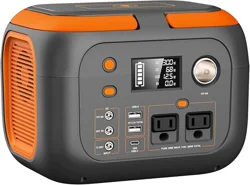
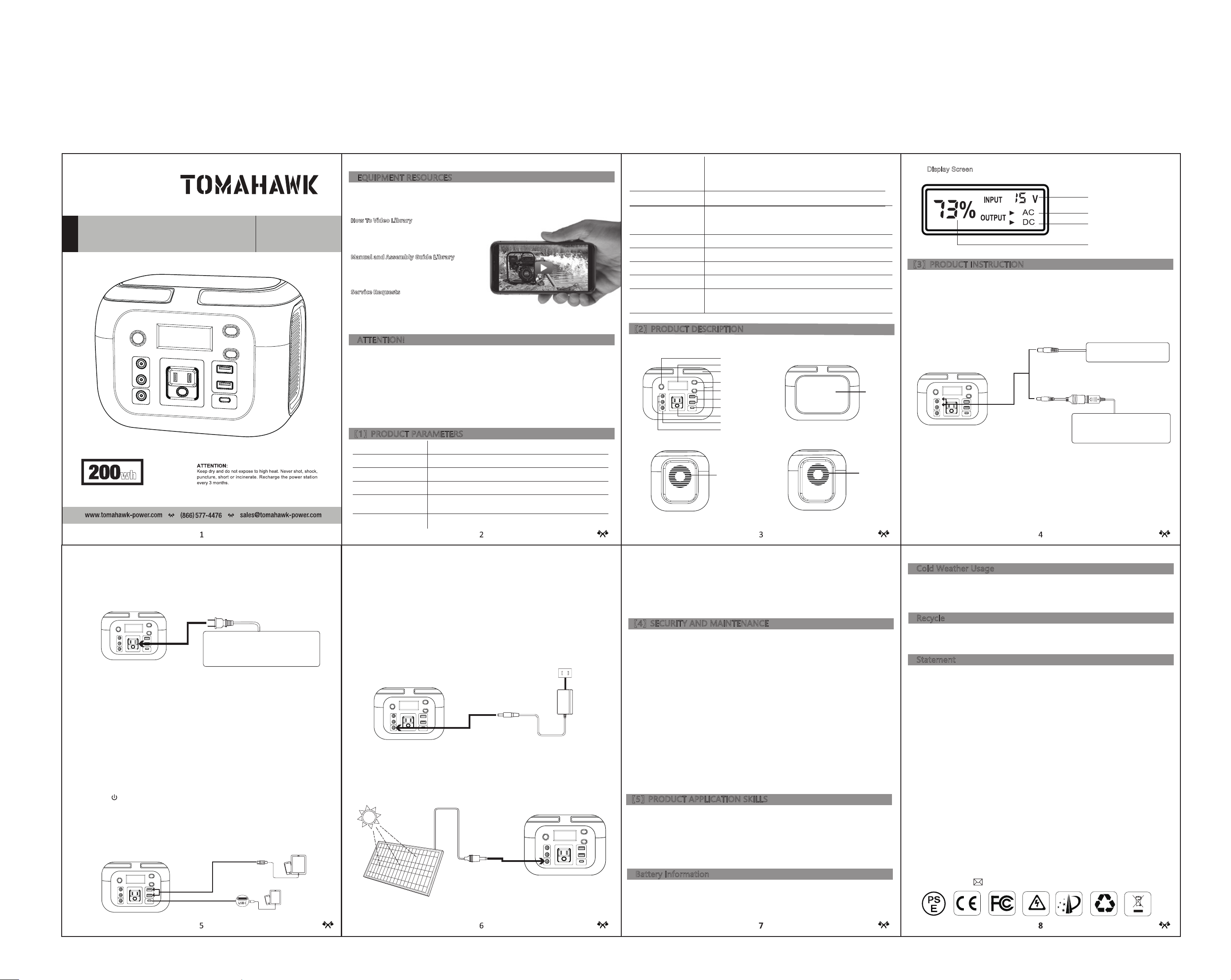
Handle
ON/OFF
LCD Display
AC ON/OFF
USB 5V/3.1A output
USB-C 5V/3A;9V/2A output
AC Outlet
DC Input
DC Output
ATTENTION! AC Outlets,AC output voltage and frequency will be different according to different
countries or areas. Please refer to the actual product before using.
【
Left
】
【
Front
】
【
Front
】
【
Back
】
【
Right
】
LED Flashlight Switch
Vent
LED Light
Cooling Fans
【3】PRODUCT INSTRUCTION
1). How to charge DC12V appliances (such as headlamp, fan) with this product?
The 5.5mm 12VDC output is plug and play. Connect the appliance to the DC port, short press the
power switch to turn on DC output so that the unit can supply power to the appliance, and it will
display real-time wattage of the appliance on the LED screen.
Note: Please confirm whether your DC12V appliance support charging with 5.5mm DC
head interface (The diameter of the DC Port of the Product is:5.5mm), otherwise it is unable to
connect with the DC output, you can consult the electrical manufacturer, buy the corresponding
adapter and connect with it.
Connect the power cable plug of the electrical appliance to the AC outlet of the product, and press
the power switch to turn on, then switch on the "AC" button and the unit will start offering power to
your appliances. It will display real-time wattage of the appliance on the LED screen at the same
time.
Note: The 12V DC output voltage is range between 9V~12.6V, the maximum output current is 10A.
DC output voltage drops while battery capacity drops due to chemical characteristics of the battery.
If your DC 12V appliance is not built-in input voltage stabilizing function, it may shut down when the
input voltage is too low, please unplug your device from the unit in time. And please charge the unit
in time.
5.5mm DC12V for Fan or
LED lights
Or charge car kits via DC to
Cigarette Lighter Connector
【Display Screen】
Protection Mode:
Short-Circuit/Overpower Protection:
If the DC output is short-circuited or overpowered
(Load(s) power >200W), the unit will shut down to protect itself. Please clear the problem and
recharge the unit to re-press the power switch.
2).How to Charge AC Appliances with this Product?
※
When the AC port is not in use, turn it off to conserve power.
WARNING! The AC outlets, AC voltage, and frequency are different according to different
countries; please carefully check whether the product specifications are consistent with the
appliance specifications before use, otherwise, it can lead to dangerous situations.
3). How to Charge USB Digital Appliances with this Product?
onnect the standard USB cable of the digital appliance to the USB output of the unit to gain power.
Then press the " " button switch on and the unit will start offering power to the devices, It will
display real-time wattage of the appliance on the LED screen at the same time.
Quick Charge Output:
This product supports Qualcomm QuickCharge 3.0 output, support
5V/3.1A; 9V/2A max output for smart devices which also support Qualcomm QuickCharge 3.0. The
actual output voltage and current depend on the actual smart devices, it can be obtained by
consulting the smart device manufacturer.
Protection Mode:
Short-Circuit/Overpower Protection:
If the AC output is short-circuited or overpowered
(Load(s) power>200W), the unit will shut down AC output to protect itself.
※
Some devices, such as a refrigerator, ice maker or a laser printer may require a surge power
to start or work during a very long period, the surge power could exceed 250W or even higher,
this could cause overpower protection with this unit. Please remove the devices and consult
with the manufacturer for more information.
Using the included AC Wall Charger cable, plug the unit into any wall outlet to charge the unit. You
will know the unit is charging when the blue LED battery indicators are blinking. The unit is fully
charged when all battery indicators stop blinking . After the unit is fully charged, remove the AC wall
charger.
5).How to Charge the Unit?
Warning! Do not look at the flashlight directly, as damage to eyesight may occur.
A. Charge through AC Wall Charger
B. Charge from Solar Panel
①
Place your solar panel* where it will get as much direct sunlight as possible.
②
Plug the output of the solar panel into the input of the unit to start charging. You will know the unit
is charging when the blue LED Battery Indicator lights up and blinks. The unit is fully charged when
all battery indicators stop blinking.
4). How to Use the Flashlight?
This unit is built with a dual white LED flashlight. Press the flashlight button to switch on the flashlight
and single press the button to switch to Blink/SOS Mode, Press the button to switch off.
▲
AC Adapter
AC Socket
▼
【4】SECURITY AND MAINTENANCE
▲
Charging Input
13V~25V/2.4A
C. Charge from your Car with a 12V Cigarette Lighter.
Using the car charger, plug the unit into a 12V cigarette lighter(carport) of your car. You will know the
unit is charging when the blue LED Battery Indicator lights up and blinks. The unit is fully charged
when all battery indicators stop blinking and remain solid
Cold temperatures (below freezing) can affect the battery capacity due to chemical characteristics of
the battery. If you will be living off-grid in sub-zero conditions, we recommend you keep your unit in an
insulated cooler, and connected to a power source (solar panels). The natural heat generated by the
unit contained in an insulated cooler will keep battery capacity at its highest.
a) Do not short-circuit the unit. To avoid short-circuiting, keep the unit away from all metal objects
(e.g. coins, hair-pins, keys, etc.).
b) Do not heat the unit, or dispose of it in fire, water or other liquids. Keep away from high
temperatures. Do not expose the unit to direct sunlight.
c) Keep away from high humidity, dusty places.
d) Do not disassemble or reassemble this unit.
e) Do not drop, place heavy objects or hit the product strongly.
f) This appliance is not intended for use by persons (including children) with reduced physical,
sensory or mental capabilities, or lack of experience and knowledge, unless they have been given
supervision or instruction concerning use of the appliance by a person responsible for their safety.
g) Children should be supervised to ensure that they do not play with the appliance.
h) Do not cover the device with towels, clothing and other items.
i) The unit may be hot when charging. This is normal. Use caution when handling
.
j) Do not charge the unit over the required time.
k) Disconnect the unit when fully charged
l) Use the unit properly to avoid electronic shock.
m) Please follow local regulations when disposing of this product. Do not dispose of the built-in
battery awith household garbage, so as not to cause an explosion and/or pollution.
n) This product is for use in only emergency situations, it cannot replace the standard DC or AC
power of household appliances or digital products.
a) Use only in temperatures in the range of 50 °F ~ 86 °F (10 °C ~ 30 °C), so as to achieve the
optimal charging capacity.
b) When charging, in order to avoid interference, please stay away from TVs, radios, and other
equipment.
c) If the device will not be used for long periods, disconnect all cables and store in a dry area.
d) In order to extend the life of product (lithium battery), it is best to charge within 3 months, and
charge at least once every 6 months.
Your device has and internal, non-removable, rechargeable battery. Do not attempt to remove the
battery. The battery can be charged and discharged over 1000 times, but it will eventually wear out.
WARNING! To avoid car battery power loss. Charging this unit through your car cigarette lighter is
only available when your car engine is started.
【5】PRODUCT APPLICATION SKILLS
Cold Weather Usage
Battery Information
Statement
Always return your used electronic products, batteries, and packaging materials to dedicated recycling
collection points. You will help prevent uncontrolled waste disposal and promote the recycling of
materials.
I. FCC Statement:
The operation meets the following two conditions:
(1) The equipment will not cause harmful interference, and
(2) The equipment must accept any interference received, including interference that may result in
accidental operation.
Note: The equipment has been tested and meets the restrictions of Category B digital equipment in
Part 15 of FCC Rules.
These restrictions are designed to provide reasonable protection against harmful interference in
housing installation.
This equipment will generate, use and radiate radio frequency energy. If it is not installed and used
according to the instructions, it may cause harmful interference to radio communication.
However, there is no guarantee that interference will not occur in a particular installation.
If the device does cause harmful interference to radio or television reception (which can be
determined by switching off and switching on devices), users are advised to attempt to correct the
interference by one or more of the following measures:
Re-adjusting or placing the receiving antenna.
Increase the distance between the device and the receiver.
Connect the device to a different circuit outlet from the circuit connected to the receiver.
Consult distributors or experienced radio/television technicians for help.
Recycle
Support 5.5mm DC 12V car kits with
DC-Cigarette Lighter Adapter,such as
Vacuum Cleaner,Inflation,Pump,Electric
wrench,fridge.etc.
Limited Appliance Wattage<200W, such as lamp,Electric Fan,
TV, Game Machine, etc. AC will shut down when it's
short-circuted or power overloaded. Remove the device and the
unit will return to normal from short-circuit or overpower
protection in a few seconds. Repress the AC output button to
switch on AC out again.
【
Front
】
【
Front
】
【
Front
】
【
Front
】
AC output indicator
DC/USB output indicator
Remaining power indicator
Input indicator
All rights reserved. Without the written permission Tomahawk Power, LLC, no unit or individual may copy or reproduce
part or all of the contents of the book without authorization, and may not disseminate them in any form. Other trademarks
appearing in this manual shall be owned by their respective owners. Due to product version upgrade or other reasons, the
contents of this manual will be updated from time to time. Unless otherwise agreed, this manual is only for use guidance.
All statements, information and suggestions in this manual do not constitute any express or implied guarantee.
*Note: Solar Panels not included.
Capacity
(LWH)Dimensions
Weight
Built-in battery cell
42000mAh /155Wh
200x140x130mm
About 1.7kg
100% Original High Quality Lithium-Ion Batteries
This manual is to help you use the product correctly; it does not represent any description of the hardware and software
configuration of the product. For the product configuration, please refer to the contract related to this product (if
applicable), or consult the seller that sells the product. Pictures in this manual are for reference only, if there are
individual pictures do not match the actual, please prevail in actual products.
ATTENTION!
The unit provides Modified Sine Wave Output
The unit provides Modified Sine Wave output and can be compatible with AC electric appliances that work with corrected
waveform (power
≦
200W). However, anything that uses an AC motor isn't going to work to full capacity on a modified
sine wave, such as an electrical fan. It will even make the electric appliance create some noise. Appliances like
refrigerators, microwaves, and compressors that use AC motors and some delicate medical equipment will be better off
with a pure sine wave inverter. This product is only used for emergency, it cannot replace the normal alternating current,
for long-term use, please adapt the power station specification required by electrical appliances.
DC 15V: About 5 hours
Adapter:DC 15V/2.4A
Solar Panel Charging:DC 13V-25V/2.4A(Max)
Input Recharging
Fully Charged Time
【1】PRODUCT PARAMETERS
Output
USB1+USB2 : 5V/3.1A
USB C : 5V/3A 9V/2A
DC1+DC2 : 9V~12.6V 10A (MAX)
9V~12.6V/10A(Max)
DC Output(MAX)