PYLE®
view
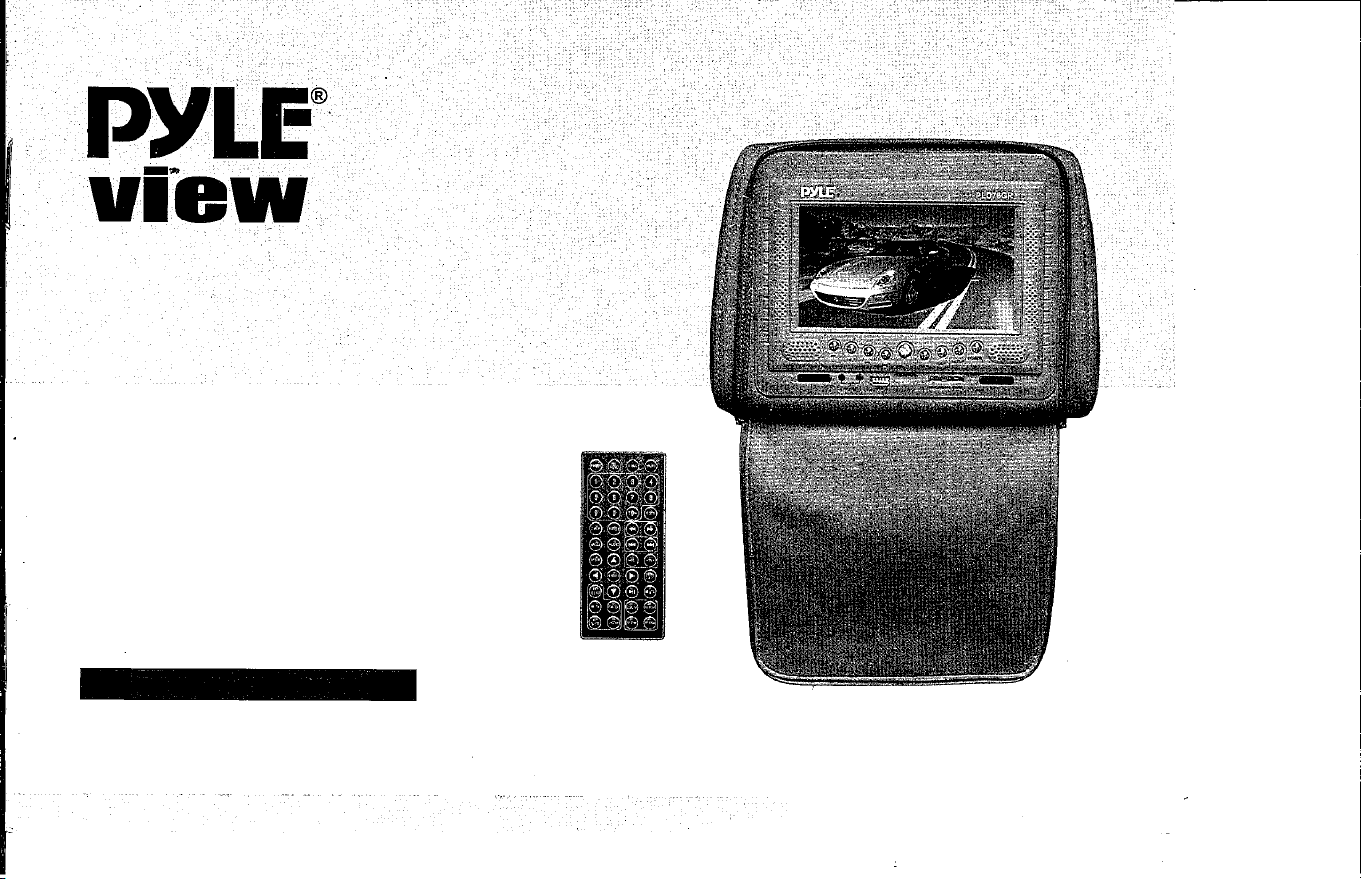
PLD76
Adjustable Headrest
w/Built-in 7" TFT-LCD Monitor
w/DVD Player
Instruction Manual
32
HTTP://WWW.PYLEAUDIO.COM
�
!
Contents
Precautions· ... ......... 01
Notic e before operation · .
..
02
Accesso ries
. .
. . . . .
. . . . . .
0
3
Features· .
.. . . . .
. . . . . .
.
0
4
Video disk
type . .
. .
.......
0
4
System connection and installation •
.
. 05
Key parts in front of the player
.. ·
06
Description for pressing-keys of remote controller • • • 07
Function
of keys· . . . . . . . . . . 08
Time
display
.......
....
·
09
Zoom/goto/Audio · ........ 10
Setup/Angle/Direction Key · .
. .
11
USB/TFT MENU/DVD
.......
12
Menu operation ' .
. . . . . . . .
13
Language
setup
· . . .
. . . . . .
1
4
Audio/Video setup · ....... 15
Spea ker/Digita l setup· . . .
. . 16
Dynamic Range/Left+Right
17
Desc ription for playing MP4· . . 18
MP3/WMAlJPEG
DISKS . . . . . 18
ElectronicAbum
........ 19
Playing JPEG Disks· . . . . . ..
19
MPEG4 Decoding Tec hnology
20
Operation for Game Function .
21
Troubleshooting
. .
......
22
USER'S MANUAL OF AUTOMOBILE HEADREST DVD PLAYER
Thank you to buy our product, please read the operation instruction carefully prior to operation
so as to use the player correly, and please keep it appropriately for future reference.
'��J
•
For the sake of your safety, do not watch the video image or open the display in driv-
ing.
•
Without the approval of authorized organization, any changing or rebuilding for the
player shall cause troubles for user .
• C�utio,,
•
The produ has dangerous high voltage inside,non-professional personnel shall be not
allowed to dismantle it and repair.lf any trouble is found,please turn to the professional
personnel or our authorized maintenance center.
•
The player is equipped with TFT color LCD,it is frangible,to be careful in delivering and
installing.
•
Do not clean the device by corrosive chemical detergent, soft cloth is recommended.
• The operating voltage is DC 12V(+-2V),the player shall be worked abnormally or be
damaged if the voltage higher or lower than the allowed range.
• The player is equipped with radium emiing system,please read the instruions caref
ully for right operation and keep it well for future reference.lf maintenance is needed,
please conta the professionals,do remember to operate it according the corre oper
ating procedure to avoid the harmful light beam,in order to prevent the dire radium
light beam,do not open the enclosure without permission.
�l
•
In using ,the LCD might has few bright spot on its screen,which is a very normal phen
omenon in the active matrix display technologYrand it doesn't mean the product has
any fault or trouble.
r
01
USER'S MANUAL OF AUTOMOBILE HEADREST PLAYER
S.
•
Before operating the product,please check the voltage of your car and it should be consient with the working
voltage of the player.
•
Do grasp the powerplug firmly in conneing or disconneing to the power,do not pull the power line by force.
•
The radium emiing light beam used by the produ is harmful to eyes,do not dismantle the enclosure without
permission and only the professional technicians are allowed to conduct the repair or maintenance.
caceme
•
Please operate the product in proper temperature,the storage temperature should be -30"C to 75 "C, and the
working temperature should be -10"C to 55 "C.
• To prevent dust falling on the laser head,it shall affect the playing effecUf the head is dued,please used the
laser head cleaning disk to clean.Refer to the instructions of purchased cleaning dish for d"etailed operation.
•
It should be damp-proof.crash-poof and pressure-proof.
In the below conditions,moisture shall be formed on the lens!dew formation):
• Carry the player from the cold place to warm place;
•
In the condition of big temperature difference such as at the moment of
opening the heating device;
• If the dew is formed,it shall affect the normal work of the player,and
please remove out the disk,lay the player on table for one hour under
the
condition of conneing to power so as to vapor the moisrure.
•
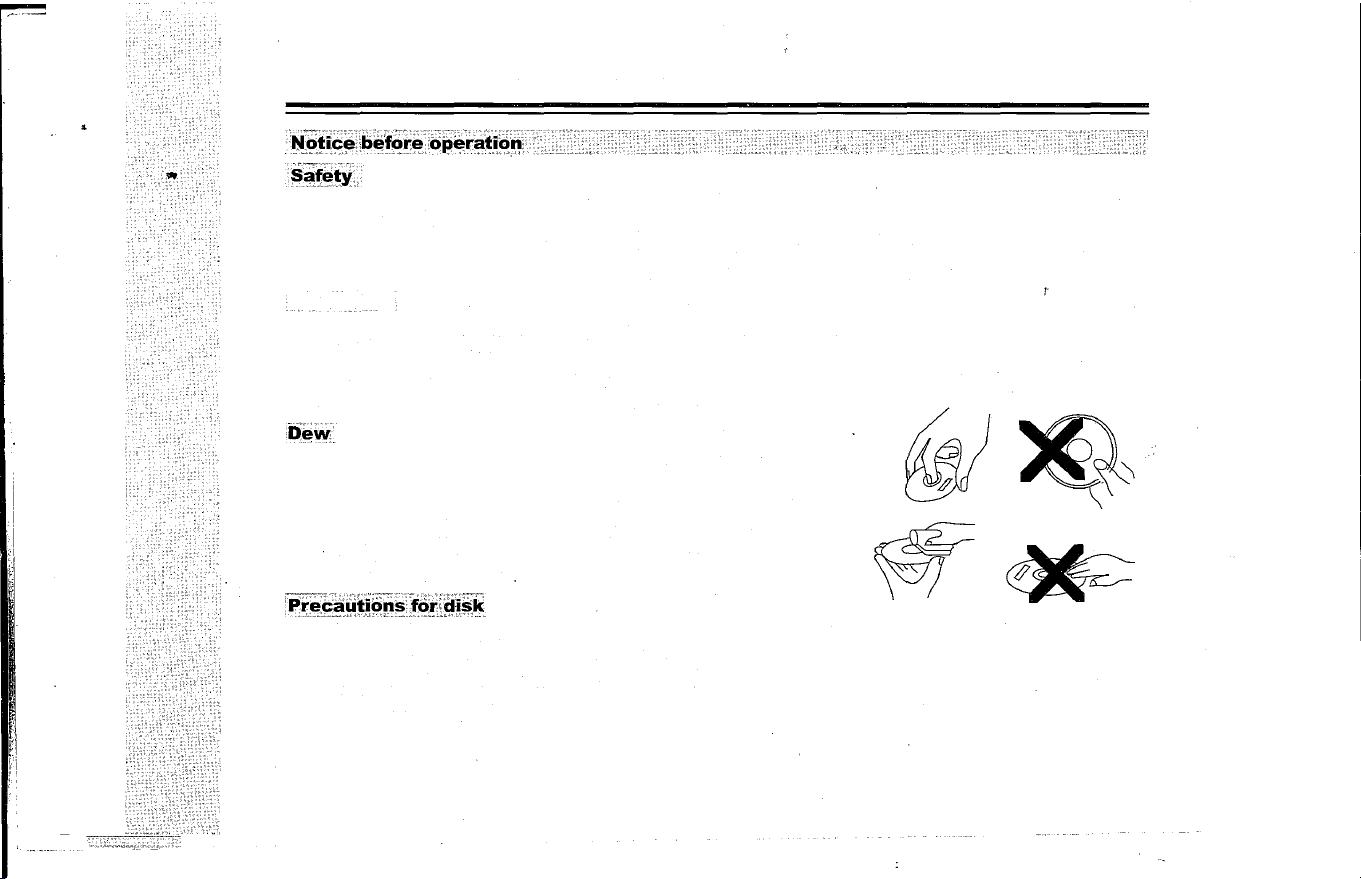
In order to keep the disk clean,please take the edge of disk and do not touch its suace;
• Do not adhibit any paster or tape on the disk;
• Keep the disk away from direct sunshine or heat source;
•
Please place the disk in the disk box after being used;
r
•
Before playing the disk,if the disk is died,please clean it with soft cloth from the center to out;
• Do not use voatile oil and thinner to clean the disk.
02
USER'S MANUAL OF AUTOMOBILE HEADREST DVD PLAYER
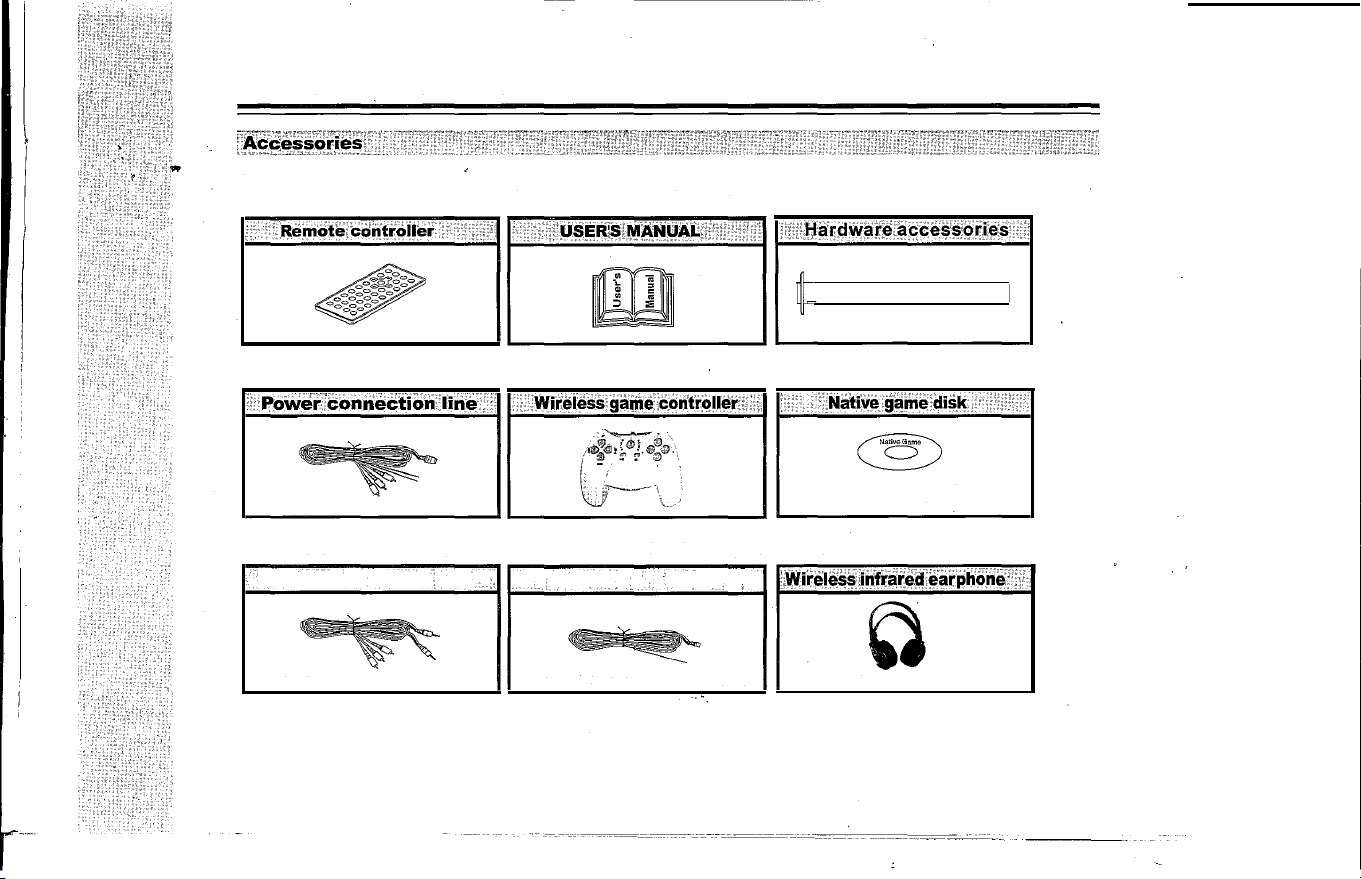
Please check the following accessories after opening the package.
Note: can download the games through
the internet into the USB or Memory Cards.
Note: the following three kinds of accessories (optional by customers):
����������
·.·.di�;�nnecti�n;ii�.' •• ·i Th·8o:Oeiiliiel�f�iWi;i
.�i�I��:if��iarp
o�;iiF
i
According your requiran
According your requirant
Note,: Ach:2.3/2.BMHz.Bch:3.2/3.BMHz
03
--- ---------
USER'S MANUAL OF AUTOMOBILE HEADREST DVD PLAYER
• Easy to install and it will not damage the car and the user might install it by
.
himself;
•
No additional plaYer is needed for the integration of display and player;
•
With built-in FM stereo emitting function,it could be connected by wirelessly with the original car
FM radio part and enjoy the sound box effect through the loudspeaker of radio;
• The input ports of audio and video are provided for the connection with GPS navigation system;
•
Audio and video output funion and they are installed at the two side of car by pair to support
the synchronous eyjoyment of video image;
•
With USB and cards reader fuctions, can use USB or SD/MS/MMC cards play MP3/WMA/MP4, also
can download MP3/WMA/MP4 into USB or SD/MS/MMC through PC. Download the Native Games
rm this website:
http:.native32.com
. Applying more kinds of games for u .
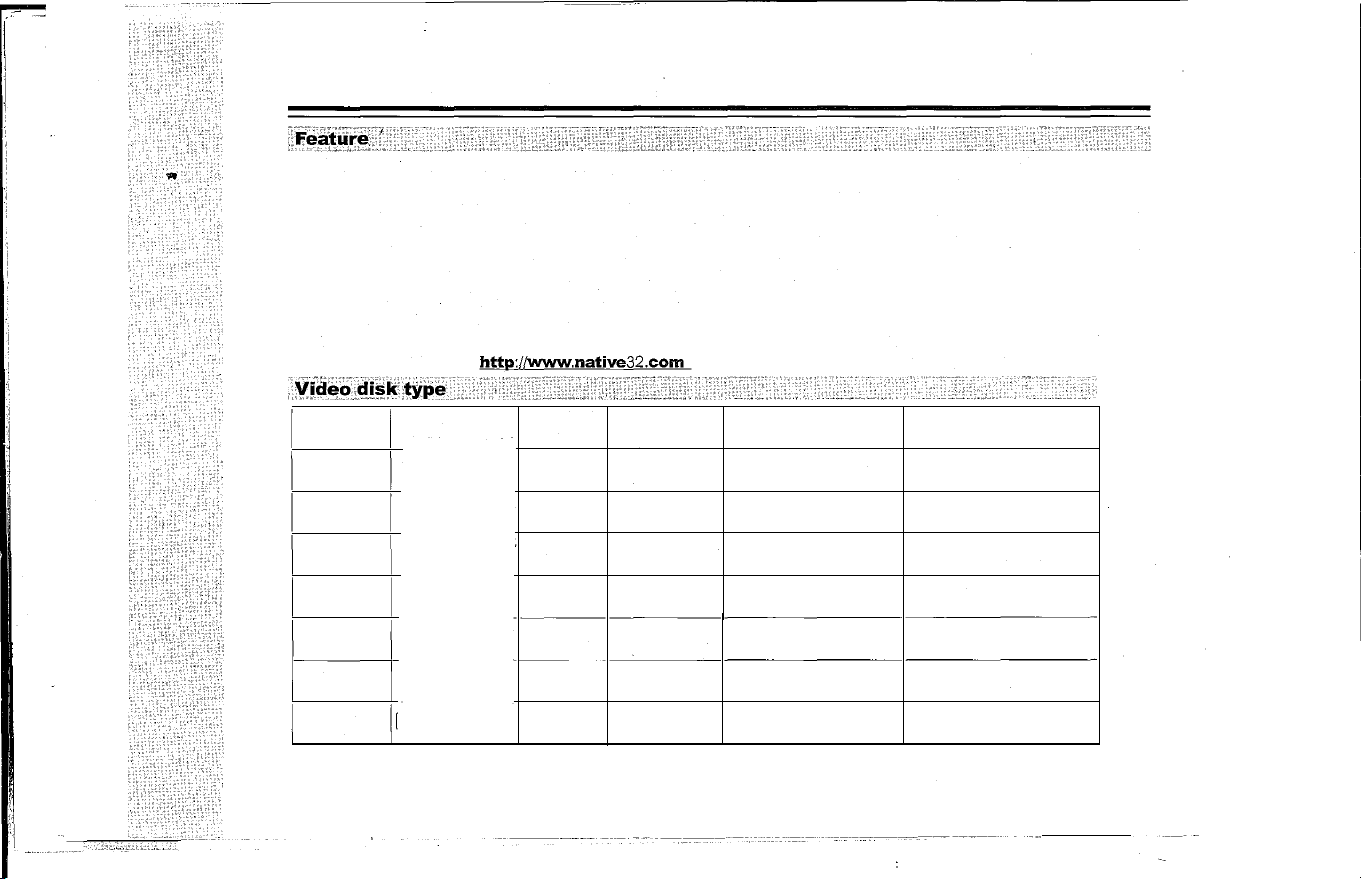
PE
SKS YMBOL
RECORD HORIZONTAL
DISK SIZE
"-"
FORMAT
DEF INITION
RECORD CONTENT
DVD
MPEG2
>
500 LINES
Audio+Video
12cm/8cm
VCD
MPEG1
>240 LINES
Audio+Video
12cm/8cm
CD
Digital
Audio
12cm/8cm
Mp3
Digital
Audio
12cm/8cm
Mp4
MPEG4
>240 LINES
Audio+Video
12cm/8cm
-
WMA
Digital
Audio
12cm/8cm
JPEG
[
>500 LINES
Picture
12cm/8cm
04
-
-
---- -----
USER'S MANUAL OF AUMOBILE HEADREST DVD PLAYER
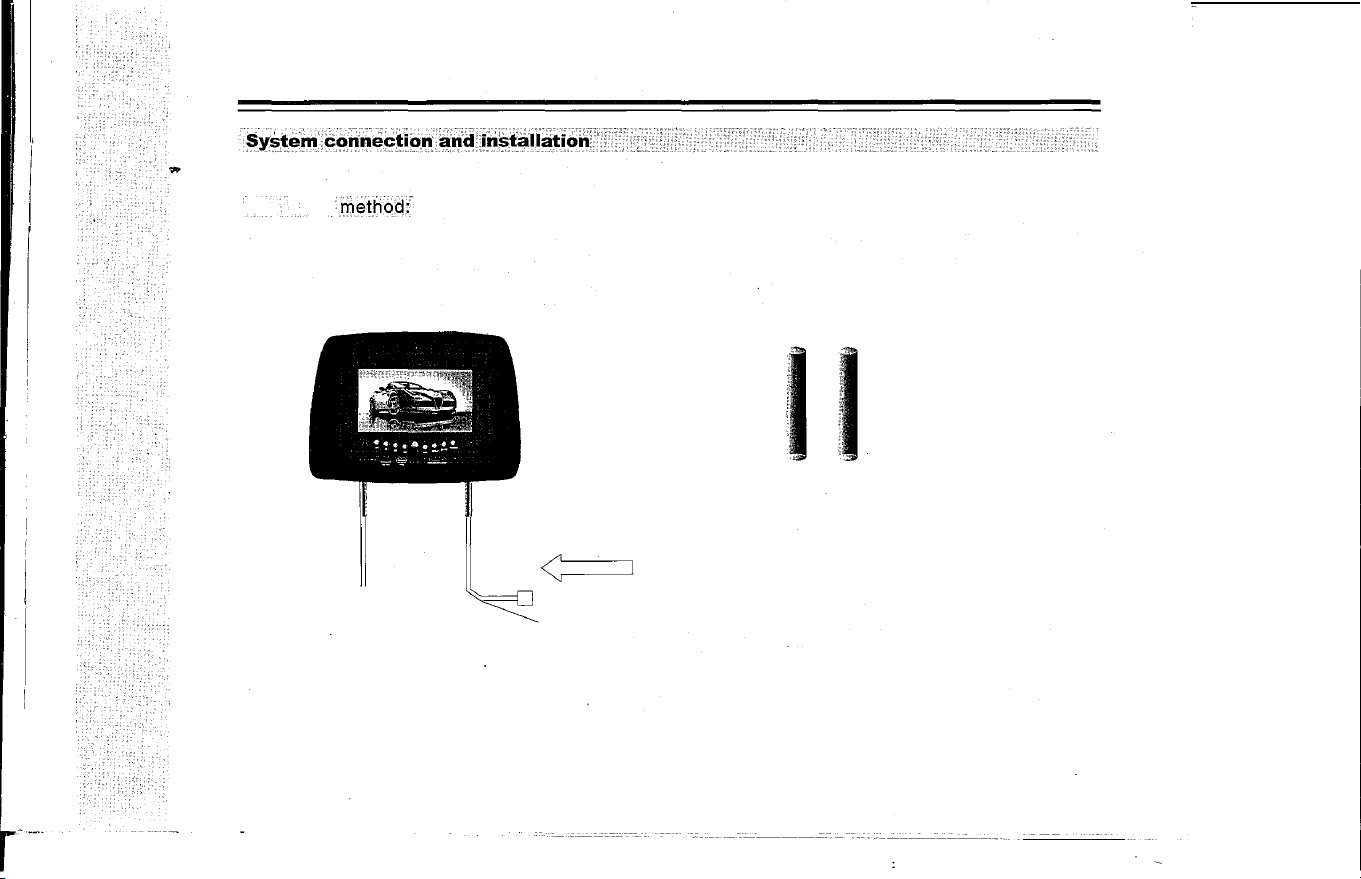
Check whether the shape and installation size is suitable,please select and employ suitable accessories and tool in
disassembling and assembling.
Theins�n, method
r
Takes
down the original installation head rest, to select and match the steel pipe according to the original insta
llation pole diameter for the head rest that having the DVD monitor,then the adjustment head rest steel pipe
spacing, passed the power source and the audio frequency lines through the chair steel pipe, and connected on the
power source, the sound and video frequency system with the vehicle. simultaneously the head rest will be fixed,
and will freely to adjust the height, around size based on the front seat personnel request.
130-190mm
��
� �
I I
The spare steel pipe
S-VIDEO
< I
Fuse box
�s �1
2
�unding
o
Yellow video
�
Red right channel
White le channel
The Antenna (connection the main engine radio antenna with the automobile,
enhancement the effects of the frequency modulation launches)
Note: the shape and installation size are not suitable for all cars, please select the suitable sbape
and installation size.
05
USER'S MANUAL OF AUTOMOBILE HEADREST DVD PLAYER
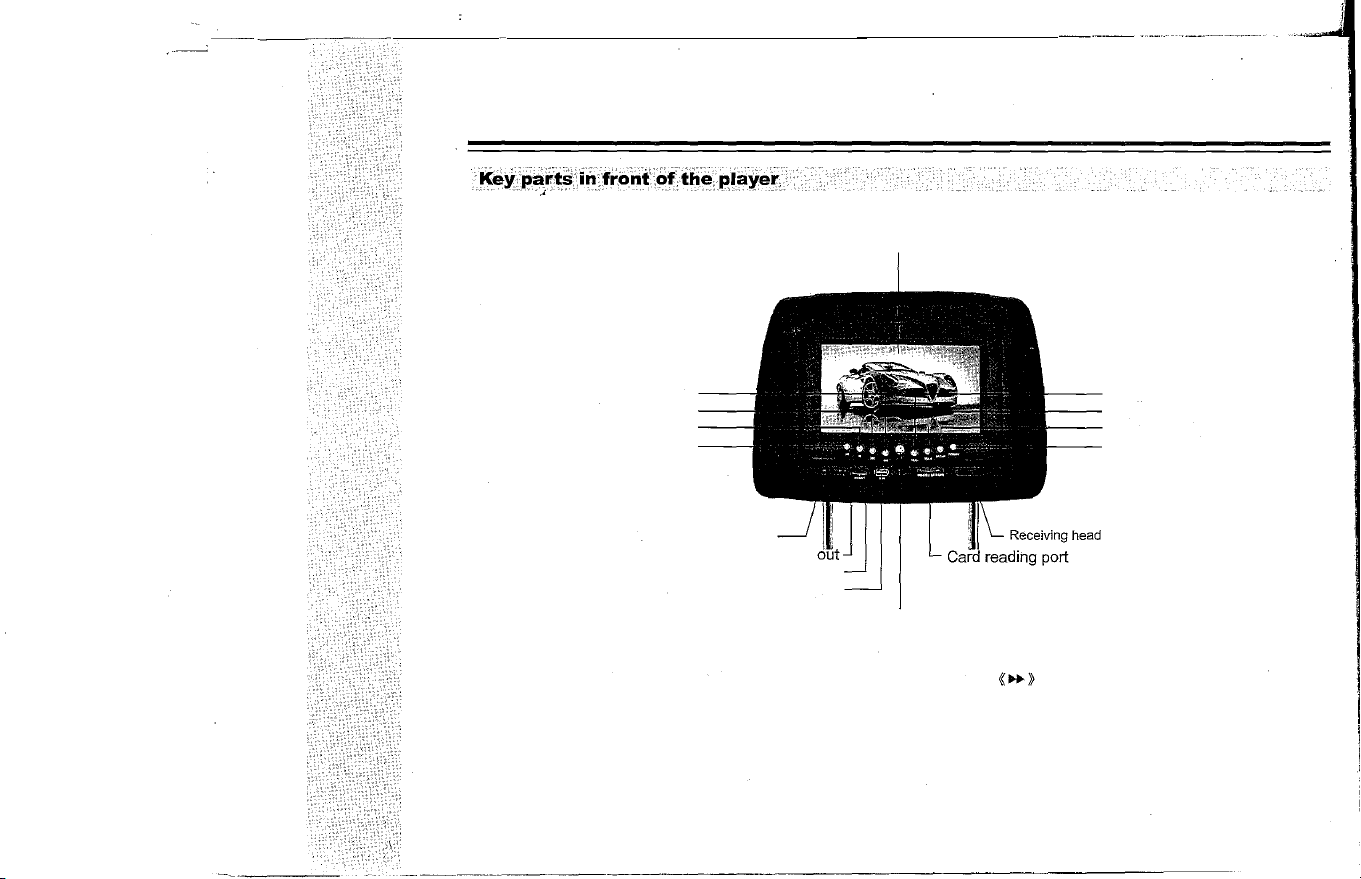
Ne track key
Previous track key
Stop key
Play/Pause key
IR inared transmitter port
Audio
Video out
USB port
TFTLCD
Eject key (Open the TFT-LCO, load disk)
Volume-key
Volume+key
Setup menu key
Power key
Note: At the Setup Manu ,press « .. » is up ,press
«�»
is down, press «VOL- »
is to left ,press «VOL+» is to right, press «� » is enter.
06
USER'S MANUAL OF AUMOBILE HEADREST DVD PLAYER
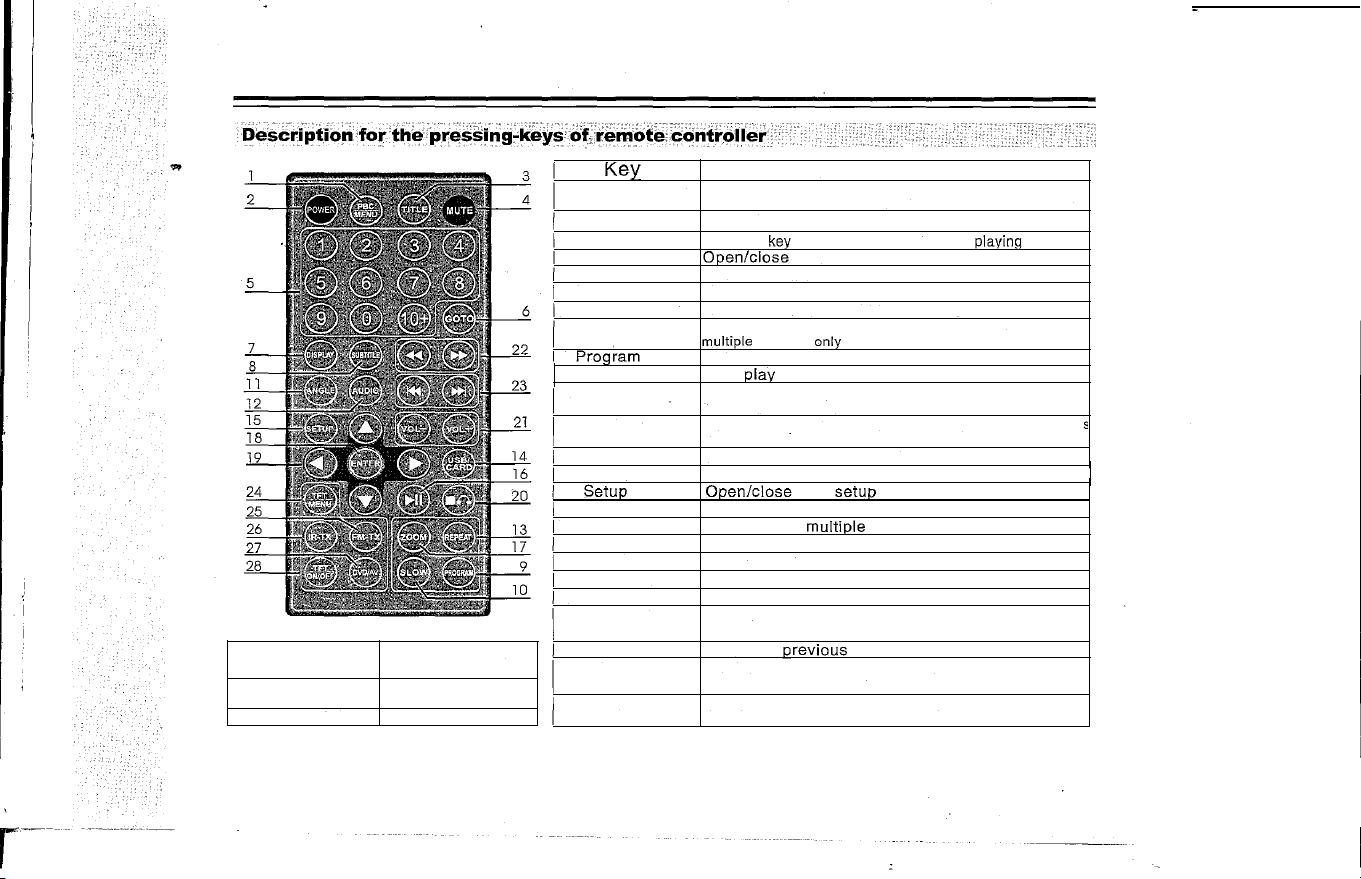
26. IR-TX
27. DVD/AV
28.TFT ON/OFF
Switching ACH and
BCH and OFFoutput
Switching DVD and
AV input
TFT -LCD switch ON/OFF
Key
1. Root menu/PBC
2. Power
3. Title menu
4. Mute
5. Number key
6. Goto
7. Display
8. Subtitle
9.
Program
10. Slow
11. Angle
12. Channel(UR)
13. Repeat
14. USB/CARD
15.
Setup
16. Play/Pause
17. Zoom
18. Enter
19. Direction key
20. Stop/Return
21. Vol+l-
22. Fast forwardl
backwardPlay
23. Previous/Next
24. Menu
25. FM-TX
07
Function
Press the key to return to the root menu in playing DVD disk,
and open/close the PSC menu in playing VCD2.0 and SVCD.
Power ON/OFF
Press the key
to return to the title menu in
plavinq DVD disk.
Open/close the sound
Number selection
Select desired time to play
Display the disk information and playing time
Subtitle switching, used for SVCD, DVD and Mp4 disks with
multiple subtitles
only
Track programming play
Slow play
Angle switching key, used for SVCD, DVD and MP4 disks
with multiple angles only
Language switching key, used for SVCD,DVD and Mp4 disk
with multiple languages onlY,Channel switching key forVCD
Multiple modes of repeat play shall be available
Switching DVD/USB/CARD
Open/close
DVD
setup menu
Play or pause
Zoom in/out,
multiple modes
Confirmation
Direction selecting key
Stop key, press the key to return in playing
Adjust the volume
fast forward or backward
Select the previous
or next track
Switching the menus of LCD brightness, contrast,
definition, colQf and tint.
FM-TX switch key,through direction key can adjust
the radiation rate.
USER'S MUAL OF AUTOMOBILE HEADREST DVD PLAYER
ctionsof keys
KEY
Power key
� Eject key
�II Play/Pause
..
Fast backward
��
Fast forward
..
Previous
�
�
Next
.
Stop/
Return
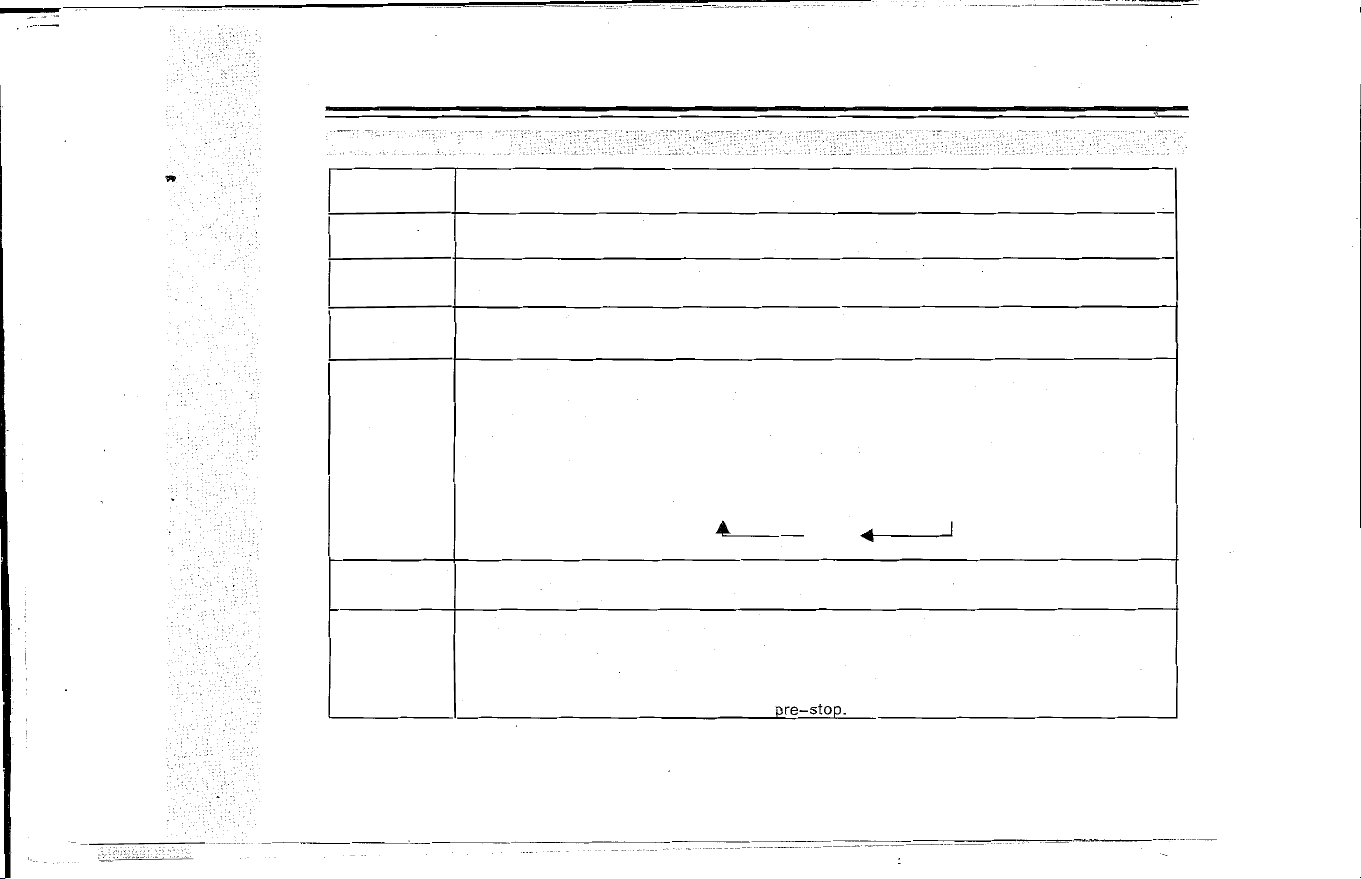
Basic description
Power ONfOFF . Press the "Power" key of the panel to turn ON /OFF the player ,the power key
at the top left angle of the remote controller just for the staying.
Open the disk door.
In normal playing state, press the key to pause to play image/sound. Further press the key to
resume to play normally.
Press Fast backward key, the image shall be played backward quickly, at the time, no sound
shall be outputted, press the key successively, the player shall play the disk repeatedly as per
the following method;
Press Fast forward key, the image shall be played forward quickly, at the time, no sound shall
be outputted, press the key successively, the player shall play the disk repeatedly as per the
following method;
Fast forward (backward) X2 X4 X8
X20
�
Play
I
I
Press the Previous key to select the previous track to play.
P-ress the- Next key to select the next track to play.
In playing VCO and CO disk, press" • " (Stop/Return) key to display pre-stop state, at the
time, press Playkey to r.sume to play; further press Stop key to stop playing and return to the
boot interface state. I·n playing OVO or VC02.0 disk, it plays the role of returning menu, and of
stopping playing in playing menu. In playing game, press the key to return to the main menu of
game.
r
Note: MP4 and OVO hasn't the function of
ore-stop.
08
USER'S MANUAL OF AUTOMOBILE HEADREST DVD PLAYER
KEY
Display
Mute
"
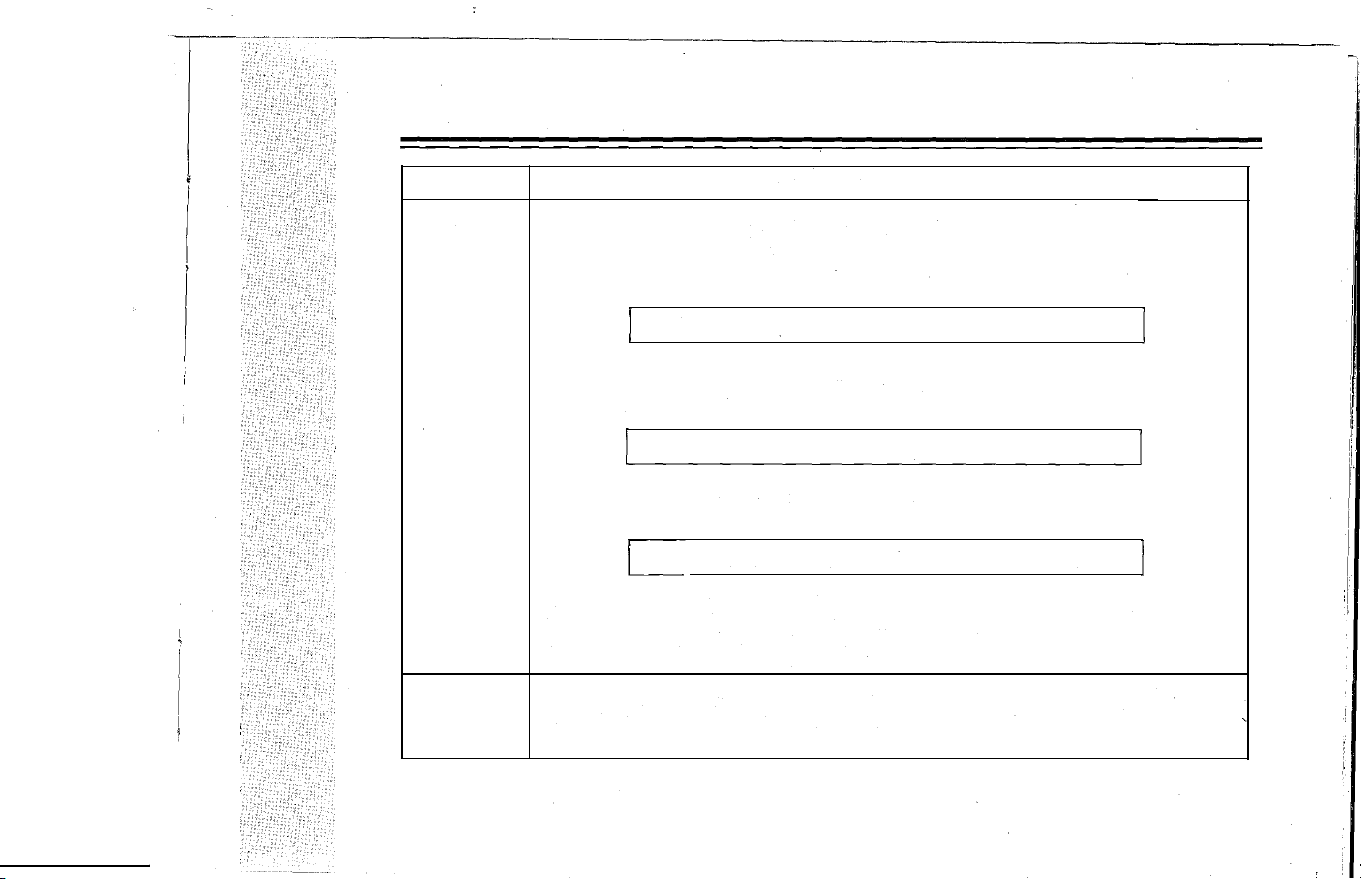
Basic description
Press Display key for the first time, the LCD shall display: (DVD state)
1) Disk format, current title number and total title number;
2) The Current chapter and total title number;
3) The playing of current title.
I
,
TT
1/29CH
1/1
o 00 :00:12
I
Further press the key to display:
Display the current language and the language number supported, channel type, subtitle
display language and angle type.
I
0)))2
/
3
2CH
OFF
NO
I
Press the key for the third time to display nothing.
The display (OSD) in playing VCD disk is as follows:
C
TRACK 2/15 4)))
PSC
o 00 : 00:12
I
Display the disk format, current track and total track number, mute mode, PSC mode, and the
track number of repeat mode, and the track playing time.
The aSD of MP3 and CD disk is same with VCD except that VCD disk has PSC option.
Firstly press the Mute key, the player shall play the image without sound output, furtner press
the key to cancel the mute function and resume to play normally.
09
USER'S MANUAL OF AUTOMOBILE HEADREST DVD PLAYER
KEY
Basic description
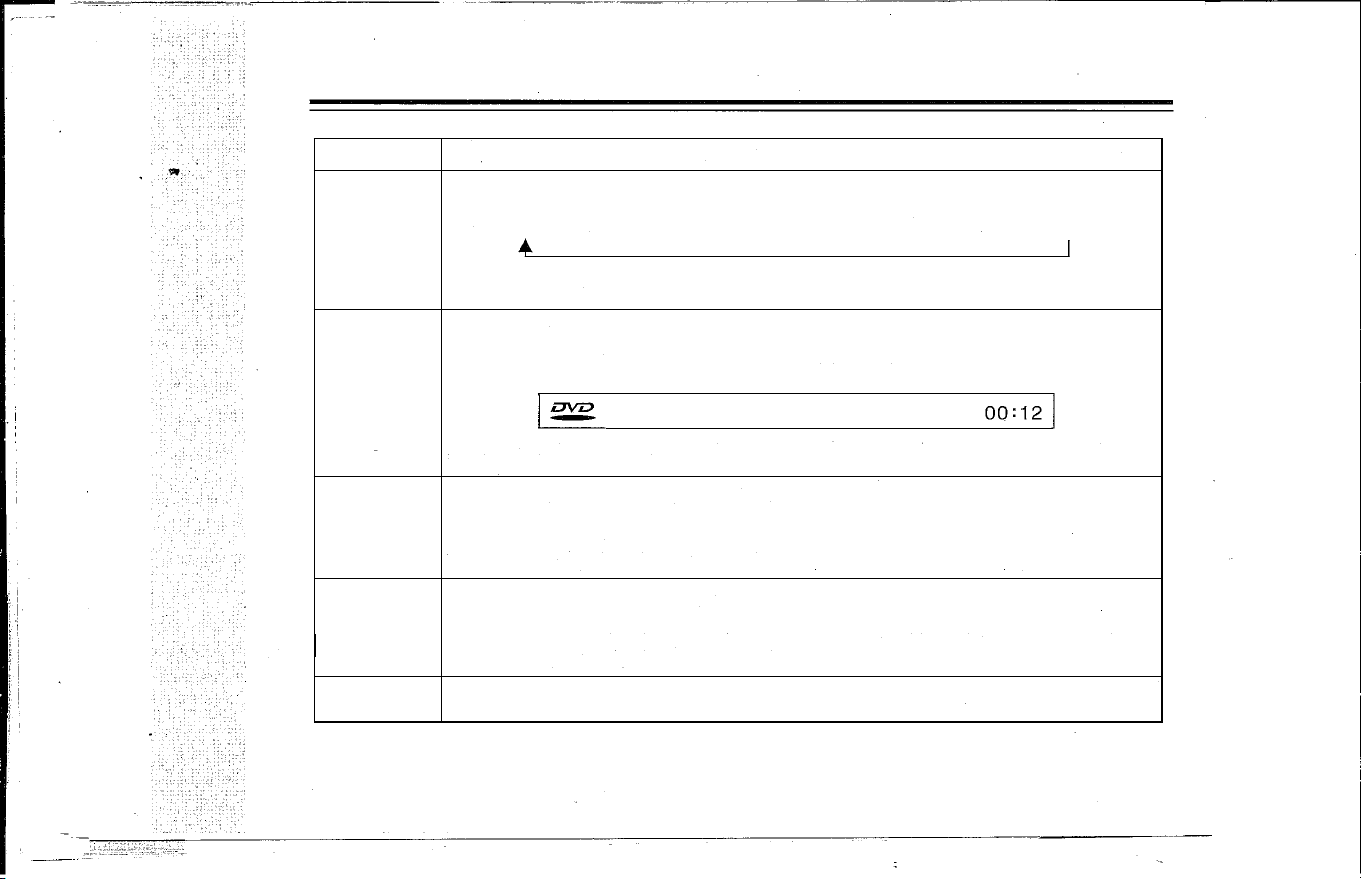
Press Zoom key to zoom in the image.
In playing, press Zoom key, the zoom mode shall be cycled as per the following order:
Zoom
ZOOM2�ZOOM 3 �ZOOM4� ZOOM 1/2 �ZOOM 1/3�ZOOM 1/4�ZOOM:
OFF
� [
In Image Zoom state, press direction key" . �"to move the image.
T
GOTO: start to play from the selected time.
Press GOTO key on the remote controller and a time selection dialog box shall be skipped out,
move the cursor to the time number and input the time you want to select and then the player
shall start to play from the selected time.
Goto
I�
00:
00:12 1
TITLE 1/1
CHAPTER 1/29
0
Note: the setup of VCO disk is same with OVO disk, the input time couldn't exceed the longest
time of the disk.
OVO disk supports eight languages at most, repeatedly press Language key to select the diffe-
Audio
rent language to play.lf the disk hasn't the language menu, the user may also change the lang-
uage by menu.
In playing VCO or individual Mp4 disk,press audio key to channel mode.
Note:Audio function is not available for MP3,CO,WMA,JPEG and individual MP4 disk.
Open/close the subtitle, select the subtitle on OVO disk and it's displayed on the TV screen,
which is related to the format of disk.
Subtitle
Subtitle is available only in the condition of the disk having subtitle function, the subtitle fun-
ction is achieved by the Subtitle key on the remote controller, press the key successively to
select different subtitles.
Title
Press Title key to stop playing and return to the title menu of disk, press direction key to select
your desired title and press Enter key to confirm to enter the chapter menu.
10
USER'S MANUAL OF AUTOMOBILE HEADREST DVD PLAYER
KEY
Vol+
Vol-
Setup
Basic description
Volume adjustment key
Adjust the volume by the Vol+ and Vol- key on the remote controller
Press the key to enter the setup menu to set up system, language, audio, video, loudspeaker
and dolby digit, in setup menu, press the key to exit the menu interface .
.
. �
Up/Down/LeftlRight key
T
Press the keys to select the disk content to be played and item to be set up as well as to select
Direction key
the image part to be zoomed.
Angle
1-0
10
+
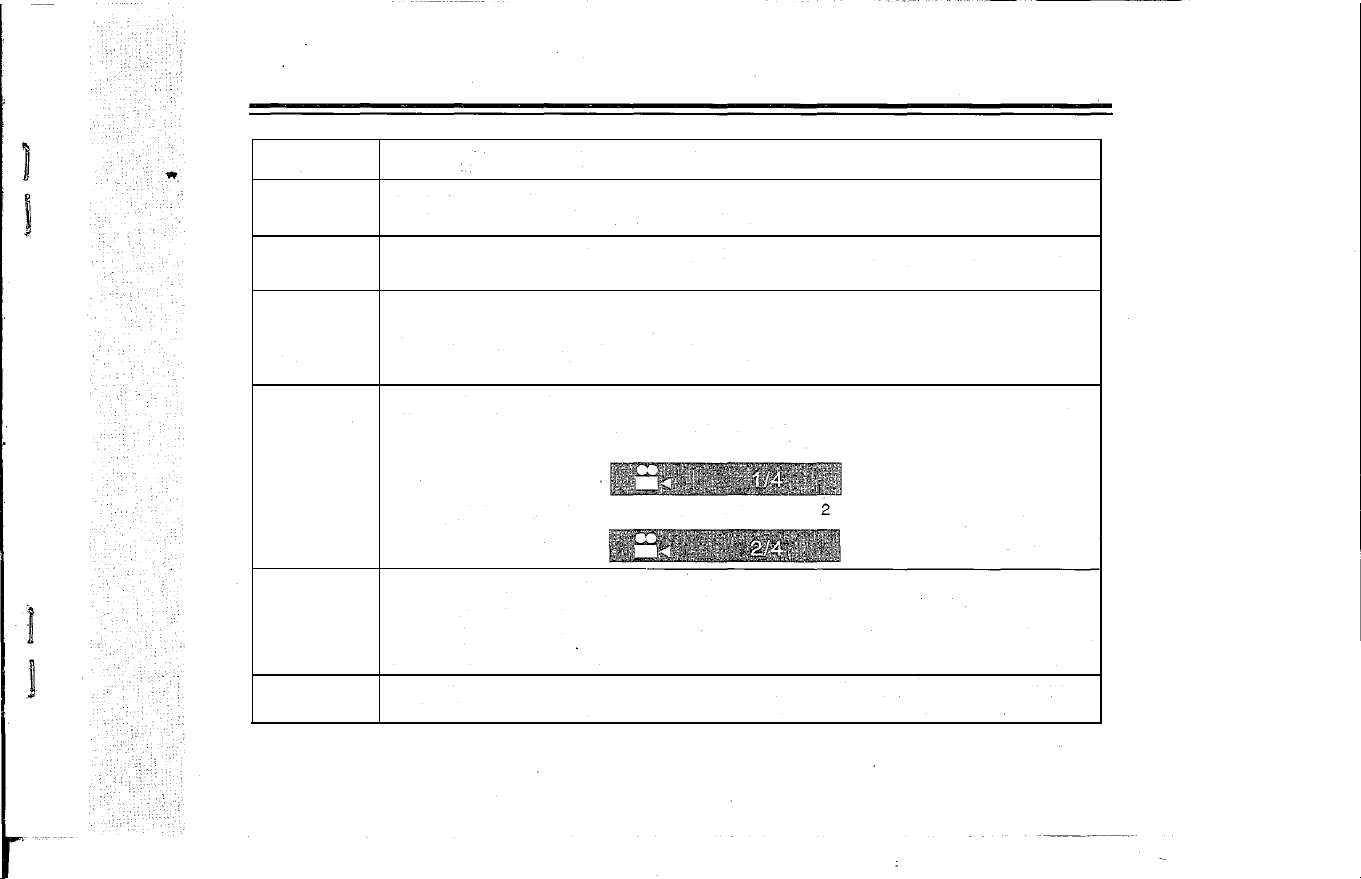
Change the angle, DVD disk may record multiple scenes that are recorded from different angle,
in playing, the user may select anyone angle to watch.
1.
Press Angle on remote controller to select angle 1 and the top right corner of the TV shall
display:
2.Further
press Angle on remote controller to select angle and the top right corner of the TV
shall display:
Press any number key to select the track or chapter to be played and set up the playing time.
The player features number key direct-selection function, press the your desired number to
select.For example: select the 386'" track, first press number "3", and then press number "8",
finally press number "6 " , the player shall play the 386'" track.
Note: number key direct-selection function is available for Mp3, Mp4 and DVD disks only.
For the track number bigger than 10, press the key first, trie LCD will display 10+ and then press
other number key to select, press the key in turn to achieve multiple modes
11
-----_. __ .
-
�-.---�-----�-�- --�---.-- --�- --- - -----�---- .- -
USER'S MANUAL OF AUTOMOBILE HEADREST DVD PLAYER
KEY
Basic description
USB/CARD
Press this key enter the selecting menu of DISC/USB/CARD, use direction key and ENTER key
select DISC, USB, CARD to play also can select in SETUP MENU.
The
selecting key of TFT function can coordination with the direction key to adjust the brightness,
TFT MENU
contrast, color, definition, hue and other modes, After adjusting the parameters, press TFT
MENU key to return and the set parameters shall be saved.
Video/A V switching key.
DVD/AV
Press the key, the player shall switch DVD state into AV-IN state, the video signal inputted by
the video terminal shall be displayed on the TV screen. If there is no signal inputted, it shall be
blue screen. Further press DVD/AV key to switch AV-IN state into DVD state.
TFTON/OFF
TFT -LCD switch key ,when you want to listen to the music ,press this key can turn off the screen
meanwhile enter the music mode. Press this key again then can turn on the screen.
IR-TX
IR-TX switching key, press this key switch to infrared mode, can switch between ACH,BCH,
OFF. Note: when open the infrared ,speakey not have voice output, when switch to OFF then
have voice output.
FM-TX key ,press this key can enter the FM-TX function, use direction key can adjust the
FM-TX
radiation rate.Press this key again then exit the FM funciton. Note: when op FM,speakey
not have voice output , when switch to OFF then have voice output.
12
USER'S MANUAL OF AUTOMOBILE HEADREST DVD PLAYER
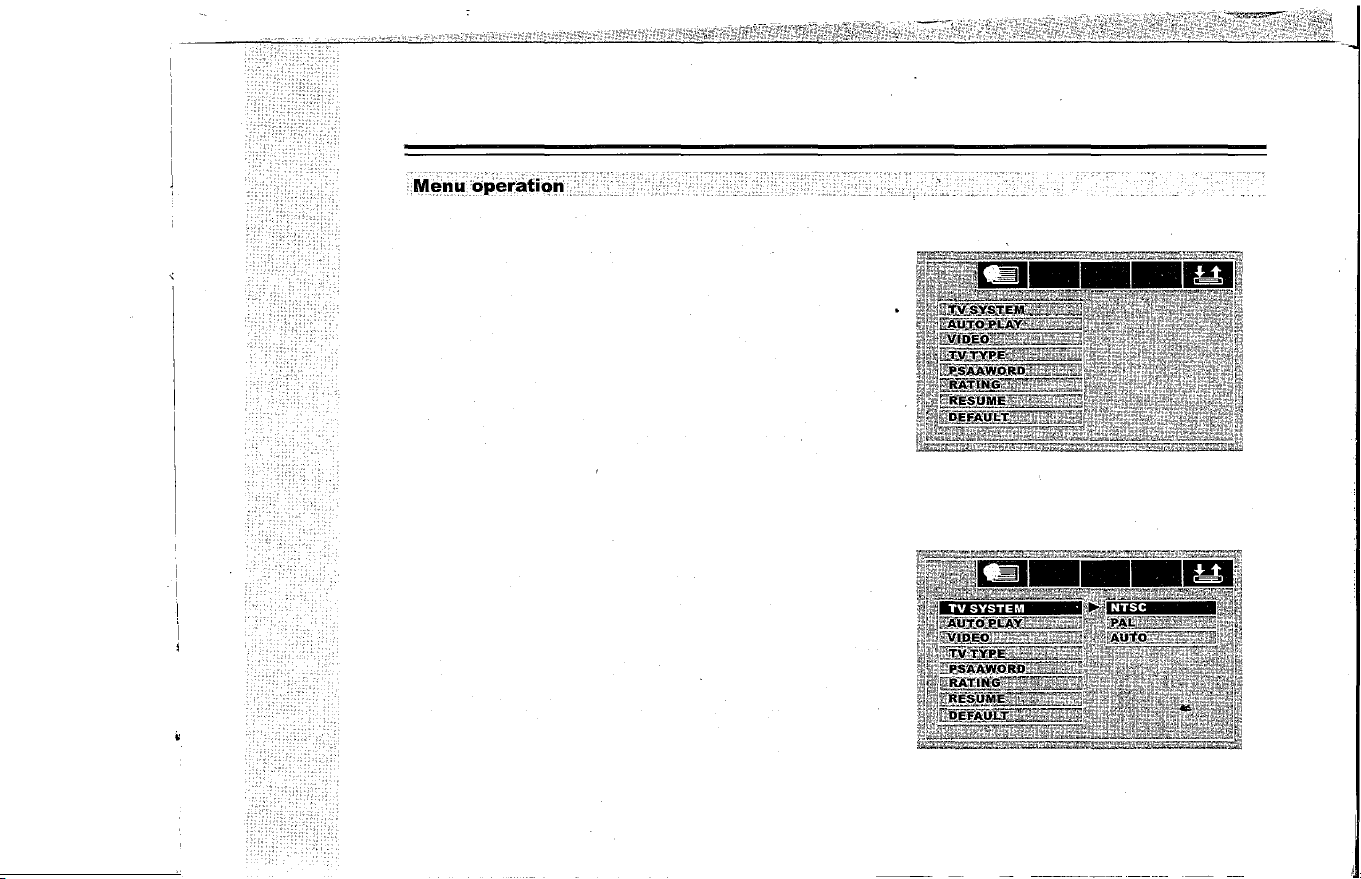
Press Setup key and the LCD will display the picture as fig
ure
1, press[]and [�] key to move the white bar to the desig
nated position, press Enter to confirm to display its submenu,
or press [�] key to enter its submenu directly.
Note: no matter in which state, press " "/"T"/" "and "
�
"
key to move the white bar and press Enter key to make it avail
able, press [] key to exit the submenu at the right of LCD and
at any time press Setup key to exit the Setup system.
Special Tips: for the company has many counterpart products,
the figure is for reference only, all is subject the real product!
The setup methods described in this instruction are for their
common parts, other functions are recommended to use the
default setup.
TV system(see figure 2)
(
1
)
Press Setup key enter the setup system,select TV sys
tem and press Enter key to confirm ,then the screen will
display the picture as figure2.
(
2
)
Enter the submenu, if you want to set the system to be
PAL,select PAL and press Enter key to confirm, then press
Setup key to exit the setup system.
Note: the video output system of TV set should be same
with the video output system of DVD player.
13
Figure 1
Figure 2
USER'S MANUAL OF AUMOBILE HEADREST DVD PLAYER
L
�
nguag
e
Setup
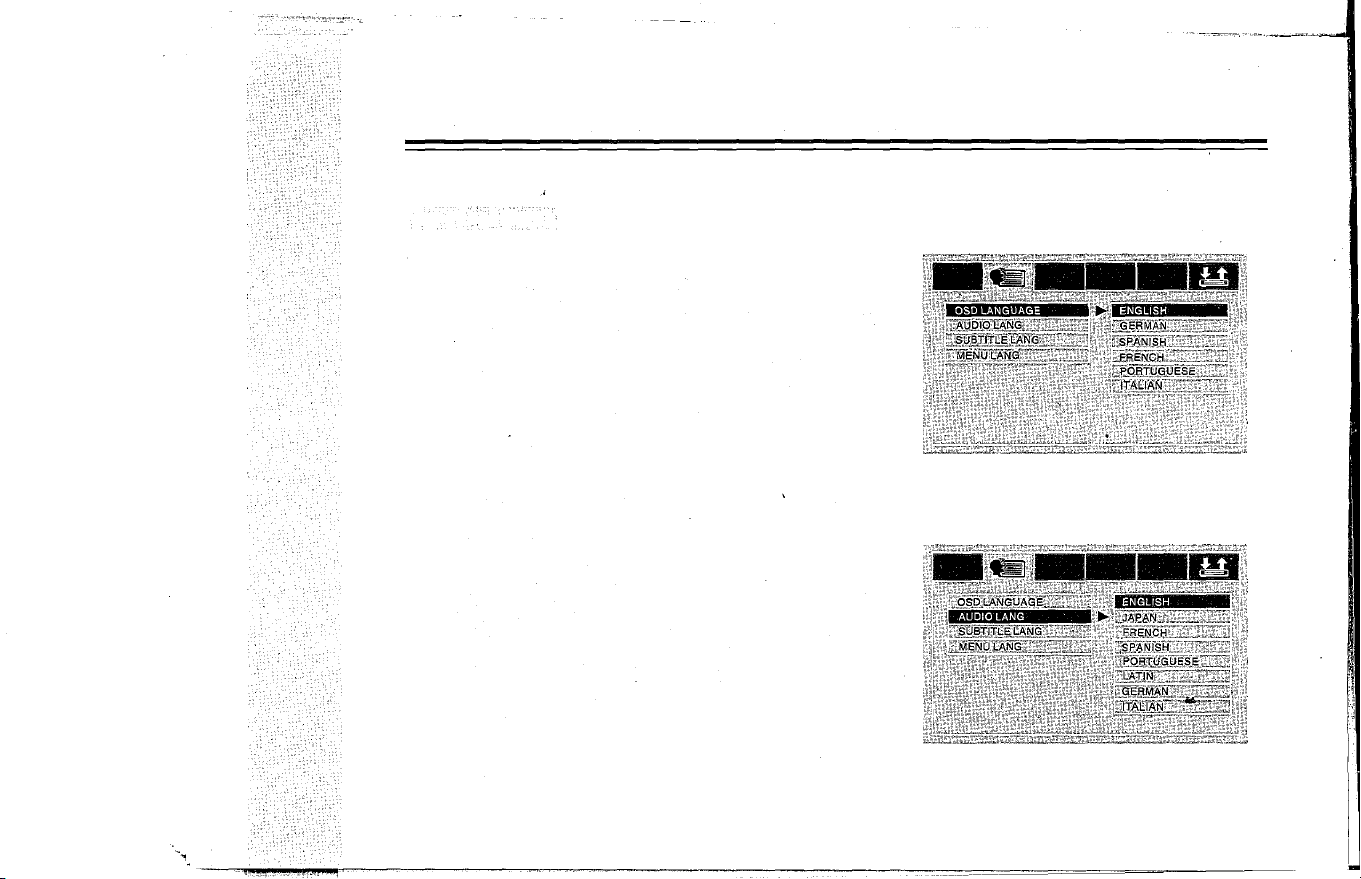
1. Image Display Language (see figure 3)
(1) Press Setup key and the TV screen will display the system
setup picture, select Language Setup and then select Im
age Display Language option, press Enter key to confirm,
the TV screen shall display the image as figure 3.
(2) Select your desired language option, multiple languages
are available for selection including: English, ITALIAN
,
German, Spanish, French and Portuguese. Select Enter
key to confirm and then press Setup key to exit the menu
setup.
2. Audio language, subtitle language and menu language
Figure3
(see figure
4 )
Figure
4
(1) Press Setup key and the TV screen will display the system
setup image, select Language Setup and then select your
desired language option, press Enter key to confirm, the
TV screen shall display the image as figure 4.
(2) Select your desired audio, subtitle or menu language opt
ion, the available languages include English, ITALIAN
,
German, Spanish, French, Portuguese, Japanese and
Latin. Press Enter key to confirm and then press Setup key
to exit menu setup.
14
USER'S MANUAL OF AUTOMOBILE HEADREST DVD PLAYER
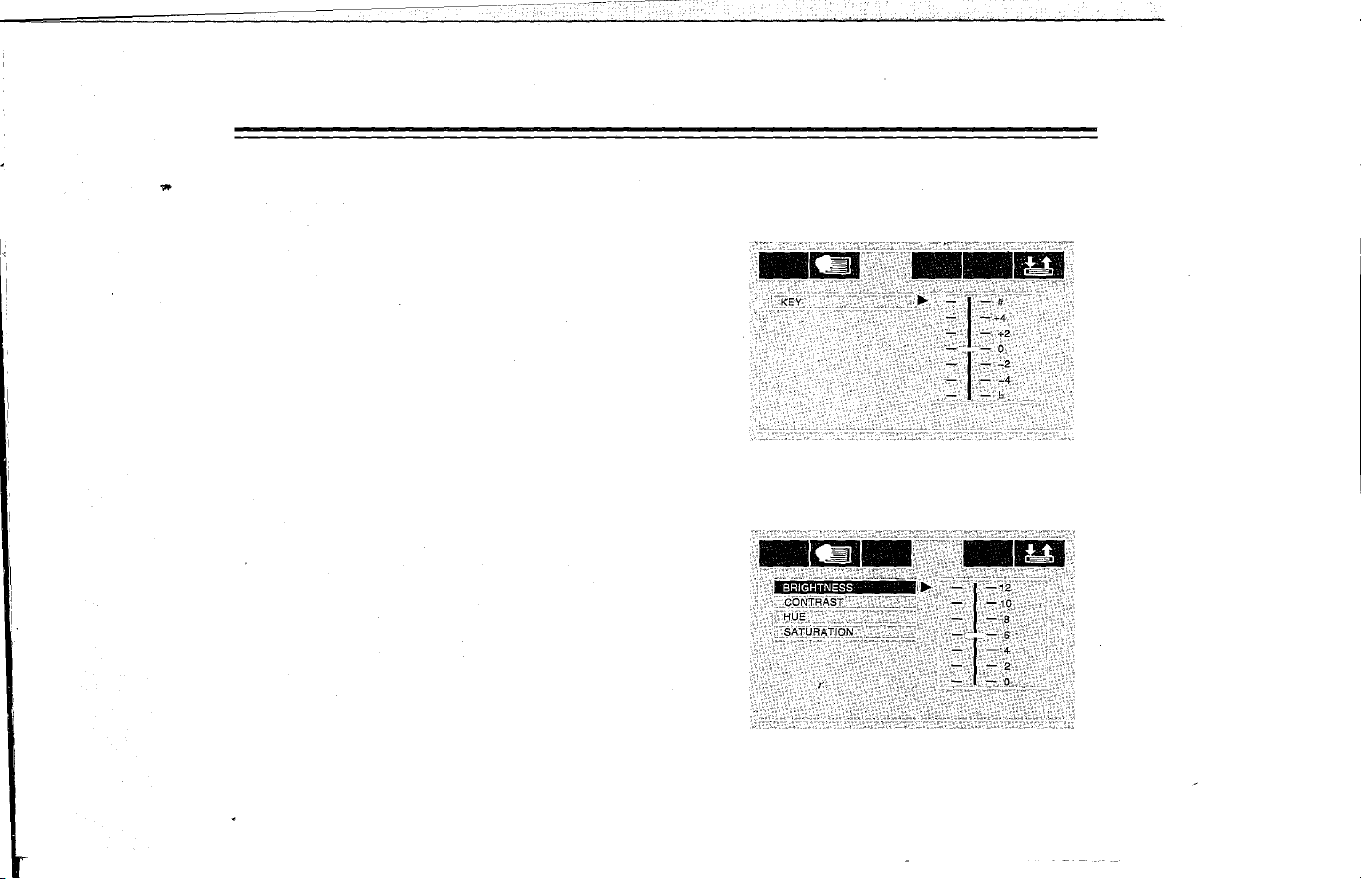
Audio Setup
1. Tone (see figure
5
)
(1) Press Setup key and the TV screen will display the system
setup image, select Audio Setup option and then select
Tone option, press Enter key to confirm and the TV screen
shall display the image as figure 5.
(2) If the user wants to adjust the tone, press [AJ and [VJ key
to adjust and then press Enter key to confirm, press Setup
key to exit the system setup.
Video Setup
(1) Press Setup key and the TV screen will display the system
setup image, select Video Setup option and then select
Brightness option, press Enter key to confirm, and the TV
screen shall display the image as figure 6.
(2
)
If the user wants to set up the image brightness, press [AJ
key to increase the brightness and press [vJ key to decre
ase the brightness, and then press Enter key
t
o confirm,
press Setup key to exit the system setup.
Note: the setup methods of contrast, hue and saturation are
same with the setup of Video.
15
Figure 5
Figure
6
USER'S MANUAL OF AUMOBILE HEADREST DVD PLAYER
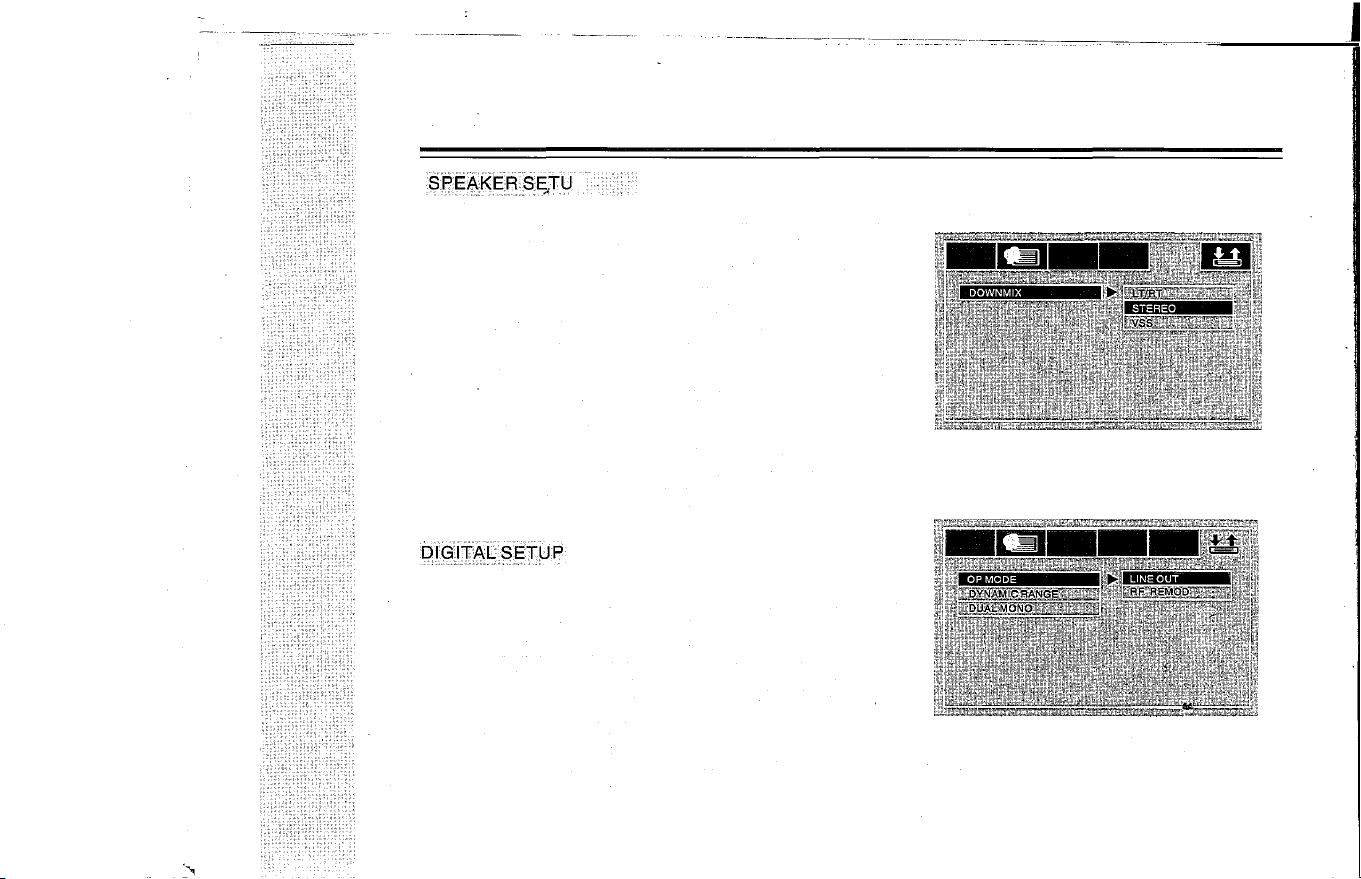
S�E�KESSTU
P
1. Mix Mode (see figure 7)
(1
)
Press Setup key and the TV screen will display the system
setup image, select Loudspeaker Setup option and then
select Mix mode, press Enter key to confirm and the TV
set shall display the image as figure 7.
(2) If the user wants to set up the stereo, move the white bar
on Stereo column and then press Enter key to confirm,
press Setup key to exit the system setup.
Note:
L T/RT: if the disk has the PROLOGIC dolby stereo effect,
the disk signal could present living cinema effect
by decoded inside the player.
Stereo: for 5.1 channel output, the audio shall output two
roads of signal (left channel and right channel);
the common stereo signal shall be outputted.
Virtual surround: in playing 5.1 channel recorded disks,
the main channel shall output the virtual surround
effect.
1. Output Mode (see figure 8 )
(1) Press Setup key and the TV screen will display the system
setup image, select Dolby Digit Setup option and then se
lect Output mode, press Enter key to confirm and the TV
set shall display the image as figure 8.
(2) If the user wants to play the music by low sound volume at
night, please select Line Output and then press Enter key
to confirm, press Setup key to exit the system setup.
Line Output:
linear compress the output signal, low sound
volume, suitable for enjoying music at night;
RF adjustment: high volume, �uitable for enjoying music in
daytime.
16
Rgure7
Figure 8
Dolby digit output setup is for these players
with dolby functions only
USER'S MANUAL OF AUTOMOBILE HEADREST DVD PLAYER
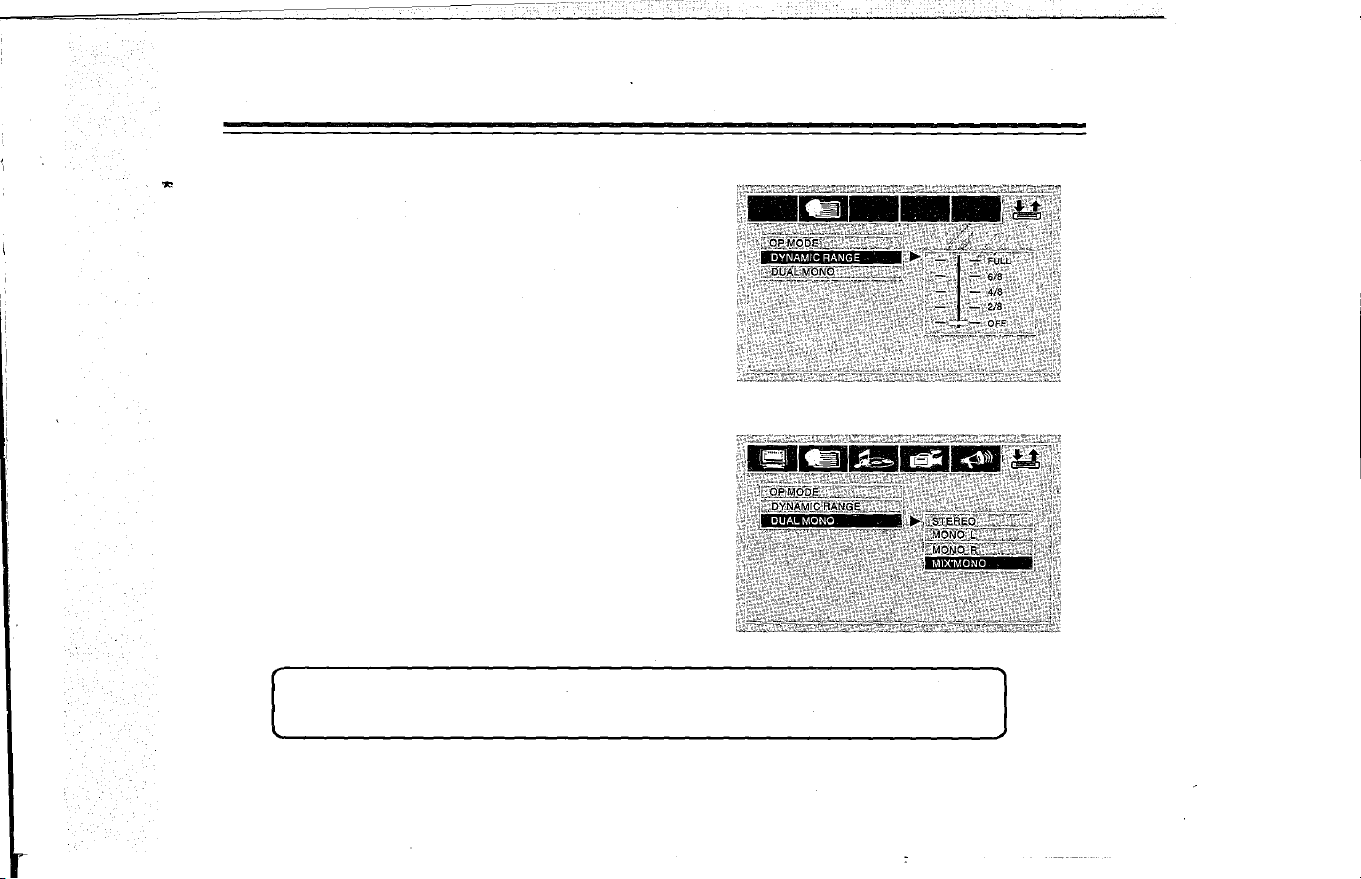
2. Dynamic Range (see figure
9
)
When the compression mode is line output, select this option
to adjust the linear compression ratio to achieve different sig
nal compression effect.
FULL: Minimum peak value for audio signal;
OFF: Maximum peak value for audio signal.
3. Left + Right (see figure 1 0)
This setup is for OK mode of AC-3 only, including Stereo, Left
Channel, Right Channel and Mix Channel.
Figure
9
Figure 10
Note:AII setup option could exit the menu by pressing SETUP key. The system set up menu shall
be a little different from the actual operation due to the software update;it shall be subject to the
real product!
17
"
USER'S MANUAL OF AUTOMOBILE HEADREST DVD PLAYER
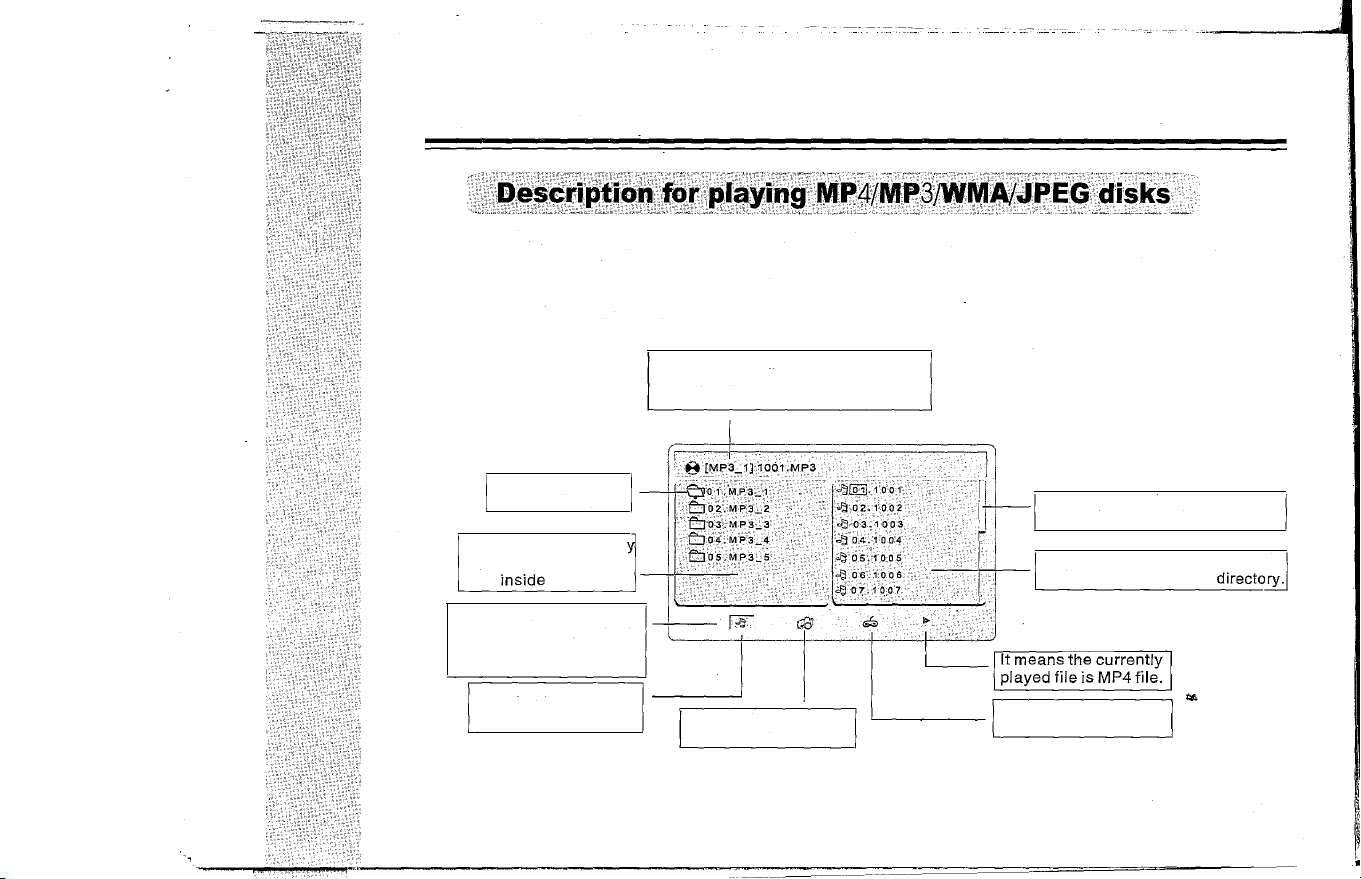
After'loading the MP4/MP3/WMAlJPEG disks, the player shall search the directories automatically, after
being searched, it will enter the directory of MP3 (for these disks of mix file placement), if it's the single file
type of disk, it will enter the first directory and play the first track in this directory automatically (the cursor is
stopped on the position of "0 1: ").
The screen will display as follows:
Name of currently
played folder.
�f the name of MP3/WMA/JPEG/MP4
played currently is JPEG file, the fil
ename shall be *.jpg.
The sliding block could be moved
downward with the track.
Directory area: displa
all directories and na-
mes
inside
the disk.
-',
File area: display the MP3IWMAI
',- JPEG/Mp4 file in current
directory.
Function switching area:
display the type of played
file and switch the desired
file type.
It means the currently
played file is MP3 or
WMA music file.
It means the currently
played file is JPEG file.
18
It means the currently
played file is game file.
,;
USER'S MANUAL OF AUTOMOBILE HEREST DVD PLAYER
.ytrQgAlbm
The player features strong electronic album function, the user may record his/her photos in the video disk or
external memorizer and browse the photos through the player, what's more, the user may zoom in or out the photo
and turn it upward/downwardlleftward/rightward, it's unnecessary to worry about the damage or loss of photos.
PJ
ingJ.EG
pisks
1. Load JPEG disk, it shall stop on the first picture of the first directory after being searched;
2. Use the up/down key to select the picture file, press Play key or confirm to start to play from the selected file;
3. In playing pausing to play picture, you may press the direction key (up/down/left/right) to switch the display
angle.
'
[A] UP: tum the picture upward
[ ] LEFT: rotate 90 degree leftward
[T] DOWN: turn the picture horizontally
[�] RIGHT: rotate 90 degree rightard
1. In playing MP3 and JPEG mixing disk
,
if the user wants to browse the pictures in playing MP3, press direction
key to move the cursor on the picture to be browsed, press Enter key to enter JPEG browse state.
2. Further press direction key to enter the picture play menu, after selecting one picture in the image directory
menu, press Play key to play the pictures in order.
3. Press Left/Right key to switch the state between MP3 and image browse.
�
autlo
• MP3 disk without image has audio signal output only;
• Some JPEG pictures couldn't be zoomed in for the inc6nsistent picture format.
19
USER'S MANUAL OF AUTOMOBILE HEADREST DVD PLAYER
MPEG4 is the widely-applied video image saving and transporting standard. the DVD is designed with MPEG4
file playing function skillfully, the user may not only enjoy the rich video/audio resource on the internet but also
breach the limit of watching film on computer only. The user may use PC to download, record or transcribe and
produce the MPEG4 disks, the better picture and sound quality could be achieved.
MPEG4 is the fourth version of audio/video standard by Moving Pictures Experts Group. MPEG1 is the video
image compression standard of VCD; MPEG2 is the video image compression standard of DVD or super V;
MPEG4 is one of the network video image compression standards, the video/audio file with MPEG4 technology
fatures high compression rate and clear image. Generally, hundred or more OK songs or many films might be
saved in one disk with better image quality than VCD or SVCD!
Note: in the current market, some disks marked with MPEG4 is Real Video actually or other formats (such as
*.rm/*.ral*.raml*.rmvbl*. wmvl*.ast), which couldn't be compatible with the international standard MPEG4,
they could be played by special software only and couldn't be played by this player. Do identify it in buying
disks.
The operation of MP3 disk is same with playing MP4 disk, MP4 disk has video image and auto play is the
default setup for this player, press Stop/Return key to return to the menu to facilitate the user to select the
menu.
20
USER'S MANUAL OF AUTOMOBILE HEADREST DVD PLAYER
The player features superior intelligent game function, it will make you enjoy the wonderful game in spare time.
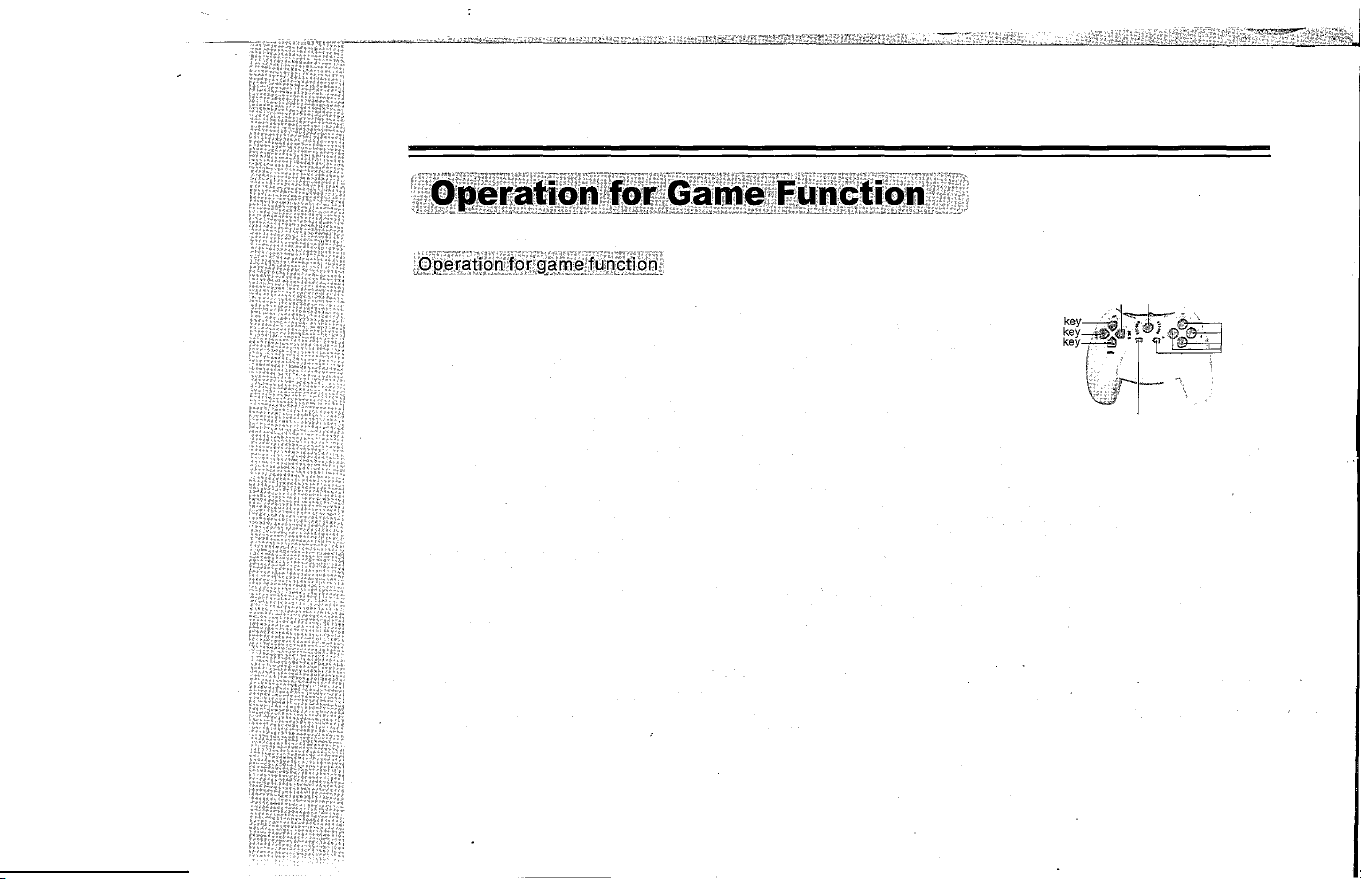
1.Description for built-in game operation
Right key Reset
k
ey
On the no disk or stop playing status, press SETUP on the function controller u�
k
eY
�
l
�
W
or press SELECT on the game controller enter the menu, use direction key
D
�;n ����
!
!�' '. .', Funcon
k
ey
select EMBEDED Game or NATIVE Game and press ENTER on the function
controller or START on the game controller to enter the game .
,
2.Description for playing the Game Disk Operation
.
-
.. "
(1)
Press Eject key and load the game disk(the Disk for free),the game main menu
shall be displayed in seconds
Game menu
k
ey
(2)
Press direction key of the function controller or game controller to select the
games then press ENTER on the function controller or press START on the game controller to enter the game.
3.Description for the Wireless Game Controller
(1)
Press SELECT to enter the menu of the built-in games.
(2)
Press direction key to select the games you like, then press the START to enter the game.
(3
)
Enter the game, press the direction key to select upward/downward/leftward/rightward , Press A.B ,TA and TB
key to operate the functions.
(4
)
Press Stop/Return key on the function controller or press RESET key on the game controller to exit the game.
If enter EMBED ED Game ,press Stop/Return key or press RESET key can return to the main menu.then use
direction key select EXIT and press ENTER on the function controller or START on game controller to exit the
game.
Caution:
1.Can not enter the built-in games when reading disk.
2.For different games,the function keys might be different, the user could get the know-how by trying se�eral times
3.You can download games through Pefrom this website:http://www.native32.com into the USB or Memory Cards.
21
USER'S MANUAL OF AUTOMOBILE HEADREST DVD PLAYER
Troubles
Solutions
1. Check the power connection;
No response
2. Check the auto power is opened;
3. Check the power is opened.
1.Check whether the volume is on the Min. position or in Mute state;
2.Whether atthe status of FM transmintting or IR transmitting? Please select FM OFF
No sound
and turn off IR Audio output function.
3.No sound output in the following states: Pause/Fast Forward/Fast Backward/
Stop.
4 Resume the default via setup systemo
1.Check whether the player is in line input state, press DVD/AV to switch it to be
Image
DVD state;
2.Check whether the brightness setup is appropriate.
1. Check whether the disk has been loaded and the side with label is placed upward;
The disk couldn't
2. The disk is damaged or dirtied, please load another disk or clean the disk;
be read
3. The region codes of disk and player are different;
4. The disk format is wrong.
Improper
1. Set up the TV system once again;
image size
2. Select the corresponding screen format from the setup menu.
The track couldn't
1. Some sections of some disks are not allowed to interrupt its set playing order.
be selected
The remote
1. Check whether there exists any barrier between the remote controller and player;
continueroller
2. The remote controller doesn't aim at the receiving head of player;
3. Check whether the battery is installed correctly;
refuses to work
4. Check whether the battery has enough electricity. Y
Do not dismantle the device to repair without permission!
22
