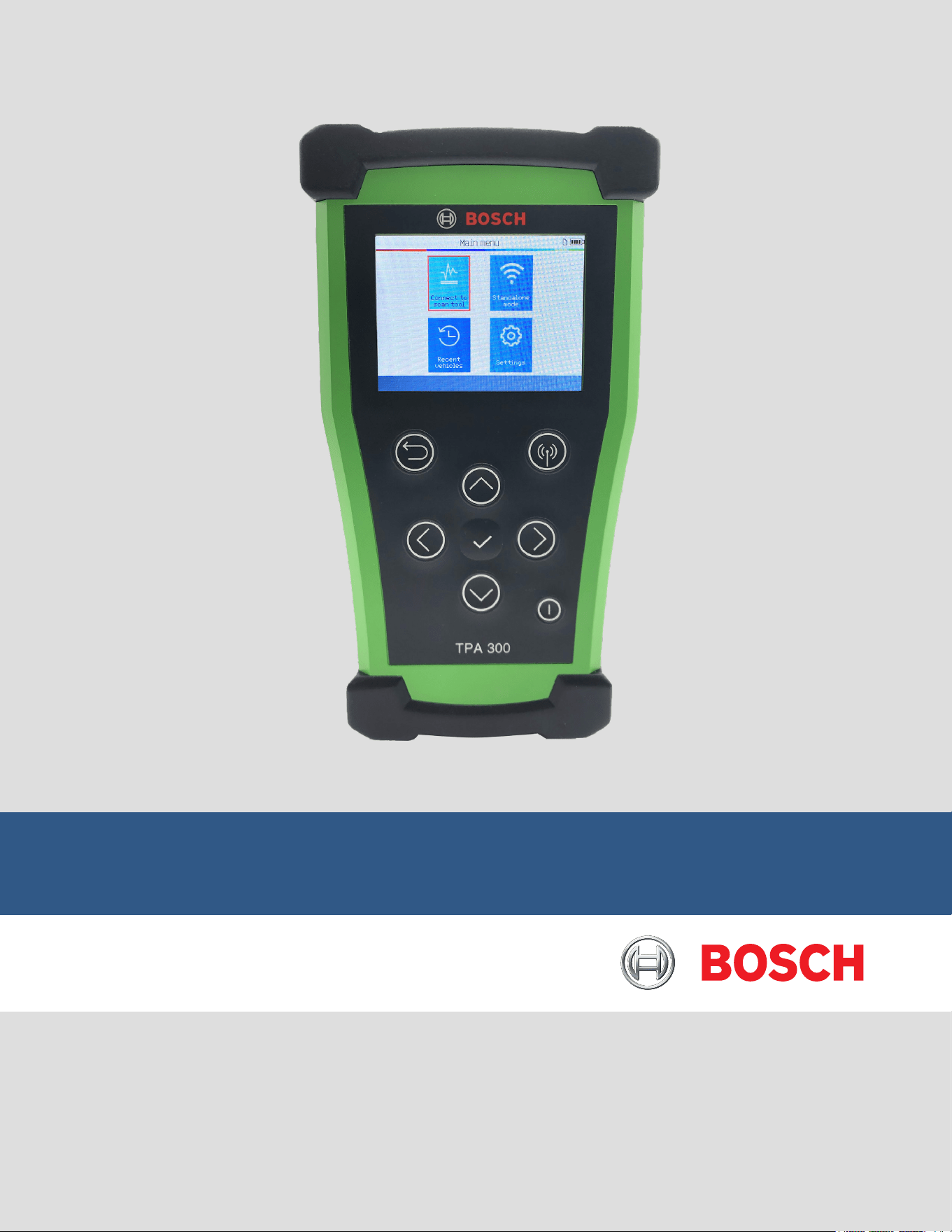
TPA 300 User Guide
(en-US)

en-US
|
2
|
User Guide
|
TPA 300
1699502721 | REV. B | JUNE 2020
© Bosch Automotive Service Solutions Inc.
Table of Contents
TPA 300 Introduction
1 Specications 3
2 ProductContent 4
3 ImportantSafetyInstructions 5
4 SafetyPrecautions 6
5 TPA300Overview 7
6 FunctionKeys 7
7 HeaderIcons 8
8 BottomIcons 8
9 PowerOn 8
10 OperatingInstructions 9
TPA 300 Standalone Mode
1 CheckTPMSSensors 11
2 ProgramTPMSSensors 17
3 RecentVehicle 27
4 KeyFobTest 29
5 Settings 31
Connect to Scan Tool Mode
1 BluetoothPairing 38
2 TPMSECURelearn 42
Miscellaneous
1 ToolCharging 46
2 ToolUpdate 47
3 LimitedWarranty/Certicate(s) 54
4 SoftwareProductLicenseAgreement 55
5 BatterySafetyandChargeInformation 59
6
FederalCommunicationsCommissionInterferenceStatement
60
7 IndustryCanadaStatement 60
8 Recycling 61
Index
1 Index 62

1699502721 | REV. B | JUNE 2020
TPA 300
|
User Guide | 3
|
en-US
© Bosch Automotive Service Solutions Inc.
BatteryType: 3.000 mAh rechargeable lithium-polymer battery
BatteryLife: Approximately 300 activations per full charge
Dimensions
(Max.L,W,D):
7.04” x 3.92” x 1.40”
(178.9 mm x 99.7 mm x 35.8 mm)
CaseMaterial: High Impact ABS
ResponseFrequency: Main frequencies: 315 MHz and 433.92 MHz
LowBatteryIndication: LCD bar graph display
Weight: Approx. 0.72 lbs. (328 grams)
Temperatures:
Operating: -4° F to 131° F (-20° C to +55° C)
Storage: -40° F to 140° F (-40° C to +60° C)
OperatingAltitude: Up to 6560 ft (2000 m)
Screen: 2.8” display
Warranty 1 year
1 Specications
TPA 300 Introduction
en-US
|
4
|
User Guide
|
TPA 300
1699502721 | REV. B | JUNE 2020
© Bosch Automotive Service Solutions Inc.
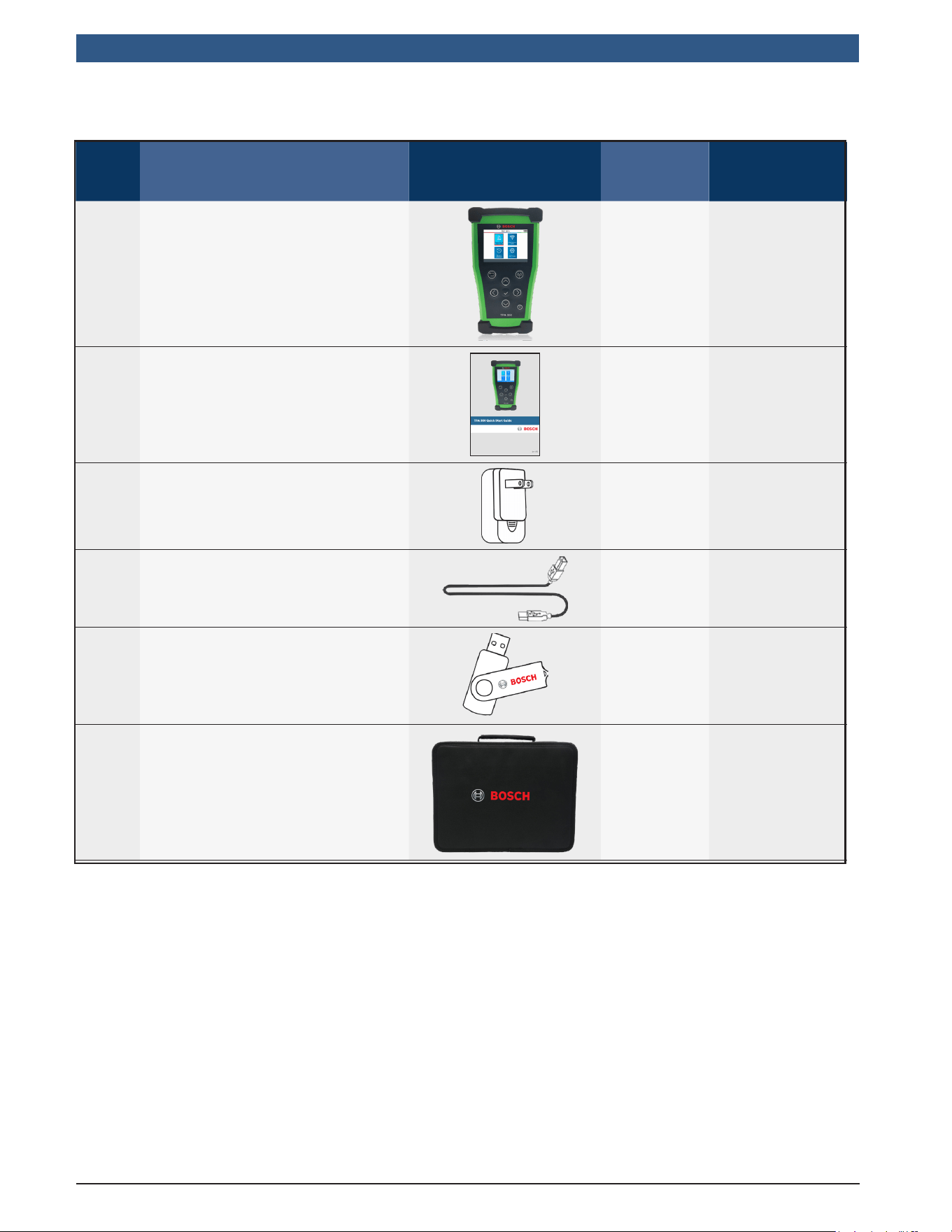
Item KitComponent Image Quantity PartNumber
1 BoschTPA300Tool 1 NA
2 QuickStartGuide 1 1699502722
3 WallCharger 1 3934-02
4 USBBCable 1 3934-01
5 USBKeywithPCSoftware 1 3939-04
6 CarryingCase 1 NA
2 Product Content
1699502721 | REV. B | JUNE 2020
TPA 300
|
User Guide | 5
|
en-US
© Bosch Automotive Service Solutions Inc.
3 Important Safety Instructions
Donotdiscard.Retainforfuturereference.
This device complies with Part 15 of the FCC Rules
Operation is subject to the following two conditions:
(1) This device will not cause harmful interference, and
(2) This device will accept any interference received, including interference that may
cause undesired or improper operation.
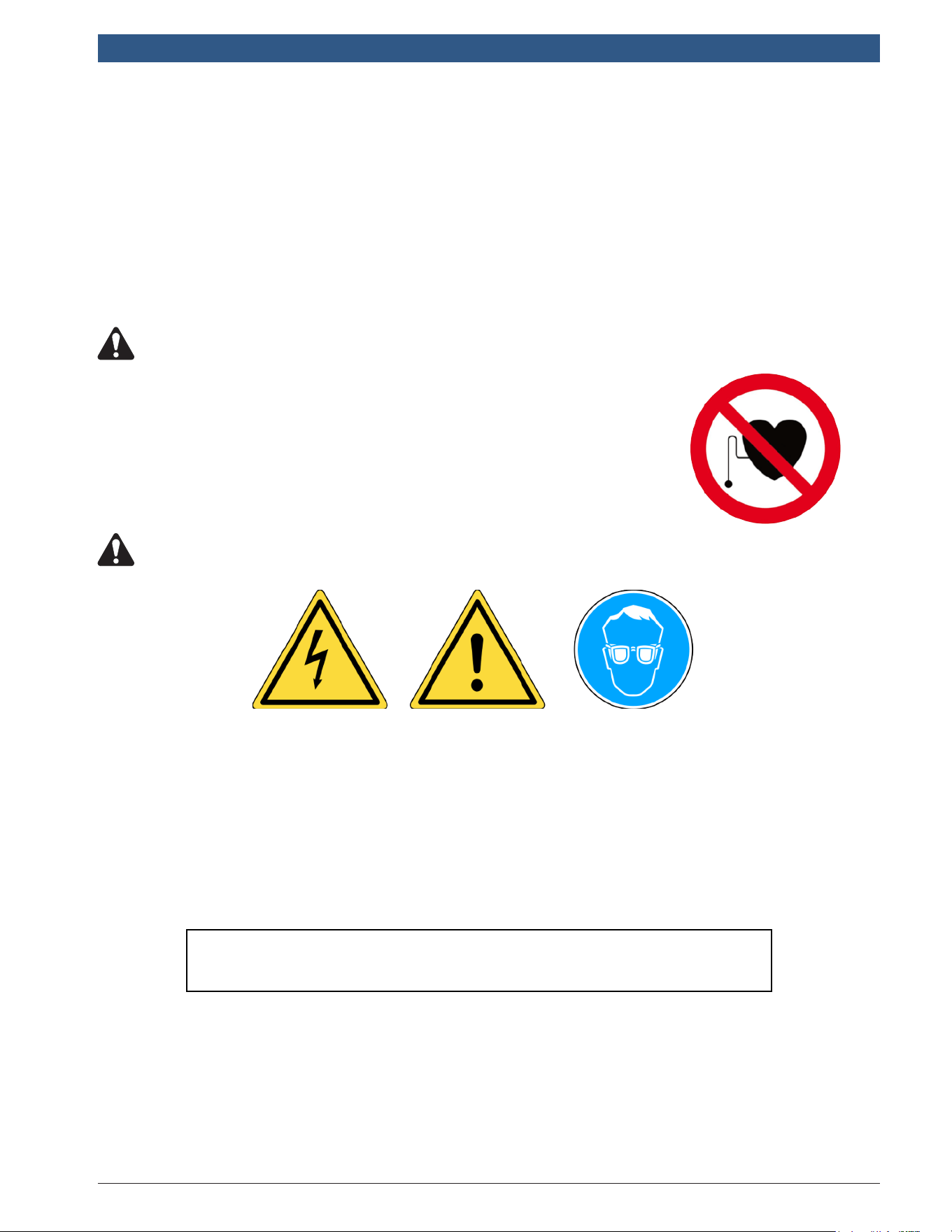
WARNING: This product emits electromagnetic and electronically generated
waves that may interfere with the safe operation of pacemakers.
Individuals that have pacemakers should never use this product.
WARNING:
Donotuseonliveelectricalcircuits.
Mustreadinstructionsbeforeuse.
Wearsafetyglasses.(userandbystanders).
ReadtheWarranty,SafetyandRecyclinginformation
onpage6andattheendofthisuserguide.

en-US
|
6
|
User Guide
|
TPA 300
1699502721 | REV. B | JUNE 2020
© Bosch Automotive Service Solutions Inc.
4 Safety Precautions
READTHESEINSTRUCTIONSBEFOREUSING
The Tire Pressure Monitoring System(TPMS) tool has been designed to be durable,
safe, and reliable when properly used.
All TPMS TOOLS are intended to be used only by qualied and trained automotive
technicians or a in light industrial repair shop environment. Readallinstructions
belowbeforeusing.Followallthesesafetyinstructionsandthoseinthebackof
thismanual.Ifyouhaveanyquestionspertainingtothesafeorreliabilityuseof
thistool,pleasecalltechnicalsupport.
Vehicle specic information in this manual is used as an example and may not represent
specic instructions each make and model may require. When performing various
functions with the tool, it is important to refer to the on-screen prompts and/or repair
manual information.
} ReadAllInstructions
All warnings on the tool and in this manual should be adhered to. All operating
instructions should be followed.
} RetainInstructions
The safety and operating instructions should be retained for future reference.
} HeedWarnings
User and bystanders must wear safety goggles and must read instructions before
use. Do not use on live electrical circuits.
} Cleaning
Clean with a soft dry cloth, or if necessary, a soft damp cloth. Do not use any
harsh chemical solvents such as acetone, thinner, brake cleaner, alcohol, etc as
this may damage the plastic surface.
} Water&Moisture
Do not use this tool where contact or immersion in water is a possibility. Never
spill liquid of any kind onto the tool.
} Storage
Do not use or store the tool in an area where it is exposed to direct sunlight or
excessive moisture.
} RiskofFire
To reduce the risk of re, do not operate the tool in the vicinity of open containers
of ammable liquids. Do not use if the potential for explosive gas or vapors exists.
Keep the tool away from heat generating sources. Do not operate the tool with the
battery cover removed.
1699502721 | REV. B | JUNE 2020
TPA 300
|
User Guide | 7
|
en-US
© Bosch Automotive Service Solutions Inc.
5 TPA 300 Overview
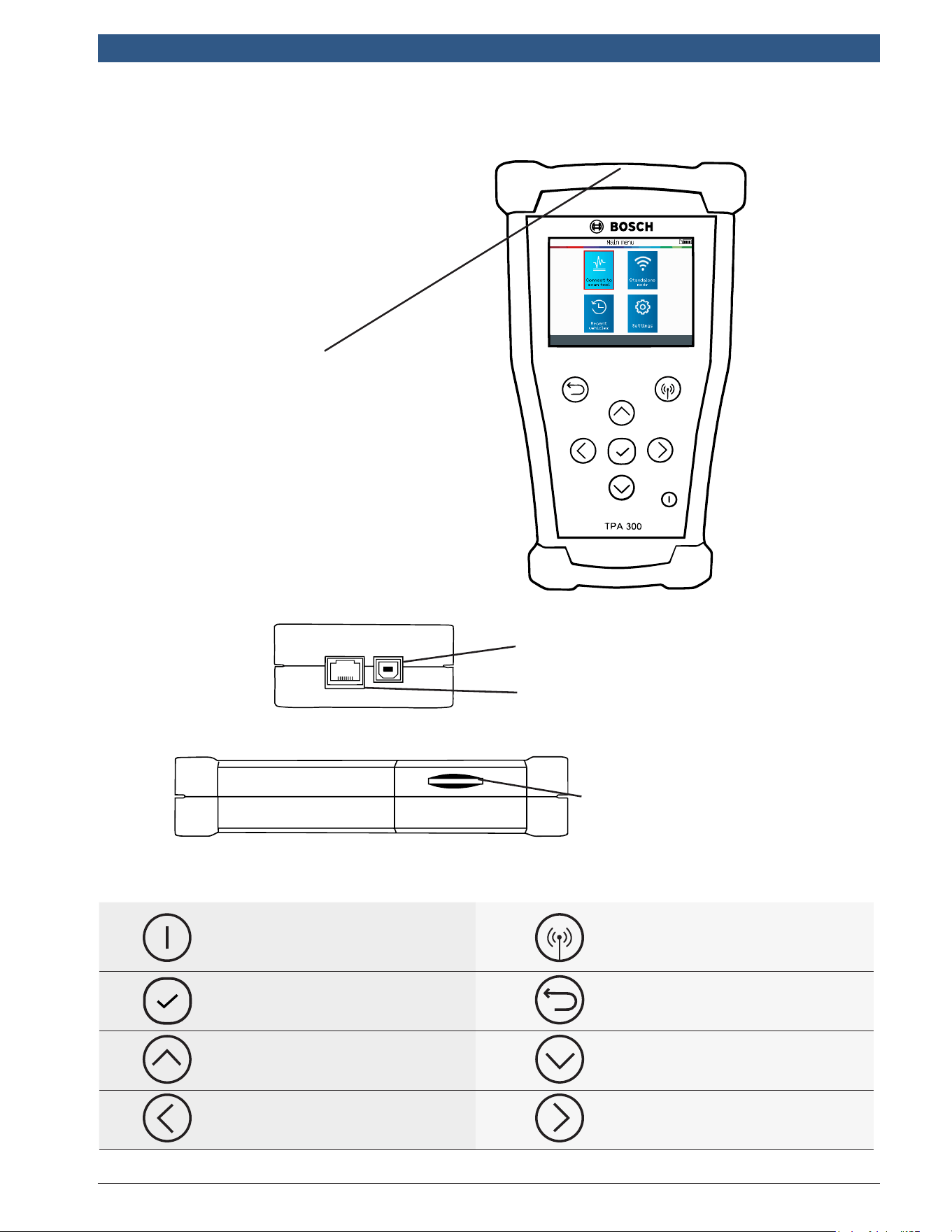
Bottom
Side
Front
Charging/USBPort
Used for charging the tool, as
well as connecting to a PC for updates.
ExtensionPort
Used for connecting the tool to
optional accessories.
SDCardSlot
Used for SD card job data storage.
LFAntenna
For best sensor triggering, hold the
tool against the tire sidewall close
to the sensor.
Power ON /OFF switch Test or trigger sensor
Next, continue or conrm Cancel, previous step
Up Down
Left Right
6 Function Keys
en-US
|
8
|
User Guide
|
TPA 300
1699502721 | REV. B | JUNE 2020
© Bosch Automotive Service Solutions Inc.
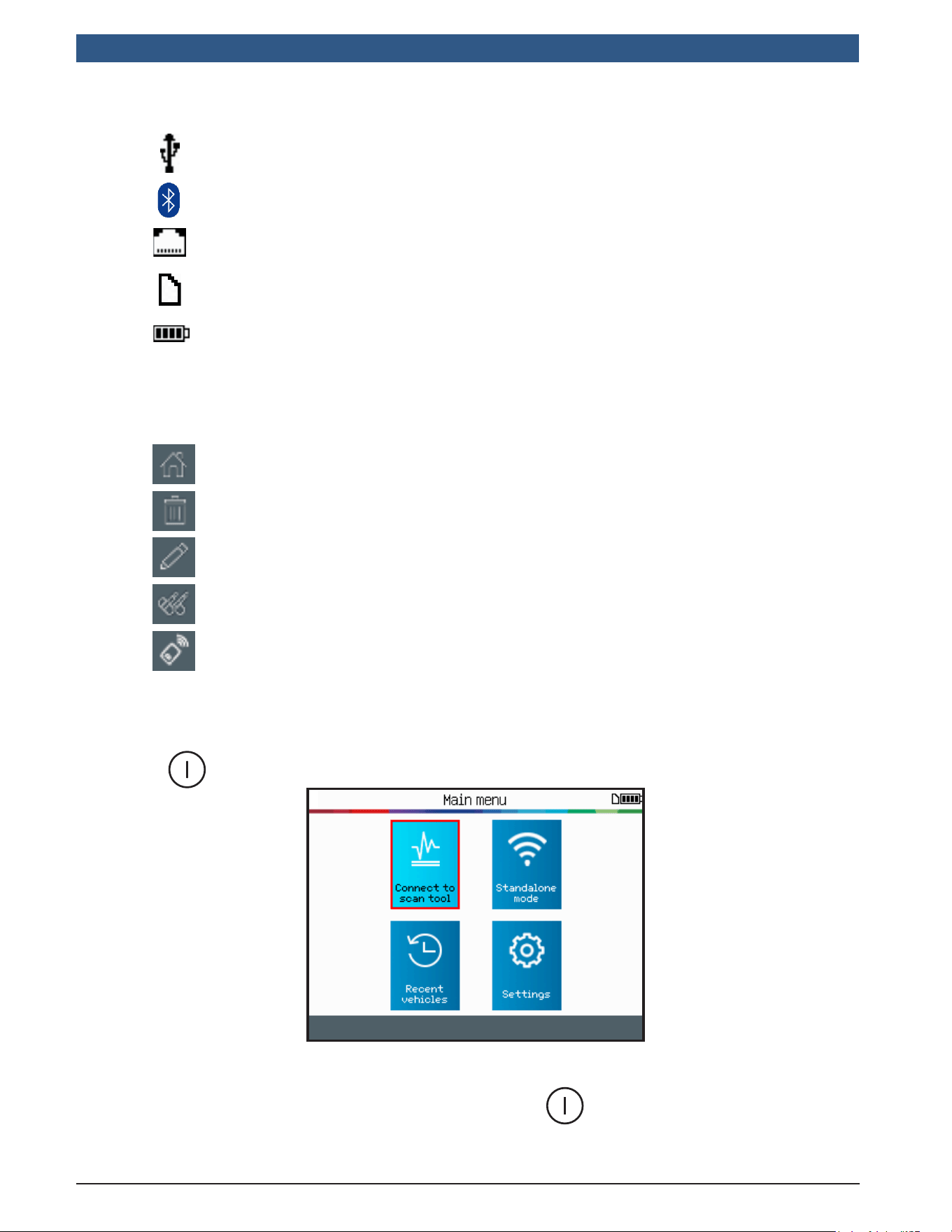
7 Header Icons
The tool is connected to PC via USB cable.
The tool is connected via Bluetooth to the BOSCH scan tool.
The tool is connected to an optional module.
SD card is inserted.
Battery status.
9 Power On
8 Bottom Icons
Main Menu - display the Main Menu.
Delete - delete the sensor data displayed.
Edit Info - allow the user to input the job information.
Program - jump to the Program Sensor function.
Keyfob Test - jump to the Key Fob test function.
Press the button to turn on the TPMS TOOL.
This tool has an auto-off feature – time duration is adjustable in settings.
To power off the tool manually, press and hold the button for about 3 seconds.
1699502721 | REV. B | JUNE 2020
TPA 300
|
User Guide | 9
|
en-US
© Bosch Automotive Service Solutions Inc.
10.1.TPA300Overview
The Bosch TPA 300 offers the versatility to work in conjunction with a Bosch scan
tool or as a stand-alone TPMS tool.
Stand-alonemode can be used to read, program and copy TPMS sensors, test RKE
(Remote Keyless Entry), save and retrieve jobs, and setup the tool.
Connecttoscantoolmode offers the ability to connect wirelessly to a Bosch scan
tool and to register the TPMS sensors’ IDs into the vehicle ECU.
10.2.ServiceProcedure
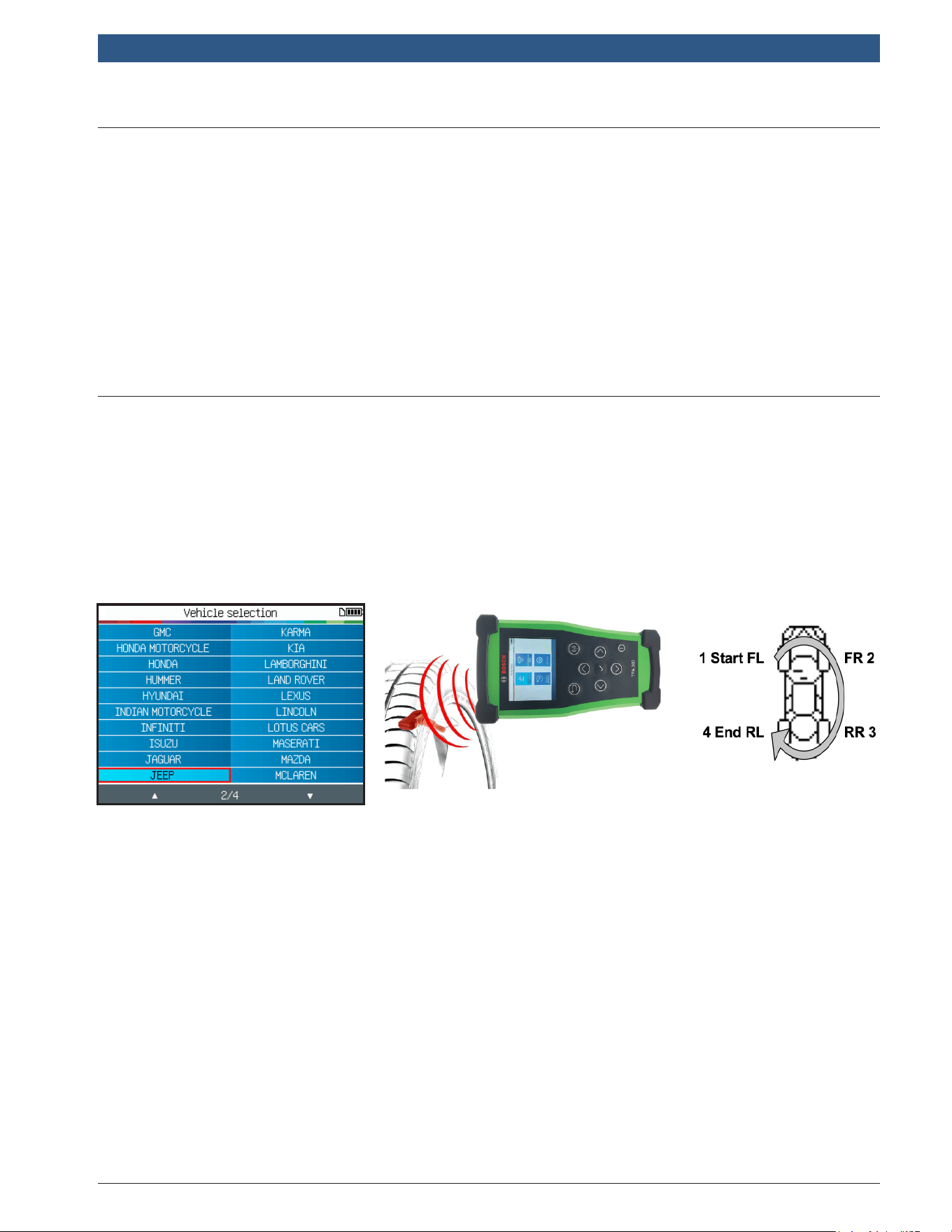
Section1-ReadSensorTest
Before servicing the tires/wheels, using the TPMS tool, trigger each of the vehicle’s
sensors to make sure they are working properly. Either use the standalone or the
connect to scan tool mode to select the make, model, and year of the vehicle.
10 Operating Instructions
Step1:Select the Make, Model,
Year of the vehicle.
Step2:Hold the tool facing the
tire ank near the valve.
Step3:Read all the sensors
starting from front left.
This will eliminate the liability associated with replacing previously damaged or defective
sensors. This procedure will not change the vehicle settings because the vehicle has yet
to be put into learn mode. This procedure quickly identies damaged or defective sensors,
because some vehicles do not report a damaged or defective sensor condition on the
instrument cluster for up to 20 minutes.
Note: With some vehicles, if the vehicle is in “learn mode” the vehicle will also conrm that the
TPM sensor has communicated to the ECU with a series of horn beeps.
Note: If the sensors do not trigger, please refer to the Troubleshooting section of this Guide.
For vehicles that require relearn procedure, see Section 2 on page 10.
en-US
|
10
|
User Guide
|
TPA 300
1699502721 | REV. B | JUNE 2020
© Bosch Automotive Service Solutions Inc.
Section2-RelearnTPMSSystems
After selecting the Make-Model-Year of the vehicle, the tool systematically displays
which relearn procedure is required for that particular vehicle: automatic, manual or
scan tool (OBDII) relearning procedure.
For manual and scan tool (OBDII) relearn procedures, follow the instructions
displayed on the tool screen. For vehicles with an automatic relearn procedure,
where the TPMS system is automatically reset when driving the car, it is
recommended to trigger each wheel sensor one nal time, to make sure they are in
correct working order.
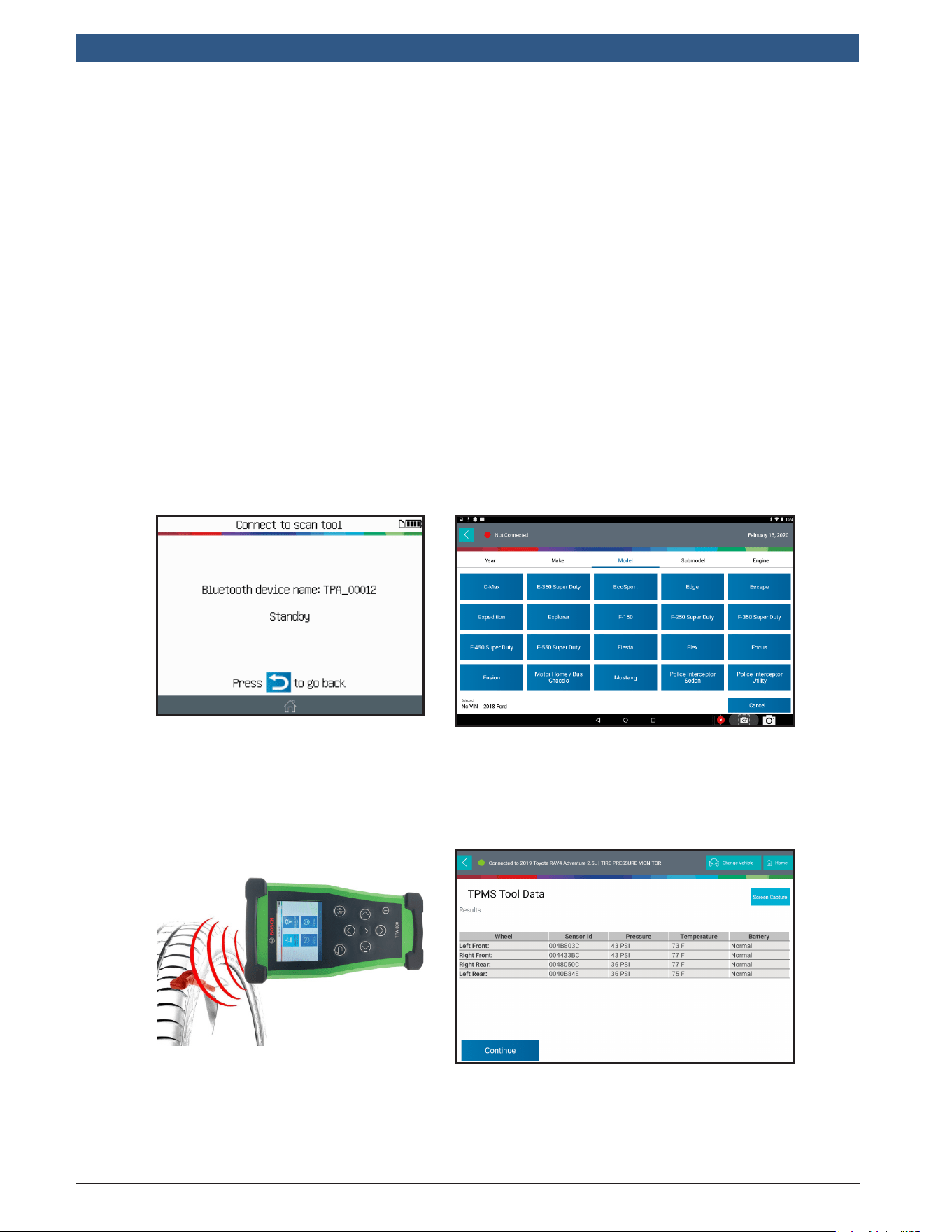
A scan tool (OBDII) relearn requires the use of a Bosch scan tool paired with the
TPA 300. Follow the dedicated section in this user manual (pg 38) to do the pairing
procedure for the rst time. When the two tools are already paired, use the “Connect
to scan tool” mode from the TPA 300 main menu. All the other steps – except the
sensor reading – are made directly from the Bosch scan tool.
Step1: Put the TPA 300 into
“Connect to scan tool” mode.
Step2: Select the make, model, year of
the vehicle from the scan tool menu, using
Auto Id or Manual method. Then choose
maintenance test, or special tests, then
choose TPMS Registration.
Step3: With the TPA 300, read all
the sensors starting from front left.
Step4: Follow the scan tool on-screen
procedure to register the sensors ID’s into
the vehicle’s ECU.
1699502721 | REV. B | JUNE 2020
TPA 300
|
User Guide | 11
|
en-US
© Bosch Automotive Service Solutions Inc.
IMPORTANT:
TPA300StandaloneModeisusedtoread,programandcopyTPMSsensors,test
remotekeylessentry(RKE),saveandreadrecordedjobs,andsetupthetool.To
registertheTPMSsensorID’sintothevehicleECU,usetheTPA300Connectto
scantoolmode.Seethisusermanualdedicatedsectiontolearnhowtooperate
thismode.
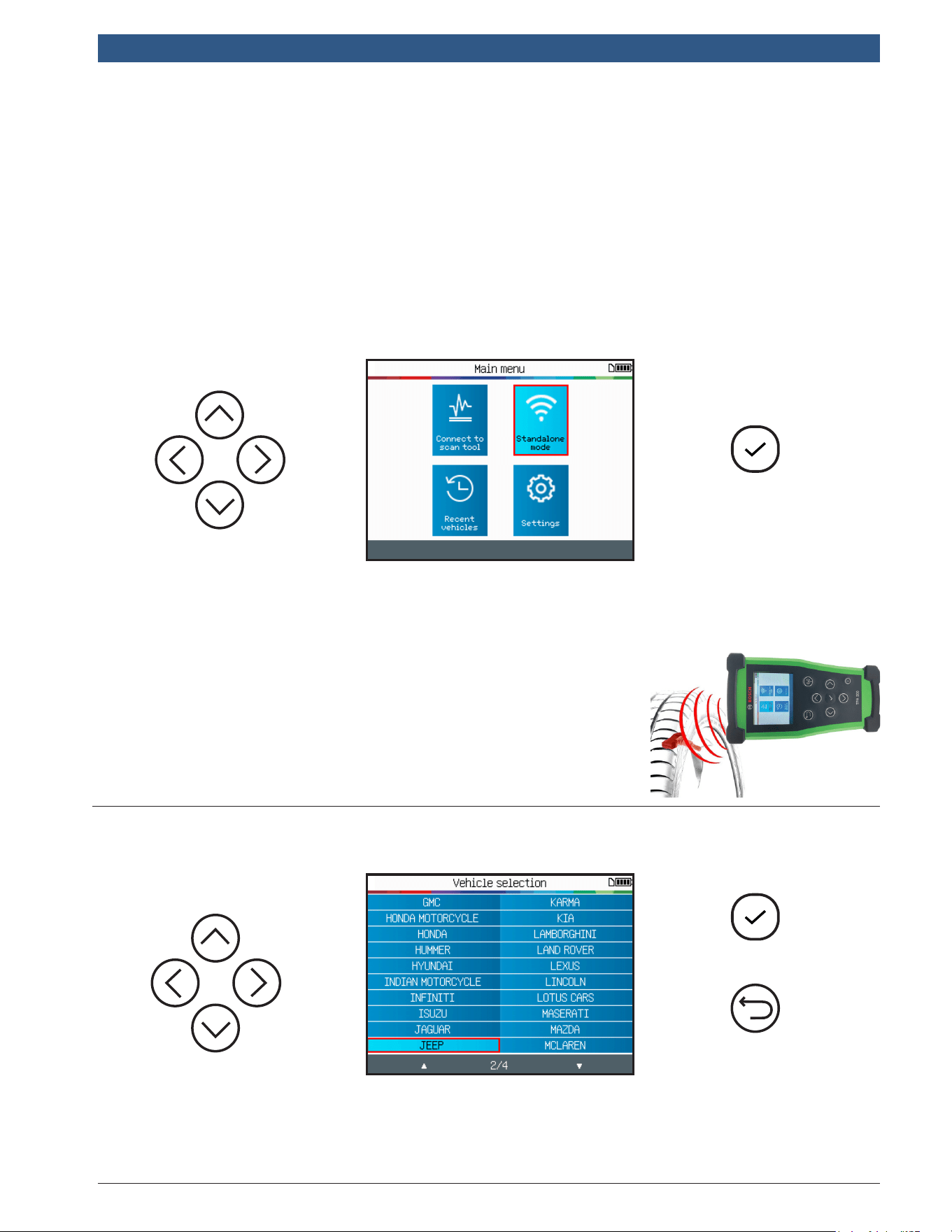
SelectStandaloneMode
Continue
Continue
Previous
This mode is to trigger all the TPMS sensors on the vehicle.
IMPORTANT: For best sensor triggering, hold the tool
against the tire sidewall right above the sensor.
1.1SelectVehicleManufacturer
1 Check TPMS Sensors
TPA 300 Standalone Mode
en-US
|
12
|
User Guide
|
TPA 300
1699502721 | REV. B | JUNE 2020
© Bosch Automotive Service Solutions Inc.
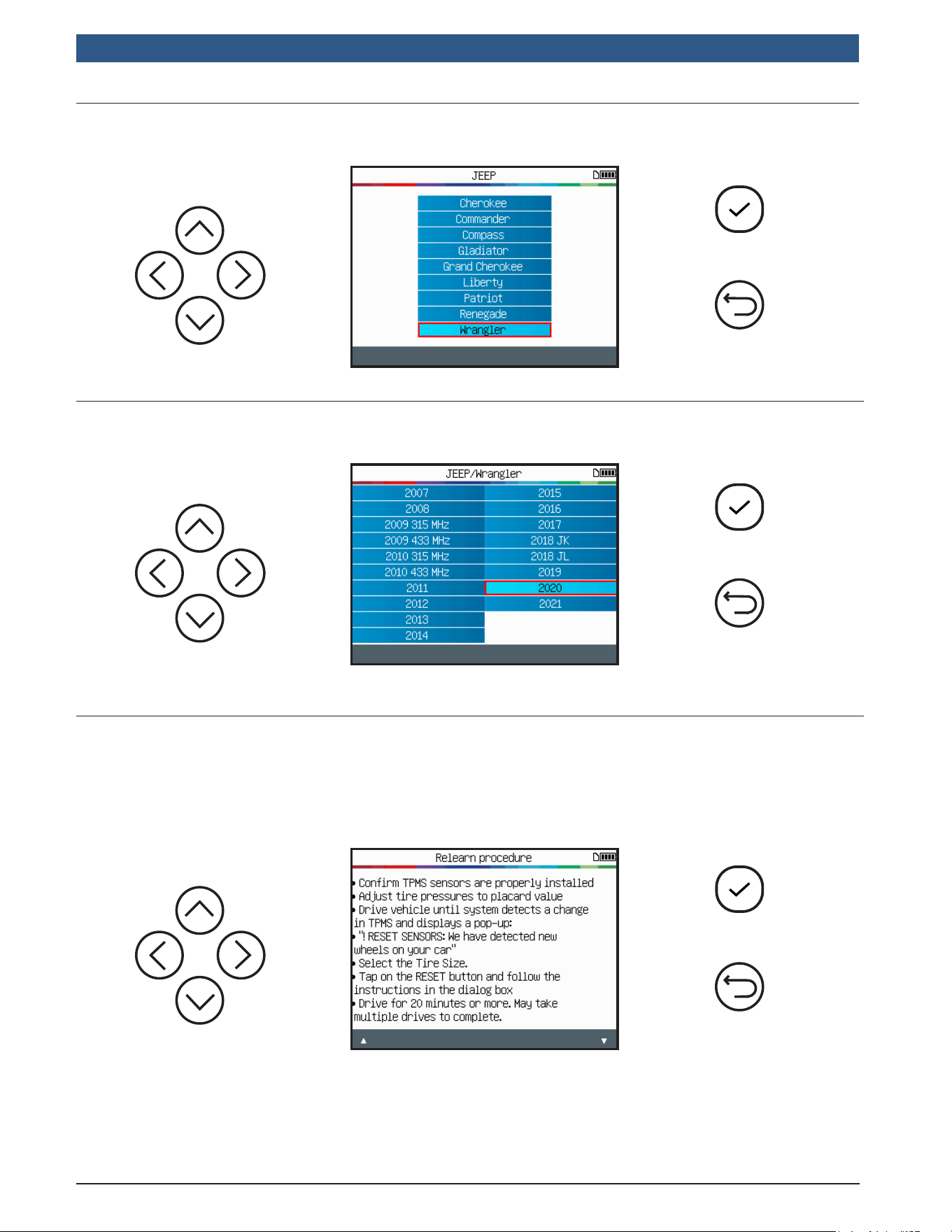
Continue
Previous
1.2SelectVehicleModel
Continue
Previous
1.3SelectYear
1.4ReadRelearnProcedure
Depending of the selected make/model/year vehicle, the tool displays which relearn
procedure is required: automatic, manual or scan tool (OBDII) relearning procedure.
Read the relearn procedure, then press continue when ready.
Continue
Previous
Automatic procedure example
1699502721 | REV. B | JUNE 2020
TPA 300
|
User Guide | 13
|
en-US
© Bosch Automotive Service Solutions Inc.
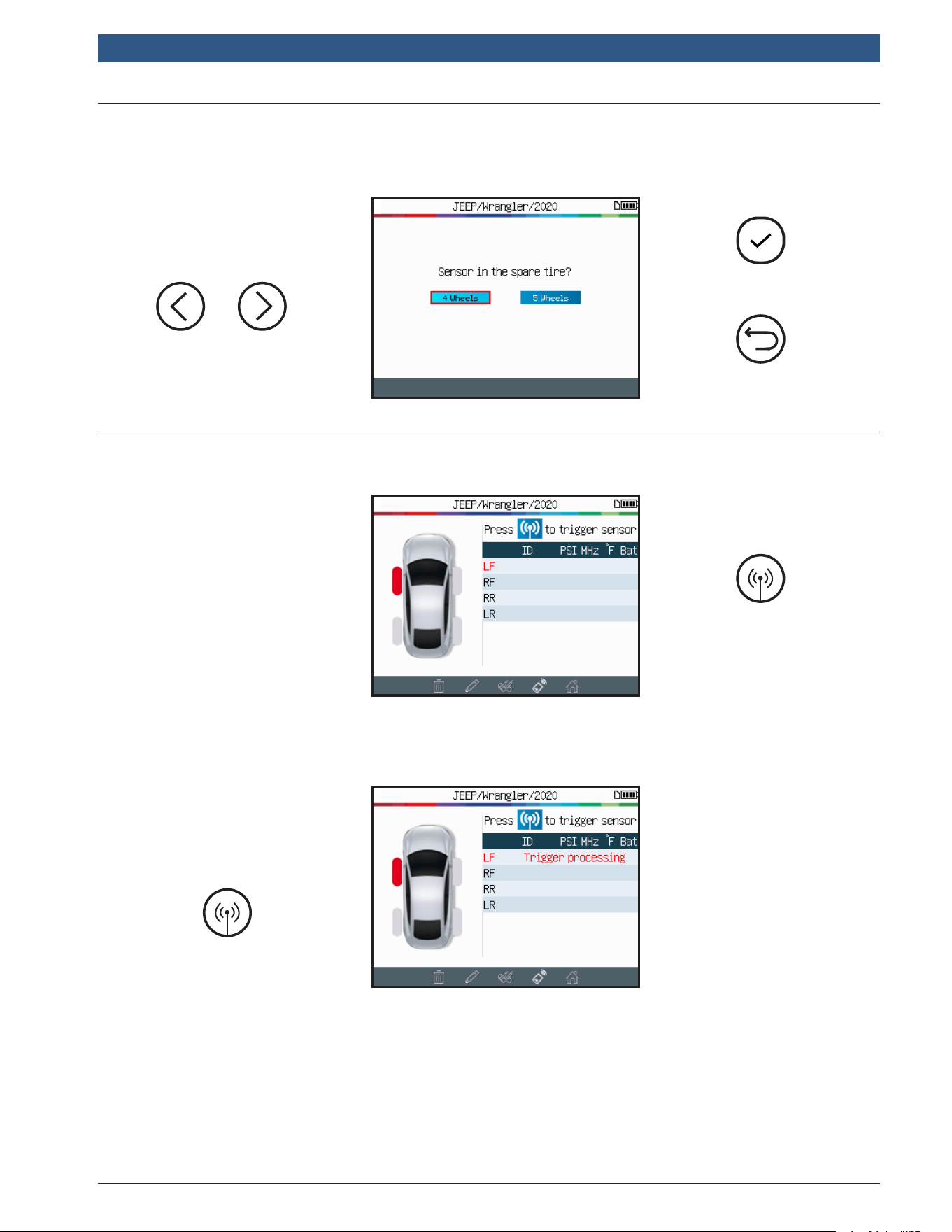
Continue
Previous
1.5SelectNumberofWheels
Trigger Sensor
1.6TestSensors
On some vehicles, the tool will request to conrm the number of wheels tted with
TPMS sensors.
Start by reading
the Left Front
sensor.
The tool is now
ready to trigger
sensors.
Left Front
Please wait
during the
triggering
process.
en-US
|
14
|
User Guide
|
TPA 300
1699502721 | REV. B | JUNE 2020
© Bosch Automotive Service Solutions Inc.
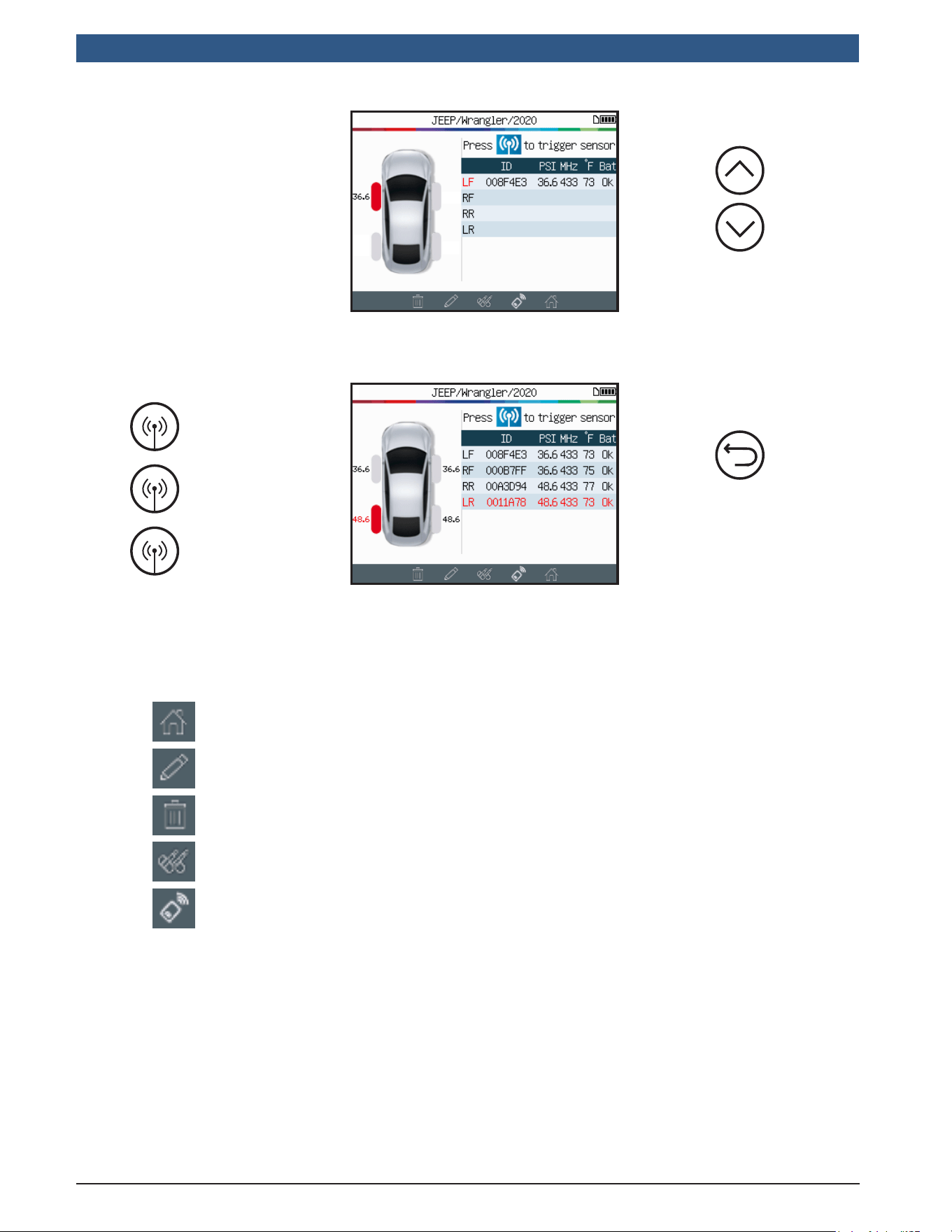
The rst sensor
has been read
successfully.
Right Front
Scroll wheels
if needed
The tool will
automatically
advance to the
next wheel.
Exit and
record the
job
Right Rear
Left Rear
When all sensors have been read, use the icon bar located at the very bottom of the
screen, to navigate to other functions.
Main Menu
Input the client detail information.
Delete the sensor data displayed.
Program Sensor function.
Key Fob test function.
1699502721 | REV. B | JUNE 2020
TPA 300
|
User Guide | 15
|
en-US
© Bosch Automotive Service Solutions Inc.
1.7SensorReadingProblems
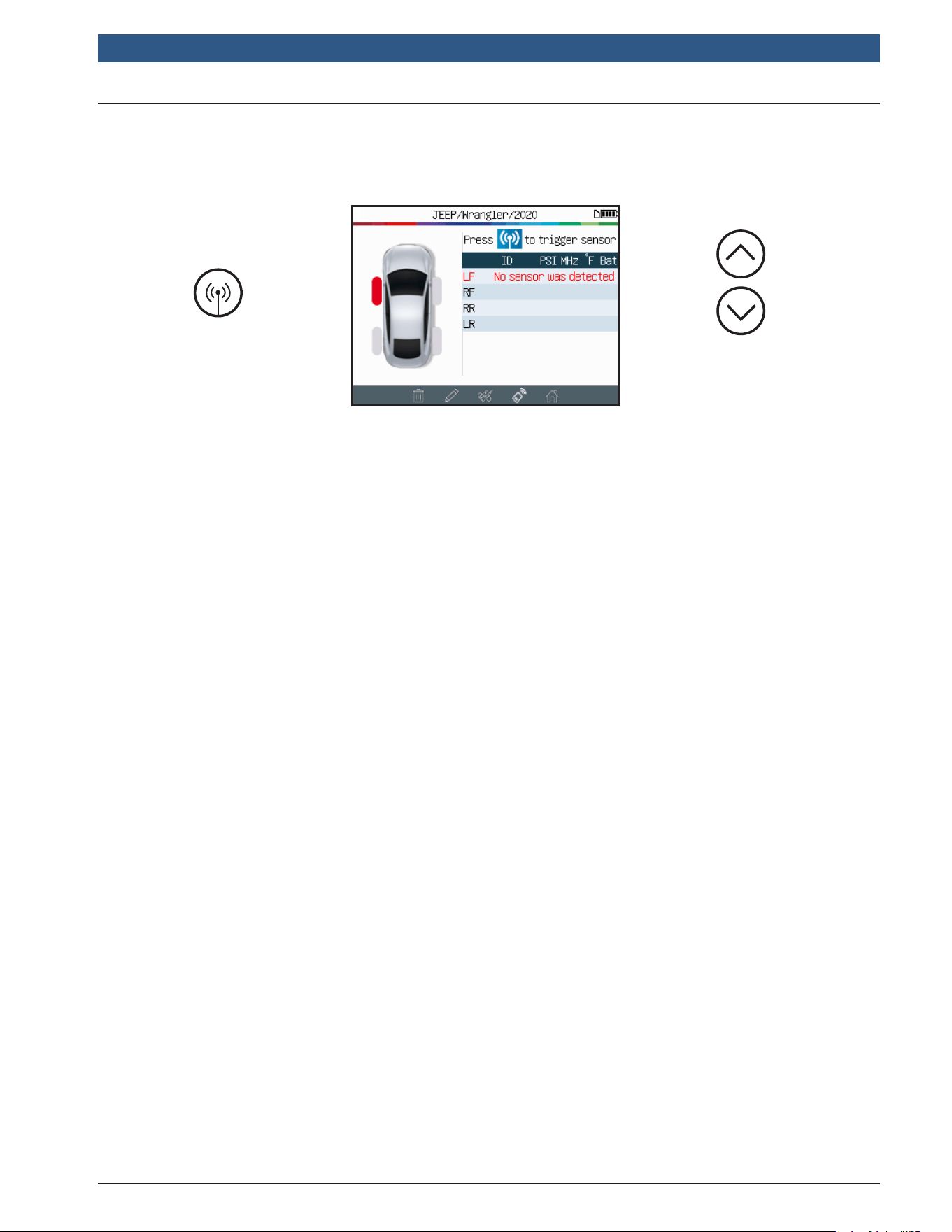
If the tool has problems reading sensors, use the troubleshooting guide below.
Change
selected wheel
Trigger Sensor
The tool has not detected a sensor. Try again.
TPMSsensorreadingproblems–Troubleshootingguide
1) The vehicle hasnoTPMSsensors even if a metal stem is present. For example,
Schrader valves can look the same as TPMS valves.
▶ Check for the presence of TPMS sensors on the vehicle. Use the TPMS
tool to check the typeofTPMSvalve (direct or indirect) that is mounted
on the vehicle. Note: IndirectTPMS systems operate withoutsensors
mountedinthetires.
▶ If the vehicle was notoriginallyttedwithTPMSsensors, the tool will
display “IndirectTPMS.”
2) The TPMSsensororECUmay be damaged or defective.
▶ Check all these elements separately in order to eliminate the possible
problem.
3) The TPMS sensor only responds to a certain frequency.
▶ Check the communication frequency of the vehicle’s TPMS sensors. This
is generally 433 MHz for Europe and 315 MHz for the United States and
Japan. Ensure the vehicle is not a vehicle imported from another
region since it may be set to a different frequency.

en-US
|
16
|
User Guide
|
TPA 300
1699502721 | REV. B | JUNE 2020
© Bosch Automotive Service Solutions Inc.
4) The TPMSsensor mounted in the tire is not the correcttypeforthevehicle.
▶ Each vehicle model can be tted with a different style or type of TPMS
sensor. Ensure programmable sensors are the correct type to be
programmed for the make and model of vehicle.
5) Your TPMS tool may require a software update.
▶ If the vehicle is not be listed in the TPMS tool, simply update your device
using the TPMS Tool PC software. Refer to the dedicated section on page
47 of this user manual for this.
6) The TPMS tool is damaged or defective.
▶ If the TPMS tool is damaged or defective, contact Bosch Technical
Support at 1-855-267-2483 or contact your local distributor.
1699502721 | REV. B | JUNE 2020
TPA 300
|
User Guide | 17
|
en-US
© Bosch Automotive Service Solutions Inc.
The TPA 300 works with most known aftermarket universal programmable sensors,
with the option to create new sensor ID’s and/or duplicate sensor ID’s from the
original sensor(s).
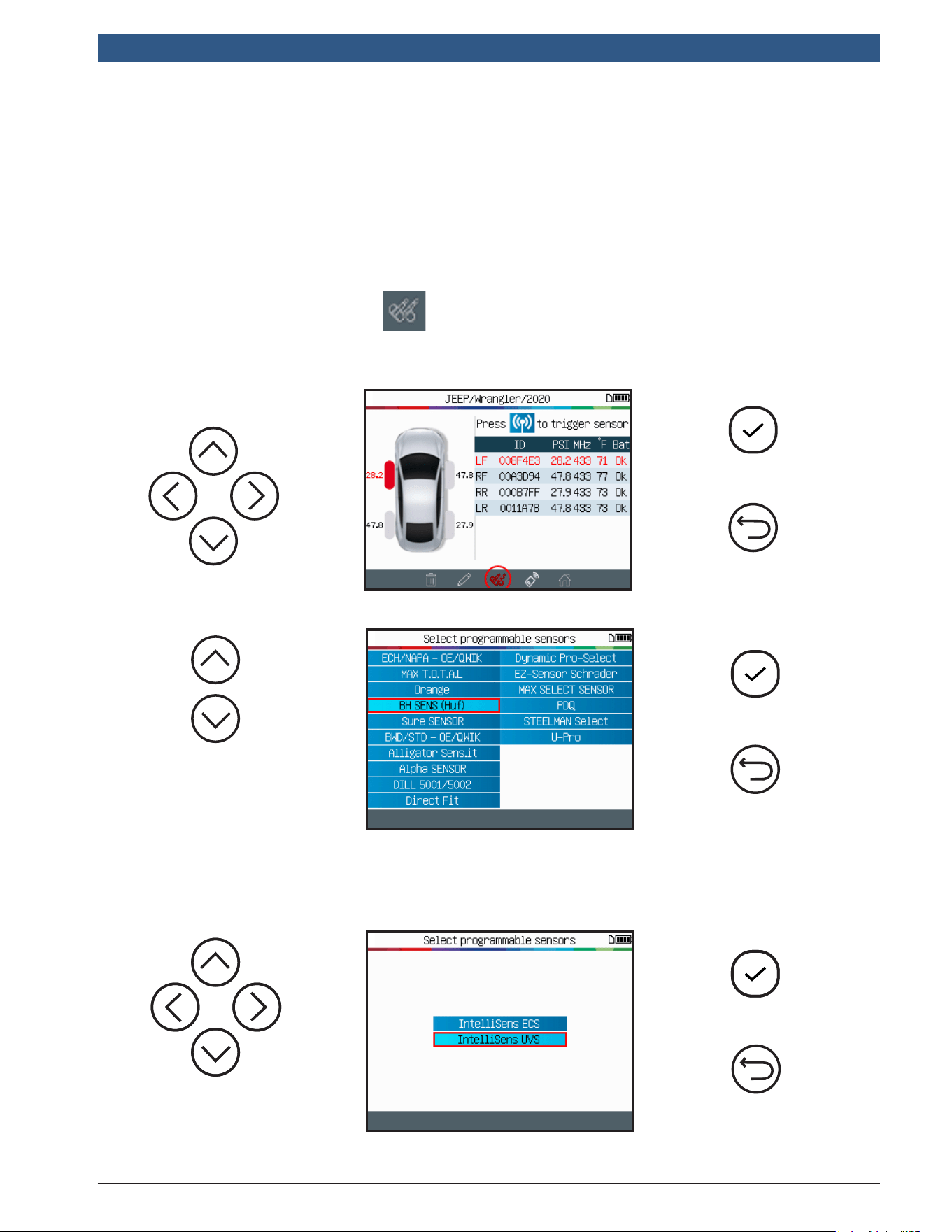
To access the program sensor function, start by selecting the Make/Model/Year of
the targeted vehicle.
Go to the program sensor icon located at the very bottom of the trigger screen
(see directly below) to open the Program Sensor function.
Continue
Previous
Continue
Previous
Select the
programmable
sensor brand.
Select a
programmable
sensor model.
Continue
Previous
2 Program TPMS Sensors
en-US
|
18
|
User Guide
|
TPA 300
1699502721 | REV. B | JUNE 2020
© Bosch Automotive Service Solutions Inc.
Continue
Previous
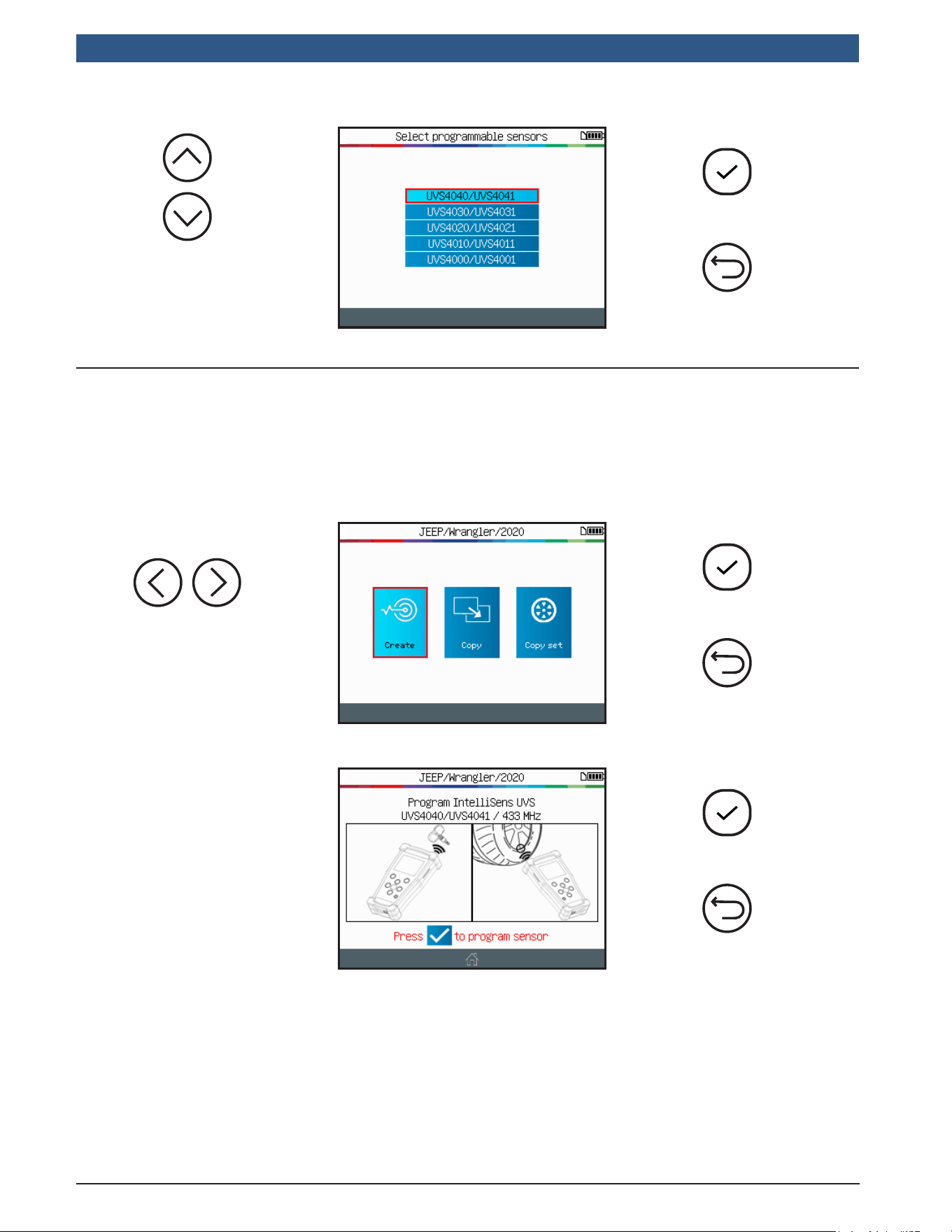
The available sensors are
displayed, select the one
that is being used.
2.1CreateSensor
This section is to create a Make / Model / Year specic sensor if the “old” sensor
can’t be cloned. The new sensor ID(s) are generated by the tool, and may not be the
same as the original one. A TPMS reset is required when replacing new sensors. See
Section 2 on page 17.
Continue
Previous
Select the Create
option.
Program
Previous
Position the sensor
in front of the tool
antenna to send an ID
to the blank sensor.
1699502721 | REV. B | JUNE 2020
TPA 300
|
User Guide | 19
|
en-US
© Bosch Automotive Service Solutions Inc.
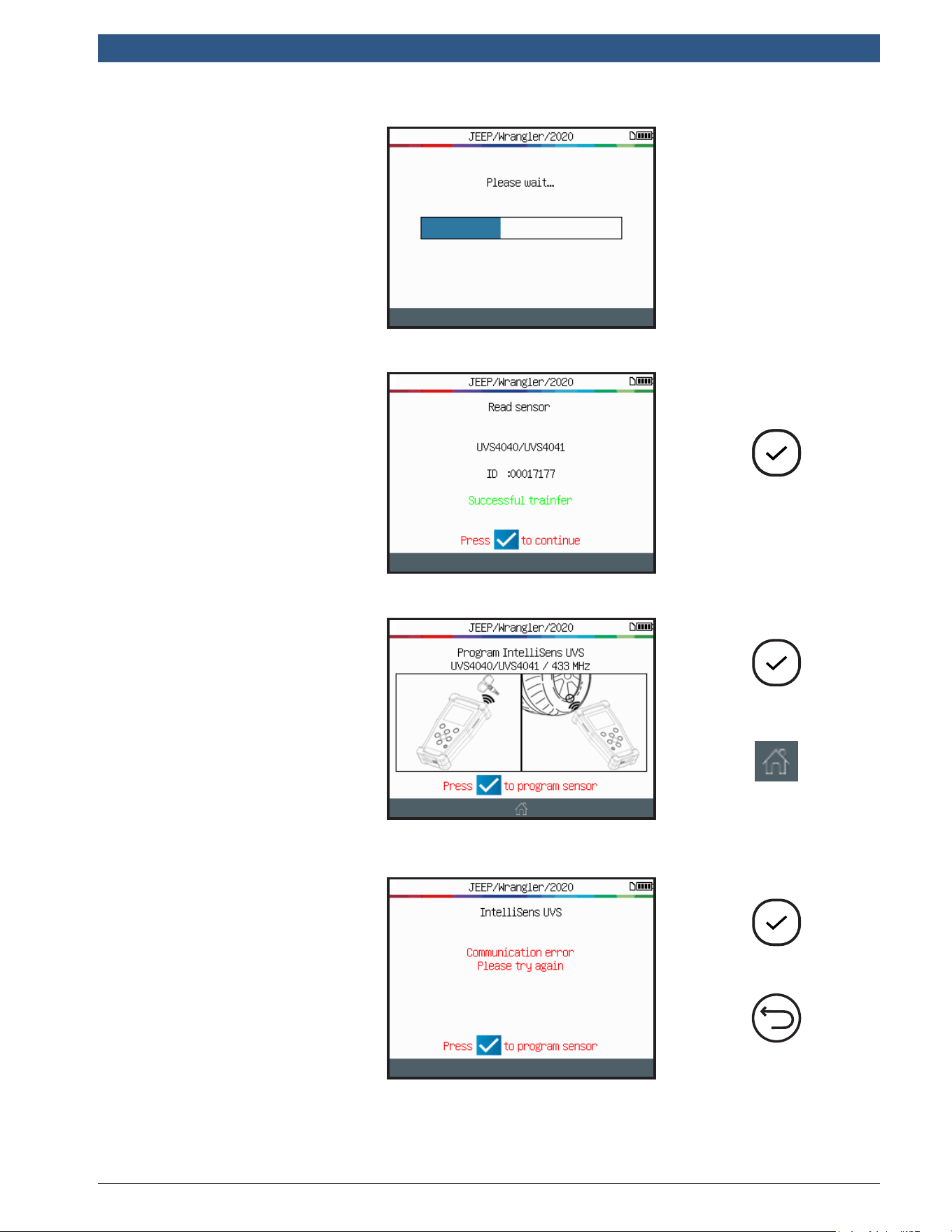
Wait a few
seconds during the
programming process.
Continue
The tool conrms the
new sensor ID has
been successfully
created.
Program a
new sensor
Abort and
go home
The tool is now ready
to create another new
sensor (if applicable).
Start again
Previous
ProgrammingIssue:
In case of an ID
transfer issue, the
following message
will appear, try again.
en-US
|
20
|
User Guide
|
TPA 300
1699502721 | REV. B | JUNE 2020
© Bosch Automotive Service Solutions Inc.
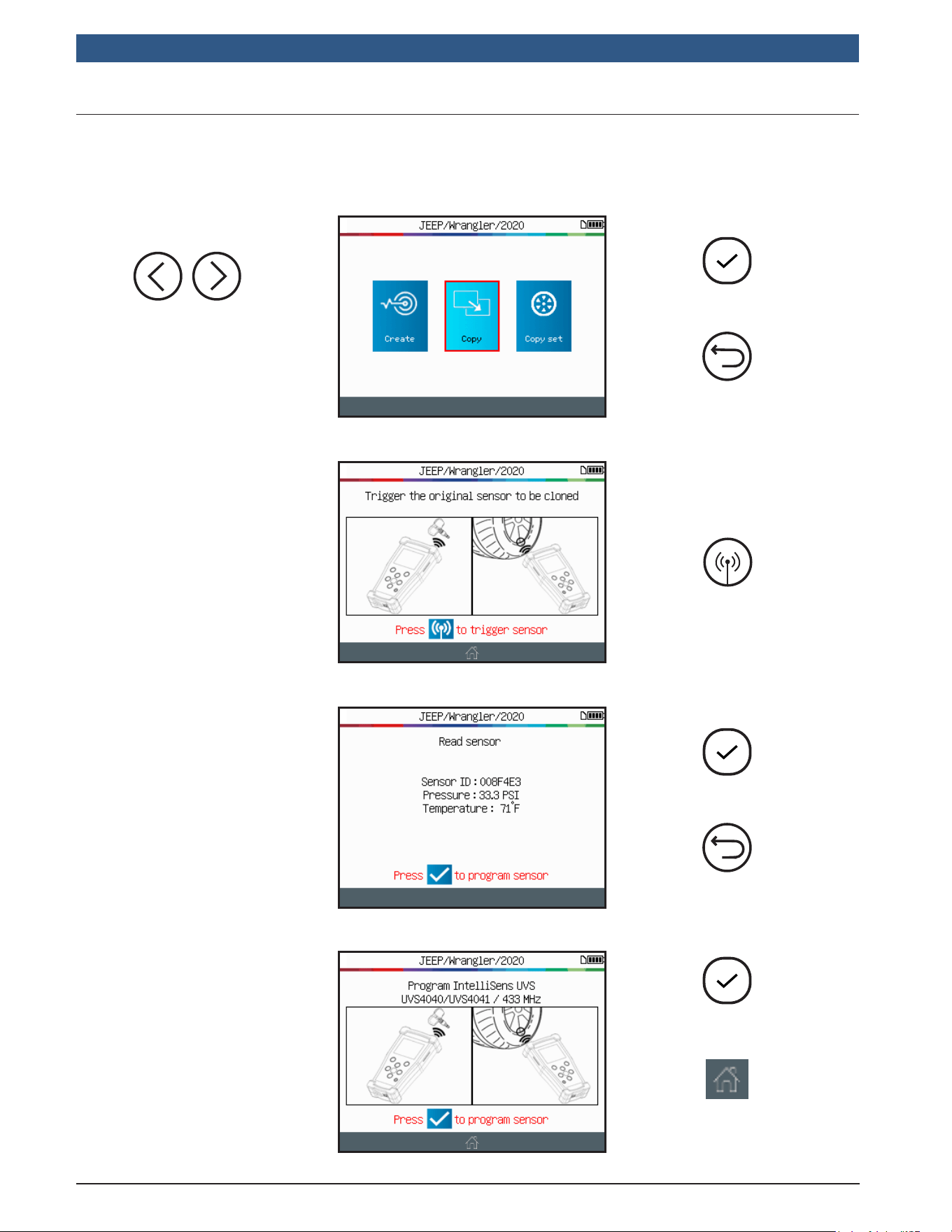
2.2CopySensor
This section is to recover a sensor ID for an old/existing sensor.
Continue
Previous
Select the Copy
option.
Read sensor
Position the old
sensor to copy in
front of the tool
antenna.
Continue
Previous
The tool will read the
old sensor, wait a few
seconds.
After a short period
the sensor data is
displayed.
Program the
new sensor
Abort and
go home
Position the blank
sensor in front of the
tool antenna to send
the existing ID to the
new sensor.
1699502721 | REV. B | JUNE 2020
TPA 300
|
User Guide | 21
|
en-US
© Bosch Automotive Service Solutions Inc.
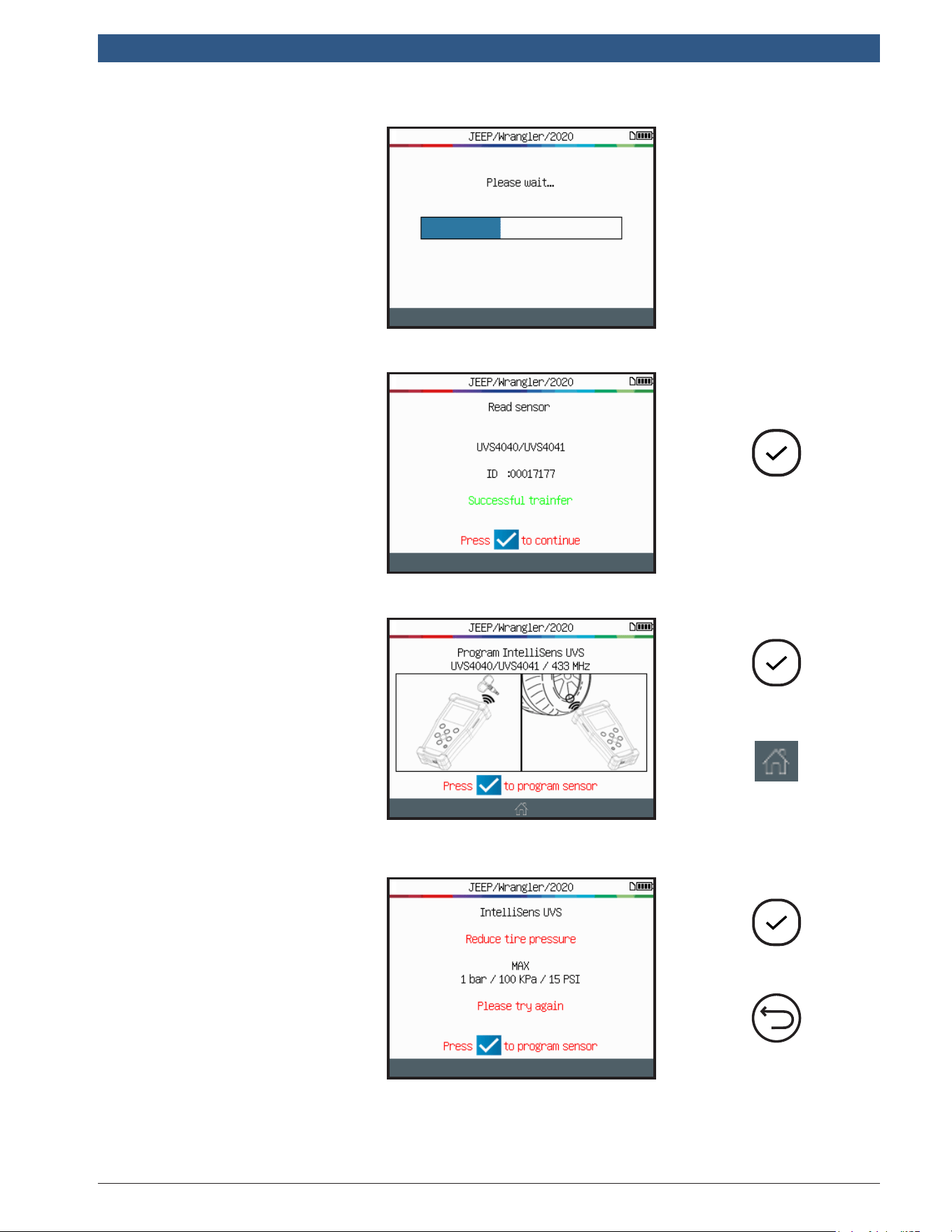
Wait a few
seconds during the
programming process.
Continue
The tool conrms the
new sensor ID has
been successfully
created.
Program a
new sensor
Abort and
go home
The tool is now ready
to create another new
sensor (if applicable).
Start again
Previous
ProgrammingIssue:
In case of a
programming issue,
read the message
and follow the
instructions.
After applying the
changes, start again.
en-US
|
22
|
User Guide
|
TPA 300
1699502721 | REV. B | JUNE 2020
© Bosch Automotive Service Solutions Inc.
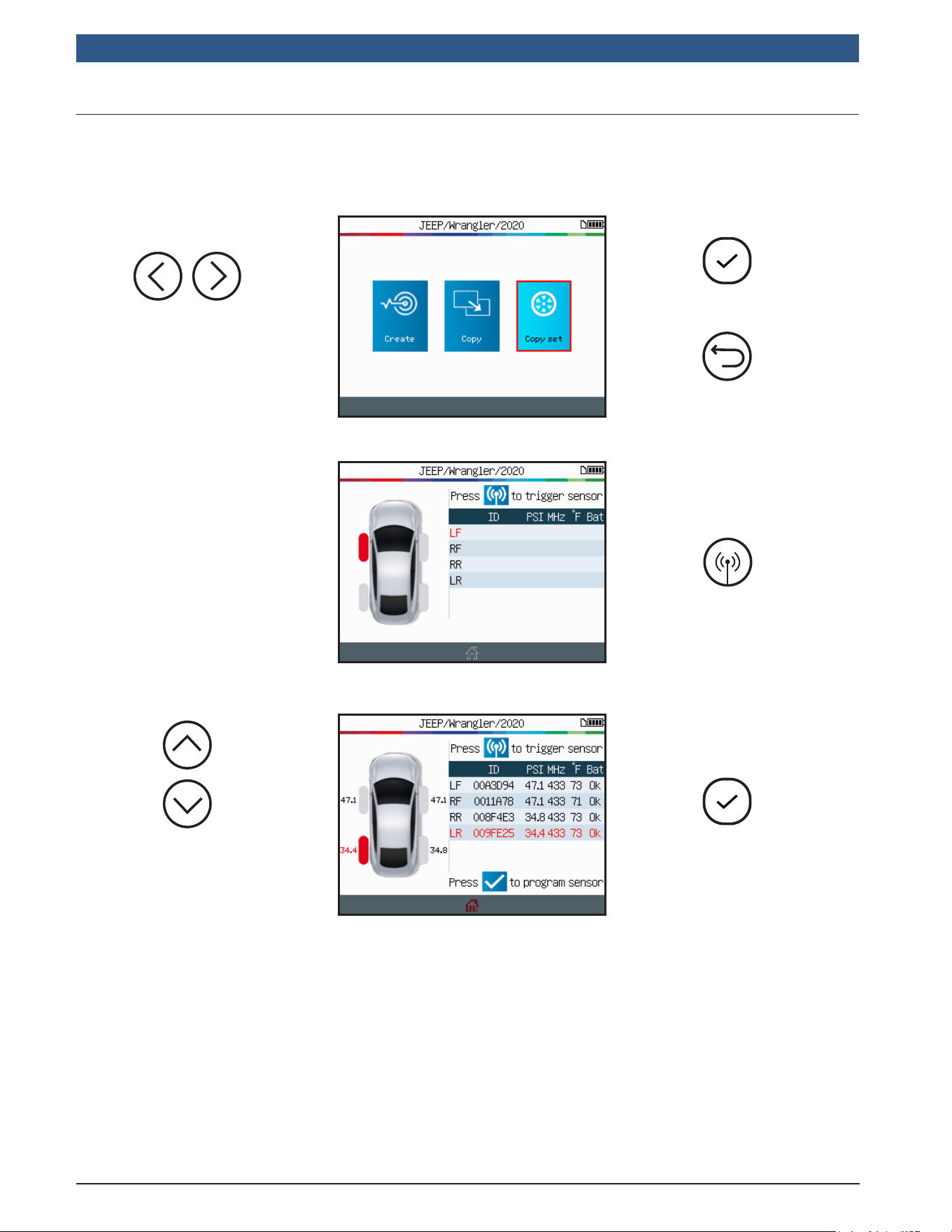
2.3CopySet
This section is to copy a complete set of sensor IDs and transfer them to blank
sensors. This option can be used to create a set of winter tires, for example.
Continue
Previous
Select the CopySet
option.
Read sensors
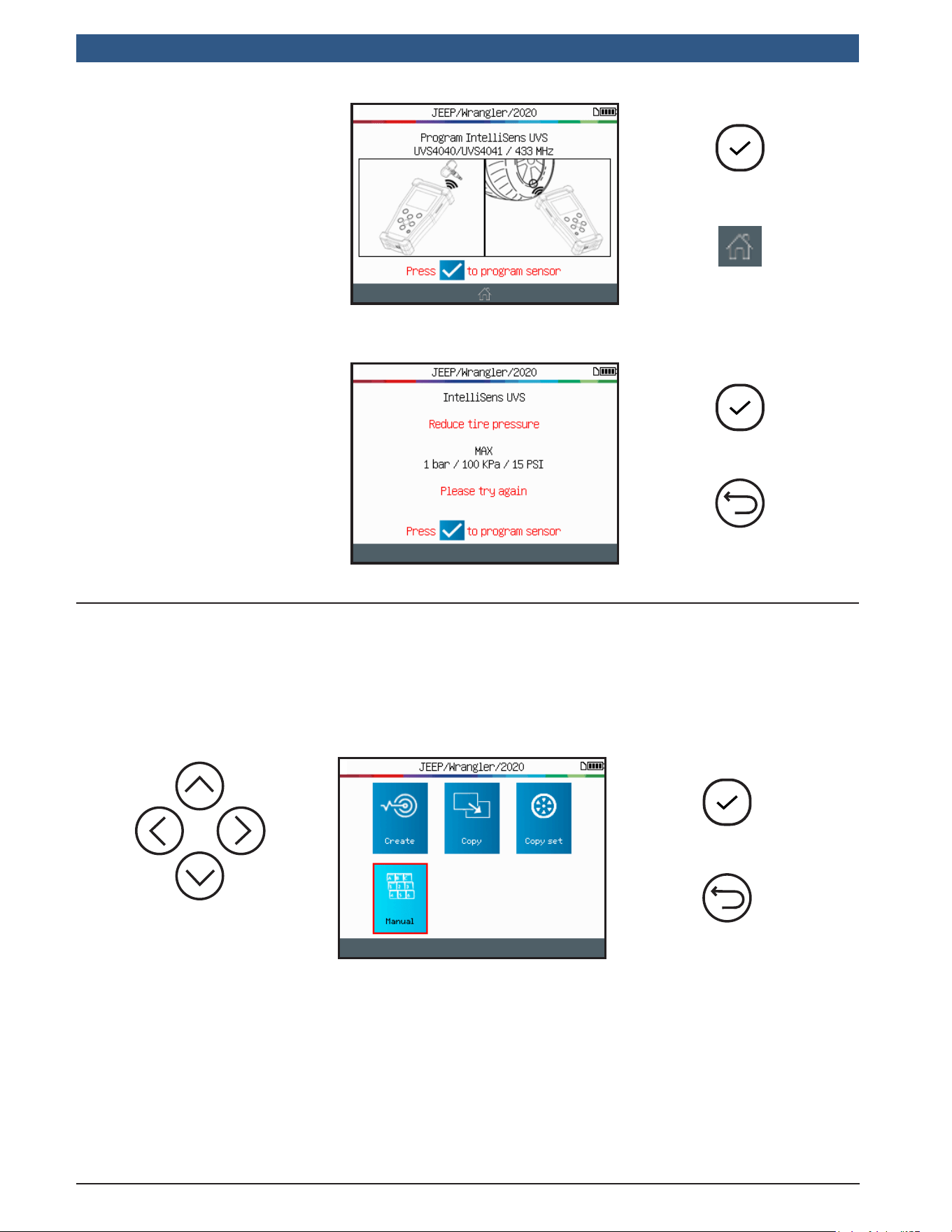
Read all the vehicle
sensors, starting by
the LF (Left Front)
sensor.
Continue
Select the rst blank
sensor to program.
1699502721 | REV. B | JUNE 2020
TPA 300
|
User Guide | 23
|
en-US
© Bosch Automotive Service Solutions Inc.
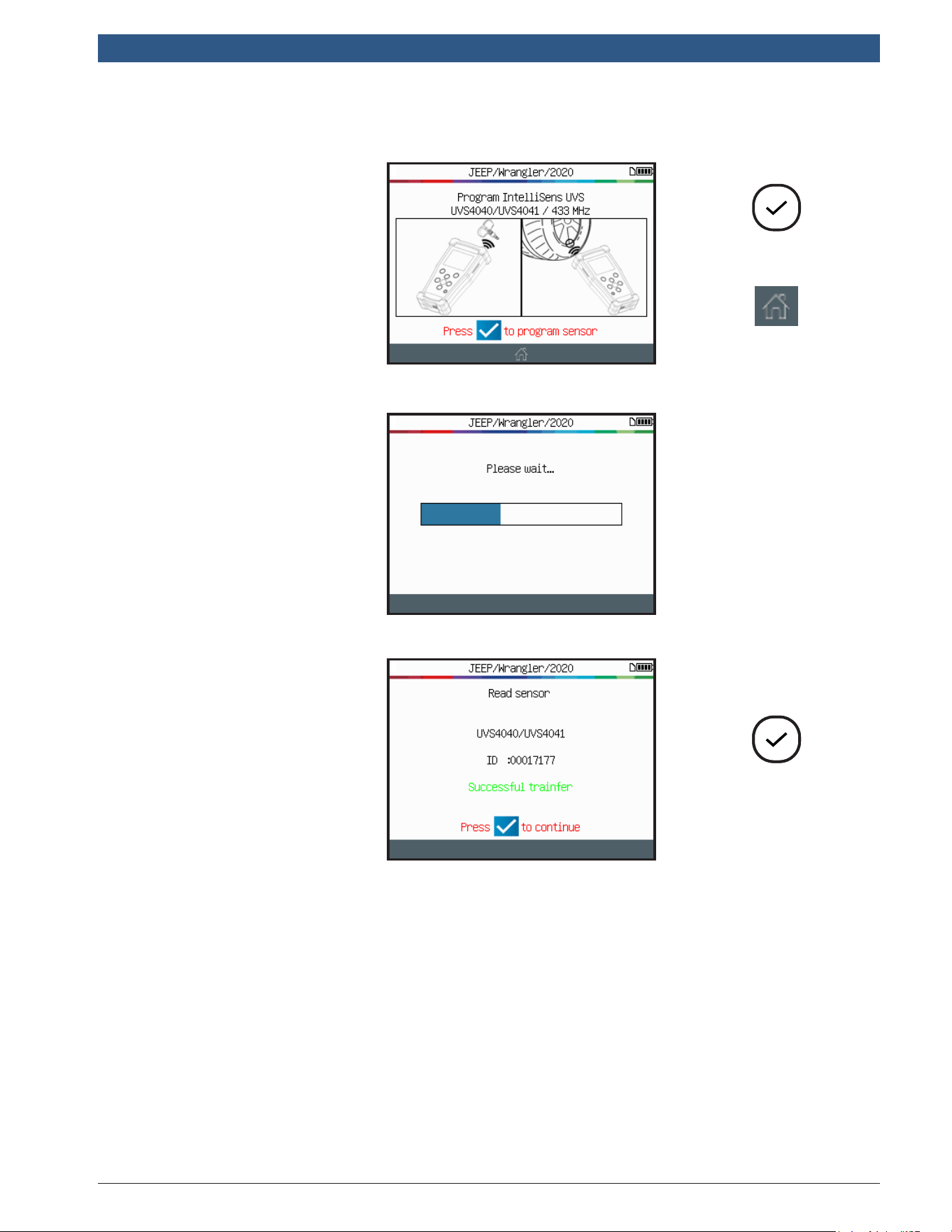
Program a
new sensor
Abort and
go home
Position the blank
sensor in front of the
tool antenna to send
the existing ID to the
new sensor.
Wait a few
seconds during the
programming process.
Continue
The tool conrms the
new sensor ID has
been successfully
created.
en-US
|
24
|
User Guide
|
TPA 300
1699502721 | REV. B | JUNE 2020
© Bosch Automotive Service Solutions Inc.
Program a
new sensor
Abort and
go home
The tool is now ready
to create another new
sensor (if applicable).
Start again
Previous
ProgrammingIssue:
In case of a
programming issue,
read the message
and follow the
recommendations.
After applying the
changes, start again.
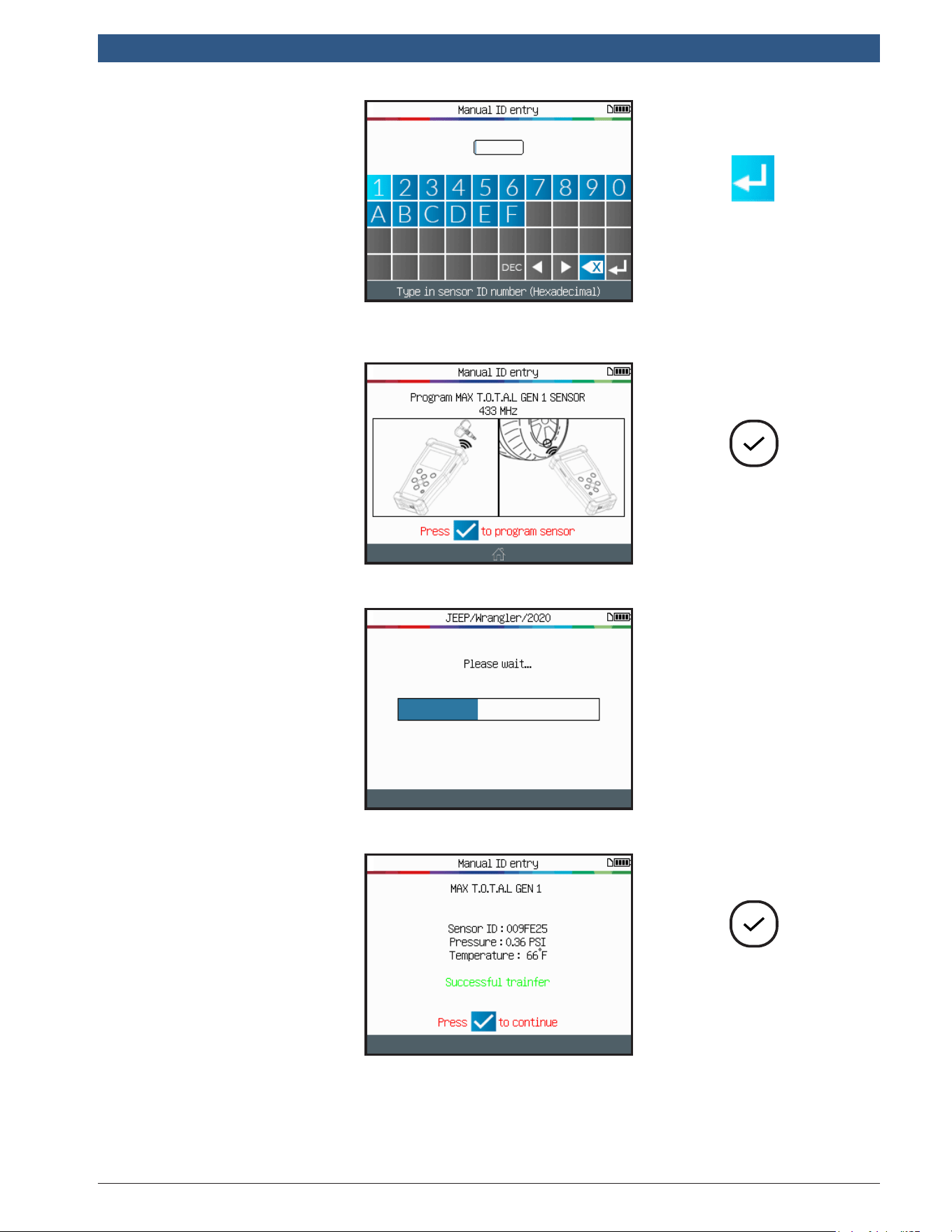
2.4ManualID
This function - only available for certain programmable sensors brands - enables the
ID’s from a damaged sensor to be entered manually. Be careful to enter only a valid
sensor ID in the correct format (decimal or hexadecimal) this depends of the type of
sensor.
Continue
Previous
Select the Manual
option.
1699502721 | REV. B | JUNE 2020
TPA 300
|
User Guide | 25
|
en-US
© Bosch Automotive Service Solutions Inc.
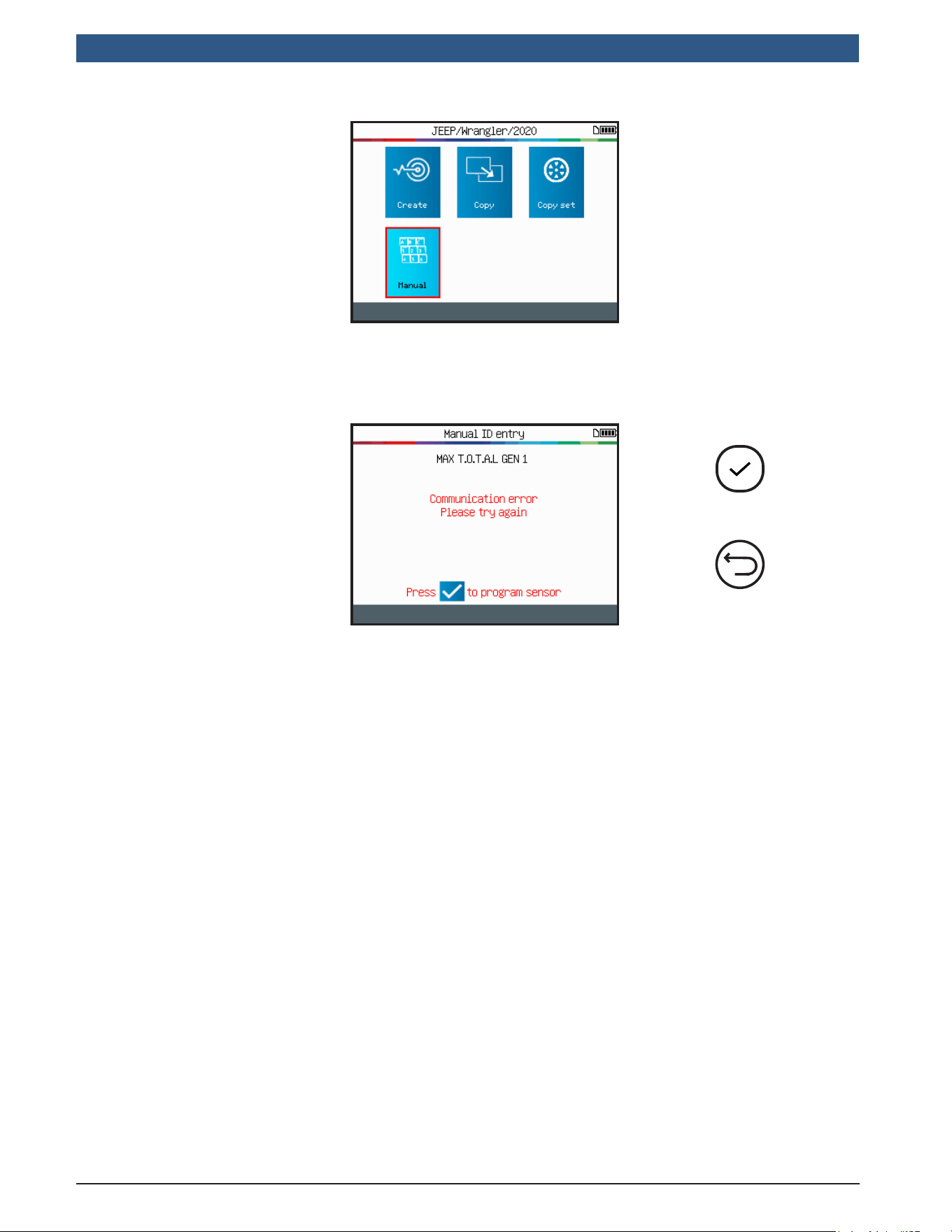
Send the
new ID to
the sensor
Use the virtual
keyboard to enter
the sensor ID of the
damaged sensor.
Ensure to enter
only a valid sensor
ID in the correct
format (decimal or
hexadecimal).
Program
the sensor
Position the blank
sensor in front of the
tool antenna to send
the ID to the new
sensor.
Wait a few
seconds during the
programming process.
Continue to wait
while the sensor is
being reprogrammed.
Continue
en-US
|
26
|
User Guide
|
TPA 300
1699502721 | REV. B | JUNE 2020
© Bosch Automotive Service Solutions Inc.
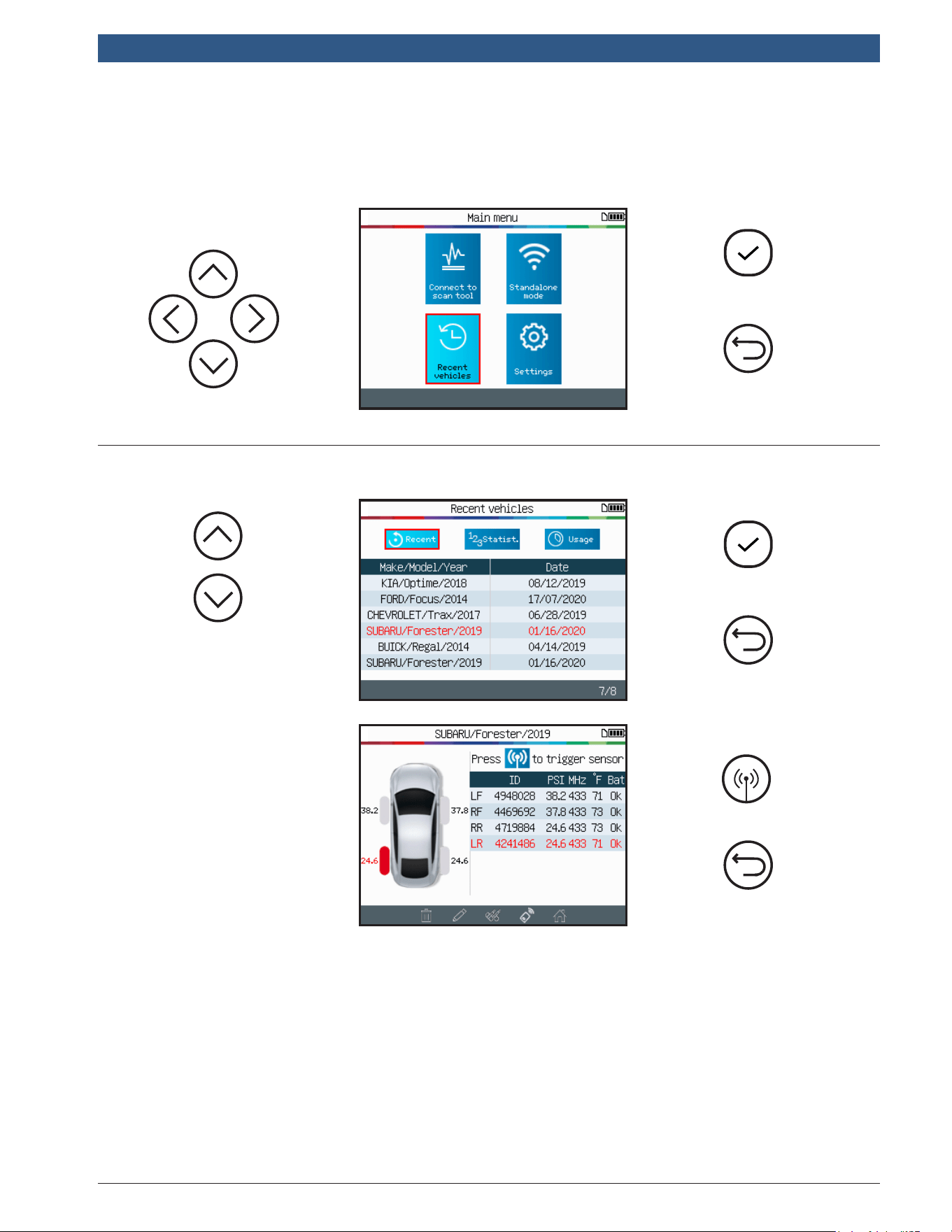
The tool is now ready
to program a new
sensor (if applicable).
Start again
Previous
ProgrammingIssue:
In case of a
programming issue,
read the message
and follow the
recommendations.
After applying the
changes, start again.
1699502721 | REV. B | JUNE 2020
TPA 300
|
User Guide | 27
|
en-US
© Bosch Automotive Service Solutions Inc.
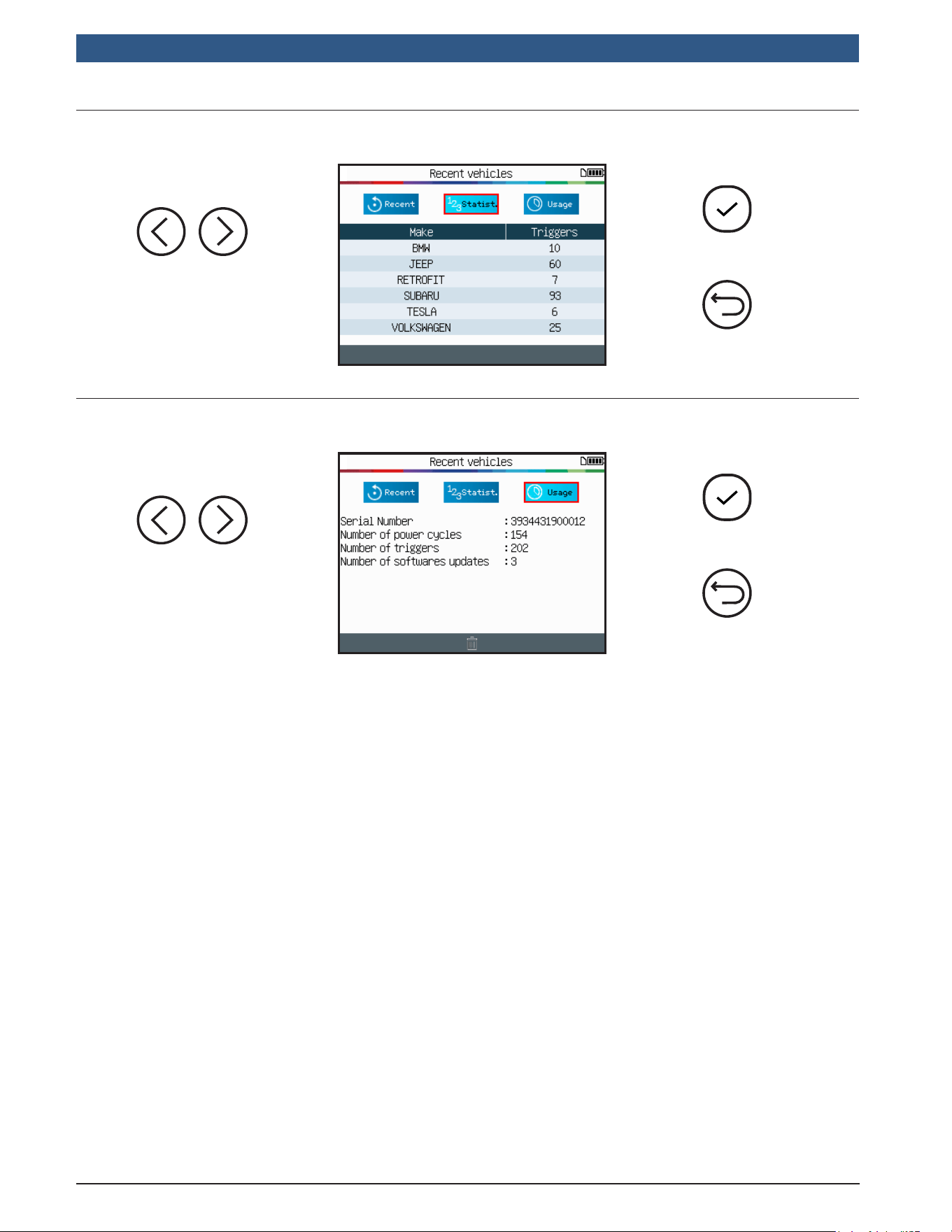
This feature lists all the TPMS activities recorded in the tool.
Continue
Previous
Continue
Previous
3.1RecentVehicles
Select the recorded
vehicle to display.
Previous
The screen displays
the details of the
selected vehicle.
The last known state
of the TPMS sensors
appears.
It is possible to
activate the TPMS
sensors from this
screen.
Trigger Sensors
3 Recent Vehicles
en-US
|
28
|
User Guide
|
TPA 300
1699502721 | REV. B | JUNE 2020
© Bosch Automotive Service Solutions Inc.
Continue
3.2Statistics
Select the Statistics
option.
Previous
Continue
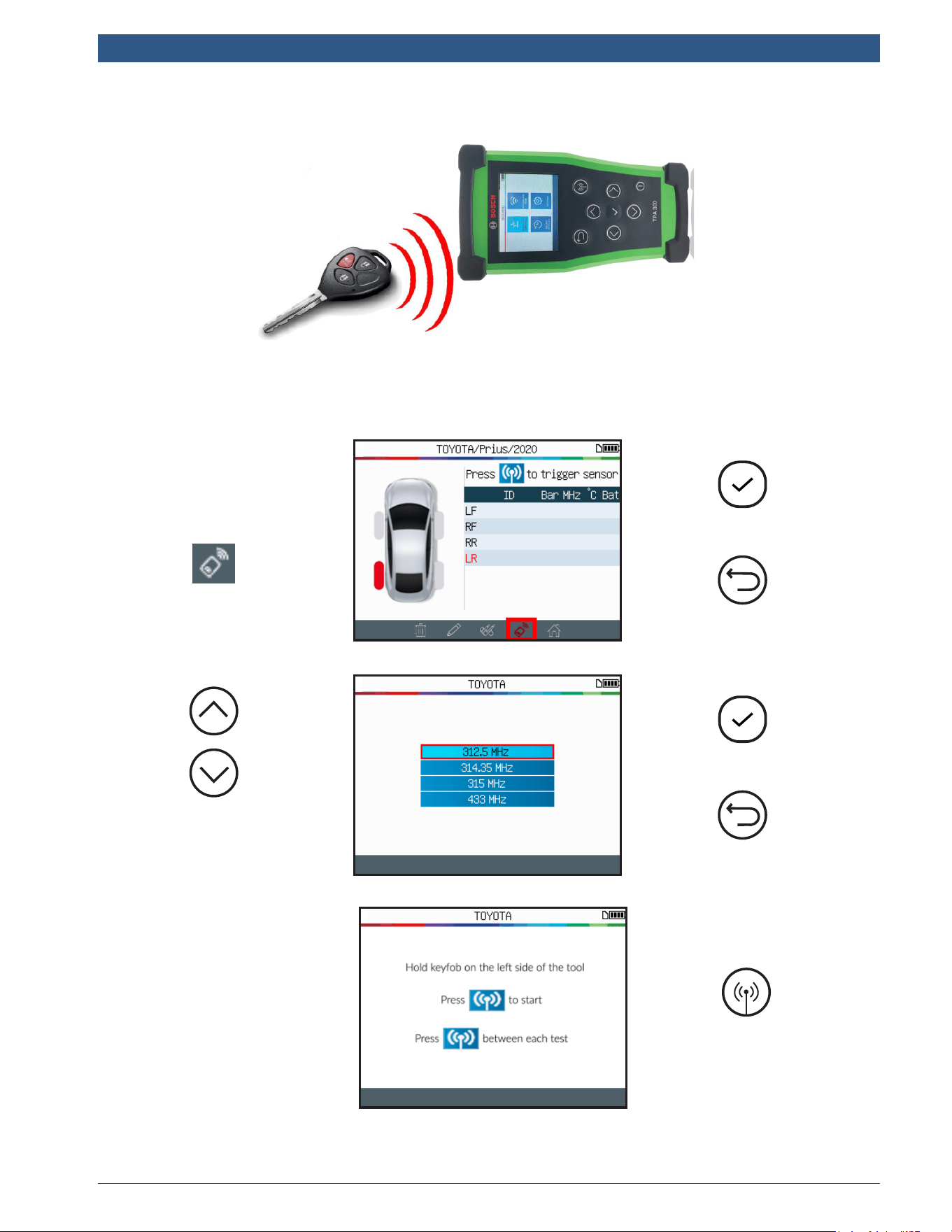
3.3Usage
Select the USAGE
option.
Previous
1699502721 | REV. B | JUNE 2020
TPA 300
|
User Guide | 29
|
en-US
© Bosch Automotive Service Solutions Inc.
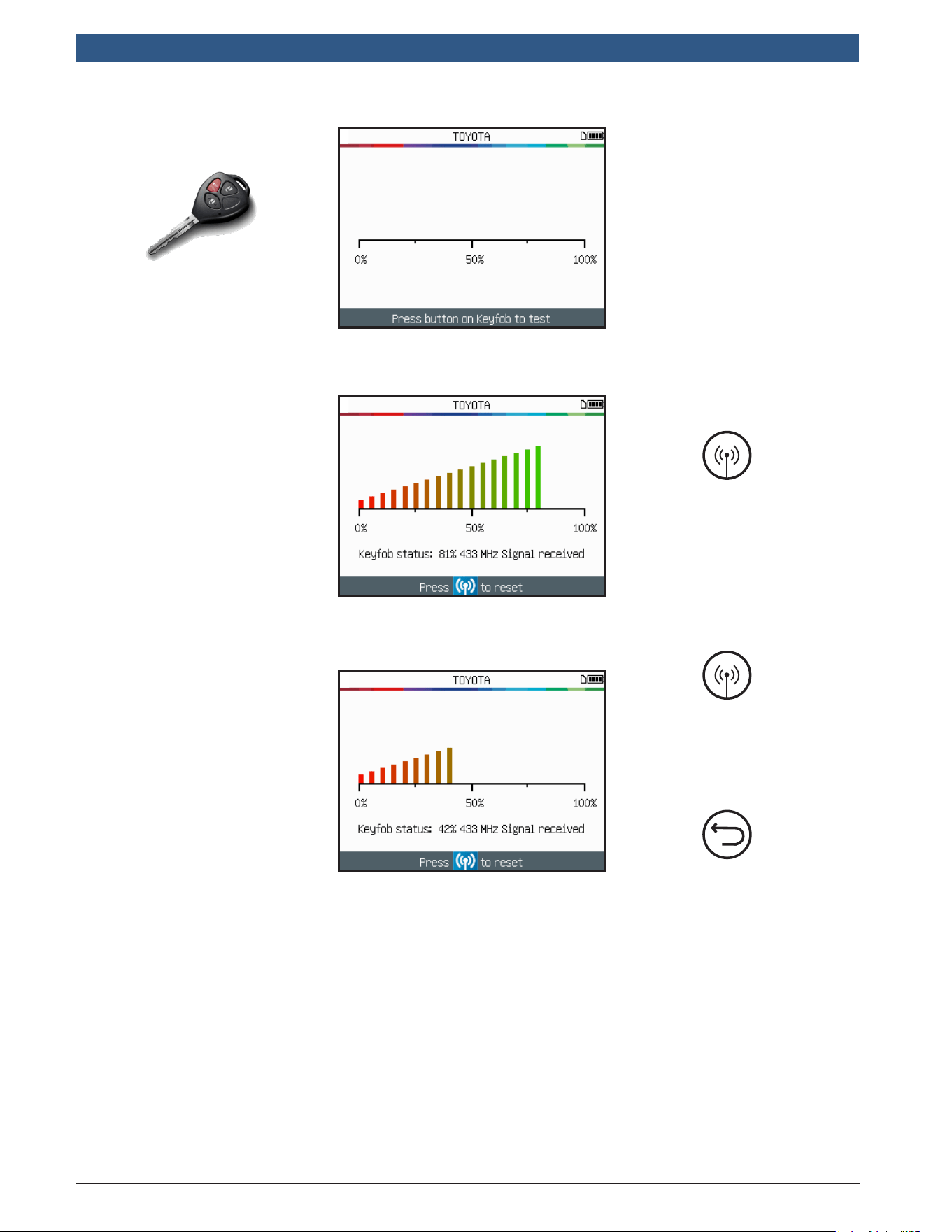
This function tests the strength of the RF signal of the key fob.
Continue
Click the key fob icon.
Previous
Continue
Select the key fob
frequency depending
on your region.
Previous
Read instructions,
and wait a few
seconds for the next
screen.
Start a test
4 Key Fob Test
en-US
|
30
|
User Guide
|
TPA 300
1699502721 | REV. B | JUNE 2020
© Bosch Automotive Service Solutions Inc.
Reset
device and
start a new
test
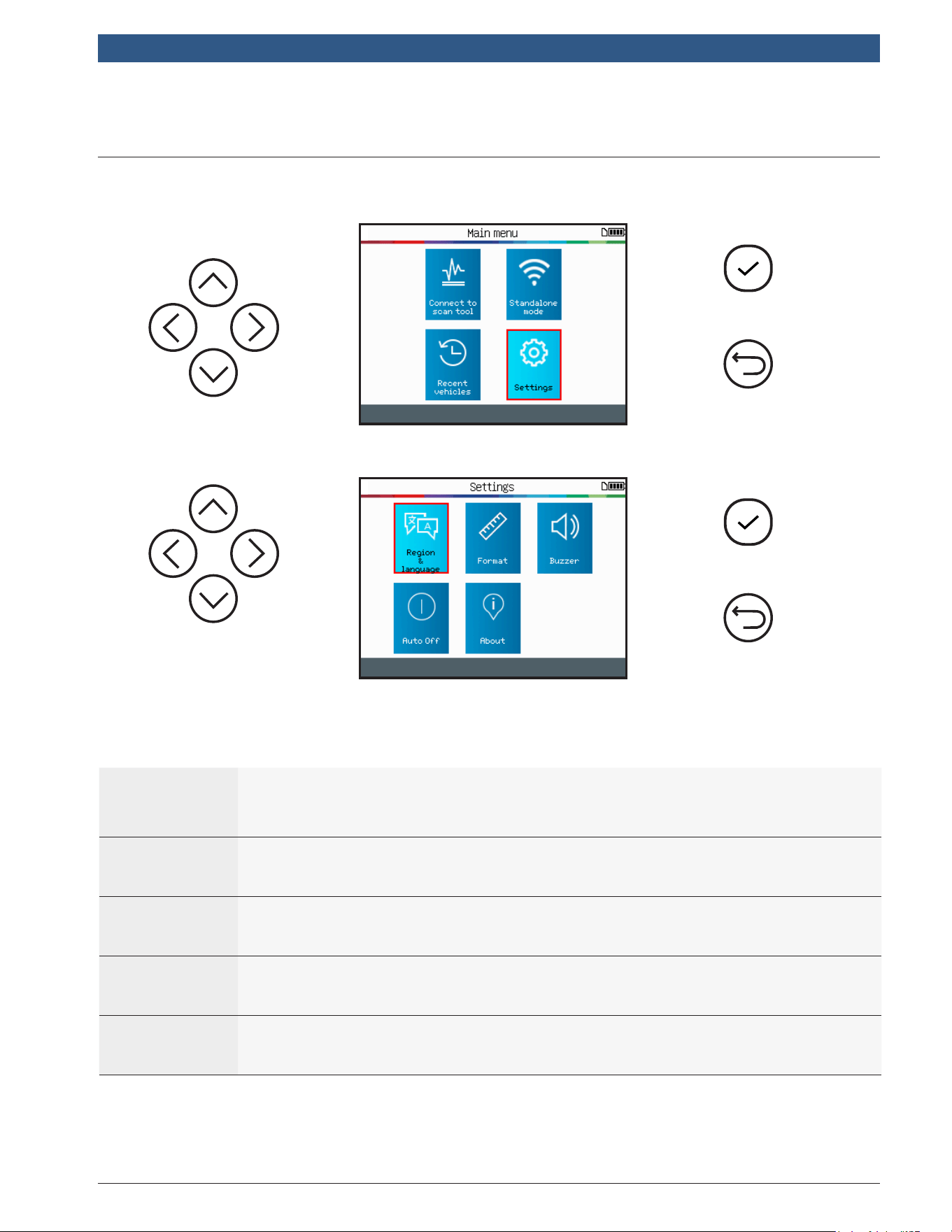
Press key fob
buttons.
GREEN: Key fob is
working within its
range to the device.
RED: Low signal
strength, indicates
low battery,
replace battery
(recommended).
Previous
Reset
device and
start a new
test
1699502721 | REV. B | JUNE 2020
TPA 300
|
User Guide | 31
|
en-US
© Bosch Automotive Service Solutions Inc.
Continue
Previous
5 Settings
5.1EnterSettingsMenu
Select the various
settings.
Continue
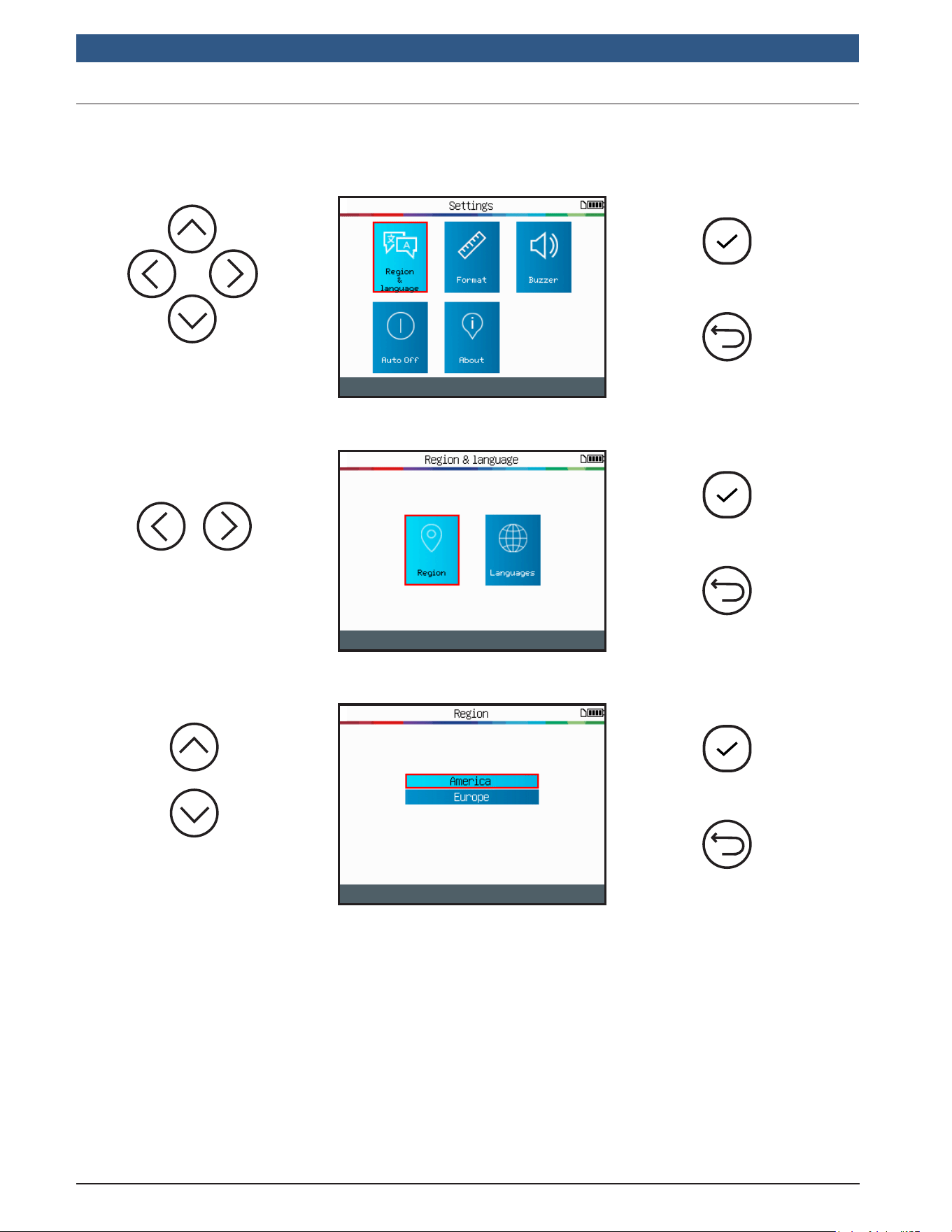
Previous
Region&
Language
Select the working region (America or Europe) and the interface
language (English, Spanish, French).
Format
Change the air pressure and temperature display (kPa, Bar or PSI
and F° or C°). Change the format of sensor ID display.
Buzzer Turn buzzer to ON or OFF.
AutoOff
Set the time to turn off the device automatically after not being
operated.
About
Displays the current software version and information about the
license validity.
en-US
|
32
|
User Guide
|
TPA 300
1699502721 | REV. B | JUNE 2020
© Bosch Automotive Service Solutions Inc.
Continue
Previous
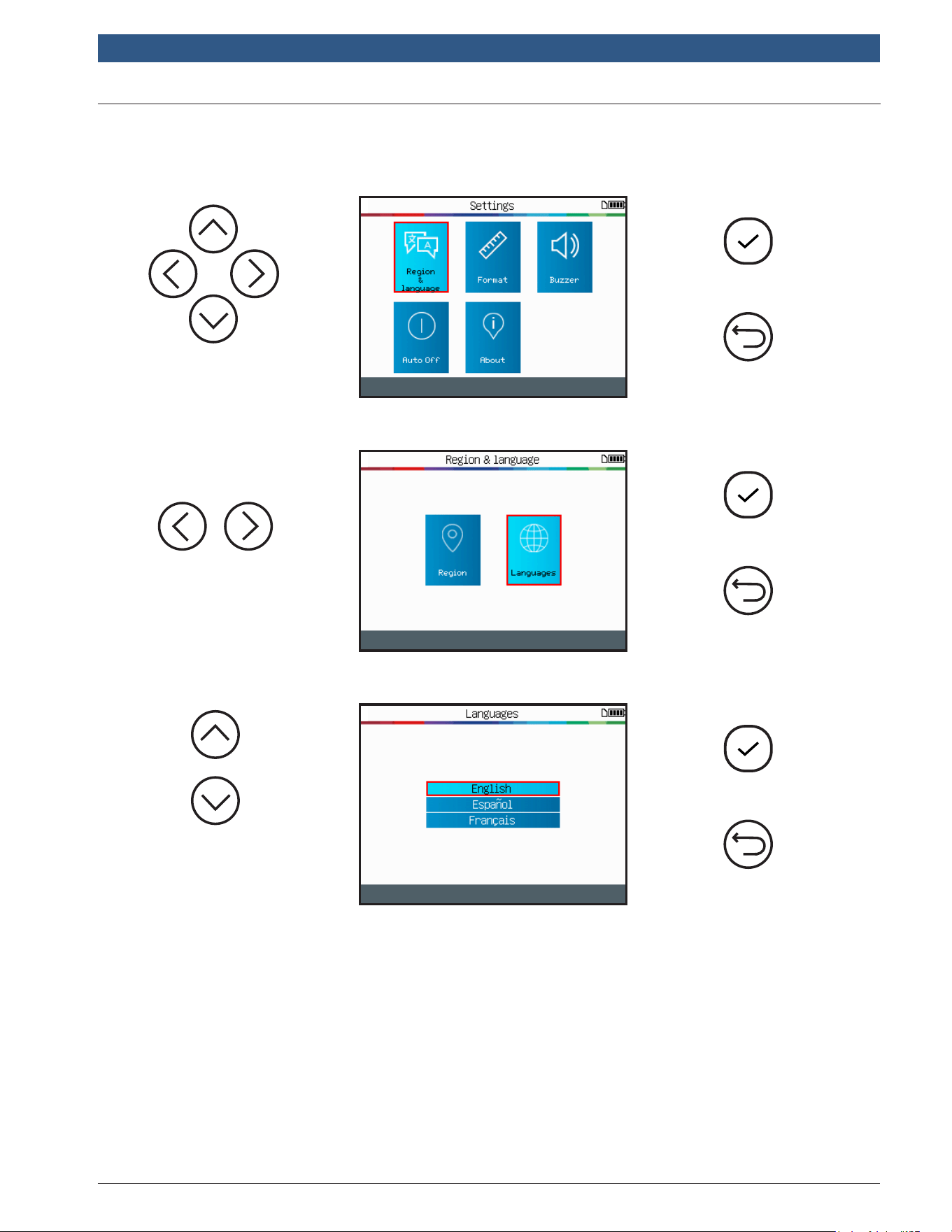
5.1.1ChangeZoneSettings
Select the Region
function.
Continue
Previous
Select the Region&
Language setting.
Region:Select the working zone among America and Europe.
Select a region.
Continue
Previous
After choosing a new region, please wait until the new vehicle database is loaded.
1699502721 | REV. B | JUNE 2020
TPA 300
|
User Guide | 33
|
en-US
© Bosch Automotive Service Solutions Inc.
Continue
Previous
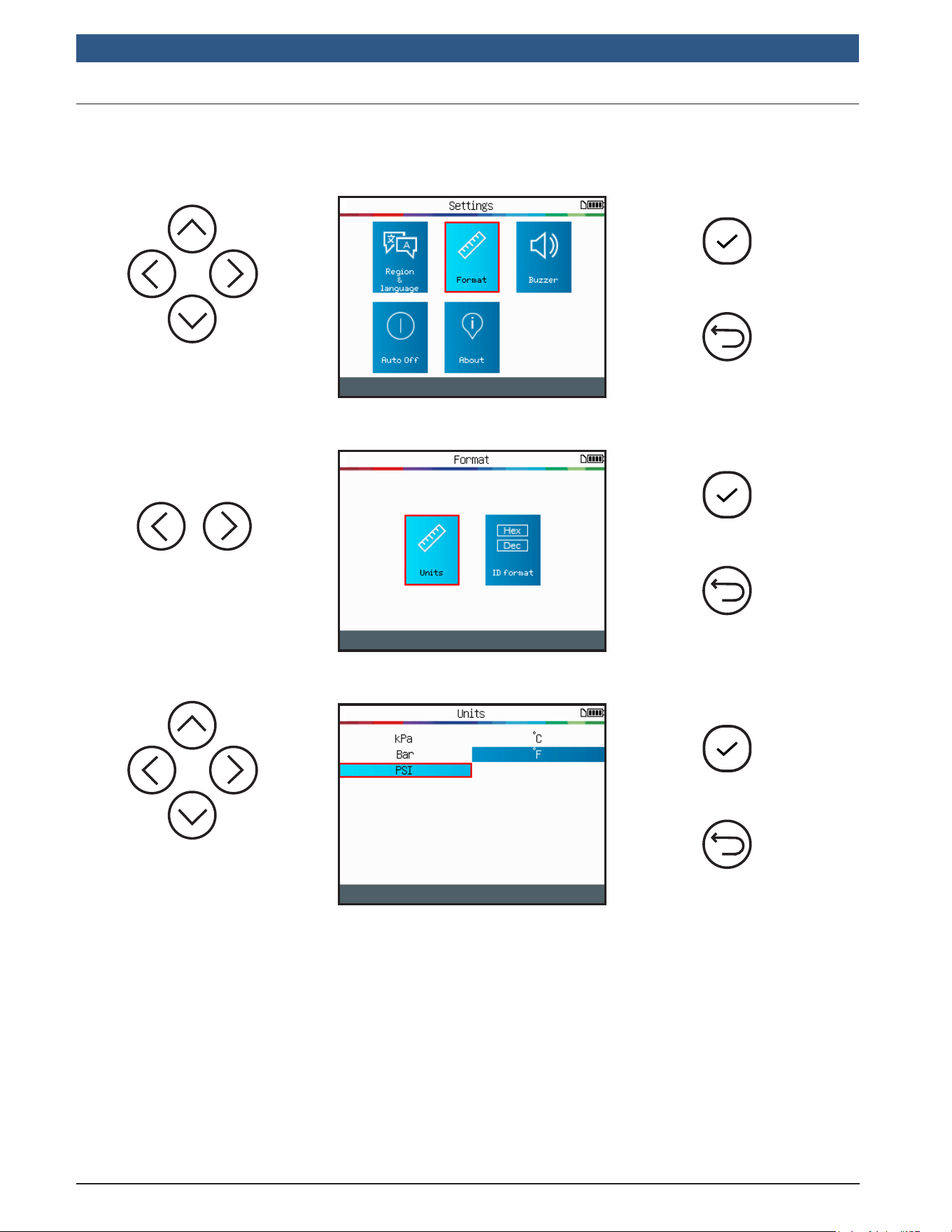
5.1.2ChangeLanguageSettings
Select the Language
function.
Continue
Previous
Select the Region&
Language setting.
Language:Select displayed language, English, Spanish or French.
Select the preferred
language.
Continue
Previous
After choosing a new language, wait until it is loaded to continue.
en-US
|
34
|
User Guide
|
TPA 300
1699502721 | REV. B | JUNE 2020
© Bosch Automotive Service Solutions Inc.
Continue
Previous
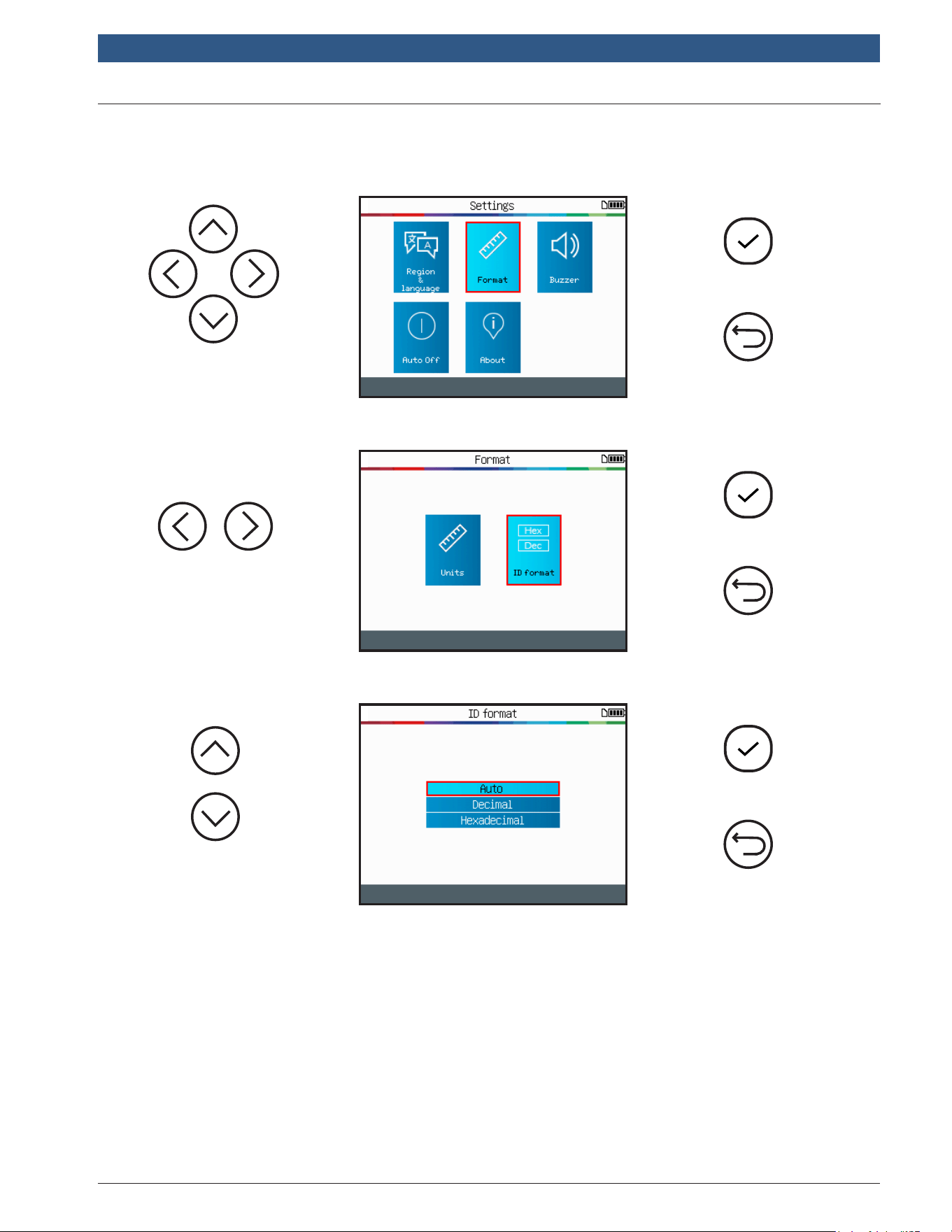
5.1.3ChangeUnitSettings
Select the Units
function.
Continue
Previous
Select the Format
setting.
Units:Change the air pressure and temperature display (kPa, Bar or PSI with F° or C°).
Select pressure and
temperature units.
Continue
Previous
1699502721 | REV. B | JUNE 2020
TPA 300
|
User Guide | 35
|
en-US
© Bosch Automotive Service Solutions Inc.
Continue
Previous
5.1.4ChangeFormatSettings
Select the IDFormat
function.
Continue
Previous
Select the Format
setting.
Format:Change the format of sensor ID display.
Select a preferred
format.
Continue
Previous
Auto:Automatically identies the sensor ID as decimal or hexadecimal.
Decimal:Display sensor IDs in decimal (0-9).
Hexadecimal:Display sensor ID in hexadecimal (0-9 & A-F).
en-US
|
36
|
User Guide
|
TPA 300
1699502721 | REV. B | JUNE 2020
© Bosch Automotive Service Solutions Inc.
Continue
Previous
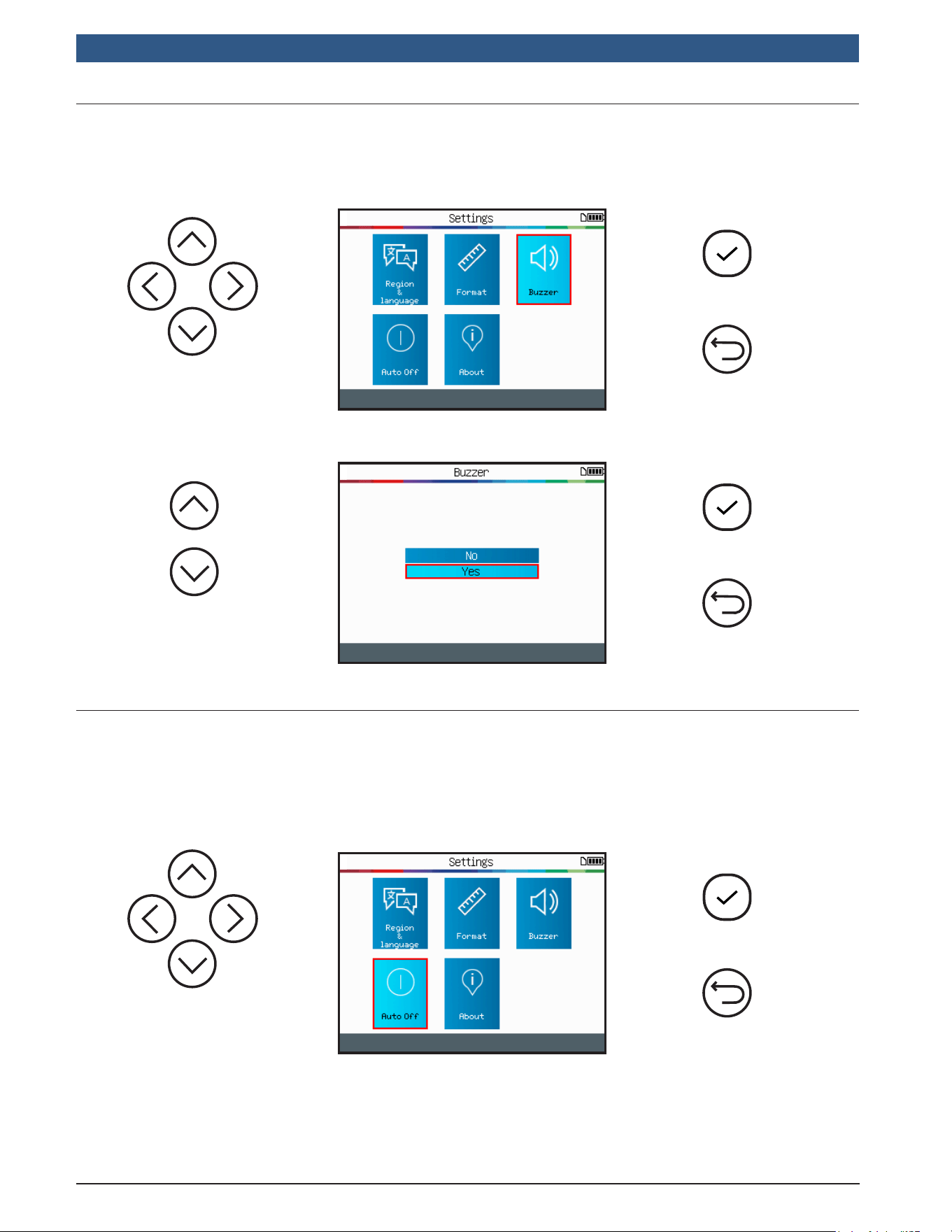
5.1.5ChangeBuzzerSettings
Select Yes or No.
Continue
Previous
Select the Buzzer
setting.
Buzzer:turn buzzer to On or Off. (Yes or No). When buzzer is set to Yes, a beep is
triggered when the sensor ID is detected.
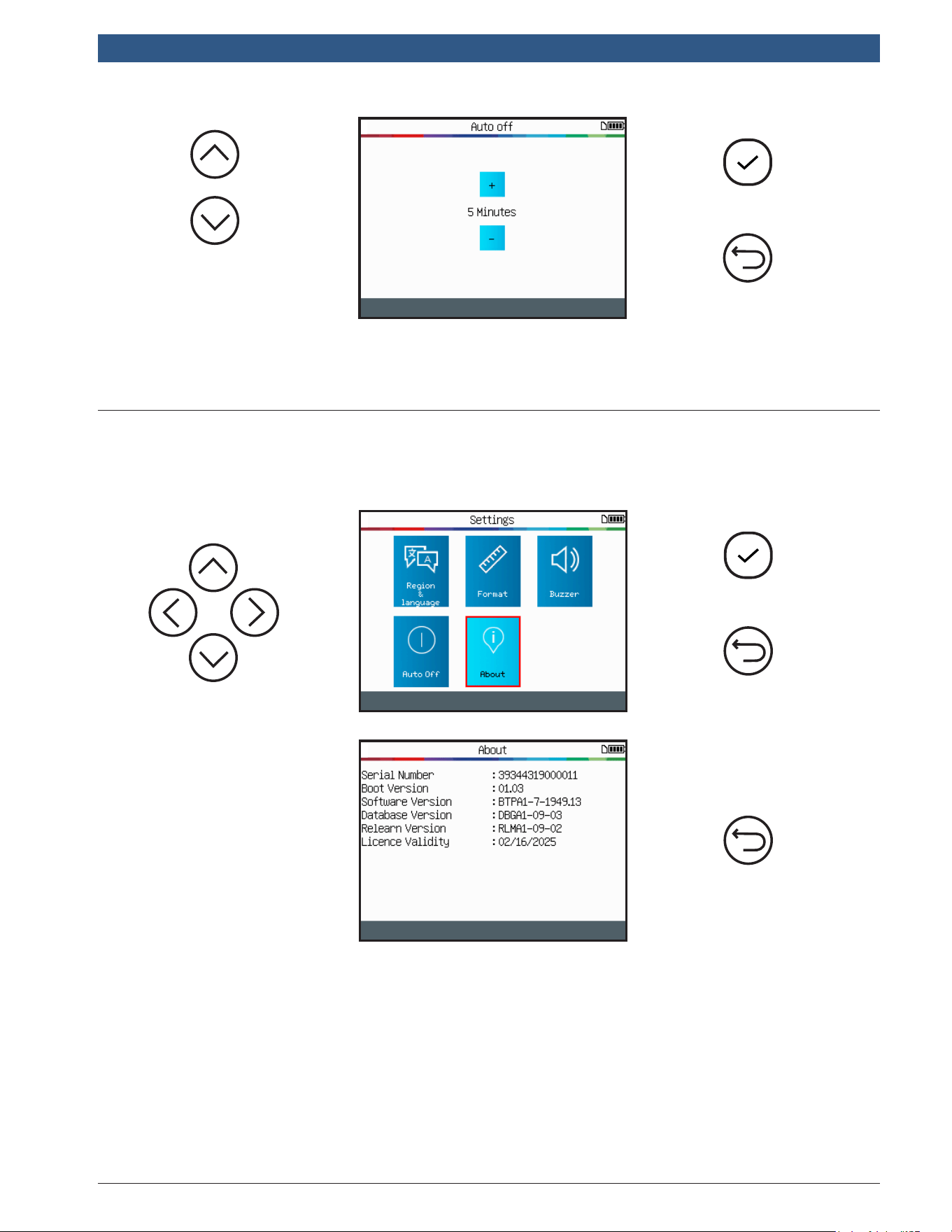
Select the AutoOff
setting.
Continue
Previous
5.1.6ChangeAutoOffSettings
AutoOff:Time set to turn off the device automatically after not being operated.
1699502721 | REV. B | JUNE 2020
TPA 300
|
User Guide | 37
|
en-US
© Bosch Automotive Service Solutions Inc.
Scroll up (+) and
down (-) to change
time.
Continue
Previous
Change by 60min (maximum) to Disabled (Never).
Continue
Previous
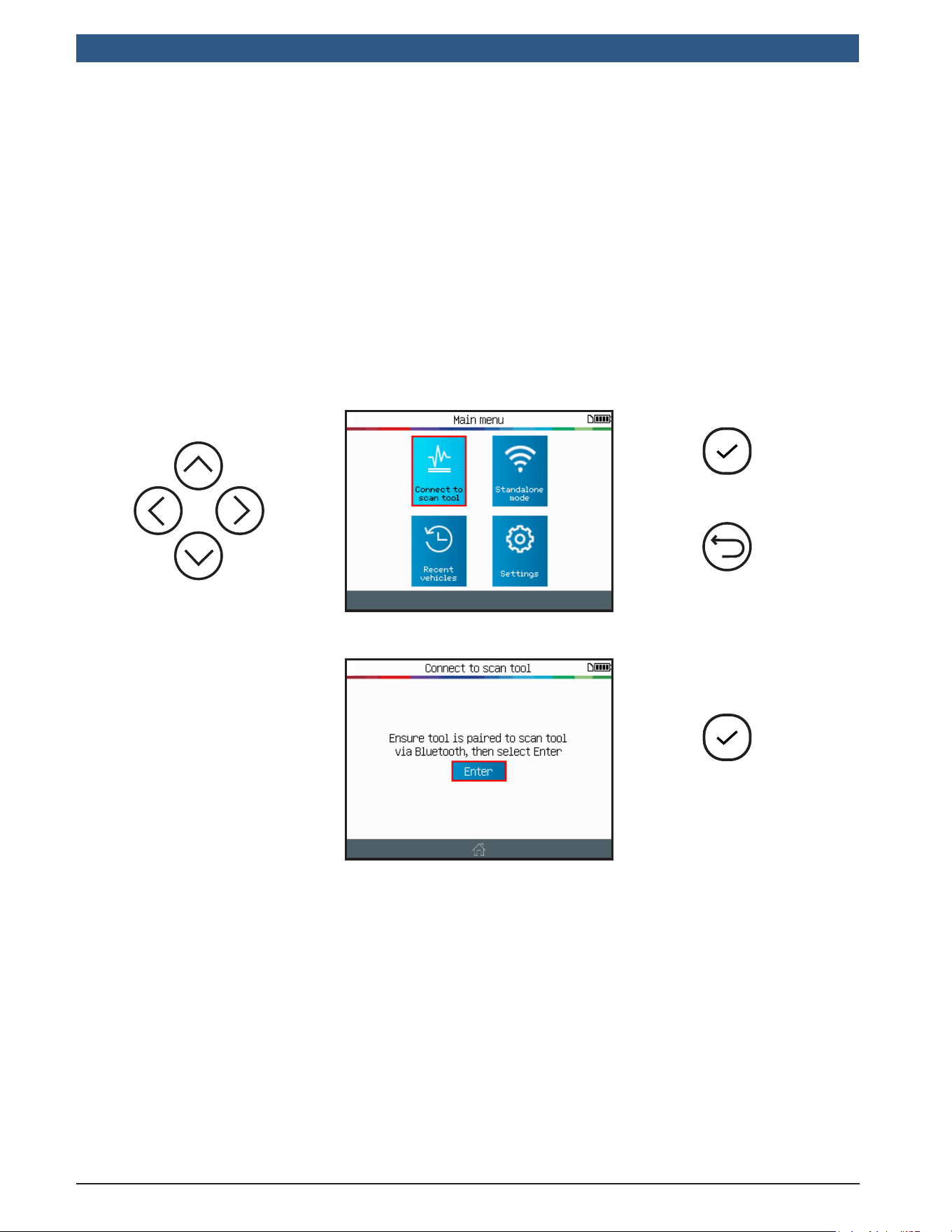
5.1.7About(TPMSToolInformation)
Displays the current version and information about the device.
The tool displays the
software version and
license validity.
Previous
en-US
|
38
|
User Guide
|
TPA 300
1699502721 | REV. B | JUNE 2020
© Bosch Automotive Service Solutions Inc.
IMPORTANT:
TPA300ConnecttoscantoolmodeisusedtoregistertheTPMSsensorsIDsinto
thevehicle’sECU.ToprogramandcopyTPMSsensors,testRKE,saveandread
recordedjobs,andsetupthetool,usetheTPA300inStandalonemode.Forbasic
checkingoftheTPMSsensors–withoutwritingintothevehicleECU–usetheTPA
Standalonemode.Seethisusermanualdedicatedsectiontolearnhowtooperate
thismode.
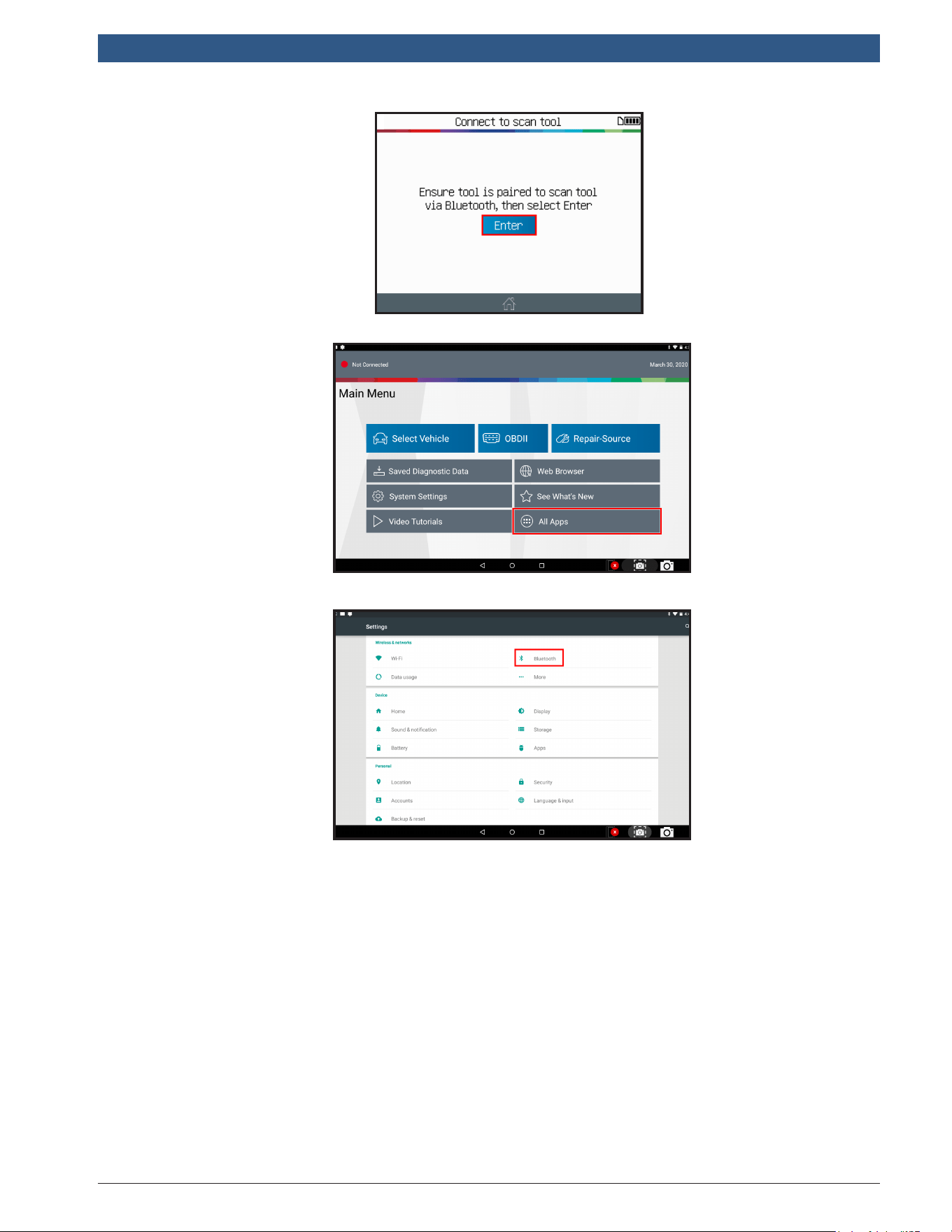
1 Bluetooth Pairing
Connect to Scan Tool Mode
Continue
Previous
The tool is ready to
activate the Bluetooth
connection.
Conrm
1699502721 | REV. B | JUNE 2020
TPA 300
|
User Guide | 39
|
en-US
© Bosch Automotive Service Solutions Inc.
TPA 300 is ready
to pair with Bosch
scan tool.
Use the Bosch
scan tool
for the next
steps.
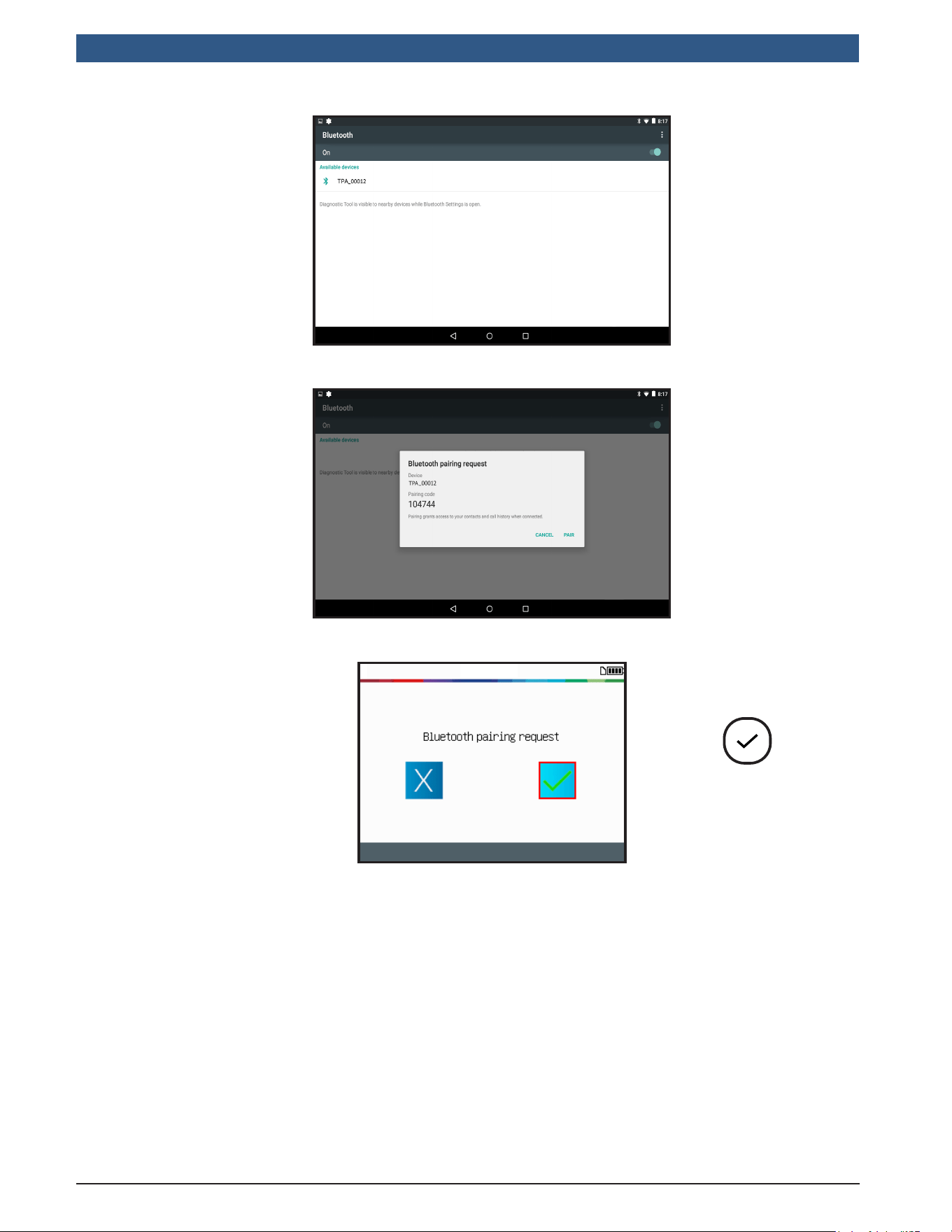
From the main menu
of the Bosch scan
tool, click “AllApps”
button and then open
the “Settings” icon.
In the settings menu,
click the Bluetooth
icon to enter
Bluetooth settings.
en-US
|
40
|
User Guide
|
TPA 300
1699502721 | REV. B | JUNE 2020
© Bosch Automotive Service Solutions Inc.
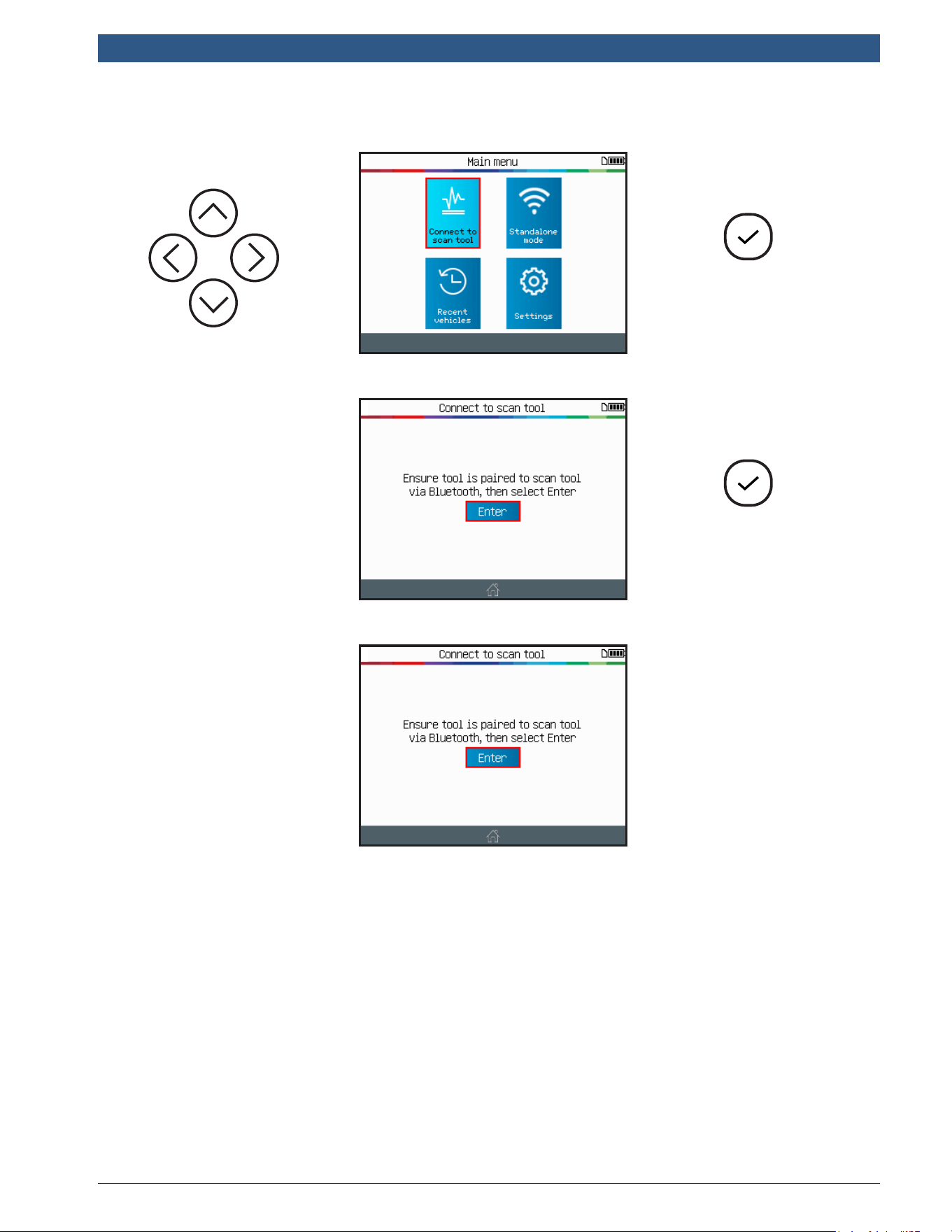
When your TPA
300 device
name appears,
click on it to
pair.
If Bluetooth is
deactivated (OFF),
click the right slider
to activate Bluetooth.
Then, wait until the
TPA 300 is detected
and shows up to the
scan tool screen.
Conrm the Bluetooth
pairing by clicking
“Pair” on the Bosch
scan tool.
Conrm the Bluetooth
pairing on the TPA 300.
Conrm
Note:Now the TPA 300 is capable of working in conjunction with the Bosch scan tool. There
is no need to repeat the pairing process the next time the devices are used together. Instead,
simply select the Connect to scan tool mode on the TPA 300 and follow the instructions from
the Bosch scan tool screen.
1699502721 | REV. B | JUNE 2020
TPA 300
|
User Guide | 41
|
en-US
© Bosch Automotive Service Solutions Inc.
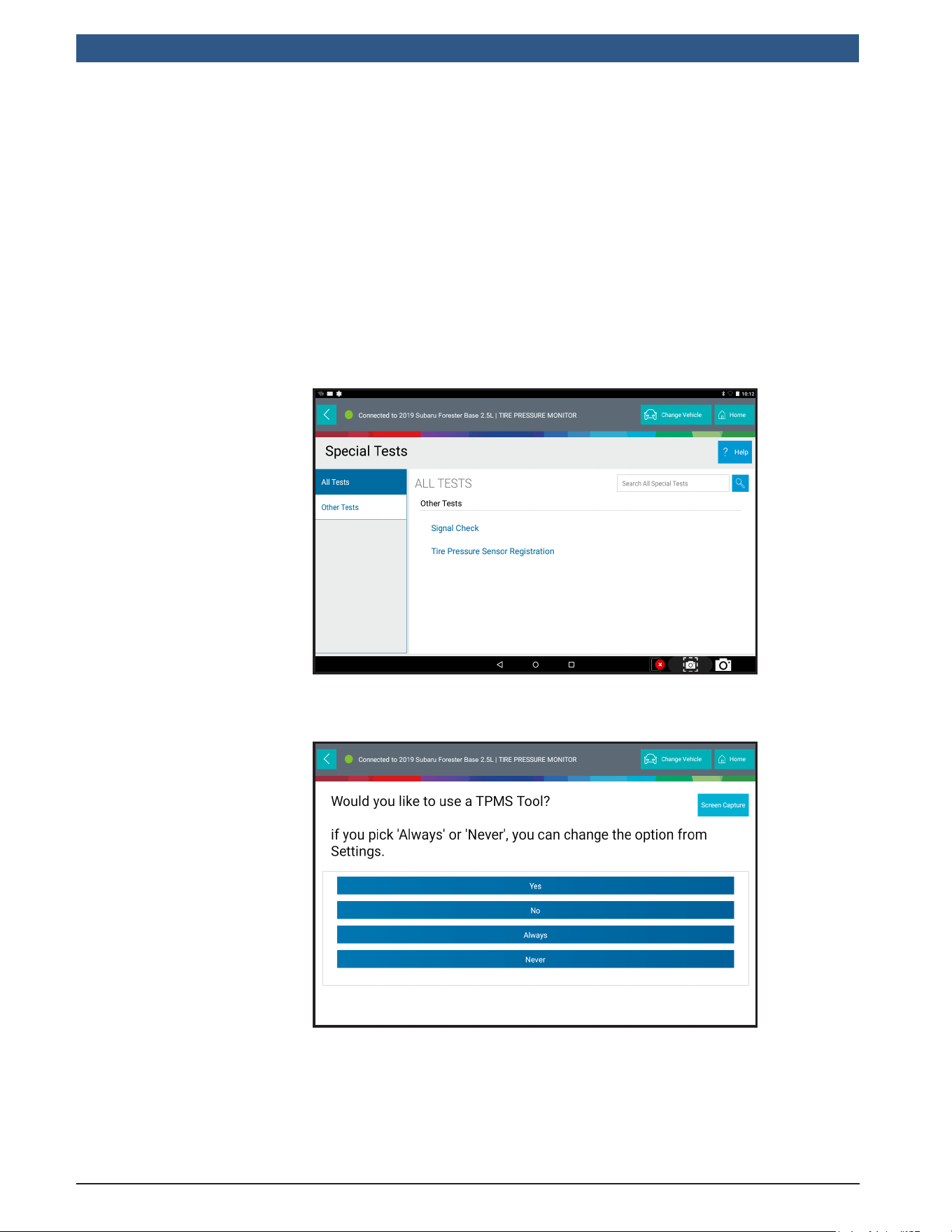
Continue
SelectConnecttoScanToolMode
Conrm
The tool is
ready to activate
the Bluetooth
connection.
TPA 300 is ready to
work with Bosch
scan tool.
Use the Bosch scan
tool for the next
steps.
Now the TPA 300 is awaiting instruction from the Bosch scan tool. Simply use the Bosch
scan tool to do the next steps.
en-US
|
42
|
User Guide
|
TPA 300
1699502721 | REV. B | JUNE 2020
© Bosch Automotive Service Solutions Inc.
This section is to relearn sensor IDs to the vehicle ECU. This is needed when one or
more sensor has been changed. This must be done using the Bosch scan tool.
Note: Follow the standard process to select the Make/Model/Year from the Bosch scan
tool and then use the TPA 300 to trigger all the TPMS sensors. The Bosch scan tool will
automatically transfer the sensor IDs from the TPA 300 and record them into the vehicle
ECU.
2 TPMS ECU Relearn
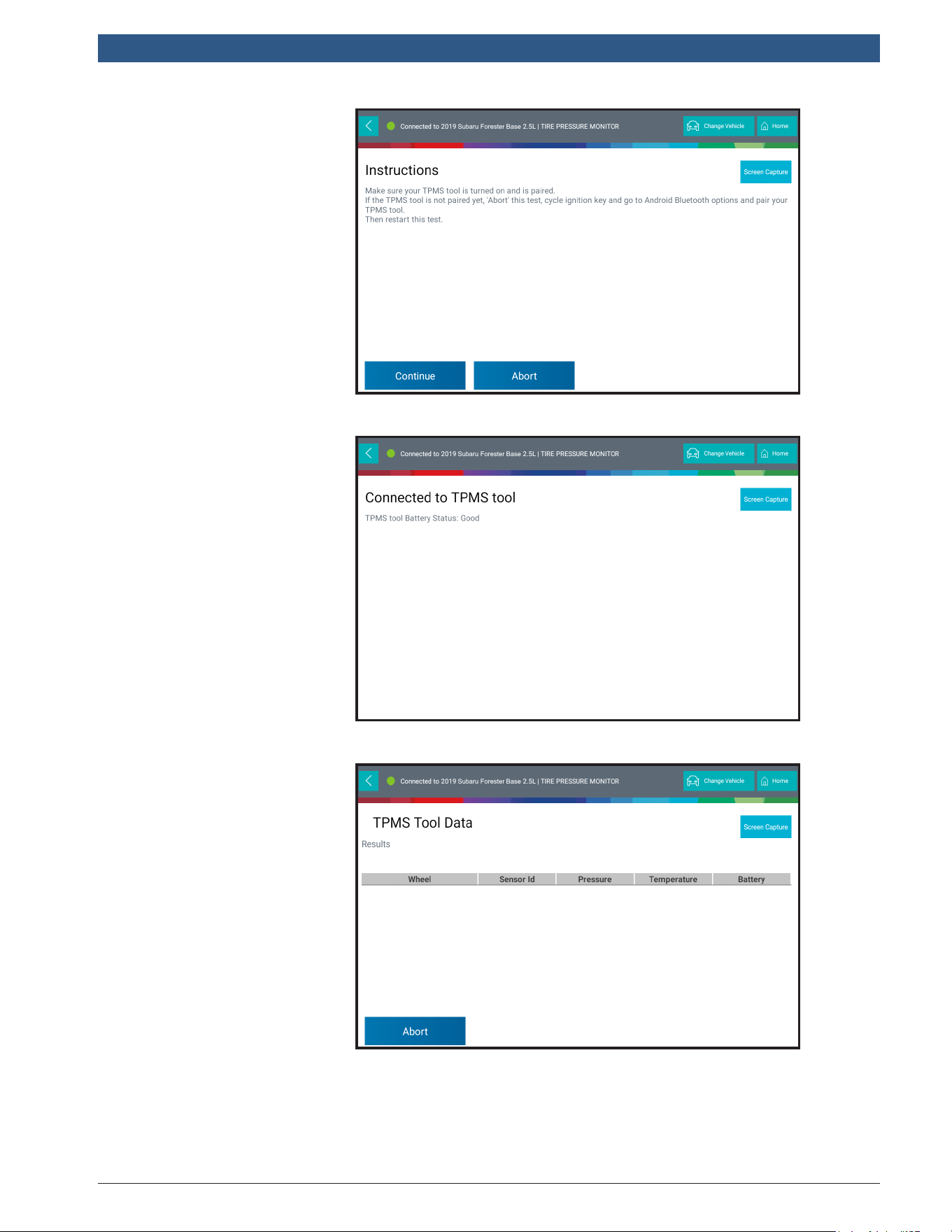
On the Bosch scan
tool select the Make/
Model/Year of the
targeted vehicle.
Then, select Tire
PressureSensor
Registrationfunction
located in the
SpecialTestsmenu.
Or choose
Maintenance
Tests then TPMS
Registration.
The scan tool asks if
you want to use the
TPMS tool.
Record this setting
by pressing the
“Always” button.
Note that this choice
can be changed later.
1699502721 | REV. B | JUNE 2020
TPA 300
|
User Guide | 43
|
en-US
© Bosch Automotive Service Solutions Inc.
Turn on the TPA 300
and activate the
“Connect to scan
tool” function in main
menu.
Then press Continue
on the Bosch scan
tool to conrm.
Wait while the Bosch
scan tool connects to
the TPA 300.
Check the TPA 300
screen to see if
any additional step
or conrmation is
needed depending on
the vehicle chosen.
When both the
TPA 300 and the
Bosch scan tool are
ready the following
screen will display.
en-US
|
44
|
User Guide
|
TPA 300
1699502721 | REV. B | JUNE 2020
© Bosch Automotive Service Solutions Inc.
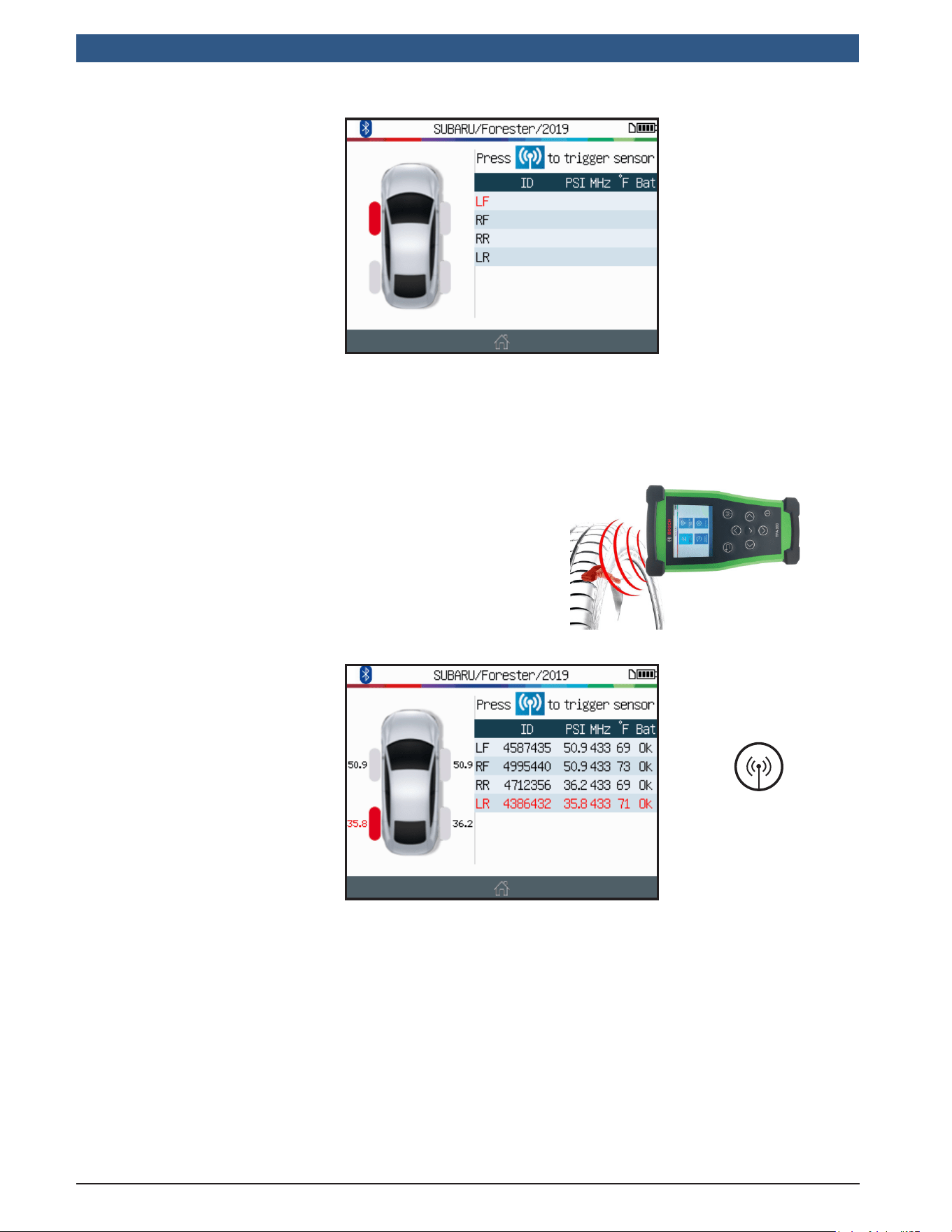
In the meantime, the
TPA 300 screen will
change to the TPMS
sensors triggering
screen with the
matching vehicle
selected.
At this stage, you have to read all the TPMS sensor IDs using the TPA 300 tool,
exactly the same way you do in Standalone mode. If you are not already familiar with
this procedure, see the dedicated section in this user manual.
Warning: For best sensor triggering, hold the tool
against the tire sidewall right above the sensor.
Read all sensors in
the normalized order.
LF (Left Front)
RF (Right Front)
RR (Right Rear)
LR (Left Rear)
Trigger Sensors
1699502721 | REV. B | JUNE 2020
TPA 300
|
User Guide | 45
|
en-US
© Bosch Automotive Service Solutions Inc.
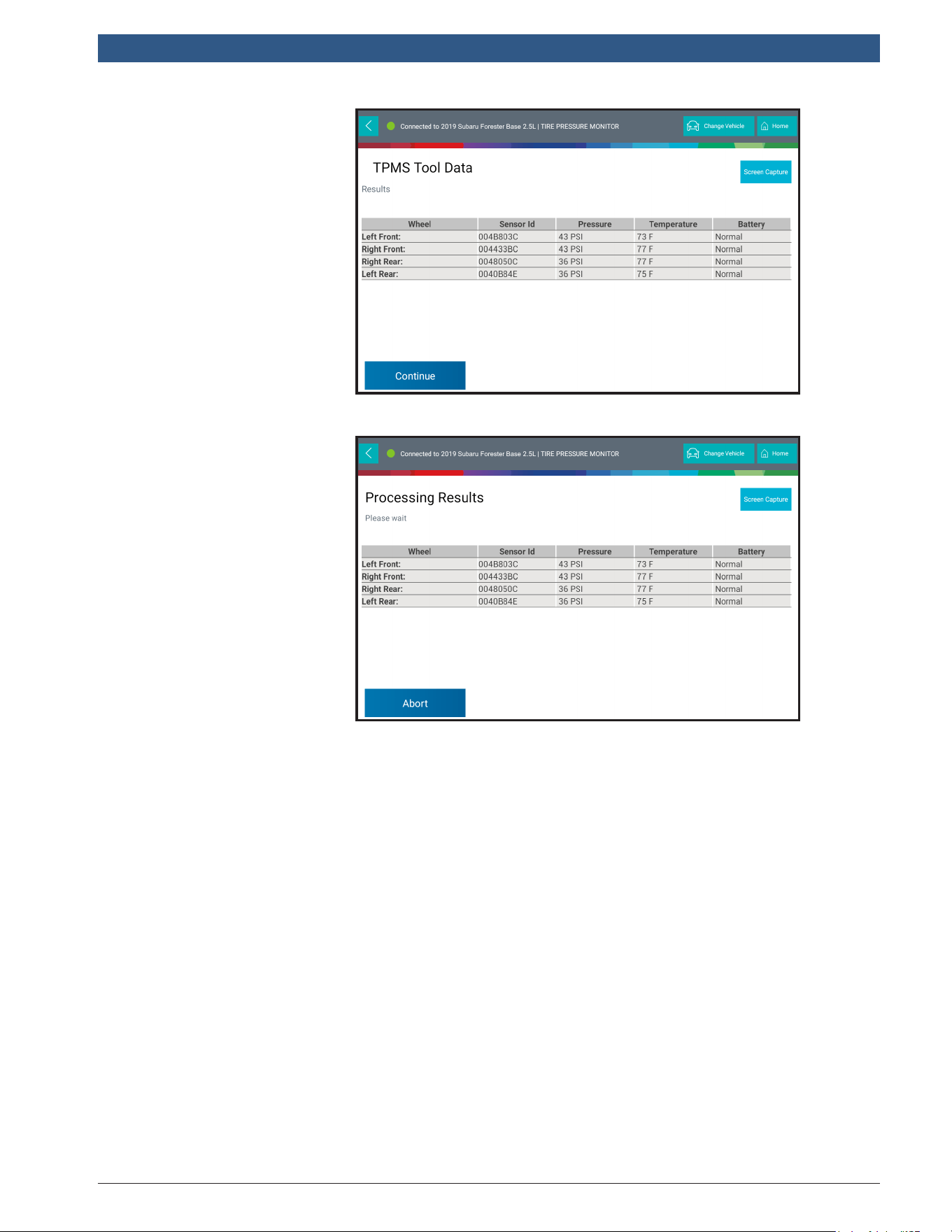
The sensors’ IDs
automatically appear
on the Bosch scan
tool.
Press Continue to
register the new IDs
to the vehicle ECU.
The Bosch scan tool
will conrm the
correct recording of
the new sensors’ IDs
into the vehicle ECU.
en-US
|
46
|
User Guide
|
TPA 300
1699502721 | REV. B | JUNE 2020
© Bosch Automotive Service Solutions Inc.
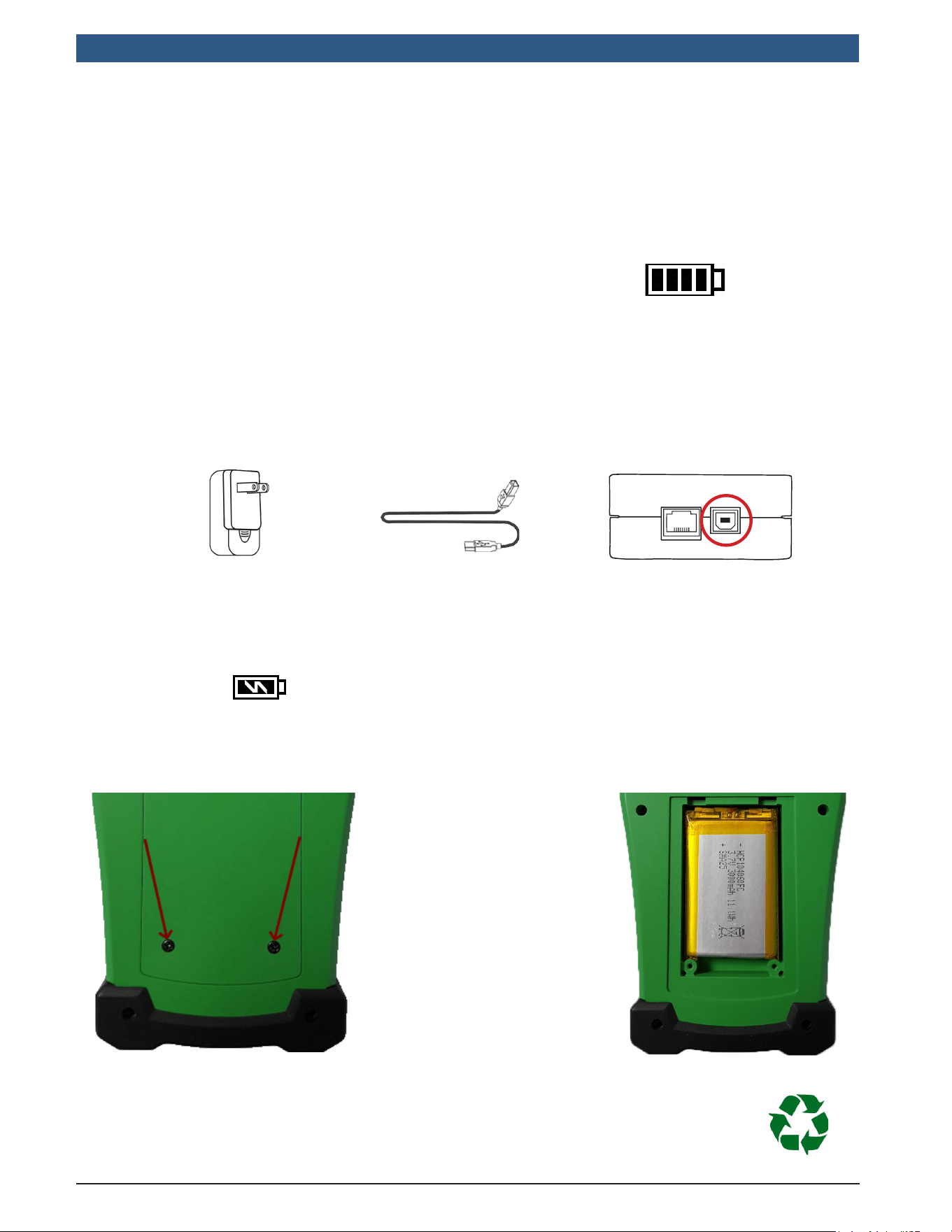
LowBatteryIndication
The TPMSTool incorporates a low battery
detection circuit. Battery life is an average
of 300 sensor tests per battery charge
(approximately 60 to 80 vehicles).
Miscellaneous
1 Tool Charging
Batteryindicatorstatus:
When low, icon is ashing, the tool
will turn off after 10 seconds.
DONOT use the tool with low battery status because the transmission and emission
may not be reliable.
Wall charger
USB B Cable
USB B Socket
For charging the tool, directly plug the supplied USB cable to the tool and plug the
wall charger to an appropriate outlet. The battery icon will change to reect the
charging status:
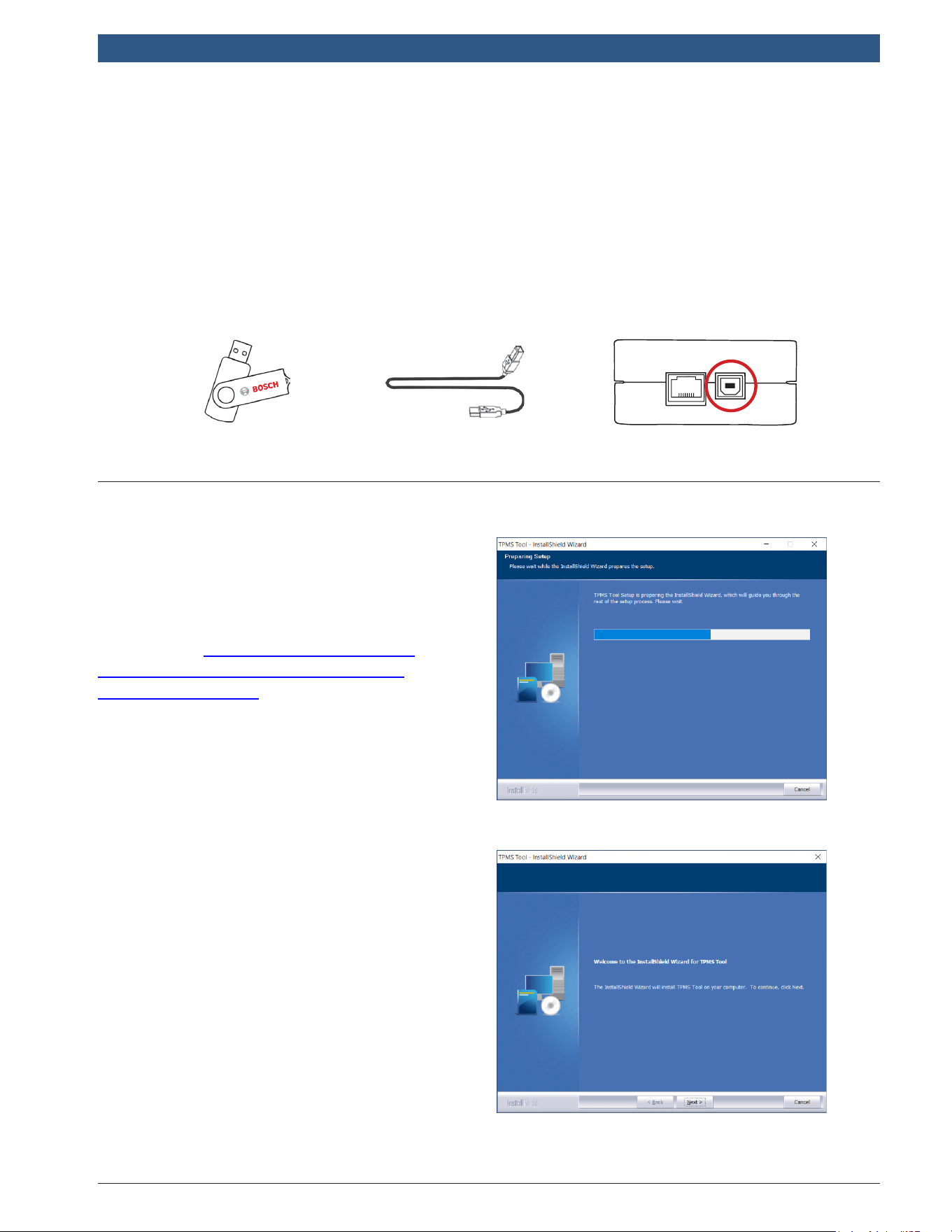
BatteryReplacement
Unscrew the two
screws on the back of
the tool.
Remove the cap.
Unplug the battery
and change the
battery to a new one.
Reinstall the cap and
the screws.
Recycle the used battery, see Battery and Recycling dedicated section in this
user manual
1699502721 | REV. B | JUNE 2020
TPA 300
|
User Guide | 47
|
en-US
© Bosch Automotive Service Solutions Inc.
UpdatingtheTPMSTool
As new coverage becomes available, it will become necessary to update the tool.
Follow these steps below:
Important: To ensure a successful update, temporarily turn off all anti-virus and spam
blocking software on your computer.
2 Tool Update
USB B Cable
USB Key
USB B Socket
2.1InstallTPMSToolPCSuite
Step1: Insert the USB key supplied
with your tool into the PC and click on
the TPMSTool icon to start installing
the program.
Note:Go to https://3934tpmsupdate.
tools-tpms.com/software/3934tpms/
SetupTpmsTool.exe to download the
latest version of the TPA 300 PC software
companion and use the same procedure
to install this application.
Step2: Click “Next” to continue to the
“WelcometoinstallShieldWizardfor
TPMSTool” screen.
en-US
|
48
|
User Guide
|
TPA 300
1699502721 | REV. B | JUNE 2020
© Bosch Automotive Service Solutions Inc.
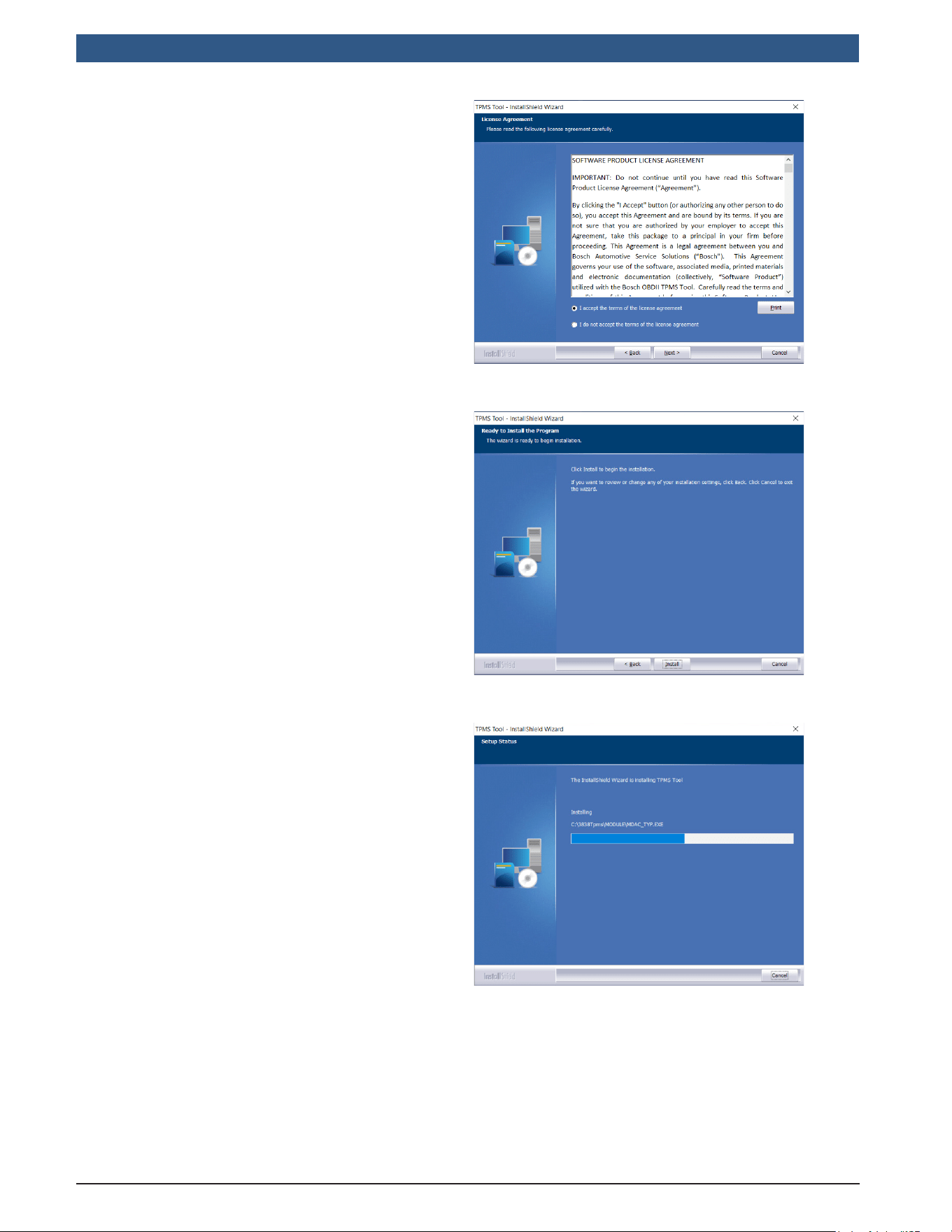
Step3: Read the software product
license agreement, select “Iacceptthe
termsofthelicenseagreement” and
click on “Next”.
Step4: Click “Install” to start the
installation process.
Step5: Until the software carries out
the installation please wait.
1699502721 | REV. B | JUNE 2020
TPA 300
|
User Guide | 49
|
en-US
© Bosch Automotive Service Solutions Inc.
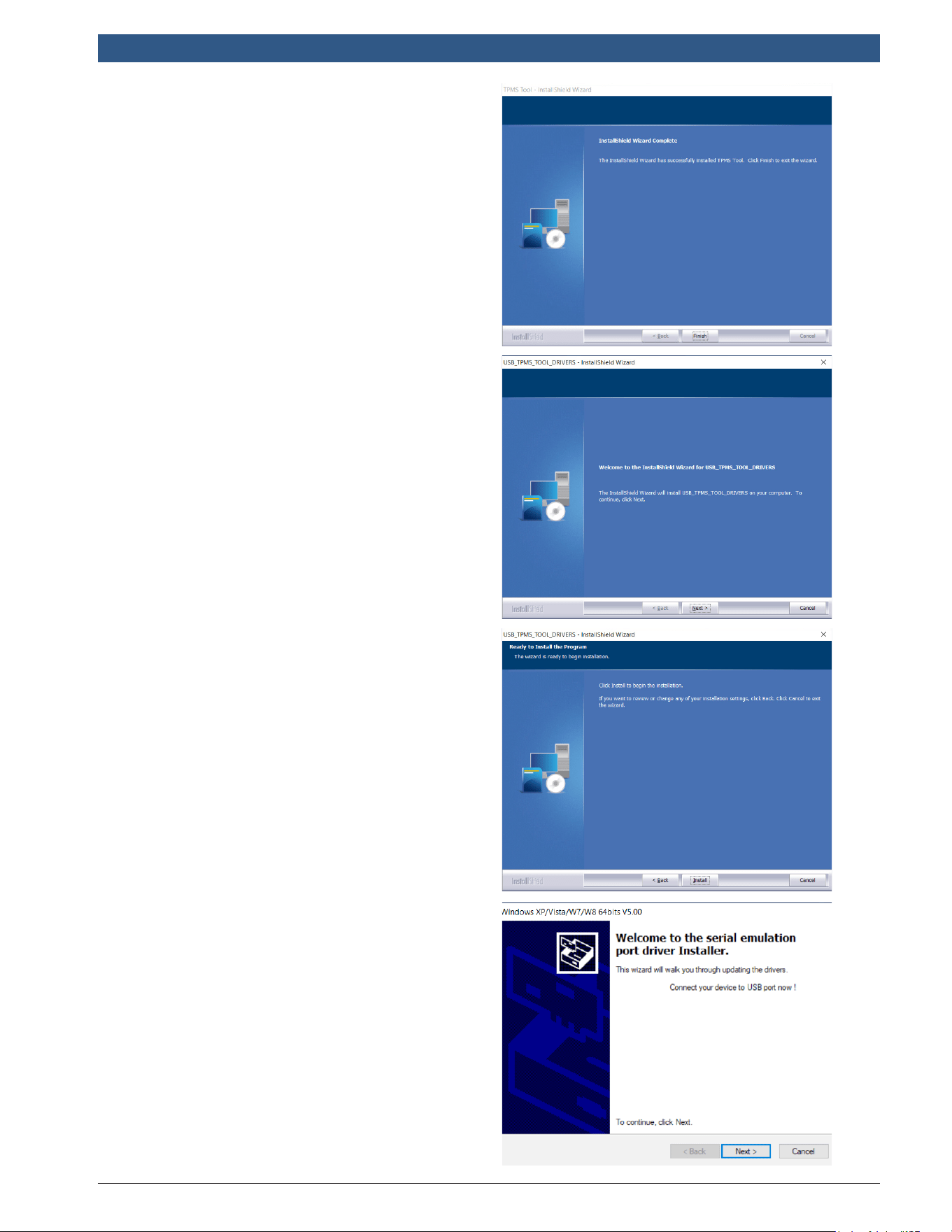
Step6: When the installation is
complete, click on “Finish”.
Step7: Click “Next” to continue to
“WelcometotheInstallShieldWizard
forUSBDriver”.
Step8: Click “Install” to install the
USB driver.
Step9: Click “Next” to continue to the
USB/serialemulation drivers.
en-US
|
50
|
User Guide
|
TPA 300
1699502721 | REV. B | JUNE 2020
© Bosch Automotive Service Solutions Inc.
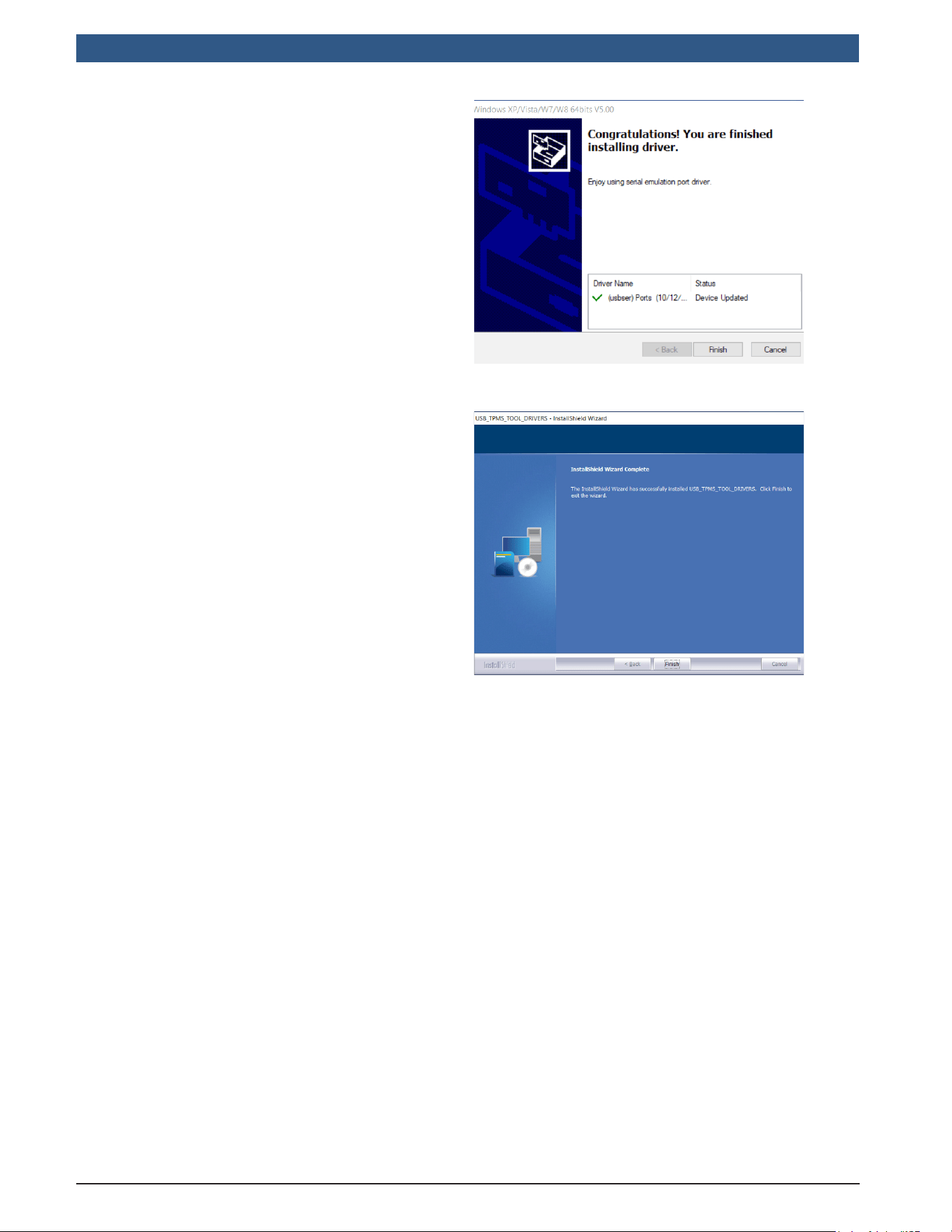
Step10: The installation is complete,
your device is ready to use, click
“Finish”.
Step11: Click “Finish” to close the
installation window.
Note: If sometimes the Windows
©
Security prompts you, please click on
“ContinueAnyway”.
Note: To order annual update software license part number, please contact BOSCH
technical support.
1699502721 | REV. B | JUNE 2020
TPA 300
|
User Guide | 51
|
en-US
© Bosch Automotive Service Solutions Inc.
2.2.PCSoftwareforTPA300Updates
Step1:
Connect the USB cable from the TPMSTool to the PC, and turn the device on.
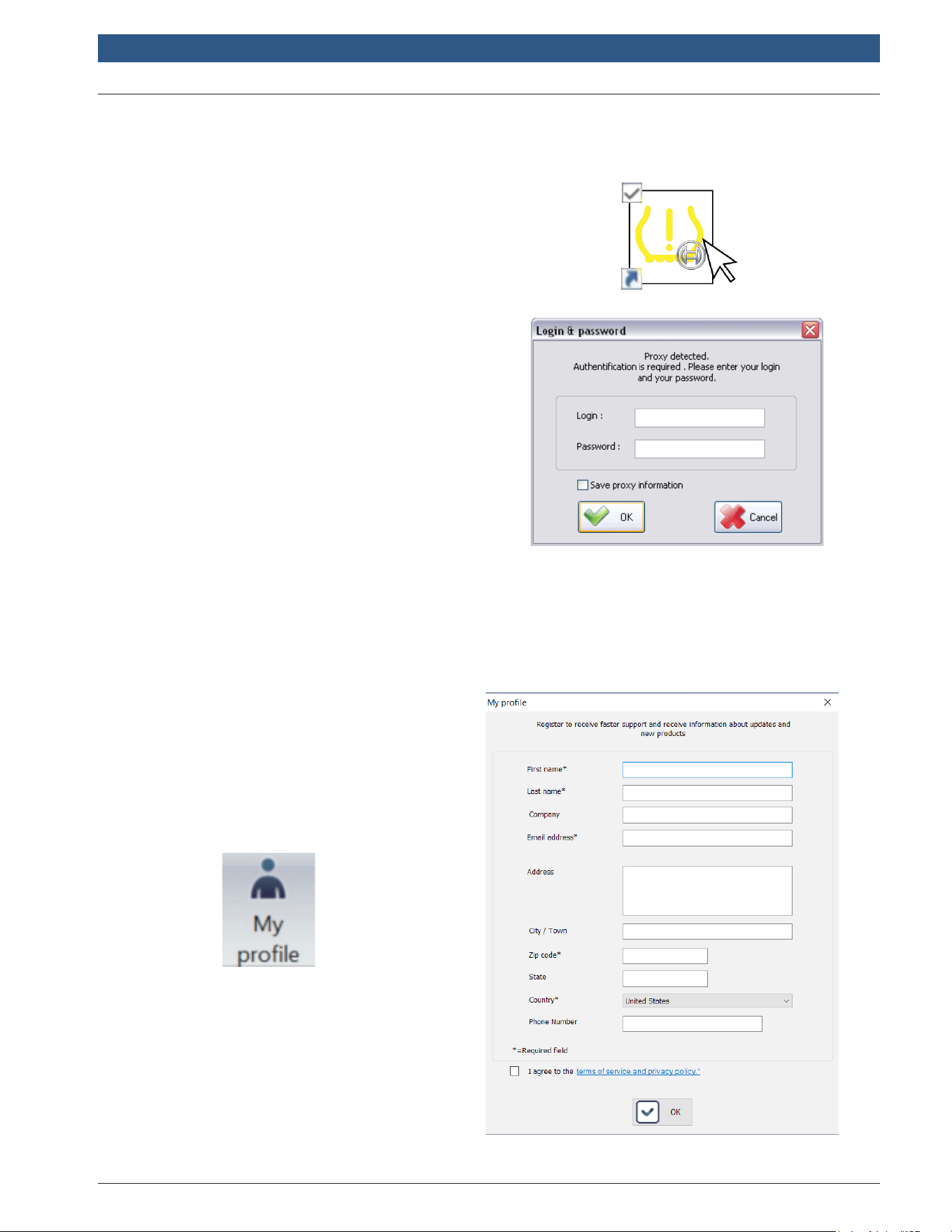
Step2:Start the TPMS Tool software.
Step3:When connected to a local
network using a Proxy server, enter the
local network Login and Password.
Step4:RegisteringDevice
New units are eligible for 36 months of free software updates from the purchase
date. This allows access to new coverage and software enhancements.
Note:The tool can’t be updated without
prior registration.
Step5:RegistrationInformation
To register the product, enter
information in the elds, read the
terms of service and privacy policy,
then click “Submit”. This information
will be paired with the connected
tool.
en-US
|
52
|
User Guide
|
TPA 300
1699502721 | REV. B | JUNE 2020
© Bosch Automotive Service Solutions Inc.
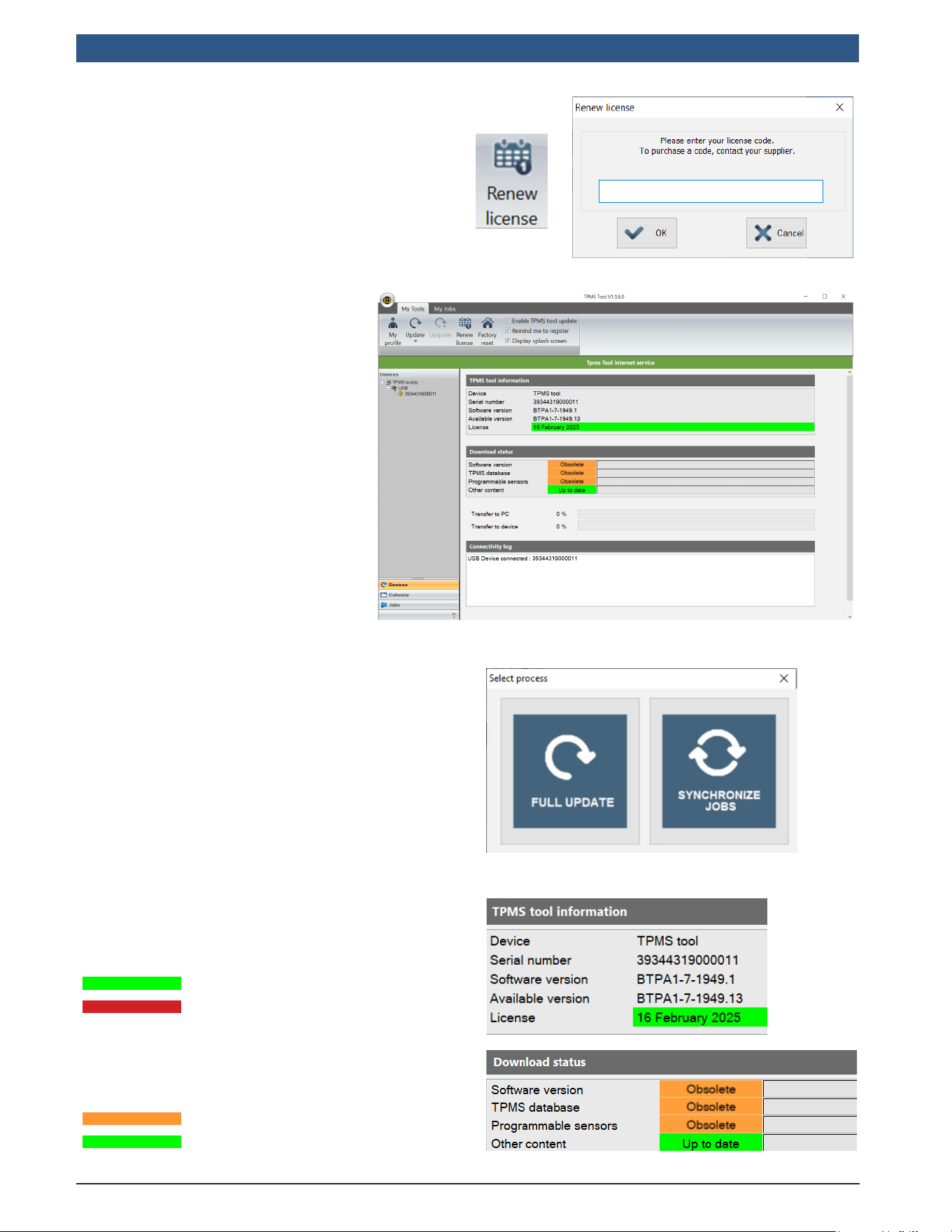
Step6:RenewSubscription
Call your distributor to purchase a new
subscription code.
To enter the new subscription code, click
on the RenewLicense button.
Step7:Main windows in the
“MyTools”Tab
The software searches for
the connected device. Once
detected, the software
connects to the Internet
server and conrms if the
connection is established.
Step8:TPMSToolUpdate
When a device is detected, the
software prompts with two choices:
FullUpdate: To update the device to
the last version.
Uploadjobs: To upload all the
captured data in the TPMS tool to a
PC for printing.
Step9:TPMSToolInformation
The license eld indicates the status of the
TPA 300 software license.
The tool license is valid.
The tool license is expired.
The Download status elds display
whether the software versions installed
onto the TPA 300 device are current or
not.
The tool needs to be updated.
The tool is up to date.
Obsolete
Up to date
1699502721 | REV. B | JUNE 2020
TPA 300
|
User Guide | 53
|
en-US
© Bosch Automotive Service Solutions Inc.
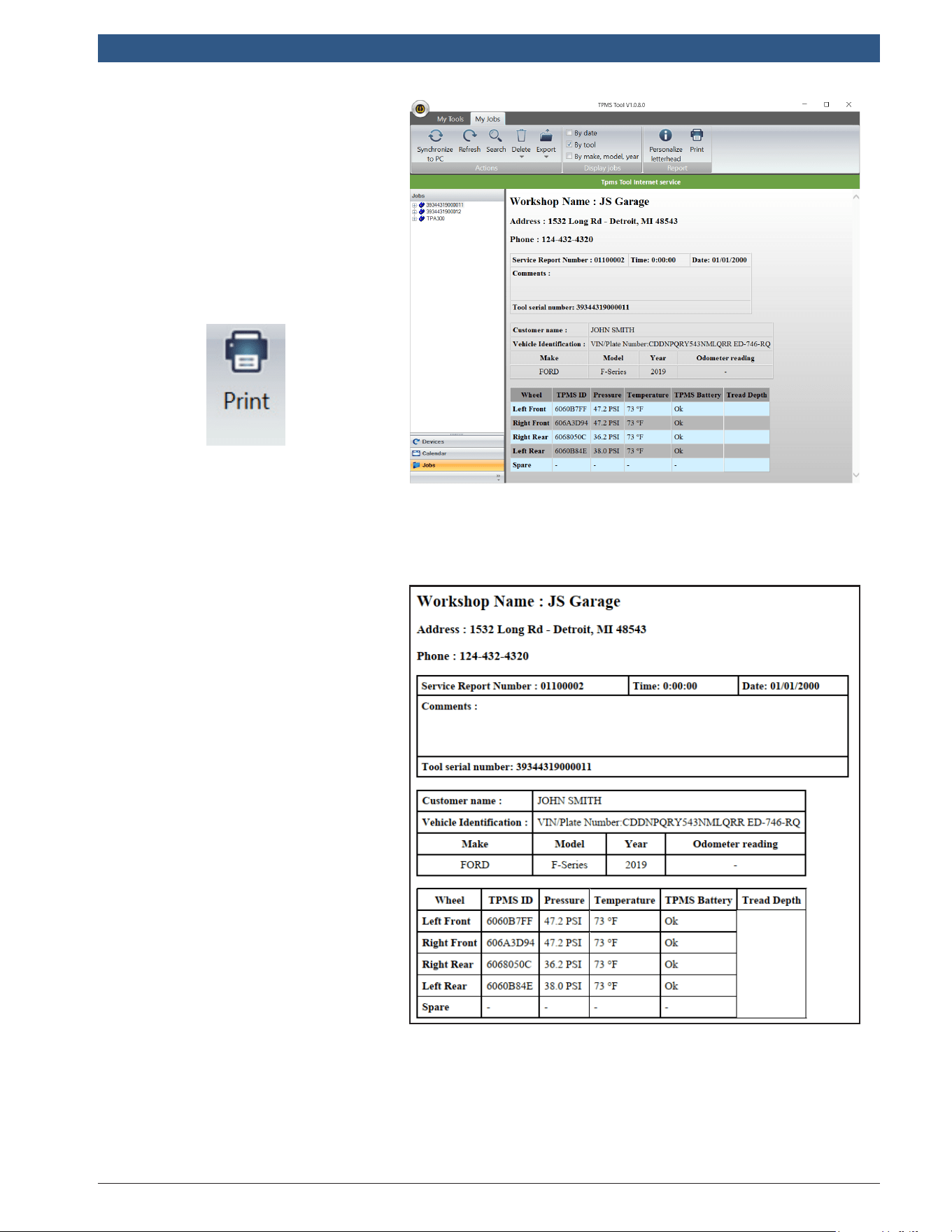
Step10:Main windows in the
“MyJobs”Tab
Displays the sensors triggered
by the vehicle.
To print these results click on
the Print icon.
Step11:PrintExample
The results will be printed like
the following example.

en-US
|
54
|
User Guide
|
TPA 300
1699502721 | REV. B | JUNE 2020
© Bosch Automotive Service Solutions Inc.
BOSCH®AUTOMOTIVESERVICESOLUTIONS
LIMITEDWARRANTY–APPLICABLETOTHE
UNITEDSTATESANDCANADA
Bosch Automotive Service Solutions (“Bosch”)
warrants to the original retail buyer (“Buyer”)
the products listed below (“Products”) to be
free from defects in material or workmanship in
accordance with the following:
PRODUCT:PartNumberBosch3934TPA300
TPMSResettool
• NewBoschDiagnosticProducts are warranted
against defects in materials and workmanship
for one year from the date of registration
EXCLUSIONSANDRESTRICTIONS
This warranty is only valid to the original
purchaser of the Product and is not transferable
to subsequent owners of the Product. The
Buyer must register the Product. The warranty
period begins on the date of tool registration.
I your tool is not registered, no warranty
services are offered. All warranty claims must
be made within the warranty period and proof
of purchase must be supplied. This warranty
does not cover the cost of freight to return the
Product to Bosch.
This warranty does not cover consumable items,
including, without limitation, non-rechargeable
batteries. Specically excluded from this
warranty are Products that have been abused,
altered, opened, worn out, contaminated, used
for a purpose other than that for which it was
intended, or used in a manner inconsistent
with instructions. This warranty does not cover
battery leakage.
This warranty only covers Products
manufactured by Bosch. Bosch will pass through
to the original purchaser all manufacturers
warranties. No one is authorized to make any
statement or representation altering the terms
of this warranty.
REMEDIES
The sole and exclusive remedy for any Product
found to be defective is repair or replacement,
at the option of Bosch. The existence of
a warrantable defect shall be determined
by Bosch in accordance with procedures
established by Bosch.
DISCLAIMER
TOTHEEXTENTPERMITTEDBYAPPLICABLE
LAW,THEABOVEWARRANTYISINLIEUOF
3 Limited Warranty/
Certicates
ANYOTHERWARRANTY,EXPRESSOR
IMPLIED,INCLUDINGANYWARRANTY
OFMERCHANTABILITYORFITNESSFOR
APARTICULARPURPOSE.INNOEVENT
SHALLBOSCHBELIABLEFORANYDIRECT,
INDIRECT,SPECIAL,INCIDENTALOR
CONSEQUENTIALDAMAGES(INCLUDING
LOSTPROFIT)WHETHERBASEDON
WARRANTY,CONTRACT,TORTORANYOTHER
LEGALTHEORYEVENIFBOSCHHASBEEN
ADVISEDOFTHEPOSSIBILITYOFSUCH
DAMAGES.Some States in the U.S. and some
Canadian provinces do not allow the disclaimer
of implied warranties, limitations on how
long implied warranties last, or the exclusion
or limitation of incidental or consequential
damages for some products so the above
limitations or exclusions many not apply. This
warranty gives the original retail buyer specic
legal rights and the original retail buyer may
have other rights which vary from state to state
in the U.S., or province to province in Canada.
SOFTWARE
The Product may contain an End User License
Agreement (EULA) that sets forth specic terms
and conditions, including warranties, relating
to the Product software. Product software is
proprietary, condential information protected
under copyright law. Users have no right in or
title to Product software other than a limited
right of use of revocable by Bosch. Product
software when correctly installed. Will execute
its programmed instructions. Bosch does not
warrant that software will operate uninterrupted
or error-free. Product software may not be
transferred or disclosed without the written
consent of Bosch. Product software may not be
copied except in ordinary backup procedures.
TECHNICALSUPPORT
If you have any questions on the operation of
the Product or prior to sending in a product for
repair, call Bosch Technical Support at:
1 (855) 267-2483.
MISCELLANEOUS
This warranty shall be governed by and
construed in accordance with the laws of the
State of Michigan U.S.A., exclusive of its conict
of laws principles. The U.N. Convention on
Contracts for the international Sales of Goods
shall not apply. Bosch reserves the right to
amend this warranty policy as required.

1699502721 | REV. B | JUNE 2020
TPA 300
|
User Guide | 55
|
en-US
© Bosch Automotive Service Solutions Inc.
IMPORTANT:Donotcontinueuntilyouhave
readthisSoftwareProductLicenseAgreement
(“Agreement”).
By clicking the “I Accept” button (or authorizing
any other person to do so), you accept this
Agreement and are bound by its terms. If you
are not sure that you are authorized by your
employer to accept this Agreement, take this
package to a principal in your rm before
proceeding. This Agreement is a legal agreement
between you and Bosch Automotive Service
Solutions Inc. (“Bosch”). This Agreement
governs your use of the software, associated
media, printed materials and electronic
documentation (collectively, “Software
Product”) utilized with the Bosch TPA 300.
Carefully read the terms and conditions of
this Agreement before using this Software
Product. Use of this Software Product indicates
your acceptance of the following terms
and conditions. IF YOU DO NOT AGREE TO
THE TERMS OF THIS AGREEMENT, DO NOT
DOWNLOAD, INSTALL OR USE THE PRODUCT
SOFTWARE.
LICENSE. Subject to the terms and conditions
of this Agreement, Bosch grants to you a
personal, non-transferable (except as noted
in Section 8 (Assignment)) and non-exclusive
license (without the right to sub-license) to
use the Software Product on a single tool at
a time. This Agreement will also govern any
Software Product updates, upgrades, and
program additions for the Software Product
which has been provided to you by Bosch,
unless such upgrades, updates, or additions are
accompanied by a separate agreement, in which
case the terms of that agreement will govern.
Bosch is not obligated to provide any updates,
upgrades or program additions to the Software
Product.
RESTRICTIONS. Without Bosch’s written
permission, you shall not, and shall not permit
anyone else to: (a) copy, distribute, sub-
license, sell, or otherwise provide any portion
of the Software Product to any third party
(including leasing, renting, letting on loan or
sub-licensing); (b) modify, unbundle, translate,
prepare derivative works of, disassemble
(except to the extent that this restriction is
expressly prohibited by law), reverse compile,
decompile, or reverse engineer any part of
the Software Product or otherwise attempt to
learn the source code, structure or algorithms
underlying the Software Product; (c)
4 Software Product License
Agreement
use the Software Product in a computer-based
services business; (d) remove any proprietary
notices or labels relating to the Software
Product and will include such notices on any
authorized copies of the Software Produce; (e)
use the Software Product on more than one
computer at the same time; or (f) separate the
Software Product’s component parts for use
on more than one computer. You agree that the
Software Product belongs to Bosch and/or its
suppliers. You agree to keep condential and
use your best efforts to prevent and protect
the contents of the Software Product from
unauthorized disclosure.
INTELLECTUALPROPERTY. You acknowledge
that no title to the intellectual property in
the Software Product is transferred to you.
You further acknowledge that all right, title
and interest in and to the Software Product
shall remain the property of Bosch and/or its
suppliers, and you will not acquire any rights
to the Software Product, except for the limited
right to use as expressly set forth above. This
includes all copies (to the extent permitted
herein) of the Software Product made by you
as well as the related user manuals and other
supporting materials. The Software Product
is protected by copyright laws, international
copyright treaties, and other intellectual
property laws and treaties. All trademarks
appearing in the Software Product are the
property of their respective owners.
CONSENTTOUSEOFDATA. The Software
Product does not collect any personally
identiable information on its own. You may
wish to enter optional personally identiable
information.. All data generated by the
Software Product may be used by Bosch and/
or its supplier for any purpose, including but
not limited to, facilitating the provision of
software updates, product support and other
services related to the Software Product. You
additionally agree that Bosch and/or its supplier
shall have the right use the data generated
by the Software Product, in aggregated and
depersonalized form, for statistical, survey,
product research, product development, and
marketing purposes, and as part of such use, to
make the aggregated and depersonalized data
available to third parties for use by such third
parties.
Through your use of the Software Product,
Bosch may collect the following types of data:
(a) registration data entered by you, including
but not limited to company name and address;
(b) technical data and related information,
including

en-US
|
56
|
User Guide
|
TPA 300
1699502721 | REV. B | JUNE 2020
© Bosch Automotive Service Solutions Inc.
but not limited to technical information about
your device, system and application software,
and peripherals; and (c) vehicle data obtained
from a customer’s vehicle including but not
limited to make, model, year of manufacture,
equipment features, vehicle identication data,
repair, maintenance and wear related data
generated during use/repair, and odometer
reading. Bosch will not collect, process or use
any other personal information.
Bosch may use this data for the following
purposes:
• Completing this Agreement;
• Providing our products and services;
• Customer or supplier administration;
• Administering, maintaining, personalizing and
improving our products and services;
• Developing new products and services;
• Inquiries and customer service requests you
submit to Bosch;
• Statistical purposes and reporting;
• Compliance with legal, regulatory or
contractual requirements; and
• Other legitimate business purposes so long
as the data is anonymized in a way that cannot
reasonably be associated with you or a vehicle.
Bosch may share data collected through the use
of the Software Product for the uses described
above with: (a) our afliated entities, (b)
service providers, vendors, consultants, and
other partners performing work on our behalf,
in order to provide you with our products and
services, (c) third party business partners who
you have authorized Bosch to share data with,
and/or (d) relevant authorities in accordance
with, and as Bosch deems required by,
applicable law, regulation, court order or legal
process. Bosch may transfer your personal
information to its parent company in Germany,
Robert Bosch GmbH, and to any worldwide
afliates when processing data. Bosch may also
transfer your data to a third party outside your
country of origin.
You consent and agree to the above uses and
sharing of the data collected by the Software
Product.
You will provide notice to and acquire a consent
from each customer (or prospective customer)
to the collection of vehicle data obtained from a
customer’s vehicle using the device that this
Software Product is housed on and the sharing
with and use of such data by Bosch and third
parties in accordance with the this Agreement.
The Software Product is subject to U.S. laws,
including those governing the privacy and
security of your information. If you register and
use the Software Product, you are transferring
your information to Bosch in the United
States. By providing your information to Bosch
through the Software Product you consent to
the transfer of your personal information to
the United States, and our handling of your
information in accordance with applicable U.S.
requirements.
All personal information will be treated by
Bosch as condential in accordance with data
protection regulations. In compliance with
applicable data protection regulations, you are
able to have your personal information rectied,
amended, deleted or made inaccessible. To this
effect, please send your request to:
Bosch Automotive Service Solutions Inc.
655 Eisenhower Drive
Owatonna, MN 55060
Phone: (855) 267-2483
Fax: (507) 455-7451
Bosch’s obligation to continuously store
(archive), make inaccessible, delete or share
data or information as required by law, ordered
by judge or state authority or as per this
Agreement remains unaffected.
TAXES. You will pay all taxes, including sales,
use, personal and property taxes, due to your
use of the Software Product.
DISCLAIMEROFWARRANTIES;LIMITATION
OFLIABILITY.
TO THE MAXIMUM EXTENT PERMITTED BY
APPLICABLE LAW, BOSCH AND IT AFFILIATES,
LICENSORS, SERVICE PROVIDERS, AND
SUPPLIERS OF THE SOFTWARE PRODUCT DO
NOT WARRANT THE SOFTWARE PRODUCT, ITS
CONTENT, USE OR ANY SUPPORT PROVIDED
BY BOSCH OR THIRD PARTIES, WHICH IS
PROVIDED “AS IS” AND WITHOUT WARRANTIES
OF ANY KIND, EITHER EXPRESS OR IMPLIED.
BOSCH DISCLAIMS ALL WARRANTIES, EXPRESS
OR IMPLIED, INCLUDING, BUT NOT LIMITED TO
WARRANTIES OF TITLE AND IMPLIED

1699502721 | REV. B | JUNE 2020
TPA 300
|
User Guide | 57
|
en-US
© Bosch Automotive Service Solutions Inc.
WARRANTIES OF MERCHANTABILITY, FITNESS
FOR A PARTICULAR PURPOSE, OF LACK
OF VIRUSES, LACK OF NEGLIGENCE OR
WORKMANLIKE EFFORT, COMPATABILITY,
SECURITY, ACCURACY, AND NON-
INFRINGEMENT.
NEITHER BOSCH, OR ANY OF ITS AFFILIATES,
NOR ANY OF BOSCH’S LICENSORS, SERVICE
PROVIDERS, OR SUPPLIERS WARRANT
THAT THE SOFTWARE PRODUCT WILL BE
UNINTERRUPTED OR ERROR-FREE OR THAT
DEFECTS WILL BE CORRECTED.
WE WILL NOT BE LIABLE FOR ANY LOSS OR
DAMAGE CAUSED BY DELAY IN FURNISHING
THE SOFTWARE PRODUCT OR ANY OTHER
PERFORMANCE UNDER THIS AGREEMENT.
YOUR USE OF THE SOFTWARE PRODUCT IS AT
YOUR SOLE RISK AND YOU WILL BE SOLELY
RESPONSIBLE FOR ANY DAMAGE TO YOUR
COMPUTER SYSTEM OR LOSS OF DATA THAT
RESULTS FROM SUCH USE.
NEITHER BOSCH OR ANY OF ITS AFFILIATES,
NOR ANY OF BOSCH’S LICENSORS, SERVICE
PROVIDERS OR SUPPLIERS WARRANT OR
MAKE ANY REPRESENTATIONS REGARDING
THE USE OR THE RESULTS OF THE USE OF
THE SOFTWARE PRODUCT IN TERMS OF ITS
CORRECTNESS, ACCURACY, COMPLETENESS,
SEQUENCE, RELIABILITY, OR OTHERWISE OR
THAT THE SOFTWARE PRODUCT WILL MEET
YOUR REQUIREMENTS. BOSCH MAKES NO
WARRANTY AND ASSUMES NO RESPONSIBILITY
FOR ANY THIRD PARTY HARDWARE,
EQUIPMENT OR SOFTWARE WITH WHICH THE
SOFTWARE PRODUCT MAY BE REQUIRED TO
COMMUNICATE OR OPERATE.
SOME STATES AND JURISDICTIONS DO
NOT ALLOW LIMITATIONS ON IMPLIED
WARRANTIES, SO SOME OR ALL OF THE
ABOVE LIMITATIONS MAY NOT APPLY TO YOU,
IN WHICH EVENT THE ABOVE LIMITATIONS
WILL BE ENFORCEABLE TO THE MAXIMUM
EXTENT PERMITTED BY APPLICABLE LAW. NO
ORAL OR WRITTEN INFORMATION OR ADVICE
GIVEN BY BOSCH, ITS AFFILIATES, LICENSORS,
SERVICE PROVIDERS, OR SUPPLIERS, OR
THEIR RESPECTIVE AGENTS, DISTRIBUTORS,
DEALERS AND EMPLOYEES, SHALL CREATE
A WARRANTY OR IN ANY WAY INCREASE THE
SCOPE OF THIS WARRANTY, AND YOU MAY NOT
RELY ON ANY SUCH INFORMATION OR ADVICE.
YOU EXPRESSLY UNDERSTAND AND AGREE
THAT BOSCH AND ITS AFFILIATES, LICENSORS,
SERVICE PROVIDERS AND SUPPLIERS, TO THE
MAXIMUM EXTENT PERMITTED BY APPLICABLE
LAW, SHALL NOT BE LIABLE TO YOU OR ANY
THIRD PARTIES FOR ANY DIRECT, INDIRECT,
INCIDENTAL, SPECIAL, CONSEQUENTIAL,
EXEMPLARY OR PUNITIVE DAMAGES, OR ANY
OTHER DAMAGES WHATSOEVER, FOR ANY
MATTER ARISING FROM OR RELATING TO THIS
AGREEMENT, ANY PRODUCTS OR SERVICES
PROVIDED HEREUNDER, THE SOFTWARE
PRODUCT OR THE INTERNET GENERALLY,
INCLUDING, WITHOUT LIMITATION, DAMAGES
FOR LOSS OF BUSINESS OR PROFITS,
BUSINESS INTERRUPTION, OR OTHER
PECUNIARY LOSS, YOUR USE OR INABILITY TO
ACCESS AND USE THE SOFTWARE PRODUCT,
ANY CHANGES TO OR INACCESSIBILITY OF
THE SOFTWARE PRODUCT, DELAY, FAILURE,
UNAUTHORIZED ACCESS TO OR ALTERATION
OF ANY TRANSMISSION OR DATA, ANY
MATERIAL OR DATA SENT OR RECEIVED OR
NOT SENT OR RECEIVED, OR THE ACCURACY
OF ANY DATA OR INFORMATION PROVIDED
BY OR THROUGH THE SOFTWARE PRODUCT,
WHETHER SUCH LIABILITY IS ASSERTED
ON THE BASIS OF CONTRACT, TORT OR
OTHERWISE AND EVEN IF BOSCH WAS
INFORMED OF THE POSSIBILITY OF SUCH
DAMAGES.
OUR ENTIRE LIABILITY AND YOUR EXCLUSIVE
REMEDIES FOR LIABILITY OF ANY KIND
(INCLUDING LIABILITY FOR NEGLIGENCE) FOR
THE SOFTWARE PRODUCT COVERED BY THIS
AGREEMENT AND ALL OTHER PERFORMANCE
OR NONPERFORMANCE BY US UNDER OR
RELATED TO THIS AGREEMENT ARE LIMITED
TO THE REMEDIES SPECIFIED UNDER THIS
AGREEMENT.
INDEMNIFICATION. You shall indemnify,
hold harmless and, at Bosch’s option, defend
us and our afliates and our respective
ofcers, directors, employees, agents and
representatives (each a “Bosch Indemnied
Party”) from any and all claims, liabilities,
damages, losses, expenses

en-US
|
58
|
User Guide
|
TPA 300
1699502721 | REV. B | JUNE 2020
© Bosch Automotive Service Solutions Inc.
and/or costs (including, but not limited to,
reasonable attorneys’ fees) resulting from or
arising out of any claim, suit, action, arbitration
or proceeding brought or threatened by a third
party against a Bosch Indemnied Party relating
to: (i) a breach or alleged breach by you of any
of its representations, warranties, covenants
or obligations hereunder, (ii) your use, misuse
or failure to use the Software Product, or (iii)
infringement or misappropriation of any Bosch
intellectual property or the intellectual property
rights of any third party by you.
ASSIGNMENT. You may transfer and assign the
Software Product and this Agreement to another
party provided, you must transfer all of the
Software Product and all copies of the Software
Product to the successor, and the successor
must promptly notify us that the successor
will comply with the terms of this Agreement.
Otherwise, you may not transfer or assign the
Software Product and this Agreement.
TERMINATION. This Agreement and the license
granted hereunder are effective until terminated
by you or Bosch. You may terminate it at any
time by destroying the Software Product. Your
rights under this Agreement will also terminate
automatically without notice from Bosch if you
fail to comply with any term or condition of this
Agreement. Upon termination of this Agreement,
you shall cease all use of the Software Product
and destroy all copies, full or partial, of the
Software Product. The provisions of Sections
3, 4, 5, 6, 7, 10 and 12 shall survive any
termination of this Agreement.
EXPORTANDOTHERLAWS. You may not use
the Software Product in violation of any federal,
state or other applicable laws. You may not use
or otherwise export or re-export the Software
Product except as authorized by United States
law and the laws of the jurisdiction in which the
Software Product was obtained. In particular,
but without limitation, the Software Product
may not be exported or re-exported (a) into any
U.S. embargoed countries or (b) to anyone on
the U.S. Treasury Department’s list of Specially
Designated Nationals or the U.S. Department of
Commerce Denied Person’s List or Entity List.
By using the Software Product, you represent
and warrant that you are not located in any
such country or on any such list. You also agree
that you will not use the Software Product for
any purposes prohibited by United States law,
including, without limitation, the development,
design, manufacture or production of nuclear
missiles, or chemical or biological weapons.
GENERAL. You are solely responsible for
installation, management and operation of the
Software Product. Bosch’s failure to exercise or
enforce any right or provision of this Agreement
shall not operate as a waiver of such right
or provision. This Agreement and any other
documents referenced in this Agreement,
constitute the entire agreement between you
and Bosch pertaining to the subject matter
thereof, and supersedes in its entirety any
and all written or oral agreements previously
existing between us with respect to the
Software Product. The parties agree that each
provision of this Agreement is intended to be
construed to be enforceable to the fullest extent
possible. If any provision or part of a provision
of this Agreement is held to be unlawful, void,
or unenforceable, that provision or part of
the provision shall be deemed severable from
this Agreement and not affect the validity and
enforceability of any remaining provisions.
APPLICABLELAW. This Agreement shall be
governed by and construed in accordance with
the laws of the State of Michigan, without giving
effect to any principles of conicts of laws.
Both parties submit to personal jurisdiction in
the State of Michigan and further agree that any
cause of action relating to this License shall be
brought in the state and federal courts in the
County of Oakland, State of Michigan. Your use
of the Software Product may also be subject to
other local, state, national or international laws.
Copyright © 2020, Bosch Automotive Service
Solutions. All Rights Reserved

1699502721 | REV. B | JUNE 2020
TPA 300
|
User Guide | 59
|
en-US
© Bosch Automotive Service Solutions Inc.
Readandunderstandthesesafetyinstructions
andwarningsbeforeusingorcharginglithium
polymerbatteries.
OperatingEnvironment
Follow all local regulations and always switch
off the device when its use is prohibited or
when it may cause interference or danger.
Use the device only in its normal operating
positions.
The device and its enhancements may contain
small parts. Keep them out of the reach of small
children.
AboutCharging
Use only the charger supplied with the device.
Use of another type of charger will result in
malfunction and/or danger.
When the red LED turns off, the charge is
complete.
AbouttheCharger
Do not use the charger in a high moisture
environment. Never touch the charger when
your hands or feet are wet. Allow ventilation
around the charger when using it. Do not cover
the charger with paper or other objects that
will reduce cooling. Do not use the charger
while it is inside a carrying case. Connect the
charger to a proper power source. The voltage
requirements are found on the product case
and/or packaging. Do not use the charger if
the wires become damaged. Do not attempt
to service the unit. There are no serviceable
parts inside. Replace the unit if it is damaged
or exposed to excess moisture. This charger is
not a toy and should not be used by children
or inrm persons without proper training or
supervision. Do not use it as a power source.
Unplug it before attempting to service or clean
it.
AbouttheBattery
CAUTION: This unit contains an internal Lithium
Polymer battery. The battery can burst or explode,
releasing hazardous chemicals. To reduce the risk
of re or burns, do not disassemble, crush, pierce
or dispose of the battery or the instrument in re
or water, do not short circuit or short the contacts
with a metal object.
5 Battery Safety and Charge
Information
Use the specied charger supplied by BOSCH
for this device.
Openingthetoolortamperingwiththeseal
placedonthetool,ifbrokenwillvoidthe
warranty.
SafetyforLithiumPolymerBatteryUse
The device MUST be placed on a non-ammable
surface during charging (ceramic platter or
metal box).
Charge the Lithium Polymer battery ONLY with
the charger provided.
NEVER use a Ni-MH (Nickel Metal Hydride) type
battery charger to charge a Lithium Polymer
battery.
If the battery begins to overheat more than 60°C
(140°F), STOPIMMEDIATELY the charge. The
battery should NEVER exceed 60°C (140°F)
during the charging process.
NEVER charge the battery immediately after
use and while still hot. Leave it cool down to
ambient temperature.
If the battery is emitting smoke or liquid
when charging, stop the charge immediately.
Disconnect the charger and place the tool in an
isolated area for at least 15 minutes. DONOT
USETHEBATTERYAGAIN, return the device to
the distributor.
Keep a re extinguisher for electrical res handy
while charging the battery. In the unlikely event
that the Lithium Polymer battery will ignite, DO
NOT use water to extinguish the re, take some
sand or re extinguisher described above.
The Lithium Polymer battery must be
neutralized. The neutralization process must be
performed under strict secure conditions. It is
recommended that the tool be returned, and
will then be given to a specialized recycler.
Do not dispose of Lithium Polymer batteries in
the trash.

en-US
|
60
|
User Guide
|
TPA 300
1699502721 | REV. B | JUNE 2020
© Bosch Automotive Service Solutions Inc.
The Lithium Polymer battery is not suitable for
children under 14 years. Keep Lithium batteries
out of reach of children.
To prevent leakage or other hazards, do not
store batteries above 60°C(140°F). Never leave
the battery inside a car (for example) where the
temperature could be very high or in a place
where temperatures could exceed 60°C (140°F).
Store the battery in a dry place to avoid contact
with liquid, whatever the type. Store the battery
only on a nonammable surface, heat resistant,
non conductive and away from all ammable
materials or sources. Always store the battery
out of reach of children.
A Lithium Polymer battery should be stored
with a minimum charge of 30%. If you store
completely discharged, it will quickly become
unusable.
If you don’t use the battery for a long time, you
have to regularly charge the battery (every 6
months) to be over the minimum charge of 30%.
If you don’t follow these safety precautions, you
may cause serious personal injury and damage
to property; you may even cause a re.
BOSCH disclaims any responsibility for damage
sustained in case of non compliance with these
safety instructions.
Using a Lithium Polymer battery has a high
risk of res and can cause serious damages to
property and persons, the user agrees to accept
the risk and responsibility.
BOSCH can’t control the proper use of the
battery for each customer (charge, discharge,
storage etc.); it can not be held responsible for
damage to persons and property
determined by turning the equipment off and
on, the user is encouraged to try to correct the
interference by one of the following measures:
- Reorient or relocate the receiving antenna.
- Increase the separation between the
equipment and receiver.
- Connect the equipment into an outlet on a
circuit different from that to which the receiver
is connected.
- Consult the dealer or an experienced radio/TV
technician for help.
FCCCaution: Any changes or modications not
expressly approved by the party responsible for
compliance could void the user’s authority to
operate this equipment.
This device complies with Part 15 of the FCC
Rules. Operation is subject to the following
two conditions: (1) This device may not cause
harmful interference, and (2) this device must
accept any interference received, including
interference that may cause undesired
operation.
6 Federal Communications
Commission Interference
Statement
This equipment has been tested and found
to comply with the limits for a Class B digital
device, pursuant to Part 15 of the FCC Rules.
These limits are designed to provide reasonable
protection against harmful interference in
a residential installation. This equipment
generates, uses and can radiate radio frequency
energy and, if not installed and used in
accordance with the instructions, may cause
harmful interference to radio communications.
However, there is no guarantee that interference
will not occur in a particular installation. If this
equipment does cause harmful interference
to radio or television reception, which can be
7 Industry Canada
Statement
This device contains license-exempt
transmitter(s)/receiver(s) that comply with
Innovation, Science and Economic Development
Canada’s license-exempt RSS(s). Operation is
subject to the following two conditions:
(1) This device may not cause interference
(2) This device must accept any interference,
including interference that may cause undesired
operation of the device
L’émetteur/récepteur exempt de licence contenu
dans le présent appareil est conforme aux
CNR d’Innovation, Sciences et Développement
économique Canada applicables aux appareils
radio exempts de licence. L’exploitation est
autorisée aux deux conditions suivantes :
(1) L’appareil ne doit pas produire de brouillage
(2) L’appareil doit accepter tout brouillage
radioélectrique subi, même si le brouillage
est susceptible d’en compromettre le
fonctionnement.
1699502721 | REV. B | JUNE 2020
TPA 300
|
User Guide | 61
|
en-US
© Bosch Automotive Service Solutions Inc.
Radiation Exposure Statement:
This equipment complies with Canada radiation
exposure limits set forth for an uncontrolled
environment. This equipment should be
installed and operated with minimum distance
10cm between the radiator & your body.
Déclaration d’exposition aux radiations:
Cet équipement est conforme aux limites
d’exposition aux radiations dénies pour un
environnement non contrôlé. Cet équipement
doit être installé et utilisé à une distance
minimale de 10cm entre l’élément rayonnant et
votre corps.
8 Recycling
Do not dispose of the rechargeable Lithium-Ion battery or the tool and/or its
accessories in the trash.
These components must be collected or recycled.
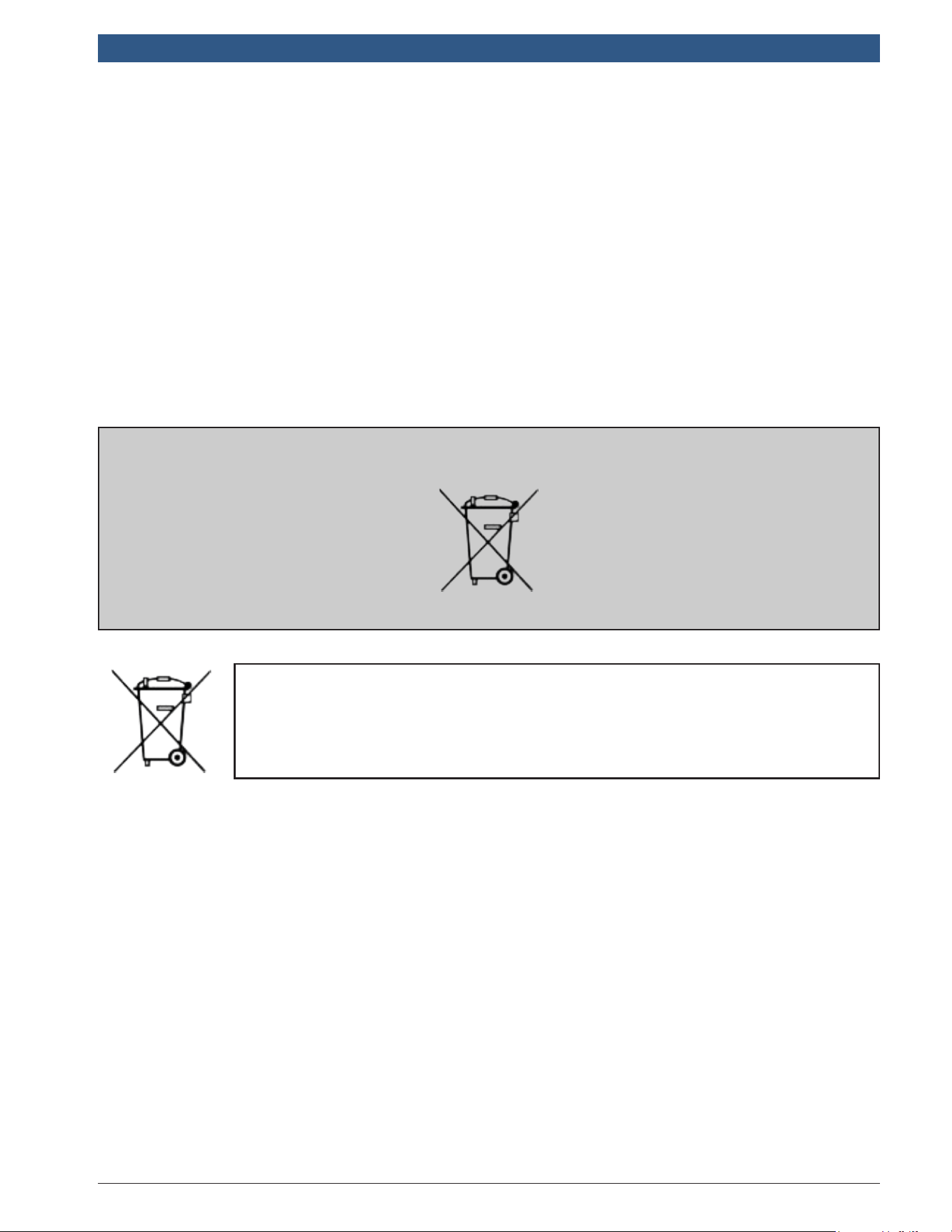
The crossed-out wheeled trashbin means that the product must be taken
to separate collection at the product end-of-life. This applies to your tool
but also to any enhancements marked with this symbol. Do not dispose
of these products as unsorted municipal waste. For further information,
please contact BOSCH.

en-US
|
62
|
User Guide
|
TPA 300
1699502721 | REV. B | JUNE 2020
© Bosch Automotive Service Solutions Inc.
Index
A
About(TPMSToolInformation) 37
AutoOff 36
B
Battery59
BatteryReplacement 46
BluetoothPairing 38
BoschScanTool 42
Buzzer 36
C
Caution 6,59
Charge 46
Charger 59
CheckSensors 11
ConnecttoScanToolMode 38
CopySensor 20
CopySet 22
CreateNewSensor 18
E
Environment 59
F
Format35
FrequencyError 15
FunctionKeys 7
I
IconBar 14
Icons8
IndirectTPMS 15
K
KeyFobTest 29
L
LanguageSettings 33
LicenseValidity 37
M
ManualID 24
N
NoTPMSSensor 15
P
PowerOn/Off 8
ProductContent 4
ProgramSensors 17
ProgrammingIssue 19,24,26
R
ReadingProblems 15
RecentVehicles 27
Recycling 61
Region 32
RelearnProcedure 10,12
RenewLicense 52
RiskofFire 6
S
SafetyInstructions 5
SafetyPrecautions 4, 59
ServiceProcedure 9
Settings31
SoftwareInstallation 47
SoftwareProductLicenseAgreement 55
SoftwareUpdating 51
SpareTire 13
Specications 3
StandaloneMode 11
Statistics 28
T
ToolOverview 9
ToolUpdate 47
TPMSToolPCSuite 49
Troubleshooting 15
U
UnitSettings 34
W
Warning 5
Warranty 54

Bosch
Automotive Service Solutions, Inc.
655 Eisenhower Drive
Owatonna, MN 55060 USA
Phone: 1-855-267-2483 Option 1
www.boschdiagnostics.com
1699502721 Rev. B