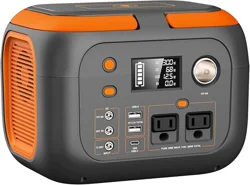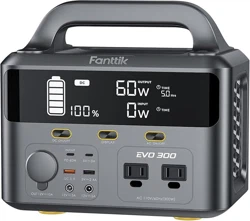
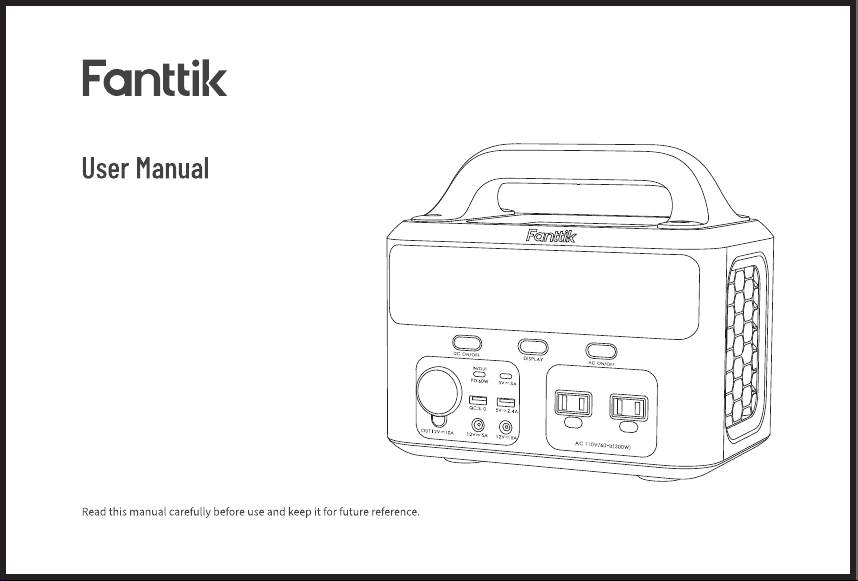
Portable Power Station EVO300
Model: EVO300
Contents
01~12
13~25
26~37
1.English
2.
Español
3.
日本語
WARRANTY
Portable Power Station EVO300
Thank you for trusting in Fanttik Portable Power Station EVO300. It is designed as an outdoor emergency power supply with multiple output ports to charge
most of your devices, including laptops, phones, tablets, drones, cameras, CPAP machines, etc.
Contents
1.PRODUCT OVERVIEW
2.PACKAGE CONTENTS
3.DISPLAY SCREEN
4.LED FLASHLIGHT
5.RECHARGING
6.CHARGEABLE DEVICES
7.CHARGING MODES
8.SPECIFICATIONS
9.FAQ
10.TROUBLESHOOTING
11.SAFETY INSTRUCTION
- 01 -
02
03
04
05
05
06
07
09
09
10
11
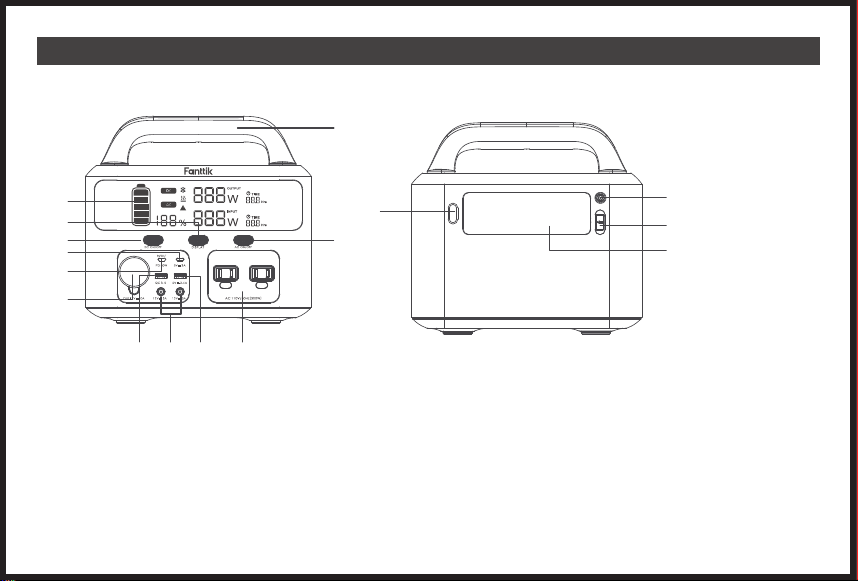
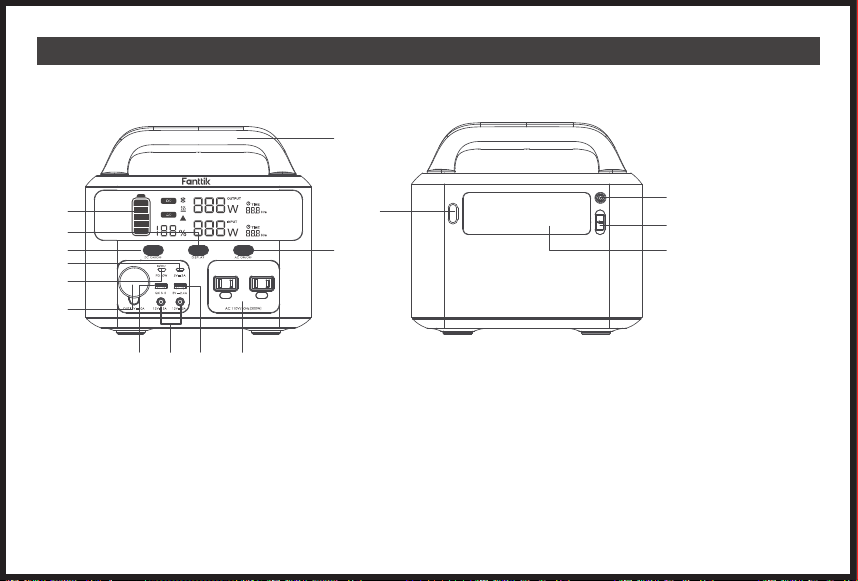
1. PRODUCT OVERVIEW
1.Display Screen
2.Display Button
3.DC Button
4.5V/3A Input
5.PD 60W
6.12V/10A Output
7.QC3.0 Output
8.12V/10A Output(120W)
9.5V/2.4A Output
10.AC Output
11.AC Button
12.Handle
13.LED Button
14.Floodlight
15.Anderson Port
16.DC 7909 Input
FRONT VIEW
BACK VIEW
13
14
15
16
- 02 -
1
2
3
4
5
6
7 8 9 10
11
12
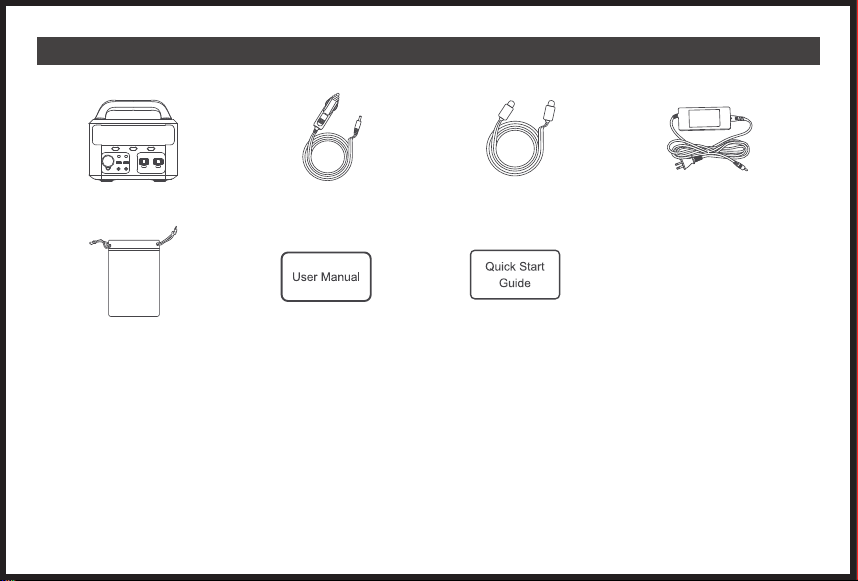
2. PACKAGE CONTENTS
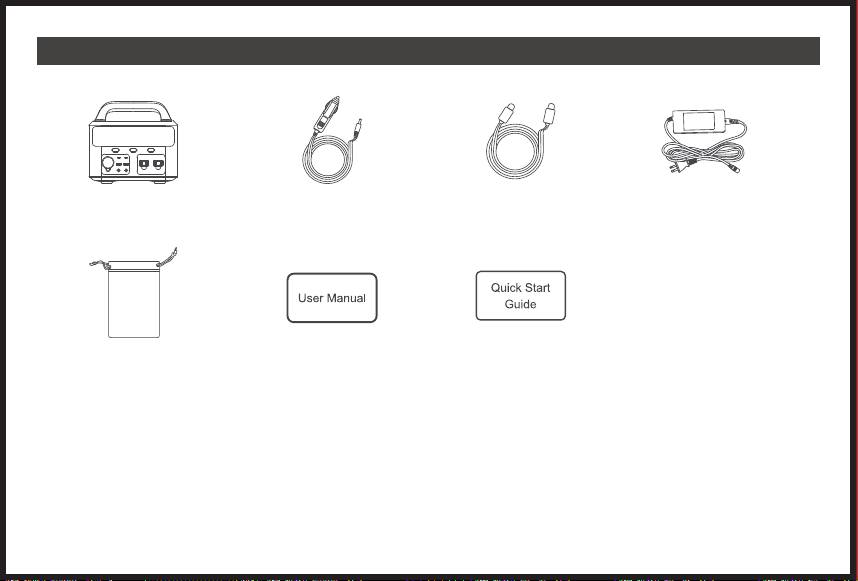
EVO300 Power Station x 1 Car Cigarette Charging Cable x 1
AC Wall Charger x 1
User Manual x 1 Quick Start Guide x 1Accessory Bag x1
USB-C to USB-C Cable x 1
Carefully check package contents, if anything is missing or damaged, please contact online customer service for support.
- 03 -
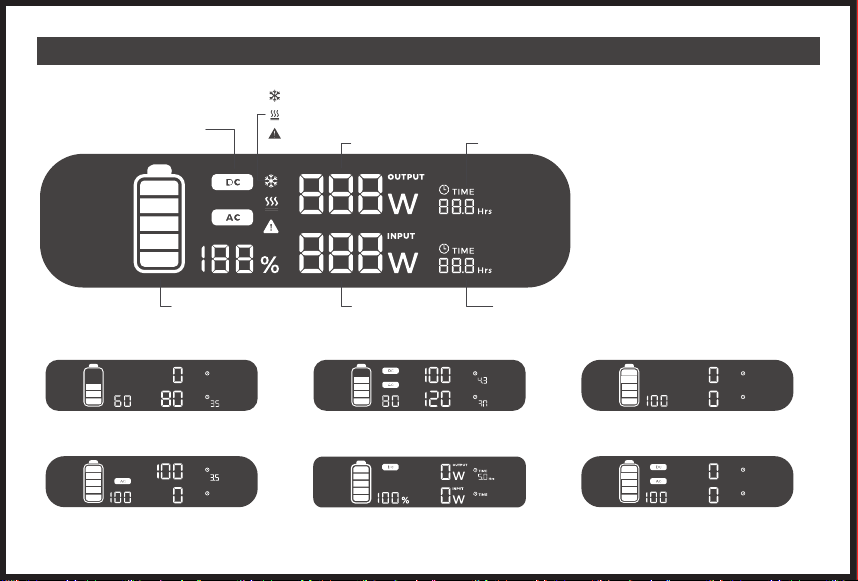
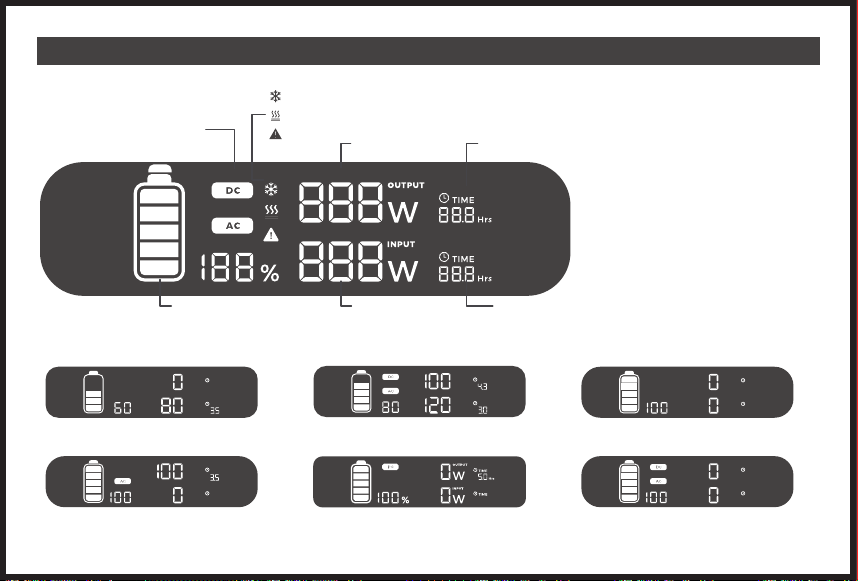
3. DISPLAY SCREEN
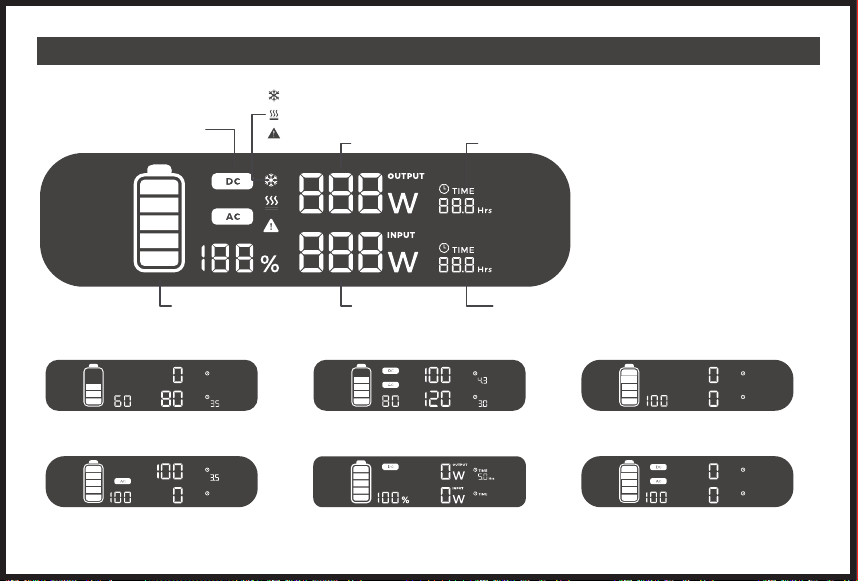
OUTPUT
Output Power
Undercooling
Overheating
Error Alert
Available Duration
DC/AC Indicator Light
Input Power Remaining
Charging Time
Real-time Power
● General View
● Display Description
OUTPUT
TIME
TIME
Hrs
INPUT
W
W
%
OUTPUT
TIME
TIME
Hrs
Hrs
INPUT
W
W
%
Hrs
%
OUTPUT
TIME
TIME
INPUT
W
W
1.Charging Input Display 2.Charging Input(DC +AC Dual Output) Display 3.Display Switch
4.AC Function Display 5.DC Function Display 6.DC Key +AC Key Display
OUTPUT
TIME
TIME
INPUT
W
W
%
%
OUTPUT
TIME
TIME
INPUT
W
W
- 04 -
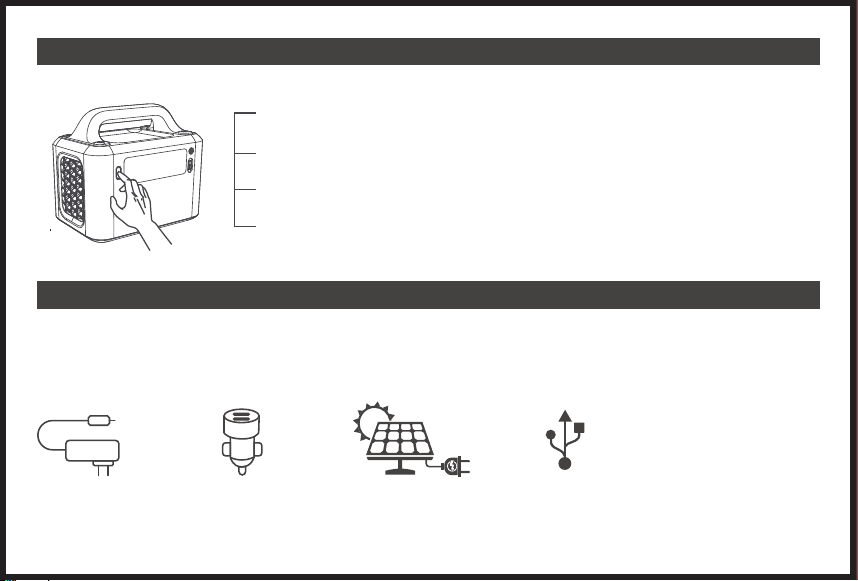
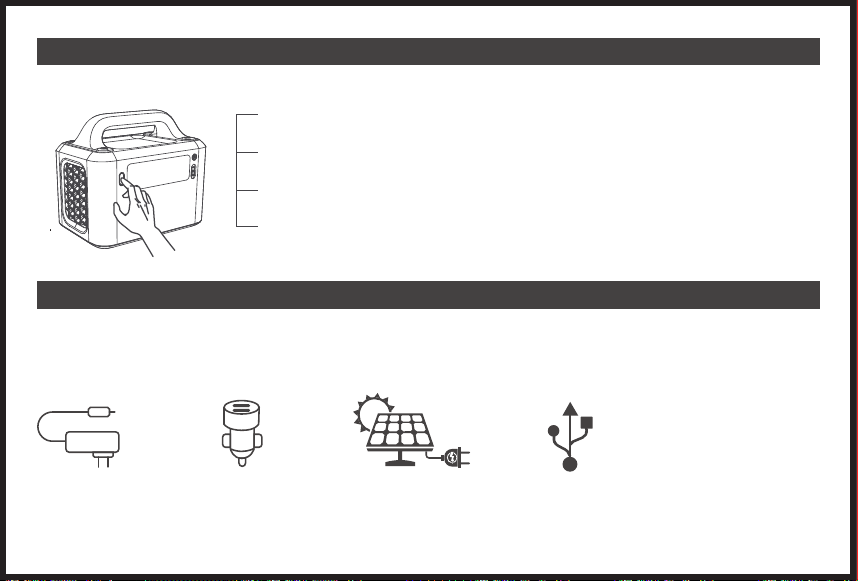
4. LED Flashlight
5. RECHARGING
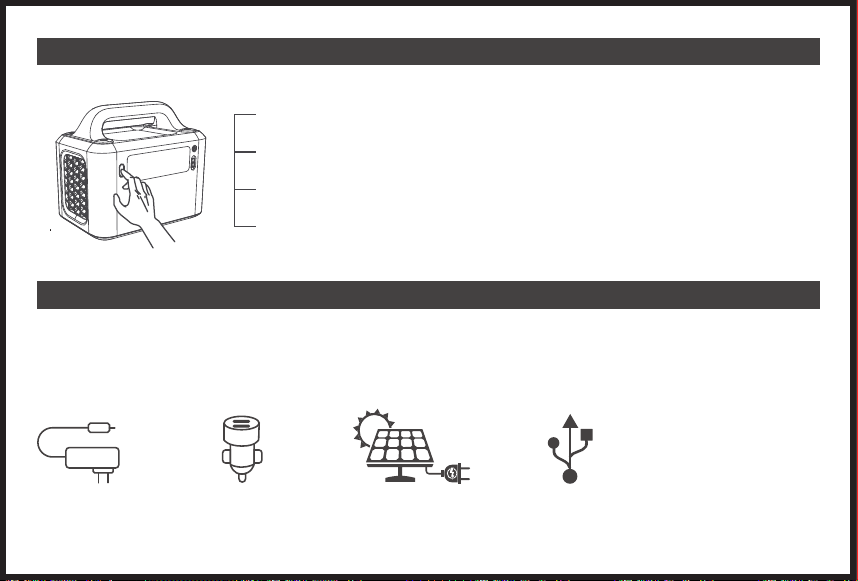
To use the LED Flashlight, simply press the LED switch button to turn it on. There are 3 light modes including an SOS mode.
Multiple Input choices are compatible for the EVO300 Power Station:
X1 To activate the low-light(50% of maximum brightness), press the LED light button once when the light is
off.
X2 To activate the high-light(max brightness), press the LED light button twice in a row when the light is off.
X3 To activate the SOS light mode, press the LED light button three times in a row when the light is off.
X4 Press the LED light button four times consecutively to finish a cycle and turn off the light again.
AC Adaptor Car Charger Solar Panel USB-C Port (PD60W)
- 05 -
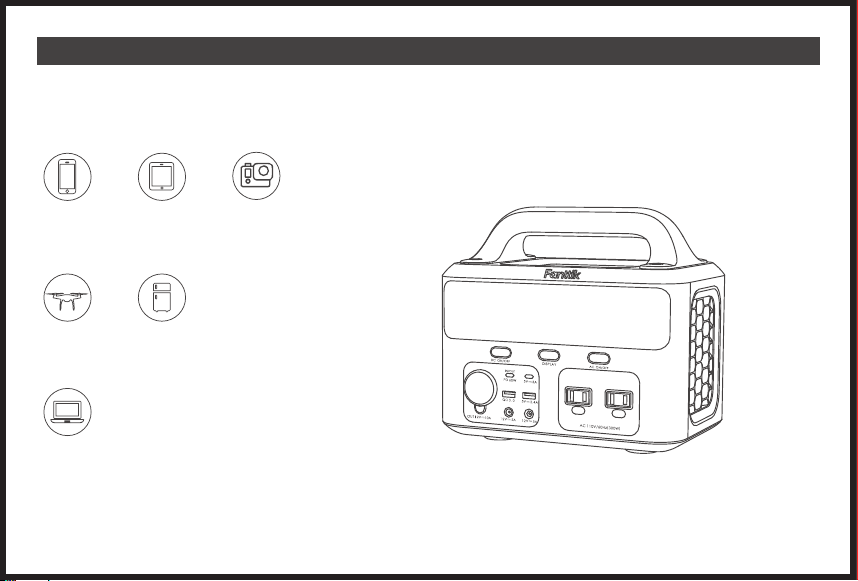
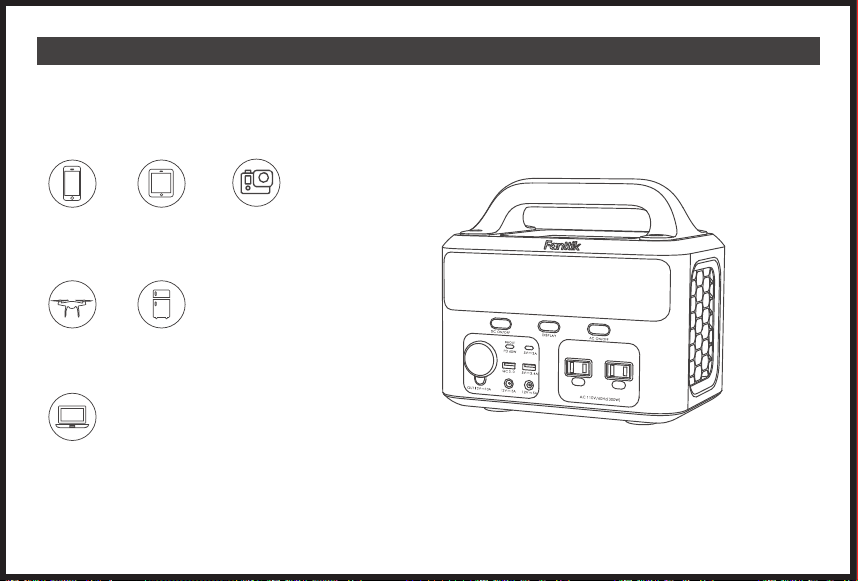
6. CHARGING DEVICES
EVO300 portable power station is a versatile product with different types of ports. Therefore, it is compatible and capable to charge multiple devices.Please note
the EVO300 power station can't support devices rated over 300W.
Laptop
Camera
Tablet
Smartphone
Drone Car refrigerators
● USB Port: Smartphone, tablets, smartwaches, digital cameras, E-readers, etc.
● AC Power : Laptops, displays, appliances, etc.
● DC Output (12V) : Drones, routers, car refrigerators, etc.
- 06 -
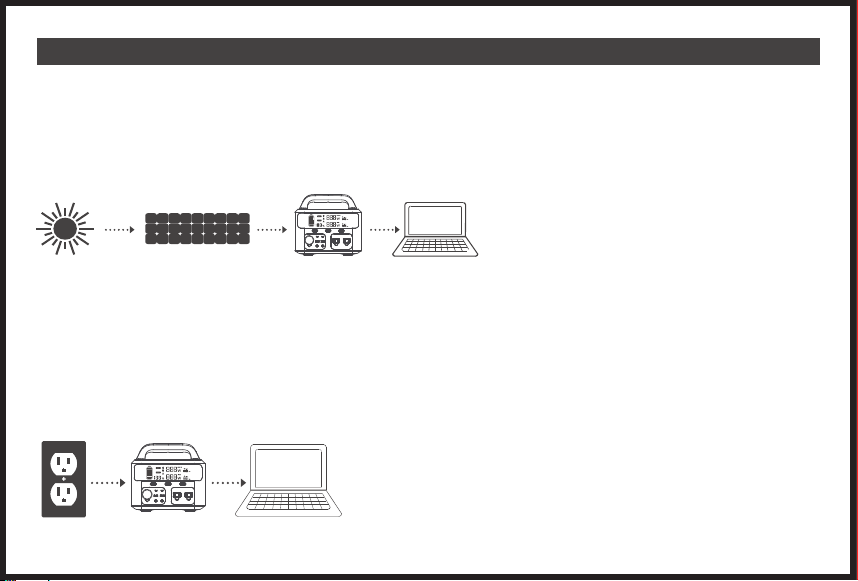
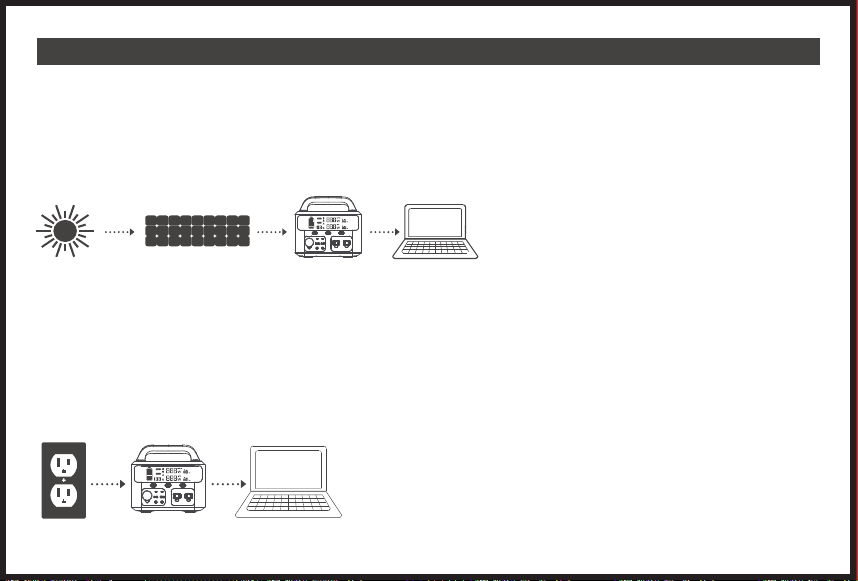
7. CHARGING MODES
it is highly recommended to fully charge EVO300 portable power station before activating it to charge other devices. To charge the EVO300 power station,
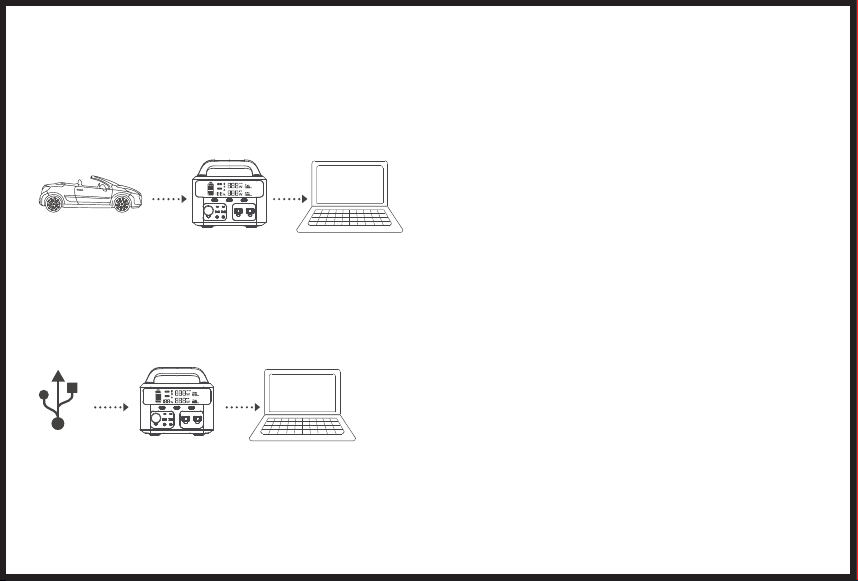
users may choose wall charger, car charger, or solar panel. It may take 4-6 hours to reach a full charge with the included wall charge. (Solar panels’
efficiency might be impacted by weather issues)
Note: Please charge the product before use.
● Charge with Solar Panel(not included)
1.
Choose suitable solar panel(DC12~30V/120W)
2.
Solar panels will perform better in open south-facing locations that get direct sunlight. Simply connect solar panels to your EVO300 portbale power
station. 3.
When the product is charged fully by the solar, it will stop charging automatically.
Notes:
(1)
Recommended to charge the product under 0~40℃ temperature environment.
(2)
Charging times varies depending on the intensity of solar light.
(3)
Make sure that the positive and negative poles of solar panels are connected correctly.
● Charge with AC wall Charger
Plug the product into socket via the AC wall charger.
Please unplug the charger when the recharging is finished.
It is normal for this product to get warm during charging.
Charge the product only after starting the engine
Connect the product and the Cigarette Lighter Socket via the Car Cigarette Charging Cable.
Charge the product after starting the car.
If the car battery is 12V, the product cannot be fully charged. If the car battery is 24V, the product can be fully charged.
Charge by the USB-C Port (PD60W)
Choose a USB-C Power Adapter(not included).
Connect the product and adapter through the PD60W Port with the original USB-C to USB-C cable.
- 07 -
Choose suitable solar panel(DC12~30V/120W)
Solar panels will perform better in open south-facing locations that get direct sunlight. Simply connect solar panels to your T300 portbale power station.
When the product is charged fully by the solar, it will stop charging automatically.
Recommended to charge the product under 0~40℃ temperature environment.
Charging times varies depending on the intensity of solar light.
Make sure that the positive and negative poles of solar panels are connected correctly.
1.
2.
Note:
(1)
●
1.
2.
Note:
(1)
●
1.
2.
Plug the product into socket via the AC wall charger.
Please unplug the charger when the recharging is finished.
It is normal for this product to get warm during charging.
Charge the product only after starting the engine
Connect the product and the Cigarette Lighter Socket via the Car Cigarette Charging Cable.
Charge the product after starting the car.
If the car battery is 12V, the product cannot be fully charged. If the car battery is 24V, the product can be fully charged.
Charge by the USB-C Port (PD60W)
Choose a USB-C Power Adapter(not included).
Connect the product and adapter through the PD60W Port with the original USB-C to USB-C cable.
- 08 -
8. SPECIFICATIONS
9. FAQ
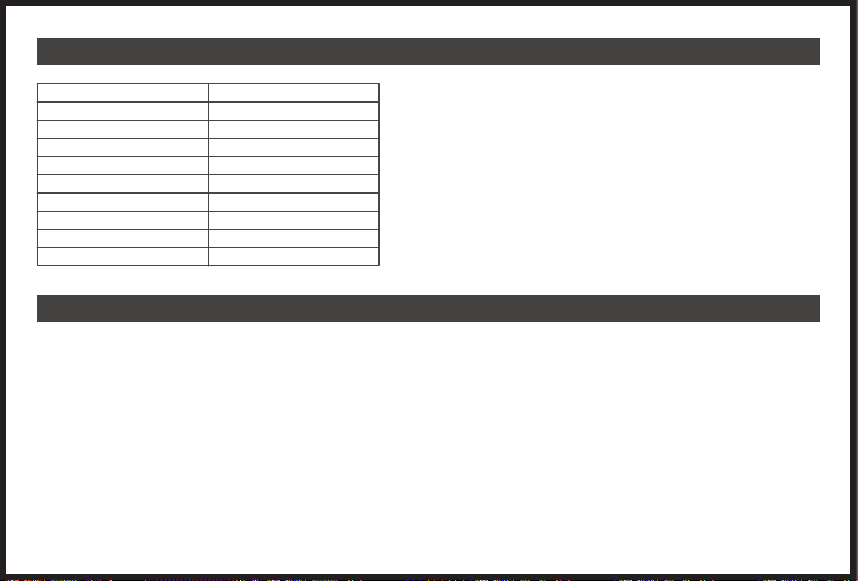
Model
Capacity
USB-C-1
USB-C-2
USB-1
USB-2
Battery
Frequency
Solar Charger
Weight
EVO300
83,200mAh/299Wh
PD60W
5V/3A
5V/2.4A
QC 3.0 18W
Lithium-ion
60Hz
MPPT 12-30V
10.9 lbs
A: T300 power stations have a built-in MPPT controller.
Note: Storage instruction: fully charged every 3 months for best results and store it between -20 and 45 °C. Keep your portable power station away from heat and
direct sunlight in order to extend its life span.
Q5: Can it charge and discharge simultaneously?
Yes, but it is not recommended to charge and discharge at the same time in order to preserve battery lifespan.
Q6: How to extend the using time of CPAP?
Recommend to turn off its humidifier, heater, and set a lower pressure.
Q7: Can the AC output carry a refrigerator or air conditioner?
Workable for low power, and over 100W is not recommended. The starting power of refrigerators and air conditioners is generally 5~7 times higher than the rated
power, which easily triggers AC overload.
Q8: Can two power stations be used in parallel?
No.
If the product cannot charge or power other devices, please checking according to the following steps:
1.
2.
3.
4.
●
●
●
●
●
●
●
●
●
●
●
●
●
●
●
●
●
●
●
●
●
●
●
●
●
●
●
●
●
●
Q1: What devices can EVO300 power?
A: Please note that the AC output port can only charge/power devices that operate at less than total 300 Watt.
●
●
Q2: Can the EVO300 be charged while using?
A: Yes, EVO300 supports pass-through charging. But we don't suggest, it will cause damage to battery
life.
Q3: How to know the working times for my device? Why does the duration of some devices deviate from the actual usage data?
A: Working time = 299Wh* 0.85/operating wattage of your device. The duration of our equipment is based on laboratory data, and the duration of specific
equipment usage may vary.
Q4: Does EVO300 include a built-in MPPT controller?
- 09 -

Q1: What devices can T300 power?
A: Please note that the AC output port can only charge/power devices that operate at less than total 300 Watt.
Q2: Can the T300 be charged while using?
A: Yes, T300 supports pass-through charging. But we don't suggest, it will cause damage to battery life.
Q3: How to know the working times for my device? Why does the duration of some devices deviate from the actual usage data?
A: Working time = 299Wh* 0.85/operating wattage of your device. The duration of our equipment is based on laboratory data, and the duration of specific
equipment usage may vary.
Q4: Does T300 include a built-in MPPT controller?
10. TROUBLESHOOTING
A: EVO300 power stations have a built-in MPPT controller.
Note: Storage instruction: fully charged every 3 months for best results and store it between -20 and 45 °C. Keep your portable power station away from heat and
direct sunlight in order to extend its life span.
Q5: Can it charge and discharge simultaneously?
Yes, but it is not recommended to charge and discharge at the same time in order to preserve battery lifespan.
●
●
●
●
●
●
●
●
●
●
●
●
●
●
●
●
●
●
●
●
●
●
●
●
●
●
●
●
●
●
Q6: How to extend the using time of CPAP?
Recommend to turn off its humidifier, heater, and set a lower pressure.
●
●
Q7: Can the AC output carry a refrigerator or air conditioner?
Workable for low power, and over 100W is not recommended. The starting power of refrigerators and air conditioners is generally 5~7 times higher than the rated
power, which easily triggers AC overload.
Q8: Can two power stations be used in parallel?
No.
If the product cannot charge or power other devices, please checking according to the following steps:
1.
Make sure the power button is turned on.
2.
Make sure the AC and DC power button are on.
3.
Check the battery capacity, if it’s lower than 10%, please recharge the product as soon as possible.
4.
Make sure the load power connected didn’t exceed the limit power of the product, each port has a limit for the power connected.
- 10 -
11. SAFETY INSTRUCTIONS
Q1: What devices can T300 power?
A: Please note that the AC output port can only charge/power devices that operate at less than total 300 Watt.
Q2: Can the T300 be charged while using?
A: Yes, T300 supports pass-through charging. But we don't suggest, it will cause damage to battery life.
Q3: How to know the working times for my device? Why does the duration of some devices deviate from the actual usage data?
A: Working time = 299Wh* 0.85/operating wattage of your device. The duration of our equipment is based on laboratory data, and the duration of specific
equipment usage may vary.
Q4: Does T300 include a built-in MPPT controller?
A: T300 power stations have a built-in MPPT controller.
Note: Storage instruction: fully charged every 3 months for best results and store it between -20 and 45 °C. Keep your portable power station away from heat and
direct sunlight in order to extend its life span.
Q5: Can it charge and discharge simultaneously?
Yes, but it is not recommended to charge and discharge at the same time in order to preserve battery lifespan.
Q6: How to extend the using time of CPAP?
Recommend to turn off its humidifier, heater, and set a lower pressure.
Q7: Can the AC output carry a refrigerator or air conditioner?
Workable for low power, and over 100W is not recommended. The starting power of refrigerators and air conditioners is generally 5~7 times higher than the rated
power, which easily triggers AC overload.
Q8: Can two power stations be used in parallel?
No.
If the product cannot charge or power other devices, please checking according to the following steps:
1.
2.
3.
4.
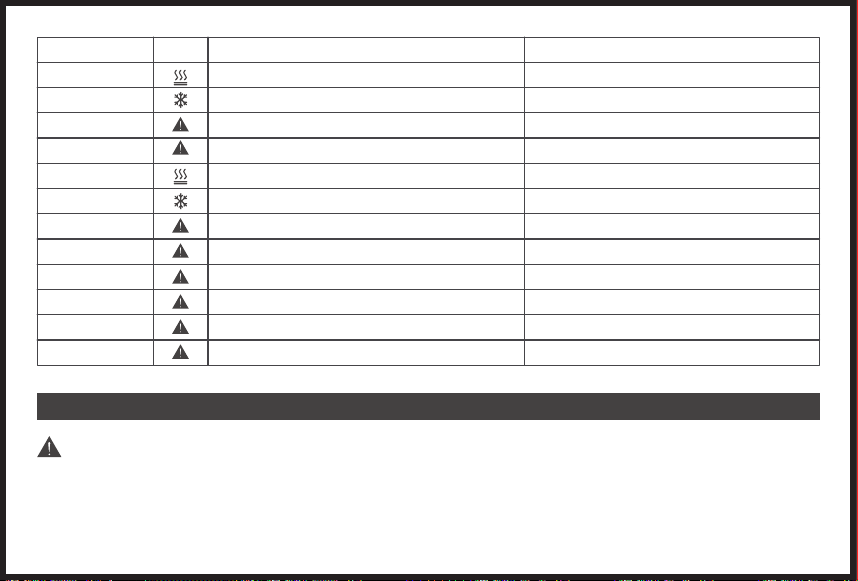
Error code (Output)
E1
E2
E3
E4
E11
E12
E13
E14
E15
E16
E17
E18
Cause
Over temperature protection
Low temperature protection
Battery over voltage
Input over voltage
Discharge over temperature
Discharge low temperature
USB-A/USB-C input over current or short-circuit
QC input over current or short-circuit
Power supply reverse
DC 12V input over current or short-circuit
AC 110V input over current or short-circuit
Total power output overloaded
Solution
Auto Recover/unplug all charging devices
Auto Recover/unplug all charging devices
Auto Recover
Auto Recover
Auto Recover
Auto Recover
Recovery by pressing DC button
Recovery by pressing DC button
Recovery by pressing DC button
Recovery by pressing DC button
Recovery by pressing AC button
Recovery by pressing AC button
IMPORTANT
Noncompliance may very likely lead to serious injury or death
●
●
●
●
●
●
●
●
●
●
●
●
●
●
●
●
●
●
●
●
●
●
●
●
●
●
●
●
●
●
Do not disassemble, repair or modify the unit or the battery.
Do not place the unit close to or in a fire or expose it to the heat. Keep out of direct sunlight.
Do not charge, use or store the unit in a bathroom or in an area exposed to rain or moisture.
Only use the output socket to power external devices. Never connect the output to mains power under any circumstance.
Do not touch the unit or the plug-in points if your hands are wet.
Do not connect any metallic objects to the AC input or output.
Do not rub your eyes if fluids from inside the unit should get in your eyes.
Do not dispose the unit together with household waste.
Do not use any inappropriate power cords.
Do not operate the unit if it is not functioning correctly.
Do not move the unit if it is recharging or in use.
Do not put fingers or hands into the product.
Do not use a battery pack or appliance that is damaged or modified. Damaged or modified batteries may exhibit unpredictable behavior resulting in fire, explosion or
risk of injury.
Do not disassemble the power pack, take it to a qualified service person when service or repair is needed. Incorrect reassembly may result in a risk of fire or electric
shock.
Use and store the unit only in a clean and dry environment. Do not use and store in dusty and wet environment.
Check the unit prior to every use. Do not use the unit if it is damaged, broken.
Do not use the unit if the power cord is damaged or broken.
Keep the unit away from children. Do not let the children use the power supply unit.
Keep this product away from pets.
Do not use or store the unit in an area or environment with high temperature.
Should fluid from inside of the unit come in contact with your skin or clothing, wash the affected areas with tap water.
In a storm, unplug the power cord from the socket.
Make sure that the device you are connecting is switched off before you connect
WARNING-RISK OF EXPLOSIVE GASES.
To reduce risk of battery explosion, follow these instructions and those published by battery manufacturer of any equipment you intend to use in vicinity of the
battery.
Do not charge the unit via power supply system that operate outside of 100~240V.
Do not place the unit on its sides or upside down while in use or storage.
Do not use accessories for other use.
If rust, peculiar odors, overheating or other abnormal circumstance are observed, stop using the unit immediately and contact the dealer or our customer
- 11 -
Error icon
●
●
support.
The unit complies with all legal requirements for transport of dangerous goods.
Make sure that the unit is properly secured when transporting it in a motor vehicle.
Only charge, use and store the unit within an ambient temperature of 0 to 40℃(32~104℉).
Switch the unit off immediately if it has accidentally fallen, was dropped or was exposed to vibration.
Carefully read the instructions for the electric devices that you intend to connect to your power supply unit.

Q1: What devices can T300 power?
A: Please note that the AC output port can only charge/power devices that operate at less than total 300 Watt.
Q2: Can the T300 be charged while using?
A: Yes, T300 supports pass-through charging. But we don't suggest, it will cause damage to battery life.
Q3: How to know the working times for my device? Why does the duration of some devices deviate from the actual usage data?
A: Working time = 299Wh* 0.85/operating wattage of your device. The duration of our equipment is based on laboratory data, and the duration of specific
equipment usage may vary.
Q4: Does T300 include a built-in MPPT controller?
A: T300 power stations have a built-in MPPT controller.
Note: Storage instruction: fully charged every 3 months for best results and store it between -20 and 45 °C. Keep your portable power station away from heat and
direct sunlight in order to extend its life span.
Q5: Can it charge and discharge simultaneously?
Yes, but it is not recommended to charge and discharge at the same time in order to preserve battery lifespan.
Q6: How to extend the using time of CPAP?
Recommend to turn off its humidifier, heater, and set a lower pressure.
Q7: Can the AC output carry a refrigerator or air conditioner?
Workable for low power, and over 100W is not recommended. The starting power of refrigerators and air conditioners is generally 5~7 times higher than the rated
power, which easily triggers AC overload.
Q8: Can two power stations be used in parallel?
No.
If the product cannot charge or power other devices, please checking according to the following steps:
1.
2.
3.
4.
●
●
●
●
●
●
●
●
●
●
●
●
●
●
●
●
●
●
●
●
●
●
●
●
●
●
●
●
●
●
Do not disassemble, repair or modify the unit or the battery.
Do not place the unit close to or in a fire or expose it to the heat. Keep out of direct sunlight.
Do not charge, use or store the unit in a bathroom or in an area exposed to rain or moisture.
Only use the output socket to power external devices. Never connect the output to mains power under any circumstance.
Do not touch the unit or the plug-in points if your hands are wet.
Do not connect any metallic objects to the AC input or output.
Do not rub your eyes if fluids from inside the unit should get in your eyes.
Do not dispose the unit together with household waste.
Do not use any inappropriate power cords.
Do not operate the unit if it is not functioning correctly.
Do not move the unit if it is recharging or in use.
Do not put fingers or hands into the product.
Do not use a battery pack or appliance that is damaged or modified. Damaged or modified batteries may exhibit unpredictable behavior resulting in fire, explosion or
risk of injury.
Do not disassemble the power pack, take it to a qualified service person when service or repair is needed. Incorrect reassembly may result in a risk of fire or electric
shock.
Use and store the unit only in a clean and dry environment. Do not use and store in dusty and wet environment.
Check the unit prior to every use. Do not use the unit if it is damaged, broken.
Do not use the unit if the power cord is damaged or broken.
Keep the unit away from children. Do not let the children use the power supply unit.
Keep this product away from pets.
Do not use or store the unit in an area or environment with high temperature.
Should fluid from inside of the unit come in contact with your skin or clothing, wash the affected areas with tap water.
In a storm, unplug the power cord from the socket.
Make sure that the device you are connecting is switched off before you connect
WARNING-RISK OF EXPLOSIVE GASES.
To reduce risk of battery explosion, follow these instructions and those published by battery manufacturer of any equipment you intend to use in vicinity of the
battery.
Do not charge the unit via power supply system that operate outside of 100~240V.
Do not place the unit on its sides or upside down while in use or storage.
Do not use accessories for other use.
If rust, peculiar odors, overheating or other abnormal circumstance are observed, stop using the unit immediately and contact the dealer or our customer
- 12 -
●
●
support.
The unit complies with all legal requirements for transport of dangerous goods.
Make sure that the unit is properly secured when transporting it in a motor vehicle.
Only charge, use and store the unit within an ambient temperature of 0 to 40℃(32~104℉).
Switch the unit off immediately if it has accidentally fallen, was dropped or was exposed to vibration.
Carefully read the instructions for the electric devices that you intend to connect to your power supply unit.

Q1: What devices can T300 power?
A: Please note that the AC output port can only charge/power devices that operate at less than total 300 Watt.
Q2: Can the T300 be charged while using?
A: Yes, T300 supports pass-through charging. But we don't suggest, it will cause damage to battery life.
Q3: How to know the working times for my device? Why does the duration of some devices deviate from the actual usage data?
A: Working time = 299Wh* 0.85/operating wattage of your device. The duration of our equipment is based on laboratory data, and the duration of specific
equipment usage may vary.
Q4: Does T300 include a built-in MPPT controller?
A: T300 power stations have a built-in MPPT controller.
Note: Storage instruction: fully charged every 3 months for best results and store it between -20 and 45 °C. Keep your portable power station away from heat and
direct sunlight in order to extend its life span.
Q5: Can it charge and discharge simultaneously?
Yes, but it is not recommended to charge and discharge at the same time in order to preserve battery lifespan.
Q6: How to extend the using time of CPAP?
Recommend to turn off its humidifier, heater, and set a lower pressure.
Q7: Can the AC output carry a refrigerator or air conditioner?
Workable for low power, and over 100W is not recommended. The starting power of refrigerators and air conditioners is generally 5~7 times higher than the rated
power, which easily triggers AC overload.
Q8: Can two power stations be used in parallel?
No.
If the product cannot charge or power other devices, please checking according to the following steps:
1.
2.
3.
4.
●
●
●
●
●
●
●
●
●
●
●
●
●
●
●
●
●
●
●
●
●
●
●
●
●
●
●
●
●
●
Do not disassemble, repair or modify the unit or the battery.
Do not place the unit close to or in a fire or expose it to the heat. Keep out of direct sunlight.
Do not charge, use or store the unit in a bathroom or in an area exposed to rain or moisture.
Only use the output socket to power external devices. Never connect the output to mains power under any circumstance.
Do not touch the unit or the plug-in points if your hands are wet.
Do not connect any metallic objects to the AC input or output.
Do not rub your eyes if fluids from inside the unit should get in your eyes.
Do not dispose the unit together with household waste.
Do not use any inappropriate power cords.
Do not operate the unit if it is not functioning correctly.
Do not move the unit if it is recharging or in use.
Do not put fingers or hands into the product.
Do not use a battery pack or appliance that is damaged or modified. Damaged or modified batteries may exhibit unpredictable behavior resulting in fire, explosion or
risk of injury.
Do not disassemble the power pack, take it to a qualified service person when service or repair is needed. Incorrect reassembly may result in a risk of fire or electric
shock.
Use and store the unit only in a clean and dry environment. Do not use and store in dusty and wet environment.
Check the unit prior to every use. Do not use the unit if it is damaged, broken.
Do not use the unit if the power cord is damaged or broken.
Keep the unit away from children. Do not let the children use the power supply unit.
Keep this product away from pets.
Do not use or store the unit in an area or environment with high temperature.
Should fluid from inside of the unit come in contact with your skin or clothing, wash the affected areas with tap water.
In a storm, unplug the power cord from the socket.
Make sure that the device you are connecting is switched off before you connect
WARNING-RISK OF EXPLOSIVE GASES.
To reduce risk of battery explosion, follow these instructions and those published by battery manufacturer of any equipment you intend to use in vicinity of the
battery.
Do not charge the unit via power supply system that operate outside of 100~240V.
Do not place the unit on its sides or upside down while in use or storage.
Do not use accessories for other use.
If rust, peculiar odors, overheating or other abnormal circumstance are observed, stop using the unit immediately and contact the dealer or our customer
- 13 -
●
●
support.
The unit complies with all legal requirements for transport of dangerous goods.
Make sure that the unit is properly secured when transporting it in a motor vehicle.
Only charge, use and store the unit within an ambient temperature of 0 to 40℃(32~104℉).
Switch the unit off immediately if it has accidentally fallen, was dropped or was exposed to vibration.
Carefully read the instructions for the electric devices that you intend to connect to your power supply unit.
Gracias por elegir Fanttik!
Gracias por confiar en Fanttik Portable Power Station EVO300. Está diseñado como una fuente de alimentación de emergencia al aire libre con múltiples
puertos de salida para cargar la mayoría de sus dispositivos, incluidas computadoras portátiles, teléfonos, tabletas, drones, cámaras, máquinas CPAP, etc.
Contenido
1. DESCRIPCIÓN GENERAL DEL PRODUCTO
2. CONTENIDO DEL PAQUETE
3. PANTALLA DE VISUALIZACIÓN
4. LUZ DE DESTELLO LED
5. RECARGA
6. DISPOSITIVOS CARGABLES
7. MODOS DE CARGA
8. ESPECIFICACIONES
9. PREGUNTAS FRECUENTES
10. SOLUCIÓN DE PROBLEMAS
11. INSTRUCCIONES DE SEGURIDAD
- 14 -
15
16
17
18
18
19
20
22
22
23
24
1. DESCRIPCIÓN GENERAL DEL PRODUCTO
1.Pantalla de visualización
2.Botón de pantalla
3.Botón DC
4.Entrada 5V / 3A
5.PD 65W
6.Salida 12V / 10A
7.QC 3.0
8. Salida 12V / 10A (120W)
9.Salida 5V / 2.4A
10.Salida de CA
11.Botón AC
12.Manejar
13.Botón LED
14.Luz LED
15.Puerto Anderson
16.Entrada DC 7909
Vista Trasera
13
14
15
16
- 15 -
Front View
1
2
3
4
5
6
7 8 9 10
11
12
2. ONTENIDO DEL PAQUETE
Central eléctrica EVO300 x 1 Cable de carga de
cigarrillos de coche x 1
Cargador de pared de
CA x 1
Cable USB-C a USB-C x 1
Verifique cuidadosamente el contenido del paquete; si falta algo o está dañado, comuníquese con el servicio de atención al cliente en línea para obtener
asistencia.
- 16 -
Bolsa de accesorios x1
Manual de usuario x1 Guía de inicio rápido × 1
OUTPUT
TIME
TIME
Hrs
Hrs
INPUT
W
W
%
3. PANTALLA DE VISUALIZACIÓN
Output Power
Undercooling
Overheating
Error Alert
Available Duration
DC/AC Indicator Light
Input Power Remaining
Charging Time
Real-time Power
● General View
● Descripción de pantalla
OUTPUT
TIME
TIME
Hrs
INPUT
W
W
%
Hrs
%
OUTPUT
TIME
TIME
INPUT
W
W
1.Pantalla de entrada de carga 2. Pantalla de entrada de carga (salida dual CC + CA) 3.Interruptor de pantalla
4.Pantalla de función AC 5.DC Pantalla de función 6.DC Clave + Pantalla Clave AC
OUTPUT
TIME
TIME
INPUT
W
W
%
%
OUTPUT
TIME
TIME
INPUT
W
W
- 17 -
4. LUZ DE DESTELLO DE LED
5. RECARGA
Para usar la luz de flash LED, simplemente presione el botón del interruptor LED para encenderla. Hay 3 modos de luz, incluido un modo SOS.
Varias opciones de entrada de DC son compatibles con la central eléctrica EVO300:
X1 Para activar el modo de luz baja (50% de la luminosidad máxima), presione el botón de luz LED una
vez cuando la luz esté apagada.
X2 Para activar el modo de luz alta (brillo máximo), presione el botón de luz LED dos veces seguidas
cuando la luz esté apagada.
X3 Para activar el modo de luz SOS, presione el botón de luz LED tres veces seguidas cuando la luz esté
apagada.
X4 Presione el botón de luz LED cuatro veces consecutivas para finalizar un ciclo y apagar la luz
nuevamente.
AC Adaptador Cargador de auto Panel Solar
- 18 -
Puerto USB-C (PD60W)
6. DISPOSITIVOS CARGABLES
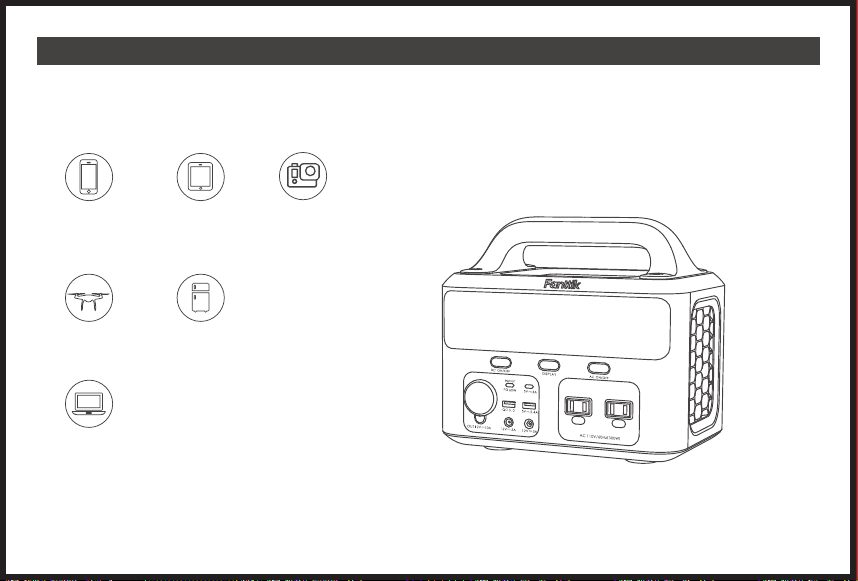
EVO300 Varias opciones de entrada de CC son compatibles con la central eléctrica EVO300: Tenga en cuenta que la central eléctrica EVO300 no
puede Soporta dispositivos de más de 300W.
Computadora portátil
Cámara
Tableta
Teléfono inteligente
Zumbido Refrigeradores de coche
● Puerto USB: Teléfonos inteligentes, tabletas, relojes inteligentes, cámaras digitales, lectores electrónicos, etc.
● Alimentación AC: computadoras portátiles, pantallas, electrodomésticos, etc.
● Salida DC (12V) : Drones, routers, refrigeradores de coche, etc.
- 19 -
7. MODOS DE CARGA
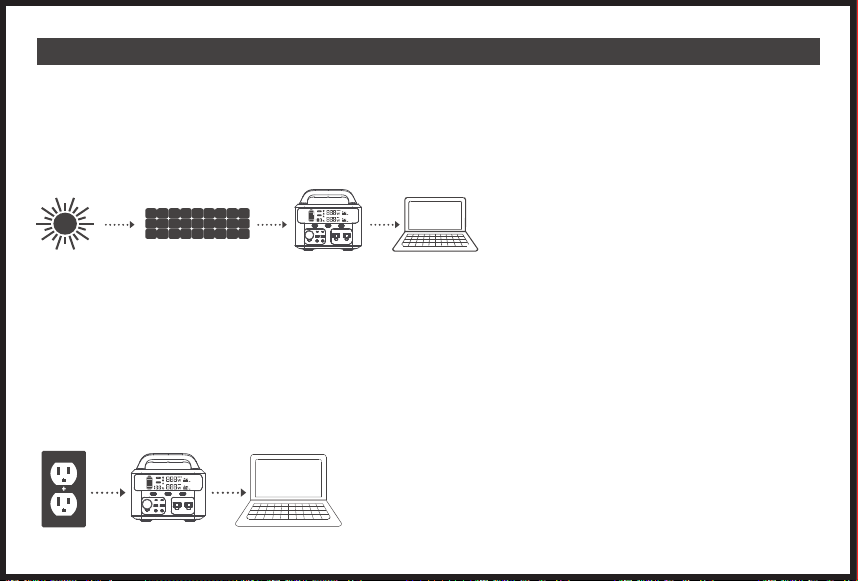
Enchufe el producto en el enchufe a través del cargador de pared de CA.
Desenchufe el cargador cuando finalice la recarga.
Es normal que este producto se caliente durante la carga.
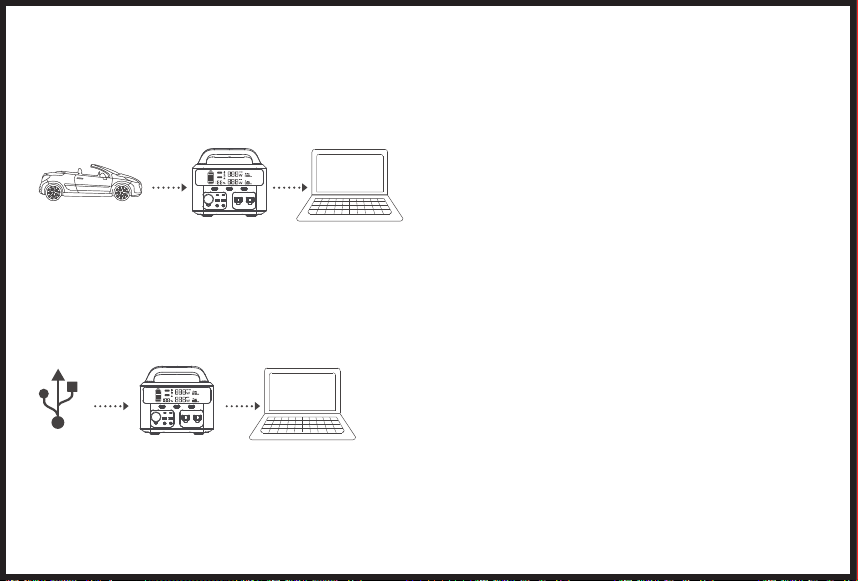
Cargue con el cable de carga de cigarrillos del automóvil
Conecte el producto y el enchufe del encendedor de cigarrillos a través del cable de carga de cigarrillos del automóvil.
Cargue el producto después de arrancar el automóvil.
Si la batería del automóvil es de 12 V, el producto no se puede cargar por completo. Si la batería del automóvil es de 24 V, el producto se puede cargar
completamente.
Carga por el puerto USB-C (PD60W)
Elija un adaptador de corriente USB-C (no incluido).
Conecte el producto y el adaptador a través del puerto PD60W con el cable USB-C a USB-C original.
Se recomienda cargar completamente la central eléctrica portátil TKSB-EVO300 antes de activarla para cargar otros dispositivos. Para cargar la central
eléctrica EVO300, los usuarios pueden elegir un cargador de pared, un cargador de automóvil o un panel solar. Puede tomar de 4 a 6 horas alcanzar una
carga completa con la carga de pared incluida. (La eficiencia de los paneles solares puede verse afectada por problemas climáticos)
Nota: cargue el producto antes de usarlo.
● Carga con panel sola (not incluido)
1.
Elija el panel solar adecuado (DC12 ~ 30V / 120W)
2.
Coloque el panel solar bajo un sol fuerte, mire hacia el sol positivamente y conecte el panel solar y el producto.
3.
Cuando el producto esté completamente cargado por la energía solar, dejará de cargarse automáticamente.
Notas:
(1)
Se recomienda cargar el producto en un entorno de temperatura de 0 ~ 40 ℃.
(2)
Los tiempos de carga varían según la intensidad de la luz solar.
(3)
Asegúrese de que los polos positivo y negativo de los paneles solares estén conectados correctamente.
● Cargar con Cargador de pared CA.
- 20 -
Elija el panel solar adecuado (DC12 ~ 30V / 120W)
Coloque el panel solar bajo un sol fuerte, mire hacia el sol positivamente y conecte el panel solar y el producto.
Cuando el producto esté completamente cargado por la energía solar, dejará de cargarse automáticamente.
Se recomienda cargar el producto en un entorno de temperatura de 0 ~ 40 ℃.
Los tiempos de carga varían según la intensidad de la luz solar.
Asegúrese de que los polos positivo y negativo de los paneles solares estén conectados correctamente.
1.
2.
Nota:
(1)
●
1.
2.
Nota:
(1)
●
1.
2.
Enchufe el producto en el enchufe a través del cargador de pared de CA.
Desenchufe el cargador cuando finalice la recarga.
Es normal que este producto se caliente durante la carga.
Cargue con el cable de carga de cigarrillos del automóvil
Conecte el producto y el enchufe del encendedor de cigarrillos a través del cable de carga de cigarrillos del automóvil.
Cargue el producto después de arrancar el automóvil.
Si la batería del automóvil es de 12 V, el producto no se puede cargar por completo. Si la batería del automóvil es de 24 V, el producto se puede cargar
completamente.
Carga por el puerto USB-C (PD60W)
Elija un adaptador de corriente USB-C (no incluido).
Conecte el producto y el adaptador a través del puerto PD60W con el cable USB-C a USB-C original.
- 21 -
●
●
●
●
●
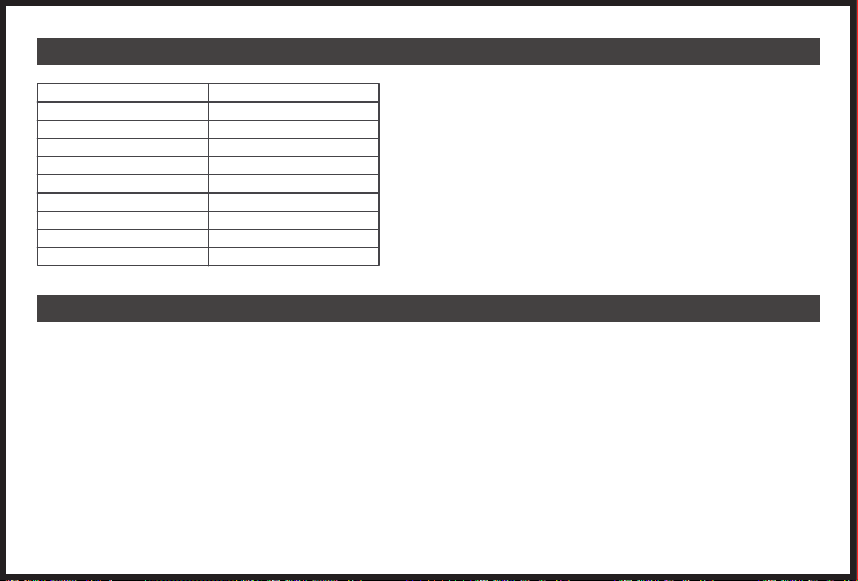
8. ESPECIFICACIONES
9. P&R
Modelo
Capacidad
USB-C-1
USB-C-2
USB-1
USB-2
Batería
Frecuencia
Carga Solar
Peso
EVO300
83,200mAh/299Wh
PD60W
5V/3A
5V/2.4A
QC 3.0 18W
Lithium-ion
60Hz
MPPT 12-30V
10.9 lbs
R: La central eléctrica T300 tiene un controlador MPPT incorporado.
Nota: Instrucciones de almacenamiento: Cargar completamente cada 3 meses para obtener los mejores resultados y almacenar entre -20 y 45 °C. Mantén tu
central portátil alejada de fuentes de calor y de la luz solar directa para prolongar su vida útil.
P5: ¿Puedo cargar y descargar al mismo tiempo?
R: Sí, pero no se recomienda cargar y descargar al mismo tiempo para preservar la vida útil de la batería.
P6:¿Cómo se prolonga el tiempo de uso de CPAP?
R: Recomiende apagar su humidificador, calentador y establecer una presión más baja.
P7: ¿La salida de AC puede llevar un refrigerador o aire acondicionado?
R: Funciona para baja potencia y no se recomienda más de 100W. La potencia de arranque de los refrigeradores y acondicionadores de aire es generalmente
de 5 a 7 veces mayor que la potencia nominal, lo que desencadena fácilmente una sobrecarga de AC.
P8:¿Se pueden utilizar dos centrales en paralelo?
R: No
Si el producto no puede cargar o alimentar otro dispositivo, verifique de acuerdo con los siguientes pasos:
1.
2.
3.
4.
●
●
●
●
●
●
●
●
●
●
●
●
●
●
●
●
●
●
●
●
●
●
●
●
●
●
●
P1: Qué dipositivos pueden cargarse con EVO300?
R: Tenga en cuenta que el puerto de salida de CA solo puede cargar / alimentar dispositivos que funcionan a menos de 300 vatios totales.
P2: ¿Se puede cargar el EVO300 mientras se
usa?R:Sí, el EVO300 admite la carga directa.
P3: ¿Cómo saber los tiempos de trabajo de mi dispositivo? ¿Por qué la duración de algunos dispositivos se desvía de los datos de uso reales?
R: Tiempo de funcionamiento = 299Wh* 0,85/ la potencia de funcionamiento de tu aparato. El tiempo de funcionamiento de nuestros dispositivos se basa en
datos de laboratorio, y el tiempo de funcionamiento de dispositivos específicos puede variar.
P4: ¿Incluye el EVO300 un controlador MPPT integrado?
- 22 -

●
●
●
●
●
P1: Qué dipositivos pueden cargarse con T300?
R: Tenga en cuenta que el puerto de salida de CA solo puede cargar / alimentar dispositivos que funcionan a menos de 300 vatios totales.
P2: ¿Se puede cargar el T300 mientras se usa?
R:Sí, el T300 admite la carga directa.
P3: ¿Cómo saber los tiempos de trabajo de mi dispositivo? ¿Por qué la duración de algunos dispositivos se desvía de los datos de uso reales?
R: Tiempo de funcionamiento = 299Wh* 0,85/ la potencia de funcionamiento de tu aparato. El tiempo de funcionamiento de nuestros dispositivos se basa en
datos de laboratorio, y el tiempo de funcionamiento de dispositivos específicos puede variar.
P4: ¿Incluye el T300 un controlador MPPT integrado?
10. SOLUCIÓN DE PROBLEMAS
R: La central eléctrica EVO300 tiene un controlador MPPT incorporado.
Nota: Instrucciones de almacenamiento: Cargar completamente cada 3 meses para obtener los mejores resultados y almacenar entre -20 y 45 °C. Mantén tu
central portátil alejada de fuentes de calor y de la luz solar directa para prolongar su vida útil.
P5: ¿Puedo cargar y descargar al mismo tiempo?
R: Sí, pero no se recomienda cargar y descargar al mismo tiempo para preservar la vida útil de la batería.
●
●
●
●
●
●
●
●
●
●
●
●
●
●
●
●
●
●
●
●
●
●
●
●
●
●
●
P6:¿Cómo se prolonga el tiempo de uso de CPAP?
R: Recomiende apagar su humidificador, calentador y establecer una presión más baja.
P7: ¿La salida de AC puede llevar un refrigerador o aire acondicionado?
R: Funciona para baja potencia y no se recomienda más de 100W. La potencia de arranque de los refrigeradores y acondicionadores de aire es generalmente
de 5 a 7 veces mayor que la potencia nominal, lo que desencadena fácilmente una sobrecarga de AC.
P8:¿Se pueden utilizar dos centrales en paralelo?
R: No
Si el producto no puede cargar o alimentar otro dispositivo, verifique de acuerdo con los siguientes pasos:
1.
Asegúrese de que el botón de encendido esté encendido.
2.
Asegúrese de que los botones de alimentación de CA y CC estén encendidos.
3.
Compruebe la capacidad de la batería, si es inferior al 10%, recargue el producto lo antes posible.
4.
Asegúrese de que la potencia de carga conectada no exceda la potencia límite del producto, cada puerto tiene un límite para la potencia conectada.
- 23 -
●
●
●
●
●
11. INSTRUCCIONES DE SEGURIDAD
P1: Qué dipositivos pueden cargarse con T300?
R: Tenga en cuenta que el puerto de salida de CA solo puede cargar / alimentar dispositivos que funcionan a menos de 300 vatios totales.
P2: ¿Se puede cargar el T300 mientras se usa?
R:Sí, el T300 admite la carga directa.
P3: ¿Cómo saber los tiempos de trabajo de mi dispositivo? ¿Por qué la duración de algunos dispositivos se desvía de los datos de uso reales?
R: Tiempo de funcionamiento = 299Wh* 0,85/ la potencia de funcionamiento de tu aparato. El tiempo de funcionamiento de nuestros dispositivos se basa en
datos de laboratorio, y el tiempo de funcionamiento de dispositivos específicos puede variar.
P4: ¿Incluye el T300 un controlador MPPT integrado?
R: La central eléctrica T300 tiene un controlador MPPT incorporado.
Nota: Instrucciones de almacenamiento: Cargar completamente cada 3 meses para obtener los mejores resultados y almacenar entre -20 y 45 °C. Mantén tu
central portátil alejada de fuentes de calor y de la luz solar directa para prolongar su vida útil.
P5: ¿Puedo cargar y descargar al mismo tiempo?
R: Sí, pero no se recomienda cargar y descargar al mismo tiempo para preservar la vida útil de la batería.
P6:¿Cómo se prolonga el tiempo de uso de CPAP?
R: Recomiende apagar su humidificador, calentador y establecer una presión más baja.
P7: ¿La salida de AC puede llevar un refrigerador o aire acondicionado?
R: Funciona para baja potencia y no se recomienda más de 100W. La potencia de arranque de los refrigeradores y acondicionadores de aire es generalmente
de 5 a 7 veces mayor que la potencia nominal, lo que desencadena fácilmente una sobrecarga de AC.
P8:¿Se pueden utilizar dos centrales en paralelo?
R: No
Si el producto no puede cargar o alimentar otro dispositivo, verifique de acuerdo con los siguientes pasos:
1.
2.
3.
4.
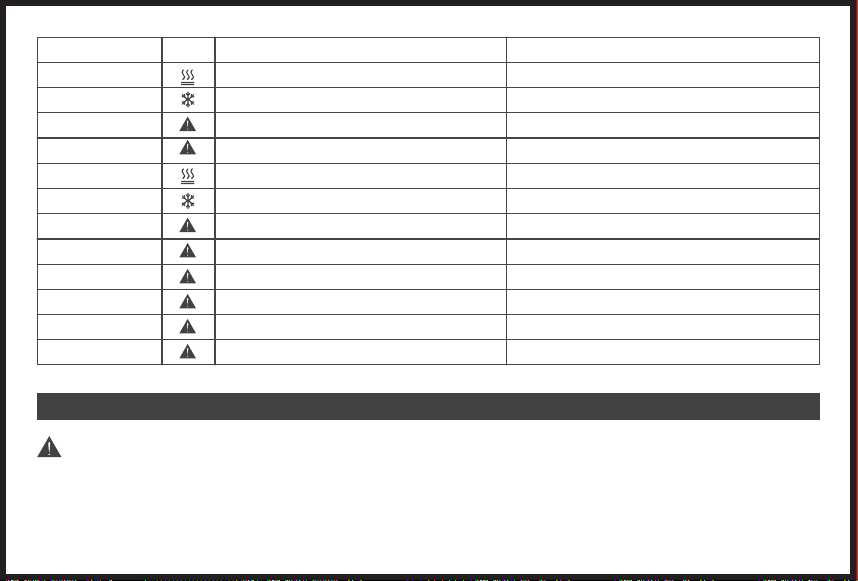
Código de error (Salida)
E1
E2
E3
E4
E11
E12
E13
E14
E15
E16
E17
E18
Causa
Protección contra sobrecalentamiento
Protección de baja temperature
Sobretensión de la batería
Entrada sobre voltaje
Descarga sobre temperatura
Descarga de baja temperatura
Entrada USB-A / USB-C sobre corriente o cortocircuito
QC entrada sobre corriente o corto circuito
Inversión de la fuente de alimentación
DC 12V entrada sobre corriente o corto circuito
AC 110V entrada sobre corriente o corto circuito
Salida de potencia total sobrecargada
Solución
Recuperación automática
Recuperación automática
Recuperación automática
Recuperación automática
Recuperación automática
Recuperación automática
Recuperación presionando el botón DC
Recuperación presionando el botón DC
Recuperación presionando el botón DC
Recuperación presionando el botón DC
Recuperación presionando el botón AC
Recuperación presionando el botón AC
IMPORTANTE
El incumplimiento puede provocar muy probablemente lesiones graves o la muerte
●
●
●
●
●
●
●
●
●
●
●
●
●
●
●
●
●
●
●
●
●
●
●
●
●
●
●
No desmonte, repare ni modifique la unidad ni la batería.
No coloque la unidad cerca o en un fuego ni la exponga al calor. Manténgase alejado de la luz solar directa.
No cargue, use ni guarde la unidad en un baño o en un lugar expuesto a la lluvia o la humedad.
Utilice la toma de salida únicamente para alimentar dispositivos externos. Nunca conecte la salida a la red eléctrica bajo ninguna circunstancia.
No toque la unidad ni los puntos de conexión si tiene las manos mojadas.
No conecte ningún objeto metálico a la entrada o salida de CA.
No se frote los ojos si los líquidos del interior de la unidad le entran en contacto con los ojos.
No deseche la unidad junto con la basura doméstica.
No utilice cables de alimentación inapropiados.
No opere la unidad si no está funcionando correctamente.
No mueva la unidad si se está recargando o en uso.
No introduzca los dedos ni las manos en el producto.
No utilice una batería o un aparato que esté dañado o modificado. Las baterías dañadas o modificadas pueden exhibir un comportamiento impredecible que
resulte en fuego, explosión o riesgo de lesiones.
No desarme la fuente de alimentación, llévela a un técnico de servicio calificado cuando necesite servicio o reparación. El reensamblaje incorrecto puede
resultar en un riesgo de incendio o descarga eléctrica.
Utilice y almacene la unidad solo en un ambiente limpio y seco. No lo use ni lo almacene en ambientes húmedos y polvorientos.
Compruebe la unidad antes de cada uso. No utilice la unidad si está dañada o rota.
No utilice la unidad si el cable de alimentación está dañado o roto.
Mantenga la unidad fuera del alcance de los niños. No permita que los niños utilicen la fuente de alimentación.
Mantenga este producto alejado de las mascotas.
No utilice ni almacene la unidad en un área o entorno con altas temperaturas.
Si el fluido del interior de la unidad entra en contacto con su piel o ropa, lave las áreas afectadas con agua del grifo.
En caso de tormenta, desenchufe el cable de alimentación de la toma.
Asegúrese de que el dispositivo que está conectando esté apagado antes de conectar
ADVERTENCIA-RIESGO DE GASES EXPLOSIVOS.
Para reducir el riesgo de explosión de la batería, siga estas instrucciones y las publicadas por el fabricante de la batería de cualquier equipo que
desee utilizar cerca de la batería
No cargue la unidad a través de un sistema de suministro de energía que opere fuera de 100 ~ 240V.
No coloque la unidad de lado o boca abajo mientras esté en uso o almacenada.
No utilice los accesorios para otro uso.
Si observa óxido, olores peculiares, sobrecalentamiento u otras circunstancias anormales, deje de usar la unidad inmediatamente y comuníquese con el
- 24 -
Icono de
Error
distribuidor o con nuestro servicio de atención al cliente.
La unidad cumple con todos los requisitos legales para el transporte de mercancías peligrosas.
Asegúrese de que la unidad esté bien sujeta cuando la transporte en un vehículo de motor.
Cargue, use y almacene la unidad únicamente a una temperatura ambiente de 0 a 40 ℃ (32 ~ 104 ℉).
Apague la unidad inmediatamente si se ha caído accidentalmente, se ha caído o ha estado expuesta a vibraciones.
Lea atentamente las instrucciones de los dispositivos eléctricos que desea conectar a su fuente de alimentación.

●
●
●
●
●
P1: Qué dipositivos pueden cargarse con T300?
R: Tenga en cuenta que el puerto de salida de CA solo puede cargar / alimentar dispositivos que funcionan a menos de 300 vatios totales.
P2: ¿Se puede cargar el T300 mientras se usa?
R:Sí, el T300 admite la carga directa.
P3: ¿Cómo saber los tiempos de trabajo de mi dispositivo? ¿Por qué la duración de algunos dispositivos se desvía de los datos de uso reales?
R: Tiempo de funcionamiento = 299Wh* 0,85/ la potencia de funcionamiento de tu aparato. El tiempo de funcionamiento de nuestros dispositivos se basa en
datos de laboratorio, y el tiempo de funcionamiento de dispositivos específicos puede variar.
P4: ¿Incluye el T300 un controlador MPPT integrado?
R: La central eléctrica T300 tiene un controlador MPPT incorporado.
Nota: Instrucciones de almacenamiento: Cargar completamente cada 3 meses para obtener los mejores resultados y almacenar entre -20 y 45 °C. Mantén tu
central portátil alejada de fuentes de calor y de la luz solar directa para prolongar su vida útil.
P5: ¿Puedo cargar y descargar al mismo tiempo?
R: Sí, pero no se recomienda cargar y descargar al mismo tiempo para preservar la vida útil de la batería.
P6:¿Cómo se prolonga el tiempo de uso de CPAP?
R: Recomiende apagar su humidificador, calentador y establecer una presión más baja.
P7: ¿La salida de AC puede llevar un refrigerador o aire acondicionado?
R: Funciona para baja potencia y no se recomienda más de 100W. La potencia de arranque de los refrigeradores y acondicionadores de aire es generalmente
de 5 a 7 veces mayor que la potencia nominal, lo que desencadena fácilmente una sobrecarga de AC.
P8:¿Se pueden utilizar dos centrales en paralelo?
R: No
Si el producto no puede cargar o alimentar otro dispositivo, verifique de acuerdo con los siguientes pasos:
1.
2.
3.
4.
●
●
●
●
●
●
●
●
●
●
●
●
●
●
●
●
●
●
●
●
●
●
●
●
●
●
●
No desmonte, repare ni modifique la unidad ni la batería.
No coloque la unidad cerca o en un fuego ni la exponga al calor. Manténgase alejado de la luz solar directa.
No cargue, use ni guarde la unidad en un baño o en un lugar expuesto a la lluvia o la humedad.
Utilice la toma de salida únicamente para alimentar dispositivos externos. Nunca conecte la salida a la red eléctrica bajo ninguna circunstancia.
No toque la unidad ni los puntos de conexión si tiene las manos mojadas.
No conecte ningún objeto metálico a la entrada o salida de CA.
No se frote los ojos si los líquidos del interior de la unidad le entran en contacto con los ojos.
No deseche la unidad junto con la basura doméstica.
No utilice cables de alimentación inapropiados.
No opere la unidad si no está funcionando correctamente.
No mueva la unidad si se está recargando o en uso.
No introduzca los dedos ni las manos en el producto.
No utilice una batería o un aparato que esté dañado o modificado. Las baterías dañadas o modificadas pueden exhibir un comportamiento impredecible que
resulte en fuego, explosión o riesgo de lesiones.
No desarme la fuente de alimentación, llévela a un técnico de servicio calificado cuando necesite servicio o reparación. El reensamblaje incorrecto puede
resultar en un riesgo de incendio o descarga eléctrica.
Utilice y almacene la unidad solo en un ambiente limpio y seco. No lo use ni lo almacene en ambientes húmedos y polvorientos.
Compruebe la unidad antes de cada uso. No utilice la unidad si está dañada o rota.
No utilice la unidad si el cable de alimentación está dañado o roto.
Mantenga la unidad fuera del alcance de los niños. No permita que los niños utilicen la fuente de alimentación.
Mantenga este producto alejado de las mascotas.
No utilice ni almacene la unidad en un área o entorno con altas temperaturas.
Si el fluido del interior de la unidad entra en contacto con su piel o ropa, lave las áreas afectadas con agua del grifo.
En caso de tormenta, desenchufe el cable de alimentación de la toma.
Asegúrese de que el dispositivo que está conectando esté apagado antes de conectar
ADVERTENCIA-RIESGO DE GASES EXPLOSIVOS.
Para reducir el riesgo de explosión de la batería, siga estas instrucciones y las publicadas por el fabricante de la batería de cualquier equipo que
desee utilizar cerca de la batería
No cargue la unidad a través de un sistema de suministro de energía que opere fuera de 100 ~ 240V.
No coloque la unidad de lado o boca abajo mientras esté en uso o almacenada.
No utilice los accesorios para otro uso.
Si observa óxido, olores peculiares, sobrecalentamiento u otras circunstancias anormales, deje de usar la unidad inmediatamente y comuníquese con el
- 25 -
distribuidor o con nuestro servicio de atención al cliente.
La unidad cumple con todos los requisitos legales para el transporte de mercancías peligrosas.
Asegúrese de que la unidad esté bien sujeta cuando la transporte en un vehículo de motor.
Cargue, use y almacene la unidad únicamente a una temperatura ambiente de 0 a 40 ℃ (32 ~ 104 ℉).
Apague la unidad inmediatamente si se ha caído accidentalmente, se ha caído o ha estado expuesta a vibraciones.
Lea atentamente las instrucciones de los dispositivos eléctricos que desea conectar a su fuente de alimentación.

●
●
●
●
●
P1: Qué dipositivos pueden cargarse con T300?
R: Tenga en cuenta que el puerto de salida de CA solo puede cargar / alimentar dispositivos que funcionan a menos de 300 vatios totales.
P2: ¿Se puede cargar el T300 mientras se usa?
R:Sí, el T300 admite la carga directa.
P3: ¿Cómo saber los tiempos de trabajo de mi dispositivo? ¿Por qué la duración de algunos dispositivos se desvía de los datos de uso reales?
R: Tiempo de funcionamiento = 299Wh* 0,85/ la potencia de funcionamiento de tu aparato. El tiempo de funcionamiento de nuestros dispositivos se basa en
datos de laboratorio, y el tiempo de funcionamiento de dispositivos específicos puede variar.
P4: ¿Incluye el T300 un controlador MPPT integrado?
R: La central eléctrica T300 tiene un controlador MPPT incorporado.
Nota: Instrucciones de almacenamiento: Cargar completamente cada 3 meses para obtener los mejores resultados y almacenar entre -20 y 45 °C. Mantén tu
central portátil alejada de fuentes de calor y de la luz solar directa para prolongar su vida útil.
P5: ¿Puedo cargar y descargar al mismo tiempo?
R: Sí, pero no se recomienda cargar y descargar al mismo tiempo para preservar la vida útil de la batería.
P6:¿Cómo se prolonga el tiempo de uso de CPAP?
R: Recomiende apagar su humidificador, calentador y establecer una presión más baja.
P7: ¿La salida de AC puede llevar un refrigerador o aire acondicionado?
R: Funciona para baja potencia y no se recomienda más de 100W. La potencia de arranque de los refrigeradores y acondicionadores de aire es generalmente
de 5 a 7 veces mayor que la potencia nominal, lo que desencadena fácilmente una sobrecarga de AC.
P8:¿Se pueden utilizar dos centrales en paralelo?
R: No
Si el producto no puede cargar o alimentar otro dispositivo, verifique de acuerdo con los siguientes pasos:
1.
2.
3.
4.
●
●
●
●
●
●
●
●
●
●
●
●
●
●
●
●
●
●
●
●
●
●
●
●
●
●
●
No desmonte, repare ni modifique la unidad ni la batería.
No coloque la unidad cerca o en un fuego ni la exponga al calor. Manténgase alejado de la luz solar directa.
No cargue, use ni guarde la unidad en un baño o en un lugar expuesto a la lluvia o la humedad.
Utilice la toma de salida únicamente para alimentar dispositivos externos. Nunca conecte la salida a la red eléctrica bajo ninguna circunstancia.
No toque la unidad ni los puntos de conexión si tiene las manos mojadas.
No conecte ningún objeto metálico a la entrada o salida de CA.
No se frote los ojos si los líquidos del interior de la unidad le entran en contacto con los ojos.
No deseche la unidad junto con la basura doméstica.
No utilice cables de alimentación inapropiados.
No opere la unidad si no está funcionando correctamente.
No mueva la unidad si se está recargando o en uso.
No introduzca los dedos ni las manos en el producto.
No utilice una batería o un aparato que esté dañado o modificado. Las baterías dañadas o modificadas pueden exhibir un comportamiento impredecible que
resulte en fuego, explosión o riesgo de lesiones.
No desarme la fuente de alimentación, llévela a un técnico de servicio calificado cuando necesite servicio o reparación. El reensamblaje incorrecto puede
resultar en un riesgo de incendio o descarga eléctrica.
Utilice y almacene la unidad solo en un ambiente limpio y seco. No lo use ni lo almacene en ambientes húmedos y polvorientos.
Compruebe la unidad antes de cada uso. No utilice la unidad si está dañada o rota.
No utilice la unidad si el cable de alimentación está dañado o roto.
Mantenga la unidad fuera del alcance de los niños. No permita que los niños utilicen la fuente de alimentación.
Mantenga este producto alejado de las mascotas.
No utilice ni almacene la unidad en un área o entorno con altas temperaturas.
Si el fluido del interior de la unidad entra en contacto con su piel o ropa, lave las áreas afectadas con agua del grifo.
En caso de tormenta, desenchufe el cable de alimentación de la toma.
Asegúrese de que el dispositivo que está conectando esté apagado antes de conectar
ADVERTENCIA-RIESGO DE GASES EXPLOSIVOS.
Para reducir el riesgo de explosión de la batería, siga estas instrucciones y las publicadas por el fabricante de la batería de cualquier equipo que
desee utilizar cerca de la batería
No cargue la unidad a través de un sistema de suministro de energía que opere fuera de 100 ~ 240V.
No coloque la unidad de lado o boca abajo mientras esté en uso o almacenada.
No utilice los accesorios para otro uso.
Si observa óxido, olores peculiares, sobrecalentamiento u otras circunstancias anormales, deje de usar la unidad inmediatamente y comuníquese con el
- 26 -
distribuidor o con nuestro servicio de atención al cliente.
La unidad cumple con todos los requisitos legales para el transporte de mercancías peligrosas.
Asegúrese de que la unidad esté bien sujeta cuando la transporte en un vehículo de motor.
Cargue, use y almacene la unidad únicamente a una temperatura ambiente de 0 a 40 ℃ (32 ~ 104 ℉).
Apague la unidad inmediatamente si se ha caído accidentalmente, se ha caído o ha estado expuesta a vibraciones.
Lea atentamente las instrucciones de los dispositivos eléctricos que desea conectar a su fuente de alimentación.
タックライフをご 利 用 い た だきありがとうござ います!
Fanttikポータブル発電所EVO300を信頼していただきありがとうございます。アウトドア用の非常用電源として設計されており、複数の出力ポートを備えているため、
ラップトップ、スマホ、タブレット、ドローン、カメラ、CPAPマシンなど、ほとんどのデバイスを充電することができます。
目次
1.各部の名称
2.パッケージの内容
3.表示画面
4.LEDフラッシュライト
5.再充電
6.充電器
7.充電について
8.仕様書
9.FAQ
10.故障かなと思った時
11.安全対策
- 27 -
28
29
30
31
31
32
33
35
35
36
37
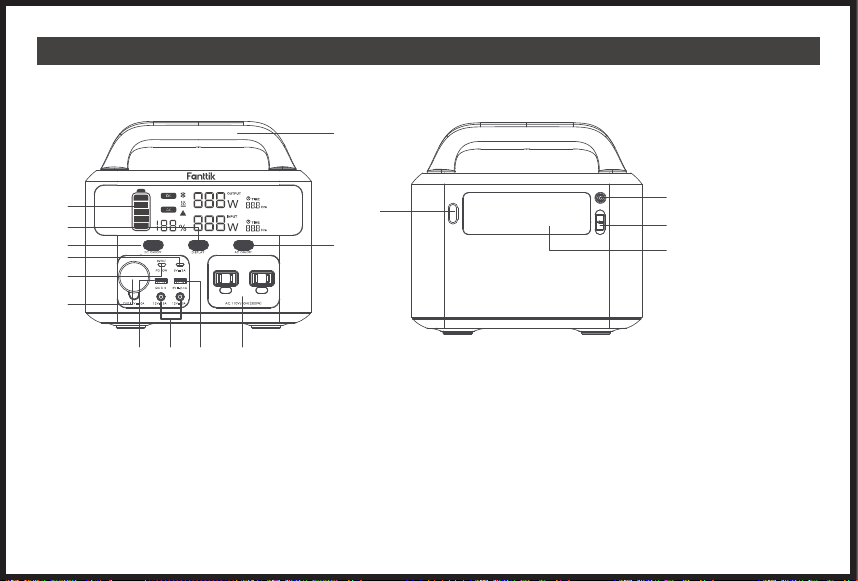
1.各部の名称
1.表示画面
2.ディスプレイボタン
3.DC ボタン
4.5V/3A 入力
5.PD 65W
6.12V/10A 出力
7.QC 3.0
8.12V/10A 出力(120W)
9.5V/2.4A 出力
10.AC 出力
11.AC ボタン
12.ハンドル
13.LED ボタン
14.LED ライト
15.アンダーソンポート
16.DC 7909 入力
正面図
背面図
13
14
15
16
- 28 -
1
2
3
4
5
6
7 8 9 10
11
12
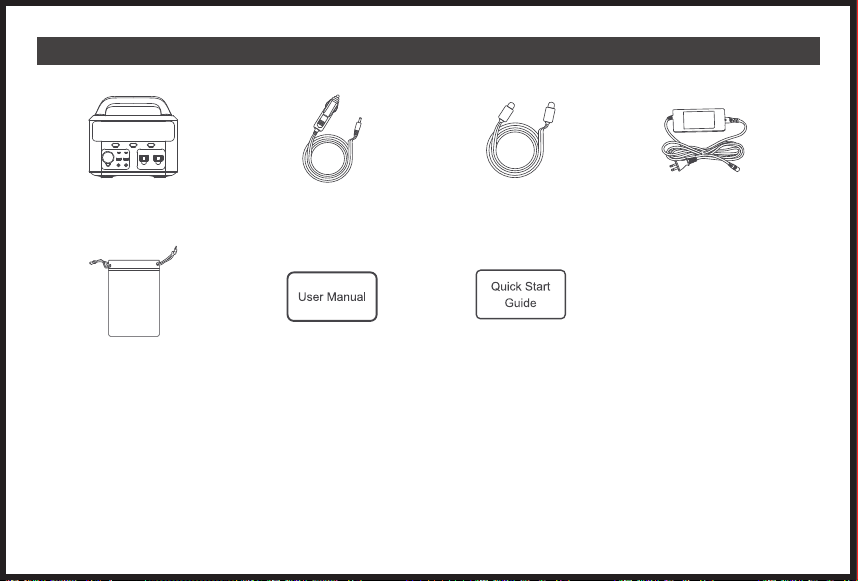
2.パッケージの内容
EVO300 ポータブル電源 x 1 シガーソケット充電ケー
ブル x 1
AC壁チャージャ x 1
取扱説明書x1 使い方説明x1
USB-C toUSB-C ケ
ーブルx1
慎重にパッケージの内容を確認し、足りないものや破損しているものがあれば、当社のオンラインカスタマーサービスに連絡してください。
- 29 -
アクセサリー
バッグ x 1
OUTPUT
TIME
TIME
Hrs
Hrs
INPUT
W
W
%
4.表示画面
出力パワー
過冷却
過熱
エラー警告
有効期間
DC/ACインジケータランプ
入力パワー 残りの充電時間リアルタイムパワー
● 分解図
● 説明表示
OUTPUT
TIME
TIME
Hrs
INPUT
W
W
%
Hrs
%
OUTPUT
TIME
TIME
INPUT
W
W
1、充電入力表示 2.充電用入力(DC+ACデュアル出力)表示 3.ディスプレイスイッチ
4.AC機能表示 5.DC機能表示 6.DCキー+ACキー表示
OUTPUT
TIME
TIME
INPUT
W
W
%
%
OUTPUT
TIME
TIME
INPUT
W
W
- 30 -
この部分は、元の説明書とほぼ同じで、インターフェース図が置き換えられています
4.LEDフラッシュライト
5.再充電
LEDスイッチボタンを押して点灯できます。本製品はSOSモードを含む3つのライトモードがあります。
EVO300ポータブル電源には、複数のDC入力端子が用意されています。
X1 ローライトモード(最大輝度の50%)を有効にするには、消灯時にLEDライトボタンを1回押します。
X2 ハイライトモード(最大輝度)にするには、消灯時にLEDライトボタンを2回押し続けます。
X3 SOSライトモードを起動するには、消灯時にLEDライトボタンを3回押し続けます。
X4 LEDライトボタンを4回押し続けると、1サイクルが終了し、再びライトが消灯します。
ACアダプター 車用充電器 太陽光パネル
- 31 -
プエルトUSB-C(PD60W)
6.充電器
EVO300ポータブル電源は、さまざまなタイプのポートを備えた汎用性の高い製品です。そのため、複数のデバイスに対応し、充電することができます。EVO300発
電所はできないことに注意してください定格300W以上のデバイスをサポートします。
ラップトップ
カメラ
タ ブ レ ット
ス マ ートフォン
ドローン 車の冷蔵庫
● USBポート:スマートフォン、タブレット、スマートウォッチ、デジタルカメラ、電子書籍端末など。
● AC電源:ノートパソコン、ディスプレイ、家電製品など。
● DC出力(12V):ドローン、ルーター、車載用冷蔵庫など。
- 32 -
本製品をAC壁チャージャでソケットに 接続します。
充電が終了したら、充電器のプラグを抜いてください。
本製品が充電中に温かくなるのは正常なことです。
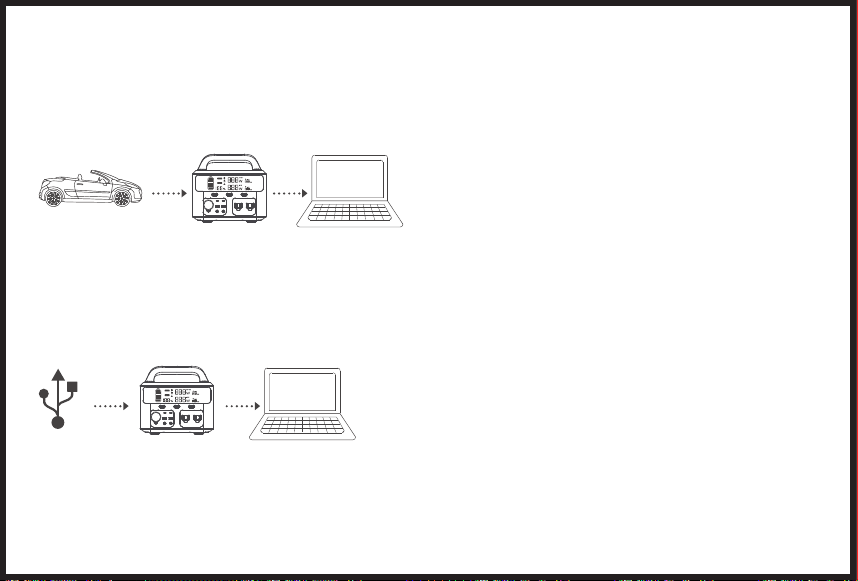
車載用シガーソケット充電ケーブルで充電
本製品とシガーライターソケットを車載用シガーソケット充電ケーブルで接続します。
始動後に本製品を充電してください。
車の バッテリーが 12Vの場合、本製品をフル充電することができません。車のバッテリーが24Vであれば、本製品をフル充電することができます。
USB-Cポ ー ト( PD60W)を介した充電
USB-C電源アダプターを選択します(含まれていません)。
製品とアダプターをPD60Wポート経由で元のUSB-C-USB-Cケーブルで接続します。
7.充電について
EVO300ポータブル電源を完全に充電してから、他の機器を充電することを強くお勧めします。EVO300ポータブル電源の充電には、ウォールチャージャー、カ
ーチャージャー、またはソーラーパネルをお選びいただけます。付属の壁掛け充電では、フル充電になるまで4〜6時間かかる場合があります。ソーラーパネルの効率
は天候に左右されることがあります。
注 意:ご使用前には必ず充電してください。
● 注意:ご使用前には必ず充電してください。
1.
適切なソーラーパネル(DC12~30V/120W)を選択してください。
2.
太陽光パネルを強い日差しの下に置き、太陽に正対して、太陽光パネルと製品を接続します。
3.
本製品がソーラーで完全に充電されると、自動的に充電が停止します。
注 意:
(1)
0〜40℃の温度環境下での充電をお勧めします。
(2)
充電時間は太陽の光の強さによって異なります。
(3)
ソーラーパネルのプラス極とマイナス極が正しく接続されていることを確認してください。
● AC壁チャージャでの充電
- 33 -
適切なソーラーパネル(DC12~30V/120W)を選択してください。
太陽光パネルを強い日差しの下に置き、太陽に正対して、太陽光パネルと製品を接続します。
本製品がソーラーで完全に充電されると、自動的に充電が停止します。
0〜40℃の温度環境下での充電をお勧めします。
充電時間は太陽の光の強さによって異なります。
ソーラーパネルのプラス極とマイナス極が正しく接続されていることを確認してください。
1.
2.
注 意:
(1)
●
1.
2.
注 意:
(1)
●
1.
2.
本製品をAC壁チャージャでソケットに 接続します。
充電が終了したら、充電器のプラグを抜いてください。
本製品が充電中に温かくなるのは正常なことです。
車載用シガーソケット充電ケーブルで充電
本製品とシガーライターソケットを車載用シガーソケット充電ケーブルで接続します。
始動後に本製品を充電してください。
車の バッテリーが 12Vの場合、本製品をフル充電することができません。車のバッテリーが24Vであれば、本製品をフル充電することができます。
USB-Cポ ー ト( PD60W)を介した充電
USB-C電源アダプターを選択します(含まれていません)。
製品とアダプターをPD60Wポート経由で元のUSB-C-USB-Cケーブルで接続します。
- 34 -
●
●
●
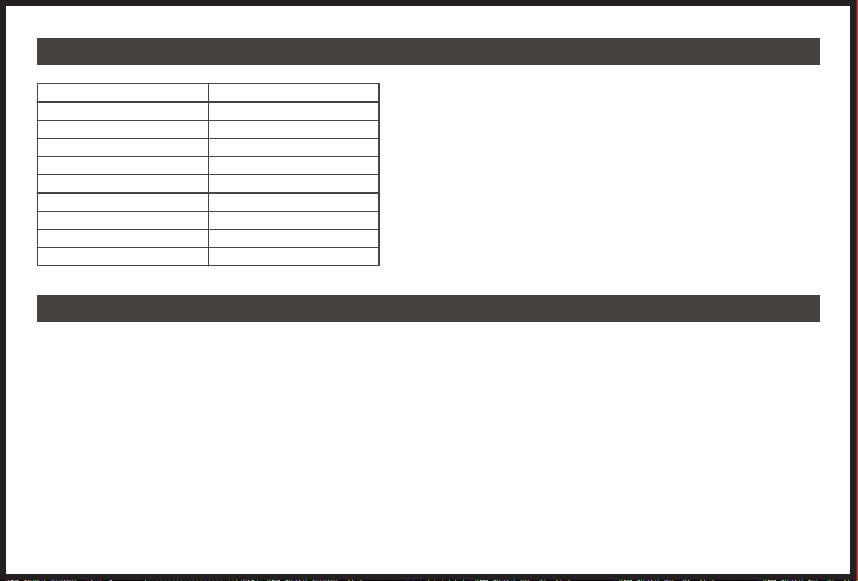
8.仕様書
9.FAQ
モデル
容量
USB-C-1
USB-C-2
USB-1
USB-2
電池
頻度
ソーラー充電器
重量
EVO300
83,200mAh/299Wh
PD60W
5V/3A
5V/2.4A
QC 3.0 18W
リチウムイオン電池
60Hz
MPPT 12-30V
10.9 lbs
回答:T300ポータブル電源は、MPPTコントローラーを内蔵しています。
注意:保管上の注意:最良の結果を得るために、3ヶ月ごとにフル充電し、-20~45℃の間で保管してください。ポータブル電源の寿命を延ばすために、熱や直射日光を避け
て保管してください。
質問5:充電と放電を同時に行うことはできますか?
はい、ですが、バッテリーの寿命を保つためには、充電と放電を同時に行うことはお勧めできません。
質問6:CPAPの使用時間を延ばすにはどうしたらいいですか?
加湿器やヒーターをオフにして、低めの圧力に設定することをお勧めします。
質問7:AC出力で冷蔵庫やエアコンを運ぶことができますか?
低消費電力であれば問題ありませんが、100W以上はお勧めできません。冷蔵庫やエアコンの起動電力は、一般的に定格電力の5~7倍であり、AC過負荷の原因となりやす
いです。
質問8:2台のポータブル電源を並行して使うことはできますか?
いいえ、できません。
本製品で他の機器の充電や電源供給ができない場合は、以下の方法で確認してください。
1.
2.
3.
4.
●
●
●
●
●
●
●
●
●
●
●
●
●
●
●
●
●
●
●
●
●
●
●
●
●
●
●
●
●
●
質問1:EVO300はどのような機器に対応していますか?
回答:AC出力ポートは、合計300W以下の機器の充電・電源供給にのみ対応できることをご注意ください。
質問2:EVO300は使用中に充電できますか?
回答:はい、EVO300はパススルー充電に対応しています。しかし、バッテリーの寿命を縮めることになるので、お勧めできません。
質問3:自分の機器の動作時間を知るにはどうした良いのでしょうか?一部のデバイスの継続時間が実際の使用データと乖離しているのはなぜですか?
回答 : 動作時間 =299Wh*0.85/ ご使用の機器の動作ワット数ですが、当社機器の持続時間は実験室でのデータに基づくものであり、特定の機器の使用時間は異なる場
合 が ありま す 。
質問4:EVO300には、MPPTコントローラーが内蔵されていますか?
- 35 -

●
●
●
質問1:T300はどのような機器に対応していますか?
回答:AC出力ポートは、合計300W以下の機器の充電・電源供給にのみ対応できることをご注意ください。
質問2:T300は使用中に充電できますか?
回答:はい、T300はパススルー充電に対応しています。しかし、バッテリーの寿命を縮めることになるので、お勧めできません。
質問3:自分の機器の動作時間を知るにはどうした良いのでしょうか?一部のデバイスの継続時間が実際の使用データと乖離しているのはなぜですか?
回答 : 動作時間 =299Wh*0.85/ ご使用の機器の動作ワット数ですが、当社機器の持続時間は実験室でのデータに基づくものであり、特定の機器の使用時間は異なる場
合 が ありま す 。
質問4:T300には、MPPTコントローラーが内蔵されていますか?
●
●
●
●
●
●
●
●
●
●
●
●
●
●
●
●
●
●
●
●
●
●
●
●
●
●
●
●
●
●
10.故障かなと思った時
回答:EVO300ポータブル電源は、MPPTコントローラーを内蔵しています。
注意:保管上の注意:最良の結果を得るために、3ヶ月ごとにフル充電し、-20~45℃の間で保管してください。ポータブル電源の寿命を延ばすために、熱や直射日光を避け
て保管してください。
質問5:充電と放電を同時に行うことはできますか?
はい、ですが、バッテリーの寿命を保つためには、充電と放電を同時に行うことはお勧めできません。
質問6:CPAPの使用時間を延ばすにはどうしたらいいですか?
加湿器やヒーターをオフにして、低めの圧力に設定することをお勧めします。
質問7:AC出力で冷蔵庫やエアコンを運ぶことができますか?
低消費電力であれば問題ありませんが、100W以上はお勧めできません。冷蔵庫やエアコンの起動電力は、一般的に定格電力の5~7倍であり、AC過負荷の原因となりやす
いです。
質問8:2台のポータブル電源を並行して使うことはできますか?
いいえ、できません。
本製品で他の機器の充電や電源供給ができない場合は、以下の方法で確認してください。
1.
電源ボタンがオンに なっていることを確認してください。
2.
ACとDCの電源ボタンがオンに なっていることを確認してください。
3.
電池の容量を確認し、10%以下の場合は、できるだけ早く製品を充電してください。
4.
接続された負荷電力が製品の制限電力を超えていないことを確認してください。各ポートには接続電力の制限があります。
- 36 -
●
●
●
11.安全上の注意事項
質問1:T300はどのような機器に対応していますか?
回答:AC出力ポートは、合計300W以下の機器の充電・電源供給にのみ対応できることをご注意ください。
質問2:T300は使用中に充電できますか?
回答:はい、T300はパススルー充電に対応しています。しかし、バッテリーの寿命を縮めることになるので、お勧めできません。
質問3:自分の機器の動作時間を知るにはどうした良いのでしょうか?一部のデバイスの継続時間が実際の使用データと乖離しているのはなぜですか?
回答 : 動作時間 =299Wh*0.85/ ご使用の機器の動作ワット数ですが、当社機器の持続時間は実験室でのデータに基づくものであり、特定の機器の使用時間は異なる場
合 が ありま す 。
質問4:T300には、MPPTコントローラーが内蔵されていますか?
回答:T300ポータブル電源は、MPPTコントローラーを内蔵しています。
注意:保管上の注意:最良の結果を得るために、3ヶ月ごとにフル充電し、-20~45℃の間で保管してください。ポータブル電源の寿命を延ばすために、熱や直射日光を避け
て保管してください。
質問5:充電と放電を同時に行うことはできますか?
はい、ですが、バッテリーの寿命を保つためには、充電と放電を同時に行うことはお勧めできません。
質問6:CPAPの使用時間を延ばすにはどうしたらいいですか?
加湿器やヒーターをオフにして、低めの圧力に設定することをお勧めします。
質問7:AC出力で冷蔵庫やエアコンを運ぶことができますか?
低消費電力であれば問題ありませんが、100W以上はお勧めできません。冷蔵庫やエアコンの起動電力は、一般的に定格電力の5~7倍であり、AC過負荷の原因となりやす
いです。
質問8:2台のポータブル電源を並行して使うことはできますか?
いいえ、できません。
本製品で他の機器の充電や電源供給ができない場合は、以下の方法で確認してください。
1.
2.
3.
4.
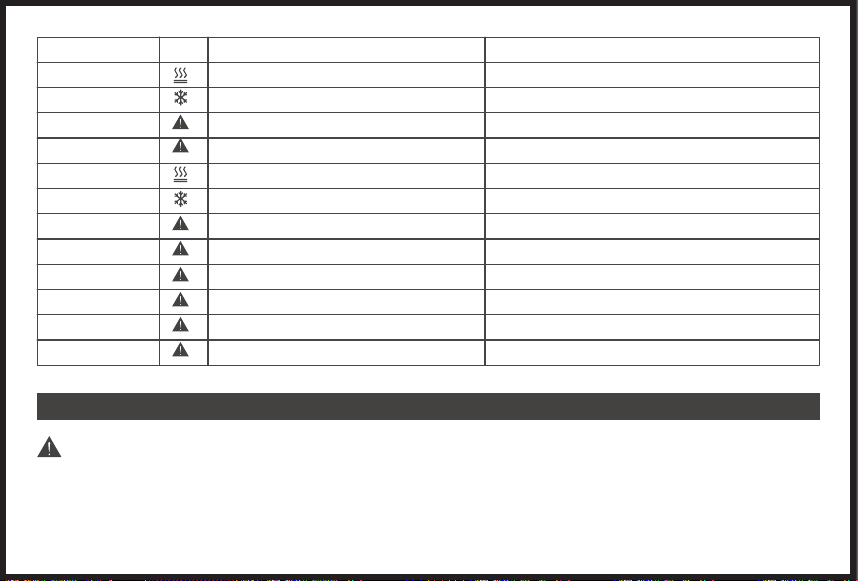
エラーコード(出力)
E1
E2
E3
E4
E11
E12
E13
E14
E15
E16
E17
E18
原因
過熱保護
低温保護
電池の過電圧
入力過電圧
吐出温度
吐出低温
USB-A/USB-C入力の過電流またはショート
QC入力の過電流またはショート
電源逆
DC12V入力の過電流またはショート
AC110V入力の過電流またはショート
総出力電力過負荷
打開策
オートリカバリー/すべての充電機器のプラグを抜いてください
オートリカバリー/すべての充電機器のプラグを抜いてください
オートリカ バリー
オートリカ バリー
オートリカ バリー
オートリカ バリー
DCボタンでの復帰
DCボタンでの復帰
DCボタンでの復帰
DCボタンでの復帰
ACボタンでの復帰
ACボタンでの復帰
重要
重大な傷害または死亡の原因となる可能性があります。
●
●
●
●
●
●
●
●
●
●
●
●
●
●
●
●
●
●
●
●
●
●
●
●
●
●
●
●
●
●
本機や電池を分解、修理、改造しないでください。
本体を火のそばに置いたり、熱を加えたりしないでください。直射日光を避けてください。
浴室や雨、湿気の多い場所での充電、使用、保管などはしないでください。
出力ソケットは、外部機器の電源としてのみ使用してください。いかなる状況下でも、出力を主電源に接続しないでください。
濡れた手で本機や差込口に触れないでください。
AC入力や出力に金属物を接続しないでください。
万一、本体内の液体が目に入った場合は、目をこすらないでください。
本機を家庭ゴミと一緒に廃棄しないでください。
不適切な電源コードを使用しないでください。
本機が正常に機能していない場合は、操作しないでください。
充電中や使用中の本機を動かさないでください。
製品の中に指や手を入れないでください。
破損したり改造された電池パックや機器を使用しないでください。破損したり改造された電池は、予測不可能な動作をして、火災や爆発、怪我の原因になることがあ
ります。
パワーパックは分解しないでください。サービスや修理が必要な場合は、資格を持ったサービス担当者に依頼してください。誤って組み立て直すと、火災や感電の原因に
なります。
本機は清潔で乾燥した環境でのみ使用・保管してください。ほこりや湿気の多い場所での使用や保管は避けてください。
毎回、使用前に本機をチェックしてください。損傷や破損がある場合は使用しないでください。
電源コードが破損している場合は、本機を使用しないでください。
お子様の手の届かないところに保管してください。子供に電源ユニットを使わせないでください。
本製品をペットに近づけないでください。
高温になる場所や環境で使用・保管しないでください。
万一、本体内部の液体が皮膚や衣服に付着した場合は、水道水で洗い流してください。
暴風雨の中では、電源コードをコンセントから抜いてください。
接続する機器の電源が切れていることを確認してから接続してください。
警告-爆発性ガスの危険があります。
電池の爆発の危険性を減らすために、この説明書と、電池の近くで使用する予定の機器の電池メーカーが発行する説明書に従ってください。
100〜240V以外の電源で充電しないでください。
使用中や保管中に本機を横にしたり、逆さまにしたりしないでください。
付属品を他の用途に使用しないでください。
錆びや異臭、発熱などの異常が見られた場合は、直ちに使用を中止し、販売店または弊社カスタマーサポートまでご連絡ください。
本機は、危険物の輸送に関するすべての法的要件を満たしています。
- 37 -
エラーア
イコン
本機を自動車で輸送する際には、本機が適切に固定されていることを確認してください。
本機の充電、使用、保管は、周囲温度が0〜40℃(32~104℉)の範囲内で行ってください。
誤って落下させたり、振動を与えたりした場合は、直ちに電源を切ってください。
電源ユニットに接続する電気機器の説明書をよく読んでください。

●
●
●
質問1:T300はどのような機器に対応していますか?
回答:AC出力ポートは、合計300W以下の機器の充電・電源供給にのみ対応できることをご注意ください。
質問2:T300は使用中に充電できますか?
回答:はい、T300はパススルー充電に対応しています。しかし、バッテリーの寿命を縮めることになるので、お勧めできません。
質問3:自分の機器の動作時間を知るにはどうした良いのでしょうか?一部のデバイスの継続時間が実際の使用データと乖離しているのはなぜですか?
回答 : 動作時間 =299Wh*0.85/ ご使用の機器の動作ワット数ですが、当社機器の持続時間は実験室でのデータに基づくものであり、特定の機器の使用時間は異なる場
合 が ありま す 。
質問4:T300には、MPPTコントローラーが内蔵されていますか?
回答:T300ポータブル電源は、MPPTコントローラーを内蔵しています。
注意:保管上の注意:最良の結果を得るために、3ヶ月ごとにフル充電し、-20~45℃の間で保管してください。ポータブル電源の寿命を延ばすために、熱や直射日光を避け
て保管してください。
質問5:充電と放電を同時に行うことはできますか?
はい、ですが、バッテリーの寿命を保つためには、充電と放電を同時に行うことはお勧めできません。
質問6:CPAPの使用時間を延ばすにはどうしたらいいですか?
加湿器やヒーターをオフにして、低めの圧力に設定することをお勧めします。
質問7:AC出力で冷蔵庫やエアコンを運ぶことができますか?
低消費電力であれば問題ありませんが、100W以上はお勧めできません。冷蔵庫やエアコンの起動電力は、一般的に定格電力の5~7倍であり、AC過負荷の原因となりやす
いです。
質問8:2台のポータブル電源を並行して使うことはできますか?
いいえ、できません。
本製品で他の機器の充電や電源供給ができない場合は、以下の方法で確認してください。
1.
2.
3.
4.
●
●
●
●
●
●
●
●
●
●
●
●
●
●
●
●
●
●
●
●
●
●
●
●
●
●
●
●
●
●
本機や電池を分解、修理、改造しないでください。
本体を火のそばに置いたり、熱を加えたりしないでください。直射日光を避けてください。
浴室や雨、湿気の多い場所での充電、使用、保管などはしないでください。
出力ソケットは、外部機器の電源としてのみ使用してください。いかなる状況下でも、出力を主電源に接続しないでください。
濡れた手で本機や差込口に触れないでください。
AC入力や出力に金属物を接続しないでください。
万一、本体内の液体が目に入った場合は、目をこすらないでください。
本機を家庭ゴミと一緒に廃棄しないでください。
不適切な電源コードを使用しないでください。
本機が正常に機能していない場合は、操作しないでください。
充電中や使用中の本機を動かさないでください。
製品の中に指や手を入れないでください。
破損したり改造された電池パックや機器を使用しないでください。破損したり改造された電池は、予測不可能な動作をして、火災や爆発、怪我の原因になることがあ
ります。
パワーパックは分解しないでください。サービスや修理が必要な場合は、資格を持ったサービス担当者に依頼してください。誤って組み立て直すと、火災や感電の原因に
なります。
本機は清潔で乾燥した環境でのみ使用・保管してください。ほこりや湿気の多い場所での使用や保管は避けてください。
毎回、使用前に本機をチェックしてください。損傷や破損がある場合は使用しないでください。
電源コードが破損している場合は、本機を使用しないでください。
お子様の手の届かないところに保管してください。子供に電源ユニットを使わせないでください。
本製品をペットに近づけないでください。
高温になる場所や環境で使用・保管しないでください。
万一、本体内部の液体が皮膚や衣服に付着した場合は、水道水で洗い流してください。
暴風雨の中では、電源コードをコンセントから抜いてください。
接続する機器の電源が切れていることを確認してから接続してください。
警告-爆発性ガスの危険があります。
電池の爆発の危険性を減らすために、この説明書と、電池の近くで使用する予定の機器の電池メーカーが発行する説明書に従ってください。
100〜240V以外の電源で充電しないでください。
使用中や保管中に本機を横にしたり、逆さまにしたりしないでください。
付属品を他の用途に使用しないでください。
錆びや異臭、発熱などの異常が見られた場合は、直ちに使用を中止し、販売店または弊社カスタマーサポートまでご連絡ください。
本機は、危険物の輸送に関するすべての法的要件を満たしています。
- 38 -
本機を自動車で輸送する際には、本機が適切に固定されていることを確認してください。
本機の充電、使用、保管は、周囲温度が0〜40℃(32~104℉)の範囲内で行ってください。
誤って落下させたり、振動を与えたりした場合は、直ちに電源を切ってください。
電源ユニットに接続する電気機器の説明書をよく読んでください。

●
●
●
本機や電池を分解、修理、改造しないでください。
本体を火のそばに置いたり、熱を加えたりしないでください。直射日光を避けてください。
浴室や雨、湿気の多い場所での充電、使用、保管などはしないでください。
出力ソケットは、外部機器の電源としてのみ使用してください。いかなる状況下でも、出力を主電源に接続しないでください。
濡れた手で本機や差込口に触れないでください。
AC入力や出力に金属物を接続しないでください。
万一、本体内の液体が目に入った場合は、目をこすらないでください。
本機を家庭ゴミと一緒に廃棄しないでください。
不適切な電源コードを使用しないでください。
本機が正常に機能していない場合は、操作しないでください。
充電中や使用中の本機を動かさないでください。
製品の中に指や手を入れないでください。
破損したり改造された電池パックや機器を使用しないでください。破損したり改造された電池は、予測不可能な動作をして、火災や爆発、怪我の原因になることがあ
ります。
パワーパックは分解しないでください。サービスや修理が必要な場合は、資格を持ったサービス担当者に依頼してください。誤って組み立て直すと、火災や感電の原因に
なります。
本機は清潔で乾燥した環境でのみ使用・保管してください。ほこりや湿気の多い場所での使用や保管は避けてください。
毎回、使用前に本機をチェックしてください。損傷や破損がある場合は使用しないでください。
電源コードが破損している場合は、本機を使用しないでください。
お子様の手の届かないところに保管してください。子供に電源ユニットを使わせないでください。
本製品をペットに近づけないでください。
高温になる場所や環境で使用・保管しないでください。
万一、本体内部の液体が皮膚や衣服に付着した場合は、水道水で洗い流してください。
暴風雨の中では、電源コードをコンセントから抜いてください。
接続する機器の電源が切れていることを確認してから接続してください。
警告-爆発性ガスの危険があります。
電池の爆発の危険性を減らすために、この説明書と、電池の近くで使用する予定の機器の電池メーカーが発行する説明書に従ってください。
100〜240V以外の電源で充電しないでください。
使用中や保管中に本機を横にしたり、逆さまにしたりしないでください。
付属品を他の用途に使用しないでください。
錆びや異臭、発熱などの異常が見られた場合は、直ちに使用を中止し、販売店または弊社カスタマーサポートまでご連絡ください。
本機は、危険物の輸送に関するすべての法的要件を満たしています。
- 39 -
本機を自動車で輸送する際には、本機が適切に固定されていることを確認してください。
本機の充電、使用、保管は、周囲温度が0〜40℃(32~104℉)の範囲内で行ってください。
誤って落下させたり、振動を与えたりした場合は、直ちに電源を切ってください。
電源ユニットに接続する電気機器の説明書をよく読んでください。
12-Month Coverage
Your Warranty Includes
Within 12 months of purchase, we will provide timely and
effective online after-sales service. We will repair or
replace any defective product (due to manufacturing
fault) within the warranty period.
How to Return Your Fanttik Product
Contact [email protected] with your order number.
We will issue you a return label for your return.
Tear off the 'Return Details' page and fill in the details.
Include this inside your return package.
We will issue your replacement/refund on receiving
the return package.
Return Details
In order to process your return as quickly as possi-
ble, we require the following information. Please fill
out this form and include it in your return package.
Purchase Name:
Order Number:
Date of Purchase:
Your Email Address:
Place of Purchase:
If your purchase was fulfilled by Amazon, please
use Amazon’s 30-day return service.
www.fanttik.com [email protected]

Contents
www.fanttik.com
Tel :+1 347-307-8957 Mon-Fri 9AM-5PM (PT)
www.facebook.com/fanttikofficial
Aukey Technology Co.,Ltd.
Room102, Building P09, South China City,
Electronic Trading Center, Longgang District Shenzhen