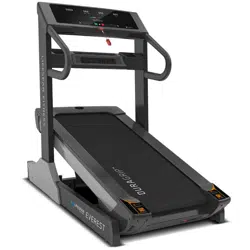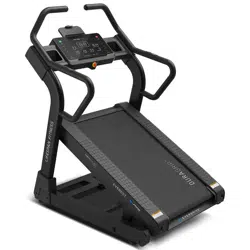
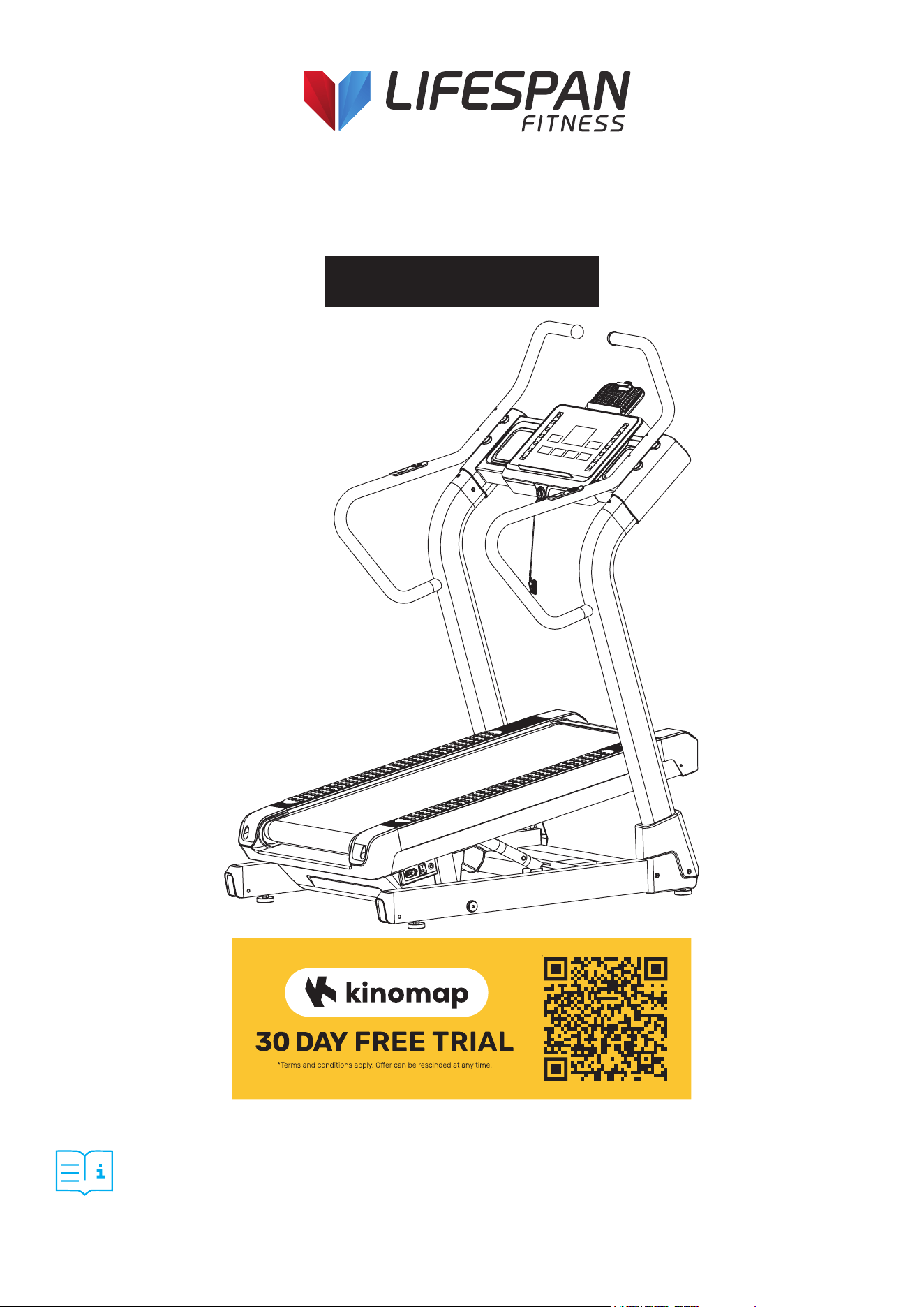
Product may vary slightly from the item pictured due to model upgrades.
Read all instructions carefully before using this product.
Retain this owner’s manual for future reference.
NOTE:
This manual may be subject to updates or changes. Up to date manuals are available through our
website at www.lifespanfitness.com.au
Everest 2 Ultra High
Incline Treadmill
USER MANUAL

2
TABLE OF
CONTENTS
I. Important Safety Instructions . . . . . . . . . . . . . . . . . . . . . . . . . . . . . . . 03
II. Important Electrical Information . . . . . . . . . . . . . . . . . . . . . . . . . . . . 05
III. Important Operating Instructions . . . . . . . . . . . . . . . . . . . . . . . . . . . 06
IV. Parts List . . . . . . . . . . . . . . . . . . . . . . . . . . . . . . . . . . . . . . . . . . . . . . . . . . . . . 07
V. Exploded Diagram . . . . . . . . . . . . . . . . . . . . . . . . . . . . . . . . . . . . . . . . . . . 09
VI. Assembly Instructions . . . . . . . . . . . . . . . . . . . . . . . . . . . . . . . . . . . . . . . 10
VII. Operation Instructions . . . . . . . . . . . . . . . . . . . . . . . . . . . . . . . . . . . . . . 15
VIII. Exercise Guide . . . . . . . . . . . . . . . . . . . . . . . . . . . . . . . . . . . . . . . . . . . . . . . 22
IX. Maintenance Instructions . . . . . . . . . . . . . . . . . . . . . . . . . . . . . . . . . . . . 24
X. Warranty . . . . . . . . . . . . . . . . . . . . . . . . . . . . . . . . . . . . . . . . . . . . . . . . . . . . . . . 26
XI. Hand Pulse Technology . . . . . . . . . . . . . . . . . . . . . . . . . . . . . . . . . . . . . . . 27
| TABLE OF CONTENTS

3IMPORTANT SAFETY INSTRUCTIONS |
I. IMPORTANT SAFETY
INSTRUCTIONS
WARNING: Read all instructions before using this treadmill.
It is important your treadmill receives regular maintenance to prolong its lifespan. Failing to
regularly maintain your treadmill may void your warranty.
DANGER
To reduce the risk of electric shock, disconnect your treadmill from the electrical outlet prior to
cleaning and/or service work.
DO NOT USE AN EXTENSION CORD:
DO NOT ATTEMPT TO DISABLE THE GROUNDED PLUG BY USING IMPROPER ADAPTERS OR IN ANY
WAY MODIFY THE CORD SET.
• Install the treadmill on a flat level surface with access to a 220-240 volt (50/60Hz), grounded outlet.
• Do not operate treadmill on deeply padded, plush or shag carpet. Damage to both carpet and
treadmill may result.
• Do not block the rear of the treadmill. Provide a minimum of 1 metre clearance between the rear of the
treadmill and any fixed object.
• Place your unit on a solid, level surface when in use.
• When running, make sure the plastic clip is fastened onto your clothing. It is for your safety, should
you fall or move too far back on the treadmill.
• Keep hands away from all moving parts.
• Never operate the treadmill if it has a damaged power cord or plug. When damaged, these must be
replaced by the manufacturer, service agent or similarly qualified persons in order to avoid a
hazard.
• Keep the cord away from heated surfaces.
• Do not operate where aerosol spray products are being used or where oxygen is being administered.
Sparks from the motor may ignite a highly gaseous environment.
• Never drop or insert any object into any openings.

4
• The treadmill is intended for in-home use only and is not suitable for commercial environments.
• To disconnect, turn all controls to the off setting, remove the safety key, and then remove the plug
from the outlet.
• The pulse sensors are not medical devices. Various factors, including the user’s movement, may
affect the accuracy of heart rate readings. The pulse sensors are intended only as exercise aids in
determining heart rate trends in general.
• Use the handrails provided; they are for your safety.
• Wear proper shoes. High heels, dress shoes, sandals or bare feet are not suitable for use on your
treadmill. Quality athletic shoes are recommended to avoid leg fatigue and injury.
• Before undertaking any type of exercise program, it is recommended that you consult a doctor.
• Health related injuries may result from incorrect or excessive training.
• This appliance is not intended for use by persons (including children) with limited physical, sensory
or mental capabilities, or lack of experience and knowledge, unless they have been given supervision
or instruction concerning use of the appliance by a person responsible for their safety.
• WARNING: Heart rate monitoring systems may be inaccurate. If you feel faint stop exercising
immediately.
• Children should not be allowed on or around the equipment, even when not in use.
• Children should be supervised to ensure that they do not play with this machine.
• Loose-fitting clothing or jewellery that could become an entanglement hazard should not be worn.
• Training shoes should be worn when using the equipment.
• Equipment must be used on a level and stable surface.
• All fixings should be checked before the equipment is used.
• All literature relating to the use of the equipment should be retained for future reference.
• Recommended operating temperature: 5-40°C.
| IMPORTANT SAFETY INSTRUCTIONS
Remove the safety key after use to prevent unauthorized
treadmill operation.

5IMPORTANT ELECTRICAL INFORMATION |
II. IMPORTANT ELECTRICAL
INFORMATION
1. Before starting any exercise program, consult with your physician or health professional.
2. Check all the bolts are securely locked.
3. Never put the treadmill in a humid area, or it will cause troubles.
4. We take no responsibility for any troubles or hurts due to above reasons.
5. Dress sport clothes and shoes before running.
6. Do not do exercise in 40 minutes after meal.
7. To prevent hurts, please warm up before exercise.
8. Consult with doctor before exercise if you have high blood pressure.
9. The treadmill is only used for adults.
10. Do not plug anything into any parts of this equipment, or it may be damaged.
11. Do not connect line to the middle of cable; do not lengthen cable or change the cable plug; do not
put anything heavy on cable or put the cable near heat source; forbid using socket with several
holes, these may cause fire or people may be hurt by the power.
12. Switch off the power when the equipment is not used. When the power is cut off, do not pull the
power line to keep the wire unbroken.
13. Pulse data may not be very accurate, so cannot be used for medical purpose. Over-exercise may
cause injury, even death. If you have a feeling of dizziness, sickness or other abnormal symptoms,
please stop training and consult a doctor immediately.
WARNING!

6 | IMPORTANT OPERATING INSTRUCTIONS
III. IMPORTANT OPERATING
INSTRUCTIONS
1. Plug the power cord of the treadmill directly into a dedicated grounded circuit. This product must be
grounded. If it has breakdown, grounding provides a path of least resistance for electric current to
reduce the risk of electric shock.
2. Position the treadmill on a clear, level surface. Do not place the treadmill on thick carpet as it may
interfere with proper ventilation. Do not place the treadmill near water or outdoors.
3. Position treadmill so that the wall plug is visible and accessible.
4. Never start the treadmill while you are standing on the walking belt. After turning the power on and
adjusting the speed control, there may be a pause before the walking belt begins to move, always
stand on the foot rails on the sides of the frame until the belt is moving.
5. Wear appropriate clothing when exercising on the treadmill. Do not wear long, loose fitting clothing
that may be caught in the treadmill. Always wear running or aerobic shoes with rubber soles.
6. Make sure the power supply is connected and the safety key is effective before using the treadmill.
Fit one side of the safety key on the treadmill and clip the other side on your clothes or belt, which
will enable you to pull off the safety lock promptly in an emergency.
7. Always unplug the power cord before removing the treadmill motor cover.
8. Make sure there is no less than 2*1m space behind the treadmill.
9. Keep children away from the treadmill during operation.
10. Always hold the handrails when initially walking or running on the treadmill, until you are
comfortable with the use of the treadmill.
11. Always attach the safety key rope to your clothing when using the treadmill. If the treadmill should
suddenly increase in speed due to an electronics failure or the speed being inadvertently increased,
the treadmill will come to a sudden stop when the safety key is disengaged from the console.
12. In case of any abnormality during the use process, please remove the safety key immediately,
grasping the handlebar and jumping onto the two edgings, then get off the treadmill after it stops.
13. When the treadmill is not being used, the power cord should be unplugged and the safety key
removed.
14. Put the safety key away where it can not be reached by the children.
15. Before starting any exercise program, consult with your physician or health professional. He or
she can help establish the exercise frequency, intensity (target heart zone) and time appropriate
for your particular age and condition. If you have any pain or tightness in your chest, an irregular
heartbeat, shortness of breath, feel faint or have any discomfort while you exercise, STOP! Consult
your physician before continuing.
16. If you observe any damage or wear on the mains plug or on any section of the mains lead then
please have them replaced immediately by a qualified electrician – do not attempt to change or
repair these yourself.
17. If the supply cord is damaged, it must be replaced by the manufacturer, its service agent or
similarly qualified persons in order to avoid a hazard.
18. Put your feet on the side rail before using the treadmill, and always attach the safety key rope to
your clothing. Hold the handle bar before the running belt moving well (feel the running speed by
your single foot before using it). To avoid losing balance, please slow down the speed to the lowest
or take off the safety lock. And hold the handle bar to jump to the side rails when emergency or the
safety key is not attached.

7ASSEMBLY INSTRUCTIONS |
IV. PARTS LIST
Key No. Description Qty.
1 Bottom frame 1
2 Main frame 1
3L/R Upright tube 1pr
4 Computer frame 1
5L/R Armrest 1pr.
6 Strengthen tube 1
7 Oil tube connection 1
8
Front roller
1
9
Rear roller
1
10
Main frame axle
2
11
Spacer φ38*φ25*39
2
12
Edgings pressing plate
8
13
Computer up cover
1
14
Computer bottom cover
1
15
Computer board
1
16
Water bottle
2
17
Front Handlebar end cap
4
18L/R
Edgings
1pr.
19
Front protective cover for
main frame
1
20
Rear protective cover
1
21
Motor cover
1
22
Roller cover
2
23
End cap
2
24L/R
Bottom frame protective cover
1pr.
25
Tablet holder bottom cover
1
26
Tablet holder top cover
1
27
Running board
1
28
Running belt
1
Key No. Description Qty.
29
Rubber cushion
4
30
Rubber pad
1
31
Belt
1
32
Spacer φ32*φ25*14
4
33
Tablet holder clip
1
34
Adjustable foot pad
4
35
Hole wire
3
36
Cushion
1
37
Oil hole plug
1
38
Roller
2
39
Plastic cushion
2
40
Inner-hex bolt M10*20
16
41
Hex bolt M10*65
1
42
Hex bolt M10*45
1
43
Hex bolt M10*60
2
44
Socket head cap bolt M8*18
4
45
Socket head cap bolt M10*70
2
46
Socket head cap bolt M10*65
2
47
Socket head cap bolt M8*25
4
48
Socket head cap bolt M8*20
2
49
Socket head cap bolt M6*15
2
50
Inner-hex flat head bolt M8*15
2
51
Inner-hex sunk bolt M6*30
2
52
Inner-hex sunk bolt M6*25
4
53
Cross sunk head screw M3*15
2
54
Cross pan head bolt M5*30
8
55
Phillips sunk tapping screw
ST4.0*16
2
56
Phillips screw M5*16
2

8 | ASSEMBLY INSTRUCTIONS
Key No. Description Qty.
57
Phillips screw M5*8
4
58
Phillips screw M4*8
6
59
Phillips tapping screw ST4*35
3
60
Phillips tapping screw ST4*16
38
61
Phillips tapping screw
ST4.0*12
4
62
Phillips tapping screw ST2.9*8
27
63
Phillips tapping screw
ST4.0*16
8
64
Phillips tapping screw ST2.9*6
8
65
Nylon nut M10
4
66
Hex thin nut M10
4
67
Hex nut M6
8
68
Hex nut M3
2
69
Serrated lock washerφ10*1.2
24
70
Serrated lock washerφ8*1.2
2
71
Flat washer φ8
6
72
Spring washer φ8
6
73
Computer
1
74
DC motor
1
75
Incline motor
1
76
Safety key
1
Key No. Description Qty.
77
Circuit breaker
1
78
Switch
1
79
Power socket
1
80
Rheostat
1
81
Inverter
1
82
Power wire
1
83
Computer upper wire
1
84
Computer middle wire
1
85
Computer middle and lower
wire
1
86
Computer lower wire
1
87
Socket head cap bolt M8*15
2
88
handle pulse upper wire
2
89
handle pulse lower wire
2
90
Shortcut key upper wire
2
91
Shortcut key lower wire
2
92
Filter (optional)
1
93
Loudspeaker (optional)
2
94
Amplifier board (optional)
1
95
Audio jack
1
96
Fitshow Bluetooth (optional)
1

9EXPLODED DIAGRAM |
V. EXPLODED DIAGRAM

10 | ASSEMBLY INSTRUCTIONS
1. Open the package, take out the following parts and place the main frame flat on the ground.
Before assembly, ensure you have adequate space for step up. You may require a second person to
assist with assembly.
VI. ASSEMBLY INSTRUCTIONS
STEP 1

11ASSEMBLY INSTRUCTIONS |
1. Connect Computer middle wire (84) and Computer middle and lower wire (85.)
2. Pre assembly Upright tube (3L/R) to the bottom frame (1) with In ner hex bolt M10*20 (40) and
Serrated lock washer φ 10*1.2 (69).
Caution: do not clamp the wires. Do not lock the Inner hex bolt M10*20 (40) at this stage.
STEP 2

12 | ASSEMBLY INSTRUCTIONS
1. Connect Computer upper wire (83) and Computer middle wire (84).
2. Lock Computer frame (4) to Upright tube (3L/R) with Inner-hex bolt M10*20 (40) and Serrated lock
washerφ10*1.2 (69). Caution: do not clamp the wires.
STEP 3

13ASSEMBLY INSTRUCTIONS |
1. Insert Armrest (5L/R) into the armrests connecting tubes of Upright tube (3L/R).
2. Connect the corresponding lines handle pulse upper wire (88) and handle p ulse lower wire (89),
shortcut key upper wire (90) and short cut key lower wire (91), and insert the line connectors into the
holes of Computer frame (4) in turn.
3. Place Armrest (5L/R) on the Computer frame (4), and align the holes on the Armrest (5L/R) with
holes A and B of Computer frame (4). Then lock Armrest (5L/R) to Computer frame (4) with Socket
head cap bolt M8*25 (47).
4. Lock Armrest (5L/R) to Upright tube (3L/R) with inner hex flat head bolt M8*15 (50) and Serrated lock
washerφ 8*1. 2 (70).
STEP 4

14 | ASSEMBLY INSTRUCTIONS
1. Lock all the Inner-hex bolts M10*20 (40) that are not locked.
2. Insert Tablet holder (26) into Computer frame (4), and then lock Tablet holder (26) to Computer
frame (4) by using Phillips screw M5*8 (57).
3. Lock Bottom frame protective cover (24L/R) on the Bottom frame (1) with Phillips tapping screw
ST4*16 (60).
4. Insert Front Handlebar end cap (17) onto Computer frame (4), and the insert Safety key (76) onto
Computer frame (4).
5. Plug one end of the power wire (82) into the treadmill and the other end into the power supply. When
not in use for a while, we recommend switching off from the power switch.
STEP 5
15OPERATIONS INSTRUCTIONS |
VII. OPERATION INSTRUCTIONS
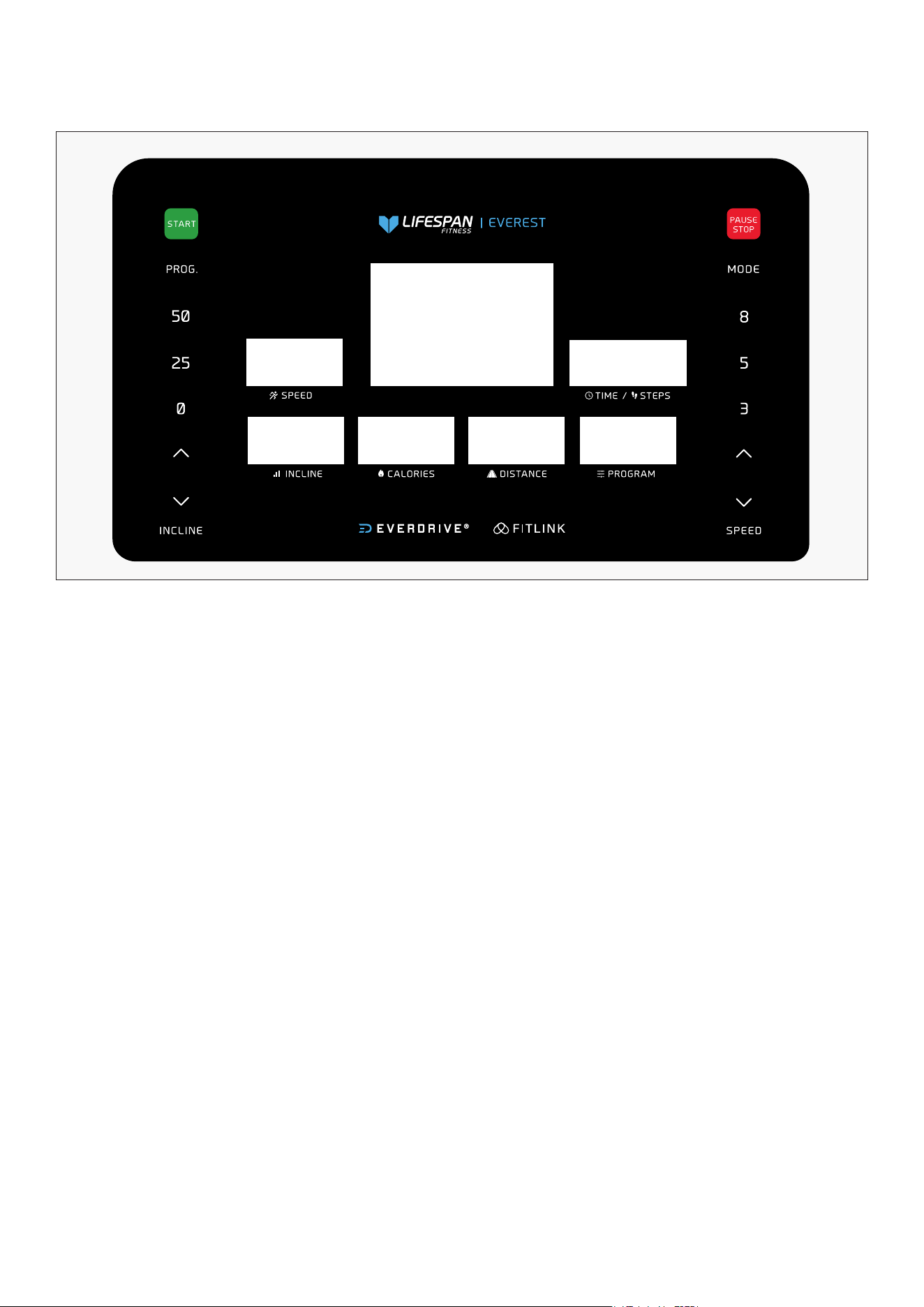
1. The LED window displays the following functions:
2. Function button: Start, Stop, Program, Mode, Speed +/-, Incline+/-, Speed shortcut key: 3, 5, 8KM/H,
Incline shortcut key 0, 25, 50 paragraph.
A. Point array window:
a) Standby or select the three inverted modes of time, distance and calories
b) Displays the speed dot matrix diagram when selecting the program
c) Display fat measurement mode and error
d) Display the runway and the number of laps, or the speed lift dot pattern.
B. Speed window: Displays the speed data, scope: 0.0-8.0KMH.
C. Time / step number window: Displays time data, scope: 0:00-99:59. Alternate display of steps during
runtime, scope: 0-9999.
D. Incline window: Display incline data, scope: 5-50 paragraph.
E. Program/ calorie window:
a) Displays the selected program serial number / calorie data. Program range: P01-P12,U01-U03
b) Displays the calorie data, the calorie range: 0.0-999.
F. Distance window: Displays distance data, scope: 0.00-99.9
G. Heart rate window: Showing heart rate data, heart rate range: 50-200 (For reference only, not as
medical data).
1. Window and Key Description:

16
3. Function key instructions:
A. Program key: In the main menu, press the program key to cycle the selection program: Manual mode
or Preset Program P01 to P12 or User program U01 to U03.
B. Mode key: In the standby state, press the mode key to select the program cycle: manual mode
(normal mode), time countdown meter, distance countdown meter, calorie countdown meter.
C. Start key: In the standby or pause state, press the key to start the treadmill.
D.Stop/ Pause key: When the motor is running, the motor will stop.
E. Speed +/-: In the set state, the key will increase or decrease the set value. When the motor is running,
the button will increase or decrease the speed.
F. Incline +/-: In the set state, the key will increase or decrease the set value. When the motor is running,
the button will increase or decrease the lifting.
G. Speed shortcut key: 3/ 5/ 8KM/H. When the motor is running, the key will adjust the motor speed
directly to the speed value identified on the key.
H. Incline shortcut key: 0/ 25/ 50 Incline. When the motor is running, the key will adjust the lifting motor
to the lifting value marked on the key.
I. In the standby state, press and hold the "Speed +" and "Speed -" keys for 3 seconds to enter the total
mileage view, and press the "Stop" button for 3 seconds to clear the total mileage.
J. In standby state, press and hold the "Incline +" and "Incline -" keys for 3 seconds to enter the lift self-
test.
1. Schematic description:
A. Manual mode includes: normal mode, time mode, calorie mode, distance mode.
B. 12 fixed programs: P01, P02, ... P12.
C. 3 custom programs: U01, U02, U03.
2. Start the instructions:
A. Attach the safety lock to the safety lock switch position on the panel.
B. Press the start key, the lattice window shows: countdown from 3 with buzzer sound, then
treadmill will begin moving.
1. How to get into the manual mode:
A. Turn on the power switch and go directly to the normal mode in the manual mode.
B. In the standby state, press the mode key to select the normal mode in the manual mode.
2. Three setting functions in manual mode: time setting, distance setting, and calorie setting.
A. In manual mode, the time window is 0:00.
B. In the manual mode, press the mode key to enter the time countdown mode. The time window
will flash, the default time is: 30:00. Press the speed + key or incline + key to set the countdown.
Time setting range: 5:00-99:00.
C. In the distance countdown mode: press the mode key to enter the distance countdown mode.
The default distance is: 1.00 km, press the speed + key or incline + key to set the distance. Setting
range: 0.50-99.9 km, each increase or decrease from 0.1 km.
D. In the calorie countdown mode, press the mode key to enter the calorie countdown mode. The
default calorie is: 50.0 kcal, press the speed + key or incline + key to set the calorie. Setting
range: 10.0-999 kcal, increase or reduce from 1 kcal each time.
| OPERATIONS INSTRUCTIONS
3. Manual mode:
2. Fixed Program / Operation instructions:

17
3. Operation in the manual mode:
A. Press the Start key for 3 seconds, then the motor starts running with an initial speed of 0.5 KMH.
B. Press the speed +/ - key to adjust the speed.
C. Press the incline +/ - key to adjust the incline.
D. Press the speed shortcut key to quickly set the speed identified by the key.
E. Press the incline shortcut key to quickly set the incline to the lift marked by the key.
F. When the motor is running, press the stop key and the motor stops running.
G. When the set time decreases to zero, or when the set calorie decreases to zero, or when the set
distance decreases to zero, there will be a 3-beep sounds and the speed slowly decreases until
it stops. A longer 3 beep sounds will occur and the window will display End. 5 seconds later it will
revert back to standby, 2 beep sound will occur.
H. If parameters are not set in manual mode, the values will count up. Treadmill will stop after
exceeding 99:59 (100 minutes) in manual mode.
1. The initial time is set to 30 minutes, and only the time can be set. The time setting range is from 5:00
to 99:00. Press the speed +/ - key, or Incline +/ - key to adjust the set value.
2. Press the start button to start the motor running, and the speed gradually increases to the speed
indicated in the first section of the automatic program (see the program value table for details).
3. Press the speed +/ - button to adjust the speed.
4. Press the incline +/ - keys to adjust the incline.
5. Press the speed shortcut key to quickly set the speed represented by the key.
6. Press the lifting shortcut key to quickly set the lifting represented by the key.
7. Each program is divided into 20 segments, with each segment running for 1/20 of the set time.
8. When switching between paragraphs, it will beep three times.
9. When the setting time decreases to zero, the speed slowly decreases until it stops. The buzzer emits a
short sound 3 beeps, and the speed will slowly decrease until it stops. The buzzer will emit a long sound
3 beeps, and the lattice window will display End. After 5 seconds, it will return to standby and the buzzer
emits a long sound of 2 beeps.
Speed represents speed, and incline represents slope (with a total of 55 slopes, each slope being 1/55 of
the total slope).
Each program divides the movement time into 20 equal parts, with corresponding speeds and slopes
for each time period.
PROGRAM TIME
Setup time / 20 = each segment of the running time
1 2 3 4 5 6 7 8 9 10 11 12 13 14 15 16 17 18 19 20
P01
SPEED 2 2 2 2 3 3 3 3 4 4 4 4 5 5 5 5 5 3 3 1
INCLINE 0 1 1 1 1 1 2 2 2 2 3 3 3 2 2 3 2 2 2 2
P02
SPEED 2 3 3 3 3 4 4 5 5 5 4 4 5 5 5 4 4 5 3 2
INCLINE 0 1 2 3 4 5 4 5 4 2 1 2 3 2 1 1 2 3 3 2
P03
SPEED 2 2 2 3 3 3 4 4 4 4 5 5 6 6 6 5 5 5 4 3
INCLINE 0 2 2 4 4 4 6 6 6 7 7 8 8 8 8 6 6 6 4 3
OPERATIONS INSTRUCTIONS |
5. Fixed Program Data (Metric):
4. Fixed program mode:

18
P04
SPEED 0 2 2 4 4 4 6 6 6 7 7 8 8 8 8 6 6 6 4 3
INCLINE 1 1 2 2 4 4 5 5 5 6 6 6 8 8 10 10 8 6 6 3
P05
SPEED 2 5 5 5 6 6 6 8 7 7 6 5 4 3 3 3 5 5 4 4
INCLINE 0 2 8 8 8 9 9 10 10 12 12 12 14 14 14 13 13 12 10 6
P06
SPEED 2 6 6 6 7 7 7 7 6 6 8 8 7 7 6 6 5 5 6 4
INCLINE 0 8 10 14 16 18
20 22 24 25 25 22 20
18 17 16 15 15 12 3
P07
SPEED 2 3 3 5 3 3 7 7 6 6 5 5 4 8 8 8 6 6 5 3
INCLINE 0 8 12 13 13 13 15 15 15 16 16 18 18
20 20 22 22 23 20
5
P08
SPEED 2 4 6 6 6 5 8 8 6 7 7 5 5 5 5 8 7 7 6 6
INCLINE 2 2 6 6 8 7 9 12 12 14 16
20 22 22
18 18 18 15 15 5
P09
SPEED 1 2 2 3 3 2 2 3 3 2 2 3 3 4 4 3 3 3 2 1
INCLINE
24 25 26
28 29 25 26 28 29 25 26 28
29 25 26 25 26 25 25
0
P10
SPEED 1 2 3 3 3 4 4 5 5 4 4 3 3 3 2 3 3 2 2 1
INCLINE
24 28 25 25 28 25 28 25 28 28 25 25 28 27 24 28 30 32 34 0
P11
SPEED 1 2 3 4 5 3 4 5 3 4 5 4 3 4 4 3 3 2 2 1
INCLINE
20 22 24 26 28 30 26 28 24 26 28 30 30 32 34 36 34 34 32 0
P12
SPEED 1 2 2 3 3 4 4 3 3 2 3 2 3 3 3 2 2 3 2 1
INCLINE
20 22 24 24 26 26 28 28 30 30 28 26 24 22 20 22 24 26 25 0
In addition to 12 built-in programs of the system, the Treadmill also has three user-defined programs
that allow users to set up according to their personal conditions: U01, U02, U03.
a) User defined program settings:
In standby mode, continuously press the "Program" button until the desired user-defined program
(U01-U03) is displayed.
Press the "Mode" button to confirm entry into the settings, and then set the first time period. When
setting, use the "Speed +", "Speed -" keys or speed shortcut keys to set the speed, and use the "Incline +",
"Incline -" keys to set the Incline.
Press the "Mode" button to complete the setting of the first time period and enter the setting state of
the second time period until all 20 time periods are set.
After the setting is completed, the data will be permanently saved until the next time you reset it, and
this data will not be lost due to power outage.
b) Launching User Defined Programs:
i. Press the "Program" button continuously in standby mode until the desired user-defined program
(U01-U03) is displayed, and set the running time before pressing the start button to start it.
ii. After the user defined program and running time settings are completed, pressing the start button
can also start immediately.
c) User Defined Program Settings Description:
Each program divides the movement time into 20 time periods. When setting, the speed, incline and
running time of all 20 time periods must be set before pressing the start key to start the Treadmill.
| OPERATIONS INSTRUCTIONS
6. Custom Programs:

19
Set parameters
Initial value Set initial value Setting range Display range
TIME (minute: second) 0:00 10:00 5:00-99:00 0:00-99:59
SPEED (KM/H) 0.0 N/A N/A 0.5-8.0KMH
DIS (DISTANCE) 0:00—99:59 30:00 30:00 5:00---99:00
CAL (CALORIE) 0.00 1.00 0.50-99.9 0.00-99.9
7. Display Range Of Various Parameters:
8. Safe lock function:
Pull off the safety lock in any state to stop the treadmill, the display window will show "----/---". Dot
matrix window moving display "SAFETY KEY DISCONNECTED".
The buzzer emits a short sound 3 beep sound. If the motor is running, the motor will come to an
emergency stop. When the safety lock is detached, you cannot use the machine and buttons would not
work.
9. Power saving mode:
The system has the function of power saving. If there is no key command input within 10 minutes under
standby state, the system enters the power saving mode, automatically closes the display. You can
press any key to reawaken the system.
10. MP3 playback function:
When MP3 are connected after power on, the display can play music. Volume of the music is adjusted
on your device. Please pay attention to controlling the size of the sound to avoid affecting the quality of
the sound and the built-in audio circuit.
11. Shutdown:
You can turn off the treadmill at any time by turning off the power switch, which does not damage the
treadmill. We recommend turning off at the switch if you are not using it for a while to prolong the life of
the control board.
12. Checks on Machine:
1.Check the power supply before exercise; check whether the safety lock is valid.
2. If any abnormal situation occurs during exercise, the safety lock can be pulled off and the running
opportunity can quickly slow down to stop; then put the safety lock, reset the equipment and wait for
the input instruction.
3. If there is any problem with this machine, please contact the Seller.
OPERATIONS INSTRUCTIONS |

20| OPERATIONS INSTRUCTIONS
Error
Possible reasons Test Method Solutions
E01
Communicational failure
between the meter and the
controller, and the drive
cannot receive signal from
the meter.
Check whether the
connector of the meter and
the controller has broken
down.
If yes, change the
connector.
Check whether the joint
has been plugged in well.
Pull the joint and plug in
again.
E02
Explosion proof
protection
Whether the supply
voltage is 50% lower
than the normal voltage.
Use correct voltage
standard and retest.
Whether the electric
machine has been
installed well.
Change the electric
machine.
Whether the controller
has awful smell.
Change the controller.
E03
Failure in inspecting
the motor signal for
more than 15 seconds
continuously and speed
sensor for 10 seconds
continuously.
Whether the distance and
location of the sensor and
the disc is correct or the
sensor is installed well.
The sensor should be
installed right in the hole
of disc.
Whether the sensor wire
has been open circuited,
short circuited or broken
circuited.
Reconnect the motor
interface, and examine the
sensor wire.
Whether the sensor has
been broken down.
Change the sensor.
E04
Lifting learning or self-
inspection fails
Check whether motor
wiring is damaged to form
open circuit.
re-insert the signal wire
joint to ensure that it is
reliable.
Check whether lifting
motor’s AC wires are
properly connected.
Lifting motor shall
be correctly plugged
according to marks on its
AC controller.
Check whether motor
wiring is damaged to form
open circuit.
If yes, replace wires or
replace the lifting motor.
Check whether the lifting
motor is damaged.
If yes, change the lifting
motor.
Lifting motor fails in
learning.
Press the button of
controller for 3 seconds
and relearn again.
13. Troubleshooting:

21
Error
Possible reasons Test Method Solutions
E05 Over-current protection
Check whether the
controller match with the
standard of electric engine.
Change the electric
machine or controller and
retest.
E06
Fault of motor’s open
circuit
Check whether the
motor interface of the
drive is loose.
Re-plug the motor
interface properly.
Check whether the
motor is open-circuited.
Change the motor.
When the motor is
idling, if the current is
less than standard, it
will go wrong, please
install the machine and
test.
E10 Transient current
protection
Check if the torsion of
controller is normal.
Adjust the torsion
regulator to normal value.
Check whether the motor
is short-circuited.
Change the motor.
Check whether treadmill’s
transmissional part is
stuck.
Eliminate the disturbance,
and make sure the
treadmill goes smoothly.
OPERATIONS INSTRUCTIONS |
22
VIII. EXERCISE GUIDE
PLEASE NOTE:
Before beginning any exercise program, consult your physician. This is important for individuals over
the age of 45 or with pre-existing health problems.
The pulse sensors are not medical devices. Various factors, including the user’s movement, may
affect the accuracy of heart rate readings. The pulse sensors are intended only as an exercise aid in
determining heart rate trends in general.
Exercising is a great way to control your weight, improve your fitness and reduce the effect of aging and
stress. The key to a healthy lifestyle is to make exercise a regular and enjoyable part of your everyday
life.
The condition of your heart and lungs and how efficient they are in delivering oxygen via your blood to
your muscles is an important factor to your fitness. Your muscles use this oxygen to provide enough
energy for daily activity. This is called aerobic activity. When you are fit, your heart will not have to work
so hard. It will pump a lot fewer times per minute, reducing strain on your heart.
So as you can see, the fitter you are, the healthier and greater you will feel.
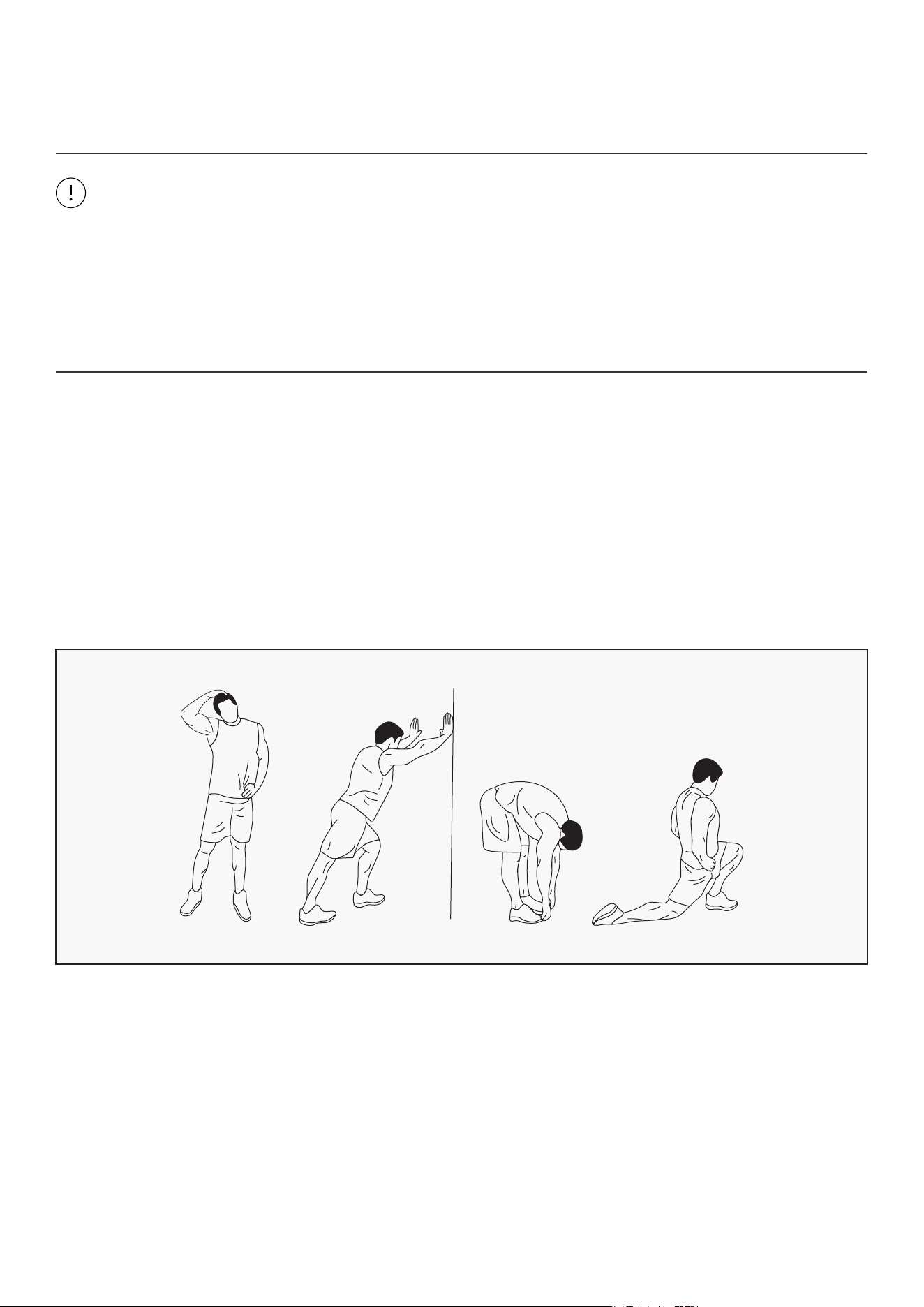
WARM UP
Start each workout with 5 to 10 minutes of stretching and some light exercises. A proper warm-up
increases your body temperature, heart rate and circulation in preparation for exercise. Ease into your
exercise.
After warming up, increase the intensity to your desired exercise program. Be sure to maintain your
intensity for maximum performance. Breathe regularly and deeply as you exercise.
EXERCISE GUIDE |
23| EXERCISE GUIDE
COOL DOWN
Finish each workout with a light jog or walk for at least 1 minute. Then complete 5 to 10 minutes of
stretching to cool down. This will increase the flexibility of your muscles and will help prevent post-
exercise problems.
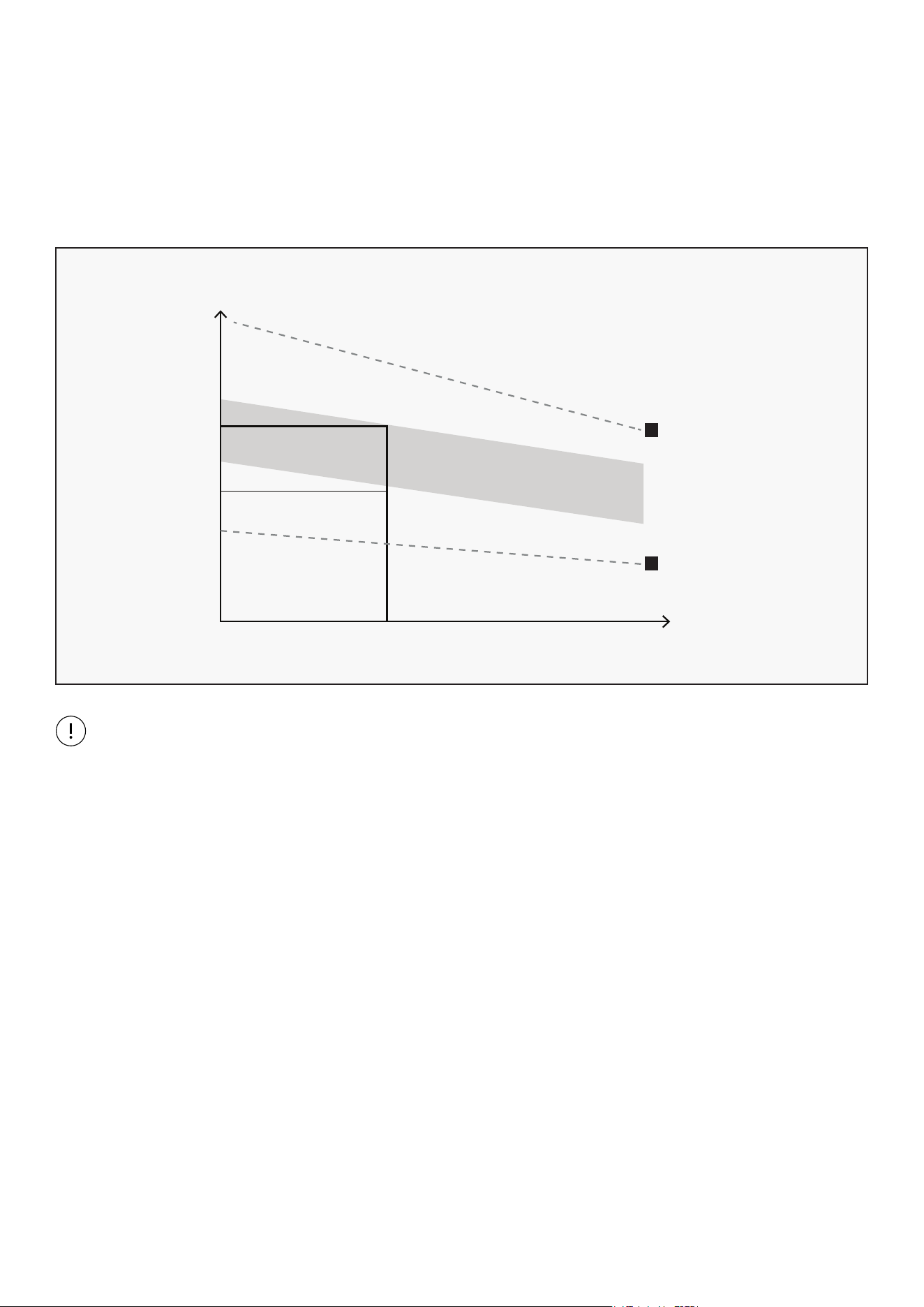
WORKOUT GUIDELINES
This is how your pulse should behave during general fitness exercise. Remember to warm up and
cool down for a few minutes.
TARGET ZONE
MAXIMUM
85%
70%
COOL DOWN
AGE
HEART RATE
200
180
160
140
120
100
80
20 25 30 35 40 45 50 55 60 65 70 75
The most important factor here is the amount of effort you put in. The harder and longer you work, the
more calories you will burn.
24OPERATION GUIDE |
C
IX. MAINTENANCE & CARE
General cleaning will help prolong the life and performance of your treadmill. Keep the unit clean and
maintained by dusting the components on a regular basis. Clean both sides of the running belt to prevent
dust from accumulating underneath the belt. Keep your running shoes clean so that dirt from your shoes
does not wear out the running board and belt. Clean the surface of the running belt with a clean damp cloth.
• To better maintain the treadmill and prolong its life it is suggested that the machine be powered off
for 10 minutes every 2 hours and fully powered off whenever not in use.
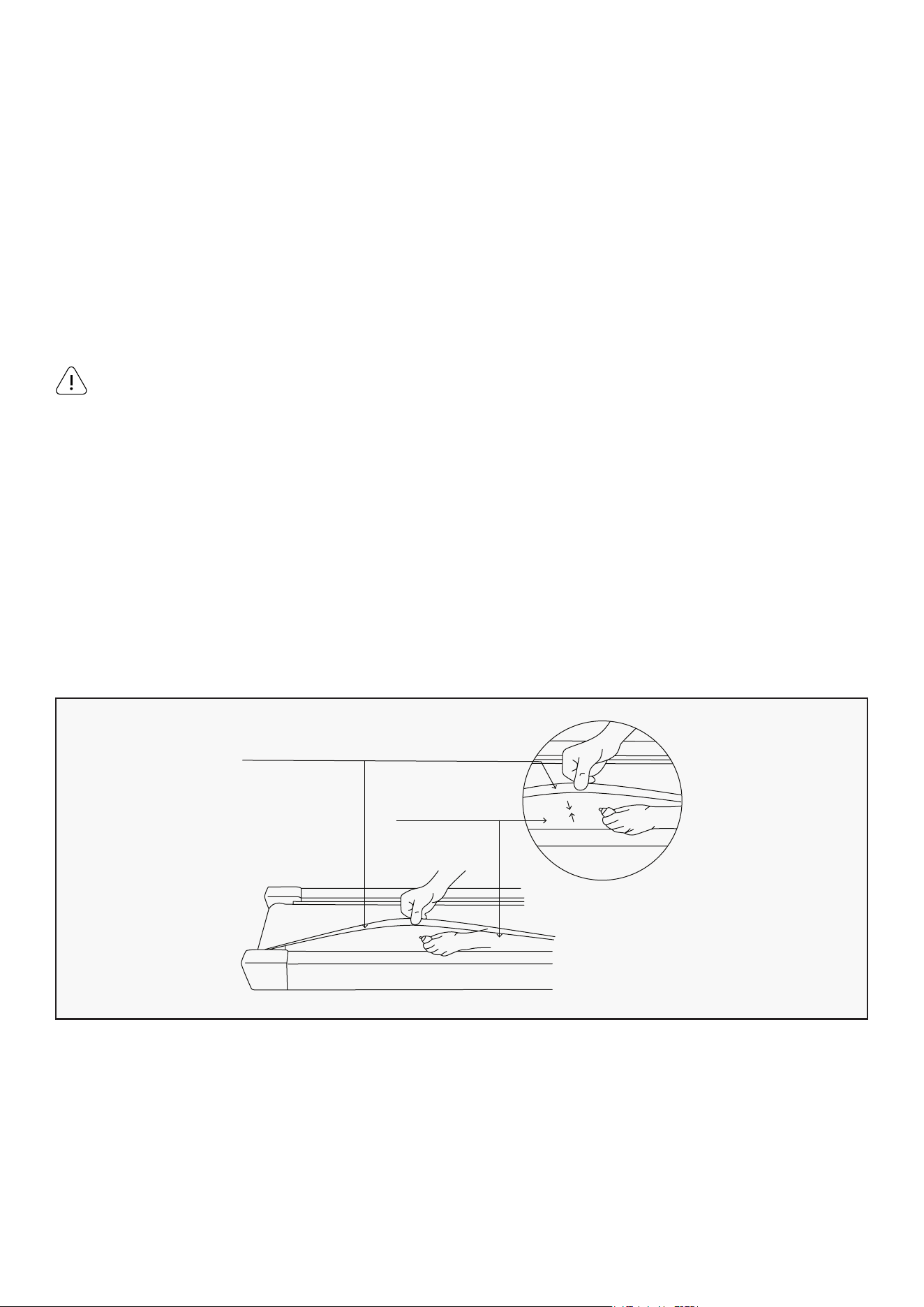
• A loose Running Belt will result in the runner sliding off when running, while too tight of a Running Belt
will result in decrease to the motors performance and also create more friction between the roller and
running belts. The most suitable tightness for the belts is pulled out 50-75mm from the Running Board.
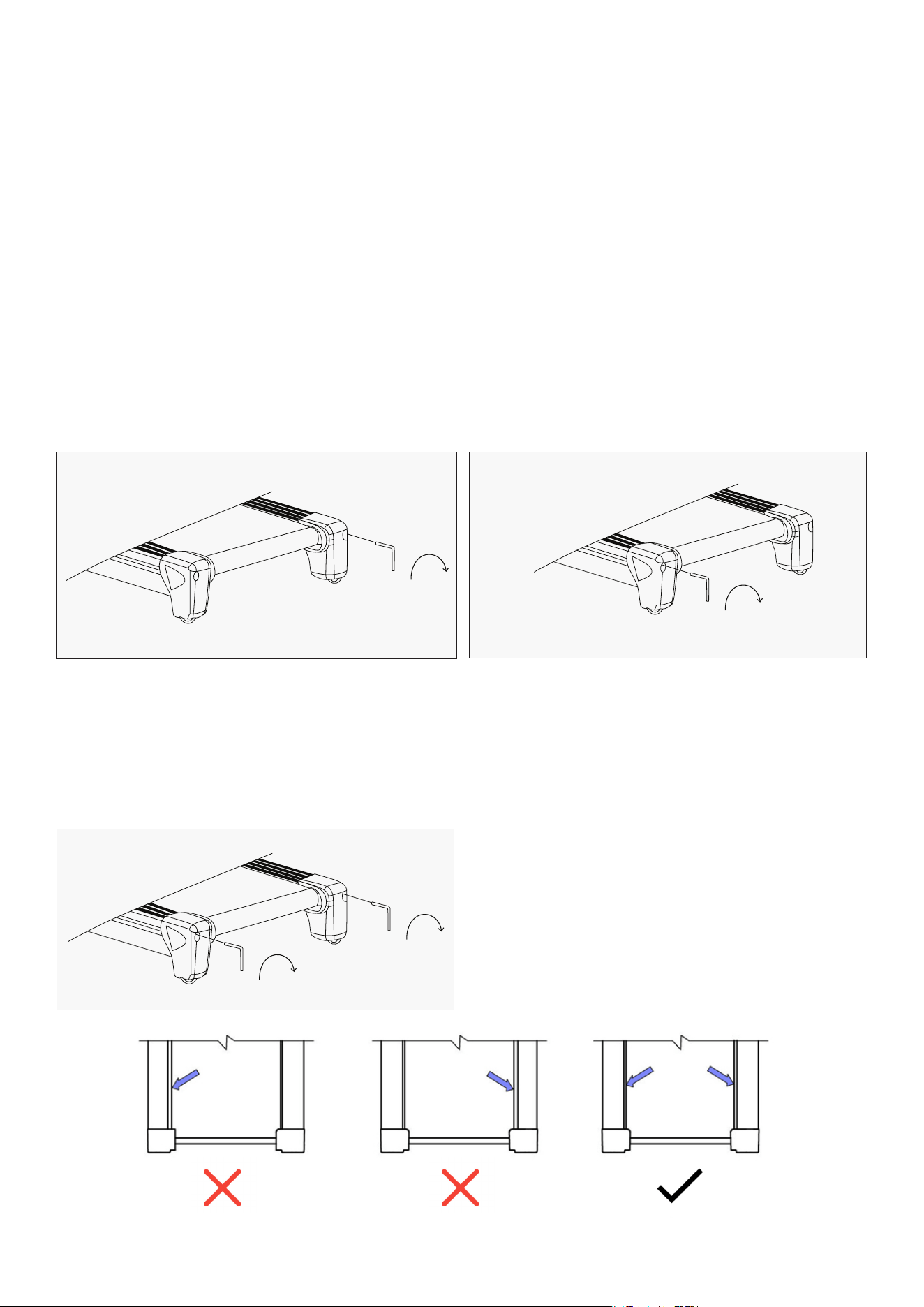
CENTERING THE RUNNING BELT:
1. If the Running Belt moves to the right, turn the
adjusting bolt on the right side ¼ turn clockwise,
then turn the left adjustment bolt ¼ turn counter-
clockwise. If the belt does not move, repeat this
step until it centers. Refer to figure A.
2. If the Running Belt moves to the left, turn
the adjusting bolts on the left side ¼ of a turn
clockwise, then turn the right adjustment bolt ¼
turn counter-clockwise. If the belt does not move,
repeat this step until it centers. Refer to figure B.
3. Over time the Running Belt will loosen. To
tighten the belt, turn the Left & Right-side
adjustment bolts one full turn clockwise, check
the tension of the belt. Continue this process
until belt is at the correct tension. Make sure to
adjust both sides equally to ensure correct belt
alignment. Refer to figure C.
A B
25| OPERATION GUIDE
LUBRICATING THE TREADMILL
Running
Belt
Board
You will need to lubricate your treadmill before the first use.
Lubricating the running board and running belt is essential as the friction between the two affects the
life span and function of the treadmill, therefore it is suggested that the running board and belt be
inspected regularly.
1. Raise the belt up on one side and apply lubricant to the running deck. Use a rag to thoroughly wipe the
lubricant over the running deck. Repeat this process for the other side.
2. The moving parts should turn freely and quietly. Abnormality of moving parts will affect the safety of
the equipment. Inspect and tighten bolts regularly.
3. To better maintain the treadmill and prolong its lifespan, it is suggested that maintenance be done
on a regular basis.
Light user (less than 3 hours/ week) annually
Medium user (3-5 hours/ week) every six months
Heavy user (more than 5 hours/ week) every three months
Always unplug the treadmill from the electrical outlet before cleaning, lubricating or repairing the unit.
IMPORTANT NOTE:
RUNNING BELTS & TREADMILL LUBRICANT:
HOW TO LUBRICATE:
The following time table is recommended:
WARNING!

26WARRANTY |
X. WARRANTY
AUSTRALIAN CONSUMER LAW
Many of our products come with a guarantee or warranty from the manufacturer. In addition, they come
with guarantees that cannot be excluded under the Australian Consumer Law. You are entitled to a
replacement or refund for a major failure and compensation for any other reasonably foreseeable loss
or damage.
You are entitled to have the goods repaired or replaced if the goods fail to be of acceptable quality and
the failure does not amount to a major failure. Full details of your consumer rights may be found at
www.consumerlaw.gov.au.
Please visit our website to view our full warranty terms and conditions:
http://www.lifespanfitness.com.au/warranty-repairs
WARRANTY AND SUPPORT
Any claim against this warranty must be made through your original place of purchase.
Proof of purchase is required before a warranty claim may be processed.
If you have purchased this product from the Official Lifespan Fitness website, please visit
https://lifespanfitness.com.au/warranty-form
For support outside of warranty, if you wish to purchase replacement parts or request a repair or
service, please visit https://lifespanfitness.com.au/warranty-form and fill in our Repair/Service
Request Form or Parts Purchase Form.
Scan this QR code with your device to go to lifespanfitness.com.au/warranty-form

27 | HAND PULSE TECHNOLOGY
XI. HAND PULSE TECHNOLOGY
This product comes equipped with hand pulse sensors which are used to pick up tiny EKG/ECG signals
that run through the body when your heart beats. These electrical EKG/ECG signals are very small and
that they must be amplified 1000 times to make the signal useful for the computer to display your
pulse.
To ensure proper operation:
• The user must maintain good, consistent contact on all four sensors.
• The users skin cannot be too dry or too wet.
Other factors that could affect the reading:
• Change of grip on the sensors (during slow pace walking and up to running).
• Tightening of hand muscles will produce small electrical signal.
• Static electricity charges from the air or from walking on the treadmill.
EKG/ECG Sensors may filter through actual EKG/ECG signals and "Noise" factors that may affect the
reading. This will cause the pulse reading to be delayed and will take longer to update the display as the
heart rate changes. Too much noise will create an incorrect reading. Medical conditions or having no
electrical signal in the hands are other factors that may affect pulse readings as well.
These are limitations of hand pulse technology and even the most expensive systems (which can
cost upwards of $3,000) used in hospitals have the same problems. The difference is that a patient
in a hospital is not running on a treadmill. Hand pulse technology works well on stationary exercise
machines like bikes and even elliptical cross trainers but are not perfect on a treadmill. We offer
treadmills with a wireless heart rate receiver which may be a more accurate option.
To test if your hand pulse sensors are working up to specification, hold them while standing on the
sidestep rails, not walking, and see if the reading is more in line with what you would expect. This will
eliminate the movement and static electricity factors. If your hands are dry, then wet them slightly
(saliva works as a great conductor if this doesn’t bother you).

WWW.LIFESPANFITNESS.COM.AU