OWNER’S MANUAL
LG MAGNIT
(LED SCREEN)
LSAP007-N2
LSAP007-T2
LSAP007-U2
LSAP007-N5
LSAP007-T5
LSAP007-U5
www.lg.com
Copyright © 2024 LG Electronics Inc. All Rights Reserved.
Please read the safety information carefully before using this product.
After reading this manual, keep it in an easily accessible location for future
reference.
2
ENGLISH
TABLE OF CONTENTS
SAFETY PRECAUTIONS ........... 3
- Precautions for the AC Cable and
Power .........................................................................4
- Precautions for Moving the Product ..........6
- Precautions for Installing the Product ......7
- Precautions for Cleaning the Product ........9
- Precautions for Using the Product ........... 10
- Product Disposal ................................................ 11
ASSEMBLING AND
PREPARING ............................... 12
- Essential Accessories ......................................12
- Optional Accessories ........................................13
- Handling for Protecting LED Package
Screen......................................................................15
- Remove Protective Bracket ...........................17
- Installation Precautions Guide ................... 19
- Installation Location .........................................21
- Terminal .................................................................23
MAKING CONNECTIONS ........24
- Connecting with LAN Cable .........................24
- Connecting with AC Cable ............................25
TROUBLESHOOTING ...............28
PRODUCT
SPECIFICATIONS ......................30
3
ENGLISH
WARNING - This equipment is compliant with Class A of CISPR 32. In a residential environment this
equipment may cause radio interference.
SAFETY PRECAUTIONS
The safety precautions are intended to prevent unexpected danger or harm by helping the user to use the
product safely and for its intended purpose.
WARNING
If you ignore the warning message, you may be seriously injured or there is a possibility of accident or
death.
CAUTION
If you ignore the caution message, you may be slightly injured or the product may be damaged.
WARNING
• Indoor Use Only.
4
ENGLISH
Precautions for the AC Cable and Power
WARNING
• Before using an AC cable, make sure it conforms to the national standards.
• Operate the display only from a power source (i.e. voltage) indicated in the product specification.
- Otherwise the product can be damaged, fire can occur or you may be electrocuted. If you are not sure
what type of power supply you have, consult a certified installation company.
• Be sure to connect the AC cable to a grounded power disconnecting device.
- If you do not you may be electrocuted or injured or the product can be damaged.
• Insert the AC cable securely so that it does not come loose.
- Poor connection may cause a fire or electric shock.
• In the presence of thunder and lightning, never touch the power cord and signal cable because it can be
very dangerous.
- It can cause electric shock.
• Be careful not to place heavy objects (electronic appliances, clothes, etc.) on or step on the AC cable. In
addition, do not bend or pull the AC cable with excessive force.
- Damaged power cords may cause a fire or electric shock.
• Do not connect the AC cable to a power disconnecting device if it has been damaged by a sharp object.
- You may be electrocuted.
• Do not insert a conductor (such as a metal chopstick) into the power disconnecting device while the AC
cable is connected on the other side of the same power disconnecting device. In addition, do not touch
the AC cable directly after removing it from the power disconnecting device.
- You may be electrocuted.
5
ENGLISH
• If water or any foreign substance enters the product, disconnect the AC cable immediately and contact
the service center.
- Otherwise, this may cause a fire or electric shock due to damage to the product.
• Keep the AC cable away from heating devices.
- The cord coating may melt and cause fire or electric shock.
• Never disassemble, repair, or modify the AC cable.
- This may cause a fire or electric shock.
• As long as this unit is connected to the AC wall outlet, it is not disconnected from the AC power source
even if the unit is turned off.
• For the power consumption to be zero, the AC cable must be disconnected.
CAUTION
• If there is dust on the AC cable or the power disconnecting device, wipe them clean.
- Overheating due to layers of dust may cause a fire or electric shock.
• If there is moisture on the AC cable or the power disconnecting device, wipe them clean. In addition, do
not touch them if your hands are wet.
- This may cause an electric shock.
• Do not turn the product on or off by connecting or disconnecting the AC cable. In other words, do not
use the AC cable as a switch.
- This may cause an electric shock or product malfunction.
• Do not disconnect the AC cable while using the product.
- Electrical shock can damage the product.
6
ENGLISH
Precautions for Moving the Product
WARNING
• Contact the service center before moving the product.
- It may cause electric shock and damage the product.
• Make sure the product is turned off, unplugged, and all cables have been removed before the product is
moved.
- You may be electrocuted or the product can be damaged.
• When moving the product, do not shock or cause an impact on the front panel.
- You may be electrocuted or the product can be damaged.
• Use the correct number of people according to the weight of the product. (Under 25 kg (55.1 lbs) per
person use lifting equipment when exceeding 100 kg (220.4 lbs))
- If use the damaged product again, contact the service center because it can cause electric shock or
fire.
• Do not hold it upside down while holding only the stand. (It is for stand supported models only.)
- This may cause stand warping, panel damage and other types of product damage.
CAUTION
• Do not dispose of the product-packing box. Use it when moving by putting the product in the box to
carry it.
7
ENGLISH
Precautions for Installing the Product
WARNING
• Contact the service center before installing the product.
- It can cause electric shock and damage the product.
• Do not drop an object on or impact on the product. Keep out of reach of children and do not place toys
or objects near the product to prevent throwing things on the product screen.
- It can cause injury to human, problem to product and damage the display.
• Do not put heavy objects on, or hang from, the product.
- If the product collapses or is dropped, you may be injured.
• Do not touch the surface of the product if it overheats.
- It can cause injury to human.
• Install the product firmly fixed on a floor, wall, etc. to prepare against external impact such as wind and
earthquake.
- You must refer to the manual provided.
• Prevent Children from climbing or hanging on the product.
- If the product collapses or is dropped, you may be injured.
• Do not install it where there are heating devices such as electrical heaters or lighting equipment.
- Fire, electrical shock, malfunction may occur.
• Do not install this product by yourself as you may injure yourself or cause damage to the product. Please
contact service engineer authorised by service center.
• Do not install this product on a wall if it could be exposed to oil or oil mist.
- This may damage the product and cause it to fall.
• Do not leave the AC cable, signal cables, etc. in one’s walking path.
- This could cause a trip or fall, which could cause an electrical shock, fire, product breakdown, or injury.
• Do not let the product drop when connecting it to an external device connected with a short cable.
- This may cause injury and damage to the product.
• If you drop the product or the case is broken, turn off the product and unplug the power cord and
contact the service center.
- If you continue to use without taking proper measures, electrical shock or fire can occur.
• Install the product in a dry place where it is not near dust and water. Avoid high temperatures and
humidity.
- This may cause electrical shock, fire or product damage.
• Safely install the product in a place that can hold the weight of the product.
- A lack of strength may cause the product to fall.
• Take a comfortable and natural position to relax the muscles when working with a product.
• A readily accessible disconnect device shall be incorporated external to the equipment. The maximum
rating of an overcurrent protective device to be provided external to the equipment may be one of the
protective device ratings available in the country of installation.
8
ENGLISH
CAUTION
• Install the product where no Electromagnetic Interference occurs.
• If you install the product in a place that does not meet the recommended conditions, this may
cause serious damage to the product’s picture quality, life cycle, and appearance. Please check with
service engineer before installing. Please do not install the product in places such as where there is
an abundance of fine dust or oil mist, chemical substances are used, exposed to direct sunlight, the
temperature is very high or low, the humidity is very high.
• Make sure the product is well ventilated by Installing at a distance (30 mm (1.1 inches) or more) from
the wall.
- If you install the product too close to the wall, it may be deformed or fire can break out due to internal
heat buildup.
• When the AC cable is connected, make sure that the vents are not blocked by tablecloths, curtains, or
other objects (such as plastic).
- The product can be deformed or fire can break out due to overheating inside the product.
• Do not install the product in an area with poor ventilation (e.g. on a bookshelf, in a closet) or outside and
avoid placing on cushions or carpets.
- The product could catch fire due to overheating inside the product.
• Install the product on a flat and stable place that is large enough to support the product.
- If the product is dropped, you may be injured or the product may be broken.
• When installing the product on a shelf or cabinet, make sure that the bottom end of the product is not
protruding forward.
- The product may fall due to unbalanced center of gravity, which may cause personal injury or damage
to the product. Be sure to use cabinets or shelves that fit your product.
9
ENGLISH
Precautions for Cleaning the Product
WARNING
• Keep the product clean at all times.
- If you don’t clean the unit for a long time and it becomes covered in dust, it can cause fire or product
damage.
• When you need to clean the inside of the product, you must contact the service center.
- Otherwise, cleaning without support may cause a fire, electric shock, or damage to the product.
• When cleaning the product, disconnect the AC cable and wipe it gently with a soft cloth to prevent
scratches.
- An electric shock may occur or damage to the screen if its scratched.
• Do not physically come in contact with the screen of the LED Package.
- This may cause damage to the product.
• To clean the product, use an air gun to lightly remove dust from the front frame and the screen.
- If there are foreign substances in between the LEDs on the screen, it may cause a defect on the
screen.
CAUTION
• When cleaning the product or the screen, unplug the power cord and wipe it gently with a soft cloth.
Do not spray water or other liquids directly on the product. Especially, do not clean your product with
chemicals including glass cleaner, any type of air freshener, insecticide, lubricants, wax (car, industrial),
abrasive, thinner, benzene, alcohol, etc., which can damage the product or its panel.
- This may result in fire, electric shock or product damage (deformation, corrosion or breakage).
10
ENGLISH
Precautions for Using the Product
WARNING
• Do not use the product in any environment with excessively high temperatures or humidity.
- It may cause electrical shock or damage the product.
• If you use the product for a long period of time, take a rest from time to time to protect your vision.
- Extended viewing could result in impaired vision.
• Listening at high volume or using for a long time can cause damage to your hearing.
• If water or any foreign substance enters a unit, turn off the unit, disconnect it from the AC cable, and
contact the service center.
- Otherwise, the product may cause fire or electric shock.
• In the event that no image appears on the screen or no sound is heard, stop using the product.
Disconnect the AC cable from the power disconnecting device immediately and contact the service
center.
- Otherwise, the product may cause fire or electric shock.
• Do not drop an object or impact on the product or screen.
- It can cause injury to human, problem to product and damage the screen.
• If there is smoke or a strange sound or smell, disconnect the AC cable and contact the service center.
- If you continue to use the product without taking proper measures, it may cause electrical shock or
fire.
• Do not attempt to disassemble, repair or modify the product yourself. Please contact service center if
you need to repair it.
- Fire or electric shock can occur.
• Do not place objects filled with liquids such as vases, cups etc. on or over the product to prevent liquid
from entering the product.
- Failure to do so may result in fire, electric shock, malfunction or deformation.
• The product must be installed in an environment out of human reach. If a person touches the product,
its performance may deteriorate. If the product needs to be installed in a place where human contact
with the product is likely, a separate measure to prevent people from touching it needs to be taken.
• Do not push hard on or scratch the product’s surface with your hands or sharp objects, such as nails,
pencils or pens. Do not shock or scratch the front and sides of the screen with metallic objects.
- This may damage the products and cause it to malfunction.
• Do not touch the product if it has been exposed to sunlight or an intense light because it could be hot.
11
ENGLISH
• Do not use high voltage electrical goods near the product (e.g., a bug zapper).
- This may result in product malfunction if it receives an electrical shock.
• If there is a gas leak, do not touch the outlet, and open the windows for ventilation.
- Otherwise, the product may cause fire or electric shock.
• If the product or case is dropped and damaged, turn off the power and disconnect the AC cable.
- If you continue to use without taking proper measures, electrical shock or fire can occur. Contact the
service center.
• Keep small accessories out of the reach of children.
- If a child swallows it, consult a doctor immediately.
• Keep out of reach of children from the product. Also, do not throw toys or objects at the product or
screen.
- It can cause injury to human, problem to product and damage the screen.
• To shut off the power of the unit, you must disconnect all connected AC cables.
CAUTION
• This panel is an advanced product that contains millions of pixels. You may occasionally see pixel spots
when viewing the screen. Since these deactivated pixels are not a defect, the performance and reliability
of the product is not affected.
• Do not put or store inflammable substances near the product.
- There is a danger of explosion or fire.
• Keep the proper distance from the product.
- It can cause damage to your vision if you look at the product too closely.
• Set the appropriate resolution and frequency by products.
- It can cause damage to your vision.
• Take a regular break when working with the product for a long time.
Product Disposal
• Do not dispose of this product with general household waste.
• Disposal of this product must be carried out in accordance to the regulations of your local authority.
12
ENGLISH
ASSEMBLING AND PREPARING
CAUTION
• Always use genuine components to ensure safety and durability of the product.
• The product warranty will not cover damage or injury caused by the use of unauthorised components.
NOTE
• The accessories provided with your product may vary depending on the model or region.
• Product specifications or contents in this manual may be changed without prior notice due to upgrade of
product functions.
• The warranty will not cover any damage caused by using the product in an excessively dusty
environment.
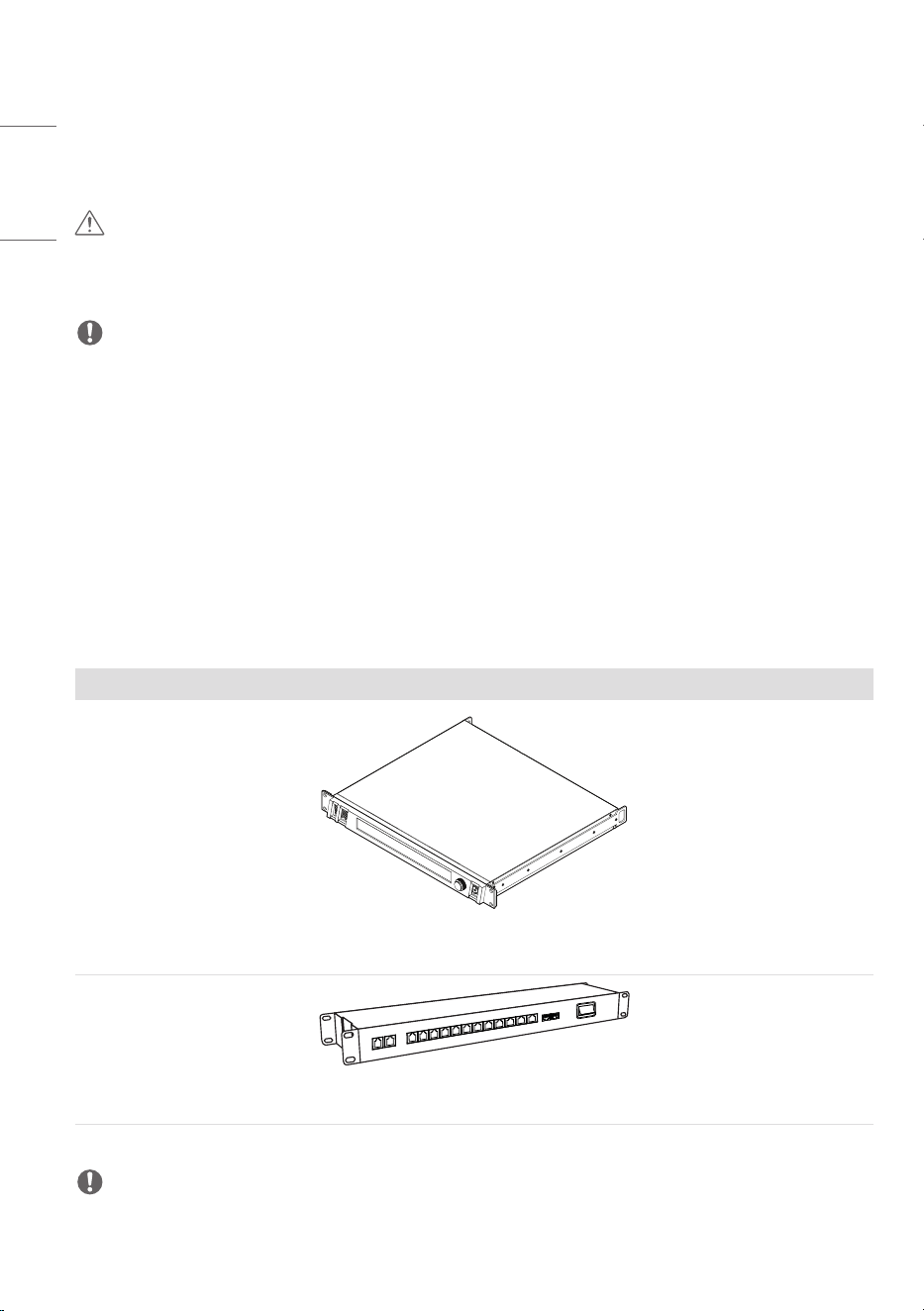
Essential Accessories
Essential accessories are subject to change or to be added without prior notices to improve the
performance of the product.
The images of the product in this manual are to aid comprehension and may differ from the actual
appearance.
LED Control System
Megapixel HELIOS
Network switch
NOTE
• Essential accessories are only available for some models. If necessary, please purchase them separately.
13
ENGLISH
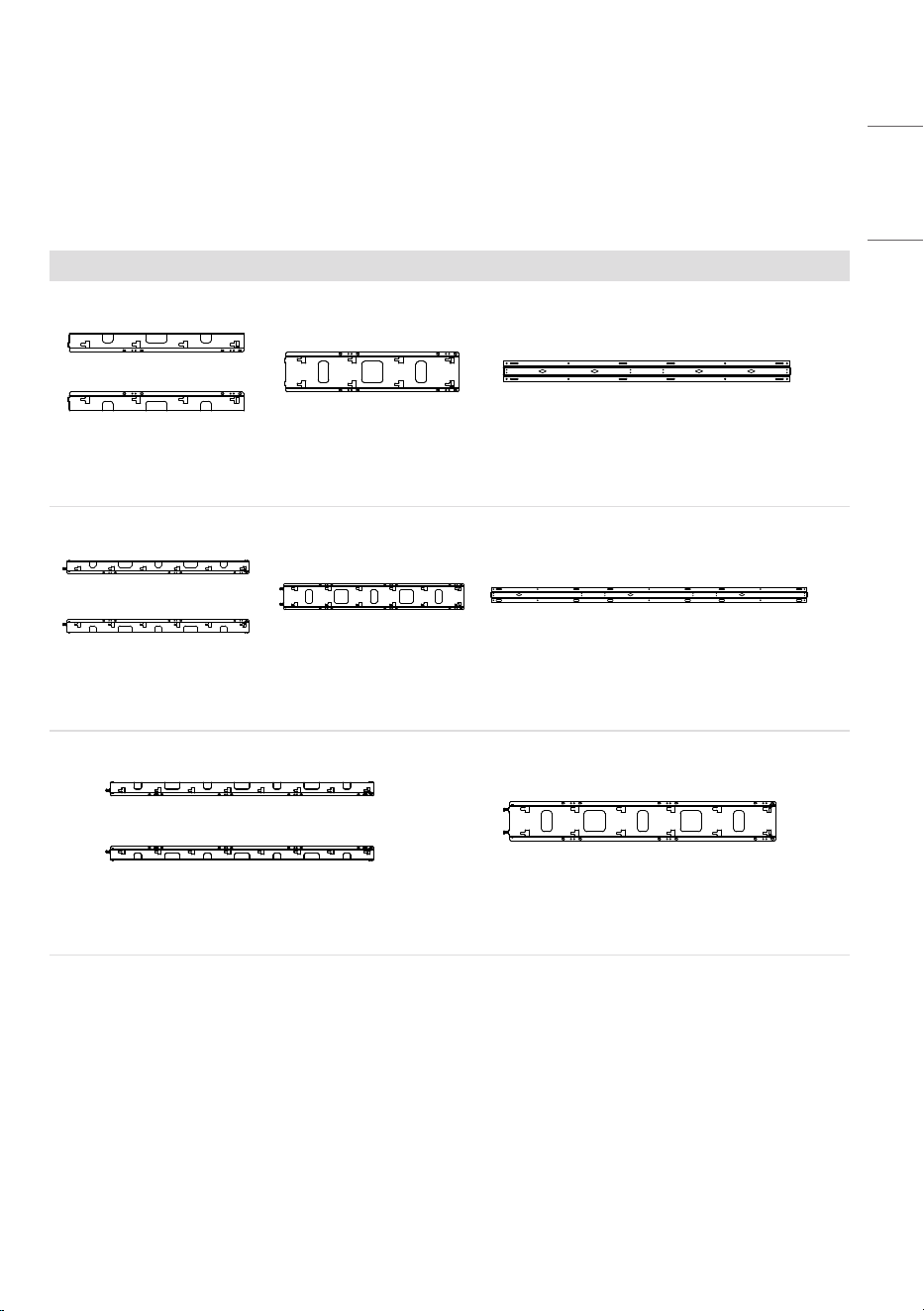
Optional Accessories
Without prior notice, optional accessories are subject to change to improve the performance of the
product, and new accessories may be added. The illustrations in this manual may differ from the actual
product and accessories.
Wall Mount
x 2
WM-LS2-2 WM-LC2-2 WM-LH2-2
x 2
WM-LS3-2 WM-LC3-2 WM-LH3-2
WM-LS4-2 WM-LC4-2
14
ENGLISH
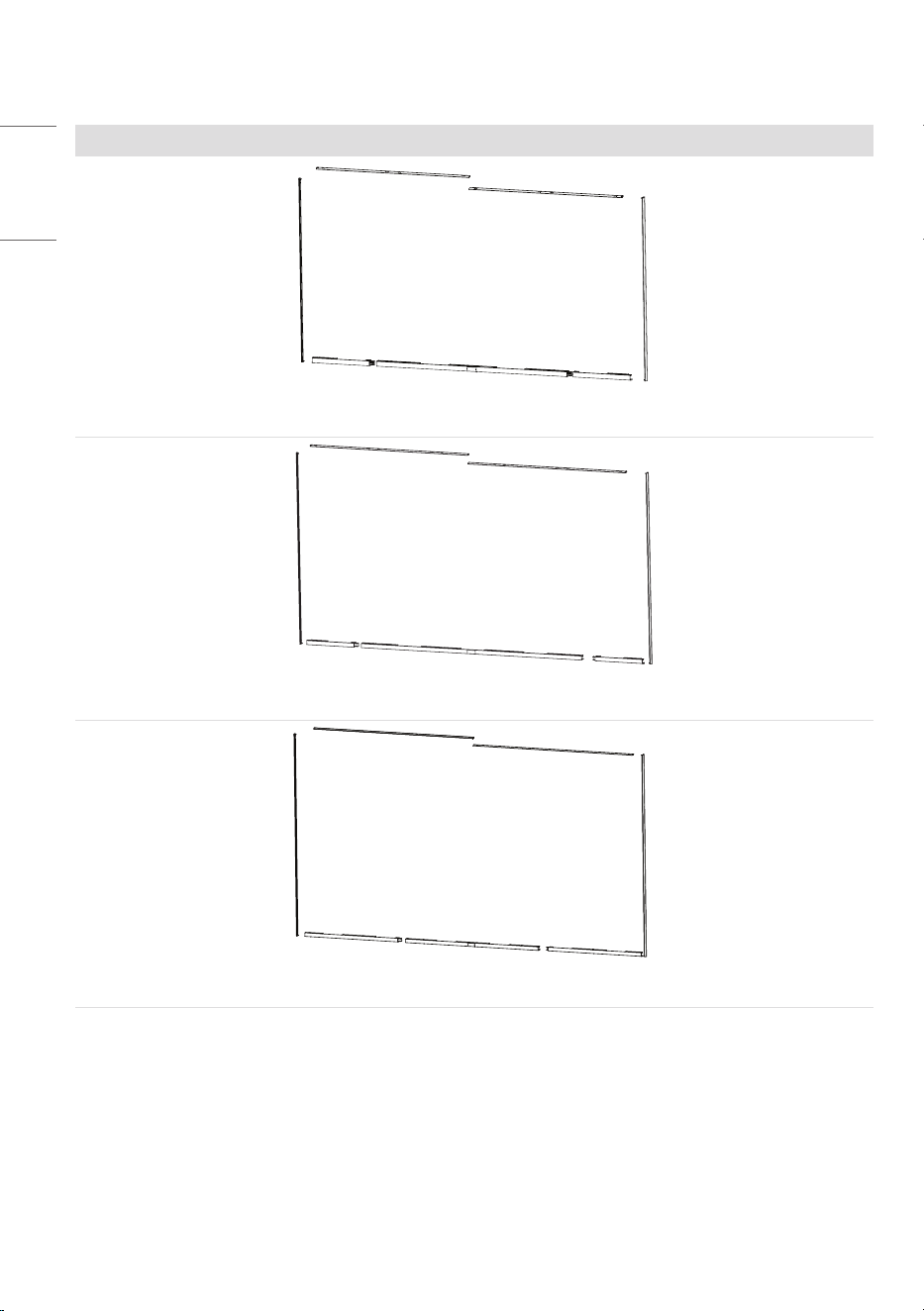
Middle Frame
KT-BZ1080-2
KT-BZ1360-2
KT-BZ1630-2
15
ENGLISH
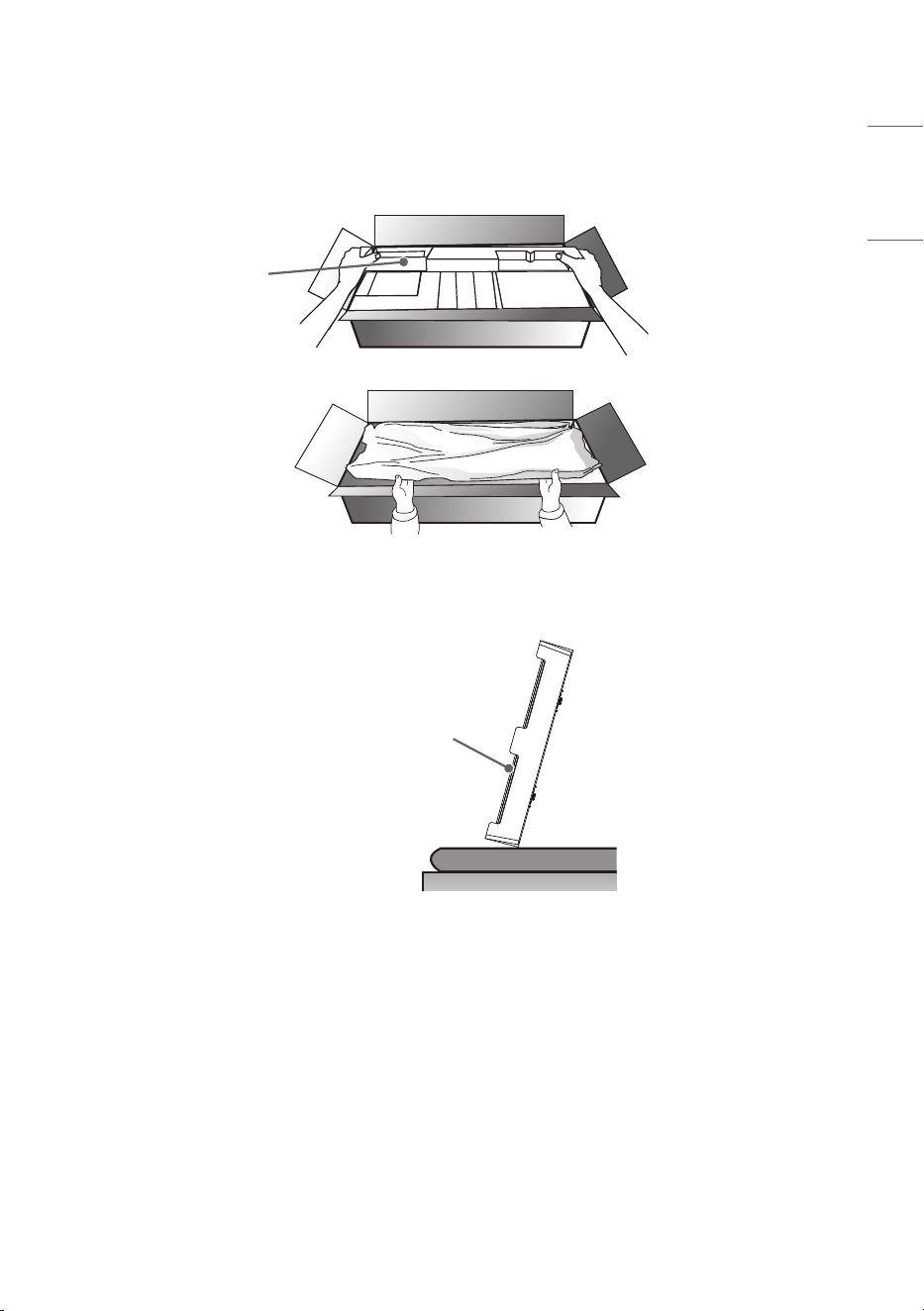
Handling for Protecting LED Package Screen
1 When taking out the product, make sure the screen is not pressed.
Protection Pad
2 To stand the product upright, hold it on both sides so that the LED package screen does not touch the
floor.
LED Package
Screen
16
ENGLISH
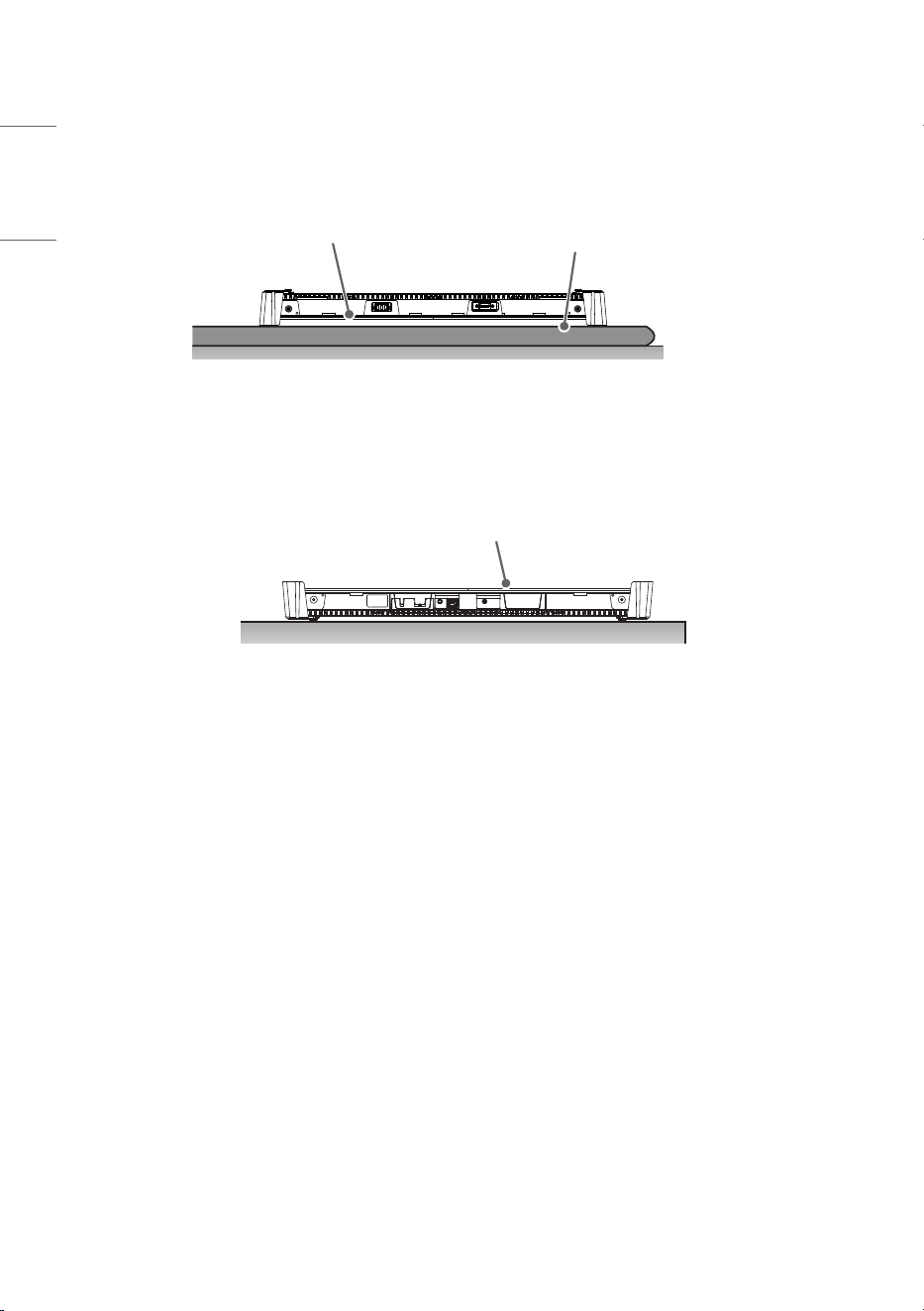
3 Place the product with the LED package screen facing down. To protect the screen, lay the protective
pad in the box on the floor.
Protection Pad
LED Package Screen
4 If you do not have a pad, make sure that there is no foreign object on the floor when you lay the
product on the floor, and then carefully place the LED package screen facing down or up. Be careful not
to drop objects on the LED package screen.
LED Package Screen
17
ENGLISH
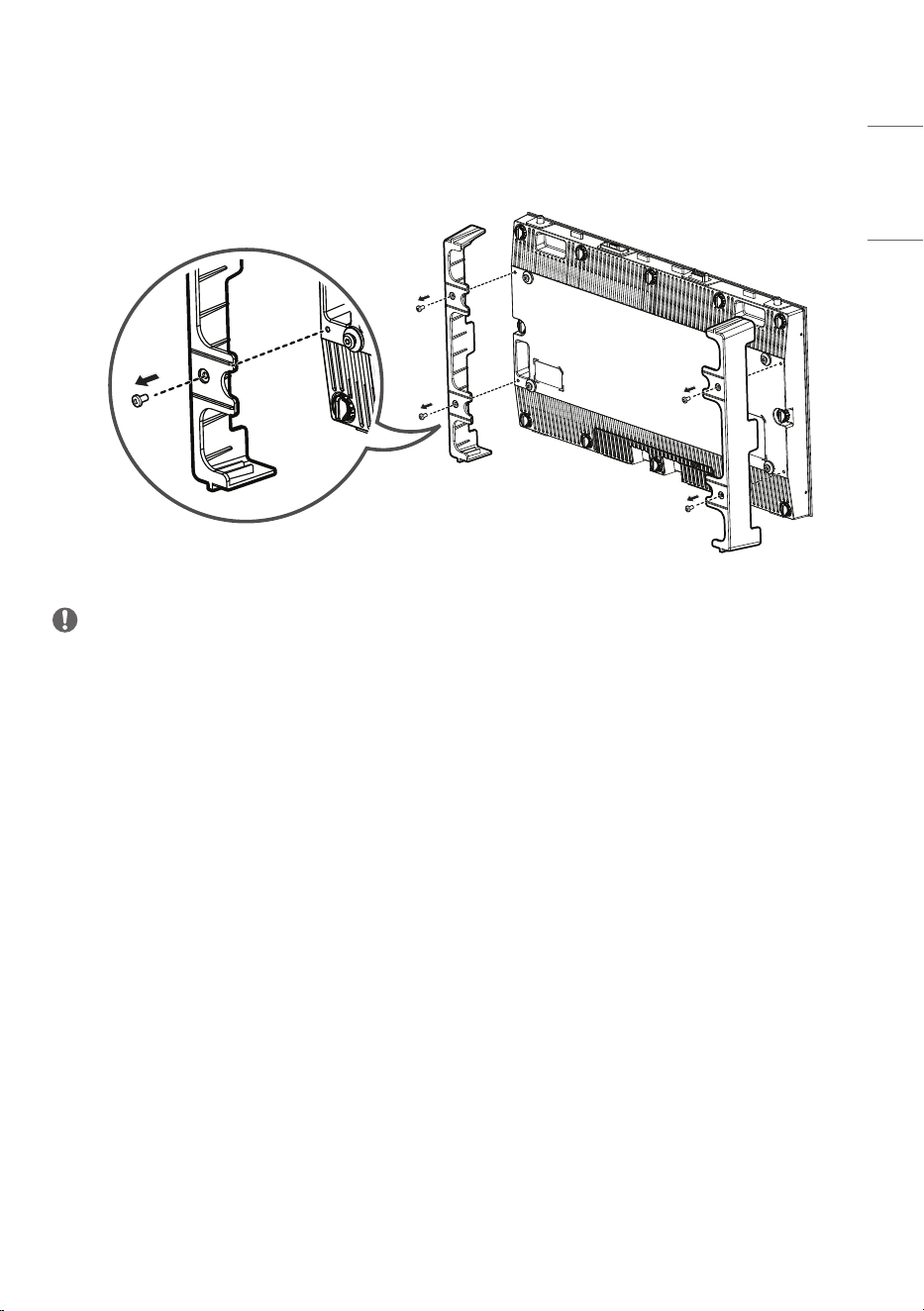
Remove Protective Bracket
Before installing the product, disassemble the protective brackets attached to each edge.
M4 x L8
NOTE
• Keep the protective brackets because you need them to move the product again.
18
ENGLISH
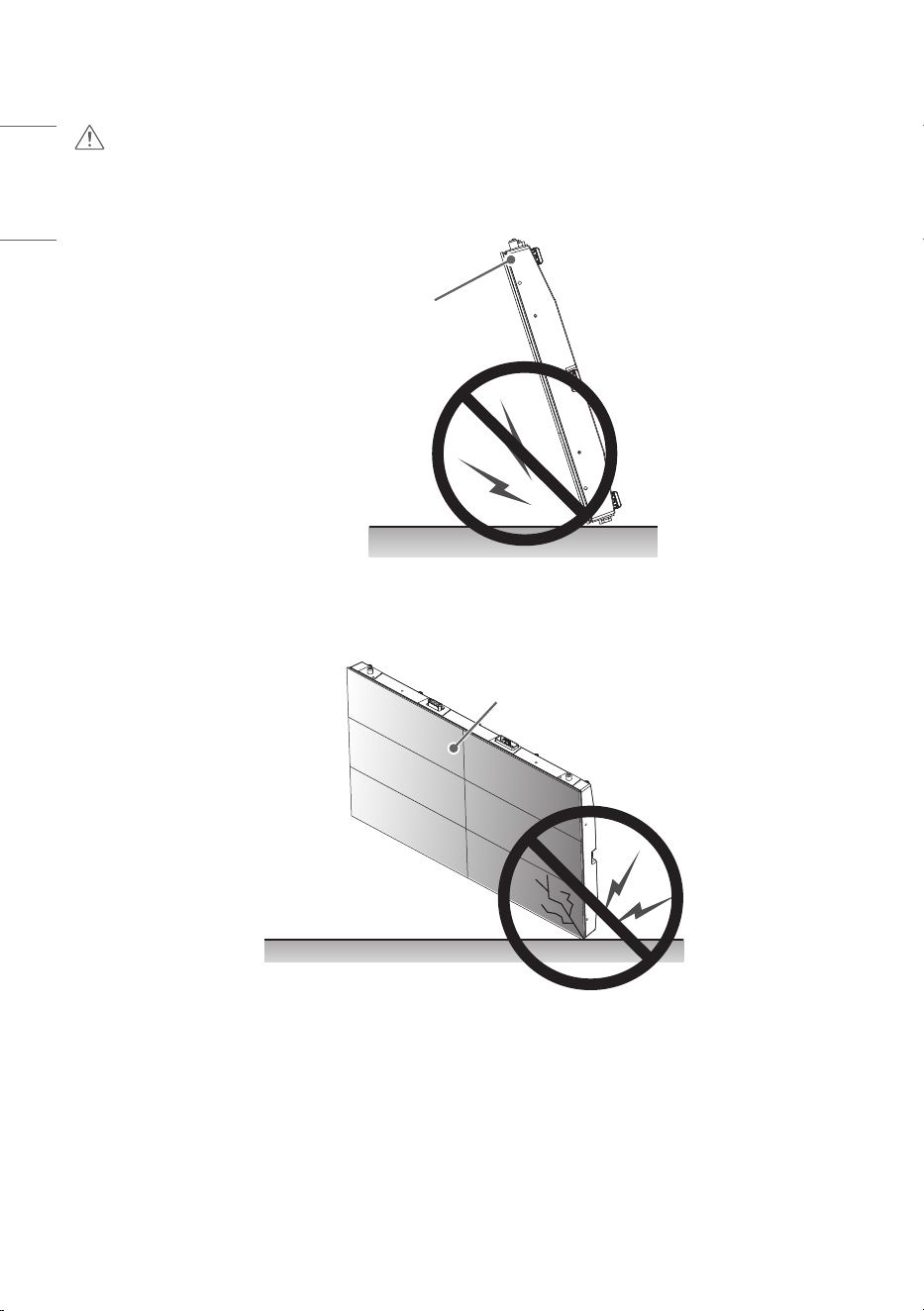
CAUTION
1 If the product is tilted towards the LED package screen, the bottom of the product may be damaged.
LED Package Screen
2 If the product is tilted towards the edge of the LED package screen, the bottom (corner) of the
product may be damaged.
LED Package Screen
19
ENGLISH
Installation Precautions Guide
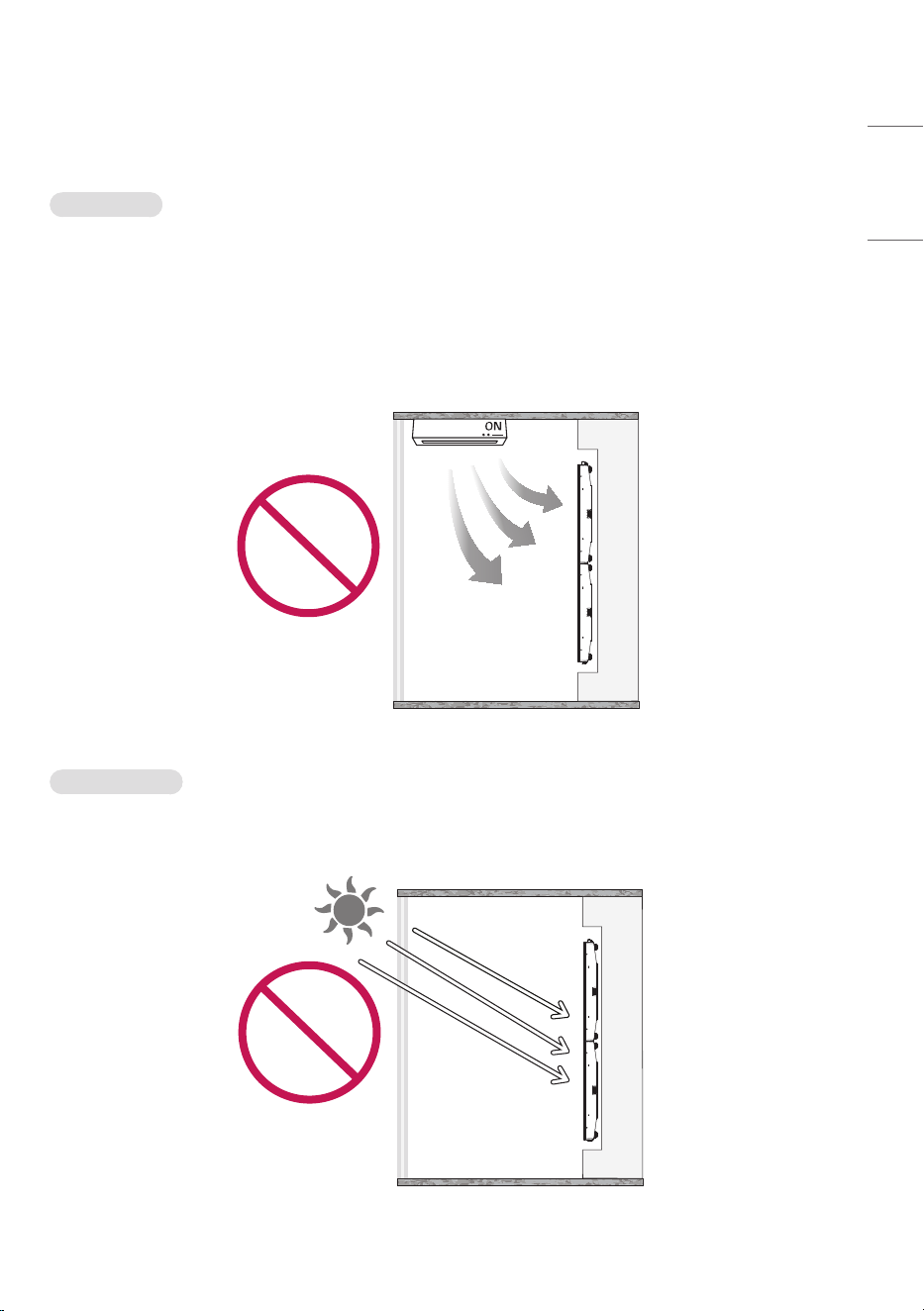
Temperature
• Make a cooling system for the enclosure so that the operating temperature of the product can be
maintained.
- Product operating temperature: 0 °C to 40 °C (32 °F to 104 °F) (the recommended room temperature
is below 25 °C (77 °F).)
• Install in a location where the warm air from an air conditioner does not directly affect the product.
- This will prevent malfunctions such as the screen turning off.
Direct Sunlight
• Install in a location that is not exposed to direct sunlight.
- This will prevent the screen from appearing blurry due to light reflection.
20
ENGLISH
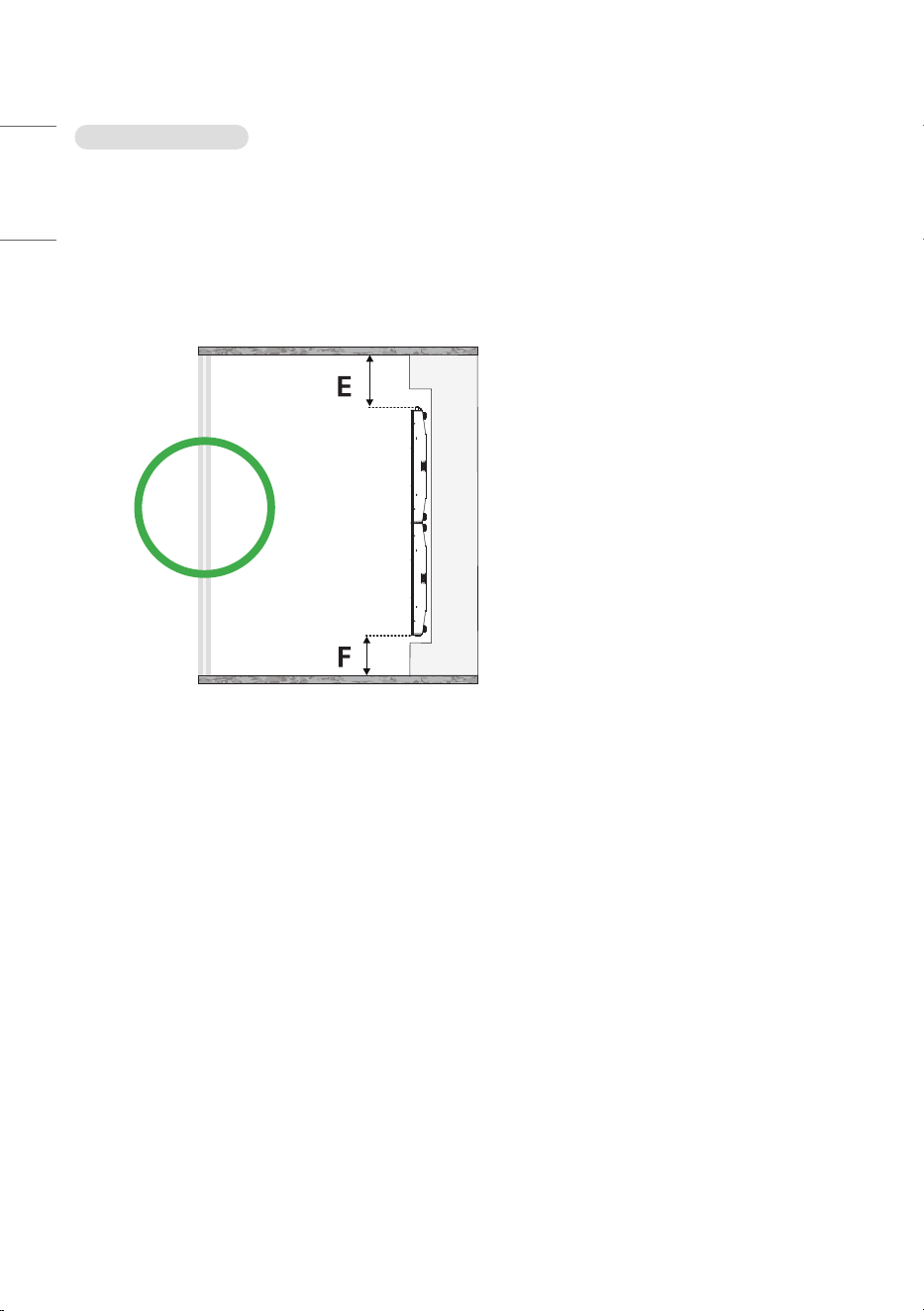
Installation Position
• Ensure the distance from the ceiling of the installation room to the product is at least 400 mm
(15.7 inches).
- The high temperature air collected at the ceiling will naturally circulate to prevent malfunction.
• Ensure the distance from the floor of the installation room to the product is at least 100 mm
(3.9 inches).
- The air from the floor will easily circulate to the ceiling to prevent malfunctions.
E : 400 mm (15.7 inches) or more
F : 100 mm (3.9 inches) or more
21
ENGLISH
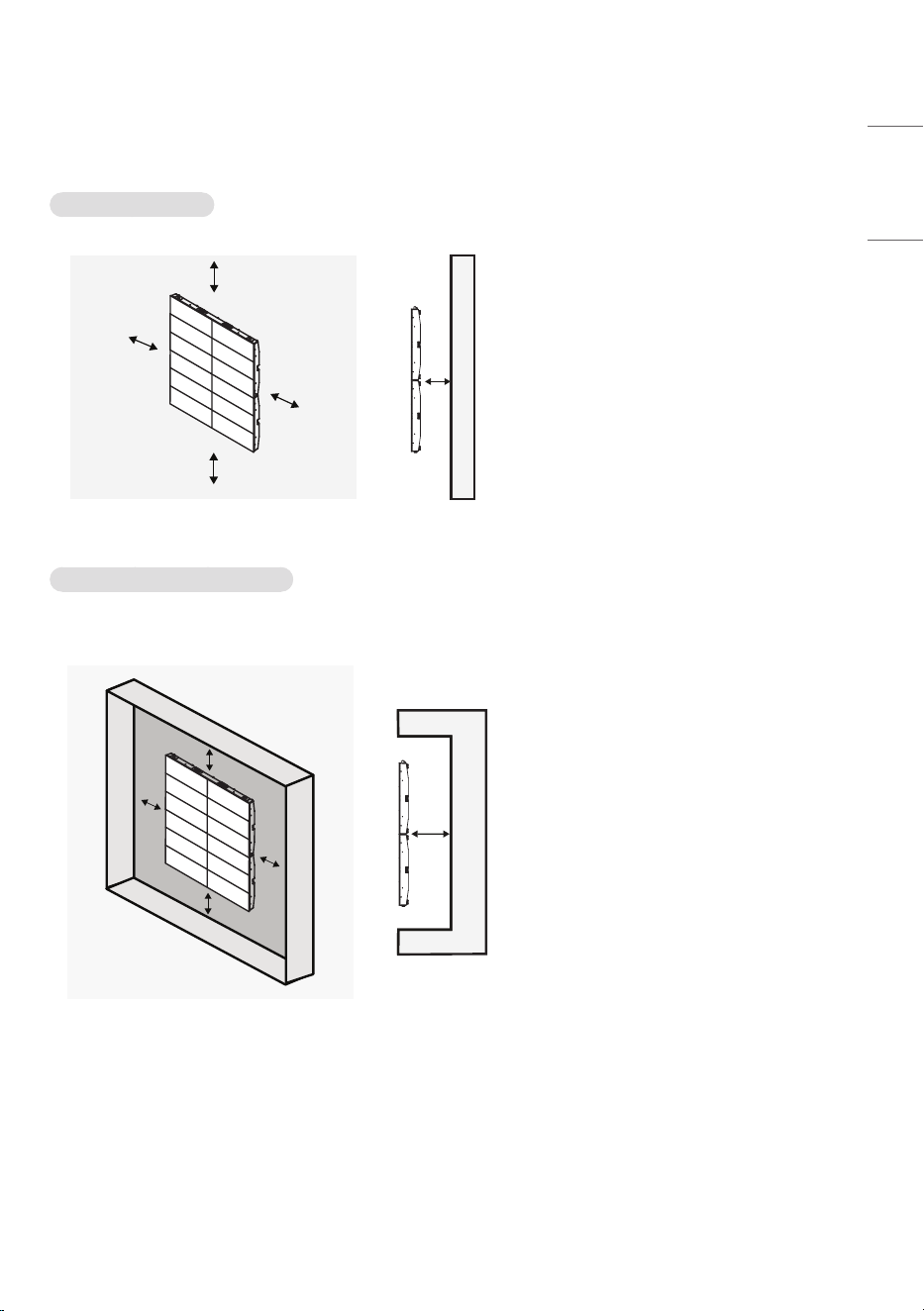
Installation Location
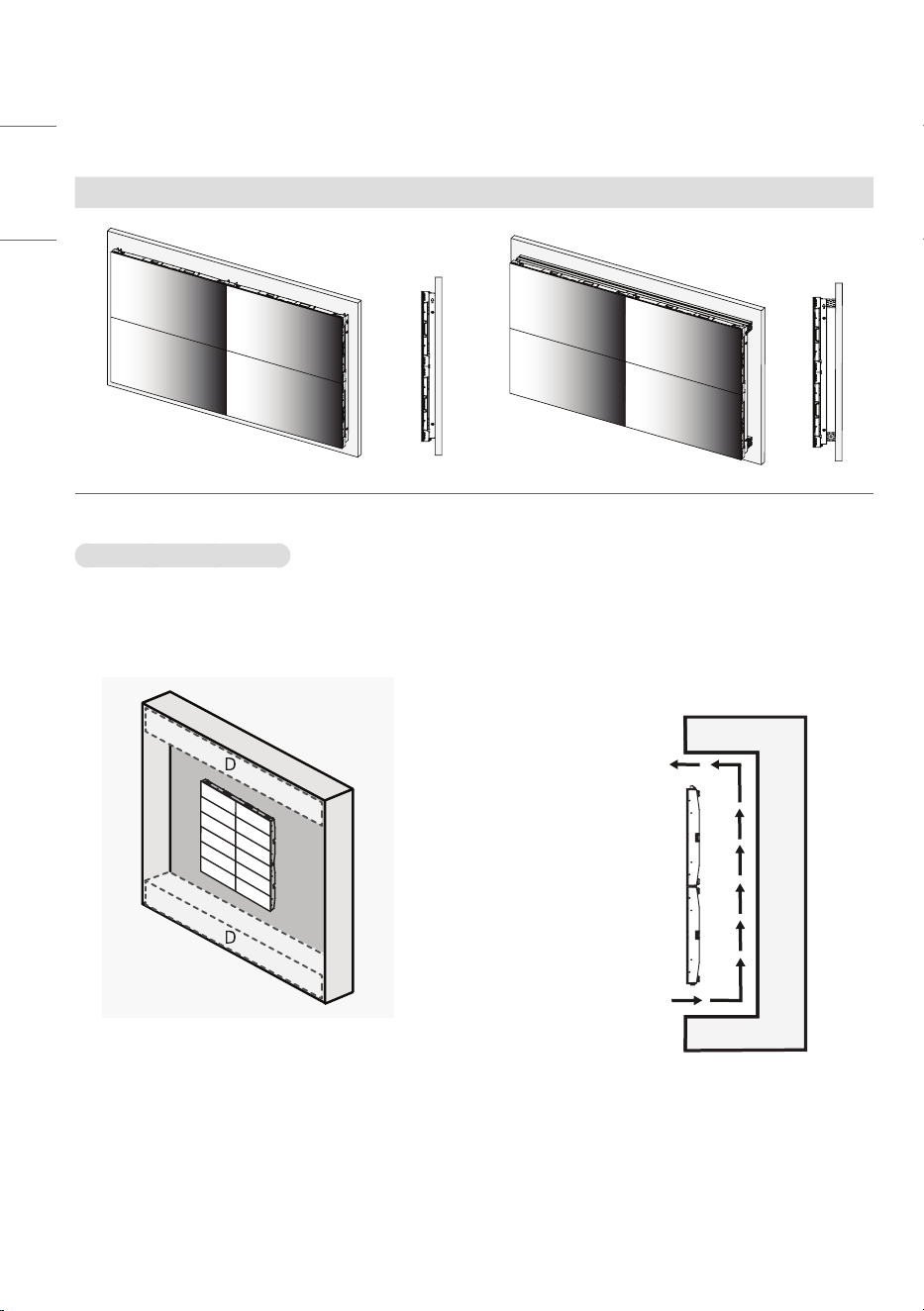
Installing on a Wall
A
B
C
C
B
A
C
C
B
B
A : 30 mm (1.1 inches) or more
(recommended)
- Can be installed directly on our own
wall mount without using a structure.
(see example)
B : 25 mm (0.9 inches) or more
C : 60 mm (2.3 inches) or more
Installing on a Recessed Wall
• After installation on a recessed wall, a bezel can be installed for interior purposes.
A
B
C
C
B
A
C
C
B
B
A : 30 mm (1.1 inches) or more
(recommended)
- Can be installed directly on our own
wall mount without using a structure.
(see example)
B : 25 mm (0.9 inches) or more
C : 60 mm (2.3 inches) or more
22
ENGLISH
• Example
- Depending on the model, the shape of the wall mount may difference.
Wall mount usage scene Wall mount and structure usage scenes
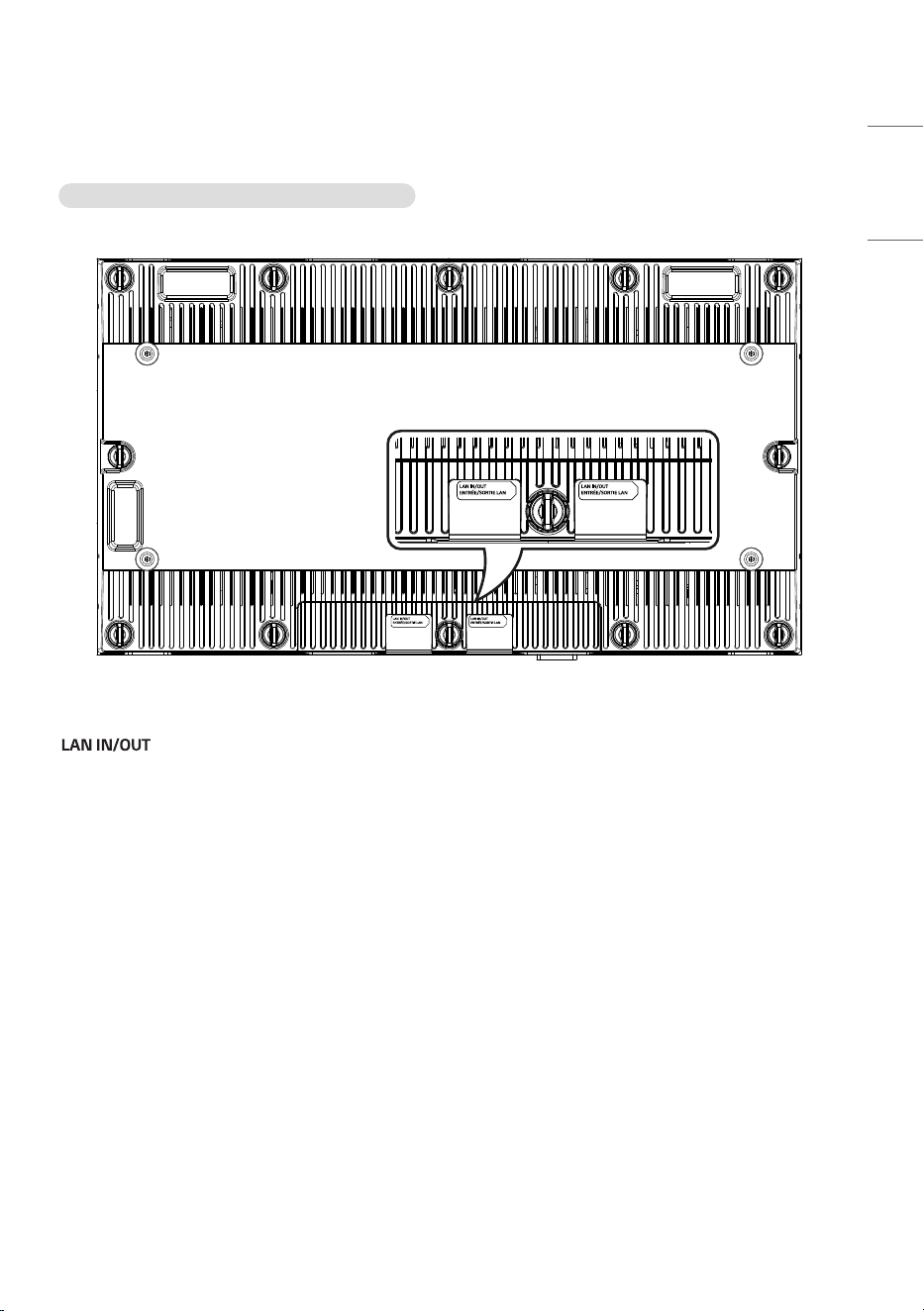
When Installing the Bezel
• Ensure it can be detached for product repair.
• For the top / bottom bezels, secure at least 60 % of the air vent to facilitate air circulation.
- This will prevent malfunction.
Airflow
D : Air Vent
(60 % or more)
23
ENGLISH
Terminal
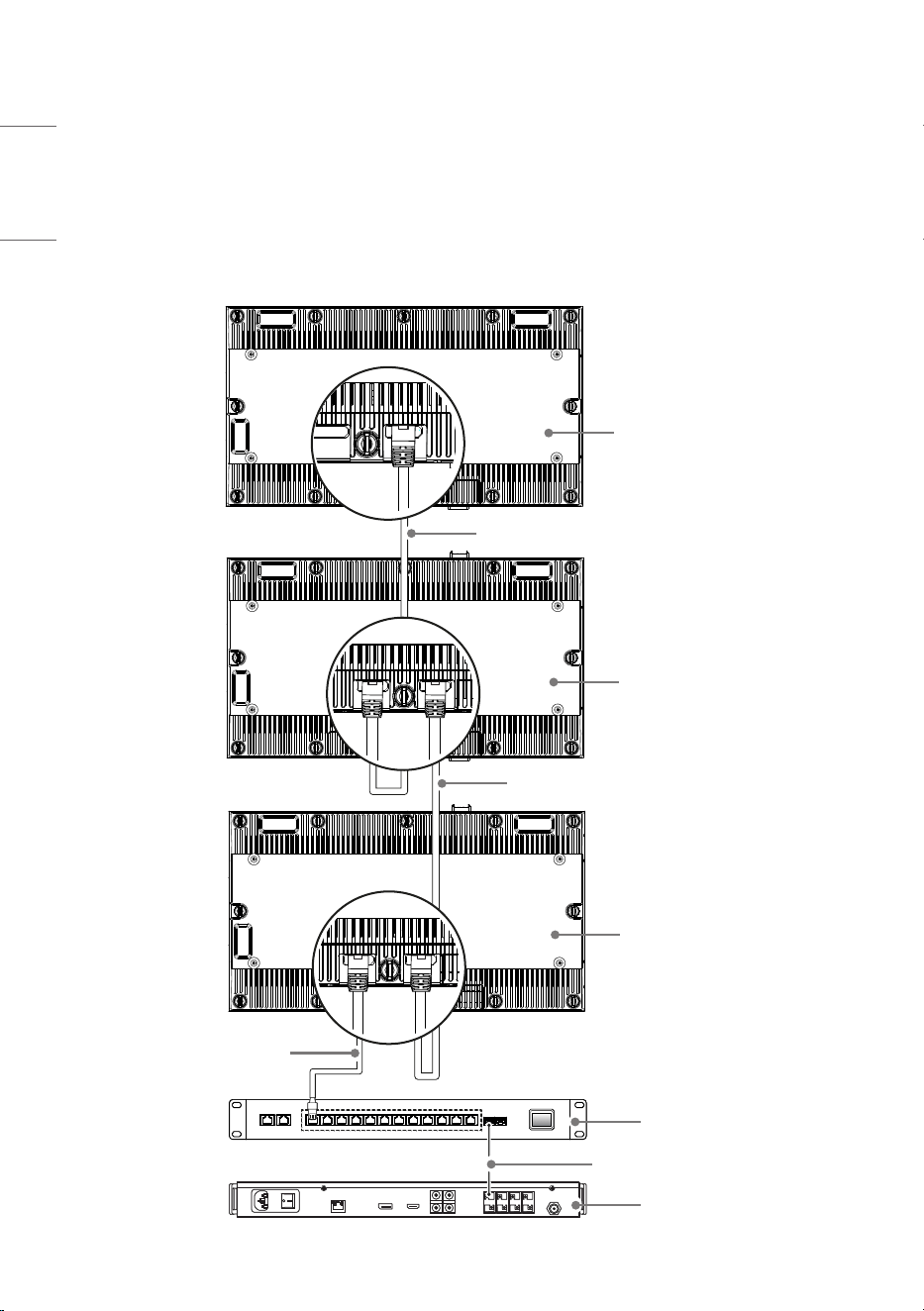
LSAP007-N2, T2, U2 / LSAP007-N5, T5, U5
• : Sends the LAN signal to another set.
24
ENGLISH
MAKING CONNECTIONS
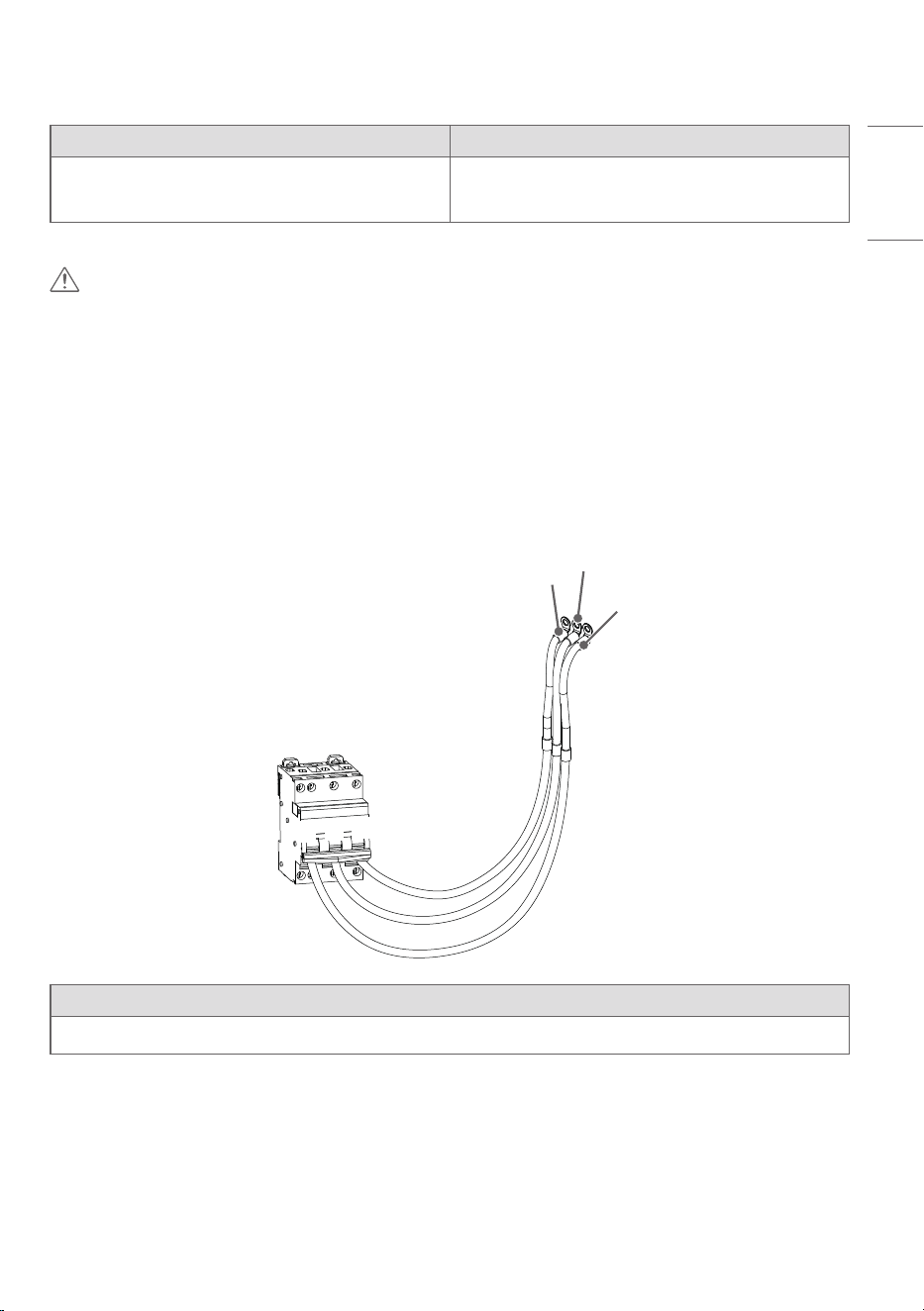
Connecting with LAN Cable
You can connect to the LED Control System by using an LAN cable.
LAN cable
(*Not provided)
Network switch
Megapixel HELIOS
Optical cable
(*Not provided)
LAN cable
(*Not provided)
LAN cable
(*Not provided)
LSAP007-U2
LSAP007-U5
LSAP007-T2
LSAP007-T5
LSAP007-N2
LSAP007-N5
25
ENGLISH
LED Control System LED Screen
Megapixel HELIOS
Network switch
LSAP007-N2, T2, U2
LSAP007-N5, T5, U5
CAUTION
• Check the direction so that the LAN cable is not damaged.
• Inserting the LAN cable with excessive force may damage the contact point.
• The LAN cable connected between LED Screens and the LAN cable connected between the LED Screen
and Network switch are not provided. Please purchase them separately. (Recommended LAN cable: Cat7,
50 cm (19.6 inches) or more)
Connecting with AC Cable
You can connect the unit to a power disconnecting device using an AC cable.
G
L
N
L
G
N
LED Screen
LSAP007-N2, LSAP007-N5
• Use the AC cable to connect to the power disconnecting device. (Please use a cable that is long enough
to be connected to the screen.)
26
ENGLISH
Power Connection
• Prepare the power cable of 16 AWG or more.
- When using 16 AWG cable, up to 14 units can be installed vertically.
• Check power cable color connection.
• Avoid water or dust.
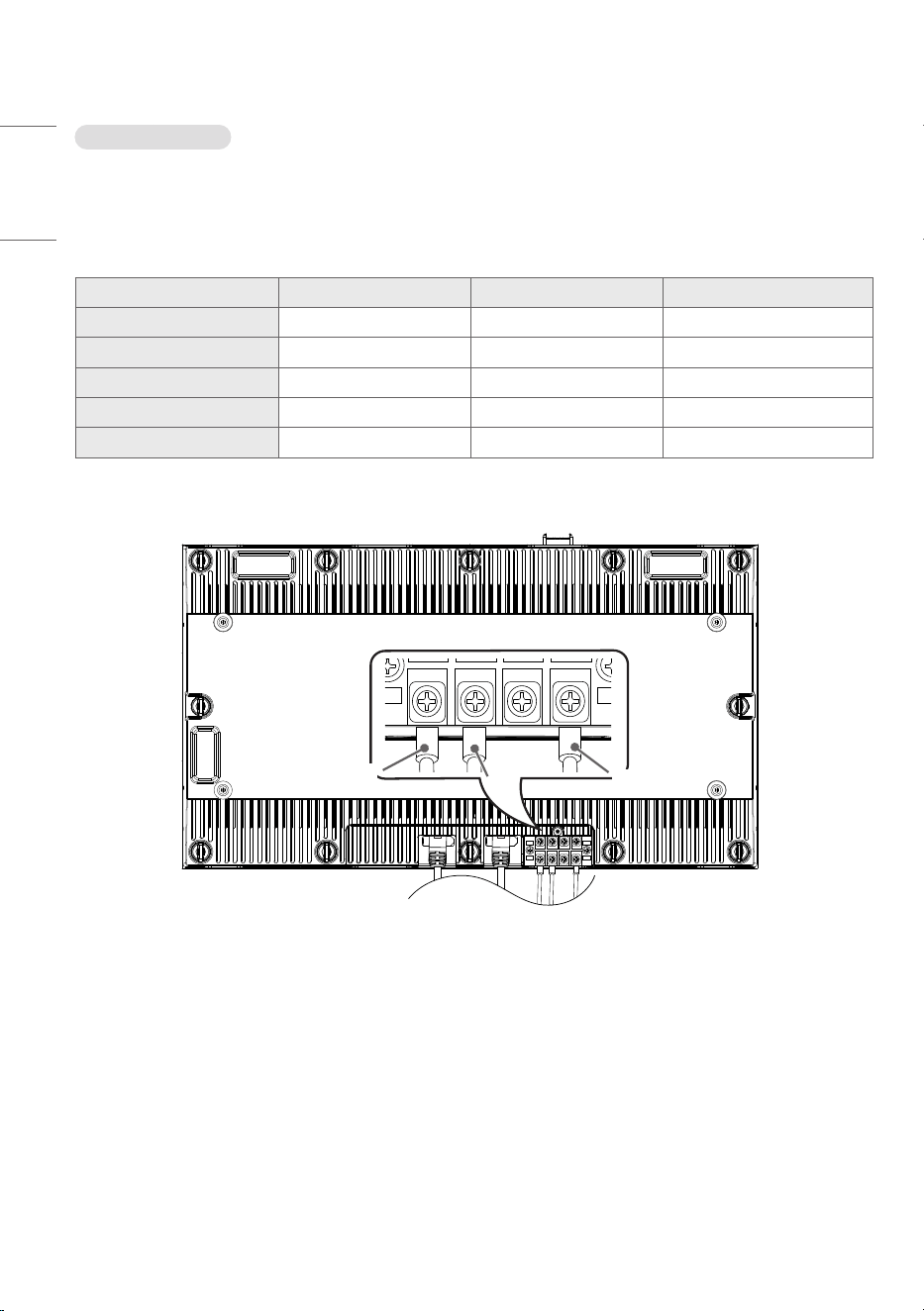
Country Live Neutral Ground
Europe Brown Blue Green & Yellow
North America Black White Green & Yellow
India Red Black Green & Yellow
Japan / Taiwan Black White Green & Yellow
Korea Brown Blue Green & Yellow
You can connect the AC cable connected to the power disconnecting device to the screen.
G
N
L
27
ENGLISH
100 mm
(3.9 inches)
Fixing parts
Structure
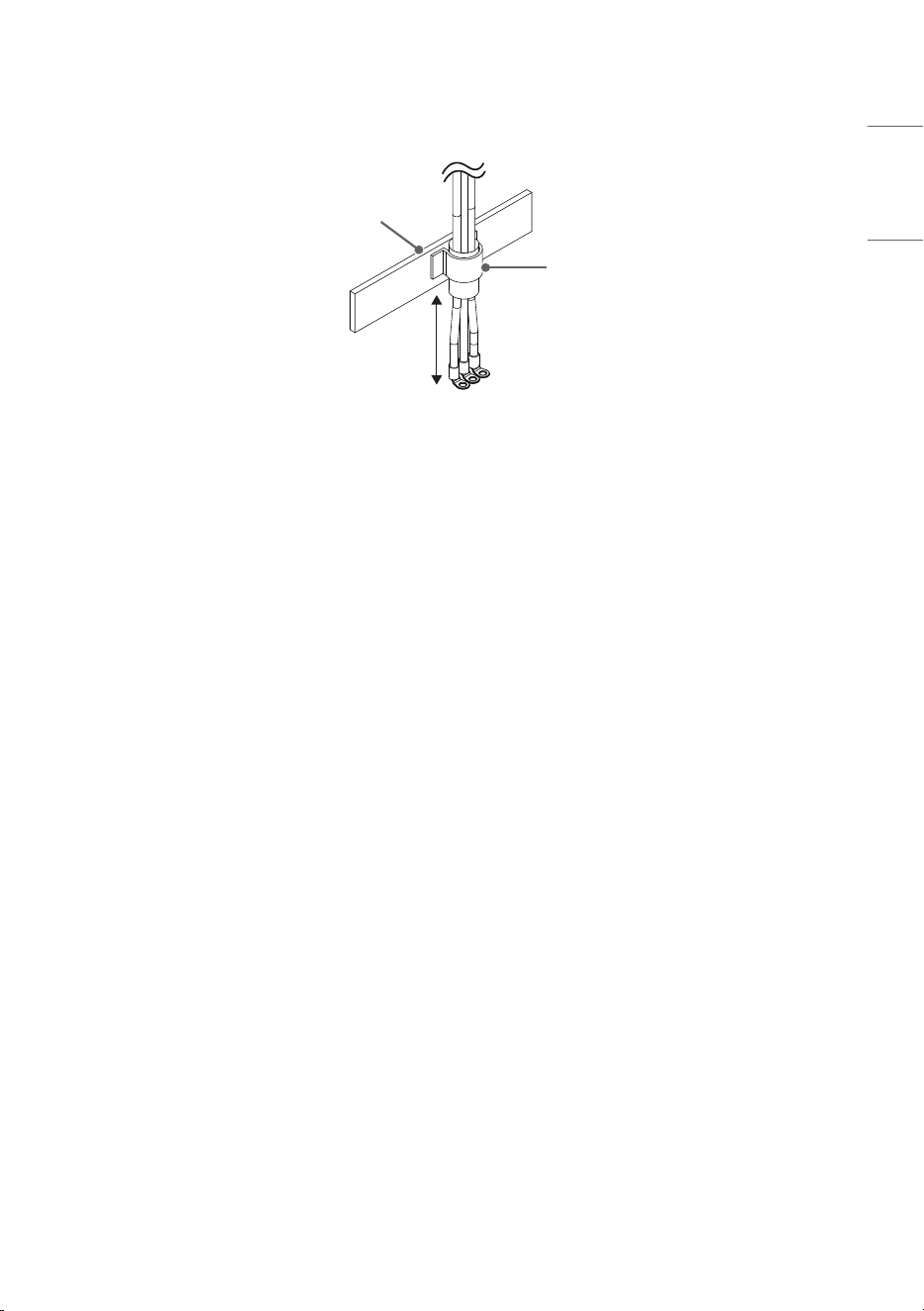
• Connect the AC cable to the screen using an angle type O-type crimp terminal to connect to the screen
power supply.
• The AC cable needs to be secured to the fixing parts once it is connected to the screen. (Make sure it is
secured near the screen. * 100 mm (3.9 inches) or less recommended)
28
ENGLISH
TROUBLESHOOTING
No image is displayed.
• Is the AC cable connected to the product?
- Make sure the AC cable is properly connected to the power disconnecting device.
• Is the ‘No Signal’ message displayed?
- There is no connection between Megapixel HELIOS and the input source. Check the connection status
of the LAN cable.
- Access the Input menu to check the input source.
• Does the ‘Invalid Mode’ message appear?
- Refer to the Megapixel HELIOS System User Guide.
The ‘Unknown Product’ message appears when the product is connected.
• Did you install the driver?
- Refer to the Megapixel HELIOS System User Guide.
The screen image looks abnormal.
• Is the screen position wrong?
- Refer to the Megapixel HELIOS System User Guide.
• The screen is displayed abnormally.
- The proper input source is not connected to the port. Connect a cable that matches the input source
signal.
• The screen flickers or shakes.
- Check if Megapixel HELIOS is powered off.
29
ENGLISH
The display color is abnormal.
• Screen has poor color resolution (16 colors).
- Refer to the Megapixel HELIOS System User Guide.
• The screen color is unstable or looks black and white.
- Refer to the Megapixel HELIOS System User Guide.
• Does a black dot appear on the screen?
- The few pixels (red, green, blue, white and black) that appear on the screen are due to the inherent
characteristics of the LED surface. This is not a malfunction of the Screen.
The operation does not work normally.
• The power suddenly turned off.
- Refer to the Megapixel HELIOS System User Guide.
NOTE
• Without prior notice, the software is subject to change to improve the functionality of the product.
• The above items are only applicable to the LED Screen models.
30
ENGLISH
PRODUCT SPECIFICATIONS
Without prior notice, the product specifications are subject to change to enhance the functionality of the
product.
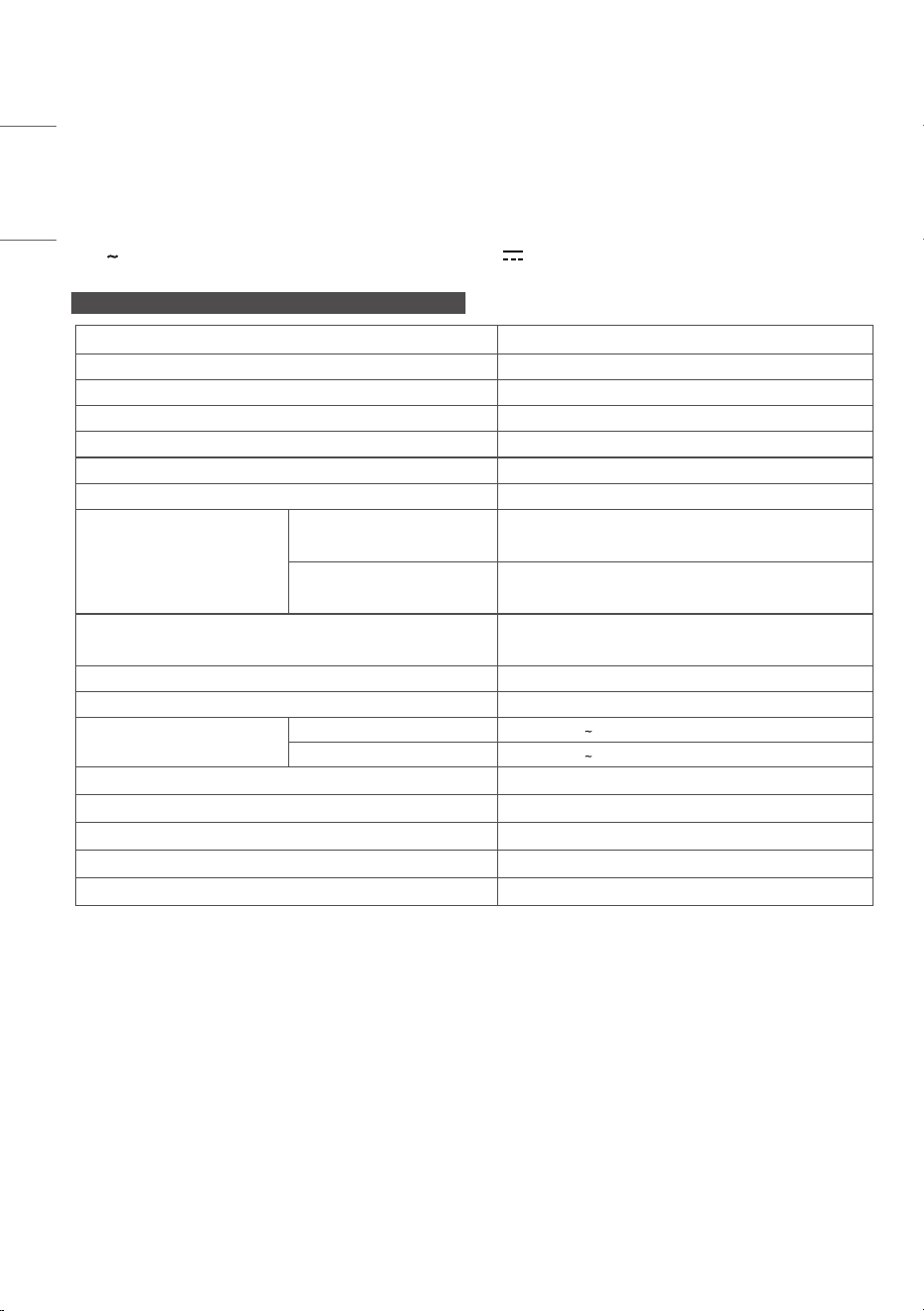
The symbol means alternating current, and the symbol means direct current.
LSAP007-N2, T2, U2 / LSAP007-N5, T5, U5
Pixel pitch (distance between pixels) 0.78125 mm
Resolution 768 x 432
Pixel density 1,638,400 pixels/m
2
Number of pixels per screen 331,776 pixels
Number of color output bits Internal 22 bit (HDR10)
Number of expressible colors 4.398 x 10
12
Data connection LAN
Input/ Output ports
LSAP007-N2
LSAP007-N5
LAN IN/OUT, AC-IN
LSAP007-T2, U2
LSAP007-T5, U5
LAN IN/OUT
Dimensions
(Width x Height x Depth) / Weight
600 mm x 337.5 mm x 44.9 mm / 7.8 kg
(23.6 inches x 13.2 inches x 1.7 inches / 17.1 lbs)
Luminance Min 600 nit
Color temperature (K) 2,000 - 10,000 K
Power Rating
Input 100-240 V 50/60 Hz 9.8 A
Output 100-240 V 50/60 Hz 9.1 A 910 VA
Operating Temperature 0 °C to 40 °C (32 °F to 104 °F)
Operating Humidity 10 % to 80 %
Storage Temperature -20 °C to 60 °C (-4 °F to 140 °F)
Storage Humidity 5 % to 85 %
Manufactured in Republic of Korea
31
ENGLISH
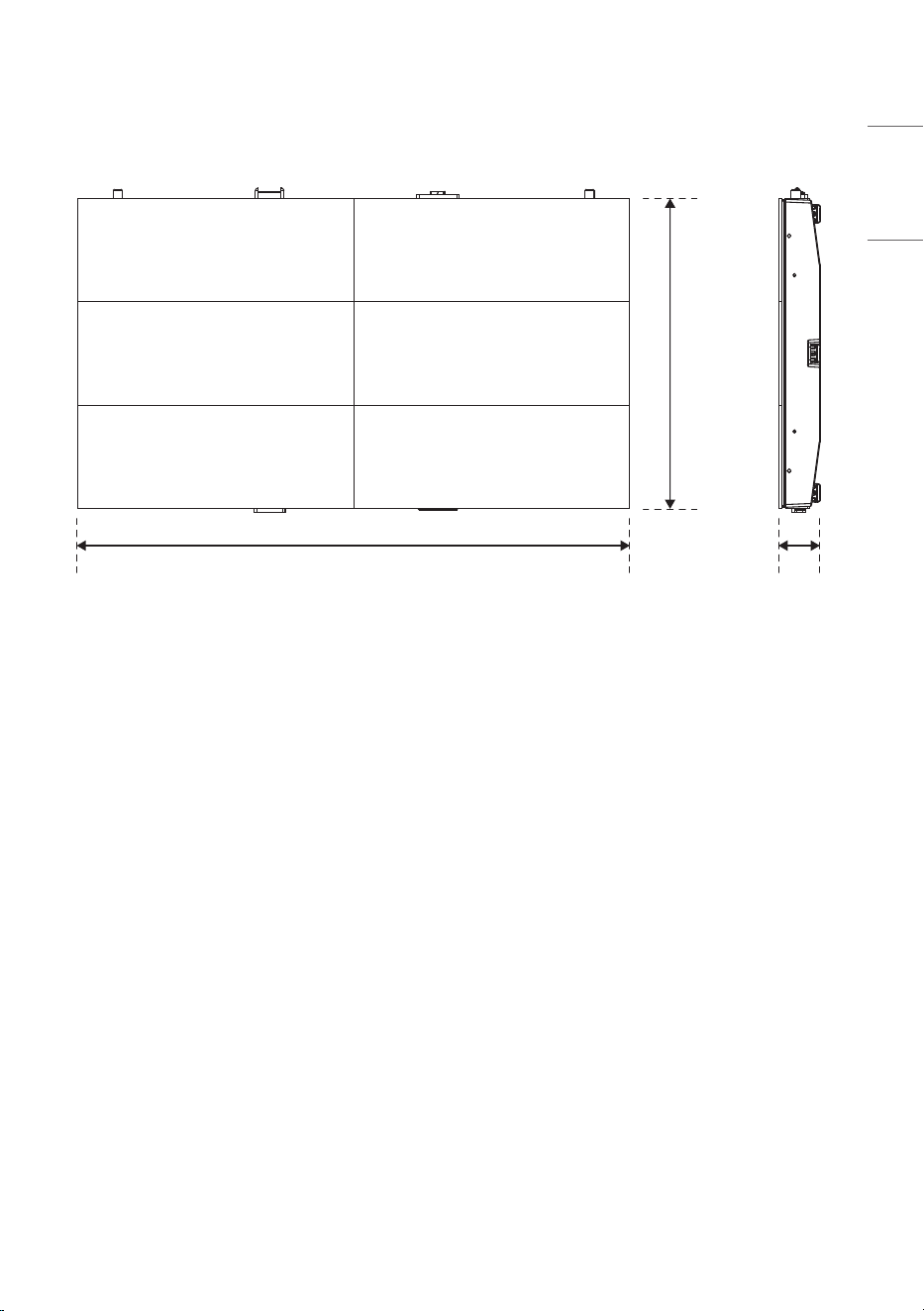
(Unit: mm (inches))
600
(23.6)
44.9
(1.7)
337.5
(13.2)
Temporary noise is normal when powering ON
or OFF this device.
The model and serial number of the product
are located on the back and on one side of the
product. Record them below in case you ever
need service.
MODEL
SERIAL NO.
Supplier’s Declaration of Conformity
Trade Name LG
Responsible Party LG Electronics USA, Inc.
Address 111 Sylvan Avenue, North
Building, Englewood Cliffs,
NJ 07632
E-mail [email protected]om