2
English
-------------------------------------
Deutsche -------------------------------------
Français -------------------------------------
Italiano -------------------------------------
Español -------------------------------------
Nederlands ----------------------------------
06 -10
11 -15
16 -20
21 -25
26 -30
31 -35
Contents
03
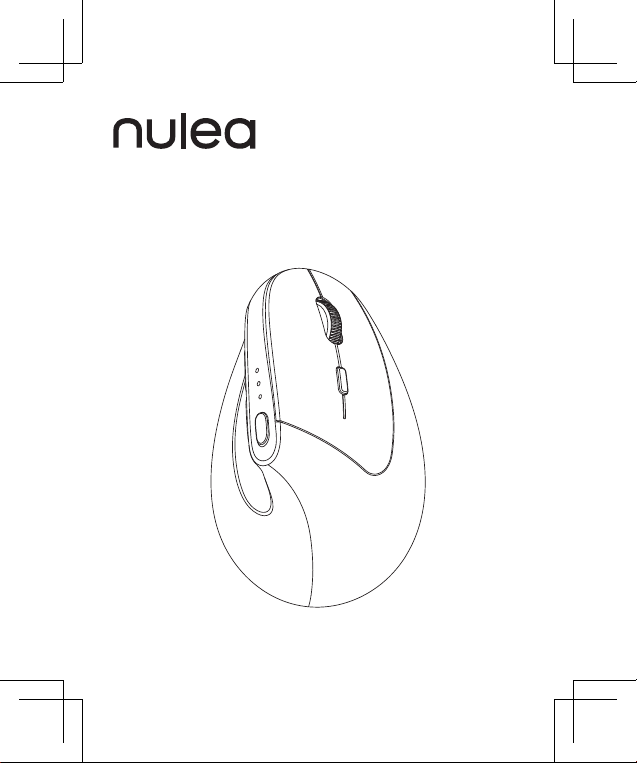
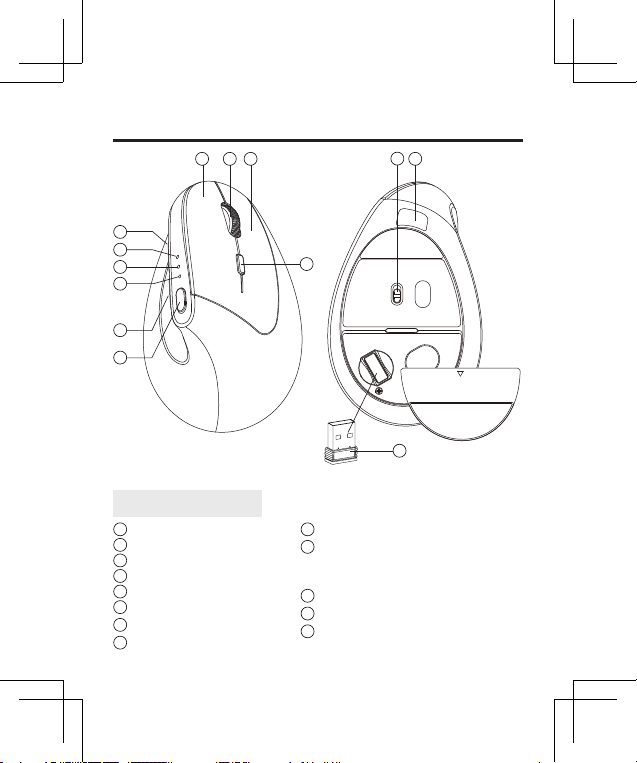
Product Components
12
1 3 2
4
11
1
Left Button
2
Right Button
3
Scroll Wheel
4
DPI Button
5
Mode Switch Button
6
Forward Button
7
Back Button
8
2.4G Indicator
9
Bluetooth 1 Indicator
10
Bluetooth 2 Indicator / Power Indicator
/ Low Voltage Indicator / Charging
Indicator / DPI Level Indicator
11
Charging Port
12
On/Off Switch
13
2.4G USB Receiver
US/UK/CA
13
6
8
9
10
5
7
04
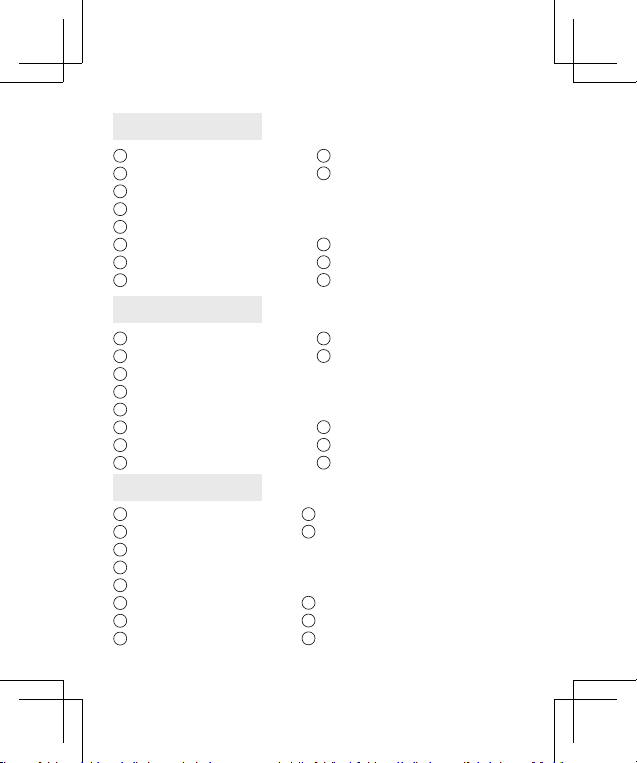
1
Linke Taste
2
Rechte Taste
3
Scrollrad
4
DPI-Taste
5
Moduswechseltaste
6
Vorwärtstaste
7
Zurück-Taste
8
2,4G-Anzeige
9
Bluetooth 1-Anzeige
10
Bluetooth 2-Anzeige
/ Betriebsanzeige /
Niederspannungsanzeige /
Ladeanzeige / DPI-Stufenanzeige
11
Ladeanschluss
12
Ein/Aus-Schalter
13
2,4G USB-Empfänger
1
Bouton gauche
2
Bouton droit
3
Molette de délement
4
Bouton DPI
5
Bouton de commutation de mode
6
Bouton Suivant
7
Bouton Retour
8
Indicateur 2,4G
9
Indicateur Bluetooth1
10
Indicateur Bluetooth 2/indicateur
d'alimentation/indicateur de basse
tension/indicateur de charge/
indicateur de niveau DPI
11
Port de chargement
12
Interrupteur marche/arrêt
13
Récepteur USB 2,4G
9
Indicatore Bluetooth 1
10
Indicatore Bluetooth 2/Indicatore di
alimentazione/Indicatore di bassa
tensione/Indicatore di carica/Indicatore
di livello DPI
11
Porta di ricarica
12
Interruttore di accensione/spegnimento
13
Ricevitore USB 2.4G
1
Pulsante sinistro
2
Pulsante destro
3
Rotella di scorrimento
4
Pulsante DPI
5
Pulsante di cambio modalità
6
Pulsante di cambio modalità
7
Pulsante schiena
8
Indicatore 2.4G
DE
FR
IT
05
1
Botón izquierdo
2
Botón derecho
3
Rueda de desplazamiento
4
Botón PPP
5
Botón de cambio de modo
6
Botón de avance
7
Botón Atrás
8
Indicador 2,4G
1
Linkerknop
2
Rechterknop
3
Scrollwiel
4
DPI-knop
5
Modusschakelaarknop
6
Knop Voorui
7
Terug-knop
8
2.4G-indicator
9
Indicador Bluetooth 1
10
Indicador Bluetooth 2/Indicador de
encendido/Indicador de bajo voltaje/
Indicador de carga/Indicador de nivel DPI
11
Puerto de carga
12
Interruptor de encendido/apagado
13
Receptor USB 2,4G
9
Bluetooth 1-indicator
10
Bluetooth 2-indicator / voedingsindicator /
laagspanningsindicator / oplaadindicator /
DPI-niveau-indicator
11
Oplaadpoort
12
Aan/uit-schakelaar
13
2.4G USB-ontvanger
ES
NL
06
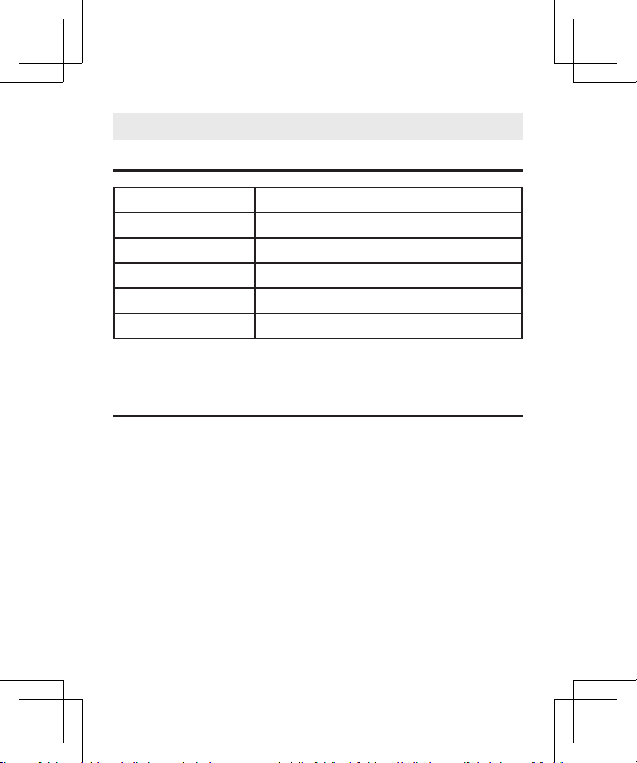
Package Contents
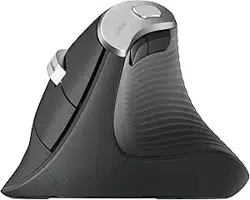
1 × Wireless Vertical Mouse
1 × 2.4GHz USB Receiver
1 × User Manual
US/UK/CA
Basic Parameters
Dimensions 4.8 x 3 x 3.1 inches / 123 x 78 x 79 mm
Connectivity Bluetooth & 2.4GHz Wireless Receiver
Operating Distance Less than 8 meters / 26.2 feet
Battery 500mAh Rechargeable Lithium-ion Battery
DPI Levels 800, 1200, 1600, 2400
Charging Port Type-C
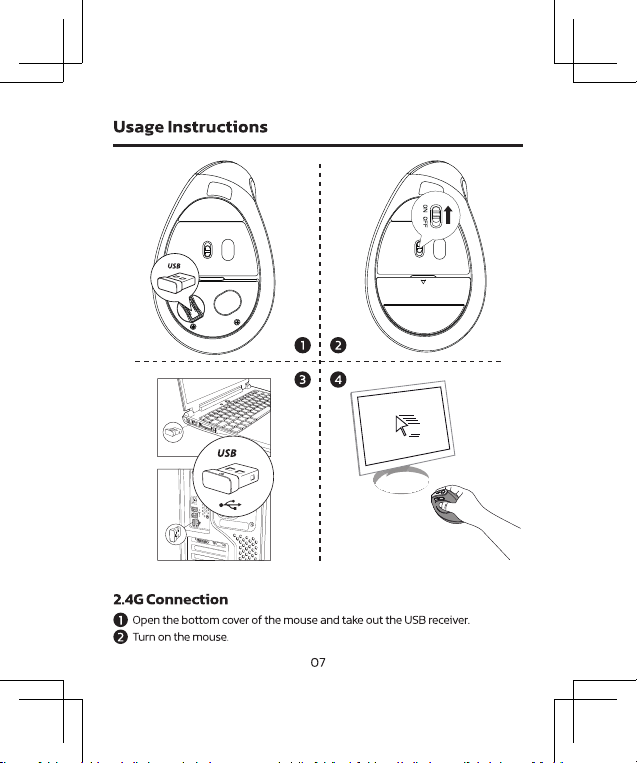
08
3
Insert the USB receiver into your computer's USB port.
4
Start using the mouse.
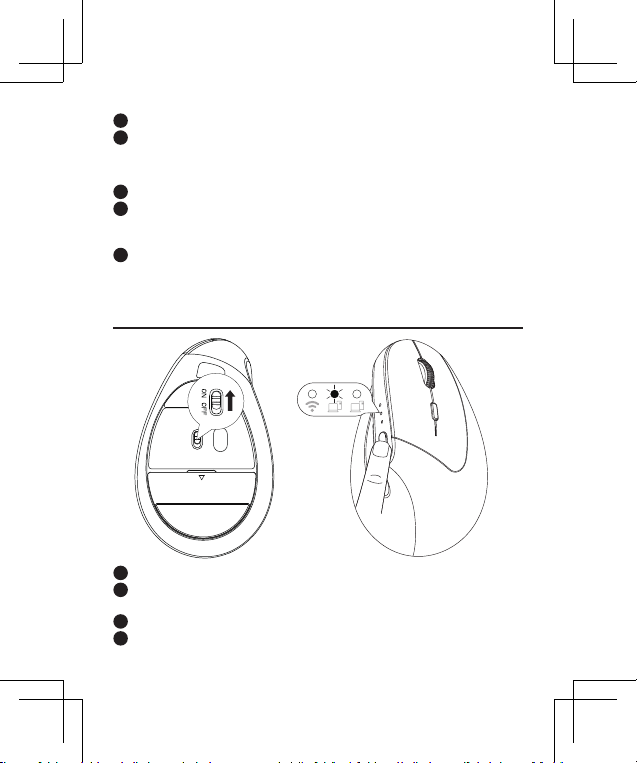
1
Turn off the mouse and unplug the 2.4G USB receiver from your computer.
2
Hold down the "Left Button," "Scroll Wheel Button," and "Right Button"
simultaneously for 3 seconds, then turn on the mouse while still holding the
buttons.
3
Within 10 seconds, insert the 2.4G USB receiver into your computer. Keep the
mouse close to the receiver (within 30 cm or 0.98 feet).
If the 2.4G connection is not working, you can try re-pairing it.
Here are the steps:
Bluetooth Connection
1
Turn on the mouse.
2
Press the "Mode Switch Button" to select either Bluetooth 1 or Bluetooth 2
channel.
3
Hold the "Mode Switch Button" for 5 seconds to enter pairing mode.
4
On your device, nd and select "Nulea MD280" to connect.
09
Bluetooth Connection
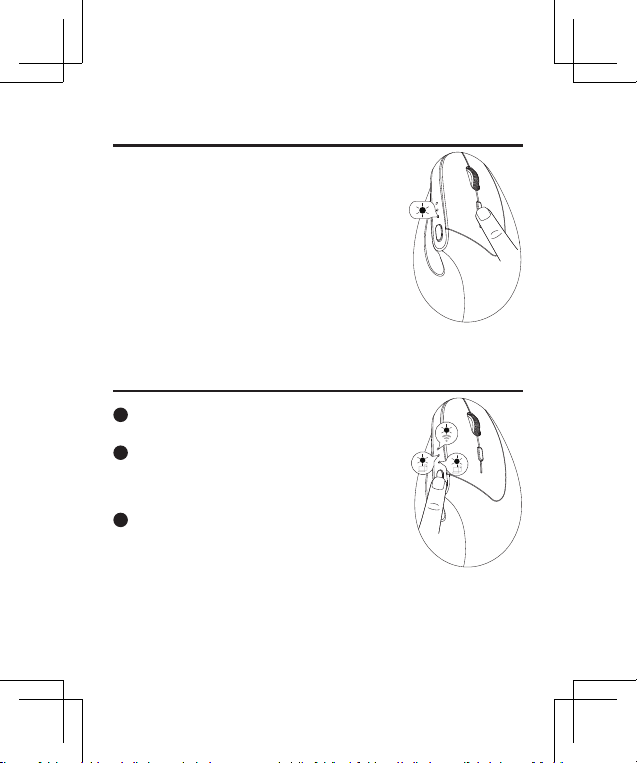
DPI Adjustment
This mouse has 4 adjustable DPI levels: 800, 1200
(default), 1600, and 2400.
Press the DPI button to switch between the levels.
The indicator light will ash according to the
selected DPI level:
800 DPI: Flashes once
1200 DPI: Flashes twice
1600 DPI: Flashes three times
2400 DPI: Flashes four times
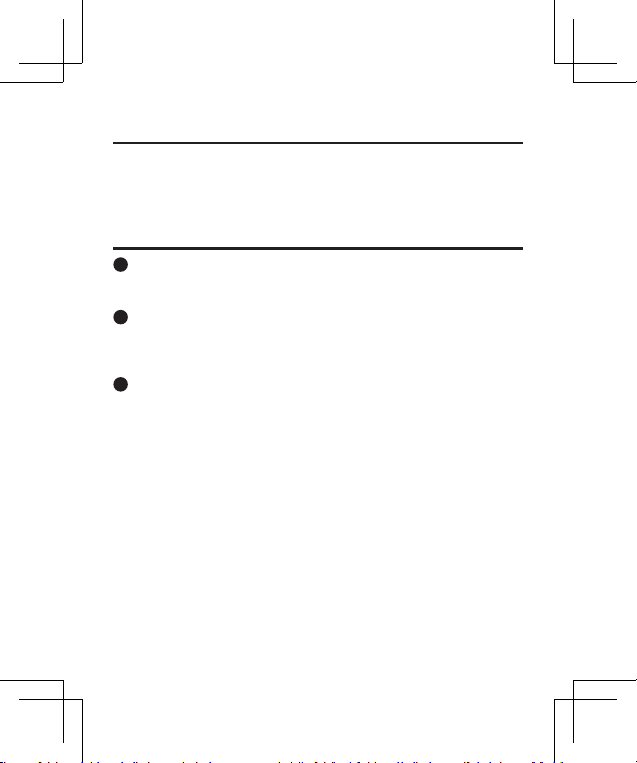
Connection Mode Switching
1
This mouse supports three connection channels:
2.4G and two Bluetooth channels.
2
Once the mouses are connected to devices via 2.4G
and the two Bluetooth channels, you can switch
between the connected devices by pressing the
mode switch button.
3
When switching to a different connection channel,
the corresponding channel indicator will light up
green.
10
Sleep Mode
Charging Instructions
The mouse will enter sleep mode after 30 minutes of inactivity. To wake it up, simply
press any key.
1
Low Battery Alert: When the mouse is low on battery, the low battery
indicator will ash red. Please charge the mouse promptly to ensure optimal
performance.
2
Connecting the Charger: Connect one end of the included Type-C cable to a
USB charger, and the other end to the charging port on the mouse.
Note: Use a charger with an output of DC 5V / 500mA. (USB charger not
included)
3
Charging Indicator: The charging indicator will glow blue while the mouse is
charging. A full charge takes approximately 3.5 hours, and the light will turn
off once charging is complete.
11
Sleep Mode
Charging Instructions
DE
Grundparameter
Abmessungen 4,8 x 3 x 3,1 Zoll / 123 x 78 x 79 mm
Konnektivität Bluetooth und 2,4-GHz-Funkempfänger
Betriebsentfernung Weniger als 8 Meter / 26,2 Fuß
Batterie 500 mAh wiederauadbarer Lithium-Ionen-Akku
DPI-Stufen 800, 1200, 1600, 2400
Ladeanschluss Typ C
Packungsinhalt
1 × kabellose vertikale Maus
1 × 2,4GHz USB-Empfänger
1 × Benutzerhandbuch
13
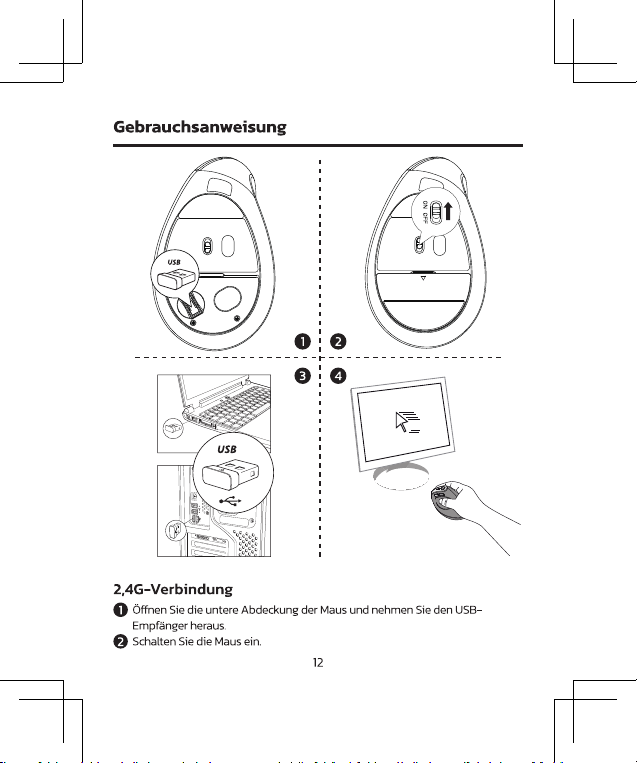
Gebrauchsanweisung
3
Stecken Sie den USB-Empfänger in den USB-Anschluss Ihres Computers.
4
Beginnen Sie mit der Verwendung der Maus.
1
Schalten Sie die Maus aus und trennen Sie den 2,4-G-USB-Empfänger von
Ihrem Computer.
1
Halten Sie die „Linke Taste“, die „Scrollrad-Taste“ und die „Rechte Taste“
gleichzeitig 3 Sekunden lang gedrückt und schalten Sie dann die Maus ein,
während Sie die Tasten weiterhin gedrückt halten.
1
Stecken Sie innerhalb von 10 Sekunden den 2,4-G-USB-Empfänger in Ihren
Computer. Halten Sie die Maus nahe am Empfänger (innerhalb von 30 cm
oder 0,98 Fuß).
Wenn die 2,4G-Verbindung nicht funktioniert, können Sie
versuchen, sie erneut zu koppeln. Hier sind die Schritte:
Bluetooth-Verbindung
14
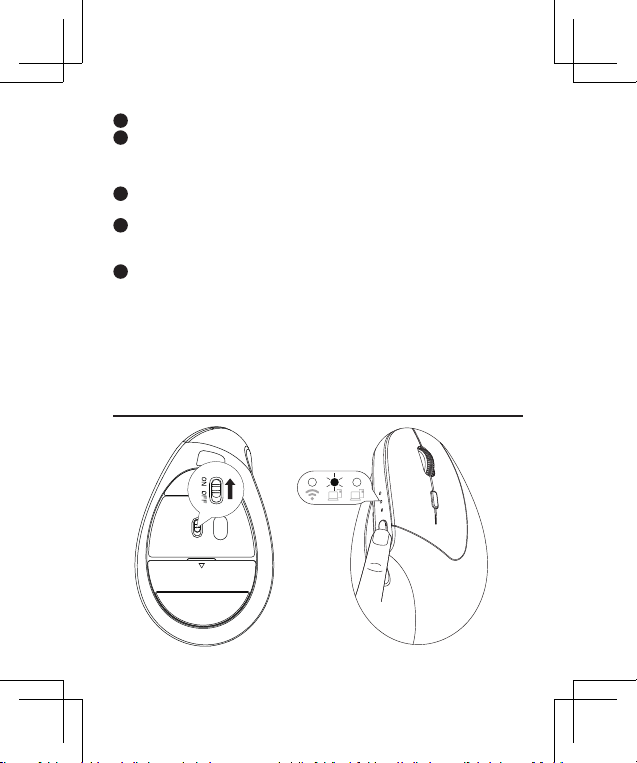
1
Schalten Sie die Maus ein.
2
Drücken Sie die „Moduswechseltaste“, um entweder den Bluetooth 1- oder den
Bluetooth 2-Kanal auszuwählen.
3
Halten Sie die „Moduswechseltaste“ 5 Sekunden lang gedrückt, um in den
Kopplungsmodus zu gelangen.
4
Suchen Sie auf Ihrem Gerät „Nulea MD280“ und wählen Sie es aus, um eine
Verbindung herzustellen.
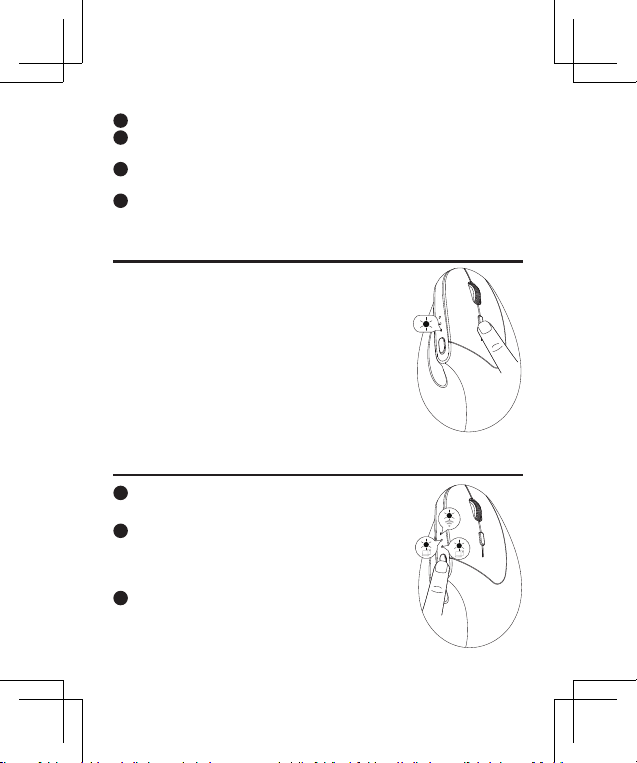
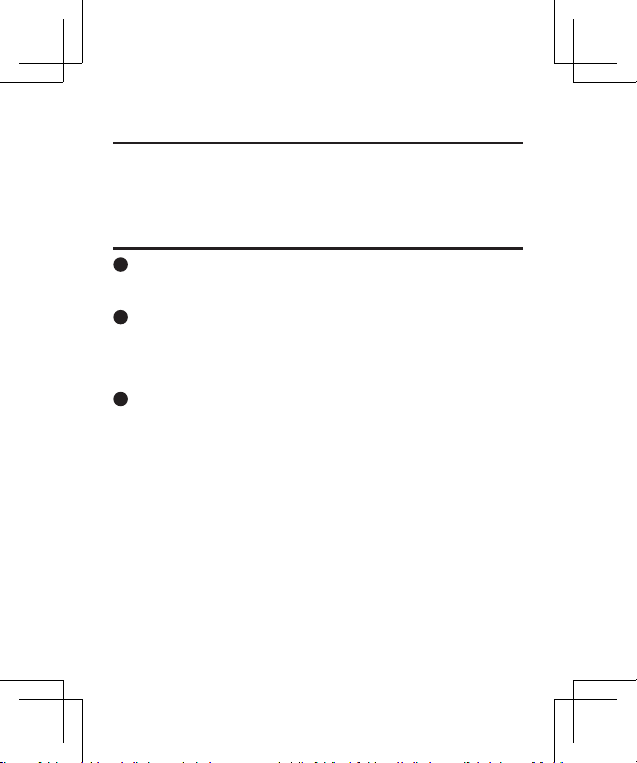
DPI-Anpassung
Diese Maus verfügt über 4 einstellbare DPI-Stufen:
800, 1200 (Standard), 1600 und 2400.
Drücken Sie die DPI-Taste, um zwischen den Ebenen
zu wechseln.
Die Anzeigeleuchte blinkt entsprechend der
ausgewählten DPI-Stufe:
800 DPI: Blinkt einmal
1200 DPI: Blinkt zweimal
1600 DPI: Blinkt dreimal
2400 DPI: Blinkt viermal
Umschalten des Verbindungsmodus
1
Diese Maus unterstützt drei Verbindungskanäle:
2,4G und zwei Bluetooth-Kanäle.
2
Sobald die Mäuse über 2,4G und die beiden
Bluetooth-Kanäle mit Geräten verbunden sind,
können Sie durch Drücken der Modus-Umschalttaste
zwischen den verbundenen Geräten wechseln.
3
Beim Wechsel zu einem anderen Verbindungskanal
leuchtet die entsprechende Kanalanzeige grün.
15
DPI-Anpassung
Umschalten des Verbindungsmodus
Schlafmodus
Ladeanweisungen
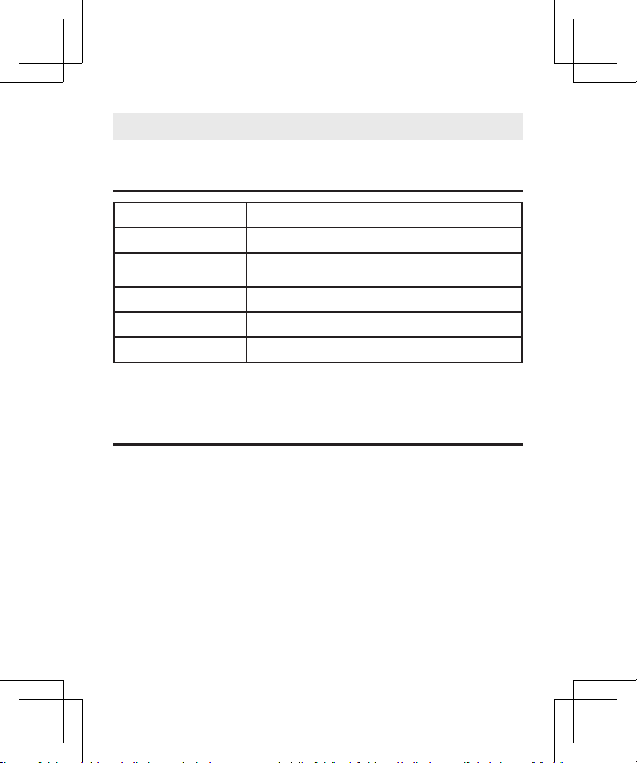
Nach 30 Minuten Inaktivität wechselt die Maus in den Schlafmodus. Um es
aufzuwecken, drücken Sie einfach eine beliebige Taste.
1
Warnung bei schwacher Batterie: Wenn die Batterie der Maus fast leer ist,
blinkt die Batterieanzeige rot. Bitte laden Sie die Maus umgehend auf, um
eine optimale Leistung zu gewährleisten.
2
Anschließen des Ladegeräts: Verbinden Sie ein Ende des mitgelieferten
Typ-C-Kabels mit einem USB-Ladegerät und das andere Ende mit dem
Ladeanschluss der Maus.
Hinweis: Verwenden Sie ein Ladegerät mit einem Ausgang von DC 5V /
500mA. (USB-Ladegerät nicht im Lieferumfang enthalten)
3
Ladeanzeige: Die Ladeanzeige leuchtet blau, während die Maus aufgeladen
wird. Eine vollständige Auadung dauert etwa 3.5 Stunden und das Licht
erlischt, sobald der Ladevorgang abgeschlossen ist.
16
FR
Paramètres de base
Contenu du colis
1 × souris verticale sans l
1 × récepteur USB 2,4 GHz
1 × manuel d'utilisation
Dimensions 4,8 x 3 x 3,1 pouces / 123 x 78 x 79 mm
Connectivité Bluetooth et récepteur sans l 2,4GHz
Distance de
fonctionnement
moins de 8 mètres / 26,2 pieds
Batterie batterie lithium-ion rechargeable de 500 mAh
Niveaux DPI 800, 1200, 1600, 2400
Port de chargement Type-C
18
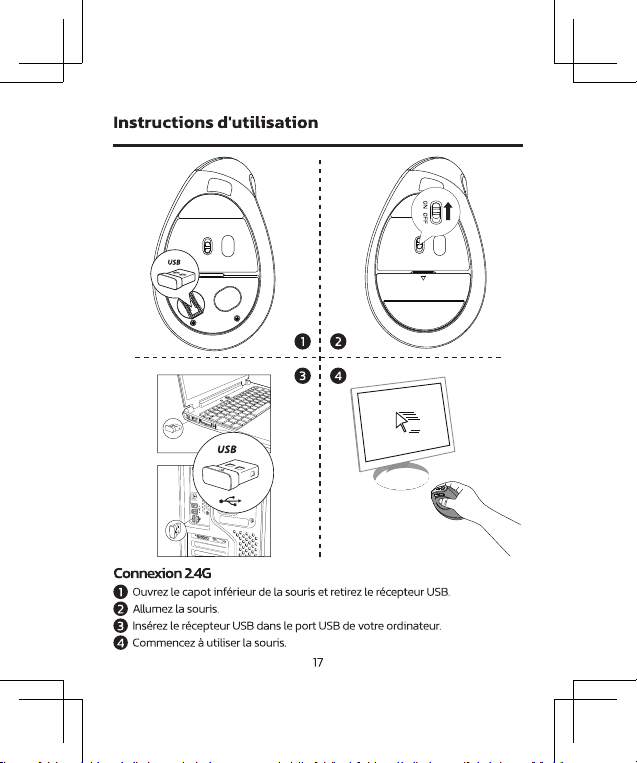
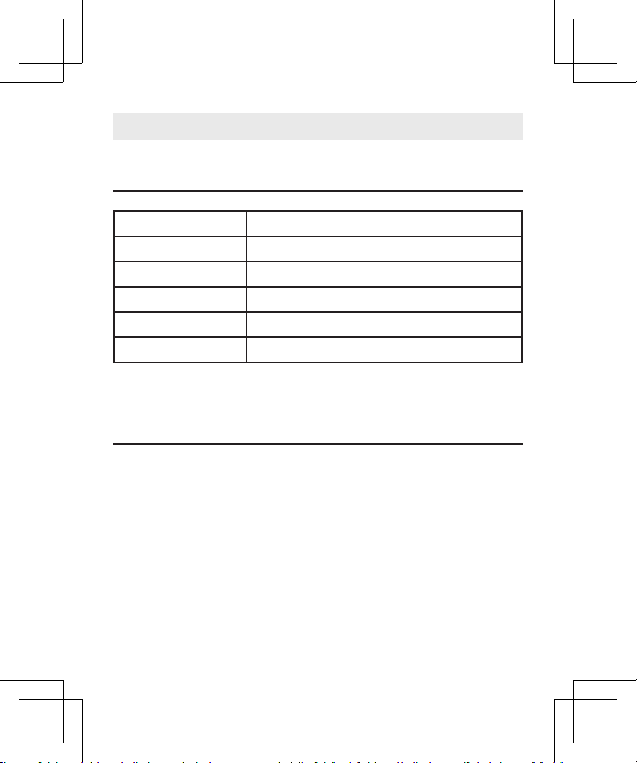
1
Éteignez la souris et débranchez le récepteur USB 2,4 G de votre ordinateur.
2
Maintenez enfoncés simultanément le « bouton gauche », le « bouton de
la molette de délement » et le « bouton droit » pendant 3 secondes, puis
allumez la souris tout en maintenant les boutons enfoncés.
3
Dans les 10 secondes, insérez le récepteur USB 2,4 G dans votre ordinateur.
Gardez la souris près du récepteur (à moins de 30 cm ou 0,98 pied).
Si la connexion 2,4G ne fonctionne pas, vous pouvez essayer de
la réappairer. Voici les étapes :
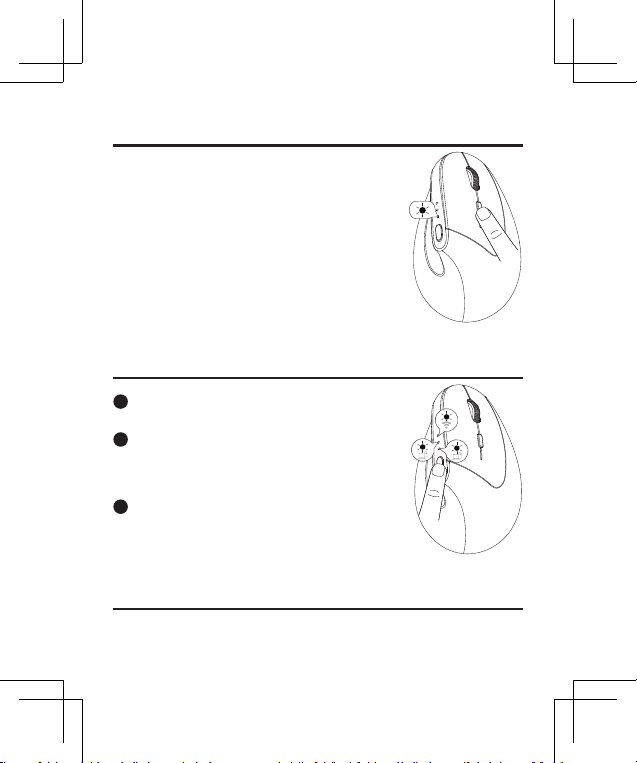
Connexion Bluetooth
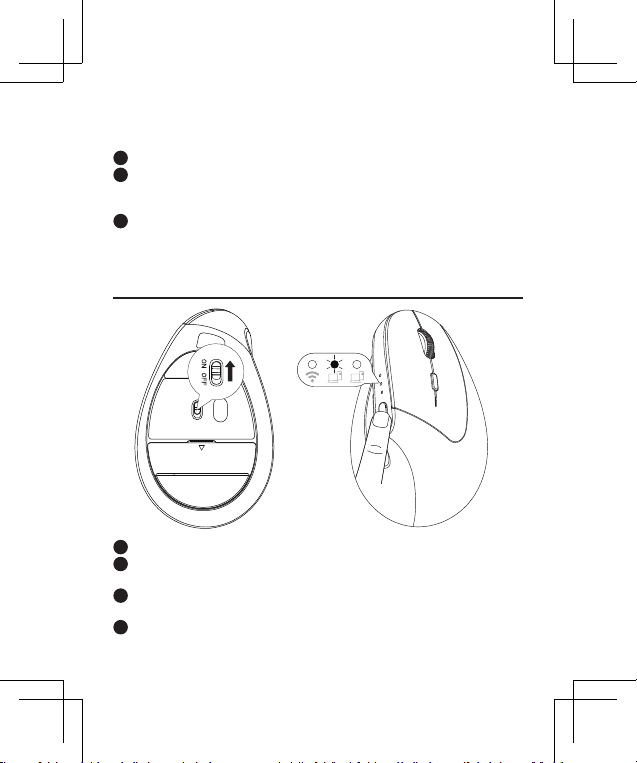
1
Allumez la souris.
2
Appuyez sur le « bouton de commutation de mode » pour sélectionner le
canal Bluetooth 1 ou Bluetooth 2.
3
Maintenez le «bouton de commutation de mode» pendant 5 secondes pour
passer en mode d'appairage.
4
Sur votre appareil, recherchez et sélectionnez «Nulea MD280» pour vous
connecter.
19
Connexion Bluetooth
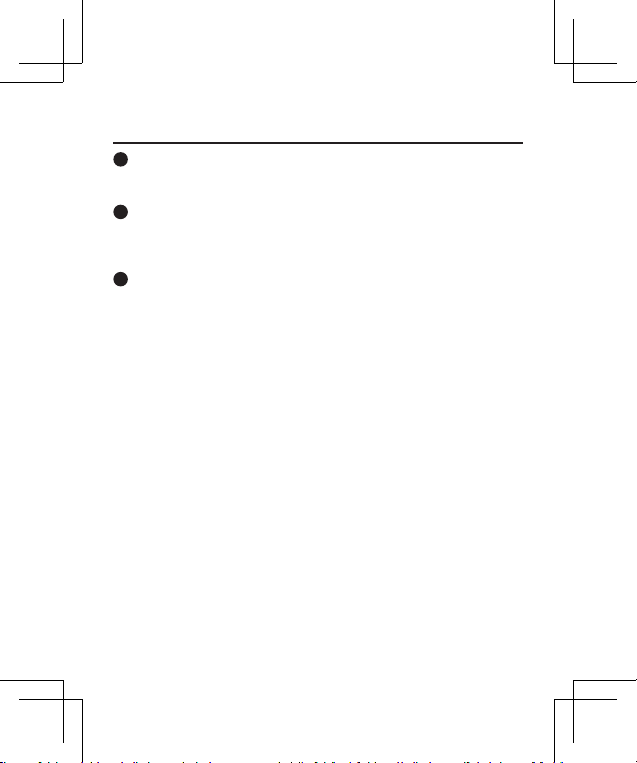
Ajustement DPI
Cette souris dispose de 4 niveaux DPI réglables:
800, 1200 (par défaut), 1600 et 2400.
Appuyez sur le bouton DPI pour basculer entre les
niveaux.
Le voyant clignote en fonction du niveau DPI
sélectionné:
800 DPI: Clignote une fois
1200 DPI: Clignote deux fois
1600 DPI : Clignote trois fois
2400 DPI : Clignote quatre fois
Commutation du mode de connexion
1
Cette souris prend en charge trois canaux de
connexion : 2,4G et deux canaux Bluetooth.
2
Une fois les souris connectées aux appareils via 2,4G
et les deux canaux Bluetooth, vous pouvez basculer
entre les appareils connectés en appuyant sur le
bouton de changement de mode.
3
Lors du passage à un autre canal de connexion,
l'indicateur de canal correspondant s'allume en vert.
Mode veille
La souris entrera en mode veille après 30 minutes d'inactivité. Pour le réveiller,
appuyez simplement sur n'importe quelle touche.
20
Instructions de chargement
1
Alerte de batterie faible: lorsque la batterie de la souris est faible, l'indicateur
de batterie faible clignote en rouge. Veuillez charger la souris rapidement
pour garantir des performances optimales.
2
Connexion du chargeur: connectez une extrémité du câble Type-C inclus à un
chargeur USB et l'autre extrémité au port de chargement de la souris.
Remarque : utilisez un chargeur avec une sortie de DC 5 V/500 mA. (Chargeur
USB non inclus)
3
Indicateur de charge: L'indicateur de charge s'allume en bleu pendant que
la souris est en charge. Une charge complète prend environ 3.5 heures et la
lumière s'éteindra une fois la charge terminée.
21
Instructions de chargement
IT
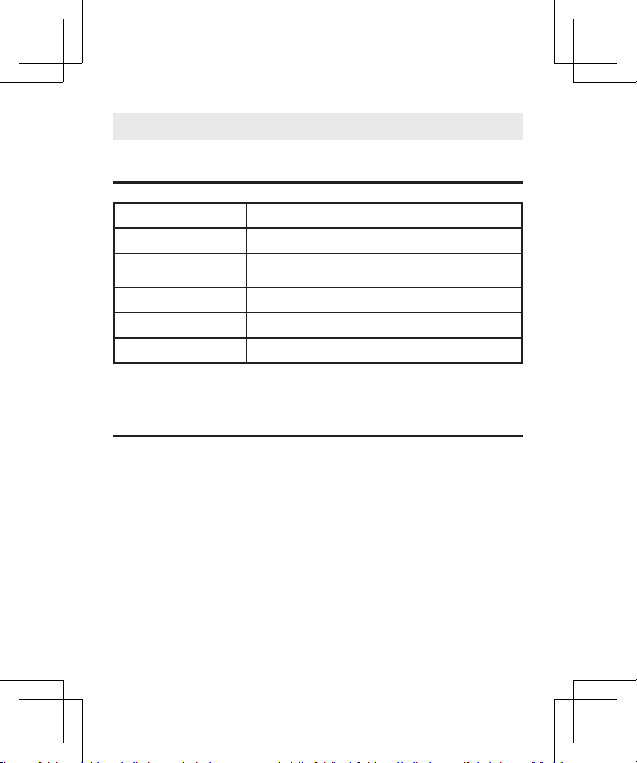
Parametri di base
Contenuto del pacco
1 × mouse verticale wireless
1 × ricevitore USB da 2,4 GHz
1 × manuale utente
Dimensioni 4,8 x 3 x 3,1 pollici / 123 x 78 x 79 mm
Connettività Bluetooth e ricevitore wireless da 2,4 GHz
Distanza operativa meno di 8 metri/26,2 piedi
Batteria batteria ricaricabile agli ioni di litio da 500 mAh
Livelli DPI 800, 1200, 1600, 2400
Porta di ricarica tipo C
23
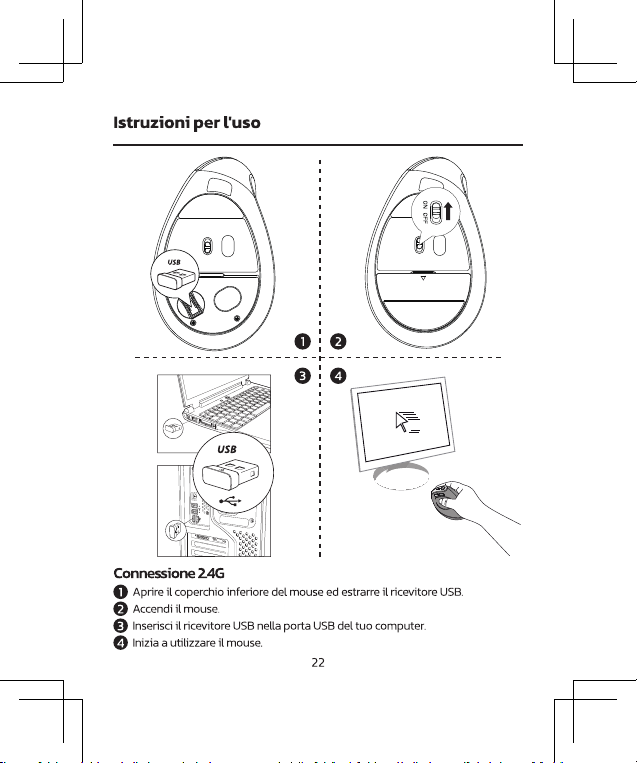
Istruzioni per l'uso
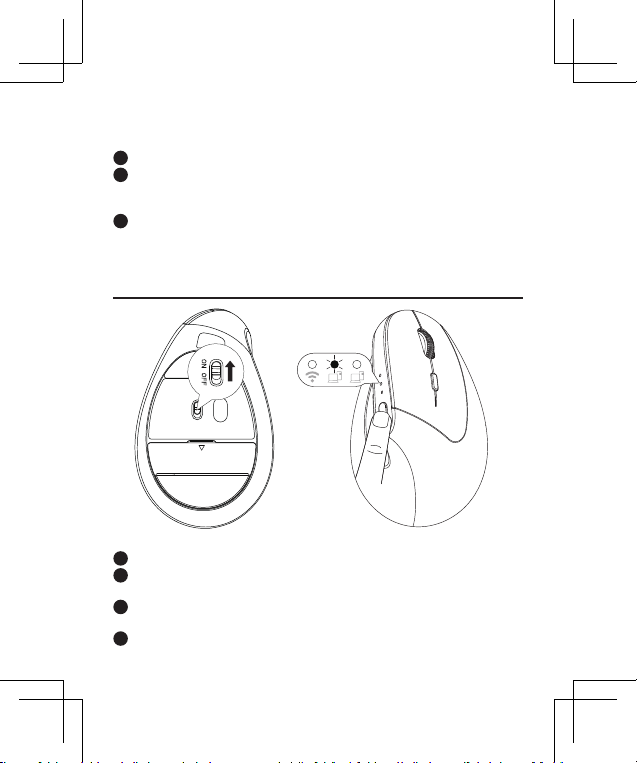
1
Spegni il mouse e scollega il ricevitore USB 2.4G dal computer.
2
Tenere premuti contemporaneamente il "Pulsante sinistro", il "Pulsante rotella
di scorrimento" e il "Pulsante destro" per 3 secondi, quindi accendere il mouse
continuando a tenere premuti i pulsanti.
3
Entro 10 secondi, inserire il ricevitore USB 2.4G nel computer. Tenere il mouse
vicino al ricevitore (entro 30 cm o 0,98 piedi).
Se la connessione 2.4G non funziona, puoi provare ad associarla
nuovamente. Ecco i passaggi:
Connessione Bluetooth
1
Accendi il mouse.
2
Premere il "pulsante di cambio modalità" per selezionare il canale Bluetooth 1
o Bluetooth 2.
3
Tenere premuto il "pulsante di cambio modalità" per 5 secondi per accedere
alla modalità di accoppiamento.
4
Sul tuo dispositivo, trova e seleziona "Nulea MD280" per connetterti.
24
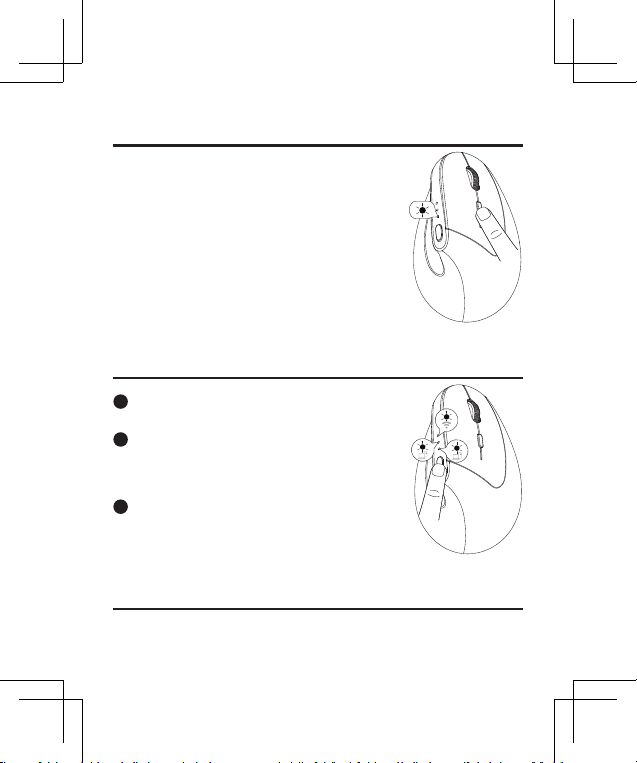
Regolazione DPI
Questo mouse ha 4 livelli DPI regolabili: 800,
1200 (predenito), 1600 e 2400.
Premere il pulsante DPI per passare da un livello
all'altro.
L'indicatore luminoso lampeggerà in base al
livello DPI selezionato:
800 DPI: lampeggia una volta
1200 DPI: lampeggia due volte
1600 DPI: lampeggia tre volte
2400 DPI: lampeggia quattro volte
Commutazione della modalità di connessione
1
Questo mouse supporta tre canali di connessione:
2.4G e due canali Bluetooth.
2
Una volta che i mouse sono collegati ai dispositivi
tramite 2.4G e i due canali Bluetooth, è possibile
passare da un dispositivo connesso all'altro
premendo il pulsante di cambio modalità.
3
Quando si passa a un canale di connessione diverso,
l'indicatore del canale corrispondente si illuminerà
di verde.
Modalità risparmio
Il mouse entrerà in modalità sospensione dopo 30 minuti di inattività. Per riattivarlo
è sufciente premere un tasto qualsiasi.
25
Regolazione DPI
Commutazione della modalità di connessione
Modalità risparmio
Istruzioni per la ricarica
1
Avviso di batteria scarica: quando la batteria del mouse è scarica, l'indicatore
di batteria scarica lampeggerà in rosso. Si prega di caricare tempestivamente
il mouse per garantire prestazioni ottimali.
2
Collegamento del caricabatterie: collega un'estremità del cavo di tipo C
incluso a un caricabatterie USB e l'altra estremità alla porta di ricarica del
mouse.
Nota: utilizzare un caricabatterie con uscita CC 5 V/500 mA. (Caricatore USB
non incluso)
3
Indicatore di carica: l'indicatore di carica si illumina di blu mentre il mouse è
in carica. Una ricarica completa richiede circa 3.5 ore e la luce si spegnerà una
volta completata la ricarica.
26
ES
Parametros basicos
Contenidos del paquete
1 × ratón vertical inalámbrico
1 × receptor USB de 2,4 GHz.
1 × Manual de usuario
Dimensiones 4,8 x 3 x 3,1 pulgadas / 123 x 78 x 79 mm
Conectividad Bluetooth y receptor inalámbrico de 2,4 GHz
Distancia de
funcionamiento
menos de 8 metros/26,2 pies
Batería batería de iones de litio recargable de 500 mAh
Niveles de DPI 800, 1200, 1600, 2400
Puerto de carga tipo C
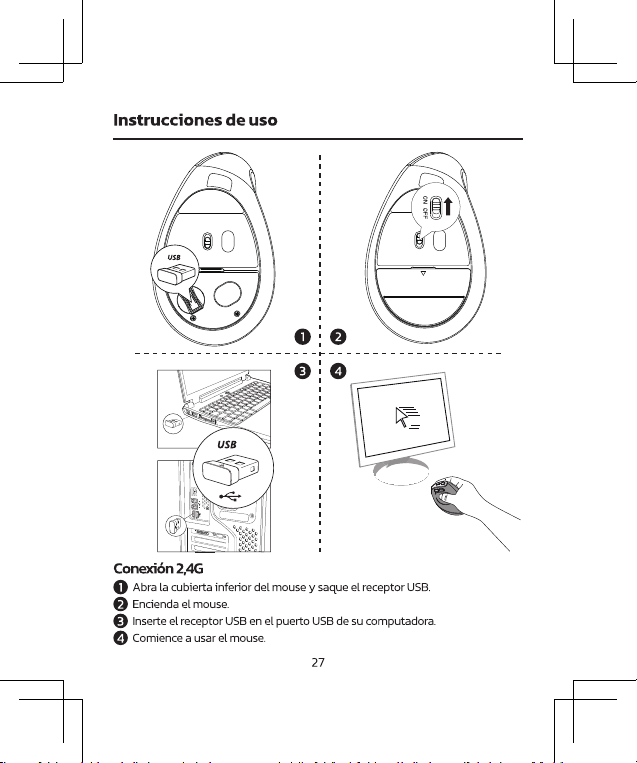
28
1
Apague el mouse y desconecte el receptor USB 2.4G de su computadora.
2
Mantenga presionados el "Botón izquierdo", el "Botón de rueda de
desplazamiento" y el "Botón derecho" simultáneamente durante 3 segundos,
luego encienda el mouse mientras mantiene presionados los botones.
3
En 10 segundos, inserte el receptor USB de 2,4G en su computadora. Mantenga
el mouse cerca del receptor (a menos de 30 cm o 0,98 pies).
Si la conexión 2.4G no funciona, puedes intentar volver a
emparejarla. Aquí están los pasos:
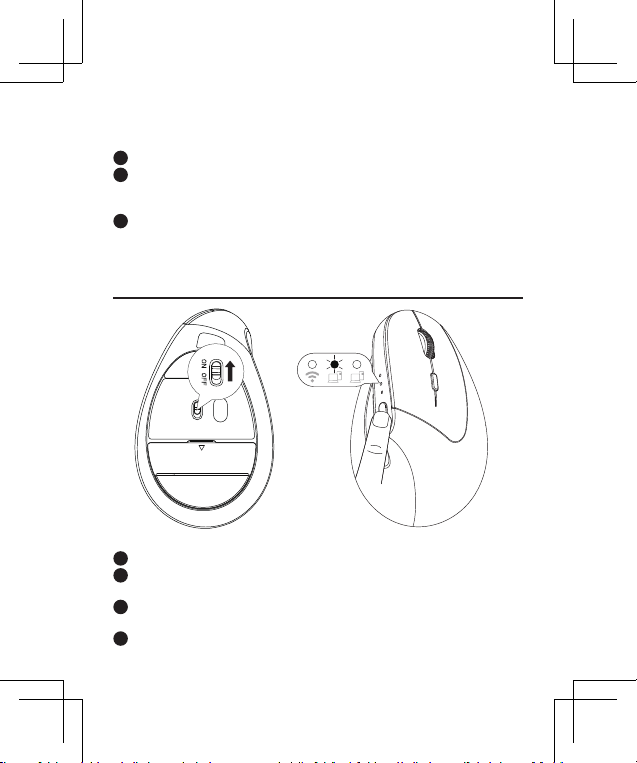
Conexión Bluetooth
1
Encienda el mouse.
2
Presione el "botón de cambio de modo" para seleccionar el canal Bluetooth 1 o
Bluetooth 2.
3
Mantenga presionado el "botón de cambio de modo" durante 5 segundos para
ingresar al modo de emparejamiento.
4
En su dispositivo, busque y seleccione "Nulea MD280" para conectarse.
29
Conexión Bluetooth
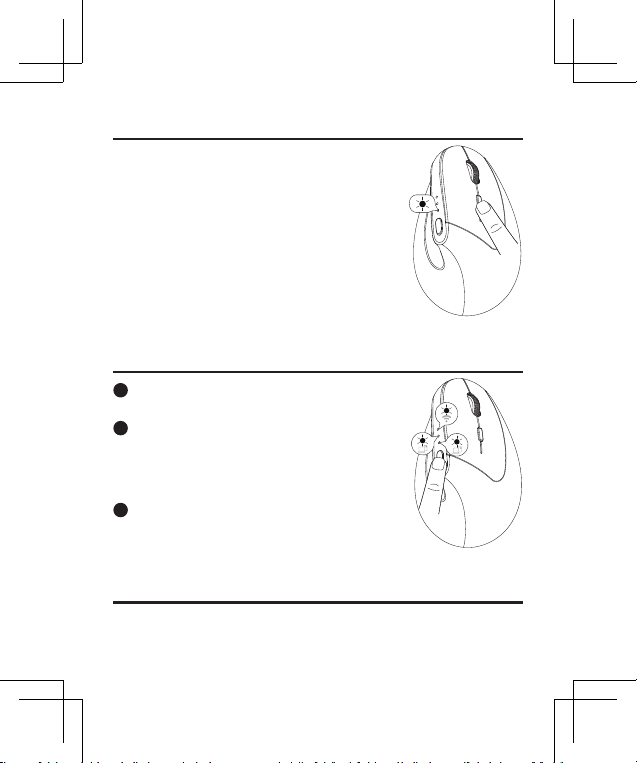
Ajuste de DPI
Este mouse tiene 4 niveles de DPI ajustables:
800, 1200 (predeterminado), 1600 y 2400.
Presione el botón DPI para cambiar entre los
niveles.
La luz indicadora parpadeará según el nivel de
DPI seleccionado:
800 DPI: parpadea una vez
1200 DPI: parpadea dos veces
1600 DPI: parpadea tres veces
2400 DPI: parpadea cuatro veces
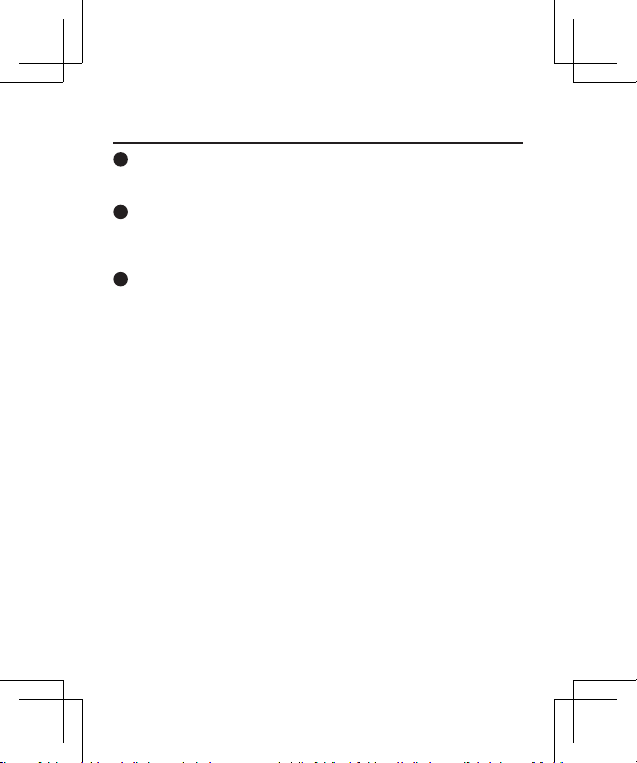
Cambio de modo de conexión
1
Este mouse admite tres canales de conexión:
2.4G y dos canales Bluetooth.
2
Una vez que los mouse están conectados a los
dispositivos a través de 2.4G y los dos canales
Bluetooth, puede cambiar entre los dispositivos
conectados presionando el botón de cambio de
modo.
3
Al cambiar a un canal de conexión diferente,
el indicador del canal correspondiente se
iluminará en verde.
Modo de sueño
El mouse entrará en modo de suspensión después de 30 minutos de inactividad.
Para despertarlo, simplemente presione cualquier tecla.
30
Instrucciones de carga
1
Alerta de batería baja: cuando el mouse tiene poca batería, el indicador
de batería baja parpadeará en rojo. Cargue el mouse rápidamente para
garantizar un rendimiento óptimo.
2
Conexión del cargador: conecte un extremo del cable tipo C incluido a un
cargador USB y el otro extremo al puerto de carga del mouse.
Nota: Utilice un cargador con una salida de CC 5 V/500 mA. (Cargador USB no
incluido)
3
Indicador de carga: El indicador de carga se iluminará en azul mientras el
mouse se está cargando. Una carga completa tarda aproximadamente 3.5
horas y la luz se apagará una vez que se complete la carga.
31
Instrucciones de carga
NL
Basisparameters
Verpakkingsinhoud
1 × draadloze verticale muis
1 × 2,4 GHz USB-ontvanger
1 × Gebruikershandleiding
Afmetingen 4,8 x 3 x 3,1 inch / 123 x 78 x 79 mm
Connectiviteit Bluetooth en 2,4GHz draadloze ontvanger
Bedrijfsafstand minder dan 8 meter / 26,2 voet
Batterij 500 mAh oplaadbare lithium-ionbatterij
DPI-niveaus 800, 1200, 1600, 2400
Oplaadpoort Type-C
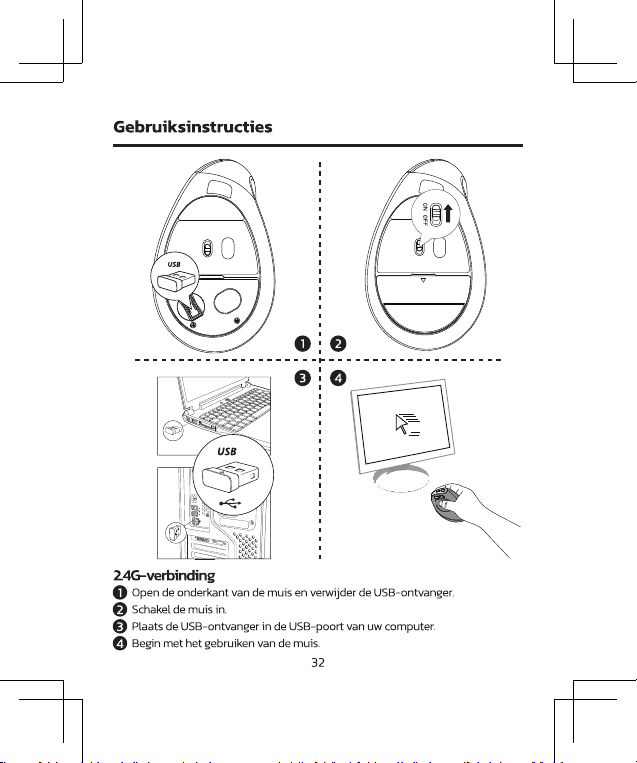
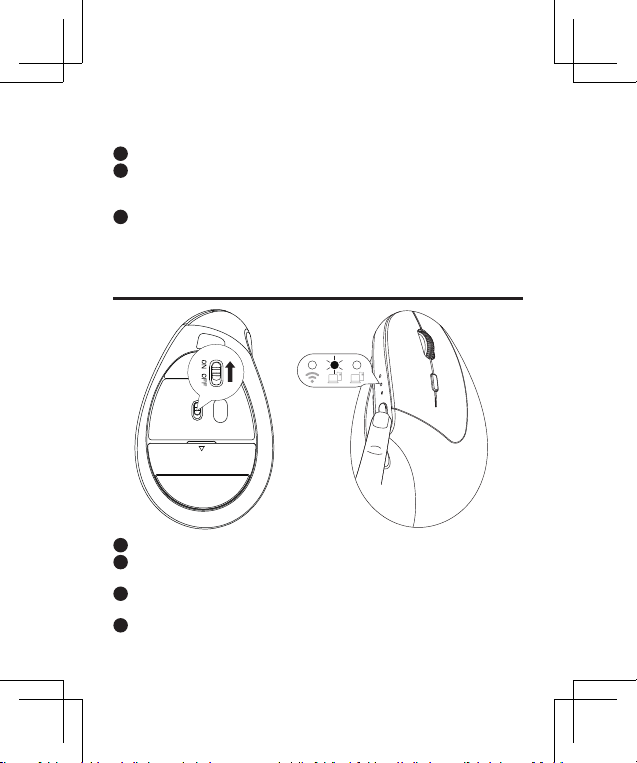
33
Gebruiksinstructies
1
Schakel de muis uit en koppel de 2.4G USB-ontvanger los van uw computer.
2
Houd de linkerknop, de scrollwielknop en de rechterknop tegelijkertijd
gedurende 3 seconden ingedrukt en schakel vervolgens de muis in terwijl u de
knoppen nog steeds ingedrukt houdt.
3
Plaats binnen 10 seconden de 2.4G USB-ontvanger in uw computer. Houd de
muis dicht bij de ontvanger (binnen 30 cm).
Als de 2.4G-verbinding niet werkt, kunt u proberen deze opnieuw
te koppelen. Hier zijn de stappen:
Bluetooth-verbinding
1
Zet de muis aan.
2
Druk op de "Modusschakelaarknop" om Bluetooth 1- of Bluetooth 2-kanaal te
selecteren.
3
Houd de "Modusschakelaarknop" 5 seconden ingedrukt om naar de
koppelingsmodus te gaan.
4
Zoek en selecteer op uw apparaat "Nulea MD280" om verbinding te maken.
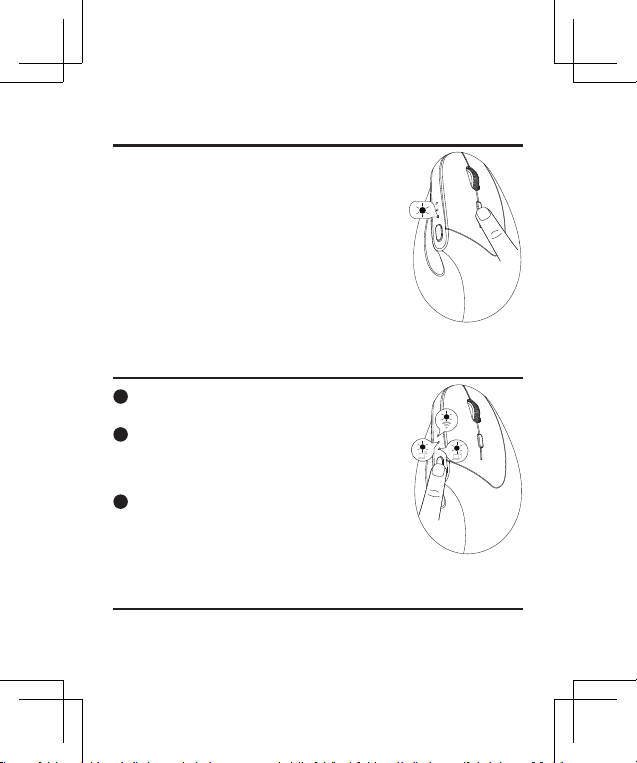
34
DPI-aanpassing
Deze muis heeft 4 instelbare DPI-niveaus:
800, 1200 (standaard), 1600 en 2400.
Druk op de DPI-knop om tussen de niveaus te
schakelen.
Het indicatielampje knippert afhankelijk van het
geselecteerde DPI-niveau:
800 DPI: Knippert één keer
1200 DPI: Knippert tweemaal
1600 DPI: Knippert drie keer
2400 DPI: Knippert vier keer
Verbindingsmodus schakelen
1
Deze muis ondersteunt drie verbindingskanalen:
2.4G en twee Bluetooth-kanalen.
2
Zodra de muizen via 2.4G en de twee Bluetooth-
kanalen met apparaten zijn verbonden, kunt u
tussen de aangesloten apparaten schakelen door op
de modusschakelaarknop te drukken.
3
Bij het overschakelen naar een ander
verbindingskanaal licht de bijbehorende
kanaalindicator groen op.
Slaapstand
De muis gaat na 30 minuten inactiviteit in de slaapmodus. Om hem wakker te
maken, drukt u eenvoudig op een willekeurige toets.
35
DPI-aanpassing
Verbindingsmodus schakelen
Slaapstand
Oplaadinstructies
1
Waarschuwing batterij bijna leeg: Wanneer de batterij van de muis bijna
leeg is, knippert de batterij-indicator rood. Laad de muis onmiddellijk op om
optimale prestaties te garanderen.
2
De oplader aansluiten: Sluit het ene uiteinde van de meegeleverde Type-C-
kabel aan op een USB-oplader en het andere uiteinde op de oplaadpoort van
de muis.
Let op: Gebruik een oplader met een uitgangsvermogen van DC 5V / 500mA.
(USB-oplader niet inbegrepen)
3
Oplaadindicator: De oplaadindicator licht blauw op terwijl de muis wordt
opgeladen. Volledig opladen duurt ongeveer 2 uur en het lampje gaat uit
zodra het opladen is voltooid.
WORK WITH YOUR FAVORITE
Visit www.nulea.com for our 24/7
live chat or send an email to
[email protected] for support.
24
7
EC REP
CET Product Service Ltd.
Beacon House Stokenchurch Business Park,
Ibstone Rd, Stokenchurch
High Wycombe HP14 3FE UK
Email: info.cetservice@gmail.com
Phone: +44 741 932 5266
UK REP
Manufacturer:
Shenzhen Hangshi Technology Co., Ltd.
Address:
Hangshi Technology Park, G Area, Democracy West
Industry Park, Shajing, Bao'an District, Shenzhen, Guangdong,
China, 518104
FCC ID: 2AKHJ-MD280