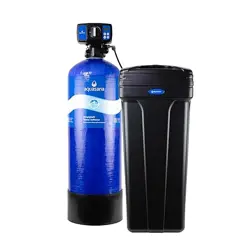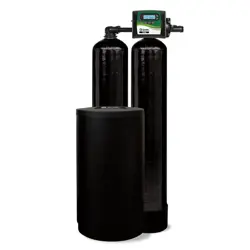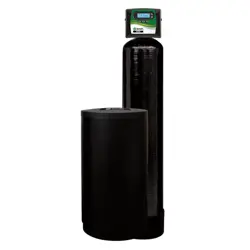
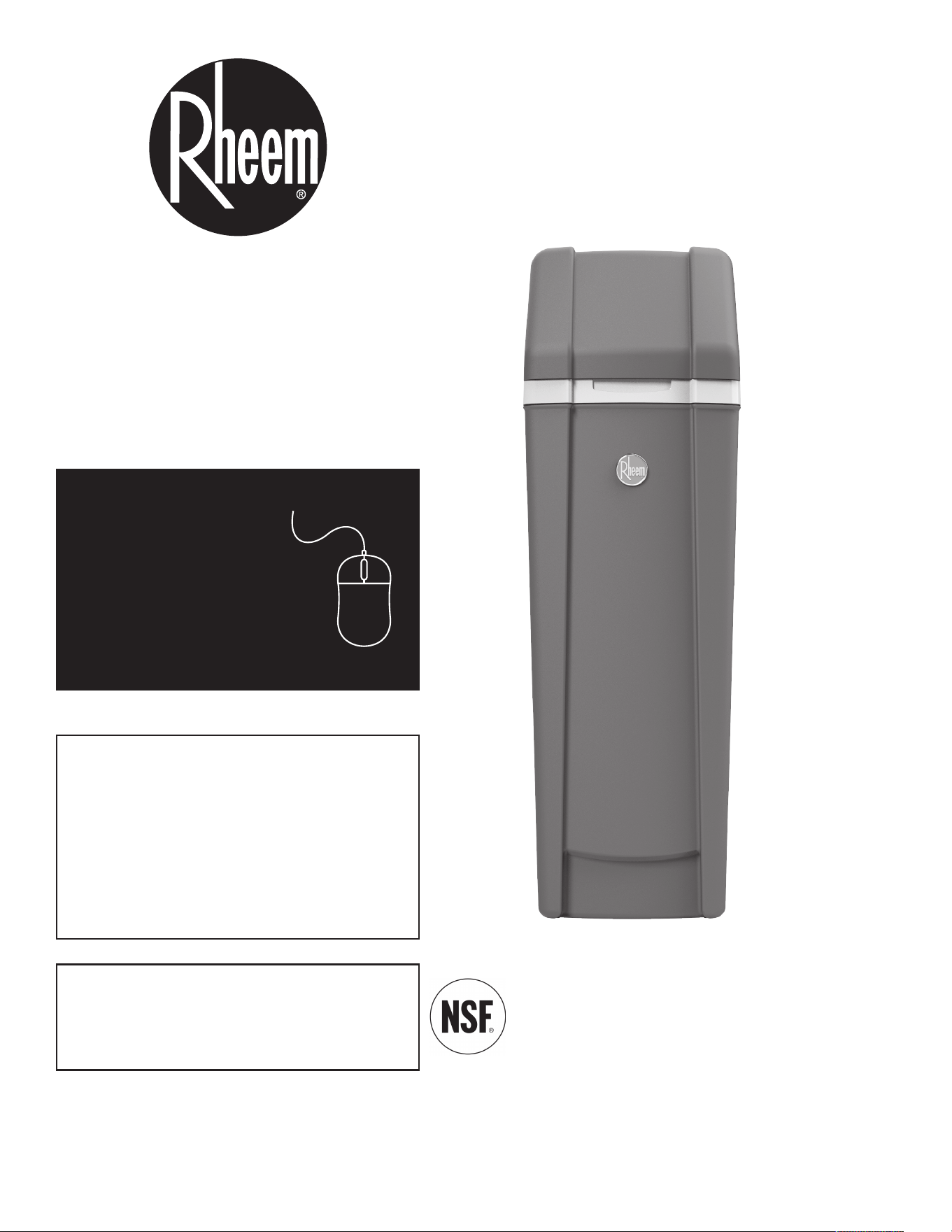
Model RHS42
System tested and certified by NSF International
against NSF/ANSI Standard 44
for hardness reduction, efficiency and the
reduction of barium and radium 226/228,
and certified to NSF/ANSI Standard 372.
7386473 (Rev. A 11/10/20)
Manufactured and warranted by
Water Channel Partners
1890 Woodlane Drive
Woodbury, MN 55125
Installation and Operation Manual
PRODUCT AND WARRANTY
REGISTRATION
Register your product
online to validate and
extend your warranty.
See warranty page for
details.
www.rheemwatertreatment.com
How to install, operate
and maintain your Demand
Controlled Water Softener
If you have any questions or concerns when
installing, operating or maintaining your water
softener, call our toll free number:
1-800-754-7027
or visit www.rheemwatertreatment.com
When you call, please be prepared to provide
the model and serial number of your product,
found on the rating decal inside the salt lid.
2
TABLE OF CONTENTS
Page
S
pecifications & Performance Claims . . . . . . . . . . . . . . . . . . . . . . . . . . . . . . . . . . . . . . . . . . . . . . . . . . . . . . . . . . . . 3
Before You Start . . . . . . . . . . . . . . . . . . . . . . . . . . . . . . . . . . . . . . . . . . . . . . . . . . . . . . . . . . . . . . . . . . . . . . . . . . . . 4
Inspect Shipment . . . . . . . . . . . . . . . . . . . . . . . . . . . . . . . . . . . . . . . . . . . . . . . . . . . . . . . . . . . . . . . . . . . . . . . . . . . . 5
Water Conditioning Information . . . . . . . . . . . . . . . . . . . . . . . . . . . . . . . . . . . . . . . . . . . . . . . . . . . . . . . . . . . . . . . . . 5
I
nstallation Requirements . . . . . . . . . . . . . . . . . . . . . . . . . . . . . . . . . . . . . . . . . . . . . . . . . . . . . . . . . . . . . . . . . . . . 6-7
Installation Instructions . . . . . . . . . . . . . . . . . . . . . . . . . . . . . . . . . . . . . . . . . . . . . . . . . . . . . . . . . . . . . . . . . . . . . 8-11
P
rogramming the Water Softener . . . . . . . . . . . . . . . . . . . . . . . . . . . . . . . . . . . . . . . . . . . . . . . . . . . . . . . . . . . 12-13
Controller Features . . . . . . . . . . . . . . . . . . . . . . . . . . . . . . . . . . . . . . . . . . . . . . . . . . . . . . . . . . . . . . . . . . . . . . 14-17
Bypass Blending Valve . . . . . . . . . . . . . . . . . . . . . . . . . . . . . . . . . . . . . . . . . . . . . . . . . . . . . . . . . . . . . . . . . . . . . . 18
Routine Maintenance . . . . . . . . . . . . . . . . . . . . . . . . . . . . . . . . . . . . . . . . . . . . . . . . . . . . . . . . . . . . . . . . . . . . . 19-20
Troubleshooting . . . . . . . . . . . . . . . . . . . . . . . . . . . . . . . . . . . . . . . . . . . . . . . . . . . . . . . . . . . . . . . . . . . . . . . . . 21-23
Exploded View & Parts List . . . . . . . . . . . . . . . . . . . . . . . . . . . . . . . . . . . . . . . . . . . . . . . . . . . . . . . . . . . . . . . . 24-27
Warranty . . . . . . . . . . . . . . . . . . . . . . . . . . . . . . . . . . . . . . . . . . . . . . . . . . . . . . . . . . . . . . . . . . . . . . . . . . . . . . . . . 28
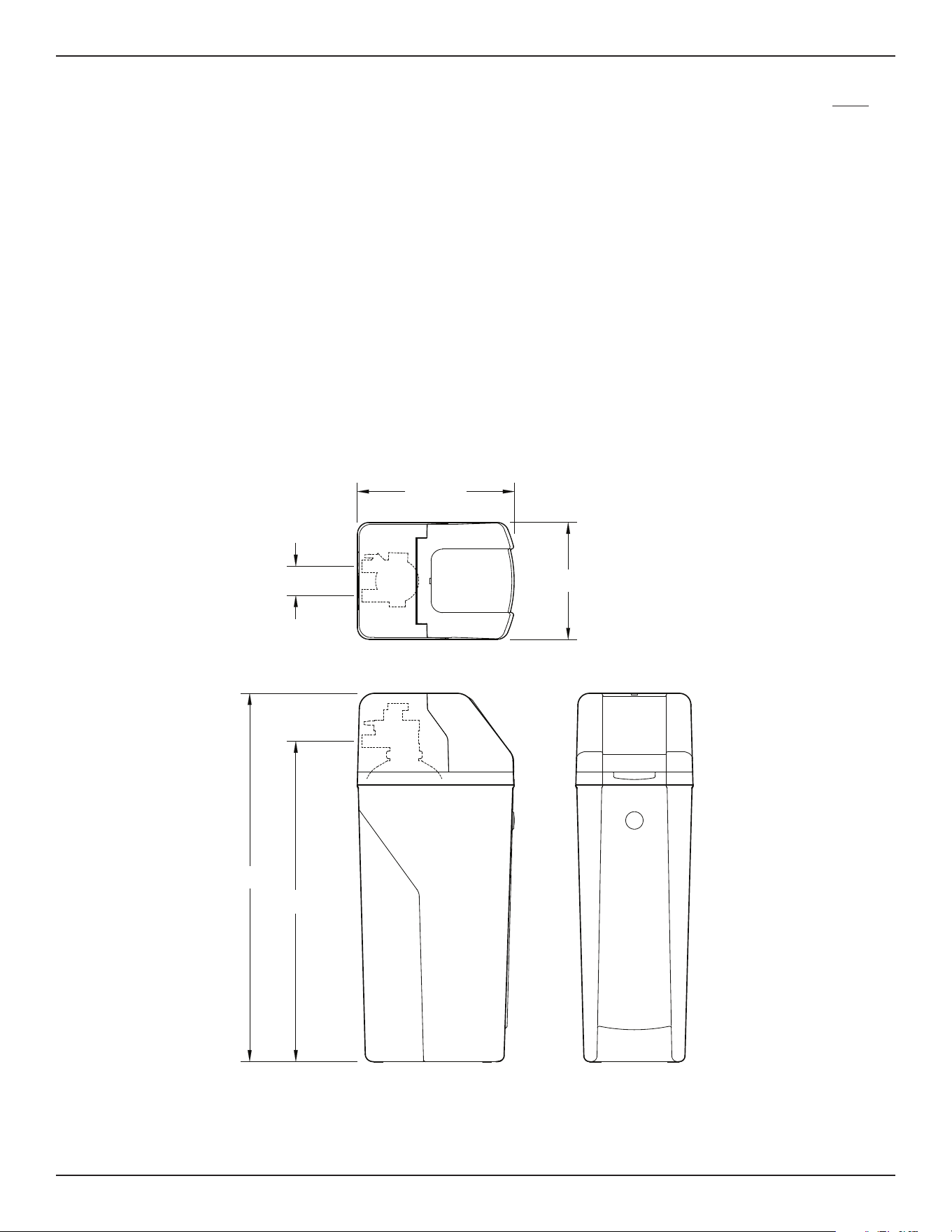
Dimensions
FRONT VIEWSIDE VIEW
TOP VIEW
3-3/4"
IN
OUT
41-3/4"
IN - OUT
48"
20-1/2"
15-1/4"
41-3/4”
20-1/2”
OUT
IN
IN – OUT
FIG. 1
FRONT VIEWSIDE VIEW
48”
15-1/4”
3-3/4”
TOP VIEW
3
Specifications & Performance Claims
This model is efficiency rated. The efficiency rating is valid only at the minimum salt dose. This system has a
demand initiated regeneration (D.I.R.) feature that complies with specific performance specifications intended to min-
i
mize the amount of regenerant brine and water used in their operation.
T
his water softener has a rated softener efficiency of not less than 3,350 grains of total hardness exchange per
pound of salt (based on sodium chloride) and shall not deliver more salt than its listed rating or be operated at a
s
ustained maximum service flow rate greater than its listed rating. This system has been proven to deliver soft
water for at least ten continuous minutes at the rated service flow rate. The rated salt efficiency is measured by lab-
oratory tests described in NSF/ANSI Standard 44. These tests represent the maximum possible efficiency that the
system can achieve. Operational efficiency is the actual efficiency after the system has been installed. It is typically
less than the rated efficiency, due to individual application factors including water hardness, water usage, and other
contaminants that reduce a softener's capacity.
*Intermittent flow rate does not represent the maximum service flow rate used for determining
the softener’s rated capacity and efficiency. Continuous operation at flow rates greater than
the service flow rate may affect capacity and efficiency performance.
**Capacity to reduce clear water iron is substantiated by laboratory test data. State of Wisconsin
requires additional treatment if water supply contains clear water iron exceeding 5 ppm.
This system conforms to NSF/ANSI Standard 44 for the specific performance claims as verified
and substantiated by test data.
Variable Salt Dose: The salt dose is selected by the electronic controls at regeneration time
based on the amount needed.
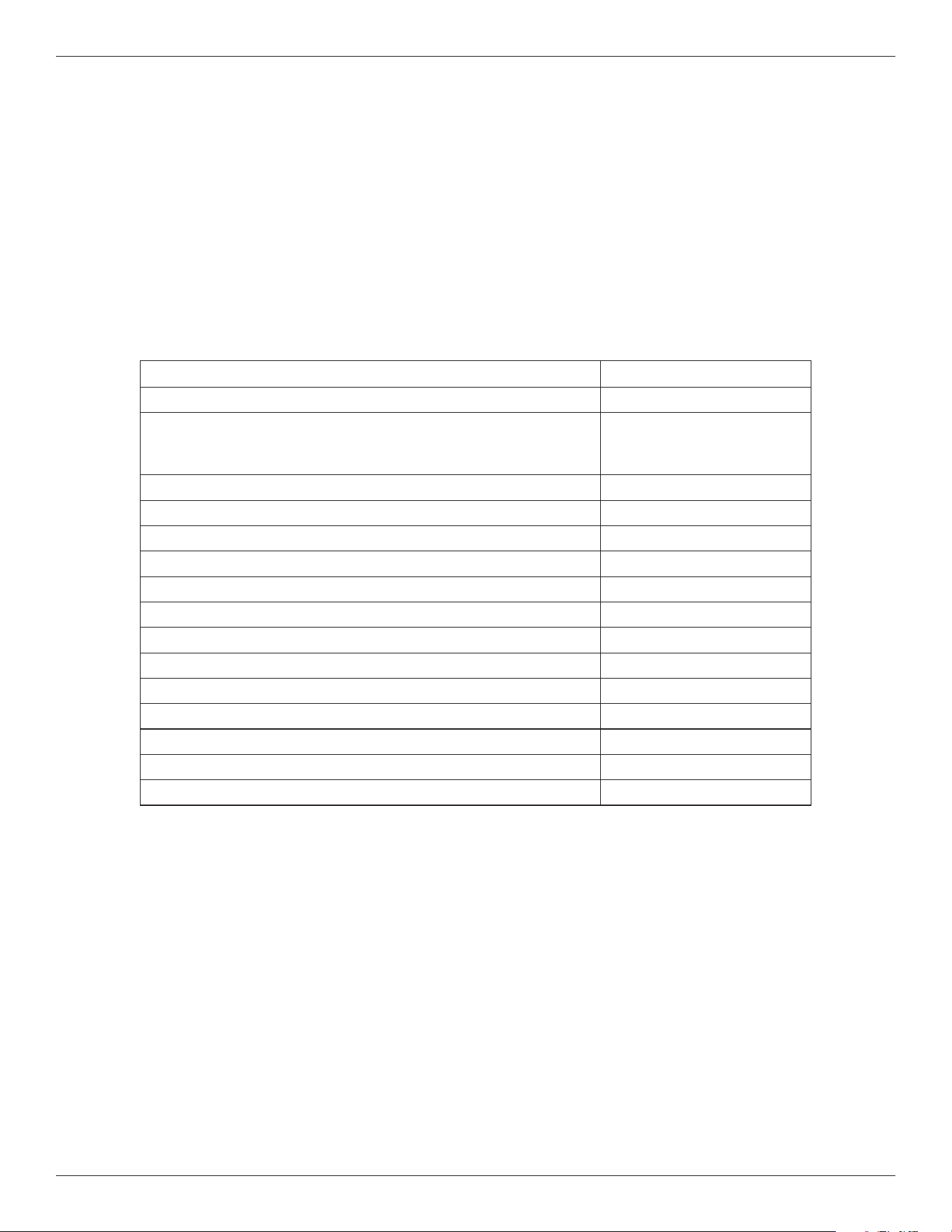
Model RHS42
Model Code rH42
Rated Softening Capacity (Grains @ Salt Dose)
12,400 @ 2.5 lbs.
29,900 @ 8.0 lbs.
42,400 @ 16.3 lbs.
Rated Efficiency (Grains/Pound of Salt @ Minimum Salt Dose) 5,010 @ 2.5 lbs.
Water Used During Regeneration @ Minimum Salt Dose 2.5 gallons / 1,000 grains
Total Water Used Per Regeneration @ Maximum Salt Dose 45.9 gallons
Rated Service Flow Rate 9.9 gpm
Amount of High Capacity Ion Exchange Resin 1.20 cu. ft.
Pressure Drop at Rated Service Flow 12.0 psig
Intermittent Flow Rate @ 30 psi* 22.4 gpm
Water Supply Max. Hardness 140 gpg
Water Supply Max. Clear Water Iron 11 ppm**
Water Pressure Limits (min. / max.) 20 - 125 PSI
Water and Ambient Temperature Limits (min. / max.) 40 - 120 °F
Minimum Water Supply Flow Rate 3 gpm
Maximum Drain Flow Rate 2.0 gpm
Questions? Call Toll Free 1-800-754-7027 or visit www.rheemwatertreatment.com
When you call, please be prepared to provide the model and serial number,
found on the rating decal inside the salt lid.
4
Before You Start
In the state of Massachusetts: The Commonwealth of Massachusetts plumbing code 248-CMR shall
be adhered to. A licensed plumber shall be used for this installation.
= The water softener requires a minimum water flow of 3 gallons per minute at the inlet. Maximum allowable inlet
w
ater pressure is 125 psi. If daytime pressure is over 80 psi, nighttime pressure may exceed the maximum. Use
a pressure reducing valve if necessary (Adding a pressure reducing valve may reduce the flow). If your home is
equipped with a back flow preventer, an expansion tank must be installed in accordance with local codes and laws.
=
The water softener works on 24V DC electrical power, supplied by a direct plug-in power supply (included). Be
sure to use the included power supply and plug it into a nominal 120V, 60 Hz household outlet that is in a dry
location only, grounded and properly protected by an overcurrent device such as a circuit breaker or fuse.
= Do not use this system to treat water that is microbiologically unsafe or of unknown quality without adequate dis-
infection upstream or downstream of the system.
European Directive 2002/96/EC requires all electrical and electronic equipment to be disposed of accord-
ing to Waste Electrical and Electronic Equipment (WEEE) requirements. This directive or similar laws are
in place nationally and can vary from region to region. Please refer to your state and local laws for prop-
er disposal of this equipment.
In the state of California: You must turn the Salt Efficiency Feature setting to ON. This may initiate
more frequent recharges. However, it will operate at 4,000 grains per pound of salt or higher. To turn
on the Salt Efficiency Feature, follow the instructions in the “Salt Efficiency” section of this manual.
Do not return the water softener to store.
If you have any questions, or there are missing parts or damage, please call Toll Free 1-800-754-7027
or visit www.rheemwatertreatment.com
When you call, please be prepared to provide the model and serial number, found on the rating decal
inside the salt lid.
5
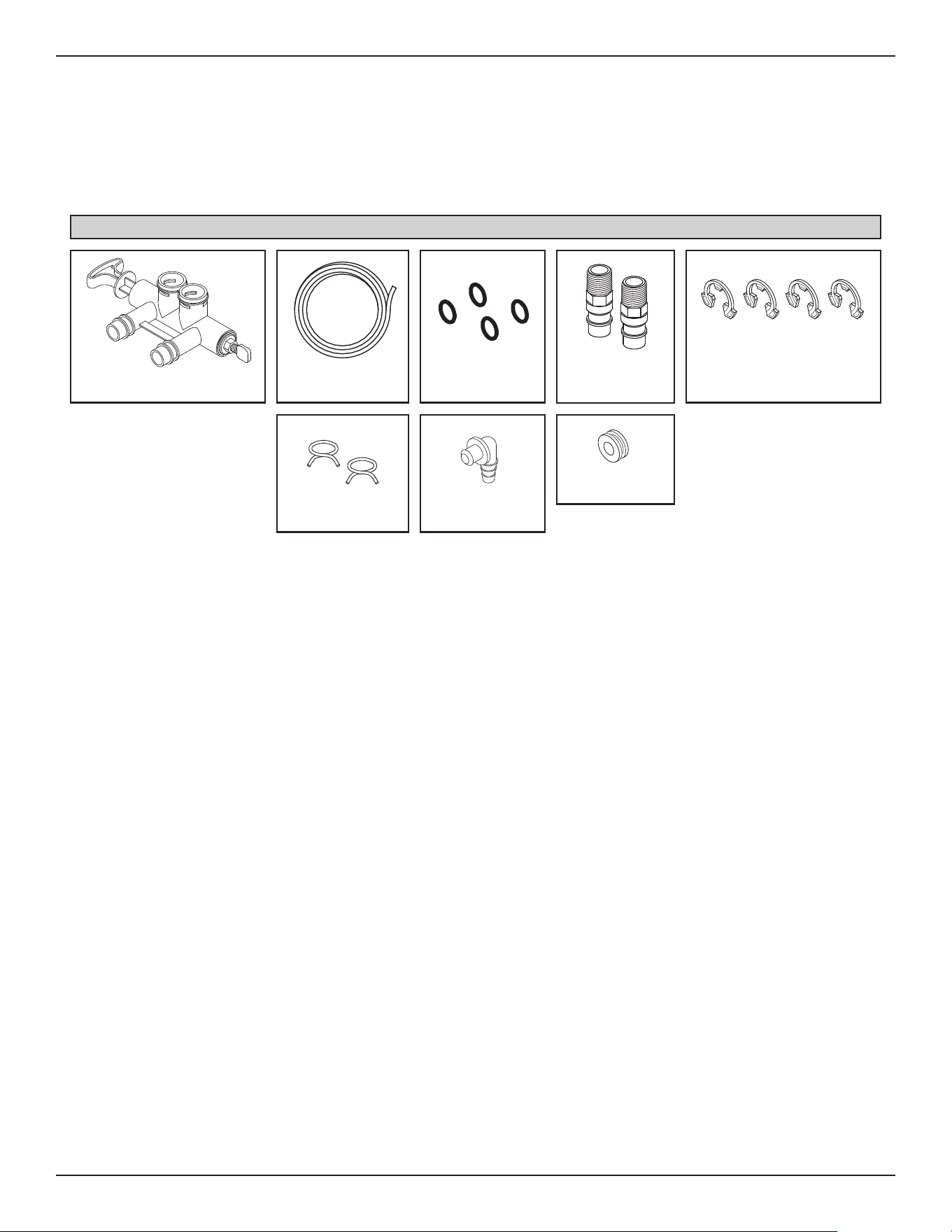
FIG. 2
Drain HoseBypass Valve
Adaptor Elbow
Installation
Adaptors
Hose Clamps
O-rings
Grommet
Clips
(2 are shipped installed
on the softener’s valve)
Inspect Shipment
Water Conditioning Information
IRON
Iron in water can cause stains on clothing and plumb-
ing fixtures. It can negatively affect the taste of food,
drinking water, and other beverages. Iron in water is
measured in parts per million (ppm). The total* ppm of
iron, and type or types*, is determined by chemical
analysis. Four different types of iron in water are:
= Ferrous (clear water) iron
= Ferric (red water) iron
= Bacterial and organically bound iron
= Colloidal and inorganically bound iron (ferrous or
ferric)
Ferrous (clear water) iron is soluble and dissolves in
water. This water softener will reduce moderate
amounts of this type of iron (see specifications).**
Ferrous (clear water) iron is usually detected by taking
a sample of water in a clear bottle or glass.
Immediately after taking, the sample is clear. As the
water sample stands, it gradually clouds and turns
slightly yellow or brown as air oxidizes the iron. This
usually occurs in 15 to 30 minutes.
When using the softener to reduce Ferrous (clear
water) iron, add 5 grains to the hardness setting for
every 1 ppm of Ferrous (clear water) iron. See "Set
Water Hardness Number" section.
Ferric (red water), and bacterial and organically bound
irons are insoluble. This water softener will not
remove ferric or bacterial iron. This iron is visible
immediately when drawn from a faucet because it has
oxidized before reaching the home. It appears as
small cloudy yellow, orange, or reddish suspended
particles. After the water stands for a period of time,
the particles settle to the bottom of the container.
Generally these irons are removed from water by filtra-
tion. Chlorination is also recommended for bacterial
iron.
Colloidal and inorganically bound iron is of ferric or fer-
rous form that will not filter or exchange out of water.
This water softener will not remove colloidal iron. In
some instances, treatment may improve colloidal iron
water. Colloidal iron water usually has a yellow
appearance when drawn. After standing for several
hours, the color persists and the iron does not settle,
but remains suspended in the water.
SEDIMENT
Sediment is fine, foreign material particles suspended
in water. This water softener will not remove sedi-
ment. This material is most often clay or silt. Extreme
amounts of sediment may give the water a cloudy
appearance. A sediment filter installed upstream of
the water softener normally corrects this situation.
* Water may contain one or more of the four types of
iron and any combination of these. Total iron is the
sum of the contents.
** Capacity to reduce clear water iron is substantiated
by laboratory test data.
The parts required to assemble and install the water
softener are included with the unit. Thoroughly check
the water softener for possible shipping damage and
p
arts loss. Also inspect and note any damage to the
shipping carton.
Remove and discard (or recycle) all packing materials.
To avoid loss of small parts, we suggest you keep the
small parts in the parts bag until you are ready to use
t
hem.
Packing List
6
Installation Requirements
PLUMBING CODES
All plumbing must be completed in accordance with
national, state and local plumbing codes.
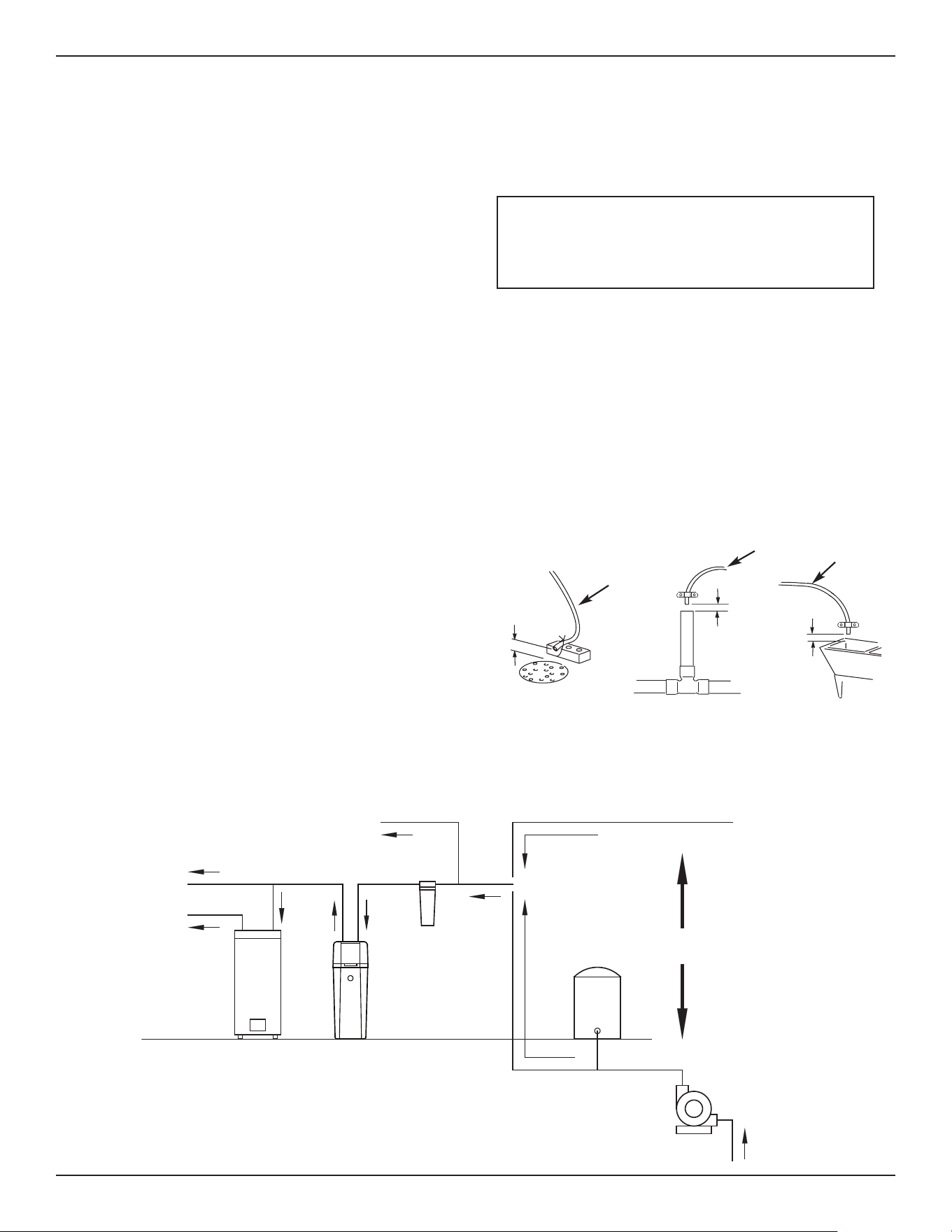
1-1/2”
air gap
In the state of Massachusetts: The Commonwealth
of Massachusetts plumbing code 248-CMR shall
be adhered to. A licensed plumber shall be used
for this installation.
AIR GAP REQUIREMENTS
A drain is needed for the water discharged from the
valve during the softener’s regeneration cycle (See
Figure 3). A floor drain, close to the water softener, is
preferred. A laundry tub, standpipe, etc. are other
drain options. Secure valve drain hose in place.
Leave an air gap of 1-1/2” between the end of the
hose and the drain. This gap is needed to prevent
backflow of sewer water into the water softener. Do
not put the end of the drain hose into the drain.
FIG. 3
1-1/2”
air gap
Drain
Hose
Drain
Hose
1-1/2”
air gap
LOCATION REQUIREMENTS
Consider all of the following when selecting an installa-
tion location for the water softener.
=
Do not locate the water softener where freezing
temperatures occur. Do not attempt to treat water
over 120ºF. Freezing temperatures or hot water
damage voids the warranty.
= To condition all water in the home, install the water
softener close to the water supply inlet, and
upstream of all other plumbing connections, except
outside water pipes. Outside faucets should remain
on hard water to avoid wasting conditioned water
and salt.
= A nearby drain is needed to carry away regenera-
tion discharge (drain) water. Use a floor drain,
laundry tub, sump, standpipe, or other options
(check your local codes). See "Air Gap
Requirements" and "Valve Drain Requirements"
sections.
= The water softener works on 24V DC electrical
power, supplied by a direct plug-in power supply
(included). Provide nearby a 120V, 60Hz electrical
outlet in accordance with NEC and local codes.
= Always install the water softener between the water
inlet and water heater. Any other installed water
conditioning equipment should be installed between
the water inlet and water softener (See Figure 4
below).
= Avoid installing in direct sunlight. Excessive sun
heat may cause distortion or other damage to non-
metallic parts.
= Install on a flat, stable surface that evenly supports
the weight of the water softener.
FIG. 4
Pressure
Tank
City Water Supply
Well Water Supply
Well
Pump
OR
Optional
Sediment
Filter
Water
Heater
Water
Softener
Untreated Water to
Outside Faucets
Hot Water
to House
Cold Water
to House
Drain
Hose
LAUNDRY TUBSTANDPIPE
FLOOR DRAIN
THE PROPER ORDER TO INSTALL WATER TREATMENT EQUIPMENT
7
Installation Requirements
VALVE DRAIN REQUIREMENTS
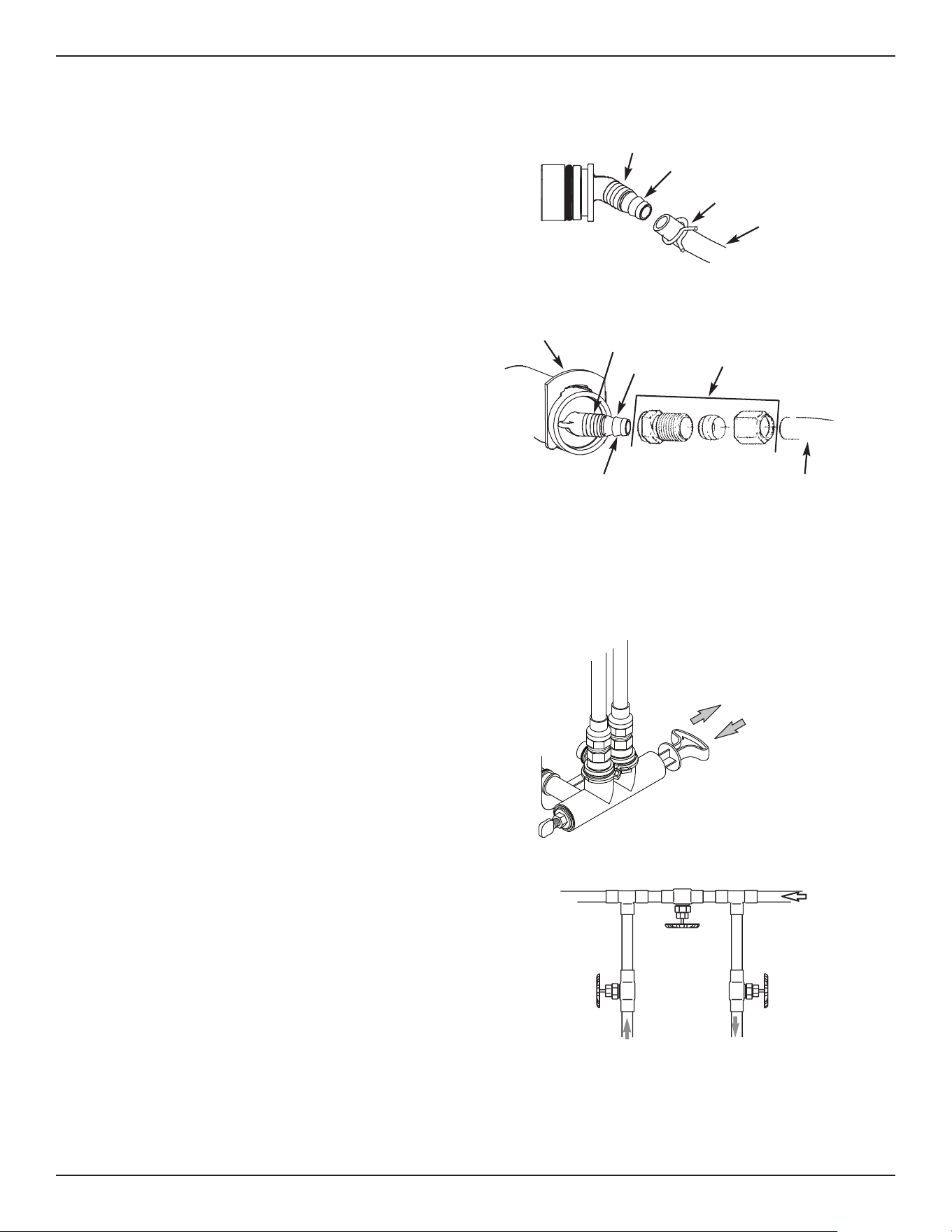
Using the flexible drain hose (included), measure and
cut to the length needed. Flexible drain hose is not
allowed in all localities (check your plumbing codes). If
local codes do not allow use of a flexible drain hose, a
rigid valve drain run must be used. Purchase a com-
pression fitting (1/4 NPT x 1/2 in. minimum tube) and
1/2" tubing from your local hardware store. Plumb a
rigid drain as needed (See Figure 6).
NOTE: Avoid drain hose runs longer than 30 feet.
Avoid elevating the hose more than 8 feet
above the floor. Make the valve drain line as
short and direct as possible.
INLET / OUTLET PLUMBING OPTIONS
Always install either a single bypass valve (provided),
as shown in Figure 7, or, if desired, parts for a 3 valve
bypass system (not included) can be purchased and
assembled, as shown in Figure 8. Bypass valves
allow you to turn off water to the softener for mainte-
nance if needed, but still have water in house pipes.
Use:
= Copper pipe
= Threaded pipe
= PEX (Crosslinked Polyethylene) pipe
= CPVC plastic pipe
= Other pipe approved for use with potable water
IMPORTANT: Do not solder with plumbing attached to
installation adaptors and single bypass
valve. Soldering heat will damage the
adaptors and valve.
FIG. 8
SINGLE BYPASS VALVE
3 VALVE BYPASS
From Water
Softener
To Water
Softener
Inlet
Valve
Outlet
Valve
Bypass
Valve
FIG. 7
Pull out for “Service”
(Soft water)
Push in for
“Bypass”
FIG. 5
FIG. 6
1/4” NPT
Thread
Clip
Barbs
1/4 NPT
Threads
1/2” Outside Dia.
Copper Tube
(not included)
Compression Fitting.
1/4 NPT x 1/2” O.D.
Tube (not included)
Cut barbs from drain fit-
ting (pull clip to remove
fitting from valve)
Barbs for 3/8”
I.D. Tubing
Drain Hose
Hose Clamp
8
Installation Instructions
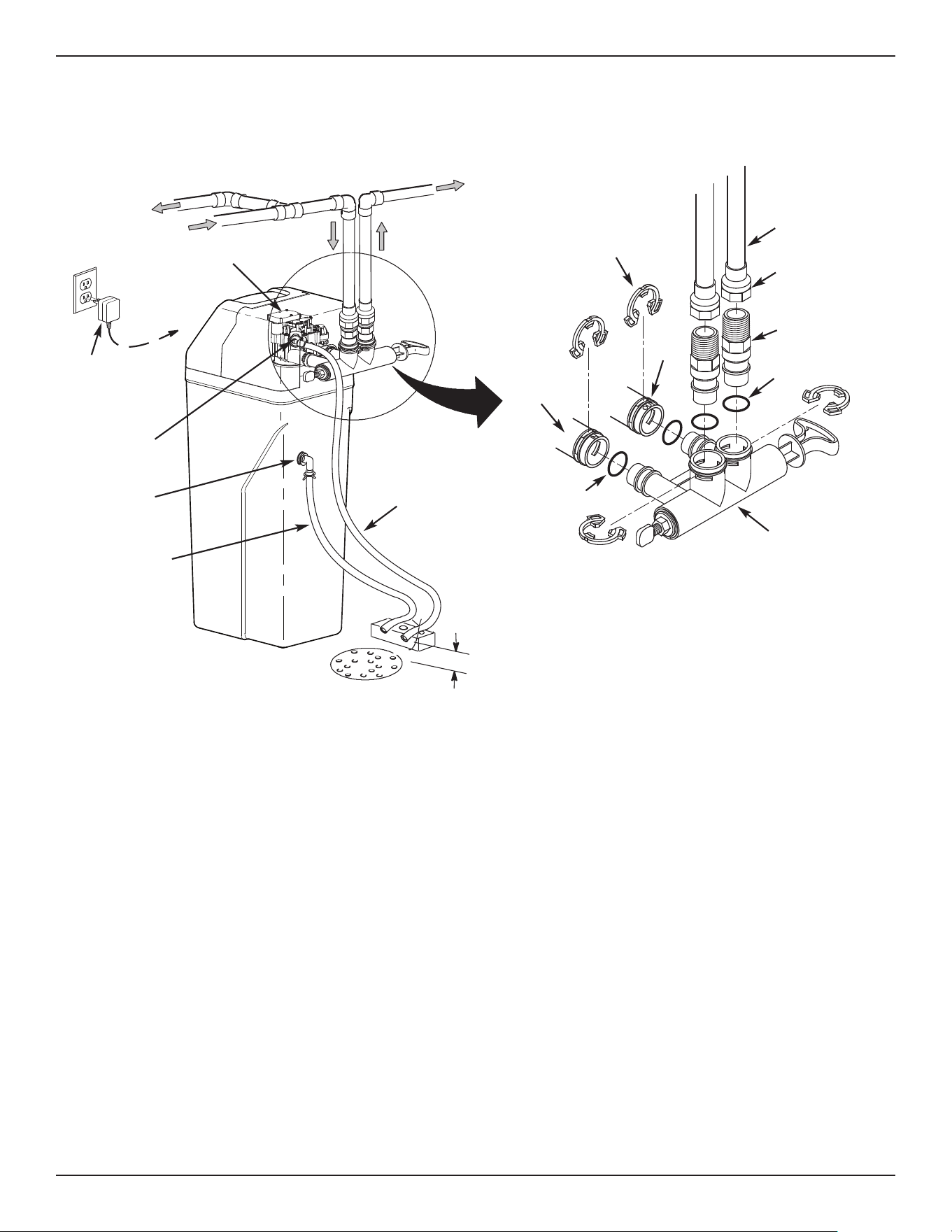
TYPICAL INSTALLATION
FIG. 9
NOTE: See “Air Gap Requirements” section.
Inlet
Outlet
Clips
Pipe
To Outside
Faucets
1” NPT Sweat
Adaptor (not
included)
O-ring
Single
Bypass Valve
Lubricated
O-ring
Soft
Water
Hard Water
M
a
i
n
W
ate
r
Pi
pe
W
ater Softener
Valve
Valve Drain
Elbow
Valve Drain
Hose*
*Do not connect the
water softener valve drain
tubing to the salt storage
tank overflow hose.
Floor Drain
Overflow
Drain Elbow
Salt Storage
Tank Overflow
Hose*
Secure Valve Drain Hose
in place over Floor Drain
1” NPT
Threaded
Adaptor
1-1/2”
air gap
Plug-in
Power
Supply
To
Controller
TURN OFF WATER SUPPLY
1. Close the main water supply valve, located near the
well pump or water meter.
2. Shut off the electric or fuel supply to the water heater.
3. Open all faucets to drain all water from house pipes.
NOTE: Be sure not to drain water from the water
heater, as damage to the water heater ele-
ments could result.
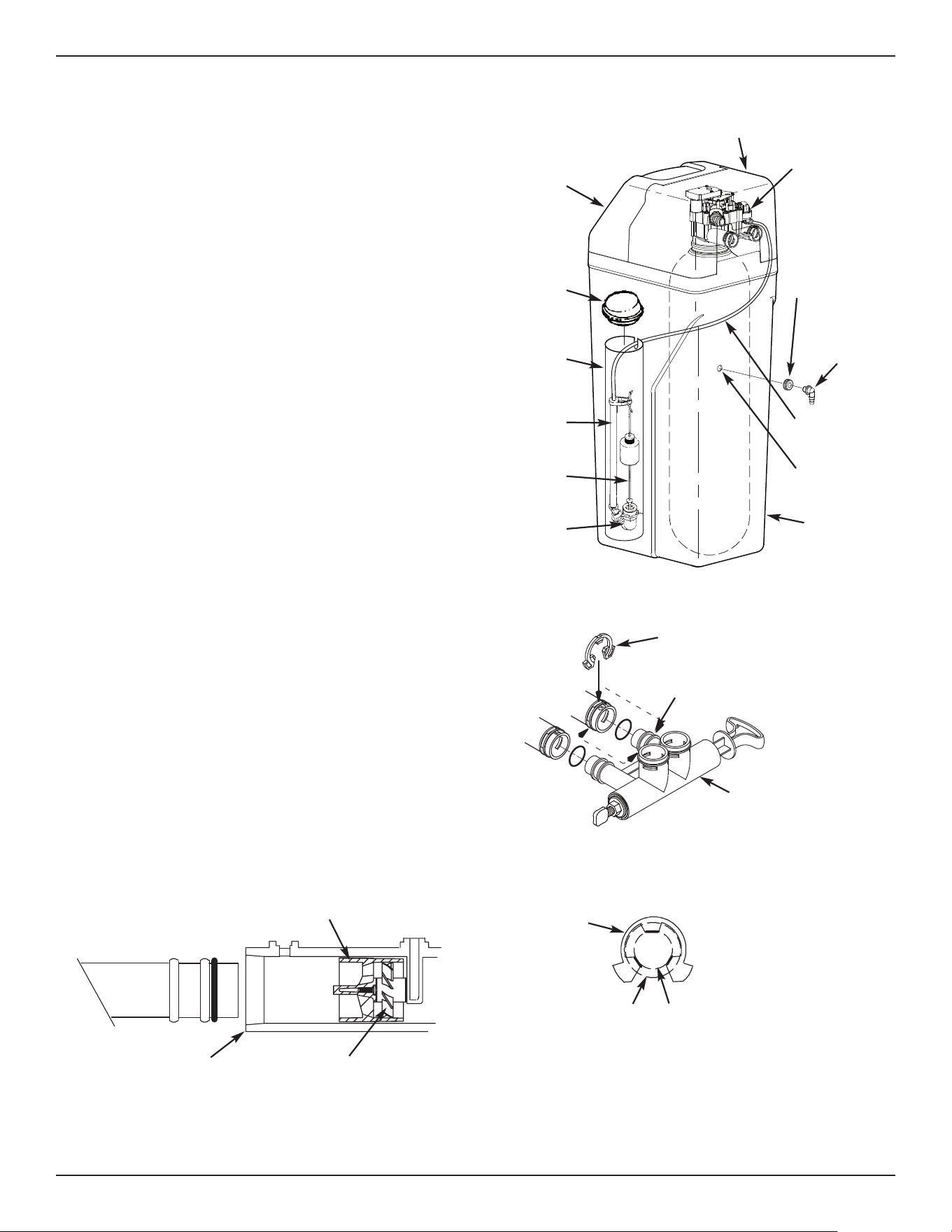
ASSEMBLY
1. Rheem
®
models are factory assembled. During
installation, unsnap and remove the top cover,
together with the salt lid, to expose the softener
valve assembly. Set them aside to prevent damage.
Check the brinewell to be sure it is secured and ver-
tical (See Figure 11).
2. Install the brine tank overflow grommet and elbow
into the 13/16” diameter hole in the back of the salt
storage tank wall.
MOVE THE UNIT INTO PLACE
1. Move the water softener into the desired location.
Set it on a solid, level surface.
IMPORTANT: Do not place shims directly under the
salt storage tank to level the softener.
The weight of the tank, when full of
water and salt, may cause the tank to
fracture at the shim.
continued on next page
9
Installation Instructions
c
ontinued from previous page
FIG. 13
Correct Assembly
Clip
Outside diameter
of clip channel on
single bypass valve
Outside diameter
of water softener
valve inlet & outlet
NOTE: Be sure all 3 tabs of the clip go through the matching
holes on the water softener valve inlet or outlet, and
fully into the channel on the single bypass valve.
Make sure that the tabs are fully seated.
2. Visually check and remove any debris from the
water softener valve inlet and outlet ports.
3. Make sure the turbine assembly spins freely in the
"
out" port of the valve (See Figure 10).
4. If not already done, put a light coating of silicone
grease on the single bypass valve o-rings.
5. Push the single bypass valve into the softener valve
as far as it will go. Snap the two large holding clips
into place, from the top down as shown in Figures
12 & 13.
IMPORTANT: Be sure the clips snap firmly into place
so the single bypass valve will not pull
out.
FIG. 10
Turbine
Support
Valve Outlet Turbine
FIG. 12
Clip
Channel
Single Bypass Valve
COMPLETE INLET AND OUTLET PLUMBING
Measure, cut, and loosely assemble pipe and fittings
from the main water pipe to the inlet and outlet ports of
the water softener valve. Be sure to keep fittings fully
together, and pipes squared and straight.
Be sure hard water supply pipe goes to the water sof-
tener valve inlet side.
NOTE: Inlet and outlet are marked on the water sof-
tener valve. Trace the water flow direction to
be sure hard water is to inlet.
IMPORTANT: Be sure to fit, align and support all
plumbing to prevent putting stress on
the water softener valve inlet and outlet.
Undue stress from misaligned or unsup-
ported plumbing may cause damage to
the valve.
Complete the inlet and outlet plumbing for the type of
pipes you will be using.
FIG. 11
Brine Tank
Overflow
Elbow
B
rine Tank
Overflow
Grommet
13/16” Hole
Salt Lid
Salt
Storage
Tank
Float
Stem
Brine
Tubing
Brinewell
Cover
Stand
Tube
Brine
Valve
Brinewell
Top Cover
Nozzle & Venturi
Assembly
10
Installation Instructions
COLD WATER PIPE GROUNDING
CAUTION: The house cold water pipe (metal only)
is often used as a ground for the house
electrical system, The 3-valve bypass
type of installation, shown in Figure 8,
will maintain ground continuity. If you
use a plastic bypass valve at the unit,
continuity is broken. To restore the
ground, do the following:
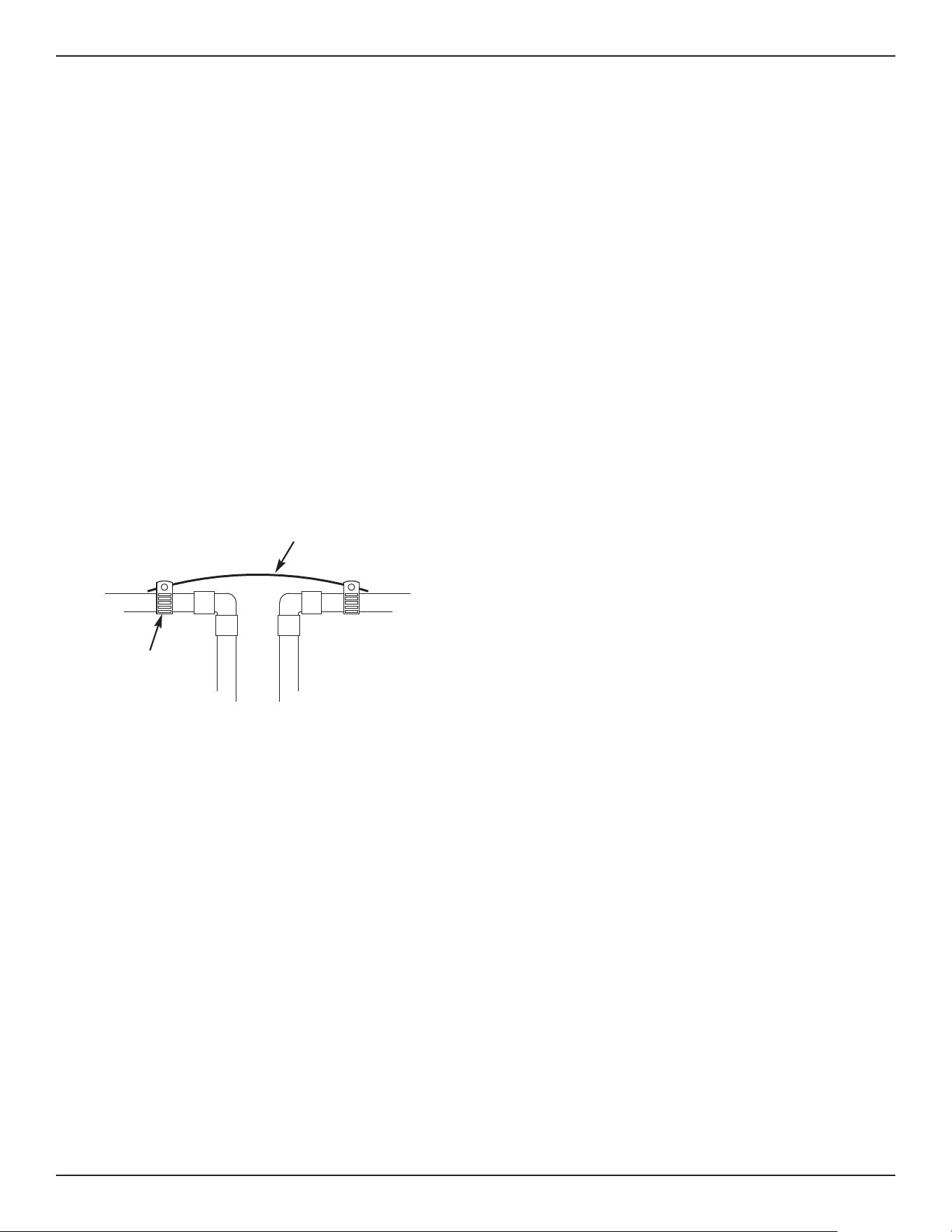
1. Install a #4 copper wire across the removed section
of main water pipe, securely clamping it at both
ends (See Figure 14) - parts not included.
NOTE: Check local plumbing and electrical codes
for proper installation of the ground wire.
The installation must conform to them. In
Massachusetts, plumbing codes of
Massachusetts shall be conformed to.
Consult with your licensed plumber.
FIG. 14
Ground
Wire
Clamp (2)
INSTALL VALVE DRAIN HOSE
NOTE: See valve drain options on pages 6 & 7.
1. Measure, cut to needed length and connect the 3/8"
drain line (provided) to the water softener valve
drain fitting. Use a hose clamp to hold the hose in
place.
IMPORTANT: If codes require a rigid drain line see
“Valve Drain requirements" section.
2. Run the drain hose (or a rigid line) to the floor drain.
Secure drain hose. This will prevent “whipping'' dur-
ing regenerations. Be sure to provide a 1-1/2”
minimum air gap to prevent possible sewer
water backup. See “Air Gap Requirements" sec-
tion.
NOTE: In addition to a floor drain, you can use a laun-
dry tub or standpipe as a drain point for this
hose.. Avoid long drain hose runs, or elevating
the hose more than 8 feet above the floor.
1
. Measure, cut to needed length and connect the 3/8”
drain line (provided) to the salt storage tank overflow
e
lbow and secure in place with a hose clamp.
2. Route the hose to the floor drain, or other suitable
drain point no higher than the drain fitting on the salt
storage tank (This is a gravity drain). If the tank
overfills with water, the excess water flows to the
drain point. Cut the drain line to the desired length
and route it neatly out of the way.
IMPORTANT: For proper operation of the water soften-
er, do not connect the water softener
valve drain tubing to the salt storage
tank overflow hose.
TEST FOR LEAKS
To prevent air pressure in the water softener and
plumbing system, complete the following steps in order:
1. Fully open two or more softened cold water faucets
close to the water softener, located downstream
from the water softener.
2. Place the bypass valve (single or 3 valve) into the
"bypass" position. See Figures 7 & 8 on Page 7.
3. Slowly open the main water supply valve. Run
water until there is a steady flow from the opened
faucets, with no air bubbles.
4. Place bypass valve(s) in "service" or soft water posi-
tion as follows:
= Single bypass valve: Slowly move the valve stem
toward "service," pausing several times to allow
the water softener to fill with water.
= 3 valve bypass: Fully close the bypass valve and
open the outlet valve. Slowly open the inlet valve,
pausing several times to allow the water softener
to fill with water.
5. After about three minutes, open a hot water faucet
until there is a steady flow and there are no air bub-
bles, then close this faucet.
6. Close all cold water faucets and check for leaks at
the plumbing connections that you made.
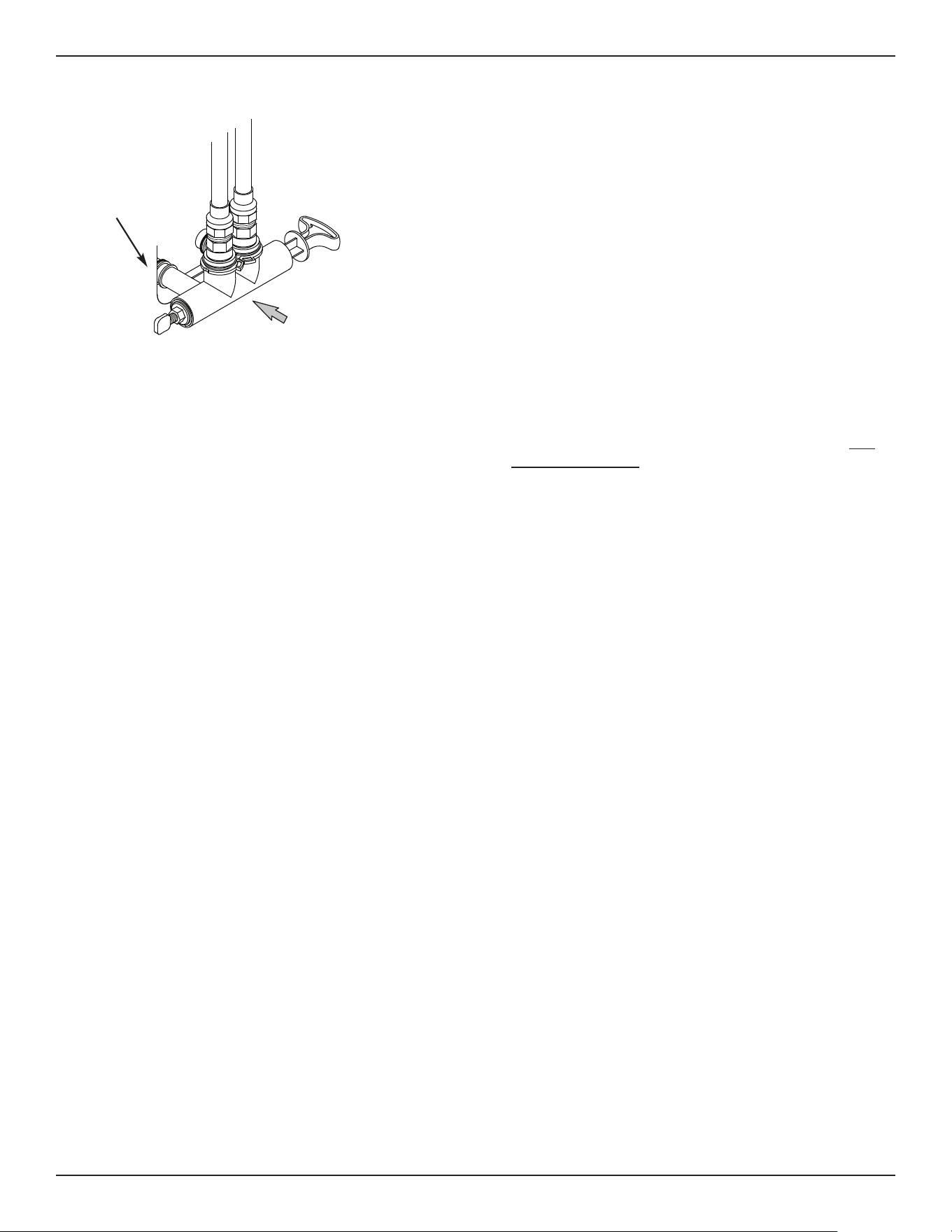
7. Check for leaks around clips at softener’s inlet and
outlet. If a leak occurs at a clip, depressurize the
plumbing (turn off the water supply and open
faucets) before removing clip. When removing clips
at the softener’s inlet or outlet, push the single
bypass valve body toward the softener (See Figure
15). Improper removal may damage clips. Do not
reinstall damaged clips.
INSTALL SALT STORAGE TANK OVERFLOW
HOSE
11
Installation Instructions
FIG. 15
...depressurize the
plumbing, then push
Bypass Valve body
toward softener
If removing
clips...
ADD WATER AND SALT TO THE SALT
STOR AGE TANK
1. Using a container, add about three gallons of clean
water into the salt storage tank.
2. Add salt to the storage tank. Use nugget, pellet or
coarse solar salts with less than 1% impurities.
PLUG IN THE POWER SUPPLY
During installation, the water softener wiring may be
moved or jostled from place. Check to be sure all
leadwire connectors are secure on the back of the
electronic board and be sure all wiring is away from
the valve gear and motor area, which rotates during
regenerations.
1. Plug the water softener’s power supply into an elec-
trical outlet that is not controlled by a switch and is
approved by local codes.
NOTE: The water heater is filled with hard water and,
as hot water is used, it will refill with condi-
tioned water. In a few days, the hot water will
be fully conditioned. To have fully conditioned
hot water immediately, wait until the initial
recharge is over. Then, drain the water heater
(following instructions for water heater) until
water runs cold.
PROGRAM THE CONTROLLER
1. Install the softener’s top cover and salt lid.
2. Complete the Programming Steps on Pages 12 & 13.
SANITIZE THE WATER SOFTENER /
SANITIZE AFTER SERVICE
Care is taken at the factory to keep your unit clean and
sanitary. Materials used to make the unit will not infect
or contaminate your water supply, and will not cause
bacteria to form or grow. However, during shipping,
storage, installation and operation, bacteria could get
into the unit. For this reason, sanitizing as follows is
suggested* when installing.
1. Slide open the salt lid, remove the brinewell cover
and pour about 3 oz. (6 tablespoons) of household
bleach into the softener brinewell. Replace the
brinewell cover.
2 Make sure the bypass valve(s) is in the “service”
(open) position.
3 Start a recharge: Press the RECHARGE button and
hold for 3 seconds, until “Recharge Now” begins to
flash in the display. This recharge draws the sanitiz-
ing bleach into and through the water softener. Any
air remaining in the unit is purged to the drain.
4. After the recharge has completed, fully open a cold
water faucet, downstream from the softener, and
allow 50 gallons of water to pass through the sys-
tem. This should take at least 20 minutes. Close
the faucet.
*Recommended by the Water Quality Association. On some
water supplies, the unit may need periodic disinfecting.
RESTART THE WATER HEATER
1. Turn on the electricity or fuel supply to the water
heater and relight the pilot, if applicable.
NOTE: The water heater is filled with hard water and,
as hot water is used, it refills with conditioned
water. In a few days, the hot water will be fully
conditioned. To have fully conditioned hot
water immediately, wait until the initial recharge
(previous step) is over. Then, drain the water
heater (following instructions for water heater)
until water runs cold.
Questions? Call Toll Free 1-800-754-7027 or visit www.rheemwatertreatment.com
When you call, please be prepared to provide the model and serial number,
found on the rating decal inside the salt lid.
12
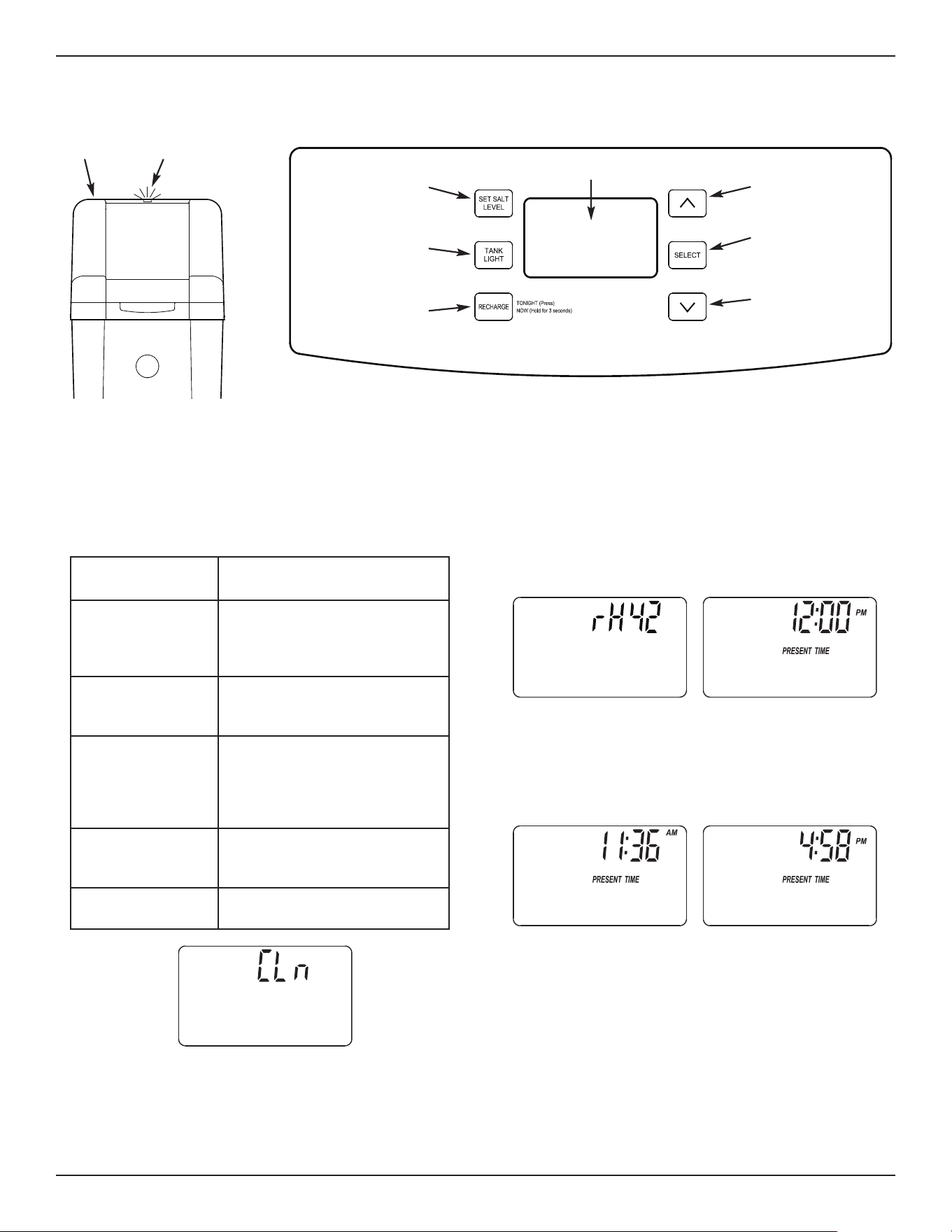
Programming the Water Softener
Display
SET SALT
LEVEL button
TANK LIGHT
button
RECHARGE
button
PROGRAM THE SOFTENER
When the power supply is plugged into the electrical
outlet, the model code (rH42) and a software version
number (example: J4.0), are briefly shown in the dis-
play. Then the words “PRESENT TIME” appear and
“12:00 PM” begins to flash.
STEP 1. SET PRESENT TIME OF DAY
If the words “PRESENT TIME" do not show in the dis-
play, press the SELECT button a few times until they do.
1. Press the r UP or s DOWN buttons to set the
present time. Up moves the display ahead; down
sets the time back.
NOTE: Press buttons and quickly release to slowly
advance the display. Hold the buttons down
for fast advance.
2. When the correct time is displayed, press the
SELECT button, and the display will change to
show the “Hardness” screen.
continued on next page
FIG. 20
FIG. 19
FIG. 17
STATUS LIGHT / CLEAN REMINDER
When the water softener is connected to electrical
power, the status light above the control panel will
operate as follows:
This is a reminder to use Rheem
®
RHWSC Water
Softener Cleaner (P/N RHWSC21) three times a
year. To reset the timer, press any button on the con-
trol panel and the flashing words will disappear. The
status light will stop flashing, unless the system is
also low on salt.
U
P button
SELECT
button
DOWN
button
FIG. 18
Salt Lid
Status Light
(
see below)
FIG. 16
Blue status light
indication
Status
Flashing slowly
The salt monitor system indi-
cates a low salt level and
needs to be set. See “Salt
Monitor System” on Page 14.
Flashing slowly,
with “CLn” in the
display (Fig. 17)
Four months have elapsed on
the system’s timer since start
up or the last reset. See below.
Flashing rapidly,
with “PRESENT
TIME” in the dis-
play and the clock
flashing slowly
The present time needs to be
set, either during initial start up
or after a long power outage.
See “Set Present Time of
Day”, at right.
Flashing rapidly,
with “Err” in the
display
The electronic self-diagnostics
have detected a problem. See
“Troubleshooting” on Page 21.
On steady (not
flashing)
The system has power and
does not require any attention.
13
Programming the Water Softener
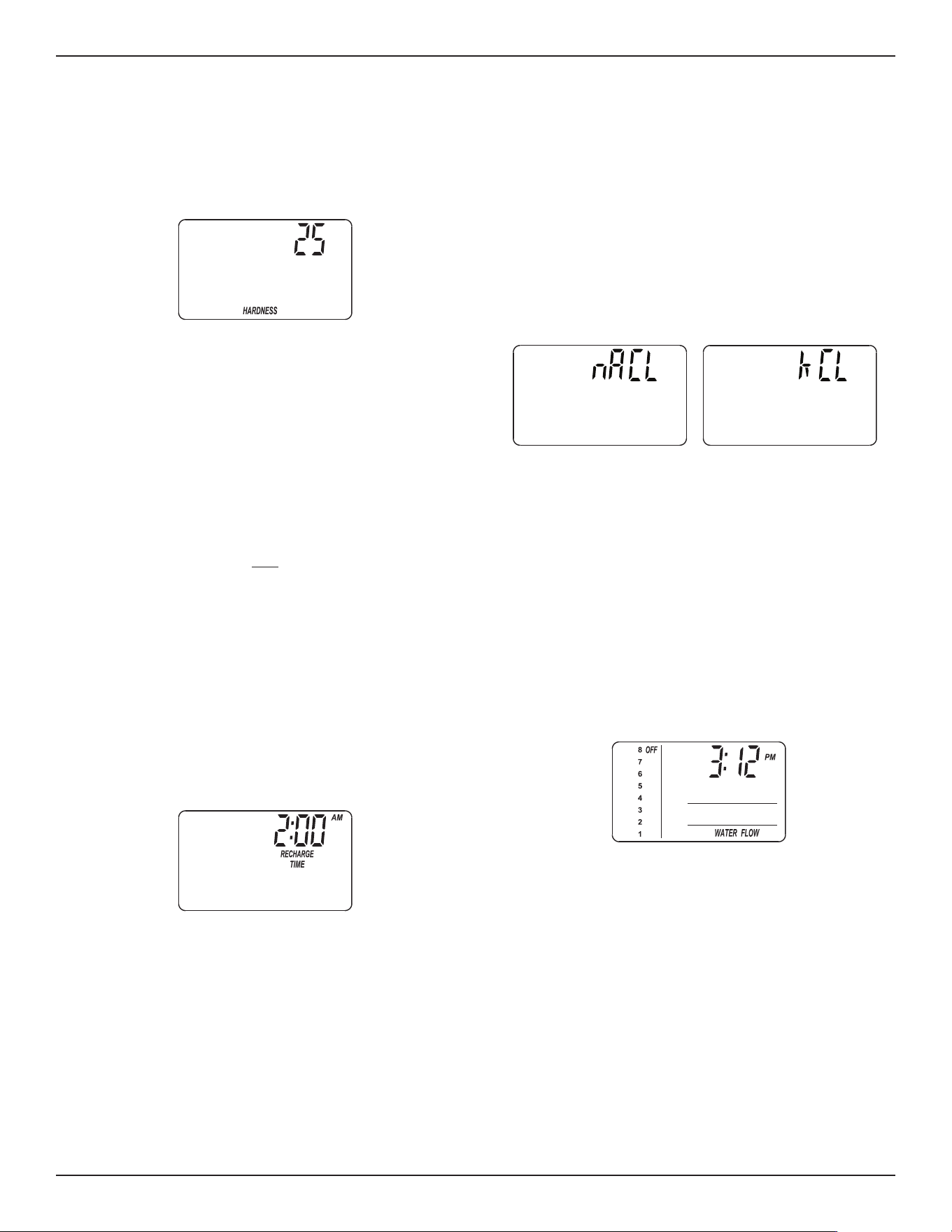
STEP 2. SET WATER HARDNESS NUMBER
If you completed the previous step, the word “HARD -
NESS" should show in the display. Otherwise, press
the SELECT button several times until it does.
1. Press the r UP or s DOWN buttons to set the
hardness of your water supply, in grains per gallon.
The default is 25.
NOTE: If your water supply contains iron, compen-
sate for it by adding to the water hardness
number. For example, assume your water is
20 gpg hard and contains 2 ppm iron. Add 5
to the hardness number for each 1 ppm of
iron. In this example, you would use 30 for
your hardness number.
20 gpg hardness
2 ppm iron x 5 = 10 +10
(times) 30 HARDNESS NUMBER
2. When finished setting your water’s hardness num-
ber, press the SELECT button, and the display will
change to show the “Recharge Time” screen.
STEP 3. SET RECHARGE (REGENERATION)
START TIME
If you completed the previous step, the words “RE -
CHARGE TIME" should show in the display. Otherwise,
press the SELECT button several times until they do.
FIG. 21
1. The softener’s default recharge start time is 2:00
AM. This is normally a time of day when water is
not being used in the household. Hard water
bypasses the softener if the household draws
water during the recharge cycle. If a different
recharge start time is desired, press the
r UP or
s DOWN buttons to change the time, in 1-hour
increments. Be sure AM or PM is correct.
2. When the desired recharge start time is displayed,
press the SELECT button, and the display will
c
hange to show one of the salt type screens in
Fig. 23.
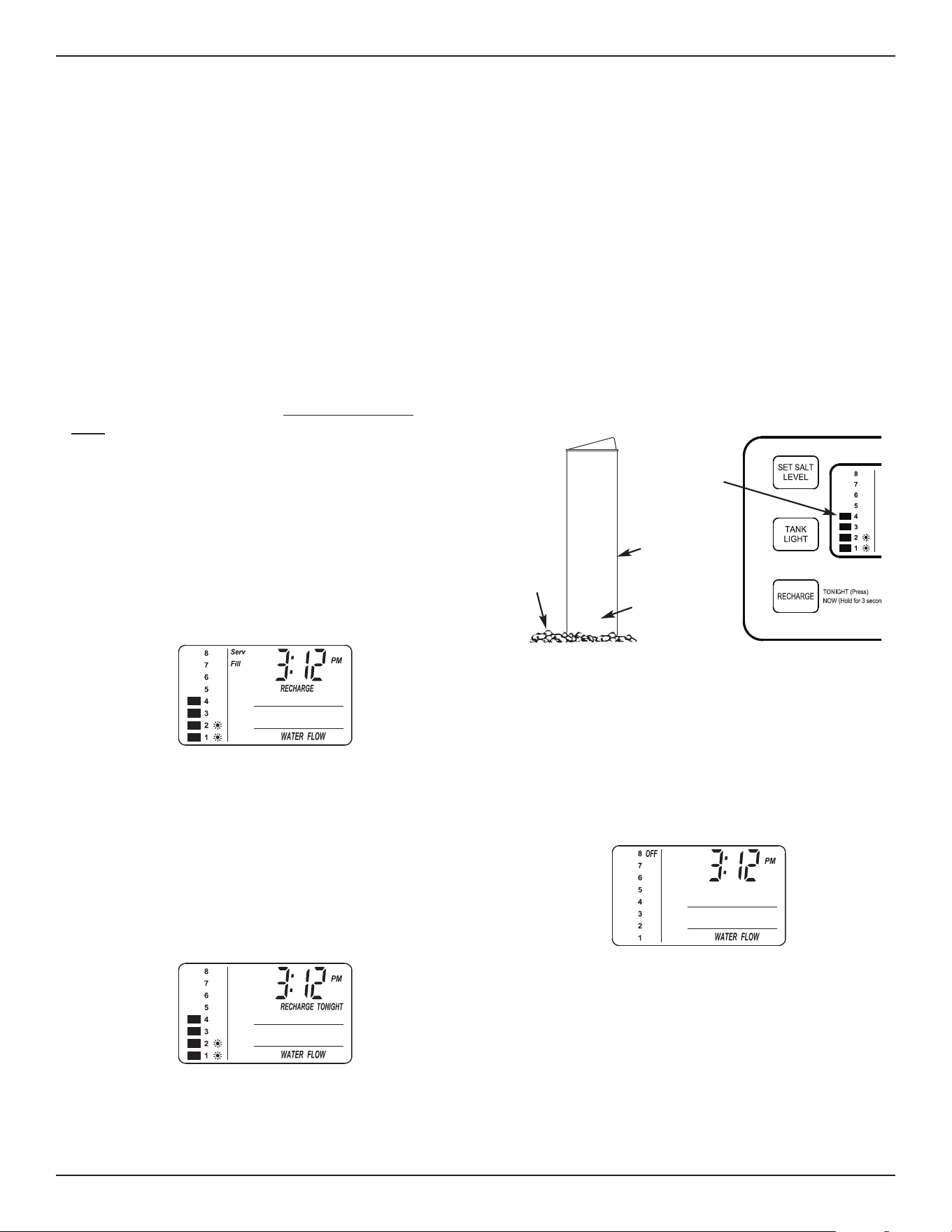
STEP 4. SET SALT TYPE
If you completed the previous step, either “NaCl” (for
Sodium Chloride) or “KCl” (for Potassium Chloride)
should show in the display. Otherwise, press the
SELECT button several times until one of them does.
FIG. 22
FIG. 24
FIG. 23
1. Press the r UP or s DOWN buttons to set the
type of salt you will be using in your water softener.
The default is NaCl (standard Sodium Chloride
water softener salt). If you will be using KCl
(Potassium Chloride) instead, be sure to set salt
type to KCl. This setting adjusts the regeneration
cycle times to compensate for the different rate at
which KCl dissolves. See also Page 19 for more
information on salt types.
2. When the correct salt type is displayed, press the
SELECT button. The display returns to the normal
time of day screen.
14
Controller Features
EXTRA RECHARGE
Sometimes, a manually initiated recharge (regenera-
tion) may be desired, or needed. Two examples are:
= You have used more water than usual (guests visit-
i
ng) and you may run out of soft water before the
next automatic regeneration.
= You did not add salt to the softener before it ran
out. Add salt to the softener before regenerating.
You can start a regeneration immediately, or you can
set the controller to regenerate at the next preset
recharge time (2:00 AM, or as set).
RECHARGE NOW
Press the RECHARGE button and hold for 3 sec-
onds, until the words “RECHARGE”, “Serv” and “Fill”
begin to flash in the display. The softener enters the
fill cycle of regeneration immediately. This regenera-
tion will take about 2 hours to complete. Then, you
will have soft water again.
NOTE: If the “Clean Feature” is set ON, the normal
regeneration cycle is preceded by a cleaning
backwash and rinse. The words “CLEAN”
and “Bkwsh” or “Rinse” flash in the display,
along with the minutes of the clean cycle
remaining.
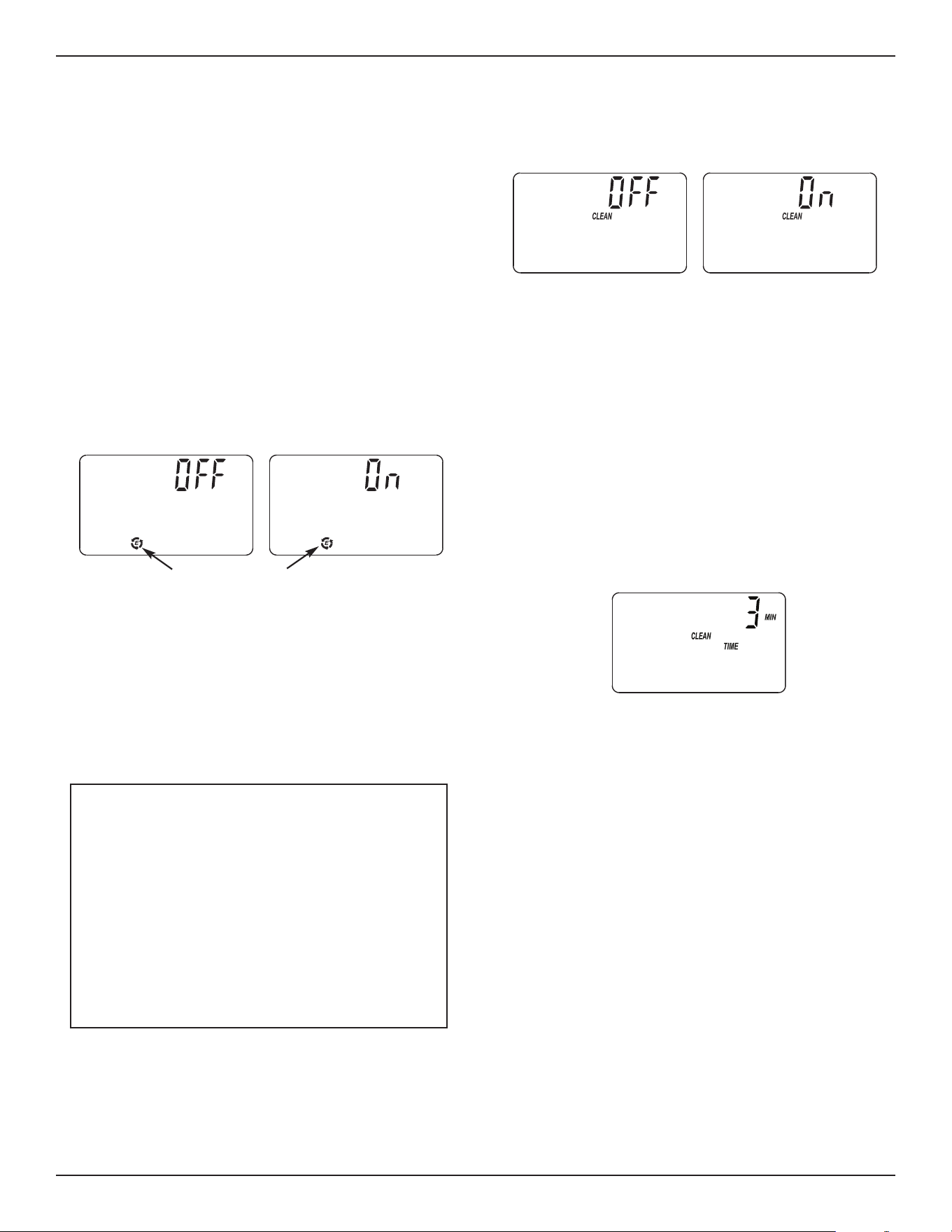
RECHARGE TONIGHT
Press and release (do not hold) the RECHARGE but-
ton. “RECHARGE TONIGHT” will begin flashing in
the display, and the softener will begin regeneration
at the next preset recharge time (2:00 AM, or as set).
If you decide to cancel the regeneration before it
starts, press and release the RECHARGE button
once more. “RECHARGE TONIGHT” will stop flash-
ing in the display.
3. Press the SET SALT LEVEL button as many times
as necessary to make the salt level bars in the dis-
play (see Fig. 27) match the number on the brine -
well. At level 2 or below, the status light will flash.
4. If you want to turn the salt monitor off, press the
SET SALT LEVEL button past 8, until “OFF” shows
in the display next to the number 8.
SALT MONITOR SYSTEM
T
he water softener has a status light to remind you to
add salt to the storage tank.
NOTE: You must set salt level each time salt is
a
dded to the water softener.
NOTE: The salt monitor system estimates salt levels,
and accuracy will vary with different salts.
To set this monitor system:
1. Lift the salt lid and level the salt in the storage
tank.
2. The salt level scale, on the brinewell inside the
tank, has numbers from 0 to 8 (see Fig. 27).
Observe the highest number the leveled salt is at,
or closest to.
8
7
6
5
4
Salt
Level
Numbers
Salt Level
Bars
Brinewell
FIG. 25
FIG. 26
FIG. 27
FIG. 28
15
Controller Features
OPTIONAL SETTINGS:
= SALT EFFICIENCY
= CLEAN FEATURE
= CLEAN FEATURE MINUTES
= MAXIMUM DAYS BETWEEN REGEN-
ERATIONS
= 12 / 24 HOUR CLOCK
= BACKWASH & FAST RINSE TIMES
1. To set any of these options, press and hold
SELECT for 3 seconds until “000” shows in the dis-
play. Then press (do not hold) SELECT again to
display one of the “Salt Efficiency” screens shown
below.
SALT EFFICIENCY: When this feature is ON, the
water softener will operate at salt efficiencies of
4000 grains of hardness per pound of salt or high-
er. The softener may recharge more often using
smaller salt dosage and less water. This softener
is shipped with the efficiency feature set OFF. Use
the r UP or s DOWN buttons to change
between OFF and ON.
Efficiency Icon
2. Press SELECT again to display one of the “Clean”
screens shown below.
CLEAN: This feature is beneficial on water sup-
plies containing iron and/or high amounts of sedi-
ments (sand, silt, dirt, etc.). When set to ON, a
backwash and fast rinse cycle will occur first, pre-
ceding the normal regeneration sequence. This
provides extra cleaning of the resin bed before it is
regenerated with the salt brine. To conserve water,
if your water supply does not contain iron or sedi-
ments, be sure this feature is set to OFF. The
default is OFF. Use the r UP or s DOWN but-
tons to change between OFF and ON.
3. Press SELECT again to display the “Clean Time”
screen shown below.
CLEAN FEATURE MINUTES: If you have set the
Clean Feature ON, the length of the extra back-
wash cycle auto matically is set to 3 minutes.
However, you can ad just this time from 1 to 15
minutes in length. To change this cycle time, use
the r UP button to increase the time, or the s
DOWN button to shorten the time. If no change is
desired, continue to next step.
continued on next page
FIG. 29
FIG. 30
FIG. 31
California Efficiency Requirement
Your Rheem
®
Water Softener has a “High
Efficiency” feature that can be set ON or OFF.
This softener is shipped with the efficiency fea-
ture set OFF, which will utilize the maximum
rated capacity while most often achieving maxi-
mum salt efficiencies. When installing this unit
in the State of California, you MUST turn the
efficiency feature ON. The softener may initiate
more frequent recharges, but it will operate at
4000 grains per pound of salt or higher.
16
4
. Press SELECT again to display the “Recharge
Days” screen.
MAXIMUM DAYS BETWEEN RECHARGES:
The electronic controller automatically determines
recharge fre quency. This provides the greatest
operating efficiency and, under most conditions this
feature will be left in its default mode. However,
you can set this feature to force a recharge every
set number of days. You may want to do this if, for
exam ple, your water supply contains iron and you
want the softener to recharge at least once every
few days to keep the resin bed clean. Use the
r UP or s DOWN buttons to change the number
of days (up to 15).
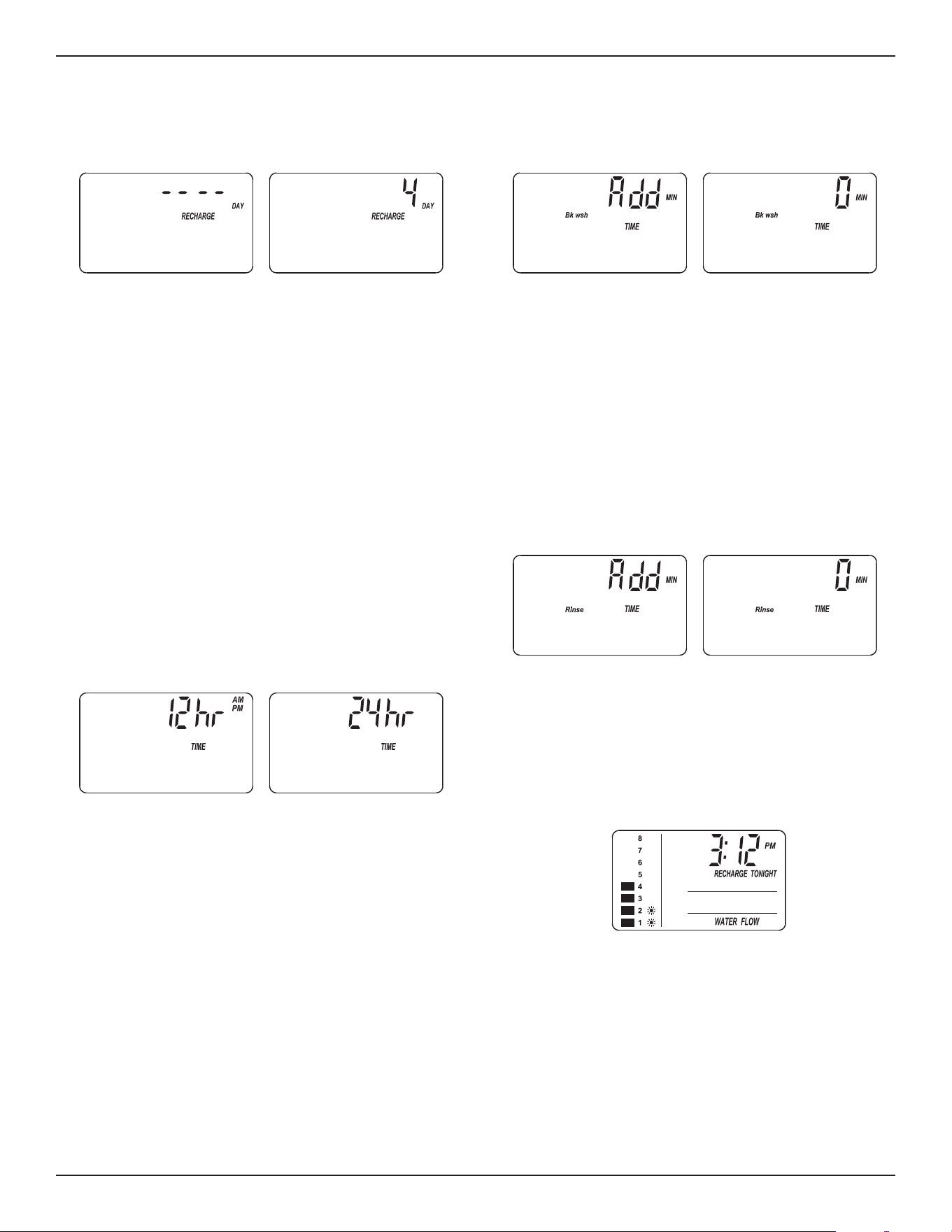
5. Press SELECT again to display the “12 or 24 hr”
screen.
12 OR 24 HOUR CLOCK: All time displays are
shown in standard clock time (1 to 12 AM; and 1 to
12 PM) at the 12 hr default setting. If 24 hour time
format is desired, set to 24 hr by pressing the
r
UP button.
Example:
Set to 4 days maxi mum
between regenerations
Default Display
6
. Press SELECT again to display the backwash time
“Add” screen.
BACKWASH & FAST RINSE TIMES: If you expe-
rience salty tasting water after recharge, you may
need to increase the backwash and fast rinse
times. The cycle times during recharge are deter-
mined by the softener’s electronic controller.
However, you may increase the backwash and fast
rinse times, in 1 minute increments.
If you wish to increase the backwash time, use the
r UP or s DOWN buttons to add up to 15 min-
utes. Then press the OK button to display the fast
rinse time “Add” screen.
If you wish to increase the fast rinse time, use the
r UP or s DOWN buttons to add up to 15 min-
utes.*
7. Press SELECT to return to the normal run (time of
day) screen.
* Setting backwash and/or fast rinse times too low
may result in salty tasting water after regeneration.
FIG. 32
FIG. 33
Controller Features
FIG. 34
FIG. 35
FIG. 36
17
PROGRAM MEMORY
If electrical power to the softener goes off, the time
display is blank but the electronic controller keeps the
correct time for several hours. When electrical power
comes on again, you will have to reset the present
time only if the display is flashing. The HARDNESS
and RECHARGE TIME never require resetting unless
a change is desired. Even if the clock is incorrect
after a long power outage, the softener works as it
should to keep your water soft, however, regenera-
tions may occur at the wrong time of day until you
reset the clock to the correct time of day.
CLEANSING FEATURE
The cleansing feature keeps larger particles of sedi-
ment from entering the home’s plumbing system. As
water passes through the softener, the larger sedi-
ment particles are collected in the integrated basket
and then rinsed to the drain before each regenera-
tion. The cleansing feature provides added protection
for water using appliances by reducing the chance of
larger particles entering the various products valves
and screens. The “Clean Feature” may be turned ON
to provide an extra backwash that will help keep the
cleansing screen clean. The default is OFF.
IMPORTANT: The cleansing feature is not intended to
replace pretreatment filtration. For
problem water applications, additional
sediment filtration is recommended.
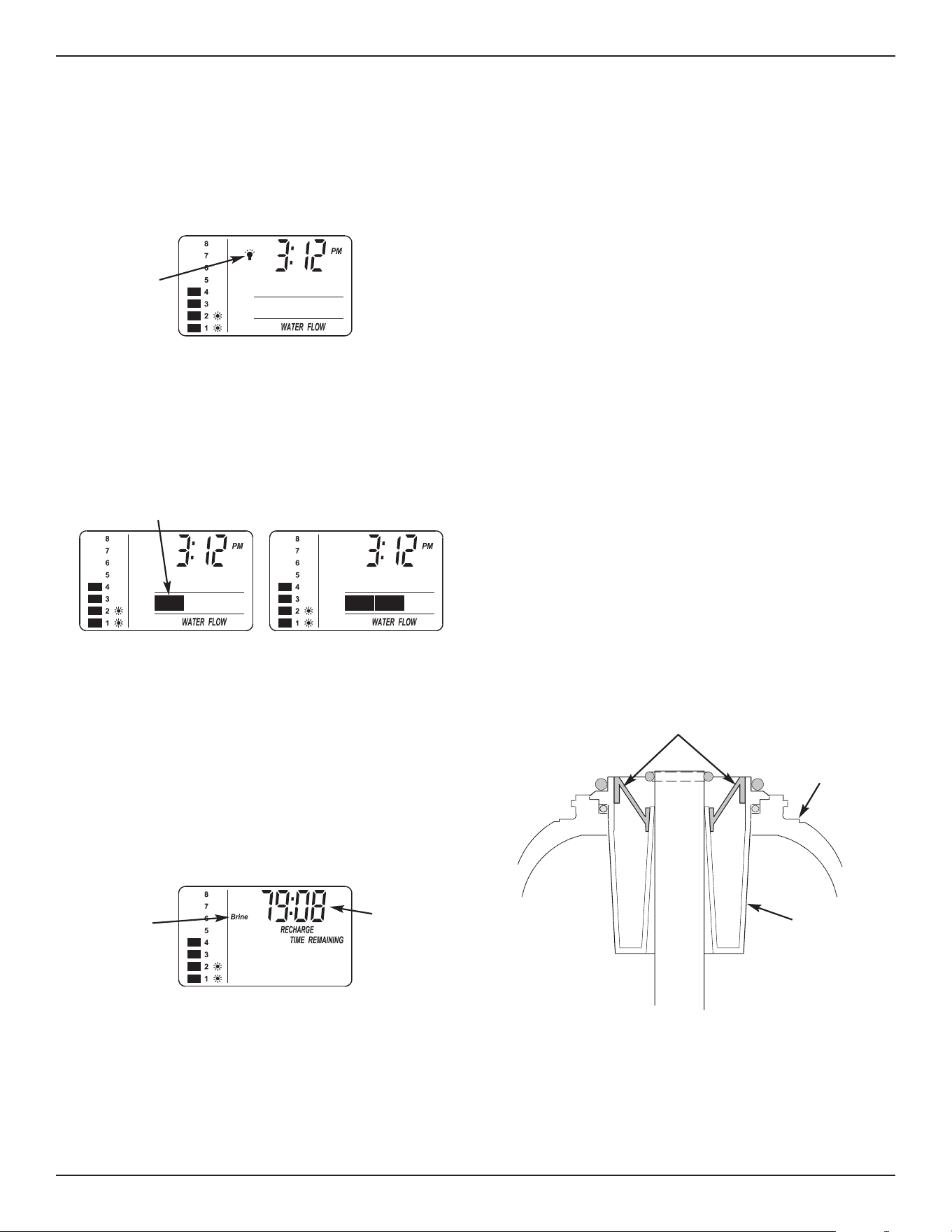
TANK LIGHT
To turn on the light inside the salt storage tank, press
the TANK LIGHT button on the faceplate. Press this
button again to turn the light off. It will also turn off
automatically after 15 minutes.
RECHARGE TIME REMAINING & VALVE
POSITION INDICATORS
One of the valve position indicators (Serv, Fill, Brine,
Bkwsh, Rinse) is displayed while the softener is
recharg ing. RECHARGE flashes in the display and,
beginning with Brine, the minutes of recharge remain-
ing before return to service appears in place of the
present time. When the valve is moving from one
cycle to another, both position indica tors are flashing.
WATER FLOW THROUGH THE SOFTENER
If soft water is in use, the water flow bars continually
scroll across the display. The bars scroll slowly when
water flow is slow, and move faster as water flow
increases. The flow bars do not show when all
faucets and water using appliances are off.
Tank Light
Icon
Flow bars scroll when soft water is in use
Valve
Position
Indicator
Recharge
Time
Remaining
Top
Distributor
Cleansing Screen
Resin
Tank
Controller Features
FIG. 37
FIG. 38
FIG. 39
FIG. 40
Questions? Call Toll Free 1-800-754-7027
or visit www.rheemwatertreatment.com
When you call, please be prepared to provide the model and serial number,
found on the rating decal inside the salt lid.
18
Bypass Blending Valve
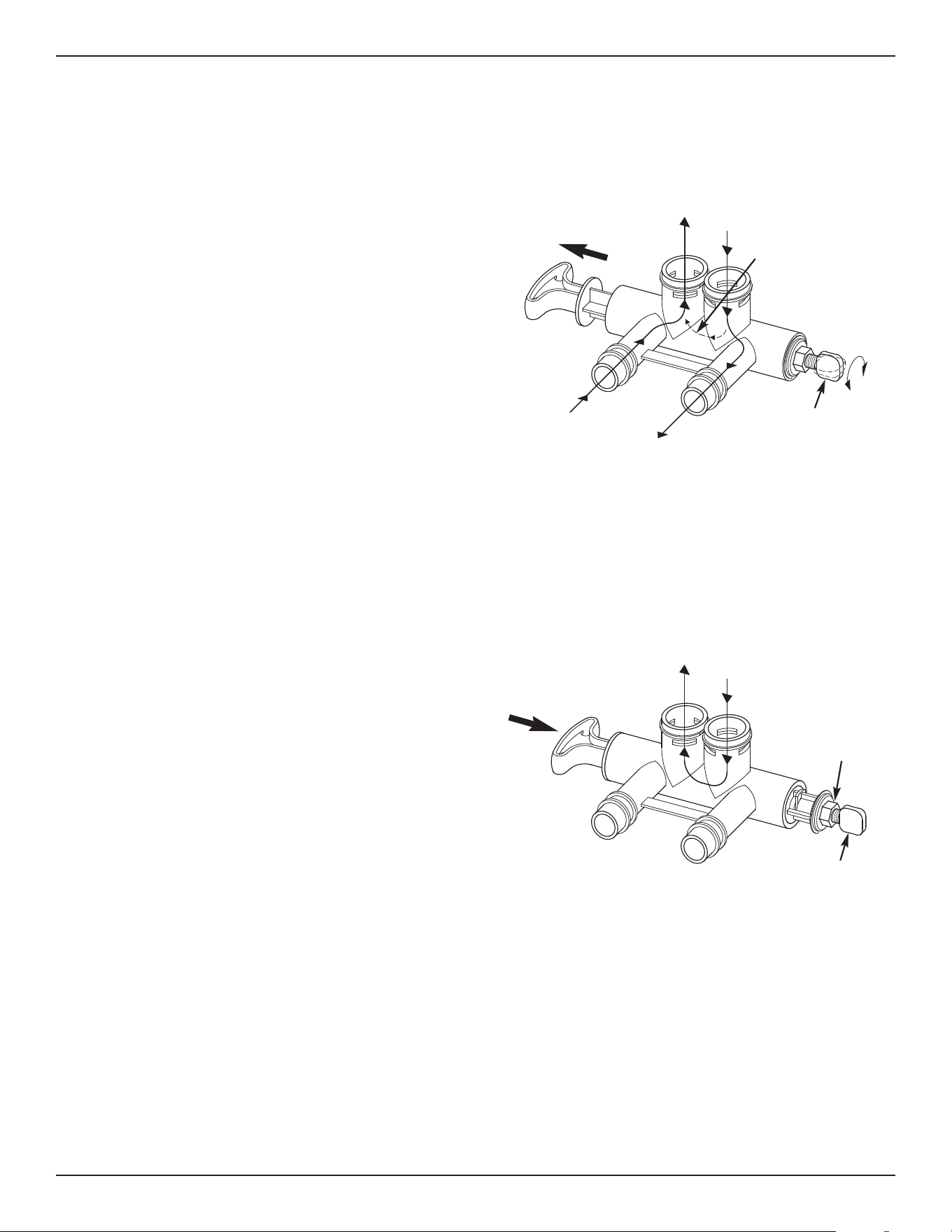
The bypass blending valve works as a typical push-
pull bypass valve, but has the added ability to finely
a
djust hardness of the treated water leaving the water
softener. If slightly harder water is desired than is
normally output by the water softener, this bypass
blending valve can divert a small stream of hard
water before it enters the water softener and blend it
with the exiting softened water. The amount of water
diverted is controlled by turning a blend adjusting
knob on the end cap of the valve stem (See Figure
41).
IMPORTANT: Turn the blend adjusting knob by
hand only. Do not overtighten.
1. When the bypass valve is in service position (nor-
mal softener operation), with handle pulled all the
way out (See Figure 41), increase hardness of
treated water by turning the blend adjusting knob
counterclockwise up to 6 turns from the fully
closed position. Before turning the knob, unlock it,
if necessary, by turning the hex nut counterclock-
wise. While adjusting the knob, hold the bypass
valve handle to prevent the stem from rotating.
2. Do not continue to turn the knob counterclockwise
beyond 6 turns from the fully closed position, as
this would eventually pull the screw’s internal o-
rings out of their seat and water would leak from
the bypass valve.
3. Decrease hardness of treated water by turning the
blend adjusting knob clockwise while holding the
bypass handle. Do not overtighten. When the
knob is fully closed, hard water is not being blend-
ed with treated water.
4. Once the desired hardness is achieved, the adjust-
ment knob may be locked in place by tightening
the hex nut clockwise against the end cap using an
adjustable wrench. Hold the bypass valve handle
to prevent the stem from rotating, or else use
another wrench to grip the stem on the flats
between the end cap and the bypass valve body.
Loosen the hex nut (turn it counterclockwise)
before readjusting the hardness or closing the
diversion path for servicing (see next step)
5. If the water softener is to be serviced or discon-
nected from the bypass valve, the blend adjusting
knob must be closed to block the diversion path
and prevent water leaking from the softener valve
inlet of the bypass valve.
FIG. 41
FIG. 42
SERVICE POSITION
(Normal Softener Operation)
BYPASS POSITION
Pull
H
andle
Soft Water
Out
Hard
Water In
Softener
Valve Outlet
Softener
Valve Inlet
Diverted Hard Water
(controlled by blend
adjusting knob)
Blend Adjusting Knob
Turn, by hand only,
counterclockwise to
increase hardness of
treated water (clockwise
to decrease hardness)
Push
Handle
Hard Water
Out
Hard
Water In
Blend Adjusting Knob
If servicing water softener,
turn, by hand only,
clockwise until closed
Hex Nut
Turn clockwise
to lock blend
adjusting knob
(counterclock-
wise to unlock)
19
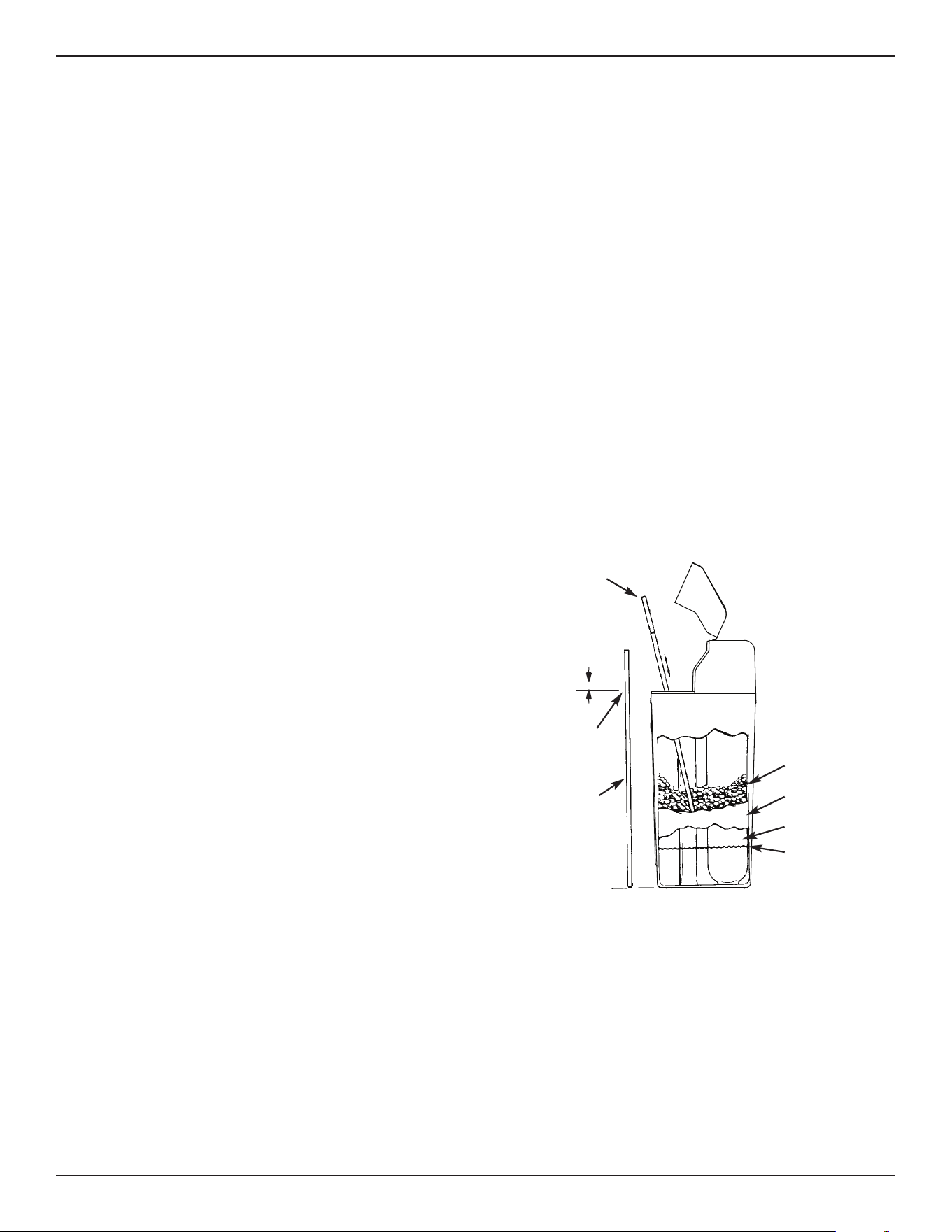
BREAKING A SALT BRIDGE
Sometimes, a hard crust or salt “bridge” forms in the
brine tank. It is usually caused by high humidity or
the wrong kind of salt. When the salt “bridges,” an
empty space forms between the water and the salt.
Then, salt will not dissolve in the water to make brine.
Without brine, the resin bed is not recharged and
hard water will result.
If the storage tank is full of salt, it is difficult to tell if
you have a salt bridge. A bridge may be underneath
loose salt. Take a broom handle, or like tool, and
hold it next to the water softener. Measure the dis-
tance from the floor to the rim of the water softener.
Then, carefully push the broom handle straight down
into the salt. If a hard object is felt before the pencil
mark is even with the top, it is most likely a salt
bridge. Carefully push into the bridge in several
places to break it. Do not use any sharp or pointed
objects as you may puncture the brine tank. Do not
try to break the salt bridge by pounding on the out-
side of the salt tank. You may damage the tank.
ADDING SALT
Lift the salt lid and check the salt storage level fre-
q
uently. If the water softener uses all the salts before
you refill it, you will experience hard water. Until you
have established a refilling routine, check the salt
every two or three weeks. Always add if less than 1/4
full. Be sure the brinewell cover is on.
NOTE: In humid areas, it is best to keep the salt stor-
age level lower, and to refill more often to
avoid salt “bridging”.
Recommended Salt: Nugget, pellet or coarse solar
salts with less than 1% impurities.
Salt Not Recommended: Rock salt, high in impuri-
ties, block, granulated, table, ice melting, ice cream
making salts, etc.
Routine Maintenance
Questions? Call Toll Free 1-800-754-7027 or visit www.rheemwatertreatment.com
When you call, please be prepared to provide the model and serial number,
found on the rating decal inside the salt lid.
FIG. 43
Broom
Handle
Pencil
Mark
1” - 2”
Push Tool into
Salt Bridge to
Break
Salt Bridge
Salt
Empty Space
Water Level
20
Routine Maintenance
PROTECT THE WATER SOFTENER FROM
FREEZING
If the softener is installed where it could freeze (sum-
mer cabin, lake home, etc.), you must drain all water
from it to stop possible freeze damage. To drain the
softener:
1. Close the shut-off valve on the house main water
pipe, near the water meter or pressure tank.
2. Open a faucet in the soft water pipes to vent pres-
sure in the softener.
3. Move the stem in the single bypass valve to bypass.
Close the inlet and outlet valve in a 3 valve bypass
system, and open the bypass valve. If you want
water in the house pipes again, reopen the shut-off
valve on the main water pipe.
4. Unplug the power supply at the wall outlet. Remove
the softener’s top cover, together with the salt lid.
Take off both drain hoses if they will interfere with
moving the softener into position over the drain.
5. Carefully remove the large holding clips at the sof-
tener inlet and outlet. Separate the softener from
the plastic installation adaptors, or from the bypass
valve.
6. Lay a piece of 2 inch thick board near the floor drain
(See Figure 45).
7. Move the softener close to the drain. Slowly and
gently, tip it over until the rim rests on the wood
block with the inlet and outlet over the drain. Do not
allow the softener’s weight to rest on the inlet and
outlet fittings or they may break.
8. Tip the bottom of the softener up a few inches and
hold until all water has drained. Leave the softener
laying like this until you are ready to use it. Plug the
inlet and outlet with clean rags to keep dirt, bugs,
etc. out.
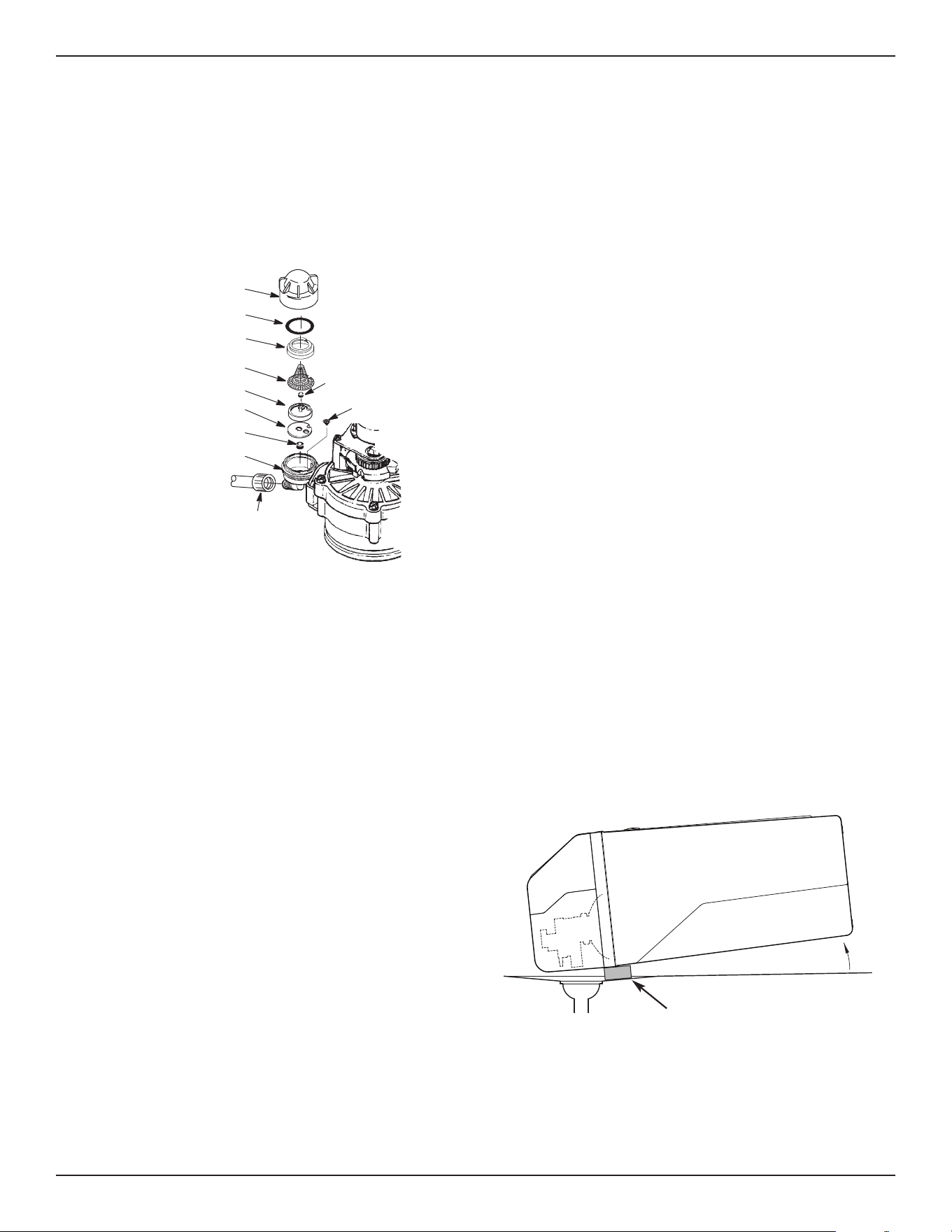
FIG. 44
Cap
O-ring Seal
Screen Support
Screen
Gasket
*Flow Plug (HVDC)
Housing
Ferrule
Nut
Cone Screen
*Flow Plug
*Install with lettered
side up, concave
side down.
CLEANING THE NOZZLE & VENTURI
A clean nozzle & venturi (See Figure 44) is a necessity
for the water softener to work properly. This small
component creates the suction to move brine from the
brine tank, into the resin tank. If it should become
p
lugged with sand, silt, dirt, etc., the water softener will
not work, and hard water will result.
Nozzle & Venturi Disc
IMPORTANT: Be sure small hole in the gasket is cen-
tered directly over the small hole in the nozzle & ven-
turi housing. Be sure the numbers are facing up.
To get access to the nozzle & venturi, remove the
water softener’s top cover. Put the bypass valve(s)
into the bypass position. Be sure the water softener is
in soft water (service) cycle (no water pressure at noz-
zle & venturi). Then, holding the nozzle & venturi
housing with one hand, un screw the cap. Do not lose
the o-ring seal. Lift out the screen support and screen.
Then, remove the nozzle & venturi disc, gasket and
flow plug(s). Wash the parts in warm, soapy water
and rinse in fresh water. Be sure to clean both the top
and bottom of the nozzle & venturi disc. If needed,
use a small brush to remove iron or dirt. Do not
scratch, misshape, etc., surfaces of the nozzle & ven-
turi.
Carefully replace all parts in the correct order.
Lubricate the o-ring seal with silicone grease and
locate in place. Install and tighten the cap by hand,
while supporting the housing. Overtightening may
break the cap or housing. Put the bypass valve(s) into
service (soft water) position.
Recharge the softener to reduce water level in the
tank. This will also assure that the softener is com-
pletely recharged and ready to provide softened water
again. Check the water level in the tank by looking
down the brinewell. If the water level does not drop
after a recharge, the problem has not been resolved.
Call 1-800-754-7027.
Floor Drain
FIG. 45
Wood Block
21
Troubleshooting Guide
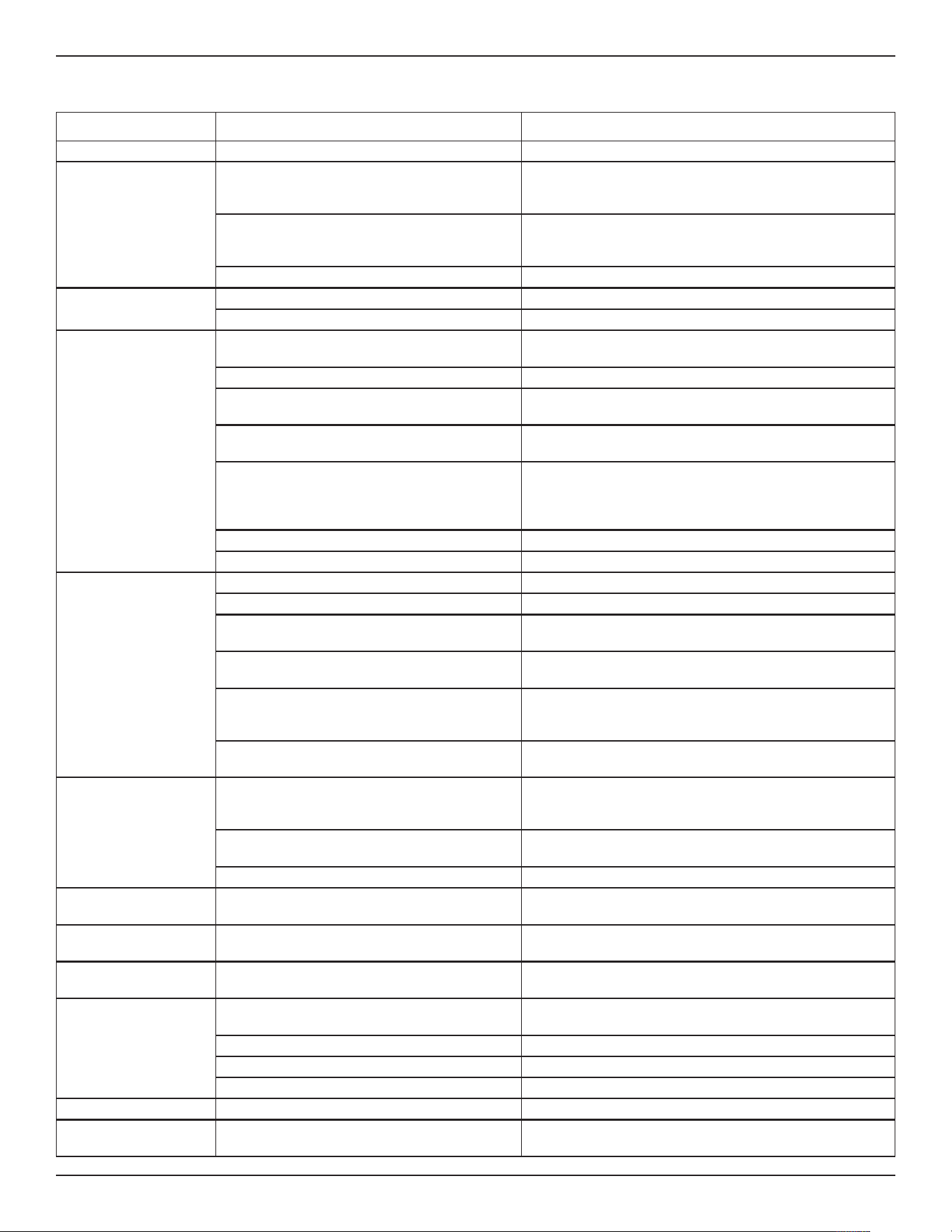
PROBLEM CAUSE CORRECTION
No soft water 1. No salt in the storage tank. Refill with salt and then use RECHARGE NOW feature.
No soft water & dis-
play is blank
1. Power supply unplugged at wall outlet, or
power cable disconnected from back of elec -
tronic board or power supply malfunction.
Check for loss of power and correct. Reset electronic
controls and then use RECHARGE NOW feature.
2. Fuse blown, circuit breaker popped, or cir-
cuit switched off (See “Program Memory”
o
n Page 17).
Replace fuse, reset circuit breaker, or switch circuit on,
and then use RECHARGE NOW feature.
3. Electronic control board malfunction. Replace electronic control board (See Page 25).
No soft water & salt
level not dropping
1. Salt storage tank “bridged”. Refer to “Breaking a Salt Bridge” section to break.
2. Bypass valve(s) in “bypass” position. Move bypass valve(s) to “service” position.
No soft water & salt
storage tank full of
water,
water running to
drain while unit is in
the soft water cycle
1. Dirty, plugged or damaged nozzle & venturi
assembly
Take apart, clean and inspect nozzle & venturi (See
“Cleaning the Nozzle & Venturi” section.
2. Inner valve fault causing leak. Replace seals and rotor.
3. Valve drain hose is plugged. Hose must not have any kinks, sharp bends or any water
flow blockage (See “Valve Drain Requirements” section.
4. Valve drain line and Salt Storage Tank
overflow drain connected together by a tee.
Disconnect tee and run separate drain lines.
5. Low or high system water pressure (low
pressure may disrupt brine draw during
recharge, high pressure may cause inner
valve parts failure).
If pressure is low, increase well pump output to a mini-
mum 20 psi. If daytime pressure is over 100 psi, add a
pressure reducing valve in the supply pipe to the soften-
er. Contact a licensed plumber.
6. Brine float dirty or broken. Clean or replace Brine Valve Float Assembly.
7. Leak between valve and resin tank. Replace o-rings between resin tank and valve.
Water hard some-
times
1. Incorrect time set. Check and change time setting.
2. Incorrect water hardness set. Refer to “Set Water Hardness” section to set correctly.
3. Incorrect model code programmed. Refer to “Program the Water Softener” section to set cor-
rectly.
4. Hot water being used when softener is
regenerating.
Avoid using hot water while the softener is regenerating,
as the water heater will fill with hard water.
5. Possible increase in water hardness. Test untreated water for hardness and iron, and program
the water softener accordingly (See “Set Water
Hardness”) section to set.
6. Leaking faucet or toilet valve. Excessive
water usage.
A small leak can waste hundreds of gallons of water in a
few days. Fix all leaks and always fully close faucets.
Iron in water 1. Clear water iron in water supply. Test untreated water for hardness and iron, and program
the water softener accordingly (See “Set Water
Hardness”) section to set.
2. Iron in soft water. Clean resin bed with Resin Bed Cleaner. Follow instruc-
tions on package.
3. Bacterial or organic bound iron. Cannot be treated by water softener.
Resin in house hold
plumbing
1. Crack in distributor or riser tube. Replace resin tank assembly.
Salt storage tank
leaking
1. Crack in brine tank. Replace salt storage tank assembly.
Motor stalled or
clicking
1. Motor malfunction or internal valve fault
causing high torque on motor.
a. Replace rotor/seal.
b. Replace motor & switch.
Error code E1, E3 or
E4 appears
1. Fault in wiring harness or connections to
position switch.
Replace wiring harness or connections to position switch.
2. Fault in switch. Replace switch.
3. Fault in valve causing high torque. Replace rotor/seal.
4. Motor inoperative. Replace motor.
Error code E5 1. Electronic control malfunction. Replace electronic control board.
Status light off, but
display is not blank
1. Status light dislodged from its holder. Remove top cover and reinsert status light into its holder.
22
Need help troubleshooting? Call Toll Free 1-800-754-7027 or visit www.rheemwatertreatment.com
When you call, please be prepared to provide the model and serial number,
found on the rating decal inside the salt lid.
Troubleshooting
MANUALLY INITIATED ELECTRONIC
DIAGNOSTICS
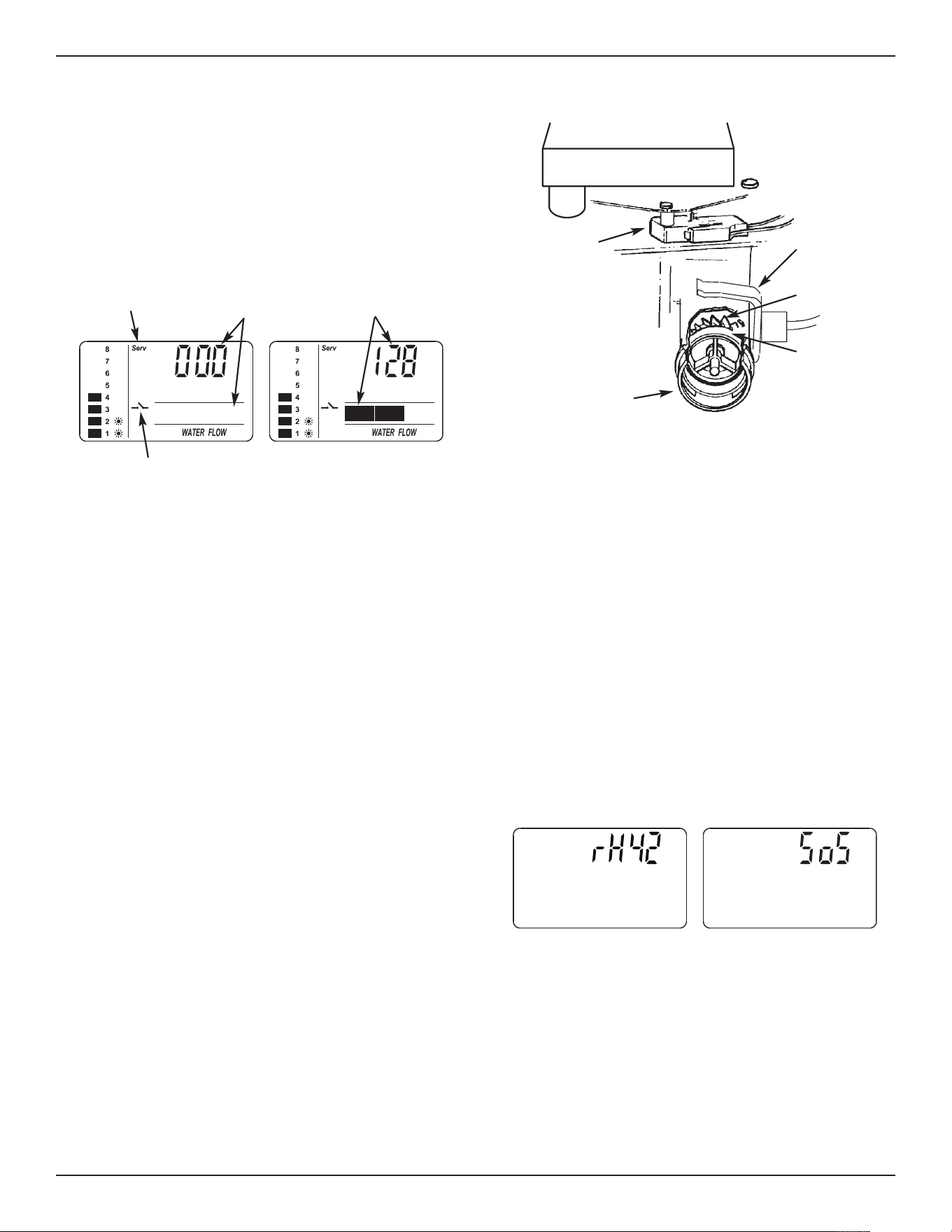
1. To enter diagnostics, press the SELECT button and
h
old for three seconds. The display will change to
show turbine count, valve cycle position, and posi-
tion switch status (open or closed).
TURBINE OPERATION: If no water is flowing
through the softener, the turbine indicator displays
three zeros. When water is flowing, a 000 to 140
count repeats for each gallon of water passing
through the turbine. To check for positive operation of
the turbine if zeros are shown, open a nearby soft
water faucet and observe the turbine count. If you
don’t get a reading in the display with faucet open,
pull the sensor housing from the valve outlet port (see
Fig. 47). Pass a small magnet back and forth in front
of the sensor. You should get a reading in the dis-
play. If you get a reading, unhook the inlet and outlet
plumbing and check the turbine for binding.
POSITION SWITCH STATUS: With the valve in serv-
ice, or any of the recharge cycle positions, the posi-
tion switch indicator will show the switch open. While
the valve is rotating from one position to another, the
position switch indicator will show the switch closed.
There is likely a problem if indications vary from this
pattern.
OTHER INFORMATION: While in the diagnostics
screen, the following information is available and may
be beneficial for various reasons. This information is
retained by the electronic controller from the first time
electrical power is applied to the unit.
= Press and hold the
r UP button to display the
number of days this controller has had electrical
power applied.
= Press and hold the s DOWN button to display the
number of regenerations initiated by this controller
since the model code number was entered.
NOTE: If the electronic controller is left in the diag-
nostic display (or a flashing display when set-
ting times or hardness), the normal time of
day display automatically returns if a button
has not been pressed for 4 minutes. To
return to the diagnostic display, repeat step 1,
above.
RESETTING TO FACTORY DEFAULTS
To reset the electronic controller to its factory default
for all settings (time, hardness, etc.):
1. Press the SELECT button and hold it until the dis-
play changes twice to show the flashing model
code.
2. Press the r UP button to display a flashing “SoS”.
3. Press the SELECT button, and the electronic con-
troller will restart.
4. Set the present time, hardness, etc., as described
on pages 12 & 13.
Turbine Count
(Water Flowing)
Turbine Count
(No Water
Flowing)
Valve Position
Indicator
Position Switch Indicator
(Open)
FIG. 46
FIG. 48
Motor
Turbine
Support
& Shaft
Sensor
Housing
Turbine
Valve Outlet
Position
Switch
FIG. 47
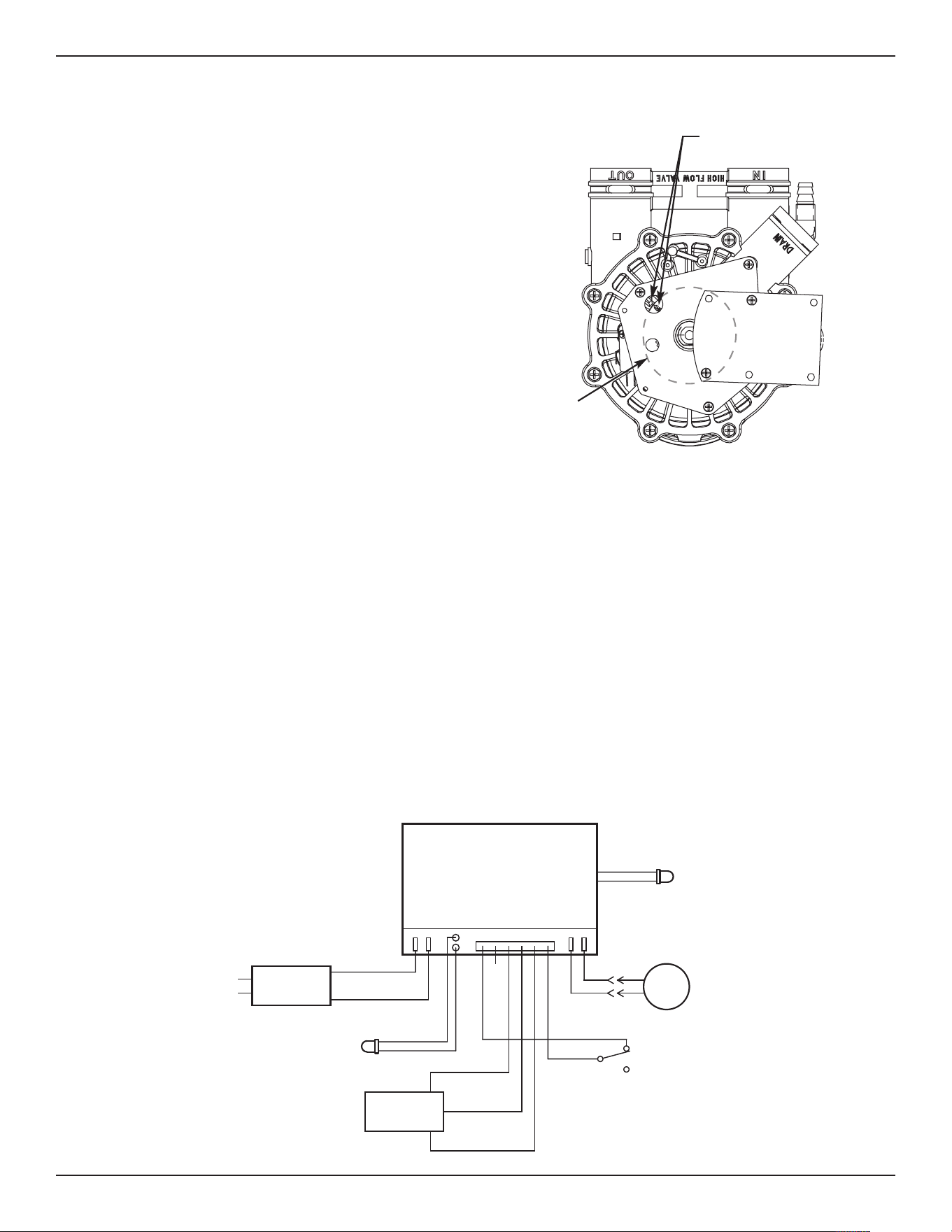
NO
Valve
Motor
Position
Switch
NC
Back of Electronic
Controller (PWA)
Pwr.
In
Position/
Turbine
Motor
24V DC
120V AC
60 Hz
Power
Supply
C
org
grn
Turbine
Sensor
+5
OUT
GND
FIG. 50
Tank
Light
Tank
Light
23
Troubleshooting
MANUAL ADVANCE RECHARGE CHECK
This check verifies proper operation of the valve
motor, brine tank fill, brine draw, recharge flow rates,
and other controller functions. Always make the initial
checks first, and perform the manually initiated elec-
t
ronic diagnostics.
NOTE: The display must show a steady time (not
flashing). If an error code shows, first press
the SELECT button to enter the diagnostic
display.
1. Press the RECHARGE button and hold in for 3
seconds. “RECHARGE”, “Serv” and “Fill” begin to
flash in the display as the softener enters the fill
cycle of regeneration.
2. When valve reaches “Fill” position, remove the
brinewell cover and, using a flashlight, observe fill
water entering the tank.
3. If water does not enter the tank, look for an
obstructed nozzle, venturi, fill flow plug, brine tub-
ing, or brine valve riser pipe.
4. After observing fill, press the RECHARGE button to
move the softener into brining. A slow flow of
water to the drain will begin. Verify brine draw from
the brine tank by shining a flashlight into the
brinewell and observing a noticeable drop in the
liquid level.
5. If the softener does not draw brine:
= nozzle and/or venturi dirty
= nozzle and venturi not seated properly on gasket
= restricted drain (check drain fitting and hose)
= ineffective nozzle and venturi seal
= other inner valve problem (rotor seal, rotor &
disc, wave washer, etc.)
NOTE: If water system pressure is low, an elevated
drain hose may cause back pressure, stopping
brine draw.
6. Again press RECHARGE to move the softener into
backwash. Look for a fast flow of water from the
drain hose.
7. An obstructed flow indicates a plugged top distribu-
tor, backwash flow plug or drain hose.
8. Press RECHARGE to move the softener into fast
rinse. Again look for a fast drain flow. Allow the
softener to rinse for a few minutes to flush out any
brine that may remain in the resin tank from the
brining cycle test.
9. To return the softener to service, press RECHARGE
once more.
Position Markers
(valve in service)
Motor
Cam
FIG. 49
WIRING SCHEMATIC
Status
Light
24
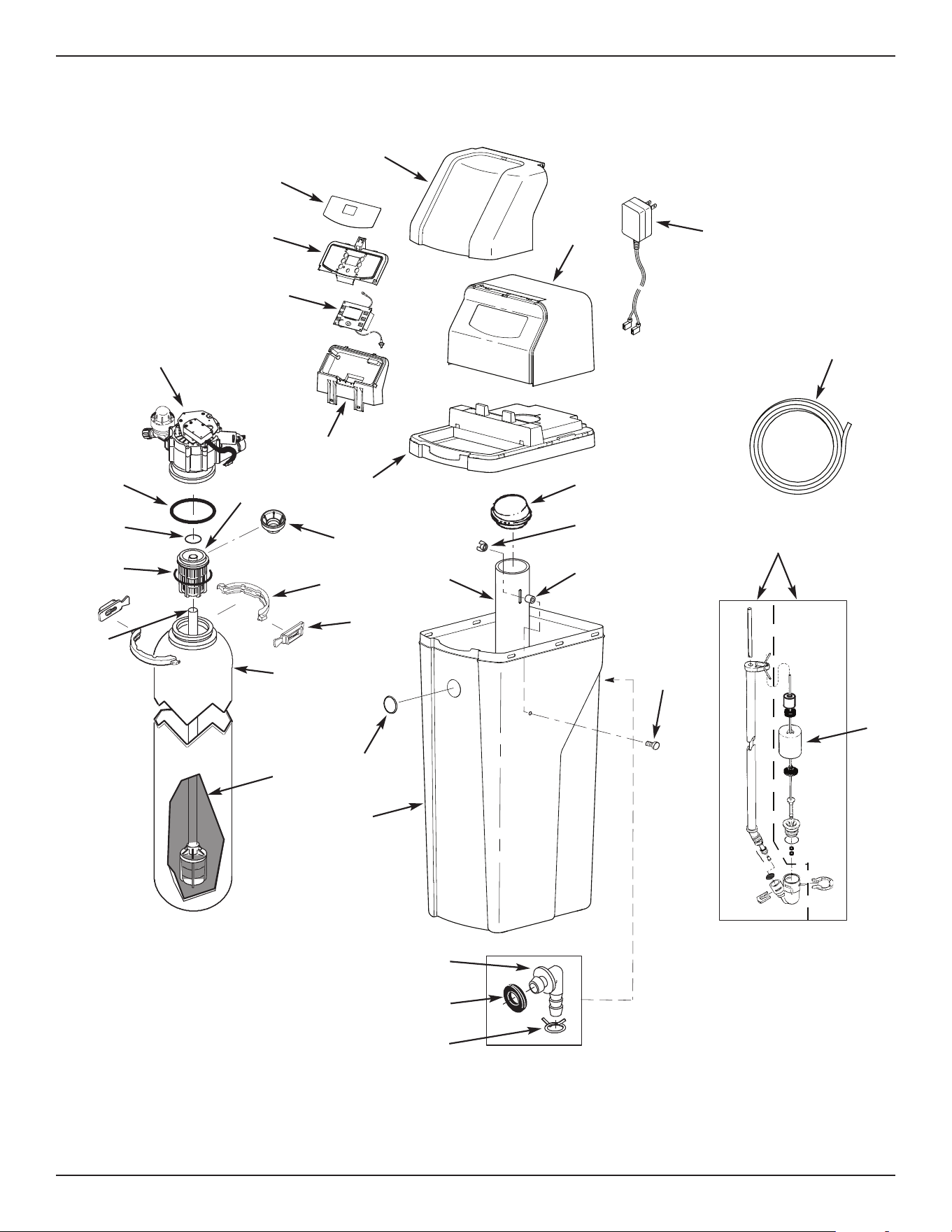
Softener Exploded View
8
7
6
5
30
29
31
15
16
13
22
25
11
26
27
28
8
5
3
9
10
7
Valve Assembly
See Pages 26 & 27
for parts
4
2
1
23
21
1
8
19
20
14
12
6
Softener Exploded View
17
24
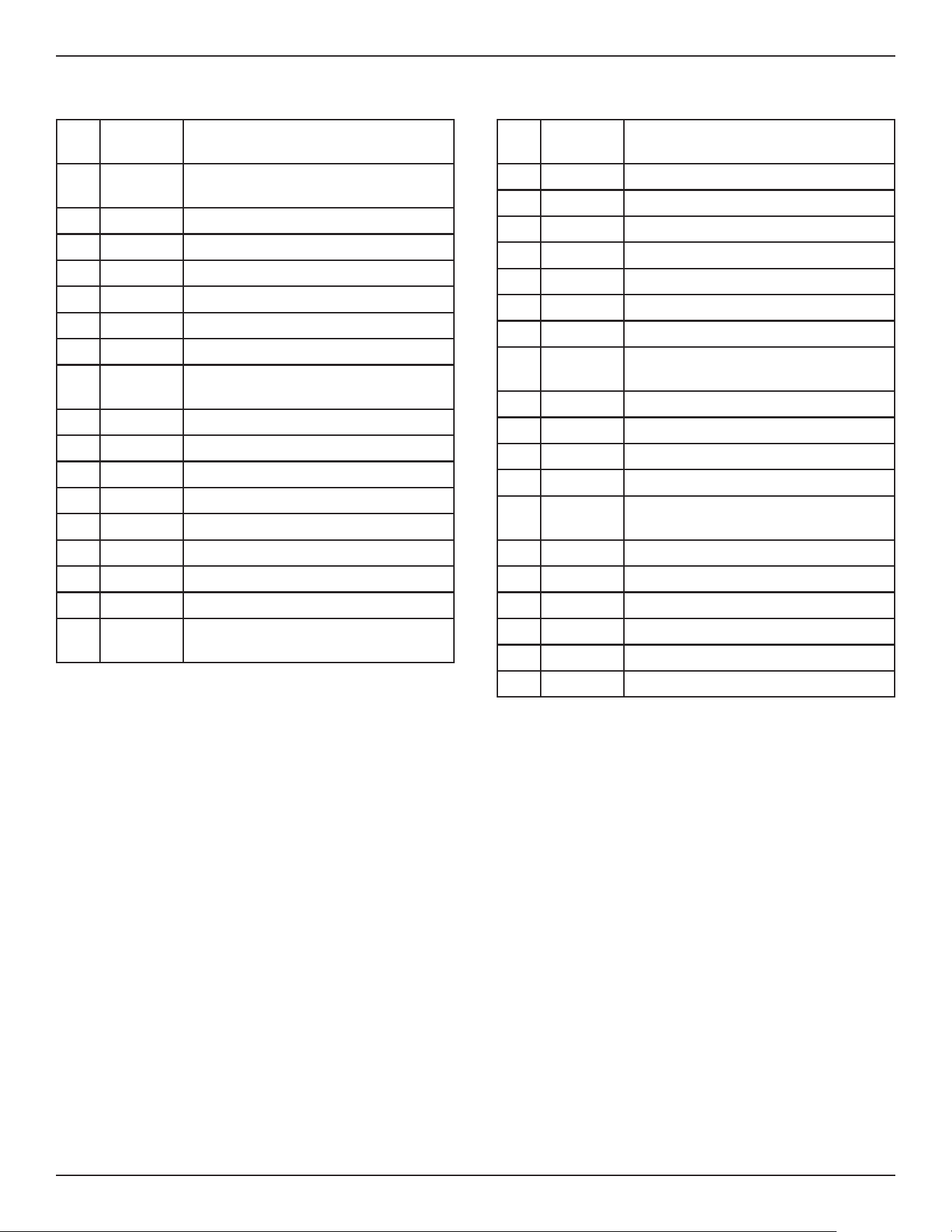
25
Softener Parts List
To order repair parts call toll free 1-800-754-7027.
Manufactured and warranted by
Water Channel Partners
1890 Woodlane Drive
Woodbury, MN 55125
Questions? Call Toll Free 1-800-754-7027 or visit www.rheemwatertreatment.com
When you call, please be prepared to provide the model and serial number,
found on the rating decal inside the salt lid.
K
ey
No.
Part No. Description
16 7385532 Faceplate (order decal below)
17 7385558 Faceplate Decal
1
8
7
386839
S
alt Lid (order decal below)
¢
7386724 Instruction Decal
19 7386821 Top Cover
20 7351054 Power Supply, 24V DC
21 7386855 Cover, Brinewell
– 7386978
Brinewell Mounting Hardware Kit
(includes Key Nos. 22-24)
22
á
Wing Nut, 1/4-20
23
á
Spacer, 3/4” long
24
á
Screw, 1/4-20 x 1-1/2”
25 7214375 Brinewell
– 7331258
Overflow Hose Adaptor Kit
(includes Key Nos. 26-28)
26
á
Adaptor Elbow
27
á
Grommet
28
á
Hose Clamp
29 7310202 Repl. Brine Valve Assembly
30 7327568 Float, Stem & Guide Assembly
31 7139999 Drain Hose
¢ Not illustrated.
K
ey
No.
Part No. Description
– 7112963
D
istributor O-Ring Kit
(includes Key Nos. 1-3)
1
á
O-Ring, 2-7/8” x 3-1/4”
2
á
O-Ring, 13/16” x 1-1/16”
3
á
O-Ring, 2-3/4” x 3”
4 7077870 Top Distributor
5 7327584 Repl. Bottom Distributor
6 7265025 Filter Screen
– 7331177
Tank Neck Clamp Kit
(includes 2 ea. of Key Nos. 7 & 8)
7
á
Clamp Section (2 req.)
8
á
Retainer Clip (2 req.)
9 7247996 Repl. Resin Tank, 10” x 40”
10 0502272 Resin, 1 cu. ft.
11 7384659 Repl. Brine Tank (order badge below)
12 7386538 Badge, Rheem
13 7384641 Rim
14 7384633 Support, Faceplate
15 7386774
Repl. Electronic Control Board (PWA),
including tank light & status light
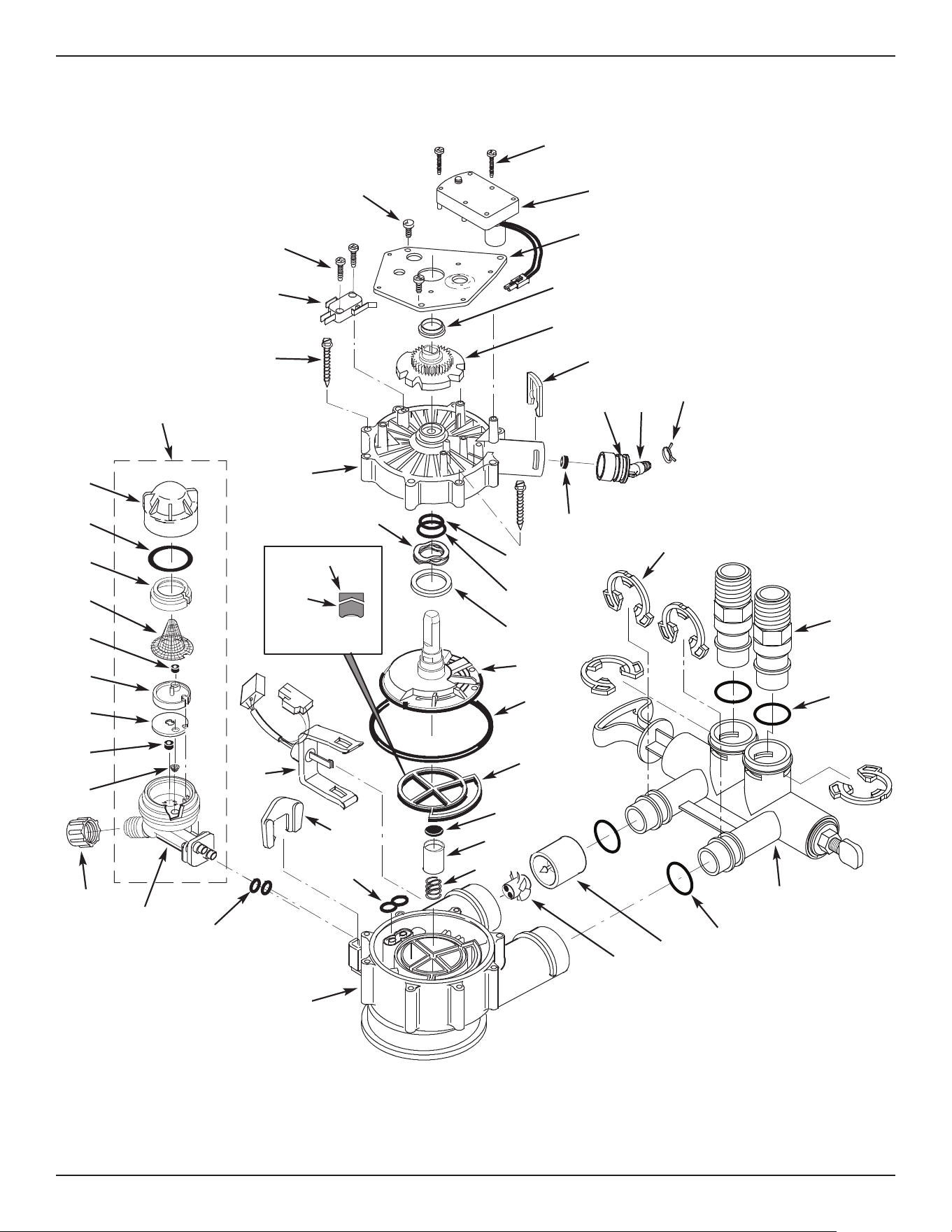
26
109
102
104
146
147
144
145
127
132
134
135
137
138
139
140
141
142
130
133
131
116
128
129
103
105
106
111
121
122
123
124
123
126
125
143
112
117
113
115
119
120
136
Wear Strip
Seal
Cross-section
View
100
101
110
108
107
118
114
Valve Exploded View
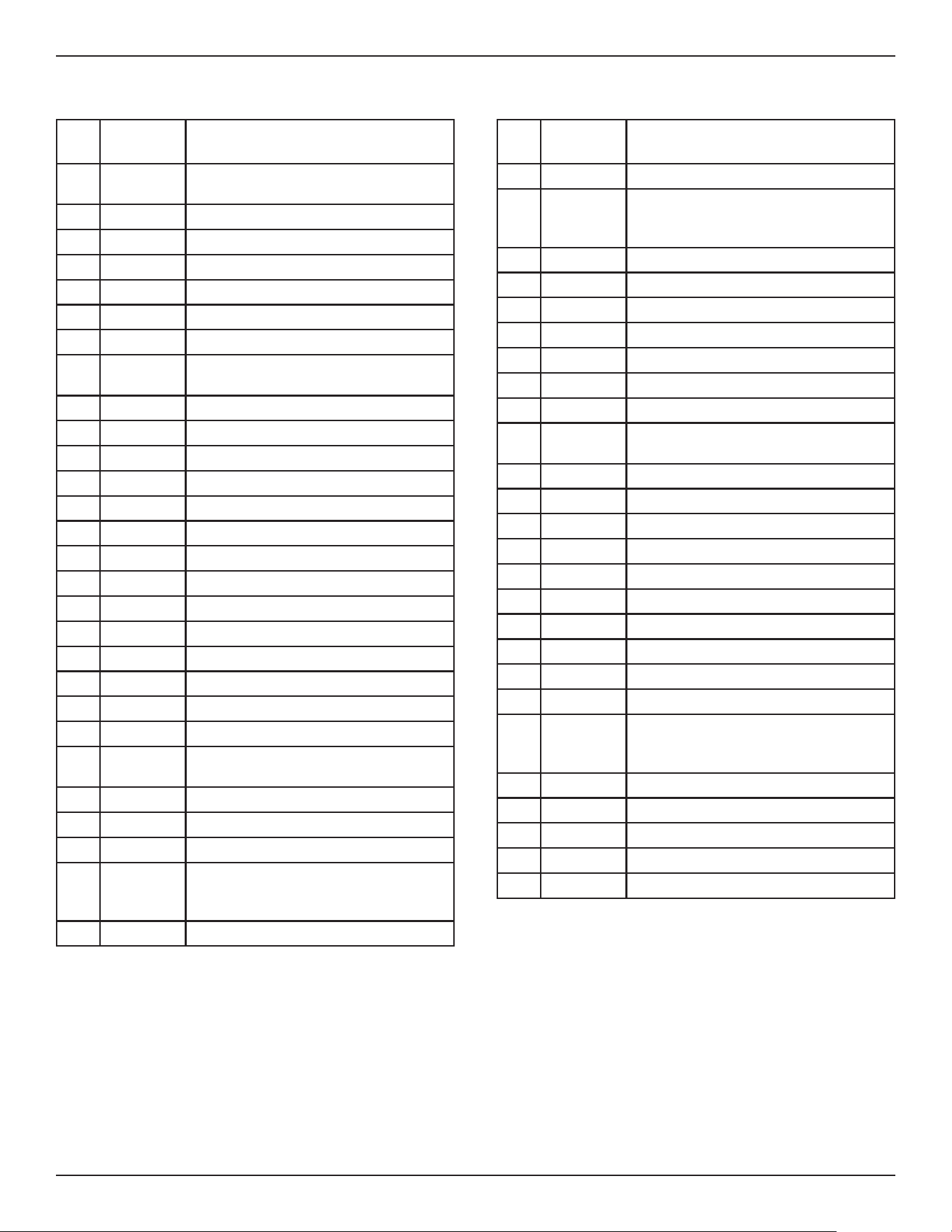
27
Valve Parts List
K
ey
No.
Part No. Description
– 7384691
Motor, Cam & Gear Kit, 1”
(includes Key Nos. 100-102)
100
á
Motor
101
á
Cam & Gear
102 7224087 Screw, #8-32 x 1” (2 req.)
103 7231393 Motor Plate
104 0900857 Screw, #6-20 x 3/8” (3 req.)
105 7171250 Bearing
– 7331169
Drain Hose Adaptor Kit
(includes Key Nos. 106-110)
106
á
Clip, Drain
107
á
Hose Clamp
108
á
Drain Hose Adaptor
109
á
O-Ring, 15/16” x 1-3/16”
110
á
Flow Plug, 2.0 gpm
– 7185487 Seal Kit (includes Key Nos. 111-116)
111
á
O-Ring, 5/8” x 13/16”
112
á
O-Ring, 1-1/8” x 1-1/2”
113
á
O-Ring, 4-1/2” x 4-7/8”
114
á
Rotor Seal
115
á
Seal
116
á
Seal, Nozzle & Venturi
117 7174313 Bearing, Wave Washer
118 7185500 Rotor & Disc
– 7342712
Drain Plug Kit, 1”
(includes Key Nos. 115, 119 & 120)
119
á
Plug, Drain Seal
120
á
Spring
121 7337589 Clip, 1”, pack of 4
122 7342704
Installation Adaptor, 1”, pack of 2,
including 2 ea. Clips & O-Rings
(See Key Nos. 121 & 123)
123 7337597 O-Ring, 1-1/16” x 1-5/16”, pack of 4
K
ey
No.
Part No. Description
124 7386986 Bypass Blending Valve Assembly, 1”
– 7290931
Turbine & Support Assembly,
including 2 O-Rings (See Key No.
123) & 1 ea. of Key Nos. 125 & 126
125
á
Turbine Support & Shaft
126
á
Turbine
127 7309811 Wire Harness, Sensor
128 7081201 Retainer, Nozzle & Venturi
129 7171145 Valve Body
130 7342649 O-Ring, 1/4” x 3/8”, pack of 2
131 1202600 Nut - Ferrule
132 7257454
Nozzle & Venturi Assembly
(incl. Key Nos. 128, 130 & 133-142)
133
á
Housing, Nozzle & Venturi
134
á
Cone Screen
135
á
Flow Plug, .3 gpm
136
á
Gasket
137
á
Nozzle & Venturi Disc, Blue
138
á
Flow Plug, .15 gpm
139
á
Screen
140
á
Screen Support
141
á
O-Ring, 1-1/8” x 1-3/8”
142
á
Cap
¢
7298913
Repl. Nozzle, Venturi & Gasket Kit
(includes Key Nos. 130, 134, 136,
137, & 141)
143 7175199 Wave Washer
144 7171161 Valve Cover
145 7342681 Screw, #10-14 x 2-5/8”, pack of 8
146 7305150 Switch
147 7140738 Screw, #4-24 x 3/4” (2 req.)
To order repair parts call toll free 1-800-754-7027.
Manufactured and warranted by
Water Channel Partners
1890 Woodlane Drive
Woodbury, MN 55125
Questions? Call Toll Free 1-800-754-7027 or visit www.rheemwatertreatment.com
When you call, please be prepared to provide the model and serial number,
found on the rating decal inside the salt lid.
¢
Not illustrated

28
WATER SOFTENER WARRANTY - MODEL RHS42
Warrantor: Water Channel Partners, 1890 Woodlane Drive, Woodbury, MN 55125
Warrantor guarantees, to the original owner, that:
One Year Full Warranty:
● For a period of one (1) year from the date of purchase, all parts will be free from defects in materials and
workmanship and will perform their normal functions.
● For a period of one (1) year from the date of purchase, labor to repair or replace any part deemed to be defective in
materials or workmanship, will be provided at no additional cost.
Limited Warranties:
● For a period of ten (10) years from the date of purchase, the salt storage tank and fiberglass mineral tank will not rust,
corrode, leak, burst, or in any other manner, fail to perform its proper functions.
● For a period of three (3) years from the date of purchase, the electronic control board will be free of defects in
materials and workmanship and will perform its normal functions.
If, during such respective period, a part proves to be defective, Warrantor will ship a replacement part, directly to your
home, without charge. After the first year, labor necessary to maintain this product is not covered by the product warranty.
If you have questions regarding a warranted product, need assistance with installation or troubleshooting, wish to order a
part or report a warranty issue, we are just a phone call away. SIMPLY DIAL 1-800-754-7027 for assistance.
General Provisions
The above warranties are effective provided the water softener is operated at water pressures not exceeding 125 psi, and
at water temperatures not exceeding 120°F; provided further that the water softener is not subject to abuse, misuse,
alteration, neglect, freezing, accident or negligence; and provided further that the water softener is not damaged as the
result of any unusual force of nature such as, but not limited to, flood, hurricane, tornado or earthquake.
Warrantor is excused if failure to perform its warranty obligations is the result of strikes, government regulation, materials
shortages, or other circumstances beyond its control.
*THERE ARE NO WARRANTIES ON THE WATER SOFTENER BEYOND THOSE SPECIFICALLY DESCRIBED ABOVE.
ALL IMPLIED WARRANTIES, INCLUDING ANY IMPLIED WARRANTY OF MERCHANTABILITY OR OF FITNESS FOR
A PARTICULAR PURPOSE, ARE DISCLAIMED TO THE EXTENT THEY MIGHT EXTEND BEYOND THE ABOVE
PERIODS. THE SOLE OBLIGATION OF WARRANTOR UNDER THESE WARRANTIES IS TO REPLACE OR REPAIR
THE COMPONENT OR PART WHICH PROVES TO BE DEFECTIVE WITHIN THE SPECIFIED TIME PERIOD, AND
WARRANTOR IS NOT LIABLE FOR CONSEQUENTIAL OR INCIDENTAL DAMAGES. NO WARRANTOR DEALER,
AGENT, REPRESENTATIVE, OR OTHER PERSON IS AUTHORIZED TO EXTEND OR EXPAND THE WARRANTIES
EXPRESSLY DESCRIBED ABOVE.
Some states do not allow limitations on how long an implied warranty lasts or exclusions or limitations of incidental or
consequential damage, so the limitations and exclusions in this warranty may not apply to you. This warranty gives you
specific legal rights, and you may have other rights which vary from state to state. This warranty applies to consumer-
owned installations only.
EXTEND YOUR WARRANTY:
Use Rheem
®
RHWSC Water Softener Cleaner
and register at rheemwatertreatment.com
The factory warranty for your water softener is shown below. The one year full warranty period on parts and labor can be
extended to five (5) years from the date of purchase if you use Rheem
®
RHWSC Water Softener Cleaner on your sys-
t
em, and register your purchase of Rheem
®
R
HWSC Water Softener Cleaner at rheemwatertreatment.com. Use one
bottle of Rheem
®
RHWSC Water Softener Cleaner, as directed, every four months from the date of purchase of the
w
ater softener. Purchase of no more than three (3) bottles of Rheem
®
R
HWSC Water Softener Cleaner in a 12
month period may be applied toward compliance with this warranty. Use of any water softener additive other than
Rheem
®
RHWSC will not provide extended warranty coverage.
Rheem
®
, Rheem Preferred, Rheem Preferred Plus, and Rheem Preferred Platinum logos and product names
are trademarks of Rheem Manufacturing Company, and are used under license. All rights reserved.