Built-in Oven / User Manual
EN
IB609PYRONZ
EN - 2
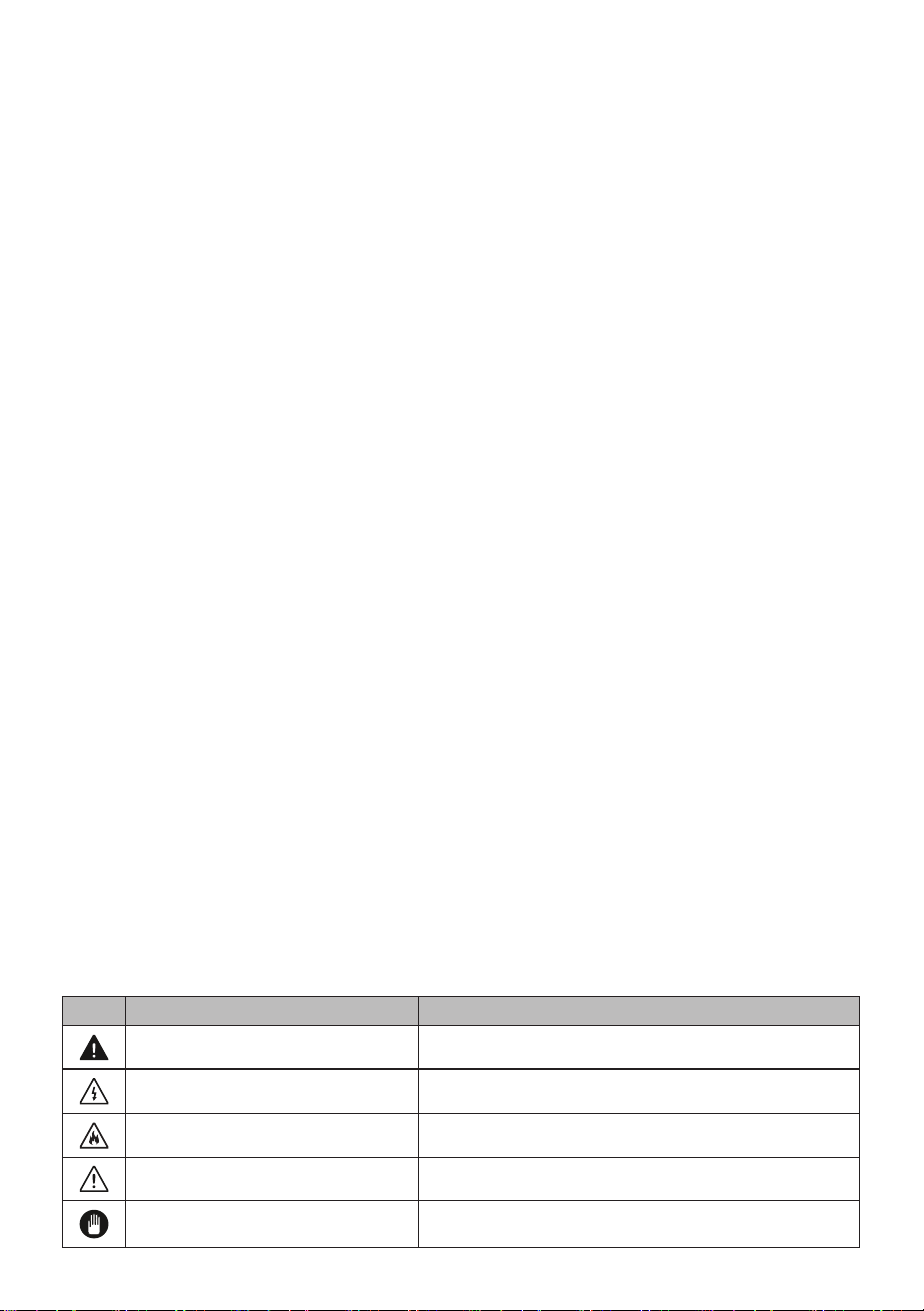
Icon Type Meaning
WARNING Serious injury or death risk
RISK OF ELECTRIC SHOCK Dangerous voltage risk
FIRE Fire risk
CAUTION Injury or property damage risk
IMPORTANT Operating the system correctly
Thank you for choosing this product.
This User Manual contains important safety information and instructions on the operation
and maintenance of your appliance.
Please take the time to read this User Manual before using your appliance and keep this
book for future reference.

CONTENTS
1.SAFETY INSTRUCTIONS ................................................................................................4
1.1. General Safety Warnings ..............................................................................................4
1.2. Installation Warnings .....................................................................................................6
1.3. During Use ....................................................................................................................7
1.4. During Cleaning and Maintenance ................................................................................8
2.INSTALLATION AND PREPARATION FOR USE ..........................................................10
2.1. Instructions for the Installer .........................................................................................10
2.2. Installation of the Oven ................................................................................................10
2.3. Electrical Connection and Safety................................................................................. 11
3.PRODUCT FEATURES ...................................................................................................13
4.USE OF PRODUCT ........................................................................................................14
4.1. Oven Controls..............................................................................................................14
4.2. Use of the Pyrolytic Visio Touch Programmer .............................................................15
4.3. Accessorries ...............................................................................................................17
5.CLEANING AND MAINTENANCE .................................................................................18
5.1. Cleaning ...................................................................................................................18
5.2. Maintenance ................................................................................................................ 19
6.TROUBLESHOOTING&TRANSPORT ........................................................................... 20
6.1. Troubleshooting ........................................................................................................... 20
6.2. Transport ...................................................................................................................20
EN - 4
1. SAFETY INSTRUCTIONS
• Carefully read all instructions before using your
appliance and keep them in a convenient place for
reference when necessary.
• This manual has been prepared for more than one
model therefore your appliance may not have some
of the features described within. For this reason, it
is important to pay particular attention to any figures
whilst reading the operating manual.
1.1. General Safety Warnings
• This appliance can be used by children aged from
8 years and above and by persons with reduced
physical, sensory or mental capabilities or lack
of experience and knowledge if they have been
given supervision or instruction concerning use of
the appliance in a safe way and understand the
hazards involved. Children should not play with the
appliance. Cleaning and user maintenance should
not be made by children without supervision.
WARNING: The appliance and its accessible parts
become hot during use. Care should be taken to avoid
touching heating elements. Keep children less than 8
years of age away unless they are continually
supervised.
WARNING: Danger of fire: Do not store items
on the cooking surfaces.
WARNING: If the surface is cracked, switch off
the appliance to avoid the possibility of electric shock.
• Do not operate the appliance with an external timer
or separate remote-control system.
• During use the appliance will get hot. Care should
be taken to avoid touching heating elements inside
EN - 5
the oven.
• Handles may get hot after a short period during use.
• Do not use harsh abrasive cleaners or scourers to
clean oven surfaces. They can scratch the surfaces
which may result in shattering of the door glass or
damage to surfaces.
• Do not use steam cleaners for cleaning the
appliance.
WARNING: To avoid the possibility of electric
shock, make sure that the appliance is switched off
before replacing the lamp.
CAUTION: Accessible parts may be hot when
cooking or grilling. Keep young children away from the
appliance while it is in use.
• During pyrolytic operations, remove any excess
spillage, oven shelves, shelf supports, wire shelves
and all accessories before cleaning.
• Your appliance is produced in accordance with all
applicable local and international standards and
regulations.
• Maintenance and repair work should only be carried
out by authorised service technicians. Installation
and repair work that is carried out by unauthorised
technicians may be dangerous. Do not alter or
modify the specifications of the appliance in any
way. Inappropriate hob guards can cause accidents.
• Before connecting your appliance, make sure
that the local distribution conditions (nature of the
gas and gas pressure or electricity voltage and
frequency) and the specifications of the appliance
are compatible. The specifications for this appliance
are stated on the label.
CAUTION: This appliance is designed only for

EN - 6
cooking food and is intended for indoor domestic
household use only. It should not be used for any
other purpose or in any other application, such as for
non-domestic use, in a commercial environment or for
heating a room.
• Do not use the oven door handles to lift or move the
appliance.
• All possible measures have been taken to ensure
your safety. Since the glass may break, care should
be taken while cleaning to avoid scratching. Avoid
hitting or knocking the glass with accessories.
• Make sure that the supply cord is not trapped or
damaged during installation. If the supply cord is
damaged, it must be replaced by the manufacturer,
its service agent or similarly qualified persons in
order to prevent a hazard.
• Do not let children climb on the oven door or sit on it
while it is open.
• Please keep children and animals away from this
appliance.
1.2. Installation Warnings
• Do not operate the appliance before it is fully
installed.
• The appliance must be installed by an authorised
technician. The manufacturer is not responsible
for any damage that might be caused by defective
placement and installation by unauthorised people.
• When the appliance is unpacked, make sure that
it is has not been damaged during transportation.
In the case of a defect do not use the appliance
and contact a qualified service agent immediately.
The materials used for packaging (nylon, staplers,
styrofoam, etc.) may be harmful to children and they

EN - 7
should be collected and removed immediately.
• Protect your appliance against atmospheric effects.
Do not expose it to effects such as sun, rain, snow,
dust or excessive humidity.
• The material around the appliance must be able to
withstand a minimum temperature of 100°C.
1.3. During Use
• When you first use your oven you may notice a
slight smell. This is perfectly normal and is caused
by the insulation materials on the heater elements.
We suggest that, before using your oven for the first
time, you leave it empty and operate it at maximum
temperature for 45 minutes. Make sure that the
environment in which the product is installed is well
ventilated.
• Take care when opening the oven door during or
after cooking. The hot steam from the oven may
cause burns.
• Do not put flammable or combustible materials in or
near the appliance while it is operating.
• Always use oven gloves to remove and replace food
in the oven.
Do not leave the cooker unattended while
cooking with solid or liquid oils. They may catch fire
under extreme heating conditions. Never pour water
on to flames that are caused by oil, instead switch the
cooker off and cover the pan with its lid or a fire
blanket.
• If the product will not be used for a long period of
time, turn the main control switch off. Turn the gas
valve off when a gas appliance is not in use.
• Make sure the appliance control knobs are always
in the “0” (stop) position when it is not in use.

EN - 8
• The trays incline when pulled out. Take care not
to spill or drop hot food while removing it from the
oven.
• Do not place anything on the oven door when it is
open. This could unbalance the oven or damage the
door.
• Do not place heavy or flammable items (e.g. nylon,
plastic bag, paper, cloth, etc.) into the drawer. This
includes cookware with plastic accessories (e.g.
handles).
• Do not hang towels, dishcloths or clothes from the
appliance or its handles.
1.4. During Cleaning and Maintenance
• Make sure that your appliance is turned off at
the mains before carrying out any cleaning or
maintenance operations.
• Do not remove the control knobs to clean the control
panel.
• To maintain the efficiency and safety of your
appliance, we recommend you always use original
spare parts and to call our authorised service agents
in case of need.
Disposal of your old machine
This symbol on the product or on its packaging
indicates that this product should not be
treated as household waste. Instead it should
be handed over to the applicable collection
point for the recycling of electrical and
electronic equipment. By ensuring this product is
disposed of correctly, you will help prevent potential
negative consequences for the environment and
human health, which could otherwise be caused by
inappropriate waste handling of this product. For more

EN - 9
detailed information about recycling of this product,
please contact your local city office, your household
waste disposal service or the retailer who you
purchased this product from.
EN - 10
2. INSTALLATION AND
PREPARATION FOR USE
WARNING : This appliance must be
installed by an authorised service
person or qualified technician, according to
the instructions in this guide and in
compliance with the current local
regulations.
• Incorrect installation may cause harm
and damage, for which the manufacturer
accepts no responsibility and the
warranty will not be valid.
• Prior to installation, ensure that the local
distribution conditions (electricity voltage
and frequency) and the adjustments
of the appliance are compatible. The
adjustment conditions for this appliance
are stated on the label.
• The laws, ordinances, directives and
standards in force in the country of use
are to be followed (safety regulations,
proper recycling in accordance with the
regulations, etc.).
2.1. Instructions for the Installer
General instructions
• After removing the packaging material
from the appliance and its accessories,
ensure that the appliance is not
damaged. If you suspect any damage,
do not use it and contact an authorised
service person or qualified technician
immediately.
• Make sure that there are no flammable
or combustible materials in the close
vicinity, such as curtains, oil, cloth etc.
which may catch fire.
• The worktop and furniture surrounding
the appliance must be made of
materials resistant to temperatures
above 100°C.
• The appliance should not be installed
directly above a dishwasher, fridge,
freezer, washing machine or clothes
dryer.
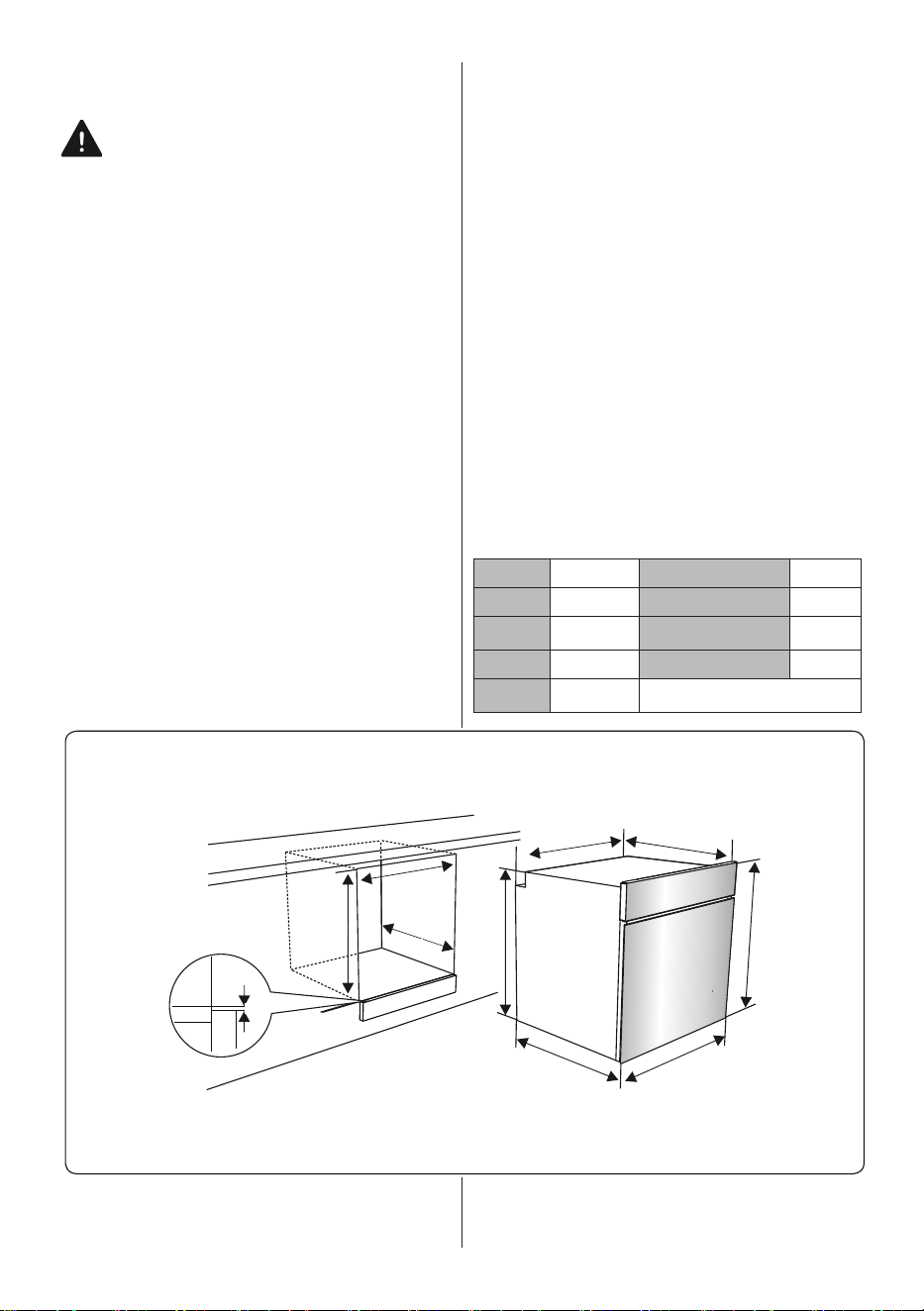
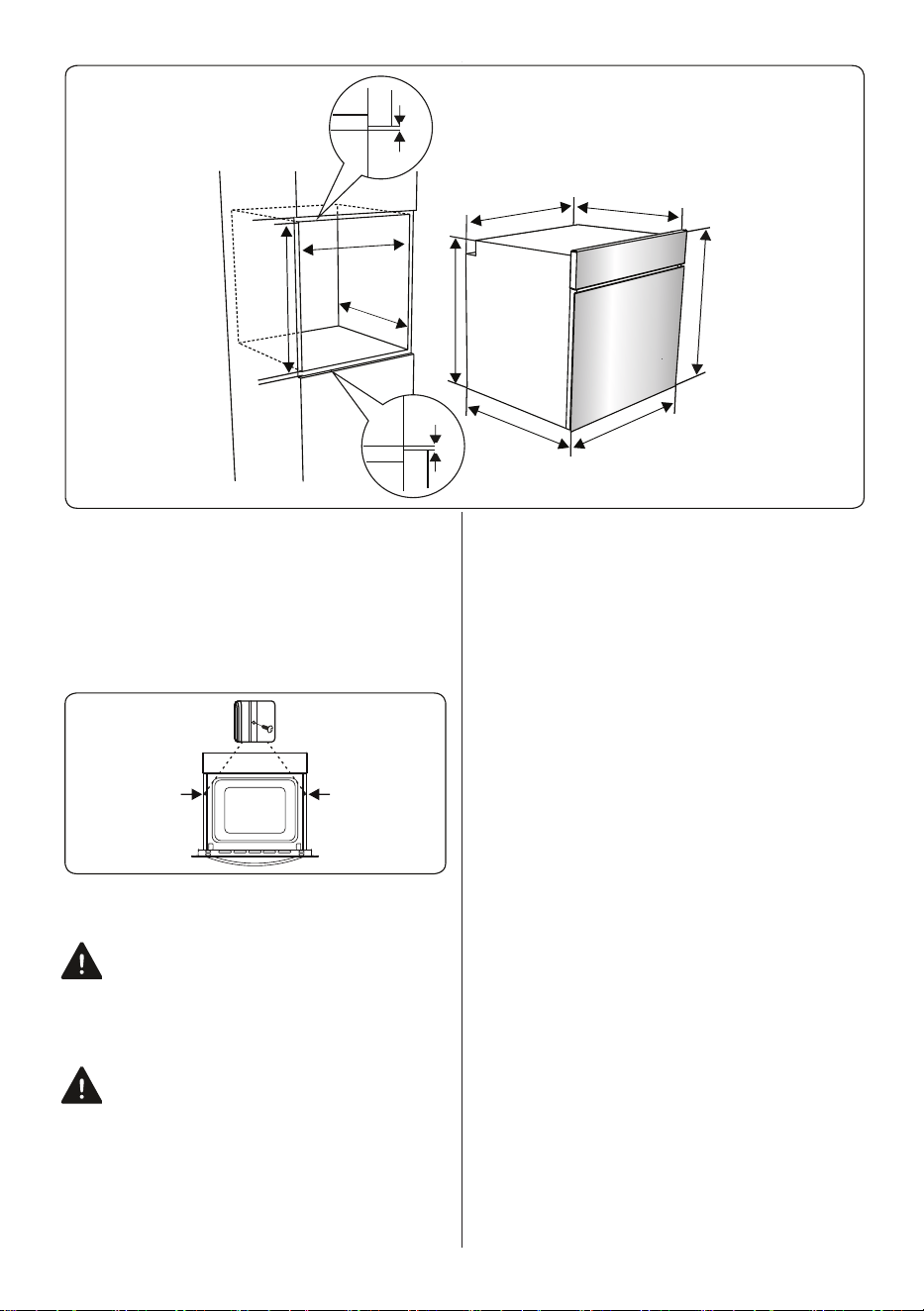
2.2. Installation of the Oven
The appliances are supplied with
installation kits and can be installed in a
worktop with the appropriate dimensions.
The dimensions for hob and oven
installation are given below.
A (mm) 557 min./max. F (mm) 560/580
B (mm) 550 min. G (mm) 555
C (mm) 595 min. H/I (mm) 600/590
D (mm) 575 min. J/K (mm) 5/10
E (mm) 574
F
A B
C
C
D
E
G
H
J
Installation under a worktop
EN - 11
F
A
B
C
C
D
E
G
I
J
K
Installation in a wall unit
1. After making the electrical connections,
insert the oven into the cabinet by pushing
it forward. Open the oven door and insert
2 screws in the holes located on the oven
frame. While the product frame touches the
wooden surface of the cabinet, tighten the
screws.
2.3. Electrical Connection and Safety
WARNING: The electrical connection
of this appliance should be carried out
by an authorised service person or
qualified electrician, according to the
instructions in this guide and in compliance
with the current local regulations.
WARNING: THE APPLIANCE MUST
BE EARTHED.
• Before connecting the appliance to the
power supply, the voltage rating of the
appliance (stamped on the appliance
identification plate) must be checked for
correspondence to the available mains
supply voltage, and the mains electric
wiring should be capable of handling the
appliance’s power rating (also indicated
on the identification plate).
• During installation, please ensure
that isolated cables are used. An
incorrect connection could damage
your appliance. If the mains cable is
damaged and needs to be replaced
this should be done by a qualified
personnel.
• Do not use adaptors, multiple sockets
and/or extension leads.
• The supply cord should be kept away
from hot parts of the appliance and must
not be bent or compressed. Otherwise
the cord may be damaged, causing a
short circuit.
• If the appliance is not connected to the
mains with a plug, a multi-pole isolator
switch (with at least 3 mm contact
spacing) must be used in order to meet
the safety regulations.
• The appliance is designed for a power
supply of 220-240V ~ and 380-415V
3N~. If your supply is different, contact
the authorised service person or a
qualified electrician.
• The power cable (H05VV-F) must be
long enough to be connected to the
appliance, even if the appliance stands
on the front of its cabinet.
• Ensure all connections are adequately
tightened.
EN - 12
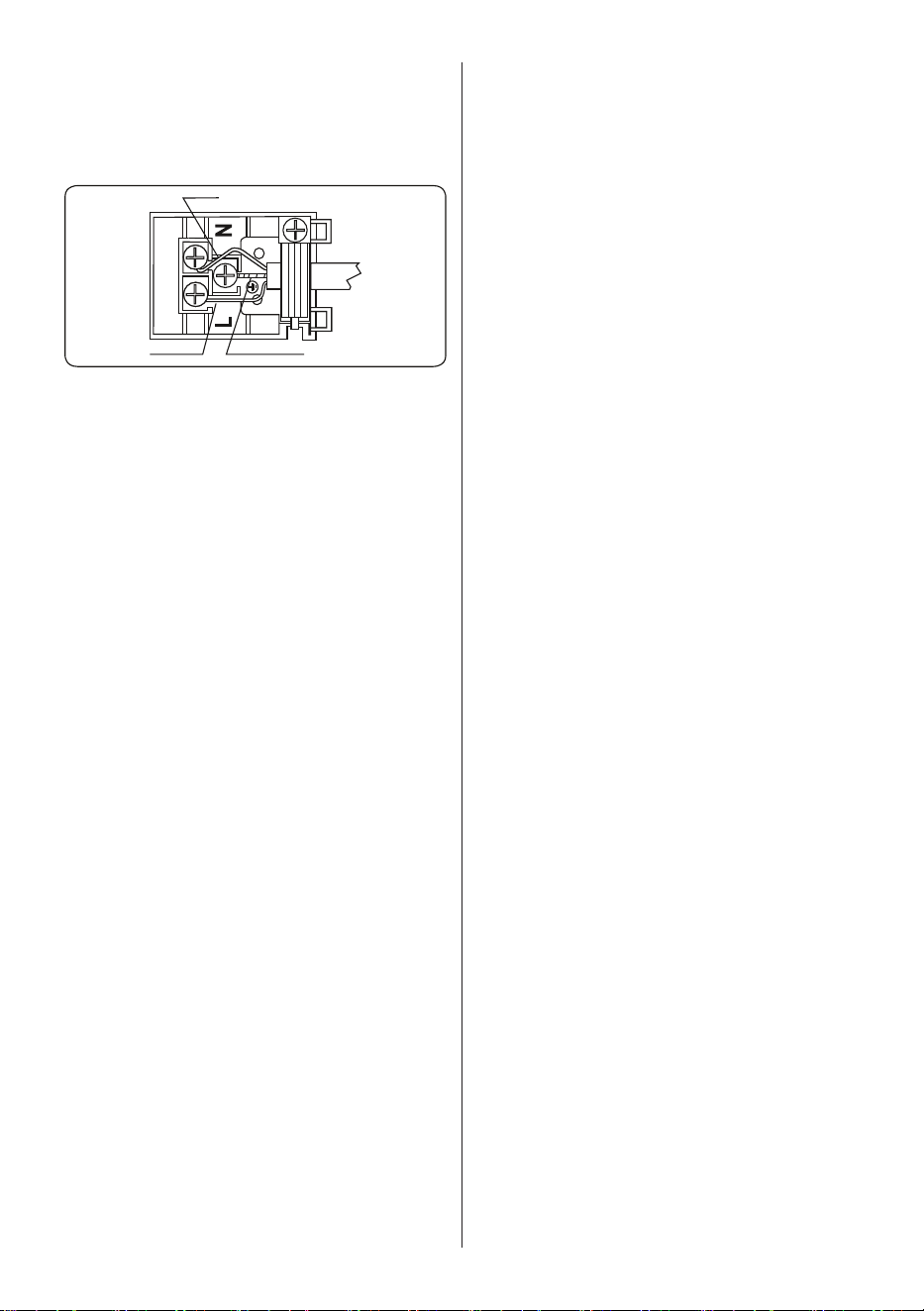
• Fix the supply cable in the cable clamp
and then close the cover.
• The terminal box connection is placed
on the terminal box.
Brown
Yellow+Green
Blue
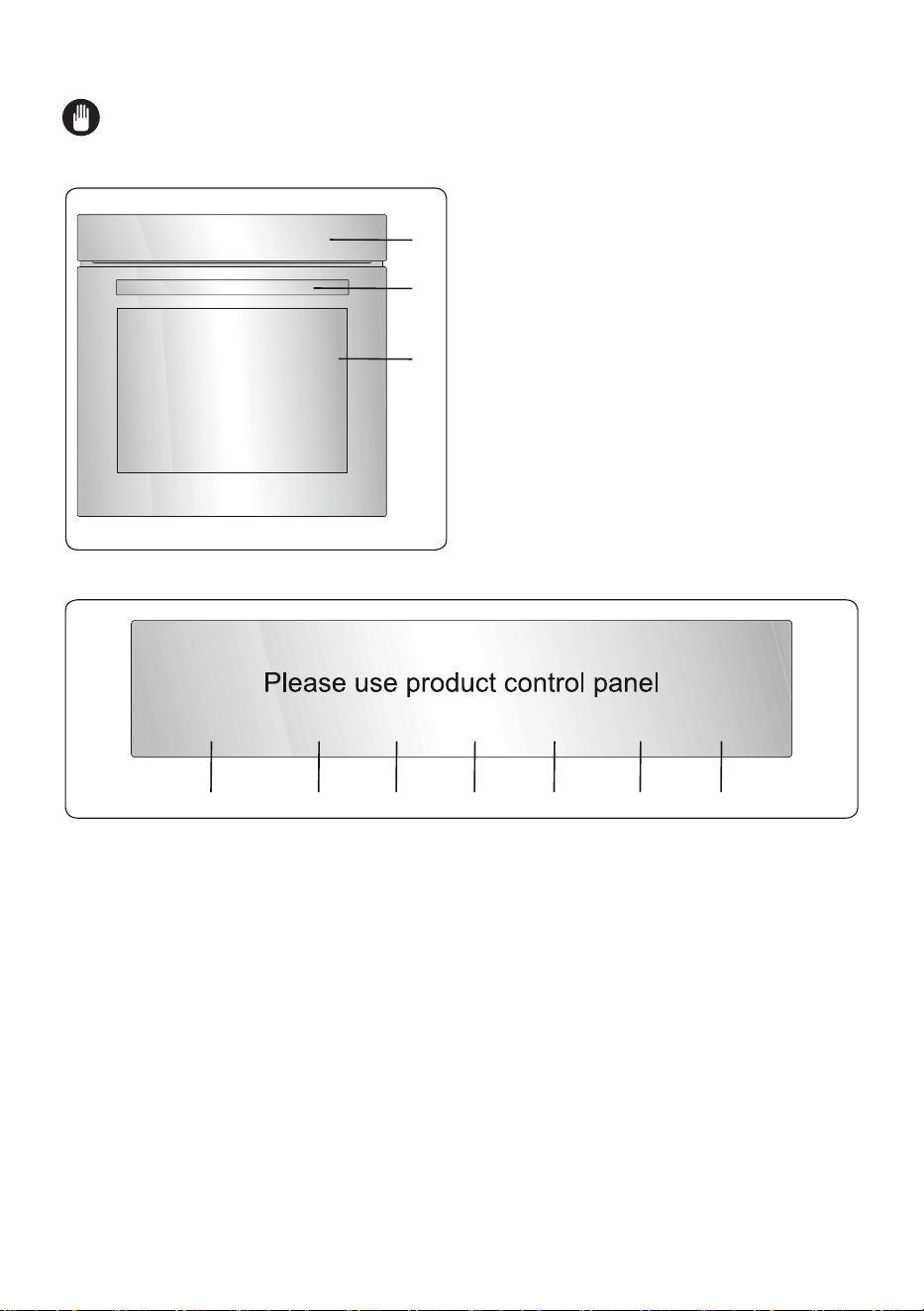
EN - 13
3. PRODUCT FEATURES
Important: Specifications for the product vary and the appearance of your appliance
may differ from that shown in the figures below.
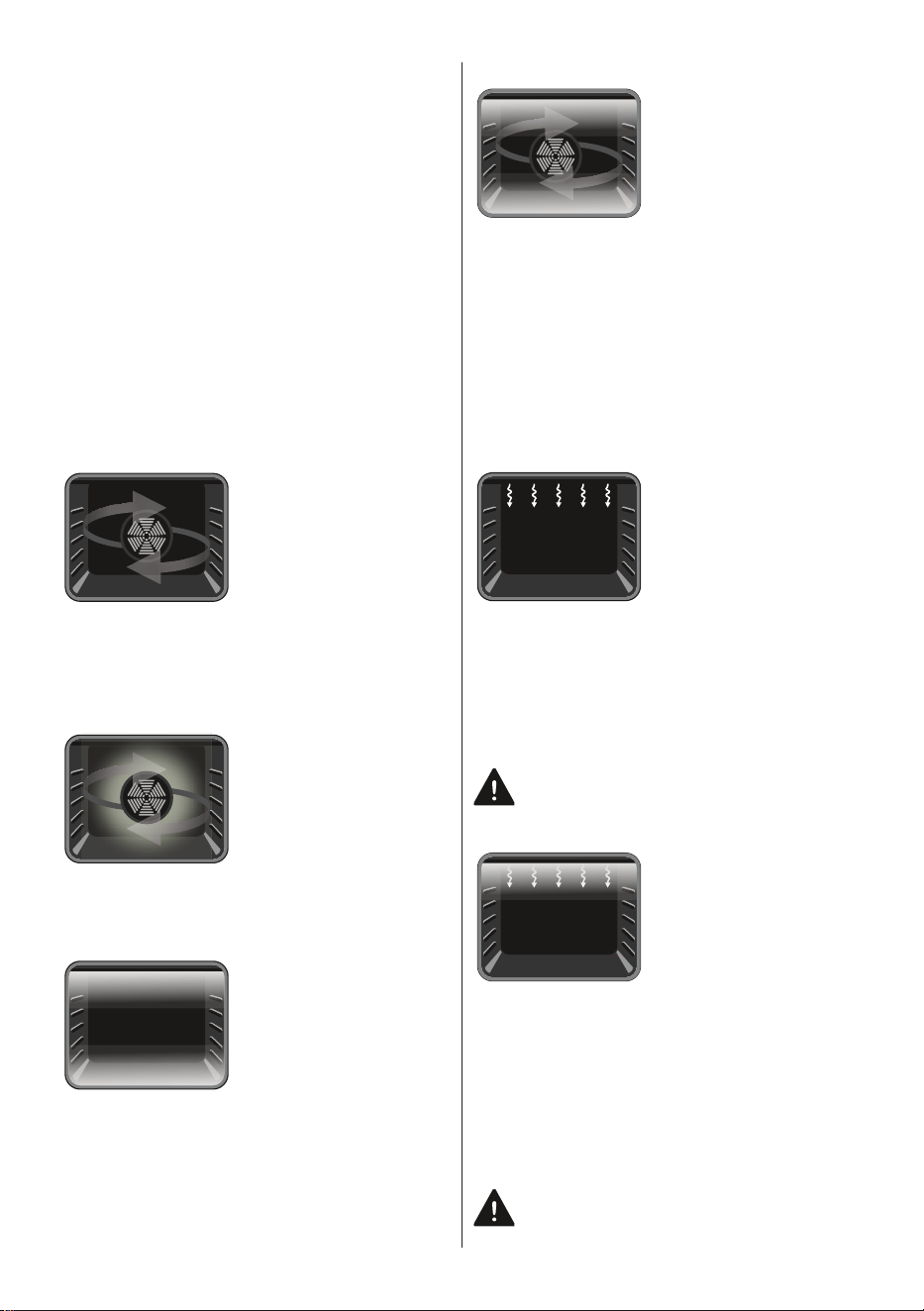
List of Components
1
2
3
1. Control Panel
2. Oven Door Handle
3. Oven Door
Control Panel
4. Timer
5. Oven Function Control Knob
6. Oven Thermostat Knob
7
7
7
7
7
7
7
EN - 14
4. USE OF PRODUCT
4.1. Oven Controls
Oven function control knob
Turn the knob to the corresponding symbol
of the desired cooking function. For the
details of different functions see ´Oven
Functions`.
Oven thermostat knob
After selecting a cooking function, turn
this knob to set the desired temperature.
The oven thermostat light will illuminate
whenever the thermostat is in operation
to heat up the oven or maintain the
temperature.
Oven Functions
* The functions of your oven may be
different due to the model of your product.
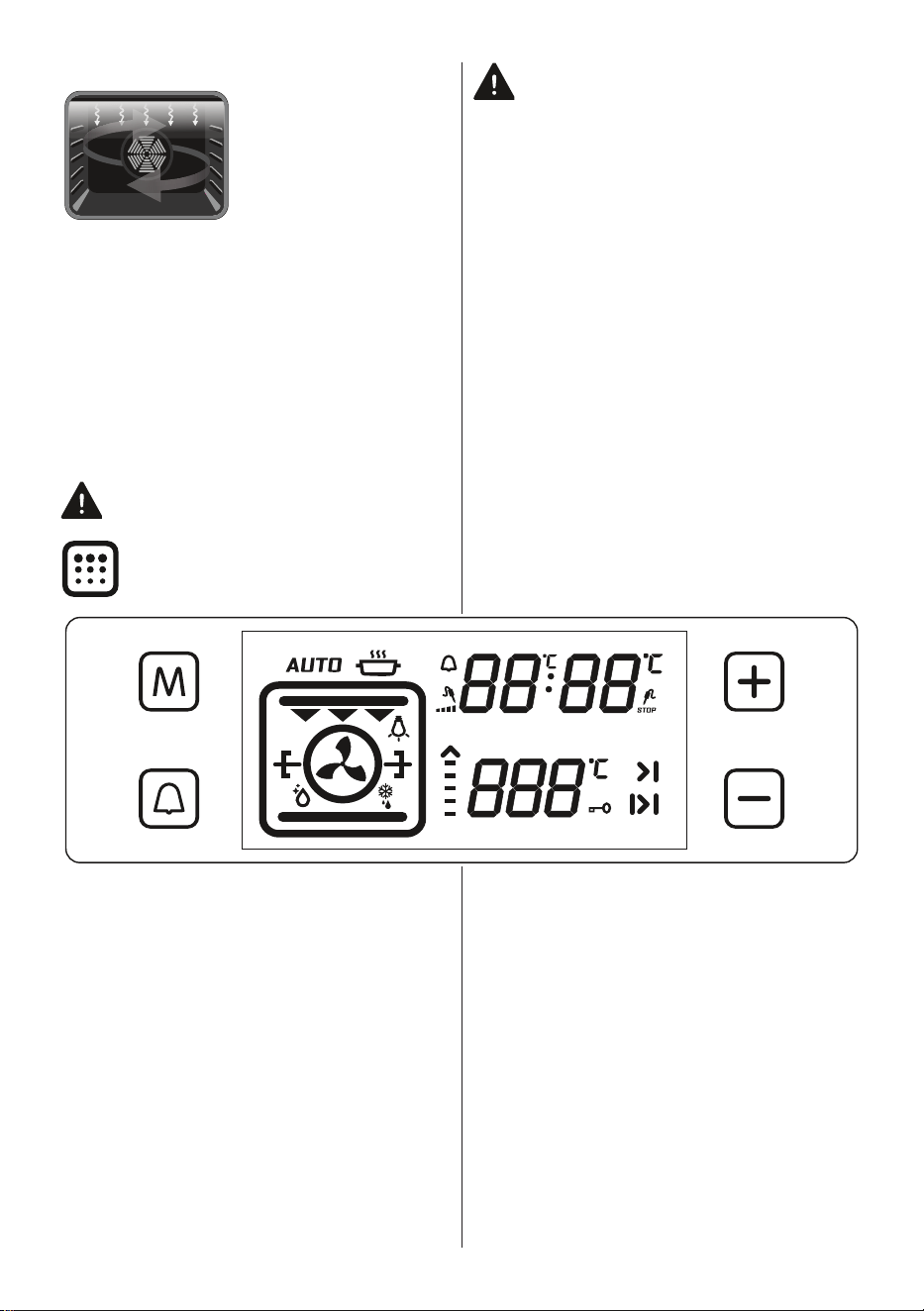
Defrost Function: The
oven’s warning lights
will switch on and the
fan will start to operate.
To use the defrost
function, place your
frozen food in the oven
on a shelf in the third slot from the bottom.
It is recommended that you place an oven
tray under the defrosting food to catch the
water accumulated due to melting ice. This
function will not cook or bake your food, it
will only help to defrost it.
Turbo Function: The
oven’s thermostat and
warning lights will
switch on, and the ring
heating element and
fan will start operating.
The turbo function
evenly disperses the heat in the oven so all
food on all racks will cook evenly. It is
recommended that you preheat the oven for
about 10 minutes.
Static Cooking
Function: The oven’s
thermostat and
warning lights will
switch on, and the
lower and upper
heating elements will
start operating. The
static cooking function emits heat, ensuring
even cooking of food. This is ideal for
making pastries, cakes, baked pasta,
lasagne and pizza. Preheating the oven for
10 minutes is recommended and it is best
to use only one shelf at a time in this
function.
Fan Function: The
oven’s thermostat and
warning lights will
switch on, and the
upper and lower
heating elements and
fan will start operating.
This function is good for baking pastry.
Cooking is carried out by the lower and
upper heating elements within the oven and
by the fan, which provides air circulation,
giving a slightly grilled effect to the food. It
is recommended that you preheat the oven
for about 10 minutes. The fan and lower
heating function is ideal for baking food,
such as pizza, evenly in a short period of
time. The fan evenly disperses the heat of
the oven, while the lower heating element
bakes the food.
Grilling Function: The
oven’s thermostat and
warning lights will
switch on, and the grill
heating element will
start operating. This
function is used for
grilling and toasting foods on the upper
shelves of the oven. Lightly brush the wire
grid with oil to stop food sticking and place
food in the centre of the grid. Always place
a tray beneath the food to catch any drips
of oil or fat. It is recommended that you
preheat the oven for about 10 minutes.
Warning: When grilling, the oven door
must be closed and the oven
temperature should be adjusted to
190°C.
Faster Grilling
Function: The oven’s
thermostat and
warning lights will
switch on, and the grill
and upper heating
elements will start
operating. This function is used for faster
grilling and for grilling food with a larger
surface area, such as meat. Use the upper
shelves of the oven. Lightly brush the wire
grid with oil to stop food sticking and place
food in the centre of the grid. Always place
a tray beneath the food to catch any drips
of oil or fat. It is recommended that you
preheat the oven for about 10 minutes.
Warning: When grilling, the oven door
must be closed and the oven
temperature should be adjusted to
EN - 15
190°C.
Double Grill and Fan
Function: The oven’s
thermostat and
warning lights will
switch on, and the grill,
upper heating
elements and fan will
start operating. This function is used for
faster grilling of thicker food and for grilling
of food with a larger surface area. Both the
upper heating elements and grill will be
energised along with the fan to ensure even
cooking. Use the upper shelves of the oven.
Lightly brush the wire grid with oil to stop
food sticking and place food in the centre of
the grid. Always place a tray beneath the
food to catch any drips of oil or fat. It is
recommended that you preheat the oven for
about 10 minutes.
Warning: When grilling, the oven door
must be closed and the oven
temperature should be adjusted to 190°C.
Pyrolytic Cleaning Function: This
function allows you to clean the
inside of the oven thoroughly.
Warning: Before activating the
pyrolytic cleaning function, remove any
excessive spillage and make sure that the
oven is empty. Do not leave anything inside
the oven cavity in order to prevent damage.
• Before activating the pyrolytic cleaning
function, remove the wire oven shelves
and shelf supports (if available) and
ensure the oven door is closed.
• The oven door will lock when the
pyrolytic function starts.
• When the pyrolytic cleaning function
is on, it is advisable not to use a hob if
it is fitted above the oven. This could
cause overheating and damage to both
appliances.
• During the pyrolytic cleaning cycle the
oven door will become hot. Children
should be kept away until it has cooled.
• At the end of pyrolytic cleaning process,
the display will show the time of day.
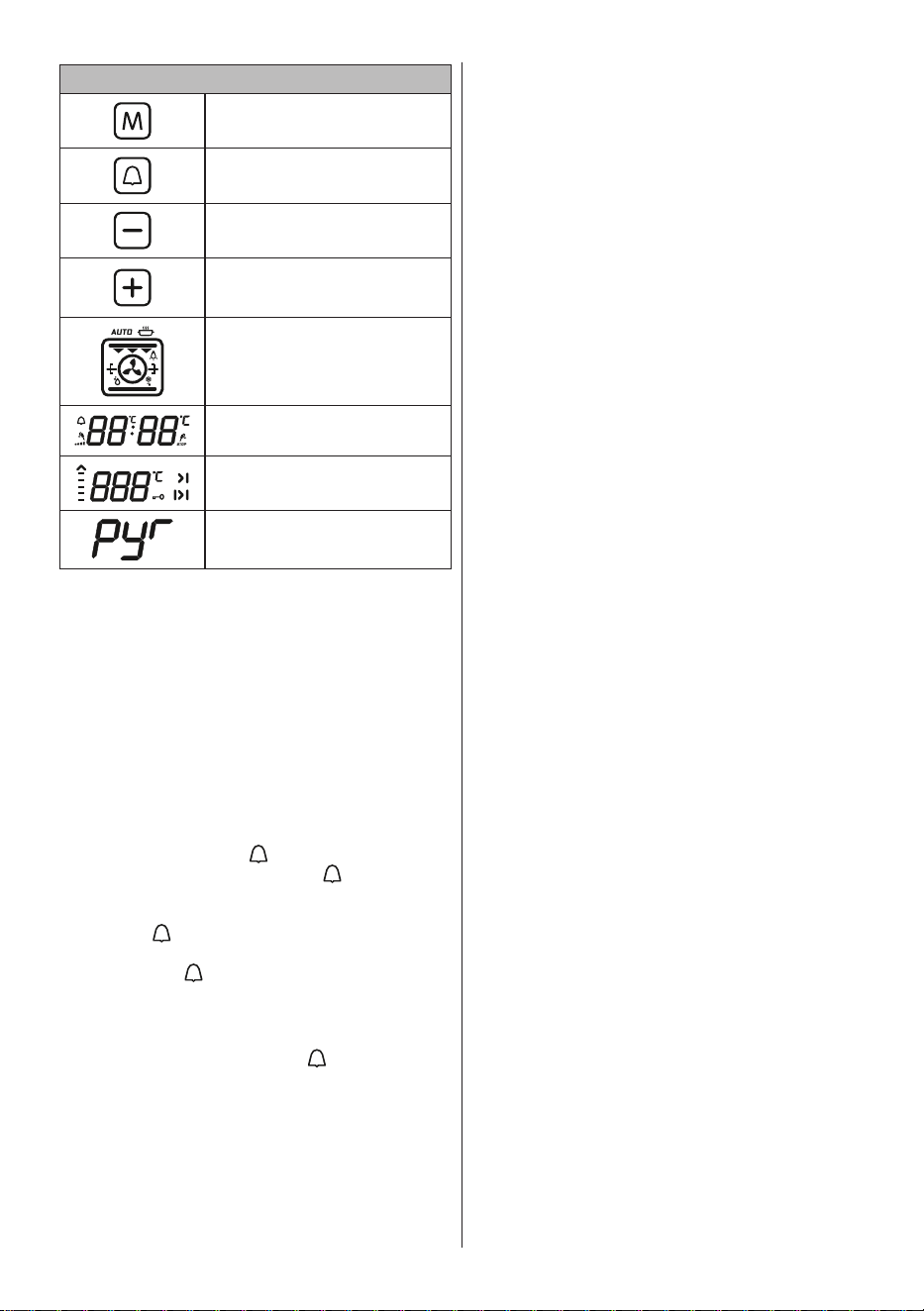
4.2. Use of the Pyrolytic Visio
Touch Programmer
EN - 16
Function Description
Mode key
Alarm key
Time setting key
Time setting/Temperature
settings for meat probe/ Key
lock key
Oven function display
Timer display
Temperature display
Pyrolytic cleaning
Adjusting the Time of Day
When the oven is switched on for the first
time after installation, “0.00” will flash on
the display. Press the “M” sensor button, or
the “+” and “-” buttons simultaneously. The
colon ´:` on the display will flash. You can
adjust and set the time of day using the “+”
and “-” sensor button. The time must be set
to enable use of the oven functions.
Adjusting the Cooking Time
Adjusting the Minute Minder
To set a Minute Minder timer, press the
alarm sensor button “
”, “0.00” will appear
on the Timer display and the “ ” symbol
will flash. Use the “+” and “-” sensor buttons
to adjust the desired warning time period
while the “ ” symbol is flashing. Once you
have completed setting the time period,
wait until the “ ” symbol stops flashing and
remains illuminated. The audible warning
time will be set.
When the timer reaches zero, an audible
warning will sound and the “
” symbol will
flash on the screen. Pressing “+” or “-” will
stop the audible warning and the symbol
will disappear from the screen.
Adjusting the Cooking Duration Time
This function helps you to cook for a
fixed period of time. Prepare the food
for cooking and put it in the oven. Then,
select the desired cooking function and the
temperature. Press the “M” sensor until
you see the Duration Time symbol “I>I”
and “AUTO” appear on the Timer display
screen. Set the required cooking period
using the “+” and “-” sensor buttons while
the timer is in this position. When you
have completed the adjustment, wait until
the current time of day is displayed on the
screen and until the Duration Time symbol
remains illuminated.
When the timer reaches zero, the oven will
switch off, an audible warning will sound
and “AUTO” will flash on the screen. Press
any sensor button on the control unit to stop
the warning sound, “AUTO” will continue
to flash. Press the “+” and “-” buttons
simultaneously to exit “AUTO” mode.
Adjusting the Cooking End Time
This function is used to begin cooking
after a certain period of time and for a
specific duration of time. Prepare the food
for cooking and put it in the oven. Then,
select the desired cooking function and the
temperature.
Press the “M” sensor button until you see
the Duration Time symbol “I>I” and “AUTO”
appear on the Timer display screen. Set
the required cooking period using the “+”
and “-” sensor buttons while the timer is in
this position. Then, press the “M” sensor
button until the “>|” symbol is displayed,
the time of day and the Cooking Duration
Time symbol will flash. Adjust the cooking
finish time using the “+” and “-” buttons
while the timer is in this position. When
you have completed the adjustment, wait
until the current time of day and “>|” remain
illuminated on the Timer display.
The oven will calculate the operating time
by deducting the cooking period from
the set finishing time, at which it will stop
operating. The timer will give an audible
warning and “AUTO” will continue to flash.
Press any timer button to stop the warning
sound, and press the “+” and “-” buttons
simultaneously to exit “AUTO” mode.
Digital Timer Sound Adjustment
Press and hold the “-” sensor button until
you hear an audible 'beep' sound. After
this, each time the “-” button is pressed, a
different 'beep' tone will sound. There are
three different types of sound. Select the
desired tone and do not press any other
buttons. After a short time, the selected
warning sound will be saved.
Key Lock Function
The key lock is used to avoid unintentional
EN - 17
changes being made to the oven settings.
Press and hold the “+” button until you see
the key lock symbol on the display screen.
To deactivate the key lock, press and hold
the “+” button until the key lock symbol
disappears from the display.
While the key lock is active, only the power
button will be usable, all other buttons will
remain locked.
If there is no oven activity for 6 hours
while the oven is operating, the oven will
automatically switch off.
4.3. Accessorries
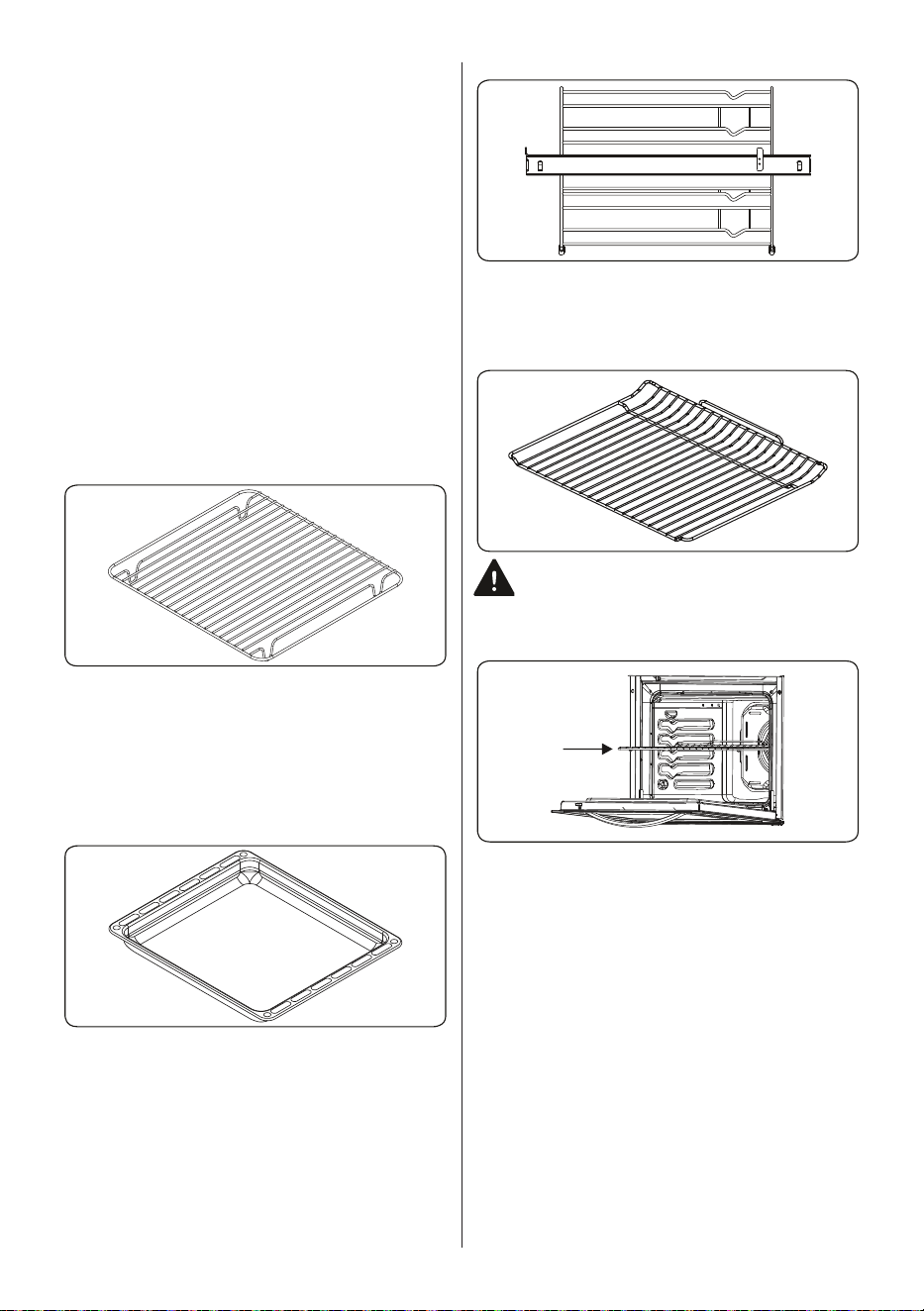
The Wire Grid for Deep Trays
Make sure the wire grid is correctly placed
within a deep tray. It is recommended
to use this accessory for grilling steaks,
meatballs and similar food.
The Deep Tray
The deep tray is best used for cooking
stews.
Put the tray into any rack and push it to the
end to make sure it is placed correctly.
The Wire Rack with a Half Telescopic
Rail
One of the shelves in the wire rack
is telescopic; it extends half-way out,
smoothly, on ball bearings to allow for easy
access to your food.
The Wire Grid
The wire grid is best used for grilling or for
processing food in oven-friendly containers.
WARNING
Place the grid to any corresponding
rack in the oven cavity correctly and push it
to the end.
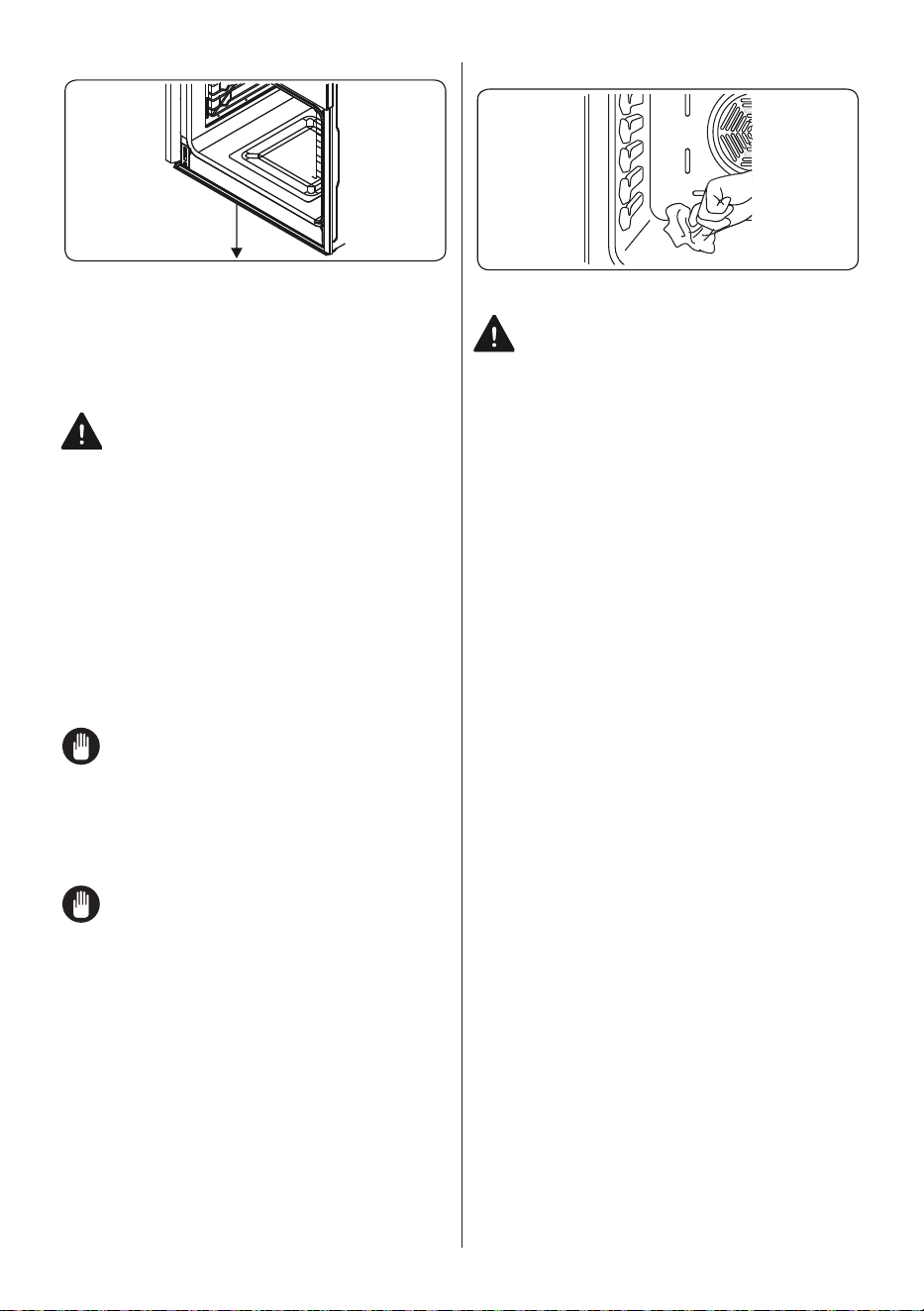
The Water Collector
In some cases of cooking, condensation
may appear on the inner glass of the oven
door. This is not a product malfunction.
Open the oven door into the grilling position
and leave it in this position for 20 seconds.
Water will drip to the collector.
Cool the oven and wipe the inside of the
door with a dry towel. This procedure must
be applied regularly.
EN - 18
5. CLEANING AND
MAINTENANCE
5.1. Cleaning
WARNING: Switch off the appliance
and allow it to cool before cleaning is
to be carried out.
General Instructions
• Check whether the cleaning materials
are appropriate and recommended by
the manufacturer before use on your
appliance.
• Use cream cleaners or liquid cleaners
which do not contain particles. Do not
use caustic (corrosive) creams, abrasive
cleaning powders, rough wire wool or
hard tools as they may damage the
cooker surfaces.
Do not use cleaners that contain
particles as they may scratch the
glass, enamelled and/or painted parts
of your appliance.
• Should any liquids overflow, clean them
immediately to avoid parts becoming
damaged.
Do not use steam cleaners for
cleaning any part of the appliance.
Cleaning the Inside of the Oven
• The inside of enamelled ovens are best
cleaned while the oven is warm.
• Wipe the oven with a soft cloth soaked
in soapy water after each use. Then,
wipe the oven over again with a wet
cloth and dry it.
• You may need to use a liquid cleaning
material occasionally to completely
clean the oven.
Pyrolytic cleaning
WARNING: Before activating the
pyrolytic cleaning function, remove any
excessive spillage and make sure that
the oven is empty. Do not leave anything
inside the oven, such as wire grids, trays, or
oven shelves and supports (if available), as
they could be damaged during pyrolytic
cleaning.
• The oven cavity is coated with a
special enamel that is resistant to high
temperatures. During the pyrolytic
cleaning operation, the temperature
inside the oven can reach about 475°C.
• The oven door will automatically lock,
for your safety, while the pyrolytic
cleaning function is in operation. After
the cleaning is complete, the cooling fan
will begin operating and the oven will
remain locked until it has cooled.
• It is advisable to wipe the oven down
with a sponge soaked in warm water,
after each cooking operation or pyrolytic
cleaning cycle has been carried out.
• During the pyrolytic operation, a smell
and some fumes will emanate due to
the destruction of food residue within
the oven. This is normal. Oven cleaning
fumes could be fatal to birds, children
and pets so all should be kept away
until the operation is complete.
• The area where the oven is installed
should be kept well-ventilated,
especially during the pyrolytic cleaning
function, and any doors leading into the
area should be closed to avoid passing
the smell and fumes throughout.
Cleaning the Glass Parts
• Clean the glass parts of your appliance
on a regular basis.
• Use a glass cleaner to clean the inside
and outside of the glass parts. Then,
rinse and dry them thoroughly with a dry
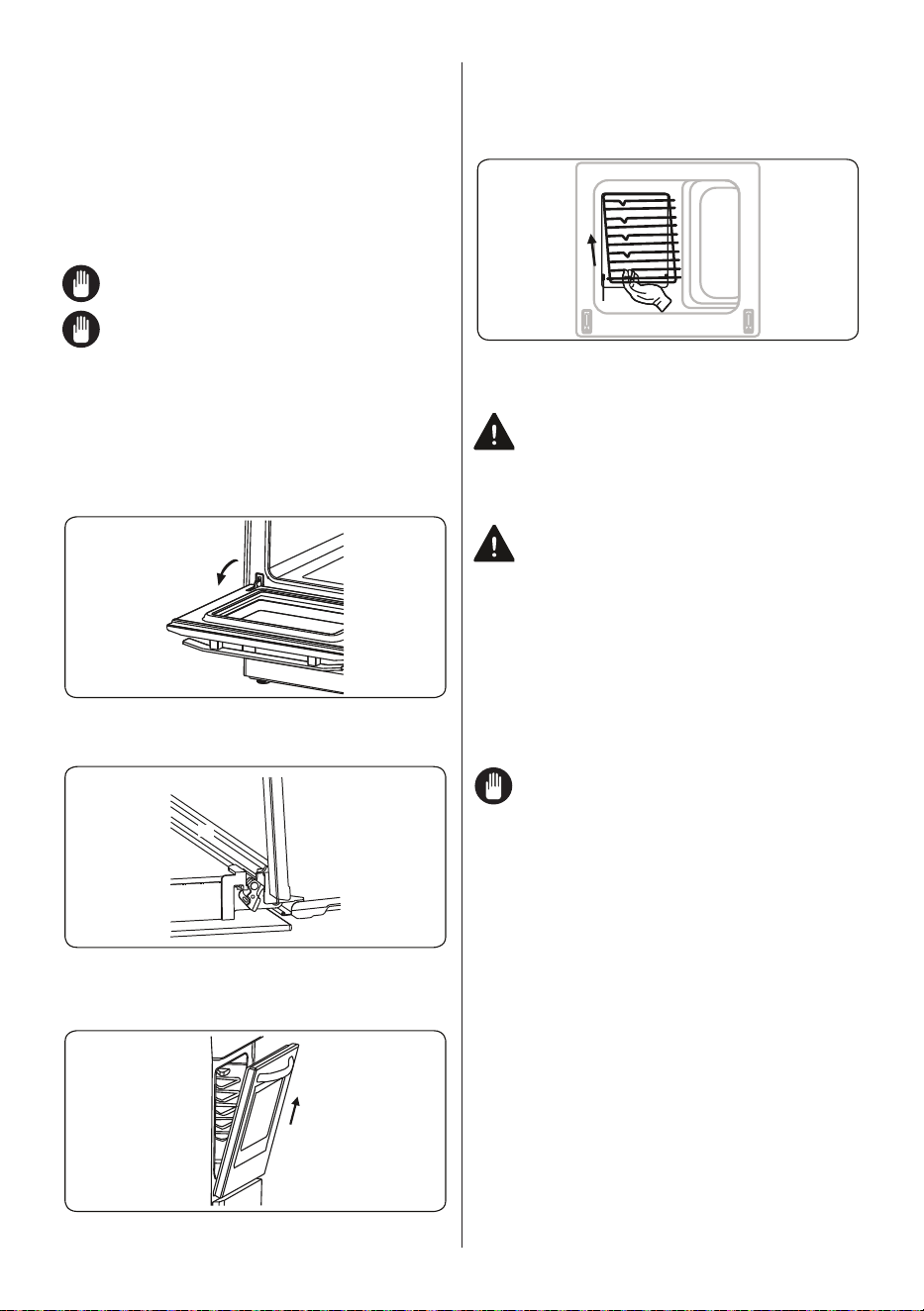
EN - 19
cloth.
Cleaning the Stainless Steel Parts (if
available)
• Clean the stainless steel parts of your
appliance on a regular basis.
• Wipe the stainless steel parts with a soft
cloth, soaked in only water. Then, dry
them thoroughly with a dry cloth.
Do not clean the stainless steel parts
while they are still hot from cooking.
Do not leave vinegar, coffee, milk, salt,
water, lemon or tomato juice on the
stainless steel for a long time.
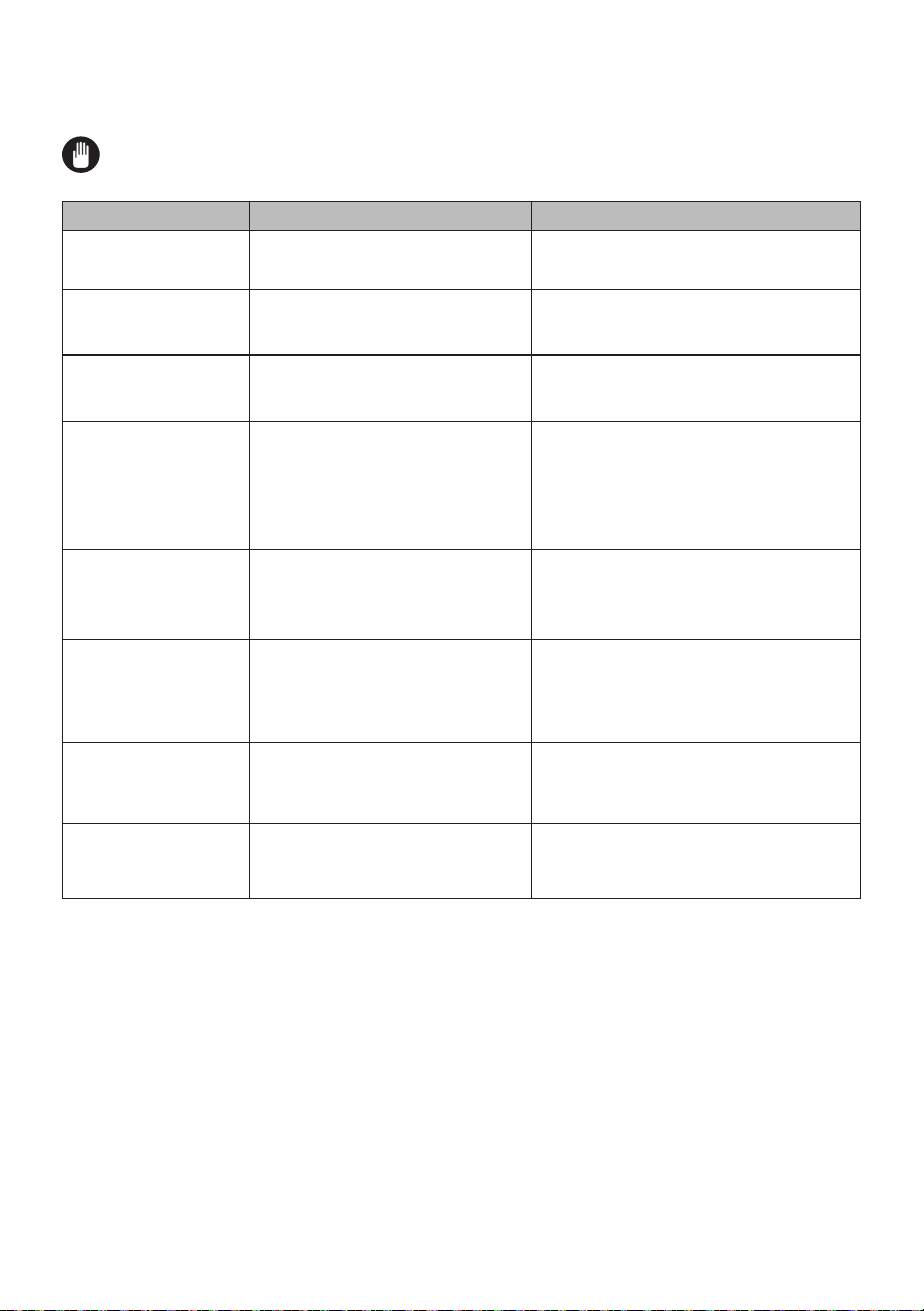
Removal of the Oven Door
Before cleaning the oven door glass, you
must remove the inner glass, as shown
below.
1. Open the oven door.
2. Open the saddle bracket (a) (with the aid
of a screwdriver) up to the end position.
a
3. Close the door until it is almost in the
fully closed position, and remove the door
by pulling it towards you.
Removal of the Wire Shelf
To remove the wire rack, pull the wire rack
as shown in the figure. After releasing it
from the clips (a), lift it up.
a
5.2. Maintenance
WARNING: The maintenance of this
appliance should be carried out by an
authorised service person or qualified
technician only.
Changing the Oven Lamp
WARNING: Switch off the appliance
and allow it to cool before cleaning
your appliance.
• Remove the glass lens, then remove the
bulb.
• Insert the new bulb (resistant to 300 °C)
to replace the bulb that you removed
(230 V, 15-25 Watt, Type E14).
• Replace the glass lens, and your oven
is ready for use.
The lamp is designed specifically for
use in household cooking appliances.
It is not suitable for household room
illumination.
EN - 20
6. TROUBLESHOOTING&TRANSPORT
6.1. Troubleshooting
If you still have a problem with your appliance after checking these basic
troubleshooting steps, please contact an authorised service person or qualified
technician.
Problem Possible Cause Solution
Oven does not switch
on.
Power is switched off.
Check whether there is power supplied.
Also check that other kitchen appliances are
working.
No heat or oven does
not warm up.
Oven temperature control is incorrectly
set.
Oven door has been left open.
Check that the oven temperature control
knob is set correctly.
Oven light (if available)
does not operate.
Lamp has failed.
Electrical supply is disconnected or
switched off.
Replace lamp according to the instructions.
Make sure the electrical supply is switched
on at the wall socket outlet.
Cooking is uneven
within the oven.
Oven shelves are incorrectly
positioned.
Check that the recommended temperatures
and shelf positions are being used.
Do not frequently open the door unless you
are cooking things that need to be turned.
If you open the door often, the interior
temperature will be lower and this may affect
the results of your cooking.
The appliance door
cannot be opened; the
door lock symbol or
signal lamp lights up on
the display.
The appliance door is locked due to
the pyrolytic function.
Wait until the cooking compartment has
cooled and the door lock symbol goes out.
The timer buttons
cannot be pressed
properly.
There is foreign matter caught
between the timer buttons.
Touch model: there is moisture on the
control panel.
The key lock function is set.
Remove the foreign matter and try again.
Remove the moisture and try again.
Check whether the key lock function is set.
The oven fan is noisy. Oven shelves are vibrating.
Check that the oven is level.
Check that the shelves and any bake ware
are not vibrating or in contact with the oven
back panel.
After the “pyrolysis”
cleaning cycle, it is not
possible to select a
function.
The oven cools itself by operating the
cooling fan after “pyrolysis”.
Verify whether the door locking device has
switched off. If it has not, the oven is still in
the cooling period. During the cooling fan
period, no cooking function can be operated.
6.2. Transport
If you need to transport the product, use the original product packaging and carry it using
its original case. Follow the transport signs on the packaging. Tape all independent parts to
the product to prevent damaging the product during transport.
If you do not have the original packaging, prepare a carriage box so that the appliance,
especially the external surfaces of the product, is protected against external threats.

Help and assistance
Please refer to the troubleshooting tips section within your user guide for help and
guidance.
If you are still unable to resolve the problem, please contact our technical support
team for assistance.
When contacting a member of our team, please provide:
• Product model number and serial number. Please note; model & serial
numbers can be found on the product rating label.
• Date of purchase.
• Complete description of the problem.
This information will help our team assist you more quickly.
Technical Help Line:
1300 556 816 (AU) / 09 274 8265 (NZ)
Glen Dimplex Australia Pty Ltd
1340 Ferntree Gully Road
Scoresby, VIC 3179
Ph: 1300 556 816
Web: www.dimplex.com.au
Glen Dimplex New Zealand Ltd
38 Harris Road
East Tamaki, Auckland
Ph: 09 274 8265
Web: www.dimplex.co.nz

BELLING® PRODUCT WARRANTY
This warranty is provided in Australia by Glen Dimplex Australia Pty Limited ABN 69 118 275 460 of
1340 Ferntree Gully Road, Scoresby, Victoria 3179 (Phone number 1300 556 816), or in New
Zealand by Glen Dimplex Australasia Ltd, New Zealand registration number 1506305, of 38 Harris
Road, East Tamaki, Auckland, New Zealand (Phone number 09 2748265) (we, us our) in respect of
the Belling® product which this warranty card has been included in the packaging for or otherwise
supplied with (the Belling® product).
1 Belling® express warranty
Subject to the exclusions below, we warrant that the Belling® product will not have any electrical or
mechanical breakdowns within:
(a) in the case of Belling® products used for personal, domestic or household purposes,
a period of 24 months from the date the Belling® product is purchased as a brand
new product from a retailer located in Australia or New Zealand; and
(b) in the case of Belling® products used for purposes other than personal, domestic or
household purposes (including business or commercial use), a period of 90 days from
the date the Belling® product is purchased as a brand new product from a retailer
located in Australia or New Zealand. Belling® Products are designed and intended for
domestic use.
This express warranty is personal to the first person who acquires the Belling® product from the
relevant retailer and claims under this warranty cannot be made by anyone other than this person.
The benefits conferred by this express warranty are in addition to the Consumer Guarantees referred
to in section 3 and any other statutory rights you may have under the Australian Consumer Law, the
New Zealand Consumer Guarantees Act and/or other applicable laws.
2 Warranty exclusions
This express warranty does not apply where:
(a) the Belling® product has been installed, used or operated otherwise than in
accordance with the product manual or other similar documentation provided to you
with the Belling® product;
(b) the Belling® product requires repairs due to damage resulting from accident, misuse,
incorrect installation, improper liquid spillage, cleaning or maintenance, unauthorised
modification, use on an incorrect voltage, power surges and dips, voltage supply
problems, tampering or unauthorised repairs by any persons, use of defective or
incompatible accessories or exposure to abnormally corrosive conditions;
(c) the repair relates to the replacement of consumable parts such as fuses in plugs and
bulbs or any other parts of the Belling® product which require routine replacement;
(d) you are unable to provide us with reasonable proof of purchase for the Belling®
product;

Page 2
(e) the breakdown occurs after the expiry of the express warranty period set out in
s
ection 1; or
(f) the Belling® product was not purchased in Australia or New Zealand as a brand new
product.
3 Consumer Guarantees
Our goods come with guarantees that cannot be excluded under the Australian Consumer Law. You
are entitled to a replacement or refund for a major failure and for compensation for any other
reasonably foreseeable loss or damage. You are also entitled to have the goods repaired or replaced
if the goods fail to be of acceptable quality and the failure does not amount to a major failure.
If you acquired the goods in New Zealand, similar provisions of the Consumer Guarantees Act 1993
may apply, but may be excluded if you acquired the goods for the purpose of a business.
4 How to make a claim
You may make a claim under this warranty by visiting our website (www.glendimplex.com.au
in
Australia, www.glendimplex.co.nz in New Zealand), contacting our customer care line on 1300 556
816 in Australia, 09 2748265 in New Zealand) or visiting a Glen Dimplex service centre.
To make a valid claim under this warranty, you must:
(a) lodge the claim with us as soon as possible and no later than 14 days after you first
become aware of the breakdown;
(b) provide us with the Belling® product serial number;
(c) provide us with reasonable proof of purchase for the Belling® product; and
(d) if required by us, provide us (or any person nominated by us) with access to th
e
pr
emises at which the Belling® product is located at times nominated by us (so that
we can inspect the Belling® product).
5 Warranty claims
If you make a valid claim under this warranty and none of the exclusions set out in section 2 apply, we
will, at our election, either repair the Belling® product or replace the Belling® product with a product of
identical specification (or where the product is superseded or no longer in stock, with a product of as
close a specification as possible).
Goods presented for repair may be replaced by refurbished goods of the same type rather than being
repaired. Refurbished parts may be used to repair the goods.
Belling® products are designed and supplied for normal domestic use. We will not be liable to you
under this warranty for business loss or damage of any kind whatsoever.
6 Costs of warranty claim
Where you make a claim under this warranty, a Glen Dimplex authorised repairer may need to attend
your premises to inspect the Belling® product. For Belling® products located in Australia, we may
charge you a service call fee if a repairer will be required to travel more than 30 kilometers from the
nearest Glen Dimplex service centre to your location. You may obtain details on the location of our
service centres and our service call fees by visiting our website (www.glendimplex.com.au
in
Australia, www.glendimplex.co.nz in New Zealand) or calling our customer care line on (1300 556 816
in Australia, 09 2748265 in New Zealand)
52205738

52233987
