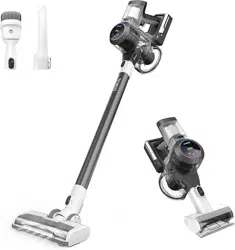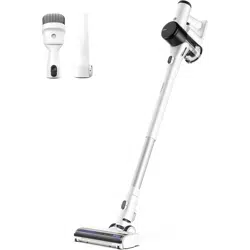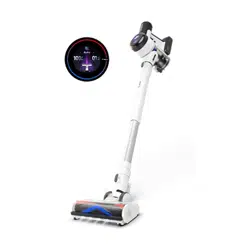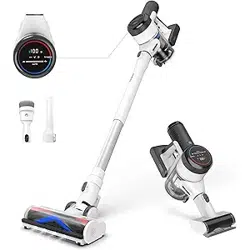
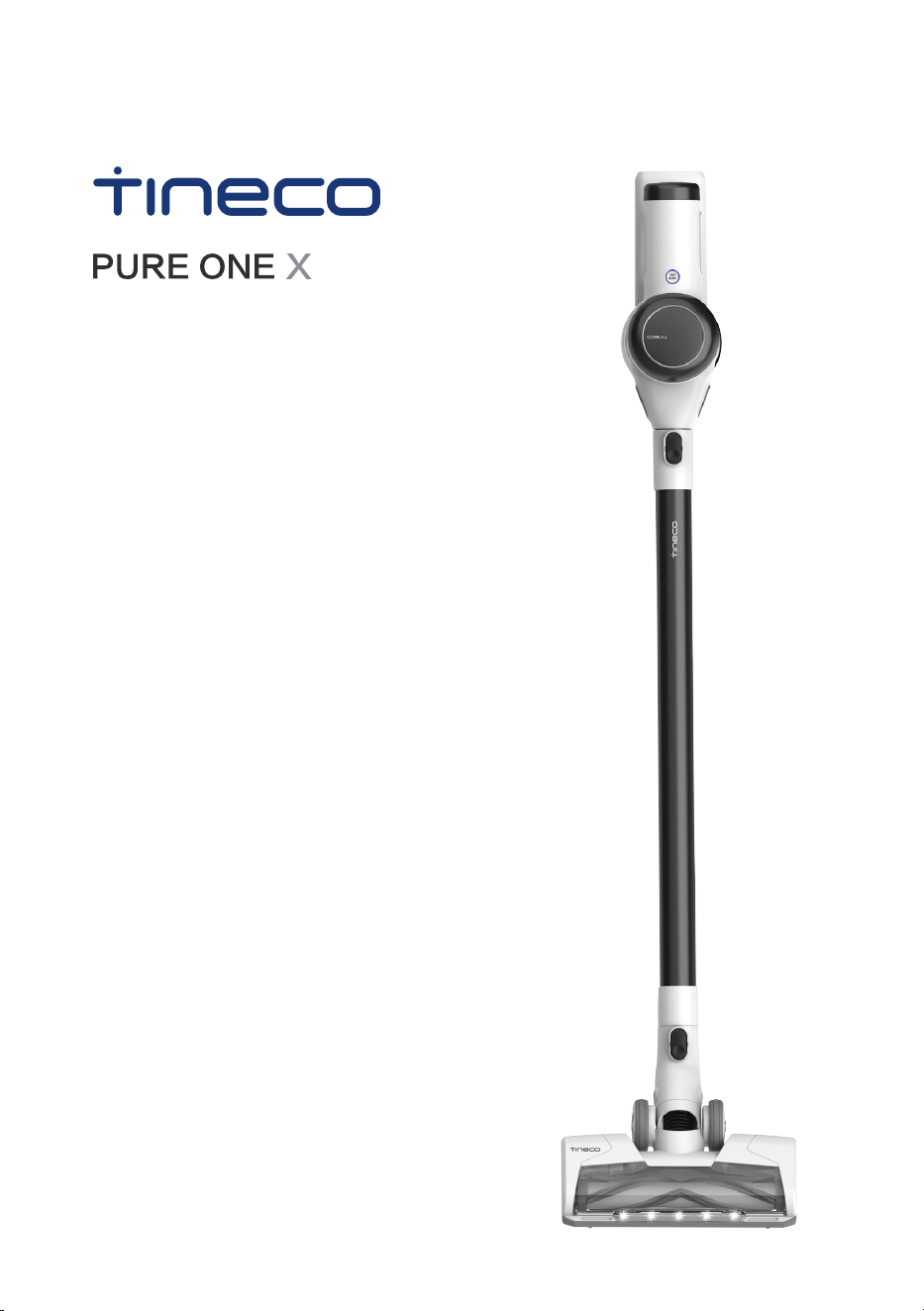
SERIES
Smart Vacuum Cleaner
Instruction Manual
Manual De Uso
Mode D’emploi
*Actual product may differ from illustration.


EN
1
CONTENTS
Important Safety Instructions
...............................................................
2
Overview
................................................................................................
5
Accessories
............................................................................................
6
Assembly
...............................................................................................
8
Operation
............................................................................................
10
Maintenance
.......................................................................................
15
Specications
......................................................................................
19
Troubleshooting
..................................................................................
20
Warranty
..............................................................................................
21

EN
2
SAVE THESE INSTRUCTIONS
Household use only.
When using an electrical appliance, basic precautions should always be followed, including
the following:
READ ALL INSTRUCTIONS BEFORE USING (THIS APPLIANCE). Failure to follow the
warnings and instructions may result in electric shock, re and/or serious injury.
WARNING – To reduce the risk of re, electric shock, or injury:
1. This appliance can be used by children aged from 8 years and above and persons with
reduced physical, sensory or mental capabilities or lack of experience and knowledge
if they have been given supervision or instruction concerning use of the appliance in
a safe way and understand the hazards involved. Children should not play with the
appliance. Cleaning and user maintenance shall not be performed by children without
supervision.
2. The appliance is not to be used by persons (including children) with reduced physical,
sensory or mental capabilities, or lack of experience and knowledge, unless they have
been given supervision or instruction.
3. For INDOOR use ONLY. Do not use the appliance outdoors, nor in commercial or
industrial environments. Do not use the appliance on wet surfaces or surfaces with
standing water.
4. Do not allow to be used as a toy. Close attention is necessary when used by or near
children, pets or plants.
5. Use only as described in this manual. Use only manufacturer’s recommended
attachments.
6. Do not use with a damaged cord or plug. If appliance has been dropped, damaged,
left outdoors, dropped into water, or is not working as it should, return it to a service
center.
7. Do not handle charger, including charger plug, and charger terminals with wet hands.
8. Do not block openings. Stop use if openings become blocked. Clean and remove any
blocked objects according to the manual instructions.
9. Keep hair, loose clothing, ngers, and all parts of your body away from openings and
moving parts.
10. Use extra care when cleaning on stairs.
11. Do not use to pick up ammable or combustible liquids, such as gasoline, or use in
areas where they may be present.
12. Do not pick up anything that is burning or smoking, such as cigarettes, matches, or hot
ashes.
13. Do not use without a lter.
14. Prevent unintentional activation. Ensure the switch is in the off position before
connecting to the battery pack, picking up or carrying the appliance. Carrying the
appliance with your nger on the switch or powering on the appliance with the switch
on may cause accidents.
Important Safety Instructions

EN
3
15. Disconnect the battery pack from the appliance before making any adjustments,
changing accessories, storing the appliance. Such preventive safety measures reduce
the risk of starting the appliance accidentally.
16. For the purposes of recharging the battery, only use the detachable supply unit
provided with this appliance. A charger that is suitable for one type of battery pack may
create a risk of re when used with another battery pack.
17. Use appliances only with specically designated Tineco battery packs. Use of any other
battery packs may create a risk of injury and re.
18. When battery pack is not in use, keep it away from other metal objects, like paper clips,
coins, keys, nails, screws or other small metal objects, that can make a connection from
one terminal to another. Shorting the battery terminals together may cause burns or a
re.
19. Under improper usage, liquid may be ejected from the battery; avoid contact. If contact
accidentally occurs, ush with water. If liquid comes into eye contact, seek medical
help. Liquid ejected from the battery may cause irritation or burns.
20. Do not use a battery pack or appliance that is damaged or modied. Damaged or
modied batteries may exhibit unpredictable behavior resulting in re, explosion or risk
of injury.
21. Do not expose a battery pack or appliance to re or excessive heat. Exposure to re or
temperatures above 266°F (130°C) may cause an explosion.
22. Follow all charging instructions and do not charge the battery pack or appliance
outside of the temperature range specied in the instructions. Charging improperly or
at temperatures outside of the specied range may damage the battery and increase
the risk of re.
23. Have servicing performed by a qualied repair person using only identical replacement
parts. This will ensure that the safety of the product is maintained.
24. This appliance contains battery cells that are non-replaceable. Do not modify or
attempt to repair the appliance or the battery pack except as indicated in the
instructions for use and care.
25. Always turn off this appliance before connecting or disconnecting the motorized
nozzle.
26. Do not charge or store the appliance outdoors or inside a car. Only charge, store or use
the battery in a dry indoor area where the temperature is higher than 39.2°F (4°C) but
lower than 104°F (40°C). The charger is for indoor use only.
FCC Supplier’s Declaration of Conformity
Tineco / PURE ONE X SERIES
This appliance complies with part 15 of the FCC Rules. Operation is subject to the
following two conditions:
(1) This appliance may not cause harmful interference, and (2) this appliance must accept
any interference received, including interference that may cause undesired operation.
Tineco INTELLIGENT, INC.
1700 WESTLAKE AVENUE N., SUITE 200, SEATTLE, WA, 98109, USA
WWW.TINECO.COM
1-855-292-8864

EN
4
Changes or modications not expressly approved by the party responsible for compliance
could void the user’s authority to operate the equipment.
Note: This equipment has been tested and found to comply with the limits for a Class
B digital appliance, pursuant to Part 15 of the FCC Rules. These limits are designed to
provide reasonable protection against harmful interference in a residential installation.
This equipment generates uses and can radiate radio frequency energy and, if not
installed and used in accordance with the instructions, may cause harmful interference
to radio communications. However, there is no guarantee that interference will not occur
in a particular installation. If this equipment does cause harmful interference to radio
or television reception, which can be determined by turning the equipment off and on,
the user is encouraged to try to correct the interference by one or more of the following
measures:
(1) Reorient or relocate the receiving antenna.
(2) Increase the separation between the equipment and receiver.
(3) Connect the equipment into an outlet on a circuit different from that to which the
receiver is connected.
(4) Consult the dealer or an experienced radio/TV technician for help.
FCC Radiation Exposure Statement
This equipment complies with FCC radiation exposure limits set forth for an uncontrolled
environment.
Note
The manufacturer is not responsible for any radio or TV interference caused by
unauthorized modications to this equipment, such modications could void the user’s
authority to operate this equipment.
IC Note
This appliance contains licence-exempt transmitter(s)/receiver(s) that comply with
Innovation, Science and Economic Development Canada’s licence-exempt RSS(s).
Operation is subject to the following two conditions:
(1) this appliance may not cause interference.
(2) this appliance must accept any interference, including interference that may cause
undesired operation of the appliance.
-This Class B digital apparatus complies with Canadian ICES-003.
-This equipment complies with ISED RSS-102 radiation exposure limits set forth for an
uncontrolled environment. This equipment should be installed and operated with a
minimum distance of 20cm between the radiator and any part of your body.
EN
5
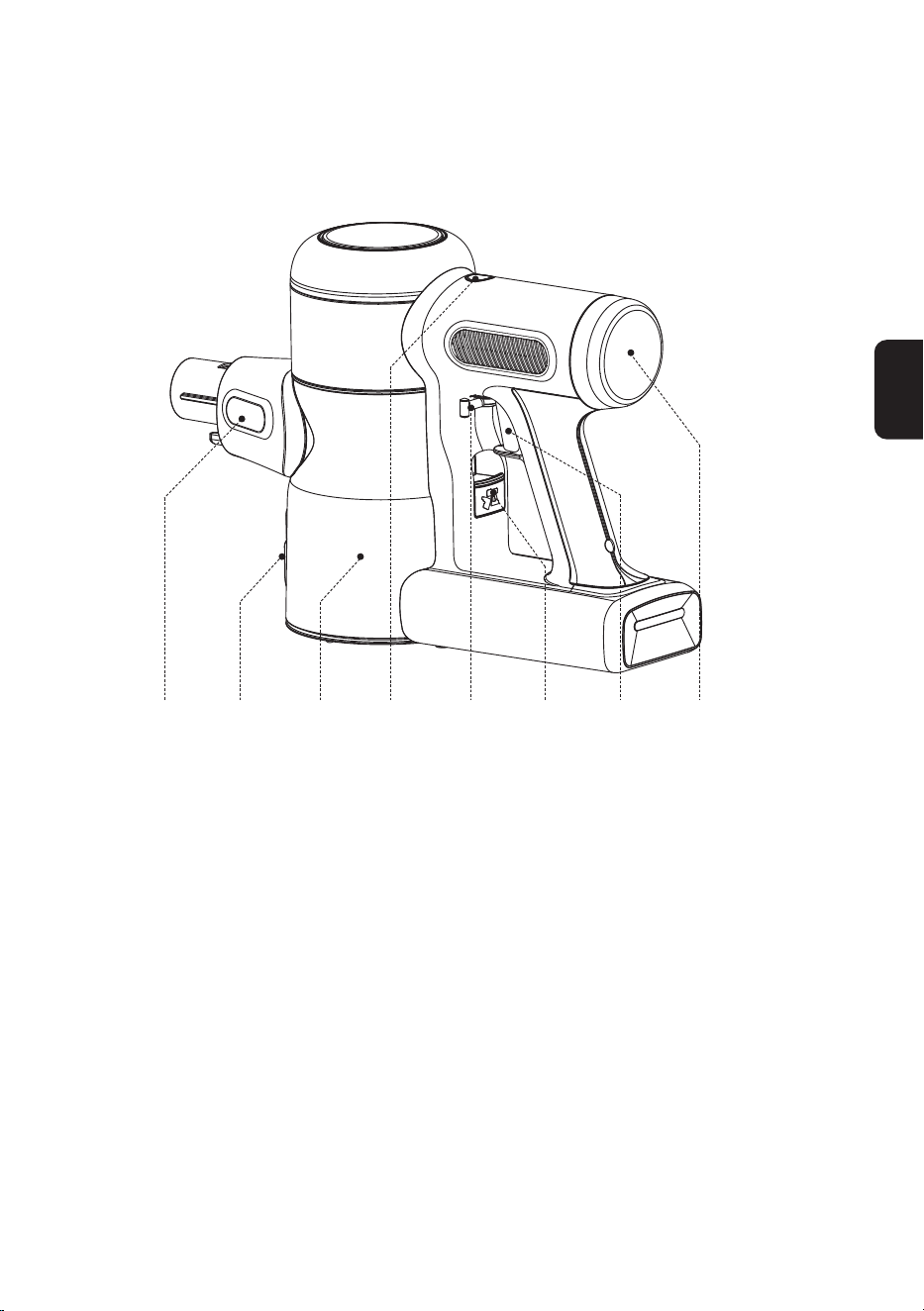
A B C D E F G H
A. Dust sensor
B. Dust empty release button
C. Dustbin
D. AUTO/MAX button
E. Trigger lock
F. Dustbin release button
G. Trigger
H. HEPA Filter
Overview
EN
6
Note:
• Test an accessory on a small, inconspicuous area before use on sensitive surfaces.
• The packaging box shows which accessories are included with your purchase.
• As shown below, there are many components compatible with this model. If you require more
accessories, please go to www.tineco.com or store.tineco.com.
Accessories
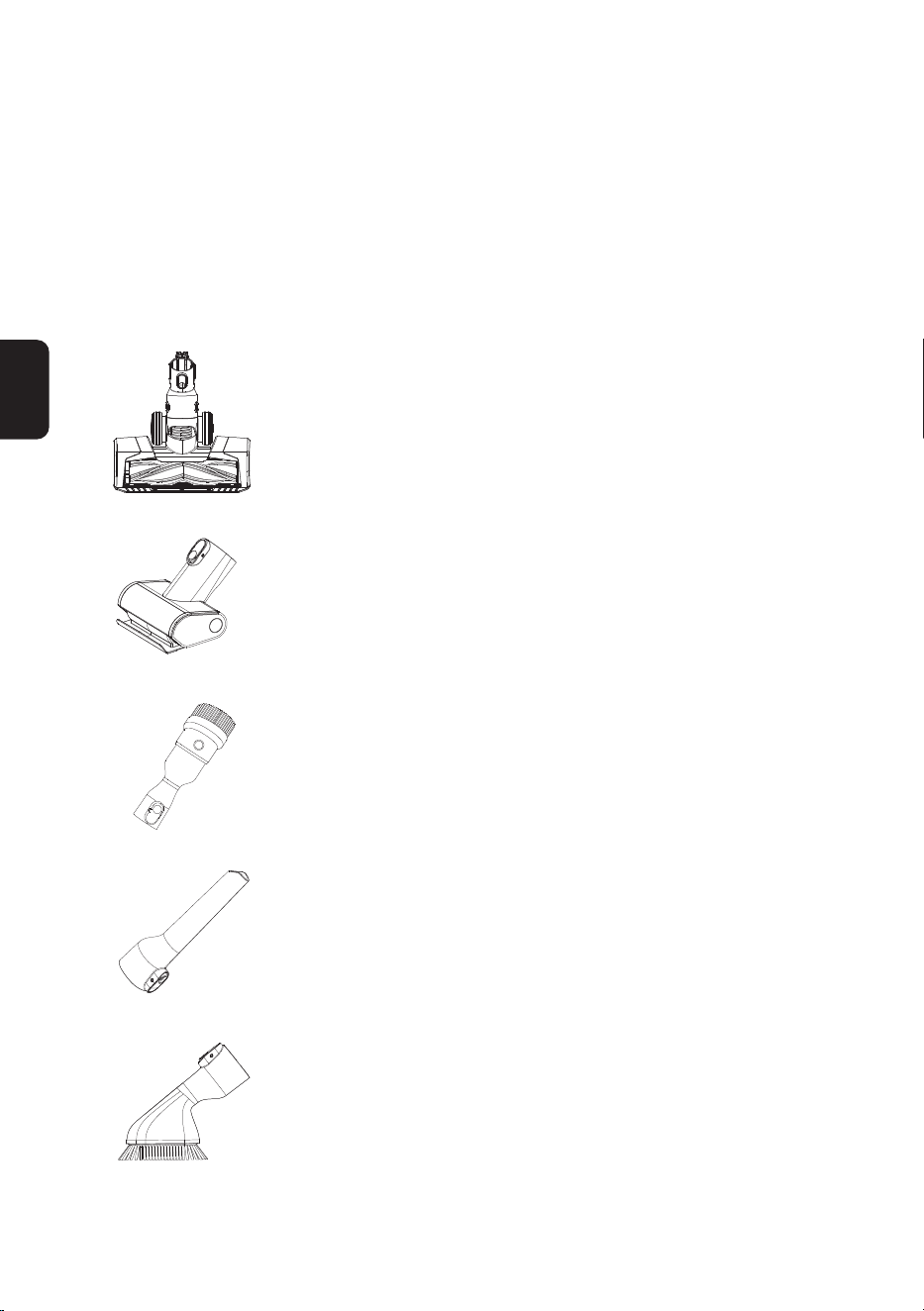
Full-size LED multi-tasker power brush
Ideal for both hard oors and carpets.
Very effective for dislodging dirt embedded in the carpet.
Mini power brush
For vacuuming upholstered furniture, mattresses, etc.
Vacuums pet hair and removes ingrained dirt.
2-in-1 dusting brush
Switches between a wide and a soft brush by pressing the release
button. The soft brush is most effective on hard-surface furniture
while the wide brush is effective for upholstered furniture, curtains,
etc.
Crevice tool
For corners, nooks, and other hard-to-reach places such as around
car seats, picture frames, and cupboards.
Soft dusting brush
Angled bristles on a slender, oval-shaped rim provide anti-static,
cushioned contact. Suitable for dusting shelves, lighting, delicate
surfaces, electronics and more.
EN
7
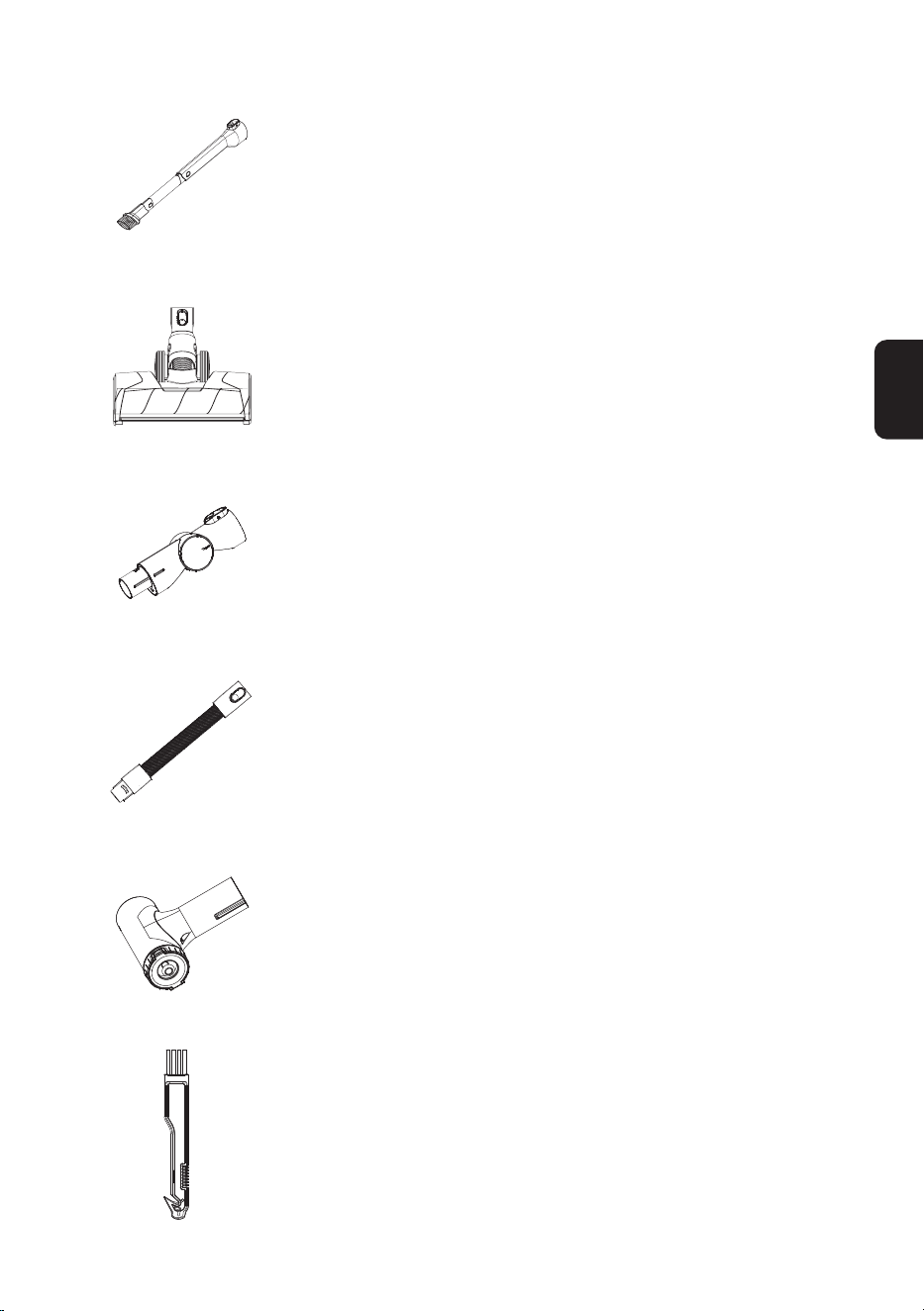
Flexible long crevice tool
Easy to bend, easy to reach tight spots. Suitable for cleaning dust
behind and beneath furniture, around refrigerators, and many
other tight gaps.
Full-size LED soft-roller power brush
Perfect for hard oors, especially sensitive wood oor.
Picks up coarse and ne dirt at the same time.
Multi-angle folding tube
An articulated joint makes it adjustable to allow for exibility when
cleaning from high to low.
Flexible extension hose
Excellent extension and exibility to access hard-to-reach spaces;
perfect for in-care use.
Compatible with all non-motorized Tineco accessories.
Pre-lter cleaning tool
A dirty lter is a leading cause of suction loss, and this device
is designed to make your lter last much longer. Place the dirty
lter inside the pre-lter cleaning tool and close the lid. Run the
appliance in MAX mode, and rotate the side cover.
Hair cleaning tool
Use the end with the small blade to remove hair and debris
wrapped around the roller.
Use the end with the brush to clean the brush window, and the
dustbin, as required.
EN
8
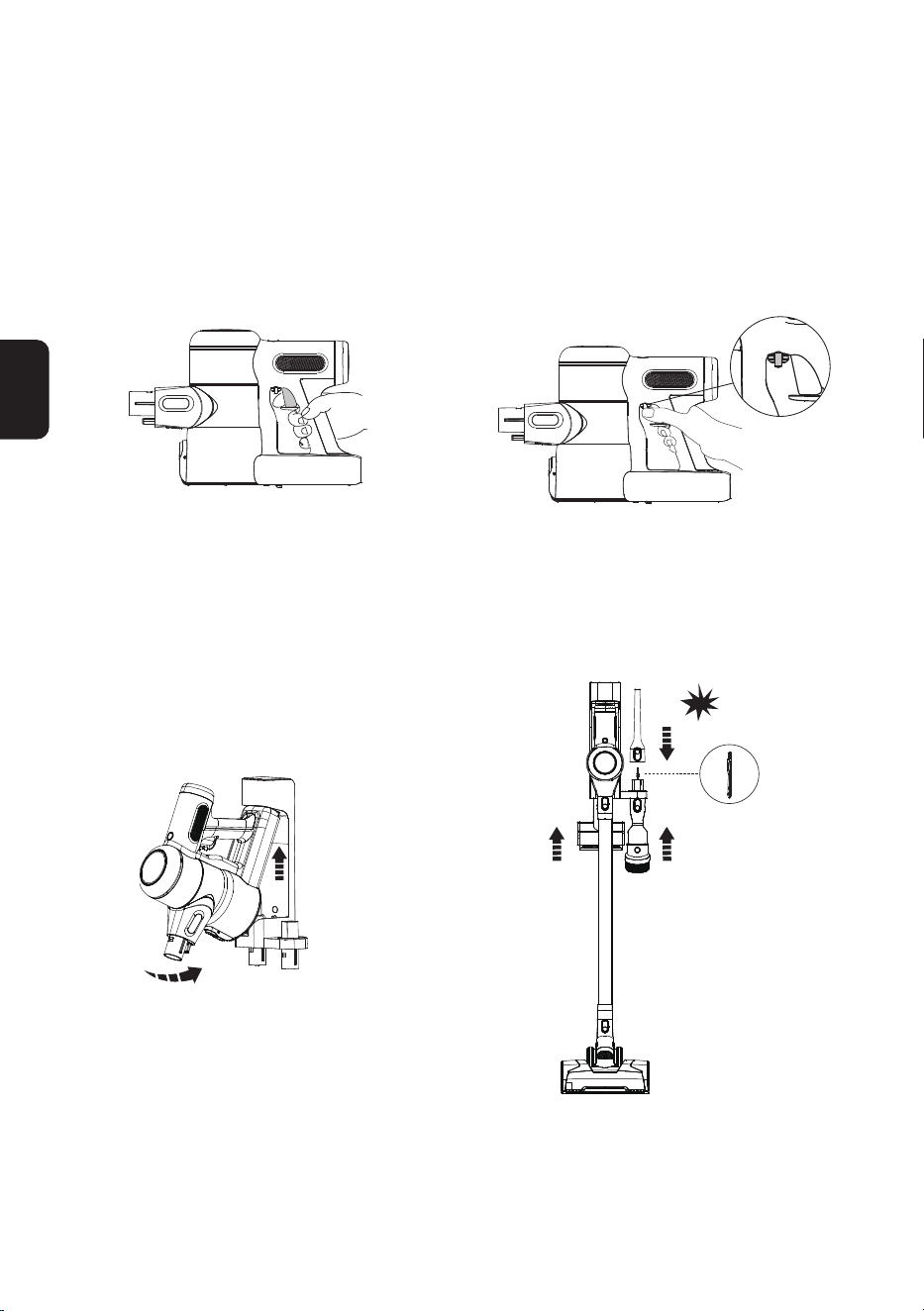
Assembly
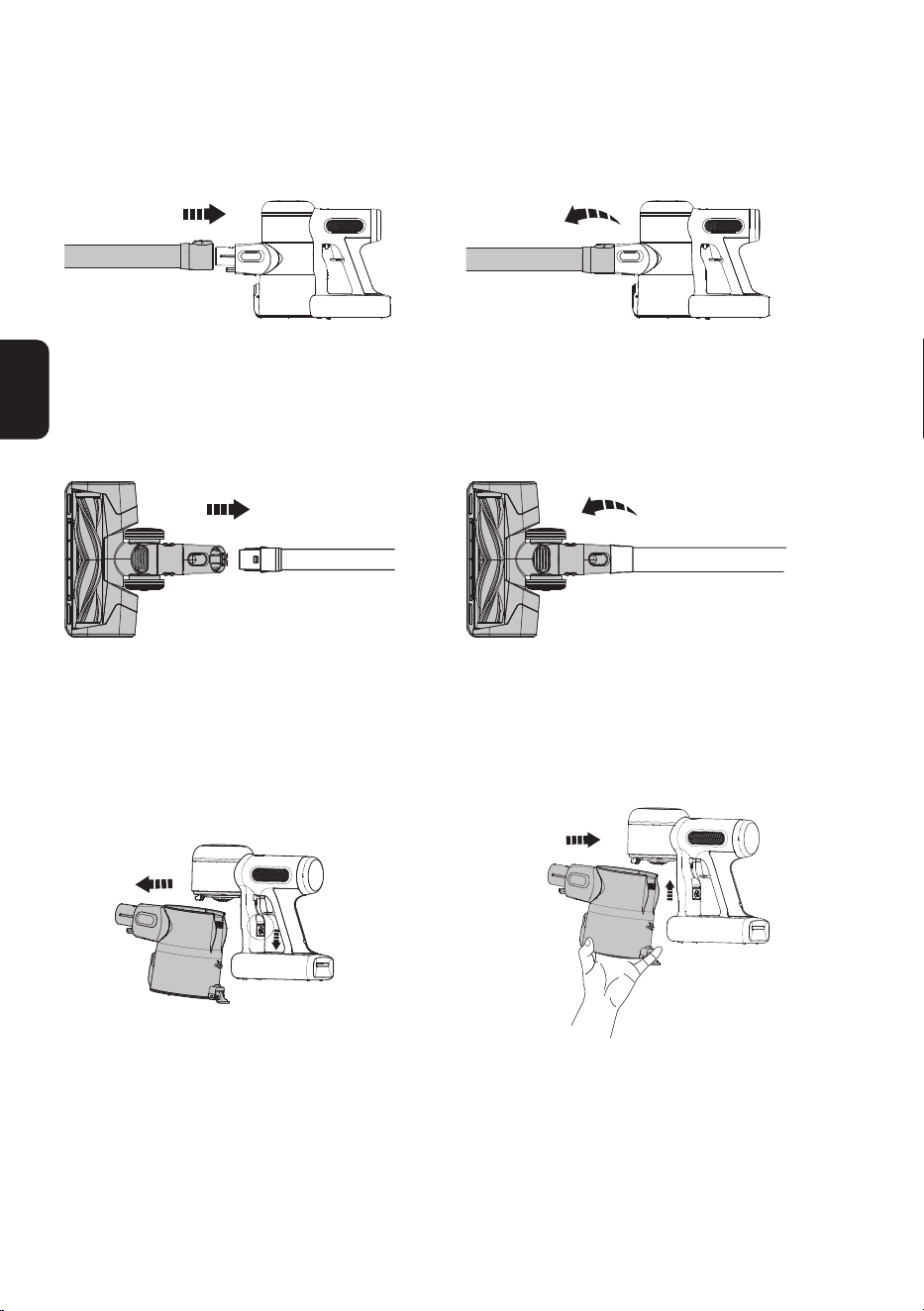
Tube Installation
Insert tube. Press the release button to remove the tube.
Brush Installation
Insert the power brush. Press the release button to remove the power
brush.
Dustbin Installation
①
②
To clean the dustbin more thoroughly, press
the dustbin release button to detach from the
appliance.
When re-attaching the dustbin, hold on an angle
and slot the top of the dustbin into the hook on
the main body. Push upwards until the hook is
xed into the slot on the dustbin and then it clicks
back into place.
EN
9
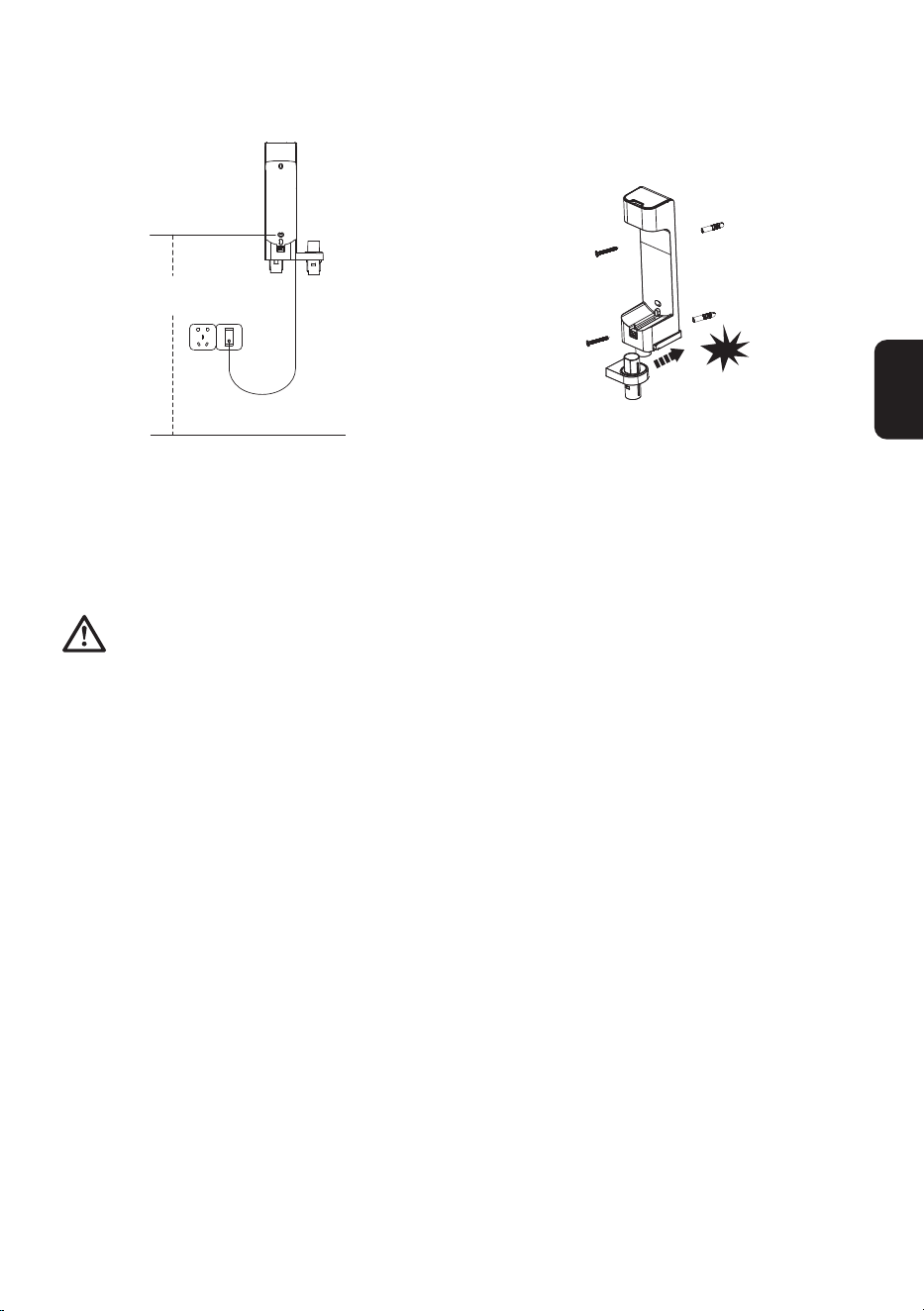
Wall-mounted Dock Installation
47.25"
(120cm)
click
Determine the best wall location for mounting
the dock. We recommend placing it 47.25”
(120cm) from the lower screw hole to the oor
(may need to be adjusted based on the actual
situation).
Assemble the two bracket components, with a
“click” to signify correct assembly. Once this is
complete, use the screws provided by Tineco to
afx the dock to the wall.
Warning:
• Ensure the wall surrounding the mounting area is free of gas, water pipes, electrical cables and wires.
• To avoid the dock falling, ensure it is rmly installed.
EN
10
Operation
Preparing for Use
Note:
• Before the rst use, please charge the appliance (see “Charging the Battery”) for 3-4 hours in an
area where the ambient temperature is between 39.2°F (4°C) and 104°F (40°C).
• Select an accessory and attach it to the appliance before use (see “Accessories”).
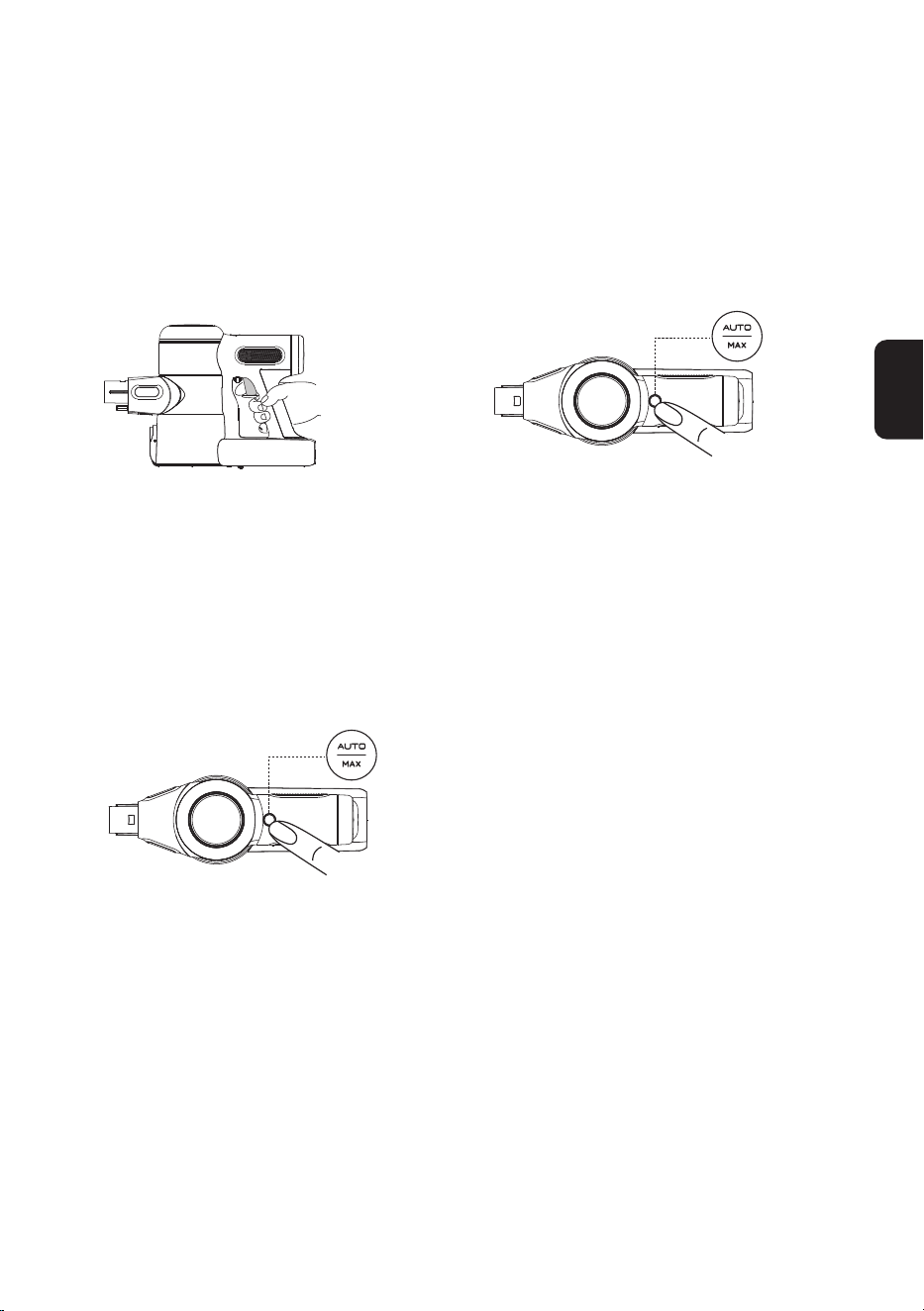
Pull the trigger to activate the suction. Pull the trigger lock to hold the trigger for
continuous power mode.
• Place the appliance on the wall-mounted dock for convenient storage and recharging after
use.
①
②
Place the main body on the dock. To avoid bristle damage, always place
attachments on the dock after use.
click
EN
11
Cleaning Mode Selection
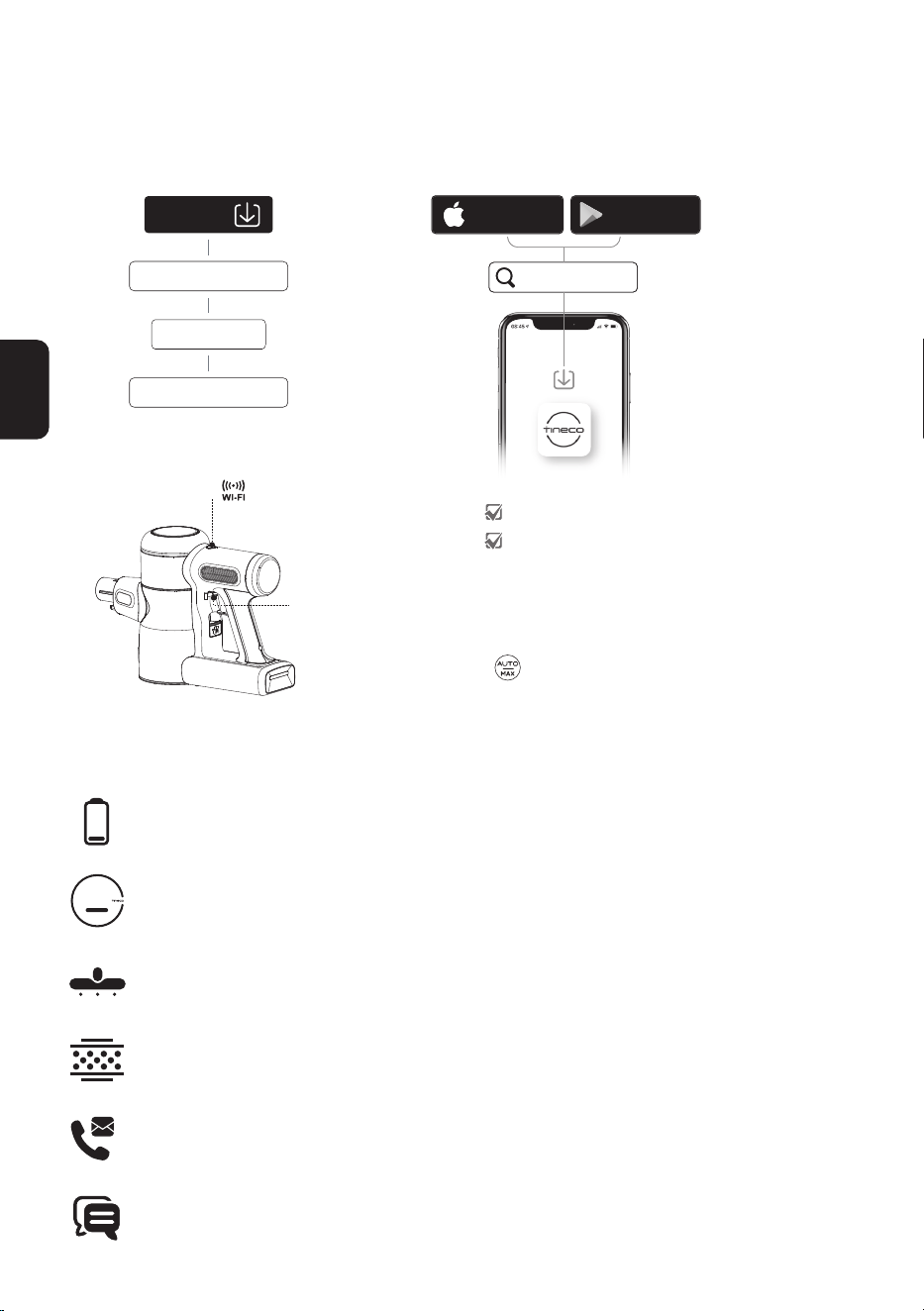
AUTO Mode
• In AUTO mode, the indicator color changes according to the amount of dust detected. When
blinking red indicates dust is detected, the brighter red light indicates more dust, whereas blinking
blue indicates no dust is detected. This mode automatically provides the best cleaning solution.
To enter AUTO mode:
①
②
The default setting on startup is AUTO.
The appliance then takes 3 seconds to
initially detect blockages or dust. If no dust
is detected, power is reduced to conserve
energy.
When in MAX mode, press the AUTO/MAX
button to enter AUTO mode.
MAX Mode
In AUTO mode, press the AUTO/MAX button
to enter MAX mode.
EN
12
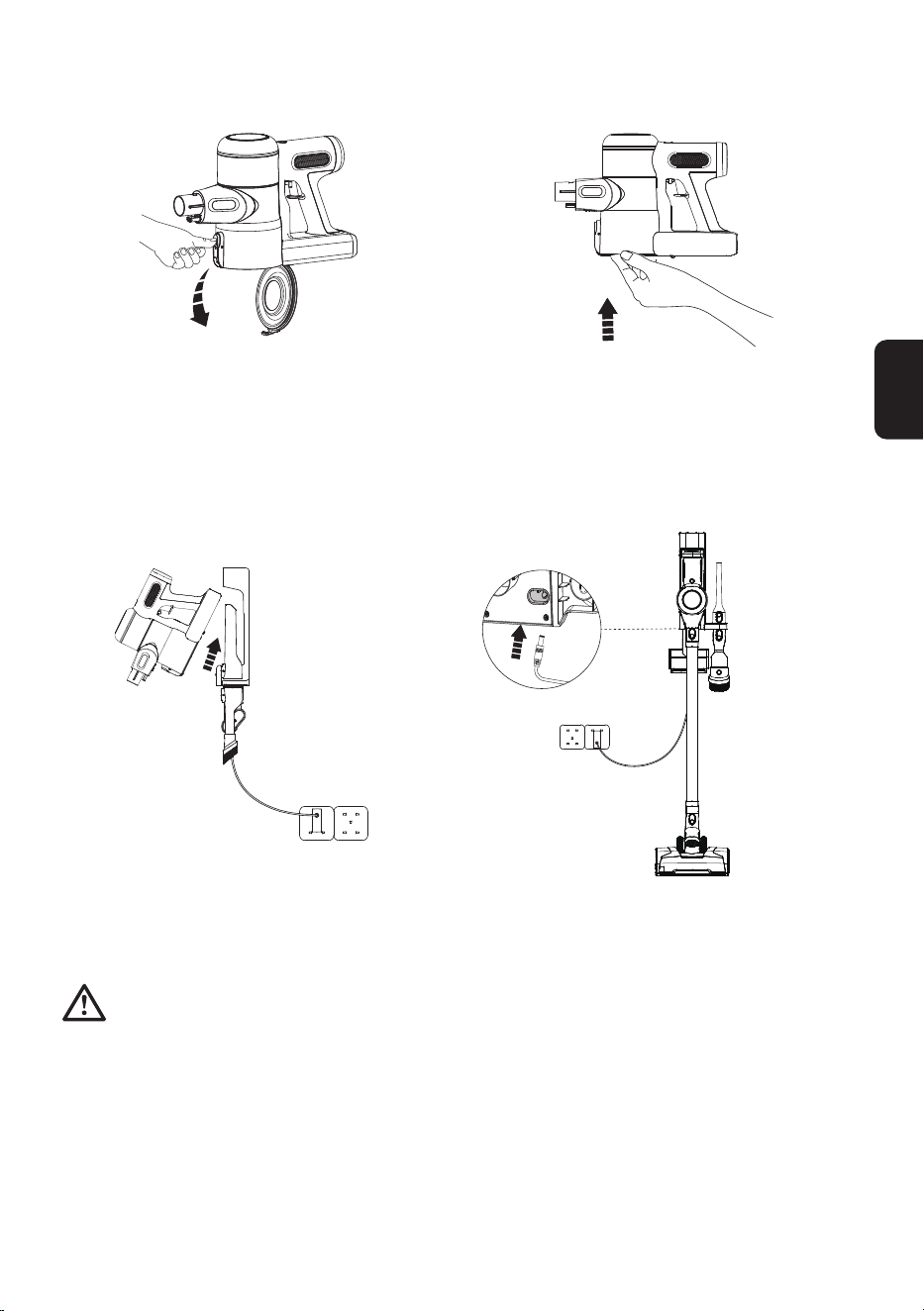
App Function Introduction
Battery
Battery level in real time.
Total dust: 0 dust/0 min
Cleaning Performance
0
0
dust
min
/
Cleaning report
Displays the dust amount, working hours and working status.
Suction adjustment
When in manual mode, swipe the phone screen to adjust suction power.
Reminder of lter status
Records the severity of the dirty lter and provides a cleaning reminder as required.
Contact us
You can contact the Customer Service about any problems during the working hours.
Feedback
If you have any comments, please send us your feedback.
APP
• All the functions can be performed using the Tineco app. Download the Tineco app from the App
Store, Google Play and Tineco Ofcial Site.
②
①
1. Pull the trigger to ensure the appliance battery has
sufcient charge.
2. Long press to activate WiFi connection (blinking blue
light), follow the guide in App for more details.
Tineco
Download on the
App Store
GET IT ON
Google Play
iOS 9.0 or later
Android 5.0 or later
www.tineco.com
Support
App Downloads
App
Downloads
EN
13
Emptying the Dustbin
Press the release button on the side of the
dustbin to empty the contents.
Close and click the dustbin ap back into place.
Charging the Battery
Place the main body on the dock, plug in the adaptor and charging port. The main body indicator
blinking blue indicates that it is charging correctly.
Warning:
• Only use the Tineco-provided adapter to charge the appliance.
• During long periods of not being used, store the appliance in a cool, dry place. Ensure the battery is
fully charged every 3 months.
• Do not expose appliance to sunlight or freezing temperature. Recommended temperature range:
39.2°F (4°C)~104°F (40°C).

EN
14
Runtime
• When in AUTO mode, the runtime is approximately 70 minutes. When MAX power is used, the
runtime is approximately 12 minutes.
• Estimated runtime data was obtained by a Tineco Laboratory using one battery and non-motorized
accessories.
Charging Time
• A full charge takes approximately 3-4 hours.
• Estimated data was obtained by a Tineco Laboratory using ambient temperatures between
39.2°F (4°C) to 104°F (40°C).
Indicator
When in Use
Slowly blinking red light for 6s: low power.
Rapidly blinking red light: see troubleshooting.
Connect to Network
Blinking blue light: Connecting to the network.
Solid blue light: Successfully connected.
During Charging
Breathing blue light: charging.
Fully Charged
In 5 minutes: solid blue light.
After 5 minutes: light off.
EN
15
Maintenance
Note:
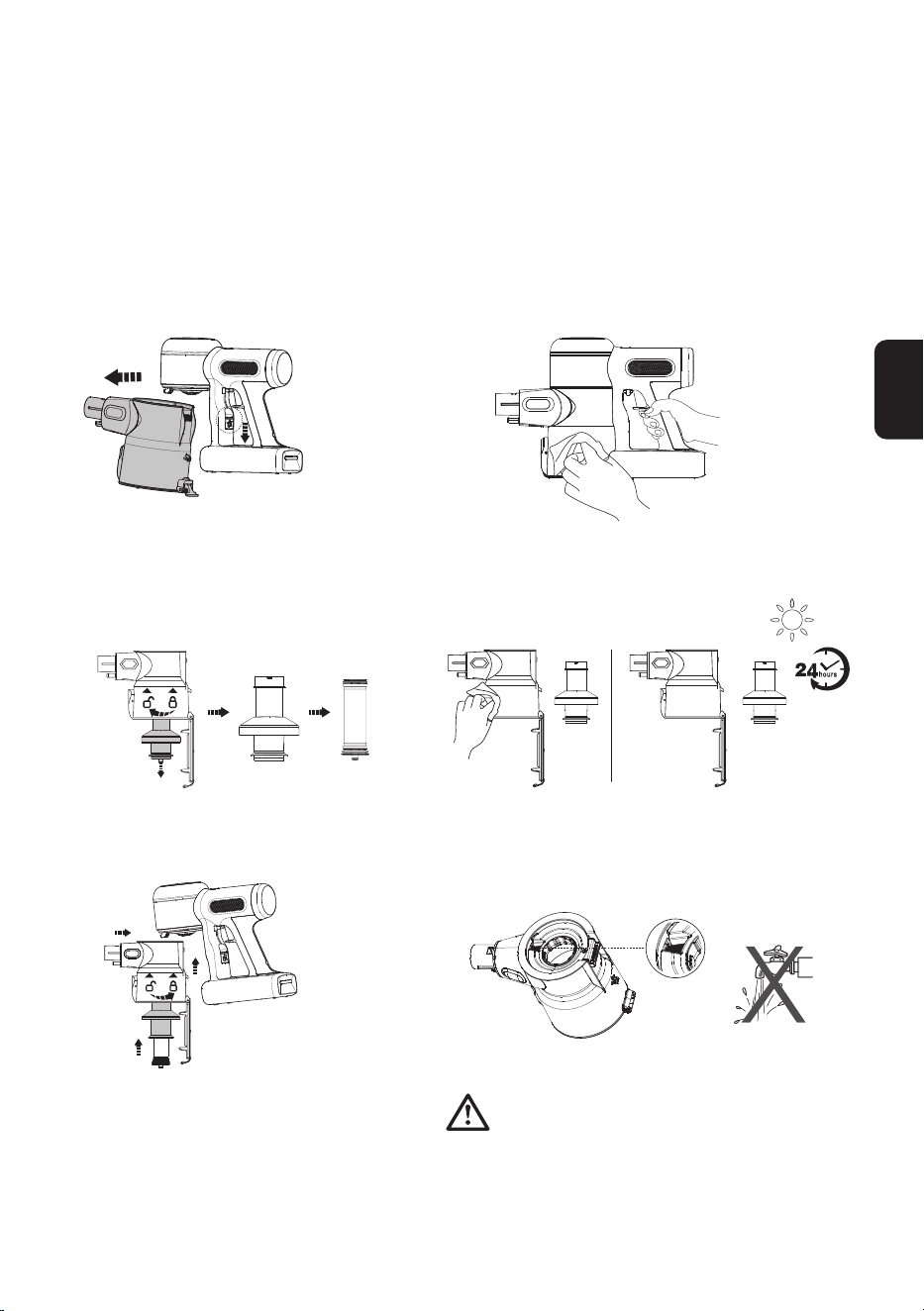
• Clean the dustbin and lters after each use.
• Use the cleaning tool to thoroughly clean the pre-lter when the indicator blinking red rapidly. To
maintain high performance, wash and dry the pre-lter monthly, replacing it every 6 months.
Wash and dry the HEPA lter every 3 months, replacing it every 12 months.
Dustbin and Mesh Filter
Press the dustbin release button to remove
the dustbin.
Clean with a damp cloth, taking care to prevent
water entering the appliance main body and battery.
Turn counter-clockwise to remove the lters. Clean the dustbin and mesh lter with a damp cloth.
Air dry completely before reinstalling.
①
②
③
④
After cleaning, insert the clean pre-lter into
the mesh lter properly and it clicks into
place. Install the clean lter and dustbin
back into the main body, then close the
dustbin ap.
Warning:
• Do not wash the dustbin as it contains a dust
sensor. If it comes into contact with water, please
dry it with a hair dryer.
5
1 2
3 4
Mesh lter Pre-lter
EN
16
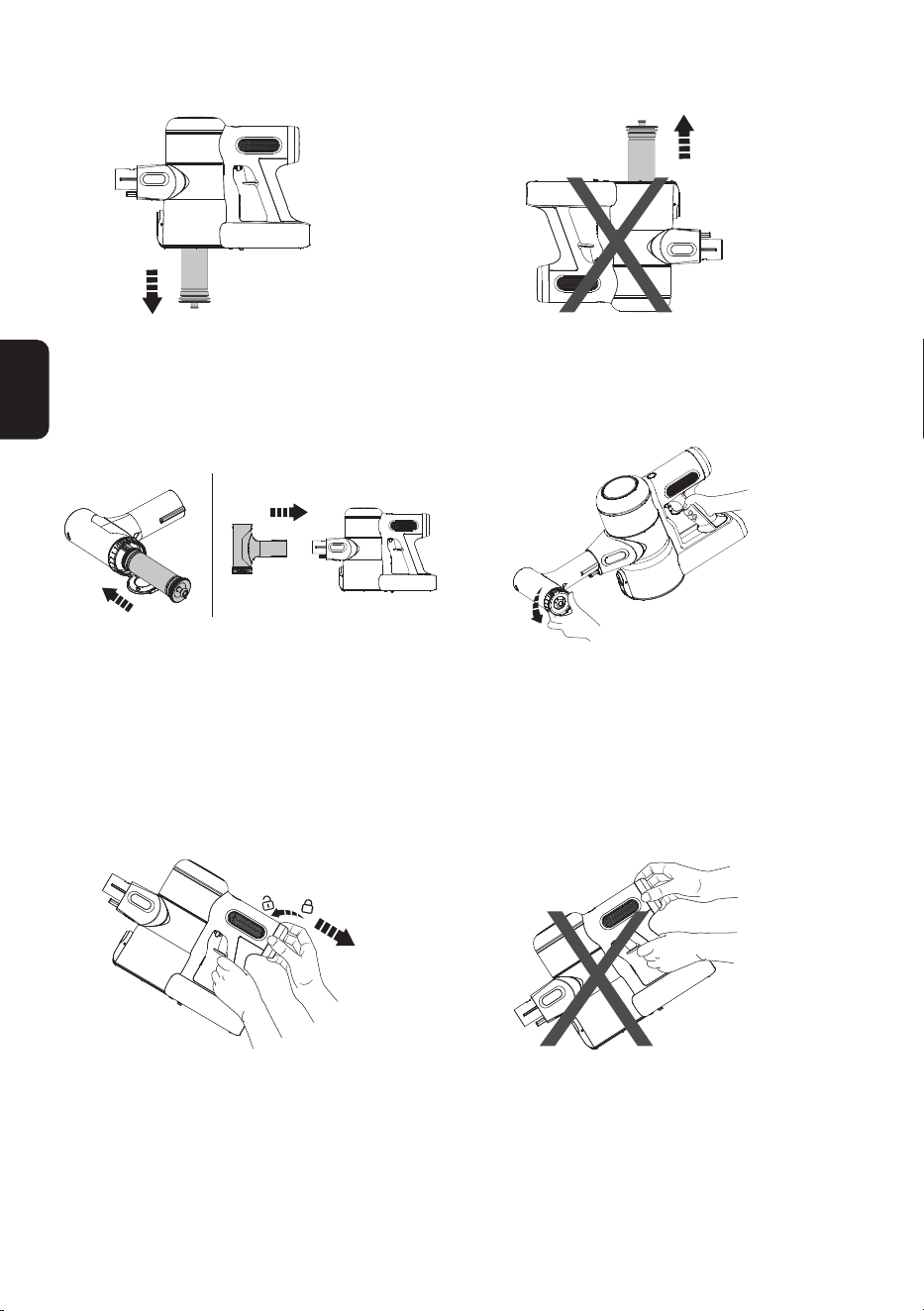
Pre-lter
Ensure the appliance is switched off before
cleaning, and remove the dirty pre-lter from
the mesh lter-holder.
Do not turn the appliance upside down when
removing or installing the lter to prevent dust
from entering the motor.
Replace a clean lter to the main body. Put
the dirty pre-lter into the cleaning tool and
connect the cleaning tool to the main body.
Run the appliance in MAX mode, and rotate the
side cover to clean the dirty pre-lter.
HEPA Filter
Turn the HEPA to the left and gently pull out
for cleaning. Do not use the appliance without
rst installing the HEPA lter.
Do not place the appliance as above when
removing or installing the HEPA lter, to prevent
dust from entering the motor.
EN
17
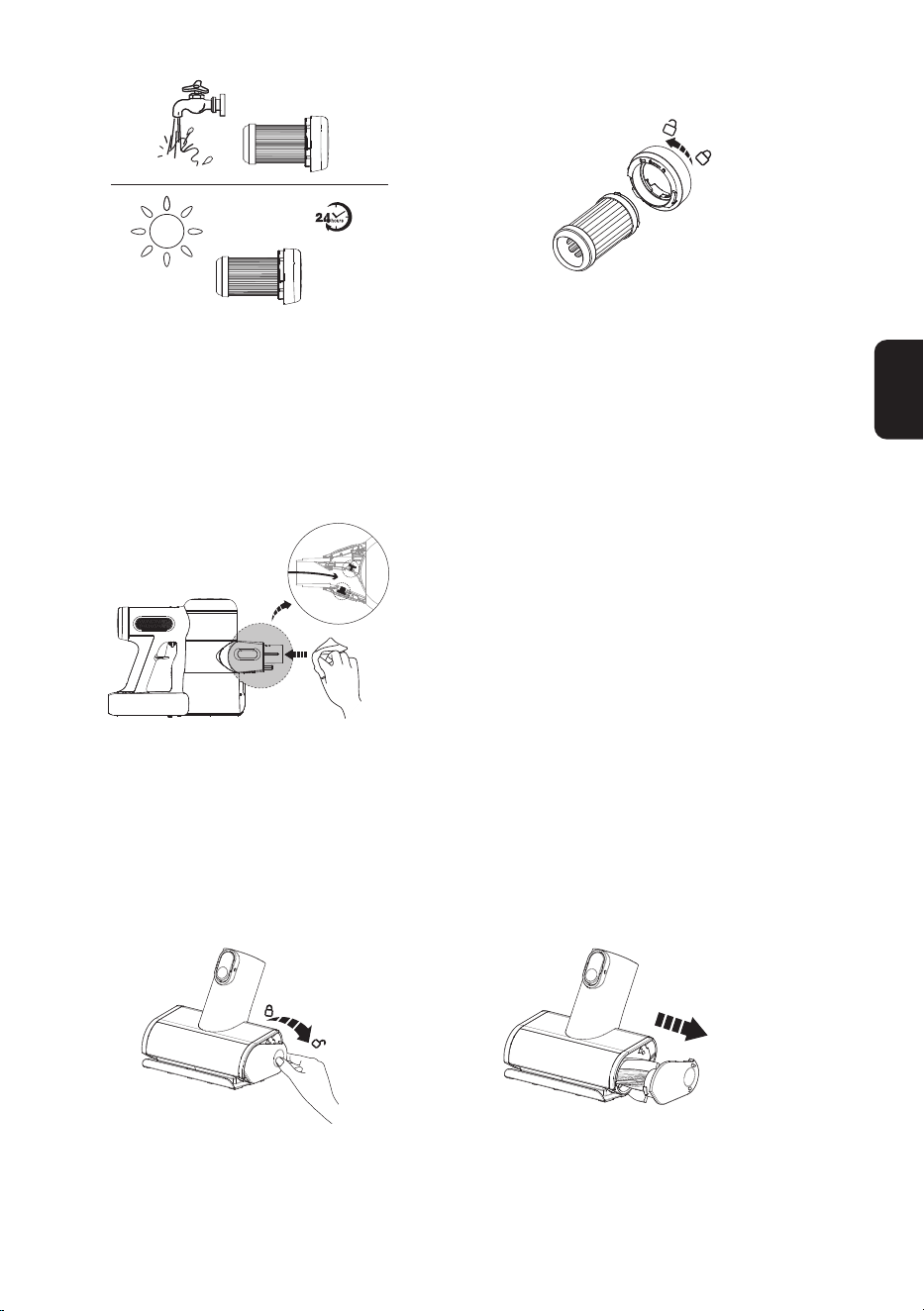
The HEPA lter can be washed under running
water and must be completely dry before
reinstalling.
* The HEPA is detachable. Simply rotate to
remove and replace.
Dust Sensor
To avoid dust accumulation which can affect
cleaning performance, wipe the suction mouth
with a damp cloth.
Mini Power Brush
Press against the roller end cover downward. Pull out the brush roller.
EN
18
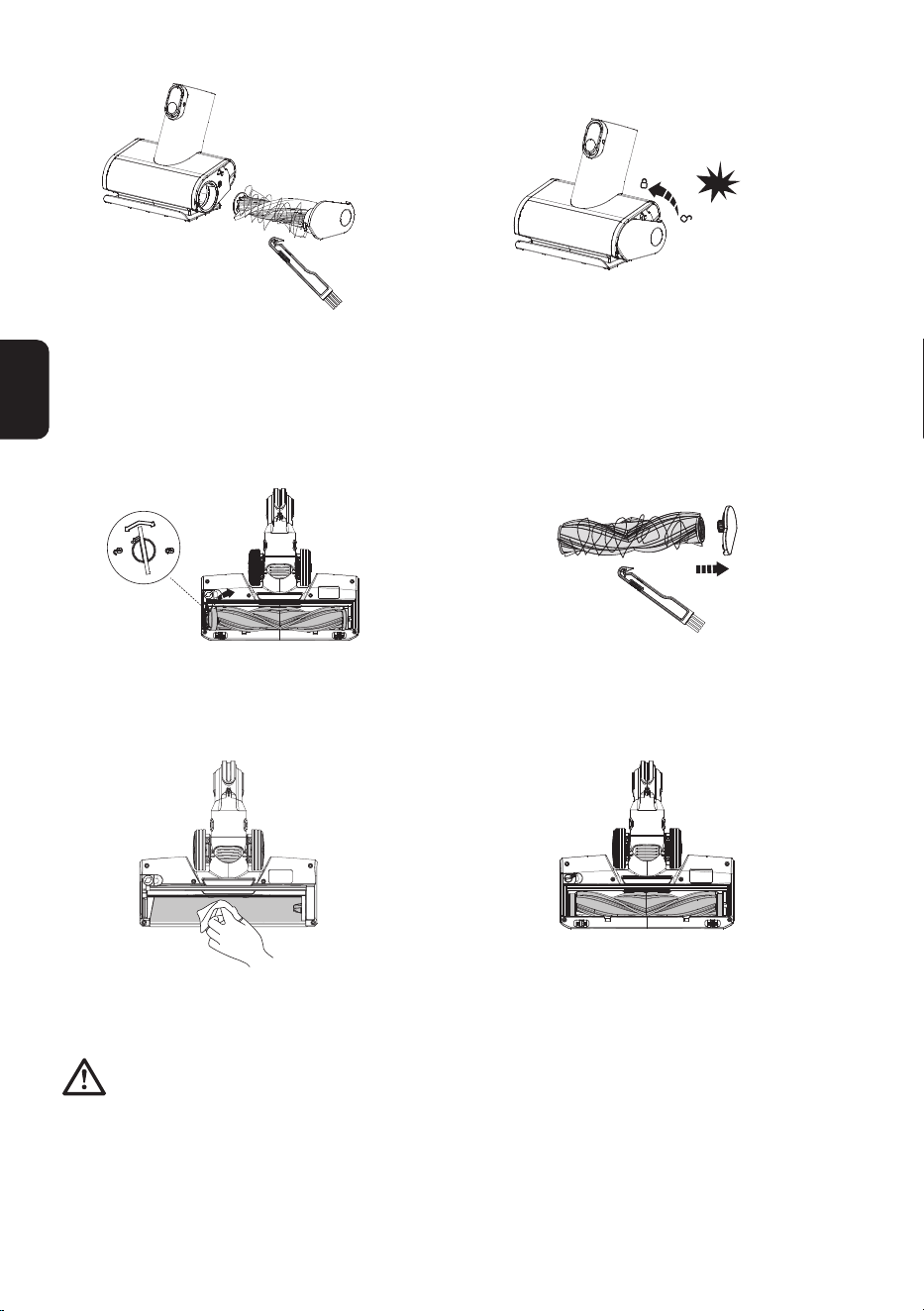
Remove the debris wrapped around the roller
with the Tineco Hair Cleaning Tool.
Fully reinsert the brush roller at an angle and
push upward until it clicks securely back into
place.
Brush Roller
Use a coin or other tool, to unlock the brush
roller lock, then remove the brush from the
brush window.
Remove the debris wrapped around the roller
with the Tineco Hair Cleaning Tool.
Gently clean the transparent brush window. After cleaning, reinstall the brush.
Warning:
• The power brush contains electrical components which must not be soaked or washed with water.
1 2
3 4
click
EN
19
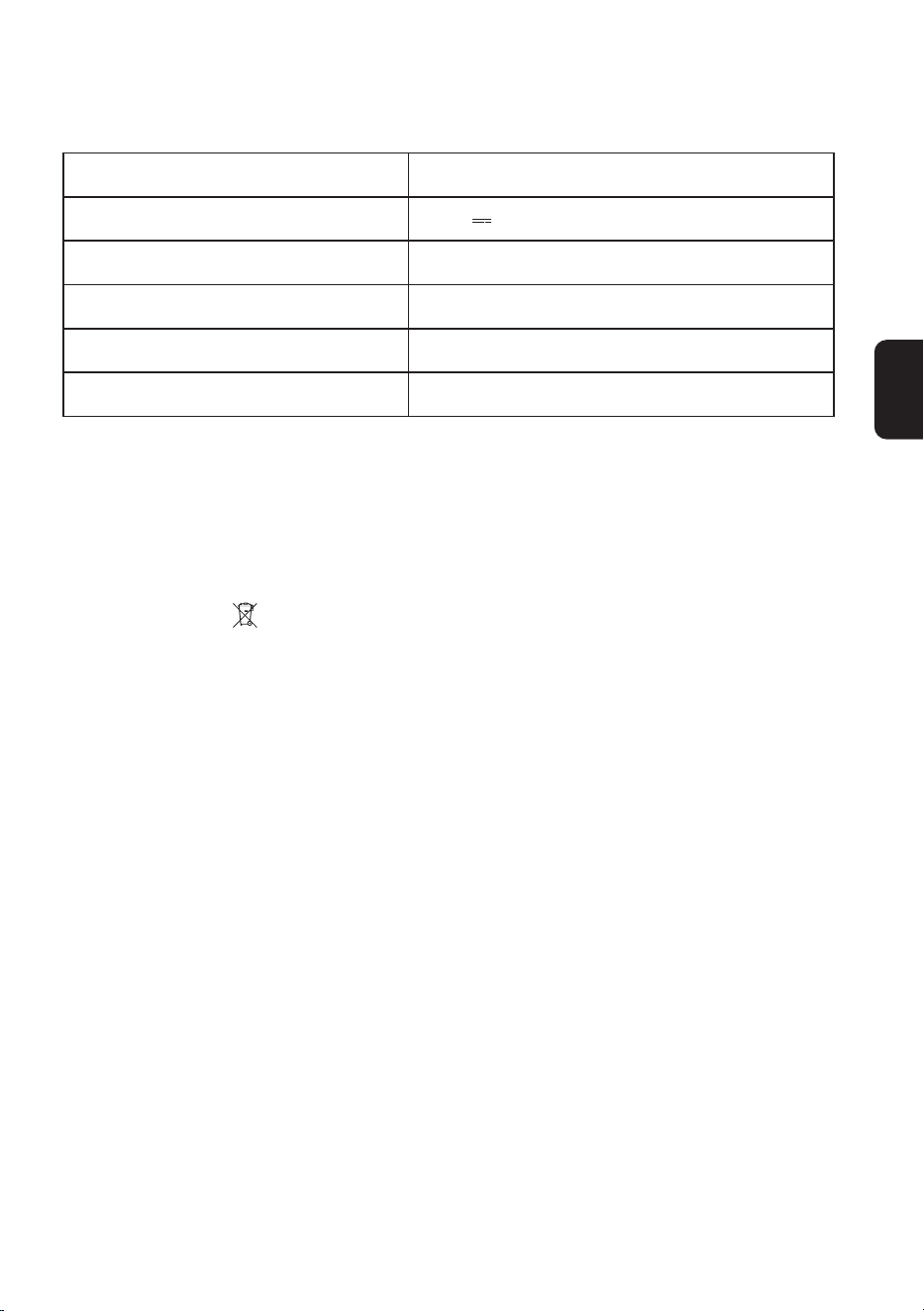
Product PURE ONE X SERIES
Voltage 21.6V
Rated Power 260W
Dustbin Capacity 0.4L
Charging Time 3-4 hrs
AC Input 100-240V~
Disposal
• The battery contains materials that are harmful to the environment and must be removed from
the appliance before it is discarded.
• When removing the battery, the appliance must be powered off.
• Batteries, chargers, accessories and packaging should be sorted for environmental friendly
recycling. Do not put them into re, water or soil. Do not dispose of batteries and chargers into
household waste!
• If battery leakage contacts skin or clothing, immediately ush with water to avoid irritation and
seek medical help.
Specications
EN
20
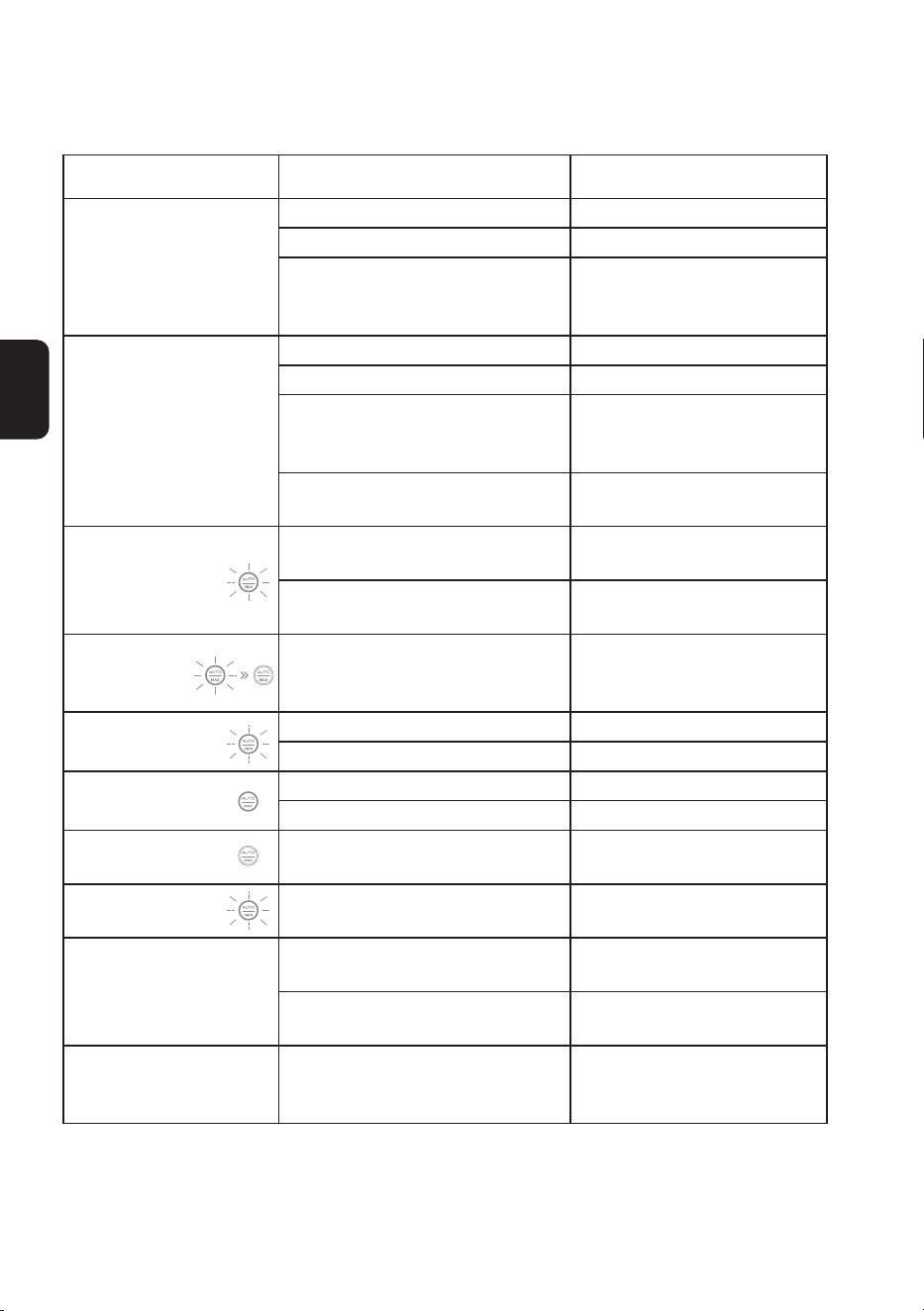
Problem Possible cause Solution
The appliance does not
turn on
No power Charge the battery
Auto protection for overheating Restart after cooling down
The appliance is blocked
(i.e. the tube, suction mouth or
some other parts)
Check and remove blockages
Weak suction power
Dustbin and lters are full Clean the dustbin and lters
The pre-lter is not installed Install the pre-lter
The appliance is blocked
(i.e. the tube, suction mouth or
some other parts)
Remove blockages
The brush roller tangled with hairs
or bers
Clean the brush roller
Rapidly blinking
red for 6s then off
during charging
Charging error
Check if the adaptor is in
good condition
The apaptor is not designed for
this appliance
Use the original adaptor
Rapidly blinking
red and shut
down
Air channel completely blocked Remove blockages
Rapidly blinking red
Brush roller tangled Clean the brush roller
Air channel partly blocked Remove blockages
Solid red during use
Dust sensor blocked Remove blockages
Dustbin not installed properly Install the dustbin properly
Appliance shut
down during use
Battery is overheated Restart after cooling down
Slowly blinking
red
No power Charge the battery
Battery won’t charge
The adaptor is not correctly
inserted
Reinsert the adaptor correctly
The adaptor is not designed for
this appliance
Use the original adaptor
Abnormal motor sounds
The appliance is blocked
(i.e. the tube, suction mouth or
some other parts)
Remove blockages
Note:
If the above troubleshooting guide fails to provide a solution, please visit our website
www.tineco.com for further support.
Troubleshooting

EN
21
Warranty
2-YEAR LIMITED WARRANTY
• Only applies to purchases made from authorized retailers of Tineco.
• Is subject to the adherence of the requirements outlined in this instruction manual, and is subject to
further conditions outlined below.
WHAT IS COVERED?
• Your Tineco appliance has a 2-year warranty against original defects in material and workmanship,
when used for private household purposes in accordance with the Tineco Instruction Manual.
Motorized accessories and battery bought separately come with a 1-year warranty.
• This warranty provides, at no extra cost to you, all labor and parts necessary to ensure your appliance
is in proper operating condition during the warranty period.
• This warranty will only be valid if the appliance is used in the country in which it was sold.
WHAT IS NOT COVERED?
Tineco shall not be liable for costs, damages or repairs incurred as a result of:
• Appliances purchased from an unauthorized dealer.
• Careless operation or handling, misuse, abuse and/or lack of maintenance or use not in accordance
with the Tineco Instruction Manual.
• Use of the appliance other than for normal domestic purposes, e.g. for commercial or rental
purposes.
• Use of parts not in accordance with the Tineco Instruction Manual.
• Use of parts and accessories other than those produced or recommended by Tineco.
• External factors unrelated to product quality and use, such as weather, modications, accidents,
electrical outages, power surges or acts of God.
• Repairs or alterations carried out by unauthorized parties or agents.
• Failing to clear blockage and other hazardous material from the appliance.
• Normal wear and tear, including normal wearing parts, such as clear bin, belt, lter, HEPA, brush
bar, and power cord (or where external damage or abuse is diagnosed), carpet or oor damage due
to use not in accordance with manufacturer’s instructions or failure to turn the brush bar off when
necessary.
• Reduction in battery discharge time due to battery age or use.
EN
22
WARRANTY LIMITATIONS
• Any implied warranties relating to your appliance including but not limited to warranty of
merchantability or warranty of tness for a particular purpose, are limited to the duration of this
warranty.
• Warranty coverage applies to the original owner and to the original battery only and is not
transferable.
• This limited warranty gives you specic legal rights. You may also have other rights which vary by
region.
• Manufacturer’s warranties may not apply in all cases, depending on factors such as use of the
product, where the product was purchased, or who you purchased the product from.
Please review the warranty carefully, and contact the manufacturer if you have any questions.
WARRANTY SERVICE
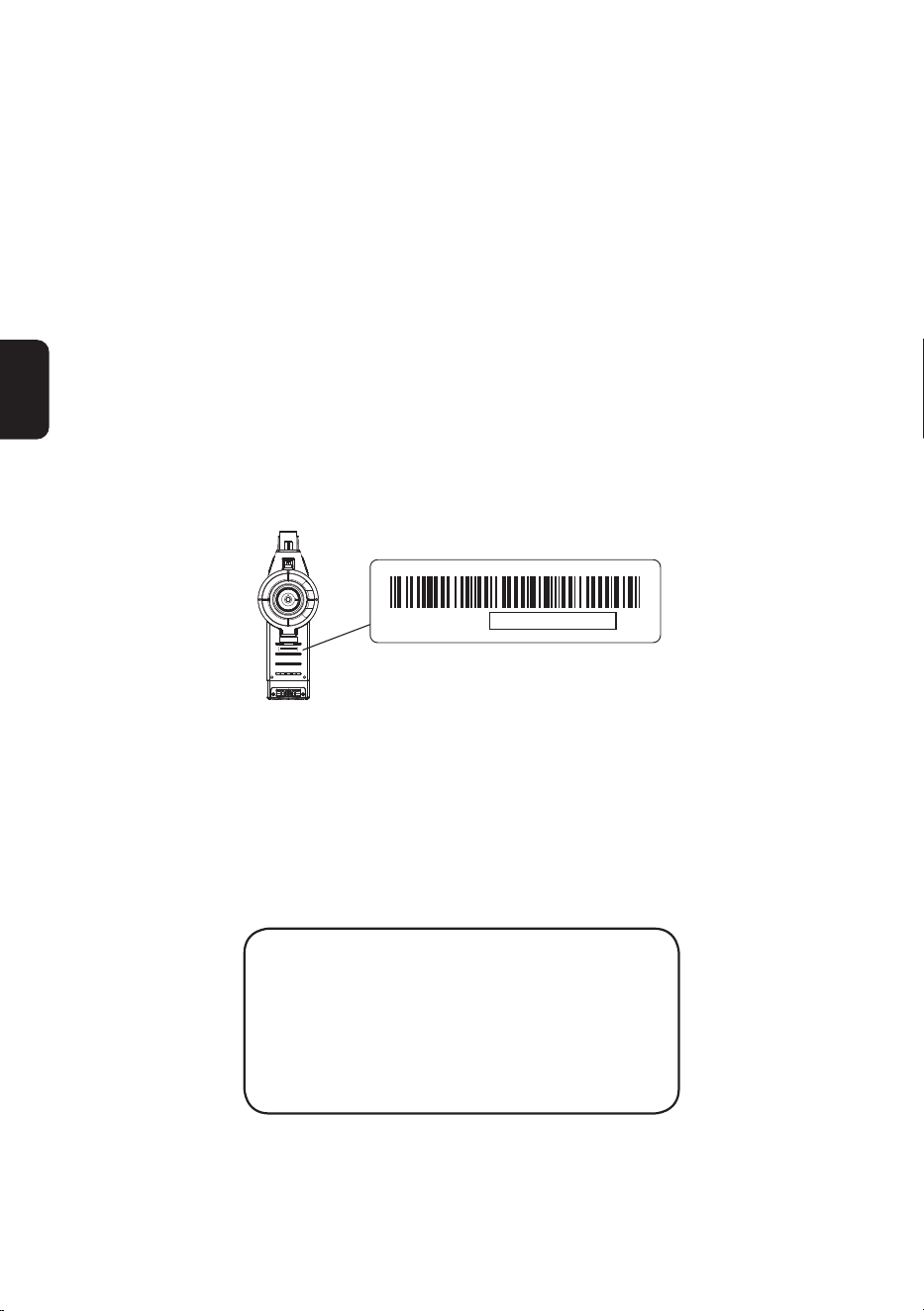
Register: We highly recommend that upon purchase, you register your appliance on the Tineco ofcial
website (www.tineco.com) and enjoy exclusive benets. To register, please enter the last 11 digits of
the serial number (found on the base of the main body).
Failure to register your product won’t diminish your warranty rights.
E*********XXXXXXXXXXX
E000000000XXXXXXXXXX
How to Claim: Please retain your proof of purchase. To make a claim under our Limited Warranty,
you need to provide your serial number and the original purchase receipt with the purchase date and
order number on it.
All work will be carried out by Tineco or an authorized agent.
Any replaced defective parts will become the property of Tineco.
Service under this warranty will not extend the period of this warranty.
Contact our Customer Service
Hotline: 1-855-292-8864
or Visit Tineco website
www.tineco.com
for expert customer service.