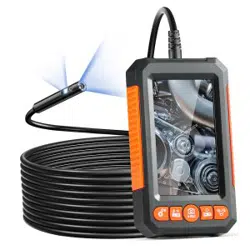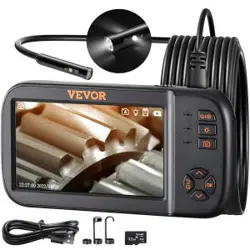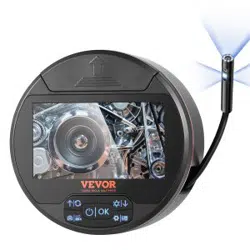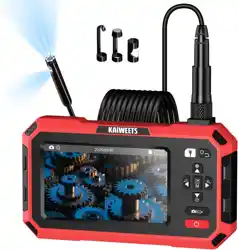

Technical Support and E-Warranty Certificate www.vevor.com/support
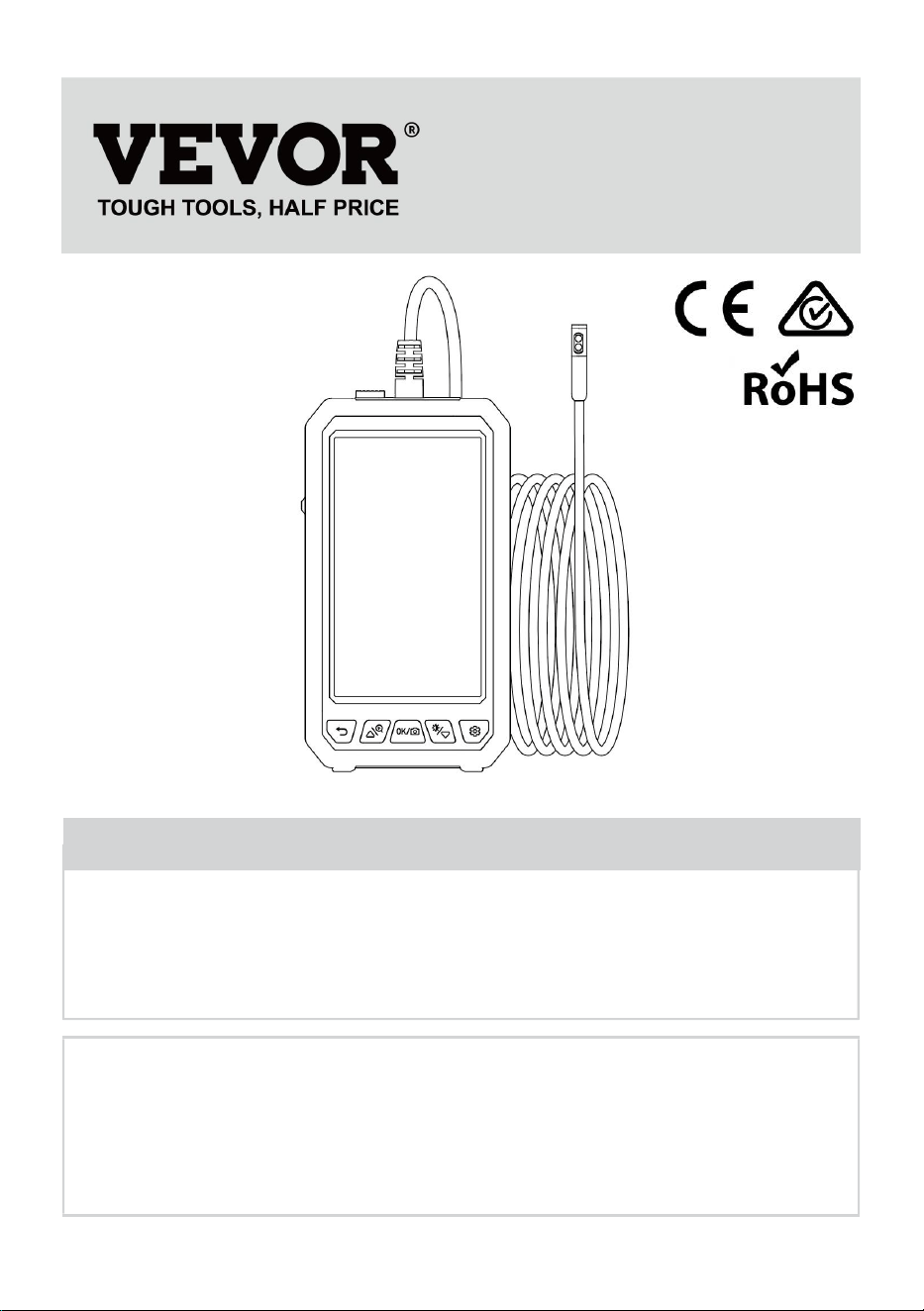
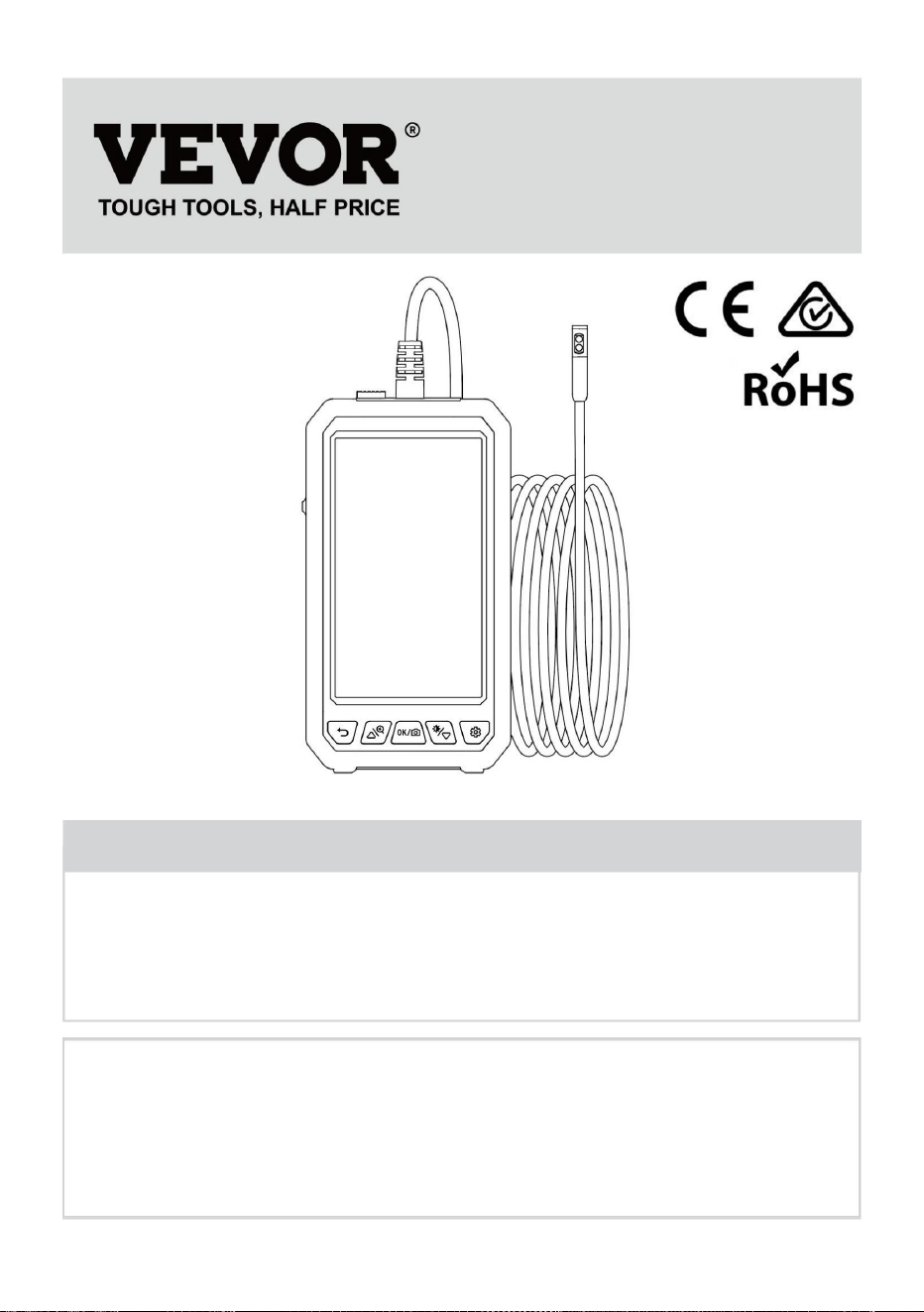
LCD Digital Endoscope
Model: 5003
We continue to be committed to provide you tools with competitive price.
"Save Half", "Half Price" or any other similar expressions used by us only
represents an estimate of savings you might benefit from buying certain
tools with us compared to the major top brands and does not necessarily
mean to cover all categories of tools offered by us. You are kindly reminded
to verify carefully when you are placing an order with us if you are actually
saving half in comparison with the top major brands.
- 1 -
Have product questions? Need technical support? Please feel free to contact
us: Technical Support and E-Warranty Certificate
www.vevor.com/support
NEED HELP? CONTACT US!
This is the original instruction, please read all manual instructions
carefully before operating. VEVOR reserves a clear interpretation of our
user manual. The appearance of the product shall be subject to the
product you received. Please forgive us that we won't inform you again if
there are any technology or software updates on our product.
LCD Digital Endoscope
Instruction Manual

- 2 -
Please read this manual carefully before use!
Safety and Maintenance
● The product is an industrial endoscopy camera and is not intended for medical
use or human examination.
●Do not hit the camera violently and do not pull the cable.
● When used in an environment with sharp bumps, please use it carefully to
prevent the waterproof protective layer of the probe from being scratched.
● The camera probe is not made of heat-resistant and high-temperature materials.
When checking the automobile engine, please ensure that the tempera ture in the
engine drops to the normal emperature.
● When not in use, please ensure that the lens and the main unit are clean and
dry, and avoid contact with oil, etc. or other corrosive and dangerous substances.
● This product is not suitable for people with limited physical, sensory or mental
abilities.
● Do not allow children to touch and operate this equipment.
Battery Instructions
●Please use a 5V household charger that meets the safety regulations to charge
the equipment. Fast charging is not supported.
● This device supports charging while using.
● lf the device is not used for a long time, please ensure that it is charged at least
once every 3 months to prevent irreparable damage caused by excessive
discharge of the battery.
- 3 -
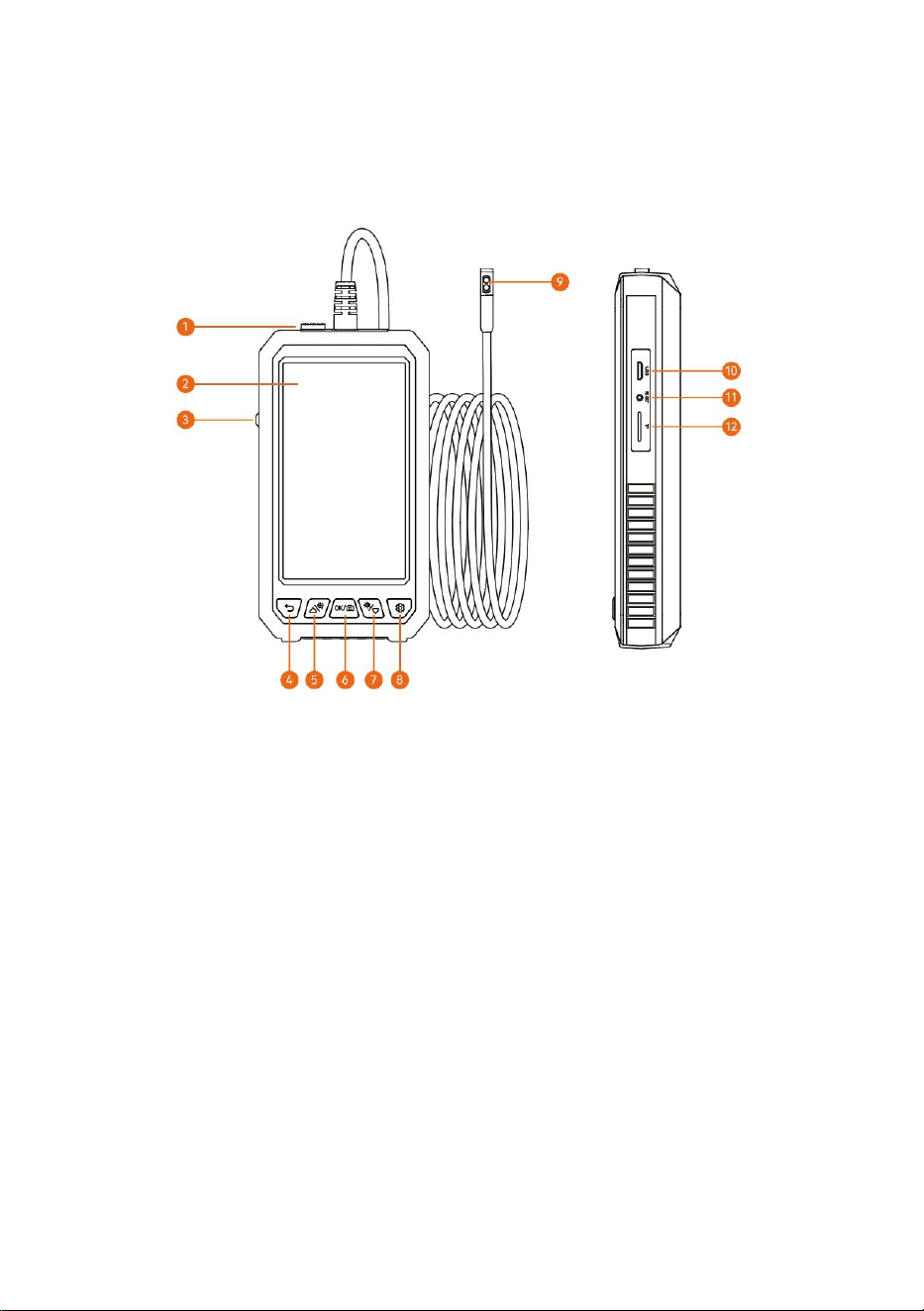
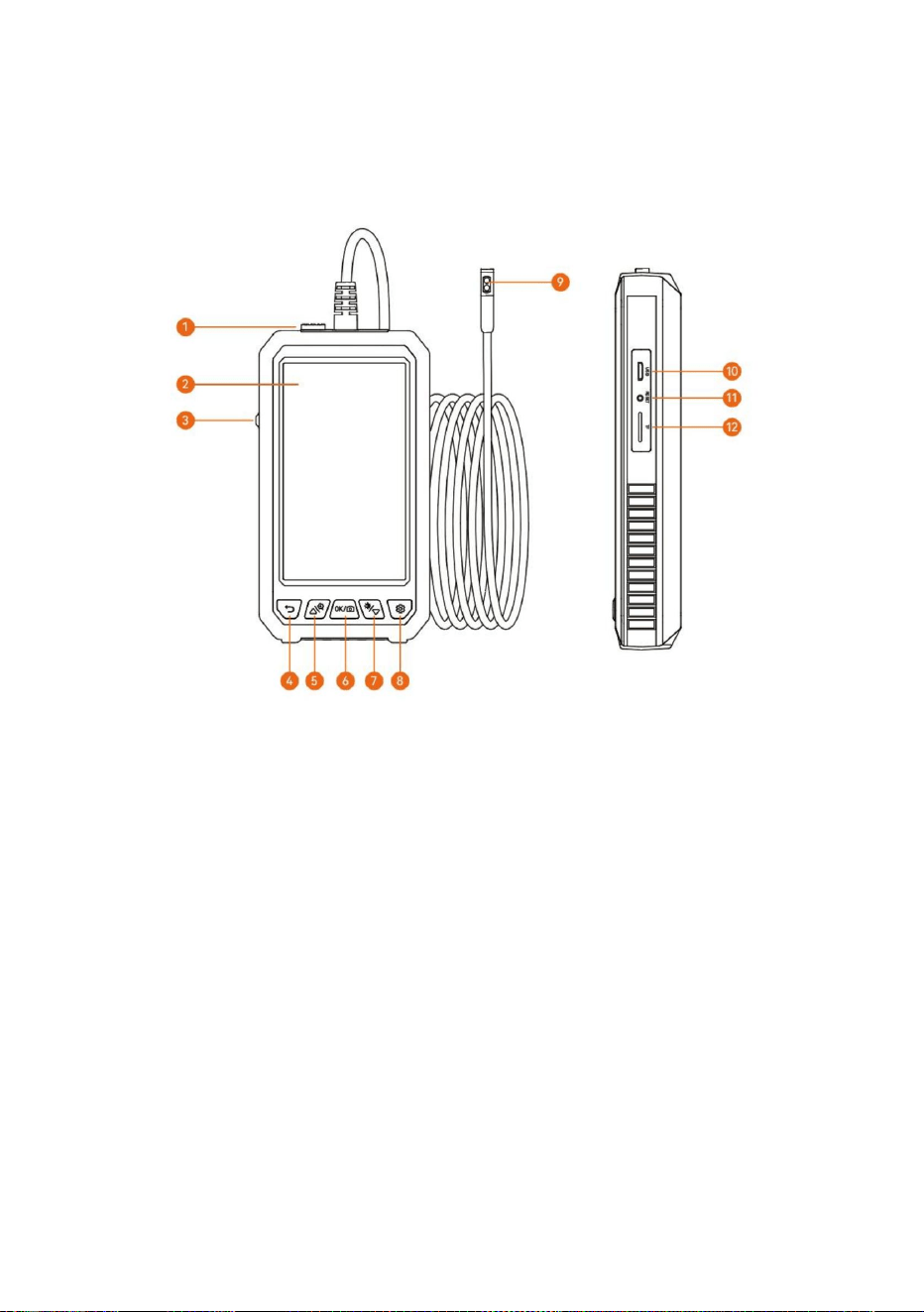
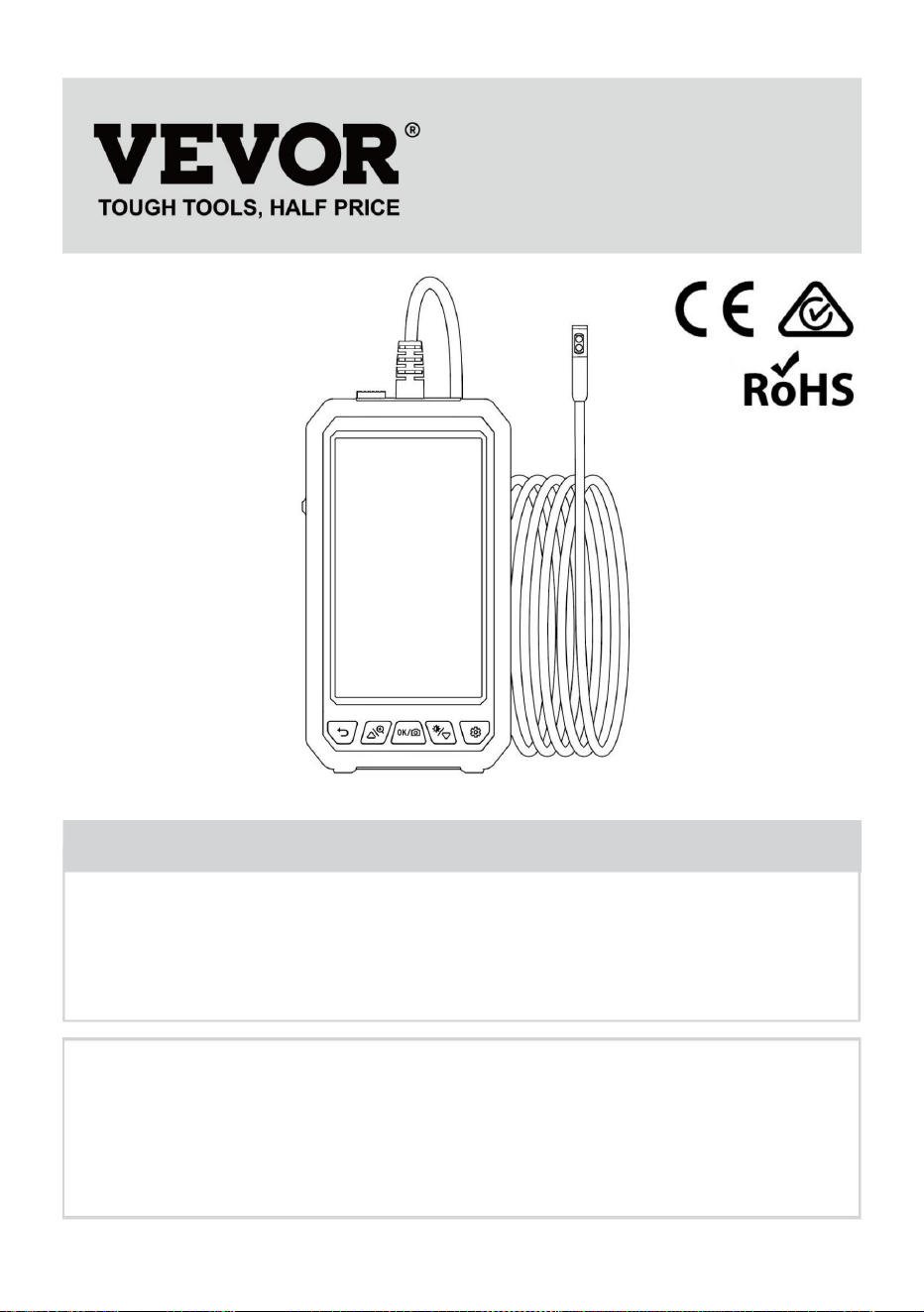
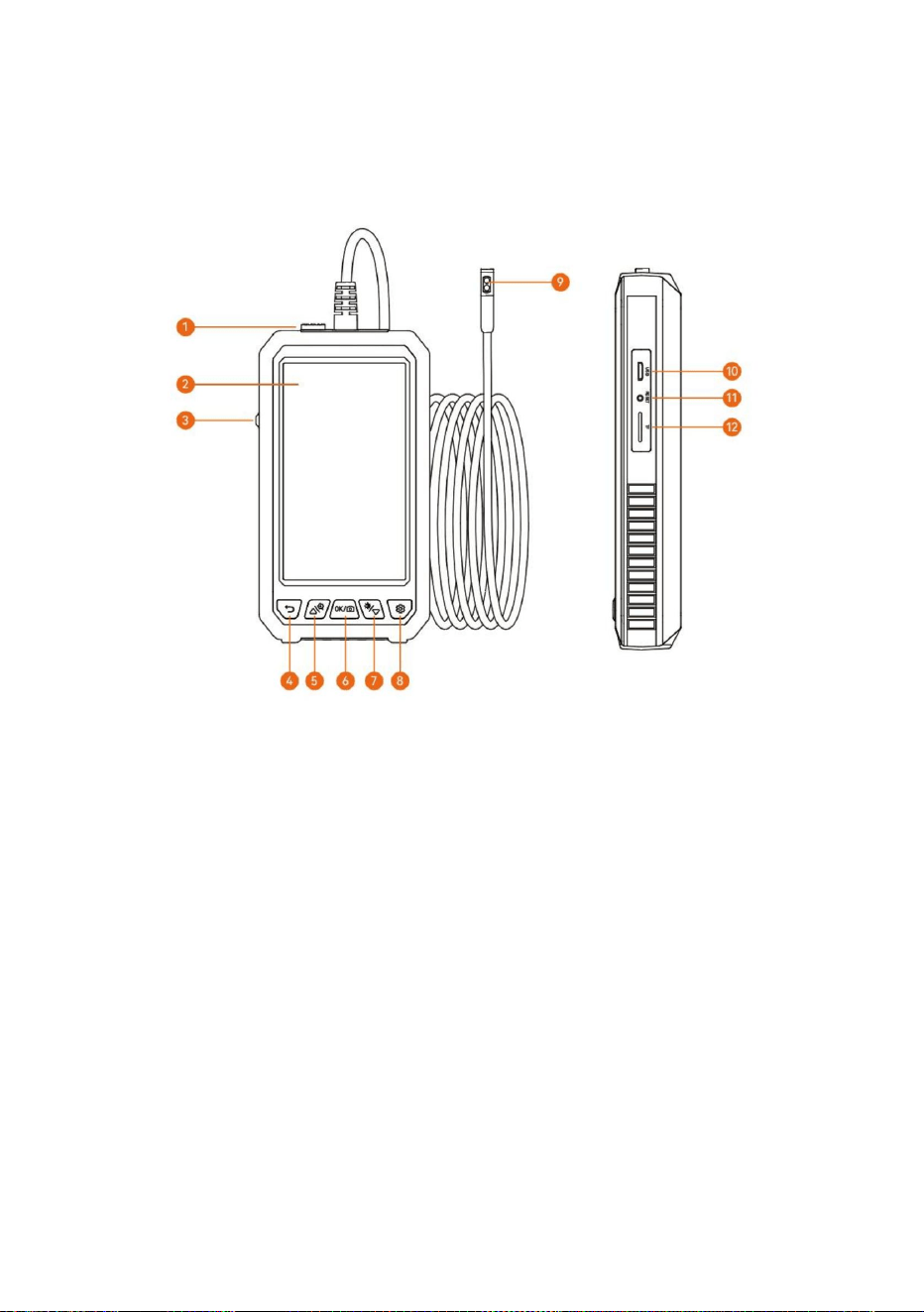
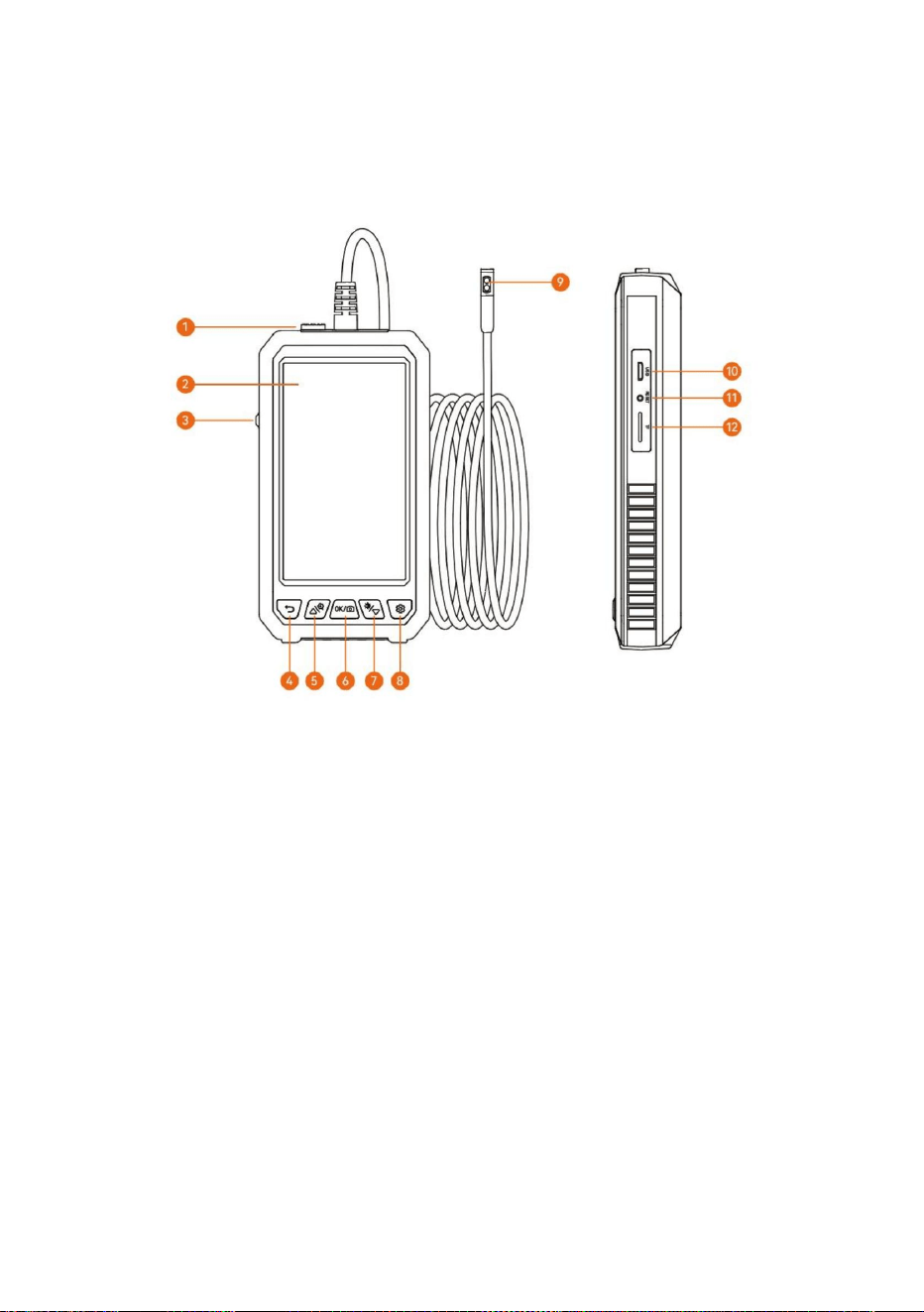
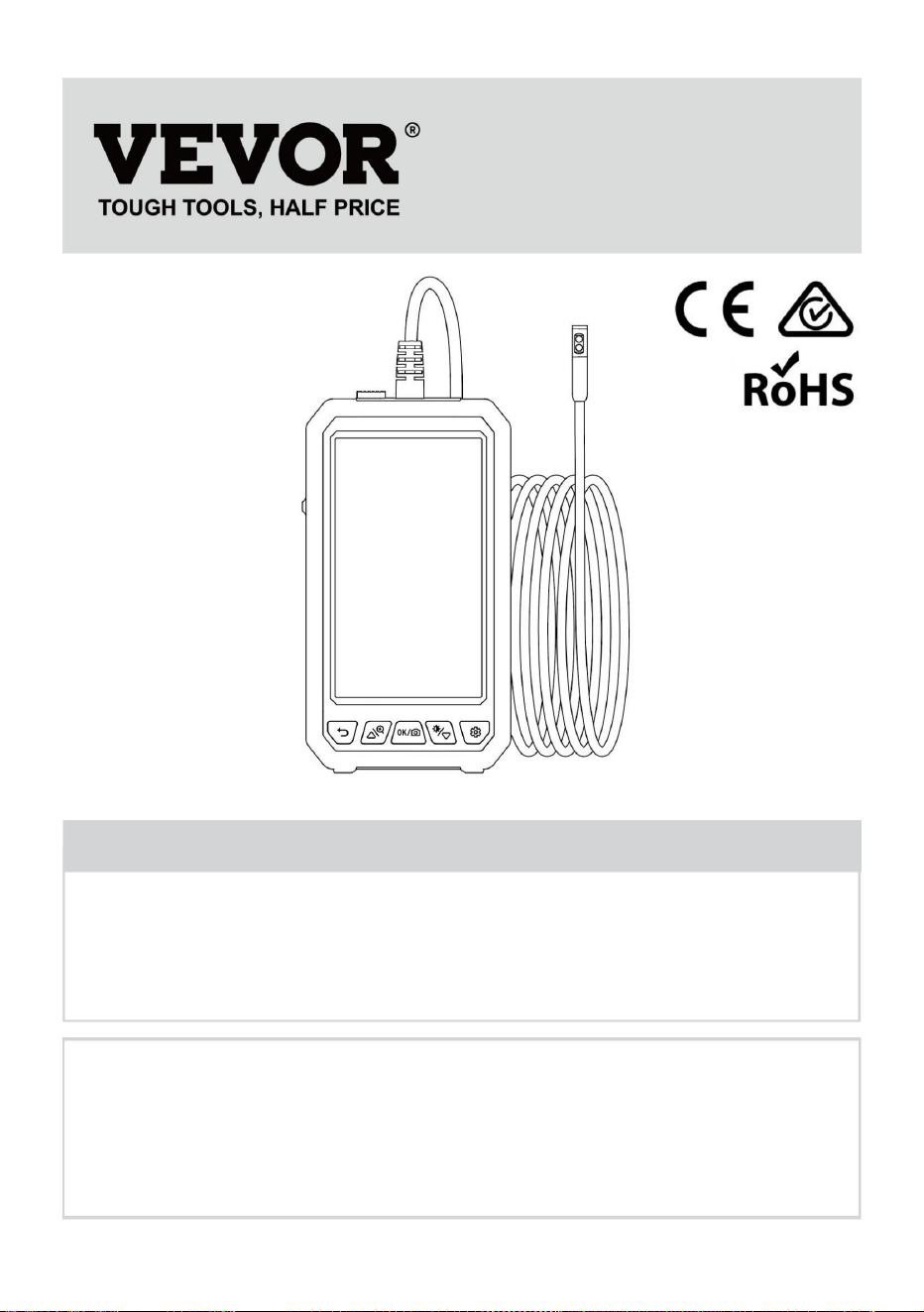
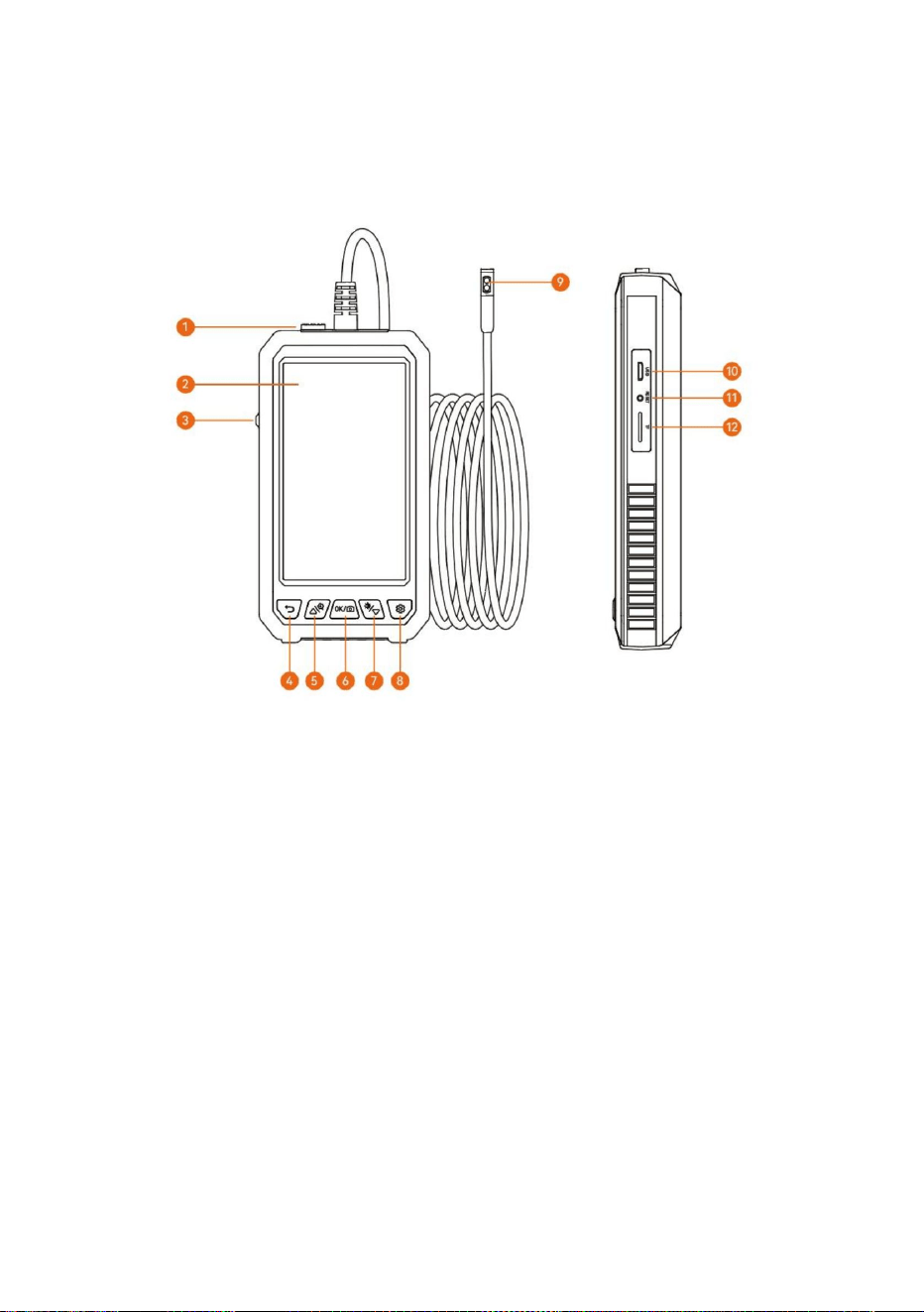
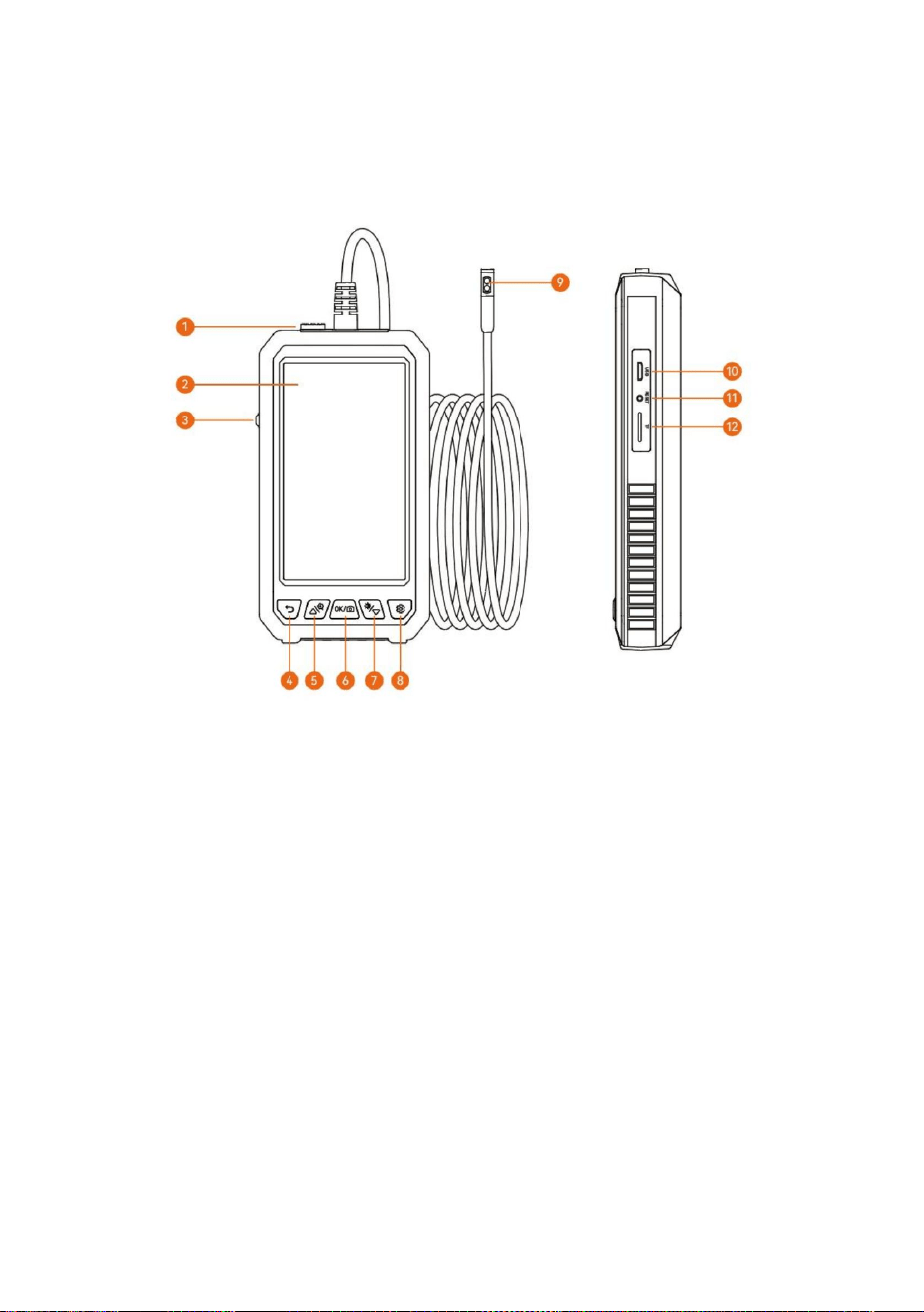
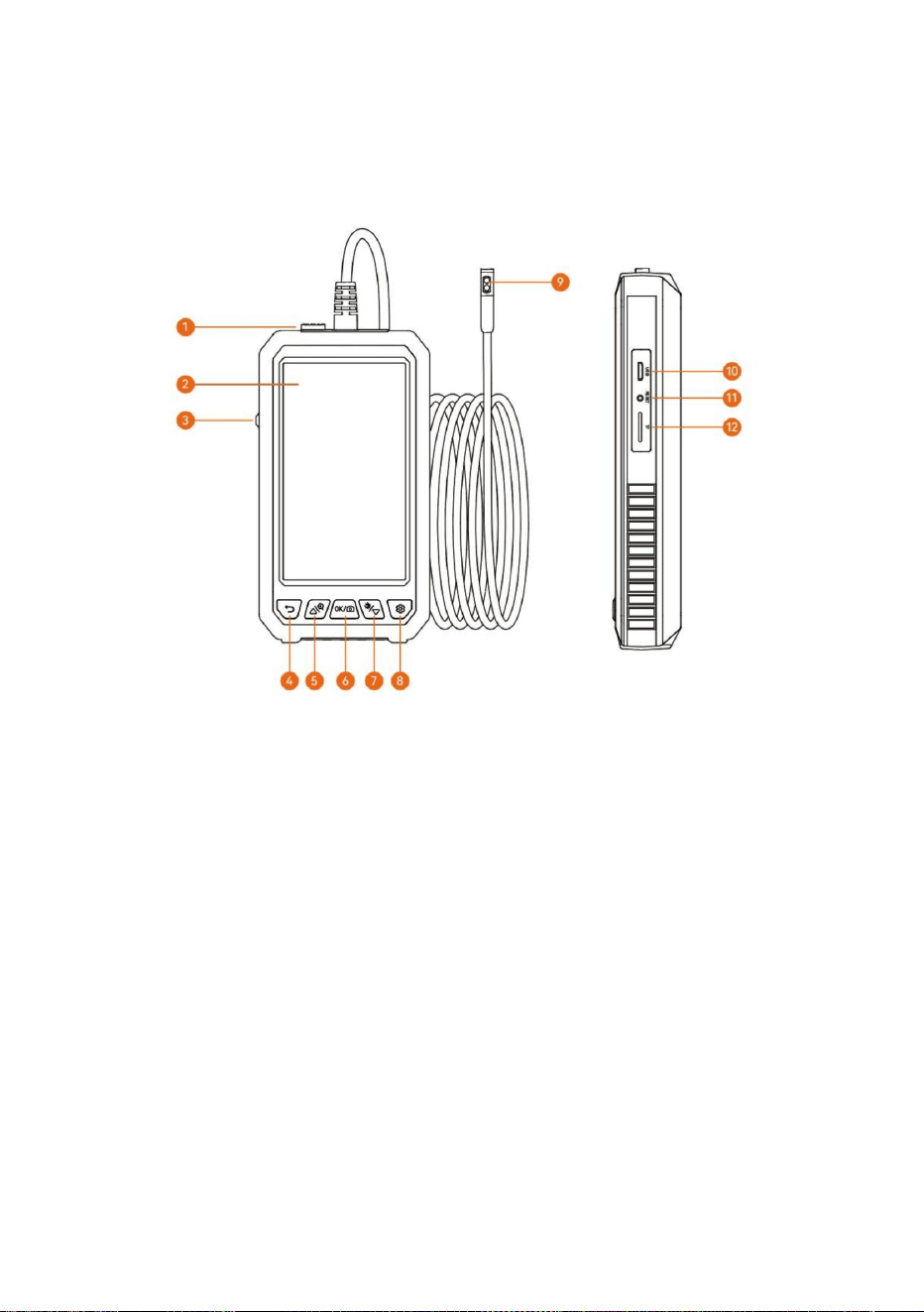
PRODUCT INTRODUCTION
(There are different colors, and the products are subject to the physical objects
received)
1. Camera lock
Insert the Type-c camera interface into the device, and the lock can make the
interface contact stable and prolong the service life. If you want to change the
camera, you need to press and move the lock in the opposite direction of the
interface.
2. Screen
5-inch IPS full-view HD color screen
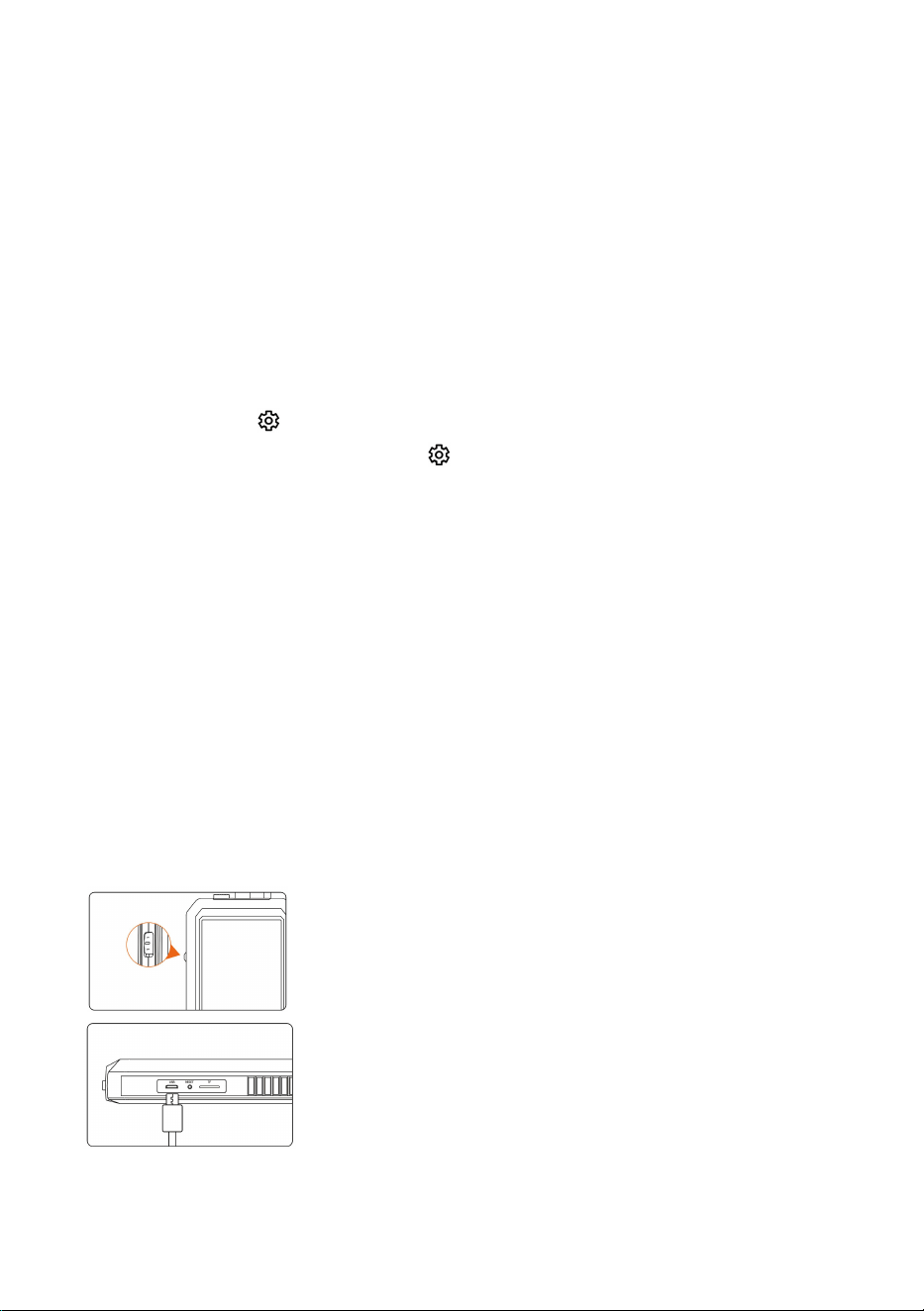
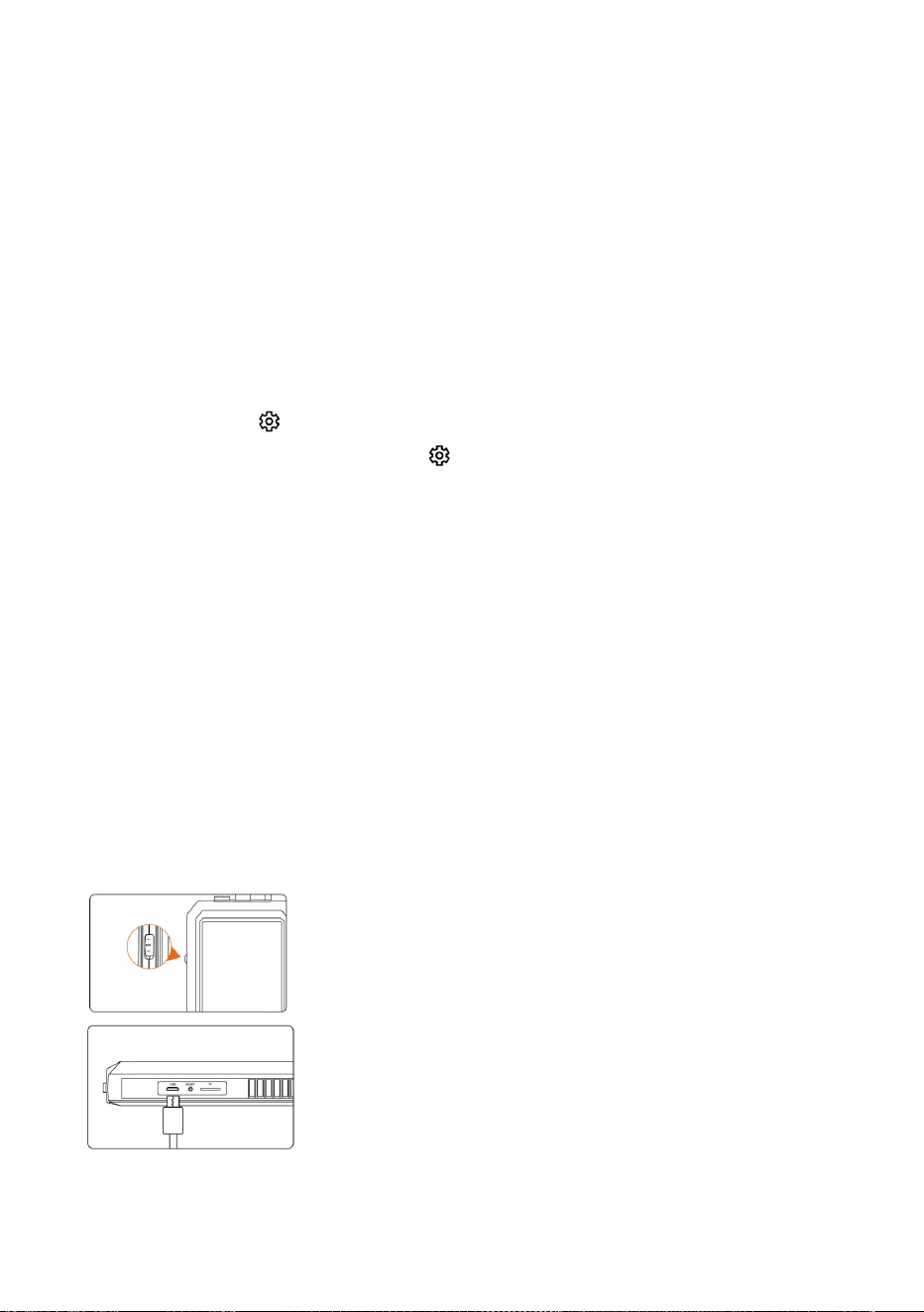
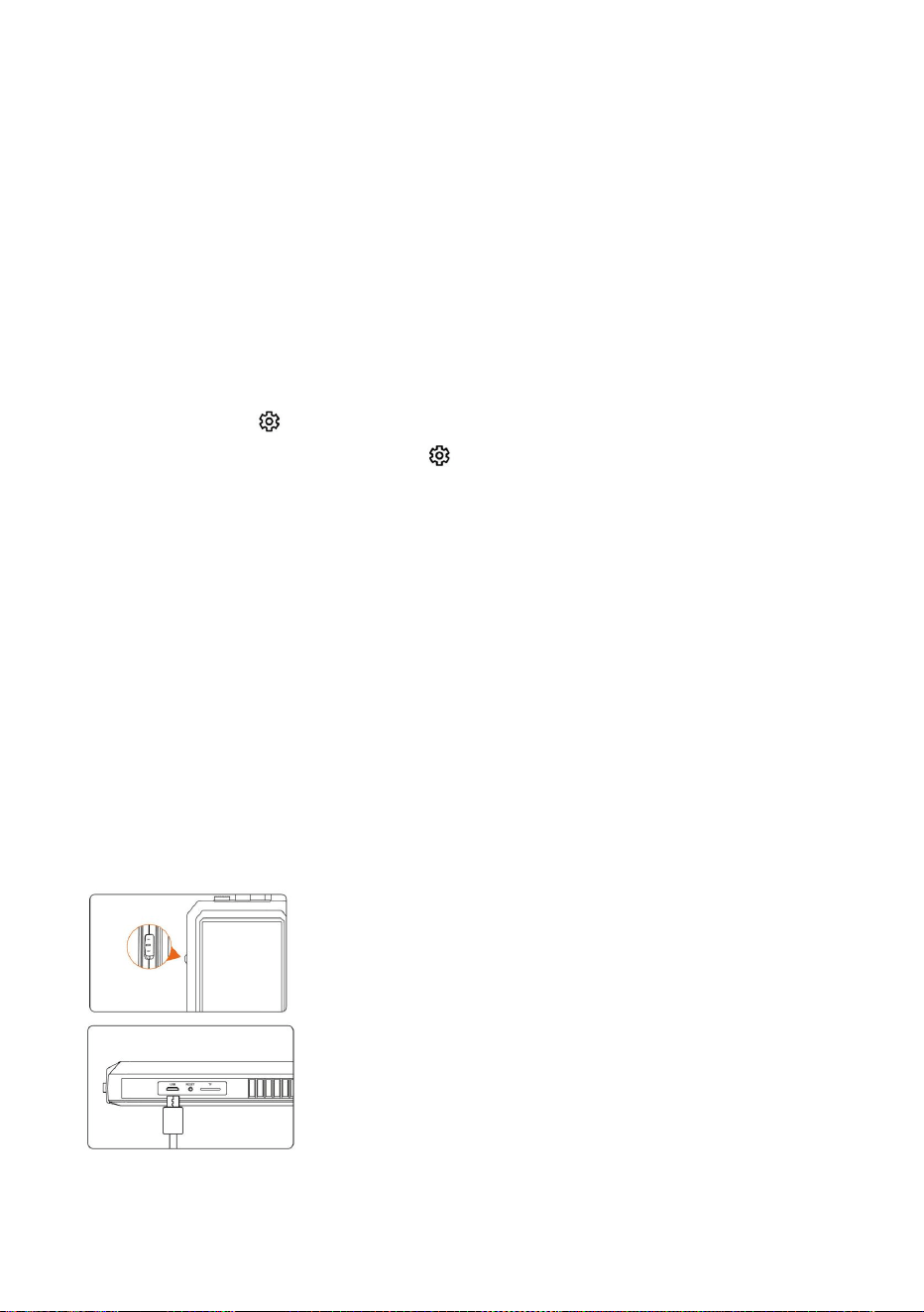
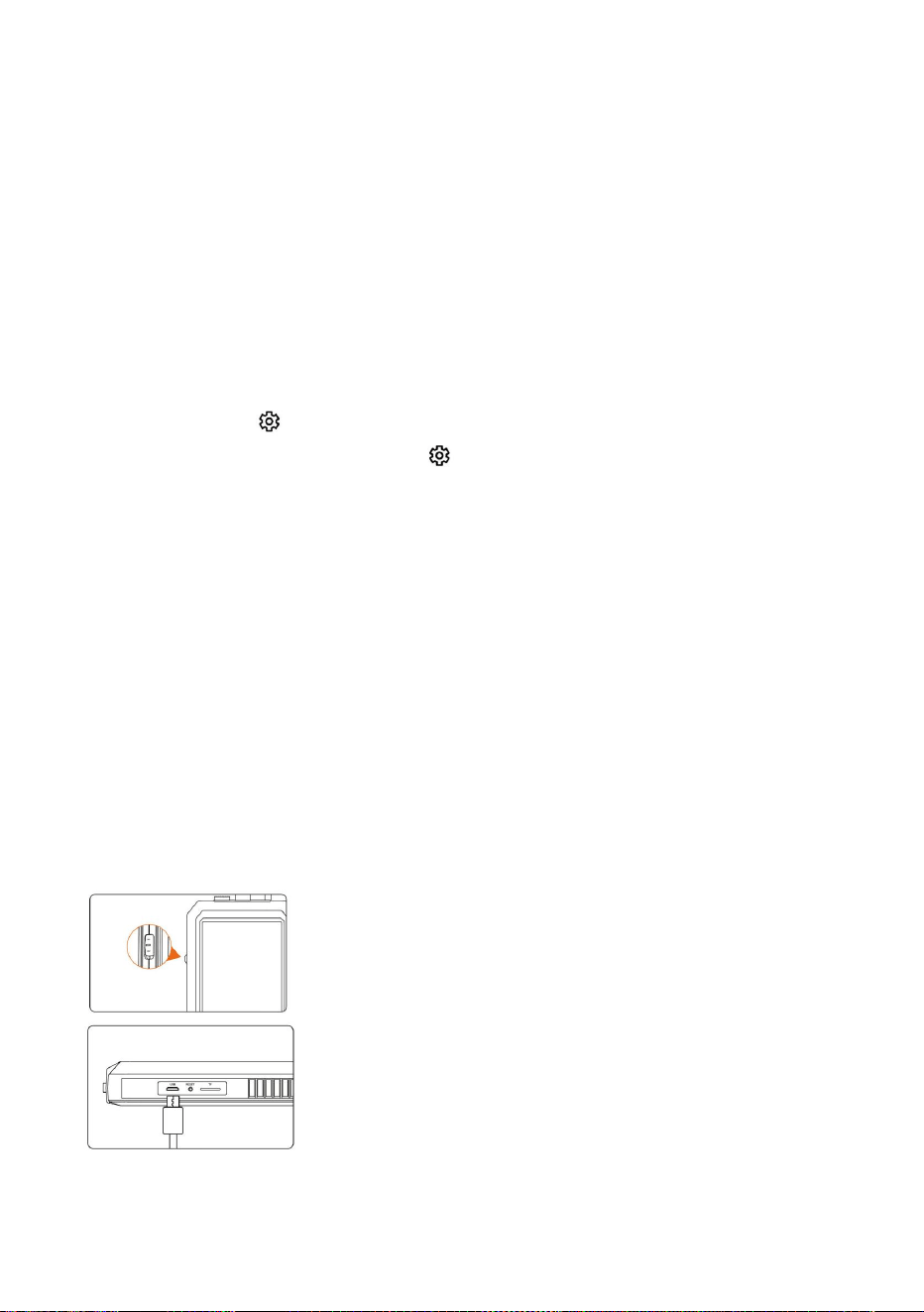
3. Power supply
Flip the switch toward the camera to turn it on, and flip it the other way to turn it
off
4. Back/Album
Operate this button on the video interface, its function is to enter the picture
management, and it is the return function on other interfaces
- 4 -
5. Up/zoom in
If the button is operated on the video interface, the image can be cyclically
enlarged, and it is the upward movement button on other interfaces
6. Camera key/confirmation key
When operating this key on the camera interface, short press to take pictures,
and long press to record video. Another interface is the confirmation function.
7. Down
When operating this button on the video interface, it is to adjust the brightness of
the LED light. If another interface is move down function.
8. Setting key
Short press the " " to enter the menu setting function.(If the product is a
dual-lens camera, long press the " " to switch between the side camera and
the front camera)
9. Lens
With bright LED light lens
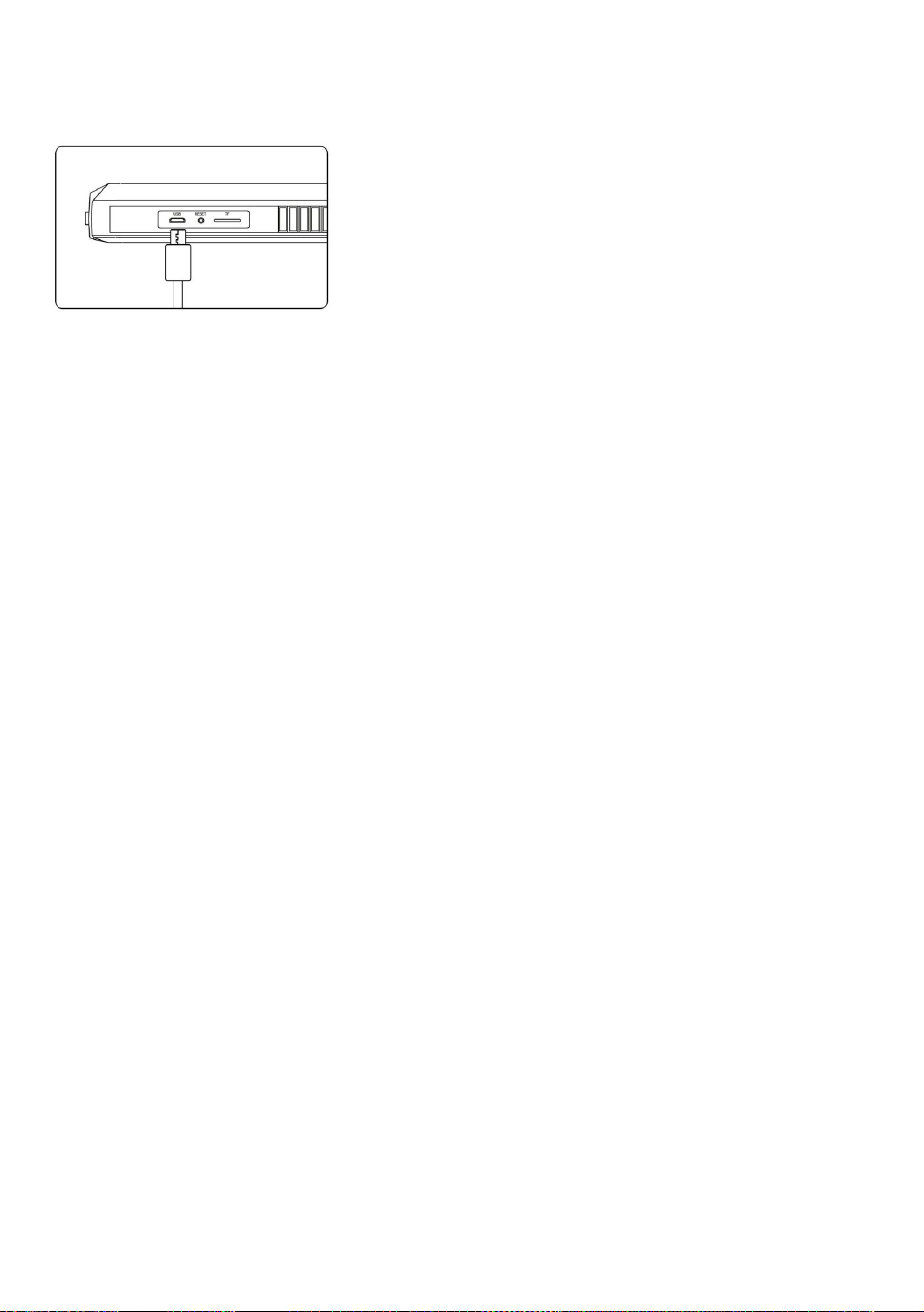
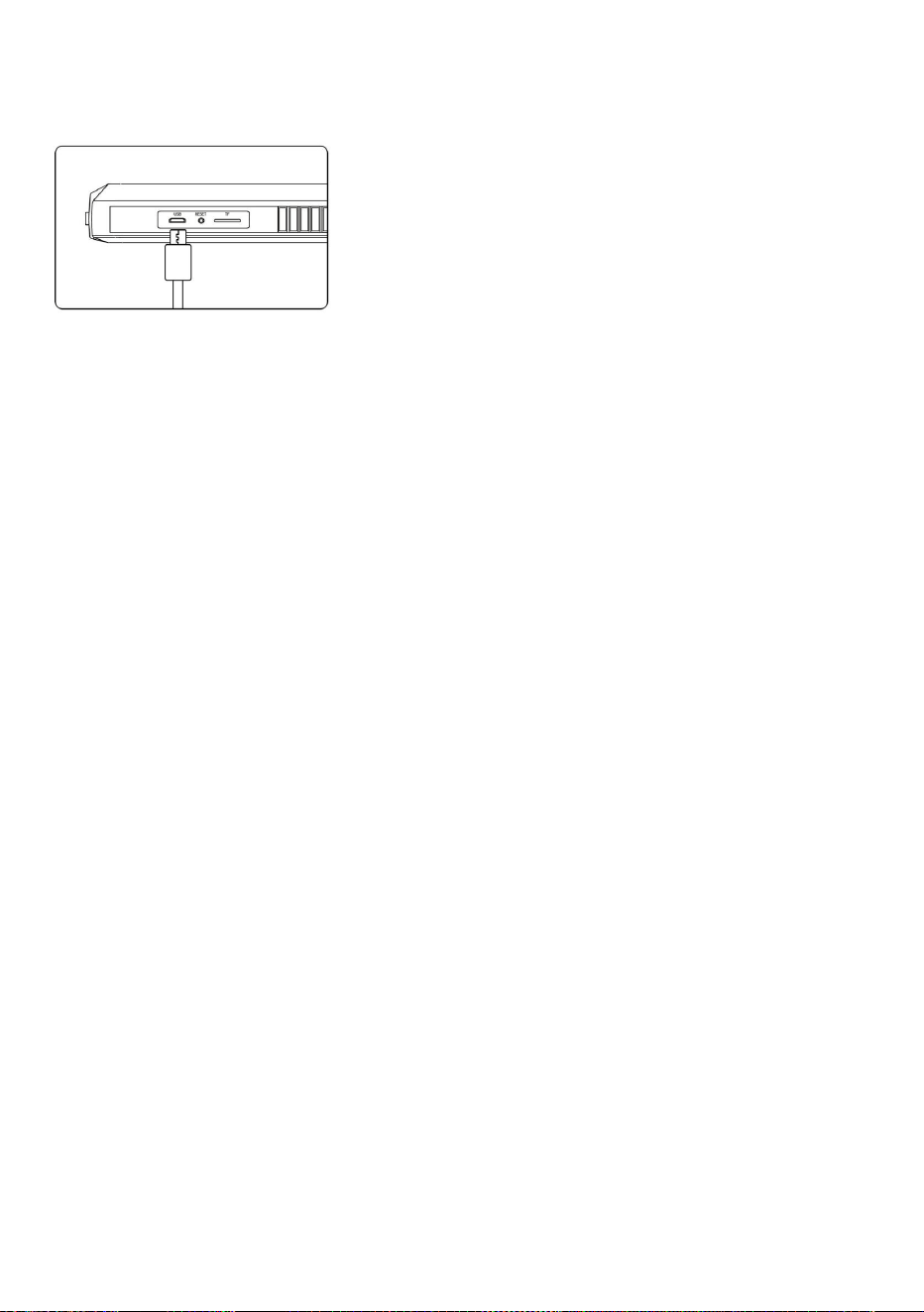
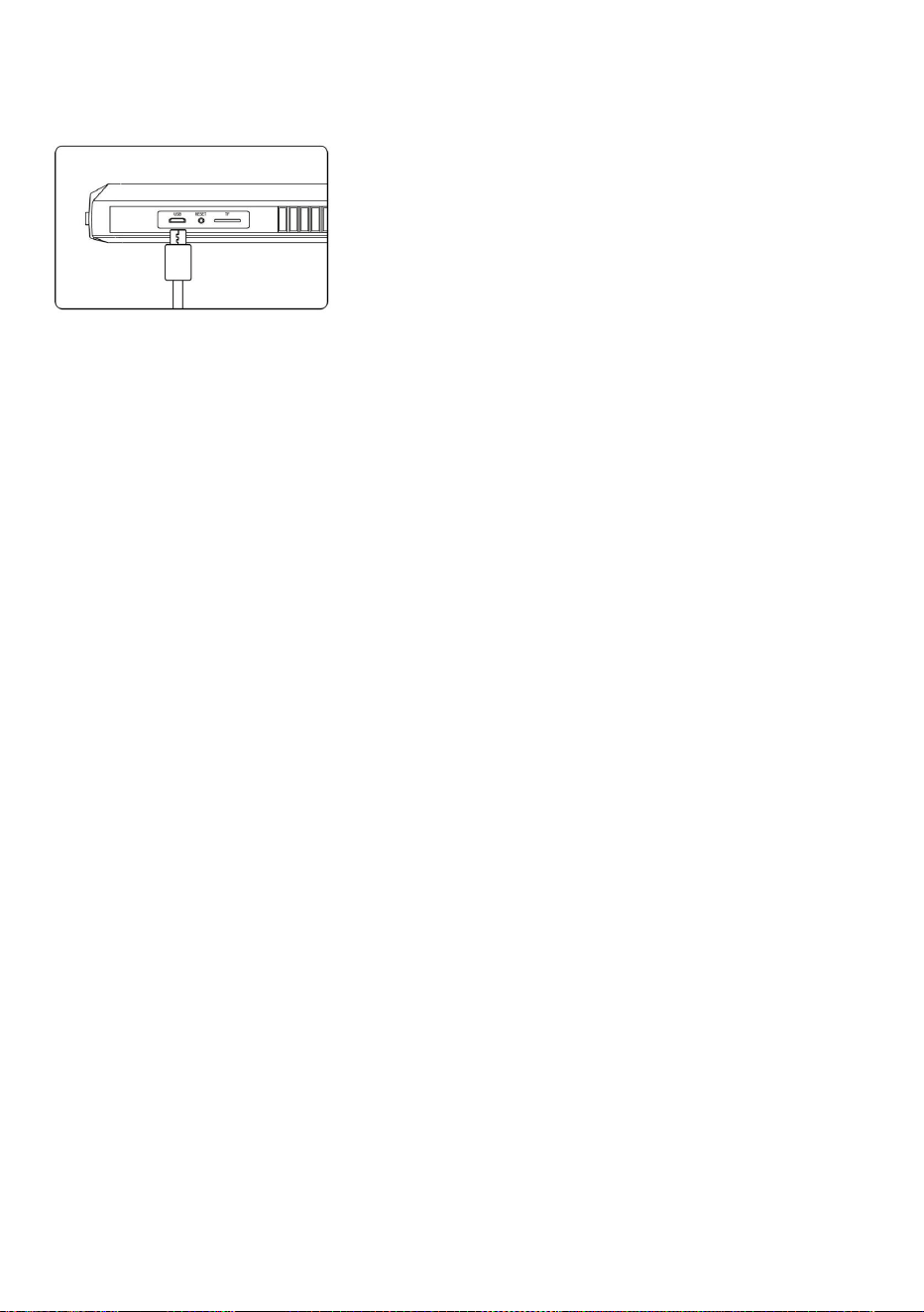
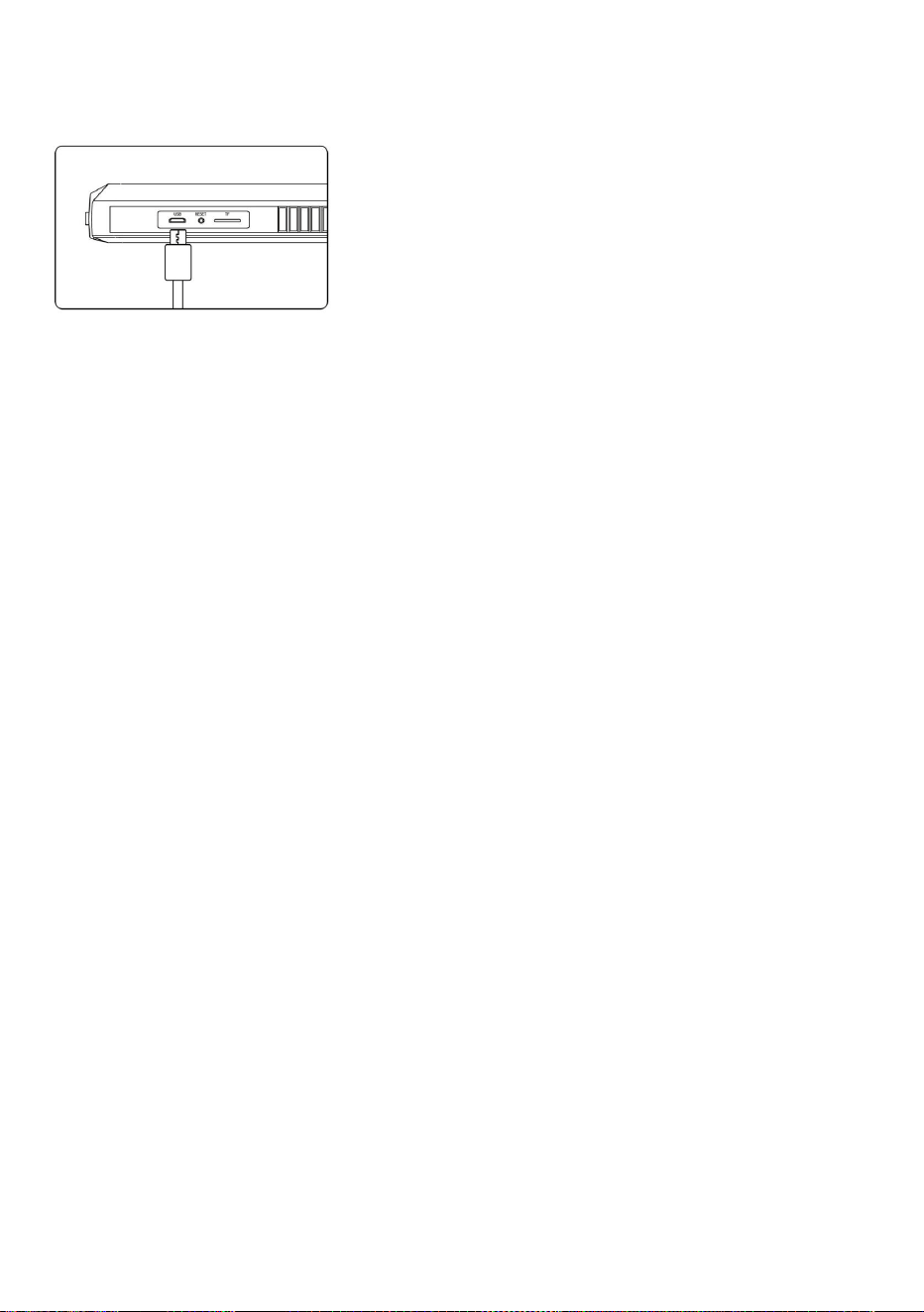
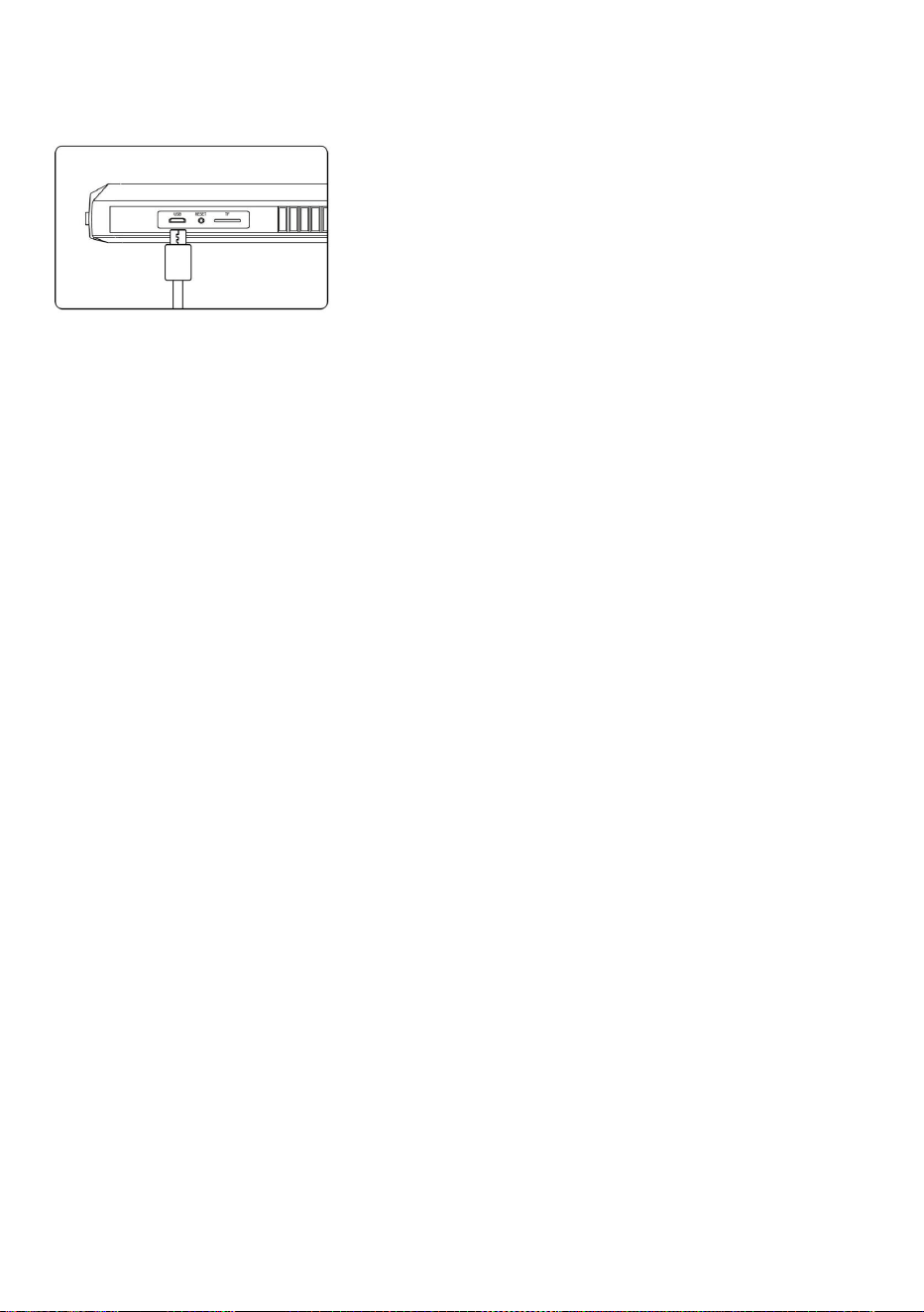
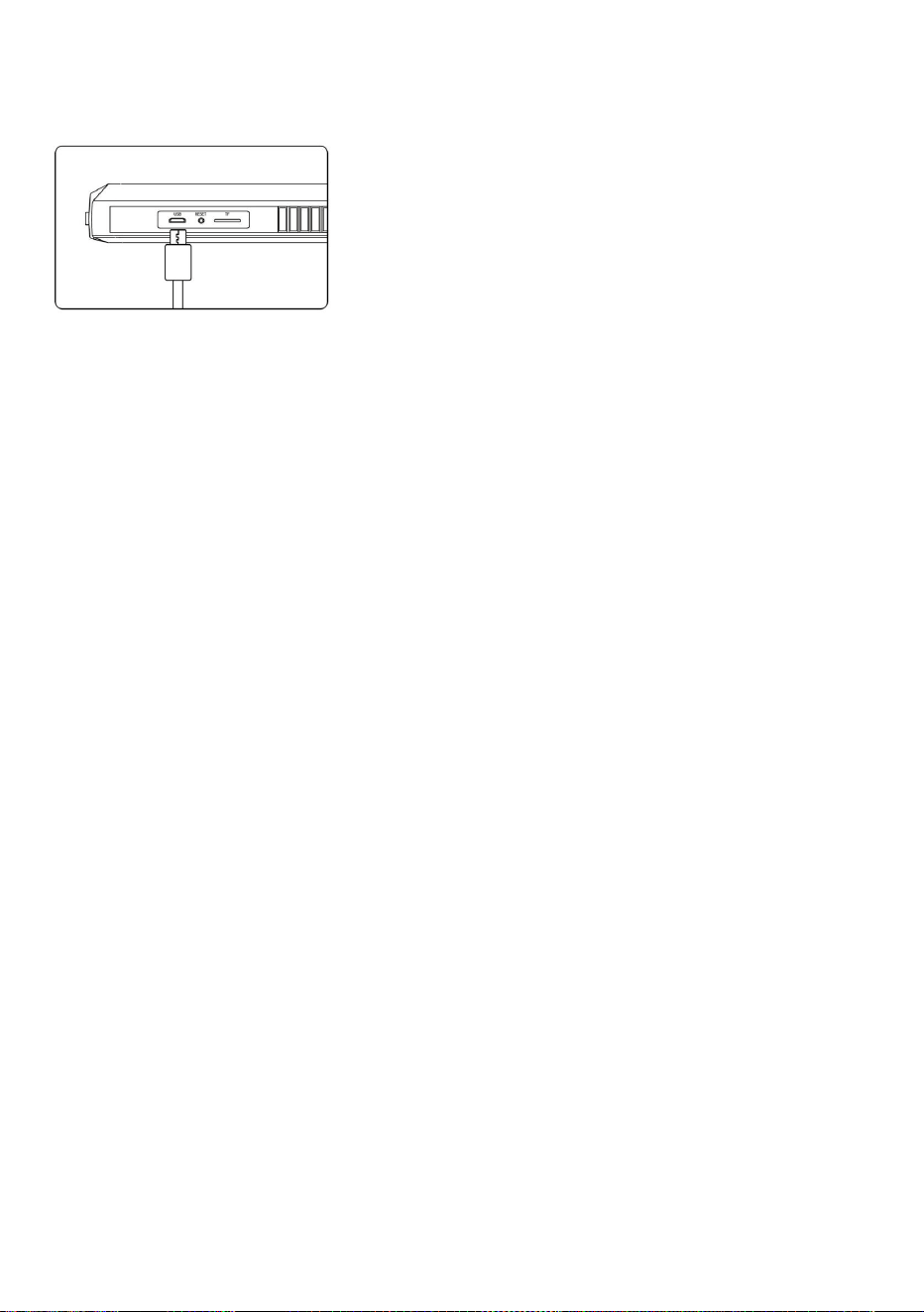
10. USB charging interface
Data transmission is possible when the USB is connected to the computer for
charging (it is recommended not to use an adapter above 12V to charge the
product)
11.Reset button
When the product crashes, press it to restart the device
12.TF cardslot
Support to expand 0-64G TF (MicroSD) card
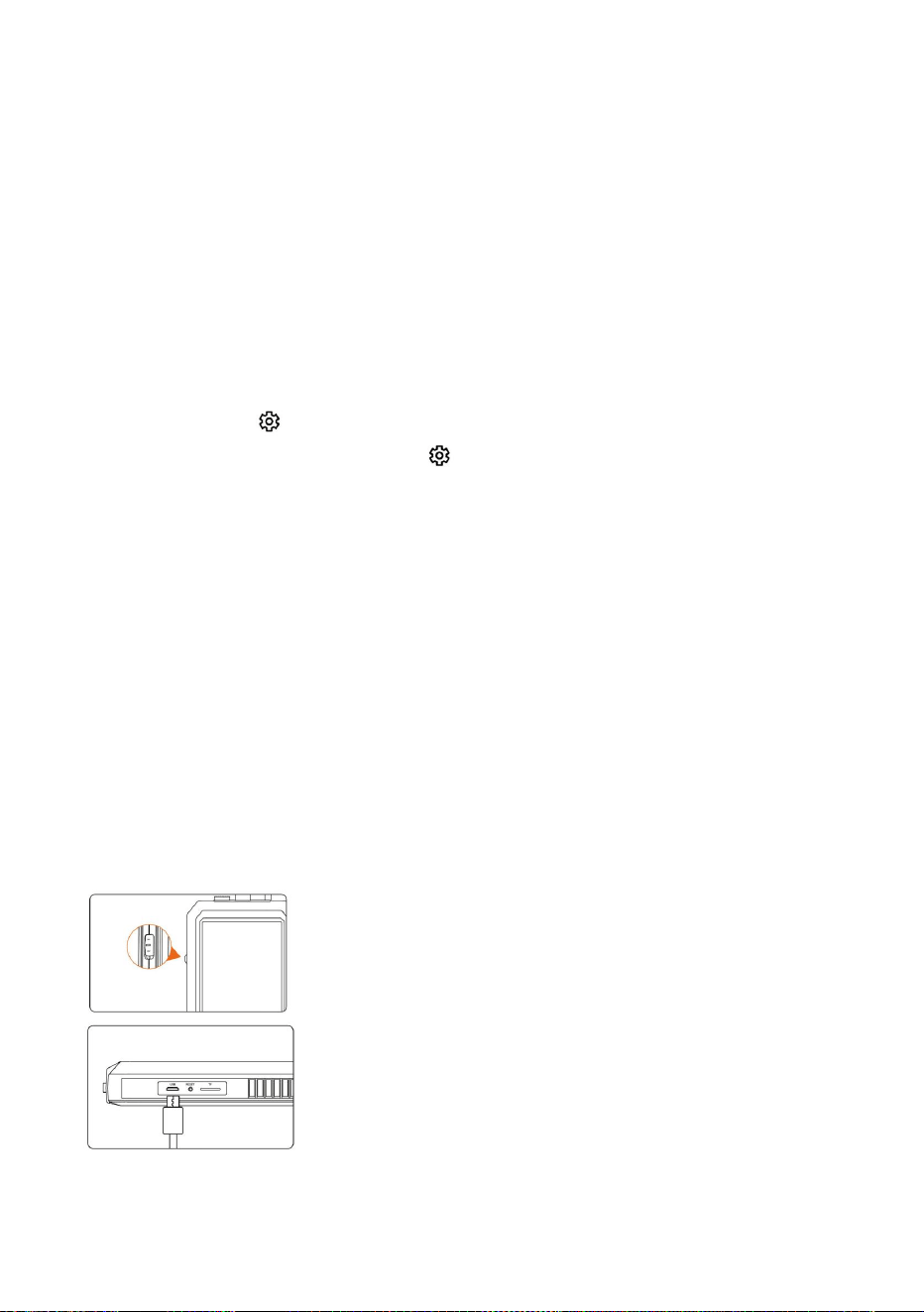
*Please insert the TF card when the machines turn off
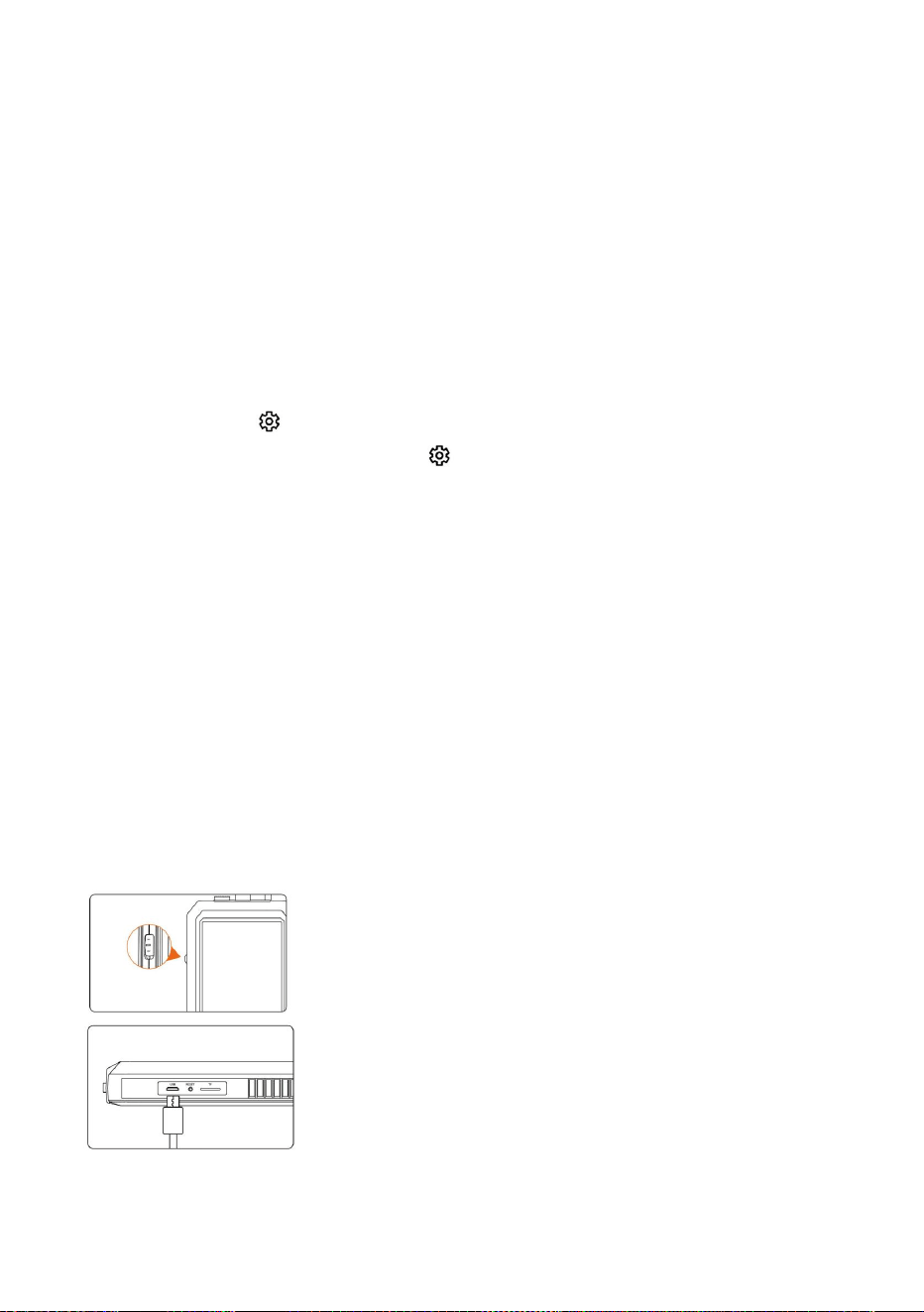
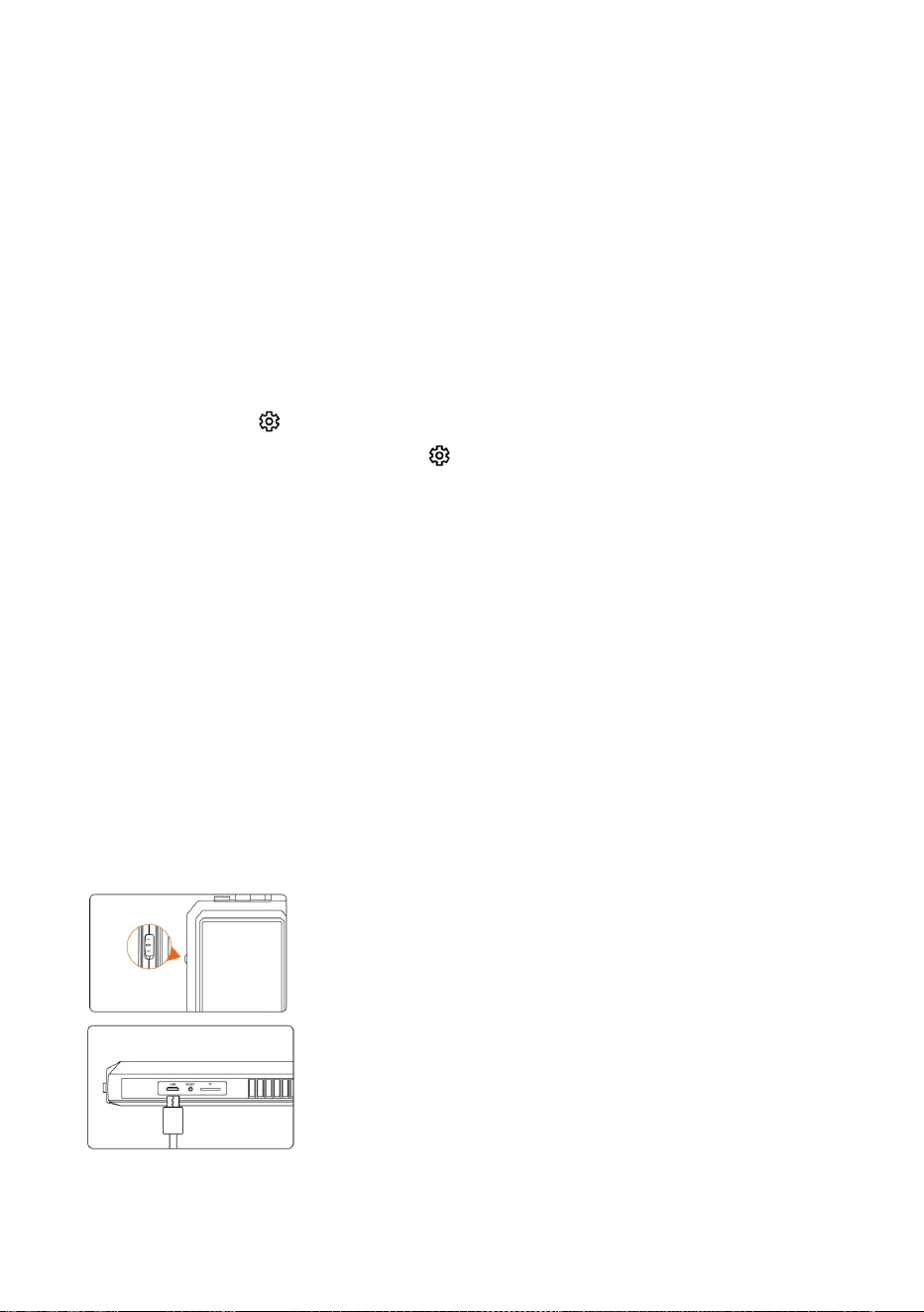
Flip the switch toward the camera toturn it on,
and flip it the other way to turn it
Use the USB charging cable to charge the
device
- 5 -
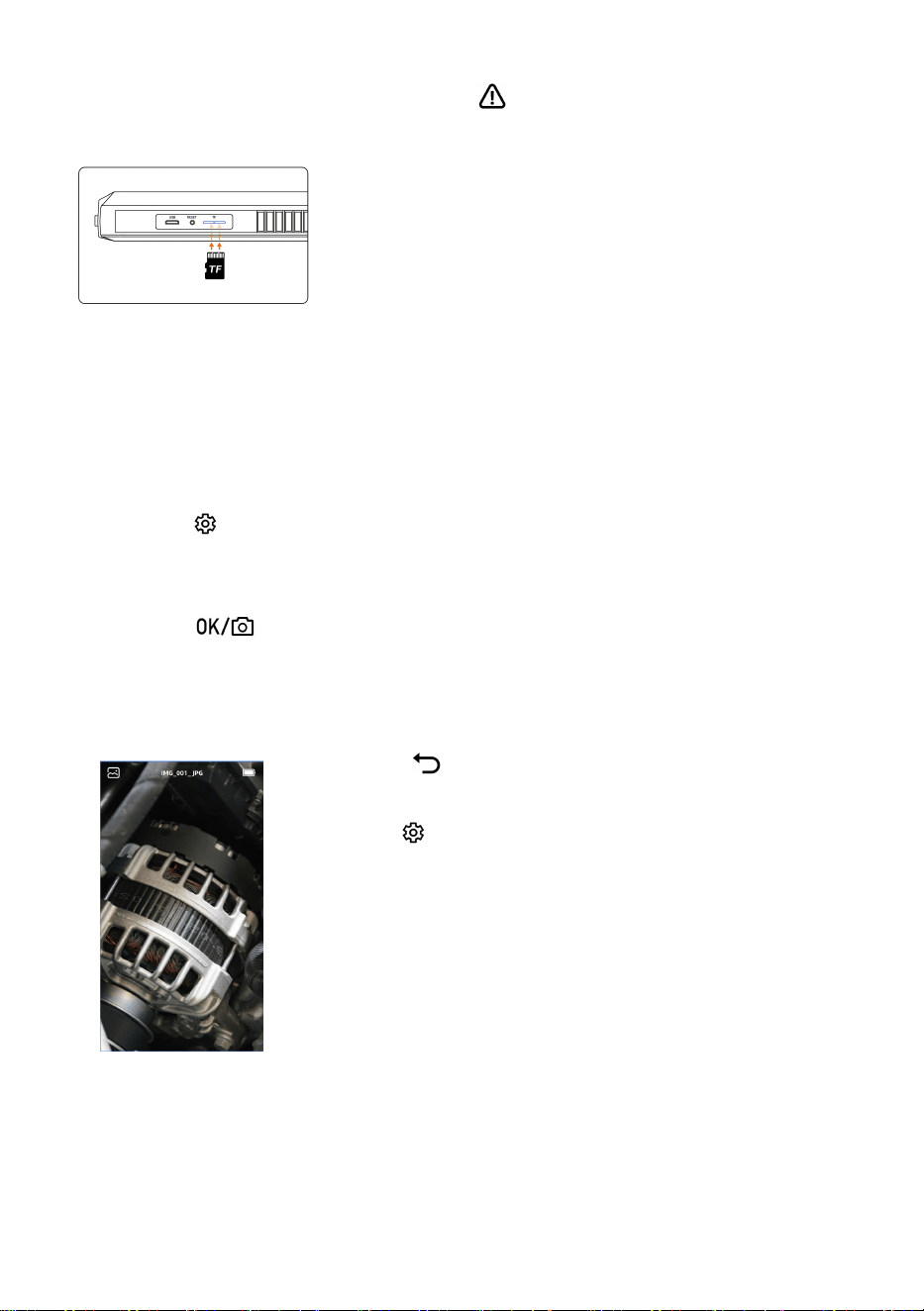
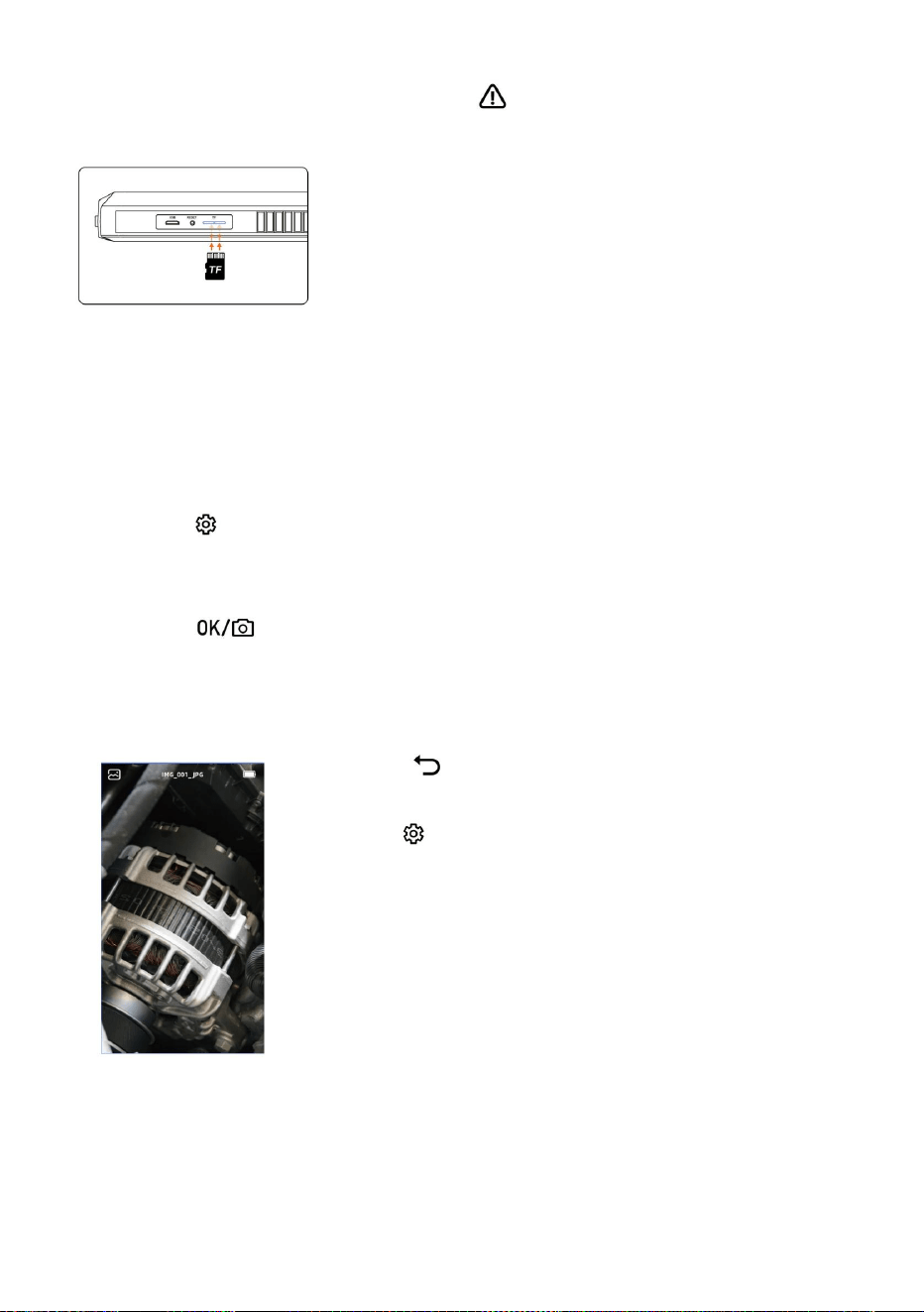
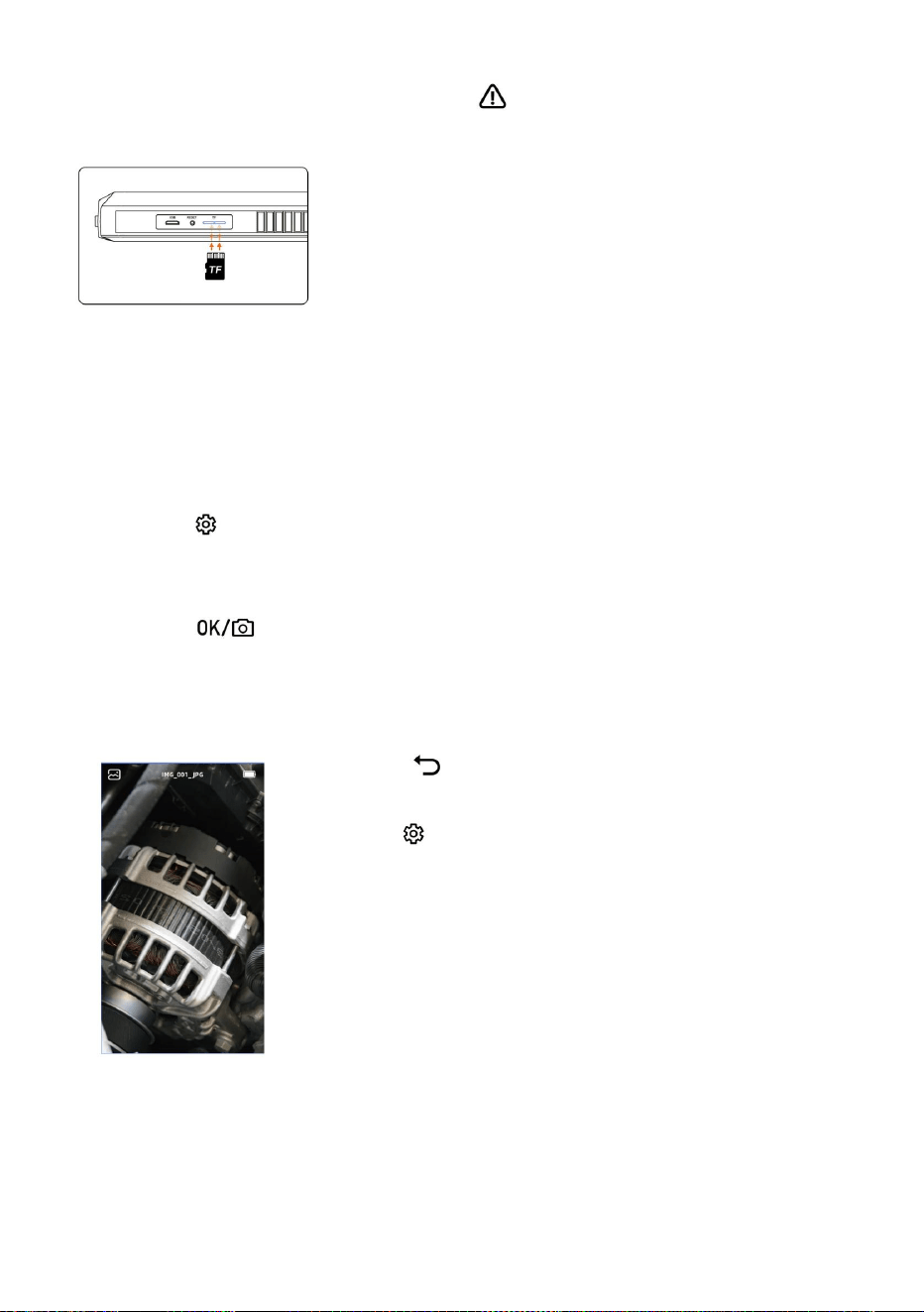
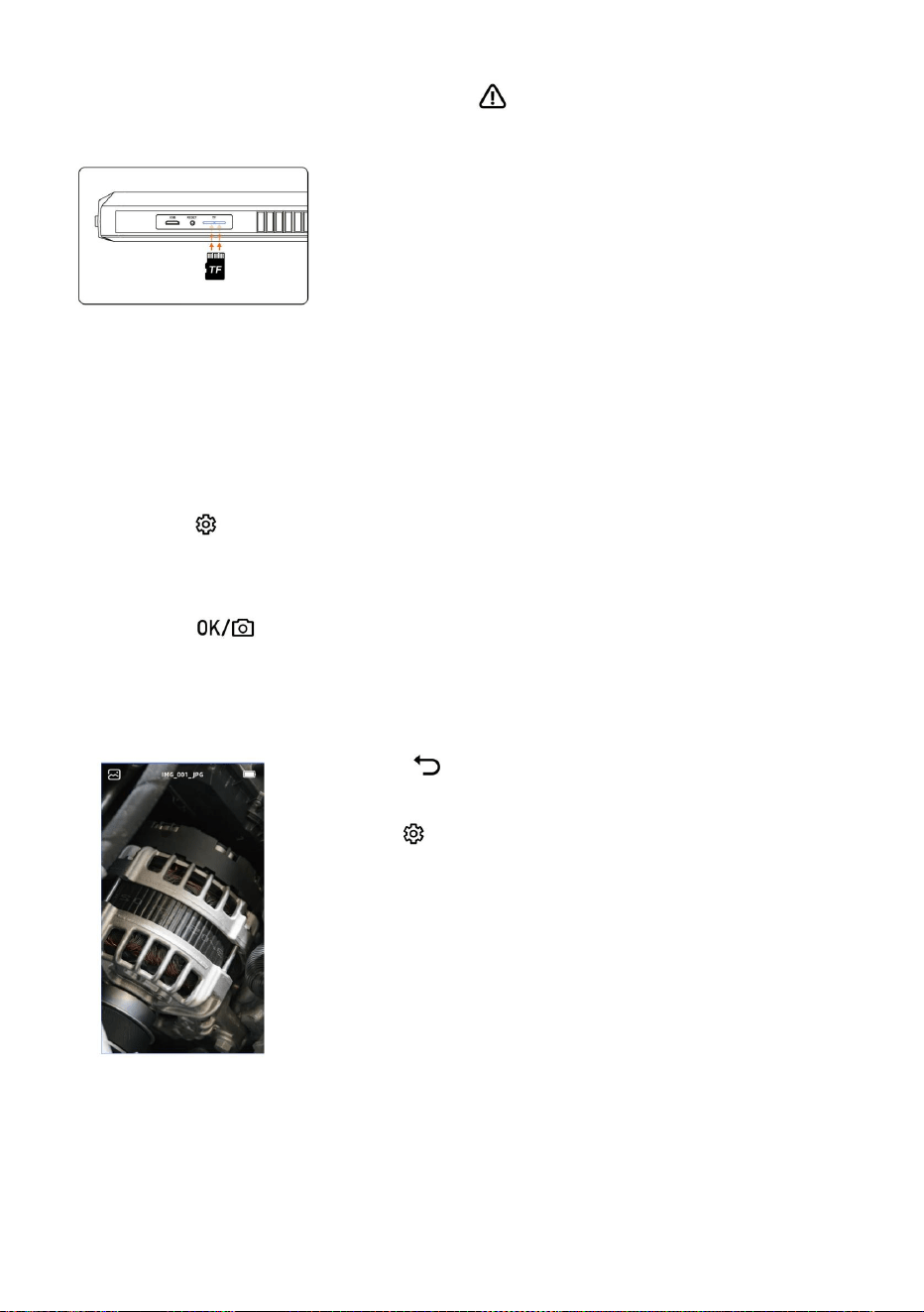
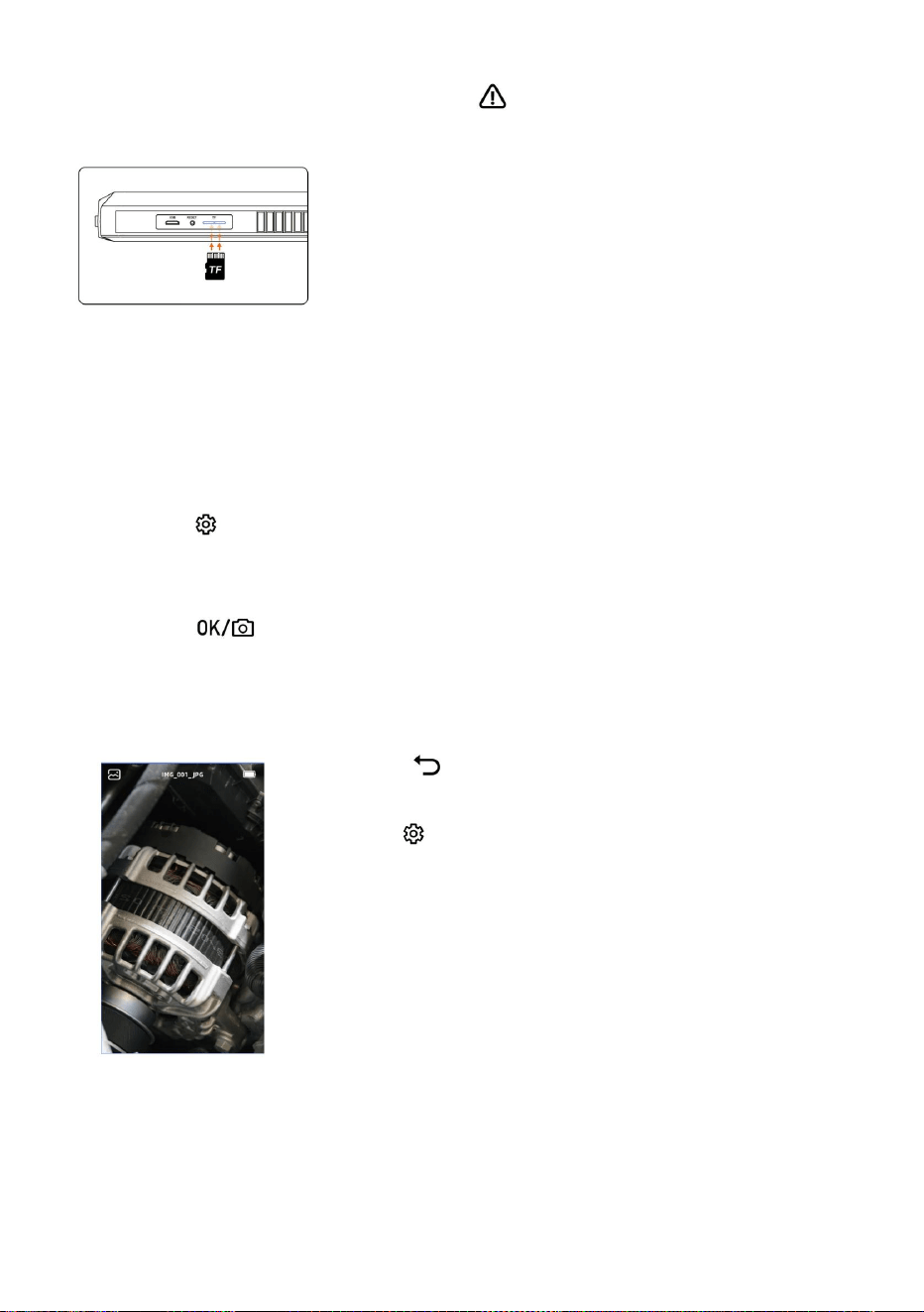
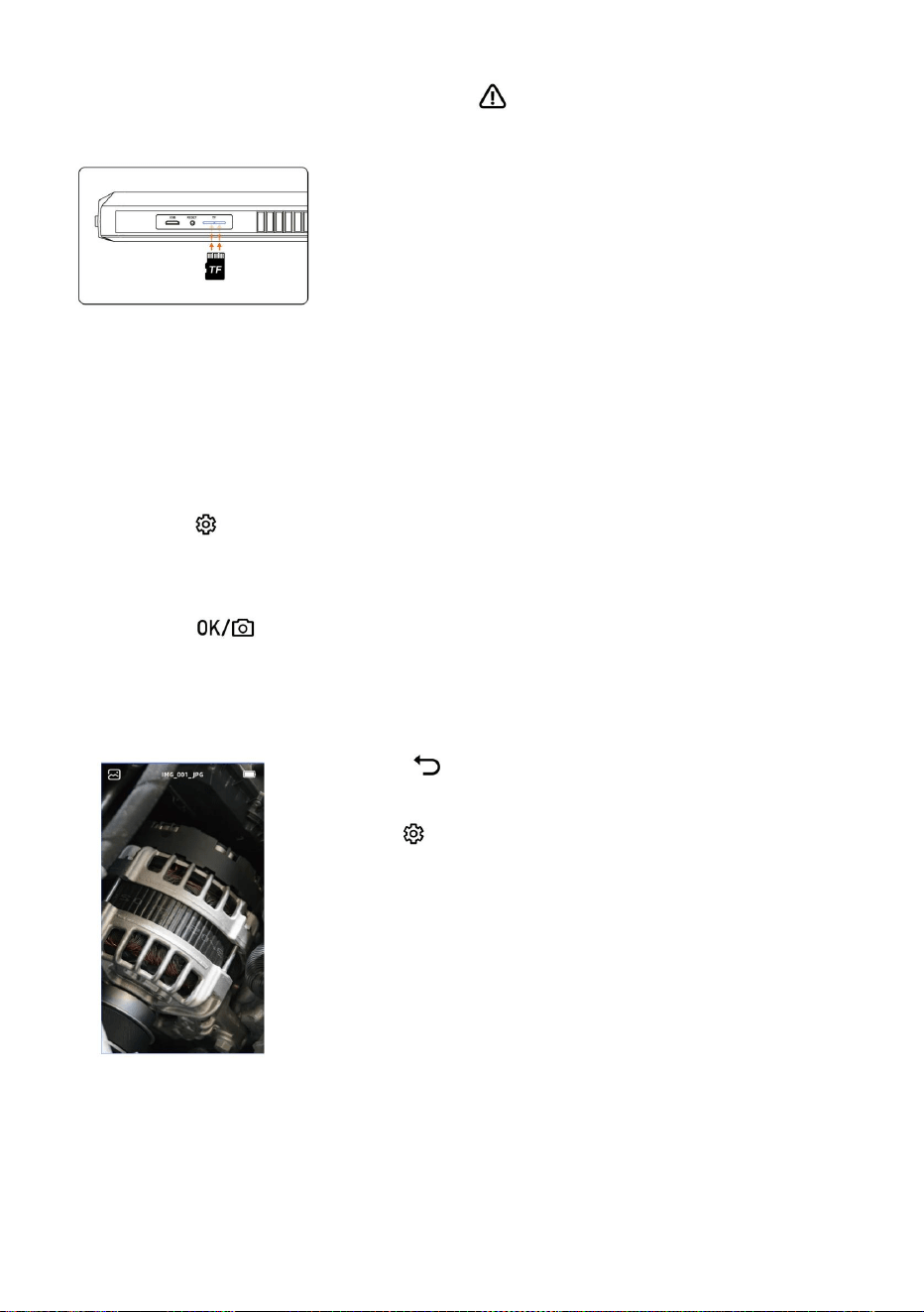
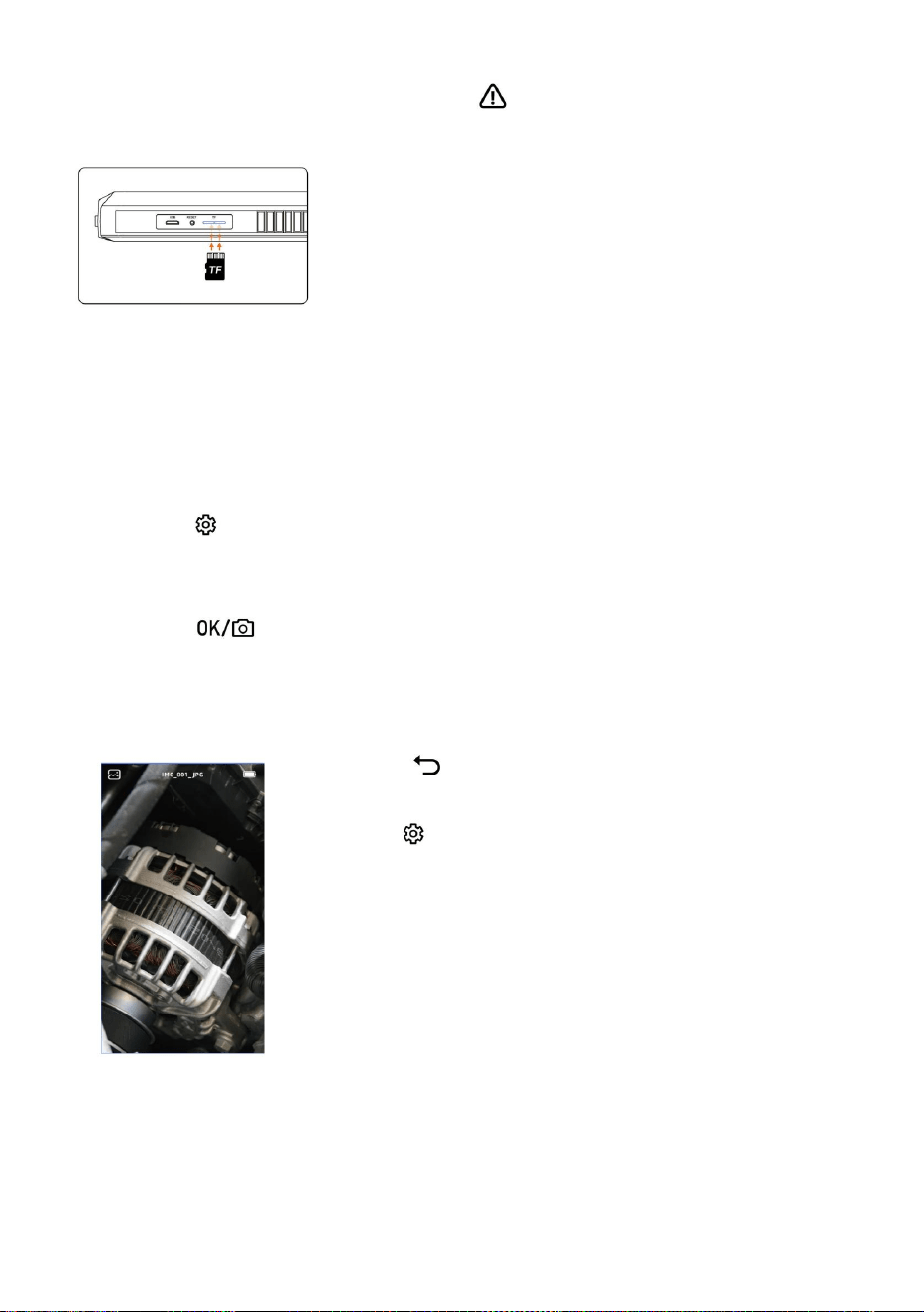
Insert TF card:
*Please insert the TF card in the off state
*Please pay attention to whether the insertion
direction and front and back sides of TF card are
correct
*Do not use excessive force when inserting or
pulling out the TF card to prevent damage to the
card slot structur
Language settings
The system supports Simplified Chinese, Japanese, English, Korean, French,
German, Italian, Spanish, Russian, Polish
1. Press " " button to enter the setting page
2. Select the language setting
3. Press the up and down button to select the desired language
4. Press " " to save
Enter photo album
1. Press " " to switch to photo album viewing.
2. Select the photo or video that you want to view,
press " " to delete the photo or video.
- 6 -
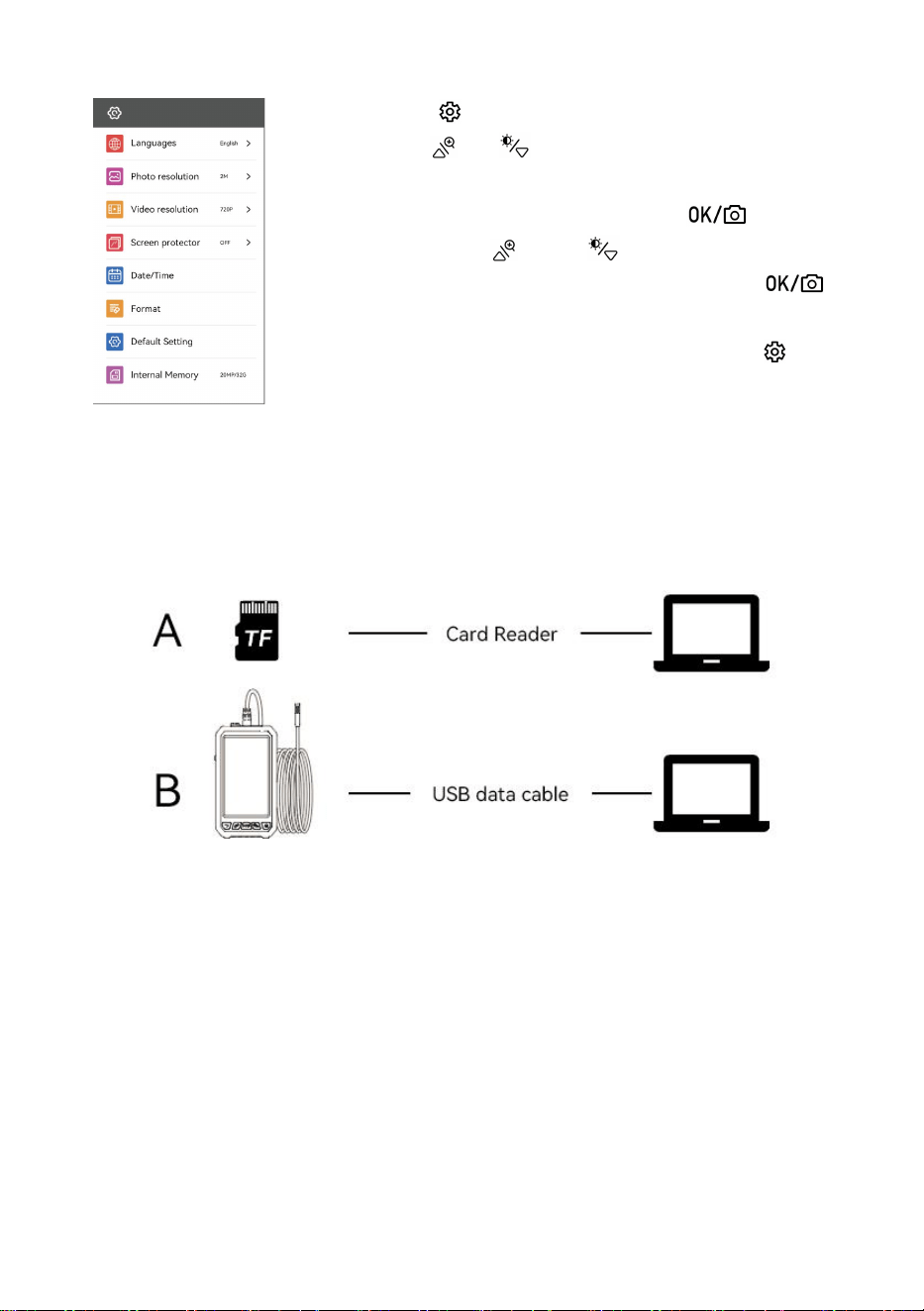
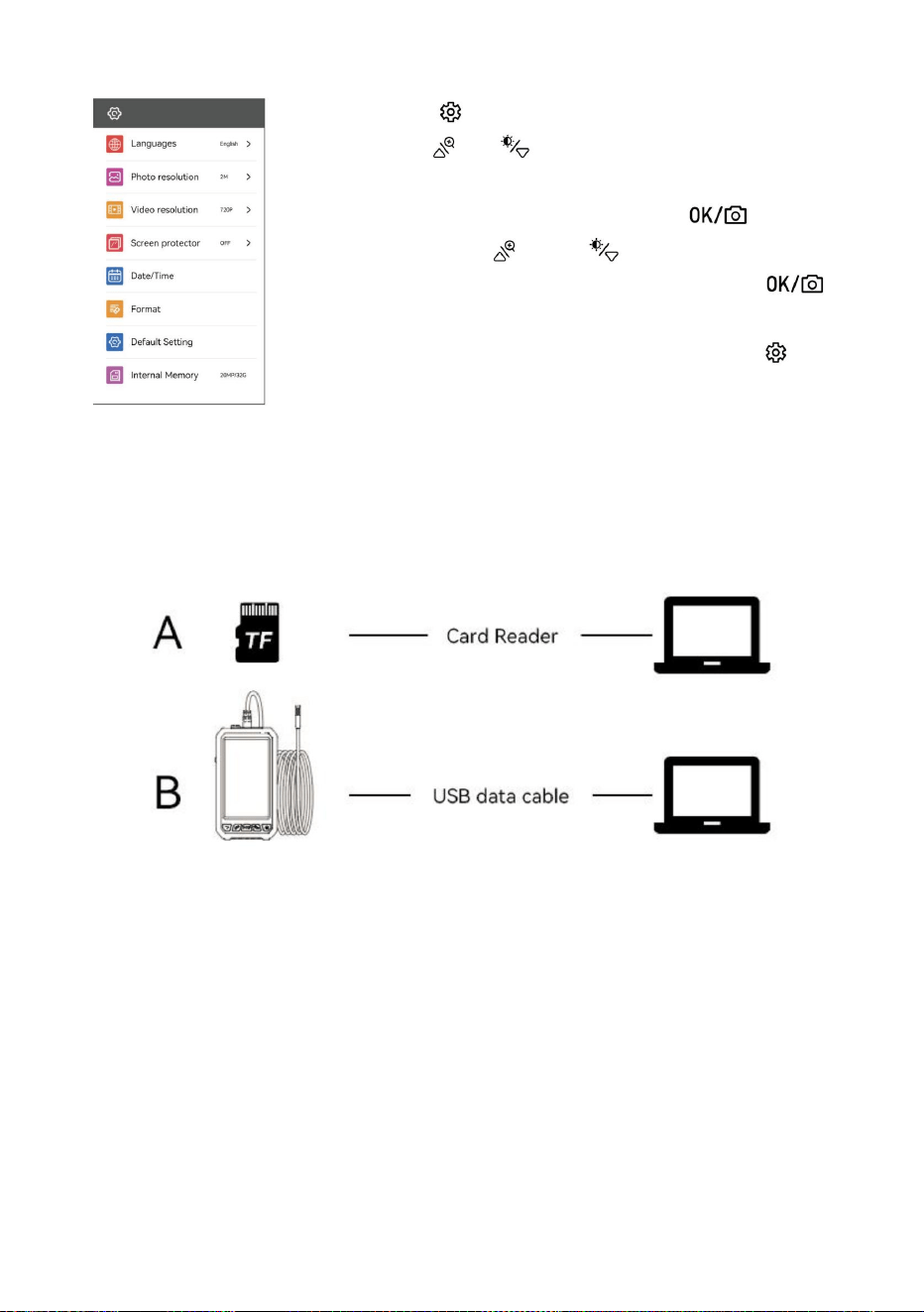
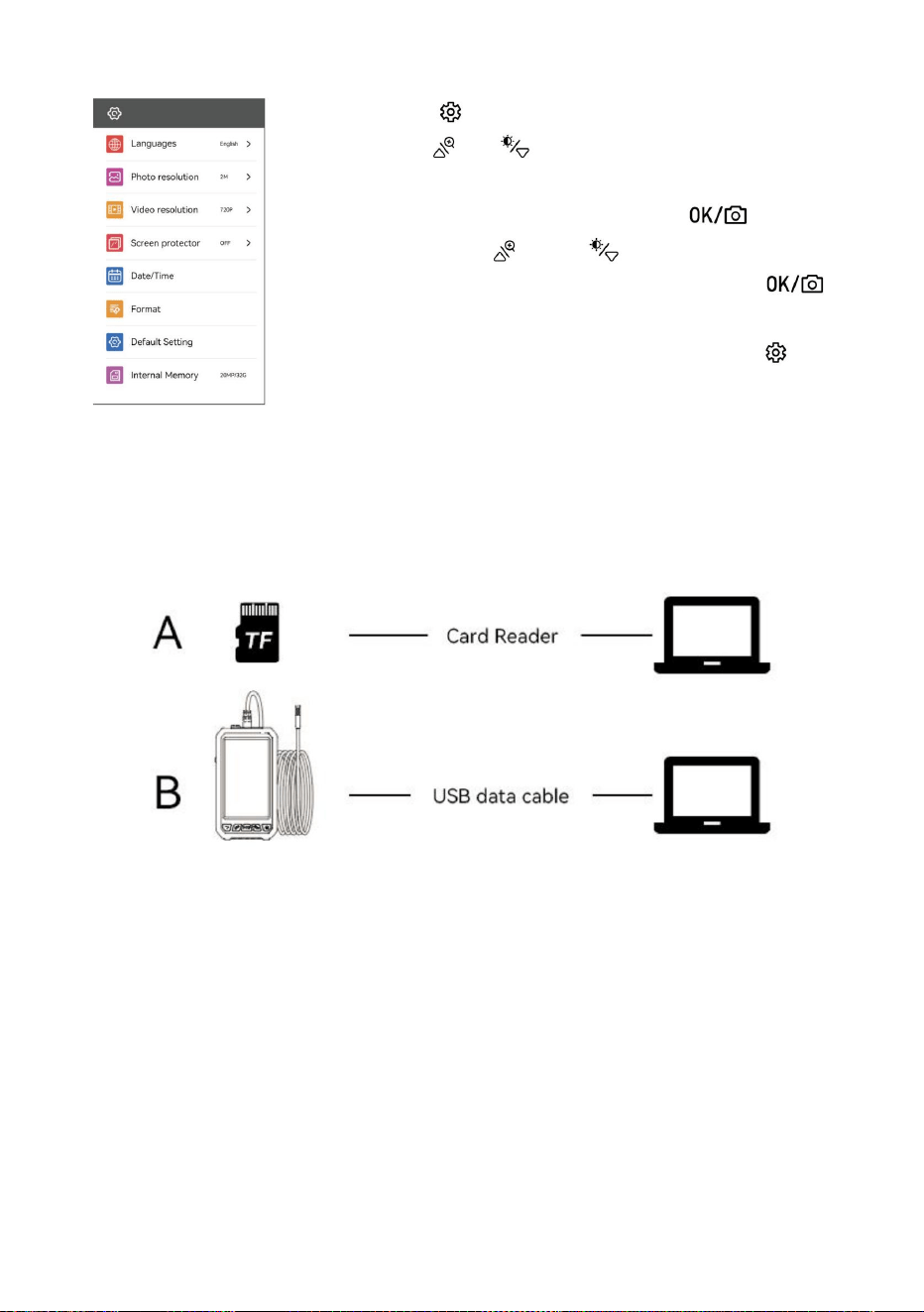
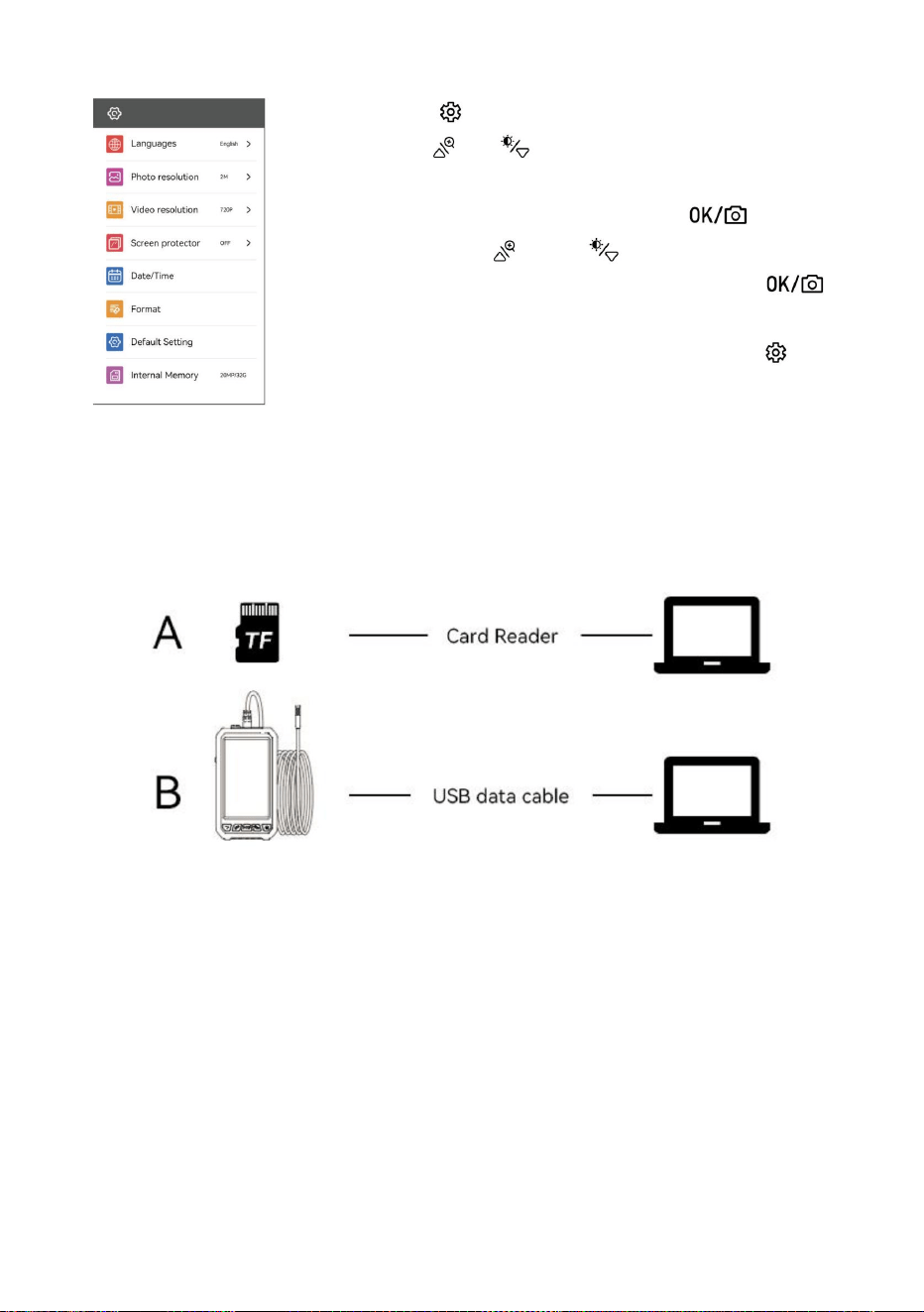
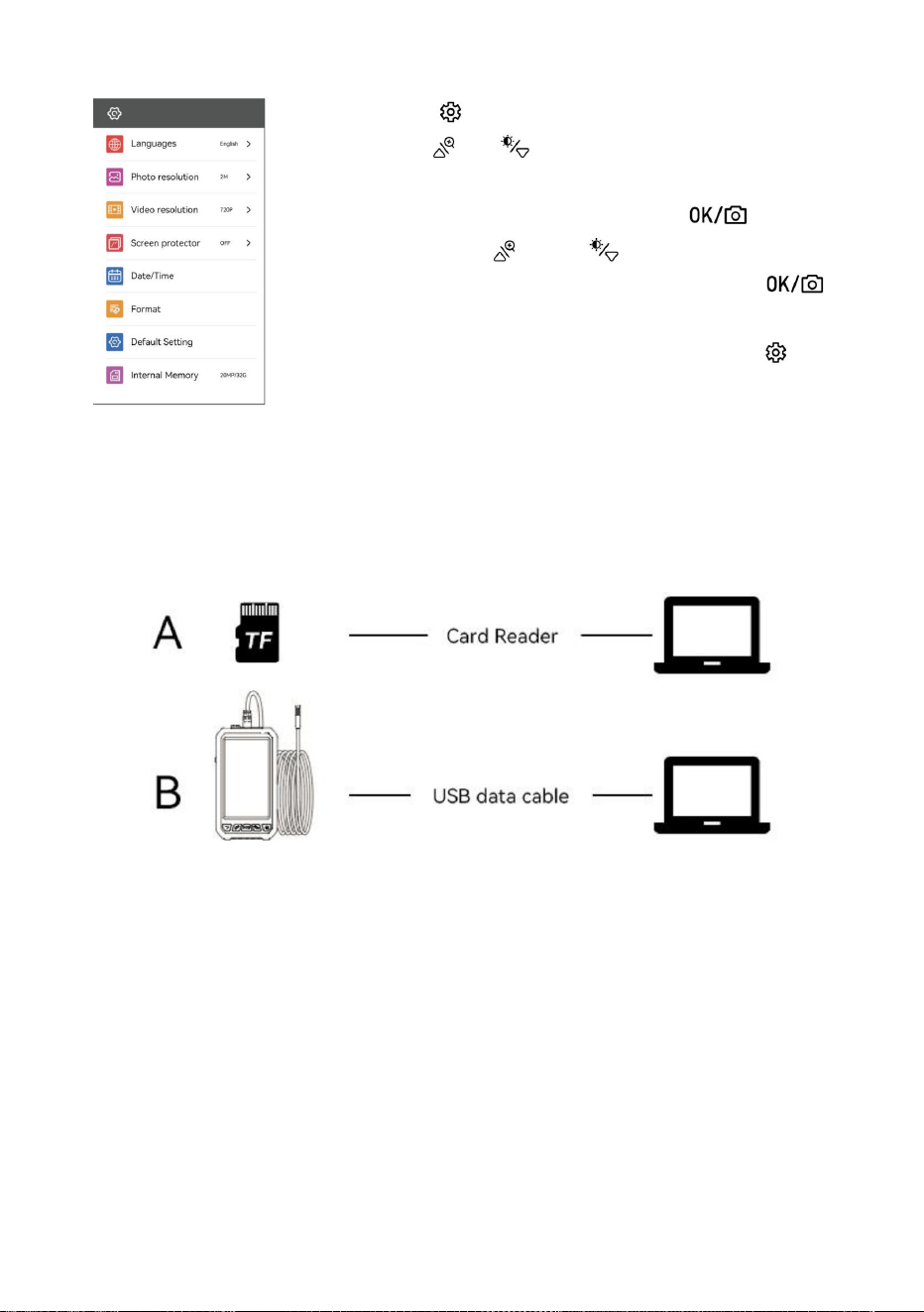
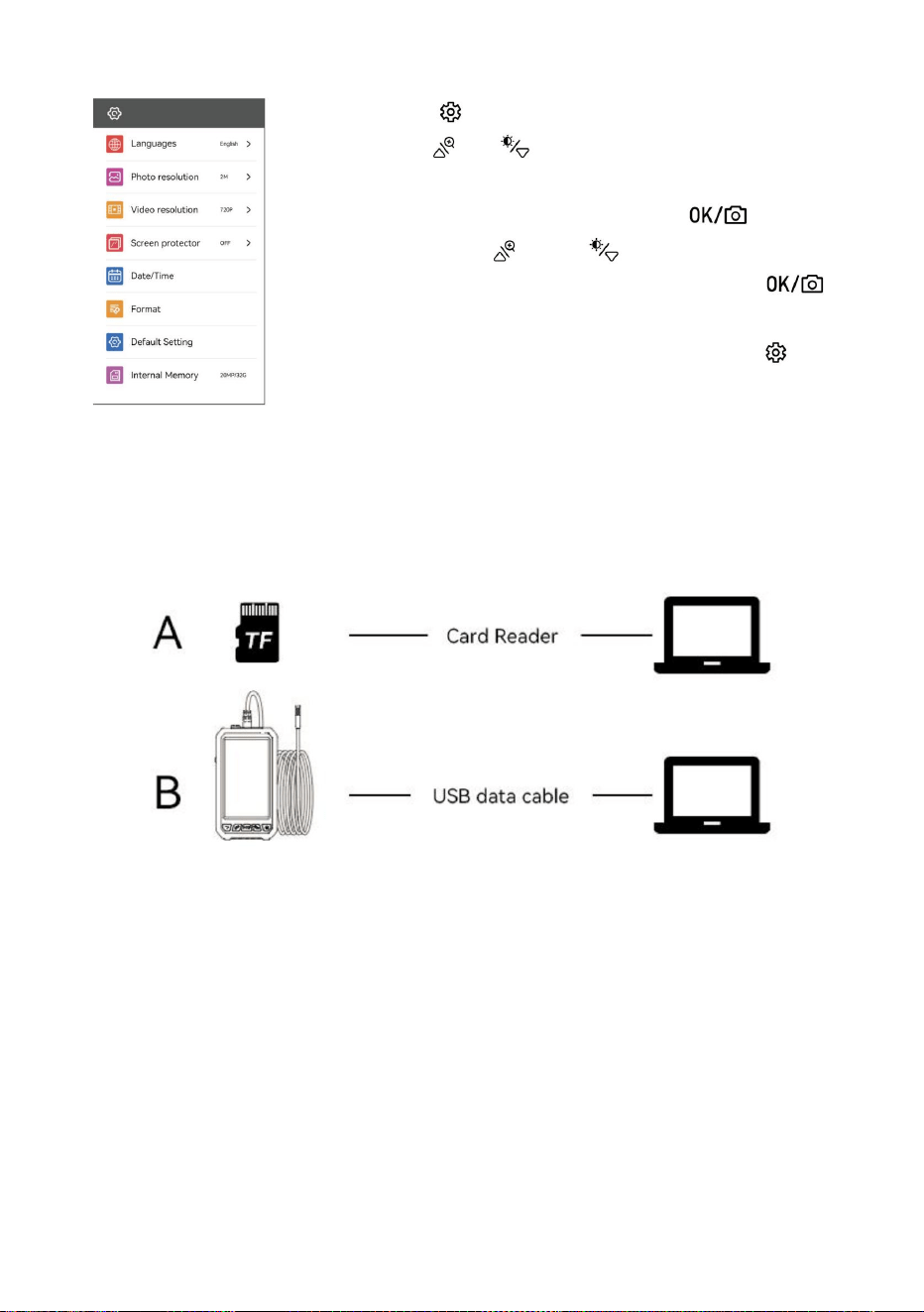
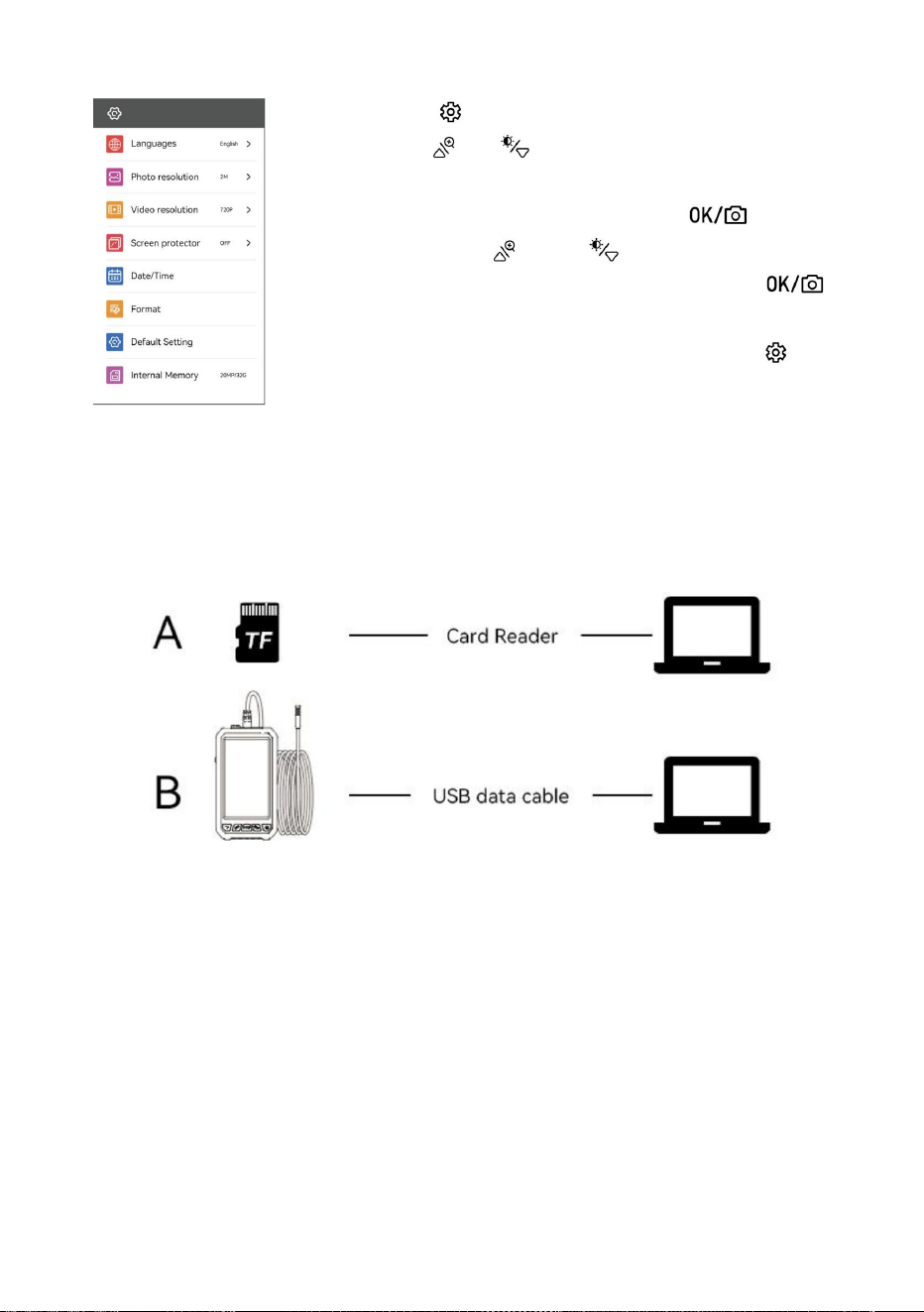
Settings
1. Click the " " button to enter the setting mode.
2. Use the " ", " " keys to move the gray cursor
and select the desired menu item.
3. Select the desired item, click the" " key to
enter, use the " " and " " keys to select the
required parameters, and then click the " "
key to confirm.
4. After the setting is completed, click the " " key
exit the setting mode.
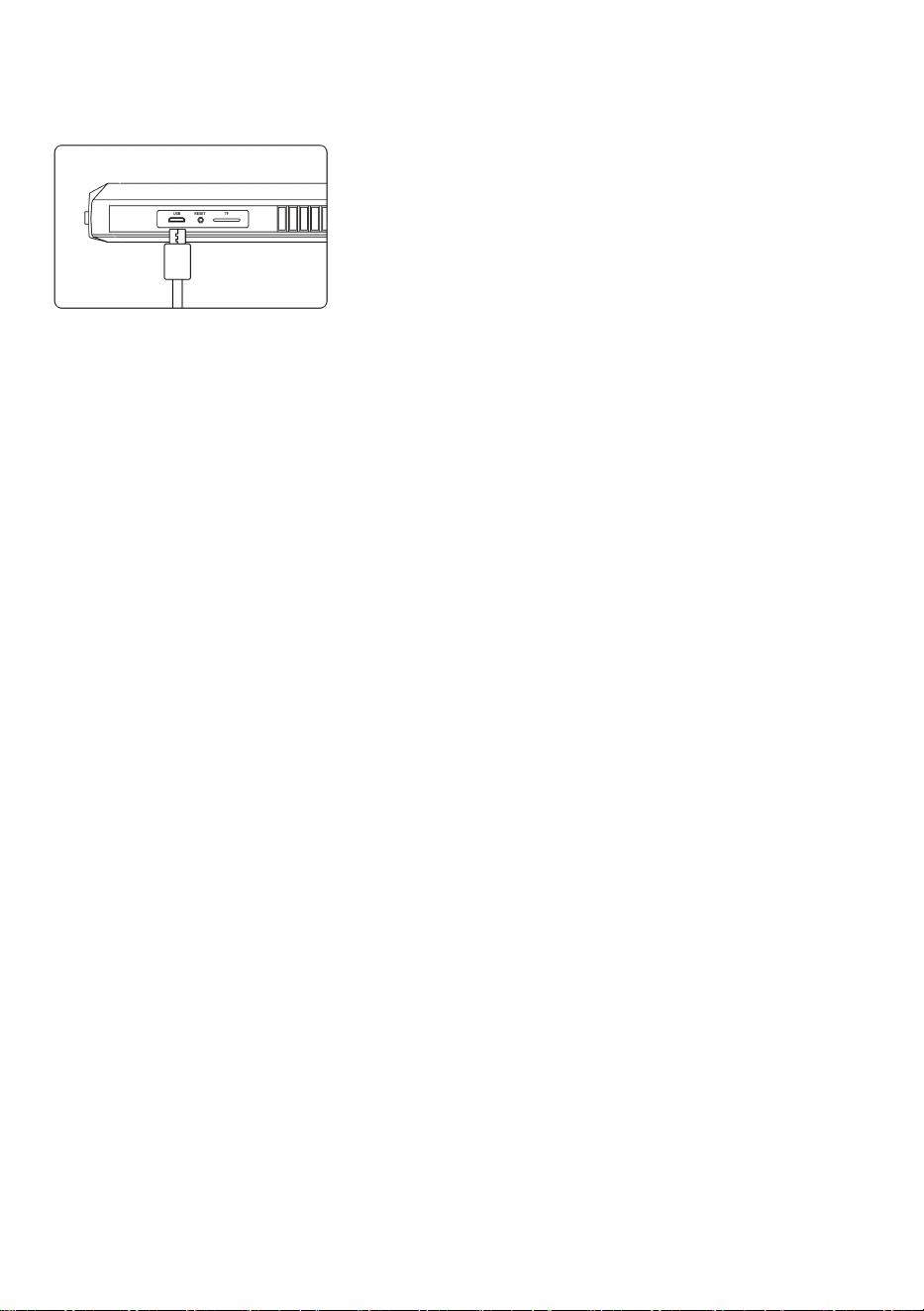
Copy Picture and Video Files
Can use a TF card to copy directly, or use a USB cable to connect to computer for
copy
When operating the copy, if the machine is not connected to the computer, please
restart the machine or plug and unplug the USB data line. Do not plug and unplug
the USB data cable during the data transmission process, which will cause the
data transmission to fail.
- 7 -
Charging Guide
1. Connect the device to the Micro USB adapter for
charging(5V / 1A/ 5V / 2A). The product does not
support fast charging.
2. During the charging process, the power symbol
indicates that the charging is in progress
Use the USB charging 3. When the device is fully charged, the power
cable to charge the device display shows the full state
FAQ
1. Lags happened during the photo outputting of the product
Please check whether the product has sufficient power, or restart the device.
2. Product crash
Please press the reset button of the device, or restart the device.
3. Imaging screen is not clear
The best imaging focal length of the product is: 2cm-10cm, please calibrate the
distance to the object, or clean the front of the camera with a clean alcohol cloth.
4. Product charging
Please use (5V / 1A/5V / 2A) charger to charge the device.The product does not
support fast charging.
5. The camera is heat
It is normal for the camera to heat up, especially when the camera LED light is on
at the highest brightness.But it does not affect normal use or service life.
6. TF card can not be recognized
Please confirm whether the TF format is FTA32 . lf not, please format it and do not
recognize it. Please plug and unplug the TF card again.
- 8 -
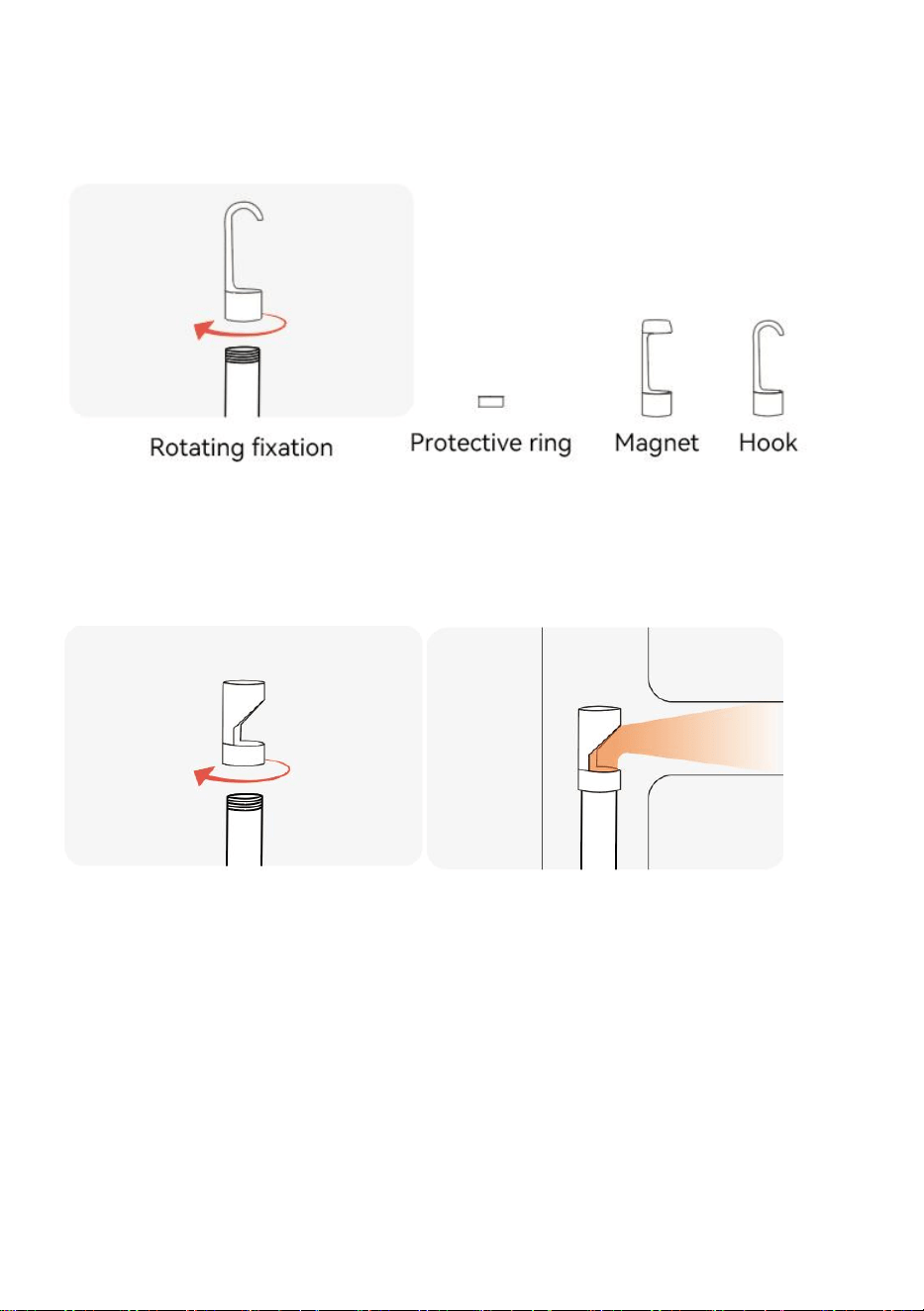
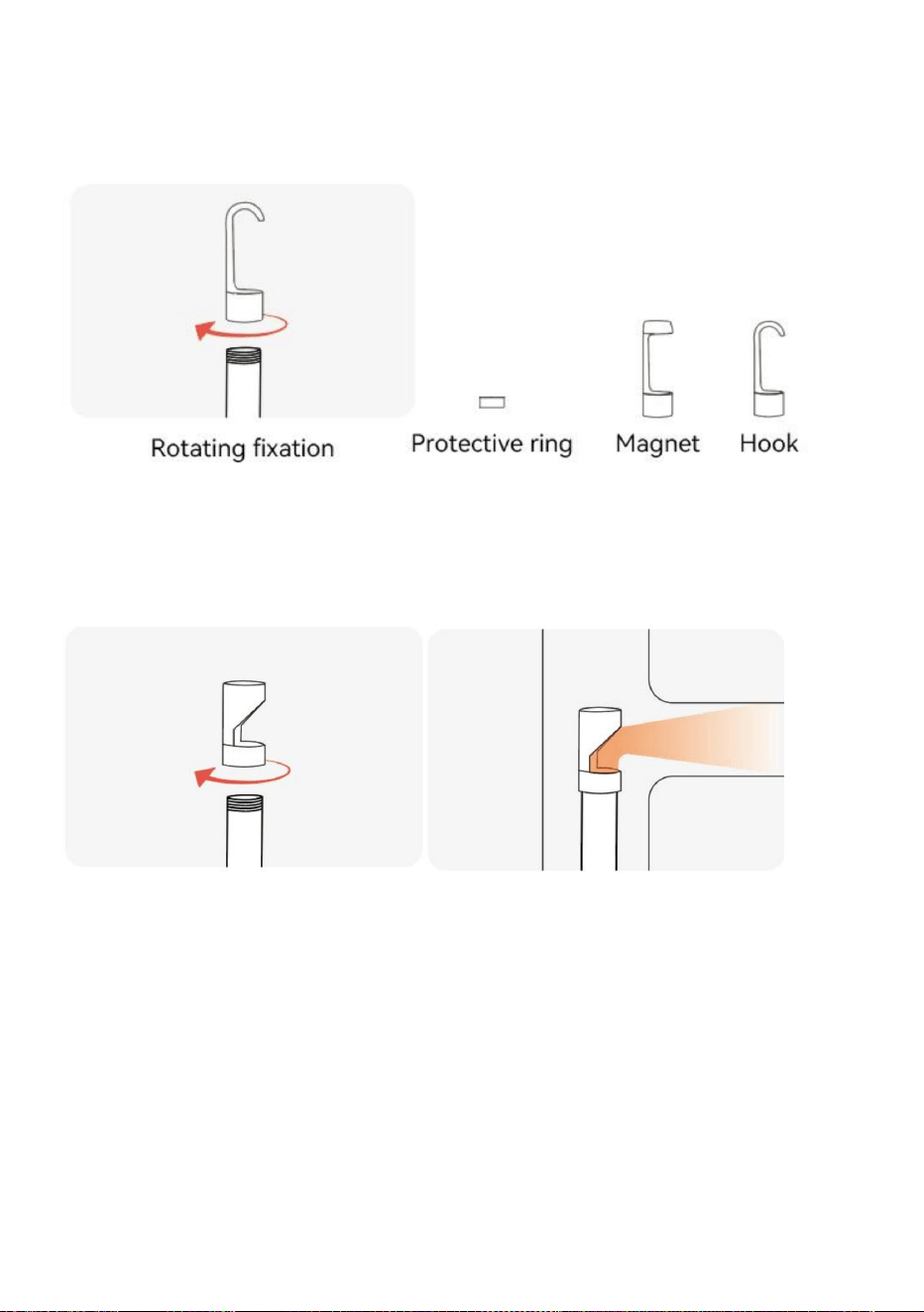
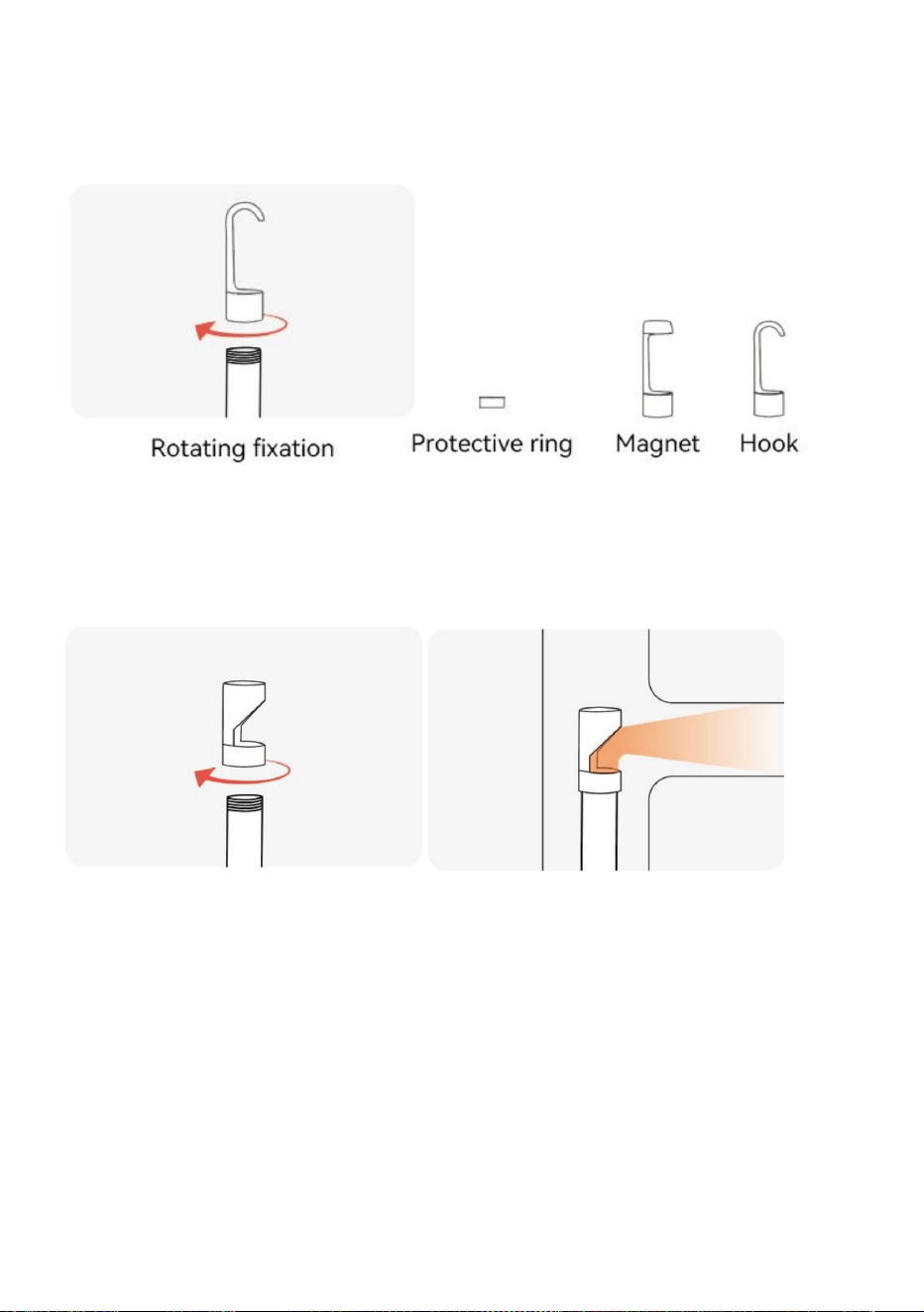
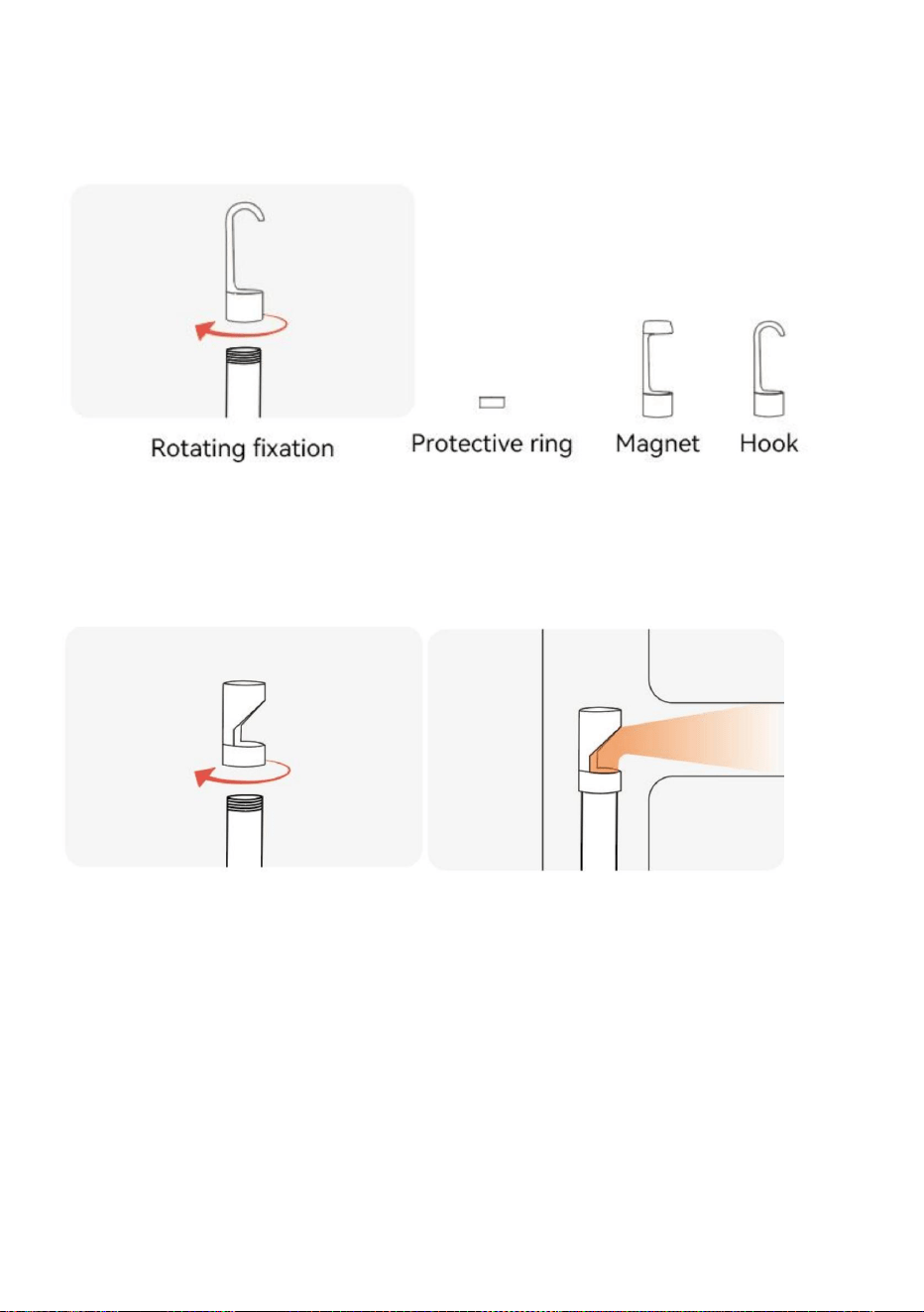
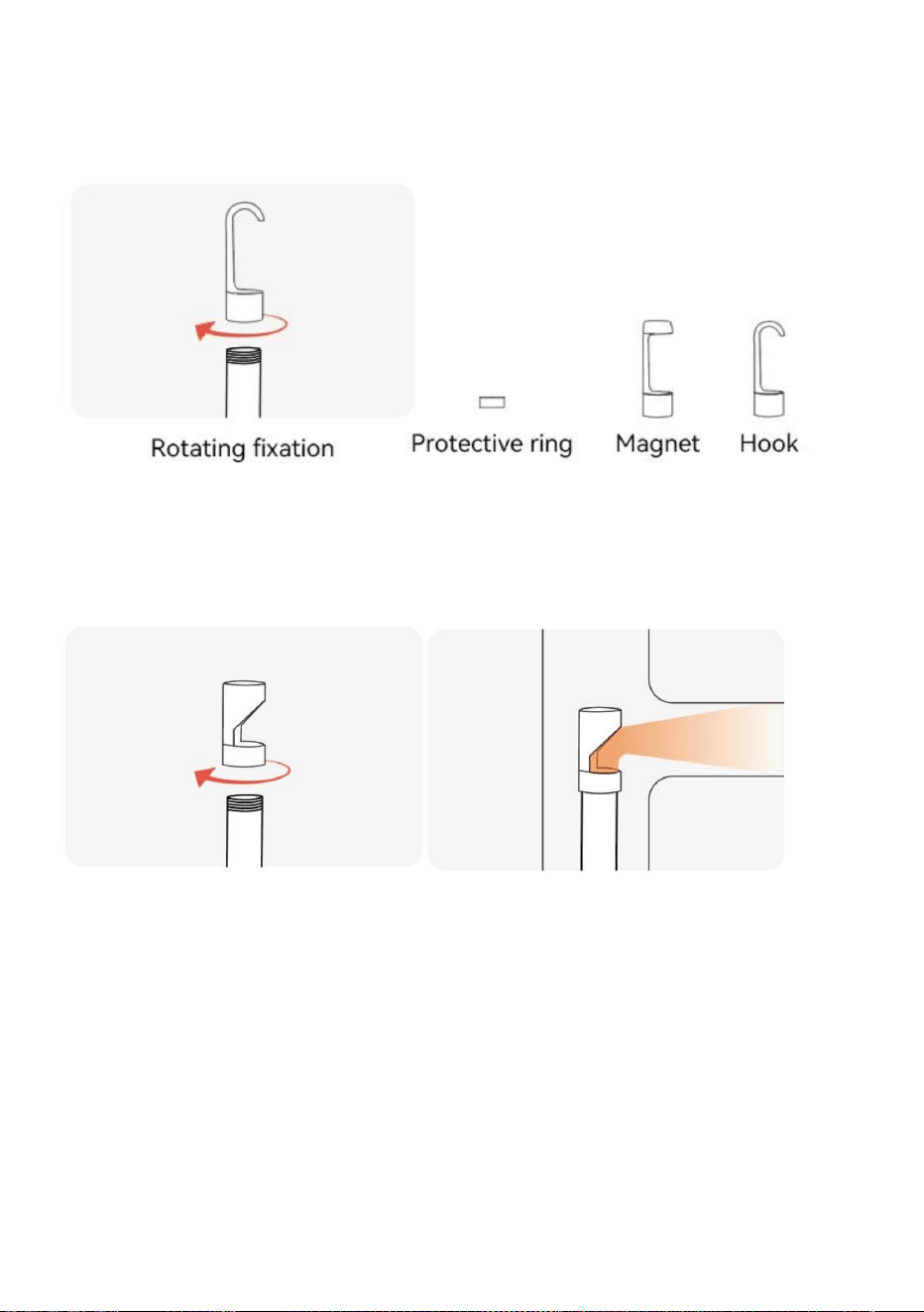
Accessories Installation Guide
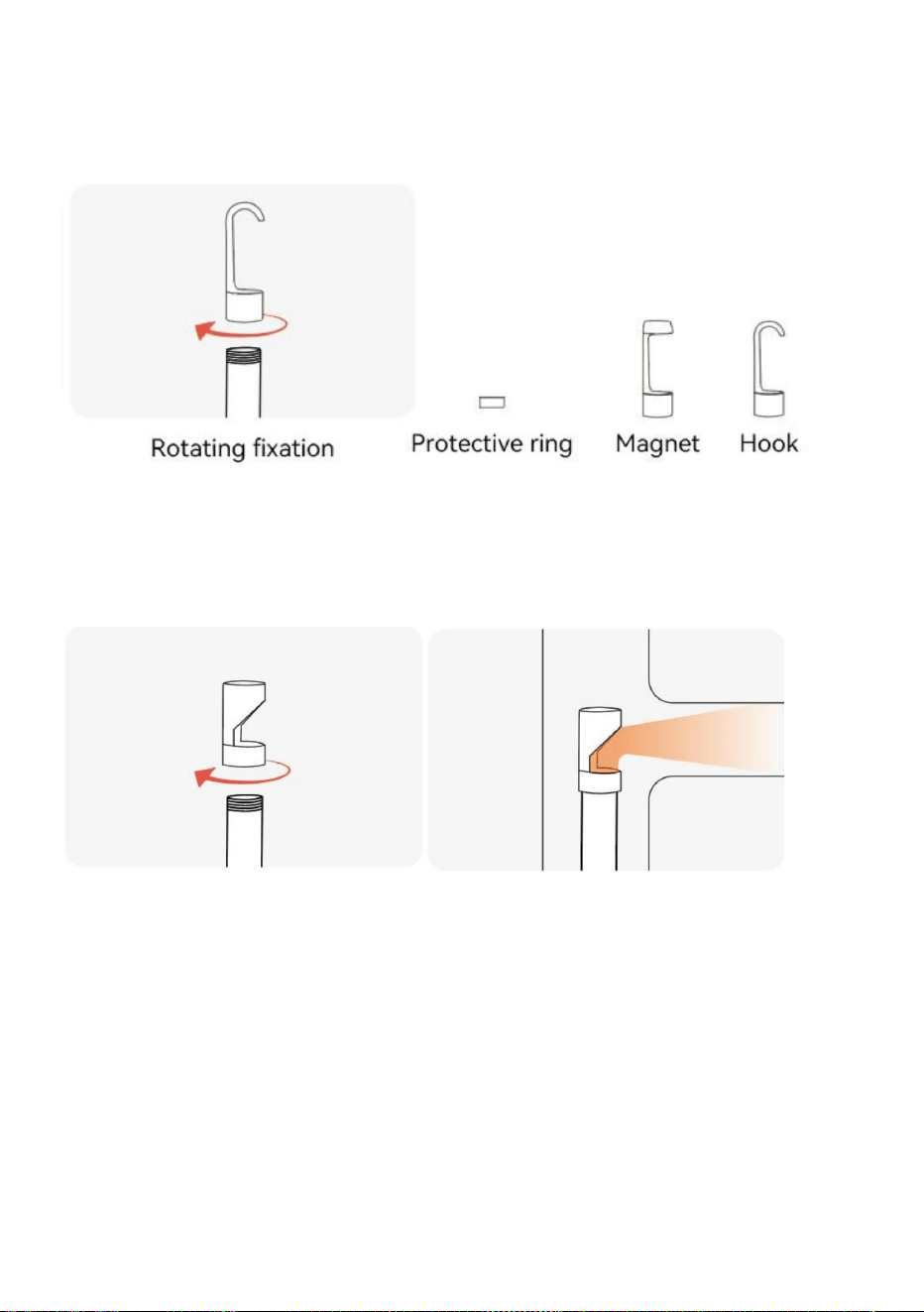
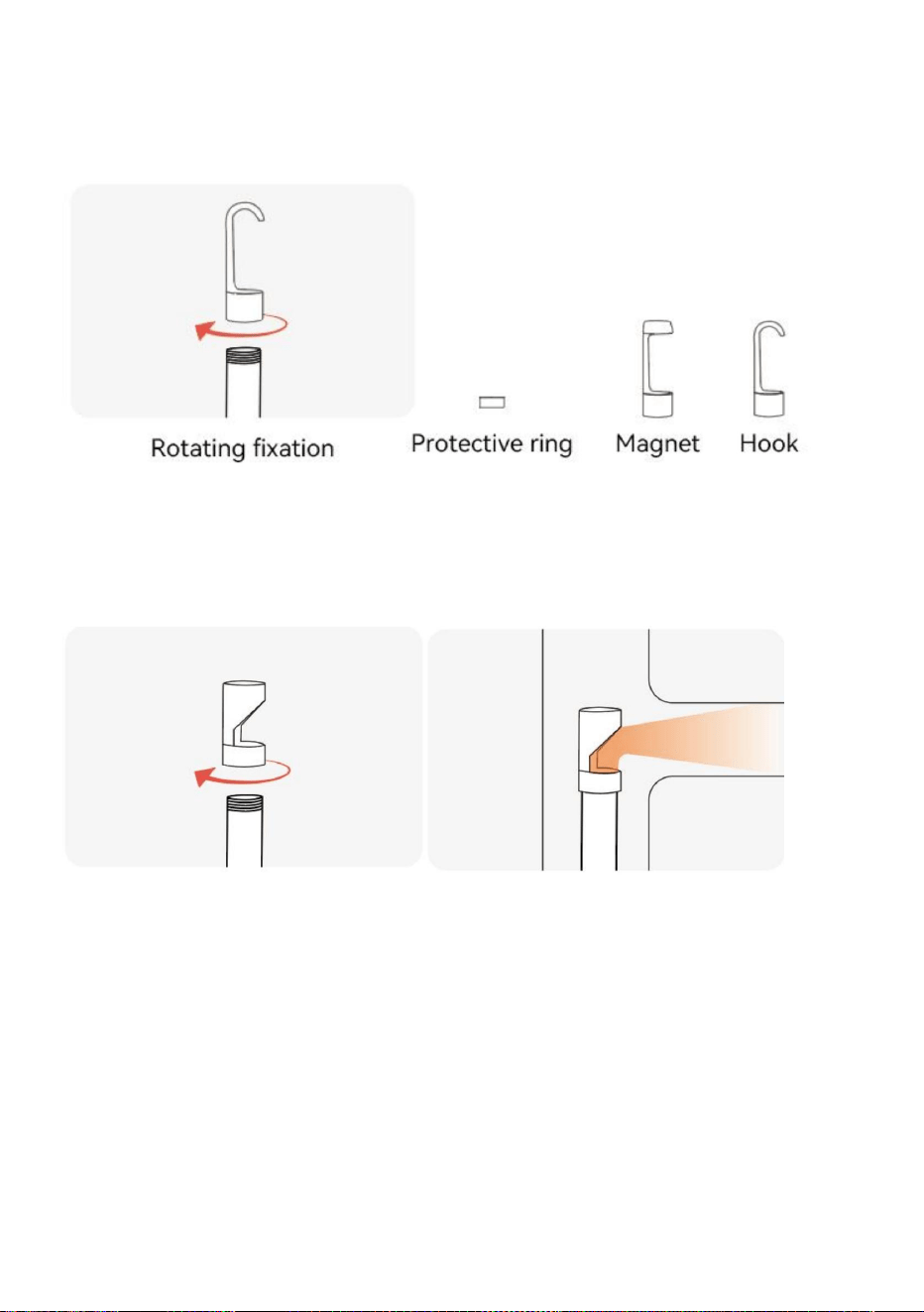
Accessories: Protective ring*1, Magnet *1, Hook *1
Mirror
Dual lens no need side mirror, single lens is equippedwith side mirror
Rotating fixation Reflect the side through the mirror,
observing objects in a wider range

- 9 -
Specifications
Screen type: 5.0-inch color display
Photo resolution: 1920*1080
Screen resolution: 1280*720
Photo format:Jpg
Video format:AVI
Operating temperature: 14℉-113℉(-10℃-45℃)
Camera temperature:14℉-176℉(-10℃~80℃)
Charge port: Micro USB
Battery: 2000mAh
Battery life: 3 hours
Battery charging time: 2.5 hours
TF capacity:0~64G
FCC statement:
This device complies with Part 15 of the FCC Rules. Operation is
subject to the following two conditions:
(1) This device may not cause harmful interference, and (2) this
device must accept any interference received,including
interference that may cause undesired operation.
- 10 -
Disposal information:
This product is subject to the provision of European Directive
2012/19/EU. The symbol showing a wheelie bin crossed through
indicates that the product requires separate refuse collection in the
European Union. This applies to the product and all accessories
marked with this symbol. Products marked as such may not be discarded with
normal domestic waste, but must be taken to a collection point for recycling
electrical and electronic devices.
Manufacturer: Shanghaimuxinmuyeyouxiangongsi
Address: Shuangchenglu 803nong11hao1602A-1609shi, baoshanqu, shanghai
200000 CN.
Imported to AUS: SIHAO PTY LTD. 1 ROKEVA STREETEASTWOOD NSW 2122
Australia
Imported to USA: Sanven Technology Ltd. Suite 250, 9166 Anaheim Place,
Rancho Cucamonga, CA 91730
REP
UK
YH CONSULTING LIMITED.
C/O YH Consulting Limited Office 147,
Centurion House, London Road,
Staines-upon-Thames, Surrey, TW18 4AX
REP
EC
E-CrossStu GmbH
Mainzer Landstr.69,
60329 Frankfurt am Main.


Modèle:5003
EndoscopenumériqueLCD
Assistancetechniqueetcertificatdegarantieélectroniquewww.vevor.com/support
Nouscontinuonsànousengageràvousfournirdesoutilsàdesprixcompétitifs.
"Économisezlamoitié","Moitiéprix"outouteautreexpressionsimilairequenousutilisons
nereprésentequ'uneestimationdeséconomiesdontvouspourriezbénéficieren
achetantcertainsoutilscheznousparrapportauxgrandesmarquesetnesignifiepas
nécessairementcouvrirtouteslescatégoriesd'outilsproposés.parnous.Nousvous
rappelonsdebienvouloirvérifierattentivementlorsquevouspassezunecommandechez
noussivouséconomisezréellementlamoitiéparrapportauxgrandesmarques.
Machine Translated by Google
Assistancetechniqueetcertificatdegarantieélectronique
www.vevor.com/support
Vousavezdesquestionssurlesproduits?Besoind'uneassistancetechnique?N'hésitezpasàcontacter
nous:
BESOIND'AIDE?CONTACTEZNOUS!
Manueld'instructions
EndoscopenumériqueLCD
Ils'agitdesinstructionsoriginales,veuillezlireattentivementtoutesles
instructionsdumanuelavantdel'utiliser.VEVORseréserveuneinterprétation
clairedenotremanueld’utilisation.L'apparenceduproduitdépenddu
produitquevousavezreçu.Veuilleznouspardonnerquenousnevous
informeronspluss'ilyadesmisesàjourtechnologiquesoulogiciellessurnotreproduit.
1
Machine Translated by Google

lemoteurtombeàlatempératurenormale.
Lorsdelavérificationdumoteurdel'automobile,veuillezvousassurerquelatempératuredansle
•Lorsqu'ilsnesontpasutilisés,veuillezvousassurerquel'objectifetl'unitéprincipalesontpropreset
l'équipement.Lachargerapiden'estpaspriseencharge.•
Cetappareilprendenchargelechargementpendant
l'utilisation.•Sil'appareiln'estpasutilisépendantunelonguepériode,assurezvousqu'ilestchargéaumoins
déchargedelabatterie.
unefoistousles3moispouréviterdesdommagesirréparablescausésparun
Empêchelacoucheprotectriceimperméabledelasonded'êtrerayée.
•Veuillezutiliserunchargeurdomestique5Vconformeauxrèglesdesécuritépourcharger
•Lasondedelacaméran'estpasconstituéedematériauxrésistantsàlachaleuretauxtempératuresélevées.
capacités.
•Nefrappezpasviolemmentlacaméraetnetirezpassurlecâble.
•Lorsqu'ilestutilisédansunenvironnementprésentantdesbossesbrusques,veuillezl'utiliseravecprécautionpour
•Nelaissezpaslesenfantstoucheretutilisercetéquipement.
sécheretévitertoutcontactavecdel'huile,etc.oud'autressubstancescorrosivesetdangereuses.
•Leproduitestunecamérad'endoscopieindustrielleetn'estpasdestinéàunusagemédical.
utilisationouexamenhumain.
•Ceproduitneconvientpasauxpersonnesayantdeslimitationsphysiques,sensoriellesoumentales.
Sécuritéetentretien
Veuillezlireattentivementcemanuelavantutilisation!
Instructionspourlabatterie
2
Machine Translated by Google
3.Alimentation
4.Retour/Album
2.Écran
1.Verrouillagedelacaméra
interface.
Actionnezceboutonsurl'interfacevidéo,safonctionestd'entrerdanslagestiondesimages,
etc'estlafonctionderetoursurd'autresinterfaces
Insérezl'interfacedelacaméradetypeCdansl'appareil,etleverroupeutrendrelecontactde
l'interfacestableetprolongerladuréedevie.Sivoussouhaitezchangerdecaméra,vousdevez
appuyeretdéplacerleverroudanslesensopposéàceluidelacaméra.
(Ilexistedifférentescouleursetlesproduitsdépendentdesobjetsphysiquesreçus)
ÉcrancouleurHDFullViewIPSde5pouces
Basculezl'interrupteurverslacamérapourl'allumeretretournezledansl'autresenspourl'allumer.
désactivé
PRÉSENTATIONDUPRODUIT
3
Machine Translated by Google
Appuyezbrièvementsur
la"caméraàdoubleobjectif,appuyezlonguement
sur"lacamérafrontale)
Latransmissiondedonnéesestpossiblelorsquel'USBestconnectéàl'ordinateurpour
Sileboutonestactionnésurl'interfacevidéo,l'imagepeutêtrecycliquement
produit)
chargement(ilestrecommandédenepasutiliserd'adaptateursupérieurà12Vpourchargerle
Lorsquevousutilisezceboutonsurl'interfacevidéo,ils'agitderéglerlaluminositéde
AveclentillelumineuseLED
*VeuillezinsérerlacarteTFlorsquelesmachiness'éteignent
lalumièreLED.Siuneautreinterfaceestunefonctiondedéplacementverslebas.
pourbasculerentrelacaméralatéraleet
Lorsquevousutilisezcettetouchesurl'interfacedel'appareilphoto,appuyezbrièvementpourprendredes
photosetappuyezlonguementpourenregistrerunevidéo.Uneautreinterfaceestlafonctiondeconfirmation.
Priseenchargedel'extensiondelacarteTF(MicroSD)064G
"
"
agrandi,etc'estleboutondemouvementverslehautsurd'autresinterfaces
Lorsqueleproduitplante,appuyezdessuspourredémarrerl'appareil
pouraccéderàlafonctionderéglagedumenu.(Sileproduitestun
9.Objectif
8.Cléderéglage
11.Boutonderéinitialisation
12.EmplacementpourcartesTF
6.Touchecaméra/touchedeconfirmation
10.InterfacedechargementUSB
7.Verslebas
5.Haut/zoomavant
UtilisezlecâbledechargementUSBpourchargerle
appareil
Basculezl'interrupteurverslacamérapourl'allumeretretournezledans
l'autresenspourl'allumer.
4
Machine Translated by Google
Entrerdansl'albumphoto
Paramètresdelangue
InsérezlacarteTF:
Lesystèmeprendenchargelechinoissimplifié,lejaponais,l'anglais,lecoréen,lefrançais,
presse
sauver
Allemand,italien,espagnol,russe,polonais
*VeuillezinsérerlacarteTFàl'étatéteint
1.Appuyezsur"
retirerlacarteTFpouréviterd'endommagerle
4.Appuyezsur"
"
"
structuredelafentepourcarte
poursupprimerlaphotooulavidéo.
2.Sélectionnezleparamètredelangue
correct
2.Sélectionnezlaphotooulavidéoquevoussouhaitezvisualiser,
"
*N'utilisezpasdeforceexcessivelorsdel'insertionou
3.Appuyezsurlesboutonshautetbaspoursélectionnerlalanguesouhaitée
1.Appuyezsur"
*Veuillezfaireattentionàsavoirsil'insertion
"
pourpasseràl'affichagedel'albumphoto.
ladirectionetlesfacesavantetarrièredelacarteTFsont
Bouton"pouraccéderàlapagedeconfiguration
5
Machine Translated by Google
Lorsdel'utilisationdelacopie,silamachinen'estpasconnectéeàl'ordinateur,veuillez
redémarrezlamachineoubranchezetdébranchezlalignededonnéesUSB.Nepasbrancheretdébrancher
copie
PeututiliserunecarteTFpourcopierdirectement,ouutiliseruncâbleUSBpourseconnecteràunordinateurpour
LecâblededonnéesUSBpendantleprocessusdetransmissiondedonnées,cequientraînerale
latransmissiondesdonnéeséchoue.
Copierdesfichiersimageetvidéo
3.Sélectionnezl'élémentsouhaité,cliquezsurle"
","
"et"
4.Unefoisleréglageterminé,cliquezsurlebouton"
1.Cliquezsurlebouton«»pouraccéderaumodederéglage.
etsélectionnezl'élémentdemenusouhaité.
2.Utilisezles
touches""pourdéplacerlecurseurgris
Paramètres
entrez,utilisezles
touches""poursélectionnerle
paramètresrequis,puiscliquezsurlatouche"pour
confirmer.
"clé
"lacléde
"
quitterlemodederéglage.
6
Machine Translated by Google
câblepourchargerl'appareil
reconnaisle.VeuillezbrancheretdébrancherànouveaulacarteTF.
l'écranaffichel'étatcomplet
1.Connectezl'appareilàl'adaptateurmicroUSBpour
distancedel'objet,ounettoyezl'avantdelacaméraavecunchiffonimbibéd'alcoolpropre.
Veuillezutiliserunchargeur(5V/1A/5V/2A)pourchargerl'appareil.Leproduitne
4.Chargementduproduit
UtilisezlechargementUSB
3.L'écrand'imagerien'estpasclair
6.LacarteTFnepeutpasêtrereconnue
Lameilleuredistancefocaled'imagerieduproduitest:2cm10cm,veuillezcalibrerle
3.Lorsquel'appareilestcomplètementchargé,l'alimentation
VeuillezconfirmersileformatTFestFTA32.Sicen'estpaslecas,veuillezleformateretnepaslefaire.
2.Crashduproduit
2.Pendantleprocessusdecharge,lesymboled'alimentation
Ilestnormalquelacamérachauffe,surtoutlorsquelevoyantLEDdelacaméraestallumé.
àlaluminositélaplusélevée.Maiscelan'affectepasl'utilisationnormaleouladuréedevie.
indiquequelachargeestencours
Veuillezappuyersurleboutonderéinitialisationdel'appareilouredémarrerl'appareil.
1.Desdécalagessesontproduitslorsdelasortiedesphotosduproduit
Chargement(5V/1A/5V/2A).Leproduitne
prendenchargelachargerapide.
5.Lacaméraestchaude
prendenchargelachargerapide.
Veuillezvérifiersileproduitasuffisammentdepuissanceouredémarrerl'appareil.
Guidedechargement
FAQ
7
Machine Translated by Google
Réfléchissezlecôtéàtraverslemiroir,en
observantlesobjetsdansuneplagepluslarge
Fixationrotative
Doubleobjectif,pasbesoindemiroirlatéral,unseulobjectifestéquipéd'unmiroirlatéral.
Accessoires:anneaudeprotection*1,aimant*1,crochet*1
Guided'installationdesaccessoires
Miroir
8
Machine Translated by Google

DéclarationFCC:
Formatdesphotos:JPG
Températuredefonctionnement:14113(1045)
Températuredelacaméra:14176(10~80)
Batterie:2000mAh
Résolutiond'écran:1280*720
Formatvidéo:AVI
Résolutionphoto:1920*1080
Typed'écran:écrancouleurde5,0pouces
Tempsdechargedelabatterie:2,5heures
CapacitéTF:0~64G
Cetappareilestconformeàlapartie15desrèglesFCC.Sonfonctionnementestsoumis
auxdeuxconditionssuivantes:(1)Cetappareilnedoit
pasprovoquerd'interférencesnuisibles,et(2)cetappareildoitacceptertouteinterférence
reçue,ycompris
Autonomiedelabatterie:3heures
Portdechargement:MicroUSB
interférencespouvantprovoquerunfonctionnementindésirable.
Caractéristiques
9
Machine Translated by Google
MaisonCenturion,LondonRoad,
C/OYHConsultingLimitedBureau147,
YHCONSULTINGLIMITÉE.
ECrossStuGmbH
StainesuponThames,Surrey,TW184AX
MainzerLandstr.69,
60329FrancfortsurleMain.
Unioneuropéenne.Cecis'appliqueauproduitetàtouslesaccessoires
déchetdomestiquenormal,maisdoitêtredéposédansunpointdecollectepourrecyclage
appareilsélectriquesetélectroniques.
Fabricant:Shanghaimuxinmuyeyouxiangongsi
indiquequeleproduitnécessiteunecollecteséparéedesdéchetsdansle
marquédecesymbole.Lesproduitsmarquéscommetelsnepeuventpasêtrejetésavec
2012/19/UE.Lesymbolereprésentantunepoubellesurroulettesbarrée
Ceproduitestsoumisauxdispositionsdeladirectiveeuropéenne
Adresse:Shuangchenglu803nong11hao1602A1609shi,baoshanqu,Shanghai
200000CN.
Australie
ImportéauxÉtatsUnis:SanvenTechnologyLtd.Suite250,9166AnaheimPlace,Rancho
Cucamonga,CA91730
ImportéenAustralie:SIHAOPTYLTD.1ROKEVASTREETASTWOODNSW2122
Informationssurl'élimination:
dix
REPRÉSENTANTCE
REPRÉSENTANTDUROYAUMEUNI
Machine Translated by Google


Modell: 5003
Wir sind weiterhin bestrebt, Ihnen Werkzeuge zu wettbewerbsfähigen Preisen anzubieten.
„Sparen Sie die Hälfte“, „Halber Preis“ oder andere ähnliche Ausdrücke, die wir verwenden,
stellen nur eine Schätzung der Ersparnis dar, die Sie beim Kauf bestimmter Werkzeuge
bei uns im Vergleich zu den großen Topmarken erzielen können, und decken nicht
unbedingt alle von uns angebotenen Werkzeugkategorien ab. Wir möchten Sie freundlich
daran erinnern, bei Ihrer Bestellung bei uns sorgfältig zu prüfen, ob Sie im Vergleich zu den
großen Topmarken tatsächlich die Hälfte sparen.
Digitales LCD-Endoskop
Technischer Support und E-Garantie-Zertifikat www.vevor.com/support
Machine Translated by Google
uns:
Haben Sie Fragen zu den Produkten? Benötigen Sie technischen Support? Kontaktieren Sie uns
Technischer Support und E-Garantie-Zertifikat www.vevor.com/
support
- 1 -
Brauchen Sie Hilfe? Kontaktieren Sie uns!
Bedienungsanleitung
Dies ist die Originalanleitung. Bitte lesen Sie alle Anweisungen sorgfältig durch,
bevor Sie das Gerät in Betrieb nehmen. VEVOR behält sich eine klare Auslegung unserer
Bedienungsanleitung vor. Das Erscheinungsbild des Produkts richtet sich nach
dem Produkt, das Sie erhalten haben. Bitte verzeihen Sie uns, dass wir Sie nicht erneut
informieren, wenn es Technologie- oder Software-Updates für unser Produkt gibt.
Digitales LCD-Endoskop
Machine Translated by Google

•Bitte verwenden Sie zum Laden ein 5V-Haushaltsladegerät, das den Sicherheitsbestimmungen entspricht
• Die Kamerasonde besteht nicht aus hitzebeständigen und hochtemperaturbeständigen Materialien.
Verhindern Sie, dass die wasserdichte Schutzschicht der Sonde zerkratzt wird.
• Achten Sie bei Nichtgebrauch darauf, dass das Objektiv und das Hauptgerät sauber sind und
Entladung der Batterie.
alle 3 Monate, um irreparable Schäden durch übermäßige
Die Motortemperatur fällt auf die normale Temperatur.
Bei der Überprüfung des Automotors ist darauf zu achten, dass die Temperatur im
das Gerät. Schnelles Laden wird nicht unterstützt. • Dieses Gerät
unterstützt das Laden während der Verwendung. • Wenn das
Gerät längere Zeit nicht verwendet wird, stellen Sie bitte sicher, dass es mindestens
• Dieses Produkt ist nicht geeignet für Personen mit eingeschränkten körperlichen, sensorischen oder geistigen
Verwendung oder Untersuchung durch Menschen.
trocken und vermeiden Sie den Kontakt mit Öl usw. oder anderen ätzenden und gefährlichen Substanzen.
• Das Produkt ist eine industrielle Endoskopiekamera und nicht für den medizinischen
• Bei Verwendung in einer Umgebung mit starken Stößen gehen Sie bitte vorsichtig vor, um
• Erlauben Sie Kindern nicht, dieses Gerät zu berühren und zu bedienen.
Fähigkeiten.
•Schlägen Sie nicht heftig auf die Kamera und ziehen Sie nicht am Kabel.
Anweisungen zur Batterie
Bitte lesen Sie diese Anleitung vor der Inbetriebnahme sorgfältig durch!
Sicherheit und Wartung
- 2 -
Machine Translated by Google
3. Stromversorgung
2. Bildschirm
1. Kamerasperre
4. Rückseite/Album
- 3 -
Stecken Sie die Typ-C-Kameraschnittstelle in das Gerät, und das Schloss kann den Schnittstellenkontakt stabilisieren
und die Lebensdauer verlängern. Wenn Sie die Kamera wechseln möchten, müssen Sie das Schloss drücken und in
die entgegengesetzte Richtung bewegen
5-Zoll-IPS-Full-View-HD-Farbbildschirm
Schnittstelle.
(Es gibt verschiedene Farben und die Produkte unterliegen den erhaltenen physischen Objekten.)
Drehen Sie den Schalter in Richtung der Kamera, um sie einzuschalten, und in die andere Richtung, um sie auszuschalten.
aus
Betätigen Sie diese Taste auf der Videoschnittstelle. Sie dient zum Aufrufen der Bildverwaltung und ist die
Rückkehrfunktion auf anderen Schnittstellen.
PRODUKTEINFÜHRUNG
Machine Translated by Google
die LED leuchtet. Wenn eine andere Schnittstelle aktiviert ist, wird die Funktion „Nach unten verschieben“ angezeigt.
Wenn Sie diese Taste auf der Videoschnittstelle betätigen, dient sie zur Einstellung der Helligkeit von
Mit heller LED-Lichtlinse
Wird die Taste an der Videoschnittstelle betätigt, kann das Bild zyklisch
Produkt)
*Bitte legen Sie die TF-Karte ein, wenn die Maschinen ausgeschaltet sind
Laden (es wird empfohlen, keinen Adapter über 12V zum Laden des
Drücken Sie kurz die
Taste "Doppelobjektivkamera, drücken Sie
lange die Taste "Frontkamera)
Die Datenübertragung ist möglich, wenn der USB-Anschluss an den Computer angeschlossen ist.
Wenn das Produkt abstürzt, drücken Sie diese Taste, um das Gerät neu zu starten
, um die Menüeinstellungsfunktion aufzurufen. (Wenn das Produkt ein
"
vergrößert, und es ist die Aufwärtsbewegungstaste auf anderen Schnittstellen
Unterstützt die Erweiterung von 0-64G TF (MicroSD)-Karten
"
zum Umschalten zwischen der Seitenkamera und
Wenn Sie diese Taste auf der Kameraschnittstelle betätigen, drücken Sie kurz, um Bilder aufzunehmen, und
lange, um Videos aufzunehmen. Eine weitere Schnittstelle ist die Bestätigungsfunktion.
9. Linse
10. USB-Ladeschnittstelle
11.Reset-Taste
12.TF-Kartensteckplatz
7. Runter
8. Einstellschlüssel
6. Kamerataste/Bestätigungstaste
5. Hoch/vergrößern
Verwenden Sie das USB-Ladekabel zum Aufladen des
Gerät
Drehen Sie den Schalter in Richtung der Kamera, um sie einzuschalten, und
drehen Sie ihn in die andere Richtung, um sie auszuschalten.
- 4 -
Machine Translated by Google
Zum Fotoalbum
Spracheinstellungen
*Bitte legen Sie die TF-Karte im ausgeschalteten Zustand ein
Deutsch, Italienisch, Spanisch, Russisch, Polnisch
1. Drücken Sie "
TF-Karte einlegen:
Das System unterstützt vereinfachtes Chinesisch, Japanisch, Englisch, Koreanisch, Französisch,
speichern
Drücken Sie
Kartensteckplatzstruktur
"
, um das Foto oder Video zu löschen.
Ziehen Sie die TF-Karte heraus, um eine Beschädigung der
4. Drücken Sie "
" "
*Wenden Sie beim Einsetzen oder
3. Drücken Sie die Auf- und Ab-Taste, um die gewünschte Sprache auszuwählen
2. Wählen Sie die Spracheinstellung
2. Wählen Sie das Foto oder Video aus, das Sie anzeigen möchten.
richtig
Richtung und Vorder- und Rückseite der TF-Karte sind
"-Taste, um die Einstellungsseite aufzurufen
, um zur Anzeige des Fotoalbums zu wechseln.
*Bitte achten Sie darauf, ob die Einstecköffnung
1. Drücken Sie "
"
- 5 -
Machine Translated by Google
Wenn das Gerät beim Kopieren nicht mit dem Computer verbunden ist,
Kopieren
Kann eine TF-Karte zum direkten Kopieren verwenden oder ein USB-Kabel zum Anschluss an den Computer verwenden für
die Datenübertragung schlägt fehl.
Starten Sie den Computer neu oder stecken Sie das USB-Datenkabel ein und aus. Stecken Sie das Kabel nicht ein und aus.
das USB-Datenkabel während der Datenübertragung, was dazu führen kann, dass die
- 6 -
Bild- und Videodateien kopieren
", "
3. Wählen Sie das gewünschte Element aus, klicken Sie auf"
" Und "
" Schlüssel zu
2. Verwenden Sie
die Tasten " ", um den grauen Cursor zu bewegen
und wählen Sie den gewünschten Menüpunkt aus.
1. Klicken Sie auf die Schaltfläche „ “, um in den Einstellungsmodus zu gelangen.
Einstellungen
Wählen Sie mit den
Tasten " " die gewünschte
4. Nachdem die Einstellung abgeschlossen ist, klicken Sie auf "
"
" Schlüssel
erforderlichen Parameter ein und klicken Sie anschließend zur
Bestätigung auf die Schaltfläche ".
den Einstellmodus verlassen.
Machine Translated by Google
1. Verbinden Sie das Gerät mit dem Micro USB-Adapter für
4. Aufladen des Produkts
Bitte verwenden Sie ein Ladegerät (5V / 1A/5V / 2A), um das Gerät aufzuladen. Das Produkt
Kabel zum Aufladen des Gerätes Anzeige zeigt den vollen Status an
Abstand zum Objekt oder reinigen Sie die Vorderseite der Kamera mit einem sauberen, in Alkohol getränkten Tuch.
erkennen. Bitte stecken Sie die TF-Karte erneut ein und ziehen Sie sie wieder heraus.
3. Wenn das Gerät vollständig geladen ist, wird die Stromversorgung
Die beste Bildbrennweite des Produkts beträgt: 2 cm-10 cm, bitte kalibrieren Sie die
Bitte bestätigen Sie, ob das TF-Format FTA32 ist. Wenn nicht, formatieren Sie es bitte und
Verwenden Sie den USB-Ladeanschluss
3. Der Bildbildschirm ist nicht klar
bei höchster Helligkeit. Der normale Gebrauch oder die Lebensdauer werden dadurch jedoch nicht beeinträchtigt.
6. TF-Karte kann nicht erkannt werden
zeigt an, dass der Ladevorgang läuft
Bitte drücken Sie die Reset-Taste des Gerätes oder starten Sie das Gerät neu.
2. Produktabsturz
Es ist normal, dass sich die Kamera erwärmt, insbesondere wenn die LED-Leuchte der Kamera leuchtet.
2. Während des Ladevorgangs leuchtet das Power-Symbol
Bitte prüfen Sie, ob das Produkt ausreichend Strom hat oder starten Sie das Gerät neu.
unterstützt Schnellladen.
5. Die Kamera ist Hitze
Laden (5V / 1A / 5V / 2A). Das Produkt
1. Bei der Fotoausgabe des Produkts kam es zu Verzögerungen
unterstützt Schnellladen.
FAQ
Ladeanleitung
- 7 -
Machine Translated by Google
Rotierende Fixierung Reflektieren Sie die Seite durch den Spiegel und
beobachten Sie Objekte in einem größeren Bereich
- 8 -
Doppellinse, kein Seitenspiegel erforderlich, Einzellinse ist mit Seitenspiegel ausgestattet
Zubehör: Schutzring * 1, Magnet * 1, Haken * 1
Spiegel
Installationsanleitung für Zubehör
Machine Translated by Google

FCC-Erklärung:
- 9 -
Betriebstemperatur: 14ÿ-113ÿ(-10ÿ-45ÿ)
Videoformat: AVI
Kameratemperatur: -10 °C bis 80 °C (14 °F bis 176 °F)
Ladeanschluss: Micro USB
Bildschirmauflösung: 1280 x 720
Fotoformat: Jpg
Fotoauflösung: 1920*1080
Bildschirmtyp: 5,0-Zoll-Farbdisplay
Batterie: 2000mAh
Akkulaufzeit: 3 Stunden
TF-Kapazität: 0 ~ 64G
Dieses Gerät entspricht Teil 15 der FCC-Bestimmungen. Der Betrieb unterliegt den
folgenden zwei Bedingungen: (1) Dieses Gerät
darf keine schädlichen Störungen verursachen und (2) dieses Gerät muss alle
empfangenen Störungen akzeptieren, einschließlich
Akkuladezeit: 2,5 Stunden
Störungen, die zu unerwünschtem Betrieb führen können.
Spezifikationen
Machine Translated by Google
Centurion House, London Road,
Staines-upon-Thames, Surrey, TW18 4AX
C/O YH Consulting Limited Office 147,
YH CONSULTING LIMITED.
Mainzer Landstr.69,
60329 Frankfurt am Main.
E-CrossStu GmbH
Vertreter der EG
UK REP
gekennzeichnet. Produkte, die mit diesem Symbol gekennzeichnet sind, dürfen nicht mit dem
normalen Hausmüll, sondern müssen zur Wiederverwertung an einer Sammelstelle abgegeben werden
elektrische und elektronische Geräte.
Hersteller: Shanghaimuxinmuyeyouxiangongsi
2012/19/EU. Das Symbol einer durchgestrichenen Mülltonne
Europäische Union. Dies gilt für das Produkt und alle Zubehörteile
weist darauf hin, dass das Produkt einer getrennten Müllentsorgung im
Dieses Produkt unterliegt den Bestimmungen der europäischen Richtlinie
200000 CN.
Nach AUS importiert: SIHAO PTY LTD. 1 ROKEVA STREETEASTWOOD NSW 2122
Australien
Adresse: Shuangchenglu 803nong11hao1602A-1609shi, Baoshanqu, Shanghai
Importiert in die USA: Sanven Technology Ltd. Suite 250, 9166 Anaheim Place, Rancho
Cucamonga, CA 91730
Hinweise zur Entsorgung:
- 10 -
Machine Translated by Google


Modello: 5003
"Risparmia la metà", "Metà prezzo" o qualsiasi altra espressione simile da noi
utilizzata rappresenta solo una stima del risparmio che potresti trarre
dall'acquistare determinati strumenti con noi rispetto ai principali marchi più
importanti e non significa necessariamente coprire tutte le categorie di strumenti
offerti da noi. Ti ricordiamo di verificare attentamente quando effettui un ordine con
noi se stai effettivamente risparmiando la metà rispetto ai migliori marchi principali.
Continuiamo a impegnarci per fornirvi strumenti a prezzi competitivi.
Endoscopio digitale LCD
Supporto tecnico e certificato di garanzia elettronica www.vevor.com/support
Machine Translated by Google
noi:
Hai domande sul prodotto? Hai bisogno di supporto tecnico? Non esitate a contattarci
Supporto tecnico e certificato di garanzia elettronica
www.vevor.com/support
- 1 -
HO BISOGNO DI AIUTO? CONTATTACI!
Manuale di istruzioni
Queste sono le istruzioni originali, leggere attentamente tutte le
istruzioni del manuale prima dell'uso. VEVOR si riserva una chiara
interpretazione del nostro manuale d'uso. L'aspetto del prodotto sarà
soggetto al prodotto ricevuto. Ti preghiamo di perdonarci se non ti
informeremo più se sono presenti aggiornamenti tecnologici o software sul nostro prodotto.
Endoscopio digitale LCD
Machine Translated by Google

• Il prodotto è una telecamera endoscopica industriale e non è destinata all'uso medico
una volta ogni 3 mesi per evitare danni irreparabili causati da eccessivi
• Quando non in uso, assicurarsi che l'obiettivo e l'unità principale siano puliti e
scarica della batteria.
Quando si controlla il motore dell'automobile, assicurarsi che la temperatura all'interno
il motore scende alla temperatura normale.
l'equipaggiamento. La ricarica rapida non è supportata. •
Questo dispositivo supporta la ricarica durante l'utilizzo.
• Se il dispositivo non viene utilizzato per un lungo periodo, assicurarsi che sia almeno carico
•Per caricare, utilizzare un caricabatterie domestico da 5 V che soddisfi le norme di sicurezza
• La sonda della fotocamera non è realizzata con materiali resistenti al calore e alle alte temperature.
evitare che lo strato protettivo impermeabile della sonda venga graffiato.
• Se utilizzato in un ambiente con forti urti, utilizzarlo con attenzione
• Non permettere ai bambini di toccare e utilizzare questa apparecchiatura.
•Non colpire violentemente la fotocamera e non tirare il cavo.
abilità.
uso o esame umano.
• Questo prodotto non è adatto a persone con limitazioni fisiche, sensoriali o mentali
asciutto ed evitare il contatto con olio, ecc. o altre sostanze corrosive e pericolose.
Sicurezza e Manutenzione
Si prega di leggere attentamente questo manuale prima dell'uso!
Istruzioni per la batteria
-2-
Machine Translated by Google
3. Alimentazione
4. Indietro/Album
2. Schermo
1. Blocco della fotocamera
- 3 -
interfaccia.
Schermo a colori HD IPS full-view da 5 pollici
Inserisci l'interfaccia della fotocamera di tipo C nel dispositivo e il blocco può rendere stabile il
contatto dell'interfaccia e prolungarne la durata. Se vuoi cambiare la fotocamera, devi premere e
spostare il blocco nella direzione opposta a quella
(Ci sono diversi colori e i prodotti sono soggetti agli oggetti fisici ricevuti)
Ruota l'interruttore verso la fotocamera per accenderla e giralo nell'altro senso per accenderla
spento
Azionare questo pulsante sull'interfaccia video, la sua funzione è accedere alla gestione delle
immagini, ed è la funzione di ritorno su altre interfacce
INTRODUZIONE AL PRODOTTO
Machine Translated by Google
ingrandito ed è il pulsante di movimento verso l'alto su altre interfacce
ricarica (si consiglia di non utilizzare un adattatore superiore a 12 V per caricare il
Se si aziona il pulsante sull'interfaccia video, l'immagine può essere ciclicamente
Prodotto)
La trasmissione dei dati è possibile quando l'USB è collegata al computer per
Premere brevemente la
"fotocamera a doppio obiettivo, premere a lungo"
la fotocamera anteriore)
la luce LED. Se un'altra interfaccia ha la funzione di spostamento verso il basso.
Quando si utilizza questo pulsante sull'interfaccia video, serve per regolare la luminosità di
Con lente luminosa a LED
*Si prega di inserire la scheda TF quando le macchine si spengono
"
Supporto per espandere la scheda TF (MicroSD) da 0-64G
Quando si utilizza questo tasto sull'interfaccia della fotocamera, premere brevemente per scattare foto e
premere a lungo per registrare video. Un'altra interfaccia è la funzione di conferma.
per passare dalla fotocamera laterale a quella laterale
Quando il prodotto si blocca, premerlo per riavviare il dispositivo
per accedere alla funzione di impostazione del menu. (Se il prodotto è a
"
9. Obiettivo
10. Interfaccia di ricarica USB
11.Pulsante di ripristino
12.Slot per schede TF
7. Giù
8. Tasto di impostazione
6. Tasto fotocamera/tasto di conferma
5. Su/ingrandisci
Utilizzare il cavo di ricarica USB per caricare
dispositivo
Ruota l'interruttore verso la fotocamera per accenderla e giralo
nell'altro senso per accenderla
-4-
Machine Translated by Google
Inserisci l'album fotografico
Impostazioni della lingua
*Si prega di prestare attenzione all'inserimento
"
*Si prega di inserire la scheda TF quando è spenta
Tedesco, italiano, spagnolo, russo, polacco
1. Premere "
salvare
Inserisci la scheda TF:
Il sistema supporta cinese semplificato, giapponese, inglese, coreano, francese,
"
struttura dello slot per schede
per eliminare la foto o il video.premere
estraendo la scheda TF per evitare danni alla
4. Premere "
"
*Non usare una forza eccessiva durante l'inserimento o
3. Premere il pulsante su e giù per selezionare la lingua desiderata
"
corretto
2. Selezionare l'impostazione della lingua
2. Seleziona la foto o il video che desideri visualizzare,
per passare alla visualizzazione dell'album fotografico.
la direzione e i lati anteriore e posteriore della carta TF sono
" per accedere alla pagina delle impostazioni
1. Premere "
-5-
Machine Translated by Google
Copia file di immagini e video
-6-
Quando si utilizza la copia, se la macchina non è collegata al computer, per favore
il cavo dati USB durante il processo di trasmissione dei dati, che causerà il
copia
È possibile utilizzare una scheda TF per copiare direttamente o utilizzare un cavo USB per connettersi al computer
riavviare la macchina o collegare e scollegare la linea dati USB. Non collegare e scollegare
la trasmissione dei dati fallisce.
" E "
3. Selezionare l'elemento desiderato, fare clic su"
e selezionare la voce di menu desiderata.
4. Una volta completata l'impostazione, fare clic su "
2. Utilizzare i
tasti " " per spostare il cursore grigio
", "
1. Fare clic sul pulsante " " per accedere alla modalità di impostazione.
Impostazioni
"chiave per
accedere, utilizzare i
tasti " " per selezionare il
parametri richiesti, quindi fare clic sul tasto " per confermare.
"
" chiave
uscire dalla modalità di impostazione.
Machine Translated by Google
ricarica (5 V / 1 A/ 5 V / 2 A). Il prodotto no
4. Ricarica del prodotto
1. Collegare il dispositivo all'adattatore Micro USB per
Utilizzare un caricabatterie (5 V / 1 A/5 V / 2 A) per caricare il dispositivo. Il prodotto no
supporta la ricarica rapida.
il display mostra lo stato completocavo per caricare il dispositivo
distanza dall'oggetto oppure pulire la parte anteriore della fotocamera con un panno imbevuto di alcol.
La migliore lunghezza focale dell'immagine del prodotto è: 2 cm-10 cm, calibrarla
3. Quando il dispositivo è completamente carico, l'alimentazione
Conferma se il formato TF è FTA32. In caso contrario, formattatelo e non farlo
riconoscerlo. Collegare e scollegare nuovamente la scheda TF.
Utilizzare la ricarica USB
3. La schermata di imaging non è chiara
6. La scheda TF non può essere riconosciuta
indica che la ricarica è in corso
Premere il pulsante di ripristino del dispositivo o riavviare il dispositivo.
alla massima luminosità. Ma ciò non influisce sul normale utilizzo o sulla durata.
2. Durante il processo di ricarica, il simbolo di alimentazione
2. Crash del prodotto
È normale che la fotocamera si surriscaldi, soprattutto quando la luce LED della fotocamera è accesa
5. La fotocamera è calda
Verificare se il prodotto dispone di alimentazione sufficiente o riavviare il dispositivo.
supporta la ricarica rapida.
1. Si sono verificati ritardi durante la produzione delle foto del prodotto
Guida alla ricarica
FAQ
-7-
Machine Translated by Google
Rifletti lateralmente attraverso lo specchio,
osservando gli oggetti in una gamma più ampia
Fissazione rotante
-8-
La doppia lente non necessita di specchietto laterale, la lente singola è dotata di specchietto laterale
Accessori: anello protettivo * 1, magnete * 1, gancio * 1
Specchio
Guida all'installazione degli accessori
Machine Translated by Google

Dichiarazione FCC:
-9-
Temperatura operativa: 14ÿ-113ÿ(-10ÿ-45ÿ)
Formato video: AVI
Temperatura della fotocamera: 14 ÿ -176 ÿ (-10 ÿ ~ 80 ÿ)
Porta di ricarica: Micro USB
Risoluzione dello schermo: 1280*720
Formato foto: Jpg
Risoluzione foto: 1920*1080
Tipo di schermo: display a colori da 5,0 pollici
Batteria: 2000 mAh
Durata della batteria: 3 ore
Tempo di ricarica della batteria: 2,5 ore
Capacità TF: 0~64G
Questo dispositivo è conforme alla Parte 15 delle norme FCC. Il funzionamento è soggetto
alle seguenti due condizioni: (1) questo dispositivo non
può causare interferenze dannose e (2) questo dispositivo deve accettare qualsiasi
interferenza ricevuta, inclusa
interferenze che potrebbero causare un funzionamento indesiderato.
Specifiche
Machine Translated by Google
Casa del Centurione, London Road,
Staines-upon-Thames, Surrey, TW18 4AX
C/O YH Consulting Limited Ufficio 147,
YH CONSULENZA LIMITATA.
E-CrossStu GmbH
Mainzer Landstr.69,
60329 Francoforte sul Meno.
REP.CE
REP. DEL REGNO UNITO
normali rifiuti domestici, ma devono essere portati in un punto di raccolta per il riciclaggio
contrassegnati da questo simbolo. I prodotti contrassegnati come tali non possono essere eliminati
dispositivi elettrici ed elettronici.
Produttore: Shanghaimuxinmuyeyouxiangongsi
indica che il prodotto richiede la raccolta differenziata dei rifiuti in
Unione Europea. Questo vale per il prodotto e tutti gli accessori
2012/19/UE. Il simbolo che mostra un bidone della spazzatura barrato
Questo prodotto è soggetto alle disposizioni della Direttiva Europea
Indirizzo: Shuangchenglu 803nong11hao1602A-1609shi, baoshanqu, shanghai
200000 NC.
Importato negli Stati Uniti: Sanven Technology Ltd. Suite 250, 9166 Anaheim Place, Rancho
Cucamonga, CA 91730
Importato in AUS: SIHAO PTY LTD. 1 ROKEVA STREETEASTWOOD NSW 2122
Australia
Informazioni sullo smaltimento:
- 10 -
Machine Translated by Google


Modelo:5003
"Ahorreamitaddeprecio","Amitaddeprecio"ocualquierotraexpresiónsimilarutilizada
pornosotrossolorepresentaunaestimacióndelosahorrosquepodríabeneficiarseal
comprarciertasherramientasconnosotrosencomparaciónconlasprincipalesmarcasyno
significanecesariamentecubrirtodaslascategoríasdeherramientasofrecidas.pornosotros.
Lerecordamosque,cuandorealiceunpedidoconnosotros,verifiquecuidadosamentesi
realmenteestáahorrandolamitadencomparaciónconlasprincipalesmarcas.
Seguimoscomprometidosaproporcionarleherramientasaprecioscompetitivos.
EndoscopiodigitalLCD
Soportetécnicoycertificadodegarantíaelectrónicawww.vevor.com/support
Machine Translated by Google
anosotros:
¿Tienepreguntassobreelproducto?¿Necesitasoportetécnico?Porfavorsientaselibredecontactar
Soportetécnicoycertificadodegarantíaelectrónicawww.vevor.com/
support
1
¿NECESITASAYUDA?¡CONTÁCTENOS!
Manualdeinstrucciones
EndoscopiodigitalLCD
Estassonlasinstruccionesoriginales;leaatentamentetodaslas
instruccionesdelmanualantesdeoperar.VEVORsereservauna
interpretaciónclaradenuestromanualdeusuario.Laaparienciadel
productoestarásujetaalproductoquerecibió.Perdonequenoleinformaremos
nuevamentesihayactualizacionesdetecnologíaosoftwareennuestroproducto.
Machine Translated by Google

•Utiliceuncargadordomésticode5Vquecumplaconlasnormasdeseguridadparacargar
•Lasondadelacámaranoestáfabricadaconmaterialesresistentesalcalorniaaltastemperaturas.
Evitequeserayelacapaprotectoraimpermeabledelasonda.
•Cuandonoestéenuso,asegúresedequelalenteylaunidadprincipalesténlimpiasy
descargadelabatería.
unavezcada3mesesparaevitardañosirreparablescausadosporexceso
Elmotorbajaalatemperaturanormal.
Alrevisarelmotordelautomóvil,asegúresedequelatemperaturaenel
elequipamiento.Noseadmitelacargarápida.•Este
dispositivoadmitelacargaduranteeluso.•Siel
dispositivonoseutilizaduranteunperíodoprolongado,asegúresedequeestécargadoalmenos
usooexamenhumano.
•Esteproductonoesadecuadoparapersonasconlimitacionesfísicas,sensorialesomentales.
Sequeyeviteelcontactoconaceite,etc.uotrassustanciascorrosivasypeligrosas.
•Elproductoesunacámaradeendoscopiaindustrialynoestádiseñadaparausomédico.
•Cuandoseutiliceenunentornocongolpespronunciados,utilíceloconcuidadopara
•Nopermitaquelosniñostoquennioperenesteequipo.
habilidades.
•Nogolpeelacámaraconviolencianitiredelcable.
Seguridadymantenimiento
¡Leaatentamenteestemanualantesdeusarlo!
Instruccionesdelabatería
2
Machine Translated by Google
3.Fuentedealimentación
2.Pantalla
1.Bloqueodecámara
4.Atrás/Álbum
3
interfaz.
PantallaacolorHDIPSdevistacompletade5pulgadas
Insertelainterfazdelacámaratipoceneldispositivoyelbloqueopuedehacerqueel
contactodelainterfazseaestableyprolongarlavidaútil.Sideseacambiarlacámara,debe
presionarymoverelbloqueoenladirecciónopuestaala
(Haydiferentescoloresylosproductosestánsujetosalosobjetosfísicosrecibidos)
Muevaelinterruptorhacialacámaraparaencenderlaygírelohaciaelotroladoparaencenderla.
apagado
Opereestebotónenlainterfazdevideo,sufunciónesingresaralaadministraciónde
imágenesyeslafunciónderetornoenotrasinterfaces.
INTRODUCCIÓNDELPRODUCTO
Machine Translated by Google
laluzLED.Sihayotrainterfaz,funcióndebajar.
Aloperarestebotónenlainterfazdevideo,esparaajustarelbrillode
ConlentedeluzLEDbrillante
Siseaccionaelbotónenlainterfazdevídeo,laimagensepuedecambiarcíclicamente.
producto)
*PorfavorinsertelatarjetaTFcuandolasmáquinasseapaguen
Carga(serecomiendanoutilizarunadaptadorsuperiora12Vparacargarel
Presionebrevemente
la"cámaradedoblelente,presione
prolongadamente"lacámarafrontal)
LatransmisióndedatosesposiblecuandoelUSBestáconectadoalacomputadorapara
Cuandoelproductofalla,presióneloparareiniciareldispositivo.
paraingresaralafuncióndeconfiguracióndelmenú.(Sielproductoesun
"
ampliado,yeselbotóndemovimientohaciaarribaenotrasinterfaces
Soporteparaexpandirlatarjeta064GTF(MicroSD)
"
paracambiarentrelacámaralateraly
Aloperarestateclaenlainterfazdelacámara,presiónelabrevementeparatomarfotografíasy
manténgalapresionadaparagrabarvideo.Otrainterfazeslafuncióndeconfirmación.
10.InterfazdecargaUSB
11.Botóndereinicio
9.Lente
12.RanuraparatarjetaTF
6.Tecladecámara/tecladeconfirmación
8.Tecladeconfiguración
7.Abajo
5.Arriba/acercar
Muevaelinterruptorhacialacámaraparaencenderlay
gírelohaciaelotroladoparaencenderla.
UtiliceelcabledecargaUSBparacargarel
dispositivo
4
Machine Translated by Google
Ingresaralálbumdefotos
Ajustesdeidioma
2.Seleccionelafotoovideoquedeseaver,
"
estructuraderanuraparatarjeta
paraeliminarlafotooelvídeo.
sacandolatarjetaTFparaevitardañosala
4.Presione"
*PorfavorinsertelatarjetaTFenestadoapagado
Alemán,Italiano,Español,Ruso,Polaco
1.Presione"
"
InsertartarjetaTF:
Elsistemaadmitechinosimplificado,japonés,inglés,coreano,francés,
prensa
ahorrar
paracambiaralavisualizacióndelálbumdefotos.
LadirecciónylosladosfrontalyposteriordelatarjetaTFson
"Botónparaingresaralapáginadeconfiguración
1.Presione"
*Porfavor,presteatenciónasilainserción
"
"
*Noutilicefuerzaexcesivaalinsertaro
3.Presioneelbotónarribayabajoparaseleccionarelidiomadeseado
2.Seleccionelaconfiguracióndeidioma
correcto
5
Machine Translated by Google
Aloperarlacopia,silamáquinanoestáconectadaalacomputadora,porfavor
Copiar
PuedeusarunatarjetaTFparacopiardirectamenteousaruncableUSBparaconectarsealacomputadorapara
fallalatransmisióndedatos.
reinicielamáquinaoconecteydesconectelalíneadedatosUSB.Noenchufarydesenchufar
cablededatosUSBduranteelprocesodetransmisióndedatos,loqueprovocaráque
6
Copiararchivosdeimagenyvídeo
","
3.Seleccioneelelementodeseado,hagaclicen"
"y"
"clavepara
2.Utilicelas
teclas""paramoverelcursorgris.
yseleccioneelelementodelmenúdeseado.
1.Hagaclicenelbotón""paraingresaralmododeconfiguración.
Ajustes
entrar,utilicelas
teclas""paraseleccionarel
parámetrosrequeridosyluegohagaclicenlatecla"
paraconfirmar.
4.Unavezcompletadalaconfiguración,hagaclicen"
"
salirdelmododeconfiguración.
"llave
Machine Translated by Google
Esnormalquelacámarasecaliente,especialmentecuandolaluzLEDdelacámaraestáencendida.
Lamejordistanciafocaldeimagendelproductoes:2cm10cm,calibreel
3.Cuandoeldispositivoestécompletamentecargado,laenergía
ConfirmesielformatoTFesFTA32.Sinoesasí,formatéeloynolohaga.
UtilicelacargaUSB
3.Lapantalladeimágenesnoesclara
1.ConecteeldispositivoaladaptadorMicroUSBpara
Utiliceuncargador(5V/1A/5V/2A)paracargareldispositivo.Elproductono
6.NosepuedereconocerlatarjetaTF
4.Cargadelproducto
cableparacargareldispositivo
Reconócelo.ConecteydesconectenuevamentelatarjetaTF.
lapantallamuestraelestadocompleto
distanciaalobjetoolimpielapartefrontaldelacámaraconunpañolimpioconalcohol.
admitecargarápida.
Compruebesielproductotienesuficienteenergíaoreinicieeldispositivo.
5.Lacámaraestácaliente.
1.Seprodujeronretrasosdurantelasalidadefotografíasdelproducto.
carga(5V/1A/5V/2A).Elproductono
admitecargarápida.
conelbrillomásalto,peronoafectaelusonormalnilavidaútil.
indicaquelacargaestáenprogreso
Presioneelbotóndereiniciodeldispositivooreinicieeldispositivo.
2.Caídadelproducto
2.Duranteelprocesodecarga,elsímbolodeencendido
Preguntasmásfrecuentes
Guíadecarga
7
Machine Translated by Google
Reflejaelcostadoatravésdelespejo,
observandoobjetosenunrangomásamplio.
Fijacióngiratoria
8
Lentedualsinnecesidaddeespejolateral,lalenteúnicaestáequipadaconespejolateral
Accesorios:Anilloprotector*1,Imán*1,Gancho*1
Espejo
Guíadeinstalacióndeaccesorios
Machine Translated by Google

DeclaracióndelaFCC:
9
Formatodevídeo:AVI
Temperaturadefuncionamiento:14113(1045)
Temperaturadelacámara:14176(10~80)
Puertodecarga:MicroUSB
Resolucióndelafoto:1920*1080
Formatodefoto:JPG
Resolucióndepantalla:1280*720
Tipodepantalla:pantallaacolorde5,0pulgadas
Batería:2000mAh
Duracióndelabatería:3horas
Tiempodecargadelabatería:2,5horas
CapacidadTF:0~64G
EstedispositivocumpleconlaParte15delasnormasdelaFCC.Elfuncionamientoestásujeto
alasdoscondicionessiguientes:(1)estedispositivono
puedecausarinterferenciasdañinasy(2)estedispositivodebeaceptarcualquierinterferencia
recibida,incluida
interferenciasquepuedancausarunfuncionamientonodeseado.
Especificaciones
Machine Translated by Google
CasaCenturión,LondonRoad,
StainesuponThames,Surrey,TW184AX
C/OYHConsultingLimitedOficina147,
YHCONSULTINGLIMITADO.
MainzerLandstr.69,
60329FráncfortdelMeno.
ECrossStuGmbH
REPRESENTANTEDELACE
REPRESENTANTEDELREINOUNIDO
marcadoconestesímbolo.Losproductosmarcadoscomotalesnopodrándesecharsecon
Residuosdomésticosnormales,perodebenllevarseaunpuntoderecogidaparasureciclaje.
dispositivoseléctricosyelectrónicos.
Australia
2012/19/UE.Elsímboloquemuestrauncontenedorconruedastachado
UniónEuropea.Estoseaplicaalproductoyatodoslosaccesorios.
indicaqueelproductorequiererecogidaselectivaderesiduosenel
Esteproductoestásujetoalasdisposicionesdeladirectivaeuropea.
ImportadoaAUS:SIHAOPTYLTD.1ROKEVASTREETASTWOODNSW2122
200.000CN.
ImportadoaEE.UU.:SanvenTechnologyLtd.Suite250,9166AnaheimPlace,Rancho
Cucamonga,CA91730
Dirección:Shuangchenglu803nong11hao1602A1609shi,baoshanqu,shanghai
Fabricante:Shanghaimuxinmuyeyouxiangongsi
Informacióndeeliminación:
10
Machine Translated by Google


Modelka: 5003
„Zaoszczędź o połowę”, „o połowę ceny” lub inne podobne wyrażenia używane przez nas
przedstawiają jedynie szacunkową oszczędność, jaką możesz zyskać kupując u nas określone
narzędzia w porównaniu z głównymi najlepszymi markami i niekoniecznie oznaczają
uwzględnienie wszystkich kategorii oferowanych narzędzi przez nas. Przypominamy, aby podczas
składania zamówienia u nas dokładnie sprawdzić, czy faktycznie oszczędzasz połowę w
porównaniu z czołowymi markami.
Nadal dokładamy wszelkich starań, aby zapewnić Państwu narzędzia w konkurencyjnej cenie.
Endoskop cyfrowy LCD
Wsparcie techniczne i certyfikat e-gwarancji www.vevor.com/support
Machine Translated by Google
nas:
Masz pytania dotyczące produktu? Potrzebujesz wsparcia technicznego? Prosimy o kontakt
Wsparcie techniczne i certyfikat e-gwarancji www.vevor.com/support
- 1 -
POTRZEBUJĘ POMOCY? SKONTAKTUJ SIĘ Z NAMI!
Instrukcja obsługi
To jest oryginalna instrukcja. Przed przystąpieniem do obsługi prosimy o
dokładne zapoznanie się ze wszystkimi instrukcjami. VEVOR zastrzega sobie jasną
interpretację naszej instrukcji obsługi. Wygląd produktu zależy od produktu, który
otrzymałeś. Proszę wybaczyć nam, że nie będziemy ponownie informować Państwa,
jeśli pojawią się jakieś aktualizacje technologii lub oprogramowania naszego produktu.
Endoskop cyfrowy LCD
Machine Translated by Google

- 2 -
Bezpieczeństwo i konserwacja
Przed użyciem prosimy o dokładne zapoznanie się z niniejszą instrukcją!
Instrukcje dotyczące baterii
zapobiega zarysowaniu wodoodpornej warstwy ochronnej sondy.
• W przypadku używania w środowisku z ostrymi nierównościami należy zachować ostrożność
zdolności.
• Nie pozwalaj dzieciom dotykać i obsługiwać tego urządzenia.
•Nie uderzaj gwałtownie aparatu i nie ciągnij za kabel.
• Ten produkt nie jest odpowiedni dla osób z ograniczeniami fizycznymi, sensorycznymi lub psychicznymi
użytkowania lub badania na ludziach.
• Produkt jest przemysłową kamerą endoskopową i nie jest przeznaczony do zastosowań medycznych
wysuszyć i unikać kontaktu z olejem itp. lub innymi substancjami żrącymi i niebezpiecznymi.
• Kiedy nie jest używany, upewnij się, że obiektyw i jednostka główna są czyste i
raz na 3 miesiące, aby zapobiec nieodwracalnym szkodom spowodowanym nadmiernym
rozładowanie akumulatora.
silnik spada do normalnej temperatury.
Podczas sprawdzania silnika samochodowego należy upewnić się, że temperatura w jego wnętrzu jest prawidłowa
wyposażenie. Szybkie ładowanie nie jest obsługiwane. • To
urządzenie obsługuje ładowanie podczas użytkowania. • Jeśli
urządzenie nie będzie używane przez dłuższy czas, należy upewnić się, że jest przynajmniej naładowane
• Sonda kamery nie jest wykonana z materiałów żaroodpornych i wysokotemperaturowych.
•Do ładowania należy używać domowej ładowarki 5 V, która spełnia przepisy bezpieczeństwa
Machine Translated by Google
interfejs.
5-calowy kolorowy ekran IPS Full View HD
Włóż interfejs kamery typu c do urządzenia, a blokada może sprawić, że styk interfejsu będzie
stabilny i przedłuży żywotność. Jeśli chcesz zmienić kamerę, musisz nacisnąć i przesunąć blokadę w
kierunku przeciwnym do
(Istnieją różne kolory, a produkty podlegają otrzymanym przedmiotom fizycznym)
Przesuń przełącznik w stronę aparatu, aby go włączyć, i przesuń go w drugą stronę, aby go włączyć
wyłączony
Naciśnij ten przycisk na interfejsie wideo, jego funkcją jest wejście do zarządzania obrazem i jest
to funkcja powrotu na innych interfejsach
- 3 -
3. Zasilanie
2. Ekran
1. Blokada aparatu
4. Powrót/Album
WPROWADZENIE PRODUKTÓW
Machine Translated by Google
Używanie tego przycisku na interfejsie wideo służy do regulacji jasności
Z jasną soczewką LED
Obsługa rozbudowy karty TF (MicroSD) 0-64G
"
, aby przełączać się między kamerą boczną a
* Proszę włożyć kartę TF, gdy maszyny się wyłączą
Podczas obsługi tego klawisza w interfejsie aparatu naciśnij krótko, aby zrobić zdjęcie, i naciśnij długo,
aby nagrać wideo. Kolejnym interfejsem jest funkcja potwierdzenia.
aby wejść do funkcji ustawień menu. (Jeśli produkt jest
Gdy produkt ulegnie awarii, naciśnij go, aby ponownie uruchomić urządzenie
powiększony i jest to przycisk ruchu w górę na innych interfejsach
"
W przypadku naciśnięcia przycisku na interfejsie wideo obraz może być cyklicznie wyświetlany
ładowanie (nie zaleca się używania zasilacza powyżej 12 V do ładowania
produkt)
Krótko naciśnij
„aparat z dwoma obiektywami, naciśnij
długo” „przedni aparat”)
Transmisja danych jest możliwa po podłączeniu USB do komputera
światło LED. Jeśli inny interfejs jest przesunięty w dół, funkcja.
9. Obiektyw
10. Interfejs ładowania USB
11.Przycisk resetowania
12.Gniazdo kart TF
7. W dół
8. Klucz ustawień
6. Klawisz aparatu/klawisz potwierdzenia
5. W górę/powiększ
Do ładowania użyj kabla ładującego USB
urządzenie
Przesuń przełącznik w stronę aparatu, aby go włączyć, i przesuń
go w drugą stronę, aby go włączyć
- 4 -
Machine Translated by Google
- 5 -
wyciągając kartę TF, aby zapobiec uszkodzeniu
4. Naciśnij „
"
*Nie używaj nadmiernej siły podczas wkładania lub
2. Wybierz ustawienie języka
3. Naciśnij przycisk w górę lub w dół, aby wybrać żądany język
2. Wybierz zdjęcie lub film, który chcesz obejrzeć,
prawidłowy
kierunek oraz przednia i tylna strona karty TF
", aby wejść na stronę ustawień
, aby przełączyć się do przeglądania albumu zdjęć.
"
*Proszę zwrócić uwagę na to, czy wstawienie
1. Naciśnij „
"
Niemiecki, włoski, hiszpański, rosyjski, polski
* Proszę włożyć kartę TF w stanie wyłączonym
1. Naciśnij „
Włóż kartę TF:
System obsługuje uproszczony chiński, japoński, angielski, koreański, francuski,
zapisać
naciskać
Struktura gniazda karty
"
, aby usunąć zdjęcie lub film.
Wejdź do albumu ze zdjęciami
Ustawienia języka
Machine Translated by Google
Podczas obsługi kopii, jeśli urządzenie nie jest podłączone do komputera, prosimy
kabla USB do transmisji danych podczas procesu transmisji danych, co spowoduje
Kopiuj
Można użyć karty TF do bezpośredniego kopiowania lub użyć kabla USB do podłączenia do komputera
uruchom ponownie urządzenie lub podłącz i odłącz linię danych USB. Nie podłączaj i nie odłączaj
transmisja danych nie powiedzie się.
- 6 -
Kopiuj pliki zdjęć i wideo
" I "
3. Wybierz żądany element, kliknij"
i wybierz żądaną pozycję menu.
" klucz do
2. Użyj klawiszy
„ ”, aby przesunąć szary kursor
„”, „
1. Kliknij przycisk „ ”, aby wejść do trybu ustawień.
Ustawienia
"
" klucz4. Po zakończeniu ustawień kliknij przycisk „
wyjść z trybu ustawień.
wprowadź, użyj
klawiszy „ ”, aby wybrać
wymagane parametry, a następnie kliknij przycisk
„, aby potwierdzić.
Machine Translated by Google
- 7 -
Często zadawane pytania
Przewodnik ładowania
Skorzystaj z ładowania USB
3. Ekran obrazowania jest niewyraźny
przy najwyższej jasności. Nie ma to jednak wpływu na normalne użytkowanie ani żywotność.
wskazuje, że ładowanie jest w toku
2. Awaria produktu
Naciśnij przycisk resetowania urządzenia lub uruchom ponownie urządzenie.
Nagrzewanie się aparatu jest zjawiskiem normalnym, zwłaszcza gdy świeci się dioda LED kamery
2. Podczas ładowania symbol zasilania
obsługują szybkie ładowanie.
Sprawdź, czy produkt ma wystarczającą moc, lub uruchom ponownie urządzenie.
5. Aparat się nagrzewa
6. Nie można rozpoznać karty TF
ładowanie (5 V/1 A/5 V/2 A). Produkt nie
1. Podczas wysyłania zdjęć produktu wystąpiły opóźnienia
obsługują szybkie ładowanie.
1. Podłącz urządzenie do adaptera Micro USB
4. Ładowanie produktu
Do ładowania urządzenia użyj ładowarki (5 V / 1 A / 5 V / 2 A). Produkt tego nie robi
kabel do ładowania urządzenia wyświetlacz pokazuje stan pełny
odległości od obiektu lub wyczyść przód aparatu czystą szmatką nasączoną alkoholem.
rozpoznać. Podłącz i odłącz ponownie kartę TF.
3. Gdy urządzenie jest w pełni naładowane, moc
Najlepsza ogniskowa obrazowania produktu to: 2 cm-10 cm, proszę skalibrować
Proszę potwierdzić, czy format TF to FTA32. Jeśli nie, sformatuj go i nie rób tego
Machine Translated by Google
Podwójny obiektyw nie wymaga lusterka bocznego, pojedynczy obiektyw jest wyposażony w lusterko boczne
Akcesoria: pierścień ochronny*1, magnes*1, haczyk*1
- 8 -
Odbij bok przez lustro, obserwując obiekty w
szerszym zakresie
Mocowanie obrotowe
Lustro
Instrukcja instalacji akcesoriów
Machine Translated by Google

Oświadczenie FCC:
- 9 -
Format wideo: AVI
Temperatura pracy: 14℉-113℉(-10℃-45℃)
Temperatura kamery: 14℉-176℉(-10℃~80℃)
Czas ładowania baterii: 2,5 godziny
Rozdzielczość zdjęcia: 1920*1080
Format zdjęć: Jpg
Rozdzielczość ekranu: 1280*720
Typ ekranu: kolorowy wyświetlacz o przekątnej 5,0 cala
Pojemność TF: 0 ~ 64G
Bateria: 2000 mAh
Port ładowania: Micro USB
To urządzenie jest zgodne z częścią 15 przepisów FCC. Działanie podlega
następującym dwóm warunkom: (1) to
urządzenie nie może powodować szkodliwych zakłóceń oraz (2) to
urządzenie musi akceptować wszelkie odbierane zakłócenia, w tym
zakłóceń, które mogą powodować niepożądane działanie.
Żywotność baterii: 3 godziny
Dane techniczne
Machine Translated by Google
C/O YH Consulting Limited Biuro 147,
Staines-upon-Thames, Surrey, TW18 4AX
Dom Centuriona, London Road,
YH CONSULTING SPÓŁKA Z OGRANICZONĄ ODPOWIEDZIALNOŚCIĄ.
Mainzer Landstr.69,
60329 Frankfurt nad Menem.
E-CrossStu GmbH
REPUBLIKA Wielkiej Brytanii
REPREZENT KE
oznaczone tym symbolem. Produktów oznaczonych jako takie nie można wyrzucać
zwykłych odpadów domowych, ale należy je oddać do punktu zbiórki w celu recyklingu
urządzenia elektryczne i elektroniczne.
Import do AUS: SIHAO PTY LTD. 1 ROKEVA STREETEASTWOOD NSW 2122
wskazuje, że produkt wymaga oddzielnej zbiórki śmieci w
Unia Europejska. Dotyczy to produktu i wszystkich akcesoriów
2012/19/UE. Przekreślony symbol przedstawiający kosz na śmieci na kółkach
Ten produkt podlega przepisom Dyrektywy Europejskiej
Australia
Adres: Shuangchenglu 803nong11hao1602A-1609shi, baoshanqu, Szanghaj
Producent: Shanghaimuxinmuyeyouxiangongsi
Import do USA: Sanven Technology Ltd. Suite 250, 9166 Anaheim Place, Rancho Cucamonga,
CA 91730
200 000 CN.
Informacje o utylizacji:
- 10 -
Machine Translated by Google


Model: 5003
We blijven ons inzetten om u gereedschap tegen een concurrerende prijs te bieden.
'Bespaar de helft', 'Halve prijs' of andere soortgelijke uitdrukkingen die door ons worden gebruikt
vertegenwoordigen slechts een schatting van de besparingen die u zou kunnen profiteren als
u bepaalde gereedschappen bij ons koopt in vergelijking met de grote topmerken en betekenen
niet noodzakelijkerwijs dat ze alle categorieën van aangeboden gereedschappen dekken. door ons.
Wij verzoeken u vriendelijk om bij het plaatsen van een bestelling bij ons goed na te gaan of u
daadwerkelijk de helft bespaart in vergelijking met de grote topmerken.
LCD digitale endoscoop
Technische ondersteuning en e-garantiecertificaat www.vevor.com/support
Machine Translated by Google
ons:
Heeft u productvragen? Technische ondersteuning nodig? Aarzel dan niet om contact op te nemen
Technische ondersteuning en e-garantiecertificaat www.vevor.com/
support
- 1 -
HULP NODIG? NEEM CONTACT MET ONS OP!
Handleiding
Dit is de originele instructie. Lees alle instructies in de handleiding zorgvuldig
door voordat u ermee aan de slag gaat. VEVOR behoudt zich een duidelijke interpretatie
van onze gebruikershandleiding voor. Het uiterlijk van het product is afhankelijk
van het product dat u heeft ontvangen. Vergeef ons alstublieft dat we u niet opnieuw
zullen informeren als er technologie- of software-updates zijn voor ons product.
LCD digitale endoscoop
Machine Translated by Google

•Gebruik voor het opladen een 5V-huishoudoplader die voldoet aan de veiligheidsvoorschriften
• De camerasonde is niet gemaakt van hittebestendig materiaal dat bestand is tegen hoge temperaturen.
voorkomen dat de waterdichte beschermlaag van de sonde bekrast raakt.
• Zorg ervoor dat de lens en het hoofdapparaat schoon zijn als u ze niet gebruikt
ontlading van de batterij.
eens per 3 maanden om onherstelbare schade door overmatig gebruik te voorkomen
motor zakt naar de normale temperatuur.
Zorg er bij het controleren van de automotor voor dat de temperatuur in de
de uitrusting. Snel opladen wordt niet ondersteund. • Dit
apparaat ondersteunt opladen tijdens gebruik. • Als het
apparaat langere tijd niet wordt gebruikt, zorg er dan voor dat het minimaal is opgeladen
gebruik of menselijk onderzoek.
• Dit product is niet geschikt voor mensen met beperkte fysieke, zintuiglijke of mentale beperkingen
droog en vermijd contact met olie enz. of andere bijtende en gevaarlijke stoffen.
• Het product is een industriële endoscopiecamera en is niet bedoeld voor medische doeleinden
• Bij gebruik in een omgeving met scherpe stoten dient u voorzichtig te werk te gaan
• Laat kinderen deze apparatuur niet aanraken en bedienen.
capaciteiten.
•Sla niet hard op de camera en trek niet aan de kabel.
Veiligheid en onderhoud
Lees voor gebruik deze handleiding aandachtig door!
Batterij-instructies
- 2 -
Machine Translated by Google
3. Voeding
2. Scherm
1. Cameravergrendeling
4. Terug/Album
- 3 -
koppel.
5-inch IPS full-view HD-kleurenscherm
Plaats de Type-c camera-interface in het apparaat en het slot kan het interfacecontact stabiel
maken en de levensduur verlengen. Als u de camera wilt verwisselen, drukt u op de
vergrendeling en beweegt u deze in de tegenovergestelde richting van de camera
(Er zijn verschillende kleuren en de producten zijn onderhevig aan de ontvangen fysieke objecten)
Draai de schakelaar naar de camera om hem in te schakelen, en draai hem de andere kant op om hem in te schakelen
uit
Bedien deze knop op de video-interface, de functie ervan is om het beeldbeheer te openen
en het is de retourfunctie op andere interfaces
PRODUCT INTRODUCTIE
Machine Translated by Google
Als de knop op de video-interface wordt bediend, kan het beeld cyclisch zijn
opladen (het wordt aanbevolen om geen adapter van meer dan 12 V te gebruiken om de batterij op te laden
Product)
Druk kort op de
"camera met twee lenzen, druk lang op
de" camera aan de voorkant)
Gegevensoverdracht is mogelijk wanneer de USB op de computer is aangesloten
het LED-licht. Als een andere interface een functie naar beneden heeft.
Wanneer u deze knop op de video-interface bedient, is dit om de helderheid aan te passen
Met heldere LED-lichtlens
Ondersteuning voor het uitbreiden van de 0-64G TF (MicroSD)-kaart
*Plaats de TF-kaart wanneer de machines worden uitgeschakeld
"
om te schakelen tussen de zijcamera en
Wanneer u deze toets op de camera-interface bedient, drukt u kort in om foto's te maken en lang
indrukken om video op te nemen. Een andere interface is de bevestigingsfunctie.
om de menu-instellingsfunctie te openen. (Als het product een
Wanneer het product crasht, drukt u erop om het apparaat opnieuw op te starten
vergroot, en het is de knop voor opwaartse beweging op andere interfaces
"
10. USB-oplaadinterface
11.Resetknop
9. Lens
12.TF-kaartsleuf
6. Cameratoets/bevestigingstoets
8. Instelsleutel
7. Omlaag
5. Omhoog/inzoomen
Gebruik de USB-oplaadkabel om de
apparaat
Draai de schakelaar naar de camera om hem in te schakelen, en
draai hem de andere kant op om hem in te schakelen
- 4 -
Machine Translated by Google
Ga naar het fotoalbum
Taal instellingen
Duits, Italiaans, Spaans, Russisch, Pools
*Plaats de TF-kaart in de uitgeschakelde staat
1. Druk op "
Plaats TF-kaart:
Het systeem ondersteunt Vereenvoudigd Chinees, Japans, Engels, Koreaans, Frans,
opslaan
druk op
kaartsleufstructuur
"
om de foto of video te verwijderen.
door de TF-kaart eruit te trekken om schade aan de kaart te voorkomen
4. Druk op "
" "
*Gebruik geen overmatige kracht bij het inbrengen of
2. Selecteer de taalinstelling
3. Druk op de knop omhoog en omlaag om de gewenste taal te selecteren
2. Selecteer de foto of video die u wilt bekijken,
juist
richting en voor- en achterkant van de TF-kaart zijn
" om naar de instellingenpagina te gaan
om over te schakelen naar het bekijken van fotoalbums.
*Let op of de invoeging
1. Druk op "
"
- 5 -
Machine Translated by Google
kopiëren
de USB-datakabel tijdens het datatransmissieproces, waardoor de
Als u tijdens het kopiëren de machine niet op de computer hebt aangesloten, alstublieft
Kan een TF-kaart gebruiken om rechtstreeks te kopiëren, of een USB-kabel gebruiken om verbinding te maken met de computer
start de machine opnieuw op of sluit de USB-datalijn aan en koppel deze los. Niet aansluiten en loskoppelen
gegevensoverdracht mislukt.
- 6 -
Kopieer foto- en videobestanden
" En "
3. Selecteer het gewenste item, klik op de "
en selecteer het gewenste menu-item.
" sleutel tot
2. Gebruik de "
"-toetsen om de grijze cursor te verplaatsen
", "
1. Klik op de knop " " om naar de instelmodus te gaan.
Instellingen
Enter, gebruik de " "
toetsen om het te selecteren
4. Nadat de instelling is voltooid, klikt u op de knop "
"
" sleutel
vereiste parameters en klik vervolgens op de toets
" om te bevestigen.
verlaat de instelmodus.
Machine Translated by Google
1. Sluit het apparaat aan op de micro-USB-adapter
4. Product opladen
Gebruik een oplader (5V / 1A/5V / 2A) om het apparaat op te laden. Het product doet dit niet
kabel om het apparaat op te laden display toont de volledige status
afstand tot het object, of maak de voorkant van de camera schoon met een schoon alcoholdoekje.
herken het. Sluit de TF-kaart opnieuw aan en koppel deze opnieuw los.
3. Wanneer het apparaat volledig is opgeladen, wordt de stroom uitgeschakeld
De beste beeldbrandpuntsafstand van het product is: 2 cm-10 cm, kalibreer de
Controleer of het TF-formaat FTA32 is. Als dit niet het geval is, formatteer het dan en doe het niet
Gebruik het opladen via USB
3. Het beeldscherm is niet duidelijk
bij de hoogste helderheid. Maar dit heeft geen invloed op normaal gebruik of levensduur.
6. TF-kaart kan niet worden herkend
geeft aan dat het opladen bezig is
2. Productcrash
Druk op de resetknop van het apparaat of start het apparaat opnieuw op.
Het is normaal dat de camera warm wordt, vooral wanneer het LED-lampje van de camera brandt
2. Tijdens het laadproces het power-symbool
ondersteuning voor snel opladen.
Controleer of het product voldoende stroom heeft, of start het apparaat opnieuw op.
5. De camera is warm
opladen (5V / 1A/ 5V / 2A). Het product niet
1. Er deden zich vertragingen voor tijdens de foto-uitvoer van het product
ondersteuning voor snel opladen.
FAQ
Oplaadgids
- 7 -
Machine Translated by Google
Reflecteer de zijkant door de spiegel en
observeer objecten in een groter bereik
Roterende fixatie
- 8 -
Dubbele lens, geen zijspiegel nodig, enkele lens is uitgerust met zijspiegel
Accessoires: Beschermring*1, Magneet *1, Haak *1
Spiegel
Installatiehandleiding voor accessoires
Machine Translated by Google

Videoformaat: AVI
Bedrijfstemperatuur: 14ÿ-113ÿ(-10ÿ-45ÿ)
Cameratemperatuur: 14ÿ-176ÿ(-10ÿ~80ÿ)
Oplaadtijd batterij: 2,5 uur
Schermresolutie: 1280*720
Fotoformaat: jpg
Fotoresolutie: 1920*1080
Schermtype: 5,0-inch kleurendisplay
TF-capaciteit: 0 ~ 64G
Oplaadpoort: micro-USB
Batterij: 2000 mAh
interferentie die een ongewenste werking kan veroorzaken.
Dit apparaat voldoet aan Deel 15 van de FCC-regels. Het gebruik is
onderworpen aan de volgende twee
voorwaarden: (1) Dit apparaat mag geen schadelijke interferentie veroorzaken,
en (2) dit apparaat moet alle ontvangen interferentie accepteren, inclusief
Levensduur batterij: 3 uur
- 9 -
FCC-verklaring:
Specificaties
Machine Translated by Google
Centurion House, Londen Road,
Staines-upon-Thames, Surrey, TW18 4AX
C/O YH Consulting Limited Kantoor 147,
YH CONSULTING LIMITED.
E-CrossStu GmbH
Mainzer Landstr.69,
60329 Frankfurt am Main.
Britse REP
EG REP
normaal huishoudelijk afval, maar moet naar een inzamelpunt worden gebracht voor recycling
gemarkeerd met dit symbool. Producten die als zodanig zijn gemarkeerd mogen niet worden weggegooid
elektrische en elektronische apparaten.
200.000 CN.
geeft aan dat het product aparte afvalinzameling vereist in de
Europeese Unie. Dit geldt voor het product en alle accessoires
2012/19/EU. Het symbool met een doorgestreepte vuilnisbak
Dit product valt onder de bepalingen van de Europese richtlijn
Fabrikant: Shanghaimuxinmuyeyouxiangongsi
Geïmporteerd naar AUS: SIHAO PTY LTD. 1 ROKEVA STREETEASTWOOD NSW 2122
Australië
Adres: Shuangchenglu 803nong11hao1602A-1609shi, baoshanqu, shanghai
Geïmporteerd naar de VS: Sanven Technology Ltd. Suite 250, 9166 Anaheim Place, Rancho
Cucamonga, CA 91730
Informatie over verwijdering:
- 10 -
Machine Translated by Google


Modell: 5003
LCD digitalt endoskop
Teknisk support och e-garanticertifikat www.vevor.com/support
"Spara hälften", "halva priset" eller andra liknande uttryck som används av oss
representerar bara en uppskattning av besparingar du kan dra nytta av att köpa
vissa verktyg hos oss jämfört med de stora toppmärkena och betyder inte
nödvändigtvis att täcka alla kategorier av verktyg som erbjuds av oss. Du påminns
vänligen om att noggrant kontrollera när du gör en beställning hos oss om du
faktiskt sparar hälften i jämförelse med de främsta stora varumärkena.
Vi fortsätter att vara engagerade i att ge dig verktyg till konkurrenskraftiga priser.
Machine Translated by Google
oss:
Har du produktfrågor? Behöver du teknisk support? Kontakta gärna
Teknisk support och e-garanticertifikat
www.vevor.com/support
- 1 -
BEHÖVS HJÄLP? KONTAKTA OSS!
Instruktionsmanual
Detta är den ursprungliga instruktionen, läs alla instruktioner
noggrant innan du använder den. VEVOR reserverar sig för en tydlig
tolkning av vår användarmanual. Utseendet på produkten är beroende
av den produkt du fått. Ursäkta oss att vi inte kommer att informera dig igen
om det finns någon teknik eller mjukvaruuppdateringar på vår produkt.
LCD digitalt endoskop
Machine Translated by Google

urladdning av batteriet.
torr, och undvik kontakt med olja etc. eller andra frätande och farliga ämnen.
• Produkten är en industriell endoskopikamera och är inte avsedd för medicinskt bruk
användning eller mänsklig undersökning.
•Träffa inte kameran våldsamt och dra inte i kabeln.
• Denna produkt är inte lämplig för personer med begränsade fysiska, sensoriska eller mentala
förmågor.
• När den används i en miljö med skarpa stötar, använd den försiktigt för att
• Låt inte barn röra vid och använda denna utrustning.
förhindra att det vattentäta skyddsskiktet på sonden repas.
•Använd en 5V hushållsladdare som uppfyller säkerhetsföreskrifterna för att ladda
• Kamerasonden är inte gjord av värmebeständiga och högtemperaturmaterial.
När du kontrollerar bilmotorn, se till att temperaturen i
motorn sjunker till normal temperatur.
utrustningen. Snabbladdning stöds inte. • Den här
enheten stöder laddning under användning. • Om
enheten inte används under en längre tid, se till att den är laddad åtminstone
en gång var tredje månad för att förhindra irreparabel skada orsakad av överdriven
• När den inte används, se till att linsen och huvudenheten är rena och
Batteriinstruktioner
Läs denna bruksanvisning noggrant före användning!
Säkerhet och underhåll
- 2 -
Machine Translated by Google
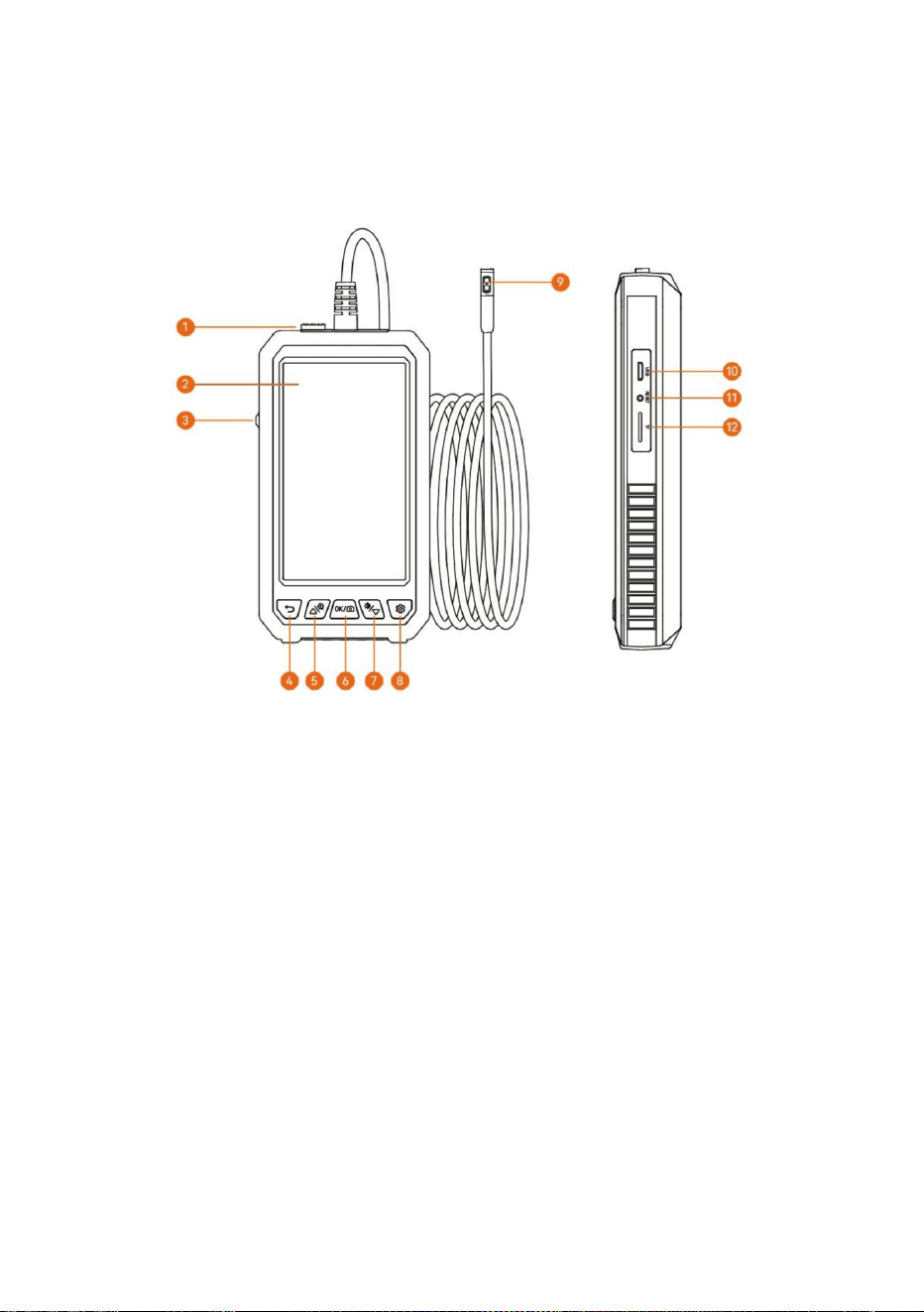
3. Strömförsörjning
4. Tillbaka/Album
2. Skärm
1. Kameralås
- 3 -
gränssnitt.
Vrid strömbrytaren mot kameran för att slå på den och vänd den åt andra hållet för att slå på den
Sätt in Type-c-kameragränssnittet i enheten, så kan låset göra gränssnittskontakten stabil och
förlänga livslängden. Om du vill byta kamera måste du trycka på och flytta låset i motsatt riktning
mot
(Det finns olika färger och produkterna är föremål för de fysiska föremålen som tas emot)
av
Använd denna knapp på videogränssnittet, dess funktion är att gå in i bildhanteringen, och det
är returfunktionen på andra gränssnitt
5-tums IPS full-view HD färgskärm
PRODUKT INTRODUKTION
Machine Translated by Google
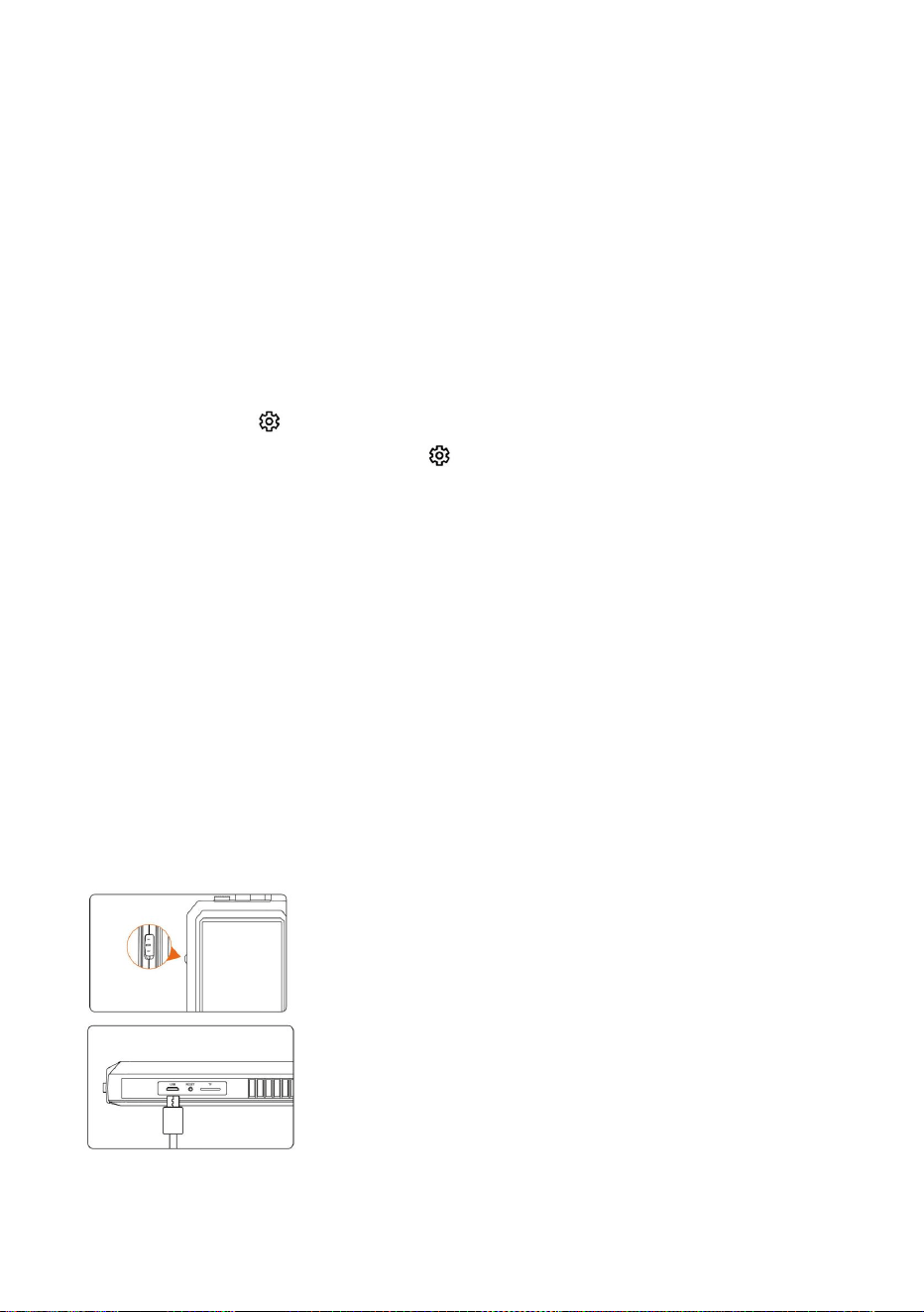
Om knappen används på videogränssnittet kan bilden vara cykliskt
produkt)
förstorad, och det är den uppåtgående rörelseknappen på andra gränssnitt
"
för att gå in i menyinställningsfunktionen.(Om produkten är en
När produkten kraschar, tryck på den för att starta om enheten
När du använder den här knappen på kameragränssnittet, tryck kort för att ta bilder och lång tryck för
att spela in video. Ett annat gränssnitt är bekräftelsefunktionen.
för att växla mellan sidokameran och
"
Stöd för att utöka 0-64G TF (MicroSD)-kort
När du använder den här knappen på videogränssnittet är det för att justera ljusstyrkan på
Med ljusstark LED-ljuslins
*Sätt i TF-kortet när maskinerna stängs av
LED-lampan. Om ett annat gränssnitt är flytta ned funktion.
Dataöverföring är möjlig när USB är ansluten till datorn för
Tryck kort på "
kamera med dubbla linser, tryck länge på "
den främre kameran)
laddning (det rekommenderas att inte använda en adapter över 12V för att ladda
9. Lins
10. USB-laddningsgränssnitt
11.Återställningsknapp
enhet
7. Ner
8. Inställningsnyckel
6. Kameraknapp/bekräftelseknapp
5. Upp/zooma in
Vrid strömbrytaren mot kameran, slå på den och vänd
den åt andra hållet för att vrida den
12.TF kortplats
Använd USB-laddningskabeln för att ladda
- 4 -
Machine Translated by Google
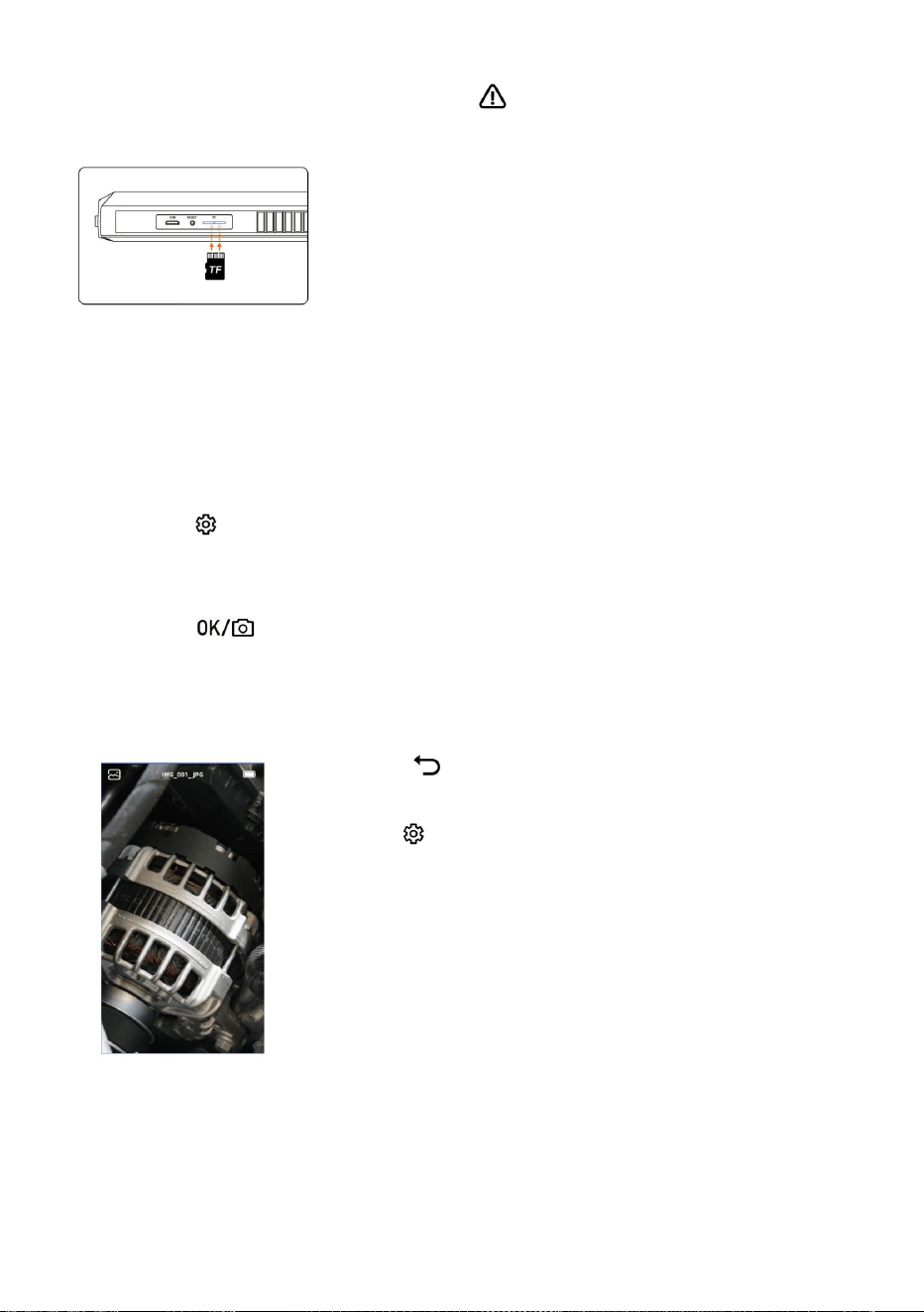
Ange fotoalbum
Språkinställningar
* Vänligen sätt i TF-kortet i avstängt läge
tyska, italienska, spanska, ryska, polska
* Var uppmärksam på om infogningen
1. Tryck på "
1. Tryck på "
"
riktning och fram- och baksidorna av TF-kortet är
"-knappen för att komma till inställningssidan
för att byta till fotoalbumvisning.
korrekt
2. Välj språkinställning
2. Välj fotot eller videon som du vill visa,
*Använd inte överdriven kraft när du sätter in eller
3. Tryck på upp- och nedknappen för att välja önskat språk
"
dra ut TF-kortet för att förhindra skador på
4. Tryck på "
"
kortplatsstruktur
"
för att radera fotot eller videon.
att spara
Tryck
Sätt i TF-kort:
Systemet stöder förenklad kinesiska, japanska, engelska, koreanska, franska,
- 5 -
Machine Translated by Google
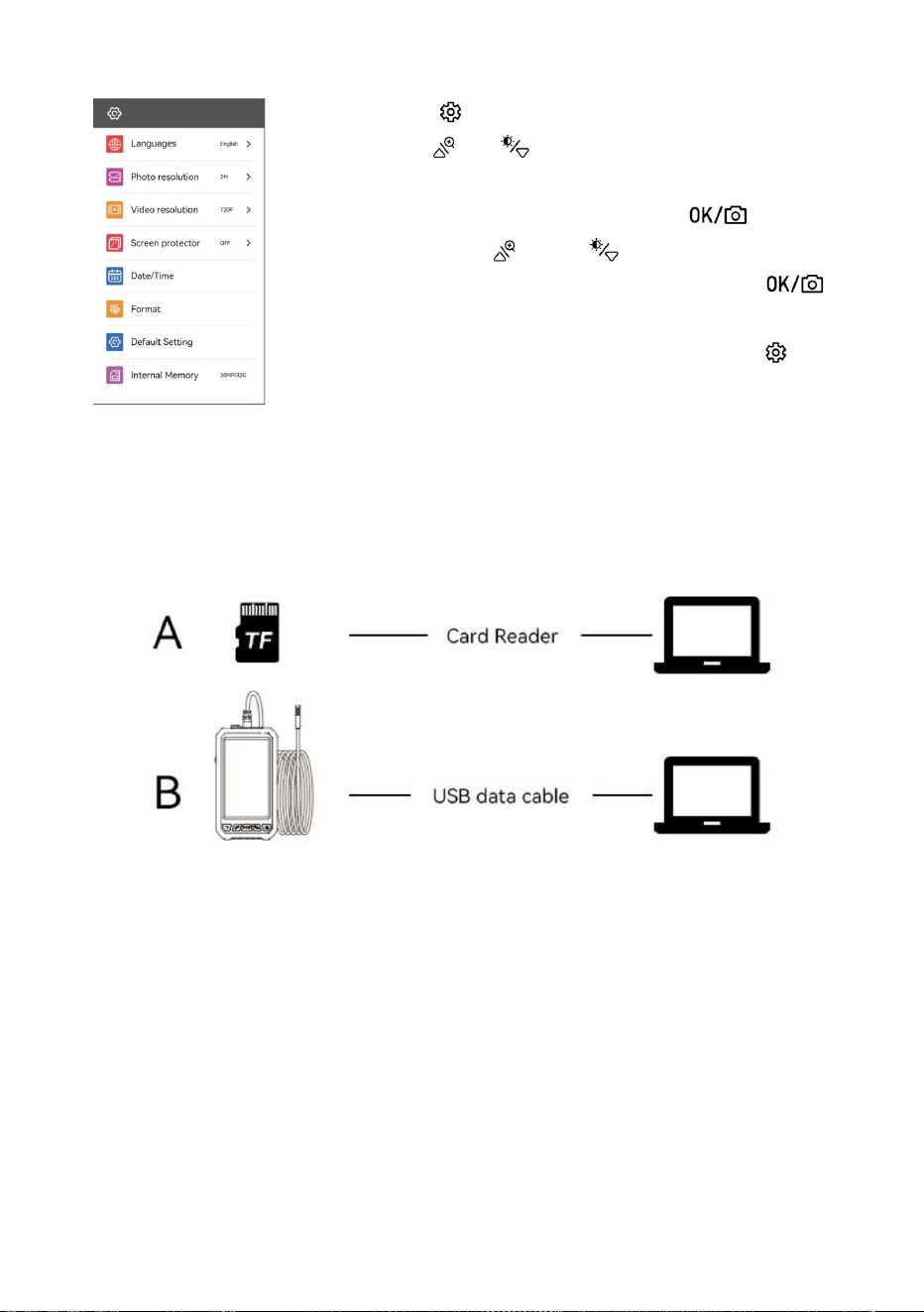
När du använder kopian, om maskinen inte är ansluten till datorn, vänligen
starta om maskinen eller koppla in och koppla ur USB-datalinjen. Koppla inte in och dra ur kontakten
kopiera
Kan använda ett TF-kort för att kopiera direkt, eller använda en USB-kabel för att ansluta till dator för
USB-datakabeln under dataöverföringsprocessen, vilket kommer att orsaka
dataöverföring misslyckas.
Kopiera bild- och videofiler
", "
3. Välj önskat objekt, klicka på"
"och"
" nyckel till
1. Klicka på knappen " " för att gå in i inställningsläget.
och välj önskat menyalternativ.
2. Använd " "-
knapparna för att flytta den grå markören
inställningar
"
nödvändiga parametrar och klicka sedan på "-
tangenten för att bekräfta.
enter, använd " "-
knapparna för att välja
" nyckel
lämna inställningsläget.
4. När inställningen är klar klickar du på "
- 6 -
Machine Translated by Google
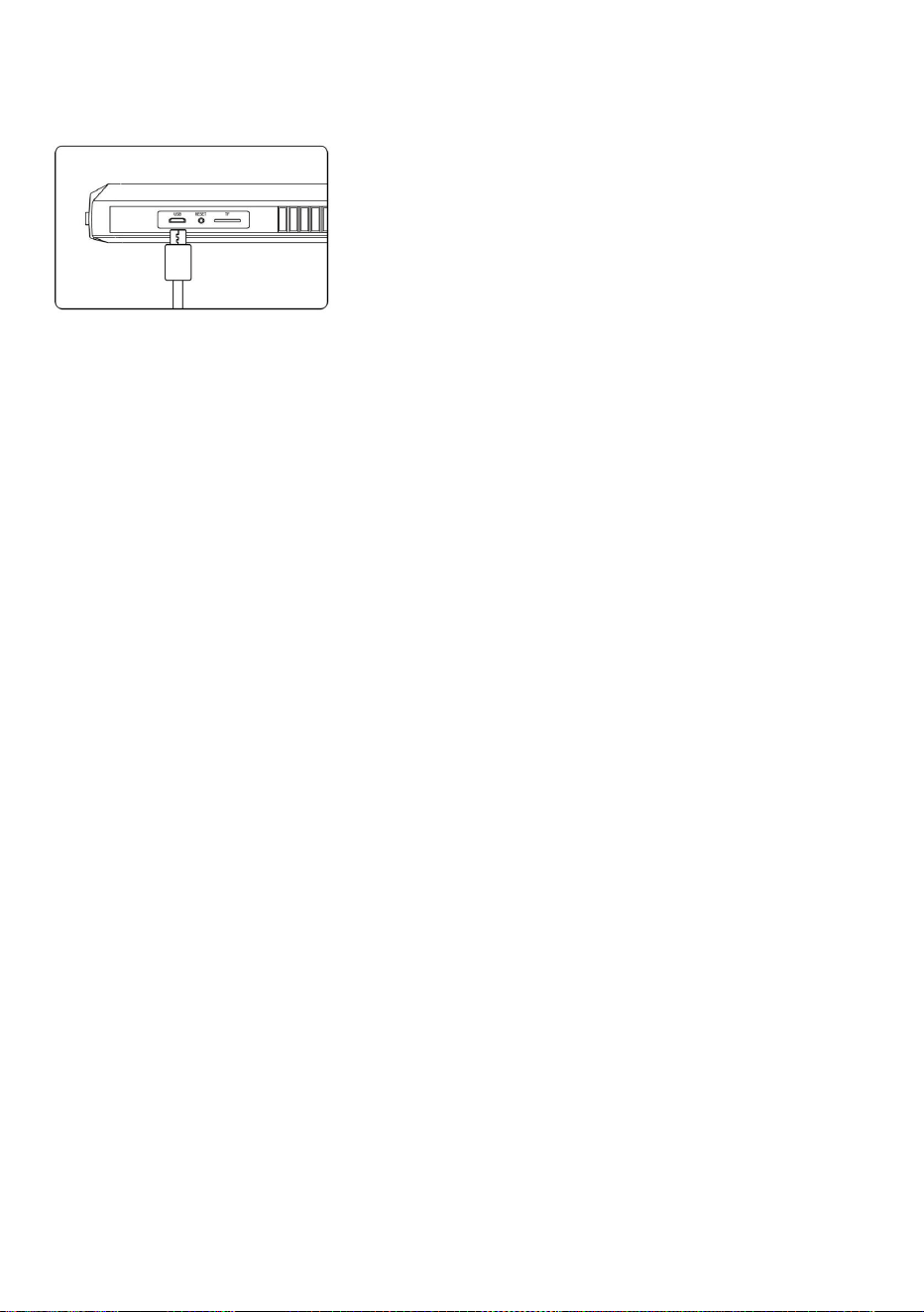
1. Anslut enheten till Micro USB-adaptern för
Använd (5V / 1A/5V / 2A) laddare för att ladda enheten. Produkten gör det inte
laddning (5V / 1A/ 5V / 2A). Produkten gör det inte
1. Fördröjningar inträffade under fotoutmatningen av produkten
stöder snabbladdning.
stöder snabbladdning.
Kontrollera om produkten har tillräckligt med ström eller starta om enheten.
5. Kameran är värme
2. Under laddningsprocessen, strömsymbolen
2. Produktkrasch
Det är normalt att kameran värms upp, speciellt när kamerans LED-lampa är på
indikerar att laddningen pågår
Tryck på enhetens återställningsknapp eller starta om enheten.
vid högsta ljusstyrka. Men det påverkar inte normal användning eller livslängd.
Använd USB-laddningen
3. Bildskärmen är inte tydlig
6. TF-kort kan inte kännas igen
3. När enheten är fulladdad, strömmen
Den bästa avbildningsbrännvidden för produkten är: 2cm-10cm, vänligen kalibrera
Vänligen bekräfta om TF-formatet är FTA32. Om inte, formatera det och gör det inte
displayen visar hela tillståndet
avstånd till föremålet, eller rengör framsidan av kameran med en ren sprittrasa.
känna igen det. Anslut och koppla ur TF-kortet igen.
kabel för att ladda enheten
4. Produktladdning
FAQ
Laddningsguide
- 7 -
Machine Translated by Google
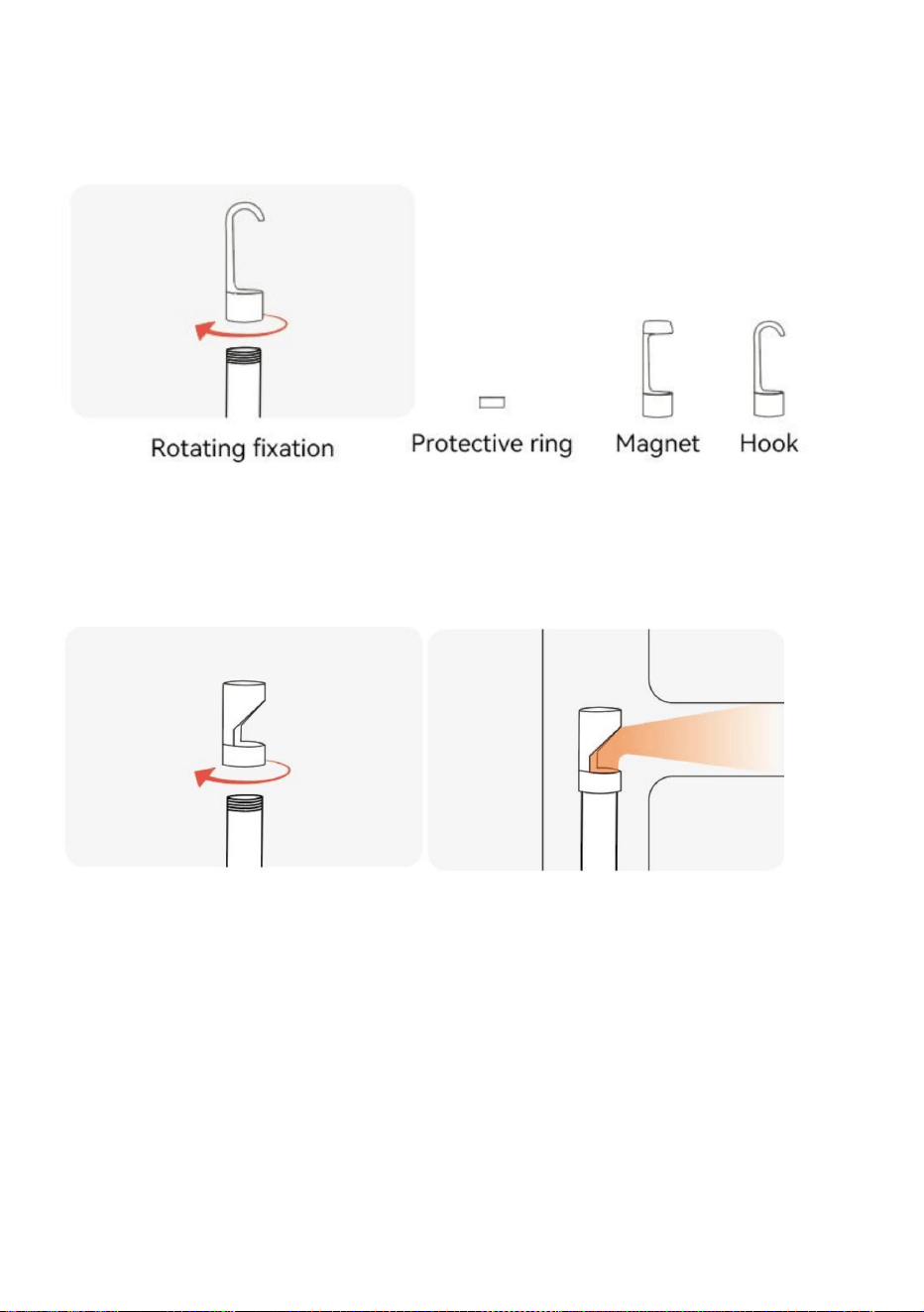
Reflektera sidan genom spegeln och
observera föremål i ett större område
Roterande fixering
Dubbla lins behöver ingen sidospegel, enkel lins är utrustad med sidospegel
Tillbehör: Skyddsring*1, Magnet *1, Krok *1
Installationsguide för tillbehör
Spegel
- 8 -
Machine Translated by Google

FCC uttalande:
Videoformat: AVI
Drifttemperatur: 14ÿ-113ÿ (-10ÿ-45ÿ)
Kameratemperatur:14ÿ-176ÿ (-10ÿ~80ÿ)
Laddningsport: Micro USB
Fotoupplösning: 1920*1080
Fotoformat: Jpg
Skärmupplösning: 1280*720
Skärmtyp: 5,0-tums färgskärm
Batteri: 2000mAh
Batteritid: 3 timmar
Batteriets laddningstid: 2,5 timmar
Denna enhet uppfyller del 15 av FCC-reglerna. Användningen är föremål
för följande två villkor: (1) Denna enhet får
inte orsaka skadliga störningar, och (2) denna enhet måste acceptera
alla mottagna störningar, inklusive
TF-kapacitet:0~64G
störningar som kan orsaka oönskad funktion.
Specifikationer
- 9 -
Machine Translated by Google
Centurion House, London Road,
Staines-upon-Thames, Surrey, TW18 4AX
C/O YH Consulting Limited Office 147,
YH CONSULTING LIMITED.
E-CrossStu GmbH
Mainzer Landstr.69,
60329 Frankfurt am Main.
- 10 -
märkt med denna symbol. Produkter märkta som sådana får inte kasseras med
elektriska och elektroniska apparater.
Europeiska unionen. Detta gäller produkten och alla tillbehör
200 000 CN.
2012/19/EU. Symbolen som visar en soptunna på hjul korsad
normalt hushållsavfall, men måste lämnas till en insamlingsplats för återvinning
indikerar att produkten kräver separat sophämtning i
Denna produkt omfattas av bestämmelserna i det europeiska direktivet
Tillverkare: Shanghaimuxinmuyeyouxiangongsi
Importerad till AUS: SIHAO PTY LTD. 1 ROKEVA STREETEASTWOOD NSW 2122
Australien
Adress: Shuangchenglu 803nong11hao1602A-1609shi, baoshanqu, shanghai
Importerad till USA: Sanven Technology Ltd. Suite 250, 9166 Anaheim Place, Rancho
Cucamonga, CA 91730
Avfallshanteringsinformation:
EC REP
UK REP
Machine Translated by Google