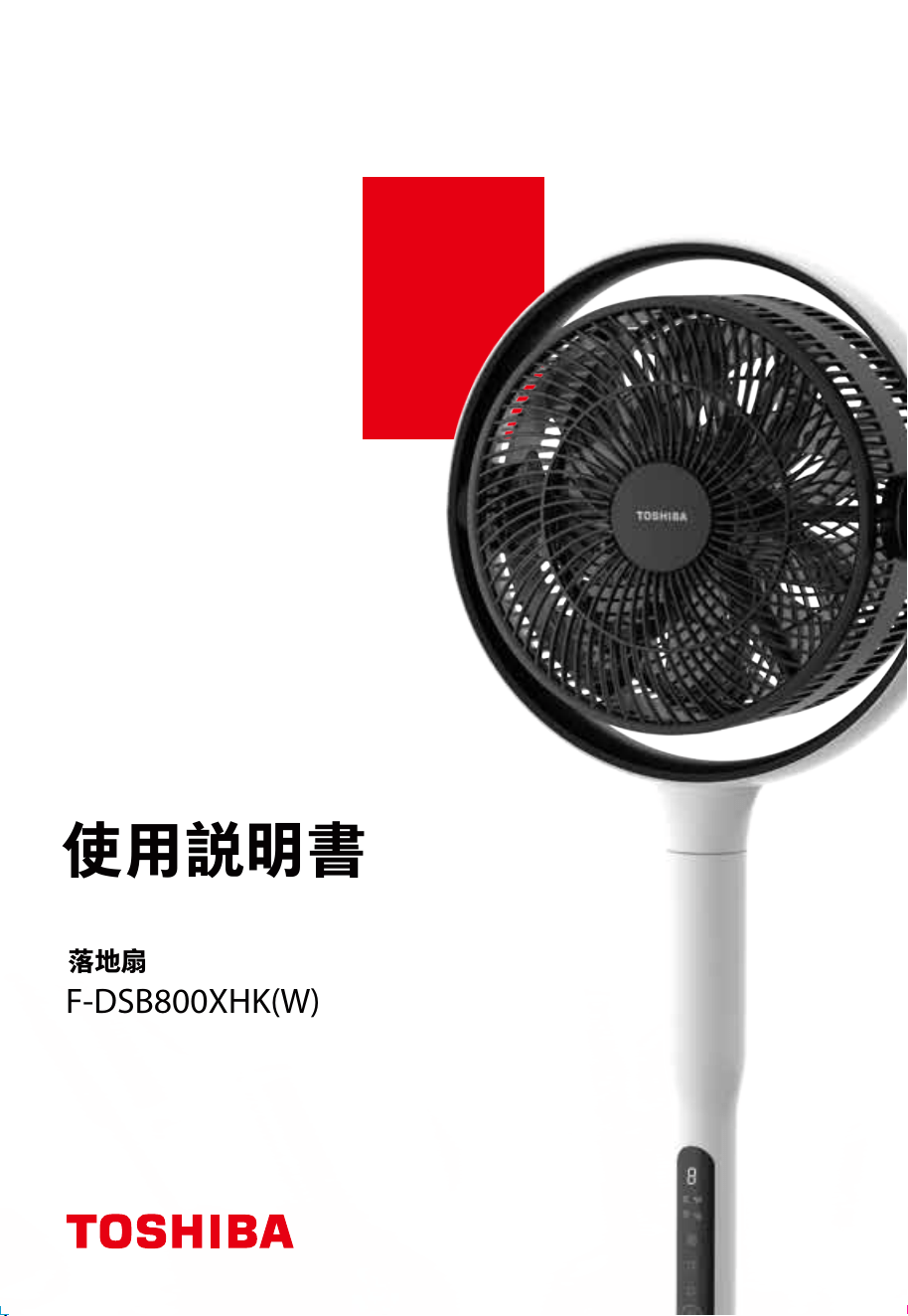
使用説明書
落地扇
F-DSB800XHK(W)

安全注意事項
產品簡介
產品安裝
使用説明
產品參數
清潔保養
故障排除
目錄
02
...................................................................................................................................
05
06
............................................................................................................................................
............................................................................................................................................
............................................................................................................................................
07
10
............................................................................................................................................
10
............................................................................................................................................
10
............................................................................................................................................
非常感謝您購買東芝電風扇。
• 為了正確、安全地使用本風扇,請在使用前仔細閲讀本用戶手冊,並充分理解其內容。
• 請妥善保管本用戶手冊, 以備於將來參考之用。
01
請仔細閲讀“安全操作規則”。
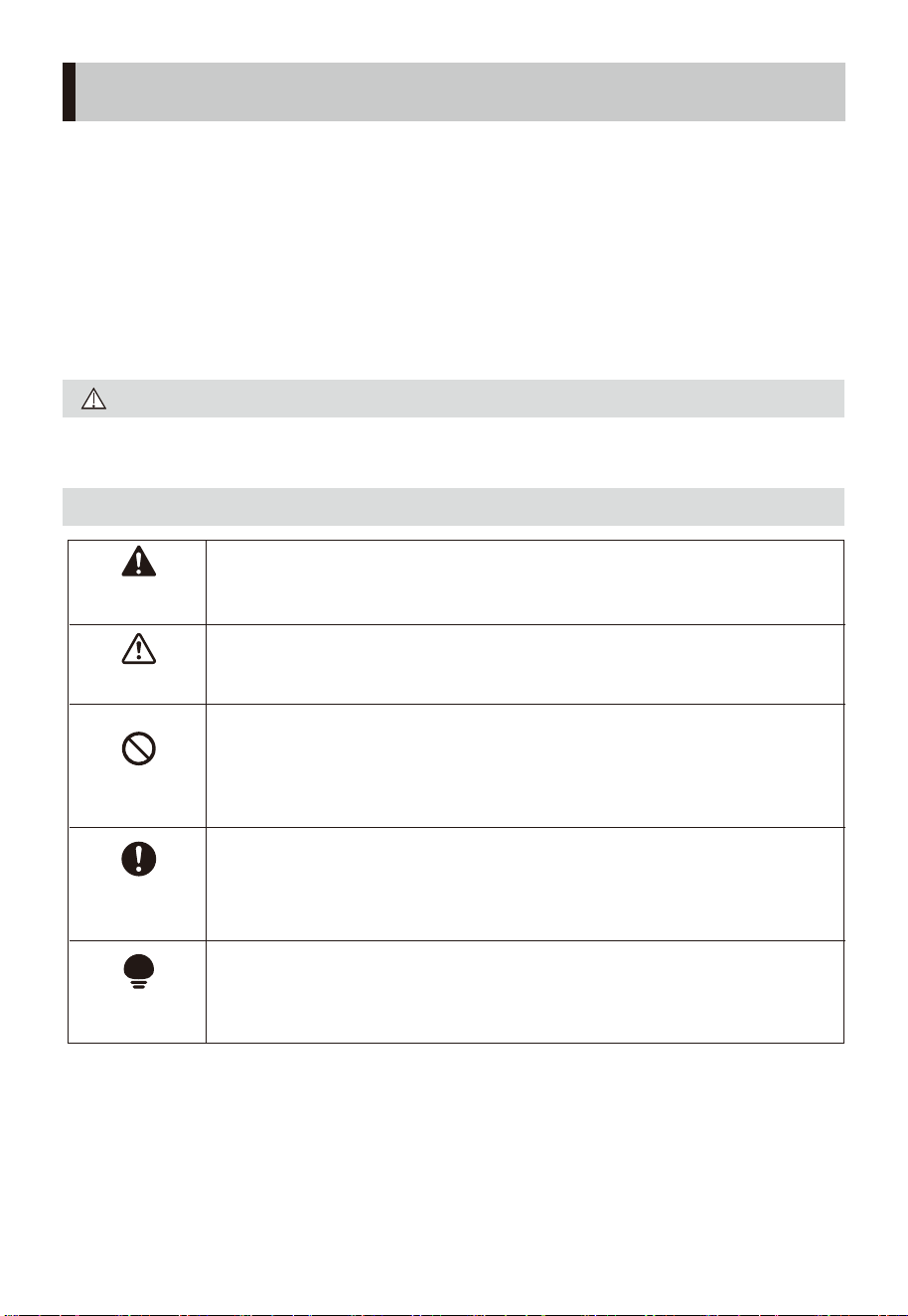
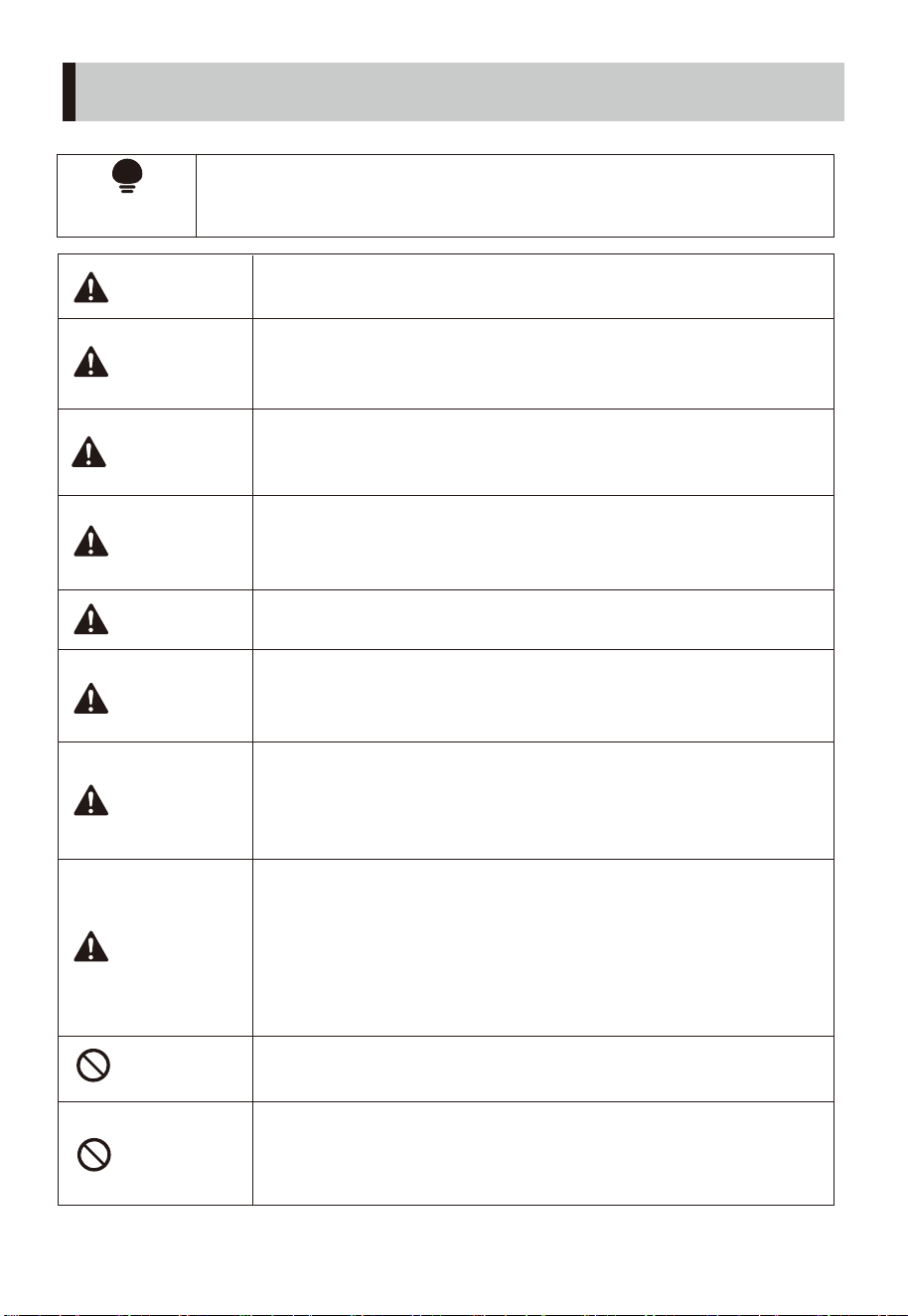
小心
標示符號的說明
安全注意事項
02
表示可能會導致死亡或重傷的安全事項。
表示可能會導致輕傷或財產損害的安全事項。
表示可能影響使用體驗的其他事項。
表示禁止和不可以做的事項
具體的禁止內容標示在圖示符號中或在其附近
用圖畫或文字說明。
表示強制的,務必遵守的事項
具體的強制內容標示在圖示符號中或在其附近
用圖畫或文字說明。
• 為了保證使用安全,避免對他人造成傷害和財產損失,請您務
必遵守以下安全注意事項。
• 不遵守全警告錯誤使用時可能會導致事故發生。
• 為避免因操作失誤而導致危險, 不建議兒童及殘疾人士使用, 除
非有監護人的監督, 否則可以引起觸電、損壞或故障
• 僅限家庭使用。
警告
禁止
溫馨提示
強制
注意
安全注意事項
03
禁止
禁止
禁止
警告
警告
警告
警告
警告
警告
警告
警告
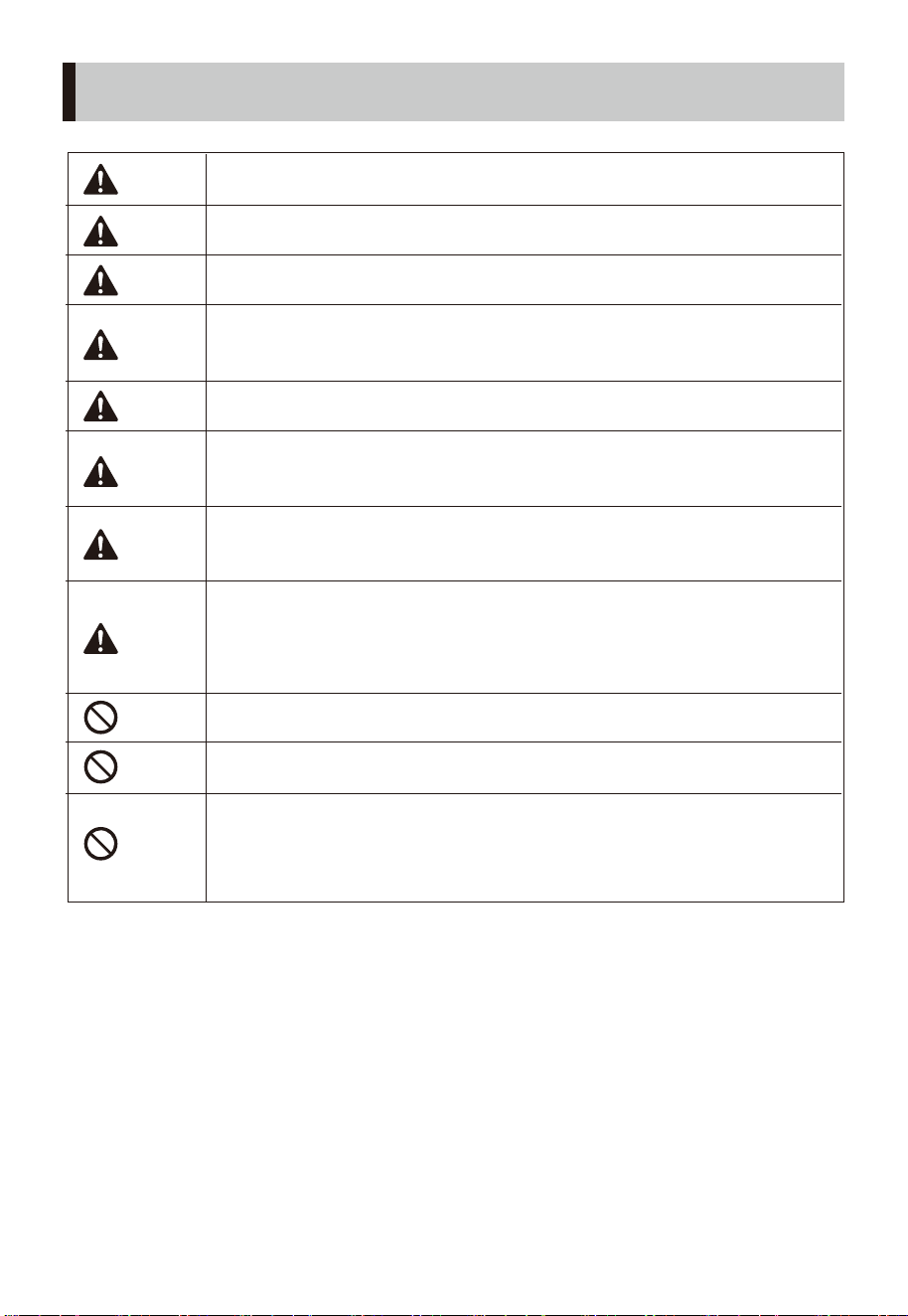
避免在酸鹼油、殺蟲水、窗簾等物品附近使用。
移動產品時,請切斷電源。
產品運轉時,切勿將手指、尖銳物等伸入網罩。
產品未完成安裝前,請勿接通電源。
拆下防護外殼前必須確保產品與電源斷開。
請勿用溼手插拔電源插頭,避免觸電的危險。
使用前,請先檢查所用電壓是否與產品標識的電壓
相同。
只能使用配套的適配器工作,不得使用其他適配
器,以免引起危險。
人離開機器時或機器在不使用狀態下,要關掉電
源及拔掉電源插頭,以免電路出現故障發生意外。
使用前需要先檢查電源線及插頭是否破損。如果
電源軟線損壞,爲了避免危險,必須由製造商、其維
修部或類似部門的專業人員更換。
禁止在有易落下懸掛物、易受衝擊或擺放不穩定
的地方使用。使用產品時應放置平穩,請不要翻倒
或傾斜。
安全注意事項
04
注意
强制
提示
提示
提示
提示
提示
提示
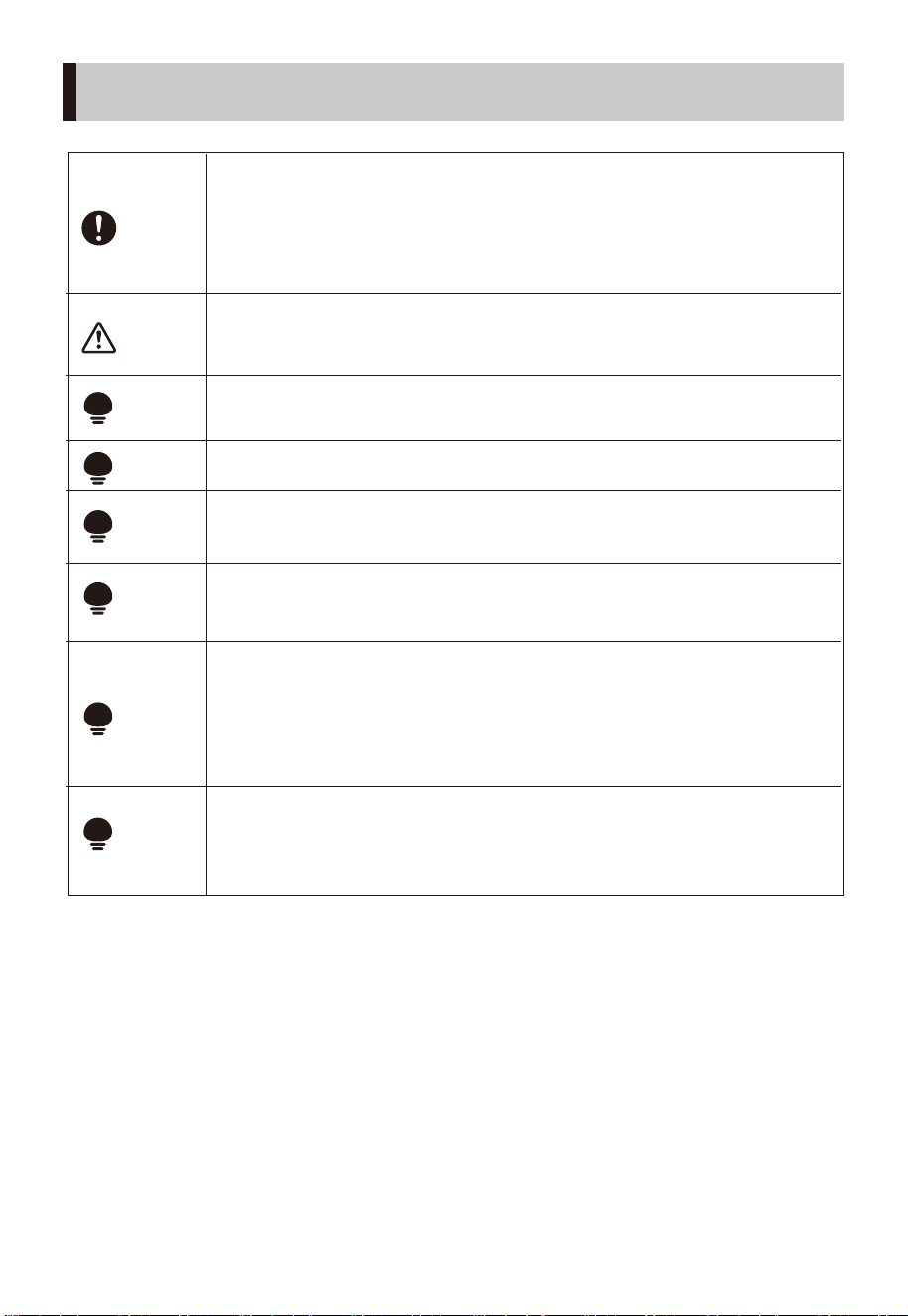
風扇運行過程中如果用手移動的話,會導致關機
復位位置偏位,故不可用手操作。
若產品出現故障,請立即關機並拔下電源線插頭
送附近特約維修點請專業人員維修。非專職人員
或者未授權修理人員,不得自行修理或改造
本機。
小孩、喪失生活自理能力的老人或病人請在成人
監護下使用產品,以防發生意外。
嬰兒、老人不宜長時間直接吹強風。
清潔保養後,一定要等到充分乾燥才能通電使用
或收藏。
長期不用時請將電源線插頭拔下,建議最好用原
包裝包好,收藏於乾燥的地方。
考慮到用戶安全使用風扇產品和節能原因,若機
器連續工作超過24小時,且過程中無操作,機器
將自動關機。注:如果用戶使用產品定時關機
功能,則優先執行定時關機時間操作。
避免在陽光直射、長時間高溼度環境使用。
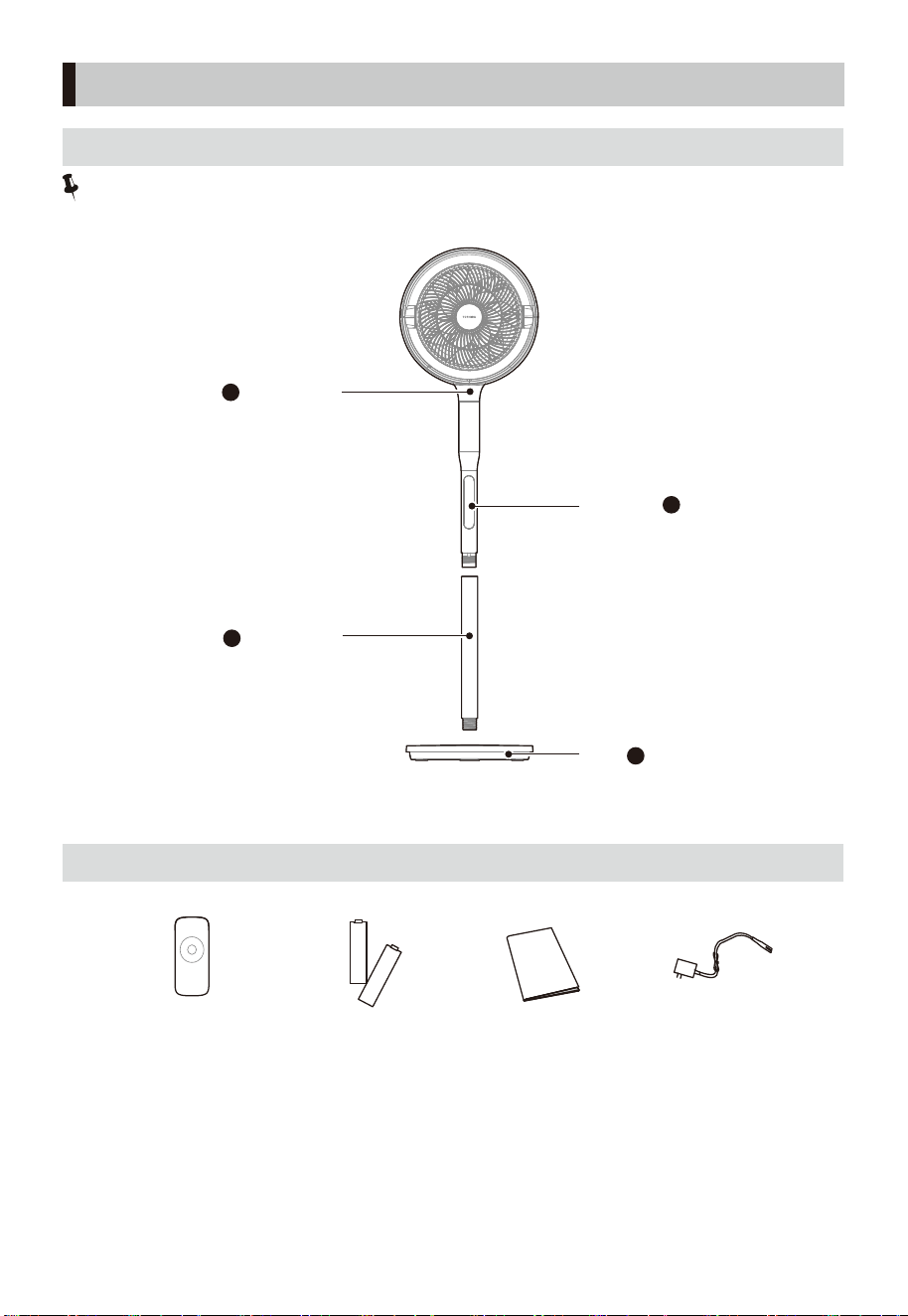
注意:
説明書圖片僅供參考,具體以包裝箱內實物為準。
1
3
2
下立柱
機頭立柱
操作面板
底盤
4
遙控器 x1
電池 x2 説明書 x1 適配器 x1
產品簡介
05
部件名稱
配件清單
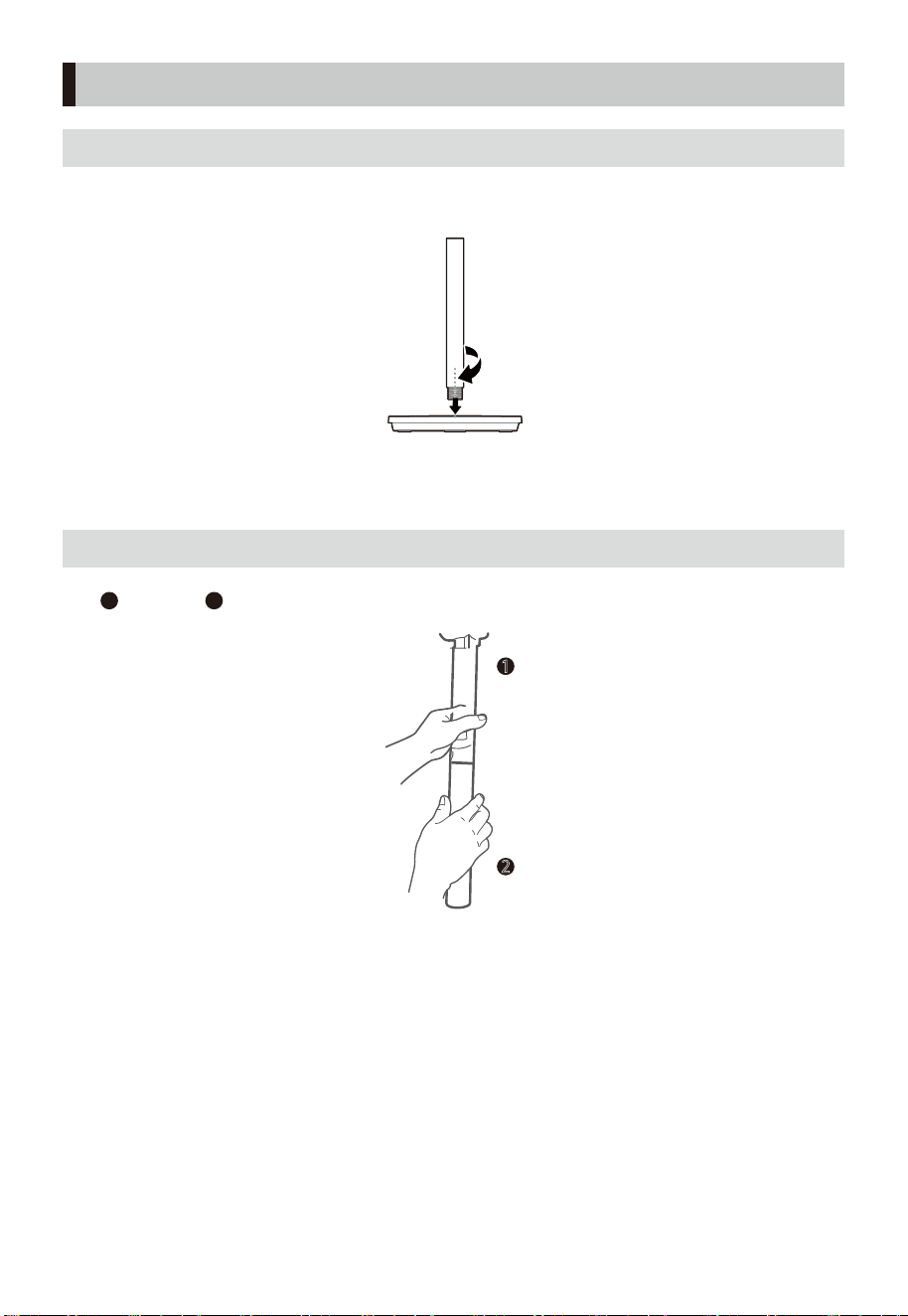
06
1
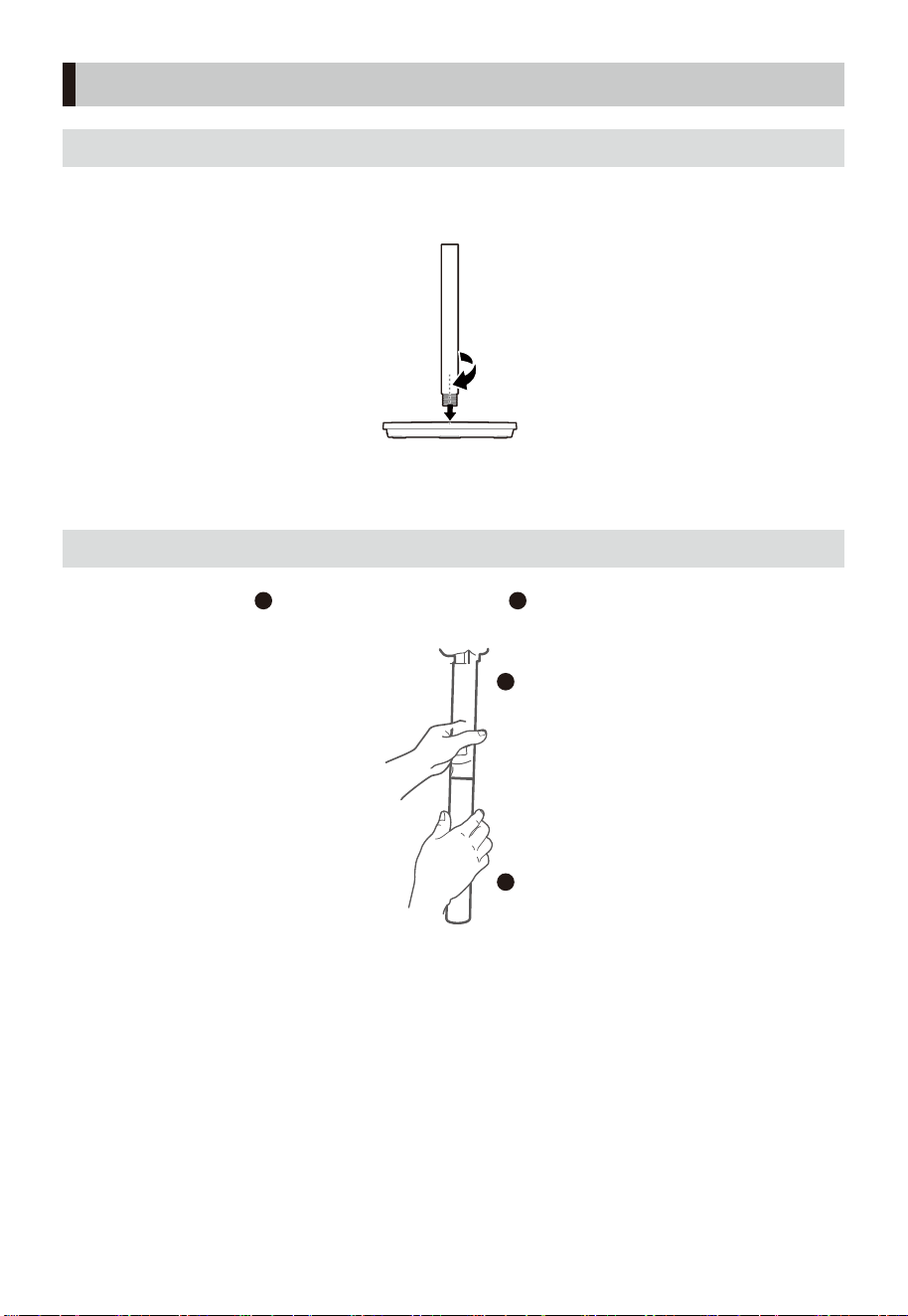
1 先將 機頭立柱與
2
下立柱的孔位對準,然後順時針旋轉進行固定。
2
產品安裝
底盤安裝
立柱安裝
將立柱和底座介面對準,順時針旋轉擰緊固定
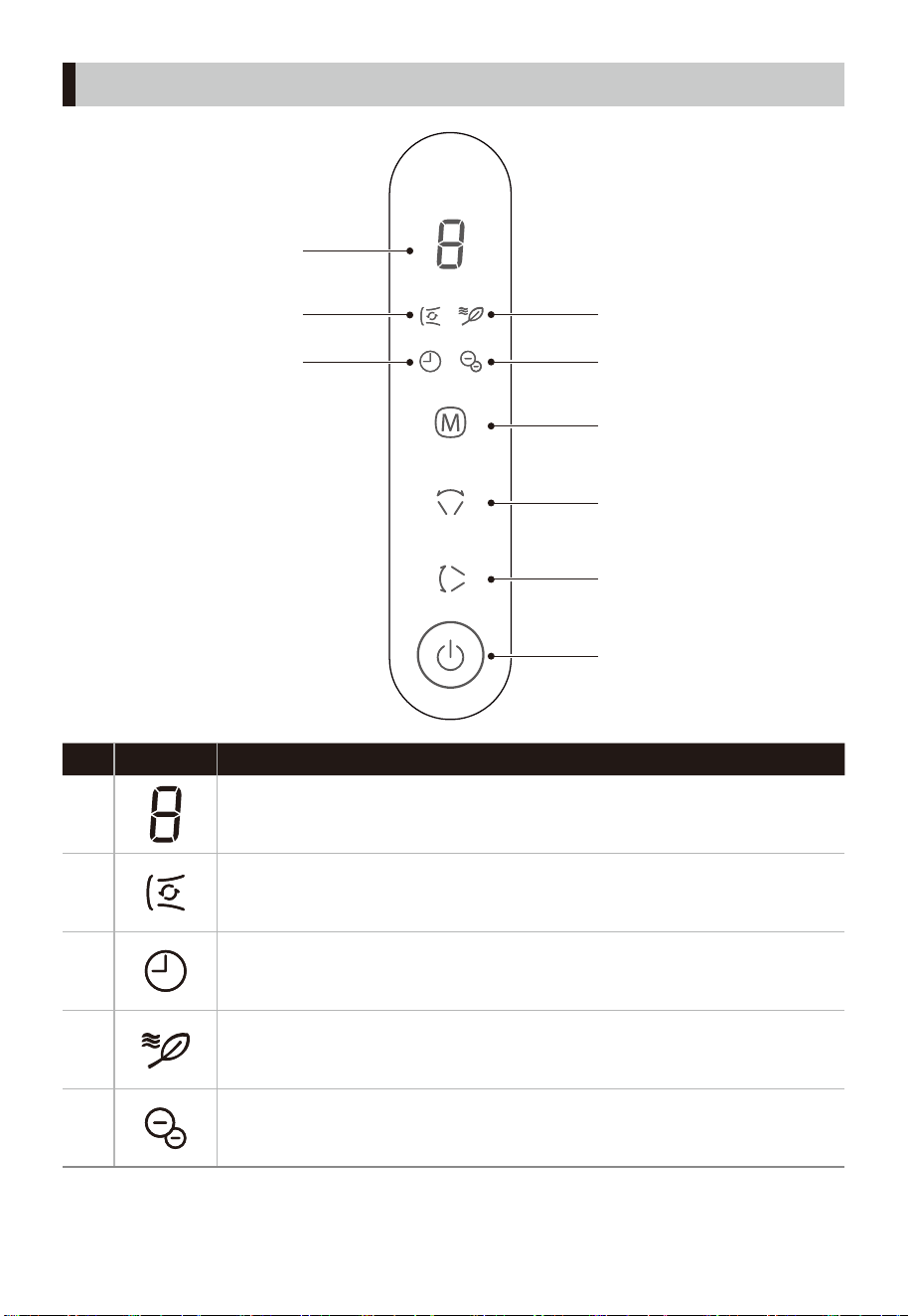
07
描述
No
指示燈
1
• 風速檔位/定時時間顯示區。
2
• 循環風顯示燈
適合大面積使用場景, 如客廳。促進室內空氣循環,搭配空調,快速降温,
讓温度更均勻。
3
4
5
• 定時設置顯示燈
• 自然風顯示燈
適合卧室睡眠,客廳娛樂,書房辦公等納涼場景。
• 負離子顯示燈
適合所有場景使用,有清新空氣的作用。
使用説明
D
A
B
C
4
5
3
1
2
燈定時功能
按遙控器上“ ”鍵或長按機身“ ”鍵設置定時,定時時間為1-9h。
08
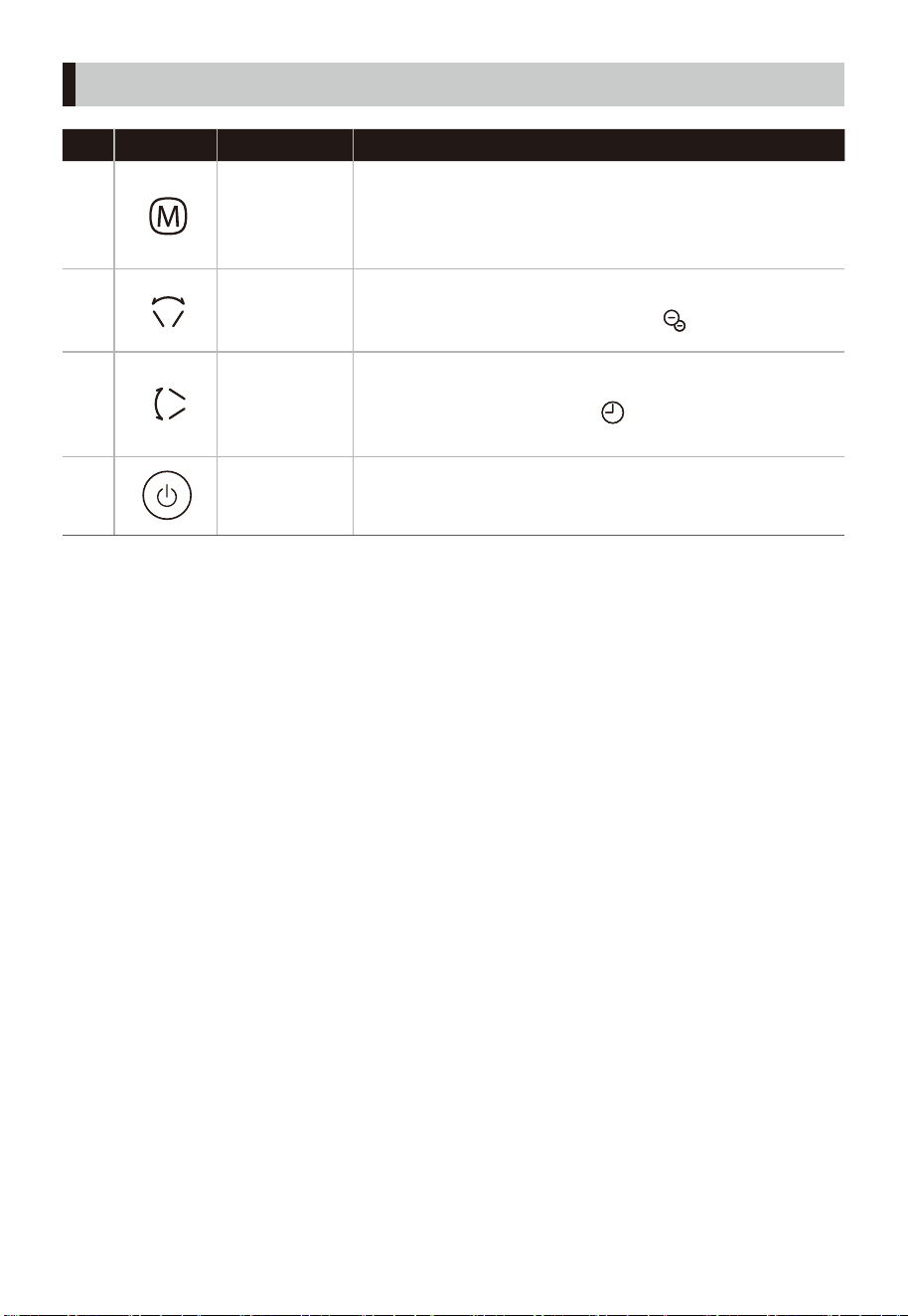
功能描述
No
按鈕
A
模式鍵
B
左右搖擺鍵
/負離子鍵
C
上下搖擺鍵
/定時設置
D
開/關機鍵
•
短按此鍵風速檔位循環切換(循環風1-9檔;自然風
1- 6檔);
長按此鍵3秒分類循環切換模式(自然風-循環風...依次
循環)。
單擊此鍵,開啓或關閉左右搖擺功能,左右搖擺角度 60°
長按此鍵3秒可關閉/開啓負離子,“ ”指示燈亮。
單擊此鍵, 開啓或關閉上下搖擺功能, 上下搖擺角度 ± 20°,
上下手動搖擺角度 ± 90°。
長按此鍵3秒進入定時設置, 指示燈亮。此時短按此鍵
“ ”
可循環切換定時模式。時間為1-9小時, 以1小時為間隔。
•
•
•
• 單擊此鍵,開啓或關閉機器電源。
(注:開機默認開啓負離子功能)
使用説明
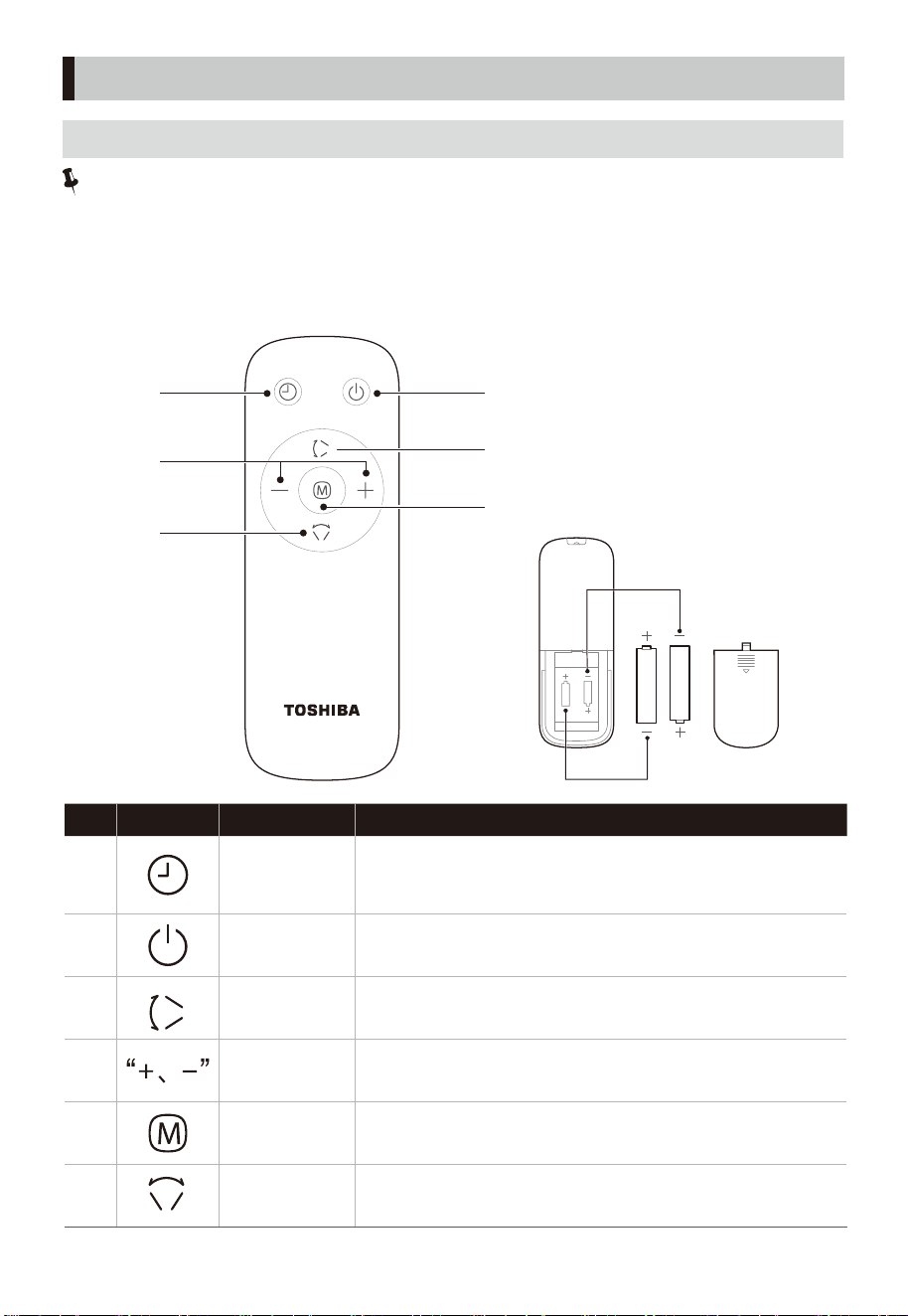
• 開啓或停止上下搖擺送風。
• 設定風速檔位或定時設置。
• 開/關機鍵。
功能描述
No
按钮
1
定時關機
/預約開機
• 開機狀態下設定定時關機,關機狀態下設定預約開機;
• 單擊按鍵後,可通過按定時鍵或“+、-”鍵設置定時時間。
2
開/關機
3
上下搖擺
• 設定風類模式。
4
5
6
設定風速檔位
或定時設置
模式鍵
• 開啓或停止左右搖擺送風。
左右搖擺
注意:
• 遙控器在產品正面5米內,左右角度在30度範圍內正常使用。
• 遙控器電池中含有許多重金屬和酸鹼等物質,威脅人類健康;廢舊電池應分類回收。
• 請使用“AAA”型錳電池或鹼性電池。請勿使用充電電池。
• 請勿將遙控器電池放入火中,否則電池可能會爆炸或泄漏。另不要將新舊電池混合使
用。不要混合鹼性、標準(碳鋅)或可充電(鎳鎘)電池。
2
3
1
4
5
6
電池 (AAA 1.5V)
電池
電池
09
遙控器按鍵説明
使用説明
10
注意事項
• 清潔本產品前, 必須關閉電源並拔下插頭。
• 清潔後, 必須待機器充分乾燥才通電或收藏。
• 長期不使用時請將電源線插頭拔下, 建議用原有包裝放好, 收藏於乾燥地方。
• 禁止用水直接沖洗機身, 可用含少許中性洗滌劑的軟布輕擦機器表面, 然後抹乾。請勿使用任何有
研磨性清潔劑或溶劑如汽油。
• 禁止拆開機器進行改裝,建議定期對機器進行檢查和清潔,以延長其使用壽命。
清潔保養
如果風扇在使用過程中出現異常情況,請在報修前檢查以下幾點。
問題 檢查以下內容
扇葉不旋轉。
扇葉旋轉但發出奇怪的
聲音。
• 風扇扇葉是否安裝正確?
• 電源插頭是否插入插座?
• 是否有扇葉接觸防護罩?
• 螺旋轂蓋是否正確地將扇葉固定到位?
• 前後網罩部分是否安裝正確?
• 是否有扇葉接觸網罩?
• 扇葉和網罩是否乾淨?
故障排除
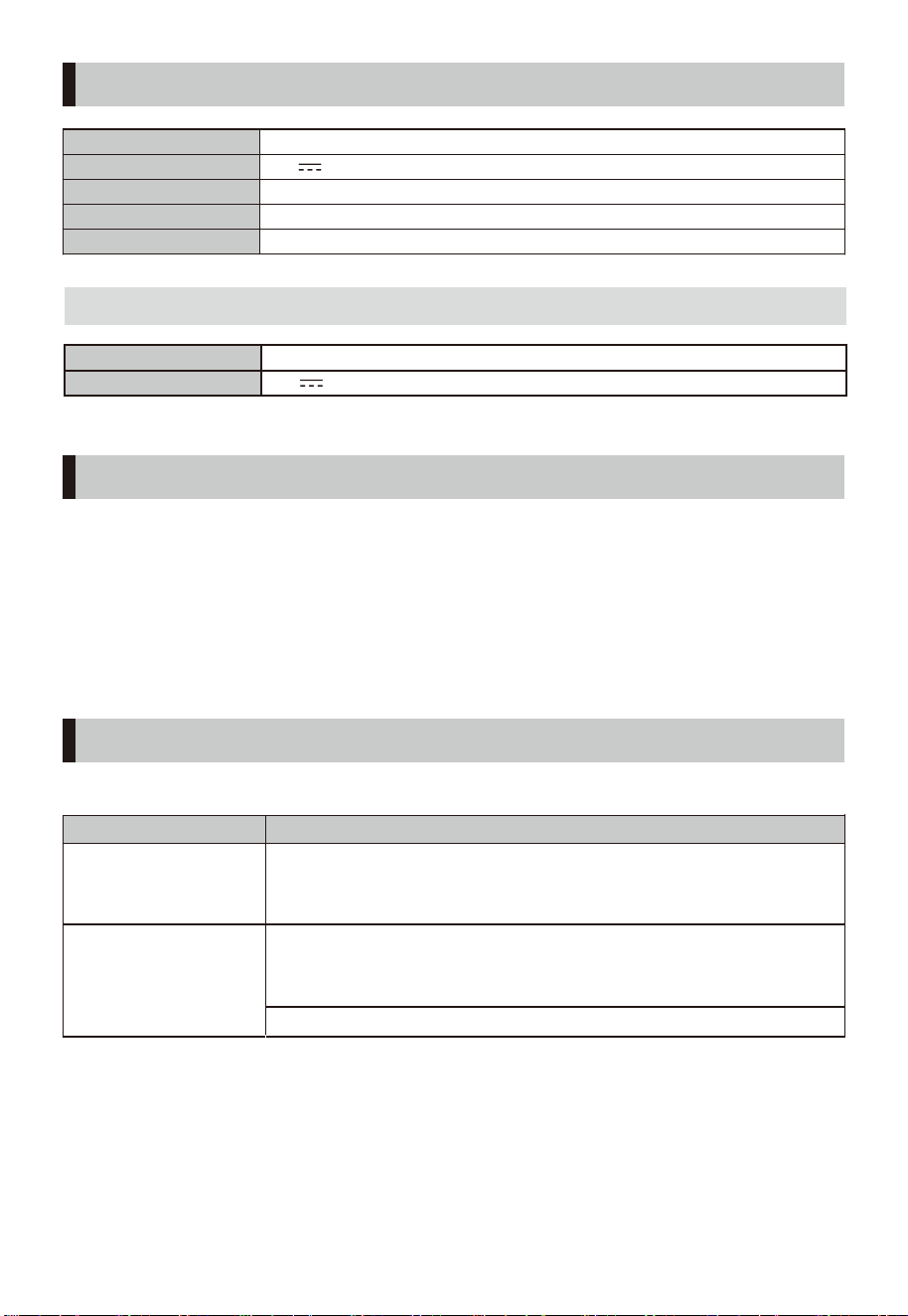
型號
F-DSB800XHK(W)
工作電壓
24V
額定功率
25W
待機功率
0.8W
噪音
≤63dB(A)
產品參數
輸入
100-240V~ 50/60Hz 1.5A
輸出
24V 1.5A
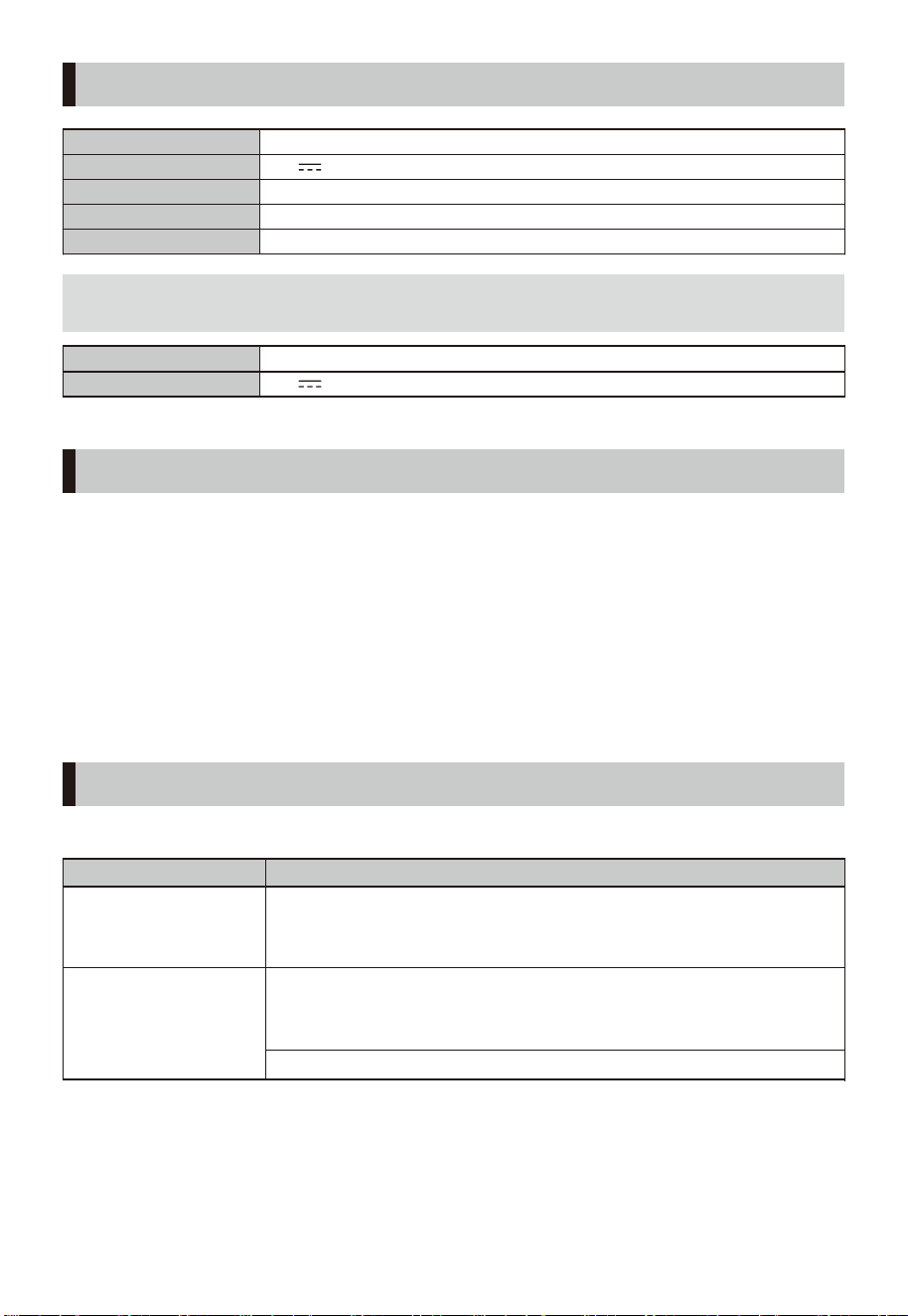
電源適配器 注;請使用本產品原裝適配器,型號 GM42-240150-D

# MatterDetails
USER
MANUAL
STAND FAN
F-DSB800XHK(W)

CONTENTS
.....................................................................................................................
02
SAFETY INSTRUCTIONS
PRODUCT INSTALLATION
OPERATING INSTRUCTIONS
SPECIFICATIONS
CLEANING AND MAINTENANCE
TROUBLESHOOTING
06
07
................................................................................................................
................................................................................................................
..............................................................................................................
08
11
................................................................................................................................
11
.....................................................................................................
11
.........................................................................................................................
Thank you very much for purchasing Toshiba electric fan.
• In order to use this fan correctly and safely, please read this manual carefully and fully understand its
contents before using it.
• Keep this owner’s manual in a handy place for future reference.
01
PRODUCT INTRODUCTION
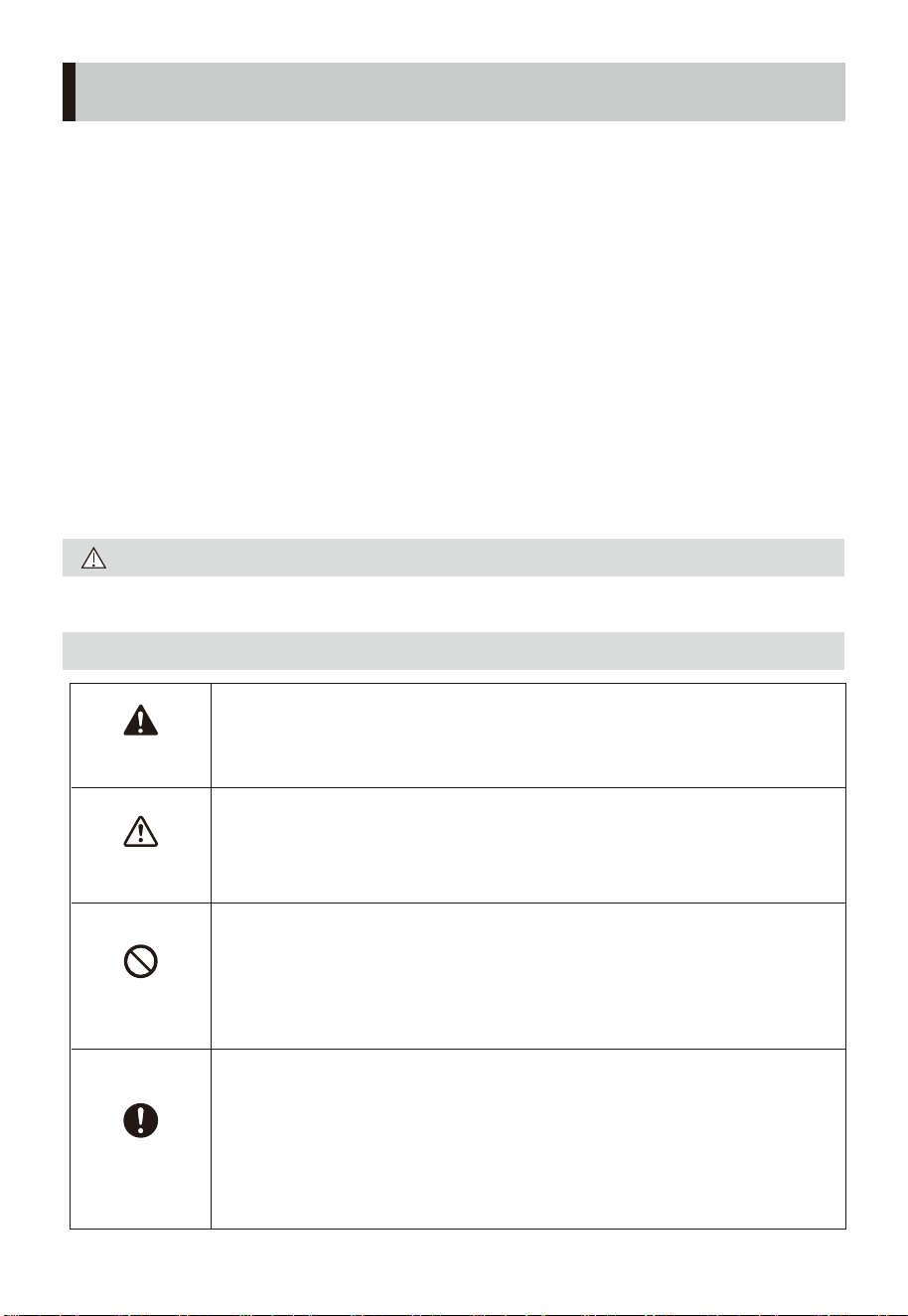
Read Rules for Safe Operation and Instructions Carefully.
CAUTION
A DESCRIPTION OF THE MARKING SYMBOL
Safety precautions
SAFETY INSTRUCTIONS
02
• To ensure the safety of use and avoid injury and property
damage ,please always following below safety precau-
tions.
• When use the product incorrectly and failure to comply
with warnings can result in accidents.
• In order to avoid the danger caused by improper opera-
tion, it is not recommended for children and disabled
persons use this product,, unless there is a guardian's
supervision, and it can cause electric shock, damage or
failure.
• Household use only.
Warning
Prohibit
Mandatory
Caution
The signal word indicates a hazard with a
medium level of risk which, if not avoided, may
result in death or serious injury.
The signal word indicates a hazard with a low
degree of risk which, if not avoided, may result
in minor or moderate injury.
The signal word indicates prohibited or cannot
do things.
The specific prohibited content is indicated in
or near the pictorial symbol in a picture or text.
The signal word indicates a mandatory and
must-follow things.
The specific mandatory content is indicated in
or near the pictorial symbol with a picture or
text description.
SAFETY INSTRUCTIONS
03
Only the matching adapter can be used.
Do not use other adapters so as to
avoid danger.
Before use, please check whether the
voltage used is the same as the voltage
marked on the product.
When you leave the machine or when
the machine is not in use, turn o the
power and unplug the power plug to
avoid circuit failure and accidents.
Before use, check whether the power
cord and plug are damaged. If the power
cord is damaged, it must be replaced by
the manufacturer, its maintenance
department or a specialist from a similar
department in order to avoid danger.
Avoid using it near acid-base oils,
insecticides, curtains and other items.
The signal word indicates other matters that
may aect the user experience
Attention
Cut o the power supply before
moving the product.
Do not connect the power supply until
the product is installed.
Do not plug or unplug the power plug
with wet hands to avoid the risk of
electric shock.
Make sure the product is disconnected
from the power supply before removing
the protective casing.
When the product is running, do not
put your fingers or sharp objects into
the grille.
Prohibit
Warning
Warning
Warning
Warning
Warning
Warning
Warning
Warning
Prohibit
to fall, where it is susceptible to impacts,
It is prohibited to use it in places where
there are hanging objects that are easy
or where the placement is unstable. The
product should be placed stably when
using it, please do not tip over or tilt.
04
Mandatory
Caution
Attention
Attention
SAFETY INSTRUCTIONS
Prohibit
In the event of an exception or
malfunction. Please shut down
immediately and unplug the power cord
and send it to the nearby maintenance
station for professional maintenance.
Children, the elderly or sick people who
lose the ability to take care of themselves
should use the product under adult
supervision to avoid accident.
Infants and the elderly should not blow
strong winds directly for a long time.
Attention
Attention
After cleaning or maintenance, a please
be sure the product is fully dry before
use or collection.
When the product is not used, please
unplug the power plug from the power
socket. And it is recommended to wrap
the product in its original packaging and
store it in a dry place.
Non-professionals and Unauthorized
repairman please do not disassemble,
repair or modify the product.
If you move the fan by hand during the
running process, the shutdown reset
position will be out of position.
Therefore, please do not move the fan
by hand.
In consideration of safety and energy-
saving problems, if the machine
continuously works for more than 24
hours, and no operation is performed, the
machine will shut down automatically.
Remark: If the user uses the timer function
of the product, the timer operation is
preferred.
SAFETY INSTRUCTIONS
Attention
Attention
05
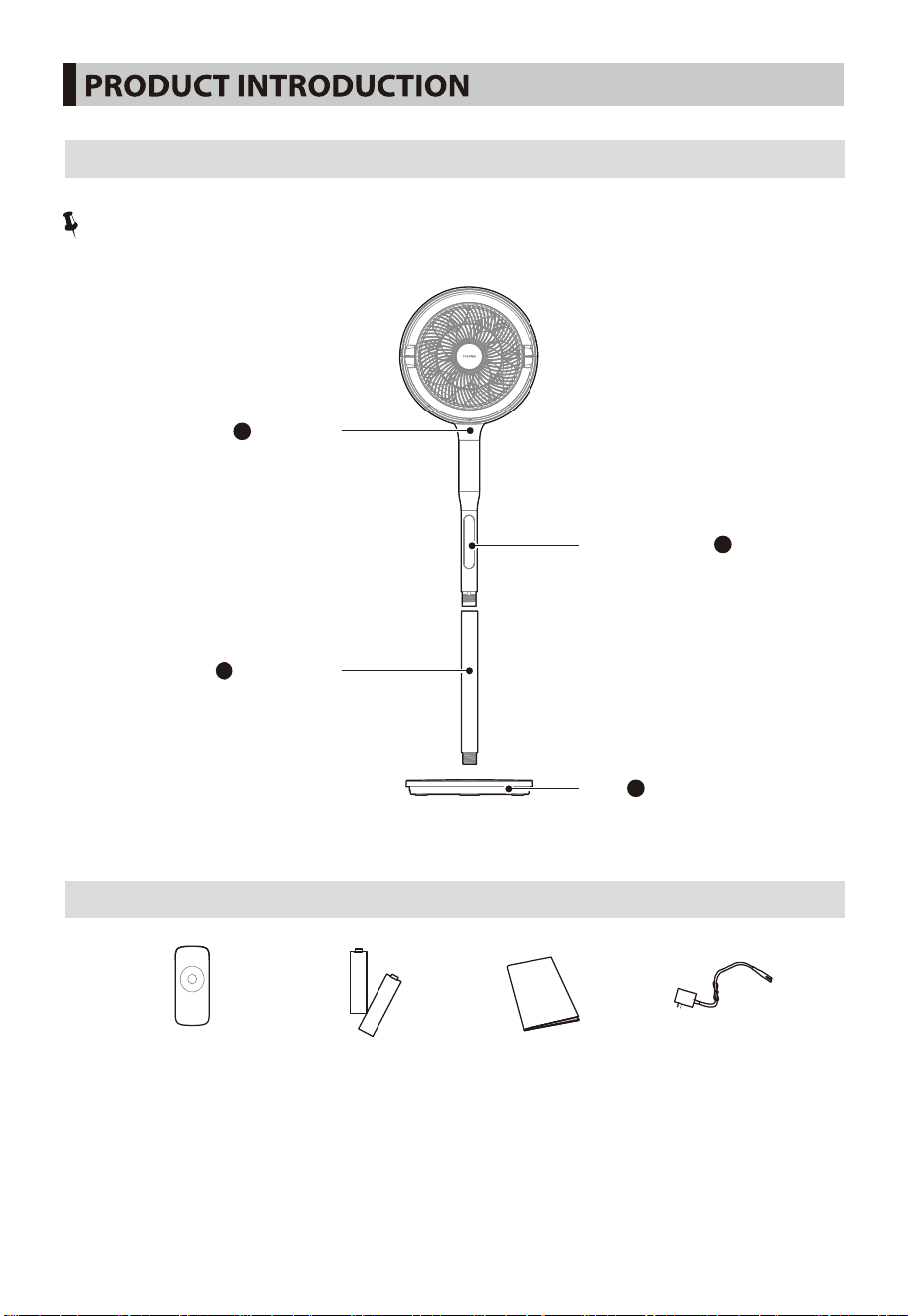
Remote control ×1 Battery×2 User Manual x1 Adapter ×1
LIST OF PARTS
06
Note:
The pictures in the manual are for reference only. The actual product in the packaging box shall prevail.
1
3
2
Lower pole
Fixed pole
Operation panel
4
Base
PART NAME
07
lower pole, and then rotate clockwise
First, align the hole of the
1
to x them.
Align the post and the base interface, and rotate clockwise to tighten it.
1
2
2
PRODUCT INSTALLATION
BASE INSTALLATION
POLE INSTALLATION
fixed pole with the hole of the
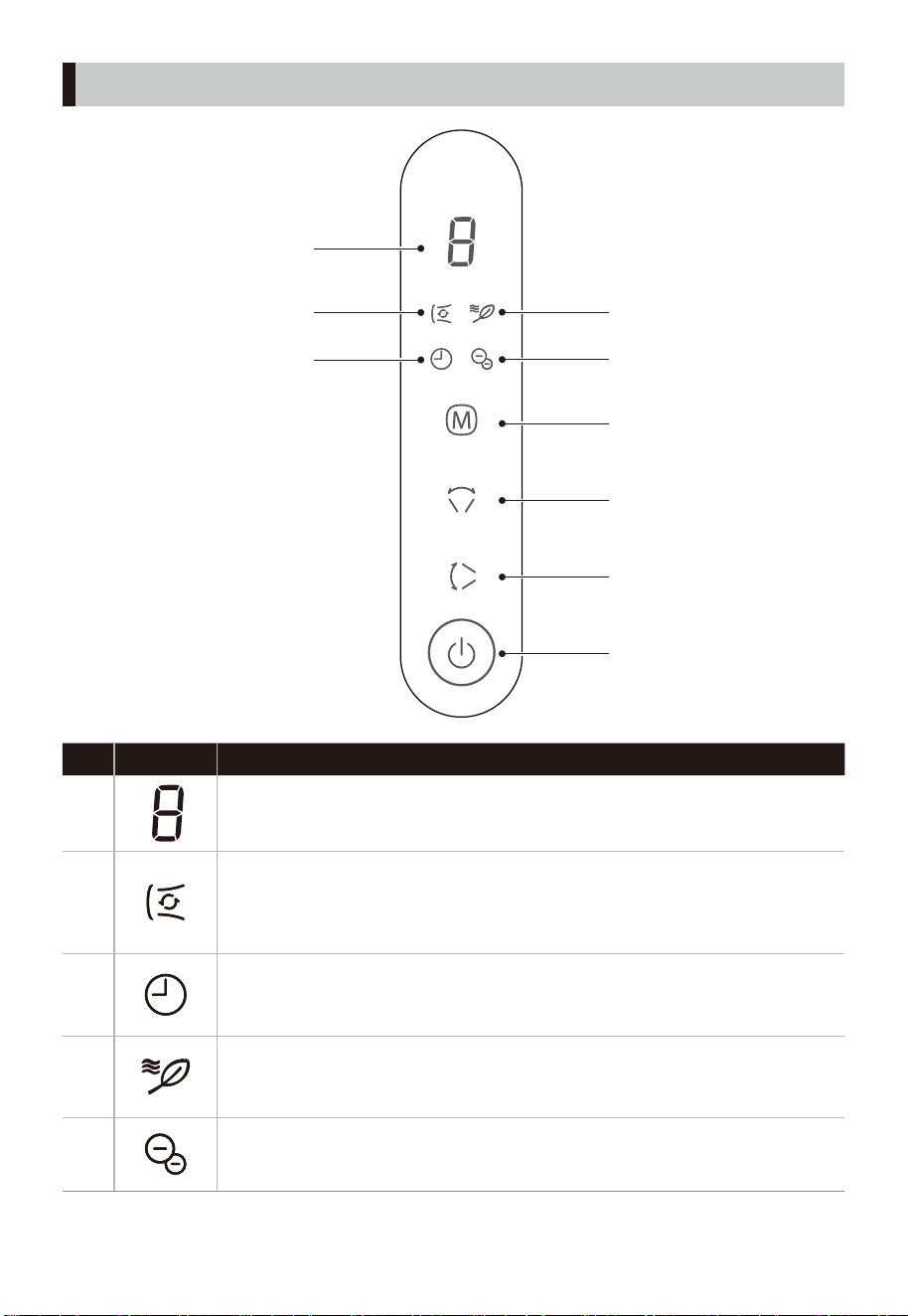
FunctionNo Indicator
1
• Fan speed level/schedule time display area.
3
• Timer indicator
2
• Circulating wind indicator
It is suitable for large area cooling in the living room. It stirs indoor air circulation
and uses with air conditioner to quickly cool down and make the temperature
more uniform.
5
• Negative ion indicator
It is suitable for use in all scenes and has the function of fresh air.
4
• Natural wind indicator
It is suitable for sleeping in the bedroom, entertaining in the living room,
working in the study and other cooling scenes.
OPERATING INSTRUCTIONS
08
D
A
B
C
4
5
3
1
2
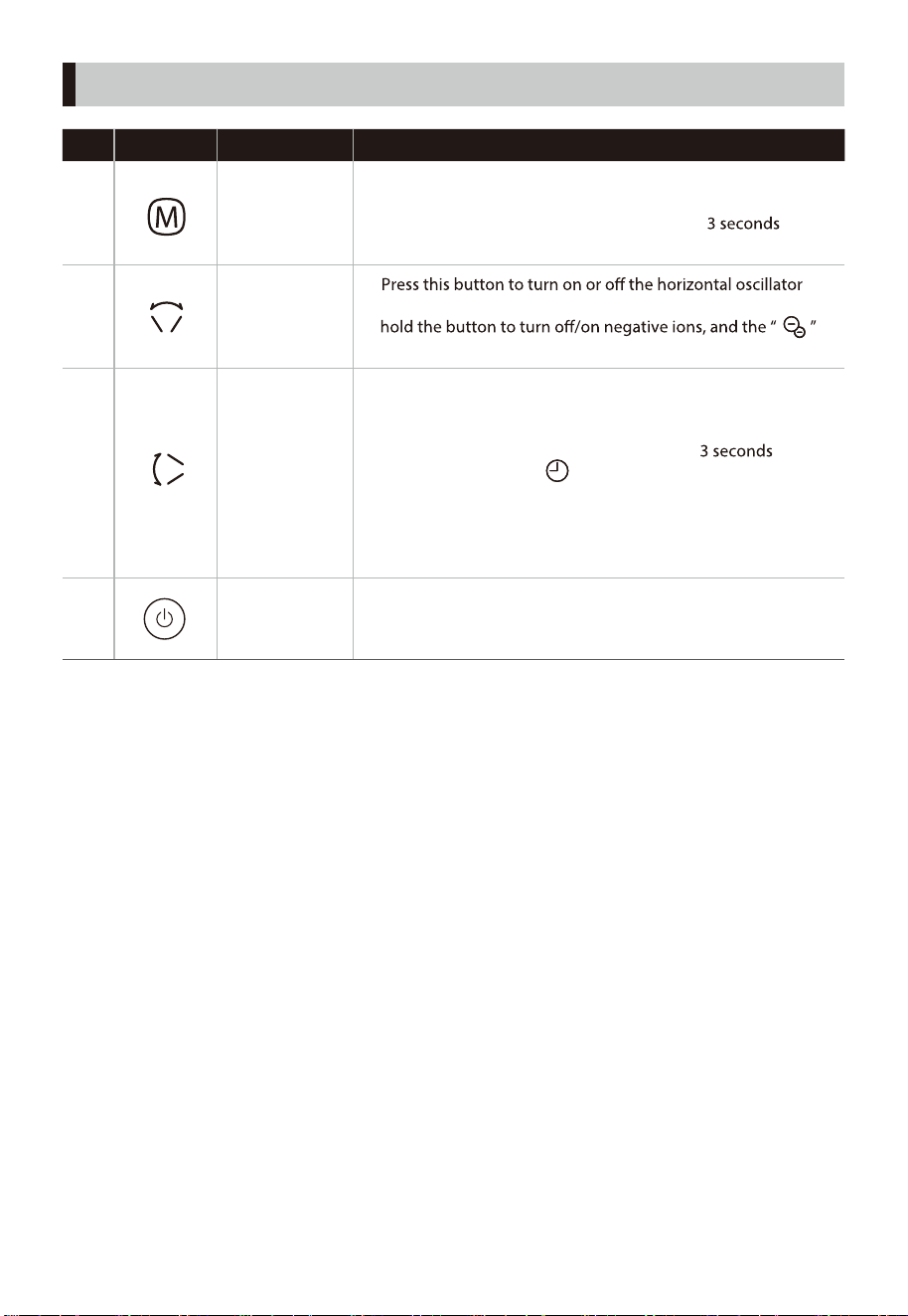
FunctionDescriptionNo Button
A
Mode button
• Press this button to switch the wind speed cyclically
(circulating wind cycles among level 1-9; natural wind cycles
among level 1-6); Press and hold this button
to
cycle wind mode (natural - circulating... in sequence).
•
function, and the horizontal oscillating angle is 60°. Press and
indicator will light up.
B
Horizontal
oscillator/
negative ion
button
• Press this button to turn on or o the vertical oscillator
function, and the automatic vertical oscillating angle is ±20°,
and the manual oscillating angle is ±90°.
• Press and hold the vertical oscillator button
to enter
the timer setting, the “ ” indicator will light up. At this
moment, you can press this button to switch the schedule
time cyclically.
• Scheduled time is in the range of 1 to 9 hours in 1 hour
increment.
C
Vertical
oscillator/ timer
setting button
D
• Press this button to switch on/ o the fan.
(Note: When powered on, the negative ion function is turned
on by default)
On/o
button
OPERATING INSTRUCTIONS
09
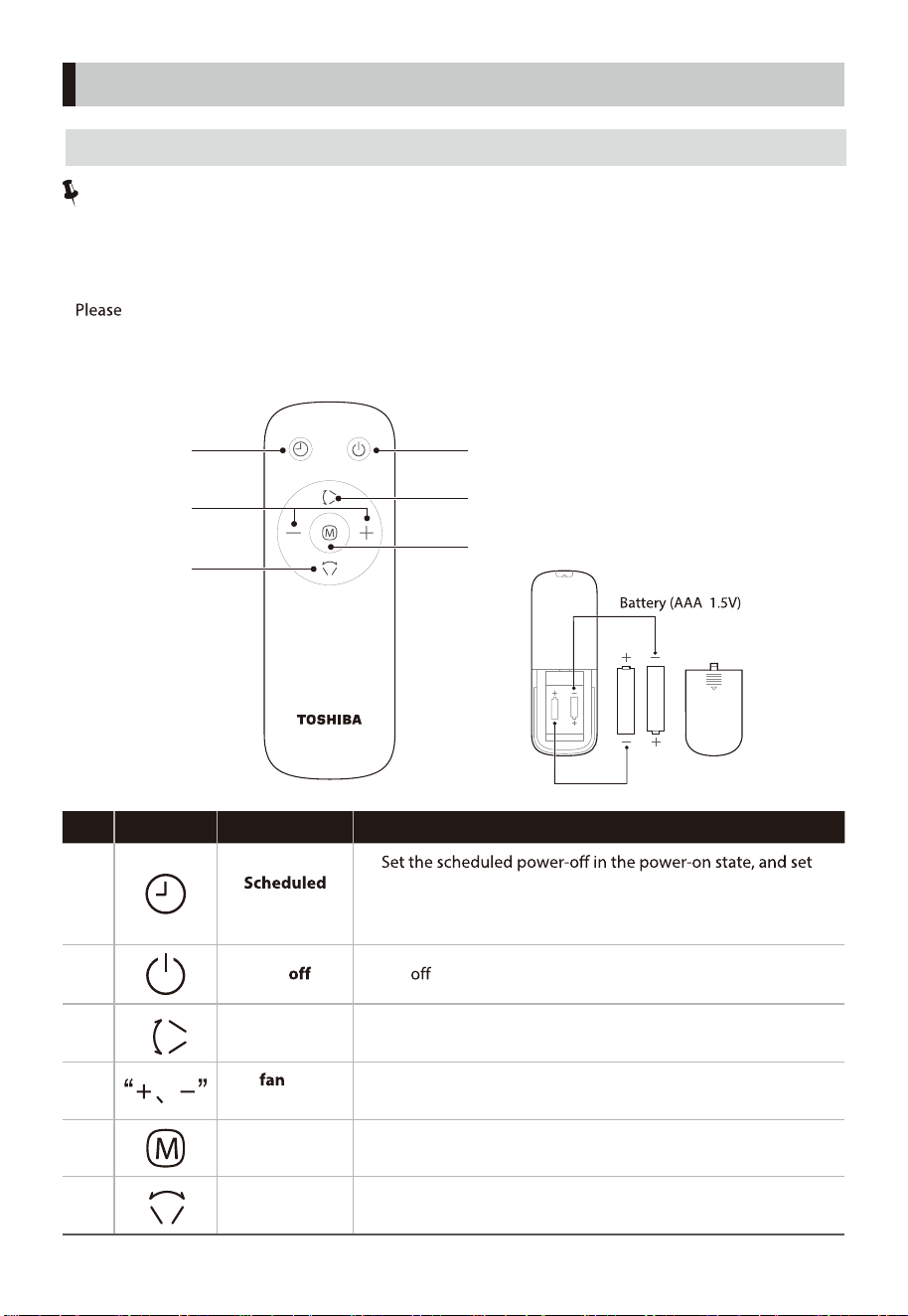
FunctionDescriptionNo Button
Note:
• The remote control can be used normally within 5m from the front of the product and the deviation
angle is within 30°.
• Remote control batteries contain many heavy metals, acids and alkali and other substances, which
threaten human health; used batteries should be classied and recycled.
•
uses AAA manganese batteries or alkaline batteries. Do not use rechargeable batteries.
• Do not put the remote control battery into re, or the battery may explode or leak. Do not mix old
and new batteries. Do not mix alkaline, standard (carbon-zinc) or rechargeable (nickel-cadmium)
batteries.
1
power o/on
•
the scheduled power-on in the standby state;
• After clicking the button, you can set the schedule time by
pressing the timer button or the “+, -” buttons.
• Set the fan speed or schedule time.
4
Set
speed
or schedule time
• On/ button.
2 On/
• Set the fan mode.
5 Mode button
6
• Start or stop horizontal oscillator.
Horizontal
oscillator
• Start or stop vertical oscillator.
3
Vertical
oscillator
Battery
Battery
10
OPERATING INSTRUCTIONS
DESCRIPTION OF REMOTE CONTROL BUTTONS
2
3
1
4
5
6
11
Precautions
• Before cleaning this product, be sure to turn o the power switch and unplug it.
•
• Please unplug the power cord when not in use for a long time. It is recommended to wrap it in the
original packaging and store it in a dry place.
• Do not rinse the machine body directly with water. Use a soft cloth containing a little neutral
detergent to gently wipe the surface of the machine, and then wipe it dry. Do not use solvents such as
gasoline.
• It is prohibited to disassemble the machine for modication. It is recommended to check and clean
the machine regularly to extend its service life.
CLEANING AND MAINTENANCE
If the fan appears abnormal during use, please check the following points before repair.
Problem Check the following
The fan blades do
not rotate.
The fan blades rotate
but make a strange
sound.
• Are the fan blades installed correctly?
• Is the power plug inserted into the socket correctly?
• Is there a fan blade contact protective cover?
• Does the spiral hub cap secure the fan blades in place?
• Are the front and rear guards installed correctly?
• Is there a fan blade contact protective cover?
• Are the fan blades and protective cover clean?
TROUBLESHOOTING
Model
F-DSB800XHK(W)
Operating voltage 24V
Rated power 25W
Standby power 0.8W
Noise ≤63dB(A)
Input
100-240V~ 50/60Hz 1.5A
Output 24V 1.5A
SPECIFICATIONS
POWER ADAPTER
(Attention : Please use the original adapter, model number GM42-240150-D)
After cleaning, must wait until it is fully dry before powering on for use or storage.




# MatterDetails

