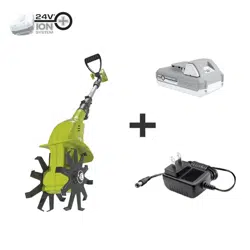

OPERATOR’S MANUAL
Model 24V-CTLR-LTE
Form No. SJ-24V-CTLR-LTE-880E-M-FTY
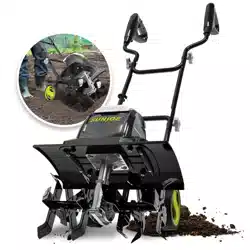
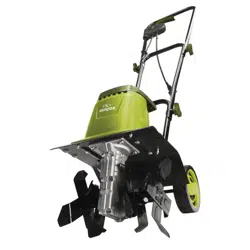
CORDLESS CLAW TILLER + CULTIVATOR
24V* IONMAX | 2.0 Ah | 3.6-INCH
1
R
TM
A Division of Snow Joe, LLC
*DISCLAIMER: Initial no-load voltage, when fully charged,
peaks at 24V; nominal voltage under typical load is 21.6V.
SAVE THESE INSTRUCTIONS
Original instructions.
© 2023 Snow Joe, LLC. All rights reserved.
IMPORTANT!
Safety Instructions
All Operators Must Read These
Instructions Before Use
Always follow these safety guidelines. Failure to do so may result
in serious bodily injury or death.
General Safety WARNINGS!
You and any other operator of this cordless claw tiller +
cultivator must read, understand, and follow these instructions
in their entirety. Failure to follow these instructions may result in
ELECTRIC SHOCK, FIRE, and/or serious PERSONAL INJURY.
Notice the personal safety alert symbol
m used in this
manual to draw your attention to a WARNING given along
with the particular operating instruction. This means that
the operation requires special ATTENTION, CAUTION, and
AWARENESS.
1. Keep work area clean and well-lit – Cluttered, dark areas
invite accidents.
2. Replacement parts – When servicing this unit, use only
identical replacement parts. Replace or repair damaged
parts immediately.
3. Keep children, bystanders, and pets away –
All spectators, including pets, should be kept a safe distance
away from the work area.
4. Know your product – Know how to start and stop the
machine. Be thoroughly familiar with the controls.
5. Use the right tool – Do not use this machine for any job
except that for which it was intended.
6. Dress properly – Do not wear loose clothing or jewelry as
such articles can become caught in moving parts.
Wear a protective covering to contain long hair.
Wearing rubber gloves and substantial non-slip footwear is
recommended when working outdoors.
7. Avoid accidental starting – Do not carry the cordless claw
tiller + cultivator with your finger on the switch.
mCAUTION! Moving parts will continue to run for several
seconds after turning off the machine.
8. Moving parts – Keep hands and feet away from moving
parts. Keep guards in place and in proper working order.
9. Do not force the tool – It will perform better with less
likelihood of personal or mechanical injury if it is used at the
rate for which it was designed.
10. Do not overreach – Keep proper footing and balance at all
times.
11. If the cordless claw tiller + cultivator strikes a foreign
object, follow these steps:
• Stop the cordless claw tiller + cultivator.
• Inspect for damage.
• Repair any damage before restarting and
operating the tool.
12. Use safety glasses – Also use safety footwear,
snug-fitting clothing, protective gloves, hearing, and head
protection.
13. Remove the battery – Remove the battery from the cordless
claw tiller + cultivator when it is not in use,
before servicing it, when changing accessories,
and when performing any other maintenance task.
14. Store idle tool indoors – When not in use, the cordless
claw tiller + cultivator should be stored indoors in a dry and
high or locked-up place out of the reach of children.
15. Maintain the cordless claw tiller + cultivator with
care – Keep the cutting edges sharp and clean for optimal
performance and to reduce the risk of injury.
Keep the handles dry, clean, and free from oil and grease.
Follow the additional recommendations described in the
maintenance section of this manual.
16. Avoid dangerous environments – Do not use the cordless
claw tiller + cultivator in rain or in damp or wet locations. Do
not operate the cordless claw tiller + cultivator in gaseous
or explosive atmospheres or use the cordless claw tiller +
cultivator near flammable or combustible liquids. Motors
in these tools normally spark, and the sparks might ignite
fumes.
17. Stay alert – Watch what you are doing. Use common sense.
Do not operate the cordless claw tiller + cultivator when you
are tired or under the influence of drugs, alcohol, or other
medication.

2
18. Check for damaged parts – Before further use of the
appliance, a guard or other part that is damaged should be
carefully checked to determine that it will operate properly
and perform its intended function. Check for alignment of
moving parts, binding of moving parts, breakage of parts,
mounting, and any other condition that may affect its
operation. A guard or other part that is damaged should be
properly repaired or replaced. Contact the Snow Joe
®
+
Sun Joe
®
customer service center at 1-866-SNOWJOE
(1-866-766-9563) for assistance.
Training
• Read, understand, and follow all instructions on the cordless
claw tiller + cultivator and in the manual before operating this
unit. Thoroughly familiarize yourself with the controls and the
proper use of the equipment. Know how to stop the unit and
disengage the controls quickly.
• Children should never be allowed access to the equipment.
Adults should never operate the equipment without carefully
reading and understanding these instructions.
• Keep the area of operation clear of all persons,
particularly children or pets.
• Exercise caution to avoid slipping or falling.
• Always plan your cultivating path to avoid discharge of
material toward people, pets, and property (e.g. windows,
cars, etc.). Thrown objects can cause serious personal injury
and property damage. Do not allow anyone in front of a
running machine.
• Keep people, pets, and property at least 25 feet from the
cordless claw tiller + cultivator while it is in operation.
Stop the cordless claw tiller + cultivator if people or pets
enter the discharge area.
• Always observe the surface conditions in order to avoid
slipping, falling, and unexpected objects.
Preparation
• Always inspect the area where the cordless claw tiller +
cultivator is to be used. Remove all objects (i.e. stones,
sticks, wires, and other foreign materials) that could be
thrown by the blades or cause the operator to trip.
• Thrown objects can cause serious injury to the eyes and
exposed body. Always wear safety glasses or eye shields
during operation and while making an adjustment or repair.
• Always operate the cordless claw tiller + cultivator wearing
adequate garments. Do not wear jewelry or other loose
clothing, which could become entangled in moving parts.
Wear non-slip footwear to ensure proper footing.
• Observe any noise-prevention regulations and laws.
• Inspect the cordless claw tiller + cultivator for worn, missing,
or damaged parts and safety labels. See maintenance
section for detailed instructions.
Operation
• Do not operate the machine while under the influence of
alcohol or drugs.
• Keep all safety devices in place and in proper working order.
Do not operate with missing or damaged components.
• Ensure the controls (start/stop) function properly before
cultivating.
• Hold onto the cordless claw tiller + cultivator with both hands
during operation. Ensure the grips are dry.
• Contact with rotating parts can amputate hands and feet.
Keep hands and feet away from all rotating parts.
• Only operate the cordless claw tiller + cultivator when there
is good visibility or light and dry conditions. Always watch
your footing and keep a firm hold on the grips. Walk; don't
run!
• Do not operate the cordless claw tiller + cultivator on
slippery surfaces. Check your footing during use.
• Exercise caution when changing direction and operating the
tool on slopes. Always keep feet and legs a safe distance away
from the machine. Look for hidden obstacles or hazards.
• Do not overload machine capacity by attempting to cultivate
too deeply. It will cause excessive resistance.
• Stop the cordless claw tiller + cultivator and remove the
battery before leaving the operating position (behind the
handles) to adjust or inspect the unit. Wait until the blades
have come to a complete stop.
• If the cordless claw tiller + cultivator should start to vibrate
abnormally, stop the machine and inspect thoroughly for
damage.
• Turn the machine OFF when moving to a new work area.
Allow the blades to completely stop rotating before
transporting the unit.
• Always use proper care and good judgment when you are
confronted with a situation that is not covered in this manual. If
you are unsure of what to do, contact your authorized
Snow Joe
®
+ Sun Joe
®
dealer or call the Snow Joe
®
+ Sun Joe
®
customer service center at 1-866-SNOWJOE (1-866-766-9563).
• Do not use in rain or wet conditions.
• Do not grasp the exposed cutting blades or cutting edges
when picking up or holding the appliance.
Stopping Work
• Always turn the cordless claw tiller + cultivator OFF and
remove the battery when stopping work or when changing
work areas. Never leave the machine running when
unattended.
• The blades will continue to rotate for a short period after
turning OFF the cordless claw tiller + cultivator. Wait until the
blades have completely stopped before lifting the machine or
conducting inspection and maintenance.
• The motor housing remains hot for a short period after the
machine is turned OFF. Allow the motor housing to cool
completely before touching or storing near combustible
material.

3
Maintenance + Storage
• Maintain or replace safety and instruction labels.
• Disengage all controls, stop the engine, and wait until the
blades come to a complete stop before cleaning, repairing,
or inspecting the cordless claw tiller + cultivator.
• Regularly check the following:
i) Blades are clear and can rotate freely –
Accumulation of debris around the blades could impair
performance or damage the motor. Inspect and clean the
area around the blades before every use.
ii) Safety devices are operating properly –
Do not tamper with or adjust safety devices.
iii) Bolts and screws are properly tightened –
Visually inspect the machine for any damage and ensure
that the cordless claw tiller + cultivator is in safe working
condition.
iv) Use only identical replacement parts –
Always replace damaged parts with original equipment
manufacturer’s (OEM) parts only. Replacement parts that
do not meet the original equipment specifications may
lead to improper performance and compromise safety.
Battery + Charger
Safety Instructions
We pay a great deal of attention to the design of every battery
pack to ensure that we supply you with batteries that are safe,
durable and have a high energy density. The battery cells have
a wide range of safety devices. Each individual cell is initially
formatted and its electrical characteristic curves are recorded.
This data is then used exclusively to be able to assemble the
best possible battery packs.
Despite all the safety precautions, caution must always be
exercised when handling batteries. The following points must
be obeyed at all times to ensure safe use. Safe use can only be
guaranteed if undamaged cells are used. Incorrect handling of
the battery pack can cause cell damage.
IMPORTANT! Analyses confirm that incorrect use and poor care
of high-performance batteries are the main factors responsible
for personal and/or product damage.
mWARNING! Use only approved replacement batteries;
other batteries may damage the power tool and cause it to
malfunction, which can lead to serious personal injury.
mWARNING! Do not use a battery pack or appliance that
is damaged or modified. Damaged or modified batteries may
exhibit unpredictable behavior resulting in fire, explosion or risk
of injury.
Do not modify or attempt to repair the appliance or the battery
pack except as indicated in the instructions for use and care.
Have your battery pack serviced by a qualified repair person
using only identical replacement parts. This will ensure that the
safety of the battery pack is maintained.
mCAUTION! To reduce the risk of injury, charge the
24V* IONMAX lithium-ion battery pack only in its designated
24V* IONMAX lithium-ion charger. Other types of chargers
present risk of fire, personal injury and damage. Do not wire a
battery pack to a power supply plug or car cigarette lighter. Such
misuse will permanently disable or damage the battery pack.
• Avoid dangerous environments – Do not charge the battery
pack in rain, snow or in damp or wet locations. Do not use
the battery pack or charger in the presence of explosive
atmospheres (gaseous fumes, dust or flammable materials)
because sparks may be generated when inserting or
removing the battery pack, which could lead to a fire.
• Charge in a well-ventilated area – Do not block the charger
vents. Keep them clear to allow for proper ventilation. Do not
allow smoking or open flames near a charging battery pack.
Vented gases may explode.
NOTE: The safe temperature range for the battery is
41°F (5°C) to 105°F (40.5°C). Do not charge the battery
outside in freezing weather; charge it at room temperature.
• Maintain charger cord – When unplugging the charger,
pull the plug, not the cord, from the receptacle to reduce the
risk of damage to the electrical plug and cord. Never carry the
charger by its cord or yank it by the cord to disconnect it from
the receptacle. Keep the cord away from heat,
oil and sharp edges. Make sure the cord will not be stepped
on, tripped over or subjected to damage or stress when the
charger is in use. Do not use the charger with a damaged
cord or plug. Replace a damaged charger immediately.
• Do not use an extension cord unless it is absolutely
necessary – Using the wrong, damaged or improperly wired
extension cord poses a risk of fire and electric shock. If
an extension cord must be used, plug the charger into a
properly wired 16 gauge or larger extension cord with the
female plug matching the male plug on the charger. Make
sure that the extension cord is in good electrical condition.
• Use only recommended attachments – Use of an
attachment not recommended or sold by the battery charger
or battery pack manufacturer may result in risk of fire,
electric shock or personal injury.
• Unplug charger when not in use – Make sure to remove
battery packs from unplugged chargers.
mWARNING!
To reduce the risk of electric shock,
always unplug the charger before performing any cleaning or
maintenance. Do not allow water to flow into the charger. Use a
Ground Fault Circuit Interrupter (GFCI) to reduce shock hazards.
• Do not burn or incinerate battery packs –
Battery packs may explode, causing personal injury or
damage. Toxic fumes and materials are created when battery
packs are burned.

4
• Do not crush, drop or damage battery packs – Do not use
the battery pack or charger if they have sustained a sharp blow,
been dropped, run over or have been damaged in any way (i.e.
pierced with a nail, hit with a hammer, stepped on, etc.).
• Do not disassemble – Incorrect reassembly may pose
a serious risk of electric shock, fire or exposure to toxic
battery chemicals. If the battery or charger are damaged,
contact an authorized Snow Joe
®
+ Sun Joe
®
dealer or
call the Snow Joe
®
+ Sun Joe
®
customer service center at
1-866-SNOWJOE (1-866-766-9563) for assistance.
• Battery chemicals cause serious burns – Never let a
damaged battery pack contact the skin, eyes or mouth.
If a damaged battery pack leaks battery chemicals,
use rubber or neoprene gloves to safely dispose of it. If skin
is exposed to battery fluids, wash the affected area with
soap and water and rinse with vinegar. If eyes are exposed to
battery chemicals, immediately flush with water for
20 minutes and seek medical attention. Remove and dispose
of contaminated clothing.
• Do not short circuit – A battery pack will short circuit if
a metal object makes a connection between the positive
and negative contacts on the battery pack. Do not place a
battery pack near anything that may cause a short circuit,
such as paperclips, coins, keys, screws, nails and other
metallic objects. A short-circuited battery pack poses a risk
of fire and severe personal injury.
• Store your battery pack and charger in a cool,
dry place – Do not store the battery pack or charger where
temperatures may exceed 105ºF (40.5ºC), such as in direct
sunlight or inside a vehicle or metal building during the
summer.
Information about The Battery
1. The battery pack supplied with your cordless power tool is
only partially charged. The battery pack has to be charged
completely before you use the tool for the first time.
2. For optimum battery performance, avoid low discharge
cycles by charging the battery pack frequently.
3. Store the battery pack in a cool place, ideally at
59°F (15°C) and charged to at least 40%.
4. Lithium-ion batteries are subject to a natural aging process.
The battery pack must be replaced at the latest when
its capacity falls to just 80% of its capacity when new.
Weakened cells in an aged battery pack are no longer
capable of meeting the high power requirements needed for
the proper operation of your cordless claw tiller + cultivator,
and therefore pose a safety risk.
5. Do not throw battery packs into an open fire as this poses a
risk of explosion.
6. Do not ignite the battery pack or expose it to fire.
7. Do not exhaustively discharge batteries. Exhaustive
discharge will damage the battery cells. The most common
cause of exhaustive discharge is lengthy storage or non-
use of partially discharged batteries. Stop working as soon
as the performance of the battery falls noticeably or the
electronic protection system triggers. Place the battery pack
in storage only after it has been fully charged.
8. Protect batteries and the tool from overloads. Overloads
will quickly result in overheating and cell damage inside
the battery housing even if this overheating is not apparent
externally.
9. Avoid damage and shocks. Immediately replace batteries that
have been dropped from a height of more than 3 feet
(1 meter) or those that have been exposed to violent shocks,
even if the housing of the battery pack appears to be
undamaged. The battery cells inside the battery may have
suffered serious damage. In such instances, please read the
waste disposal information for proper battery disposal.
10. If the battery pack suffers overloading and overheating, the
integrated protective cutoff will switch off the equipment for
safety reasons.
IMPORTANT! Do not press the ON/OFF trigger any more if
the protective cut-off has been activated. This may damage
the battery pack.
11. Use only original battery packs. The use of other batteries
poses a fire risk and may result in injuries or an explosion.
Information about The Charger +
The Charging process
1. Please check the data marked on the rating plate of the
battery charger. Be sure to connect the battery charger to
a power supply with the voltage marked on the rating plate.
Never connect it to a different mains voltage.
2. Protect the battery charger and its cord from damage. Keep
the charger and its cord away from heat, oil and sharp
edges. Have damaged cords repaired without delay by a
qualified technician at an authorized Snow Joe
®
+ Sun Joe
®
dealer or call the Snow Joe
®
+ Sun Joe
®
customer service
center at 1-866-SNOWJOE (1-866-766-9563).
3. Electrical plugs must match the outlet. Never modify the plug
in any way. Do not use any adapter plugs with grounded
appliances. Unmodified plugs and matching outlets will
reduce the risk of electric shock.
4. Keep the battery charger, battery pack(s) and the cordless
tool out of the reach of children.
5. Do not use the supplied battery charger to charge other
cordless tools.
6. During periods of heavy use, the battery pack will become
warm. Allow the battery pack to cool to room temperature
before inserting it into the charger to recharge.
7. Do not overcharge batteries. Do not exceed the maximum
charging times. These charging times only apply to
discharged batteries. Frequent insertion of a charged or
partially charged battery pack will result in overcharging and
cell damage. Do not leave batteries in the charger for days
on end.
8. Never use or charge batteries if you suspect that it has been
more than 12 months since the last time they were charged.
There is a high probability that the battery pack has already
suffered dangerous damage (exhaustive discharge).

5
9. Charging batteries at a temperature below 41°F (5°C) will
cause chemical damage to the cells and may cause a fire.
10. Do not use batteries that have been exposed to heat during
the charging process, as the battery cells may have suffered
dangerous damage.
11. Do not use batteries that have suffered curvature or
deformation during the charging process or those that exhibit
other atypical symptoms (gassing, hissing, cracking, etc.).
12. Never fully discharge the battery pack (maximum
recommended depth of discharge is 80%). A complete
discharge of the battery pack will lead to premature aging of
the battery cells.
Protection From Environmental Influences
1. Wear suitable work clothes. Wear safety goggles.
2. Protect your cordless tool and the battery charger from
moisture and rain. Moisture and rain can cause dangerous
cell damage.
3. Do not use the cordless tool or the battery charger near
vapors and flammable liquids.
4. Use the battery charger and cordless tools only in dry
conditions and at an ambient temperature of 41°F – 105°F
(5°C – 40.5°C).
5. Do not keep the battery charger in places where the
temperature is liable to reach over 104°F (40°C).
In particular, do not leave the battery charger in a car that is
parked in the sunshine.
6. Protect batteries from overheating. Overloads, overcharging
and exposure to direct sunlight will result in overheating and
cell damage. Never charge or work with batteries that have
been overheated – replace them immediately, if possible.
7. Store the charger and your cordless tool only in dry locations
with an ambient temperature of 40°F – 105°F
(4.5°C – 40.5°C). Store your lithium-ion battery pack in a
cool, dry place at a temperature of 50°F – 68°F
(10°C – 20°C). Protect the battery pack, charger and
cordless tool from humidity and direct sunlight. Only place
fully charged batteries in storage (charged to at least 40%).
8. Prevent the lithium-ion battery pack from freezing.
Battery packs that were stored below 32°F (0°C) for more
than 60 minutes must be discarded.
9. When handling batteries, be wary of electrostatic charge.
Electrostatic discharges can damage the electronic
protection system and the battery cells. Avoid electrostatic
charging and never touch the battery poles.
6
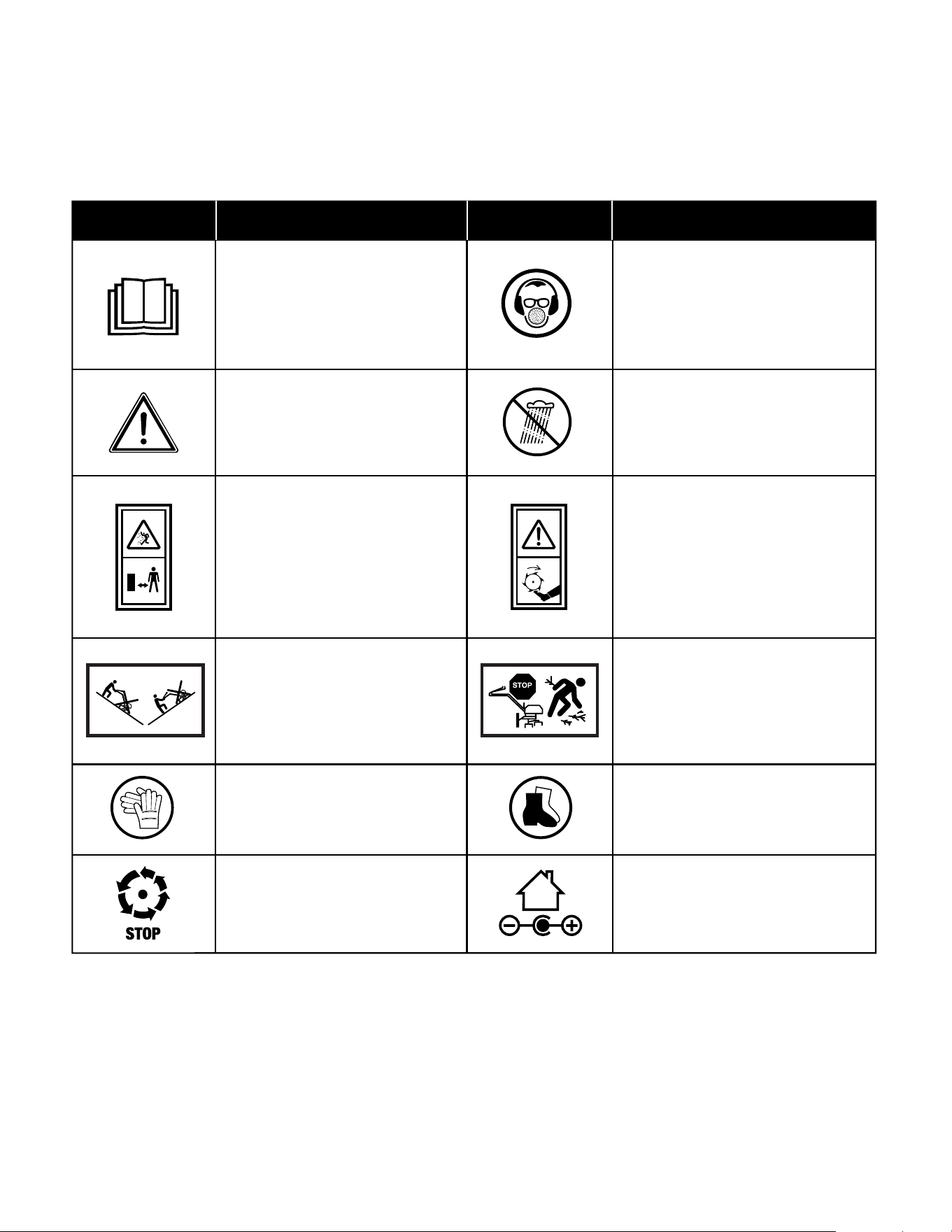
Safety Symbols
The following table depicts and describes safety symbols that may appear on this product. Read, understand, and follow all
instructions on the machine before attempting to assemble and operate.
READ THE OPERATOR'S
MANUAL(S) – Read, understand,
and follow all instructions in the
user manual(s) before attempting to
assemble and operate.
SAFETY ALERT – Indicates
a precaution, a warning,
or danger.
WARNING! Do not expose the unit
to rain or wet conditions.
WARNING! Rotating parts may cause
serious injury. Make sure the blades
come to a complete stop before
transporting the machine or before
inspecting, cleaning,
or conducting any other
maintenance.
Wear eye protection, breathing
protection, and ear protection
(i.e. safety goggles, dust masks,
and ear defenders).
Inspect the work area prior to
use and remove all objects that could
be thrown by the appliance.
If a hidden object is discovered while
working, stop the engine and remove
the object.
Work across slopes; never work up
and down such surfaces.
Symbols SymbolsDescriptions Descriptions
Beware of foreign objects
that could be thrown from the
appliance. Keep bystanders a
safe distance away from the work
area.
The rotating part will continuously
run for several seconds after you
turn off the machine.
Wear safety footwear at all times to
provide protection against objects
that may accidentally fall on feet.
Wear safety gloves during use to
protect hands.
Indoor use only. Only use battery
charger indoors.
7
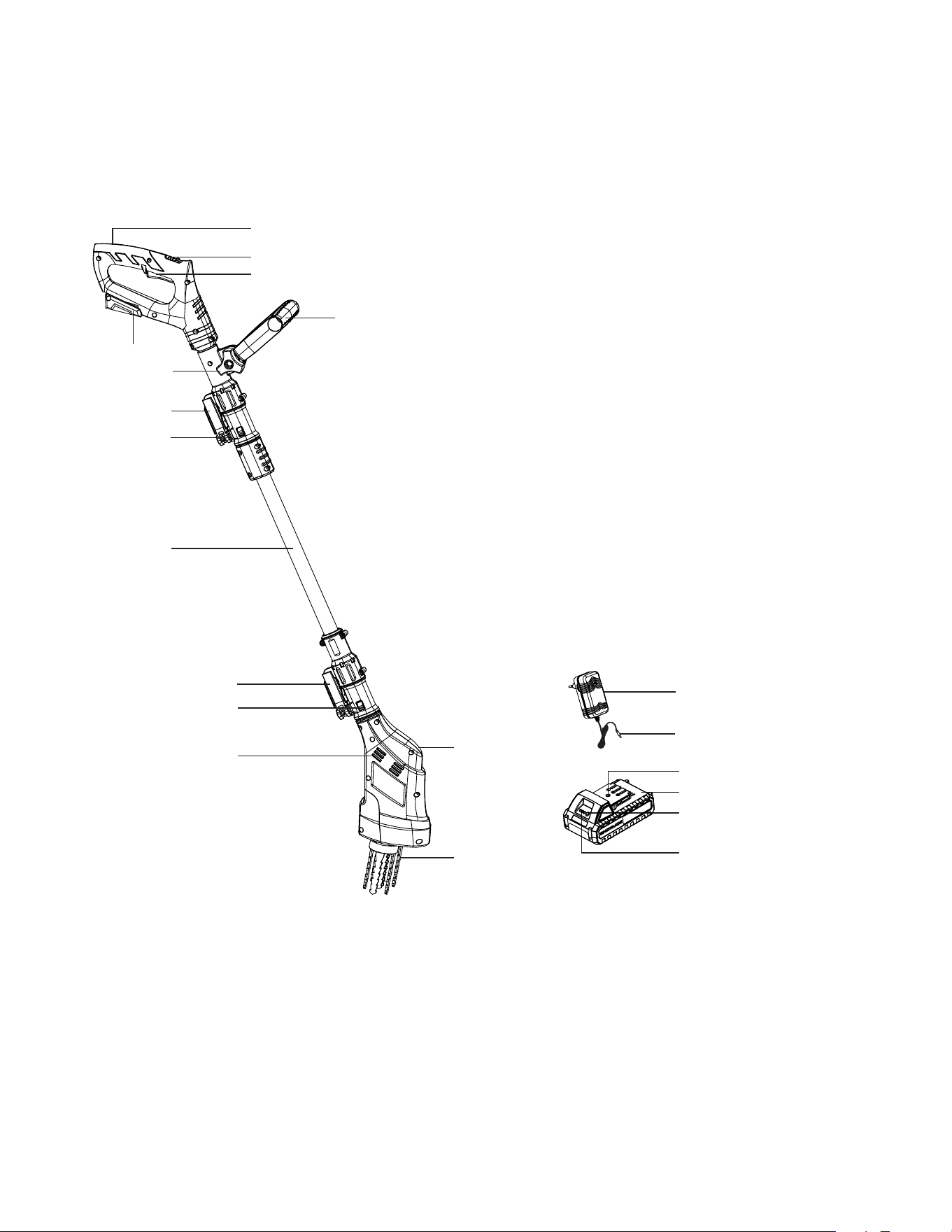
Know Your Cordless Claw Tiller + Cultivator
Read the owner’s manual and safety instructions carefully before operating the cordless claw tiller + cultivator. Compare the
illustration below to the cordless claw tiller + cultivator in order to familiarize yourself with the location of the various controls and
adjustments. Save this manual for future reference.
Technical Data
Motor ............................................................................................. 150 W
Battery Voltage Max* ............................................................. 24V D.C.
Battery Capacity ........................................................................ 2.0 Ah
Charger Input ...............................................................100 – 240V AC
50 – 60 Hz, 50 W
Charger Output ................................................. 25.2V DC | 1400 mA
Charging Time Max ............................................................ 1 hr 20 min
Cultivating Width Max ................................................ 3.6 in. (9.2 cm)
Cultivating Depth Max ............................................. 2.95 in. (7.5 cm)
Blade Material ............................................... 4-tine steel blades (x2)
No Load Speed ........................................................................ 550 rpm
Pole Length .............................................................. 16.5 in. – 36.2 in.
.......................................................................................(42 cm – 92 cm)
Net Weight .................................................................. 6.2 lbs (2.8 kg)
*DISCLAIMER: Initial no-load voltage, when fully charged, peaks at 24 volts; nominal voltage under typical load is 21.6 volts.
1. Soft grip
2. Safety lock switch
3. ON/OFF trigger
4. Battery compartment
5. Auxiliary handle
6. Handle knob
7. Claw tiller + cultivator handle
assembly lock
8. Releasing tabs (2)
9. Extra pole
10. Tiller + cultivator head lock
11. Releasing tabs (2)
12. Air vents
13. Claw tiller + cultivator head
14. 4-tine steel blade (2)
15. 24V* IONMAX lithium-ion charger
(24VCHRG-AC)
16. Charger plug
17. Charger socket
18. 24V* IONMAX lithium-ion battery
(24VBAT-LTE) featuring exclusive
EcoSharp
®
technology
19. Push button for battery indicator
20. Battery indicator
1
2
5
7
8
9
11
13
14
16
10
6
4
3
18
17
20
19
12
15
8
Unpacking
Carton Contents
• Claw tiller + cultivator head
• Claw tiller + cultivator pole assembly
• 24V* IONMAX lithium-ion battery
• 24V* IONMAX lithium-ion battery charger
• Manual with registration card
1. Carefully remove the cordless claw tiller + cultivator and
check to see that all of the above items are supplied.
2. Inspect the product carefully to make sure no breakage or
damage occurred during shipping. If you find damaged or
missing parts, DO NOT return the unit to the store.
Please call the Snow Joe
®
+ Sun Joe
®
customer service
center at 1-866-SNOWJOE (1-866-766-9563).
NOTE: Do not discard the shipping carton and packaging
material until you are ready to use the cordless claw tiller
+ cultivator. The packaging is made of recyclable materials.
Properly dispose of these materials in accordance with local
regulations or save the packaging for long-term product
storage.
IMPORTANT! The equipment and packaging material are not toys.
Do not let children play with plastic bags, foils, or small parts.
These items can be swallowed and pose a suffocation risk!
Battery Pack Operation
The equipment is powered by a lithium-ion battery.
The battery pack is completely sealed and maintenance free.
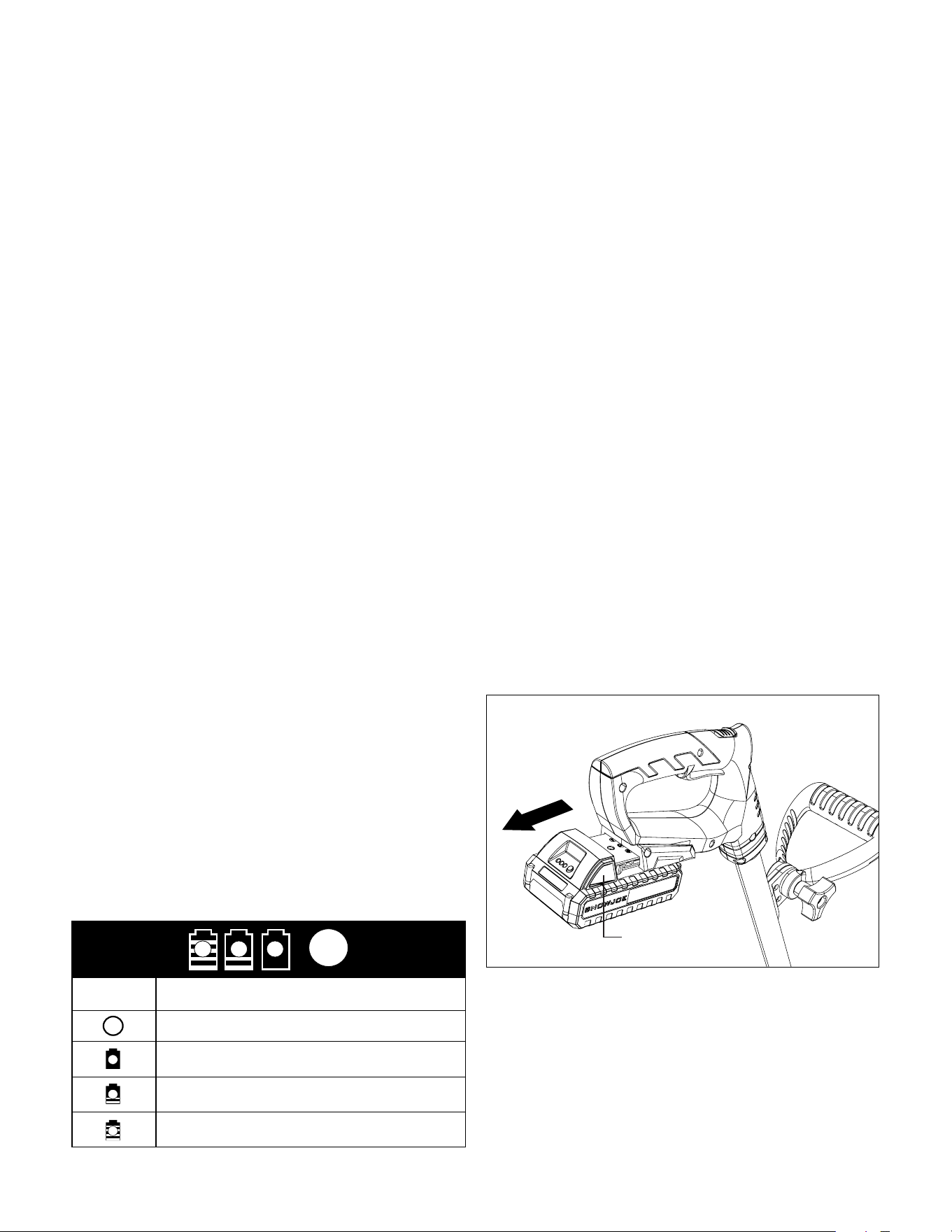
Battery Charge Level Indicator
The battery pack is equipped with a push button for checking
the charge level. Simply press the push button to read off the
battery charge level from the LEDs of the battery indicator:
• All 3 level monitoring LEDs are lit: Battery charge level
is high.
• 2 level monitoring LEDs are lit: Battery charge level is
decreasing. Stop work as soon as possible.
• 1 level monitoring LED is lit: Battery is flat. Stop work
IMMEDIATELY and charge the battery. Otherwise the
battery’s service life will be greatly shortened.
Charge level button
The battery is at 30% capacity
and requires charging
The battery is at 60% capacity
and requires charging soon
The battery is at full capacity
Light IndicatorsLights
NOTE: If the charge level button does not appear to be working,
insert the charger and charge as needed.
NOTE: Immediately after using the battery pack, the charge level
button may display a lower charge than it will if checked a few
minutes later. The battery cells “recover” some of their charge
after resting.
Charger Operation
m
WARNING! Charge only 24V* IONMAX lithium-ion battery
packs with its compatible 24V* IONMAX lithium-ion charger.
Other types of batteries may cause personal injury and
damage. To reduce the risk of electric shock, do not allow
water to flow into the charger's AC/DC plug.
When to Charge the 24V* IONMAX
BAT-LTE Lithium-iON Battery
NOTE: The 24V* IONMAX BAT-LTE lithium-ion battery packs
do not develop a "memory" when charged after only a partial
discharge. Therefore, it is not necessary to run down the battery
pack before inserting the charger plug.
• Use the battery indicator lights to determine when to charge
your 24V* IONMAX BAT-LTE lithium-ion battery pack.
• You can "top-off" your battery pack's charge before starting
a big job or after a long day of use.
Charging the Battery
1. Push the push lock buttons on the battery to pull the battery
pack out from the battery compartment (Fig. 1).
2. Check that the main voltage is the same as that marked
on the rating plate of the battery charger. Then, plug the
charger adapter into an appropriate AC power outlet.
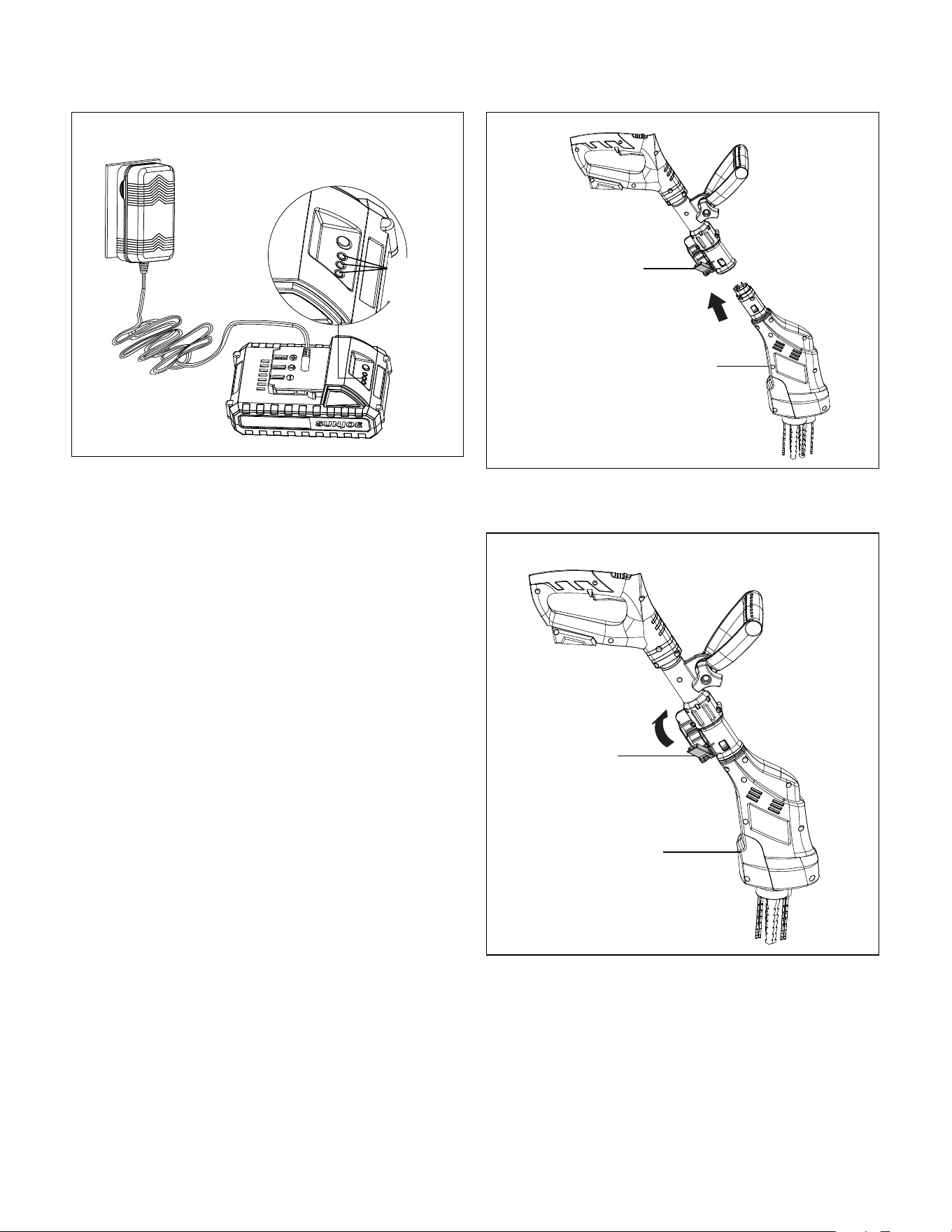
Connect the charger plug into the charge socket of the
battery to start charging (Fig. 2).
Fig. 1
Push lock button
9
3. The battery will take approximately 1 hr 20 min to charge.
The battery indicator LEDs will twinkle and illuminate one
by one during the charging process. Unplug the charger
immediately when the 3 LEDs are all illuminated.
mCAUTION! FIRE HAZARD. When disconnecting the
charger from the battery, be sure to unplug the charger from the
outlet first, then disconnect the charger from the battery
Assembly
m
WARNING! Do not insert the battery until assembly is
complete. Failure to comply could result in accidental starting
and serious personal injury.
mWARNING!
To prevent serious personal injury, make sure
the battery is removed, and the blades have come to a complete
stop before inspecting, cleaning, or servicing the unit.
mWARNING! The product must be fully assembled before
operation. Do not use a product that is only partially assembled
or assembled with damaged parts.
Follow the assembly instructions step-by-step and use the
pictures provided as a visual guide to easily assemble the
product.
Assembling + Fitting the Head
mWARNING! Make sure nuts, screws and locks are
properly tightened before using the cordless claw tiller +
cultivator.
1. With the claw tiller + cultivator head lock unlocked, insert the
tiller + cultivator head into the end of the handle assembly
until it clicks in place
(Fig. 3).
Fig. 2
Battery
indicators
2. Flip up the claw tiller + cultivator head lock to lock the claw
tiller + cultivator head in place (Fig. 4).
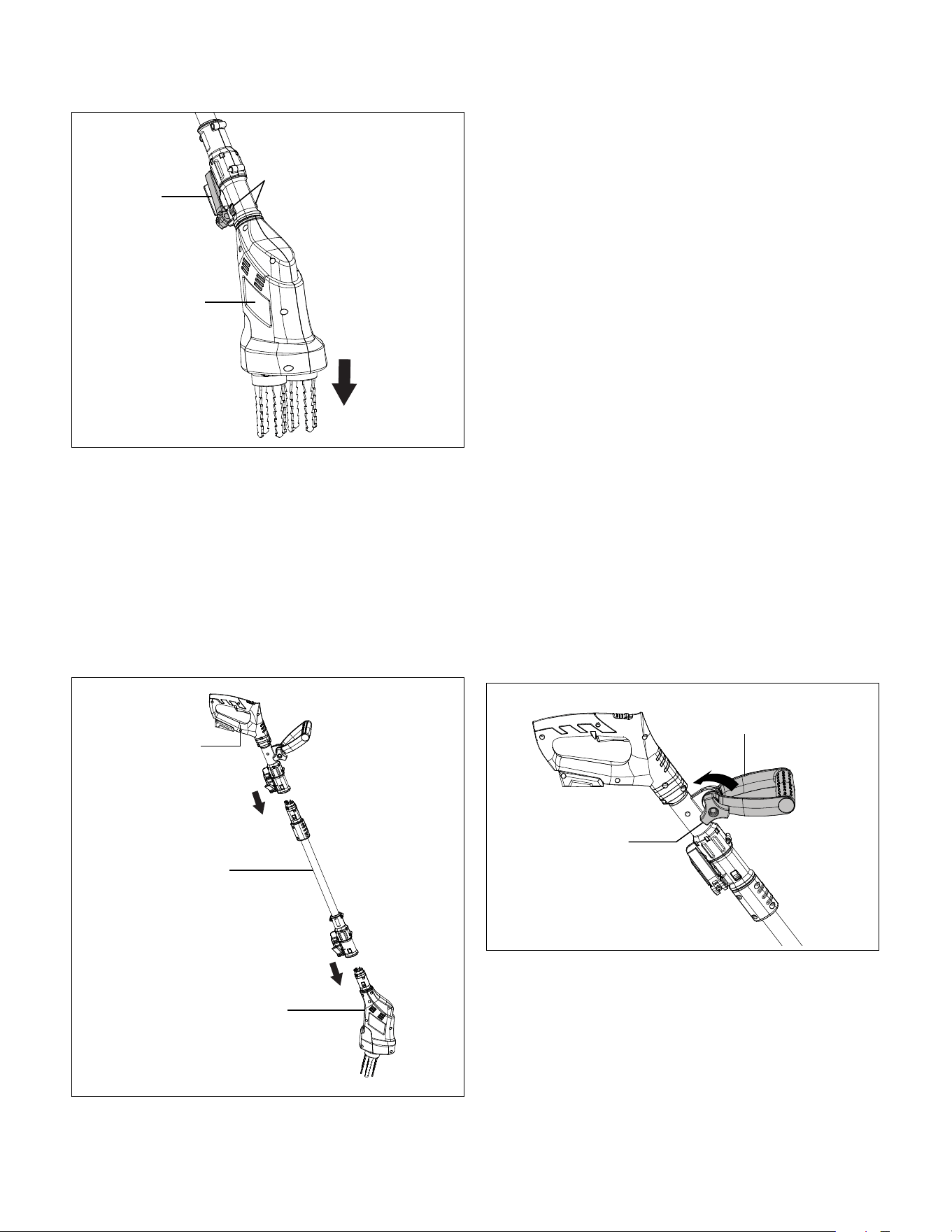
3. To disassemble the claw tiller + cultivator head from the pole
assembly, unlock the claw tiller + cultivator head lock, then
press in the releasing tabs on each side, and at the same
time pull the claw tiller + cultivator head out from the handle
assembly (Fig. 5).
Fig. 3
Tiller +
cultivator
head lock
Claw tiller +
cultivator head
Fig. 4
Tiller +
cultivator
head lock
Claw tiller +
cultivator head
10
Assembling + Fitting The Extra Pole
This product is equipped with an extra pole that can be removed.
To assemble the pole, follow the instructions below (Fig. 6).
1. With the claw tiller + cultivator Pole assembly lock unlocked,
insert the claw tiller + cultivator head into the end of the pole
assembly until it clicks in place.
2. Flip up the claw tiller + cultivator head lock to lock the claw
tiller + cultivator head in place.
3. Same operation to assemble handle.
Fig. 5
Tiller +
cultivator
head lock
PULL
Claw tiller +
cultivator head
Releasing tabs
Fig. 6
Claw tiller
+ cultivator
handle
Claw tiller +
cultivator head
Extra pole
Operation
Intended Use
The 24V-CTLR-LTE cordless claw tiller + cultivator is designed
for small gardens and flower beds: this cordless cordless claw
tiller + cultivator effectively loosens and turns over new soil. It
may also be used to mix coarse soil with fertilizer, peat, and
compost.
This product may not be used to till extremely dry or wet soil.
The use of this product in rain or wet conditions is prohibited.
For safety reasons, it is essential to read the entire instruction
manual before first use and to observe all the instructions
contained within this manual.
This product is intended for private domestic use only. It is not
intended for any commercial trade use. It must not be used for
any purposes other than those described.
Auxiliary Handle Adjustment
mWARNING! Always switch the product off and remove the
battery before making any adjustments.
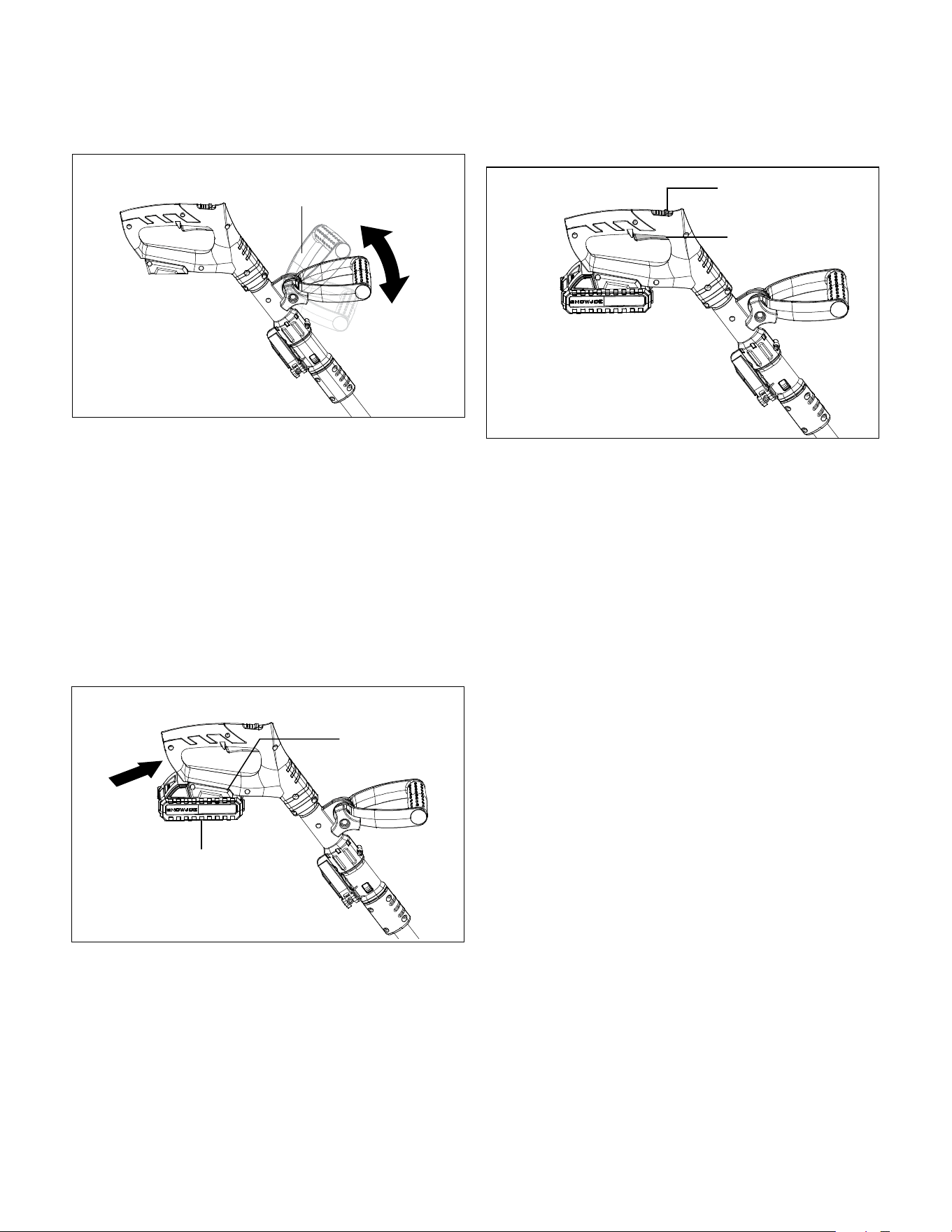
NOTE: For maximum comfort and control, adjust the auxiliary
handle to fit your height. Shorter users—adjust the auxiliary handle
to a lower position (away from your body). Taller users—djust the
auxiliary handle to an upper position (towards to your body). Make
sure your forearm is straight when using the machine.
1. Loosen the auxiliary handle by turning the handle knob
counterclockwise (Fig. 7).
Fig. 7
Auxiliary handle
Handle knob
11
2. Adjust the auxiliary handle to a comfortable working position
(Fig. 8).
3. Turn the handle knob back to lock the auxiliary handle in
position.
Starting + Stopping
mWARNING! Rotating blades may cause serious injury. The
blades will continue to turn for a few seconds after the tool has
been switched OFF. Do not touch the rotating blades. Contact
with hot components (i.e. motor housing, gear box, etc.) on the
machine may cause burns. Allow the machine to cool before
handling.
1. Slide the battery in the battery compartment until it clicks
and locks into position (Fig. 9).
Fig. 8
Auxiliary handle
Fig. 9
Battery
compartment
Battery
2. To turn the tool ON, press and hold the safety lock switch
while squeezing the ON/OFF trigger. Once the tool is
running, release the safety lock switch (Fig. 10).
3. To switch OFF, release the ON/OFF trigger (Fig. 10).
Operating Tips
• Before each use, check the product, the battery, and any
other accessories for damage. Do not use the product if it is
damaged or shows wear.
• Double check that the accessories and attachments are
properly fitted.
• Always hold the product by its handles. Keep the handles dry
to ensure a secure grip.
• Ensure that the air vents are always unobstructed and clear.
Clean them if necessary with a soft brush. Blocked air vents
may lead to overheating and damage the product.
• Switch the product off immediately if you are disturbed while
working by other people entering the working area. Always
let the product come to a complete stop before averting your
attention.
• Do not overwork yourself. Take regular breaks to ensure you
can concentrate on the task at hand and have full control
over the product.
mWARNING! In some municipalities, regulations define
restrictions for use of such products, including the times and
days when operation is permissible. Ask your community for
detailed information and observe these regulations in order
to preserve a peaceful neighborhood and avoid committing
administrative offenses.
Tilling
• Make sure that the work area is clear of stones, sticks, wire,
or other objects that could damage the product or its motor.
• Do not till very wet soil because wet soil tends to stick to the
working tool, preventing proper blade rotation; it could also
cause you to slip and fall.
• Always maintain a firm grip on the product. For better
guidance, apply light pressure to the handles.
Fig. 10
Safety lock switch
ON/OFF trigger
12
mWARNING! Do not place hands, feet, or any other part
of the body or clothing near the rotating blades or any other
moving part. The blades begin to rotate forward once the
ON/OFF trigger is depressed. The blades continue to rotate until
the ON/OFF trigger is released. Failure to avoid contact with the
rotating blades could cause serious personal injury.
• Do not try to till too deeply or force the product into soil that
is extremely hard or resistant.
• Walk the product through the soil at a normal pace and in as
straight a line as possible.
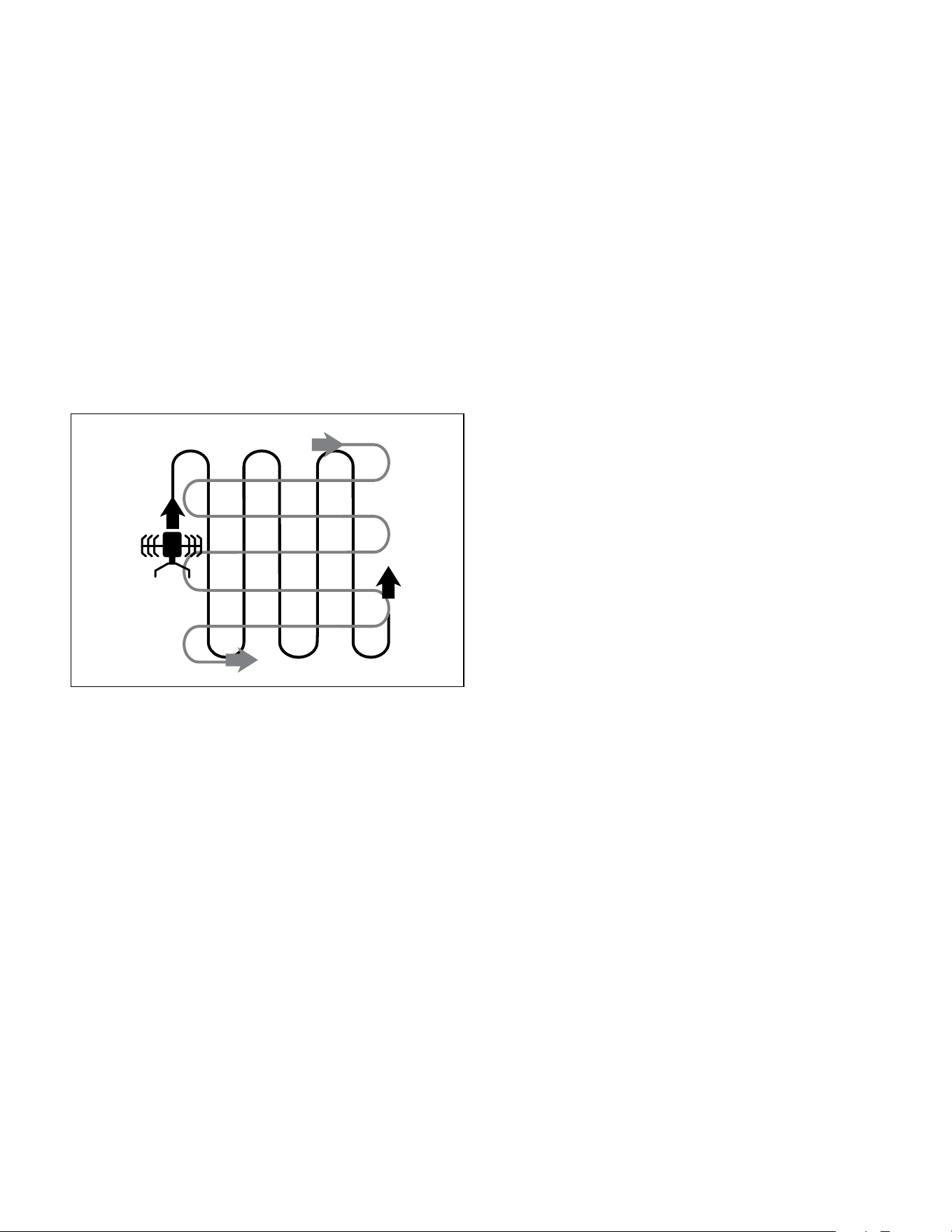
• Till in slightly overlapping rows. To till most effectively, follow
the pattern indicated in Fig. 11. Start by moving the claw
tiller + cultivator up and down in vertical lines, then work
horizontally from left to right. This will keep the rows even and
ensure that all the ground is tilled without missing any spots.
• Pay special attention when changing direction.
Apply light pressure to the handle in order to lift the blades
and facilitate the turn. Turn the product around using the
wheels as a guide. Gradually release pressure on the handle
and move the blades back to the ground.
mWARNING! Stop the motor if the product strikes a foreign
object. Switch the product off, remove the battery, and let it cool
completely. Inspect the product thoroughly for damage and have
any damage repaired before restarting.
Extensive vibration of the product during operation is an
indication of damage. Immediately stop the motor and promptly
inspect and repair the tool.
After Use
• Switch the product off, remove the battery, and let it cool
completely.
• Check, clean, and store the product as described in
Care + Maintenance.
Fig. 11
Care + Maintenance
The Golden Rules for Care
mWARNING! Always switch the product off, remove the
battery, and let the product cool completely before inspecting,
cleaning, or performing any other maintenance task.
• Keep the product clean. Remove any debris after each use
and before storage.
• Regular and proper cleaning will help ensure safe use and
prolong the life of the product.
• Inspect the product before each use for worn and damaged
parts. If you find broken and/or worn parts, do not use the tool.
mWARNING! Only perform the repairs and maintenance
work described in this manual. Any other work must be
performed by a qualified technician.
General Cleaning
• Clean the product with a dry cloth. Use a brush for areas
that are hard to reach.
• Be sure to clean the air vents after every use with a cloth
and brush.
• Remove stubborn dirt with high pressure air (max. 3 bar).
NOTE: Do not use chemical, alkaline, abrasive, or other
aggressive detergents or disinfectants to clean this product as
such substances might damage the tool's surfaces.
• Check for worn or damaged parts. Replace worn parts as
necessary or contact the Snow Joe
®
+ Sun Joe
®
customer
service center at 1-866-SNOWJOE (1-866-766-9563)
for repair before using the product again.
Cleaning the Underbody + Working Tool
mWARNING! Wear safety gloves when working on or near
the working tool. Use appropriate tools (e.g a wooden stick)
when necessary; never use your bare hands!
• Keep the underbody and blades clean and free of debris.
Use a brush or another implement to remove soil from the
working tool.
• All nuts and bolts must be checked periodically for tightness
before operation. After prolonged use, especially in sandy
soil conditions, the working tool will become worn and lose
some of its original shape. Tilling efficiency will be reduced
and the working tool should be replaced.
• Have worn or damaged working parts replaced with new
ones of the same type by a qualified technician.
• To prolong the life span of the working tool and the product,
lubricate the blades after each use.

13
mWARNING! Unexpected blade movement may cause
personal injury. Before servicing, repairing, or inspecting the
unit, turn the motor OFF and remove the battery. Wait for the
blades to completely stop rotating before conducting inspection,
cleaning, or maintenance.
Before and after each use, check the product and accessories
(or attachments) for wear and damage. When necessary,
only use identical replacement parts that are approved by the
manufacturer.
IMPORTANT!
• Wear protective gloves when cleaning or maintaining the
machine.
• Do not use cleaning fluids or solvents or spray the machine
down with water (especially water under pressure) when
cleaning the machine.
NOTE: After each use, follow these steps to properly clean
the unit:
1. Remove soil, dirt, and foliage stuck in the blades, drive shaft,
tool surface, and vents with a brush or dry cloth.
2. Spray or rub biodegradable oil onto the blades.
3. Clean soiled grips with a damp cloth.
Always inspect the machine for damaged and worn parts after
each use. Check that safety features (i.e. labels, guards, etc.)
are in place. Check that nuts, bolts, and screws are tight.
Storage
• Examine the cordless claw tiller + cultivator thoroughly for
worn, loose, or damaged parts. Should you need to repair or
replace a part, contact an authorized Snow Joe
®
+ Sun Joe
®
dealer or call the Snow Joe
®
+ Sun Joe
®
customer service
center at 1-866-SNOWJOE (1-866-766-9563)
for assistance.
• Remove the battery from the cordless claw tiller + cultivator
before storing.
• Clean the product as described in Care + Maintenance.
• Store the product and its accessories in a dark, dry,
frost-free, and well-ventilated place.
• Always store the product in a place that is inaccessible to
children.
• The ideal storage temperature is between 50ºF (10°C)
and 86ºF (30°C).
• We recommend using the original package for storage or
covering the product with a suitable cloth or enclosure to
protect it against dust.
Battery + Charger Off-Season Storage
1. Do not expose your battery pack or charger to water, rain or
allow them to get wet. This could permanently damage the
charger and the battery pack. Do not use oil or solvents to
clean or lubricate your battery pack as the plastic casing
can become brittle and crack, causing a serious risk of
injury.
2. Store the battery pack and charger at room temperature
away from moisture. Do not store in damp locations where
corrosion of terminals may occur. As with other battery
pack types, permanent capacity loss can result if the pack
is stored for long periods of time at high temperatures (over
120ºF/49ºC).
3. 24V* IONMAX BAT-LTE lithium-ion battery packs maintain
their charge during storage longer than other battery pack
types. As a general practice, it is best to unplug the battery
charger and remove the battery pack when they are not
in use. Recharge the battery pack every 6 months to 50%
capacity during off-season storage to maintain optimal
battery performance.
Transportation
• Switch the product off.
• Always carry the product by its handle.
• If you are transporting the cordless claw tiller + cultivator in
a vehicle, brace it properly to protect it from heavy impact or
strong vibrations.
• Secure the product to prevent it from falling over or slipping.
Recycling + Disposal
The product comes in a package that protects it against damage
during shipping. Keep the package until you are sure that
all parts have been delivered and the product is functioning
properly. Recycle the package afterwards or keep it for long-
term storage.
WEEE symbol. Waste electrical products should not
be disposed of with household waste. Please recycle
where facilities exist. Check with your local authority
or local store for recycling regulations.
Battery Caution + Disposal
Always dispose of your battery pack according to federal, state,
and local regulations. Contact a recycling agency in your area
for recycling locations.
mCAUTION! Even discharged battery packs contain
some energy. Before disposing, use electrical tape to cover the
terminals to prevent the battery pack from shorting,
which could cause a fire or explosion.

14
mWARNING! To reduce the risk of injury or explosion,
never burn or incinerate a battery pack even if it is damaged,
dead or completely discharged. When burned, toxic fumes and
materials are emitted into the surrounding atmosphere.
1. Batteries vary according to device. Consult your manual for
specific information.
2. Install only new batteries of the same type in your product
(where applicable).
3. Failure to insert batteries in the correct polarity, as indicated
in the battery compartment or manual, may shorten the life of
the batteries or cause batteries to leak.
4. Do not mix old and new batteries.
5. Do not mix Alkaline, Standard (Carbon-Zinc) or Rechargeable
(Nickel Cadmium, Nickel Metal Hydride,
or Lithium-Ion) batteries.
6. Do not dispose of batteries in fire.
7. Batteries should be recycled or disposed of as per state and
local guidelines.
Service + Support
If your Sun Joe
®
24V-CTLR-LTE cordless claw tiller + cultivator
requires service or maintenance, please call the Snow Joe
®
+
Sun Joe
®
customer service center at 1-866-SNOWJOE
(1-866-766-9563).
Model + Serial Numbers
When contacting the company, reordering parts, or arranging
service from an authorized dealer, you will need to provide the
model and serial numbers, which can be found on the decal
located on the housing of the unit. Copy these numbers into the
space provided below.
Record the following numbers from the housing or handle of your
new product:
Model #:
Serial #:
24V-CTLR-LTE
24VCHRG-AC
Federal Communications Commission
(FCC)
mWARNING! Any changes or modifications to this unit not
expressly approved by the party responsible for compliance
could void the user's authority to operate the equipment.
Class B device:
NOTE: This equipment has been tested and found to comply
with the limits for a Class B digital device, pursuant to part 15 of
the FCC Rules.
These limits are designed to provide reasonable protection
against harmful interference in a residential installation.
This equipment generates, uses and can radiate radio
frequency energy and, if not installed and used in accordance
with the instructions, may cause harmful interference to radio
communications.
However, there is no guarantee that interference will not occur in
a particular installation.
If this equipment does cause harmful interference to radio or
television reception, which can be determined by turning the
equipment off and on, the user is encouraged to try to correct
the interference by one or more of the following measures:
• Reorient or relocate the receiving antenna.
• Increase the separation between the equipment and receiver.
• Connect the equipment into an outlet on a circuit different
from that to which the receiver is connected.
• Consult the dealer or an experienced radio/TV technician
for help.
15
Optional Accessories
m
WARNING! ALWAYS use only authorized Snow Joe
®
+ Sun Joe
®
replacement parts and accessories. NEVER use replacement
parts or accessories that are not intended for use with this cordless claw tiller + cultivator. Contact Snow Joe
®
+ Sun Joe
®
if you are
unsure whether it is safe to use a particular replacement part or accessory with your cordless claw tiller + cultivator. The use of any
other attachment or accessory can be dangerous and could cause injury or mechanical damage.
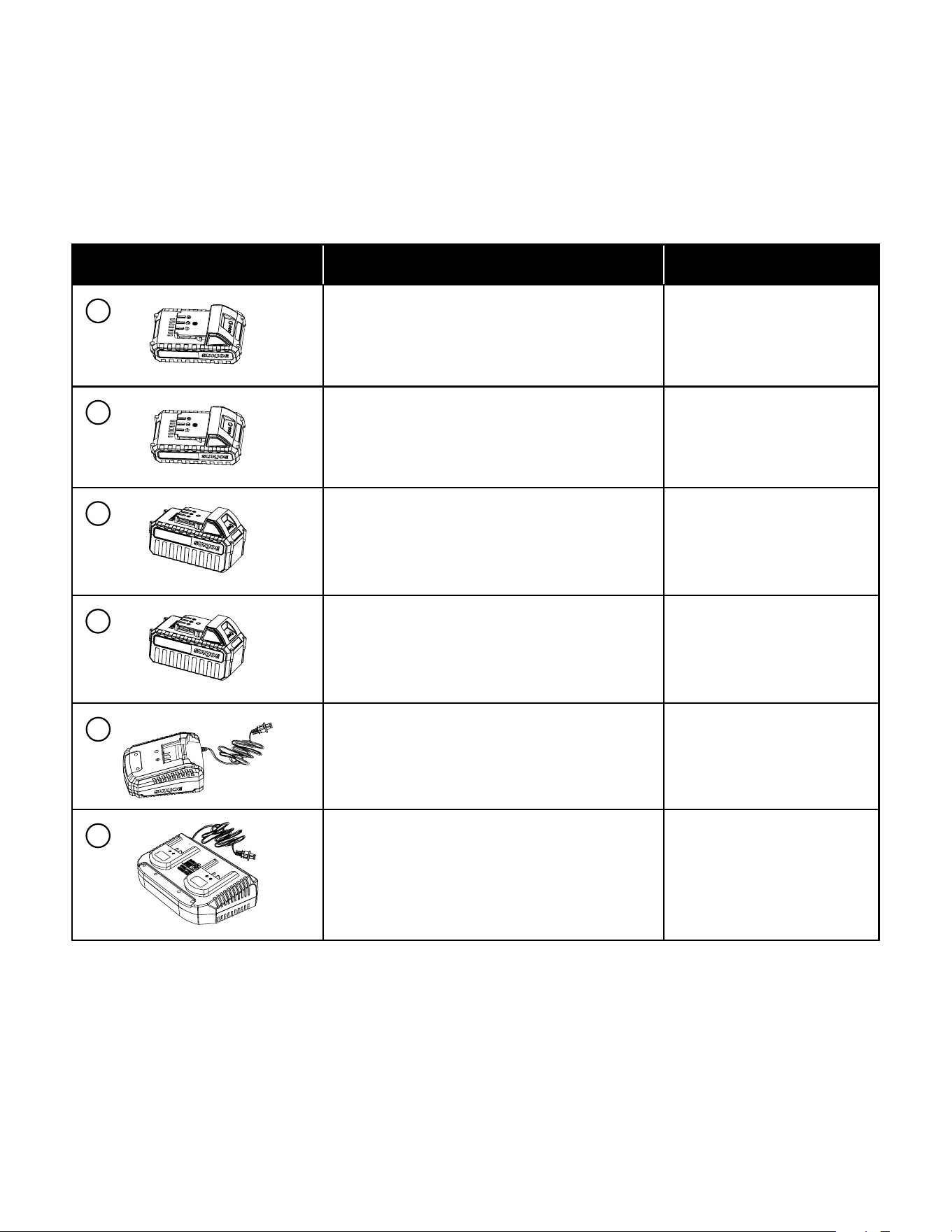
Accessories Item Model
24V* IONMAX 2.0 Ah Lithium-Ion Battery 24VBAT-LTE
24V* IONMAX 2.5 Ah Lithium-Ion Battery 24VBAT-LT
24V* IONMAX 4.0 Ah Lithium-Ion Battery 24VBAT
24V* IONMAX 5.0 Ah Lithium-Ion Battery 24VBAT-XR
24V* IONMAX lithium-ion Battery
Quick Charger
24VCHRG-QC
24V* IONMAX lithium-ion Dual-port
Battery Charger
24VCHRG-DPC
NOTE: Accessories are subject to change without any obligation on the part of Snow Joe
®
+ Sun Joe
®
. Accessories can be ordered
online at sunjoe.com or via phone by contacting the Snow Joe
®
+ Sun Joe
®
customer service center at 1-866-SNOWJOE
(1-866-766-9563).
1
2
3
4
5
6

R5_05112023
SNOW JOE
®
+ SUN JOE
®
CUSTOMER PROMISE
OUR WARRANTY:
Snow Joe warrants new, genuine, powered and non-powered Products to be free from defects in material or workmanship when used for
ordinary household use for a period of two years from the date of delivery of the Product to the original, end-user purchaser when purchased
from Snow Joe or from one of Snow Joe’s authorized sellers with proof of purchase. Because Snow Joe is unable to control the quality
of its Products sold by unauthorized sellers, unless otherwise prohibited by law, this Warranty does not cover Products purchased from
unauthorized sellers. If your Product does not work or there’s an issue with a specific part that is covered by the terms of this Warranty,
Snow Joe will elect to either (1) send you a free replacement part, (2) replace the Product with a new or comparable product at no charge,
or (3) repair the Product. How cool is that!
This Warranty gives you specific legal rights, and you may also have other rights which vary from State to State.
PRODUCT REGISTRATION:
Snow Joe strongly encourages you to register your Product. You can register online at snowjoe.com/register, or by printing and
mailing in a registration card available online from our website, or by calling our Customer Service Department at 1-866-SNOWJOE
(1-866-766-9563), or by e-mailing us at [email protected]. Failure to register your Product will not diminish your warranty rights. However,
registering your Product will allow Snow Joe to better serve you with any of your customer service needs.
WHO CAN SEEK LIMITED WARRANTY COVERAGE:
This Warranty is extended by Snow Joe to the original purchaser and original owner of the Product.
WHAT IS NOT COVERED?
This Warranty does not apply if the Product has been used commercially or for non-household or rental applications. This Warranty also
does not apply if the Product was purchased from an unauthorized seller. This Warranty also does not cover cosmetic changes that do
not affect performance. Wearing parts like belts, augers, chains and tines are not covered under this Warranty, and can be purchased at
snowjoe.com/support or by calling 1-866-SNOWJOE (1-866-766-9563).
Keep your warranty intact. Only use CERTIFIED AUTHENTIC Snow Joe
®
, Sun Joe
®
, Aqua Joe
®
+ Auto Joe
®
replacement parts +
accessories. Use of any other parts + accessories will void the warranty. Genuine parts + accessories can be found and purchased online at
snowjoe.com/support by entering the model number of your product.
ABOVE ALL ELSE, Snow Joe, LLC (“Snow Joe”) is dedicated to you, our customer. We strive to make your experience as pleasant as
possible. Unfortunately, there are times when a Snow Joe
®
, Sun Joe
®
, Aqua Joe
®
, or Auto Joe
®
product (“Product”) does not work or breaks
under normal operating conditions. We think it’s important that you know what you can expect from us. That’s why we have a Limited
Warranty (“Warranty”) for our Products.
TM
sunjoe.com