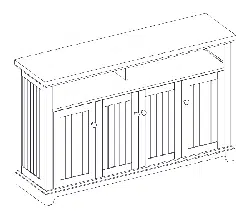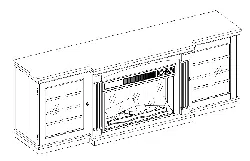
Lowes.com
Serial Number Purchase Date
Questions, problems, missing parts? Before returning to your retailer, call our customer service
department at 1-877-888-8225,
8 a.m. - 8 p.m., EST, Monday - Friday.
ATTACH YOUR RECEIPT HERE
Style Selections
®
is a registered trademark
of LF, LLC. All Rights Reserved.
EB15216
1
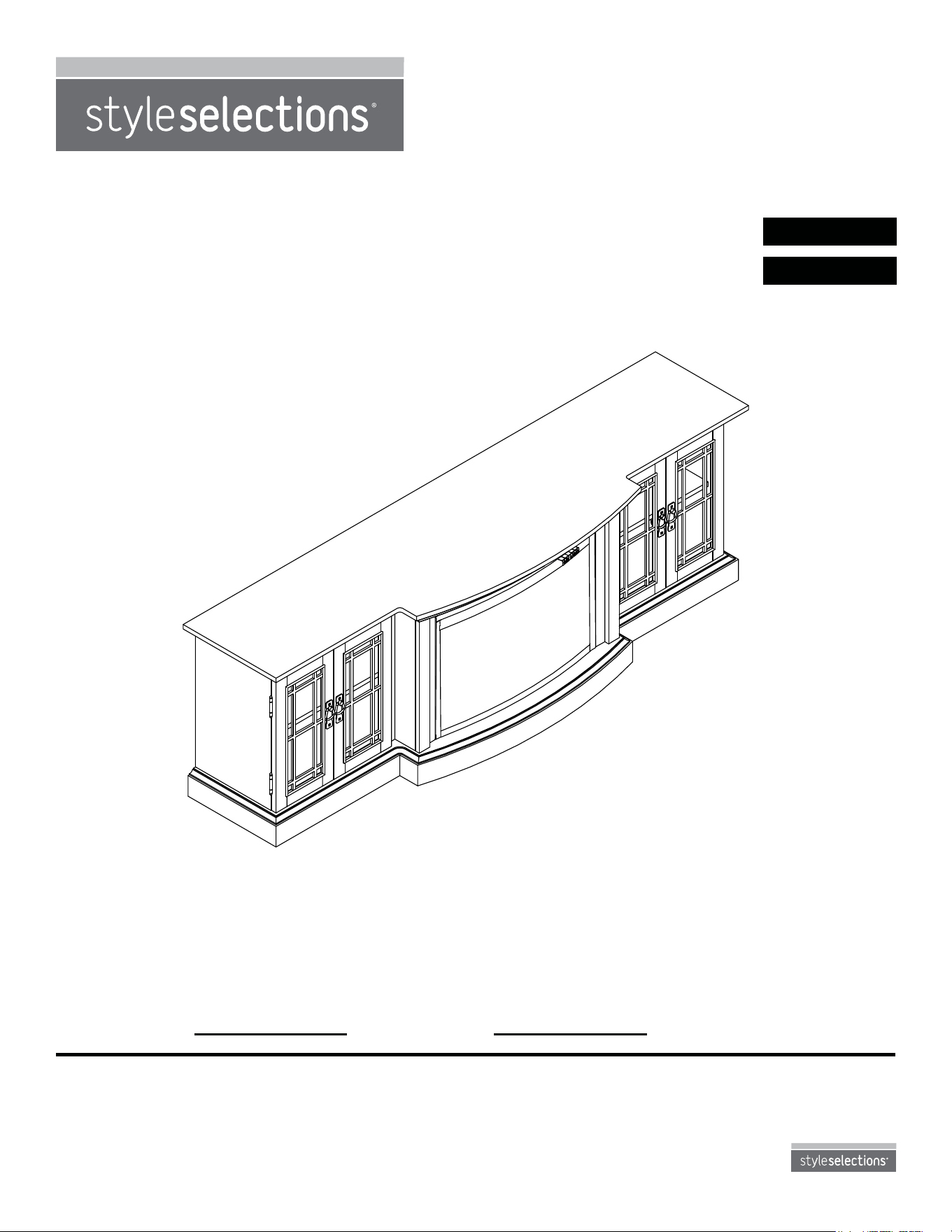
ElECTRIC FIREPlACE
WITH MEDIA MANTEl
MODEL #1009FM-78-211
ITEM #0667536
Français p. 18
Español p. 35
2
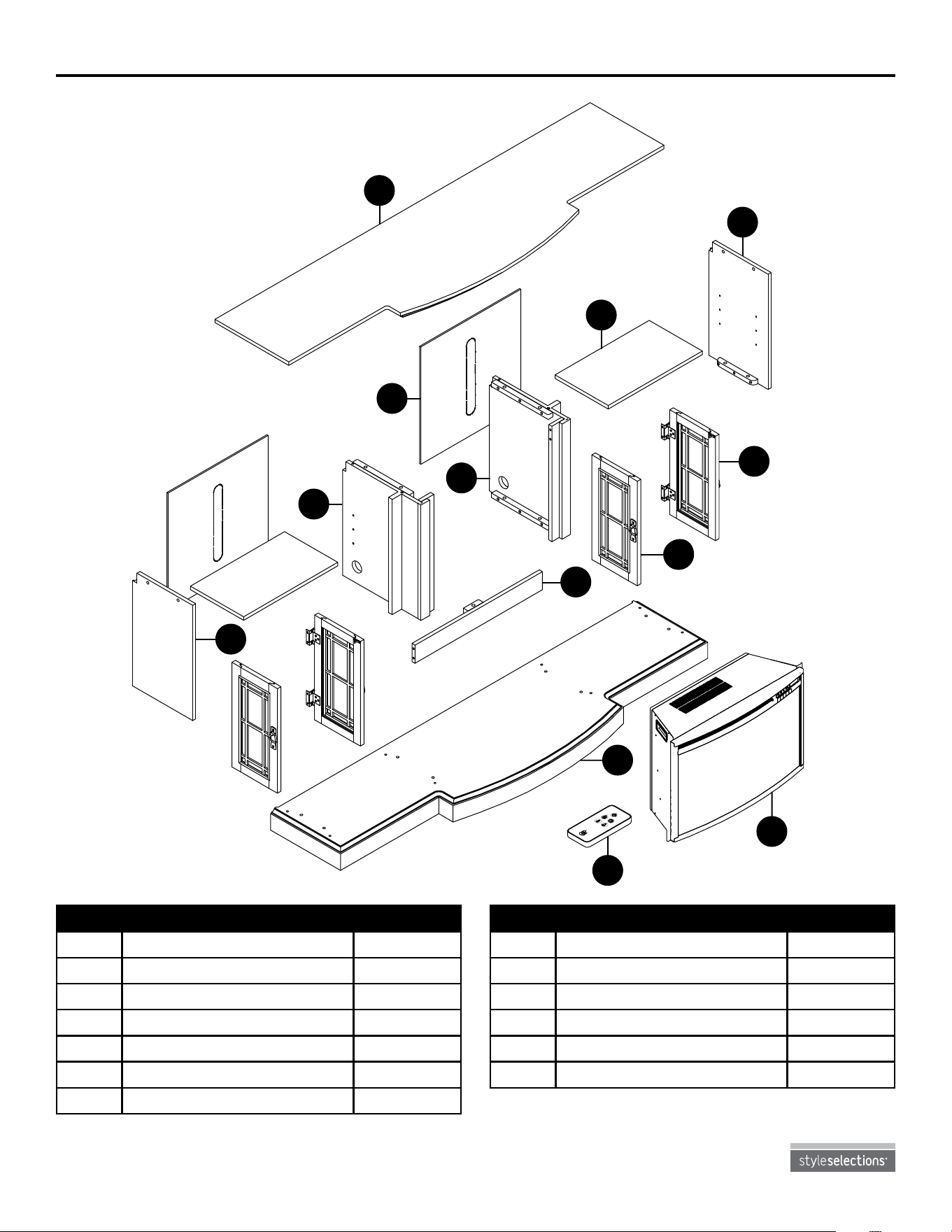
Package contents
Lowes.com
PART DESCRIPTION QUANTITY
H Center Panel 1
I Left Door 2
J Right Door 2
K Base 1
L Insert 1
M Remote Control 1
PART DESCRIPTION QUANTITY
A Top 1
B Left Wall 1
C Left Middle Wall 1
D Back Panel 2
E Right Middle Wall 1
F Wood Shelf 2
G Right Wall 1
M
J
C
G
I
F
A
D
E
K
L
M
B
H
3
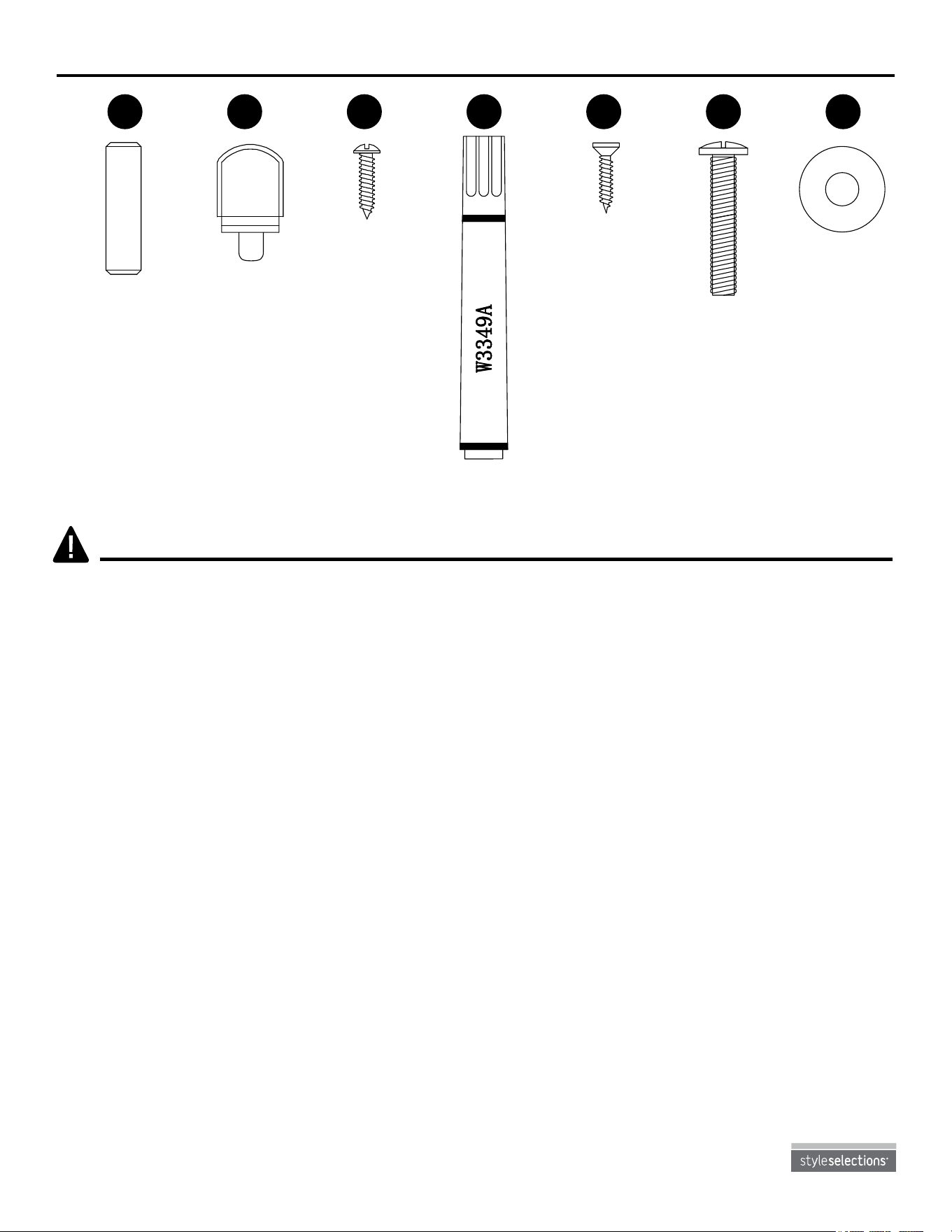
HARDWARE CONTENTS (shown actual size)
Lowes.com
Wooden Dowel
Qty. 16
Shelf Pin
Qty. 8
Bolt
Qty. 17
Washer
Qty. 17
Back Panel
Screw
Qty. 24
Hinge Screw
Qty. 32
Touch-up Pen
Qty. 1
AA BB
CC
DD EE FF GG
SAFETY INFORMATION
Please read and understand this entire manual before attempting to assemble, operate or install the
product.
This equipment has been tested and found to comply with the limits for Class B digital devices,
pursuant to part 15 of the FCC rules. These limits are designed to provide reasonable protection
against harmful interference in a residential installation. The equipment generates, uses and can
radiate radio frequency energy and, if not installed and used in accordance with the instructions, may
cause harmful interference to radio or television reception, which can be determined by turning the
equipment off and on. The user is encouraged to try and correct the interference by one or more of
the following measures:
• Reorient or relocate the receiving antenna
• Increase the separation between the equipment and the receiver
• Connect the equipment into an outlet on a circuit different from that to which the receiver is
connected.
• Consult the dealer or an experienced radio/TV technician for help.
This device complies with Part 15 of the FCC rules. Operation is subject to the following two
conditions:
1. This device may not cause harmful interference, and
2. This device must accept any interference received, including interference that may cause
undesired operation.
Modications not approved by the party responsible for compliance could void user’s authority to
operate the equipment.
This Class B digital apparatus complies with Canadian ICES-003.
Lowes.com
4
SAFETY INFORMATION
IMPORTANT INSTRUCTIONS
When using electrical appliances, basic precautions should always be followed to reduce the risk of re,
electric shock and injury to persons, including the following:
DANGER
• If the information in this manual is not followed exactly, an electric shock or re may result causing
property damage, personal injury or loss of life.
• This product is intended to t most plasma and LCD televisions (up to 80 inches and weighing a
maximum of 65 pounds). Using this item with loads heavier than the stated maximum can result in
tipping and/or instability, which can result in injury or even death.
WARNING
• This appliance is hot when in use. To avoid burns, DO NOT let bare skin touch hot surfaces. Keep
combustible material, such as furniture, pillows, bedding, papers, clothes and curtains at least 3 feet
from this appliance.
• Extreme caution is necessary when any heater is used by or near children or individuals with
disabilities and whenever the replace is left operating and unattended.
• DO NOT run cord under carpeting. DO NOT cover cord with throw rugs, runners, or similar covering.
Arrange cord away from trafc areas and where it will not be tripped over.
• DO NOT insert or allow foreign objects to enter any ventilation or exhaust opening as this may
cause an electric shock or re, or damage the appliance.
• This appliance has hot and arching or sparking parts inside. DO NOT use it in areas where gasoline,
paint or ammable vapors or liquids are used or stored. This replace should not be used as a
drying rack for clothing. Christmas stockings or decorations should not be hung in the area of it.
• Use this appliance only as described in the manual. Any other use is NOT recommended by the
manufacturer and may cause re, electric shock or injury to persons.
CAUTION
• If possible, AlWAYS unplug this appliance when not in use.
• DO NOT operate any heater with a damaged cord or plug or after the heater malfunctions. DO NOT
operate any heater if it has been dropped or damaged in any manner. Disconnect power at service
panel and have heater inspected by a reputable electrician before reusing.
• Any repairs to this replace should be carried out by a qualied service person.
• Under no circumstances should this replace be modied. Parts having to be removed for servicing
must be replaced prior to operating this replace again.
• DO NOT use outdoors.
• This heater is not intended for use in bathrooms, laundry areas and similar indoor locations.
NEvER place heater where it may fall into a bathtub or other water container.
• To disconnect this appliance, turn controls to the off position, then remove plug from outlet.
• ONlY connect to properly grounded outlets.
• This appliance, when installed, must be electrically grounded in accordance with local codes, with
the current CSA C22.1 Canadian Electrical Code or follow U.S.A. Installations, follow local codes
and the National Electrical Code, ANSI/NFPA N0.70.
• To prevent a possible re, DO NOT block air intakes or exhaust in any manner. DO NOT use on soft
surfaces, like a bed, where opening may become blocked.
• The heaters MUST NOT be located immediately below a socket-outlet.
• AlWAYS plug heaters directly into a wall outlet/receptacle. NEvER use with an extension cord or
re-loadable power tap (outlet / power strip).
5
Lowes.com
5
PREPARATION
Before beginning assembly of product, make sure all parts are present. Compare parts with package
contents list and hardware contents list. If any part is missing or damaged, do not attempt to
assemble the product.
Estimated Assembly Time: 45 minutes
Tools Required for Assembly (not included): Phillips screwdriver
SAFETY INFORMATION
• DO NOT slide insert on top of wood to avoid scratching wood surface.
• DO NOT place any objects on top of insert and top air intake vents as this will cause unit to
overheat and can cause a re.
•
Non-rechargeable batteries are not to be recharged. Exhausted batteries are to be removed from
the product.
Electrical Connection
• A 15-Amp, 120-volt, 60 Hz circuit with a properly grounded outlet is required. Preferably, the
replace will be on a dedicated circuit as other appliances on the same circuit may cause the
circuit breaker to trip or the fuse to blow when the heater is in operation. The unit comes standard
with 6-ft. three-wire cord, exiting from the rear of the replace. DO NOT exceed the current rating
of the current tap. AlWAYS plug heaters directly into a wall outlet/receptacle. NEvER use with an
extension cord or relocatable power tap (outlet/power strip).
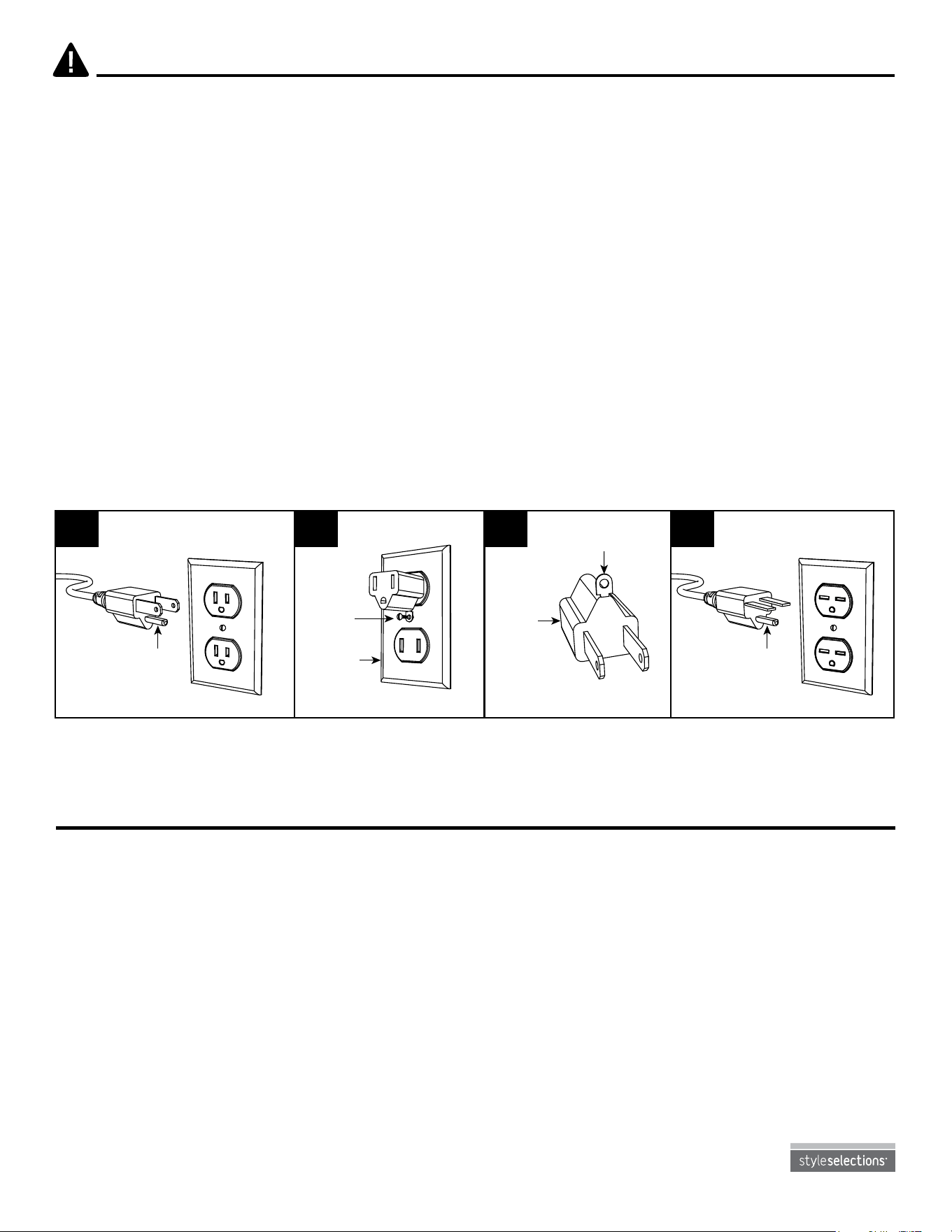
• This heater is for use on 120 volts. The cord has a plug as shown below. See illustration for
grounding instruction. An adapter as shown at C is available for connecting three-blade grounding
type plugs to two-slot receptacles. The green grounding plug extending from the adapter must be
connected to a permanent ground such as a properly grounded outlet box. The adapter should not
be used if a three-slot grounded receptacle is available.
SAvE THESE INSTRUCTIONS
A B C D
Grounding Pin Grounding Pin
Grounding Means
Metal
Screw
Cover of
Grounding
Box
Adapter
6
Lowes.com
ASSEMBLY INSTRUCTIONS
Hardware Used
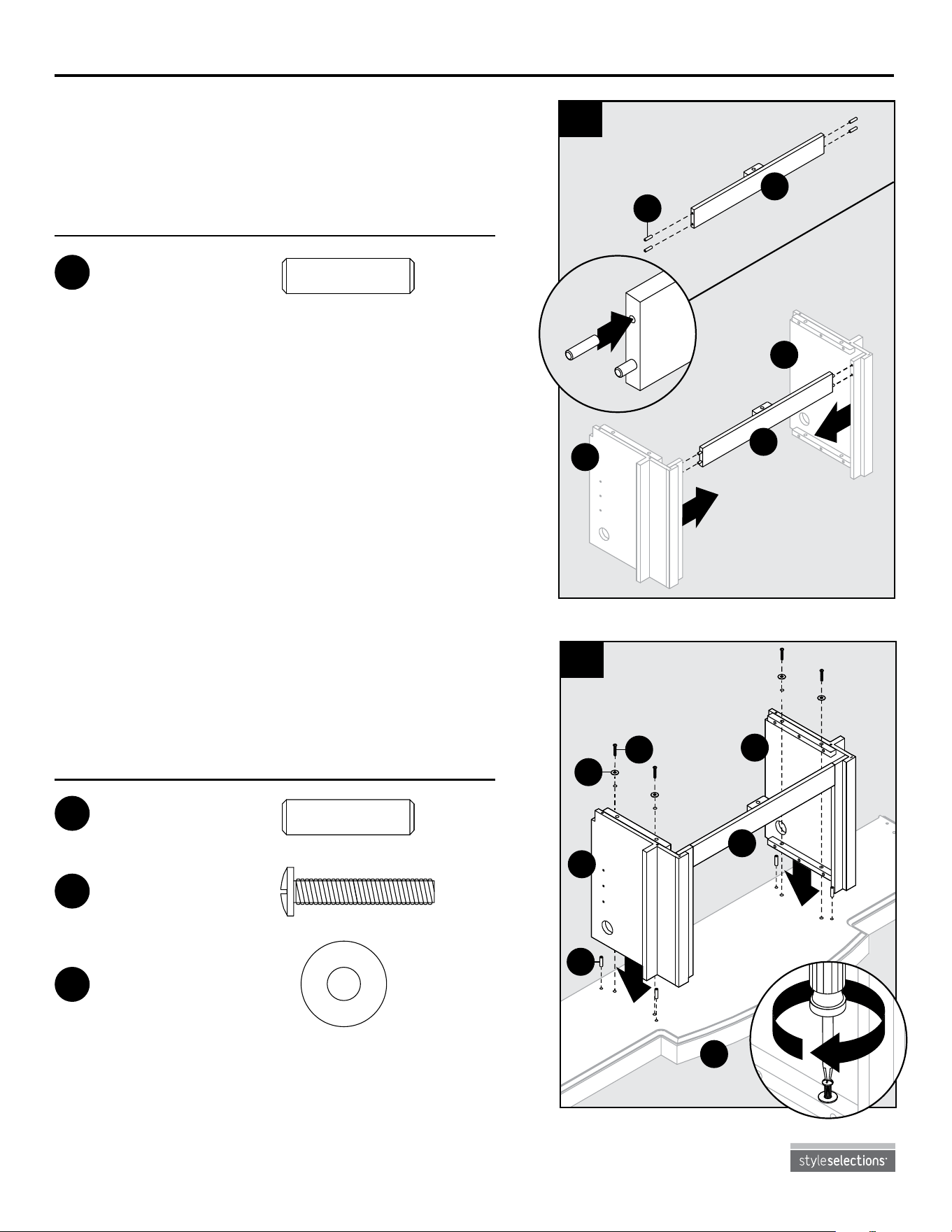
2. Insert four wooden dowels (AA) into base (K).
Place assembly from Step 1 onto base (K),
securing with four washers (GG) and bolts (FF).
1. Insert two wooden dowels (AA) into each end
of center panel (H). Position center panel (H)
between left middle wall (C) and right middle
wall (E).
Hardware Used
Wooden Dowel
x 4
AA
2
2
1
H
E
C
H
1
AA
Wooden Dowel
Qty. 16
Shelf Pin
Qty. 8
Bolt
Qty. 17
Washer
Qty. 17
Back Panel
Screw
Qty. 24
Hinge Screw
Qty. 32
Touch-up Pen
Qty. 1
AA BB
CC
DD EE FF GG
1
1
2
K
C
E
H
2
FF
GG
AA
Wooden Dowel
x 4
AA
Wooden Dowel
Qty. 16
Shelf Pin
Qty. 8
Bolt
Qty. 17
Washer
Qty. 17
Back Panel
Screw
Qty. 24
Hinge Screw
Qty. 32
Touch-up Pen
Qty. 1
AA BB
CC
DD EE FF GG
Bolt
x 4
FF
Wooden Dowel
Qty. 16
Shelf Pin
Qty. 8
Bolt
Qty. 17
Washer
Qty. 17
Back Panel
Screw
Qty. 24
Hinge Screw
Qty. 32
Touch-up Pen
Qty. 1
AA BB
CC
DD EE FF GG
Washer
x 4
GG
Wooden Dowel
Qty. 16
Shelf Pin
Qty. 8
Bolt
Qty. 17
Washer
Qty. 17
Back Panel
Screw
Qty. 24
Hinge Screw
Qty. 32
Touch-up Pen
Qty. 1
AA BB
CC
DD EE FF GG
7
Lowes.com
ASSEMBlY INSTRUCTIONS
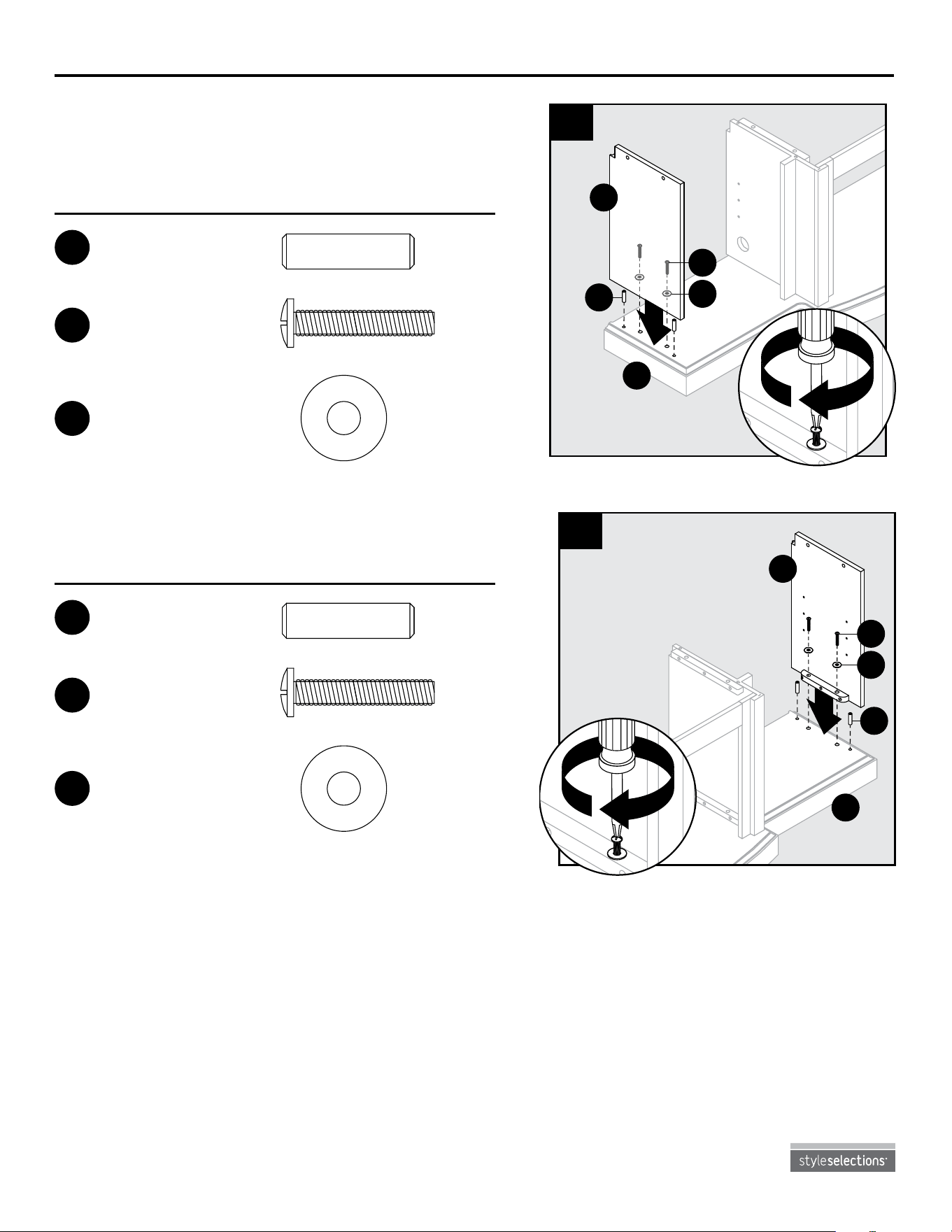
3. Insert two wooden dowels (AA) into outer holes
on left side of base (K). Attach left wall (B),
securing with two washers (GG) and bolts (FF).
1
2
K
B
3
GG
AA
FF
Hardware Used
Wooden Dowel
x 2
AA
Wooden Dowel
Qty. 16
Shelf Pin
Qty. 8
Bolt
Qty. 17
Washer
Qty. 17
Back Panel
Screw
Qty. 24
Hinge Screw
Qty. 32
Touch-up Pen
Qty. 1
AA BB
CC
DD EE FF GG
Bolt
x 2
FF
Wooden Dowel
Qty. 16
Shelf Pin
Qty. 8
Bolt
Qty. 17
Washer
Qty. 17
Back Panel
Screw
Qty. 24
Hinge Screw
Qty. 32
Touch-up Pen
Qty. 1
AA BB
CC
DD EE FF GG
Washer
x 2
GG
Wooden Dowel
Qty. 16
Shelf Pin
Qty. 8
Bolt
Qty. 17
Washer
Qty. 17
Back Panel
Screw
Qty. 24
Hinge Screw
Qty. 32
Touch-up Pen
Qty. 1
AA BB
CC
DD EE FF GG
1
2
K
G
4
E1
AA
GG
4. Repeat Step 4 for right wall (G).
Hardware Used
Wooden Dowel
x 2
AA
Wooden Dowel
Qty. 16
Shelf Pin
Qty. 8
Bolt
Qty. 17
Washer
Qty. 17
Back Panel
Screw
Qty. 24
Hinge Screw
Qty. 32
Touch-up Pen
Qty. 1
AA BB
CC
DD EE FF GG
Bolt
x 2
FF
Wooden Dowel
Qty. 16
Shelf Pin
Qty. 8
Bolt
Qty. 17
Washer
Qty. 17
Back Panel
Screw
Qty. 24
Hinge Screw
Qty. 32
Touch-up Pen
Qty. 1
AA BB
CC
DD EE FF GG
Washer
x 2
GG
Wooden Dowel
Qty. 16
Shelf Pin
Qty. 8
Bolt
Qty. 17
Washer
Qty. 17
Back Panel
Screw
Qty. 24
Hinge Screw
Qty. 32
Touch-up Pen
Qty. 1
AA BB
CC
DD EE FF GG
8
Lowes.com
ASSEMBLY INSTRUCTIONS
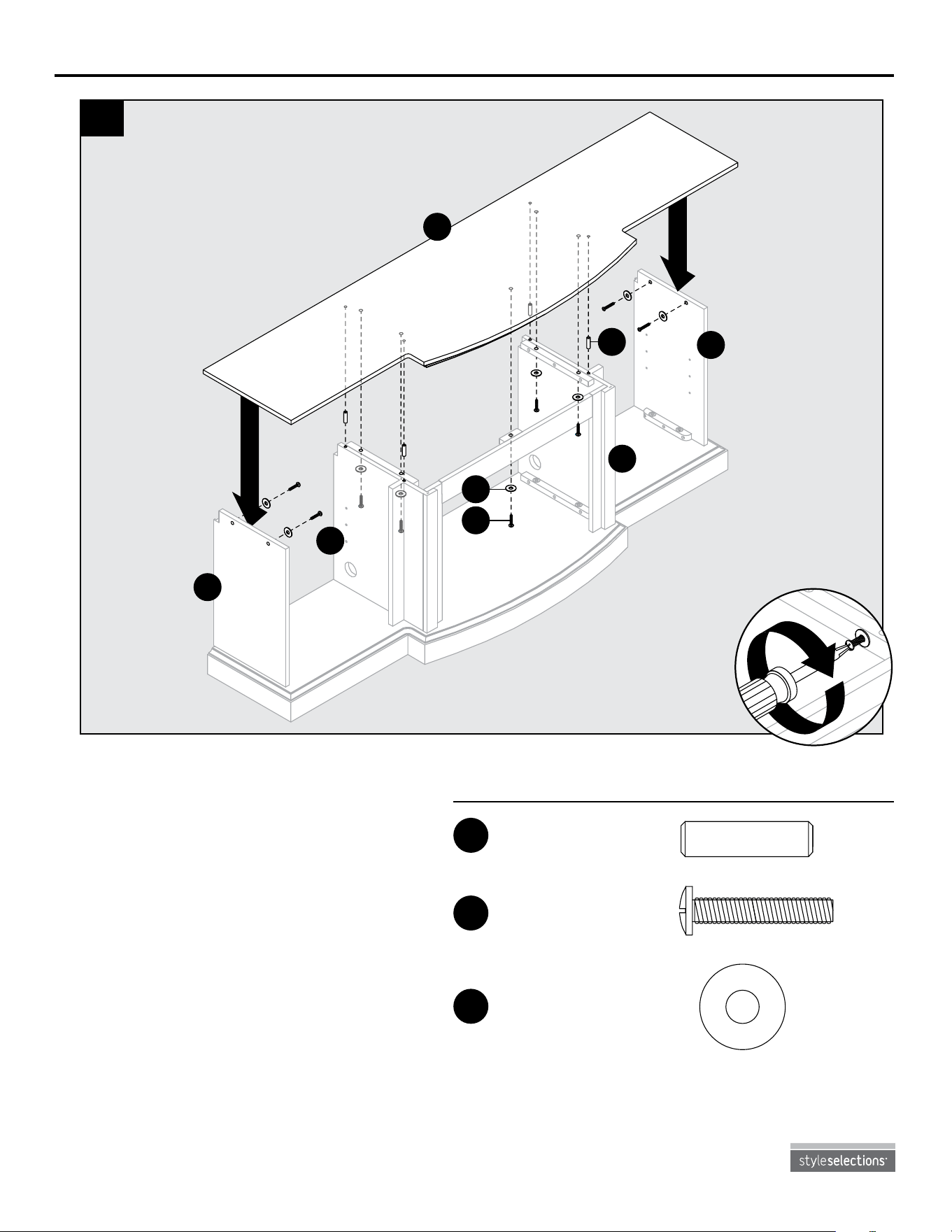
5. Insert two wooden dowels (AA) into the
top outer holes on left middle wall (C)
and right middle wall (E). Attach top
(A), securng from underneath with ve
washers (GG) and bolts (FF). Then,
secure left wall (B) and right wall (G) to
top (A) using four washers (GG) and
four bolts (FF).
1
1
2
A
B
C
E
G
5
AA
GG
FF
Hardware Used
Wooden Dowel
x 4
AA
Wooden Dowel
Qty. 16
Shelf Pin
Qty. 8
Bolt
Qty. 17
Washer
Qty. 17
Back Panel
Screw
Qty. 24
Hinge Screw
Qty. 32
Touch-up Pen
Qty. 1
AA BB
CC
DD EE FF GG
Bolt
x 9
FF
Wooden Dowel
Qty. 16
Shelf Pin
Qty. 8
Bolt
Qty. 17
Washer
Qty. 17
Back Panel
Screw
Qty. 24
Hinge Screw
Qty. 32
Touch-up Pen
Qty. 1
AA BB
CC
DD EE FF GG
Washer
x 9
GG
Wooden Dowel
Qty. 16
Shelf Pin
Qty. 8
Bolt
Qty. 17
Washer
Qty. 17
Back Panel
Screw
Qty. 24
Hinge Screw
Qty. 32
Touch-up Pen
Qty. 1
AA BB
CC
DD EE FF GG
9
Lowes.com
ASSEMBLY INSTRUCTIONS
Hardware Used
Hardware Used
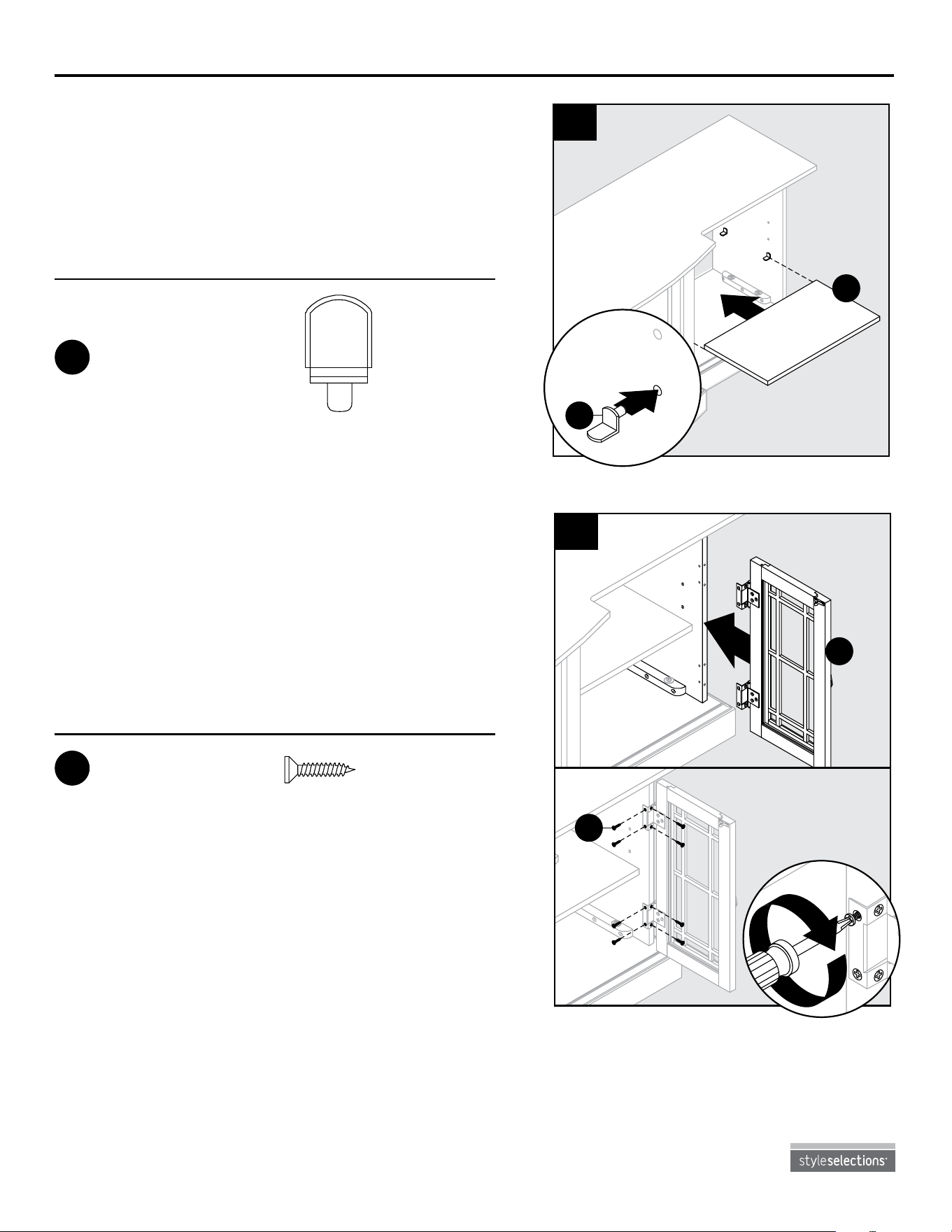
7. Align the holes of the preassembled hinges on
right door (J) with the corresponding holes on
right wall (G) and left middle wall (C). Attach
right doors (J) using four hinge screws (EE)
each.
Repeat this step on left wall (B) and right middle
wall (E) for left doors (I).
Hinge Screw
x 32
EE
1
2
J
7
EE
1
2
F
6
BB
1
6. Insert shelf pins (BB) at desired height, ensuring
they are level. Place wood shelf (F) on top of
shelf pins (BB).
Repeat on the other side with remaining wood
shelf (F).
Shelf Pin
x 8
BB
Wooden Dowel
Qty. 16
Shelf Pin
Qty. 8
Bolt
Qty. 17
Washer
Qty. 17
Back Panel
Screw
Qty. 24
Hinge Screw
Qty. 32
Touch-up Pen
Qty. 1
AA BB
CC
DD EE FF GG
Wooden Dowel
Qty. 16
Shelf Pin
Qty. 8
Bolt
Qty. 17
Washer
Qty. 17
Back Panel
Screw
Qty. 24
Hinge Screw
Qty. 32
Touch-up Pen
Qty. 1
AA BB
CC
DD EE FF GG
10
Lowes.com
ASSEMBLY INSTRUCTIONS
Hardware Used
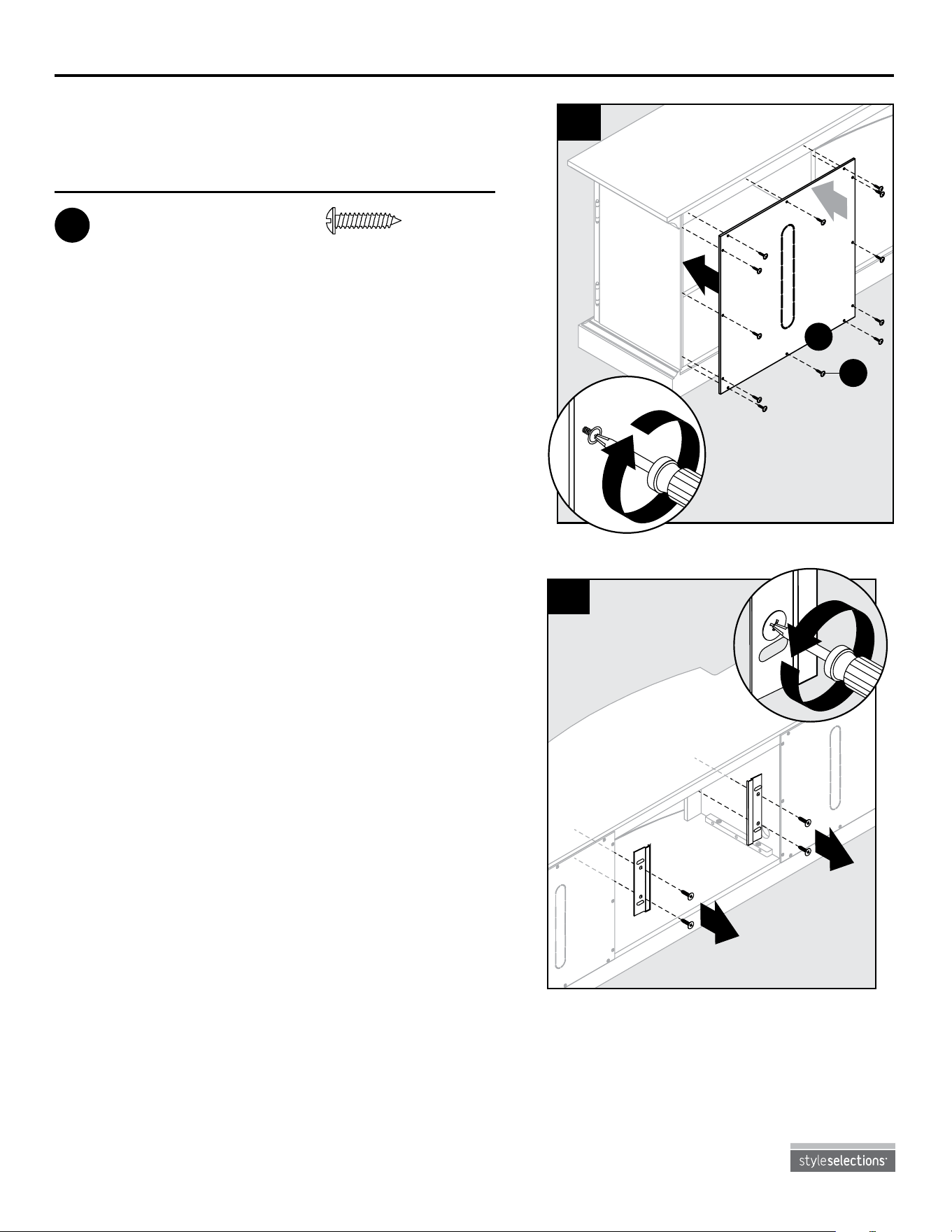
9. Still from behind the assembly, remove the
preassembled insert brackets from the middle
area. Save brackets and screws for future use.
2
2
1
9
CC
Back Panel Screw
x 24
8. From behind the assembly, attach back panels (D)
to shelving areas using back panel screws (CC).
1
1
2
F
8
CC
Wooden Dowel
Qty. 16
Shelf Pin
Qty. 8
Bolt
Qty. 17
Washer
Qty. 17
Back Panel
Screw
Qty. 24
Hinge Screw
Qty. 32
Touch-up Pen
Qty. 1
AA BB
CC
DD EE FF GG
11
Lowes.com
ASSEMBLY INSTRUCTIONS
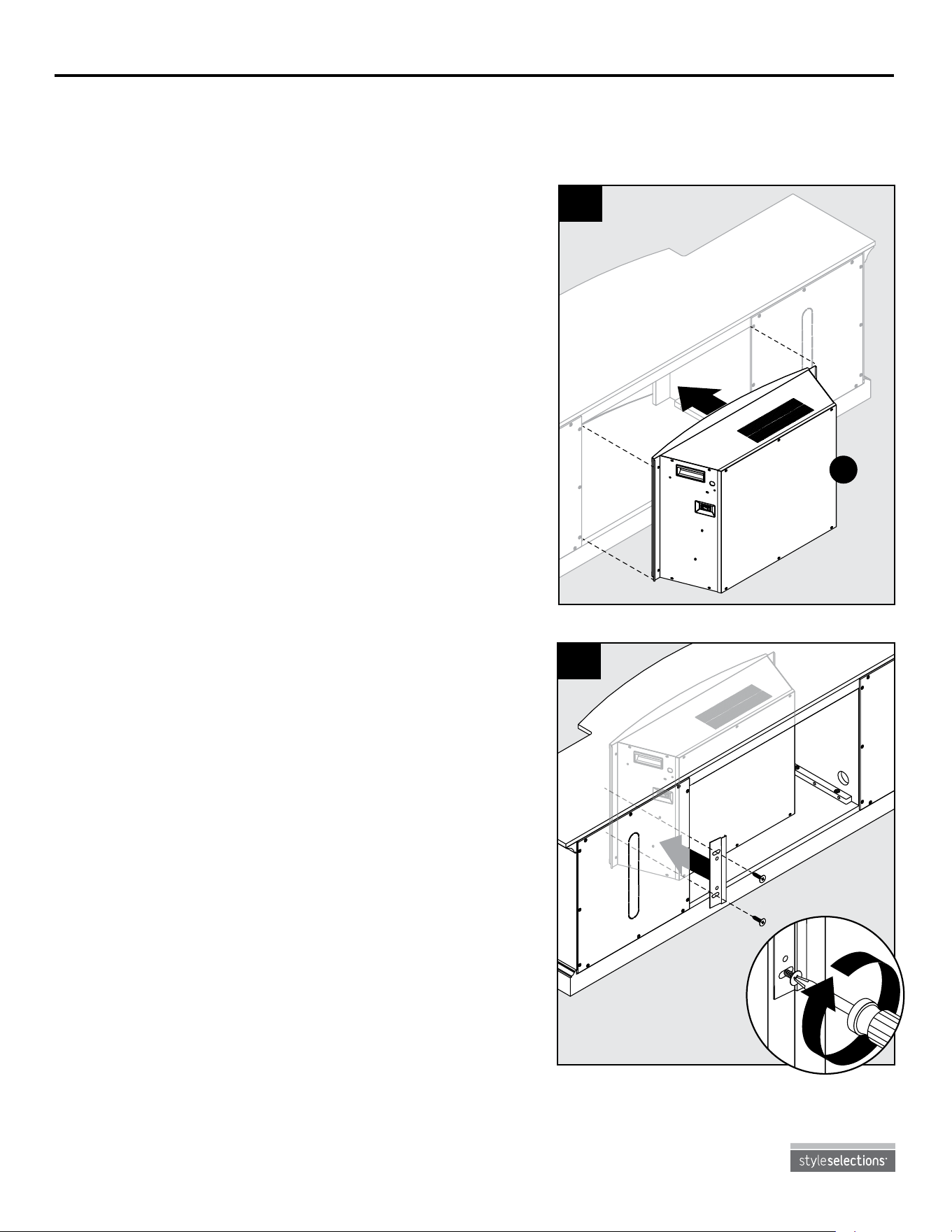
10. With the help of another person, position insert (L)
into middle opening of mantel assembly.
Note: DO NOT plug insert (L) into outlet yet.
CAUTION: DO NOT slide insert on top of wood to
avoid scratching wood surface.
Note: Before proceeding to the next step, with the help of another person, move the mantel close to
the nal desired location.
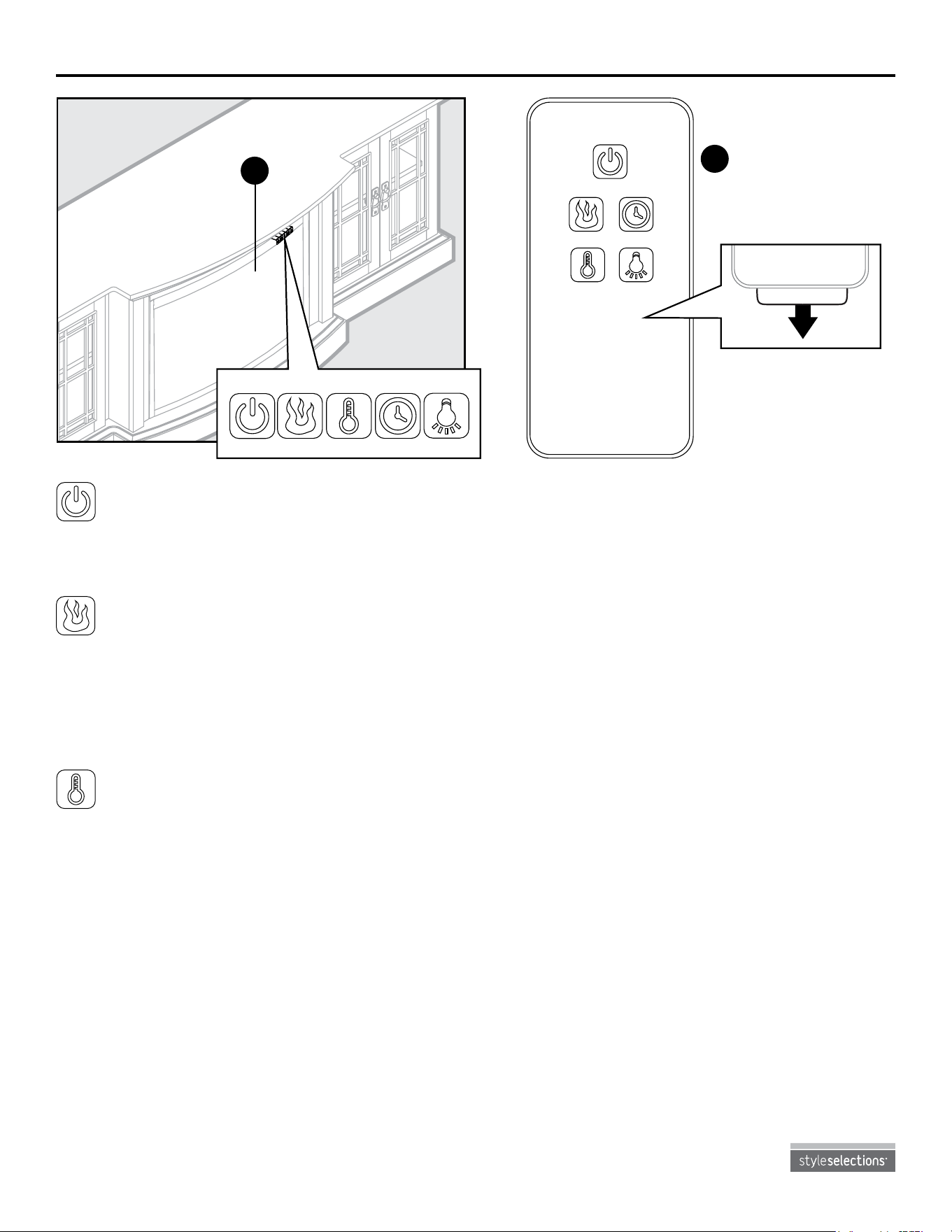
11. Re-attach insert brackets with previously
removed screws to secure insert (L).
Assembly is now complete. With the help of
another person, move the assembly to the nal
desired location.
10
L
1
2
11
12
Lowes.com
OPERATING INSTRUCTIONS
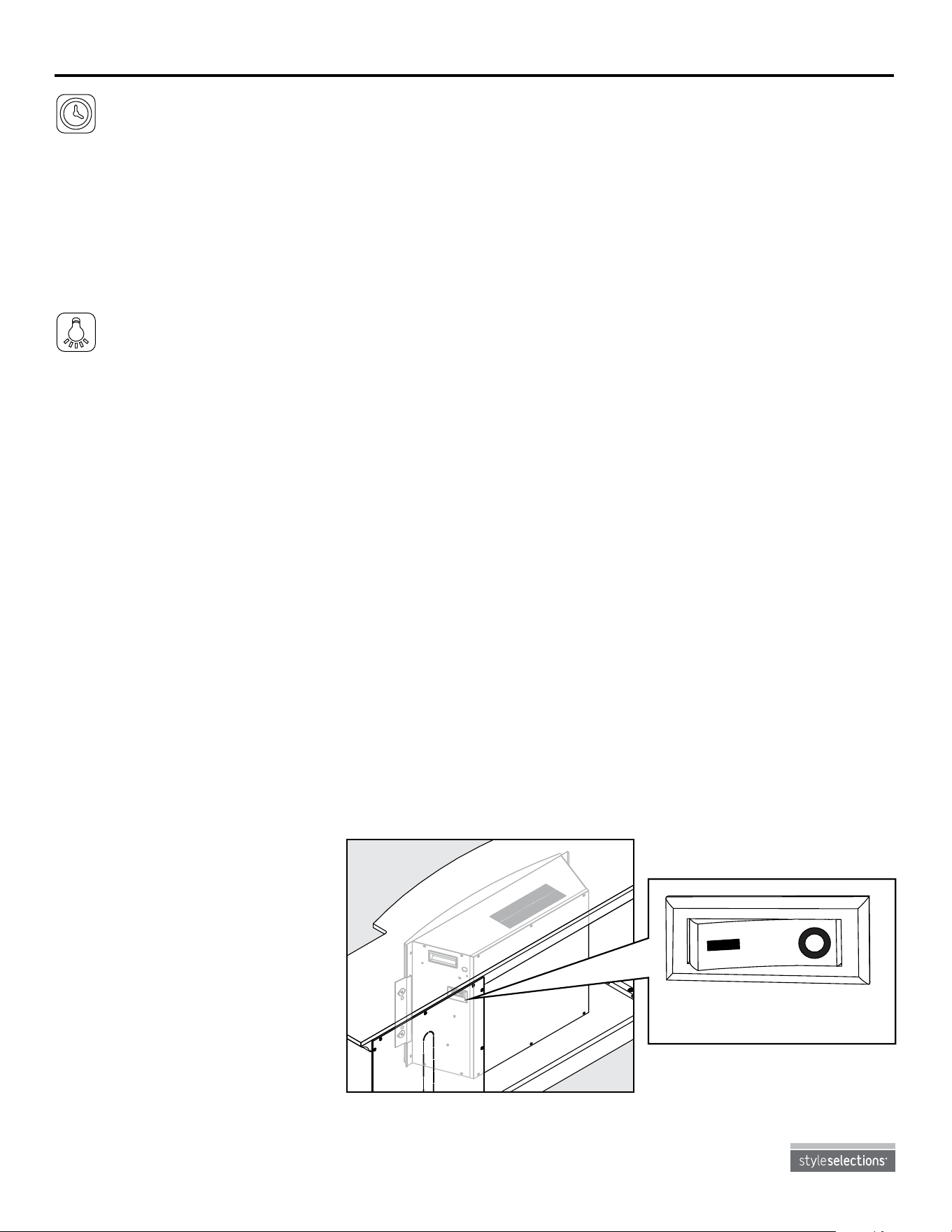
Power Button
• Press the power button to turn the main power to the unit ON or OFF.
• When the unit is turned ON, the lights under the emberbed will light to indicate the unit has power.
Flame Brightness Button
• If the unit is powered OFF, you can press the ame brightness button to power On the unit. The
emberbed will glow at the lowest brightness setting unless a different setting was saved in the
memory.
• Press the button again to scroll through the ame brightness settings,1 (lowest) through 5
(brightest).
Temperature Button
• The temperature button controls the heater thermostat.
• If the unit is powered OFF, you can press the temperature button to power On the unit. The
emberbed will glow at the lowest brightness setting unless a different setting was saved in the
memory.
• Press the temperature button again to scroll through the pre-set temperature settings:
– Fahrenheit: 65, 70, 75, 80, 85, 90, OFF.
– Celsius: 18, 21, 24, 27, 29, 32, OFF.
• Hold down the temperature button for 5 seconds to toggle between Fahrenheit and Celsius. A
small “F” or “C” will display next to the temperature.
M
To use the remote
control, first remove
the plastic tab by
gently pullling it out
of remote control (M).
M
Remote Control
M
To use the remote control,
first remove the plastic tab
by gently pullling.
M
To use the remote control,
first remove the plastic tab
by gently pullling.
M
L
Insert
M
To use the remote control,
first remove the plastic tab
by gently pullling.
13
Lowes.com
OPERATING INSTRUCTIONS
Timer Button
• The timer button should be used to set the countdown for the unit's main power.
• If the unit is powered OFF, you can press the timer button to power On the unit. The emberbed will
glow at the lowest brightness setting unless a different setting was saved in the memory.
• Press the timer button again to scroll through the timer settings: 30, 1h, 2h, 3h, 4h, 5h, 6h, 7h, 8h,
9h and OFF.
• When the timer reaches zero, it will turn OFF the main power and will maintain the other settings in
memory.
Downlight Button
• The downlight button controls the LED downlights.
• If the unit is powered OFF, you can press the downlight button to power On the unit. The
emberbed will glow at the lowest brightness setting unless a different setting was saved in the
memory.
Memory Function
• When the unit is powered OFF, all function settings (excluding timer) will be saved.
• When the unit is OFF, pressing the power button once on the insert control panel or on the remote
control will turn the unit On and "wake up" the saved function settings.
• When the unit is OFF, press any function button to "wake up" the individual function at the last
saved setting. Press the button again to adjust it and press the main power button on the insert or
on the remote control to turn the unit OFF and save the new setting into memory.
• When the unit is powered ON, the LED will show the saved temperature setting. If a temperature
setting was not saved, it will show the ame brightness setting saved in memory. If neither one has
a setting saved to memory, then only the emberbed will glow (as a power light indicator).
• To reset the memory, hold down the main power button for 5 seconds at any time. When this
happens, the LED readout will blink with four zeros three times.
• Another way to reset the memory is to unplug the unit from the wall.
Heater Override Switch
This appliance has a rocker
switch located on the side of the
insert (L). This switch will override
power to the heater to prevent the
heater from being accidentally or
unintentionally powered on. This
feature is primarily added to help
prevent children from powering on
the heater when it is not desired.
M
To use the remote control,
first remove the plastic tab
by gently pullling.
M
To use the remote control,
first remove the plastic tab
by gently pullling.
Heater Power
ON
Heater Power
OFF
14
Lowes.com
• Make sure the unit is turned OFF and unplugged whenever you are cleaning the heater or replace.
• Dust the replace regularly with a soft, non-lint producing cloth or household dusting product.
• Clean the replace with a gentle non-abrasive household cleaner. Make sure to dry the replace
immediately with a soft cloth or towel.
• Tips for using touch-up pen (DD): For scratches, stroke in direction of scratch. For worn areas,
stroke in the direction of wood grain. Rub excess colorant promptly with a soft cloth.
• The motors used on the fan and the ame generator assembly are pre-lubricated for extended
bearing life and require no further lubrication. However, periodic cleaning/vacuuming of the fan/
heater is recommended.
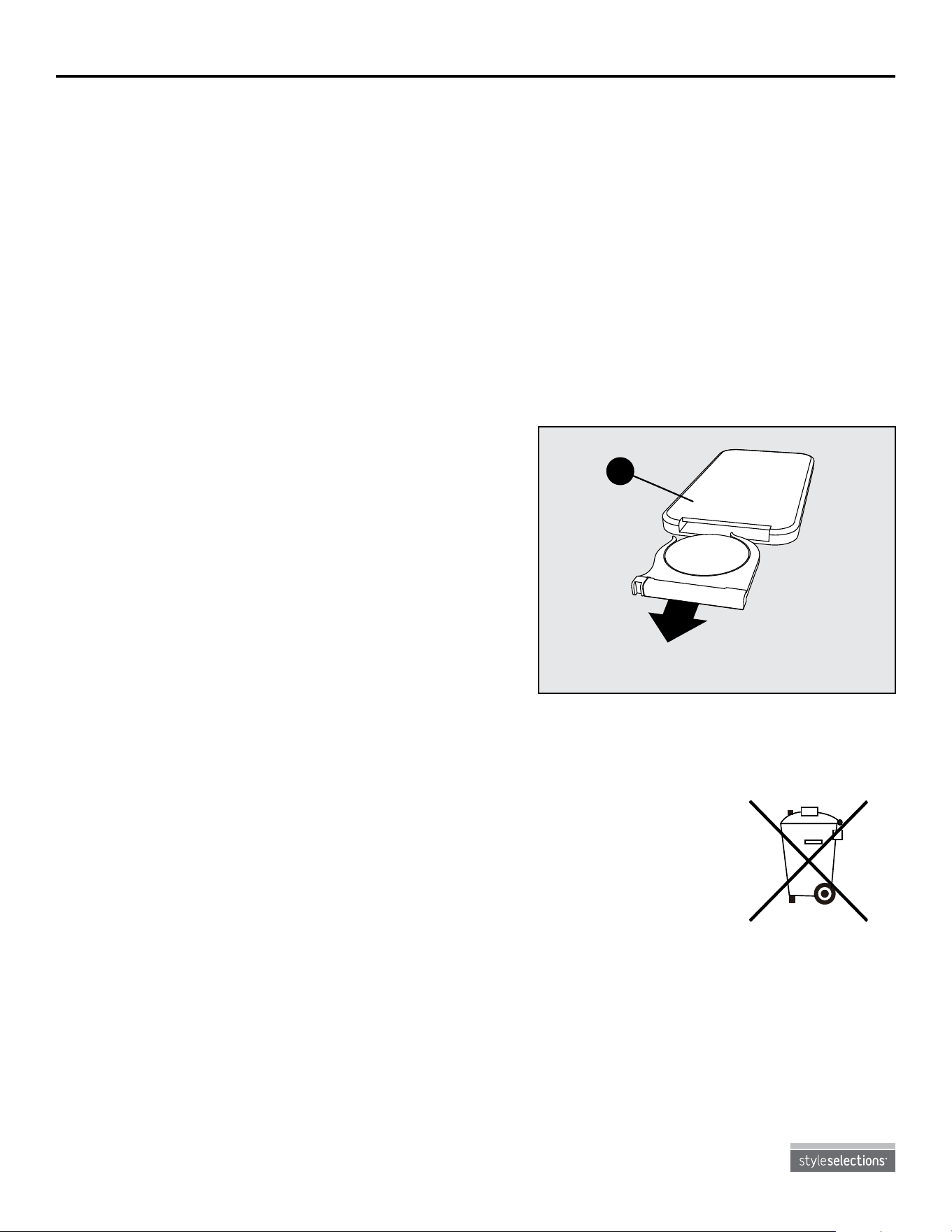
Replacing the Remote Control Battery
When the remote control (M) stops operating or its range seems reduced, it is time to replace the
battery. Note: The battery should be removed if the product is to be left unused for a long time.
1. The battery compartment is located on the back end
of the remote control (M).
2. Press the small tab inward as you slide the battery
door open and remove the old battery.
3. Insert a new CR2025 lithium battery (not included),
checking that the + and - sides of the battery match
the inside of the battery compartment.
4. Re-insert the battery door.
Disposal of Used Battery
A battery may contain hazardous substances that could be endangering to environment and
human health.
• This symbol marked on the battery and/or packaging indicates that used battery
shall not be treated as municipal waste. Instead it shall be left at the appropriate
collection point for recycling.
• By ensuring the used battery is disposed of correctly, you will help prevent
potential negative consequences for the environment and human health. The
recycling of materials will help to conserve natural resources.
For more information about collection and recycling of used batteries, please contact your local
municipality, your waste disposal service or the point of sale where you purchased this point.
CARE AND MAINTENANCE
BATTERY
M
15
Lowes.com
TROUBlESHOOTING
PROBlEM POSSIBlE CAUSE CORRECTIvE ACTION
Error E1 displayed on
control panel.
The overheat
sensor has been
engaged.
Unplug unit, wait 5-10 minutes, then the sensor will
reset itself. Plug the unit back in and turn on the
heater. If the problem persists, call customer service.
Note: The other functions will work normally excluding
the heater. Until the problem is solved, the error will
only appear/sound when the heater button is pressed.
Error E2 displayed on
control panel.
The thermostat
sensor is broken
or not working
correctly.
Unplug unit, wait 5-10 minutes, then the sensor will
reset itself. Plug the unit back in and turn on the
heater. If the problem persists, call customer service.
Note: The other functions will work normally excluding
the heater. Until the problem is solved, the error will
only appear/sound when the heater button is pressed.
Error E3 displayed on
control panel.
Heater override
switch is on.
Locate heater override switch on back of unit and
change position to off. now the heater will work
properly. (See page 13 for more information.)
no power; logs do not
glow.
The unit does not
have power.
Check that the power cord is securely plugged into a
standard 120V outlet. Then check to make sure the
unit is powered on.
No ame effect but logs
are glowing.
The ame effect is
powered off.
Push the ame brightness button until desired level is
achieved.
Heater and blower
do not power on but rest
of functions are working.
Heater override
switch is engaged.
Locate heater override switch on back of unit and
change position to off. now the heater will work
properly. (See page 13 for more information.)
Power cord gets warm
to the touch.
normal operation. This is normal for a heater appliance as it requires
more current to operate. Check the connections of
the appliance cord and the outlet. Make sure the
plug ts tightly into the outlet. During use, check the
plug and outlet frequently to determine if it is HOT;
if so, discontinue use of the appliance and consult
with a qualied electrician to check or change the
overheating outlet(s).
Remote control does
not work.
Weak or failing
battery.
Replace with a new battery. (See page 14 for more
information.)
Remote control
signal is weak and only
works sometimes.
Pressing the buttons
too quickly.
Press the buttons slowly and steadily to ensure the
transmitter recognizes the request.
Using the remote
control too far away
or at an off angle.
Move closer to the insert; the remote control will only
work within a distance of 20 feet and 45 degrees to
either side from the front of the replace insert.
Fan motor continues
to blow after unit is
powered of.
normal operation. This is a standard feature; the blower runs for an
additional minute to cool off heater tubes.

16
WARRANTY
Lowes.com
This item is warrantied by the manufacturer to be free of material and manufacturing defects for
the time period of one year from the purchase date. This is subject to the following limitations and
conditions:
This mantel must be installed and operated in accordance with the installation instructions that were
provided with the product. Unauthorized repairs or alterations, accidents, willful abuse and misuse of
the product will nullify this warranty.
This warranty is non-transferable and is offered to the original owner in so long as the product was
purchased from a licensed and authorized supplier and re-seller of the product.
The warranty is limited to the repair or replacement of part(s) that have been determined to be
defective in material or workmanship. This is provided that the part(s) have been subjected to
“normal” conditions of use once the defect is agreed upon through the manufacturers inspection
process.
Any costs or related expenses that have arised from the transportation, construction, labor or
otherwise of same that have arisen from repairs, replacement, defective part(s) or otherwise the same
is not covered by this warranty, nor shall the manufacturer assume the cost.
The manufacturer may, at its discretion, fully discharge all obligations with respect to this warranty by
refunding the wholesale price of defective part(s).
The owner/user assumes all other risks, if any, including the risk of any direct, indirect or
consequential loss or damage arising out of use, or inability to use the product, except as provided
by law. All other warranties -- expressed or implied -- with respect to the product, its components
and accessories, or any obligations/liabilities on the part of the manufacturer are hereby expressly
excluded.
The manufacturer neither assumes, nor authorizes any third party to assume on its behalf, any other
liabilities with respect to the sale of the product.
The warranties as outlined within this document do not apply to non-accessories used in conjunction
with the installation of this product.
This warranty gives you specic legal rights, and you may also have other rights which vary from
state to state.
This warranty is void if:
1. The replace is subjected to prolonged periods of dampness or condensation.
2. Any unauthorized alterations, willful abuse, accident, or misuse of the product.
3. You do not have the original receipt.
17
Lowes.com
Wood Dowel (X 16) / Wood Dowel (X 16) / Wood Dowel (X 16)
AA
Shelf Pin (X 8) / Shelf Pin (X 8) / Shelf Pin (X 8)
BB
Hinge Screw (X 32)
Hinge Screw (X 32)
Hinge Screw (X 32)
EE
Style Selections
®
is a registered trademark of LF, LLC. All Rights Reserved.
Style Selections
®
est une marque déposée de LF, LLC. Tous droits réservés.
Style Selections® es una marca registrada de LF, LLC. Todos los derechos reservados.
78" WIDE FORMAT ELECTRIC FIREPLACE MEDIA MANTEL
78" WIDE FORMAT ELECTRIC FIREPLACE MEDIA MANTEL
78" WIDE FORMAT ELECTRIC FIREPLACE MEDIA MANTEL
Bolt (X 17) / Bolt (X 17) / Bolt (X 17)
FF
Washer (X 17)
Washer (X 17)
Washer (X 17)
GG
Touch-up Pen (X 1)
Touch-up Pen (X 1)
Touch-up Pen (X 1)
DD
1-877-888-8225
Item/Article/Artículo #0667536
Model/Modèle/Modelo #1009FM-78-211
Back Panel Screw (X 24) / Back Panel Screw (X 24) /
Back Panel Screw (X 24)
CC
F
HH
LL
II N JJ KK
R
H
I J
L O P Q
M
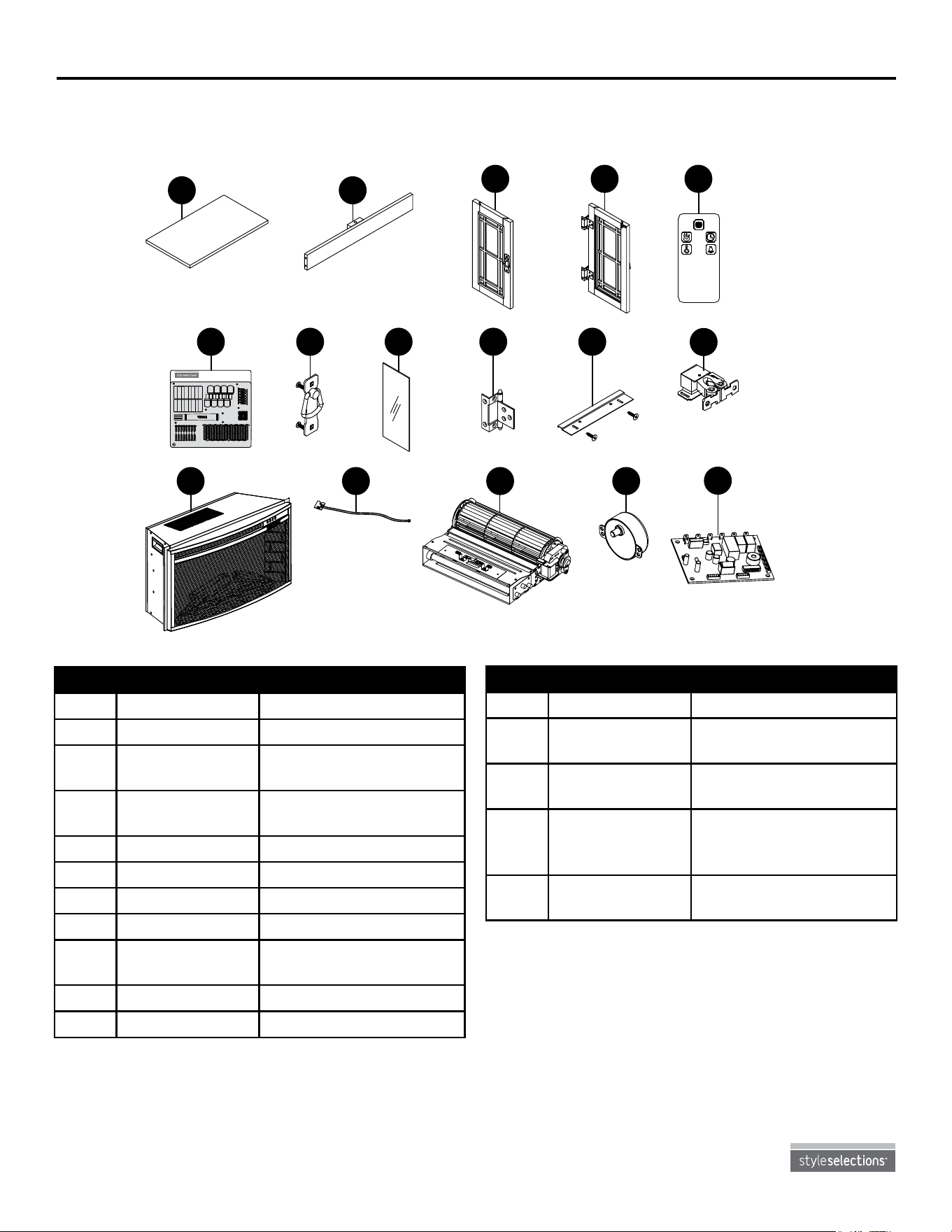
REPlACEMENT PARTS lIST
For replacement parts, call our customer service department at 1-877-888-8225, 8 a.m. - 8 p.m., EST,
Monday - Friday.
Printed in China
Style Selections
®
is a registered trademark
of LF, LLC. All Rights Reserved.
PART DESCRIPTION PART #
HH Hardware Pack PH-1009FM-78-005
II Door Pulls (with
screws)
PH-1009FM-78-006
JJ Hinges (with
screws)
PH-1009FM-78-008
KK Insert Mounting
Bracket (with
screws)
PH-1009FM-78-009
LL Door Roller
Catch Assembly
PH-1009FM-78-010
PART DESCRIPTION PART #
F Wood Shelf PF-1009FM-78-211-001
H Center Panel PF-1009FM-78-211-002
I Left Door (with
hinges)
PF-1009FM-78-211-003
J Right Door (with
hinges)
PF-1009FM-78-211-004
L Insert 2602-CM
M Remote Control 2602-CM-R
n Door Glass PH-1009FM-78-007
O Thermostat 2602-CM-P-001
P Heater/Blower
Assembly
2602-CM-P-002
Q Spinner Motor 2602-CM-P-003
R PCB Board PH-1009FM-78-011