Visit our website at: https://www.harborfreight.com
email our technical support at: [email protected]
59453
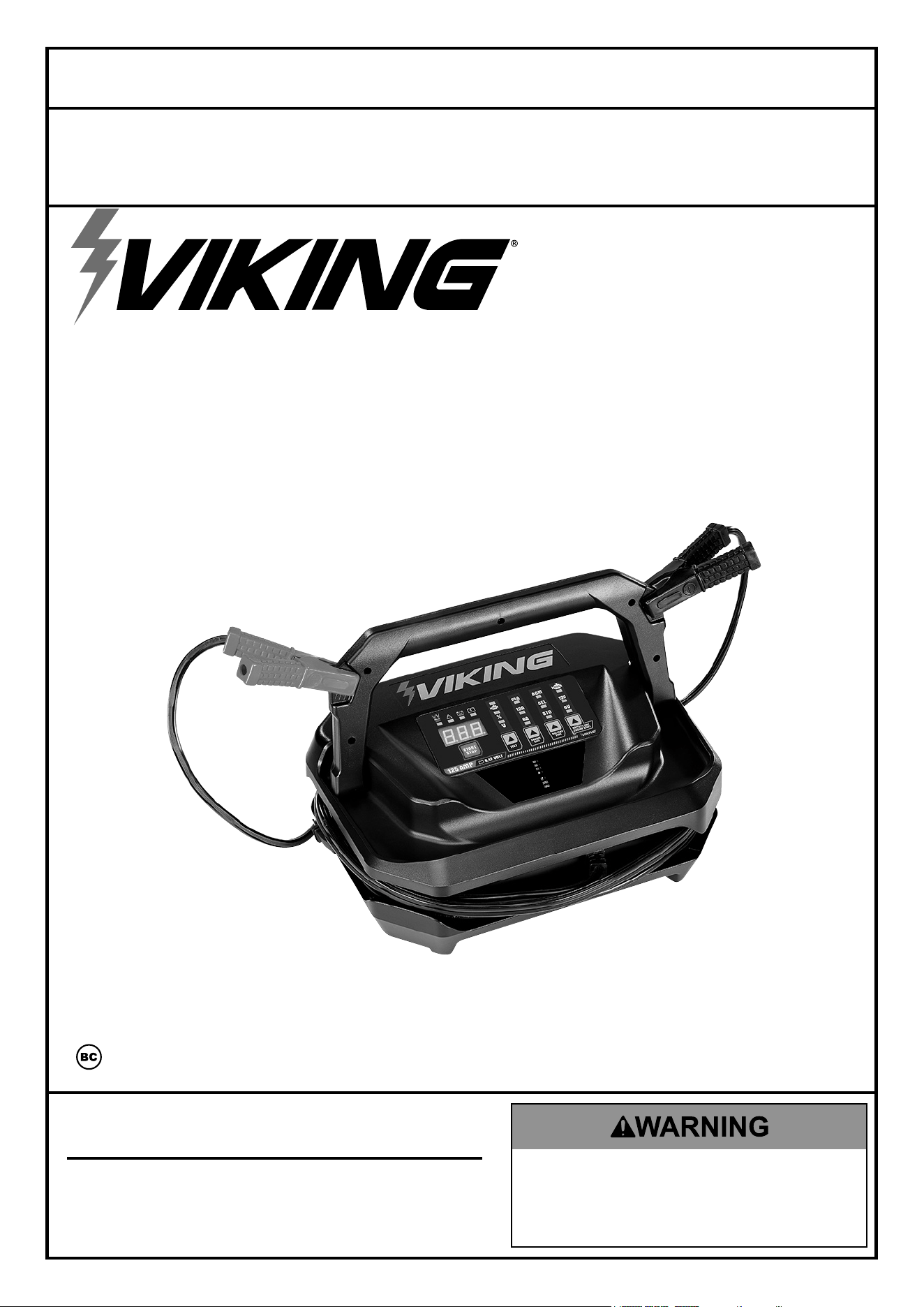
BATTERY CHARGER, ENGINE STARTER
AND ALTERNATOR TESTER
59453 UPC 193175471437
24k
Alternator Test:
1. Connect Clamps. Plug in unit.
2. Press TEST button.
3. Press START/STOP Button,
wait for countdown.
4. Start vehicle′s engine.
5. Keep engine RPM at
2500 for 15 seconds
before reading result.
Indicator Codes:
- Charge/Maintain
- Charged
- Bad Battery
- Short, Over Temp, Incorrect
Battery Voltage
- Reversed Polarity
- Recondition/Desulfation
- Ready to start engine
Owner’s Manual & Safety Instructions
Save This Manual Keep this manual for the safety warnings and precautions, assembly,
operating, inspection, maintenance and cleaning procedures. Write the product’s serial number in the
back of the manual (or month and year of purchase if product has no number). Keep this manual and the
receipt in a safe and dry place for future reference. 25a
When unpacking, make sure that the product is intact
and undamaged. If any parts are missing or broken,
please call 1-800-444-3353 as soon as possible.
Copyright
©
2023 by Harbor Freight Tools
®
. All rights reserved.
No portion of this manual or any artwork contained herein may be reproduced in
any shape or form without the express written consent of Harbor Freight Tools.
Diagrams within this manual may not be drawn proportionally. Due to continuing
improvements, actual product may differ slightly from the product described herein.
Tools required for assembly and service may not be included.
Read this material before using this product.
Failure to do so can result in serious injury.
SAVE THIS MANUAL.
Page 2 For technical questions, please call 1-800-444-3353. 59453
SaFety OperatiOn MaintenanceSetUp
table of contents
Safety ......................................................... 2
Specifications ............................................. 6
Setup .......................................................... 6
Operation .................................................... 7
Maintenance .............................................. 10
Warranty .................................................... 12
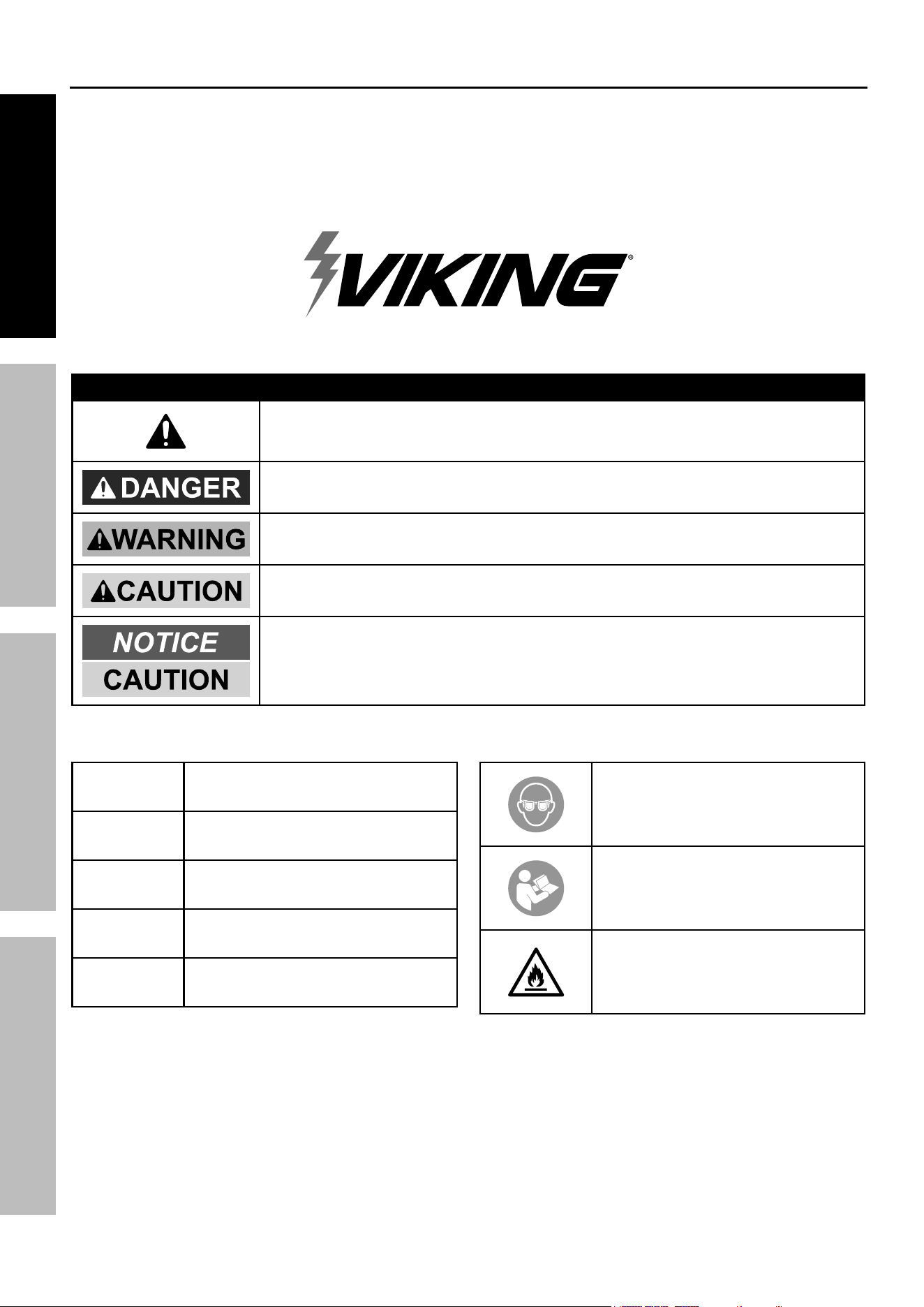
WarninG SyMBOLS anD DeFinitiOnS
This is the safety alert symbol. It is used to alert you to potential
personal injury hazards. Obey all safety messages that
follow this symbol to avoid possible injury or death.
Indicates a hazardous situation which, if not avoided,
will result in death or serious injury.
Indicates a hazardous situation which, if not avoided,
could result in death or serious injury.
Indicates a hazardous situation which, if not avoided,
could result in minor or moderate injury.
Addresses practices not related to personal injury.
Vac
Volts Alternating Current
a
Amperes
cca
Cold Cranking Amps
rc
Reserve Capacity
ah
Ampere-hours
WARNING marking
concerning Risk of Eye Injury.
Wear ANSI-approved
splash-resistant safety goggles.
Read the manual before
set-up and/or use.
WARNING marking
concerning Risk of Fire.
Follow connection procedure.
Page 3For technical questions, please call 1-800-444-3353.59453
SaFetyOperatiOnMaintenance SetUp
iMpOrtant SaFety inStrUctiOnS
1. SaVe tHeSe inStrUctiOnS –
This manual contains important safety and
operating instructions for this battery charger.
2. Do not expose charger to rain or snow.
3. Use of an attachment not recommended or sold
by the battery charger manufacturer may result in
a risk of fire, electric shock, or injury to persons.
4. To reduce risk of damage to electric
plug and cord, pull by plug rather than
cord when disconnecting charger.
5. An extension cord should not be used unless
absolutely necessary. Use of improper extension
cord could result in a risk of fire and electric shock.
If an extension cord must be used, make sure:
a. That pins on plug of extension cord
are the same number, size, and shape
as those of plug on charger;
b. That extension cord is properly wired
and in good electrical condition; and
c. That wire size is large enough for AC ampere
rating of charger as specified in Table A.
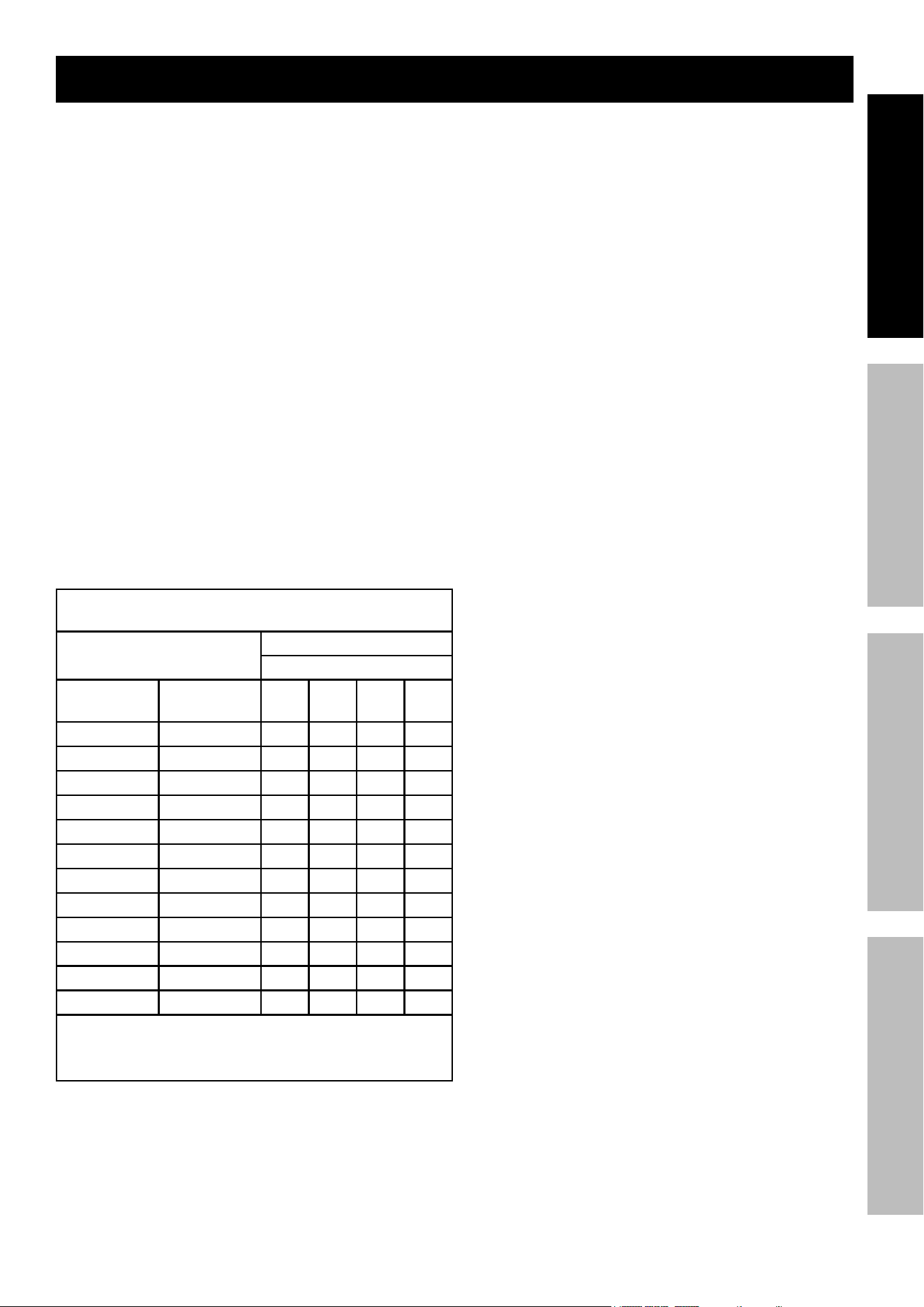
table a: recommended minimum aWG size
for extension cords for battery chargers
ac input rating, amperes*
aWG size of cord
Length of cord, feet
equal to or
greater than
But less
than
25 50 100 150
0 2 18 18 18 16
2 3 18 18 16 14
3 4 18 18 16 14
4 5 18 18 14 12
5 6 18 16 14 12
6 8 18 16 12 10
8 10 18 14 12 10
10 12 16 14 10 8
12 14 16 12 10 8
14 16 16 12 10 8
16 18 14 12 8 8
18 20 14 12 8 6
* If the input rating of a charger is given in watts rather than in
amperes, the corresponding ampere rating is to be determined by
dividing the wattage rating by the voltage rating – for example:
1250 watts/125 volts = 10 amperes
6. Do not operate charger with damaged cord or
plug – replace the cord or plug immediately.
7. Do not operate charger if it has received a sharp
blow, been dropped, or otherwise damaged in
any way; take it to a qualified serviceman.
8. Do not disassemble charger; take it to a
qualified serviceman when service or repair
is required. Incorrect reassembly may
result in a risk of electric shock or fire.
9. To reduce risk of electric shock, unplug
charger from outlet before attempting
any maintenance or cleaning. Turning
off controls will not reduce this risk.
10. WARNING – RISK OF EXPLOSIVE GASES.
a. WORKING IN VICINITY OF A LEAD-ACID
BATTERY IS DANGEROUS. BATTERIES
GENERATE EXPLOSIVE GASES DURING
NORMAL BATTERY OPERATION. FOR THIS
REASON, IT IS OF UTMOST IMPORTANCE
THAT YOU FOLLOW THE INSTRUCTIONS
EACH TIME YOU USE THE CHARGER.
b. To reduce risk of battery explosion, follow
these instructions and those published by
battery manufacturer and manufacturer of
any equipment you intend to use in vicinity
of battery. Review cautionary marking
on these products and on engine.
11. PERSONAL PRECAUTIONS
a. Consider having someone close
enough by to come to your aid when
you work near a lead-acid battery.
b. Have plenty of fresh water and soap nearby in
case battery acid contacts skin, clothing, or eyes.
c. Wear complete eye protection and
clothing protection. Avoid touching
eyes while working near battery.
d. If battery acid contacts skin or clothing,
wash immediately with soap and water.
If acid enters eye, immediately flood eye with
running cold water for at least 10 minutes
and get medical attention immediately.
e. NEVER smoke or allow a spark or flame
in vicinity of battery or engine.
f. Be extra cautious to reduce risk of dropping
a metal tool onto battery. It might spark
or short-circuit battery or other electrical
part that may cause explosion.
g. Remove personal metal items such as
rings, bracelets, necklaces, and watches
when working with a lead-acid battery.
A lead-acid battery can produce a short-
circuit current high enough to weld a ring or
the like to metal, causing a severe burn.

Page 4 For technical questions, please call 1-800-444-3353. 59453
SaFety OperatiOn MaintenanceSetUp
h. Use charger for charging a LEAD-ACID battery
only. It is not intended to supply power to a
low voltage electrical system other than in a
starter-motor application. Do not use battery
charger for charging dry-cell batteries that
are commonly used with home appliances.
These batteries may burst and cause injury
to persons and damage to property.
i. NEVER charge a frozen battery.
12. PREPARING TO CHARGE
a. If necessary to remove battery from vehicle
to charge, always remove grounded terminal
from battery first. Make sure all accessories in
the vehicle are off, so as not to cause an arc.
b. Be sure area around battery is well
ventilated while battery is being charged.
c. Clean battery terminals. Be careful to keep
corrosion from coming in contact with eyes.
d. Add distilled water in each cell until battery
acid reaches level specified by battery
manufacturer. Do not overfill. For a battery
without removable cell caps, such as valve
regulated lead acid batteries, carefully follow
manufacturer’s recharging instructions.
e. Study all battery manufacturer’s
specific precautions while charging and
recommended rates of charge.
f. Determine voltage of battery by referring
to vehicle owner’s manual and make sure
it matches output rating of battery charger.
If charger has adjustable charge rate,
charge battery initially at lowest rate.
13. CHARGER LOCATION
a. Locate charger as far away from
battery as DC cables permit.
b. Never place charger directly above
battery being charged; gases from battery
will corrode and damage charger.
c. Never allow battery acid to drip on
charger when reading electrolyte
specific gravity or filling battery.
d. Do not operate charger in a closed-in
area or restrict ventilation in any way.
e. Do not set a battery on top of charger.
14. DC CONNECTION PRECAUTIONS
a. Connect and disconnect DC output clips only
after setting any charger switches to “off” position
and removing AC cord from electric outlet.
Never allow clips to touch each other.
b. Attach clips to battery and chassis as indicated
in 15(e), 15(f), and 16(b) through 16(d).
15. FOLLOW THESE STEPS WHEN BATTERY
IS INSTALLED IN VEHICLE. A SPARK NEAR
BATTERY MAY CAUSE BATTERY EXPLOSION.
TO REDUCE RISK OF A SPARK NEAR BATTERY:
a. Position AC and DC cables to reduce risk of
damage by hood, door, or moving engine part.
b. Stay clear of fan blades, belts, pulleys, and
other parts that can cause injury to persons.
c. Check polarity of battery posts. POSITIVE
(POS, P, +) battery post usually has larger
diameter than NEGATIVE (NEG, N,–) post.
d. Determine which post of battery is grounded
(connected) to the chassis. If negative
post is grounded to chassis (as in most
vehicles), see (e). If positive post is
grounded to the chassis, see (f).
e. For negative-grounded vehicle, connect
POSITIVE (RED) clip from battery charger
to POSITIVE (POS, P, +) ungrounded post
of battery. Connect NEGATIVE (BLACK)
clip to vehicle chassis or engine block
away from battery. Do not connect clip
to carburetor, fuel lines, or sheet-metal
body parts. Connect to a heavy gauge
metal part of the frame or engine block.
f. For positive-grounded vehicle, connect
NEGATIVE (BLACK) clip from battery charger
to NEGATIVE (NEG, N, –) ungrounded post of
battery. Connect POSITIVE (RED) clip to vehicle
chassis or engine block away from battery.
Do not connect clip to carburetor, fuel lines, or
sheet-metal body parts. Connect to a heavy
gauge metal part of the frame or engine block.
g. When disconnecting charger,
disconnect AC cord, remove clip from
vehicle chassis, and then remove
clip from battery terminal.
h. See operating instructions for
length of charge information.
16. FOLLOW THESE STEPS WHEN BATTERY
IS OUTSIDE VEHICLE. A SPARK NEAR THE
BATTERY MAY CAUSE BATTERY EXPLOSION.
TO REDUCE RISK OF A SPARK NEAR BATTERY:
a. Check polarity of battery posts. POSITIVE
(POS, P, +) battery post usually has a larger
diameter than NEGATIVE (NEG, N, –) post.
b. Attach at least a 24-inch-long 6-gauge
(AWG) insulated battery cable to
NEGATIVE (NEG, N, –) battery post.
c. Connect POSITIVE (RED) charger clip to
POSITIVE (POS, P, +) post of battery.
d. Position yourself and free end of cable
as far away from battery as possible –
then connect NEGATIVE (BLACK)
charger clip to free end of cable.
e. Do not face battery when
making final connection.
Page 5For technical questions, please call 1-800-444-3353.59453
SaFetyOperatiOnMaintenance SetUp
f. When disconnecting charger, always do
so in reverse sequence of connecting
procedure and break first connection while
as far away from battery as practical.
g. A marine (boat) battery must be removed and
charged on shore. To charge it on board requires
equipment specially designed for marine use.
17. Wear ANSI-approved splash-resistant
safety goggles and heavy-duty rubber
work gloves whenever connecting,
disconnecting, or working near battery.
Battery acid can cause permanent
blindness.
18. Maintain labels and nameplates on the charger.
These carry important safety information.
If unreadable or missing, contact
Harbor Freight Tools for a replacement.
19. This product is not a toy.
Keep it out of reach of children.
20. Unplug the Battery Charger from its
electrical outlet before connecting its cables
to a battery, or performing any inspection,
maintenance, or cleaning procedures.
21. Use this charger with lead-acid batteries only.
Do not overcharge a maintenance-free battery.
22. Do not attempt to charge non-rechargeable
or defective batteries.
23. Do not charge more than one battery at one time.
24. Have your charger serviced by a qualified repair
person using only identical replacement parts.
This will ensure that the safety of
the charger is maintained.
25. Do not use charger while you are tired or under
the influence of drugs, alcohol or medication.
A moment of inattention while operating charger
may result in serious personal injury.
26. Before moving charger, disconnect power supply
and battery, then allow charger to cool.
27. People with pacemakers should consult their
physician(s) before use. Electromagnetic fields in
close proximity to heart pacemaker could cause
pacemaker interference or pacemaker failure.
In addition, people with pacemakers should:
• Avoid operating alone.
• Properly maintain and inspect to avoid
electrical shock.
• Properly ground power cord. Ground Fault Circuit
Interrupter (GFCI) should also be implemented
– it prevents sustained electrical shock.
28. The warnings, precautions, and instructions
discussed in this instruction manual cannot
cover all possible conditions and situations
that may occur. It must be understood by the
operator that common sense and caution are
factors which cannot be built into this product,
but must be supplied by the operator.
SaVe tHeSe inStrUctiOnS.
Grounding and ac power cord connection instructions
Charger should be grounded to reduce risk of
electric shock. The plug must be plugged into an
outlet that is properly installed and grounded in
accordance with all local codes and ordinances.
caUtiOn! – Never alter AC cord or plug provided –
if it will not fit outlet, have proper outlet installed
by a qualified electrician. Improper connection
can result in a risk of an electric shock.
caUtiOn! - riSK OF Fire Or eLectric
SHOcK. Connect Battery Charger directly to
grounding receptacle (three-prong). An adapter
should not be used with battery charger.
Page 6 For technical questions, please call 1-800-444-3353. 59453
SaFety OperatiOn MaintenanceSetUp
Specifications
Battery Type
Lead Acid - Standard, Gel,
AGM, Marine (Deep Cycle).
Note: Use AGM setting with
6A for Deep Cycle.
Battery Voltages 6/12 VDC
Lowest Operating Voltages 1 VDC
Engine Start 125A (4.5 min ON, 3 min OFF cooling)
Boosting 25A DC
Fast Charge 12A DC
Charging 6A DC
Maintaining Auto Floating < 1A DC
Battery Voltage Test Yes
Alternator Test Yes
Battery Repair/Recondition Yes (not all batteries can be repaired)
Input Current
5.5A AC (Max), 23A AC
(Max Engine Start)
Input Cable 6 ft, 18 AWG (Max)
Output Cable 6 ft, 10 AWG (Max)
note: amperage is only present while connected to a battery.
Setup
read the entire iMpOrtant SaFety inFOrMatiOn section at the beginning of this
manual including all text under subheadings therein before set up or use of this product.
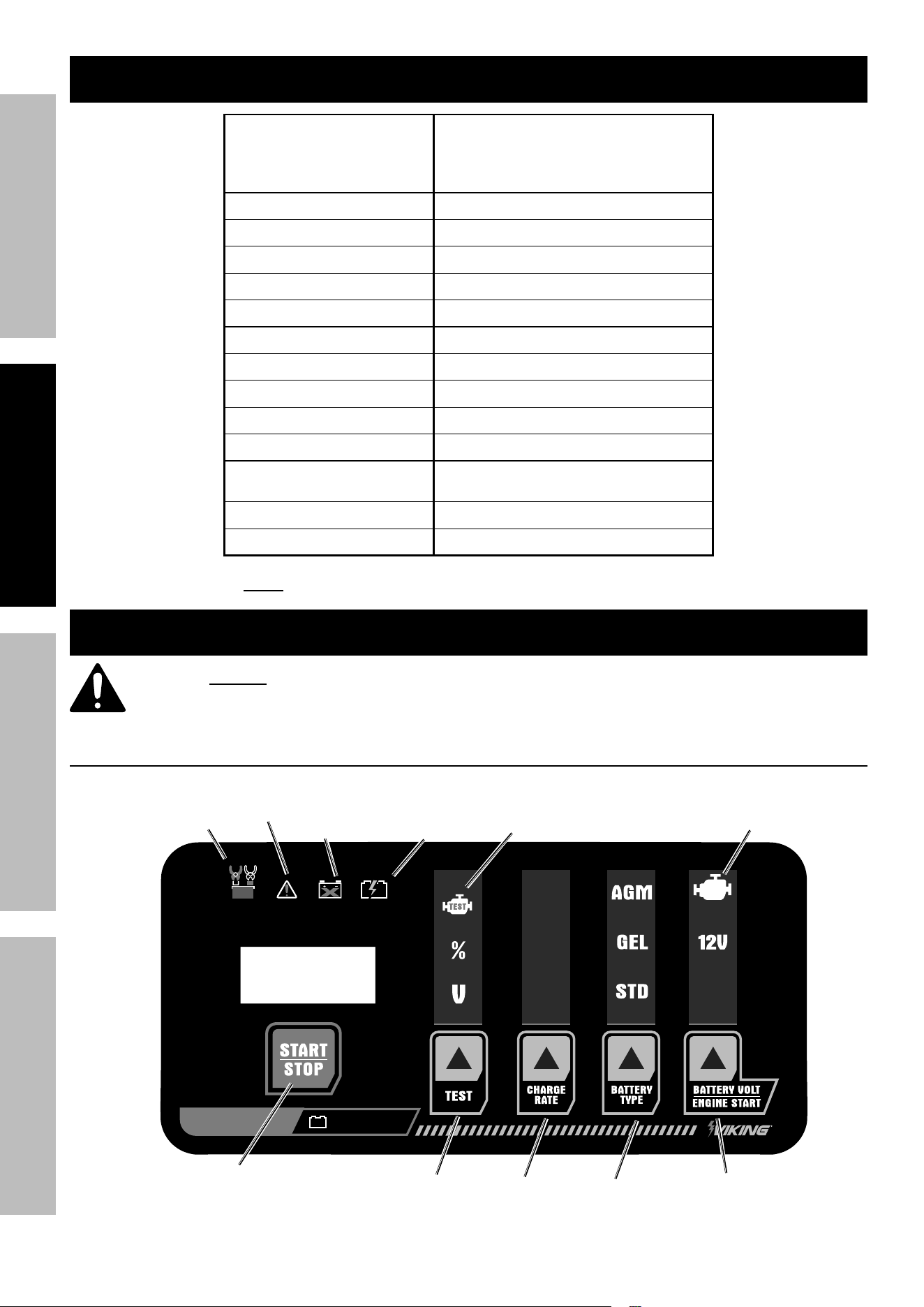
controls
125
AMP
25A
12A
6A
125A
6V
6/12 VOLT
charge rate
Start/Stop
LeD Display
reverse
polarity
indicator
error
indicator
Bad
Battery
indicator
charging/
charged
indicator
alternator
test indicator
engine Start
indicator
Battery type
test
Battery Volt/
engine Start
Page 7For technical questions, please call 1-800-444-3353.59453
SaFetyOperatiOnMaintenance SetUp
LeD Display: Displays charging status,
charging current, voltage, battery type,
Charging Mode, and error codes.
Start/Stop: Starts and stops charging process.
test: Toggle through to see Battery Charged
percentage, Battery Voltage and to test alternator.
charge rate: Press to select Charge
Rate 6A, 12A or 25A.
Battery type: Press to select between AGM, Gel
or STD (Standard) battery types. note: Use AGM
setting at 6A rate to charge Deep Cycle battery.
Battery Volt/engine Start: Press to select
6V or 12V, engage Engine Start feature (see
Engine Starting section on page 9).
reverse polarity indicator: Flashes when
connecting clamps polarities are reversed.
error indicator: Flashes when a short, over
temp or wrong battery voltage is detected. See
Troubleshooting Error Codes on page 7
Bad Battery indicator: Flashes when detecting a
bad battery condition. Charger will automatically
apply de-sulfation or recondition (Display shows
“dES”) process to attempt battery repair. Battery
repair process is two to eight hours. Charger will
indicate a bad battery if battery is not repairable.
Not all batteries can be reconditioned or repaired.
charging/charged indicator: Flashes
during charging process. Steady illumination
when battery is fully charged.
Operating instructions
read the entire iMpOrtant SaFety inFOrMatiOn section at the beginning of this
manual including all text under subheadings therein before set up or use of this product.
tO preVent SeriOUS inJUry:
DO nOt pLUG in cHarGer UntiL DirecteD tO DO SO.
Use this charger only on aGM, GeL, and standard lead-acid batteries.
Other batteries may be damaged or may overheat, leak, or catch fire.
preparing to charge
tO preVent SeriOUS inJUry:
Wear anSi-approved splash-resistant safety goggles and heavy-duty rubber work gloves
whenever connecting, disconnecting, or working near battery.
Battery acid can cause permanent blindness.
1. If necessary to remove battery from vehicle to
charge, always remove grounded terminal from
battery first. Make sure all accessories in the
vehicle are off, so as not to cause an arc.
2. Make sure area around battery is well
ventilated while battery is being charged.
3. Clean battery terminals. Be careful to keep
corrosion from coming in contact with eyes.
4. With standard lead acid batteries, add distilled
water in each cell until battery acid reaches
level specified by battery manufacturer.
Do not overfill. For sealed batteries without
removable cell caps, such as AGM, GEL, or
valve regulated lead acid batteries, carefully
follow manufacturer’s recharging instructions.
5. Study all battery manufacturer’s specific precautions
while charging and recommended rates of charge.
6. Determine voltage of battery by referring to vehicle
owner’s manual and make sure it matches output
rating of battery Charger. If Charger has adjustable
charge rate, charge battery initially at lowest rate.
7. A marine (boat) battery must be removed and
charged on shore. To charge it on board requires
equipment specially designed for marine use.
cOLD BatterieS - Begin charging at lowest rate,
increase rate as battery reaches normal temperature.
DO nOt cHarGe a FrOZen Battery.
BatterieS WitH HyDrOMeter eye:
Do not depend on hydrometer eye to
determine battery charge level.
charger Location
1. Locate Charger as far away from
battery as DC cables permit.
2. Never place Charger directly above
battery being charged; gases from battery
will corrode and damage Charger.
3. Never allow battery acid to drip on Charger when
reading electrolyte specific gravity or filling battery.
4. Do not operate Charger in a closed-in
area or restrict ventilation in any way.
5. Do not set a battery on top of Charger.
6. Do not charge battery outdoors
under wet conditions.
Page 8 For technical questions, please call 1-800-444-3353. 59453
SaFety OperatiOn MaintenanceSetUp
charging Battery installed in Vehicle
a SparK near Battery May caUSe Battery eXpLOSiOn.
tO reDUce riSK OF a SparK near Battery FOLLOW tHeSe inStrUctiOnS eXactLy.
tO preVent SeriOUS inJUry:
Wear anSi-approved splash-resistant safety goggles and heavy-duty rubber work gloves
whenever connecting, disconnecting, or working near battery.
Battery acid can cause permanent blindness.
1. Position AC and DC cables to reduce risk of
damage by hood, door, or moving engine part.
2. Stay clear of fan blades, belts, pulleys, and
other parts that can cause injury to persons.
3. Check polarity of battery posts. POSITIVE
(POS, P, +) battery post usually has larger
diameter than NEGATIVE (NEG, N,–) post.
4. Determine which post of battery is grounded
(connected) to the chassis. If negative post is
grounded to chassis (as in most vehicles), see 5.
If positive post is grounded to the chassis, see 6.
5. For negative-grounded vehicle, connect
POSITIVE (RED) clamp from Battery Charger to
POSITIVE (POS, P, +) ungrounded post of battery.
Connect NEGATIVE (BLACK) clamp to vehicle
chassis or engine block away from battery.
Do not connect clamp to carburetor, fuel lines,
or sheet-metal body parts. Connect to a heavy
gauge metal part of the frame or engine block.
6. For positive-grounded vehicle, connect NEGATIVE
(BLACK) clamp from Battery Charger to NEGATIVE
(NEG, N, –) ungrounded post of battery. Connect
POSITIVE (RED) clamp to vehicle chassis
or engine block away from battery. Do not
connect clamp to carburetor, fuel lines, or sheet-
metal body parts. Connect to a heavy gauge
metal part of the frame or engine block.
7. When disconnecting Charger, disconnect AC cord,
remove clamp from vehicle chassis, and
then remove clamp from battery terminal.
8. After use clean, then store the Charger
indoors out of children’s reach.
charging Battery Outside Vehicle
a SparK near Battery May caUSe Battery eXpLOSiOn.
tO reDUce riSK OF a SparK near Battery FOLLOW tHeSe inStrUctiOnS eXactLy.
tO preVent SeriOUS inJUry:
Wear anSi-approved splash-resistant safety goggles and heavy-duty rubber work gloves
whenever connecting, disconnecting, or working near battery.
Battery acid can cause permanent blindness.
1. Check polarity of battery posts. POSITIVE
(POS, P, +) battery post usually has a larger
diameter than NEGATIVE (NEG, N, –) post.
2. Attach at least a 24-inch-long 6-gauge
(AWG) insulated battery cable to
NEGATIVE (NEG, N, –) battery post.
3. Connect POSITIVE (RED) Charger clamp
to POSITIVE (POS, P, +) post of battery.
4. Position yourself and free end of cable as far away
from battery as possible – then connect NEGATIVE
(BLACK) Charger clamp to free end of cable.
5. Do not face battery when making final connection.
6. When disconnecting Charger, always do
so in reverse sequence of connecting
procedure and break first connection while
as far away from battery as practical.
7. After use clean, then store the Charger
indoors out of children’s reach.
Page 9For technical questions, please call 1-800-444-3353.59453
SaFetyOperatiOnMaintenance SetUp
Operation
a SparK near Battery May caUSe Battery eXpLOSiOn.
tO reDUce riSK OF a SparK near Battery FOLLOW tHeSe inStrUctiOnS eXactLy.
tO preVent SeriOUS inJUry:
Wear anSi-approved splash-resistant safety goggles and heavy-duty rubber work
gloves whenever connecting, disconnecting, or working near battery.
Battery acid can cause permanent blindness.
1. Follow directions on page 8 to connect
Charger to battery, then plug the Power Cord
into a properly grounded outlet. If the cable
clamps are not connected or the connection
is loose, the Error Indicator light will flash.
2. When a good connection has been made, the LED
screen will display the battery capacity and voltage.
note: For smaller batteries always charge on
lowest possible charge rate setting. For larger
batteries higher charge rates are recommended.
It is recommended to use AGM setting at 6A
charge rate to charge Deep Cycle batteries.
3. Perform steps a-d on the Charger Control
Panel. If battery voltage is below 1V the
charger will not charge battery. Test battery
for State of Health and replace it.
a. Select Battery Voltage. Select 6V or 12V
ensuring voltage matches applicable battery.
b. Select Battery Type. AGM can be used
to charge Deep Cycle batteries.
note: AGM (Flat or Spiral construction) is the
most popular battery used in automotive. Standard
or Flood type is sometimes seen in automotive
application. Gel batteries are not common in standard
automotive, but in power backup system in RV,
marine, and sometimes in golf carts or wheelchairs.
c. Select Charging Rate, lower current Amps
are for maintaining higher current Amps to
charge at a faster rate. Use 6A and AGM
setting to charge a Deep Cycle battery.
note: Charger is designed with multi-stage charging
process. Maximum charging current is applied when the
charger considers it safe to do so. The charging current
is gradually reduced as it reaches fully charged status.
d. Press START/STOP button to start charging
process. Press again to stop charging process.
4. Once the battery is fully charged the
Charger automatically switches to a
float charge/maintenance mode.
5. Press TEST button for Battery Charged Percentage
or Battery Voltage. Alternator Test feature
can’t be used during the charging process.
engine Starting
a SparK near Battery May caUSe Battery eXpLOSiOn.
tO reDUce riSK OF a SparK near Battery FOLLOW tHeSe inStrUctiOnS eXactLy.
tO preVent SeriOUS inJUry:
Wear anSi-approved splash-resistant safety goggles and heavy-duty rubber work
gloves whenever connecting, disconnecting, or working near battery.
Battery acid can cause permanent blindness.
1. Follow directions on page 8 to connect
Charger to battery, then plug the Power Cord
into a properly grounded outlet. If the cable
clamps are not connected or the connection
is loose, the Error Indicator light will flash.
2. Press BATTERY VOLT/ENGINE START
button to select 125A (Engine Start).
3. Press START/STOP button.
note: The charger will enter the first stage with 25A
boosting that lasts for 150 seconds. The display shows
the voltage rise. Starting can be done as much as
needed during this period. The best results are at the
“rdY” stage. Batteries that are slightly discharged need
less current to start. Other batteries require a higher
current to start. After the 150 seconds period expires,
the charger will enter the next stage for 120 seconds
where the maximum current of 125A is provided for
engine start, “rdY” is displayed. Engine Starting can
be done as much as needed during this period. The
Page 10 For technical questions, please call 1-800-444-3353. 59453
SaFety OperatiOn MaintenanceSetUp
charger will enter the mandatory final stage, which is
the cooling stage for 180 seconds, while the display
shows the countdown from 180 to 0 second. No starting
activities are allowed during this period. Transformer
must be cooled for the high power Engine Start process.
4. Attempt to start vehicle when “rdY”
appears on the display.
note: The highest current for engine
starting is provided at this stage.
5. Press Battery Voltage/Engine Start button or START/
STOP button and unplug the AC power cable to exit.
caUtiOn! to prevent damage to vehicle:
Do not bypass battery by using Engine
Start Directly to the battery cable. Monitor
Engine Start Mode process at all times.
note: If the vehicle does not start after
five seconds, stop and wait three minutes
before next attempt to start vehicle.
caUtiOn!; Excessive and continuous engine
start attempts can cause damage to starter.
alternator testing
1. Press TEST Button.
2. Press Start/Stop Button. Display
shows 60 second countdown.
3. Start the vehicle’s engine. Rev the engine
at 2,500 RPM and hold for 15 seconds.
4. After 60 second countdown the display
will show test results as PAS (good
alternator) or Bad (bad alternator).
Maintenance instructions
procedures not specifically explained in this manual must
be performed only by a qualified technician.
tO preVent SeriOUS inJUry: Unplug the charger, disconnect any battery, and allow charger
to cool completely before performing any inspection, maintenance, or cleaning procedures.
tO preVent SeriOUS inJUry FrOM tOOL FaiLUre:
Do not use damaged equipment. if abnormal noise or vibration occurs,
have the problem corrected before further use.
1. BeFOre eacH USe, inspect the general
condition of the Charger. Check for:
• loose hardware
• cracked or broken parts
• damaged electrical wiring or cable insulation
• any other condition that may
affect its safe operation.
2. aFter USe, wipe external surfaces
of the tool with clean cloth.
3. WarninG! tO preVent SeriOUS
inJUry: if charger is damaged, it must be
replaced only by a qualified service technician.
DO nOt Open cHarGer HOUSinG,
nO USer-SerViceaBLe partS inSiDe.
Page 11For technical questions, please call 1-800-444-3353.59453
SaFetyOperatiOnMaintenance SetUp
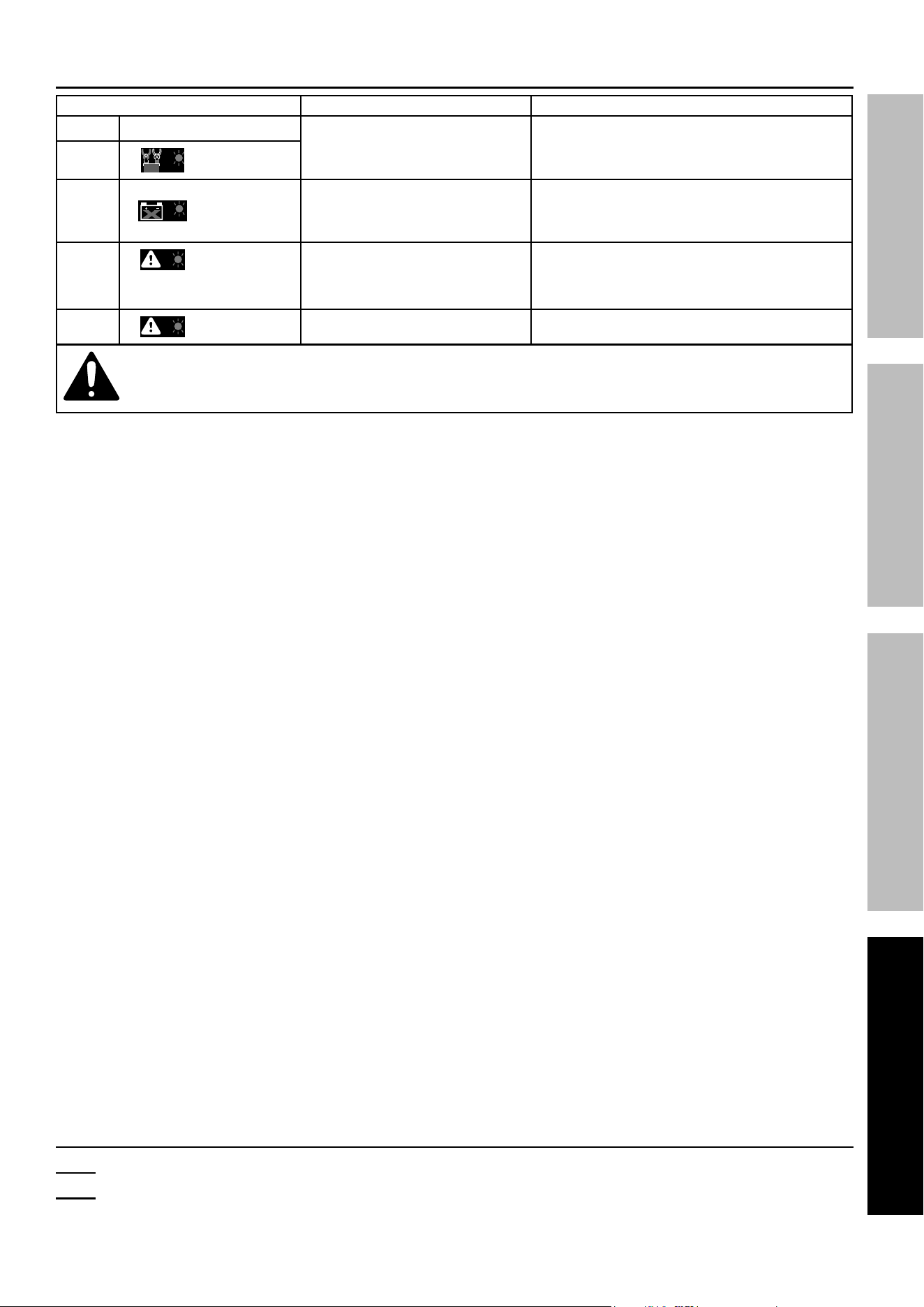
troubleshooting error codes
error code possible causes Likely Solutions
Display LeD indicator
Clamps connected to battery
in reversed polarity.
Correct clamp connections on battery.
Err
(red flashing)
Err
(red flashing)
Voltage below 1V indicates
a bad battery and it will
not hold a charge.
Test battery and replace if needed.
Err
(red flashing)
1. Short circuit at clamps.
2. Incorrect battery
voltage selected.
1. Ensure clamps are not touching.
2. Select correct battery voltage.
oHt
(red flashing)
Charger over temp. Ensure charger is venting properly.
Follow all safety precautions whenever diagnosing or servicing the tool.
Disconnect power supply before service.
record product’s Serial number Here:
note: If product has no serial number, record month and year of purchase instead.
note: Internal parts are not user-serviceable and are not available.
Reference UPC 193175471437

26677 agoura road • calabasas, ca 91302 • 1-800-444-3353
Limited 90 Day Warranty
Harbor Freight Tools Co. makes every effort to assure that its products meet high quality and durability standards,
and warrants to the original purchaser that this product is free from defects in materials and workmanship for the
period of 90 days from the date of purchase. This warranty does not apply to damage due directly or indirectly,
to misuse, abuse, negligence or accidents, repairs or alterations outside our facilities, criminal activity, improper
installation, normal wear and tear, or to lack of maintenance. We shall in no event be liable for death, injuries
to persons or property, or for incidental, contingent, special or consequential damages arising from the use of
our product. Some states do not allow the exclusion or limitation of incidental or consequential damages, so the
above limitation of exclusion may not apply to you. THIS WARRANTY IS EXPRESSLY IN LIEU OF ALL OTHER
WARRANTIES, EXPRESS OR IMPLIED, INCLUDING THE WARRANTIES OF MERCHANTABILITY AND FITNESS.
To take advantage of this warranty, the product or part must be returned to us with transportation charges
prepaid. Proof of purchase date and an explanation of the complaint must accompany the merchandise.
If our inspection verifies the defect, we will either repair or replace the product at our election or we may
elect to refund the purchase price if we cannot readily and quickly provide you with a replacement. We will
return repaired products at our expense, but if we determine there is no defect, or that the defect resulted
from causes not within the scope of our warranty, then you must bear the cost of returning the product.
This warranty gives you specific legal rights and you may also have other rights which vary from state to state.
Fcc StateMent
Note: This equipment has been tested and found to comply with the limits for a Class B
digital device, pursuant to part 15 of the FCC Rules. These limits are designed to provide
reasonable protection against harmful interference in a residential installation.
This equipment generates, uses and can radiate radio frequency energy and, if not installed and
used in accordance with the instructions, may cause harmful interference to radio communications.
However, there is no guarantee that interference will not occur in a particular installation.
If this equipment does cause harmful interference to radio or television reception,
which can be determined by turning the equipment off and on, the user is encouraged
to try to correct the interference by one or more of the following measures:
• Reorient or relocate the receiving antenna.
• Increase the separation between the equipment and receiver.
• Connect the equipment into an outlet on a circuit different from that
to which the receiver is connected.
• Consult the dealer or an experienced radio/TV technician for help.