- 1 -
Item No. 210875
TOWEL WARMER
User Guide
Thank you for purchasing the Towel Warmer. Please read this manual thoroughly before operating
this device.
CAUTION
To reduce the risk of serious injury, please note that this is not a toy. Do not allow children to
operate or play near the towel warmer. To minimize the risk of fire or electric shock, do not expose
this unit to rain or moisture.
The lightning flash with an arrowhead symbol inside a triangle alerts you to the presence of
uninsulated “dangerous voltage” within the unit, which could pose a risk of electric shock.
The exclamation point within a triangle warns you of important operating and maintenance
instructions found in the accompanying literature.
Important Safety Instructions
• Read, adhere to, and follow all safety and operating instructions before using the unit.
• For household use only
• For adult use only
• For dry fabric items only
WARNING
To reduce the risk of fire, electric shock, or serious injury:
• Always unplug the unit from the electrical outlet immediately after use.
• Do not use the appliance for anything other than its intended purpose.
• Do not place or store the unit where it can fall or be pulled into a tub or sink.
• Do not place the unit in or drop it into water or other liquids.
• If the unit falls into water, unplug it immediately and do not reach for it.
• Ensure that objects do not fall into or liquids spill onto the unit.
• Never leave the unit unattended when plugged in.
• Close supervision is necessary when using this unit near children or disabled persons.
• Use this unit only as described in this manual.
• Never operate the unit if it has a damaged cord or plug, is not functioning properly, or has been
dropped or damaged.
• Keep cords away from heated surfaces. Do not wrap the cord around the exterior of the appliance
or let it hang over a table or counter edge.
• Do not use outdoors.
• Do not alter the safety plug or use an extension cord with this device.
• Do not operate with a voltage converter.
• Do not touch hot surfaces.
• Do not use accessory attachments not recommended by the manufacturer, as this may cause
injuries.
- 2 -
FCC INFORMATION
CAUTION
Changes or modifications not expressly approved by the party responsible for compliance could
void the user’s authority to operate the equipment.
This device complies with Part 15 of the FCC Rules. Operation is subject to the following two
conditions:
1. This device may not cause harmful interference.
2. This device must accept any interference received, including interference that may cause
undesired operation.
WARNING
Changes or modifications to this unit not expressly approved by the party responsible for
compliance could void the user’s authority to operate the equipment.
This equipment has been tested and found to comply with the limits for a Class B digital device,
pursuant to Part 15 of the FCC Rules. These limits are designed to provide reasonable protection
against harmful interference in a residential installation. This unit generates, uses, and can radiate
radio frequency energy. If not installed and used in accordance with the instructions, it may cause
harmful interference to radio communications. However, there is no guarantee that interference
will not occur in a particular installation. If this equipment does cause harmful interference to radio
or television reception, which can be determined by turning the equipment off and on, the user is
encouraged to try to correct the interference by one or more of the following measures:
• Reorient or relocate the receiving antenna.
• Increase the separation between the equipment and receiver.
• Connect the equipment to an outlet on a circuit different from the one to which the receiver is
connected.
• Consult the dealer or an experienced radio/TV technician for help.
PART AND CONTROLS

- 3 -
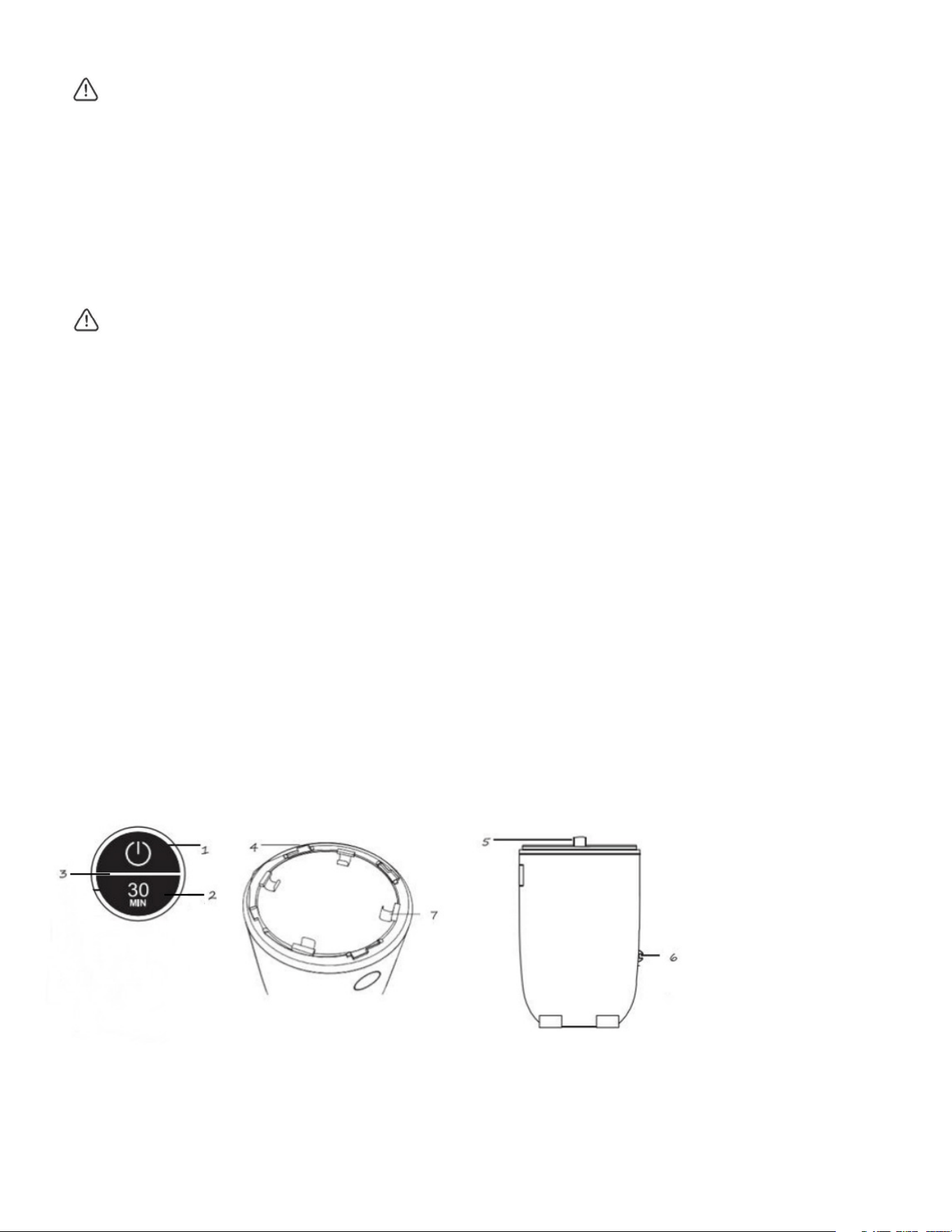
1. Upper Semicircle: Power Key - Touch to start or touch to power off.
2. Lower Semicircle: Timer - Touch to switch and set the time. After 5 seconds, the screen will display
the remaining run time.
3. Outer Ring: Status Indication.
4. Twist Lock Lid
5. Lid
6. Cord Wrap: Located at the side.
7. Detachable Hooks
SPECIFICATIONS
Rated Voltage: 120V AC
Frequency: 60Hz
Wattage Max: 450W
Weight with Bases: 8.38 lbs.
Dimension with Bases: 20.5’’ H x 12.6’’ W x 12.6” D
This device complies with Part 15 of the FCC Rules
OPERATION
The Towel Warmer is designed to warm two bath towels measuring approximately 40” x 70”.
1. Place the Towel Warmer on a dry, level, and hard surface.
2. Plug the power cord into an electrical outlet.
3. Place your dry towel(s) inside the warmer and replace the lid.
4. Choose your heating method:
o Method 1: Touch the power key to start heating. The default heating time is 30 minutes.
o Method 2: Touch the timer key to select a different heating time, then touch the power key
to start heating.
5. When the heating time is over, the outer ring and the screen will turn off.
FUNCTION OVERVIEW
1. Touch Screen
• Power Key: Tap to start or stop heating.
• Time Key and Display: Use to select the heating time and display the time.

- 4 -
2. LED Light
• Indicators:
o Initial Startup: Upon powering on, the touchscreen will illuminate for 2 seconds,
accompanied by a sound for a self-test. After the test, the outer LED ring will turn off, leaving
the power button lit. The time button will display “30 minutes” and flash to remind you to set the
heating time or start heating.
o Set Heating Time: Touch the time key to set the heating duration or press the power key to start
heating immediately (default time is 30 minutes). During heating, the outer ring light will pulse to
indicate activity.
o Completed Heating Cycle: After the set time, the screen will turn off.
3. Time & Temperature Settings
• Heating Time Options: Select from four preset durations - 15, 30, 45, or 60 minutes by tapping
the time button.
• Power Key Function: Start or stop heating by tapping the power key.
• Default Settings: If no time is selected after powering on and pressing the power key, the unit will
start heating with a default time of 30 minutes.
• Heating Interruption: Stop heating by touching the power key and start again by tapping it once
more.
• Display During Heating: The lower semi-circular display will show the remaining time while heating
is active.
• Heating Completion: Once the set time elapses, the outer ring light will turn off, indicating that
heating has stopped.
4. Lid
• To lock the lid, align the arrow on the left side of the lid and twist clockwise. To unlock, twist
counterclockwise.
5. Aromatherapy Box
• The aromatherapy box is located on the underside of the lid. Slide the cover open, insert the disc,
and then slide the cover back in place.
• Note: Do not use liquid or oil scents. Aroma discs are not included.

- 5 -
TIPS FOR BEST RESULTS
1. Use Cotton or Cotton Blend Fabrics: For optimal performance, use cotton or cotton blend towels
and fabrics.
2. Loosely Pile One Towel: For fast and even heating, loosely pile one towel into the Towel Warmer.
Two towels will take longer to heat.
3. Use Only with Dry Fabrics: Do not use with damp or wet articles.
4. Avoid Delicate Fabrics: Do not use delicate fabrics that cannot withstand high heat. Fabrics
requiring a cool iron may be damaged by the heat of the Towel, potentially damaging both the fabric
and the product.
5. Keep the Lid Closed: Once the heating cycle has begun, keep the lid closed to prevent heat from
escaping. Opening the lid may result in slower heating times. Condensation on the lid and interior is
normal.
6. Fragrance Disc Usage: When used with the Towel Warmer, the Fragrance Disc may warp over
time.
CARE AND MAINTENANCE
• Always remove the power cord from the electrical outlet before cleaning.
• Wipe the unit with a dry cloth only when it is cool to the touch.
TROUBLESHOOTING
1. Performance Issue: Fault Code E01
• Symptom: The screen displays fault code E01, with all LEDs flashing and the unit unresponsive to
touch.
• Reason: NTC (Negative Temperature Coefficient) failure. The program locks after 1 minute of
heating, and the heating relay disconnects automatically.
• Solution: Unplug the device and contact the dealer for factory repair. Do not attempt self-
disassembly.
2. Performance Issue: Fault Code E02
• Symptom: The screen displays fault code E02, with all LEDs flashing and no response to touch.
• Reason: Wire disconnection. The temperature remains unchanged after 1 minute of heating.
• Solution: Unplug the device and contact the dealer for factory repair. Avoid self-disassembly.

- 6 -
WARRANTY / CUSTOMER SERVICE
This item from SharperImage.com includes a 1-year limited replacement warranty. If you have any
questions not covered in this guide, please call our Customer Service department at 1 (877) 210-
3449. Customer Service agents are available Monday through Friday, 9:00 a.m. to 6:00 p.m. ET.
The SHARPER IMAGE® name and logo are registered trademarks.
©Sharper Image. All Rights Reserved.