WARNING!
Read this Operator’s Man-
ual carefully before using
this tool. Failure to under-
stand and follow the con-
tents of this manual may
result in electrical shock,
fire, and/or serious per-
sonal injury.
Operator’s Manual
For support and additional informa-
tion about using your CS12x go to
support.seesnake.com/cs12x or
scan this QR code.
Companion Apps
Available
Original Instructions – English – 1

2 – English – CS12x
Table of Contents
Introduction
Regulatory Statements �������������������������������������������������������������������������������������������������������������������������������������������� 3
Safety Symbols ������������������������������������������������������������������������������������������������������������������������������������������������������� 3
General Safety Rules
Work Area Safety ���������������������������������������������������������������������������������������������������������������������������������������������������� 4
Electrical Safety ������������������������������������������������������������������������������������������������������������������������������������������������������ 4
Personal Safety ������������������������������������������������������������������������������������������������������������������������������������������������������� 4
Equipment Use and Care ����������������������������������������������������������������������������������������������������������������������������������������� 5
Battery Use and Care ���������������������������������������������������������������������������������������������������������������������������������������������� 5
Pre-Operation Inspection������������������������������������������������������������������������������������������������������������������������������������������ 6
SeeSnake CS12x Overview
Description ������������������������������������������������������������������������������������������������������������������������������������������������������������� 7
Specifications���������������������������������������������������������������������������������������������������������������������������������������������������������� 8
Components ����������������������������������������������������������������������������������������������������������������������������������������������������������� 9
Operating Instructions
SeeSnake CS12x Safety ���������������������������������������������������������������������������������������������������������������������������������������� 10
Inspection Overview �����������������������������������������������������������������������������������������������������������������������������������������������11
Connecting to a Camera Reel ����������������������������������������������������������������������������������������������������������������������������������11
Powering the System ����������������������������������������������������������������������������������������������������������������������������������������������11
Keypad ����������������������������������������������������������������������������������������������������������������������������������������������������������������� 12
User Interface ������������������������������������������������������������������������������������������������������������������������������������������������������� 14
Maintenance and Support
Product Support ���������������������������������������������������������������������������������������������������������������������������������������������������� 16
Software Updates �������������������������������������������������������������������������������������������������������������������������������������������������� 16
Cleaning ��������������������������������������������������������������������������������������������������������������������������������������������������������������� 16
Transport and Storage ������������������������������������������������������������������������������������������������������������������������������������������� 16
Service and Repair ������������������������������������������������������������������������������������������������������������������������������������������������ 17
Disposal ��������������������������������������������������������������������������������������������������������������������������������������������������������������� 17
Troubleshooting ����������������������������������������������������������������������������������������������������������������������������������������������������� 18
CS12x – English – 3
Introduction
The warnings, cautions, and instructions discussed
in this manual cannot cover all possible conditions
and situations which may occur. It must be under-
stood by the operator that common sense and cau-
tion are factors that cannot be built into this prod-
uct, but must be supplied by the operator.
Regulatory Statements
The EC Declaration of Conformity (890-011-320�10)
will accompany this manual as a separate booklet
when required�
Directive 2014/53/EU
Radio Operating Spectrum/Power
Bluetooth 4�0 2402 – 2480 MHz 14�20 dBm
Wi-Fi
802�11 b/g/n
2400 – 2483�5 MHz 19�90 dBm
Wi-Fi
802�11 a/n
5150 – 5250 MHz 20�46 dBm
5250 – 5350 MHz 18�32 dBm
5470 – 5725 MHz 19�43 dBm
GPS 1559 – 1610 MHz
This device complies with Part 15 of FCC rules�
Operation is subject to the following two condi-
tions: (1) This device may not cause harmful inter-
ference, and (2) this device must accept any inter-
ference received, including interference that may
cause undesired operation�
Contains Transmitter Module FCC ID: Z64-WL18SBMOD�
Safety Symbols
In this manual and on the product, safety symbols and sig-
nal words are used to communicate important safety infor-
mation� This section is provided to improve understanding of
these signal words and symbols�
This is the safety alert symbol� It is used to alert you
to potential personal injury hazards� Obey all safety
messages that follow this symbol to avoid possible
injury or death�
DANGER
DANGER indicates a hazardous situation which, if not avoid-
ed, will result in death or serious injury�
WARNING
WARNING indicates a hazardous situation which, if not
avoided, could result in death or serious injury�
CAUTION
CAUTION indicates a hazardous situation which, if not
avoided, could result in minor or moderate injury�
NOTICE
NOTICE indicates information that relates to
the protection of property�
This symbol means read the manual carefully be-
fore using the equipment� The manual contains im-
portant information on the safe and proper opera-
tion of the equipment�
This symbol means always wear safety glasses
with side shields or goggles when handling or using
this equipment to reduce the risk of eye injury�
This symbol indicates the risk of electrical shock�

4 – English – CS12x
General Safety Rules
WARNING
Read all safety warnings and instructions. Failure to fol-
low the warnings and instructions may result in electri-
cal shock, fire, and/or serious injury.
SAVE THESE INSTRUCTIONS!
Work Area Safety
• Keep your work area clean and well lit. Cluttered or
dark areas invite accidents�
• Do not operate equipment in explosive atmospheres,
such as in the presence of flammable liquids, gases,
or dust. Equipment can create sparks which may ignite
the dust or fumes�
• Keep children and bystanders away while operating
equipment. Distractions can cause you to lose control�
• Avoid traffic. Pay attention to moving vehicles when
using on or near roadways� Wear high-visibility clothing
or reflector vests�
Electrical Safety
• Avoid body contact with earthed or grounded surfac-
es such as pipes, radiators, ranges, and refrigerators.
There is an increased risk of electrical shock if your body
is earthed or grounded�
• Do not expose equipment to rain or wet conditions.
Water entering equipment will increase the risk of elec-
trical shock�
• Keep all electrical connections dry and off the ground.
Touching equipment or plugs with wet hands can increase
the risk of electrical shock�
• Do not abuse the cord. Never use the cord for carry-
ing, pulling, or unplugging the power tool� Keep cord away
from heat, extreme cold, oil, sharp edges, and moving
parts� Damaged or entangled cords increase the risk of
electrical shock�
• If operating equipment in a damp location is unavoid-
able, use a ground fault circuit interrupter (GFCI) pro-
tected supply. Use of a GFCI reduces the risk of electri-
cal shock�
Personal Safety
• Stay alert, watch what you are doing, and use com-
mon sense when operating equipment. Do not use
equipment while you are tired or under the influence of
drugs, alcohol, or medication� A moment of inattention
while operating equipment may result in serious injury�
• Dress properly. Do not wear loose clothing or jewelry�
Loose clothes, jewelry, and long hair can be caught in
moving parts�
• Practice good hygiene. Use hot, soapy water to wash
hands and other body parts exposed to drain contents
after handling or using drain inspection equipment� To
prevent contamination from toxic or infectious material,
do not eat or smoke while operating or handling drain in-
spection equipment�
• Always use appropriate personal protective equip-
ment when handling and using equipment in drains.
Drains may contain chemicals, bacteria, and other sub-
stances that may be toxic, infectious, and cause burns or
other issues� Appropriate personal protective equipment
always includes safety glasses and may include a dust
mask, hard hat, hearing protection, drain cleaning gloves
or mitts, latex or rubber gloves, face shields, goggles, pro-
tective clothing, respirators, and steel toed, non-skid foot-
wear�
• If using drain cleaning equipment and drain inspec-
tion equipment at the same time, wear RID GID drain
cleaning gloves. Never grasp the rotating drain cleaning
cable with anything else, including other gloves or a rag
which can become wrapped around the cable and cause
hand injuries� Only wear latex or rubber gloves under-
neath RID GID drain cleaner gloves� Do not use damaged
drain cleaning gloves�

CS12x – English – 5
Equipment Use and Care
• Do not force equipment. Use the correct equipment for
your application� The correct equipment does the job bet-
ter and more safely�
• Do not use equipment if the power switch does not
turn it on and off. Any equipment that cannot be con-
trolled with the power switch is dangerous and must be
repaired�
• Disconnect the plug from the power source and/or
the battery pack from the equipment before making
adjustments, changing accessories, or storing. Pre-
ventive safety measures reduce the risk of injury�
• Store idle equipment out of the reach of children and
do not allow persons unfamiliar with the equipment
or these instructions to operate the equipment. Equip-
ment can be dangerous in the hands of untrained users�
• Maintain equipment. Check for misalignment or binding
of moving parts, missing parts, breakage of parts, and
any other condition that may affect the equipment’s op-
eration� If damaged, have the equipment repaired before
use� Many accidents are caused by poorly maintained
equipment�
• Do not overreach. Keep proper footing and balance at
all times� This enables better control of the equipment in
unexpected situations�
• Use the equipment and accessories in accordance
with these instructions, taking into account the work-
ing conditions and the work to be performed. Use of
the equipment for operations different from those intend-
ed can result in a hazardous situation�
• Use only accessories that are recommended by the
manufacturer for your equipment. Accessories that
may be suitable for one piece of equipment may become
hazardous when used with other equipment�
• Keep handles dry, clean, and free from oil and grease.
Clean handles give better control of the equipment�
• Protect the LCD from impacts during use. Impacts to
the front of the LCD can cause glass breakage and com-
plete failure of the display�
Battery Use and Care
• Use equipment only with specifically designed bat-
tery packs. Use of any other battery packs may create a
risk of injury and/or fire�
• Recharge only with the charger specified by the man-
ufacturer. A charger suitable for one type of battery pack
may create a risk of fire when used with another battery
pack�
• Do not cover charger while in use. Proper ventilation is
required for correct operation� Covering charger while in
use could result in fire�
• Use and store battery packs and chargers in dry, ap-
propriate temperature areas according to their doc-
umentation. Extreme temperatures and moisture can
damage battery packs and result in leakage, electrical
shock, fire, or burns�
• Do not probe the battery pack with conductive ob-
jects. Shorting of battery terminals may cause sparks,
burns, or electrical shock� When the battery pack is not
in use, keep it away from other metal objects, like paper
clips, coins, keys, nails, screws or any other small metal
object that can make a connection from one terminal to
the other� Shorting the battery terminals may cause burns
or a fire�
• Under abusive conditions, liquid may eject from bat-
tery pack; avoid contact. If contact occurs, flush with
water� If liquid contacts eyes, seek medical help� Liq-
uid ejected from the battery pack may cause irritation or
burns�
• Properly dispose of battery packs. Exposure to high
temperatures can cause the battery packs to explode; do
not dispose of in a fire� Some countries have regulations
concerning battery disposal� Follow all applicable regula-
tions�

6 – English – CS12x
Pre-Operation Inspection
WARNING
To reduce the risk of serious injury from electrical shock
or other causes, and to prevent damage to your equip-
ment, inspect all equipment and correct any problems
before each use.
To inspect all equipment, follow these steps:
1� Power off your equipment�
2� Disconnect and inspect all cords, cables, and connec-
tors for damage or modification�
3� Clean any dirt, oil, or other contamination from your
equipment to ease inspection and to prevent it from
slipping from your grip during transportation or use�
4� Inspect your equipment for any broken, worn, miss-
ing, misaligned, or binding parts, or any other condition
which might prevent safe, normal operation�
5� Refer to the instructions for all other equipment to in-
spect and make sure it is in good, usable condition�
6� Check your work area for the following:
• Adequate lighting�
• The presence of flammable liquids, vapors, or dust
that may ignite� If present, do not work in area until
sources have been identified and corrected� The
equipment is not explosion proof� Electrical connec-
tions can cause sparks�
• A clear, level, stable, and dry place for the operator�
Do not use the equipment while standing in water�
7� Examine the job to be done and determine the correct
equipment for the task�
8� Observe the work area and erect barriers as neces-
sary to keep bystanders away�
See additional product specific safety information and
warnings starting on page 10.
CS12x – English – 7
SeeSnake CS12x Overview
Description
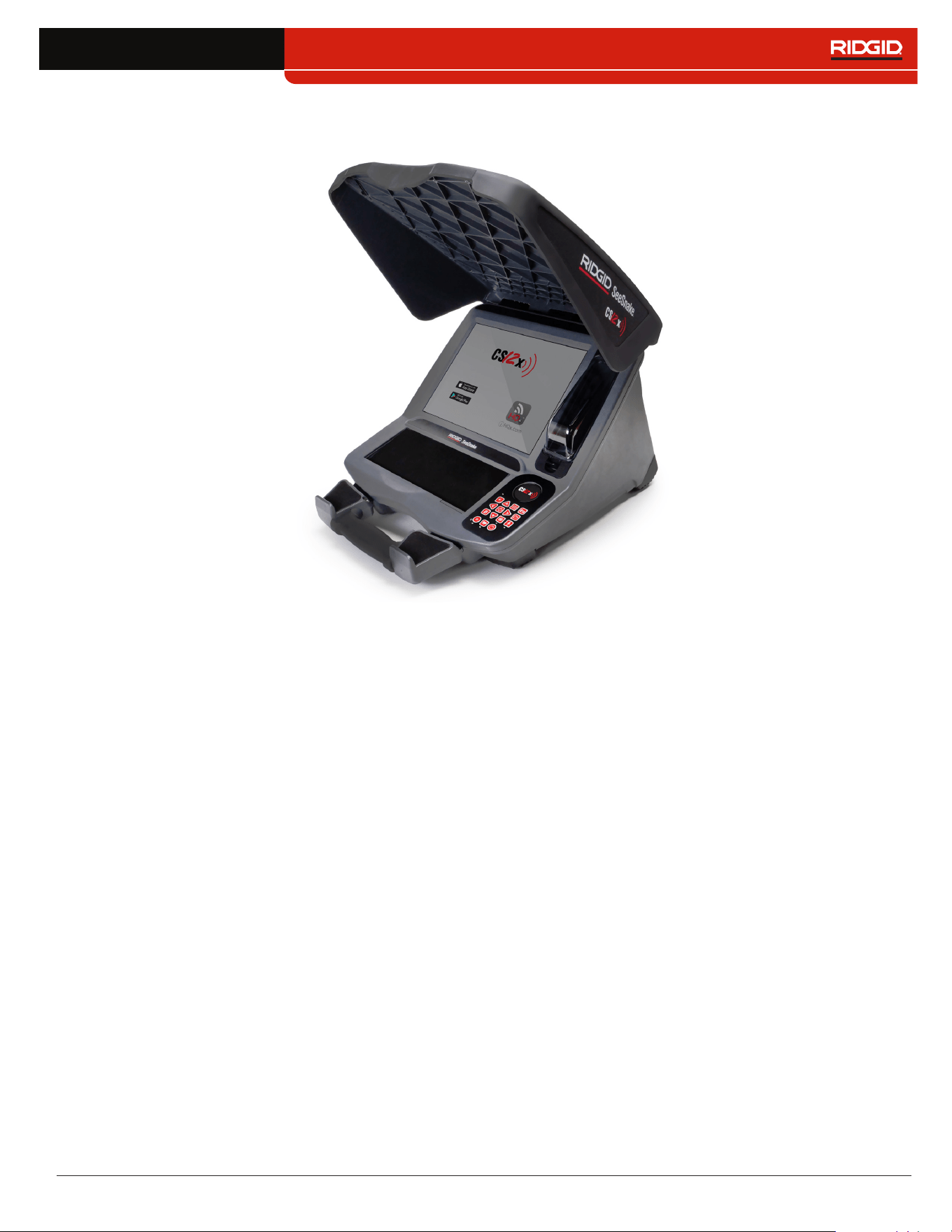
The RIDGID
®
SeeSnake
®
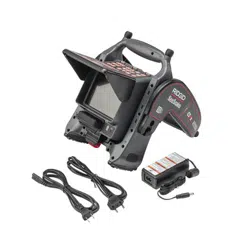
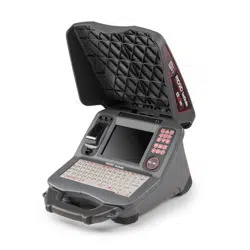
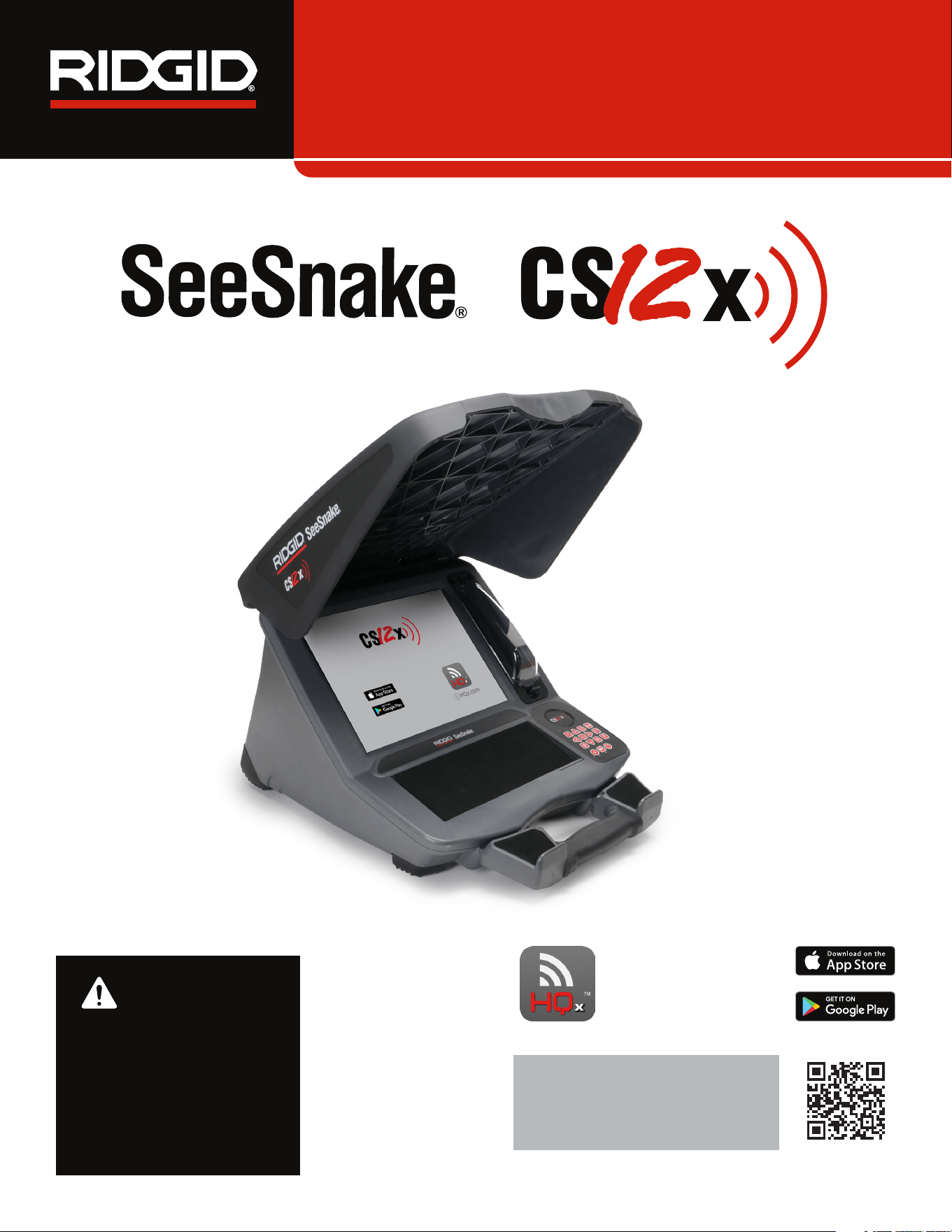
CS12x Wi-Fi-enabled reporting
monitor is an all-in-one solution for capturing media and de-
livering inspection results to your customers, all directly from
the job site�
Built for speed and efficiency, the CS12x captures images
and video directly a USB drive� Connect a large capacity
drive in the storage pocket to ensure you never run out of
space� Professional multimedia reports are automatical-
ly created while you work, increasing your productivity and
helping you move on to the next job�
The CS12x is compatible with all See Snake camera reels,
and can dock onto the See Snake Max rM200 for easy trans-
port� The system can be powered by up to two batteries or
with the AC adapter and features a high resolution 307mm
[12�1 in] daylight viewable display�
Download HQx Live, the free iOS
™
or Android
™
companion
app to use your mobile device as a second screen� Using
the CS12x’s built-in Wi-Fi, pair a smartphone or tablet to the
CS12x to provide uninterrupted, high-quality video stream-
ing directly on the device, letting you show your customers
the inspection in real-time� HQx Live can also be used as a
remote control for your system� You can capture media and
control reel functions, like the sonde and counter, directly
from your mobile device�
HQ software streamlines critical and routine updates which
help improve and prolong the life of your equipment� HQ also
gives you the ability to manage jobs and generate reports
for customers� The included 8GB USB drive comes with HQ
preloaded�
8 – English – CS12x
Specifications
Weight without Power
Source
6�3 kg [13�9 lb]
Dimensions
Depth 506 mm [19�9 in]
Width 394 mm [15�5 in]
Height 302 mm [11�9 in]
Power Source
One or two 18 V Li-Ion
rechargeable battery
packs or AC adapter
Power Rating 15-25 VDC, 35 W
Display
Type Color LCD
Size 307 mm [12�1 in]
Resolution
XGA
1024 × 768 pixels
Brightness 500 cd/m
2
Media
Standard video MPEG4 (H�264)
Autolog video
MPEG4 (H�264)
Highly compressed
format using a space
saving frame rate
optimized for pipe
inspections
Photo JPG
PhotoTalk
™
MPEG4 (H�264)
Single image with
audio commentary
Audio
Integrated microphone
and speaker
Specifications
Transfer Method 2�0 USB
USB Ports 2 × 0�5 A
Connectivity
Bluetooth 4�0
Wi-Fi 802�11 a/b/g/n
GPS Integrated
Operating Environment
Temperature*
-10°C to 50°C
[14°F to 122°F]
Storage temperature
-20°C to 60°C
[-4°F to 140°F]
Relative humidity 5 to 95 percent
Altitude 4,000 m [13,120 ft]
*The AC adapter is rated for 0°C to 40°C [32°F to
104°F]� Using the AC adapter may limit operation in
extreme temperatures�
Standard Equipment
• SeeSnake CS12x
• AC Adapter
• 8 GB USB Drive (with HQ preloaded)
• Operator’s Manual
CS12x – English – 9
Components
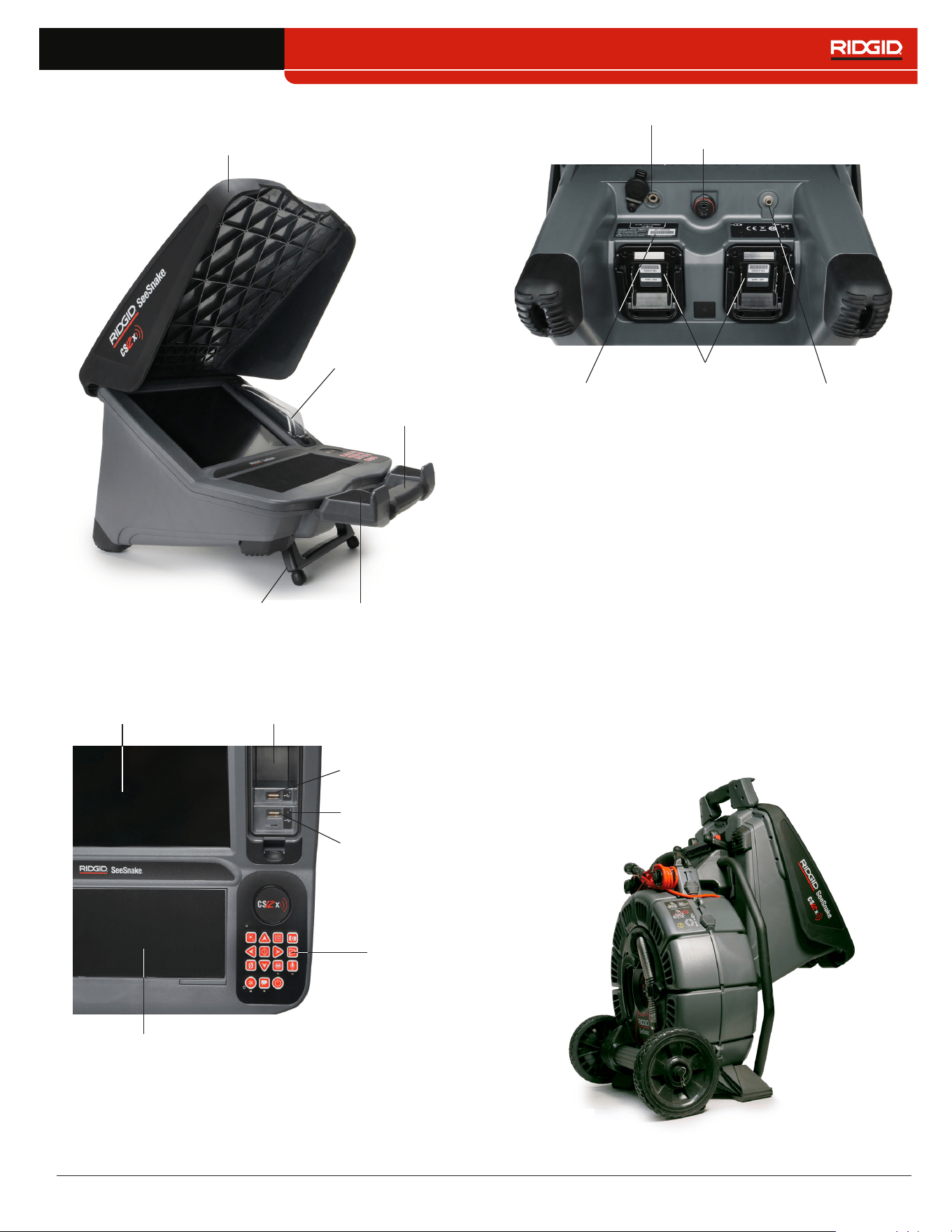
Kickstand
Front Cover
Handle
Tablet Cradle
USB Port Cover
USB Port 1
Device Pad
LCD
Keypad
Storage Pocket
USB Status LED
USB Port 2
Battery Shoes
SeeSnake System Connection
Transmitter Clip-On
Terminal
Serial Number Label
Auxiliary Power Port for AC Adapter
USB Ports
The CS12x supports up to two USB drives so you can cre-
ate two copies of a job at the same time� Keep the USB port
cover closed to protect the USB drives and USB ports during
inspections and transport�
rM200 Docking System
To dock the CS12x onto the rM200, follow these steps:
1� Depress the red buttons on the rM200 inward so that
they do not obstruct the CS12x’s unfolded kickstand�
2� Unfold the kickstand from the bottom of the CS12x, and
place it onto the rM200�
3� Reset the red buttons on the rM200 to lock the CS12x
into place�

10 – English – CS12x
Operating Instructions
WARNING
This section contains important safety information that
is specific to the RID GID
®
See Snake
®
CS12x. Read these
precautions carefully before using the CS12x to reduce
the risk of electrical shock, fire, and/or serious injury.
SAVE ALL WARNINGS AND INSTRUCTIONS
FOR FUTURE REFERENCE!
SeeSnake CS12x Safety
• Read and understand this manual, the camera reel
manual, and the instructions for any other equipment
you are using before operating the equipment. Failure
to follow all instructions may result in property damage
and/or serious injury� Keep this manual with the equip-
ment for future use�
• Do not operate the unit if you or the equipment are
standing in water. Operating the equipment while in
water increases the risk of electrical shock� Rubber-soled,
non-slip shoes can help prevent slipping and electrical
shock on wet surfaces�
• The battery shoe and other electrical equipment and
connections are not waterproof. Do not expose the
equipment to wet locations�
• Only power the system with a compatible battery or
AC adapter. Use of any other battery may create a risk of
fire and/or injury� When powered by a battery, protect the
monitor from exposure to weather�
• The AC adapter is not waterproof and is intended
for indoor use only. To prevent electrical shock do not
power the system with an AC adapter outdoors or in wet
conditions�
• The monitor is not designed to provide high voltage
protection and isolation. Do not use where a danger of
high voltage contact is present�
• Do not expose the unit to mechanical shocks. Expo-
sure to mechanical shocks can damage equipment and
increases the risk of serious injury�
• Carrying the system incorrectly can cause the CS12x
to disengage from the docking system and may re-
sult in property damage and/or serious injury. Never
carry the rM200 by the CS12x’s handle when transport-
ing the system� Always use the handle on the rM200�
CS12x – English – 11
Inspection Overview
WARNING
Wear appropriate protective equipment such as latex
or rubber gloves, goggles, face shields, and respira-
tors when inspecting drains that might contain hazard-
ous chemicals or bacteria. Always wear eye protection
against dirt and other foreign objects.
The following is an overview of how to perform a pipe in-
spection with your See Snake system:
1� Connect the monitor to a camera reel with the system
cable�
2� Press the Power key �
3� Carefully put the camera into the pipe� Protect the push
cable from sharp edges at the pipe entrance�
4� Push the camera through the pipe and observe the dis-
play�
5� Depending on the requirements for the job, you may
want to include one or more of the following:
• Capture media�
• Stream live video to your mobile device and share
media with customers�
• Locate an inspection point or path�
• Review the job, captured media, and preview the
report�
• Deliver a report to a customer on a USB drive�
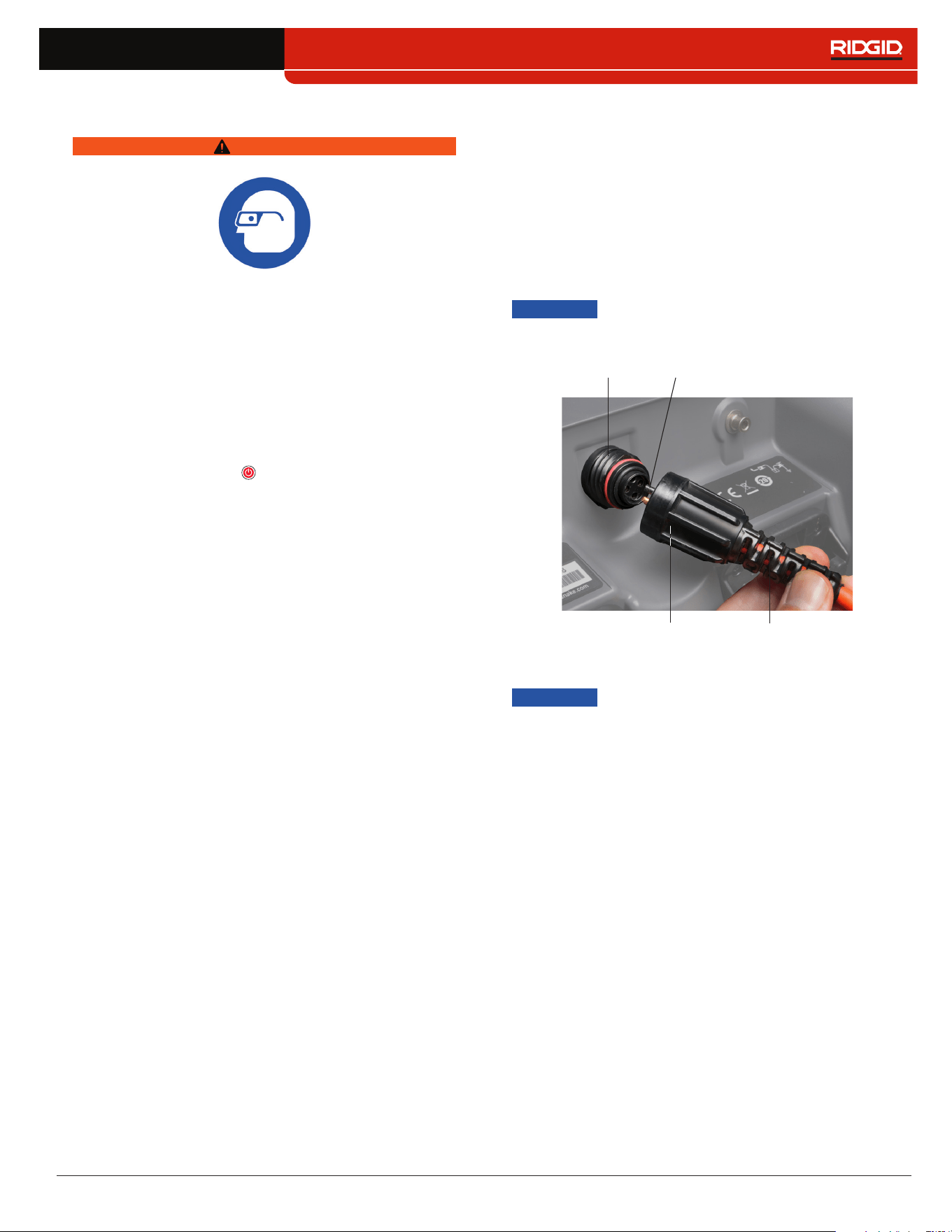
Connecting to a Camera Reel
The CS12x can connect to any See Snake camera reel with
the See Snake system cable�
1� Pull back the outer locking sleeve on the system cable
connector�
2� Align the connector ridge and plastic guide pin with the
socket and push the connector straight in�
3� Tighten the outer locking sleeve�
NOTICE
Only twist the outer locking sleeve. To
prevent damage to the pins, never bend
or twist the connector.
Connector Ridge
Guide Pin
Outer Locking Sleeve
Socket
Powering the System
NOTICE
Unexpected power loss may result in
data loss and corruption.
The system is powered by one or two compatible 18V Li-Ion
rechargeable battery or an AC adapter� Battery run time will
vary according to battery capacity and use�
Power settings are customizable in the Power Information
menu�
Note: AC adapter does not recharge battery packs.
12 – English – CS12x
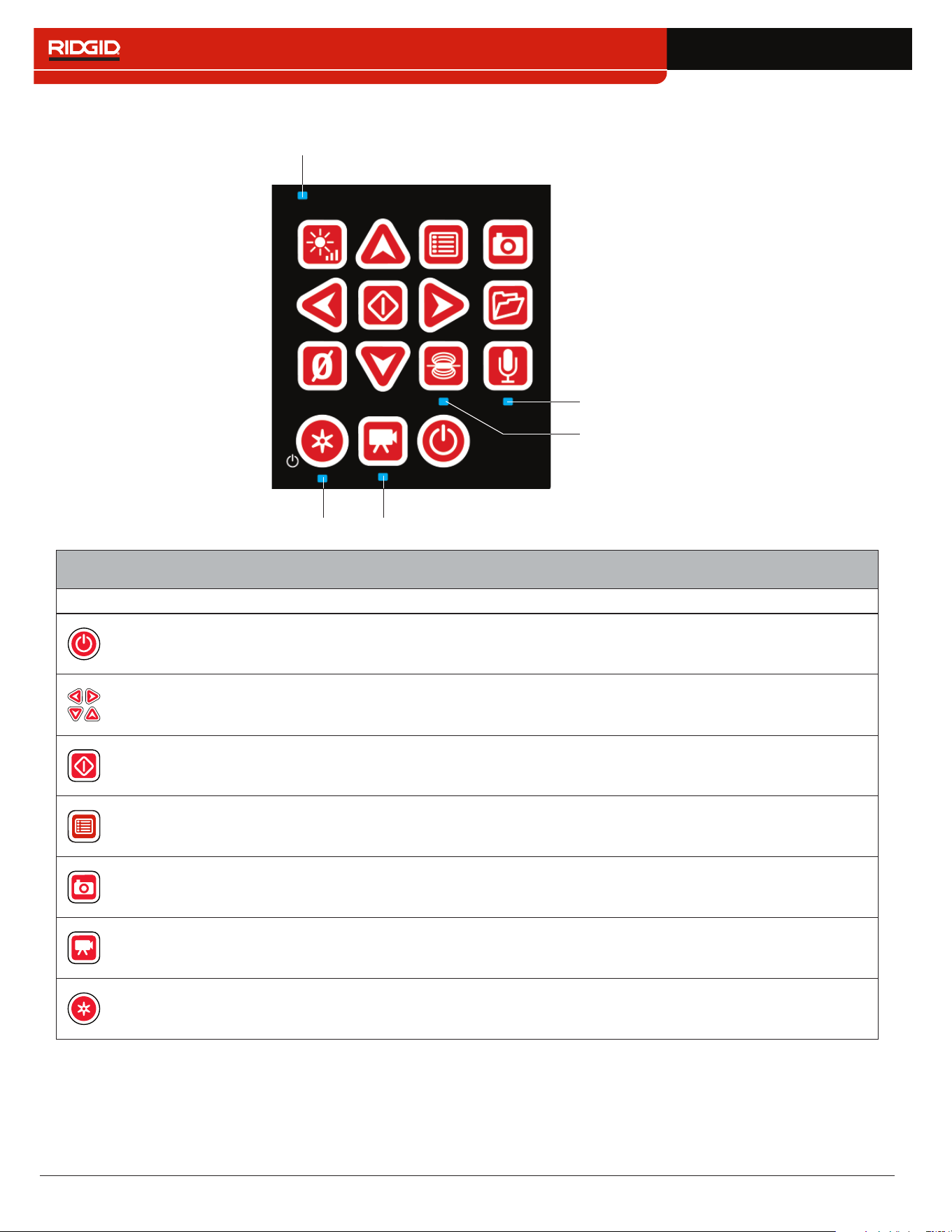
Keypad
Power LED
Autolog LED Video LED
Sonde LED
Microphone LED
Keys and Functions
Key Name Function
Power Power on and off�
Arrows
Navigate through menus and screens and increase or decrease volume during
playback�
Select/Pause
Select highlighted items and apply changes� When recording standard video or
Autolog video, press to pause and resume recording�
Menu
Open the menu to modify settings, including connectivity, reel, camera, region, and
more� Press to exit out of tabs and screens�
Photo/PhotoTalk
™
Press to capture a photo or press and hold to create a PhotoTalk� Default key action
can be swapped in the settings menu�
Video Start and stop standard video recording�
Autolog
Start and stop Autolog video recording� Optionally press once to power on and start
Autolog video recording simultaneously�
CS12x – English – 13
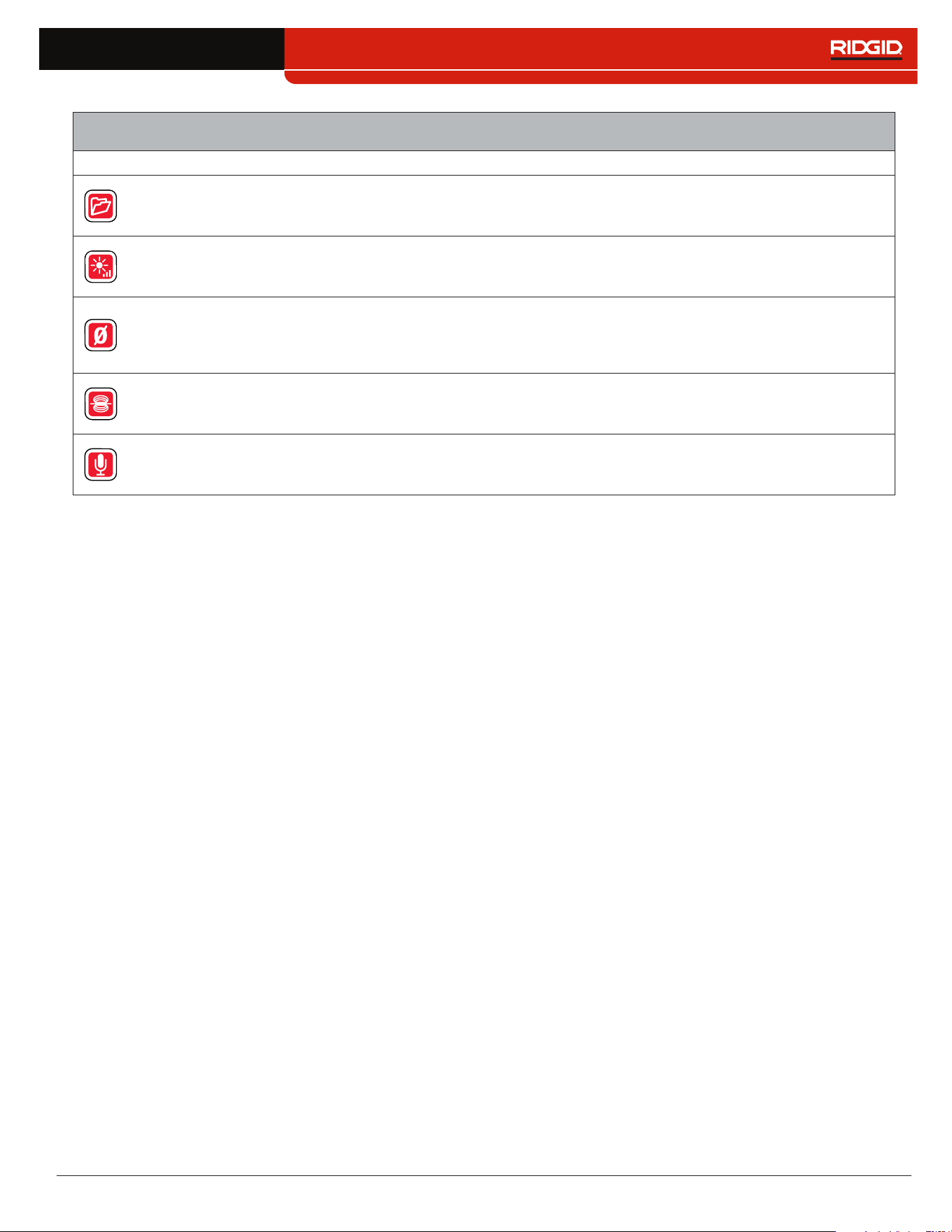
Keys and Functions
Key Name Function
Job Manager
Open the Job Manager to view the job list, create a new job, preview an existing job,
enter company information, or delete jobs from the USB drive�
LED Brightness Control the brightness of the LEDs in the camera�
Zero
Press and hold to set the system measurement to zero at the beginning of an
inspection� Press to start and stop temporary segment measurements� The
temporary segment measurement appears in brackets�
Sonde Enable and disable the sonde�
Microphone Mute Enable and disable the microphone�
14 – English – CS12x
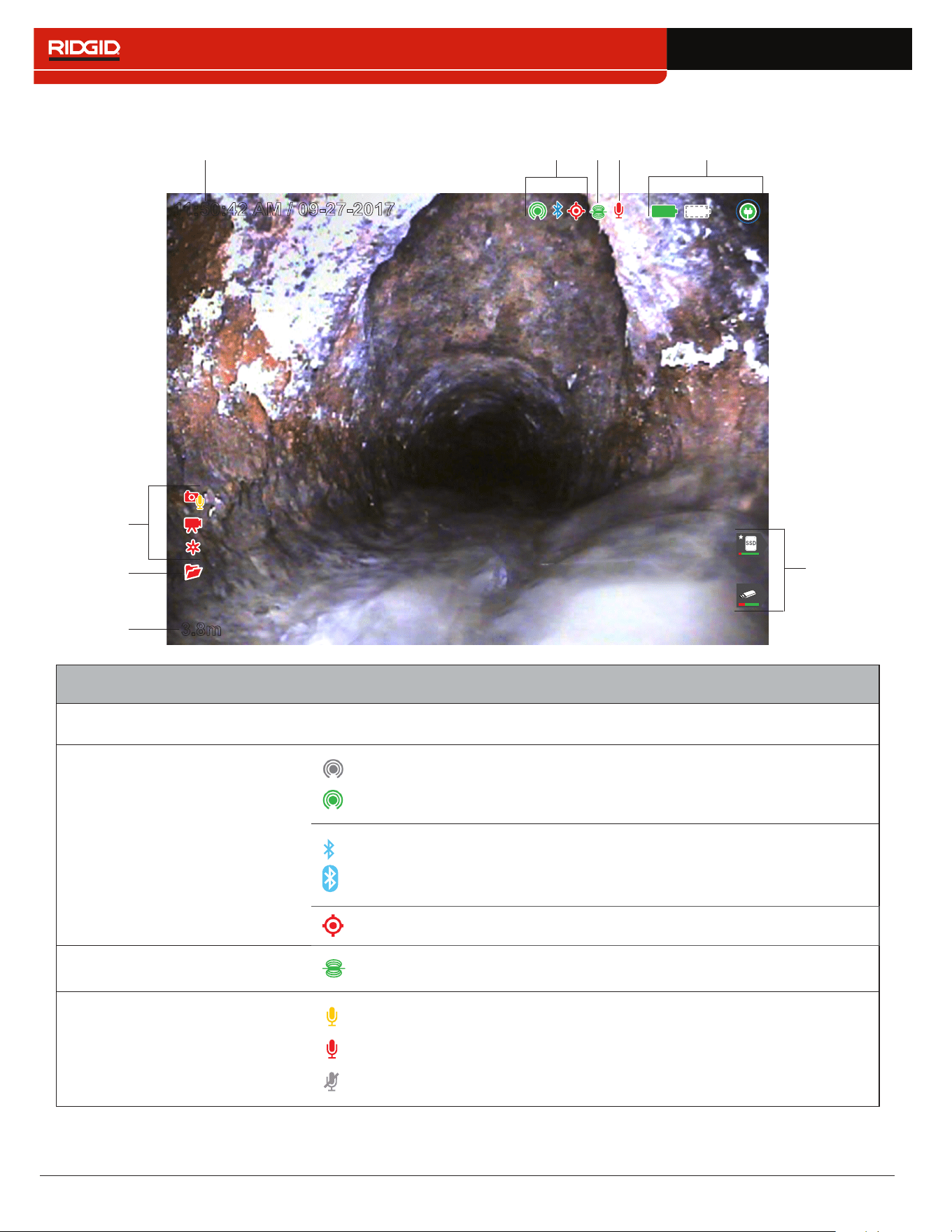
User Interface
3.8m
1
2
11:50:42 AM / 09-27-2017
2
3
4
6
9
1
7
8
5
User Interface
1
Time and Date Overlay
---
Options: Show time only, date only, both, or neither�
2
Connectivity
Wi-Fi not connected�
Wi-Fi connected�
Bluetooth enabled but not connected�
Bluetooth connected�
GPS signal locked� Icon flashes when acquiring satellite signal�
3
Sonde Sonde enabled and transmitting�
4
Microphone
Microphone enabled�
Audio recording in progress�
Microphone disabled�
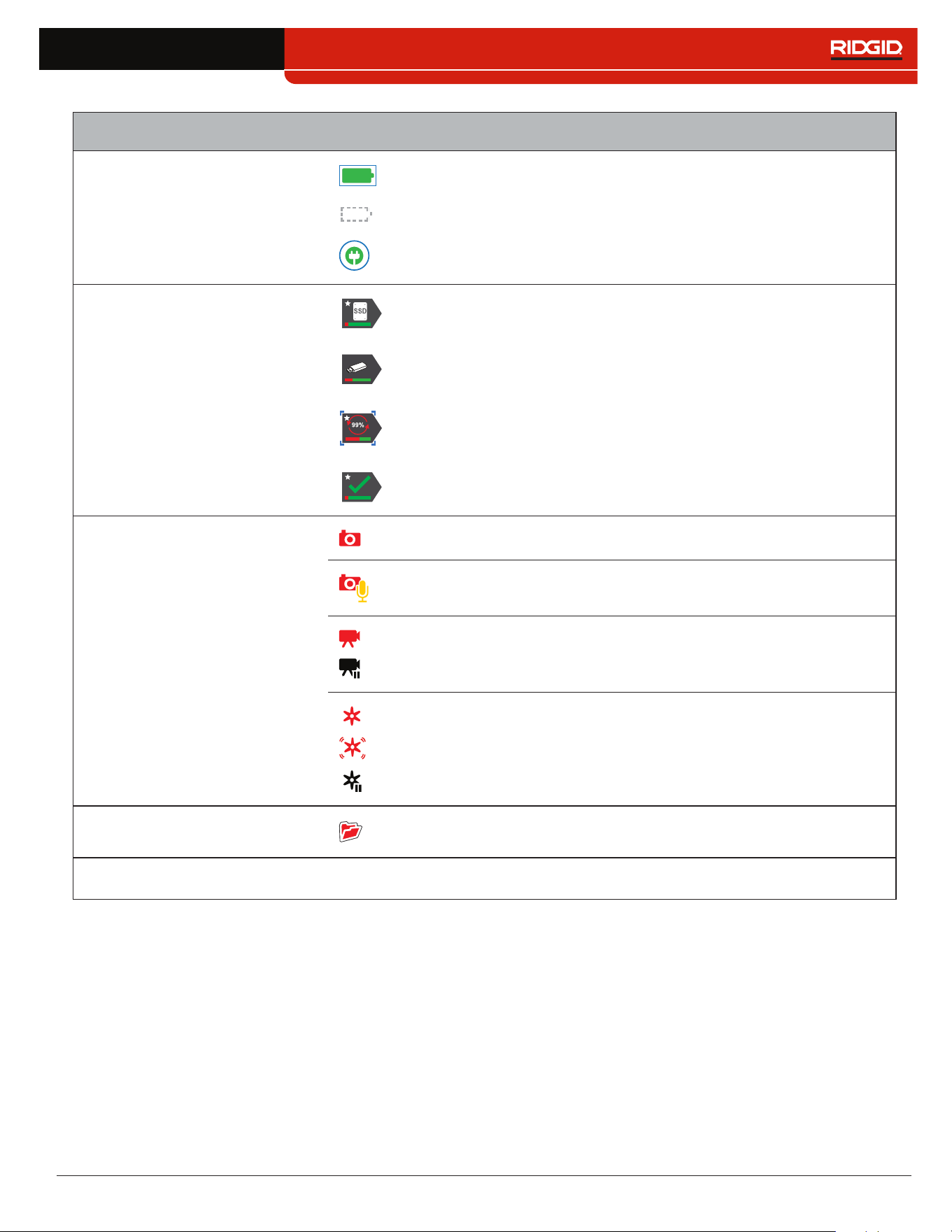
CS12x – English – 15
User Interface
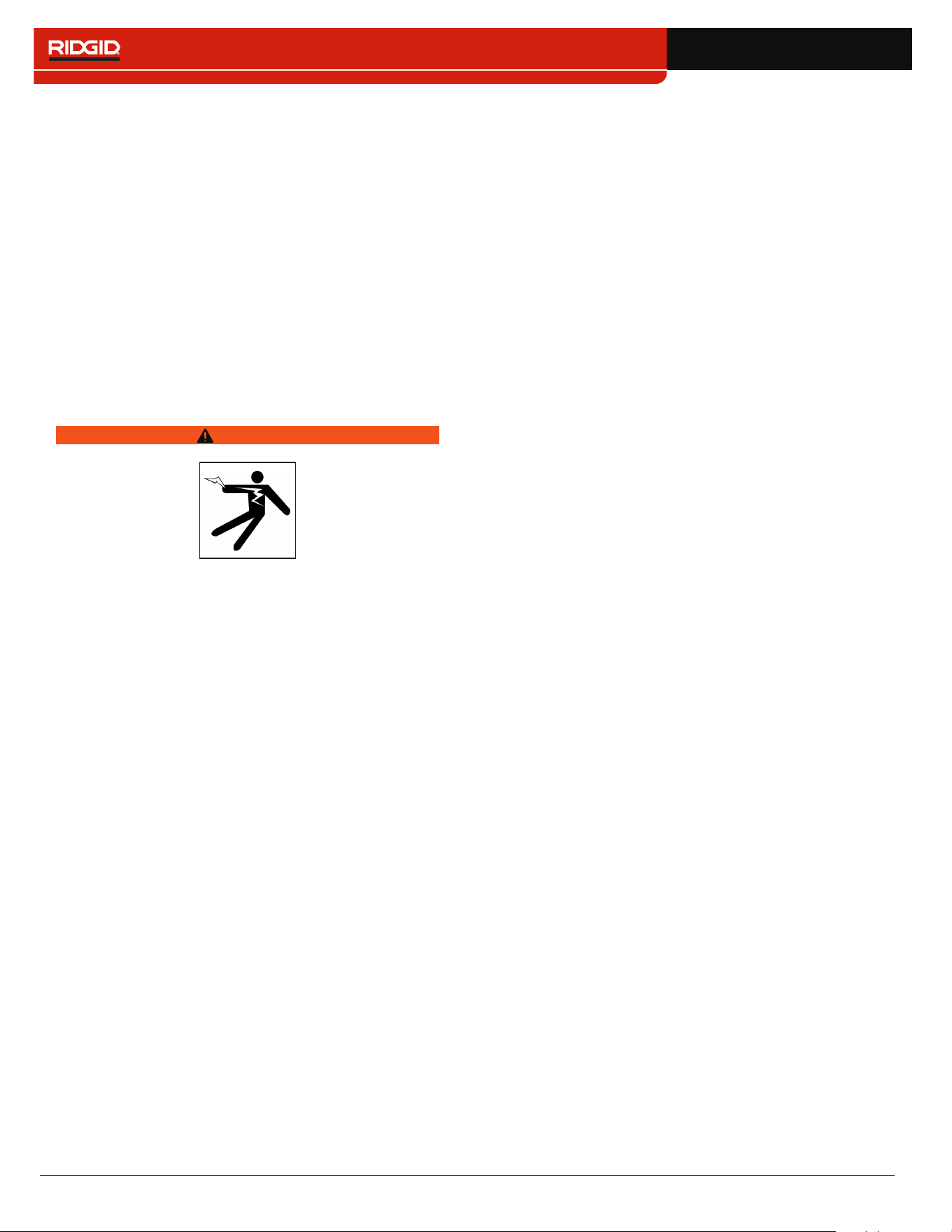
5
Power
Battery power level� Blue outline indicates active power source�
Battery not detected�
AC power�
6
USB Status
Large capacity drive inserted� Safe to remove drive. Star indicates drive
is primary storage�
USB drive inserted� Safe to remove drive.
Do not remove drive! Media transfer in progress� Premature removal
may result in data loss and corruption� Blue brackets indicate drive has
processing priority�
Media transfer complete� Safe to remove drive.
7
Media Capture
Photo captured�
PhotoTalk
™
media created�
Video recording�
Video recording paused�
Autolog video recording�
Autolog video recording, motion detected�
Autolog video recording paused�
8
Open Job A job is open�
9
Count Overlay
---
Options: Show or hide count�
16 – English – CS12x
Maintenance and Support
Product Support
• Go to support�seesnake�com/cs12x
• Email support@seesnake�com
• Call toll free 888-477-5339
Software Updates
Critical and routine software updates for your See Snake
monitor are released through HQ� Staying up to date with
HQ software prolongs and improves the life and usefulness
of your equipment�
Cleaning
WARNING
To reduce the risk of electrical shock, disconnect all
cords and cables and remove the battery or other power
supply from the CS12x before cleaning.
The best way to clean the unit is with a damp cloth� Close
the USB port cover before cleaning� Do not hose down or
allow any liquid or moisture to enter the unit� Do not use liq-
uid or abrasive cleaners� Only clean the display with clean-
ers approved for use on LCDs�
Accessories
Only use accessories designed and recommended for
use with the CS12x. Accessories designed for use with
other tools may become hazardous when used with the
CS12x.
The following RIDGID products have been designed for use
with the CS12x:
• SeeSnake Max rM200
• Original SeeSnake Camera Reels
• SeeSnake Max Camera Reels
• Dual Battery Kit with Charger
• Single Battery Kit with Charger
• SeekTech or NaviTrack/Scout Receivers
• SeekTech or NaviTrack Transmitters
Transport and Storage
Store and transport your system with the following in mind:
• Store in a locked area out of the reach of children and
people unfamiliar with its purpose�
• Store in a dry place to reduce risk of electrical shock�
• Store away from heat sources such as radiators, heat
registers, stoves, and other products (including amplifi-
ers) that produce heat�
• Storage temperature should be -20°C to 60°C [-4°F to
140°F]�
• Do not expose to heavy shocks or impacts during trans-
port�
• Remove the battery before shipping and before storing
for extended periods of time�

CS12x – English – 17
Service and Repair
Improper service or repair can cause the CS12x to be
unsafe to operate.
Service and repair of the CS12x must be performed at a
RID GID Independent Authorized Service Center� To main-
tain the safety of the monitor, make sure a qualified repair
person services your unit using only identical replacement
parts� Discontinue using the CS12x, remove the battery, and
contact service personnel under any of the following condi-
tions:
• If liquid has been spilled or objects have fallen into the
equipment�
• If the equipment does not operate normally when oper-
ating instructions are followed�
• If the equipment has been dropped or damaged�
• If the equipment exhibits a distinct change in perfor-
mance�
For information on your nearest RID GID Independent Ser-
vice Center or any service or repair questions:
• Contact your local RIDGID distributor�
• Go to www�RIDGID�com�
• Contact RIDGID Technical Services Department at
rtctechservices@emerson�com or, in the USA and Can-
ada, call 800-519-3456�
Disposal
Parts of your system contain valuable materials that can
be recycled� There are companies that specialize in recy-
cling that may be found locally� Dispose of the components
in compliance with all applicable regulations� Contact your
local waste management authority for more information�
EC Countries: Do not dispose of electrical
equipment with household waste!
According to the European Guideline 2002/96/
EC for Waste Electrical and Electronic Equip-
ment and its implementation into national legisla-
tion, electrical equipment that is no longer usable
must be collected separately and disposed of in
an environmentally correct manner�
Battery Disposal
RIDGID is licensed with the Call2Recycle
®
program, operated by the Rechargeable Bat-
tery Recycling Corporation (RBRC
™
)� As a
licensee, RID GID pays the cost of recycling
RID GID rechargeable batteries�
In the USA and Canada, RID GID and other battery suppli-
ers use the Call2Recycle
®
program network of over 30,000
collection locations to collect and recycle rechargeable bat-
teries� Return used batteries to a collection location for recy-
cling� Call 800-822-8837 or visit www�call2recycle�org to find
a collection location�
EC Countries: Defective or used battery packs/batteries
must be recycled according to the guideline 2006/66/EC�
18 – English – CS12x
Troubleshooting
Problem Probable Fault Solution
System does not power on Power source
Verify that the battery pack is compatible� Not
all battery packs that fit into the battery shoe are
compatible�
Recharge battery pack�
Switch to AC power�
Unable to capture media No USB drive inserted
Insert a USB drive� Verify USB drive is working and
not corrupted or read-only�
No audio during playback
Speakers are muted
Verify LED below the Microphone Mute key is lit
and that icon is yellow�
Settings need adjustment
Go to CS12x Settings to adjust speaker volume
and/or microphone gain settings�
Display is dark or hard
to see
Glare on the display Position LCD facing away from direct sunlight�
LCD settings Go to LCD Settings to adjust display settings�
Camera LED settings
Press the LED Brightness key to adjust camera
LED brightness�
Count measurement
accuracy is unreliable
The drum’s integrated counter
settings are incorrect for the
drum or push cable
Verify settings are correct for cable length, cable
diameter, and drum�
Counting from the wrong
zero point
Confirm measurement starts from intended zero
point� Reset zero point using the Zero key �
No live view
Slip-ring assembly is broken
or connection is faulty
Check all alignment and connection pins�
Check placement and pin condition in the slip-ring
assembly�
System cable connection
is faulty
Check system cable connection� Make sure
connector is properly connected�

CS12x – English – 19

Printed in USA 2017/11/28 999-995-126.10
EC43214 742-048-509-EN-0A Rev C
R
idge Tool Company
40
0 Clark Street
E
lyria, Ohio 44035-6001
U
SA
1
-800-474-3443
Ridge Tool Europ
e
0
284 dlevnevohruhcS
n
ediurT-tniS 0083
m
uigleB
+32 (0)11 598 62
0
WWW.RIDGID.COM
© 2017 Ridge Tool Company. All rights reserved.
Every effort has been made to ensure that the information in this manual is accurate. Ridge Tool Company and its affiliates reserve
the right to change the specifications of the hardware, software, or both as described in this manual without notice. Visit www.
RIDGID.com for current updates and supplemental information pertaining to this product. Due to product development, the photos
and other presentations specified in this manual may differ from the actual product.
RIDGID and the RIDGID logo are trademarks of Ridge Tool Company, registered in the USA and other countries. All other
registered and unregistered trademarks and logos mentioned herein are the property of their respective owners. Mention of third-
party products is for informational purposes only and constitutes neither an endorsement nor a recommendation.
iPad, iPhone, iPod touch, and App Store are trademarks of Apple Inc., registered in the USA and other countries. “Made for
iPod,” “Made for iPhone,” and “Made for iPad” mean that an electronic accessory has been designed to connect specifically to
iPod, iPhone, or iPad respectively, and has been certified by the developer to meet Apple performance standards. Apple is not
responsible for the operation of this device or its compliance with safety and regulatory standards. Please note that the use of this
accessory with iPod, iPhone, or iPad may affect wireless performance.
IOS is a trademark or registered trademark of Cisco in the USA and other countries and is used under license by Apple Inc.
The Bluetooth word mark and logos are owned by the Bluetooth SIG, Inc.
Android and Google Play are trademarks of Google Inc.