Operating
Manual
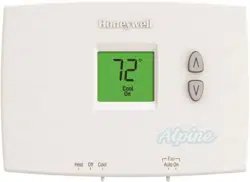
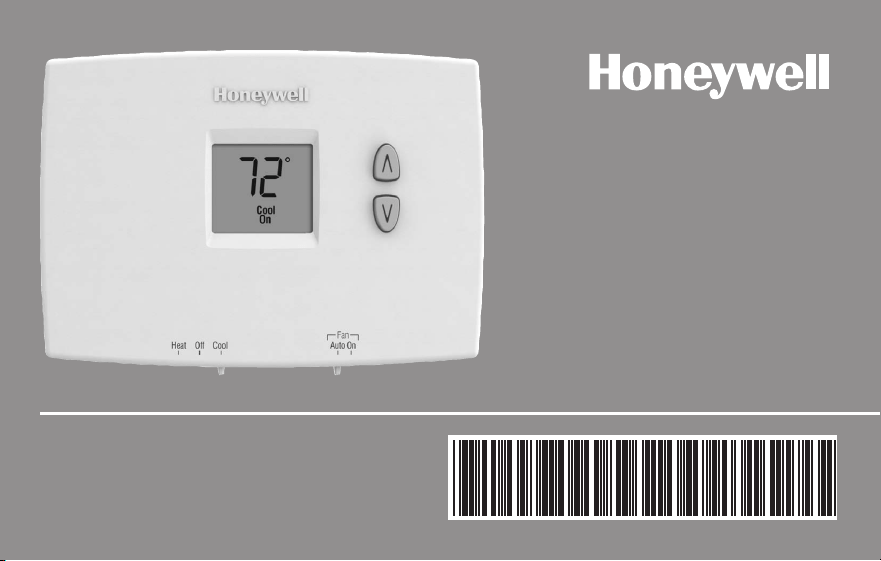
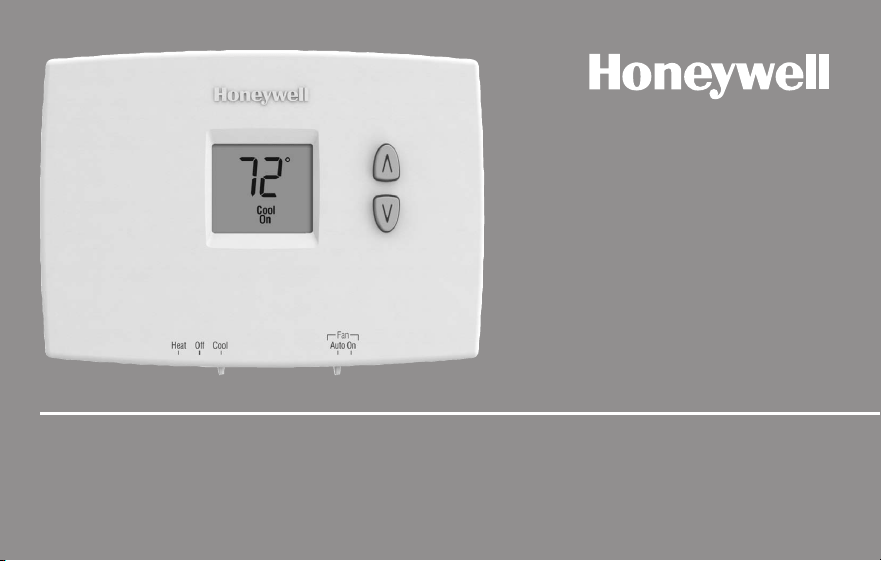
PRO 1000 Series
Non-Programmable Thermostat
69-2607EFS-01
Read and save these instructions.
Need Help?
For assistance with this product please visit http://yourhome.honeywell.com
or call Honeywell Customer Care toll-free at 1-800-468-1502
® U.S. Registered Trademark. Patents pending.
Copyright © 2011 Honeywell International Inc. All rights reserved.
CAUTION: EQUIPMENT DAMAGE HAZARD.
To prevent possible compressor damage, do not operate cooling system when outdoor
temperature is below 50°F (10°C).
This manual covers the following models:
TH1100DH : For 1 Heat systems
TH1110DH : For 1 Heat/1 Cool systems
TH1210DH: For 2 Heat/1 Cool heat pump systems
(Pull thermostat from wallplate and turn over to find model number.)
PRO 1000
1 69-2607EFS—01
About your new thermostat
Thermostat features ...................................2
Quick reference to controls ....................... 3
Quick reference to display ........................ 4
Operation
Select system setting ................................ 5
Select fan setting ....................................... 6
Adjust the temperature .............................. 7
Compressor protection .............................. 8
Appendices
Battery replacement ..................................9
Customer assistance ............................... 10
In case of difficulty...................................11
Limited warranty ...................................... 13
Table of contents
Operating Manual
69-2607EFS—01 2
ENGLISH
About your new thermostat
Your new Honeywell thermostat has been designed to give you many years of reliable
service and easy-to-use, push-button climate control.
Features
• Backlitdisplayiseasytoread
• Displaysambient(measured)temperatureatalltimes
• One-touchaccesstosetpointtemperature
• Built-incompressorprotection
PRO 1000
3 69-2607EFS—01
About your new thermostat
ENGLISH
M32821
Auto On
Fan
Set
Cool
77
On
E.M. Heat Heat Off Cool
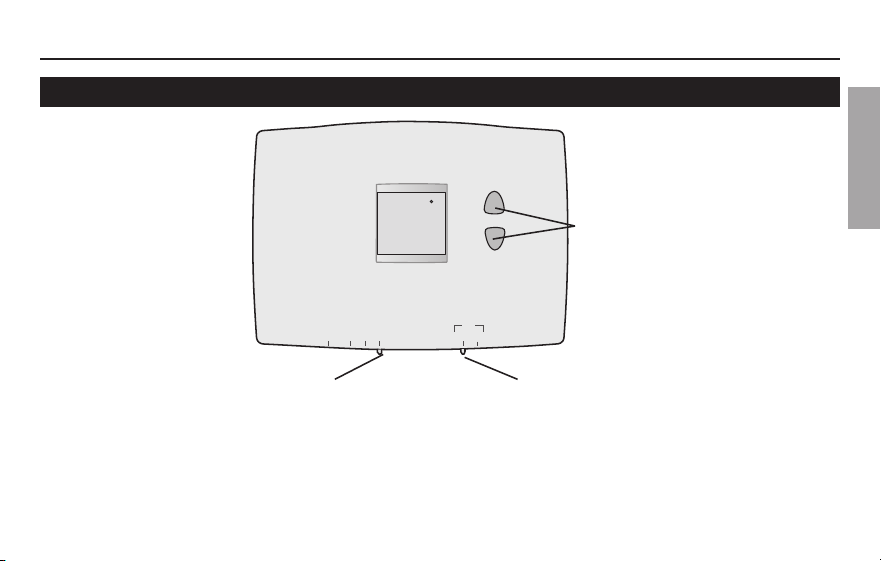
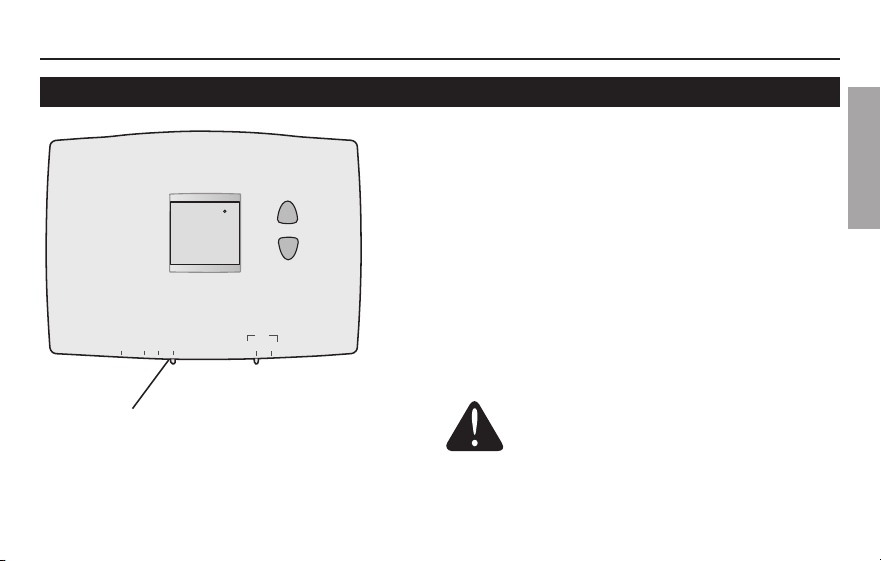
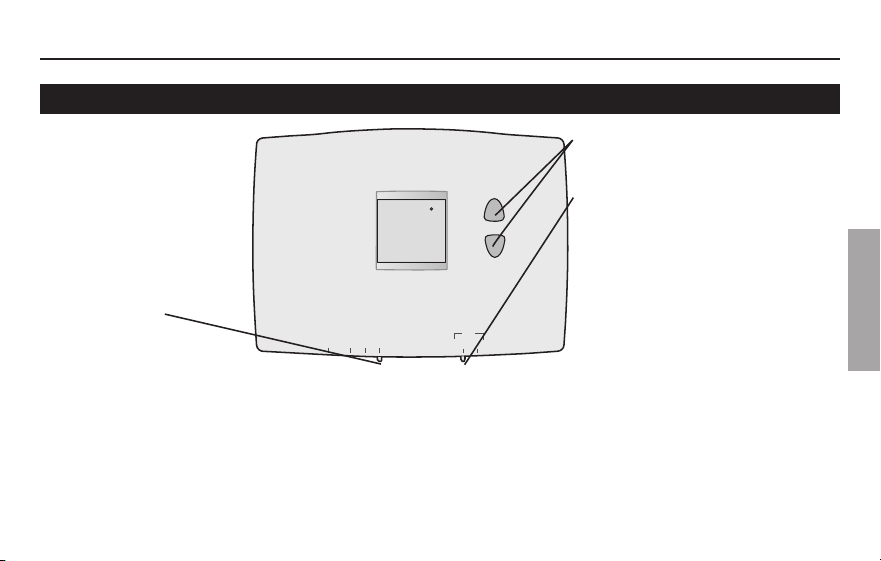
Quick reference to controls
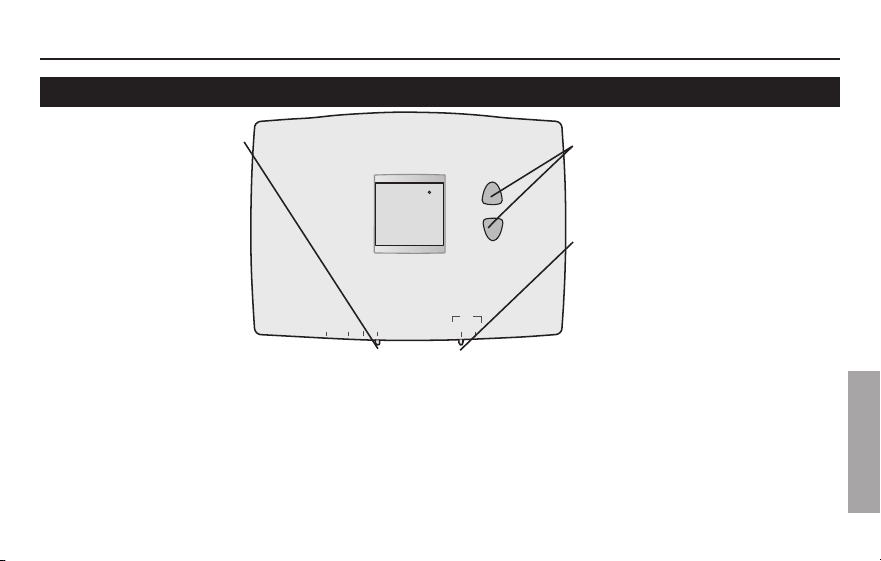
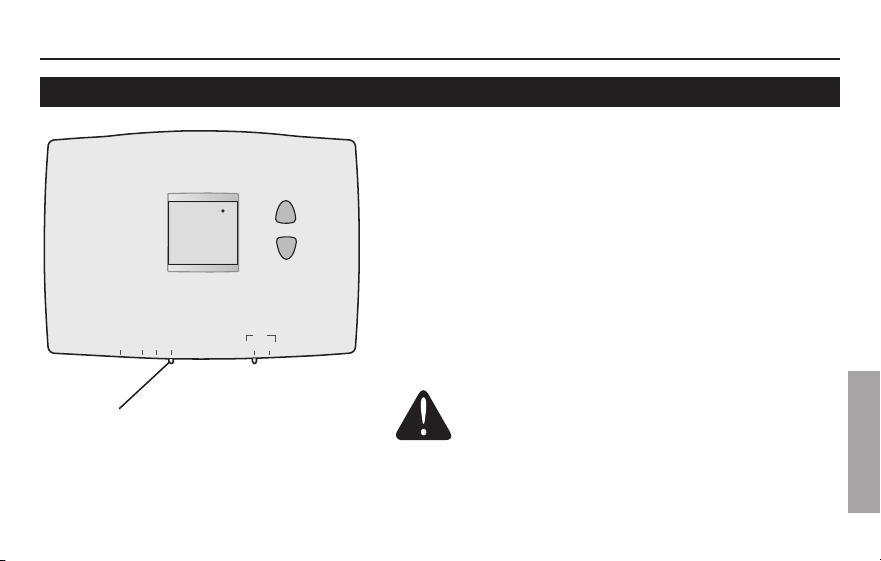
Up/Down buttons
Press to adjust temperature.
Fan Switch (see page 6)
On: Fan runs continuously.
Auto: Fan runs only when heating
or cooling system is on.
System switch (see page 5)
• Cool: Cooling system control.
• Off: All systems off.
• Heat: Heating system control.
• Em Heat: Emergency & Auxiliary Heat control.
Compressor is locked out. (Select models only.)
Operating Manual
69-2607EFS—01 4
About your new thermostat
ENGLISH
Lo
Batt
Set
Cool
77
M32763
On
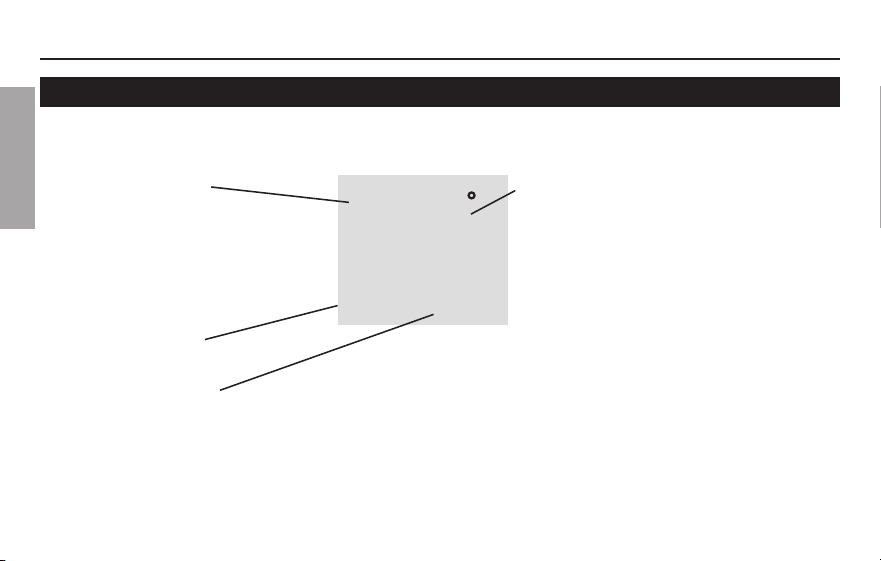
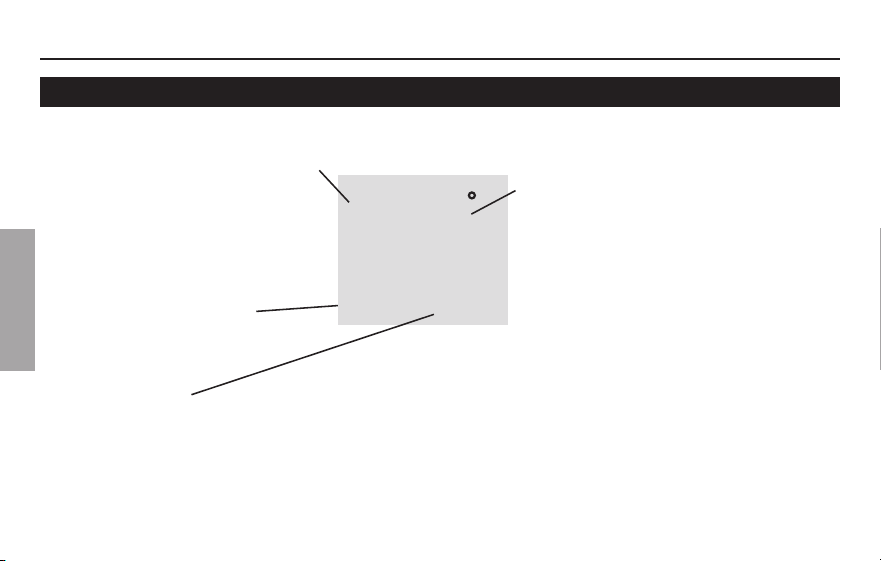
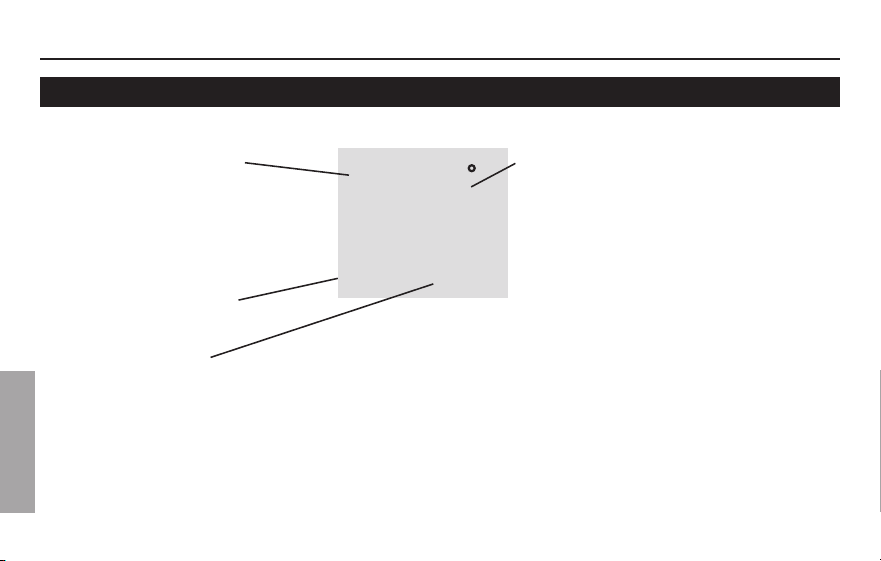
Quick reference to display screen
Low battery warning
(see page 9)
Temperature
The ambient (measured) temperature
is normally displayed. To view the
setpoint temperature, press the Up
or Down button once. The setpoint
temperature will appear for five
seconds.
System status
Cool on: Cooling system is on.
Heat on: Heating system is on.
Aux On:Auxiliaryheatison.(Onlyforheatpumpswiththiscapability[selectmodelsonly].)
When“HeatOn”or“CoolOn”isflashing,compressorprotectionisengaged(seepage8).
Setpoint indicator
Appears when the setpoint
temperature is displayed
PRO 1000
5 69-2607EFS—01
ENGLISH
M32821
Auto On
Fan
Set
Cool
77
On
E.M. Heat Heat Off Cool
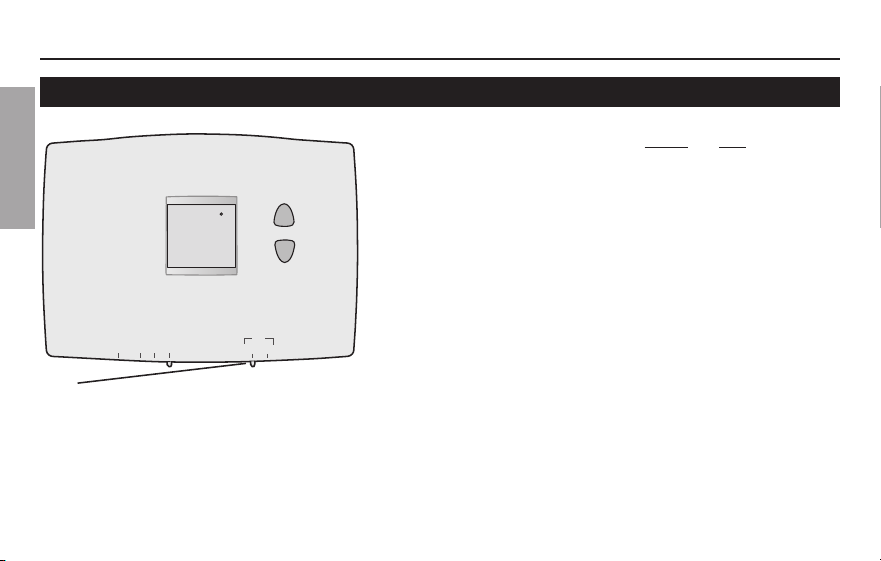
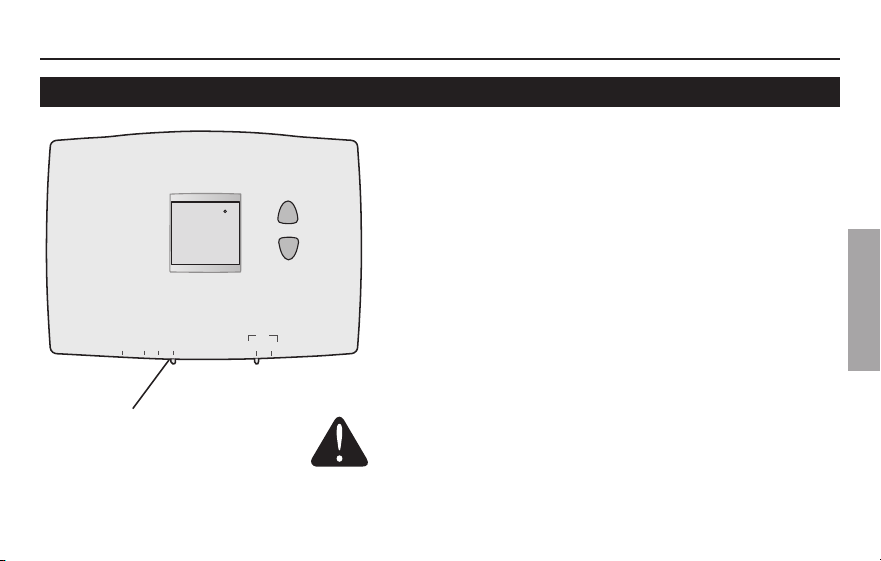
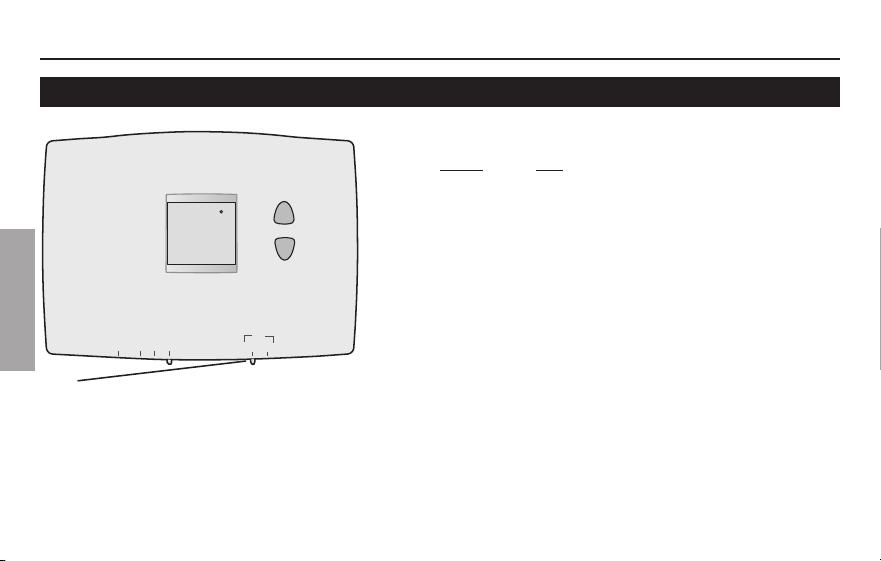
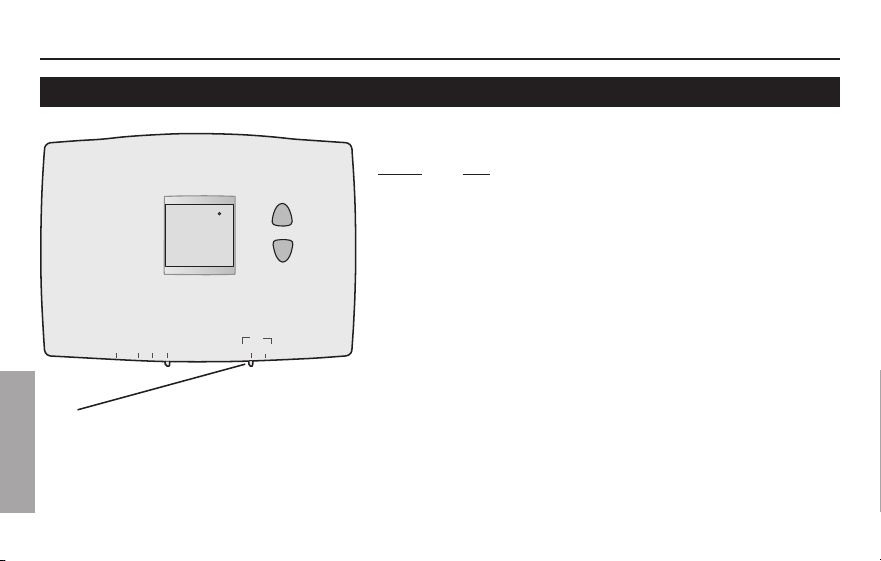
Select the system setting
The SYSTEM switch can be set to control
your heating or cooling system, depend-
ing on the season.
• Cool: Cooling system control.
• Off: All systems are off.
• Heat: Heating system control.
• Em Heat: Emergency & Auxiliary
Heat control. Compressor is locked
out. (Select models only.)
Set SYSTEM switch to control the
heating or cooling system.
CAUTION: EQUIPMENT DAMAGE
HAZARD. To prevent possible
compressor damage, do not operate
cooling system when outdoor
temperature is below 50°F (10°C).
Operating Manual
69-2607EFS—01 6
ENGLISH
M32821
Auto On
Fan
Set
Cool
77
On
E.M. Heat Heat Off Cool
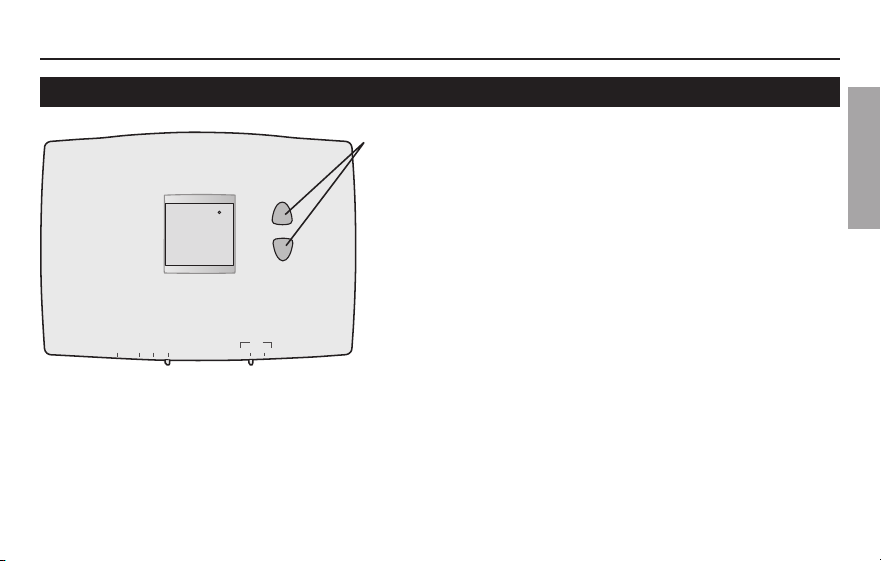
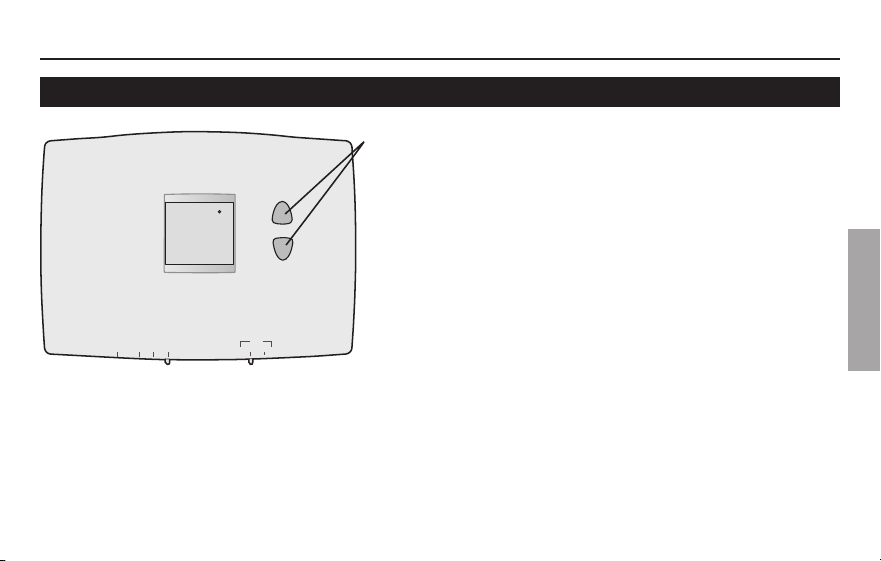
Select the fan setting
Set the FAN switch to Auto or On.
In“Auto”mode(themostcommonlyused
setting), the fan runs only when the heat-
ing or cooling system is on.
Ifsetto“On,”thefanrunscontinuously.
Set FAN switch to choose whether the fan
runs continuously or only as needed.
PRO 1000
7 69-2607EFS—01
About your new thermostat
ENGLISH
M32822
Set
Cool
77
On
E.M. Heat Heat Off Cool Auto On
Fan
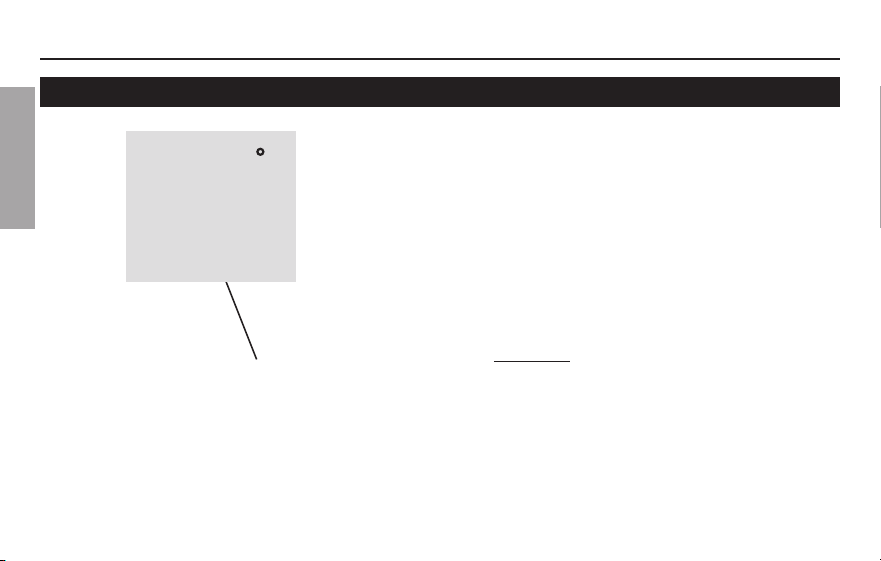
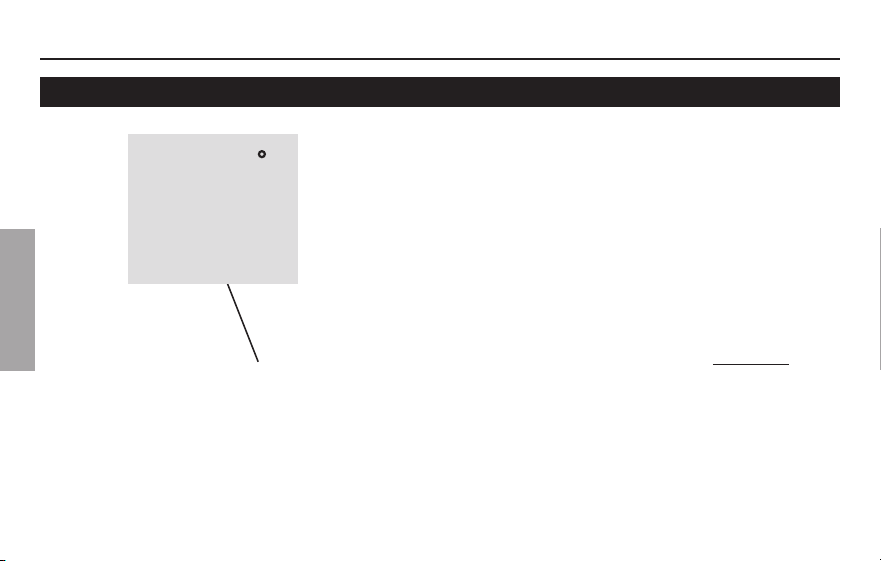
Adjust the temperature
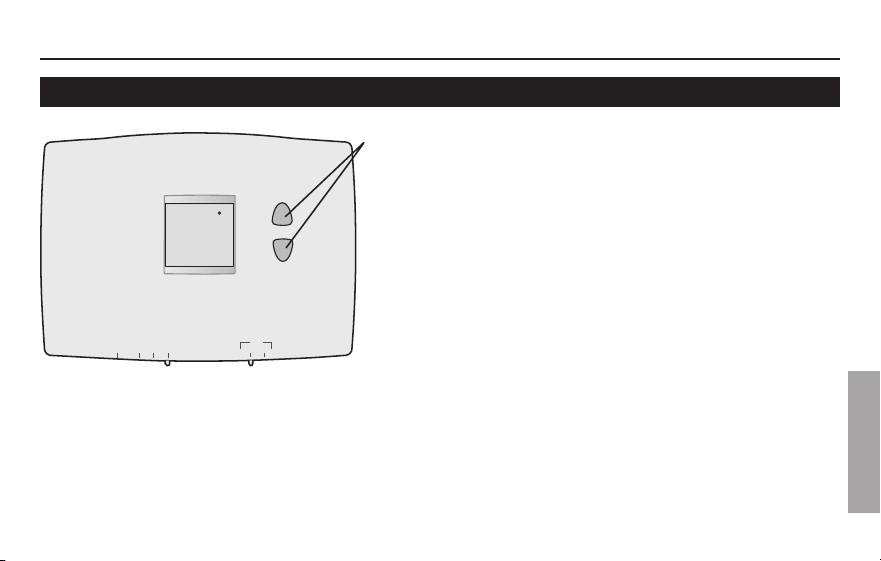
Press s or t to adjust the temperature.
Note: Make sure the thermostat is set to the
system you want to control (heat or cool).
Operating Manual
69-2607EFS—01 8
ENGLISH
Built-in compressor protection
This feature helps prevent damage to the
compressor in your air conditioning or heat
pump system.
Damagecanoccurifthecompressoris
restarted too soon after shutdown. This fea-
ture forces the compressor to wait 5 minutes
before restarting.
Duringthewaittime,thedisplaywillflashthe
message CoolOn. When the safe wait time
has elapsed, the message stops flashing and
the compressor turns on.
Message flashes until safe restart
time has elapsed.
Set
Cool
77
M32769
On
PRO 1000
9 69-2607EFS—01
ENGLISH
RTHXXXX
M32707
W/
Aux
Not
Used
M32823
E.M. Heat Heat Off Cool Auto On
Fan
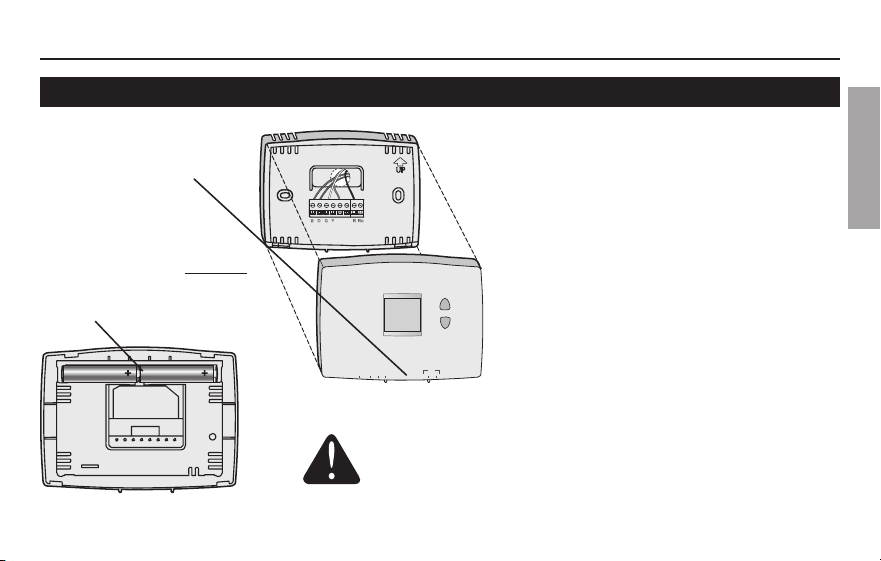
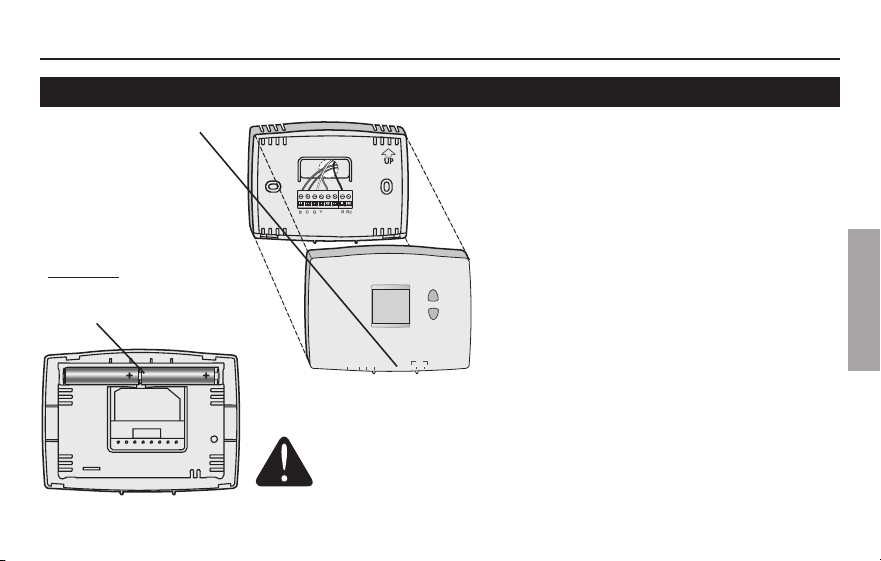
Battery replacement
Install two fresh AAA batteries when
Lo Batt flashes on the screen. Lo
Batt appears for 60 days before the
batteries are depleted.
Replace batteries once a year, or
when you will be away for more than
a month.
The settings are stored in non-volatile
(permanent) memory and are thus
preserved when the thermostat is
without batteries.
SettheSystemswitchtoOffbeforeremovingthe
batteries.Otherwise,theheating/coolingsystem
could remain activated even when batteries are
removed.
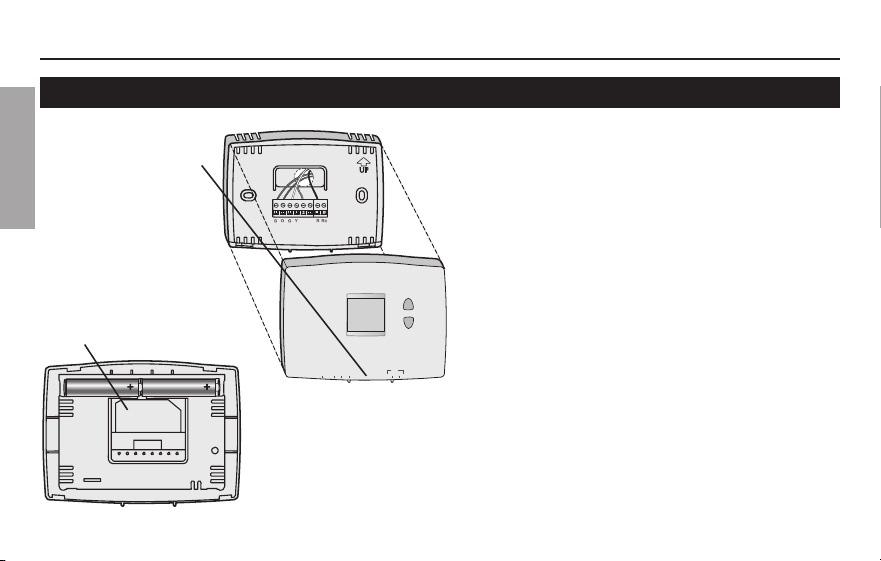
Pull at bottom to
remove thermostat
from wallplate.
Turn thermostat over,
insert fresh AAA alkaline
batteries, then reinstall
thermostat.
Operating Manual
69-2607EFS—01 10
ENGLISH
RTHXXXX
M32707
W/
Aux
Not
Used
M32823
E.M. Heat Heat Off Cool Auto On
Fan
Customer assistance
For assistance with this product, please
visit
http://yourhome.honeywell.com.
OrcallHoneywellCustomerCaretoll-
free at 1-800-468-1502.
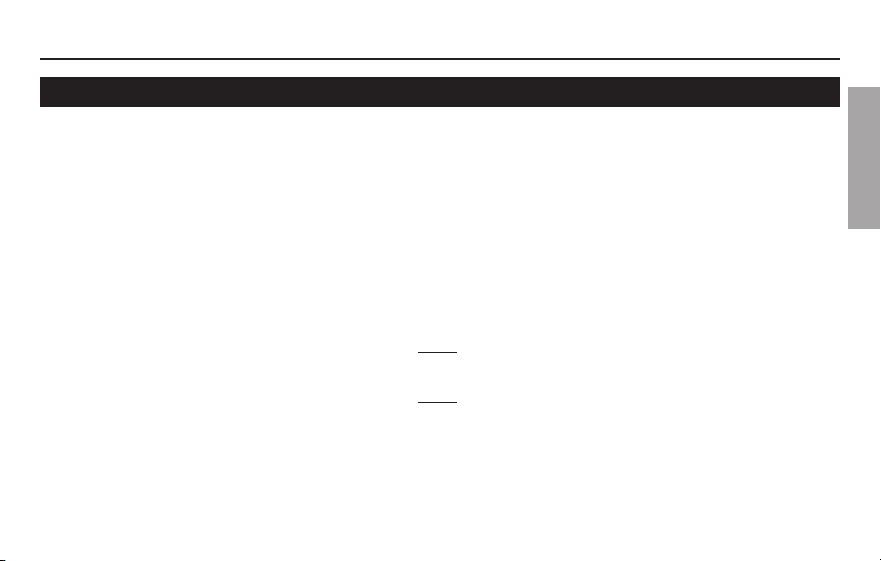
To save time, please note your model
number and date code before calling.
Turn thermostat over
to find model number
and date code.
Pull at bottom to
remove thermostat
from wallplate.
PRO 1000
11 69-2607EFS—01
ENGLISH
If you have difficulty with your thermostat, please try the following suggestions.
Most problems can be corrected quickly and easily.
Display is blank
• Checkcircuitbreakerandresetifnecessary.
• Makesurepowerswitchatheating&coolingsystemison.
• Makesurefurnacedoorisclosedsecurely.
• MakesurefreshAAAalkalinebatteriesarecorrectlyinstalled(see
page 9).
Heating or
cooling system
does not respond
• SetsystemswitchtoHeat (see page 5). Make sure the temperature is
set higher than the Inside temperature.
• SetsystemswitchtoCool (see page 5). Make sure the temperature is
set lower than the Inside temperature.
• Wait5minutesforthesystemtorespond.
In case of difficulty
Operating Manual
69-2607EFS—01 12
ENGLISH
Temperature
settings do not
change
Make sure heating and cooling temperatures are set to acceptable ranges:
• Heat:40°to90°F(4.5°to32°C).
• Cool:50°to99°F(10°to37°C).
“Heat On” or
“Cool On” is
flashing
• Compressor protection feature is engaged. Wait 5 minutes for the system
to restart safely, without damage to the compressor (see page 8).
“Heat On” is not
displayed
• Set the System switch to Heat, and set the temperature level above the
current room temperature (see page 5).
“Cool On” is not
displayed
• Set the System switch to Cool, and set the temperature level below the
current room temperature (see page 5).
In case of difficulty
PRO 1000
13 69-2607EFS—01
About your new thermostat
ENGLISH
2-year limited warranty
Honeywell warrants this product, excluding battery, to be free from defects in the workmanship or materials, under normal use
and service, for a period of two (2) years from the date of purchase by the consumer. If at any time during the warranty period
the product is determined to be defective or malfunctions, Honeywell shall repair or replace it (at Honeywell’s option).
If the product is defective,
(i) return it, with a bill of sale or other dated proof of purchase, to the place from which you purchased it; or
(ii) call Honeywell Customer Care at 1-800-468-1502. Customer Care will make the determination whether the product should be
returnedtothefollowingaddress:HoneywellReturnGoods,Dock4MN10-3860,1885DouglasDr.N.,GoldenValley,MN55422,
or whether a replacement product can be sent to you.
This warranty does not cover removal or reinstallation costs. This warranty shall not apply if it is shown by Honeywell that the
defect or malfunction was caused by damage which occurred while the product was in the possession of a consumer.
Honeywell’ssoleresponsibilityshallbetorepairorreplacetheproductwithinthetermsstatedabove.HONEYWELLSHALL
NOTBELIABLEFORANYLOSSORDAMAGEOFANYKIND,INCLUDINGANYINCIDENTALORCONSEQUENTIALDAMAGES
RESULTING,DIRECTLYORINDIRECTLY,FROMANYBREACHOFANYWARRANTY,EXPRESSORIMPLIED,ORANYOTHER
FAILUREOFTHISPRODUCT.Somestatesdonotallowtheexclusionorlimitationofincidentalorconsequentialdamages,so
this limitation may not apply to you.
THISWARRANTYISTHEONLYEXPRESSWARRANTYHONEYWELLMAKESONTHISPRODUCT.THEDURATIONOFANY
IMPLIEDWARRANTIES,INCLUDINGTHEWARRANTIESOFMERCHANTABILITYANDFITNESSFORAPARTICULARPURPOSE,
ISHEREBYLIMITEDTOTHEONE-YEARDURATIONOFTHISWARRANTY.
Some states do not allow limitations on how long an implied warranty lasts, so the above limitation may not apply to you. This
warranty gives you specific legal rights, and you may have other rights which vary from state to state.
Ifyouhaveanyquestionsconcerningthiswarranty,pleasewriteHoneywellCustomerRelations,1985DouglasDr,Golden
Valley,MN55422orcall1-800-468-1502.InCanada,writeRetailProductsON15-02H,HoneywellLimited/HoneywellLimitée,35
DynamicDrive,Toronto,OntarioM1V4Z9.

Automation and Control Solutions
Honeywell International Inc.
1985DouglasDriveNorth
GoldenValley,MN55422
HoneywellLimited-HoneywellLimitée
35DynamicDrive
Toronto,OntarioM1V4Z9
http://yourhome.honeywell.com
® U.S. Registered Trademark
© 2011 Honeywell International Inc.
69-2607EFS—01 M.S. 05-11
Printed in U.S.A.
Série PRO 1000
Thermostat non programmable
Manuel
d’utilisation
Le présent mode d’emploi porte sur les modèles suivants :
TH1100DH :Poursystèmesàunétagedechauffage
TH1110DH :Poursystèmesàunétagedechauffage/1étagederefroidissement
TH1210DH:Pourthermopompesà2étagesdechauffage/1étagederefroidissementseulement
(Retirerlethermostatdelaplaquemuraleetleretournerpourtrouverlenumérodemodèle.)
Besoin d’aide?
Pour obtenir de l’assistance au sujet de ce produit, consulter le http://yourhome.honeywell.com
outéléphonersansfraisauxServicesàlaclientèledeHoneywellau1-800-468-1502
Lire et conserver ces instructions.
®MarquedéposéeauxÉ.-U.Brevetseninstance.
©2011HoneywellInternationalInc.Tousdroitsréservés.
MISE EN GARDE : RISQUE DE DOMMAGE MATÉRIEL.
Pouréviterd’endommagerlecompresseur,nepasfairefonctionnerlesystèmede
refroidissementlorsquelatempératureextérieureestinférieureà10°C(50°F).
PRO 1000
1 69-2607EFS—01
Table des matières
FRANÇAIS
Votre nouveau thermostat
Caractéristiquesduthermostat ................ 2
Coup d’oeil rapide sur
les commandes .......................................... 3
Coup d’oeil rapide sur l’affichage ............. 4
Programmation et fonctionnement
Sélectionnerleréglagedusystème.......... 5
Sélectionnerleréglageduventilateur ...... 6
Réglerlatempérature ................................ 7
Protection du compresseur ....................... 8
Appendices
Remplacement des piles ........................... 9
Services à la clientèle .............................. 10
Encasdedifficulté ..................................11
Garantielimitée ........................................ 13
69-2607EFS—01 2
FRANÇAIS
À propos du thermostat
Manuel d’utilisation
VotrenouveauthermostatHoneywellaétéconçupourvousprocurerdenombreuses
annéesdeservicefiableetassurerlarégulationdelatempératureambianteavec
facilité,parsimplebouton-poussoir.
Caractéristiques
• L’affichagerétroéclairéestfacileàlire
• Affichagepermanentdelatempératureambiante(mesurée).
• Accèsàl’aided’uneseuletoucheàlatempératuredupointdeconsigne.
• Protectionintégréeducompresseur.
PRO 1000
3 69-2607EFS—01
FRANÇAIS
Quick reference to controls
Up/Down buttons
Press to adjust temperature.
Sélecteur du ventilateur
voir page 6.
On : Le ventilateur
fonctionne sans interruption.
Auto : Ventilateurfonctionne
seulement quand le
système de chauffage ou
de refroidissement est en
marche.
Sélecteur du
système
voir page 5.
• Cool : Commande le système de refroidissement.
• Off : Tous les systèmes sont à l’arrêt.
• Heat : Commande le système de chauffage.
• Em Heat : Commande le fonctionnement du système de chauffage
d’urgence et du système de chauffage d’appoint. Le compresseur
estmissoussécurité.(Certainsmodèlesseulement.)
M32821
Auto On
Fan
Set
Cool
77
On
E.M. Heat Heat Off Cool
69-2607EFS—01 4
FRANÇAIS
Manuel d’utilisation
Coup d’oeil rapide sur l’affichage
Lo
Batt
Set
Cool
77
M32763
On
Avertissement de piles
faibles (voir page 9)
État du système
Cool On : Le système de refroidissement est en marche.
Heat On : Le système de chauffage est en marche.
Aux On: Le système de chauffage d’appoint est en marche. (Seulement pour les thermopompes
qui offrent cette fonction (certains modèles seulement))
Lorsque«HeatOn»ou«CoolOn»clignote,laprotectionducompresseurestactivée(voirpage8).
Indicateur du point de réglage
S’affichelorsquelatempérature
du point de consigne est
affichée.
Température
Latempératureambiante(mesurée)
delapièceestnormalementaffichée.
Pourvoirlatempératuredupointde
consigne, appuyer une fois sur le
boutonHautouBas.Latempérature
du point de consigne s’affiche
pendant 5 secondes.
PRO 1000
5 69-2607EFS—01
FRANÇAIS
Sélectionner le réglage du système
M32821
Auto On
Fan
Set
Cool
77
On
E.M. Heat Heat Off Cool
LesélecteurSYSTEMpeutêtreréglédefaçon
à commander le système de chauffage ou de
refroidissement, selon la saison.
• Cool : Commande le système de
refroidissement.
• Off : Tous les systèmes sont à l’arrêt.
• Heat : Commande le système de chauffage.
• Em Heat : Commande le fonctionnement du
système de chauffage d’urgence et du système
de chauffage d’appoint. Le compresseur est mis
soussécurité.(Certainsmodèlesseulement.)
RéglerlesélecteurSYSTEM
pour qu’il commande le
système de chauffage ou
de refroidissement
MISE EN GARDE : RISQUE D’ENDOMMAGEMENT
DU MATÉRIEL. Pourprévenirdesdommagespotentiels
au compresseur, ne pas faire fonctionner le système de
refroidissementlorsquelatempératureextérieureest
inférieureà10°C(50°F).
69-2607EFS—01 6
FRANÇAIS
Manuel d’utilisation
Sélectionner le réglage du ventilateur
M32821
Auto On
Fan
Set
Cool
77
On
E.M. Heat Heat Off Cool
RéglerlesélecteurduventilateurFAN pour
que le ventilateur fonctionne en continue ou
seulement au besoin.
RéglerlesélecteurduventilateurFAN à
Auto ou à On.
En mode de fonctionnement automatique
(AUTO),quiestleréglageleplusfréquent,
le ventilateur fonctionne seulement quand
le système de chauffage ou de refroidisse-
ment est en marche.
Sicesélecteurestrégléà«ON»,leventi-
lateur fonctionne sans interruption.
PRO 1000
7 69-2607EFS—01
FRANÇAIS
Régler la température
M32822
Set
Cool
77
On
E.M. Heat Heat Off Cool Auto On
Fan
Appuyer sur s ou tpourréglerlatempérature.
Remarque : S’assurer que le thermostat est
régléausystèmeàmettreenmarche
(Heat-chauffage ou Cool-refroidissement).
69-2607EFS—01 8
FRANÇAIS
Manuel d’utilisation
Protection intégrée du compresseur
Cettefonctionsertàéviterd’endommager
le compresseur qui fait partie du système de
refroidissement ou de la thermopompe.
Le compresseur pourrait en effet être
endommagés’ilredémarretroprapidement
aprèsavoirétémisàl’arrêt.Cettefonction
oblige le compresseur à attendre 5 minutes
avantderedémarrer.
Pendant cette attente, les mots «CoolOn»
clignotentàl’écran.Lorsqueledélaid’attente
estécoulé,lemessagecessedeclignoteretle
compresseur se met en marche.
Le message clignote jusqu’à ce
queledélaid’attentesoitécoulé.
Set
Cool
77
M32769
On
PRO 1000
9 69-2607EFS—01
FRANÇAIS
Remplacement des piles
RTHXXXX
M32707
W/
Aux
Not
Used
M32823
E.M. Heat Heat Off Cool Auto On
Fan
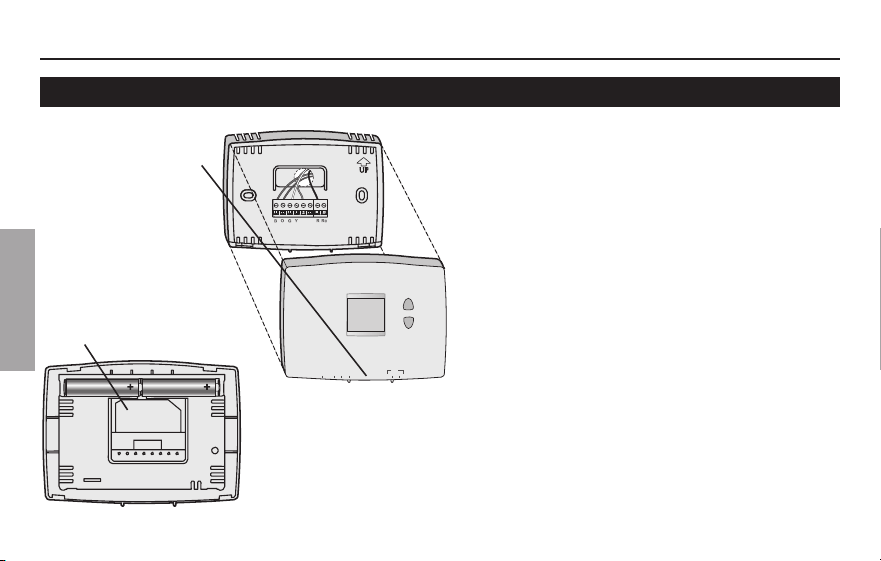
Mettre deux piles AAA neuves lorsque
Lo Batt (Piles faibles) clignote à
l’écran.Lo Batt (Piles faibles) s’affiche
pendant 60 jours avant que les piles
nesoientcomplètementdéchargées.
Remplacer les piles une fois par an ou
avant de quitter la maison pour une
périodedeplusd’unmois.
Laplupartdesréglagessont
sauvegardésdanslamémoirenon
volatile (permanente). Seuls l’horloge
etlejourdoiventêtreréglésaprèsle
remplacement des piles.
MettrelacommandeSystem(Système)surOff(Arrêt)
avantderetirerlespiles.Danslecascontraire,le
système de chauffage/refroidissement pourrait rester
activémêmesilespilessontretirées.
Tirer le thermostat
par le bas pour
ledétacherdela
plaque murale.
Retourner le thermostat
et installer des piles
alcalines AAA neuves,
puis remettre le
thermostat en place.
69-2607EFS—01 10
FRANÇAIS
Manuel d’utilisation
Services à la clientèle
RTHXXXX
M32707
W/
Aux
Not
Used
M32823
E.M. Heat Heat Off Cool Auto On
Fan
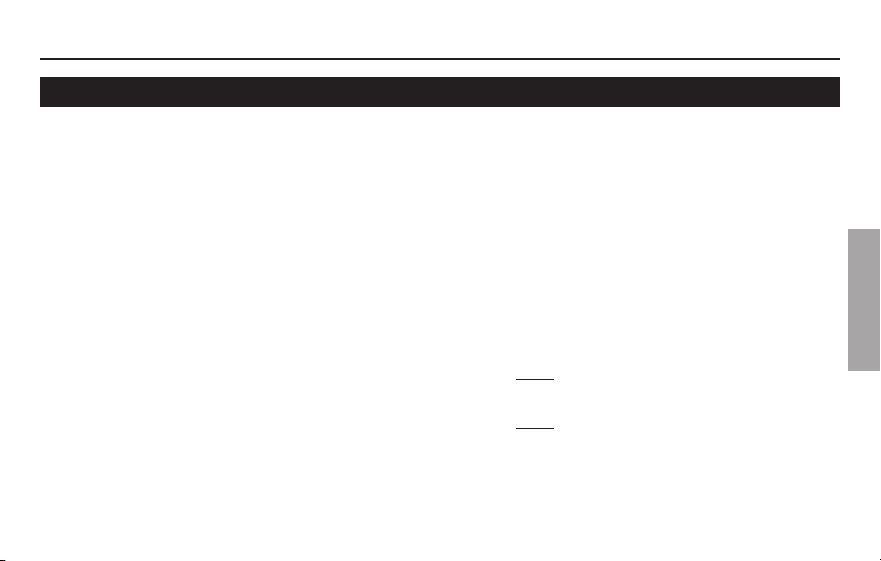
Retourner le
thermostat pour
trouverlenumérode
modèle et le code de
date.
Tirer le thermostat
par le bas pour
ledétacherdela
plaque murale.
Pour obtenir de l’aide avec ce produit,
veuillez consulter le site
http://yourhome.honeywell.com.
ou vous adresser aux Services à la
clientèle de Honeywell en composant le
1-800-468-1502.
Pour gagner du temps, veuillez prendre
ennotelenumérodemodèleetdecode
de date du thermostat avant d’appeler.
PRO 1000
11 69-2607EFS—01
FRANÇAIS
En cas de difficulté
Sivouséprouvezdesdifficultés,nousvousproposonsd’essayerlessolutions
suivantes.Laplupartdesproblèmespeuventêtrecorrigésrapidementetfacilement.
Rien n’apparaît à
l’écran
• S’assurerquelecoupe-circuitn’estpasdéclenchéetleremettreen
position de marche au besoin.
• S’assurerqueleboutondemarche-arrêtdusystèmedechauffageou
de refroidissement est à la position de marche.
• S’assurerquelaportedel’appareildechauffageestbienfermée.
• S’assurerqu’ilyabiendespilesalcalinesAAAneuvesenplace(voir
page 9)
Le système de
chauffage ou de
refroidissement
ne répond pas
• RéglerlesélecteurdusystèmeàHeat (voir page 5). S’assurer que le
pointdeconsigneestplusélevéquelatempératureambiante.
• RéglerlesélecteurdusystèmeàCool (voir page 5). S’assurer que le
pointdeconsigneestmoinsélevéquelatempératureambiante.
• Attendre5minutespourlaisserausystèmeletempsderéagir.

69-2607EFS—01 12
FRANÇAIS
Manuel d’utilisation
En cas de difficulté
Le point de
consigne de la
température ne
change pas
S’assurerquelestempératuresdechauffageetderefroidissementsont
régléesàl’intérieurdesseuilsdetempératurepermis:
• Heat:4,5à32°C(40à90°F).
• Cool:10à37°C(50à99°F).
Les mots «Heat
On» ou «Cool On»
clignotent à l’écran
• La fonction de protection du compresseur est en marche. Attendre 5
minutespourquelesystèmeseremetteenmarcheentoutesécurité
sans endommager le compresseur (voir page 8).
Les mots «Heat On»
n’apparaissent pas
à l’écran
• MettrelesélecteurdusystèmeenmodedechauffageHeatetrégler
lepointdeconsigneàunetempératuresupérieureàlatempérature
ambiante (voir page 5.
Les mots «Cool On»
n’apparaissent pas
à l’écran
• MettrelesélecteurdusystèmeàCool,etréglerlepointdeconsigneà
unetempératureinférieureàlatempératureambiante(voirpage5).
PRO 1000
13 69-2607EFS—01
FRANÇAIS
Garantie limitée de 2 ans
Honeywellgarantitceproduit,àl’exceptiondespiles,contretoutdéfautdepièceoudemain-d’oeuvre,durantunepériodede
deux(2)ansàpartirdeladated’achatsileproduitestutiliséetentretenuconvenablement.Si,àn’importequelmomentdela
périodedegarantie,leproduitestdéfectueux,Honeywelllerépareraouleremplacera(àsadiscrétion).
Encasdedéfectuositéduproduit,
(i)leretourner,aveclereçud’achatouuneautrepreuved’achatdatée,àl’endroitoùilaétéacheté,ou
(ii)téléphonerauxServicesàlaclientèledeHoneywellau1800468-1502.LeCentredécideraalorss’ilfautretournerleproduit
àl’adressesuivante:HoneywellReturnGoods,Dock4MN10-3860,1885DouglasDr.N,GoldenValley,MN55422,ous’ilvous
fera parvenir un produit de remplacement.
Cettegarantienecouvrepaslesfraisdedémontageoud’installation.LagarantieseraannuléesiHoneywellprouvequela
défectuositéaétécauséepardesdommagesapparusalorsqueleclientétaitenpossessionduproduit.
LaresponsabilitédeHoneywellselimiteàlaréparationouauremplacementduproduitselonlestermesénoncés.
HONEYWELLNEPEUTÊTRETENUERESPONSABLEDEPERTEOUDOMMAGEDETOUTESSORTES,INCLUANTLES
DOMMAGESACCIDENTELSOUCONSÉCUTIFSRÉSULTANT,DIRECTEMENTOUINDIRECTEMENT,DETOUTMANQUEMENTÀ
N’IMPORTEQUELLEGARANTIE,EXPRESSEOUIMPLICITE,OUDETOUTEAUTREDÉFAILLANCEDUPRODUIT.CertainsÉtatsou
provincesnepermettentpasl’exclusionoularestrictiondesdommagesaccidentelsouconsécutifs,cetterestrictionpourraitdonc
ne pas s’appliquer.
CETTEGARANTIEESTLASEULEGARANTIEEXPRESSEQUEHONEYWELLOFFREPOURCEPRODUIT.LADURÉEDETOUTE
GARANTIEIMPLICITE,INCLUANTLESGARANTIESDEQUALITÉMARCHANDEOUD’ADAPTATIONÀUNEUTILISATION
PARTICULIÈRE,ESTLIMITÉEPARLESPRÉSENTESÀLAPÉRIODED’UNEANNÉEDELAPRÉSENTEGARANTIE.
CertainsÉtatsouprovincesnepermettentaucunerestrictionsurladuréed’unegarantieimplicite,larestrictionci-dessuspourrait
doncnepass’appliquer.Laprésentegarantievousconfèredesdroitsjuridiquesspécifiques,etvouspourriezégalementjouir
d’autresdroitsselonvotreÉtatouprovince.
Pourtoutequestionausujetdelagarantie,écrireauBureauderelationsaveclesclientsdeHoneywellàl’adressesuivante:1985
DouglasDr.,GoldenValley,MN55422outéléphonerau1800468-1502.AuCanada,écrireàl’adresse:RetailProductsON15-02H,
HoneywellLimited/HoneywellLimitée,35,PromenadeDynamic,Toronto(Ontario)M1V4Z9.

®MarquedecommercedéposéeauxÉ.-U.
© 2011 Honeywell International Inc.
69-2607EFS—01 M.S. 05-11
ImpriméauxÉtats-Unis
Solutions de régulation et d’automatisation
Honeywell International Inc.
1985DouglasDriveNorth
GoldenValley,MN55422
HoneywellLimited-HoneywellLimitée
35DynamicDrive
Toronto,OntarioM1V4Z9
http://yourhome.honeywell.com
Manual de
funcionamiento
PRO 1000 Series
Termostato no programable
Lea y guarde estas instrucciones.
® Marca registrada de los EE. UU. Patentes en trámite.
© 2011, Honeywell International Inc. Todos los derechos reservados.
¿Necesita asistencia?
Para obtener asistencia relacionada con este producto, visite
http://yourhome.honeywell.com o comuníquese con el número gratuito del
servicio de atención al cliente de Honeywell, llamando 1-800-468-1502
PRECAUCIÓN: PELIGRO DE DAÑO EN EL EQUIPO.
Para evitar posibles daños en el compresor, no haga que el termostato funcione
cuando la temperatura exterior sea inferior a 50 ºF (10 ºC).
Este manual incluye los siguientes modelos:
TH1100DH : Para sistemas de 1 calentador
TH1110DH : Para sistemas de 1 calentador y 1 refrigerador
TH1210DH: Para sistemas de bomba de calor para 2 calentadores y 1 refrigerador únicamente
(Quite el termostato de la placa para pared y gírelo para ver el número de modelo).
PRO 1000
1 69-2607EFS—01
Índice
Acerca de su nuevo termostato
Características del termostato. ................. 2
Rápida referencia de los controles ........... 3
Rápida referencia de la pantalla ............... 4
Funcionamiento
Seleccione la configuración del sistema ...... 5
Seleccione la configuración
del ventilador ............................................... 6
Acerca de su nuevo term ..........................7
Protección del compresor ......................... 8
Apéndices
Reemplazo de la batería ............................ 9
Asistencia al cliente ................................. 10
En caso de inconvenientes ..................... 11
Garantía limitada ...................................... 13
69-2607EFS—01 2
ESPAÑOL
Acerca de su nuevo termostato
Manual de funcionamiento
Su nuevo termostato ha sido diseñado para brindarle muchos años de funcionamiento
confiable y para brindarle un control climático fácil de usar y con sólo apretar un botón.
Características
• Pantallaconluzdefondodelecturafácil.
• Indicalatemperaturaambiente(medida)entodomomento.
• Unsólobotónpermiteverlatemperaturadelpuntodeajuste.
• Proteccióndelcompresorincorporada.
PRO 1000
3 69-2607EFS—01
ESPAÑOL
Acerca de su nuevo termostato
Interruptor “Fan”
(ventilador) vea la página 6.
“On” (encendido): El
ventilador funciona sin
interrupción.
“Auto” (automático):
El ventilador funciona
solamente cuando la
calefacción o el sistema
de refrigeración están
encendidos.
Rápida referencia de los controles
Botones Arriba/Abajo
Presionar para ajustar la
temperatura.
Interruptor “System”
(del sistema) (vea la
página 5)
• “Cool” (frío):
Controla el
sistema de
refrigeración.
• “Off” (apagado):
Apaga todos los
sistemas.
• “Heat” (calor): Controla el sistema de
calefacción.
• “Em Heat” (calor de emergencia):
Controla el calor de emergencia y auxiliar.
El compresor se bloquea. (Solamente en
los modelos superiores).
M32821
Auto On
Fan
Set
Cool
77
On
E.M. Heat Heat Off Cool
69-2607EFS—01 4
ESPAÑOL
Acerca de su nuevo termostato
Manual de funcionamiento
Rápida referencia de la pantalla
Lo
Batt
Set
Cool
77
M32763
On
Aviso de batería baja
(vea la página 9)
Temperatura
Indica normalmente la temperatura
ambiente (medida). Para ver la
temperatura del punto de ajuste,
presionar el botón Arriba o Abajo
una vez. La temperatura del punto de
ajuste aparecerá durante 5 segundos.
Indicador de punto de
ajuste
Aparece cuando se visualiza
el punto de ajuste de la
temperatura.
Estado del sistema
“Cool on” (frío encendido): El sistema de refrigeración está encendido.
“Heat on” (calor encendido): El sistema de calefacción está encendido.
“Aux On”: El calor auxiliar está encendido. (Solamente para bombas de calor con esta característica
(solamente en los modelos superiores).)
CuandoHeatOnoCoolOnparpadean,laproteccióndelcompresorestáactivada(verlapágina8).
PRO 1000
5 69-2607EFS—01
ESPAÑOL
Acerca de su nuevo termostato
M32821
Auto On
Fan
Set
Cool
77
On
E.M. Heat Heat Off Cool
Mueva el interruptor “SYSTEM”para
controlar los sistemas de calefacción
y refrigeración.
PRECAUCIÓN: PELIGRO DE DAÑO EN
EL EQUIPO. Para evitar posibles daños en
el compresor, no haga que el termostato
funcione cuando la temperatura exterior
sea inferior a 50 ºF (10 ºC).
Seleccione la configuración del sistema
El interruptor “SYSTEM”puedeconfigurarsepara
controlar su sistema de calefacción o refrigeración,
según la temporada.
• “Cool” (frío): Controla el sistema de refrigeración.
• “Off” (apagado): Apaga todos los sistemas.
• “Heat” (calor): Controla el sistema de calefacción.
• “Em Heat” (calor de emergencia): Controla el
calor de emergencia y auxiliar. El compresor se
bloquea. (Solamente en los modelos superiores).
69-2607EFS—01 6
ESPAÑOL
Acerca de su nuevo termostato
Manual de funcionamiento
M32821
Auto On
Fan
Set
Cool
77
On
E.M. Heat Heat Off Cool
Mueva el interruptor “FAN”hastalaposición
“Auto”u“On”.
Enelmodo“Auto”,laconfiguraciónusada
comúnmente, el ventilador funciona solamente
cuando la calefacción o el sistema de
refrigeración están encendidos.
Sisefijaen“On”,elventiladorfuncionasin
interrupción.
Configure el botón “FAN”paraseleccionar
si el ventilador funcionará sin interrupción o
solamente cuando sea necesario.
Seleccione la configuración del ventilador
PRO 1000
7 69-2607EFS—01
ESPAÑOL
Acerca de su nuevo termostato
M32822
Set
Cool
77
On
E.M. Heat Heat Off Cool Auto On
Fan
Acerca de su nuevo term
Presione s o t to para ajustar la
temperatura.
Nota:Asegúresedequeeltermostatoesté
configurado con el sistema que usted quiere
controlar (calor o frío).
69-2607EFS—01 8
ESPAÑOL
Acerca de su nuevo termostato
Manual de funcionamiento
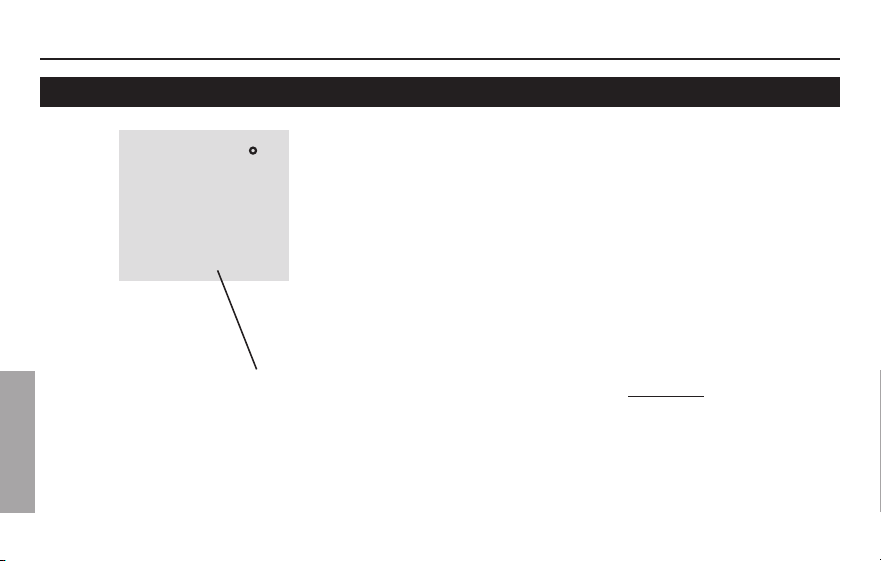
Esta función ayuda a prevenir el daño del
compresor en su acondicionador de aire o
en su sistema de bomba de calor.
El compresor puede dañarse si se vuelve
ainiciarinmediatamentedespuésdeser
apagado. Esta característica hace que el
compresor demore unos minutos antes de
volver a iniciarse.
Duranteeltiempodeespera,lapantalla
mostrará el mensaje “CoolOn”.Cuando
haya transcurrido el tiempo de espera de
seguridad, el mensaje dejará de titilar y se
encenderá el compresor.
El mensaje titila hasta que haya
transcurrido el tiempo de reinicio de
seguridad.
Protección del compresor incorporada
Set
Cool
77
M32769
On
PRO 1000
9 69-2607EFS—01
ESPAÑOL
Acerca de su nuevo termostato
RTHXXXX
M32707
W/
Aux
Not
Used
M32823
E.M. Heat Heat Off Cool Auto On
Fan
Reemplazo de la batería
PongaelconmutadordelsistemaenOFFantes
deretirarlaspilas.Delocontrario,elsistemade
calefacción/enfriamiento puede permanecer activado
aun cuando se hayan sacado las baterías.
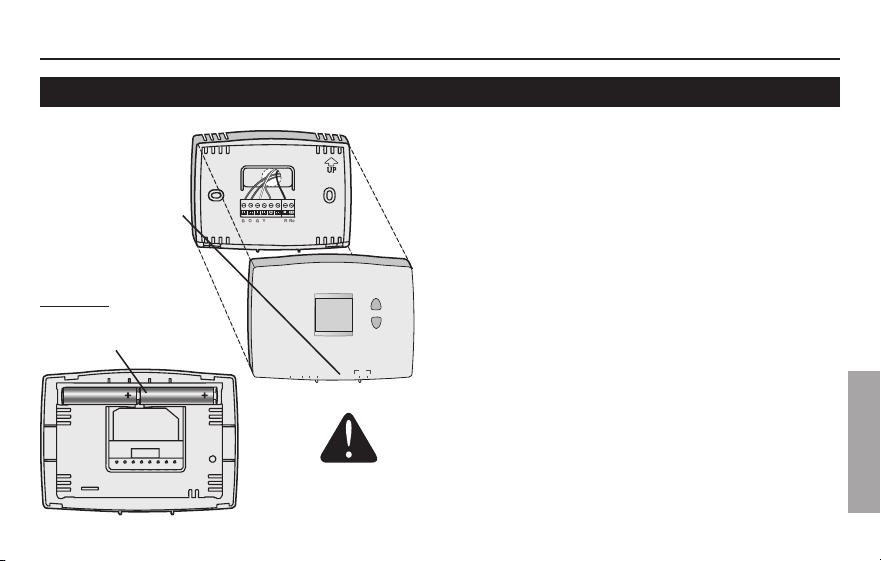
Instalar dos pilas AAA nuevas cuando
Lo Batt parpadee en la pantalla. Lo Batt
aparecerá 60 días antes de que las pilas
esténcompletamentedescargadas.
Reemplazar las pilas una vez por año o
luego de una ausencia de más de un mes.
Los ajustes están salvaguardados en la
memoria (permanente) no volátil y por lo
tanto se preservan cuando el termostato
está sin pilas.
Hale de la parte
inferior para
quitar el
termostato de la
placa para pared.
Gire el termostato e
inserte baterías AAA
alcalinas nuevas;
luego, vuelva a instalar
el termostato.
69-2607EFS—01 10
ESPAÑOL
Acerca de su nuevo termostato
Manual de funcionamiento
RTHXXXX
M32707
W/
Aux
Not
Used
M32823
E.M. Heat Heat Off Cool Auto On
Fan
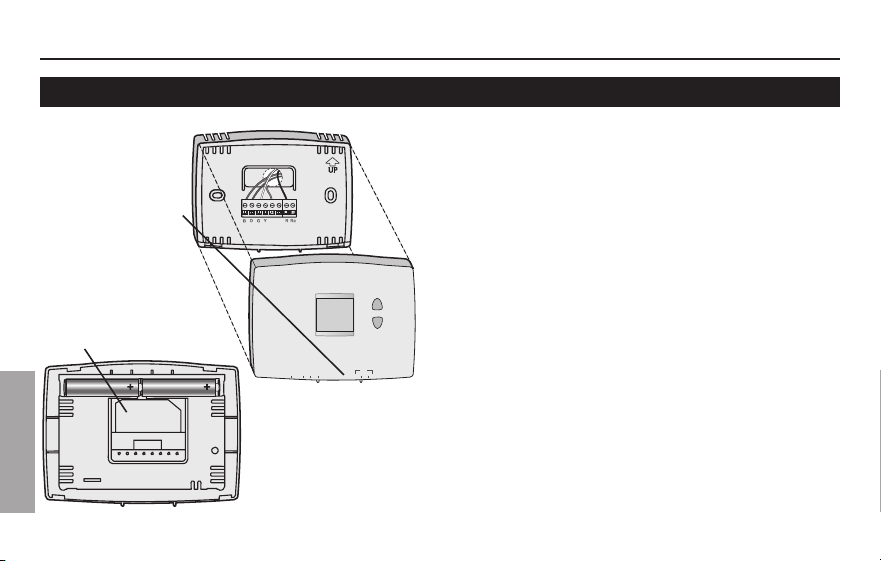
Para obtener asistencia relacionada con
este producto, visite
http://yourhome.honeywell.com.
Ocomuníqueseconelnúmerogratuitodel
servicio de atención al cliente, llamando al
1-800-468-1502.
Para ahorrar tiempo, anote el número de
modelo y el código de fecha antes de
llamar.
Gire el termostato
para ver el número
de modelo y el
código de fecha.
Hale de la parte
inferior para
quitar el
termostato de la
placa para pared.
Asistencia al cliente
PRO 1000
11 69-2607EFS—01
ESPAÑOL
Acerca de su nuevo termostato
Si tiene dificultades con el termostato, intente seguir las sugerencias que se indican a
continuación. La mayoría de los problemas pueden corregirse rápida y fácilmente.
La pantalla está
vacía
• Controleelinterruptordecircuitoy,siesnecesario,reinícielo.
• Asegúresedequeelinterruptordeenergíadelsistemade
calefacciónyrefrigeraciónestéencendido.
• Asegúresedequelapuertadelsistemadecalefacciónestébien
cerrada.
• AsegúresedequelasbateríasAAAalcalinasesténinstaladas
correctamente (vea la página 9).
El sistema de
calefacción o
refrigeración no
responde
• Muevaelinterruptor“System”hastalaposición“Heat”(vealapágina
5). Asegúrese de que la temperatura sea más alta que la temperatura
interna.
• Muevaelinterruptor“System”hastalaposición“Cool”(veala
página 5). Asegúrese de que la temperatura sea más baja que la
temperatura interna.
• Espere5minutosparaquerespondaelsistema.
En caso de inconvenientes
69-2607EFS—01 12
ESPAÑOL
Acerca de su nuevo termostato
Manual de funcionamiento
En caso de inconvenientes
Las con-
figuraciones de
la temperatura
no cambian
Asegúresedequelastemperaturasdecaloryfríoesténconfiguradasen
rangos aceptables:
• “Heat”:De40°Fa90°F(de4,5°Ca32°C).
• “Cool”:De50°Fa99°F(de10°Ca37°C).
El mensaje
“Cool On” titila
• La función de la protección del compresor está funcionando. Espere 5
minutos para que el sistema se vuelva a iniciar de forma segura, sin dañar
el compresor (vea la página 8).
“Heat On” no
aparece en la
pantalla
• Muevaelinterruptor“System”hastalaposición“Heat”yconfigureelnivelde
temperatura por encima de la temperatura ambiente actual (vea la página 5).
“Cool On” no
aparece en la
pantalla
• Muevaelinterruptor“System”hastalaposición“Cool”yconfigureelnivelde
temperatura por debajo de la temperatura ambiente actual (vea la página 5).
PRO 1000
13 69-2607EFS—01
ESPAÑOL
Honeywellgarantizaesteproducto,aexcepcióndelabatería,poreltérminodedos(2)añoscontracualquierdefectode
fabricación o de los materiales, a partir de la fecha de compra por parte del consumidor. Si en cualquier momento durante el
período de garantía se verifica que el producto tiene un defecto o que funciona mal, Honeywell lo reparará o reemplazará (a
elección de Honeywell).
Si el producto tiene defectos,
(i)devuélvalo,conlafacturadeventauotrapruebadecomprafechada,allugardondelocompró;o
(ii) comuníquese con el Centro de atención al cliente de Honeywell al 1-800-468-1502. Atención al cliente decidirá si se debe
devolverelproductoalasiguientedirección:DevolucióndemercaderíasdeHoneywell,Dock4MN10-3860,1885DouglasDr.N.,
GoldenValley,MN55422,osiselepuedeenviarunproductoenreemplazo.
Esta garantía no cubre los costos de extracción o reinstalación. Esta garantía no se aplicará si Honeywell demuestra que el
defecto o mal funcionamiento estaba causado por daños ocurridos mientras el producto estaba en posesión de un consumidor.
La única responsabilidad de Honeywell será reparar o reemplazar el producto dentro de los plazos establecidos anteriormente.
HONEYWELLNORESPONDERAPORLAPÉRDIDAODAÑODENINGUNTIPO,INCLUIDOELDAÑOINCIDENTALOINDIRECTO
DERIVADO,DIRECTAOINDIRECTAMENTE,DELINCUMPLIMIENTODELASGARANTIAS,EXPRESASOIMPLICITAS,ODE
OTRASFALLASDEESTEPRODUCTO.Algunosestadosnopermitenlaexclusiónolimitacióndeldañoincidentaloindirecto,
entonces, esta limitación puede no resultar aplicable a su caso.
LAPRESENTEGARANTIAESLAUNICAGARANTIAEXPRESAQUEHONEYWELLPROPORCIONARESPECTODEESTE
PRODUCTO.LADURACIÓNDELASGARANTÍASIMPLÍCITAS,INCLUÍDASLASGARANTÍASDECOMERCIABILIDADYAPTITUD
PARAUNOBJETIVOPARTICULAR,ESTÁLIMITADAALADURACIÓNDEUNAÑODELAPRESENTEGARANTÍA.
Algunos estados no permiten las limitaciones sobre la duración del período de una garantía implícita, entonces la limitación
anterior puede no resultar aplicable a su caso. Esta garantía le brinda derechos legales específicos, y usted podrá tener otros
derechos que varían según el estado.
Sitienepreguntassobrelapresentegarantía,sírvaseescribiraHoneywellCustomerRelations,1985DouglasDr,GoldenValley,
MN55422ollamaral1-800-468-1502.EnCanadá,escribaaRetailProductsON15-02H,HoneywellLimited/HoneywellLimitée,
35DynamicDrive,Toronto,OntarioM1V4Z9.
Garantía limitada de 2 años

® Marca Registrada en los EE. UU.
© 2011 Honeywell International Inc.
69-2607EFS—01 M.S. 05-11
Impreso en EE. UU.
Automatización y control desenlace
Honeywell International Inc.
1985DouglasDriveNorth
GoldenValley,MN55422
HoneywellLimited-HoneywellLimitée
35DynamicDrive
Toronto,OntarioM1V4Z9
http://yourhome.honeywell.com