Use & Care Guide
Manual de Uso Y Cuidado
Manuel D'entretien Et D'utilisation
Model No / N° de Modelo / Référence de Modèle.
SMF1501
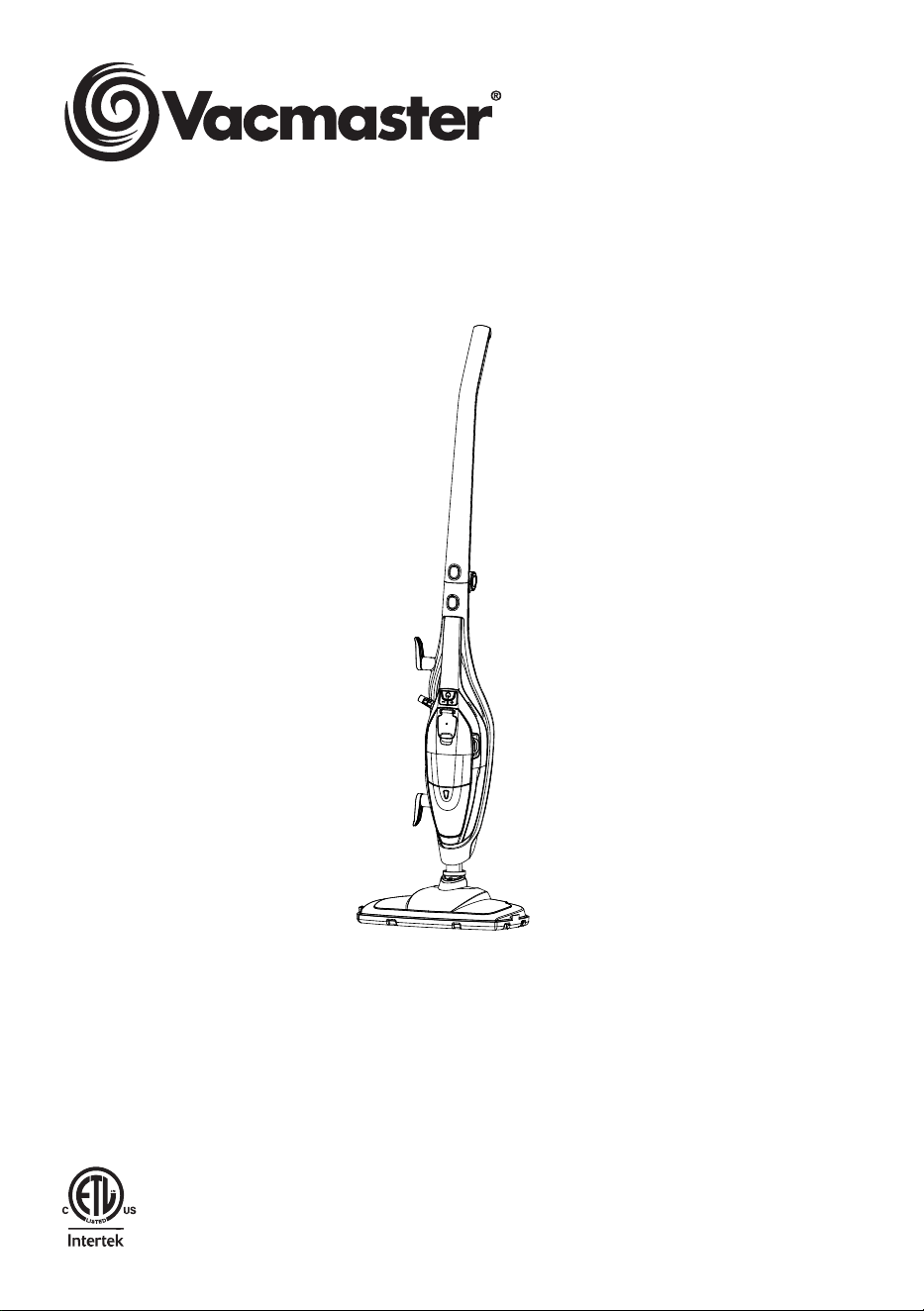
2-in-1 Steam Mop / 2-en-1 Trapeador a Vapor / 2-in-1
Vadrouille à vapeur
www.vacmaster.com
Distributed By / Distribuido Por / Distribué Par:
Suzhou Cleva Electric Appliance Co., Ltd.
No.8 Ting Rong Street
Suzhou Industrial Park, Suzhou
Jiangsu Province, China
Made in China

-2-
SECTION
Important Safety Instructions...................................................................................................................
Warranty..................................................................................................................................................
Technical Data.........................................................................................................................................
Getting To Know Your Steam Mop...........................................................................................................
General Assembly Instructions................................................................................................................
Operating Instructions............................................................................................................................
Maintaining Your Steam Mop...................................................................................................................
Troubleshooting.....................................................................................................................................
3
5
5
6
8
10
19
21
TABLE OF CONTENTS
PAGE
Thank you for purchasing this Vacmaster
®
steam mop. With it you are obtaining a
high-quality product that is engineered for optimal performance.
FOR YOUR SAFETY
Read and understand this manual before use.
Keep this manual and your sales check (receipt) in a safe place for future
reference.

-3-
IMPORTANT SAFETY INSTRUCTIONS
When using an electrical appliance, basic precautions should always be followed,
including the following:
READ ALL INSTRUCTIONS BEFORE USING THIS STEAM MOP
Failure to follow the warnings and instructions may result in electric shock, re
and/or serious injury.
WARNING -
To reduce the risk of re, electric shock, or injury:
• Do not clean the appliance with water, any other liquid, or a (ammable)
detergent to avoid electric shock and a re hazard.
• Do not leave appliance when plugged in. Unplug from outlet when not in use
and before servicing.
• Not for space heating purposes.
• Make sure the household voltage is the same as that indicated on the rating
label of the unit.
• This appliance is not intended for use by persons (including children) with
reduced physical, sensory or mental capabilities, or lack of experience and
knowledge, unless they have been given supervision or instruction concerning
use of the appliance by a person responsible for their safety. Children shall not
play with the appliance.
• Keep the appliance away from children when it is energized or cooling down.
• Always switch off, unplug from the socket after use or before cleaning the
appliance or any maintenance task.
• Do not unplug by pulling and jerking the cord with force.
• Do not handle the plug or the appliance with wet hands.
• Use only the attached parts which are supplied by the manufacturer.
• This appliance is intended for household use only. Do not use the appliance at
any outdoor area. Commercial use will void warranty.
• Do not leave the appliance unattended while it is connected to the main power
outlet.
• If the supply cord is damaged, it must be replaced by the manufacturer, its
service agent or similarly qualied persons in order to avoid any hazard.
• Do not step on or wrap the cord around arms or legs when using the appliance.
• Do not pull, lift or carry the appliance by its supply cord. In order to avoid
damages to the cord, do not pull the cord around sharp corners and edges.
• Do not use the appliance if it has been dropped, if there are visible signs of
damage or if it appears faulty or if it is leaking.
• Keep the appliance away from the ovens and stoves etc.
-4-
IMPORTANT SAFETY INSTRUCTIONS
• Do not position the appliance above you when cleaning the stairs.
• Unplug the steam mop before ling the water container and do not over ll.
• The water container cap must not be opened during use.
• Do not immerse the appliance into the water or other liquids.
• Do not add chemicals, detergents, perfumes or liquids other than water into the
water tank of the appliance.
• Keep the appliance dry to protect against electric shock.
• Do not use the appliance to clean or direct steam towards animals, people or
plants.
• Do not use on any unsealed hard oor surfaces. It is always recommended
to test an isolated area of the surface to be cleaned before proceeding. It
is also recommended to check the use and care instructions from the oor
manufacturer.
• Liquid or steam must not be directed towards equipment containing electrical
components, such as ovens.
CAUTION:
Steam mop generates hot steam and components in contact
with water will also reach high temperatures. Please be extra careful when using
the unit to avoid scalding. Surfaces are also in high temperature during use. Avoid
contact with the surfaces and steam. Do not let children get close to the steam
mop or use it without any supervision.
WARNING!
Scalding Risk.
CAUTION!
Hot Surface.
READ AND SAVE THESE INSTRUCTIONS
Proper assembly and safe use of your steam mop are your responsibilities. Your
steam mop is intended for Household Use. Read this Use & Care Guide carefully
for important use and safety information. This guide contains safety statements
under warning and caution symbols.

-5-
FOR ONE YEAR from the date of sale, this product is warranted against defects
in material or workmanship when it is assembled (or, for deliveries in the State of
California, one year from the date of delivery), operated and maintained according
to all supplied instructions.
WITH PROOF OF SALE, a defective appliance will be replaced free of charge.
For warranty coverage details to obtain free replacement, visit the web page:
www.vacmaster.com or call 1-866-384-8432.
• This warranty does not cover the textile pads, which are expendable parts that
can wear out from normal use within the warranty period.
• This warranty is void if this product is ever used for other than private household
purposes.
• This warranty gives you specic legal rights, and you may also have other
rights which vary from state to state.
TECHNICAL DATA
2-in-1 Steam Mop
Model: SMF1501
Rated Voltage: 120V AC 60Hz
Rated Power: 1550W
Water Tank Capacity (ml): 400ml
Heating Up Time (s): 25s
Run Time at the High Steam Setting: 16+/-3minute
Run Time at the Low Steam Setting: 24+/-5minute
WARRANTY
TECHNICAL DATA
-6-
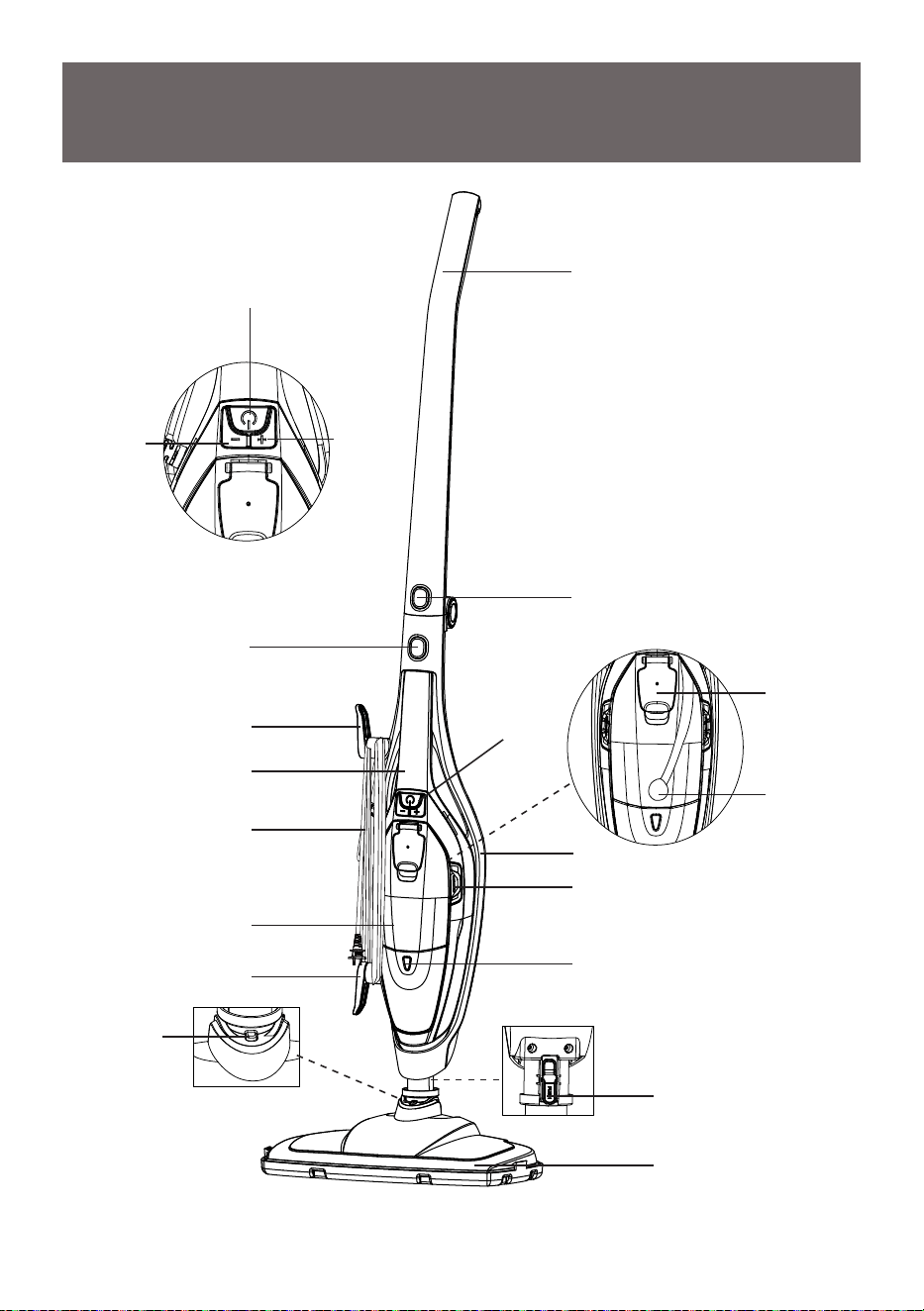
Fill Cap
Water Tube
with Brass
Ball Weight
Attached
Detachable Water Tank
Floor Head Release
Button (on Reverse
Side of the Main Body)
Indicator Light
GETTING TO KNOW YOUR
STEAM MOP
Upright Handle
Water Tank
Release Button
Handheld Release
Button
Floor Head
Rest Catch
Upright Handle
Release Button
Floor Head
Power Cord
Upper Cord Hook
(Rotatable)
Main Body
Handheld Handle
Lower Cord Hook
(Rotatable)
Power Button
Decrease
Steam
Output
Button
Increase
Steam
Output
Button
On/Off Power
Switch and
Steam Adjust
Button
-7-
Replacement Parts
For replacement parts, call 1-866-384-8432.
Item Part No.
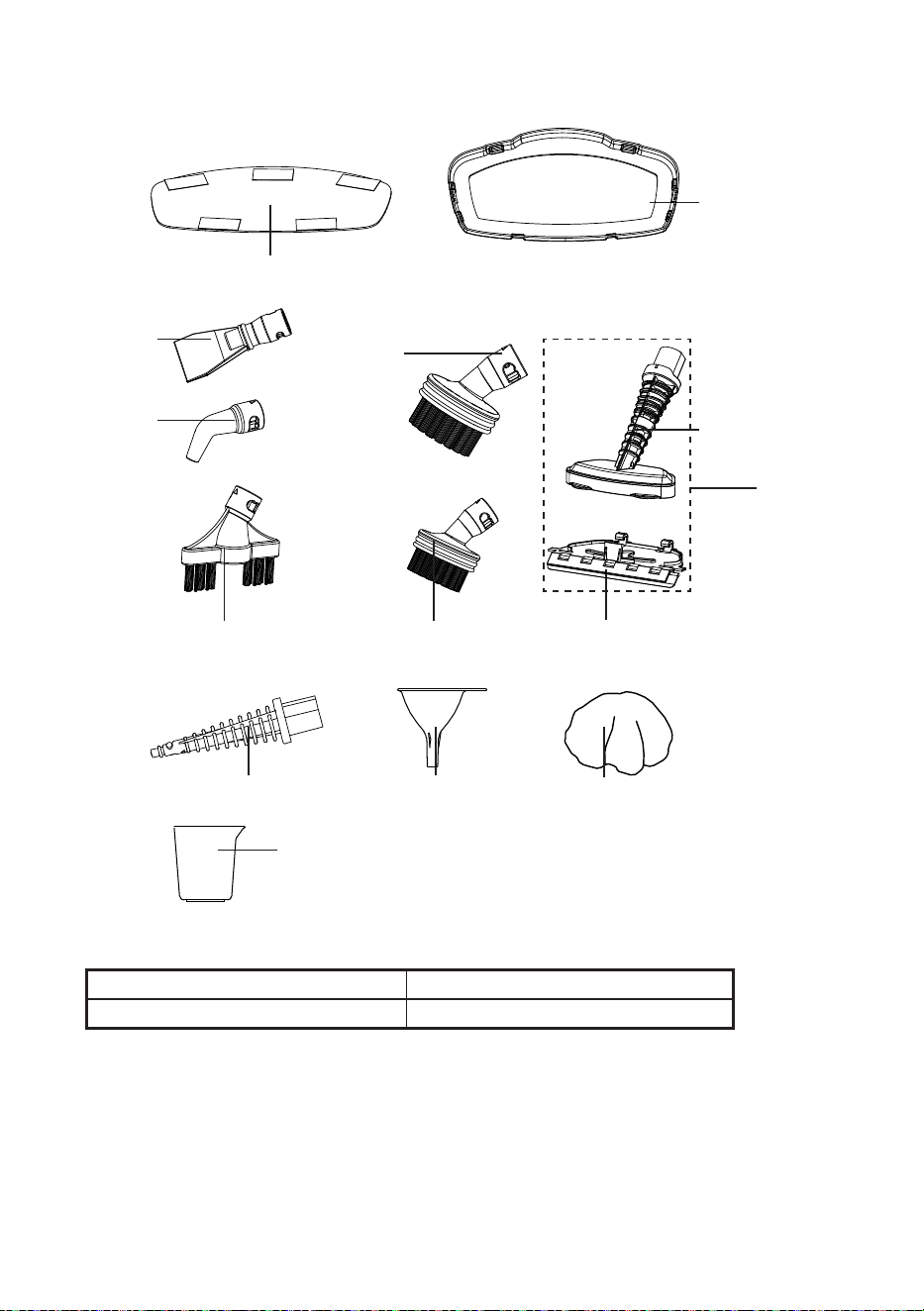
Textile Pad
731003104
Double Brush Tool
Small Round Brush Squeegee Attachment
(attaches to utility nozzle)
Utility Nozzle
Round Brush
Carpet Glider
Textile Pad X2
(with Hook and Loop Fastener Pads)
Scraper
Curved
Nozzle
Conic Pipe
Funnel
Small Mop (attaches
to utility nozzle)
Water Cup
Window
Squeegee
-8-
GENERAL ASSEMBLY INSTRUCTIONS
NOTE
: Each steam mop is 100% tested in the factory to ensure product
performance and safety. When assembling your new steam mop for the rst time
you may notice water residue inside the product.
WARNING
DO NOT plug into electrical supply until assembly is complete. Failure to do so
could result in electrical shock or injury. Before attempting any of the following
operations, make sure that the steam mop is cold and contains little or no water.
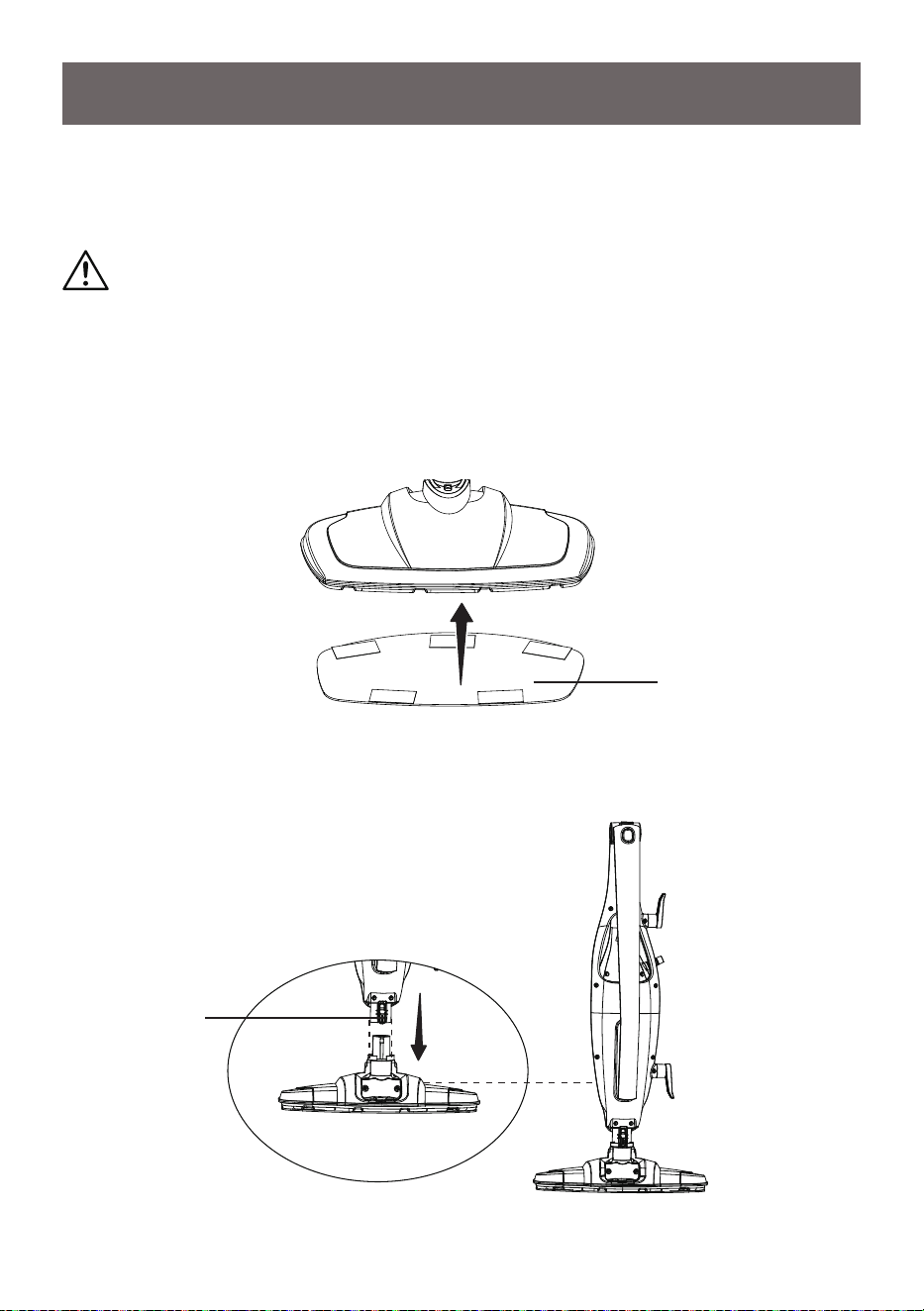
1. Attach the provided textile pad to the bottom of oor head using the hook and
loop fastener pads.
2. Attach the main body onto the oor head until the oor head release button on
the back of the main body clicks into place.
Floor Head
Release Button
Textile Pad
-9-
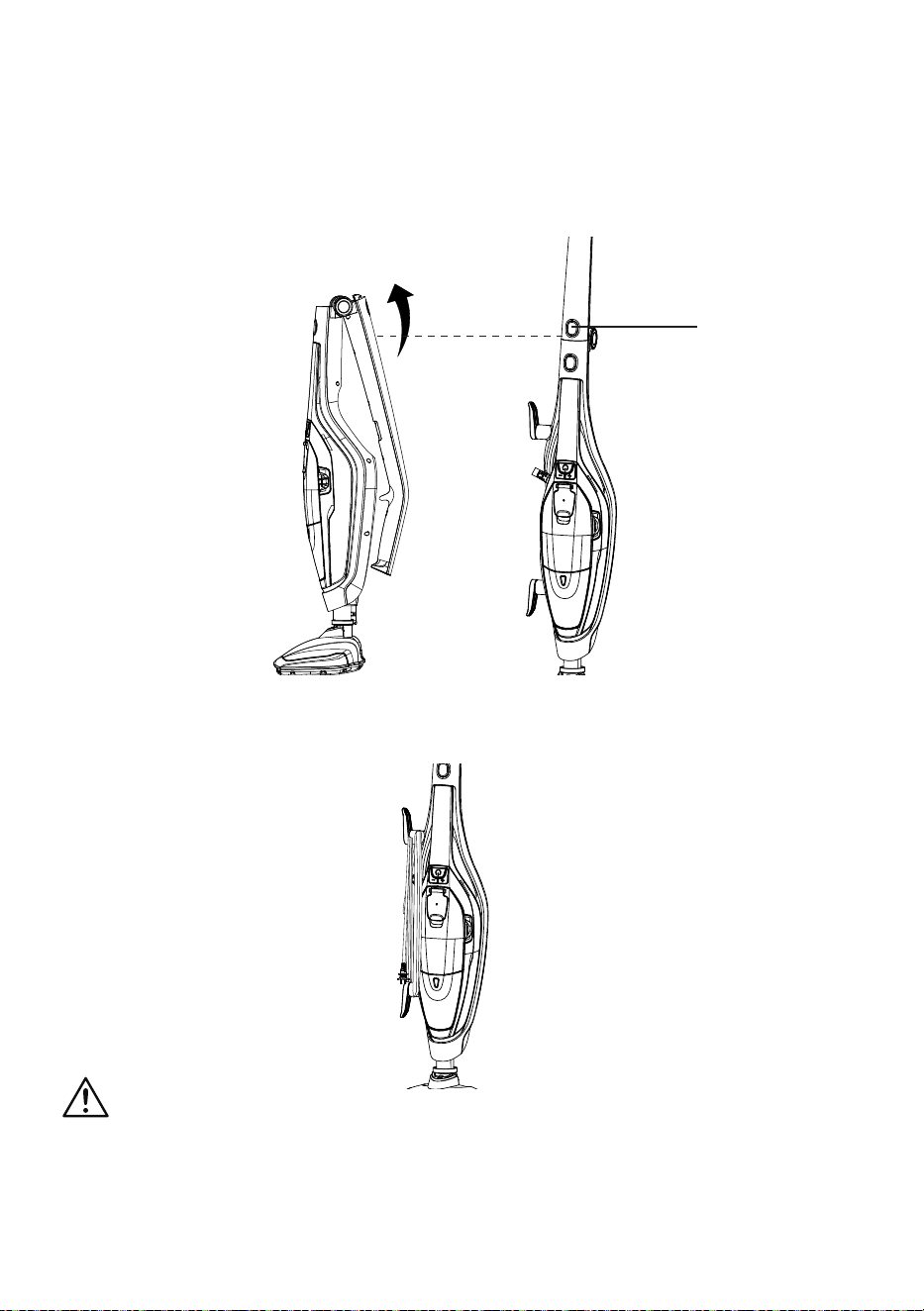
3. Raise the upright handle into position until it clicks into place.
NOTE:
To fold it back down again for storage, press the upright handle release
button on the front of the main body.
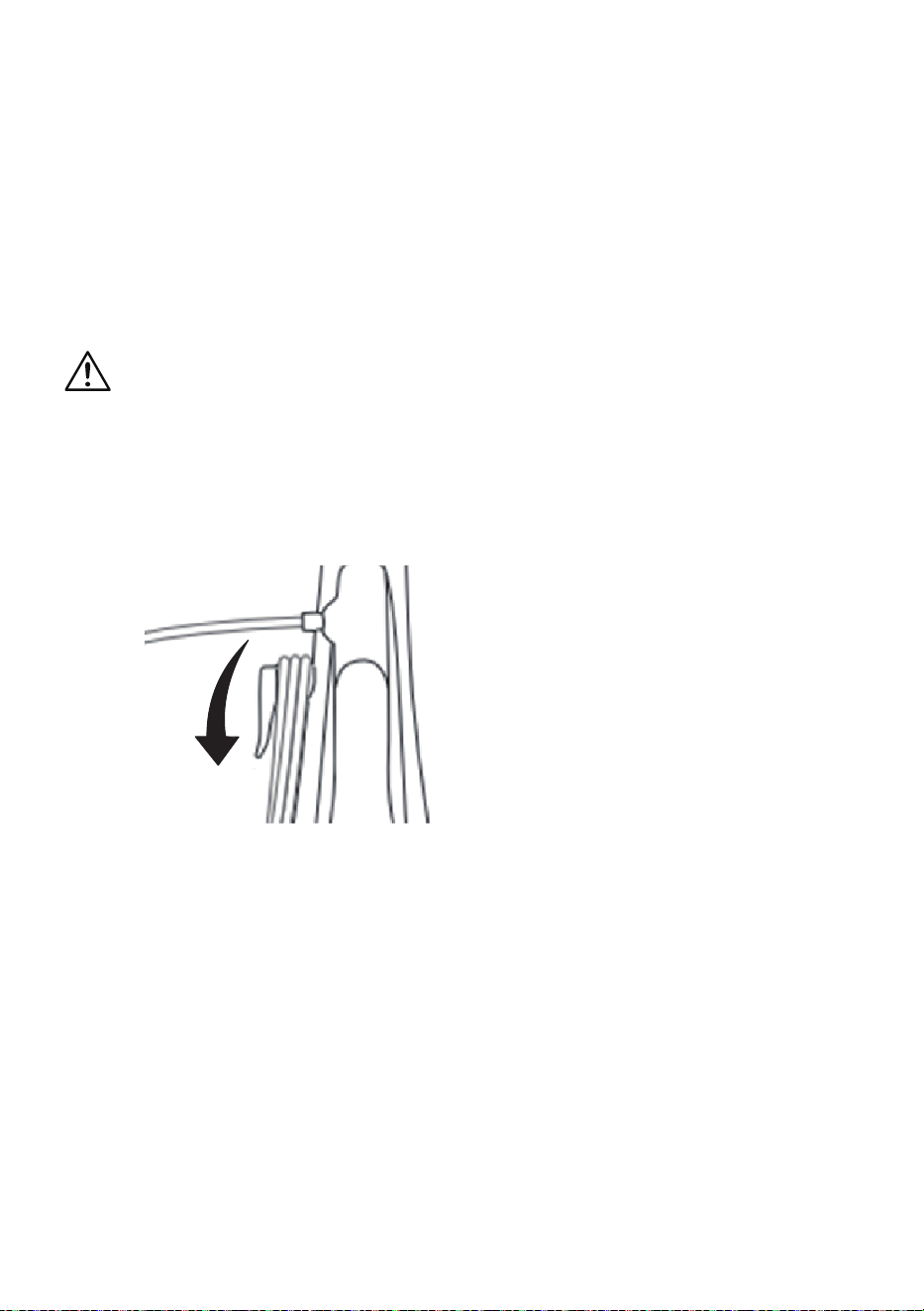
4. Make sure the upper cord hook is in the upright position as shown. Wrap the
power cord around the upper and lower cord hooks.
WARNING
Wrapping the cord too tightly with excessive stress on the cord may cause cord
damage. A damaged cord is an electrical shock hazard and could cause personal
injury or damage.
Upright Handle
Release Button
-10-
IMPORTANT:
Before use, hardoors should be thoroughly swept and carpets
should be thoroughly dry vacuumed. However, we recommend that the steam mop
is not used on:
•
Bare wooden oors or any surfaces where wood is exposed (as it will absorb
moisture and may distort).
•
Damaged hardoors or hardoors with gaps present (as it will absorb moisture
and may distort).
Also, do not keep the steam mop in one place for an extended period, because the
continual heat may cause damage to carpets and laminate ooring.
Please disconnect and allow the unit to cool before changing pads and
attachments.
Filling the Water Tank
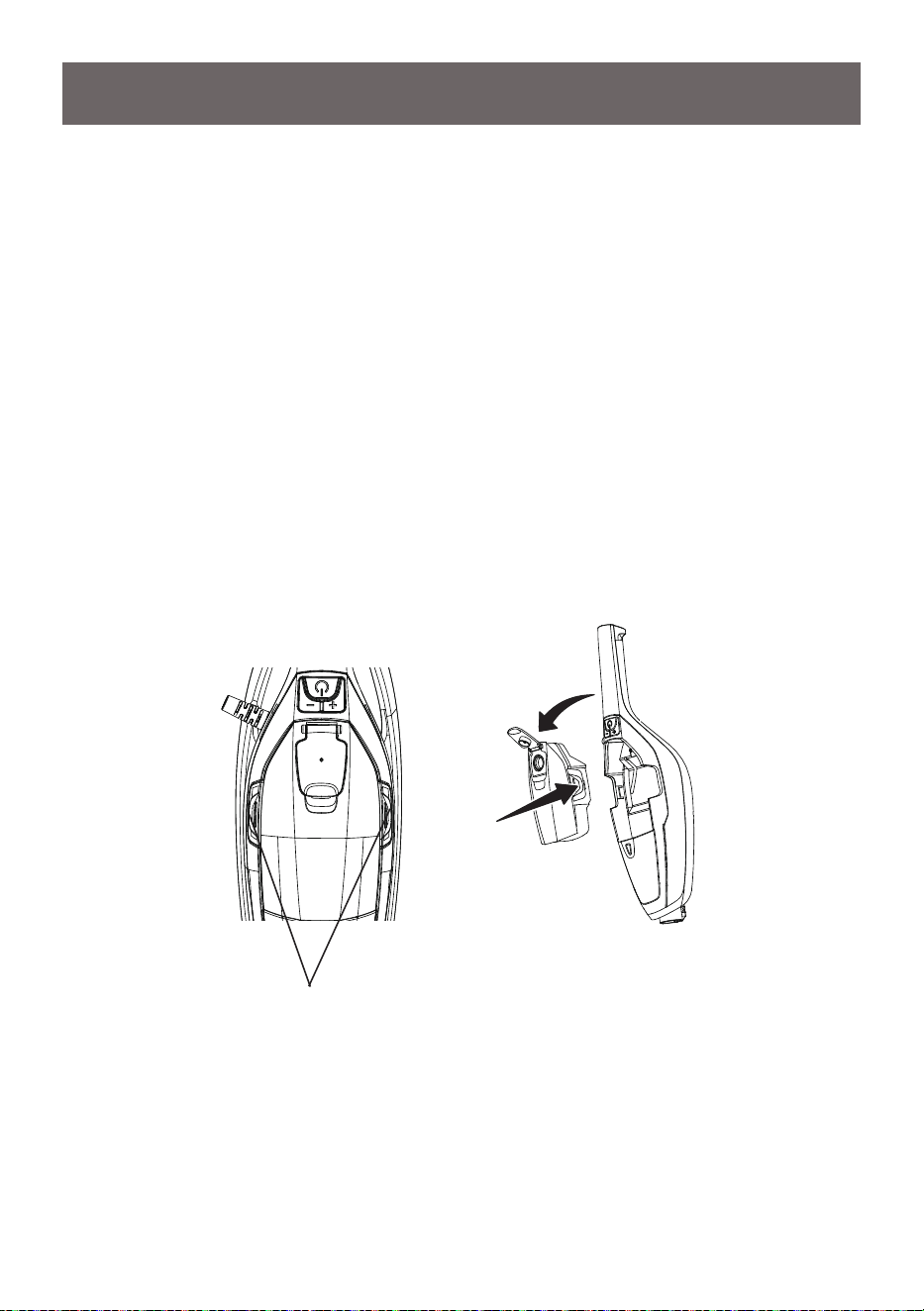
1. Remove the water tank from the handheld steam cleaner by pressing the two
water tank release buttons.
OPERATING INSTRUCTIONS
Water Tank
Release Buttons
-11-
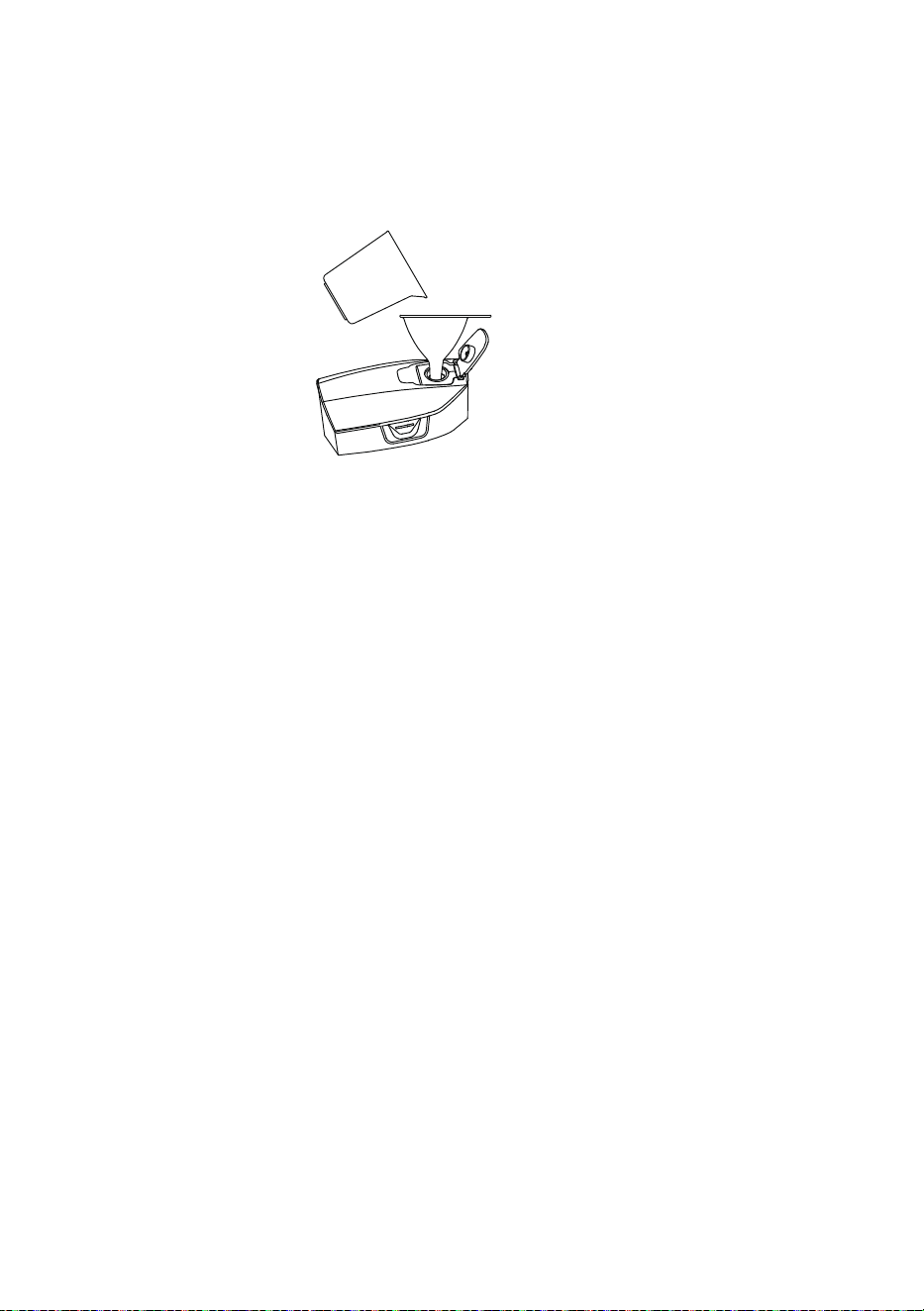
2. Open the ll cap. Fill the water tank with cold distilled water with the provided
funnel and water cup and then close the ll cap.
IMPORTANT:
To prevent limescale build-up in the water tank, never ll the tank
with anything other than deionised, demineralised or distilled water. Any problems
arising from limescale will invalidate the product guarantee. To avoid damage, do
not drop the water tank full of water on the ground.
3. Press the water tank release buttons and ret the water tank to the handheld
steam cleaner.
4. Reposition the handheld steam cleaner back into the main body.
Using Your Steam Mop
NOTE:
Make sure the steam mop is completely assembled and the water tank is
lled with water before using.
Choose the correct accessory for steam cleaning. Use only textile pad for cleaning
on bare oor surfaces. Use both textile pad and carpet glider for cleaning on
carpets or rugs.
Vacuum or sweep the oor surface prior to steam cleaning.
IMPORTANT:
Please remember that the steam mop operates by emitting steam
at a temperature of 115
o
C. Always test on an inconspicuous area rst. Never use
it on objects or surfaces which cannot resist this temperature, or on surfaces with
coatings or polishes, or on delicate materials such as synthetic fabric, plastic,
natural fur or antique items etc.
If in doubt, check carefully on a part of the material where minor marks will not
matter.
-12-
IMPORTANT:
Do not use disinfectant, detergents, cleaning solutions, scented
oils or scented water, bleach or vinegar in your steam product. They will cause
damage to your product and invalidate your guarantee. We recommend you only
use deionised or distilled water to ll your steam mop.
Using Upright Steam Mop
WARNING
Before switching on, ensure the oor head is located safely away from persons or
animals.
1. Make sure the provided textile pad has been attached to the bottom of oor
head.
2. Rotate the upper cord hook to quickly release the power cord.
3. Plug the power cord plug into a grounded outlet.
4. The indicator light will begin ashing white. After approximately 25 seconds,
the ashing will stop, and the light will remain steadily illuminate white.
5. Press the power button to turn on the steam mop, and the indicator light will
illuminate green. The steam will begin to be emitted in the low steam setting.
6. Adjust the steam volume as needed using the dedicated steam volume
buttons.
• To increase steam volume to high, press the “+” button, the indicator light will
illuminate blue.
• To decrease steam volume to low, press the “-” button, the indicator light will
change back to green.
-13-
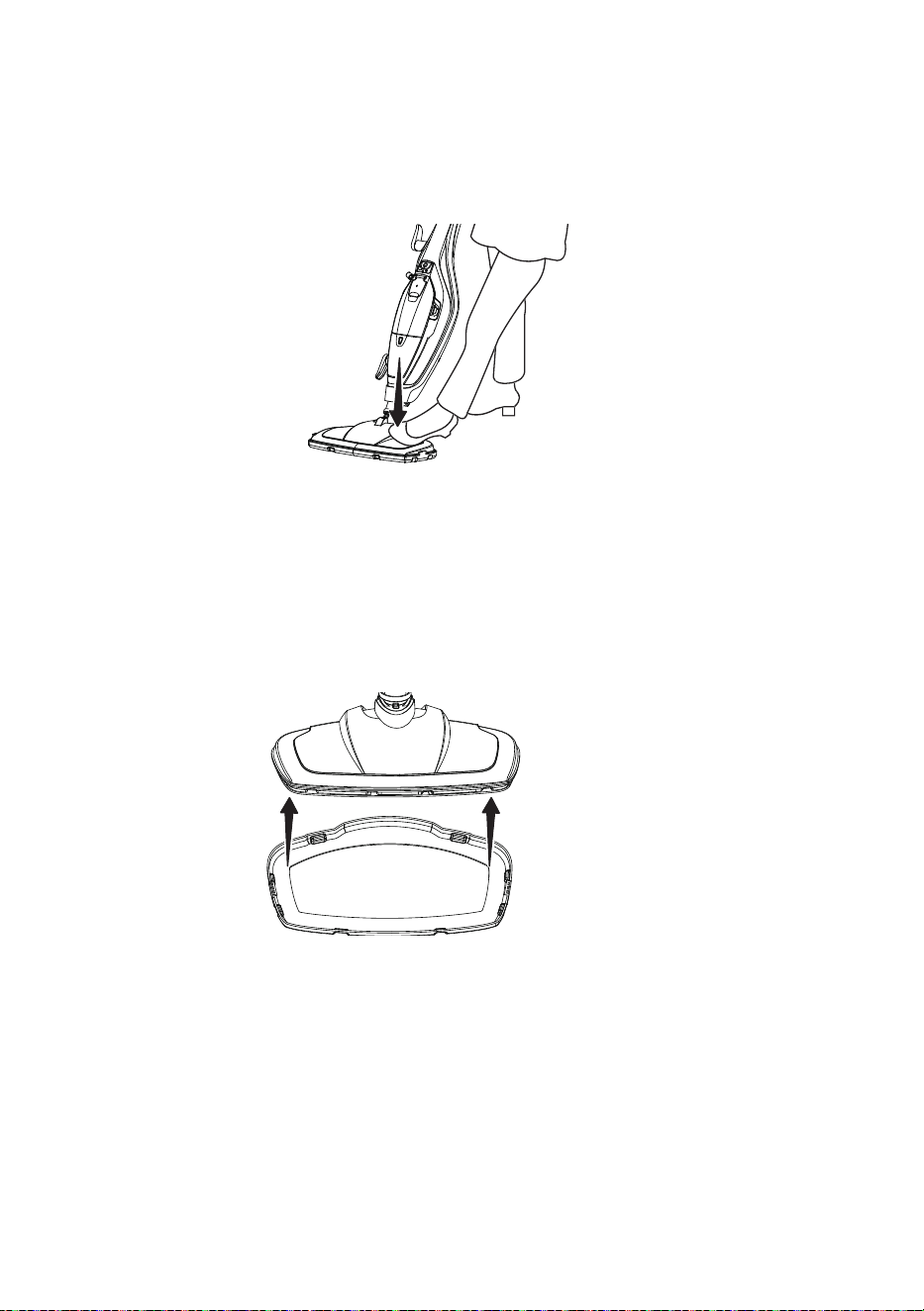
7. Recline the mop by placing a foot on the oor head and pulling the main body
back toward you.
8. Move the mop slowly in a back-and-forth motion, paying particular attention to
high-trafc areas and common spaces.
NOTE:
Please remove the glider when using steam mop on bare oor.
9. When cleaning carpet, place the oor head with the textile pad attached into
the carpet glider for easier maneuverability.
NOTE:
The carpet glider has clips around its edge that securely attach it to the
oor head.
10. Once you have completed cleaning, push the power button to turn off the
steam mop and return the main body to the upright position then unplug the
power cord from the outlet.
-14-
Using Handheld Steam Cleaner
This function is ideal for cleaning vertical surfaces and hard to reach places. The
handheld cleaner has been designed for one-handed use.
1. Make sure the steam mop is unplugged from the outlet and has cooled down.
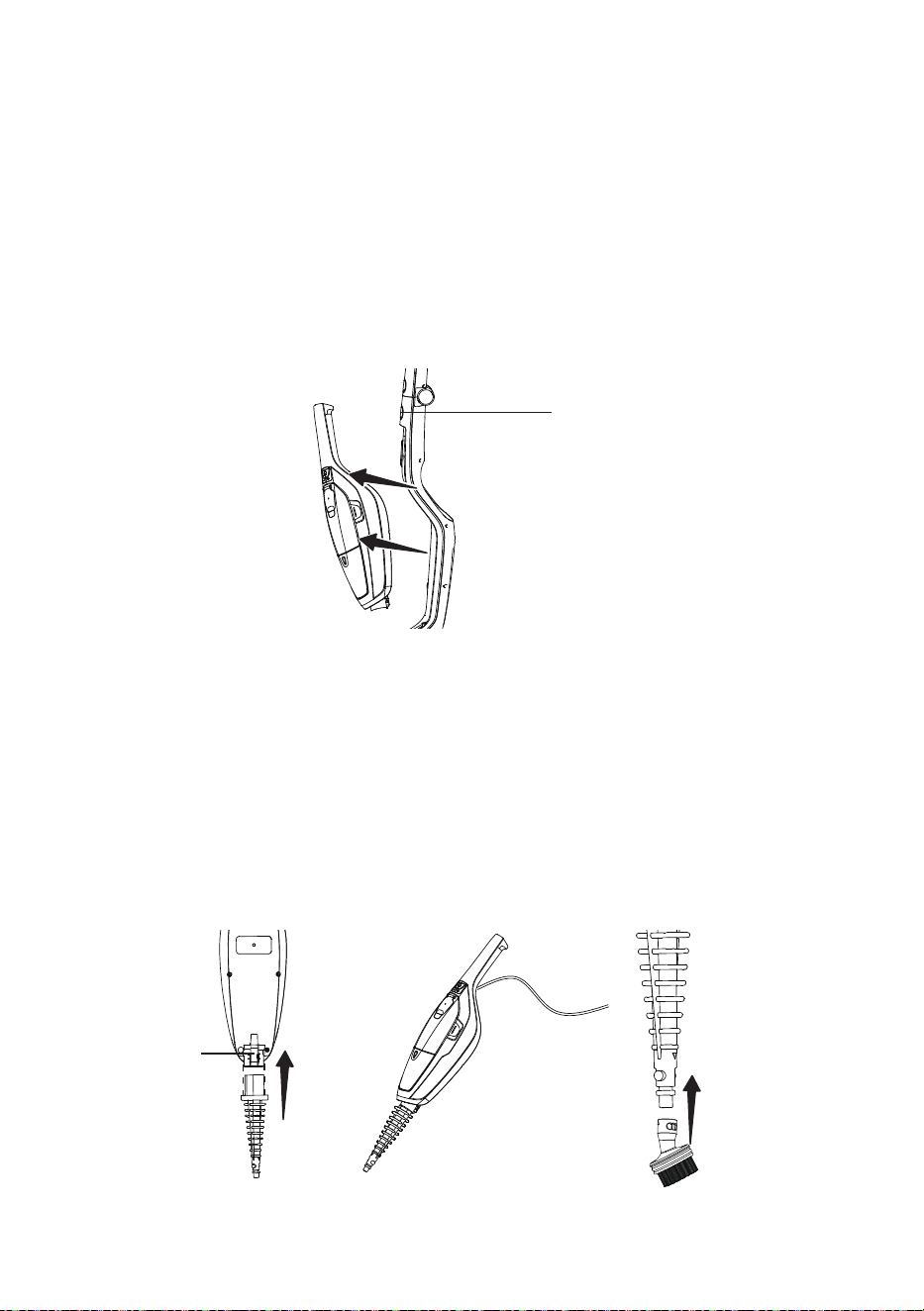
2. Separate the handheld steam cleaner from the main body by pressing the
handheld release button on the front of the main body. Pull the handheld steam
cleaner up and out of the main body.
3. To use all of the accessories (excluding the utility nozzle and squeegee
attachment), attach the conic pipe to the handheld steam cleaner by following
these steps:
Handheld
Release Button
Release Catch
B
A
A. Slide the conic pipe into the nozzle of the handheld steam cleaner. Ensure
the release catch on the underside of the nozzle is in line with the square
hole on the conic pipe. Push together until it clicks into place.
B. Ensure the corresponding gaps and circular sections on the accessory and
conic pipe are aligned. Then, twist the accessory until the arrow markings
on both parts match.
-15-
4. Plug the power cord into an outlet.
5. The indicator light will begin ashing white. After approximately 25 seconds,
the ashing will stop, and the light will remain steadily illuminate white. The
handheld steam cleaner will be ready for use .
6. Press the power button to turn on the handheld steam cleaner. Adjust the
steam volume by pressing the steam volume buttons according to your needs.
7. Once you have completed cleaning or steaming, unplug the power cord from
the outlet.
8. After the handheld steam cleaner has cooled down completely, reattach it
securely to the main body ensuring it has rm connection.
WARNING
Turn off and unplug before changing nozzles. After use, nozzles will be very hot.
Allow to cool before handling to avoid injury.
WARNING
When operating the product in handheld mode, only hold the device by the
designated handle.
The underside of the handheld steam cleaner will become warm during use - this
is normal. Never place the product on delicate surfaces that could be affected by
heat.
To prevent damage, refrain from obstructing any nozzle, such as by pressing it
against a cleaning surface.
Attachments
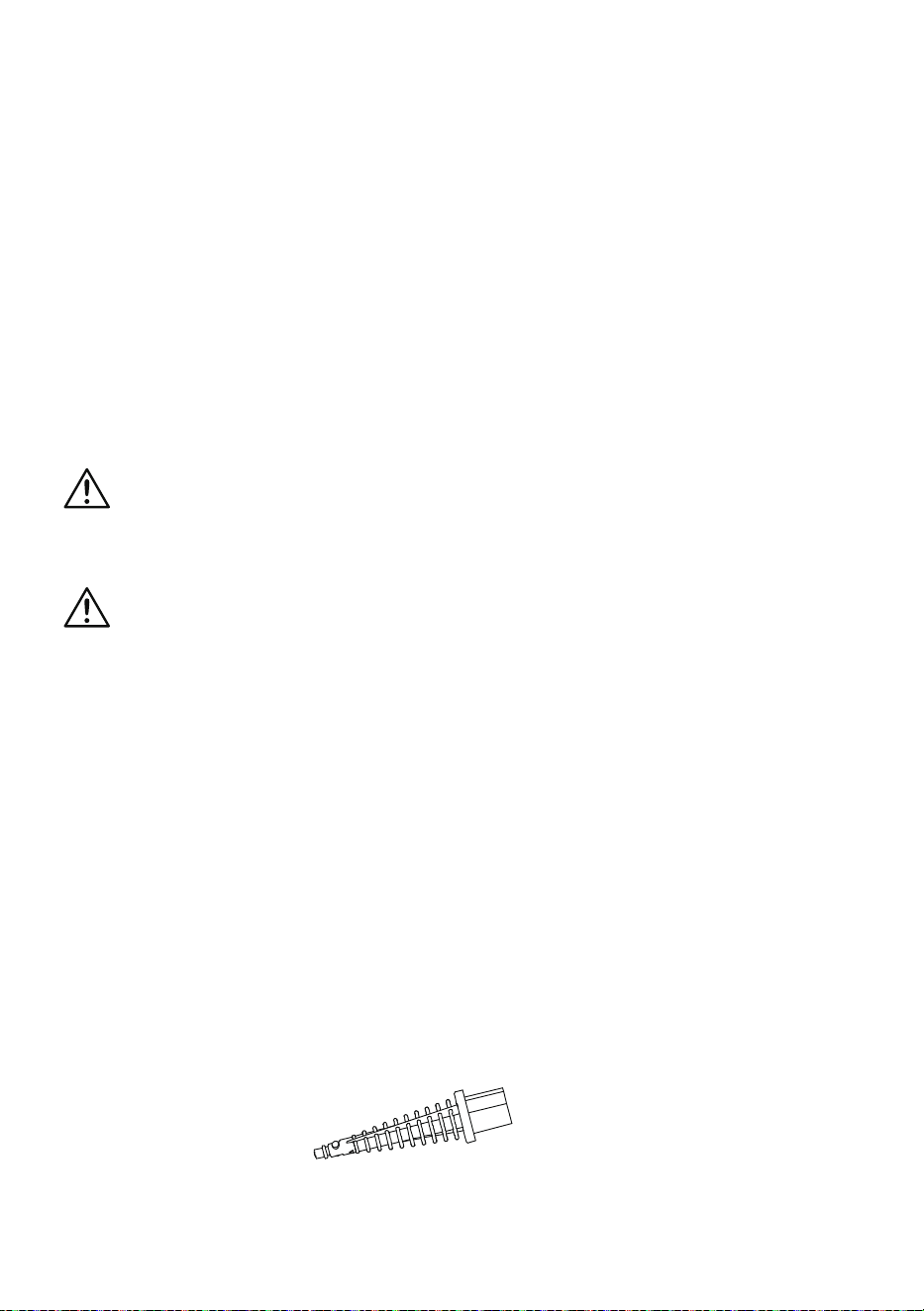
Conic Pipe
This attachment is the base attachment for all handheld accessories, excluding
the utility nozzle.
It can also be used alone to clean places or crevices that are not easily
accessible.
-16-
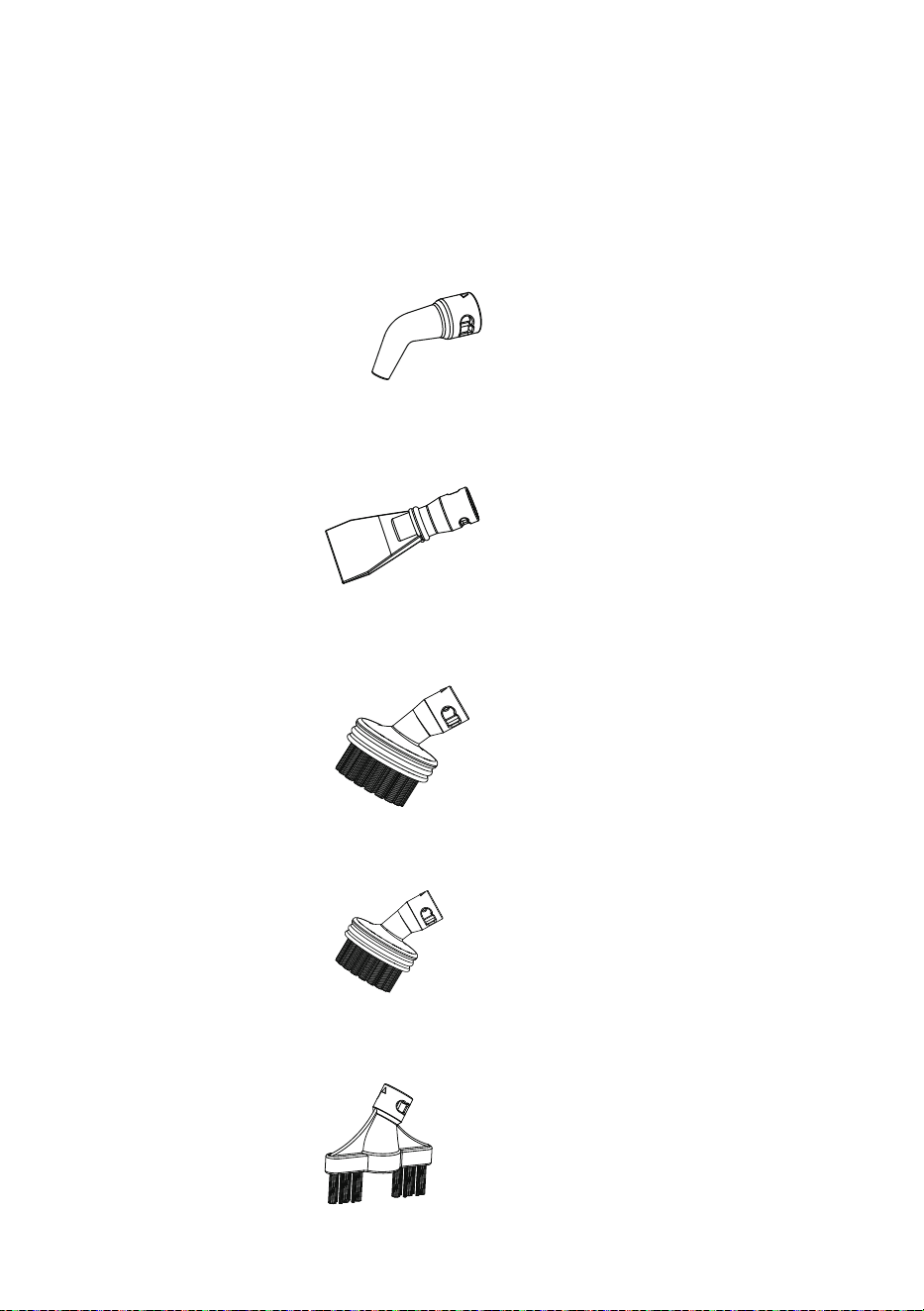
Curved Nozzle
This attachment is ideal for cleaning toilet bowls, taps, and drain covers. To
remove non-permanent stains from carpets or upholstery, point the attachment
directly at the stain and hold a clean cloth nearby to absorb any loosened dirt.
Scraper
This attachment is used to remove stubborn buildup, or to help de-ice the
refrigerator or freezer.
Round Brush
This attachment is designed for use on a variety of surfaces, including tiles,
ovens, wheels, and glass.
Small Round Brush
This attachment is for use on hard stainless-steel surfaces such as grates on a
grill.
Double Brush Tool
This attachment is used to remove dirt from grooves and crevices.
-17-
Utility Nozzle
This base attachment is used with the following accessories:
Small Mop
for covering the utility nozzle when cleaning upholstery and bedding.
This accessory is useful for cleaning tile and or glass surfaces, cabinets, and
countertops. As well as, upholstery, curtains, blinds, pillows and mattresses.
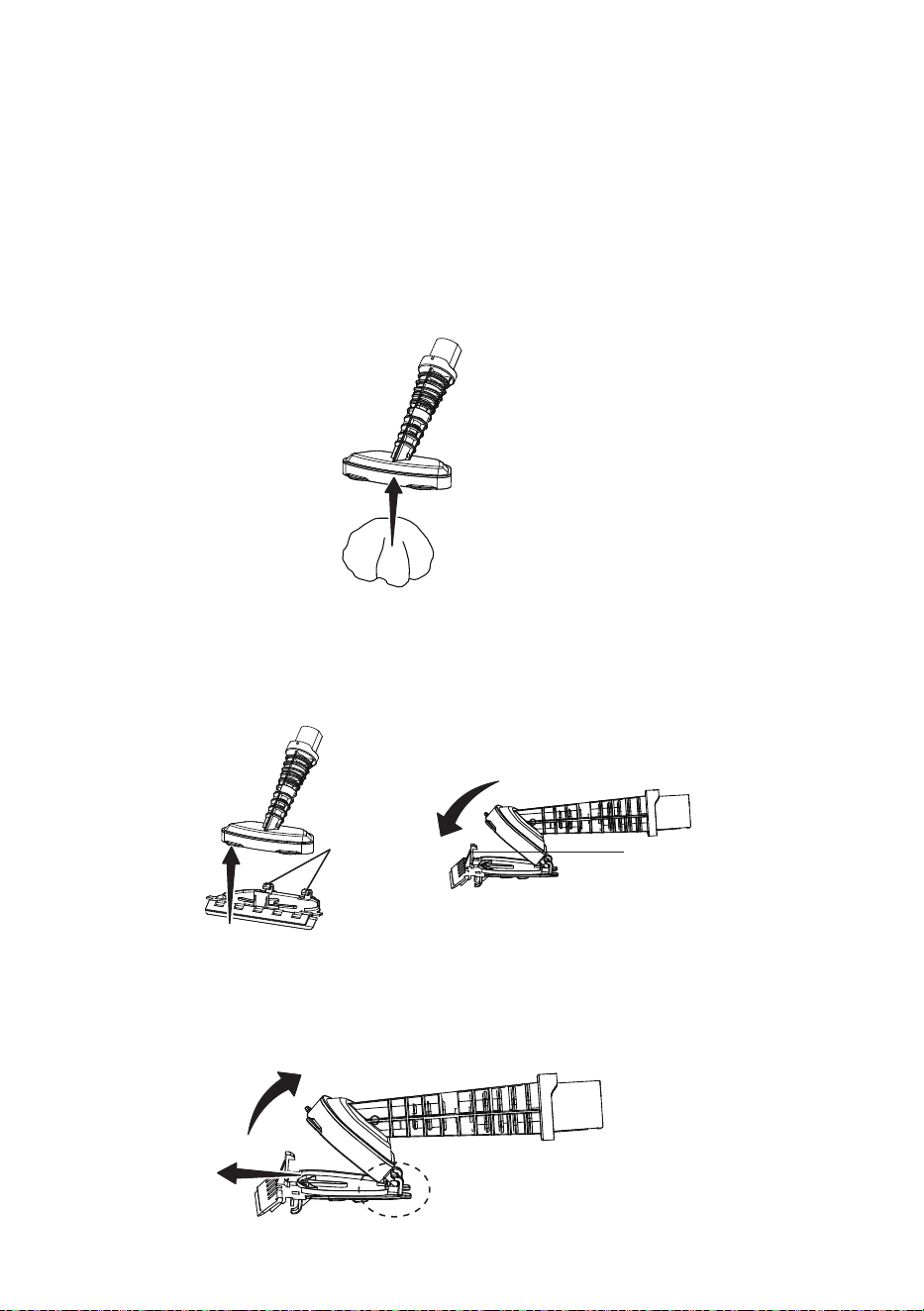
Squeegee attachment
can be attached to the utility nozzle by inserting the hooks
at the back of the squeegee attachment into the loops on the back of the utility
nozzle, then secure the front of the utility nozzle into the locking clip on the top of
the squeegee attachment (as shown).
Remove the squeegee attachment after use by holding the locking clip forward.
The utility nozzle should still be attached to the hooks at the back of the
squeegee attachment, pivot the utility nozzle up and unhook it from the squeegee
attachment.
Hooks
Locking Clip

-18-
The squeegee attachment is ideal for cleaning tiled or glass areas such as
windows or mirrors. To clean windows, start at the top, press the squeegee to the
surface and drag downwards in straight passes from top to bottom. Dry the rubber
blade and window edge after each pass. For small windows, spray the steam
directly to the surface and wipe away moisture with the squeegee.
Run-Dry and Blockage Protection
If the steam mop is operated without water, then after a few minutes the pump
that supplies the water to the boiler will stop and the indicator light will change
color to red. If this happens, switch the product off, rell the tank and then switch
back on. After the 25 second heat-up time, the pump will start to work and steam
will be emitted.
The indicator light will change to red and the pump will shut off if there is a
blockage to the steam nozzle. If this happens, switch off and allow the product to
cool before examining the nozzle for a potential blockage.
NOTE:
Using the product with tap water can result in a build-up of limescale
inside the product boiler that may cause a blockage. This would not be covered by
the warranty.
Brass Ball Weight
The brass ball weight inside the water tank is attached to the end of the suction
hose. The ball is weighted and designed to freely move around the water tank
of the handheld steam cleaner. If the ball does get stuck outside the water level,
gently shake the product until it comes free. The ball must remain in the water so
steam can be generated whenever the steam button is pressed regardless of the
orientation of the handheld steam cleaner.
Rinsing the Water Tank
Regularly rinse the water tank to release any deposits that have collected at the
bottom of the tank. Only use deionised, demineralised or distilled water (available
from most large supermarkets) and close the ll cap to allow vigorous rinsing.
WARNING
Do not use on very cold glass, as the sudden temperature change may crack the
glass.
WARNING
Never attempt to use descaler in the product.
-19-
WARNING
To reduce the risk of shock, disconnect the power cord and turn off, allow the
steam mop to fully cool down before performing any cleaning, maintaining or
storing.
This product contains no serviceable parts. Do not try to repair it by yourself.
If there is any servicing that requires disassembly other than cleaning, contact
customer service.
MAINTAINING YOUR STEAM MOP
After Use
Follow the two maintenance steps below after every use.
1. Turn the cleaner off and unplug from the outlet. Place immediately on a
suitable surface (eg. tiled oor) where the residual heat/moisture in the oor
nozzle/pad will not affect the surface. Wait until the cleaner has cooled down
completely.
2. Empty the water tank by opening the ll cap and pouring out the water. Allow
the inside of the water tank to dry out before closing the ll cap.
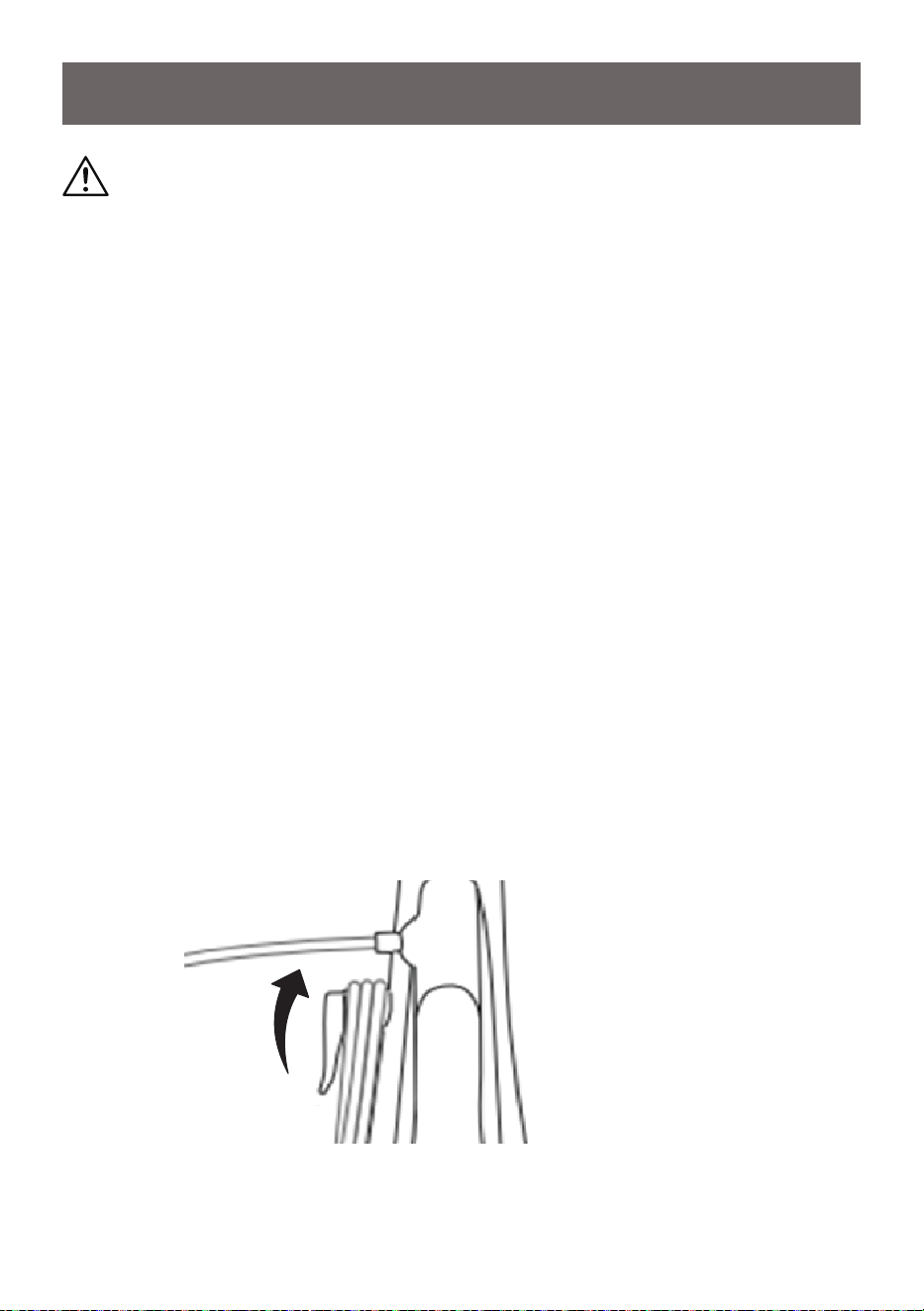
Storage
We recommend storing the steam mop with the carpet glider attached, but the
pads removed to minimise the likelihood of any water leaking onto surfaces.
Rotate the upper cord hook upwards, then wrap the cord around the upper and
lower cord hooks to secure the power cord.
-20-
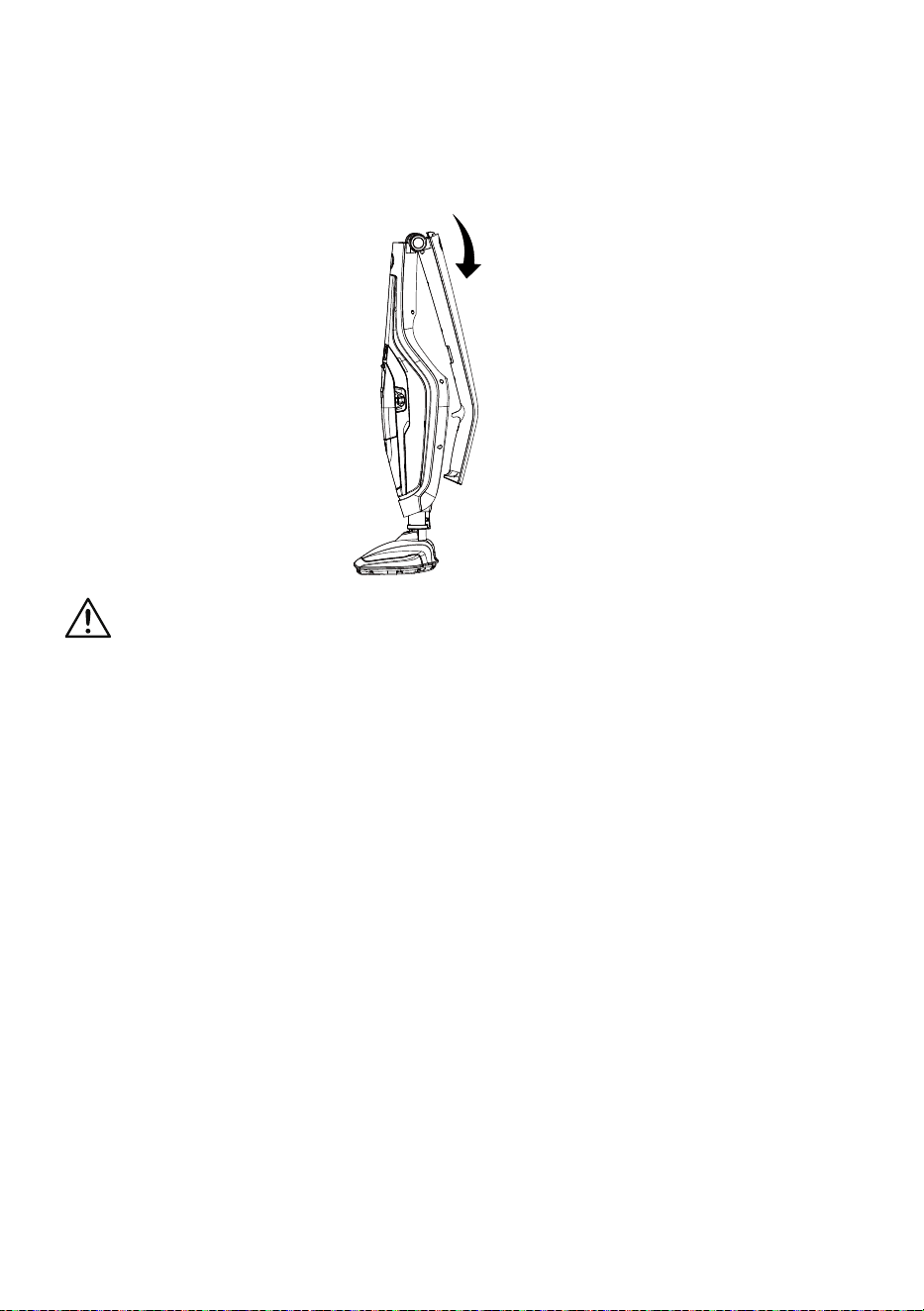
The upright handle is collapsible for compact storage by pressing the upright
handle release button.
WARNING:
When locking the handle, keep this area clear. Be careful not to trap your ngers
or any loose items of clothing etc.
Overall Maintenance
Your cleaner is manufactured to withstand normal day-to-day use, but an
occasional wipe over with a damp cloth will help maintain it. Abrasive cleaners
should not be used.
Cleaning the Pads
The textile pad and the small mop can all be machine washed (40ºC max). For
heavy soiling, soak the pads in warm water and detergent or a mild stain remover.
IMPORTANT: Do not use bleach or fabric softener.
Allow pads to completely dry before storing.
Maintaining the Attachments
Dirt and blockages should be regularly removed from the attachments to help
prolong their usage.
-21-
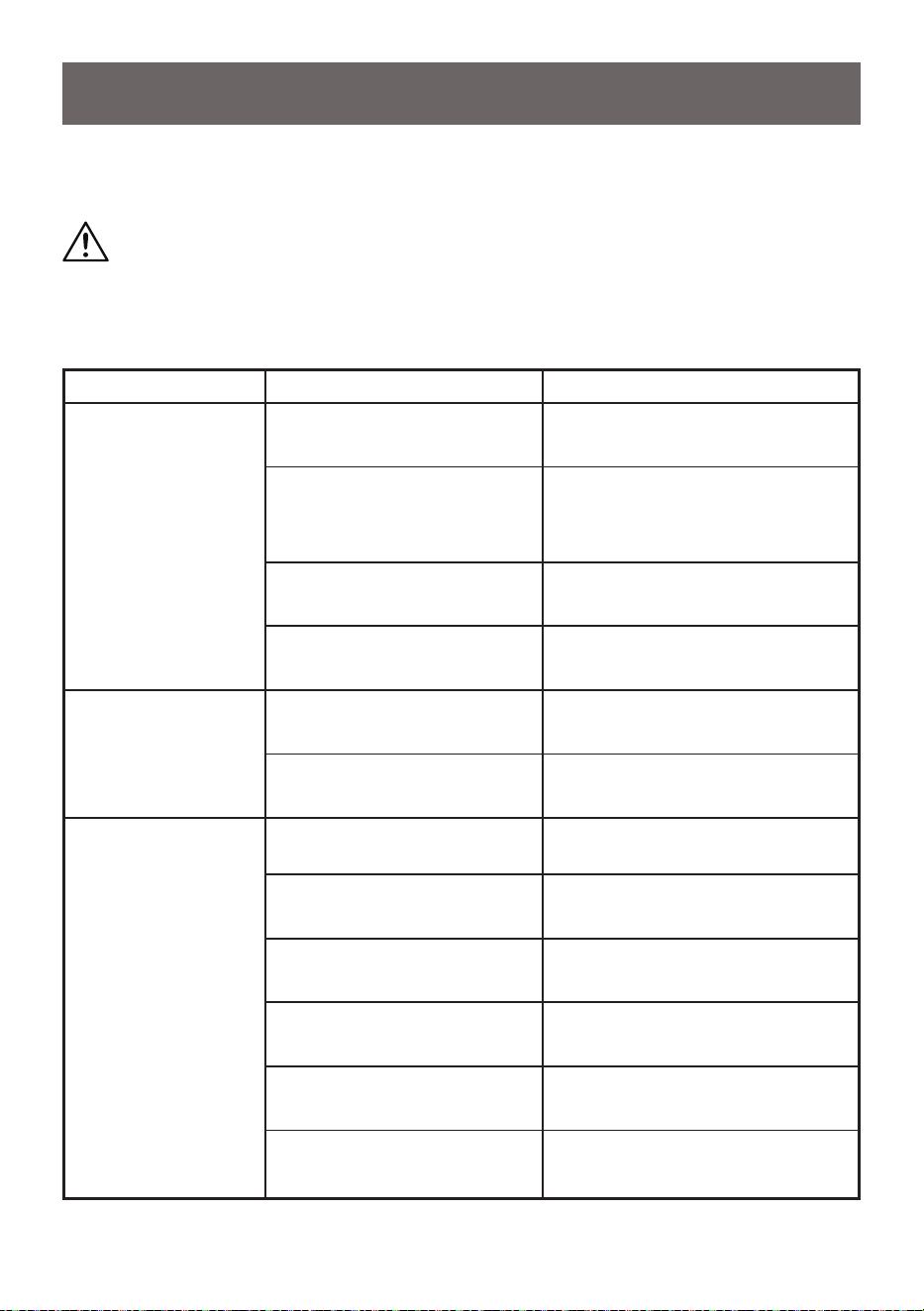
TROUBLESHOOTING
Should you have any problem(s) with your steam mop, review the table below for
solutions to minor performance issues.
PROBLEM
POSSIBLE CAUSE
SOLUTION
Steam mop will not
power on (indicator
light will not
illuminate).
The plug is not plugged to the
wall outlet.
Be sure power cord plug is fully
plugged into outlet.
Defective power cord.
Check the power cord condition,
if there is any damage contact
customer service.
Blown fuse or breaker.
Replace fuse or reset breaker in
home.
Internal fuse is blown. Contact with customer service.
The indicator light
illuminates red.
Water tank may be empty. Fill up the water tank with water.
Steam nozzle may be blocked. Clean the steam nozzle.
Reduced steam or no
steam.
Water tank may be empty. Fill up the water tank with water.
Heat up time is not nished.
Wait for approx. 25 seconds after
plugged in.
Steam nozzle may be blocked. Clean the steam nozzle.
There is no power to the steam
mop.
Make sure steam mop is plugged
into a good wall outlet.
The power button has not
been pressed.
Press the power button to turn the
steam mop on.
Water tank is not installed
properly.
Install the tank properly. Refer to
page 11.
WARNING
Disconnect electrical supply and allow to fully cool down before performing
maintenance to the steam mop. Failure to do so could result in electrical shock or
personal injury.