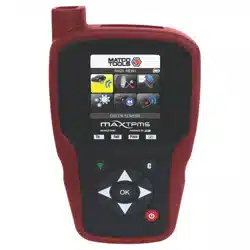

USER GUIDE
MDMAXTPMS
(Scan tool edition)
Powered by
MDMAXTPMS 80621 (12-16)
REVISION OF THE
GUIDE
Due to continuing improvements, the information contained in this user manual, the features and design of
this device are subject to be changed without prior notice.
Edition/
Revision
Reference
Date
(week/year)
Chapters updated
First edition UM-365maA-U 40/2016 -----
Powered by
MDMAXTPMS 80621 (12-16)
Matco Tools TPMS TOOL-User Guide
Page 1

Table of contents
TABLE OF CONTENTS
User Guide 2
MATCO TOOLS MDMAXTPMS TOOL ...........................................................................2
1. SPECIFICATIONS ............................................................................................................................... 3
2. IMPORTANT SAFETY INSTRUCTIONS ............................................................................................. 4
3. CAUTION ............................................................................................................................................. 5
4. MT46 OVERVIEW ................................................................................................................................ 6
5. FUNCTION KEYS ................................................................................................................................ 7
6. POWER ON.......................................................................................................................................... 8
7. OPERATING INSTRUCTIONS ............................................................................................................9
TOOL USAGE .........................................................................................................................................10
1. CHECK SENSOR ............................................................................................................................. 10
2. SERVICE TPMS ................................................................................................................................. 13
3. PROGRAM BLANK SENSOR ........................................................................................................... 18
SETTINGS.............................................................................................................................................. 22
1. ENTER SETTINGS MENU ................................................................................................................. 22
ABOUT .................................................................................................................................................... 26
1. ENTER THE ABOUT MENU .............................................................................................................. 26
LANGUAGE .................................................................................................................. 24
1. ENTER LANGUAGE MENU .............................................................................................................. 24
MISCELLANEOUS ....................................................................................................... 25
1. CHARGE ............................................................................................................................................ 25
2. TROUBLESHOOTING ....................................................................................................................... 26
3. TOOL UPDATE .................................................................................................................................. 26
4. LIMITED HARDWARE WARRANTY ................................................................................................ 31
5. SAFETY BATTERY AND CHARGE INFORMATION ....................................................................... 32
6. SERVICE ADDRESS........................................................................................................................ 32
7. PARTS BREAKDOWN......................................................................................................................
Index 30
33
MDMAXTPMS 80621 (12-16)
Matco Tools TPMS TOOL-User Guide
Page 2

User Guide
MATCO TOOLS MDMAXTPMS TOOL
1. SPECIFICATIONS
Battery Type: Rechargeable Lithium-Ion
Battery Life: Approximately 300 activations per full charge.
Dimensions (Max. L,W,D): 7.9" x 4.7" x 1.6" (20.0 cm x 12.0 cm x 4.0 cm).
Case Material: High Impact ABS.
Response Frequency: Main frequencies: 315 MHz and 433.92 MHz (supporting
most specific frequencies).
Low Battery Indication: LCD bar graph display.
Weight .sbl 2 .xorppA :
Temperature: Operating: -4°F to 131°F (-20°C to +55°C).
Storage: -40°F to 140°F (-40°C to +60°C).
Operating Altitude: Up to 6560 ft (2000 m).
Product content:
MDMAXTPMS Instrument.
USB cable.
Power supply.
MDMAXTPMS 80316-11-16
Soft storage case.
MDMAXTPMS 80621 (12-16)
Matco Tools TPMS TOOL-User Guide
Page 3

Page 3/32
2. IMPORTANT SAFETY INSTRUCTIONS
Do not discard. Retain for future reference.
This device complies with:
- Part 15 of the FCC Rules (FCC ID: 2ABSJ-VT46)
- CE / CEM standards
- ROHS standards
Operation is subject to the following two conditions:
(1) This device will not cause harmful interference, and
(2) This device will accept any interference received, including interference that may
cause undesired or improper operation.
WARNING: This product emits electromagnetic and electronically
generated waves that may interfere with the safe operation of
pacemakers.
Individuals that have pacemakers should never use this product.
WARNING:
Do not use on live electrical circuits.
Please read instructions before use.
Wear safety goggles. (User and bystanders).
Risk of entanglement.
Read the Warranty, Safety and recycling information at the end of this user guide.
Powered by
MDMAXTPMS 80316-11-16
MDMAXTPMS 80621 (12-16)
Matco Tools TPMS TOOL-User Guide
Page 4

Page 4/32
3. CAUTION
PLEASE READ THESE INSTRUCTIONS BEFORE USE
Your Tire Pressure Monitoring (TPM) tool has been designed to be durable, safe, and
reliable when properly used.
All TPMS TOOLS are intended for use only by qualified and trained automotive
technicians or in a light industrial repair shop environment. Please read all instructions
below before use. Always follow these safety instructions. If you have any questions
pertaining to the safe or reliable use of this tool, please call your local dealer.
1. Read All Instructions
All warnings on the tool and in this manual should be adhered to. All operating instructions
should be followed.
2. Retain Instructions
The safety and operating instructions should be retained for future reference.
3. Heed Warnings
Users and bystanders must wear safety goggles and must read instructions before use.
Do not use on live electrical circuits, risk of entanglement.
4. Cleaning
Clean with a soft dry cloth, or if necessary, a soft damp cloth. Do not use any harsh
chemical solvents such as acetone, thinner, brake cleaner, alcohol, etc as this may
damage the plastic surface.
5. Water & Moisture
Do not use this tool where contact or immersion in water
is a possibility. Never spill liquid
of any kind onto the tool.
6. Storage
Do not use or store the tool in an area where it is exposed to direct sunlight or excessive
moisture.
7. Usage
To reduce the risk of fire, do not operate the tool in the vicinity of open containers or
flammable liquids. Do not use if the potential for explosive gas or vapors exists. Keep the
tool away from heat generating sources. Do not operate the tool with the battery cover
removed.
MDMAXTPMS 80316-11-16
MDMAXTPMS 80621 (12-16)
Matco Tools TPMS TOOL-User Guide
Page 5
Page 5/32
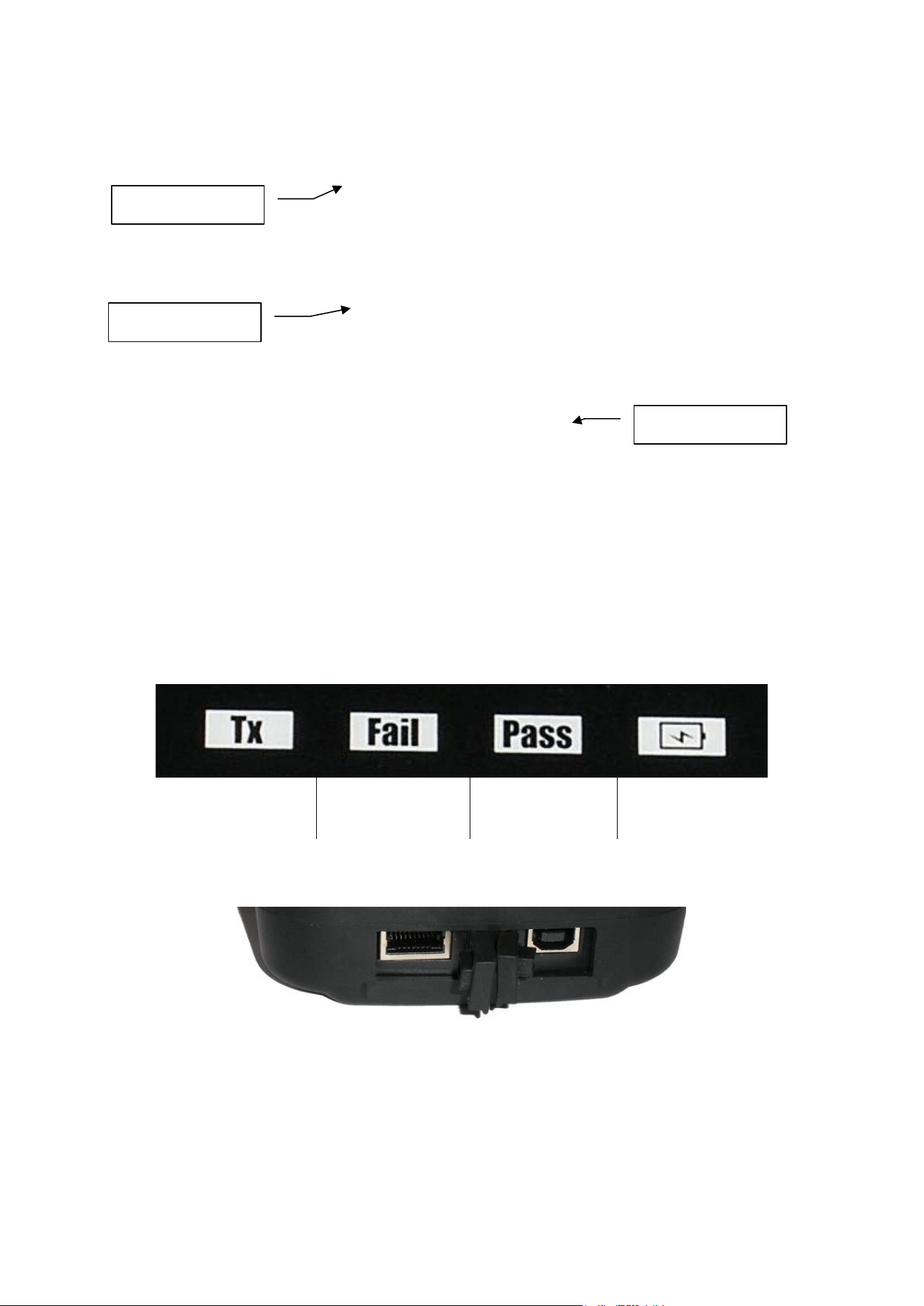
4. MDMAXTPMS OVERVIEW
4.1. LIGHTS
Trigger light
Result light
"Fail"
Result light
"Pass"
Battery status
4.2. CONNECTORS
USB connector for
battery charge and
firmware update.
Display screen
Keyboard
Antenna
MDMAXTPMS 80621 (12-16)
Matco Tools TPMS TOOL-User Guide
Page 6

Page 6/32
5. FUNCTION KEYS
Power ON/OFF switch Test or trigger sensor.
Next, continue or confirm. Cancel, previous step.
Navigate to select "up”. Navigate to select “down”.
Navigate to select “left”. Navigate to select “right”.
MDMAXTPMS 80316-11-16
MDMAXTPMS 80621 (12-16)
Matco Tools TPMS TOOL-User Guide
Page 7

6. POWER ON
Press
key to turn on device, the
TPMS TOOL
Displays first the logo as Fig. 1.
MDMAX INTIAL TOOL SETUP
AND PC SOFTWARE INSTALLATION
Fig. 1
Fig. 2
The MAIN MENU will then be displayed as
Fig. 2
ATEQ
CS05-O2
ATEQ VT46
JA2-04-18
REGION:AMERICA
MDMAXTPMS 80621 (12-16)
Matco Tools TPMS TOOL-User Guide
Page 8

Page 8/32
7. OPERATING INSTRUCTIONS
7.1. TPMS TOOL O
VERVIEW
Read and diagnose sensors, and reset TPMS.
Note: With most vehicles, if the vehicle is in “learn mode” the vehicle will also confirm that the TPM
sensor has communicated to the ECM with a series of horn beeps.
Service Procedure
Section 1.0: Read Sensor Test
Before servicing the tires/wheels, using your TPMS TOOL,
trigger each of the vehicle's sensors to make sure they are
working properly.
This will eliminate the liability associated with replacing
previously damaged or defective sensors. This procedure will
not change the vehicle settings because the vehicle has yet to
be put into learn/retraining mode.
This procedure allows you to quickly identify damaged or defective sensors, because some
vehicles do not report a damaged or defective sensor condition on the instrument cluster for up to
20 minutes.
Note: If the sensors do not trigger, please refer to the Troubleshooting section of this Guide.
Perform tire/wheel service.
For vehicles that require retraining, please see to Section 2.0
Section 2.0: Learning TPM System
With the vehicle in learn mode, begin by triggering the driver's front
left (LF) wheel sensor. Many vehicles will provide an audible beep
confirming that the sensor ID has been learned by the vehicle
on
board computer.
The communication between the sensor and the on board computer is also
confirmed on LCD display of the TOOL.
The same procedure should be followed on all wheel sensors, in a
clockwise rotation, until all the vehicle sensors have been retrained.
After triggering the driver's rear wheel sensor, some vehicles will beep
twice, indicating that the TPM system has been retrained.
1 Start FL
4 End RL
FR 2
RR 3
Fig. 5
For vehicles that do not require retraining, we recommend you trigger each wheel sensor, one final time,
to make sure they are working correctly prior to releasing the vehicle to the customer.
MDMAXTPMS 80316-11-16
MDMAXTPMS 80621 (12-16)
Matco Tools TPMS TOOL-User Guide
Page 9
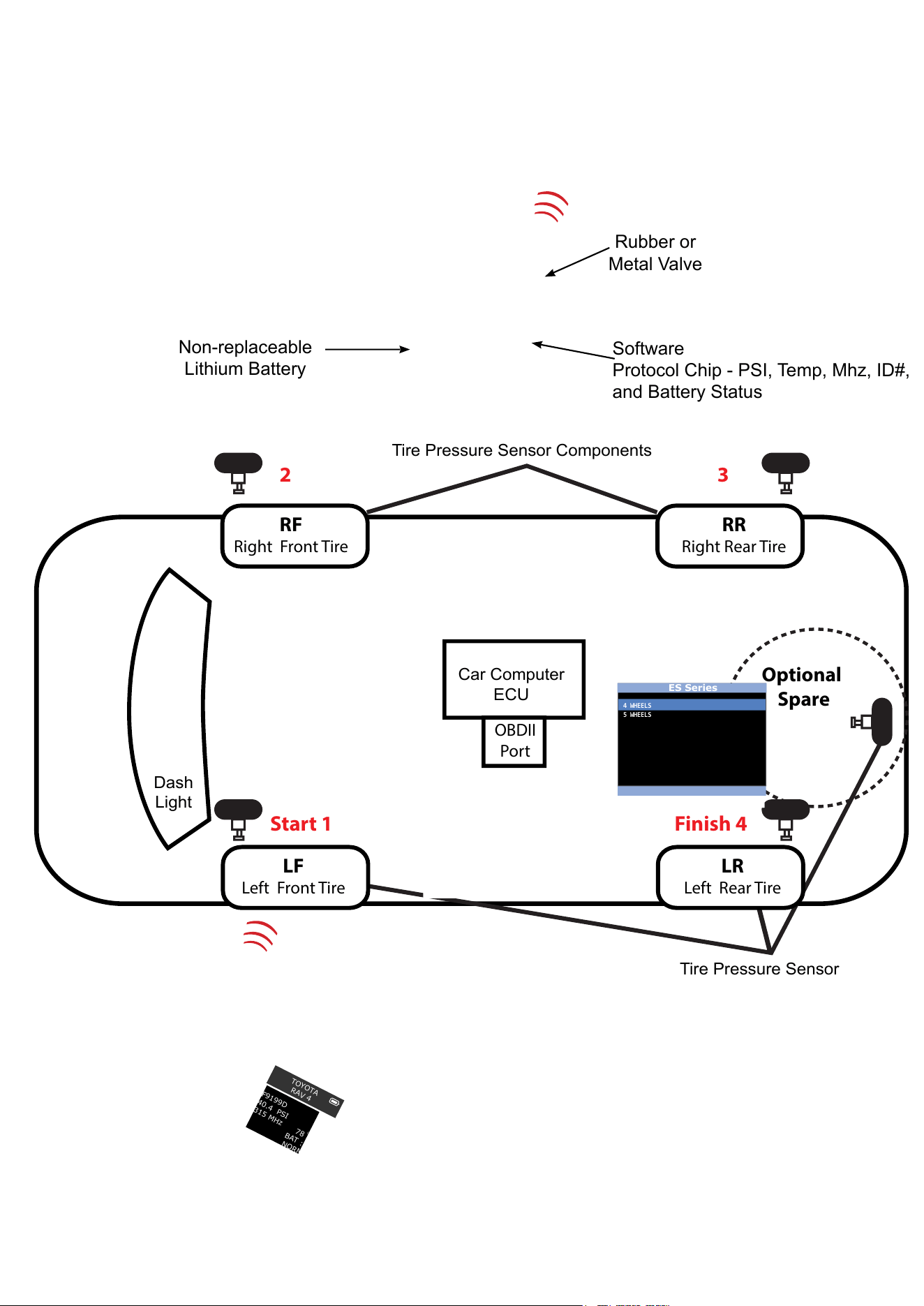
Tire Pressure Sensor Components
Tire Pressure Sensor
Car Computer
ECU
Dash
Light
LF
Left Front Tire
LR
Left Rear Tire
RF
Right Front Tire
RR
Right Rear Tire
Optional
Spare
OBDII
Port
Rubber or
Metal Valve
Software
Protocol Chip - PSI, Temp, Mhz, ID#,
and Battery Status
Non-replaceable
Lithium Battery
Start 1 Finish 4
2 3
4 WHEELS
5 WHEELS
ES Series
TOYOTA
RAV 4
F9199D
40.4 PSI
315 MHz
78
F
BAT : OK
NORMAL
O
Direct - Tire Pressure Monitoring System
MDMAXTPMS 80621 (12-16)
Matco Tools TPMS TOOL-User Guide
Page 10

1. ACTIVATE-A LOW FREQUENCY (LF) WIRELESS SIGNAL IS SENT Through TOOL ANTENNA TO THE SENSOR INSIDE THE
TIRE. THIS ALLOWS TECHNICIAN TO READ TIRE PRESSURE, ID NUMBER, TEMP AND BATTERY STATUS WITHOUT
DRIVING THE VEHICLE.
2. AFTERMARKET SENSOR-REPLACEMENT SENSORS SUPPLIED BY LOCAL AUTO PARTS STORES OR TIRE SUPPLIERS. THE
SENSOR MAY NOT PHYSICALLY LOOK LIKE THE OE SENSOR.
YOUR TOOL HAS SPECIAL PROGRAMMING SOFTWARE BASED ON THE SPECIFIC SENSOR BRAND.
3. AUTO RELEARN-SENSOR ID NUMBERS ARE SENT TO THE ECU AFTER DRIVING THE VEHICLE FOR A SPECIFIED TIME.
YOUR TOOL WILL INDICATE THE REQUIRED DRIVING TIME UNDER SERVICE TPMS ICON.
4. BATTERY LIFE-SENSORS HAVE AN INTERNAL LITHIUM ION BATTERY WHICH CAN NOT BE REPLACED. TYPICAL LIFE
IS SOMEWHERE BETWEEN 5-10 YEARS. YOUR TOOL WILL DISPLAY NO SENSOR DETECTED ON THE SCREEN IF SENSOR
BATTERY HAS FAILED.
5. CLONEABLE OR CLONING-USED ONLY BY AFTERMARKET SENSOR BRANDS TO COPY THE ID NUMBER AND
COMMONLY SKIP THE RELEARN PROCEDURE. NOT RECOMMENDED BY ANY OE VEHICLE MANUFACTURER. ALWAYS
RELEARN THE TPM SYSTEM WHEN CHANGING A SENSOR.
6. CROSS TALK-WHEN THE TPMS TOOL SIGNAL GETS CONFUSED BY ANOTHER SENSOR SIGNAL. EXAMPLE: YOU HAVE
REPLACE AN OLD SENSOR BUT IT IS IN CLOSE PROXIMITY DURING YOUR RELEARN THE NEW SENSOR. THE OLD
SENSOR SHOULD BE REMOVED FROM THE SERVICE BAY AS IT MAYBE TRANSMITTING
7. DELTA PRESSURE-A RAPID CHANGE IN TIRE PRESSURE UP OR DOWN AS AN ALTERNATIVE METHOD TO LF WHICH
ACTIVATES THE SENSOR. REFER TO SERVICE MANUAL AS WELL AS TOOL ON SCREEN INSTRUCTIONS. COMMON ON
GM PRIOR TO 2009 AND MANY EUROPEAN SYSTEMS.
8. DIAGNOSTIC TROUBLE CODE(DTC)-SIMILAR TO CHECK ENGINE LIGHT BUT CODES ARE SPECIFIC TO TPMS
9. DIRECT SYSTEM-MOST COMMON DESIGN USED BY MAJORITY OE’S. 4 TO 6 TPM SENSORS WITH VALVES MOUNTED
INSIDE THE TIRE. VALVES MAYBE RUBBER OR METAL DESIGN AND IT IS IMPORTANT TO SERVICE THE REPLACEABLE
PARTS. BE CAREFUL SOME VEHICLE MAY USE DIRECT AND INDIRECT DEPENDING ON THE MODEL. YOUR TOOL
SCREEN WILL SHOW INDIRECT UNDER SERVICE ICON EVEN THOUGH NO PHYSICAL TPM SENSOR INSIDE THE TIRE.
10. HIGH LINE-THE VEHICLE DASH WILL DISPLAY TIRE PRESSURE BY WHEEL LOCATION. ALSO CALL ADVANCED SYSTEM.
MANY LUXURY VEHICLES SHOW PRESSURE AND TEMPERATURE. SOME VEHICLE MANUFACTURERS OFF UPGRADE
ACCESSORY OPTIONS INCLUDING HIGH LINE. EXAMPLE: 2015/2016 TOYOTA CAMRY IS STANDARD WITH LO LINE
BUT OPTIONAL COLORED DASH DISPLAY WILL BE A HI LINE. SELECT CORRECT SYSTEM WHEN ORDERING
REPLACEMENT SENSOR PART NUMBER.
11. HYBRID SENSOR-A TYPE OF PROGRAMMABLE AFTERMARKET SENSORS. THE TECHNICIAN SELECTS MAKE/MODEL
AND YEAR AND TRIGGERS ACTIVATION WITH THE TPMS TOOL IN 1-3 SECONDS. EXAMPLE: HAMATON U-Pro
12. ID NUMBER-A SPECIFIC DECIMAL OR HEXADECIMAL NUMERIC NUMBER ASSIGNED TO EACH SENSOR. THIS ALLOWS
ECU TO SEE SPECIFIC TIRE LOCATION BY EACH SENSOR FOR RESETTING OR RELEARNING THE TPM SYSTEM. IN
MANY CASES PHYSICALLY PRINTED ON SENSOR BODY BUT NO EASY TO READ. YOUR TOOL WILL DISPLAY
THE SENSOR ID NUMBER.
13. INDIRECT SYSTEM-THIS DESIGN DOES NOT HAVE A PHYSICAL SENSOR W/VALVE INSIDE THE TIRE. INSTEAD IT
CALCULATES LOW PRESSURE FROM THE (ABS) ANTI-LOCK BRAKE SYSTEM WHEEL SPEED SENSOR. RESET
INSTRUCTIONS ARE IN YOUR TOOL WHEN ADJUSTING AIR PRESSURE. HOWEVER, A FULL FUNCTION DIAGNOSTIC
SCAN TOOL WITH GRAPHING IS REQUIRED TO DIAGNOSE ABS WHEEL SPEED SENSORS.
14. LEARN MODE-THE VEHICLE’S RECEIVER AND ECU ARE ACTIVATED TO PICK UP THE WIRELESS SIGNAL BEING
TRANSMITTED FROM THE SENSOR INSIDE THE TIRE (DIRECT SYSTEM) YOUR TPMS TOOL WILL SHOW VARIOUS
INSTRUCTIONS SUCH AS USING A KEY FOB, CYCLING IGNITION SWITCH, PRESSING BRAKE PEDAL, ETC. DEPENDING
ON VEHICLE MAKE/MODEL AND YEAR. SPARE TIRE MAY HAVE A FUNCTIONING SENSOR AND CAN BE INCLUDED
IN LEARN MODE.
15. LOW LINE-SYSTEM DO NOT SHOW PRESSURE BY WHEEL LOCATION JUST A SYMBOL INDICATING LOW PRESSURE ON
ONE OF THE TIRES. LOW LINE SENSORS SHOULD NOT BE USED ON HIGH SYSTEMS. EXAMPLE: HYUNDIA GENESIS
COUPES ARE LO LINE BUT GENESIS SEDANS ARE HI LINE.
TIRE PRESSURE MONITORING TECHNICIAN GLOSSARY
MDMAXTPMS 80621 (12-16)
Matco Tools TPMS TOOL-User Guide
Page 11

16. MALFUNCTION INDICATOR LAMP (MIL)- A LIGHT THAT ILLUMINATES ON THE VEHICLE’S DASH WHEN THE
TPM SYSTEM IS SEEING AN ISSUE. SOLID LIGHT INDICATES PRESSURE LOWER THAN THE OE VEHICLE
MANUFACTURER RECOMMENDS. A RELEARN OR RESET IS REQUIRED TO TURN THE LIGHT OFF. FLASHING LIGHT
INDICATE COMPONENT ISSUES.
17. MULTI-APPLICATION SENSOR-AFTERMARKET SENSORS THAT ARE PRE-PROGRAMMED WITH
A VARIETY OF MANUFACTURER PROTOCOLS ON THE SENSOR CHIP. FOLLOW OE MAKE,MODEL AND YEAR RE
LEARN PROCEDURES WHEN INSTALLING THESE SENSORS.
18. OBDII PORT-USING A STAND ALONE TPMS TOOL OR DIAGNOSTIC SCAN TOOL CAPTURE ID NUMBERS TO
TRANSMIT TO THE VEHICLE ECU VIA THE OBDII PORT. COMMON ON JAPANESE AND KOREAN MODELS. CAN BE
USED ON SELECT DOMESTIC VEHICLES TO ALSO PUT VEHICLE INTO LEARN MODE.
19. OE SENSORS-PRE-PROGRAMMED WITH SINGLE SOFTWARE PROTOCOL.
20. PLACARD-A DECAL ON INSIDE OF THE VEHICLE DRIVERS DOOR WITH RECOMMENDED AIR PRESSURE AND TIRE
SIZE. REQUIRED BY TREAD ACT FOR ALL MANUFACTURERS
21. PROGRAMMABLE SENSOR-A BLANK TPM SENSOR SUPPLIED BY AFTERMARKET PARTS COMPANIES. BRAND NAME
EXAMPLES: EZ SENSOR, QWIK SENSOR, SENS IT, UPRO, ETC.
TECHNICIAN MUST PROGRAM THE CORRECT MAKE/MODEL/YEAR SOFTWARE PROTOCOL FROM THE TPMS TOOL.
CREATE ID OR COPY ID INSTRUCTIONS WILL BE SHOWN ON THE TOOL.
22. PROTOCOL-THE SPECIFIC OE SOFTWARE INSIDE THE SENSOR CHIP THAT IS REQUIRED TO MATCH THE
MANUFACTURER MAKE/MODEL AND YEAR.
23. RADIO FREQUENCY (RF)-THE RADIO WAVE SPECIFIED BY FCC FOR CAR MANUFACTURERS TIRE
PRESSURE MONITORING SYSTEMS IN NORTH AMERICA. SERVICE AND PARTS CATALOGS WILL INDICATE 314.9,315,
433.92, OR 434 MHZ. THESE NUMBERS CAN ALSO BE PRINTED ON SENSOR BODY. YOUR TPMS TOOL WILL ALSO
SHOW FREQUENCY MHz.
24. ROLLING MODE-SENSORS GENERALLY SAMPLES DATA EVERY 60 SECONDS WHEN VEHICLE IS IN MOTION AND
MAINTAINS A MINIMUM SPEED.
25. SERVICE KITS-TPMS VALVE COMPONENTS SUCH AS GASKETS, GROMMETS, SEALS, VALVE CORES, SCREWS AND
CAPS NEED TO BE SERVICED DURING TIRE CHANGES. REMEMBER THE VALVE IS IMPORTANT TO ENSURING TIRE
PRESSURE IS MAINTAINED FOR SAFETY AND FUEL ECONOMY.
26. SLEEP MODE-SENSOR BATTERIES LIFE IS CONSERVED DURING PERIODS OF TIME VEHICLES ARE NOT BEING USED.
EXAMPLE: SHIPMENT TO THE NEW CAR DEALER. THIS MAY VARY BY MANUFACTURER AND ANOTHER TERM IS
STORAGE MODE.
27. STATIONARY RELEARN MODE-A TERM USED WHEN THE VEHICLE IS NOT BEING DRIVEN.
EXAMPLE: A VEHICLE IS IN YOUR SERVICE BAY OVERNIGHT. THE TRANSMISSION OF SENSOR
INFORMATION HAS BEEN REDUCED TO SAY BATTERY LIFE. NOT EVERY OE USES THE SAME METHOD.
28. TREAD ACT-THE US FEDERAL LAW THAT MANDATED ALL VEHICLES UNDER 10,000 LBS HAVE A TPMS SYSTEM
AFTER 2007. MANY VEHICLES BEFORE 2007 HAVE TPMS.
29. TRIGGER TOOL-A GENERIC TERM USED FOR ANY HAND HELD TPMS WITH OR WITHOUT A DISPLAY TO ACTIVATE A
DIRECT TPM SENSOR BY (LF) LOW FREQUENCY WIRELESS SIGNAL.
30. UNIVERSAL SENSOR-AN AFTERMARKET PARTS TERM USED TO DESCRIBE A SENSOR THAT CAN WORK ON MORE
THAN A SINGLE MAKE/MODEL AND YEAR.
31. VEHICLE PROGRAMMING-SOMETIMES USED IN PLACE OF TERM RELEARN OR RESET THE LIGHT
32. VEHICLE RELEARNING-THE STEPS SHOWN ON THE TPMS TOOL FOR THE TECHNICIAN TO FOLLOW WHEN AD
JUSTING TIRE PRESSURE, ROTATING TIRES OR REPLACING A TPM SENSOR. THEY FALL INTO THREE TYPES-AUTO
RELEARN, STATIONARY OR OBDII
33. WIRELESS AUTO LOCATE (WAL) SYSTEMS SHOW PRESSURE BY TIRE LOCATION. AFTERMARKET SENSOR SUPPLIERS
OFTEN LIST A SECOND PART NUMBER TO COVER WAL APPLICATIONS. WAL USED ON - CHRYSLERS, JEEPS AND
MERCEDES VEHICLES WHERE SCHRADER IS OE SUPPLIER. USING INCORRECT PART NUMBER CAN RESULT IN TPMS
DASH LIGHT TURNING ON EVEN WHEN TIRE PRESSURE IS CORRECT.
FOR ADDITIONAL ON LINE TPMS TECHNICIAN TRAINING COURSES PLEASE GO
TO WWW. TIREINDUSTRY.ORG
MDMAXTPMS 80621 (12-16)
Matco Tools TPMS TOOL-User Guide
Page 12

Page 9/32
MDMAXTPMS USAGE
IMPORTANT:
Vehicle specific information in this manual is used as an example and may not
represent specific instructions each make and model may require. When performing
various functions with the tool, it is important to refer to the on-screen prompts
and/or repair manual information.
1. CHECK SENSOR
= continue
= Previous
1.1. SELECT CAR MANUFACTURER
= continue
= Previous
1.2. S
ELECT CAR MODEL
= continue
= Previous
MDMAXTPMS 80316-11-16
JEEP
KARMA
KIA
LAMBORGHINI
LAND ROVER
LEXUS
LINCOLN
LOTUS
MASERATI
VEHICLE SELECTION
CT SERIES
ES SERIES
GS SERIES
GX SERIES
HS SERIES
IS SERIES
LFA
LS SERIES
LX SERIES
LEXUS
MDMAXTPMS 80621 (12-16)
Matco Tools TPMS TOOL-User Guide
Page 13

Page 10/32
1.3. SELECT YEAR
= continue
= Previous
1.4. SELECT WHEEL NUMBER
This option does not
appear for all vehicles.
= continue
= Previous
1.5. T
EST SENSORS (TRIGGER)
Select tire.
= continue
= Previous
MDMAXTPMS 80316-11-16
2014
LEXUS
4 WHEELS
5 WHEELS
LEXUS
LEXUS
ES SERIES
11ACE57
31.4 PSI
315 MHz
84
F
BAT : OK
NORMAL
O
MDMAXTPMS 80621 (12-16)
Matco Tools TPMS TOOL-User Guide
Page 14

LEXUS
ES SERIES
11AC923
31.1 PSI
315 MHz
93
F
BAT : OK
NORMAL
O
Page 11/32
1.6. TEST RESULTS
RIGHT FRONT
To change tire
The tool is triggering the sensor.
RIGHT FRONT
RIGHT REAR
LEFT REAR
Trigger all wheels.
= Continue = Previous and erase results
The tool does not detect a sensor
MDMAXTPMS 80316-11-16
LEXUS
ES SERIES
NO SENSOR DETECTED
Possible Reasons
1. Tool Antenna is not positioned correctly on tire
2. Sensor battery has expired
3. Wrong sensor part number was installed
4. Technician has removed sensor from the tire
5. Aftermarket sensor was not programmed with tool
6. Indirect system
MDMAXTPMS 80621 (12-16)
Matco Tools TPMS TOOL-User Guide
Page 15
Page 12/32
2. SERVICE TPMS
This section details how to relearn the sensor to the ECU.
Select "SERVICE TPMS"
menu.
= continue
= Previous
Select car manufacturer.
Select car model.
Select year.
MDMAXTPMS 80316-11-16
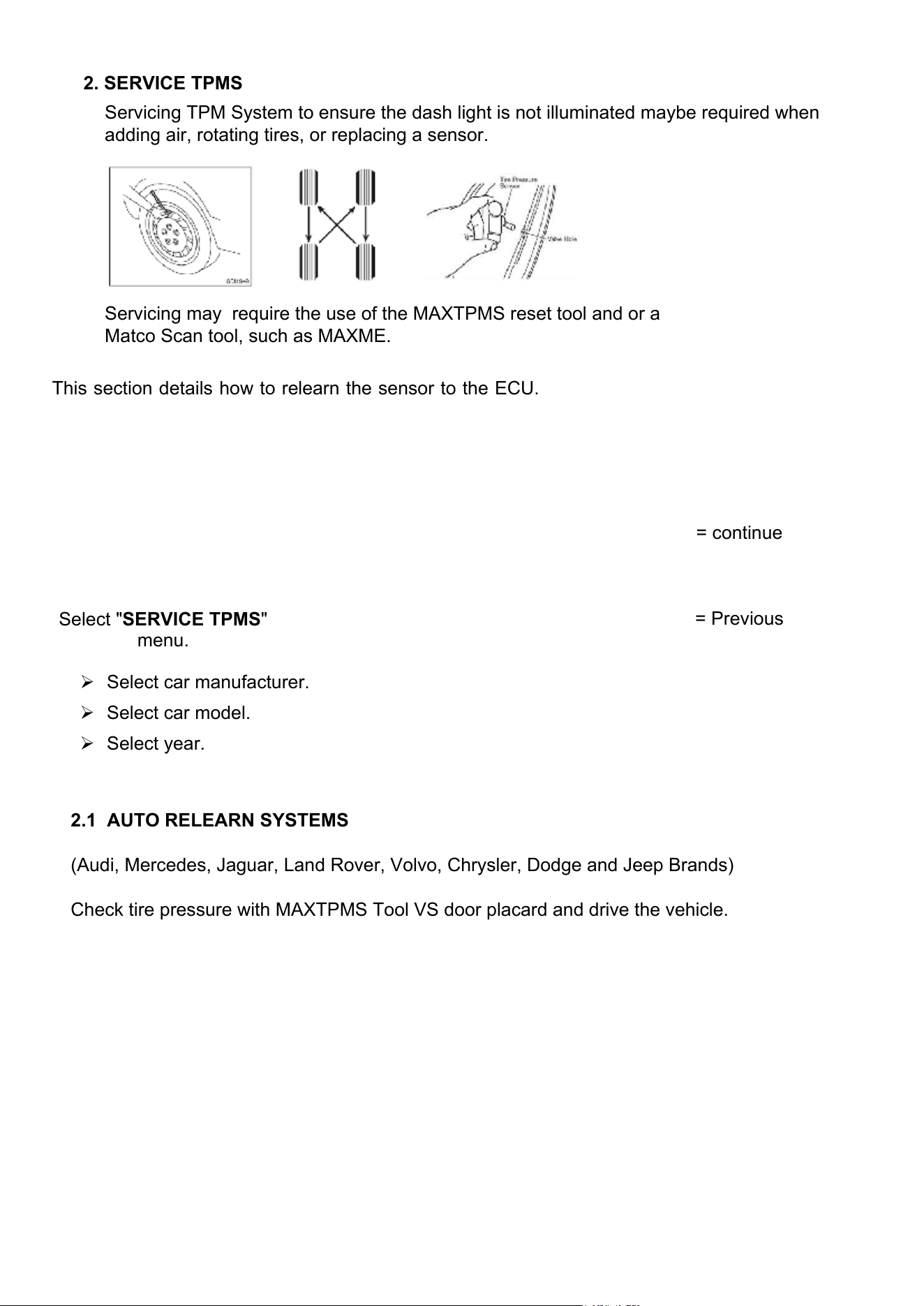
Servicing TPM System to ensure the dash light is not illuminated maybe required when
adding air, rotating tires, or replacing a sensor.
Servicing may require the use of the MAXTPMS reset tool and or a
Matco Scan tool, such as MAXME.
2.1 AUTO RELEARN SYSTEMS
(Audi, Mercedes, Jaguar, Land Rover, Volvo, Chrysler, Dodge and Jeep Brands)
Check tire pressure with MAXTPMS Tool VS door placard and drive the vehicle.
MDMAXTPMS 80621 (12-16)
MDMAXTPMS 80621 (12-16)
Matco Tools TPMS TOOL-User Guide
Page 16

Page 13/32
MANUAL OR STATIONARY RELEARN SYSTEMS
(General Motors, Ford, BMW, ,Mini, and Porsche)
Use MAXTPMS Tool and follow instructions on the screen.
MDMAXTPMS 80316-11-16
VIN
CHEVROLET/CAMERO
2010
2011
2012 Clamp-In
2012 Snap-In
2013 Clamp-In
2013 Snap-In
2014 Clamp-In
2014 Snap-In
2015 Clamp-In
2015 Snap-In
2016
RELEARN PROCEDURE
•Inflate all tires
•Apply parking brake
•Turn Ignition ON
•Push the MENU button to select Vehicle
Information in DIC
•Use arrow keys to select Tire Pressure
•Push SET/CLR button to start Sensor
matching
•Push SET/CLR button to select YES
•Horn chirps 2x DIC displays TIRE
•LEARNING ACTIVE
▼ OK NEXT
CAMERO
•Push SET/CLR button to
start sensor matching
•Push SET/CLR button to
select YES
•Horn chirps 2x DIC
displays TIRE LEARNING
ACTIVE
•Use tool to activate LF
▼
/
▼
C stop OK NEXT
CAMERO
sensor
•Single horn sounds
•Repeat for RF/RR/LR
•Horn chirps 2x for
relearn complete
▼
/
▼
C stop OK NEXT
1
2
3
4
MDMAXTPMS 80621 (12-16)
Matco Tools TPMS TOOL-User Guide
Page 17

Page 14/32
1. Start left front wheel and trigger sensor (write ID# on paper)
2. Next right front wheel and trigger the sensor (write ID# on paper)
3. Next right rear wheel and trigger the sensor (write ID# on paper)
4. Next left rear wheel and trigger the sensor (write ID# on paper)
5. 5th Wheel option depending on make/model/year
Examples-Toyota Rav 4, Tundra, Land Rover, and many Jeeps
Visual inspect spare, test sensor with TPMS tool, or reference VIN number with new car dealer)
Relearn will fail if spare ID number is not registered and a DTC code can be set.
11ACE57
31.4 PSI
315 MHz
11AC923
31.1 PSI
315 MHz
11AD0FA
30.4 PSI
315 MHz
F198d
37.6 PSI
315 MHz
OBDII RELEARN
RELEARN PROCEDURE
•OE scan tool or
equivalent required
▼ OK NEXT
MDMAXTPMS 80621 (12-16)
Matco Tools TPMS TOOL-User Guide
Page 18
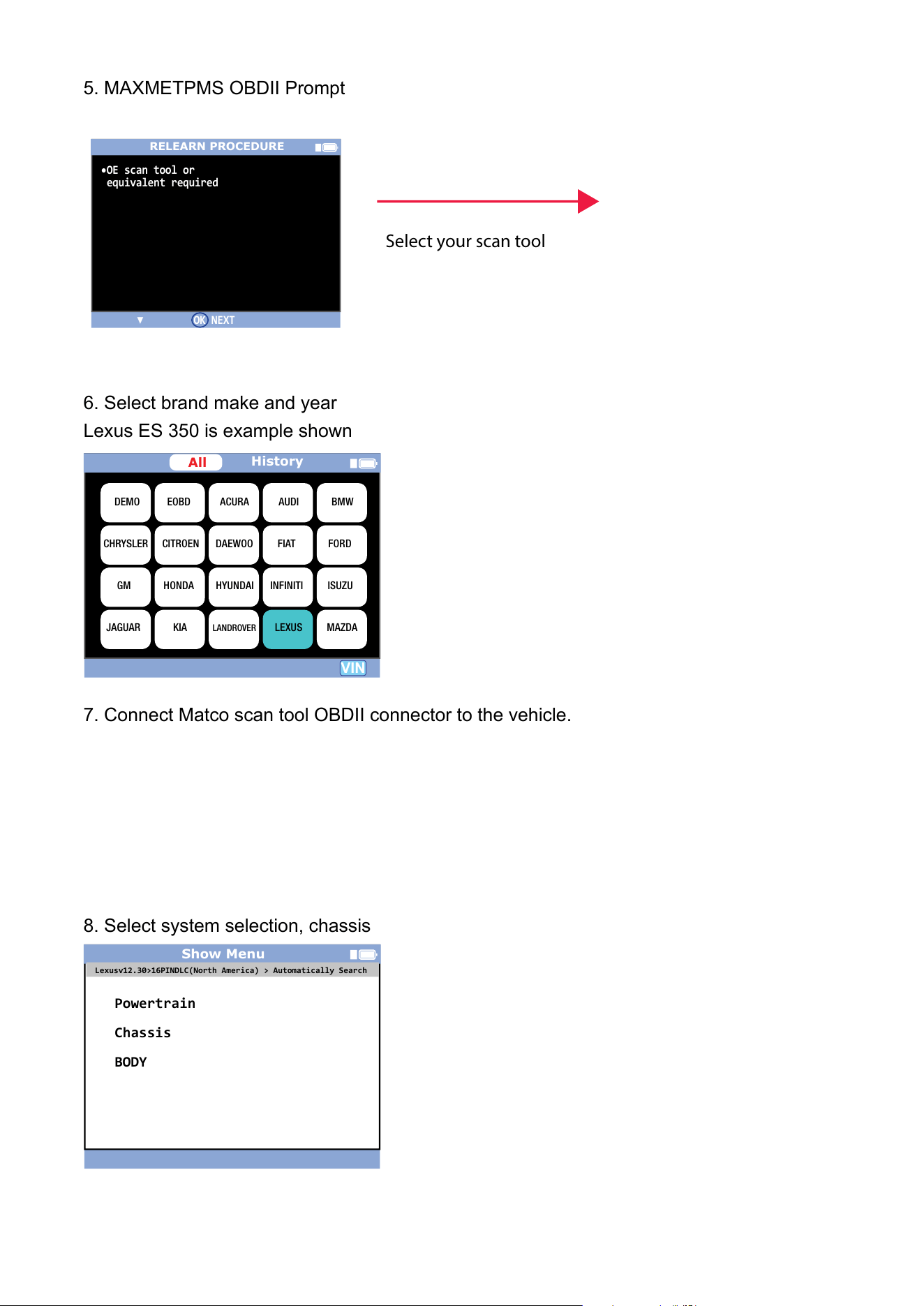
5. MAXMETPMS OBDII Prompt
6. Select brand make and year
Lexus ES 350 is example shown
7. Connect Matco scan tool OBDII connector to the vehicle.
8. Select system selection, chassis
Show Menu
Powertrain
Chassis
BODY
Lexusv12.30>16PINDLC(North America) > Automatically Search
VIN
History
DEMO EOBD ACURA AUDI BMW
CHRYSLER
CITROEN DAEWOO FIAT FORD
GM HONDA HYUNDAI INFINITI ISUZU
JAGUAR KIA LEXUS MAZDA
LANDROVER
All
RELEARN PROCEDURE
•OE scan tool or
equivalent required
▼ OK NEXT
Select your scan tool
MDMAXTPMS 80621 (12-16)
Matco Tools TPMS TOOL-User Guide
Page 19

Page 16/32
MDMAXTPMS 80316-11-16
10. Select TPMS
11. Select ID Registration
12. ID Registration Procedure
13. Enter ID# on scan tool from steps 1-5
Show Menu
ID Registration
Signal Check
Tire Position writing
Lexusv12.30>16PINDLC(North America) > Automatically Search
ID Registration
Welcome to the Tire ID Registration wizard.
This function will register Tire IDs for the
Tire Pressure Warning system.
Note: Registration will fail if the system is
still in the process of initialization.
Press OK to proceed.
OK
Cancel
Show Menu
ABS/VSC/TRC
EMPS
TPMS(Tire Pressure Monitoring System)
Lane Departure Alert
Advanced Parking Guidance/Parking Assist Monitor
Lexusv12.30>16PINDLC(North America) > Automatically Search
Main Set
OK
Cancel
Please input 8 characters: ‘0’ -- ‘f’.
11ACE57
11AC923
11AD0FA
F198d
MDMAXTPMS 80621 (12-16)
Matco Tools TPMS TOOL-User Guide
Page 20

MDMAXTPMS 80621 (12-16)
Matco Tools TPMS TOOL-User Guide
Page 21

Matco Tools MT46 TPMS TOOL - User Guide
3. PROGRAM BLANK SENSOR
This section is to recover a sensor ID in order to enter it in the spare blank sensor. If the
"old" sensor can be read, use the "COPY ORIGINAL SENSOR" section to recover the ID.
If it cannot be read, use the "CREATE NEW SENSOR" section to create a randomized ID.
This section details how to relearn the sensor to the ECU with the OBD-II port or to have
the part # lookup for all the sensors available for the vehicle.
Select
"PROGRAM SENSOR"
menu.
= continue
= Previous
Select car manufacturer.
Select car model.
Select year.
Select the sensor's brand.
= continue
= Previous
The device displays blank
sensor's reference of the
selected dealer.
= continue
= Previous
Note: You may have to choose a generation of sensors, here is an example.
PROGRAM SENSOR
Alligator Sens.it
BWD / STANDARD OE
BWD / STANDARD QWIK
Direct Fit
ECH / NAPA OE-Design
ECH / NAPA QWIK
EZ-sensor
IntelliSens
Orange DirectFit US
PROGRAM SENSOR
Orange Universal US
REDI SENSOR
STEELMAN Select
UPRO
MDMAXTPMS 80621 (12-16)
Matco Tools TPMS TOOL-User Guide
Page 22

TOYOTA
RAV 4
F9199D
40.4 PSI
315 MHz
78
F
BAT : OK
NORMAL
O
3.1. "COPY ORIGINAL SENSOR" SECTION
= continue
= Previous
To trigger the
original sensor
Wait a few seconds.
ID of the old sensor is
displayed.
= continue
= Previous
Alligator Sens.it
TOYOTA
RAV 4
TOYOTA
RAV 4
MDMAXTPMS 80621 (12-16)
Matco Tools TPMS TOOL-User Guide
Page 23
Matco Tools MT46 TPMS TOOL - User Guide
resU U-Aam563-MU manual Matco Tools MT46 Page 17/32
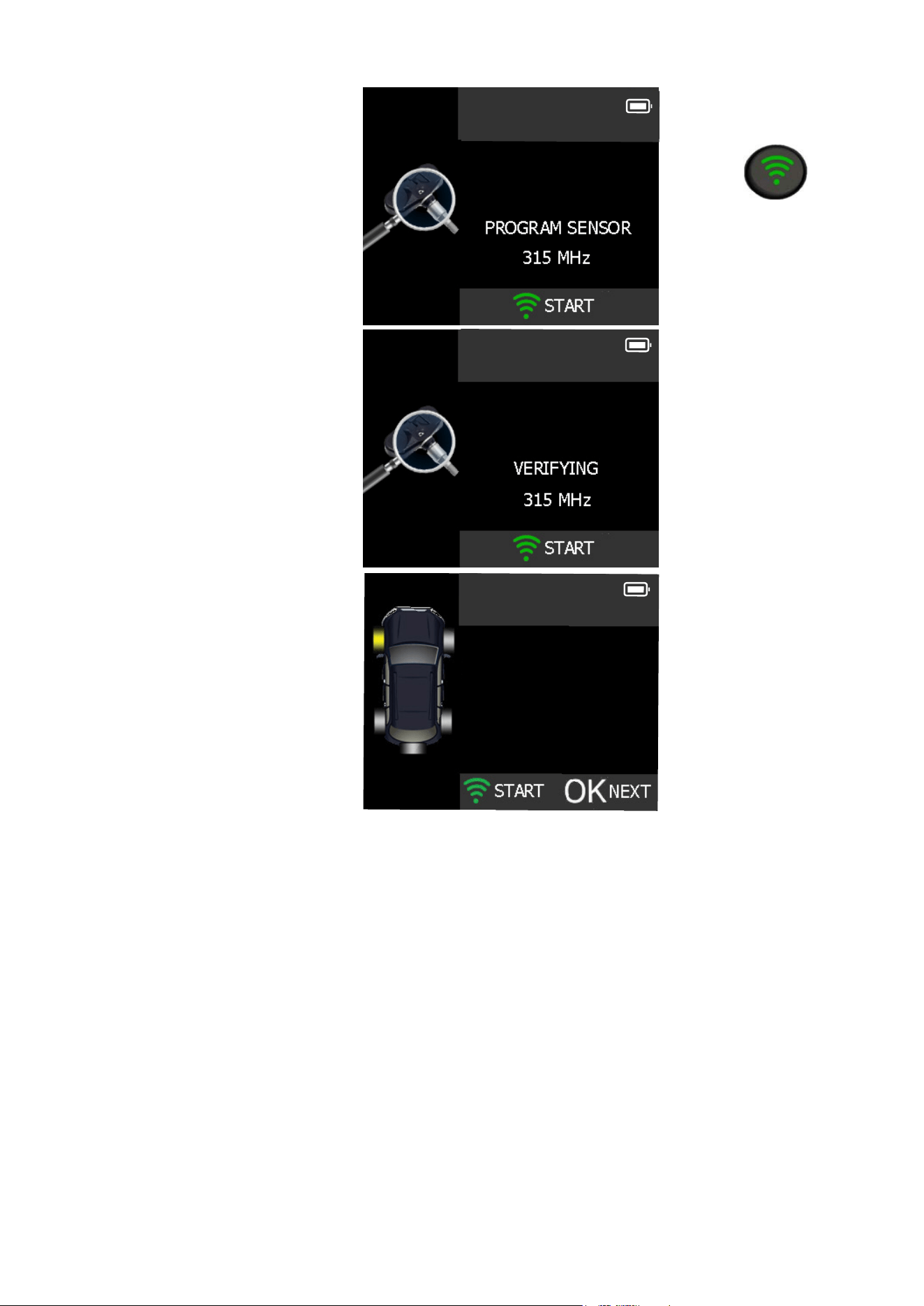
Hold the new
programmable sensor
near the device antenna.
To upload data
to the blank
sensor.
Wait a few seconds.
The data is successfully
uploaded to the sensor.
= continue
TOYOTA
RAV 4
TOYOTA
RAV 4
TOYOTA
RAV 4
F9199D
40.4 PSI
315 MHz
78
F
BAT : OK
NORMAL
O
MDMAXTPMS 80621 (12-16)
Matco Tools TPMS TOOL-User Guide
Page 24

Matco Tools MT46 TPMS TOOL - User Guide
resU U-Aam563-MU manual Matco Tools MT46 Page 18/32
3.2. "CREATE NEW SENSOR SECTION
= continue
= Previous
Hold the new
programmable sensor
near the device antenna.
To upload data
to the blank
sensor.
Wait a few seconds.
The data is successfully
uploaded to the sensor.
= continue
Alligator Sens.it
COPY ID
CREATE SENSOR
MDMAXTPMS 80621 (12-16)
Matco Tools TPMS TOOL-User Guide
Page 25
Matco Tools MT46 TPMS TOOL - User Guide
UM-365maA-U User manual Matco Tools MT46 Page 19/32
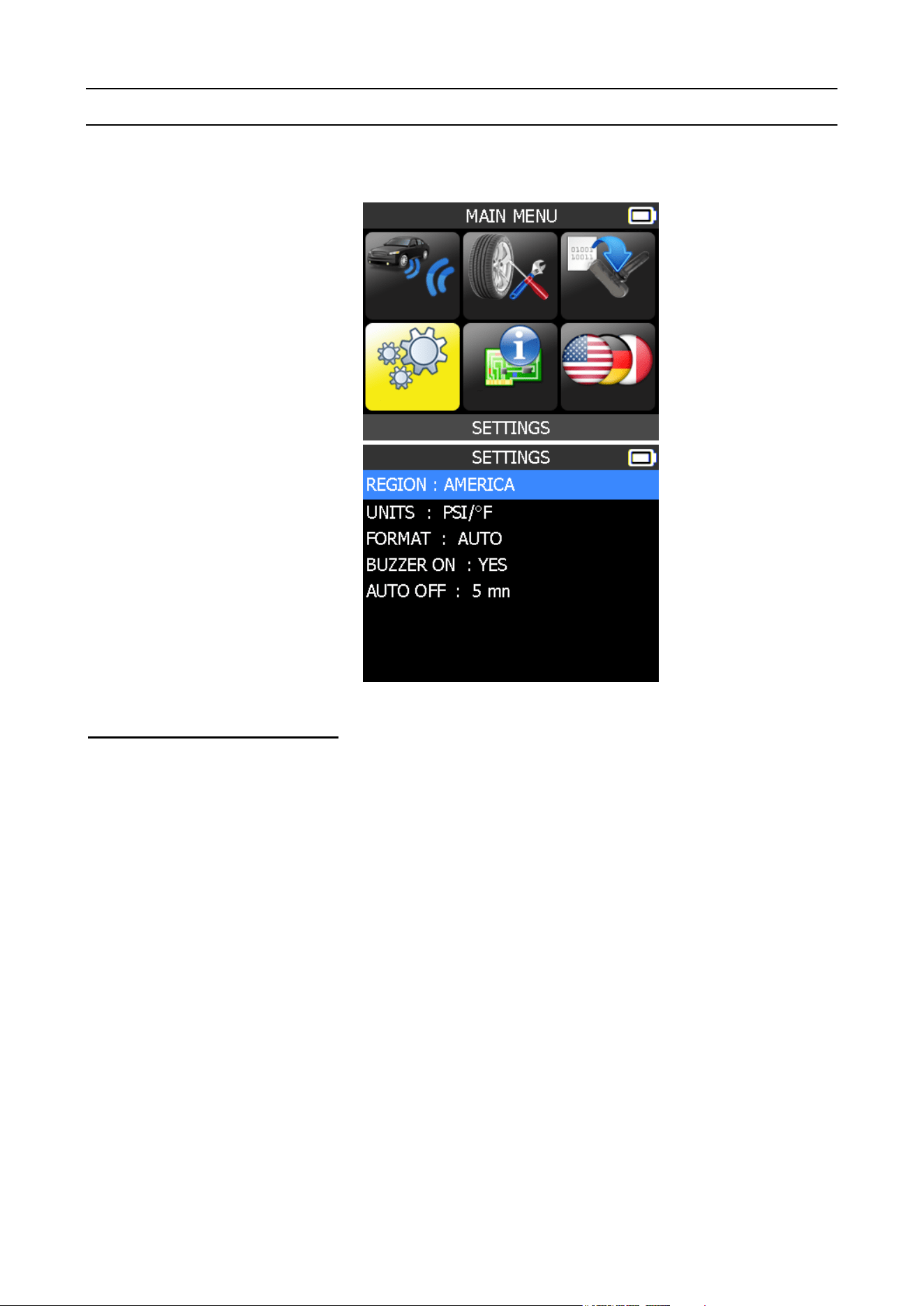
SETTINGS
1. ENTER SETTINGS MENU
Select "SETTINGS" menu.
= continue
= Previous
Scroll up and down to
select function or settings.
= continue
= Previous
Key functional descriptions:
REGION: to select the area of work, AMERICA or EUROPE. Be careful, when you change
the zone, a WebVT download or SD card is required to get the zone data.
UNITS: change the air pressure and temperature display (kPa, Bar or PSI with F° or C°).
FORMAT: change the format of sensor ID display.
BUZZER: turn buzzer to ON or OFF (YES or NO).
AUTO OFF: time to turn off the device automatically after not being operated.
MDMAXTPMS 80621 (12-16)
Matco Tools TPMS TOOL-User Guide
Page 26
Matco Tools MT46 TPMS TOOL - User Guide
UM-365maA-U User manual Matco Tools MT46 Page 20/32
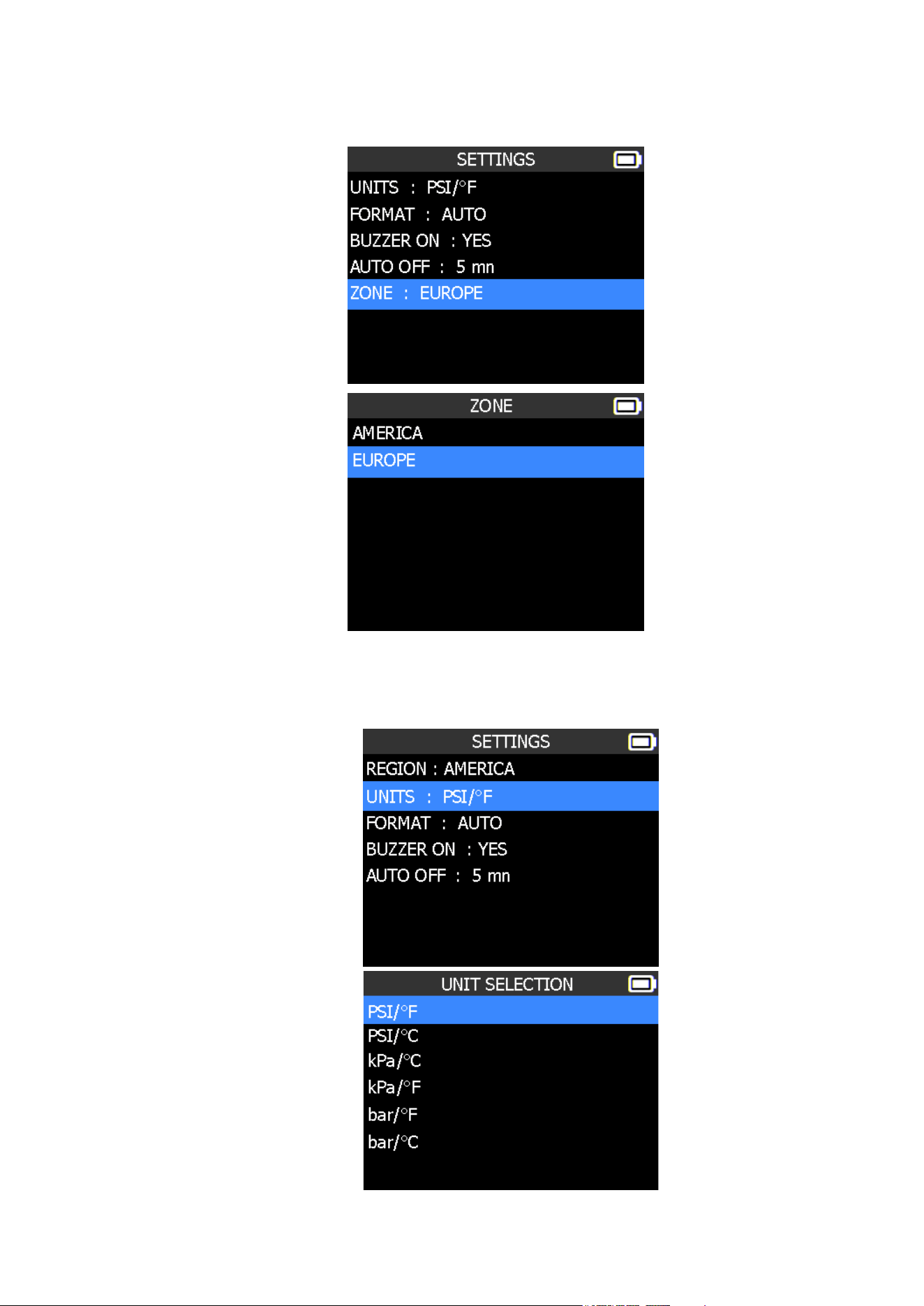
1.1. CHANGE REGION SETTINGS
Scroll up and down
to select the zone
menu.
= Confirm
= Previous
Scroll up and down
to select a zone.
= Confirm
= Previous
The tool will load the new database for the selected zone.
1.2. CHANGE UNITS SETTINGS
Scroll up and down to
select function or settings.
= continue
= Previous
Scroll up and down to
select the units.
= continue
= Previous
MDMAXTPMS 80621 (12-16)
Matco Tools TPMS TOOL-User Guide
Page 27
Matco Tools MT46 TPMS TOOL - User Guide
UM-365maA-U User manual Matco Tools MT46 Page 21/32
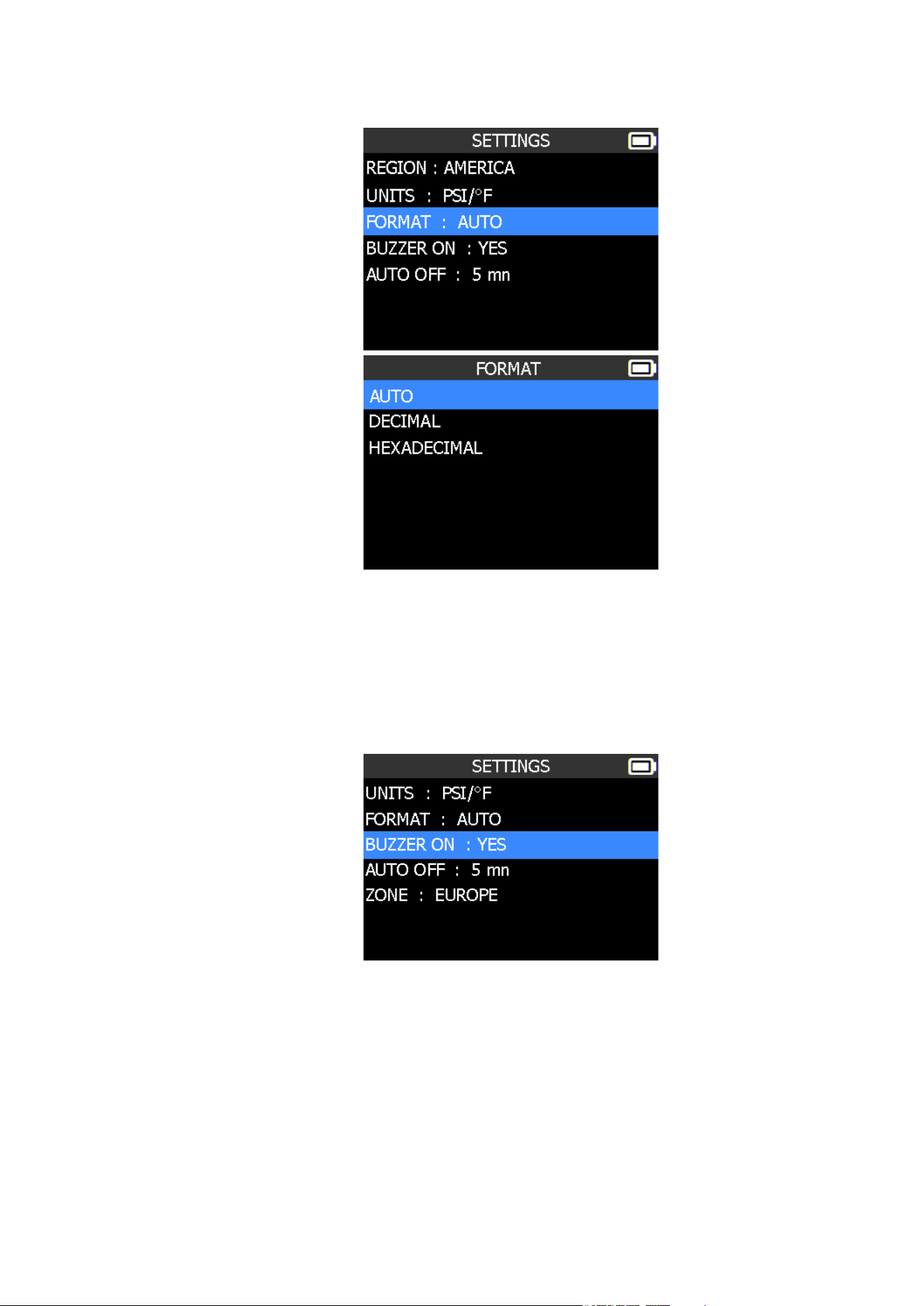
1.3. CHANGE FORMAT SETTINGS
Scroll up and down to
select function or settings.
= continue
= Previous
Scroll up and down to
select the format.
= continue
= Previous
AUTO: display sensor ID format in the way sensor is transmitting.
DECIMAL: force to display sensor ID in decimal (0 to 9).
HEXADECIMAL: force to display sensor ID in hexadecimal (0 to F).
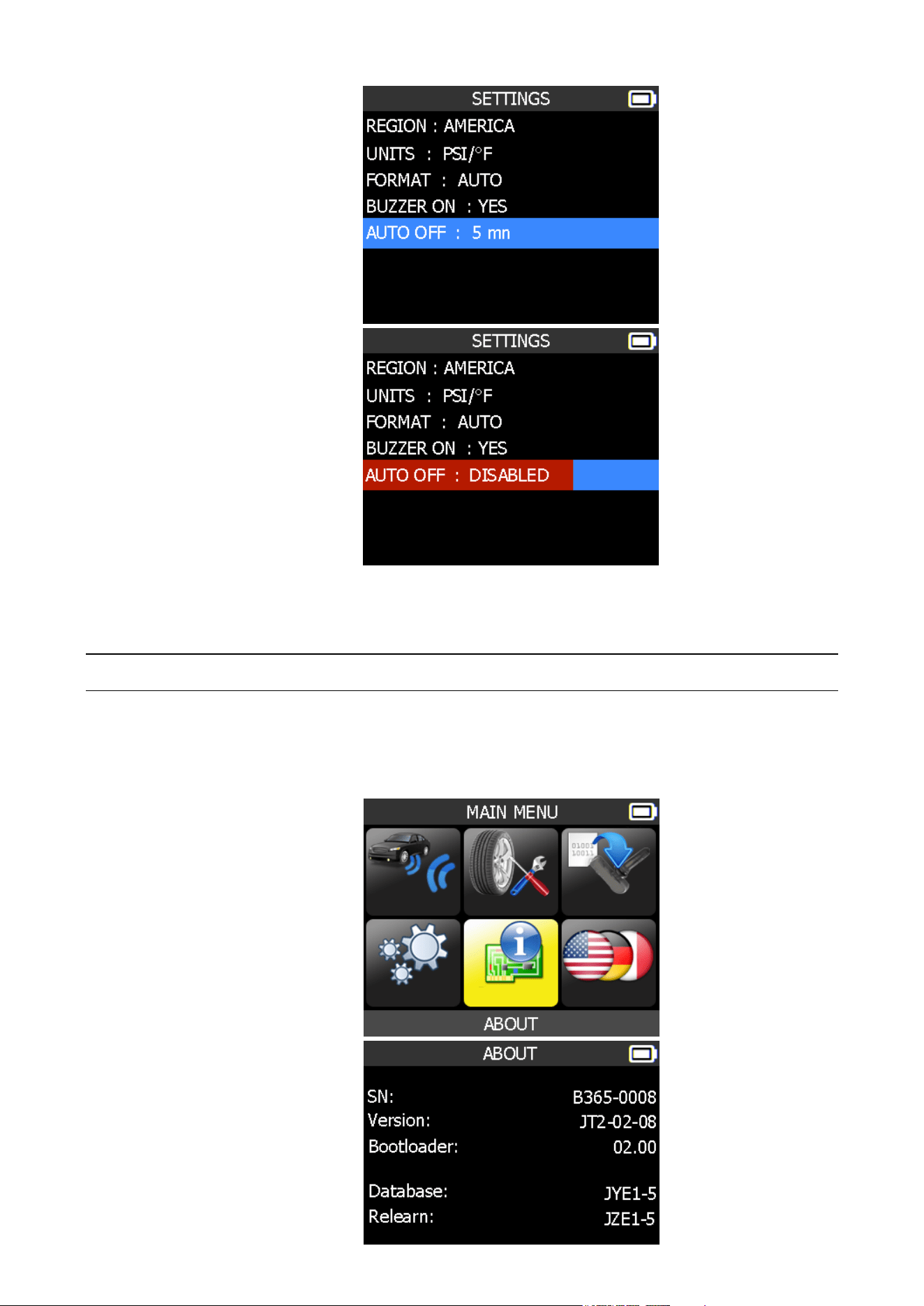
1.4. CHANGE BUZZER ON SETTINGS
When buzzer on is set to YES, a beep is triggered when the sensor ID is detected.
Scroll up and down to
select function or settings.
= continue
= Previous
The selection turns red.
Scroll up and down to
select YES or NO.
= continue
= Previous
MDMAXTPMS 80621 (12-16)
Matco Tools TPMS TOOL-User Guide
Page 28
Matco Tools MT46 TPMS TOOL - User Guide
UM-365maA-U User manual Matco Tools MT46 Page 22/32
1.5. CHANGE AUTO OFF SETTINGS
Scroll up and down to
select function or settings.
= continue
= Previous
The selection turns red.
Scroll up and down to set
the time.
= continue
= Previous
Change by 60 min (maximum) to DISABLED (never).
Matco Tools MT46 TPMS TOOL - User Guide
UM-365maA-U User manual Matco Tools MT46 Page 23/32
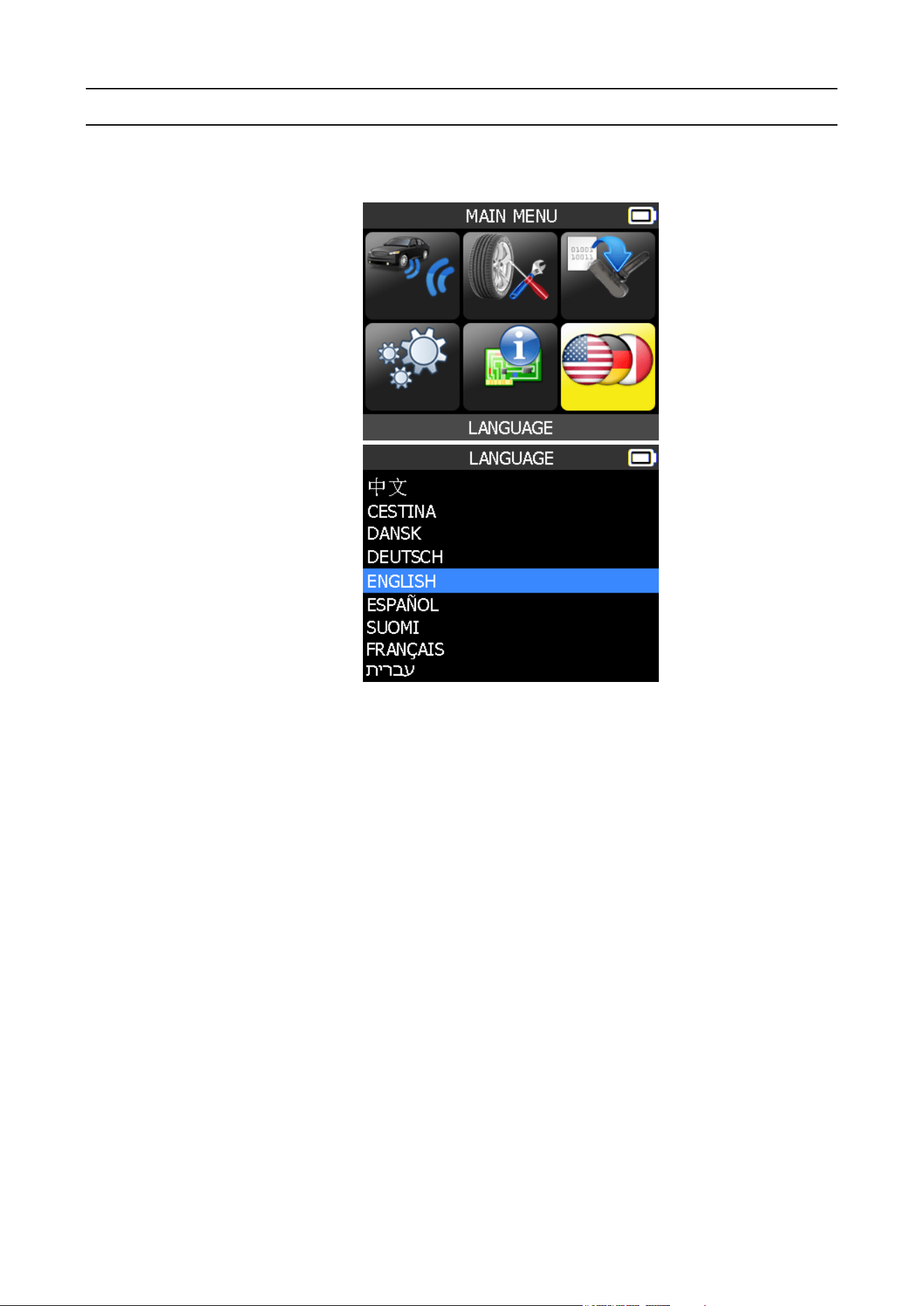
ABOUT
1. ENTER THE ABOUT MENU
This menu displays the current version and information about the device.
Select the "ABOUT"
menu.
= continue
= Previous
= Previous
= Previous
MDMAXTPMS 80621 (12-16)
Matco Tools TPMS TOOL-User Guide
Page 29
Matco Tools MT46 TPMS TOOL - User Guide
UM-365maA-U User manual Matco Tools MT46 Page 24/32
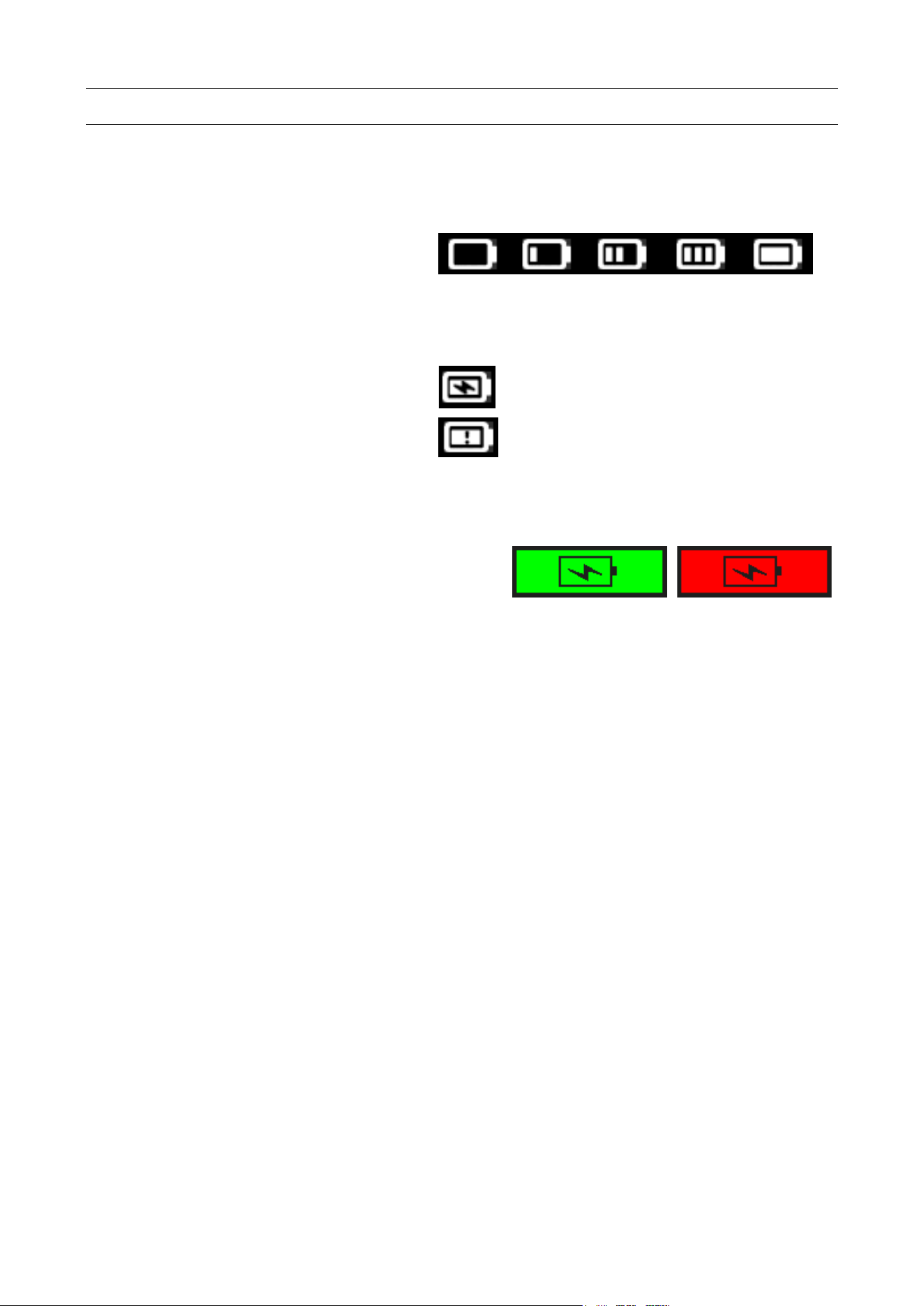
LANGUAGE
1. ENTER LANGUAGE MENU
Select the "LANGUAGE"
menu.
= continue
= Previous
Scroll up and down to
select the language.
= continue
= Previous
MDMAXTPMS 80621 (12-16)
Matco Tools TPMS TOOL-User Guide
Page 30
Matco Tools MT46 TPMS TOOL - User Guide
resU U-Aam563-MU manual Matco Tools MT46 Page 25/32
MISCELLANEOUS
1. CHARGE
Low Battery Indication
Your TPMS TOOL incorporates a low
battery detection circuit. Battery life is
an average of 300 sensor tests per
battery charge (approximately 60 to 80
vehicles) this may change depending on
the sensor model.
Battery indicator status:
0% 25% 50% 75% 100%
When 0% is flashing, the tool will turn off after
10 seconds.
The battery is charging.
There is an issue with the battery -
please contact after sales service.
DO NOT use the tool with low battery status because the transmission and emission may
not be reliable.
When charging, the battery light is red and
becomes green when the battery is fully
charged.
Fig. 6
When the battery is low, the “status bar” appears every 10 seconds. This display will stop
when the battery loses power.
Plug the USB cable between the tool and the charger adapter, and then plug the charger
adapter into an appropriate outlet. The red LED "CHARGE" light will turn on.
Battery replacement
The tool must be returned to the factory for battery replacement.
Opening the tool or tampering with the seal placed on the tool, if broken, will void
the warranty
USB Power
supply connector
MDMAXTPMS 80621 (12-16)
Matco Tools TPMS TOOL-User Guide
Page 31

Matco Tools MT 46 TPMS TOOL - User Guide
User manual Matco Tools MT46 Page 28/32
4. 1 YEAR LIMITED WARRANTY
The manufacturer warrants this product to the
original user against defective material or
workmanship for a period of 1 year from the
date of purchase. The manufacturer reserves
the right to determine whether the part or
parts failed because of defective material,
workmanship or other causes. Failures
caused by accident, alteration, or misuse are
not covered by this warranty. The
manufacturer, at its discretion, will repair or
replace product covered under this warranty
free of charge.
Repairs or replacements of products covered
under this warranty are warranted for the
remainder of the original warranty period. The
manufacturer or its authorized service
representatives must perform all warranty
repairs. Any repair to the product by
unauthorized service representatives voids
this warranty. The rights under this warranty
are limited to the original user and may not be
transferred to subsequent owners.
The warranty is in lieu of all other warranties,
expressed or implied, including warranties of
merchantability and fitness for a particular
purpose. Some states do not allow the
exclusion or limitations of incidental or
consequential damages, so the above
limitations may not apply to you.
How to Obtain Warranty Support
Before submitting a warranty claim, we
recommend you contact technical support for
assistance by calling 1-888-621-8767. Valid
warranty claims are generally processed
through the point of
purchase during
the first thirty (30) days after purchase;
however, this period of time may vary
depending on where you purchased your
product.
A Return Material Authorization (RMA) number
will be issued by technical support based on
the warranty claim requirements. Please check
with Matco Tools or the retailer where you
purchased your product for details.
UM-365maA-U
Warranty claims that cannot be
processed through the point of purchase
and any other product related questions
should be addressed directly to ATEQ
TPMS Tools LC. The address and
customer service contact information
for ATEQ can be found on the web
at https://www.ateq-tpms.com/en-us/home/
contact-support/
Note: Tools requiring service or warranty
repair must be accompanied by an RMA
number on the shipping container for proper
handling.
Limitation of Liability
MATCO TOOLS/MANUFACTURER SHALL
NOT BE LIABLE FOR ANY SPECIAL
INDIRECT,
INCIDENTAL
OR
CONSEQUENTIAL
DAMAGES WHATSOEVER, INCLUDING
BUT NOT LIMITED TO LOSS OF PROFITS,
REVENUE OR DATA (WHETHER DIRECT
OR INDIRECT) OR COMMERCIAL LOSS
FOR BREACH OF ANY EXPRESS OR
IMPLIED WARRANTY ON YOUR PRODUCT
EVEN IF MATCO TOOLS HAS BEEN
ADVISED OF THE POSSIBILITY OF SUCH
DAMAGES. Some jurisdictions do not allow
the exclusion or limitation of special, indirect,
incidental or consequential damages, so the
above limitation or exclusion may not apply to
you.
Duration of Implied Warranties
EXCEPT TO THE EXTENT PROHIBITED BY
APPLICABLE LAW, ANY IMPLIED
WARRANTY OR CONDITION OF
MERCHANTABILITY OR FITNESS ON THIS
HARDWARE PRODUCT IS LIMITED IN
DURATION TO THE DURATION OF THE
APPLICABLE LIMITED WARRANTY
PERIOD FOR YOUR PRODUCT. Some
jurisdictions do not allow limitations on how
long an implied warranty lasts, so the above
limitation may not apply to you.
National Statutory Rights
Consumers have legal rights under applicable
national legislation governing the sale of
consumer goods. Such rights are not affected
by the warranties in this Limited Warranty.
No Other Warranties
No Matco Tools dealer, agent, or employee is
authorized to make any modification,
extension, or addition to this warranty.
MDMAXTPMS 80621 (12-16)
Matco Tools TPMS TOOL-User Guide
Page 32
Matco Tools MT46 TPMS TOOL - User Guide
User manual Matco Tools MT46 Page 31/32
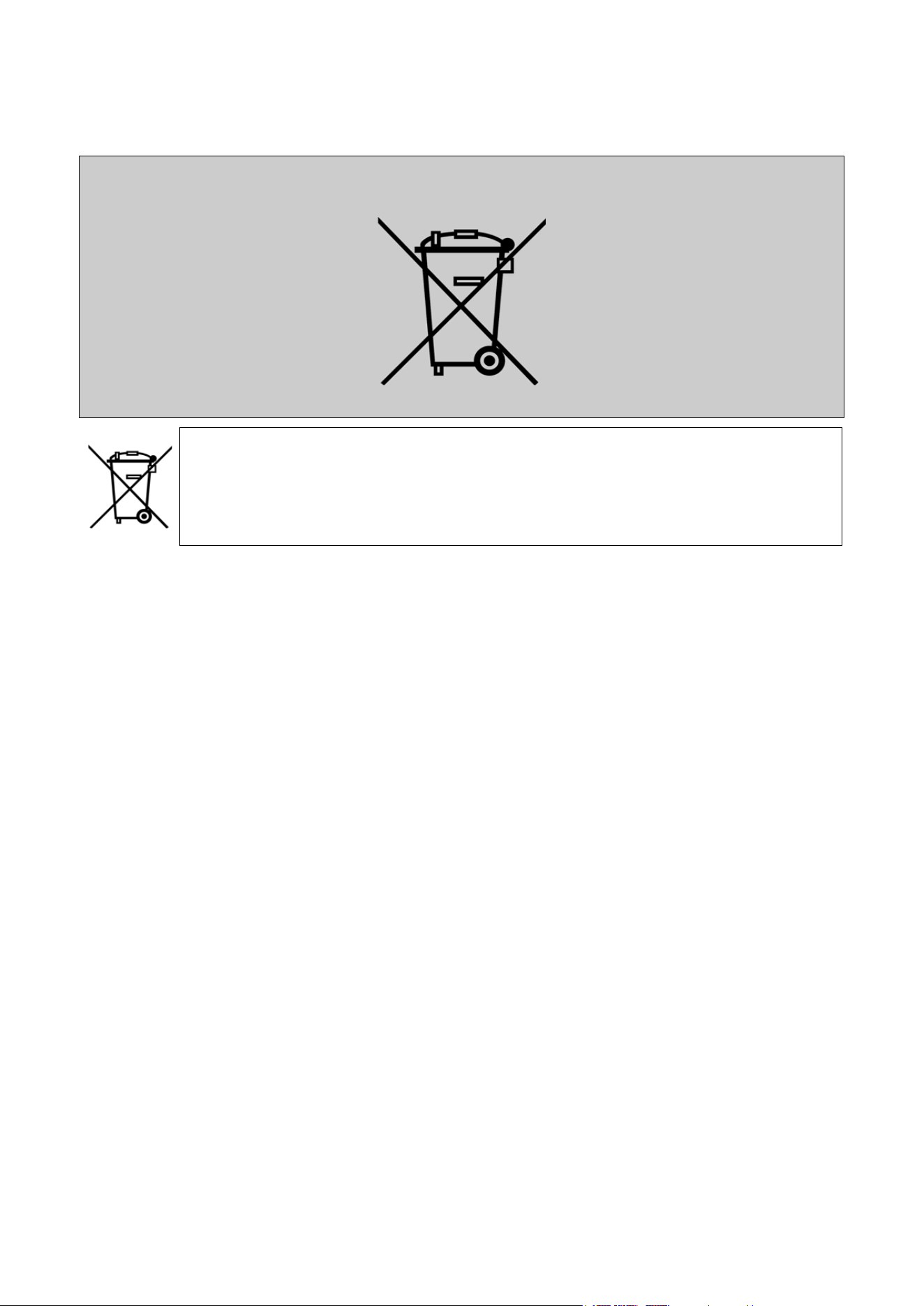
7. RECYCLING
Do not dispose of the rechargeable Lithium-Ion battery or the tool
and/or its accessories in the general waste.
These components must be collected and recycled.
The crossed-out wheeled waste bin means that the product must be taken to
separate collection at the end of the product's service life. This applies to your tool
and also to any enhancements marked with this symbol. Do not dispose of these
products as unsorted municipal waste. For further information, please contact
Matco Tools.
Technical Support:
The ATEQ TPMS technical support hotline is available during normal business hours in English,
French and Spanish. (North and South America only) When contacting Tech Support Helpdesk, be
prepared to answer the following questions:
• What tool model is it? What is the tool’s serial number?
• Is the internal software up to date? Updating your tool solves the majority of issues.
• If you are working on a vehicle, what car make, model and year are you servicing?
• What sensors are you using? Please note the brand and reference of the sensors.
• USA (En): 888-621-8767 (TPMS)
• Latin/South America (Sp): Email Only: [email protected]
• Canada (Fr): 855-455-8767 (TPMS)
Hours of operation:
USA and Latin/South America: Monday through Friday, 8 am – 6 pm (EST)
Canada: Monday through Friday, 8 am – 6 pm (EST)
Return Shipping Address:
ATEQ TPMS Tools LC
35990 Industrial Road
Livonia, MI 48150
Email address: [email protected]
UM-365maA-U
USA:
Canada:
ATEQ Canada Inc.
4-2355 Royal Windsor Drive
Mississauga, ON L5J 4S8
Canada
Email Address: [email protected]
MDMAXTPMS 80621 (12-16)
Matco Tools TPMS TOOL-User Guide
Page 33
MDMAXTPMS Kit
Wall Charger
PN# T5100017
Replacement Battery
PN# T6250005
(Not pictured)
Annual
Software Certificate
PN# SW46-0001
Soft Case
PN# T6730400
Magnet (Optional)
PN# T6430000
Annual
Software Certificate
Certicate Number
XX-XXXXXXXX-XXXXXX
MDMAXTPMS 80621 (12-16)
Matco Tools TPMS TOOL-User Guide
Page 34

Powered by
This document is the exclusive property of Matco Tools.
It may not be communicated, reproduced or used without prior consent.
MDMAXTPMS 80621 (12-16)