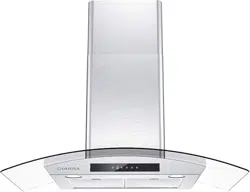
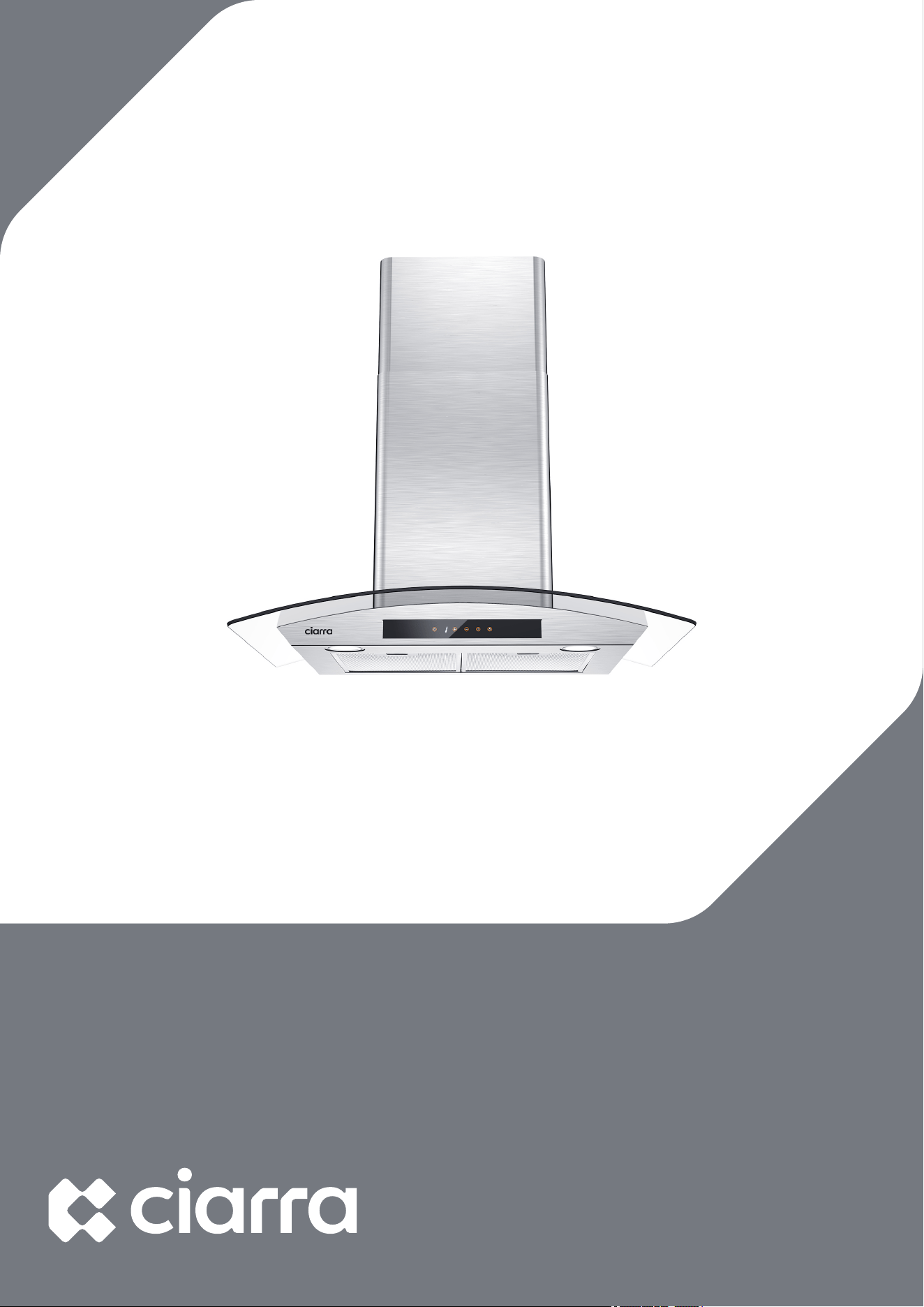
Model Number:
CAS75502 CAB75502
CAS90502 CAS75502W
www.ciarraappliances.com


Dear customer:
Thank you so much for your purchase, please
read this instruction manual carefully before
installation & use.
If you have any question, please contact us at:
E-mail: [email protected]
1

CONTENTS
Safety--------------------------------------------3-4
Specifications--------------------------------------5
Before Using the Range Hood----------------------6
Prepare for Installation ----------------------------7
Installation--------------------------------------8-16
Install the Hood-------------------------------------------8-15
Carbon Filter Installation------------------------------------16
Operation---------------------------------------18-28
Touch control --------------------------------------------18-19
Smart life APP-------------------------------------------20-22
Voice control --------------------------------------------23-28
Cleaning and Maintenance---------------------29-31
Grease Filter------------------------------------------------29
Carbon Filter -----------------------------------------------29
Stainless Steel Cleaning ------------------------------------29
Painted Finish Cleaning-------------------------------------29
LED Replacement ---------------------------------------30-31
Troubleshooting-----------------------------------32
Environmental Protection -------------------------33
2
Safety
! WARNING
TO REDUCE THE RISK OF FIRE, ELECTRIC SHOCK, OR
INJURY TO PERSONS, OBSERVE THE FOLLOWING:
Use this unit only in the manner intended by the
manufacturer. If you have questions, contact the
manufacturer at the address or telephone number listed in
the warranty.
Before servicing or cleaning unit, unplug or disconnect the
range hood from the power supply.
This appliance is not intended for use by persons (including
children) with reduced physical, sensory or mental
capabilities, or lack of experience and knowledge, unless
they have been given supervision or instruction concerning
use of the appliance by a person responsible for their safety.
Installation work and electrical wiring must be done by a
qualified person(s) in accordance with all applicable codes
and standards, including fire-rated construction.
Sufficient air is needed for proper combustion and
exhausting of gases through the flue (chimney) of fuel
burning equipment to prevent back drafting.
When cutting or drilling into a wall or ceiling, do not damage
electrical wiring and other hidden utilities.
Ducted fans must always be vented to the outdoors.
Ensure the requirements of the local authorities are adhered
to concerning the discharge of exhaust air.
This unit must be grounded.
When applicable local regulations comprise more restrictive
installation and/or certification requirements, the
aforementioned requirements prevail on those of this
document and the installer agrees to conform to these at his
own expense.
Clean range hood frequently. Grease should not be allowed
to accumulate on fans, filters or in exhaust ducts.
Warning: Failure to install the screws or fixing device in
accordance with these instructions may result in electrical
hazards.
3
Safety
!
WARNING
TO REDUCE THE RISK OF INJURY TO PERSONS IN THE EVENT
OF A RANGE TOP GREASE FIRE, OBSERVE THE FOLLOWING*:
1. SMOTHER FLAMES with a close-fitting lid, cookie sheet or
metal tray, then turn off the burner. BE CAREFUL TO
PREVENT BURNS. IF THE FLAMES DO NOT GO OUT
IMMEDIATELY, EVACUATE AND CALL THE FIRE
DEPARTMENT.
2. NEVER PICK UP A FLAMING PAN — You may be burned.
3. DO NOT USE WATER, including wet dishcloths or towels —
This could cause a violent steam explosion.
4. Use an extinguisher ONLY if:
a) You own a Class ABC extinguisher and you know how to
operate it.
b) The fire is small and contained in the area where it
started.
c) The fire department has been called.
d) You can fight the fire with your back to an exit.
! CAUTION
For indoor use only.
For general ventilating use only. Do not use to exhaust hazardous or
explosive materials and vapors.
To avoid motor bearing damage and noisy and/or unbalanced fan
blade, keep drywall spray, construction dust, etc. off range hood.
Your hood motor has a thermal overload which will automatically
shut off the motor if it becomes overheated. The motor will restart
when it cools down. If the motor continues to shut off and restart,
have the hood serviced.
Always follows the cooking equipment manufacturer’s requirements
regarding the ventilation needs.
To reduce the risk of fire and to properly exhaust air, be sure to duct
air outside — Do not exhaust air into spaces within walls or ceiling or
into attics, crawl space or garage.
When installing, servicing or cleaning the unit, it is recommended to
wear safety glasses and gloves.
Please read specification label on product for further information
and requirements.
4
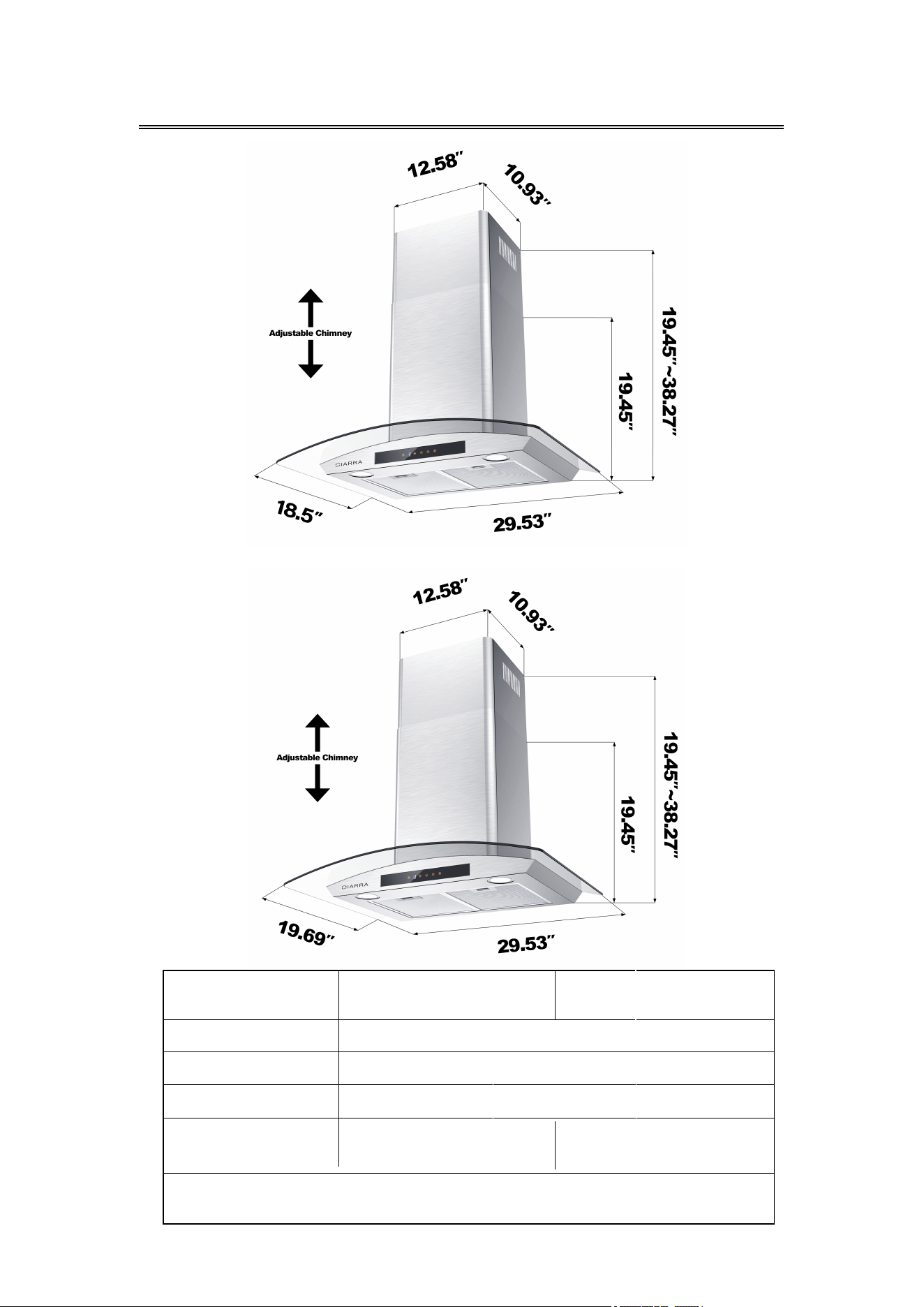
Specifications
CAS75502
CAB75502
CAS75502W
SKU
CAS75502/CAB75502
CAS75502W
Voltage
120V/60Hz
Power of Motor
1 x 200W
Power of lamps
2 x 1.5W
Appliance
Dimension
29.53"*18.5"*19.45"
-38.27"(W x D x H)
Note: The manufacturer reserves the right to change any
technological improvement or modification without prior notice.
2
9.53"*19.69"*19.45"
-38.27"(W x D x H)
5
Before Using the Range Hood
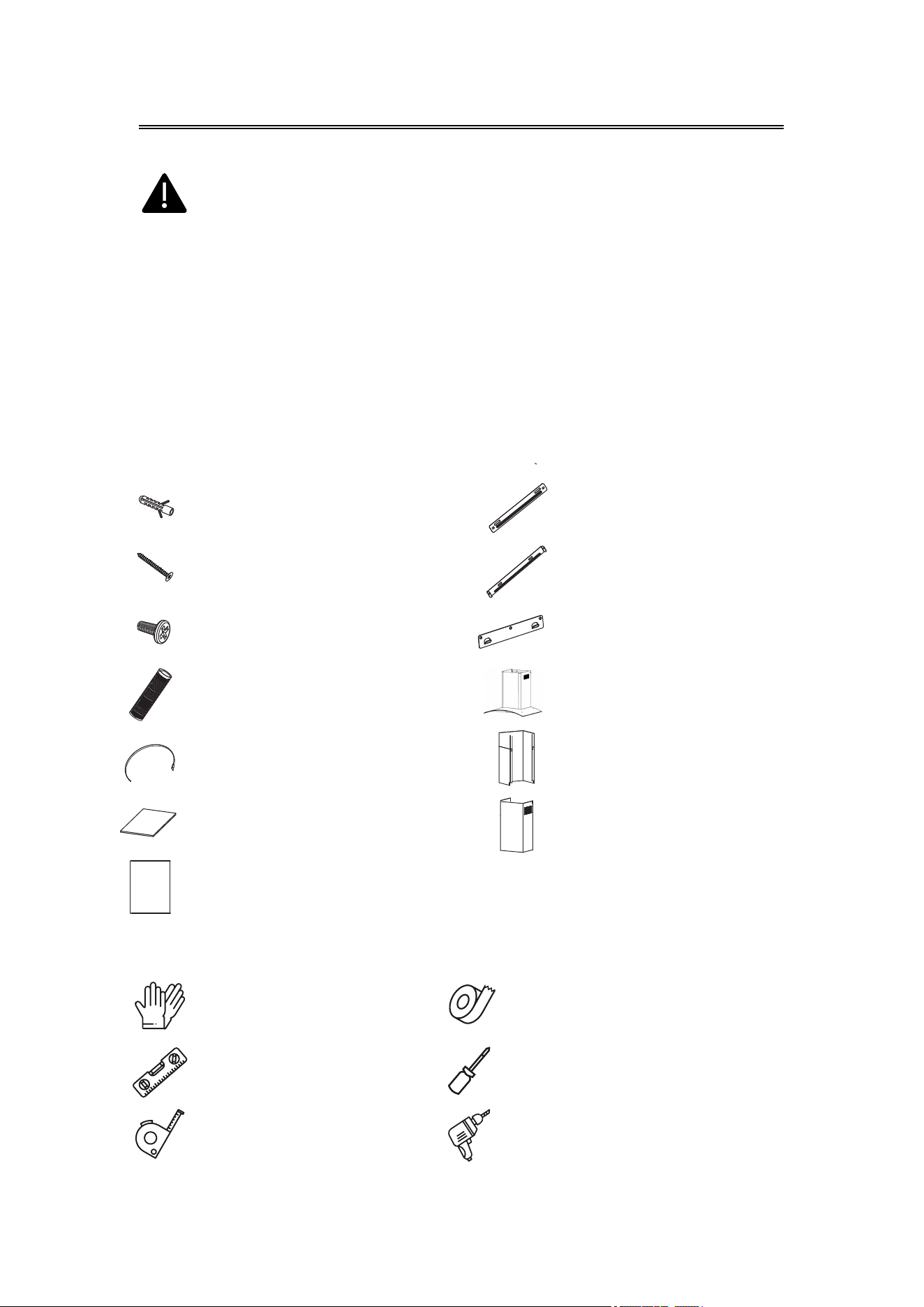
COMPONENTS:
YOU WILL BE NEEDING THESE TOOLS FOR INSTALLATION
1.Protective Gloves
2.Spirit Level Ruler
3.Measuring Tape
4.Double Sided Tape or Tape
5.Cross-Head Screwdriver Set
6.Electric drill and 8mm drill
CAUTION: Before proceeding to the installation, check If items
are missing or damaged, contact the manufacturer.
Observe all governing codes and ordinances. Have a qualified
technician install the range hood. It is the installer’s
responsibility to comply with installation clearances specified
on the model/serial rating plate. The manufacturer declines
all responsibility for improper installation and does not accept
responsibility for appliance warranty in the event of damage
caused by incorrect installation.
Part 1 : Wall Plug X 9
Part 2 : 0.16"*1.18" Screws X 9
Part 3 : 0.16"*0.32" Screws X 6
Part 4 : Aluminum Exhaust Pipe X 1
Part 5 : Cable Ties X 2
Part 6 : Installation Manual X 1
Part 7 : 1:1 Installation Diagram X 1
Part 11 : Range Hood Body X 1
Part 12 : Lower Chimney X 1
Part 13 : Upper Chimney X 1
Part 9 : Upper Chimney Bracket X 1
Part 10 : Wall Bracket X 1
Part 8 : Lower Chimney Bracket X 1
6
Prepare for Installation
Prepare for Installation:
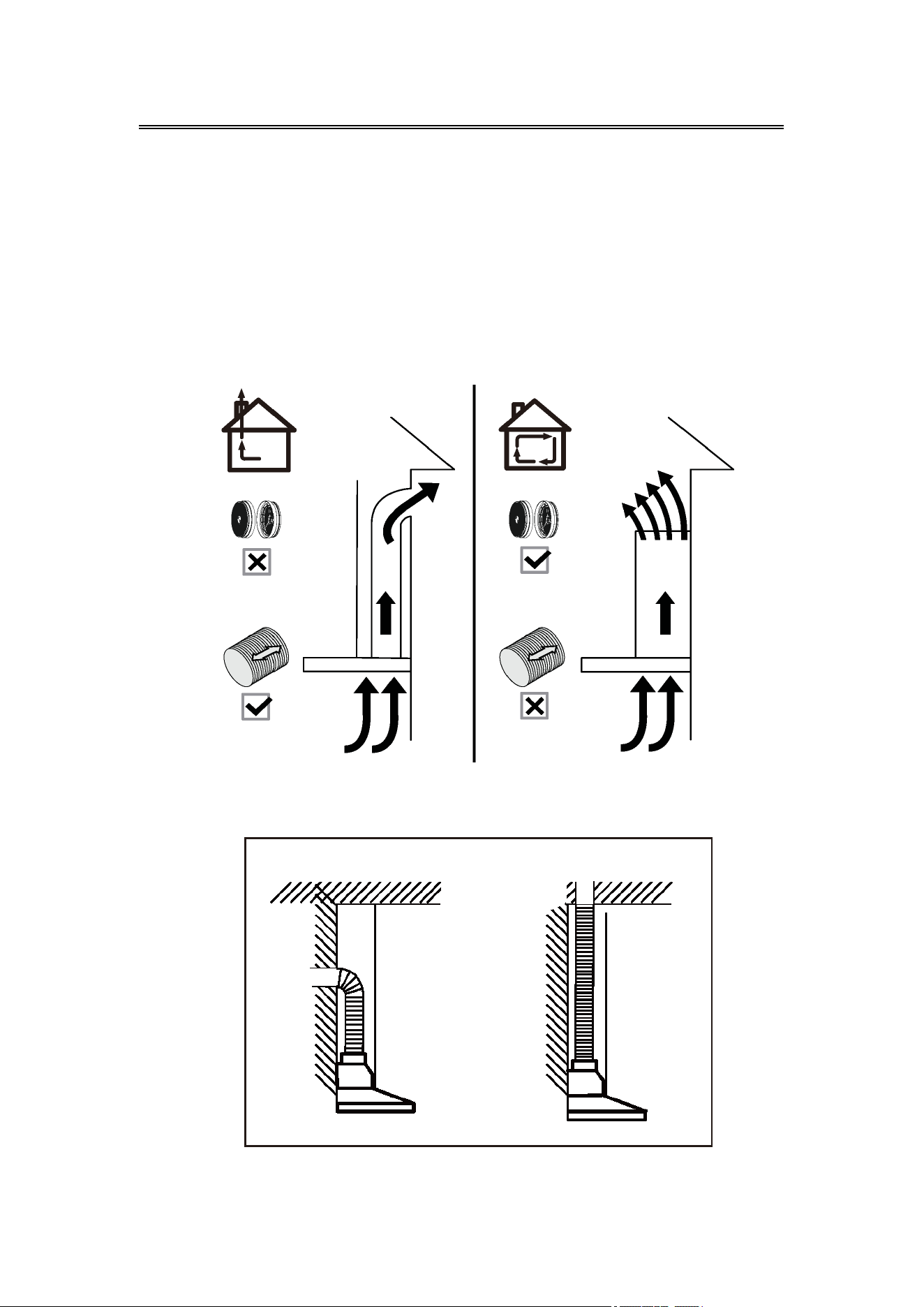
a) Ventilation Mode
Recirculation Mode: Recirculating with carbon filter (required), the
smells and odors can be filtered and vented through the top
vented hole and the exhaust pipe is not required.
Extraction Mode: You can install the 59" long and 6" diameter
aluminum exhaust pipe for extracting, which is included in the
installation kit.
b) When possible, use at least 2 foot straight runs before any turns. Larger
duct work may be required for best performance with longer duct runs.
c) Before installation, don't connect the power.
7
Installation
Install the Hood(Extraction):
1) Remove all protective poly film from the hood and/or parts.
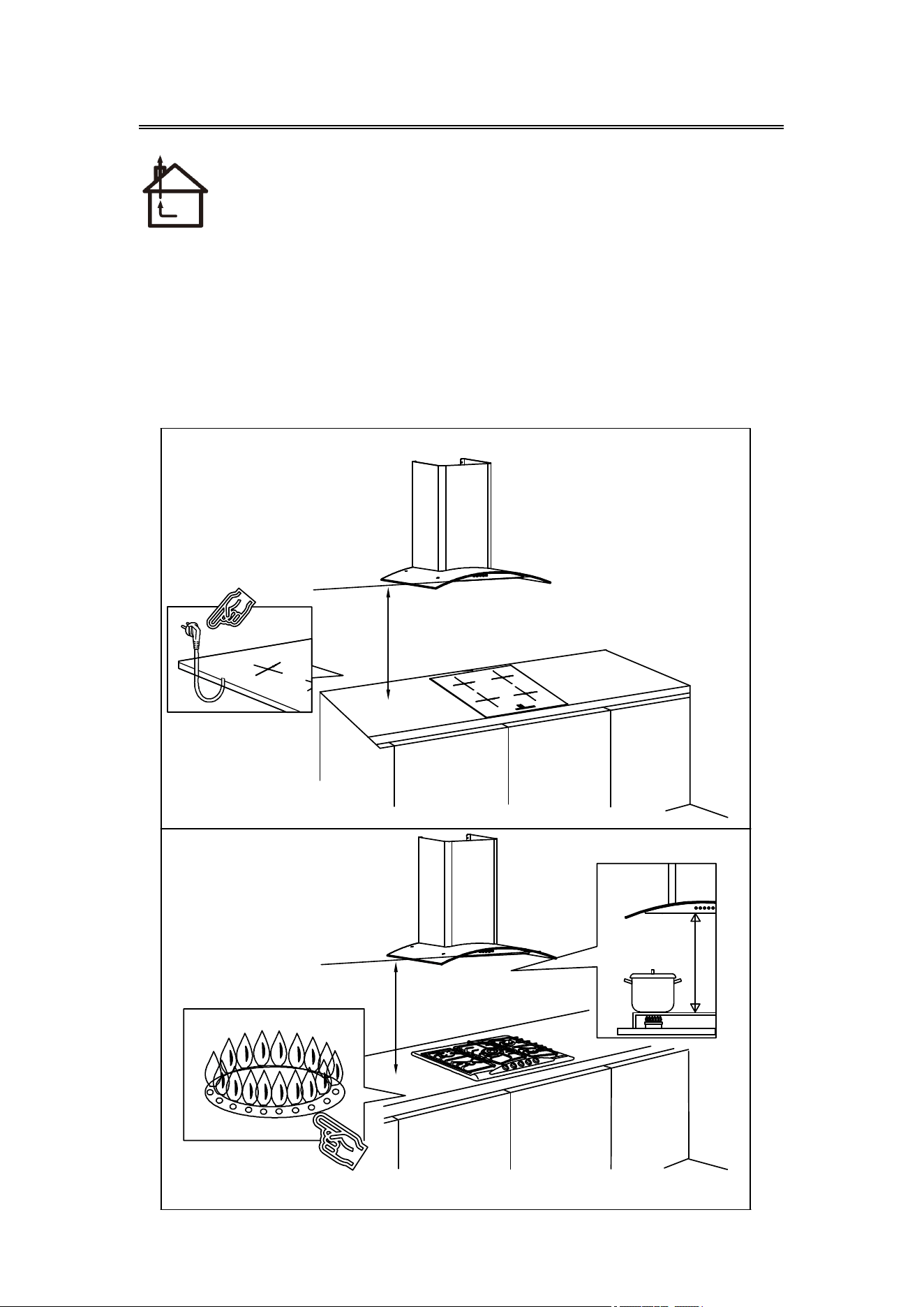
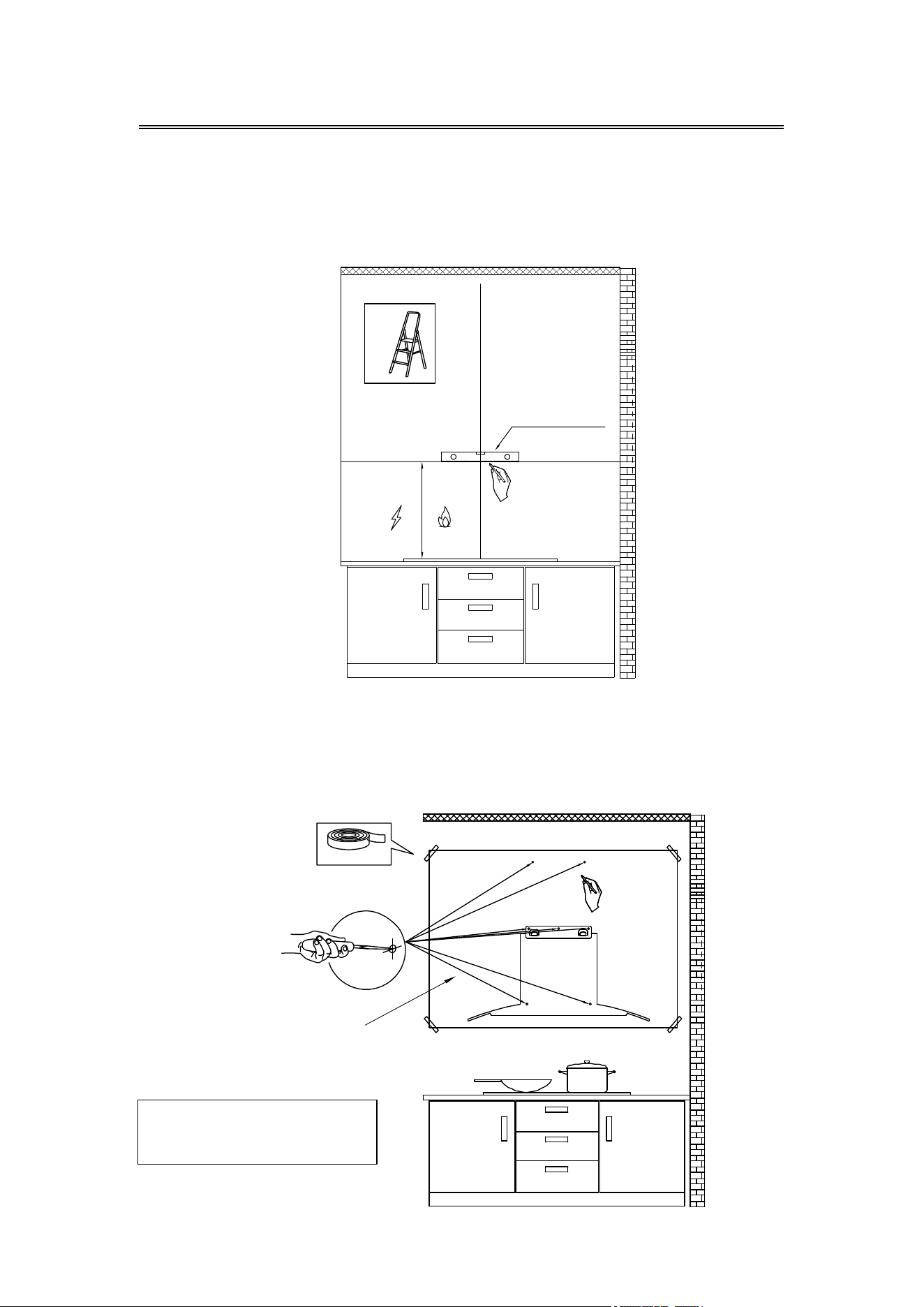
2) Recommend installation height: 25.6"~29.5" above the cooktop
for best extraction.
Required height over gas hob: 29.5";
Required height over electric hob: 25.6".
25.6"
29.5"
8
Installation
Tape
3) First use a pencil to mark the installation position on the wall, then
use a Measuring Tape to measure the height from the stove surface
to the hood (the center point of aluminum grease filter) and use a
Spirit Level Ruler to maintain the level, then use a pencil to draw a
horizontal line along the level.
4) Poke the 7 perforated positions on the 1:1 Installation Diagram, then
a
lign with the center point of aluminum grease filter on the
Installation Diagram with the horizontal line on the wall, then tape
the Installation Diagram to the wall, and use a pencil to mark the
perforated positions on the wall in the corresponding positions.
COMPONENTS:
Part 7: 1 :1 Installation Diagram X 1
1:1 Installation Diagram
Spirit Level Ruler
25.6"
29.5"
9
Installation
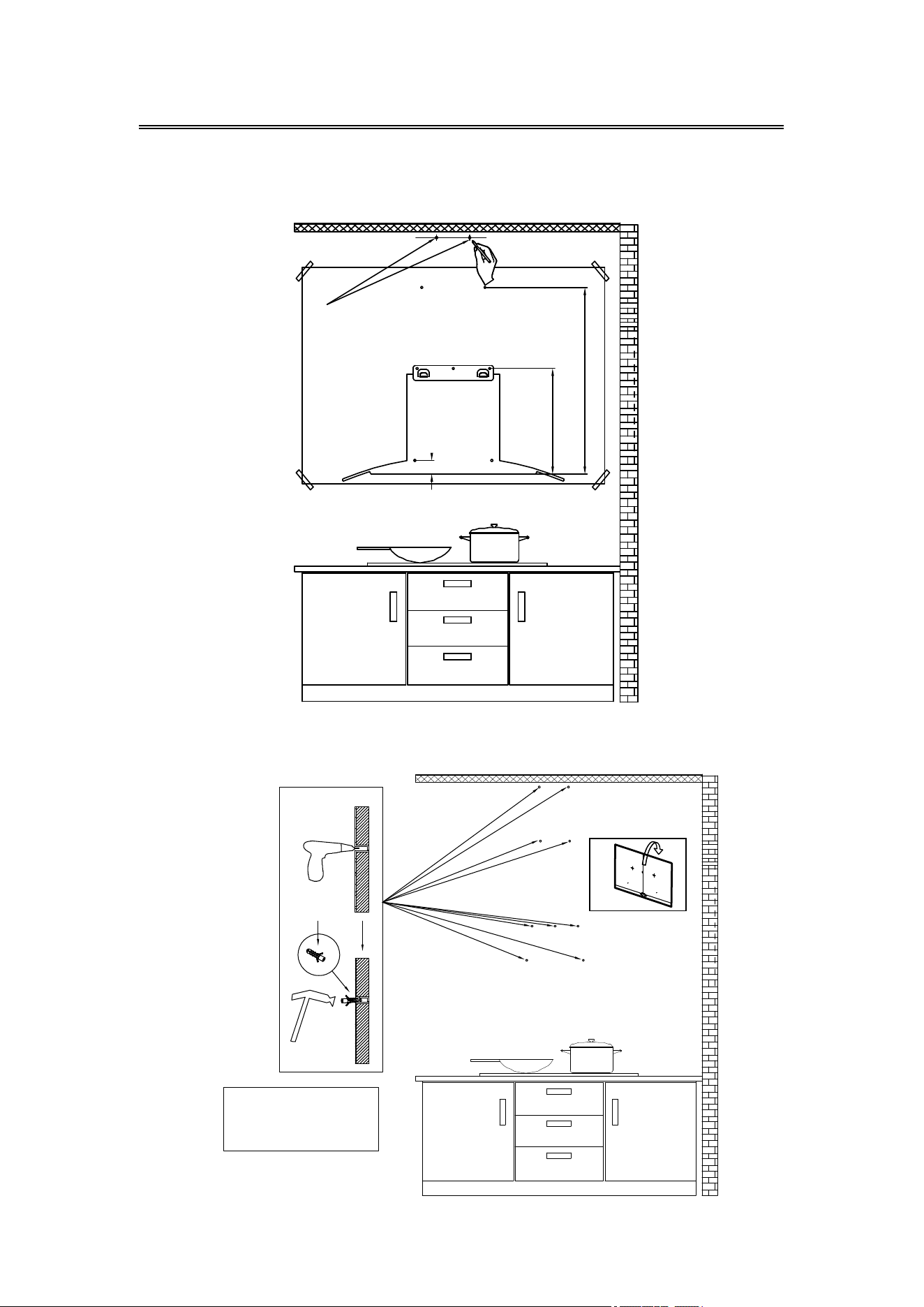
5) Determine the maximum chimney installation height according to the
actual scenario and mark the chimney installation locations
along the center line of the Installation Diagram.
6) Remove the Installation Diagram, drill the holes that have been marked
on the wall with an Electric Drill (8mm drill), and hammer the Wall
Plug into the wall.
Wall Plug
COMPONENTS:
Part 1: Wall Plug X 9
Chimney
installation
locations
10
Installation
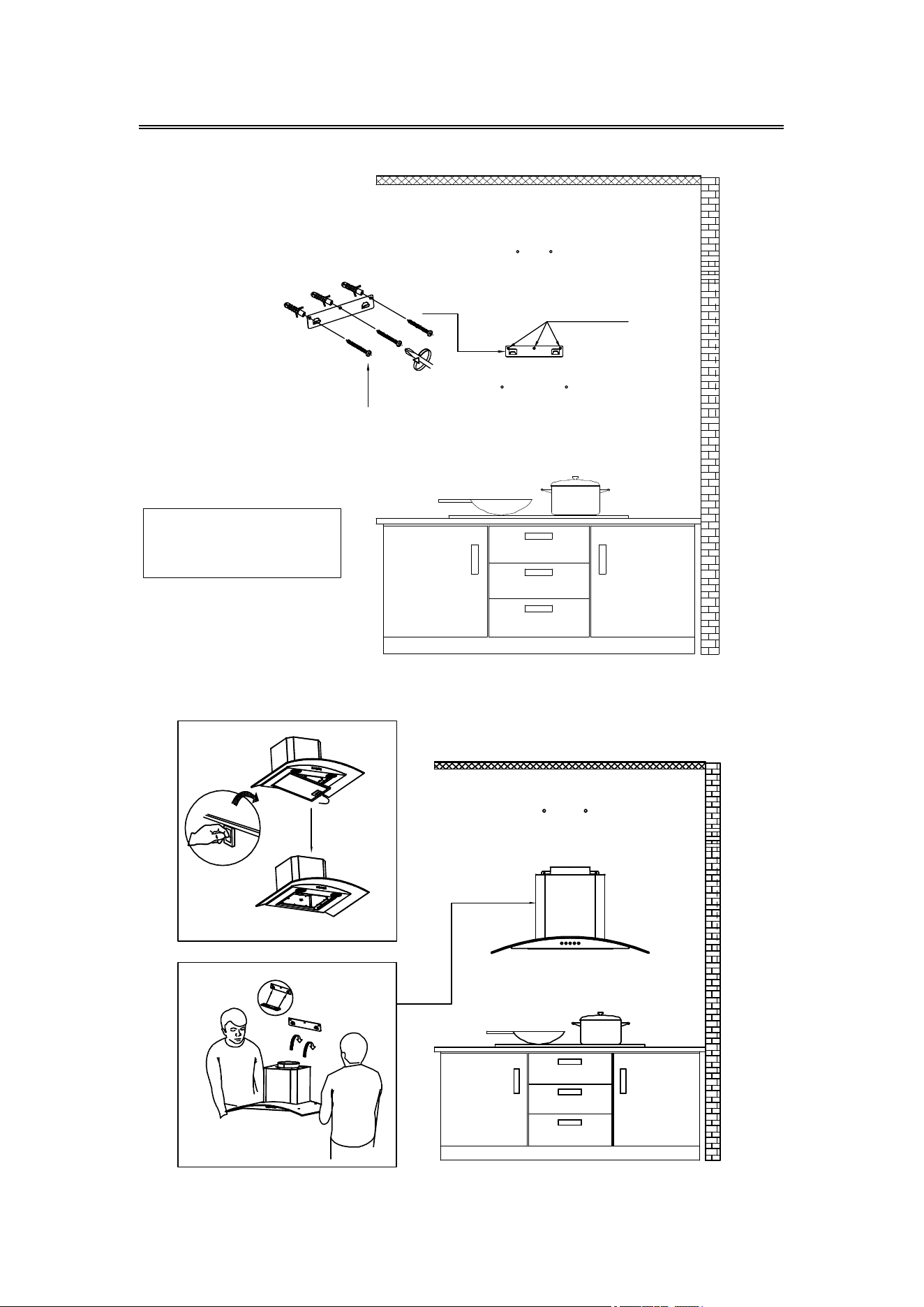
8) Remove the aluminum grease filter and hang the hood on the
corresponding hook of the Wall Bracket.
7) Use three 0.16"*1.18" Screws to fasten the Wall Bracket on the wall.
0.16"*1.18" Screws
0.16"*1.18" Screws
COMPONENTS:
Part 2: 0
.16"*1.18" Screws X 3
Part 10:
W
all Bracket X 1
11
Installation
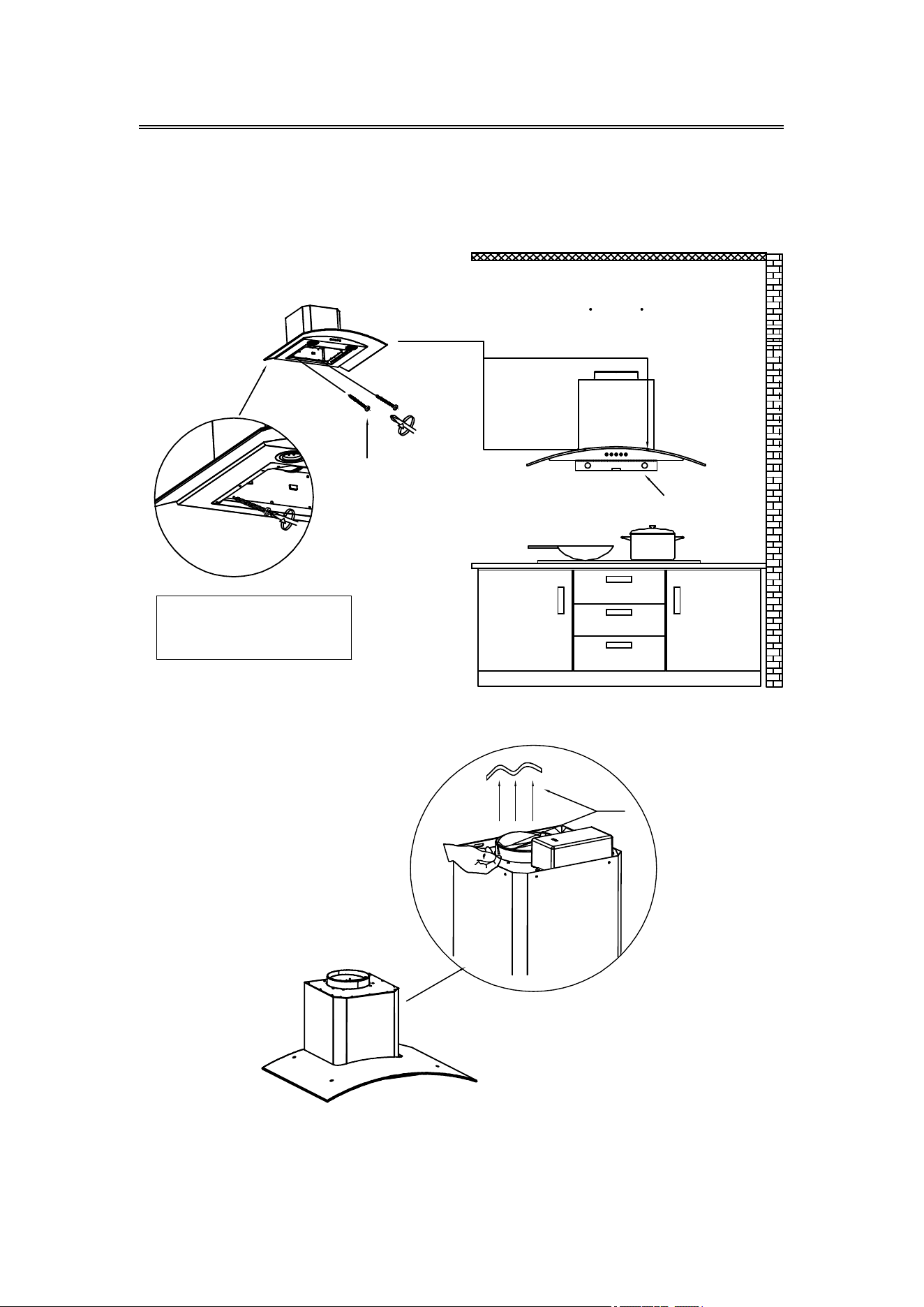
9) Use a Spirit Level Ruler to measure whether the hood is in a horizontal
level, and use two 0.16"*1.18" Screws to lock into the safety hole
position of the hood (not mandatory, according to user's wishes to
choose whether to lock).
10) Tear off the tape from the air outlet.
Tape
NOTE:
Make sure you remove the tape on the damper and check if the
damper opens and closes freely, otherwise it make noises, and
the range hood will be shaking.
COMPONENTS:
Part 2: 0.16"*1.18" Screws X 2
0.16"*1.18"
Screws 2pcs
Spirit Level Ruler
12
Installation
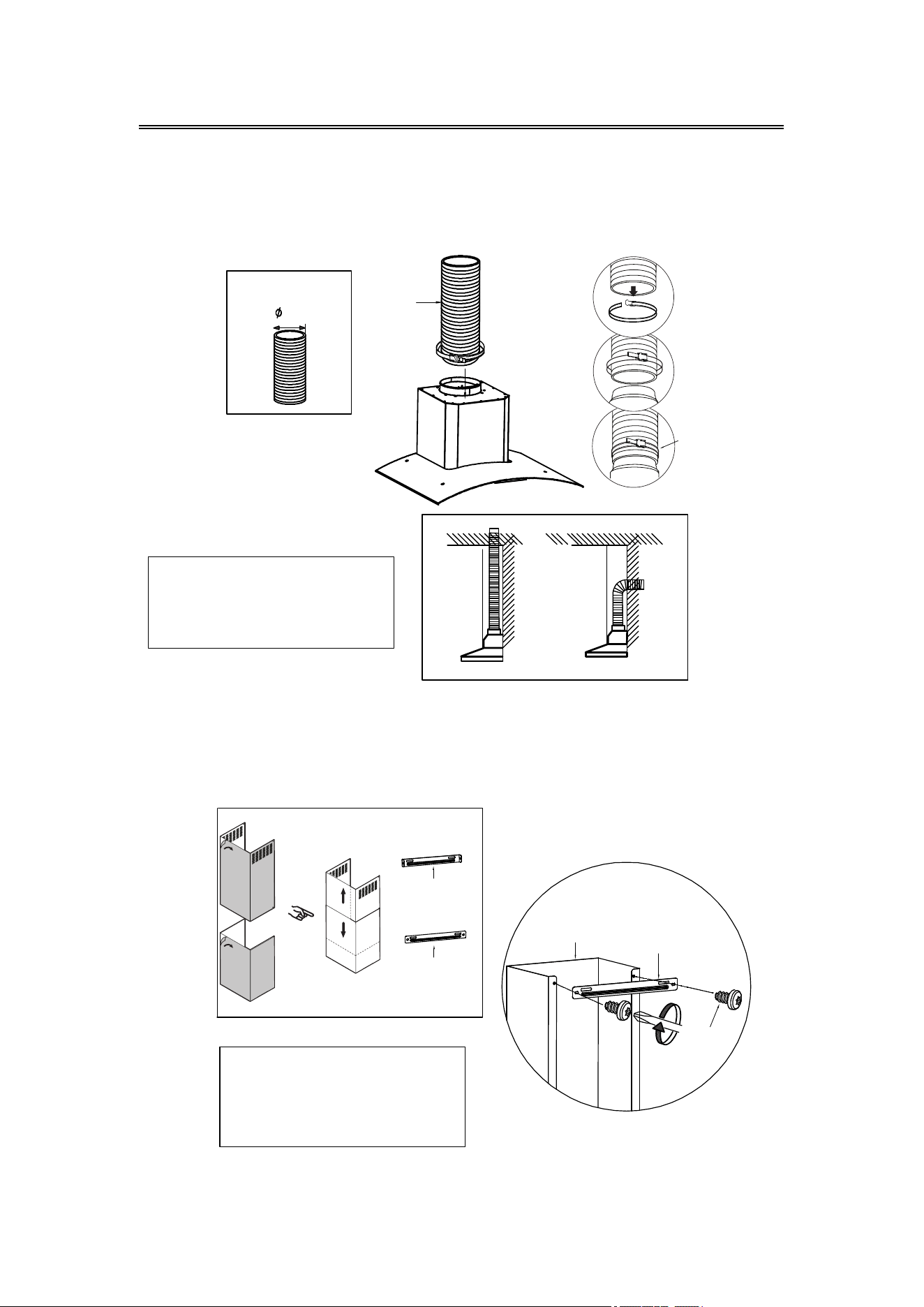
11) Install the Aluminum Exhaust Pipe into the air outlet and lock it with
a Cable Tie; the other end of the Aluminum Exhaust Pipe will be
pulled upward to outdoor and lock it with a Cable Tie (Note: This
step can be ignored if use as recirculation mode with carbon
filter).
12) Use two 0.16"*0.32" Screws to fasten the Lower Chimney Bracket on
the Lower Chimney.
Aluminum
Exhaust Pipe
Lower Chimney
Upper Chimney
Lower
Chimney
Bracket
Upper
Chimney
Bracket
Lower Chimney
Bracket
Lower Chimney
0.16"*0.32"
Screws
Cable Tie
COMPONENTS:
Part 4: Aluminum Exhaust Pipe X 1
Part 5: Cable Tie X 1
COMPONENTS:
Part 8: Lower Chimney Bracket X 1
Part 12: Lower Chimney X 1
Part 3: 0.16"*0.32" Screws X 2
6"
13
Installation
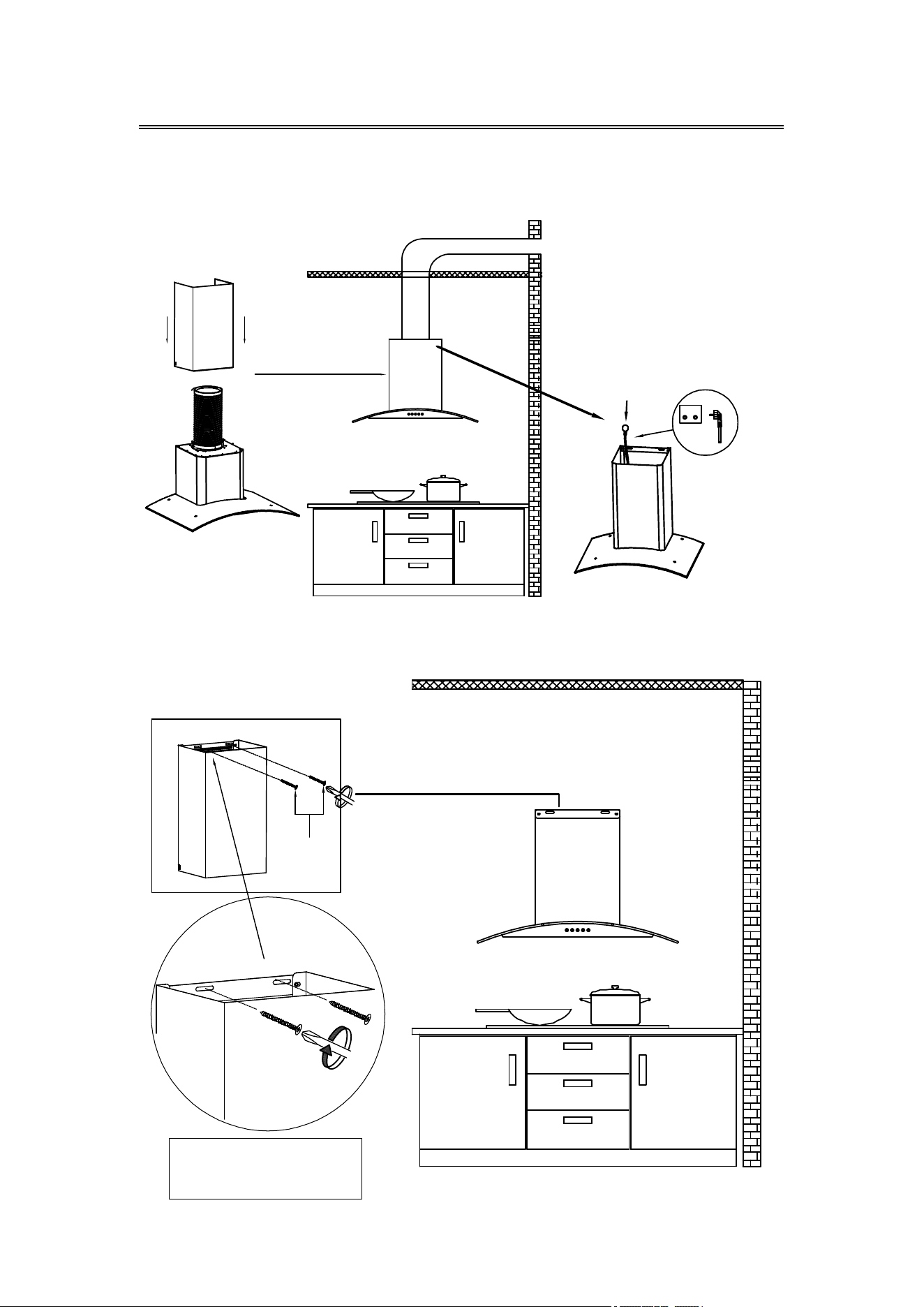
13) Insert the Lower Chimney into the hood (Note: That the power cord
needs to go through the chimney and connect the power).
14) Use two 0.16"*1.18" Screws to lock the Lower Chimney Bracket into
the corresponding positioning holes on the wall.
Power Plug
0.16"*1.18"
Screws
COMPONENTS:
Part 2: 0.16"*1.18" Screws X 2
14
Installation
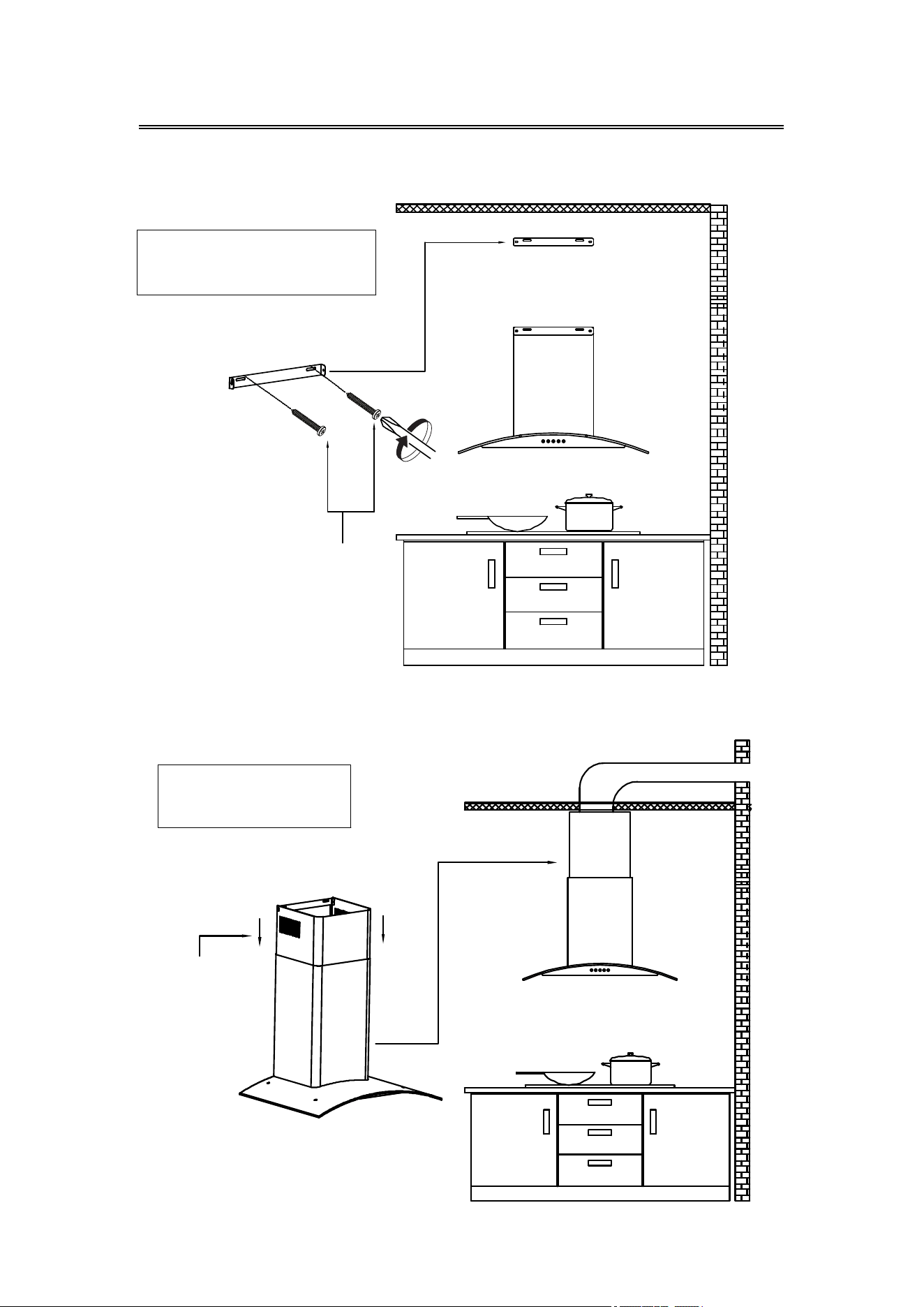
15) Use two 0.16"*1.18" Screws to lock the Upper Chimney Bracket to the
corresponding positioning holes on the wall.
16) Put the Upper Chimney into the Lower Chimney, and then pulled
to the height of the Upper Chimney Bracket.
COMPONENTS:
Part 9: Upper Chimney Bracket X 1
Part 2: 0.16"*1.18" Screws X 2
COMPONENTS:
Part 13: Upper Chimney X 1
0.16"*1.18"
Screws
Upper Chimney
15
Installation
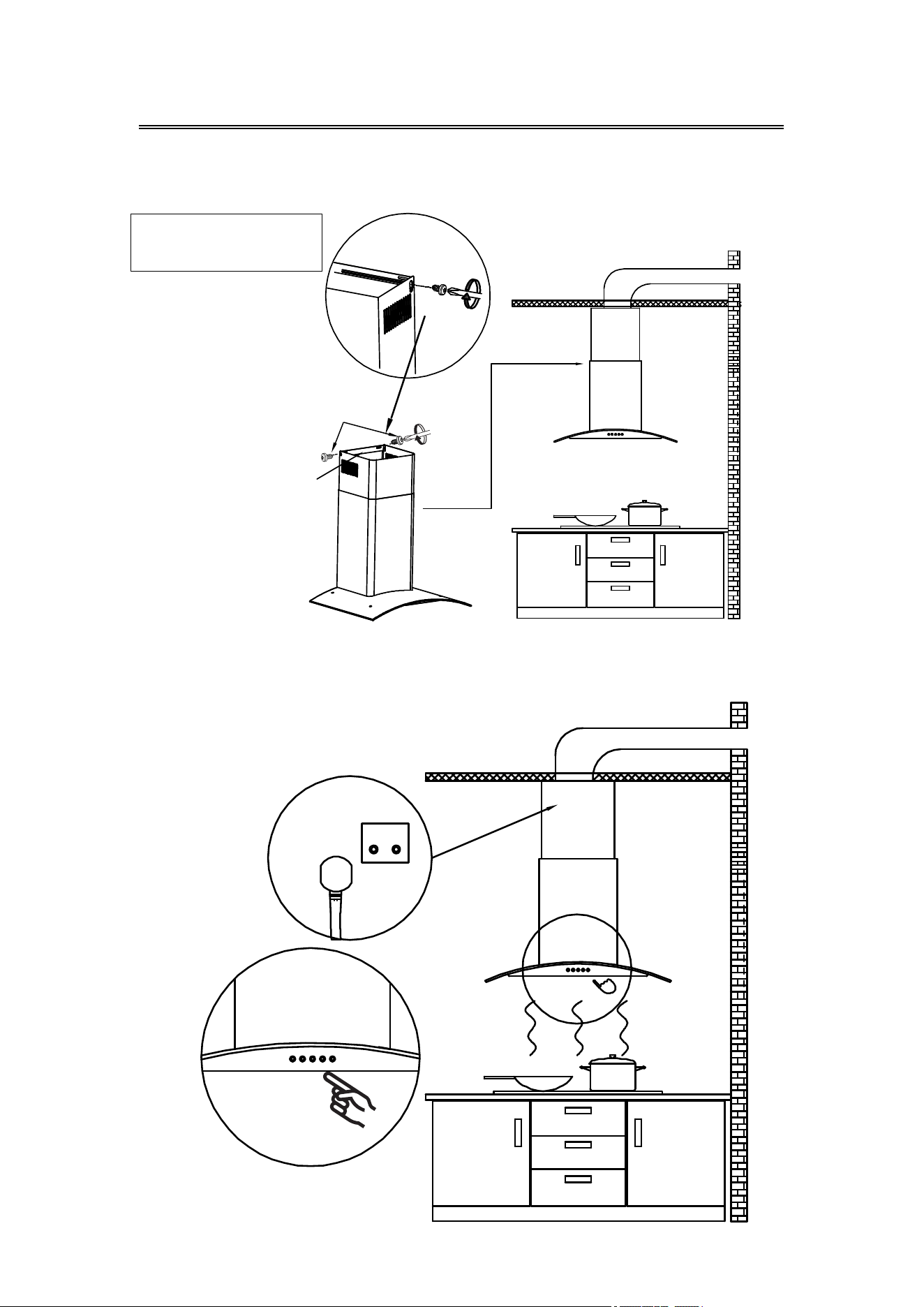
17) Use two 0.16"*0.32" Screws to assemble the Upper Chimney on the
Upper Chimney Bracket.
18) Turn the LED lights on/off, and test whether the functions are working
properly.
COMPONENTS:
Part 3: 0.16"*0.32" Screws X 2
4*8mm Screws
Upper
Chimney
Bracket
16
Installation
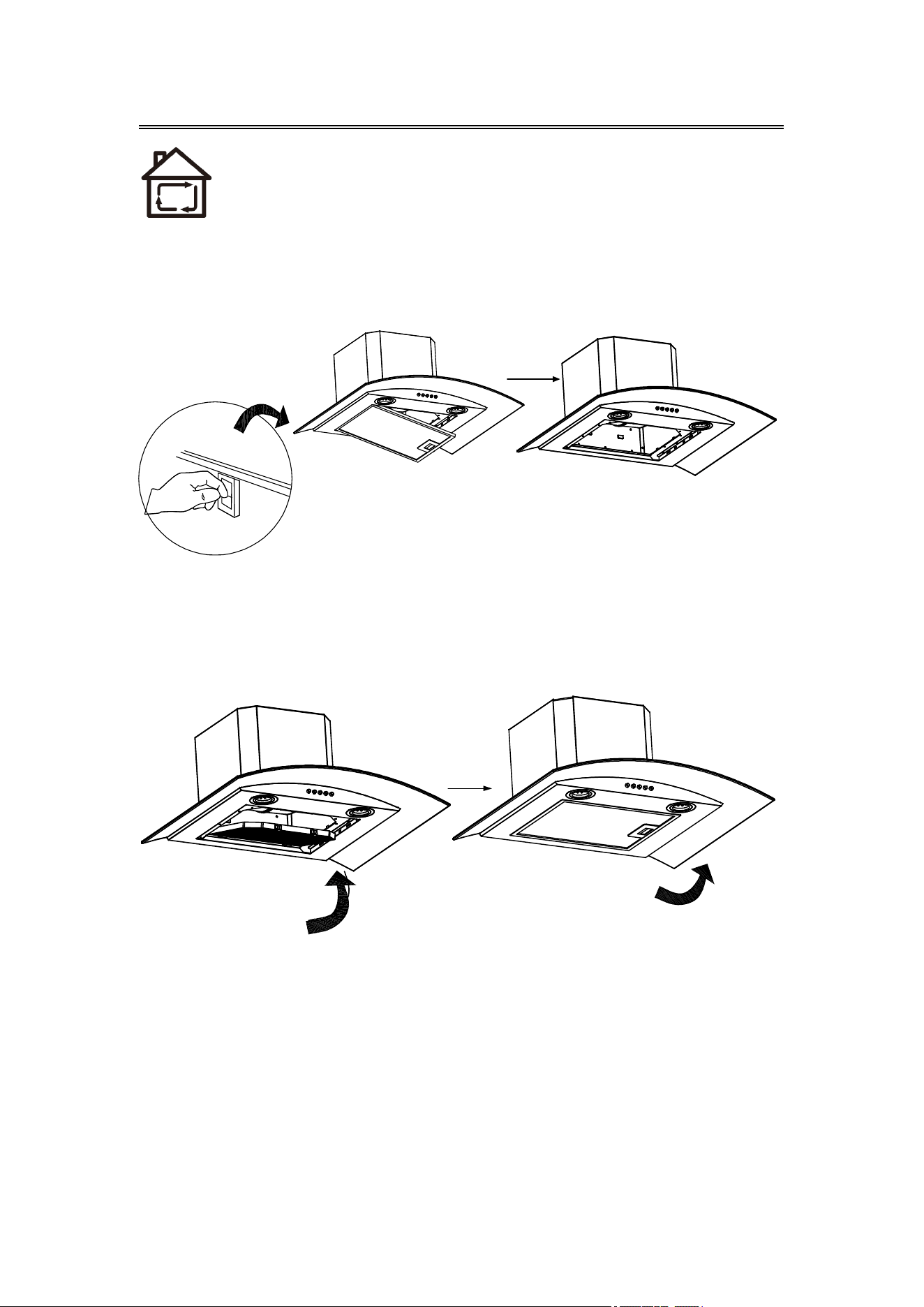
Carbon Filter Installation(Recirculation):
1. Carbon filter can be used to trap odors.
In order to install the carbon filter, the grease filter should be
detached first. Press the lock and pull it down.
NOTE:
Make sure the carbon filter is securely locked.
When the carbon filter is installed, the suction of the range hood
will be reduced.
The carbon filter should be changed every 2-4 months
depending on the conditions of use.
2. Insert the carbon filter into the specified position of the range hood
as shown below (Note the differences between the front and back
and the direction of the carbon filter), then push inside the range
hood. Push the two lock catches on the carbon filter into the
specified position.
3. If need to replace, press on the lock catches and pull the carbon filter,
then follow the steps above to install a new carbon filter.
17
Operation
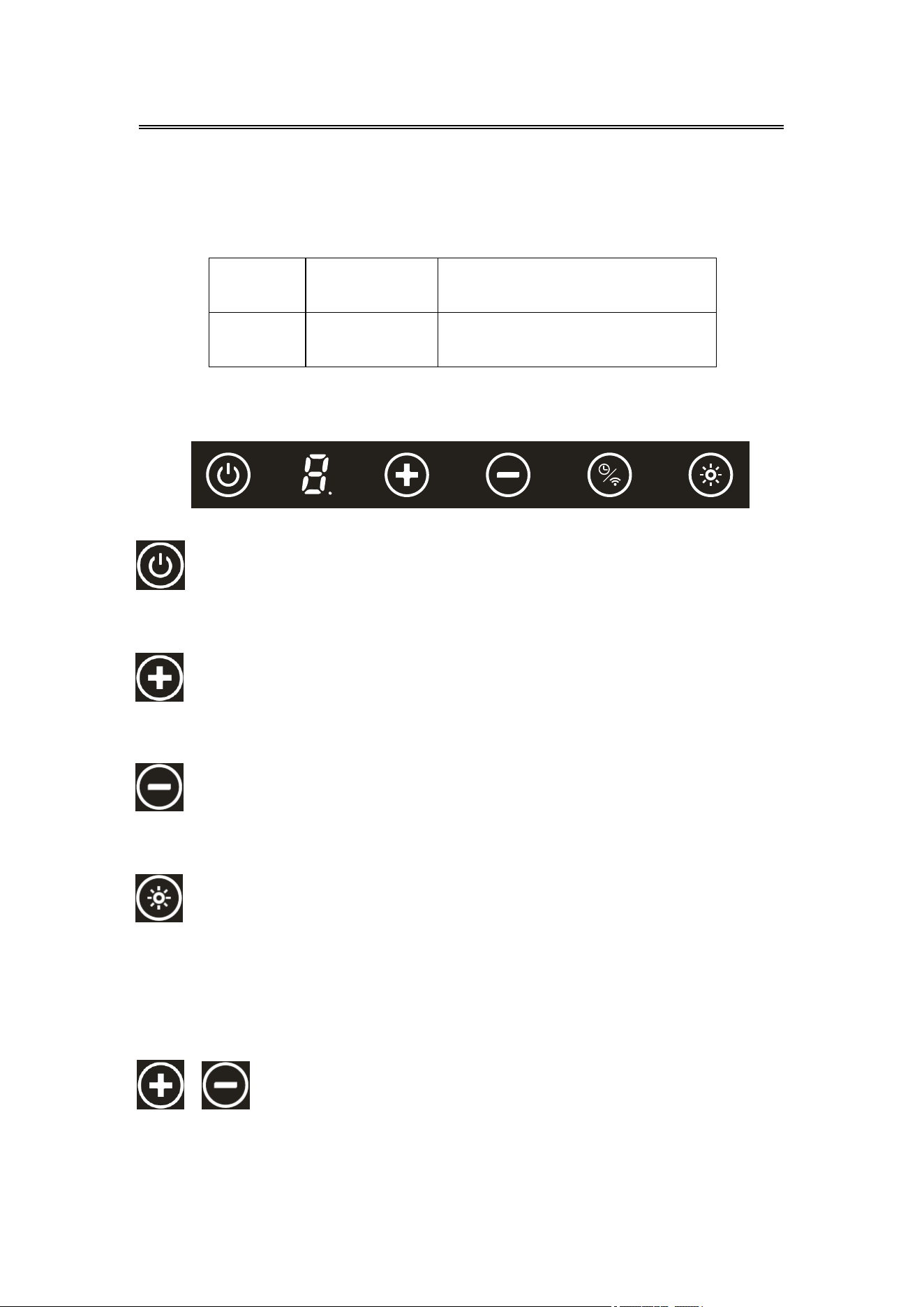
Touch control
Power key:
It's used to turn on/off the power. Press 2S to power on, press 1S to
power off.
Added level key:
Indicator show level adjustment 1-2-3-0-1, Show 0 for turning off,
Loosen hand turn off orange color out-ring delay 5 seconds.
Reduced level key:
Indicator show level adjustment 3-2-1-0-3, Show 0 for turning off,
Loosen hand and delay 5 seconds turn off orange color out-ring.
Turn on/off Switch key:
When the range hood is turned on:
Press once, turn on the LED light in level 1, orange out ring light will be
on; Press for the second time, turn on the LED light in level 2,increase
brightness; Press for the third time, turn off the LED light and the orange
out ring light.
Setting clean & fresh function:
After turning on, push “+” and “—” button 3 seconds, go into clean &
fresh function, “+” and “—” button orange color out-ring light will be on,
range hood go into one level clean&fresh function and not influence on
function operation, same method could used for turn off clean & fresh
function, turn off “+” and “—” button orange out-ring light will be off.
Always turn your hood on before you begin cooking to establish an
air flow in the kitchen.
Operate the
hood as follows:
SKU
CAS75502
CAS75502W
Control
Touch control
Touch+Wifi+App+Voice control
with ALEXA and Google Home
18
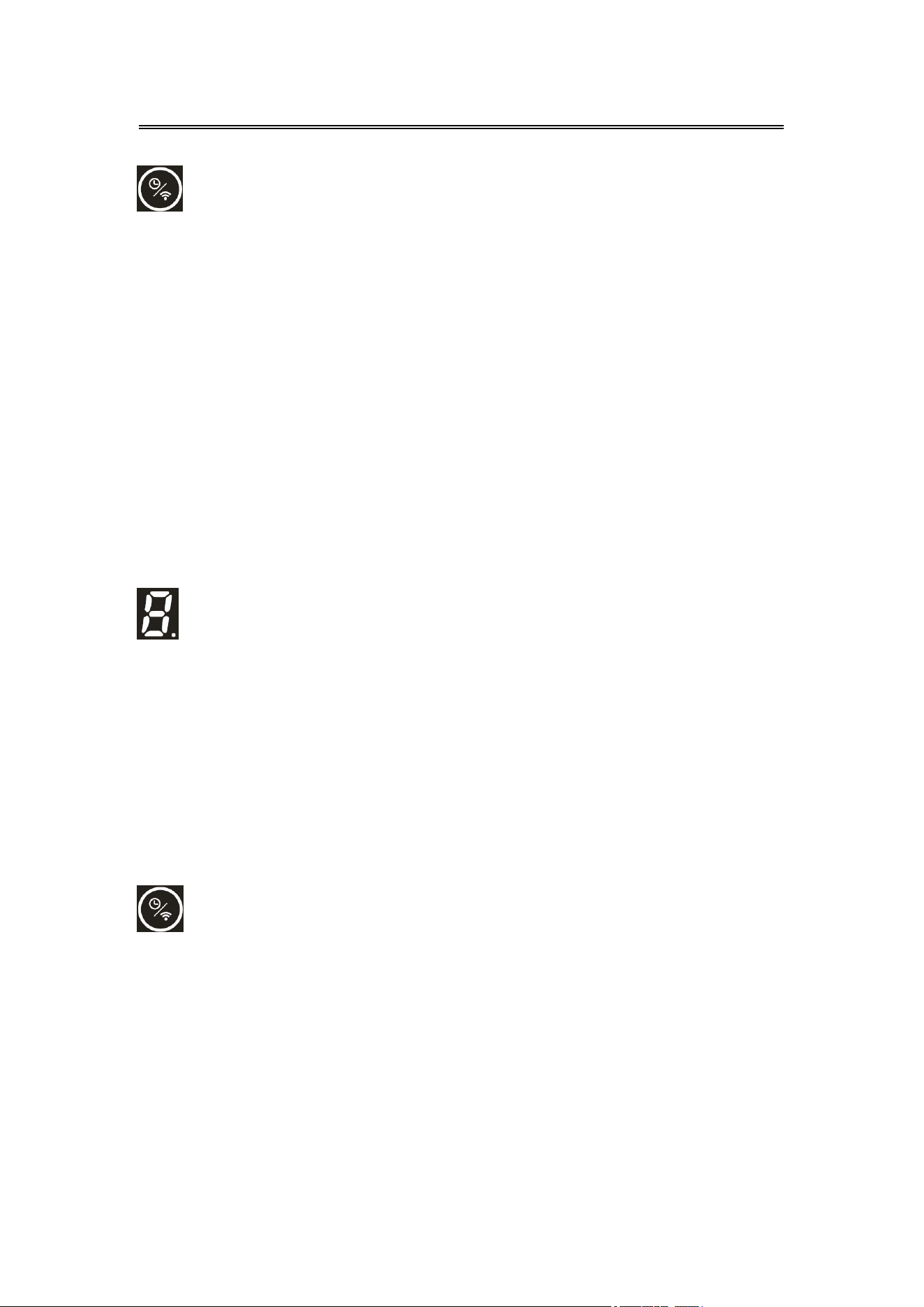
Motor work about 90 hours and remind cleaning filter, show that
remind decimal point blink slowly in indicator lower right. Long push
timer key 5 seconds and cancel reminder, turn off decimal point, now
working, record time again.
Motor work about 270 hours, decimal point light for long time in
indicator lower right, remind changing filter, long push delay key 5
seconds and cancel reminder, turn off decimal point, record time again.
Delay function:
When range hood working, could set delay function.
Push first time and indicator show1, for delaying 5 minutes;
Push second time and indicator show 2, for delaying 10 minutes;
Push third time and indicator show 3, for delaying 15 minutes;
Push fourth time and indicator show 4, for delaying 20 minutes;
Push fifth time and indicator show 0, after 5 seconds in level 0 and
drop out delay function automatically.
When setting delay function for level 1-4, indicator blink, after 5
seconds confirm working automatically, After confirming work jump
to motor level showing automatically, when delay function work,
always show orange color out-ring. When need to check delay level,
shortly push one time delay key, show current working level. When
delay time is up, turn off all function automatically.
Wifi pairing mode
Long press the Delay function+WIFI button for 5 seconds,you will hear the
beeping sound, and all orange out ring lights will be flashing, enter Wi-Fi
pairing mode, use the “smart life app”on your cell phone to pair the range
hood with your Wi-Fi, you will heard a beep sound after successfully
pairing the device; all orange out ring lights will be on for 5 seconds, then
your range hood will be in stand by mode. If you do not complete the
pairing process within 5 minuets, all orange out ring lights will stop
flashing, after beep sound it will exit the Wi-Fi pairing mode.
After successfully pairing your device, press the light button again for 5
seconds to disconnect the wifi connection and clear the wifi
configuration,( Note: after you disconnect the Wi-Fi connection, you will
not be able to control your range hood with the “Smart Life App”)
Operation
(Only support CAS75502W)
19
Smart Life APP
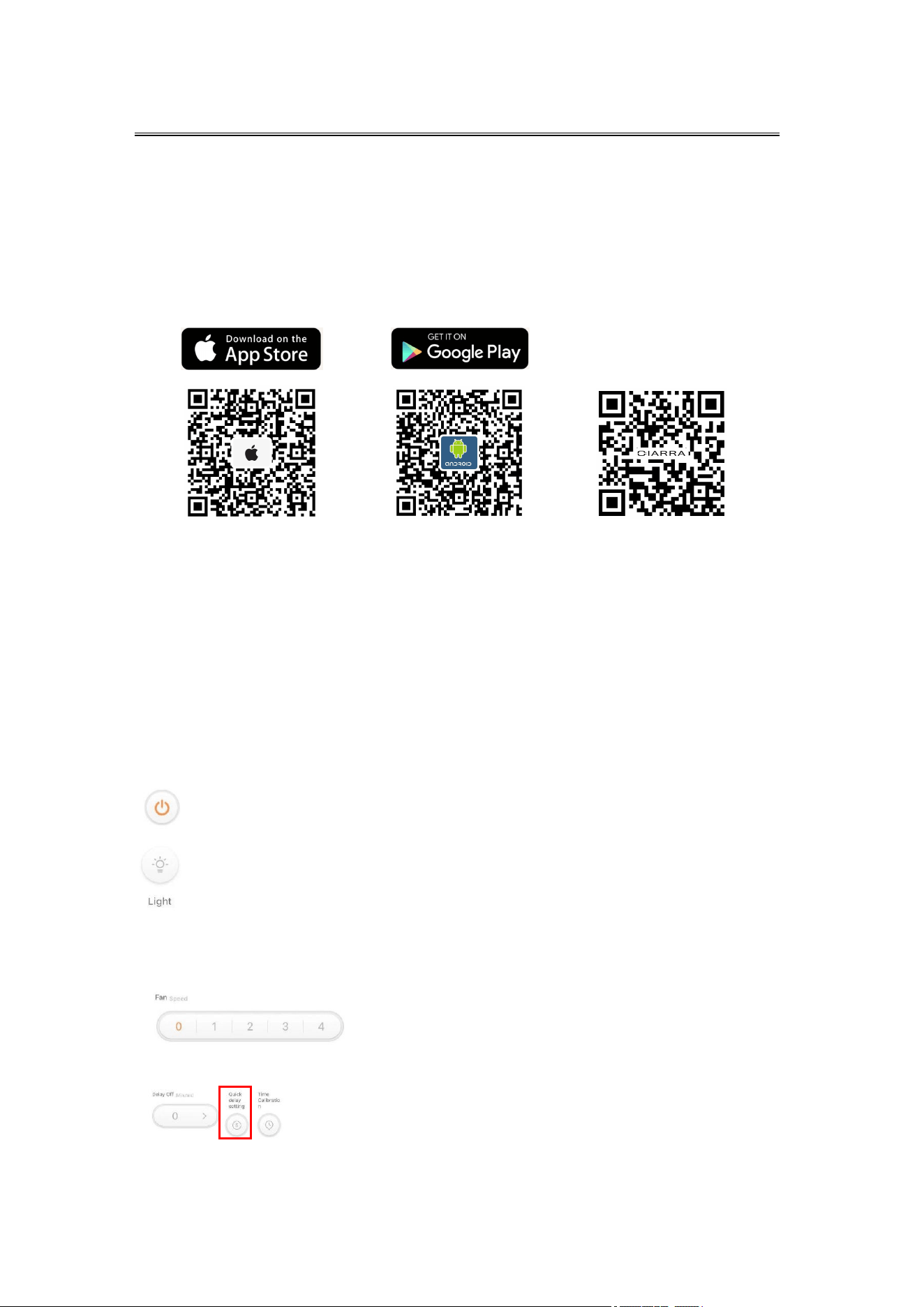
1. You must use Android phone or iPhone to download and use this APP.
2. Search “Smart Life” in the Google Play store for Android or IOS App
Store to download and install the APP.
Range Hood and Smart Life APP pairing
1. When you log in to Smart Life APP for the first time, you need to
create a new account. When creating a new account, follow the app
prompts to register.
2. If you already have an account, you can use existing account to log in.
3. After logging in, follow the steps below to connect the range hood
(the operating procedures of Android and IOS systems are the same).
Video Guide
Light Button
Press once, turn on the LED light in level 1, orange out ring light will
be on; Press for the second time, turn on the LED light in level
2,increase brightness; Press for the third time, turn off the LED
light and the orange out ring light.
Fan Speed Button
You can control the corresponding gears of 1-2-3-P on the range hood.
Quick Delay Setting
When range hood is working, you can set the delay timer through
delay function.
Push this button, the range hood will stop working in 5 minutes.
About operation interface:
ON/Off Button
Operation
(Only support CAS75502W)
Download and Intallation of Smart Life APP
20
Operation
21
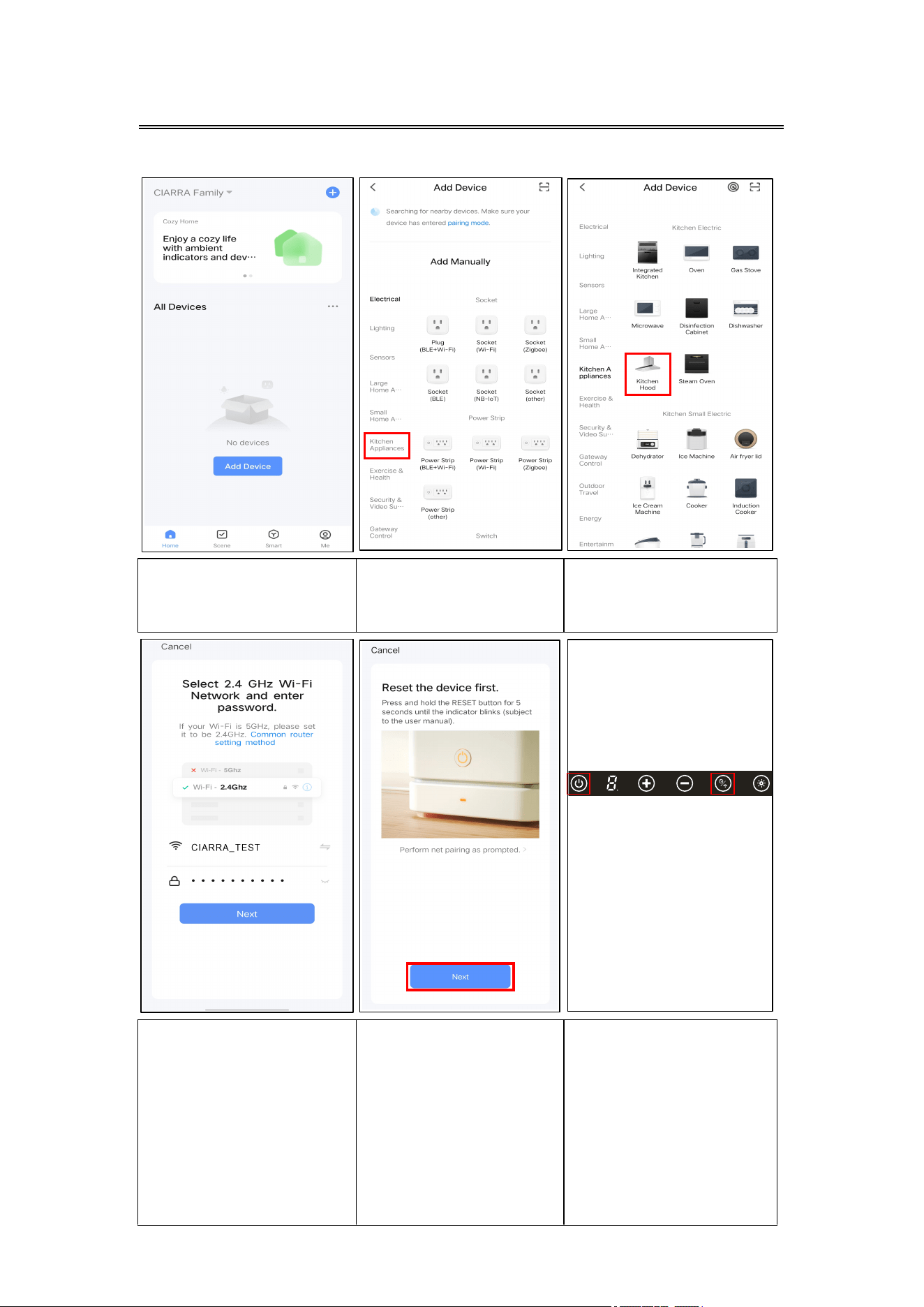
1. Open the smart life
app, Click Add Device.
2. Choose kitchen
appliances from the
menu bar on the left.
3. Choose kitchen
hood.
4. Connect your
home Wi-Fi and
enter the password,
then click Confirm.
5. Cl
ick "Next" to go
to the next step.
6. P
ress 2S to power
on,and press the “Delay
function+WIFI” button
for 5 seconds, you will
hear the beeping sound,
and all orange out ring
lights will be flashing,
enter Wi-Fi pairing
mode.
Operation
22
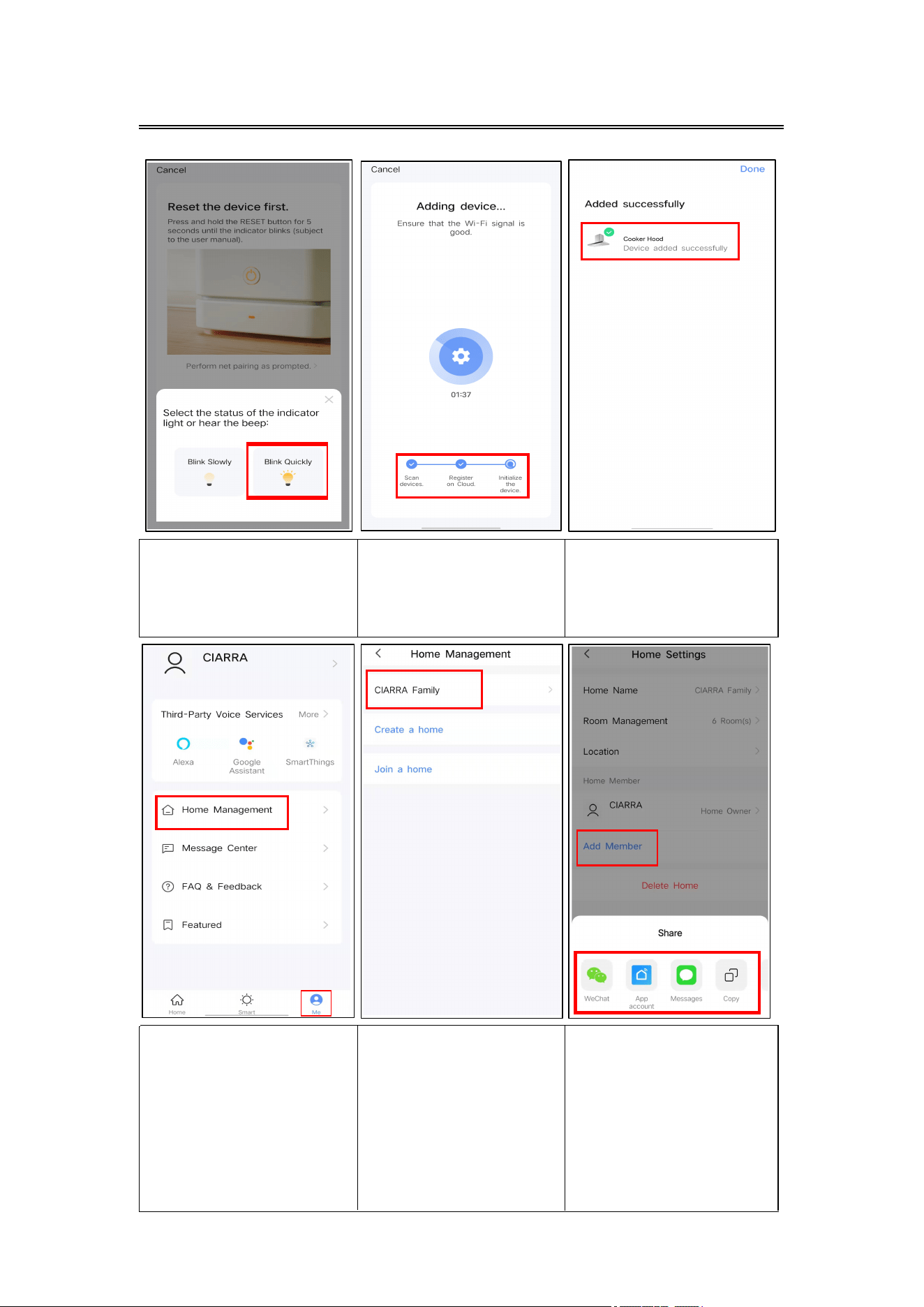
7. Click “Blink Quickly”
and click “Next”.
8. Adding device...
9. When
you
see this
interface it means you
have successfully
connected your device.
10.Click "Me" and
select "Home
Management".
11. You can create a
home or join a home
in this area. Click "my
family
management".
12. Select "Add
members" and share to
members, after members
are successfully join the
same family, they can
remotely control "Range
Hood" .
1. Precondition:
You must have internet access, your devices should be connecting
to the same Wi-Fi network.
An Echo device, including Echo, Echo Tap, or Echo Dot.
Amazon account, if you do not have one; please register one first.
Have “Smart Life App” and account.
P.S (use Smart Life App to change your device’s name so “Echo” can
recognize it) Make sure your account is paired with the range hood;
the range hood’s name should be recognizable by “Echo” device.
For example (Alex’s range hood, Range hood, etc).
2. Download Smart Life APP and add smart range hood devices.
3. Configure with Amazon Echo.
Follow Amazon Echo’s instruction to set up your Echo device.
4. Link your Smart Life account to Alexa.
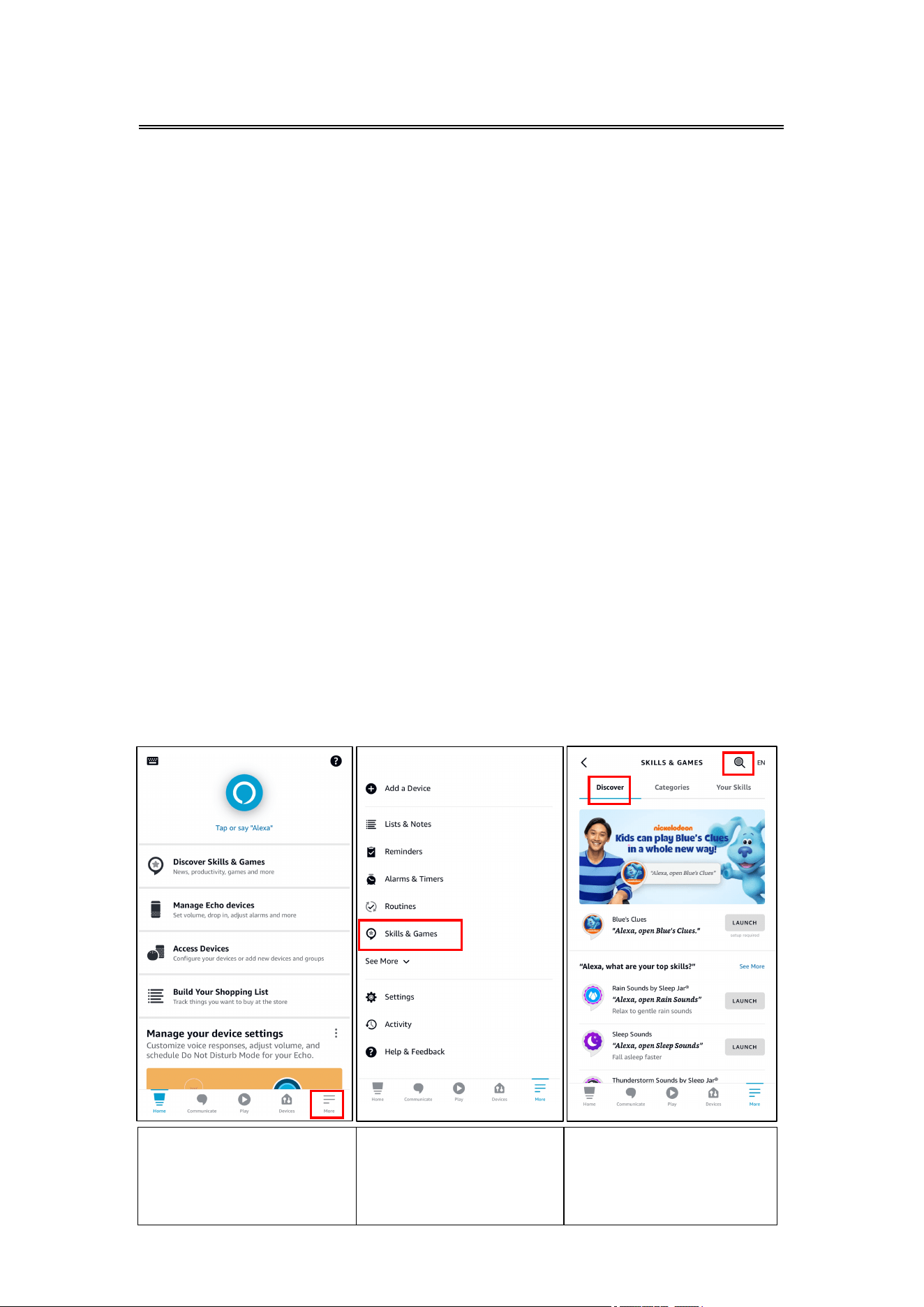
1. Open the "Amazon
Alexa" app and click
"More" in the lower right
corner.
2. Click "Skills&Games"
to go to the next step.
3. Select "Discover" and
click search icon in the
upper right corner to
enter the search page.
Operation
Voice control with ALEXA
(Only support CAS75502W)
23
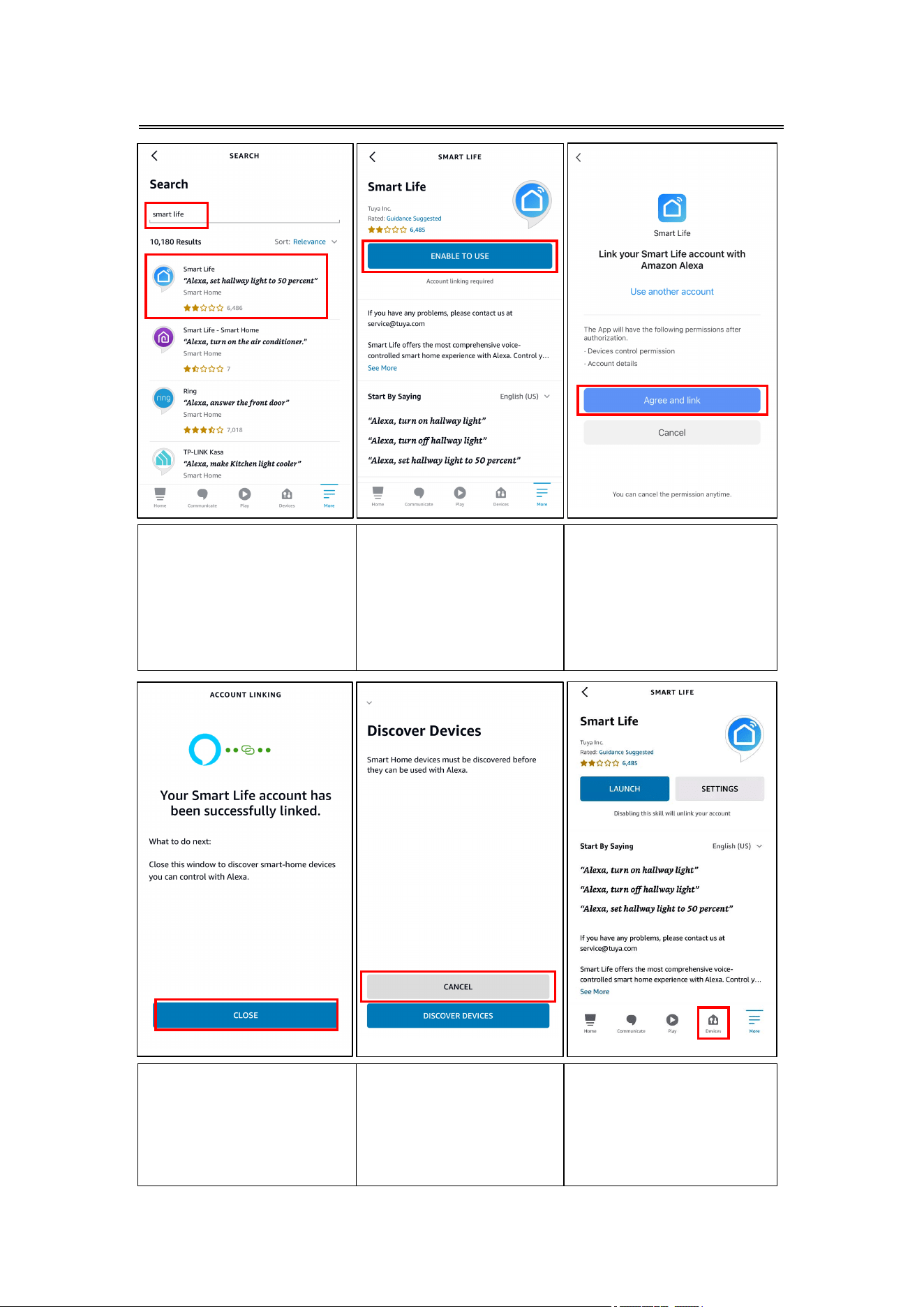
4. Enter "Smart Life" in
the search box, find
"Smart Life" (the icon as
shown in diagram) in the
search list, and click to go
to the next step.
5. Click "ENABLE TO USE"
to go to the next step.
6. Click on "Agree and
link" to go to the next
step.
7. When "Your Smart Life
account has been
successfully linked" is
displayed, click "CLOSE"
to go to the next step.
8. Click on "CANCEL" to
go to the next step.
9. Click to enter
the"Devices" interface.
Operation
24
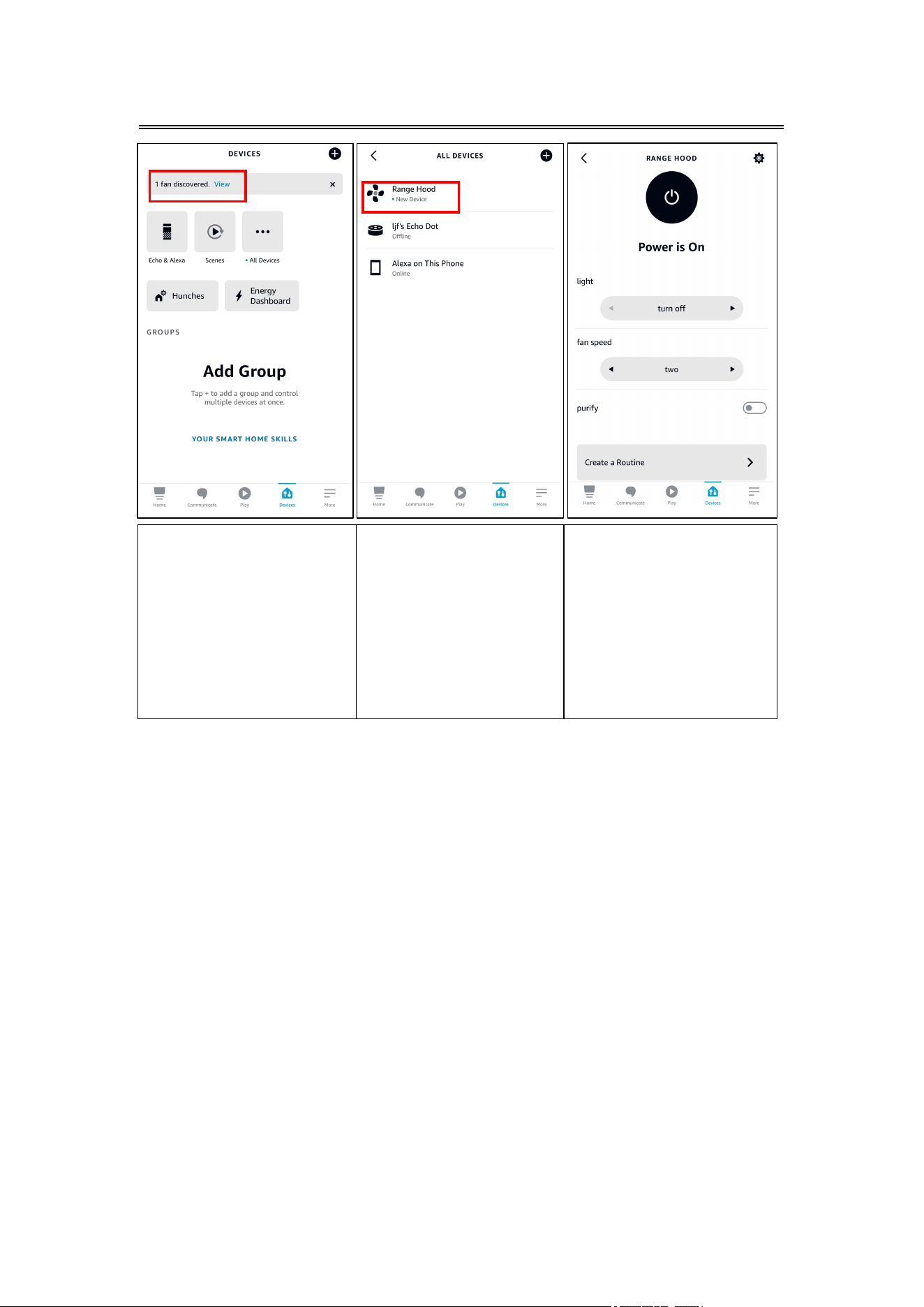
10. When"1 Fan appears"
is displayed, click "View
"to go to the next step.
11. Click on "Range
Hood" to go to the next
step.
12. Now that the Range
Hood has been added
successfully, you can
remotely control various
functions of the Range
Hood on this interface, or
use Alexa Echo to voice
control the Range Hood.
5. Notice:
"DISCOVER DEVICES" can only discover those devices which have been
paired with the "Smart Life App"
When you change the name of the device in the "Smart Life App", Echo
has to rediscover the device, otherwise you can not control it.
6. Voice control devices
Now, you can use Echo to control your device. You can control your
range hood through the following:
Alexa, turn on/off <device name>.
Alexa, what is the fan speed on <device name>?
Alexa, set <deviceName> fan speed to(one,two,three,off)
Alexa, what is the light on DEVICENAME?
Alexa, set DEVICENAME light to (Turn off, Level 1, Level 2)
Alexa, what is the purify on DEVICENAME?
Alexa, turn on purify on DEVICENAME.
Alexa, turn off purify on DEVICENAME.
Operation
25
1. Precondition:
Before controlling the device with Google Home, please make sure you
meet the following terms:
You must have internet access, your devices should be connecting
to the same Wi-Fi network.
One Google Home device or an Android phone with Google
Assistant.
Newest version of Google Home App.
Newest version of Google App (only for Android).
You must have a google account.
You must set 'English US' as the language of the phone.
Smart Device.
2. Download Smart Life APP and add smart range hood devices.
3. Configure Google Home.
Follow Google Home’s instruction to set up your Google Home device.
4. Link your Smart Life account to Google Home.
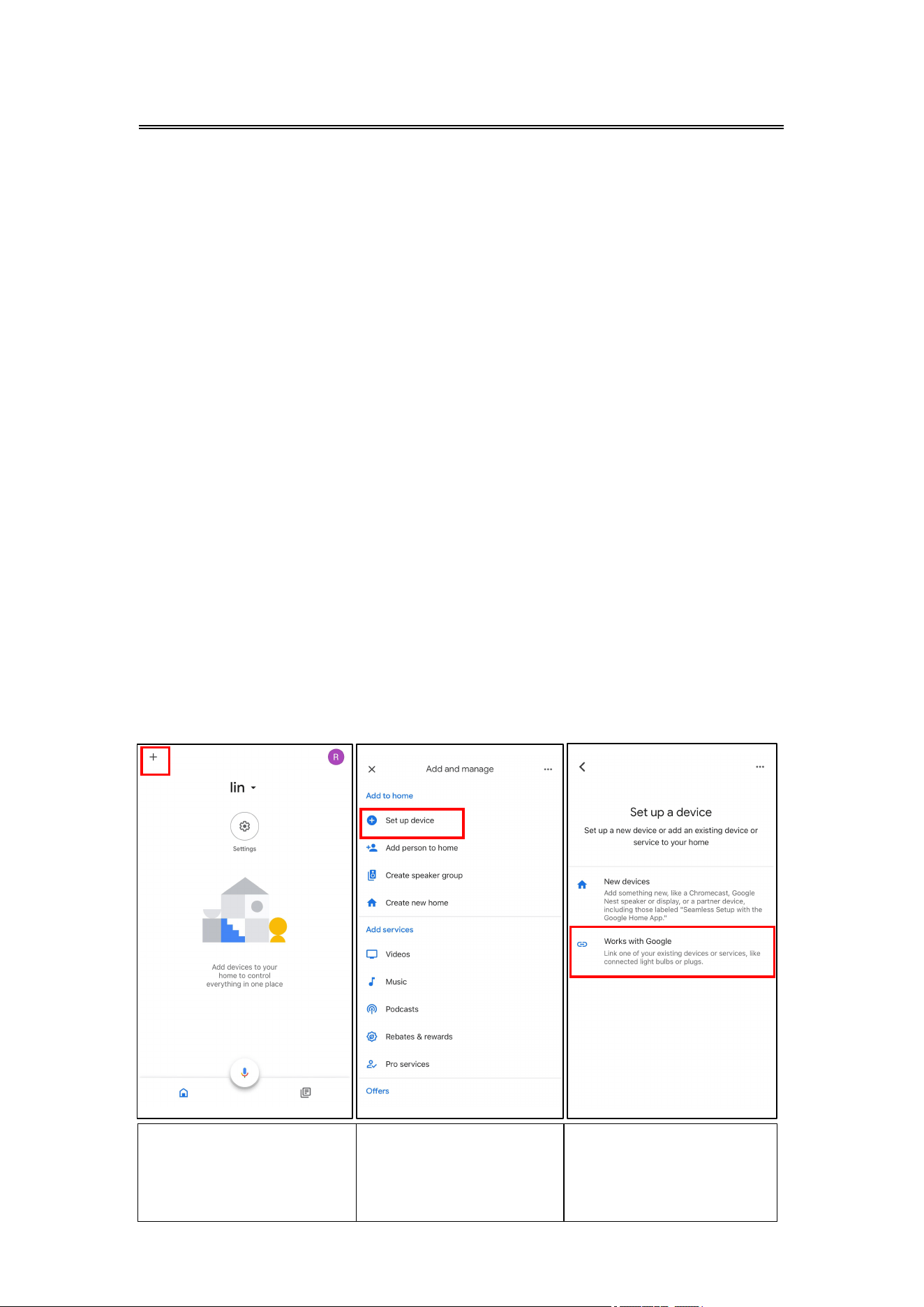
1. Open the "Google Home"
app and click the "+" button
in the upper left corner to
go to the next step.
2. Click on "Set up
device" to go to the
next step.
3. Click on "Works with
Google" to go to the
next step.
Operation
Voice control with Google Home
(Only support CAS75502W)
26
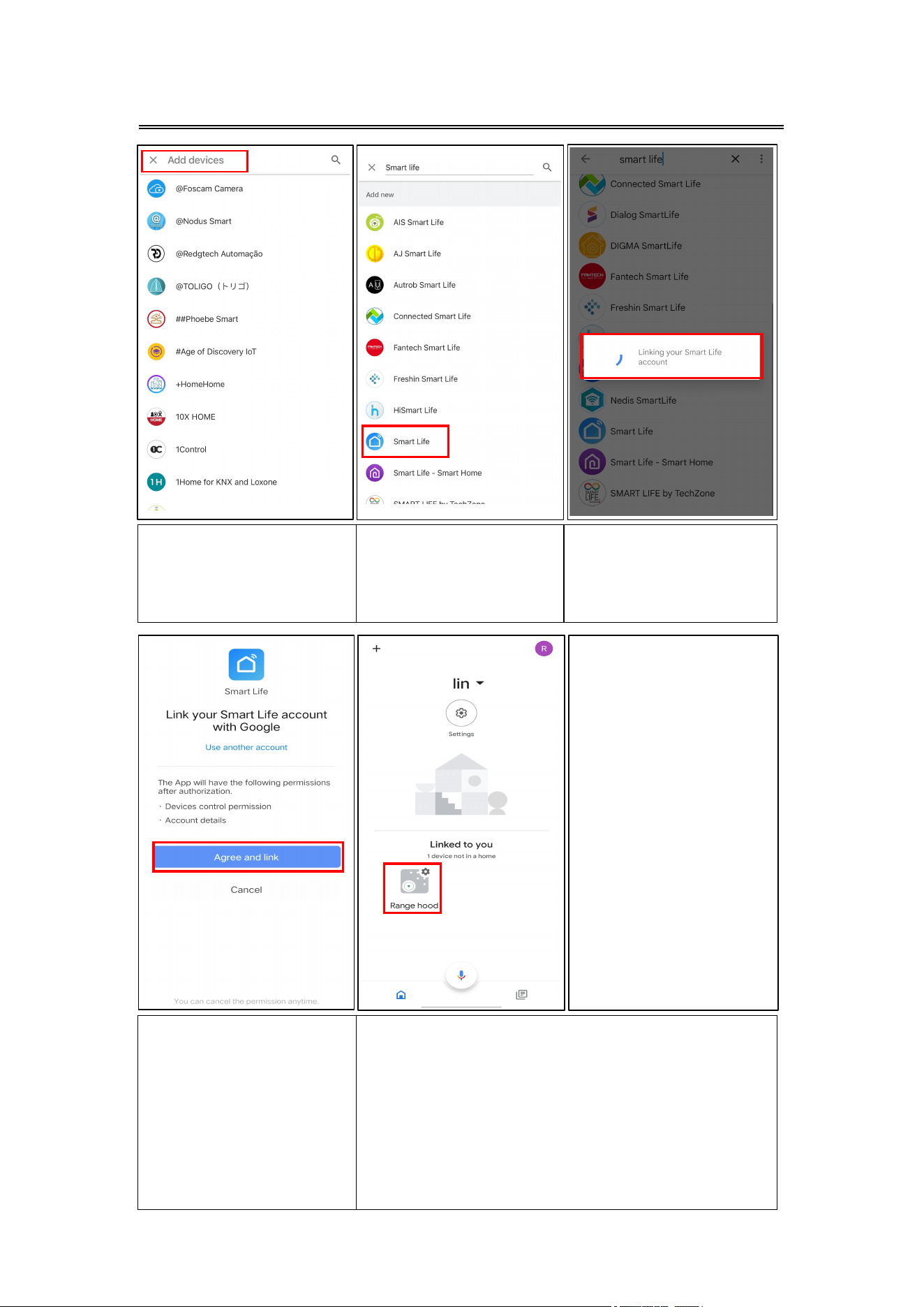
4. Enter "Smart Life" in
the search box, perform
your search.
5. Find "Smart Life" (the
icon as shown in diagram)
in the search list,click to
go to the next step.
6. When "Linking your
Smart Life account" is
displayed,the page will
loads to the next step.
7. Click on "Agree and link".
8. The Home page of Google Home
shows the name of the added device
"Range Hood". Now that the device has
been added successfully, you can use
Google Voice Assistant to control your
Range Hood.
Operation
27

5. Notice:
"DISCOVER DEVICES" can only discover those devices which have
been paired with the "Smart Life App"
When you change the name of the device in the "Smart Life App",
Google home has to rediscover the device, otherwise you can not
control it.
6. Voice control devices
Now, you can use Google Home to control your device. You can control
your range hood through the following:
Hey Google, turn on/off <device name>.
Hey Google, what is the fan speed on <device name>?
Hey Google, set <deviceName> fan speed to(one,two,three,off)
Hey Google, what is the light on DEVICENAME?
Hey Google, set DEVICENAME light to (Turn off, Level 1, Level 2)
Hey Google, what is the purify on DEVICENAME?
Hey Google, turn on purify on DEVICENAME.
Hey Google, turn off purify on DEVICENAME.
Operation
28

Cleaning and Maintenance
Proper maintenance of the Range Hood will assure proper performance
of the unit. Before cleaning unit, unplug or disconnect the range hood
from the power supply.
GREASE FILTERS
The grease filters should be cleaned frequently. Can be cleaned in
dishwasher under high temperature without using any detergent.
CARBON FILTER
The carbon filter should be changed every 2-4 months depending on
the conditions of use. Replace more often if your cooking style
generates lots of greases, such as stir frying. These filters are not
washable and cannot be reused. Refer to installation instructions
included with a carbon filter.
STAINLESS STEEL CLEANING
Do:
Regularly clean it with a cloth or rag soaked with warm water and
mild soap or liquid dish detergent.
You may also use a specialized household stainless steel cleaner.
Don't:
Use any steel or stainless-steel wool or any other scrapers to
remove stubborn dirt.
Use any harsh or abrasive cleansers.
Let plaster dust or any other construction residues reach the hood.
During construction/ renovation, cover the range hood to make sure
no dust sticks to the stainless-steel surface.
Avoid when choosing a detergent:
Any cleaners that contain bleach will attack stainless steel.
Any products containing: chloride, fluoride, iodide, bromide will
deteriorate surfaces rapidly.
Any combustible products used for cleaning such as acetone,
alcohol, ether, benzol, etc., are highly explosive and should never
be used close to a range.
PAINTED FINISH CLEANING:
Clean with warm water and mild detergent only. If discoloration occurs,
use a finish polish such as automotive polish. (DO NOT use a rough
abrasive cleaner or porcelain cleaner.)
29
Cleaning and Maintenance
LED REPLACEMENT
Rectangle LED lamp:
CAUTION
:
Before cleaning or repairing and replacing accessories, please make
sure to shut down the power before operation, so as to avoid electric
shock, damage to human body and even endanger life safety!
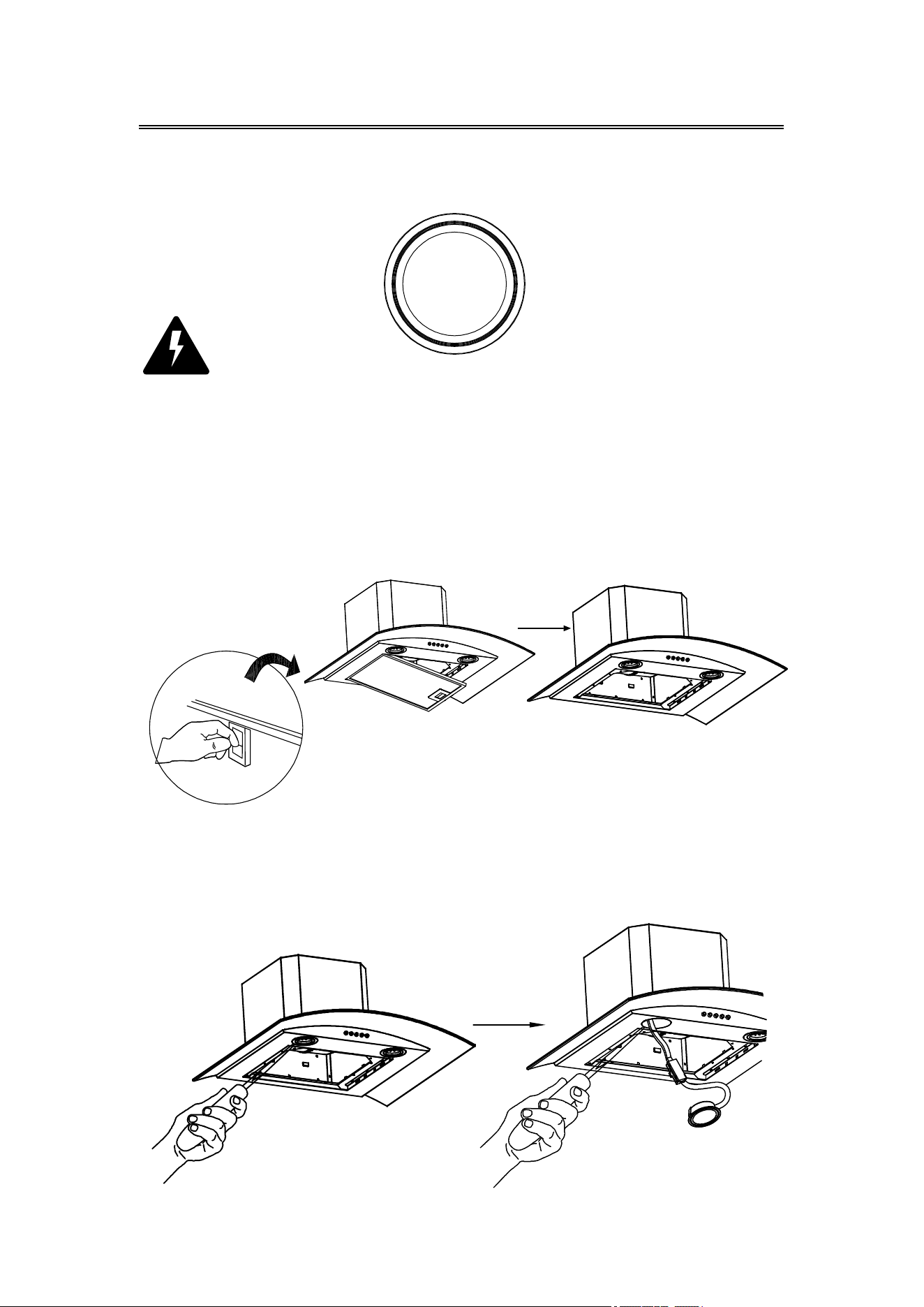
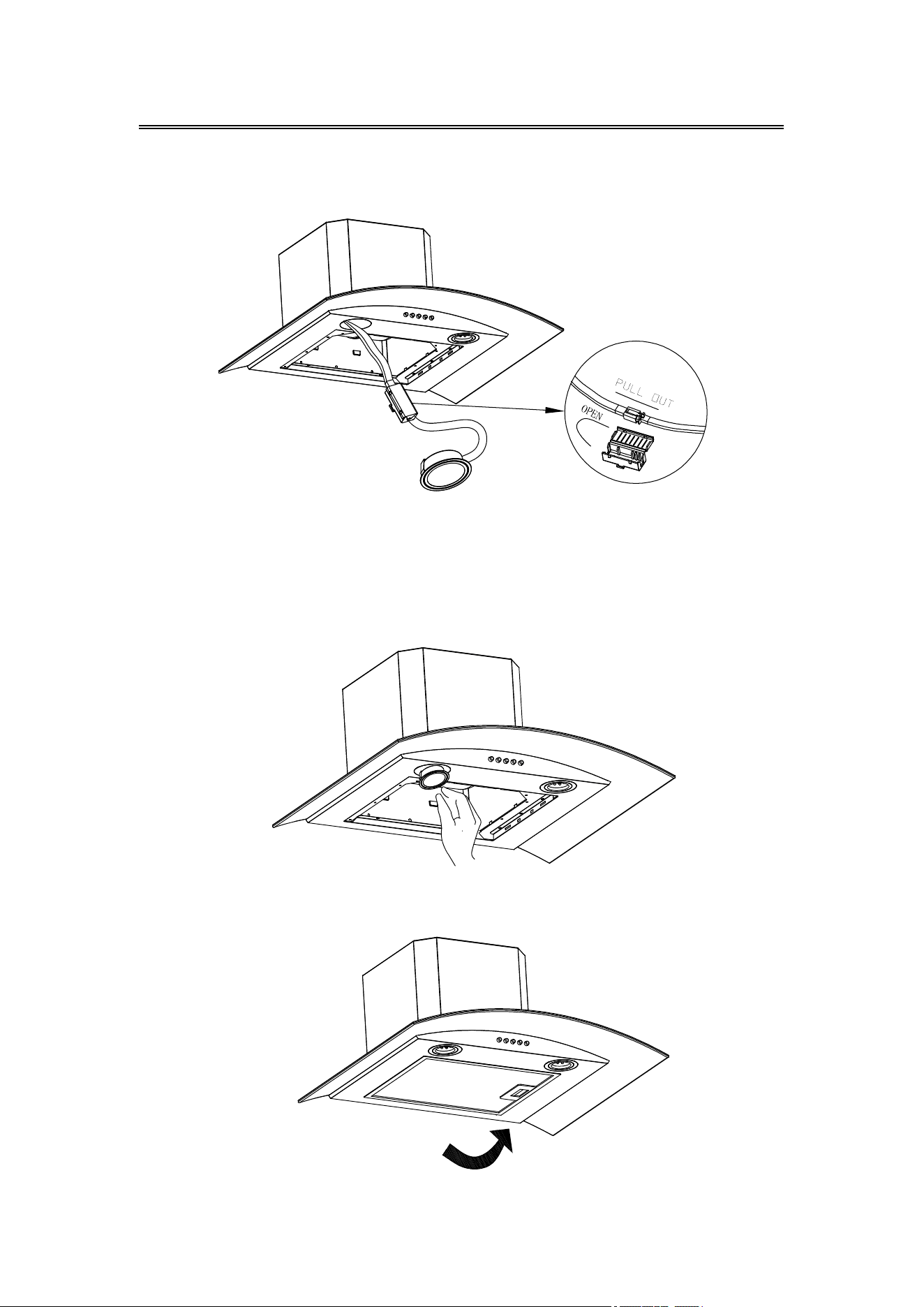
1. Turn off the hood and unplug the power outlet. Detach the grease
filter in order for you to replace the LED lamp.
2. Push the LED lamp holder out from the cabinet by hand, or use
slotted screwdriver to prize up the LED lamp around the edges,
pull out the LED lamp and the wire together.
30
Cleaning and Maintenance
3. Open the power protection cover, pull out the plug and replace the
corresponding model of the LED lamp.
4. Turn the power on and test all blower and light functions to ensure
they are operating properly.
Insert the new LED light gently into the light socket, please make
sure you aim at the grooves on the lighting panel when installing.
Push the LED light in until it is flushed with the light panel.
5. Put the grease filter back on, you are good to go.
31
Troubleshooting
32
If problem persists after the above checks, please contact CIARRA
Customer Care Centre for assistance.
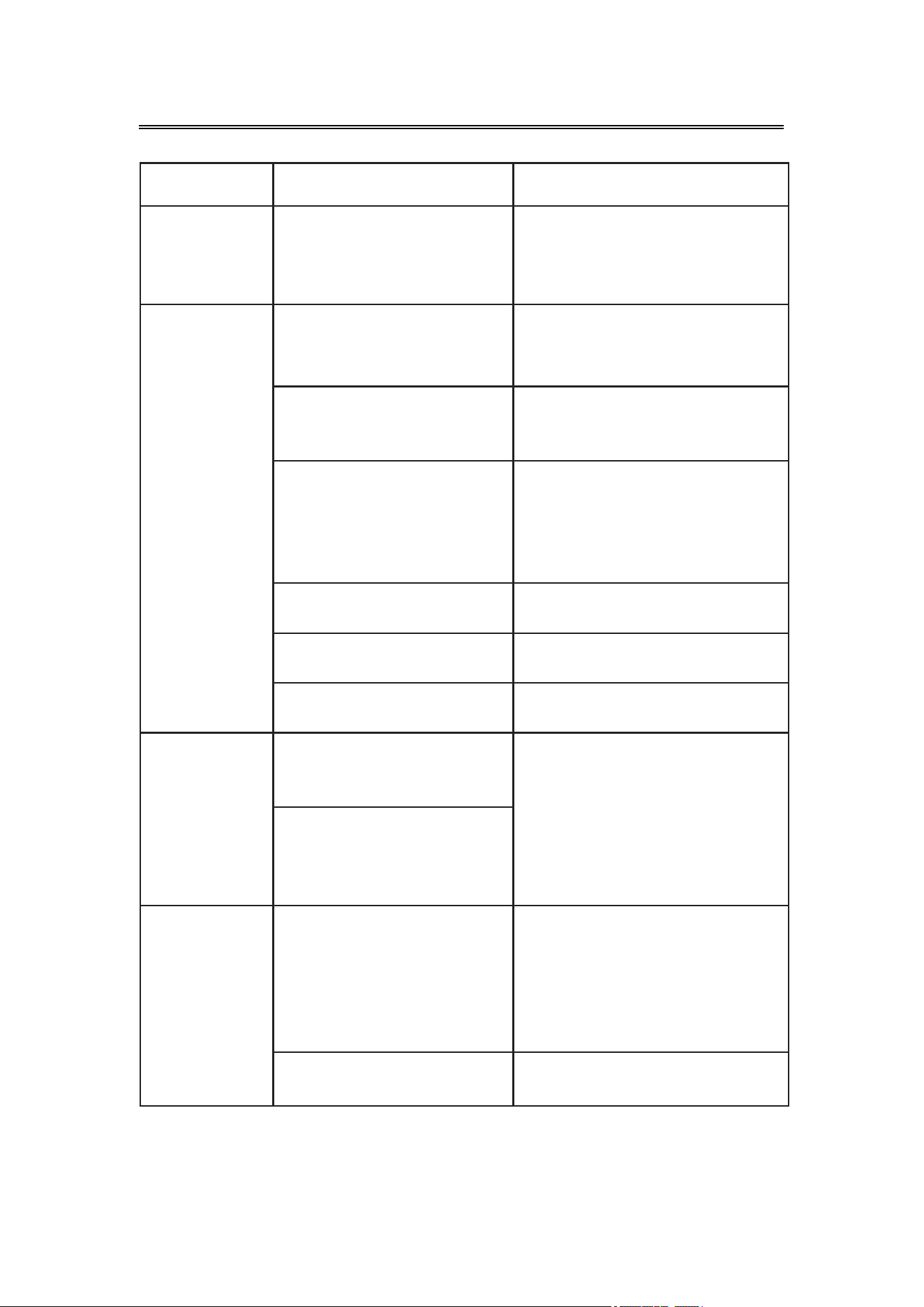
Problem Possible Cause Solution
Extractor
hood does
not turn on
No electrical supply
Make sure that range hood
is plugged into powered
outlet. Test outlet with other
device if not working
My range
hood has
poor
performance
Inadequate ventilation
Ensure that the kitchen is
sufficiently ventilated to
allow entry of fresh air
The range hood and
cooktop are too far
away from each other
Optimal distance is
65~75cm above the cooktop
for best extraction
Check and make sure
the tape holding down
the damper flaps at the
vent hole are removed
before use
Remove the tape holding
down the damper
Grease filters clogged
with grease build-up
Clean the grease filters or
replace the grease filters
Carbon filters clogged
with grease build-up
Replace new carbon filters
Motor is running but no
extraction
Please contact CIARRA
Customer Care Service
My range
hood is noisy
Check inside the range
hood for any loose
debris and remove
Please contact CIARRA
Customer Care Service
If the noise is from the
motor, please contact
our Customer Care
Service
Lights are
not working
Light is damaged
Replace with new LED lamp;
remove grease filters, reach
inside behind the control
panel and locate the wire
with clip behind the light
housing.
The light wire terminal is
loose
Reset the connection
Environmental Protection
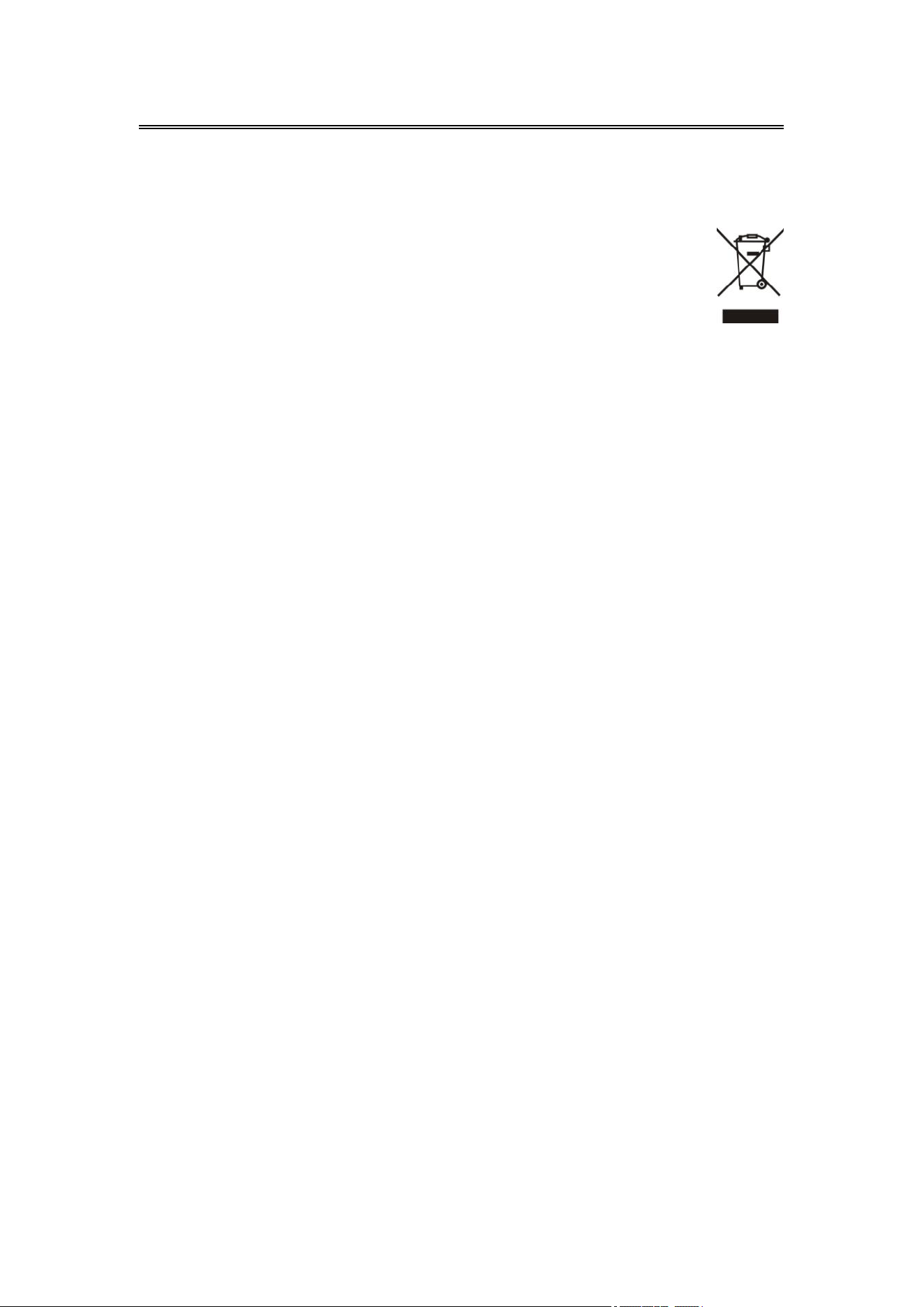
Waste electrical products should not be disposed of with
household waste. Please recycle where facilities exist. Check
with your Local Authority or retailer for recycling advice.
By ensuring this product is disposed of correctly, you will help prevent
potential negative consequences for the environment and human
health, which could otherwise be caused by inappropriate waste
handling of this product.
The symbol on the product indicates that this product may not be
treated as household waste. Instead it shall be handed over to the
applicable collection point for the recycling of electrical and
electronic equipment.
Disposal must be carried out in accordance with local environmental
regulations for waste disposal.
For more detailed information about treatment, recovery and
recycling of this product, please contact your local city office, your
household waste disposal service or the shop where you purchased
the product.
33