

empty page before TOC


English
6
English
Contents
IMPORTANT SAFETY INSTRUCTIONS______________________ 7
General description ____________________________________ 12
Introduction - Identify your shaver _______________________ 12
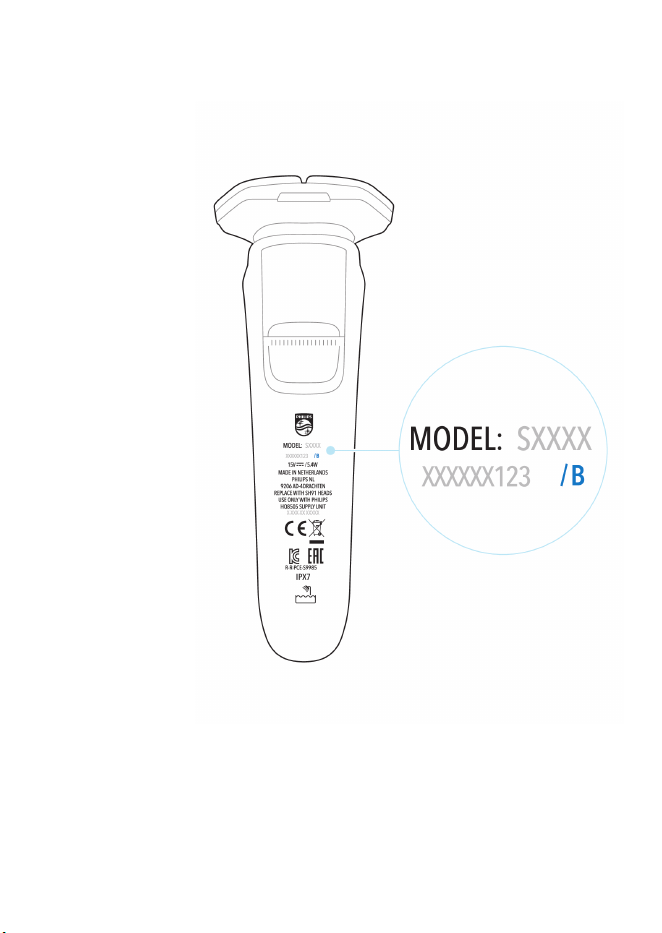
Fig. A_________________________________________________ 14
Fig. B _________________________________________________ 15
What do the icons on the display mean? (Fig. A) ___________ 16
What do the icons on the display mean? (Fig. B) ___________ 19
Main menu (Fig. A)_____________________________________ 21
Main menu (Fig. B) _____________________________________ 22
How do I connect my shaver and smartphone? (Fig. A)______ 25
How do I connect my shaver and smartphone? (Fig. B)______ 28
What is my shaver telling me? (Fig. A) ____________________ 31
What is my shaver telling me? (Fig. B)_____________________ 34
How do I charge my product? ___________________________ 36
How do I use my product? ______________________________ 38
How do I clean my shaver? ______________________________ 41
Storage_______________________________________________ 48
How do I replace the shaving heads? _____________________ 49
Accessories ___________________________________________ 51
Assistance ____________________________________________ 51
Further guidance ______________________________________ 51
Disposal ______________________________________________ 51
Full Two-Year Warranty ________________________________ 52
45-DAY MONEY-BACK GUARANTEE______________________ 53
Trademarks ___________________________________________ 55
7
English
IMPORTANT SAFETY
INSTRUCTIONS
When using an electric product, basic precautions should always be
followed, including the following:
Read all instructions before using this product.
DANGER
To reduce the risk of electric shock:
-
Do not reach for a corded product or charging stand that has
fallen into water. Unplug immediately from the power outlet.
-
Keep the power cord dry.
-
Do not place or store the product or charging stand where it can
fall or be pulled into a tub or sink. Do not place or drop the
product or charging stand into water or other liquid.
-
This product does not work while it is connected to the power
outlet. Except when charging, always unplug this product from
the power outlet.
-
Remove power cord from power outlet and product before
cleaning.
WARNING
To reduce the risk of burns, fire, electric shock, or injury to
persons:

8
English
-
This appliance is not intended for use by persons (including
children) with reduced physical, sensory or mental capabilities, or
lack of experience and knowledge, unless they have been given
supervision or instruction concerning use of the appliance by a
person responsible for their safety. Children should be
supervised to ensure that they do not play with the appliance.
-
Use this product only for its intended household use as described
in this manual. Do not use attachments not recommended by
Philips North America LLC.
-
Never operate this product if it has a damaged power cord, if it is
not working properly, after it has been dropped or damaged, or
after the product or power cord has been dropped into water.
For assistance call 1-800-243-3050.
-
Keep the power cord away from heated surfaces.
-
Never drop or insert any object into any opening.
-
Do not use the power cord in or near a power outlet that
contains an electric air freshener to prevent damage to the
power cord.
-
Be careful when handling your smartphone near water and in
moist environments.
-
The shortwave radio frequency signals of a Bluetooth® product
may impair the operation of pacemakers and other electronic
and medical devices. Consult your phycisian for advice and keep
the appliance at least 8 inches away.
-
Do not charge or plug in product or charging stand outdoors or
operate where aerosol (spray) products are being used or where
oxygen is being administered.
-
Always check shaving heads (guards and cutters) before using
the product. Do not use the product if cutters or guards are
damaged, as injury may occur.

9
English
-
Always attach power cord to product or charging stand first,
then to power outlet. To disconnect, set all controls to 'off'
position. Then remove power cord from power outlet.
-
Plug power cord directly into power outlet. Do not use an
extension cord.
-
Unplug power cord before plugging in or unplugging the
product.
-
Do not attempt to open the product to remove or replace the
built-in rechargeable battery.
-
The batteries used in this product may present a fire or chemical
burn hazard if mistreated. Do not disassemble, heat above
100°C (212°F) or incinerate.
-
Only use original Philips accessories or consumables. Only use
detachable power cord HQ8505.
-
Charge, use and store the product at a temperature between 41
°F / 5°C and 95 °F / 35°C.
-
Keep product and batteries away from fire and do not expose
them to direct sunlight or high temperatures.
-
If the product becomes abnormally hot or smelly, changes color
or if charging takes longer than usual, stop using and charging
the product and contact Philips.
-
Do not place products and their batteries in microwave ovens or
on induction cookers.
-
Do not open, modify, pierce, damage or dismantle the product
or battery to prevent batteries from heating up or releasing toxic
or hazardous substances. Do not short-circuit, overcharge or
reverse charge batteries.
-
If batteries are damaged or leaking, avoid contact with the skin
or eyes. If this occurs, immediately rinse well with water and seek
medical care.
-
When you handle batteries, make sure that your hands, the
product and the batteries are dry.

10
English
-
To avoid accidental short-circuiting of batteries after removal, do
not let battery terminals come into contact with metal objects
(e.g. coins, hairpins, rings). Do not wrap batteries in aluminum
foil. Tape battery terminals or put batteries in a plastic bag
before you discard them.
IMPORTANT: The power plug contains a transformer. Do not cut
off the power plug to replace it with another plug as this will cause
a hazardous condition.
Philips Norelco Quick Clean Pod Cartridge fluid
-
Do not take internally.
-
Avoid contact with the eyes. In case of eye contact, thoroughly
flush with cold water. If irritation persists, get medical attention.
-
Keep out of reach of children.
Electromagnetic fields (EMF)
This Philips product complies with all applicable standards and
regulations regarding exposure to electromagnetic fields.
FCC Compliance
-
The frequency band in which the appliance
operates is 2.4 GHz.
-
This appliance is equipped with Bluetooth
class 2.
-
The maximum radio frequency power radiated
in the frequency band in which the appliance
operates is less than 20 dBm
-
This device complies with the FCC RF exposure
limits and has been evaluated in compliance
with portable exposure condition.
Changes or modifications not expressly approved
by Philips could void the users' authority to
operate the equipment.

11
English
This device complies with Part 15 of the FCC
Rules. Operation is subject to the following two
conditions: (1) this device may not cause harmful
interference, and (2) this device must accept any
interference received, including interference that
may cause undesired operation.
This equipment has been tested and found to
comply with the limits for a Class B digital device,
pursuant to Part 15 of the FCC Rules. These limits
are designed to provide reasonable protection
against harmful interference in a residential
installation. This equipment generates, uses and
can radiate radio frequency energy and, if not
installed and used in accordance with the
instructions, may cause harmful interference to
radio communications. However, there is no
guarantee that interference will not occur in a
particular installation. If this equipment does
cause harmful interference to radio or television
reception, which can be determined by turning
the equipment off and on, the user is encouraged
to try to correct the interference by one or more
of the following measures:
-
Reorient or relocate the receiving antenna.
-
Increase the separation between the
equipment and receiver.
-
Connect the equipment into an outlet on a
circuit different from that to which the
receiver is connected.
-
Consult the dealer or an experienced radio/TV
technician for help.

12
English
-
There is no limitation as to which distance can
be used from the human body.
The Bluetooth® wordmark and logos are
registered trademarks owned by Bluetooth SIG,
Inc. and any use of such marks by Koninklijke
Philips N.V. is under license.
SAVE THESE INSTRUCTIONS
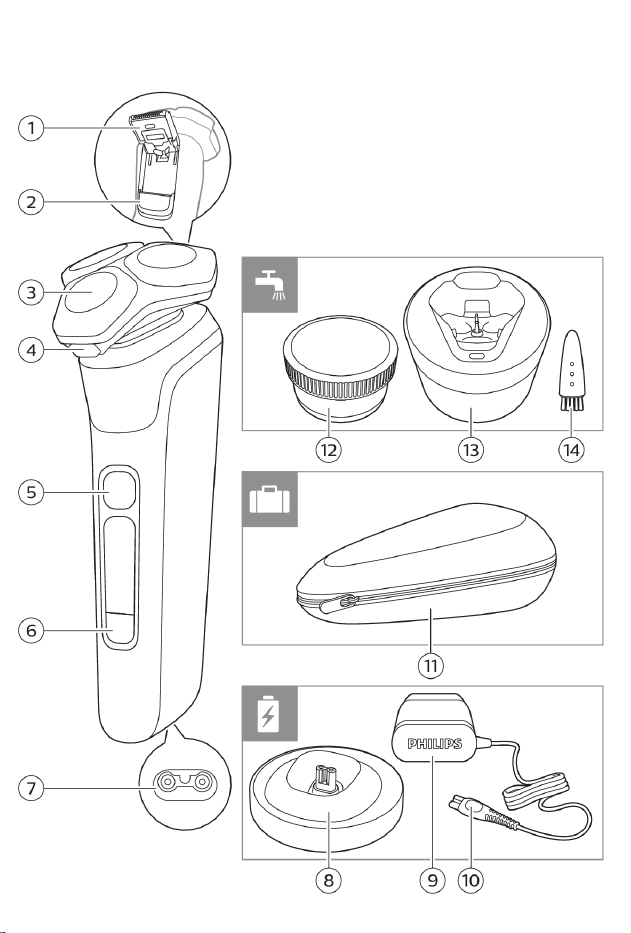
General description
1 Pop-up trimmer
2 Trimmer release slide
3 Shaving unit
4 Shaving unit release button
5 On/off button
6 Menu button
7 Socket for small plug
8 Charging stand
9 Power plug
10 Small plug
11 Pouch
12 Philips Quick Clean Pod Cartridge
13 Quick Clean Pod
14 Cleaning brush
The accessories supplied may vary for different
products. The box shows the accessories that
have been supplied with your product.
Introduction - Identify your shaver
Congratulations on your purchase and welcome
to Philips Norelco! To fully benefit from the

13
English
support that Philips offers, register your product
at www.philips.com/welcome or via the app.
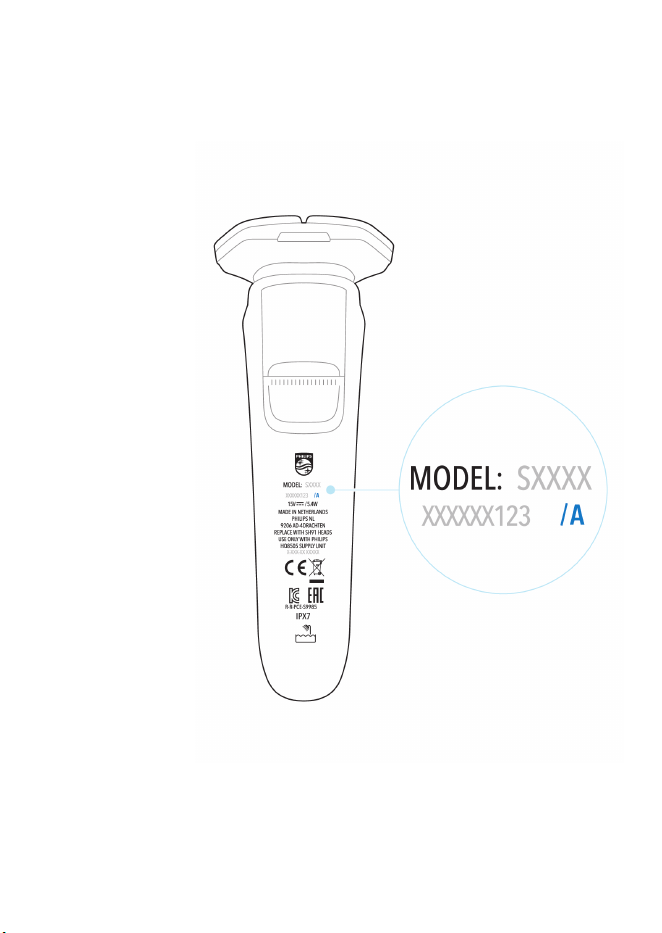
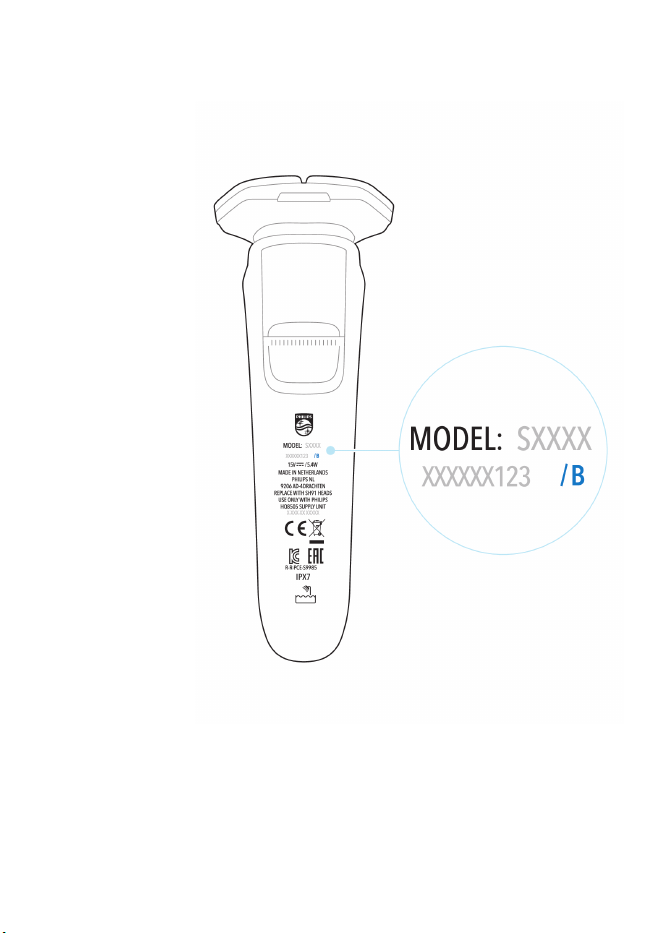
This user manual contains information about
two versions of S9000 Shaver. Fig. A and Fig. B
help you identify which version you have.
14
English
Fig. A
15
English
Fig. B
16
English
-
This shaver is waterproof. It is suitable for use
in the bath or shower and for cleaning under
the tap. For safety reasons, the shaver can
therefore only be used without cord.
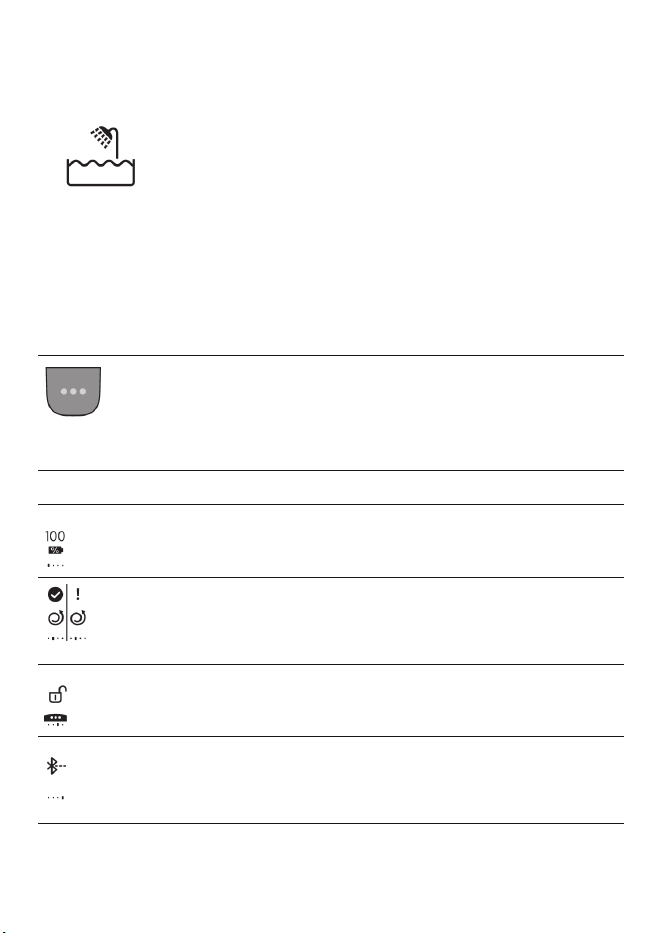
What do the icons on the display mean? (Fig.
A)
-
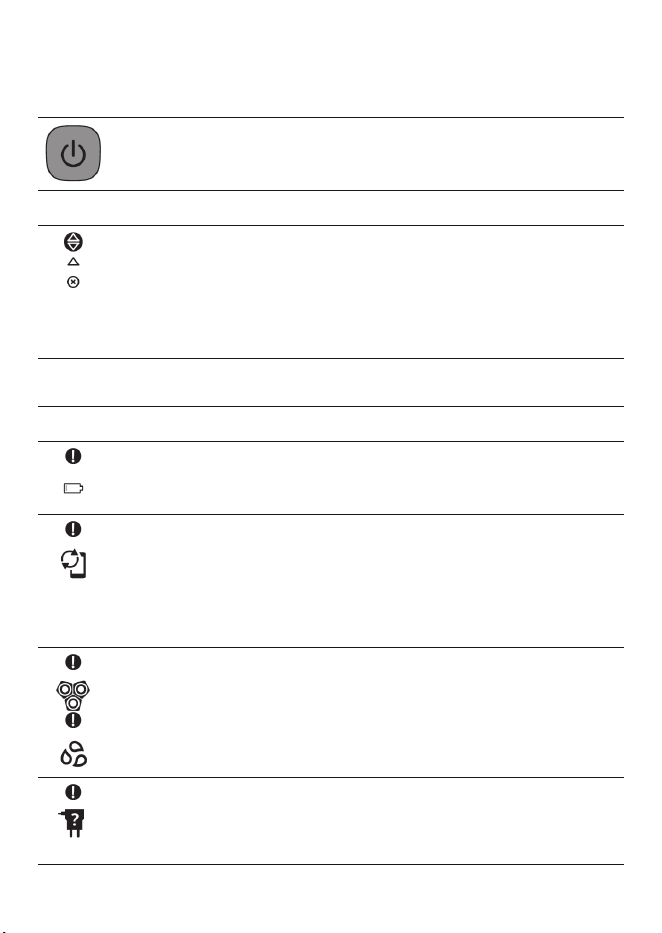
Main Menu
You can toggle through the menu items by pressing
the menu button.
You can also activate or deactivate certain features
with a long press.
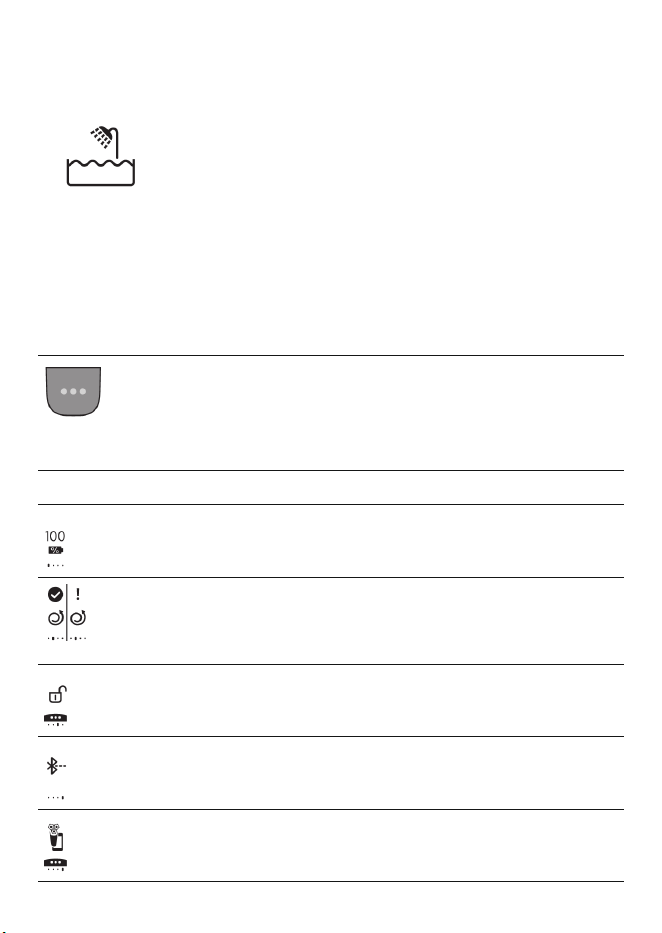
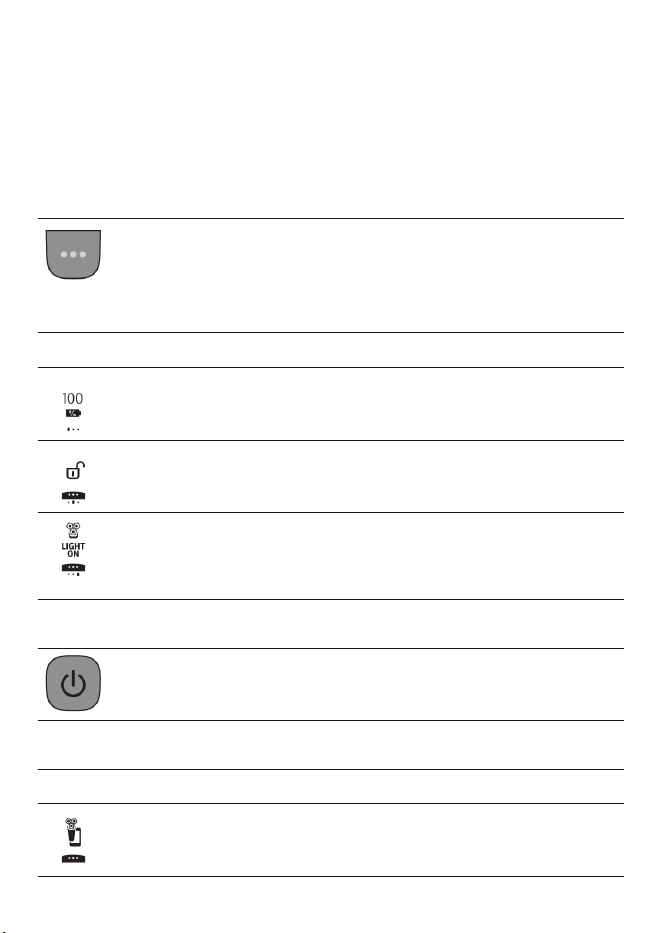
Icon Meaning
The main menu shows the status of the battery in
percentages.
The Motion Control sensor menu icons tell you if the
motion during your last shave was good or can be
improved
You can activate the travel lock in this menu (see 'Main
menu (Fig. A)').
Here the display shows that your shaver is not paired to
your smartphone (see 'Pair the shaver and smartphone').
The display shows that your shaver is paired to your
smartphone (see 'Pair the shaver and smartphone').
17
English
-
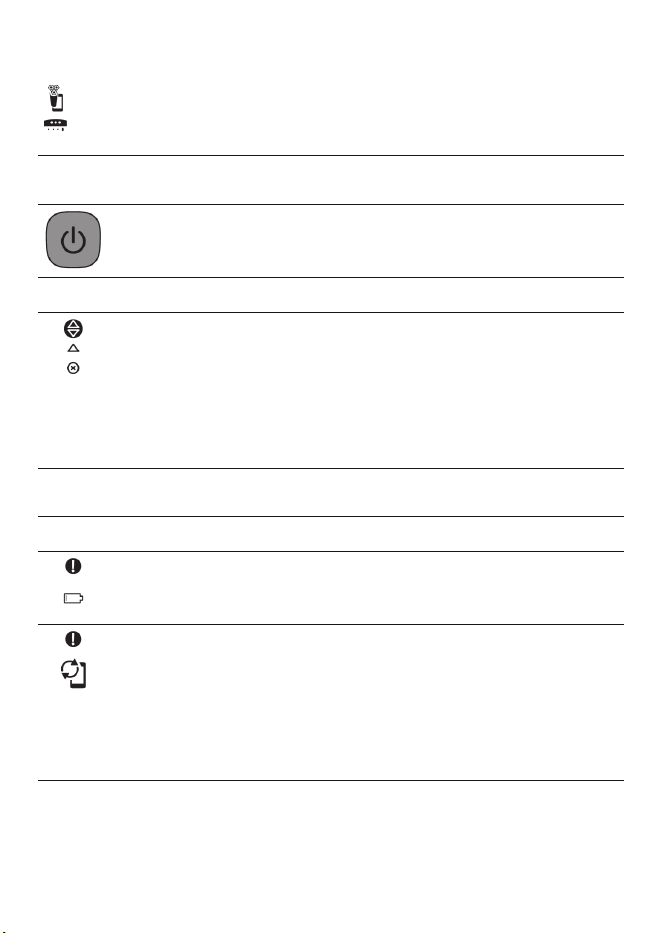
Switching the shaver on
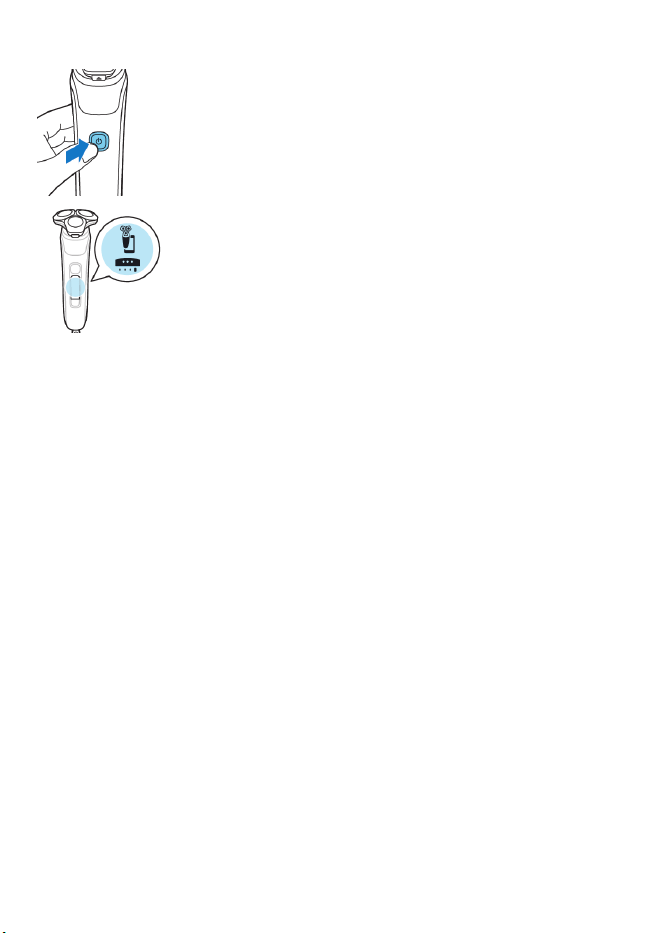
Press the on/off button to switch on the shaver.
Icon Meaning
When you switch on the shaver, a short animation with
these icons shows which pressure feedback setting you
activated (see 'What is my shaver telling me? (Fig. A)').
You can toggle through the pressure feedback settings
by pressing the menu button.
-
Warnings and notifications
Icon Meaning
The battery is almost empty and you need to charge
your shaver (see 'How do I charge my product?').
When the data storage is almost full, you receive a
notification reminding you to synchronize your shaves.
To prevent data loss, synchronize the shaver with the
app (see 'How do I connect my shaver and smartphone?
(Fig. A)').
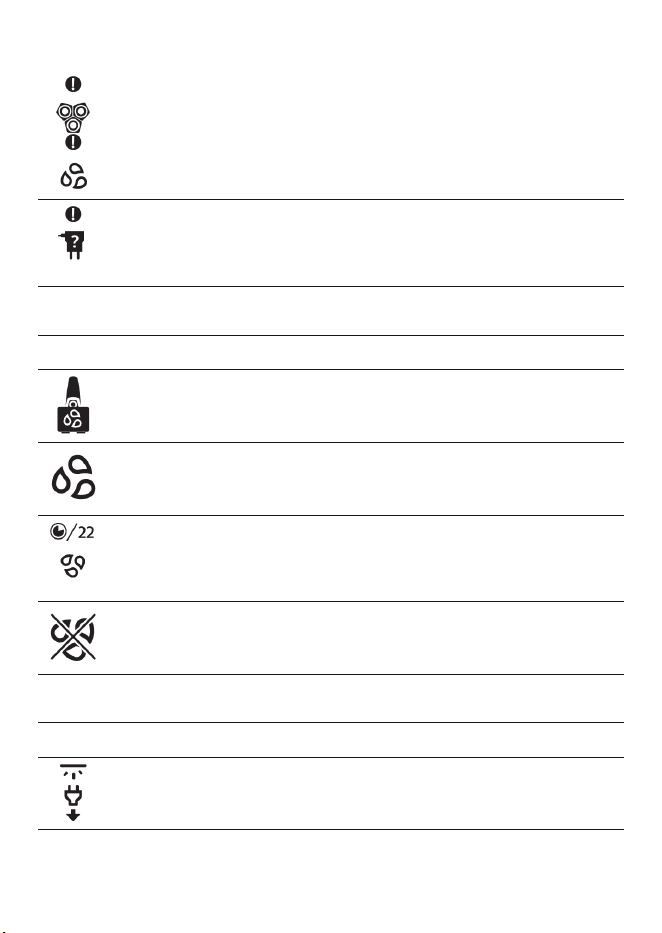
The shaving unit is soiled or damaged to such an extent
that the motor cannot run. Clean the shaving heads
thoroughly.
You are using the wrong supply unit (see 'How do I
charge my product?'). Only use the supply unit (HQ8505)
that is supplied with the shaver.
18
English
-
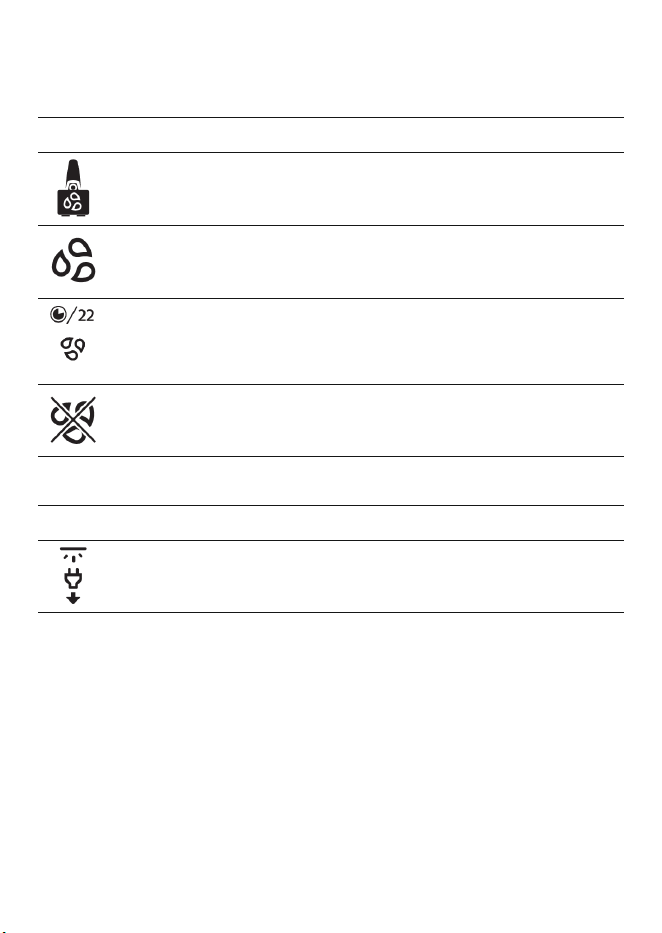
Cleaning the shaver
Icon Meaning
A reminder: clean your shaver in the quick cleaning pod
(see 'How do I use the Quick Clean Pod?').
A reminder: clean your shaver.
The cleaning process is in progress and the display shows
the remaining cleaning time as a clock, or in seconds, if
you press the menu button.
The cleaning process has been interrupted.
-
Unplug for use
Icon Meaning
Unplug the shaver before you use it.
19
English
What do the icons on the display mean? (Fig.
B)
-
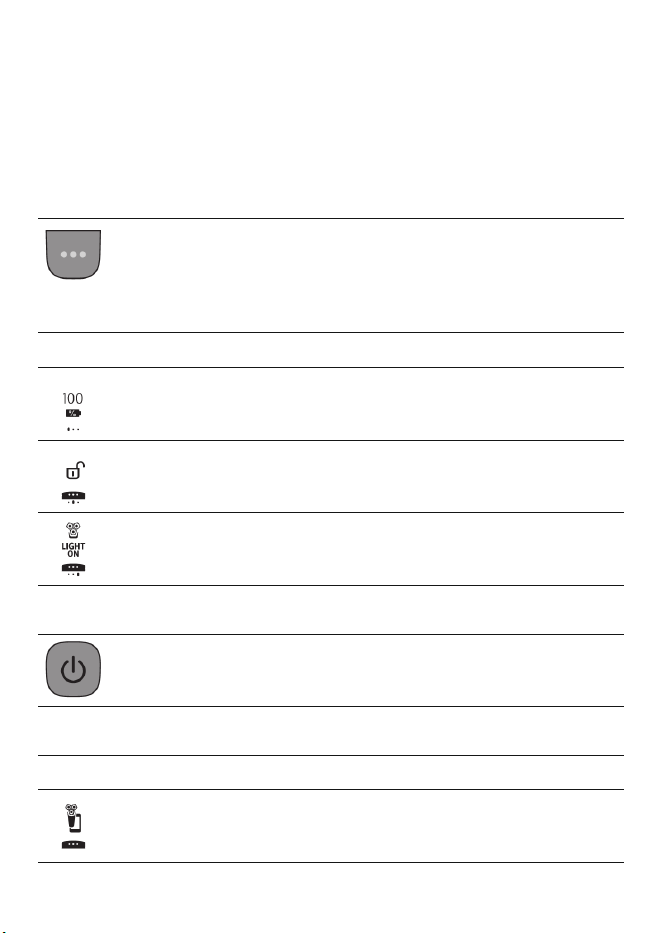
Main Menu
You can toggle through the menu items by pressing
the menu button.
You can also activate or deactivate certain features
with a long press.
Icon Meaning
This menu shows the status of the battery in
percentages.
You can activate or deactivate the travel lock in this
menu (see 'Travel lock').
You can deactivate or reactivate the light ring feedback
in this menu (see 'Light ring feedback').
-
Switching the shaver on
Press the on/off button to switch on the shaver.
-
Bluetooth
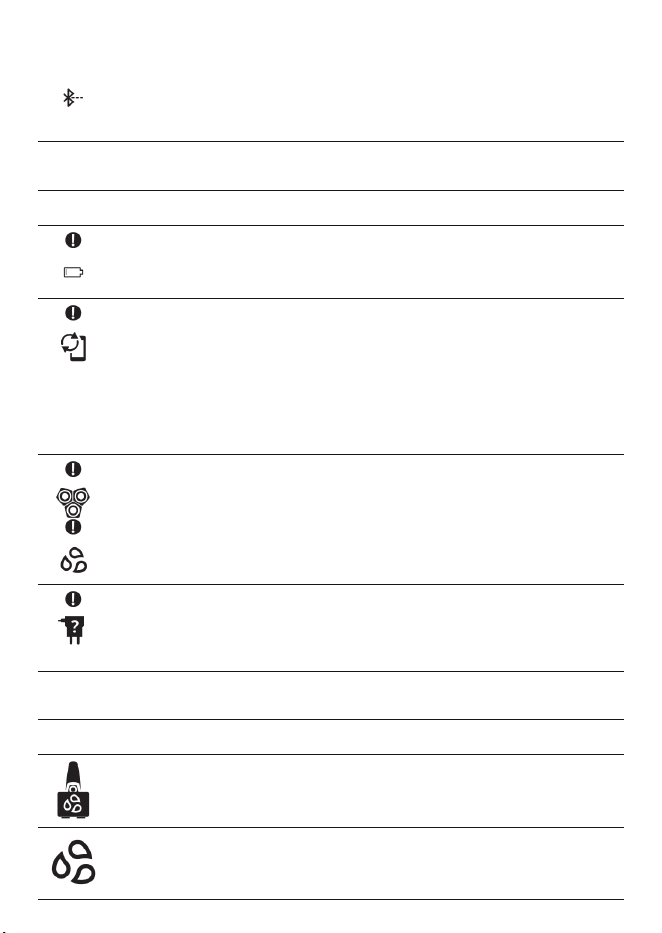
Icon Meaning
This icon shows that your shaver is paired to your
smartphone.
20
English
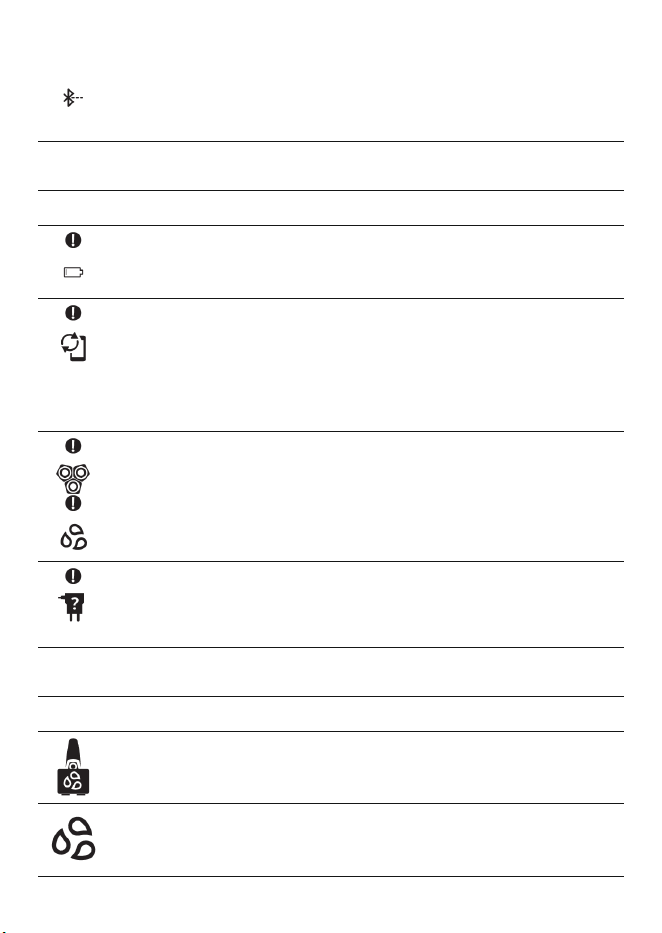
This icon will appear after you unpair your shaver from
your smartphone.
-
Warnings and notifications
Icon Meaning
The battery is almost empty and you need to charge
your shaver (see 'How do I charge my product?').
When the data storage is almost full, you receive a
notification reminding you to synchronize your shaves.
To prevent data loss, synchronize the shaver with the
app (see 'How do I connect my shaver and smartphone?
(Fig. A)').
The shaving unit is soiled or damaged to such an extent
that the motor cannot run. Clean the shaving heads
thoroughly (see 'Thorough cleaning').
You are using the wrong power cord (see 'How do I
charge my product?'). Only use the power cord that is
supplied with the shaver.
-
Cleaning the shaver
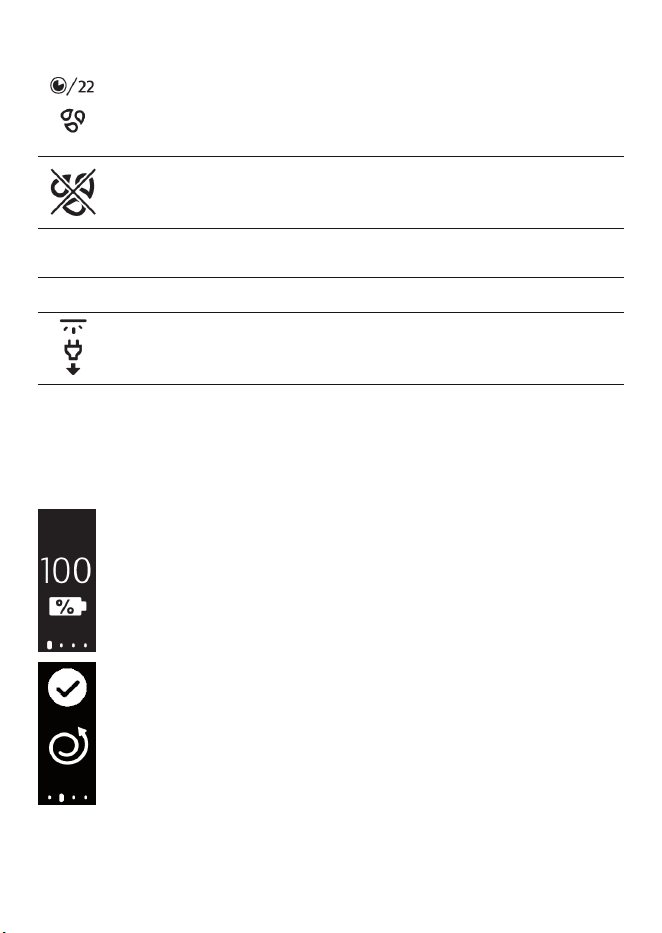
Icon Meaning
A reminder: clean your shaver in the quick cleaning pod
(see 'How do I use the Quick Clean Pod?').
A reminder: clean your shaver (see 'How do I clean my
shaver?').
21
English
The cleaning process is in progress and the display
shows the remaining cleaning time as a clock, or in
seconds, if you press the menu button.
The cleaning process has been interrupted.
-
Unplug for use
Icon Meaning
Unplug the shaver before you use it.
Main menu (Fig. A)
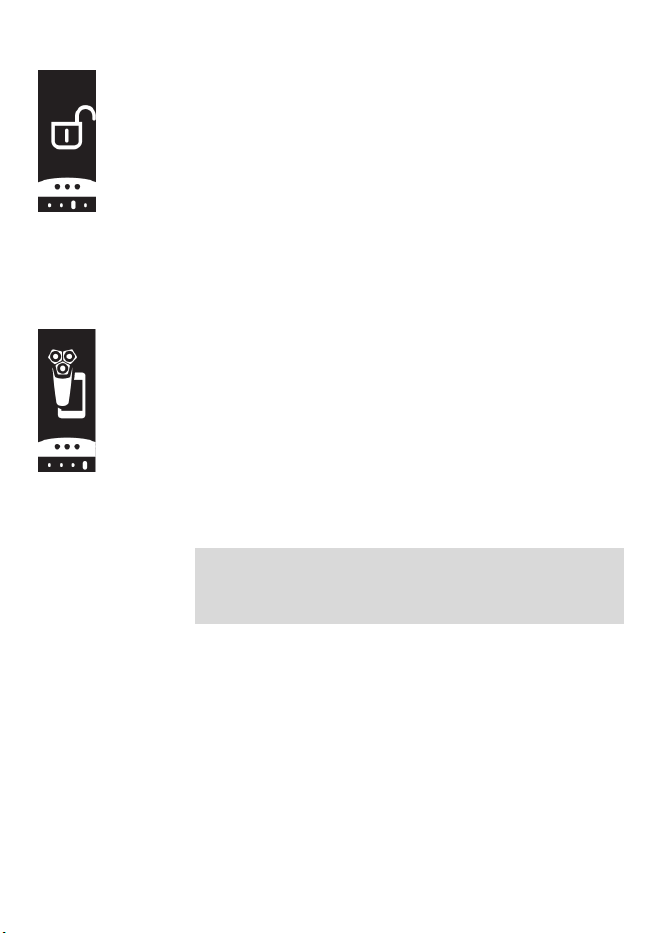
While your shaver is switched off, you can toggle
through the four menu functions by pressing the
menu button.
-
Remaining battery charge
This menu item shows the remaining battery
charge.
-
Motion Control sensor
This menu item shows the motion feedback
from your last shave.
22
English
-
Travel lock
From this menu item, you can lock and unlock
your shaver by pressing and holding the menu
button for 3 seconds. When you are going to
travel, you can lock the shaver to prevent it
from accidentally switching on. When the
travel lock is activated, Bluetooth will be
switched off automatically and your shaver
will be in energy saving mode.
-
Bluetooth
From this menu item, you can unpair your
shaver and smartphone.
For information about the benefits of pairing
your shaver and smartphone, see 'Benefits of
connecting your shaver to the app'.
Note: Make sure your smartphone is equipped
with Bluetooth® 4.2 or higher.
This shaver is equipped with Bluetooth® 4.2
and higher to connect to the app. When you
have paired your shaver and smartphone,
Bluetooth on your shaver is switched on
automatically, even when the shaver is
switched off. This allows your shave data to be
synced later so you don't need to take your
smartphone with you when you shave.
Note: You can switch off Bluetooth on your
shaver by activating the travel lock.
Main menu (Fig. B)
You can toggle through the menu functions by
pressing the menu button.
23
English
Remaining battery charge
This menu item shows the remaining battery
charge.
Post-shave feedback
Note: This menu is displayed only after you
activate this feature via the app settings (see
'How do I connect my shaver and smartphone?
(Fig. B)').
You can optimize your shaving experience by
applying the right motion and amount of
pressure (see 'Shaving'). This item shows the star
rating of your last shave. It tells whether the
pressure and motion you applied during the
shave was good, or could be improved.
Travel lock
When you are going to travel, you can lock the
shaver to prevent it from accidentally switching
on. In this menu, press and hold the menu button
for 3 seconds to lock or unlock your shaver. When
the travel lock is activated, Bluetooth will be
switched off automatically and your shaver will
be in energy saving mode.
24
English
Light ring on/off
During your shave, you receive feedback on how
much pressure you are applying via the light ring
at the top of your shaver handle.
The light ring is active by default. You can
deactivate or reactivate it.
To deactivate the light ring feedback,
1 Toggle through the menu items by pressing
the menu button until you reach the 'Light on'
menu.
2 While you are in the 'Light on' menu, press
and hold the menu button for 3 seconds until
you see 'Light off' on the display.
To reactivate the light ring feedback,
1 Toggle through the menu items by pressing
the menu button until you reach the 'Light off'
menu.
2 While you are in the 'Light off' menu, press
and hold the menu button for 3 seconds until
you see 'Light on' on the display.
Note: Light ring feedback is only available when
the shaving unit is attached to the handle.
Bluetooth
Note: The Bluetooth menu is displayed only when
your shaver is paired to your smartphone.
Here you can unpair your shaver and
smartphone. To learn the benefits of pairing your
shaver and smartphone, see 'Benefits of
connecting your shaver to the app'.

25
English
Note: Make sure your smartphone is equipped
with Bluetooth® 4.2 or higher.
This shaver is equipped with Bluetooth® 4.2
and higher to connect to the app. When you
have paired your shaver and smartphone,
Bluetooth on your shaver is switched on
automatically, even when the shaver is
switched off. This allows your shave data to be
synced later so you don't need to take your
smartphone with you when you shave.
Note: You can switch off Bluetooth on your
shaver by activating the travel lock.
How do I connect my shaver and
smartphone? (Fig. A)
Benefits of connecting your shaver to the app
You can use the app to:
-
Receive real-time motion and pressure
feedback and guidance,
-
Activate and customize post-shave feedback,
-
Synchronize your shave data and track your
shave history,
-
Improve your shave routine and reduce
shaving-related skin issues,
-
Receive personalized advice and
recommendations on style.
26
English
Pair the shaver and smartphone
The app is compatible with a wide range of
iPhone and Android™ smartphones.
More information is available at
www.philips.com/MyShaver9000-app
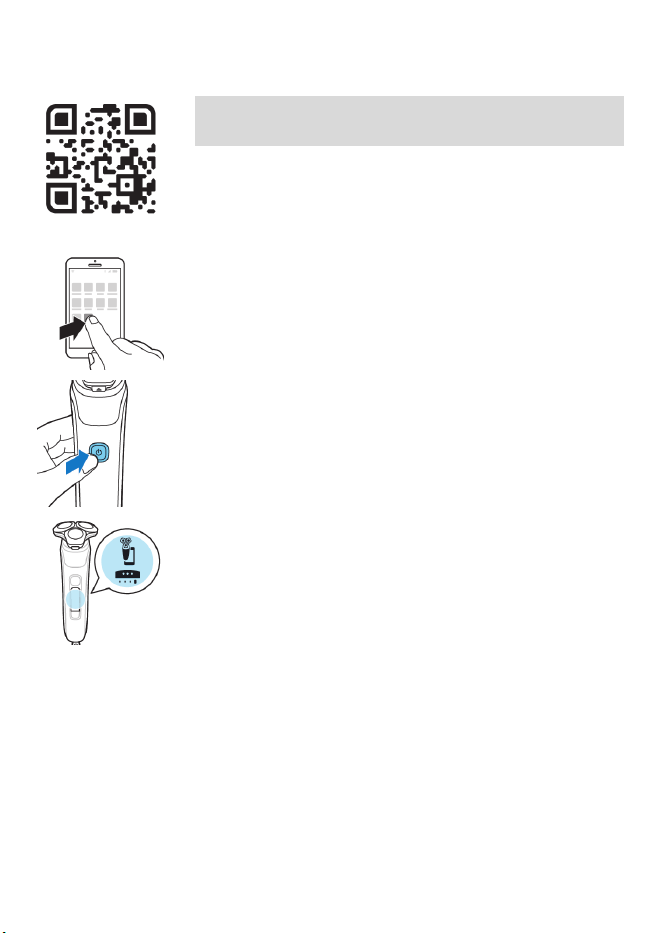
1 Download the app.
2 Make sure Bluetooth on your smartphone is
switched on.
3 Switch on the shaver to activate Bluetooth.
4 Open the app and follow the instructions to
start the pairing process.
5 Once paired, the shaver and app connect
automatically when the app is open and
Bluetooth on your phone is switched on.
Synchronize your shaves
This shaver stores your shave data so you don't
need to take your smartphone with you when
you shave or want to check your shave data at a
later stage.
When the data storage is almost full, you receive
a notification reminding you to synchronize your
shaves. To prevent data loss, synchronize the
27
English
shaver with the app (see 'How do I connect my
shaver and smartphone? (Fig. A)').
1 Make sure your phone is close to the shaver
and open the app.
2 The app connects automatically and
synchronizes your last shaves.
Unpair the shaver and smartphone
You can pair your shaver with only one
smartphone at a time. To unpair your shaver from
your smartphone (e.g. when you get a new
smartphone), follow these steps:
-
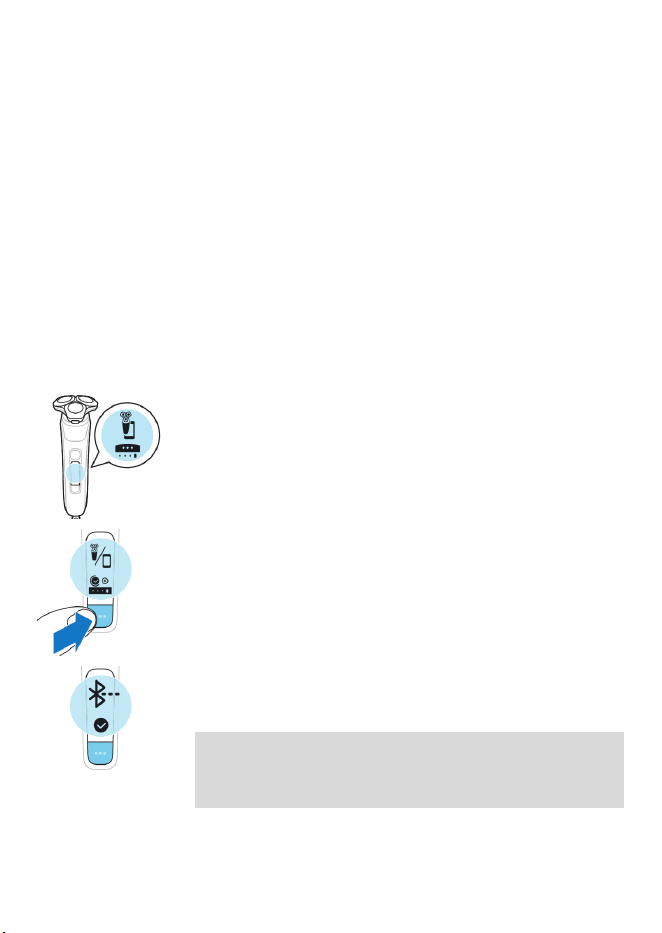
First, unpair your shaver.
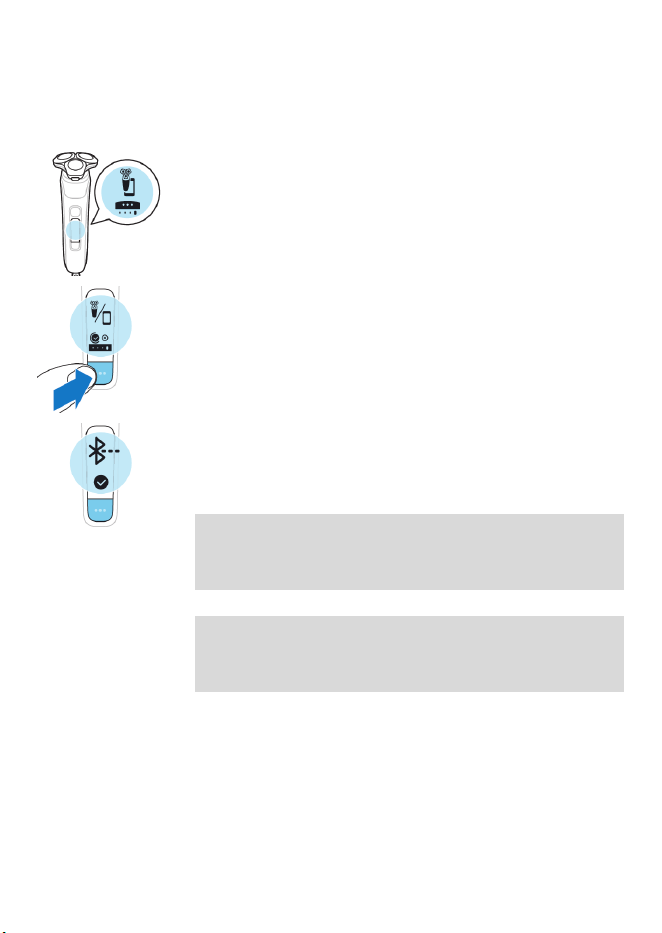
1 Toggle through the menu items by pressing
the menu button until you reach the
Bluetooth menu.
2 Press and hold the menu button until you are
presented with a cross and check mark
selection.
3 Select the check mark by pressing the menu
button again to unpair your shaver.
Note: When your shaver is successfully unpaired,
you see the Bluetooth icon on your shaver handle
shown to the left.

28
English
Note: When you want to pair your shaver and
smartphone again, make sure that both are
unpaired first.
-
Then, unpair your smartphone.
1 Go to the settings on your smartphone and
select Bluetooth.
2 Tap on the name of the shaver.
3 Tap 'forget' or 'unpair'.
Note: The unpairing procedure may vary by
smartphone. Please check your smartphone
manual for more information.
How do I connect my shaver and
smartphone? (Fig. B)
Benefits of connecting your shaver to the app
You can use the app to:
-
Receive real-time motion and pressure
feedback and guidance,
-
Activate and customize post-shave feedback,
-
Synchronize your shave data and track your
shave history,
-
Improve your shave routine and reduce
shaving-related skin issues,
-
Receive personalized advice and
recommendations on style.
29
English
Pair the shaver and smartphone
The app is compatible with a wide range of
iPhone and Android™ smartphones.
More information is available at
www.philips.com/MyShaver9000-app
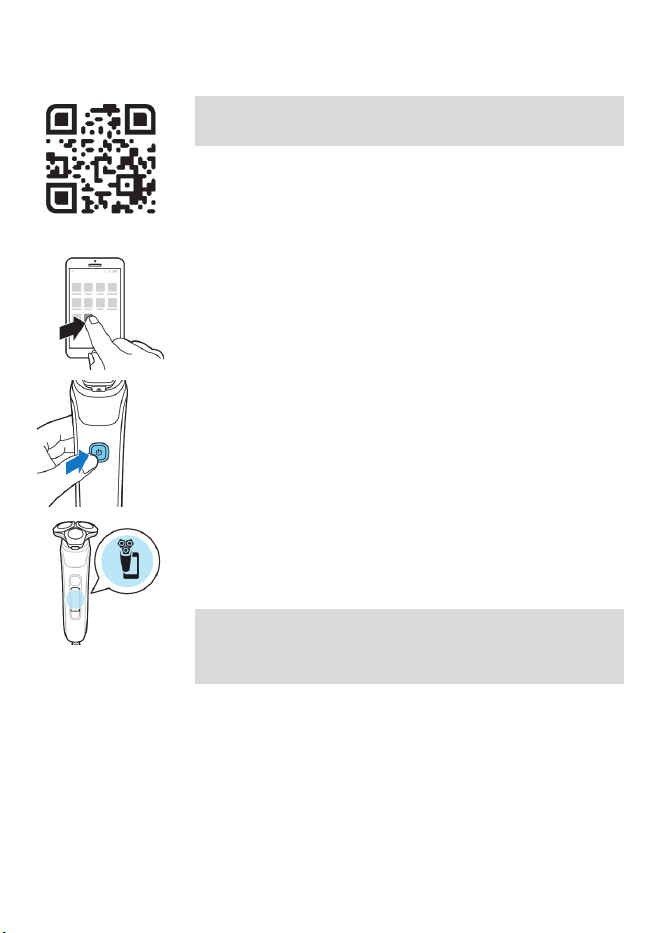
1 Download the app.
2 Make sure Bluetooth on your smartphone is
switched on.
3 Switch on the shaver to activate Bluetooth.
4 Open the app and follow the instructions to
start the pairing process.
5 Once paired, the shaver and app connect
automatically when the app is open and
Bluetooth on your phone is switched on.
Note: When your shaver is paired with a
smartphone, the Bluetooth menu appears as a
new item.
Synchronize your shaves
This shaver stores your shave data so you don't
need to take your smartphone with you when
you shave or want to check your shave data at a
later stage.
When the data storage is almost full, you receive
a notification reminding you to synchronize your
30
English
shaves. To prevent data loss, synchronize the
shaver with the app (see 'How do I connect my
shaver and smartphone? (Fig. B)').
1 Make sure your phone is close to the shaver
and open the app.
2 The app connects automatically and
synchronizes your last shaves.
Unpair the shaver and smartphone
You can pair your shaver with only one
smartphone at a time. To unpair your shaver from
your smartphone (e.g. when you get a new
smartphone), follow these steps:
-
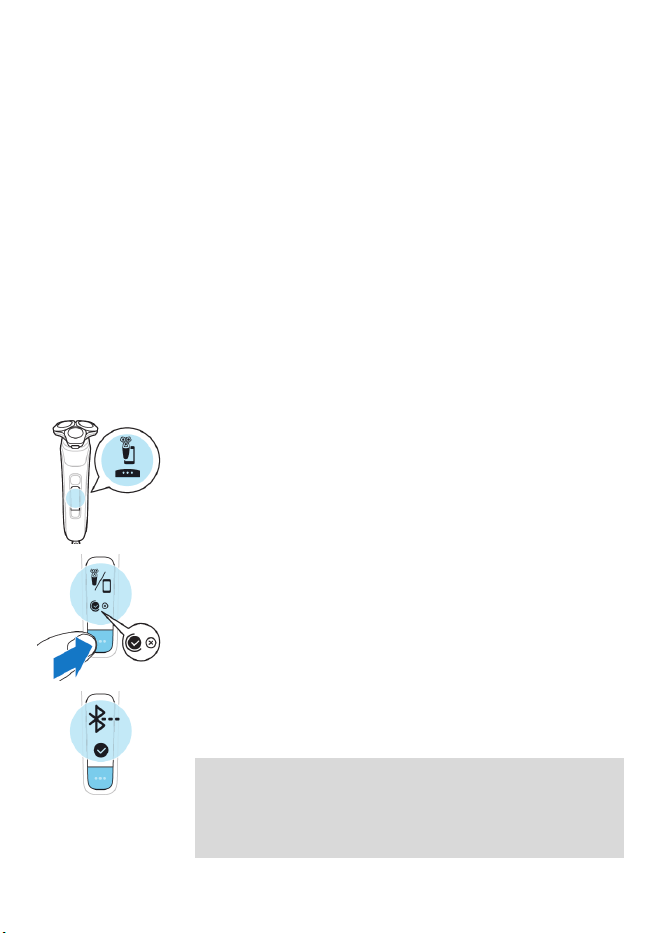
First, unpair your shaver.
1 Toggle through the menu items by pressing
the menu button until you reach the
Bluetooth menu.
2 Press and hold the menu button until you are
presented with a cross and check mark
selection.
3 Select the check mark by pressing the menu
button again to unpair your shaver.
Note: When your shaver is paired with a
smartphone, the Bluetooth menu appears as a
new item. When it is unpaired, this menu will
disappear.

31
English
Note: When your shaver is successfully unpaired,
Bluetooth icon will briefly appear on the shaver
display.
Note: When you want to pair your shaver and
smartphone again, make sure that both are
unpaired first.
-
Then, unpair your smartphone.
1 Go to the settings on your smartphone and
select Bluetooth.
2 Tap on the name of the shaver.
3 Tap 'forget' or 'unpair'.
Note: The unpairing procedure may vary by
smartphone. Please check your smartphone
manual for more information.
What is my shaver telling me? (Fig. A)
Light ring feedback
During your shave, you receive feedback on how
much pressure you are applying via the light ring
at the top of your shaver handle.
The light ring on the handle lights up in various
colors during your shave to give you feedback on
how much pressure you are exerting. These are
the default settings:
-
When you don't apply enough pressure,
the light ring lights up blue.
-
When you apply the correct amount of
pressure, the light ring lights up green.
-
When you apply too much pressure, the
light ring lights up orange.
32
English
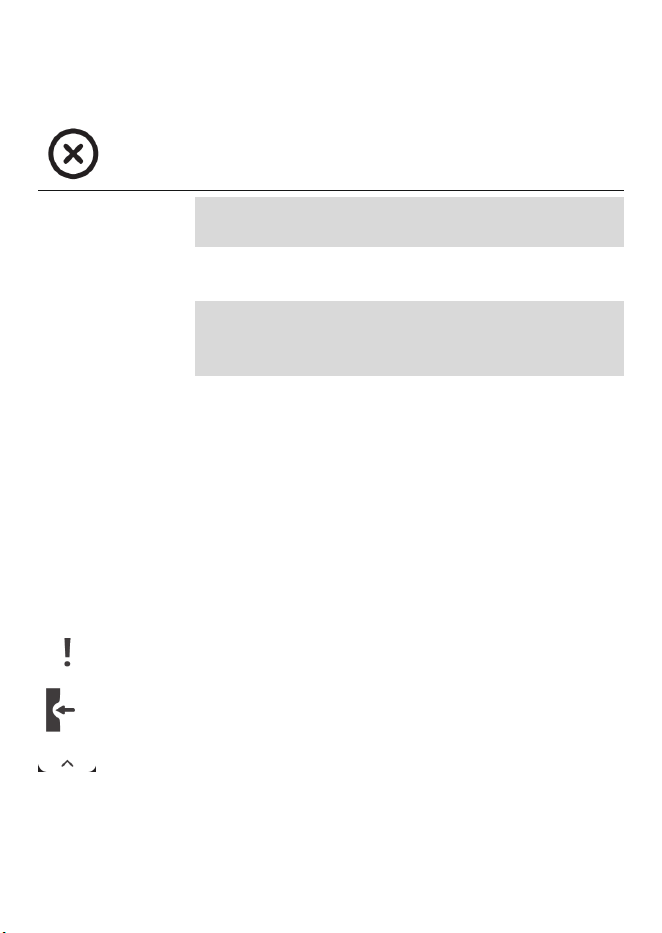
When your shaver is switched on, you can
customize the type of pressure feedback you
receive.
1 Switch on the shaver.
2 Press the menu button to toggle through the
pressure feedback options. The table below
shows what pressure feedback you receive
with each option.
Too little
pressure is
being
applied
The right
amount of
pressure is
being
applied
Too much
pressure is
being
applied
Full pressure
feedback
The light ring
lights up
blue
The light ring
lights up
green
The light ring
lights up
orange
Partial pressure
feedback
No feedback No feedback The light ring
lights up
orange
33
English
No pressure
feedback
No feedback No feedback No feedback
Note: Pressure feedback is only available when
the shaving head is attached to the handle.
Post-shave feedback
Note: This feature is activated via the app settings
(see 'How do I connect my shaver and
smartphone? (Fig. A)').
You can optimize your shaving experience by
applying the right motion and amount of
pressure (see 'Shaving'). Once this feature is
activated, your shaver gives you feedback right
after you shave and switch off your shaver.
Pressure Guard sensor feedback
When your shaving pressure can be improved,
the Pressure Guard sensor icon displays with an
exclamation mark.
-
The pressure you applied during the shave
was too high.

34
English
-
The pressure you applied during the shave
was too low.
Motion Control sensor feedback
-
When your shaving motion can be
improved, the Motion Control sensor icon
displays with an exclamation mark.
-
When both the pressure and the motion
applied during the shave is perfect, both
icons are displayed with a check mark.
What is my shaver telling me? (Fig. B)
Light ring feedback
During your shave, you receive feedback on how
much pressure you are applying via the light ring
at the top of your shaver handle.
The light ring on the handle lights up in various
colors during your shave to give you feedback on
how much pressure you are exerting. This feature
is active by default.
35
English
-
When you don't apply enough pressure,
the light ring lights up blue.
-
When you apply the correct amount of
pressure, the light ring lights up green.
-
When you apply too much pressure, the
light ring lights up orange.
You can deactivate or reactivate this feature in
the Light ring on/off menu.
Note: Light ring feedback is only available when
the shaving unit is attached to the handle.
Post-shave feedback
Note: This feature is activated via the app settings
(see 'How do I connect my shaver and
smartphone? (Fig. A)').
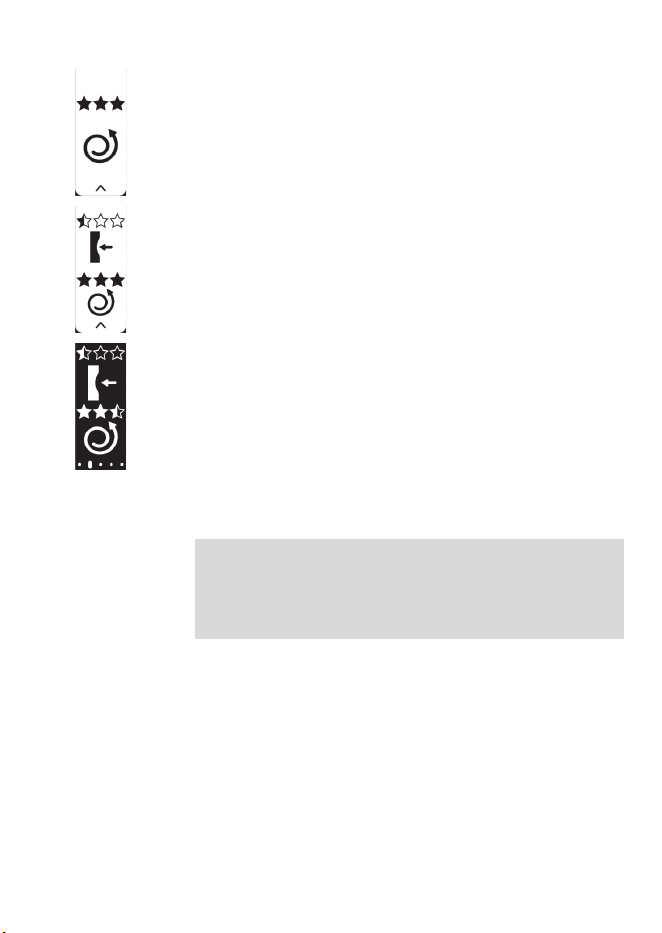
You can optimize your shaving experience by
applying the right motion and amount of
pressure (see 'Shaving'). Your shaver gives you a
star rating on motion and pressure applied
during your last shave. Once this feature is
activated,
-
A new menu item for post-shave feedback
appears on your shaver.
-
After each shave, once you switch off your
shaver, you see instant feedback on pressure,
36
English
-
or motion,
-
or both.
-
When you navigate through the menu later,
you see both the motion rating and pressure
rating of your last shave in the new menu item
(see 'Main menu (Fig. B)').
How do I charge my product?
Note: This product is waterproof. It is suitable for
use in the bath or shower and for cleaning under
the tap. This product can only be used without
cord.
-
Charge the product before you use it for the
first time and when the remaining battery
charge indicates that the battery is almost
empty.
-
Charging takes approx. 1 hour.
-
Quick Charge: After approx. 5 minutes of
charging, the battery contains enough energy
for one full shave. When the battery is charged
to 10%, you can complete one full shave.
37
English
-
When the product is fully charged it has a
cordless operating time of up to 60 minutes.
Note: You cannot use the product while it is
charging.
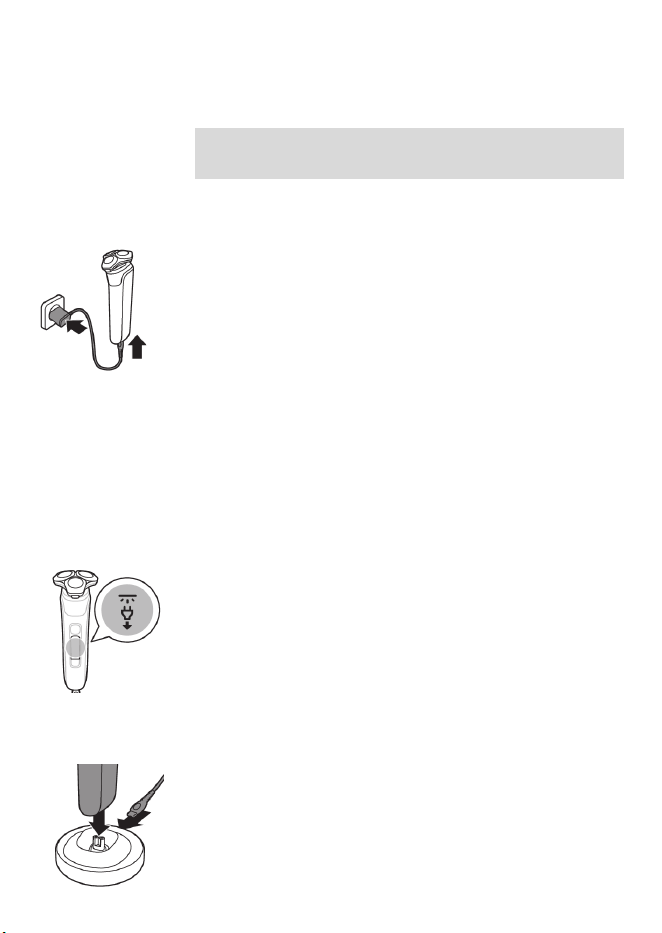
Charging with the power cord
1 Make sure that the product is switched off.
2 Insert the small plug into the product and put
the power plug in the wall outlet.
-
While the product is charging, an
animation appears on the display showing
the progress.
-
When the product is fully charged, the
battery percentage shows 100% and the
battery icon shows the battery being full.
3 After charging, remove the power plug from
the power outlet and pull the small plug out
of the product.
'Unplug for use' symbol
The 'unplug for use' symbol flashes to remind you
to disconnect the power cord from the power
outlet and remove the small plug from the
product before you switch it on.
Charging in the charging stand
1 Make sure that the product is switched off.
2 Put the small plug in the charging stand and
put the power cord in the power outlet.
3 Put the product in the charging stand.

38
English
Specific models only: The light ring on the
bottom of the charging stand lights up and
rotates quickly.
-
After approximately 5 minutes, the light
ring rotates slower.
-
As the product continues to charge, the
light ring becomes brighter and rotates
slower.
-
When the product is fully charged, the light
ring lights up fully and stops rotating.
4 After charging, remove the power cord from
the power outlet and pull the small plug out
of the charging stand.
How do I use my product?
Always check the product and all accessories
before using. Do not use the product or any
accessory if it is damaged, as this may cause
injury. Always replace a damaged part with
one of the original type.
Note: This product is waterproof. It is suitable for
use in the bath or shower and for cleaning under
the tap with water. For safety reasons, this
product can only be used without cord.
Use this product for its intended household
use as described in this manual.
For hygienic reasons, the product should only
be used by one person.
39
English
Shaving
You can use this product either wet or dry, or
even in the shower.
For a wet shave, apply some water and shaving
foam or gel to your skin and rinse the shaving
heads under the tap with warm water before
following the steps below.
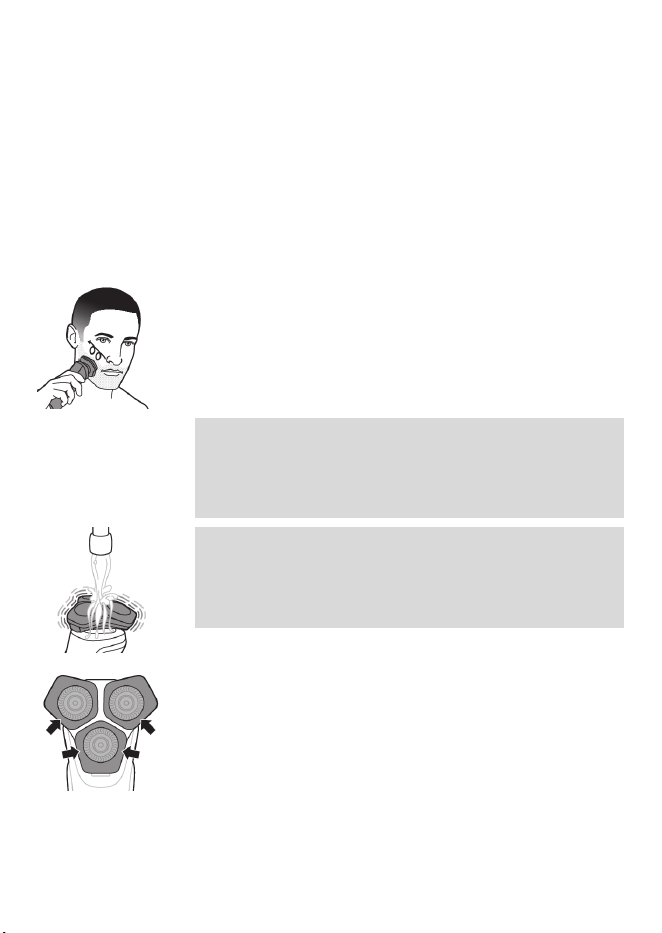
1 Switch on the product.
2 Move the shaving heads over your skin in
circular movements to catch all hairs growing
in different directions. Make sure each shaving
head is fully in contact with the skin. Exert
gentle pressure for a close, comfortable shave.
Note: Do not press too hard, as this can cause
skin irritation. When you apply too much
pressure, the orange light ring lights up (see
'What is my shaver telling me? (Fig. A)').
Note: If you are shaving with gel or foam, rinse
the shaving unit regularly during your shave to
ensure that it continues to glide smoothly over
your skin.
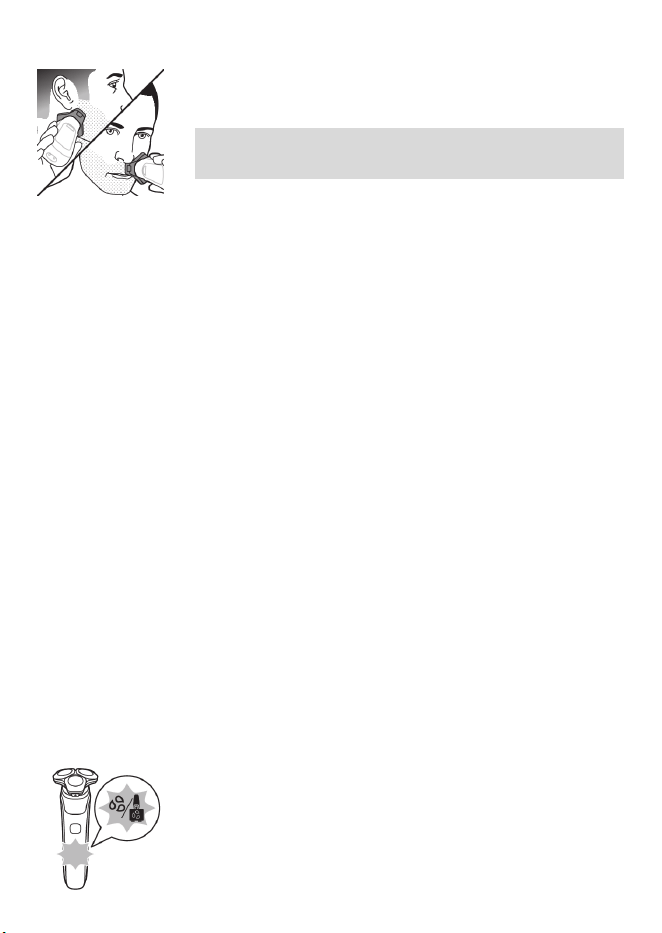
3 Use the narrow sides of the shaving unit to
shave in hard-to-reach areas such as along
your jawline and under your nose.
40
English
4 Switch off and clean the product after each
use.
Note: Make sure you rinse all foam or shaving
gel off the product.
21-Day adaptation process
-
21 Day Trial and Conversion Process. It is a fact
that your skin and beard need time to adjust
to a new grooming system.
-
Use your new shaver exclusively for 3 weeks to
fully enjoy the closeness of a Philips Norelco
shave.
-
At first you may not get as close a shave as you
expect, or your face may even become slightly
irritated. This is normal since your beard and
skin will need time to adjust. Invest 3 weeks
and you'll soon experience the full joy of your
new shaver.
-
Stick with it! If you alternate shaving methods
during the adjustment period, it may make it
more difficult to adapt to the Philips Norelco
shaving system.
-
If you are still not convinced after 21 days,
Philips Norelco will refund you the full
purchase price as long as the request is
received within 45 days of purchase.
Cleaning reminder
When you switch off the product, the cleaning
reminder flashes to remind you to clean the
product (see 'How do I clean my shaver?').
41
English
-
Clean the product (see 'How do I use the
Quick Clean Pod?') and attachments after
each use (see 'How do I clean my shaver?') to
prevent clogging and damage.
-
Clean the shaving heads thoroughly once a
month or when the product does not shave as
well as it used to (see 'Thorough cleaning').
Trimming
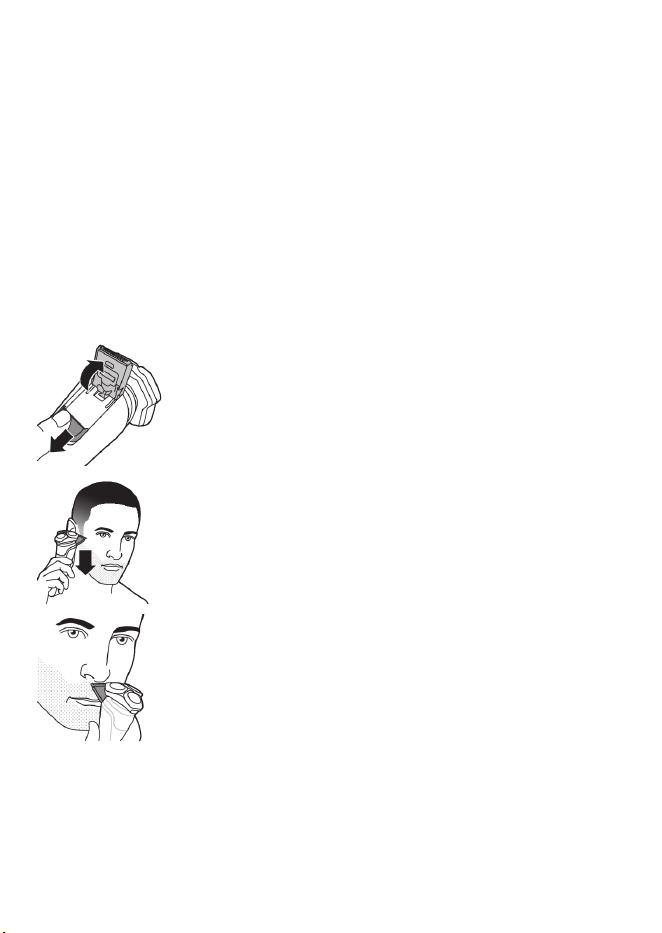
You can use the pop-up trimmer to groom your
sideburns and moustache.
1 Push the trimmer release slide downwards to
open the trimmer.
2 Switch on the product.
3 Hold the trimmer perpendicular to the skin
and move it downwards while exerting gentle
pressure.
4 You can also use the trimmer under your nose.
5 Switch off the product and clean the trimmer
after each use to prevent clogging and
damage (see 'How do I clean my shaver?').
6 Close the trimmer.
How do I clean my shaver?
Clean the product and the attachments after
each use for optimal performance.
42
English
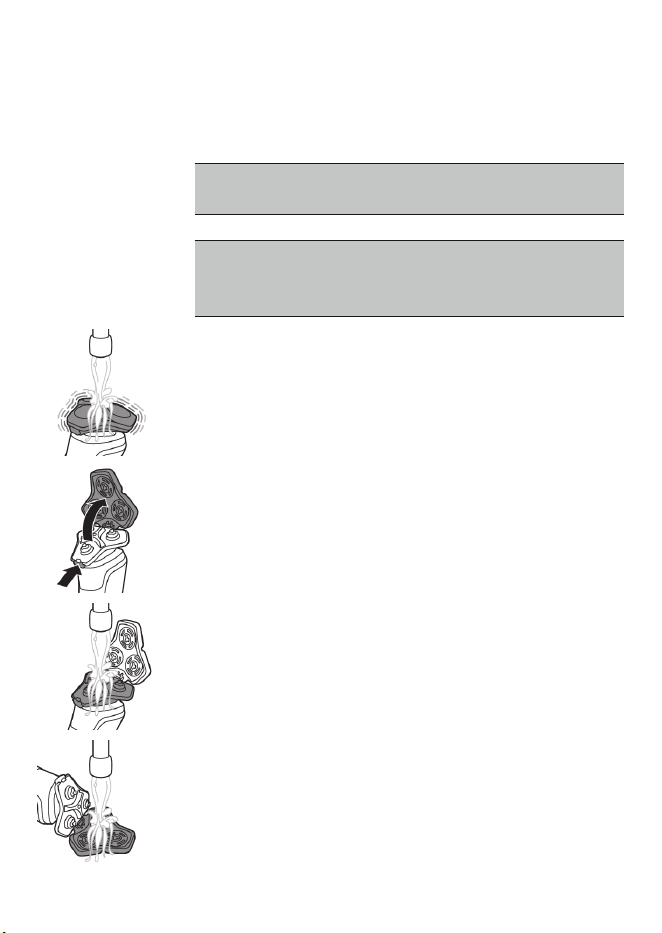
Cleaning the shaver under the tap
Clean the shaver after each use to prevent
clogging and damage.
Never dry the shaving unit with a towel or
tissue, as this may damage the shaving heads.
While rinsing the shaving unit, water may
drip out of the base of the shaver. This is a
normal occurrence.
1 Switch on the shaver.
2 Rinse the shaving unit under a warm tap.
3 Switch off the shaver. Press the release button
to open the shaving unit.
4 Rinse the hair chamber under a warm tap.
5 Rinse the shaving head holder under a warm
tap.
6 Carefully shake off excess water and let the
shaving head holder air-dry completely.
43
English
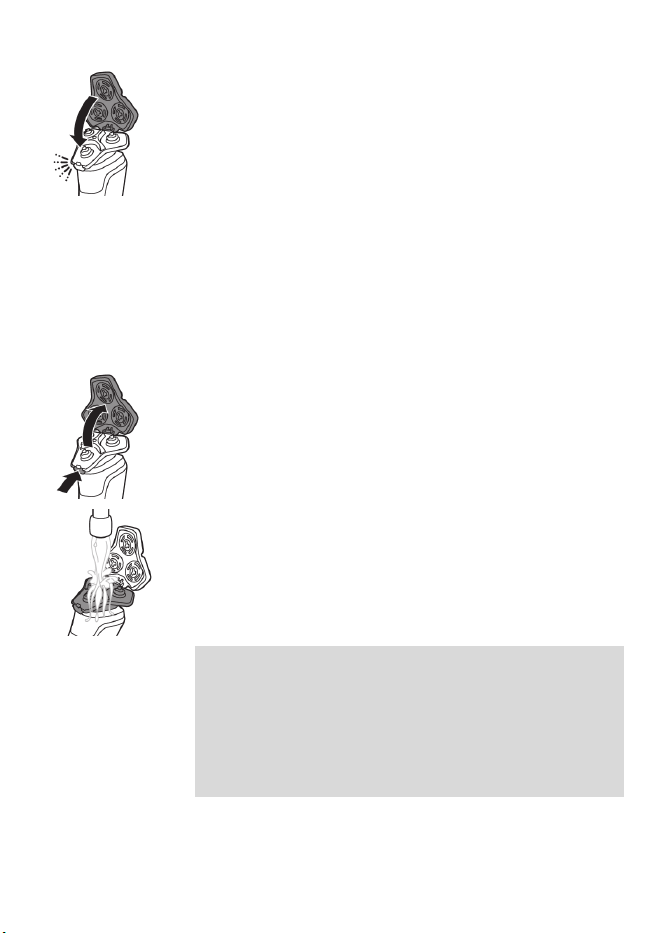
7 Close the shaving unit.
Thorough cleaning
We advise you to clean the shaving heads
thoroughly once a month or when the shaver
does not shave as well as it used to.
1 Make sure that the product is switched off and
disconnected from the power outlet.
2 Press the release button on the shaving unit
and pull the shaving head holder off the
shaving unit.
3 Rinse the hair chamber and shaving head
holder under the tap.
4 Remove the shaving heads. For detailed
instructions, see 'How do I replace the shaving
heads?'.
Note: Do not clean more than one cutter and
guard at a time, since they are all matching
sets. If you accidentally put a cutter in the
wrong shaving guard, it may take several
weeks before optimal shaving performance is
restored.
44
English
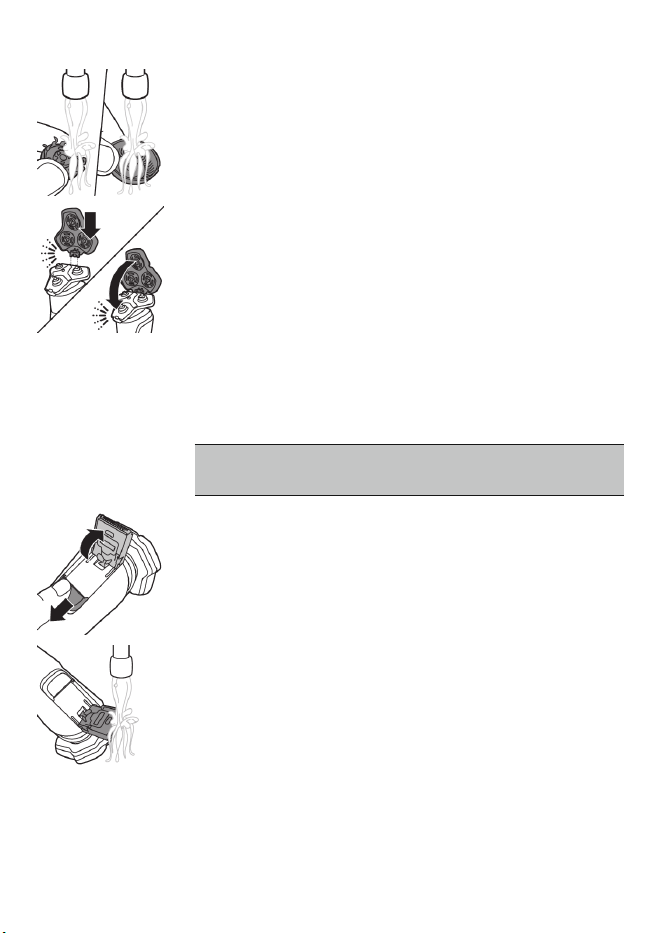
5 Clean the cutter and guard under the tap.
6 Shake off excess water.
7 Put the shaving heads back into the shaving
head holder. For detailed instructions, see
'How do I replace the shaving heads?'.
8 Insert the hinge of the shaving head holder
into the slot in the top of the shaving unit and
close the shaving unit.
Cleaning the pop-up trimmer
Clean the trimmer after each use to prevent
clogging and damage.
Never dry the trimmer teeth with a towel or
tissue, as this may damage the trimmer teeth.
1 Make sure that the product is switched off and
disconnected from the power outlet.
2 Push the trimmer release slide down to open
the pop-up trimmer.
3 Switch on the product and rinse the pop-up
trimmer with warm water.
4 After cleaning, switch off the product.
5 Carefully shake off excess water and let the
pop-up trimmer air dry.
6 Close the trimmer.
45
English
Tip: For optimal performance, lubricate the teeth
of the pop-up trimmer with a drop of mineral oil
every six months (oil not included).
How do I use the Quick Clean Pod?
Preparing the Quick Clean Pod for use
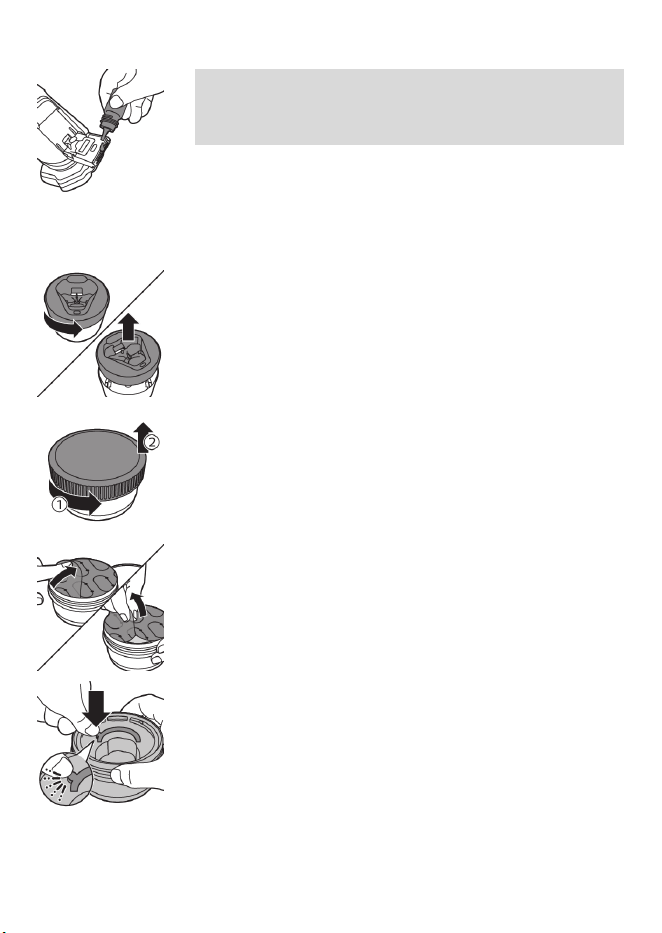
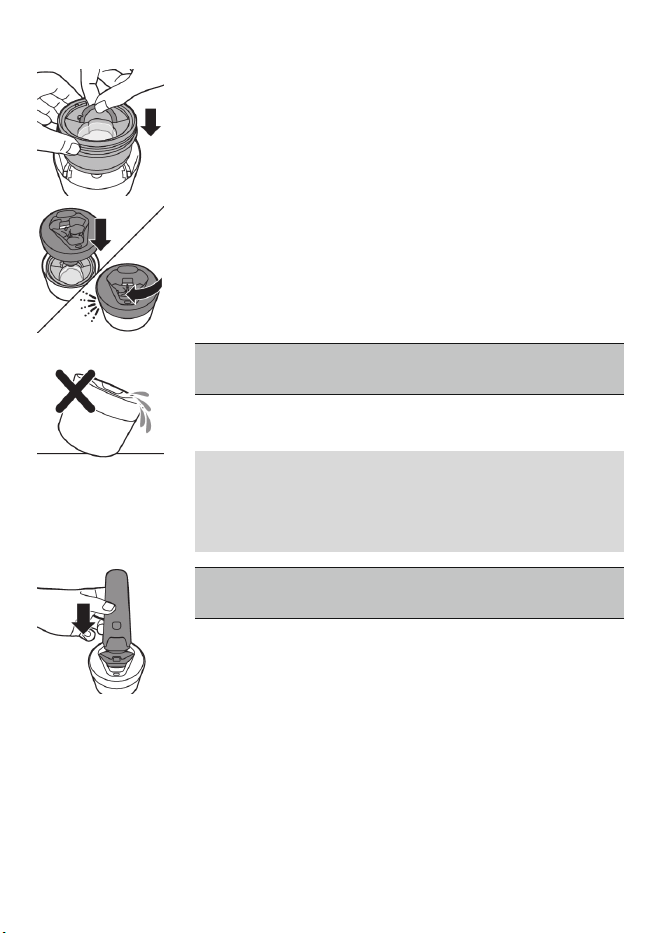
1 Twist and remove the top of the Quick Clean
Pod.
2 Twist the lid off of the Quick Clean Pod
Cartridge.
3 Lift the tab on the seal and pull it by the corner
to remove the seal from the Quick Clean Pod
Cartridge.
4 Press the small circular piece on the handle of
the Quick Clean Pod Cartridge to break the
snap hook on the handle.
46
English
5 Place the Quick Clean Pod Cartridge into the
Quick Clean Pod.
6 Put the top of the Quick Clean Pod back onto
the base and turn it clockwise until you hear a
click.
Do not tilt the Quick Clean Pod to prevent
leakage.
Using the Quick Clean Pod
Note: If you use the shaver with shaving foam,
shaving gel or pre-shave products, thoroughly
rinse the shaving heads before you use the Quick
Clean Pod (see 'How do I clean my shaver?').
Always shake excess water off the shaver
before you place it in the Quick Clean Pod.
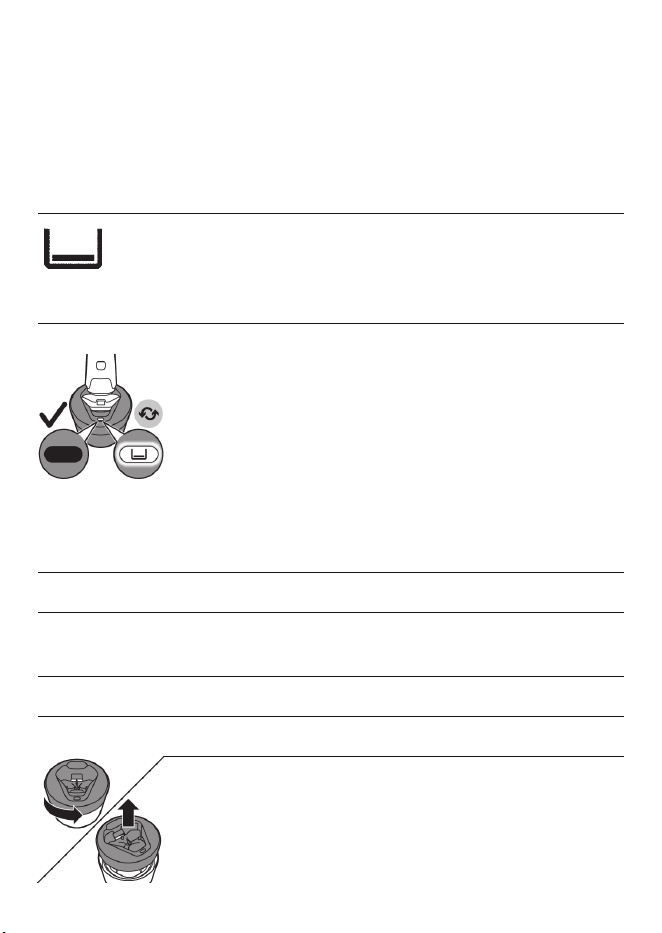
1 Place the shaver upside down into the Quick
Clean Pod. While switched on, the shaver
automatically detects that it is in the Quick
Clean Pod.
2 Switch on the shaver to start the cleaning
program.
Each cleaning program takes approximately
one minute. During the cleaning program the
remaining time is displayed as a countdown
clock on the handle.
47
English
3 Let the shaver air-dry completely in the Quick
Clean Pod before storing it.
What does the icon on my Quick Clean Pod
mean?
Icon Behavior Meaning
Becomes visible on the
Quick Clean Pod
The Quick Clean Pod Cartridge
needs to be replaced (see
'How do I use the Quick Clean
Pod?').
Replacing the Quick Clean Pod Cartridge
Replace the Quick Clean Pod Cartridge
immediately when the cartridge replacement
icon on the Quick Clean Pod becomes visible or
follow the table below.
Frequency of use Cycles When to replace
the Quick Clean
Pod Cartridge
Every day About 30 Every month
A few times per
week
About 20 Every 2 months
Every week About 13 Every 3 months
Every month About 3 Every 3 months
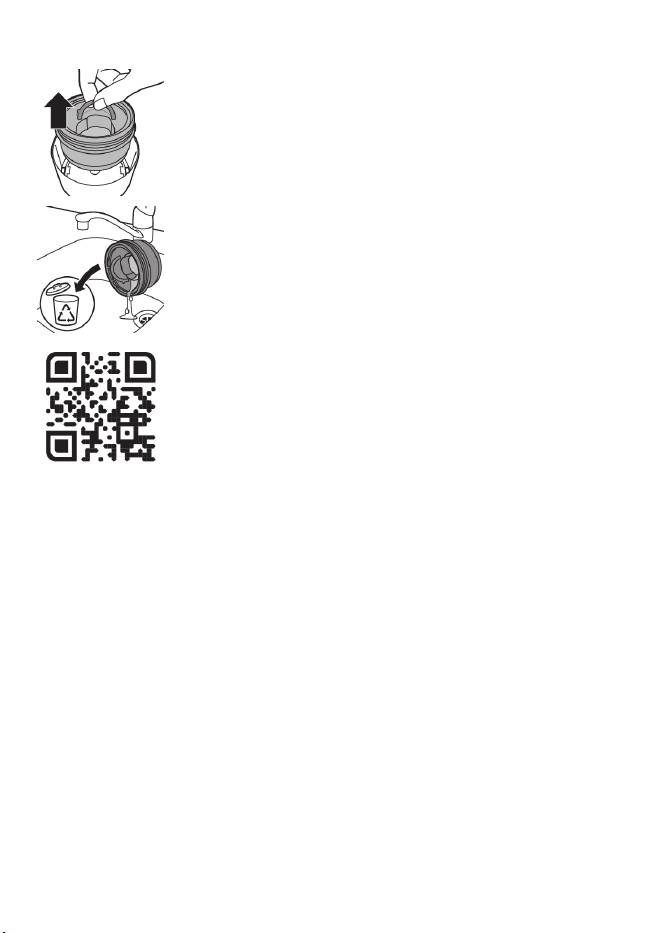
1 Twist and remove the top of the Quick Clean
Pod.
48
English
2 Lift the Quick Clean Pod Cartridge out of the
Quick Clean Pod by the handle.
3 Pour any remaining fluid down a drain and
recycle the empty cartridge in accordance with
local waste regulations.
4 Place a new Quick Clean Pod Cartridge into
the Quick Clean Pod.
Scan the QR code to the left or visit
www.philips.com/cleaning-cartridge to
order replacement Quick Clean Pod
Cartridges.
Storage
-
Be sure the product is switched off. Remove
the power cord from power outlet and the
product before storing it in a safe, dry location
where it will not be crushed, banged, or
subject to damage.
-
Do not wrap cord around the product when
storing.
-
Store cord and other accessories in a safe
location where these will not be cut or
damaged.
-
Do not place or store the product where it can
fall or be pulled into a tub or sink, water or
other liquid while plugged in.
49
English
Note: We advise you to let the product and its
attachments dry completely before you store
them for the next use.
-
Store the product in the pouch (if supplied).
-
Put the protection cap (if supplied) on the
shaver to protect it from dirt accumulation.
-
Alternatively, store the shaver on the charging
stand (if supplied) or in the Philips Quick Clean
Pod (if supplied).
How do I replace the shaving heads?
For maximum shaving performance, replace the
shaving heads once a year. Replace damaged
shaving heads immediately.
Always replace the shaving heads with original
Philips Norelco shaving heads (see 'Accessories').
Replacing the shaving heads
1 Switch off the shaver.
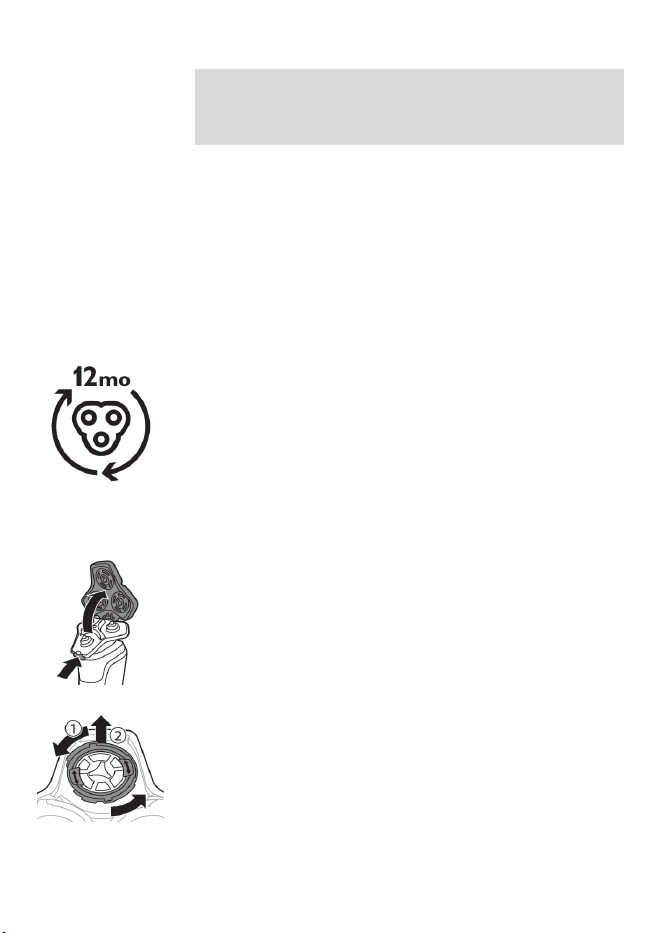
2 Press the release button on the shaving unit
and pull the shaving head holder off the
shaving unit.
3 Turn the retaining rings counterclockwise and
remove them. Place them aside in a safe place.
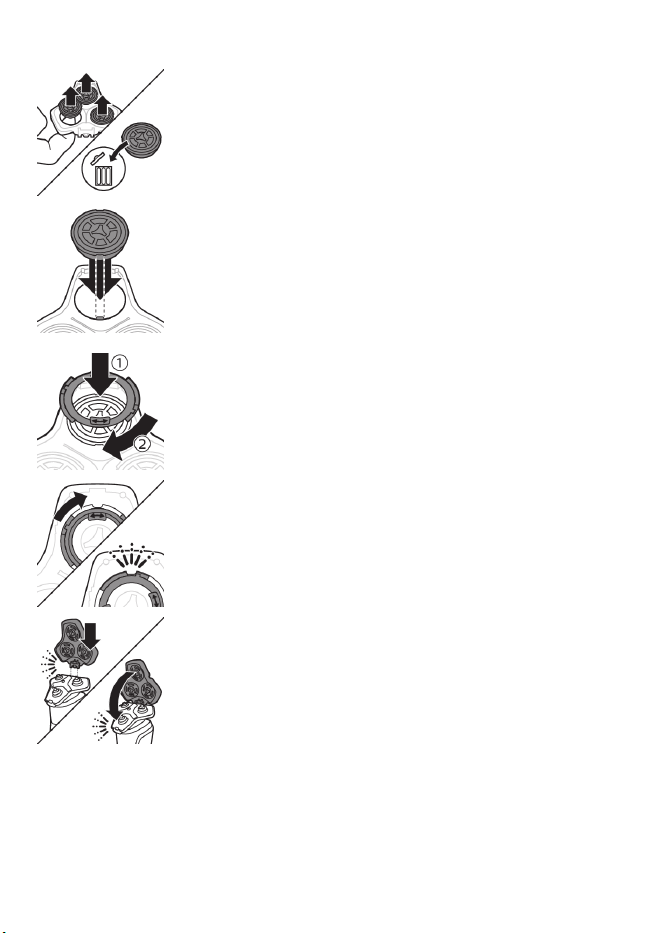
50
English
4 Remove the shaving heads from the shaving
head holder.
Discard the used shaving heads immediately
to avoid mixing them with the new shaving
heads.
5 Place new shaving heads in the holder.
6 Place the retaining rings back onto the shaving
heads and turn them clockwise to reattach the
retaining rings.
-
Each retaining ring has two recesses that fit
exactly into the projections of the shaving
head holder. Turn the ring clockwise until your
hear a click to indicate that the ring is fixed.
7 Insert the hinge of the shaving head holder
into the slot in the top of the shaving unit and
close the shaving unit.
51
English
Accessories
Replacement parts and accessories may be
purchased at a store near you or on our website
www.philips.com/store.
The following accessories and spare parts are
available:
-
SH91 Philips Norelco replacement shaving
heads
-
CC12 Philips Norelco Quick Clean Pod
Cartridge 2-pack
Assistance
For assistance, visit our website:
www.philips.com/support or call toll free
1-800-243-3050.
Online information is available 24 hours a day, 7
days a week.
Further guidance
For more guidance and videos on your S9000
shaver, scan the QR code below or visit
www.philips.com/myS9000shaver
Disposal
-
This product contains a rechargeable lithium-
ion battery which must be disposed of
properly.

52
English
-
Contact your local town or city officials for
battery disposal information. You can also call
1-800-822-8837 or visit
www.call2recycle.org for battery drop-off
locations.
-
For assistance, visit our website
www.philips.com/support or call
1-800-243-3050 toll free.
-
Your product is designed and manufactured
with high quality materials and components,
which can be recycled and reused. For
recycling information, please contact your
local waste management facilities or visit
www.recycle.philips.com.
Full Two-Year Warranty
Philips North America LLC warrants this new
product (except shaving heads) against defects in
materials or workmanship for a period of two
years from the date of purchase, and agrees to
repair or replace any defective product without
charge.
IMPORTANT: This warranty does not cover
damage resulting from accident, misuse or abuse,
lack of reasonable care, the affixing of any
attachment not provided with the product or loss
of parts or subjecting the product to any but the
specified voltage or batteries.*
NO RESPONSIBILITY IS ASSUMED FOR ANY
SPECIAL, INCIDENTAL OR CONSEQUENTIAL
DAMAGES.

53
English
In order to obtain warranty service, simply go to
www.philips.com/support. It is suggested that
for your protection you return shipments of
product by insured mail, insurance prepaid.
Damage occurring during shipment is not
covered by this warranty.
NOTE: No other warranty, written or oral, is
authorized by Philips North America LLC.
This warranty gives you specific legal rights, and
you may also have other rights which vary from
state to state. Some states do not allow the
exclusion or limitation of incidental or
consequential damages, so the above exclusion
and limitations may not apply to you.
*Read enclosed instructions carefully.
45-DAY MONEY-BACK GUARANTEE
To enjoy the closest and most comfortable shave
from your new Philips Norelco Men’s Shaver, the
shaver should be used exclusively for 3 weeks.
This allows your hair and skin enough time to
adapt to the Philips Norelco Shaving System. If,
after that period of time, you are not fully
satisfied with your Philips Norelco Men’s Shaver,
send the product back along with dated sales
receipt and we’ll refund you the full purchase
price.
The product must be shipped prepaid by
insured mail, insurance prepaid, have the
original sales receipt, indicating purchase
price and date of purchase, and the money-

54
English
back guarantee return authorization form
enclosed.
We cannot be responsible for lost mail.
The product must be postmarked no later than
45 days after the date of purchase. Philips
reserves the right to verify the purchase price of
the product and limit refunds not to exceed
suggested retail price.
To obtain money-back guarantee service,
please go to www.PhilipsMoneyBack.com.
Delivery of refund check will occur 6–8 weeks
after receipt of returned product.
Supplier's Declaration of Conformity
This device complies with part 15 of the FCC
Rules. Operation is subject to the following two
conditions: (1) This device may not cause harmful
interference, and (2) this device must accept any
interference received, including interference that
may cause undesired operation.
We, PHILIPS CONSUMER LIFESTYLE B.V., hereby
declare that the equipment bearing the model
name specified below was tested conforming to
the applicable FCC Rules under the most accurate
measurement standards possible, and that all the
necessary steps have been taken and are in force
to assure that production units of the same
equipment will continue to comply with the
Commissions requirements.
Unique Identifier: PHILIPS, NORELCO S9987,
S9985
Responsible Party – U.S. Contact Information

55
English
Philips North America LLC
P.O. Box 10313
Stamford | CT 06904
1-800-243-3050
Trademarks
Apple, the Apple logo, iPad, and iPhone are
trademarks of Apple Inc., registered in the U.S.
and other countries. App Store is a service mark
of Apple Inc.
Android is a trademark of Google Inc. Google
Play and the Google Play logo are trademarks of
Google Inc.
The Bluetooth® word mark and logos are
registered trademarks owned by the Bluetooth
SIG, Inc. and any use of such marks by Philips
Personal Care is under license.

Español
56
Español
Contenido
INSTRUCCIONES IMPORTANTES DE SEGURIDAD ___________ 57
Información general ___________________________________ 63
Introducción: identifica tu afeitadora_____________________ 63
Fig. A_________________________________________________ 65
Fig. B _________________________________________________ 66
¿Qué significan los íconos de la pantalla? (Fig. A)___________ 67
¿Qué significan los íconos de la pantalla? (Fig. B)___________ 70
Menú principal (Fig. A) _________________________________ 72
Menú principal (Fig. B)__________________________________ 74
¿Cómo conecto la afeitadora con mi smartphone? (Fig. A) __ 77
¿Cómo conecto la afeitadora con mi smartphone? (Fig. B)___ 80
¿Qué indica la afeitadora? (Fig. A)________________________ 83
¿Qué indica la afeitadora? (Fig. B) ________________________ 86
¿Cómo se carga el producto?____________________________ 88
¿Cómo se usa el producto?______________________________ 90
¿Cómo se limpia la afeitadora? __________________________ 95
Almacenamiento ______________________________________ 102
¿Cómo se reemplazan los cabezales de afeitado? __________ 103
Accesorios ____________________________________________ 104
Asistencia_____________________________________________ 105
Orientación adicional __________________________________ 105
Desecho ______________________________________________ 105
Garantía Total de Dos Años _____________________________ 106
GARANTÍA DE DEVOLUCIÓN DE SU DINERO POR 45DÍAS ___ 107
Marcas registradas _____________________________________ 109
57
Español
INSTRUCCIONES
IMPORTANTES DE
SEGURIDAD
Cuando utilice un producto eléctrico, siempre debe seguir las
precauciones básicas, incluidas las siguientes:
Lea todas las instrucciones antes de usar este producto.
PELIGRO
Para reducir el riesgo de descarga eléctrica:
-
No intente recoger un producto o una base de carga cableados
que hayan caído al agua. Desconéctelo inmediatamente del
enchufe de la pared.
-
Mantenga el cable de alimentación seco.
-
No coloque ni guarde el producto la base de carga en un lugar
desde donde pueda caerse a una bañera o un lavamanos. No
coloque el producto o la base de carga en agua ni deje que caiga
en agua o cualquier otro líquido.
-
Este producto no funciona mientras está conectado al enchufe
de pared. Excepto cuando se esté cargando, siempre desenchufe
este producto del enchufe de pared.
-
Desconecte el cable de alimentación del enchufe de pared y del
producto antes de limpiarlo.

58
Español
ADVERTENCIA
Para reducir el riesgo de quemaduras, incendio, descarga
eléctrica o lesiones:
-
Este aparato no debe ser usado por personas (incluyendo niños)
con su capacidad física, psíquica o sensorial reducida, ni por
quienes tengan falta de conocimientos y la experiencia
necesarios, a menos que sean supervisados o instruidos acerca
del uso del aparato por una persona responsable de su
seguridad. Los niños deben ser supervisados para asegurarse de
que no jueguen con este aparato.
-
Use este producto solo para el uso doméstico previsto como se
describe en este manual. No use accesorios que no estén
recomendados por la corporación Philips North America LLC.
-
Nunca utilice este producto si el cable o el enchufe de carga
están dañados, si no funciona correctamente, si se cayó, si está
dañado o si se sumergió en agua mientras estaba conectado a la
alimentación eléctrica. Para solicitar asistencia, comuníquese
al1-800-243-3050.
-
Mantenga el cable de alimentación lejos de superficies calientes.
-
No deje caer ni introduzca ningún objeto en ninguna abertura.
-
No utilice el adaptador dentro o cerca de una salida de corriente
que contenga un ventilador de aire eléctrico para prevenir daño
al adaptador.
-
Tenga cuidado cuando esté usando su smartphone cerca del
agua y en ambientes húmedos.
-
Las señales de radiofrecuencia de onda corta de un producto
Bluetooth® pueden afectar el funcionamiento de marcapasos, de
dispositivos médicos y de otros electrónicos. Consulta a un
médico para que te aconseje y mantén el aparato, al menos, a 8
pulgadas de distancia.

59
Español
-
No cargue, limpie ni enchufe el producto o la base de carga al
aire libre ni lo use en lugares donde se utilicen aerosoles (sprays)
o se administre oxígeno.
-
Siempre revisa los cabezales de afeitado (las protecciones y las
cuchillas) antes de usar la afeitadora. No uses la afeitadora si las
cuchillas o las protecciones están dañadas, ya que podrías
lastimarte.
-
Siempre ajuste primero el cable de alimentación o la base de
carga al producto, después a la toma de corriente. Para
desconectar, ponga todos los controles en la posición 'off'.
Luego quite el cable de alimentación del enchufe de pared.
-
Enchufe el cable de alimentación directamente en el toma
corriente. No use un cable de extensión.
-
Desconecte el cable de alimentación antes de conectar o
desconectar el producto.
-
No intente abrir el producto para retirar o reemplazar la batería
recargable integrada.
-
Las baterías que se emplean en este producto pueden
representar un riesgo de incendio o de quemadura química si no
se manipulan correctamente. No desarme, incinere ni permita
que la temperatura de las baterías supere los 100°C (212°F).
-
Use únicamente accesorios o productos consumibles originales
de Philips. Use únicamente el cable de alimentación
desmontable HQ8505.
-
Cargue, utilice y guarde el producto a una temperatura entre 41
°F / 5°C y 95 °F / 35°C.
-
Mantenga el producto y las baterías lejos del fuego y no los
exponga a la luz solar directa ni a altas temperaturas.
-
Si el producto se pone anormalmente caliente, despide un olor
extraño, cambia de color o tarda más tiempo de lo normal en
cargarse, deje de usarlo y de cargarlo, y comuníquese con Philips.

60
Español
-
No coloque los productos y sus baterías en hornos microondas ni
en ollas de inducción.
-
No abra, modifique, perfore, dañe ni desarme el producto o la
batería, para evitar que las baterías se calienten o liberen
sustancias tóxicas o peligrosas. No provoque un cortocircuito,
sobrecargue ni invierta la posición de las baterías.
-
Si las baterías se dañan o tienen fugas, evite el contacto con la
piel o los ojos. Si esto sucede, enjuague bien inmediatamente
con agua y busque atención médica.
-
Cuando manipule las baterías, asegúrese de que sus manos, el
producto y las baterías estén secas.
-
Para evitar un cortocircuito en las baterías después de la
extracción, no permita que las terminales de las baterías entren
en contacto con objetos metálicos (p. ej., monedas, horquillas,
anillos). No envuelva las baterías en papel de aluminio. Cubra las
terminales de las baterías con cinta o colóquelas en una bolsa de
plástico antes de desecharlas.
¡IMPORTANTE!: El enchufe eléctrico contiene un transformador.
No corte el enchufe eléctrico para reemplazarlo con otro ya que
esto puede producir una condición de peligro.
Líquido para cartucho del Quick Clean Pod de Philips Norelco
-
No ingerir.
-
Evita el contacto con los ojos. En caso de que entre en contacto
con los ojos, enjuaga bien con agua fría. Si la irritación persiste,
consulta a un médico.
-
Manténgase fuera del alcance de los niños.
Campos electromagnéticos (CEM)
Este producto Philips cumple con todos los estándares y las
regulaciones aplicables sobre la exposición a campos magnéticos.

61
Español
Cumplimiento con las reglas de la Comisión Federal de
Comunicaciones (FCC por sus siglas en inglés)
-
El aparato funciona en la banda de frecuencia
de 2.4 GHz.
-
Este aparato cuenta con Bluetooth clase 2.
-
La potencia máxima de radiofrecuencia
irradiada en la banda de frecuencia en la que
funciona el aparato es inferior a 20 dBm
-
Este dispositivo cumple con los límites de
exposición a la radiación por radiofrecuencia
de las reglas FCC y ha sido evaluado de
acuerdo con la condición de exposición
portátil.
Las modificaciones o los cambios que no hayan
sido expresamente aprobados por Philips podrían
anular la autorización del usuario para operar el
equipo.
Este dispositivo cumple con la Parte 15 de las
reglas de la FCC. El funcionamiento está sujeto a
las dos condiciones siguientes: (1) es posible que
este dispositivo no cause interferencia perjudicial,
y (2) este dispositivo debe aceptar cualquier
interferencia que reciba, inclusive aquella que
pueda causar un funcionamiento no deseado.
Este equipo ha sido probado y se encontró que
cumple con los límites de un dispositivo digital de
Clase B según la parte 15 de las reglas de la FCC.
Estos límites están diseñados para brindar una
protección razonable en contra de la
interferencia perjudicial en una instalación
doméstica. Este equipo genera, usa y puede
irradiar energía de radiofrecuencia, y si no se

62
Español
instala y se utiliza de acuerdo con las
instrucciones, puede causar interferencia
perjudicial a las comunicaciones por radio. Sin
embargo, no hay garantía de que no ocurrirá
interferencia en una instalación en particular. Si
este equipo causa interferencia perjudicial a la
recepción de radio o televisión, lo cual puede
determinarse encendiendo y apagando el
equipo, se le recomienda al usuario tratar de
corregir la interferencia tomando una o más de
las siguientes medidas:
-
Reorientar o cambiar de lugar la antena
receptora.
-
Aumentar la distancia entre el equipo y el
aparato receptor.
-
Conecte el equipo en un enchufe en un
circuito diferente al que está conectado el
recibidor.
-
Consultar a un distribuidor o a un técnico de
radio/televisión con experiencia para recibir
ayuda.
-
No hay ninguna limitación en cuanto a la
distancia a la que puede utilizarse del cuerpo
humano.
La marca denominativa y los logotipos de
Bluetooth® son marcas comerciales registradas
propiedad de Bluetooth SIG, Inc. y todo uso que
hace Koninklijke Philips N.V. de dichas marcas es
conforme a una licencia.

63
Español
CONSERVE ESTAS
INSTRUCCIONES
Información general
1 Cortadora emergente
2 Botón deslizante de apertura de cortadora
3 Unidad de afeitado
4 Botón de liberación de la unidad de afeitado
5 Botón de encendido/apagado
6 Botón Menú
7 Toma para clavija pequeña
8 Base de carga
9 Cable de alimentación
10 Conector pequeño
11 Funda
12 Cartucho del Quick Clean Pod de Philips
13 Quick Clean Pod
14 Cepillo de limpieza
Los accesorios provistos pueden variar según el
producto. La caja muestra los accesorios que han
sido provistos con su producto.
Introducción: identifica tu afeitadora
¡Felicidades por tu compra y bienvenido a
PhilipsNorelco! Para aprovechar al máximo la
asistencia que te ofrece Philips, registra tu
producto en www.philips.com/welcome o a
través de la aplicación.
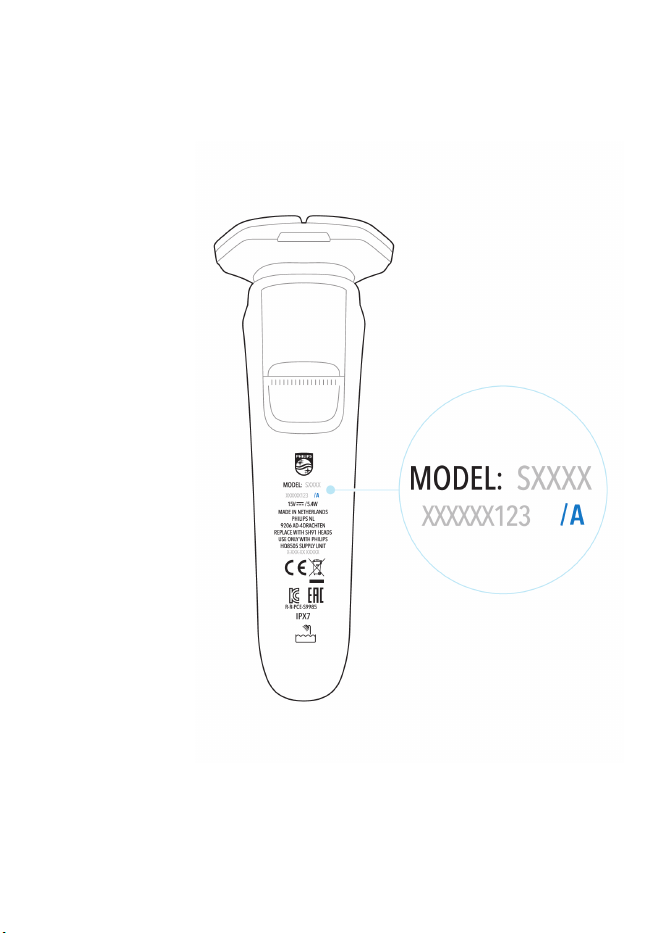
Este manual de usuario contiene información
sobre dos versiones de la afeitadora S9000.

64
Español
Fig. La Fig. A y la Fig. B te ayudarán a
identificar la versión que posees.
65
Español
Fig. A
66
Español
Fig. B
67
Español
-
Esta afeitadora es resistente al agua. Es
apropiado para su uso en el baño o la ducha y
puede lavarse en la llave. Por motivos de
seguridad, por lo tanto la afeitadora debe
emplearse únicamente sin cable.
¿Qué significan los íconos de la pantalla? (Fig.
A)
-
Menú principal
Puedes alternar entre los elementos del menú si
presionas el botón del menú.
También puedes activar o desactivar ciertas funciones
con una pulsación larga.
Ícono Significado
En el menú principal, se muestra el estado de la batería
en porcentajes.
Los íconos del menú del sensor de control de
movimiento indican si el movimiento durante tu última
afeitada fue bueno o si se puede mejorar.
Puedes activar el bloqueo de viaje desde este menú (ver
'Menú principal (Fig. A)').
Aquí la pantalla muestra que la afeitadora no está
emparejada con tu teléfono inteligente (ver 'Empareja la
afeitadora y el teléfono inteligente').
68
Español
En la pantalla, se muestra que la afeitadora está
emparejada con tu teléfono inteligente (ver 'Empareja la
afeitadora y el teléfono inteligente').
-
Encendido de la afeitadora
Para encender la afeitadora, pulsa el botón de
encendido/apagado.
Ícono Significado
Cuando enciendas la afeitadora, aparecerá una breve
animación con estos íconos en la que se indicará qué
ajuste de retroalimentación de presión activaste (ver
'¿Qué indica la afeitadora? (Fig. A)'). Puedes alternar
entre los ajustes de retroalimentación de presión si
presionas el botón del menú.
-
Advertencias y notificaciones
Ícono Significado
La batería está casi vacía y necesitas cargar la afeitadora
(ver '¿Cómo se carga el producto?').
Cuando el almacenamiento de datos esté casi lleno,
recibirás una notificación que te recordará que
sincronices las sesiones de afeitado. Para evitar que se
pierdan datos, sincroniza la afeitadora con la aplicación
(ver '¿Cómo conecto la afeitadora con mi smartphone?
(Fig. A)').
69
Español
La unidad de afeitado está sucia o dañada a tal grado
que el motor no puede funcionar. Limpia los cabezales
de afeitado minuciosamente.
Estás usando la unidad de suministro equivocada (ver
'¿Cómo se carga el producto?'). Usa solo la unidad de
suministro (HQ8505) que incluye la afeitadora.
-
Limpieza de la afeitadora
Ícono Significado
Recuerda: limpia la afeitadora en el dispositivo de
limpieza rápida (ver '¿Cómo uso el Quick Clean Pod?').
Recuerda: limpia la afeitadora.
El proceso de limpieza está en curso y en la pantalla se
muestra el tiempo de limpieza restante como un reloj o
en segundos si presionas el botón de menú.
Se ha interrumpido el proceso de limpieza.
-
Desenchufa para poder usar
Ícono Significado
Desenchufa la afeitadora antes de usarla.
70
Español
¿Qué significan los íconos de la pantalla? (Fig.
B)
-
Menú principal
Puedes alternar entre los elementos del menú si
presionas el botón del menú.
También puedes activar o desactivar ciertas funciones
con una pulsación larga.
Ícono Significado
Este menú muestra el estado de la batería en
porcentajes.
Puedes activar o desactivar el bloqueo de viaje en este
menú (ver 'Bloqueo para viajes').
Puedes desactivar o reactivar la retroalimentación del
anillo de luz en este menú (ver 'Retroalimentación del
anillo de luz').
-
Encendido de la afeitadora
Para encender la afeitadora, pulsa el botón de
encendido/apagado.
-
Bluetooth
Ícono Significado
Este ícono muestra que la afeitadora está emparejada
con tu teléfono inteligente.
71
Español
Este ícono aparecerá después de desemparejar la
afeitadora con tu teléfono inteligente.
-
Advertencias y notificaciones
Ícono Significado
La batería está casi vacía y necesitas cargar la afeitadora
(ver '¿Cómo se carga el producto?').
Cuando el almacenamiento de datos esté casi lleno,
recibirás una notificación que te recordará que
sincronices las sesiones de afeitado. Para evitar que se
pierdan datos, sincroniza la afeitadora con la aplicación
(ver '¿Cómo conecto la afeitadora con mi smartphone?
(Fig. A)').
La unidad de afeitado está sucia o dañada a tal grado
que el motor no puede funcionar. Limpia los cabezales
de afeitado minuciosamente (ver 'Limpieza a fondo').
Estás usando un cable de alimentación inadecuado (ver
'¿Cómo se carga el producto?'). Utiliza solo el cable de
alimentación que se suministra con la afeitadora.
-
Limpieza de la afeitadora
Ícono Significado
Recuerda: limpia la afeitadora en el dispositivo de
limpieza rápida (ver '¿Cómo uso el Quick Clean Pod?').
Recuerda: limpia la afeitadora (ver '¿Cómo se limpia la
afeitadora?').
72
Español
El proceso de limpieza está en curso y en la pantalla se
muestra el tiempo de limpieza restante como un reloj o
en segundos si presionas el botón de menú.
Se ha interrumpido el proceso de limpieza.
-
Desenchufa para poder usar
Ícono Significado
Desenchufa la afeitadora antes de usarla.
Menú principal (Fig. A)
Mientras la afeitadora está apagada, puedes
alternar entre las cuatro funciones del menú si
presionas el botón del menú.
-
Carga de batería disponible
Este elemento del menú muestra la carga
restante de la batería.
-
Sensor de control de movimiento
Este elemento del menú muestra la
retroalimentación de movimiento de tu última
afeitada.
73
Español
-
Bloqueo para viajes
Desde este elemento del menú, puedes
bloquear y desbloquear la afeitadora si
mantienes presionado el botón del menú
durante tres segundos. Cuando vaya a viajar,
puede bloquear la afeitadora para evitar que
se encienda accidentalmente. Cuando se
active el bloqueo para viajes, el Bluetooth se
apagará de forma automática, y la afeitadora
entrará en modo de ahorro de energía.
-
Bluetooth
Desde este elemento del menú, puedes
desemparejar la afeitadora del teléfono
inteligente.
Para obtener información sobre los beneficios
de emparejar la afeitadora al teléfono
inteligente, consulta “Beneficios de conectar la
afeitadora a la aplicación”.
Nota: Asegúrate de que tu teléfono
inteligente esté equipado con Bluetooth® 4.2
o superior.
Esta afeitadora cuenta con Bluetooth®4.2 y
versiones superiores para conectarse a la
aplicación. Cuando haya apareado la
afeitadora y su smartphone, el Bluetooth de la
afeitadora se enciende automáticamente,
incluso cuando está apagada. Esto permite
que sus datos de afeitado se sincronicen más
tarde para que no tenga que traer su
smartphone con usted cuando se afeite.
74
Español
Nota: Para apagar el Bluetooth de su
afeitadora, active el bloqueo de viaje.
Menú principal (Fig. B)
Puedes alternar entre las funciones del menú si
presionas el botón del menú.
Carga de batería disponible
Este elemento del menú muestra la carga
restante de la batería.
Retroalimentación después del afeitado
Nota: Este menú solo se muestra después de
activar esta función mediante la configuración de
la aplicación (ver '¿Cómo conecto la afeitadora
con mi smartphone? (Fig. B)').
Puedes optimizar tu experiencia de afeitado
aplicando el movimiento y la cantidad de presión
adecuados (ver 'Afeitado'). Este elemento
muestra la calificación de estrellas de tu última
afeitada. Indica si la presión y el movimiento que
aplicaste durante el afeitado fueron adecuados o
si podrían mejorar.
Bloqueo para viajes
Cuando vaya a viajar, puede bloquear la
afeitadora para evitar que se encienda
accidentalmente. En este menú, mantén
presionado el botón de menú durante 3
segundos para bloquear o desbloquear la
75
Español
afeitadora. Cuando se active el bloqueo para
viajes, el Bluetooth se apagará de forma
automática, y la afeitadora entrará en modo de
ahorro de energía.
Anillo de luz encendido/apagado
Durante el afeitado, recibirás retroalimentación
sobre la cantidad de presión que estás aplicando
a través del anillo de luz ubicado en la parte
superior del mango de la afeitadora.
El anillo de luz está activo de forma
predeterminada. Puedes desactivarlo o
reactivarlo.
Para desactivar la retroalimentación del anillo de
luz,
1 alterna entre los elementos del menú al
presionar el botón del menú hasta llegar al
menú 'Light on' (Luz encendida).
2 Mientras te encuentras en el menú 'Light on',
mantén presionado el botón de menú durante
3 segundos hasta que veas 'Light off' (Luz
apagada) en la pantalla.
Para reactivar la retroalimentación del anillo de
luz,
1 alterna entre los elementos del menú al
presionar el botón del menú hasta llegar al
menú 'Light off' (Luz apagada).
2 Mientras te encuentras en el menú 'Light off',
mantén presionado el botón de menú durante
3 segundos hasta que veas 'Light on' (Luz
encendida) en la pantalla.
76
Español
Nota: La retroalimentación del anillo de luz solo
está disponible cuando la unidad de afeitado
está colocada en el mango.
Bluetooth
Nota: El menú de Bluetooth se muestra solo
cuando la afeitadora está emparejada con tu
teléfono inteligente.
Aquí puedes desvincular la afeitadora y tu
teléfono inteligente. Para obtener información
sobre los beneficios de emparejar la afeitadora y
el teléfono inteligente, consulta “Beneficios de
conectar la afeitadora a la aplicación”.
Nota: Asegúrate de que tu teléfono
inteligente esté equipado con Bluetooth® 4.2
o superior.
Esta afeitadora cuenta con Bluetooth®4.2 y
versiones superiores para conectarse a la
aplicación. Cuando haya apareado la
afeitadora y su smartphone, el Bluetooth de la
afeitadora se enciende automáticamente,
incluso cuando está apagada. Esto permite
que sus datos de afeitado se sincronicen más
tarde para que no tenga que traer su
smartphone con usted cuando se afeite.
Nota: Para apagar el Bluetooth de su
afeitadora, active el bloqueo de viaje.
77
Español
¿Cómo conecto la afeitadora con mi
smartphone? (Fig. A)
Beneficios de conectar la afeitadora a la aplicación
Puedes usar la aplicación para lo siguiente:
-
Recibir orientación y retroalimentación acerca
del movimiento y la presión en tiempo real,
-
Activar y personalizar la retroalimentación
posterior al afeitado,
-
Sincronizar los datos de afeitado y el
seguimiento del historial de afeitado,
-
Mejorar tu rutina de afeitado y reducir los
problemas de la piel relacionados con el
afeitado,
-
Recibir recomendaciones y consejos
personalizados sobre estilo.
Empareja la afeitadora y el teléfono inteligente
La aplicación es compatible con una amplia gama
de teléfonos inteligentes iPhone y Android™.
Obtén más información en
www.philips.com/MyShaver9000-app
1 Descarga la aplicación.
2 Asegúrate de que el Bluetooth esté encendido
en tu teléfono inteligente.
78
Español
3 Enciende la afeitadora para activar el
Bluetooth.
4 Abre la aplicación y sigue las instrucciones
para iniciar el proceso de apareo.
5 Cuando se hayan emparejado, la afeitadora y
la aplicación se conectarán automáticamente
cuando abras la aplicación y el Bluetooth de su
teléfono esté encendido.
Sincronice sus afeitadas
Esta afeitadora almacena los datos de afeitado,
por lo que no necesitas llevar tu teléfono
inteligente encima cuando te afeitas o cuando
deseas verificar los datos en una etapa posterior.
Cuando el almacenamiento de datos esté casi
lleno, recibirás una notificación que te recordará
que sincronices las sesiones de afeitado. Para
evitar que se pierdan datos, sincroniza la
afeitadora con la aplicación (ver '¿Cómo conecto
la afeitadora con mi smartphone? (Fig. A)').
1 Asegúrate de que el teléfono inteligente esté
cerca de la afeitadora y abre la aplicación.
2 La aplicación se conecta automáticamente y
sincroniza sus últimas afeitadas.
Desempareja la afeitadora y el teléfono inteligente
Puedes emparejar tu afeitadora con un solo
teléfono inteligente a la vez. Para desaparejar la
afeitadora de tu teléfono inteligente (por
ejemplo, cuando adquieres un nuevo teléfono
79
Español
inteligente), sigue los pasos que se describen a
continuación:
-
Primero, desempareja la afeitadora.
1 Alterna entre los elementos del menú
presionando el botón del menú hasta llegar al
menú de Bluetooth.
2 Mantén presionado el botón del menú hasta
que aparezca una cruz y se seleccione la marca
de verificación.
3 Vuelve a presionar el botón del menú para
seleccionar la marca de verificación y
desemparejar la afeitadora.
Nota: Cuando la afeitadora se desempareje de
forma correcta, verás que aparece el ícono de
Bluetooth en la parte izquierda del mango.
Nota: Cuando desees volver a emparejar la
afeitadora y el teléfono inteligente, asegúrate de
que ambos estén desemparejados primero.
-
Luego, desempareja tu teléfono
inteligente.
1 Ve a la configuración en su teléfono
inteligente y selecciona Bluetooth.
2 Pulsa el nombre de la afeitadora.
3 Pulsa "olvidar" o "desaparejar".
80
Español
Nota: El procedimiento para desemparejar el
dispositivo puede variar según el teléfono
inteligente. Para obtener más información,
consulta el manual de su teléfono inteligente.
¿Cómo conecto la afeitadora con mi
smartphone? (Fig. B)
Beneficios de conectar la afeitadora a la aplicación
Puedes usar la aplicación para lo siguiente:
-
Recibir orientación y retroalimentación acerca
del movimiento y la presión en tiempo real,
-
Activar y personalizar la retroalimentación
posterior al afeitado,
-
Sincronizar los datos de afeitado y el
seguimiento del historial de afeitado,
-
Mejorar tu rutina de afeitado y reducir los
problemas de la piel relacionados con el
afeitado,
-
Recibir recomendaciones y consejos
personalizados sobre estilo.
Empareja la afeitadora y el teléfono inteligente
La aplicación es compatible con una amplia gama
de teléfonos inteligentes iPhone y Android™.
Obtén más información en
www.philips.com/MyShaver9000-app
1 Descarga la aplicación.
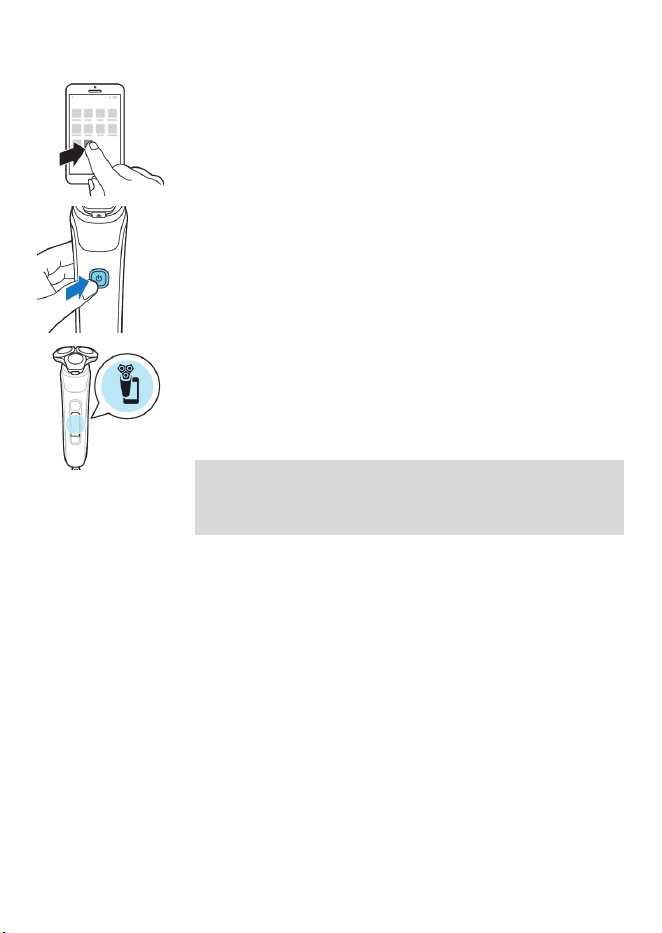
81
Español
2 Asegúrate de que el Bluetooth esté encendido
en tu teléfono inteligente.
3 Enciende la afeitadora para activar el
Bluetooth.
4 Abre la aplicación y sigue las instrucciones
para iniciar el proceso de apareo.
5 Cuando se hayan emparejado, la afeitadora y
la aplicación se conectarán automáticamente
cuando abras la aplicación y el Bluetooth de su
teléfono esté encendido.
Nota: Cuando la afeitadora está emparejada con
un teléfono inteligente, el menú de Bluetooth
aparece como un elemento nuevo.
Sincroniza tus afeitadas
Esta afeitadora almacena los datos de afeitado,
por lo que no necesitas llevar tu teléfono
inteligente encima cuando te afeitas o cuando
deseas verificar los datos en una etapa posterior.
Cuando el almacenamiento de datos esté casi
lleno, recibirás una notificación que te recordará
que sincronices las sesiones de afeitado. Para
evitar que se pierdan datos, sincroniza la
afeitadora con la aplicación (ver '¿Cómo conecto
la afeitadora con mi smartphone? (Fig. B)').
1 Asegúrate de que el teléfono inteligente esté
cerca de la afeitadora y abre la aplicación.
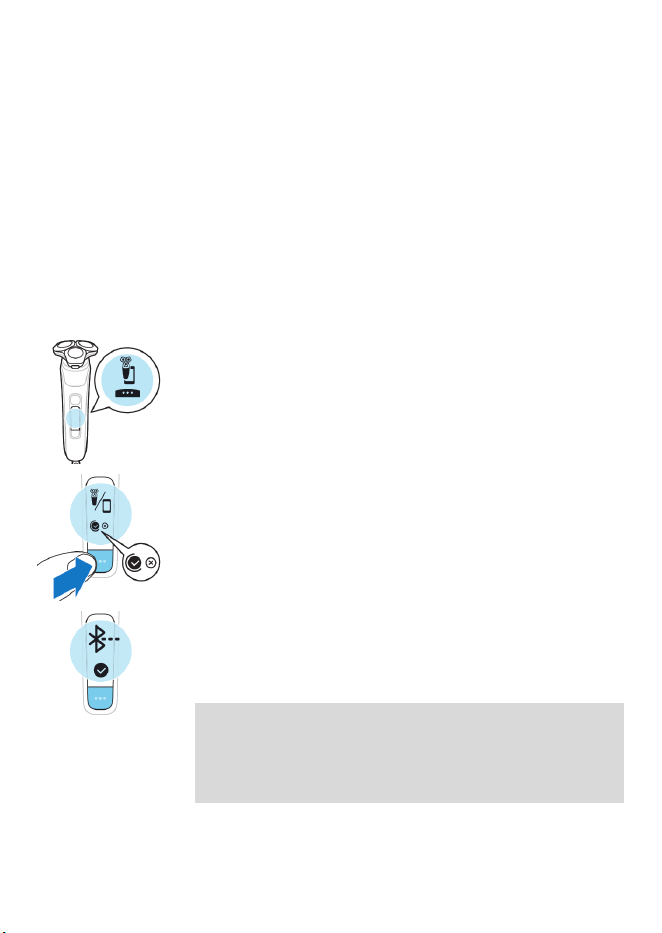
82
Español
2 La aplicación se conecta automáticamente y
sincroniza sus últimas afeitadas.
Desempareja la afeitadora y el teléfono inteligente
Puedes emparejar tu afeitadora con un solo
teléfono inteligente a la vez. Para desaparejar la
afeitadora de tu teléfono inteligente (por
ejemplo, cuando adquieres un nuevo teléfono
inteligente), sigue los pasos que se describen a
continuación:
-
Primero, desempareja la afeitadora.
1 Alterna entre los elementos del menú al
presionar el botón del menú hasta llegar al
menú de Bluetooth.
2 Mantén presionado el botón del menú hasta
que aparezca una cruz y se seleccione la marca
de verificación.
3 Vuelve a presionar el botón del menú para
seleccionar la marca de verificación y
desemparejar la afeitadora.
Nota: Cuando la afeitadora está emparejada con
un teléfono inteligente, el menú de Bluetooth
aparece como un elemento nuevo. Cuando se
desempareje, este menú desaparecerá.

83
Español
Nota: Cuando la afeitadora se desempareje
correctamente, el ícono de Bluetooth aparecerá
brevemente en la pantalla de la afeitadora.
Nota: Cuando desees volver a emparejar la
afeitadora y el teléfono inteligente, asegúrate de
que ambos estén desemparejados primero.
-
Luego, desempareja tu teléfono
inteligente.
1 Ve a la configuración en su teléfono
inteligente y selecciona Bluetooth.
2 Pulsa el nombre de la afeitadora.
3 Pulsa "olvidar" o "desaparejar".
Nota: El procedimiento para desemparejar el
dispositivo puede variar según el teléfono
inteligente. Para obtener más información,
consulta el manual de su teléfono inteligente.
¿Qué indica la afeitadora? (Fig. A)
Retroalimentación del anillo de luz
Durante el afeitado, recibirás retroalimentación
sobre la cantidad de presión que estás aplicando
a través del anillo de luz ubicado en la parte
superior del mango de la afeitadora.
El anillo de luz del mango se enciende en
distintos colores mientras te afeitas para indicarte
cuánta presión estás ejerciendo. Esta es la
configuración predeterminada:
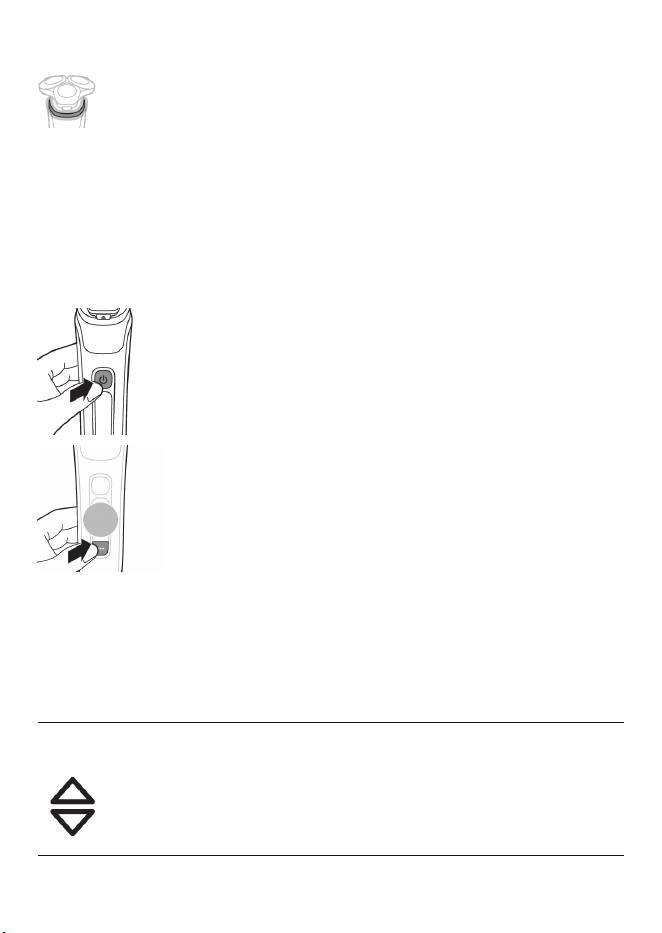
84
Español
-
Cuando no aplicas suficiente presión, el
anillo de luz se ilumina en azul.
-
Cuando aplicas la cantidad correcta de
presión, el anillo de luz se ilumina en verde.
-
Cuando aplicas demasiada presión, el anillo
de luz se ilumina en naranja.
Cuando la afeitadora está encendida, puedes
personalizar el tipo de retroalimentación de
presión que recibes.
1 Encienda la afeitadora.
2 Presiona el botón del menú para alternar
entre las opciones de retroalimentación de
presión. En la siguiente tabla, se muestra la
retroalimentación de presión que recibes con
cada opción.
Se está
aplicando
muy poca
presión.
Se está
aplicando la
cantidad
correcta de
presión.
Se está
aplicando
demasiada
presión.
Retroalimentación de
presión completa
Se
encenderá el
anillo de luz
en color
azul.
Se
encenderá el
anillo de luz
en color
verde.
Se
encenderá el
anillo de luz
en color
naranja.
85
Español
Retroalimentación de
presión parcial
No hay
retroaliment
ación.
No hay
retroaliment
ación.
Se
encenderá el
anillo de luz
en color
naranja.
Sin retroalimentación
de presión
No hay
retroaliment
ación.
No hay
retroaliment
ación.
No hay
retroaliment
ación.
Nota: La retroalimentación de presión solo
está disponible cuando el cabezal de afeitado
está colocado en el mango.
Retroalimentación después del afeitado
Nota: Esta función se activa mediante la
configuración de la aplicación (ver '¿Cómo
conecto la afeitadora con mi smartphone? (Fig.
A)').
Puedes optimizar tu experiencia de afeitado
aplicando el movimiento y la cantidad de presión
adecuados (ver 'Afeitado'). Cuando se activa esta
función, la afeitadora te ofrece retroalimentación
justo después de afeitarte y de apagarla.
Retroalimentación del sensor de protección de
presión
Si se puede mejorar la presión de afeitado,
aparece el ícono del sensor de protección de
presión con un signo de exclamación.

86
Español
-
La presión que aplicaste durante la afeitada
fue demasiado alta.
-
La presión que aplicaste durante la afeitada
fue demasiado baja.
Retroalimentación del sensor de control de
movimiento
-
Si se puede mejorar el movimiento de
afeitado, aparece el ícono del sensor de
control de movimiento con un signo de
exclamación.
-
Cuando tanto la presión como el
movimiento aplicados durante la afeitada
son perfectos, ambos íconos aparecen con
una marca de verificación.
¿Qué indica la afeitadora? (Fig. B)
Retroalimentación del anillo de luz
Durante el afeitado, recibirás retroalimentación
sobre la cantidad de presión que estás aplicando
a través del anillo de luz ubicado en la parte
superior del mango de la afeitadora.
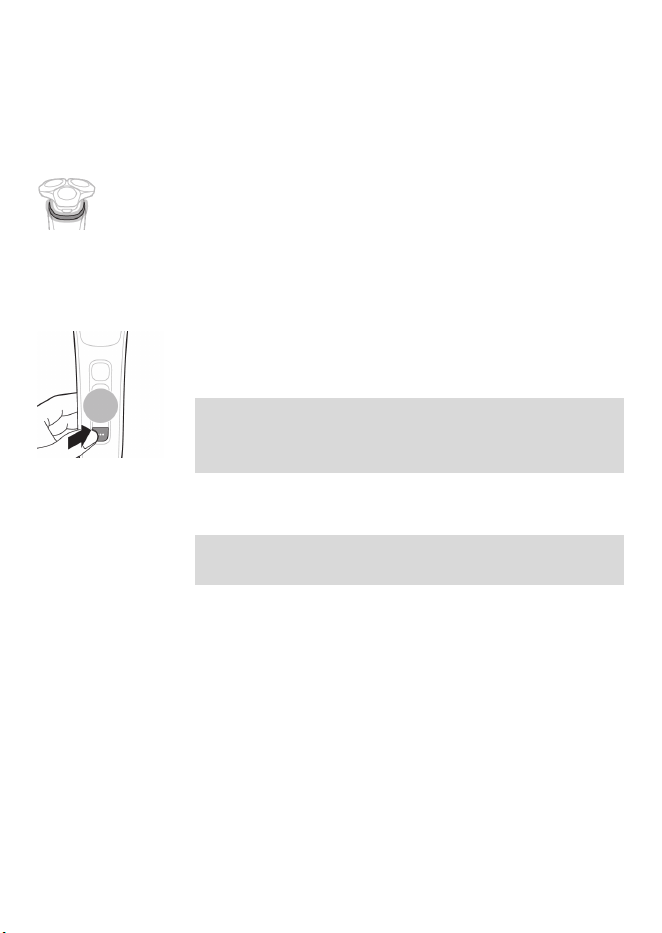
87
Español
El anillo de luz del mango se enciende en
distintos colores mientras te afeitas para indicarte
cuánta presión estás ejerciendo. Esta función está
activa de forma predeterminada.
-
Cuando no aplicas suficiente presión, el
anillo de luz se ilumina en azul.
-
Cuando aplicas la cantidad correcta de
presión, el anillo de luz se ilumina en verde.
-
Cuando aplicas demasiada presión, el anillo
de luz se ilumina en naranja.
Puedes desactivar o reactivar esta función en el
menú del anillo de luz encendido/apagado.
Nota: La retroalimentación del anillo de luz solo
está disponible cuando la unidad de afeitado
está colocada en el mango.
Post-shave feedback
Nota: Esta función se activa mediante la
configuración de la aplicación.
Puedes optimizar tu experiencia de afeitado
aplicando el movimiento y la cantidad de presión
adecuados (ver 'Afeitado'). La afeitadora te
brinda una calificación de estrellas por el
movimiento y la presión aplicados durante la
última afeitada. Una vez que esta función está
activada,
-
aparece un nuevo elemento de menú para
retroalimentación después del afeitado en la
afeitadora.
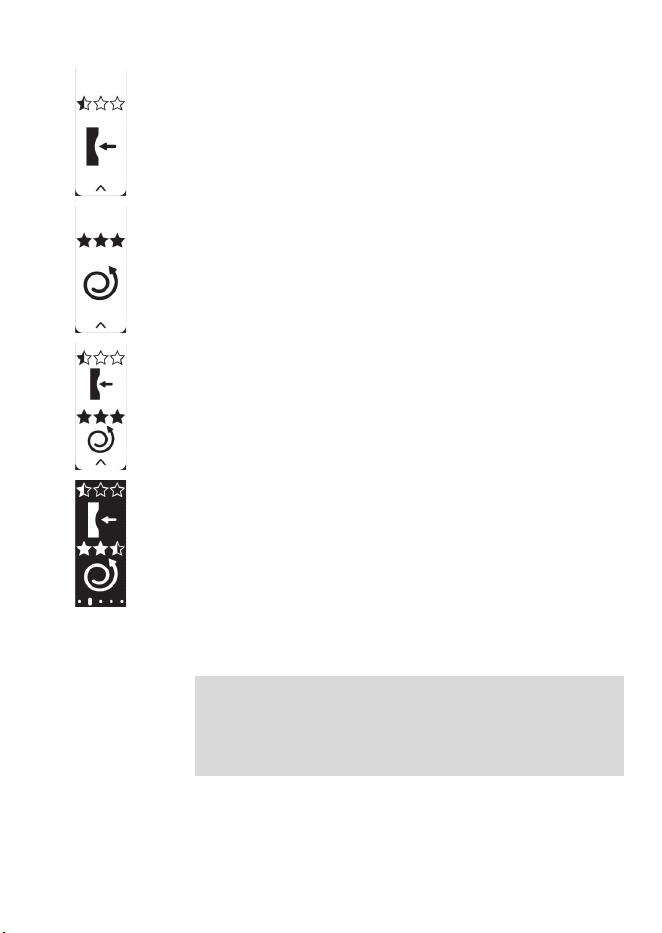
88
Español
-
Después de cada afeitada, una vez que apagas
el producto, verás retroalimentación
instantánea sobre la presión,
-
sobre el movimiento
-
o ambos.
-
Cuando navegues por el menú más tarde,
verás tanto la calificación de movimiento
como la calificación de presión de tu última
afeitada en el nuevo elemento del menú (ver
'Menú principal (Fig. B)').
¿Cómo se carga el producto?
Nota: Este producto es a prueba de agua. Es
apropiado para su uso en el baño o la ducha y
puede lavarse en la llave. Este producto solo se
puede utilizar sin cable.
-
Carga la afeitadora antes de usarla por
primera vez y cuando el indicador de la batería
disponible muestre que la batería está casi
agotada.
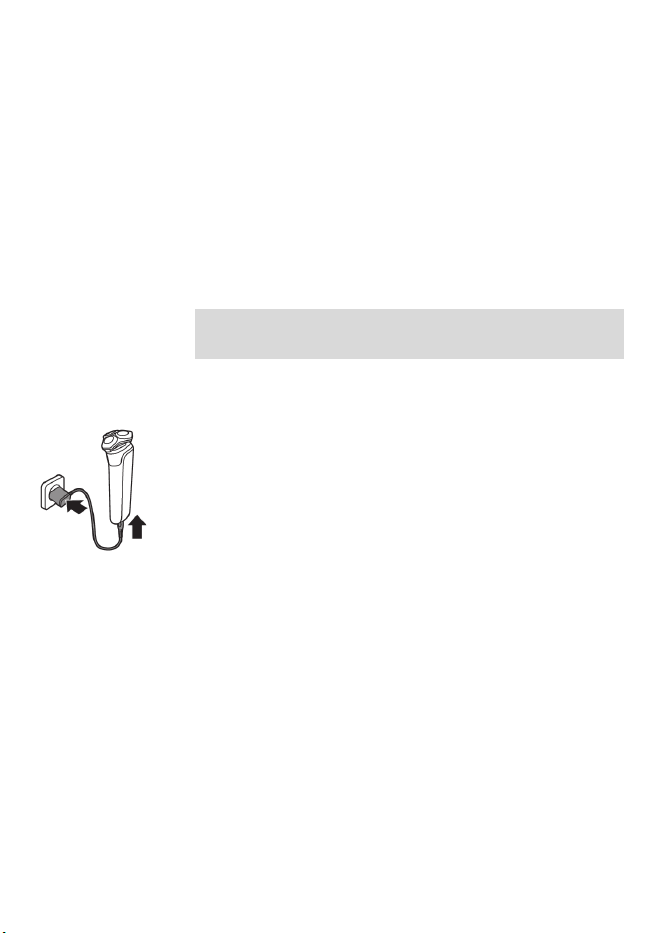
89
Español
-
La carga toma, aproximadamente, 1hora.
-
Carga rápida: Después de cargarla durante
alrededor de cinco minutos, la batería tendrá
suficiente energía para una afeitada completa.
Si la batería está cargada al 10%, puedes
completar una afeitada.
-
Cuando el producto está totalmente cargado,
posee una autonomía de funcionamiento de
hasta 60minutos sin cable.
Nota: No puede usar el producto mientras se
carga.
Carga con el cable de alimentación
1 Asegúrese de que el producto esté apagado.
2 Inserte la clavija pequeña en el producto y
conecte la clavija de alimentación en cualquier
tomacorriente de pared.
-
Mientras se carga la afeitadora, aparece
una animación en la pantalla que muestra
el progreso.
-
Cuando la afeitadora está cargada por
completo, el porcentaje de la batería figura
en 100% y el ícono de la batería indica que
está llena.
3 Después de cargarla, retire el enchufe del
tomacorriente y retire la clavija pequeña del
producto.
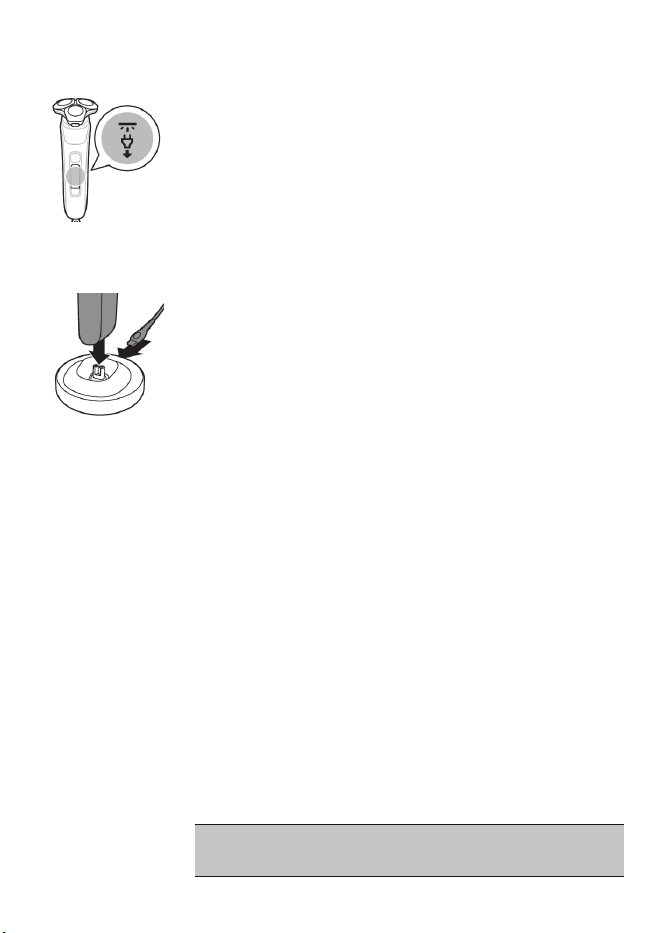
90
Español
Símbolo de "Desconectar para usar"
El símbolo de "Desconectar para usar" parpadea
para recordarle que debe desconectar el cable de
corriente del tomacorriente y retirar la clavija
pequeña del producto antes de que pueda
encenderlo.
Carga en la base de carga
1 Asegúrese de que el producto esté apagado.
2 Coloque la clavija pequeña en la base de carga
y conecte el cable de alimentación al
tomacorriente.
3 Coloque el producto en la base de carga.
Solo para modelos específicos: El anillo de
luz en la parte inferior del soporte de carga se
enciende y gira con rapidez.
-
Después de alrededor de cinco minutos, el
anillo de luz gira a menor velocidad.
-
A medida que la afeitadora continúa
cargándose, el anillo de luz se vuelve más
brillante y gira a menor velocidad.
-
Cuando la afeitadora está cargada por
completo, el anillo de luz se ilumina en su
totalidad y deja de girar.
4 Después de cargar, retire el cable de
alimentación del tomacorriente y retire la
clavija pequeña de la base de carga.
¿Cómo se usa el producto?
Siempre revise el producto y todos los
accesorios antes de usarlo. No use el
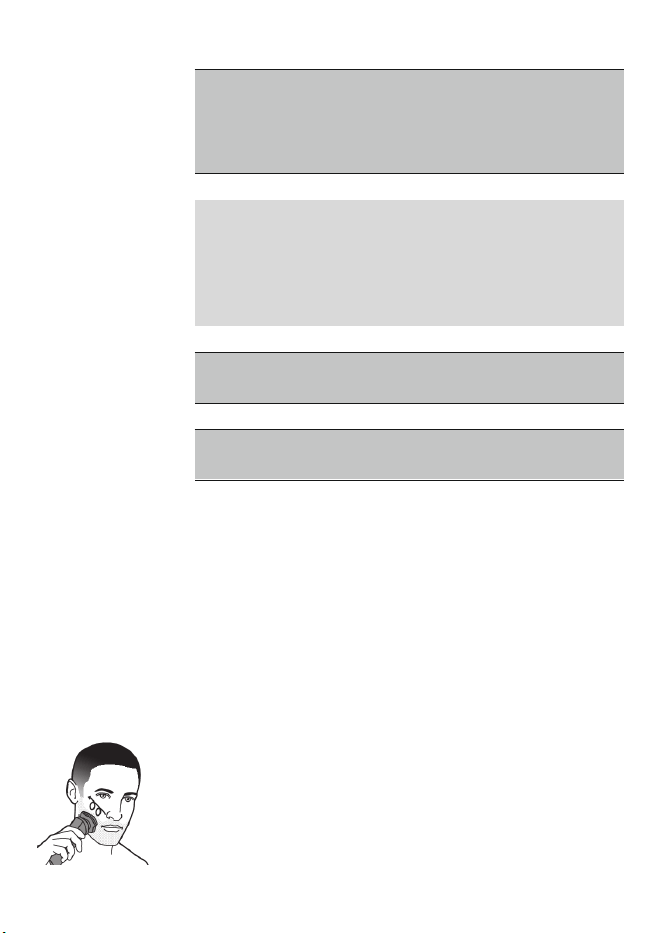
91
Español
producto ni ningún accesorio si está dañado,
ya que esto puede causar alguna lesión.
Siempre reemplace una pieza dañada con
una del tipo original.
Nota: Este producto es a prueba de agua. El
producto es adecuado para su uso en el baño o la
regadera y puede limpiarse colocándolo bajo el
agua de la llave. Por razones de seguridad, este
producto solamente se puede usar sin cable.
Use este producto para su uso previsto en el
hogar, según se describe en este manual.
Por motivos de higiene, el producto debe
emplearse únicamente por una persona.
Afeitado
Puede usar este producto en húmedo o en seco,
e incluso en la regadera.
Para una afeitada en húmedo, aplíquese algo de
agua y espuma o gel de afeitar en la piel y
enjuague los cabezales de afeitado con agua
tibia de la llave antes de seguir los pasos que se
detallan a continuación.
1 Encienda el producto.
2
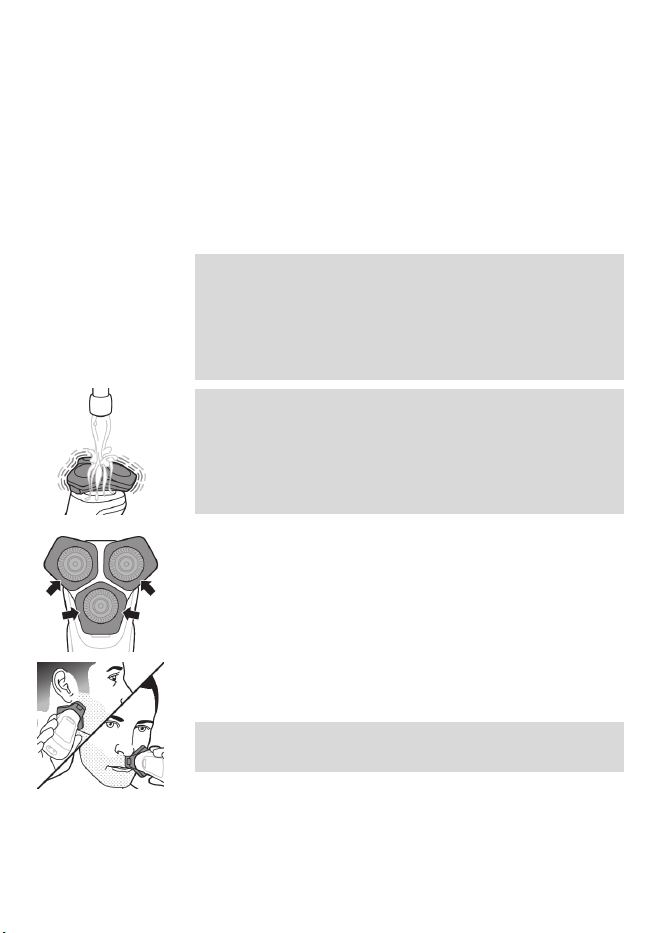
92
Español
Mueve los cabezales de afeitado sobre la piel
con movimientos circulares para llegar a todos
los vellos que crecen en diferentes direcciones.
Asegúrate de que cada unidad de afeitado
esté siempre en contacto total con la piel.
Ejerza una suave presión para una afeitada al
ras y cómoda.
Nota: No presione demasiado fuerte ya que
esto puede producir irritación en la piel.
Cuando aplicas demasiada presión, el anillo de
luz se ilumina en naranja (ver '¿Qué indica la
afeitadora? (Fig. A)').
Nota: Si se va a afeitar con espuma o gel de
afeitar, enjuague la unidad de afeitado con
regularidad durante el afeitado para asegurar
que se siga deslizando suavemente sobre la
piel.
3 Utilice los lados estrechos de la unidad de
afeitado para afeitarse en lugares difíciles de
alcanzar, por ejemplo, a lo largo de la línea de
la quijada y debajo de la nariz.
4 Desconecte y limpie el producto después de
cada uso.
Nota: Asegúrese de enjuagar toda la espuma
o gel de afeitar del producto.
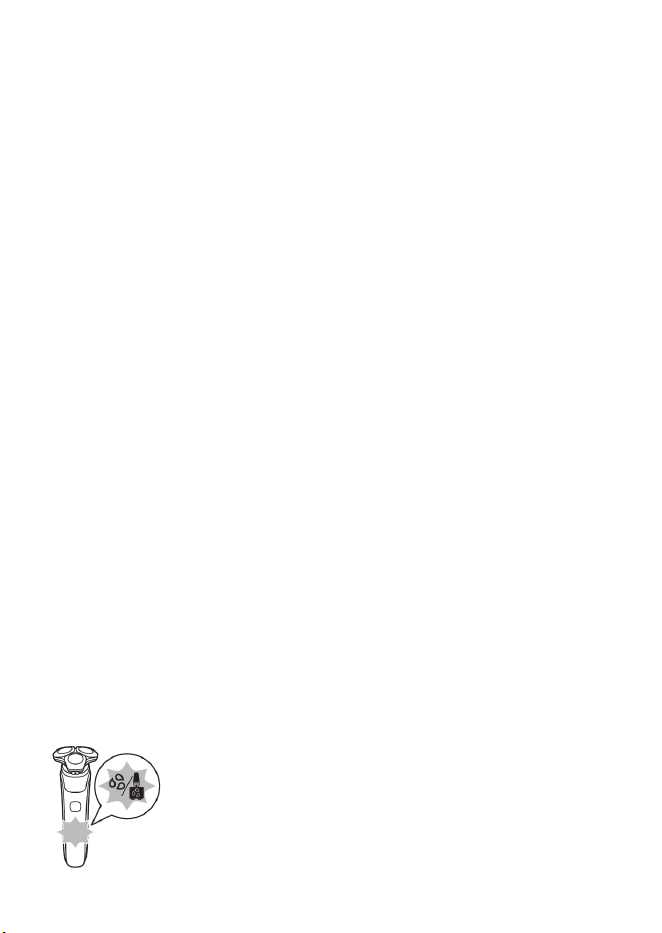
93
Español
Proceso de adaptación de 21 días
-
Prueba de 21 días y proceso de adaptación. Es
un hecho que la piel y la barba tardan algún
tiempo en acostumbrarse al nuevo sistema de
arreglo personal.
-
Utilice su nueva afeitadora únicamente 3
semanas para disfrutar completamente de un
afeitado Philips Norelco al ras.
-
Es posible que al principio no obtenga la
afeitada al ras que espera e incluso es posible
que su rostro se irrite levemente. Esto es
normal, ya que la barba y la piel necesitan
tiempo para ajustarse. Invierta 3 semanas y
pronto podrá disfrutar al máximo de su nueva
afeitadora.
-
Sea perseverante. Si alterna entre métodos de
afeitado durante el período de adaptación,
será más difícil acostumbrarse al sistema de
afeitado de Philips Norelco.
-
Si después de 21 días todavía no está
satisfecho con los resultados, Philips Norelco le
reembolsará el precio total de la compra,
siempre que la solicitud de reembolso se
reciba dentro de los 45 días posteriores a la
compra.
Recordatorio de limpieza
Cuando apagas la afeitadora, se enciende la luz
de recordatorio de limpieza para que recuerdes
limpiar la máquina (ver '¿Cómo se limpia la
afeitadora?').
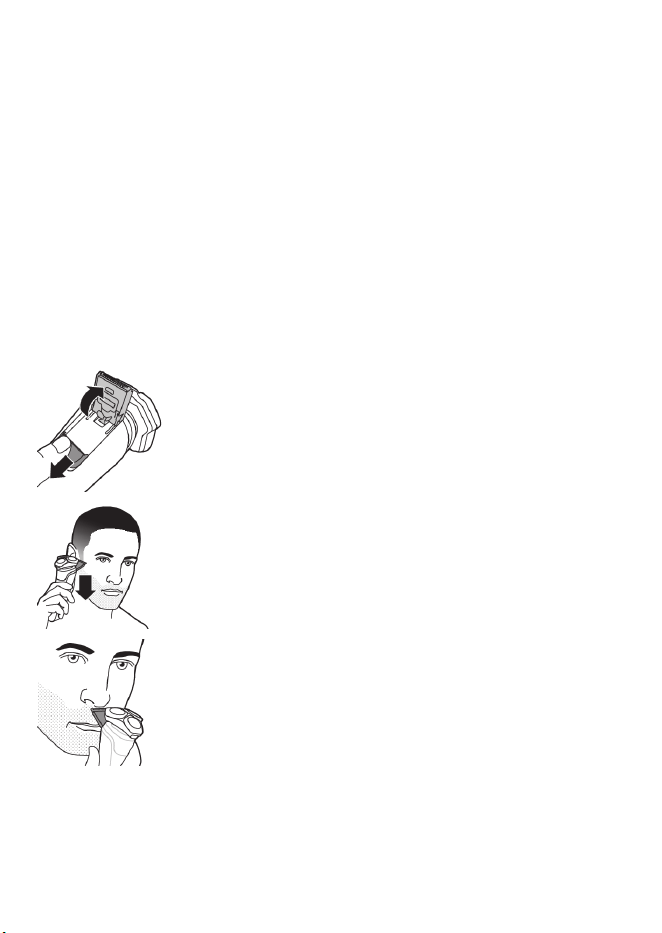
94
Español
-
Limpie el producto (ver '¿Cómo uso el Quick
Clean Pod?') y los accesorios después de cada
uso (ver '¿Cómo se limpia la afeitadora?') para
evitar que se obstruya o se dañe.
-
Limpia los cabezales de afeitado por completo
una vez al mes o cuando la máquina ya no
afeite tan bien como antes (ver 'Limpieza a
fondo').
Recorte
Puede usar la cortadora emergente para recortar
el bigote y las patillas.
1 Deslice el botón de apertura de la cortadora
hacia abajo para abrirla.
2 Encienda el producto.
3 Sostenga la cortadora perpendicular a la piel y
muévala hacia abajo ejerciendo una presión
suave.
4 También puedes usar el recortador para
afeitar el área debajo de la nariz.
5 Apague el producto y limpie la cortadora
después de cada uso para evitar que se
obstruya o se dañe (ver '¿Cómo se limpia la
afeitadora?').
6 Cierre la cortadora.
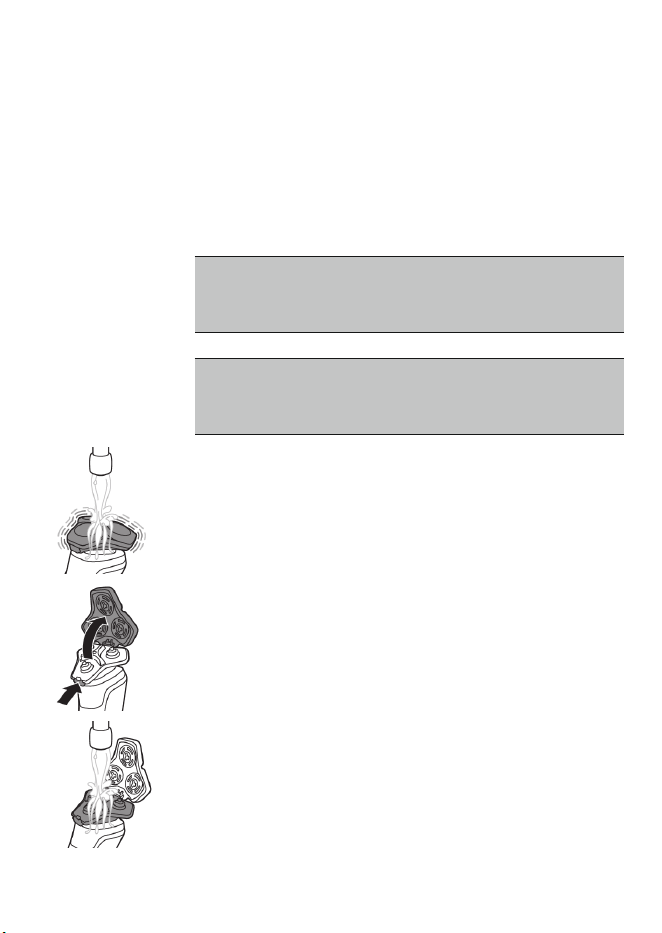
95
Español
¿Cómo se limpia la afeitadora?
Para un óptimo desempeño, limpie el producto y
los accesorios después de cada uso.
Limpieza de la afeitadora bajo la llave de agua.
Limpie la afeitadora después de cada uso para
evitar que se obstruya o se dañe.
Nunca seque la unidad de afeitado con una
toalla o pañuelo desechable, ya que esto
puede dañar los cabezales de afeitado.
Al enjuagar la unidad de afeitado, es posible
que salga agua por la base de la afeitadora.
Esto es algo normal.
1 Encienda la afeitadora.
2 Enjuague la unidad de afeitado con agua
caliente de la llave.
3 Apague la afeitadora. Presione el botón de
liberación para abrir la unidad de afeitado.
4 Enjuague la cámara de acumulación de vello
bajo agua tibia de la llave.
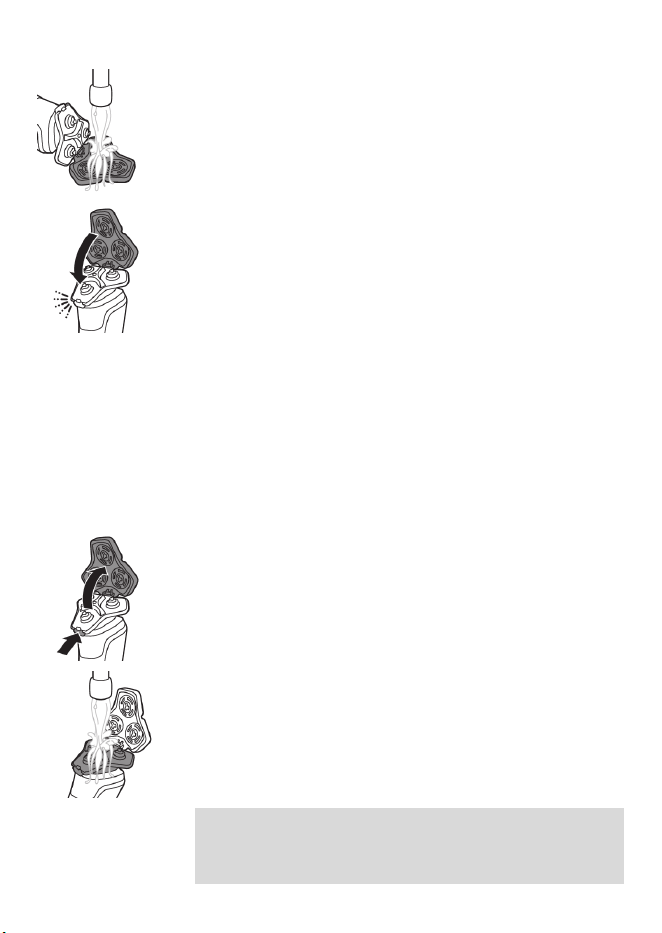
96
Español
5 Enjuague el sostenedor del cabezal de
afeitado con agua caliente de la llave.
6 Elimine cuidadosamente el exceso de agua y
deje que el soporte del cabezal de afeitado se
seque al aire completamente.
7 Cierre la unidad de afeitado.
Limpieza a fondo
Le aconsejamos que limpie los cabezales de
afeitado a fondo una vez al mes o cuando la
afeitadora ya no afeite tan bien como antes.
1 Asegúrate de que la afeitadora esté apagada y
de que la hayas desconectado del enchufe de
pared.
2 Presiona los botones de liberación de la
unidad de afeitado y tira del soporte de
cabezales de afeitado para quitarlo de la
unidad de afeitado.
3 Enjuague la unidad de afeitado y el sostén del
cabezal de afeitado en el grifo.
4 Retire los cabezales de afeitado. Para consultar
instrucciones detalladas, vea "¿Cómo se
reemplazan los cabezales de afeitado?"
Nota: No limpie más de un cortador y
protector a la vez, ya que todos son pares. Si
accidentalmente coloca una cuchilla en el
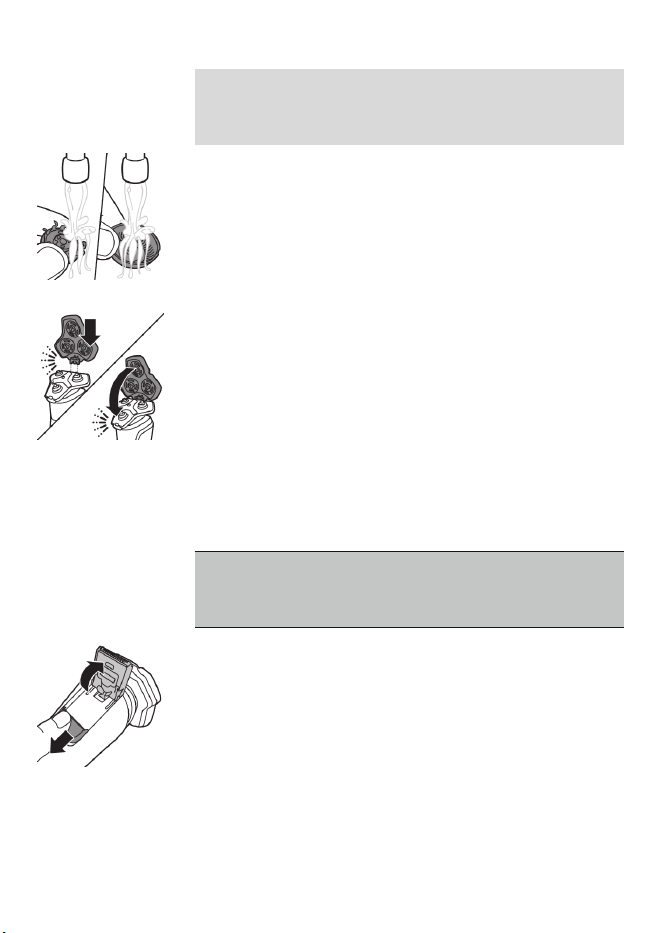
97
Español
protector de afeitado equivocado, tardará
varias semanas en volver a lograr un
desempeño óptimo del afeitado.
5 Limpie el cortador y el protector en el grifo.
6 Sacuda el exceso de agua.
7 Vuelve a colocar los cabezales de afeitado en
su soporte. Para consultar instrucciones
detalladas, vea "¿Cómo se reemplazan los
cabezales de afeitado?"
8 Inserte la bisagra del portacabezales de
afeitado en la ranura que está en la parte
superior de la unidad de afeitado y cierre la
unidad de afeitado.
Limpieza de la cortadora emergente
Limpie la cortadora después de cada uso para
evitar que se obstruya o se dañe.
Nunca seque los dientes de la cortadora con
una toalla o paño, ya que esto puede dañar el
dentado de recorte.
1 Asegúrate de que la afeitadora esté apagada y
de que la hayas desconectado del enchufe de
pared.
2 Empuje hacia abajo el botón deslizante de
liberación de la cortadora emergente para
abrirla.
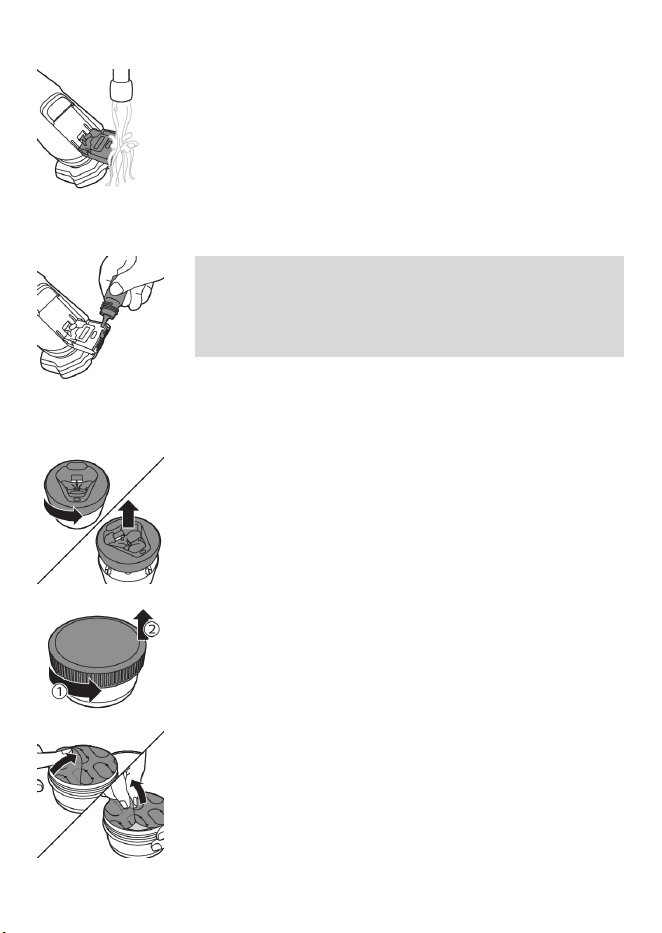
98
Español
3 Enciende la afeitadora y enjuaga la cortadora
emergente con agua tibia.
4 Después de la limpieza, apague el producto.
5 Elimine cuidadosamente el exceso de agua y
deje que la cortadora emergente se seque al
aire.
6 Cierre la cortadora.
Sugerencia: Para obtener un rendimiento
óptimo, lubrique los dientes de la cortadora
emergente con una gota de aceite mineral cada
seis meses (el aceite no está incluido).
¿Cómo uso el Quick Clean Pod?
Preparación del Quick Clean Pod para el uso
1 Gire y retire la parte superior del Quick Clean
Pod.
2 Gire la tapa del cartucho del Quick Clean Pod
para quitarla.
3 Levante la lengüeta del sello y jálela de la
esquina para retirar el sello del cartucho del
Quick Clean Pod.
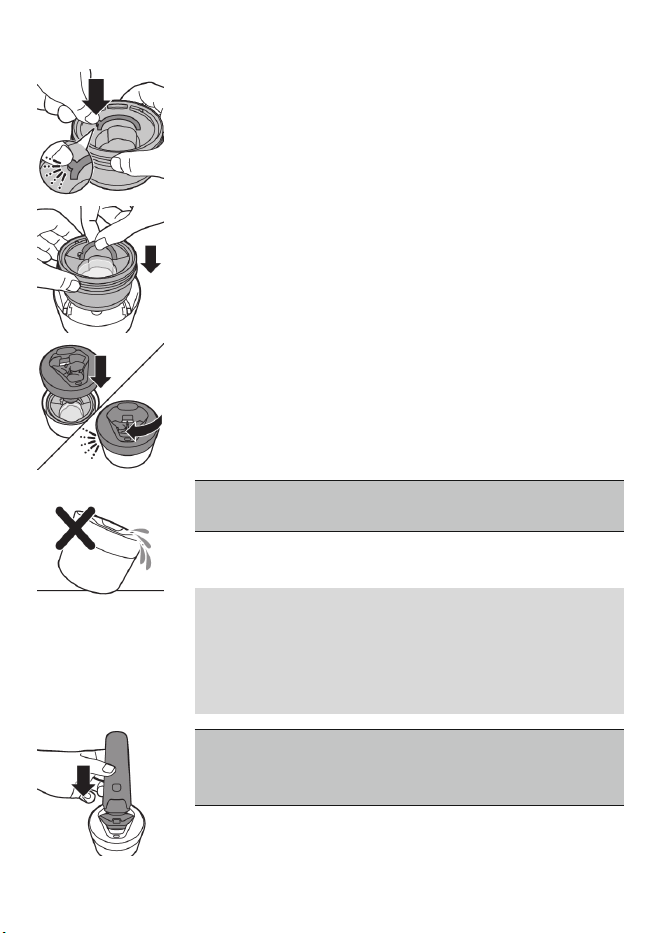
99
Español
4 Presione la pequeña pieza circular en el
mango del cartucho del Quick Clean Pod para
romper el broche de presión del mango.
5 Coloque el cartucho del Quick Clean Pod en el
Quick Clean Pod.
6 Vuelva a colocar la parte superior del Quick
Clean Pod en la base y gírela en el sentido de
las manecillas del reloj hasta que escuche un
clic.
No incline el Quick Clean Pod para evitar
derrames.
Uso del Quick Clean Pod
Nota: Si utiliza la afeitadora con espuma de
afeitar, gel de afeitar o productos para antes de
afeitar, enjuague bien los cabezales de afeitado
antes de usar el Quick Clean Pod (ver '¿Cómo se
limpia la afeitadora?').
Siempre sacuda la afeitadora para eliminar el
exceso de agua antes de colocarla en el Quick
Clean Pod.
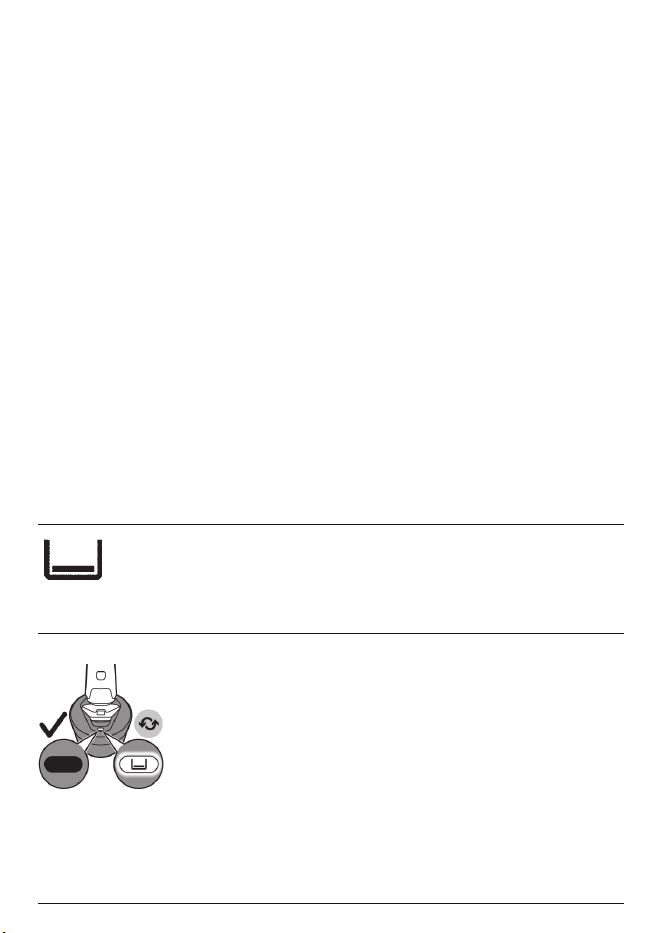
100
Español
1 Coloque la afeitadora de cabeza en el Quick
Clean Pod. Cuando está encendida, la
afeitadora detecta de forma automática si está
en el Quick Clean Pod.
2 Encienda la afeitadora para iniciar el programa
de limpieza.
Cada programa de limpieza toma
aproximadamente un minuto. Durante el
programa de limpieza, el tiempo restante se
muestra como un reloj de cuenta regresiva en
el mango.
3 Deje que la afeitadora se seque
completamente al aire en el Quick Clean Pod
antes de guardarla.
¿Qué significa el ícono que está en mi Quick
Clean Pod?
Ícono Comportamiento Significado
Se vuelve visible en el
Quick Clean Pod.
Se tiene que reemplazar el
cartucho del Quick Clean Pod
(ver '¿Cómo uso el Quick
Clean Pod?').
Reemplazo del cartucho del Quick Clean Pod
Reemplace el cartucho del Quick Clean Pod
inmediatamente cuando el ícono de reemplazo
del cartucho del Quick Clean Pod se vuelva
visible, o bien, siga las indicaciones que se
muestran en la siguiente tabla.
Frecuencia de uso Ciclos Cuándo
reemplazar el
cartucho del Quick
Clean Pod
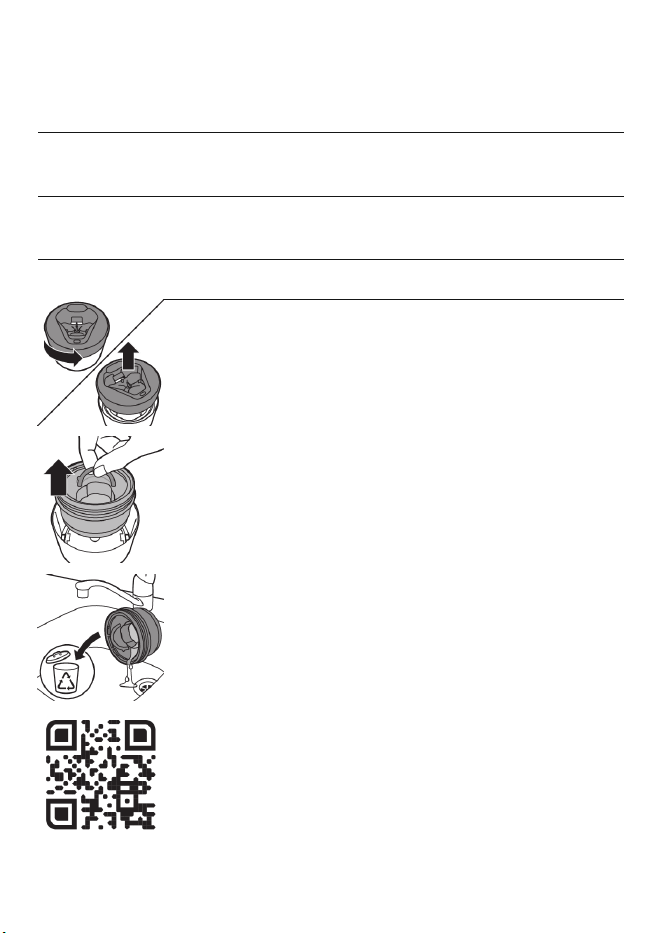
101
Español
Todos los días Aproximadamente
30
Cada mes
Unas cuantas veces
por semana
Aproximadamente
20
Cada 2 meses
Cada semana Aproximadamente
13
Cada 3 meses
Cada mes Aproximadamente 3 Cada 3 meses
1 Gire y retire la parte superior del Quick Clean
Pod.
2 Levante el cartucho del Quick Clean Pod por el
mango para sacarlo del Quick Clean Pod.
3 Vierta el líquido restante por el desagüe y
recicle el cartucho vacío conforme a la
reglamentación local en materia de residuos.
4 Coloque un nuevo cartucho del Quick Clean
Pod en el Quick Clean Pod.
Escanea el códigoQR que se encuentra a la
izquierda o visita
www.philips.com/cleaning-cartridge para
pedir cartuchos de repuesto del Quick Clean
Pod.

102
Español
Almacenamiento
-
Asegúrese de que el producto esté apagado.
Retire el cable del enchufe y del producto
antes de guardarlo. Guarde el producto en un
lugar seguro y seco donde no pueda
aplastarse, golpearse o dañarse.
-
No enrolle el cable alrededor del producto
para guardarlo.
-
Guarde el cable y otros accesorios en un lugar
seguro donde no sufran cortes ni daños.
-
No coloque ni guarde el producto en un lugar
desde donde pueda, de algún modo, caerse a
una bañera, lavabo o dentro de cualquier
recipiente que contenga agua o líquido.
Nota: Le recomendamos que deje que el
producto y los accesorios se sequen
completamente antes de guardarlos para el
próximo uso.
-
Guarda la afeitadora en el estuche (si se
incluye).
-
Coloca la tapa protectora (si se incluye) en la
afeitadora para protegerla de la acumulación
de suciedad.
-
Como alternativa, guarda la afeitadora en el
soporte de carga (si se incluye) o en el Quick
Clean Pod de Philips (si se incluye).
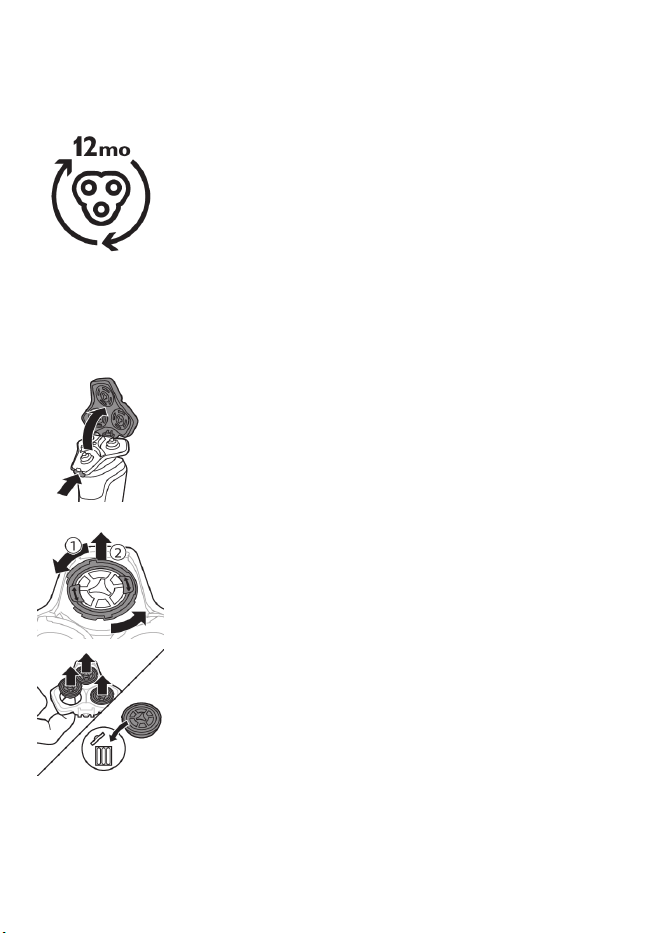
103
Español
¿Cómo se reemplazan los cabezales de
afeitado?
Para un rendimiento de afeitado óptimo, le
aconsejamos que reemplace los cabezales de
afeitado cada año. Reemplace los cabezales de
afeitado dañados inmediatamente.
Siempre reemplace los cabezales de afeitado con
cabezales originales de Philips Norelco (ver
'Accesorios').
Reemplazo de los cabezales de afeitado
1 Apague la afeitadora.
2 Presiona los botones de liberación de la
unidad de afeitado y tira del soporte de
cabezales de afeitado para quitarlo de la
unidad de afeitado.
3 Gire los anillos de retención a la izquierda y
retírelos. Colóquelos aparte en un lugar
seguro.
4 Quite los cabezales de afeitado del soporte del
cabezal de afeitado.
Deseche inmediatamente los cabezales de
afeitado usados para evitar mezclarlos con los
nuevos cabezales de afeitado.
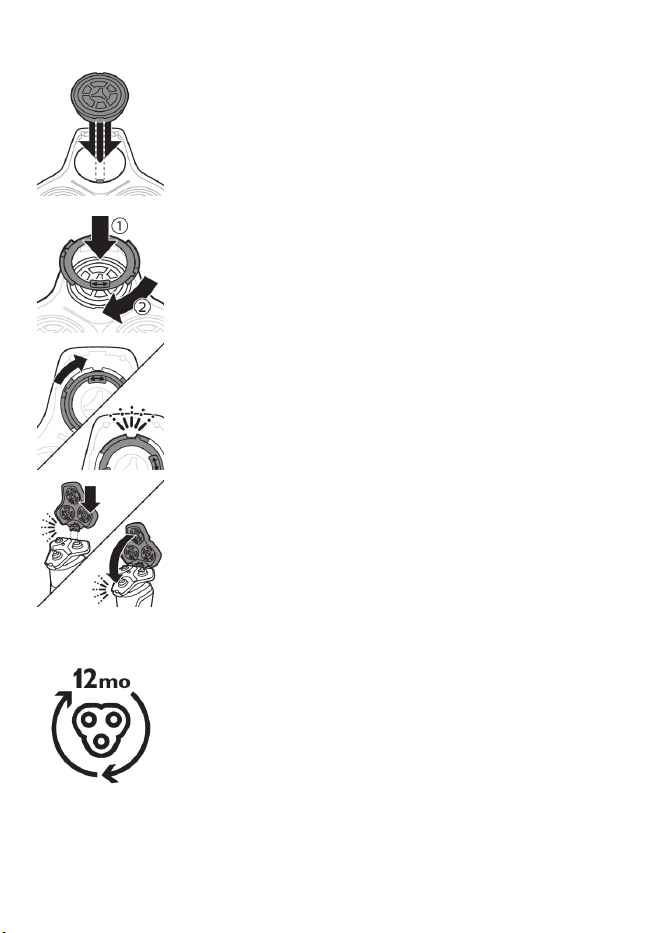
104
Español
5 Coloque los nuevos cabezales de afeitado en
el portacabezales.
6 Coloque los anillos de retención de nuevo en
los cabezales de afeitado y gírelos hacia la
derecha para volver a colocar el anillo de
retención.
-
Cada anillo de retención tiene dos ranuras que
ajustan perfecto en los salientes del soporte
del cabezal de afeitado. Gire el anillo a la
derecha hasta que escuche un clic para indicar
que el anillo está fijo.
7 Inserte la bisagra del portacabezales de
afeitado en la ranura que está en la parte
superior de la unidad de afeitado y cierre la
unidad de afeitado.
Accesorios
Puede adquirir los accesorios y partes de
reemplazo en la tienda más cercana a su
domicilio o a través de nuestro sitio web
www.philips.com/store.
Están disponibles los siguientes accesorios y
piezas sueltas:
-
Cabezales de afeitado de repuesto Philips
Norelco SH91.
105
Español
-
Paquete de 2 cartuchos del Quick Clean Pod
de Philips Norelco CC12
Asistencia
Para asistencia, visite nuestro sitio web:
www.philips.com/support o llame al número
gratuito1-800-243-3050.
La información en línea está disponible las
24horas, los siete días de la semana.
Orientación adicional
Para obtener más orientación y videos sobre la
afeitadora S9000, escanea el códigoQR a
continuación o visita
www.philips.com/myS9000shaver
Desecho
-
Este producto posee una batería recargable de
litio-ión que debe desecharse
apropiadamente.
-
Contacte a sus funcionarios locales o de la
ciudad para mayor información acerca del
manejo final de la batería. También puede
llamar al 1-800-822-8837 o visitar
www.call2recycle.org para las ubicaciones
donde se pueden desechar las baterías.

106
Español
-
Para recibir asistencia, visite nuestro sitio Web
www.philips.com/support o comuníquese
gratuitamente al 1-800-243-3050.
-
Su producto está diseñado y fabricado con
materiales y componentes de alta calidad, que
pueden ser reciclados y reusados. Para obtener
información sobre reciclado, comuníquese con
las oficinas locales de manejo de desechos o
visite www.recycle.philips.com.
Garantía Total de Dos Años
PhilipsNorthAmerica LLC garantiza este
producto nuevo (excepto los cabezales de
afeitado) contra defectos en los materiales o en
la mano de obra por un período de dos años
desde la fecha de compra y acepta reparar o
reemplazar cualquier producto defectuoso sin
cargo.
IMPORTANTE: Esta garantía no cubre ningún
daño que surja como resultado de un accidente,
de un uso indebido o abuso, de la falta de
cuidado razonable, del uso de cualquier accesorio
no provisto con el producto ni la pérdida de
piezas, así como tampoco ningún daño derivado
del uso del producto con una tensión o con
baterías que no sean las establecidas.*
NINGUNA RESPONSABILIDAD ES ASUMIDA
POR CUALQUIER DAÑO, INCIDENTAL O
RESULTANTE.
Para obtener el servicio de garantía, simplemente
ingrese a www.philips.com/support. Para su
protección, se sugiere que el envío de las

107
Español
devoluciones del producto se realice por correo
certificado con seguro pagado. Cualquier daño
que ocurra durante el envío no será cubierto por
esta garantía.
NOTA: PhilipsNorthAmerica LLC. no extiende
ninguna otra garantía, ni escrita ni oral.
Esta garantía le proporciona derechos legales
específicos; asimismo, es posible que goce de
otros derechos que pueden variar de estado a
estado. En algunos estados no se permite la
exclusión o la limitación de los daños fortuitos o
resultantes, de modo que es posible que las
limitaciones o exclusiones arriba mencionadas no
se apliquen a su caso.
*Lea las instrucciones adjuntas atentamente.
GARANTÍA DE DEVOLUCIÓN DE SU DINERO
POR 45DÍAS
Para disfrutar de una afeitada cómoda y al ras
con su nueva afeitadora para hombres Philips
Norelco, la afeitadora se debe usar únicamente
por 3 semanas. Esto permite que su cabello y su
piel tengan tiempo suficiente para adaptarse al
Sistema de afeitado Philips Norelco. Si, después
de ese periodo de tiempo, no está satisfecho con
los resultados de su afeitadora para hombre
Philips Norelco, puede devolver el producto con
su recibo de compra fechado y le
reembolsaremos el importe que pagó.
El producto debe enviarse por correo
certificado pago, con seguro prepago, junto

108
Español
con el recibo original de compra, donde se
indique el precio y la fecha de compra, así
como el formulario de autorización para la
garantía de devolución de dinero.
No asumimos ninguna responsabilidad por los
paquetes perdidos.
El paquete del producto debe contar con
matasellos que no supere los 45días a partir de la
fecha de compra. Philips se reserva el derecho a
verificar el precio de compra del producto y limita
los reembolsos al precio de venta minorista
sugerido.
Para obtener el servicio de garantía de
devolución de dinero, visite
www.PhilipsMoneyBack.com.
La entrega del cheque de reembolso ocurrirá
de 6 a8 semanas después de la recepción del
producto devuelto.
Declaración de conformidad del proveedor
Este dispositivo cumple con la Parte 15 de las
reglas de la FCC. El funcionamiento está sujeto a
las dos condiciones siguientes: (1) Es posible que
este dispositivo no cause interferencia perjudicial,
y (2) este dispositivo debe aceptar cualquier
interferencia que reciba, inclusive aquella que
pueda causar un funcionamiento no deseado.
Por medio de la presente, nosotros, PHILIPS
CONSUMER LIFESTYLE B.V., declaramos que el
equipo que lleva el nombre de modelo
especificado a continuación se probó de
conformidad con las reglas aplicables de la

109
Español
Comisión Federal de Comunicaciones (Federal
Communications Commission, FCC) conforme a
los estándares de medición más precisos posibles,
y que se han tomado y están vigentes todas las
medidas necesarias para asegurar que las
unidades de producción del mismo equipo
continuarán cumpliendo con los requerimientos
de la Comisión.
Identificador único: PHILIPS, NORELCO S9987,
S9985
Parte responsable – Datos de contacto en los
Estados Unidos
Philips North America LLC.
Apartado postal 10313
Stamford | CT 06904
1-800-243-3050
Marcas registradas
Apple, el logotipo de Apple, iPad y iPhone son
marcas comerciales de Apple Inc., registradas en
los Estados Unidos de América y otros países. App
Store es una marca de servicio de Apple Inc.
Android es una marca comercial de Google Inc.
Google Play y el logotipo de Google Play son
marcas comerciales de Google Inc.
La marca denominativa y los logotipos de
Bluetooth® son marcas comerciales registradas
propiedad de Bluetooth SIG, Inc. y todo uso que

110
Español
hace Philips Personal Care de dichas marcas es
conforme a una licencia.

Empty page before back cover
Manufactured for:
Philips Personal Health
a division of Philips North America LLC
P.O. Box 10313, Stamford, CT 06904
This symbol on the product’s nameplate means it is listed by
Underwriters’ Laboratories, Inc.
Norelco and Tripleheader are registered trademarks of Philips North
America LLC.
PHILIPS and Philips shield are registered trademarks of Koninklijke
Philips N.V.
©2022 Philips North America LLC. All rights reserved.
3000.057.1984.1 (01/19/2022)
>75 % recycled paper
>75 % papier recyclé