Zendure USA Inc.
ZENDURE TECHNOLOGY CO., LIMITED
Hours: Mon - Fri 9:00 - 17:00 Pacic
Phone: 001-800-991-6148 (US)
0049-800-627-3067 (DE)
Support / Contact:
https://zendure.de/pages/contact
https://eu.zendure.com/pages/contact-us
https://zendure.com/pages/contact
Website:
https://zendure.de
https://eu.zendure.com
https://zendure.com
Manufacturer: Zendure Technology Co.,Limited
Address: Ofce 92, 15th Floor, Lee Garden Two,
28 Yun Ping Road, Causeway Bay, Hong Kong
© 2025 Zendure USA Inc.All Rights Reserved.
Printed on recycled materials. Made in China
EU Importer: Zendure DE GmbH
Address: Rheinallee 1,40549 Düsseldorf
E-mail: [email protected]
Phone: 0049-800-627-3067
EN Scan the QR code to access the complete user manual.
NL Scan de QR-code om de volledige gebruikershandleiding te
openen.
EN Please scan the QR code to visit the Zendure Help Center or
claim the product warranty.
NL Scan de QR-code om het Zendure Helpcentrum te bezoeken
of de productgarantie aan te vragen.
Smart Meter P1
User Manual
EN
Disclaimer
1. Safety Instructions
2. What’s in the Box
Read all safety guidelines, warnings and other product information in this manual carefully, and read any labels or stickers attached to the
product before using. Users take full responsibility for the safe usage and operation of this product. Familiarize yourself with relevant regulations
in your area. You are solely responsible for being aware of all relevant regulations and using Zendure products in a way that is compliant.
Keep this manual for future reference.
1. Before accessing the meter cabinet, carefully inspect the meter and surrounding area for any hazards, such as loose cables, exposed copper,
or other objects that could cause electrical shock. If you identify any of these risks, halt the installation of our product immediately and contact a
licensed electrician.
2. Please check the product for any damage before using. If any issues are found, stop using the product and contact our customer service.
3. Do not disassemble the product by yourself. If the product is not functioning properly, please contact our customer service.
4. The device is NOT waterproof. If the product accidentally falls into water during use, it should not be used again.
5. The device should be kept out of reach for children and persons with limited perception.
ZENDURE TECHNOLOGY CO., LIMITED declares that the device complies with directive 2014/53/EU (RED), 2011/65/EU(RoHS), 2015/863/EU(RoHS).
The full text of the Declaration of Conformity is available at the following web address: https://zendure.de/pages/download-center
1.1 Usage
1.2 EC DECLARATION OF CONFORMITY
Declaration of conformity
The EU Declaration of Conformity can be requested at this address: https://zendure.de/pages/download-center
Disposal and Recycling
Disposal of packaging: dispose of the packaging separately by type of material.
Disposal of old equipment (applies in the European Union and other European countries with separate collection (waste
collection) Old equipment must not be disposed of in household waste. Every consumer is legally obligated to dispose of old
equipment that can no longer be used separately from household waste, for example at a collection point for recyclables.
To ensure proper recycling and avoid negative impact on the environment, electronic devices must be taken to an appropriate
collection site. For this reason, electronic devices are marked with the symbol shown to the left.
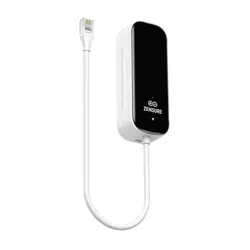
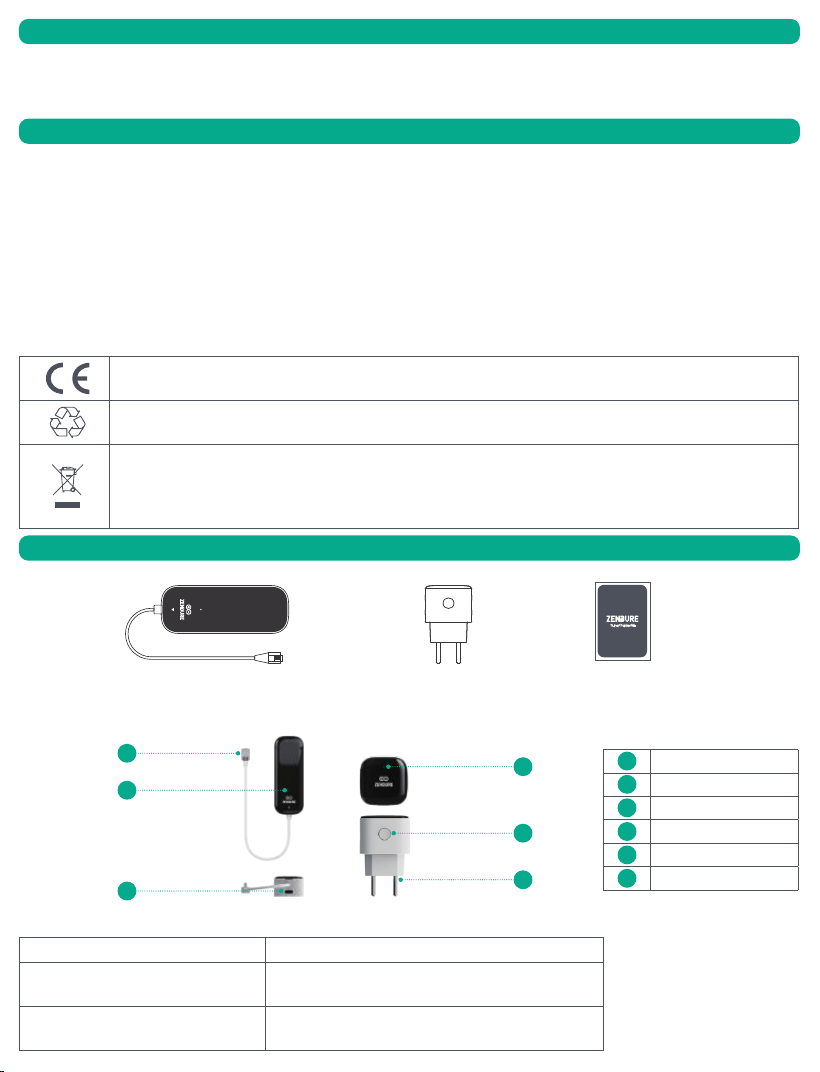
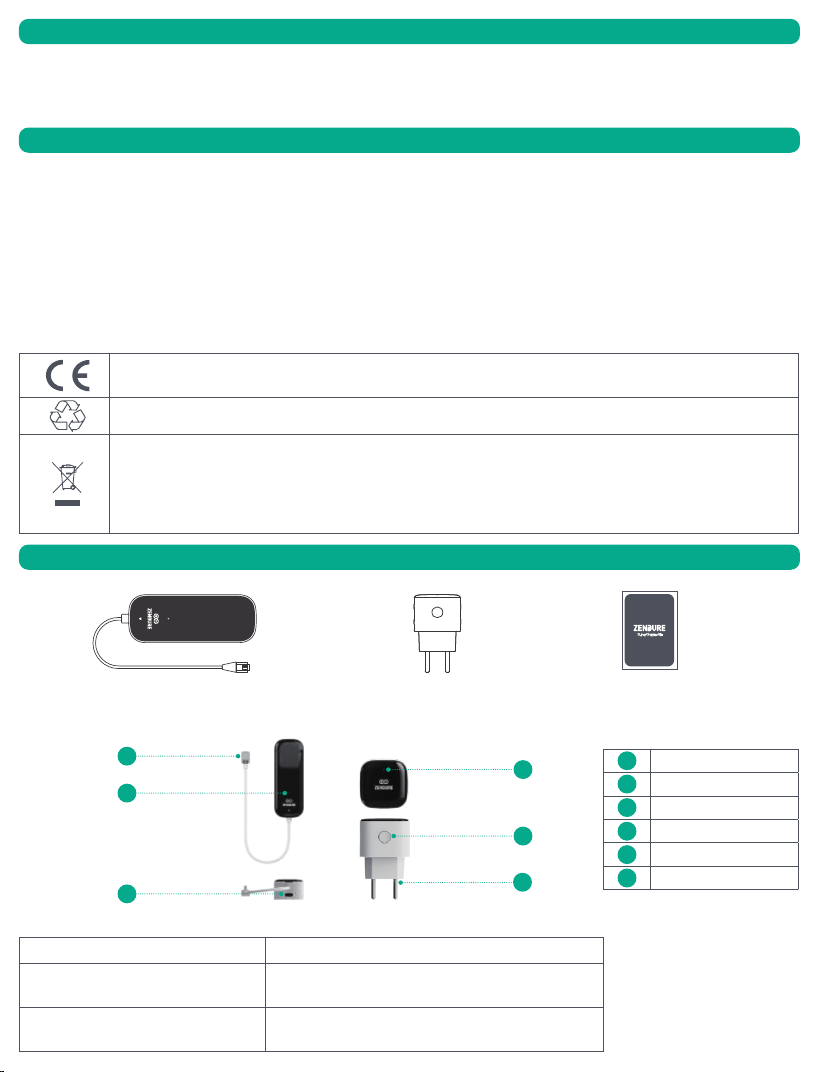
Smart Meter P1 Reader
Smart Meter Bridge User Manual
2.1 Product Overview
1
6
5
4
2
3
1
RJ12 Connector
2
USB-C Port
3
Indicator
4
Indicator of Bridge
5
Button
6
Bridge Plug
2.2 Reset/Restart
Action Function
Press the button on Bridge for 3 seconds Reset Wi-Fi connection
Disconnect the power of the P1 Reader
and then reconnect it.
Restart the P1 reader and reconnect the bridge.
EN
Product Signal Meaning
P1 Reader
Fast blinking
1. During startup process and ready to pair with Bridge
2. No signal received from the Linky meter or incorrect signal received.
Slow blinking Correct signal received
Light off Hardware malfunction or no power
Bridge
Green fast blinking
1. During startup process
2. During network pairing process
Green steady light Network pairing successful, device working normally
Red fast blinking
Device malfunction, such as connection interruption with router/connection interruption with P1
Reader/operational failure
Light off Hardware malfunctions or there is no power.
2.3 LED Display
2. Secure the Reader
(1) Peel off the 3M adhesive backing on the P1 Reader.
(2) Firmly attach the Reader to the side or top of the meter using the adhesive.
3. Power On the Bridge
(1) Plug the Bridge into a power socket.
(2) The LED indicator will ash rapidly, conrming it’s in pairing mode.
Note: For optimal performance, place the Bridge between the P1 Reader and your wireless router to ensure strong signal reception and reliable
data forwarding.
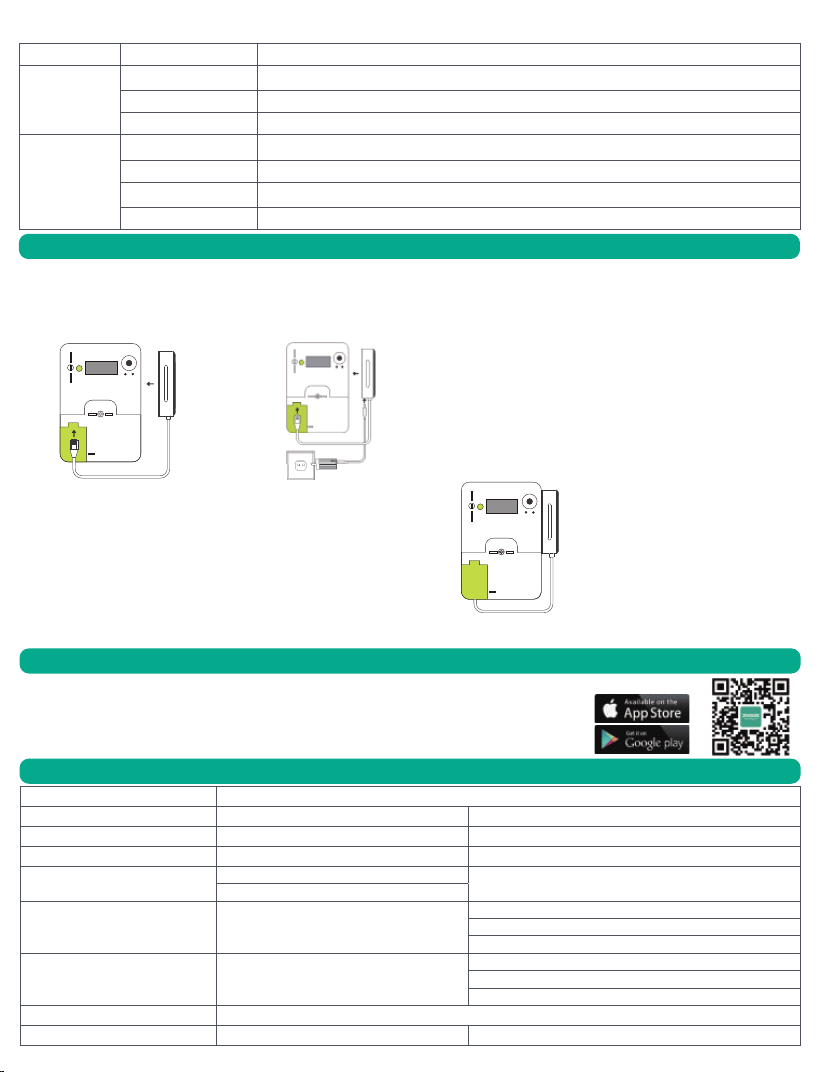
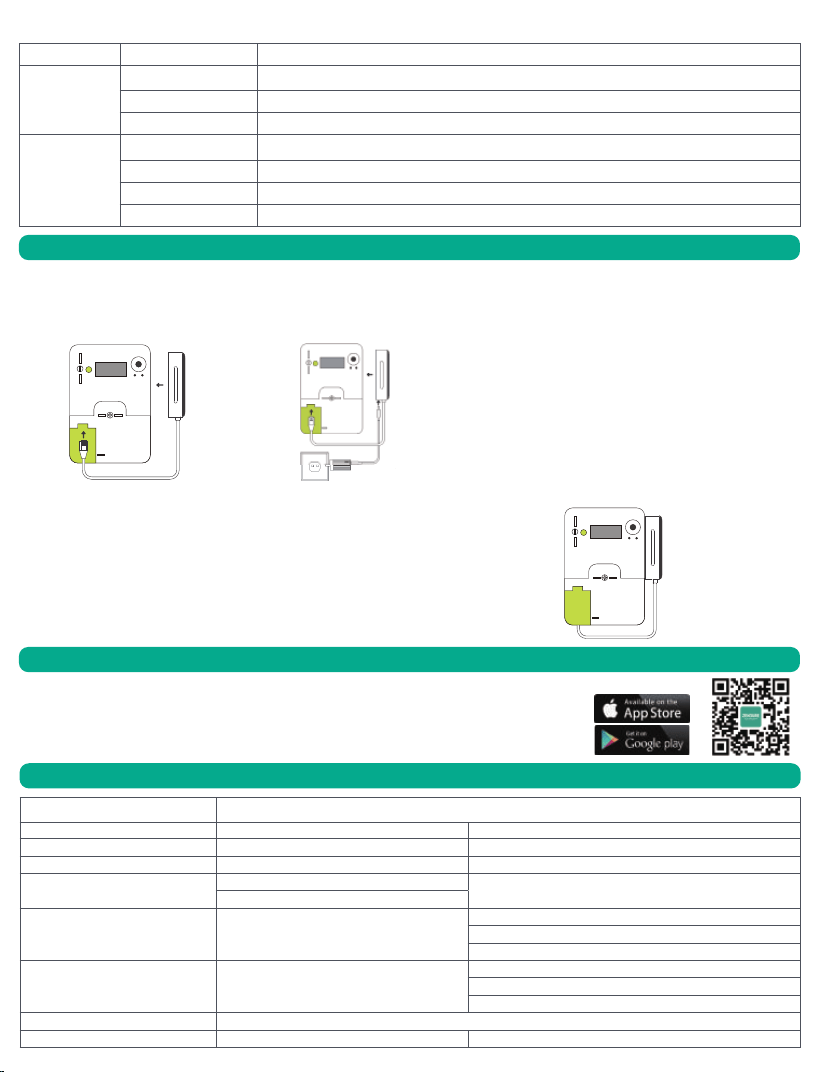
1. Connect the RJ12 cable to the P1 port of your smart meter.
Note:
(1) If the P1 port supplies sufficient power, the P1 Reader will turn on , and its indicator light will blink rapidly .
(2) For older smart meters (DSMR 4.0 or earlier) in the Netherlands: The P1 port does not provide enough power. In this case, connect the P1
Reader to a USB-C power source ( cable and adapter not included).
3. Installation
1. To download the Zendure app, scan the QR code or search “Zendure” in the Apple App Store®
or Google Play Store.
2. Open the Zendure app. Log In or sign up.
3. Follow the in-app instructions to add your device.
4. Please update the rmware to the latest version in the settings before using.
Paremeter Smart Meter P1
Device Name P1 Reader Bridge
Input Voltage Input Voltage(P1 Port/USB-C): 5V DC AC 100~240V, 50/60Hz
Rated power 1W Max 3W Max
Lora
Frequency: 803MHz~930MHz
/
Maximum Transmit Power: 20.0 dBm
Bluetooth /
Protocol: Bluetooth 5.0
Frequency: 2402-2480MHz
Maximum Transmit Power: 20.0 dBm
Wi-Fi /
Protocol: 802.11b/g/n
Frequency: 2412-2472MHz
Maximum Transmit Power: 20.0 dBm
Operation Temperature -20℃ -50℃
Product Size 37*98.47*26mm 42.92*42.92*71.49mm
5. Technical Specications
4. Zendure App Setup
(1)Connect to the smart meter's P1 port (2)External power required for older meters
NL
Disclaimer
1. Veiligheidsinstructies
2. Wat zit er in de doos
Lees alle veiligheidsrichtlijnen, waarschuwingen en andere productinformatie in deze handleiding zorgvuldig door, evenals eventuele labels of
stickers die op het product zijn aangebracht, voordat u het product gebruikt. Gebruikers zijn volledig verantwoordelijk voor het veilige gebruik
en de werking van dit product. Maak uzelf vertrouwd met de relevante regelgeving in uw regio. U bent zelf volledig verantwoordelijk voor het
naleven van alle toepasselijke regelgeving en voor het gebruik van Zendure-producten op een manier die daarmee in overeenstemming is.
Bewaar deze handleiding voor toekomstig gebruik.
1. Controleer voordat u de meterkast opent zorgvuldig de meter en de omgeving op mogelijke gevaren, zoals losse kabels, blootliggende koperen
draden of andere objecten die een elektrische schok kunnen veroorzaken. Als u een van deze risico’s opmerkt, stop dan onmiddellijk met de
installatie van ons product en neem contact op met een erkend elektricien.
2. Controleer het product op eventuele schade voordat u het gebruikt. Als er problemen worden vastgesteld, stop dan met het gebruik van het
product en neem contact op met onze klantenservice.
3. Demonteer het product niet zelf. Als het product niet goed functioneert, neem dan contact op met onze klantenservice.
4. Het apparaat is niet waterdicht. Als het product tijdens gebruik per ongeluk in water valt, mag het niet opnieuw worden gebruikt.
5. Het apparaat moet buiten het bereik van kinderen en personen met een beperkt waarnemingsvermogen worden gehouden.
ZENDURE TECHNOLOGY CO., LIMITED verklaart dat het apparaat voldoet aan richtlijn 2014/53/EU (RED), 2011/65/EU (RoHS), 2015/863/EU (RoHS).
De volledige tekst van de conformiteitsverklaring is beschikbaar op het volgende webadres:https://zendure.de/pages/download-center
1.1 Gebruik
1.2 EU-CONFORMITEITSVERKLARING
ConformiteitsverklaringDe EU-conformiteitsverklaring kan worden opgevraagd via dit adres:https://zendure.de/pages/download-
center
Verwijdering en RecyclingVerpakking verwijderen: gooi de verpakking gescheiden weg op basis van het soort materiaal.
Verwijdering van oude apparatuur (van toepassing in de Europese Unie en andere Europese landen met gescheiden
afvalinzameling):Oude apparaten mogen niet bij het huishoudelijk afval worden gegooid. Elke consument is wettelijk verplicht
oude apparaten die niet meer gebruikt kunnen worden apart van het huishoudelijk afval in te leveren, bijvoorbeeld bij een
inzamelpunt voor recyclebare materialen.Om een correcte recycling te waarborgen en negatieve effecten op het milieu te
vermijden, moeten elektronische apparaten naar een geschikt inzamelpunt worden gebracht. Daarom zijn elektronische
apparaten gemarkeerd met het onderstaande symbool.
Slimme Meter P1 Lezer
Slimme Meter Bridge Gebruikershandleiding
2.1 Product Overview
1
4
5
6
2
3
1
RJ12-connector
2
USB-C-poort
3
Indicator
4
Indicator van de Bridge
5
Knop
6
Bridge-stekker
2.2 Resetten/Herstarten
Actie Functie
Druk 3 seconden op de knop van de Bridge Wi-Fi-verbinding resetten
Koppel de stroom van de P1-lezer los en
sluit deze opnieuw aan
TIC-lezer herstarten en Bridge opnieuw verbinden
NL
Product Signaal Betekenis
P1-lezer
Snel knipperend
1. Tijdens het opstartproces en klaar om te koppelen met de Bridge
2. Geen signaal ontvangen van de Linky-meter of verkeerd signaal ontvangen
Langzaam knipperend Correct signaal ontvangen
Geen licht Hardwarestoring of geen stroom
Brug
Groen snel knipperend
1. Tijdens het opstartproces
2. Tijdens het netwerk-koppelingsproces
Groen constant licht Netwerkkoppeling geslaagd, apparaat werkt normaal
Rood snel knipperend Apparaatstoring, zoals onderbreking van de verbinding met router / P1-lezer / functionele storing
Geen licht Hardwarestoring of geen stroom
2.3 LED-display
3. Installatie
1. Om de Zendure-app te downloaden, scan de QR-code of zoek naar "Zendure" in de Apple App
Store® of Google Play Store.
2. Open de Zendure-app. Log in of maak een account aan.
3. Volg de instructies in de app om je apparaat toe te voegen.
4. Werk de rmware bij naar de nieuwste versie in de instellingen voordat je het apparaat gebruikt.
Parameter Smart Meter P1
Apparaatnaam P1-lezer Bridge
Ingangsspanning Ingangsspanning (P1-poort/USB-C): 5V DC AC 100~240V, 50/60Hz
Nominaal vermogen Max. 1W Max. 3W
LoRa
Frequentie: 803MHz~930MHz
/
Maximale zendkracht: 20.0 dBm
Bluetooth /
Protocol: Bluetooth 5.0
Frequentie: 2402-2480MHz
Maximale zendkracht: 20.0 dBm
Wi-Fi /
Protocol: 802.11b/g/n
Frequentie: 2412-2472MHz
Maximale zendkracht: 20.0 dBm
Bedrijfstemperatuur -20℃ tot 50℃
Productafmetingen 37*98.47*26mm 42.92*42.92*71.49mm
5. Technische Specicaties
4. Zendure App-installatie
2. Bevestig de lezer
(1) Verwijder de 3M-zelfklevende achterkant van de P1-lezer.
(2) Bevestig de lezer stevig aan de zijkant of bovenkant van de meter met behulp van de kleeaag.
3. Bridge inschakelen
(1) Steek de Bridge in een stopcontact.
(2) Het LED-lampje zal snel knipperen, wat bevestigt dat het apparaat in koppelmodus staat.
Opmerking: Voor optimale prestaties, plaats de Bridge tussen de P1-lezer en je draadloze router,
zodat er een sterk signaal en betrouwbare gegevensoverdracht is.
1. Sluit de RJ12-kabel aan op de P1-poort van je slimme meter.
Opmerking:
(1) Als de P1-poort voldoende stroom levert, gaat de P1-lezer automatisch aan en zal het indicatielampje snel knipperen.
(2) Voor oudere slimme meters (DSMR 4.0 of eerder) in Nederland: De P1-poort levert niet voldoende stroom. In dit geval moet je de P1-lezer
aansluiten op een USB-C-stroombron (kabel en adapter niet inbegrepen).
(1) Verbind met de P1-poort van de slimme meter (2) Externe voeding vereist voor oudere meters