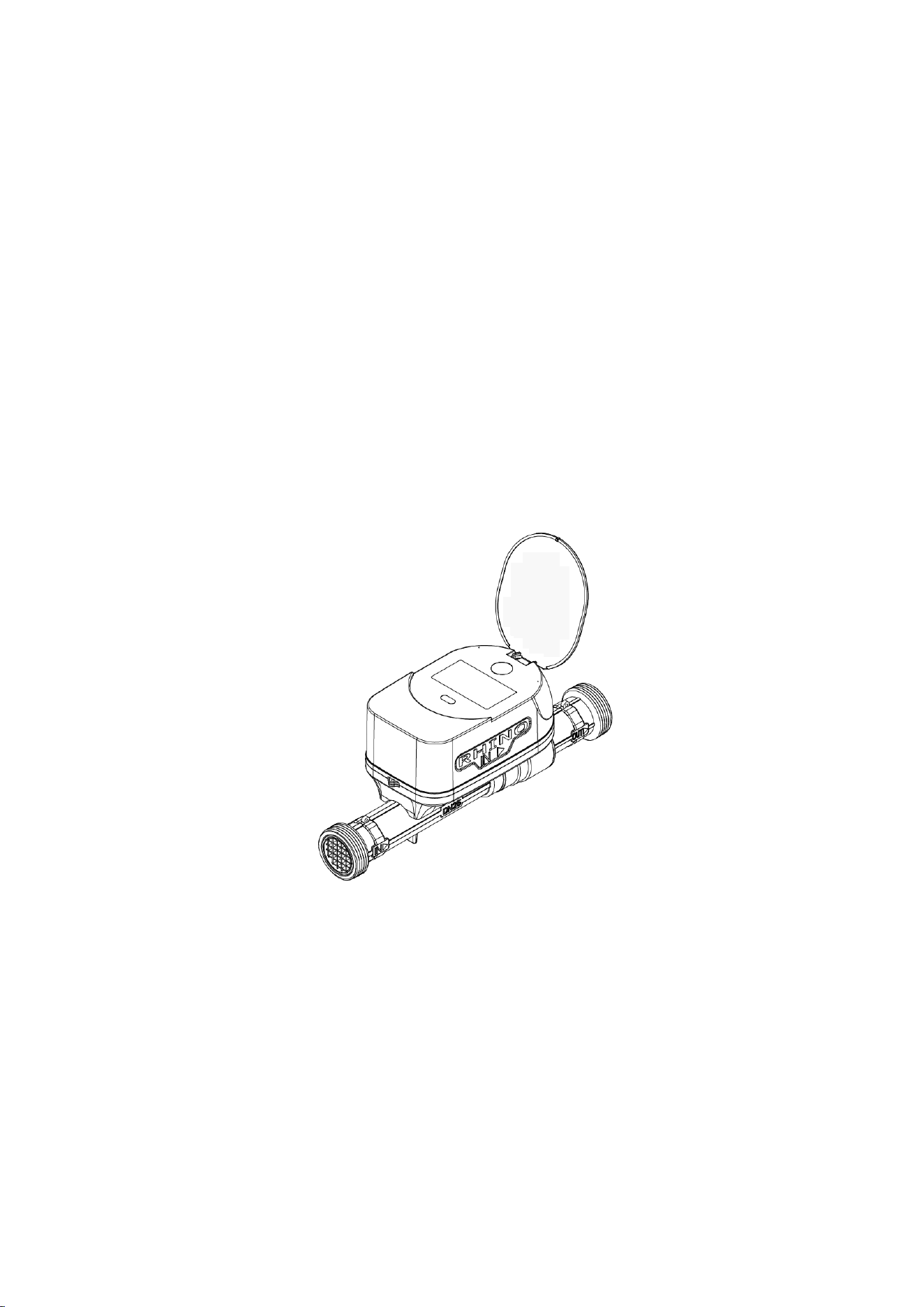
Rhino Smart Water Meter/
Rhino Leak Defense

Installation and User Manual
2
Table of Contents
1. Overview .................................................................................................................................. 3
2. Main Functions and Features ............................................................................................ 3
3. Installation .......................................................................................................................... 3
(1).Installation Methods ................................................................................................... 3
(2) Installation Requirements ......................................................................................... 4
(3) Precautions ..................................................................................................................... 5
4. Indicator Components .......................................................................................................... 5
5. LCD Display Icons ................................................................................................................ 6
6. Menu Interface ...................................................................................................................... 7
7. App Download .......................................................................................................................... 7
8. Wi-Fi Connection .................................................................................................................. 8
(1). Device Operation ....................................................................................................... 8
(2). Mobile Operation ....................................................................................................... 9
9. Parameter Settings and Operation ................................................................................ 11
(1) Valve Control ..................................................................................................... 12
(2) Water Usage Inquiry ......................................................................................... 13
(3) Settings ............................................................................................................... 13
10. Wired Connection ............................................................................................................ 18
11. Dimensions ........................................................................................................................ 18
12. FCC Caution: .................................................................................................................... 19
13. IMPORTANT NOTE: .............................................................................................................. 19
14. FCC Radiation Exposure Statement: .......................................................................... 19
15. ISED Warning .................................................................................................................... 20

Installation and User Manual
3
1. Overview
The Rhino Smart Water Meter/Rhino Leak Defense is a high-precision intelligent
instrument integrating ultrasonic flow measurement, valve control, data collection and
processing, data communication, and leakage monitoring.
It is widely used in residential, commercial, and industrial water supply systems for
accurate metering, energy-saving control, remote monitoring, and intelligent
management.
2. Main Functions and Features
• Multiple menu interfaces: main interface, detection interface, data interface,
error interface, and Wi-Fi interface.
• Displays forward/reverse accumulated flow, flow rate, water temperature,
pressure, operating time, address, date, diameter, battery voltage, valve status,
and alarms.
• One-button manual valve control; supports manual, automatic, and remote
operation.
• Real-time monitoring of temperature and pressure during flow measurement.
• Self-diagnostic function with alarms for leakage, pipe burst, and low pressure.
• Data storage: supports at least 24 months and the latest 31 days of historical
data.
• Supports remote meter reading, valve control, data statistics, status inquiry,
temperature and pressure monitoring.
3. Installation
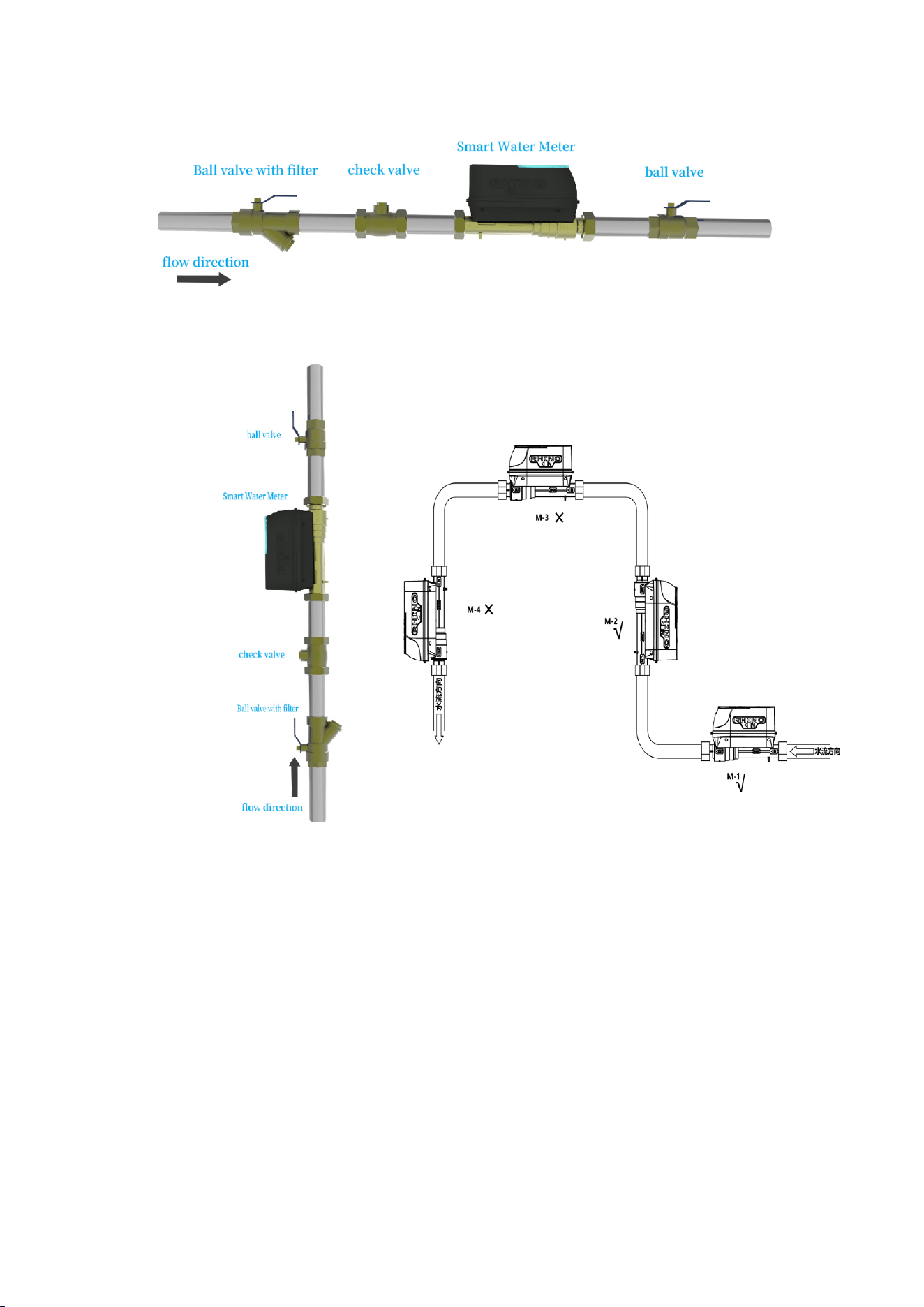
(1).Installation Methods
Installation and User Manual
4
Horizontal installation
Vertical installation Installation location
(2) Installation Requirements
1. Handle with care. Do not pull the meter head or cables.
2. Install in a dry and easily accessible location for maintenance.
3. Use dedicated installation tools.
4. Ensure flow direction matches the arrow on the meter body.
5. Install a filter, valve, and check valve upstream to avoid pulsation and turbulence.
6. Installation position:
M-1 and M-2: Correct installation (horizontal and vertical).
M-3 and M-4: Incorrect installation (may cause air accumulation or
Installation and User Manual
5
cavitation).
7. Ensure sufficient straight pipe length upstream and downstream.
8. Keep pipeline direction as horizontal as possible.
9. When installed vertically in multiple floors, install partitions between meters.
10. Horizontal installation is recommended.
11. Install in a locked meter box to prevent damage.
12. Battery replacement must be done by professionals.
(3) Precautions
1. Avoid environments with mechanical wear or chemical corrosion.
2. Avoid strong vibration and electromagnetic interference. 3. For wireless meters,
ensure good signal coverage; use external antennas in metal boxes or manholes.
4. Clean pipelines before installation.
5. During the installation of system pipes, fittings, and instruments, never use “hemp
fiber” as a sealant for pipe thread connections. When tightening screws, the hemp
fiber can be severed by the threads, and the broken fragments carried by water flow
through the instruments can easily cause blockages.
6. Perform pressure testing after installation.
7. Read this manual carefully before installation.
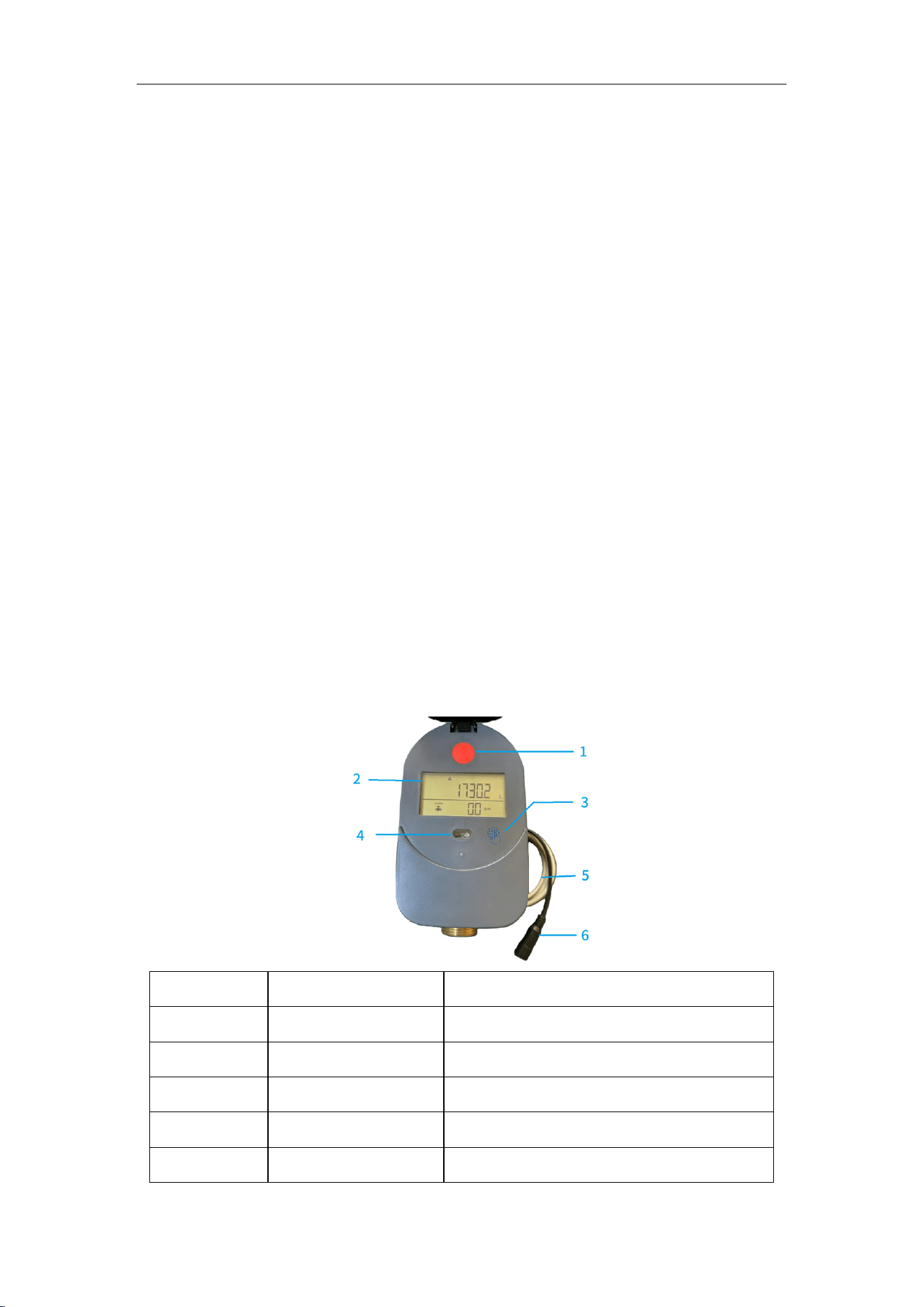
4. Indicator Components
No. Name Function
1 Manual Switch Open/close valve manually
2 LCD Display Shows real-time data and settings
3 Touch Button Page turning and operation
4 Infrared Port Optical data communication
5 Communication Cable
Wired communication
Installation and User Manual
6
6 Power Socket Connect external 5V DC power
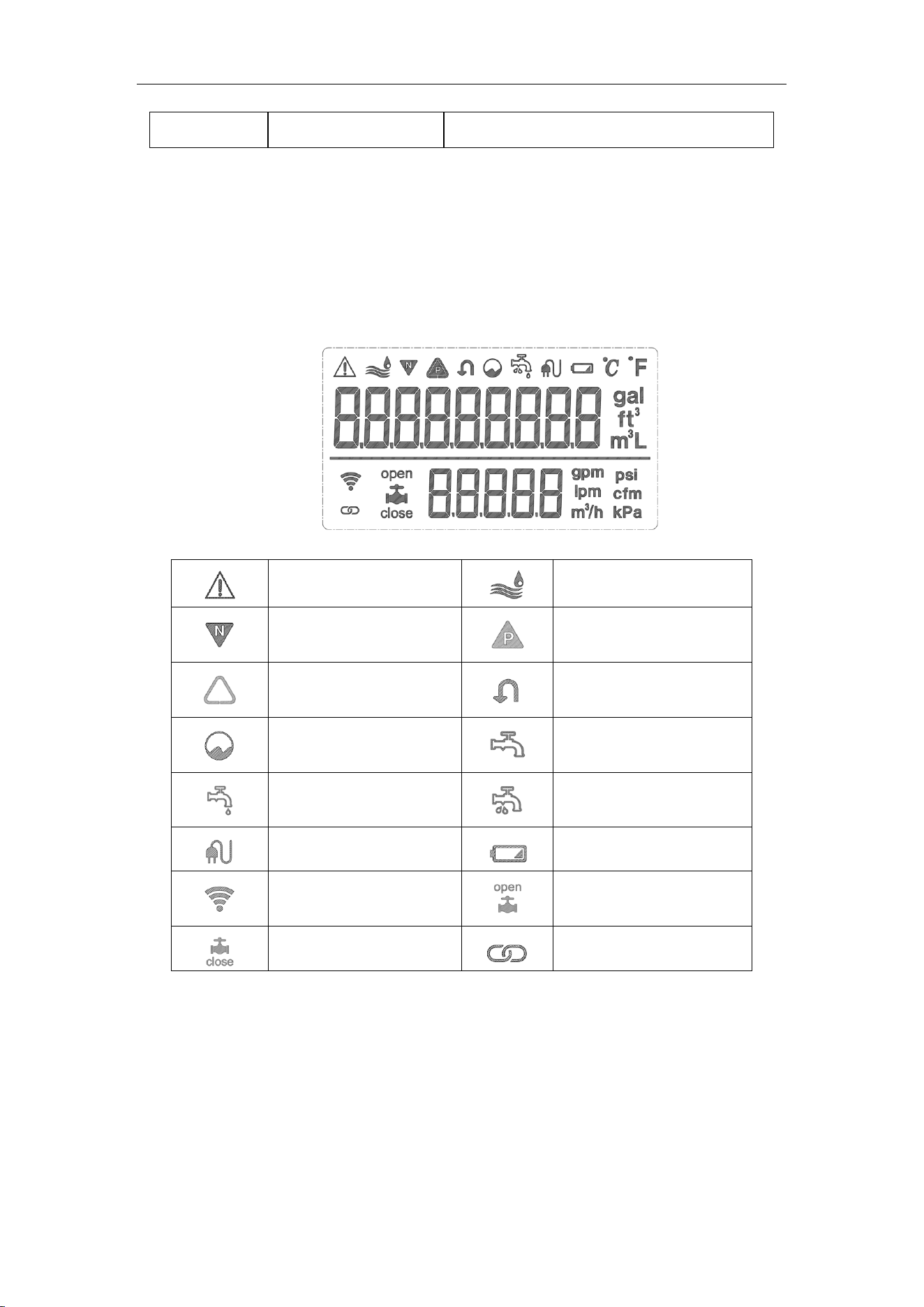
5. LCD Display Icons
Fault Alarm
Water Flowing
Reverse Flow
Forward Flow
Over-Flow Alarm
Backflow
Empty Pipe/Air
Bubble
Water Stopped
Drip Leakage
Pipe Burst
External Power
Low Voltage
Wi-Fi Connected
Valve Open
Valve Closed
LORA
Connected
Installation and User Manual
7
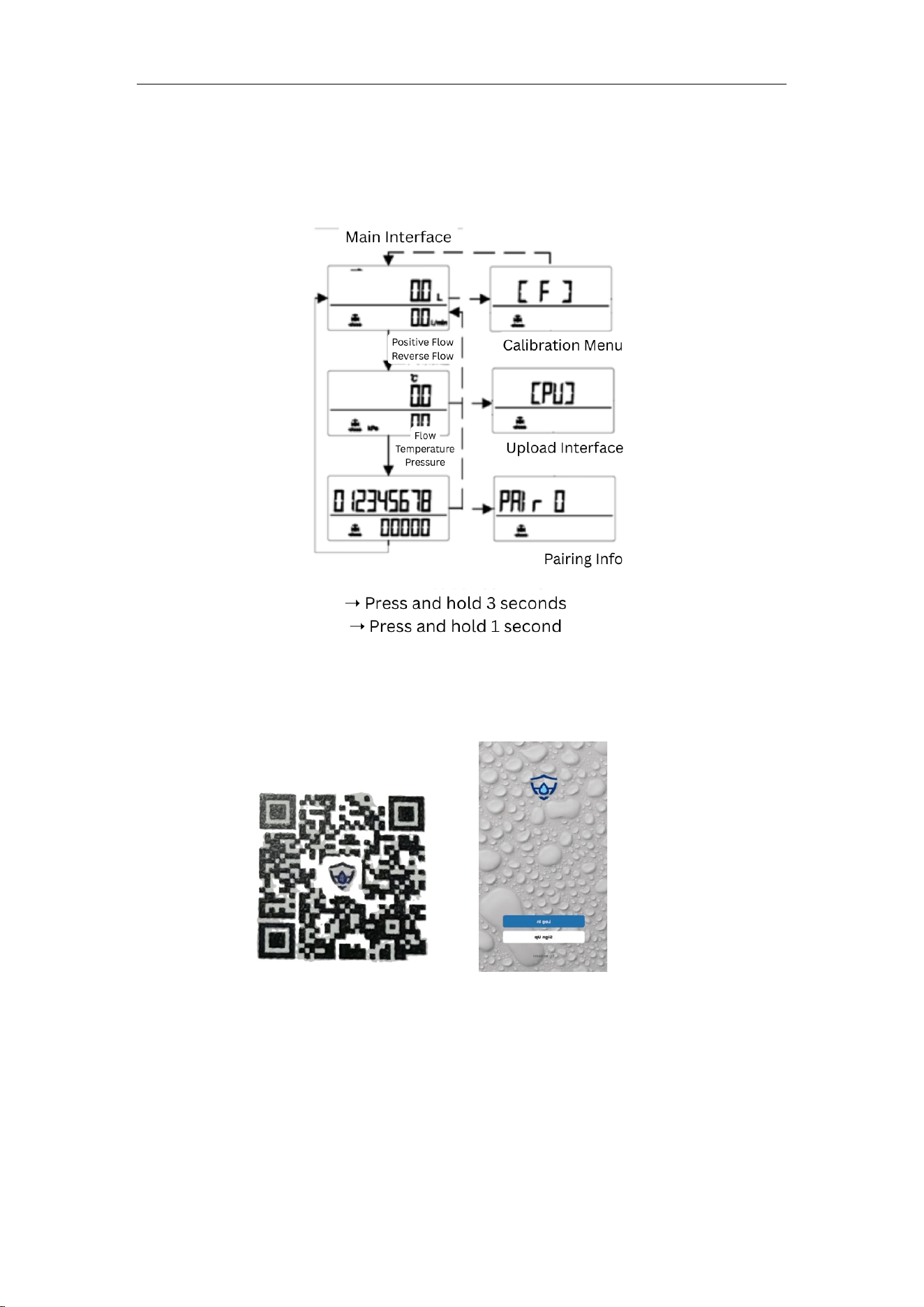
6. Menu Interface
7. App Download
Search for “RhinoH” on Google Play or the App Store, or scan the QR code.
Steps:
1. Register a RhinoH account.
2. Open the app and select “Settings”.
3. Register using your email.
4. Ensure correct country/region information.
5. Allow location access if prompted (optional).
Installation and User Manual
8
8. Wi-Fi Connection
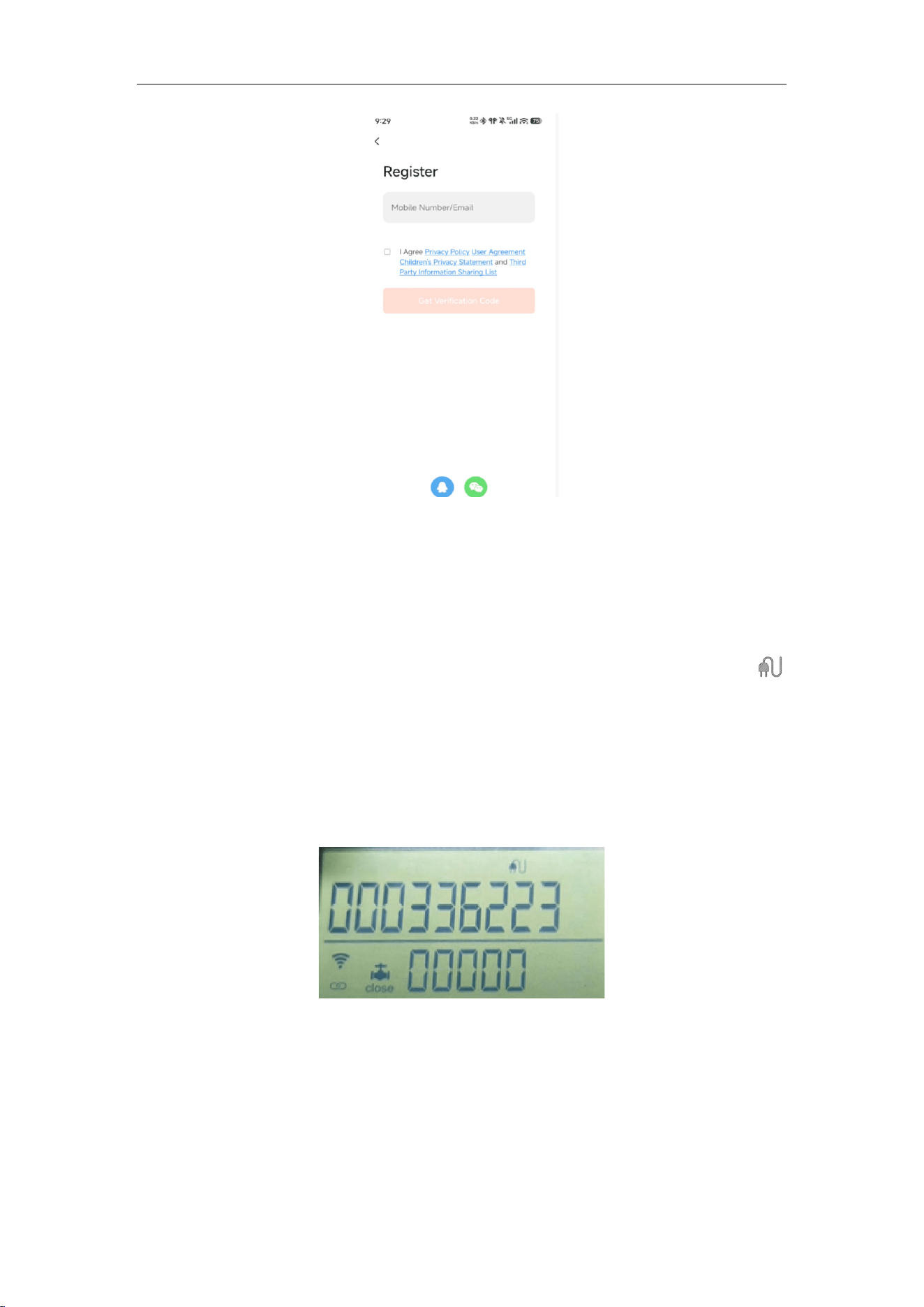
Connect an external 5V DC power supply. When detected, the Wi-Fi icon
appears.
(1).
Device Operation
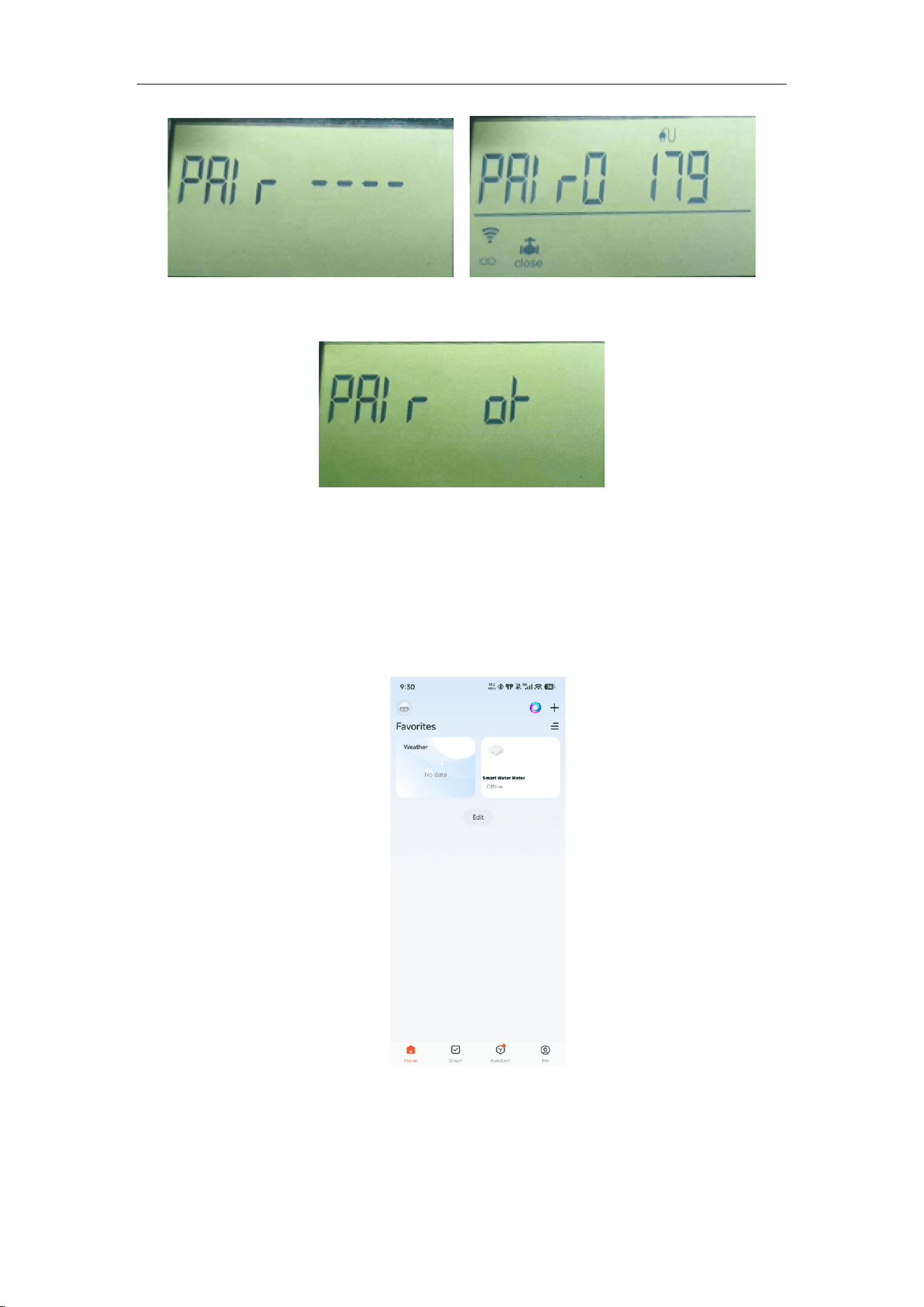
1. Press twice to enter address page.
2. Long press for 5 seconds to enter pairing mode (180 seconds).
Installation and User Manual
9
3. Successful pairing shows the pairing page.
(2).
Mobile Operation
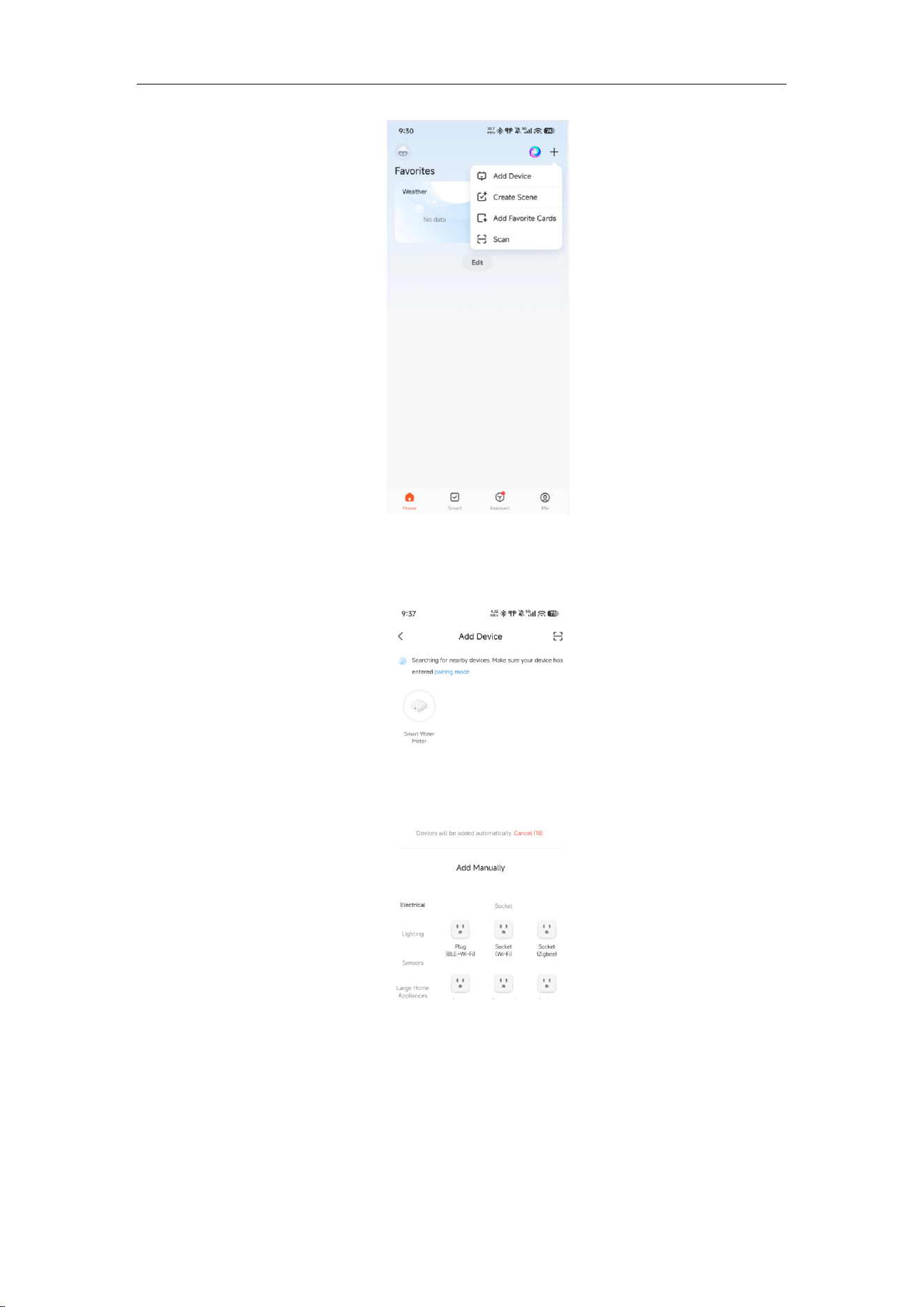
1. Open RhinoH App after device enters pairing mode.
2. Tap “+” in the upper right corner.
Installation and User Manual
10
Right Upper Corner name: add device; create scene; add shortcut; scan; add devices
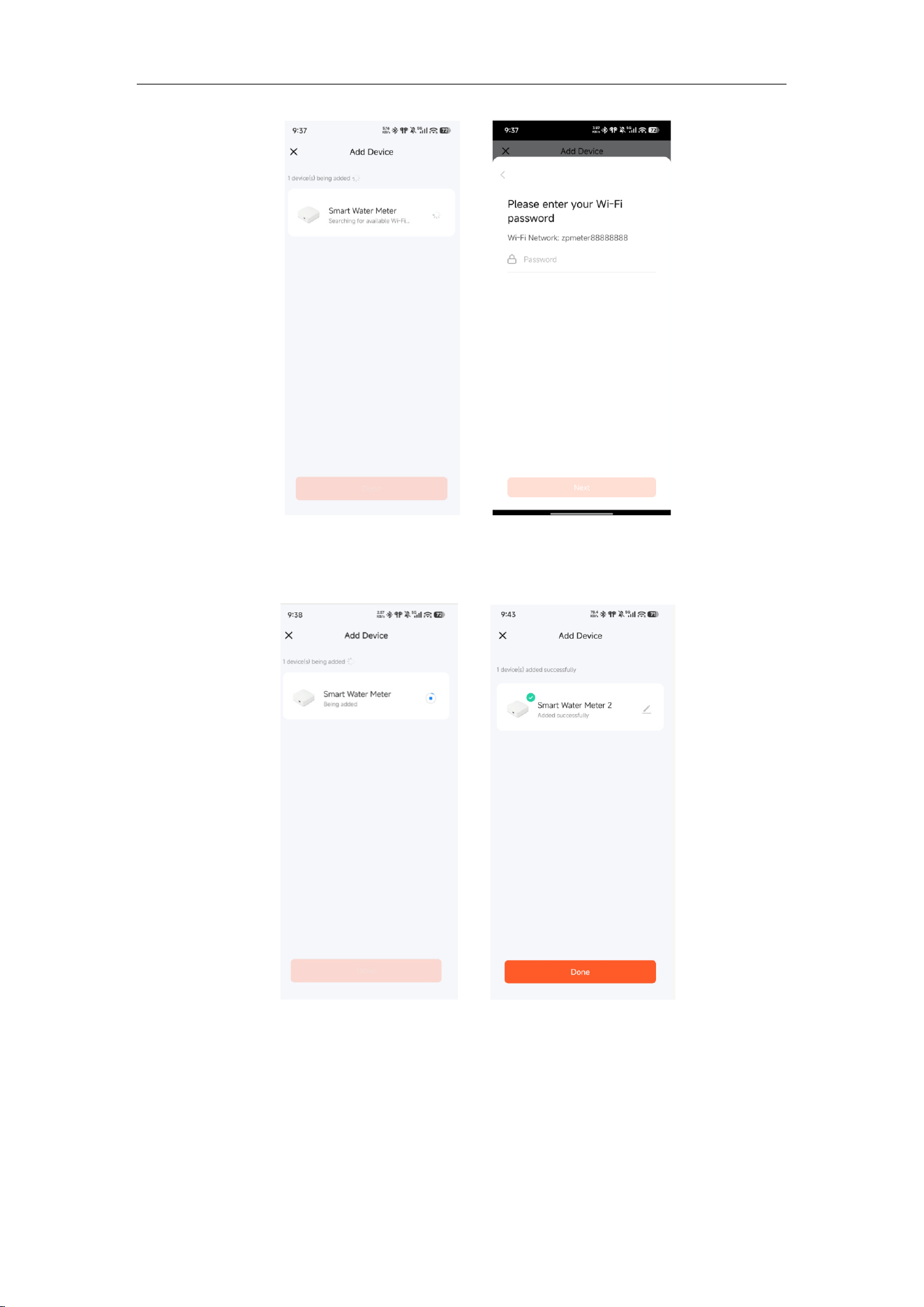
3. Select “Add Device”.
4. Choose the detected device.
Installation and User Manual
11
5. Enter Wi-Fi password, wait until orange button “OK” is displayed.
9. Parameter Settings and Operation
Installation and User Manual
12
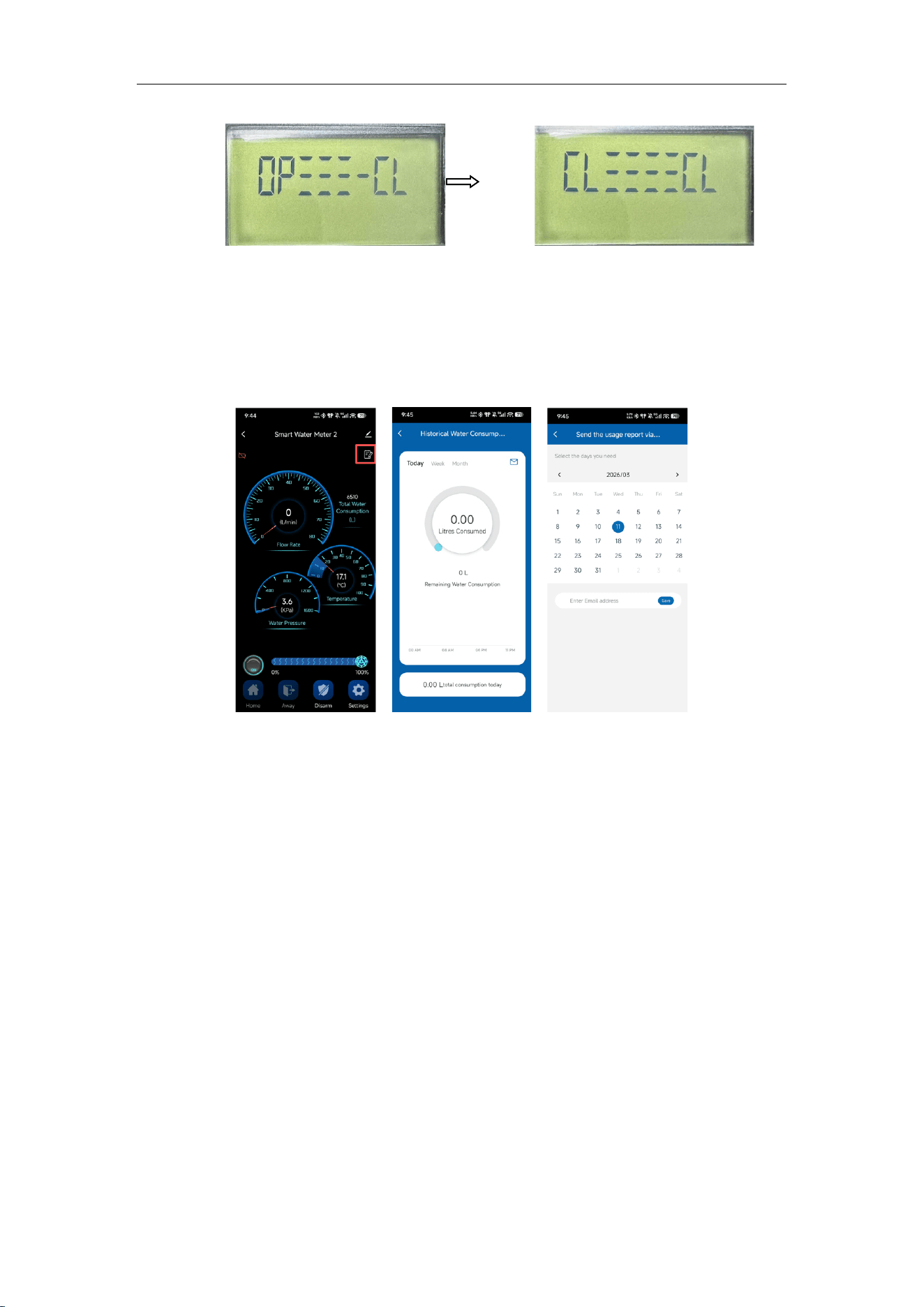
(1) Valve Control
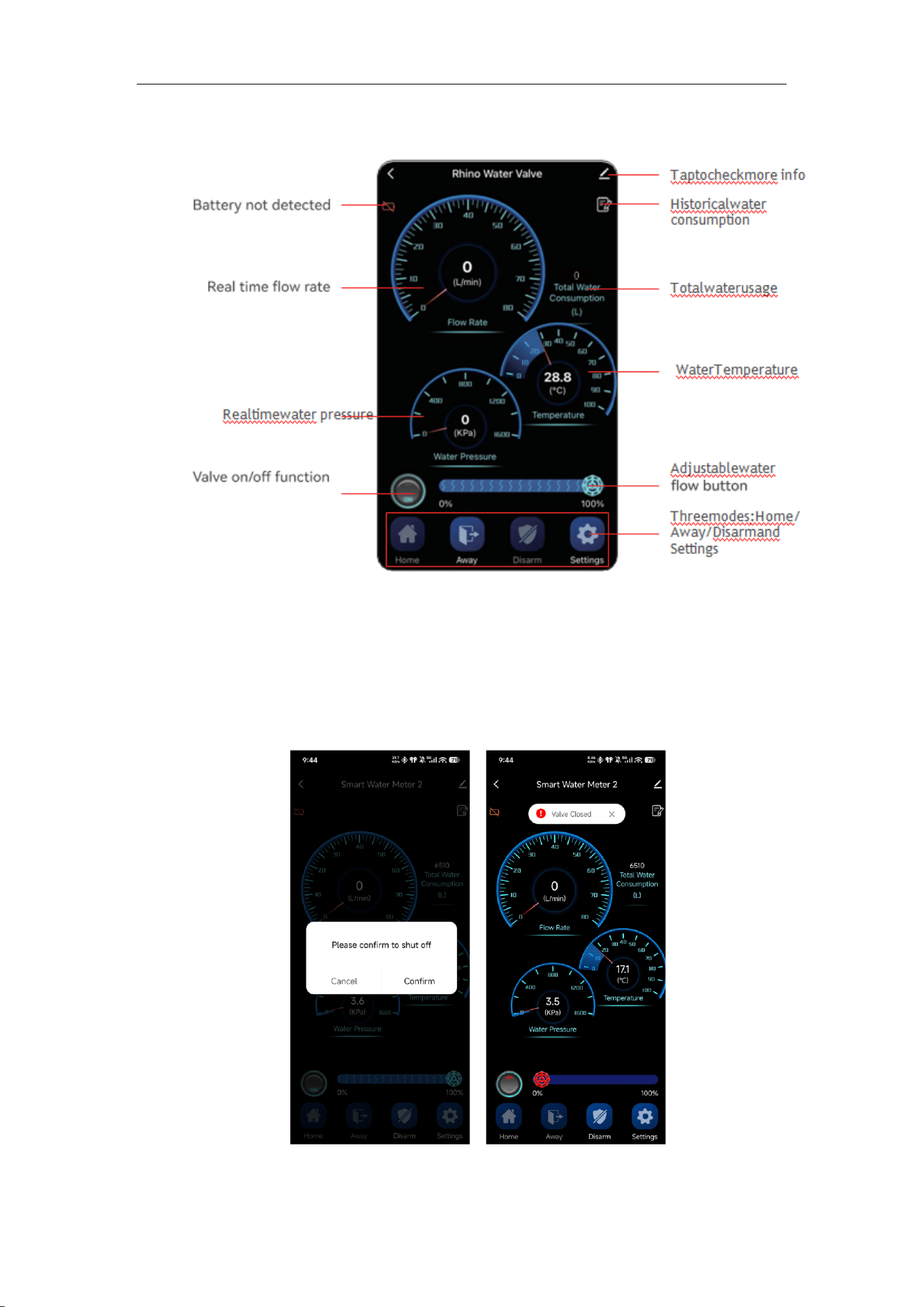
App Control: Tap button to open/close valve.
Device Control: Long press red button. “OP” = Open, “CL” = Close.
Installation and User Manual
13
(2) Water Usage Inquiry
Press the button to check historical usage by day/week/month.
You may:
• View remaining water (after setting limits).
• Send reports to email.
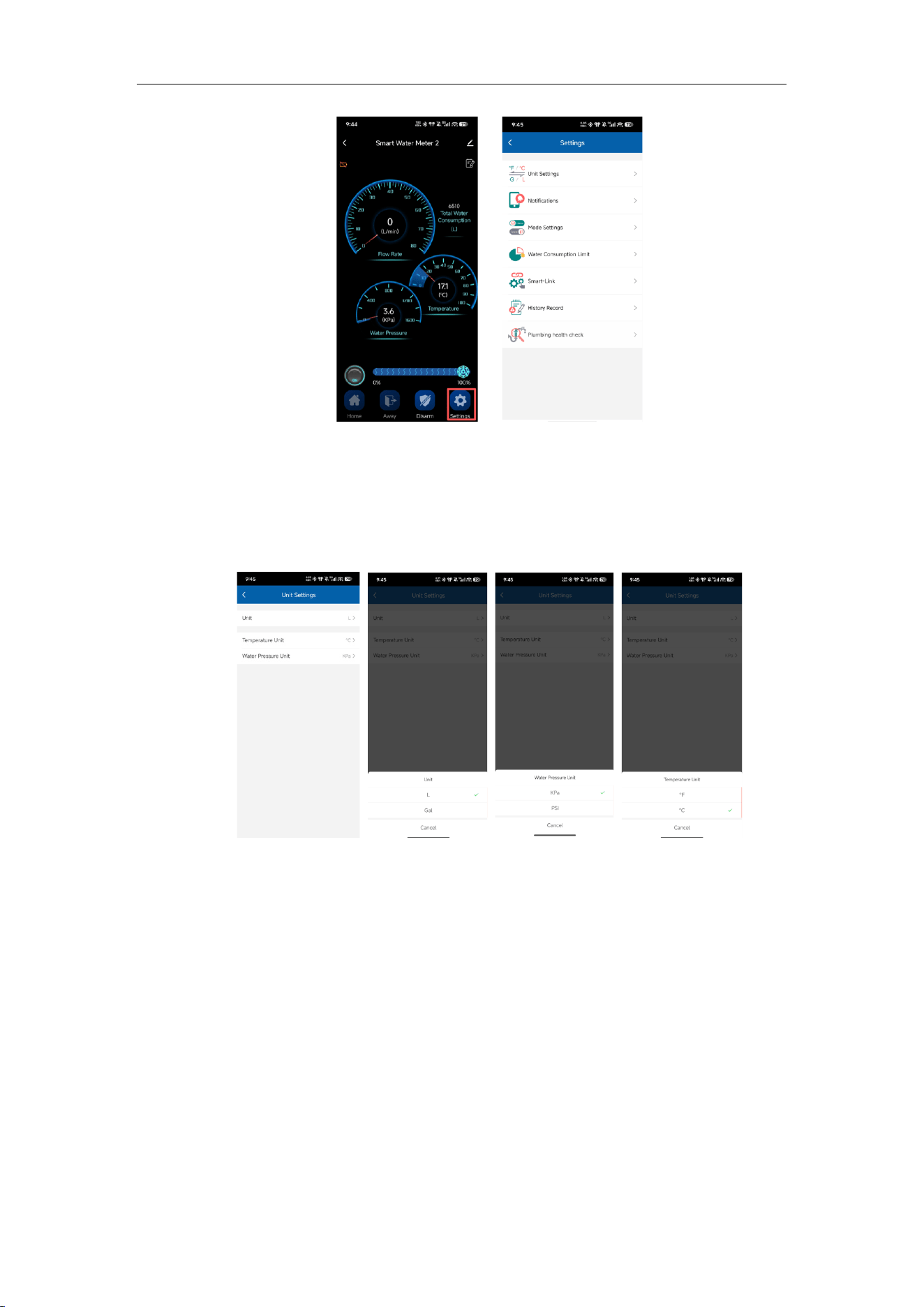
(3) Settings
Enter “Settings” mode:
Installation and User Manual
14
a. Unit Settings:
Flow: L / GAL;
Temperature: °C / °F;
Pressure: kPa / PSI
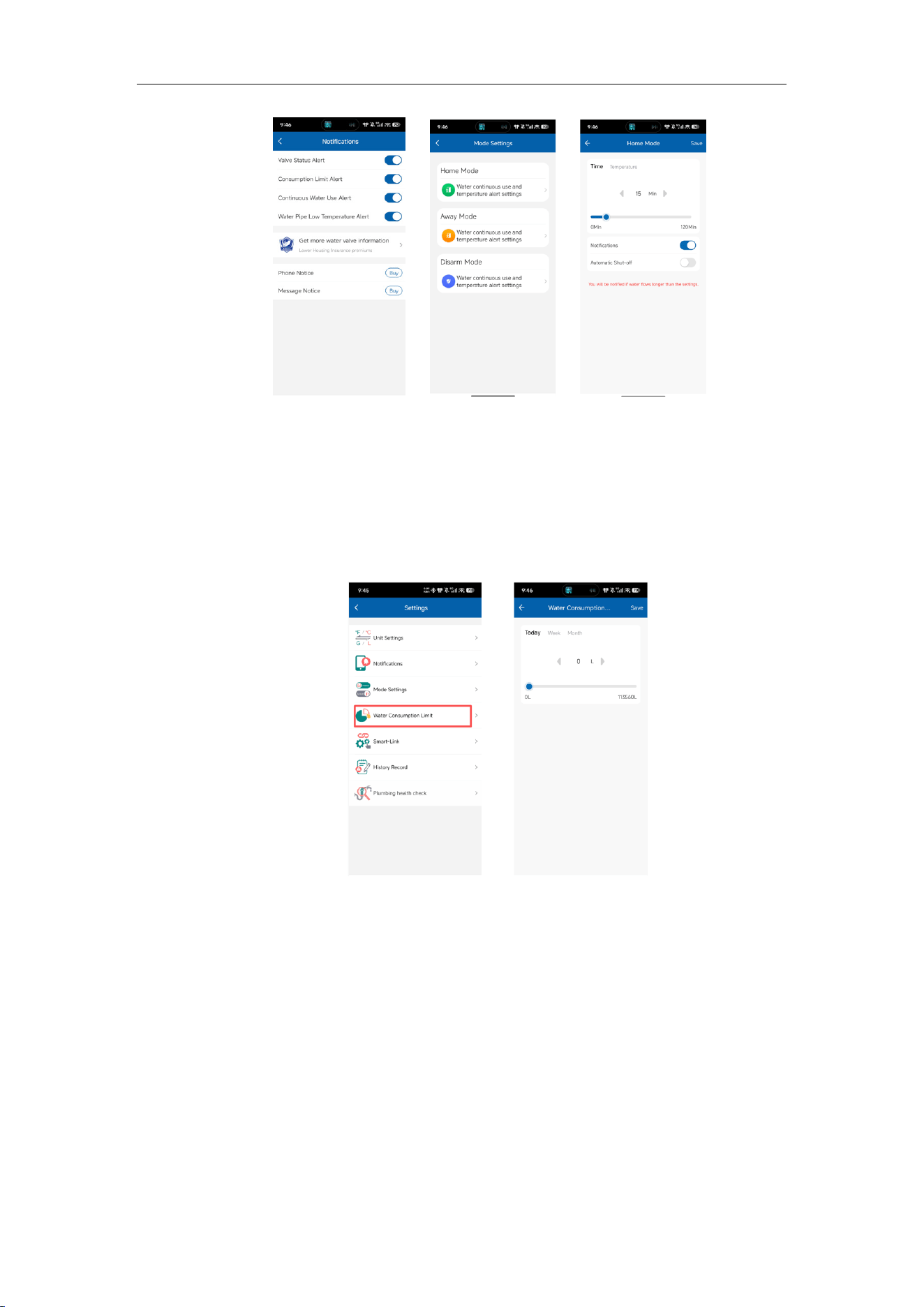
b. Mode Settings
Home / Away / Disarm modes
Continuous flow time
Temperature alarms
Notifications
Auto valve closing
Installation and User Manual
15
b. Water Usage Limit:
You can set water usage limits by day/week/month. Click “Save” to save
your settings.
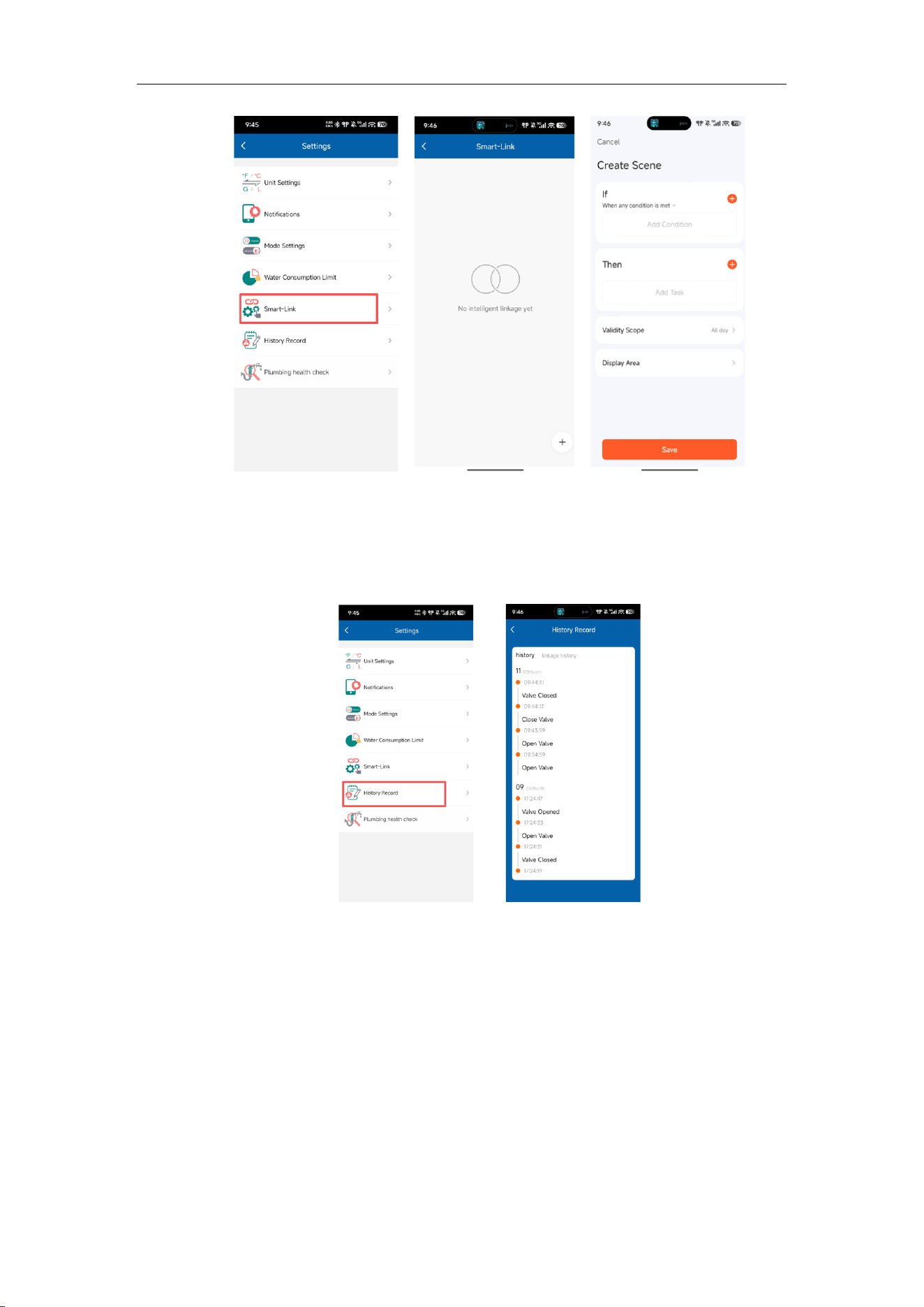
c. Smart Linkage
Create smart scenarios with conditions and tasks.
Installation and User Manual
16
d. History Records
You can view RHINO's operation logs, historical notifications, and even
link records.
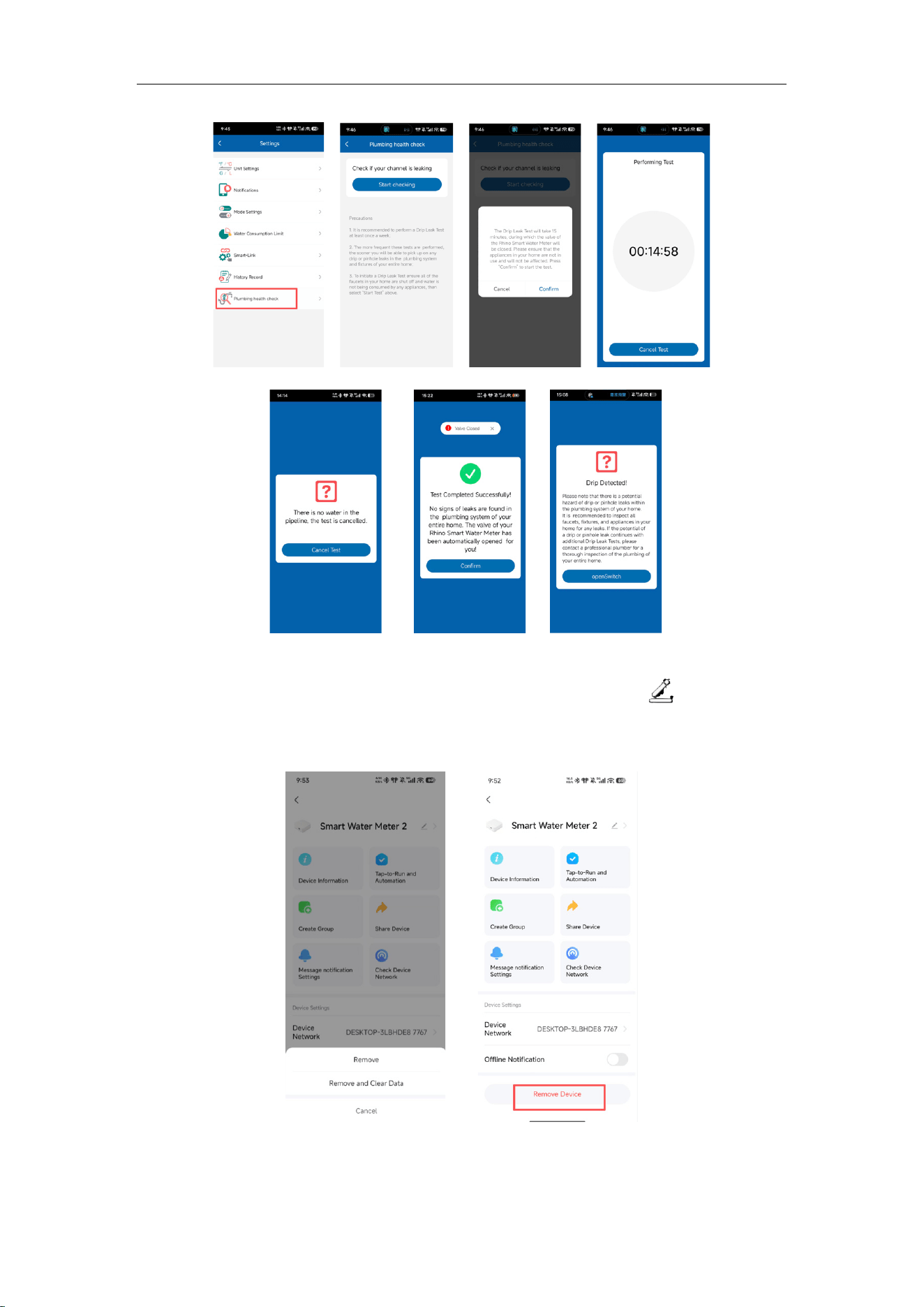
e. Pipeline Health Check
This feature is specifically designed to detect potential leaks in your home.
Initiate the process by pressing “Start Inspection” and confirming the test.
The drip test will run for 15 minutes. If no water is present in the pipes, the
test will automatically cancel.
Installation and User Manual
17
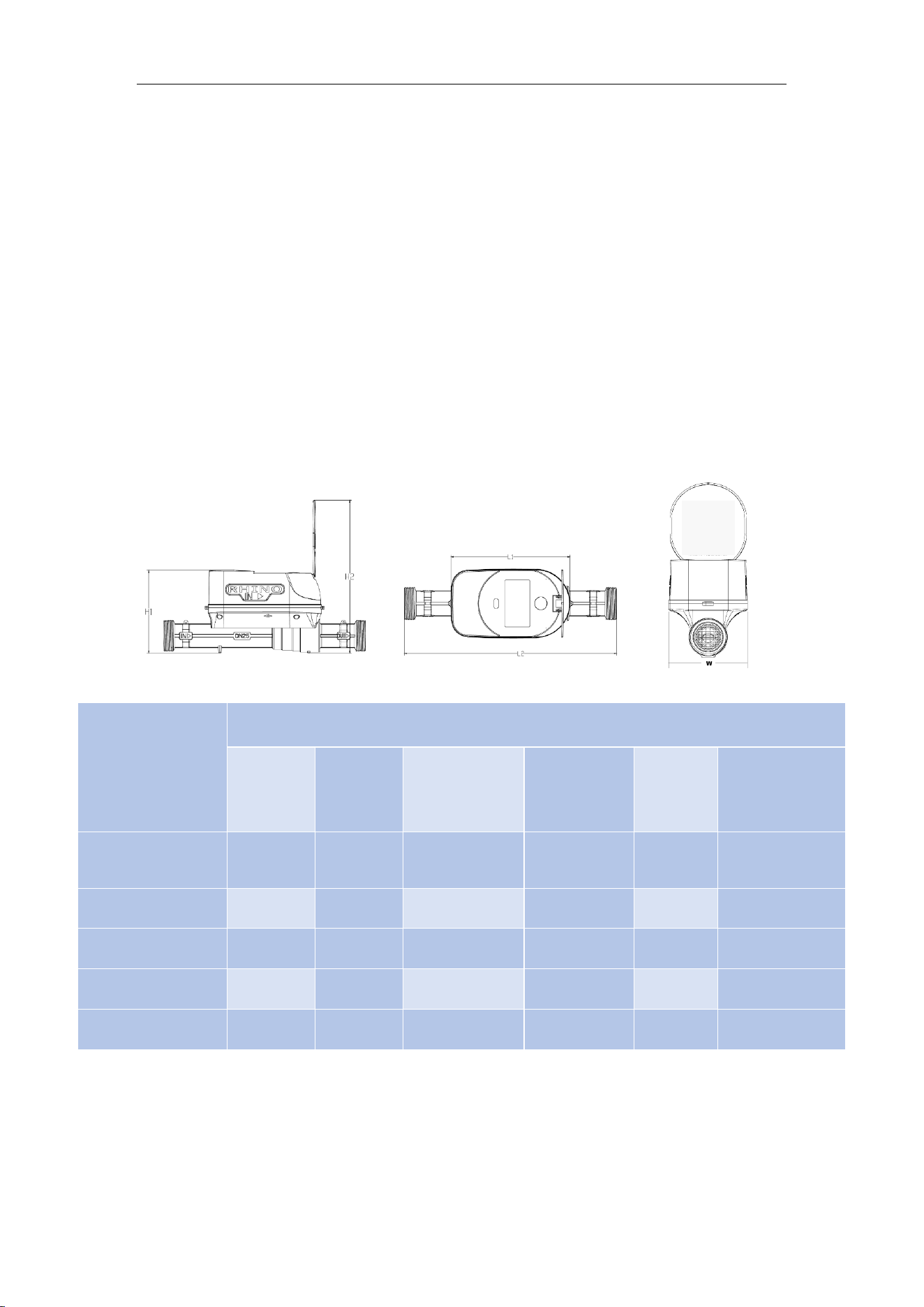
g. Reset Device:To remove a device from the app, tap the “ ”icon, locate
“Remove Device,” select “Disconnect and Erase Data,” and confirm to reset the
device to factory defaults.
Installation and User Manual
18
10. Wired Connection
Communication method: MBUS + Pulse output (4-core cable):
1.Yellow & Green: MBUS signal (non-polarized);
2.Red & Black: Pulse signal
Red: Positive
Black: Negative
Pulse value: 1 L/P
11. Dimensions
Model
Overall Dimensions
Height H1
(mm)
Height H2
(mm)
Shell length L1
(mm)
Base length L2
(mm)
Width W
(mm)
Interface thread
D
(inch)
RH-WM-3/4-S
(short)
107.8 202.4 161 190 89 NPT 1
RH-WM-3/4(long)
107.8 202.4 161 229 89 NPT 1
RH-WM-1 111.5 206.1 161 273 89 NPT 1
1
/
4
RH-WM-1.5 148 248.4 180 324 100 NPT 2
RH-WM-2 159 259.4 180 387 100 NPT 2
1
/
2

Installation and User Manual
19
12. FCC Caution:
Any changes or modifications not expressly approved by the party responsible for
compliance could void the user's authority to operate the equipment.
This device complies with Part 15 of the FCC Rules. Operation is subject to the
following two conditions:
(1) This device may not cause harmful interference, and
(2) this device must accept any interference received, including interference that
may cause undesired operation.
13. IMPORTANT NOTE:
Note: This equipment has been tested and found to comply with the limits for a
Class B digital device, pursuant to Part 15 of the FCC Rules. These limits are
designed to provide reasonable protection against harmful interference in a
residential installation. This equipment generates, uses, and can radiate radio
frequency energy and, if not installed and used in accordance with the instructions,
may cause harmful interference to radio communications.
However, there is no guarantee that interference will not occur in a particular
installation. If this equipment does cause harmful interference to radio or television
reception, which can be determined by turning the equipment off and on, the user is
encouraged to try to correct the interference by one or more of the following
measures:
— Reorient or relocate the receiving antenna.
— Increase the separation between the equipment and receiver.
— Connect the equipment into an outlet on a circuit different from that to which the
receiver is connected.
— Consult the dealer or an experienced radio/TV technician for help.
14. FCC Radiation Exposure Statement:
This equipment complies with FCC radiation exposure limits set forth for an
uncontrolled environment. This equipment should be installed and operated with a
minimum distance of 20 cm between the radiator and your body.

Installation and User Manual
20
15. ISED Warning
This device complies with Innovation, Science and Economic Development Canada
licence-exempt RSS standard(s). Operation is subject to the following two conditions:
(1) This device may not cause interference, and
(2) this device must accept any interference, including interference that may cause
undesired operation of the device.
Le présent appareil est conforme aux CNR d'Innovation, Sciences et Développement
économique Canada applicables aux appareils radio exempts de licence.
L'exploitation est autorisée aux deux conditions suivantes :
(1) L'appareil ne doit pas produire de brouillage, et
(2) l'utilisateur de l'appareil doit accepter tout brouillage radioélectrique subi, même si
le brouillage est susceptible d'en compromettre le fonctionnement.
The device complies with RF exposure guidelines, and users can obtain Canadian
information on RF exposure and compliance. The minimum distance from the body
to use the device is 20cm.
Le présent appareil est conforme. Après examen de ce matériel aux conformités ou
aux limites d’intensité de champ RF, les utilisateurs peuvent sur l’exposition aux
radiofréquences et la conformité et la compliance acquérir les informations
correspondantes. La distance minimale du corps à utiliser le dispositif est de 20 cm.