5-058-401-01(1)
K-65S26 / 65S26B / 65S25 / 65S25B / 55S26
K-55S26B / 55S25 / 55S25B / 50S26 / 50S25
K-50S21 / 50S21B / 50S20 / 50S20B / 43S26
K-43S25 / 43S21 / 43S21B / 43S20 / 43S20B
Reference Guide
Television
https://rd1.sony.net/help/tv/lgar1/h_ga/
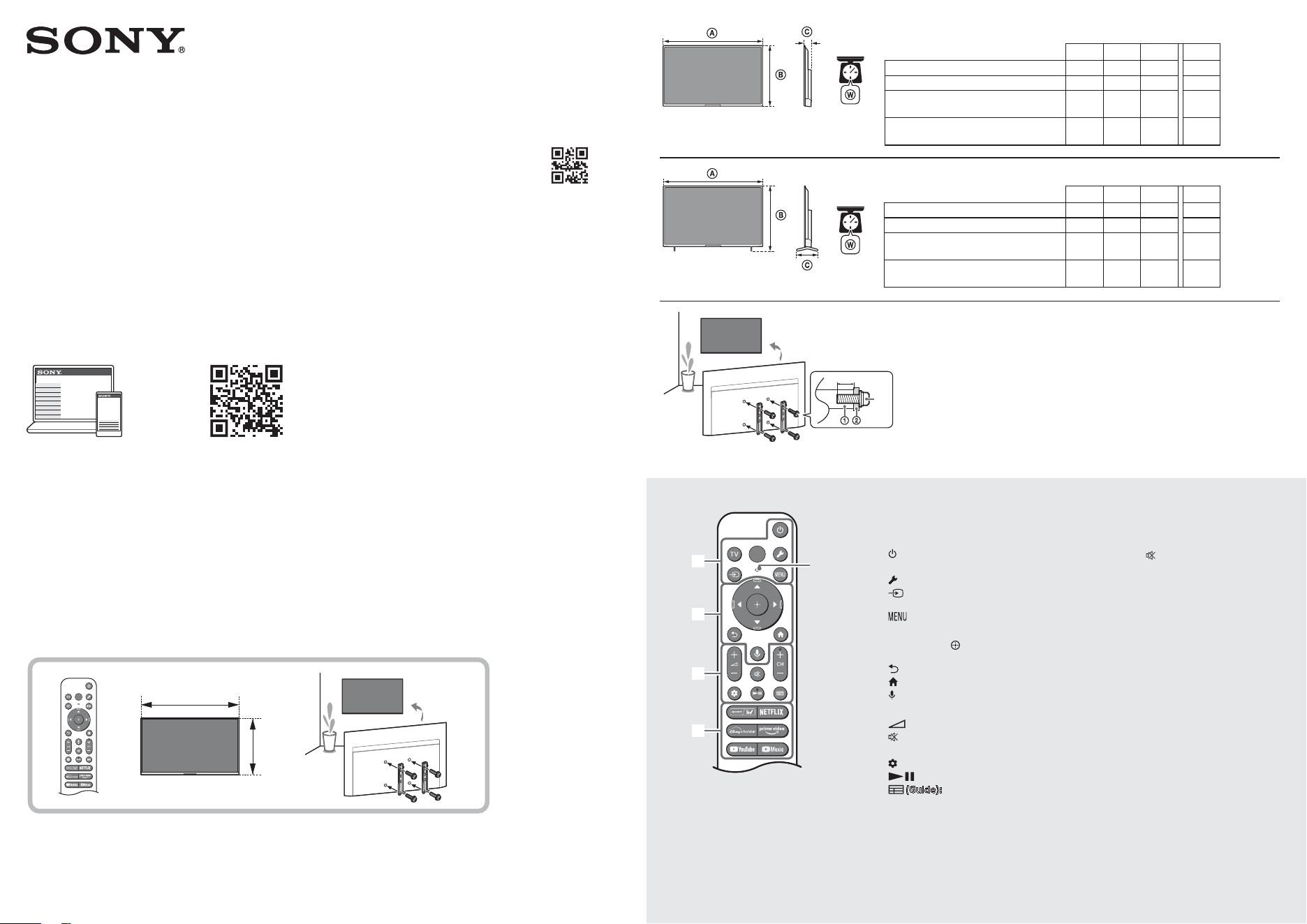
(mm)
*
1
(kg)
*
1
K-65S26 / 65S26B / 65S25 / 65S25B 1463 852 87 21.4
K-55S26 / 55S26B / 55S25 / 55S25B 1243 729 84 13.9
K-50S26 / 50S25 / 50S21 / 50S21B /
50S20 / 50S20B
1127 662 77 9.8
K-43S26 / 43S25 / 43S21 / 43S21B /
43S20 / 43S20B
971 575 77 7.8 *1 (Approx.)
(mm)
*
1
(kg)
*
1
K-65S26 / 65S26B / 65S25 / 65S25B 1463 914 337 22.1
K-55S26 / 55S26B / 55S25 / 55S25B 1243 790 291 14.5
K-50S26 / 50S25 / 50S21 / 50S21B /
50S20 / 50S20B
1127 729 259 10.0
K-43S26 / 43S25 / 43S21 / 43S21B /
43S20 / 43S20B
971 643 259 8.0 *1 (Approx.)
MIC
The remote control shape, layout, availability
and function of remote control buttons may vary
depending on your region/country/TV model/
TV settings.
(Power)
TV: Display TV channel list or switch to input.
(Quick settings): Display Quick Settings.
(Input select): Display and select the
input source, etc.
(Control menu): Display the Control
menu.
/ / / /
: On screen menu
navigation and selection.
(Back)
(Home)
(Google Assistant / Microphone):
Use Google Assistant*
1
*
2
or voice search*
2
.
+ / – (Volume)
(Mute)*
3
CH + / – (Channel)
(Dashboard): Display Dashboard.
(Guide): Display the digital programme
guide of TV or TV box*
4
.
App buttons
*1 Only for limited region/country/model/
language.
*2 Google Assistant or voice search requires an
Internet connection.
*3 Accessibility shortcut is available by pressing
and holding
(Mute).
*4 [TV box setup] setting is required.
© 2024 Sony Corporation Printed in India
8 – 12 (mm)
M6
Wall-Mount Attachment
Wall-Mount Bracket
About Manuals
Please retain the manuals for future reference.
Paper manual
Setup Guide (on top of the product) / Reference
Guide (this manual) / Safety and Other
Information.
Help Guide (On screen Manual)
•To open it, select [Settings] t [Help and
feedback] t [Help] or select [Help] in the
Home Menu, if [Help] does not exist, select
[See all] t [Help].
•You can refer to the Help Guide with your
smartphone (visit website provided on the
front cover of Reference Guide).
Read and understand the contents of this manual
before operating this product.
Note
•Instructions about “Installing the TV to the Wall”
are included within this TV’s instruction manual.
•Read the supplied safety documentation for
additional safety information.
•Images and illustrations used in the supplied
manuals are for reference and may differ from
the actual product.
•Setting menus are subject to change without
notice due to software updates. For latest
information, visit Sony support website.
IMPORTANT - Read the End User Software
Licence Agreement before using your Sony
product.
Using your product indicates your
acceptance of the End User Software Licence
Agreement. The software licence agreement
between you and Sony is available online at
Sony website (https://www.sony.net/
tv-software-licenses2/) or on your product
screen. Press
(Quick Settings) on the remote
control and select [Settings] t [System] t
[About] t [Legal information] t [Notices and
licences].
Location of the identification label
Labels for the TV Model No. and Power Supply
rating are located on the rear of the TV.
For models with supplied AC adapter:
Labels for AC adapter Model No. and Serial No. are
located on the bottom of AC adapter.
Installing the TV to the Wall
Using the optional Wall-Mount Bracket (not supplied)
This TV’s instruction manual only provides the
steps to prepare the TV for Wall-Mount installation
before it is installed on the wall.
Your TV can be mounted to a wall using a suitable
Wall-Mount Bracket (not supplied). If the Table-Top
Stand is attached to the TV, the TV may require
detaching the Table-Top Stand (models with
Table-Top Stand only).
Prepare the TV for the Wall-Mount Bracket before
making cable connections.
For product protection and safety reasons, Sony
strongly recommends that installation of your
TV on the wall be performed by qualified
professionals. Do not attempt to install it
yourself.
•Follow the instruction guide provided with the
Wall-Mount Bracket for your model. Sufficient
expertise is required in installing this TV,
especially to determine the strength of the wall
for withstanding the TV’s weight.
•The screws for installing the Wall-Mount Bracket
to the TV are not supplied.
•Be sure to store the unused screws and Table-Top
Stand in a safe place until you are ready to attach
the Table-Top Stand (models with Table-Top
Stand only). Keep the screws away from small
children.
Note
•Read the supplied safety documentation for
additional safety information.
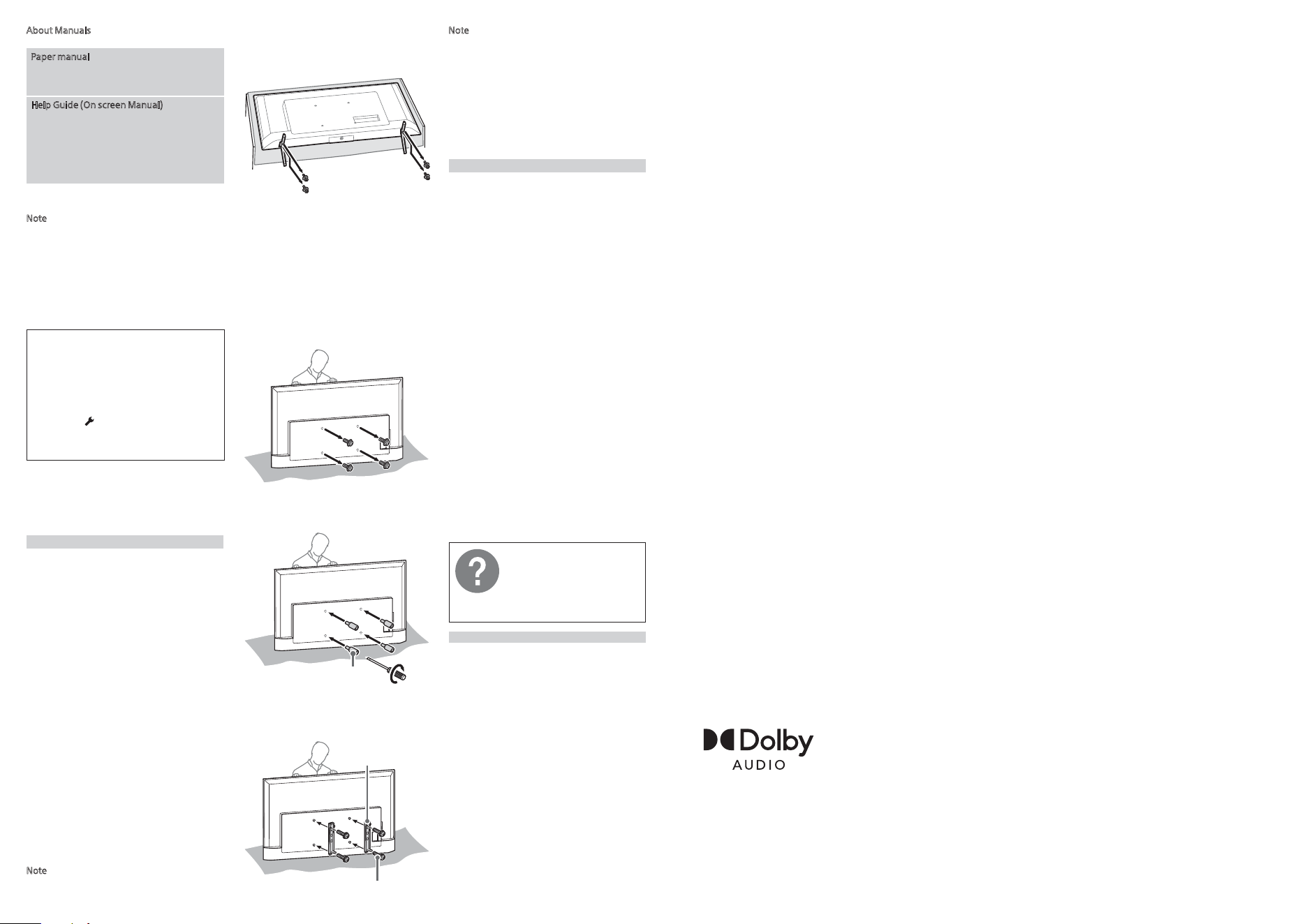
Detaching the Table-Top Stand from the TV
K-50S26 / 50S25 / 43S26 / 43S25 only
Detach the Table-Top Stand from the TV.
Note
•Make sure to place TV on the place where you
put a soft cloth on to prevent damaging display’s
surface.
•When installing the Wall-Mount Bracket, do not
use the screws removed from the Table-Top
Stand.
•Be sure to store the removed Table-top Stand
and its screws in a safe place, keeping them away
from children. You will need them if you want to
use the TV on a table in the future. The Table-Top
Stand cannot be purchased separately.
1 Remove the screws from the rear of the TV.
2 Attach the Wall-Mount Attachment (not
supplied) to the rear of the TV (to make it
parallel with the wall).
Wall-Mount Attachment
(not supplied)
1.5 N·m
{15 kgf·cm}
3 Attach the Wall-Mount Bracket (not supplied)
using the screws (not supplied).
Wall-Mount Bracket
(not supplied)
Screw
(not supplied)
Note
•If using an electric screwdriver, set the torque at
approximately 1.5 N·m {15 kgf·cm}.
•Be sure to fasten the Wall-Mount Attachment
when attaching them to the TV. Use only a flat
head screwdriver to install the Wall-Mount
Attachment. Use of another tool might result in
over torqueing the Wall-Mount Attachment and
damaging the TV.
•Be sure the TV is vertical before turning on. To
avoid uneven picture uniformity do not power on
the TV with the panel facing down.
Troubleshooting
General troubleshooting for issues like: black
screen, no sound, frozen picture, TV does not
respond, or network is lost, do the following steps.
1 Restart your TV by pressing the power button
on the remote control for about five seconds.
Select [Restart] and TV will restart. If the TV does
not recover, try unplugging the AC power cord
(mains lead) then press the power button on the
TV and release it. Wait for two minutes, and plug
in the AC power cord (mains lead).
Or, press the power button on the TV for about
40seconds until the TV turns off.
2 Refer to the Help menu shown below.
3 Connect your TV to the Internet and perform a
software update. Sony recommends you to
keep your TV software updated. Software
updates provide new features and performance
improvements.
4 Visit Sony support website (information
provided at the end of the supplied safety
documentation).
When you plug in the TV, the TV may not be
able to turn on for a while even if you press
the power button on the remote control or
the TV.
It takes time to initialize the system. Wait for about
one minute, then operate it again.
The remote control does not function.
•Replace the batteries.
The parental lock password has been
forgotten.
•Enter 4357 for the PIN and enter the new PIN.
For more information, refer to
the Help Guide.
To open it, select [Settings] t
[Help and feedback] t [Help] or
select [Help] in the Home Menu,
if [Help] does not exist, select
[See all] t [Help].
Specifications
System
Panel system
LCD (Liquid Crystal Display) Panel, LED Backlight
TV system
Analogue: B/G
Digital: DVB-T/DVB-T2
Satellite: DVB-S/DVB-S2
Colour system
PAL/SECAM
Channel coverage
Analogue: UHF/VHF/Cable
Digital: UHF/VHF
Satellite: Intermediate Frequency 950-2 150 MHz
Sound output (W)
10 + 10
Wireless technology
Protocol IEEE 802.11a/b/g/n/ac
Bluetooth® Version 5.0
Input/Output jacks
Antenna (aerial)/cable
75 ohm external terminal for RF input
Satellite antenna
Female F Type Connector, 75 ohm
LNB 13 V/18 V & 22 kHz tone
HDMI IN 1/2/3 (HDMI IN 3 eARC/ARC)
DIGITAL AUDIO OUT (OPTICAL)
Two channel linear PCM: 48 kHz 16 bits, Dolby
Audio
USB (K-50S21 / 50S21B / 50S20 / 50S20B / 43S21 /
43S21B / 43S20 / 43S20B)
USB 2.0, 500 mA
USB 1/2 (K-65S26 / 65S26B / 65S25 / 65S25B
/55S26 / 55S26B / 55S25 / 55S25B / 50S26 / 50S25
/ 43S26 / 43S25)
USB 1/2 (USB 2.0, 500 mA)
LAN (10BASE-T/100BASE-TX)
DC IN 19.5 V (K-50S26 / 50S25 / 50S21 / 50S21B /
50S20 / 50S20B / 43S26 / 43S25 / 43S21 / 43S21B /
43S20 / 43S20B only)
AC adapter input
Power and others
Power requirements
except models with supplied AC adapter
110 V - 240 V AC, 50/60 Hz
models with supplied AC adapter only
19.5 V DC with AC adapter
Rating: Input 100 V – 240 V AC, 50/60 Hz
Screen size (measured diagonally) (Approx.)
(inches/cm)
K-65S26 / 65S26B / 65S25 / 65S25B: 65 / 163.9
K-55S26 / 55S26B / 55S25 / 55S25B: 55 / 138.8
K-50S26 / 50S25 / 50S21 / 50S21B / 50S20 /
50S20B: 50 / 125.7
K-43S26 /43S25 / 43S21 / 43S21B / 43S20 /
43S20B: 43 / 108.0
Power consumption
Indicated on the rear of the TV
Standby power consumption*
1
*
2
(W)
0.5
Display resolution (horizontal × vertical) (pixels)
3 840 × 2 160
Output rating
500 mA (for USB)
Others
Operating temperature
0 ºC – 45 ºC
*1 Specified standby power is reached after the TV
finishes necessary internal processes.
*2 Standby power consumption will increase when
your TV is connected to the network.
Note
•Optional accessories availability depends on
countries/region/TV model/stock.
•Design and specifications are subject to change
without notice.
•Subscriptions for services and applications may
be required and additional terms, conditions
and/or charges may apply when using Google
Assistant.
•Visit Sony website for more information on
product specifications.
Trademark information
•Manufactured under license from Dolby
Laboratories. Dolby, Dolby Audio, and the
double-D symbol are trademarks of Dolby
Laboratories Licensing Corporation.
